


Abstract
The immersive, multisensory experiences offered by virtual reality have been transformative across multiple disciplines, enhancing practical and theoretical skills while increasing user motivation and learning. On the other hand, multi-agent systems have proven to be effective in facilitating the expansion and modularity of computer systems. This paper presents an application developed in a virtual reality environment based on multi-agent systems for the conceptual design of mechanical assemblies from primitives. As a main novelty, the primitives can be defined by the user of the application from a set of models and images, and an Excel document, without the need for programming knowledge, taking advantage of the possibilities offered by multi-agent systems. In addition, for each primitive, it is possible to define a set of geometric and dimensional modifications, as well as a set of position relations with respect to other primitives to generate mechanical assemblies.
1. Introduction
The cheapening of virtual reality hardware together with the improvement of the user experience due to advances in interaction, immersion and information intensity has led to a growing deployment in this technology in fields, such as medicine [1], sports [2], fire safety [3], language learning [4], urban planning [5] or journalism [6], among others. In addition, it has facilitated access to educational institutions that have benefited from virtual technologies to visualize physical classrooms, access laboratories, and explore machines or industrial plants, all within a virtual environment [7].
Recent research confirms the expansion of virtual reality in the educational field, especially in higher education, where its adoption has shown positive effects on students’ academic performance, highlighting that virtual reality favors active learning, motivation, and the development of practical and theoretical skills, allowing more collaborative and participatory experiences [8,9].
The acceptance of virtual environments as learning spaces is high among university students, who positively value the possibility of interacting with simulated scenarios and accessing innovative educational resources [10,11,12]. This trend is reflected in the growing integration of virtual reality in universities worldwide, with more than 70% of leading institutions actively exploring its use in academic programs [13].
Regarding access to these applications, market analyses indicate that more than half of virtual reality educational applications are free and that English is the predominant language on these platforms [14]. However, the full integration of virtual reality in post-compulsory secondary education still faces challenges, such as the development of digital competencies in both teachers and students [9]. Despite these challenges, students perceive virtual reality as a valuable tool to complement their learning, both inside and outside formal educational institutions [15].
In the fields of design and engineering, virtual reality has been used to visualize design concepts and processes [16,17,18,19] and to analyze parts, equipment, and procedures [20,21,22]. It has also been applied to design review tasks [23], interior design processes [24], and design training [25,26], among other uses.
In these contexts, virtual reality enables visualizing virtual models in their environment and experiencing design more intuitively and naturally. However, the absence of intuitive authoring tools, accessible user interfaces, and effective interaction mechanisms for creating, manipulating, and editing VR content remains an obstacle to modeling in VR applications. On the other hand, the possibility of automatically importing native computer-aided design (CAD) data into virtual reality systems requires complex, error-prone file conversion and optimization processes [27]. In addition, any modifications to the original CAD file require re-converting the geometry to make it compatible with the VR environment, and this process is uniquely one-way. This means that changes made to the model in the virtual environment cannot be transferred back to the CAD file, leading to data inconsistencies [28].
To address these limitations, some authors have investigated 3D modeling directly in virtual reality environments, allowing the creation of geometry in the virtual space itself [29,30,31,32], and various commercial tools have even been developed, such as Masterpiece Studio [33] or Gravity Sketch [34], mainly aimed at artistic applications.
However, the geometric precision and accuracy required by engineering design remain challenges in virtual reality applications. Keefe and Jackson [35] proposed starting 2D sketches outside the virtual reality environment and later using them as a basis for generating 3D content. This problem of lack of precision is a recurring limitation in virtual reality-based modeling environments [36,37].
Eswaran et al. [38] highlight the importance of extended reality (XR) in industrial assembly processes within the Industry 5.0 framework, emphasizing its potential to improve efficiency, predictability, and quality in assembly, facilitate human–machine interaction, enable real-time collaboration, and support intelligent decision-making.
Also, Chuyun & Mu [39] present an advanced methodology for the virtual assembly of complex mechanical structures using digital twin technology. They integrate hierarchical modeling with gesture recognition to improve human–computer interaction in environments such as Unity.
In agent-based applications, while there is no single, universally accepted definition of what constitutes an agent, this term can be described as a lightweight, standalone software entity designed to perform a specific operation on a certain item. Agents have the ability to interact and collaborate with other agents, forming what is known as a multi-agent system. This type of system enables tackling complex tasks that would be unfeasible for a single agent or a conventional system, thereby demonstrating that the whole can exceed the sum of its parts.
Autonomy is the key concept in the definition of an agent [40]. For the purposes of our study, the following characteristics of agents in a multi-agent system are considered especially relevant [41,42]:
- Agents act autonomously and are significantly independent of each other.
- There is communication and interaction between agents.
- No agent has a complete global view of the system.
- No agent is assigned the role of central controller.
Multi-agent systems have been the subject of research for decades and have been applied to a wide variety of problems. In the field of computer graphics, they have proven their usefulness in areas such as artificial intelligence for video games, specifically in the navigation and movement planning of non-player characters [43], as well as in the design of particle systems [44], crowd simulations, and animations with shape constraints [45].
In the context of rendering, these systems have been used to simulate non-photorealistic styles using stroke-based techniques, such as stippling and shading [46]. A prominent example is the work of Rangel-Kuoppa et al. [47], who developed a JADE-based platform to distribute rendering tasks across a network. However, Gonzalez-Morcillo et al. [48] criticized this implementation for not employing characteristic agent mechanisms and, in response, designed their own system that applies multi-agent principles to optimize realistic 3D rendering.
In the field of virtual environments, research with multi-agent systems has focused mainly on applications such as simulation and real-time interaction for training and security. These applications enable modeling complex behaviors and improving the learning experience in dynamic scenarios [49,50]. In addition, they have been used to develop interactive prototypes that facilitate experimentation and validation of designs in controlled environments [51]. Agent-based architectures have also been used in virtual reality environments for the development of modeling applications [52] as well as for the development of collaborative environments [53,54].
In this work, a virtual reality application is presented for the assembly of mechanical assemblies, in which the following contributions can be highlighted:
- It works with mechanical components without the inaccuracies that characterize models generated in virtual reality applications.
- It allows certain modifications of mechanical components through simple operations that do not affect the accuracy of the geometry with which it is worked.
- The number of mechanical components that are part of the application is scalable by users with no programming knowledge.
- The proposed agent-based architecture allows mechanical component modification operations to be scaled with very little effort.
- The agent-based architecture for mechanical assembly modeling is completely new.
The document is structured so that, after reviewing the most relevant work in virtual reality, modeling, and multi-agent systems, the proposed virtual modeling paradigm is described, the constituent modules of the multi-agent architecture are detailed, and the results of the evaluation study are presented.
2. The Paradigm of Virtual Modeling
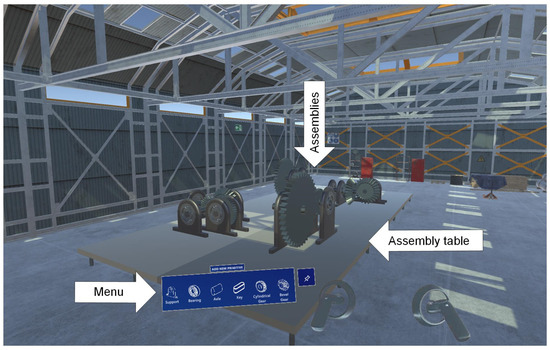
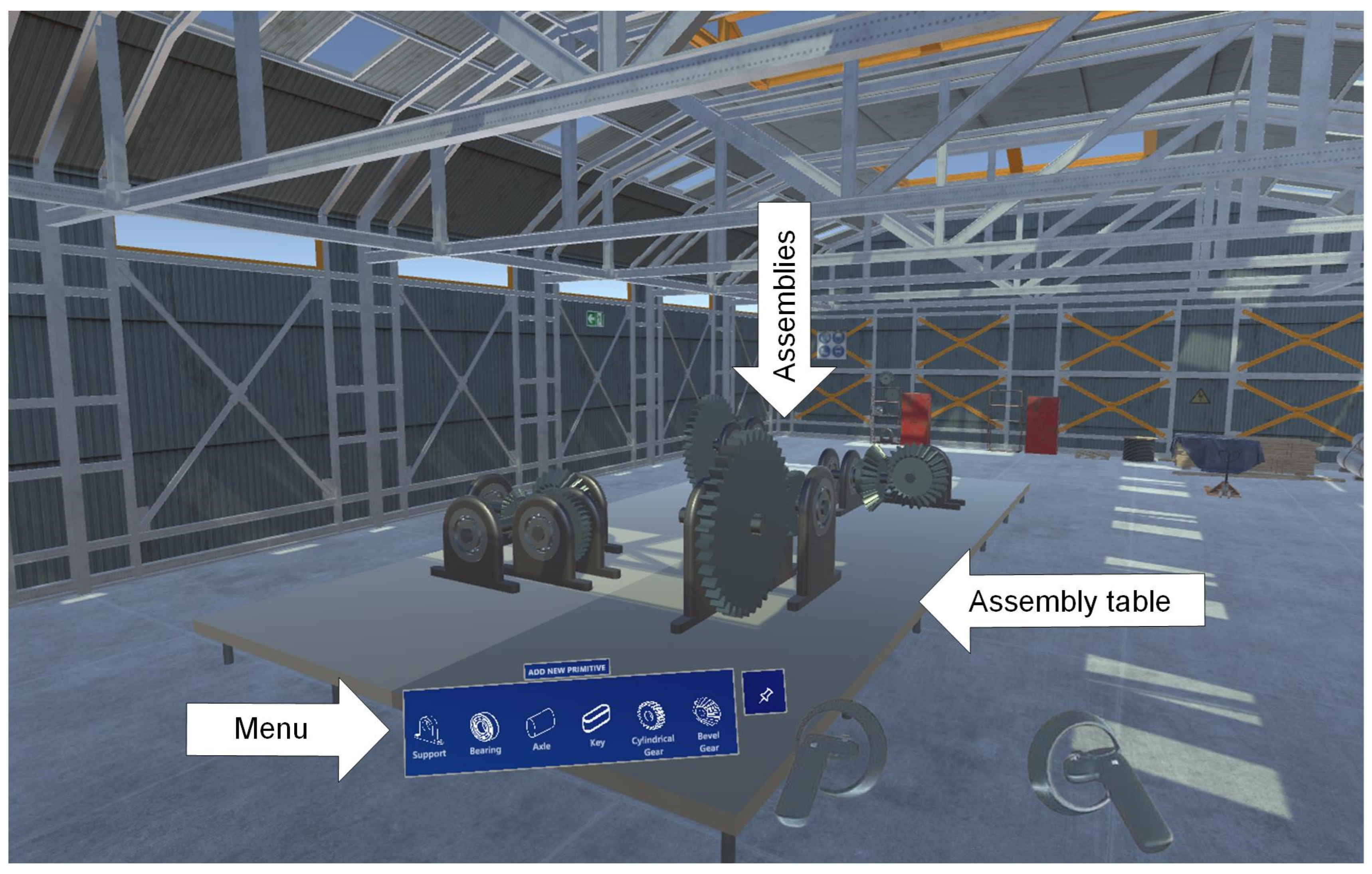
To test the multi-agent architecture proposed in this document, a virtual reality application has been developed in Unity 2022.3.10f1 for the conceptual modeling of mechanical systems, whose virtual environment is shown in Figure 1.
Figure 1.
Application environment.
The application’s operation is focused on incorporating primitives into a mechanical set, manipulating and modifying them, and subsequently positioning the existing ones according to position relationships defined by the users, resulting in a mechanical set formed by these mechanical primitives. User interaction is through menu actions or directly on the primitives entered.
2.1. Commands by User Action on the Menu
In this section, we will analyze the commands that can be executed when users interact with the buttons in the application’s menus.
2.1.1. Add New Primitive Menu
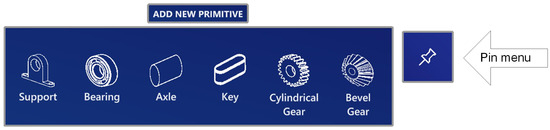
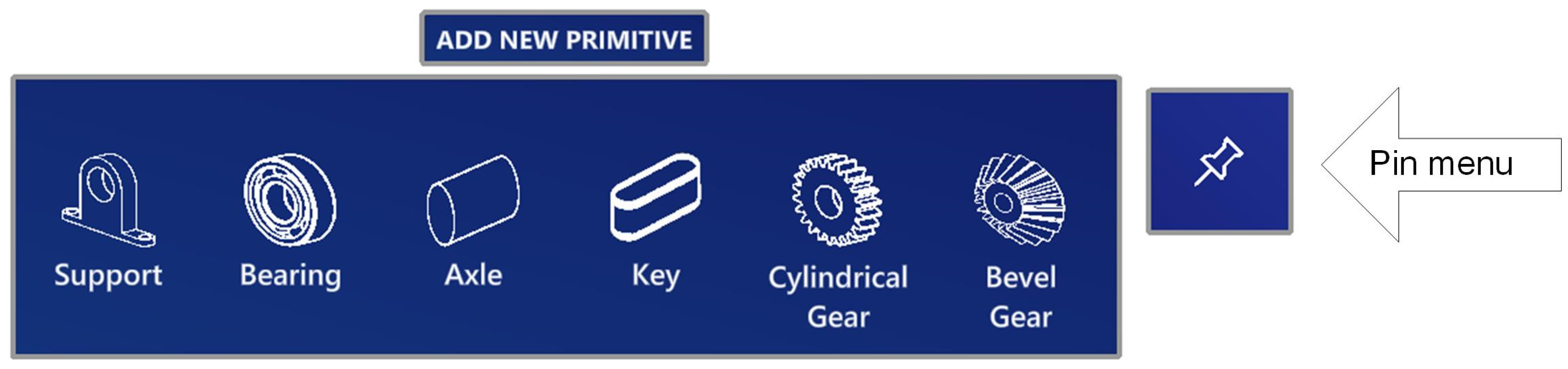
The “ADD NEW PRIMITIVE” floating menu (presented in Figure 2) is located in the vicinity of users and scrolls following their head movement. In the “ADD NEW PRIMITIVE” menu, you will find the buttons that allow you to directly generate primitives. When one of these buttons is pressed, the corresponding primitive appears close to the user and can be moved, rotated, and subsequently scaled by the user to build mechanical assemblies. In addition, there is a Pin menu button that allows the menu to be anchored in space, preventing it from moving with the movement of the user’s head.
Figure 2.
Add New Primitive Menu icons.
This menu is created at runtime, and the number of primitives that will appear in it is defined by the user.
2.1.2. Actions Menu
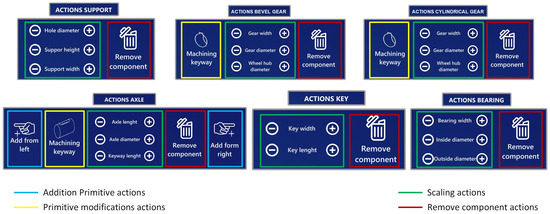
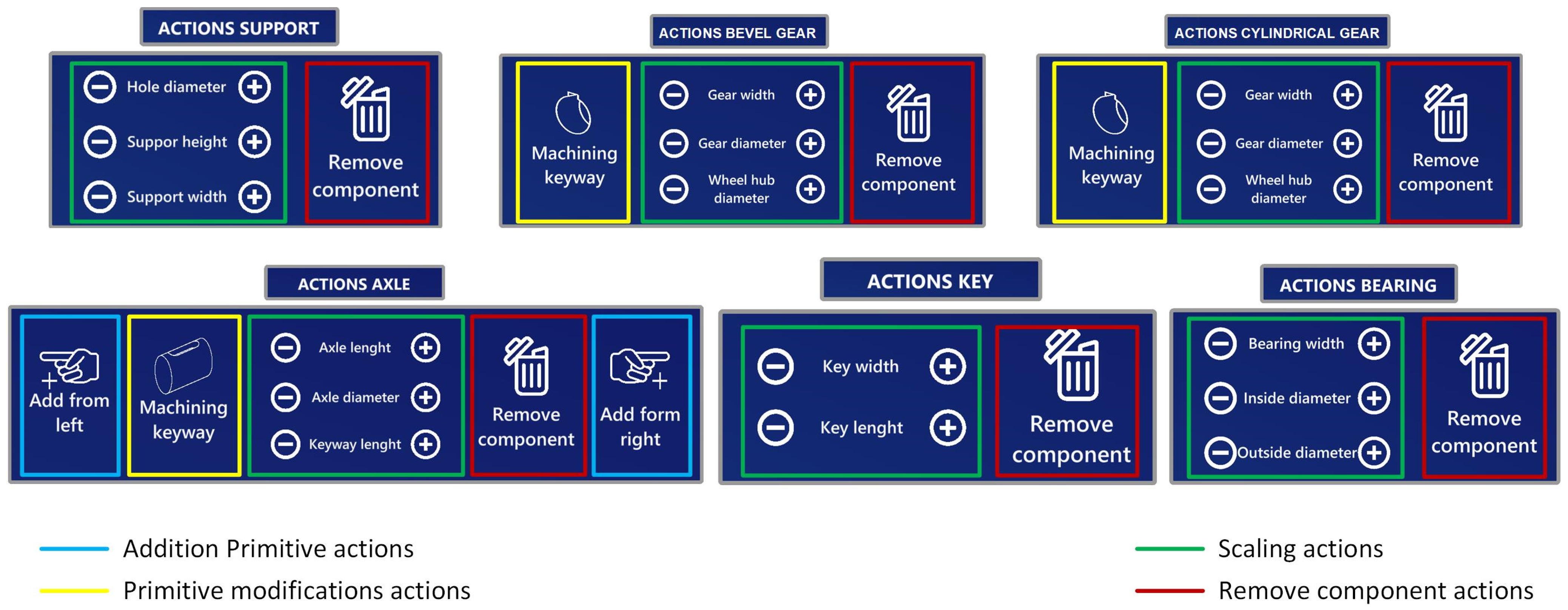
The “ACTIONS” menus appear next to the primitives introduced in the virtual world when they are selected and act directly on them. Each primitive introduced into the virtual space is associated with a menu containing the actions that can be performed on it. The actions to be performed on each primitive are configured by the user, except for the “Remove component” action, which, if not entered by the user, is added automatically. The menus are created at runtime to collect these actions. Figure 3 shows the menus defined for the support, bearing, Axle, Key, Cylindrical Gear, and Bevel Gear primitives configured in this work.
Figure 3.
Actions menu icons.
The configurable actions for primitives are:
- 1.
- Addition Primitive: Adds to an existing primitive another primitive connected to its right or left.
- 2.
- Primitive Modifications: Change one primitive for another, allowing for the simulation of machining operations.
- 3.
- Scaling: Scales up or down a certain experimentally defined value in all or only some of the directions defined by the coordinate axes.
- 4.
- Remove Component: present in all menus, allows the deletion of the primitive that has the menu associated with it.
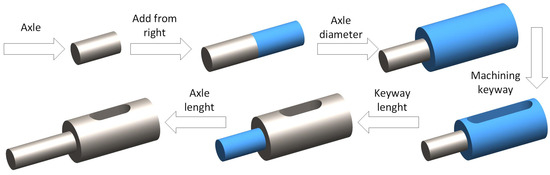
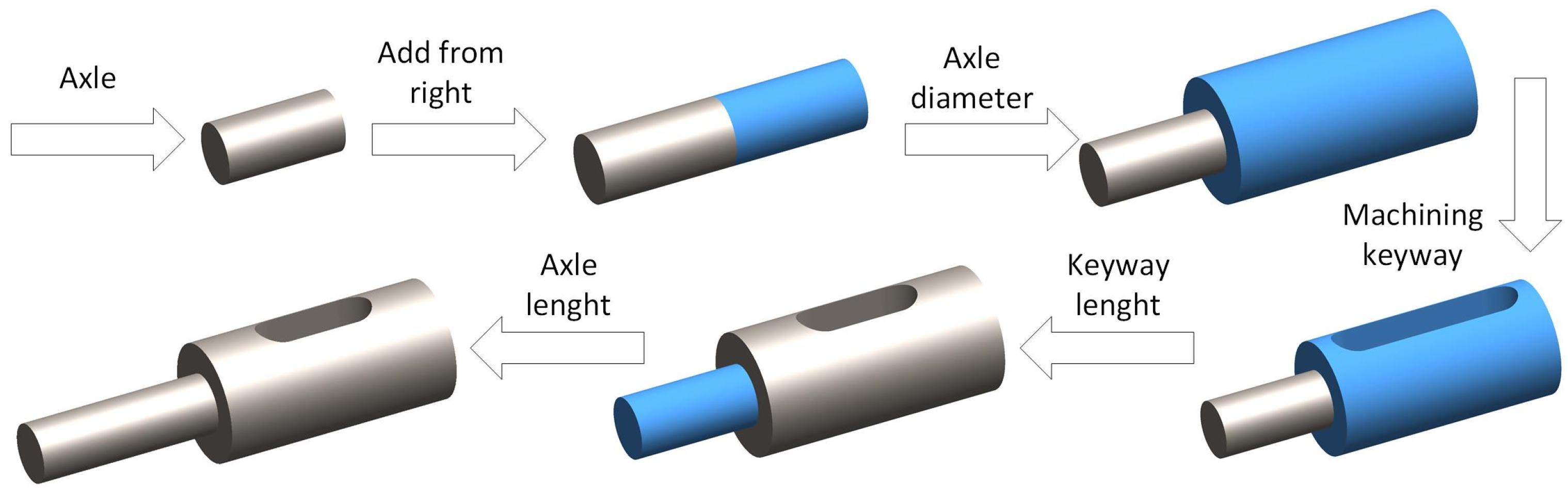
Figure 4 shows what the modifications to an Axle primitive should be after executing different actions in its “ACTIONS AXLE” menu.
Figure 4.
Modifications made to an axle from its Axle actions menu.
2.2. Commands by User Action on the Model
This section will analyze the commands users can execute by directly manipulating the model, displacement, and rotation. Both commands are carried out directly on the primitive selected by the user by placing the handles’ pointers over it and pressing the trigger button. Although we will analyze these operations separately below, the two can be performed simultaneously.
2.2.1. Displacement
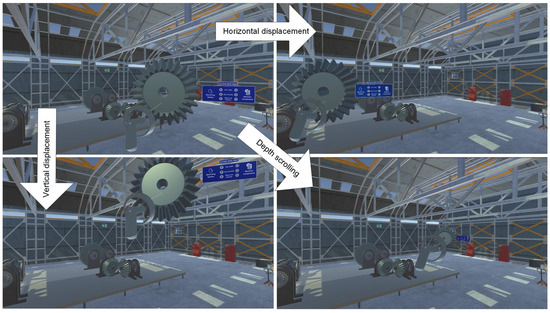
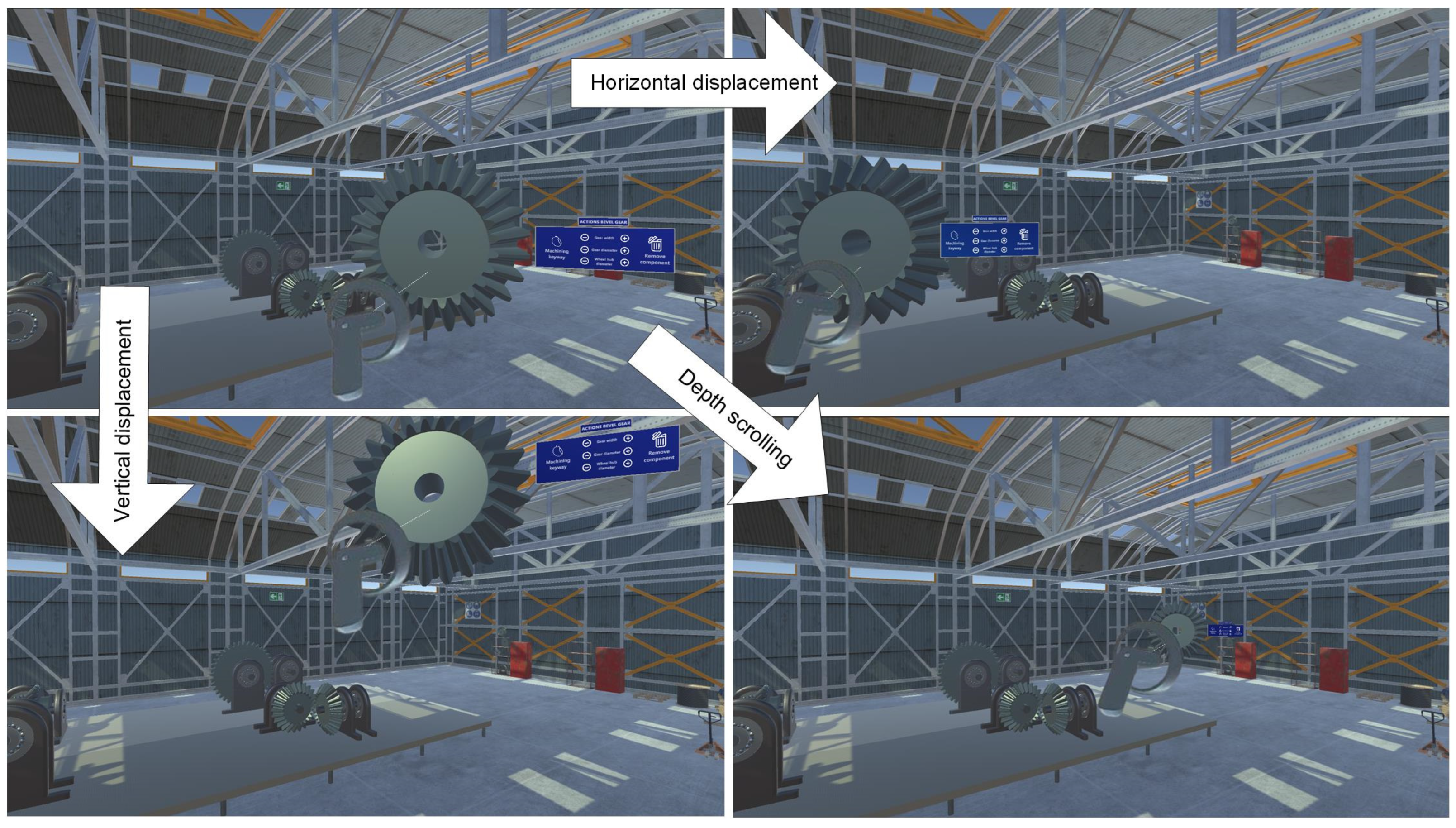
To move a primitive, the user must capture the primitive by positioning the handle cursor on it and pressing the trigger button. From then on, any move the user makes on the controller will be played back on top of the captured primitive (see Figure 5).
Figure 5.
Displacement of primitives.
When the user releases the trigger button, the primitive is released and placed at its current position. However, to facilitate relative positioning between primitives, the user can establish point-to-point position relationships between primitives in such a way that, at the end of the manipulation of a primitive, if the distance between a point defined in the manipulated primitive with respect to a point defined in another existing primitive, in any of the coordinates, is lower than an experimentally established value, the manipulated primitive is shifted to make the coordinates of both points coincide.
2.2.2. Rotation
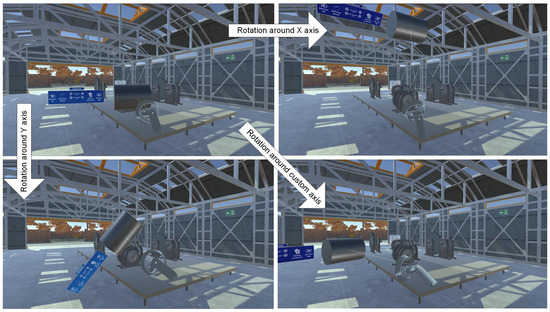
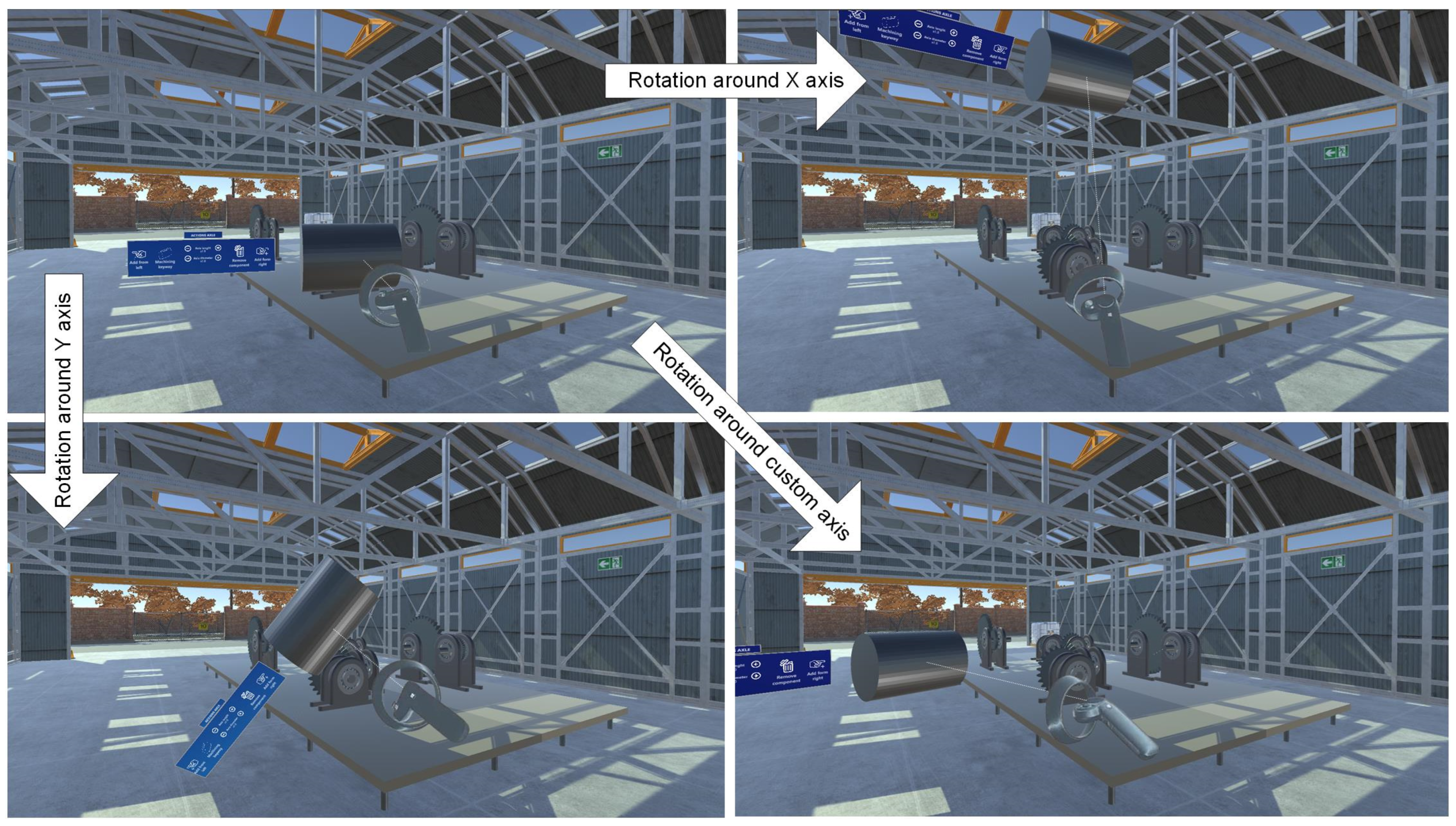
To perform the rotation operation, the user only needs to capture the primitive to be rotated by positioning the handler cursor over it and pressing the trigger button. From then on, any rotation the user makes on the controller’s three axes will be reproduced on the captured primitive (see Figure 6).
Figure 6.
Rotation of primitives.
When users release the trigger button, the primitive is released and remains with the rotation established at that moment. However, to facilitate relative orientation between primitives, the user can establish axis-to-axis orientation relationships so that, at the end of the manipulation of a primitive, if the orientation of an axis defined in the manipulated primitive with respect to another axis defined in another primitive forms a set angle or its difference at this value is less than an experimentally established value, the manipulated primitive is oriented so that both axes form the established angle.
2.3. Application Settings
As we mentioned earlier, the application offers an important novelty: the ability to choose the set of primitives you want to work with. For this reason, before running the application, the user must include among the project assets, specifically in a folder called PSAM, the settings of the different primitives to be used.
The setting of a primitive will be defined by a set of files placed in a subfolder within the PSAM folder. It must, at least, contain: a GameObject with the geometric information of the primitive; a PNG file corresponding to the representative icon of the primitive; and an Excel file in which, under a pre-established format, the relationships between primitives will be defined, as well as the actions to be executed on it. In addition, the setting primitive folder may contain other GameObjects to configure certain operations, as well as PNG image files that will be used as icons to configure the menu of actions to be executed on the primitive.
3. The Agent-Based Architecture
Unity’s traditional component-based architecture focuses on generating GameObjects that are assigned properties using components. To do this, the user must handle a variety of components, including, at the very least, transforms to control their location, size, and orientation, colliders to define collisions, and custom scripts to provide functionality.
The architecture presented in this document, based on multi-agents, aims to free the user from these tasks by having the agents perform them. Therefore, the proposed architecture comprises a component-based system in which agents perform tasks that users would otherwise have to perform. This allows users without programming or Unity knowledge to generate new components, making the application scalable.
The paradigm described above has been implemented in an architecture based on multi-agents that permits the simulation and assessment of the proposed system. Specifically, the architecture has been implemented on Unity because it also offers the possibility of creating a virtual scene.
Unity offers the GameObject programming class as a more generic class, allowing scripts that derive directly from the Unity MonoBehaviour base class to be executed. This allows associating behaviors and a messaging system with each GameObject, making each GameObject an independent agent that supports “one-shot” and “cyclic” behaviors through the “start” and “update” functions that derive directly from the MonoBehavior class. In the latter case, the cyclical process is carried out via a call for each frame of the virtual scene.
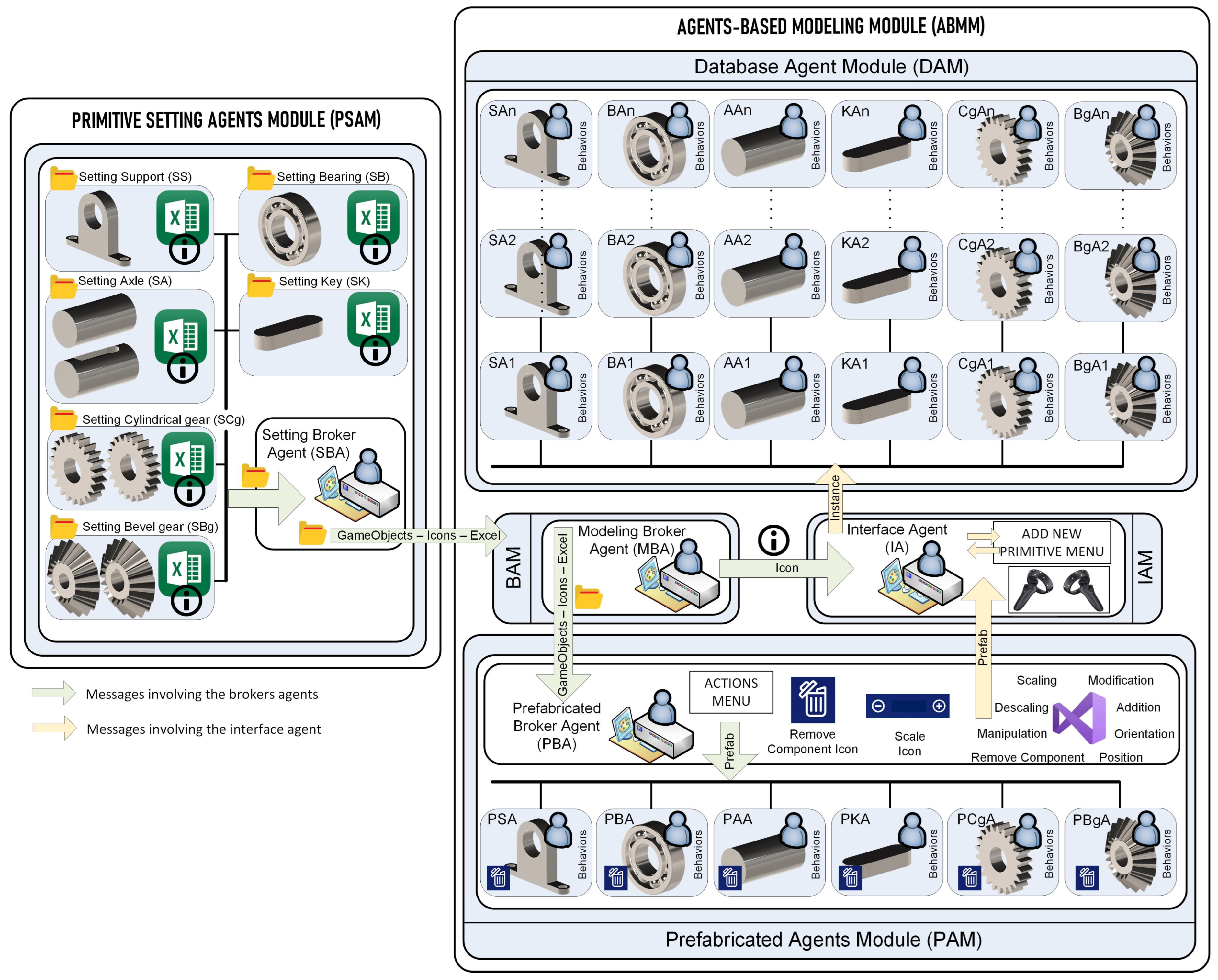
In the proposed architecture, two large independent modules can be distinguished:
- The Primitive Setting Agents Module (PSAM), composed of the Setting Broker Agent (SBA) in charge of initiating the application configuration process, and a variable number of primitive settings defined by GameObjects, images in PNG format, and Excel files containing information about the primitives’ compartments. In our case, we have worked with six primitive settings: Setting Support (SS), Setting Bearing (SB), Setting Axle (SA), Setting Keyt (SK), Setting Cylindrical Gear (SCg), and Setting Bevel Gear (SBg).
- The Agents-Based Modeling Module (ABMM) is composed of the following modules:
- a.
- The Prefab Agents Module (PAM) consists of a set of prefab agents generated from the GameObjects that contain each PSAM primitive setting. Each prefab will have a set of behaviors defined and a menu for their execution, according to the information in the Excel file for each primitive setting. All prefabs are generated by a Prefab Broker Agent (PBA), which adds a menu and a script based on the information in the PSAM primitive settings Excel file and the PNG images that serve as icons for the Scaling and Remove Component actions.In our case, based on the primitive settings indicated above, we will work with the Prefab Support Agent (PSA), Prefab Bearing Agent (PBA), Prefab Axle Agent (PAA), Prefab Key Agent (PKA), and Prefab Cylindrical Gear Agent (PCgA) and Prefab Bevel Gear Agent (PBgA).
- b.
- The Broker Agent Module (BAM) consists of a single Modeling Broker Agent (MBA) that acts as a bridge between the PSAM and the PAMs and IAMs.
- c.
- The Interface Agents Module (IAM), formed only by the Interface Agent (IA), is responsible for generating a menu to create the different agents that will be part of the Database Agents Module by instantiating the prefab PAM. In addition, it manages the application’s database and the commands the user executes when using the menu.
- d.
- The Database Agents Module (DAM) is made up of a variable number of agents according to the needs of the application at runtime, these being prefab instances generated from PAM. In our application, the agents involved will be the Support Agent (SAi), Bearing Agent (BAi), Axle Agent (AAi), Key Agent (KAi), Cylindrical Gear Agent (CgAi), and Bevel Gear Agent (BgAi).
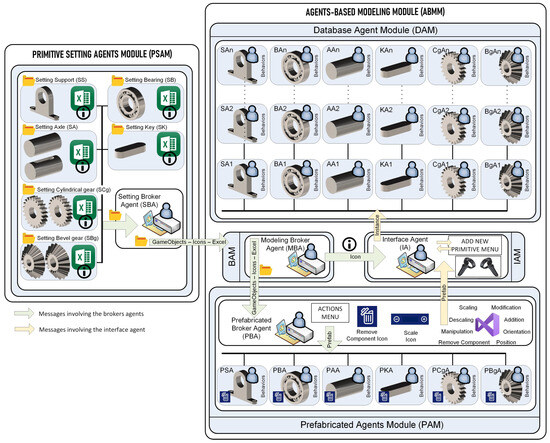
Figure 7 presents the proposed architecture. All the mentioned agents are described in more detail in the following paragraphs, where each module of the architecture is fully defined.
Figure 7.
Functional diagram of the agent-based architecture.
3.1. Primitive Setting Agents Module (PSAM)
The PSAM consists of a set of primitive settings and an SBA that initiates the configuration process when the application starts.
3.1.1. Setting a Primitive
The setting of each primitive will be defined by:
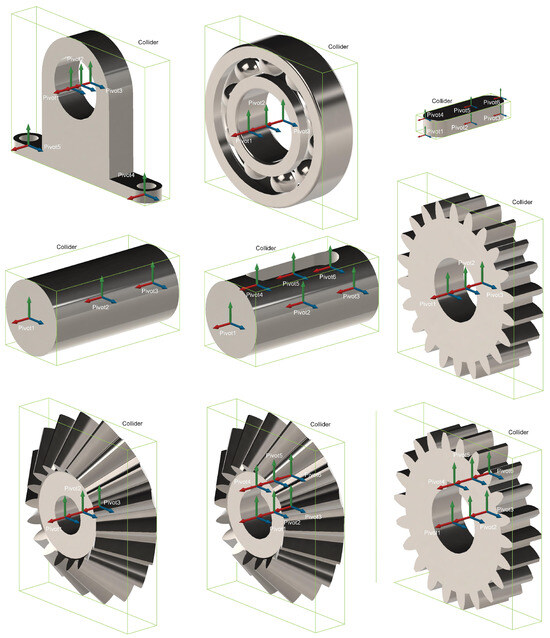
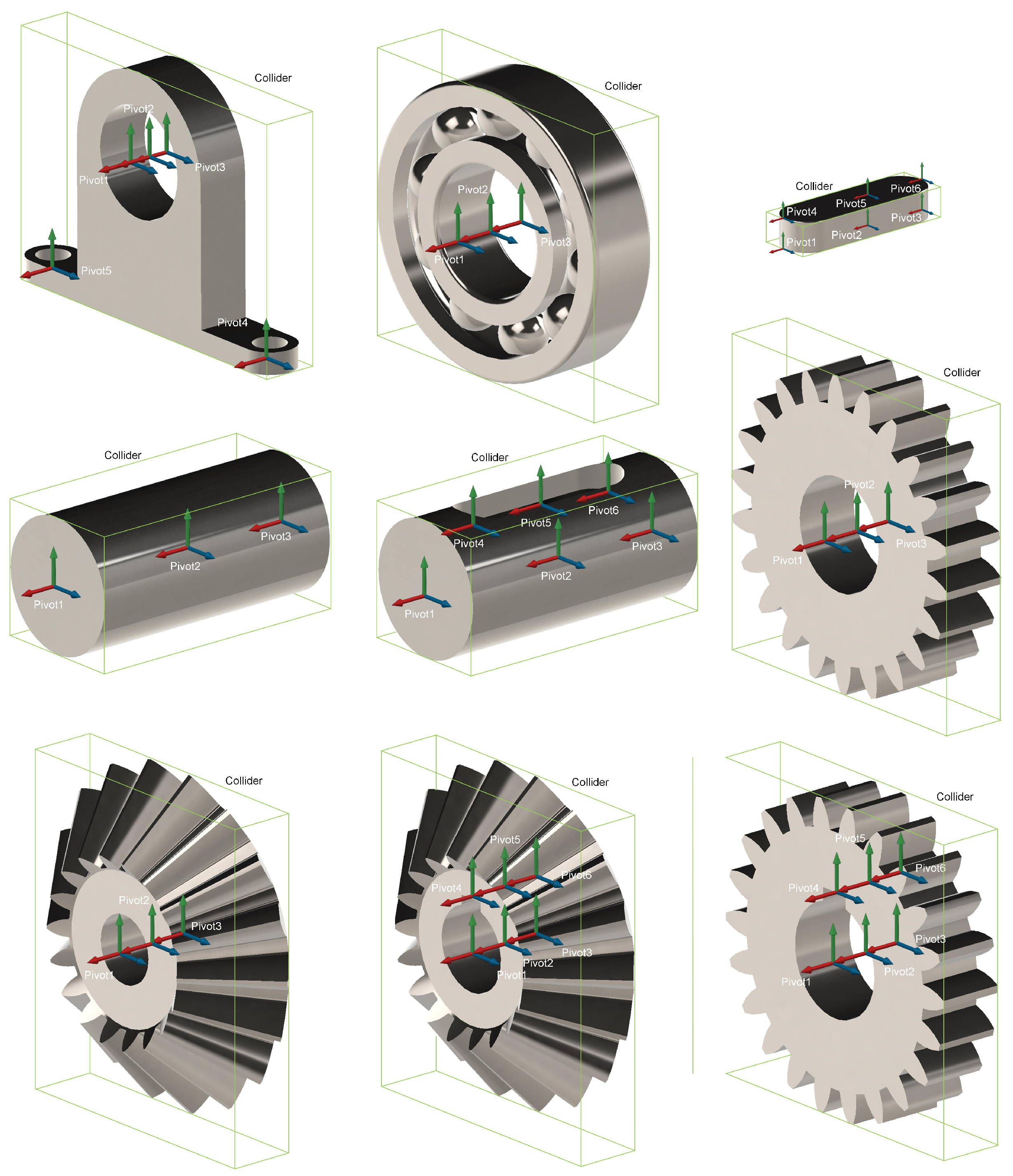
- GameObjects with a collider and a pivot. Figure 8 shows the collider and pivot created in the GameObjects, using the primitive settings described in this document.Figure 8. Colliders and pivots defined in primitives.
- PNG images to represent models in menus.
- An Excel file in which each row defines a position or orientation relationship, or an action to be performed.
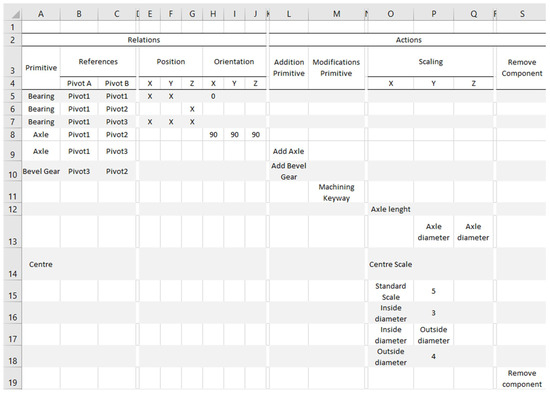
Figure 9 shows an example of the Excel file structure for any primitive. This example should be considered for illustrative purposes only and never as a functional file.
Figure 9.
An Excel file configuring the relationships and actions of a primitive.
The data that define the position or orientation relationships between the two primitives are:
- Primitive: It is the name of the primitive with which the relationship is established when its collider collides with the collider of the primitive we are manipulating.
- Pivot A and Pivot B: These are the names of the pivots that we will use to establish the position relationships between the primitive that we are manipulating and the primitive with whose collider we are colliding, respectively.
- Position, in its variants X, Y, and Z: Marking with an “X” indicates whether position relationships are established between the manipulated primitive and the one indicated in Primitive in the different coordinates.
- Orientation in its variants X, Y, and Z: Marked with a value, they are the coordinate axes that determine whether orientation relationships are established between the primitive we are manipulating and the primitive with which we are colliding.
In the example in Figure 9, from rows 5 to 9, the defined position and orientation relationships are shown. According to them, when you stop manipulating our primitive, your collider is colliding with the collider of a Bearing primitive:
- a.
- Row 5: If the distance from the X and Y coordinates of the pivot of the manipulated primitive indicated in Pivot A to the pivot of the Bearing primitive indicated in Pivot B is less than an experimentally determined value, the manipulated primitive will be shifted so that these coordinates in both pivots are matched. In addition, if the angle formed by the X-axis of the pivot of the manipulated primitive indicated in Pivot A and the X-axis of the pivot of the Bearing primitive indicated in Pivot B is zero (with an experimentally determined margin of error), the manipulated primitive is rotated so that both axes have the same orientation, thus establishing a parallelism relationship.
- b.
- Row 6: If the distance from the Z coordinate of the pivot of the manipulated primitive indicated in Pivot A to the pivot of the Bearing indicated in Pivot B is less than an experimentally determined value, the manipulated primitive will be shifted so that the Z coordinate of both pivots are the same, thus establishing a flatness relationship in the XZ planes of both pivots.
- c.
- Row 7: If the distance from the X, Y, and Z coordinates of the pivot of the manipulated primitive indicated in Pivot A to the pivot of the Bearing indicated in Pivot B is less than an experimentally determined value, the manipulated primitive will move by assigning to its pivot the coordinates of the pivot of the Bearing primitive, thus establishing a coincidence relationship.
- d.
- Row 8: If any of the pivot axes of the manipulated primitive indicated in Pivot A and the pivot axes of the primitive Axle indicated in Pivot B form an angle of 90 or 270 degrees (both the indicated and their supplementary angles are checked) with an experimentally determined margin of error, the manipulated primitive will be reoriented so that these axes are perpendicular.
On the other hand, in the columns under the title of actions, the different operations that can be performed on the primitives are defined, these being:
- The Addition Primitive defines the operation of adding a new primitive to the primitive we are manipulating if a textual label has been included in that column. The new primitive will be the one indicated in the Primitive column and will link through its pivot, indicated in Pivot B, with the pivot indicated in Pivot A of the primitive we are manipulating. The text entered will be used as a label to add a new button to the “ACTIONS” menu of the primitive, and the image in PNG format whose name matches the text will be associated with it. The added primitive will be the one whose name matches the one indicated in the “Primitive” column. As an example, in row 9 of the Excel of Figure 9, an action of type Addition Primitive is configured that creates a new Axle primitive by positioning its Pivot 3 on Pivot 1 of the manipulated primitive. This action will be executed by acting on a button added to the floating menu of the primitive that will be labeled “Add Axle,” and the icon will be the PNG image with the same name. Similarly, in row 10, an action of the same type is configured, positioning a new Bevel Gear primitive by matching its Pivot 2 to Pivot 3 of the manipulated primitive, and adding a new button to the floating menu for execution labeled “Add Bevel Gear”.
- The Modifications Primitive allows for swapping the display between two different GameObjects to simulate, for example, machining operations. In row 11 of Figure 9, an action of this type is configured that can be executed from the floating menu of the primitive by acting on a button labeled “Machining Keyway,” indicated in the Excel form, and to which an image with a PNG format and name Machining Keyway will be associated as an icon. The new GameObjects displayed will be defined in an FBX format file named “Machining Keyway”.
- Scaling: This allows for the scaling of the manipulated primitive according to the axes indicated in the Excel file because it contains a textual label. This scale can be applied globally to the whole primitive or to a part of it, depending on the contents of the Primitive column, so that, if the cell is empty, the scaling affects the entire primitive globally; otherwise, it will affect the part of the part whose name matches the contents of the cell. To facilitate the sizing of one part with respect to another, the scaling operation is not carried out continuously, but increases or decreases its size in jumps of 0.1 units each time you click on the buttons containing the + and − symbols, among which is the textual label contained in the Excel file. In row 12 of Figure 9, a scale operation is defined in the direction of its X-axis, which would produce a variation in the dimension of the entire manipulated piece, as the Primitive column is empty, in that orientation. In row 17, another simultaneous scale function is defined in the directions of the Y and Z axes, because they have the same textual labels as the global primitive, as the Primitive column is empty. In row 14, an operation scaled along the X-axis is defined again, but this time it will only affect the Center component of our primitive. This component must exist and be part of the manipulated primitive. To allow the dimensions of the primitives to be adjusted during the scaling operation to preset measures instead of being scaled freely, it has been planned to enter rows in the Excel file, in which a numerical value is entered next to the textual label indicating the number of primitives that we are going to enter with preset measurements. Thus, for example, in row 15 of Figure 9, we would be indicating that we want to introduce in the menu a scale operation labeled “Standard Scale” that, when acting on the + or − buttons of the menu defined by default in the PBA, modifies the displayed primitive by going through a list of up to five different primitives that will have been previously loaded. The primitives to be loaded must have the same name as the textual label, preceded by a number that indicates the order in which they want to be traversed. In addition, this new utility can be nested to create multidimensional arrays of primitives that can be traversed in all their dimensions. As an example, from rows 16 to 18 of the Excel file shown in Figure 9, a 3 × 4 matrix is defined that can be traversed from column to column by acting on the buttons of a menu labeled “Inside diameter” and from row to row by acting on the buttons of a menu labeled “Outside diameter”. As in the previous case, the different primitives to be displayed must have the same name, preceded by a numerical character indicating their order within the display list.
- Remove Component: This is the action executed to destroy the manipulated primitive when acting on a button, whose textual and icon label is pre-established. If the action is included in the Excel file of the setting, this button will appear in the established order; otherwise, it will be added last to the menu defined for the primitive.
3.1.2. Setting Broker Agent (SBA)
The SBA is the agent that configures the application when it starts up by sending a message to the MBA for each subfolder of settings existing in the PSAM.
3.2. Agents-Based Modeling Module (ABMM)
The ABMM comprises four clearly differentiated modules: the Broker Agent Module, the Prefab Agents Module, the Interface Agent Module, and the Database Agent Module. Next, we analyze each of them separately.
3.2.1. The Broker Agent Module (BAM)
The BAM consists exclusively of the Modeling Broker Agent (MBA), which acts as a bridge between the PSAM and the PAMs and IAMs. It has a dual function: on the one hand, it orders the creation of prefabricated elements according to their settings, and on the other, it orders the creation of a menu that allows these prefabricated elements to be instantiated. To do this, when the MBA receives a message from the SBA containing the folder with the settings for a primitive, it forwards the folder to the PBA of the PAM, which creates a prefabricated element and sends a message to the IA of the IAM with the icon associated with that primitive.
3.2.2. Prefabs Agents Module (PAM)
The PAM consists of the PBA and a variable number of agents, created at runtime by the PBA when it receives a message from the MBA, which acts as a prefab primitive used in the application.
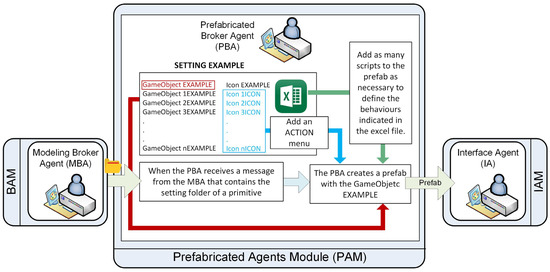
Each prefab element will contain an empty ACTIONS menu to which instances of prefab buttons will be added to execute different scripts from a predefined set (see Figure 10). Finally, the PBA sends a message to the IA indicating the existence of the new prefabricated element.
Figure 10.
Functions of the PBA.
3.2.3. Predefined Scripts
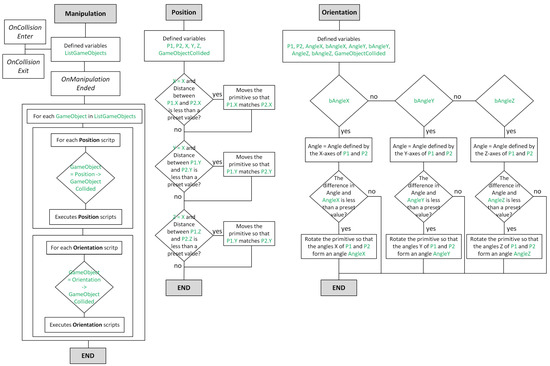
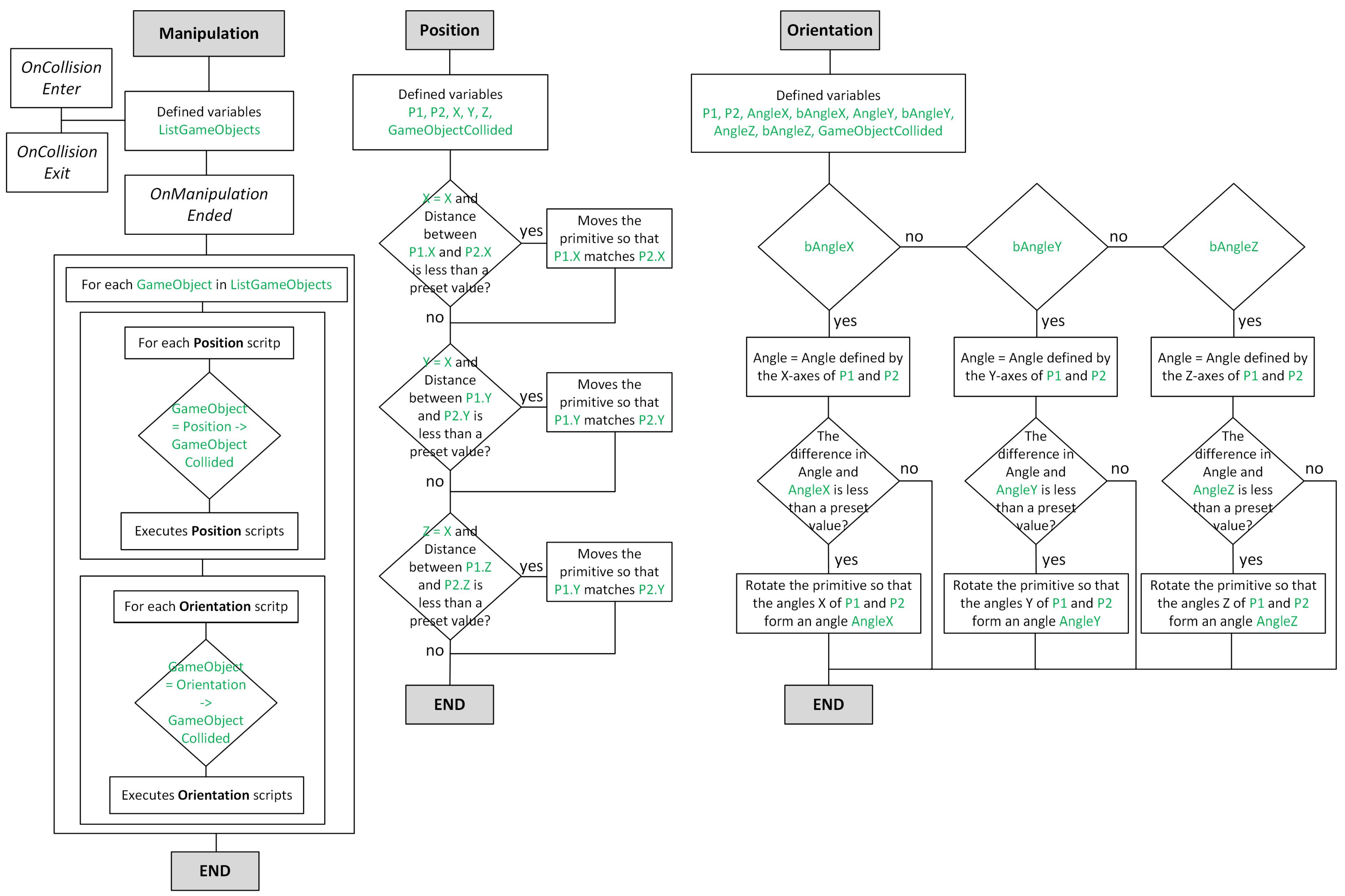
In this section, we will analyze the 8 predefined scripts in the PBA that can be associated with prefab scripts: Manipulation, Position, Orientation, Addition, Modification, Scale, Descale, and Remove Component. Figure 11 presents the flowcharts for the scripts Manipulation, Position, and Orientation.
Figure 11.
Scripts: Manipulation, Position, and Orientation.
The Manipulation script, associated by default with all prefabs, runs automatically when the manipulation of a GameObject is complete. This script initiates the Position and Orientation scripts between the manipulated GameObject and the other GameObjects it collides with, and defines a position or orientation relationship between them. The list of GameObjects with which there is a collision is maintained by Unity’s own functions.
The Position script enforces the position relationships between GameObjects in such a way that if the distance between the pivots of two GameObjects, between which a position relationship has been established on any of their axes, is less than a preset value, the manipulated GameObject moves to match the pivots in the directions of the axes between which the relationship has been established.
In the same way, the Orientation script is responsible for enforcing the defined orientation relationships, rotating the manipulated GameObject when the angle formed by the pivot axis and the pivot axis of another GameObject with which an orientation relationship has been established is less than a preset value.
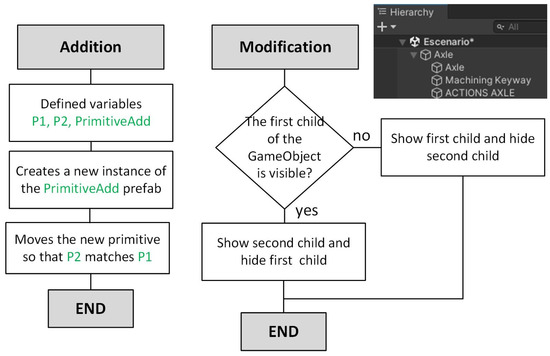
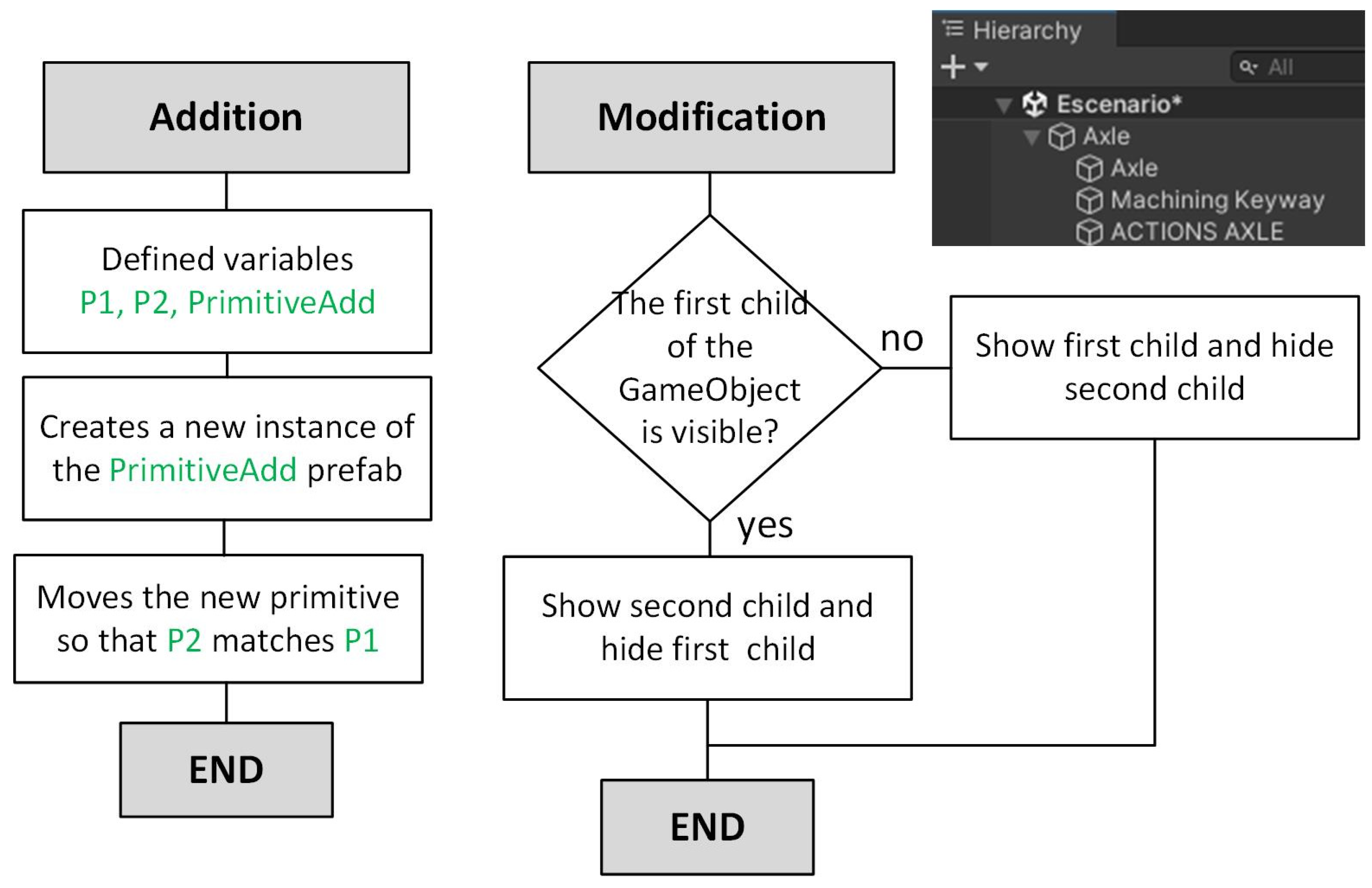
Figure 12 shows the flowchart for the Addition and Modification actions, along with the hierarchical structure of the prefabs. This structure is generated during the reading of the Excel file and will be carried out, as we will see later, by the PBA.
Figure 12.
Scripts: Addition and Modification.
The Addition script, executed from the ACTIONS menu, allows adding a new primitive to an existing one, instantiating a specified prefab, and positioning it so that its pivot P2 matches the pivot P1 of the manipulated primitive.
The Modification script, also accessible from the ACTIONS menu, allows toggling the visibility of the prefab’s children within its hierarchical structure.
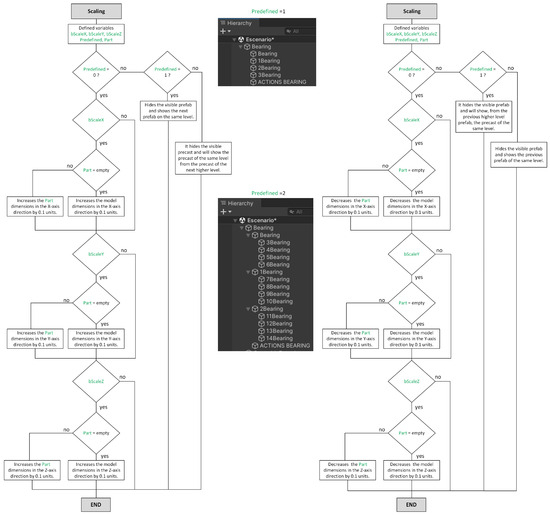
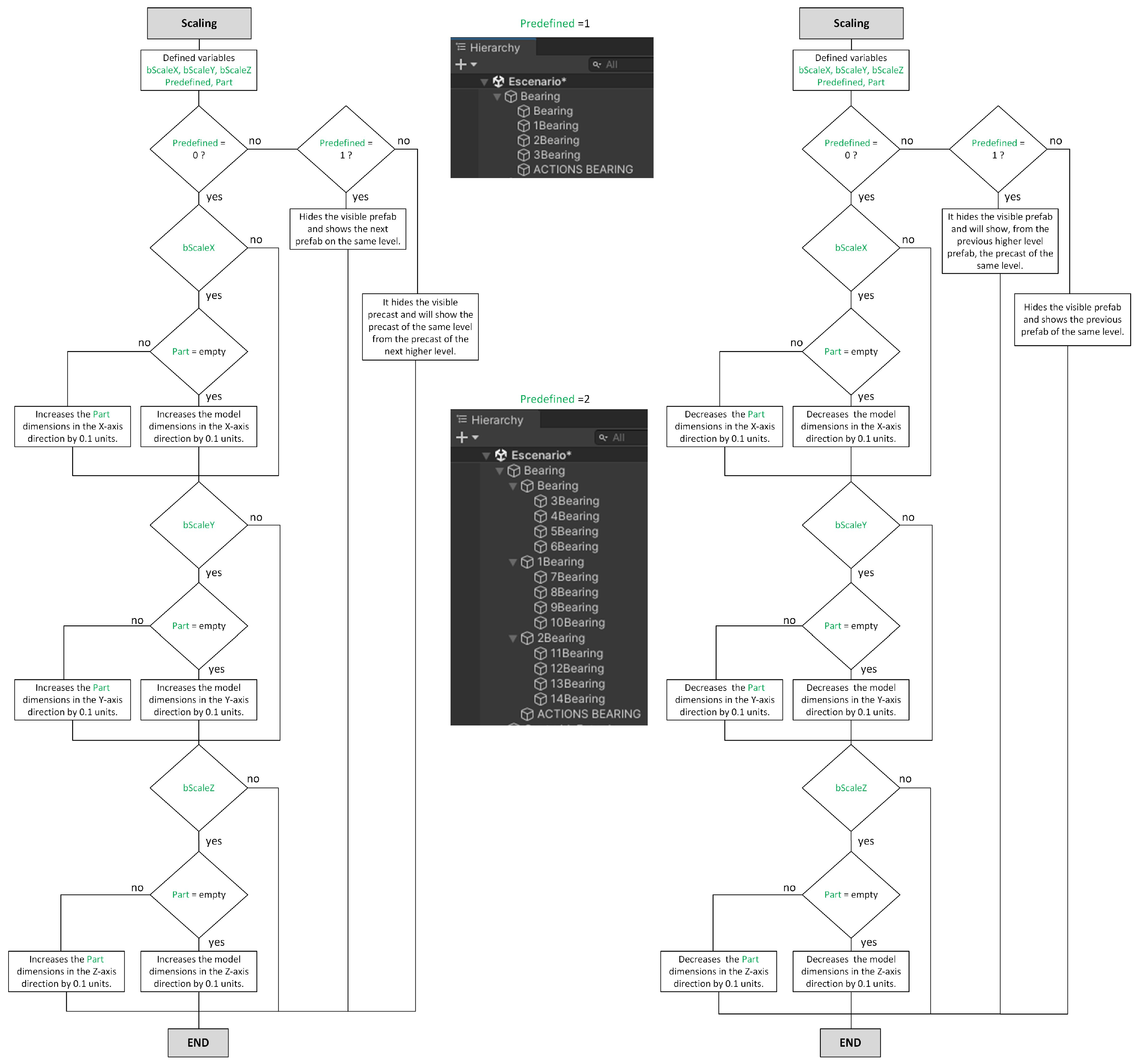
The predefined scripts, Scale and Descale, are executed by pressing the + and − buttons in the action scale menu and allow for performing two different actions.
The first makes GameObjects unable to scale continuously by forcing them to take default values, as can happen, for example, with standardized elements. In this case, the action allows traversing a set of prefabs previously hierarchized as an array at a single hierarchical level, or as a matrix at two levels.
The second performs continuous scaling on all or part of the primitive, as specified in the Excel configuration, with a preset value of 0.1 units in the X, Y, and/or Z directions set in the configuration; Figure 13 shows the flowchart for this script.
Figure 13.
Scripts: Scaling and DeScaling.
Finally, the Remove Component script simply destroys the GameObject.
3.2.4. Functions Performed by the PBA
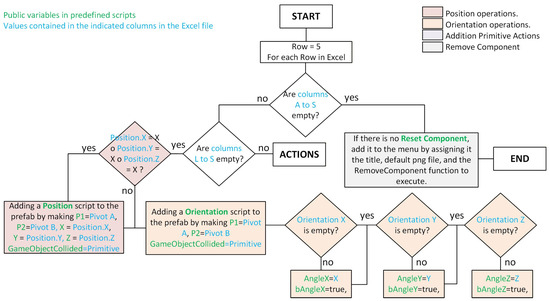
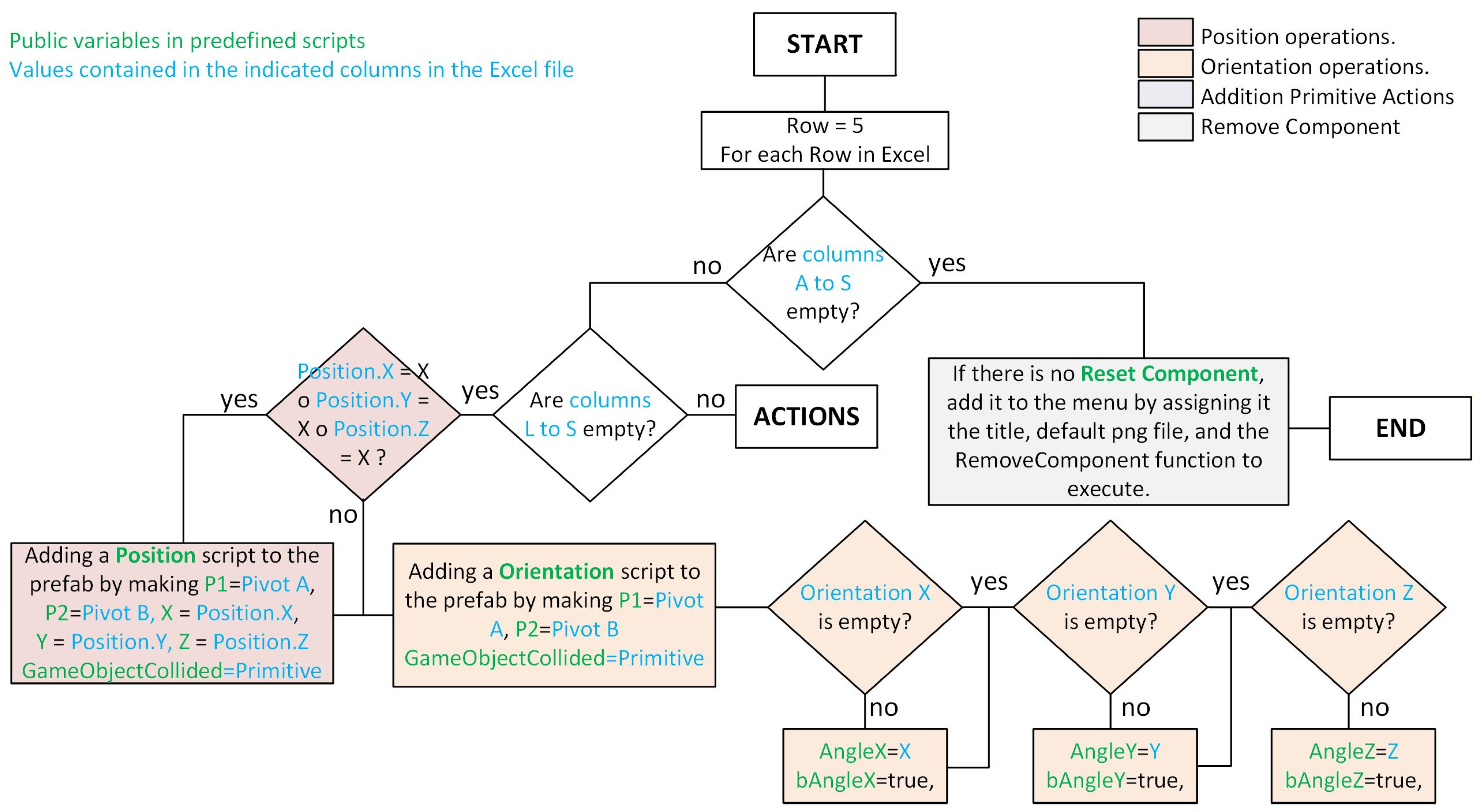
The PBA is the agent responsible for interpreting the Excel file provided by the user and translating it into a set of prefabricated components, including predefined scripts. To do this, it iterates through the rows of the Excel file and performs the following.
If the row does not contain any information, indicating that the Excel file has been read in its entirety, and if the ACTIONS menu of the prefabricated component does not contain a Remove Component button, it adds one and assigns it the label “Remove Component,” an icon with the image that the PBA has defined by default for this function, and the predefined Remove Component script that will be executed when the user clicks on that button. Finally, the script’s execution ends.
If the row contains information in the “Relations” columns, the user will define a relationship between GameObjects in such a way that:
- If there is a position relationship because one of the “Position” columns is marked with an “X”, a Position script is added to the prefabricated object with respect to the GameObject that appears in “Primitive”, between the respective pivots that appear in the “Pivot A” and “Pivot B” columns and between the directions that contain an “X” in the “Position” columns.
- If there is an orientation relationship because a numerical value appears in any of the “Orientation” columns, an Orientation script is added with respect to the GameObject listed in Primitive, between the respective pivots listed in “Pivot A” and “Pivot B,” and the axes between which the orientation relationship will exist and the angle that may exist between their axes are established.
Figure 14 shows the flowchart of the script that interprets relationships defined in the Excel file.
Figure 14.
PBA flow diagram. Relations.
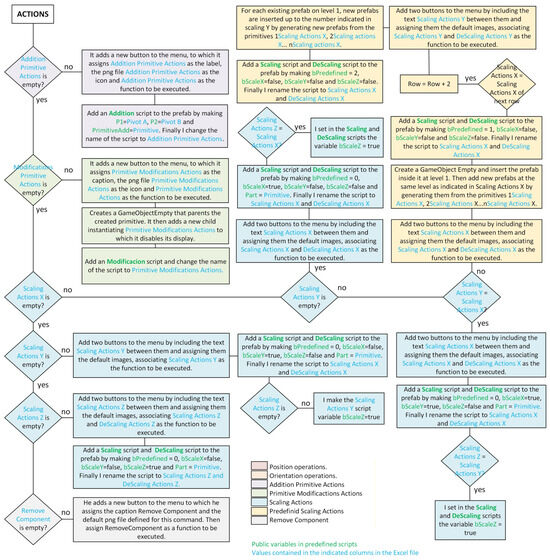
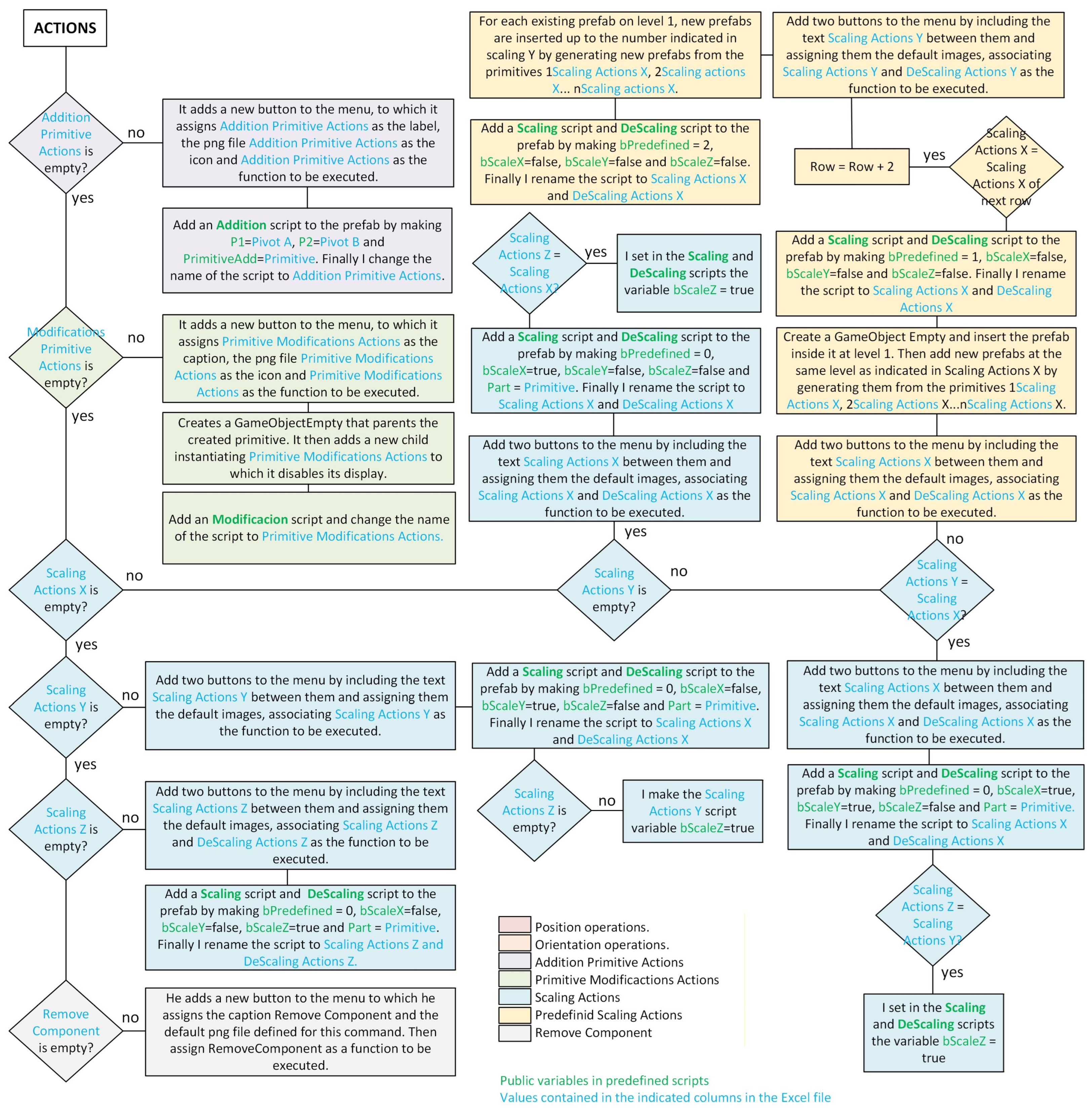
If the row contains information in the “Actions” columns, the user will request the creation of a button in the menu associated with the primitive to execute a predefined action on the primitive.
- If the information is in the “Addition Primitive” column, a new button is added to the ACTION menu, which is assigned the text label contained in the “Addition Primitive” cell, the icon with the same name from the primitive’s settings folder, and an Addition script that, when executed, will add a new primitive of the type indicated in the “Primitive” column to the pivot indicated in the “Pivot A” column, joined by the pivot indicated in “Pivot B”.
- If the information is in the “Modification Primitive” column, a new button is added to the ACTION menu, which is assigned the text label contained in the “Modification Primitive” cell, the icon with the same name from the primitive’s settings folder, a Modification script, and a hierarchical structure is created by moving the GameObject to the second level and adding a new GameObject, initially hidden, generated from the primitive included in the primitive settings with the same name as the one in the “Modification Primitive” cell. Finally, a Modification script will be added to the prefab, which will be assigned the name given in the label, and will be configured as the script to be executed when the new button added to the ACTION menu is activated.
- If the information is found in the “X” column of “Scaling,” the two buttons + and − predefined in the PBA for scaling are added to the ACTIONS menu of the primitive, the text indicated in the cell of the X axis of scaling is positioned between them as a label, and they are assigned as scripts to be executed when the user acts on the Scaling and DeScaling buttons respectively, and then:
- a.
- If the scaling on the Y axis does not contain any information, the Scaling and DeScaling scripts indicate that there are no predefined models (bPredefined = 0) and that scaling will be performed exclusively in the X axis direction (bScaleX = true, bScaleY = false, bScaleZ = false). Finally, it is checked whether the scaling on the Z axis contains the same value as the cell on the X axis of scaling, in which case the assigned Scaling and DeScaling scripts are instructed that scaling must also be performed in the direction of the Z axis (bScaleZ = true).
- b.
- If the scaling on the Y axis contains information that matches the content of the X axis of Scaling, the Scaling and DeScaling scripts are instructed that there are no predefined models (bPredefined = 0) and that scaling will be performed in the X and Y axis directions (bScaleX = true, bScaleY = true, bScaleZ = false). Finally, it checks whether the scaling on the Z axis contains the same value as the cell on the X axis of Scaling, in which case it indicates to the assigned Scaling and DeScaling scripts that the scaling must also be performed in the direction of the Z axis (bScaleZ = true).
- c.
- If the scaling on the “Y” axis contains information that differs from the content of the “X” axis of “Scaling,” the hierarchical structure of the prefabricated object is modified by creating an empty GameObject in which the prefabricated object is inserted at level 1, adding as many prefabricated objects at this same level as indicated in the cell of the “Y” axis of “Scaling.” These prefabs will be created from the existing GameObjects in the primitive setting with a name identical to that of the initial primitive, preceded by a number indicating the order of insertion.
- d.
- Subsequently, the Scaling and DeScaling scripts will indicate that predefined models must be traversed when the scaling buttons are pressed (bPredefined = 1).
- e.
- Finally, it checks whether the value of the cell in the “X” axis of “Scaling” in the next row of the Excel file matches the value of this same cell in the current row, in which case the number of rows analyzed in the Excel file is increased by two. Once the document row has been updated, two new buttons from the PBA predefined buttons for scaling are added to the ACTIONS menu of the primitive, including the text indicated in the “Scaling” X-axis cell as a label and the hierarchical structure of the prefab is modified by inserting into each level 1 GameObject of the current structure as many prefabs as indicated in the Y axis cell of scaling, which will be created from the existing GameObjects in the setting of the primitive with a name identical to that of the initial primitive preceded by a number that will indicate the order of insertion.
- f.
- Subsequently, the Scaling and DeScaling scripts will be instructed that there are predefined models in a matrix structure that must be traversed when the scaling buttons are pressed (bPredefined = 2).
- If there is no information in the “X” column of “Scaling” but there is in the “Y” column, the two buttons + and − predefined in the PBA for scaling are added to the ACTIONS menu of the primitive, the text indicated in the cell of the “Y” axis of “Scaling” is positioned between them as a label, and assign them as scripts to be executed when the user acts on the Scaling and DeScaling buttons, indicating that there are no predefined models (bPredefined = 0) and that scaling will be performed exclusively in the “Y” axis direction (bScaleX = false, bScaleY = true, and bScaleZ = false). Finally, it checks whether the scaling on the “Z” axis contains the same value as the cell on the “Y” axis of “Scaling,” in which case it indicates to the assigned Scaling and DeScaling scripts that scaling must also be performed in the direction of the Z axis (bScaleZ = true).
- If there is no information in columns “X” and “Y” of “Scaling” but there is in column “Z,” the two buttons + and − predefined in the PBA for scaling are added to the ACTIONS menu of the primitive, the text indicated in the cell of the “Z” axis of “Scaling” is positioned between them as a label, and assign them as scripts to be executed when the user acts on the Scaling and DeScaling buttons, indicating that there are no predefined models (bPredefined = 0) and that scaling will be performed exclusively in the Z axis direction (bScaleX = false, bScaleY = false, and bScaleZ = true).
- If the cell containing information corresponds to “Remove Component,” a button is added to the ACTIONS menu and assigned the label “Remove Component,” the image that the PBA has defined by default for this function as its icon, and the predefined Remove Component script as the function to be executed when the user acts on that button.
Figure 15 shows the flowchart of the script that interprets user-defined actions in the Excel file.
Figure 15.
PBA flow diagram.
3.2.5. The Interface Agent Module (IAM)
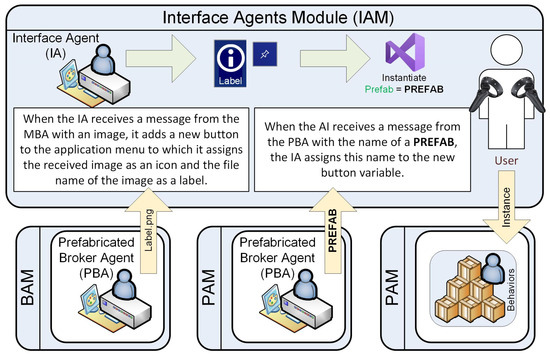
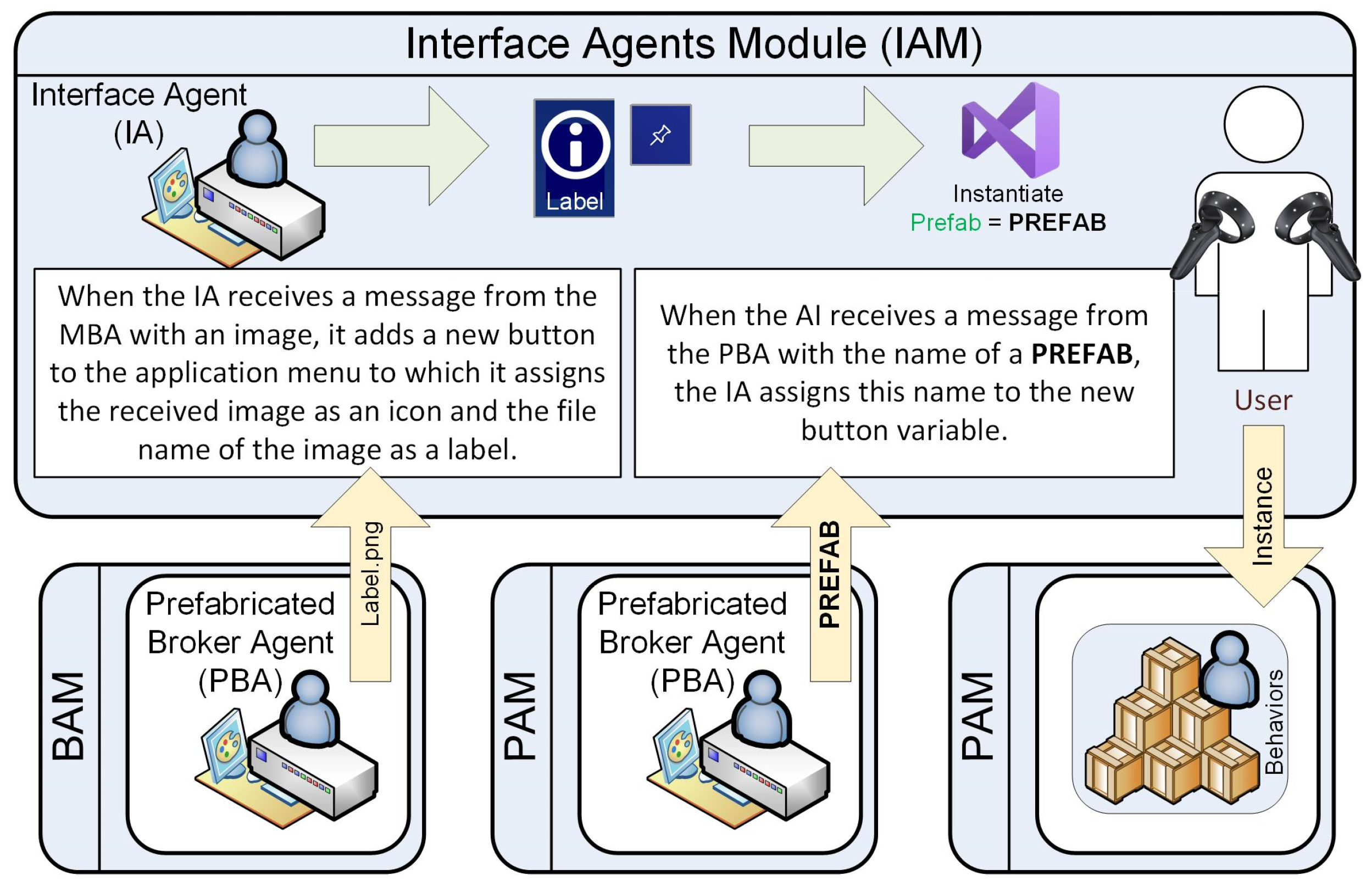
The IAM consists solely of the IA and its main functions, as shown in Figure 16: generating a menu at runtime according to the application’s needs, and generating instances of the prefab components created in the PAM when the user requests them.
Figure 16.
Functions of the IA.
To generate the runtime menu, in the IAM, there is a predefined initially empty menu of the type ADD NEW PRIMITIVE, to which it will later add instances of a prefab button, identical to the one defined in the PBA, modifying its label and icon. This button is assigned a function that instantiates the prefab defined in a public variable.
To do this, when the IA receives a message from the MBA containing an image file, it instantiates a new button from the prefab and assigns the received image as its icon. The prefab’s name is subsequently modified when the IA receives a message from the PBA containing that name.
Finally, when the user acts on any of the buttons of the ADD NEW PRIMITIVE menu, the function established for the corresponding button is executed in the IAM, instantiating the prefab indicated in the prefab variable and sending it to the DAM.
3.2.6. The Database Agent Module (DAM)
The Database Agents Module (DAM) consists of a variable number of agents, generated at runtime according to the application’s needs, which are instances of the prefab PAM. In our application, the agents involved will be Support Agent (SAi), Bearing Agent (BAi), Axle Agent (AAi), Key Agent (KAi), Cylindrical Gear Agent (CgAi), and Bevel Gear Agent (BgAi).
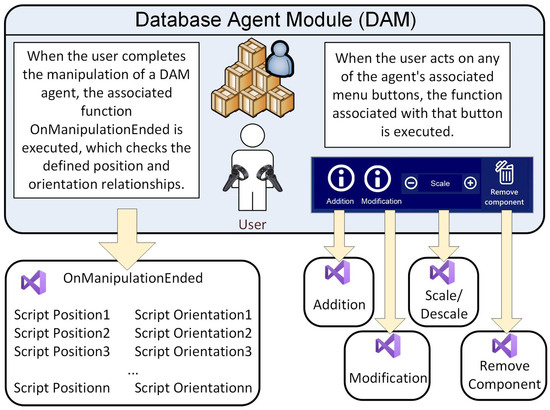
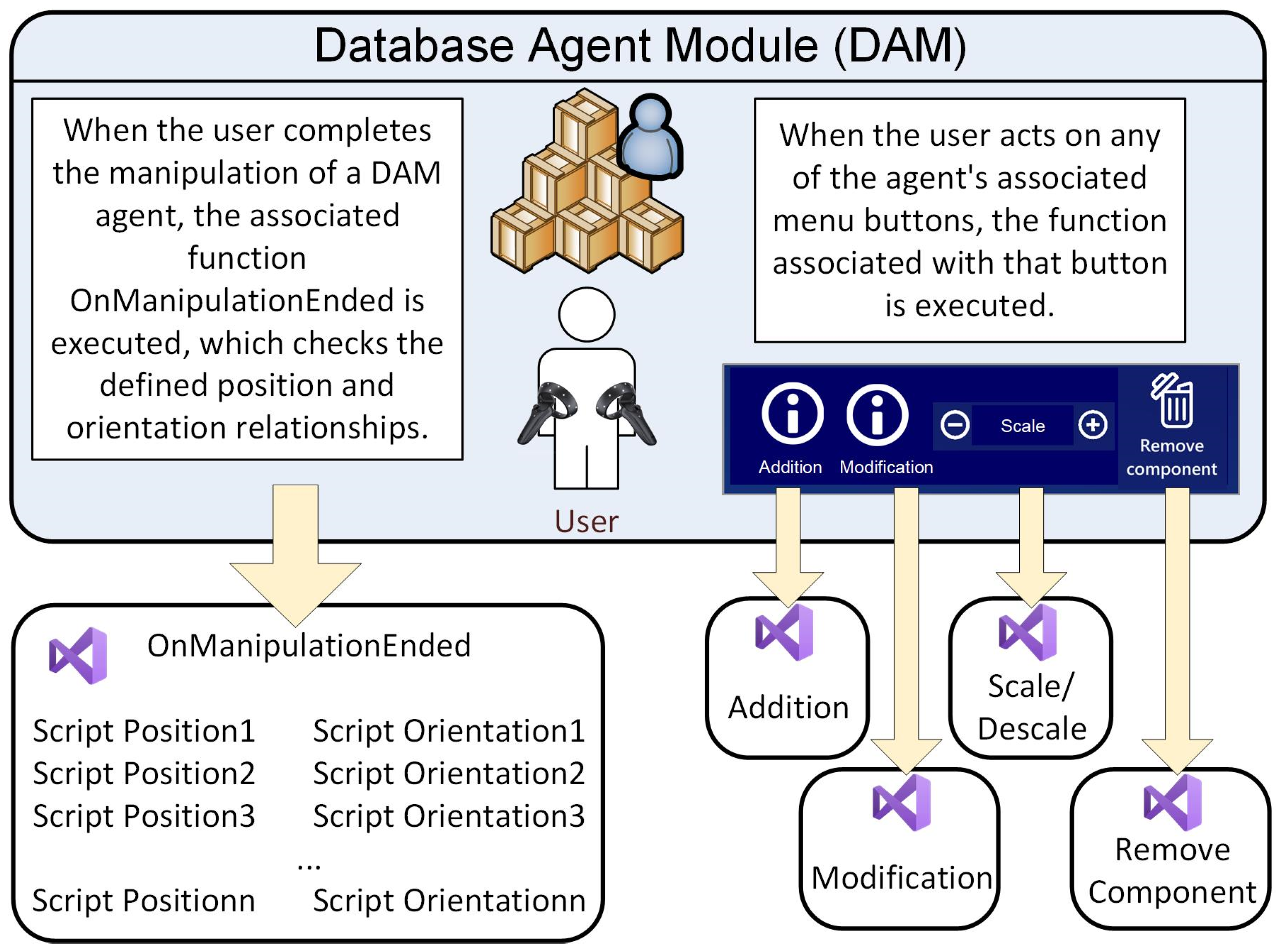
When the user finishes manipulating a DAM agent, the position and orientation functions defined for that agent are automatically executed, ensuring the position and orientation relationships the user defined.
On the other hand, when the user acts on the menu associated with the agent, the user-configured function for the button pressed in that menu will be executed. Figure 17 summarizes the functions performed by the agents that make up the DAM.
Figure 17.
Functions of the DAM.
4. Experimental Work
The experimental work has focused on qualitatively assessing the proper functioning of the application developed to model mechanical assemblies in virtual reality.
To do this, we worked with a group of four professors from the Higher Technical School of Industrial Engineering at the Polytechnic University of Cartagena, all of whom had sufficient knowledge to interpret mechanical assembly drawings and some experience in using virtual reality applications.
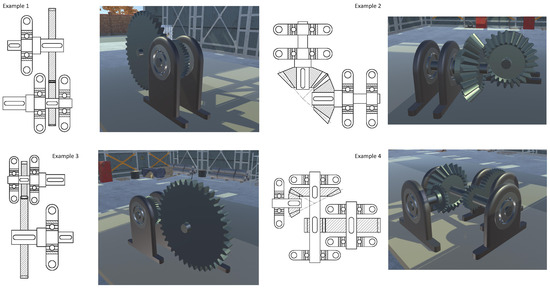
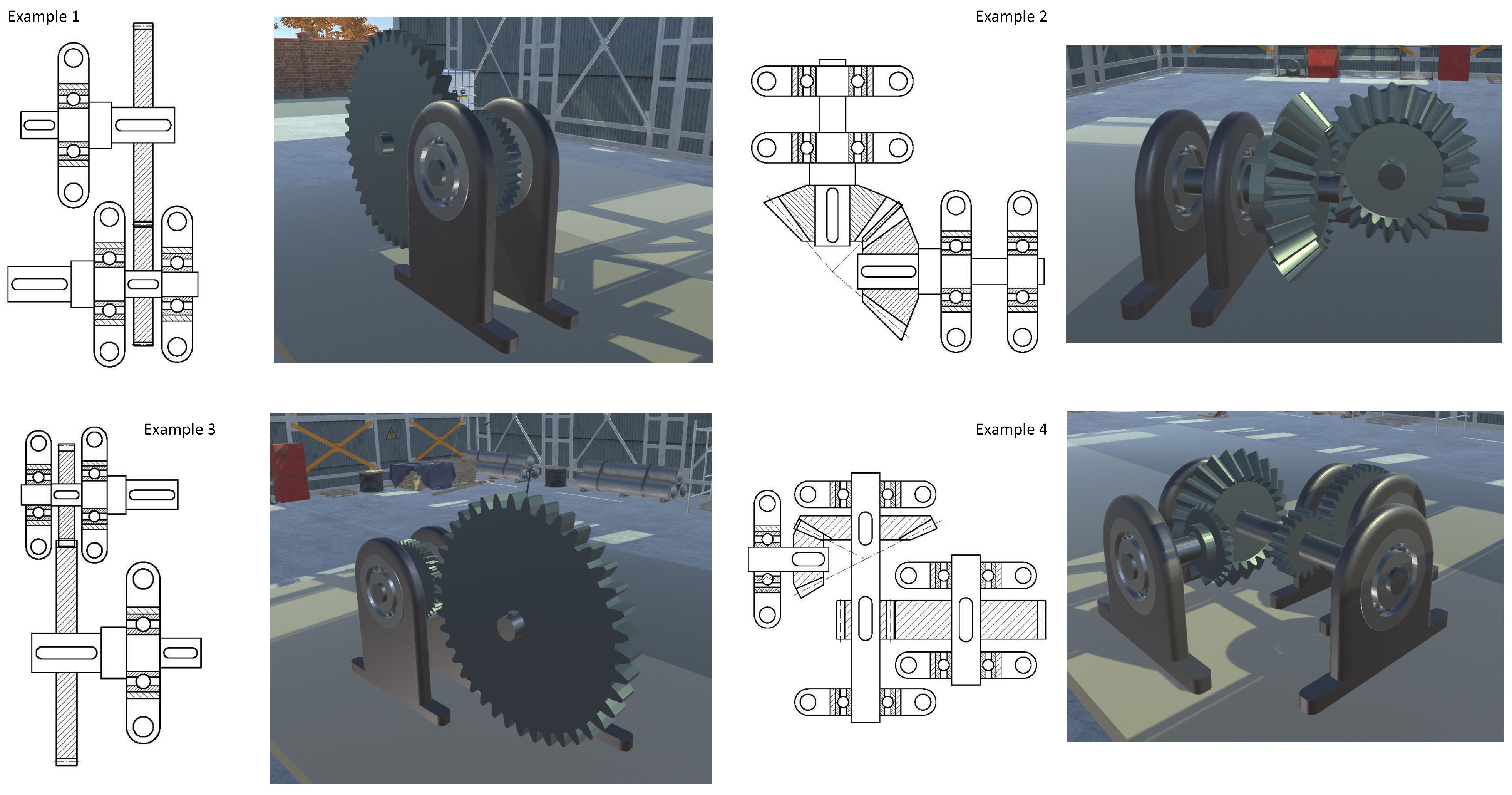
The four professors individually participated in the virtual experience offered by the software presented in this paper, which focused on modeling the four mechanical assemblies shown in Figure 18, composed of six different mechanical components, within a maximum time of 60 min.
Figure 18.
Modeled assemblies.
Before each professor began the modeling process, they were allowed to work freely with the software for 15 min, assisted by one of the authors of this research to help them understand the software’s operation and modeling methodology.
Once the virtual modeling experience was complete, the only evaluation was whether the modeling of the four assemblies had been successful.
4.1. Hardware
The application was run on a Windows 10 64-bit laptop with an Intel® Core™ i7-8750H 2.20 GHz processor, 8 GB of RAM, and an NVIDIA GeForce GTX 1080 Ti graphics card. The device used for the immersive experience was an HP Reverb virtual reality HMD with a 2160 × 2160 per-eye panel resolution.
4.2. Software
The software used was the application described in this paper, which provided a total of six configuration folders. The settings folders were the following:
- 1.
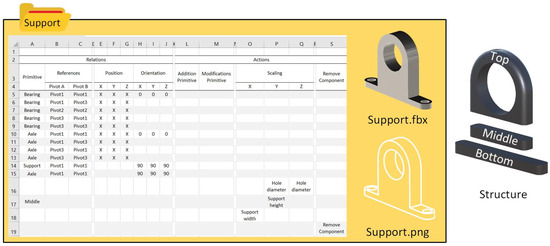
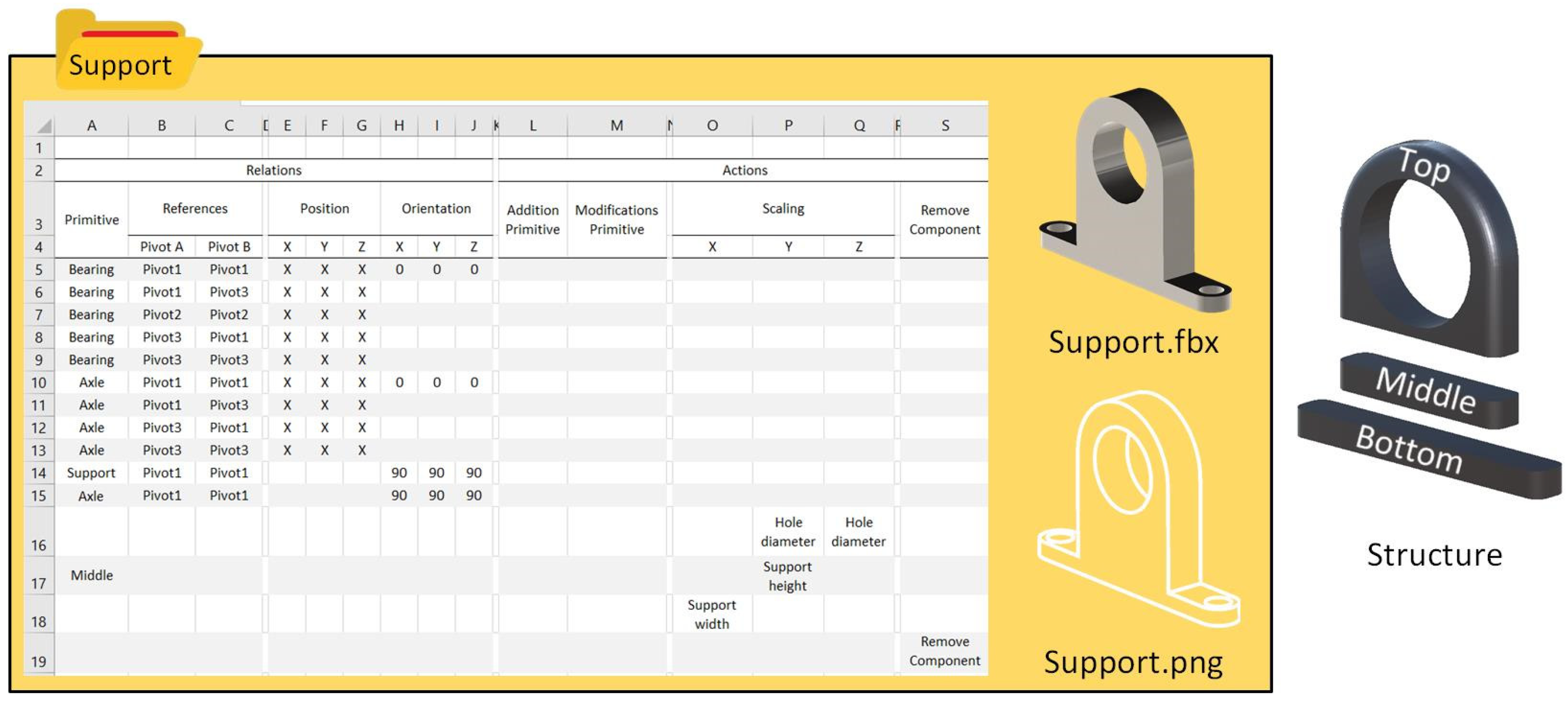
- Support (see Figure 19). It contains a primitive in FBX format made up of three components, Top, Middle, and Bottom, which allows scaling each of them separately. In addition, it contains a single image that will be used in the “ADD NEW PRIMITIVE” menu, and an Excel configuration file in which it is defined:Figure 19. Support settings folder.
- a.
- Position and orientation relationships with the Bearing and Axle primitives allow alignment with them in the expected place, and orientation relationships with the Axle primitives and the support itself to facilitate a perpendicular orientation with respect to other existing ones.
- b.
- Of the three scaling operations, the first acts on the Y and Z axes of the entire primitive with the aim of increasing the diameter of the hole without producing deformation of the hole, the second acts only on the Y axis of the Middle component to allow increasing the height of the primitive without producing deformations in the hole, and the third acts on the X-axis of the entire primitive to increase its overall width.
- c.
- An operation that allows the component to be removed.
- 2.
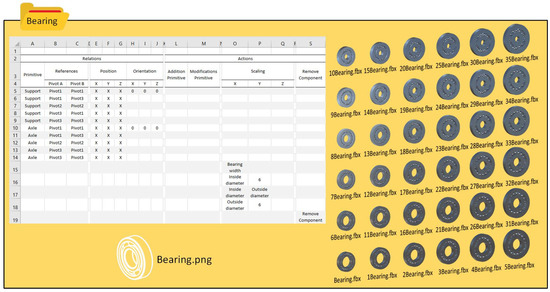
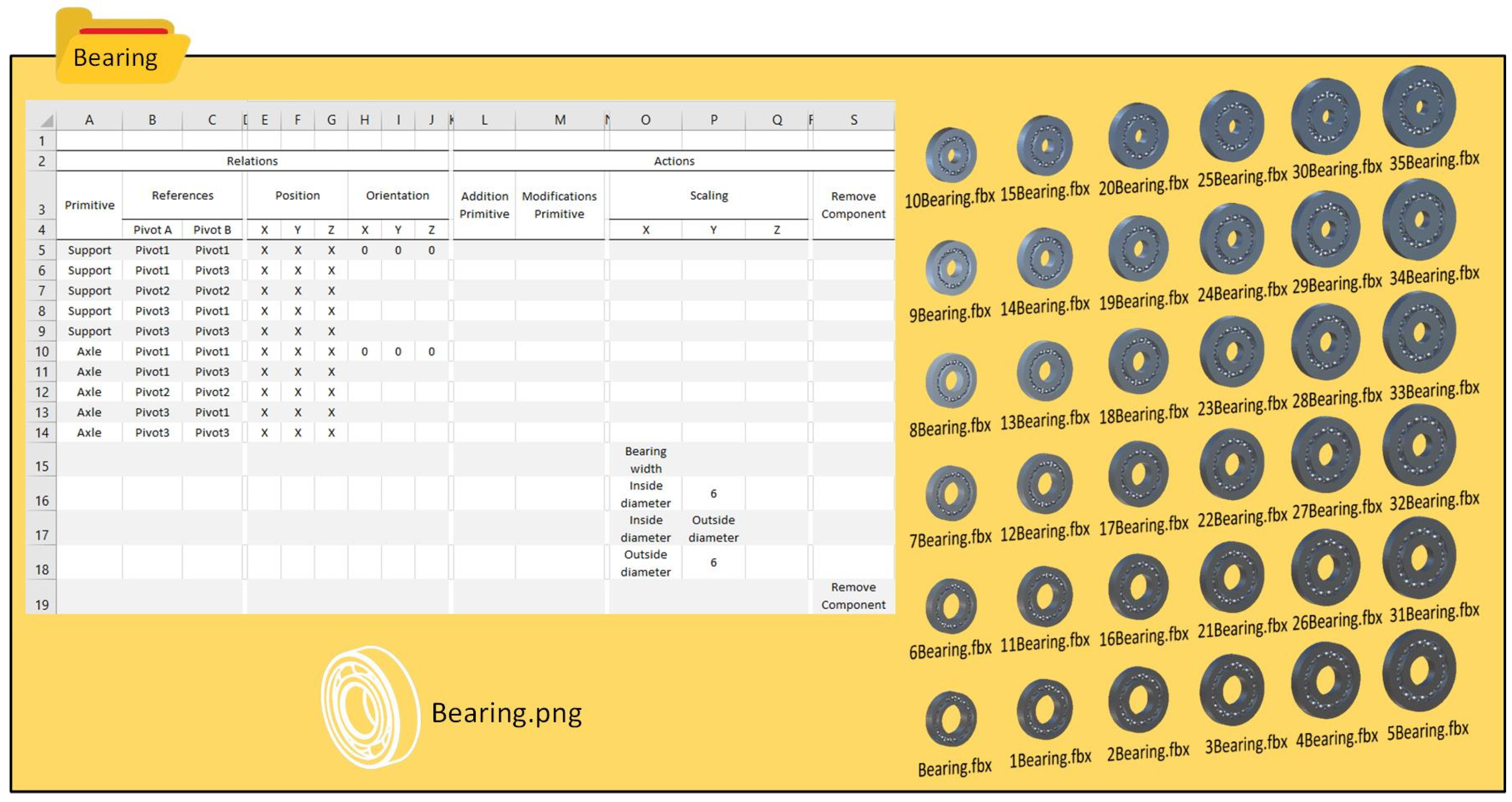
- Bearing (see Figure 20). This contains a collection of primitives in FBX format with the same name, preceded by a number that will indicate the order in which they are going to be displayed. In addition, it contains a single image that will be used in the “ADD NEW PRIMITIVE” menu and an Excel configuration file in which it is defined:Figure 20. Bearing settings folder.
- a.
- Position and orientation relationships with the support and Axle primitives to allow alignment with them in the expected place.
- b.
- There are two scaling operations, the first of which acts on the X axis of the primitive with the aim of increasing the overall width of the primitive, and the second is defined as an operation that will go through the 36 different models, acting on two independent scaling buttons that allow increasing the diameter of the hole or the outside of the bearing.
- c.
- An operation that allows the component to be removed.
- 3.
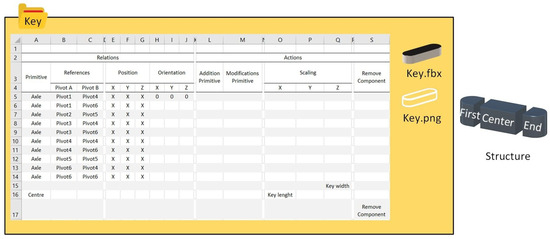
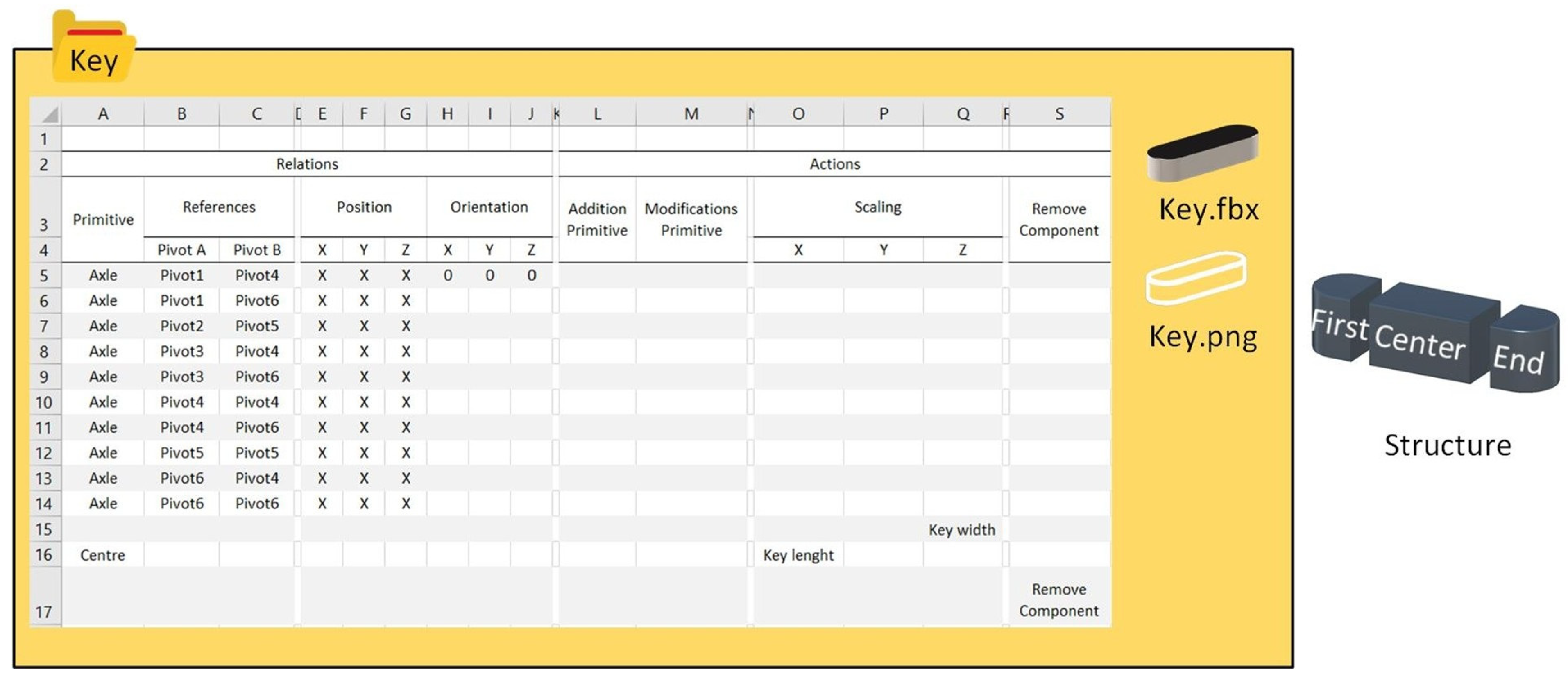
- Key (see Figure 21). This contains a primitive in FBX format made up of three components, First, Center and End, that allows each of them to be scaled separately. In addition, it contains a single image that will be used in the “ADD NEW PRIMITIVE” menu, and an Excel configuration file in which it is defined:Figure 21. Key settings folder.
- a.
- Relations of position and orientation with the primitive to allow alignment with it in the expected place.
- b.
- There are two scaling operations, the first of which acts on the Z axis of the entire primitive with the aim of increasing the overall thickness of the primitive, and the second acts only on the X axis of the Center component to allow increasing the length of the primitive without producing deformations in the circular shapes of its ends.
- c.
- An operation that allows the component to be removed.
- 4.
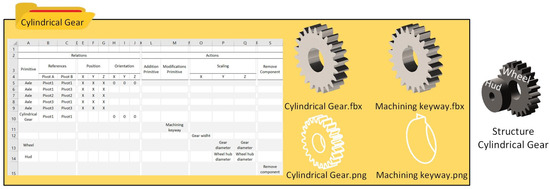
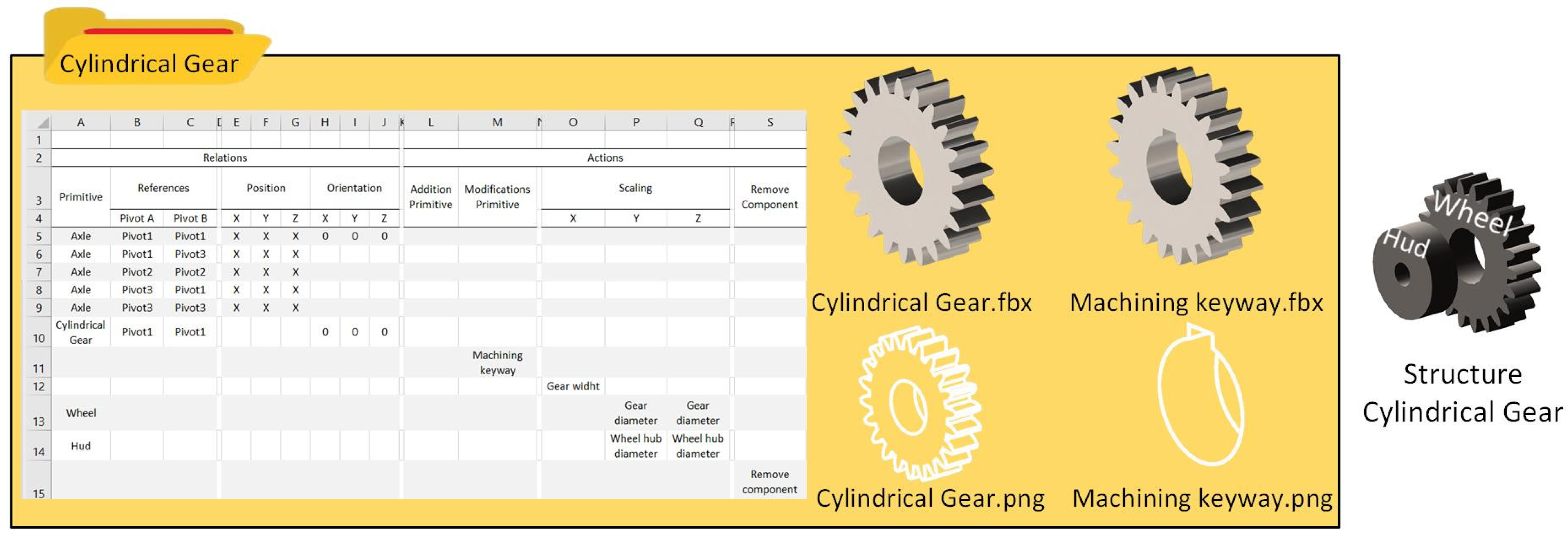
- Cylindrical Gear settings (see Figure 22). This contains two primitives in FBX format to generate prefabs that will be displayed alternatively in the virtual space, an image that will be used in the “ADD NEW PRIMITIVE” menu, another image that will be part of the ACTIONS menu of the primitive, and an Excel configuration file in which it is defined:Figure 22. Cylindric gear settings folder.
- a.
- Position and orientation relationships with the Axle primitives allow alignment with it in the expected place, as well as orientation relationships with another existing Cylindrical Gear primitives to position both primitives parallel.
- b.
- A Modifications Primitive operation to toggle the display between the two available primitives.
- c.
- There are three scaling operations, the first of which acts on the X axis of the primitive with the aim of increasing the thickness of the Cylindrical Gear, the second acts on the Y and Z axes of the primitive with the aim of increasing its diameter without deforming the circular shape of the primitive, and the third acts on the Y and Z axis of the Hud component to allow increasing the diameter of the hole without producing deformation of its circular shape.
- d.
- An operation that allows the component to be removed.
- 5.
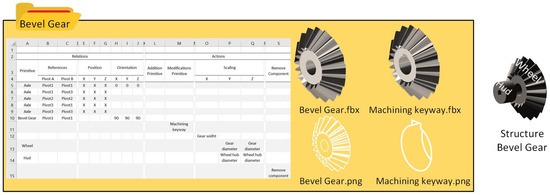
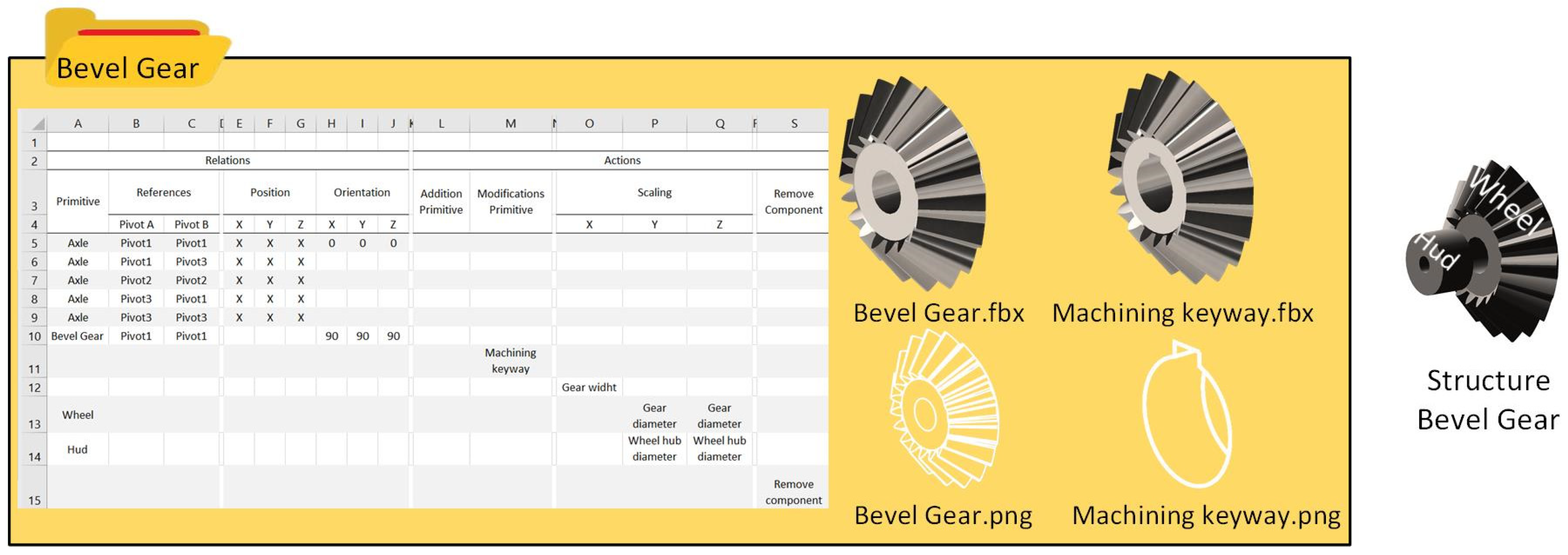
- Bevel Gear (see Figure 23). This contains two primitives in FBX format to generate prefabs that will be displayed alternatively in the virtual space, an image that will be used in the “ADD NEW PRIMITIVE” menu, another image that will be part of the ACTIONS menu of the primitive, and an Excel configuration file in which it is defined:Figure 23. Bevel Gear setting folder.
- a.
- Position and orientation relationships with the Axle primitives allow alignment with it in the expected place, as well as orientation relationships with another existing Bevel Gear primitive to position both primitives perpendicular to each other.
- b.
- A Modifications Primitive operation to toggle the display between the two available primitives.
- c.
- There are three scaling operations, the first of which acts on the X axis of the primitive with the aim of increasing the thickness of the Cylindrical Gear, the second acts on the Y and Z axes of the primitive with the aim of increasing its diameter without deforming the circular shape of the primitive, and the third acts on the Y and Z axis of the Hud component to allow increasing the diameter of the hole without producing deformation of its circular shape.
- 6.
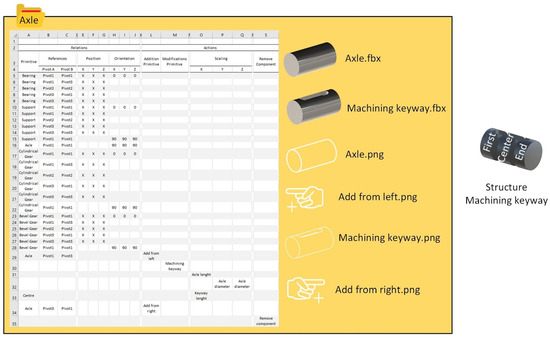
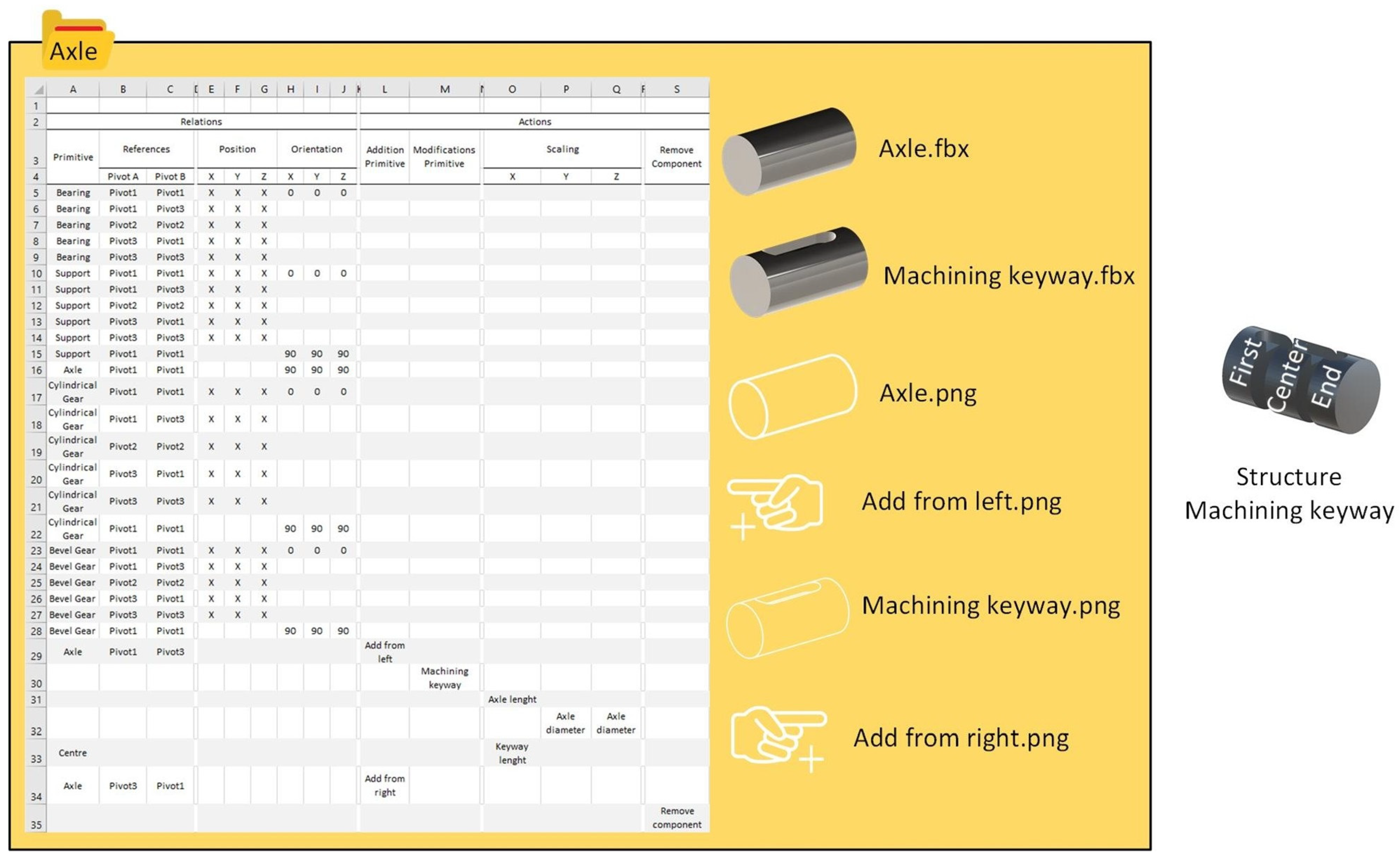
- Axle settings (see Figure 24). This contains two primitives in FBX format to generate prefabs that will be displayed in the virtual space, an image that will be used in the “ADD NEW PRIMITIVE” menu, three other images that will be part of the ACTIONS menu of the primitive, and an Excel configuration file in which it is defined:Figure 24. Axle settings.
- a.
- Position and orientation relationships with the Bearing, Support, Cylindrical Gear and Bevel Gear primitives allow alignment with them in the expected place, as well as orientation relationships with the Support, Axle, Cylindrical Gear and Bevel Gear primitives, which allow the Axle to be positioned perpendicular to them.
- b.
- Two Addition Primitive operations that will allow adding a new axle on the right and left.
- c.
- A Modifications Primitive operation to toggle the display between the two available primitives.
- d.
- There are three scaling operations, the first of which acts on the X axis of the primitive with the aim of increasing the length of the axle, the second acts on the Y and Z axes of the primitive with the aim of increasing its diameter without deforming the circular shape of the primitive, and the third acts only on the X axis of the Center component to allow the length of the primitive to be increased without producing deformations in the shapes circular at its ends.
- e.
- An operation that allows the component to be removed.
The assembly work has been carried out independently by the four teachers based on the specified configurations, and all designs have been successfully developed according to the operating patterns of the different algorithms proposed, regardless of the order in which the designs were executed.
4.3. Results
All teachers completed the modeling of the four assemblies within the proposed time frame, with most well ahead of schedule, resulting in a 100% success rate in terms of application functionality.
5. Discussion
As a continuation of the growing expansion and integration of virtual reality in the educational environment, due to its positive effects in promoting active learning, increasing student motivation, and offering immersive environments with collaborative and participatory experiences, this paper presents a virtual reality-based application developed in Unity that allows the assembly of mechanical assemblies from predefined parts, supporting a “learning by doing” approach [55].
The virtual reality environment offers a more intuitive, user-friendly manipulation experience than any desktop application, allowing the user to visualize results more naturally [56]. The application enables users to work with mechanical parts of exact geometry, thereby overcoming the challenges of precision and geometric accuracy required in engineering design, and focusing primarily on establishing precise positional relationships between parts [35,57]. Although these geometric entities used in the virtual environment are not generated within the virtual reality application itself but imported from commercial CAD applications, this approach helps circumvent precision issues when working in virtual environments [58]. Establishing bilateral connectivity between the virtual reality application and CAD applications is feasible [59] and is one of the objectives we have set for future research. In this way, our application offers a tool independent of any other application, compared to other possibilities explored by authors in which the virtual reality application runs on top of a desktop application [60].
Regarding multi-agent use, the fundamental advantage lies in the system’s scalability. In our work, we have defined six different components for the evaluation of the system, each consisting of a CAD model, a representative icon, and an Excel file that defines its positional and orientation relationships with respect to other parts used and the actions to be performed on the model. However, the number of components can be scaled by a user without programming knowledge, provided the rules defined in the Excel configuration file are followed. We believe that the user’s ability to expand the set of components they can work with in the virtual environment is a strength of the application. This is possible because the agents defined in the architecture are capable of interpreting the Excel configuration file that accompanies the component and generating prefab scripts with the behaviors requested by the user.
The developed system is a good example of the synergy between virtual reality and multi-agent systems [61], where the use of multi-agents not only scales the system in terms of the types of components to be used but also enables operations to be performed on those components. Although not complex, enhancing the system’s functionality requires the user to have programming knowledge to modify the logic of the Prefab Broker Agent, which interprets the information in the Excel configuration files.
The application’s operation has been evaluated with the participation of four teachers, who developed four simple mechanical assemblies from six mechanical components. All participants had prior experience with virtual reality applications, and the success rate was 100%. Given the positive results obtained in this experiment, we propose as future work to conduct a more exhaustive study of the application to assess not only its performance but also its usability on a larger sample, and not limited exclusively to the assembly of predefined sets, but also to create, following simple instructions, its own components in order to evaluate the difficulty of the rules imposed to define the configurations of the components. An in-depth analysis of these concepts is essential to evaluate our tool [62].
6. Conclusions
In this work, an innovative application for conceptual modeling of mechanical assemblies in a virtual reality environment has been developed and successfully evaluated by various users on four example assemblies, achieving a 100% success rate.
The application allows users to intuitively manipulate geometry and navigate virtual space, similar to real-world interaction. This approach facilitates the learning and use of the tool, especially for users with no previous experience in 3D modeling, overcoming the limitations of traditional tools and making the process more accessible and natural [63]. In addition, virtual reality allows users to visualize and experiment with mechanical components in a safe and controlled environment, which is particularly useful in the conceptual design phase and in the early detection of potential assembly problems prior to manufacturing.
On the other hand, the application works directly with primitives imported from a CAD system and a set of user-defined position constraints. This eliminates the inaccuracy issues that often arise when modeling directly in VR applications, ensuring that the geometric accuracy of primitives is maintained throughout the entire process. The proposed methodology also solves the difficulties associated with converting files between CAD formats and VR formats, as only a user-controlled export is required to define the primitives that will be part of the virtual assembly. All subsequent transformations of the primitives are managed within the VR application using specific commands, thus preserving the accuracy of the models.
In addition, the agent-based application architecture offers great flexibility and scalability. It allows dynamic modification of the number of primitives in the assembly, adding or removing elements according to a preset format. This feature makes the system easily adaptable to assemblies of any size or complexity, and favors collaboration between users in distributed work environments, which is especially relevant in collaborative engineering projects and in sectors such as automotive or aeronautics, where the review and validation of designs using virtual reality is increasingly common.
In summary, the developed application not only facilitates the conceptual modeling of mechanical assemblies in an immersive and accessible virtual environment, but also guarantees the geometric precision and scalability of the system, thus contributing to optimizing the design, validation and collaboration processes in advanced mechanical engineering.
Author Contributions
Conceptualization, J.C.; methodology, J.C. and M.C.; software, J.C. and F.J.M.; investigation, J.C., F.J.M. and M.C.; writing—original draft preparation, J.C. and F.J.M.; writing—review and editing, M.C.; visualization, J.C. and F.J.M.; supervision, J.C.; project administration, J.C. All authors have read and agreed to the published version of the manuscript.
Funding
This research received no external funding.
Institutional Review Board Statement
No formal Ethics Committee approval was sought, as the research was conducted in accordance with institutional guidelines for educational studies that do not involve sensitive data or pose risks to participants.
Informed Consent Statement
Verbal informed consent was obtained from all subjects involved in the study.
Data Availability Statement
The data presented in this study are available upon request from the corresponding author.
Conflicts of Interest
The authors declare no conflicts of interest.
References
- Lancere, L.; Jürgen, M.; Gapeyeva, H. Mixed reality and sensor real-time feedback to increase muscle engagement during deep core exercising. Virtual Real. 2023, 27, 3435–3449. [Google Scholar] [CrossRef] [Scilit]
- Marshall, B.; Uiga, L.; Parr, J.V.V. A preliminary investigation into the efficacy of training soccer heading in immersive virtual reality. Virtual Real. 2023, 27, 2397–2404. [Google Scholar] [CrossRef] [Scilit]
- Ristor, R.; Morélot, S.; Garrigou, A.; N’Kaoua, B. Virtual reality for fire safety training: Study of factors involved in immersive learning. Virtual Real. 2023, 27, 2237–2254. [Google Scholar] [CrossRef] [Scilit]
- Li, Y.; Ying, S.; Chen, Q.; Guan, J. An experiential learning-based virtual reality approach to foster students’ vocabulary acquisition and learning engagement in English for geography. Sustainability 2022, 14, 15359. [Google Scholar] [CrossRef] [Scilit]
- Zhang, S.; Moore, A. The usability of online geographic virtual reality for urban planning. In Innovations in 3D Geo-Information Sciences; Isikdag, U., Ed.; Lecture Notes in Geoinformation and Cartography; Springer: Cham, Switzerland, 2013; pp. 225–242. [Google Scholar] [CrossRef] [Scilit]
- de la Peña, N.; Weil, P.; Llobera, J.; Spanlang, B.; Friedman, D.; Sanchez-Vives, M.; Slater, M. Immersive journalism: Immersive virtual reality for the first-person experience of news. Presence Teleoperators Virtual Environ. 2010, 19, 291–301. [Google Scholar] [CrossRef] [Scilit]
- Martín-Gutiérrez, J.; Mora, C.E.; Añorbe-Díaz, B.; González-Marrero, A. Virtual technologies trends in education. Eurasia J. Math. Sci. Technol. Educ. 2017, 13, 469–486. [Google Scholar] [CrossRef] [Scilit]
- Bermejo, B.; Juiz, C.; Cortes, D.; Oskam, J.; Moilanen, T.; Loijas, J.; Govender, P.; Hussey, J.; Schmidt, A.L.; Burbach, R.; et al. AR/VR teaching–learning experiences in higher education institutions (HEI): A systematic literature review. Informatics 2023, 10, 45. [Google Scholar] [CrossRef] [Scilit]
- George-Reyes, C.E.; Ruiz-Ramírez, J.A.; Contreras Fuentes, Y.B.; López-Caudana, E.O. Aprendizaje de los componentes del pensamiento computacional mediado por una aplicación virtual de la Educación 4.0 en el entorno del pensamiento complejo. Educar 2023, 59, 281–300. [Google Scholar] [CrossRef] [Scilit]
- Conesa, J.F.; Contero, M. EVM: An educational virtual reality modeling tool; evaluation study with freshman engineering students. Appl. Sci. 2022, 12, 390. [Google Scholar] [CrossRef] [Scilit]
- Conesa, J.F.; Contero, M.; Bartlett, K.A.; Naya Sanchis, F. The influence of immersive and collaborative virtual environments in improving spatial skills. Appl. Sci. 2023, 13, 8426. [Google Scholar] [CrossRef] [Scilit]
- Conesa, J.F.; Martínez, A.; Mula Cruz, F.; Contero, M. Learning by doing in VR: A user-centric evaluation of lathe operation training. Electronics 2024, 13, 2549. [Google Scholar] [CrossRef] [Scilit]
- Borja Mora, L.I.; Borja Mora, L.K.; León Sinche, J.C.; Bustamante Caldas, C.J. Aplicación de realidad virtual para simulaciones educativas en estudiantes de tercer nivel. Rev. Invecom 2024, 5. [Google Scholar] [CrossRef]
- Smutny, P. Learning with virtual reality: A market analysis of educational and training applications. Interact. Learn. Environ. 2022, 31, 6133–6146. [Google Scholar] [CrossRef] [Scilit]
- Miguélez-Juan, B.; Núñez Gómez, P.; Mañas-Viniegra, L. La realidad virtual inmersiva como herramienta educativa para la transformación social: Un estudio exploratorio sobre la percepción de los estudiantes en Educación Secundaria Postobligatoria. Aula Abierta 2019, 48, 157–166. [Google Scholar] [CrossRef] [Scilit]
- Schmitt, G. Virtual reality in architecture. In Virtual Worlds and Multimedia; Thalmann, N.M., Thalmann, D., Eds.; Wiley: Chichester, UK, 1993. [Google Scholar]
- Shibano, N.; Hareesh, P.V.; Kashiwagi, M.; Sawada, K.; Takemura, H. Development of VR experiencing system with hemispherical immersive projection display for urban environment design. In Proceedings of the Seventh International Conference on Virtual Systems and Multimedia (VSMM’01), Berkeley, CA, USA, 25–27 October 2001. [Google Scholar] [CrossRef] [Scilit]
- Messner, J.I.; Yerrapathruni, S.C.; Baratta, A.J.; Riley, D.R. Cost and schedule reduction of nuclear power plant construction using 4D CAD and immersive display technologies. In Computing in Civil Engineering: Proceedings of the International Workshop of Information Technology in Civil Engineering; American Society of Civil Engineers: Reston, VA, USA, 2002; pp. 136–144. [Google Scholar] [CrossRef] [Scilit]
- Whisker, V.E.; Baratta, A.J.; Yerrapathruni, S.; Messner, J.I.; Shaw, T.S.; Warren, M.E.; Rotthoff, E.S.; Winters, J.W.; Clelland, J.A.; Johnson, F.T. Using immersive virtual environments to develop and visualize construction schedules for advanced nuclear power plants. In Proceedings of the ICAPP, Córdoba, Spain, 4–7 May 2003; Volume 3, pp. 4–7. [Google Scholar]
- Opdenbosch, A.; Hastak, M. Virtual reality environment for design and analysis of automated construction equipment. In Proceedings of the 2nd Congress for Computing in Civil Engineering, Atlanta, GA, USA, 5–7 June 1994; pp. 566–573. [Google Scholar]
- Lipman, R.; Reed, K. Using VRML in construction industry applications. In VRML ’00: Proceedings of the Fifth Symposium on Virtual Reality Modeling Language (Web3D-VRML); ACM: New York, NY, USA, 2000; pp. 119–124. [Google Scholar] [CrossRef] [Scilit]
- Ryken, M.J.; Vance, J.M. Applying virtual reality techniques to the interactive stress analysis of a tractor lift arm. Finite Elem. Anal. Des. 2000, 35, 141–155. [Google Scholar] [CrossRef] [Scilit]
- Bassanino, M.; Wu, K.C.; Yao, J.; Khosrowshahi, F.; Fernando, T.; Skjærbæk, J. The impact of immersive virtual reality on visualisation for a design review in construction. In Proceedings of the 14th International Conference on Information Visualisation; IEEE: Los Alamitos, CA, USA, 2010; pp. 585–589. [Google Scholar] [CrossRef] [Scilit]
- Bannova, O.; Camba, J.D.; Bishop, S. Projection-based visualization technology and its design implications in space habitats. Acta Astronaut. 2019, 160, 310–316. [Google Scholar] [CrossRef] [Scilit]
- Camba, J.D.; Soler, J.L.; Contero, M. Immersive visualization technologies to facilitate multidisciplinary design education. In Proceedings of the International Conference on Learning and Collaboration Technologies; Springer: Cham, Switzerland, 2017; pp. 3–11. [Google Scholar] [CrossRef] [Scilit]
- Nisha, B. The pedagogic value of learning design with virtual reality. Educ. Psychol. 2019, 39, 1233–1254. [Google Scholar] [CrossRef] [Scilit]
- Zhong, Y.; Shirinzadeh, B.; Ma, W. Solid modelling in a virtual reality environment. Vis. Comput. 2005, 21, 17–40. [Google Scholar] [CrossRef] [Scilit]
- Zorriassatine, F.; Wykes, C.; Parkin, R.; Gindy, N. A survey of virtual prototyping techniques for mechanical product development. Proc. Inst. Mech. Eng. Part B J. Eng. Manuf. 2003, 217, 513–530. [Google Scholar] [CrossRef] [Scilit]
- Chu, C.; Dani, T.; Gadh, R. Multi-sensory user interface for a virtual-reality-based computer-aided design system. Comput. Aided Des. 1997, 29, 709–725. [Google Scholar] [CrossRef] [Scilit]
- Arangarasan, R.; Gadh, R. Geometric modeling and collaborative design in a multi-modal multi-sensory virtual environment. In Proceedings of the ASME 2000 International Design Engineering Technical Conferences and Computers and Information in Engineering Conference; ASME: New York, NY, USA, 2000; pp. 757–765. [Google Scholar] [CrossRef] [Scilit]
- Cappello, F.; Ingrassia, T.; Romano, M. VR Studio: Solid modelling in a virtual reality environment. In Proceedings of the 5th Eurographics Italian Chapter Conference 2007—Proceedings; Eurographics Association: Geneva, Switzerland, 2007; pp. 119–126. [Google Scholar] [CrossRef]
- Ladwig, P.; Herder, J.; Geige, C. Towards precise, fast and comfortable immersive polygon mesh modelling: Capitalising the results of past research and analysing the needs of professionals. In Proceedings of the International Conference on Artificial Reality and Telexistence and Eurographics Symposium on Virtual Environments; Eurographics Association: Geneva, Switzerland, 2017. [Google Scholar] [CrossRef]
- Masterpiece Studio. Available online: https://masterpiecestudio.com (accessed on 5 February 2026).
- Gravity Sketch. Available online: https://gravitysketch.com/ (accessed on 5 February 2026).
- Keefe, D.; Jackson, B. Lift-Off: Using reference imagery and freehand sketching to create 3D models in VR. IEEE Trans. Vis. Comput. Graph. 2016, 22, 1442–1451. [Google Scholar] [CrossRef] [Scilit]
- McGraw, T.; Garcia, E.; Sumner, D. Interactive swept surface modeling in virtual reality with motion-tracked controllers. In Proceedings of the Sketch-Based Interfaces and Modeling (Expressive); ACM: New York, NY, USA, 2017. [Google Scholar] [CrossRef] [Scilit]
- Machuca, M.D.B.; Asente, P.; Stuerzlinger, W.; Lu, J.; Kim, B. Multiplanes: Assisted freehand VR sketching. In Proceedings of the Symposium on Spatial User Interaction; ACM: New York, NY, USA, 2018; pp. 36–47. [Google Scholar] [CrossRef] [Scilit]
- Eswaran, M.; Samuel, P.J.C.; Karthika, S.K.; Yuvaraju, B.A.G.; Inkulu, A.; Bahubalendruni, M.V.A.R. Extended reality (XR) for industrial assembly: A state-of-the-art review toward human-centric Industry 5.0. Expert Syst. Appl. 2026, 307, 130877. [Google Scholar] [CrossRef] [Scilit]
- Chuyun, J.; Mu, L. Application of virtual assembly for complex mechanical structures based on digital twin technology. Sci. Rep. 2025, 15, 30306. [Google Scholar] [CrossRef] [Scilit]
- Oliveira, E.; Fischer, K.; Stepankova, O. Multi-agent systems: Which research for which applications. Robot. Auton. Syst. 1999, 27, 91–106. [Google Scholar] [CrossRef] [Scilit]
- Wooldridge, M. An Introduction to MultiAgent Systems; John Wiley & Sons: Chichester, UK, 2002. [Google Scholar]
- Tessier, C.; Chaudron, L.; Muller, H.J. Conflicting Agents: Conflict Management in Multi-Agent Systems; Kluwer Academic Publishers: Boston, MA, USA, 2002. [Google Scholar]
- Bleiweiss, A. Multi agent navigation on the GPU. In Proceedings of the Games Development Conference, San Francisco, CA, USA, 23–27 March 2009; pp. 39–42. [Google Scholar]
- Xiao, H.; Li, J.; Deng, L.P. Designing of particle system architecture by using multi-agent modeling. In Proceedings of the 2011 International Conference on Electrical and Control Engineering; IEEE: Piscataway, NJ, USA, 2011; pp. 4441–4444. [Google Scholar] [CrossRef] [Scilit]
- Chen, Q.; Luo, G.; Tong, Y.; Jin, X.; Deng, Z. Shape-constrained flying insects animation. Comput. Animat. Virtual Worlds 2019, 30, e1902. [Google Scholar] [CrossRef] [Scilit]
- Schlechtweg, S.; Germer, T.; Strothotte, T. Renderbots: Multiagent systems for direct image generation. Comput. Graph. Forum 2005, 24, 137–148. [Google Scholar] [CrossRef] [Scilit]
- Rangel-Kuoppa, R.; Avilés-Cruz, C.; Mould, D. Distributed 3D rendering system in a multi-agent platform. In Proceedings of the Fourth Mexican International Conference on Computer Science (ENC 2003); IEEE: Piscataway, NJ, USA, 2003; pp. 168–175. [Google Scholar] [CrossRef] [Scilit]
- Gonzalez-Morcillo, C.; Weiss, G.; Jimenez, L.; Vallejo, D.; Albusac, J. A multiagent system for physically based rendering optimization. In International Workshop on Cooperative Information Agents; Springer: Berlin/Heidelberg, Germany, 2007; pp. 149–163. [Google Scholar] [CrossRef] [Scilit]
- Wang, Y.; Dubey, R.; Magnenat-Thalmann, N.; Thalmann, D. An immersive multi-agent system for interactive applications. Vis. Comput. 2013, 29, 323–332. [Google Scholar] [CrossRef] [Scilit]
- Sharma, S.; Jerripothula, S.; Mackey, S.; Soumare, O. Immersive virtual reality environment of a subway evacuation on a cloud for disaster preparedness and response training. In Proceedings of the 2014 IEEE Symposium on Computational Intelligence for Human-like Intelligence (CIHLI); IEEE: Piscataway, NJ, USA, 2014; pp. 1–6. [Google Scholar] [CrossRef] [Scilit]
- Chevaillier, P.; Harrouet, F.; Reignier, P.; Tisseau, J. Virtual reality and multi-agent systems for manufacturing system interactive prototyping. Int. J. Des. Innov. Res. 2000, 2, 90–101. [Google Scholar]
- Conesa, J.F.; Camba, J.; Aranda, J.A.; Contero, M. An agent-based paradigm for virtual modeling. Expert Syst. Appl. 2022, 192, 116393. [Google Scholar] [CrossRef] [Scilit]
- Yabuki, N.; Kotani, J.; Shitani, T. A cooperative design environment using multi-agents and virtual reality. In Cooperative Design, Visualization, and Engineering (CDVE 2004); Luo, Y., Ed.; Lecture Notes in Computer Science; Springer: Berlin/Heidelberg, Germany, 2004; Volume 3190, pp. 97–104. [Google Scholar] [CrossRef] [Scilit]
- Conesa, J.F.; Mula, F.J.; Contero, M.; Camba, J.D. A multi-agent framework for collaborative geometric modeling in virtual environments. Eng. Appl. Artif. Intell. 2023, 123, 106257. [Google Scholar] [CrossRef] [Scilit]
- Abidi, M.H.; Al-Ahmari, A.; Ahmad, A.; Ameen, W.; Alkhalefah, H. Assessment of virtual reality-based manufacturing assembly training system. Int. J. Adv. Manuf. Technol. 2019, 105, 3743–3759. [Google Scholar] [CrossRef] [Scilit]
- Fechter, M.; Schleich, B.; Wartzack, S. Comparative evaluation of WIMP and immersive natural finger interaction: A user study on CAD assembly modeling. Virtual Real. 2022, 26, 143–158. [Google Scholar] [CrossRef] [Scilit]
- Raposo, A.; Corseuil, E.T.L.; Wagner, G.N.; dos Santos, F.I.H.; Gattass, M. Towards the use of CAD models in VR applications. In Proceedings of the 2006 ACM International Conference on Virtual Reality Continuum and Its Applications, Hong Kong, 14–17 June 2006; pp. 67–74. [Google Scholar] [CrossRef] [Scilit]
- Hurtado, J.; Montenegro, A.; Gattass, M.; Carvalho, F.; Raposo, A. Enveloping CAD models for visualization and interaction in XR applications. Eng. Comput. 2022, 38, 781–799. [Google Scholar] [CrossRef] [Scilit]
- Prinz, A.; Lee, K.Y.; Gupta, A.; Park, S.; Göhlich, D. CAD in virtual reality: Integration of solid modeling in standalone VR application. Proc. Des. Soc. 2025, 5, 831–840. [Google Scholar] [CrossRef] [Scilit]
- Tran, T.T.H.; Foucault, G.; Pinquié, R. Direct solid modelling in virtual reality for systems architecting. Procedia CIRP 2024, 128, 656–661. [Google Scholar] [CrossRef] [Scilit]
- Ospina-Bohorquez, A.; Rodríguez-González, S.; Vergara-Rodríguez, D. On the synergy between virtual reality and multi-agent systems. Sustainability 2021, 13, 4326. [Google Scholar] [CrossRef] [Scilit]
- Mine, M.; Yoganandan, A.; Coffey, D. Principles, interactions and devices for real-world immersive modeling. Comput. Graph. 2015, 48, 84–98. [Google Scholar] [CrossRef] [Scilit]
- Rosales, E.; Rodriguez, J.; Sheffer, A. SurfaceBrush: From virtual reality drawings to manifold surfaces. ACM Trans. Graph. 2019, 38, 1–16. [Google Scholar] [CrossRef] [Scilit]
Disclaimer/Publisher’s Note: The statements, opinions and data contained in all publications are solely those of the individual author(s) and contributor(s) and not of MDPI and/or the editor(s). MDPI and/or the editor(s) disclaim responsibility for any injury to people or property resulting from any ideas, methods, instructions or products referred to in the content. |
© 2026 by the authors. Licensee MDPI, Basel, Switzerland. This article is an open access article distributed under the terms and conditions of the Creative Commons Attribution (CC BY) license.