


Abstract
Immersive interactive experiences like virtual field trips are increasingly popular in K-12 education, yet they often position youth as consumers. This paper details a design-based-research approach to developing a learning sequence that empowers students as creators of their own immersive learning experiences, grounded in principles of project- and place-based learning. An initial series of four case studies, involving six educators and 100+ youth, illustrates design milestones; highlighting that while students enjoy creating these experiences and educators recognize the pedagogical value, challenges such as time constraints and project scaffolding can impede implementation. Although these case studies represent small, non-controlled samples, findings were consistent across iterations. In response to these findings we present the VFT Creation Sequence, a suite of learning resources that uplifts the student experience and provides practical support for authentic implementation. A final case study showcases the sequence in practice in an elementary science classroom and examines domain-specific features of the student work, yielding promising results in using student products as evidence of sense-making. VFT creation can complement instruction across domains and learning contexts; the VFT Creation Sequence was designed to be easily distributed to and adapted by educators interested in integrating learner-driven digital activities into their curriculum.
1. Introduction
Field trips get learners out into the world, where they connect content learning with new places, ideas, and experiences. Research has consistently demonstrated that field trips can promote student motivation, engagement, and learning [1,2,3]. For example, in their seminal review of field-trip learning, Falk & Dierking [1]’s survey of youth and adults revealed that 100% of their 128 participants could recall at least one thing learned from a school field trip, often related to domain-specific content. As another example, Ardoin et al. [3]’s systematic review notes that across K-12, environmental education field trips positively impact students’ environmental knowledge, skills, attitudes, academic achievement and civic engagement. However, costs, logistics, and accessibility concerns can limit participation [4]. Recent advances in immersive technologies expand opportunities to connect learning with places and contexts beyond more traditional learning environments. Many experiences position learners as explorers, yet students can also create and share their own digital learning experiences, building on broader evidence that opportunities for student creation and sharing can increase motivation and engagement, e.g., [5], while positioning learners as active knowledge constructors. This paper examines one application of immersive technologies, virtual field trips, and the design of an educator-ready instructional sequence that supports students in creating them.
The term “Virtual Field Trip” (VFT) has been used to describe a broad range of digital experiences, including videos, virtual tours, and simulated environments. In this paper, we use it to refer specifically to interactive multimedia experiences that ground learning in 360° photos or videos of real places. Learners navigate 360° spaces and engage with embedded tags: interactive popups that include elements such as text, images, audio narration, videos, data representations, or polls. These VFTs can be accessed using devices that range from standard computer browsers to VR headsets, and can support multiple instructional approaches. Engaging with a VFT to investigate specific concepts contextualized in place has been shown to improve content learning and affect, e.g., [6,7,8]. While educator-created VFTs have been examined across a variety of instructional contexts, considerably less is known about how to support students in creating their own. This paper addresses that gap through the iterative development of an instructional approach for youth creation of VFTs.
Creating and sharing VFTs positions students as authors of interactive place-based learning experiences that communicate their understanding and sensemaking, offering interdisciplinary opportunities for personalization, agency, and knowledge construction. VFT creation can complement a learning program or curriculum in a myriad of ways. For example, learners can create a VFT as a way to retroactively synthesize their learnings from an in-person field trip or to share places/spaces that showcase their lived experience with others.
Figure 1 shows a screenshot of a fifth-grade student VFT that was created as a classroom capstone project about a global ecosystem. The student embedded tags throughout a 360° image of the Arctic Tundra to communicate their knowledge about its climate and organisms for the purpose of sharing with other upper-elementary aged students. Tags are positioned on or near the features they describe (e.g., the tag about humans is placed on the humans in the photo), helping connect disciplinary ideas to features of the real-world setting.
Figure 1.
Screenshot of a student-created VFT about the Arctic Tundra ecosystem. Inset images show embedded tags that contain information about the ecosystem’s animals, geographic features, and human impacts. The screenshot only shows a section of the full 360° product.
Student VFT creation integrates several evidence-based instructional approaches, including immersive learning, place-based education, and project-based learning. Although each has well known learning benefits [9], relatively little work has examined instructional models that integrate these frameworks through student creation of immersive experiences in K–12 classrooms. Doing so introduces practical, pedagogical, and technological challenges, including supporting students and educators in learning new authoring tools while integrating them into meaningful classroom instruction. To address these challenges, we employed design-based research to iteratively develop and refine an instructional sequence and associated instructional supports for student VFT creation.
1.1. VFTs as a Vehicle for Immersive Learning
Immersive learning broadly refers to learning experiences that are supported by immersive technology or media, such as virtual environments, virtual reality, augmented reality, and mixed reality, e.g., [10,11]. These experiences are often designed to evoke a sense of presence, or “being there”, e.g., [12,13,14]. The VFTs described in this paper represent one kind of immersive learning, enabling learners to virtually explore and interact with real-world places through 360° media and embedded interactive multimedia elements. Although immersive learning is often associated with virtual reality headsets, these may not be cost efficient or practical for many classroom environments, and browser-based administration represents a more accessible alternative [15]. Notably, while browser-based experiences reduce hardware-related barriers, they often require internet connectivity, which can be limiting for schools with low internet accessibility.
In some contexts, immersive learning has been beneficial for learning outcomes, yet in others it has produced null or negative effects [14,16,17]. For example, Makransky et al. [17] found that immersive features can increase learners’ cognitive load, reducing opportunities for learning. Yet, implementing supportive instructional design, such as pre-training, segmenting, and building in student reflection, can mitigate these cognitive load effects and support learning gains [18]. The educational literature on immersive learning contains two notable imbalances: a focus on post-secondary education and a focus on student consumption rather than creation. For example, in Rosendahl & Wagner [15]’s scoping review of 360° videos for educational purposes, 37 of the 44 reviewed papers focused on post-secondary or adult education. Only 7 focused on K-12 educational contexts. Further, 43 of the 44 reviewed papers focus on student consumption of 360° videos; only one emphasizes student creation of 360° videos [15]. Similar patterns have been reported in reviews of the use of virtual reality [19,20,21,22] and panoramic images [23]. Collectively, this literature suggests that relatively little attention has been given to K-12 students as creators of immersive learning experiences. The next sections argue that student-created VFTs provide one promising way to address this gap by integrating immersive learning with place-based education and project-based learning.
1.2. VFTs as a Context for Virtual, Place-Based Education
Place-based education (PBE) is a pedagogical approach that anchors academic content in the physical, cultural, ecological, economic and/or political dimensions of a specific place or location. It seeks to deepen students’ understanding of academic content while fostering their connections with that place and its communities.
PBE has been associated with higher student engagement, enhanced collaboration, and a greater perceived relevance for target concepts [4,24,25]. Further, Leckey et al. [26]’s report increased participant agency to act in response to social-cultural influences of climate change. Given that students often struggle to identify with many aspects of science curriculums [27], PBE may be particularly impactful for both learning and motivation.
Despite its many benefits, PBE’s grounding in place can be a limiting factor to its use in classrooms. Travel to locations may require additional funding, special equipment, as well as coordination between educators, school administrators and parents, limiting its implementation [4]. While PBE opportunities like in-person field trips remain invaluable, VFTs expand opportunities for PBE by making more places accessible virtually. However, VFTs should not be seen as a replacement for in-person PBE opportunities, due to in-person PBE’s valuable sensory, social, and memory benefits. VFTs can, however, offer a complement to in-person PBE or provide access to PBE when in-person opportunities are limited. This allows students to explore disciplinary ideas within place-based contexts, reducing barriers to implementation and increasing opportunities for adoption. By annotating a virtual representation of a real-world place through VFT creation, learners are able to express their understanding of the relationship between academic concepts and place, as well as their own connections to place. Building on these ideas, we implement student-created VFTs as project-based learning activities, combining a place-based grounding for content with opportunities for student agency, knowledge representation, and sharing.
1.3. A Creative Task for Project-Based Learning
Project-based learning (PjBL) is a pedagogical approach that positions students as active drivers of the learning process and engages them in sustained investigation of a problem or question [9,28,29]. PjBL often incorporates creative production [30], resulting in student-created final products that demonstrate their knowledge, understanding, and skills [28]. In doing so, students ask questions, reflect, engage in sense-making, and find and curate knowledge in specific, often real-world, contexts [28].
One common form of PjBL involves students creating products intended to be shared with others. Beyond serving as demonstrations of learning, creating materials to share information with an audience can itself promote learning. Learners have to select key ideas or relevant information and re-organize these ideas effectively for their presentation to their audience [31,32]. Consistent with this perspective, a meta-analysis by Ribosa & Duran [31] found that students who created instructional materials outperformed comparison groups on measures of content learning, with audiovisual and visual products producing larger effects than text-based products. They propose that these benefits arise because creating audiovisual and visual instructional materials encourages learners to organize and elaborate on their knowledge while translating it into multi-modal representations that communicate ideas to an audience, promoting both deeper processing and motivation. However, relatively little of this work has examined students creating immersive, place-based teaching materials using 360° environments.
Like many PjBL activities, student-created VFTs can also engage and strengthen learners’ design-thinking skills, which have been associated with effective problem solving and higher-order thinking [33,34]. As students design immersive learning experiences, they consider their audience, decide how to communicate ideas effectively through place and multimedia, and iteratively refine their designs through feedback, engaging in core design thinking practices.
Although PjBL is associated with positive student learning outcomes [9,28,35], implementing high-quality PjBL remains challenging. Teachers must navigate extensive planning, access to materials, curriculum integration, as well as the time-consuming nature of PjBL [35]. While integrating technology as part of PjBL can support high and low performing students in constructing knowledge [28,36], students and educators must be supported to effectively use the relevant technology to gain the additional creative affordances it can offer [28,37,38].
Consequently, realizing the combined benefits of immersive learning, place-based education, and project-based learning through VFT creation depends not only on sound pedagogical design, but also on instructional models and implementation supports that enable teachers and students to effectively integrate these approaches in classroom settings.
1.4. Paper Structure
This paper examines if and how VFT creation can be implemented with ecological fidelity in K-12 learning contexts through exploratory case studies and the iterative design of an instructional sequence. Using design-based research, we iteratively developed and refined a classroom-ready implementation model for facilitating youth creation of VFTs. After describing the technical requirements for student VFT creation, we present four design iterations that examined the feasibility of student-created VFTs as place- and project-based learning activities, identified the instructional and technological supports needed for successful classroom implementation, and informed successive refinements to the implementation model. Across these iterations, students consistently reported that creating and sharing VFTs was engaging and supported their learning. We then describe the resulting instructional model, including the instructional sequence and associated educator and student supports, followed by evidence from classroom implementation and current efforts to support educator adoption.
Section 2 describes the software and hardware needed to facilitate VFT creation. Section 3 details key case studies and milestones in the development of the VFT creation lesson sequence. Section 4 presents the VFT Creation Sequence, an educator-ready series of lessons and supporting materials for facilitating student VFT creation. Section 5 describes an example classroom implementation using the VFT Creation Sequence and features of the student products. Section 6 concludes the paper with a brief summary and future directions of the work.
2. Technical Requirements for VFT Creation
2.1. VFT Creation Software
There are several publicly available tools that can be used to create the type of VFTs described here (e.g., Pano2VR, Infiniscope, ThingLink, 360Schools, Nearpod). Many share the same core functionality: users choose a ‘base image’ (360° or flat) and then add engagement elements with interactive tags that can include a wide variety of media including text, audio, and video. Users can also include elements that enable movement through the virtual space. For example, VFTs have become common in museums and real-estate, allowing users to explore new places and spaces. Users choose what content to embed in the experience and where to place each individual tag. Depending on the software, base-image scenes can be uploaded from a user’s device (i.e., the user has captured their own 360° media) or chosen from a digital library. Platforms differ technically in their backend functionality and front-end customization features, together offering a spectrum of options for everyone from the most novice users to the experts.
Especially when considering their use in an educational context, these platforms also come with some practical challenges. As with many online tools, internet connectivity is often essential, which can be limiting in areas with low accessibility. Media and account management can be cumbersome, which can be a logistical barrier for educators supporting students across many classes. Depending on how media is integrated into the product, certain websites might be blocked by a school or district. Successfully integrating this technology into an instructional unit, therefore, may require an educator to develop new technical and pedagogical content expertise.
Each platform also offers its own data use and privacy policies, including specific stipulations concerning learners under 18 years old. To help protect learner privacy during VFT creation, the research team produced a software-agnostic, student-facing privacy guide for implementation in classrooms and other educational programs. This included suggestions such as not including personally identifiable information in media or embedded content.
For the implementations discussed throughout this work, the research team elected to use ThingLink to support student creation of VFTs. In the ThingLink platform, users can create a digital product, structured as individual scenes linked together, that can then be shared and viewed with a URL. Throughout the exploratory research, the team observed that learners in elementary-school and beyond found the interface to be intuitive and accessible. The platform was also user-friendly for educators, even those who self-identified as less ‘tech-savvy.’ Figure 2 shows the current editing interface. Students particularly enjoyed the customization elements, including the ability to change colors, fonts, and images of tags and tag icons. At the time, ThingLink was also the only platform available that enabled simultaneous student collaboration on the same VFT product; in this way, multiple students could work on the same scene and see each others’ tags. This was an important feature for most educators we worked with, who preferred to include collaborative group work in their project-based learning tasks. Taken together, the ease of student and educator use and the collaboration functionality led the research team to choose this software for the VFT creation research described in Section 3 and Section 5.
Figure 2.
Screenshot of the ThingLink editing interface at the time of writing. Once users have selected a base image, they can add a variety of embedded tags. The left menu shows the different tag options available. Inset is the menu for the Text and Media tag as an illustrative example: users enter their content in the menu bar and it appears as text in the body of the tag.
2.2. VFT Creation Hardware
VFT creation tools allow users to upload their own 360° or flat media (usually photographs or video) as the base of their project. Capturing original media can be accomplished using hardware that varies in accessibility, cost, and user experience. Digital cameras such as the Insta360, GoPro, or Ricoh Theta have 360° recording options for both photos and video, and often produce the most high-resolution assets. However, these can be cost prohibitive and require time to learn how to use the camera and associated editing software. Smartphone-based applications are another option, allowing users to capture 360° photos with their personal device. For example, the free VFTcam (http://vftcam.stanford.edu/ (accessed on 21 June 2026)) is a smartphone-accessible web application that guides users through capturing a series of 180° photos, which it stitches together into a 360° asset. It also saves all photos and the final stitched image locally to the device. Additional options allow users to simulate a 360° image without creating fully immersive media. For example, users can take a panoramic photo on their smartphone (a now-native capability) and convert it to a 360–like photo using free browser-based tools (https://www.thinglink.com/en-us/pano-to-360 (accessed on 21 June 2026)). A comparison of these 360° image-capturing options available at the time of writing are presented in Table 1.
Table 1.
Summary of select 360° image-capture technology at time of writing.
With rapid advances in technology, the landscape of media creation is in constant flux. For each of the case studies presented in this work, the researchers and educators balanced cost, youth access, and usability when choosing how to collect images. Therefore, original media were captured via free smartphone apps or using 360° cameras shared with educators.
3. Case Studies of Student VFT Creation Across Learning Contexts
In what follows we detail a series of case studies of youth creation of VFTs across a variety of learner ages, domains, and learning contexts. This sample consists of key iterations in our design-based-research process, with learnings from each informing the refinement of the VFT creation workflow, instructional supports, and ultimately the final classroom-ready implementation model and VFT Creation Sequence presented in Section 4.
3.1. Design-Based-Research to Understand the Promise and Pitfalls of VFT Creation
Design-based-research (DBR) is a form of participatory education research that relies on the collaboration of teachers and researchers to co-create research-informed educational experiences that contribute to larger theoretical understanding, have value in real-world educational contexts, and are locally impactful [39,40,41]. In other words, researchers and teachers collaborate to jointly design learning experiences and systematically refine initial designs to advance research and practice concurrently [41]. DBR is also characterized as systematic and flexible, making it well-fitting for the effective implementation of learning technology [41,42], such as student-created VFTs in the classroom.
Each case-study implementation outlined below served as a DBR iteration; we partnered with educators to co-design and implement a student VFT creation project that aligned with their curriculum and instructional objectives. For each, we summarize the instructional context, present student and educator data, and discuss the main findings. Results from across these studies were synthesized to craft a sequence of lessons that leverage core learning mechanics as well as practical suggestions for project-based learning.
Participating educators were recruited through personal connections with the research team and a regional professional network dedicated to supporting educators in authentic place- and project-based learning. Unless otherwise mentioned, educators were consented through IRB protocols as both development partners and participants in the design-based research; students also provided assent and parental consent. All consents were covered by the same IRB protocol, and documents were crafted for each instance to address specific implementation details. Any educator or student names have been changed to maintain confidentiality. Student data presented throughout were collected through online surveys administered by the educators or during hour-long virtual focus groups conducted by members of the research team. Educator insights were collected through hour-long, virtual semi-structured interviews conducted by the research team.
3.2. Milestone 1: VFT Creation Is a Feasible and Engaging Activity for Youth
Our first design iteration explored the feasibility of youth-created VFTs as a place- and project-based learning activity. In this instance, VFT creation served as a way for youth to share their personal experience connected to a physical place with their peers and adult mentors. We sought to understand whether youth would find VFT creation engaging, whether they could successfully use the technology to create immersive experiences, and what opportunities and challenges emerged during the creation process that would inform subsequent design iterations.
To address these questions, we partnered with two 4-H youth development professionals to design a summer virtual workshop for rural youth in the Northeast U.S. 4-H is a youth development organization that engages young people in experiential learning through authentic projects that emphasize their interests and learner-driven experiences. Ten youth aged eight to fifteen participated in the workshop, which was divided into three 60 min-long sessions across separate days. Learners also captured media and worked on their products between sessions. The 4-H professionals facilitated broader youth development activities, while the researchers introduced the VFT creation project, led virtual training of the software and hardware, and provided technical support. As this was a design-focused pilot rather than a formal research study, we report only general observations from the research team’s experience.
Each session of the workshop was designed to scaffold the VFT creation process. In the first session, youth were introduced to VFTs and 360° media capture technology on smartphones and tablets. To further their introduction to immersive media and VFT technology, as recommended by the literature [18,28,37,38], students were given the design task of creating a “virtual adventure” to immerse their audience in an experience, grounded in a particular place that would share something about themselves (e.g., a place that is special to them or something that brings them joy). Learners could collect their own media or use a pre-existing 360° image in a software library. They were also encouraged to consider the needs of an audience unfamiliar with their chosen place, including how users would experience and navigate the VFT. In the second session, the researchers guided the youth in learning how to use VFT creation software through the Gradual Release of Responsibility framework [43]. The final session served as a showcase for learners to share their creations with each other and a small group of other adults affiliated with the research team. Between sessions, youth could reach out to any of the adult facilitators via email for troubleshooting or design assistance.
Young people were enthusiastic and engaged throughout the entirety of the workshop. While there was some frustration with learning to use the hardware and software, all persevered and created a final VFT product, sometimes eliciting the help of family members or friends in the process. Most of the youth opted to capture their own 360° media; a few built on existing media from a digital library. They were excited to create something using new technology and to immerse their peers and the adults in an experience or topic that was important to them. During the showcase, youth both walked their audience through their VFT in a more traditional presentation style and also shared links for attendees to explore on their own. Several young people commented on how they enjoyed creating something that could have a positive affective impact on their audience and/or teach someone something new.
The research team gathered several important design implications from this initial experience. First, aligning with the PjBL literature [31], the task of creating a VFT was appealing to youth—they were excited to create with new technology and to create something that could be easily shared with others. Second, they got comfortable with the software quickly and were able to start creating using the tool’s most basic affordances within the tutorial session; with appropriate support, it was a task that even the youngest in the cohort could complete. As widely documented in PjBL [31,35], time emerged as an important implementation consideration, as most youth expressed that they wished they had more time to dedicate to their project. The amount of time youth spent on their projects varied widely, with some spending less than an hour (due to internet connectivity issues), others spending four to five hours to create their final VFT. Finally, the youth products demonstrated their ability to complete the design task: some created in more of a traditional presentation mode, others incorporated more audience engagement elements into their user experience, including not only text and photos, but also interactive questions, polls, as well as prompts like “see if you can find the hidden X!”.
Overall, this initial iteration established that youth-created VFTs were both feasible and engaging. However, the implementation relied heavily on researcher support for technology instruction and troubleshooting and occurred in a flexible out-of-school setting. While the pilot demonstrated the promise of this approach, it did not examine how VFT creation could be integrated into an existing classroom curriculum and implemented by classroom educators. This became the focus of the next design iteration.
3.3. Milestone 2: Example Variety and Task Chunking to Manage Cognitive Load in the Classroom
In this iteration, our goal was to understand how VFT creation functioned when it became part of regular classroom instruction and to identify the instructional supports needed for successful educator implementation. To do so, we retained core design elements introduced in the initial pilot, including learner agency, place-based experiences, audience-centered design, and authentic sharing. We collaborated with Ms. S., a fourth-grade STEM teacher in a technology-focused charter school in the Southwest U.S., to integrate VFT creation into an existing 12-week PjBL unit about the rock cycle and local geologic processes. Students typically learned this content through classroom instruction and field investigations at four local sites, documenting evidence of processes such as plate tectonics, weathering and erosion, and volcanic activity in field notes and smaller assignments, before completing a culminating graphic novel focused on a particular phenomenon of their choice. As in Milestone 1 (Section 3.2), the VFT creation process provided students with the opportunity to showcase their experience and learning in a physical place. However, by integrating VFT creation into the existing curriculum, the team hoped to strengthen connections between real-world field experiences and scientific principles guiding classroom learning.
The VFT creation activity was introduced at the beginning of the geology unit to each of Ms. S’s three 4th-grade classes. Ms. S. explained that throughout the unit, students would be going on field trips to explore local geology and framed the product as a way for students to connect other members in their community to local geology. As an anchoring activity in week 2, Ms. S. guided students through a geology-focused VFT created by an expert on the research team. During this experience, she not only asked students to identify key elements related to content delivery (e.g., tags explaining the formation of sedimentary rock layers), but encouraged students to consider the design choices that made the experience more or less engaging. This discussion served as the basis for the driving design rubric for the remainder of the unit.
As students learned about geological concepts in the classroom and went on real-world field trips to local sites, pairs of students were tasked to focus on a particular geology concept they would need to present in their VFT project. To streamline the process, students built their VFTs on 360° media captured by Ms. S. at each field site. However, they were encouraged to take their own photos, videos, and audio at the site to embed in their final product. Students were assigned focus-content areas prior to being introduced to the content in the classroom and prior to visiting any of the field sites so they could attend to that phenomena throughout the unit.
Planning and working on the VFT was sprinkled throughout the instructional calendar, but much of the active creation time was concentrated into the last three weeks of the unit, after all the in-person field trips had been completed. In week 10, the researchers guided the students through a tutorial of the VFT creation software via video conference. They also held two virtual office hour sessions the following week to answer questions and provide feedback on progress. Ms. S. also encouraged students to seek help from their peers, identifying students in each class who had most enthusiastically embraced the technology or the content and were eager to assist. In practice, students spent about six hours total on active VFT creation work. Students revisited their and the classes’ shared media to create their final digital products. At the end, Ms. S. selected a handful of products to combine into a larger VFT (https://virtualfieldtrips.stanford.edu/activity/rock-on-exploring-features-of-socal-geology-activity-overview/ (accessed on 21 June 2026)), which was then shared with their school and community at a science exhibition that coincided with the end of the unit.
During the office hour sessions, the researchers observed that students enjoyed the VFT creation task. Most of the 4th-graders were able to use the technology and leverage the various multimedia affordances available in the software. The researchers noted that while most students engaged in thoughtful sense-making while conversing with each other around concrete elements in the 360° media (e.g., a particular mountain or rock formation), some of their more sophisticated ideas did not make it into the VFT itself, especially in text. It varied from group to group, but when nascent understanding did make it into the products, much of it was communicated through video captured on the field site or audio voiceover in a particular embedded tag.
After completing their VFT projects, students were asked to reflect about different elements of their creation experience and their learning. Survey items were crafted ad hoc, inspired by Ms. S’s learning objectives, principles of immersive and virtual learning, and existing scales measuring science identity and attitudes (e.g., CARS [44]). A summary of response measures which isolate the VFT creation experience (apart from learning from the larger PjBL unit) from 61 students across the three classes is presented in Table 2.
Table 2.
Self-reported measures of learning and engagement from 61 fourth-grade science students. Items were presented on a five-point Likert scale: No!!, No, Maybe, Yes, Yes!! and rerecorded 1–5. Responses shown in the table were binned to highlight trends in the data. Means are included for each item; standard errors for each variable were ~0.16.
As shown in Table 1, students’ self-reports on the experience were mixed. While fewer than half of students reported that creating their VFT helped them learn more about science or contextualize geology concepts, nearly two thirds reported enjoying sharing their work with others, mirroring the initial pilot and PjBL literature [31].
In reflecting on her students’ experiences and learning with the technology, Ms. S. identified some key challenges in their VFT creation process. Similar to the pilot and limitations documented in PjBL literature [31,35], Ms. S outlined timing as a key challenge. Even though she introduced the VFT project at the beginning of the unit, the amount of actual work time available at the end was insufficient for some students. She also acknowledged a “steep learning curve” of not only learning how to use a new technology, but how to use a technology in service of communicating with others effectively. The concurrent tasks of learning the geology, planning for the VFT, and creating the VFT proved to be cognitively challenging for some of her 4th-graders; the immersive nature of the technology was often a distraction for students:
“There was so much content [and elements of the assignment]…We’re trying to interpret this geology, we’re trying to connect people to nature, now go do it [make your VFT]. I think like just the nature of the technology and [the distraction of] oh there’s a video of myself! [The students] just like so quickly lost sight of like what we’re actually trying to do.”
She also explained that maintaining the VFT framing throughout the many activities in a long, complex science unit was challenging, for herself and her students. She felt students did not get enough time to engage with VFTs, and different quality VFTs, such that they could understand what makes a VFT better quality. She described how, when given the opportunity, students could identify that a tag simply labeled “mountain” was far less effective than one describing the type of mountain and how it may have formed. However, students needed to dive deeper into examples and non-examples, and have those as reference, to inform their design choices.
Despite these challenges, Ms. S. also acknowledged the value of creating in a multimedia platform, particularly for students who are not strong readers or writers. She detailed the experience of one learner in particular, and how VFT creation enabled her to communicate her sensemaking:
“I know one student particularly tends to shut down when you ask her to produce something on paper and she filmed a video, which is like the most confident I’ve ever seen her explaining her work and her geology, and so it was like that’s wonderful. You know, you can add a label, you can film a video, you can do voiceover, you can you know, use the pictures to support your learning and she knew it [the geology content]. You know there’s definitely value there and just making sure that there’s those choices and different like modalities for kids to show what they’ve learned.”
She also explained how this type of creative product was a valuable instructional model, providing students with a unique sense of accountability:
“We have a reason for doing this and, like I’m going to be held accountable in some way, because I need to be able to explain this to somebody else and have them show what they know and what they remember and what they can work with in a way that felt purposeful to them.”
Overall, Ms. S. shared that she saw a lot of potential in the process, but that to do it again, it would need to be broken down into more “manageable steps.”
Taken together, these observations suggested several important design implications. While many students enjoyed the process, learning a new technology while concurrently learning the science content and engaging in other PjBL activities appeared to induce a high cognitive load. This point is consistent with Makransky et al. [17]’s finding that immersive features may increase students’ cognitive load, impacting other coinciding tasks, such as content learning. Because VFT creation was distributed across the three-month unit, students also needed more support in maintaining the project’s goals and making intentional design decisions over time. Although students analyzed an expert VFT early in the unit, Ms. S. later concluded that a single discussion was insufficient for students to develop a robust understanding of effective VFT design. She felt they needed additional opportunities to analyze examples and non-examples and revisit those ideas throughout the project. These implementation challenges likely contributed to students’ mixed perceptions of the learning value of the VFT creation experience.
Despite these challenges, student engagement and the quality of many completed VFTs suggested considerable promise. The implementation highlighted the need for more explicit support in understanding effective VFT design, greater familiarity with the technology before beginning content-focused work, and a more intentionally scaffolded instructional sequence.
3.4. Milestone 3: Scaffolding New Technology and Design-Thinking via Low-Stakes Practice
In this implementation, our goal was to refine the instructional supports surrounding VFT creation while retaining the core design elements established in the previous iterations. Building on the previous classroom implementation, we introduced dedicated design-thinking activities, additional opportunities to analyze examples and non-examples, and earlier, low-stakes practice with the technology before students began their primary projects. We then examined how these refinements influenced students’ and educators’ experiences with VFT creation.
In this second classroom implementation, two teachers at two different small schools in the Northeast U.S. integrated VFT creation into project-based investigations of the springtime phenomenon of red oak bud burst. Ms. L taught an all-subjects class with twelve 5th–8th grade students; Ms. R taught two 6th-grade science classes (28 students total). Although the schools were located in the same county, differences in their local environments provided opportunities for students to compare how the same phenomena played out across different locations. The goal was that students in their respective classes would capture media, collect data on the bud size and timing of burst, and then create a VFT to share their observations with other students across the two schools in real time. The teachers thought this would help make abstract climate concepts more locally relevant and engender a sense of shared experience and connection between students. This would all take place as a capstone project after each teacher implemented their own two-month unit on climate dynamics and data literacy. The teachers approached the project as a way for students to apply their knowledge in an authentic project-based task.
To address instructional challenges identified in the previous iteration, students first completed an introductory activity where they explored a VFT to gain familiarity with the medium, and then were scaffolded through a process of comparing and contrasting examples of different VFTs to help understand effective design features (e.g., placing a tag in a relevant spot on the base media, including some kind of introduction to contextualize the VFT). This activity took place at the beginning of the climate unit. Then, the researchers again remotely led a virtual training of the VFT creation technology. But this time, before diving into their main project, the teachers had the students gain experience with the technology with two small, introductory projects, unrelated to the content scope of their climate science work to familiarize them with the technology before applying it in the climate-focused design task. First, both teachers took a 360° photo of their respective classrooms and had students practice adding tags to annotate their seats, where materials were stored, etc. Second, as the students were engaging with their climate content, the teachers had them create another project. Ms. L elected to introduce her students to VFT creation through a week-long history assignment: choose an iconic photograph (not a 360° image) from 1960s U.S. history and create a VFT that would teach another student about the event. Ms. R. opted to complement the phenology project with a project about global biomes. Student teams chose a biome to investigate, researched the organisms and their interactions that were typical of that environment, and then created a VFT to teach other students about their biome. In both cases, teachers set aside time at the end for students in each class to explore and learn from their classmates’ VFTs.
These second practice-creation tasks illustrate different models than those presented in the previous two case studies. Rather than connect students’ experience to a place they had visited, these assignments grounded learning in place by asking students to contextualize content in features visible in the scene. For example, a student creating a VFT using a photograph from the famous Woodstock concert in 1969 added tags about the record-breaking crowds near the swarms of people and about its location at a dairy farm on cows in the distance. As another example, a student creating a VFT about a boreal forest added tags about oak trees on the forest greenery and aquatic organisms on the lake prominent in the scene. Within a given class, students shared their final products with their peers as a summative activity.
Scaffolding the VFT creation process in this way led to a much smoother implementation of their final project. By the time students were set to start their climate work, they were familiar with the technology, had experience with design, and had internalized the framing of creating a product to teach other students. Each class worked collaboratively on their red oak VFT. To save time, the teachers organized capturing the 360° media and students took close-up photos of the buds as they emerged and grew on the trees. Unfortunately, the teachers ran out of time to finish the project, and so the two groups of students did not get the opportunity to share with each other across institutions. However, because the entire class was collaborating in a shared space, each student could see how their classmates within the class chose to communicate their information.
After the students finished the unit, they completed a survey to share about their creation experience. The survey was refined from the one used in Section 3.3 in several ways to examine the student experience in greater detail: to target more specific constructs of the creation process; to more clearly differentiate the learning and engagement elements of the experience; to increase the resolution of responses; to force learners to express a sided opinion, eliminating the “Maybe” scale option. A summary of student responses is presented in Table 3. Responses indicated that many students perceived value in multiple aspects of the creation process, particularly creating something new, deciding what information to include and how to present it, and exploring their classmates’ VFTs.
Table 3.
Self-reported measures of learning and enjoyment during the VFT creation process across the two classes (33 students); items were presented on a six-point Likert scale: Strongly Disagree (SD), Disagree (D), Slightly Disagree (SlD), Slightly Agree (SlA), Agree (A), Strongly Agree (SA) and rerecorded 1–6. Responses shown in the table were binned to highlight trends in the data. Means are included for each item; standard errors on all variables were between 0.30 and 0.33.
To better understand these experiences and the impact of the revised instructional sequence, we interviewed each educator separately. Both educators found the scaffolding of exploring VFTs, learning the technology, and then diving into building the project to be quite productive. Mirroring the students’ responses on learning and enjoying “creating something new,” Ms. R. commented on how the creation process was motivating for her students:
“They are excited about working on it … They’re invested in it…being able to manipulate where things are and get that full vision all the way around … because it’s more immersive [… the kids are …] part of the project.”
She said that because the students had time to explore the technology first that she didn’t think it was distracting; in fact, she said that because “they had to figure out where to put [information] … they think a little bit more about it.” This mirrors the students’ high “Yes” responses on learning from “deciding what information to include” and “how to include information.” She said her students really gravitated toward connecting their abstract learning to something visual. Commenting on the design-thinking orientation of the task, she noted: “What they’ve learned from that is that helping someone else learn cements it up here [points to head.]”
Ms. L also commented on how the visual nature allows for virtual place-based learning: “It helps them do a synthesis and analysis level of learning … They can bring different ideas into a single space.” She also commented on the benefits of design-thinking, offering that it is a different learning experience when students must design for a user who is “driving the order of information.” She noted that some students would lose the design-thinking piece momentarily—they would integrate silly tags but then replace them once they had a reflective moment and were reminded that someone else was going to be engaging with their final product.
Taken together, these observations suggest that the revised implementation sequence and activities provided educators with a productive scaffold for implementing VFT creation in the classroom and that students perceived VFT creation as both engaging and valuable for learning. This finding supports Makransky & Peterson [18]’s assertion that students benefit from supportive instructional design, such as pretraining, to decrease immersive features’ impacts on cognitive load. In doing so, the classroom creation activity also provided students with needed technological support, which PjBL literature outlines as imperative for students’ future effective use [28,37,38]. Teachers also emphasized that the design-oriented nature of the task encouraged students to think carefully about both the content they included and how it would be experienced by others. Sharing final products again emerged as an engaging element while also promoting accountability; however, sharing across institutions proved to be a more ambitious goal than the instructional time allowed. The teachers described the virtual place-based nature of the medium as helping students synthesize ideas by bringing different concepts together in a single space. At the same time, teacher reflections also highlighted audience-centered design as an important aspect of the VFT creation process that warranted further instructional attention. This became the focus of the next design iteration.
3.5. Milestone 4: Peer Feedback Takes Time, but It’s Time Well Spent
In this final design iteration, our goal was to strengthen students’ attention to audience-centered design by making peer feedback and revision a more explicit and structured part of the VFT creation process while retaining the instructional supports established in previous iterations. Researchers collaborated with Ms. C, a science and reading teacher from a rural school in the Northeast U.S. She elected to use a VFT creation project to bring a novel to life for her 29 7th and 8th grade students. Refugee tells the stories of three children from different points in history searching for refuge in countries far from their homes. Having students develop an understanding of the people, culture, and histories of the places featured in the novel was a primary learning objective, and Ms. C. thought a VFT creation project would be a fitting complement to and capstone for the rest of her two-month long project-based unit.
Consistent with prior iterations, Ms. C. introduced the VFT creation project at the beginning of the unit, instructing students that they would be creating products to teach other students about the people and places in the novel. During the majority of the unit, the students spent their time reading and discussing the novel. Each student was assigned a character to focus on for their VFT and other PjBL activities along the way. For example, students had to make food, learn music, or recreate visual art from their character’s homeland or culture. When it was time to start their VFT projects, students assigned the same characters were grouped into teams of 2 to 3 to create a product that would tell the character’s story.
This implementation highlights yet another model by which VFT creation can contextualize learning in place. Until creating their VFTs, students had only been exposed to the places in the novel through text; finding 360° scenes of the key settings of the novel brought the story to life in a new way. Even though the scenes may not have represented the place at the time in the story (e.g., using an image of Havana from today instead of the 1990s), it provided students with the opportunity to connect their characters’ experiences to place and to critically reflect on how images of these places today capture elements of growth and change from the past.
Teacher facilitation of the VFT creation process followed the instructional sequence developed in the previous design iteration, including early VFT design activities and opportunities to create a practice VFT before beginning the main project. These activities allowed students to gain fluency with the technology without the additional cognitive load of learning new disciplinary content simultaneously. The main addition to the learning sequence was the introduction of a structured peer feedback activity and greater emphasis on iteration. After the students had some time to work on their projects, they exchanged products so that they could experience how someone else might navigate through their VFT, i.e., Team A explored Team B’s VFT; Team B observed how their peers reacted, and Team A gave feedback on their experience as they engaged. Each team got to explore at least two other team’s projects. Once this process was complete, the students had time to reflect on the feedback they received and make changes to their VFT.
After completing the VFT creation process, students from both classes participated in small virtual focus groups (approximately six students per group) with the research team. Their reflections on the peer-feedback activity were particularly illuminating. Students shared that watching peers engage with their product was helpful: they could see if a user would click on every tag, navigate in the intended order or way, and identify places they needed to troubleshoot (e.g., images weren’t loading or links weren’t properly pasted). One student identified how easy it was to “get lost” in their peers’ VFTs if there was no instruction about how to navigate. It also helped them realize that getting a user to explore in a particular way requires intentional design. Students also found looking at their peers’ VFTs inspiring, helping them to realize that they could be creative in different ways and create varied products even though everyone was working from the same assignment. It also gave students more opportunity to consider elements like tag layout, tag design, and ways “to make [information] stand out more.” The entire feedback process gave them an important perspective on the relative abundance of information and how to communicate certain ideas in an effective and engaging way.
Ms. C. echoed many of these observations, speaking to the value of the feedback activity for student learning and creation: “as they’re sharing … you could see that the light was turning on for what was missing or what they could have added.” She spoke to how students engaged in “deeper looking” at both the work of their peers and their own projects, helping them to think more critically and internalize the information they themselves added to their projects. She appreciated how the feedback exercise really got students thinking about the relevance of the material they included in their projects, indicating that when reviewing student work: “Relevance of included media is a way to initially gauge if students are engaged, motivated, and developing their understanding.”
Students from both classes also completed a brief Likert-scale survey about their experience, using the same scale presented in Milestone 3. Responses are summarized in Table 4. Survey responses were generally consistent with the interview findings. Students reported learning from and enjoying multiple aspects of the creation process, including using feedback from classmates to improve their products, with mean scores of 4.77 on “I learned from” and 4.58 on “I enjoyed” the feedback. Students also felt they learned from and enjoyed “Seeing what others made”, while ratings for “Sharing what I made” were comparatively lower. Students were also asked about the extent to which they considered their audience while creating their VFTs. On a six-point Likert scale, 29% of students agreed that they were thinking about what to teach people as they were working (average 3.83); 58% of the students agreed that they were thinking about how their audience might react to the content and presentation of material in the tags (average 4.82). Together, these findings suggest that students recognized the value of peer feedback and were attending to how others would experience their VFTs, while maintaining an explicit focus on what they wanted to teach throughout the creation process remained more challenging.
Table 4.
Self-reported measures of learning and enjoyment. Items were presented on a six-point Likert scale: Strongly Disagree (SD), Disagree (D), Slightly Disagree (SlD), Slightly Agree (SlA), Agree (A), Strongly Agree (SA) and rerecorded 1–6. Responses shown in the table were binned to highlight trends in the data; means and standard errors are also included for each item.
The focus group interviews also provided insight into what students believed made their VFTs effective learning experiences. When asked which features best helped their peers learn, multimodality was a common theme, with students identifying how being able to watch videos, read news articles, and see pictures helps “make connections.” Students also identified, however, that these multimedia elements were only useful if they “intentionally” and effectively addressed the content, citing extra-long articles or irrelevant, aesthetic-leaning pictures as distractions. These findings support Ribosa & Duran [31]’s proposition that audiovisual creation requires students to organize information and translate their knowledge into multimodal representation, resulting in higher learning gains than text-based projects. The other common feature was the immersive nature of the product itself. Students reflected that “seeing it helps them picture it” and that the fact that “you can imagine you being there,” made them more invested in exploring and motivated to learn about the people and places featured in the VFT. Students also identified how unlike in a traditional presentation medium, the combination of sound and visuals was particularly impactful.
From an instructional perspective, Ms. C. commented that the project was “time well spent,” and how the immersive medium is “visually interesting” and motivating for students. She noted, however, that the framing of the project, both around teaching goals and presentation, “needs to be a bigger goal from the beginning.” And she also acknowledged that it would be easier to share the project with other educators if the lessons were broken into even smaller parts and presented in a way that was adaptable enough to suit individual educator needs. Finally, she commented that once students really got the hang of it, she realized that “[VFT creation] is an engaging, kid-friendly [process] for organizing, sharing, and celebrating learning.”
Taken together, these observations suggest that incorporating structured peer feedback and revision provided important support for students’ attention to the audience-centered aspects of VFT creation. Students described how observing others interact with their work helped them recognize navigation challenges, reconsider design decisions, and communicate information more intentionally. The teacher likewise viewed peer feedback as an important opportunity for students to reflect on the relevance and effectiveness of the content they included. At the same time, Ms. C.’s reflections suggested that continually reinforcing the purpose of teaching an audience remained important throughout the project and that further simplifying the instructional materials would support broader educator adoption.
3.6. Summary of Case-Study Findings
Figure 3 summarizes the case study milestones throughout the DBR process. Across learner ages, content domains, learning contexts, and implementation models, students consistently reported that they were engaged in and learned from the VFT creation process, while educators viewed it as a valuable PjBL experience that supported student sense-making. Although the instructional sequence evolved considerably across the design iterations, three core design principles remained consistent: learner agency through creation, place-based contextualization, and designing to teach an authentic audience. These principles were preserved across every implementation and were repeatedly identified by students and educators as important contributors to engagement and learning. Likewise, both students and educators described the immersive nature of the final 360° experience as supporting both contextualization and synthesis, helping learners connect abstract ideas to meaningful places while bringing multiple concepts together within a shared experience.
Figure 3.
Summary of case study milestones throughout the DBR process, highlighting participant groups, learning contexts, and the findings that informed key changes in the VFT creation instructional sequence.
The iterative refinement process primarily involved strengthening the instructional supports surrounding these core design principles. While the initial out-of-school implementation demonstrated that students could successfully create VFTs with researcher support, the first teacher-led classroom implementation revealed the cognitive demands of simultaneously learning new technology, disciplinary content, and VFT design. It also highlighted the need for more explicit instruction in VFT design principles and greater opportunities for students to consider how their design choices would shape an audience’s experience. Subsequent iterations therefore introduced early opportunities to explore and critique existing VFTs, low-stakes practice with the technology, and a more intentionally scaffolded creation sequence. These refinements reduced barriers to classroom implementation while preserving the learner agency and creativity that motivated students throughout the project. More broadly, these findings extend on the immersive learning and PjBL literature, suggesting that complex student-created immersive learning experiences may benefit from introducing new technologies, design practices, and disciplinary content incrementally, allowing students to focus on one new demand at a time before integrating them into a culminating project.
The design iterations also demonstrated that designing for an audience requires sustained instructional support rather than a one-time project framing. Students needed repeated opportunities to consider who their audience was, what they wanted that audience to learn, and how users would navigate the experience. The final design refinement therefore introduced structured peer feedback and revision. Students observed peers interacting with their VFTs, identified navigation challenges, reflected on the effectiveness of their design choices, and revised their products based on authentic user experiences. Both students and educators identified this feedback process as one of the most valuable aspects of the creation experience for both engagement and content learning, suggesting that opportunities to observe, receive feedback, and iterate are important instructional components of student-created VFTs. Beyond VFT creation, these findings suggest that treating student-created products as iterative designs rather than one-time artifacts may create valuable opportunities for students to test ideas, receive feedback, and refine both the product and the understanding it represents.
Together, these iterations informed the educator-ready lesson sequence and accompanying supports described in Section 4. The model integrates explicit design instruction, opportunities to develop technological fluency, iterative creation with peer feedback and revision, and adaptable educator-facing resources while preserving the learner-centered, place-based, and audience-focused characteristics that remained central.
4. VFT Creation Lesson Sequence
Building on the findings from Section 3, we designed the VFT Creation Sequence: an educator-ready set of instructional materials and student-facing resources to support student creation of VFTs. While the Sequence was intended to support students in their disciplinary content learning, it can be used in any educational context in which immersive, multimedia digital product creation aligns with curriculum objectives.
The VFT Creation Sequence (Figure 4) supports students in the complex process of simultaneously communicating content understanding, engaging in design thinking, and utilizing media literacy and technical skills in the context of place. A structured, three-phase multi-lesson sequence scaffolds the students experience and helps manage the cognitive load. All associated materials were co-developed with educators, informed by observations and data collected through the case studies detailed in Section 3, and refined through multiple iterations of implementation. Materials related to the lesson sequence are publicly available on the Stanford University VFT Project Website (https://virtualfieldtrips.stanford.edu/ (accessed on 21 June 2026)) (SU VFT Site); those explicitly discussed in this Section are provided in Appendix A. The SU VFT Site was made available to partner educators and practitioners, via conference presentations and professional learning events, throughout the DBR and site development; it was launched publicly in July 2026.
Figure 4.
The Virtual Field Trip Creation Sequence. The upper graphic summarizes the instructional phases; the bottom table highlights how the key findings of the DBR in Section 3 informed the design of each phase of the VFT Creation Sequence.
The VFT Creation Sequence is best implemented at the end of a unit, after students have learned the content that they will need to create their VFT. It is intended to be used with a domain-specific project assignment that includes content as well as digital literacy and design-thinking components. Designed from a common template, many project assignments are available for educators to choose from on the SU VFT Site. There are also resources to guide educators in the process of creating their own.
In its entirety, the sequence requires a minimum of about seven hours of instructional time. Educators may choose to extend beyond that time, depending on the depth and complexity of the assignment and the related learning objectives. However, since instructional time is often constrained, the sequence was designed with flexibility and adaptation in mind. While we encourage educators to engage in all parts of the sequence, Phase 3 can be omitted if needed.
To support educators during instruction of the VFT Creation Sequence, we developed a comprehensive suite of materials to accompany each phase of the design process. These materials include lesson plans (Appendix A.2), instructional slides (Appendix A.3), a library of project assignments (https://virtualfieldtrips.stanford.edu/make/ (accessed on 21 June 2026)) (Appendix A.4), curated collections of 360° media, and options for digital or print versions of student-facing handouts (Appendix A.5). These materials provide clear and sequenced facilitation guidance and structured opportunities for student sensemaking, while also allowing educators to make informed modifications to meet the needs of their students or instructional context.
4.1. Instructional Phase 1: Building Foundational VFT Understandings and Skills
The first phase of the instructional sequence consists of two lessons: the first leverages contrasting cases to help students understand key design features that make a VFT engaging and coherent; the second helps them build technical skills via low-stakes practice.
The first lesson, VFT Design Principles (https://virtualfieldtrips.stanford.edu/lesson/vft-creation-lesson-1-introduction-to-virtual-field-trips/ (accessed on 21 June 2026)), is grounded in design-thinking and built to support students in user-centered design. This brief, immersive VFT experience introduces learners to the design principles that are uniquely important in the context of creating a project that is grounded in place (e.g., clearly explaining the geographic context of the place, or moving tags so that they are spatially positioned in the scene where they make the most sense). Through this lesson, students get first-hand experience exploring a well-designed VFT (https://www.thinglink.com/view/scene/2028260226796366501 (accessed on 21 June 2026)) that thoughtfully integrates information with the features of the place, and a poorly-designed VFT (https://www.thinglink.com/view/scene/2028259079511619237 (accessed on 21 June 2026)) that does not. After exploring the two VFTs, students discuss their experiences, analyzing how and where information was shared differently in tags, and how that contributed to the effectiveness of each experience. Through contrasting these VFTs, students build an understanding of the importance of contextualizing information in place to communicate their ideas to their audience. This contextualization occurs through four main design principles integrated and outlined in the experience:
1: Set the scene. Tell your audience what your VFT is about and where it takes place.
2: Guide your visitors. Decide how you want people to explore. Use words, icons, or tag settings to guide them.
3: Place tags with purpose. Put a tag where it makes the most sense in the scene—on or near the object it is about.
4: Mix in multimedia. Use photos, audio, videos, GIFs, charts, 3D models, graphs, maps, and more to make the big ideas in your VFT come alive!
These four principles emerged from patterns in the design elements of multiple VFTs that were qualitatively observed to be clear and effective. In the future, a controlled test of each principle would be an interesting contribution to research around how elements of audience-centered design impact the creation process and youth learning. When students create their own VFTs later in the instructional sequence, these principles will become part of the criteria they will address in their VFT projects.
In the second lesson of Phase 1 (https://virtualfieldtrips.stanford.edu/lesson/vft-creation-lesson-2-learn-virtual-field-trip-technology/ (accessed on 21 June 2026)), students practice building with immersive media technology. Aligned with the PjBL literature [28,37,38], this lesson familiarizes students with the layout and functionality of the VFT software to support their effective technological use in later lessons. To help students focus on learning how to use the technology without also carrying the cognitive load of communicating disciplinary content, their very first VFT project is centered in a context that they have lived experience with: their classroom. Students are tasked with explaining a few routines, procedures, or areas of importance in their classroom to a hypothetical new classmate. Students work in pairs to create this VFT, and they begin by examining a 360° or regular image of their classroom captured by their teacher. Then, they outline their ideas for their VFT using a planning template (Appendix A.1) before they build. The planning template helps students identify visible elements in the virtual room that are important to their task, decide what information to share about each element, and consider what multimedia will best communicate that information.
During and after this first creation project, students have the opportunity to ask questions about and troubleshoot the technology. They are also encouraged to share ideas with each other as they discover new settings and features. Through this lesson, students build the essential technical skills that they will apply in the following lesson when they create a first draft of their VFT focused on specific disciplinary content.
4.2. Instructional Phase 2: Creating the Virtual Field Trip
In Phase 2, students create their main VFT, combining media curation or creation with interactive interpretive information and multimedia. While project assignments can take many forms, we recommend a structure that specifically highlights requirements around audience design, domain-specific content objectives, and multimedia use. Before building, the educator should facilitate a review of the project assignment. Then, students select (or create) the base 360° media that they will use to build their VFT. If students are expected to create their own 360° media, it is important that they have additional time (during the instructional day or outside of school time) to do so, and understand how to address any potential safety or privacy concerns, such as being mindful to avoid capturing any personally identifiable information of themselves or their peers.
Students again use a VFT planning template to help them contextualize the disciplinary concepts they want to communicate within the 360° space and determine the multimedia elements they will use to enhance the audience’s immersion in the virtual space. The amount of time needed to complete Phase 2 can vary greatly depending on parameters of the VFT project, and whether students will use preexisting media or capture or create their own. A minimum of one or two hours of work time is often enough to create a first working draft, although some classes may build for much more time, depending on the scope of the project. The case studies in Section 3 revealed that 3–4 h of dedicated work time both ensures students include more complex technical elements, media, and content and is a reasonable instructional allocation for educators engaging in PjBL.
4.3. Instructional Phase 3: Iteration, Reflection, and Sharing
The final phase of the creation project includes three lessons to complete the design cycle by giving students an opportunity to give and receive feedback on their VFTs, iterate, and then share their final projects. While we strongly encourage educators to include Phase 3 in their instruction, depending on the goals of the project, or the amount of instructional time available, educators may opt-out of implementing this part of the VFT creation process. Because Phase 3 focuses on the process of feedback, iteration, and reflection, the lessons in Phase 3 could be applied to almost any other type of PjBL that engages students in a design cycle. Educators who do not use Phase 3 within their VFT creation process may elect to use the tools and resources provided at other times in their classroom.
The first lesson of Phase 3 (https://virtualfieldtrips.stanford.edu/lesson/vft-creation-lesson-4-give-and-receive-feedback-optional/ (accessed on 21 June 2026)) provides students with the opportunity to swap VFTs in order to give and receive feedback on them. Receiving feedback from users in real time is a crucial step in understanding how others engage with it, what they take away from it, and how well the experience ultimately aligns with the designer’s intentions. Giving feedback that is specific, actionable, and kind is a skill that requires explicit instruction and practice. To support students in this practice, we utilize a Tell-Ask-Give feedback framework; however, educators are empowered to use a different feedback framework if they already use one routinely that students are familiar with. Students reviewing VFTs consider how well the experience they are reviewing leverages the four VFT design principles from Phase 1, as well as how well it addresses the content and multimedia criteria in the project assignment. They then record their ideas following the T-A-G framework:
T—Tell: Share 3 things you like about the work.
A—Ask: Pose 1 to 3 questions about the work.
G—Give: Offer 3 suggestions for improvement.
We are currently developing an AI feedback tool, accessible through a dashboard linked in this lesson’s materials, to support students in the feedback cycle. At the time of writing, the tool supports three of the provided assignments offered on the SU VFT Site, and was trained to give specific and actionable feedback in age-appropriate language. The tool employs OpenAI’s “gpt-4.0mini” model, accessed through our institution’s AI gateway, ensuring that student data is excluded from OpenAI’s model training and that all transmissions adhere to our institution’s data security policies. To further protect student privacy, no user-input is stored on the tool’s servers and any output must be saved locally to an educator’s device.
For an individual VFT, AI-generated feedback summarizes strengths of the product and offers actionable suggestions for improvement. Only educators can utilize the tool, and should review the output before sharing with students. We recommend educators use this feedback as an addition to the existing feedback framework, e.g., having students give each other feedback and then comparing to the AI output, rather than as a replacement. Complementing the activity in this way can help teach students how to give actionable feedback through example and reflection or give students multiple perspectives on a single product.
The second lesson of Phase 3 (https://virtualfieldtrips.stanford.edu/lesson/vft-creation-lesson-5-iterate-on-your-vft-optional/ (accessed on 21 June 2026)) allows teams to review the feedback they received on their VFT and use that information to revisit their VFT planning template to identify specific changes they will make to improve their project. Then, students work to instantiate those changes. If time permits, educators may choose to repeat the feedback and iteration processes if they want students to engage in more than one iterative design cycle.
When the design cycle is complete, and the VFTs are finished, the final lesson (https://virtualfieldtrips.stanford.edu/lesson/vft-creation-lesson-6-share-out-your-vft/ (accessed on 21 June 2026)) of the instructional sequence is designed to engage students in metacognitive reflection around their experience. By considering the project as a whole to draw out highlights, challenges, and remaining questions, students synthesize their experience into key learnings and takeaways for future work with VFTs or other immersive media creation projects. Lastly, students have the opportunity to present these reflections and their final VFTs to their peers in small groups.
4.4. Applying the VFT Creation Sequence Across Varied Contexts
Because the VFT creation sequence is content-and-grade level agnostic, it can be applied in a wide range of instructional contexts. There are several factors to consider when adapting the sequence for specific age groups, content areas, technological constraints, or student needs.
When implementing a VFT creation project with younger learners who are in late elementary or early middle grades, educators may benefit from: defining student roles more clearly within working pairs to ensure productive and equal collaboration; limiting students’ time online searching for media or sources (possibly even pre-selecting a set of media students can work with to eliminate the need to search online); and checking in on progress more frequently to ensure students are on track with their assignments.
Engaging with older students allows for several opportunities to enrich the learning experience. For example, educators may consider amplifying the focus on media and digital literacy by enabling students to create their own media, emphasizing the search and review of credible sources, and citing those sources appropriately. Educators may also consider deepening students’ feedback experience by having groups observe their peers navigate their VFTs to collect real-time user experience data; this supports the great student reflection around audience-centered design. Lastly, educators may also re-orient the use of in-class instructional time, assigning some VFT development work as homework if technology at home allows.
When determining the disciplinary content focus of a VFT project, the main factors to consider are: (1) whether the target concepts can be directly observed in a photo or video of a place, and (2) if media exist or can be created that include those related features. Because VFTs are grounded in place-based learning, and student understanding is contextualized through what is visible in the media used, strongly matching concepts with selected media is essential for a successful VFT project. Educators and students have recognized the importance of this connection in theory and in practice, leading to the application of the VFT Creation Sequence in a wide range of subjects and learning contexts, including ELA, history, geography, science, and life skills.
In classrooms where technology access may be a limiting factor, there are several ways that educators can restructure development time. If access to devices is limited, educators may organize VFT work as a stations-based activity, where some groups work on devices to develop their VFT as others engage in different classroom activities, ultimately rotating through all groups across a few days. If access to any specific site is limited by institutional firewalls, educators should outline specific expectations of what media should or should not be included in the student products or find alternative sites for certain media.
VFT platforms feature a variety of accessibility tools, and educators can adapt aspects of the VFT Creation Sequence to further support multilingual learners and students with different learning abilities. For example, educators may leverage the audio capabilities within a VFT creation platform to encourage students to narrate VFT tags instead of writing text or utilize built-in translation tools so students can showcase their understandings in their preferred language. Educators may also adapt the duration that students work on their VFT project at a given time; for example, blocking work time into 30 min segments over more days, instead of using fewer, longer working sessions.
Through optional survey links included in lesson plans (Section 4.2), we continue to collect feedback from educators to gain authentic insight into the varied ways in which the VFT Creation Sequence is deployed in practice. Findings from this feedback (e.g., implementation suggestions) are then incorporated as recommendations or educator notes in the relevant lesson plan materials.
4.5. Sharing Student VFTs Beyond the Classroom
While it is valuable for students to share their VFTs with each other in the classroom, making their work even more broadly accessible can be very empowering for students, and can serve as examples and inspiration for other students who may want to make their own VFTs. To facilitate this kind of broader sharing, we created a digital space on the SU VFT Site where educators can submit students’ work (with permission) to be shared with the general public. In order to ensure student privacy, the VFT project team reviews every submission to confirm that parent and student consent forms have been completed and remove any personally identifiable information that may be present. As part of this review process, the VFT team members assess every scene and tag to remove or blur out any personally identifiable student images and voices, as well as any recognizable geographic markers, like street names or numbers. There is also an opportunity for educators and parents to connect with the project team and discuss any concerns or exceptions.
4.6. Reviewing Student VFTs
Once students have completed a VFT assignment, educators may choose to review them to provide feedback or a grade. Reviewing even one VFT can be a cumbersome task, let alone an entire class set. Because of the spatial nature of VFTs, they often contain more than one scene with interactive tags embedded in multiple locations throughout the space. As a result, reviewing student work can be time-intensive, requiring educators to navigate through each scene and interact with every tag to determine whether project requirements have been met.
To address this challenge, we have developed a companion tool that automatically extracts and summarizes the content contained within a student-created VFT into a spreadsheet format. By aggregating information from across scenes and tags into a single document, the tool will allow educators to review project content more efficiently in order to assess it or provide feedback without repeatedly navigating the immersive experience itself. While the tool was initially developed to produce summarizing documents that could be saved and revisited on the Stanford servers, we recently updated the tool so that the data only lives locally on educator devices, to preserve more student privacy.
In addition to supporting summative evaluation, the tool could also supports formative assessment throughout the creation process. Educators are able to quickly review project drafts to identify missing components and provide feedback while students are still actively developing their VFTs. Educators can also consider using the AI feedback tool (Section 4.3) as an additional support for formative assessment related to how well projects are aligned to the VFT assignment. By reducing the logistical burden associated with reviewing complex immersive projects, the summary tool will make student-created VFTs more feasible for classroom implementation.
4.7. Resources for Educators
Mirroring the PjBL literature [28,35], there are myriad logistical, instructional, and technical factors that educators must navigate to implement a successful VFT project. Like other PjBL implementations [28,35], a VFT project requires a significant amount of planning and instructional time. To minimize these logistic and time requirements, we created a suite of educator resources. These resources are freely available on the SU VFT Site for any educator to use. The materials available on the site include educator guides, intended to help with planning and preparation before teaching the instructional sequence, as well as lesson materials to implement each part of the VFT Creation Sequence.
The educator guides are short, topic-specific modules covering key information, skills, and planning decisions that are important for teachers to consider before launching a VFT project. Educators can choose to engage with any or all of the guides, based on their specific prior knowledge or needs. A few of the educator guides include:
- Scheduling Your Instructional Plan (https://virtualfieldtrips.stanford.edu/guide/schedule-your-instructional-plan/ (accessed on 21 June 2026)): helps educators identify where a VFT project may fit within their scope and sequence and allocate appropriate time in their instructional calendar for each phase of the VFT Creation Sequence.
- Create Your Own Project Assignment (https://virtualfieldtrips.stanford.edu/guide/create-your-own-vft-project-assignment/ (accessed on 21 June 2026)): supports educators in crafting their own project assignment. This guide walks educators through identifying relevant learning standards that lend themselves well to place-based immersive media, drafting learning objectives for the project, and translating those objectives into assignment requirements.
- Create Your Own 360° media (https://virtualfieldtrips.stanford.edu/guide/create-your-own-360-media/ (accessed on 21 June 2026)): outlines three different options for educators to make their own base images from pictures they take. This guide explains how to capture 360° media and offers a detailed comparison of different 360° cameras available on the market.
Additional guides help educators Learn VFT Design Principles (https://virtualfieldtrips.stanford.edu/guide/explore-vft-design-features/ (accessed on 21 June 2026)), Practice Using VFT Technology (https://virtualfieldtrips.stanford.edu/guide/practice-using-vft-technology/ (accessed on 21 June 2026)), Create a VFT Platform Account (https://virtualfieldtrips.stanford.edu/guide/create-a-vft-platform-account/ (accessed on 21 June 2026)), and Create and Manage Student Accounts (https://virtualfieldtrips.stanford.edu/guide/create-and-manage-student-vft-accounts/ (accessed on 21 June 2026)). After educators have reviewed and the educator guides of their choosing and completed any relevant tasks, they are ready to launch the VFT Creation Sequence.
5. The VFT Creation Sequence in Practice
Here we detail a final case study of an upper-elementary school teacher implementing the VFT Creation Sequence to facilitate student creation of immersive learning experiences to demonstrate science understanding. In this example, Mr. C, a science teacher who frequently uses PjBL in his practice, at an urban charter school in the Southwest U.S., deployed the sequence with his two upper-elementary science classes as a final project for their PjBL ecosystems unit. Over the course of seven 50 min class periods, students engaged with a VFT, learned how to use the technology, and created their own products to teach other upper-elementary aged students about an ecosystem of their choice.
This case study highlights an authentic example of the VFT Creation Sequence in practice. A researcher was in the classroom to support the teacher during the first day of Phase 2; Phases 1, 3 and the remainder of Phase 2 were led by the teacher. Here we shift the focus of our discussion from the iterative design process to an exploration of how the pedagogical approaches of PBE and PjBL manifest in features of the student work produced through the VFT Creation Sequence.
5.1. Implementation Details
Modeling the assignment structure detailed in Section 4.2, Mr. C crafted a VFT creation assignment that included content, framing, and multimedia requirements. Students were tasked with choosing an ecosystem (and associated 360° base media) from a curated list and then building a product to showcase key features. This included items such as descriptions of relevant producers, consumers, and decomposers, information about local climate and geography, and identifying ways in which humans interact with the living and nonliving things in the ecosystem. The assignment was given near the end of their interdisciplinary ecosystem unit that spanned both science and English classes, during which students received instruction and did individual research on ecosystems around the world.
Mr. C adapted the VFT Creation Sequence to suit his instructional scope and sequence, as well as student needs. After reviewing the full suite of materials available on the SU VFT Site, Mr. C elected to use a domain-specific instructional activity, U.S. Ecosystems Bingo, rather than the standard VFT Design Principles to introduce his students to VFTs. This was somewhat of a privileged case, as an activity already existed that aligned with the standards of the VFT creation assignment. He believed this activity would serve not only to showcase how VFTs can be used for teaching and learning, but to prepare his students for their future ecosystems learning. Mr. C then deployed the second lesson of Phase 1; however, he felt his students required more practice before building their ecosystem products. He added a secondary introductory activity in which students added tags to an existing image from a digital library.
Students then spent four class periods in Phases 2 and 3 of the instructional sequence. First, students chose an ecosystem for their project. While they had studied ecosystems in depth before this project, they had not learned about the ecosystem in the specific geographic context (i.e., a student may have done research on rainforests generally, but not the Amazon Rainforest in Brazil). The first two class periods were spent creating. The third was devoted to feedback, where students swapped their VFT products and gave and received feedback. Students spent the final day iterating and refining their final products. Three days later, students completed a brief post-activity survey, which included one question to measure their enjoyment of the activity and three free-response questions giving students the opportunity to share their understanding of dimensions across climate, geography, and human impacts on their ecosystem.
Student work was saved throughout the creative production process at the end of each class period. Throughout Phase 2, students used their time and approached the task in different ways (e.g., searching the internet for images, addressing content requirements in different orders). The resulting VFTs varied in both breadth and depth of ideas students chose to communicate and the design choices they made to communicate those ideas to an audience. Figure 1 and Figure 5 show screenshots of example student products.
Figure 5.
Screenshot of a student-created VFT about the Bulwang Caves in the Philippines’ rainforest ecosystem. Inset images showcase how and what the student elected to include content related to the ecosystem’s location and organisms.
5.2. Identifying Content-Specific Features in Student Products
As a primary goal of this implementation was to better understand the VFT creation products as evidence of science sense-making, the research team employed a hybrid inductive-deductive qualitative coding approach to identify content-specific features of the student work, based on the parameters of Mr. C’s assignment. This evaluated both the breadth of topics covered in the VFT as well as the depth or sophistication of information provided for a given topic. A coding scheme was established to identify if a particular topic was covered and at what level of elaboration; products were reviewed holistically to determine if a single idea was communicated across multimedia or multiple tags. Following a team review of the coding scheme, two researchers annotated approximately one quarter (n = 10) of the student products. Inter-rater reliability was calculated using percent agreement due to the small sample; as such, reported reliability may be inflated compared to other estimates computed with chance-corrected metrics. Following an average percent agreement of 86.67%, one researcher then annotated the remaining VFTs. The same coding scheme was used to classify post-test responses.
5.3. Results Summary & Takeaways
Student-created VFTs reflected increasingly complete and elaborated representations of ecosystem concepts over the course of the instructional sequence. A summary of the features of the student work before and after their peer-feedback and revision phase of the sequence is presented in Table 5. Concepts presented in the table represent core ideas that were both required in the original assignment and present in the majority of student work. Reviewing the student products revealed that many students used introducing the ecosystem’s location and type as an opportunity to frame the experience for their user (e.g., “welcome to my VFT about rainforests that is in the Philippiens”); the other concepts were addressed in individual tags or across tags when communicating more interconnected ideas (i.e., how animals in the ecosystem adapt to features of the climate). Before the peer feedback and revision phase, only 8% of students shared ideas across all six target concepts; after feedback, this increased to 47%. The largest gains were in information related to human impacts and ecosystem food webs, suggesting these more complex concepts benefitted most from feedback and revision. Features of the student products were quantified based on level of detail and specificity per concept and totaled across the six concept areas (maximum 14 points). On average, student work significantly improved between initial and revised products, with product totals increasing from 5.9 to 9.4 (F(1,34) = 73.49, p < 0.001, ).
Table 5.
Distribution of student product features before and after their peer-feedback exercise, by core concept area. Percentages show relative numbers of students who did not address the concept, mention ideas related to the concept without explanation, or elaborate on the concept with more detail.
Student work showed promising evidence of ecosystem understanding. To contextualize these findings with more traditional assessments, we compared the quantified summary of students’ final products to the content understanding demonstrated on the post-test for the 34 students who completed both the product and the post-test. Computing a product score across the three concept areas present on the post-test and correlating with the assessment score revealed a positive, but insignificant trend (r = 0.27, p = 0.12). As the discussion of human impacts was the area in which students most improved across the instructional sequence, we also examined this concept area in isolation. Students’ product scores related to human impacts significantly correlated with their post-test performance (r = 0.40, p = 0.02), indicating that students who more comprehensively addressed human impacts in their products had more elaborated responses in the post-test. However, the extent to which these relationships reflect learning through the activity, more effective communication of ideas, or differences in prior understanding remains an important question for future research which may be examined through a prior-knowledge measurement design or more detailed accounts of student knowledge construction through think-aloud interviews.
Beyond the breadth and elaboration of ecosystem concepts, students also demonstrated thoughtful design choices in how they communicated their ideas. On average, students used 10–12 embedded tags to communicate their ideas; with at least 75% of these tags being supported by multiple types of media (i.e., text and an image). Icon choice proved to be an opportunity for students to showcase creativity and design-thinking principles; some students used icon images to guide their audience (i.e., arrows and different colors to signal which icon to visit next or an icon with an image related to the content). This eye toward user experience was also evident in the tag text; on average, students included at least one tag in which they addressed their audience directly through use of the word “you.” This included instances of a direction (e.g., “This the Kidney lichen. If you look at the tag next to it it will give you so much information about this.”) and trying to connect more personally (e.g., “Sometimes you have to be careful walking down a swamp trail.”; “what plants or animals do you think live here?”). These design decisions illustrate how students combined disciplinary content with audience awareness while creating immersive, place-based learning experiences.
Throughout the implementation, Mr. C shared that his students were engaged in the creative process and enjoyed making their VFTs. Students were a bit slow to get started during Phase 2, but once they reached their state of flow, approached the project like most other capstone assignments (but, he reported, with a bit more enthusiasm for the new technology!). As was highlighted in previous implementations, Mr. C. mentioned that the multimedia project engaged all of his students, across their wide spectrum of reading and writing ability. He thought his students might have benefitted from another day of work time, but that the understandings demonstrated on their VFTs were similar to other summative tasks he had deployed in previous classes. Mr. C viewed the feedback exercise as particularly helpful, not only in helping students improve their products, but in giving them another opportunity to learn how to give constructive, targeted feedback. The perceived positivity of the student experience was confirmed by student survey data: when asked if they would like to create another VFT on another topic, 63% of the students responded yes and 26% were unsure.
Mr. C also found the educator and student-facing support materials straightforward to use and adapted them to fit his classroom context. Educator supports including lesson plans and instructional slides enabled Mr. C to flexibly implement the lessons, and student-facing materials scaffolded the experience such that students could manage learning a new technology and demonstrating their growing content understandings in the same unit. Together, these findings demonstrate the promise of the VFT Creation Sequence as a classroom-ready instructional approach. The sequence supported students in creating immersive, place-based learning experiences that communicated disciplinary understanding, while providing educators with the instructional supports needed for successful classroom implementation.
6. Conclusions and Future Directions
In this paper, we detailed four DBR iterations that led to the development of and resources for the VFT Creation Sequence, a three-phase instructional sequence that supports students in creating their own immersive, place-based virtual learning experiences. This work extends on the largely consumption-focused immersive-learning literature through integrating immersive learning, PBE, PjBL, and design thinking for K–12 learners to provide students with an opportunity to contextualize and showcase their domain-specific understanding through a shareable digital product. In particular, our DBR findings illustrate the instructional supports needed to integrate these approaches. For example, Milestone 3 implements a content agonistic pre-training, where students annotate a 360° classroom photo, prior to creating their main VFT. This introduces students to the creation technology [37] and its immersive features [18], as not to overwhelm students’ cognitive load. Although it takes more instructional time, feedback during the creation process also was found to be extremely valuable, with students and educators seeing value in students’ sharing and commenting on each others’ work. Now that the Sequence has been refined, understanding more precisely how these pedagogical frameworks translate to student products, and ultimately student learning, is a compelling direction for future study. Furthermore, as learner age was an uncontrolled variable across design iterations, systematic analysis of age-related effects would also contribute to more nuanced understanding.
All materials related to the VFT Creation Sequence are publicly available for any educator to implement in their learning context. We recognize, however, that integrating new technologies and pedagogical approaches in the classroom is often more sustainable with dedicated support. Educators looking to receive regular updates about new resources and opportunities can subscribe to the SU VFT Newsletter (https://stanforduniversity.qualtrics.com/jfe/form/SV_cVdWq3yTNIbXdd4 (accessed on 21 June 2026)). The research team is also currently testing professional development models in which educators can learn together about the research frameworks and practical resources to facilitate student creation of immersive VFTs. Each of these professional development (PD) opportunities scaffolds educators through the process of practicing with VFT software, familiarizing themselves with the VFT Creation Sequence, and making instructional decisions, like when to schedule the project in the curriculum, such that they leave with confidence and an adaptable, yet concrete, implementation plan. As educators implement their plans, we will make additional support available to address individual educators’ needs. This may include logistical support, reviewing educator-created project assignments, searching for or creating media for their unique project needs, or even visiting classrooms (physically or virtually) to offer technical support while students create. We recently completed a small PD pilot program that engaged educators across the U.S. via four 1 h video-conference meetings across three months. In between meetings, participants also completed scaffolded homework tasks to prepare for their projects. This program was successful in that every educator was able to complete a VFT project, but planning across educators’ schedules was challenging. A more condensed single-day in-person workshop model was recently tested with a small cohort of local educators with preliminary success; all educators reported finding the workshop helpful in their planning process and were excited to implement a VFT project in the upcoming school year. Ideally, educators who engage in either of these professional learning models will develop confidence and competence such that they could ultimately support each other through a dedicated community of practice. While live workshops are a formidable support in helping educators learn about and plan for a VFT creation project, this model is limited by the capacity of VFT project staff. To continue to provide accessible, sustained support, we are considering alternative models of professional learning including an asynchronous video how-to series and short, live sessions such as routine monthly or biweekly drop-in office hours for educators to pose questions or get specific technical help as they plan for or implement their VFT projects.
Another factor that may limit more widespread adoption of VFT creation projects is access to the technology and tools needed to implement this type of work. While addressing inequities in access at scale falls outside of the scope of the SU VFT project, we are working to lower barriers to access VFT technology where possible. For example, we have designed student VFT creation projects with the expectation that final products will be explored using browser-based software rather than on VR headsets. We have also developed educator resources and the instructional sequence to be almost entirely VFT-platform agnostic; this enables educators to use tools across a range of price points or use tools that may already be provided by their school or district. Lastly, we continue to identify barriers to access VFT creation, and develop free tools, such as the Stanford VFT Cam (Section 2.2).
Given the utility and value of example VFTs demonstrated in Section 3 and Section 5, both in educator reflections and in students’ reports of enjoying and learning from exploring (and critically reviewing) others’ products, future effort will focus on more widespread sharing of student work. Educators could use other students’ examples to frame the exercise for their classes and students could view other products for design and content inspiration. Building a repository of student-created VFT examples could provide students with the opportunity to explore domain-specific content, and connect to abstract ideas, in new and interesting ways. And perhaps by immersing themselves in other students’ virtual worlds, students across contexts and disciplines could feel more connected to each other, too.
Author Contributions
Conceptualization, R.W., D.B.C. and K.P.B.; methodology, R.W., D.B.C. and K.C.; formal analysis, R.W., D.B.C. and A.D.; investigation, R.W., D.B.C. and A.D.; resources, R.W., K.C., D.B.C. and A.D.; data curation, R.W., D.B.C. and A.D.; writing—original draft preparation, R.W., K.C., S.W.-H. and K.P.B.; writing—review and editing, R.W., K.C., S.W.-H., D.B.C. and K.P.B.; visualization, R.W.; supervision, K.P.B., R.W. and D.B.C.; project administration, R.W. and D.B.C. All authors have read and agreed to the published version of the manuscript.
Funding
This material is based upon work supported by the National Aeronautics and Space Administration under Cooperative Agreement No. NNX16AB94A issued through the Science Activation program at Science Mission Directorate and by the Gordon and Betty Moore Foundation Grant GBMF10266 to support the work of the Virtual Field Trips. Any opinions, findings, and conclusions or recommendations expressed in this material are those of the authors and do not necessarily reflect the views of the granting agencies.
Institutional Review Board Statement
The study was conducted in accordance with the Declaration of Helsinki, and approved by the Institutional Review Board of Stanford University, No. 60088 (approved 2 April 2021).
Informed Consent Statement
Informed consent was obtained from all subjects involved in the study.
Data Availability Statement
The original contributions presented in this study are included in the article. Further inquiries can be directed to the corresponding author(s).
Acknowledgments
The authors wish to thank the educators and learners who contributed to this work, and from whom we learned so much. We also want to thank Ryan Petterson for his design contributions to Milestone 2. Finally, we wish to thank the software and web developers who collaborated with the team to create the SU VFT Site and educator tools. During the preparation of this manuscript/study, the authors used Claude Opus 4.8 and ChatGPT 5.5 for the purposes of getting feedback on and streamlining text, as well as formatting references. The authors have reviewed and edited the output and take full responsibility for the content of this publication.
Conflicts of Interest
The authors declare no conflicts of interest. The funders had no role in the design of the study; in the collection, analyses, or interpretation of data; in the writing of the manuscript; or in the decision to publish the results.
Abbreviations
The following abbreviations are used in this manuscript:
| VFT | Virtual Field Trip |
| PBE | Place-based Education |
| PjBL | Project-based Learning |
| DBR | Design-based Research |
| PD | Professional Development |
Appendix A
Section 4 details the VFT Creation Sequence, an educator-ready suite of lesson plans, student-facing materials, and additional resources designed to support educators and students in student VFT creation. Example materials referenced in Section 4 are shared here as a reference for the reader.
Appendix A.1. Example VFT Planning Template Worksheet Designed to Support Students in Creating Their First VFT as They Learn How to Use New Technology (Second Lesson of Phase 1). This Resource Is Distributed to Students to Assist in the Creation Process, Scaffolding Their Synthesis of How Visual Evidence in the Scene Connects to Domain-Specific Content. The Template Also Helps Learners Consider How They Might Communicate Ideas to Their Audience. Note: This Has Been Reformatted for the Appendix; The Resource Can Be Found in Its Original Format on the SU VFT Site
- Names:_________________________________ Date:_________________
- Directions:
- Create an introductory tag to tell your audience about the purpose of the VFT. If you have a particular way you want visitors to explore the VFT, explain that as well.
- Choose three features in the classroom that would be important for a new student to know about. Use the table below to help plan details about the tags you’ll make about these features.
- Create the tags you planned on your copy of our classroom image on ThingLink. Remember to place these tags in locations that make sense in the image!
| Important thing we will tag in the 360° of our classroom: | Information we will share with a new student about it: | The type of media we will use for this tag (pictures, sound, etc): |
Appendix A.2. Educator-Facing Lesson Plan for the First Lesson in Phase 1. Each Lesson in the VFT Creation Sequence Is Accompanied by a Lesson Plan of Similar Structure. Note: This Has Been Reformatted for the Appendix; The Resource Can Be Found in Its Original Format on the SU VFT Site
- VFT Design Principles VFT: thinglink.com/view/scene/2031920612816978406
- Lesson Overview
- Description
- If your students have never created a Virtual Field Trip before, begin here! In this lesson, students become familiar with virtual field trips (VFTs) and explore two example VFTs to think critically about design elements that make a VFT engaging, educational, and easy to use.
- This lesson is designed to take 50 min of instructional time.
- Connections to Standards
- 21st Century Skills
- Critical thinking, Collaboration, Technology literacy
- Learning Objectives
- Students will learn about and identify design elements that are most engaging and informative in virtual field trips through analyzing and comparing the features of two different VFTs.
- Materials
- Teacher Resource
- VFT Design Principles Instructional Slides
- Per Student
- VFT Design Principles virtual field trip
- VFT Design Principles Student Resource (choose one)
- ○
- Printable VFT Design Principles Student Resource
- ○
- Screen Reader Friendly VFT Design Principles Student Resource
- Note: Publish your copy of this form, then send the responder link to students.
- One computer with WiFi
- [Optional] Headphones
- Materials Preparation
- Explore the full VFT Design Principles virtual field trip yourself. This will help you get a sense of the pacing and identify any areas where your students might need extra guidance or support. We strongly recommend testing the trip on a student device at school to make sure there are no admin, WiFi, website blocking, or other access issues.
- Determine student work pairs. This experience is designed for students to work on their own devices in parallel with a partner so they can discuss what they notice as they go through the VFT.
- Arrange desks so that students can work in pairs.
- Make one copy of the VFT Design Principles Student Resource per pair or small group of students.
- Determine how you will share the link to the VFT with students (e.g., email, google classroom, on the board, etc.).
- Lesson Instructions
- Introduction to VFTs (5 min)
- 1. Contextualize the lesson: Explain that virtual field trips (VFTs) are engaging, interactive, and informational experiences designed for a specific audience. Explain that students will soon create their own VFTs so in this lesson, they will explore examples to understand what kinds of design features make them more or less engaging.
- 2. Optional: Play the Introduction to Virtual Field Trips video from the slides so that students understand what to expect in a virtual field trip experience and how to navigate a field trip on their own.
- Teacher note: This video is embedded as the first tag in the Virtual Field Trip. If you play the video for the class now, tell students to skip tag 1 when they open the VFT.
- 3. Group students into pairs. Distribute one copy of the VFT Design Principles Student Resource to each student, and have students take out their computers.
- 4. Review the directions on the student handout to help students anticipate what they should pay attention to while they explore.
- Exploring VFT Design Features (30 min)
- 5. Share the link to the VFT Design Principles virtual field trip with students, and give them time to explore. Circulate the room and support students as needed. Remind pairs to discuss and record their ideas on the handout.
- Discussing Design Features (15 min)
- 6. Have pairs discuss their answers to the last section of the handout, where they planned how they would use the design tips to improve one tag from the Joshua Tree VFT. If time permits, open the discussion and allow some students to share with the class. Remind students that this practice with the design tips will help them make good design decisions when creating their own VFTs.
- 7. Collect or have students save their handouts to refer to in the following lessons when they work to build a VFT.
- Share Your Feedback with Us!
- Did you review this lesson or try it out with your students? Please take a moment to complete this brief form to share your feedback with us! Your input helps us improve and create even better learning experiences.
Appendix A.3. Screenshots of the First Two Instructional Slides Designed to Support VFT Creation in the Classroom for the First Lesson of Phase 1. Each Lesson in the VFT Creation Sequence Is Accompanied by Instructional Slides for Educators to Use to Direct and Focus Student Attention. Note: This Has Been Reformatted for the Appendix; The Resource Can Be Found in Its Original Format on the SU VFT Site
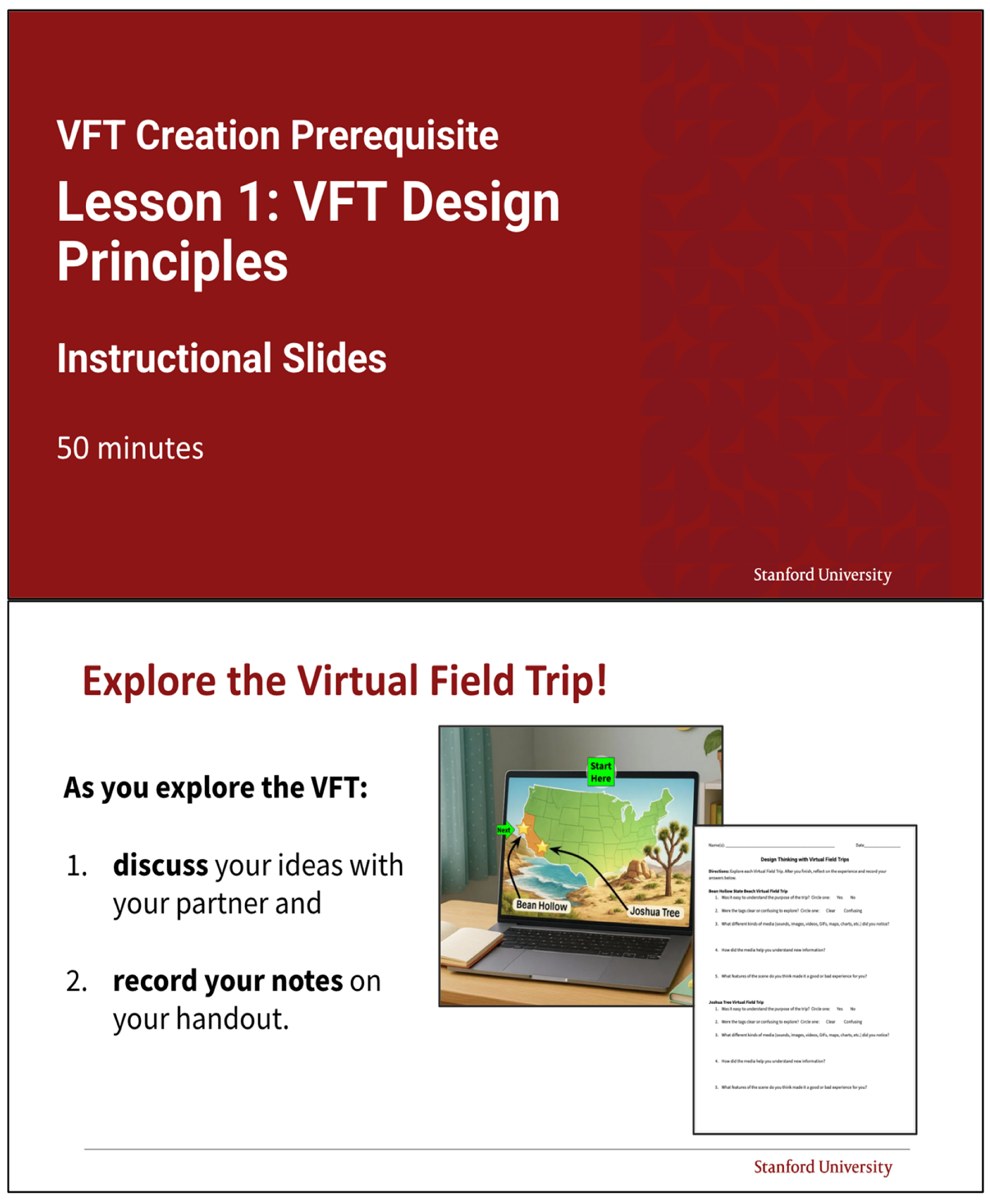
Appendix A.4. The Ecosystems VFT Creation Project Assignment Template. Each Assignment Template on the SU VFT Site Includes Requirements Targeting Orienting the Audience, Domain-Specific Content, and Multimedia Use. Assignment Templates Are Intended to Be Adapted by Educators to Suit Their Specific Instructional Needs. Note: This Has Been Reformatted for the Appendix; The Resource Can Be Found in Its Original Format on the SU VFT Site
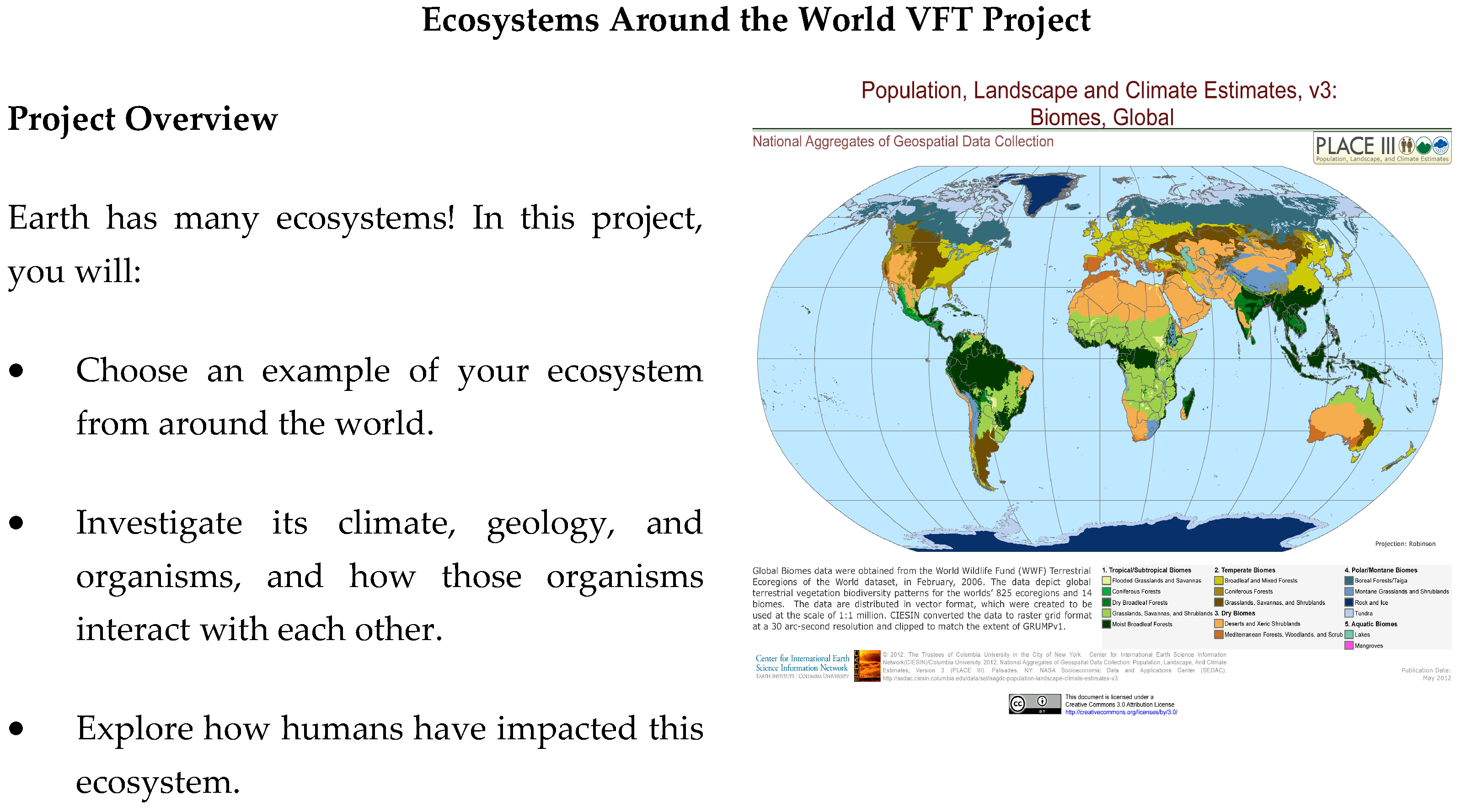
- Your Goal
- Create a virtual field trip that teaches next year’s incoming students about an ecosystem around the world!
- Your Virtual Field Trip Project
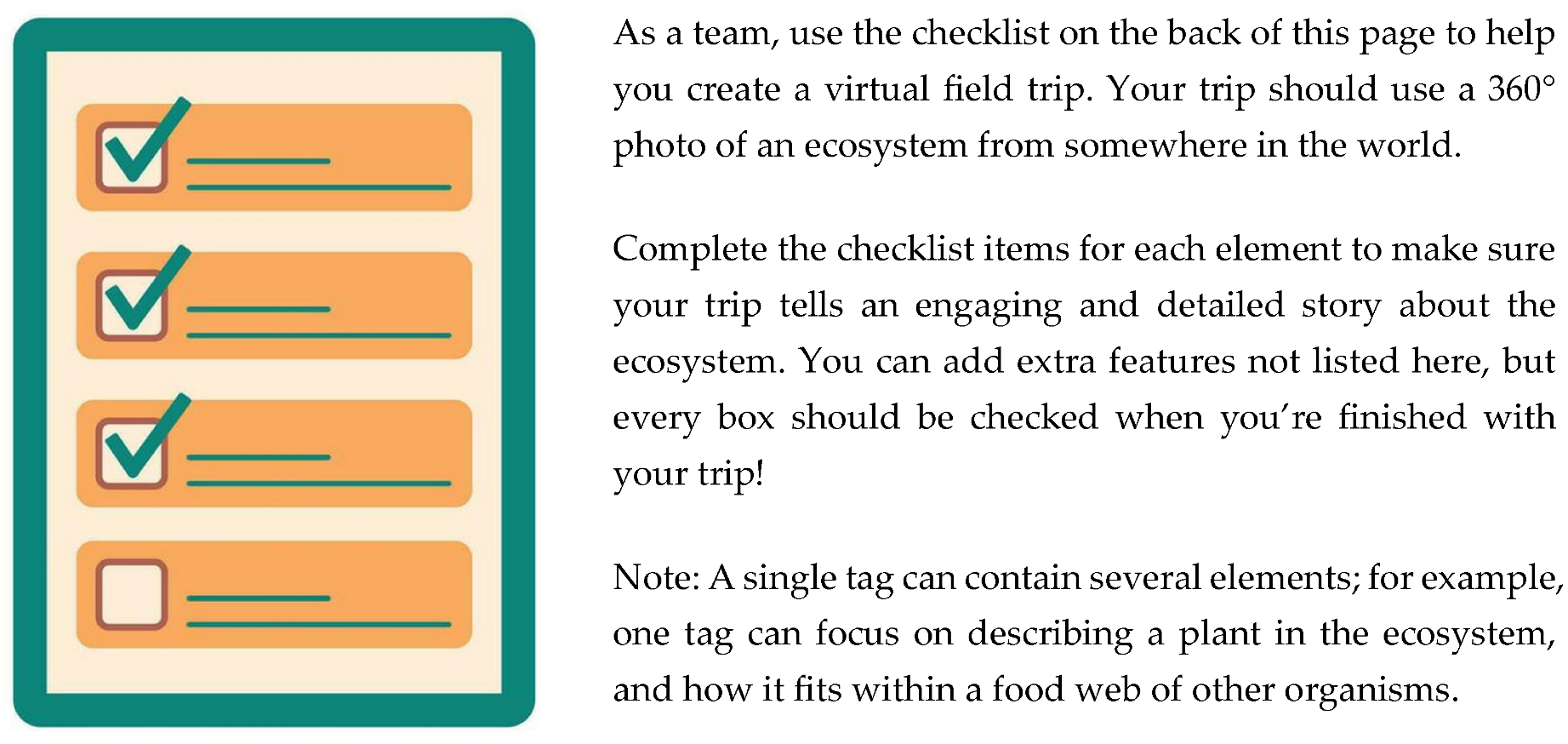
- Framing and Navigation: Introduce your trip to your audience
- Explain where you are in the world.
- Explain what your trip is about.
- If you want your audience to move through the VFT in a particular way, give directions to guide their experience.
- Ecosystem Details: Explain the key features of the ecosystem to your audience
- 1 tag that names the ecosystem.
- 1 or more tags that point out non-living features in the ecosystem.
- 1 or more tags that describe the climate of the ecosystem.
- Plants and Animals: Teach your audience about the organisms that live in the ecosystem and how they interact with each other
- 2 or more tags that describe plants or producers that can be found in the ecosystem.
- 2 or more tags that describe animals that are consumers that can be found in the ecosystem.
- 1 or more tags that describe decomposers that can be found in the ecosystem.
- 1 or more tags that show how organisms are connected through a food web, including at least one producer, consumer, and decomposer.
Human Impacts: Teach your audience about how humans are harming and helping the ecosystem
- 1 or more tags that describe an issue or problem in the ecosystem, and the cause of the problem
- 1 or more tags that describe how people are helping or might try to help the ecosystem.
- Media Use: Engage your audience and make it fun!
- Add videos, photos, polls, drawings, graphs, maps, music, voice overs…and more!
- 3 or more different types of media used.
- Media tags are in relevant places on the background image.
- All text is in your own words - there’s no copy + pasting!
- Any sources used are cited.
- Make sure that you don’t include any images or videos of other classmates.
Appendix A.5. Student-Facing Handout That Accompanies the First Lesson in Phase 1. Note: This Has Been Reformatted for the Appendix; The Resource Can Be Found in Its Original Format on the SU VFT Site
Name(s): ______________________________________ Date_________________
- Directions: Explore each Virtual Field Trip. After you finish, reflect on the experience and record your answers below.
- Bean Hollow State Beach Virtual Field Trip
- How successful was the trip in sharing about an ecosystem in California?
- Check one: □ Very successful □ Successful □ Kind of successful □ Not successful
- 2.
- Did you know how to explore the tags?
- Check one: □ I knew how to explore the tags from directions or from tag icons
- □ I did not get any instructions about how to explore the tags
- 3.
- Were the tags put in places that made sense?
- Check one: □ Most of the tags were in places that made sense
- □ Some of the tags were in places that made sense
- □ None of the tags were in places that made sense
- 4.
- What kinds of media did you notice?
- □ GIFs □ Videos □ Sound effects □ Images □ Maps □ Charts
- □ Other:______________________
- 5.
- How did the media help you understand the big ideas?
Joshua Tree Virtual Field Trip
- 6.
- How successful was the trip in sharing about an ecosystem in California?
- Check one: □ Very successful □ Successful □ Kind of successful □ Not successful
- 7.
- Did you know how to explore the tags?
- Check one: □ I knew how to explore the tags from directions or from tag icons
- □ I did not get any instructions about how to explore the tags
- 8.
- Were the tags put in places that made sense?
- Check one: □ Most of the tags were in places that made sense
- □ Some of the tags were in places that made sense
- □ None of the tags were in places that made sense
- 9.
- What kinds of media did you notice?
- □ GIFs □ Videos □ Sound effects □ Images □ Maps □ Charts
- □ Other:______________________
- 10.
- How did the media help you understand the big ideas?
- 1: Set the scene. Tell your audience what your VFT is about and where it takes place.
- 2: Guide your visitors. Decide how you want people to explore. Use words, icons, or tag settings to guide them.
- 3: Place tags with purpose. Put a tag where it makes the most sense in the scene — on or near the object it is about.
- Bonus: Pick an icon that matches the tag topic!
- 4: Mix in multimedia. Use photos, audio, videos, GIFs, charts, 3D models, graphs, maps, and more to make the big ideas in your VFT come alive!
Directions:
- Go back to Joshua Tree National Park.
- Choose one tag in the VFT.
- Describe how you would change the tag to improve it, using the design tips above.
- Circle the tag you want to improve:

| Where would you move this tag in the scene? Why? |
| What icon would you use for this tag? Why? |
| What media would you use in this tag? Why? |
| What text or explanation would you include in this tag? Why? |
References
- Falk, J.H.; Dierking, L.D. School field trips: Assessing their long-term impact. Curator 1997, 40, 211–218. [Google Scholar] [CrossRef] [Scilit]
- Nadelson, L.S.; Jordan, J.R. Student attitudes toward and recall of outside day: An environmental science field trip. J. Educ. Res. 2012, 105, 220–231. [Google Scholar] [CrossRef] [Scilit]
- Ardoin, N.M.; Bowers, A.W.; Roth, N.W.; Holthuis, N. Environmental education and K-12 student outcomes: A review and analysis of research. J. Environ. Educ. 2018, 49, 1–17. [Google Scholar] [CrossRef] [Scilit]
- Yemini, M.; Engel, L.; Ben Simon, A. Place-based education—A systematic review of literature. Educ. Rev. 2025, 77, 640–660. [Google Scholar] [CrossRef] [Scilit]
- Pfaffman, J.A. Manipulating and Measuring Student Engagement in Computer-Based Instruction. Doctoral Dissertation, Vanderbilt University, Nashville, TN, USA, 2003. [Google Scholar]
- Wolf, R.; Calhoun, S.; Chin, D.; Desai, A.; Williams-Habibi, S. Climate Bingo: An Immersive, Interactive Introduction to Climate Science. Sci. Scope 2026, 49, 10–15. [Google Scholar] [CrossRef] [Scilit]
- Petersen, G.B.; Klingenberg, S.; Mayer, R.E.; Makransky, G. The virtual field trip: Investigating how to optimize immersive virtual learning in climate change education. Br. J. Educ. Technol. 2020, 51, 2098–2114. [Google Scholar] [CrossRef] [Scilit]
- Mead, C.; Buxner, S.; Bruce, G.; Taylor, W.; Semken, S.; Anbar, A.D. Immersive, interactive virtual field trips promote science learning. J. Geosci. Educ. 2019, 67, 131–142. [Google Scholar] [CrossRef] [Scilit]
- Barron, B.J.S.; Schwartz, D.L.; Vye, N.J.; Moore, A.; Petrosino, A.; Zech, L.; Bransford, J.D.; Cognition & Technology Group at Vanderbilt. Doing with understanding: Lessons from research on problem- and project-based learning. J. Learn. Sci. 1998, 7, 271–311. [Google Scholar] [CrossRef] [Scilit]
- Fernandes, F.A.; Rodrigues, C.S.C.; Teixeira, E.N.; Werner, C.M.L. Immersive Learning Frameworks: A Systematic Literature Review. IEEE Trans. Learn. Technol. 2023, 16, 736–747. [Google Scholar] [CrossRef] [Scilit]
- Kuhail, M.A.; ElSayary, A.; Farooq, S.; Alghamdi, A. Exploring Immersive Learning Experiences: A Survey. Informatics 2022, 9, 75. [Google Scholar] [CrossRef] [Scilit]
- Mystakidis, S.; Lympouridis, V. Immersive Learning Design in the Metaverse: A Theoretical Literature Review Synthesis. In Application of the Metaverse in Education; Liu, D., Huang, R., Metwally, A.H.S., Tlili, A., Fan Lin, E., Eds.; Smart Computing and Intelligence; Springer: Singapore, 2024; pp. 55–71. [Google Scholar] [CrossRef] [Scilit]
- Dengel, A.; Mägdefrau, J. Immersive learning explored: Subjective and objective factors influencing learning outcomes in immersive educational virtual environments. In Proceedings of the 2018 IEEE International Conference on Teaching, Assessment, and Learning for Engineering (TALE), Wollongong, Australia, 4–7 December 2018; IEEE: Piscataway, NJ, USA, 2018; pp. 608–615. [Google Scholar] [CrossRef] [Scilit]
- Dengel, A. What Is Immersive Learning? In Proceedings of the 2022 8th International Conference of the Immersive Learning Research Network (iLRN), Vienna, Austria, 30 May–4 June 2022. [Google Scholar] [CrossRef] [Scilit]
- Rosendahl, P.; Wagner, I. 360° Videos in Education—A Systematic Literature Review on Application Areas and Future Potentials. Educ. Inf. Technol. 2024, 29, 1319–1355. [Google Scholar] [CrossRef] [Scilit]
- Hamilton, D.; McKechnie, J.; Edgerton, E.; Wilson, C. Immersive virtual reality as a pedagogical tool in education: A systematic literature review of quantitative learning outcomes and experimental design. J. Comput. Educ. 2021, 8, 1–32. [Google Scholar] [CrossRef] [Scilit]
- Makransky, G.; Terkildsen, T.S.; Mayer, R.E. Adding immersive virtual reality to a science lab simulation causes more presence but less learning. Learn. Instr. 2019, 60, 225–236. [Google Scholar] [CrossRef] [Scilit]
- Makransky, G.; Petersen, G.B. The Cognitive Affective Model of Immersive Learning (CAMIL): A theoretical research-based model of learning in immersive virtual reality. Educ. Psychol. Rev. 2021, 33, 937–958. [Google Scholar] [CrossRef] [Scilit]
- Botkin, M.D.; Trespalacios, J.H. Identifying Virtual/Augmented Reality Research in K-12 Science Education: A Scoping Study. TechTrends 2026, 70, 138–149. [Google Scholar] [CrossRef] [Scilit]
- Snelson, C. Quest-based learning: A scoping review of the research literature. TechTrends 2022, 66, 287–297. [Google Scholar] [CrossRef] [Scilit]
- Lampropoulos, G.; Kinshuk. Virtual reality and gamification in education: A systematic review. Educ. Technol. Res. Dev. 2024, 72, 1691–1785. [Google Scholar] [CrossRef] [Scilit]
- Snelson, C.; Hsu, Y.-C. Educational 360-degree videos in virtual reality: A scoping review of the emerging research. TechTrends 2020, 64, 404–412. [Google Scholar] [CrossRef] [Scilit]
- Tukur, M.; Jashari, S.; Alzubaidi, M.; Salami, B.A.; Boraey, Y.; Yong, S.; Saleh, D.; Pintore, G.; Gobbetti, E.; Schneider, J.; et al. Panoramic imaging in immersive extended reality: A scoping review of technologies, applications, perceptual studies, and user experience challenges. Front. Virtual Real. 2025, 6, 1622605. [Google Scholar] [CrossRef] [Scilit]
- Can, Ö.K.; Lane, J.F.; Ateşkan, A. Facilitating place-based environmental education through bird studies: An action research investigation. Environ. Educ. Res. 2017, 23, 733–747. [Google Scholar] [CrossRef] [Scilit]
- Linnemanstons, K.A.; Jordan, C.M. Learning through place: Evaluation of a professional development program for understanding the impact of place-based education and teacher continuing education needs. J. Sustain. Educ. 2017, 12, 1–25. [Google Scholar]
- Leckey, E.H.; Littrell, M.K.; Okochi, C.; González-Bascó, I.; Gold, A.; Rosales-Collins, S. Exploring local environmental change through filmmaking: The Lentes en Cambio Climático program. J. Environ. Educ. 2021, 52, 207–222. [Google Scholar] [CrossRef] [Scilit]
- Boda, P.A.; Brown, B. Designing for Relationality in Virtual Reality: Context-Specific Learning as a Primer for Content Relevancy. J. Sci. Educ. Technol. 2020, 29, 691–702. [Google Scholar] [CrossRef] [Scilit]
- Kokotsaki, D.; Menzies, V.; Wiggins, A. Project-based learning: A review of the literature. Improv. Sch. 2016, 19, 267–277. [Google Scholar] [CrossRef] [Scilit]
- Helle, L.; Tynjälä, P.; Olkinuora, E. Project-Based Learning in Post-Secondary Education—Theory, Practice and Rubber Sling Shots. High. Educ. 2006, 51, 287–314. [Google Scholar] [CrossRef] [Scilit]
- Ito, M. Hanging Out, Messing Around, and Geeking Out: Kids Living and Learning with New Media; MIT Press: Cambridge, MA, USA, 2013. [Google Scholar]
- Ribosa, J.; Duran Gisbert, D. Do students learn what they teach when generating teaching materials for others? A meta-analysis through the lens of learning by teaching. Educ. Res. Rev. 2022, 37, 100475. [Google Scholar] [CrossRef] [Scilit]
- Okita, S.Y.; Schwartz, D.L. Learning by teaching human pupils and teachable agents: The importance of recursive feedback. J. Learn. Sci. 2013, 22, 375–412. [Google Scholar] [CrossRef] [Scilit]
- Li, T.; Zhan, Z. A Systematic Review on Design Thinking Integrated Learning in K-12 Education. Appl. Sci. 2022, 12, 8077. [Google Scholar] [CrossRef] [Scilit]
- Razzouk, R.; Shute, V. What Is Design Thinking and Why Is It Important? Rev. Educ. Res. 2012, 82, 330–348. [Google Scholar] [CrossRef] [Scilit]
- Meng, N.; Dong, Y.; Roehrs, D.; Luan, L. Tackle implementation challenges in project-based learning: A survey study of PBL e-learning platforms. Educ. Technol. Res. Dev. 2023, 71, 1179–1207. [Google Scholar] [CrossRef] [Scilit]
- Erstad, O. Norwegian students using digital artifacts in project-based learning. J. Comput. Assist. Learn. 2002, 18, 427–437. [Google Scholar] [CrossRef] [Scilit]
- Bell, S. Project-Based Learning for the 21st Century: Skills for the Future. Clear. House 2010, 83, 39–43. [Google Scholar] [CrossRef] [Scilit]
- Santos Garduño, H.A.; Esparza Martínez, M.I.; Portuguez Castro, M. Impact of Virtual Reality on Student Motivation in a High School Science Course. Appl. Sci. 2021, 11, 9516. [Google Scholar] [CrossRef] [Scilit]
- McKenney, S.; Reeves, T.C. Systematic Review of Design-Based Research Progress: Is a Little Knowledge a Dangerous Thing? Educ. Res. 2013, 42, 97–100. [Google Scholar] [CrossRef] [Scilit]
- Anderson, T.; Shattuck, J. Design-Based Research: A Decade of Progress in Education Research? Educ. Res. 2012, 41, 16–25. [Google Scholar] [CrossRef] [Scilit]
- Wang, F.; Hannafin, M.J. Design-based research and technology-enhanced learning environments. Educ. Technol. Res. Dev. 2005, 53, 5–23. [Google Scholar] [CrossRef] [Scilit]
- Blöchle, J.J.; Wendt, T.M. From Modular Learning to Evidence-Based Evaluation: A Five-Layer Model for Capturing Learning and Collaboration Effects in Robotics Education. In HCI in Business, Government and Organizations. HCII 2026; Nah, F.F.H., Siau, K.L., Eds.; Springer: Cham, Switzerland, 2026; Volume 16730, pp. 263–274. [Google Scholar] [CrossRef] [Scilit]
- Fisher, D.; Frey, N. Better Learning Through Structured Teaching: A Framework for the Gradual Release of Responsibility, 3rd ed.; ASCD: Alexandria, VA, USA, 2021. [Google Scholar]
- Siegel, M.A.; Ranney, M.A. Developing the Changes in Attitude about the Relevance of Science (CARS) questionnarie and assessing two high school science classes. J. Res. Sci. Teach. 2003, 40, 757–775. [Google Scholar] [CrossRef] [Scilit]
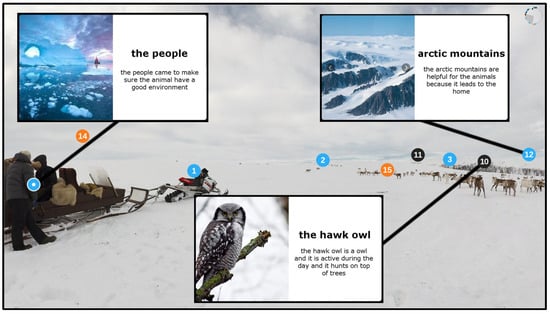
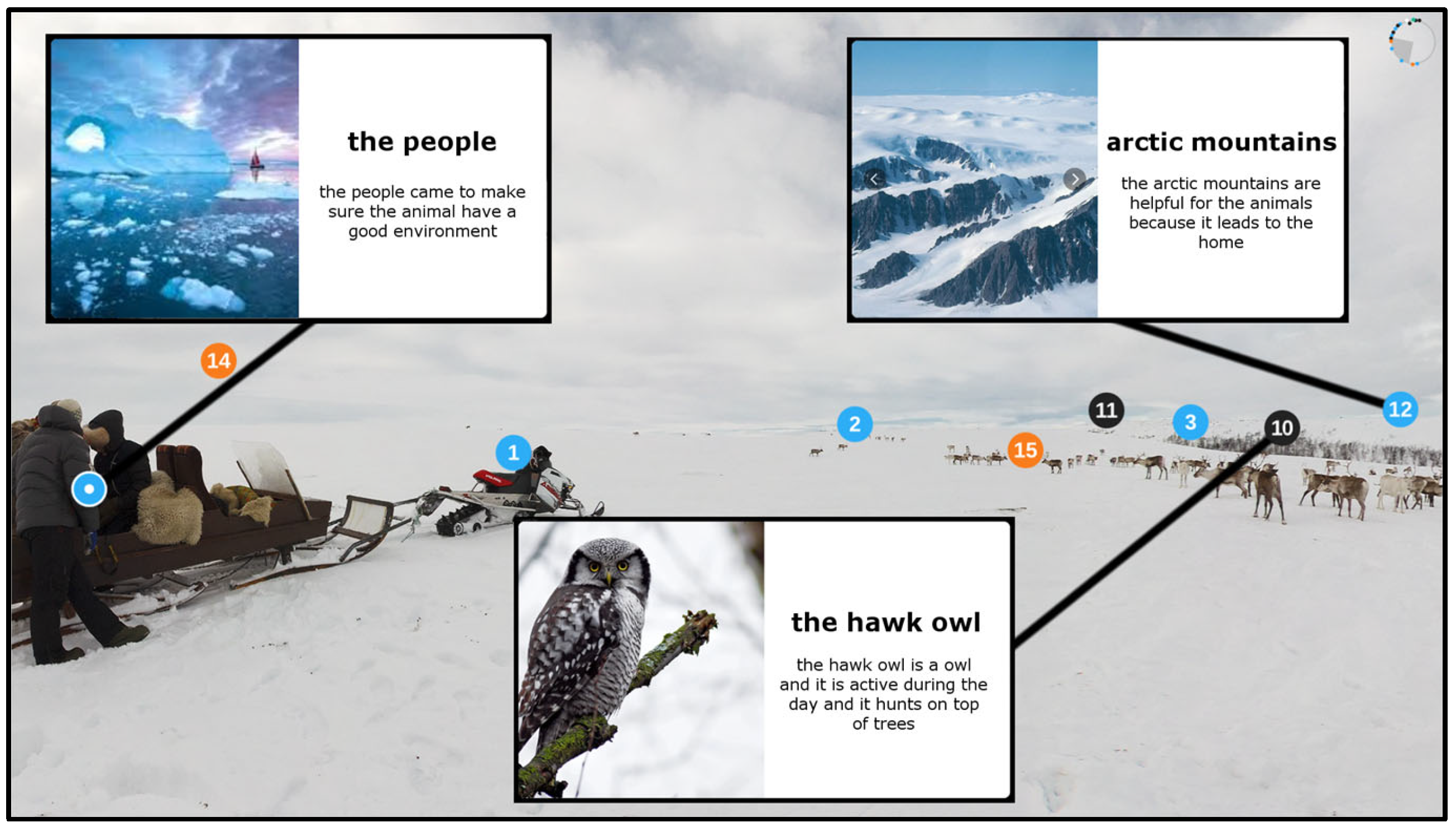
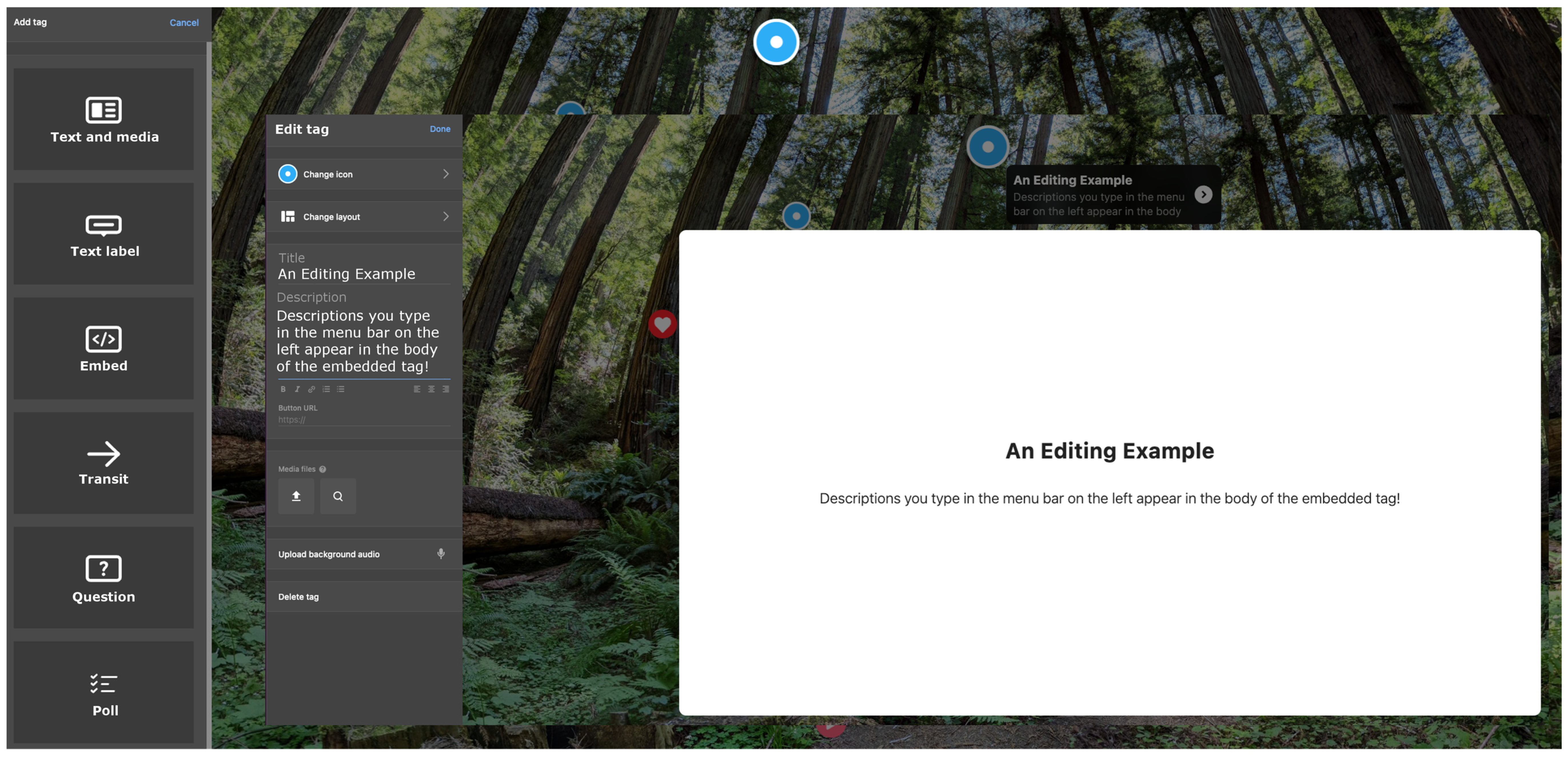
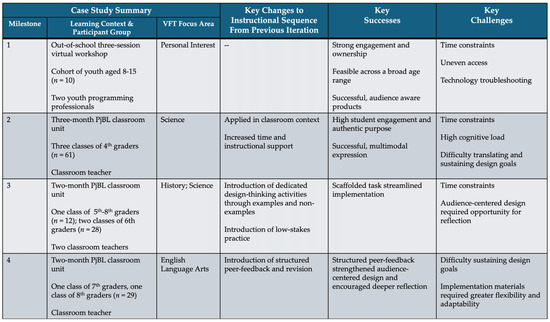
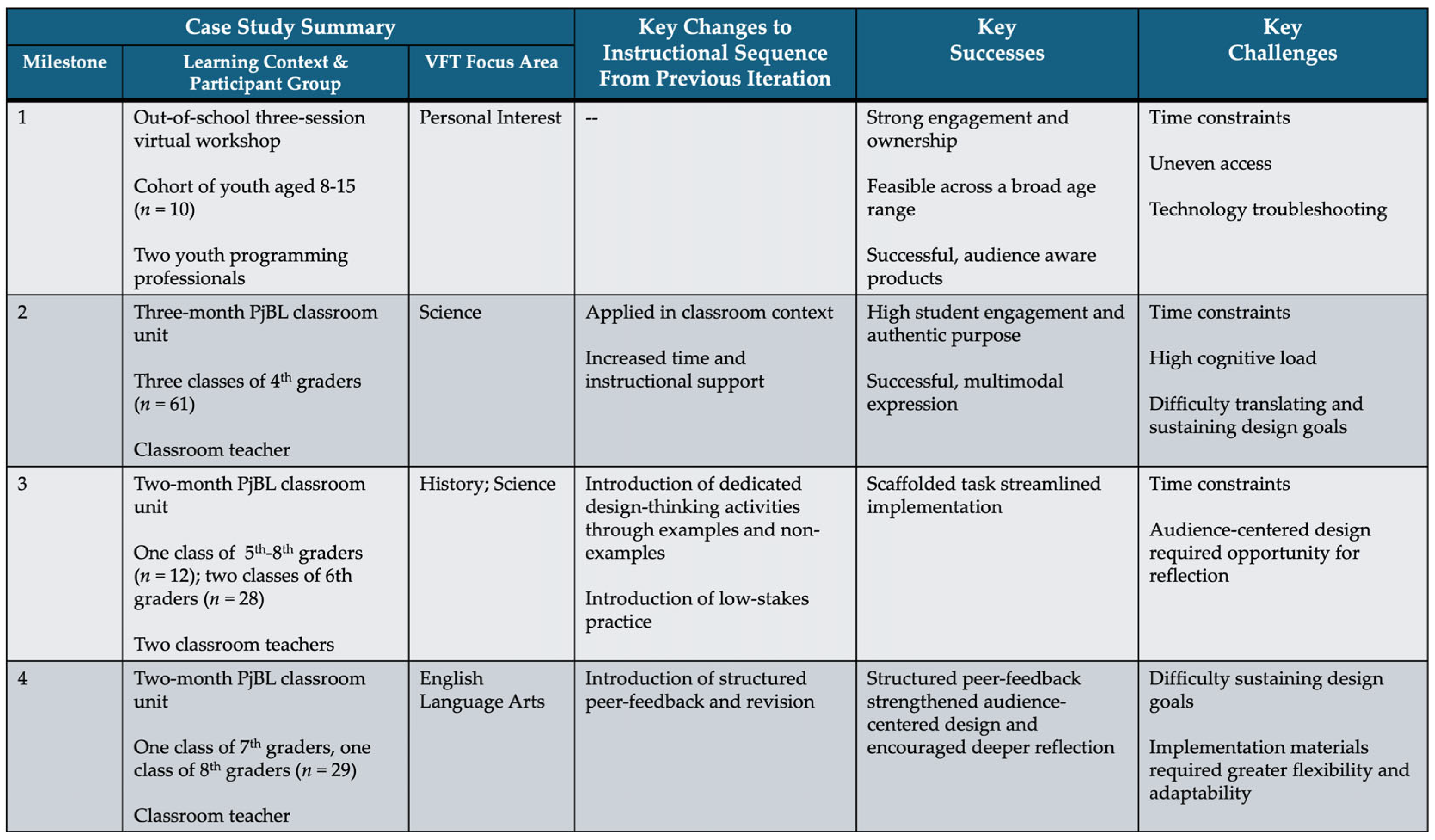
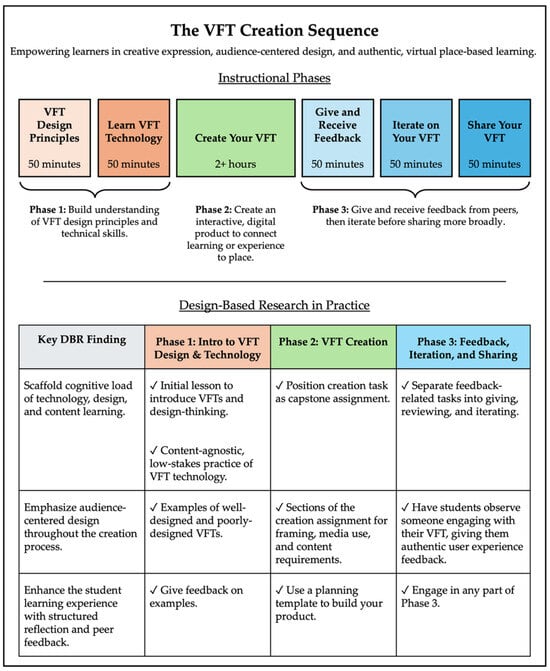
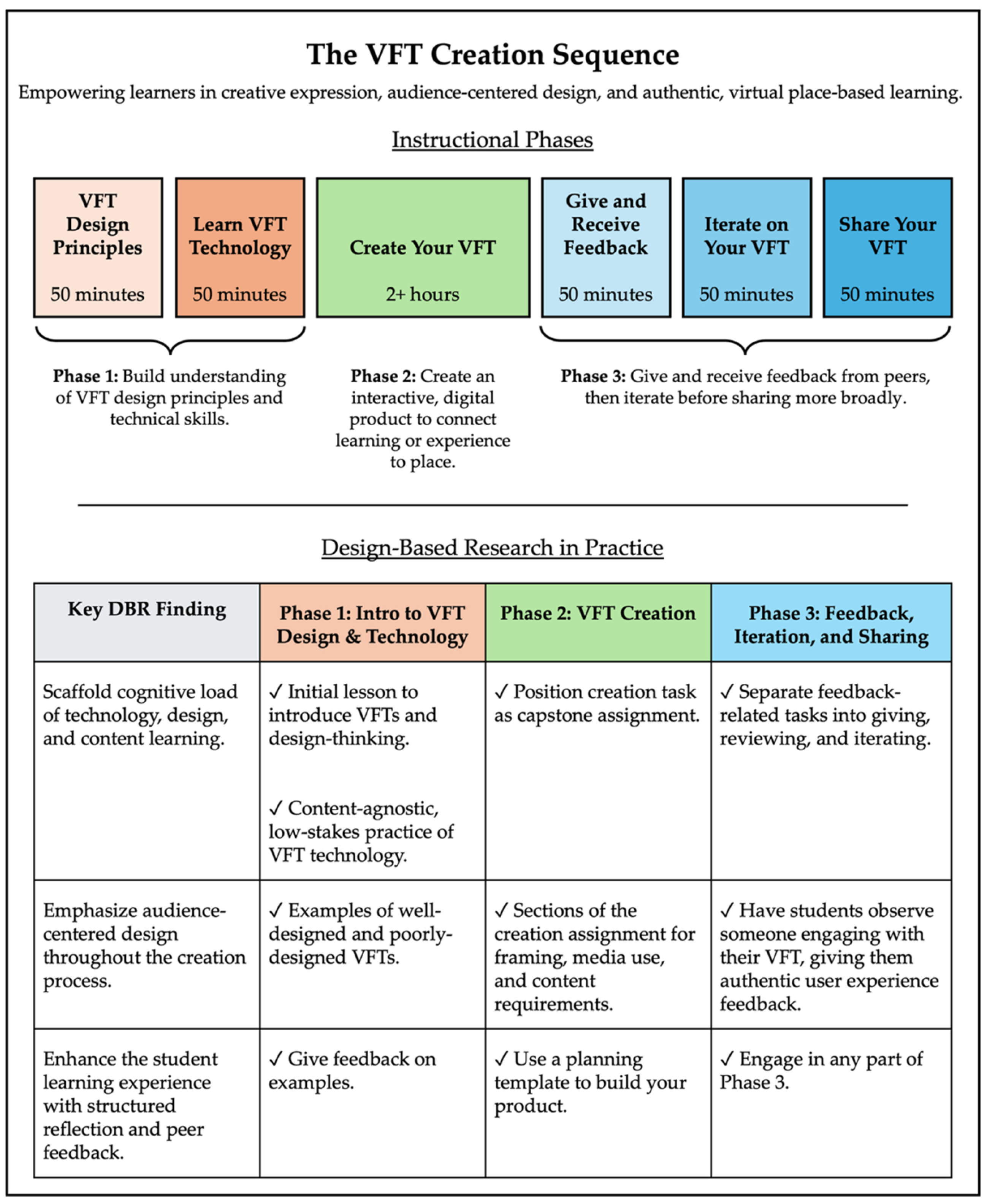
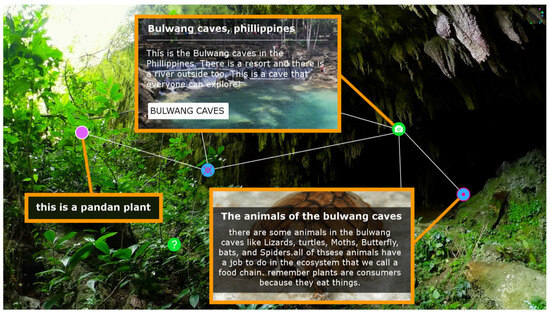
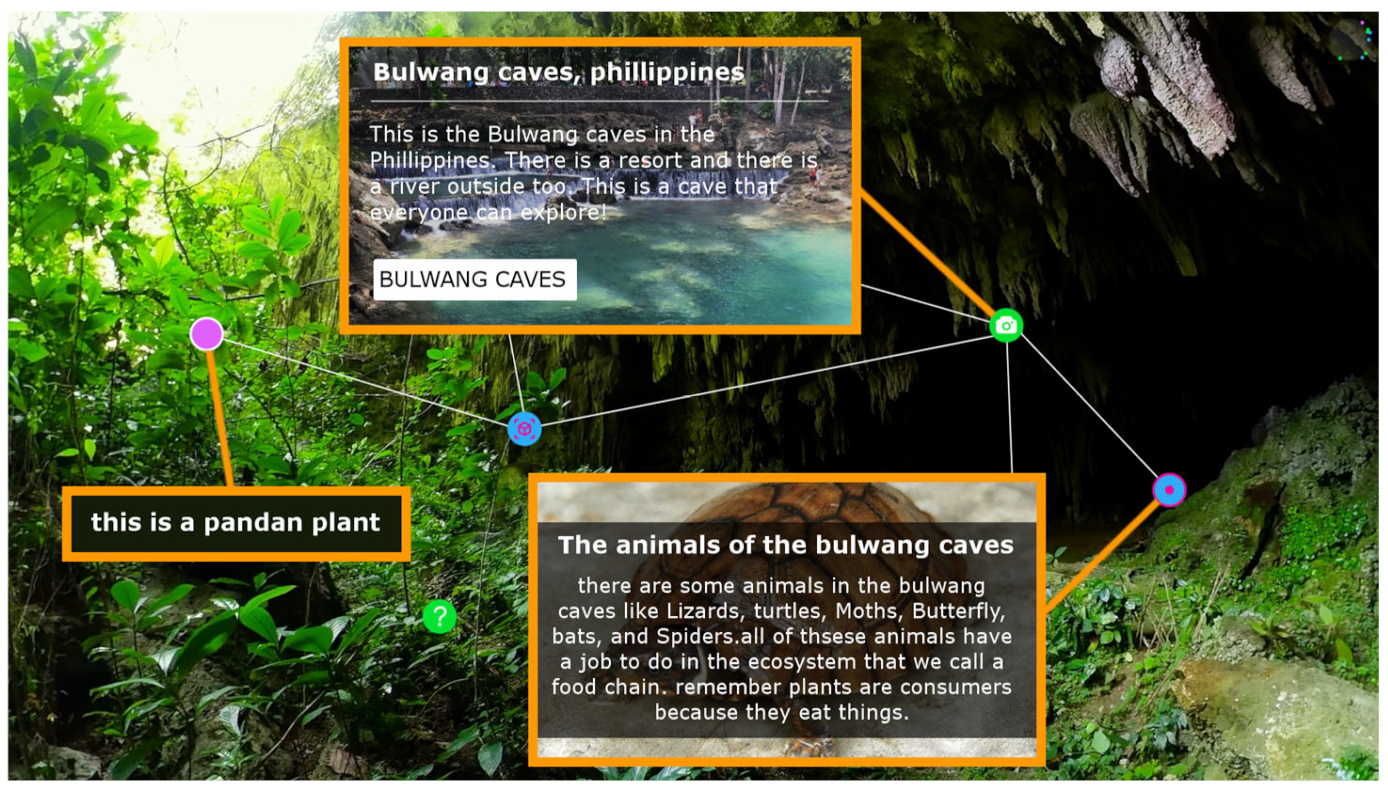

Disclaimer/Publisher’s Note: The statements, opinions and data contained in all publications are solely those of the individual author(s) and contributor(s) and not of MDPI and/or the editor(s). MDPI and/or the editor(s) disclaim responsibility for any injury to people or property resulting from any ideas, methods, instructions or products referred to in the content. |
© 2026 by the authors. Licensee MDPI, Basel, Switzerland. This article is an open access article distributed under the terms and conditions of the Creative Commons Attribution (CC BY) license.