


Abstract
This paper presents a usability evaluation of EduAbility, an Android application that supports inclusivity through assistive technology recommendations and training to pupils with disabilities, teachers, teaching assistants and parents/carers. EduAbility consists of a Recommendation System and Training Package that increases awareness of assistive technology (AT) to improve quality of life for individuals with disabilities. Following a previous usability evaluation at a higher education institution, EduAbility was subsequently developed from the qualitative feedback. A further evaluation at a secondary school and college (n = 9) are presented, where System Usability Scale (SUS) and NASA Task Load Index (TLX) quantitatively measure usability and workload, with Think Aloud providing qualitative data. The results highlight the significant potential of EduAbility to educate teachers, teaching assistants and parents/carers on AT, with the product recommendations being particularly valuable to increase awareness. Suggestions for future work are also discussed as well as the wider impacts of EduAbility on promoting the use of AT in education.
1. Introduction
It is important to consider accessibility and inclusion to ensure that people with disabilities have equal access to opportunities. One form is to use assistive technology (AT) that increases, maintains or improves the functional capabilities of persons with disabilities [1]. This is a growing area of research, as 16% of the worldwide population has disabilities, which accounts for over one billion people [2]. This population can have a range of conditions and associated impairments such as reduced finger dexterity, speech, visual and learning impairments. Previous research highlights that persons with disabilities can often be unaware of the ATs that are available to provide assistance and an improved quality of life [3].
This paper presents Version 1 of the EduAbility Android application that considers AT for education by recommending products to pupils with special educational needs and disabilities and providing training within the education sector. Android was selected as the platform for EduAbility as it currently has 72% of the worldwide market share [4]. The application was developed based on previous AT research that builds upon the SmartAbility Framework [5], Authentibility Pass [6] and HealthAbility [7], in terms of mapping user abilities to technologies. The foundations for this research are the physical and cognitive conditions stated in the World Health Organization (WHO) International Classification for Functioning (ICF) Checklist [8]. The EduAbility tool has two main features: an AT Recommendation System and a Training Package. To obtain recommendations, pupils enter their abilities into the application using a traffic-light-style grading system of ‘Easy’ (green), ‘Difficult’ (amber) or ‘Impossible’ (red). EduAbility then connects to a MySQL database that currently contains 50 AT products, each with further information and website link to the manufacturer. Based on the users’ abilities, AT recommendations are provided for consideration. The purpose of EduAbility is to increase awareness of the products that are available to provide support. The application also contains a Training Package that delivers AT training to increase knowledge and awareness for teachers, teaching assistants and parents/carers. Overall, it is anticipated that the application will promote inclusivity in schools for pupils with disabilities by training staff in suitable products to provide support. The novelty of EduAbility is that through literature review it became evident that there are limited recommendations systems for assistive technology and users generally are required to rely on websites and other healthcare professionals to advise on the products that are available. EduAbility provides this as an Android application that is easily accessible by the user community.
The purpose of the paper is to (1) describe the Android development of EduAbility, (2) present the usability evaluation conducted at a mainstream secondary school and a college for young people with complex disabilities and learning difficulties, (3) analyze the qualitative and quantitative feedback and (4) discuss future updates and dissemination plans.
2. Background
Education Technology (EdTech) refers to the practice of using technology to support teachers and the effective day-to-day management of education institutions [9]. There is an increasing demand for EdTech, as in 2024, the United Kingdom (UK) EdTech investment totaled approximately £164 million, which is a reduction from 2023 where the investment was approximately £404 million [10]. This is due to the wider trends in the technology investment landscape where interest remains at a high level, but funding is more limited. It is a rapidly evolving domain, and emerging trends include artificial intelligence (AI)-powered learning environments, augmented reality (AR) and virtual reality (VR). Within education institutions, there are also automated assessments and adaptive learning. There are examples of using VR as stress relieving interactive systems for young people in high-pressure environments where wearable EEG devices are used to provide music-assisted care with emotion-sensing technology [11]. Furthermore, eyeglass switches can be used for nurse-call operations for people with severe motor impairments who have bedside constraints. This is achieved through the monitoring of oculomotor and eyelid inputs [12]. The application of smart glasses, an AR assistive technology, can provide assistance to visually impaired individuals to navigate within a university environment by providing educational functionalities such as lesson reminders and emergency assistance [13]. Products in the domain of AI, AR and VR can be considered as assistive technology and therefore recommended by EduAbility as potential solutions for users with the necessary abilities. Specifically, AR and VR can provide considerable benefits for people with sensory impairments, including acquiring new knowledge and providing support for daily living activities [14].
In 2023, the UK Government highlighted that schools spend approximately £900 million on EdTech each year [9] and in 2019, the UK Department for Education published a strategy “Realising the potential of technology in education” [15] for education providers and the technology industry to reduce workloads by embedding technology to support inclusion. This strategy remains current and has nine commitments, including “Developing digital capability and skills” and “Promoting effective procurement”. The latter commitment highlights the challenge of understanding which ATs should be produced that meet the specific needs of pupils. A benefit of AT in education can be to reduce isolation amongst pupils with Special Educational Needs, but teachers may not have a sufficient level of skills and knowledge to achieve this [16].
It is evident that the use of AT is increasing the inclusion of pupils with disabilities in the classroom, although there are barriers such as limited teacher education and lack of information [17]. Specifically, Dilsora [18] highlights the importance of Continuous Professional Development (CPD) focusing on AT to address the diverse needs of learners in inclusive classrooms. An example of a recommendation system for assistive technology is the Mada AT Portal, an advanced AI-driven system developed by the Mada Center in Qatar that uses AI and machine learning to provide holistic assessment for individuals [19]. However, this is currently only in use in Qatar and not widely disseminated.
One method of promoting the use of AT is to incorporate guidance into clinical practice guidelines. In a recent study by Callaway et al. [20], a systematic literary review highlighted that the overall number of clinical practice guidelines that include AT is low and there should be greater resources to support individuals living with progressive or complex conditions globally. Even though governments are implementing policies focused on AT provision, knowledge on effective deployment in educational environments is limited [20]. It is also recommended that the terminology of the AT classes in ISO9999 [21] should be more standardized.
There is evidence that despite the advancements of AT, awareness can vary between countries and regions, and some individuals can receive a higher level of resources [22]. Also, some types of disabilities have less focus in terms of suitable AT products, and it is advised that policy makers should ensure all disability types are included to ensure pupils have access to the required resources throughout their academic journeys. The importance of this awareness has been emphasized by pupils who do not realize the potential of AT until it is more widely available in educational institutions [23], resulting in the accomplishment of tasks that were previously impossible.
A further challenge that exists with AT is the quality of devices, aftercare and support systems once products are being utilized by people with disabilities [24]. It is proposed that continuous product quality management processes should be implanted specifically for AT. This is an important consideration once products are recommended to the user community to ensure the longevity of use.
The underpinning of EduAbility utilizes the knowledge within the SmartAbility Framework [5], which recommends ATs based on user abilities, i.e., actions that individuals can perform independently without assistance. SmartAbility originated as a spreadsheet that was subsequently developed into an Android application to detect users’ physical abilities through embedded smartphone sensors. This included the accelerometer, gyroscope and microphone to minimize the level of manual input [5]. However, this application did not provide AT training and only recommendations based on the user’s physical abilities. Therefore, EduAbility further extends SmartAbility by also providing AT recommendations based on cognitive abilities such as reading and writing. There is a dedicated Training Package that aims to enhance the knowledge of AT for teachers, support staff, parents and carers. This paper highlights an evaluation in an educational environment to assess the suitability of EduAbility to provide recommendations and training.
It is anticipated that EduAbility will support this challenge by increasing the awareness of ATs that are available to assist pupils with disabilities, as well as providing CPD-style training for teachers, teaching assistants, support staff and carers. This training will increase their knowledge of how best to support pupils with disabilities. EduAbility is anticipated to provide economic impact to AT manufacturers, as their products will be promoted through the Recommendation System. This could result in potential increases in sales from schools and higher-education institutions who subsequently purchase the products.
3. Methodology
The EduAbility Android application was developed using Android Studio and version control was implemented through GitHub Enterprise Server Version 3.16 (private repository) to provide efficient source-code management, in terms of tracking changes throughout the development lifecycle. Project management was governed by Trello, which served as a central tool to allow the team to track tasks, bugs and feature requests in a structured manner using the Kanban-based system [25].
Evaluations of EduAbility were conducted in the UK at a mainstream secondary school and a college for young people (16–25 years of age) with complex disabilities and learning difficulties. The teachers were selected to provide insights into the usability of the application and the relevance of the AT recommendations within an authentic educational context. All pupils had physical and/or learning disabilities with the aim of the evaluation being to determine the usefulness of EduAbility. Each participant was invited to a 30 min online or in-person session, where they were provided with an EduAbility information document explaining the context behind the application and step-by-step instructions for use. This consisted of two tasks to be performed with the application to obtain assistive technology information and complete the Training Package. Data was captured through direct observations and an online questionnaire following the completion of the tasks, with a focus on assessing the intuitiveness of the application, effectiveness of the training materials and the potential to support inclusive education practices. The qualitative and quantitative questions contained in the online survey are provided in Appendix A. As part of the observation, a Think Aloud test was adopted where participants were asked to verbalize their thoughts during navigation of the user interface. The advantage of Thinking Aloud is that it provides a method to discover the users’ true thoughts on the design, particularly any misconceptions. The limitation of this method is that this can be seen as unnatural, and participants may find it challenging to maintain the required level of monolog [26]. Furthermore, Thinking Aloud enables the researcher to understand the usability issues encountered in real-time, resulting in an improved design and understanding of the user requirements. This is a suitable technique to elicit feedback from teachers, teaching assistants and pupils participating in the evaluation.
The online survey contained quantitative and qualitative questions based on their experience when using the application. The quantitative questions consisted of System Usability Scale (SUS) and NASA Task Load Index (TLX) to provide a comparison of usability and workload measurements. These are quantified on 1 to 5 and 1 to 10 scales, respectively, as presented in Appendix A. SUS was selected as each participant was able to provide a single score in relation to each question [27], enabling SUS scores to be calculated for each participant. The NASA TLX section of the questionnaire allowed users to rate the workload experience during tasks in terms of Physical, Mental, Temporal, Performance, Effort and Frustration demands. This was selected as a well-established method to analyze workload and can also be implemented with a minimal amount of training [28].
4. EduAbility Android Application
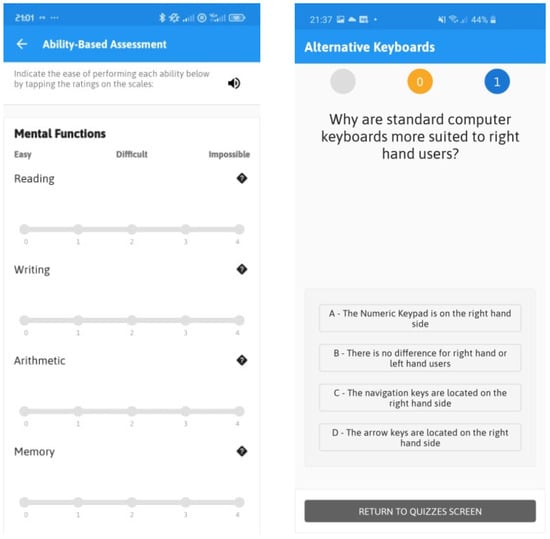
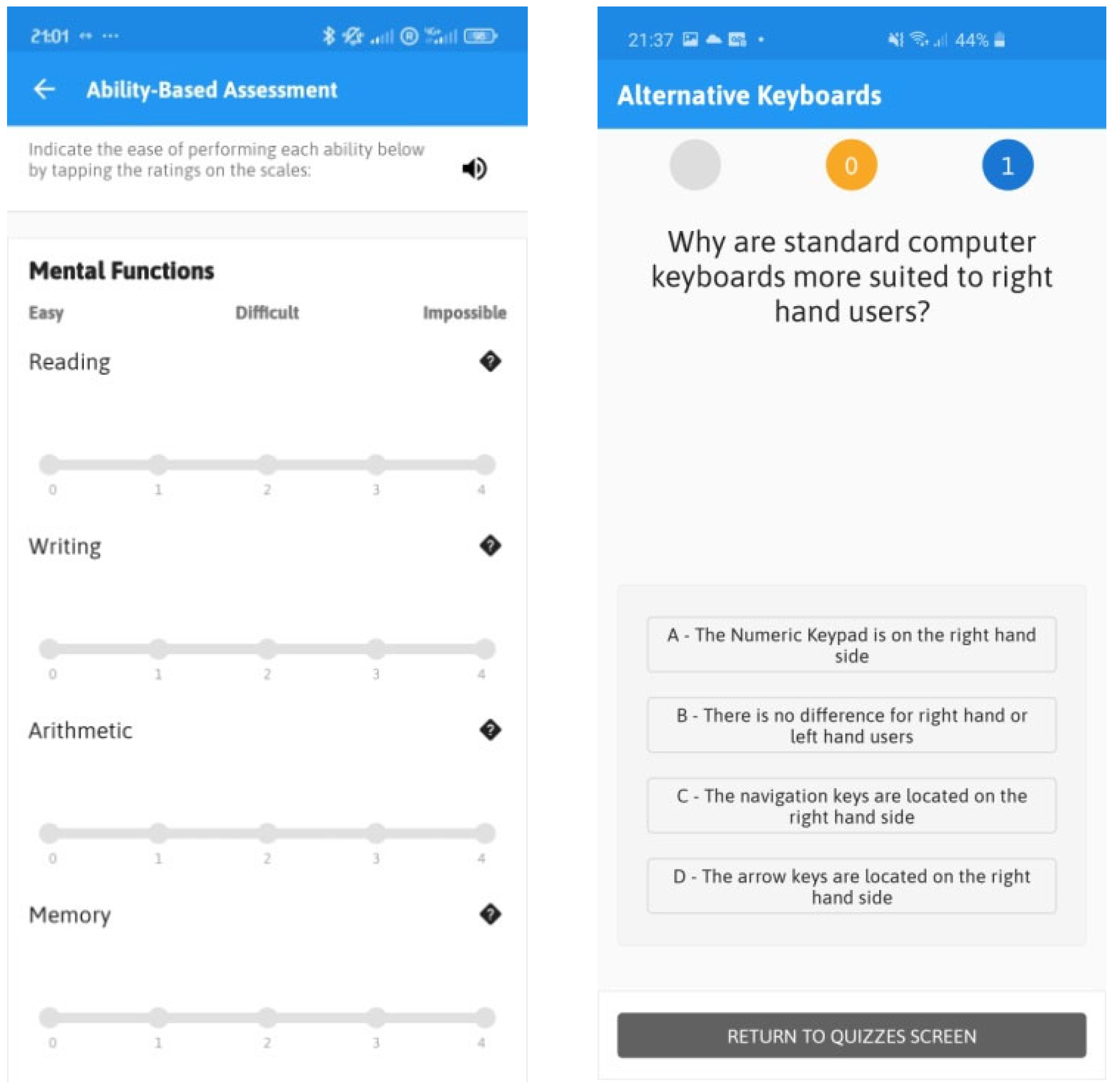
The EduAbility Android application serves as a comprehensive tool that integrates a Recommendation System and a Training Package to address the diverse needs of pupils with disabilities. The Recommendation System (shown in Figure 1) employs a traffic-light grading approach (“Easy”, “Difficult”, “Impossible”) to evaluate pupils’ abilities and matches them with suitable ATs. The Training Package, also in Figure 1, contains quizzes, articles and videos to enhance the AT knowledge of teachers and support staff, to align with the UK Government’s ‘Diversity and Inclusion strategy 2018 to 2025’ [29] and the UNICEF Global Report on Assistive Technology [30]. Initially developed for Android, EduAbility aims to bridge the gap in AT provision within schools and colleges.
Figure 1.
EduAbility Ability-Based Recommendation System and Training Package consisting of multiple-choice assistive technology quizzes.
4.1. Application Development
EduAbility was developed with a modern technology stack using Java 21.0.6 and Kotlin 1.9.22 to ensure a robust and maintainable product. Kotlin was utilized to provide a concise framework and safe programming language that is officially supported by Google for Android development. The backend of EduAbility was implemented in Firebase that provided the user authentication through the Google Sign-in Application Programming Interface (API). The application connects to a MySQL 5.7.24 database that is managed by the Information Technology (IT) service of a UK university. EduAbility also has a user feedback feature where users can submit proposed suggestions for the application and this was implemented with SendGrid, an external email API service.
4.2. Application Updates
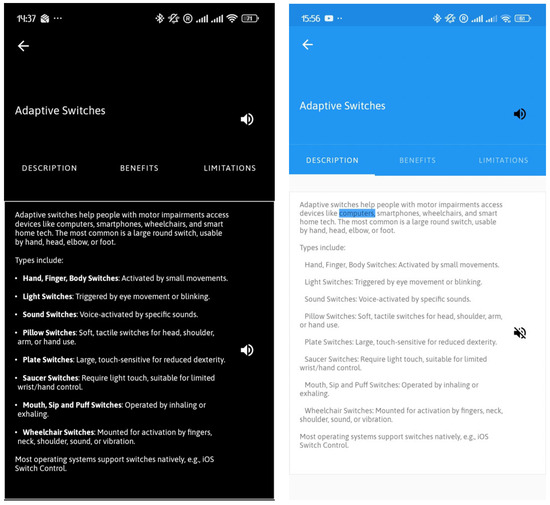
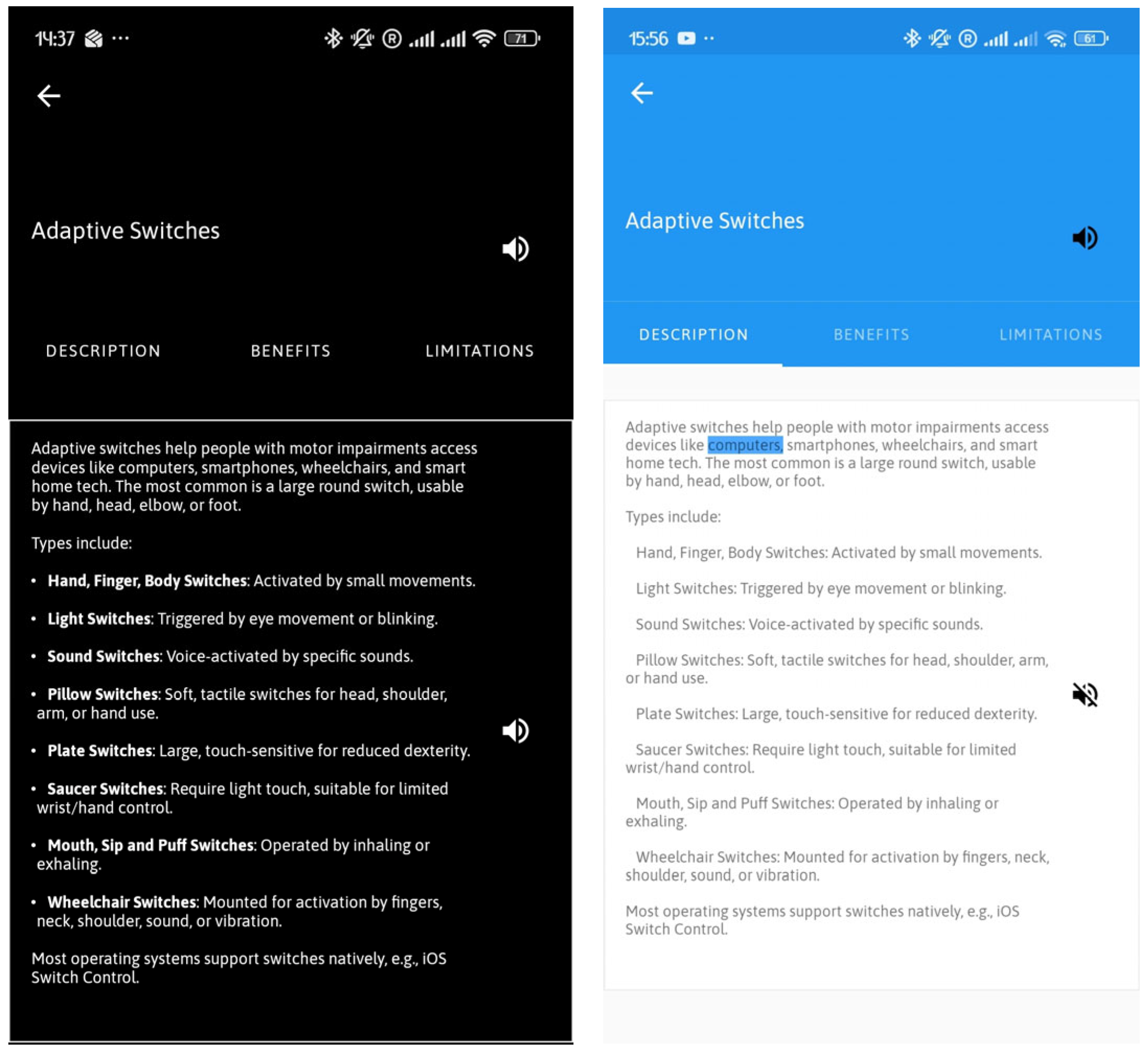
Following the initial usability evaluations at a higher education institution, the Android application was enhanced in terms of usability, accessibility and functionality to directly address the user feedback [3]. Navigation was simplified by relocating condition-based assessment buttons to the home screen and introducing a dedicated “Browse” tab for ATs, which eliminates the need for the previous New Assessment interface. There is significantly improved accessibility through the addition of a read-aloud feature using a synthetic voice as well as a high-contrast feature (shown in Figure 2) to ensure inclusivity for users with visual impairments. The quiz interface was refined for enhanced user engagement, with simplified titles (e.g., “Eye Tracking Quiz” to “Eye Tracking”) and the inclusion of clipart to differentiate the quizzes options. The EduAbility logo was redesigned, and the application integrates a Portable Data Format (PDF) export feature. Finally, the compatibility of the application was upgraded by increasing the minSdkVersion to 30 and the targetSdkVersion to 34, ensuring seamless operation on Android 11 and above.
Figure 2.
EduAbility interface in black/white high contrast colors and standard contrast colors with the read-aloud feature enabled.
5. Results
5.1. Participants and Procedure
Participants. The second phase of EduAbility usability evaluations were conducted at two educational institutions in the UK. This was a small-scale pilot study of the application prior to public dissemination, reflected by the sample size (n = 9). One was a specialist college for people with physical and learning disabilities and the other was mainstream secondary school. The participants included pupils, teachers, teaching assistants, support staff and administrators. All were within the age ranges of 16–25 (n = 2), 26–49 (n = 4) and 50–65 (n = 2), with one participant preferring not to say. Participants were a mixture of genders, consisting of male (n = 2), female (n = 6) or prefer not to say (n = 1) and either had experience of interacting with pupils who have disabilities or had a disability themselves. The relatively small sample size is acknowledged but it provides a representation of the EduAbility user types. Challenges were experienced when recruiting participants in this niche user community, due to teaching constraints and the availability of pupils who had physical disabilities with sufficient levels of cognition to understand the usability evaluation. Once publicly disseminated, EduAbility has the potential to be used by a greater number of users and ongoing qualitative data will be obtained through an in-application user feedback feature.
Procedure. As the usability evaluations were conducted within school environments, approval was obtained from the ethics committee of the researchers’ university prior to conduction. Informed consent was obtained from all participants, and a participant information sheet was provided. The participants were invited for a 30 min evaluation, where they were first informed about the purpose of EduAbility and provided with a usability evaluation pack. This contained step-by-step instructions on the tasks to be performed during the evaluation. The participants then completed the tasks, requesting support if needed. Participants were asked to think aloud whilst interacting with EduAbility, so that Think Aloud protocol [19] could be applied. Subject to the written consent of each participant, audio was recorded to analyze their thoughts post-evaluation.
5.2. Qualitative Feedback
The feedback captured in the results of the questionnaire was generally positive. Participants commended the application’s intuitive design, noting that it facilitated easy navigation and interaction. The AT recommendations were particularly valued for their relevance and practicality, with teachers expressing confidence in their ability to use the training materials to enhance their support for pupils with disabilities. Overall, the participants reported a high level of satisfaction with the mobile application, underscoring its potential as a valuable resource for supporting inclusive classroom environments. The participants were asked whether the AT recommendations provided by EduAbility were useful and if the Training Package was informative. Overall, the feedback was encouraging and the participants advised that there was significant potential for EduAbility to inform and educate staff in an efficient manner. A participant highlighted “I found the section on selecting a condition and then being given access to the assistive technology really useful”. It was suggested that school staff could engage with the application without impacting on their time constraints in an education environment. The user interfaces of EduAbility were seen to be clean and easy to use, without requiring guidance on how to interact with the application. Generally, participants thought that the AT recommendations were appropriate, but there was a comment that more time would be required to accurately assess the products suggested. The materials within the Training Package were thought to be informative and allowed users to increase their knowledge of AT.
Views were obtained on whether there were AT categories that should be included in the recommendations and Training Package. It was commented that the recommendations “seem extensive already but ratings would be useful as an indication of how other users are finding the hardware/software”. There were some suggestions for additional products to be included in the database such as handwriting packages. Participants also suggested conditions that should be considered in the condition-based recommendations section of the application, such as obsessive–compulsive disorder, anxiety, eating disorders and Tourette’s syndrome. When reviewing the recommendations provided by EduAbility, participants highlighted that the list of products was extensive but the database should be maintained regularly as AT is a rapidly changing sector due to technological advances and evolving needs [22].
The final qualitative question concerned suggested improvements for EduAbility. One suggestion was to consider the cost perspective of the products in the database, as this would provide users with an indication on the affordability of the suggested products. One participant who was a Special Educational Needs and/or Disabilities Coordinator (SENDCO) at the mainstream secondary school highlighted that the cost of resources requires careful consideration in terms of budgeting and this would be a useful feature. Another participant highlighted that the general usability of the application could be improved through information flags under each assessment criteria to “speed up the use and engagement with the app”. When accessing the YouTube videos in the ‘Learn’ section of the application, participants thought that it was confusing that EduAbility opened a web browser on the smartphone to access the YouTube website. This caused confusion as the participants were required to navigate through the operating system to return to the EduAbility Training Package. Participants also expressed that it would be challenging to ensure that all the website links in the application were kept up-to-date and functional. This was noted as a potential challenge to be considered as future development.
Four key feature requests emerged from the discussions during the evaluations, (1) consisting of the addition of price indicators for ATs to aid in school budgeting, (2) an in-application YouTube video player for easy access to tutorial content, (3) a user rating system to evaluate the effectiveness of ATs and (4) functionality to save the exported PDF recommendations for personalized pupils support plans. These suggestions provide a clear and actionable roadmap for the next phase of development ensuring that EduAbility continues to evolve in response to the needs of its users.
5.3. Quantitative Analysis
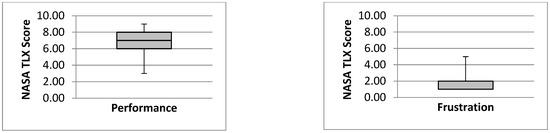
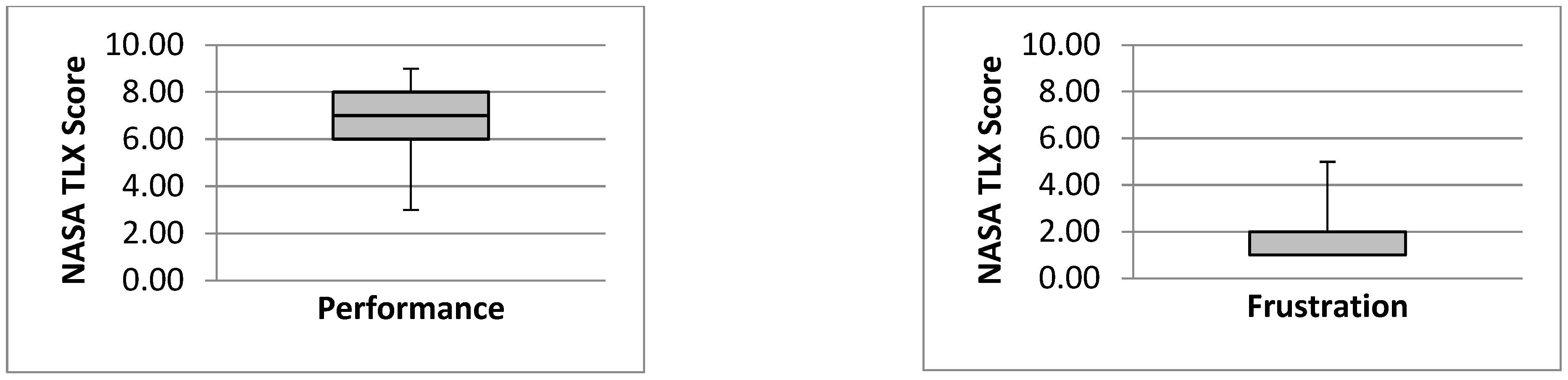
The usability evaluation results were analyzed quantitatively by applying SUS and NASA TLX to compare the usability and workload demands respectively. The NASA TLX results revealed low levels of Physical, Mental, Temporal and Frustration workload demands. This supports the qualitative feedback from participants such as “I like the simple 1–5 grading” in relation to the user ability-assessment interface. A median performance value of 7.00 is achieved by EduAbility, as all participants indicated that they could complete the required tasks, as shown in Figure 3. Performance has a broader interquartile range of 6.00 and a standard deviation (SD) of 1.6, with Frustration being smaller at a value of 1.00 and a SD of 1.3. This highlights that Frustration levels were low, and this supports feedback from a participant, “clear user interface, quickness and clarity”, when describing the navigation within the application.
Figure 3.
NASA TLX boxplots showing Performance and Frustration workload demands experienced when interacting with EduAbility.
The analysis of the SUS results also showed positive findings in relation to the usability of the application. The usability of the following two tasks was measured (1) obtaining AT recommendations and (2) learning about AT. The first task achieved a SUS score of 75.0 (SD: 14.2) and the second achieved 81.9 (SD: 13.0). When interpreted using the Adjective Rating Scale, both scores indicate “Good Usability”, with the Training Package having a higher level of usability. A possible cause of this could be due to the ability scales in the Recommendation System not having sufficient labels to indicate the varying types of ability. The higher levels of usability in the Training Package were supported by participant feedback highlighting the “simplicity of the Learn section and quizzes with straightforward information”. The usability of the Recommendation System could have also been adversely affected by requiring a greater number of conditions for the condition-based recommendations.
6. Discussion
Overall, the usability evaluations revealed positive feedback on the usefulness of EduAbility in an educational setting. It was identified as being an effective method to recommend AT and to provide AT training. The evaluation results revealed that the Training Package had a higher level of usability than the recommendation system. A possible cause could be the ability scales that required precision to search the desired rating and that the information flags were not clearly shown on the interface. Therefore, participants encountered challenges with differentiating the types of physical and cognitive abilities. Integrating information flags below the ability scales will be implemented as future work to improve usability.
The analysis of the qualitative usability evaluation results also revealed four key priorities for future improvements to EduAbility. In the Recommendation System, a price display should be stated that provides an indication of the cost of products in the database. As product prices change regularly, it was decided that an indication of the cost of the product will be included over three price ranges. Another suggestion was that YouTube videos should play within the application rather than opening a separate web browser, resulting in the user having to navigate back to the application. The participants also highlighted that there should be a function to save or export a list of recommended ATs for individual pupils. This would be beneficial so that the user could return to EduAbility later to view their recommended products. This was subsequently developed through an integrated ‘Export to PDF’ feature where the list of recommended ATs can be emailed to the pupil for future reference.
EduAbility will promote awareness of available AT that can provide support to pupils with disabilities. This compliments recent research where it has been identified that pupils with disabilities may not have sufficient knowledge of the products that are available [17]. An alternative application for obtaining AT recommendations is to use the Mada AT Portal [19], but EduAbility offers the benefits of being available in English and compatible with a smartphone. The Mada AT Portal is currently only a web-based solution available in Arabic. Additionally, the portal does not provide training for teachers, support staff and parents/carers. Through literature review, it became evident that there are limited other examples of AT recommendation systems in the domain. Successful dissemination of EduAbility therefore has the potential to become considered by policymakers involved in AT provisions as a recommendation tool that considers a range of disabilities. It is acknowledged that there is a challenge of ensuring sufficient aftercare support for the products recommended by EduAbility. This would be addressed by a future feature that enables pupils and teachers to rate the products based on their effectiveness after use and experiences with technical support. This would be beneficial as a product quality management process [24] for EduAbility to guide users in the benefits of the recommended AT products.
7. Conclusions
The aim of EduAbility is to promote awareness of AT through the provision of suitable recommendations to pupils with disabilities and CPD-style training to teachers, teaching assistants and parents/carers. This will enable a greater number of people with disabilities to become aware of AT that can increase their quality of life and potentially independence. The application contains accessibility features including customizable text size and contrast, as well as a read-aloud feature for instructions on the user interface to assist users who may have challenges with reading the text.
Based on the feedback obtained from the usability evaluations conducted at a mainstream secondary school and a specialist college in the UK, it was highlighted that EduAbility is a practical tool with a high level of potential to inform and educate staff efficiently. The participants found the application intuitive and valuable, with the core functionality of receiving AT recommendations being particularly useful. This was due to the recommendations being specifically tailored towards the user’s conditions and abilities. The participants were also confident in using the application and the Training Package materials were found to be appropriate.
The presented research included the results usability evaluations conducted in the mainstream secondary school and a specialist college for pupils with disabilities. The overall feedback on the EduAbility tool was positive and demonstrates the potential for the application to increase awareness of AT in schools and colleges. The findings from the evaluations identified required updates to the application, with some having been implemented and others being considered as future work. It is anticipated that the public dissemination of the application through digital distribution platforms, such as the Google Play Store, would facilitate the potential to increase knowledge of pupils with disabilities, teachers, teaching assistants, support staff, parents and carers. Further usability evaluations will be conducted at mainstream and special educational needs schools to increase the potential users of EduAbility. The methodology involving a qualitative questionnaire and quantitative analysis through SUS and NASA TLX will be followed, as this was appropriate to the study.
Future Work
The following suggestions were highlighted as future enhancements to EduAbility. It was suggested that if it was converted to a web application it would increase potential usage within the user community. Within schools, computers are generally used instead of smartphones, so a web application would be more useful in an educational environment. To ensure inclusivity, the application should be available across all platforms and not only Android. A further suggestion was to incorporate AI into the application so that the quizzes are dynamically generated based on the AT information in the Training Package. This would increase the value of materials as they would automatically change over time. The final suggestion was to incorporate a rating system that enables users to rate the content of the Training Package. The ratings for each section of the package would be calculated to gauge the helpfulness of the content.
To ensure that the application is fully inclusive across platforms, iOS implementation will be developed and the potential to migrate the code to the Flutter Development Kit [31] will be explored to create a cross-platform application from a single codebase. This will enable EduAbility to be compatible with Android, iOS and a web-based application that would be maintained across all platforms. International dissemination will also be achieved through the translation of the EduAbility user interface and database into languages including French and Spanish.
The EduAbility tool therefore demonstrates how AT awareness can be increased through the utilization of a smartphone application, thus supporting wider international initiatives for promoting the use of AT in educational environments [32,33].
Supplementary Materials
The following supporting information can be found at: https://youtu.be/FO81QiSau5I?si=Sd6clQwdqdWSGgKk (accessed on 3 November 2025).
Author Contributions
Conceptualization, P.W.; Data curation, P.W.; Formal analysis, P.W.; Investigation, P.W.; Methodology, P.W.; Project administration, P.W., H.D. and C.E.; Resources, P.W. and C.E.; Software, C.E.; Supervision, H.D.; Writing—original draft, P.W.; Writing—review and editing, H.D. and C.E. All authors have read and agreed to the published version of the manuscript.
Funding
This research received internal funding from Bournemouth University and an external donation from The Alice Ellen Cooper-Dean Charitable Foundation, a Dorset (UK) grant-making charity that provides grants for the advancement of education.
Data Availability Statement
The study was approved by the Ethics Committee of Bournemouth University (Checklist: 49710) on 25 May 2023. The original contributions presented in this study are included in the article/Supplementary Material. Further inquiries can be directed to the corresponding author.
Acknowledgments
The authors would like to acknowledge the participants of the usability evaluations for their valuable feedback on EduAbility (v1.0).
Conflicts of Interest
The authors declare no conflicts of interest.
Abbreviations
The following abbreviations are used in this manuscript:
| AI | Artificial Intelligence |
| API | Application Programming Interface |
| AR | Augmented Reality |
| AT | Assistive Technology |
| CPD | Continuous Professional Development |
| EdTech | Education Technology |
| ICF | International Classification for Functioning |
| iOS | iPhone Operating System |
| IT | Information Technology |
| NASA | National Aeronautics and Space Administration |
| Portable Data Format | |
| SD | Standard Deviation |
| SENDCO | Special Educational Needs and/or Disabilities Coordinator |
| SQL | Structured Query Language |
| SUS | System Usability Scale |
| TLX | Task Load Index |
| UK | United Kingdom |
| VR | Virtual Reality |
| WHO | World Health Organization |
Appendix A
The questions provided in the EduAbility usability evaluation online survey are provided below. These are a mixture of closed and open-ended questions.
- What is your gender?
- What is your age?
- What is your occupation?
- SUS Questions (Technology Assessment interface) (quantified scales: 1–5)
- a.
- I would like to use the Technology Assessment section of EduAbility to learn about assistive technology
- b.
- I found using the Technology Assessment section of EduAbility to learn about assistive learning technologies complex
- c.
- I thought the Technology Assessment was easy to use
- d.
- I think I would need support to complete technology Assessment using EduAbility
- e.
- I found the Technology Assessment section of EduAbility well integrated
- f.
- I thought the Technology Assessment section of EduAbility was confusing
- SUS Questions (Learn interface) (quantified scales: 1–5)
- a.
- I would like to use the Learn section of EduAbility to learn about assistive technology
- b.
- I found using the Learn section of EduAbility to learn about assistive learning technologies complex
- c.
- I thought the Learn was easy to use
- d.
- I think I would need support to complete Learn using EduAbility
- e.
- I found the Learn section of EduAbility well integrated
- f.
- I thought the Learn section of EduAbility was confusing
- NASA Task Load Index questions (quantified scales: 1–10)
- a.
- Mental Demand
- b.
- Physical Demand
- c.
- Temporal Demand
- d.
- Performance
- e.
- Effort
- f.
- Frustration
- Which features of EduAbility did you prefer?
- Did you find the assistive technology recommendations and training appropriate?
- Please state any additional technology categories that should be included in the recommendations and/or training.
- Could you suggest any improvements to EduAbility?
References
- What is AT? Available online: https://www.atia.org/home/at-resources/what-is-at/ (accessed on 3 November 2025).
- Disability Inclusion. Available online: https://www.worldbank.org/en/topic/disability (accessed on 3 November 2025).
- Whittington, P.; Dogan, H.; Jiang, N. EduAbility: Provision of Assistive Technology Awareness and Training. In Proceedings of the Design for Equality and Justice: INTERACT 2023 IFIP TC 13 Workshops, York, UK, 28 August–1 September 2023. [Google Scholar] [CrossRef] [Scilit]
- Mobile Operating System Market Share Worldwide. Available online: https://gs.statcounter.com/os-market-share/mobile/worldwide (accessed on 3 November 2025).
- Whittington, P.; Dogan, H.; Jiang, N.; Phalp, K. The development and evaluation of the SmartAbility Android Application to detect users’ abilities. In Proceedings of the 2019 CHI Conference on Human Factors in Computing Systems Workshop: Addressing the Challenges of Situationally-Induced Impairments and Disabilities in Mobile Interaction (CHI’19), Glasgow, UK, 4–9 May 2019. [Google Scholar] [CrossRef] [Scilit]
- Whittington, P.; Dogan, H. Authentibility Pass: An Accessible Authentication Gateway for People with Reduced Abilities. In Proceedings of the 2023 IEEE International Conference on E Business Engineering (ICEBE), Sydney, Australia, 4–6 November 2023; Volume 6. [Google Scholar] [CrossRef] [Scilit]
- Whittington, P.; Dogan, H.; Phillips, J.T.; Phillips, H.; Pochin, I. Communicating reasonable adjustments to improve accessibility of patient services. In Proceedings of the 17th International Conference on PErvasive Technologies Related to Assistive Environments (PETRA ’24), Heraklion, Greece, 26–28 June 2024. [Google Scholar] [CrossRef] [Scilit]
- ICF Checklist. Available online: https://www.who.int/publications/m/item/icf-checklist (accessed on 3 November 2025).
- Educational Technology: Digital Innovation and AI in Schools. Available online: https://lordslibrary.parliament.uk/educational-technology-digital-innovation-and-ai-in-schools/ (accessed on 19 January 2026).
- EdTech Investment Is Cooling but London Stays Hot. Available online: https://www.techuk.org/resource/edtech-investment-is-cooling-but-london-stays-hot.html (accessed on 3 November 2025).
- Wang, C.; Lin, C. Design of an Interactive System by Combining Affective Computing Technology with Music for Stress Relief. Electronics 2025, 14, 3087. [Google Scholar] [CrossRef] [Scilit]
- Tamai, R.; Saitoh, T.; Itoh, I.; Zhang, H. Eyeglass-Type Switch: A Wearable Eye-Movement and Blink Switch for ALS Nurse Call. Electronics 2025, 14, 4201. [Google Scholar] [CrossRef] [Scilit]
- Zhu, Y.; Roomkham, S.; Sitbon, L. Augmented Reality as an Educational Tool and Assistive Technology for People with Intellectual Disabilities: Scoping Review. In Proceedings of the 34th Australian Conference on Human-Computer Interaction (OzCHI ’22), Canberra, Australia, 29 November–2 December 2022. [Google Scholar] [CrossRef] [Scilit]
- Aloui, N. Towards Spatial Awareness: Real-Time Sensory Augmentation with Smart Glasses for Visually Impaired Individuals. J. Electron. 2025, 14, 3365. [Google Scholar] [CrossRef] [Scilit]
- Realising the Potential of Technology in Education. Available online: https://www.gov.uk/government/publications/realising-the-potential-of-technology-in-education (accessed on 3 November 2025).
- Alkahtani, K.D.F. Teachers’ Knowledge and Use of Assistive Technology for Students with Special Educational Needs. In Creative Education. J. Stud. Educ. 2022, 13, 65–86. [Google Scholar] [CrossRef] [Scilit]
- Fernández-Batanero, J.M.; Montenegro-Rueda, M.; Fernández-Cerero, J.; García-Martínez, I. Assistive technology for the inclusion of students with disabilities: A systematic review. Educ. Technol. Res. Dev. 2022, 70, 1911–1930. [Google Scholar] [CrossRef] [Scilit]
- Dilsora, Q. Principles of continuous professional development of educators in the context of inclusive education. Int. J. Pedagog. 2024, 4, 196–199. [Google Scholar] [CrossRef] [Scilit]
- Mada AT Portal. Available online: https://at.mada.org.qa/ (accessed on 16 February 2026).
- Callaway, L.; Bragge, P.; Cong-Lem, N.; Delafosse, V.; Lennox, A.; Hill, K.D.; Layton, N. A review of international clinical guidelines that inform the use of assistive technology to support adults living with progressive or complex conditions. Disabil. Rehabil. Assist. Technol. 2025, 20, 1247–1256. [Google Scholar] [CrossRef] [Scilit] [PubMed]
- ISO 9999; Assistive Products—Classification and Terminology (Edition 7). International Standards Organization: Geneva, Switzerland, 2022.
- Putri, N.K.S.; Yuhana, U.L.; Siahaan, D.O.; Rahayu, W.; Pardede, E. Assistive Technology Classification for Students With Disabilities in Higher Education: A Systematic Literature Review. IEEE Access 2025, 13, 28135–28149. [Google Scholar] [CrossRef] [Scilit]
- Jang, H.-Y.; Chung, D.; Oh, E.; Son Hong, G.-R. Experiences of individuals with severe disabilities using assistive devices: A qualitative study. Disabil. Health 2025, 18, 101833. [Google Scholar] [CrossRef] [Scilit] [PubMed]
- Loveys, M.; Butler, C. Teachers’ and Students’ perspectives on the extent to which assistive technology maximizes independence. Br. J. Vis. Impair. 2025, 43, 156–174. [Google Scholar] [CrossRef] [Scilit]
- About Trello. Available online: https://trello.com/about (accessed on 3 November 2025).
- Thinking Aloud: The #1 Usability Tool. Available online: https://www.nngroup.com/articles/thinking-aloud-the-1-usability-tool/ (accessed on 3 November 2025).
- Bangor, A.; Kortum, P.; Miller, J. Determining what individual SUS scores mean: Adding an adjective rating scale. J. Usability Stud. 2009, 4, 114–123. [Google Scholar]
- Stanton, N.A.; Salmon, P.M.; Rafferty, L.A.; Walker, G.H.; Baber, C.; Jenkins, D.P. Human Factors Methods, 2nd ed.; CRC Press: London, UK, 2017. [Google Scholar] [CrossRef] [Scilit]
- Diversity and Inclusion Strategy 2018 to 2025. Available online: https://www.gov.uk/government/publications/diversity-and-inclusion-strategy-2018-to-2025 (accessed on 3 November 2025).
- Global Report on Assistive Technology. Available online: https://www.unicef.org/oman/media/1296/file/Global%20Report%20on%20Assistive%20Technology.pdf (accessed on 3 November 2025).
- Flutter. Available online: https://flutter.dev/ (accessed on 3 November 2025).
- Promoting Diversity and Inclusion in Schools in Europe. Available online: https://saltoinclusion.eu/wp-content/uploads/2023/10/Promoting-Diversity-and-Inclusion-in-Schools-in-Europe.pdf (accessed on 3 November 2025).
- Digital Technologies for Inclusive Education. Available online: https://iite.unesco.org/wp-content/uploads/2025/01/IITE_Publication-2_Recommendations.pdf (accessed on 3 November 2025).
Disclaimer/Publisher’s Note: The statements, opinions and data contained in all publications are solely those of the individual author(s) and contributor(s) and not of MDPI and/or the editor(s). MDPI and/or the editor(s) disclaim responsibility for any injury to people or property resulting from any ideas, methods, instructions or products referred to in the content. |
© 2026 by the authors. Licensee MDPI, Basel, Switzerland. This article is an open access article distributed under the terms and conditions of the Creative Commons Attribution (CC BY) license.