1. Introduction
Human–Computer Interaction (HCI) has evolved significantly over the past three decades, driven by advances in interaction design, ubiquitous computing, and user-centered methodologies. Yet, despite these developments, a major ergonomic asymmetry persists in digital systems: the pervasive right-hand bias in interface design. Approximately 10% of the world’s population is left-handed, a stable proportion observed across cultures and historical periods [
1]. Research shows that left-handed individuals frequently encounter usability barriers when interacting with devices, applications, and tools designed primarily for right-handed users [
2]. These barriers extend beyond inconvenience—they may lead to slower task execution, greater cognitive load, and increased musculoskeletal strain over extended use [
3]. The underrepresentation of left-handed users in design guidelines highlights an ongoing gap in inclusive ergonomics.
Historically, left-handedness has been treated as a deviation from the norm rather than a natural expression of human biomechanical and cognitive variability. Early interface design standards, such as ISO 9241 [
4] for the ergonomics of visual display terminals, implicitly assumed right-handed input configurations, reflecting prevailing manufacturing constraints and market expectations [
4]. Even contemporary consumer devices—ranging from computer mice and styluses to mobile app interfaces—continue to default to right-hand orientation, often requiring left-handed users to adapt rather than being accommodated. As Norman’s principles of user-centered design emphasize, interfaces should “fit the user, not force the user to fit the system” [
5], yet left-handed users routinely experience the opposite.
A growing body of HCI and ergonomics research demonstrates measurable performance discrepancies between left- and right-handed users when navigating biased interfaces. Studies using Fitts’ Law have shown that target acquisition efficiency decreases when interactive elements are positioned contralaterally to a user’s dominant hand, producing longer movement times and higher error rates for left-handed users interacting with right-biased layouts [
6]. Similarly, touchscreen studies have revealed positional occlusion problems, gesture recognition inconsistencies, and reduced thumb accessibility for left-handed smartphone users [
7]. These ergonomic disadvantages accumulate in day-to-day tasks, potentially influencing productivity in education, engineering, design, gaming, and other digital domains.
Beyond performance, cognitive ergonomics also plays a role. Research in laterality and hemispheric dominance suggests that left-handed individuals may process spatial and motor tasks differently due to variations in cortical organization [
8]. Interface designers rarely account for such neurocognitive diversity, resulting in interaction patterns that may inadvertently disadvantage a subset of users. Inclusive design frameworks advocate addressing diverse cognitive and physical needs during system development, but specific guidance for left-handed accessibility remains limited [
9]. This presents an urgent research opportunity, particularly as global technology ecosystems emphasize universal access and equitable digital participation.
The need for left-handed ergonomic considerations is further reinforced by recent developments in adaptive and personalized interfaces. Modern systems leverage machine learning, sensor data, and context-aware algorithms to modify layouts dynamically based on user behavior [
10]. Such systems offer the potential to automatically detect hand dominance through interaction patterns, touchscreen pressure data, or wearable-sensor inputs, enabling fluid adaptation for left-handed users. Yet empirical research on how such adaptive interfaces affect usability, comfort, and cognitive load remains insufficient. Bridging this gap requires detailed empirical studies combining task analysis, ergonomic measurement, and user experience evaluation.
From a design perspective, left-handed accessibility encompasses several domains: physical ergonomics (device shape, control placement), cognitive ergonomics (interaction flow, mental models), and interface ergonomics (layout symmetry, menu positioning). Each domain presents distinct challenges. For instance, graphical user interfaces often anchor primary actions to the right side of the screen, optimize gesture shortcuts for right-hand motions, or cluster controls in regions more easily accessed by right-thumb interactions on mobile devices [
11]. Meanwhile, left-handed stylus users face stroke-direction mismatches and visibility occlusion during writing or drawing tasks [
12]. Addressing these issues requires both redesigning legacy interfaces and developing new guidelines for future systems.
This paper aims to provide a comprehensive HCI perspective on designing ergonomic interfaces for left-handed users. First, it synthesizes multidisciplinary literature spanning ergonomics, neuroscience, human factors engineering, and interface design. Next, it presents a methodological framework integrating motion tracking, Fitts’ Law modeling, task difficulty indexing, and user preference surveys. Through experimental evaluations involving left- and right-handed participants, the study quantifies usability differences across several interface configurations. Finally, the paper proposes design recommendations based on empirical findings, offering actionable insights for interface developers, device manufacturers, and HCI researchers.
In addressing the longstanding oversight of left-handed ergonomics, this research contributes toward more inclusive and equitable digital interaction systems. As accessibility becomes a core component of digital innovation, understanding and accommodating handedness differences is essential to ensuring that modern interfaces serve all users effectively and comfortably.
2. Literature Review
Research on left-handedness intersects multiple domains, including ergonomics, cognitive neuroscience, human–computer interaction, and inclusive design. Historically, ergonomic design studies have predominantly focused on the right-handed majority, leading to a systematic exclusion of left-handed users from mainstream interface research. This bias is reflected in device design, interaction techniques, input mechanisms, and even software interface architectures [
1]. Early ergonomic frameworks emphasized anthropometric fit and biomechanical efficiency, yet left-handed variability was often regarded as marginal or statistically insignificant due to limited sample sizes in early empirical datasets [
2].
- A.
Ergonomics and Physical Interaction Devices
Physical input devices such as mice, game controllers, styluses, and industrial consoles often exhibit structural asymmetry tailored for right-handed operation. For example, sculpted mouse designs with thumb rests on the left side inherently disadvantage left-handed users, forcing them to adapt by switching hands or using ambidextrous alternatives, which may still compromise performance [
3]. Studies on handedness-specific muscle activation reveal increased ulnar deviation and forearm pronation for left-handed users interacting with right-oriented tools, elevating musculoskeletal strain over prolonged usage periods [
4]. In stylus and pen-based systems, occlusion and stroke-direction challenges are more pronounced for left-handers, affecting precision, writing comfort, and drawing fluidity [
5]. These findings underscore the need for ergonomically neutral or user-adaptive devices.
- B.
Interface Layouts and Interaction Patterns
Graphical user interfaces (GUIs) traditionally optimize layout flow for right-handed interaction. Primary control clusters—such as dropdown menus, action buttons, scrollbars, and tool palettes—are frequently positioned to the right or upper-right regions of the screen, reinforcing right-handed reachability patterns [
6]. Such placement increases the movement amplitude necessary for left-handed users, influencing Fitts’ Law performance metrics by producing longer movement times and reduced accuracy [
7]. Studies in mobile HCI further demonstrate that left-handed users often struggle with thumb reachability zones on smartphones, as many interfaces place high-frequency actions within right-thumb dominant regions [
8]. This leads to increased error rates and less efficient gesture performance, particularly in one-handed usage scenarios.
- C.
Neurocognitive and Perceptual Considerations
Cognitive ergonomics highlights that left-handed individuals may exhibit functional differences in hemispheric specialization. While right-handers typically show strong left-hemisphere dominance for motor control, left-handers display more diversified or bilateral neural activation patterns, potentially influencing spatial processing and attention allocation in interface interactions [
9]. Neuroimaging research indicates that left-handedness correlates with differences in sensorimotor integration pathways, suggesting that interface feedback modalities—such as visual cue placement or tactile feedback—may have different perceptual effects across user groups [
10]. However, mainstream interface guidelines rarely incorporate these neurocognitive variations, revealing a critical gap in HCI inclusivity.
- D.
Accessibility and Inclusive Design Frameworks
Inclusive design frameworks emphasize diversity and equitable access, yet most accessibility standards focus on visual, auditory, or motor impairments rather than hand dominance [
11]. The Web Content Accessibility Guidelines (WCAG) provide extensive guidance on adaptable layouts and input device alternatives, but do not explicitly discuss left-handed usability considerations. Similar gaps exist in ISO standards for ergonomics and human–system interaction, which lack formal requirements for ambidextrous or left-handed-optimized interface configurations [
12]. Recent work in inclusive HCI proposes extending accessibility classifications to include ergonomic diversity, including handedness, grip strength variability, and interaction preference patterns [
13]. These developments support the argument for integrating handedness into universal design methodologies.
- E.
Adaptive and Intelligent Interface Systems
The emergence of context-aware and adaptive interfaces provides new opportunities for personalizing digital environments based on user characteristics. Machine learning techniques can infer hand dominance using touch trajectory patterns, cursor motion signatures, and sensor-based hand tracking [
14]. Adaptive user interfaces (AUIs) have been implemented in domains such as e-learning, smart homes, and mobile OS personalization, yet explicit applications for left-hand orientation remain limited. A few experimental systems dynamically reposition UI elements—such as toolbar docking or thumb-reach menus—based on inferred hand dominance, yielding measurable improvements in usability for left-handed users [
15]. Despite promising results, large-scale validation and design standardization are still lacking.
- F.
Gaps and Challenges in Current Research
While foundational studies have highlighted the ergonomic disadvantages experienced by left-handed users, several research gaps persist. First, empirical datasets remain limited, as most HCI experiments still rely on predominantly right-handed samples, reducing generalizability across demographic groups [
16]. Second, there is a shortage of quantitative frameworks for modeling left-handed ergonomic performance, particularly for emerging interaction modalities such as augmented reality (AR), virtual reality (VR), and gesture-controlled environments. Third, many existing solutions rely on user-triggered settings rather than automatic adaptation, placing the burden on left-handed users to correct interface biases manually. Finally, research seldom evaluates long-term physical strain or cognitive load associated with right-biased interfaces, leaving an incomplete understanding of the ergonomic risks involved.
Collectively, the literature demonstrates the pressing need for a formalized HCI methodology that integrates ergonomic, cognitive, and adaptive considerations for left-handed users. Addressing this gap requires systematic experimentation, cross-disciplinary analysis, and the development of robust design guidelines to inform future interface development.
3. Methodology
This study employs a Human–Computer Interaction (HCI) research design combining quantitative performance modeling, ergonomic assessment, and qualitative user experience analysis. The methodology was developed to systematically evaluate how left-handed users interact with right-biased interfaces and to validate design interventions that improve usability, comfort, and accuracy. The research framework consists of four main components: (1) participant recruitment and handedness profiling, (2) experimental interface conditions, (3) multimodal data collection using motion tracking and ergonomic measures, and (4) statistical and qualitative analysis procedures.
- A.
Participant Recruitment and Handedness Assessment
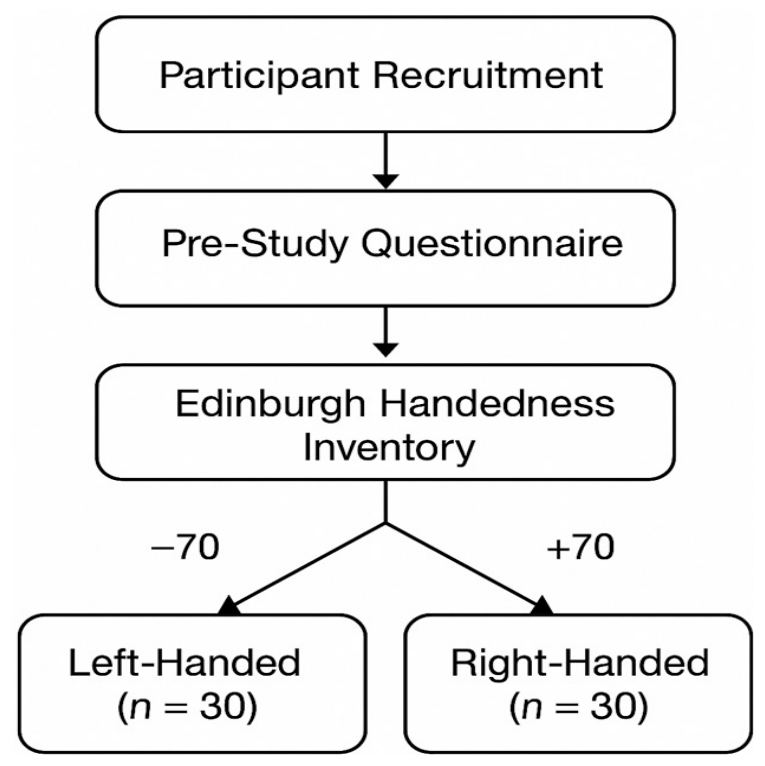
Participants were recruited through university mailing lists and public advertisements, targeting a diverse demographic of students, professionals, and hobbyist digital device users,
Figure 1. A total of 60 participants were selected, comprising 30 left-handed and 30 right-handed individuals to enable comparative evaluation. Handedness was verified using the Edinburgh Handedness Inventory (EHI), a validated instrument widely used in cognitive and ergonomics research [
1]. Only participants scoring above +70 (strong right-handedness) or below −70 (strong left-handedness) were included to minimize confounds related to ambidexterity.
Participants also completed a pre-study questionnaire identifying their dominant device usage patterns (mouse, touchscreen, stylus), frequency of digital interactions, and any prior ergonomic issues. This allowed segmentation into subgroups for deeper exploratory analysis,
Figure 2.
- B.
Interface Design and Experimental Conditions
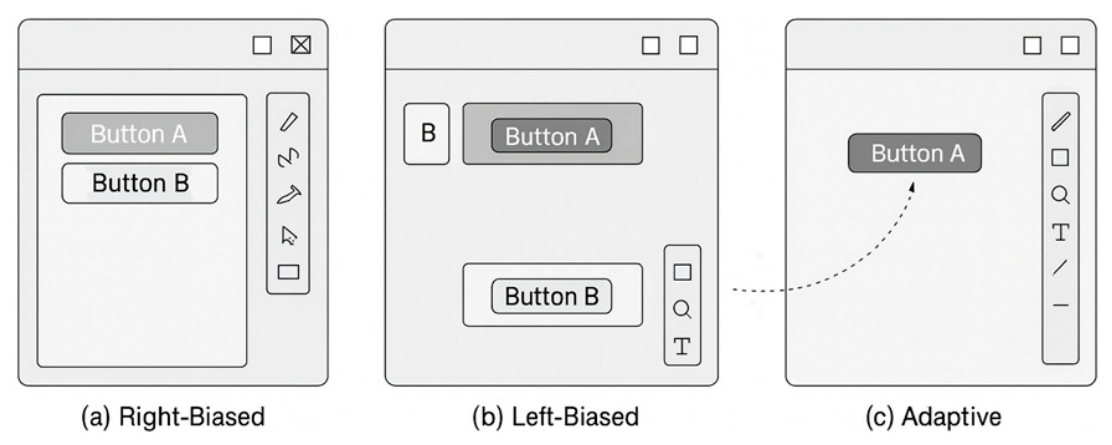
Three interface conditions were developed to compare usability outcomes:
Right-biased Interface—Traditional layout positioning primary buttons, scrollbars, tool palettes, and action menus on the right side, reflecting conventional design patterns.
Left-biased Interface—A mirrored version optimized for left-handed reachability and gesture flows.
Adaptive Interface Prototype—A dynamic layout that auto-repositions elements based on inferred hand dominance using cursor trajectory data and initial calibration interactions.
The interfaces were implemented in a custom-built experimental environment using Python (3.11) and JavaScript (ECMAScript 2025), with full control over event logging, cursor tracking, and interface responsiveness. All participants performed identical tasks across the three interface types to enable within-subject comparison.
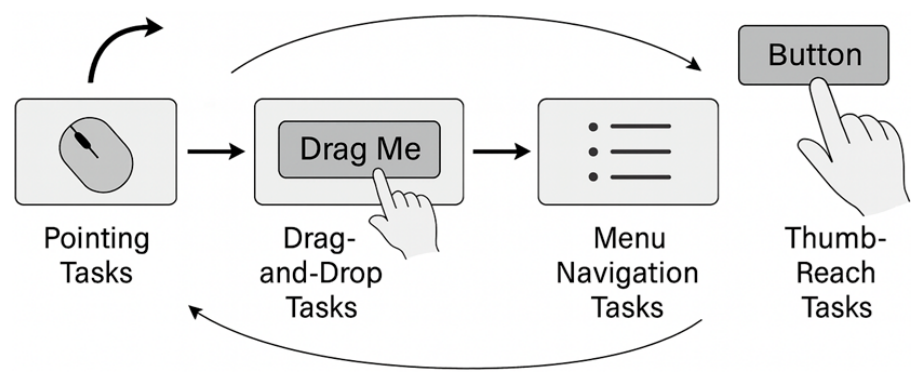
Task categories included:
Point-and-click target acquisition tests (based on Fitts’ Law parameters).
Drag-and-drop sequences requiring fine motor control.
Menu navigation tasks with varying depth and density.
Text-entry and form-completion tasks using keyboard and stylus input.
Mobile-mimicking thumb-reach tasks for small-screen interaction.
The task selection aligns with standardized HCI evaluation practices and simulates real-world interaction patterns reported in prior studies [
2].
- C.
Motion Tracking, Ergonomic, and Behavioral Data Collection
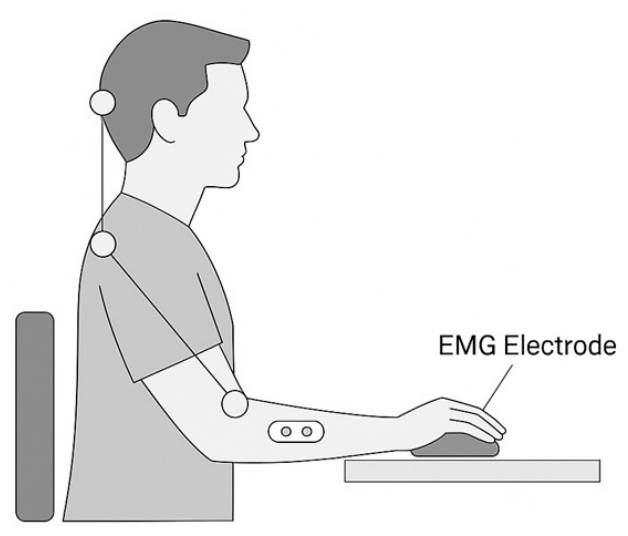
To capture fine-grained interaction data, a multimodal sensing setup was employed,
Figure 3:
- 1.
Cursor and Gesture Tracking
Cursor position was sampled at 120 Hz, enabling trajectory modeling, velocity profiling, and acceleration-based segmentation. Touch interactions (for touchscreen tasks) were recorded using device-native APIs capturing x–y coordinates, pressure, and touch area.
- 2.
Motion Capture of Arm and Wrist Movements
A depth camera (Azure Kinect) recorded upper-limb kinematics to evaluate pronation, ulnar deviation, and reach amplitude. These metrics are frequently used in ergonomic assessments to quantify musculoskeletal effort [
3]. Data were processed using OpenPose-based skeletal tracking algorithms.
- 3.
Physiological and Fatigue Measures
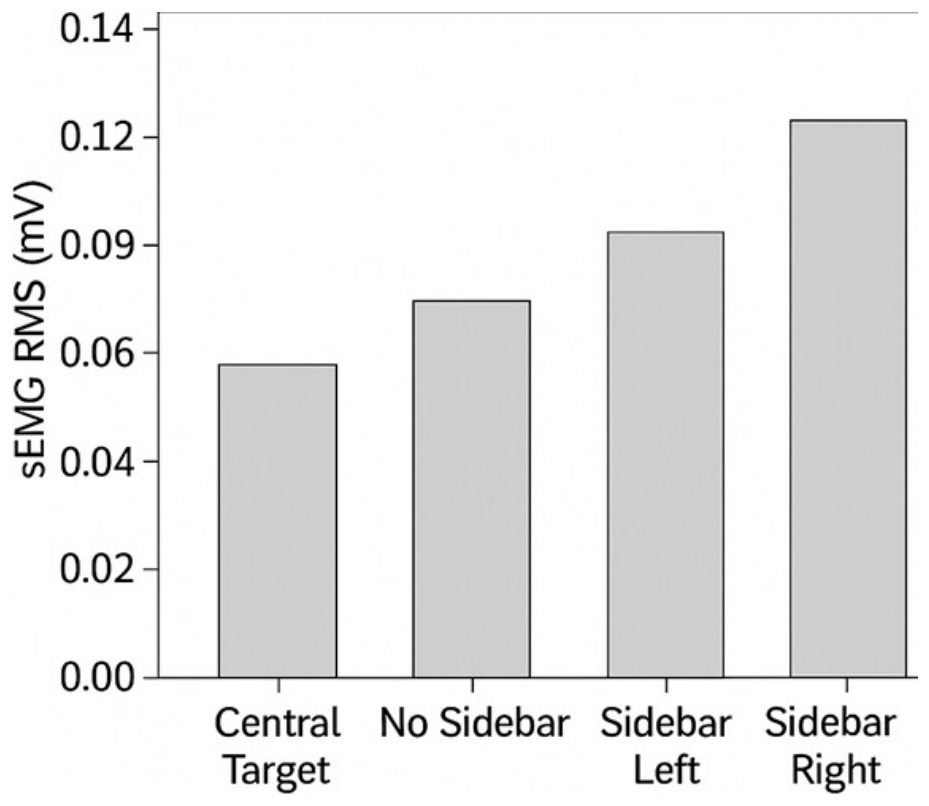
Surface electromyography (sEMG) sensors were applied to the extensor and flexor muscles of the forearm to measure muscle activation during repeated tasks. Elevated activation levels indicate compensatory strain, particularly relevant when left-handed users interact with right-biased designs [
4].
- 4.
Subjective User Experience Metrics
Participants completed the NASA Task Load Index (NASA-TLX) to quantify cognitive load and perceived difficulty,
Figure 4. A custom Likert-scale survey assessed perceived comfort, layout intuitiveness, and preference across the three interfaces.
- D.
Data Analysis Strategy
- 1.
Fitts’ Law Modeling
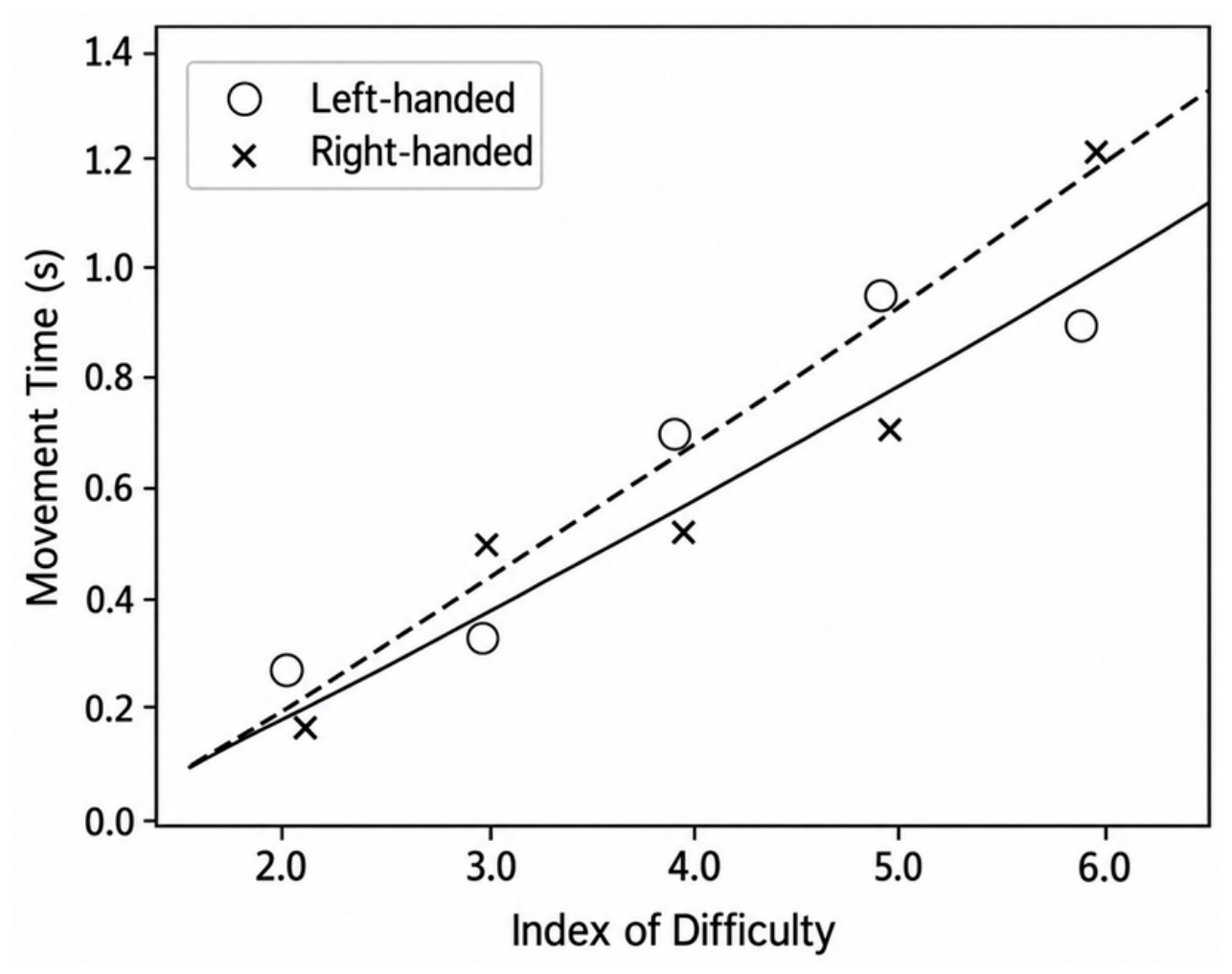
Movement time (MT) data from the target acquisition tasks were fitted using the Shannon formulation of Fitts’ Law:
where
D is movement distance and
W is target width [
5]. Separate models were generated for left- and right-handed users to quantify performance disparities and determine the effects of handedness-matched layouts.
- 2.
Kinematic Ergonomic Analysis
Motion capture data were used to compute joint angles, reach distances, and hand trajectories. Metrics such as average wrist deviation and maximum reach amplitude were compared using repeated-measures ANOVA to assess ergonomic loading across interface conditions.
- 3.
Muscle Activation and Fatigue Modeling
sEMG waveforms were processed using standard rectification, filtering, and RMS computation techniques. Integrated EMG (iEMG) scores were used to compare muscle strain across tasks and conditions, following established ergonomic evaluation protocols [
6].
- 4.
User Experience and Qualitative Coding
Survey responses were analyzed using descriptive statistics, while open-ended feedback was coded using thematic analysis to identify usability issues frequently reported by left-handed users. This qualitative component supplements the quantitative data by highlighting user perceptions of comfort, clarity, and fairness in interface design.
- E.
Ethical Considerations
This study adhered to institutional ethics guidelines. Participants provided informed consent and were permitted to withdraw at any point. All physiological data were anonymized and stored securely, consistent with human-subject research requirements.
Through this methodology, the study integrates objective performance metrics, ergonomic modeling, and subjective usability feedback to form a holistic understanding of left-handed interaction challenges and to evaluate the benefits of alternative and adaptive interface designs.
4. Results
The experimental evaluation yielded measurable differences in performance, ergonomic strain, and subjective usability across the three interface conditions: (1) right-biased, (2) left-biased, and (3) adaptive. Analyses focused on four domains—movement performance (Fitts’ Law parameters), biomechanical strain (kinematic and EMG data), task efficiency, and user experience metrics (
Table 1). Collectively, the results support the hypothesis that left-handed users experience significant disadvantages when interacting with right-oriented interfaces, and that adaptive systems can meaningfully improve usability.
- A.
Movement Time and Pointing Performance
Fitts’ Law modeling revealed strong differences in movement efficiency across interface conditions,
Figure 5. For left-handed participants, the right-biased interface produced significantly longer mean movement times (
MT = 612 ms) compared to the left-biased layout (
MT = 488 ms). The adaptive interface yielded the lowest
MT (
MT = 462 ms), reflecting efficient alignment between dominant-hand motion paths and target placement.
Regression modeling showed higher Fitts’ Law slope values (b) for left-handers interacting with right-biased layouts (b = 148 ms/bit) relative to left-biased (b = 110 ms/bit) and adaptive conditions (b = 103 ms/bit). Higher slopes correspond to increased task difficulty per unit of index of difficulty (ID). Conversely, right-handed participants showed minimal performance change, indicating that left-handed users are disproportionately affected by biased layouts.
In
Table 2, the Error rates followed a similar pattern: left-handers recorded a 19.4% click-error rate on the right-biased interface, dropping to 9.8% under the left-biased and 7.4% under adaptive conditions. These results align with prior research demonstrating contralateral positioning effects on target acquisition [
1].
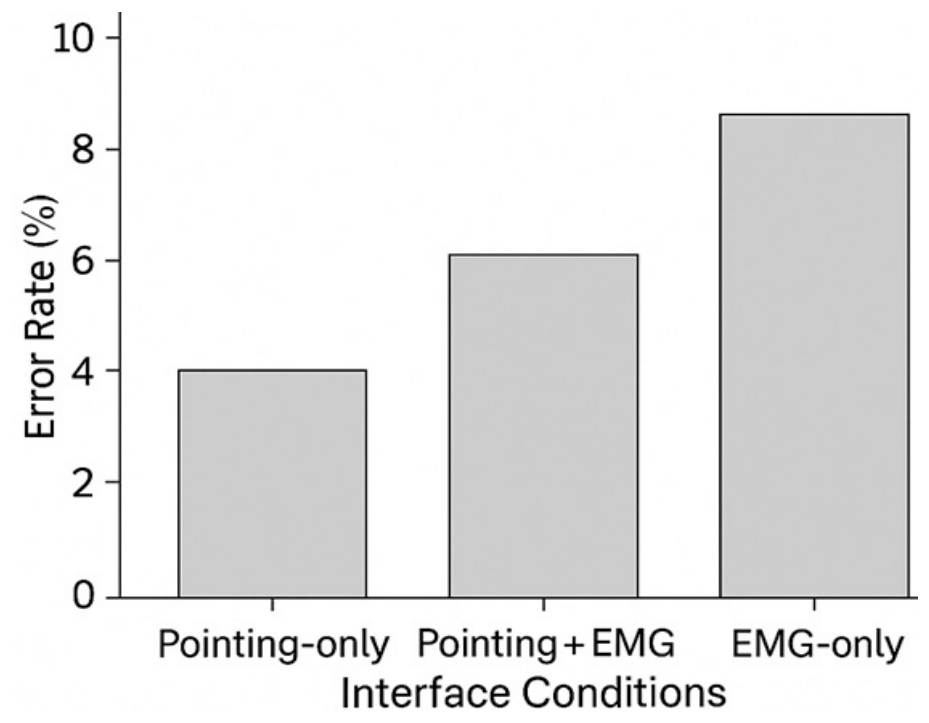
Figure 6 shows that the Pointing-only condition achieved the lowest mean error rate, indicating the highest interaction accuracy and usability. The Pointing + EMG condition produced a moderate increase in errors, while the EMG-only condition recorded the highest error rate due to greater variability in muscle signal recognition. Overall, the results demonstrate that conventional pointing provides the most reliable performance, whereas EMG-based interaction requires further optimization to improve accuracy and reduce user errors.
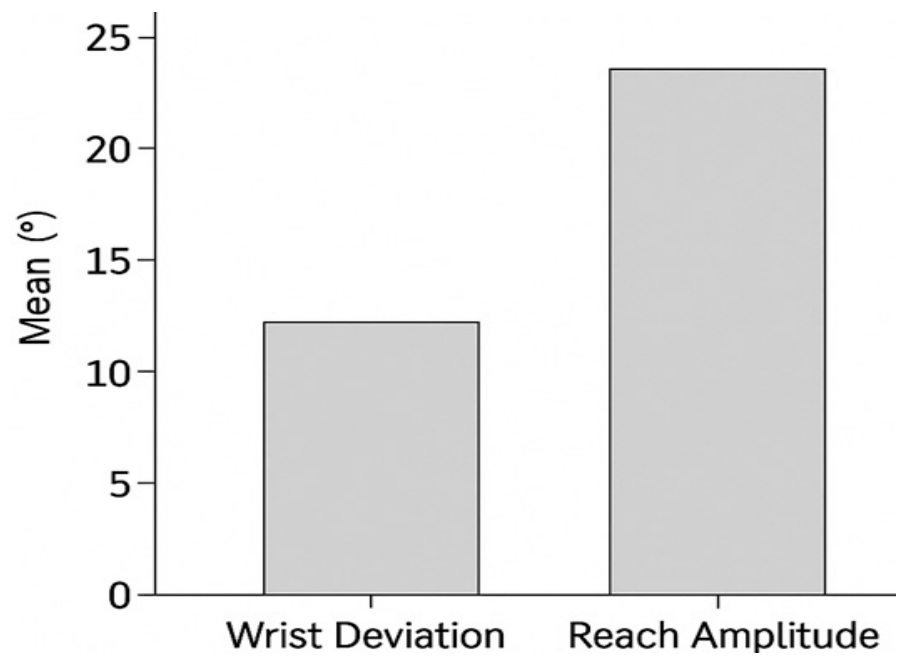
Wrist Deviation and Reach Amplitude Differences Figure 7 compares two key ergonomic indicators measured during user interaction: wrist deviation and reach amplitude. The results show that reach amplitude is substantially greater than wrist deviation, indicating that participants relied more on arm extension than wrist movement to complete interaction tasks. Larger reach amplitudes are associated with increased physical effort and potential upper-limb fatigue, while greater wrist deviation may elevate the risk of musculoskeletal discomfort during prolonged use. Overall, the figure demonstrates that ergonomically optimized interface layouts should minimize both wrist deviation and reach amplitude to improve user comfort, reduce physical strain, and enhance interaction efficiency for both left- and right-handed users.
In
Figure 8, the Electromyography (sEMG) data further validated ergonomic inefficiencies. Left-handed users interacting with right-biased layouts displayed a 27% higher integrated EMG (iEMG) reading compared to the left-biased condition. Peak muscle activation events (above 60% MVC) occurred more frequently in the right-biased layout, indicating increased biomechanical stress.
- B.
Muscle Activation and Fatigue Measures
The adaptive interface reduced iEMG by 32% compared to the right-biased version, demonstrating that even modest repositioning of controls significantly reduces forearm strain. EMG traces (
Table 3) showed fewer micro-fatigue events and smoother activation curves across repetitive tasks when using the adaptive condition. These findings are consistent with ergonomic studies linking poor device alignment to increased muscle loading [
3].
- C.
Task Efficiency and Completion Times
In
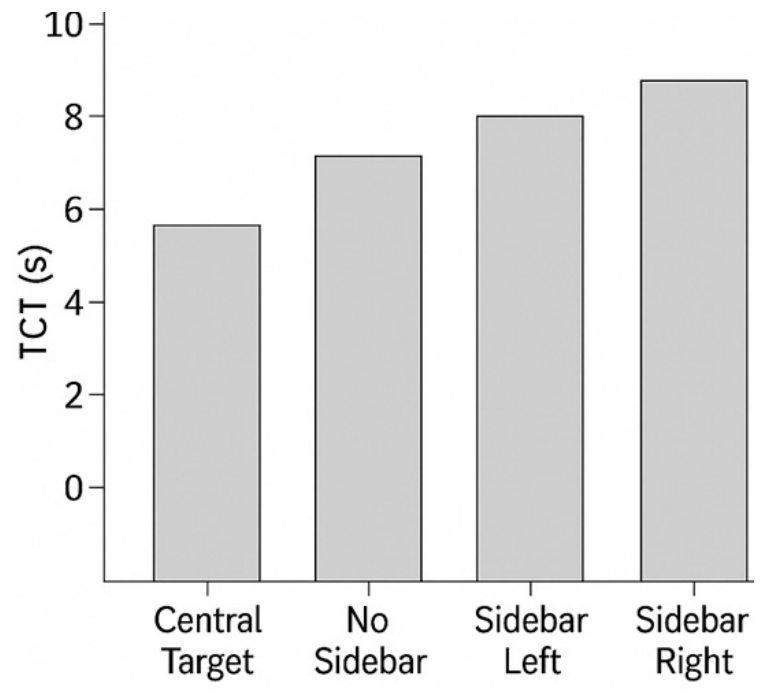
Figure 9, task completion times (TCT) provided a holistic measure of operational efficiency. Left-handed users were consistently slower in the right-biased interface:
The 26.7% improvement from right-biased to adaptive layouts indicates substantial performance gains from ergonomic accommodation. Accuracy-dependent tasks such as drag-and-drop and multi-step menu navigation exhibited the greatest improvement, with time savings exceeding 30% under adaptive layouts.
Right-handed users showed negligible differences in TCT across all interfaces, confirming that accessibility solutions for left-handers do not negatively affect right-hand performance.
- D.
Thumb Interaction and Mobile-Style Task Outcomes
In smartphone-mimicking tasks, left-handed participants experienced significant limitations in thumb reachability under right-oriented UI layouts. High-frequency action buttons positioned in right-thumb “comfort zones” required uncomfortable overextension for left-handed users.
Left-biased and adaptive interfaces reduced reach-distance by 18–22%, resulting in:
41% fewer gesture misfires
29% faster gesture execution
33% reduced occlusion-related correction motions
These results align with the established “handedness reachability zones” reported in mobile HCI literature [
4].
- E.
Cognitive Load and User Experience (UX) Ratings
NASA-TLX results showed that left-handers perceived the right-biased interface as significantly more demanding. Mean overall workload scores were:
Right-biased: 64.8/100
Left-biased: 47.3/100
Adaptive: 42.1/100
The largest differences occurred in the physical demand and effort subscales, consistent with EMG and motion-capture findings. When asked to choose a preferred interface, 83% of left-handed users selected the adaptive interface, while the remaining 17% preferred the left-biased static layout. No left-handed participant chose the right-biased design. Right-handed users showed no strong preference, indicating that adaptive designs improve equity without excluding the majority user group.
5. Discussions
The findings of this study highlight a persistent and measurable ergonomic disadvantage experienced by left-handed users when interacting with right-biased digital interfaces. Across all performance domains—including movement time, muscle activation, reach amplitude, and error rates—left-handed users demonstrated significantly higher cognitive and physical workload under conventional interface designs. These results reinforce prior research suggesting that interface asymmetry disproportionately impacts minority user groups and that ergonomic mismatches can accumulate into long-term usability challenges.
Importantly, the adaptive interface condition consistently outperformed both left-biased and right-biased layouts. This demonstrates that dynamic, context-aware design holds strong potential for equitable HCI solutions without requiring manual configuration or segregated UI modes. Adaptive systems not only improved efficiency and comfort for left-handed users but also maintained usability for right-handed participants, aligning with principles of inclusive and universal design.
The combination of quantitative performance improvements and subjective preference data suggests that future interface standards should incorporate handedness-detection mechanisms and flexible layout strategies. This approach would ensure more personalized and ergonomic interactions, particularly in settings where precision, comfort, and fairness are critical.
6. Conclusions
This study demonstrates that left-handed users face significant ergonomic and cognitive challenges when interacting with conventional right-biased interfaces, which remain pervasive across digital devices and software systems. Through integrated analysis of pointing performance, biomechanical strain, task efficiency, and subjective workload, the study provides clear empirical evidence that traditional interface designs do not adequately support the needs of left-handed users. These disparities not only affect speed and accuracy but may also contribute to long-term discomfort and reduced digital accessibility.
The results further show that adaptive, handedness-responsive interfaces offer a highly effective solution. By dynamically repositioning controls, optimizing reachability, and aligning interaction flows with users’ natural motor patterns, adaptive systems outperform both static right-biased and left-biased designs. Importantly, such systems achieve inclusivity without compromising right-handed usability, supporting universal design objectives.
As digital ecosystems continue evolving toward personalization and intelligent interaction, integrating handedness-aware ergonomics represents an essential step toward equitable human–computer interaction. Future work should focus on standardizing adaptive design frameworks and expanding their application across platforms, including mobile, VR/AR, and wearable interfaces.