


Abstract
This work introduces the process of activation of a motorized laptop lift stand with lightweight pose recognition AI running on the laptop and a low-cost Arduino board to promote healthier sitting by automatically adjusting to optimal viewing height, nudging users upright from slouching with temporary elevation, and gently encouraging posture shifts with up-and-down wave motion. By retrofitting a commercial motorized stand, we created a low-cost interactive solution to support long-term well-being in digital workspaces. We conducted a controlled usability evaluation of ActLift. The first experiment compared ActLift’s performance in optimal-height-setting with a conventional laptop stand. ActLift significantly outperformed manual adjustment, with a mean task completion time of 5.02 s (SD = 2.40) versus 35.09 s (SD = 20.26). Participants reported lower perceived workload and higher perceived performance during setup. The second test demonstrated that the up-and-down wave motion consistently elicited measurable micro-movements, while most participants reported little or no perceived impact on their task engagement.
1. Introduction
The widespread use of personal computing has made mobile devices, laptops, and desktop computers indispensable tools for work, education, and entertainment. Consequently, a significant portion of the global population spends prolonged hours engaged with digital screens [1,2,3]. While offering high mobility and intuitive operation, this shift towards computer-centric workstations has raised considerable health concerns. Prolonged computer use is a known contributor to work-related musculoskeletal disorders (WMSDs), such as tension neck syndrome and back injuries, as well as computer vision syndrome (CVS), which encompasses symptoms like eye discomfort, headaches, and blurred vision [4,5]. Poor ergonomic practices frequently exacerbate these adverse health effects. For instance, users often position their screens at suboptimal heights and distances, or they maintain unhealthy postures, such as excessive forward head tilt or slumped shoulders, for extended periods without correction [6].
Conventional ergonomic interventions, such as lumbar-supportive chairs and adjustable monitor stands, have proven effective in improving posture by reducing slouching and head flexion angles [7,8,9,10] as well as muscle workload [11]. However, static furniture cannot actively detect or correct poor posture, and users often misconfigure setups due to limited awareness or inconvenience [12]. In response, HCI research has explored posture monitoring systems and actuated environments. While sensor-based feedback systems raise awareness, they may disrupt concentration [13]. Actuated solutions, such as robotic furniture and adaptive monitors, offer personalized, real-time adjustments that improve ergonomic accuracy and support dynamic posture alignment [6,14,15,16,17].
Although robotic furniture, such as high-degree-of-freedom (DOF) robotic arms, has garnered interest in assistive and smart home applications, its use for monitor actuation remains limited by cost, complexity, and practicality. In contrast, a low-DOF system offers a more compact, affordable, and accessible solution with greater potential for widespread adoption. We introduce ActLift, a novel smart laptop stand designed to automatically raise the screen to an optimal viewing height, gently nudge the user into an upright posture from slouching, and perform a subtle ‘wave’ motion to stimulate micro-movements of the head and neck to prompt healthier sitting behavior [18] and reduce muscle fatigue [19]. ActLift utilizes the laptop’s built-in camera to capture images and employs MediaPipe to detect the user’s facial position and orientation relative to the screen. The lifting mechanism is powered by a DC (direct current) motor, which is precisely controlled via an Arduino Nano microcontroller.
We conducted a user study involving 21 participants to evaluate our system against manual adjustment during the initial setup of the stands. The results demonstrated that using ActLift significantly reduced both the workload (measured by NASA-TLX) and the setup time. Additionally, a separate study revealed that the ‘wave’ motion reliably triggered micro-movements of the head and neck with a high success rate, while exerting minimal impact on conducting tasks.
2. Related Work
Extensive research has been devoted to the development of intervention systems aimed at correcting poor posture and prompting regular posture shifts. These systems generally fall into two categories based on their operational mechanisms: passive correction and active correction.
2.1. Passive Correction
For passive correction, intervention systems do not directly correct the posture but rely on user-initiated actions with conscious effort. Previous research has investigated the use of reminders or feedback to achieve the effect of posture correction, in which various systems have employed on-screen graphical cues [20,21,22,23,24,25,26,27,28], ambient visualizations [13,29], and vibrotactile or auditory signals [30,31,32] to alert users to unhealthy postures.
According to Krauter et al.’s review, visual feedback remains the most commonly adopted modality [33]. Among these, pop-up notifications are particularly prevalent due to their effectiveness in capturing user attention [34]. However, their intrusive nature has led to negative evaluations [35]. To mitigate this, “polite” pop-ups have been explored, which reduce perceived intrusiveness but significantly increase the likelihood of being ignored [36]. Ambient visual cues share similar limitations, as they are often overlooked when users are deeply focused on their primary tasks.
Compared to visual feedback, aural and vibrotactile reminders tend to be less disruptive. Research suggests that individuals are generally proficient at multitasking when physical actions are involved [37], and the human brain is capable of processing peripheral information while maintaining focus on a central task [38]. Although reminding through vibration and sound has promising effectiveness at a low obtrusiveness level, it also relies heavily on user compliance. Users might ignore the feedback and continue working or engaging in activities at an unhealthy posture, especially in the long term.
Moreover, posture reminders alone are insufficient to address the root issue. Some unhealthy sitting postures often stem from suboptimal ergonomic setups. For instance, placing a laptop at a low height increases head flexion angles [39], while smaller screens and farther placement are associated with more pronounced forward head posture [40,41]. Users tend to flex or protrude their heads to achieve a more comfortable viewing angle. A naturalistic observation found that bad sitting postures are prevalent in office and library environments, while a regression model identified screen distance and screen height as the dominant factors for forward head posture and head over-flexion [42]. Consequently, even if a reminder temporarily prompts a return to proper posture, users are likely to revert to unhealthy positions unless the ergonomic configuration of their workstation is adequately addressed.
2.2. Active Correction
In contrast to passive correction, active correction stimulates the user’s unconscious action and requires no recognition processing. Therefore, active correction systems reduce reliance on user compliance.
2.2.1. Involuntary Movement Stimulation
Some researchers have investigated methods of inducing involuntary movement through external stimuli to correct poor posture. Kiran et al. utilized electrical muscle stimulation (EMS) devices to trigger involuntary muscle contractions, guiding users from a slouched position back to proper alignment [43]. Similarly, Tanaka successfully developed a system that manipulates the head orientation through EMG [44]. Meanwhile, mechanical stimuli have also been investigated. Ishimatsu and Ueoka introduced BITAIKA [45], a system that employs wooden beads to prod the user’s back, eliciting an unconditioned reflex to encourage an upright posture.
While applying external stimuli to elicit involuntary movement is inherently more effective than issuing reminders, it often causes discomfort and may even lead to injury. This is because the stimulus must be strong enough to trigger an unconditioned reflex. When sufficiently intense, the stimulus can degrade into a vibrotactile signal, diminishing its intended effect [43]. Moreover, individual tolerance levels vary significantly, requiring personalized calibration of stimulus strength. The process is both time-consuming and resource-intensive.
2.2.2. Active Actuated Furniture
To address these limitations, researchers have also explored active actuated furniture that autonomously adjusts to encourage healthier sitting posture and regular postural variation. Wu et al. introduced ActiveErgo, a system that leverages skeletal sensing and self-actuating desks, monitors, and chairs to deliver personalized ergonomic configurations more effectively than manual adjustments [15]. However, their system primarily targeted initial setup and lacked mechanisms for real-time posture correction or dynamic prompting to facilitate posture shifts.
A common approach involves integrating inflatable airbags to perform posture correction with inflation and deflation. Many prototypes have been developed, and their effectiveness has been proven with experiments [46,47,48]. As for the posture shift perspective, one typical example is TiltChair, which is an actuated office chair that manipulates seat inclination to encourage posture shifts from sitting to standing [49].
A complementary line of work explores actuated displays to subtly induce posture changes. Shin et al. demonstrated that monitor movement could intuitively prompt users to correct unbalanced postures [50] and later extended this idea with slow robots, showing that imperceptibly slow adjustments unobtrusively reduced unhealthy sitting duration [16]. Fan [19] used a self-developed robot-arm monitor stand to move the monitor slowly and induce micro-movements, which reduced muscle fatigue accumulation without interrupting work. Kronenberg et al. further proposed a robotic arm driven by head pose estimation, continuously adjusting screen orientation to the user’s posture [6]. Related work has also examined robotic workspaces where keyboards, mice, and displays reposition dynamically to improve ergonomics or collaboration [14,51]. A commercial robotic-arm platform, CyboPal, has recently been introduced [52]. Although it demonstrates advanced functionality, its high cost remains a significant barrier to widespread adoption, limiting its appeal primarily to technology enthusiasts rather than the general public.
These interventions highlight the promise of robotic adaptation and the potential of automation in ergonomics, yet they mostly remain mechanically complex, costly, and largely experimental prototypes. As such, deploying a robotic arm as a monitor actuator is not a practical solution in the near term.
In contrast to deploying an advanced robotic arm, actuating systems with lower degrees of freedom (DOFs), more compact form factors, and reduced costs offer greater promise for integration into domestic environments. Gomi et al. developed a shape-changing stand for touchscreen devices using reel actuators to enable dynamic posture adjustments, aiming to improve sitting ergonomics [53]. The device’s compact design and low hardware cost make it a more practical and accessible solution for everyday use. Similarly, Sahu et al. [54] designed and fabricated an automated laptop stand that enhances neck posture by tracking eye position and adjusting via a crisscross (‘X’) pattern. This system is well-suited for both office and home environments. Several industry products and prototypes have explored similar concepts, including the Dot Stand [55], Lenovo Smart Motion Concept [56], and Humanmotion Smart Monitor Stand [57]. However, the Dot Stand has since been withdrawn from the market. As for the latter two, despite being unveiled more than a year ago, neither has reached commercial availability. These systems adopt an architecture similar to that of Sahu’s work, relying on embedded processors for pose estimation and motion control. Consequently, their hardware costs remain relatively high. Moreover, users have no direct access to the pose-detection outputs of the embedded processor and can only infer system behavior from the stand’s mechanical movements. This lack of transparency may cause users to feel out of control when unexpected movements occur, potentially reducing the perceived usability and trustworthiness of the system.
2.3. Summary of the Current Solutions
Passive posture-correction approaches rely on users consciously responding to feedback, which increases cognitive load. Moreover, they cannot address poor ergonomic configurations, such as insufficient monitor height, that contribute to unhealthy posture. In contrast, active correction mechanisms may be more effective because they require less conscious user engagement. Although active correctors based on involuntary movement stimulation have shown promising results, they may also cause discomfort or even injury if applied excessively. Therefore, a gentler approach based on actively actuated furniture appears more suitable for long-term daily use.
In existing research, robotic arms are frequently employed to actuate displays. However, their high cost and mechanical complexity limit their practicality in home and office environments. As a result, implementing screen actuation with a low-cost, low-degree-of-freedom (DOF) system is a more viable solution. Although both academic researchers and the industry have developed prototypes, no mature commercial products are currently available. A possible explanation for this is the difficulty of balancing performance and cost. Existing solutions often execute tracking and detection algorithms on processors embedded within the motorized stand. Smooth and responsive tracking typically requires high-performance hardware, which substantially increases product cost. While lower-cost processors can reduce hardware expenses, they may compromise responsiveness and overall user experience.
At the same time, the strong market presence of conventional motorized monitor stands demonstrates user acceptance of adjustable display hardware. Therefore, if AI-powered motorized stands can be offered within a price range comparable to that of existing motorized stands, their market adoption may be improved. The remaining challenge is how to incorporate AI-based tracking capabilities without substantially increasing system cost.
3. Materials and Methods
To enhance a traditional motorized stand with AI capabilities while minimizing additional hardware costs and providing more transparent detection results, we adopted a decoupled architecture, in which the tracking algorithms are executed on the user’s laptop, and the results can be viewed directly by the user, while the motorized stand is responsible solely for actuation and receives control commands through a communication interface. By leveraging the computing resources already available on the user’s device, this approach eliminates the need for a high-performance processor within the stand itself, thereby reducing hardware costs while maintaining responsive tracking performance. The development and implementation of the proposed system are described in the remainder of this section.
3.1. System Design
The ActLift system is designed to deliver ergonomic benefits through intelligent automation while maintaining a low hardware footprint. Its activation scope is intentionally restricted to laptops for two key reasons: (1) Laptop usage is more closely linked to poor posture than desktop setups, as desktops typically feature larger screens and are more likely to be positioned at eye level [58,59]. (2) Unlike mobile devices such as tablets and smartphones, which are lightweight and easily adjusted by hand, laptops are not intended to be handheld and cannot be conveniently elevated to an optimal viewing height without external support.
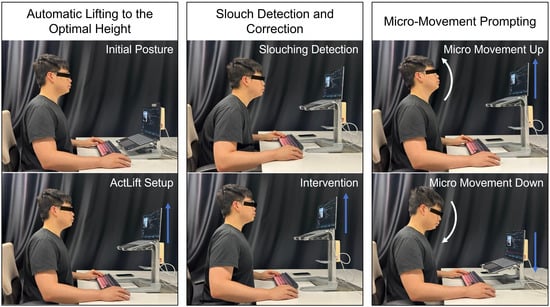
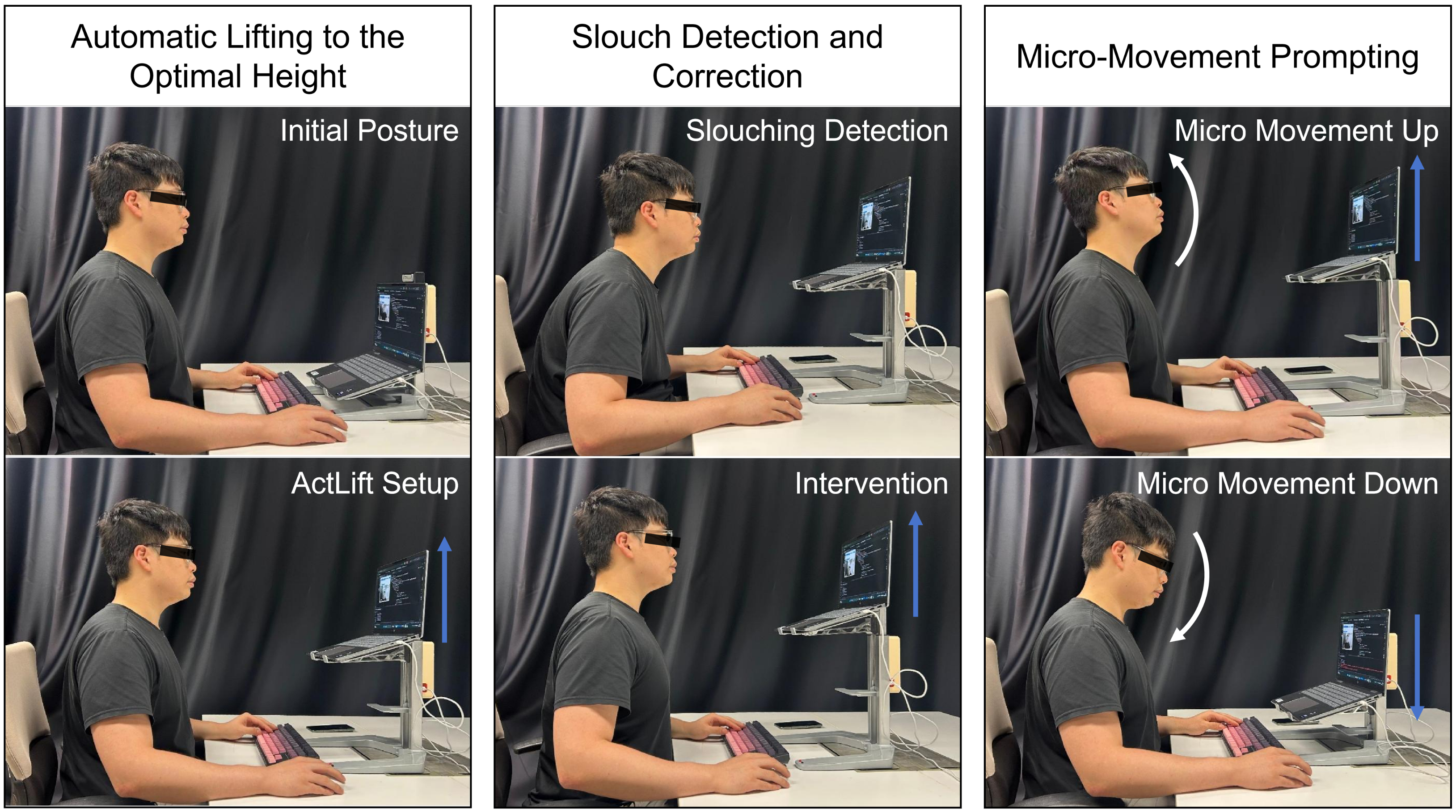
The ActLift system has three key functions, as shown in the Figure 1, which are:
Figure 1.
ActLift key function demonstration.
- 1.
- Automatic lifting of the screen to the optimal height;
- 2.
- Slouch detection and lifting to nudge the user back to an upright sitting posture;
- 3.
- Moving up and down after the user remains static for a period to prompt micro-movements (wave function).
Two primary approaches exist for adjusting the screen to an optimal height: (1) conducting anthropometric measurements on the user to determine optimal values, and (2) letting the user sit in a good posture, then adjusting the monitor to a suitable height, referring to the user. Wu et al. [15] adopted the first method by utilizing Microsoft Kinect to conduct anthropometric assessments and automatically adjust the monitor height. This approach offers high measurement accuracy and eliminates the need for real-time head tracking. However, it lacks the ability to provide dynamic, real-time interventions and involves a cumbersome initialization process. In contrast, Shin et al., Kronenberg et al., and Sahu et al. [6,16,54] employed the second strategy, adjusting the monitor in relation to the user’s head position. This method is inherently more conducive to real-time posture correction and aligns more closely with the requirements of our design.
Since the system needs to track the user’s head in real-time, a pose-tracking AI solution needs to be selected. Shin et al. and Sahu et al. [16,54] estimate the user’s head position and orientation by tracking the eyes using OpenCV, while Kronenberg [6] utilized OpenPose for position together with FSA-Net for orientation. The eye-tracking module of OpenCV is lightweight but has limited functionality, while OpenPose is more powerful but requires significantly more computational resources. Additionally, although FSA-Net is a lightweight model, it requires a complex setup and cannot be easily packed and distributed. The AI tracking solution should have enough functions, require low computational resources, and support different platforms without complicated setups.
MediaPipe is a lightweight AI framework with cross-platform support, making it well-suited for our application. Although it does not offer a native method for head orientation estimation in the MediaPipe Face Module, Chen et al. [60] demonstrated that accurate orientation can be derived from facial landmarks, validating the approach with high precision. Furthermore, their study highlighted that MediaPipe operates efficiently in real time, requiring only modest computational resources. The MediaPipe FaceMesh model is trained based on a dataset that evenly covers samples from 17 geographical subregions, offering a high tracking accuracy with mean absolute error ranging from 2.06% to 3.27% for different regions and reaching 2.62% for all regions [61]. Occlusion objects, especially sunglasses and masks, have been shown to cause great distortion of the derived mesh, and they should be avoided.
Unlike previous approaches that adjusted monitor height based on head position, our system actuates the monitor in response to head orientation angles—specifically, the estimated pitch angle. When the detected pitch angle (i.e., the head’s flexion–extension angle) approaches zero, it indicates that the facing direction of the user’s head is nearly perpendicular to the screen. This range is considered optimal, and elevation is halted at this point.
Upon stopping, the system records the landmark coordinates of the nose tip and chin, and calculates the pixel distance between them. During operation, if the user slouches and causes the vertical pixel position of the nose tip to drop by more than 50% of the nose-to-chin pixel distance for a duration exceeding a predefined threshold, the platform will initiate a rapid lift of approximately 9 cm, about half the average head length of Chinese adults. It then gradually lowers to the optimal height, gently prompting the user to return to an upright posture. Additionally, if the user maintains an upright sitting position over a static time threshold, a wave function is activated to encourage dynamic postural variation. In the wave motion, the monitor will be moved up and down by about 13.5 cm (75% of the average head length of Chinese adults). The lift and wave height can also be customized by the user to fulfill their personal needs.
3.1.1. Physical Architecture
The physical architecture of a smart laptop stand generally comprises three primary components: the mechanical actuator, the control unit, and the sensing instrument [6,16]. Since the primary objective of this research was to enhance a motorized laptop stand with AI, it was more practical to modify an existing commercial non-smart motorized stand rather than build a prototype from scratch. The mechanical structure of the commercial product has already been validated through experiments and testing, making it inherently more stable and reliable than a newly constructed design.
The ActLift is built based on a commercially available motorized laptop stand (DLJ-YW01) provided by DUOLIJIA (Changsha Zhanqilai Office Supplies Co., Ltd., Changsha, China). This laptop stand is mainly composed of a mechanical lifting structure, a DC motor, and a control board. It allows simple height adjustment, in which the platform moves at a fixed maximum speed via button controls. Although the motor is integrated with the speed adjustment and the rotation encoder modules, these functionalities remain unused in the original product. Since ActLift requires platform height data to perform wave motions around the optimal height, the rotation encoder modules must be activated. Additionally, a speed adjustment module is necessary to minimize both movement speed and operational noise, thereby reducing intrusiveness. Shin’s study [16] demonstrated that slower screen movements are less perceptible to users.
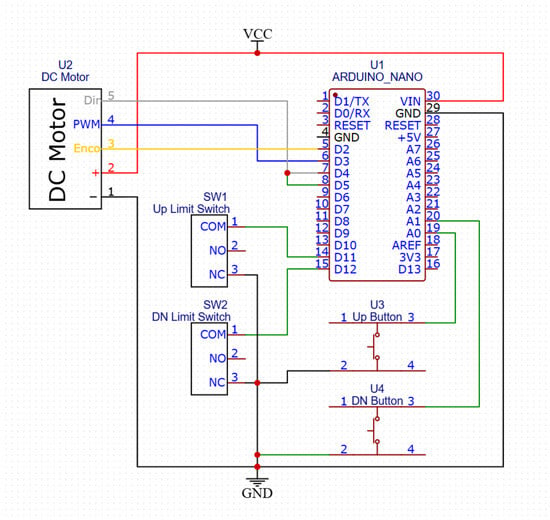
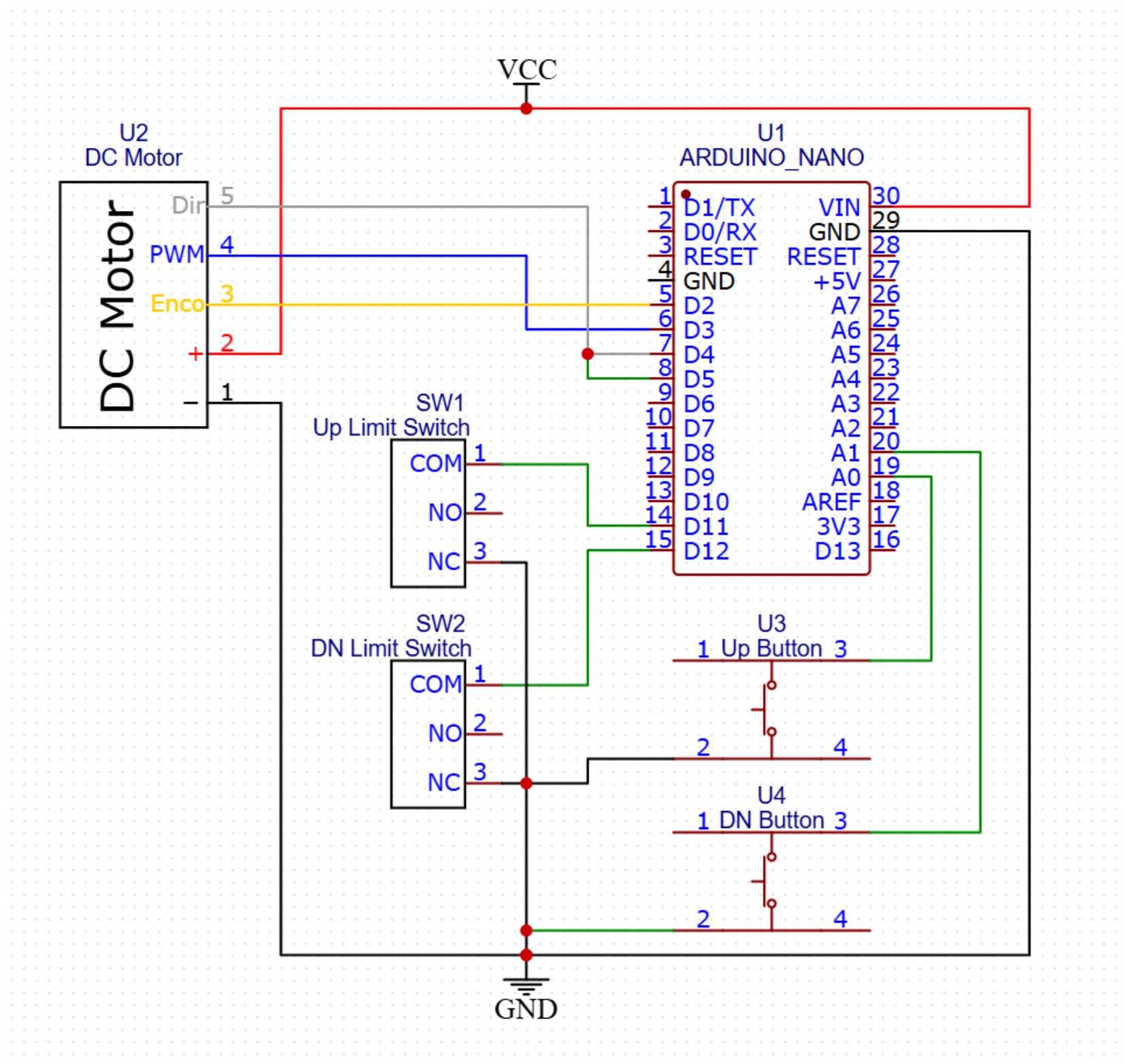
Because of the rigidity of its built-in control program and the complexity of reprogramming the original Microcontroller Unit (MCU), combined with the absence of channels for speed adjustment and rotation encoder integration, the original control board was replaced with an Arduino Nano MCU, enabling a more flexible and customizable control architecture. To preserve safety and manual operation, the original limit switches and control buttons were also retained and interfaced with the Arduino Nano, allowing manual up-and-down movement. A schematic of the system is displayed in Figure 2.
Figure 2.
The schematic of the ActLift.
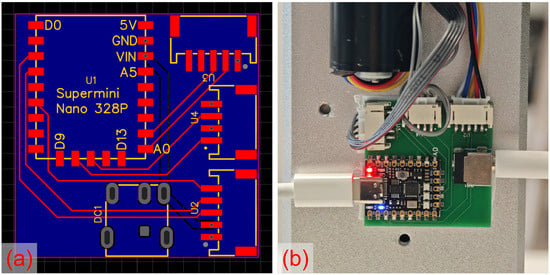
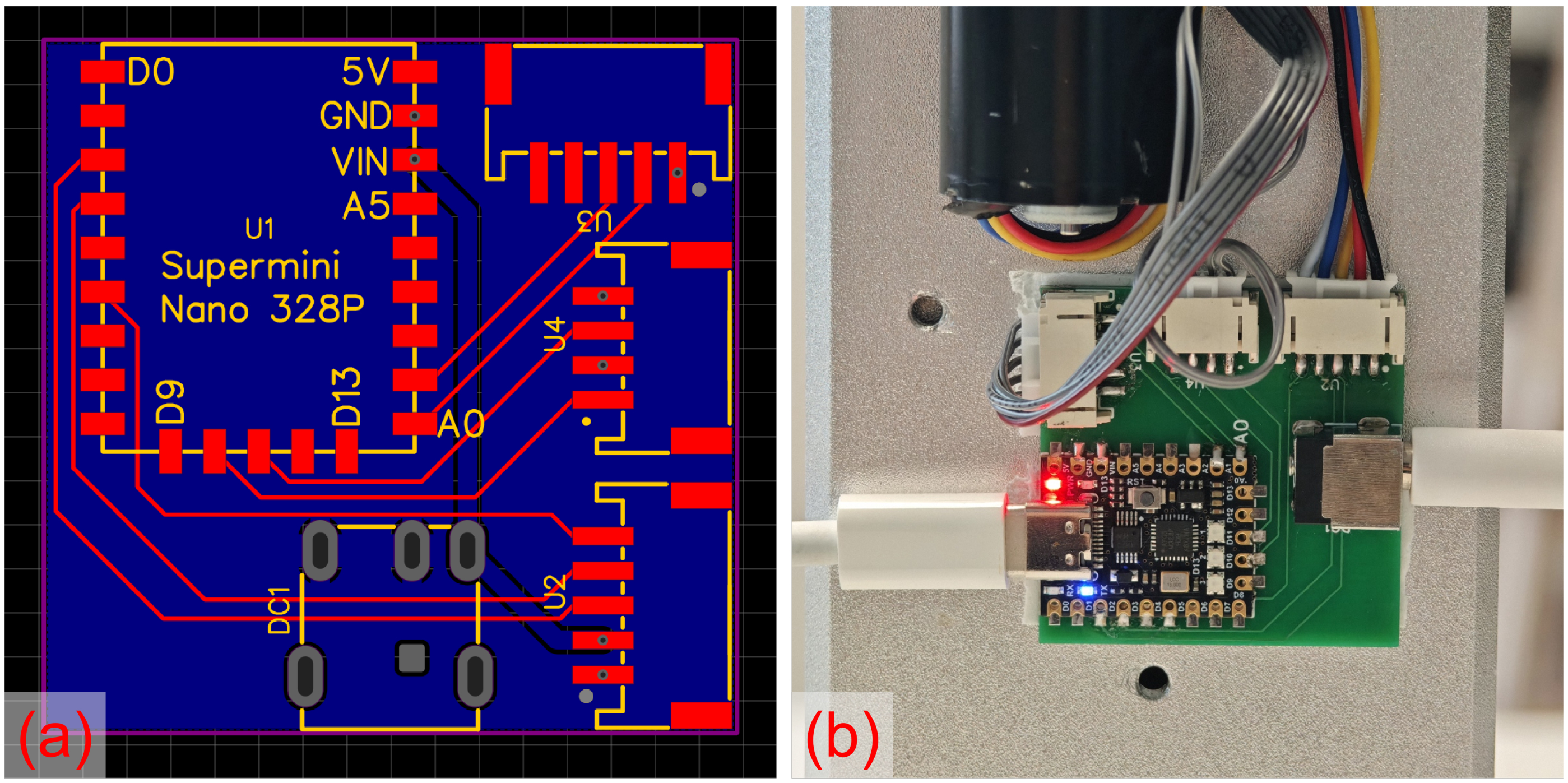
To enhance system reliability, stability, and organization, a PCB was designed and implemented to hold the MCU (Microcontroller Unit) and the sockets, replacing DuPont wires and breadboards for connections. The PCB layout and a photo of it being installed and connected are shown in Figure 3, while the PCB files can be found in Supplementary Materials. In this application, a variant of Arduino Nano with a more compact size, the Supermini Nano 328P from Nologo (CloudZao Technology Limited, Shenzhen, Guangdong, China), was used.
Figure 3.
(a) The design layout of the control unit PCB and (b) the physical PCBA (Printed Circuit Board Assembly) of the control unit installed and connected to the motorized laptop stand.
Unlike the existing prototype developed by Sahu et al. [54], which utilizes an external camera for visual input and a Raspberry Pi for image processing and eye detection, our approach leverages the laptop’s built-in camera and executes the face-detection algorithm directly on the computer. This eliminates the need for additional hardware, thereby simplifying the setup and reducing overall cost. Also, a simple MCU like the Arduino Nano is considerably more affordable than a small single-board computer like the Raspberry Pi. Under this setup, the Arduino Nano is connected to the PC, and the data is transmitted using a USB cable. In addition to the hardware cost reduction, the distributed architecture also avoids the processing power limit due to the low computing capability of the MCU device under the monolithic architecture. Sahu et al. [54] also reported a noticeable delay of the lifting platform in the elevation process of their prototype.
3.1.2. Software Architecture
Program on the MCU
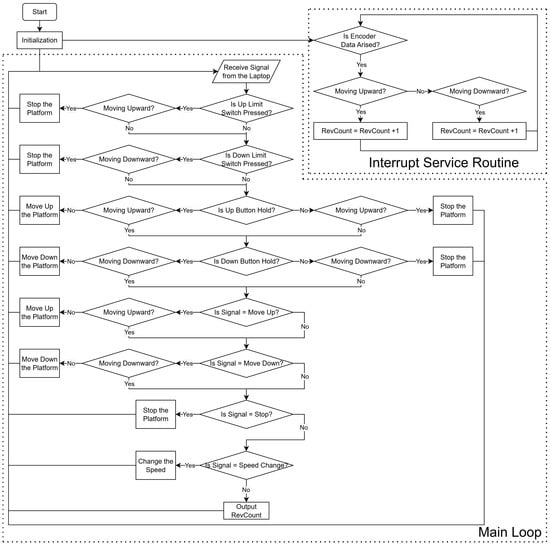
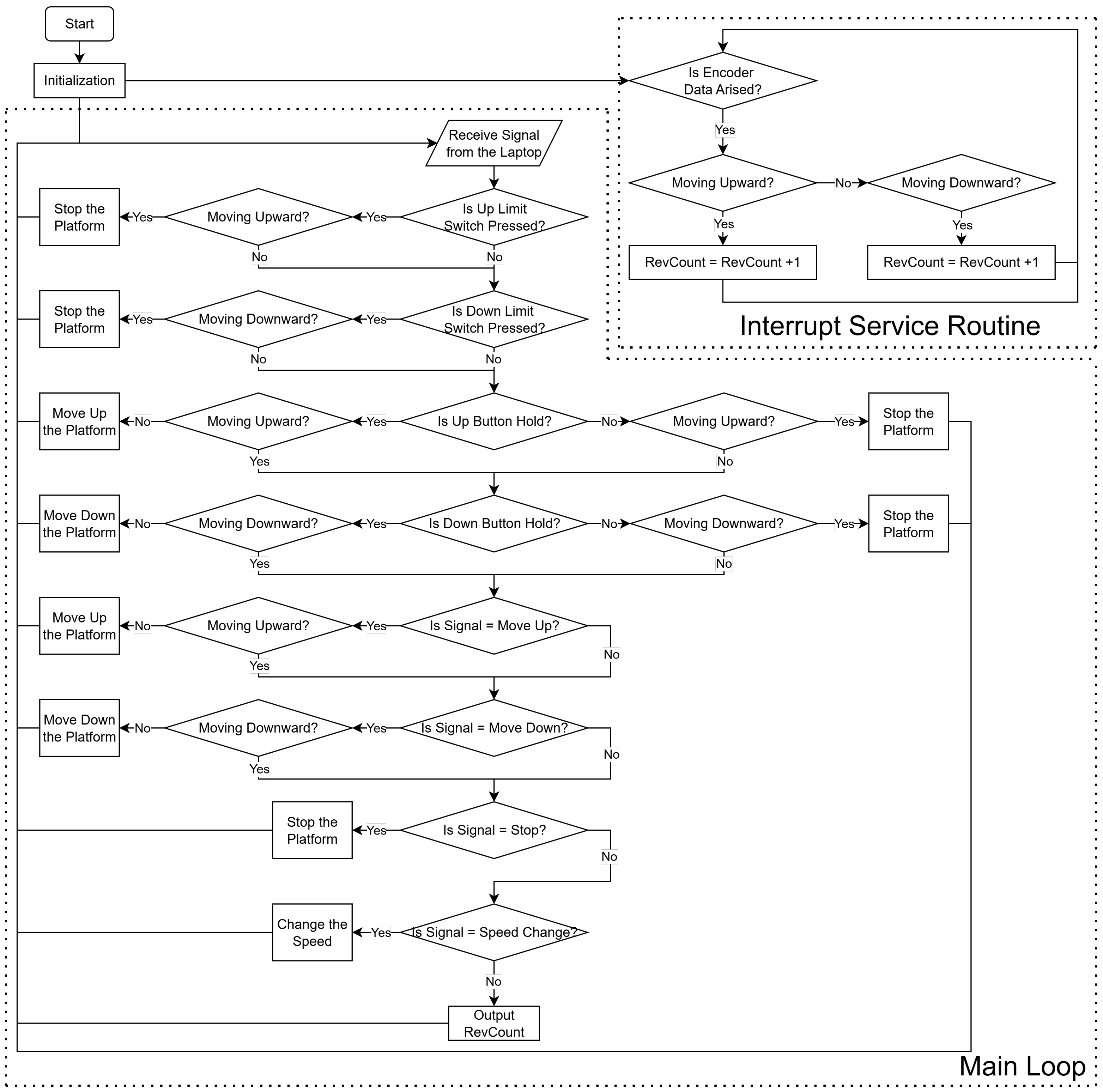
Since the Arduino Nano functions solely as the control board for the DC motor and does not participate in the decision-making process, its role is limited to receiving control signals and updating the motor’s revolution data. A flowchart illustrating the program executed on the Arduino Nano is shown in Figure 4. In the main loop, the Arduino Nano receives control signals via the USB connection and monitors the status of the control buttons and limit switches. Based on these inputs, it regulates the movement of the DC motor accordingly. The limit switches have the highest priority in the motor control. If they are pressed, the motor will be stopped and will ignore all inputs. An interrupt service routine (ISR) is used for receiving encoder data, as it operates at a higher frequency and significantly reduces the likelihood of missed signals compared to polling within the main loop. However, the RevCount output is still handled in the main loop to prevent blocking issues during serial communication. The Arduino script can be viewed in Supplementary Materials.
Figure 4.
A flowchart of the program running on the Arduino Nano.
Program on the Laptop
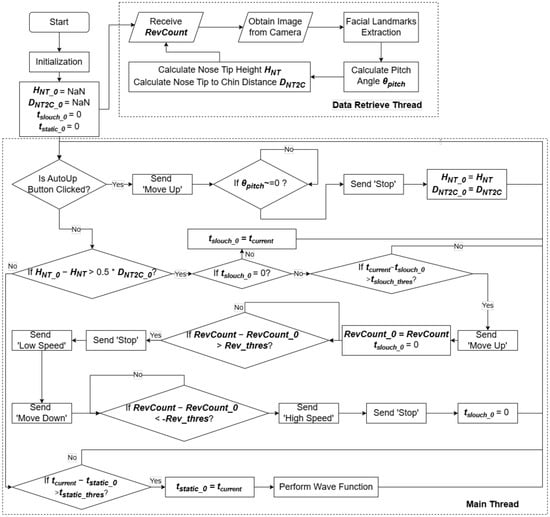
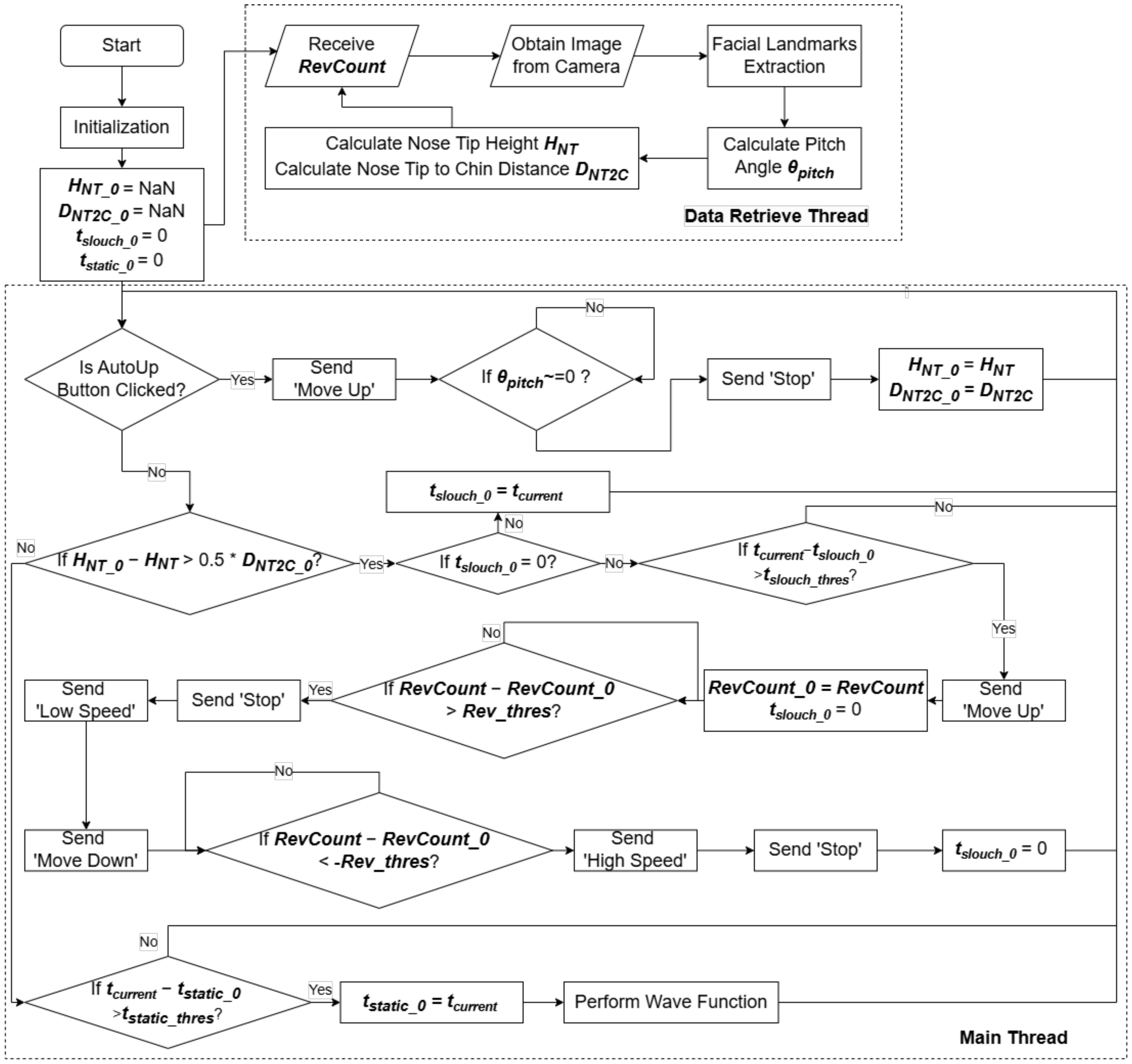
The program running on the laptop utilizes a dual-thread architecture, comprising a data retrieval thread and a main execution thread operating concurrently. This design ensures robust performance and minimizes the risk of data loss during operation. Developed in Python (3.11.9), the program executes AI-based detection on the CPU to maximize compatibility across a broader range of devices. The overall structure and workflow are depicted in Figure 5.
Figure 5.
The flowchart of the program running on the laptop.
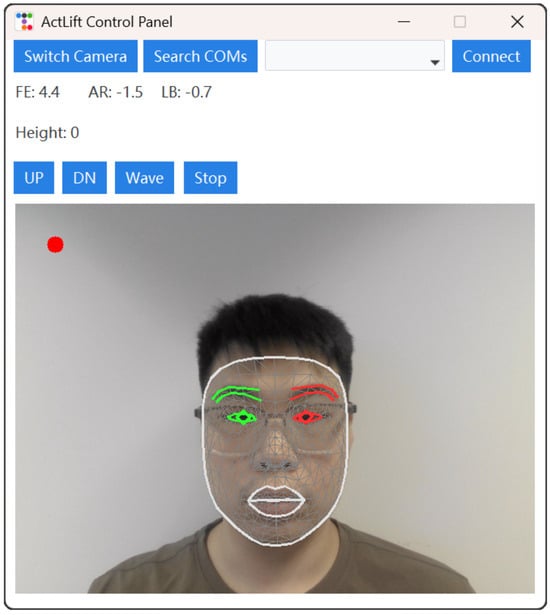
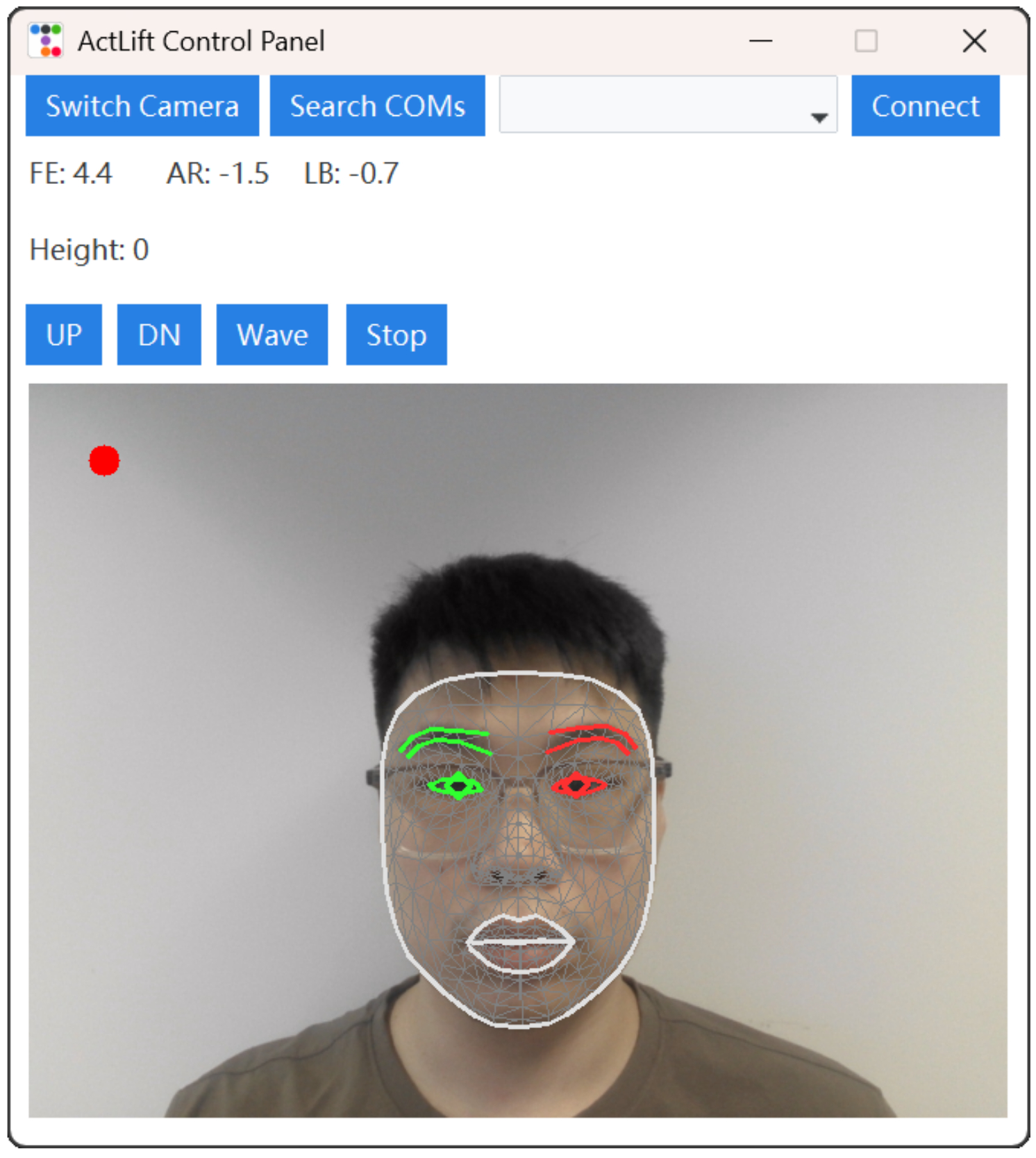
A graphical user interface (GUI), shown in Figure 6, enhances usability. The first row contains three buttons and a drop-down menu, which allow users to switch cameras, search for the ActLift MCU, select the desired MCU, and initiate the connection. The second and third rows display data on head orientation and the current platform height. The fourth row provides control buttons for the AutoUp, AutoDown, Wave, and Stop functions. At the bottom, the interface presents the camera input alongside facial landmark recognition results.
Figure 6.
A GUI of the ActLift Control Panel. The circular indicator in the upper-left corner shows the camera normalization status: green when the camera is normalized to the user’s face, and red when it is not.
To address user privacy concerns, the software runs purely on the local machine. Alongside the compiled software, the original Python script is also provided for security checks and can be compiled by the users themselves. The Python script can be found in Supplementary Materials.
3.1.3. Function Feasibility Validation
Participants of Function Feasibility Validation
We recruited 8 Chinese adult participants (4 females and 4 males) for this test, with demographic information shown in Table 1. Each participant was required to complete the trial 5 times.
Table 1.
Demographic information of participants for feasibility validation.
Slouch Detection and Elevation Prompting
Following elevation to the optimal height, participants were asked to adopt a slouched posture and maintain it for over 30 s, the predefined threshold for slouch detection. A trial was considered successful if the system responded by lifting the laptop to prompt posture correction. Across 40 trials, 36 successfully triggered the elevation, yielding a 90% success rate.
Wave Function Activation
To test the wave function, participants were required to remain still for two minutes per trial, avoiding any posture that would trigger the slouch intervention. A trial was successful if the wave function activated at the end of the two-minute period. Of the 40 trials conducted, 39 were successful, achieving a 97.5% success rate.
3.1.4. Energy, Acoustic, and Durability Evaluation
Power Consumption
A DC power supply with a real-time power display (MN-155S from MAISHENG, Suzhou, Jiangsu, China) was used to power the control unit PCB, and it was monitored by a power meter (DL333501C from Deli, Ningbo, Zhejiang, China) to study the electrical power consumption of the modified motorized stand. In the idle state, the energy consumption was 0.36 W. When the stand was lifting the laptop (Colourful X15-AT 2023, Shenzhen Colorful Yugong Technology and Development Co., Ltd., Shenzhen, Guangdong, China) which weighs 2.4 kg, at maximum speed, the power consumption ranged from 7.68 to 8.52 W. As for the descending state with the same laptop, the power consumption was 3.60 W. Also, for the ‘waving’ motion, the lifting state was at 1.44 W while the descending state was at 0.72 W.
Motor Noise
To measure the noise generated by the motor, a sound level meter (DL333211 from Deli, Ningbo, Zhejiang, China) was utilized. The meter was set 50 cm from the laptop screen, simulating the position of the user’s head when using the stand. Under a background sound level of 39 dBA, the noise generated by the motor when lifting the laptop at full speed and at the speed of the wave function was 53 dBA and 42 dBA. Meanwhile, when descending, the noise was measured to be 50 dBA at full speed and 40 dBA at reduced speed in the ‘wave’ function.
Long-Term Reliability
To evaluate reliability under long-term use, a durability test was performed. Assuming that the AutoUp function is triggered 3 times per day while the average lifting distance is 15 cm, the round-trip travel distance is 30 cm, resulting in a total travel distance of 90 cm per day for this function. As for the slouch intervention, it was estimated to be activated 24 times per day (3 times per hour for 8 h). Since the round travel distance for one intervention is 18 cm, the total travel distance is 432 cm. For the ‘wave’ motion function, it was estimated to be activated 16 times per day (2 times per hour for 8 h). Considering the height difference is 13.5 cm between the highest and lowest points, one wave contributes 27 cm of travel distance. Hence, the total travel distance is 432 cm per day. Combining the travel distances led by different functions, the total travel distance per day is 954 cm.
Taking 250 workdays each year, the total travel distance should be 238,500 cm. The motorized stand has a mobility range of 50 cm, which means a complete cycle will travel 100 cm. To reach the equivalent travel distance for one year (a normal warranty period for consumer electronics), the motorized stand needed to run 2385 cycles.
The motorized stand’s maximum speed is 25 mm/s, so including start-up and direction-change time, a cycle takes about 45 s. The test was estimated to take about 30 h. However, after running for about 12 h, equivalent to a lifespan of 0.4 years, the movable platform became stuck and could not be started again. The test was run at full speed, but most travel distance is actually covered at a reduced speed in real applications, which means lower load, so the actual durability of the motorized stand should actually be longer than we tested.
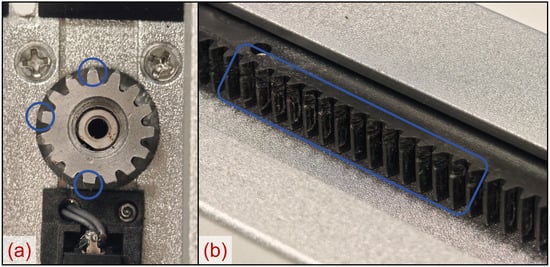
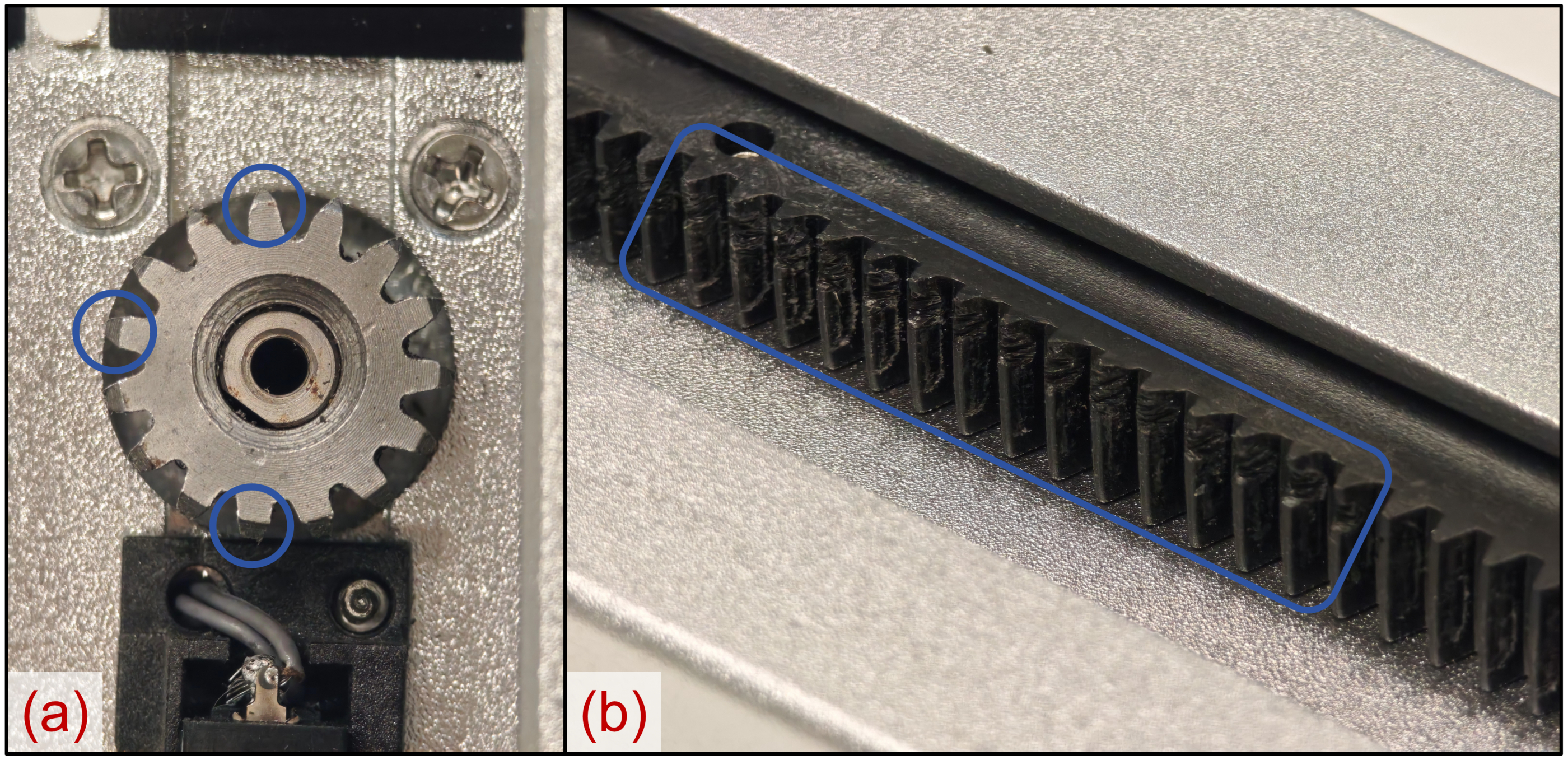
After disassembling the stand, we determined that the failure was caused by wear of the gear rack and pinion, as shown in Figure 7. Since the original motorized stand was not designed for frequent activation, the engineers may have selected a low-cost material with limited wear resistance and a relatively short service life. This observation suggests that the existing motorized stand has a vulnerable gear transmission system, which should be reinforced and redesigned in the proposed modification.
Figure 7.
The wear condition of the (a) pinion and (b) rack. The circles and rectangles mark the wear area.
3.2. Usability Evaluation
3.2.1. Participants of the Usability Evaluation
To evaluate the performance of the ActLift AutoUp function, a usability assessment was conducted. A total of 21 Chinese adult participants (11 females and 10 males) were recruited for the study (Table 2). No participants overlapped with the previous feasibility validation study.
Table 2.
Demographic information of participants for AutoUp test.
3.2.2. Instrument and Procedure of the Usability Evaluation
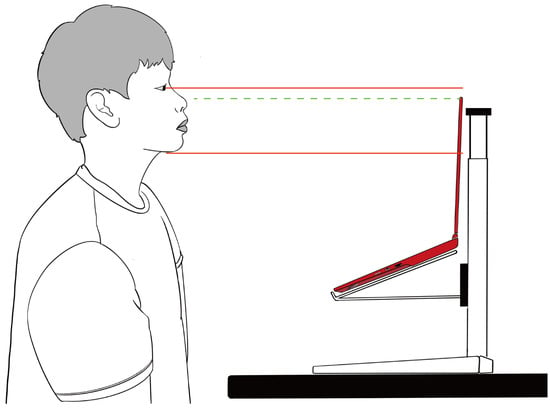
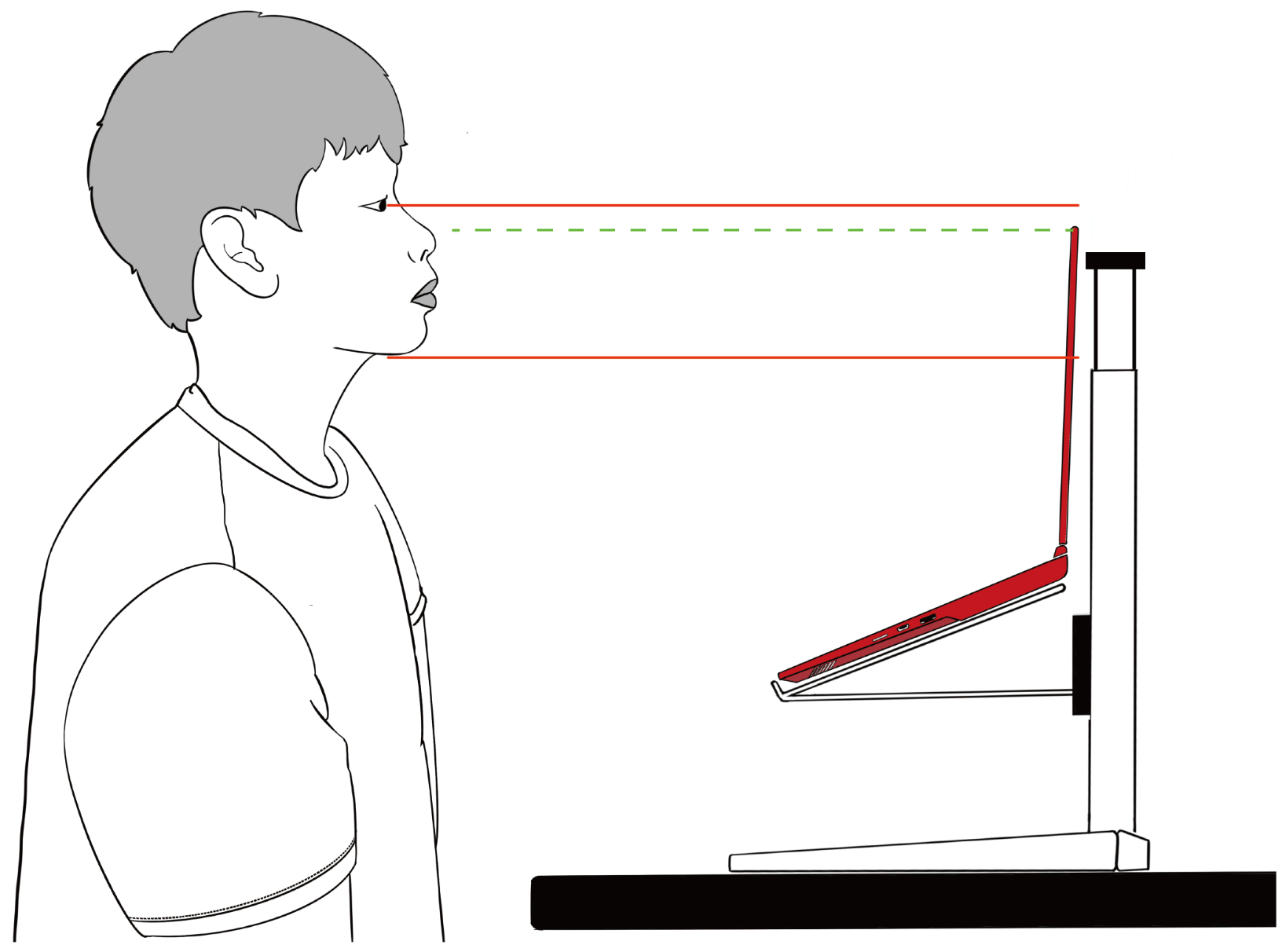
To assess the effectiveness and efficiency of the ActLift AutoUp function, a controlled usability evaluation was conducted comparing its performance with that of a conventional laptop stand. After a brief instructional session introducing the basic operation and adjustment principles of both devices, participants were asked to independently adjust each stand to an ergonomically appropriate height. This pitch-based task was selected because many users were observed failing to lift their laptop to the optimal height when using a manual stand in our previous study [42]. According to the guideline provided by the Labour Department of Hong Kong, it is suggested to set the top of the screen at about eye level or just below [62]. To have a practical threshold, we considered ‘just below’ as higher than the chin. Hence, the target configuration required the top edge of the screen to be aligned within the range between the participant’s chin and eye level (Figure 8).
Figure 8.
Recommended ergonomic standard. Upper solid red line indicates the eye level height, the lower solid red line indicates the chin height, while the green dash line indicates the top edge height of the screen.
The laptop was placed on both types of stands at the beginning in the two conditions, with the stand heights set to their minimum. Also, the software controlling the ActLift was already turned on and connected. A wireless keyboard and mouse were placed on the desk between the stand and the user. For the task using the traditional stand, the participants were allowed to remove the laptop from the stand for convenient operation. The sequence for conducting the two tasks was randomized by tossing a coin.
When the participant heard the word ‘begin’ from the researcher, they could start operating, and a timer was also started. Upon completing the adjustment, participants who removed the laptop from the stand were instructed to place the laptop on the stand to verify the final setup. When the top edge of the monitor was set within the range, the timer stopped. For consistency across trials, the Colourful X15-AT 2023 (Shenzhen Colorful Yugong Technology and Development Co., Ltd., Shenzhen, Guangdong, China) was used, featuring a 15.6-inch display.
During the experiment, the following quantitative metrics were recorded: (1) adjustment time: the duration taken to complete the setup; (2) first-attempt success rate: whether the setup met the ergonomic criteria on the first attempt.
After completing each adjustment task, participants completed an adapted version of the NASA Task Load Index (NASA-TLX) questionnaire. The six dimensions of workload (mental demand, physical demand, temporal demand, performance, effort, and frustration) were each rated on a 7-point Likert scale ranging from 1 (very low) to 7 (very high). Higher scores indicated a greater level of the corresponding attribute. Additionally, a brief semi-structured interview was conducted.
3.3. User Tests of Wave Function
3.3.1. Participants of the User Tests of Wave Function
We recruited 18 adult participants (9 females and 9 males), with demographic information shown in Table 3, to participate in the test to validate ActLift’s function of prompting micro-movement. There was no overlap between this group and the group performing the AutoUp assessment.
Table 3.
Demographic information of participants for the wave function test.
3.3.2. Instrument and Procedure of the User Tests of Wave Function
This experiment investigated the effectiveness of periodic vertical motion in eliciting micro-movements among participants. To minimize expectancy effects and reduce potential bias, a deceptive experimental design was employed. Participants were informed that the study aimed to compare task performance under simulated vehicular vibration versus a static environment. Participants were briefed that ‘The purpose of this study is to examine the effects of simulated vehicular vibration on task performance. Participants will be asked to complete the same tasks under two different conditions: (1) a static condition without vibration and (2) a simulated vehicular vibration condition. By comparing performance across these conditions, the study aims to better understand how vibration may affect cognitive and task execution in transportation environments.’
Rather than utilizing conventional typing tasks, the interactive game Gold Miner was selected as the primary activity. This choice was intended to sustain participant engagement and mitigate task monotony. Each participant first completed the game on a stationary platform, followed by a second session during which the platform moved vertically at a constant speed of 3 mm/s. Each session lasted around 15 min.
Following the experiment, all participants were fully debriefed regarding the study’s use of deception and informed about its actual purpose.
Throughout the experiment, participants were continuously recorded via video to monitor posture dynamics. Videos were then processed by AutoMCA [63], a robust visual measurement tool for cranial angles, to retrieve the numerical data of the view angle. It was reported that measurements were within 0.5° of the true values, while the measurements from AutoMCA and Kinovea showed Pearson correlation coefficients greater than 0.95 for Craniovertebral Angle (CVA). Markers were applied to the tragus, canthus, and the C7 spinous process to enable detection. Micro-movements were defined as deviations exceeding 3 degrees from the baseline angle between the eye–ear line and the ground plane. Upon completion of the experiment, participants underwent a brief semi-structured interview to assess whether the vertical motion of the platform had any perceived influence on their task performance or concentration.
4. Results
4.1. User Test on AutoUp
4.1.1. Effectiveness of AutoUp
First-attempt success was 13/21 (61.9%) for manual adjustment and 20/21 (95.2%) for ActLift. Mean task time was 35.09 s (SD = 20.26) for manual adjustment and 5.02 s (SD = 2.40) for ActLift (Table 4). Participants completed the NASA-TLX after using each device. Raw NASA-TLX scores were analysed on the original 1–7 scale, without reverse scoring (Table 5).
Table 4.
Efficiency outcomes comparing ActLift and manual adjustment.
Table 5.
Descriptive statistics for raw NASA-TLX scores.
Because the same 21 participants evaluated both devices, paired-samples t-tests were used instead of independent-samples t-tests. ActLift significantly reduced all five demand-related NASA-TLX scores and significantly increased the raw performance score (all ; Table 6). After Holm correction across the six TLX dimensions, all differences remained significant (all adjusted ). The largest standardized effects were observed for physical demand, effort, and frustration, whereas mental demand and performance showed moderate-to-large paired effects. The values in Table 6 were computed from the participant-level data.
Table 6.
Paired-samples t-test results for NASA-TLX scores.
Importantly, not all raw TLX scores decreased. No reverse scoring was applied in this reanalysis. The five demand-related scores decreased, but the performance score increased from 4.19 to 5.67, indicating greater perceived success rather than higher workload.
4.1.2. Efficiency of ActLift
Two co-primary performance indicators were analysed: first-attempt success rate and task completion time (Table 4).
ActLift achieved a substantially higher first-attempt success rate (20/21, 95.2%; exact 95% CI 76.2–99.9%) than manual adjustment (13/21, 61.9%; exact 95% CI 38.4–81.9%). Because both conditions were evaluated by the same participants, first-attempt success was analysed as paired binary data using the two-sided exact McNemar test. Discordant pairs favoured ActLift in seven participants and manual adjustment in none (exact ), corresponding to a paired risk difference of 33.3 percentage points (95% CI 13.2–53.5). These findings indicate that participants achieved the target ergonomic configuration more reliably on their first attempt when using ActLift, suggesting greater intuitiveness and ease of use.
Task completion time was markedly shorter with ActLift (5.02 ± 2.40 s) than with manual adjustment (35.09 ± 20.26 s). The paired mean difference was 30.07 s (95% CI 20.67–39.47; , ). Participants completed the adjustment task substantially faster when using ActLift, highlighting the efficiency benefits of the automated mechanism and reducing the need for trial-and-error adjustments and physical manipulation.
To control the family-wise error rate across the two co-primary endpoints, Holm’s step-down procedure was applied. The Holm-adjusted p-values remained significant for both task completion time (adjusted ) and first-attempt success (adjusted ), confirming the robustness of the findings under multiplicity adjustment. Together, these results demonstrate that ActLift enables users to achieve the target ergonomic posture both more efficiently and more reliably than manual adjustment.
4.2. Results of the User Test on Wave Function
Among the 18 participants, periodic micro-movements were observed when the laptop moved vertically, whereas no such movements were observed under the static condition. Post-task interviews revealed that only 16.67% of participants perceived an influence of the platform’s motion on their task performance or concentration. Among these participants, one reported experiencing dizziness during use and attributed the discomfort to the platform’s movement speed being excessively fast. In addition, 55.56% of participants noticed the platform’s motion but reported that it did not interfere with their attention or workflow, while 27.78% were entirely unaware of the movement.
These findings indicate that ActLift’s vertical motion was associated with the occurrence of micro-movements during task performance. Notably, although micro-movements were consistently observed, most participants did not consciously associate the platform’s motion with changes in their performance or concentration. This suggests that ActLift can induce observable micro-movements while remaining perceptually unobtrusive for many users.
5. Discussion
5.1. Usability Assessment Result
Our evaluation of ActLift highlights its great advantage over the traditional manual stand. Unlike traditional solutions that depend on user awareness and manual setup, often resulting in poor ergonomics, ActLift automates adjustments and uses perceptual intelligence to tailor the experience. Its high first-attempt success rate and shorter setup time indicate that intuitive automation supports low-effort, effective interaction. ActLift can detect poor posture and gently encourage users to adopt a more upright sitting position. Additionally, ActLift introduces a passive intervention mechanism by prompting micro-movements through subtle vertical shifts, prompting posture variation without disrupting user focus.
5.2. Balancing Intrusiveness and Agency
One of the key challenges in designing active ergonomic systems is managing the trade-off between effectiveness and user agency. Systems that forcibly manipulate posture, such as those using EMS or mechanical prodding, may achieve immediate results but risk discomfort and resistance. ActLift’s approach, which emphasizes low-amplitude adjustments and perceptual nudging, preserves user autonomy while still achieving measurable ergonomic benefits.
Interestingly, while all participants exhibited micro-movements during the vertical motion test, a majority did not consciously perceive any impact on their performance. This suggests that ActLift operates within a perceptual threshold that avoids disruption—a critical factor for adoption in productivity-focused environments.
5.3. Inspiration for Smart Stand Design
The development of ActLift demonstrates how a commercial motorized laptop stand can be transformed into an AI-enhanced product with low hardware cost. Researchers and individual users can replicate and adapt these modifications using existing motorized stands, guided by this work. Manufacturers, too, may leverage these insights to enhance their products with low-cost updates to obtain AI-enhanced functions. In many cases, the original control MCU can be retained, requiring only the addition of a communication interface to connect with the PC on the control board.
5.4. Limitations
A limitation of this study is its relatively small sample size. Future research should include a larger and more diverse participant cohort to improve the robustness and generalizability of the findings. Although ActLift outperformed the manual stand in the user study with respect to the effectiveness of AutoUp, this advantage was confounded by its motorized operation, making it difficult to isolate the effects of the AutoUp function from those of the underlying mechanical differences between the two systems. Accordingly, a follow-up study comparing manual and automatic operation modes of the same motorized stand is warranted. Furthermore, the evaluation of the wave function was conducted using a fixed testing sequence, which may have introduced order effects. Future studies should adopt a randomized experimental design to minimize this potential source of bias.
From the detection perspective, although MediaPipe Pose is lightweight and can achieve an acceptable frame rate for real-time applications, there remains room for further optimization. One potential bottleneck lies in video transmission, where data congestion may occur in the communication channel between the camera and the model. A promising solution is to perform video preprocessing before transmission. Specifically, employing a machine-centric compression technique such as Machine-Centric FDCT [64] could reduce bandwidth requirements while preserving critical pose-related features, thereby maintaining pose estimation performance even at lower bitrates.
Also, although the official documents of MediaPipe suggest that FaceMesh is practical for different ethnicities, its feasibility should be further studied for our specific application. In addition to that, its feasibility with the elderly, children, and users with different physical abilities also needs to be studied to provide a broader generalization.
The current system is also tailored specifically for laptops, which may limit its applicability in multi-device or hybrid workstations. The algorithm should involve gaze detection in the future to determine whether the slouch intervention or the ‘wave’ function should be activated. Since the MediaPipe Face module provides the landmarks for eyes, they can be combined with head orientation to estimate the focus area of the user. Additionally, the perceptual model relies on frontal facial visibility, which may be affected by lighting conditions or user movement and posture. Another key limitation is the absence of long-term observational studies. As of now, we lack empirical data on ActLift’s sustained effectiveness in everyday settings, and its real-world impact on posture correction and musculoskeletal health remains uncertain. Furthermore, the comfort, health benefits, and unobtrusiveness of the proposed approach have not yet been directly verified through experimental studies. Future research should therefore be conducted to substantiate these benefits.
Future work could also explore multimodal sensing (e.g., combining vision with pressure or inertial sensors), adaptive motion profiles based on user feedback, and integration with broader wellness ecosystems. Longitudinal studies are also needed to assess the sustained impact of ActLift on posture habits and musculoskeletal health.
6. Conclusions
ActLift demonstrates the potential of AI-enhanced furniture to foster healthier sitting habits in everyday digital workspaces. By integrating intelligent posture detection and subtle physical prompting into a compact, low-cost laptop stand, our system encourages ergonomic awareness and dynamic posture variation without disrupting workflow. User studies revealed reductions in perceived workload and improvements in adjustment efficiency, validating the effectiveness of ActLift’s interventions. This work contributes to a growing body of research on responsive environments and highlights the value of embedding adaptive, human-centered design into common work tools. Future directions include expanding ActLift’s capabilities to accommodate diverse body types and exploring multimodal feedback to personalize ergonomic support further.
Supplementary Materials
The following supporting information can be downloaded at https://www.mdpi.com/article/10.3390/technologies14110765/s1, File S1: PCB Design File (.json); File S2: Arduino Script (.ino); File S3: Python Script (.ino); File S4: Safety Verification Tests (.pdf).
Author Contributions
Conceptualization, J.C. and Q.D.; methodology, J.C.; software, J.C.; validation, J.C., Q.D. and L.F.; formal analysis, J.C., Q.D. and L.F.; investigation, Q.D. and L.F.; resources, Y.L.; data curation, J.C., Q.D. and L.F.; writing—original draft preparation, J.C., Q.D. and L.F.; writing—review and editing, Y.L.; visualization, J.C., Q.D. and L.F.; supervision, Y.L.; project administration, Y.L.; funding acquisition, Y.L. All authors have read and agreed to the published version of the manuscript.
Funding
This research was funded by the Research Grants Council of the Hong Kong Special Administrative Region, China (Project No. GRF/PolyU 15607922).
Institutional Review Board Statement
The study was conducted in accordance with the Declaration of Helsinki and approved by the Institutional Review Board of The Hong Kong Polytechnic University (protocol code: HSEARS20230414004; approval date: 28 June 2023).
Informed Consent Statement
Informed consent was obtained from all subjects involved in the study.
Data Availability Statement
The data that support the findings of this study are available from the corresponding author upon reasonable request.
Acknowledgments
Microsoft Copilot (v157.0.4341.60) and Grammarly (v1.2.313.2008) were used for language polishing and grammar checking in this paper.
Conflicts of Interest
The authors declare no conflicts of interest.
Abbreviations
The following abbreviations are used in this manuscript:
| AI | Artificial Intelligence |
| EMG | Electromyography |
| EMS | Electrical Muscle Stimulation |
| MCU | Microcontroller Unit |
| PC | Personal Computer |
| DC | Direct Current |
| CPU | Central Processing Unit |
References
- Waters, C.N.; Ling, E.P.; Chu, A.H.; Ng, S.H.; Chia, A.; Lim, Y.W.; Müller-Riemenschneider, F. Assessing and understanding sedentary behaviour in office-based working adults: A mixed-method approach. BMC Public Health 2016, 16, 360. [Google Scholar] [CrossRef] [Scilit]
- Van der Ploeg, H.P.; Chey, T.; Korda, R.J.; Banks, E.; Bauman, A. Sitting time and all-cause mortality risk in 222 497 Australian adults. Arch. Intern. Med. 2012, 172, 494–500. [Google Scholar] [CrossRef] [Scilit]
- Van Uffelen, J.G.; Wong, J.; Chau, J.Y.; Van Der Ploeg, H.P.; Riphagen, I.; Gilson, N.D.; Burton, N.W.; Healy, G.N.; Thorp, A.A.; Clark, B.K.; et al. Occupational sitting and health risks: A systematic review. Am. J. Prev. Med. 2010, 39, 379–388. [Google Scholar]
- Wahlström, J. Ergonomics, musculoskeletal disorders and computer work. Occup. Med. 2005, 55, 168–176. [Google Scholar] [CrossRef] [Scilit]
- Gowrisankaran, S.; Sheedy, J.E. Computer vision syndrome: A review. Work 2015, 52, 303–314. [Google Scholar] [CrossRef] [Scilit]
- Kronenberg, R.; Kuflik, T.; Shimshoni, I. Improving office workers’ workspace using a self-adjusting computer screen. ACM Trans. Interact. Intell. Syst. (TiiS) 2022, 12, 1–32. [Google Scholar] [CrossRef] [Scilit]
- Handa, Y.; Okada, K.; Takasaki, H. Lumbar roll usage while sitting reduces the forward head posture in healthy individuals: A systematic review with meta-analysis. Int. J. Environ. Res. Public Health 2021, 18, 5171. [Google Scholar] [CrossRef] [Scilit]
- Seghers, J.; Jochem, A.; Spaepen, A. Posture, muscle activity and muscle fatigue in prolonged VDT work at different screen height settings. Ergonomics 2003, 46, 714–730. [Google Scholar] [CrossRef] [Scilit]
- Lee, T.H.; Liu, T.Y. Postural and Muscular Responses While Viewing Different Heights of Screen. Int. J. Occup. Saf. Ergon. 2013, 19, 251–258. [Google Scholar] [CrossRef] [Scilit] [PubMed]
- Oh, I.; Lee, J.; Chee, Y. The Effect of the Laptop Computer Stand to Maintain the Good Posture of Neck. J. Biomed. Eng. Res. 2017, 38, 291–294. [Google Scholar]
- Yadegaripour, M.; Hadadnezhad, M.; Abbasi, A.; Eftekhari, F.; Samani, A. The Effect of Adjusting Screen Height and Keyboard Placement on Neck and Back Discomfort, Posture, and Muscle Activities during Laptop Work. Int. J. Hum.–Comput. Interact. 2021, 37, 459–469. [Google Scholar] [CrossRef] [Scilit]
- National Research Council and Institute of Medicine. Musculoskeletal Disorders and the Workplace: Low Back and Upper Extremities; National Academies Press: Washington, DC, USA, 2001; Available online: https://nap.nationalacademies.org/catalog/10032/musculoskeletal-disorders-and-the-workplace-low-back-and-upper-extremities (accessed on 18 October 2026).
- Haller, M.; Richter, C.; Brandl, P.; Gross, S.; Schossleitner, G.; Schrempf, A.; Nii, H.; Sugimoto, M.; Inami, M. Finding the Right Way for Interrupting People Improving Their Sitting Posture. In Proceedings of the Human-Computer Interaction—INTERACT 2011; Campos, P., Graham, N., Jorge, J., Nunes, N., Palanque, P., Winckler, M., Eds.; Springer: Berlin/Heidelberg, Germany, 2011; pp. 1–17. [Google Scholar]
- Bailly, G.; Sahdev, S.; Malacria, S.; Pietrzak, T. LivingDesktop: Augmenting Desktop Workstation with Actuated Devices. In Proceedings of the 2016 CHI Conference on Human Factors in Computing Systems; CHI’16; ACM: New York, NY, USA, 2016; pp. 5298–5310. [Google Scholar] [CrossRef] [Scilit]
- Wu, Y.C.; Wu, T.Y.; Taele, P.; Wang, B.; Liu, J.Y.; Ku, P.S.; Lai, P.E.; Chen, M.Y. ActiveErgo: Automatic and Personalized Ergonomics using Self-actuating Furniture. In Proceedings of the 2018 CHI Conference on Human Factors in Computing Systems; CHI’18; ACM: New York, NY, USA, 2018; pp. 1–8. [Google Scholar] [CrossRef] [Scilit]
- Shin, J.G.; Onchi, E.; Reyes, M.J.; Song, J.; Lee, U.; Lee, S.H.; Saakes, D. Slow Robots for Unobtrusive Posture Correction. In Proceedings of the 2019 CHI Conference on Human Factors in Computing Systems; CHI’19; ACM: New York, NY, USA, 2019; pp. 1–10. [Google Scholar] [CrossRef] [Scilit]
- Kim, C.M.; Nam, T.J. G-raff: An Elevating Tangible Block for Spatial Tabletop Interaction. In Proceedings of the 33rd Annual ACM Conference on Human Factors in Computing Systems; CHI’15; ACM: New York, NY, USA, 2015; pp. 4161–4164. [Google Scholar] [CrossRef] [Scilit]
- Varela, M. Designing Micro-Movement into Automotive Seating. Ph.D. Thesis, Loughborough University, Loughborough, UK, 2020. [Google Scholar]
- Fan, X. Gaze-Induced Dynamic Computer Stand for Relieving Office Neck Fatigue. In Proceedings of the 2026 6th International Conference on Biomedicine and Bioinformatics Engineering; ICBBE’26; ACM: New York, NY, USA, 2026; pp. 301–307. [Google Scholar] [CrossRef] [Scilit]
- Weiser, M.; Brown, J.S. The coming age of calm technology. In Beyond Calculation: The Next Fifty Years of Computing; Springer: New York, NY, USA, 1997; pp. 75–85. [Google Scholar]
- Hinckley, K.; Pierce, J.; Horvitz, E.; Sinclair, M. Foreground and background interaction with sensor-enhanced mobile devices. ACM Trans. Comput.-Hum. Interact. (TOCHI) 2005, 12, 31–52. [Google Scholar] [CrossRef] [Scilit]
- Ishimatsu, H.; Ueoka, R. BITAIKA: Development of self posture adjustment system. In Proceedings of the 5th Augmented Human International Conference; AH’14; ACM: New York, NY, USA, 2014. [Google Scholar] [CrossRef] [Scilit]
- Liu, K.; Picard, R.W. Subtle expressivity in a robotic computer. In Proceedings of the CHI 2003 Workshop on Subtle Expressiveness in Characters and Robots; ACM: New York, NY, USA, 2003; Volume 10, pp. 5–9. [Google Scholar]
- Kim, J.; Lee, N.H.; Bae, B.C.; Cho, J.D. A Feedback System for the Prevention of Forward Head Posture in Sedentary Work Environments. In Proceedings of the 2016 ACM Conference Companion Publication on Designing Interactive Systems; DIS’16 Companion; ACM: New York, NY, USA, 2016; pp. 161–164. [Google Scholar] [CrossRef] [Scilit]
- Paliyawan, P.; Nukoolkit, C.; Mongkolnam, P. Prolonged sitting detection for office workers syndrome prevention using kinect. In Proceedings of the 2014 11th International Conference on Electrical Engineering/Electronics, Computer, Telecommunications and Information Technology (ECTI-CON); IEEE: New York, NY, USA, 2014; pp. 1–6. [Google Scholar]
- Lee, H.S. Apparatus and Method for Assisting User to Maintain Correct Posture. US Patent 9,141,761, 22 September 2015. [Google Scholar]
- Tanaka, K.; Ishimaru, S.; Kise, K.; Kunze, K.; Inami, M. Nekoze!-monitoring and detecting head posture while working with laptop and mobile phone. In Proceedings of the 2015 9th International Conference on Pervasive Computing Technologies for Healthcare (PervasiveHealth); IEEE: New York, NY, USA, 2015; pp. 237–240. [Google Scholar] [CrossRef] [Scilit]
- Odesola, D.F.; Kulon, J.; Verghese, S.; Partlow, A.; Gibson, C. A Smart System for Continuous Sitting Posture Monitoring, Assessment, and Personalized Feedback. Sensors 2025, 25, 5610. [Google Scholar] [CrossRef] [Scilit]
- Wölfel, M. Acceptance of dynamic feedback to poor sitting habits by anthropomorphic objects. In Proceedings of the 11th EAI International Conference on Pervasive Computing Technologies for Healthcare; PervasiveHealth’17; ACM: New York, NY, USA, 2017; pp. 307–314. [Google Scholar] [CrossRef] [Scilit]
- Lee, J.; Cho, E.; Kim, M.; Yoon, Y.; Choi, S. PreventFHP: Detection and warning system for Forward Head Posture. In Proceedings of the 2014 IEEE Haptics Symposium (HAPTICS); IEEE: New York, NY, USA, 2014; pp. 295–298. [Google Scholar] [CrossRef] [Scilit]
- Salvado, L.M.; Arsenio, A. Sleeve Sensing Technologies and Haptic Feedback Patterns for Posture Sensing and Correction. In Proceedings of the Companion Publication of the 21st International Conference on Intelligent User Interfaces; IUI’16 Companion; ACM: New York, NY, USA, 2016; pp. 74–78. [Google Scholar] [CrossRef] [Scilit]
- Hou, Y.; Wang, Z.; Liu, H.; Xia, M.; Fan, X.; Ye, Q. Designing a Smart Garment for Dynamic Sitting Reminders. Sensors 2025, 25, 3359. [Google Scholar] [CrossRef] [Scilit]
- Krauter, C.; Angerbauer, K.; Sousa Calepso, A.; Achberger, A.; Mayer, S.; Sedlmair, M. Sitting Posture Recognition and Feedback: A Literature Review. In Proceedings of the 2024 CHI Conference on Human Factors in Computing Systems; CHI’24; ACM: New York, NY, USA, 2024. [Google Scholar] [CrossRef] [Scilit]
- Tasse, D.; Ankolekar, A.; Hailpern, J. Getting Users’ Attention in Web Apps in Likable, Minimally Annoying Ways. In Proceedings of the 2016 CHI Conference on Human Factors in Computing Systems; CHI’16; ACM: New York, NY, USA, 2016; pp. 3324–3334. [Google Scholar] [CrossRef] [Scilit]
- Hsieh, A.Y.; Lo, S.K.; Chiu, Y.P.; Lie, T. Do not allow pop-up ads to appear too early: Internet users’ browsing behaviour to pop-up ads. Behav. Inf. Technol. 2021, 40, 1796–1805. [Google Scholar] [CrossRef] [Scilit]
- Islind, A.S.; Willermark, S. Polite Interaction Design: Capturing the Users Attention Without Compromising their Experienced Trust. In Proceedings of the AMCIS 2022 Proceedings, Minneapolis, MN, USA, 10–14 August 2022; p. 1114. [Google Scholar]
- Heijboer, M.; van den Hoven, E.; Bongers, B.; Bakker, S. Facilitating peripheral interaction: Design and evaluation of peripheral interaction for a gesture-based lighting control with multimodal feedback. Pers. Ubiquitous Comput. 2016, 20, 1–22. [Google Scholar] [CrossRef] [Scilit]
- Bakker, S.; Van Den Hoven, E.; Eggen, B. Peripheral interaction: Characteristics and considerations. Pers. Ubiquitous Comput. 2015, 19, 239–254. [Google Scholar] [CrossRef] [Scilit]
- Guo, Z.; Chen, Z.; Pai, J.; Fang, B.; Liang, W.; Su, G.; Zheng, F. Effects of laptop screen height on neck and shoulder muscle fatigue and spine loading for office workers. Work 2024, 79, 1925–1937. [Google Scholar]
- Rempel, D.; Willms, K.; Anshel, J.; Jaschinski, W.; Sheedy, J. The Effects of Visual Display Distance on Eye Accommodation, Head Posture, and Vision and Neck Symptoms. Hum. Factors 2007, 49, 830–838. [Google Scholar] [CrossRef] [Scilit]
- Fujimaki, G.; Mitsuya, R. Study of the seated posture for VDT work. Displays 2002, 23, 17–24. [Google Scholar] [CrossRef] [Scilit]
- Chen, J.; Du, Q.; Luximon, Y. Rethinking the Sitting Posture Intervention: A Framework for Improving With Nudging. In Proceedings of the Human Systems Engineering and Design (IHSED 2026), AHFE International, Paris, France, 22–24 September 2026; Volume 237, pp. 138–149. [Google Scholar] [CrossRef] [Scilit]
- Kattoju, R.K.; Pittman, C.R.; LaViola, J. Automatic slouching detection and correction utilizing electrical muscle stimulation. In Proceedings of the GI’21: Proceedings of the 47th Graphics Interface Conference, Halifax, NS, Canada, 27–28 May 2021; pp. 147–155. [Google Scholar]
- Tanaka, Y.; Nishida, J.; Lopes, P. Electrical Head Actuation: Enabling Interactive Systems to Directly Manipulate Head Orientation. In Proceedings of the 2022 CHI Conference on Human Factors in Computing Systems; CHI’22; ACM: New York, NY, USA, 2022. [Google Scholar] [CrossRef] [Scilit]
- Ishimatsu, H.; Ueoka, R. Finding the right feedback for self-posture adjustment system for “BITAIKA”. In Proceedings of the SIGGRAPH Asia 2015 Posters; SA’15; ACM: New York, NY, USA, 2015. [Google Scholar] [CrossRef] [Scilit]
- Lee, S.M.; Kim, H.J.; Ham, S.J.; Kim, S. Assistive devices to help correct sitting-posture based on posture analysis results. JOIV Int. J. Inform. Vis. 2021, 5, 340–346. [Google Scholar] [CrossRef] [Scilit]
- Shen, Z.; Wan, X.; Jin, Y.; Gao, G.; Wang, Q.; Liu, W. SeatPlus: A Smart Health Chair Supporting Active Sitting Posture Correction. In Proceedings of the Design, User Experience, and Usability: Design for Diversity, Well-Being, and Social Development; Soares, M.M., Rosenzweig, E., Marcus, A., Eds.; Spring: Cham, Switzerland, 2021; pp. 531–547. [Google Scholar]
- Pereira, H.; Martins, L.; Almeida, R.; Ribeiro, B.; Quaresma, C.; Ferreira, A.; Vieira, P. System for Posture Evaluation and Correction—Development of a Second Prototype for an Intelligent Chair. In Proceedings of the International Conference on Biomedical Electronics and Devices (BIOSTEC 2015)—BIODEVICES, INSTICC, Lisbon, Portugal, 12–15 January 2015; pp. 204–209. [Google Scholar] [CrossRef] [Scilit]
- Fujita, K.; Suzuki, A.; Takashima, K.; Ikematsu, K.; Kitamura, Y. TiltChair: Manipulative Posture Guidance by Actively Inclining the Seat of an Office Chair. In Proceedings of the 2021 CHI Conference on Human Factors in Computing Systems; CHI’21; ACM: New York, NY, USA, 2021. [Google Scholar] [CrossRef] [Scilit]
- Shin, J.; Choi, W.; Lee, U.; Saakes, D. Actuating a Monitor for Posture Changes. In Proceedings of the Extended Abstracts of the 2018 CHI Conference on Human Factors in Computing Systems; CHI EA’18; ACM: New York, NY, USA, 2018; pp. 1–6. [Google Scholar] [CrossRef] [Scilit]
- Vink, L.; Kan, V.; Nakagaki, K.; Leithinger, D.; Follmer, S.; Schoessler, P.; Zoran, A.; Ishii, H. TRANSFORM as Adaptive and Dynamic Furniture. In Proceedings of the 33rd Annual ACM Conference Extended Abstracts on Human Factors in Computing Systems; CHI EA’15; ACM: New York, NY, USA, 2015; p. 183. [Google Scholar] [CrossRef] [Scilit]
- CyboPal. The World’s First Desktop Robotic Terminal. 2026. Available online: https://www.kickstarter.com/projects/cybopal/cybopal-worlds-first-active-tracking-ai-robotic-monitor (accessed on 7 November 2026).
- Gomi, R.; Takashima, K.; Fujita, K.; Kitamura, Y. A Triangular Actuating Device Stand that Dynamically Adjusts Mobile Screen’s Position. In Proceedings of the Adjunct Proceedings of the 35th Annual ACM Symposium on User Interface Software and Technology; UIST’22 Adjunct; ACM: New York, NY, USA, 2022. [Google Scholar] [CrossRef] [Scilit]
- Sahu, M.; Gnana Sundari, K.; Stephen, E.N. Design and Fabrication of an Automated Laptop Stand. In Advances in Industrial Automation and Smart Manufacturing: Select Proceedings of ICAIASM 2019; Springer: New York, NY, USA, 2020; pp. 131–139. [Google Scholar]
- Ko, J.H. [Pangyo Startup] Dot Heal introduces “Dot Stand,” a Healthcare Robot That Gradually Heals the Chronic Turtle Neck Syndrome of Modern People. 2021. Available online: https://us.aving.net/news/articleView.html?idxno=45563 (accessed on 8 November 2026).
- Lenovo Lenovo Innovation World 2025: Enabling Smarter AI for All with Expanding Portfolio of AI Devices, Solutions, and Concepts for Business IT. 2025. Available online: https://news.lenovo.com/pressroom/press-releases/innovation-world-2025-smarter-ai-for-all-devices-solutions-concepts-business/ (accessed on 8 November 2026).
- GLAT. What Does a Monitor Stand with Eye-Tracking Look Like? How Is the Experience with Songneng’s Black Tech!? 2025. Available online: https://www.bilibili.com/en/video/BV1jth1zSEa7/ (accessed on 7 November 2026).
- Saied, G.; Kamel, R.; Mahfouz, M. For prolonged computer users: Laptop screen position and sitting style cause more cervical musculoskeletal dysfunction compared to desktop, ergonomic evaluation. Anthropol 2013, 2, 117. [Google Scholar]
- Yu, Z.; James, C.; Edwards, S.; Snodgrass, S.J. Differences in posture kinematics between using a tablet, a laptop, and a desktop computer in sitting and in standing. Work 2018, 61, 257–266. [Google Scholar] [CrossRef] [Scilit]
- Chen, J.; Wang, Y.; Luximon, Y. CamTroller: An Auxiliary Tool for Controlling Your Avatar in PC Games Using Natural Motion Mapping. In Proceedings of the 2024 CHI Conference on Human Factors in Computing Systems; CHI’24; ACM: New York, NY, USA, 2024. [Google Scholar] [CrossRef] [Scilit]
- Yan, G.; Grishchenko, I. MediaPipe FaceMesh. Google Model Card. 2022. Available online: https://storage.googleapis.com/mediapipe-assets/Model%20Card%20MediaPipe%20Face%20Mesh%20V2.pdf (accessed on 6 November 2026).
- Labour Department. A Guide to Work with Computers. 2010. Available online: https://www.labour.gov.hk/eng/public/oh/DisplayScreen.pdf (accessed on 5 November 2026).
- Chen, J.; Wang, Y.; Shi, X.; Luximon, Y. AutoMCA: A Robust Approach for Automatic Measurement of Cranial Angles. Automation 2025, 6, 88. [Google Scholar] [CrossRef] [Scilit]
- Wiseman, Y. Achieving Robotic Data Efficiency Through Machine-Centric FDCT Vision Processing. Sensors 2026, 26, 518. [Google Scholar] [CrossRef] [Scilit]

Disclaimer/Publisher’s Note: The statements, opinions and data contained in all publications are solely those of the individual author(s) and contributor(s) and not of MDPI and/or the editor(s). MDPI and/or the editor(s) disclaim responsibility for any injury to people or property resulting from any ideas, methods, instructions or products referred to in the content. |
© 2026 by the authors. Licensee MDPI, Basel, Switzerland. This article is an open access article distributed under the terms and conditions of the Creative Commons Attribution (CC BY) license.