1. Introduction
In a dynamic university environment, students often face challenges related to organizing their learning process, managing schedules, navigating between buildings, and reading a large volume of academic literature.
The lack of a centralized system for reminders and easy access to information about classes can lead to missed lectures, delays, and difficulties in navigating different university buildings, while the large volume of study materials reduces the motivation for learning in students.
The current project aims to develop an Android application that will facilitate students by providing them with summarized lecture materials content, automated notifications about upcoming classes, information about current study commitments, and navigational methods for academic buildings. Through integration with a map and a notification system, the application will help students better organize their daily academic tasks.
The developed solution will provide efficient access to class schedules by sending notifications 15 min before each lecture, seminar, or laboratory session, which contain detailed information about the type of class, its location, and duration. In addition, through integration with an external navigation application, students will be able to easily find the relevant buildings where various classes are held, and two multilingual ML models take care of processing and synthesizing summaries from files containing learning materials for all disciplines (i.e., for all available files, students can directly access their summarized content). The project aims to provide an intuitive, practical solution that improves students’ organisation and efficiency by integrating key functionalities into a single, comprehensive mobile application. In this way, learners are more likely to remain motivated and engaged, leading to improved understanding and academic success.
2. Overview of Existing Platforms and Research
The digitization of higher education (HE) over the past decade has shifted from desktop learning management systems (LMSs) to adaptive mobile applications that help the educational system adapt to the specific characteristics and needs of a student. Scholars in the field emphasize that students need real-time information accessible via smartphones to effectively manage their time and academic commitments. The growing volume of educational materials to some extent demotivates educators, and they seek abbreviated, summarized learning options [
1]. Despite the development of adaptive learning systems and technologies, the analysis and state of the research problem showed that a system that combines the capabilities of an LMS with multilingual ML models for obtaining summarized learning content, learning process management, notification systems for upcoming learning commitments, and geospatial orientation on the university campus has not yet been modeled and developed. Such a system is needed to improve the student experience. In order to develop such a platform, it is necessary to study and compare the existing experience in developing similar systems in the field of higher education. This is the goal of our research: it is aimed at designing a standardized model for educational content, with modules for generating summaries of educational material, creating study schedules, providing notifications of upcoming classes, and supporting campus navigation for future specialists in a blended learning environment.
AI systems create personalized educational content using advanced algorithms and data analysis, assess students’ performance, and provide specific feedback to improve teaching and learning experiences. This AI-driven solution contributes to developing personalized learning pathways that adapt to students’ needs, styles, and abilities, and it promotes deeper understanding and constant participation.
The development of digital content and the increasing volume of information have necessitated finding scalable and efficient means of generating personalized content. In response to this challenge, natural language text systems have emerged, which use machine learning algorithms combined with natural language processing techniques to provide automatically generated natural language text [
2].
The AI-based Chat Pdf.com system can read and synthesize the most important ideas and return a complete summary of each document in PDF format. Leonardo AI uses computer vision and machine learning to analyze images and videos. It can identify objects in scientific experiments or interpret medical images in the medical field. Through the Humata.ai platform, teachers can adapt content and teaching methodology to the needs of students, improving the learning experience. Humata.ai uses ML algorithms to analyze course content and give students personalized recommendations [
3].
2.1. Learning Management Systems and Mobile Applications
Traditional platforms such as Moodle, Blackboard, and Canvas dominate the sector, but research shows that their mobile versions are often cumbersome and do not offer location-specific support. Researchers such as Dahlstrom et al. [
4] point out that while these systems are excellent for content, they fail in supporting the day-to-day logistics of a student. In response, specialized university applications have emerged that integrate Google Maps or OpenStreetMap APIs for campus visualization.
2.2. Campus Navigation and Geospatial Technologies
The problem of navigation in large university buildings is a subject of increased interest. The study by Kasemsri & Sombatthai [
5] describes the use of QR codes and iBeacons for indoor navigation where the GPS signal is weak. Our development approaches these concepts, but it offers greater flexibility by using direct coordinates to buildings, which is more pragmatic for large-scale open campuses.
2.3. Real-Time Notifications and Contextual Information
The use of push notifications has been recognized by the scientific community as a critical factor in reducing the rate of missed lectures. A study by Tshabalala et al. [
6] found that automated reminders improve attendance and engagement. Systems such as UniDays or specific developments (e.g., at Nanyang Technological University) use architectures similar to ours (Firebase) to send messages based on a dynamic schedule.
The scientists in [
7] developed a Real-Time Notification System (RNS) to enhance communication, engagement, and information accessibility for students at San Vicente Institute. Their system delivers instant updates and alerts regarding campus events, academic services, deadlines, and other essential resources through a dedicated mobile application. Unlike traditional communication channels, such as bulletin boards, printed notices, and emails, their RNS provides proactive and personalized notifications tailored to each student’s academic program, organizational involvement, and specific interests. This ensures that students remain consistently informed, reducing the risk of missed announcements and promoting active participation in campus life.
2.4. Benchmarking of Existing Solutions
Table 1 provides a brief benchmark of our platform against mainstream systems.
3. Tools and Technologies Used
During the project’s development, various technologies were employed to ensure the security, efficiency, and scalability of the mobile application and the server component.
Django was used for the server component, implementing the built-in user management system tailored to the project’s requirements. Authentication was implemented via JWT by rest_framework_simplejwt, which guarantees security in managing user sessions.
The main technologies and libraries used in the server include the following:
Django REST Framework version 3.10—creates API communication between the server and the mobile application;
rest_framework_simplejwt—generates and manages JWT tokens after login;
Django APScheduler—periodic execution of tasks, including sending notifications;
PostgreSQL version 18—main database used to store information managed via Django ORM; Django security settings:
- -
DEFAULT_AUTHENTICATION_CLASSES: JWTAuthentication, providing secure communication.
- -
DEFAULT_PERMISSION_CLASSES: IsAuthenticated, for controlling access to resources.
The mobile application is developed for Android using Java version SE 21. To ensure secure communication between the client and the server, okhttp3 with TLS encryption version 1.2 support is used. The main technologies and libraries used in the Android application include the following:
Firebase Cloud Messaging—for sending push notifications to students;
OkHttp3—for providing a secure channel for exchanging credentials and tokens;
Retrofit 2—for communicating with the REST API on the server;
Material Components—for building a modern and convenient user interface;
CardView—for improving the visualization of elements in the application.
By combining these technologies, the project provides a reliable, secure, and effective solution to support students in the university environment.
Providing high-quality content, whether written by a human or generated by artificial intelligence, is crucial for achieving high learning outcomes.
3.1. Machine Learning Transformer Models
In this study, two multilingual transformer models were selected for generating summaries of learning materials.
3.1.1. T5
The first natural language processing model is csebuetnlp/mT5_multilingual_XLSum, which is based on the mT5 architecture and specifically trained on the XL-Sum dataset to automatically generate short and meaningful text summaries. It can accept long articles or documents in different languages and produce abstract summaries, making it suitable for applications such as news aggregators, content analysis, and multilingual text processing systems.
T5 is one of the most successful models in extractive generalization, in which the generated new text is synthesized through understanding and reformulation. It is based on a transformer architecture of the encoder–decoder type. The encoder processes the input text and extracts semantic representations, and the decoder uses the representations from the encoder to generate new text (the so-called summary).
The model includes the following key mechanisms: (a) self-attention—focusing on different parts of the text simultaneously; (b) positional encoding—adds information about the position of words; (c) feedforward neural network—transforms vector representations; (d) layer normalization—stabilizes training.
T5 is pre-trained on C4 (Colossal Clean Crawled Corpus), containing large-scale and diverse texts. During training, all tasks are formulated as “text in text”, for example, translation, question-answer, summary, etc. Fine-tuning allows the model to be trained on specific tasks for better specialization and performance.
Architecture of the T5 model:
Text to summarize.
Tokenization.
Encoding.
Decoding.
Summarization.
3.1.2. DistilBART
The second model used for automatic text summarization is/distilbart-cnn-12-6. It is compact and fast and is based on the BART architecture, but it is “distilled” to work more efficiently with fewer resources. In turn, it is trained on the CNN/DailyMail dataset and optimized to produce short, informative summaries, while retaining much of the quality of larger models, with faster processing times and lower computational cost.
DistilBART is a compact and efficient variant of the BART model and is designed to deliver high performance. DistilBART achieves a 40% reduction in model size and runs 60% faster than the original while retaining approximately 97% of its language understanding capabilities. This efficiency is achieved through knowledge distillation during pre-training, where DistilBART learns to mimic BART’s behavior, effectively capturing its nuanced language representations. These attributes make DistilBART suitable for deployment in resource-constrained environments, such as mobile devices and real-time applications, where computational efficiency is critical [
8].
DistilBART is built on the transformer architecture, consisting of an encoder and a decoder [
9]. Both the encoder and decoder are built using layers of multi-head self-attention and feed-forward neural networks, which allow the model to weight the importance of different words in a sequence when making predictions [
10].
By eliminating token-type embeddings and the pooler, the model is simplified, and processing becomes faster without affecting performance.
The architecture of the DistilBART model includes the following:
Embedding Layer—converts tokens (words) into dense vectors.
Positional Encoding—adds information about the order of the tokens.
Transformer Layers—a set of transformer block layers that process the input.
Global Average Pooling—reduces the output of the input string to a vector of fixed size.
Classifier Layer—classifies the input into one of the possible classes.
Each of the 6 Transformer layers of DistilBART consists of two main sublayers [
11]:
Multi-Head Self-Attention Mechanism—This sublayer allows the model to focus on different parts of the input sequence when processing each token, capturing contextual connections and dependencies between words.
Feedforward Neural Network (FFNN)—Following the attention mechanism, FFNN applies nonlinear transformations to the attention outputs, allowing the model to learn complex representations and interactions within the data.
By combining these sublayers, DistilBART captures contextual information and learns rich language representations [
11].
4. Software Implementation
4.1. Database Design
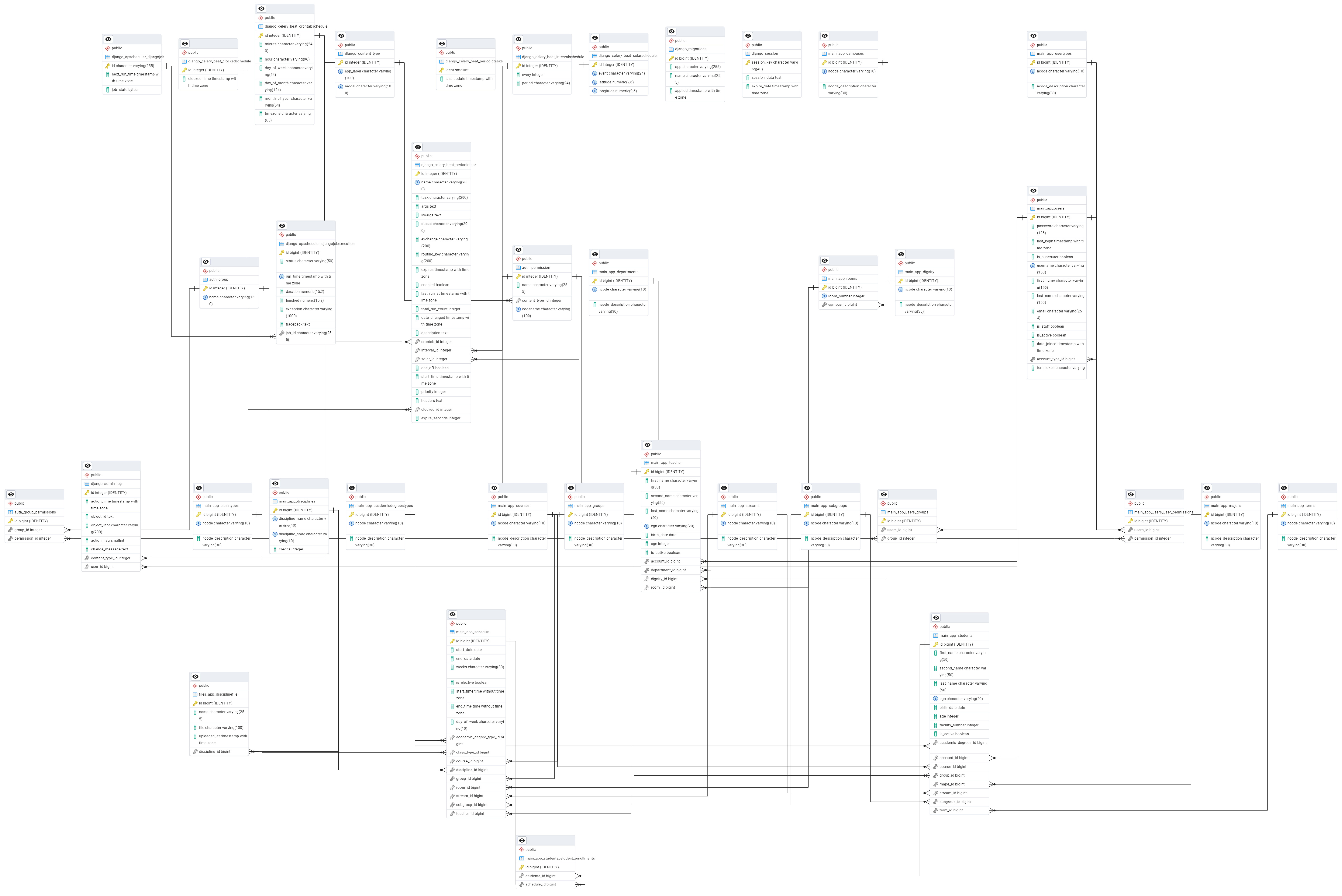
The project uses PostgreSQL (version 18) as the main relational database (
Figure 1), managed through Django ORM (version 2.0.5). The base structure is organized into several main categories that reflect the university hierarchy, user roles, and class schedules.
4.1.1. Users and Roles
Users—Extends Django AbstractUser by adding an account_type field that defines the user’s role (student, teacher, etc.), as well as an fcm_token field for sending push notifications.
UserTypes—Defines the different types of users in the system.
4.1.2. Students and Teachers
Students—Describes student profiles with personal data, faculty number, group, course, and specialty. It is related to Users, as each student has a unique account.
Teacher—Represents teachers, including personal data, title (Dignity), room (Rooms), and department (Departments).
4.1.3. University Structure
Majors—Contains the majors at the university.
Courses—Describes the courses.
Groups and Subgroups—Represent the main groups and subgroups into which students are distributed.
AcademicDegreesTypes—Contains the different degrees of education.
Departments—Faculties or departments at the university.
Campuses and Rooms—Describes the university buildings and their rooms.
4.1.4. Academic Disciplines and Timetable
Disciplines—Represents the different academic disciplines with a unique code and number of credits.
ClassTypes—Defines the types of classes (lecture, laboratory, and seminar exercise).
Schedule—The main schedule table, which includes information about the following: subject, teacher, room, class type, group/subgroup, start and end date, hours and day of the week, educational level, and flow.
4.1.5. Key Dependencies and Relationships
User Connectivity—Students and teachers have unique accounts in the system.
The Learning Schedule—Connects subjects, teachers, groups, and rooms, ensuring correct distribution of classes.
Notifications—Uses Django APScheduler to send notifications before the classes.
A trigger has been created that automates the process of adding individual students to the mapping table, ensuring their participation in the relevant subjects. As for adding students to subjects that are elective, this must happen manually—by administrators.
The basic data structure provides flexibility and efficiency in managing the university system, facilitating both students and teachers in their learning activities.
4.2. Server Side
4.2.1. Login Functionality
Server-side authentication uses JWT to restrict access to authenticated users, with API endpoints enforcing authorization checks. The main views provide basic user details such as role, ID, and a simple personalized response. At the same time, helper functions handle role detection and ID retrieval from the appropriate models, ensuring consistent access control and role management.
The functions below use JWT to authenticate the user and determine their role based on an account code (student, teacher, or unknown), raising an error if the token is invalid. Depending on the role, the corresponding record is retrieved from the appropriate model to return the user’s ID, or None is returned if no match is found.
4.2.2. Current and Future Classes Functionality
The current and future class functionality provides authenticated users with a personalized view of their current and upcoming activities. After identifying the user’s role and ID, the system checks schedule data to determine if a student has an ongoing class or one starting within the next hour, based on date, time, and week conditions. If matching entries are found, relevant details are returned; otherwise, default messages are provided. For teachers, only a general message is returned. This enables simple, dynamic tracking of current and upcoming engagements.
4.2.3. Functionality for Retrieving the Program for the Current User
The weekly program feature allows authenticated users to view their schedule for the week. After identifying the user’s role and ID, the system retrieves and organizes the student’s active classes by day, sorted by start time, and returns a default message for days without activities. For teachers, a placeholder response is provided, as their schedule is not yet implemented. This offers students a simple overview of their weekly commitments.
4.2.4. User Email Retrieval Functionality
The email retrieval feature allows authenticated users to access their email addresses via JWT authentication. After validating the token, the system extracts the user’s data and returns their email in a JSON response, or it raises an error if authentication fails. This enables the dynamic display of the logged-in user’s email in the interface.
4.2.5. FireBaseToken Storage Functionality for a Specific User
The Firebase token storage feature allows authenticated users to save their FCM token for push notifications. After validating the user via JWT, the system checks for a provided token and, if present, stores it in the database; otherwise, it returns an error. This enables real-time notification support in the application.
4.2.6. Notification Functionality
The notification system uses FCM to alert students about upcoming classes 15 min in advance. It consists of a function for sending push notifications to registered devices using stored tokens and a scheduled check that runs every minute to identify classes starting soon based on time, date, and week conditions. When matching schedules are found, the system collects the tokens of enrolled students and sends a notification with basic class details, enabling timely reminders and better organization.
4.3. Android Application Development
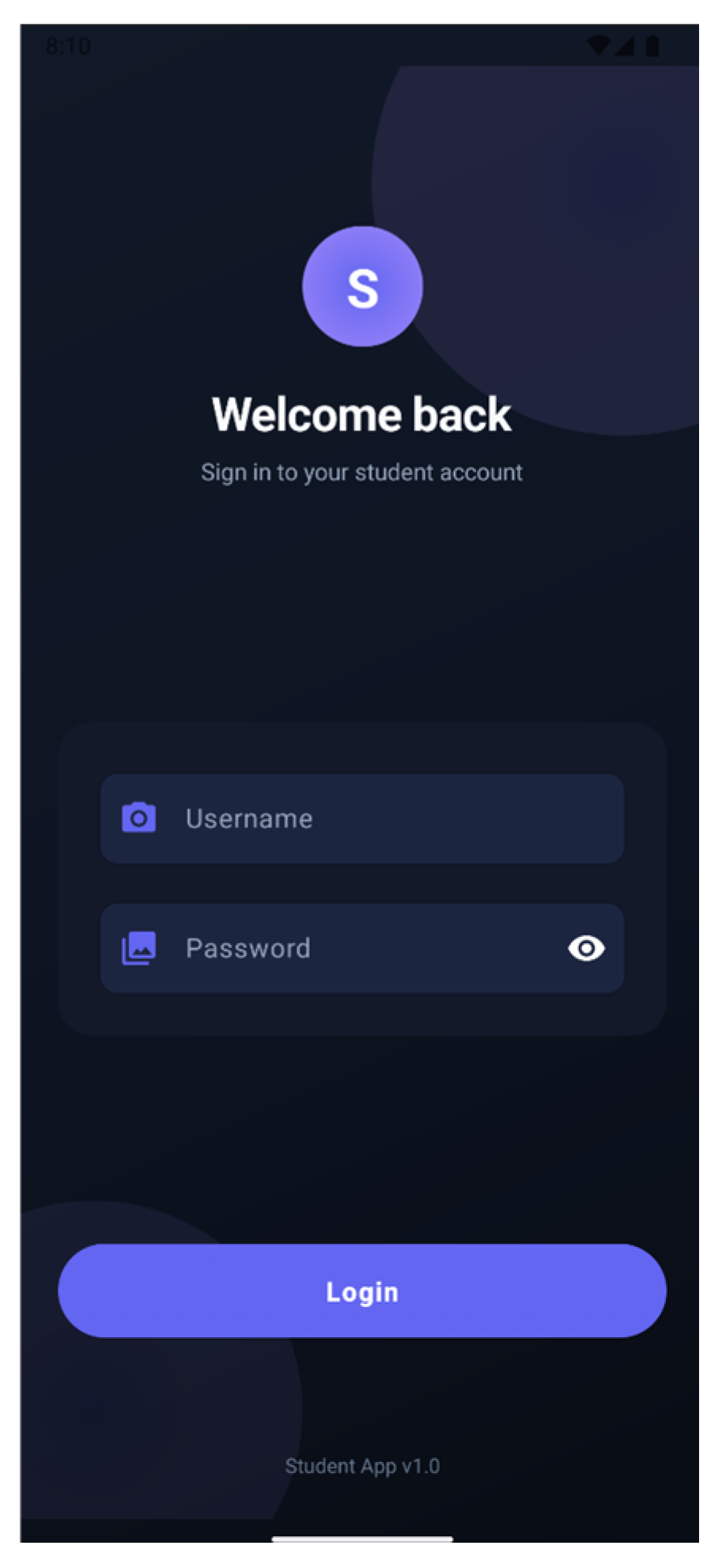
The application has both a web and a mobile version and implements a secure login flow that combines authentication, token handling, and notification setup. It retrieves the FCM token (with permission checks on newer Android versions) and then sends user credentials to the server via a secure HTTP client using SSL. Upon successful authentication, access tokens are stored locally, and the FCM token is linked to the user account, while errors during login or connection are handled with user-facing messages.
In
Figure 2, a login interface is presented, featuring a “Welcome Back!” heading, input fields for the username and password, and a login button (
Figure 2).
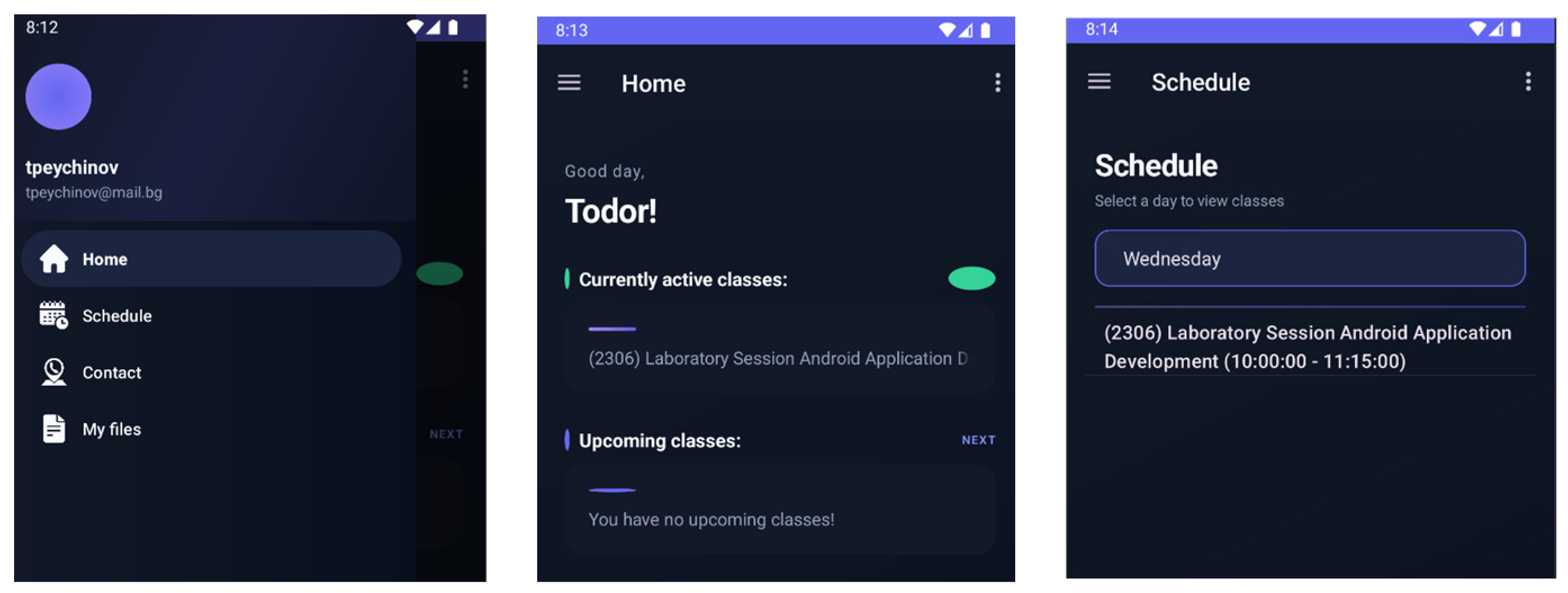
The Navigation class manages app navigation using the Navigation Component and a DrawerLayout with a sliding menu. It initializes view binding, sets up the Toolbar as the Action Bar, and configures navigation between fragments via a NavController. The menu and back navigation are handled through standard methods, ensuring smooth transitions between screens. It also supports displaying user-related data (e.g., username) in the navigation header (
Figure 3).
The TokenManager class handles storing and retrieving access and refresh tokens using SharedPreferences, ensuring that they persist across app sessions. It provides simple methods to save, access, and clear tokens, supporting secure authentication and logout functionality. Additionally, the mobile interface includes a navigation menu with user information and main sections such as Home, Menu, and Daily Program (
Figure 3).
The HomeViewModel acts as a bridge between the backend and the UI in an MVVM structure, managing dynamic data such as user messages and activities via LiveData. It performs asynchronous HTTP requests with authentication to fetch and update data, ensuring that the interface stays responsive and automatically reflects changes.
The ProgramFragment handles the UI for displaying the weekly schedule, using a ViewModel to manage and observe data via LiveData. It includes a list for schedule details and a selector for days, updating the displayed data dynamically based on user choice. Schedule information is fetched asynchronously with authentication, ensuring a responsive and synchronized user experience.
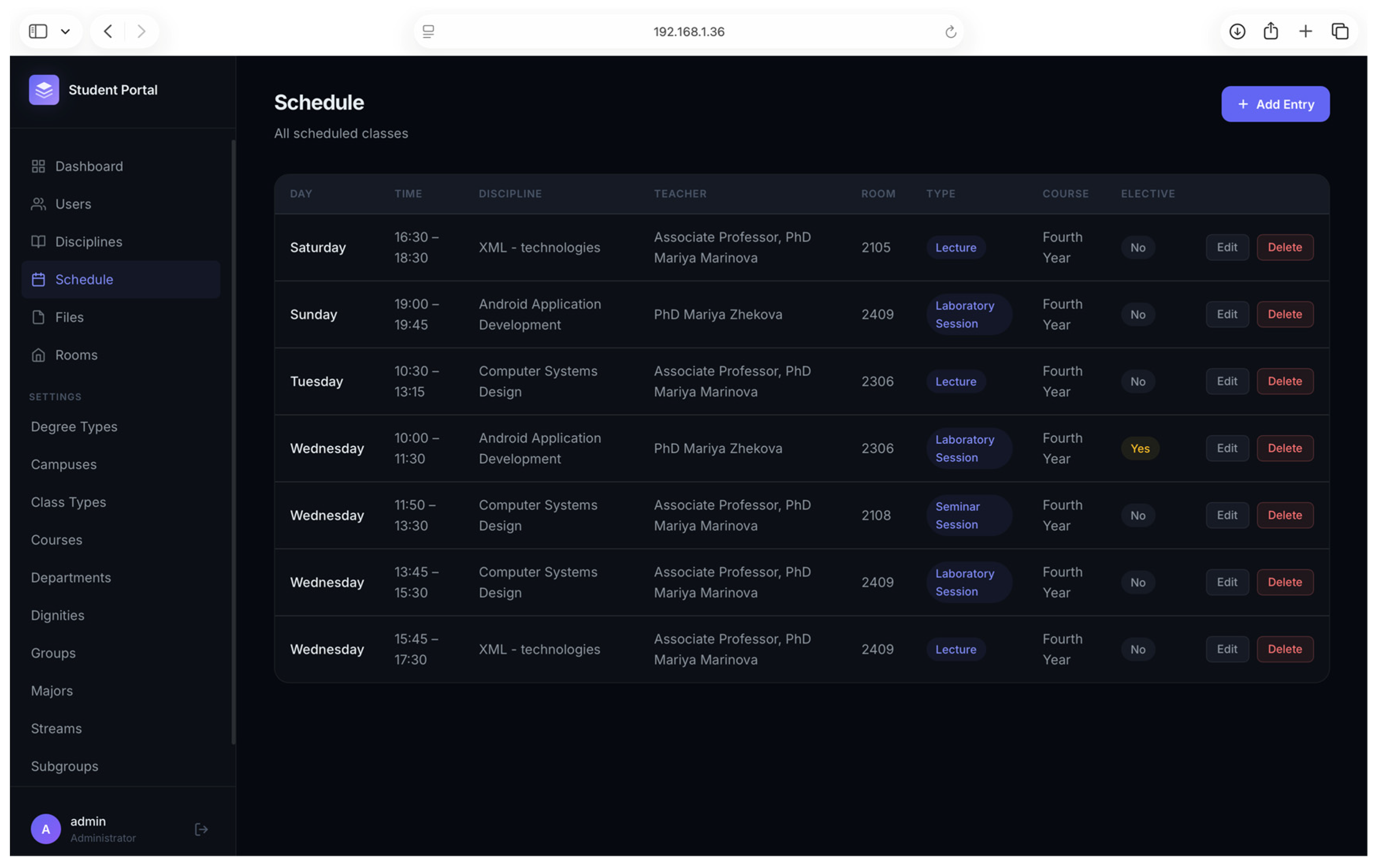
The application has both a web and a mobile version. In the GUI, depending on whether the user is a staff member or a student, access is given to different pages. Students have the opportunity to see everything, both in the Android application and through the web interface/browser. Administrators, instead of using the Django admin panel, can fully manage the content in the database through the web interface (
Figure 4).
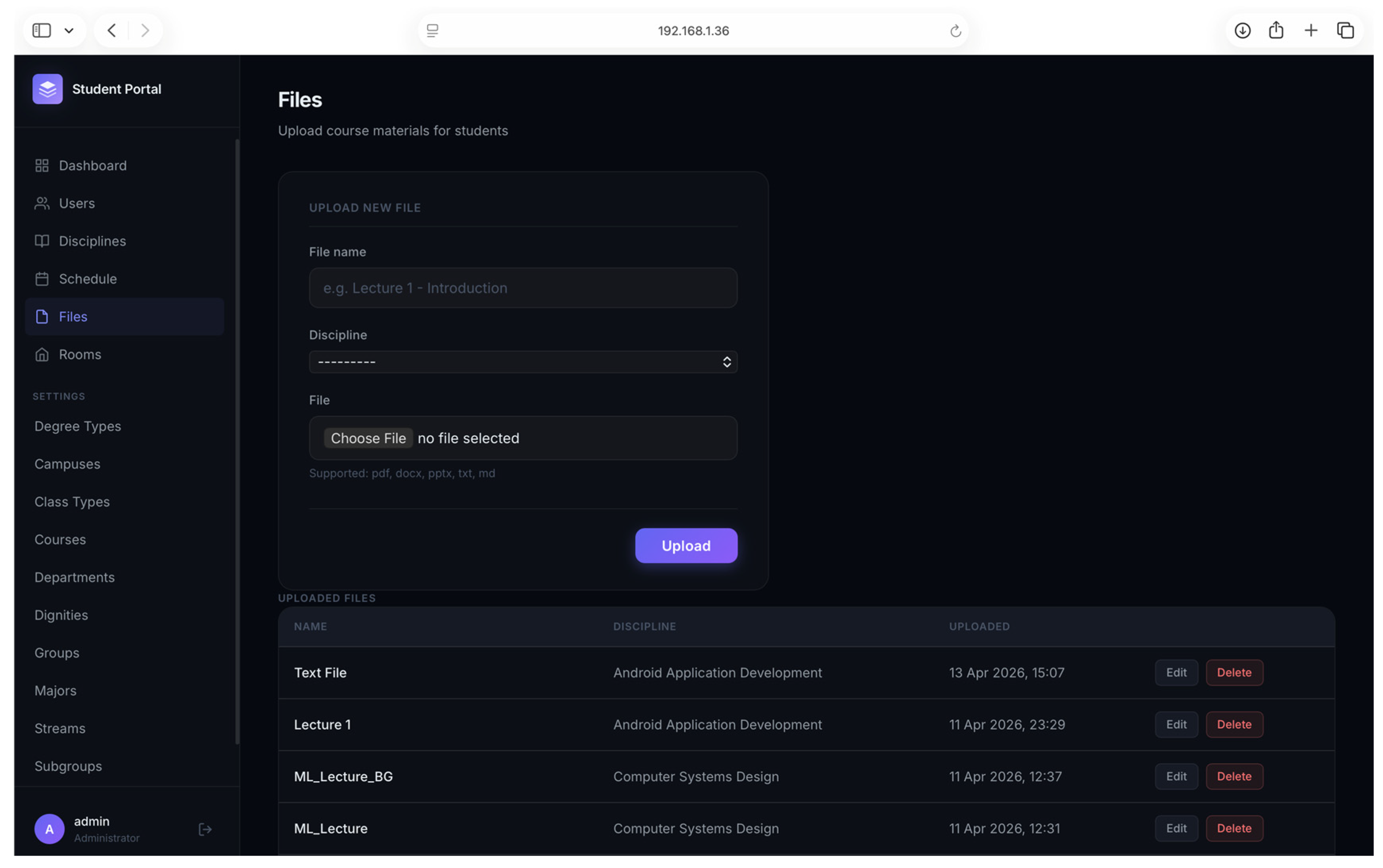
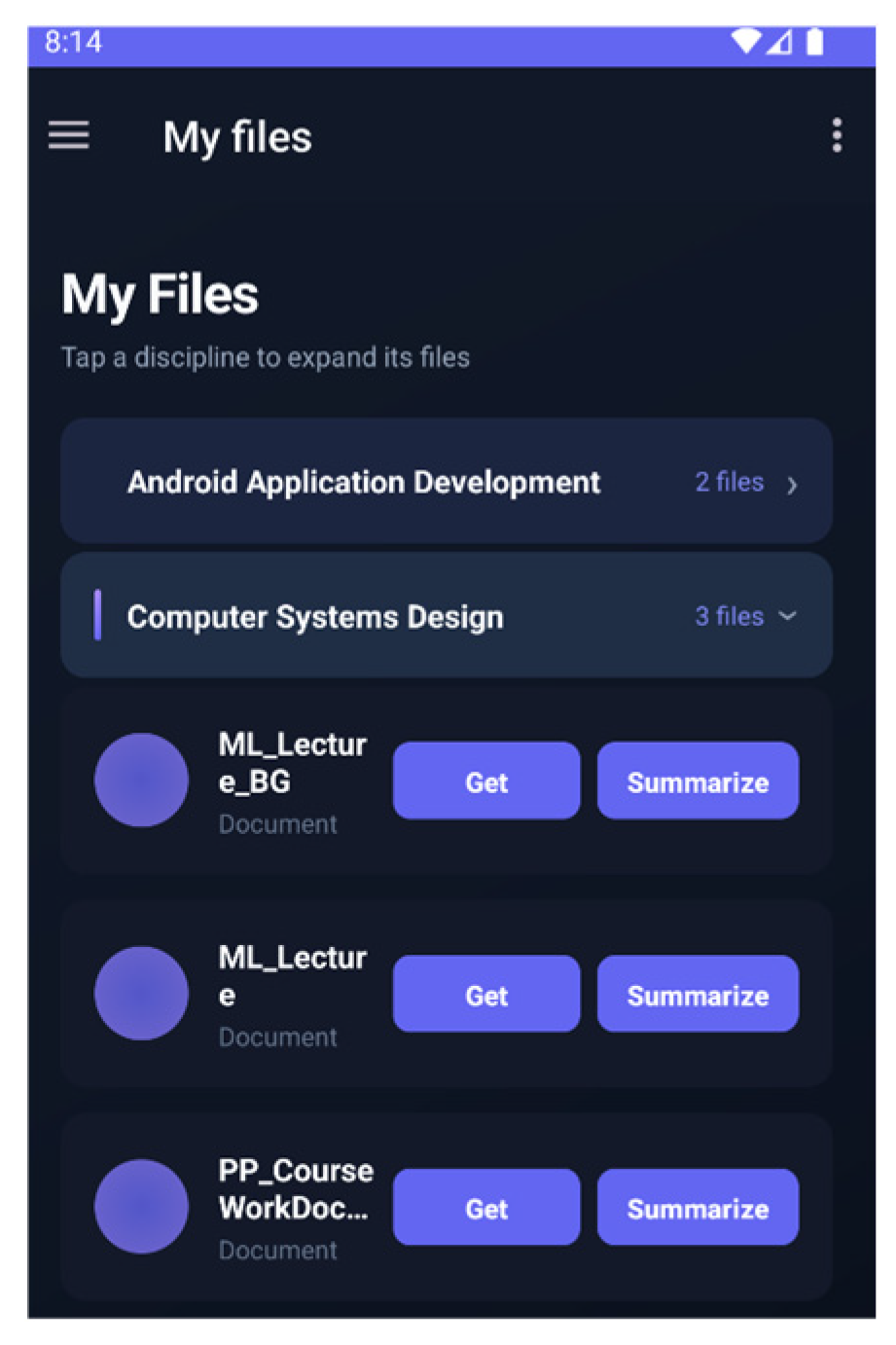
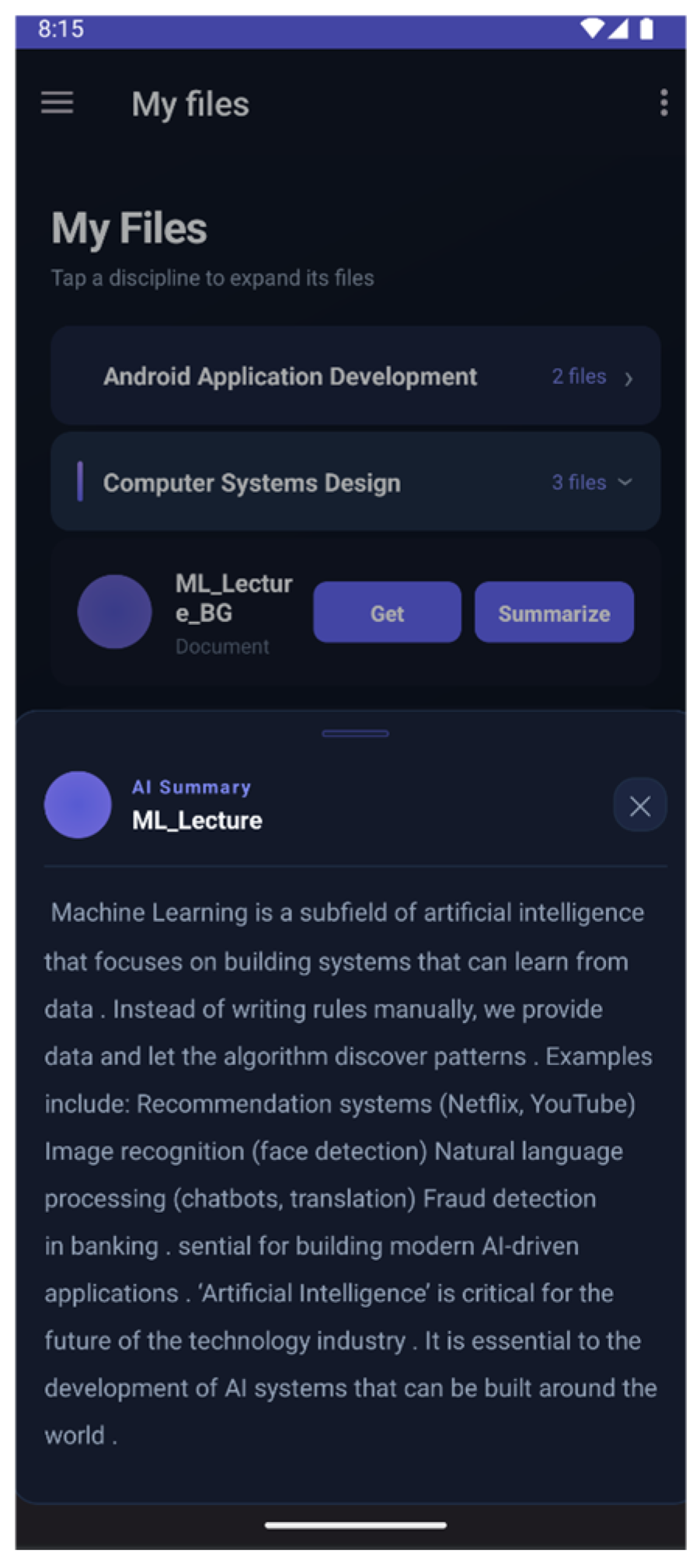
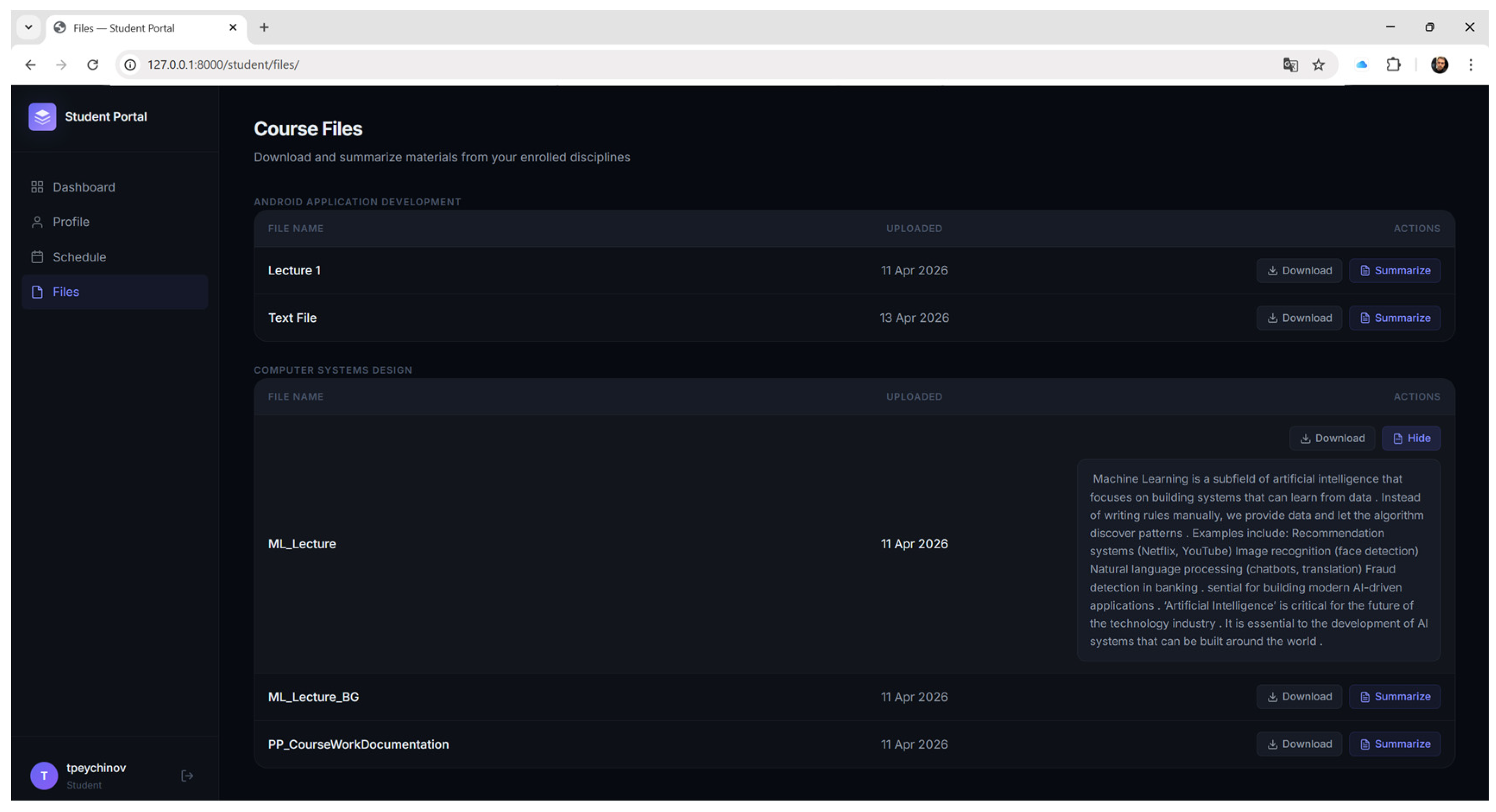
The ability to upload files (learning materials) is added for each discipline. Employees/Administrators can upload files related to a specific discipline. All students enrolled in a specific discipline have access to all files related to it, as well as to the summarized information from each individual file.
Figure 5 shows the files available to students.
Figure 6 shows the ability to read a summary of the file contents.
The application has an already trained ML model for synthesizing content from files (i.e., for all available files, students can directly access the summarized content of the file). Two different models are actually used, depending on whether the file content is in Bulgarian or English. The test results show that for Bulgarian texts, the model needs to be fine-tuned, as the tests show that it does not do well, but the model does very well with English texts.
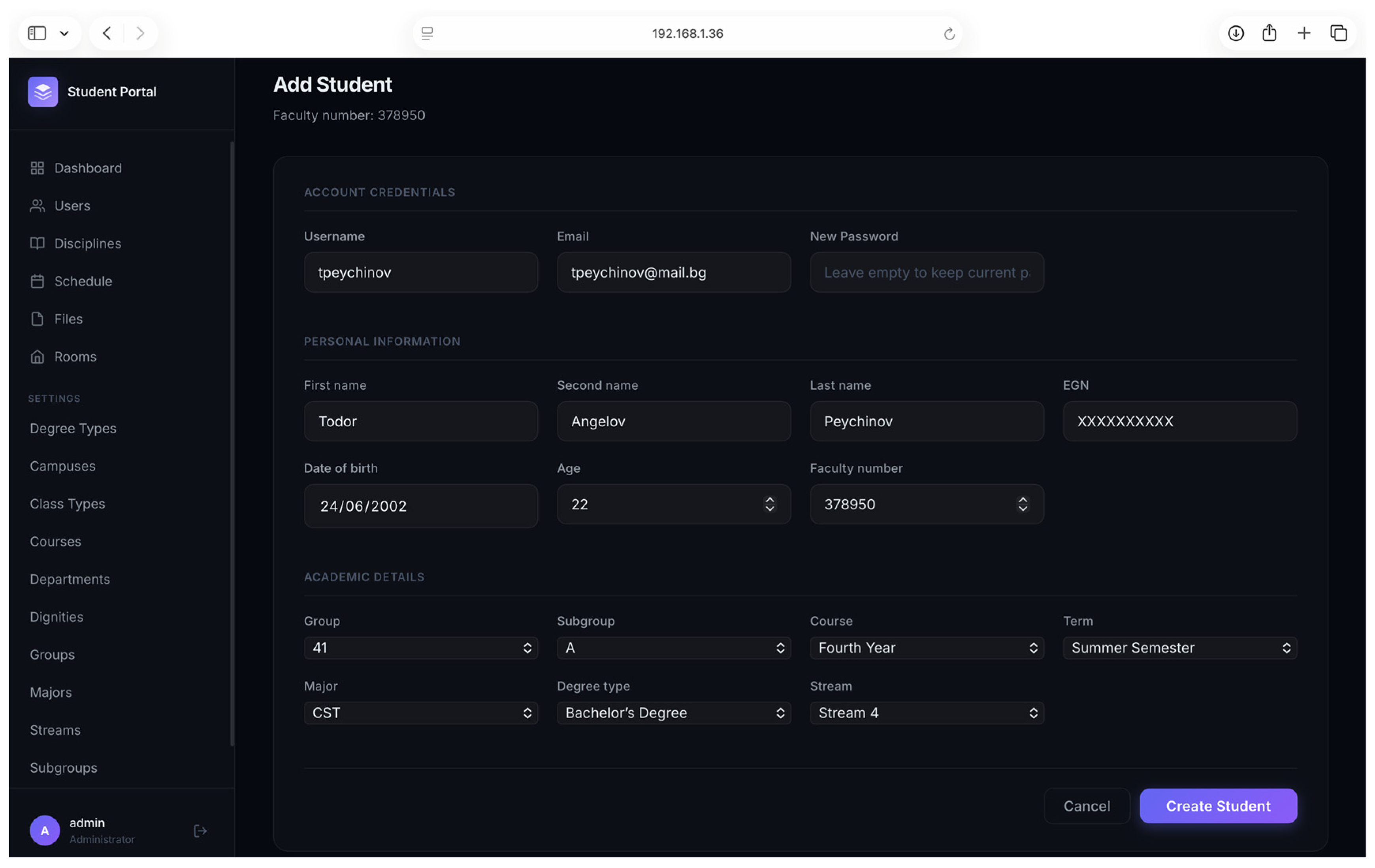
The administrative module (
Figure 6) is implemented as a custom web-based interface that centralizes the management of core system data and processes. It allows authorized users to create and manage key entities such as users, disciplines, students (
Figure 7), teachers (
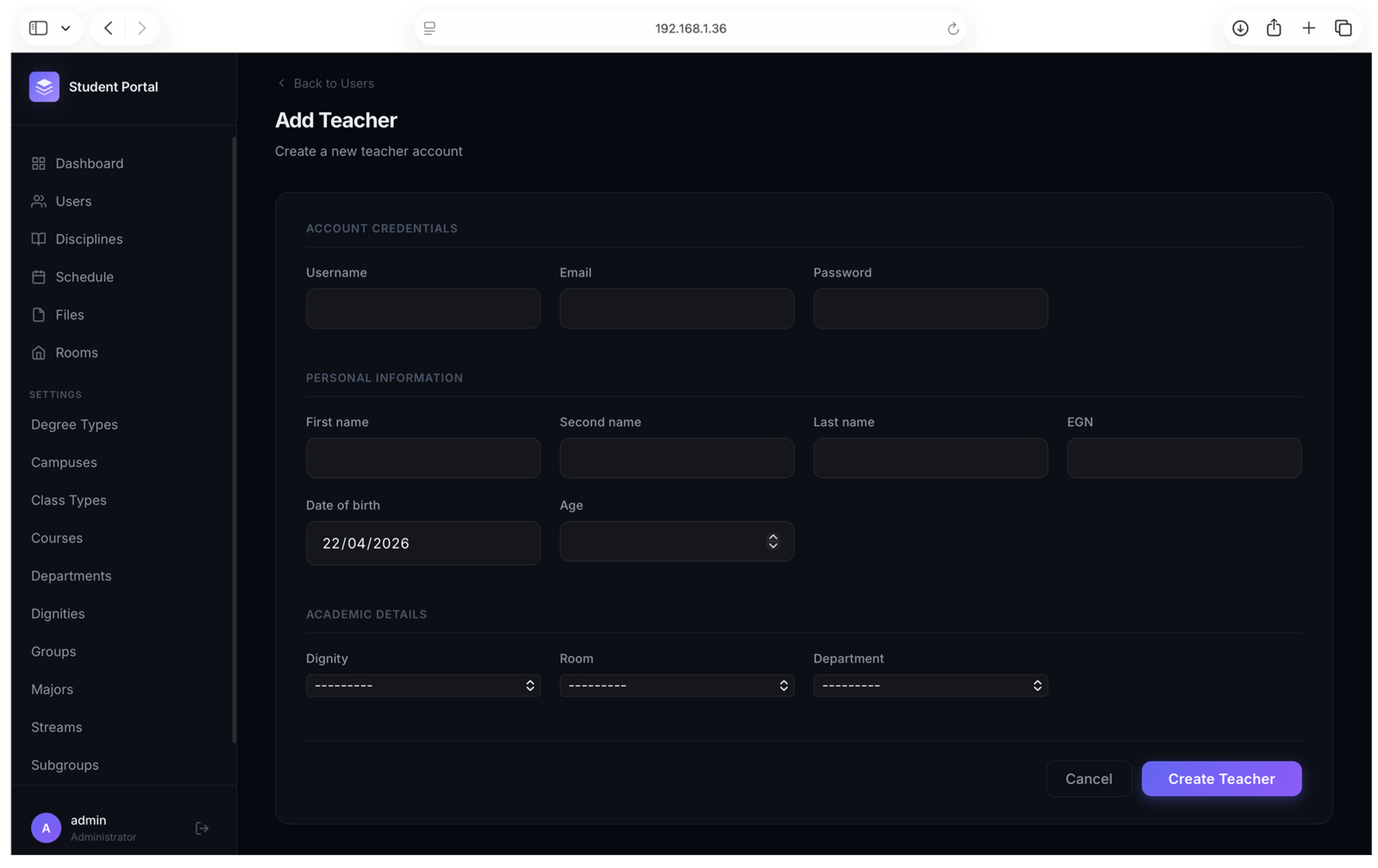
Figure 8), and schedules through structured forms. For example, disciplines are defined by basic attributes such as name, code, and credits, while student creation includes personal and academic information, along with optional course enrollments and account linkage. This approach provides a more flexible and user-friendly environment compared to the default admin panel while maintaining efficient and secure data management.
Adding a teacher requires entering personal details and their academic/science position and department affiliation, as well as associating the teacher with a specific room and user account (
Figure 8). This enables efficient management of the teaching staff and their involvement in the educational process.
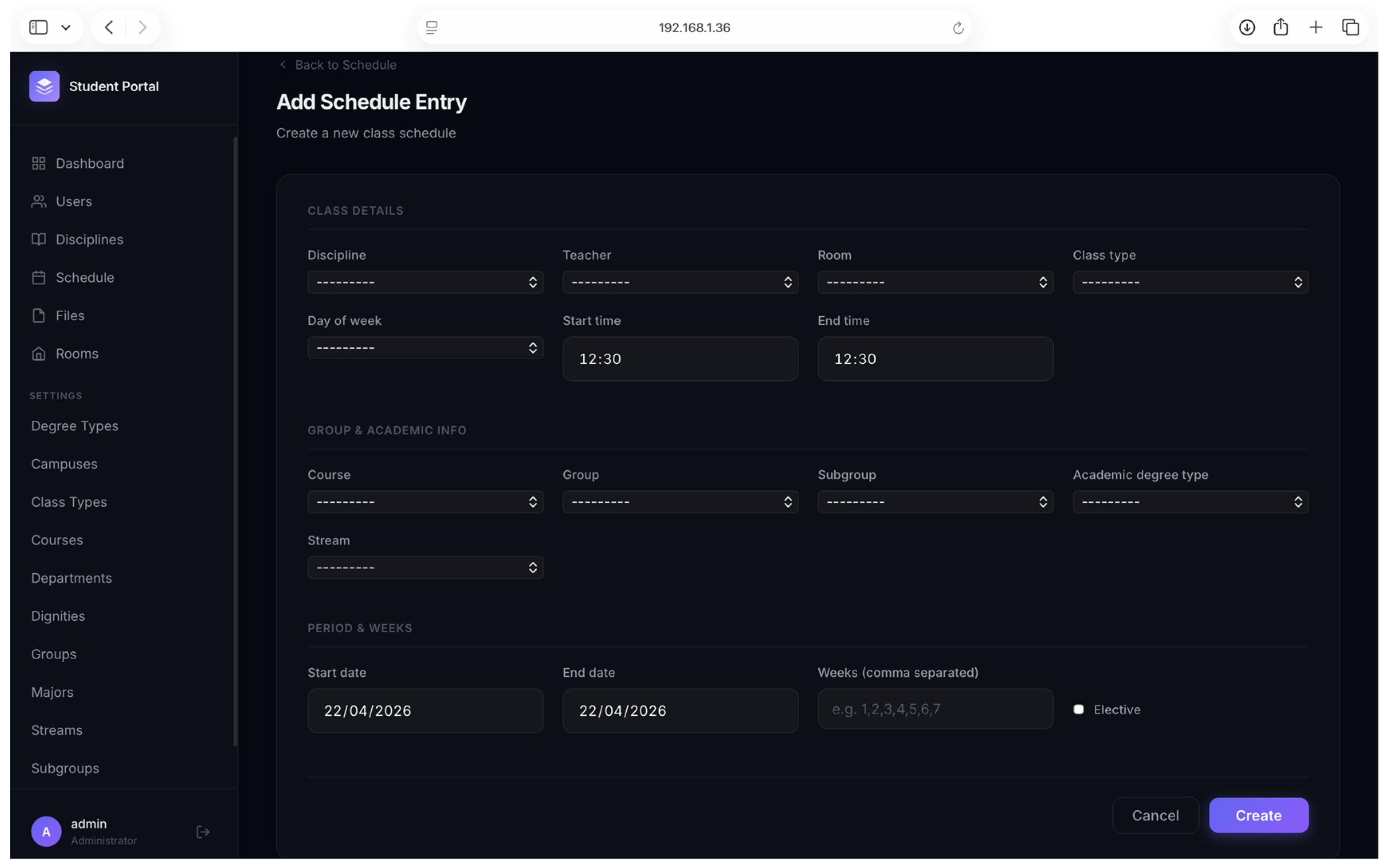
The system provides functionality for creating an academic schedule by associating a discipline with a teacher, classroom, type of activity (lecture, laboratory, etc.), group, and stream (
Figure 9 and
Figure 10). Additionally, time-related parameters are defined, including the start and end time, day of the week, and the duration of the activity (start and end dates and active weeks). This functionality allows flexible and precise planning of the educational process.
The file upload functionality (
Figure 11) allows administrators to add and manage educational materials through a web interface. By filling out a simple form with a file name, selecting the associated discipline, and uploading a file, the system stores the resource and makes it available for students. Supported file formats include common document types, and uploaded files are displayed in a list where they can be edited or deleted. This provides a structured and efficient way to organize and distribute course materials.
5. Conclusions
Within the scope of this project, a mobile platform was developed to support students’ daily academic activities by integrating key functionalities into a single system. An analysis of trends in the digitalization of higher education was carried out, focusing on AI technologies related to the addition of learning materials, the integration of multilingual ML transformer models for generating summarized text content, a system of notifications for upcoming classes, and solutions for navigating the university campus.
The project provides an intuitive and practical solution that improves student organization and efficiency by integrating key functionalities into a single, comprehensive mobile application. In this way, students remain motivated and engaged, leading to improved academic results and success.
The employment of modern MVVM architecture and robust data exchange technologies ensures both stability and scalability for the application. By implementing Django APScheduler and Firebase Cloud Messaging, the system automates student awareness by delivering critical notifications 15 min before classes start, significantly reducing the likelihood of delays.
Furthermore, navigation via external applications facilitates orientation within the complex university infrastructure, while the introduction of JWT authentication ensures the security of user data and enables the generation of personalized schedules tailored to specific majors and courses.
In conclusion, the project demonstrates how mobile technologies can transform the academic environment into a more organized and accessible space. Future development of the platform could include expanding faculty functionality, integrating electronic student records, and adding real-time attendance tracking.
Author Contributions
Conceptualization, M.Z., T.P. and A.K.; methodology, M.Z.; software, T.P. and A.K.; validation, M.Z.,T.P. and A.K.; investigation, M.Z.; resources, M.Z.; writing—original draft preparation, M.Z.; writing—review and editing, M.Z.; visualization, T.P. and A.K. All authors have read and agreed to the published version of the manuscript.
Funding
This research was funded by the European Regional Development Fund within the OP “Research, Innovation and Digitalization Programme for Intelligent Transformation 2021–2027”, Project No. BG16RFPR002-1.014-0005 Center of Competence “Smart Mechatronics, Eco- and Energy Saving Systems and Technologies”.
Institutional Review Board Statement
Not applicable.
Informed Consent Statement
Not applicable.
Data Availability Statement
No new data were created or analyzed in this study.
Acknowledgments
The author would like to thank the Technical University of Sofia, Plovdiv branch, for the financial support.
Conflicts of Interest
The authors declare no conflicts of interest.
Abbreviations
The following abbreviations are used in this manuscript:
| FCM | Firebase Cloud Messaging; |
| JWT | JSON Web Token; |
| ERD | Entity Relationship Diagram; |
| JSON | JavaScript Object Notation; |
| RNS | Real-Time Notification System. |
References
- Osadcha, K.; Osadchyi, V.; Kruglyk, V.; Spirin, O. Analysis and Summarization of the Experience of Developing Adaptive Learning Systems in Higher Education. In Proceedings of the 1st Symposium on Advances in Educational Technology—Volume 2: AET; SciTePress: Setúbal, Portugal, 2022; pp. 208–215. [Google Scholar] [CrossRef] [Scilit]
- Kolegova, I.A.; Levina, I.A. Using artificial intelligence as a digital tool in foreign language teaching. Bull. South Ural. State Univ. Ser. Educ. Pedagog. Sci. 2024, 16, 102–110. [Google Scholar] [CrossRef] [Scilit]
- Hadi, W.; AlShaikh-Hasan, M.N. Ai-driven curriculum transformation and faculty development in developing universities. In Revolutionizing Urban Development and Governance with Emerging Technologies; IGI Global Scientific Publishing: Palmdale, PA, USA, 2025; pp. 289–322. [Google Scholar]
- Dahlstrom, E.; Brooks, D.C.; Bichsel, J. The ECAR Study of Undergraduate Students and Information Technology; ECAR: Louisville, CO, USA, 2014. [Google Scholar]
- Kasemsri, N.; Sombatthai, P. Indoor Navigation System for University Campus using QR Codes and Mobile Application. Int. J. Interact. Mob. Technol. (iJIM) 2019, 13, 45–58. [Google Scholar]
- Tshabalala, M.; Ndeya-Ndereya, C.; van der Merwe, T. Implementing Blended Learning at a Developing University: Obstacles in the Way. Electron. J. e-Learn. 2014, 12, 101–110. [Google Scholar]
- Capanan, J.A.; Abando, M.J.Q.; Babaran, C.L.; Tan, J.V.M. Real Time Notification System. Glow 2025, 5, 1–9. [Google Scholar] [CrossRef] [Scilit]
- Dantas, P.V.; Sabino da Silva, W.; Cordeiro, L.C.; Carvalho , C.B. A comprehensive review of model compression techniques in machine learning. Appl. Intell. 2024, 54, 11804–11844. [Google Scholar] [CrossRef] [Scilit]
- Available online: https://www.capitalone.com/tech/machine-learning/transformer-nlp/ (accessed on 4 May 2026).
- Available online: https://www.scaler.com/topics/nlp/distilbert/ (accessed on 8 May 2026).
- Adel, H.; Dahou, A.; Mabrouk, A.; Elaziz, M.A.; Kayed, M.; El-Henawy, I.M.; Alshathri, S.; Ali, A.A. Improving Crisis Events Detection Using DistilBERT with Hunger Games Search Algorithm. Mathematics 2022, 10, 447. [Google Scholar] [CrossRef] [Scilit]
| Disclaimer/Publisher’s Note: The statements, opinions and data contained in all publications are solely those of the individual author(s) and contributor(s) and not of MDPI and/or the editor(s). MDPI and/or the editor(s) disclaim responsibility for any injury to people or property resulting from any ideas, methods, instructions or products referred to in the content. |