1. Introduction
Digital adaptations of traditional card games have long served as both entertainment products and testbeds for game-engine capabilities. Card games impose a distinctive set of engineering requirements: they must manage large numbers of individually interactive objects, enforce complex rule sets, support smooth drag-and-drop interaction on touch and mouse devices, and render visually appealing card animations in real time. Although card games appear visually simple, they represent a challenging class of interactive software systems. Their implementation requires precise management of object state, user interaction, rendering feedback, and rule-driven decision mechanisms. These requirements exercise nearly every subsystem of a game engine: scene management, shader pipelines, physics-independent collision, signal routing, and scripting performance. These constraints make them an informative case study for evaluating a game engine’s suitability for 2D interactive software.
Godot 4, released in 2023, introduced several capabilities directly relevant to this problem domain: shader material support on control nodes, typed GDScript 2.0 with static dispatch, a revised Tween API, and improved scene-instancing performance [
1,
2]. This paper presents a software engineering case study focused on reusable architectural and implementation patterns for interactive 2D game development. The objective is not merely to describe the development of a card game, but to analyze the engineering decisions that enable maintainability, extensibility, and reliable interaction behavior.
The main contributions of this work are summarized as follows:
A reusable Item/Pool architecture that abstracts interactive objects and containers;
A shader-based rendering approach for tactile visual effects using only the 2D pipeline;
A transform-aware interaction model for reliable drag-and-drop operations on rotated interfaces;
A deterministic AI decision framework for constrained card-game environments.
The remainder of the paper is structured as follows.
Section 2 reviews related work.
Section 3 motivates the use of Godot 4 as a platform for card games.
Section 4 defines the card scene and its state machine.
Section 5 presents the pool hierarchy (hand, pile, grid).
Section 6 details the shader system.
Section 7 covers the drop-zone sensor.
Section 8 analyses the artificial intelligence (AI) decision algorithm.
Section 9 catalogs engineering pitfalls and resolutions.
Section 10 discusses results, and
Section 11 concludes.
2. Related Work
Digital card games have been studied from several perspectives. Björk and Holopainen [
3] provide a foundational taxonomy of game mechanics that is widely applied to card game analysis. From an engineering standpoint, early Unity-based (Unity Technologies, San Fransisco, CA, USA) frameworks for card games, such as those described by Nystrom [
4], emphasized object pooling and event-driven architectures to manage large numbers of interactive scene objects.
Godot-specific engineering literature remains limited. Published work largely targets Godot 3.x: refs. [
5,
6] provide a practitioner overview of the engine’s scene-tree model, while community documentation covers GDScript patterns for state machines and signal-driven communication. Godot 4 shader capabilities on control nodes—as opposed to Sprite2D nodes—have received little academic treatment.
Drag-and-drop interaction for card games has been studied in the context of mobile touchscreens [
7], where distinguishing taps, holds, and flings requires careful event disambiguation. The present work contributes an implementation of these patterns within Godot 4’s input event system, including a fling-detection mechanism based on a rolling velocity sample buffer.
AI for trick-taking card games has been explored with techniques ranging from Monte Carlo Tree Search [
8] to rule-based heuristics [
9]. Given the deterministic rule set of the present game, a rule-based approach was selected for its predictability and ease of balancing—an appropriate choice for a single-opponent casual game [
10,
11].
3. Godot 4 for Card Game Development
Before describing the implementation, it is worth establishing why Godot 4 is a strong match for this problem class rather than Unity, Unreal, or a web framework. During the preparation of this study, the authors used Claude 4.6 for the purposes of game structure clarification and algorithm design of game dynamics especially for the tilt effect calculation.
3.1. Control Nodes and the UI-First Scene Model
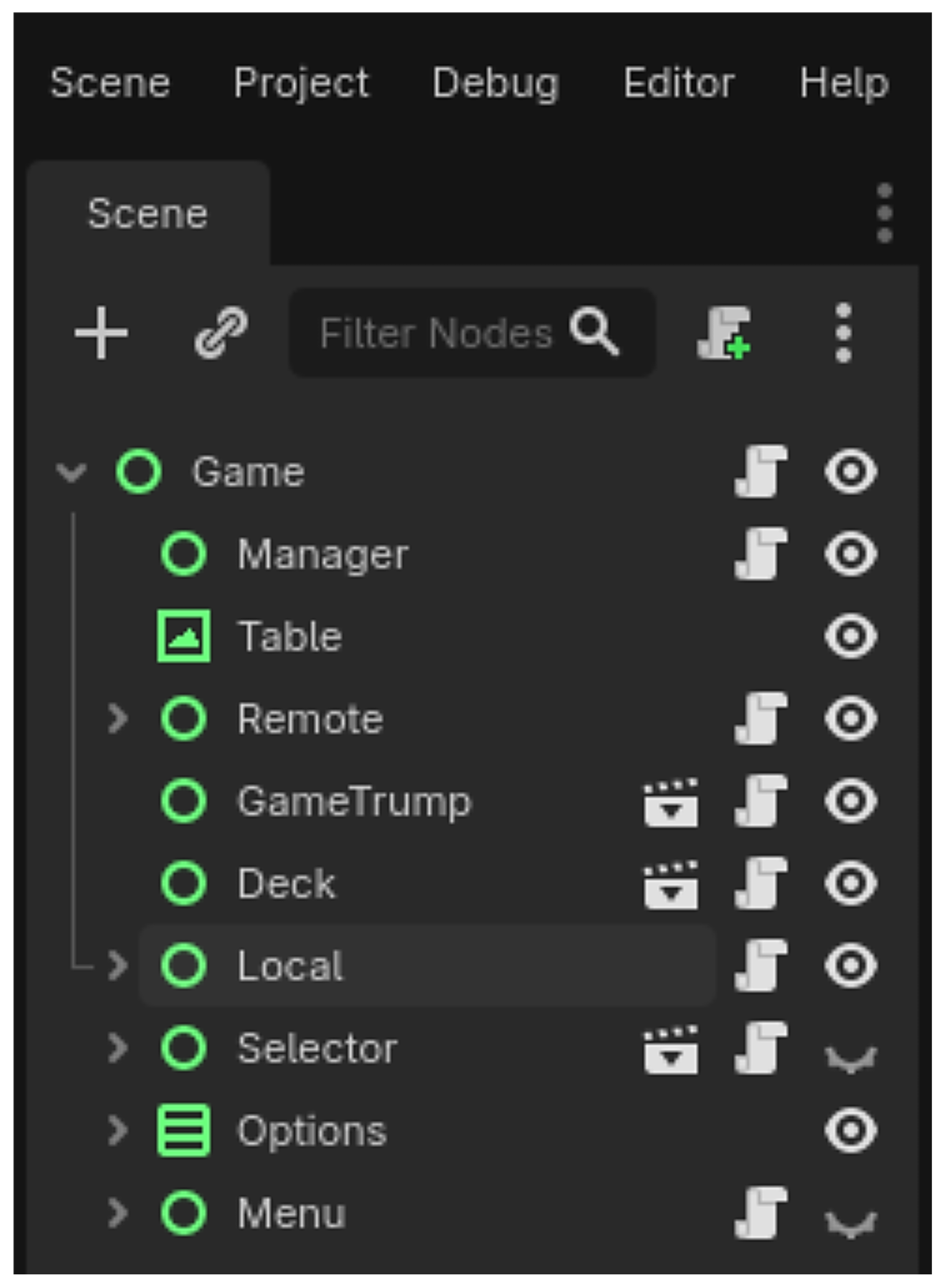
Card games live entirely in 2D screen space. Godot’s control node tree, which is shown in
Figure 1, is designed for exactly this: anchoring, margin-based layout, and size-aware child positioning are first-class operations rather than workarounds on top of a 3D engine. Crucially, Godot 4 added shader material support on TextureRect (a control subclass), allowing per-card vertex shaders without mixing UI and 3D layers. In Unity, achieving the same effect requires either a 3D quad, a render texture pipeline, or a canvas renderer workaround—each introducing coordinate-space complexity that propagates throughout the codebase.
3.2. Typed GDScript 2.0 and Static Analysis
GDScript 2.0 introduced optional static typing with compile-time type checking. For a card game, this matters because the central data model (a card with a suit enumeration and an integer rank) is referenced in AI logic, rule enforcement, shader uniforms, and animation handlers simultaneously. Untyped references make refactoring fragile. Static typing lets the editor enforce that every code path that touches a card node receives an object of the correct class, and that suit comparisons are never accidentally performed as raw integers.
GDScript 2.0 also introduces typed array generics (Array[Card]), which eliminate the casting boilerplate that dominated GDScript 1.x pool-management code and make integrated development environment autocompletion reliable on container contents.
3.3. Signal-Driven Architecture and Decoupling
Godot’s signal system provides a built-in observer pattern. In a card game, the same event—a card landing in the battle zone—must trigger rule evaluation, score update, animation sequencing, and AI activation. Direct node references for each dependency create a tangled call graph that breaks whenever the scene tree is restructured. Signals allow the game-logic singleton (Manager) to emit card_played (card, zone) and let each subsystem connect independently. This decoupling is especially valuable during iterative design, when zone layouts and pool subclasses are frequently reorganized without touching rule-enforcement code.
3.4. Scene Instancing and Object Pooling
Godot’s scene-instancing model allows a “.tscn” file to be pre-instantiated at startup and re-parented at runtime without re-parsing. For a 52-card deck, instantiating all cards at load time and re-parenting them between pools is cheaper than creating and freeing nodes on every deal. This aligns naturally with the classical object-pool pattern [
4] and avoids garbage-collection stalls during play.
3.5. Export Pipeline
Godot 4’s export pipeline targets Android, iOS, Windows, MacOS, and the web from a single project without a separate build server. For a card game that benefits from touchscreen drag-and-drop, it is important that the same InputEventScreenTouch/InputEventScreenDrag handler that runs on Android runs on desktop via mouse emulation, and the shader compiles to GLSL ES 3.0 for WebGL 2 without modification. Unity’s equivalent requires platform-specific shader variants and a separate render pipeline selection.
4. Card Scene Architecture and State Machine
The card scene is the most frequently instantiated scene in the project. Its design must satisfy three conflicting demands: visual richness (tilt, shadow, flip animation), input responsiveness (drag, fling, double-tap), and rule-system legibility (suit, rank, face state, owning pool). These concerns are separated across three layers.
4.1. The Item Base Class
The Item class (extending control) handles all input and movement logic. It owns a five-state finite-state machine [
12] (IDLE, HOVERING, HOLDING, MOVING, FLINGING) with transition guards.
The guard prevents invalid transitions (e.g., jumping from IDLE to MOVING) without requiring a conditional at every call site. Any call to set_state(new_state) that violates the transition dictionary pushes a warning and returns early, making illegal state sequences visible in the debugger immediately.
The Item class also owns the unified input handler. Both mouse events (InputEventMouseButton) and touch events (InputEventScreenTouch, InputEventScreenDrag) are routed through a common _press_start()/_press_end() interface. This abstraction is essential for the Android export: the identical GDScript branch handles both a desktop click and a finger tap.
4.2. Card Subclass and Data Model
The card class extends Item and adds the domain model with variables suit, rank, face_up, and owner_pool. Using GDScript enumerations (rather than integer constants or string tags) ensures that all suit comparisons are type-safe and that the Godot editor exposes a drop-down inspector for each card scene, enabling rapid visual configuration of the deck. The owner_pool reference lets any game-logic query answer “where is this card now?” without traversing the scene tree.
4.3. Fling Detection Algorithm
Fling detection distinguishes a slow drag (card should snap back or stay) from a fast swipe (card should fly to the battle zone). The algorithm samples the card’s global position into a three-entry circular buffer on every _process() frame during HOLDING state, then computes the average velocity magnitude at pointer release.
A three-entry buffer is sufficient because card movement is smooth and the threshold (300 px/s) is well above the noise level. A single-frame delta would make fling detection unreliable on low-frame-rate devices; the buffer averages over ~50 ms of motion.
5. The Pool System: Hand, Pile, and Grid
The pool class provides a shared abstraction for any container that holds and visually arranges Item nodes. Without it, drop routing, z-index management, and position calculation would be duplicated in every zone type. The pool hierarchy enforces a single protocol: any zone that accepts cards exposes: can_accept(item:Item)->bool, add_item(item:Item)->void, and remove_item(item:Item)->void.
The game-logic layer calls only these three methods; it does not know whether the target is a hand, a pile, or a grid.
5.1. Pool Base Class Responsibilities
The pool base class manages:
Drop sensor ownership. Each pool owns a drop child node whose hit area is updated via call_deferred in the _ready() function to avoid the sensor-drift bug described in
Section 9.
Item array. The internal Array[Item] is the source of truth for membership. Scene-tree parenting follows array membership, not the reverse, preventing desyncs.
Z-index arbitration. When a card is lifted, the pool sets item.z_index = z_top and clears it on release, ensuring dragged cards always render above their siblings regardless of pool type.
Signal emission. The pool emits item_added(item) and item_removed(item), which the Manager singleton connects to rule-evaluation handlers.
5.2. Hand: Curved Fan Layout
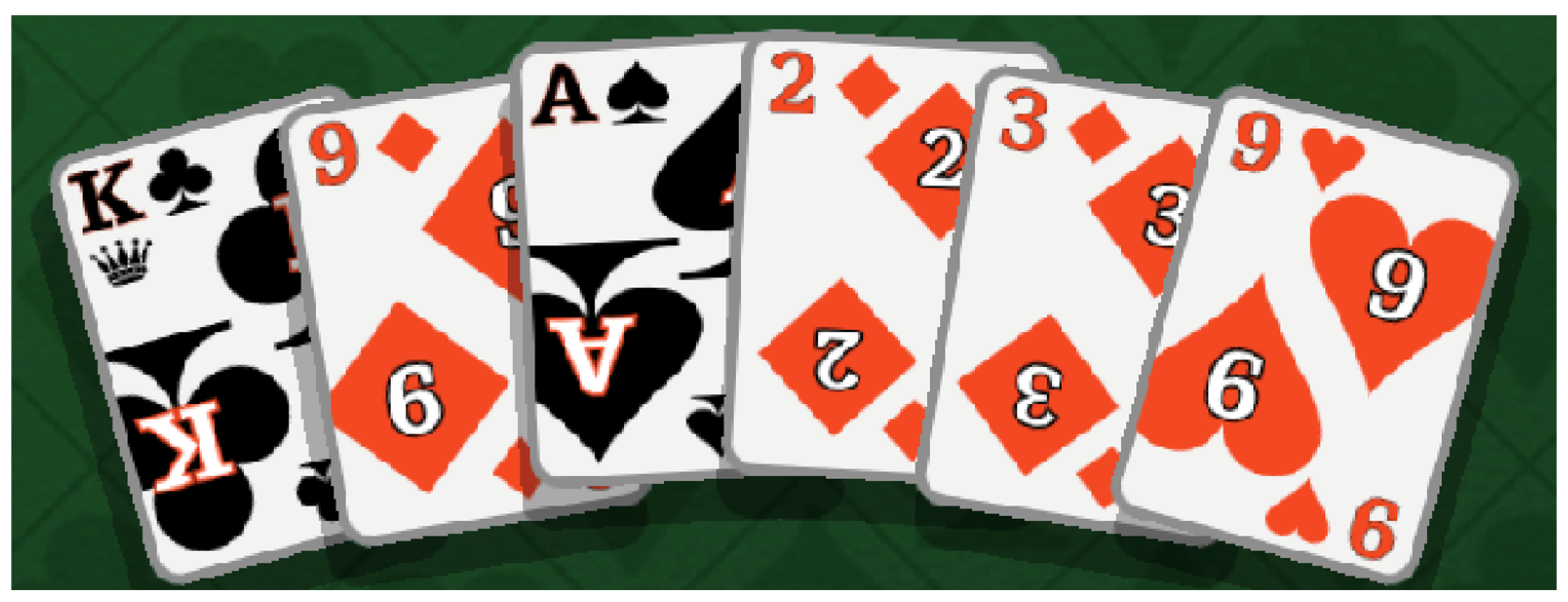
The hand pool arranges cards in a curved fan using a curve resource that maps a normalized position (0, 1) to a rotation offset in radians, shown in
Figure 2.
Each card’s screen position and rotation are computed from its index i in the array and the total count n:
The curve resource is an asset editable in the Godot inspector without code changes, allowing non-programmer designers to adjust the fan arc and card spacing. The mirrored Boolean variable (for the opponent’s hand) flips the ratio rather than rotating the node—a critical distinction: rotating the container by 180° breaks the drop sensor’s local-to-global transform and inverts the touch coordinate system, cascading into both hit detection and tilt direction errors.
5.3. Pile: Directional Stack
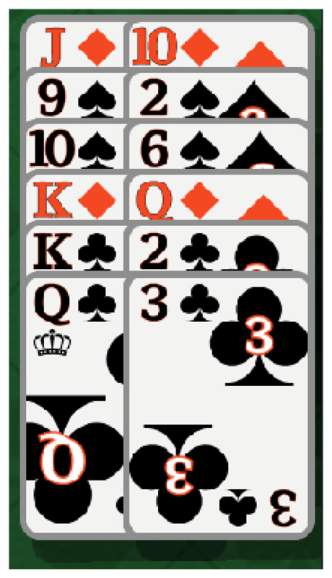
The pile pool shown in
Figure 3 arranges cards in a configurable directional stack. An @export var offset: Vector2 determines how each successive card is displaced from the previous one. The trick pile uses a small random jitter added to offset per card to simulate the irregular stacking of a physical discard pile, improving spatial legibility. The pile subclass overrides only update_target_positions(); all other pool behavior is inherited.
5.4. Grid: Persistent Slot Addressing
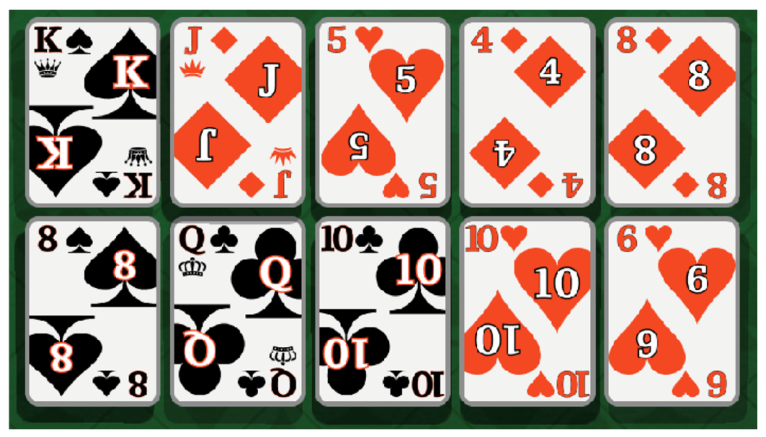
The grid pool shown in
Figure 4 is the most complex subclass because it must maintain stable visual slots even as cards are removed from arbitrary positions. A naive approach—using the item’s array index as its grid coordinate—shifts all subsequent cards when any card is removed, producing a visually confusing collapse animation. The solution is a persistent dictionary mapping slot keys (“row_col”) to Item references.
Vacancies remain in the dictionary as null entries, preserving the positions of all other cards. When the bottom layer’s middle slot empties and the card beneath it is to be flipped face-up, the grid can locate the corresponding bottom slot by key arithmetic rather than by searching the array. This O(1) slot lookup is important for the bottom-grid auto-flip mechanic that runs after every trick.
6. Shader System: Tilt and Shadow
Two visual effects are central to the game’s tactile feel: a perspective tilt as the card is dragged and a dynamic shadow whose direction tracks the card’s screen position. Both are implemented in a single canvas_item shader (shadow_tilt.gdshader) applied to two TextureRect nodes within each card scene.
6.1. What Is a Canvas_Item Shader in Godot 4?
Godot 4’s canvas_item shader type operates on the vertices and fragments of a 2D node’s quad. The shader receives the node’s built-in VERTEX attribute (a vec2 in canvas-local pixels) and UV (a vec2 in [0,1] texture space). The vertex() stage may displace VERTEX before rasterization, and the fragment() stage may modify COLOR per pixel. Because each TextureRect gets its own ShaderMaterial instance, uniform values (tilt amount, shadow offset) can differ per card without creating separate shader programs.
6.2. Perspective Tilt via Vertex Displacement
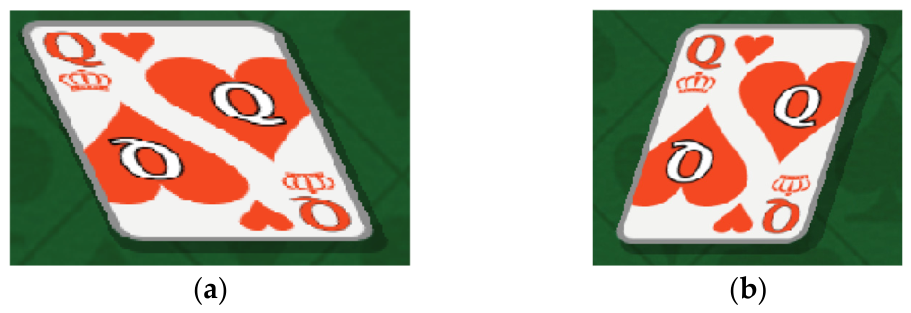
The illusion of perspective is achieved by displacing the top and bottom edges of the card quad in opposite directions along the tilt vector shown in
Figure 5.
The tilt vector is derived from the lag between the card’s interpolated current position and its target position:
where diff is target_pos − current_pos, w is the card width, and max_tilt caps the warp. In the vertex() function:
When UV.y = 0 (top edge), the factor is +0.5; when UV.y = 1 (bottom edge), it is –0.5. The net effect is a parallelogram warp that simulates the card tilting toward its direction of travel. The tilt disappears when the card reaches its target (diff → 0). Maintaining a non-zero lag via lerp-based movement rather than Tween is therefore mandatory (see
Section 9).
6.3. Dynamic Shadow via Gaussian Blur
The shadow TextureRect (z_index = 0, behind the card image at z_index = 1) uses the same shader with shadow_mode = true. A 3 × 3 Gaussian sampling kernel was used for shadow blur approximation.
The kernel samples the card’s own texture alpha channel, accumulates a weighted sum, and outputs a black fragment with that accumulated alpha. The shadow TextureRect is displaced in vertex by a direction vector computed from the card’s screen-space position relative to the viewport center, clamped to a maximum displacement. Cards near the screen edge cast longer shadows away from the center, reinforcing depth cues consistent with an overhead light source.
Critically, Godot 4 requires that z_index values on child nodes be non-negative if they are to be interpreted as local (relative to parent) rather than global (relative to the entire scene). A negative z_index on the shadow rectangle caused it to sort beneath the table background. The fix is to set both rectangles to non-negative values (0 and 1) and rely on their ordering within the same parent to separate them. This is a non-obvious Godot 4 scoping rule with no deprecation warning.
7. Transform-Aware Drop-Zone Detection
Detecting whether a dragged card overlaps a target zone is straightforward if the zone is axis-aligned: Rect2.has_point() suffices. The problem arises when the zone container is rotated, as is the case for the remote player’s hand and grid, which are rotated 180° to face the opponent. Control.get_global_rect() always returns an axis-aligned bounding box (AABB), which for a rotated container is significantly larger than the actual node footprint, producing false-positive drop detections in the corner regions.
The correct approach is to transform the card’s points into the drop zone’s local coordinate space using the affine inverse of the zone’s global transform.
Testing five points (four corners plus center) rather than a single point guards against partial overlaps where the card center is outside the zone, but a corner has crossed it—the typical case when a player drags a card and releases it half-inside the target. The affine inverse approach is rotation-agnostic and handles any CanvasItem transform combination (rotation, scale, translation) without special cases.
8. AI Opponent: Algorithms and Decision Logic
The AI opponent is implemented as a deterministic rule-based system within the player class. Monte Carlo Tree Search [
8,
9] and learning-based approaches were evaluated but rejected on two grounds: the suit-following rule set strongly constrains the legal-move space (typically 1–4 legal cards), and a rule-based agent already plays at near-optimal level within that space. Predictability is also desirable for a casual single-player experience where the AI should provide appropriate challenge without appearing to “read” the player’s hidden cards [
13,
14].
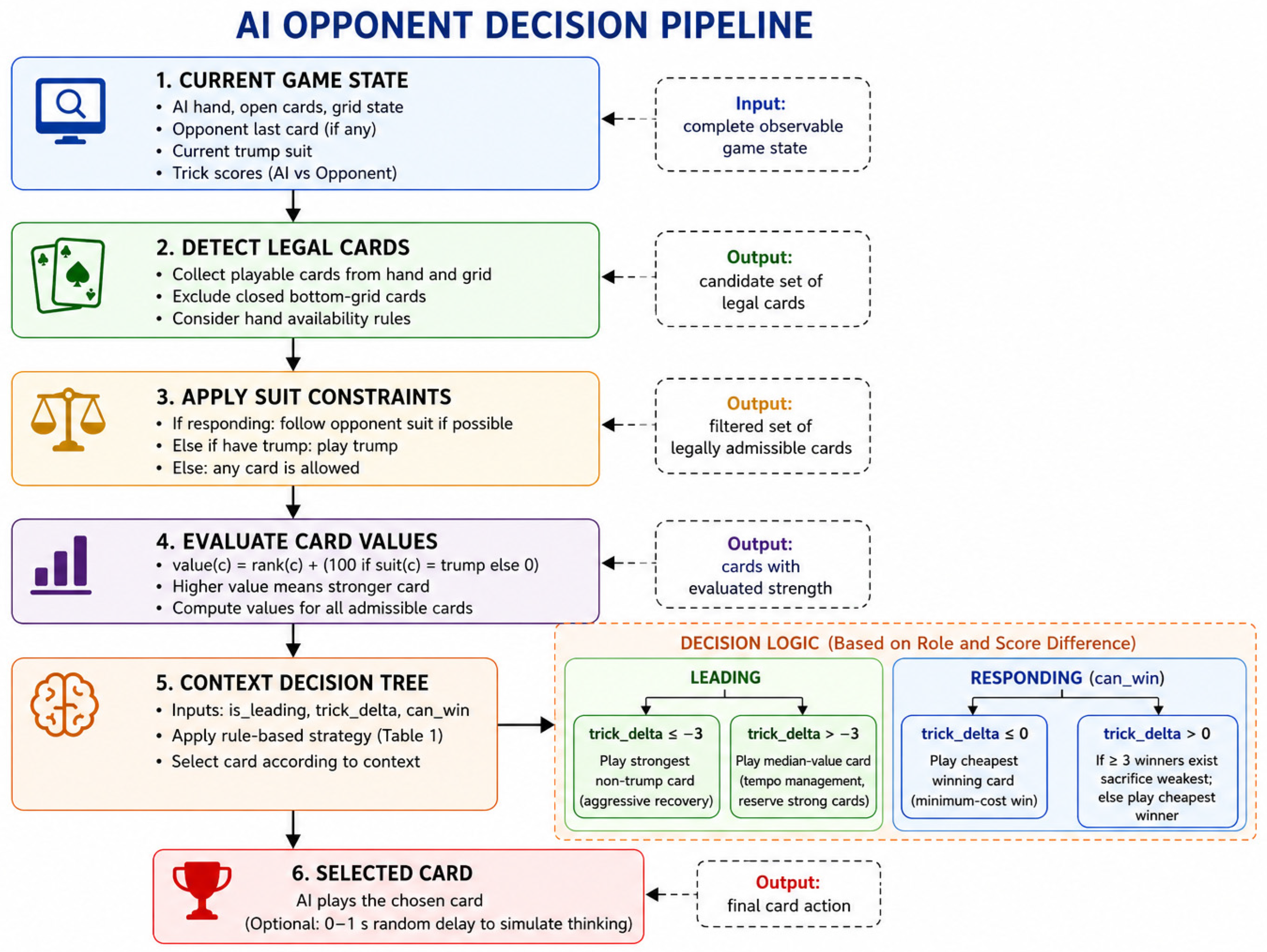
8.1. AI Decision Pipeline
The AI decision process follows a sequential pipeline consisting of legal move detection, rule filtering, card evaluation, and contextual selection.
Figure 6 summarizes the complete decision flow.
8.2. Trump Suit Selection
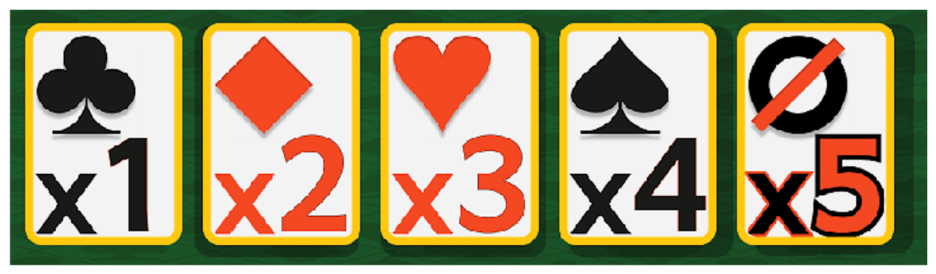
Before play begins, the AI must select a trump suit from five candidates shown in
Figure 7.
It evaluates each suit s by computing a weighted score across its visible face-up grid cards:
The count weight of 10 ensures that holding more cards of a suit is always preferred over holding fewer stronger cards, which is strategically correct: trump breadth (number of cards) provides more winning opportunities than trump strength (card ranks) because any trump beats any non-trump regardless of rank. The AI selects the suit argmax_s score(s). This single-pass O(n) computation over the AI’s 20 visible grid cards produces demonstrably effective trump selection without search or lookahead.
8.3. Legal Card Determination
Legal cards are determined by a three-tier cascade executed in strict priority order:
Tier 1—Zone eligibility. Face-up open-grid cards are always available. Hand cards become available only after the AI wins its first trick. Bottom-grid cards are never directly playable; they auto-flip when the card above them is removed.
Tier 2—Suit following. When responding, the AI must play a same-suit card if any exist in its legal pool. If not, it must play a trump-suit card. Only if neither constraint can be satisfied may it play any card (and must then play its weakest).
Tier 3—Card valuation. A single formula unifies trump and non-trump value comparison:
This ensures the weakest trump (rank 2, value 102) always exceeds the strongest non-trump (Ace, value 14), eliminating the conditional branching that would otherwise be required in every comparison.
8.4. Context-Sensitive Card Selection
Within the legal pool, card choice follows a four-branch decision tree parameterized by two variables: is_leading (Boolean variable) and trick_delta (AI tricks minus opponent tricks), explained in
Table 1.
The median strategy in the leading branch preserves high-value cards for contested later tricks when the AI is not in deficit. The minimum-cost win strategy in the responding branch is a direct application of the cheapest-win heuristic from imperfect-information card game literature [
9]: winning with the lowest sufficient card maximizes the remaining card-value pool. After the decision, the AI waits a random delay of 0–1 s before playing, simulating deliberation.
This has no effect on strategic quality but substantially improves the player experience by avoiding the jarring, instant response of an obviously mechanical opponent.
9. Engineering Pitfalls and Resolutions
Table 2 lists the seven most consequential engineering challenges encountered during development, their root causes, and their solutions. Three are elaborated below because their causes are non-obvious and may recur in any Godot 4 project with similar requirements.
Sensor drift: The pool’s update_target_positions() method is called whenever any card in the pool moves, which during a drag operation means every frame. The drop sensor is a CollisionShape2D child of the drop node, and its position is derived from the pool’s current bounding box. If set_sensor() is called inside update_target_positions(), the sensor relocates every frame during drag, making it impossible to register a stable drop. The fix is to call set_sensor() once in _ready() via call_deferred (so it runs after the first layout pass), and then call only change_sensor_position_with_offset() in the per-frame path—a lightweight operation that moves the existing shape rather than recreating it.
Tilt loss via Tween: The tilt shader requires a persistent non-zero lag between target_pos and current_pos. Godot’s Tween advances current_pos to target_pos in a fixed number of frames and then collapses the gap to zero exactly, eliminating the lag and, with it, the tilt. Replacing the tween with a frame-rate-independent lerp:
maintains an exponentially decaying but never-zero lag as long as the card is moving, keeping the tilt visible throughout the motion.
Mirror without rotation: The remote player’s hand must appear at the top of the screen with cards facing the remote player (i.e., fanned in the opposite direction from the local player’s hand). The naive implementation rotates the hand node 180°, but this cascades into three independent bugs: the drop sensor’s local-to-global transform is inverted (so drop detection is mirrored), the InputEventScreenTouch coordinates are inverted (so the card lifts from the wrong position), and the tilt direction is negated (cards tilt away from their direction of travel). The correct approach is a mirrored: bool export on the hand class that flips the curve sample ratio from i/(n−1) to 1−i/(n−1), visually mirroring the fan without touching the coordinate system.
10. Results and Discussion
The completed implementation comprises 11 GDScript source files, three pool subclasses, 12 game-state-machine states, a shader with 10 uniforms per card instance, 10 card-back themes, and 15 table-cover themes. All 52 cards and four trump scenes are pre-instantiated at startup, achieving zero allocation stalls during play. The game runs at 60 fps on mid-range Android hardware.
The Item/Pool hierarchy achieved its primary design goal: adding a new zone type (e.g., a discard pile with a different stacking pattern) required implementing only update_target_positions() in a new pool subclass of approximately 20 lines. No changes were required to the drag-and-drop, rule-enforcement, or AI layers. The signal-driven Manager pattern similarly allowed the AI module to be replaced with a human input handler without modifying any other system.
The shader system adds approximately 0.4 ms of GPU time per frame on the test device, measured via Godot’s built-in GPU profiler. This is dominated by the nine-sample Gaussian kernel; a 3 × 3 separable pass would reduce it to approximately 0.15 ms at negligible quality loss, identified as a future optimization.
The AI won approximately 45–50% of games in internal playtesting against experienced players, consistent with the design intent of near-balanced difficulty. The deterministic nature of the decision tree makes AI behavior fully reproducible and debuggable: given the same game state, the AI always makes the same decision, which simplifies testing compared to stochastic approaches.
11. Conclusions
We have described the principal software engineering decisions involved in building a two-player card game with Godot 4 and GDScript, with an emphasis on data structures, algorithms, and Godot-specific patterns rather than on game rules. The Item/Pool class hierarchy provides a type-safe, extensible abstraction for all card containers. The canvas_item shader delivers perspective tilt and dynamic shadow entirely in the 2D pipeline, without a 3D scene. The affine-inverse drop sensor correctly handles rotated containers that defeat AABB-based detection. The four-branch AI decision tree produces competent and inspectable play within a deterministic rule-based framework.
Godot 4’s combination of shader material on control nodes, typed GDScript 2.0, signal-driven decoupling, and zero-cost scene instancing addresses the four core engineering challenges of card game development—visual richness, rule enforcement, input handling, and container abstraction—and provides an effective foundation for 2D interactive applications where interface composition, user interaction, and lightweight rendering are dominant requirements. The pitfalls documented in
Section 9 are not defects in Godot 4 but consequences of its scoping and rendering model that are worth recording for future practitioners. Future work will investigate network multiplayer via Godot’s ENet integration, a card-counting AI extension using observable card histories, and a procedural rule generator for variant card games.
The presented architecture demonstrates that many challenges in card-game development are not game-specific but rather instances of broader interactive software engineering challenges, involving state management, rendering, and human–computer interaction.