


Abstract
Mobile devices are widely used, yet accessibility for people with disabilities remains a critical challenge. Deaf users who rely primarily on sign language (SL) frequently encounter barriers when interacting with applications not designed for their communication needs. This study proposes a design guide for developing mobile applications tailored to sign language users. The guide was developed through the active participation of three groups: Deaf individuals, usability and user experience (UX) experts, and mobile application developers. Based on their contributions, thirteen design guidelines were defined, addressing sign language integration, visual feedback, navigation, content presentation, and interface design. The guidelines were validated through usability and UX evaluations conducted with the three participant groups. A mobile application was subsequently developed following the proposed guidelines to assess their practical applicability. The evaluation results indicate that the guide effectively supports the development of more accessible and usable mobile applications for Deaf users. Incorporating sign language-centered design principles significantly improves usability and user experience for individuals with hearing disabilities, contributing to more inclusive mobile application development.
1. Introduction
Mobile phones have profoundly transformed the ways in which people communicate, access information, and interact with digital services, largely driven by continuous technological advances in the mobile device industry. Despite these benefits, the use of mobile technologies still poses significant usability and accessibility challenges for people with disabilities, who frequently encounter barriers that limit their effective interaction with digital interfaces [1]. Nevertheless, prior research also highlights the essential role that mobile devices play in the daily lives of people with disabilities, including individuals with hearing loss [2], particularly those whose primary language is sign language (SL).
Modern smartphones integrate both hardware and software features that can support Deaf users in their daily activities. From a hardware perspective, vibration-based alerts allow users to remain aware of notifications and system events without relying on auditory cues [3]. From a software standpoint, technologies such as live captioning enable the transcription of spoken language into text during phone calls or video conferences, while text-to-speech functionalities allow written messages to be vocalized through device speakers [4]. These features illustrate the potential of mobile technologies to foster inclusion when accessibility is appropriately addressed.
Despite these advances, there remains a notable lack of research focusing specifically on the development processes of mobile applications tailored to people with deafness. When accessibility is addressed, it is often approached in a generic or superficial manner, without accounting for the linguistic, cognitive, and communicative characteristics of the Deaf community [5]. Consequently, many applications—including those explicitly designed for Deaf users—fail to adequately meet their needs [6]. This gap underscores the absence of systematic and validated methodological approaches that would enable developers, designers, and researchers to effectively translate Deaf users’ requirements into accessible mobile applications.
In practice, developers frequently lack both the motivation and the necessary knowledge to design and implement accessible solutions [1]. Moreover, observations indicate that designers often assume that accessibility considerations are unnecessary or secondary, leading to design decisions that inadvertently exclude users with disabilities [7]. As a result, accessibility requirements are commonly overlooked during the early stages of the development process, where design decisions have the greatest impact.
For Deaf users, interacting with interfaces that are not tailored to their specific needs can lead to substantial difficulties. Inaccessible software often increases the time required to learn how to use an application and to complete tasks; in some cases, users may be unable to complete tasks altogether due to comprehension barriers [8,9]. These challenges highlight the need for design approaches that move beyond general accessibility recommendations and instead focus on the specific requirements of Deaf users, particularly those who rely on sign language as their primary means of communication.
1.1. Accessibility Guidelines
Several international organizations and consortia have proposed accessibility guidelines aimed at improving usability and user experience in software systems, such as the Web Content Accessibility Guidelines (WCAG) 2.0 [10], the guidelines published by the BBC [11], and the Material Design design principles promoted by Google [12]. These initiatives have played a key role in raising awareness of accessibility concerns and establishing general best practices for inclusive design.
However, despite their relevance, these guidelines do not sufficiently address the specific needs of Deaf users, nor do they fully guarantee that content is accessible or comprehensible for this population [13]. One of the main limitations is that deafness is typically treated as part of a broad category of disabilities, encompassing hearing, physical, cognitive, and language impairments, rather than as a distinct condition with unique linguistic and communicative characteristics [14]. As a result, critical aspects such as sign language integration, visual-centric interaction, and literacy considerations are often underrepresented or addressed only superficially.
Nevertheless, these proposals remain valuable, as they illustrate the complexity of accessibility challenges and provide a solid foundation upon which more specialized solutions can be developed. Their limitations highlight the need for adaptation and extension toward guidelines that explicitly consider the lived experiences and communication preferences of the Deaf community.
To contextualize the scope of existing guidelines in relation to the needs of Deaf users, Table 1 presents a comparative overview. The table summarizes quantitative aspects such as the number of guidelines and success criteria, along with qualitative information regarding the adaptations addressed (column G) and the target platforms considered (column H).
Table 1.
Guides comparison applicable to Deaf people. (A) Guide, (B) Total guidelines, (C) Success criteria or equivalent, (D) Guidelines, (E) Success criteria, (F) Specific guideline, (G) Type of adaptations, (H) Application domain.
It is important to clarify that the design guide proposed in this study is not intended to replace existing technical accessibility standards such as WCAG 2.1 or WCAG 2.2. Rather, it is conceived as a complementary framework that addresses the experiential and communicative dimensions of accessibility that are insufficiently covered by current technical standards. While WCAG and similar guidelines establish the technical baseline for accessible content—including requirements for captions, contrast ratios, and keyboard navigation—they do not adequately address the specific linguistic, cognitive, and visual interaction needs of Deaf sign language users. The proposed guide fills this gap by providing design-oriented, user-centered recommendations that operate alongside technical compliance, rather than in opposition to it. Developers are therefore encouraged to apply both frameworks in an integrated manner: ensuring technical accessibility through established standards while simultaneously addressing the experiential accessibility needs of Deaf users through the guidelines proposed in this study.
1.2. Problem Statement
Deaf people often face communication barriers, such as lower levels of literacy derived from limited acquisition of oral language [15], which must be considered in the adaptation and creation of design guidelines. Taking into account all of the above, the following key points can be identified:
- The design of software for people with deafness requires specific considerations, particularly in relation to their communication needs [16];
- There is a notable lack of studies that adequately address the needs of Deaf people in the context of accessible content and overall usability [5,8,17];
- Among the various contributing factors, it is evident that developers often neglect or are unaware of the specific requirements of the Deaf community [1,6,7].
In this context, the present research focuses on people living with hearing loss, specifically those who are Deaf and sign language users, leading to the development of a set of guidelines for designing mobile applications that address their specific needs. It is worth mentioning that in deaf culture, the capital letter “D” identifies those who share and use a sign language.
1.3. Structure of the Paper
This paper is organized as follows: Section 1 provides the background to contextualize this research. Section 2 presents an overview of the related work identified in the literature. In Section 3, the methodology employed to conduct the study is described. Section 4 introduces the thirteen guidelines that comprise the design guide. Section 5 describes the requirements elicitation process, carried out through user workshops involving Deaf users and developers. Section 6 presents the evaluation process conducted with three groups of participants: (a) people with hearing impairments who use sign language as their primary means of communication, (b) usability and user experience experts, and (c) mobile application developers. In Section 7, describes the implementation of a mobile application designed for Deaf users, following the design guidelines proposed in this research. Section 8 discusses the main findings of the study, reflecting on the implications of the proposed guidelines and the evaluation results in relation to existing research. Finally, Section 9 provides conclusions drawn from the evaluation results, outlines the contributions of the study, and discusses future work.
1.4. Research Contributions
This study makes the following key contributions to the field of Human–Computer Interaction and accessible mobile application development:
- 1.
- An empirical co-design methodology that directly integrates Deaf sign language users into the development process through participatory workshops, ensuring that the resulting guidelines are grounded in the lived experiences and communicative needs of the target community, rather than derived solely from theoretical frameworks or generic accessibility standards.
- 2.
- A validated set of 13 specific and practical design guidelines tailored to Deaf sign language users, which go beyond existing general accessibility standards such as WCAG by explicitly addressing aspects such as sign language integration, visual-centric interaction, literacy considerations, multimodal feedback, and minimalist interface design.
- 3.
- A demonstration of practical applicability and effectiveness through a real-world case study—the redesign of the “Vibro Notas” mobile app—evaluated through a multi-stakeholder approach involving Deaf users, mobile application developers, usability and UX experts, and special education professionals.
- 4.
- A methodological adaptation of usability evaluation instruments for Deaf users, specifically the reformulation of the System Usability Scale (SUS) into Mexican Sign Language (LSM), incorporating plain language and a smiley-face response scale. This adaptation represents a replicable contribution for future usability studies conducted with Deaf populations, where standard written instruments may introduce comprehension barriers.
2. Related Work
The challenges faced by Deaf people when interacting with mobile interfaces that do not adequately address their needs have been documented in the literature from multiple perspectives. As a foundation for the present study, a systematic mapping review was conducted to identify existing design guidelines for mobile applications targeting Deaf users [18]. A total of 13 relevant studies were identified and analyzed. Section Main Findings from the Literature Review summarizes their proposed solutions and highlights their scope and limitations.
Main Findings from the Literature Review
The analysis of the reviewed studies reveals recurring thematic patterns and methodological limitations. A considerable proportion of the proposals specifically targeting Deaf users are confined to the context of serious games, addressing design guidelines primarily from the perspective of game mechanics and video game interfaces, without extending their applicability to general-purpose mobile applications [19,20,21]. While these contributions are valuable within educational or entertainment domains, their transferability to broader mobile interaction contexts remains limited.
Other studies propose broader accessibility frameworks aligned with general inclusive design principles; however, they tend to conceptualize deafness as part of a wide disability spectrum rather than addressing the distinct linguistic, communicative, and cognitive characteristics of sign language users [5,22,23]. As a result, key aspects such as visual-oriented interaction, sign language integration, and literacy-related design considerations are insufficiently operationalized.
Among the more specialized contributions, two studies provide relatively focused approaches: one proposing guidelines for mobile social networking applications aimed at Deaf users [24], and another presenting design strategies for natural sign language interfaces [25]. Although these works offer contextualized and descriptive recommendations, their scope remains domain-specific and lacks comprehensive usability validation involving Deaf participants. Similarly, frameworks addressing applications for deaf children [26,27] present limited operational detail and do not report systematic empirical validation with the target community. A guide oriented toward users with low literacy levels [28] introduces relevant design patterns; however, it was not evaluated with users with disabilities, reducing its direct applicability to Deaf populations.
Across the reviewed literature, a critical gap emerges: the limited active participation of Deaf users in both the design and validation phases. This absence reduces the contextual relevance and practical reliability of the proposed guidelines, as the lived experiences and communication preferences of Deaf individuals—particularly those who rely on sign language as their primary language—are not consistently incorporated or empirically verified.
A critical analysis of the reviewed studies reveals two recurrent and interconnected limitations that cut across the existing body of research. First, the majority of proposals were developed without the direct and active participation of Deaf users in either the design or validation phases. This absence of co-design is particularly problematic, as it results in guidelines that are derived primarily from theoretical frameworks, developer assumptions, or general accessibility standards, rather than from the lived experiences and communicative preferences of the Deaf community itself. The consequence is a persistent misalignment between what designers assume Deaf users need and what Deaf users actually require in practice. Second, a systematic disconnection exists between technical accessibility and experiential accessibility in the reviewed works. While some studies address compliance with technical standards—such as captioning requirements or color contrast ratios—they do not adequately account for the experiential dimension of accessibility, which encompasses aspects such as cognitive load, sign language comprehension, visual hierarchy, and the overall quality of interaction for users whose primary language is not written text. Technical compliance does not guarantee a usable or meaningful experience for Deaf sign language users, and this distinction is insufficiently operationalized in the existing literature.
Recent contributions suggest promising directions, including the increased involvement of Deaf users, usability specialists, and developers throughout the design lifecycle [29]. Furthermore, there is growing recognition of the need to validate each guideline through rigorous usability and user experience evaluation methods, as well as to demonstrate their feasibility through applied case studies in real-world development settings.
From this critical synthesis, the research gap addressed by the present study can be clearly delineated. Existing proposals either lack the active participation of Deaf users in co-design processes, fail to bridge the gap between technical and experiential accessibility, are restricted to specific domains such as serious games or educational tools, or do not provide empirically validated guidelines applicable to general-purpose mobile application development. The present study directly addresses these gaps by: (a) actively involving Deaf sign language users, usability and UX experts, and mobile application developers throughout an iterative co-design and validation process; (b) proposing a set of 13 specific, practical, and empirically validated guidelines that go beyond technical compliance and explicitly address the experiential accessibility needs of Deaf users; and (c) demonstrating the practical applicability of the proposed guidelines through a real-world case study evaluated from multiple stakeholder perspectives. In doing so, this work establishes a clear innovative boundary with respect to prior research, contributing a validated, user-centered, and practically grounded design guide for accessible mobile application development targeting the Deaf community (Table 2).
Table 2.
Related work.
3. Methodology
In order to define a process that is repeatable and critiqued, we defined a methodology consisting of four phases to develop the design guide. Figure 1 shows them including their own stages.
Figure 1.
Research method.
3.1. Definition of Initial Guide
The first phase involved a review of the literature. Section 2 synthesizes the data collected through a published mapping review [18]. Identified guidelines were merged, and those deemed irrelevant were discarded. Following a thorough analysis, an initial version of the design guide was proposed. This process was iterative, with successive refinements made by comparing new literature.
3.2. Sensitization and Elicitation of Requirements
This phase involved selecting the user groups to participate in the study, which were defined as follows: (a) people with hearing impairment who use sign language as their primary language, (b) usability and user experience experts, and (c) mobile application developers. Subsequently, a sensitization process was initiated through the conduction of user workshops involving Deaf participants and developers. This sensitization was crucial for ensuring that workshop participants understood the research context and the objectives of the proposed design guide.
3.3. Guide’s Evaluation
In this phase, different usability and user experience tests were conducted to evaluate the design guide. It was crucial to exclude methods that, due to their nature and characteristics, were not suitable for Deaf users—for example, those that required high proficiency in written language.
A list of the selected methods is presented in Section 6. After selection, each method was systematically analyzed and adapted to ensure effective implementation. The tests were conducted independently with different user groups to validate the proposed approach. After each evaluation phase, an improved version of the guide was developed based on the findings.
3.4. Case Study
In the final phase, a mobile application incorporating each of the proposed guidelines was developed. Subsequently, usability testing was conducted with Deaf users using the System Usability Scale (SUS) questionnaire, and experts evaluated the application through a cognitive walkthrough.
A hybrid approach was employed to analyze the data collected in the previous phases. On one hand, a quantitative methodology was applied to enable meaningful comparisons and statistical analysis of participants’ responses through tables and graphs. On the other hand, a qualitative approach was used to capture the perspectives of different user groups, thereby enriching the overall study [31].
4. Design Guide for Developing Mobile Applications Focused on Deaf Users
This section presents the design guidelines that are essential for the development of mobile graphical interfaces aimed at Deaf users who use sign language as their primary language. Each guideline is accompanied by contextual information and a justification for its relevance and inclusion. The design guidelines proposed in this work are as follows: G1 Sign Language (Section 4.1), G2 Vibrating Alerts (Section 4.2), G3 Videos (Section 4.3), G4 Text (Section 4.4), G5 Plain Language (Section 4.5), G6 Easy Navigation (Section 4.6), G7 Tutorials and Help (Section 4.7), G8 Aesthetic and Minimalist Design (Section 4.8), G9 Familiar Components (Section 4.9), G10 Appropriate Color (Section 4.10), G11 Feedback Messages (Section 4.11), G12 Audio Alerts (Section 4.12), and G13 System Visibility (Section 4.13).
The thirteen guidelines presented in this section were developed as a complementary and non-redundant framework, in which each guideline addresses a distinct dimension of accessible mobile application design for Deaf sign language users. While some guidelines may appear to overlap at first glance, each one has a specific and well-defined scope that differentiates it from the others. For instance, guidelines addressing visual communication (G1 and G3) and those addressing written content (G4 and G5) operate at different levels of abstraction and target different design decisions. G1 focuses on sign language as a linguistic system and primary communication medium, while G3 addresses video as a technical content presentation format. Similarly, G4 addresses the typographic and visual properties of text as an interface element, whereas G5 focuses on the linguistic structure and complexity of written content. These distinctions are elaborated in each guideline section to support practitioners in understanding the specific contribution of each guideline and applying them in a complementary and coherent manner throughout the design process.
4.1. Sign Language
Since this guide is specifically focused on Deaf users whose natural language is sign language, integrating SL into the application is essential. SL enables users to access information that is typically presented only in oral or written form, thereby improving comprehension and overall accessibility. Optimizing interface space is equally important to ensure SL content is clear and visible.
SL can be represented through video or textual notation, such as SignWriting [32]. Regardless of the format chosen, it is important that SL content be produced or validated by members of the Deaf community, rather than relying exclusively on external interpreters. This ensures cultural and linguistic accuracy and strengthens the communicative relevance of the content for the target users.
SL content should be presented through visual elements such as dialog boxes, modal windows, or pop-up interfaces, particularly when it consists solely of video.
It is important to distinguish this guideline from G3 (Videos), with which it may appear to overlap. While both guidelines relate to visual communication, their scopes are fundamentally different. G1 focuses on Sign Language as a linguistic system and the primary communication medium of the Deaf community. Its central concern is ensuring that SL is integrated into the application as a language, not merely as a visual format. This integration encompasses multiple representation forms beyond video, including pictograms based on SignWriting notation, SL-related iconography, and other visual elements that convey meaning through the grammar and conventions of SL.
4.2. Vibrating Alerts
Vibration is one of the most effective accessibility features offered by mobile devices for users with hearing impairments. It allows users to remain aware of system events and application responses without relying on auditory cues [3]. Therefore, vibrating alerts should be incorporated as a sensory alternative to sound.
To maximize effectiveness, vibration patterns should be intentionally designed to convey different types of information. Short patterns are appropriate for confirmations and positive feedback, while longer or repetitive patterns are better suited for critical alerts or error notifications. Pairing vibration with visual indicators further enhances multi-modal feedback and improves user awareness. An example of this implementation is shown in Figure 2.
Figure 2.
Guideline Vibrating alerts.
On the other hand, vibrotactile stimulation requires careful calibration of key parameters, including frequency, intensity, duration, inter-stimulus interval (time between vibration bursts), and application location, to match individual perceptual thresholds and regional skin sensitivity. Maximum sensitivity in the hand occurs around 250 Hz, while frequencies below 100 Hz support spatial discrimination. Vibration duration should be adapted to its purpose: intervals of 80–320 ms facilitate pattern recognition, whereas shorter durations of 50–200 ms are more suitable for alert signals, reducing discomfort [33]. Additionally, actuator placement should consider two-point discrimination thresholds. Vibration intensity must remain within perceptual limits, avoiding levels that are too weak to be detected or too strong, which may cause discomfort or fatigue.
4.3. Videos
Visual-gestural communication is preferably presented through video. Videos serve as a communicative, informative, and explanatory medium for Deaf users, conveying information without relying on audio or written text.
When recording SL videos, the following technical considerations should be observed [34]: (a) ensure sufficient contrast between the interpreter’s clothing and skin tone; (b) maintain uniform lighting to avoid shadows; (c) position the camera to ensure eye contact with the interpreter; and (d) use a 4:3 or 1:1 video ratio, occupying at least one third of the screen.
Additionally, the signing speed and fluency of the interpreter should be carefully considered. Excessively fast signing may hinder comprehension, particularly for users with intermediate levels of sign language proficiency. Videos should be recorded at a natural and consistent pace to ensure accessibility across different proficiency levels.
Visual media conveying information through spoken language must include subtitles during playback to ensure accessibility, as shown in Figure 3.
Figure 3.
Guideline Videos.
This guideline should be distinguished from G1 (Sign Language), as their scopes address different aspects of visual communication. While G1 focuses on Sign Language as a linguistic system and primary communication medium, G3 addresses video as a technical content presentation format, independently of whether the video contains sign language or not. The central concerns of this guideline are the technical conditions under which video content is recorded and displayed, the provision of accessible multimedia controls—including pause, repeat, and playback speed adjustment—and the use of interactive and instructional videos as a medium for conveying information to Deaf users. This guideline therefore applies to any video content within the application, including informational videos, tutorial videos, and multimedia content that does not necessarily involve sign language interpretation.
4.4. Text
Due to language barriers, many Deaf users have limited literacy levels in the oral language of their community [15]. Therefore, text within the application should be short, concise, and objective. Careful consideration must also be given to typography and font size to improve readability.
From a typographic perspective, the following principles should be applied [35]: (a) use Sans Serif fonts designed for screen display; (b) apply typographic hierarchy by assigning distinctive sizes to titles and subtitles; and (c) avoid overcrowding the interface with excessive lines of text to prevent cognitive overload.
It is important to note that literacy levels vary within the Deaf community [36]. Therefore, written information should not be entirely neglected. To support users with lower literacy levels, icons and pictograms should be used as visual complements to text. This approach reinforces comprehension, reduces cognitive load, and connects naturally with the principles of familiar and visually oriented interface design described in Section 4.9. Figure 4 shows an example of text layout.
Figure 4.
Guideline Text.
This guideline should be distinguished from G5 (Plain Language), as both address written content but from different perspectives. G4 focuses on the typographic and visual properties of text as an interface element, addressing design decisions such as font selection, font size, typographic hierarchy, line spacing, and text layout within the application screens. Its primary concern is the visual presentation and readability of textual content, ensuring that the typographic choices made during interface design support comprehension and reduce visual fatigue for Deaf users. The linguistic content of the text itself is addressed separately in G5.
4.5. Plain Language
Plain language is defined as a simple and effective writing style that facilitates easy comprehension [37]. Text written in plain language must be clear, coherent, and well-structured. Sentences should convey a single idea each by using straightforward and direct expressions and avoiding technical terms and linguistic jargon. The use of plain language within the interface enables Deaf users to quickly locate necessary information, comprehend instructions, and effectively understand the application’s content. Figure 5 shows a layout with text and a pictorial representation.
Figure 5.
Guideline Plain language.
This guideline should be distinguished from G4 (Text), with which it is closely related but fundamentally different in scope. While G4 addresses the typographic and visual properties of text as an interface element, G5 focuses on the linguistic structure and complexity of written content. Its central concern is not how text looks on the screen but how it is written: the simplicity of vocabulary, the clarity of sentence structure, the avoidance of technical jargon, and the use of direct and unambiguous expressions. Plain language is particularly relevant for Deaf users because many rely on sign language as their primary language and may have limited proficiency in the written form of the oral language used in the application. G5 therefore addresses the communicative accessibility of written content, ensuring that the language used is comprehensible and meaningful for users with varying literacy levels.
4.6. Easy Navigation
Navigation can be confusing for Deaf people [8]. Ensuring easy navigation through methods such as card sorting to identify the navigation paths that are most intuitive and meaningful to them.
Figure 6 illustrates a simple example of navigation flow, where the colored arrows in the figure represent different navigation flows triggered by user interaction with specific interface components. The blue arrow indicates that selecting the “?” button redirects the user to the Help screen. The brown arrow represents the action of pressing the “OK” button, which returns the user to the previous screen. Finally, the green arrow shows that selecting the “Next” button navigates the user to the subsequent screen, titled “Nature Lovers”.
Figure 6.
Guideline Easy navigation.
4.7. Tutorials and Help
Providing helpful tutorials on how to interact with the application interfaces is essential. A system cannot fulfill its intended functionality if it fails to adequately explain to Deaf users how to operate it [38]. When submitting forms or performing specific operations, offering a help section that guides users through the necessary steps enhances their understanding. Therefore, access to help should be made readily available via a clearly visible button on the interface, which, when activated, displays instructional messages detailing the required actions. Figure 7 shows a scheme related to navigation and help.
Figure 7.
Guideline Tutorials and help.
4.8. Aesthetic and Minimalist Design
An aesthetic and minimalist design contributes to a more comfortable user experience for Deaf people, because they are much more visual than the rest of the population [39]. Figure 8 illustrates the application of minimalist design principles [40], based on a set of general recommendations described below:
Figure 8.
Guideline Aesthetic and minimalist design.
- Define margin widths for all interface screens (a).
- Establish a reference grid composed of columns to guide the placement of interface elements (b). Make sure all interface element dimensions are even numbers.
- Place components within columns considering margins (c).
- Incorporate gutters to maintain visual consistency and prevent overcrowding (d).
- Improve the user’s ability to scan and process information efficiently by applying a horizontal grid system to align components (e).
4.9. Familiar Components
To create intuitive interfaces, designers must ensure a meaningful match between the digital and physical worlds [40]. This is achieved by representing concepts in a way that aligns with users’ real-world experiences and by giving interface elements—like buttons, icons, and menus—a direct and clear correspondence between everyday objects and actions.
For intuitive and effective interface design, pictorial icons are generally more effective than abstract ones, as they resemble real-world objects and are more easily recognized [35]. By incorporating familiar pictorial representations, designers can enhance the sense of comfort and familiarity for users, particularly for Deaf users, facilitating more intuitive interaction with the system.
4.10. Appropriate Color Schemes
Color is not just an aesthetic need for Deaf people for effective communication [41]. Because they are visual-gestural, colors play an important role in conveying information as well.
Regarding the incorporation of videos in SL, it is crucial to select colors that contrast effectively with the warm skin tones of different individuals. It facilitates the clear observation of interpreters and helps minimize visual distractions [42].
In general, the interface must ensure sufficient contrast between background colors and text to prevent visual fatigue and enhance readability. According to [43], a summary of considerations is as follows:
- Ensure high contrast to clearly distinguish the different shades within the interface.
- Incorporate a variety of distinctive colors to enhance differentiation and readability.
- Anticipate visual discomfort and reduce cognitive load by avoiding indistinguishable color combinations and strong or saturated adjacent colors.
- Uses color and symbols to provide redundancy.
4.11. Feedback Messages
Feedback messages must be clear, informative, and presented immediately following the execution of a specific operation. These can be conveyed through visual or auditory signals [44]. However, for Deaf users, these messages should adhere to the principles of Text and Plain Language guidelines regarding content clarity and simplicity. Vibratory alerts should also be incorporated to provide effective sensory feedback, enhancing the user experience for Deaf people.
4.12. Audio Alerts
For Deaf users with residual hearing, designers should use clear auditory signals complemented by visual elements like color alerts. To ensure accessibility, audio should be limited to notifications and feedback, while spoken language is avoided for conveying critical information.
The implementation of this guideline facilitates the design of applications accessible to individuals with hearing impairments, encompassing both those with partial hearing loss and those who are profoundly Deaf.
4.13. System Visibility
Visual indicators are essential for conveying the status of ongoing processes within the application. Common elements such as splash screens, progress bars, and explicit messages can be utilized to achieve this, as illustrated in Figure 9.
Figure 9.
Guideline System visibility.
For Deaf users, it is critical to ensure confidence that their actions—such as clicks or commands—have been registered and that the application is processing their requests. Visual indicators serve this purpose by clearly communicating the system’s status and preventing user confusion.
4.14. Guideline Prioritization Based on Deaf User Feedback
While all thirteen guidelines presented in this study are considered relevant for the development of accessible mobile applications for Deaf users, the evaluation results obtained from the Deaf participant group (see Section Questionnaire Results from Deaf Users) reveal a perceived importance hierarchy that can inform prioritization decisions during the design and development process. Based on these results, the guidelines can be organized into three priority levels: high, medium and low priority (see Table 3).
Table 3.
Guideline prioritization based on Deaf user feedback.
High-priority guidelines are those consistently rated with the highest importance scores by Deaf participants, reflecting their central role in ensuring basic communicative accessibility and usability for this population. These guidelines should be considered non-negotiable elements in any mobile application development process targeting Deaf sign language users, as they directly address the primary communicative, visual, and sensory interaction needs of this community.
Medium-priority guidelines represent design aspects that, while important, may vary in relevance depending on the specific context and functionality of the application being developed. Developers are encouraged to carefully assess the applicability of these guidelines based on the nature of the content and the interaction flows involved.
Low-priority guidelines—specifically Audio Alerts and System Visibility—were consistently rated as less relevant by Deaf participants, reflecting the limited impact of auditory feedback and conventional visibility indicators for users with hearing impairments. However, it is important to note that these guidelines remain relevant for applications targeting users with partial or residual hearing and should not be entirely disregarded in mixed-audience contexts.
It is important to emphasize that this prioritization is based on the perceptions of a small and specific sample of Deaf users and should therefore be regarded as indicative rather than definitive. Developers are encouraged to validate these priorities with their own target user groups, as the perceived importance of each guideline may vary depending on the application domain, the linguistic and literacy profile of the intended users, and the specific interaction requirements of the system being developed.
4.15. Adapting the Guidelines to Specific Application Scenarios
The thirteen guidelines proposed in this study are intended to serve as a flexible and adaptable framework rather than a rigid set of prescriptive rules. The extent to which each guideline is applied, and the specific manner in which it is implemented, will necessarily depend on a combination of factors that are inherent to the development context.
First, the nature and purpose of the application being developed play a central role in determining which guidelines are most critical. An application focused primarily on information delivery will naturally prioritize guidelines related to sign language integration, videos, text, and plain language, while an application centered on user interaction and task completion may place greater emphasis on easy navigation, feedback messages, and system visibility.
Second, the profile of the target users must be carefully considered. Factors such as the degree of hearing loss, sign language proficiency level, literacy background, age range, and prior technological experience will significantly influence which guidelines require more thorough implementation and which may be applied with greater flexibility. For instance, applications targeting Deaf users with low literacy levels will require a stronger emphasis on sign language integration, videos, and pictorial content, while applications designed for Deaf users with higher literacy levels may incorporate a greater proportion of written content.
Third, the available development resources, including time, budget, and technical expertise, will inevitably influence implementation decisions. In contexts where resources are constrained, the prioritization framework presented in Section 4.14 can serve as a practical reference for identifying which guidelines should be addressed first to maximize the accessibility and usability impact of the application.
Ultimately, the responsibility for adapting and applying these guidelines in a manner that is appropriate, effective, and contextually relevant rests with the developer and the design team. Active involvement of Deaf users throughout the design and testing process—as emphasized throughout this guide—remains the most reliable mechanism for ensuring that implementation decisions are aligned with the actual needs and preferences of the target community.
5. Sensitization and Elicitation of Requirements
Having established the theoretical framework and scope of each guideline, the following section describes the participatory processes through which the guidelines were empirically grounded and validated. Consequently, this section describes, on the one hand, the involvement of Deaf participants in the research process and, on the other hand, the validation process carried out with software developers. Table 4 summarizes the demographic characteristics of the participants involved in the study.
Table 4.
Demographic characteristics of the study participants.
Therefore, in order to achieve the objectives of this study, a series of workshops was organized to enable the active participation of users. Through these workshops, both requirements elicitation and validation processes were conducted, while simultaneously fostering awareness of accessibility issues among the relevant stakeholders. The specific characteristics of each participant group are presented in Table 5.
Table 5.
Profile characteristics of study participants.
The following sections present a detailed description of the process followed in each of the workshops.
5.1. Eliciting Requirements from Deaf Users Through Workshops
The participation of Deaf users in software development processes is often limited due to linguistic and communication barriers. To mitigate these challenges and promote meaningful involvement, a series of participatory workshops focused on mobile application development was designed and conducted. These workshops served both as an incentive for participation and as a means to provide participants with foundational knowledge of mobile development concepts.
This approach enabled a comprehensive elicitation of user requirements, preferences, and needs, ensuring that the perspectives of the Deaf community were directly incorporated into the research process. Upon completion of the training phase, the proposed guide was introduced and collaboratively explored with the participants. This interaction facilitated both the elicitation and preliminary validation of requirements, grounded in the users’ lived experiences and interaction with the guide.
5.1.1. Workshop Conditions for Deaf Participants
Due to the restrictions imposed by the COVID-19 pandemic, both the training activities and the validation of the proposed guide were conducted remotely using a video conferencing platform. Despite these constraints, the remote modality proved to be an effective strategy for engaging participants, as well as for collecting and recording qualitative data in a systematic manner.
Each workshop session had a duration of two hours and was conducted twice per week over a three-week period. Throughout all sessions, observational techniques and focus group methods were consistently applied to gather relevant information from Deaf participants. These methods enabled the researchers to document participants’ interactions, behaviors, and feedback, thereby supporting a comprehensive understanding of their experiences during the workshops.
5.1.2. Specific Objectives for Deaf Participants
The workshops were designed to actively involve Deaf participants in the design and development of mobile applications that address the specific needs of the Deaf community. To this end, the following specific objectives were established for participants:
- Identify a problem relevant to the Deaf community;
- Design a paper-based prototype of a mobile application;
- Develop a functional prototype aligned with each participant’s area of interest; and
- Deploy the resulting prototype as a mobile application.
5.1.3. Workshop Sessions with Deaf Participants
Across all sessions, empirical data and participants’ perceptions were systematically collected. To enable effective communication and reduce reliance on finger-spelling, a temporary consensus on computational terminology in SL was established prior to the sessions.
To address language barriers, all sessions were supported by a professional LSM interpreter. In addition, each session was facilitated by two researchers, who coordinated the activities and ensured methodological consistency throughout the workshops. The specific activities conducted in each session are detailed below.
- Session 1: Introduction and Initial Exploration
The first session was fundamental for establishing rapport among participants and fostering active engagement throughout the workshop. This session focused on introducing the general objectives of the course and initiating the participatory design process. The activities conducted during this session included:
- Presentation of the course objectives, structure, duration, schedule, and introduction of participants.
- Use of trigger questions to elicit initial information from participants and encourage interaction and discussion.
- Explanation of the concept of a problem statement and its potential resolution through computational solutions.
- Development of an initial paper-based prototype representing a preliminary mobile application concept.
Key findings: (a) Participants reported frequent use of applications such as WhatsApp, TikTok, and Instagram; (b) existing applications predominantly feature written content; (c) participants indicated low levels of literacy, estimated at approximately 40%; (d) user interfaces were perceived as visually cluttered and lacking subtitles; and (e) although Spanish is the dominant language for information dissemination, participants expressed a strong preference for content presented in sign language.
- Session 2: Presentation and Discussion of Paper Prototypes
During the second session, participants presented their paper-based prototypes and explained the motivations underlying their design decisions. This session focused on eliciting functional and accessibility requirements through participatory design. The proposed application concepts included the following:
- A mobile showcase application designed to be accessible to both Deaf and hearing users.
- An application aimed at promoting cultural content from different regions worldwide, emphasizing the use of colors, emojis, and sign language images.
- A social networking application for adult users, intended to facilitate idea sharing and incorporate games and video subtitles.
- A mobile application for sharing information about racing cars, featuring videos in sign language, captioning, user comments, and dedicated help and FAQ sections.
- A messaging application concept including help sections, options to share emotions, download content, play games, and exchange signs specific to the Deaf community.
Key findings: Participants consistently emphasized the necessity of incorporating sign language as a primary communication modality within mobile applications.
- Session 3: Introduction to Mobile Application Development
The third session focused on introducing participants to the MIT App Inventor platform, which was selected due to its block-based interface that facilitates the development of mobile applications by reducing technical complexity [45]. The objective of this session was to provide participants with foundational skills in mobile application development. The activities conducted during this session included:
- Explanation of how to interact with the platform, including initial configuration, installation of the AI2 Companion application, and project setup.
- Creation of a basic project and implementation of a button component with text displayed on the screen.
- Independent replication of the exercise by participants, with the intention of sharing progress and results in the subsequent session.
Key finding: The remote delivery modality posed challenges in explaining the different sections of the development environment. Addressing this issue required close coordination between the presenter and the sign language interpreter to ensure accurate comprehension by participants.
- Session 4: Reinforcement of Development Concepts
In this session, the activities conducted in the previous session were reviewed. Most participants successfully replicated the assigned exercise, while individualized feedback was provided to those who encountered difficulties. The planned activities for this session included:
- Reinforcement of previously introduced concepts.
- Introduction of new graphical user interface (GUI) components.
- Demonstration of the process for compiling and deploying projects on smartphones.
Key finding: Deploying projects on smartphones enabled participants to better understand the practical effects of their work and to materialize their application ideas.
- Session 5: Application of Accessibility Guidelines
In alignment with the proposed design guide, this session focused on the application of specific accessibility-related components within mobile applications. The activities addressed during this session included:
- Explanation of the relevance of containers for grouping interface components.
- Demonstration of how to embed videos within applications.
- Demonstration of the use of the vibration component as an accessibility feature.
Key findings: (a) Participants consistently highlighted the importance of video content, emphasizing the necessity of presenting information in sign language; and (b) the incorporation of elements from the proposed guide facilitated participants’ understanding of existing interface-related problems.
- Session 6: Prototype Implementation and Evaluation
After acquiring foundational knowledge in mobile application development, the final session was dedicated to the implementation of participants’ paper-based prototypes using the MIT App Inventor platform. Subsequently, a presentation session was conducted, allowing participants to share and discuss their developed applications. Finally, participants were asked to complete a post-study questionnaire aimed at evaluating the proposed design guide (see Section Questionnaire Results from Deaf Users).
Key finding: All participants successfully implemented their proposed ideas without prior programming experience, highlighting both the usability of the platform and the effective collaboration between the researchers and the sign language interpreter.
5.1.4. Results of the Workshop with Deaf Participants
The analysis of the six workshop sessions allows for a transversal synthesis of the main findings derived from the active participation of Deaf users throughout the elicitation, design, development, and validation processes. Collectively, the results demonstrate the feasibility and relevance of involving Deaf participants directly in UX-related activities when appropriate methodological adaptations are applied.
Across Sessions 1 and 2, the elicitation activities revealed recurrent accessibility issues in existing mobile applications, particularly the overreliance on written content, visually cluttered interfaces, limited subtitle availability, and the absence of sign language as a primary communication modality. Participants consistently expressed a strong preference for information presented in sign language, confirming its central role in accessible interaction for the Deaf community. These early sessions also enabled the identification of initial functional and design requirements, which were reflected in the paper-based prototypes proposed by participants.
Sessions 3 and 4 provided insights into the capacity of Deaf users to engage with mobile application development tools when suitable platforms and communication support are employed. Despite challenges associated with remote instruction and the complexity of development environments, participants successfully acquired foundational development skills. The deployment of applications on smartphones proved particularly valuable, as it allowed participants to concretely visualize and assess the impact of their design decisions.
Sessions 5 and 6 highlighted the effectiveness of integrating accessibility guidelines into the development process. Participants demonstrated an improved understanding of interface-related problems when applying the elements of the proposed guide, particularly those related to multimedia content, vibration-based feedback, and component organization. The final implementation of functional prototypes confirmed that Deaf participants were able to materialize their ideas without prior programming experience, underscoring both the usability of the selected development platform and the importance of interpreter-supported collaboration.
Overall, the workshop results indicate that the proposed approach not only facilitated the successful completion of mobile application projects but also generated positive feedback regarding the structure, content, and inclusiveness of the workshop methodology. Participants explicitly recognized the need for a design guide tailored to the Deaf community, emphasizing its potential to support developers in creating applications that address specific communicative and accessibility needs. Figure 10 presents examples of the mobile applications developed by Deaf participants, illustrating the practical outcomes of the workshop and the applicability of the proposed design principles.
Figure 10.
Mobile Apps developed by Deaf participants.
5.2. App Development Workshop Focused on the Deaf Community: Insights for Developers
This section addresses the validation of the proposed design guide from the developers’ technical perspective. To this end, a dedicated workshop was organized with a dual objective: first, to raise awareness among developers regarding the specific needs of Deaf users; and second, to validate the proposed guidelines from a technical and implementation-oriented standpoint.
5.2.1. Workshop Conditions for Developers
Similarly to the workshop conducted with Deaf participants, the workshop involving developers was carried out remotely. Each session had a duration of two hours and was held twice per week over a total period of two weeks.
To collect relevant qualitative data, direct observation and focus group methods were employed throughout the workshop. Developers were instructed to propose and develop a mobile application targeted at Deaf users using the Android Studio platform. Upon completion of the initial version of their applications, participants were asked to redesign their software products by implementing modifications derived from the recommendations outlined in the proposed design guide. This iterative process enabled an assessment of the guide’s applicability, clarity, and technical feasibility within a real-world development context.
5.2.2. Specific Objectives for Developers
Participants in the developer-focused workshop were expected to achieve the following specific objectives:
- To design a paper-based prototype of a mobile application.
- To identify a problem relevant to the Deaf community.
- To develop a mobile application addressing accessibility challenges associated with deafness.
- To redesign the application by applying the recommendations of the proposed mobile graphical interface design guide tailored for Deaf users.
5.3. Workshop Sessions with Developers
The workshop was attended by four participants, all of whom were postgraduate students with shared interests and competencies in the field of computing. The participants reported prior experience in projects related to the development of accessible systems. In particular, two developers indicated the use of Material Design as part of their supporting references, while another reported relying on reviews of multiple research studies to derive design recommendations for personal projects.
All participants had previous contact with Deaf individuals, which facilitated the exchange of relevant experiences during the workshop sessions. The group collectively emphasized the importance of discussing and reflecting on the specific needs of the Deaf community as a foundational step in the design of accessible mobile applications.
Furthermore, one participant underscored the relevance of establishing design guidelines within the domain of mobile application development, noting that such guidelines provide clarity regarding the essential elements that should be considered when addressing the requirements of specific user groups.
- Session 1: Introduction and Contextualization
The first session focused on introducing the workshop framework and establishing a shared understanding of accessibility considerations related to the Deaf community. The activities conducted during this session included:
- Presentation of the workshop overview, including expected objectives, structure, and required materials.
- Introduction to existing design guides, highlighting relevant references and discussing the characteristics of each guideline.
- Discussion of key aspects related to the Deaf community, including deafness and fundamental considerations regarding the use of sign language.
- Proposal of diverse problem scenarios to encourage participants to reflect on potential mobile applications targeted at Deaf users.
- Session 2: Paper Prototyping from a Deaf-Centered Perspective
During the second session, developers created paper-based prototypes of mobile applications while explicitly considering the needs and perspectives of Deaf users. Each participant presented their prototype to the group, proposing application ideas such as agenda management, route tracking, and access to gaming-related information. The main activities carried out in this session were:
- Instruction on fundamental principles and techniques of prototyping.
- Allocation of 45 min for sketching and conceptualizing proposed solutions.
- Assignment of homework consisting of refining and improving the initial prototypes.
- Session 3: Prototype Progress and Initial Implementation
In this session, participants presented updates on their prototype development. Subsequently, a technical review was conducted covering topics such as video integration and sensor management within mobile applications. Approximately fifty minutes were dedicated to software implementation activities. At the end of the session, each developer presented their progress, and additional tasks were assigned for completion outside the workshop.
- Session 4: Presentation of Initial Applications and Introduction of the Design Guide
During the fourth session, participants presented the mobile applications developed based on their initial prototypes, emphasizing screen distribution, interaction flow, and functionality. Each developer explained how their design decisions aimed to address the needs of Deaf users.
Following these presentations, the proposed design guide was introduced. Each guideline was explained along with its underlying rationale, and participants were instructed to redesign their applications by incorporating the recommendations provided. The outcomes of this redesign process were scheduled to be addressed in the final session.
- Session 5: Redesign, Evaluation, and Closure
To conclude the workshop, participants presented their final mobile applications, redesigned in accordance with the recommendations outlined in the proposed guide. After describing the features and improvements of their software products, developers shared their perspectives regarding the utility, clarity, and applicability of the guide within real development contexts.
Finally, participants were asked to complete a post-study questionnaire designed to evaluate the proposed design guide. The instrument and its analysis are detailed in Section 6.2.
Results of the Workshop with Developers
The analysis of the five workshop sessions provides a transversal view of how developers engaged with the proposed design guide and progressively incorporated accessibility considerations for the Deaf community into their development practices. Overall, the results confirm the feasibility, clarity, and technical applicability of the guide within a real-world mobile development context.
During Sessions 1 and 2, developers demonstrated an initial understanding of general accessibility concepts but limited awareness of the specific communicative and interaction needs of Deaf users. The early activities, particularly the discussion of Deaf-related considerations and the paper prototyping exercises, prompted reflection on the adequacy of conventional design assumptions. These sessions enabled developers to identify accessibility-related problems and to externalize their initial interpretations through paper-based prototypes.
Session 3 marked a transition from conceptual design to technical implementation. The presentation of prototype progress and the introduction of multimedia and sensor-related components revealed challenges in translating accessibility requirements into concrete software features. Nevertheless, developers were able to integrate basic accessibility elements, setting the foundation for subsequent redesign activities.
Sessions 4 and 5 highlighted the impact of the proposed design guide on developers’ practices. The formal introduction of the guide and its underlying rationale facilitated a more systematic reconsideration of interface design decisions. Developers redesigned their applications by incorporating the guide’s recommendations, leading to improved alignment between software functionality and the needs of Deaf users. The final presentations and post-study questionnaire responses confirmed that the guide supported reflection, clarified requirements, and streamlined the development process.
Overall, the workshop results demonstrate that all participants successfully developed Android mobile applications targeted at users with deafness and that the application of the proposed design guide contributed to increased awareness of Deaf accessibility issues. Developers reported that the guidelines helped identify previously overlooked aspects of hearing loss, were easy to understand due to their illustrative nature, and effectively conveyed user requirements. Figure 11 illustrates the mobile applications produced during the workshop, providing tangible evidence of the guide’s technical viability and practical value.
Figure 11.
Mobile Apps developed by mobile application developers.
5.4. Cross-Workshop Comparison: Deaf Users and Developers
While both workshops pursued complementary objectives, their integration reveals critical insights into the alignment between user-centered needs and technical implementation.
From the perspective of Deaf participants, the workshop primarily functioned as a space for requirement elicitation and validation through participatory design. Deaf users consistently emphasized the centrality of sign language, the limitations of text-based interfaces, and the importance of visual clarity and multimodal feedback. Their active involvement enabled the identification of accessibility barriers commonly overlooked in mainstream applications and facilitated the articulation of concrete design requirements grounded in lived experience.
In contrast, the developer-focused workshop highlighted the challenges associated with translating these user-centered requirements into functional software artifacts. Developers initially approached accessibility from a general or guideline-driven perspective, often lacking specific knowledge of Deaf communication needs. However, through iterative prototyping and the application of the proposed design guide, developers progressively incorporated accessibility considerations more systematically into their designs.
A key convergence between both workshops lies in the validation of the proposed design guide. For Deaf users, the guide represented a mechanism through which their needs could be formally structured and communicated. For developers, it served as a practical and comprehensible tool that clarified requirements, supported reflection, and reduced ambiguity during the design and development process. This bidirectional validation underscores the guide’s role in bridging the gap between participatory input and technical execution.
The involvement of Deaf users enhanced the relevance and accuracy of requirements, while developer engagement ensured the feasibility and scalability of the proposed solutions. The combined findings indicate that accessibility-oriented UX evaluation and design benefit substantially from the integration of user-driven insights and developer-centered validation.
Overall, the cross-workshop comparison confirms that the co-construction of accessible mobile applications for the Deaf community requires sustained interaction between users and developers, supported by structured and accessible design artifacts. This integrative approach strengthens the validity of the proposed methods and reinforces their applicability in inclusive software development contexts.
6. Guide’s Evaluation
The evaluation of the proposed guide required the application of methods capable of assessing both usability and user experience, particularly in contexts involving Deaf users. Consequently, established approaches from User-Centered Design research [46], Human–Computer Interaction [47], and User Experience were reviewed and analyzed to determine their suitability for this study.
Table 6 summarizes the usability and UX evaluation methods selected, the corresponding activities, the stages at which they were applied, and the type of data collected. As indicated in the fifth column of the table, the methods were implemented at different stages of the research process to support iterative evaluation and validation of the guide. A brief description of each selected activity is provided below:
Table 6.
Selected evaluation methods. ql = qualitative; qt = quantitative.
- User workshop: Grounded in exploratory user research, the same participants involved in earlier stages validated the analysis and tested the prototype through group-based sessions, enabling collective reflection and feedback [48].
- Focus group: A moderated group discussion in which participants addressed product-related topics and shared perspectives based on their experiences with the guide [47].
- Questionnaire: A structured set of questions and statements designed to systematically collect participants’ perceptions and evaluations [47].
- Observation: Direct observation of users interacting with the system, allowing evaluators to record behaviors, difficulties, and interaction patterns for subsequent analysis [47].
- Reaction checklist: After interacting with the product, participants selected predefined reactions that best represented their subjective impressions [48].
- Sentence completion: Participants completed sentence stems after familiarization with the product, enabling the expression of personal attitudes, expectations, and reflections [49].
- Review with usability and UX experts: Expert evaluators applied their theoretical knowledge and practical experience to critically assess the guide and its applicability [50].
6.1. Evaluation with Deaf Users
Five deaf participants agreed to take part in the evaluation process for each of the proposed guidelines. Their demographic characteristics were previously defined in Table 4. To complement this information, Table 7 details the linguistic profile of each participant, including the level of hearing loss, proficiency in LSM, and Spanish language skills.
Table 7.
Linguistic profile of participants.
Questionnaire Results from Deaf Users
Section 5 describes how the design guide and its guidelines were presented to the Deaf participants. This subsection reports the results obtained from the post-study questionnaire administered to this group. The instrument employed a five-point Likert scale, ranging from one to five stars, as illustrated in Figure 12.
Figure 12.
Level of importance of each guideline according to Deaf participants.
The results indicate that the guidelines related to Text, Sign Language, Tutorials and Help Features, Vibratory Alerts, Aesthetic and Minimalist Design, Videos, and Familiar Components were perceived as the most important by the Deaf participants. These elements were consistently associated with improved comprehension, accessibility, and usability of mobile applications.
In contrast, the guidelines concerning Audio Alerts and System Visibility were considered the least relevant when developing applications targeted at the Deaf community. This finding reflects the limited usefulness of auditory feedback and conventional visibility indicators for users with hearing impairments.
6.2. Evaluation with Developers
The evaluation involved a group of four developers. Three participants reported having an intermediate level of experience in mobile application development, whereas one participant indicated a basic level of expertise.
In addition, three members of the group had prior experience developing accessible applications for users with disabilities. Nevertheless, all participants emphasized the importance of explicitly considering the needs of Deaf users when designing and developing mobile applications.
6.2.1. Reaction Checklist Results from Developers
As previously described in Section 5, a sensitization process was carried out with developers prior to the evaluation of the guide. As part of the post-study questionnaire, a reaction checklist was administered to capture developers’ perceptions regarding the usefulness and applicability of the proposed design guide.
Each participant responded to five statements using the reaction checklist, which are listed below:
- Q1: It would be useful for me to follow this design guide when developing mobile applications for the Deaf community.
- Q2: Overall, the 13 guidelines presented in the guide were easy to understand.
- Q3: I consider that the design guidelines outlined in the guide are essential for developing mobile applications tailored to the Deaf community.
- Q4: I would recommend this design guide as a reference for the development of mobile applications intended for Deaf users.
- Q5: This design guide enabled me to develop a mobile application tailored to the Deaf community.
As shown in Table 8, the reaction checklist results revealed a highly positive perception of the proposed design guide. Out of the total responses collected, 90% corresponded to total agreement, while the remaining 10% reflected agreement. No responses were recorded in the disagreement categories. These results indicate a strong acceptance of the guide among developers, confirming its perceived usefulness, clarity, and applicability for the development of mobile applications tailored to the Deaf community.
Table 8.
Summary of reaction checklist responses.
6.2.2. Sentence Completion Results from Developers
In the sentence completion task, developers were encouraged to freely respond to a set of prompts related to the proposed design guide, allowing them to express their perceptions, experiences, and critical reflections. The synthesized results for each sentence are presented below.
- 1.
- Sentence 1: When I use the design guide, I feel______: Participants reported feeling confident when using the guide, highlighting that the guidelines are objective, provide clear recommendations, and help resolve uncertainties during the development process. This confidence was associated with the ability to produce mobile applications that are both useful and accessible for the Deaf community.
- 2.
- Sentence 2: The only problem I find with the design guide is______: Participants identified the need to further elaborate on the advantages of the guide, incorporate additional illustrative examples, improve the visual presentation of the guidelines, and address audio-related aspects more thoroughly within the specific context of Deaf users.
- 3.
- Sentence 3: I am satisfied with the design guide because______: Participants indicated that the guide facilitates the development of accessible applications for Deaf users by providing comprehensive and well-structured references, thereby reducing the need to consult external sources. Moreover, the guide was considered particularly valuable for developers with limited prior experience in accessibility.
- 4.
- Sentence 4: Compared to other guides, this design guide is______: The guide was characterized as precise, original, and clear in defining development requirements. Participants emphasized that it uniquely focuses on deafness as a specific condition, rather than subsuming it under broader and more general accessibility guidelines.
- 5.
- Sentence 5: This design guide is useful for developers because______: Participants noted that the guide enables the creation of accessible designs tailored to the specific needs of the Deaf community. Additionally, they highlighted that the guide integrates relevant accessibility recommendations from W3C standards and other sources, while distilling only those elements essential for developing applications for Deaf users.
- 6.
- Sentence 6: The advantage of this design guide is______: Participants reported that the guide includes only the essential elements required for designing accessible applications for Deaf users. Additional strengths identified include the clarity of information, the inclusion of practical examples, and the overall concise presentation of the guidelines when compared to other existing guides.
- 7.
- Sentence 7: This design guide enabled me to develop a mobile application for Deaf people because______: Participants indicated that the guide supported them in identifying and considering relevant aspects for developing applications tailored to Deaf users, addressing their specific needs and facilitating the systematic implementation of recommended design guidelines.
Based on the results obtained from the developer workshop, as well as from the reaction checklist and sentence completion methods, the design guide was subsequently restructured to incorporate the suggestions and feedback provided by the participants.
6.3. Evaluation with Experts in Usability and User Experience
In addition to the involvement of Deaf users and software developers, the evaluation process incorporated the participation of experts in usability and user experience to provide an external and specialized assessment of the proposed design guide. This group consisted of three experts, all of whom hold a Ph.D. as their highest academic degree, demonstrating advanced expertise in Computer Science. Their primary research interests include Human–Computer Interaction, User-Centered Design, User Experience, and Usability.
The evaluation with usability and UX experts was conducted through individual sessions using a video conferencing platform. Each session was scheduled with a specific date and time to ensure a focused and in-depth discussion. The evaluation procedure followed a structured sequence. First, an overview of the proposed solution was presented, outlining its objectives and scope. This was followed by a detailed explanation of each design guideline included in the guide. Subsequently, experts independently reviewed the guidelines from a critical and analytical perspective, assessing their clarity, coherence, applicability, and alignment with established usability and UX principles.
Finally, an open discussion was held in which experts provided feedback, proposals, and suggestions aimed at improving the overall quality and applicability of the guide. The following subsection summarizes and details the main recommendations and insights provided by the experts during this evaluation process.
Following the initial expert review session, the feedback and recommendations provided by each expert were systematically analyzed and incorporated into the design guide on a guideline-by-guideline basis. Specifically, each guideline for which modifications were suggested was revised in accordance with the corresponding expert’s recommendations. Once all modifications had been implemented, a confirmatory review session was conducted with the same experts through a video conferencing platform. During this session, the revised version of each guideline was presented individually, allowing experts to assess whether their initial concerns had been adequately addressed. This iterative process—comprising an initial formative evaluation followed by a confirmatory review of the refined guidelines—ensured that the expert validation was not limited to a single formative cycle but extended to a confirmatory phase that preceded the case study implementation described in Section 7.
Results of the Expert Review
Considering that the methodology proposed in Section 3 follows an iterative approach, all recommendations provided by the experts were systematically analyzed and incorporated into subsequent refinements of the design guide. This subsection first presents a synthesized interpretation of the general feedback provided by the three experts, followed by a detailed description of the specific comments associated with each design guideline. It is important to note that not all guidelines received feedback from all experts. In particular, guidelines G2 (Vibratory Alerts) and G7 (Tutorials and Help) did not receive any comments from the experts.
- Expert 1
This expert recommended a more explicit alignment with the WCAG, emphasizing the importance of clearly distinguishing between guidelines specifically tailored for Deaf users and those applicable to general interface design. Additionally, the expert suggested prioritizing the most critical guidelines for Deaf users at the beginning of the guide and explicitly indicating the potential consequences of not correctly applying each guideline.
- Expert 2
The second expert proposed establishing a hierarchy within the design guide by defining levels of importance among the guidelines. Furthermore, it was suggested that the illustrative images accompanying the guidelines should more clearly support and reinforce their intended meaning.
- Expert 3
The third expert highlighted the value of the guideline descriptions, noting that they provide an objective and structured representation of the requirements necessary to develop applications that are accessible to the Deaf community.
In addition to these general observations, experts provided specific feedback on individual guidelines, as detailed below.
- G1 Sign Language
- –
- Expert 2 recommended including guidance regarding the participation of a sign language interpreter during content creation.
- –
- Expert 3 suggested specifying recommended video proportions, background characteristics, and interpreter dress code.
- G3 Videos
- –
- Expert 1 emphasized that video content should be fully understandable without relying on audio.
- G4 Text
- –
- Expert 1 noted that the effectiveness of textual information depends heavily on the literacy levels of Deaf users.
- –
- Expert 3 recommended specifying font size, text proportion, and justification.
- G5 Plain language
- –
- Expert 1 highlighted the need to clarify the relevance of plain language, given that sign language is the natural language of the Deaf community.
- –
- Expert 3 advised including a glossary when technical terms may pose comprehension difficulties.
- G6 Easy navigation
- –
- Expert 2 recommended highlighting the use of evaluation methods, such as card sorting, to assess navigation effectiveness.
- G8 Aesthetic and minimalist design
- –
- Expert 3 suggested explicitly addressing spacing and layout considerations.
- G9 Familiar components
- –
- Expert 3 recommended a more detailed examination of icon usage.
- G10 Appropriate color schemes
- –
- Expert 2 suggested reviewing whether specific color schemes or critical color-related factors are supported by existing literature or design standards.
- G11 Feedback messages
- –
- Expert 2 recommended integrating visual elements in combination with vibratory alerts.
- –
- Expert 3 emphasized the importance of adopting a multisensory approach.
- G12 Audio alerts
- –
- Expert 1 suggested considering alternative feedback mechanisms, such as color indicators or visual flickers.
- –
- Expert 2 proposed explicitly addressing users with partial hearing loss.
- G13 System visibility
- –
- Expert 2 recommended listing the interface components that should be included to ensure adequate system visibility.
7. Case Study: Application of the Design Guide Through Prototyping
The final phase of the proposed methodology (Section 3) involves the development of a case study aimed at evaluating UX aspects through the practical application of the design guide. In this section, we present the redesign of a mobile application oriented toward the Deaf community, entitled “Vibro Notas” (version 1.6, redesigned in this study). This application was originally conceived to support music appreciation among Deaf users by leveraging vibratory feedback and visual interaction mechanisms [51].
The redesign process was guided by the set of accessibility-oriented UX guidelines proposed in this research, with the objective of demonstrating their applicability in a real-world software development context. Figure 13 illustrates several representative screens of the redesigned application, highlighting how the proposed guidelines were implemented in the user interface and interaction design.
Figure 13.
Mobile application to support musical appreciation for Deaf people.
Table 9 provides a systematic summary of how each guideline criterion was addressed in the prototype. The first column indicates the guideline identifier, while the second column describes its concrete implementation within the application. The corresponding source code is available upon request to support transparency and replicability.
Table 9.
Description of how Vibro notas fulfills the thirteen guidelines.
Finally, to facilitate external evaluation and promote broader access, the application was published on the Google Play Store, allowing users and researchers to interact directly with the software and assess the effectiveness of the applied design guidelines.
7.1. Evaluation Through the SUS Questionnaire
Assessing the usability of applications developed using the proposed design guide was considered a fundamental aspect of this study. For this purpose, the System Usability Scale (SUS) questionnaire [52] was selected, given its widespread use and validated reliability for measuring perceived usability across a broad range of systems.
However, considering the particular characteristics of deafness, usability evaluations require that participants possess sufficient literacy skills to comprehend the questionnaire items [53]. Consequently, an adaptation of the SUS questionnaire was required to ensure the meaningful participation of Deaf users whose primary mode of communication is LSM.
The adaptation process involved translating the SUS items into MLS and reformulating certain statements using plain language. In this process, some items were converted into positive formulations, while others retained their negative structure, with the objective of preserving the original intent of each question while improving comprehension. Additionally, a smiley-face response scale was incorporated to visually support the Likert-type response options, as illustrated in Figure 14. Five-point smiley scale for subjective rating: (1) very negative/very dissatisfied (red crying face), (2) negative/dissatisfied (orange sad face), (3) neutral (yellow neutral face), (4) positive/satisfied (light green smiling face), and (5) very positive/very satisfied (dark green broadly smiling face).
Figure 14.
Five-point smiley scale for subjective evaluation (from very negative to very positive).
Although several SUS items were rephrased to enhance accessibility—resulting in some originally positive items becoming negative, and vice versa—the scoring procedure strictly followed the original calculation method proposed by Brooke. This approach ensured that the final SUS score remained comparable to standard SUS interpretations, maintaining a total score range from 0 to 100.
The questionnaire was implemented through a web-based form, in which each item was presented both in plain language (Section 4.5) and as a video in Mexican Sign Language (Section 4.3). In addition, an introductory video was provided to explain the application and the evaluation procedure to the participants (Section 4.7). Participants’ responses were further supported through the use of pictorial elements based on a smiley-face scale.
The evaluation process was conducted using two modalities: in-person and remote. For the in-person sessions, groups of Deaf participants gathered at designated facilities to pilot the application. The remote evaluation was carried out by inviting Deaf participants through social networks. In both modalities, all participants completed the questionnaire online. The following section presents the results obtained from this evaluation.
Usability and UX Results
After completing the interaction with the application, participants were asked to rate their experience in terms of usability. Table 10 presents the responses of five Deaf participants who completed the SUS questionnaire. According to Sauro [54], a SUS score above 68 indicates above-average usability, whereas scores below this value suggest below-average performance. In this study, the average SUS score, calculated using the arithmetic mean, was 74, which exceeds the acceptability threshold of 68.
Table 10.
SUS evaluation results.
Further interpretation of the SUS results can be derived from the adjective rating scales proposed by Bangor and Lewis, both cited by Brooke [55]. Based on this interpretation, as shown in Table 11, four participants rated the application as “Good”, while one participant rated it as “Okay”. These results indicate a generally positive perception of usability and user experience among the Deaf participants.
Table 11.
Adjective rating interpretation for SUS scores.
7.2. Evaluation Through Cognitive Walkthrough
Vibro Notas was evaluated by experts in special education with extensive experience in LSM through a cognitive walkthrough. This method focuses on assessing system learnability by means of exploration and observation [47]. The primary objective of this evaluation was to identify usability issues, errors, and potential areas for improvement in the redesigned mobile application.
As in previous evaluations, the process was conducted remotely and on an individual basis, following a predefined protocol. Participants were instructed to complete a task comprising three activities, as described in Table 12.
Table 12.
Task performed by experts in special education.
To carry out the assessment, participants were first informed about the evaluation context and testing procedure. The tasks to be performed within the application were clearly explained, emphasizing that the evaluation would be considered complete once the three levels had been finished. After the instructions were provided, the test began, and the completion time was recorded. Upon finishing the tasks, a feedback session was conducted to collect opinions and insights. During this session, experts in special education provided comments, suggestions, and proposals for improving the application. The following section presents the results obtained from the cognitive walkthrough evaluation.
Cognitive Walkthrough Results
As previously stated, three professionals in special education participated in the cognitive walkthrough evaluation. The quantitative results obtained from the task execution are summarized in Table 13.
Table 13.
Results of the tasks performed.
The results indicate that all participants successfully completed the assigned task within the established five-minute time limit (300 s). In addition, when asked whether they approved the application’s design for Deaf users, all experts responded affirmatively. These findings suggest an adequate level of learnability and usability in the redesigned application.
Qualitative feedback provided by the experts is summarized below.
- Participant 1:
Reported high satisfaction with the application’s color palette, buttons, animations, and typography. As a minor improvement, the participant suggested replacing the information icon with a question mark to enhance clarity.
- Participant 2:
Indicated that both the interface design and the layout are appropriate for Deaf users. The participant also emphasized that the instructions effectively guide users through the content and reported that the SL videos were clear and easy to understand.
- Participant 3:
Described the application as well-designed and highlighted its high level of accessibility for Deaf children. The piano feature was considered visually appealing, the interactive sound was positively rated, and the use of colors to distinguish musical notes was deemed appropriate. Additionally, the exercise videos were regarded as very useful for introducing children to the content.
Additional comments not directly related to usability or design issues were excluded from this analysis, as they were considered suggestions for future extensions of the application.
8. Discussion
The results obtained throughout the different evaluation stages provide consistent evidence of the relevance and applicability of the proposed design guide for mobile applications targeting Deaf users whose primary language is sign language.
First, the expert review revealed that the guidelines were perceived as conceptually solid and aligned with established usability and accessibility principles. Experts emphasized the importance of prioritizing guidelines, clarifying their scope, and distinguishing between general usability recommendations and those specifically addressing Deaf users. These observations reinforce the need to contextualize accessibility guidelines, as not all usability principles have the same impact on users with hearing disabilities. The feedback also highlighted the importance of visual clarity, hierarchy, and multimodal feedback, which are critical elements for Deaf-centered design.
Second, the usability evaluation using the adapted SUS questionnaire demonstrated that applications developed following the guide can achieve satisfactory usability levels. The average SUS score of 74 exceeds the commonly accepted threshold of 68, indicating above-average usability. Beyond the numerical score, the adjective rating scale suggests that most participants perceived the application as “Good,” reflecting a positive overall user experience. These findings suggest that adapting usability evaluation instruments—through plain language, sign language videos, and visual support—can enable meaningful participation of Deaf users in usability testing without compromising the validity of the results.
It is important to interpret these results with appropriate caution. The perceived importance hierarchy reported in the questionnaire (Figure 12) and the SUS score of 74 (Table 10) are based on a small sample of five Deaf participants. While these findings provide valuable and meaningful insights grounded in the lived experiences of the target community, they should be regarded as indicative rather than statistically generalizable. A larger and more diverse sample of Deaf users, varying in age, sign language proficiency, literacy level, and technological experience, would be required to draw broader conclusions and to statistically validate the observed patterns.
Third, the cognitive walkthrough conducted with experts in special education provided complementary qualitative insights into learnability and interaction flow. All participants successfully completed the assigned tasks within the expected time frame and approved the application’s design. Their observations confirmed that visual elements, color usage, typography, and sign language videos effectively supported comprehension and interaction. The walkthrough also revealed minor opportunities for improvement, demonstrating the value of expert-based evaluation methods for identifying refinements that may not emerge through quantitative measures alone.
Taken together, these results highlight the importance of a multi-perspective evaluation strategy that combines user-based testing, expert review, and practical prototyping. The case study application, Vibro Notas, served as a concrete demonstration that the proposed guidelines are not only theoretically grounded but also technically feasible and effective in practice. Moreover, the evaluations revealed that the guide contributes to raising awareness among developers and designers regarding Deaf users’ communicative and cognitive characteristics, fostering more inclusive design practices.
The findings underscore that accessibility for Deaf users goes beyond adding captions or visual alerts. An integrated approach is essential that articulates sign language, visual hierarchy, multimodal feedback, and the simplification of interaction structures. In this sense, the proposed guide represents a step toward bridging the gap between accessibility theory and real-world mobile application design for the Deaf community.
It is also relevant to situate the proposed guidelines within the broader landscape of existing accessibility standards. The findings of this study reinforce the complementary nature of the proposed guide with respect to technical standards such as WCAG 2.1 and WCAG 2.2. Technical compliance with these standards ensures that applications meet baseline accessibility requirements but does not guarantee a usable or meaningful experience for Deaf sign language users. The proposed guidelines address this gap by focusing on experiential accessibility—encompassing aspects such as sign language integration, visual hierarchy, multimodal feedback, and interaction simplicity—that go beyond what technical standards currently specify. In practice, developers should adopt an integrated approach in which technical accessibility standards and the proposed experiential guidelines are applied concurrently throughout the design and development process, rather than treating them as mutually exclusive or sequential considerations.
Regarding the broader applicability of the findings, it is important to consider that the Deaf community is not homogeneous. Factors such as age of onset of hearing loss, degree of hearing impairment, sign language proficiency, literacy level, cultural background, and prior technological experience may significantly influence how Deaf users interact with mobile applications and perceive the proposed guidelines. While the present study was conducted within a specific regional and cultural context using LSM, the underlying design principles—such as visual-centric interaction, sign language integration, multimodal feedback, and minimalist interface design—are grounded in the communicative and cognitive characteristics shared broadly across Deaf sign language communities. Therefore, although direct statistical generalization is not warranted given the sample size, the proposed guidelines may serve as a transferable framework that can be adapted and validated in other cultural, linguistic, and technological contexts through future replication studies.
9. Conclusions
This work presents the development and validation of a design guide for mobile applications aimed at Deaf users whose primary language is sign language. Using an empirical and iterative methodology that combined requirements elicitation, expert validation, developer feedback, and practical implementation, the study demonstrated that accessibility-oriented design can be systematically supported through well-defined guidelines.
The application of the guide in a real case study and its subsequent evaluation confirmed that the proposed guidelines are feasible to implement and capable of supporting usable and accessible mobile applications. The positive results obtained from usability testing and expert-based evaluations indicate that the guide effectively addresses key interaction challenges faced by Deaf users.
Overall, this research contributes to the field of human–computer interaction by providing a validated and practically grounded design guide that addresses the specific communicative and interaction needs of Deaf users whose primary language is sign language. Unlike generic accessibility approaches, the proposed guide consolidates user-centered insights, expert knowledge, and developer experience into a coherent framework that can be directly applied in mobile application design. By demonstrating its feasibility through a real-world case study and multi-perspective evaluation, this work helps bridge the gap between accessibility principles and their effective implementation, supporting more inclusive, usable, and context-aware mobile applications for the Deaf community.
9.1. Limitations
Despite its contributions, this research presents certain limitations that should be addressed.
- Limited number of Deaf participants: Limited number of Deaf participants: The sample size was small (n = 5), and participants were recruited remotely due to the COVID-19 pandemic. This limitation is particularly relevant for the interpretation of the quantitative results, including the perceived importance hierarchy of the guidelines and the SUS usability score of 74. These results should be considered indicative and exploratory rather than statistically generalizable. The diversity of user profiles was also constrained, particularly in terms of sign language proficiency, literacy level, age range, and technological experience. Future studies should seek to validate these findings with larger and more diverse samples of Deaf users in order to support broader statistical generalization.
- Specific local and cultural context and cross-cultural applicability: The study was conducted within a specific regional and cultural context, using Mexican Sign Language as the primary communication medium. This represents an important limitation regarding the cross-cultural applicability of the proposed guidelines. Sign languages are not universal; they vary significantly across cultures, regions, and communities in terms of vocabulary, grammar, spatial organization, and communicative conventions. Consequently, design decisions directly tied to sign language representation—such as video production guidelines, signing speed recommendations, and the involvement of community interpreters—may require substantial adaptation when applied to communities using different sign languages, such as American Sign Language (ASL), Língua Brasileira de Sinais (LIBRAS), or any of the hundreds of sign languages used worldwide. Furthermore, cultural factors beyond language itself, such as attitudes toward technology, visual communication preferences, and community-specific interaction norms, may also influence how Deaf users from different backgrounds perceive and interact with mobile applications. Future studies should explicitly address these cross-cultural dimensions to assess the extent to which the proposed guidelines can be transferred, adapted, or need to be redeveloped for other Deaf communities.
- Evaluation in remote and controlled environments: User testing was conducted through remote sessions and within controlled conditions, without assessing the application in natural, everyday contexts. This approach may introduce biases, as participants interact with the system under artificial conditions that do not fully reflect real usage scenarios. Consequently, contextual factors such as environmental distractions, mobility, social interaction, and spontaneous usage patterns are not adequately captured. This limitation restricts the validity of the findings and may lead to an incomplete understanding of the actual user experience in real-world settings.
- The guide does not guarantee technical accessibility: The proposed guide is designed to optimize the user experience of Deaf sign language users and should be understood as a complement to—rather than a replacement for—existing technical accessibility standards such as WCAG 2.1 and WCAG 2.2. While the guide addresses experiential and communicative dimensions of accessibility that are insufficiently covered by current technical standards, it does not guarantee technical accessibility compliance on its own. Developers are encouraged to apply both frameworks in an integrated manner, ensuring that technical accessibility requirements are met alongside the experiential design recommendations proposed in this study. This distinction is consistent with prior research demonstrating that technical accessibility compliance alone does not ensure a usable or meaningful experience for users with disabilities [53].
- Potential subjectivity introduced by the sign language interpreter: A single sign language interpreter was used throughout all workshop sessions and evaluations involving Deaf participants. While session recordings were systematically collected to verify participants’ reactions and responses, and validation checks were conducted with Deaf participants during each activity to confirm their answers and interpretations, the use of a single interpreter may have introduced a degree of subjectivity in the mediation of communication. The interpreter’s individual style, vocabulary choices, and signing pace may have influenced how questions, instructions, and guidelines were perceived and understood by participants. Future studies should consider employing multiple interpreters, conducting inter-rater reliability checks, or incorporating additional validation mechanisms to mitigate this potential source of bias.
- Challenges of scaling the co-design methodology: The participatory co-design approach employed in this study was feasible within the context of a small and carefully managed group of Deaf participants. However, scaling this methodology to larger projects with greater numbers of participants, limited resources, or constrained timelines presents several practical challenges. First, coordinating multiple sign language interpreters simultaneously would introduce additional linguistic variability and require greater logistical resources. Second, the session format—two-hour sessions held twice per week over several weeks—would become increasingly difficult to sustain with larger and more diverse groups, particularly in terms of ensuring active and equitable participation from all attendees. Third, the remote delivery modality, while effective in this study, amplified communication difficulties when explaining complex development environments, a challenge that would be compounded with larger groups. Fourth, the prior establishment of a temporary terminological consensus in sign language for computational concepts required dedicated time and effort; with larger and more heterogeneous groups, this process would demand substantially greater resources. Fifth, the individualized feedback provided to participants during development activities, which proved valuable for learning and engagement, would be difficult to maintain at scale without additional facilitators. Finally, transitioning the workshop format from remote to in-person delivery would require a significant restructuring of the session dynamics, including physical space, materials, and facilitation strategies, which may not always be feasible given resource or institutional constraints.
- Insufficient quantitative statistical analysis: The quantitative analyses conducted in this study were limited to descriptive statistics, given the exploratory and empirical nature of the research design. The small sample sizes involved in each participant group preclude the valid application of inferential statistical methods, as the minimum requirements for such analyses could not be met under the conditions of this study. These constraints are inherent to the early-stage, participatory nature of the research and highlight the exploratory character of the quantitative findings. Accordingly, the results reported should be interpreted as indicative rather than statistically generalizable, and larger, more diverse samples will be necessary in future studies to enable robust statistical validation of the proposed guidelines.
9.2. Future Work
As future work, we identify the need to locate and evaluate applications developed for the Deaf community against the guidelines in order to determine their level of compliance and their relationship to usability. It is acknowledged that redesigning these applications may not be feasible due to copyright or other restrictions. In addition, fostering collaboration with developers to create new mobile applications targeting this audience is considered a priority.
From another perspective, we propose organizing a new series of workshops with Deaf users to gather further feedback for refining and enhancing the design guidelines. Furthermore, a future edition of the guide is envisioned, incorporating examples of poor practices and counterexamples—specific cases that hinder accessibility in mobile applications and pose challenges for the Deaf community. Including such cases would help prevent common mistakes and more clearly illustrate principles that should be avoided.
Cross-cultural adaptation of the proposed guidelines is also identified as a relevant direction for future work. To ensure the applicability of the guide beyond the LSM context, a structured adaptation process is recommended for communities using other sign languages. This process should include: (a) the active involvement of Deaf community members and certified interpreters from the target cultural and linguistic context in the review and reformulation of guidelines directly tied to sign language representation; (b) the reassessment of guidelines related to visual communication preferences, color schemes, and familiar components, as these may be influenced by culturally specific conventions and aesthetic norms; (c) the conduct of participatory workshops and usability evaluations with Deaf users from the target community, following the co-design methodology employed in this study, to empirically validate the adapted guidelines; and (d) a comparative analysis between the original and adapted versions of the guidelines to identify which design principles remain consistent across cultural contexts and which require community-specific reformulation. Such cross-cultural studies would contribute to establishing a more universally applicable framework for accessible mobile application design for Deaf sign language communities worldwide.
Future studies should prioritize the incorporation of complementary statistical analyses to strengthen the quantitative rigor of the evaluation process. Incorporating these analyses into future research designs would substantially enhance the statistical validity and interpretive depth of the findings, contributing to a more robust empirical foundation for the proposed design guidelines.
Additionally, replication studies with larger and more diverse samples of Deaf users are considered a priority. Such studies should encompass participants with varying degrees of hearing impairment, sign language proficiency levels, literacy backgrounds, age ranges, and cultural contexts, including communities using different sign languages. These replication efforts would allow for a more robust statistical validation of the proposed guidelines and would contribute to establishing their generalizability beyond the specific regional and cultural context in which they were originally developed and validated.
Author Contributions
Conceptualization, J.R.R.-C.; methodology, J.R.R.-C.; software, A.E.F.-C.; validation, A.E.F.-C. and J.R.R.-C.; formal analysis, J.R.R.-C.; investigation, A.E.F.-C.; resources, J.R.R.-C.; data curation, A.E.F.-C.; writing—original draft preparation, A.E.F.-C.; writing—review and editing, A.E.F.-C. and J.R.R.-C.; visualization, A.E.F.-C.; supervision, J.R.R.-C.; project administration, J.R.R.-C. All authors have read and agreed to the published version of the manuscript.
Funding
This research was funded by the Consejo Nacional de Humanidades, Ciencias y Tecnologías (CONAHCYT/SECIHTI), Mexico, through a doctoral scholarship (CVU 1084255). The APC was partially funded by the 2026 Institutional Program for Academic Strengthening and Excellence, administered by the General Directorate for Academic Development and Educational Innovation at Universidad Veracruzana.
Institutional Review Board Statement
Ethical review and approval were waived for this study because the research did not involve medical procedures, sensitive personal data, or interventions that required institutional ethical approval. The study consisted of voluntary participation in a workshop and evaluation activities related to mobile interface design guidelines. All participants were informed about the purpose of the study, and informed consent was obtained prior to their participation.
Informed Consent Statement
Informed consent was obtained from all subjects involved in the study. Adult Deaf participants were invited through social media via an announcement describing the objectives, schedule, and format of the workshop. Before the research activities began, the study procedures were explained during a videoconference session with the support of a sign language interpreter to ensure accessibility and comprehension. Participants were informed about the purpose of the study, the voluntary nature of their participation, the confidentiality of their data, and their right to withdraw at any time without consequences. After addressing participants’ questions, a digital informed consent form was provided and completed by all participants prior to their participation in the study.
Data Availability Statement
The data supporting the findings of this study are available in the following GitHub repository: https://github.com/andrelolelo/DeafMobileUI (accessed on 16 April 2026). The repository includes the design guidelines developed in this research and related materials for consultation.
Conflicts of Interest
The authors declare no conflicts of interest.
Abbreviations
The following abbreviations are used in this manuscript:
| UX | User Experience |
| HCI | Human–Computer Interaction |
| SUS | System Usability Scale |
| WCAG | Web Content Accessibility Guidelines |
| SL | Sign Language |
| LSM | Mexican Sign Language |
| ASL | American Sign Language |
| LIBRAS | Língua Brasileira de Sinais |
| ms | Milliseconds |
| s | Seconds |
| Hz | Hertz |
References
- Carmo, G.M.d.; Paiva, D.M.B.; Cagnin, M.I. How to Develop Accessible Web Interfaces for Deaf People? In Proceedings of the 18th Brazilian Symposium on Human Factors in Computing Systems; Association for Computing Machinery: New York, NY, USA, 2019. [Google Scholar] [CrossRef] [Scilit]
- Yan, S.; Ramachandran, P.G. The Current Status of Accessibility in Mobile Apps. ACM Trans. Access. Comput. 2019, 12, 1–31. [Google Scholar] [CrossRef] [Scilit]
- Feldbusch, A.; Sadegh-Azar, H.; Agne, P. Vibration analysis using mobile devices (smartphones or tablets). Procedia Eng. 2017, 199, 2790–2795. [Google Scholar] [CrossRef] [Scilit]
- Bitman, N.; John, N.A. Deaf and Hard of Hearing Smartphone Users: Intersectionality and the Penetration of Ableist Communication Norms. J. Comput.-Mediat. Commun. 2019, 24, 56–72. [Google Scholar] [CrossRef] [Scilit]
- Badshah, S.; Khan, A.; Hussain, S.; Khan, B. What users really think about the usability of smartphone applications: Diversity based empirical investigation. Multimed. Tools Appl. 2021, 80, 9177–9207. [Google Scholar] [CrossRef] [Scilit]
- Muñoz, L.J.E.; Noguera Zúñiga, E.Y.; Flórez Aristizábal, L.; Collazos, C.A.; Daza, G.; Cano, S.; Alghazzawi, D.M.; Fardoun, H.M. Graphical User Interface Design Guide for Mobile Applications Aimed at Deaf Children. In Proceedings of the Learning and Collaboration Technologies. Design, Development and Technological Innovation; Zaphiris, P., Ioannou, A., Eds.; Springer International Publishing: Cham, Switzerland, 2018; pp. 58–72. [Google Scholar]
- Newell, A.F.; Gregor, P. “User Sensitive Inclusive Design”— in Search of a New Paradigm. In Proceedings of the Proceedings on the 2000 Conference on Universal Usability; Association for Computing Machinery: New York, NY, USA, 2000; pp. 39–44. [Google Scholar] [CrossRef] [Scilit]
- Al-Osaimi, A.; AlFedaghi, H.; Alsumait, A. User Interface Requirements for E-Learning Program Designed for Deaf Children. In Proceedings of the First Kuwait Conference on E-Services and e-Systems; Association for Computing Machinery: New York, NY, USA, 2009. [Google Scholar] [CrossRef] [Scilit]
- Fuentes-Cortázar, A.E.; Rivera-Hernández, A.; Rojano-Cáceres, J.R. Analysis of User Experience Evaluation Methods for Deaf users: A Case Study on a mobile App. arXiv 2025, arXiv:2507.22455. [Google Scholar] [CrossRef] [Scilit]
- Patch, K.; Spellman, J.; Wahlbin, K. Mobile Accessibility: How WCAG 2.0 and Other W3C/WAI Guidelines Apply to Mobile. 2015. Available online: https://www.w3.org/TR/mobile-accessibility-mapping/ (accessed on 31 December 2022).
- BBC. Mobile Accessibility Guidelines. 2019. Available online: https://www.bbc.co.uk/accessibility/forproducts/guides/mobile (accessed on 20 October 2021).
- Google. Material Design. 2016. Available online: https://m2.material.io/design/usability/accessibility.html#understanding-accessibility (accessed on 20 May 2021).
- Martínez Gutiérrez, M.; Rojano Cáceres, J.R. Evaluating the effectiveness of accessible websites for deaf users. Univers. Access Inf. Soc. 2023, 22, 1153–1161. [Google Scholar] [CrossRef] [Scilit]
- Flor, C.d.S.; Vanzin, T.; Ulbricht, V. WCAG 2.0 (2008) recommendations and accessibility of the deaf to Web content. Rev. Bras. Educ. Espec. 2013, 19, 161–168. [Google Scholar] [CrossRef] [Scilit]
- Paul, P.V. Literacy and Deafness: The Development of Reading, Writing, and Literate Thought; Pearson College Division: Victoria, BC, Canada, 1998. [Google Scholar]
- Potter, L.E.; Korte, J.; Nielsen, S. Design with the Deaf: Do Deaf Children Need Their Own Approach When Designing Technology? In Proceedings of the 2014 Conference on Interaction Design and Children; Association for Computing Machinery: New York, NY, USA, 2014; pp. 249–252. [Google Scholar] [CrossRef] [Scilit]
- Wong, C.Y.; Khong, C.W. Designing a mobile user interface for the deaf: A Malaysian context. Des. Princ. Pract. 2011, 5, 563–580. [Google Scholar] [CrossRef] [Scilit]
- Fuentes-Cortázar, A.E.; Rojano-Cáceres, J.R.; Alvarez Robles, T.d.J. A Systematic mapping review on design guides for mobile graphical interfaces focused on deaf users. In Proceedings of the 2022 International Conference on Inclusive Technologies and Education (CONTIE), Cartago, Costa Rica, 25–28 October 2022; pp. 1–5. [Google Scholar] [CrossRef] [Scilit]
- Shivshwan, K.; Wang, C.J.; Pongnumkul, S. Exploring the Design and Evaluation of an Educational Game for Deaf and Hard-of-Hearing Students in Thailand. In Proceedings of the International Convention on Rehabilitation Engineering & Assistive Technology; Singapore Therapeutic, Assistive & Rehabilitative Technologies (START) Centre: Singapore, 2016. [Google Scholar]
- Jaramillo-Alcázar, A.; Luján-Mora, S. An Approach to Mobile Serious Games Accessibility Assessment for People with Hearing Impairments. In Proceedings of the International Conference on Information Technology & Systems (ICITS 2018); Rocha, Á., Guarda, T., Eds.; Springer: Cham, Switzerland, 2018; pp. 552–562. [Google Scholar]
- Peñeñory, V.M.; Fardoun, H.M.; Bacca, A.F.; Collazos, C.A.; Alghazzawi, D.M.; Cano, S.P. Towards the Design of User Experiences for Psychomotor Rehabilitation for Hearing Impaired Children. In Proceedings of the 5th Workshop on ICTs for Improving Patients Rehabilitation Research Techniques; Association for Computing Machinery: New York, NY, USA, 2020; pp. 118–121. [Google Scholar] [CrossRef] [Scilit]
- Alshayban, A.; Ahmed, I.; Malek, S. Accessibility Issues in Android Apps: State of Affairs, Sentiments, and Ways Forward. In Proceedings of the ACM/IEEE 42nd International Conference on Software Engineering; Association for Computing Machinery: New York, NY, USA, 2020; pp. 1323–1334. [Google Scholar] [CrossRef] [Scilit]
- Di Gregorio, M.; Di Nucci, D.; Palomba, F.; Vitiello, G. The making of accessible Android applications: An empirical study on the state of the practice. Empir. Softw. Eng. 2022, 27, 145. [Google Scholar] [CrossRef] [Scilit] [PubMed]
- Schefer, R.P.; Areão, A.S.; Zaina, L.A.M. Guidelines for Developing Social Networking Mobile Apps to Deaf Audience: A Proposal Based on User Experience and Technical Issues. In Proceedings of the 17th Brazilian Symposium on Human Factors in Computing Systems; Association for Computing Machinery: New York, NY, USA, 2018. [Google Scholar] [CrossRef] [Scilit]
- Sánchez, J.A.; Prietch, S.; Cruz-Cortez, J.I. Natural Sign Language Interfaces for Deaf Users: Rationale and Design Guidelines. In Proceedings of the 2022 IEEE Mexican International Conference on Computer Science (ENC), Xalapa, Veracruz, Mexico, 24–26 August 2022; pp. 1–7. [Google Scholar] [CrossRef] [Scilit]
- Flórez-Aristizábal, L.; Cano, S.; Collazos, C.A.; Solano, A.F.; Brewster, S. DesignABILITY: Framework for the Design of Accessible Interactive Tools to Support Teaching to Children with Disabilities. In Proceedings of the 2019 CHI Conference on Human Factors in Computing Systems; Association for Computing Machinery: New York, NY, USA, 2019; pp. 1–16. [Google Scholar] [CrossRef] [Scilit]
- Correia, W.; Penha, M.; Macedo, J.; Santos, W.; Quintino, J.; Anjos, M.; Santos, A.; Silva, F. Full Mobile Accessibility is a Matter of Respect: GuAMA Update Process for Motor and Hearing Disability Users. In Proceedings of the 18th Brazilian Symposium on Human Factors in Computing Systems; Association for Computing Machinery: New York, NY, USA, 2019. [Google Scholar] [CrossRef] [Scilit]
- Srivastava, A.; Kapania, S.; Tuli, A.; Singh, P. Actionable UI Design Guidelines for Smartphone Applications Inclusive of Low-Literate Users. Proc. ACM Hum.-Comput. Interact. 2021, 5, 1–30. [Google Scholar] [CrossRef] [Scilit]
- Santos, F.T.; Coutinho, F.J.; Oliveira, G.D.D.; Cavalcante, L.M.B.D.S.; Fernandes, J.R.R.D.S. Guidelines for Developing Sign Language Learning Tools Targeted at Deaf Children. IEEE Access 2026, 14, 23689–23703. [Google Scholar] [CrossRef] [Scilit]
- Loaiza-Ramírez, I.; González-Beltrán, B.A. Digital accessibility guidelines for deaf and hard of hearing persons: A state-of-the-art review article. Univers. Access Inf. Soc. 2026, 25, 4. [Google Scholar] [CrossRef] [Scilit]
- Kothari, C.R. Research Methodology: Methods and Techniques; New Age International: Mumbai, India, 2013. [Google Scholar]
- Sutton, V. SignWriting: Sign Languages Are Written Languages! The SignWriting Press: La Jolla, CA, USA, 2009; p. 48. [Google Scholar]
- Sorgini, F.; Caliò, R.; Carrozza, M.C.; Oddo, C.M. Haptic-assistive technologies for audition and vision sensory disabilities. Disabil. Rehabil. Assist. Technol. 2018, 13, 394–421. [Google Scholar] [CrossRef] [Scilit] [PubMed]
- Veinberg, S. Producing Sign Language Videos. 2019. Available online: https://www.accessibletextbooksforall.org/stories/producing-sign-language-videos (accessed on 31 October 2020).
- Lupton, E. Type on Screen: A Critical Guide for Designers, Writers, Developers, and Students; Chronicle Books: San Francisco, CA, USA, 2014. [Google Scholar]
- Lederberg, A.R.; Schick, B.; Spencer, P.E. Language and literacy development of deaf and hard-of-hearing children: Successes and challenges. Dev. Psychol. 2013, 49, 15–30. [Google Scholar] [CrossRef] [Scilit] [PubMed]
- PLAIN. What Is Plain Language? 2021. Available online: https://www.plainlanguage.gov/about/definitions/ (accessed on 8 December 2021).
- Canteri, R.; Sánchez García, L.; Felipe, T.; Antunes, D.; Andrade Iatskiu, C.E. An Evaluation Method of Educational Computer Games for Deaf Children Based on Design Guidelines. In International Conference on Universal Access in Human-Computer Interaction; Springer International Publishing: Cham, Switzerland, 2015. [Google Scholar] [CrossRef] [Scilit]
- Bavelier, D.; Dye, M.; Hauser, P. Do deaf individuals see better? Trends Cogn. Sci. 2006, 10, 512–518. [Google Scholar] [CrossRef] [Scilit] [PubMed]
- Nielsen, J. Usability Engineering; Morgan Kaufmann: Burlington, MA, USA, 1994. [Google Scholar]
- Johnson, C.A. Articulation of Deaf and Hearing Spaces Using Deaf Space Design Guidelines: A Community Based Participatory Research with the Albuquerque Sign Language Academy. Ph.D. Thesis, University of New Mexico, Albuquerque, NM, USA, 2010. [Google Scholar]
- Gallaudet. Video Guidelines. 2002. Available online: https://gupress.gallaudet.edu/Author-Resources/Video-Guidelines (accessed on 26 April 2024).
- Johnson, J.A. Designing with the Mind in Mind: The Psychological Basis for UI Design Guidelines. In Proceedings of the 33rd Annual ACM Conference Extended Abstracts on Human Factors in Computing Systems, Seoul, Republic of Korea, 18–23 April 2015; p. 2502. [Google Scholar]
- Norman, D.A. The Design of Everyday Things; Basic Books: New York, NY, USA, 2002. [Google Scholar]
- MIT. MIT App Inventor. 2020. Available online: https://appinventor.mit.edu/ (accessed on 1 January 2022).
- Hanington, B.; Martin, B. Universal Methods of Design Expanded and Revised: 125 Ways to Research Complex Problems, Develop Innovative Ideas, and Design Effective Solutions; Rockport Publishers: Beverly, MA, USA, 2019. [Google Scholar]
- Granollers i Saltiveri, T. Métodos de Evaluación de Usabilidad. 2011. Available online: https://mpiua.invid.udl.cat/fases-mpiua/evaluacion/metodos-evaluacion-usabilidad/ (accessed on 5 May 2022).
- Jordan, P.W. Designing Pleasurable Products: An Introduction to the New Human Factors; CRC Press: Boca Raton, FL, USA, 2003. [Google Scholar]
- Kujala, S.; Walsh, T.; Nurkka, P.; Crisan, M. Sentence Completion for Understanding Users and Evaluating User Experience. Interact. Comput. 2013, 26, 238–255. [Google Scholar] [CrossRef] [Scilit]
- Väänänen-Vainio-Mattila, K.; Wäljas, M. Developing an Expert Evaluation Method for User EXperience of Cross-Platform Web Services. In Proceedings of the 13th International MindTrek Conference: Everyday Life in the Ubiquitous Era; Association for Computing Machinery: New York, NY, USA, 2009; pp. 162–169. [Google Scholar] [CrossRef] [Scilit]
- Fuentes-Cortázar, A.E.; Rojano-Cáceres, J.R. Development of music appreciation in deaf children through vibration stimulation from a mobile app. Rev. Bras. Inform. Educ. 2021, 29, 1007–1037. [Google Scholar]
- Brooke, J. SUS: A quick and dirty usability scale. Usability Eval. Ind. 1995, 189, 4–7. [Google Scholar]
- Martínez-Gutiérrez, M.; Rojano-Cáceres, J.R. Interpretation of the SUS questionnaire in Mexican sign language to evaluate usability an approach. In Proceedings of the 2020 3rd International Conference of Inclusive Technology and Education (CONTIE), Baja California Sur, Mexico, 28–30 October 2020; pp. 180–183. [Google Scholar] [CrossRef] [Scilit]
- Sauro, J. A Practical Guide to the System Usability Scale: Background, Benchmarks & Best Practice; Measuring Usability LLC: Denver, CO, USA, 2011. [Google Scholar]
- Brooke, J. SUS: A retrospective. J. Usability Stud. 2013, 8, 29–40. [Google Scholar]
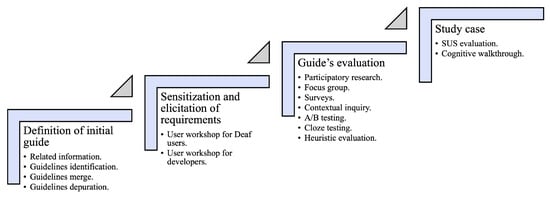
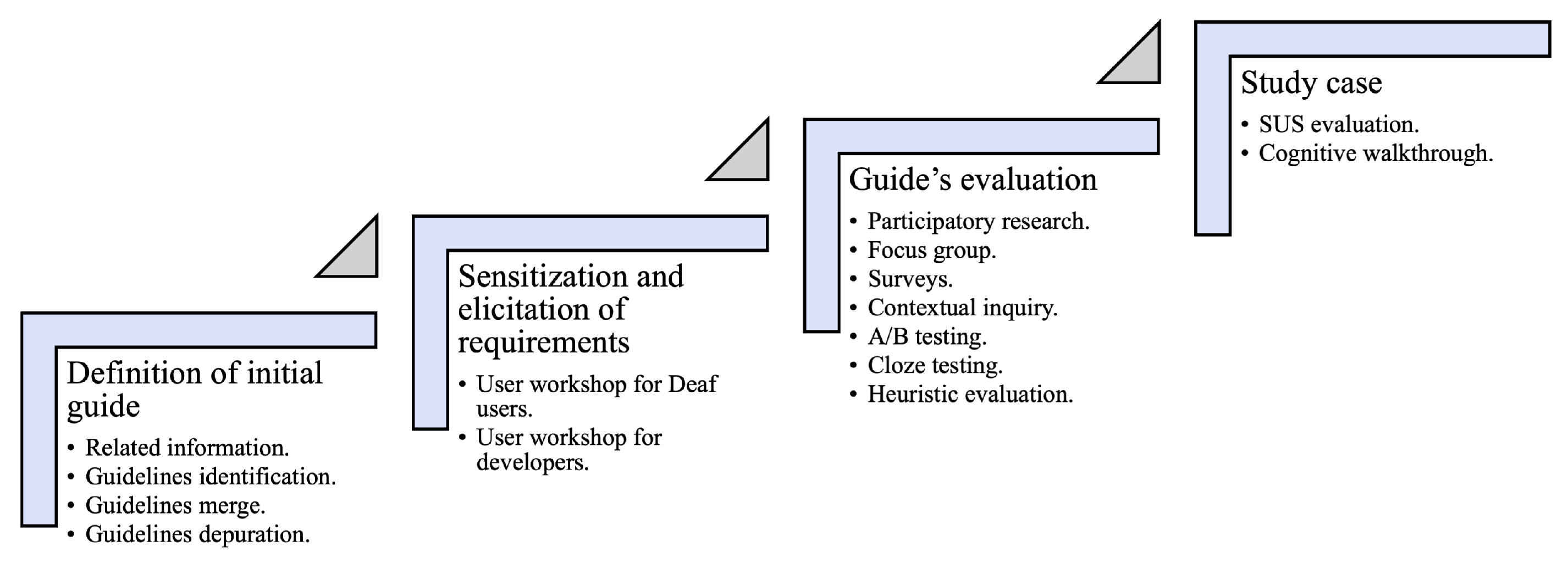
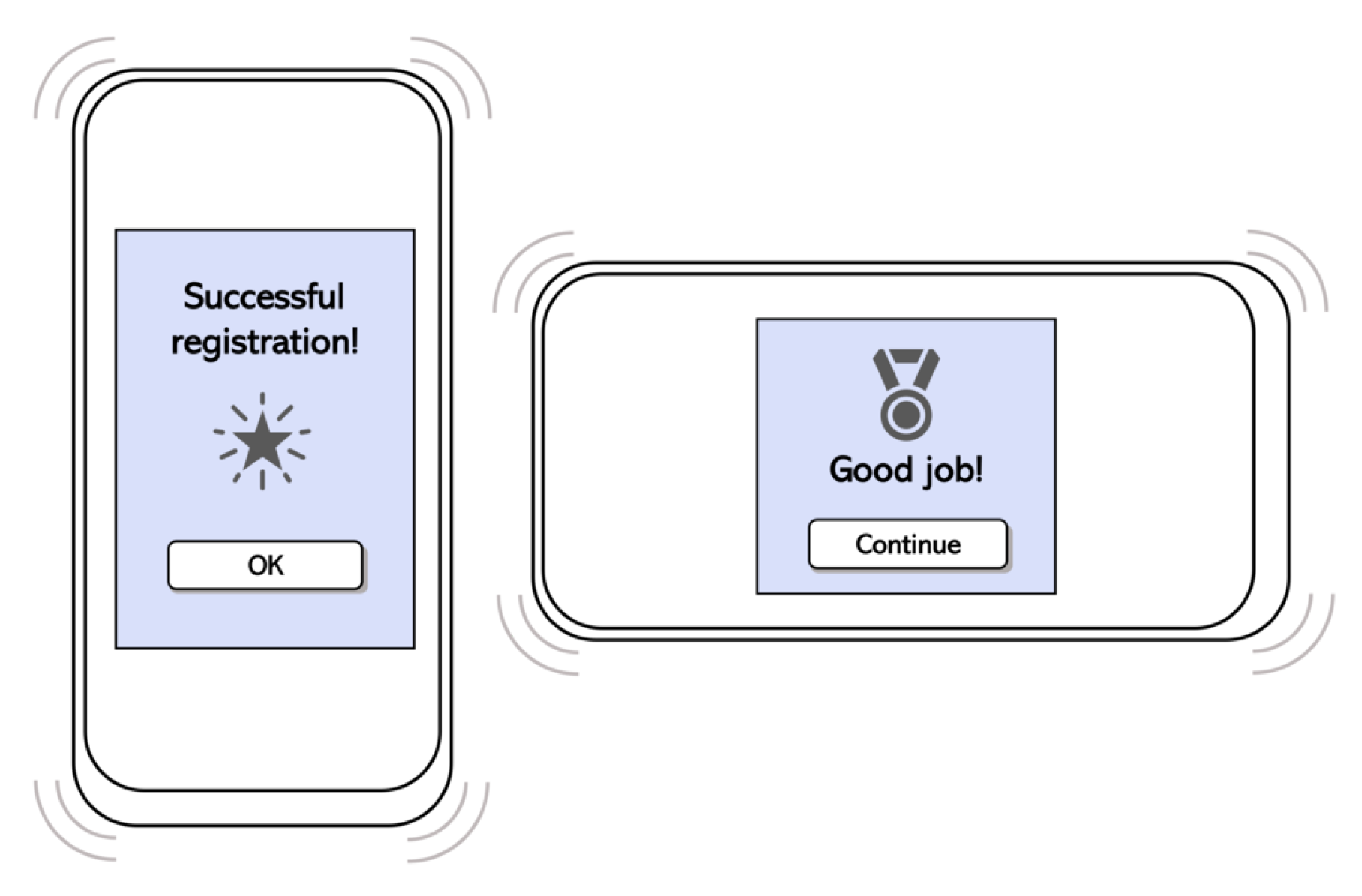
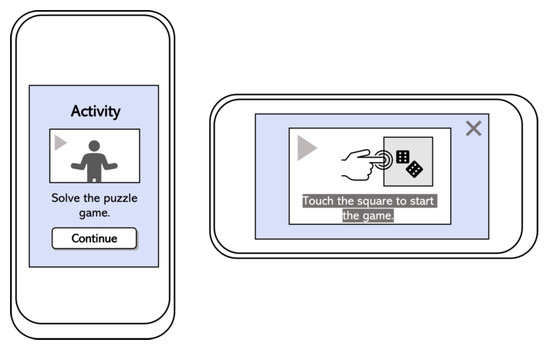
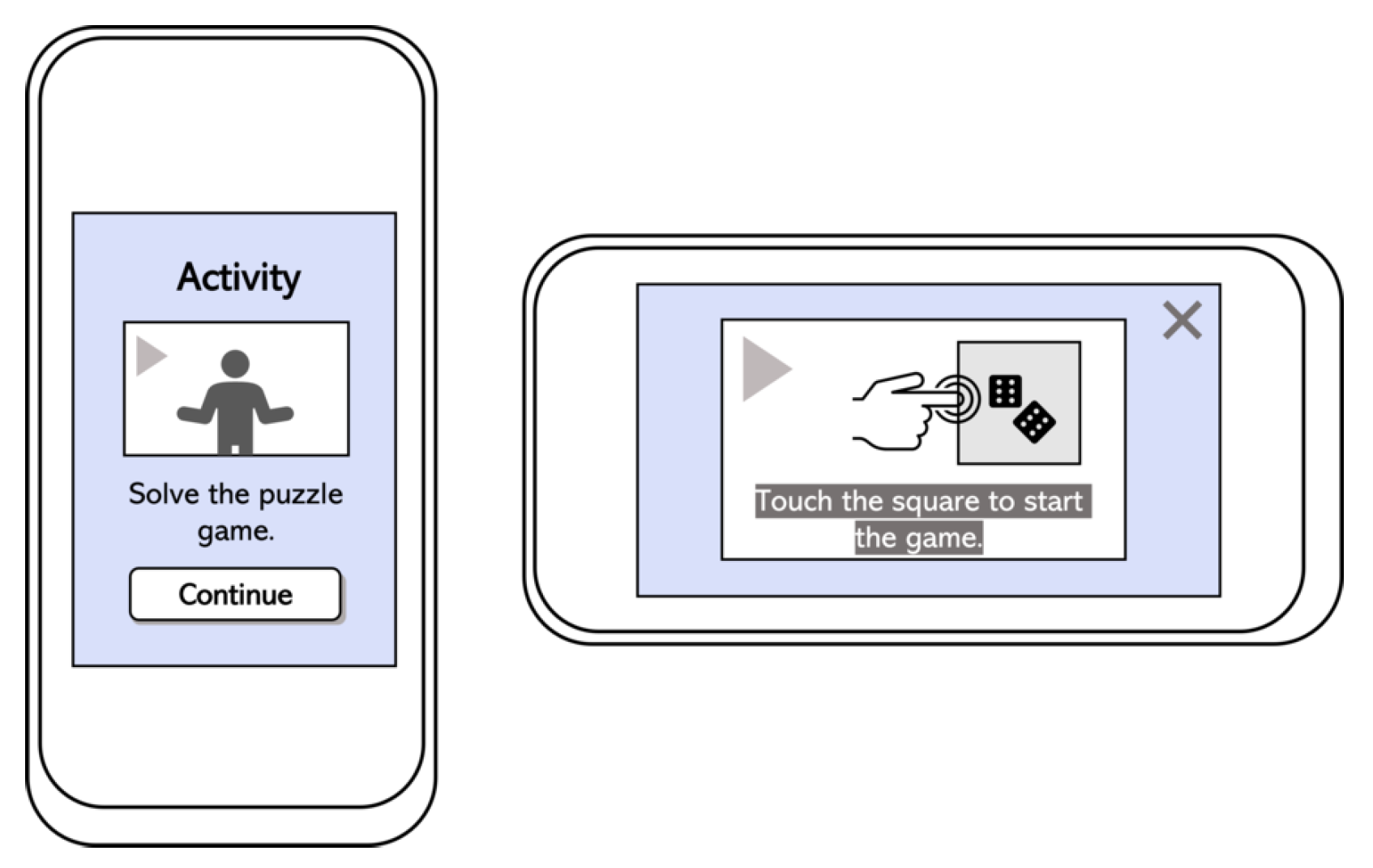
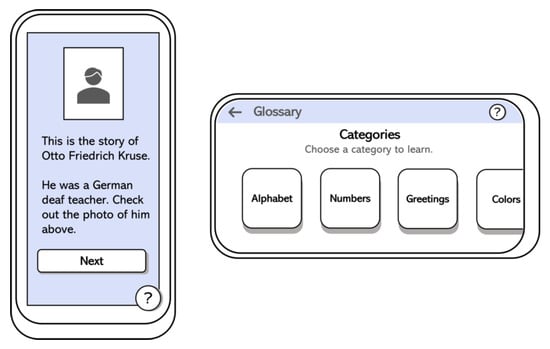
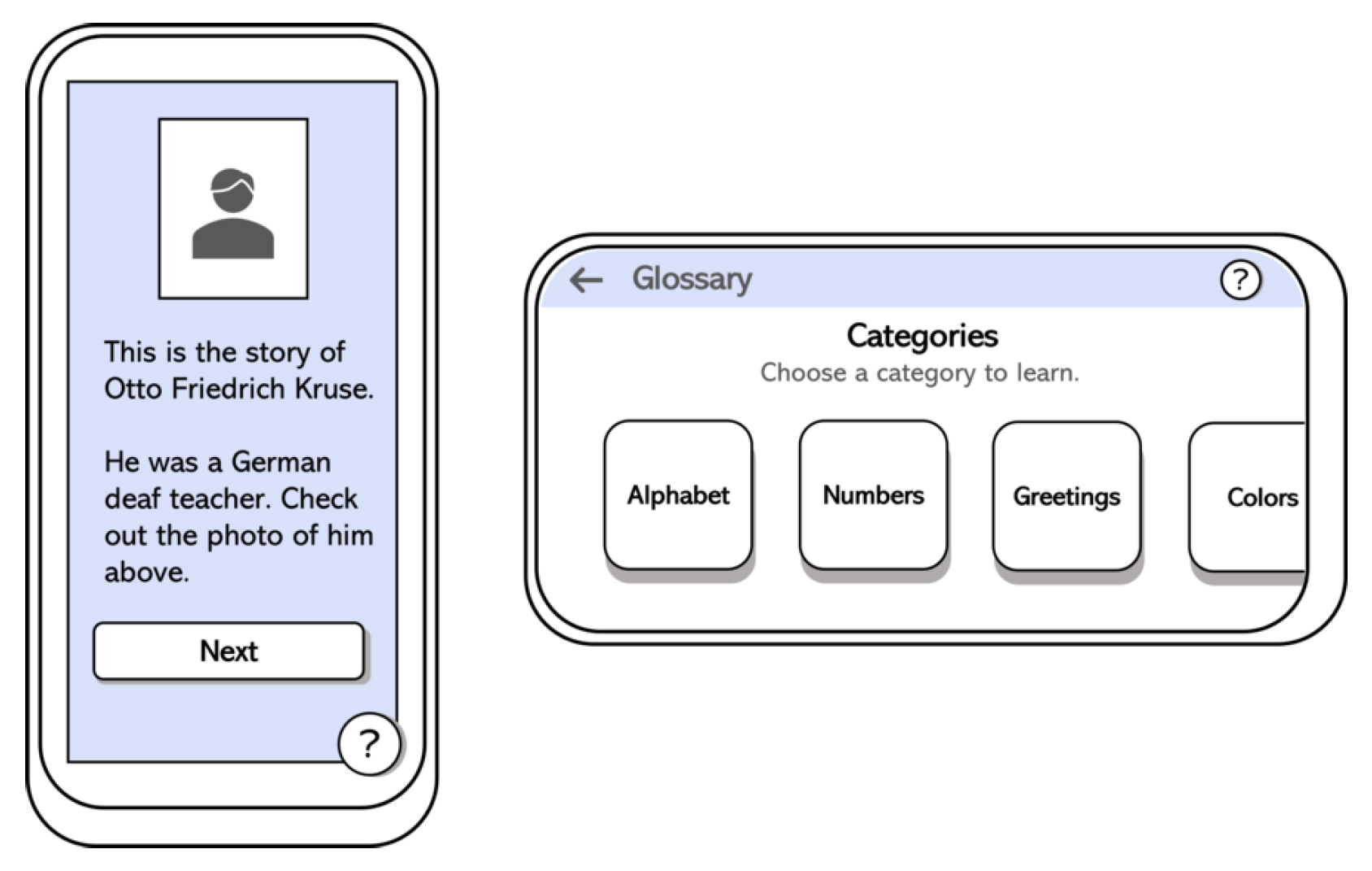
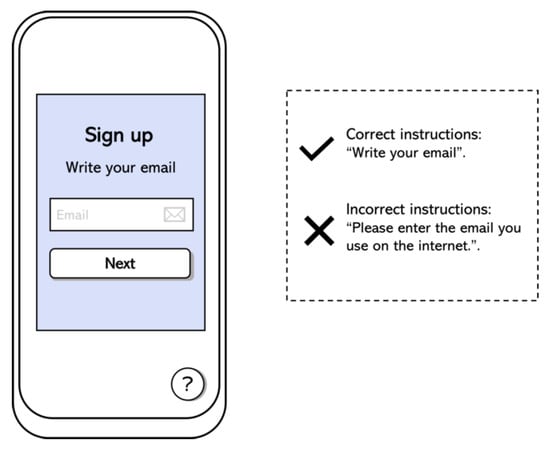
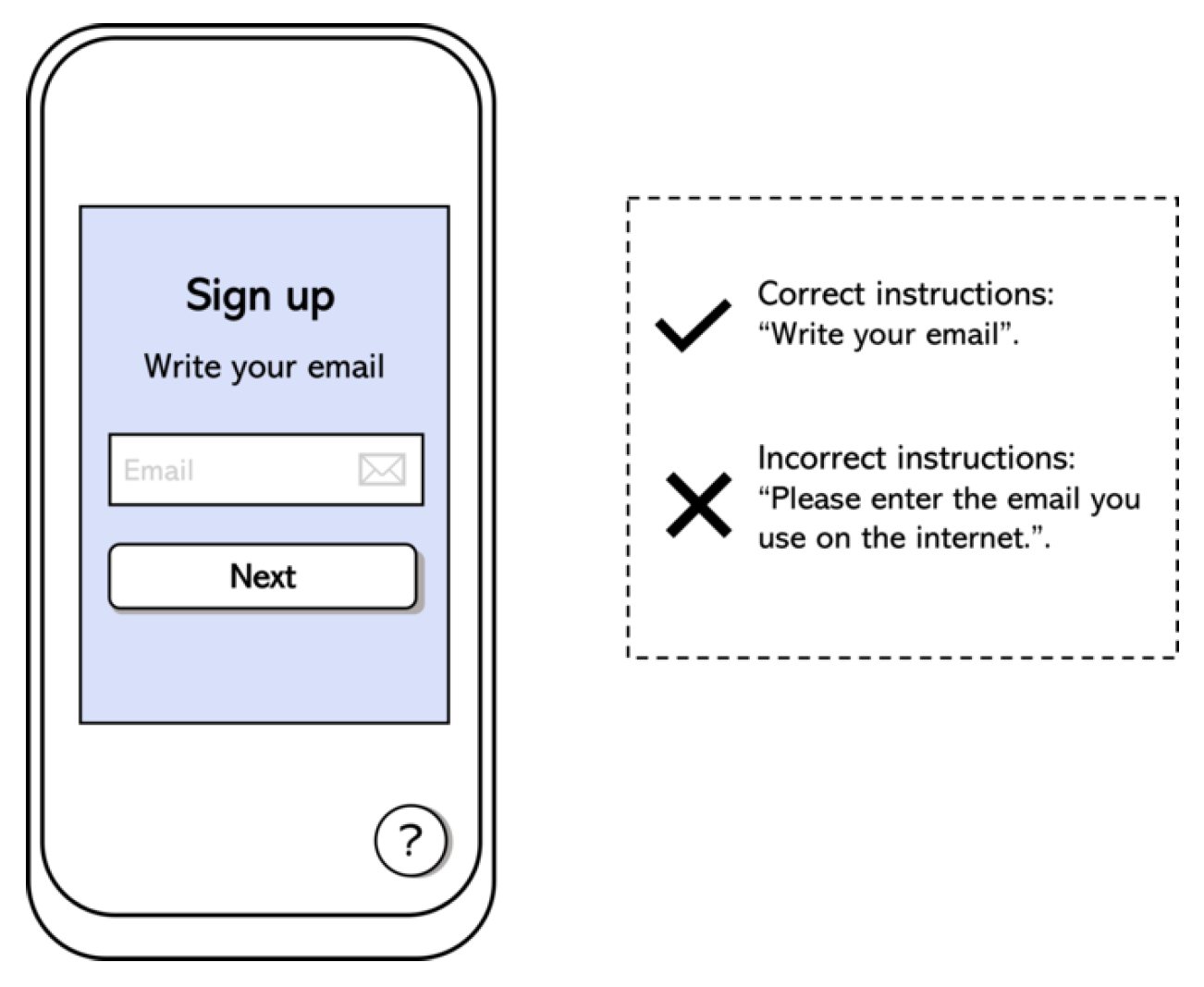
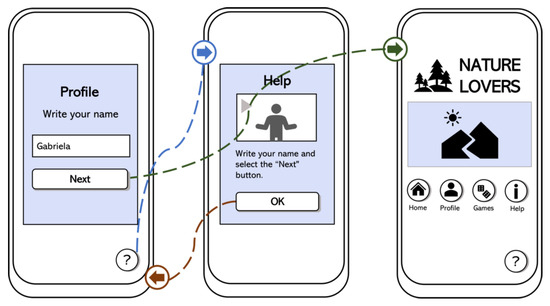
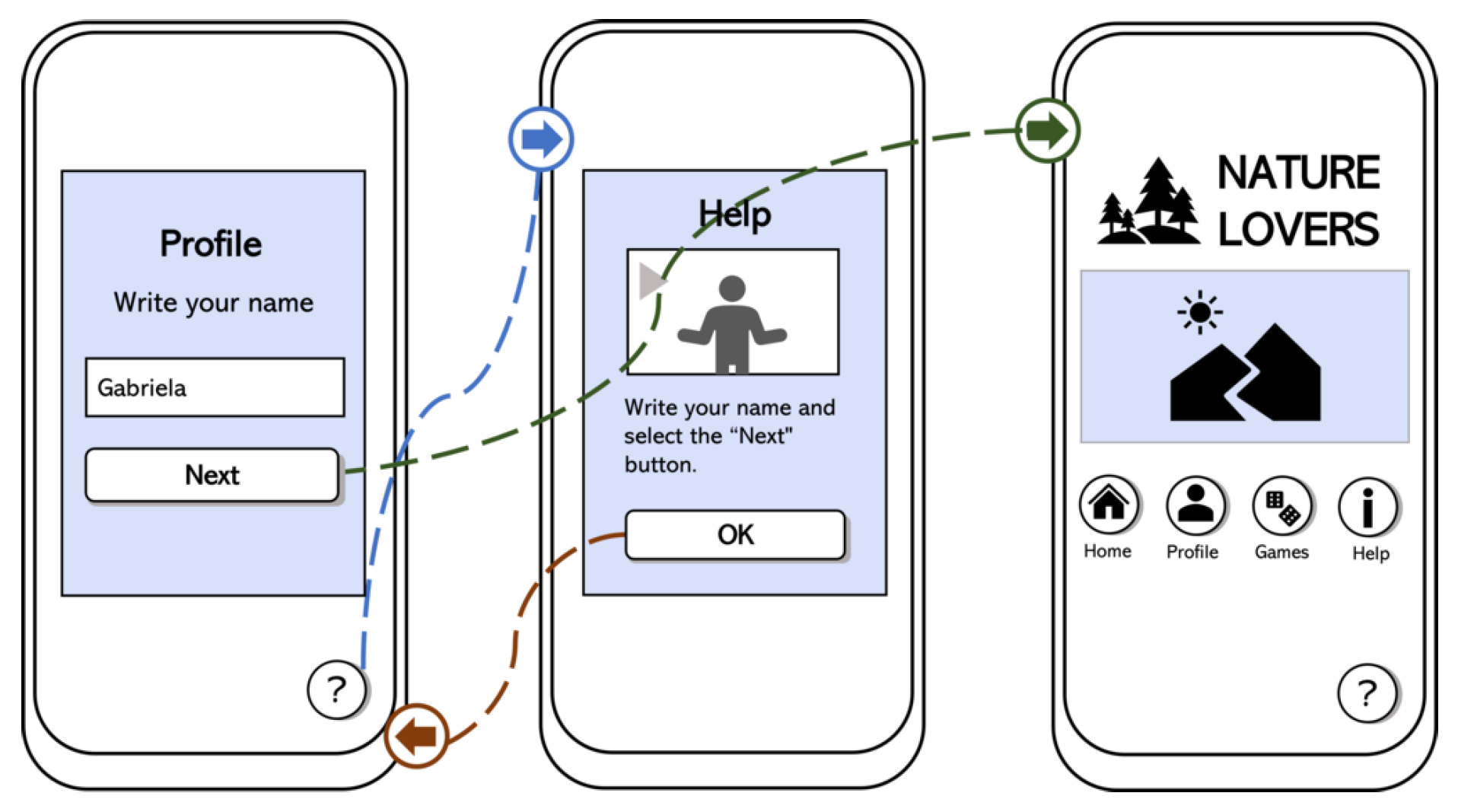
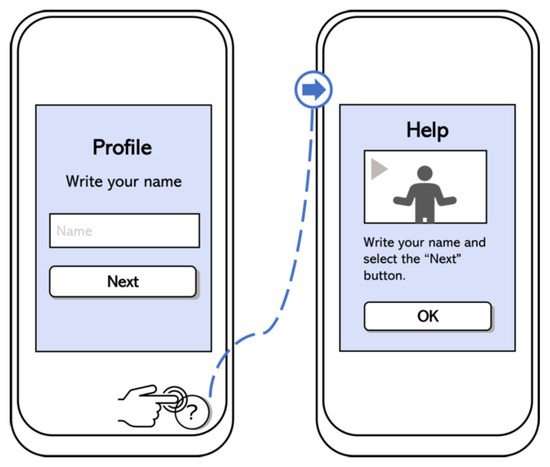
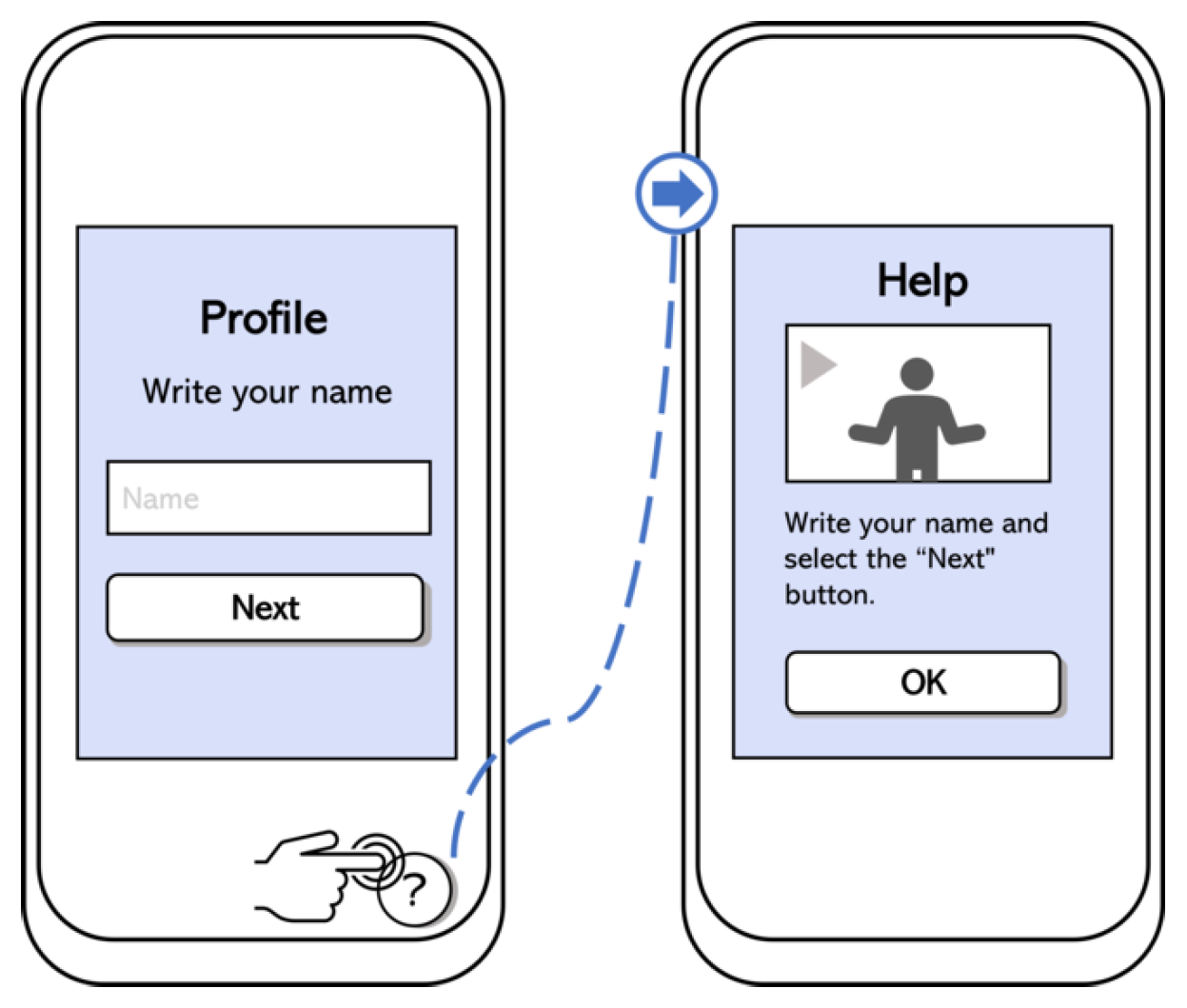
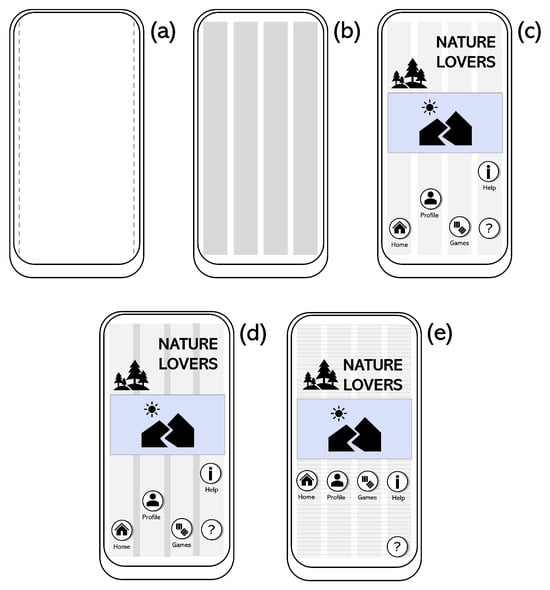
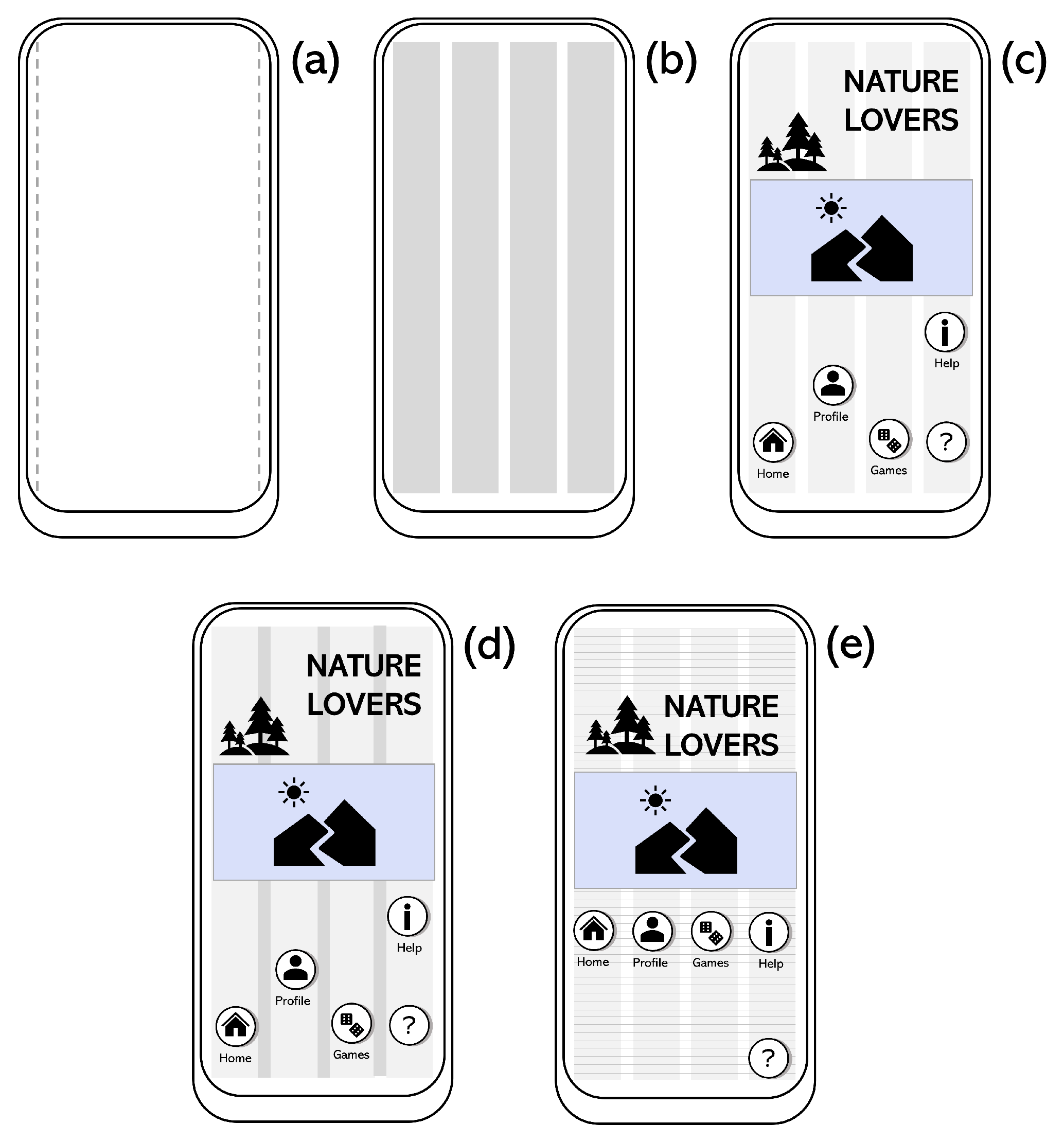
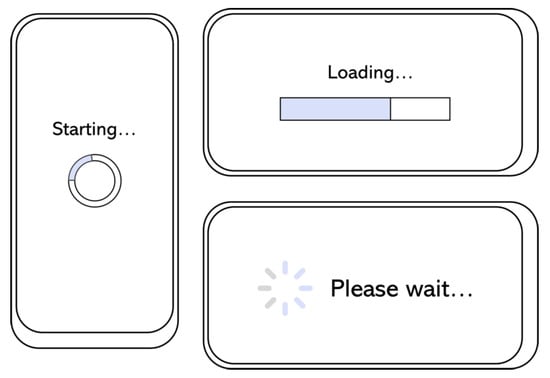
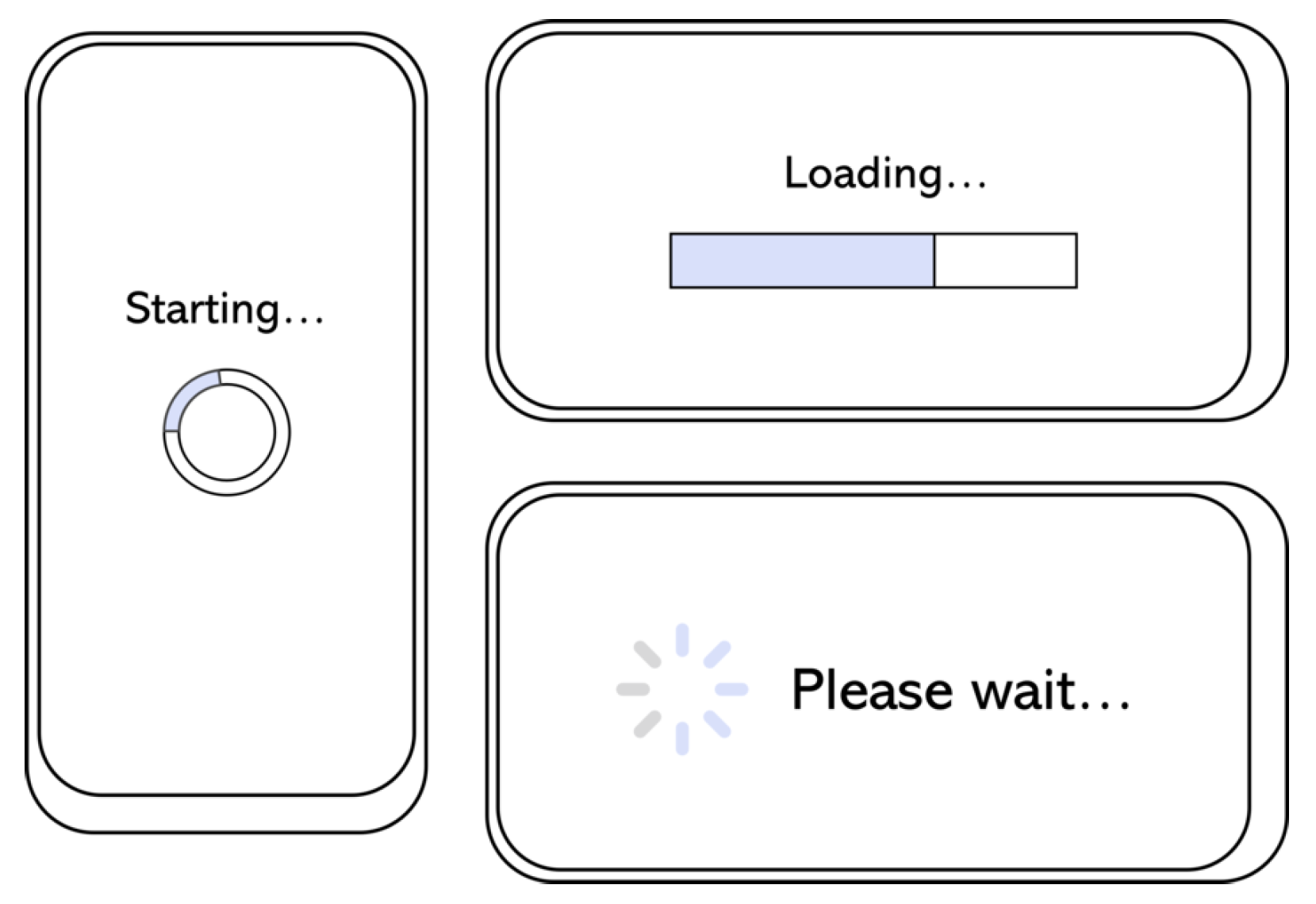
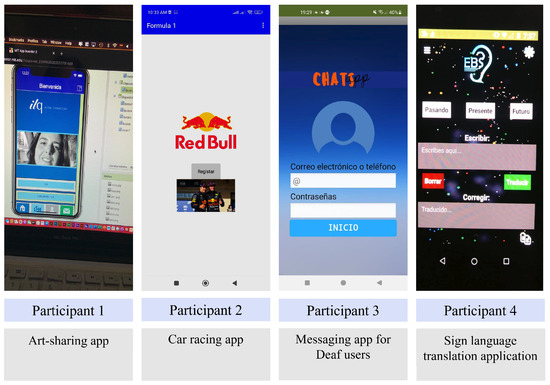
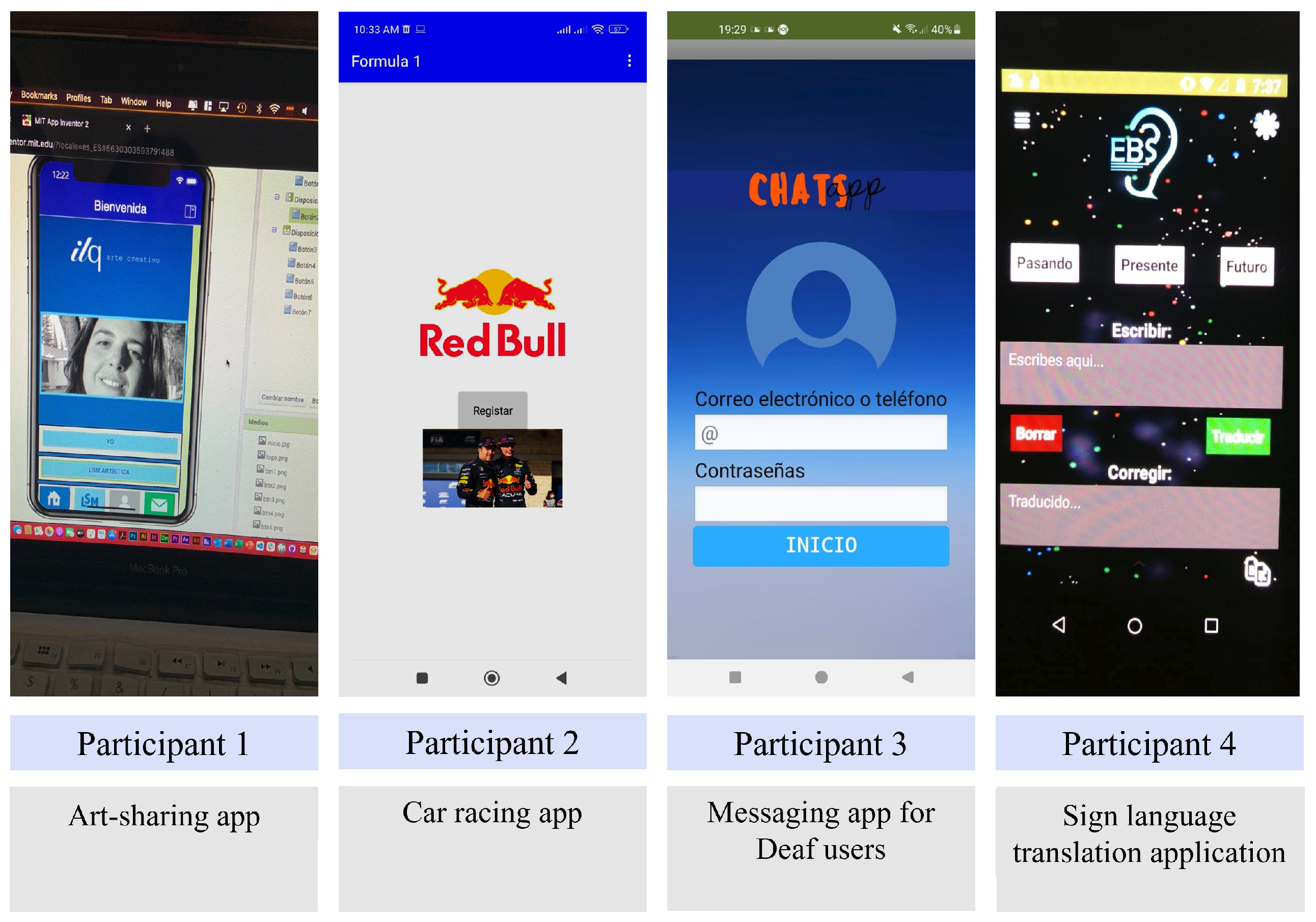
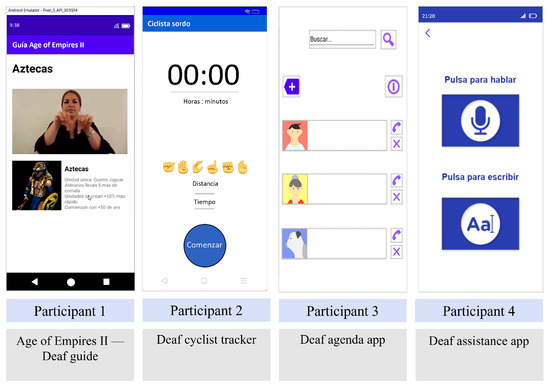
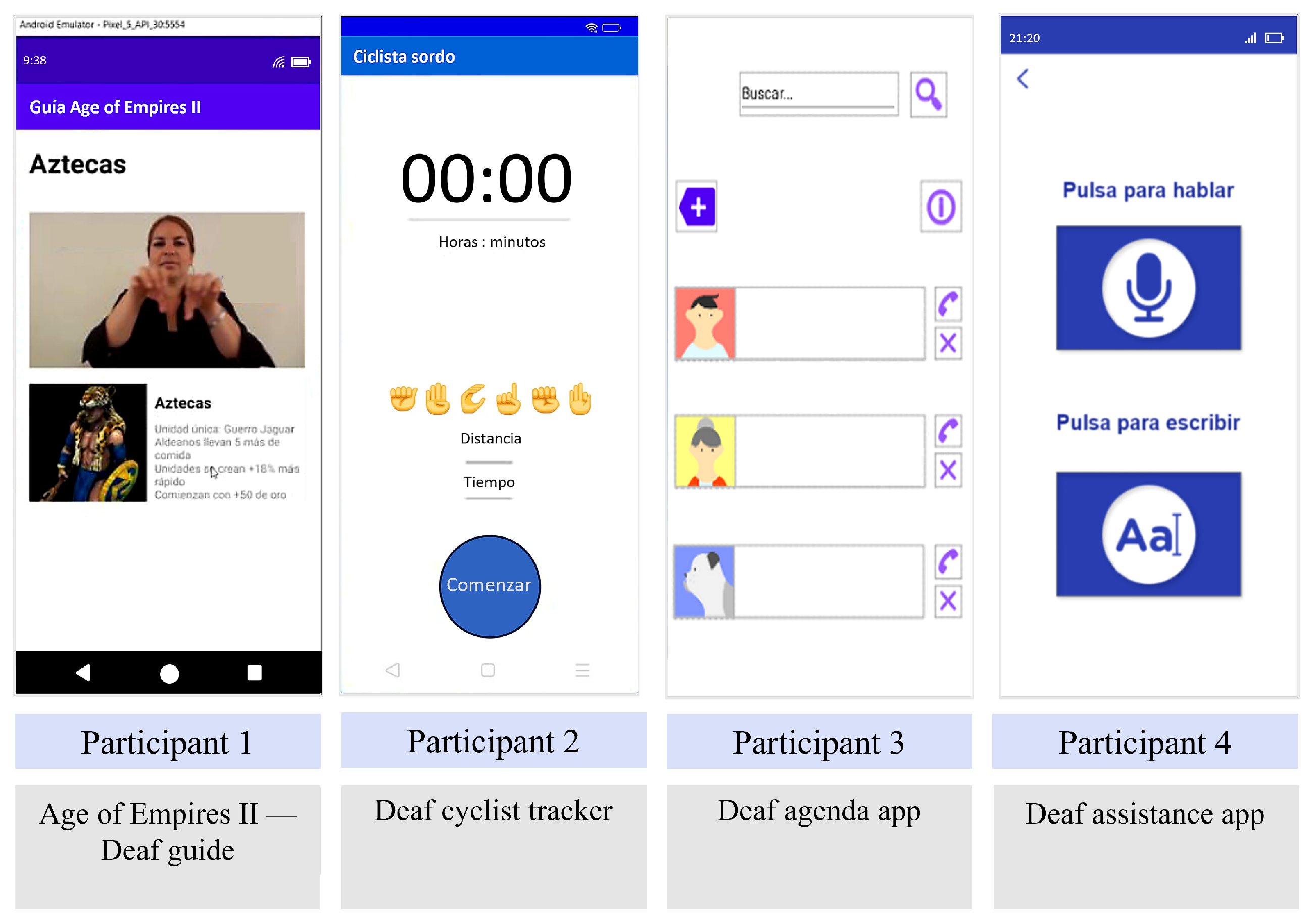
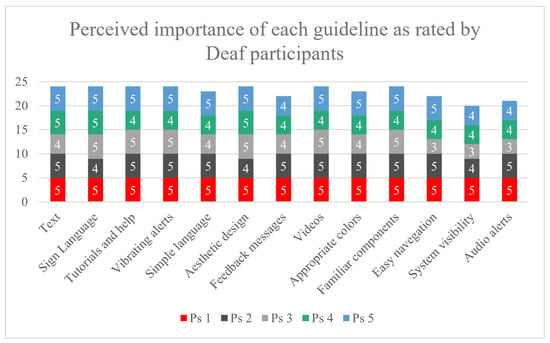
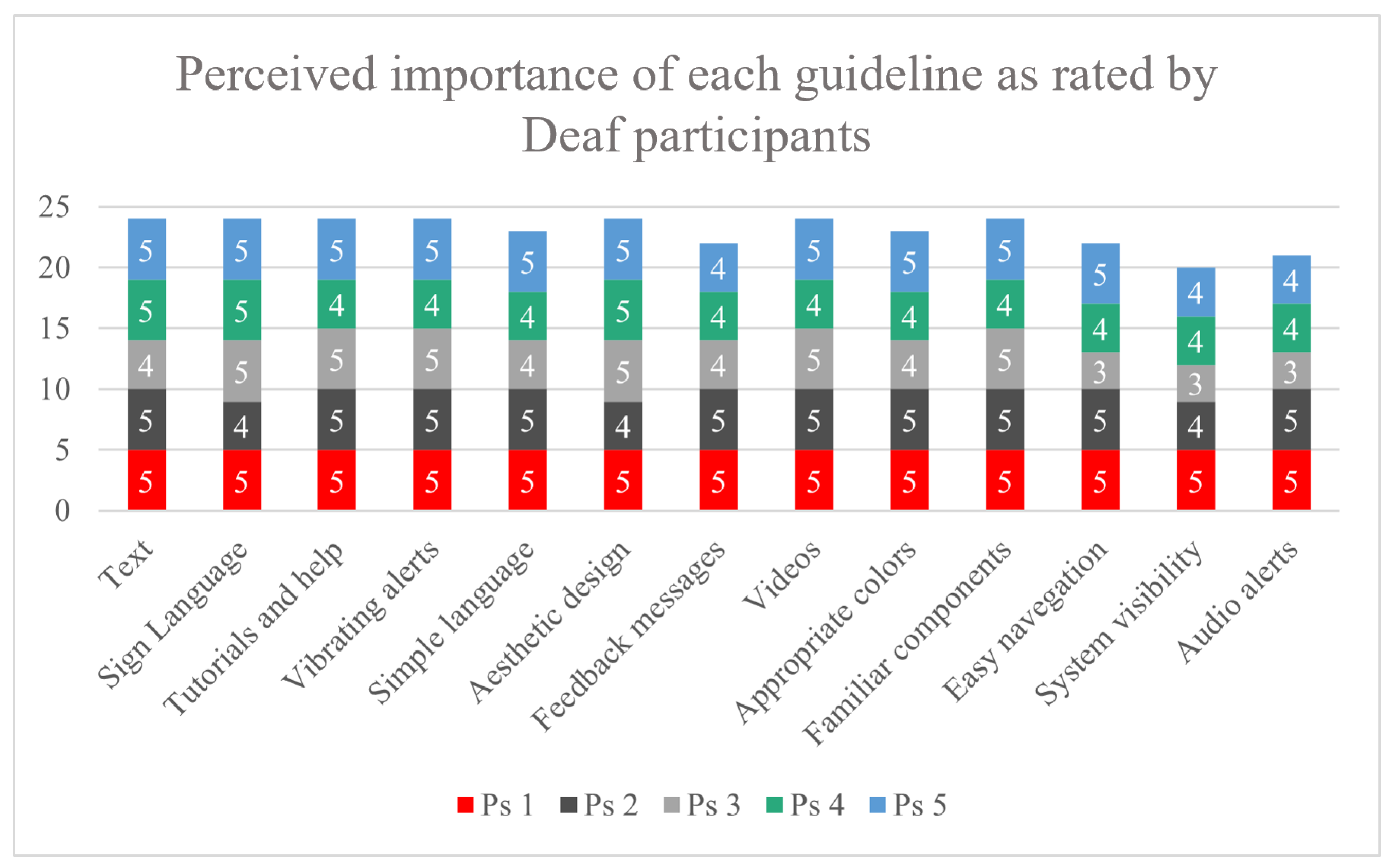
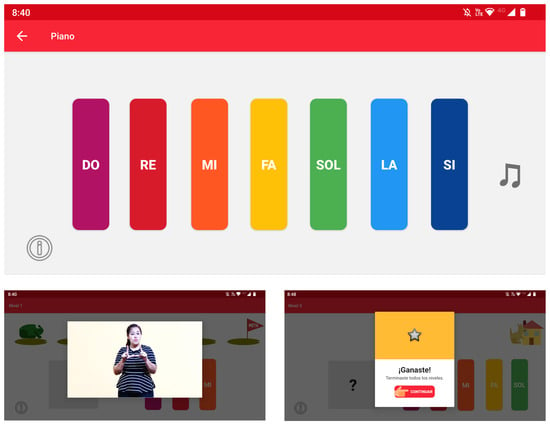
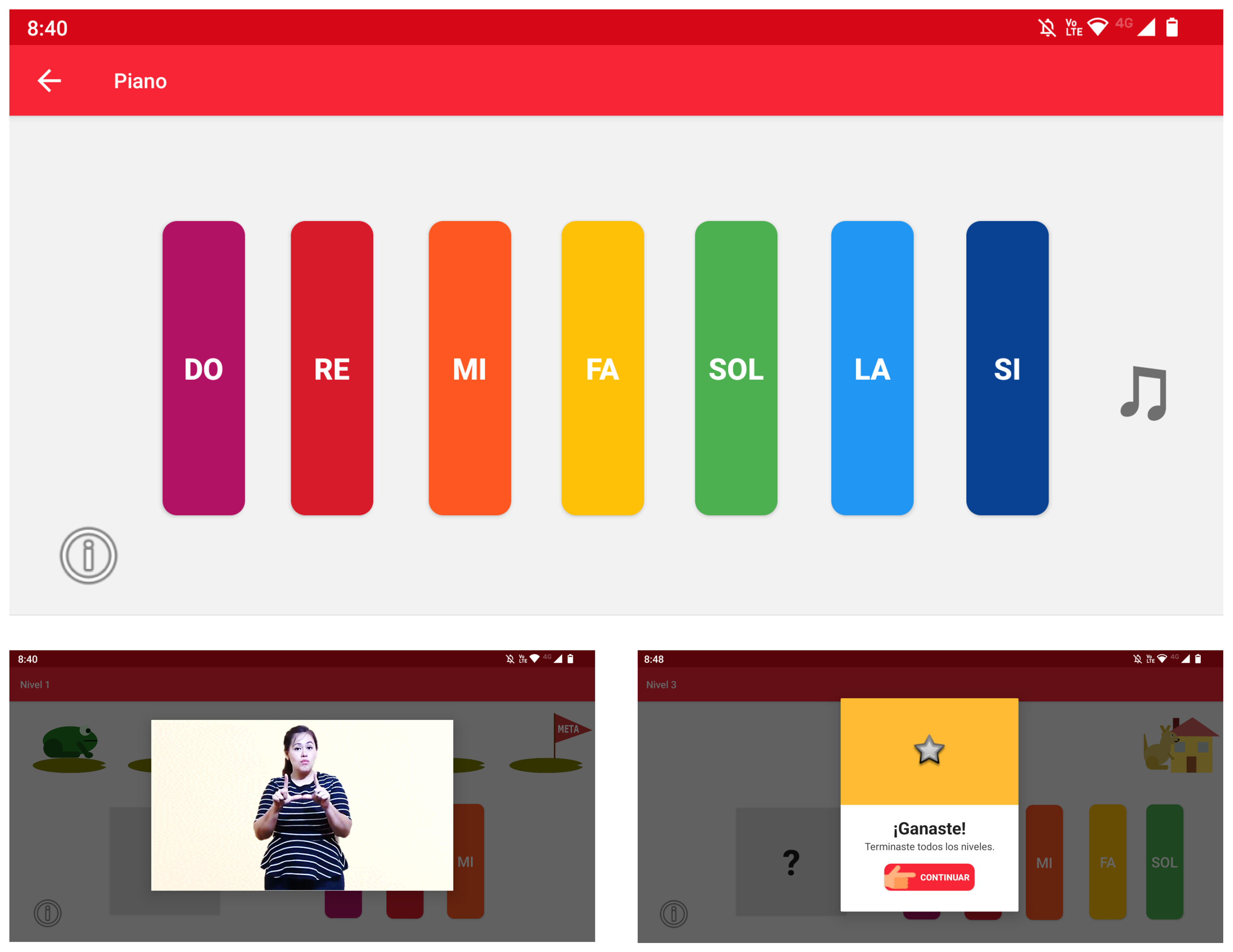
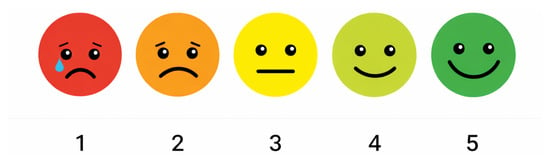
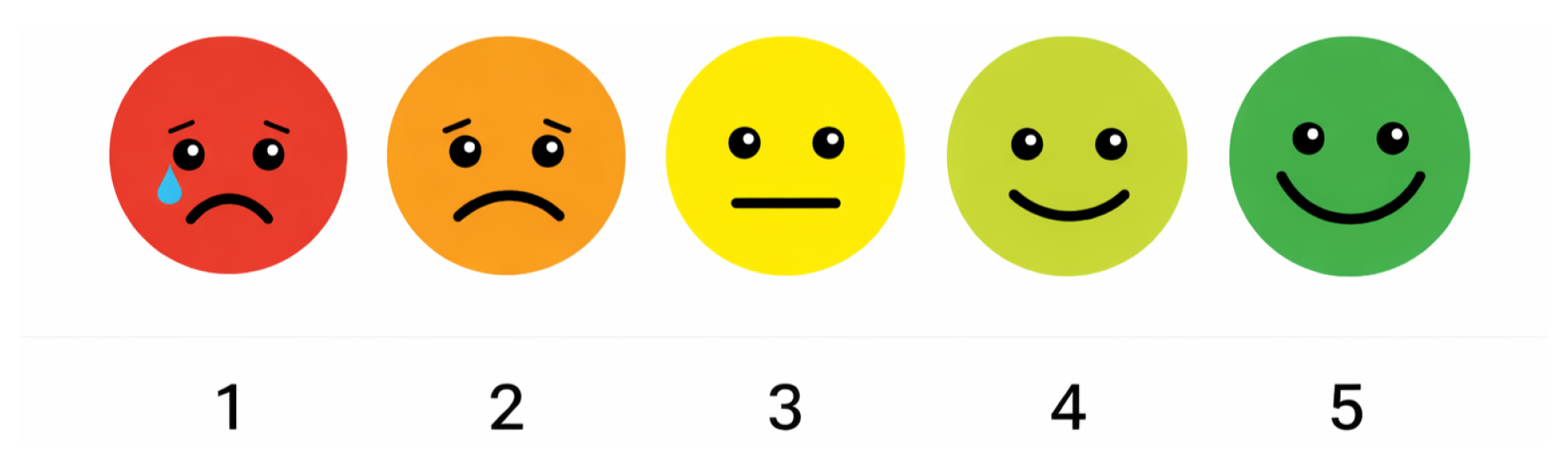

Disclaimer/Publisher’s Note: The statements, opinions and data contained in all publications are solely those of the individual author(s) and contributor(s) and not of MDPI and/or the editor(s). MDPI and/or the editor(s) disclaim responsibility for any injury to people or property resulting from any ideas, methods, instructions or products referred to in the content. |
© 2026 by the authors. Licensee MDPI, Basel, Switzerland. This article is an open access article distributed under the terms and conditions of the Creative Commons Attribution (CC BY) license.