


Abstract
Heritage buildings can now be surveyed in great detail using geospatial techniques such as photogrammetry and TLS to produce dense point-clouds. For the purposes of research and building analyses, data about interventions and other relevant semantic data from the building are available from many sources, though not always in a well-organized way. Allying semantic data to point-clouds requires the elaboration of an ontology and the segmentation and classification of the point-clouds in accordance with that ontology. The present paper deals with an approach to make semantic classified point-clouds accessible to researchers, heritage managers and members of the public who wish to explore the 3D point-cloud data with ease and without the need for geospatial expertise. The app presented here, ‘HISTERIA’ (Heritage Information System Tool to Enable Research and Intervention Analysis), was developed with MATLAB 2023 App Designer, an object-oriented programming software module. HISTERIA has an interface in which the user can choose which parts of the heritage building s/he wishes to analyze according to several criteria presented in pre-defined queries. The result of most queries is shown in a point-cloud viewer window inside the app. A point can also be selected in the viewer, and all the values attached to it can be accessed in the different classes. HISTERIA is intended to give to the exploration of semantic heritage data in 3D added value in a simplified way.
1. Introduction
1.1. Context of the Project
Recent developments in the area of geospatial methods for surveying architectural heritage, such as laser scanning and automatic multi-view photogrammetry, both aerial and terrestrial, have facilitated the rapid production of very dense geometric information of objects. There is a vast list of examples in the literature of the last decade that prove that these have become the methods most commonly used for surveying architectural heritage [1,2,3,4,5,6]. While the concepts and workflow of the above-mentioned techniques differ considerably, with laser scanning being an active range-based method and photogrammetry being a passive image-based one, both result in very dense 3D point-clouds that reveal the buildings in great detail, making these techniques a very important tool for their geometric documentation and, therefore, of great relevance to different public groups.
In order to contextualize the present project, the following concepts and, when appropriate, their respective advantages and limitations will be addressed:
- 3D solid modeling of heritage objects;
- Semantic information and ontologies;
- BIM (Building Information Modeling);
- HBIM (Heritage Building Information Modeling);
- HIS (Heritage Information System);
- Exploration of the heritage data;
- GIS (Geographic Information Systems);
- Point-cloud databases.
To conclude the subsection, the aims of the approach presented will be addressed under Section 1.1.9.
1.1.1. 3D Solid Modeling of Heritage Objects
The process of geometrically documenting a heritage building does not normally end with the point-cloud generation. It includes a stage that obtains a 3D solid model through the creation of surfaces and solids using the acquired point-cloud as a reference [7]. Software used for 3D modeling from point-clouds includes proprietary options, such as Autodesk Revit [8], Trimble SketchUp [9], Cyclone3DR [10] and Bentley MicroStation [11], and open-source options such as Meshlab [12] and CloudCompare [13]. What happens in this step is a subjective reduction of the produced mass of data to a meaningful drawing or model with some link to an architectural knowledge universe (sections, plans, isometries, etc.) [14]. This approach, besides being time consuming, can also lead to the loss of the complexity and uniqueness of the objects surveyed, an effect not always desired in cultural heritage documentation. The point-cloud remains the most trustworthy source of architectural geometric information.
1.1.2. Semantic Information and Ontologies
Although a 3D point-cloud is capable of delivering detailed geometric description and appearance, most tasks related to heritage require additional levels of contextual information, such as semantics, to be associated with the diverse physical parts and spaces of the surveyed architectural object. The significance of the semantic information depends on the point of view from which the monument is analyzed, for example, from the angle of art historians, architects, structural engineers, monument managers or visitors. There is no common code. For the same part of a heritage building, there may be multiple interpretations depending on the specialty of the interpreting actor. To deal with the diversity of semantic information, several ontologies were developed with the aim of structuring the information on heritage objects of very distinct natures (e.g., library books, museum artifacts, archaeological sites, architectural complexes) [15]. One of these is the CIDOC Conceptual Reference Model (CIDOC CRM) [16]. This ontology was developed by the International Committee for Documentation (CIDOC) of the International Council of Museums (ICOM) and has evolved into the ISO 21127 norm [17]. It is a generic ontological model that enables the integration and exchange of heterogeneous information describing cultural heritage objects in multiple dimensions. CIDOC CRM was developed to provide a formal conceptual framework to serve as a basis for other ontologies in the domain of cultural heritage [18].
1.1.3. BIM (Building Information Modeling)
The assignment of semantics is mainly performed on models created by Building Information Modeling (BIM). This requires, in the case of existing surveyed objects, scan-to-BIM operations, that is, the aforementioned step of modeling from point-cloud to a 3D solid model. Scan-to-BIM must be performed prior to the semantics assignment. BIM is a concept and modeling process applied to buildings of the future or those already existing (or even those that no longer exist), in which every component, surface or solid, is classified according to a pre-defined, mostly AEC (Architecture, Engineering and Construction) domain-oriented ontology. BIM can be applied from the design phase of the building through to the construction phase, during the building exploration and until the end of its life cycle. In the design phase, 3D models for standard constructive elements accessible in a library can be used to build the object from scratch. If the object already exists and has a point-cloud survey, then geometric primitives (planes, cylinders, spheres, tori) are successively adjusted to segments of the point-cloud. In most cases, standard parametric elements (e.g., pipes) can be applied with their parameters adapted to the real ones, which are measured in the point-cloud. The solid model is easier to handle than the point-cloud. Semantic information of several natures can be associated with the solid components.
Autodesk Revit [8] is a commonly applied proprietary BIM software with its own semantics. Industry Foundation Classes (IFC) is a standardized data model maintained by BuildingSMART [19] for the description of building parts and assets, which is platform independent. IFC objects can be read and edited by any BIM software. The existence of semantics associated with the physical elements allows, besides the representation of the object, some experimental analyses, such as information filtering and crossing, energy budget simulation [20], or structural studies [21], normally executed using specialized software for these analyses that import BIM models.
1.1.4. HBIM (Heritage Building Information Modeling)
HBIM is the BIM concept applied to heritage buildings [22,23]. As such, it is an ’as built BIM‘ approach [24]. Whereas the BIM modeling process is more effective for repeatable parametric features, in the case of architectural heritage, a high degree of human interaction is required during the modeling phase since standardization or parametrization is seldom possible. Each region, each epoch, each style has its own architectural specifics, meaning that practically each monument should have its own exclusively modeled 3D component library, though this is not sustainable.
1.1.5. HIS (Heritage Information System)
Although the association of semantic information with a 3D model can be addressed through BIM approaches, the richness of detail, typical for older heritage buildings, may be lost when transforming a 3D point-cloud into a 3D solid model by generalization processes. This transformation can lead to an excessive simplification of the geometrical documentation and a reduction in its level of detail. In some cases, the irregularities detectable in the point-cloud are the most relevant aspect, as they provide clues as to whether the authors were different or if they worked on different construction phases, which are clues than can be lost when simplifying in advance of the solid model. In addition, semantic information can only be assigned to the smallest addressable object, i.e., the individual 3D component (a door, an arch, a wall, etc.). Often, different semantics must be assigned to different parts of the same 3D component (for instance, a wall that was built in two different periods using three different materials and without any coincidence of physical limits for the two kinds of classification: construction phase and material). These problems can be solved by changing the granularity of the 3D model without resorting to BIM. In contexts where it is necessary to preserve resolution, optimize working time, and operate with low-level geometric information, working directly with the original point-cloud may be of particular interest [25]. Instead of HBIM, the concept of HIS, Heritage Information System, has emerged, in which semantics are assigned to segments of the point-cloud which may be related to construction elements, although they need not be. This gives rise to much greater flexibility in the application of ontologies.
1.1.6. Exploration of the Heritage Data
Another relevant question in heritage assessment is the exploration of the 3D data [26]. While the digital replication of a heritage site can now be achieved with high geometric accuracy and radiometric fidelity, the 3D data are often part of a massive data set of limited use by non-geospatial experts due to its degradation, simplification to obtain solid models [27] or lack of adequate computer resources to load and manage the heavy data sets. Working effectively with 3D point-clouds usually calls for expensive and, for the normal user, complicated software, not to mention the requirements in terms of computer capacities. Without training, it is almost impossible for a common user to analyze the point-cloud the way s/he would wish, looking at just one part of the building, chosen according to some criteria (for instance, which part originates from the 12th century? Who made this statue? When was this chapel rebuilt?). Again, without training, the meaningful exploration of the object in a BIM environment is rather complicated. As for the heritage documentation in databases, the query for information also requires expertise in query languages and is seldom connected with visual 3D material.
1.1.7. GIS (Geographic Information Systems)
Protecting the detail of the point-cloud and simultaneously accessing semantic information is, therefore, a desirable aim. An ideal solution for this problem would be a sort of Geographic Information System (GIS), in which point-clouds could be input just like any other entities, with attribute tables associated that could be filtered and spatially analyzed, showing query results on a 3D viewer window. Although this is conceptually possible after the conversion of a point-cloud to a layer of point geometry, all operations and the dynamic exploration of the result are, even where possible, prohibitively slow due to the huge amount of data it usually involves. In addition, following the conversion from point-cloud to isolated points, the amount of data multiplies since it is no longer possible to take advantage of the data aggregation strategies used in the point-cloud formats that speed up access. This makes a GIS approach for exploring architectural semantic point-clouds unfeasible using the current GIS tools.
1.1.8. Point-Cloud Databases
Classifying the point-cloud in point-cloud processing software and handling the data in an open database are now possible. The pgPointCloud [28], an extension of PostgreSQL/PostGIS, allows point-cloud data to be saved and some operations to be executed. Unfortunately, the existing viewers for the query results, such as QGIS [29], are more suitable for 2.5 D terrain data than for architectural 3D objects, invalidating their use for the present purposes.
1.1.9. Objectives of HISTERIA
Most of the time, the richness of the collected 3D data remains under-exploited due to the lack of accessible tools that facilitate easy manipulation and semantic enrichment of point-clouds and their later semantic and spatial exploration [4].
This leads to a gap between heritage data producers and heritage data explorers. If we consider the typical user of a 3D heritage building model, a director of monuments, a conservation technician or even an interested visitor, we cannot assume any expertise in AEC or database domains. If the 3D model is not presented in a ready-to-use way, it will soon end up in a drawer and all the work invested will have been fruitless.
To sum up, a detailed geometric description of heritage buildings is needed, and this can be best provided by dense point-clouds. The semantic description should be made through the classification of points, not solid model components. Spatial and semantic information should be accessible to a non-geospatial and non-AEC expert user in a simple and inexpensive way, preferably taking advantage of open/free software. The semantic information can be, for instance, related to architecture, to the construction epoch, to function, to changes occurring in the building over time, and to building materials, among others. To achieve greater interoperability across different domains of architectural cultural heritage, semantic information should be organized based on a standard ontology for cultural heritage such as CIDOC-CRM.
The present paper addresses these requirements and puts forward the app HISTERIA, the Heritage Information System Tool to Enable Research and Intervention Analysis. The app was developed in MATLAB 2023 [30] using the App Designer module. The app screen is split between a command interface and a point-cloud viewer. The interface presents simple queries to the user in the format of structured lists of items to choose from, which simultaneously inform the user of the existing instances in the heritage object (e.g., a list of the architects involved, a list of construction phases, etc.). Free point-cloud processing software works in the background to process the point-clouds upon demand, and the results are shown on an easy-to-use point-cloud free viewer integrated in the app. Section 2.1 provides in-depth details of the geometric input data, and Section 2.2 focuses on the semantic data acquisition and the design of an ontology.
The aims of the present work are multifaceted; they involve the logical organization of existing semantic data contained in cultural heritage archives in textual format; the semantic classification of heritage point-clouds allying geometry with semantics; easy spatial–semantic interactive exploration without requiring much user expertise; the creation of a consulting work tool for staff involved with the monuments, especially for spatial documentation of interventions that have been made; access to the database information for non-locatable data; and finally, the dissemination of architectural heritage sites and their significance for public educational purposes.
To test the feasibility of the methodology, this approach was applied to a particular 16th century heritage building, the church and cloisters of the Hieronymites Monastery in Lisbon, Portugal, but the whole methodology can be adapted to other heritage buildings and extended with additional classes of semantic information.
1.2. Related Work
Several authors focused their interest in making heritage data accessible, not only through the 3D models but also the associated semantic information. Most solutions are based on web applications, since this is the ideal vehicle for reaching different expert groups or a vast non-expert public. Web platforms for 3D data management are services based on web and cloud computing. Normally, such services include storage space for the hosted data, rendering operations for data visualization, and measuring and annotation tools. Some services also include operations on the point-clouds, such as registering and segmentation based on geometric properties. The possibility of uploading heavy point-cloud data or meshes to a server for processing on the server side is also highly advantageous from the point of view of cost. Specific high-performance hardware and dedicated point-cloud software turn out to no longer be a requirement on the user side [31]. Nevertheless, some of the services are not free, especially when they include heavy processing, and there is also the question of the data ownership to consider. In Poux et al. [32], an interesting review can be found on web environments developed to access heritage data in connection with semantic documentation. In particular, the BIMlegacy project [33] and the 3DHOP platform [34] are addressed. More recently, other interesting web platforms were developed that focus on heritage site data management, such as SyPEAH [31], and on cultural heritage dissemination based on open data, such as LOD4Culture [35]. Other tools that are based on point-clouds have appeared in recent years. 3DOnt [36,37] is an example that will be discussed here later.
BIMlegacy [33] is an online work platform in which BIM models of heritage objects, originating from Autodesk Revit, can be synchronized with heritage documentary databases and accessed and managed by independent heritage stakeholders. The aim is to help synchronize 3D geometric models with their respective historical information. BIMlegacy relates to the present work insofar as it tries to reduce the gap between heritage stakeholders that are not BIM proficient (heritage managers, archivists) and those who are (AEC and geospatial professionals). It does not accept point-clouds as input data.
3DHOP [34] means 3D Heritage Online Presenter, an open-source software package used for creating interactive web presentations of high-resolution 3D models in the Cultural Heritage field. The 3D model can be interactively moved and rotated, and the interface can be customized to present texts or include action buttons. 3DHOP relates to the present work because of the possibility of showing the 3D model in a simple viewer on which the user does not have a confusing myriad of options and because it is based on open-source software. Nevertheless, the website has to be designed first. The input data are meshes or point-clouds.
SyPEAH—System for the Protection and Education of Archaeological Heritage of the Parco Archeologico del Colosseo in Rome, Italy [31]—is a very complete monitoring platform, essentially a work tool for archaeological heritage management. In this platform, point-clouds or meshes are only a document assigned to an object of the database. They can be explored by means of the open-source WebGL-based point-cloud viewer Potree [38] and can be measured and annotated. The storage, visualization, and sharing of complex data with a vast public are possible, although the focus of the platform seems to be the management of the archaeological sites and not so much their dissemination. The point-clouds or meshes are a piece of geometric documentation of the archaeological object but do not present any semantic attached. Only the annotated and labeled places have additional information, either historical or of another nature, assigned. The relationship between this platform and the present project is their purpose of connecting semantic information with point-clouds and accessing geometric data through an open-source viewer. Nevertheless, Spetu et al. [31] do not clarify whether the visualization with Potree is included in the application or if the point-cloud data are only converted to be externally explored in Potree.
LOD4Culture [35] is a web application for the purposes of tourism and education that takes advantage of Cultural Heritage Linked Open Data (CH-LOD). It is clearly aimed at disseminating locations of cultural heritage around the world through an interactive webmap and providing access, for each marked location, to a set of open data about the heritage site, while making queries across several sources in the background, such as Wikidata [39] and DBpedia [40], without any need for the intervention of the user. Although the required software architecture is not trivial, the web application is very simple to use and makes all the existing CH-LOD data in several aggregating platforms, such as Europeana [41], accessible to lay users. Whereas several 3D models are to be found in Europeana galleries, LOD4Culture does not accede to such models, which is consistent with the authors requirement to reduce latency to the minimum [35]. Instead, the information presented for each site is made up of artwork, textual description and photographs. Regarding the effort to make existing CH data accessible to lay users, this is a goal in common with those of the present project.
Beyond web platforms aimed at the management and visualization of heritage data, there are ontology-based approaches that operate directly on 3D point-clouds with the goal of structuring and querying the associated semantic information. In this context, 3DOnt [37] is oriented toward the inference of information derived from point-clouds that have previously been classified using simple labels, combined through explicit rules based on expert knowledge. 3DOnt adopts a non-BIM approach, in which semantic information is associated directly with 3D point-clouds. Of all the mentioned approaches, this is the one that has the greatest relationship with HISTERIA from a conceptual point of view, as it is based on the use of point-clouds, although it responds to different objectives and methodologies. Unlike ontology-based approaches that focus on semantic inference from classified point-clouds through explicit rules, the present work is not aimed at semantic inference. Instead, it develops a system aimed at the visual exploration and understanding of architectural heritage by non-expert users. In HISTERIA, ontologies are employed to structure and query the semantic information associated with the point-cloud through pre-defined queries.
1.3. The Case Study
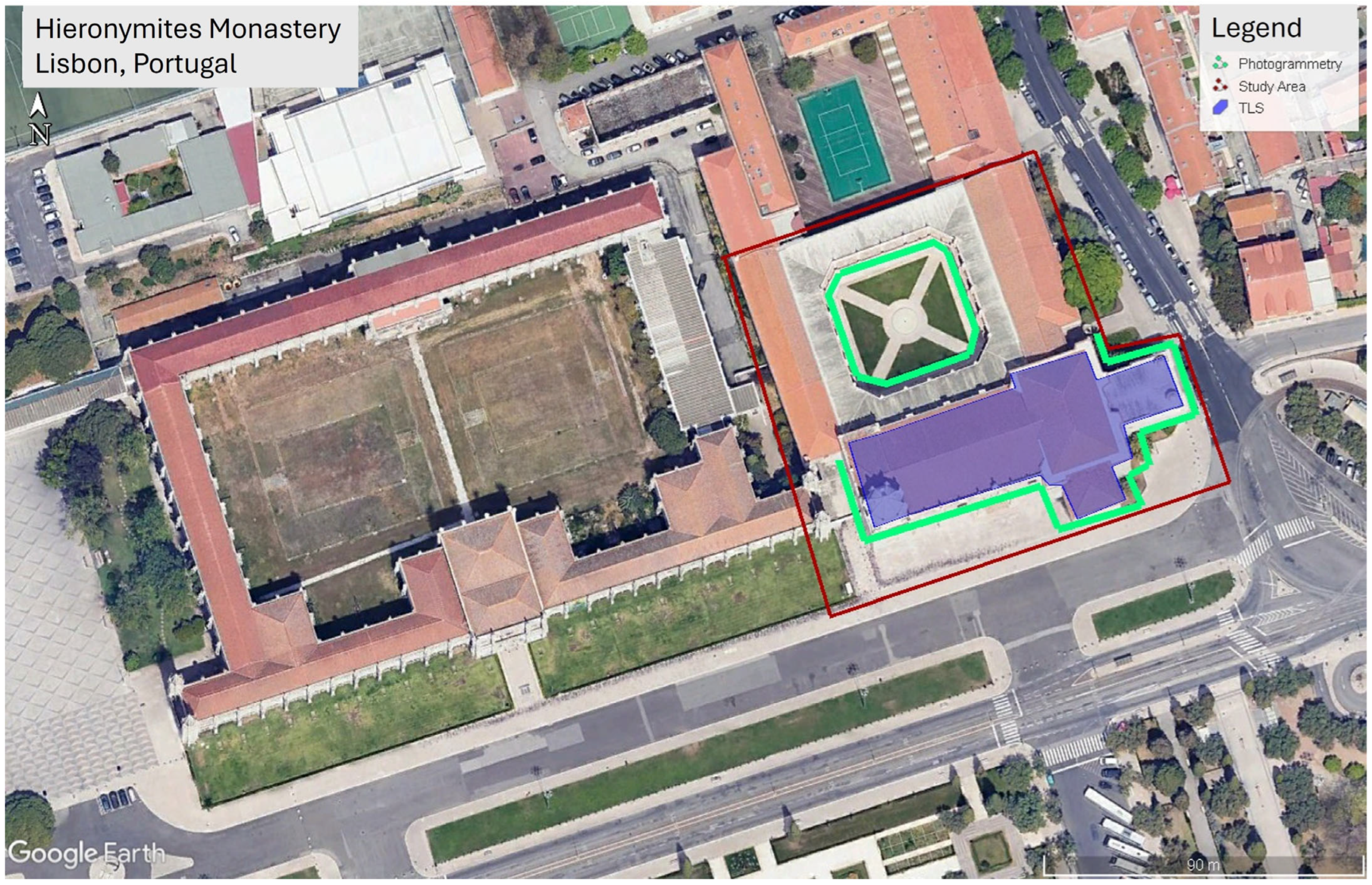
The Hieronymites Monastery is a complex of interconnected buildings with religious and cultural uses. The whole complex has a rectangular extension of approximately 295 × 105 square meters, with a large rectangular courtyard and square cloisters (Figure 1). The present project focused on the older part of the buildings, consisting of the church and the neighboring cloisters, which are located on the east side of the complex (Figure 1). The newer section extending to the west of the church now houses the National Archaeology Museum since 1903, the Navy Museum since 1962, and the Navy Central Library since 1982.
Construction of the Monastery began in 1514 [42], and for the church and cloisters, this lasted throughout the 16th century, with some elements being added later through to the 19th century. The church presents a configuration compatible with the late gothic and renaissance styles, showing some elements characteristic of the so-called Manueline style (derived from the king’s name, Manuel the First), the Portuguese late gothic, such as ropes, armillary spheres and other maritime objects and creatures. The church is composed of an almost open space with just eight high, relatively thin octagonal columns, with no significant height difference between nave and aisles, a very large crossing with a vault spanning over 30 m diagonally (a remarkable accomplishment for that time), and ribbed vaults supporting the ceiling. Keystones aggregate five vaults in the aisles and eight vaults in the central nave. The material used in the construction is lioz, a white limestone from the surrounding quarries, and polychromatic marble decorating the floor, chapels and tombs in the interior of the church. The monastery resisted the devastating earthquake of Lisbon in 1755, the strongest earthquake ever felt in Europe, without much damage. Nevertheless, a couple of months later, one column and the supported vaults over the high choir collapsed as a later consequence of the earthquake [42]. Since 1983, the Hieronymites Monastery has been included on the list of UNESCO World Heritage Sites together with the nearby Tower of Belém. With 946,014 visitors in 2024 [43], it is still, after several years, the most visited monument in Portugal.
Figure 1.
The Hieronymites Monastery in Lisbon [44]. The red line shows the study area; the green line shows the areas surveyed by photogrammetry; and the blue polygon shows the areas surveyed by Terrestrial Laser Scanning.
2. Methodology
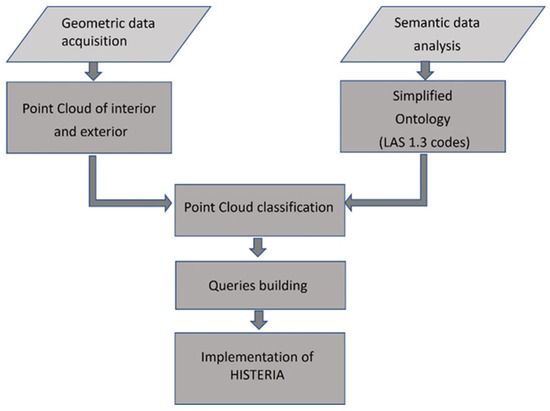
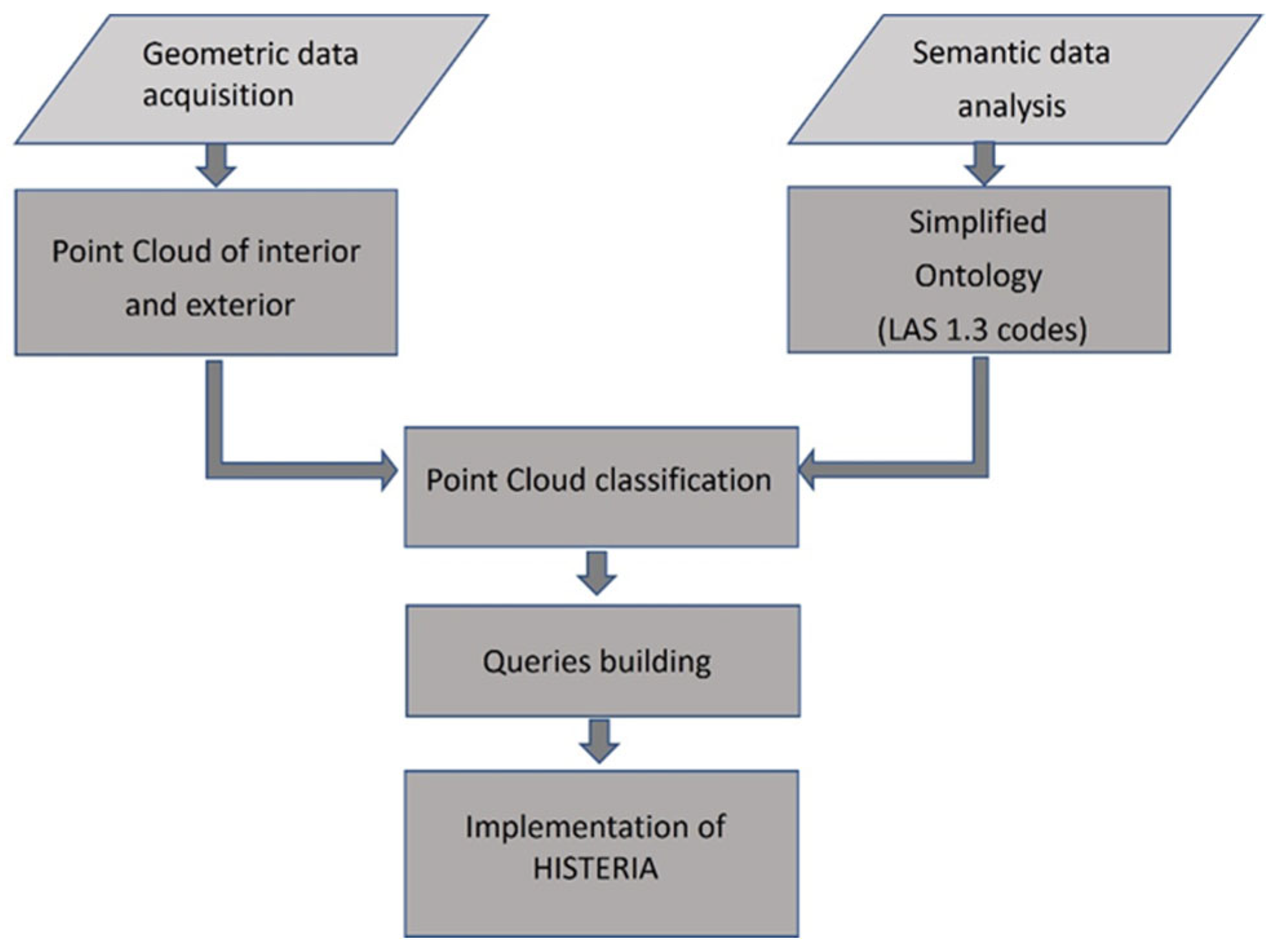
Figure 2 summarizes the workflow followed in this project. After the geometric data acquisition of the interior and exterior of the building, the respective point-clouds were registered (TLS) or created (photogrammetry). The available semantic data were analyzed, and an ontology was designed. The classification of the point-clouds followed, as well as the predefinition of queries. Finally, the app HISTERIA was implemented with a focus on the user. These steps are described in Section 2.1, Section 2.2, Section 2.3, Section 2.4 and Section 2.5.
Figure 2.
Workflow of the project.
2.1. Geometric Data Acquisition
Three survey methods were applied to obtain the geometry of the object of interest, as described in the following sub-sections: TLS-survey, Photogrammetry and virtual flight.
2.1.1. TLS-Survey
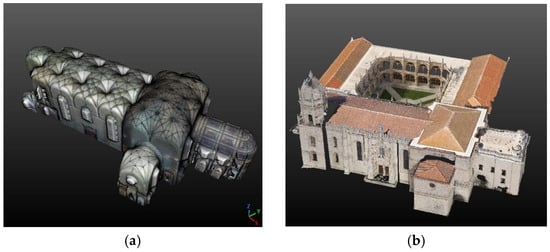
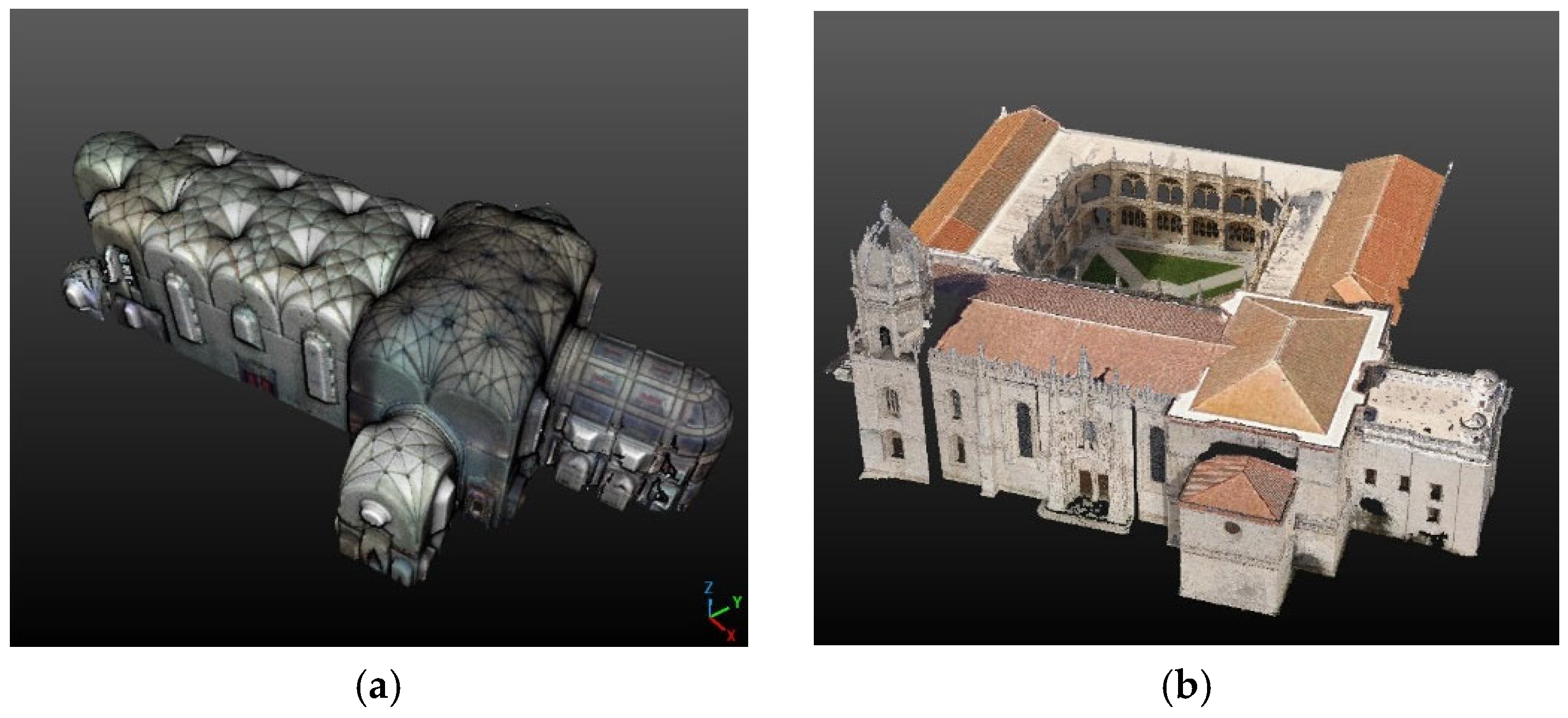
A TLS survey of the interior of the church (Figure 3a) was carried out using a Faro Focus 3D-X330 laser scanner (Faro Technologies, Lake Mary, FL, USA). A total of 23 scans were acquired using spherical targets with a diameter of 14.5 cm placed at strategic locations to register the partial point-clouds. This is a relatively small number of scans, which was only possible due to the openness and height of the space, which gave rise to a very reduced number of hidden areas. The church nave is 21 m wide and 21 m high, and the crossing is 27 m wide and 33 m high. In total, the length is about 89 m from the west axial portal to the chancel east wall. The laser scanner was configured to deliver points 6.14 mm apart at 10 m distance from the instrument. Each scan took 11 min; thus, the whole church interior was surveyed in one afternoon. RGB images were acquired, and no georeferencing was performed. Restoration works in the exterior prevented the TLS survey of the exterior of the church from taking place at the same time. The scans were registered based on common spherical targets using the software Scene 5.5 from Faro Technologies (Lake Mary, FL, USA) [45].
Figure 3.
Point-clouds of the Hieronymites Monastery: (a) TLS surveyed interior, (b) Photogrammetric surveyed exterior; roofs obtained from virtual flight.
2.1.2. Photogrammetry
The exterior of the church contains two highly elaborated portals, to the south and to the west. The whole exterior part, including the portals, was surveyed by photogrammetry. Photographs were obtained using a Sony alpha 230 camera (Sony, Tokyo, Japan) at a distance of ~18 m and an end overlap of ~80%. Portals were covered from a shorter distance using diverse camera axis angles to ensure as few hidden areas as possible given the existing small statues and decoration. A total of 167 photographs were collected of the church exterior walls, 255 of the cloisters, 82 of the south portal and 188 of the west portal. The photographs were taken over several days, as determined by light conditions. For this task, the restrictions imposed in 2021 during the pandemic were advantageous since there were no tourists on the site. Under normal conditions, hundreds of people gather outside awaiting entry, since, as already mentioned, this is the most visited monument in the country. The following projects were defined in the software Pix4DMapper 4.2.26 [46]: one for the exterior wall and tower, one for the cloisters and one for each of the portals. Dense point-clouds were photogrammetrically generated. The clouds from all projects were aligned through common points in CloudCompare Version 2.13.2 [13], and finally, the alignment with the TLS point-cloud was also accomplished through the use of points in windows and doors using the same software. CloudCompare is a very efficient free open-source software for point-cloud/mesh editing and management, and it was intensively used throughout this project.
2.1.3. Point-Cloud from Virtual Flight
Although interior and exterior walls of the church and cloisters had been surveyed, roofs were still missing from the 3D model. Due to recently issued laws on Unmanned Aerial Vehicle (UAV) flight restrictions, a UAV mission over the church was not allowed. Since the roof presented a very simple geometry of a gable roof over the nave and a hip roof over the crossing without special details other than tiles, the decision was taken to resort to a less precise method to obtain the missing point-cloud, which was a virtual flight with Google Earth Pro [44]. Using the Google Earth Movie Maker tool, a high-resolution virtual tour passing over the 3D monastery was created and exported. The movie was then transformed into single frames, and an excerpt of the frames was fed into Pix4DMapper to create a point-cloud from which the roof was segmented. The accuracy of this cloud is not comparable to the ones obtained by TLS and photogrammetry used for the walls, but it was an ad hoc solution for optically completing the 3D model, though not to be used for measuring. The roof point-cloud was aligned with the others in CloudCompare through common points on the roof edges (Figure 3b).
2.2. Semantic Data Analysis and Design of an Ontology
The object of interest is presently under the purview of the ‘Museus e Monumentos de Portugal’, (MMP) (Museums and Monuments of Portugal), the government institution in charge of physical cultural heritage. MMP manages and maintains the SIPA [42], which is the “Sistema de Informação para o Património Arquitetónico” (Information System for Arquitectural Heritage). This is a web platform that gathers detailed information in the form of text and images on all national monuments, making it accessible to the scientific community and to the public.
For the Hieronymites Monastery, the text in SIPA occupies several pages, including a detailed architectural description, a sequence of architects involved in its construction, a chronology of facts and a report of past interventions, together with several miniatures of photographs, plans, elevations, and isometrics of the monument. As SIPA constitutes an official source, it was adopted for this project as the basis of the semantic information.
Apparently, due to successive updates, the text is not well organized; even the chronology of facts sometimes fails to follow chronological order. An automatic partition of the text using NLP (Natural Language Processing) free tools, such as API Natural Language AI from Google Cloud [47], was tested to foster the classes for the classification, but the results were not satisfactory. Additionally, a summary of the individual texts made automatically with the ChatPDF [48] free version was too reduced and left out important facts while placing too much emphasis on others of lesser importance and not generally complying with the requirements of the project. The most promising tool tested was Coral AI [49], which presented a summary with the most relevant facts regarding the building contained in the original text, although every word had been translated into English, which was unfortunate for the present project, which had been intended, in its first version, to be offered to the Portuguese public. While recognizing the capacity of such tools, the interactive text analysis was preferred for the present project with the aim of also having a reference by which to test the quality of the automated NLP tools for further developments awaiting beyond the scope of the present paper.
The texts were interactively analyzed and divided into sentences, and organization began. Each sentence of the text detailing the chronology of events was separated by date, author, event, whether the event could be located, and if so, if it could be found in the parts of the church or cloisters covered by the point-clouds, which was the area of interest. A locatable event is, for instance, the construction of a chapel, while a papal bull founding the monastery is a non-locatable event since it cannot be associated with any point in the clouds. Both locatable and non-locatable events were considered in the proposed ontology, but they were accessed differently in the app.
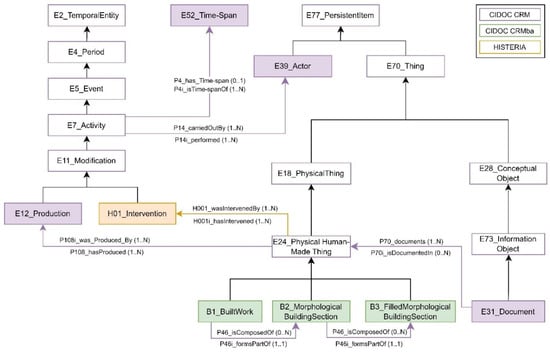
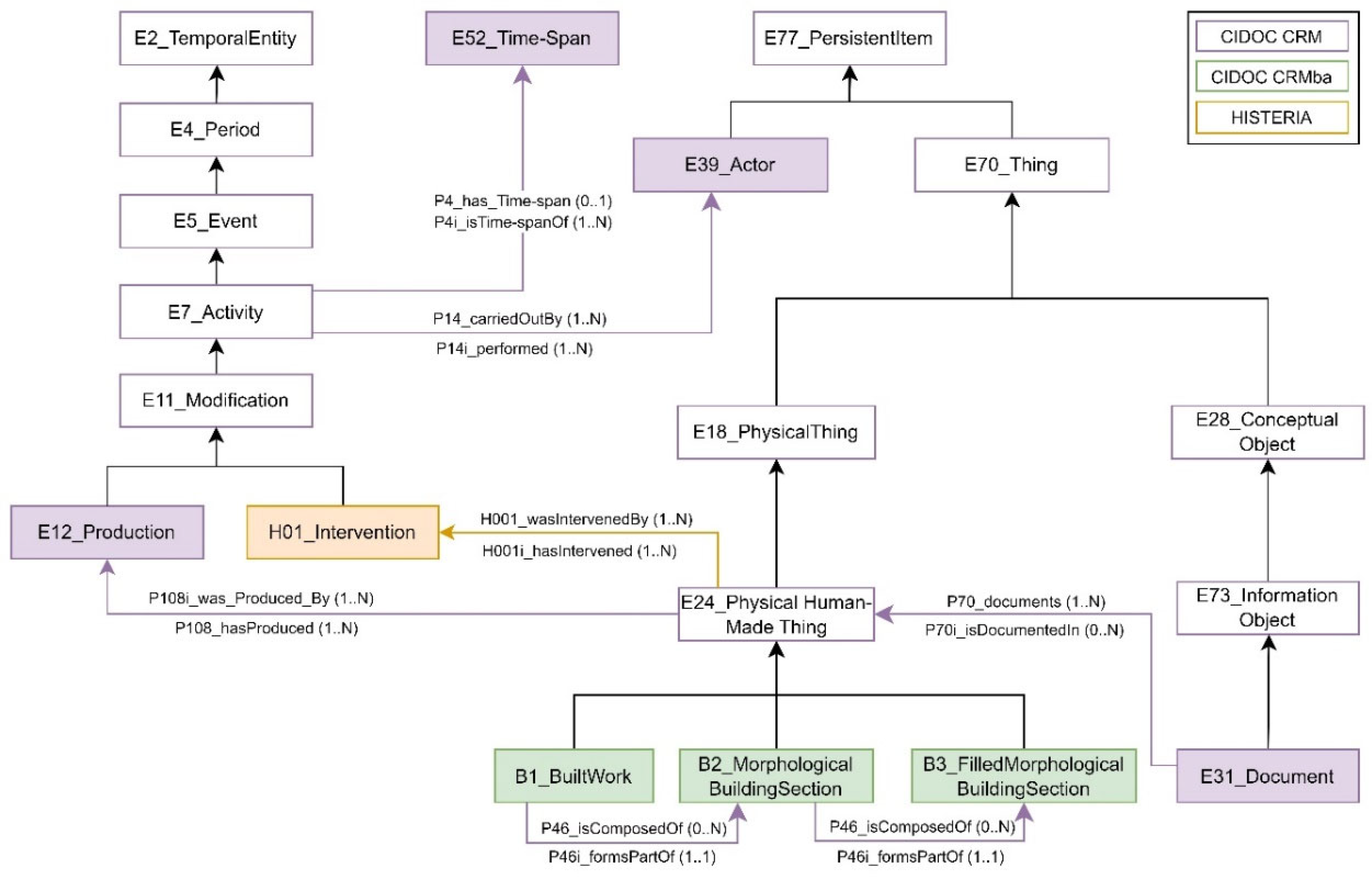
For the organization of the semantic information and to develop the HISTERIA application, a simplified ontology was designed based on the CIDOC CRM [16], a reference model created to provide a common semantic framework for cultural heritage, which has now become an international standard (ISO 21127) [17]. Specifically, version 7.1.2 of this model was applied, along with the CIDOC CRMba version 1.4 extension [50], developed for documenting building archaeology. The ontological model was defined through an analysis of the standard’s concepts and relationships, identifying the terminology to be integrated based on the previously conducted semantic data analysis.
In the proposed model (Figure 4), the concepts describing the building and its parts are represented through the classes B1 Built Work, B2 Morphological Building Section, and B3 Filled Morphological Building Section from the CRMba model, all established as subclasses of E24 Physical Human-Made Thing. The B1 Built Work class represents the entire building. The B2 Morphological Building Section class defines the building’s subdivisions, which may include various architectural spaces and construction elements. Finally, the B3 Filled Morphological Building Section class represents the construction elements of the building. The relationship between the building, its parts, and its elements are modeled through the property P46 ‘is composed of’ (or its inverse P46i ‘forms part of’).
Figure 4.
Ontology classes and their relationships (properties). Filled boxes represent the classes used in HISTERIA.
Activities related to the construction of the building and subsequent interventions are represented by the subclasses E12 Production and H01 Intervention, both established as subclasses of E11 Modification. E12 Production documents actions associated with the building’s initial construction and its components, while H01 Intervention represents activities carried out after the building was constructed. The relationship between the building, its parts, and its elements with the E12 Production class is expressed through the property P108i ‘was produced by’ (and its inverse P108 ‘has produced’). Similarly, the relationship with H01 Intervention is modeled using the property H001 ’was intervened by’ (and its inverse H001i ‘has intervened’).
All existing documentation related to the building or any of its parts is represented in the ontology through the class E31 Document, linked to the subclasses of E24 Physical Human-Made Thing through the property P70 ‘documents’ (and its inverse P70i ‘is documented in’).
Finally, the classes E52 Time-Span and E39 Actor are included to document when and by whom the construction and intervention activities were carried out. The relationship between these activities and E52 Time-Span is expressed through the property P4 ‘has Time-Span’ (and its inverse P4i ‘is Timespan of’), while the relationship with E39 Actor is expressed through the property P14 ‘carried out by’ (and its inverse P14i ‘performed’).
To standardize data and enhance efficiency in extracting information through the queries implemented in HISTERIA, the terminology for certain classes defined in the ontological model is specified. This is achieved by specializing the E55 Type class from the CRM model into the following subclasses: H002 Morphological Building Section Type, H003 Morphological Building Section Subtype, H004 Filled Morphological Building Section Type, H005 Time-Span Type, and H006 Actor Type. Table 1 lists the values for each type and subtype considered in the ontology, along with their corresponding internal numeric codes. Assigned numeric codes are in the domain from 64 to 255. This corresponds to the values of the attribute ‘Classification’ in the standards LAS 1.3 and LAS 1.4 that are user definable when saving point-clouds in the Point Data Record Formats from 6 to 10 [51].
Table 1.
Instances considered for the Hieronymites Monastery.
From the 192 user definable codes, only 53 are assigned, leaving enough free codes to extend the coding scheme. As Table 1 shows, codes between 70 and 99 were reserved for Morphological Building Section Interior, from 120 to 139 were for Morphological Building Section Exterior, from 100 to 139 were for Actor, from 140 to 169 were for Time-Span, and from 170 to 209 were for Filled Morphological Building Section. The values of the list that were not explicit in SIPA were defined with the help of experts in the Monastery as well as architects.
2.3. Point-Cloud Classification
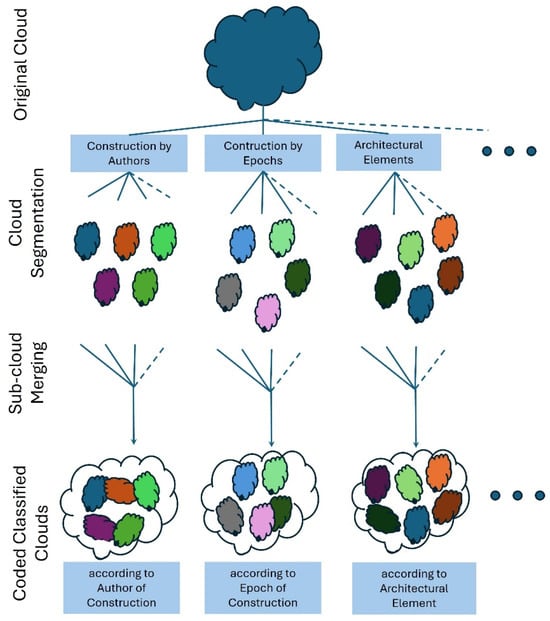
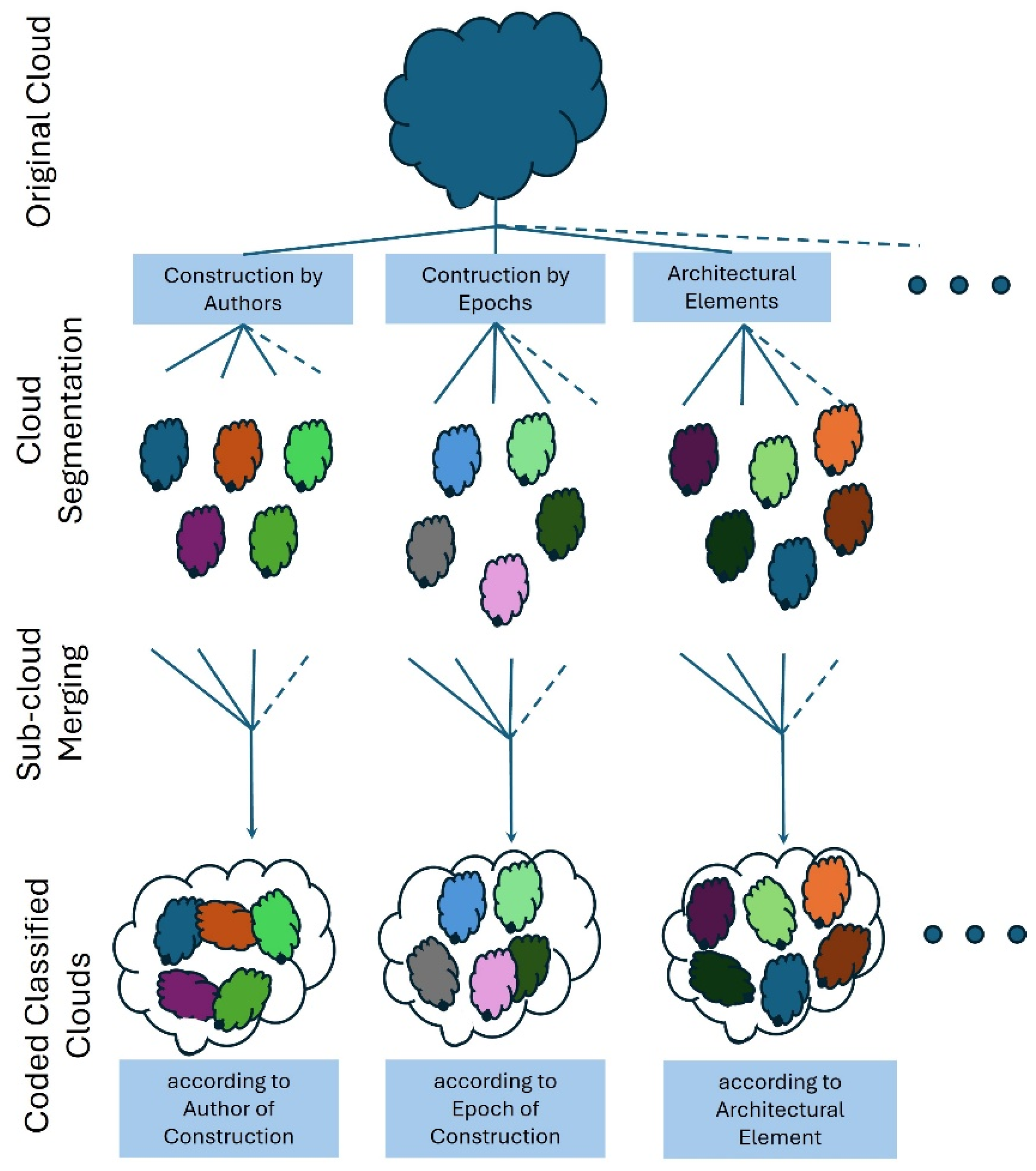
Following the organization of the simplified ontology and the definition of the code lists, the classification of the point-clouds began. Experts in the fields of Architecture, History and Art History, the latter two coming from the monument staff, were called in to advise in the operation. The software CloudCompare (CC) version 2.13 alpha [13] was chosen, namely the main GUI (Graphical User Interface) application. The classification process is illustrated in Figure 5. It consisted of opening a complete point-cloud, either the interior cloud, the exterior cloud, or both together, and interactively segmenting the parts corresponding to each of the listed values for one of the classes at a time. For instance, when classifying the cloud according to the class B3 Filled Morphological Building Section, all the points that belong to columns (value = ’column’) were selected and were assigned the same code on the list for H004_Filled Morphological Building Section Type, which was ‘172’ (Table 1). All the points belonging to interior walls (or vaults, floor, etc.) were also assigned a same code from the list. The respective code is numeric (an integer) and is saved in a scalar field of the cloud, named ‘Classification’. Since CC version v2.13.2 was used, this scalar field is already a standard, and the user just needs to select to add this field to the cloud before defining the value to be assigned to it. ‘Classification’ is also a standard attribute field in the LAS 1.3 and LAS 1.4 format [51] for saving point-clouds as already mentioned in Section 2.2. Scalar fields (SF) in CC are very useful for defining properties of the individual points of the cloud, like surface normal components, roughness, and other variables calculated from the local geometry of the cloud. In the present case, the scalar field ‘Classification’ contains a constant value for all points of the segmented region meaning they all belong to the same instance of the defined ontology class (Table 1).
Figure 5.
Classification flow diagram.
All segmented clouds, each bearing a different classification code and belonging to the same ontology class, are first saved separately, in order to gain swifter access when using slower platforms for exploring and then merged to one total coded class point-cloud (Figure 5). At the end of the process there is a coded class point-cloud for each of the ontology classes that have a physical representation: B2 Morphological Building Section, B3 Filled Morphological Building Section, E39 Actor, E52 Time-Span.
There is no need for segmented clouds to be disjointed. The used ‘Merge Clouds’ operator creates a cloud with as many points as the codes that each XYZ point has. For instance, this is relevant for areas that were built by two or more architects. The same point is classified with two or more codes. The reverse side of the medal is that the merged classified point-cloud can be larger than the original one. For very large or complex objects, this could make access to information more difficult due to the size of the clouds to process and show. For the present heritage object, the class H002_Building Section Type allows for the separation in Interior Part and Exterior Part clouds, which is sufficient to guarantee fluidity in the process. Similar solutions can be adopted for larger objects.
A color scale with discrete intervals had to be implemented for each coded class point-cloud. The color ramp served as a legend presenting text labels with the values of Table 1, instead of the internal numeric codes, in order to help the user to interpret query results. Text labels in color scales were first included in the version v2.13.alpha of CloudCompare.
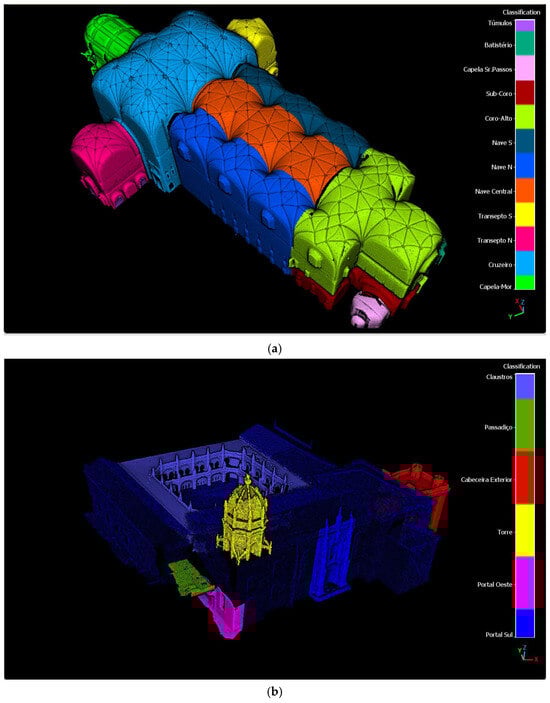
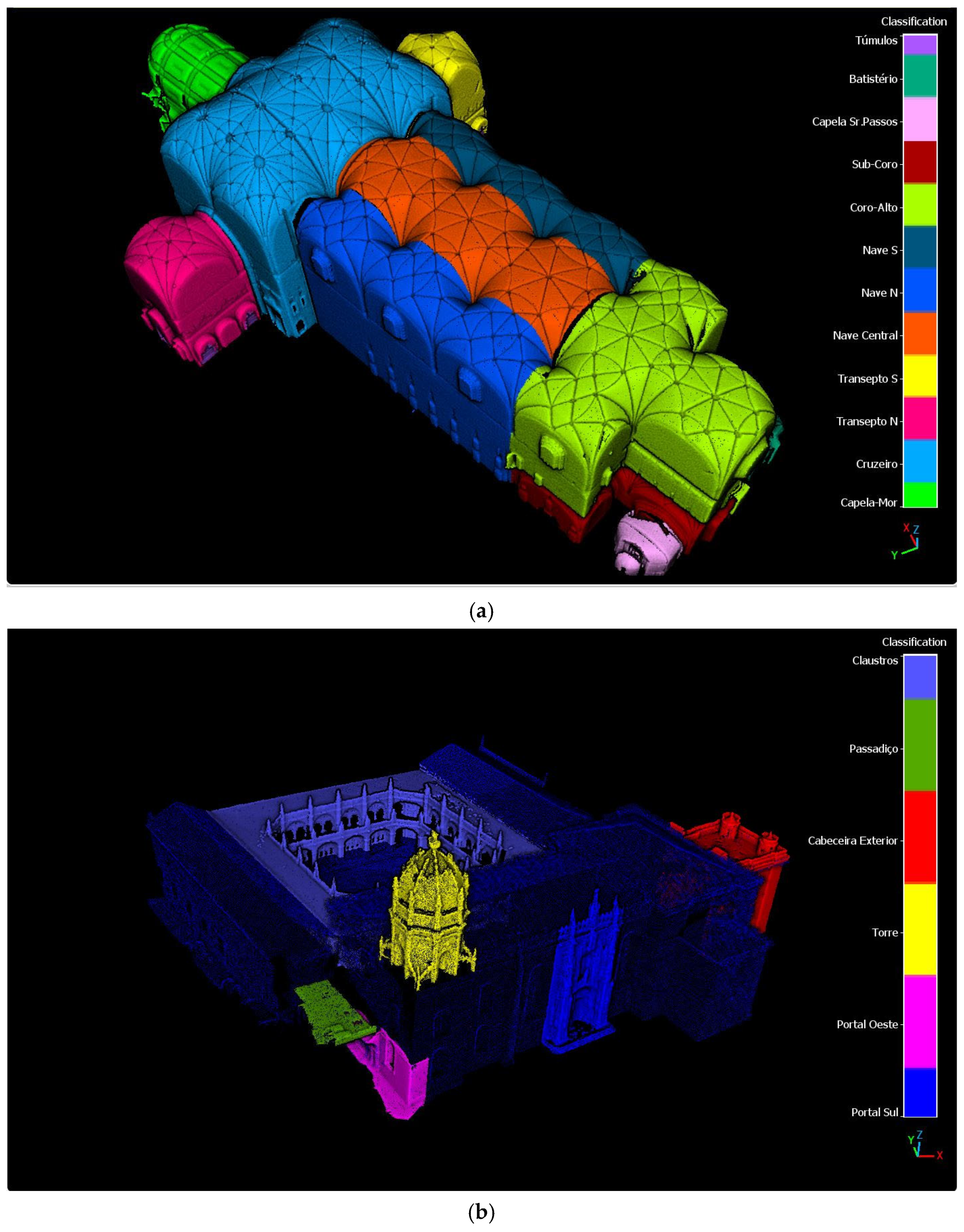
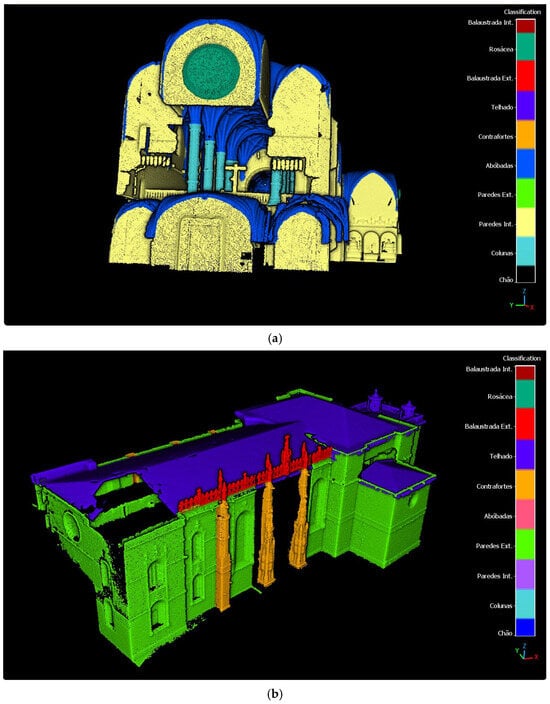
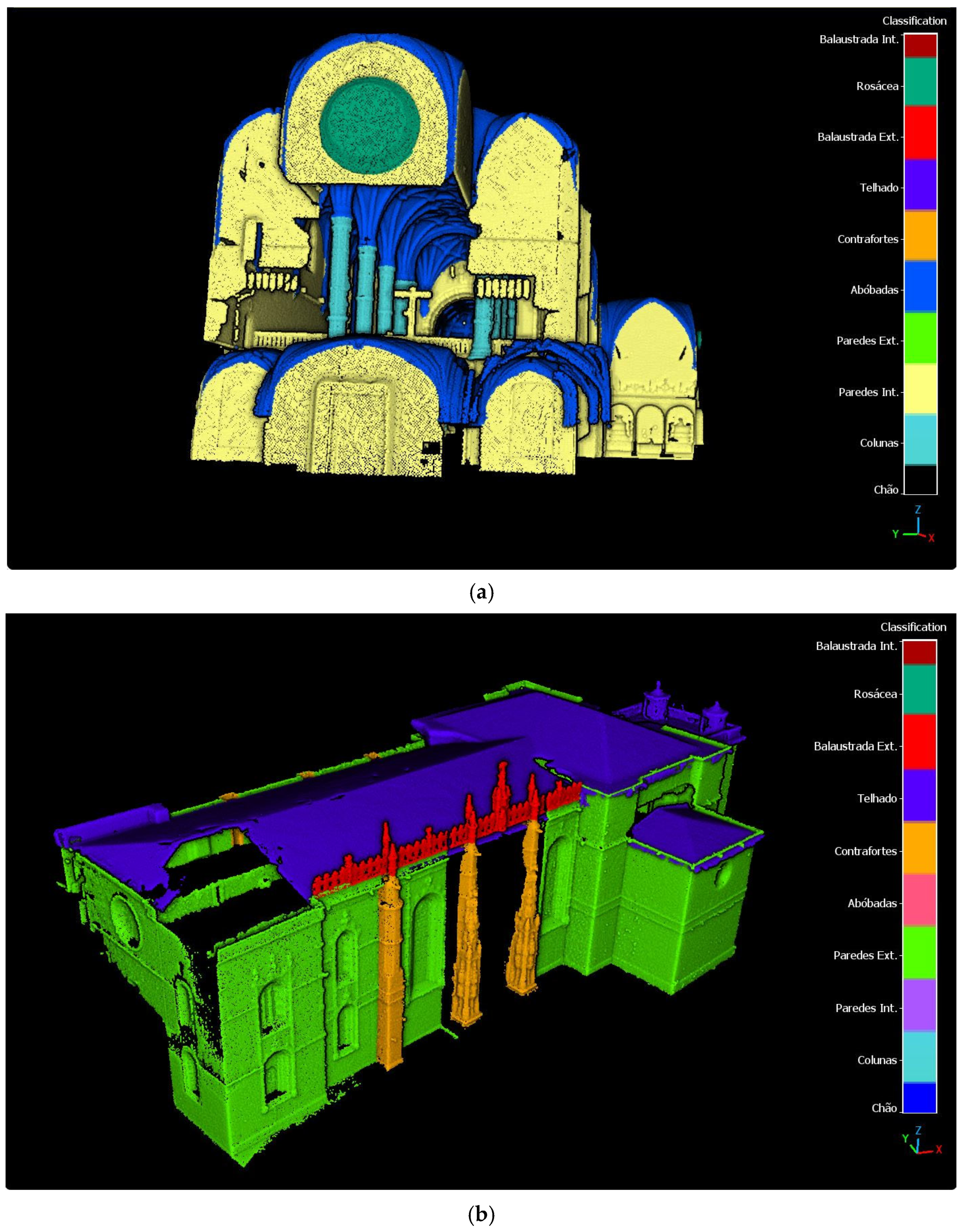
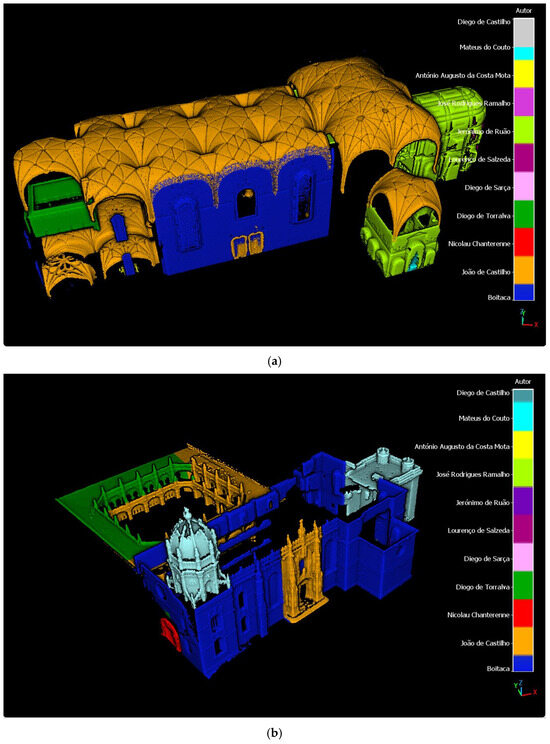
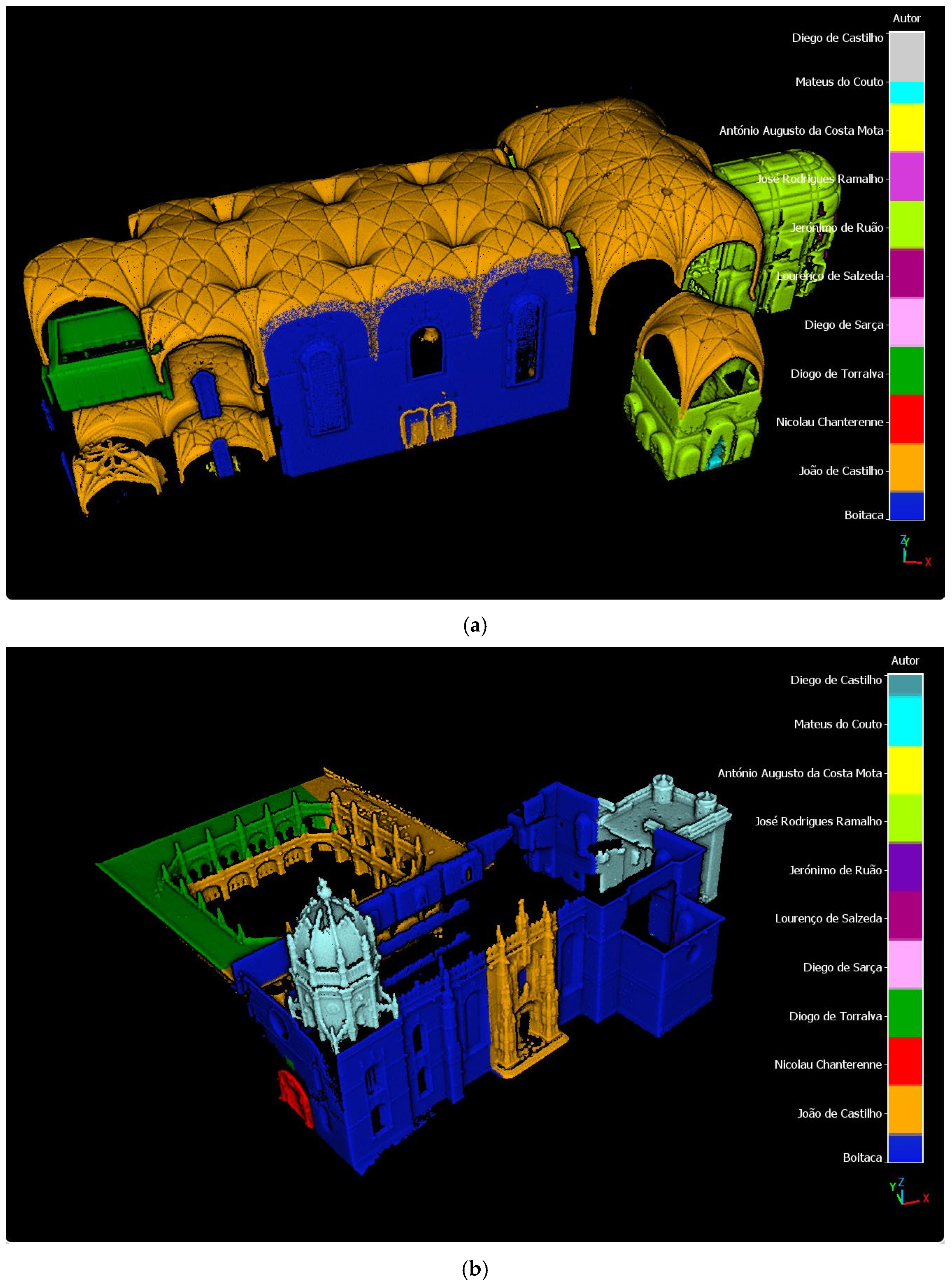
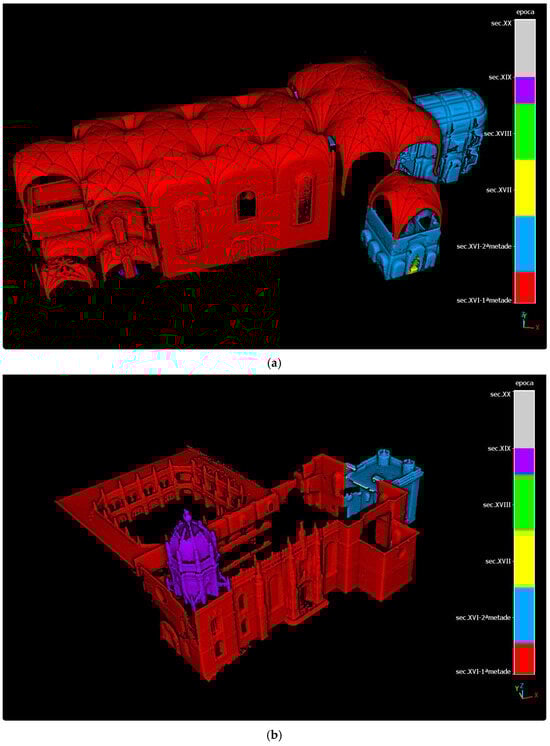
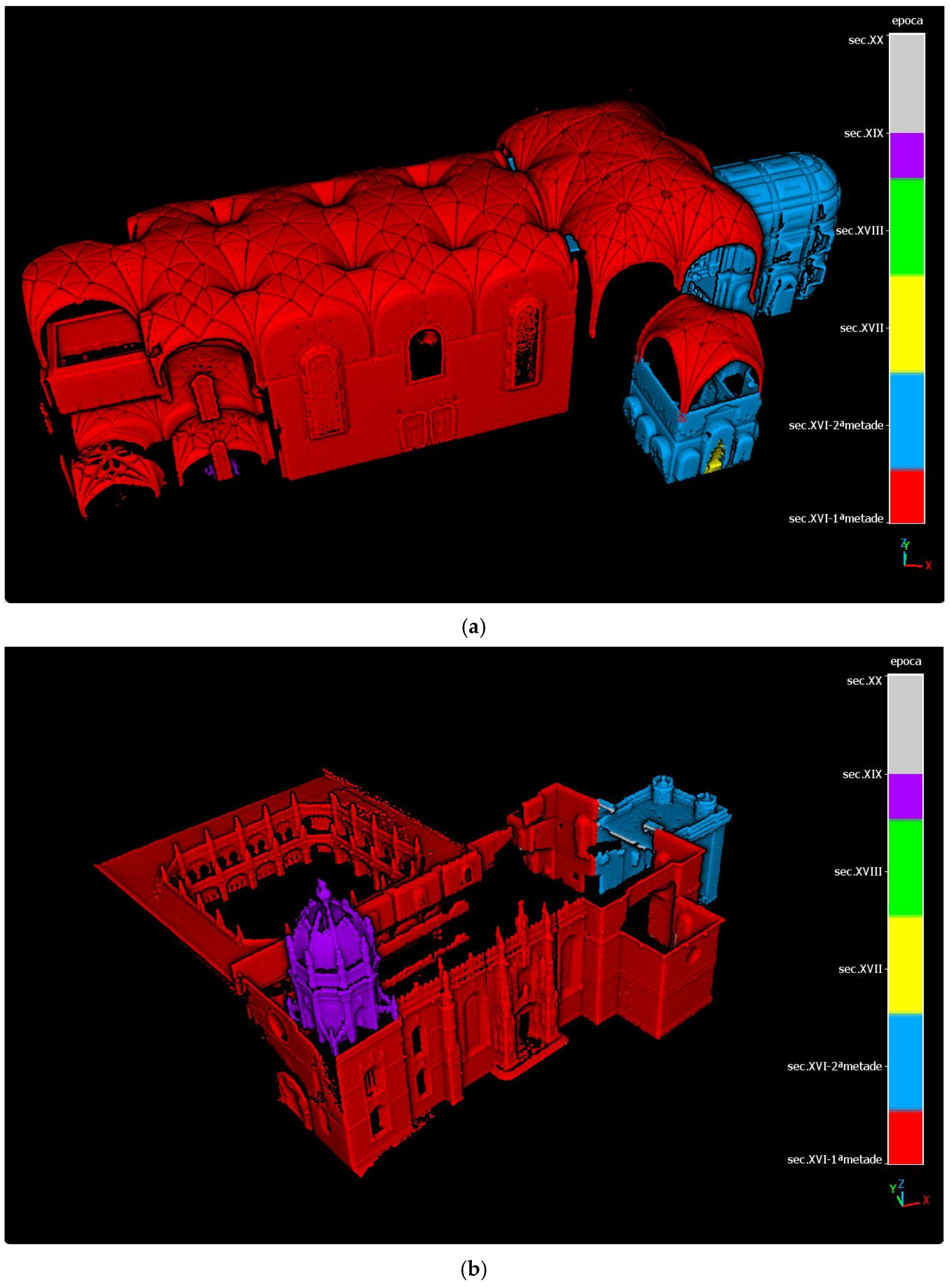
Figure 6, Figure 7, Figure 8 and Figure 9 show the coded classified point-clouds for each class. The interactive point-cloud classification was both the most time-consuming task and the most relevant. It required a constant interpretation of the text information in SIPA in order to suitably locate events in the cloud and classify them accordingly, sometimes resorting to other sources in the literature and to experts. This segmentation demands expertise from several fields according to each class of ontology (historians, art historians, architects), and in this phase, extra information not covered by SIPA can be included, such as information resulting from studies on the monument, including the seismic vulnerability indices of the vaults and columns. If it can be located, the information can be transferred to the point-cloud as values of a new class, enriching the 3D model and allowing more analyses across classes. Since the segmentation criteria are not of physical or geometric nature, like color, roughness or surface normal direction, for instance, an automatic classification was out of the question, and an interactive approach, as shown, was required.
Figure 6.
Point-cloud classified according to the Morphological Building Section Subtype: (a) interior; (b) exterior.
Figure 7.
Point-cloud classified according to the Filled Morphological Building Section Type (architectural elements): (a) interior; (b) exterior.
Figure 8.
Point-cloud classified according to the Actor Type (architect): (a) interior; (b) exterior.
Figure 9.
Point-cloud classified according to the Time-Span Type (Epoch): (a) interior; (b) exterior.
2.4. Queries Building—Background Running Operations
CloudCompare (CC) has a command-line mode [52] that allows for processing and operating with point-clouds without direct user interaction, making it possible to execute CC commands in the background of an external application. This represents a great advantage over interactive point-cloud processing programs. To build the necessary command lines, a decision regarding the queries to offer to the user must be made. Basically, in the present case, the user can have one of three wishes (queries) during the exploration of the classified point-clouds. These are to visualize the following:
- 1.
- the points which satisfy the condition ‘cloud A = ‘a’’ (one cloud, one value; for instance, ‘what was built in the 17th century ?’: coded cloud to search = ‘Time-Span’, value = ‘17th century’, code = ’143’);
- 2.
- the points which satisfy the condition ‘cloud A = ‘a’’ or ‘cloud A = ‘b’’ (c, d, …) (the same cloud, two or more values; for instance, ‘what was built by architects ‘Boitaca’ or ‘João de Castilho’?’: coded cloud to search = ‘Actor’, values = ‘Boitaca’ or ‘João de Castilho’, codes = ‘101’ or ‘102’);
- 3.
- the points which satisfy simultaneously ‘cloud A = ‘a’’ and ‘cloud B = ‘b’’ (and cloud C = ‘c’ and…) (two or more different clouds; for instance, ‘which external walls were built in the late 16th century ?’: coded cloud to search = ’Filled Morphological Building Section’, value = ‘external walls’, code = ‘174’, and coded cloud to search = ‘Time-Span’, value = ‘16th century-2nd half’, code = ‘142’).
The answers to queries 1 and 2 are obtained by searching within the same class (the same coded class point-cloud), and that for question 3 involves a search across classes (different coded class point-clouds).
Using the available CC inline commands [46] to solve question 1 results in a text line to be included in the app code with the following operations over the coded classified total point-clouds, one for each class, in the following generically called Clouds A, B, C, D, E, F, G, H (Algorithm 1. Note: ## enclose comments):
| Algorithm 1: Search in the same class (one instance) |
| open Cloud A activate scalar field “Classification” filter Cloud A where “Classification” = “a” save result #Cloud1# |
Cloud1 will contain only the points that comply with ‘Cloud A = ‘a’’.
For question 2, the operations must go further. Cloud1 must be saved as an intermediate result, and the algorithm resumes (Algorithm 2):
| Algorithm 2: Search in the same class (several instances) |
| repeat for all x # all pretended codes x # filter Cloud A where “Classification” = “x” save result #Cloud X # end open Cloud1, Cloud X, …. (X = 2,3,…) merge Cloud1+Cloud X +…. (X = 2,3,…) save result #Cloud R # end |
The resulting point-cloud, Cloud R, contains the points that comply with ‘Cloud A = ‘a’’ or ‘Cloud A = ‘b’’ (or ‘Cloud A = ‘c’’, etc.)
The search across classes demanded by question 3 requires an operation between distinct clouds and succeeds only when all the class point-clouds were built originating from the same total point-cloud, which is the case in this project. This implies that one point can exist in several classes, but its spatial coordinates (X, Y, Z) are the same in all classes. The command sequence is as follows (Algorithm 3):
| Algorithm 3: Search across classes |
| open Cloud A activate scalar field “Classification” filter Cloud A where “Classification” = “a” save result #Cloud1# open Cloud B activate scalar field “Classification” filter Cloud B where “Classification” = “b” save result #Cloud2# compare sizes (Cloud 1, Cloud 2) Reference_cloud = biggest_cloud_from (Cloud1, Cloud2) Cloud_to_compare = smallest_cloud_from (Cloud1, Cloud2) open Cloud_to_compare open Reference_cloud calculate Distance between clouds (Cloud_to_compare, Reference_cloud) #command C2C-DIST # save both clouds open Cloud_to_compare activate scalar field “C2C” # this scalar field is automatically# #added to the Cloud_to_compare# #and contains the distances # # between both clouds# filter Cloud_to_compare where “C2 C” = 0 save result #Cloud R1# |
‘C2C = 0’ corresponds to the points that are common to both clouds and are spatially coincident (distance between them is 0), meaning that the same spatial point complies with both criteria simultaneously since it appears in both coded class clouds. If the search involves more than two different classes, the operation must be repeated between the resulting cloud, Cloud R1 (points with 0 distance) and the new coded class cloud filtered according to the new pretended value of ‘Classification’. Contrarily to the previous case (Algorithm 2), where the final result was a merge of several clouds, in this case, the resulting cloud of points that comply with several criteria normally gets smaller the more criteria it has to comply with (it is the intersection between more sets of points).
While the search within the same class does not normally cause logical problems, the search across classes should be limited to reasonable queries. For instance, it does not make sense to search for a certain architect in the 19th century when he only lived in the 16th century. To avoid this, conditional queries must be formulated and presented to the user. Crossing ‘Construction by Author’ with ‘Construction by Epoch’, for instance, requires offering to the user the option of the epoch first and then, for the chosen epoch, giving the option between the architects that worked in that epoch only.
These are the basic algorithms to be transformed in CC inline commands to implement in the HISTERIA application. Additionally, the viewer of CloudCompare, called CCViewer [53], can be executed as an inline command, which is useful for visualizing the point-clouds resulting from the queries directly in the interface of the application to be designed.
All the point-cloud operations run in the background of the MATLAB app, taking advantage of the flexibility of CloudCompare for processing point-clouds. As will be described in sub chapter 2.5, merely the cloud to filter and the classification codes are indirectly selected by the user through the options of the app interface.
2.5. Implementation of HISTERIA
The HISTERIA application (Heritage Information System Tool to Enable Research and Interventions Analysis) was developed in MATLAB 2023 App Designer environment. It consists of one interface panel whose elements (buttons, drop down lists, radio buttons groups, etc.) are programmed to perform different actions according to the parameters selected interactively by the user of the app. The code behind the interface panel controlling the actions is built as object-oriented programming.
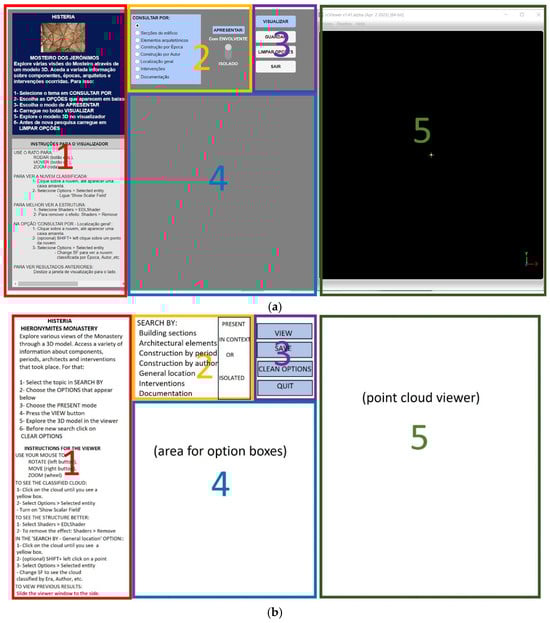
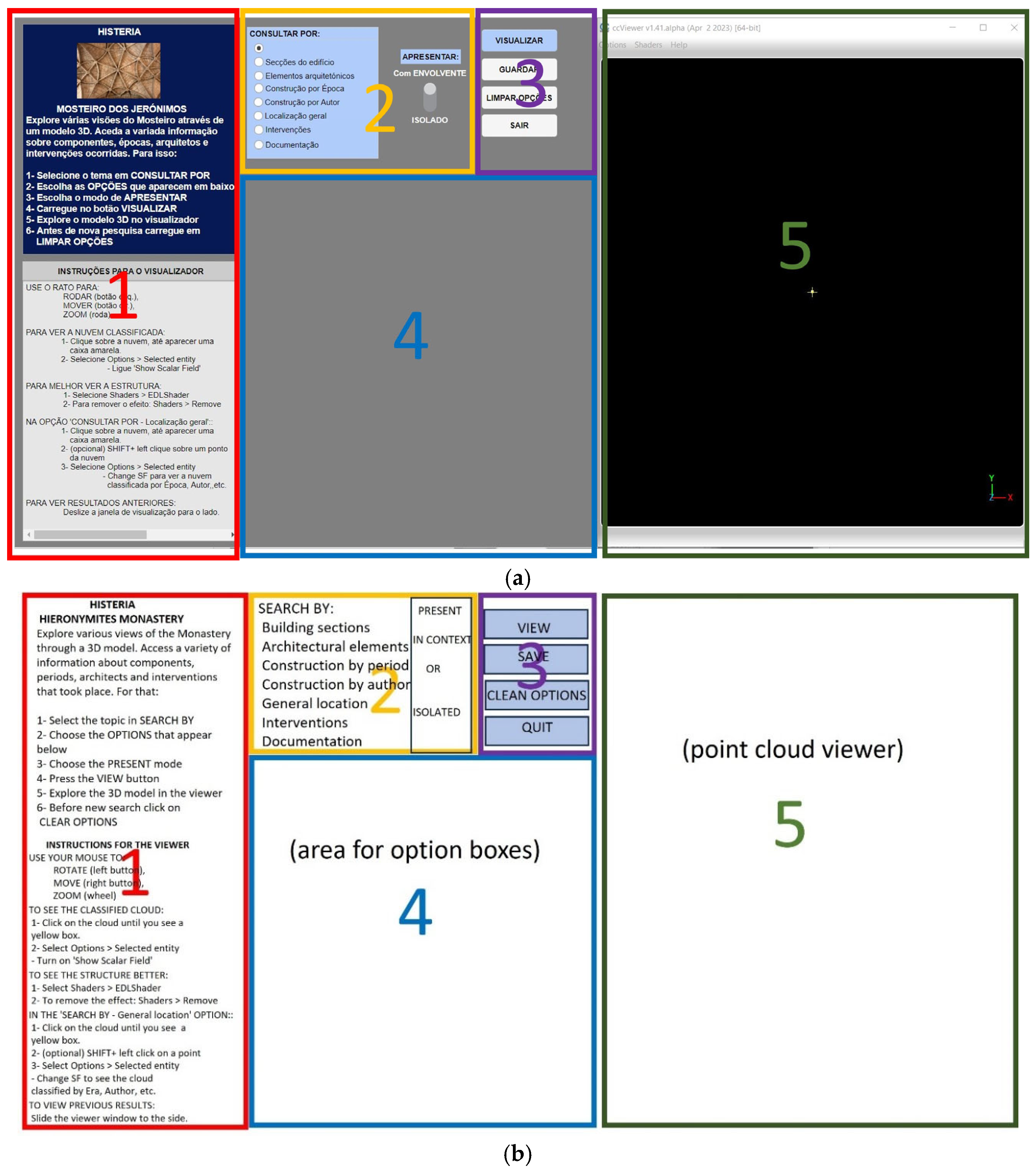
The interface panel of HISTERIA is divided into the following five fields (Figure 10): (1) Information; (2) Class and Presentation type selector; (3) Action buttons; (4) Instance selection windows presented according to the selected class in field 2; (5) Point-cloud viewer window (CCViewer).
Figure 10.
(a) HISTERIA interface panel and its 5 main fields; (b) translation of the text of the fields.
In field 1, general static information on the usage of the app is given. At the top, information about where to choose the pretended operation and how to change the options is given. At the bottom, there are instructions for managing the point-cloud viewer, which appears in field 5.
Field 2 gathers the different criteria according to which the user can consult the data. In the left box, the choice is exclusive, meaning only one option can be chosen. The name of the options is a user-friendly translation of the CIDOC-CRM ontology class names and properties. Along with ‘Building Sections’ (Morphological Building Section), ‘Architectural Element’ (Filled Morphological Building Section), ‘Construction by Epoch’ (Built in Time-Span) and ‘Construction by Author’ (Built by Actor), options for ’General Location’, ‘Interventions’, and ‘Documentation’ are offered here. The choice of ‘Building Sections’, ‘Architectural Element’ and ‘General Location’ triggers a second box below the first one where the user must choose between ‘Interior’ and ‘Exterior’ of the building. This division was necessary for the sake of legibility of the result (exterior walls would cover results in the interior) and for reducing the weight of the resulting point-cloud for the sake of fluidity. On the right side of field 2, a switch button allows the user to choose between the representation of the results as isolated point-clouds, which appear in a higher resolution (middle degree), and the representation of the point-clouds in the surrounding architectural context of the monument. Here, the whole monument cloud, or just the interior cloud (if interior is chosen), appears in a very low resolution, and the selected features appear highlighted in a low resolution.
The choice of one of the first four options opens a respective box in field 4 where the user can select one or more features s/he wants to be shown in the viewer. The option ‘General Location’ shows a point-cloud of the interior or of the exterior, according to the user’s selection, and offers the possibility of picking a point and switching the coded representation among all the classification possibilities, allowing the user to see which architectural element or which part of the building the point belongs to, in which epoch and by whom it was built.
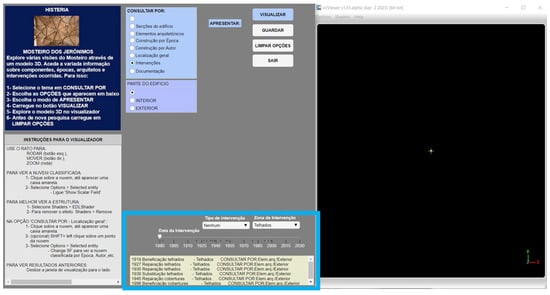
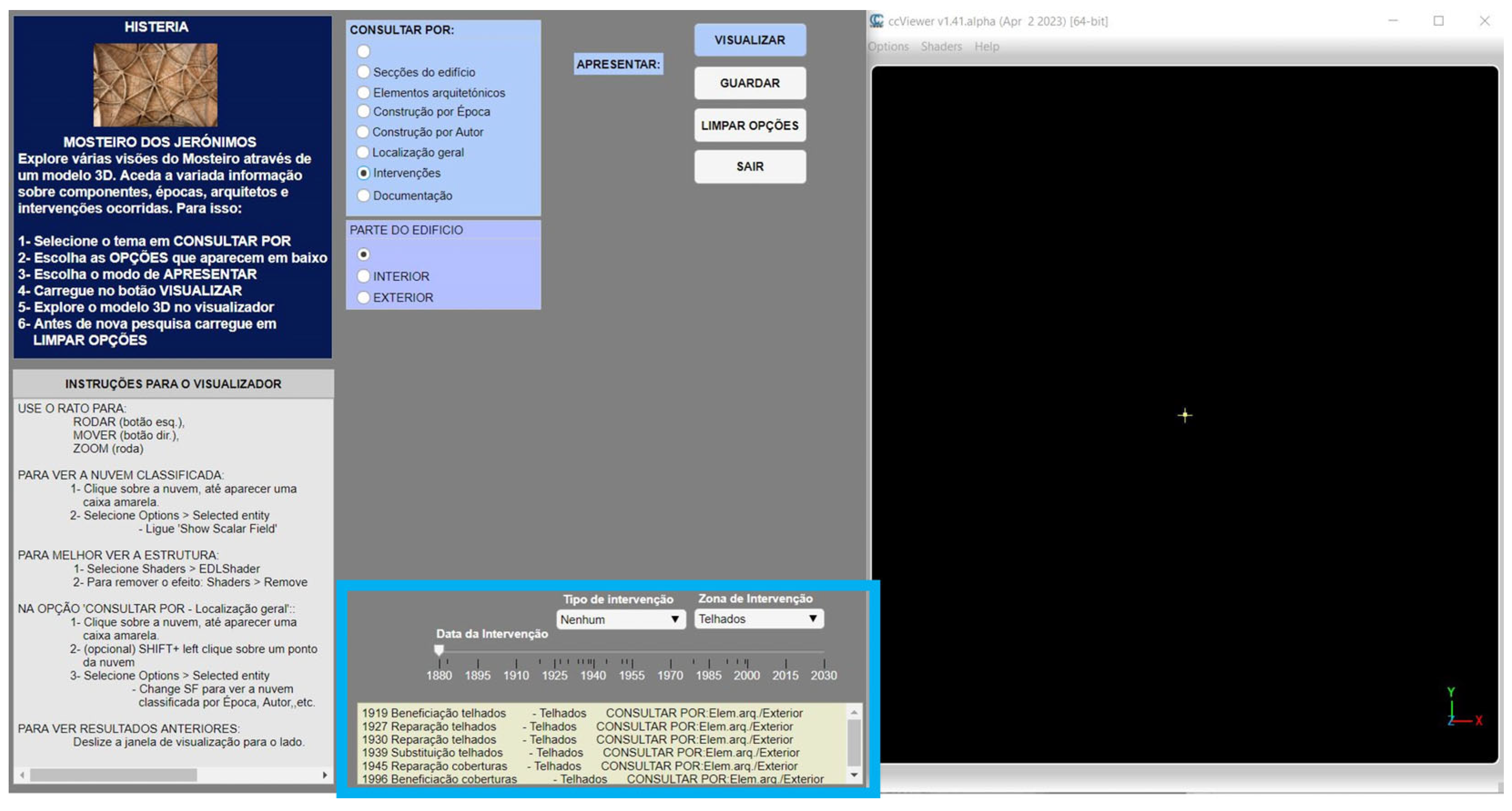
As for the last options, ‘Interventions’ and ‘Documentation’, they refer to queries whose result does not have to be a point-cloud. When ‘Interventions’ is chosen by the user, the following four elements become highlighted in area 4 (Figure 11): an Intervention Zone popup list, an Intervention Type popup list, a Timeline, and a text box. The user has the option to consult data on interventions that have occurred by date, by type or by area intervened. This way of handling intervention data was found to be preferable to the classification of the cloud merely by date or type of intervention, since the user is normally interested in several aspects simultaneously, such as what was done, where, when and how often. The Interventions analyses can be performed without viewing the point-cloud. The result of the query appears as a list in the text box at the bottom, indicating date, type, area intervened and, when available, the options the user should choose in field 2 in order to visualize the intervened area in the point-cloud viewer, if so wished (Figure 11).
Figure 11.
HISTERIA interface panel with Interventions query tools (highlighted in cyan) and query results (bottom box); Text translation of the options- first line center: type of intervention; first line right: zone of intervention (roof is selected); second line: date of intervention (time axis).
As for the option ‘Documentation’, when selected, two hyperlinks appear in field 2, leading the user to the website of ‘Museus e Monumentos de Portugal’ and to the SIPA website, both related to the monument in question. Non-locatable events are in this way made accessible to the app user directly from the main semantic information source.
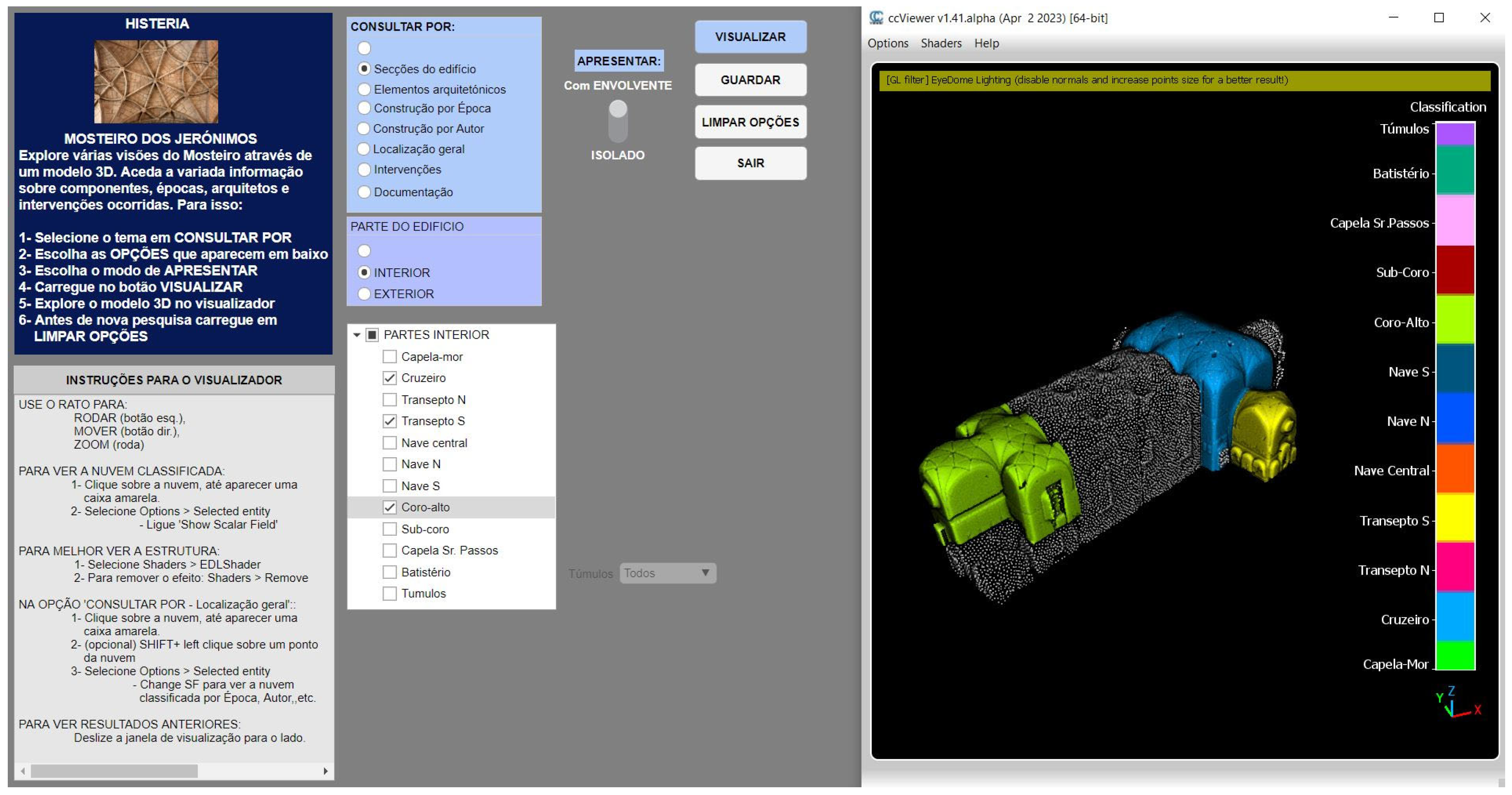
Continuing the description of the interface fields, field 3 (Figure 10) contains the action buttons. Four buttons, VIEW, SAVE, CLEAN OPTIONS and QUIT, respectively allow the results of the queries to be seen in the form of point-clouds in the point-cloud viewer, saving the resulting point-cloud, cleaning the options to choose others, and quitting the application. The point-cloud viewer used was the CCViewer v1.41 alpha [53], which opens in field 5 on the right side of the interface. Near the point-cloud, in the viewer window, a color scale indicates the meaning of each presented point color (Figure 12). This is helpful in the interpretation of the result, especially when more than one option in each class was selected by the user. The point-cloud can be interactively moved, rotated, and amplified, and it can also be observed with natural RGB colors instead of the classification color code.
Figure 12.
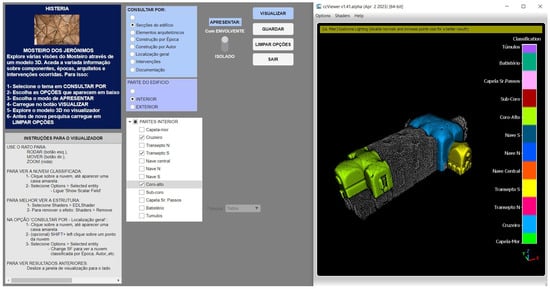
HISTERIA—Result of a query (Search by—Building Sections—Interior—Crossing + South Transept + High-Choir, Present: in context) shown on a CCViewer window inside the application, with text labeled color scale containing the names of the existing building sections.
3. Results
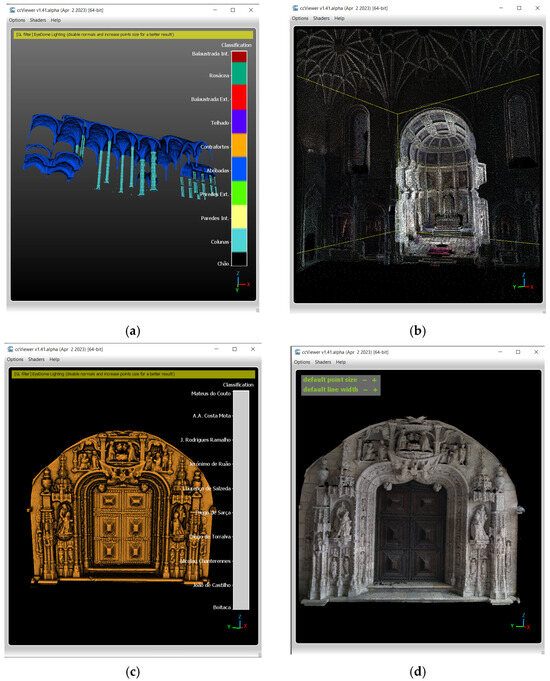
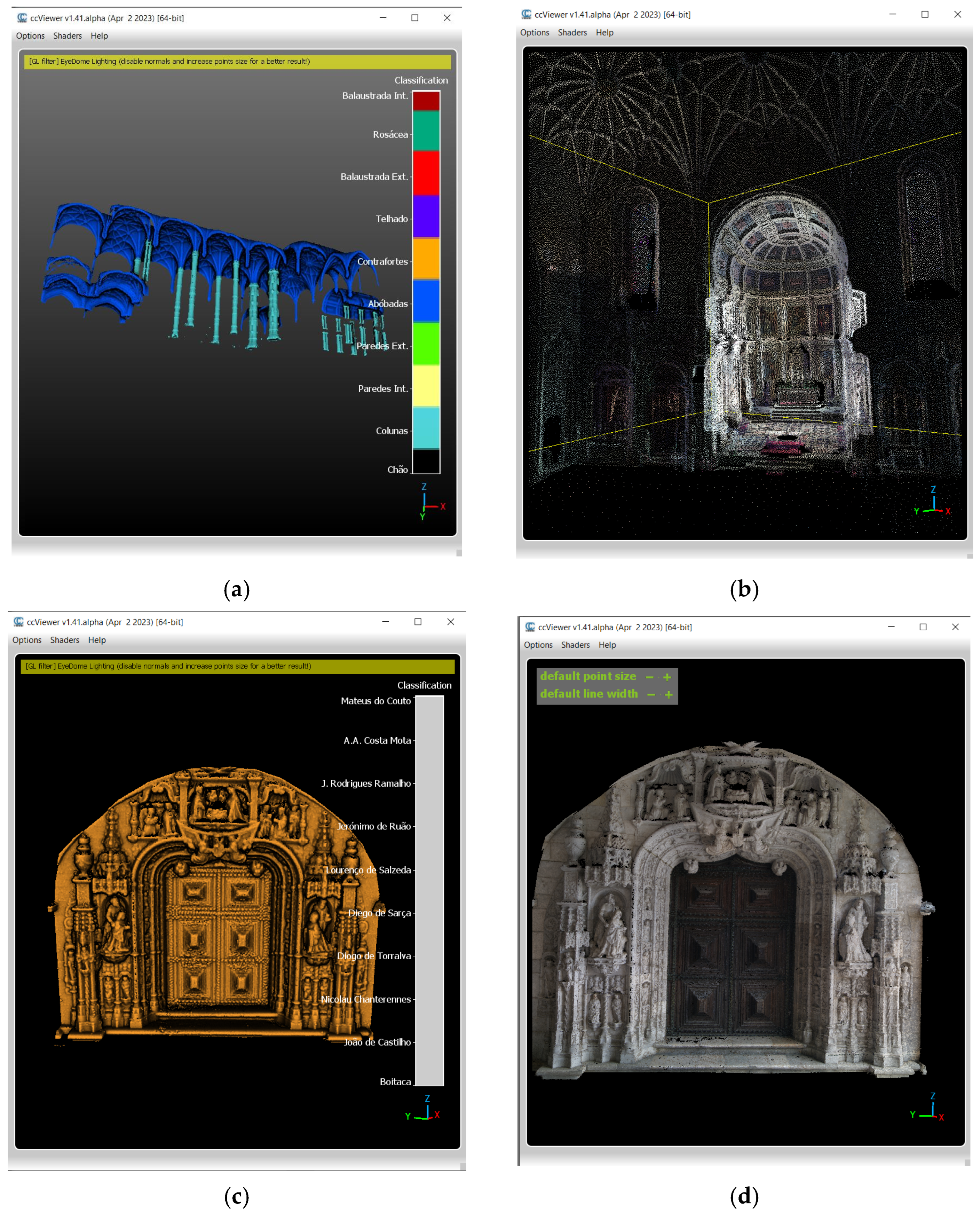
More than 50 simple queries to the eight classified total point-clouds are implemented. Additionally, intervention data can be queried according to several keys. A total of 23 queries can be made for intervention type and intervention zone. As for the date, every year can be queried from 1880 to 2030, and the answer refers to the last interventions that occurred in or before the selected year. In Figure 13, some examples of the use of HISTERIA are shown.
Figure 13.
Examples of query results: (a) Architectural Elements—Columns + vaults (b) Chancel in low and environment in very low resolution; (c) Construction by Author = Nicolau Chanterenne, Presentation: Isolated, in coded color scale; (d) Construction by Author = Nicolau Chanterenne, Presentation: Isolated, in RGB.
A small user group, composed of two architects, two geospatial engineers, two experts in computer graphics and two people with non-related expertise, tested the application individually. Although it cannot be considered a representative survey to generate statistics, their general opinion was that it is very useful that the 3D model can be semantically explored and visualized in the same app, that the search of information is easy due to the pre-defined queries that only need one click to be selected, and that it can be useful to heritage researchers, managers and to the general public. One participant enhanced the advantage of such an app for educational purposes, since it is easy to visualize, for instance, the building’s evolution over time or compare the work of different architects. The time some larger point-clouds took to load, especially when a great number of parameters were selected for the query, was appointed as a negative aspect, since the public is accustomed to apps that respond very quickly. Several of the participants’ suggestions were implemented in the improved iteration of the app, such as, for example, the possibility of having several viewer windows open to be able to compare the results of different queries, or permanent instructions for the viewer options (initially the instructions appeared in a message box that disappeared after a while, and in the improved version, they are fixed in field 1 of the interface).
To cope with the loading time, which had been a priority from the beginning and led to the use of subsampled point-clouds in several degrees of resolution (high, middle, low and very-low), almost all queries were executed on middle resolution point-clouds. The visualization of isolated clouds maintains the middle resolution, while the clouds in the visualization with their architectural environment appear in low resolution, highlighted inside a very-low resolution cloud of the whole building (exterior or interior) (Figure 13b). High-resolution clouds are only considered when the user chooses the option to save the resulting clouds in their full resolution. This option is reserved for authorized users due to data ownership issues. HISTERIA runs without problems on a desktop computer with an Intel Core i9-10900K with 64 GB RAM and an NVIDIA Quadro P2200 graphic card. An approach for less powerful computers was successfully tested, in which the partial point-clouds had already been separated by value code before the app started instead of being created while the app is already running. This accelerates access to the clouds for merging or intersecting because they no longer need to be created. This solution involves saving all partial clouds along with the eight total coded point-clouds on an accessible server. This fact has to be considered in the next step of transforming HISTERIA into a Webapp.
4. Conclusions
HISTERIA is an application that combines queries over semantic information with spatial representation of heritage buildings by means of point-clouds. The point-cloud data can be obtained with the usual geospatial surveying methods, such as photogrammetry or laser scanning, and must be classified according to an ontology that organizes semantic information in classes and lists of codes. The available semantic information in this project comes essentially from SIPA [41] and was completed using other sources in the case of vagueness. The ontology created was based on CIDOC-CRM, a standard conceptual reference model for cultural heritage and its extension CRMba. An additional class (H01 Intervention) was created as well as types and subtypes of standard classes. This way, the available information (chronology of events, list of architects, list of interventions) could be adequately described and related. Since it is based on a standard, the ontology can be easily improved with other classes for information that can be located in the heritage building, such as results of vulnerability studies (seismic, flood, etc.) that were not publicly available at the time the app was developed but exist [54,55,56,57]. The analysis of interventions in the building that occurred over time can be made using the application, allowing for areas never intervened to be verified and for others that were intervened with several times. Interventions were characterized not only by date but also by type and area intervened, which allows a more refined analysis. Non-locatable events in the chronology can be accessed via a hyperlink to SIPA or to the website of Museus e Monumentos de Portugal.
The initial objective of making a semantically enriched 3D model of a heritage building based on point-clouds of easy handling was achieved, and HISTERIA goes even further, allowing the building to be explored from several points of view, materialized in pre-defined and selectable queries, and to visualize the 3D model resulting from the queries in a point-cloud viewer inside the application. Using HISTERIA, a user can become visually acquainted with several parts of the building, the phases of construction, the architects involved in the construction, the interventions that occurred in the building over time, all in an interactive way. This is relevant to a better global understanding of the heritage building, with potential application in education, tourism and monument management.
Comparing HISTERIA with other point-cloud-based tools for architectural heritage exploration, like 3DOnt, the one with the highest intersection, there is a conceptual difference in the objectives. 3DOnt aims to infer knowledge from previous classified point-clouds through the calculation of numerical indicators and rules, which assume expertise on the part of the user. Although the queries can be made using natural language, the user must know a priori which classified point-clouds were fed into the system and what can be calculated from them. HISTERIA aims to disseminate semantic knowledge that is elsewhere stored, organizing it with an ontology and presenting information to the user in the form of structured queries (lists of architects involved, construction epochs, building spaces, etc.), which the user can select in order to visualize and analyze the respective point-cloud in the viewer. No a priori user expertise is required as originally intended.
The adaptation of HISTERIA to other heritage buildings or complexes, which had already been surveyed by the authors’ research groups, is in progress to understand how much must be changed and how much can be considered a common structure of the app for heritage buildings or at least for heritage religious buildings. Certainly, the lists of instances will contain differences, but the queries will be essentially the same. Future work includes the study of several kinds of heritage buildings (religious, residential, military, etc.) to detect common features and develop standard interfaces for each kind. In this way, the most laborious part of the work when adapting the app to a particular case will be the classification of point-clouds. Bearing in mind the limitations of the LAS format in terms of classification range (192 user definable classes), but with the intention to keep this standard format for the sake of compatibility with various software, the ontology must be carefully established along with the queries in the interface of the adapted HISTERIA. The motive remains the same: a contribution to allow experts and non-experts to obtain more out of the thoroughly collected and processed 3D data of heritage buildings and expand our knowledge on them.
Author Contributions
Conceptualization, P.R. and M.J.M.-M.; methodology, P.R. and M.S.-F.; software, P.R.; validation, P.R., J.J.S.-B. and M.J.M.-M.; investigation, P.R. and M.J.M.-M.; writing—original draft preparation, P.R. and M.J.M.-M.; writing—review and editing, M.J.M.-M., M.S.-F. and J.J.S.-B.; visualization, P.R.; supervision, P.R.; project administration, J.J.S.-B.; funding acquisition, J.J.S.-B. All authors have read and agreed to the published version of the manuscript.
Funding
This work is supported by FCT, I.P./MCTES through national funds (PIDDAC): LA/P/0068/2020—(https://doi.org/10.54499/LA/P/0068/2020), UID/50019/2025—(https://doi.org/10.54499/UID/50019/2025), UID/PRR/50019/2025—(https://doi.org/10.54499/UID/PRR/50019/2025), UID/PRR2/50019/2025. This research has also been made possible thanks to funding from the Junta de Extremadura and FEDER, through the GR24156 grant to the NEXUS Research Group (University of Extremadura).
Data Availability Statement
The raw data supporting the conclusions of this article will be made available by the authors on request.
Acknowledgments
The student Catarina Alho is acknowledged for her participation in the photogrammetric modeling of the exterior of the church.
Conflicts of Interest
The authors declare no conflicts of interest. The funders had no role in the design of the study; in the collection, analyses, or interpretation of data; in the writing of the manuscript; or in the decision to publish the results.
References
- Albourae, A.T.; Armenakis, C.; Kyan, M. Architectural heritage visualization using interactive technologies. Int. Arch. Photogramm. Remote Sens. Spat. Inf. Sci. 2017, XLII-2/W5, 7–13. [Google Scholar] [CrossRef] [Scilit]
- Redweik, P.; Cláudio, A.P.; Carmo, M.B.; Naranjo, J.M.; Sanjosé, J.J. Digital preservation of cultural and scientific heritage: Involving university students to raise awareness of its importance. Virtual Archaeol. Rev. 2017, 8, 22–34. [Google Scholar] [CrossRef] [Scilit]
- Redweik, P.; de Sanjosé Blasco, J.J.; Sánchez-Fernández, M.; Atkinson, A.D.; Martínez Corrales, L.F. Tower of Belém (Lisbon)–Status Quo 3D Documentation and Material Origin Determination. Sensors 2020, 20, 2355. [Google Scholar] [CrossRef] [Scilit] [PubMed]
- Abergel, V.; Jacquot, K.; De Luca, L.; Veron, P. Combining on-site and off-site analysis: Towards a new paradigm for cultural heritage surveys. Disegnarecon 2021, 14, 13. [Google Scholar] [CrossRef]
- Fang, J.; Zhang, Y.; Zhang, Y.; Guo, H.; Sun, Z. High-definition survey of architectural heritage fusing multisensors—The case of Beamless Hall at Linggu Temple in Nanjing, China. Sensors 2022, 22, 3369. [Google Scholar] [CrossRef] [Scilit]
- Praticò, S.; Tripodi, R.; Tirella, V.; Di Fazio, S.; Barreca, F.; Modica, G. Proposal of an integrated 3D architectural survey method for application in historic agri-food building analysis and representation. J. Agric. Eng. 2023, 54, 1521. [Google Scholar] [CrossRef] [Scilit]
- Morena, S.; Bordese, F.; Caliano, E.; Freda, S.; De Feo, E.; Barbal, S. Architectural Survey Techniques For Degradation Diagnostics. An Application For The Cultural Heritage. Int. Arch. Photogramm. Remote Sens. Spat. Inf. Sci. 2021, XLVI-M-1-2021, 449–454. [Google Scholar] [CrossRef] [Scilit]
- Autodesk. Autodesk Revit—BIM Software. 2025. Computer Software. Available online: https://www.autodesk.com/products/revit (accessed on 29 December 2025).
- Trimble. SketchUp. 2025. Computer Software. Available online: https://www.sketchup.com/en (accessed on 29 December 2025).
- Leica Geosystems. Leica Cyclone 3DR—All-in-One Deliverable Solution. 2025. Computer Software. Available online: https://leica-geosystems.com/products/laser-scanners/software/leica-cyclone/leica-cyclone-3dr (accessed on 29 December 2025).
- Bentley Systems. MicroStation. 2025. Computer Software. Available online: https://www.bentley.com/software/microstation (accessed on 29 December 2025).
- Cignoni, P.; Muntoni, A. MeshLab. 2025. Computer Software. Visual Computing Lab, ISTI-CNR. Available online: https://www.meshlab.net/ (accessed on 29 December 2025).
- CloudCompare. CloudCompare (Version 2.13.2). 2025. GPL Computer Software. Available online: http://www.cloudcompare.org/ (accessed on 29 December 2025).
- Lo Buglio, D.; Van Dongen, A. Towards a multi-scale semantic characterization of the built heritage: From the column to the urban scale. Disegnarecon 2021, 14, 26. [Google Scholar] [CrossRef]
- Bajena, I. OntPreHer3D: Ontology for Preservation of Cultural Heritage 3D Models. Peer Community J. 2025, 5, XX. [Google Scholar] [CrossRef] [Scilit]
- Bekiari, C.; Bruseker, G.; Doerr, M.; Ore, C.-E.; Stead, S.; Velios, A. Definition of the CIDOC Conceptual Reference Model. Version 7.2.1. 2022. Available online: https://cidoc-crm.org/sites/default/files/cidoc_crm_version_7.2.pdf (accessed on 29 December 2025).
- ISO 21127:2023; Information and Documentation—A Reference Ontology for the Interchange of Cultural Heritage Information. International Organization for Standardization: Geneva, Switzerland, 2023. Available online: https://www.iso.org/standard/85100.html (accessed on 5 January 2026).
- Marín-Miranda, M.J.; Fra Paleo, U.; Redweik, P.; Gómez-Gutiérrez, Á. An ontology to describe the damage process to built cultural heritage triggered by earthquakes: The CHEDO model. J. Cult. Herit. 2025, 71, 114–126. [Google Scholar] [CrossRef] [Scilit]
- BuildingSMART International. BuildingSMART International. 2025. Organization/Technical Platform. Available online: https://technical.buildingsmart.org/ (accessed on 29 December 2025).
- Kamel, E.; Memari, A.M. Review of BIM’s application in energy simulation: Tools, issues, and solutions. Autom. Constr. 2019, 97, 164–180. [Google Scholar] [CrossRef] [Scilit]
- Habte, B.; Guyo, E. Application of BIM for structural engineering: A case study using Revit and customary structural analysis and design software. ITcon 2021, 26, 1009–1022. [Google Scholar] [CrossRef] [Scilit]
- Yang, X.; Grussenmeyer, P.; Koehl, M.; Macher, H.; Murtiyoso, A.; Landes, T. Review of built heritage modelling: Integration of HBIM and other information techniques. J. Cult. Herit. 2020, 46, 350–360. [Google Scholar] [CrossRef] [Scilit]
- Santoni, A.; Martín-Talaverano, R.; Quattrini, R.; Murillo-Fragero, J. HBIM Approach To Implement The Historical And Constructive Knowledge. The Case Of The Real Colegiata Of San Isidoro (León, Spain). Virtual Archaeol. Rev. 2021, 12, 49–65. [Google Scholar] [CrossRef] [Scilit]
- Hichri, N.; Stefani, C.; De Luca, L.; Veron, P. Review of the “as-built BIM” approaches. Int. Arch. Photogramm. Remote Sens. Spatial Inf. Sci. 2013, XL-5/W1, 107–112. [Google Scholar] [CrossRef] [Scilit]
- Poux, F.; Neuville, R.; Hallot, P.; Billen, R. Model for semantically rich point-cloud data. ISPRS Ann. Photogramm. Remote Sens. Spatial Inf. Sci. 2017, IV-4/W5, 107–112. [Google Scholar] [CrossRef] [Scilit]
- Alby, E.; Grussenmeyer, P. From point-cloud to 3D model: Modelling methods based on architectural knowledge applied to Fortress of Châtel-Sur-Moselle (France). Int. Arch. Photogramm. Remote Sens. Spatial Inf. Sci. 2012, XXXIX-B5, 75–80. [Google Scholar] [CrossRef] [Scilit]
- Poux, F.; Billen, R.; Kasprzyk, J.-P.; Lefebvre, P.-H.; Hallot, P. A built heritage information system based on point-cloud data: HIS-PC. ISPRS Int. J. Geo-Inf. 2020, 9, 588. [Google Scholar] [CrossRef] [Scilit]
- pgPointCloud. pgPointCloud—A PostgreSQL Extension for Storing Point-Cloud (LIDAR) Data. 2025. Computer Software. Available online: https://pgpointcloud.github.io/pointcloud/ (accessed on 29 December 2025).
- QGIS Development Team. QGIS—Open and Free Geographic Information System. 2025. Computer Software. Available online: https://www.qgis.org/ (accessed on 29 December 2025).
- MathWorks. MATLAB 2023. 2023. Computer Software. Available online: https://www.mathworks.com/products/new_products/release2023a.html (accessed on 29 December 2025).
- Spettu, F.; Achille, C.; Fassi, F.; Della Giovampaola, I. Web platforms for cultural heritage management: The Parco Archeologico del Colosseo case study. Int. Arch. Photogramm. Remote Sens. Spatial Inf. Sci. 2023, XLVIII-M-2-2023, 1493–1500. [Google Scholar] [CrossRef] [Scilit]
- Poux, F.; Valembois, Q.; Mattes, C.; Kobbelt, L.; Billen, R. Initial user-centered design of a virtual reality heritage system: Applications for digital tourism. Remote Sens. 2020, 12, 2583. [Google Scholar] [CrossRef] [Scilit]
- Jordán Palomar, I.; García Valldecabres, J.L.; Tzortzopoulos, P.; Pellicer, E. An online platform to unify and synchronise heritage architecture information. Autom. Constr. 2020, 110, 1–17. [Google Scholar] [CrossRef] [Scilit]
- Visual Computing Laboratory (VCL). Visual Computing Laboratory—ISTI-CNR Initiative. 2019. Research laboratory/institutional initiative. Available online: https://vcg.isti.cnr.it/ (accessed on 29 December 2025).
- Vega-Gorgojo, G. LOD4Culture: Easy exploration of cultural heritage linked open data. Semant. Web 2024, 15, 1563–1592. [Google Scholar] [CrossRef] [Scilit]
- Codiglione, M.; Beber, R.; Remondino, F. Leveraging ontology for enhanced queries and analyses of urban point-clouds. Int. Arch. Photogramm. Remote Sens. Spat. Inf. Sci. 2024, XLVIII-2/W8-2024, 101–108. [Google Scholar] [CrossRef] [Scilit]
- Codiglione, M.; Mazzacca, G.; Remondino, F. Dimensional discoveries: Unveiling the potential of 3D heritage point-clouds with a robust ontology framework. Int. Arch. Photogramm. Remote Sens. Spatial Inf. Sci. 2024, XLVIII-2/W4-2024, 119–125. [Google Scholar] [CrossRef] [Scilit]
- Institute of Computer Graphics TU Wien. Potree—Software for Point-Cloud Rendering. 2025. Computer software. Available online: https://potree.github.io/ (accessed on 29 December 2025).
- Wikidata. Wikidata—Free Knowledge Base. 2025. Available online: https://www.wikidata.org/wiki/Wikidata:Main_Page (accessed on 29 December 2025).
- DBpedia. DBpedia—Global and Unified Access to Knowledge Graphs. 2025. Available online: https://www.dbpedia.org/ (accessed on 29 December 2025).
- European Union. Europeana- Discover Europe’s Digital Cultural Heritage. 2025. Available online: https://www.europeana.eu/en (accessed on 29 December 2025).
- SIPA. Sistema de Informação do Património Arquitetónico. 2024. Available online: http://www.monumentos.gov.pt/Site/APP_PagesUser/Default.aspx (accessed on 29 December 2025).
- MMP. Museus e Monumentos de Portugal—Mosteiro dos Jerónimos. 2025. Available online: https://www.museusemonumentos.pt/pt/museus-e-monumentos/mosteiro-dos-jeronimos-e-capela-de-sao-jeronimo (accessed on 29 December 2025).
- Google. Google Earth Pro. 2025. Available online: https://www.google.com/earth/versions/ (accessed on 29 December 2025).
- Faro Technologies. FARO Scene. 2025. Computer Software. Available online: https://www.faro.com/en/Products/Software/SCENE-Software (accessed on 29 December 2025).
- Pix4D. Pix4Dmapper. 2025. Computer Software. Available online: https://www.pix4d.com/product/pix4dmapper-photogrammetry-software/ (accessed on 29 December 2025).
- Google Cloud. Natural Language AI. 2025. Available online: https://cloud.google.com/natural-language (accessed on 29 December 2025).
- ChatPDF. ChatPDF Free Version. 2025. Available online: https://www.chatpdf.com/pt (accessed on 29 December 2025).
- Coral AI. Coral AI. 2025. Available online: https://www.getcoralai.com (accessed on 29 December 2025).
- Ronzino, P.; Niccolucci, F.; Felicetti, A.; Doerr, M. CRMba: A CRM extension for the documentation of standing buildings. Int. J. Digit. Libr. 2016, 17, 71–78. [Google Scholar] [CrossRef] [Scilit]
- ASPRS. LAS Specification 1.4—R14. 2019. American Society of Photogrammetry and Remote Sensing. Available online: https://github.com/ASPRSorg/LAS (accessed on 29 December 2025).
- CCCLM. CloudCompare Command Line Mode. 2025. Available online: https://www.cloudcompare.org/doc/wiki/index.php/Command_line_mode (accessed on 29 December 2025).
- CCViewer. CloudCompare Viewer (1.41 alpha). 2025. Computer Software. Available online: https://www.danielgm.net/cc/ (accessed on 29 December 2025).
- Lourenço, P.B.; Roque, J.; Oliveira, D.V. Seismic safety assessment of the church of Monastery of Jerónimos, Portugal. In Proceedings of the 15th International Brick and Block Masonry Conference, Florianópolis, Brazil, 3–6 June 2012; Available online: https://core.ac.uk/download/pdf/55621953.pdf (accessed on 29 December 2025).
- Lourenço, P.B.; Krakowiak, K.J. Estabilidade das abóbadas da Igreja do Mosteiro dos Jerónimos. 2004. Métodos Computacionais em Engenharia. Available online: http://civil.uminho.pt/masonry (accessed on 29 December 2025).
- Masciotta, M.-G.; Roque, J.C.A.; Ramos, L.F.; Lourenço, P.B. A multidisciplinary approach to assess the health state of heritage structures: The case study of the Church of Monastery of Jerónimos in Lisbon. Constr. Build. Mater. 2016, 116, 169–187. [Google Scholar] [CrossRef] [Scilit]
- Oliveira, D.V.; Ramos, L.F.; Lourenço, P.B.; Roque, J.C.A. Structural monitoring of the Monastery of Jerónimos. In Proceedings of the International Conference 250th Anniversary of the 1755 Lisbon Earthquake, Lisbon, Portugal, 1–4 November 2005; pp. 466–473. Available online: http://hdl.handle.net/10198/4245 (accessed on 29 December 2025).

Disclaimer/Publisher’s Note: The statements, opinions and data contained in all publications are solely those of the individual author(s) and contributor(s) and not of MDPI and/or the editor(s). MDPI and/or the editor(s) disclaim responsibility for any injury to people or property resulting from any ideas, methods, instructions or products referred to in the content. |
© 2026 by the authors. Licensee MDPI, Basel, Switzerland. This article is an open access article distributed under the terms and conditions of the Creative Commons Attribution (CC BY) license.