1. Introduction
The widespread accessibility of mobile devices has led to habitual usage patterns that contribute to neck pain, with strong correlations reported in the literature [
1]. The overuse of mobile devices brings the problem of neck pain, proven by a strong correlation [
2]. When using mobile devices, people often lean their heads forward, causing a forward head posture (FHP) that is out of alignment with their spines. As the head moves forward, the mechanical load on the cervical spine increases significantly [
3]. This posture can cause a variety of problems, including stiffness in the neck, pain [
3], adverse effects on respiration [
4], and postural balance impairments [
5]. Some studies have found that the prevalence of forward head posture is quite high among different populations. For example, physiotherapy students (70%) [
6], university students (64%) [
7], and 20–50-year-old healthy subjects (66%) [
8].
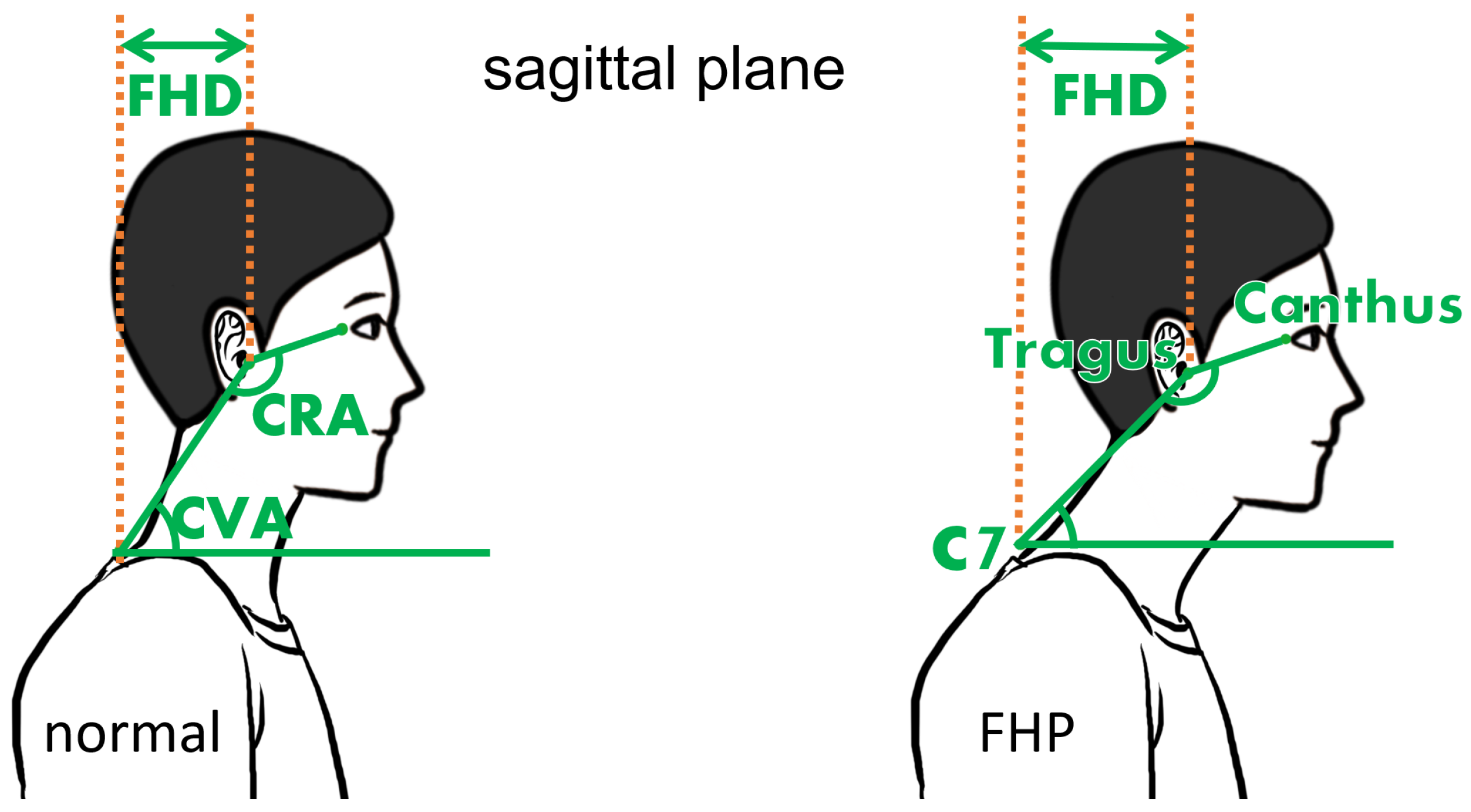
For determining FHP and different severe levels, measuring cranial angles such as the craniovertebral angle (CVA) and cranial rotation angle (CRA) is a widely applied method. The CVA is defined as the angle between a horizontal line from the C7 spinous process and a line connecting C7 to the Tragus on the sagittal plane [
9], shown in
Figure 1. The CVA is also widely used together with forward head distance (FHD in
Figure 1) for evaluating forward head posture (FHP), which is associated with neck pain and disability [
10,
11]. A smaller CVA or a larger FHD usually indicates a more severe FHP. CRA reflects upper cervical flexion–extension and is defined by the angle between the Tragus–Canthus and Tragus–C7 lines [
12].
Although cranial angles can be measured using photogrammetry, goniometry, and medical imaging methods such as CT, MRI, and X-ray, some difficulties still arise during measurement. Medical imaging methods require expensive equipment and qualified operators. Assessing with goniometry leads to high measurement errors, as the process requires the manipulation of a goniometer by an examiner with both hands hanging in the air close to the person, but without any contact. In contrast, sometimes one arm of the goniometer has to be positioned horizontally without any reference, which means that stabilization is very difficult. The risk of error in reading is increased [
13,
14].
Thus, photogrammetry, the method by which a photo is taken from the sagittal plane and measured with software, is considered the “gold standard” and acts as the mainstream approach [
15]. To assess the CVA, usually, the examiner will use the flexion–extension palpation method to locate the position of the C7 spinous process and then place a marker on it [
16]. In contrast, another marker will be placed on the Tragus. If the CRA is also to be measured, an extra marker will be attached to the Canthus of the eye.
However, some inconveniences remain even when this “gold standard” is used. Traditionally, the measurement in photogrammetry is not performed synchronously with the photo-taking procedure. Instead, the examiner will subsequently analyze the data on the computer using image processing software like ImageJ or Kinovea. Since the asynchronous process cannot real-time detect or display the angles, the examiner can not notice the abnormal photo, which causes repeated shooting. To solve this problem, some researchers have tried integrating the shooting and measuring procedures into a mobile application. For example, FHPapp is a head posture measuring application running on Android phones and has been validated by Gallego-Izquierdo, T. et al. to have criterion validity over 0.82 [
17]. This app allows the user to take photos and then assign the landmarks for measurement on the phone without transferring the photo to a computer from the shooting device, which greatly improves convenience. However, this mobile app still needs the user to manually put the landmarks on the image, similar to ImageJ or Kinovea on the computer. What’s more, compared to placing landmarks on a computer with a larger screen, operating on a relatively small screen with fingers to place the landmarks is difficult and inaccurate.
Although placing the landmarks on the marker by hand is a simple task, the repetitive procedure makes it time-consuming and tedious. If the marker can be detected automatically without manual intervention, the labor can be reduced, and the examiner can be free from repetitive work. Carrasco-Uribarren, A. et al. developed CVA-CVApp for automatically recognizing markers and calculating angles [
18]. In the research conducted by Choi, K.-H. et al. [
19], they also developed software based on OpenCV to detect two markers and calculate the CVA. However, these approaches do not measure CRA or other angles, and markers are pre-defined with fixed colors, which limits flexibility during the examination. Moreover, they do not discuss robustness when facing a complex background, instead of a plain uni-color wall, which means that we do not know whether their software still works when objects with a color on the marker enter the camera range.
Except for the automatic approaches that need markers, some computer vision applications are even able to conduct the measurement automatically without markers. Kramer, I. et al. [
20] developed an automated detection approach using only a single RGB image to locate the Tragus and C7 spinous process, eliminating the need for markers. However, their approach is limited to a healthy person in a standing posture since their techniques are based on the assumption that the skin bulge indicates the C7 spinous process. Although using AI algorithms eliminates the requirement of markers and simplifies the cranial angle assessment, its application scenario is limited. Moreover, the examiners lose control of the whole process and have no access to assign the detection points, which means they are unable to modify or assign markers even when they realize that the algorithm’s identification result is incorrect. Also, this application is easy to compromise when the background is complicated, as stated in the paper. To develop a more versatile and controllable solution, we will still involve physical markers in our approach instead of relying on AI algorithms to detect the key feature points.
Our research objective is to develop robust software that automates the manual measurement of cranial angles (including CVA and CRA) and helps examiners eliminate the troublesome measuring procedures but not replace them in palpating and assigning markers. It should be easy to alter the desired detection color so that it is widely feasible for different colors of the marker. Our software should also be highly resilient to objects with a similar color to the marker in order to be applied even with a complicated background. Moreover, the software will be run in real-time and provide APIs for further development, such as developing the sitting posture monitoring application.
2. Materials and Methods
2.1. Program Design
This program automatically detects markers with a user-selected color and calculates the corresponding head angles. It begins by detecting which sagittal view is captured (left or right), then segmenting the region of interest (ROI). Next, the program detects and sorts the markers before the final calculation of cranial angles. The Pose module of MediaPipe, a machine learning solution, is used to detect the body’s landmarks to conduct ROI segmentation.
2.1.1. Camera Position Determination
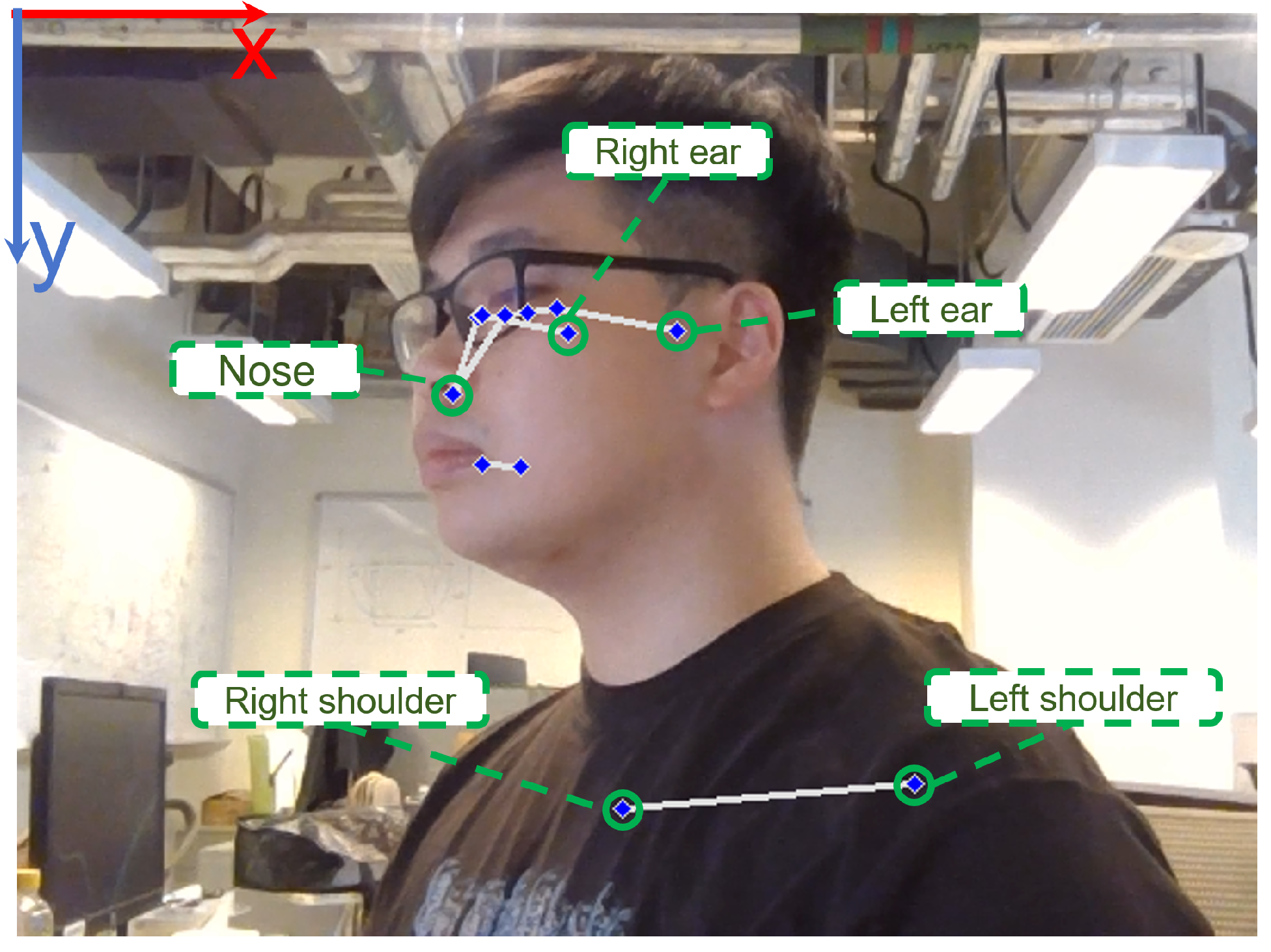
Since the camera might be set on both sides of the person under inspection, a method should be deployed to determine whether the camera is set on the left or right side to determine the landmarks of which side should be utilized. Manual configuration is possible but inefficient and troublesome, so we found an automated method instead. The Pose landmark model processing result provides 33 body landmark locations, which are the coordinate data for organs and joints of the body [
21]. The coordinate data of the nose (
,
), and both ear (
,
) and (
,
) are used in this step. When
and
, the camera position is considered to be on the right. Similarly, when
and
, the camera position is considered to be on the left. The landmarks can be viewed in
Figure 2, as well as the coordinate system. It can also be seen that the accuracy of the landmark assignment is not very accurate, as shown in
Figure 2. This is the reason we did not use it for the measurement. However, its robustness fulfills our needs since the landmarks are used for auxiliary functions.
2.1.2. Region of Interest Segmentation
Since the markers are tracked by color detection, to reduce the potential interference caused by the objects in the background with a similar color to the marker, AutoMCA only focuses on the region of interest (ROI) for the color detection to increase robustness. The coordinate data of the nose (
,
), the mean position of both shoulders (
,
) = (
,
), and the ear that can be viewed by the camera (
,
) are used to derive the ROI in a rectangular shape for the neck–head region. When the camera position is on the left, it has
and
. As for the condition of the right side, it has
and
. Firstly, AutoMCA calculates the position difference between the nose and the shoulder along the x-axis and the y-axis.
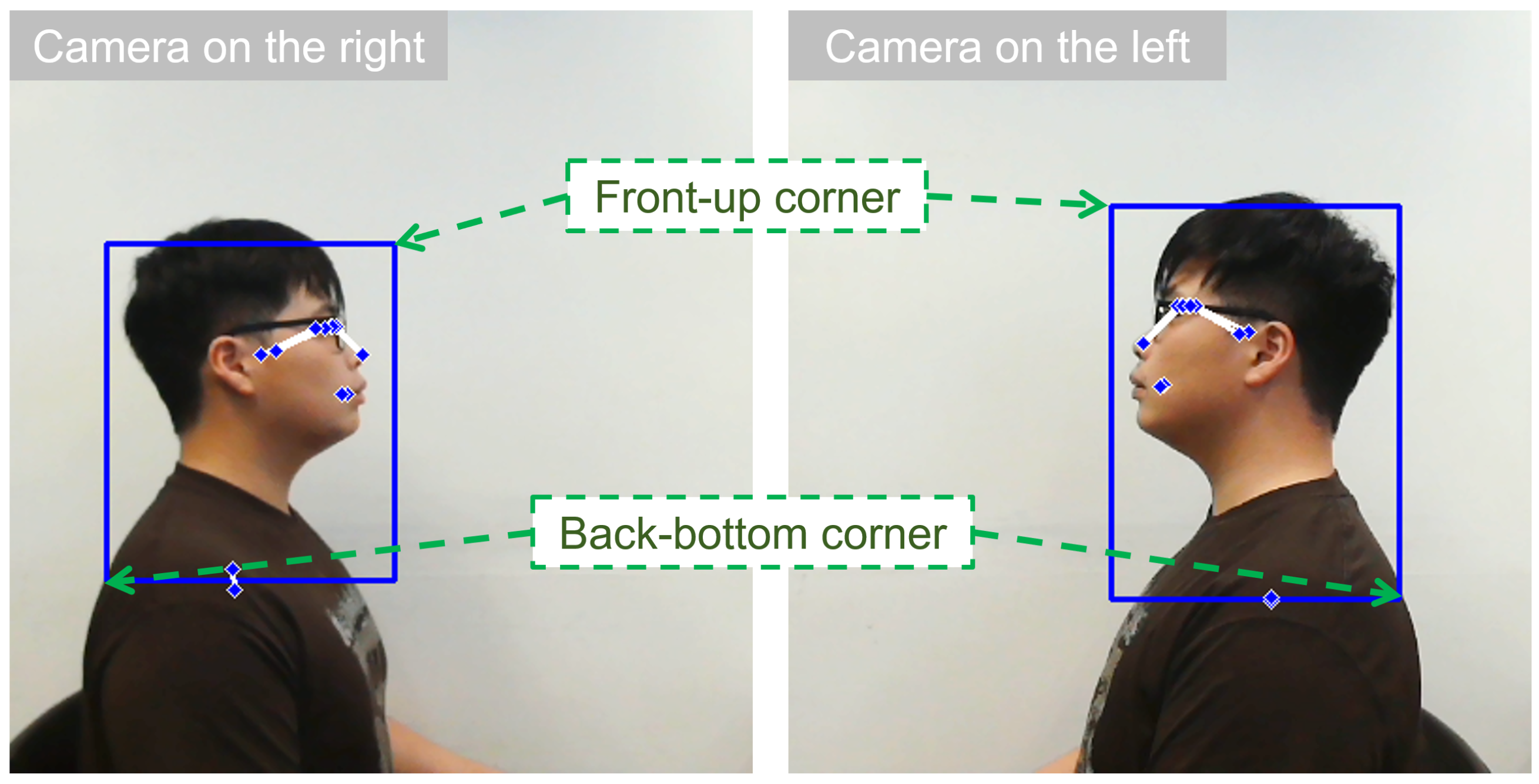
Then, the front-up corner point and the back-bottom point of the ROI rectangle, which are illustrated in
Figure 3, can be derived by
In which are constant and we set , , and .
In order to subtract the ROI from the image captured by the camera, we need to obtain the coordinate data of the top-left corner as well as the height and width of the ROI. These values can be derived by
2.1.3. Marker Detection and Sorting
Markers are detected and located using color thresholding, which removes undesired regions while preserving the marker areas. The program features a color-capturing function that allows users to move the cursor to the position of one marker and then capture the HSV color data at the cursor’s location by clicking the mouse buttons. This captured color serves as the central value for thresholding. A morphological operation called opening is performed using erosion followed by dilation to eliminate residual scattered regions. Contour detection is conducted by converting the image to grayscale and utilizing OpenCV’s method to calculate the center points of each contour, enabling precise determination of the marker’s position. The three center points are (, ), (, ), and (, ).
Up to now, the three markers have been detected. However, the topology relationship among the three points still needs to be discovered. In other words, we must figure out how these three markers correspond to the C7 spinous process, Tragus, and Canthus. From the human body structure’s perspective, the most forward marker is the one attached to the eye Canthus, the most backward one indicates the C7 spinous process, and the one in the middle is for the Tragus of the ear. When the camera is positioned on the right side of the participants, a larger X value of the landmarks indicates a more forward position. As for the condition with the camera positioned on the left, the coordinate data exhibit an inverse relationship, which means a larger X value of the landmarks indicates a more backward position. Therefore, when the camera is on the right, means marker i is more forward than marker j. On the contrary, when the camera is on the left, means marker i is more backward than marker j.
If the camera is placed on the left, it will be and , while it will have and when the camera is placed on the right. Then, the index for the Canthus and C7 spinous process can also be found using the index function. For instance, if the index is found to be j for the Canthus and k for the C7 spinous process, then we can have and . Under this condition, the remaining point, which has an index of i, is for the Tragus, and it will have and .
2.1.4. Cranial Angle Calculation
The craniovertebral angle (CVA) can be calculated using the coordinate data of the C7 spinous process and the Tragus.
The cranial rotation angle (CRA) is calculated based on two vectors derived from all marker points, which are the vectors from the Tragus to the C7 spinous process
and the one to the Canthus
. Since the CRA is the angle between these two vectors, it can be calculated by
2.1.5. GUI Design
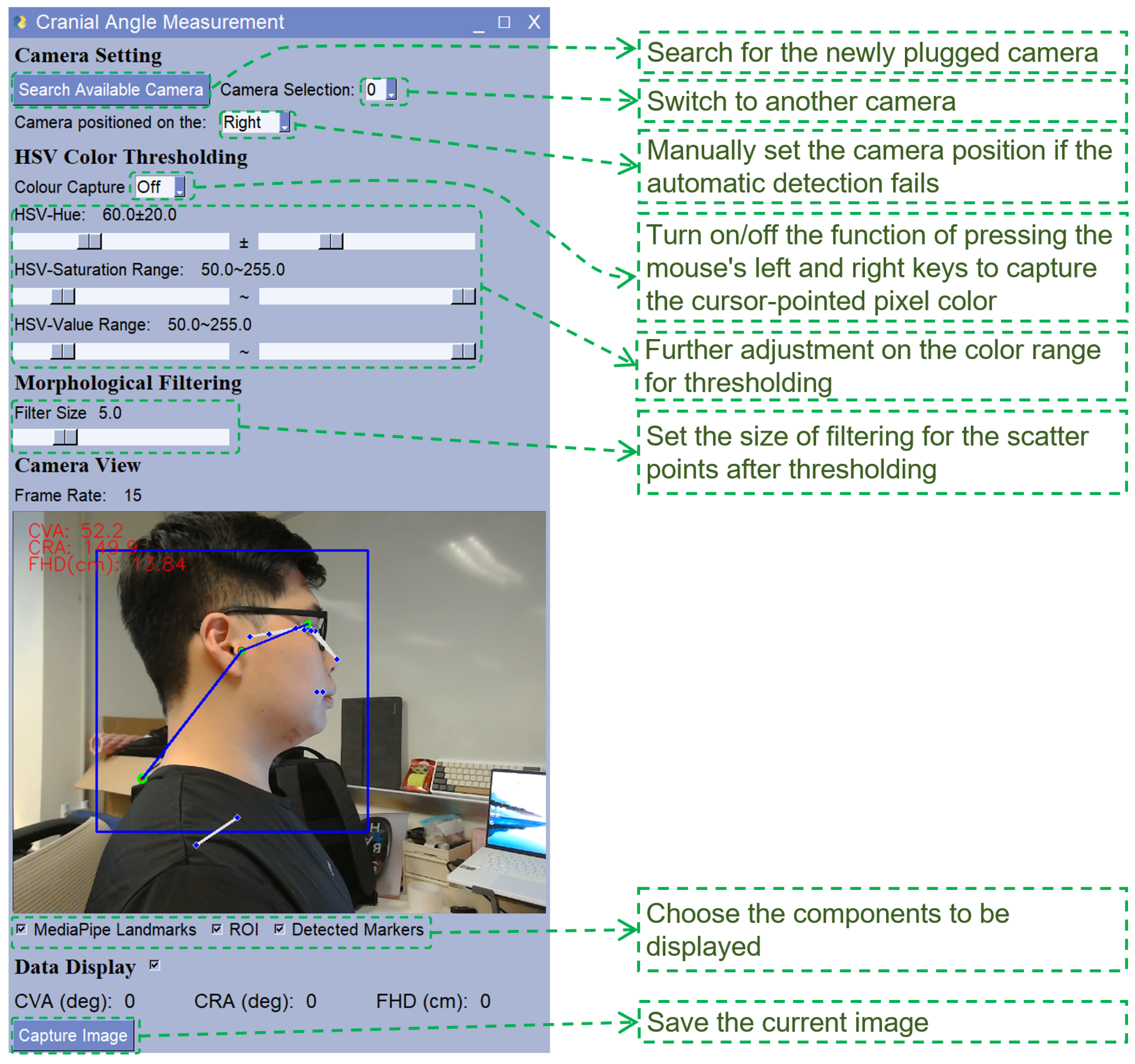
We develop the GUI consisting of 6 regions, which are as follows: (1) Camera Setting, (2) HSV Color Thresholding, (3) Morphological Filtering, (4) Camera View, and (5) Data Display. The layout is designed according to the workflow when measuring the cervical angles with AutoMCA. A screenshot of the GUI is displayed in
Figure 4 explaining the functional components. In the Camera View region, the landmarks of MediaPipe, the ROI, and the detected markers are annotated on the image to enable the user to check whether the automatic detection is performed successfully and correctly. These annotations can be turned off for a clearer image if needed. The program can run at around 15 FPS (latency is about 66.7 ms), and in each frame it will give both CVA and CRA measurements.
2.2. Accuracy Test
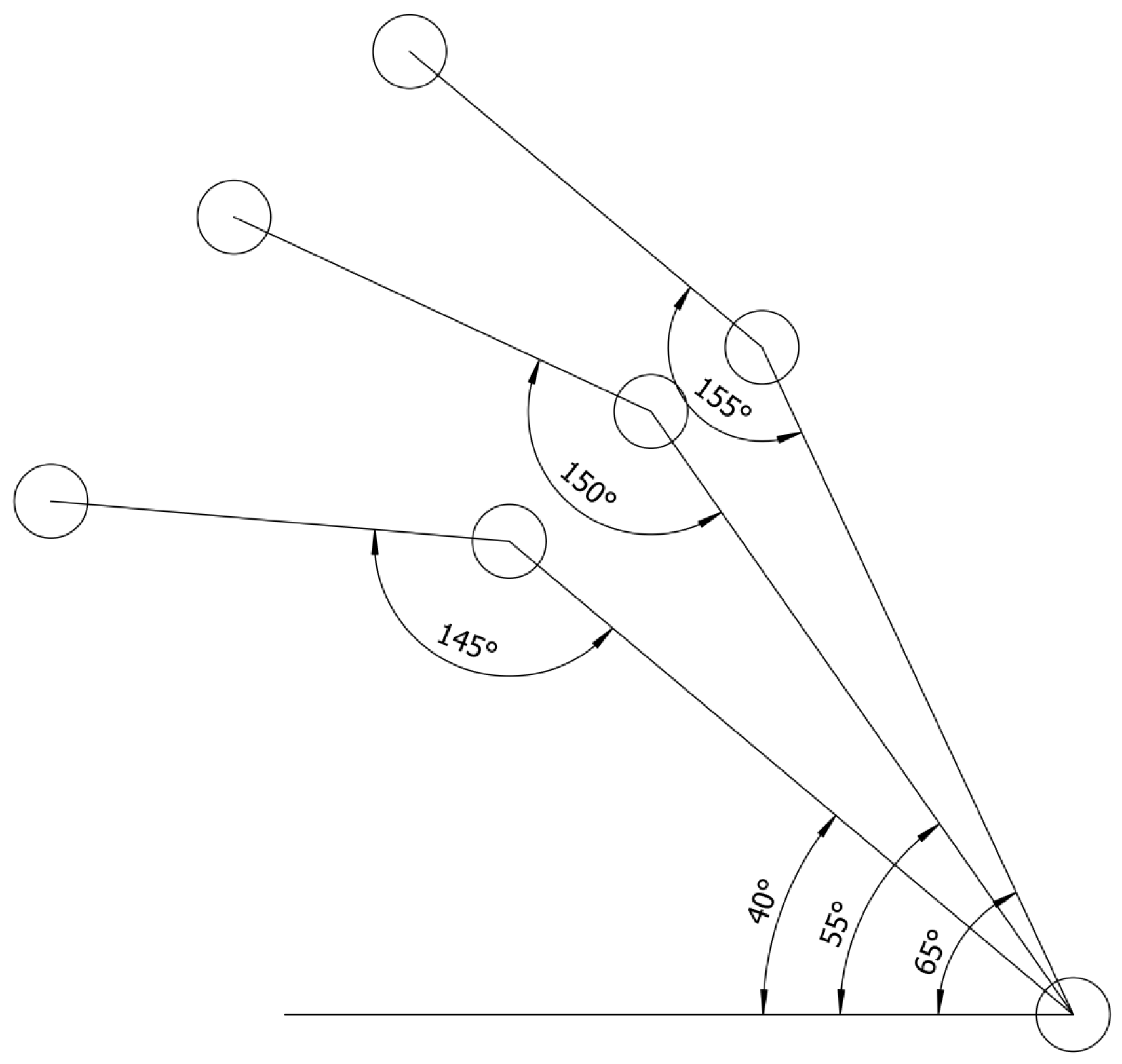
In order to validate the accuracy of this system, an accuracy test was conducted using a printed test board with 3 sets of CVA and CRA as the ground truth values. The three sets of values are as follows: (1) CVA 45 deg and CRA 145 deg, (2) CVA 55 deg and CRA 150 deg, and (3) CVA 65 deg and CRA 155 deg. There are circular patterns on it to allow the markers to be precisely pasted on it, and it is shown in
Figure 5. Three images were taken on each set.
2.3. Validation Test
Two examiners with background knowledge of cervical angle measurement carried out a validity experiment. One was in charge of applying markers and operating the AutoMCA, while another was responsible for the measurement by Kinovea 2023.1.2.
2.3.1. Participants
A total of 32 volunteers (13 male and 19 female) without any cervical discomfort were recruited. The experimental procedure was explained to all participants, and consent was obtained. The age range is from 21 to 33, with a mean value of 27.7 and a standard deviation of 3.01. Previous studies reported a correlation of 0.94 [
19]. At this correlation level, theoretically, only 5 participants could yield a significant p-value for the two-tailed T-test. To mitigate the risk of outlier influence, we recruited a total of 32 participants.
2.3.2. Apparatus
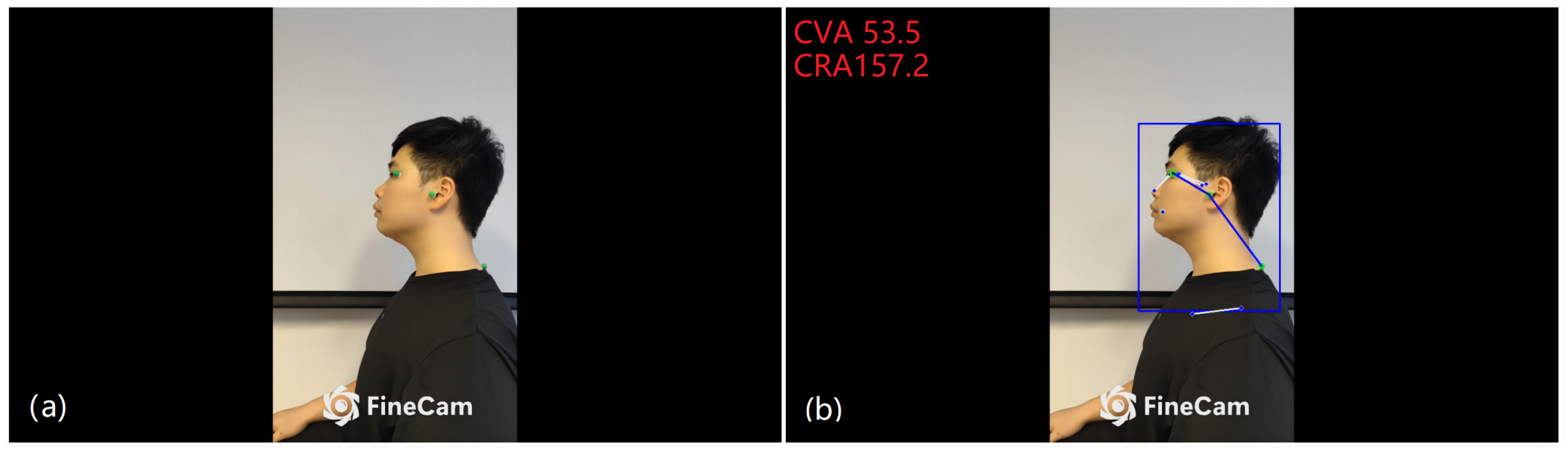
The self-developed software AutoMCA runs on a ROG Zephyrus G14 (2022) laptop (ASUS, Taipei, Taiwan). For the camera, a smartphone, Xiaomi 11 Ultra (Xiaomi Inc., Beijing, China), was mounted vertically on a liftable device with adjustable height, streaming images to the laptop using the software FineCam (FineShare Co. Ltd., Hong Kong SAR, China) as a wireless camera. The resolution of streaming video was 1920 × 1080, and the frame rate was 30 FPS. Three 3D-printed markers with a sphere whose diameter is 12 mm on the top, painted in green, were utilized. The markers can be seen in
Figure 6a. When clicking the ‘Capture Image’ button, AutoMCA generates two images: a raw image and a corresponding processed image with measured angles. An example pair of raw and processed images can be viewed in
Figure 6. The measurement can be conducted while wearing glasses or other headgear if the glasses do not interfere with the markers.
2.3.3. Measurement Procedures
The camera is set on the participant’s left side at a proper height of around 1 m away. The participant was sitting straight up on the chair while the camera faced toward the sagittal plane. The examiner conducted the palpation to identify the C7 spinous process and attached a marker to it. The other two markers for the Tragus and the Canthus were also placed. After that, the examiner took photos of each participant by pressing the ‘Capture Image’ button to save the pair of raw and processed images and verifying successful automatic detection.
After the first examiner finished collecting data from all participants, another examiner who was unaware of the AutoMCA results conducted the measurement based on only raw images with Kinovea for the CVA and CRA. We then compared the data obtained by manual measurement in Kinovea with that obtained by AutoMCA.
2.3.4. Statistical Analysis
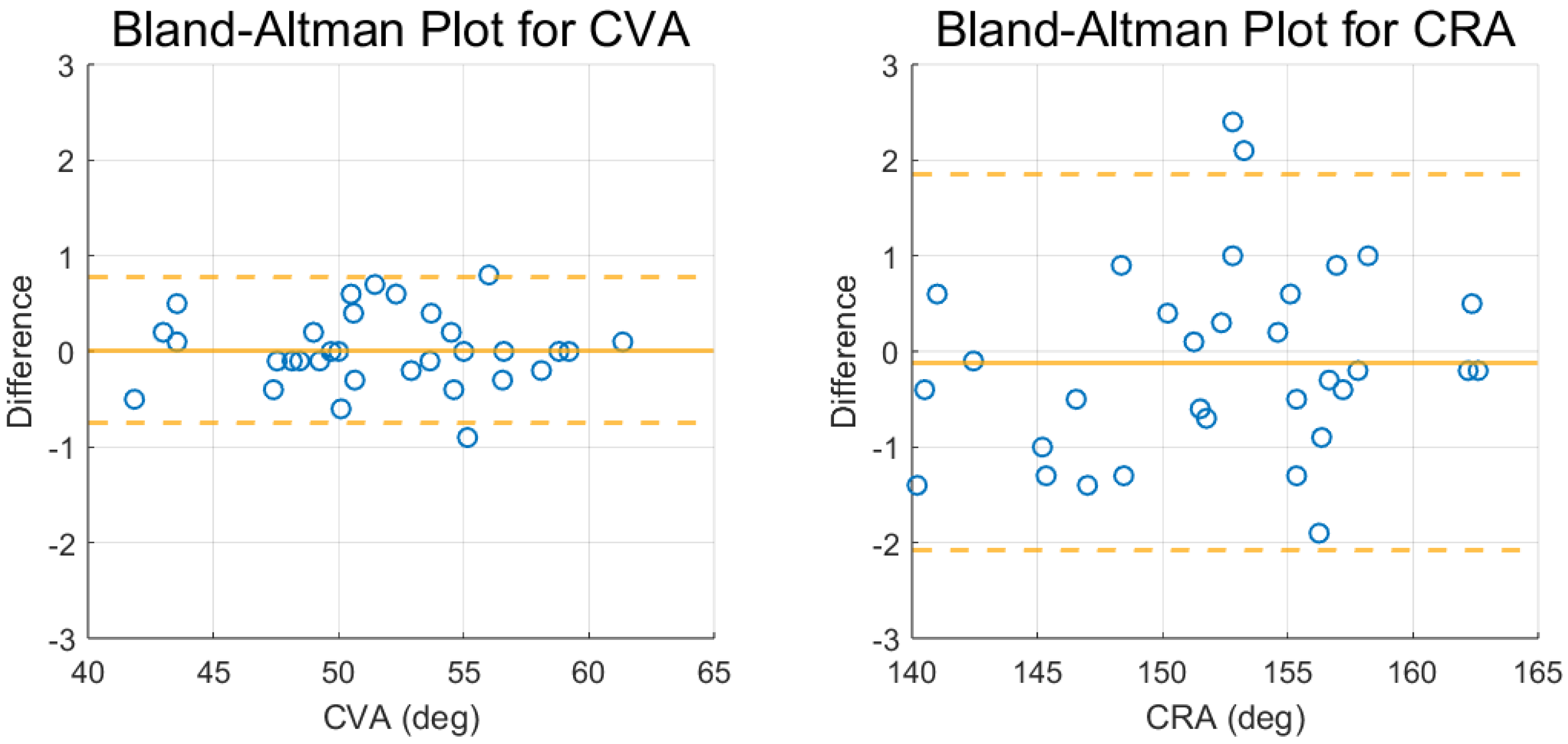
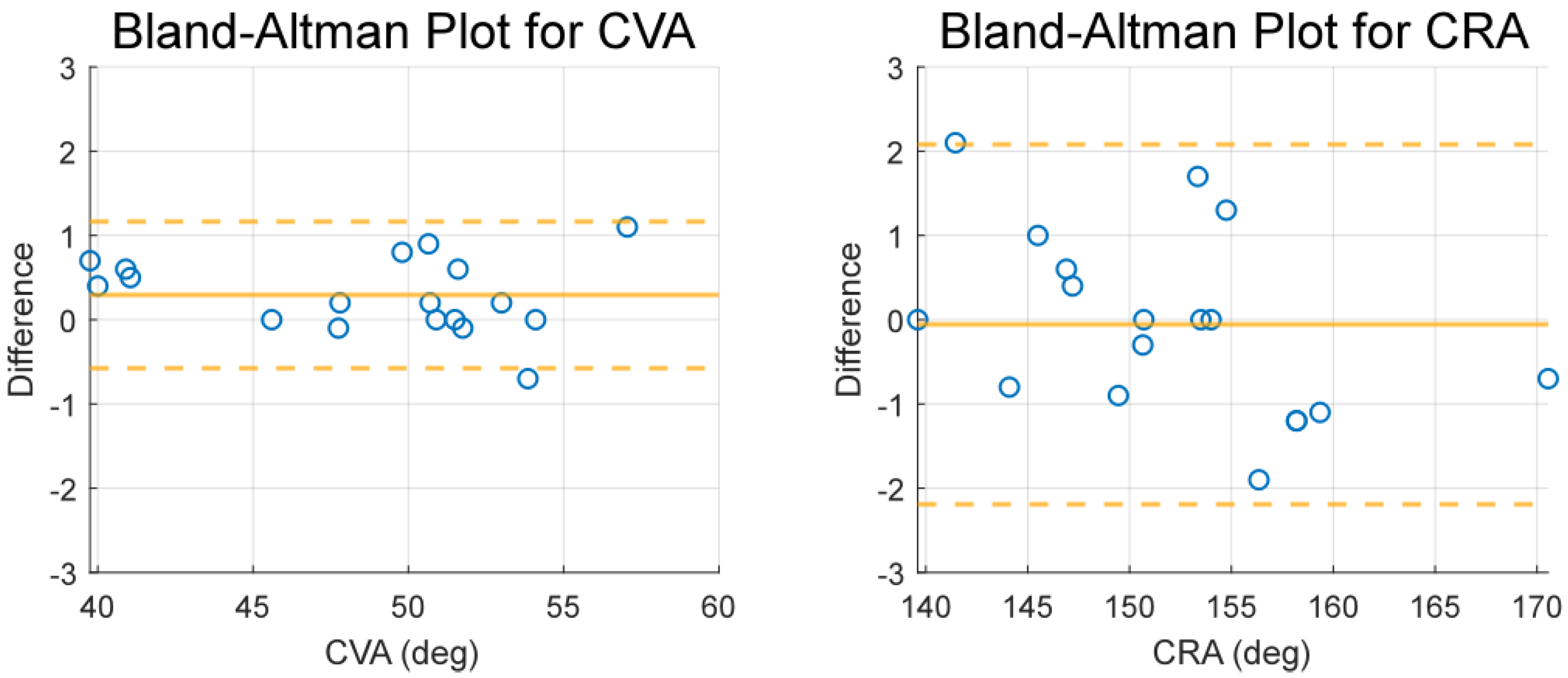
The Pearson correlation coefficient was calculated to determine the strength of the relationship between both approaches (manual and AutoMCA). Bland–Altman plots were used to assess agreement between methods.
2.4. Further Validation Test on Individuals with Neck Disorder
Since the participants in the validation test are all healthy individuals, 18 participants with cervical symptoms (2 males and 16 females), aged from 19 to 35 with a mean value of 24.3 and a standard deviation of 3.72, were recruited to validate the functionality of AutoMCA in detecting the cranial angles of individuals with neck disorders. The apparatus, procedures, and statistical analysis were the same as the validation test.
2.5. Speed Comparison Test
To evaluate the operational time required by AutoMCA compared with the traditional photogrammetry method, a comparative study was conducted using the same apparatus as in the validation test. Since the focus was on data acquisition time, instrument setup and marker placement were excluded from the time recordings. In the AutoMCA test, the timer began once both the instrument and participant were ready. The examiner first clicked a marker in the image to obtain the initial HSV color threshold parameters, then refined them as needed. When all three markers were identified and the cranial angle results were displayed, the examiner clicked the Capture Image button, at which point the timer stopped. The application was restarted after each trial to reset the HSV parameters to default. For the traditional approach, cranial angles were measured using Kinovea on the raw images. Here, the timer started when the image was opened and stopped once the examiner successfully annotated the cranial angles. A total of 10 participants were included in this comparison study, and one trial was conducted on each.
2.6. Robustness Test
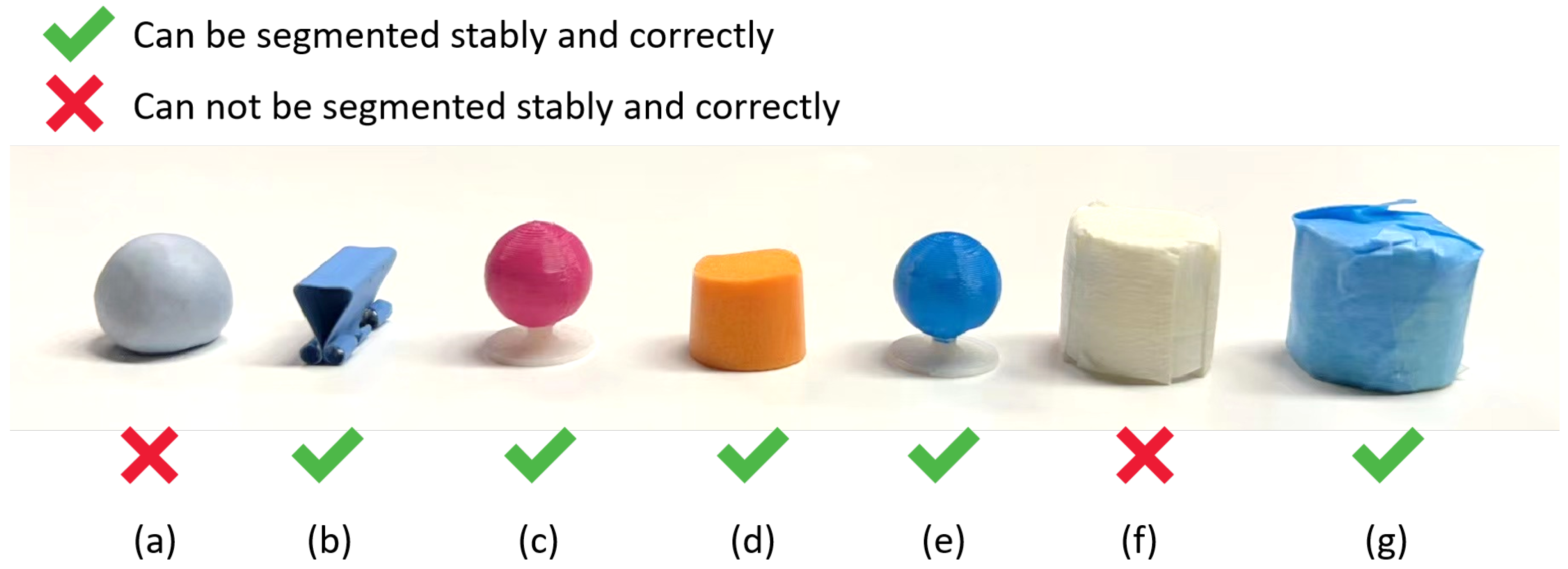
In addition to the previous validation test, we also conducted a robustness test to determine the performance boundary of our system. A workstation in the office, crowded with books, computers, and other objects, was selected as the background. Seven sets of markers with different shapes were employed (
Figure 7): (a) blue tack in near-sphere shape, (b) part of a dovetail paper clip, (c) the 3D-printed markers with the same shape as the markers in the validation test with a painted pink color, (d) ear plug (cut in half), (e) the same-shaped 3D-printed markers in blue, (f) a small bottle cap covered with white tape, and (g) a small bottle cap covered with blue tape. Each set contained three markers to be placed on the Canthus, Tragus, and C7 spinous processes. The setting of the smartphone acting as the camera was the same as in the validation test.
For each set of markers, the examiner conducted the palpation and assigned the markers on the critical features to the participant first. After that, the examiner altered the settings for ’HSV color thresholding’ and ’morphological filtering’ to segment the markers. Detection was deemed successful if all markers were consistently segmented and angles were displayed correctly.
4. Discussion
The objective of this study was to develop a reliable tool for the public as well as experts to easily assess the cranial angles for the early diagnosis of FHP prior to the onset of neck pain. High robustness for automatically measuring the cranial angles of this system helps reduce the user’s labor. The accuracy test confirmed that AutoMCA’s measurements closely matched ground truth values, with deviations under one degree, reinforcing its reliability as a precise tool for cranial angle assessment. The validation test results show a significantly strong correlation (over 0.98) between the measurements taken by manual measurement based on Kinovea and our software. This result indicates that using our software to replace manual measurements in software like Kinovea is feasible and reliable. Furthermore, additional validation conducted on participants with neck disorders reinforced the system’s effectiveness and practical applicability.
The robustness test indicated that the system has a high tolerance for the marker. The failure in detecting markers (a) and (f) in the robustness test is because the color of these two objects is too light, which makes their color have a larger variation under the light. The wide range of variation necessitates a large HSV range, resulting in the detection of numerous irrelevant background objects. Another reason is that their color is widely utilized in the paint for walls and tables, making the segmentation encounter a greater challenge. Therefore, objects with light colors or colors commonly used in the painting of the decoration should be avoided from acting as the marker.
Beyond accuracy and robustness, the speed comparison test further demonstrated the practical advantage of AutoMCA. When compared with the traditional photogrammetry workflow using Kinovea, AutoMCA significantly reduced the time required for angle measurement once markers were placed and the system initialized. The automated detection and real-time calculation eliminated the repetitive manual annotation process, allowing examiners to capture and analyze cranial angles in a fraction of the time. This efficiency not only minimizes examiner fatigue but also enhances clinical and research throughput, making AutoMCA more suitable for large-scale studies and routine posture assessments.
Although some markers with a color close to the background cannot be successfully detected, the variety of shapes and color tolerance is large enough for users to collect effective markers easily. The robustness test result of high tolerance to the shape and color of markers means it is more versatile and universal than those automatic approaches that require a plain background and specific markers. Therefore, the users do not have to find a clear space as the background, and no special markers have to be brought to use the automatic measuring software.
The user-friendly GUI of the software simplifies the HSV range and filter size settings. Users can set the HSV range without prior knowledge of the color space. Real-time data display eliminates the need for manual post-processing, enabling immediate assessment. The user experience closely resembles that of a conventional goniometer, allowing for additional measurements when needed. Compared to a goniometer, it offers improved accuracy and reliability by minimizing errors caused by human factors such as goniometer placement and camera alignment.
However, since this approach is still under the category of photogrammetry, it has inherent shortcomings, like the tilted camera placement will result in a measurement error of the CVA. It is challenging to notice whether the camera is slightly inclined, so adding a level indicator to the camera when setting up can greatly prevent the error caused by tilted placement. Also, migrating this system to a tablet or a smartphone with an integrated electronic level is a promising choice, since the level can be directly seen in the image, providing a better user experience in tilting angle adjustment.
Generally, compared to other studies, our study provides an automatic cranial angle measure solution with a higher tolerance of background and marker shapes and colors. It increases accessibility and encourages a larger group of users to track their forward head posture. If the software can be deployed directly on a smartphone or a tablet, its convenience can be greatly enhanced. We will develop a new version of the software that can run on mobile devices in the future to lower the barrier to utilization.
5. Conclusions
In conclusion, with the background of universal use of mobile devices strongly correlated to the forward head posture, our study developed an auto-measurement software of cranial angles for head posture assessment (CRA and CVA), with adequate robustness in either clinical or home environments. The system could also tolerate a variety of colors and shapes of the markers, which are easy to access. The application interface was developed as an accurate and reliable real-time goniometer, minimizing systematic error in human measurement. For assessment accuracy, a validation test showed that this software achieves the same result as a human rater from a particular photo. The speed comparison test highlighted AutoMCA’s efficiency, reducing measurement time by eliminating repetitive manual annotation and enabling real-time angle calculation. Also, the robustness test shows that in this software, a range of markers could be adopted as long as they are attached to the correct positions. Collectively, these findings establish AutoMCA as a precise, efficient, and versatile tool for head posture assessment, lowering the requirements for instruments and space while enhancing usability in both clinical and research contexts.