

Work Route for the Inclusion of Learning Analytics in the Development of Interactive Multimedia Experiences for Elementary Education

 ,
,  ,
, 
 ,
,  , ,
, ,  ,
, 
Abstract
1. Introduction
2. Analytics in Interactive Multimedia Experiences
2.1. The Role of IME in Elementary Education
2.2. Learning Analytics Guidelines
2.3. Work Route to Include LA Guidelines into IME
3. Methods
3.1. Case Study
3.1.1. Methodology
3.1.2. Creation of Work Teams
3.1.3. Coco Shapes
3.1.4. Evolution of Coco Shapes
3.2. Expert Judgments
4. Results and Discussion
4.1. Case Study Results
4.1.1. Application of Guidelines to Coco Shapes
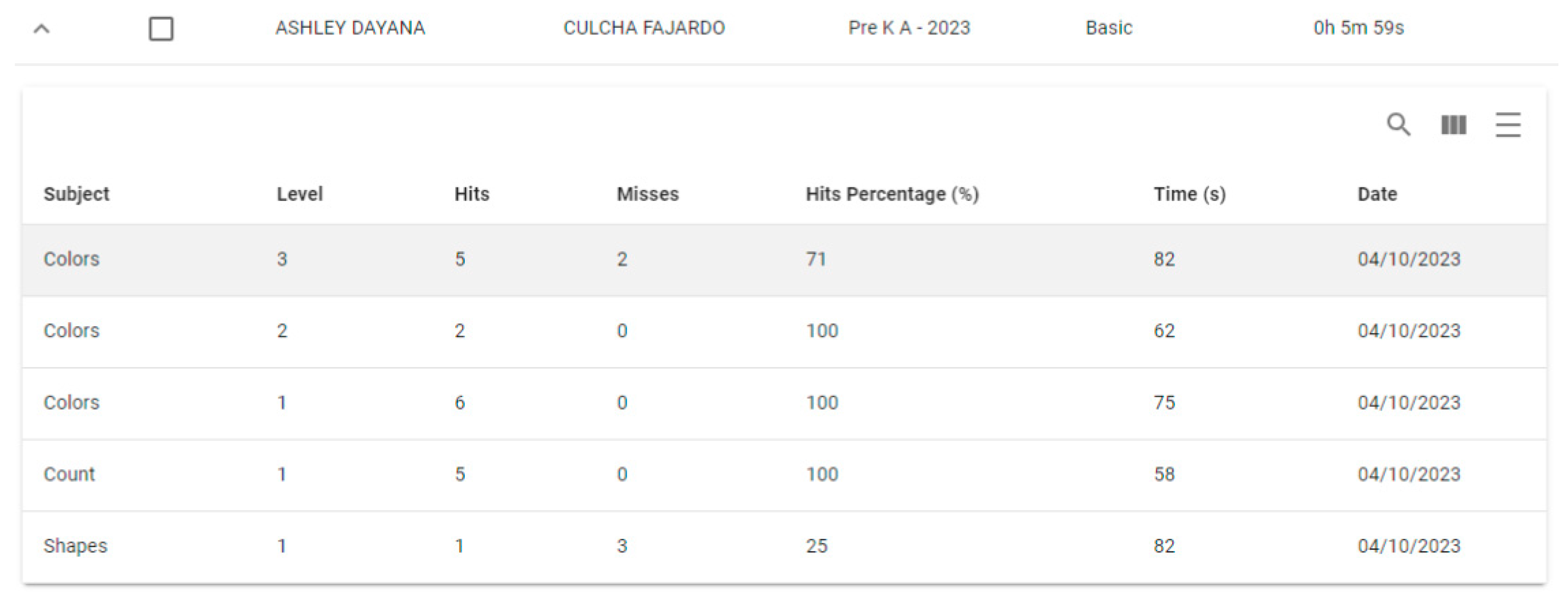
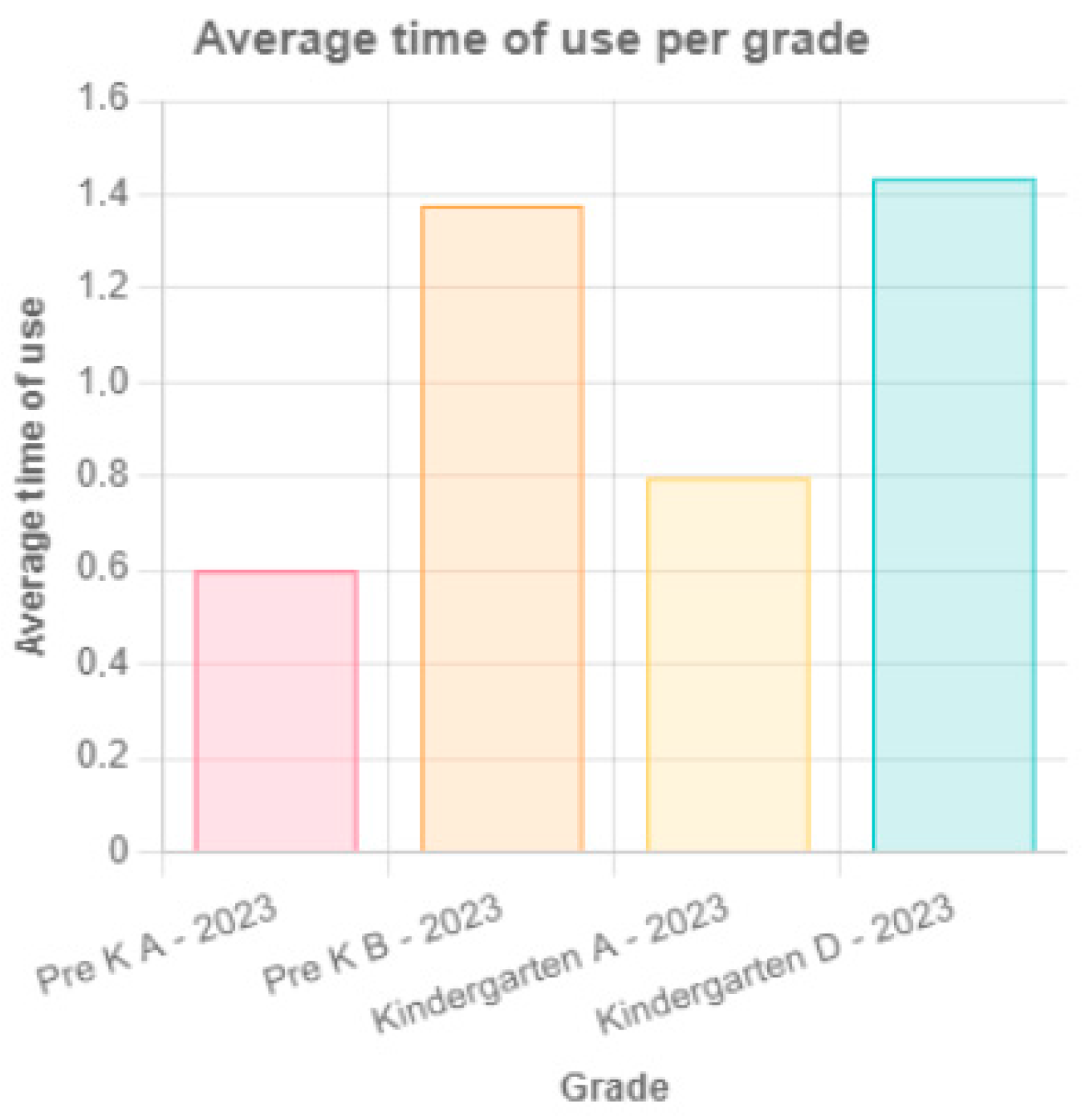
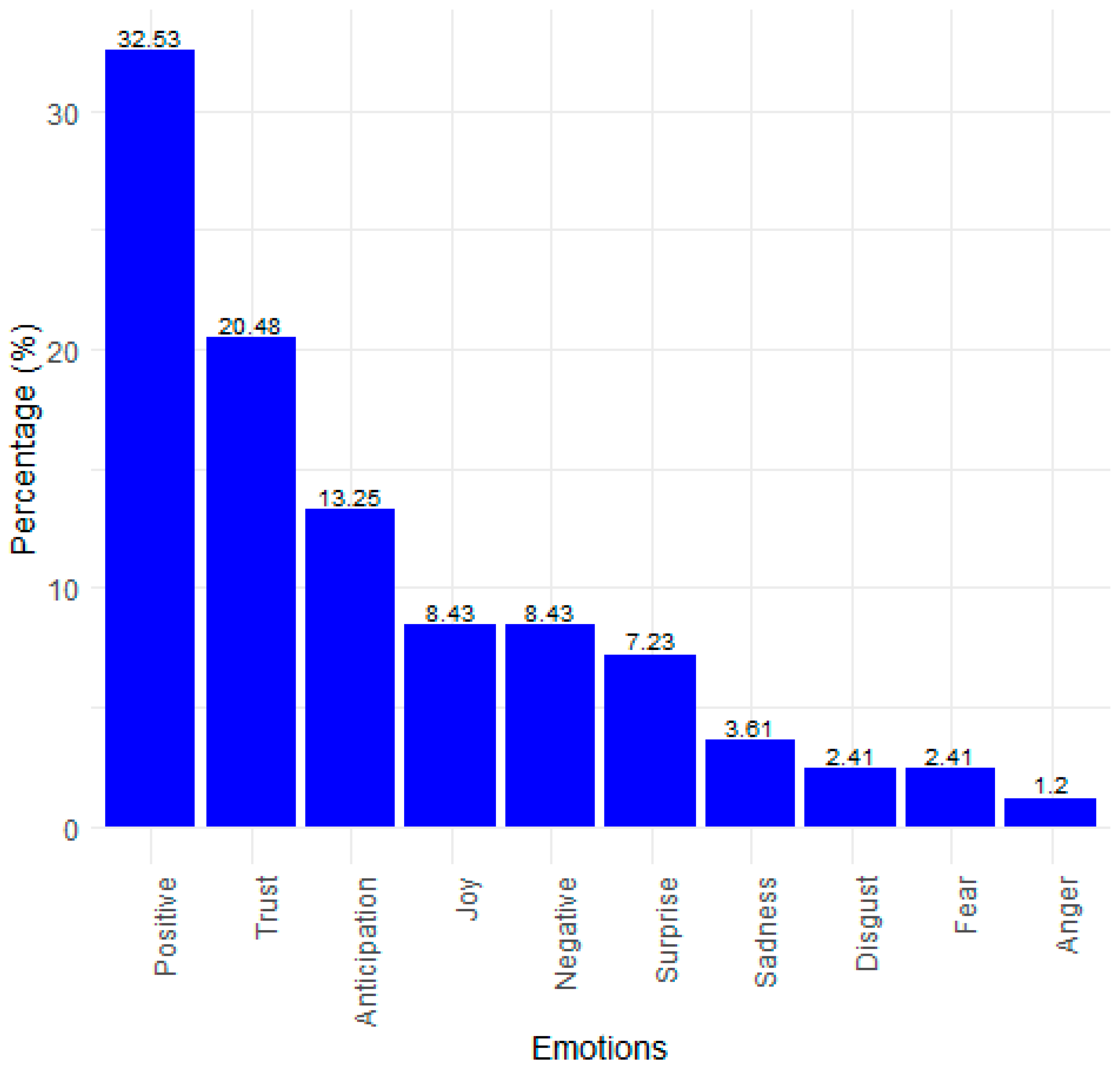
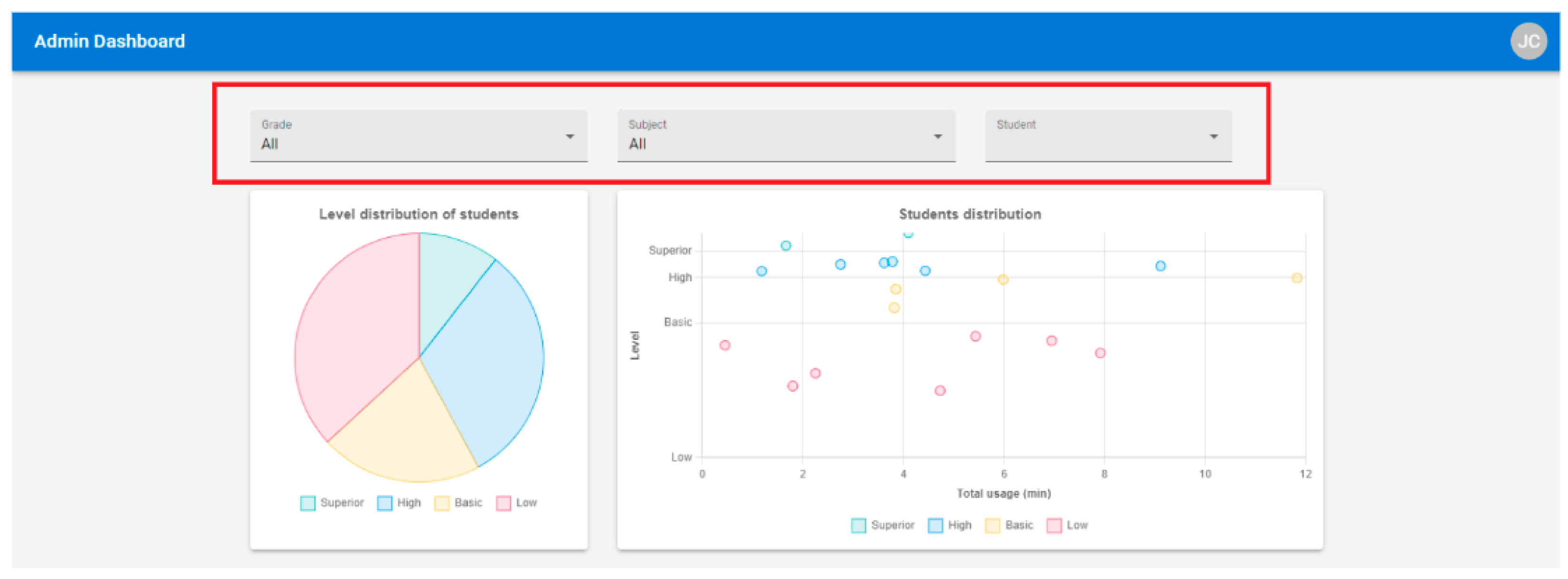
4.1.2. Results
4.2. Expert Judgments Results
4.3. Discussion
5. Conclusions
Author Contributions
Funding
Institutional Review Board Statement
Informed Consent Statement
Data Availability Statement
Conflicts of Interest
References
- Ayala, C.A.P.; Solano, A.; Granollers, T. Proposal to Conceive Multimedia Systems from a Value Creation Perspective and a Collaborative Work Routes Approach. Interact. Des. Arch. 2021, 49, 8–28. [Google Scholar] [CrossRef]
- Siemens, G.; Gasevic, G.; Haythornthwaite, C.; Dawson, S.; Buckingham, S.; Ferguson, R.; Baker, R. Open Learning Analytics: An Integrated & Modularized Platform. Ph.D. Dissertation, Open University Press, Berkshire, UK, 2011. [Google Scholar]
- Peláez, C.A.; Solano, A.; De La Rosa, E.A.; López, J.A.; Parra, J.A.; Ospina, J.A.; Ramírez, G.M.; Moreira, F. Learning analytics in the design of interactive multimedia experiences for elementary education: A systematic review. In Proceedings of the XXIII International Conference on Human Computer Interaction, Copenhagen, Denmark, 23–28 July 2023; ACM: Lleida, Spain, 2023. [Google Scholar] [CrossRef]
- Cassano, F.; Piccinno, A.; Roselli, T.; Rossano, V. Gamification and learning analytics to improve engagement in university courses. In Methodologies and Intelligent Systems for Technology Enhanced Learning, 8th International Conference 8; Springer International Publishing: Toledo, Spain, 2019; pp. 156–163. [Google Scholar] [CrossRef]
- Srinivasa, K.; Muralidhar, K. A Beginer’s Guide to Learning Analytics; Springer: Cham, Switzerland, 2021. [Google Scholar]
- Blanco, B.B.; Rodriguez, J.L.T.; López, M.T.; Rubio, J.M. How do preschoolers interact with peers? Characterising child and group behaviour in games with tangible interfaces in school. Int. J. Hum.-Comput. Stud. 2022, 165, 102849. [Google Scholar] [CrossRef]
- Lee, A.V.Y.; Koh, E.; Looi, C.K. AI in education and learning analytics in Singapore: An overview of key projects and initiatives. Inf. Technol. Educ. Learn. 2023, 3, Inv-p001. [Google Scholar] [CrossRef]
- Ferguson, R.; Macfadyen, L.P.; Clow, D.; Tynan, B.; Alexander, S.; Dawson, S. Setting learning analytics in context: Overcoming the barriers to large-scale adoption. J. Learn. Anal. 2014, 1, 120–144. [Google Scholar] [CrossRef]
- Dakduk, S.; Van der Woude, D.; Nieto, C.A. Technological Adoption in Emerging Economies: Insights from Latin America and the Caribbean with a Focus on Low-Income Consumers. In New Topics in Emerging Markets; Bobek, V., Horvat, T., Eds.; IntechOpen: London, UK, 2023. [Google Scholar] [CrossRef]
- Wise, A. Designing pedagogical interventions to supportstudent use of learning analytics. In Proceedings of the Fourth International Conference on Learning Analytics and Knowledge, Indianapolis, IN, USA, 24–28 March 2014; ACM: Kyoto, Japan, 2014; pp. 203–211. [Google Scholar] [CrossRef]
- Manyukhina, Y.; Wise, D. British Educational Research Association, BERA. Retrieved from Children’s Agency: What Is It, and What should Be Done? 2021. Available online: https://www.bera.ac.uk/blog/childrens-agency-what-is-it-and-what-should-be-done (accessed on 26 July 2024).
- Hevner, A.R.; March, S.T.; Park, J.; Ram, S. Design science in information systems research. MIS Q. 2004, 28, 75–105. [Google Scholar] [CrossRef]
- Object Management Group. Essence–Kernel and Language for Software Engineering Methods; OMG: Needham, MA, USA, 2018. [Google Scholar]
- Peláez, C.A.; Solano, A. A Practice for the Design of Interactive Multimedia Experiences Based on Gamification: A Case Study in Elementary Education. Sustainability 2023, 15, 2385. [Google Scholar] [CrossRef]
- Roberts, L.D.; Howell, J.A.; Seaman, K. Give me a customizable dashboard: Personalized learning analytics dashboards in higher education. Technol. Knowl. Learn. 2017, 22, 317–333. [Google Scholar] [CrossRef]
- Zin, M.Z.M.; Sakat, A.A.; Ahmad, N.A.; Bhari, A. Relationship between the multimedia technology and education in improving learning quality. Procedia Soc. Behav. Sci. 2013, 9, 351–355. [Google Scholar] [CrossRef]
- Abdulrahaman, M.D.; Faruk, N.; Oloyede, A.A.; Surajudeen-Bakinde, N.T.; Olawoyin, L.A.; Mejabi, O.V.; Imam-Fulani, Y.O.; Fahm, A.O.; Azeez, A.L. Multimedia tools in the teaching and learning processes: A systematic review. Heliyon 2020, 6, 11. [Google Scholar] [CrossRef]
- Departamento Administrativo Nacional de Estadística—DANE. Educación, Ciencia, Tecnología e Innovación—ECTeI—Reporte Estadístico No.1; DANE: Bogotá, Colombia, 2020.
- Portulans Institute; University of Oxford; Saïd Business School. Network Readiness Index 2022. (Countries Benchmarking the Future of the Network Economy). Available online: https://networkreadinessindex.org/countries/ (accessed on 27 April 2023).
- Parra-Valencia, J.A.; Peláez, C.A.; Solano, A.; López, J.A.; Ospina, J.A. Learning Analytics and Interactive Multimedia Experience in Enhancing Student Learning Experience: A Systemic Approach. In Complex Tasks with Systems Thinking; Qudrat-Ullah, H., Ed.; Springer Nature: Cham, Switzerland, 2023; pp. 151–175. [Google Scholar] [CrossRef]
- Budiarto, F.; Jazuli, A. Interactive Learning Multimedia Improving Learning Motivation Elementary School Students. In Proceedings of the ICONESS 2021: Proceedings of the 1st International Conference on Social Sciences, Purwokerto, Indonesia, 19 July 2021; European Alliance for Innovation: Purwokerto, Indonesia, 2021; p. 318. [Google Scholar] [CrossRef]
- Macfadyen, L.P.; Lockyer, L.; Rienties, B. Learning design and learning analytics: Snapshot 2020. J. Learn. Anal. 2020, 7, 6–12. [Google Scholar] [CrossRef]
- Dabbebi, I.; Gilliot, J.; Iksal, S. User centered approach for learning analytics dashboard generation. In Proceedings of the CSEDU 2019: 11th International Conference on Computer Supported Education, Heraklion, Crete, Greece, 2–4 May 2019; pp. 260–267. [Google Scholar]
- Xin, O.K.; Singh, D. Development of learning analytics dashboard based on model learning management system. Int. J. Adv. Comput. Sci. Appl. 2021, 12, 838–843. [Google Scholar] [CrossRef]
- Khosravi, H.; Shabaninejad, S.; Bakharia, A.; Sadiq, S.; Indulska, M.; Gašević, D. Intelligent Learning Analytics Dashboards: Automated Drill-Down Recommendations to Support Teacher Data Exploration. J. Learn. Anal. 2021, 8, 133–154. [Google Scholar] [CrossRef]
- Ahn, J.; Campos, F.; Hays, M.; Digiacomo, D. Designing in Context: Reaching Beyond Usability in Learning Analytics Dashboard Design. J. Learn. Anal. 2019, 6, 70–85. [Google Scholar] [CrossRef]
- Chicaiza, J.; Cabrera-Loayza, M.; Elizalde, R.; Piedra, N. Application of data anonymization in Learning Analytics. In Proceedings of the 3rd International Conference on Applications of Intelligent Systems, Las Palmas de Gran Canaria, Spain, 7–12 January 2020; pp. 1–6. [Google Scholar] [CrossRef]
- Hubalovsky, S.; Hubalovska, M.; Musilek, M. Assessment of the influence of adaptive E-learning on learning effectiveness of primary school pupils. Comput. Hum. Behav. 2019, 92, 691–705. [Google Scholar] [CrossRef]
- Dimitriadis, Y.; Martínez, R.; Wiley, K. Human-centered design principles for actionable learning analytics. In Research on E-Learning and ICT in Education: Technological, Pedagogical and Instructional Perspectives; Springer: Berlin/Heidelberg, Germany, 2021; pp. 277–296. [Google Scholar] [CrossRef]
- Hallifax, S.; Serna, A.; Marty, J.C.; Lavoué, É. Adaptive gamification in education: A literature review of current trends and developments. In Proceedings of the 14th European Conference on Technology Enhanced Learning, EC-TEL 2019, Delft, The Netherlands, 16–19 September 2019. [Google Scholar] [CrossRef]
- Shah, K.; Ahmed, J.; Shenoy, N.; Srikant, N. How different are students and their learning styles? Int. J. Res. Med. Sci. 2013, 1, 212–215. [Google Scholar] [CrossRef]
- Wald, M. Learning through multimedia: Speech recognition enhancing accessibility and interaction. J. Educ. Tional Multimed. Hypermedia 2008, 17, 215–233. [Google Scholar]
- Heimgärtner, R. Cultural Differences in Human-Computer Interaction: Towards Culturally Adaptive Human-Machine Interaction; Oldenbourg Wissenschaftsverlag Verlag: Munich, Germany, 2012. [Google Scholar] [CrossRef]
- Farah, J.C.; Moro, A.; Bergram, K.; Purohit, A.K.; Gillet, D.; Holzer, A. Bringing computational thinking to non-STEM undergraduates through an integrated notebook application. In Proceedings of the 15th European Conference on Technology Enhanced Learning, Heidelberg, Germany, 14–18 September 2020. [Google Scholar]
- Naranjo, D.M.; Prieto, J.R.; Moltó, G.; Calatrava, A. A visual dashboard to track learning analytics for educational cloud computing. Sensors 2019, 19, 2952. [Google Scholar] [CrossRef] [PubMed]
- Papamitsiou, Z.; Giannakos, M.N.; Ochoa, X. From childhood to maturity: Are we there yet? Mapping the intellectual progress in learning analytics during the past decade. In Proceedings of the Tenth International Conference on Learning Analytics & Knowledge, Frankfurt, Germany, 23–27 March 2020; pp. 559–568. [Google Scholar] [CrossRef]
- Kumar, V. 101 Design Methods: A Structured Approach for Driving Innovation in Your Organization; John Wiley & Sons: Hoboken, NY, USA, 2012. [Google Scholar]
- IDEO. Human Centered Design Toolkit; IDEO: San Francisco, CA, USA, 2011. [Google Scholar]
- Friedman, B.; Hendry, D.G.; Borning, A. A survey of value sensitive design methods. Found. Trends® Hum.–Comput. Interact. 2017, 11, 63–125. [Google Scholar] [CrossRef]
- Pressman, R.; Maxim, B. Software Engineering. A Practitioner’s Approach; Mc Graw Hill: New York, NY, USA, 2015. [Google Scholar]
- ISACA. COBIT 5: A Business Framework for the Governance and Management of Enterprise IT; ISACA: Schaumburg, IL, USA, 2012. [Google Scholar]
- Geerts, G.L. A design science research methodology and its application to accounting information systems research. Int. J. Account. Inf. Syst. 2011, 12, 142–151. [Google Scholar] [CrossRef]
- Freitas, E.; Fonseca, F.; Garcia, V.; Falcão, T.P.; Marques, E.; Gašević, D.; Mello, R.F. MMALA: Developing and Evaluating a Maturity Model for Adopting Learning Analytics. J. Learn. Anal. 2024, 11, 67–86. [Google Scholar] [CrossRef]
- Schmitz, M.; Scheffel, M.; Bemelmans, R.; Drachsler, H. FoLA 2—A Method for Co-Creating Learning Analytics-Supported Learning Design. J. Learn. Anal. 2022, 9, 265–281. [Google Scholar] [CrossRef]
- Law, N.; Liang, L. A multilevel framework and method for learning analytics integrated learning design. J. Learn. Anal. 2020, 7, 98–117. [Google Scholar] [CrossRef]
- Nguyen, A.; Tuunanen, T.; Gardner, L.; Sheridan, D. Design principles for learning analytics information systems in higher education. Eur. J. Inf. Syst. 2020, 30, 541–568. [Google Scholar] [CrossRef]
- Ivari, J. Distinguishing and contrasting two strategies for design science research. Eur. J. Inf. Systems 2015, 24, 107–115. [Google Scholar] [CrossRef]
- Peffers, K.; Tuunanen, T.; Rothenberger, M.A.; Chatterjee, S. A design science research methodology for information systems research. J. Manag. Inf. Syst. 2007, 24, 45–77. [Google Scholar] [CrossRef]
- Hollander, M.; Wolfe, D. Solutions Manual to Accompany: Nonparametric Statistical Methods; Wiley: New York, NY, USA, 1999. [Google Scholar]
- Wasserman, L. All of Nonparametric Statistics; Springer Science & Business Media: New York, NY, USA, 2006. [Google Scholar]
- Pérez, E. Mágenes Sobre la Universidad del Valle: Versiones de Diversos Sectores Sociales. Estudio Regional y Nacional; Universidad del Valle: Cali, Colombia, 2011. [Google Scholar]
- Ho, G.W. Examining perceptions and attitudes: A review of Likert-type scales versus Q-methodology. West. J. Nurs. Res. 2017, 39, 674–689. [Google Scholar] [CrossRef]
- R Core Team. R: A Language and Environment for Statistical Computing; Foundation for Statistical Computing: Vienna, Austria, 2022. [Google Scholar]
- Jockers, M.L.; Thalken, R. Text Analysis with R; Springer International Publishing: Cham, Switzerland, 2020. [Google Scholar] [CrossRef]
- Little, R.J.; Rubin, D.B. Statistical Analysis with Missing Data; John Wiley & Sons: Hoboken, NJ, USA, 2019. [Google Scholar] [CrossRef]
- Mohammad, S.; Turney, P. Emotions evoked by common words and phrases: Using mechanical turk to create an emotion lexicon. In Proceedings of the NAACL HLT 2010 Workshop on Computational Approaches to Analysis and Generation of Emotion in Text, Los Angeles, CA, USA, 5 June 2010; pp. 26–34. [Google Scholar]
- Field, A.; Miles, J.; Field, Z. Discovering Statistics Using R; W. Ross MacDonald School Resource Services Library: Brantford, ON, USA, 2017. [Google Scholar]






| ID | Description |
|---|---|
| Guidelines related to the data analytics dashboard | |
| LAD1 | The dashboard must offer mechanisms for configuring the level of detail of the query results, such as, for example, in terms of the student, course, topic, activity, or learning objective. Filters are crucial for segmenting data; they should be easy to use and allow multiple selections to enable a comparative analysis [22]. |
| LAD2 | The dashboard should allow teachers to view the data distribution per student or course using various graph types (bar, point, line, heat maps, etc.). Teachers could assess student levels, compare courses, and analyze performance indicators. The X-axis should represent time for temporal data to ensure clarity and consistency. Graph selection should align with user preference and data nature. Effective data visualization simplifies user comprehension, facilitating effortless monitoring of learning objectives or activities [23]. |
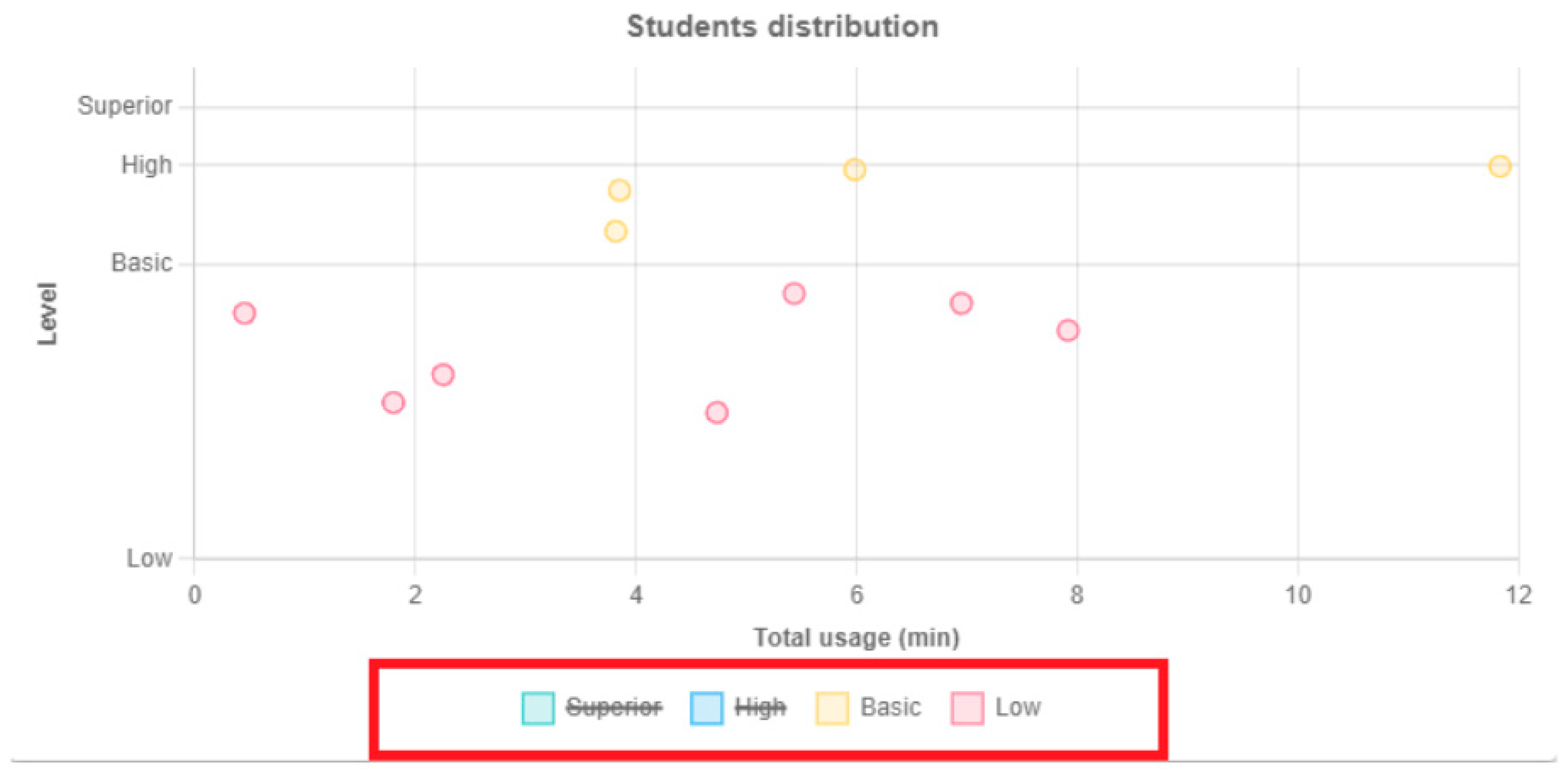
| LAD3 | The graphics must be clear and differentiated. For example, in a pie chart, distinctive colors should be used for each section, and clear labels should be provided. For a scatter plot, the axes should be well-defined, and each point should be easily identifiable by hovering over it with the cursor [24]. |
| LAD4 | Implement interactive features like zooming the charts, clicking details, and dragging and selecting a group of points on the scatter chart to see more details [25]. |
| LAD5 | The dashboard should include clear, educationally relevant, performance indicators, such as pass rates, student progress (see guideline LAP3), and comparisons with benchmark averages. Recording data from the user’s interaction with the multimedia experience is important to allow for subsequent interventions and to monitor learning progress by teachers. |
| LAD6 | Options should be provided for the user to export graphs or raw data so that managers or other stakeholders can perform an additional analysis or prepare reports outside the system [26]. |
| LAD7 | In a graph that includes a variable that can take different values, we recommend enabling the user to select values of interest to enable comparisons. For example, for a variable called “Level”, which can take four possible values (“Very high”, “High”, “Basic” and “Low”), the user should be able to select the level of interest to view it in greater detail. |
| Guidelines related to the student | |
| LAS1 | The IME must record the student’s name and grade, which are the minimum data needed to track their progress over time and compare it with the course average. The teacher can provide individualized feedback and specific assessments for each student by collecting identifying information. |
| LAS2 | Good information-security practices must be implemented to ensure the user data’s privacy, integrity, and confidentiality. Mechanisms, such as removing addresses, personal identification numbers, dates of birth, or other characteristics that could be used to identify a person, must be applied. This aims to anonymize the data and comply with the relevant privacy regulations [27]. In addition, users should be informed about the collected data, and their consent should be obtained where necessary. |
| LAS3 | It is important to identify student learning problems before, during, or after interaction with the multimedia experience so that the experience can be adjusted to their learning pace through AI. Adaptive learning is based on the effort made by the student to complete subsets of exercises successfully and quickly. It should respect each student’s learning style and pace of work [28]. |
| LAS4 | Information about students’ interests, preferences, and culture should be recorded. This will allow the IME to capture their interest and align with their motivations. The digital content of the IME must include examples and situations that are relevant and attractive to students. |
| LAS5 | Tools should gather data on students’ emotions during multimedia interactions, including facial expressions, verbal reactions, movements, or heart rates. Utilizing these data, teachers can employ algorithms or systems to categorize emotions like boredom, frustration, interest, or joy. Subsequently, teachers can tailor feedback, support, or incentives to students’ emotional states, fostering a positive learning environment. |
| LAS6 | An IME should include stories and narratives that relate directly to students’ interests and contexts based on the data collected about their preferences and backgrounds. Story characters and virtual settings should reflect students’ expectations based on the demographic information collected. |
| LAS7 | Data should be used to understand students’ sensory preferences and the multimedia experience should be designed around this information. In the design process, information must be obtained about what types of images, graphics, videos, or digital content interest users. |
| Guidelines related to the teacher | |
| LAT1 | The multimedia experience must include the teacher’s name and email address as the minimum mandatory data. Actions carried out by an administrator, such as creating a teacher account, assigning a course, or registering a new student in a course, will be notified via email. |
| LAT2 | The pedagogical methodologies known to the teacher must be considered in the conception of an IME. Thus, a multimedia experience can encourage students’ active construction of knowledge by allowing them to explore, discover, and solve problems [29]. |
| LAT3 | The teacher should use the data recorded from the student’s interactions with the multimedia experience to offer personalized interventions or additional resources to students who may need additional support. |
| Guidelines related to learning activities | |
| LAA1 | Learning activities should log key data reflecting student performance, including (i) activity status (e.g., paused, canceled, or finished); (ii) error count, aiding teachers in diagnosing issues (e.g., lack of knowledge, inattention, or question complexity), (iii) correct answer count; (iv) obtained grade or score; (v) completion time, indicating concentration and interest; and (vi) difficulty level. These data inform and enhance teaching strategies. |
| LAA2 | Based on student grades or scores, successes, and failures, we propose a scoring system (e.g., points, stars, badges, or other gamification methods) to boost motivation and engagement [30]. Aligning scores with institutional performance levels (e.g., very high to low) enables teachers to assess student distribution across IME-defined levels. |
| LAA3 | The most frequently viewed topics, modules, sections, or activities should be recorded, as well as the time spent on a topic/module. Knowledge of the options or sections that students explore through the IME allows the teacher to identify possible topics that interest the students or that are complex, which can be leveraged as part of their teaching strategy. |
| LAA4 | We suggest recording the number of steps or stages of a completed activity so that the teacher can later identify specific points at which problems arise and adjust the teaching strategy accordingly. |
| LAA5 | Data from student interactions with multimedia content, like videos, animations, simulations, and interactive images, should be captured. Metrics include video watch time, interaction frequency with elements, or reviewed content sections. These data allow teachers to monitor digital tools and content usage within the IME and assess their impact on comprehension and retention. |
| LAA6 | We suggest allowing users to record feedback, comments, and evaluations of the learning activities. This information can enable the teacher to make changes to the teaching strategy and consider updating the design of the IME. This guideline is suggested to be applied to students trained to provide useful information. |
| LAA7 | We suggest recording messages or chats between students during collaborative activities. Based on these data, the teacher can observe the frequency and duration of participation in collaborative activities and identify the exchange of ideas. |
| LAA8 | LA should be used to provide relevant feedback and personalized recommendations to users. The collected data can be used to identify strengths, find opportunities for improvement, and adapt the learning experience to the individual needs of each user. In addition, feedback should be given to explain to students why their answer was wrong, and clues, as to how to carry out an activity, should be provided. |
| LAA9 | Obtain data such as (i) the time spent viewing different visual elements and (ii) the frequency and duration of viewing specific elements. The learning activities of an IME should include a variety of digital content (text, audio, images, 2D and 3D animations, and virtual objects, among others) to address different learning styles [31] and motor, visual, cognitive disabilities, etc. and allow students to access information in multiple ways. Digital content must be aligned with the learning objectives, and topics should be relevant and appropriate to the level of the students. |
| LAA10 | Obtain student preferences and identify accessibility needs, as well as cultural traits. The digital content of learning activities should be suited to student preferences. It should be inclusive and accessible [32] to everyone, considering different skill levels, aspects of gender, poverty, forced migration, functional differences, possible limitations, and cultural diversity [33]. |
| LAA11 | The learning activities of an IME should actively engage students and should encourage interaction with the content. They may include educational games, interactive questions, simulations, or problem-solving activities. |
| LAA12 | Obtain data such as (i) the time spent listening to different audio or sound effects and (ii) the frequency of volume adjustment or changes to songs/sounds. Learning activities should integrate sound effects and music that complement and reinforce the presented concepts to stimulate positive emotions and maintain student interest. |
| LAA13 | Obtain relevant data for the teacher, such as (i) participation in tactile activities, (ii) usage frequency of touch functions or physical interactions (e.g., drag and drop and clicks), (iii) navigation patterns across sections, indicating sensory and content preferences, and (iv) frequency of switching among presentation modes (e.g., images, videos, and text). Learning activities should include interactive touch elements (e.g., buttons, drag and drop, and touch interactions) to engage students. |
| LAA14 | In learning activities, we suggest using technologies that allow for immersive sensory experiences, such as virtual or augmented reality. These technologies can enable students to explore three-dimensional environments or overlay digital information in the real world, significantly enriching the sensory experience. |
| LAA15 | In learning activities, the possibility of offering multiple interaction styles (gesture, pressure, vibration, tangible interfaces, voice commands, or others) should be considered to adapt the system to students’ individual needs and preferences. |
| Guidelines related to student progress | |
| LAP1 | Progress tracking over time is essential to discern long-term trends or improvements in student performance. Essential data per course include (i) schedule, (ii) duration, (iii) modules, (iv) completed modules (noting student progress or areas of delay), and (v) topics/modules. |
| LAP2 | The time spent using the IME and the frequency at which students access it should be recorded. This information can indicate the student’s level of commitment and participation, since there is a correlation between the frequency of use of the resource and success in learning [34]. |
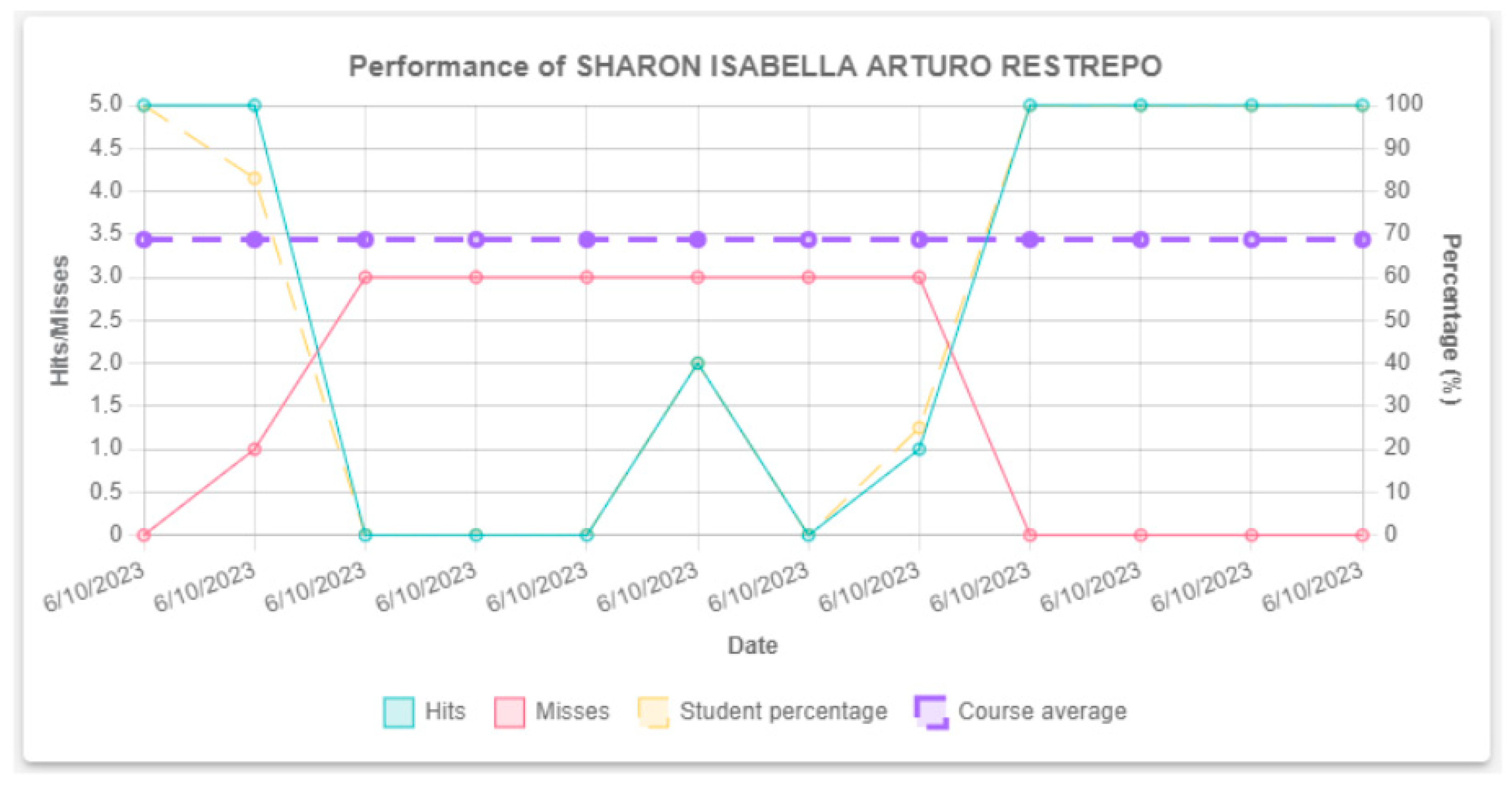
| LAP3 | Student performance and progress visualization are crucial. Teachers should track and compare students’ current and past performances. Detailed reporting and analysis are vital to pinpointing improvement areas and refining teaching methods. A dashboard, for instance, might display success and failure rates, student progress percentages, and course averages during the multimedia experience usage. Graphs, adhering to guideline LAD3, should depict student performance against course averages, aiding teachers in identifying teaching-strategy enhancement opportunities for underperforming students over time [35]. |
| LAP4 | Historical data on students’ learning activities, participation, performance, and progress in previous courses must be recorded and stored. These data should be available for analysis by teachers and administrators, allowing for a more complete understanding of student performance and learning patterns over time [36]. |
| Id | Activity | Description | Techniques |
|---|---|---|---|
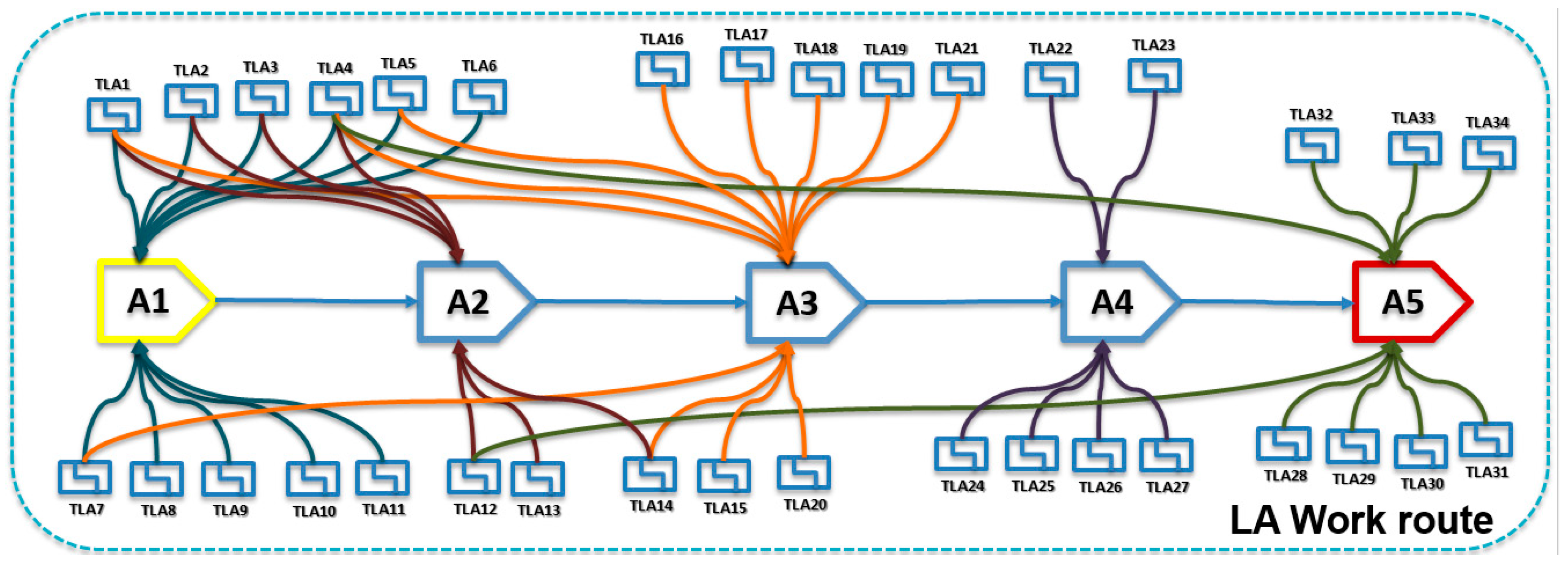
| A1 | Define the purpose of applying learning analytics in the project. | The value purpose for which you want to apply LA in designing an IME is defined and associated with the project objectives. | - TLA1: Trend analysis. - TLA2: Convergence mapping. - TLA3: Value analysis. - TLA4: Interviews with stakeholders. - TLA5: Database of user observations. - TLA6: Identification of value tensions. - TLA7: Analysis of user responses. - TLA8: Identification of patterns. - TLA9: Identification of policies and regulations. - TLA10: Focus group. - TLA11: Definition of key performance indicators (KPI). |
| A2 | Define the principles and guidelines of LA that meet the needs of the school’s stakeholders. | Define the set of LA guidelines that need to be applied to define the data and the people involved, as well as the mechanisms that guarantee the respect, responsibility, and transparency of the information and the specific questions you want to answer. | - TLA1: Trend analysis. - TLA2: Convergence mapping. - TLA3: Value analysis. - TLA4: Interviews with stakeholders. - TLA12: Surveys and questionnaires. - TLA13: Focus group. - TLA14: Observation and analysis of human beings’ cognitive, social, cultural, emotional, and physical aspects. |
| A3 | Define the sources and types of the required data. | The source and nature of data required to apply the selected analytics guidelines must be defined based on them. These data can be quantitative or qualitative. Please take ethical and privacy considerations into account when collecting data. | - TLA4: Interviews with stakeholders. - TLA1: Trend analysis. - TLA7: Analysis of user responses. - TLA14: Observation and analysis of human beings’ cognitive, social, cultural, emotional, and physical aspects. - TLA5: Database of user observations. - TLA15: Historical data analysis. - TLA16: Educational Data Mining (EDM) - TLA17: Data-Driven Assessment (DDA) - TLA18: Social Network Analysis (SNA) - TLA19: Exploratory Factor Analysis (EFA). - TLA20: Text mining and sentiment analysis. - TLA21: Analysis of navigation and usage patterns. |
| A4 | Produce the design and implementation of the IME. | The contents and interaction mechanics in the interactive multimedia experience must be designed or adapted for subsequent implementation so that the required data can be captured according to the selected guidelines. The data visualization elements required for review and feedback must also be implemented. | - TLA22: Production of metaphors and analogies. - TLA23: Storyboard creation - TLA24: Wireframe creation. - TLA25: Creation of the journey map for the multimedia experience. - TLA26: Prototype production of user behavior against the multimedia experience. - TLA27: Concept prototypes. |
| A5 | Testing of the IME that incorporates LA guidelines. | A set of tests must be carried out related to the content, interaction mechanics, recovered data, and its visualization on the dashboard, as well as validating these elements with the stakeholders. | - TLA4: Interviews with stakeholders. - TLA12: Surveys and questionnaires. - TLA28: A/B Testing. - TLA29: Usability testing. - TLA30: Expert judgment. - TLA31: Unit tests. - TLA32: Component integration tests. - TLA33: Test of performance. - TLA34: Privacy and security evaluation. |
| Guidelines | Perception Indicator (%) | |
|---|---|---|
| Usefulness | Clarity | |
| Data Analytics Dashboard Guidelines | ||
| LAD1 | 71.85 | 70.37 |
| LAD2 | 70.37 | 68.15 |
| LAD3 | 74.07 | 74.84 |
| LAD4 | 71.11 | 69.63 |
| LAD5 | 72.59 | 73.33 |
| LAD6 | 69.63 | 69.63 |
| LAD7 | 71.11 | 67.41 |
| Guidelines related to students | ||
| LAS1 | 74.07 | 75.56 |
| LAS2 | 72.59 | 71.85 |
| LAS3 | 74.07 | 74.07 |
| LAS4 | 72.59 | 71.85 |
| LAS5 | 71.11 | 71.85 |
| LAS6 | 72.59 | 73.33 |
| LAS7 | 69.63 | 68.89 |
| Guidelines related to the teacher | ||
| LAT1 | 69.63 | 73.33 |
| LAT2 | 71.11 | 70.37 |
| LAT3 | 71.85 | 71.11 |
| Guidelines related to learning activities | ||
| LAA1 | 71.11 | 66.67 |
| LAA2 | 73.33 | 71.85 |
| LAA3 | 74.81 | 73.33 |
| LAA4 | 74.07 | 71.85 |
| LAA5 | 71.85 | 74.81 |
| LAA6 | 73.33 | 72.59 |
| LAA7 | 70.37 | 74.07 |
| LAA8 | 74.07 | 73.33 |
| LAA9 | 67.41 | 69.63 |
| LAA10 | 71.85 | 72.59 |
| LAA11 | 71.85 | 71.85 |
| LAA12 | 70.37 | 71.85 |
| LAA13 | 68.89 | 70.37 |
| LAA14 | 73.33 | 70.37 |
| LAA15 | 71.85 | 69.63 |
| Guidelines related to student progress | ||
| LAP1 | 72.59 | 74.07 |
| LAP2 | 68.15 | 71.11 |
| LAP3 | 71.85 | 72.59 |
| LAP4 | 73.33 | 74.07 |
| General average | 71.78 | 71.72 |
| Guidelines | Test Statistic (W) | p-Value |
|---|---|---|
| LAD | 33.5 | 0.27 |
| LAS | 25 | 1.00 |
| LAT | 3.5 | 0.83 |
| LAA | 120.5 | 0.75 |
| LAP | 4.5 | 0.38 |
Disclaimer/Publisher’s Note: The statements, opinions and data contained in all publications are solely those of the individual author(s) and contributor(s) and not of MDPI and/or the editor(s). MDPI and/or the editor(s) disclaim responsibility for any injury to people or property resulting from any ideas, methods, instructions or products referred to in the content. |
© 2024 by the authors. Licensee MDPI, Basel, Switzerland. This article is an open access article distributed under the terms and conditions of the Creative Commons Attribution (CC BY) license (https://creativecommons.org/licenses/by/4.0/).
Share and Cite
Solano, A.; Peláez, C.A.; Ospina, J.A.; Luna-García, H.; Parra, J.A.; Ramírez, G.M.; Moreira, F.; López Sotelo, J.A.; Villalba-Condori, K.O. Work Route for the Inclusion of Learning Analytics in the Development of Interactive Multimedia Experiences for Elementary Education. Appl. Sci. 2024, 14, 7645. https://doi.org/10.3390/app14177645
Solano A, Peláez CA, Ospina JA, Luna-García H, Parra JA, Ramírez GM, Moreira F, López Sotelo JA, Villalba-Condori KO. Work Route for the Inclusion of Learning Analytics in the Development of Interactive Multimedia Experiences for Elementary Education. Applied Sciences. 2024; 14(17):7645. https://doi.org/10.3390/app14177645
Chicago/Turabian StyleSolano, Andrés, Carlos Alberto Peláez, Johann A. Ospina, Huizilopoztli Luna-García, Jorge Andrick Parra, Gabriel Mauricio Ramírez, Fernando Moreira, Jesús Alfonso López Sotelo, and Klinge Orlando Villalba-Condori. 2024. "Work Route for the Inclusion of Learning Analytics in the Development of Interactive Multimedia Experiences for Elementary Education" Applied Sciences 14, no. 17: 7645. https://doi.org/10.3390/app14177645
APA StyleSolano, A., Peláez, C. A., Ospina, J. A., Luna-García, H., Parra, J. A., Ramírez, G. M., Moreira, F., López Sotelo, J. A., & Villalba-Condori, K. O. (2024). Work Route for the Inclusion of Learning Analytics in the Development of Interactive Multimedia Experiences for Elementary Education. Applied Sciences, 14(17), 7645. https://doi.org/10.3390/app14177645