


Abstract
Nowadays, people are more predisposed to being self-taught due to the availability of online information. With digitalization, information appears not only in its conventional state, as blogs, articles, newspapers, or e-books, but also in more interactive and enticing ways. Video games have become a transmission vehicle for information and knowledge, but they require specific treatment in respect of their presentation and the way in which users interact with them. This treatment includes usability guidelines and heuristics that provide video game properties that are favorable to a better user experience, conducive to captivating the user and to assimilating the content. In this research, usability guidelines and heuristics, complemented with recommendations from educational video game studies, were gathered and analyzed for application to a video game for English language learning called EnLang4All, which was also developed in the scope of this project and evaluated in terms of its reception by users.
1. Introduction
Although English is not the language with the largest number of native speakers in the world, after Chinese Mandarin and Spanish [1]), the English language (EL) has gradually established itself globally as a lingua franca and the most common contact language between people speaking different languages and/or with different nationalities [2,3]. It is strongly present in various media, scientific material, international trade, entertainment, and diplomacy [4], and learning English is required mainly for reasons of practicality [5]. In addition to the possibility of learning English as a foreign language in schools in different countries around the world, technological advances in the development of educational video games (VG) and in mobile applications have allowed the emergence of several EL and other language teaching products. These are games that seek to give independence to users from schools and training; such users intend to learn foreign languages autonomously, in different ways, either through verbal and written interaction with natives or through puzzles and word games. The categories of videogames for teaching English listed by [6,7] in their comparative studies of EL learning mobile applications with the best ratings in the Google Play Store may vary in respect of the types “Puzzle”, “Education”, and “Word”, among others. Users have at their disposal a range of video games for learning foreign languages and to cater for different preferences, whether they are innovative, fun, or focused on pedagogy.
In this research our goal was to develop a VG for EL learning focused on pedagogy, which is effective, captivating, and that fits the user’s needs. To achieve this goal there were specific elements and strategies to consider, as well as methods to follow if the goal was the development of a mainly entertaining VG with its content in English.
2. Related Work
The following sections present the more relevant areas and projects researched for the development of this research.
2.1. Video Games for Learning English as a Foreign Language
In research by Rocha et al. on the development of a mobile EFL teaching application taking into account the user’s gender, based on research carried out in a group of students with an average age between 15 and 16 years old and with basic knowledge of EFL, it was suggested that there is a greater preference that the application is aimed at mobile devices, and that the components for which the public prefer reinforcement are the conjugation of verbs, formulation of sentences, comprehension, and especially vocabulary [8].
From another perspective, Butler addressed the objective of understanding what motivates the target audience in learning with video games and what are the elements of games and learning underlying these activities. Butler created a survey of these elements with existing video games in respect of the choices of a group of 87 children, aged 11 to 12, based on their personal experiences with computer games and learning [9]. That study also contributes to the formulation of strategies for the development of VGs for learning EFL, with a focus on vocabulary; these contribute to the retention of knowledge without sacrificing entertainment in the video game. The illustration in Figure 1 below, adapted from Butler’s work, lists the game and didactic elements identified by the children as those they liked the most, in the video games they tried, and can contribute to the development of educational video games that are closer to reality and the tastes of the target audience.
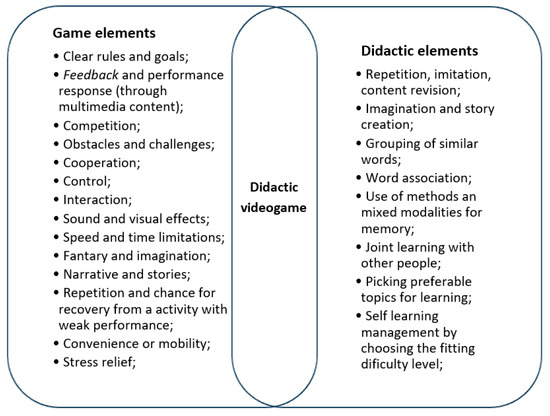
Figure 1.
Adapted model of [9] a didactic video game based on the survey of elements chosen by the group under study.
By studying existing VGs for learning EFL, and applications on the market that are closer to our goals of transmitting knowledge in an organized manner, taking into account existing teaching curricula without giving up the ludic component of the video game, we can survey ideas and understand the approach that they follow. We can also determine how they manage to validate knowledge retention, if it really occurs, and understand how they manage to keep users captivated and involved in learning.
2.1.1. Current Apps in the Market
For this research work, instead of resorting to a practical analysis of the various applications of VG for learning EFL, comparing each one, and creating a survey of the strengths and disadvantages of each one, we summarized studies already carried out on the research topic in respect of such applications (namely Babbel, Duolingo, and Busuu), in order to carry out a global assessment. Babbel is a VG used for learning EFL that is sectioned in respect of vocabulary, revision, access to the website through the application, and a link to access Babbel in other languages. The vocabulary section focuses on the most important words in learning the basics of English and includes translations of phrases and illustrated content (see Figure 2). In addition, a collaboration space like a social network or forum is integrated into the application, where users can interact with each other. As a limitation, Babbel requires payment to fully enjoy the syllabus [10].
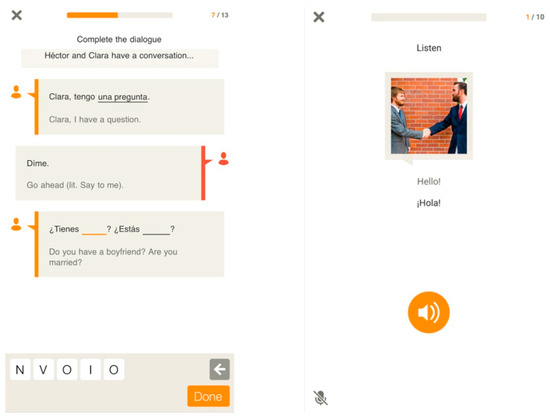
Figure 2.
Babbel app screen captures (source: https://press.babbel.com/, accessed on 16 March 2020).
Busuu (see Figure 3) has a structure similar to the competitor Babbel, but it is more complete in terms of sentence construction, vocabulary, syntax, and semantics. It comprises exercises with drag-and-drop mechanisms for segments of the phrase and their respective sounds. It also has multiple-choice questions. There are five levels of proficiency or difficulty in this application, each with two sets of classes, which provides some variety in preventing repetitive and monotonous games from occurring. As a disadvantage, Busuu is a freemium application; that is, it has limited access to a large part of the programmatic content listed in the application that is only available for a fee [6,10].
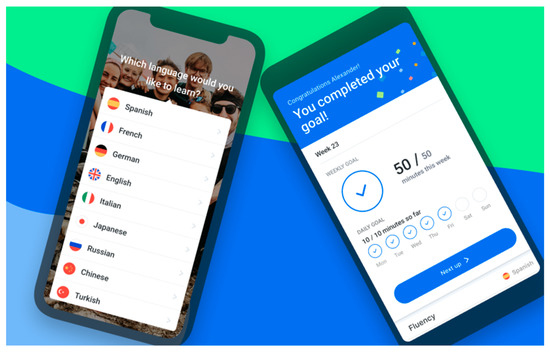
Figure 3.
Busuu app promotional images (source: https://www.busuu.com/pt/press, accessed on 16 March 2020).
Duolingo (see Figure 4) provides learning through play, assigning points and ranking positions to users, as they complete lessons without losing progress points. These points and ranking system encourage competition with other players [6,7]. It also motivates players with regular reminders to continue with the learning sessions, which can have their durations defined at the user’s preference. The main teaching method in the Duolingo application is that of direct translation between the language being learned and the source language, which is not a reliable method [11].
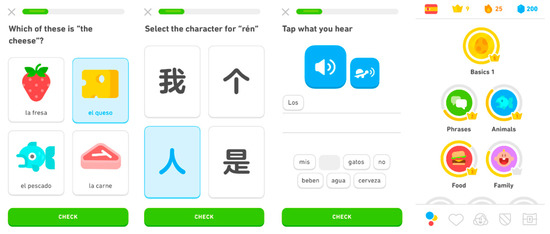
Figure 4.
Duolingo app screen captures (source: https://www.duolingo.com/press, accessed on 16 March 2020).
According to the evaluation of [7] in the work of case studies and comparisons of m-learning applications for learning foreign languages on mobile devices, the applications of which we have previously listed, those better positioned in the market are Duolingo and Babbel, due to their innovation component, usability, functionality, and their educational approaches. They stand out for their learning activities through games, which are fun and captivating for users. Busuu is positioned as an education-oriented game, as its methodology for sharing knowledge between users in a foreign language overlaps with usability and functionality.
Although it is a way of obtaining a monetary return on investment into a game’s development, we observed that limiting application content and restricting information unless payment is made is a disadvantage and can lead to user disinterest. The pedagogical methodologies of Babbel and Busuu are superior to those of Duolingo, as they present solid programmatic content that is closer to what occurs in classroom learning in schools. However, Duolingo stands out for the way that the learning process is adapted into play, allowing for competitions between users and assigning points for each completed activity, which is motivating for users. Notifications that remind the player to continue to progress are also an effective way to maintain involvement in the game and learning.
2.1.2. Knowledge Retention
One of the objectives of this research was to explore which strategies can be applied in order for users to better retain knowledge of the didactic video game to be developed. We gathered three case studies that assess users’ learning performance in relation to market applications or products developed in the scope of research.
The first case study, a work by [11] in which the application Duolingo is analyzed as a foreign-language learning application, sought to support the hypothesis that Duolingo helps in the acquisition of two languages simultaneously for beginners. The specific case was a 12-year-old Arab student learning English and Spanish. The author was able to observe throughout the study that the student could not depend only on the application to learn the languages in full and needed other sources; however, the application motivated the student to learn a language in which they were never interested or in contact with. The author also concluded that the direct translation method of learning does not favor the application, as the grammatical rules are not the same in different languages. He suggested that it could be complemented with visual content and that it needs improvements and additions in terms of vocabulary and grammar, mainly in English. Despite the criticisms of the limitations, the author’s conclusions support the hypothesis of the case study that the application is beneficial for foreign language learning, as it stimulates and motivates users [11].
To stimulate knowledge retention, we must associate positive stimuli with didactic video game exercises. This is the basis of the research work by [12], which explores the effectiveness of different reward strategies at play in the teaching of EFL to students aged between 25 and 38 years. Using forfeit-or-prize strategies, that is, a penalty-or-reward system, Ge evaluated three groups via multiple-choice exercises in which (1) group A suffered both penalties and rewards for their performance in the questions; (2) group B did not suffer penalties if they answered incorrectly; and (3) group C had no scores associated with the questions and did not receive any penalties or rewards. The results of the short-term knowledge retention tests showed that groups A and B performed better than group C, with the latter group having passed the test without any penalty-or-reward associated with the exercise questions. In the long run, the knowledge retained by all groups showed a sharp decline compared to the short-term results, although group A performed better than group B, and this in turn was better than group C, confirming the positive effect of the penalty-or-reward model. The study concluded that the reward-only or penalty-or-reward system can considerably improve student performance and motivation and that these strategies should be applied appropriately to didactic video games [12].
Gunter et al. undertook a case study that evaluated English-teaching applications through a framework called the RETAIN model, developed and proposed by the same authors [13], to ascertain the effectiveness of these applications to assist student users learning EFL [6] The RETAIN model correlates instructional methods and learning theories that are very close to the generally accepted theories and design [6] and also serves to measure the weaknesses and strengths of a video game. It consists of the following elements:
- -
- Relevance: the form in which the game is integrated into the player’s reality as well as the instructional levels relating to each other. This fits with Nielsen’s second heuristic which consists of the association of the system with the user’s reality so that the conventions and language used in the application make sense and are natural to the user’s understanding [14].
- -
- Embedding: harmonious ways in which the components of learning, fantasy, and play are interconnected without overlapping.
- -
- Transfer: how knowledge is integrated with the narrative or guiding line of the game.
- -
- Adaptation of learning methods in the medium of video games.
- -
- Immersion: immersive qualities of the video game.
- -
- Naturalization: examines intuition at stake.
When a video game has a good rating for all or most of the elements of the RETAIN model, it is suggested that it is a good learning tool, either for users or for trainers who want to apply the video game in an educational context, as such games encourage the interactivity, immersion, and involvement of users, which contributes to learning.
Of the various mobile video game applications related to the teaching of EFL filtered for this study by [6] two of them (Duolingo and Busuu) were chosen for analysis with the RETAIN model because they are video games, not simply didactic applications, and are located in the Google Play Store under the category of “Education”. The analysis concluded that both video games had a low rating under the RETAIN model; however, they fit into the educational environment as a complement and contribute to the learning and presentation of new languages for users. The strongest RETAIN elements of Duolingo and Busuu were Transfer, Adaptation, and Naturalization, and with different levels of learning defined, they enable users to progress, using the knowledge they acquire over time.
What we can extract from the studies previously listed is that VGs for learning EFL and VGs for teaching other languages can be a great complement to learning in training and a means of encouraging users to learn a new language. The way that language learning is converted into a game in these applications can be sufficiently effective for the retention of knowledge if the games include certain elements; for example, the adaptation of the game to the user’s reality, a natural level of understanding, or a guiding line throughout the game that creates organization and makes the game progressive and stimulating. Stimulus creation can also be achieved through reward or penalty strategies depending on the performance of the video game activities.
2.1.3. Practices for the Best User Experience
Usability. Usability is defined by the ISO as the “extent to which a system, product or service can be used by specified users to achieve specified goals with effectiveness, efficiency and satisfaction in a specified context of use”. Usability, therefore, according to the ISO, is important for minimizing the risk of errors, assimilation, and integration of the program by new users. When implemented, it facilitates the maintenance of the program, and in the same way that it applies to the software industry, it also fits with game development (Laitinen, 2005). To ensure the quality of the software, it is recommended to know and follow the standards defined by the ISO, the following being specific for usability:
ISO/IEC 9126 (1991), currently ISO 13596: Model composed of six basic characteristics, including usability, which in turn is subcategorized by the following: (1) Understandability—quality of what is clear and accessible to the user. (2) Learnability—quality that the software can or should be understood by the user. (3) Operability—quality of being able to function and being controllable. (4) Attractiveness—quality of the software to be appealing to the user. (5) Compliance—the software’s ability to maintain consistent performance.
ISO/IEC 12119 (1994): Includes characteristics that should be present in the software, such as having a coherent and consistent language; presenting system feedback messages; distinguishing moments of confirmation, consultation, warning, and error; the ability to reverse actions; intermediate drastic actions with user confirmations; identification of the resulting action in the software.
ISO/IEC 9241 (1998) is the most commonly used standard for interactive systems, taking into account the user’s point of view above the characteristics of software ergonomics. The characteristics that highlight this standard are the effectiveness and efficiency of the software and user satisfaction.
Different studies list usability metrics adapted to their contexts, but also convey suggestive strategies for developing mobile applications for foreign language teaching. This is the case of [7] for comparisons and case studies between different applications, in which the following categories of evaluation of the usability of didactic applications are proposed:
- (1)
- Application agility—corresponds to the program’s performance and response time in processing or in action.
- (2)
- Instinctiveness of use—refers to the ease with which the program is used for the first time by the user, with or without a guide with instructions, for good design and development.
- (3)
- Objectivity and clarity—refers to the ease of access to functions and the assimilation and understanding of the content.
- (4)
- Functionality—corresponds to the fluidity of activity flows and ease of navigation, without problems for the user.
- (5)
- Confidence with the data—security and protection that the program has and deals with the users’ data.
Laitinen explains that usability in video games can be a differential factor for a game to stand out in the market, because it can provide gameplay that is as simple as possible; if the gaming experience becomes boring, either due to lack of fluidity, difficulty interacting, or simply not having a well thought out integration process for new users, nothing will prevent the player from turning off the console or the program [15,16].
Nielsen Heuristics. As well as numerous guidelines and different approaches to usability evaluation, Nielsen [14] presents us with ten usability heuristics, which are fundamental in the creation of a robust and consistent user interface.
- (1)
- Feedback—The status of the system should always be visible in the program, or present it in an appropriate period of time, in order to keep users up to date with what is happening.
- (2)
- Metaphor—In the same philosophical manner as suggested by Aristotle, as art imitates life, the system should also be a reflection of the real world, in the sense of having understandable symbolism, being natural and logical for the user, and representing the user’s reality.
- (3)
- Navigation—Provide explicit means of navigation for the user, either to exit activity flows or correct an action, or to prevent the user from following an unwanted path. Give control and freedom of use to the user.
- (4)
- Consistency and standards—The system must be organized and composed in such a way that the elements are in harmony and coherent with each other, and the system is in harmony with other platforms. The user must be able to identify actions associated with specific elements because they follow a defined pattern.
- (5)
- Error prevention—Always validate with the user whether the chosen action is the one intended, in order to avoid subjecting the user to irreversible actions. Problems in the production system should be avoided at all costs, or else error messages should be provided that inform the user of the problem that has occurred.
- (6)
- Memory and Recognition above recall—In order not to overload the user’s memory by learning system flows, the elements of the system must be explicit and easy to memorize. User guides should be accessible and visible to the user whenever possible.
- (7)
- Efficiency—There should be flexibility and efficiency in the use of the system; these can be achieved through shortcuts or activating only the necessary or main elements in the resulting action.
- (8)
- Design—When applying Nielsen’s heuristics, we have to take into account that less is more; that is, everything that is not relevant is noise and disturbs the user’s perception. The visual layout must be minimalistic, balanced, and respect spacing, contrasts, and the quantity of elements.
- (9)
- Recovery—Help users to recognize, diagnose, and recover from errors through explicit information and clear instructions with a suggestive solution.
- (10)
- Help—Help and documentation are a good starting point for first contact between the user and a program, but not in isolation. This heuristic is related to the sixth heuristic (Memory and Recognition) and supports user interaction in cases of navigation difficulties or the understanding of any flow or action to be performed.
With the aid of these heuristics, which are common to interfaces with good usability, the evaluator must analyze the product numerous times and to check if they are present and, if necessary, they can also add additional usability principles as a complement and reinforcement. The problems that may be raised by the evaluator should be justified only on the basis of heuristics and be distinguished and specified as much as possible [14].
Digital Accessibility for video games as a complement to Usability. One of the objectives of this research work is to understand the contribution that digital accessibility can bring to the development of video games, but before that we must understand what is due to digital accessibility.
Digital accessibility encompasses a set of guidelines for the development of web content that is more accessible to people with visual, verbal, auditory, cognitive, or motor limitations; light sensitivity; combinations of these; and other factors that hinder the use of digital products and access to information. The Digital Accessibility guidelines are based on the principles of generating more content: Perceptible, Operational, Understandable, and Robust [17]. However, while websites are adapting to the requirements defined by the World Wide Web Consortium (W3C) and the entities and countries that adopt them, video games as a digital product need other guidelines.
Video games as consumer products also need to be developed with the possible special needs of users in mind. Whether the product is for entertainment or education, its consumers expect to enjoy the video game without the quality of the experience being in question and without possible frustrations or other negative feelings; since the basic purpose of a video game is to amuse the user, it is part of the culture and socialization. For consumers with limitations, video games are also a form of therapy, pain relief, and a way to escape reality, as well as providing independence. One of the most common problems experienced by this group of players is the difficulty in following the game’s plot, not receiving feedback, not being able to complete a task or understanding how to play, inability to use adaptive hardware with the game, or constantly losing [17,18].
The Game Accessibility Guidelines resulted from a collaboration between studios, specialists, and academics to produce user-friendly video game development guidelines [17] This collaboration lists a set of guidelines organized by the type of limitation and level of adaptability that the user interface may have, and one or more of these levels can be applied:
- -
- Basic: Easy to implement and covers almost all game mechanics.
- -
- Intermediate: Requires planning and effort but can be achieved with good game design and usability.
- -
- Advanced: Consists of more complex adaptations for deeper or specific limitations.
Some guidelines for video games, categorized by Motor, Cognitive, Vision, Auditory, Verbal, or General limitations, are recommended by the Game Accessibility Guidelines:
- -
- Offer a wide choice of difficulty levels for the player and allow the difficulty level to be changed during the game.
- -
- Ensure that game states are always retained and are recoverable.
- -
- Allow the buttons or commands to be remappable and make it possible to readjust the sensitivity, according to the user’s preferences.
- -
- Include, if possible, subtitles and audio description for all game streams.
- -
- Limit the use of simultaneous and multiple or repetitive action mechanisms.
- -
- Be prepared for integration with other devices or tools.
- -
- Allow reorganization or increase/decrease of the resolution of the interface.
- -
- Inclusion of tutorials during and before the game, automatic or free access.
- -
- Use clear language, if possible, with a short vocabulary, consistent font, and distinct and legible images and icons.
- -
- Allow users to disable visual elements (dynamic background or decorative elements) or sonorous (music or background sounds) secondary elements.
- -
- Allow adjustment of game speed or add delays after actions.
- -
- Highlight main content.
2.2. Serious Games
Serious games have raised attention in several areas for two reasons: the rapid development of computational and graphical power over the last years, and the number of people interested in the area. The contribution of games to learning has resulted in attempts to increasingly apply them in several areas.
The words used by Zyda to define “serious games” were: “A mental competition played with a computer according to a specific set of rules, which uses entertainment to further govern or effect training in areas such as education, health, public services and strategic communication” [19]. This definition was chosen, for the context that this paper presents, because there is a fine line separating serious and entertainment games, since both are created to improve a skill or ability but are distinguished by the level of fun involved in each. The definition indicates that the game has to be performed with a computer, excluding any board games that may exist that teach the player to acquire certain skills while having fun. Michael & Chen define serious games as “games that do not as main purpose of fun and entertainment”, which does not indicate that they consider serious games boring, they simply suggest that such games have another purpose [20].
Susi and colleagues presented an overview of the evolution of serious games, and pinpointed the most important moments in the development of such games; in particular, military simulations that brought a new perspective of learning certain skills in different domains, associating the training of skills with fun in a highly consumed and easily accessible industry [21]. The serious games industry has been growing in our society, and data show that “The global serious games market is expected to grow from $6.73 billion in 2021 to $8.23 billion in 2022 at a compound annual growth rate (CAGR) of 22.3%. The serious games market is expected to reach $17.39 billion in 2026 at a CAGR of 20.6%.” [22].
Carrion and colleagues proposed in their comparative study the extended DPE (Design, Play, Experience) framework, which involves the main characteristics for serious games, educational software, and gamified experiences. This extended framework is presented as four layers: learning, storytelling, gameplay and user experience. In the research presented in this paper, the framework was interpreted in this way:
- -
- Learning layer—aiming to develop engaging content for English learning.
- -
- Gameplay layer—dividing the actions of the player into different level challenges.
- -
- User experience layer—paying additional attention to the user interface and usability of the game being developed.
- -
- Storytelling layer—since the learner/player had the freedom to choose between options, there was the need to connect the different concepts through maintaining visual consistency between the “actor” portrayed in the challenges [23].
3. Design and Development
In this section we present the design and development process of the project. To start gathering the information needed for the design, a set of lo-fi prototypes was devised and then evaluated with target users.
3.1. Lo-Fi Prototypes
The game was designed in a way that simplified a normal game layout, even with user management and game configuration components, which are usually based on forms. We studied how to design the game without compromising its intuitiveness and usability and ensured that it did not require great motor or ocular dexterity from the user. It was also designed with the intention that there is the possibility of playing an audio description of the current screen (illustrated in Figure 5, in detail on screens A and B) to facilitate the understanding of a user who interacts with the application for the first time; it was also possible to disable this functionality in the settings. This configuration (A), as well as that of the difficulty level, game zoom level (not implemented), subtitles (projected in Figure 5 in the dashed reserved areas in 2, A and B; not implemented), or activation of color-blind mode (not implemented), are specific to each user, although they are initialized with default values and can be accessed in all screens except the game screens, through the cogwheel for the Settings Screen (see Figure 6).
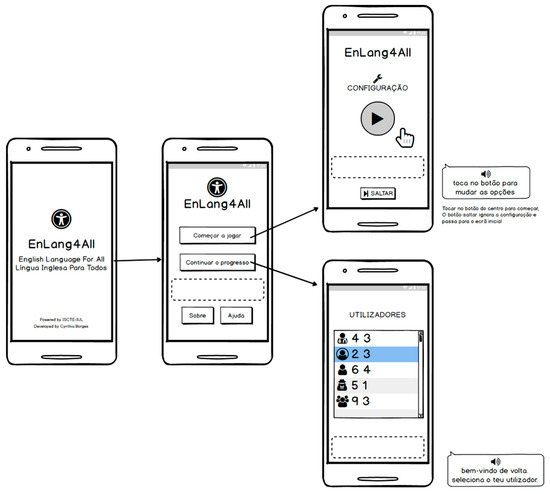
Figure 5.
Lo-fi version of initial screens of the application (Configuration and Player Selection).
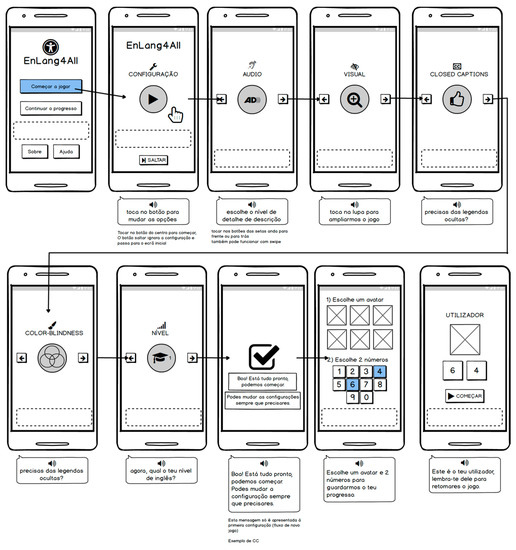
Figure 6.
Lo-fi version of User Creation and Settings Screens.
The management of users (B) was also designed to preserve the player’s identity, even though the game is, in principle, an offline application. This allows having an undetermined number of players per mobile device, with a unique username, generated from an icon of choice and two numbers (see Figure 5).
Following the “less is more” principle, the games were carefully thought out and researched in order to create a simple, attractive, and practical solution that allows the user to assimilate the presented contents. The themes were investigated in different websites for teaching English, to enable grouping of a set of basic study themes in learning English as a foreign language.
A set of Study Topic screens was designed (see Figure 7) corresponding to different levels of difficulty, starting with words, pronouns, simple verbs, and basic conversations such as personal presentation. In the following levels, topics with increased complexity will be covered.
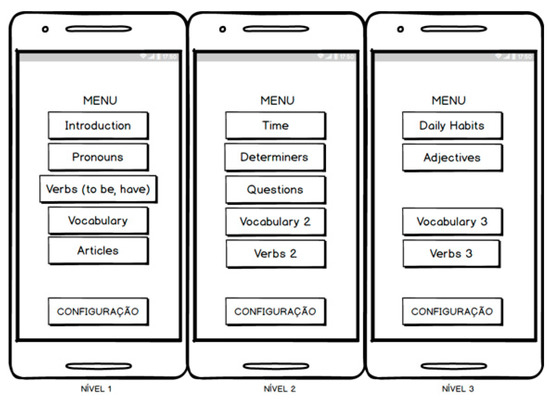
Figure 7.
Lo-fi version of the screens with menus of the topics of study by level of difficulty.
For the game screens, different models of content layout were developed (see Figure 8, Figure 9 and Figure 10), taking as an example the different games, both digital and physical, that are available for teaching English. Some ideas were obtained from exercises used in English classes, such as word selection and sentence completion. As a reference for game mechanics applied to English teaching, the webpage “Games to Learn English” by [24] was used; special mention is given in respect of the mockups in Figure 8 corresponding to Hours and Numbers, which were respectively inspired by the games “Time” (https://www.gamestolearnenglish.com/telling-the-time/, accessed on 16 March 2020) and “Monster Numbers” (https://www.gamestolearnenglish.com/numbers/, accessed on 16 March 2020).
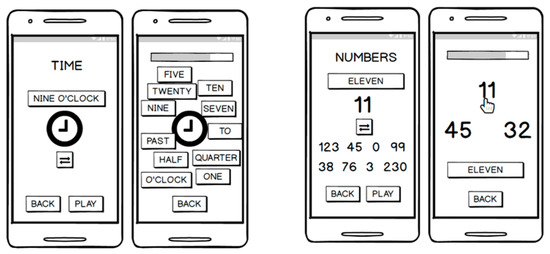
Figure 8.
Lo-fi version of the screens of the Hour Game (on the left) and the Numbers Game (on the right).
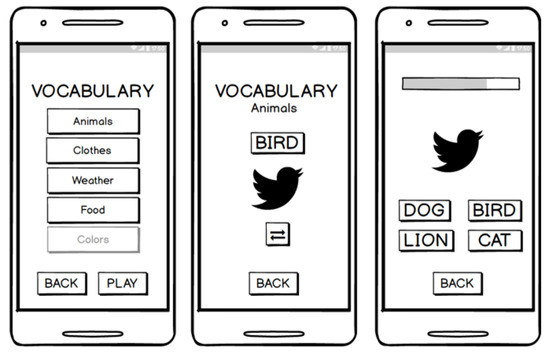
Figure 9.
Lo-fi versions of the screens of the Vocabulary game.
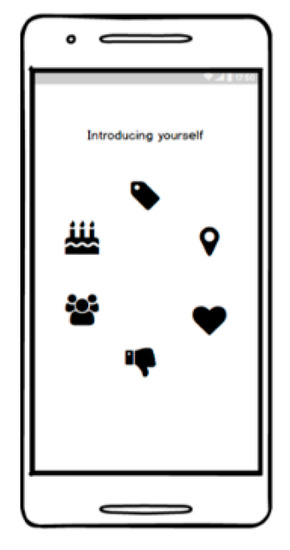
Figure 10.
Lo-fi versions of the screen of the Conversation Game.
The game was configured so that there is a preview screen or framework of the study topic with examples and with a brief theoretical description or illustration of the topic. The user can iterate between the examples to internalize the association of words or numbers with an illustration, and additionally the sound of the pronunciation of the associated word. When the user starts the game, in addition to the specific model of the study topic, there are visual elements to help the user follow the progress of the game.
3.2. Content
The didactic content of the game is the result of research on different websites and lists of syllabuses for teaching English as a foreign language to beginners, including vocabulary, numbers, the time, prepositions, determinants, and pronouns. Due to the structure of the game and given the available resources, the scope was kept in topics that could be applied in a multiple-choice system, leaving aside conversation topics that would also have limitations due to the impossibility of voice recording evaluation or providing audio conversation content.
3.3. Hi-Fi Prototype
In the following sub-sections, we present the main features of the hi-fi version developed from the lo-fi version previously presented.
3.3.1. Home Screen
The home screen of the application is presented in Figure 11. The button at the top right corner is the translator; the user can switch at any time from English to Portuguese, but only the informative content is translated. The “New Game” button proceeds to the “Create a New User” screen. The “Continue Game” button continues the progress of the game, once the user chooses their player in the “Player List” screen. The “Help” and “About” buttons refer to the help screens, where users will find a mini user manual, and another screen with information about the application.
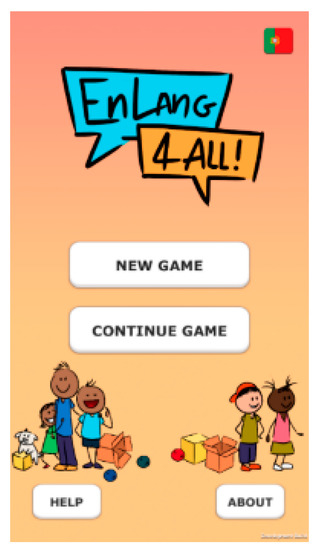
Figure 11.
Home Screen.
The username for each user is also chosen in an intuitive and anonymous way. The user must choose an icon on the first screen and then choose two numbers. The third screen displays the icon and numbers chosen. If the user is not satisfied, he/she may at any time go back and create another. If the user wishes to return to the main screen, pressing the house icon in the lower-left corner will take them back to the main screen. Confirmation of user creation is given by pressing “Start” and the screen for selecting study topics is initialized (see Figure 12).
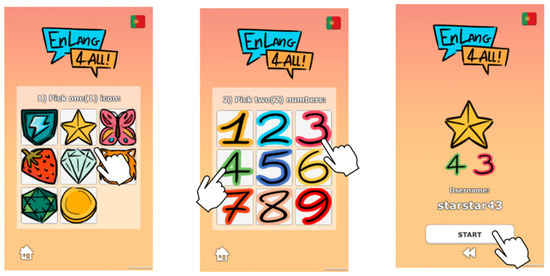
Figure 12.
Sequence of screens for user creation and confirmation.
The scheme used for user creation and username generation based on numbers and the icon chosen by the user is due to the experience of standardizing the complexity of user sessions and preserving the identity of users, and it is simple for both a younger and an older user. An example of the use of this mode of session identification can be seen in the study by [25], in which they investigated memorability for adults and children using graphical passwords. In the context of the difficulty that children have in respect of password usage, it is suggested to use graphical passwords complemented with an interface that is more adapted to a younger audience; this will help in building identification through a phased and linear configuration with a choice of elements associated with the password.
3.3.2. Game’s Menu Screen
In this prototype we defined two levels of difficulty, whose game selection screens (see Figure 13) can be accessed after user login. The levels are made up of the following study topics:
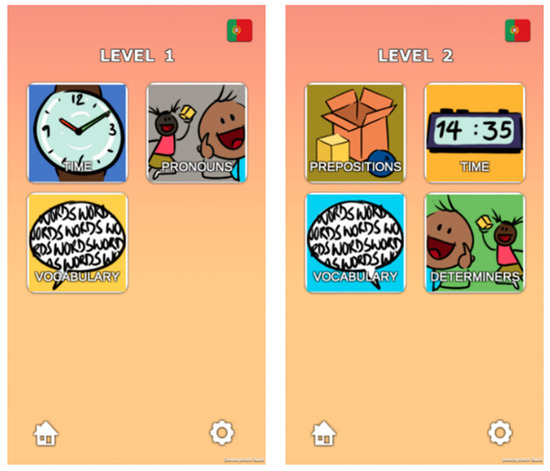
Figure 13.
Study Topics Screens, Level 1 and 2.
- -
- Level 1: Hours, Pronouns (Subject and Object), and Vocabulary;
- -
- Level 2: Prepositions (Place and Movement), Hours, Vocabulary, and Determinants (Possessive and Ordinal);
3.3.3. Game’s Sub-Menu Screen
For some games, EnLang4All has two variants for the user to explore. The buttons lead to the chosen sub-theme. The right arrow in the corner leads to the Games Menu Screen. The cogwheel in the corner leads to the Settings Screen (see Figure 14).
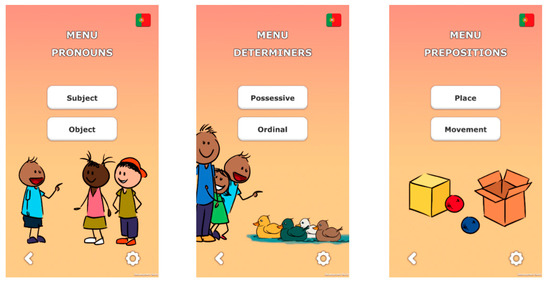
Figure 14.
Examples of Games sub-menu screens.
3.3.4. Game (Basic Structure)
The preview screen shows examples of usage for each word in the study topic. The “Back” button takes users back to the previous screen and “Start Game” starts the game. During the game, when users get an answer right, their answer will turn green; when they get it wrong, they answer will turn red and simultaneously the right answer will turn green. The progress of the game is controlled from the indicator at the bottom-right corner (see Figure 15).
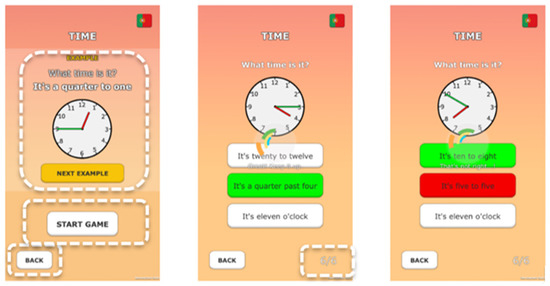
Figure 15.
Screen sequence with the EnLang4All game basic structure.
At the end of each game the game result is shown with the number of right and wrong answers (see Figure 16).
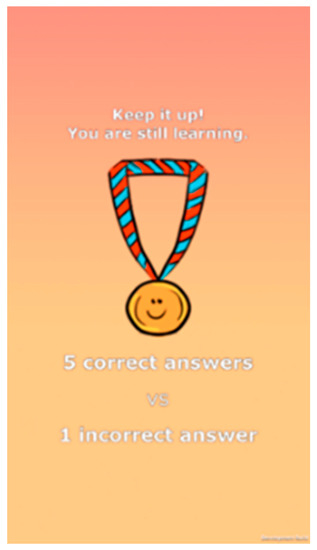
Figure 16.
End of game screen.
3.3.5. Vocabulary Game
In this game, unlike the others, there is a sound component. The user presses the speaker button to play the sound corresponding to the word in the example or the word on the corresponding button (see Figure 17).
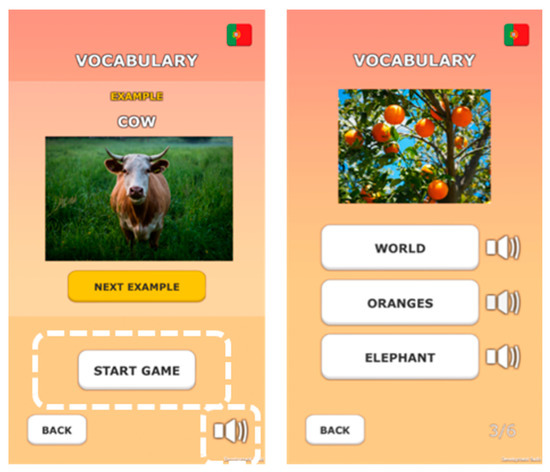
Figure 17.
Vocabulary Study Topic screens.
This functionality allows the user to first hear the words before selecting the one that he/she thinks is correct.
3.4. Final Application: Presentation, Mechanics, and Amendments
The final application is the result of some changes performed in light of the literature review previously presented, and some informal and anecdotical tests performed. The work was conducted during the most restrictive period of the COVID-19 pandemic and it was not possible to conduct a formal user test to validate the following decisions. Therefore, based on the literature, final changes were made and implemented for the final application. The resulting application became slightly different in terms of dimension, choice, and positioning of the navigation elements, as well as the layout itself, which was developed so it enables responsive behavior to the screen and preserves readability. The game is subdivided by EL study topics and is structured in terms of multiple-choice questions, with word answers for association with the questions, which are presented in sentences for completion, figures, and numbers, and with a sound component associated with each word. Each user can create a personal account, identified by symbols and numbers that generate a unique and simplified username to facilitate the identification of a user of any age group, which is associated with the registration and progress of the game. To allow for minimal customization of the game for users, in the settings, options to adapt the game’s response time, number of questions, and background color, and the option to remove the user account are made available. Additionally, from all screens, it is possible to access a user manual corresponding to different processes, such as creating a user, or how to end a game without losing the progress already made. For the safety of users’ actions, confirmation messages are provided at crucial moments of the game, allowing the user to confirm whether they really want to perform an irreversible action.
3.4.1. Header and Footer
Fixed areas of the screen were defined for the header and footer, contrasted to stand out from the content, to provide the implementation of Nielsen Heuristics such as Navigation, Help, Design, and Consistency and Standards.
The header, in addition to the application’s language change button, now displays the screen title and the active player’s score information. The addition of the score information in the header was pertinent to ensure the qualities of Intelligibility and Clarity for the user to be aware of their progress in the game (see Figure 18). Previously, in the prototype, this information was only available from the player list on the icon, and on the Study Topics loading screen.

Figure 18.
EnLang4All application header: hi-fi prototype vs. final version.
The footer was sectioned off to cluster some of the buttons that were previously arranged in the same area as the content, but were not part of the context, such as the back button and settings access button. Similarly, to free up space, the main content buttons were moved to this footer; these are highlighted as round and yellow centered buttons, with a distinct icon per associated action. The help button and access to settings button are now always accessible (see Figure 19, Figure 20 and Figure 21).
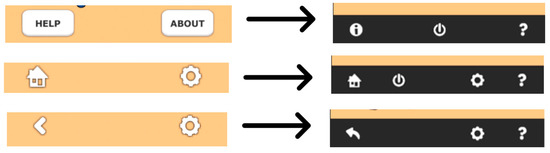
Figure 19.
Footer of EnLang4All application: hi-fi prototype version vs. final version (examples without main button).
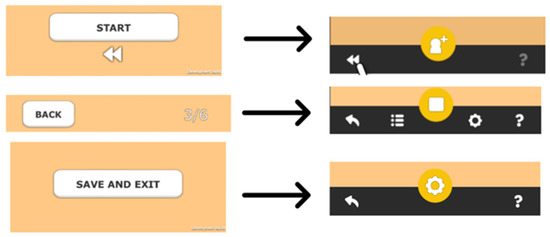
Figure 20.
Footer of EnLang4All application: hi-fi prototype version vs. final version (examples with main button).
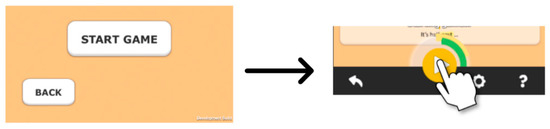
Figure 21.
Footer of EnLang4All application: hi-fi prototype version vs. final version (examples with main button and Loader).
Another element that it was possible to fit in the footer attached to the main button was the Loader, or the loading feedback animation. This choice was harmonized with the main button itself, which, due to its new position on the screen, is in accordance with the Feedback and Design Heuristics, thus facilitating the transmission of system status information without overlapping or distracting from other relevant elements.
3.4.2. How to Play
To play, the user must login to their account and choose a Study Topic, and the corresponding subtopic, if there is such an option (see Figure 22).
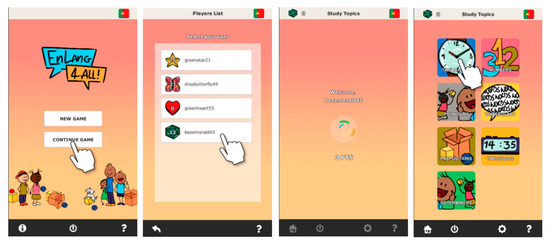
Figure 22.
Sequence of player selection screens and access to the Study Topic Screen.
With the selected Study Topic, the demonstration screen of the topic is displayed (Figure 23 and Figure 24). After pressing the main button (►) the application redirects to the game screen, where the multiple-choice questions are presented, with their respective pronunciation sounds for the highlighted word.
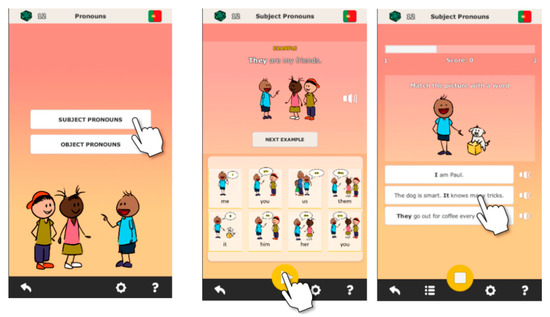
Figure 23.
Starting game flow for the Pronouns topic, with subtopic selection screen, demo screen, and game screen.
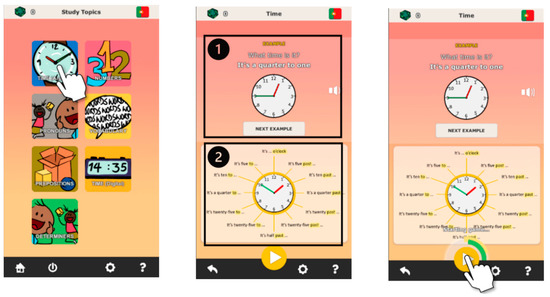
Figure 24.
Study Topic preview screen.
In the game preview, the initial structure of the presentation of examples was kept; see area 1 of Figure 24. The difference between this version and the prototype version was to make the sound reproduction functionality, which was previously only integrated in the Vocabulary, transversal to all Study Topics. Another element that it was possible to integrate was the theoretical content or illustration of the topic, in area 2, where the start and rewind button used to be. According to the new footer structure, described in the previous section, the game start button is now located in the footer in the form of the yellow circular button, as the main button, and its interaction triggers the Loader with the screen loading status feedback and forwards the application to the Game Screen.
Compared to the preliminary version, the final version presented to the test users has no distinction of difficulty level or separation of Study Topics, thus allowing viewing of all the options on a single screen. The grouping of subtopics was preserved, such as a Topic only on Pronouns being subdivided into Subject Pronouns and Object Pronouns, which is the case illustrated in Figure 24.
3.4.3. In-Game Controls
The Game Screen also experienced relevant and fruitful changes with the implementation of usability concepts and interface structure reformulation (see Figure 25). We started with the replacement of the number of questions answered against the total number of questions unseen in the bottom right corner (1) by a progress bar at the top of the content area, which was additionally complemented with a score counter that is updated as the questions are answered. Another addition was the audio buttons (2), which now accompany the answer options buttons that in the prototype were only integrated into the Vocabulary Study Topic. This standardization has allowed us to increase consistency in the game screens.
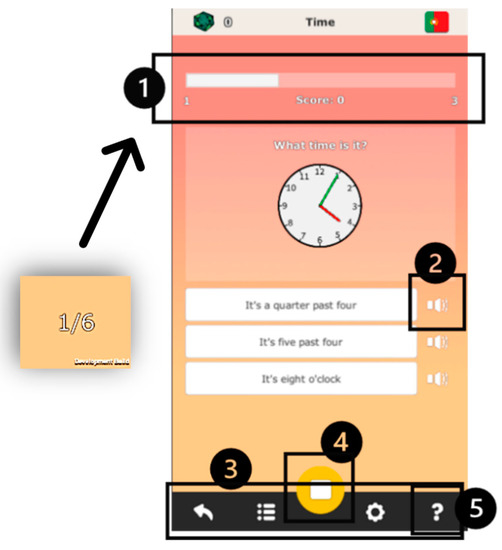
Figure 25.
Updated interface elements on the EnLang4All Game Screen.
As mentioned at the beginning of this section, setting a footer allowed us to provide more control to the user, and this scenario is no exception for the Game Screen. When providing the user with options to backtrack to the Preview Screen or Study Topics Screen, or the Game Setup button (3), or with the Help button (5), or even with the option to stop the game using the main (■) button (4), these calls to action are protected by confirmation windows (Figure 26) as they are irreversible actions. This feature is relevant for congruence with Nielsen’s Error Prevention Heuristics. In this case, without enabling the user to confirm their decision or error, the application could cause the loss of progress and accumulated points in play.
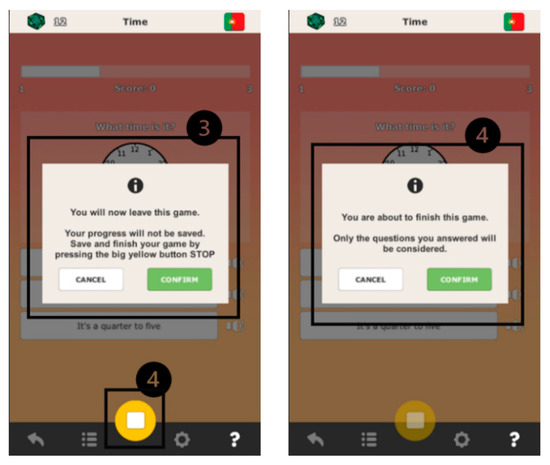
Figure 26.
Action confirmation windows: Quit Game (left) and Stop/Complete Game (right).
If the user chooses any of the back buttons, the confirmation window (3) will appear to quit the game, i.e., all progress will be lost if the user so chooses. Otherwise, if the user wishes to save the points accumulated in that game it is proposed to stop the game with the main button (■), which purposely is not disabled with the other buttons in the footer (except the Help button, which according to Nielsen’s Heuristics should always be accessible).
When the user stops the game (■), the confirmation window (4) also appears to validate whether they are sure of their decision or error.
The basic game mechanics of selecting the answer relative to the question presented, with visual feedback of being right or wrong provided via the colors of the buttons, respectively green or red, remain the same as in the hi-fi prototype version.
The game feedback screen, or game performance, has also been restructured, showing the accumulated points in the game and a stacked bar-graph for better readability of the number of correct answers given versus the incorrect ones. In this screen, to provide a defined duration until redirection to another screen, the footer buttons are all inactive (see Figure 27).
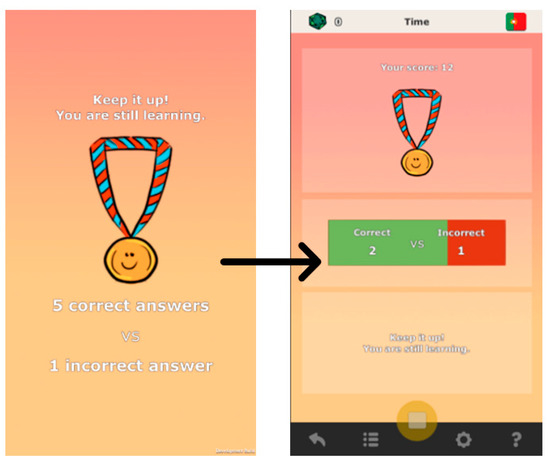
Figure 27.
Feedback screen or game performance: hi-fi prototype vs. final version.
3.5. Evaluation
To evaluate the usability concepts implemented by the game development and understand the users’ gaming experience, a questionnaire was prepared addressing the main game components. In order to test the game, volunteers had to meet the minimum requirements of having a mobile device with the Android operating system and minimum available space of 75 MB to install the application. By meeting the minimum requirements, volunteer users were asked to test the application, freely exploring the features, but ensuring that they went through the following tasks that would be later relevant to the analysis:
- -
- Creating a new player (in the option);
- -
- Exploring and playing at least 3 (three) study topics;
- -
- Changing the language of the interface;
- -
- Changing the settings at the user’s discretion (number of questions, speed or color theme of the application);
- -
- Attempting to go back to the previous screen in the middle of the game;
- -
- Attempting to stop a game (i.e., leaving it unfinished, but without losing progress).
The user was also asked to play the game again at a later time (hours or days after the first use) to enable evaluation regarding the knowledge retention capacity provided by the application.
After using the application, the players then filled in the questionnaire on the Google Forms platform, to share their impressions of the game. This questionnaire was intended to enable the extraction of data regarding the impact of the game on users, and to obtain opinions on what could be improved for the benefit of the user experience. In addition, the questionnaire was designed to reveal which elements of the application were most relevant during its use, and also, in terms of game content, which topics were most important and if there were any that were missing, for future reference in case of improvement of the application. Please refer to [26] for consulting the script.
3.5.1. Characterization of the Sample
As this project was developed in 2020, a year marked by social distancing, user testing had to be limited and outreach had to be achieved through social networks of educational communities, creative platforms, and third parties. With controlled access, volunteer users had to enter their personal email address to access the app and the instruction manual. With the application downloaded on their mobile device, they proceeded to install it, and after using it completed the questionnaire.
A total of 24 users tested the game and completed the questionnaire. Through the questionnaire it was possible to get to know the users better, with some demographic questions and habits related to the use of didactic applications taken into consideration.
The target audience of this project has no specific age range, and this age spectrum was reflected in the tests, as illustrated in Figure 28 regarding the ages of users, except for the age range from seven to twelve years, which it was not possible to include in the tests.
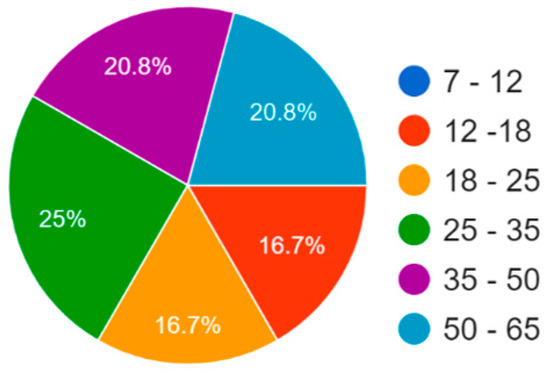
Figure 28.
Age of EnLang4All test users.
The level of English of the users who volunteered to test the application should preferably have been at a level no higher than basic; we obtained a prevalence of users stating that their level was “Basic”, followed by the groups of “Intermediate” and “Understands little” levels (see Figure 29 below).
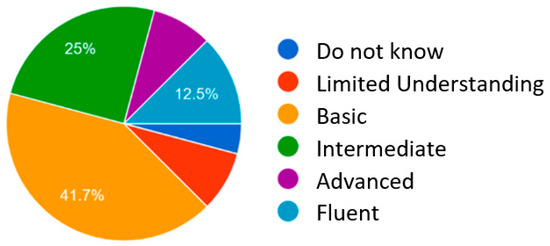
Figure 29.
English level of EnLang4All test users.
Of the devices used to test the app, two users tested on their tablet and the rest tested on their smartphones, providing feedback regarding the presentation and functioning on other screen resolutions (see Figure 30).
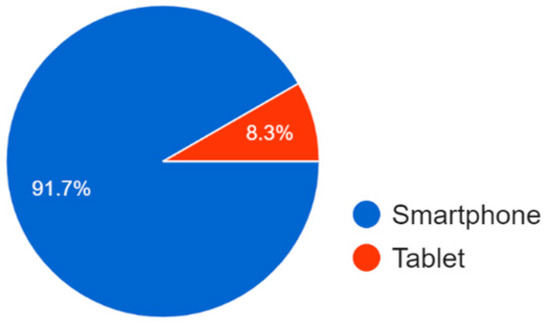
Figure 30.
Device used by test users.
Of the twenty-four (24) users, 62.5% revealed that they use mobile applications “sometimes” for learning in general (see Figure 31 below).
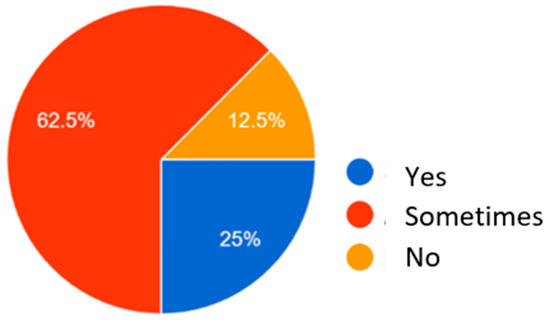
Figure 31.
Use of mobile applications for learning.
For foreign language study, in Figure 32, most of the surveyed users voted that they take advantage of entertainment content, namely music (66.7%) and books (50%), which are generally more accessible and used in daily life. Following books and music, four options of the educational context (video classes, face-to-face classes, school material, and didactic games) were voted in equal proportions of 37.5%. Among the minorities, communication with native speakers of the foreign language (20.8%), educational video games (16.7%), and, finally, series and films (12.6%) were voted for in descending order.
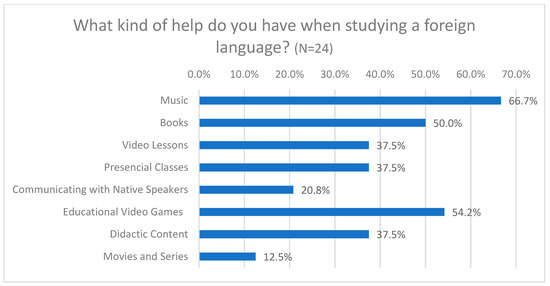
Figure 32.
Material used for foreign language study.
In this Section, the grouped information on age, level of English and habits of use of applications for learning are of great relevance for interpreting the answers obtained in the questionnaire and drawing conclusions. Thus, for example, the input of users who claimed to have an English level equal to or lower than intermediate in the questions related to Learning have greater weight in the evaluation, and, at the level of the habit of using didactic mobile applications, the user’s experience and digital literacy add value because we can consider their more critical opinion.
3.5.2. Questionnaire
The usability questionnaire for the EnLang4All game was structured mostly with questions answered using an evaluation scale (from 0 to 5) in order to standardize the registration of answers, and in order to complement the feedback with free user comments some open-ended questions were included.
In addition to the demographic and appraisal level questions, the questionnaire also included questions directly related to the Usability subcategories defined by the ISO, these being: Intelligibility, Apprehensibility, Operability, Attractiveness, and Reliability [27]). In the following Table 1, one can observe the grouping of questions by “Participant profile” for demographic data; “Learning” for analysis of the category of Apprehensibility and the ability to retain information conveyed by the content of the application; “Usability” for generalized analysis of Playability, Intelligibility, Instinctiveness of use, Objectivity, and clarity [7]; “Operability” for analysis of Operability and Reliability; and lastly “Final Considerations” for obtaining opinions on the importance of video games in the teaching of English, feedback of appreciation (Attractiveness), and on improvements suggested for the application.

Table 1.
EnLang4All player survey: enumerated list of questions.
4. Analysis and Discussion of Results
The objective of the questionnaire was to understand the compliance or not with the Usability quality standards defined by the ISO and the agreement with Nielsen’s heuristics implemented in the application. In line with the basic Usability characteristics defined by the ISO (see Section 2.1.3 of the “Related Work” section), the following sections are divided into Learning, Usability, Operationality, and Attractiveness/Final Considerations, and within each section, the study results are summarized, analyzed, and interpreted, in order to draw conclusions about the work developed with the EnLang4All application. More details about the questionnaire, with the respective objectives of the questions and interpretation of the results, can be obtained in [26].
4.1. Learning
As well as Learning or Apprehensibility, the quality that the software can or should be understood by the user, the quality of providing knowledge retention in a videogame for learning English (VLE) one of the themes of the research questions of this project. It is a theme that raises curiosity about the potential of a didactic video game with which we tried to apply good usability practices for a better learning experience. In this way, the questions asked to users sought to elucidate whether the game is structured and composed in a way that is conducive to an efficient transmission of new EL knowledge.
Users positively evaluated the memorability of the interface content (66.7%), and considered the information transmitted by the application in learning English satisfactory (66.7%); see Figure 33 Some evaluations given on memorability (lower), may reflect the non-habituation of the didactic content that was seen for the first time by the users, who in turn had lower levels of English knowledge.
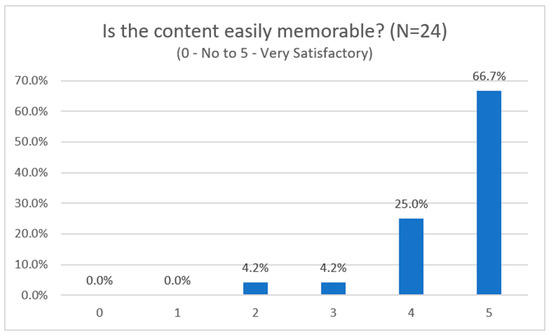
Figure 33.
Results of the survey on the ease of memorization of the game interface.
Regarding satisfaction with the learning information presented in the game, this obtained mostly positive evaluations of 5 (scale 0 to 5 for “Very satisfactory”) for 66.7% and 4 for 25% of users, and the intermediate evaluations, despite corresponding to 8.4% of the answers, were attributed to users at the “Advanced” level of English. If we consider that these opinions come from experienced users, this may mean that the application can benefit from better clarity in the information chosen or presented (see Figure 34).
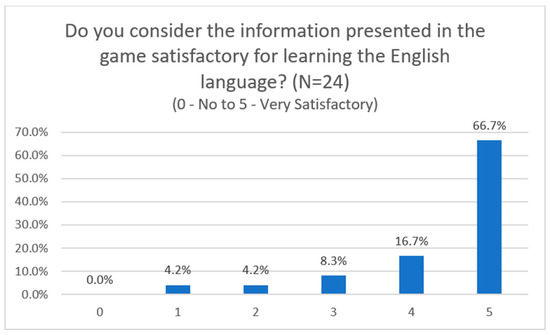
Figure 34.
Survey results on user satisfaction with the information presented.
The evaluation of knowledge retention had its obstacles: the impossibility of close and phased follow-up with the participants. Despite the instructions given in the test guide for users, we are not guaranteed to run a second phase or additional test phases per topic of study as requested, even spaced out by several days.
In Figure 35, we can observe the variation between the answers given on the self-assessment for the first uses compared to the following ones, and there is an evolution in seven of the users who claim to have taken the test in a phased manner, without any indication of what the time interval was between tests. Three instances of performance setback were recorded, which could possibly be justified by self-assessment error or failure to interpret the question. The remaining users indicated maintenance of the frequency of success in the game for the times they played each study topic. Thus, they did not contribute to the topic of knowledge retention in this research work due to the limitations in the way in which this study was conducted. Better results and conclusions can be obtained in a monitored study, with closer monitoring of fixed groups of users and test phases spaced out in time for a better perception of the evolution or not of the users’ performance.
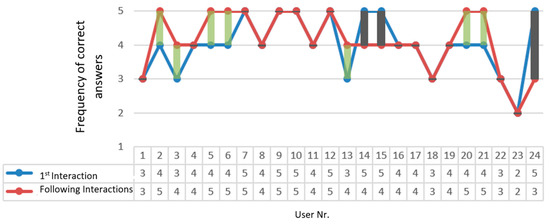
Figure 35.
Line graph showing the evolution of participants’ performance.
4.2. Usability
In this section, the questions asked to test participants are related to Nielsen’s Heuristics and ISO definitions of Usability. The questions were asked with the aim of understanding whether the practical application of the studied concepts produced an expected effect; that is, whether it provided user comfort in terms of use.
Most users (79.2%) reported no or almost no occurrence of major navigation difficulties that forced them to stop or restart the game. Based on the users’ responses, they were aware of how to get to a particular screen, or confirmed that the information on each screen was sufficiently clear to facilitate the understanding of the information presented in the interface, which was unrelated to the content itself.
An important task for users in testing the application was the creation of a user, which is essential for using the application. For the creation of a new player, 70.8% of respondents did not report difficulties in performing the task. However, intermediate ratings were given on the scale, which suggest that the functionality was not very practical for this group of users.
An issue related to the forfeit-or-prize modality [12], within the scope of Knowledge Retention, addressed in Section 2.1.2., seeks to understand the relevance of the scoring system and in-game progress for users and whether this had any impact on their motivation. Despite the scattered results, there was a strong indication that this modality was relevant to users and there was one user who highlighted this feature in the “Final considerations” of the questionnaire.
The “Help” section seeks to fulfill the requirement of accessibility and clarity of application documentation, as defined in Nielsen’s heuristics, and in EnLang4All this section provides quick access at the application’s footer, on any screen. Users were not asked to access “Help” in order to verify the interaction they would have with it. Of the users (50% of the total) who interacted with the “Help” section, they were generally satisfied with the information provided in the tool. The usefulness of the tool for all users was also questioned, regardless of whether they accessed it or not. In Figure 36, it can be seen that the lowest ratings on the usefulness of the “Help” section were attributed by only half of the users who did not access the tool, indicating that despite some low ratings it is relevant to the Usability of the EnLang4All application.
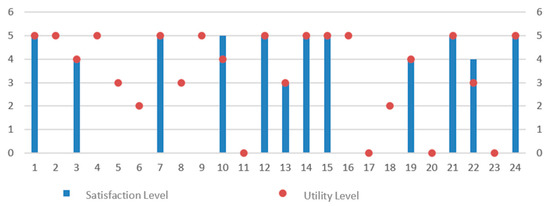
Figure 36.
Comparison of answers on satisfaction and usefulness given by users who accessed and did not access the Help section.
As for interactivity, 75% of users did not report interaction difficulties specifically with buttons in the application. There was also a higher prevalence of low scores on the issue of intuitive use and interaction with the application, and the lowest score of 3 (scale from 0 to 5 for “Very intuitive”) was attributed by users; this may relate to demographic data, with these users possibly having lower digital literacy.
4.3. Operability
Operationality was another feature highlighted in the questionnaire in addition to Learning, Intelligibility, and Usability, due to its importance as the quality of an application should be controllable and in working condition (ISO—Standards), which is crucial for this project and for the evaluation.
The “Settings” section, which was developed in order to make the application controllable and adaptable to the user’s needs and preferences, obtained a positive general assessment from 58.3% of users, which indicates that the tool fulfills its objective.
The clarity and legibility of the illustrations, graphics, and tables received a prevalence of positive evaluations; however, the question was complemented by a worse evaluation of 4 (scale 0 to 5 for “Very confused”) and in the “Final considerations” section of the questionnaire there was a relevant and constructive comment that the graphics are unflattering.
The sound component was positively received by users, and three of them complemented this question at the end of the questionnaire, highlighting the presence of sound and pronunciation accompanying the words presented.
The functionality of changing the language of the interface between Portuguese and English, which seeks to facilitate the interaction of users with the application, obtained divided evaluations in which, despite the prevalence of opinion that the functionality is quite useful, a portion of 20.8% did not seem to find relevance in terms of functionality.
In order to ensure correct operation and protect the user from executing irreversible errors, such as deleting a user account, confirmation and warning windows are present in the application. Users have positively validated the functionality, which appears in sufficient quantity and quality for their understanding, and thus gives an indication of the correct functioning of the application in the user’s awareness of the state of the processes.
The response speed of the application, regardless of the feedback speed defined by the user in the “Settings”, had intermediate evaluation responses, in addition to positive ones, which can be translated as a need to improve the application’s processing fluidity so that it has better conditions to be delivered for use.
The application also proved to be in good condition with regard to text readability, legibility and harmonization of the graphical elements of the interface, visual distinction of the different screens, and the absence of errors.
4.4. Attractiveness and Final Thoughts
In this Section, open questions and questions by rating scale are highlighted in respect of the attractiveness of the application and its content for users, as well as additional comments provided to complement their participation in the testing of EnLang4All.
The game features that users considered most relevant and mentioned in an open response were:
- Clarity of illustrations;
- Ease of use;
- Sound and voice effects;
- Attractiveness;
- Simple content and presentation;
- Score in the game;
- Educational component and teaching of English.
From the content presented, users highlighted, in questions with an evaluation scale, the following study topics as the most interesting:
- “Hours (Analog)”;
- “Prepositions of place”;
- “Object pronouns”;
- “Motion prepositions”;
- “Possessive determinants”;
- “Order determinants”.
In addition to this question, in the open questions regarding the most interesting game features, the study topics “Pronouns”, “Prepositions”, and “Determinants” and their respective contents were mentioned.
In contrast to the study topics that were most successful among users, the study topics they would like to have seen in the game were also indicated in an open response:
- -
- Verbs and verb tenses;
- -
- Vocabulary: Objects, Clothing, Professions and Occupations, Animals, Food, Family, Colors, Geometric Shapes, Human Body;
- -
- Pronunciation and Expressions.
This information serves as a reference for possible future work, either with EnLang4All, or for another project that takes this document as one of its references.
Finally, since each project has its limitations, and each user has their preferences, a survey was carried out to understand what could be improved in EnLang4All, also as a reference to possible future work with EnLang4All or another VLE project. It should be noted that each opinion is of a personal nature for each user, also depending on the level of English, personal goals, and experience with educational applications and with EnLang4All, as well as the device used. From the list of responses given by users, we were able to extract the following suggested improvements or implementations:
- -
- Adding optional background music;
- -
- Improve tutorials for each game;
- -
- Possibility to save a game to be resumed later;
- -
- Creation of your own username in the game;
- -
- Make graphics more eye-catching;
- -
- Ensure responsiveness for different devices used (smartphones and tablets);
- -
- Change the language change layout so that the two flags are visible to the user, or invert the current layout showing the flag corresponding to the language being displayed in the application;
- -
- Better readability in the illustrations of boxes and balls in the study topic Prepositions of place;
- -
- Include levels of difficulty and sorting;
- -
- The application’s responsiveness is already included in the game, so it will not be considered an improvement.
5. Conclusions, Future Work, and Recommendations
For the development of a VLE that provides good knowledge retention, it is important to consider strategies such as the establishment of a system of penalties or rewards with points, and/or having a well-defined and appealing graphic presentation in the game. Elements of these specific strategies were highlighted by test users with EnLang4All as relevant to their gaming experience. The application of the RETAIN model also contributed to the construction of the application and cohesion of its interface elements, whose purpose is to captivate the user to interact and engage with the game, enabling the apprehension of the content.
In this work, consisting of theoretical and practical elements, the strategies, strengths of existing VLE applications on the market, standards and usability heuristics, and their respective applications in the VLE under development were analyzed and studied, to provide a better gaming and learning experience for the user. Thus, EnLang4All was developed in support of usability standards, heuristics, and guidelines, and recommendations on the development of a user-friendly VLE that favors learning. It was positively evaluated by 24 users with regard to Usability, Learning, Operability, and Attractiveness, and in general users did not identify great difficulties in using the application. Notwithstanding the positive appreciation on the part of users, the survey results reveal limitations of the practical work, with constructive comments and evaluations that indicate what could be improved in terms of functionality, the development process, and content.
The global pandemic during the development of this project considerably affected the final phase of this work, thus limiting the tests with users. Usability tests had to be conducted remotely and the application was made available to volunteers through single authentication with their emails to control downloads. Unfortunately, this form of evaluation cannot be considered completely reliable, as users are not monitored or guided during the experiment, except for guidance via documentation provided. Likewise, it was not possible to follow up in an additional phase of testing to assess the issue of user evolution in the game and the retention of knowledge provided by the application. Complementing the limitations, the Google Forms tool used to record user responses presented technical problems in the processing of records and caused some duplication of submissions, and consequently there was a reduction in the total number of respondents registered compared to those expected, totaling 24.
In terms of improvements to the present project, based on what has been done, we propose to carry out user tests with a closer and phased follow-up, with the same individuals at each test phase. This modality of tests with users is essential for a more efficient and reliable assessment of the ability of the VLE to provide retention of knowledge and its results in the medium- or long-term, and to reinforce a more in-depth view of the importance of using standards and Usability heuristics. Secondly, we will contextualize the game with the user’s reality and complement it with the more complete study topic “Vocabulary” and groupings by subject. In the same study topic, the transformation should convey not only the semantics or meaning, but also the syntax, indicating to the user how to apply the new vocabulary in their daily life and encouraging the practice of the knowledge acquired in the game. For the VLE to be pedagogically effective, it must also adapt the challenges presented to the user’s level of knowledge, thus emphasizing the importance of difficulty levels within the game, among other elements in EnLang4All that can be improved.
It is hoped that this work will be considered a reference for future developments of VLE projects, and that the experience gained and decisions taken during the development of EnLang4All, based on a literature review on usability and good practices in video game development, indicate a better approach to planning or possible inspiration for the creation of a didactic video game that provides the best experience, transmission of knowledge, and user comfort.
Author Contributions
Conceptualization, C.B.; methodology, I.M.A. and P.F.L. and C.B.; validation I.M.A.; investigation, C.B.; Resources, C.B.; data curation, C.B.; writing, I.M.A. and P.F.L. and C.B.; writing—review and editing, I.M.A. and P.F.L. and supervision I.M.A. and P.F.L. All authors have read and agreed to the published version of the manuscript.
Funding
This research received no external funding.
Informed Consent Statement
Informed consent was obtained from all the subjects involved in the study.
Data Availability Statement
The authors declare that data supporting the findings of this study are available within the article.
Conflicts of Interest
The authors declare no conflict of interest.
References
- Ethnologue. What Is the Most Spoken Language? 2022. Available online: https://www.ethnologue.com/guides/most-spoken-languages (accessed on 9 January 2023).
- Seidlhofer, B. English as a lingua franca. ELT J. 2005, 59, 339–341. [Google Scholar] [CrossRef]
- Firth, A. The discursive accomplishment of normality: On “lingua franca” English and conversation analysis. J. Pragmat. 1996, 26, 237–259. [Google Scholar] [CrossRef]
- Northrup, D. How English Became the Global Language; Palgrave Macmillan: New York, NY, USA, 2013. [Google Scholar] [CrossRef]
- Kachru, B.B.; Kachru, Y.; Nelson, C.L. The Handbook of World Englishes; Blackwell Publishing Ltd.: Hoboken, NJ, USA, 2006. [Google Scholar] [CrossRef]
- Gunter, G.A.; Campbell, L.O.; Braga, J.; Racilan, M.; Souza, V.V.S. Language learning apps or games: An investigation utilizing the RETAIN model. Rev. Bras. Linguística Appl. 2016, 16, 209–235. [Google Scholar] [CrossRef]
- Stefanello, C.A.; Filho, M.F. M-Learning Applications as Language Teaching Tools: Study Cases and Comparisons. Rev. Tecnol. Inf. Comun. Teor. Prática 2017, 1, 29–40. [Google Scholar]
- Rocha, M.G.V.; Machado, M.R.; Manhães, E.K.; Orlando, P. Re-Quest English: Aplicação de Novas Tecnologias Digitais no Ensino-Aprendizagem da Língua Inglesa. Computer on the Beach, 2–4. 2017. Available online: https://periodicos.univali.br/index.php/acotb/article/view/10509/0 (accessed on 9 January 2023).
- Butler, Y.G. The use of computer games as foreign language learning tasks for digital natives. System 2015, 54, 91–102. [Google Scholar] [CrossRef]
- De Castro, C.H.S. Aplicativos Gratuitos de Ensino de Inglês para Android: Polifonia, Cuiabá-MT, v. 24, n. 35/1, p. 10-31, jan-jun. 2017Ahmed, H. Duolingo as a Bilingual Learning App: A Case Study. Arab. World Engl. J. 2016, 7, 255–267. [Google Scholar] [CrossRef]
- Ge, Z.G. The impact of a forfeit-or-prize gamified teaching on e-learners’ learning performance. Comput. Educ. 2018, 126, 143–152. [Google Scholar] [CrossRef]
- Gunter, G.A.; Kenny, R.F.; Vick, E.H. Taking educational games seriously: Using the RETAIN model to design endogenous fantasy into standalone educational games. Educ. Technol. Res. Dev. 2008, 56, 511–537. [Google Scholar] [CrossRef]
- Nielsen, J. 10 Usability Heuristics for User Interface Design. NNGroup. 1994. Available online: https://www.nngroup.com/articles/ten-usability-heuristics/ (accessed on 9 January 2023).
- Laitinen, S. Better Games Through Usability Evaluation and Testing. Gamasutra. 2005. Available online: http://www.8-bitbearconsulting.com/papers/8-bit_Better_Games_Through_Usability_TGS2008_Laitinen.pdf (accessed on 16 March 2020).
- Almeida, E.W.M.; Arcoverde, R.L.; Sultanum, N.B.; Gurgel, I. A Importância de Avaliar a Usabilidade dos Jogos: A Experiência do Virtual Team. Centro de Informática, UFPE, Brasil. 9 January. Available online: http://www.sbgames.org/papers/sbgames06/1.pdf (accessed on 16 March 2020).
- Ribera, M.; Porras, M.; Boldu, M.; Termens, M.; Sule, A.; Paris, P. Web Content Accessibility Guidelines 2.0. A further step towards accessible digital information", Program: Electronic library and information systems. Program 2009, 43, 392–406. [Google Scholar] [CrossRef]
- Ellis, B.; Ford-Williams, G.; Graham, L.; Grammenos, D.; Hamilton, I.; Lee, E.; Manion, J.; Westin, T. Game Accessibility Guidelines. 2023. Available online: http://gameaccessibilityguidelines.com/why-and-how/ (accessed on 9 January 2023).
- Yuan, B.; Folmer, E.; Harris, F.C. Game accessibility: A survey. Univers. Access Inf. Soc. 2011, 10, 81–100. [Google Scholar] [CrossRef]
- Zyda, M. From visual simulation to virtual reality to games. Computer 2005, 38, 25–32. [Google Scholar] [CrossRef]
- Michael, D.R.; Chen, S.L. Serious games: Games that educate, train and inform. In Serious Games: Games That Educate, Train, and Inform; Thomson Course Technology: Boston, MA, USA, 2006. [Google Scholar]
- Susi, T.; Johannesson, M.; Backlund, P. Serious Games: An Overview. Institutionen för Kommunikation och Information, Skövde. 2007. Available online: https://www.semanticscholar.org/paper/Serious-Games-%3A-An-Overview-Susi-Johannesson/35627442d7073968b06868821722e5db8c21062d (accessed on 9 January 2023).
- Serious Games Global Market Report 2022. A Serious Games Global Market Report. 2022. Available online: https://www.researchandmarkets.com/reports/5660172/serious-games-global-market-report-2022?utm_source=CI&utm_medium=PressRelease&utm_code=c7689g&utm_campaign=1803802+-+Serious+Games+Global+Market+Report+2022&utm_exec=jamu273prd (accessed on 9 January 2023).
- Carrion, M.; Santorum, M.; Flores, H.; Aguilar, J.; Perez, M. Serious Game, Gamified Applications, Educational Software: A Comparative Study. In Proceedings of the 2019 International Conference on Information Systems and Software Technologies, ICI2ST, Quito, Ecuador, 13–15 November 2019; pp. 55–62. [Google Scholar] [CrossRef]
- Dwyer, O. Games to Learn English. 2010. Available online: https://www.gamestolearnenglish.com/ (accessed on 16 March 2020).
- Assal, H.; Imran, A.; Chiasson, S. An exploration of graphical password authentication for children. Int. J. Child Comput. Interact. 2018, 18, 37–46. [Google Scholar] [CrossRef]
- Borges, C.A.M. Desenvolvimento de Videojogo para o Ensino da Língua Inglesa. 2020. Available online: http://hdl.handle.net/10071/22105 (accessed on 9 January 2023).
- ISO 9241-11:2018; Ergonomics of Human-System Interaction—Part 11: Usability: Definitions and Concepts. ISO: Geneva, Switzerland, 2018.
Disclaimer/Publisher’s Note: The statements, opinions and data contained in all publications are solely those of the individual author(s) and contributor(s) and not of MDPI and/or the editor(s). MDPI and/or the editor(s) disclaim responsibility for any injury to people or property resulting from any ideas, methods, instructions or products referred to in the content. |
© 2023 by the authors. Licensee MDPI, Basel, Switzerland. This article is an open access article distributed under the terms and conditions of the Creative Commons Attribution (CC BY) license (https://creativecommons.org/licenses/by/4.0/).