1. Introduction
User interfaces for human–computer interactions (HCIs) have evolved in user-oriented, easy, and convenient ways, and are considered as an important technology in various platform and application areas. In recent years, along with the advancement of virtual reality (VR) and augmented reality (AR) technologies, interest has been increasing in immersive interactions and interfaces for immersive content.
Shneiderman [
1] proposed a direct manipulation to provide a user interface similar to the way a user manipulates objects by hand to act and perform tasks in a real-world environment. In HCI, interfaces are provided in a form similar to the way humans behave in and manipulate the real environment and have been developed to facilitate natural interactions. Interactions with computers should consider the input device type and method and the use of the five senses, such as vision, sound, and touch, which are properly reflected in human emotion, decision making, and behavioral responses. Accordingly, the user will experience a range of emotional experiences, such as immersion, presence, and satisfaction, along with the one-dimensional function of receiving information. Some studies have analyzed user interfaces in this aspect [
2,
3].
Furthermore, in the field of immersive contents using VR and AR, studies have been conducted to design and analyze user interfaces (gaze, hand, walking, etc.) that provide satisfying presence and experience in interactions between the user and the virtual environment [
4,
5,
6,
7,
8,
9]. Studies have been also conducted to design an optimized interface for a given user platform and experiential environment in terms of interactions in an asymmetric virtual environment, considering the collaboration in a multi-user virtual experience environment or the user participation on various platforms (VR, AR, personal computer (PC), mobile, etc.) [
10,
11,
12]. Recently, through convergence with machine learning, new interfaces have been developed to facilitate the user’s behavior and decision making more conveniently in an intuitive structure [
6,
13]. Studies on novel interfaces based on user experience and satisfaction are regarded as important in the process of developing content and applications for various platforms and experiential environments.
User interfaces are used when creating applications for various fields, including in education, games, the military, and manufacturing. In particular, studies have been conducted for immersive education applications that facilitate training and learning in a highly immersive user environment using VR and AR technologies. Recently, with the advancement of smart devices, there has been a growing interest in educational applications based on various platforms, such as mobile devices, tablets, and VR equipment as well as PCs [
14,
15,
16]. Therefore, further studies are required for user interfaces that consider user immersion and convenience in educational applications.
With the aim of providing a new environment for educational experiences and a satisfying interface experience, this study designs a new interface suitable for mobile platform applications and uses it to create an English language teaching application. The key objectives of this study are as follows.
- 1.
A deep-learning-based text interface is proposed through the Extended Modified National Institute of Standards and Technology (EMNIST) dataset and a convolutional neural network (CNN) to control behaviors in an intuitive structure based on touch-based input processing in the mobile platform environment;
- 2.
English language teaching applications that reflect immersive interactions are created to facilitate behaviors directly from the text interface by connecting the user’s handwritten texts to alphabet writing and word learning.
2. Related Work
In traditional classroom education, learners participate relatively passively in the educator-centered one-way class. This case Z may lead to limited educational effects because it is difficult to arouse interest in learning in the educational environment. Therefore, triggering the interest of learners and interacting effectively are important factors in improving the quality of education. Furthermore, the educational environment should be provided in real or simulated realistic situations, particularly for young learners who lack life experience. For instance, the educational effect can be improved if pictures and audio are used to simulate real-world situations [
17]. Hence, various applications have been developed for education using digital devices, such as computers, and related studies have been conducted.
Vernadakis et al. [
18] conducted studies to analyze the potential benefits of education using digital devices, such as computers. They confirmed that graphical user interface (GUI)-based education with animations and interactive multimedia content can improve the educational effects on learning phonemes, words, writing, etc., by increasing the interest of learners and facilitating self-directed learning that best suits their learning speed. In another study [
19], the effect on language learning was analyzed by focusing on a mobile-based educational application program. Studies that systematically analyzed the relationship between the use of computer-aided tools and learning were conducted from various perspectives. For example, methods of integrating language learning using various digital tools, such as blogs, iPad apps, and online games, the benefits (motivation, interaction, collaboration, etc.) provided by digital tools, and the digital technologies used by teachers in daily teaching were analyzed [
20]. Furthermore, a study applied game elements to education [
21], and another study investigated the impact of e-books containing animation elements on the language development of learners [
22]. It was confirmed that the elements of computing tools, such as multimedia content, interaction, game, and collaboration, can increase the educational effect through benefits, such as increased attention and motivation in education. Particularly, they have a positive effect on supporting various learning activities, such as text comprehension, vocabulary, speaking, listening, and writing.
In recent years, immersive media technologies, such as VR and AR, have been used in the development of teaching applications in not only language teaching but also various industrial sectors, including the military and manufacturing. Lele [
14] suggested a direction for applying VR to the military field. Alhalabi [
15] applied VR to engineering education and based on the use/non-use of VR and independent devices without a tracking system, they conducted a comparative study on the effect of VR systems on engineering education. Jensen and Konradsen [
23] attempted to update the knowledge for the use of a head-mounted display (HMD) in education and training. They examined various situations in which the HMD is useful for acquiring skills and analyzed the motion sickness, technical issues, immersive experiences, etc., in comparison with traditional education. In addition, a new method was proposed to use AR in teaching English to preschool children [
17], and major AR-based learning activities, such as word spelling games, word knowledge activities, and location-based word activities, were analyzed. They analyzed how to apply the benefits of AR to support major activities of language learning and proposed a direction in this regard [
24]. Doolani et al. [
16] examined methods of applying extended reality (XR) to education in the manufacturing sector. As such, production technologies of educational applications using digital devices are evolving into the XR technology beyond VR and AR. However, along with the evolution of the platforms, there is a need to conduct studies in a new direction suitable for platforms and technologies to develop user interfaces that can increase the convenience and immersion as an approach toward increasing the learner-centric educational effect.
Various studies have designed interfaces considering the satisfaction, experience, and immersion from the user’s perspective, and accordingly proposed immersive interactions [
2,
3]. Some studies related to user interfaces have been conducted in conjunction with various input processing methods, including the gaze, hand gesture, and controller, with the advancement of immersive media technologies, such as VR and AR [
5,
9,
25]. In addition to the studies on VR user-oriented immersive interactions, some studies have proposed user interfaces having intuitive structures to improve the presence of experiencers in the immersive experience environment of HMD users, in which the immersion is relatively low. For example, a hand tracking device was used to design an interface, in which the PC users participate directly in an asymmetric virtual environment where PC-based non-HMD users and HMD-based VR users experience together [
12]. As another example, a study designed a touch interface suitable for mobile devices in a virtual environment in which the mobile-platform-based AR users and HMD-based VR users go through the experience together [
26]. Recently, studies have been conducted to propose easy, fast, and convenient hand interfaces by applying deep learning technology to directly connect gestures and actions in conventional GUI-based decision-making and action-performing processes [
6]. Moreover, there is a growing interest in studies that apply deep learning to interfaces [
13]. A study on deep learning applications has proposed a new direction that can provide more beneficial and scientific education than conventional education models by applying deep learning to not only an interface but also an education model [
27]. In this study, we specifically set a topic for English language teaching based on a mobile platform and apply deep learning to design an interface that can be extended to digital teaching applications and AR.
3. Text Interface Using Deep Learning
The proposed interface has a structure that can be applied to mobile platform applications and uses handwritten text based on touch inputs. Under the premise of convenient and highly accessible interactions, the proposed interface uses deep learning to perform intuitive actions with objects or a virtual environment. An integrated development environment using the Unity3D engine [
28] is implemented with the aim of designing an interface that can be extended to not only mobile applications but also AR applications.
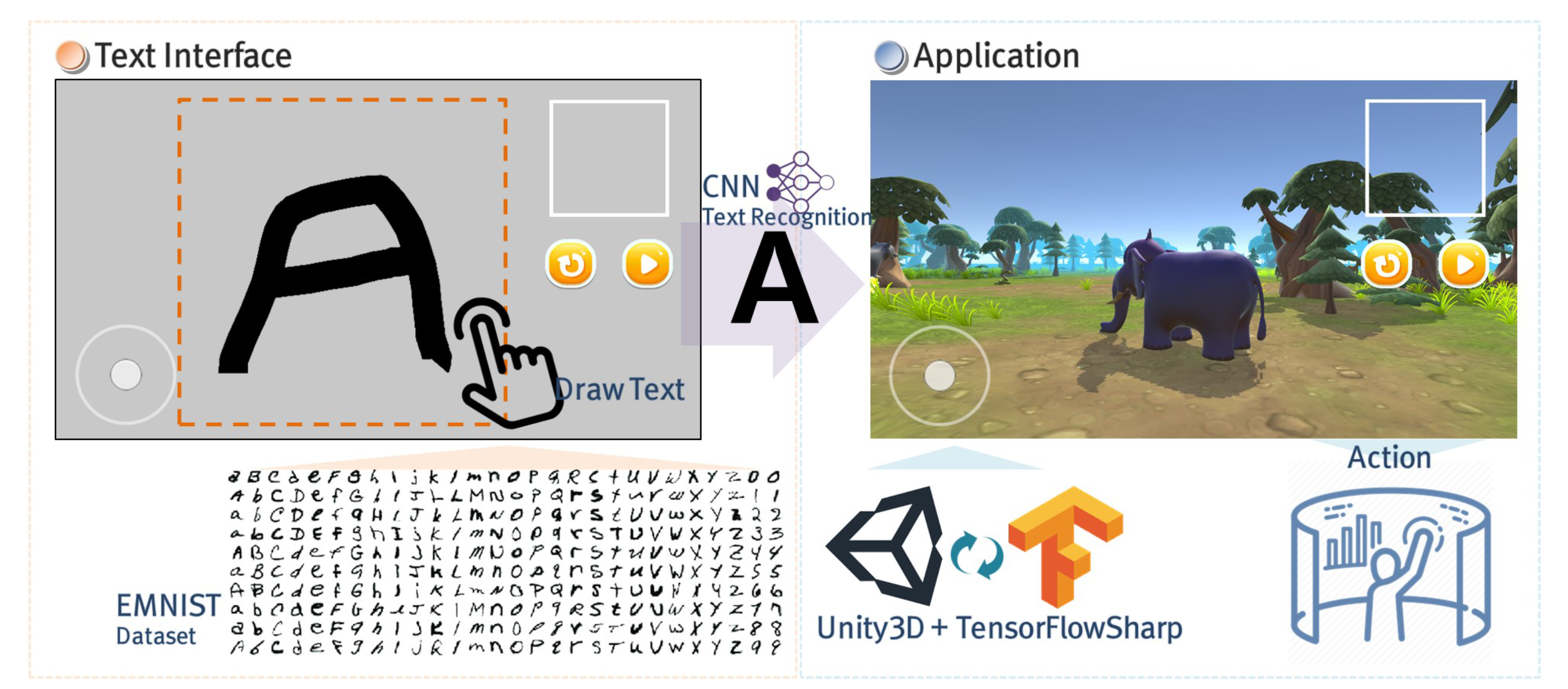
Figure 1 shows the structure of the proposed text interface using deep learning.
3.1. Touch-Based Text Interface
Mobile platform applications are generally based on an interface method in which a hand touches the screen directly. Input types include touch, double touch, drag, swipe, and long press, and interactions and actions are performed through the GUI. The input method using touch is advantageous in that direct interactions with virtual objects are performed, but it has a limitation in representing various actions other than object selections. Furthermore, GUI-based interactions represented in graphics, such as buttons, images, and menus, have a disadvantage in that, as the functions increase, the screen becomes more complex and the users need to learn more manuals.
In this study, the conventional touch inputs and GUI are used minimally to design a highly accessible interface. Furthermore, we propose a text interface in which handwritten texts are drawn to perform various actions intuitively in the process of the user interacting with the environment or objects.
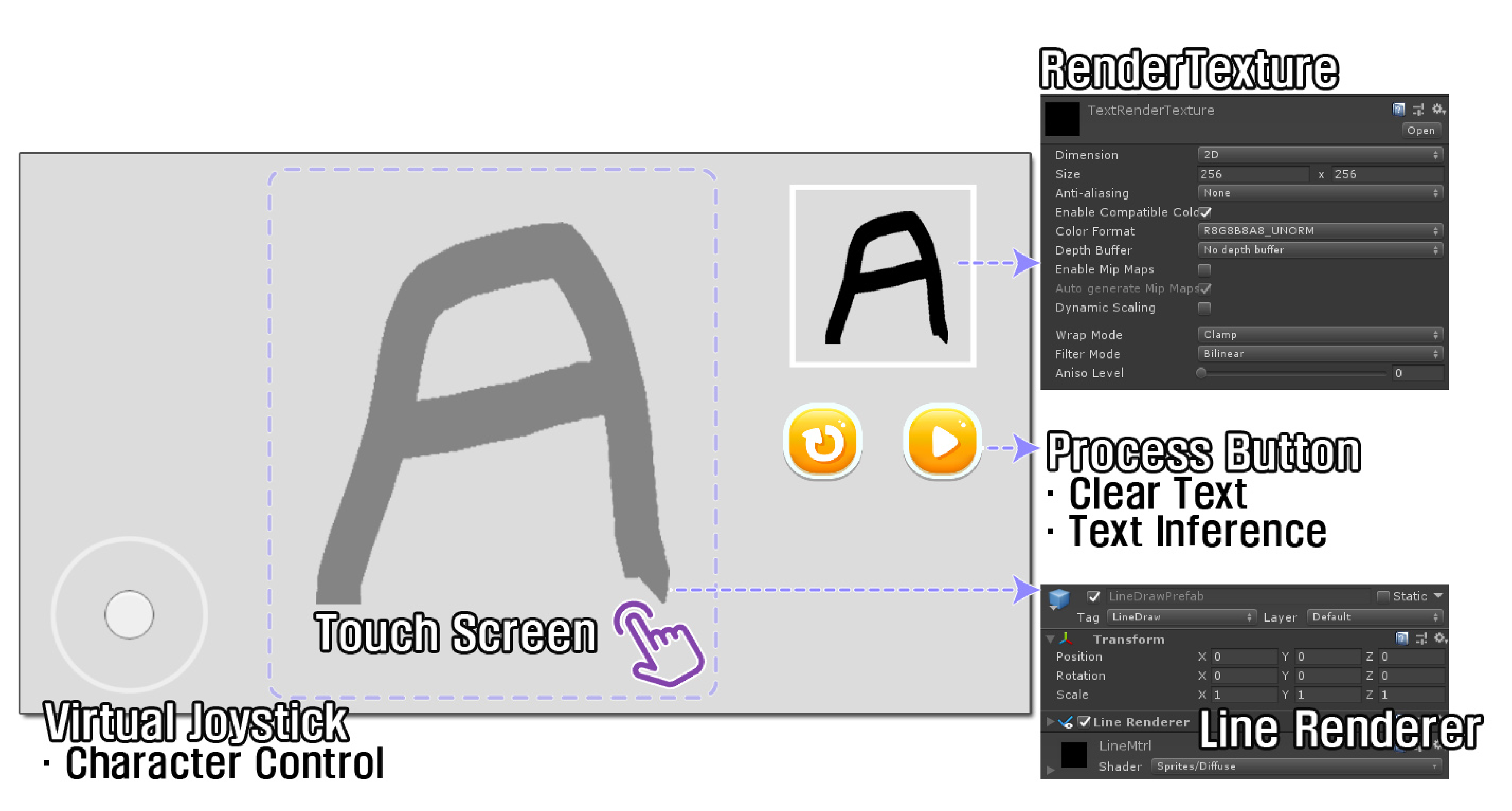
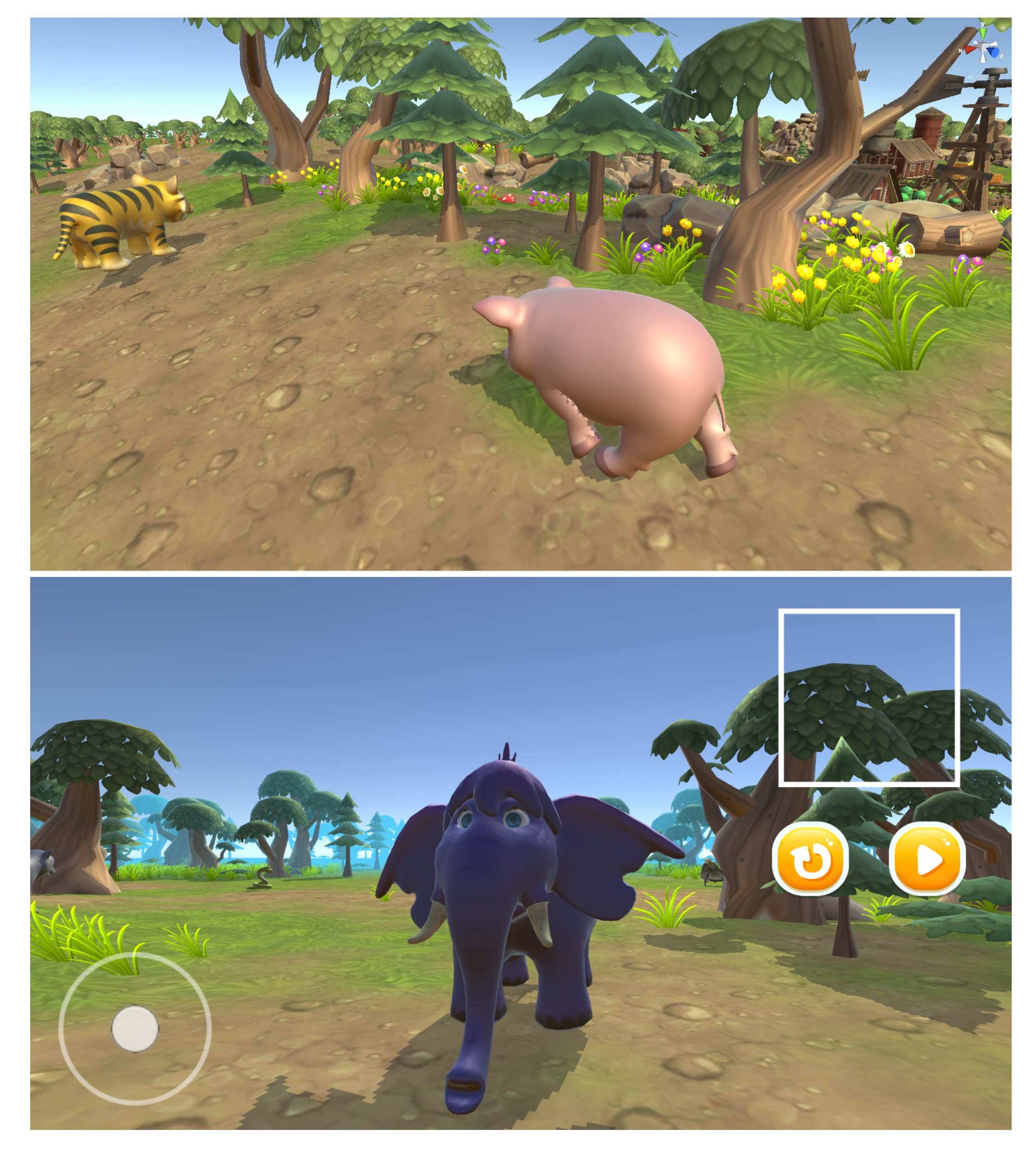
Figure 2 shows a text interface using a GUI in the Unity3D development environment, and the proposed text interface comprises a virtual joystick that controls the movement of characters, the output image of the handwritten text drawing result, and an action execution button. The key is the process of processing the handwritten text drawing, and a text interface is implemented using the Unity3D engine’s Line Renderer properties and InputManager. From the moment a finger touches the screen to the moment the finger disengages, the finger coordinates on the screen are added as the positions connecting a line to draw the handwriting. The text interface procedure of Algorithm 1 shows the process of drawing handwritten text by touching the screen and sets the font color and line width through the Line Renderer property. In this case, the attribute value was similarly set in consideration of the font attribute of EMNIST dataset. The RenderTexture image is expressed in the GUI to check the handwriting being drawn by the user in real time. The user can write easily and conveniently.
3.2. Interaction: From Text to Behavior
The touch-based text interface in the mobile platform environment aims to deliver the user’s thought and decisions directly to the virtual environment. Hence, we propose interactions that are connected to behaviors accurately with a fast and intuitive structure while minimizing the process of performing behaviors through a conventional GUI of conversational systems.
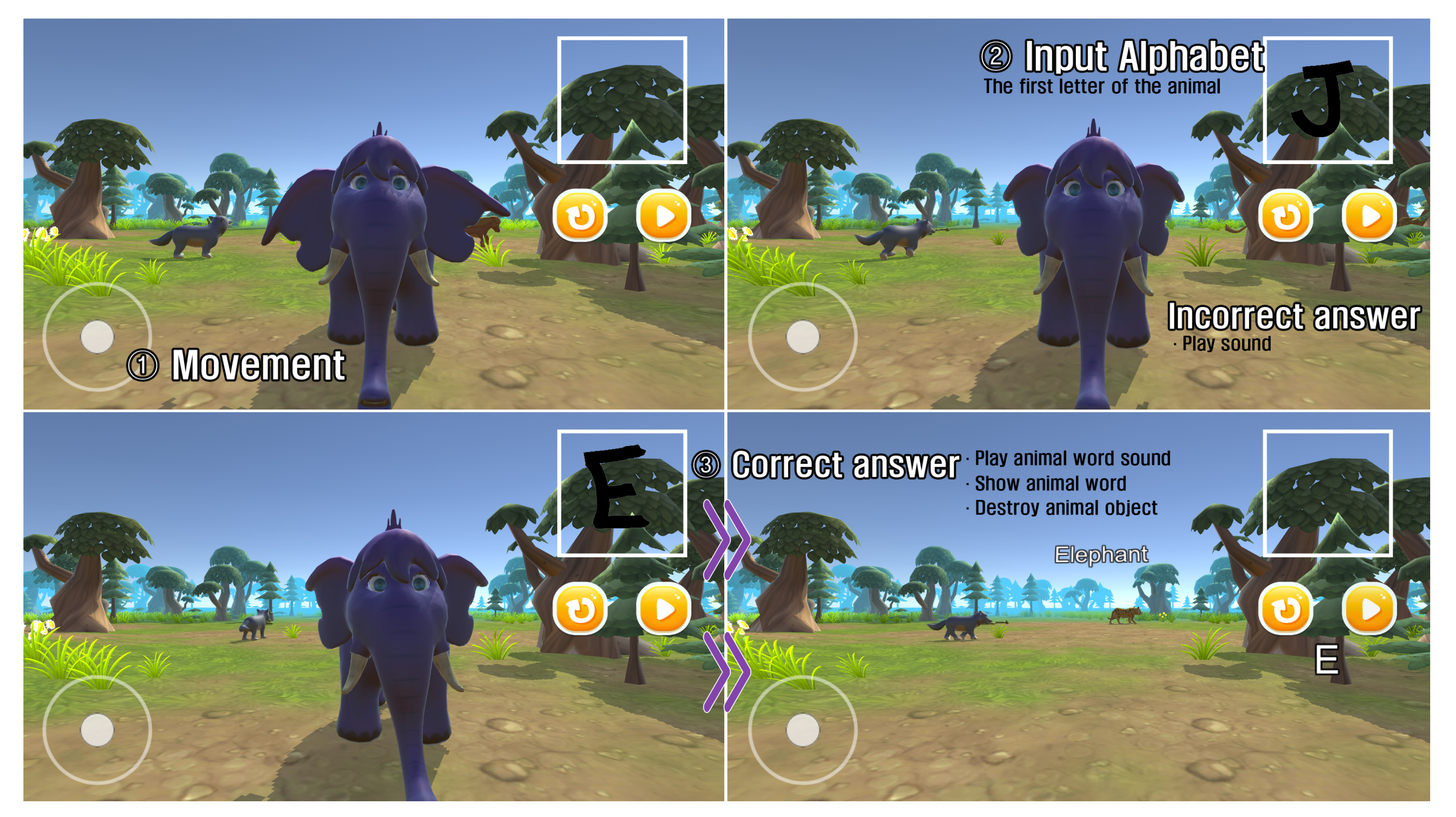
From the text interface, the user’s handwritten text is recognized, and based on the recognized result, the behavior is performed in real time without requiring a separate GUI, thereby providing convenient and highly immersive interactions.
| Algorithm 1: Process of text to behavior interaction. |
| 1: procedure TEXT INTERFACE |
| 2: if touch state then |
| 3: pos[] ← draw screen points. |
| 4: The coordinates where the fingertip is drawing in the touch state are stored in |
| the pos array. |
| 5: The pos array coordinates are connected as a line. |
| 6: else |
| 7: Draw screen points are cleared. |
| 8: end if |
| 9: The handwritten text composed by connected lines is stored as an image. |
| 10: end procedure |
| 11: ← image of handwritten text drawn using text interface. |
| 12: pr ← maximum probability value for inference |
| 13: procedure BEHAVIOR PROCESS(, pr) |
| 14: l← learning data using CNN based on the EMNIST dataset. |
| 15: t← the text recognition result of CNN with an inference value of pr or higher via |
| setting as an input node and using l. |
| 16: bv[] ← a behavior array corresponding to the text. |
| 17: Active(bv[t]). |
| 18: end procedure |
3.2.1. Text Recognition Using EMNIST and CNN
The Modified National Institute of Standards and Technology (MNIST) dataset contains images of handwritten numbers and it is used as a standard benchmark for learning, classification, and computer-vision systems. The MNIST dataset has been built based on the National Institute of Standards and Technology (NIST) dataset and is characterized by easy-to-understand and intuitive characteristics, relatively small size and storage requirements, easy accessibility to the database itself, and ease of use.
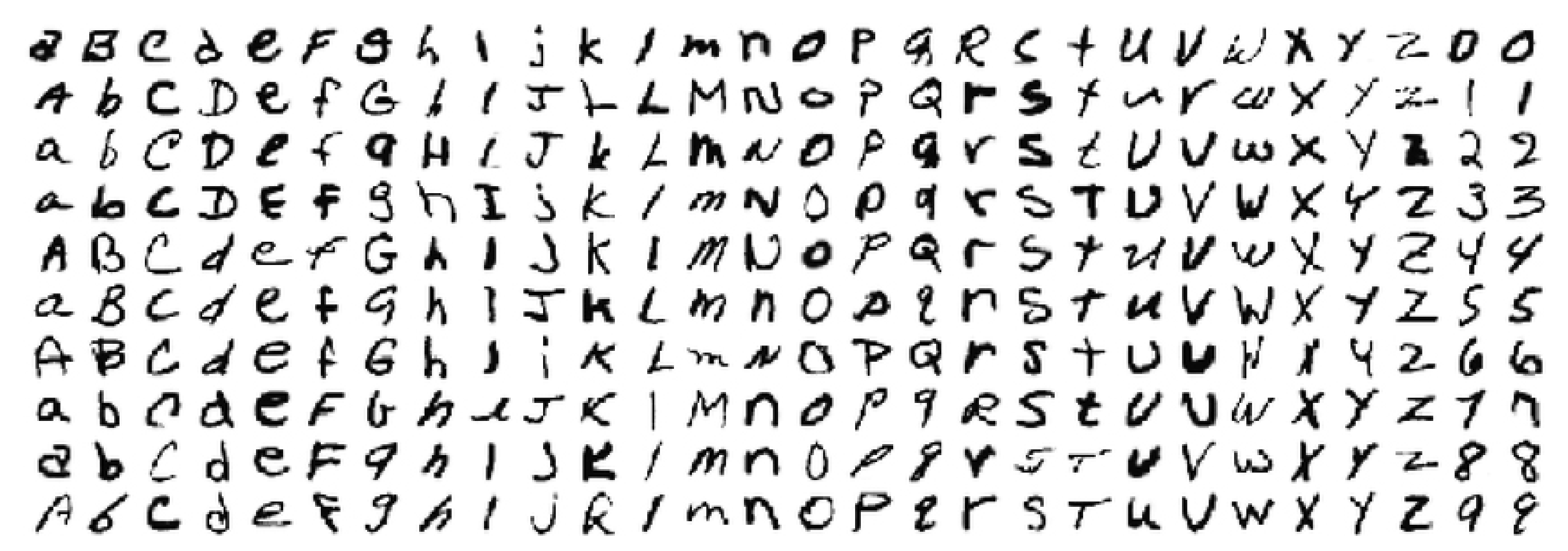
In this study, we design the recognition of handwritten text input received from the text interface by using the EMNIST, which also considers the handwritten alphabet by expanding the MNIST dataset composed of numbers [
29,
30]. The EMNIST dataset image composed of a collection of handwritten alphanumeric is converted to a 28 × 28 format. The training set has 697,932 images and the test set has 116,323 uppercase and lowercase letters and numbers 0–9 that map to their classes. Each image represents an intensity value of 784 pixels (28 × 28 grayscale pixels) in the range 0–255. The test and train images have a white foreground and a black background. This dataset consists of a total of 62 combinations of 10 numbers from 0 to 9 and 26 letters, each with uppercase and lowercase letters [
31].
Figure 3 shows a portion of the EMNIST dataset consisting of numbers and the alphabet.
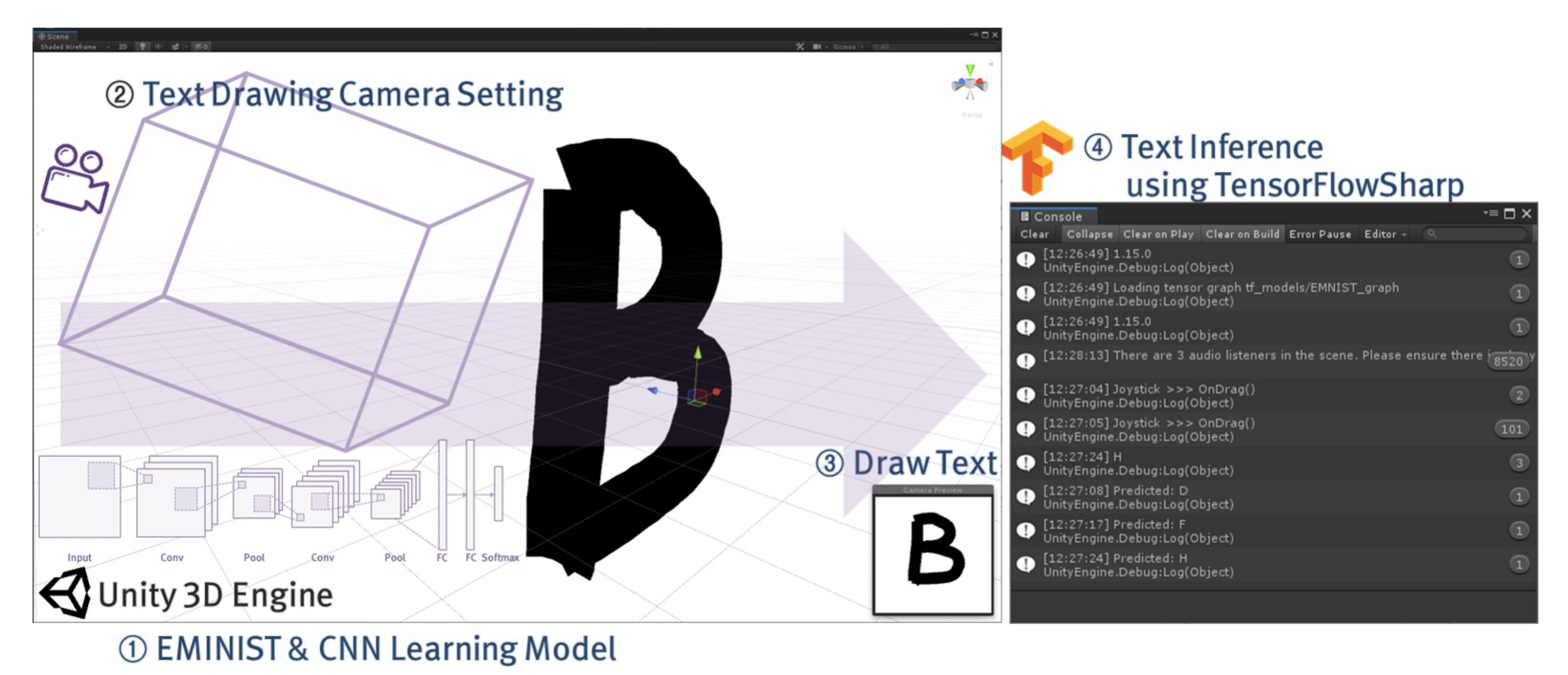
A CNN, which is efficient for image recognition (inference), is used to provide a natural and accurate interaction that connects the text to behavior. The user’s handwriting is accurately recognized through the processing of learning and inferring the EMNIST dataset in the CNN. The CNN structure is based on the CNN model proposed by Mor et al. [
31] for EMNIST classification for the purpose of developing a handwritten text classification app for Android. The diagram of the CNN model used in this study stores the handwritten image input through the text interface as 256 × 256. The CNN structure consists of a total of eight layers, from the reshape layer that converts the input image to a 28 × 28 image, two convolutional layers, a Maxpooling layer, a flatten layer that converts a two-dimensional image into a one-dimensional array, a dense and drop-out layer, and the last output layer. To design an interface used in creating conversational content on the mobile platform, this study uses TensorFlowSharp [
32] in the Unity3D engine and performs the inference from the EMNIST dataset learned based on the user’s handwriting input received from the interface [
6].
Figure 4 shows the process of recognizing and processing a handwritten text using the text interface based on CNN and EMNIST dataset in the Unity3D engine development environment.
3.2.2. Behavior Process
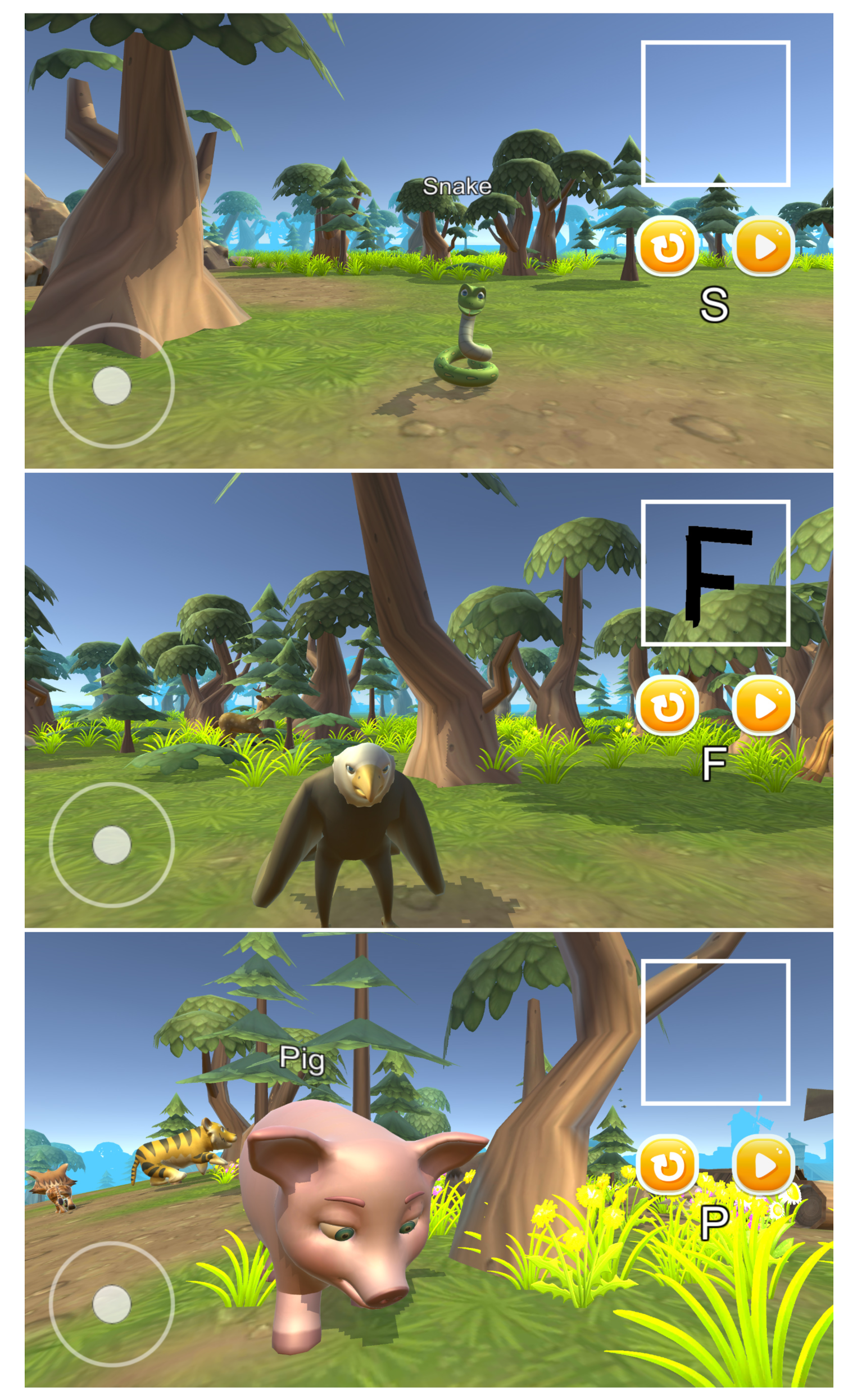
Based on the text interface using a deep learning model, the user interacts with the virtual environment through a direct behavior in an intuitive structure. The texts mapped to behaviors are defined based on 62 text characters. When the user enters one of the defined texts in handwriting, the handwritten text is inferred through deep learning, and the behavior corresponding to the input text is performed in real time without requiring a separate GUI.
Algorithm 1 summarizes the process of receiving a handwritten text as an input from the text interface and inferring the handwriting to connect to behavior.
5. Experimental Results and Analysis
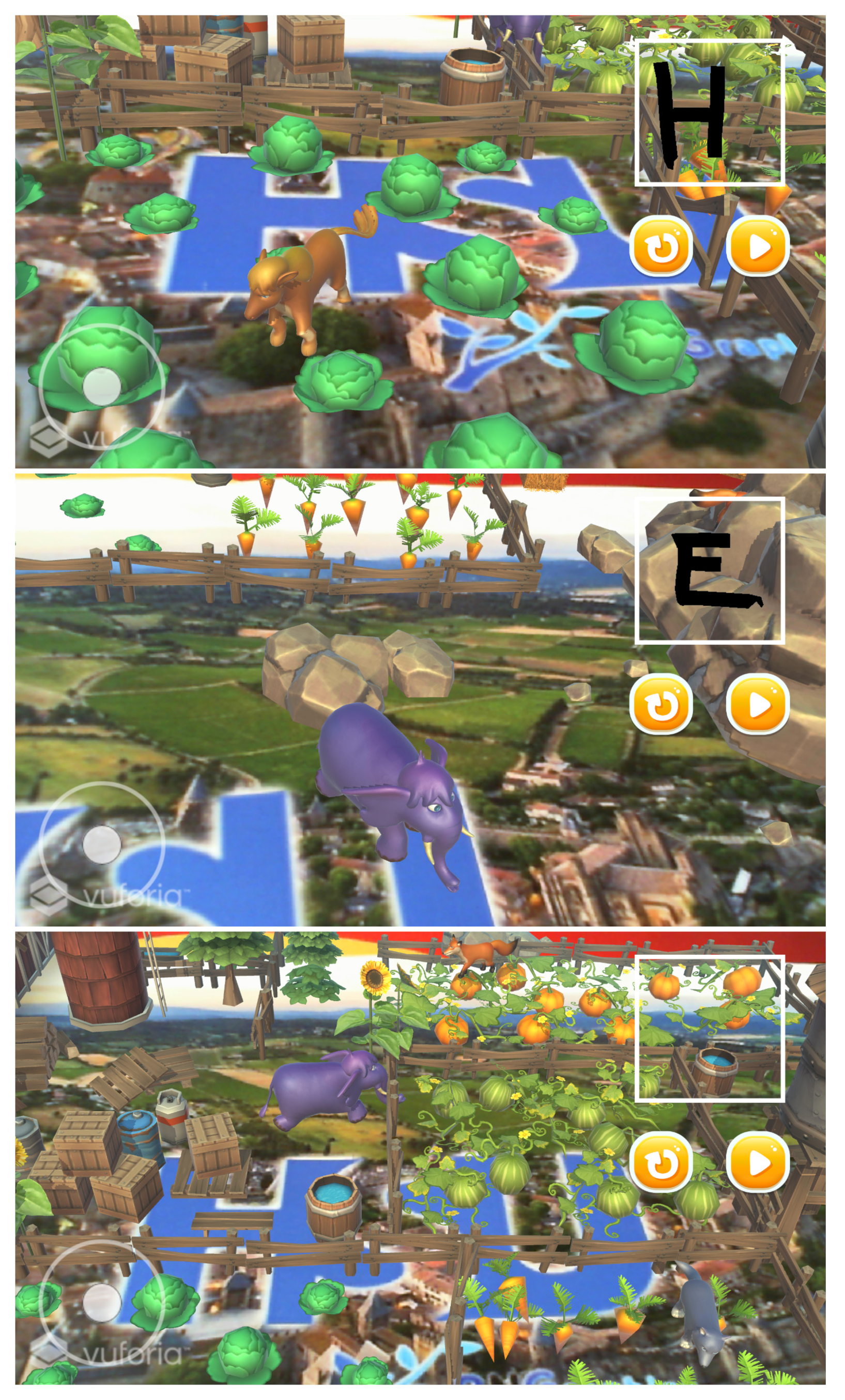
For the proposed text interface and interaction, a deep learning model was implemented using Anaconda 3, Conda 4.6.12, and TensorFlow 1.13.0. The recognition and inference in the learning model were implemented using the TensorFlowSharp 1.15.1 plug-in with the Unity3D engine. Furthermore, the interface-technology-applied mobile English language teaching application was produced using Unity3D 2019.2.3f1 (64 bit). Here, Vuforia engine 8.5.9 was used for the production of the AR application. The PC environment used to create and test the applications included Intel Core i7-6700, 16 GB RAM, and Geforce GTX 1080 GPU. Furthermore, a Galaxy Note 9 mobile device was used to run and test the produced applications.
The satisfaction with the proposed interface technology was comparatively analyzed with the users, and survey experiments were conducted to determine the experience provided by the English language teaching applications. There were 10 survey participants (seven males and three females) between the ages of 23 and 39. The survey participants consisted of students or researchers majoring in computer science who had experience in creating or using digital content such as games and education. The key objectives of the surveys were to analyze the satisfaction provided by the proposed interface and check the educational experience of the English language teaching applications.
The first survey experiment was the analysis of satisfaction regarding the text interface. The proposed interface aims to provide a highly immersive experience environment with easy and convenient use through direction interactions based on a minimized GUI and touch inputs. Accordingly, we conducted a survey experiment using Arnold Lund’s USE (Usefulness, Satisfaction, and Ease of use) questionnaire [
37]. It comprises 30 questions on a seven-point scale (1∼7) based on four items, namely, usefulness, ease of use, ease of learning, and satisfaction.
Table 1 presents the statistical data based on the survey results. A high satisfaction score of approximately 6.0 was recorded for the four items. In particular, the survey results show that there are benefits such as easy and convenient learning and using because texts are input by directly drawing handwritten texts on the screen, without having to learn how to use the GUI of the mobile applications. However, a low score was recorded for the usefulness because the users who were familiar with the conventional GUI method experienced awkwardness and unfamiliarity with the process of interacting through the new interface method. Nevertheless, as the learning and using processes were easy, the users provided an opinion that they could experience immersion with high satisfaction eventually after adaptation. However, since it is not a comparison experiment with the existing GUI, it is only confirmed that a satisfactory interface experience can be provided to the user despite the new interface from the point of view of the proposed interface.
The second survey experiment was the analysis of the user experience for the English language teaching applications. To this end, we used a five-point scale (0∼4) to record the responses based on items such as the core module, positive experience, and social interaction module, using a game experience questionnaire (GEQ) [
38].
Table 2 summarizes the survey results, in which the mobile and AR applications were classified. First, the survey result on the overall experience confirms that the English language teaching applications provided interesting experiences similarly on all the platforms. The comparison results of specific items show that the visual differences of the applications provided through the combination of reality and virtual world have positive effects on increasing immersion or concentration. However, the immersive experience environment (AR) sometimes disturbed the learning or had a negative effect because of inconvenient manipulations or errors in the controlling process. In other words, there is a difference in the experience environment in which mobile can experience content from a specified composition and viewpoint, whereas AR can explore and control scenes or objects from a desired angle and various distances (near or far). Due to these characteristics, positive effects on immersion and tension, as well as negative effects such as dizziness and confusion, were shown.
A comprehensive analysis of the survey results shows that the proposed interface has the effect of enhancing the experience of the English language teaching applications. If the advantages of immersive technology, such as VR and AR, are used appropriately, good educational effects will be produced based on high immersion.
6. Limitation and Discussion
This study confirmed interface satisfaction and application experience through a survey experiment. However, there are limitations in that the sample size is small as the number of participants is around 10 and the age range of the participants is narrow. In particular, in the case of an English language teaching application, even though it is an educational environment for preschool users, preschool children are not considered in the survey.
As for the problem that the survey subjects of the educational applications for preschool users were not preschool children, we intend to recruit multiple participants between the ages of 5 and 8 and analyze the educational effects or usability of the proposed applications. In addition, the AR application focuses on a new experience environment and various viewpoint changes, rather than the combination of real and virtual ones. Therefore, an AR application will be possible to design to increase the advantages of AR Characteristic by reducing virtual background objects and focusing on virtual animal objects centered on English words.
Finally, based on application production and survey results, it is judged that the proposed interface can be applied to the existing commercial English language teaching applications [
39,
40] or to create new commercial education applications.