


Abstract
The existing usability models have been used primarily for evaluation, not for usability engineering. The models were found to be general for specific mobile applications. They also lack appropriate guidelines to apply the usability models to m-government applications. Earthquake information is an example of critical information delivered to citizens via m-government applications. Usability design is considered a very important key factor to the success of such applications. This research addresses the challenges in finding the usability factors important to m-government applications and choosing appropriate factors for specific m-government applications. A questionnaire was administered to 49 citizens. The results include six usability factors which are learnability, simplicity, satisfaction, security, privacy, and memorability. Descriptions of the usability factors were later added to provide a clearer definition for each factor. This paper proposes the usability design framework for m-government applications. The use of the framework was illustrated based on the user interface redesign of the EarthquakeTMD application. The main aim was to demonstrate the applicability of the framework. The quality of the original UI design of the application in the case study was assessed with a questionnaire which was administered to 57 Thai citizens who lived in the areas affected by the disasters. Four designers participated in UI redesigning and produced four different UI designs. The new UI designs were evaluated via two usability tests on two sample groups of representative users. The first usability test was conducted with 24 participants. Twenty-four test cases were used. The second usability test was conducted with 351 representative users. After the tests, both sample groups were given a questionnaire based on the SUS (System Usability Scale). The same two UI designs by experienced and inexperienced designers who used the framework received the highest scores: 89.58 and 87.60 on the first usability test. They also received the highest score on the second usability test: 89.10 and 90.88. The results reveal that the citizens preferred the new user interfaces designed using the framework. It was found that the scores of the UI designed by inexperienced designers who used the framework were as high as the scores of the UI designed by experienced designers, whereas the UI designs from the designers who did not use the framework received the lowest scores: 63.23 and 54.27 on the first usability testing and 59.34 and 46.53 on the second usability testing.
1. Introduction
Mobile government applications have been increasingly used by federal and local governments to deliver public services to citizens and involve them in decision-making processes [1]. The use of mobile government applications helps promote communication and interaction between government departments, agencies, and citizens. Services offered via the applications range from news, information, contracts, surveys, health, education, finances, etc. Some types of information, e.g., safety and warning messages, are more critical than others. Such messages are critical and should be presented to the intended audience in a way that they can be quickly located, learned, understood, and used so that the risks for damage, e.g., the number of deaths and economic losses can be lowered [2]. The interfaces designed with appropriate usability factors are highly likely to have high usability value and a positive effect on intention toward continually using the application.
Mobile government applications are perceived as the fastest and the most convenient way for citizens to receive information broadcasted. As mobile technologies become cheaper, mobile phones are affordable and easy to purchase even in remote areas where other means of communication are limited or unavailable. The growth of mobile devices also gives rise to mobile government applications which are used by government agencies to disseminate information and communicate with citizens.
There are challenges in developing mobile applications: first, the applications must be designed to function on a variety of small screen sizes; second, the usability design of mobile government applications; and third, designing for effective presentation of information for citizens who represent a wide range of recipients. The challenges can be addressed on many levels ranging from devices’ form factors, mobile application development approaches, information design process, usability design, and so on.
Studies on usability frameworks and guidelines for user interface and usability design [3] revealed important factors for the usability of mobile government applications. The factors include learnability, privacy, simplicity, governance, simultaneousness, organization, effectiveness, security, responsiveness, memorability, and notification [3].
The designers of mobile government applications are expected to have knowledge on the usability characteristics of the applications [4]. However, the important usability characteristics are not well addressed by the existing approaches. This suggests that the usability design approach for mobile government applications should recommend the usability design factors to the designers and provide a guideline on how they can be used. This paper presents the usability design framework for mobile government applications that includes the usability factors and the usability design guideline. The guideline is created to aid in the transformation of the interface requirements to the design of information according to the usability factors. Section 2 of this paper discusses existing usability models and frameworks. Section 3 introduces the framework. Section 4 describes an application of the framework. Section 5 presents the evaluation. The last section concludes the paper.
2. Usability-Related Models and Framework
Usability Model
The models that reflect the usability of mobile applications include Mobile Goal Question Metric (mGQM) [5,6] and People At the Centre of Mobile Application Development (PACMAD) [7]. mGQM is a model used for usability evaluation. It is based on ISO 9241-11. There are six performance goals namely simplicity, accuracy, time taken, features, safety, and attractiveness. Although mGQM was originally designed for mobile application development, the model does not provide sufficient explanation on how to select appropriate usability characteristics for a specific mobile application. The framework outlines the order in which they accomplish their objectives using questions, and the results are measured using the metrics. PACMAD, on the other hand, is a usability model that combines attributes from Nielsen’s model and the ISO model. The seven attributes of PACMAD are effectiveness, efficiency, satisfaction, learnability, memorability, errors, and cognitive load. Although the model is useful for designing the usability of the user interface of mobile applications, the designers find no guideline in achieving the usability of the user interface [7]. 7C is another framework that highlights seven factors that can be used to design user interfaces. The factors are context, content, community, customization, communication, connection, and commerce. The framework was later extended to include two factors in the mobile environment: mobile device constraints and mobile settings. Thus, it can be used to evaluate the information quality of m-government’s interface [8]. However, the factors are not directly translated to usability factors. Therefore, additional efforts are required.
Usability framework
Azeez and Lakulu [9] proposed a framework to evaluate M-Government Service Success (M-GSEF) for mobile government services from the citizen’s perspective. The framework identified eight dimensions and various factors that affect m-government’s success. Dimensions are system quality, information quality, service quality, citizens’ use, citizens’ satisfaction, citizens’ trust, perceived m-government service quality, and perceived effectiveness of m-government services. Some attributes are defined in more than one dimension. In addition, this framework provides a broad evaluation guideline that does not consider specific details such as information display and does not provide any example of how the framework is used. However, it does describe information quality, service quality, and system quality, all of which are lacking in guidelines or procedures.
Isagah and Wimmer [10] presented MGOV, a framework supporting organizations and designers responsible for designing mobile public services in developing countries. MGOV contains four iterative phases, which are (1) initiation, (2) design, (3) implementation and deployment, and (4) maintenance and governance. The framework identified ten components that support designing m-government services. The framework includes preconditions, guidelines for implementing the framework, design principles, guidelines for designing m-government services, MGOV method, requirement management, viewpoints, metamodel, stakeholder management, and framework repository. The set of stepwise approaches for government agencies to follow when providing services was established. The steps focus on service design. They are not restricted to mobile application development or usability.
Poor user interface was identified as a technological challenge in both developing and developed countries [11]. Also identified were the lack of skills in designing mobile government applications (e.g., process framework and guideline) and the lack of proper guidelines (e.g., proper content presentation) for content development. Under the sociocultural challenge category, the lack of user-friendly application and poor user readiness for m-government service were identified.
Zamzami and Mahmud [8] presented a mobile interface of m-government services for any mobile government applications using the relation between 7C’s design and information quality to determine the level of citizen satisfaction. This framework focuses on the information quality of the application based on perceived usefulness, perceived ease of use, and perceived accessibility. 7C’s design focuses on interface design elements including context, content, communication, and customization. The framework does not provide any guidelines or steps to follow. Another study by Ahmad, Rextin, and Kulsoom [12] presented a systematic literature review of usability guidelines for mobile application. The guidelines cover recommendations for information presentation and human–computer interaction. The recommendations do not address the connection between usability design goals and the outcomes of the design.
Amores, Vasardani, and Tanin [13] presented map design and memory load as part of usability design for emergency applications. Appropriate maps were recommended to support the presentation of information. Weichbroth [14] studied 75 attributes and found frequently used usability factors for mobile application from 790 documents during 2001 to 2018 which are (1) efficiency (70%), (2) satisfaction (66%), (3) effectiveness (58%), (4) learnability (45%), (5) memorability (23%), (6) cognitive load (19%), (7) errors (17%), (8) simplicity (13%), and (9) ease of use (9%).
Al-nuiam and Al-Harigy [15] found 14 user interface guidelines that were appropriate for mobile applications. The guidelines cover content selection, content organization, layout, information presentation, human–computer interaction, and mobile context. A similar guideline was found in [16]. It emphasizes that things to focus on in designing are layout, information presentation, organization, human–computer interaction, and language.
Challenges of the existing usability models and frameworks
Unique characteristics of mobile applications [17] pose challenges in designing usability for the interfaces. There are several usability guidelines developed for mobile applications [5]. However, the models are general and not suitable for specific mobile applications [5,18]. The usability factors defined are often described at a high level of abstraction, and thus, they provide very little or no implementation detail. The ISO standards, though they come with guidelines and metrics, are general [5].
While m-government applications share common attributes with other types of mobile applications, they have specific usability characteristics that require specific measurements and guidelines [18]. The existing usability models such as in [6,7,9] do not provide the guidelines to choose appropriate usability characteristics for specific applications. Thus, the need for appropriate guidelines on how to choose suitable usability attributes is recognized. With appropriate guidelines, suitable factors can be chosen for a particular type of m-government application. The usability characteristics can be shaped during the design phase. For example, understanding and learnability are very important usability characteristics of an earthquake report system, a life-critical mobile application. If the most important usability characteristics can be identified early in the development process, the appropriate user interface elements can be chosen to promote the usability of the user interface.
The existing usability models lack guidelines on how to determine appropriate usability characteristics for m-government applications, due to their unique nature of information, diversity of applications, and users. M-government applications range from simple information systems to life-critical systems. They serve millions of users, regardless of application type [19]. The diversity of users is exceptional. Thus, usability is considered very important in allowing users to get the most out of the m-government applications they use.
Hence, m-government applications should be developed with a focus on usability engineering which can lead to user interfaces that contain suitable usability characteristics. The challenges for providing support for the usability design process for m-government applications are as follows.
- The guidelines are, therefore, needed to allow practitioners to choose suitable usability attributes in engineering the usability of the applications.
- Usable software can increase technology acceptance as well as achieve the goals of m-government applications.
- The usability attributes should be adequately described to ensure the proper selection of user interface elements.
- The description of usability attributes can be linked to the measurement of specific mobile applications.
Thus, usability should be considered early in the development process, especially in requirements engineering and design to achieve usable software via usability design of the user interfaces.
Usability for people with disabilities
Usability and accessibility were found to be important factors for designing the UI for disabled people [20]. Screen design and multimedia content should be considered. For visually impaired users, color-conscious design is important [21].
Accessibility, usability evaluation, information architecture, user research, user interface, web analytics, and content strategy were also found to be the focus when developing UIs for mobile applications for people with disabilities [22]. The questionnaire, cognitive walkthrough, heuristic evaluation, think aloud, and SUS were the most frequently used methods for usability evaluation.
Usability design, information science, and computing
Usability design is significant to the acceptance of the interfaces, task completion, and success of businesses. UIs redesigned based on Nielsen’s usability heuristics were found to be more efficient than the original screen [23]. Placing the important information items on the first page allows them to be easily accessible [24]. The screens that were designed with usability factors were improved in performance, efficiency, and satisfaction [25].
The results of the previous studies suggest that usability is important to how information is seen, used, and contributed to the success of user tasks and businesses. Therefore, usability design is vital to information science in the way that it helps users to easily locate and retrieve information. It is also essential to the success of information dissemination.
Computing techniques and algorithms can contribute to the usability design process. For example, an automatic analysis of software requirements can be performed with the help of NLP. It can allow the usability characteristics to be determined and the evaluation metrics to be suggested.
Table 1 addresses the limitations of the usability design of the models and frameworks and challenges. The PIN framework proposed in the next section describes how some of the challenges are addressed.

Table 1.
Limitations of the existing models and how they can be addressed.
The existing usability models, frameworks, and SDLC
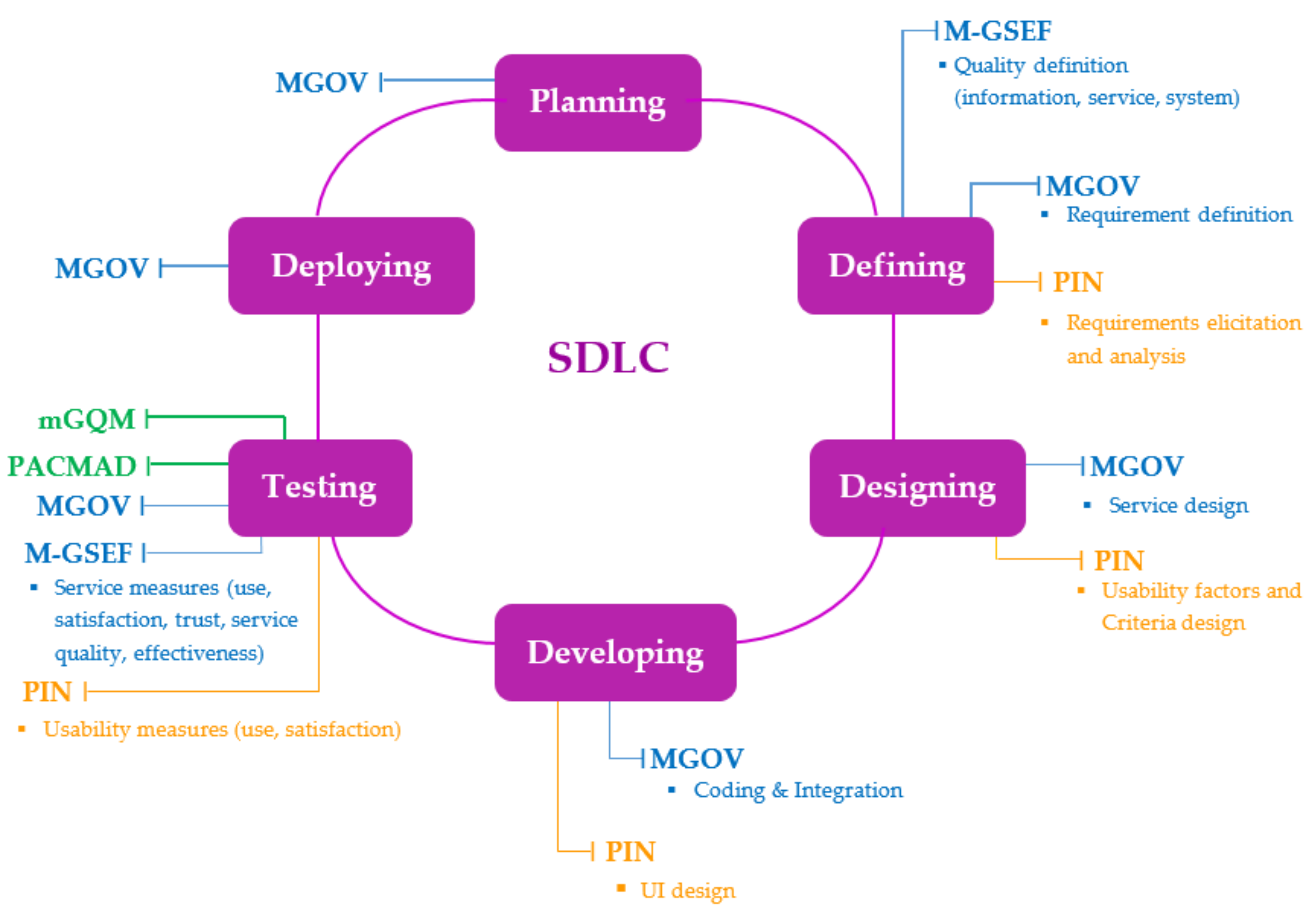
The frameworks mentioned previously, MGOV and M-GSEF, and usability models, mGQM and PACMAD, can be described in relation to the Software Development Life Cycle (SDLC) as shown in Figure 1.
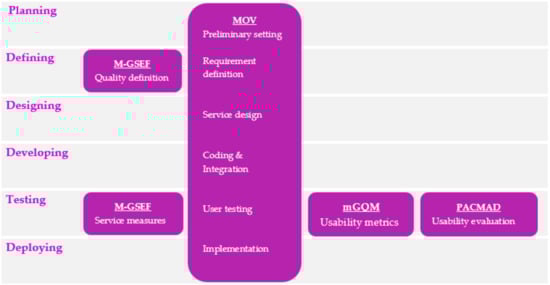
Figure 1.
Relationships of the existing usability-design-related frameworks and SDLC.
MGOV is related to the SDLC in the defining, designing, developing, testing, and deploying phases of mobile government services. For instance, in the defining phase, service strategies are defined. In the design phase, the architecture of data, services, and applications is designed. For M-GSEF, it is related to the SDLC in the defining and testing phases. In the defining phase, the service quality is defined. In the testing phase, information quality is evaluated based on customers’ points of view. The two usability models, mGQM and PACMAD, are related to the SDLC in the testing phase as they provide measures and metrics for the usability evaluation of mobile applications. The next section introduces PIN, a usability design framework proposed to address the challenges in the usability designing of m-government applications.
3. Introduction to the PIN Usability Design Framework
The study of the related literature on m-government application and usability described in Section 2 raises the following research questions (RQs).
RQ 1:
What are the usability factors that are important to the user interface design of m-government applications?
RQ 2:
How can usability factors be used to support designing to incorporate usability characteristics into the user interface?
RQ 3:
Do the existing usability frameworks or models offer usability design guidelines to the designers of mobile government applications?
RQ 4:
How are suitable usability factors identified for the user interface?
Methodology
RQ 1: The survey was administered to 49 Thai citizens to investigate citizens’ points of view on the usability characteristics of m-government applications. The result gives an answer to RQ 1. It identified six usability factors consisting of learnability, simplicity, satisfaction, security, privacy, and memorability.
RQ 2: Kureerung and Ramingwong [26] studied the related literature and found that the existing research on usability design is unable to provide specific guidelines to help the designers of m-government applications in using the usability factors to design the user interfaces. The literature [5] suggested that the link between the usability characteristics and the supporting metrics must be defined to use the usability model with a specific application. Thus, a divide-and-conquer approach was used to define the usability characteristics to provide more specific descriptions and at the same time make it simpler to measure. The descriptions are identified as sub-usability characteristics which also help to provide links to the corresponding metrics.
RQ 3: A literature review was conducted. The results are explained in Section 2 and Table 1. It identified that most of the existing usability models lack guidelines for evaluating particular applications as well as for designing the usability of them.
RQ 4: In any software development process, requirements and design are closely related. The outputs of requirement activities determine how good the design is. The analysis of requirements can lead to the identification of usability characteristics and the corresponding design characteristics that contribute to the achievement of the usability characteristics. Therefore, the design process was designed to realize the suitable usability characteristics for a specific m-government application. The outcome of the process is a user interface that encompasses the appropriate usability characteristics for the particular application.
The usability factors obtained from the survey in response to RQ 1 represent the quality characteristics of usability from the users’ viewpoint. From the designers’ viewpoint, the factors represent the goals of the user interface design. Hence, the process begins with goal identification based on the requirements. Because the overall usability of a user interface can be determined based on the usability of each information entity located on the user interface, the entities must be identified first. Then, appropriate usability factors for each entity can be identified. An information entity of a user interface can refer to an abstract entity that may consist of several UI components.
After the UI components are identified, the corresponding usability factors can be determined for each component. As mentioned earlier in response to RQ 2, the usability factors identified should be described. Thus, the description of each UI component is created by identifying sub-factors. The sub-factors, though useful, still need to be given tangible descriptions of the components. The tangible descriptions are referred to as Criteria. This allows the detailed design to be specified directly for the corresponding UI components. During the design process, Criteria can be used to measure whether the design outcomes satisfy the goals of user interface design. The measurement may be repeated until the desired level of usability is reached. The sections below describe the PIN framework and the core component, usability factors.
3.1. PIN: The Usability Design Framework
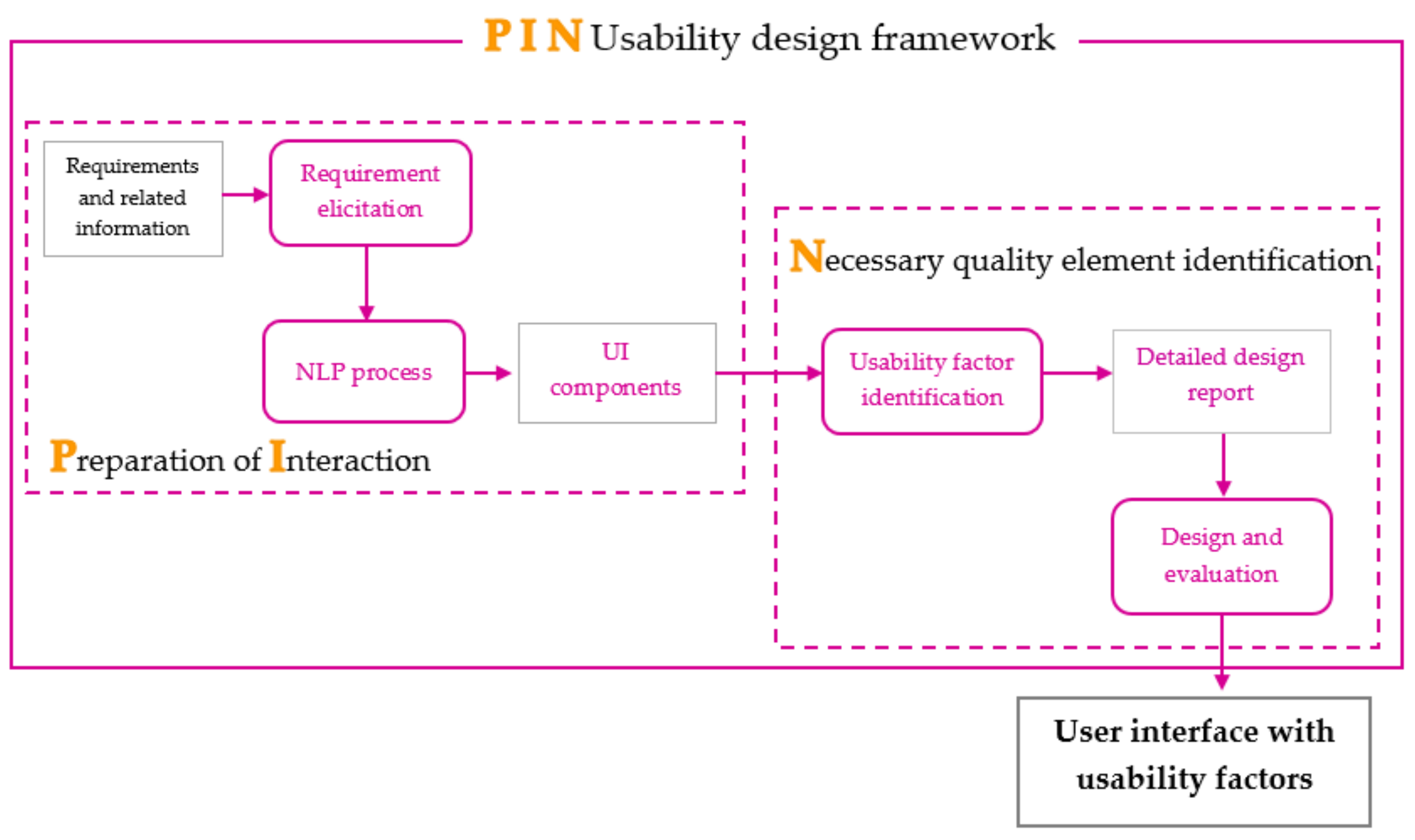
This paper describes a new usability design framework, PIN, which consists of two processes: Preparation of Interaction (PI) and Necessary quality element identification (N). Figure 2 shows the architecture of PIN, which represents the guidelines to achieve the user interface with usability characteristics. The two processes, PI and N, are described as follows.
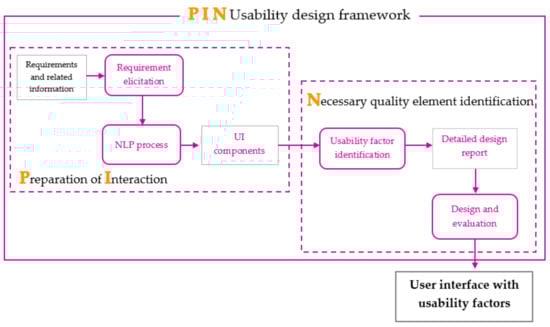
Figure 2.
PIN usability design framework’s structure.
3.1.1. Preparation of Interaction (PI)
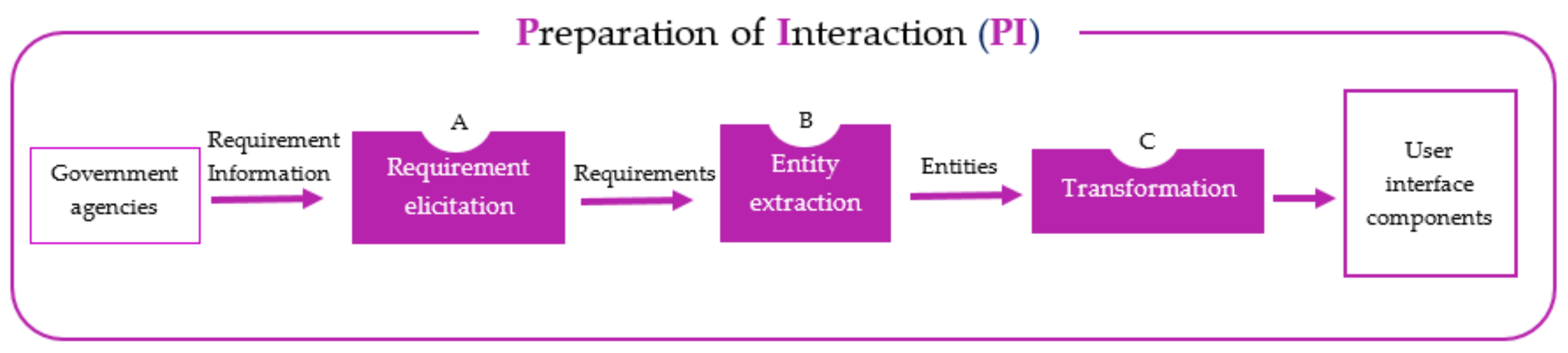
This is a semi-automatic process to prepare information entities for the user interface under design. It involves analyzing requirement sentences to recognize the information entities. During the analysis, the technical terms may need to be clarified if the analyst does not have knowledge of the terms. After that, NLP is used to perform the extraction of information entities from the requirement sentences. Figure 3 shows the process flow which contains requirement elicitation, entity extraction, and transformation.
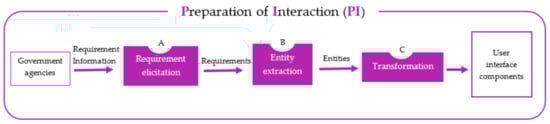
Figure 3.
The Preparation of Interaction (PI) process.
- Requirement elicitation
Once requirement information is retrieved, the requirements are examined to ensure nothing is lost before beginning extraction. In this activity, additional information may be added to the original requirements, if necessary.
The requirement elicitation activity is encouraged to ensure that the requirements are sufficient for the next stage. The requirements may be insufficient if the original requirements lack usability information or they may require an update due to environmental changes, e.g., emerging user requirements, new interface design standards, new technologies, etc.
- B.
- Entity extraction
This step involves extracting information entities from the requirements obtained from the previous step. The Natural Language Processing (NLP) unit is used for extracting words. The automatic analysis of words leads to a more accurate result than a manual analysis which could result in bias or prejudgment of the words.
First, the requirement sentences stored as unstructured text are forwarded to the NLP unit to separate words. Then, punctuation and stop words are removed to cut down on unnecessary words. Next, the part-of-speech (POS) tagging procedure is carried out. The results are forwarded to the chunking process which initiates the search for tokens (word phrases from unstructured requirement sentences) or information entities from the requirement sentences.
- C.
- Transformation
The purpose of this step is to analyze information entities to identify the corresponding UI components. At the beginning of the process, the list of UI components is created as an empty list. An information entity will be added to the list and identified as a new UI component or merged with the existing component. The UI component list contains groups of information entities. Some entities may belong together or be expressed by the same UI component.
3.1.2. Necessary Quality Element Identification (N)
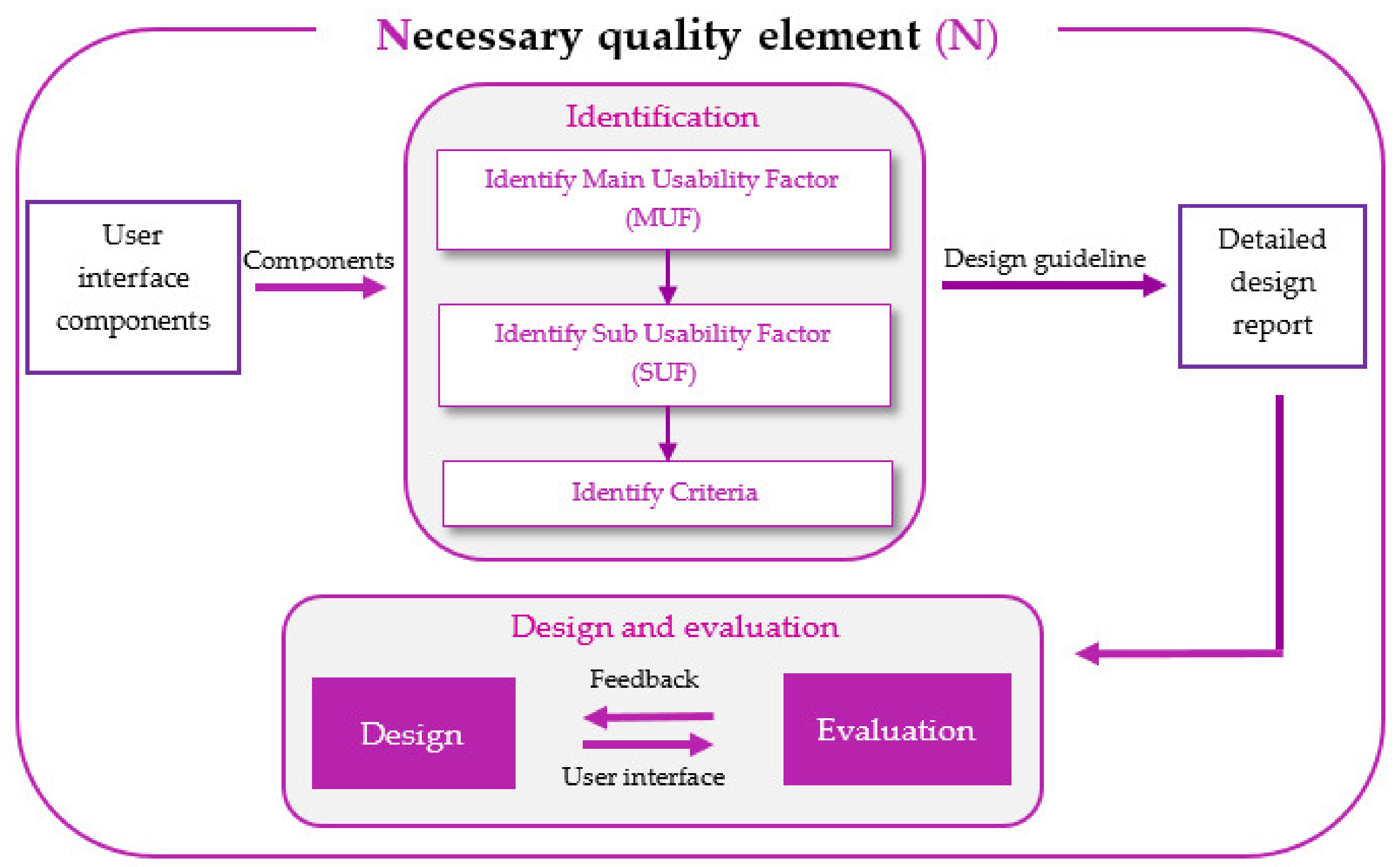
In this process, the Main Usability Factors (MUFs) are identified for each UI component to describe the usability characteristics of the components. MUFs are split into Sub Usability Factors (SUFs) to provide detailed descriptions to the designers. Then, Criteria are specified for SUFs. Criteria direct the designers to obtain an explicit design guideline for each MUF and provide a way for usability evaluation. Figure 4 shows the Necessary quality element identification (or N) process.
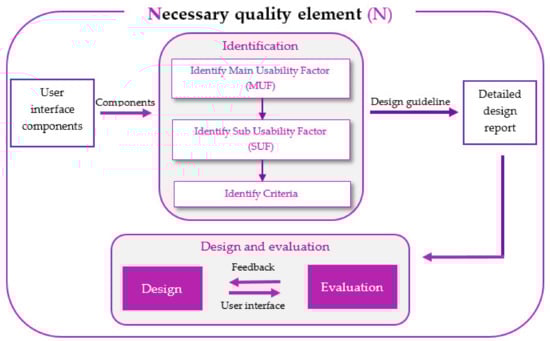
Figure 4.
The Necessary (N) quality element identification process.
3.2. Usability Factors
Usability factors are the core element of the PIN framework. These factors are referred to as the Main Usability Factors (MUFs) which can be broken down into smaller elements, namely Sub Usability Factors (SUFs). Each SUF is then described further as Criteria. MUF, SUF, and Criteria form the three elements of usability design. The first element, MUF, indicates the main usability goals of a UI component. The second element, SUF, indicates the MUF’s components, and Criteria indicate the usability measure.
Main Usability Factors (MUFs) reflect the extent of usability of the user interface under design. It consists of Learnability, Simplicity, Satisfaction, Security, Privacy, and Memorability.
- Learnability (L): Rapid understanding and use of information.
- Simplicity (Si): Easy to understand and use.
- Satisfaction (Sa): Extent of pleasure in using the system.
- Security (Se): Protection and safety of data and program.
- Privacy (P): Protection of users’ personal information.
- Memorability (M): Easy to remember and recall.
A Sub Usability Factor (SUF) serves as a description of the Main Usability Factors (MUFs). SUFs inform the designers of the components of usability. For example, learnability is identified with the following SUFs: readability, understandability, and actionability. This means that the designers should make sure the design of the specific UI follows the SUFs identified. Here is the list of MUFs and their corresponding SUFs:
- Learnability (L): understandability (L1), readability (L2), and actionability (L3);
- Simplicity (Si): usefulness (Si1), intuitiveness (Si2), operability (Si3), and aesthetics (Si4);
- Satisfaction (Sa): error guidance (Sa1), likeability (Sa2), and accessibility (Sa3);
- Security (Se): confidentiality (Se1), and trustfulness (Se2);
- Privacy (P): protective (P1);
- Memorability (M): minimal memory load (M1).
Similarly, SUFs are broken down into Criteria, the smallest element in the PIN framework. A UI component may be described by one or more MUFs, SUFs, and Criteria. The next section presents the case study used in this paper to demonstrate how the framework was applied.
4. The User Interface Redesign Using PIN Usability Design Framework
This section illustrates how the framework was used to assist the designers in redesigning the user interface of the mobile government application. The framework contains the usability factors for mobile government applications as well as the guideline for incorporating them into the usability design process and the product. In this paper, the two-stage framework was used to redesign the user interface of the earthquake report screen to improve the usability of the original interface. The user interface in this case study is from the mobile government application called EarthquakeTMD from the Earthquake Observation Division, Thailand. This mobile application was created on August 6, 2018, in response to the need to provide quick access to current and timely earthquake information to Thai citizens. This allows people to quickly access and learn about earthquakes nearby. When information on earthquake strikes or any type of information is available on the application, the ability of the application to communicate the messages to the recipients and allow them to quickly use it directly depends on the usability of the application.
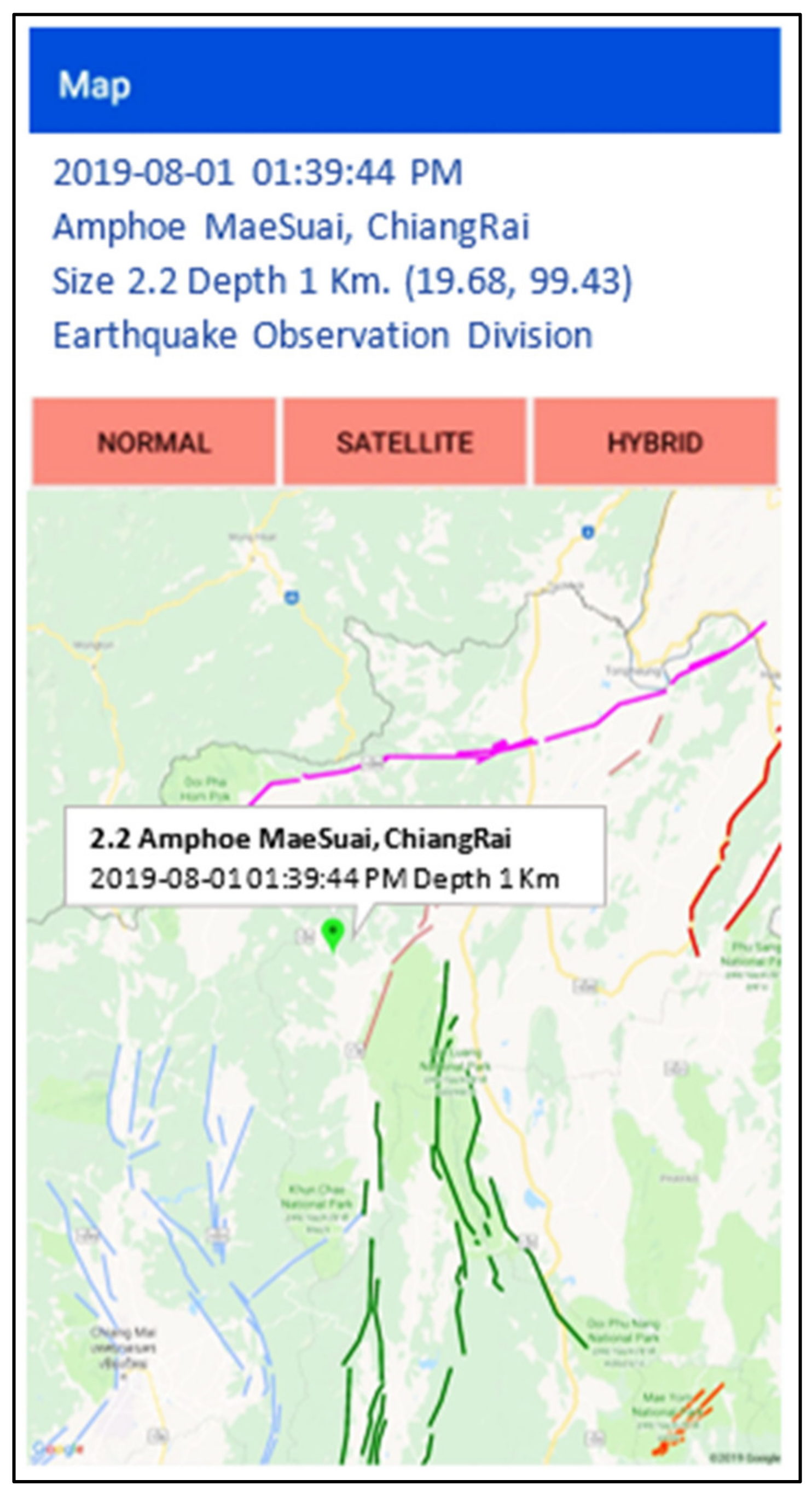
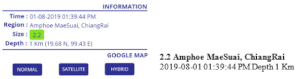
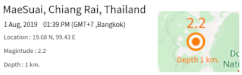
Shown below in Figure 5 is the original design of the earthquake information report screen of EarthquakeTMD, the mobile government application. The interface consists of two main parts: earthquake information and a map to show the earthquake’s location. The PIN framework was used to redesign the original user interface to improve usability. The questionnaires were administered to a group of citizens to ask questions regarding the quality of usability of the original design including the three usability factors: learnability, simplicity, and satisfaction. Fifty-seven respondents were Thai citizens living in northern, northeastern, and central Thailand. The areas were impacted by flood calamity and PM 2.5 in the past. The questionnaire used a 5-point Likert scale: Excellent, Good, Neutral, Fair, and Poor. The survey’s result is shown in Table 2.
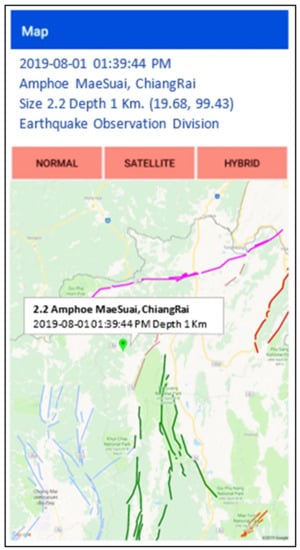
Figure 5.
The original design of EarthquakeTMD’s earthquake report screen.
Table 2.
The result of the questionnaire represents the citizens’ perspectives on the three usability factors or factor in use: learnability, simplicity, and satisfaction.
The result of the questionnaire for the original user interface design reveals the degree of usability, strengths, and weaknesses. Likeability was ranked with the highest score (mean value of 3.77), while aesthetics was ranked with the lowest score (mean value of 3.21). Understandability, actionability, and aesthetics were areas that could be improved.
The user interface was redesigned using the PIN usability design framework. The framework emphasizes requirement elicitation which gives the designers a clear view of the requirements and provides the basis for the analysis of the requirements. The activity prepares the ground for traceability and assessment of the design.
The framework involves elicitation and analysis of the requirements (shown in Table 3). In the elicitation activity, the requirements were refined or extended using a set of questions created to elicit additional requirements or refine them. This is to help the designers to get a more complete understanding of the user interface. Once the elicitation was completed, the words were extracted from the new set of requirements to look for information items. These steps facilitate the generation of requirements and identification of information entities. The design detail report was created as a result of the elicitation and analysis activities. Table 3 shows the first part of the report which indicates the requirements that are prepared for elicitation. It includes interface name, original requirements, input data (resulted from the requirement analysis), design recommendation, and discussion questions. The input data were identified by analyzing the original requirements to prepare input data for the user interface design process. The design recommendation sets the focus of the requirement, whereas the discussion questions were generated based on the original requirements. The purpose of the questions was to clarify some parts of the requirements. Table 4 shows part two of the report where the result of using NLP to extract the keywords is displayed. These information entities denote the elements of information that should appear on the new user interface.
Table 3.
Part one of the design detail report.
Table 4.
The outcome of POS tagging on structured requirement sentences.
The requirement sentences and additional requirements obtained from the answers to the discussion part (as in Table 3) were forwarded to the NLP unit for separation of words. Then, punctuation marks and stop words were removed to identify the information entities. Next, part-of-speech (POS) tagging was performed. Table 4 presents the outcome of POS tagging consisting of requirement sentences and associated POS tags. In the end, a group of information entities was identified. Next, noun phrase (NP) chunking was performed to identify meaningful text. The rule used in this step is {<JJ.?>*<NN.?>} which means that a chunk should be formed whenever zero or more adjectives (JJ) are followed by zero or more singular nouns (NN).
The outcome of POS tagging is the list of information entities. The list contains information, map, earthquake, position, represent, marker, location, magnitude, date, time, and text. This list was used to identify the UI components. Table 5 presents the list. The identification of UI components started by checking the existence of each entity, symbolized as E. If the entity was not already in any group, symbolized as C, then a new group of components was created. The entity was added to the group. For example, when E1 was considered and not found in any existing groups, a new group, C1, was created, and E1 was added to C1. When another entity was considered to have the same meaning or purpose as the entity in any of the existing groups, it was added to that group. The steps were repeated until all the UI components were identified. In this case study, the UI components identified were information, map, position, magnitude, date, time, and text.
Table 5.
The UI components identified from the list of information entities.
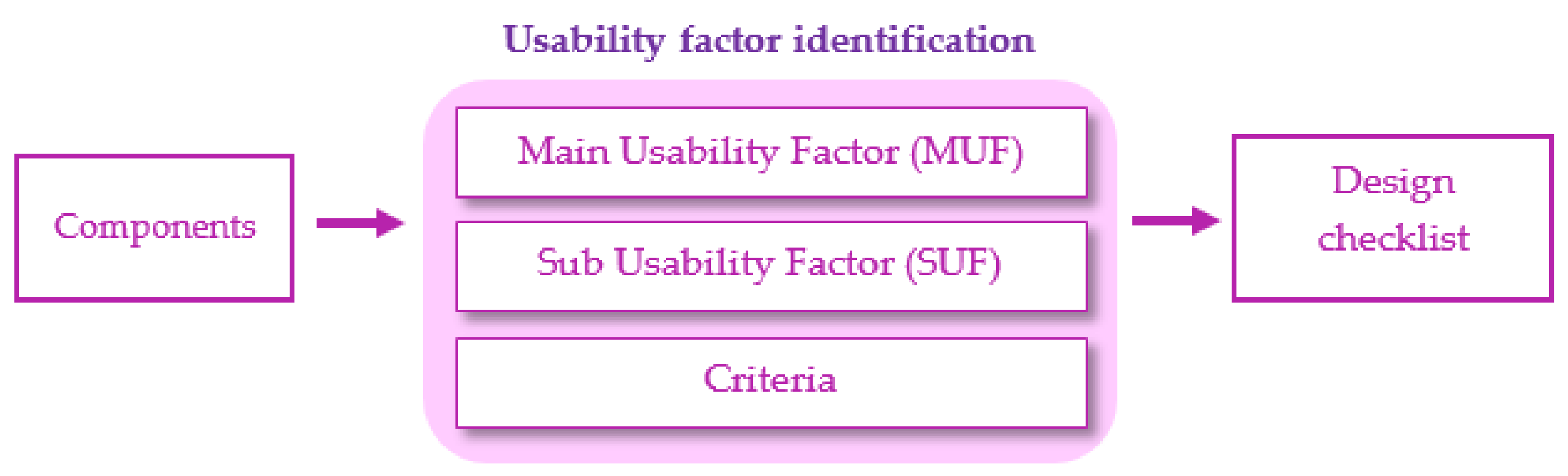
The next step is identifying the usability factors relevant to the UI components found earlier. Figure 6 presents the usability factor identification model showing the UI components as inputs for usability factor identification. Three elements were identified for each component: Main Usability Factor (MUF), Sub Usability Factor (SUF), and Criteria.
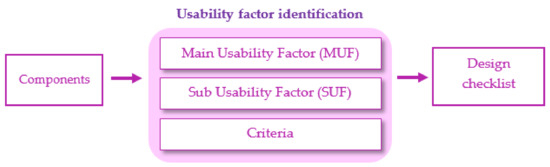
Figure 6.
The usability factor identification model.
The flow shown in Figure 6 leads to the creation of the design checklist as shown in Table 6. It shows the usability factors for each UI component. This table was used as a design guideline. For example, information should be designed to be understandable, readable, useful, intuitive, and aesthetically pleasing.
Table 6.
The design checklist for UI components.
Some usability design factors, including Security (Se) and Privacy (P), are not shown in Table 6 as the EarthquakeTMD application did not include a security function. It did not have a login feature and did not involve storing personal information. In an application where personal data must be collected and displayed on the screen, the Security (Se) factor must be considered. Table 7 presents the usability design checklist obtained for the UI components from Figure 6. This checklist serves as a guideline and criteria to be used in choosing design options and evaluating the finished product.
Table 7.
The design checklist.
Table 8 shows the usability design guideline for a UI component of EarthquakeTMD. The guideline depicts the abstract goals (MUFs and SUFs) and the concrete goals (Criteria) recommended for the UI components. Once the design is implemented on the user interface, Criteria can be used to evaluate whether the final design satisfies SUFs and MUFs. The user interface that is designed to meet the desired usability characteristics (factors) is highly likely to reach the target audiences sooner and allow them to effectively use the intended message.
Table 8.
(a) The usability design guideline for designing component “texts” and (b) the corresponding design.
To evaluate the usefulness of the usability design guideline, the guideline was given to inexperienced and experienced designers who were tasked to redesign the user interface of EarthquakeTMD. Table 9 presents the profiles of the four designers who participated in this study. The next section presents the evaluation of the redesigned user interface of EarthquakeTMD’s earthquake report screen.
Table 9.
The designers’ profiles.
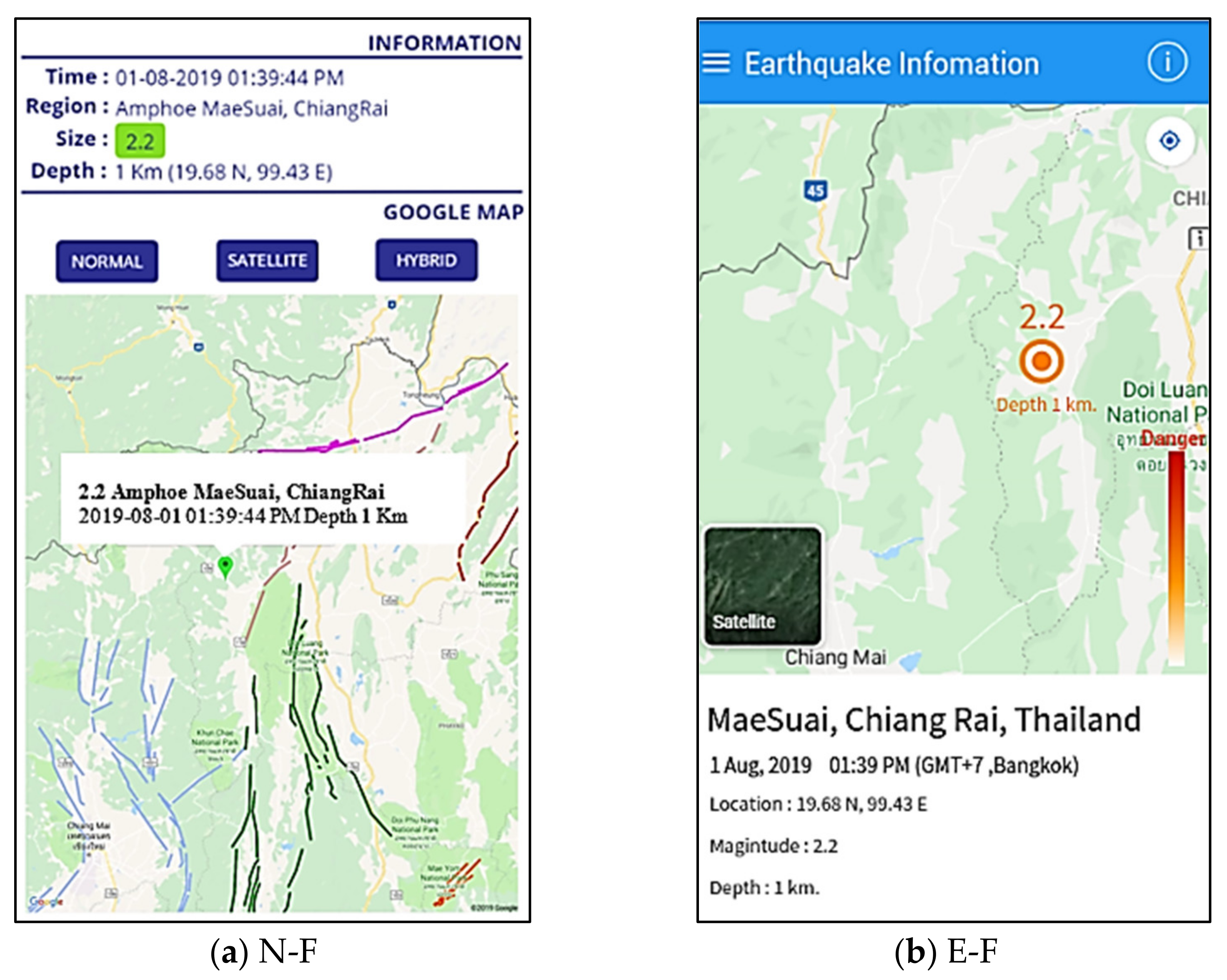
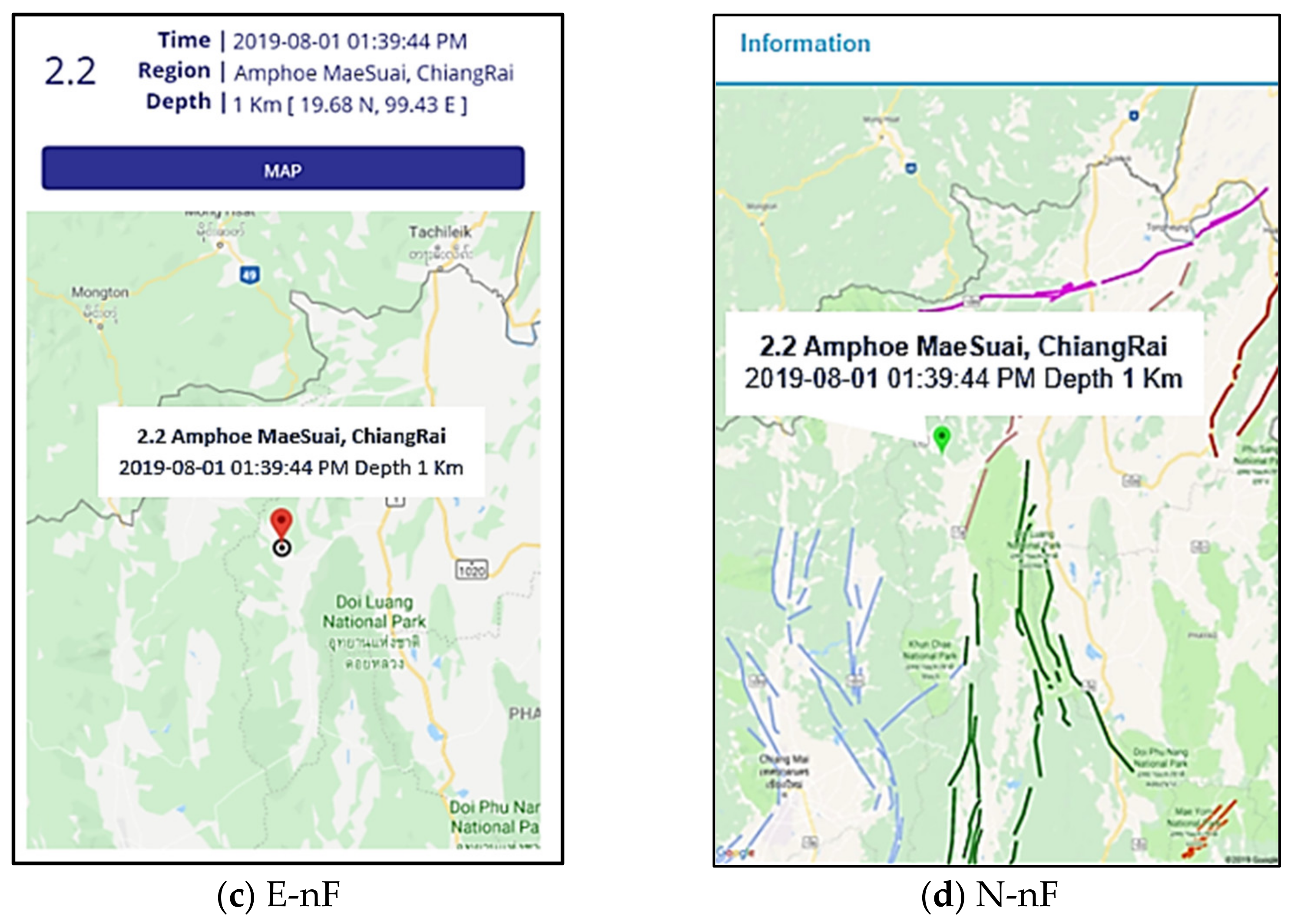
The four redesigned screens of the earthquake report interface are shown in Figure 7.
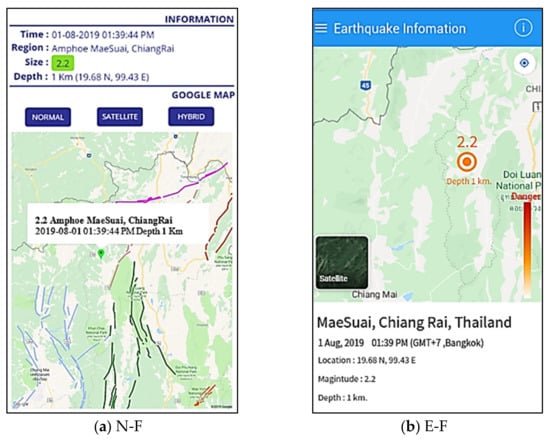
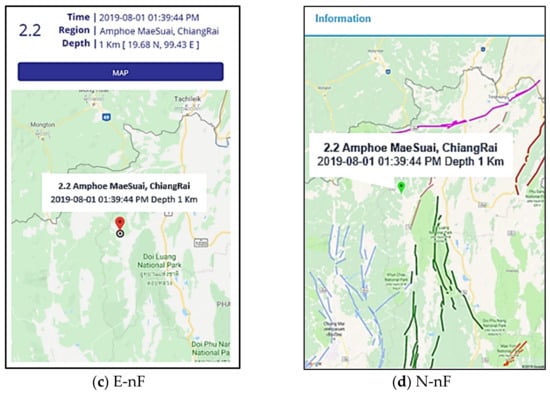
Figure 7.
The redesigned user interfaces: (a) N-F by designer 1; (b) E-F by designer 2; (c) E-nF by designer 3; (d) N-nF by designer 4.
5. Evaluation: Results and Discussion
The evaluation was divided into three parts: process, usefulness, and outcome. Table 10 shows the questions and answers for process evaluation. Table 11 shows time taken to complete redesign activities when PIN framework was used. The framework was used by the four designers to redesign the earthquake report screen of EarthquakeTMD. Two of them (one inexperienced and one experienced) used the framework to guide the redesign process. The other two designers (one inexperienced and one experienced) received no treatment and redesigned the user interface without using the framework. For outcome evaluation, the four redesigned user interfaces were tested for usability. Then, users completed a 10-item SUS questionnaire at the end of the test.
Table 10.
The questions for the designers who used PIN framework.
Table 11.
Time taken to complete redesign activities when PIN framework was used.
5.1. Process Evaluation
The process evaluation was performed by interviewing the designers who used the PIN framework. The questions were based on the design sequence suggested by the framework. Both closed-ended and open-ended questions were used. For closed-ended questions, a 5-point Likert scale was used. The interview was conducted via an online meeting application to follow Thailand’s COVID-19 government measures. The result is shown in Table 10. Overall, the framework provided both experienced and inexperienced designers with several benefits: first, the step-by-step usability design guideline, and second, desirable outcomes. Though there is a learning curve in some steps, the designers agree that the framework helps a lot.
Table 11 shows the durations of activities performed as part of the redesign process guided by the framework. Also shown are the design methods/principles used. The inexperienced designer spent more time, 200% on the element identification activity and 250% on the design activity, than the experienced designer. This could suggest that the framework, though it provides the guideline for the usability design process, does not necessarily speed up the design process of inexperienced designers. Experience is still an important factor that affects the duration of the process. Undeniably, the framework makes it easier for them to move forward with the usability design process while keeping track of what to do and what is done.
5.2. Usefulness Evaluation of PIN Usability Design Framework
A set of questions was given to both designers, experienced and inexperienced, who used the PIN usability design framework. The responses were based on a Likert scale that ranges from 1 to 5. The questions were asked via an online meeting application due to Thailand’s COVID-19 travel restrictions. The result of the evaluation is shown in Table 12. Both inexperienced and experienced designers found the PIN framework useful in supporting their design processes. When compared with other similar usability frameworks, the designers agree that the PIN framework offered a higher level of facilitation and overall support. The time spent on designing the interface was much shorter, unlike other similar frameworks. Table 12 shows the questions and answers for usefulness evaluation.
Table 12.
The result of the evaluation to validate the usefulness of PIN framework.
5.3. Usability Evaluation of the Four Redesigned User Interfaces
The four redesigned user interfaces were evaluated by two sample groups. The first group, 24 participants, took part in a usability test. Twenty-four test cases were designed to cover all possible sequences of using the four user interfaces. The participants were separated into four groups. Each group was divided into three subgroups (student, working age, and retired), with two participants in each group. They used the interface via mobile phones.
The second group, 400 participants (participants with a maximum allowable error of 0.05), viewed the mockup interface via the website. A questionnaire based on SUS questions was administered to both groups. Example questions include “I think that I would like to use this system frequently” and “I thought the system was easy to use”. The vertically aligned scores indicated that some records were eliminated due to inconsistent scoring. After cleaning, some of the records were removed, and data of 351 participants were left.
- Usability testing via mobile phone: Every possible order of the redesigned user interfaces was used by one participant. Thus, twenty-four test cases were derived. Twenty-four participants were recruited. As there were four interfaces, the test cases were divided into four groups. There were six test cases in each group. Considering that age influences user preferences, each group was divided further into three subgroups (student, adult, and elderly) with two test cases per group. The participants completed the usability test of the four user interfaces in different orders. Table 13 shows participants’ demographic information and SUS scores. Table 14 shows the summary of SUS scores.
Table 13. Demographic information of 24 participants and SUS scores (ordered by age).
Table 14. The SUS scores from the 24 test cases.
Table 14 shows that the most user-friendly and usable design is the E-F interface, chosen by 15 participants. The N-F interface follows closely, chosen by six participants. The third, E-nF, and fourth, N-nF, were chosen by two and one participant, respectively.
- Usability testing via the website: A total of 351 participants took part in the usability testing with random 10 test cases. Table 15, Table 16, Table 17 and Table 18 present users’ demographic information. The sizes of male and female populations are similar. Most of the population was aged 21–50, while 20% of the population were teenagers and elderly. Table 19 shows the SUS scores. Almost everyone had 6 years or more of experience in using mobile applications, while 76.64% of the population had 1–3 years of experience in using mobile government applications.
Table 15. Gender.
Table 16. Age range.
Table 17. Experience with mobile application information.
Table 18. Experience with mobile government application information.
Table 19. SUS scores after completing the ten random test cases.
The result from Table 19 shows that the most user-friendly interface was E-F, chosen by 281 participants. In second place was N-F, chosen by 59 participants. In third place, E-nF was chosen by 11 participants. There was no fourth place as N-nF was not selected.
5.4. Discussion
Table 13 reveals interesting findings. The average values of SUS scores of the interfaces redesigned with the framework are higher than the interfaces redesigned without the framework. From Table 14, the average SUS scores of inexperienced and experienced designers who used the framework are slightly different. The scores of inexperienced and experienced designers when there was no framework are quite different. Furthermore, the SUS scores of the interface redesigned by the inexperienced designer who used the framework were higher than the one redesigned by the experienced designer who did not use the framework in almost every case. Based on the findings, it can be implied that the framework resulted in more usable interfaces. In addition, the framework lessened the difference between inexperienced and experienced designers. Both groups could produce desirable outcomes with the framework. When the framework was not present, the designer’s skills and experience played an important role in producing a better outcome.
For the cases involving the framework, most participants favored the design by the experienced designer. There were four cases that did not follow. Three cases were from the elderly group. The reason could be that the elderly group preferred a simpler design of the interfaces redesigned by the inexperienced designer. The experienced designer might add too much detail to the redesigned interface that the elderly group did not prefer.
The outcomes of this research were analyzed and used to answer the following research questions (RQs) mentioned in Section 3.
RQ 1:
What are the usability factors that are important to the user interface design of mobile government applications?
Answer: The usability design factors found in the previous study are learnability, simplicity, satisfaction, security, privacy, and memorability. These are defined as the Main Usability Factors (MUFs). Each can be elaborated on further as Sub Usability Factors (SUFs). The structure of the usability factors described in Section 3.2 and Section 3.1.2 can be used by experienced and inexperienced designers as a design guideline to achieve usable user interface designs.
RQ 2:
How can usability factors support designing a usable user interface?
Answer: It helps set the design focus. After associating usability factors to user interface components, Criteria to achieve such factors were identified. Criteria signify specific characteristics of the UI components, thus allowing the designers to effectively design the UI components. This reflects a bottom-up design approach that supports detailed design which leads to a usable user interface. When all suitable factors required to engineer usability are designed into the user interface via MUFs, SUFs, and Criteria, the overall usability of the application can be realized. The mobile government application, EarthquakeTMD, in this paper, shows the improvement in usability scores after the framework was used to support the design process (see Section 5.3).
RQ 3:
Do the existing usability frameworks/models offer usability design guidelines to the designers of mobile government applications?
Answer: The PIN usability design framework focuses on designing the usability of the user interface of mobile government applications in which specific usability factors must be achieved for the user interface to hold the expected usability characteristics. The framework contains the Preparing for Interaction (PI) process for identification of the user interface components. The other existing models and frameworks did not include a similar process (see Section 3.1.1) that deals with the identification of the UI components and their detailed characteristics. The PIN usability design framework also assists the designers in the identification of the usability design factors which act as a design guideline. (See Section 5.1 and Section 5.2.) Table 20 compares PIN and other related frameworks/models.
Table 20.
A comparison of usability models for mobile government application.
RQ 4:
How to identify suitable usability factors for the user interface components?
Answer: NLP is used to identify information entities from the requirements. The entities are used to identify the user interface components during the PI process. Once done, the associated usability factors can be identified for each component. Criteria, which represent the specific detail of SUFs (Sub Usability Factors) establishes the detailed design of the UI components (see Section 3.2).
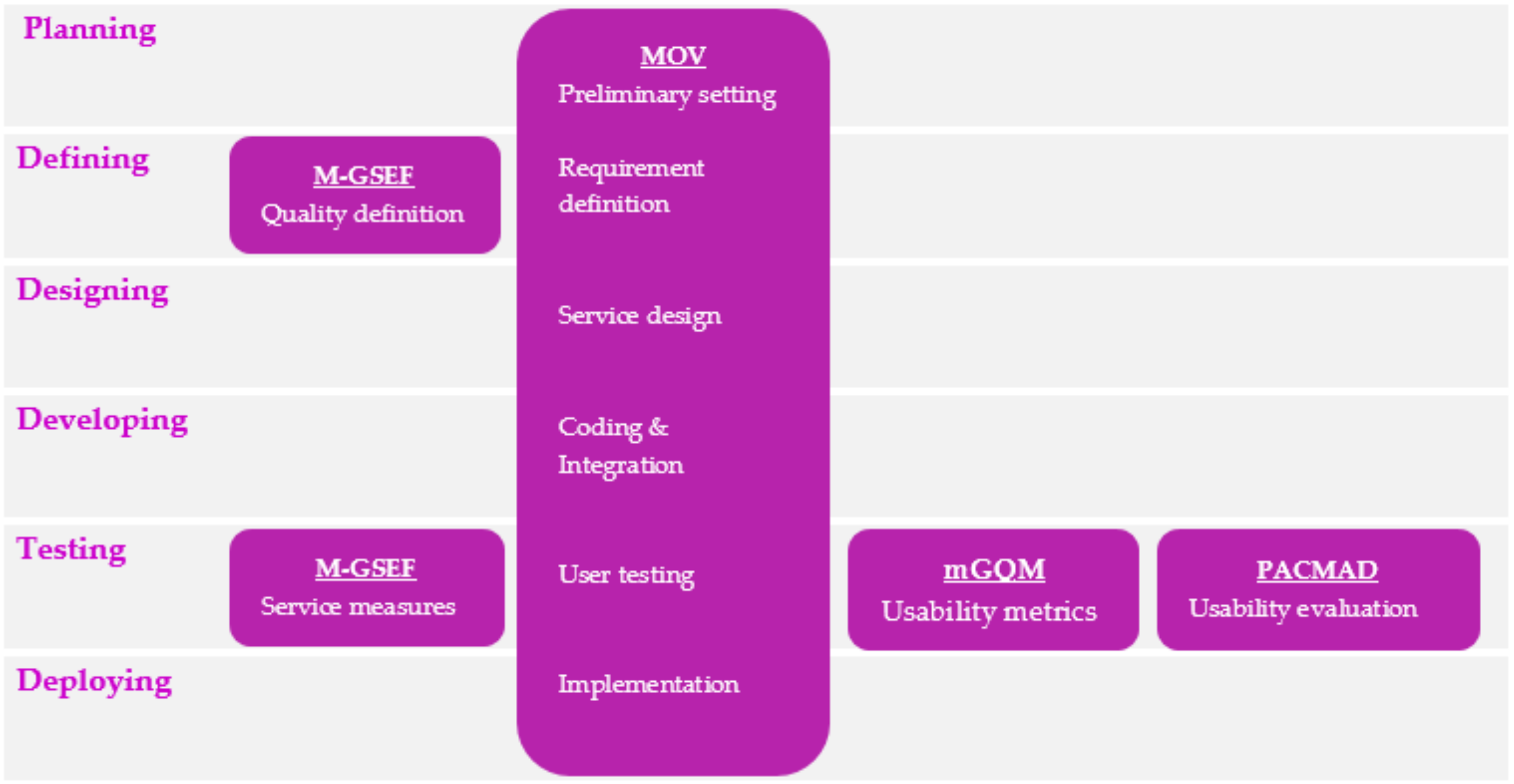
The support for usability design provided by the PIN usability design framework is shown in Figure 8 along with other usability-design-related frameworks and their relations to the SDLC. It can be seen that PIN focuses on designing the user interface screens starting from defining, designing, and developing to testing phases.
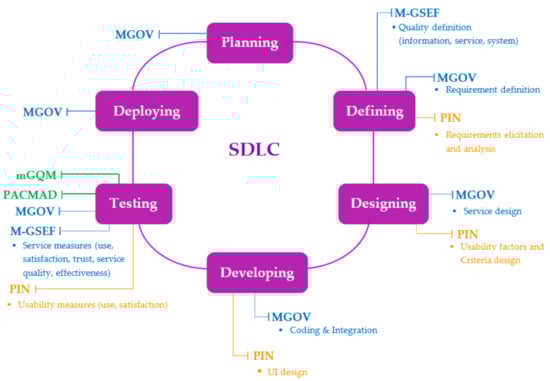
Figure 8.
PIN usability design framework, other usability-design-related framework, and SDLC.
6. Conclusions and Future Work
This paper presents the case study of using the PIN usability design framework to redesign the earthquake report screen of EarthquakeTMD, the mobile government application to report earthquake information from the Thai government agency. The original interface was redesigned by four designers: two (experienced and inexperienced) designers used the framework, and the other two (experienced and inexperienced) did not use the framework. The four redesigned user interfaces were evaluated by 400 citizens. The results reveal that the citizens favored the user interfaces which were redesigned using the framework. The framework minimized the differences in the experience of the designers who participated in the study. This finding supports the idea of the framework to help with the usability design process by both inexperienced and experienced designers. Without the framework, it was found that the usability score was lower than the ones produced with the PIN framework, even by the experienced designer.
The designers were asked about the use of usability factors in the design process and the outcomes. Both experienced and inexperienced designers agreed that the framework provides a step-by-step process that positively affects the work done during the design and the outcomes of the designs.
The analysis of the research outcomes against the purpose of the framework indicates room for improvement. In addition, the research methodology and the research questions, were reviewed. Several issues were recognized and investigated. Accordingly, improvement areas were proposed. First, identification of the usability factors is an essential step to provide a constructive foundation for usability design. This inception step can provide valuable information that can be used as input for subsequent activities. One way to accomplish this is to have the associated requirements processed. Once the desired outcomes are obtained, the designers can approve or enhance them. Second, transforming usability factors into implementation criteria is the step that attempts to describe characteristics of the usability factors. To ensure the consistency of the transformation, the criteria data and their relations to user interface components should be collected and kept in a database that can be enhanced over time. Thus, promoting the reliability of the transformation. Third, more designers with differences in background, experience, development platform, application domain, and design methodology should be recruited to use the framework. Moreover, the research methodology should be modified to incorporate different types of m-government applications and mobile applications to demonstrate the applicability of the framework. While, in this paper, the framework was used in redesigning an existing m-government application’s user interface, it could also be used to design the user interface of a new m-government application. It would be interesting to know if the framework can provide equivalent benefits to the new interface’s design process.
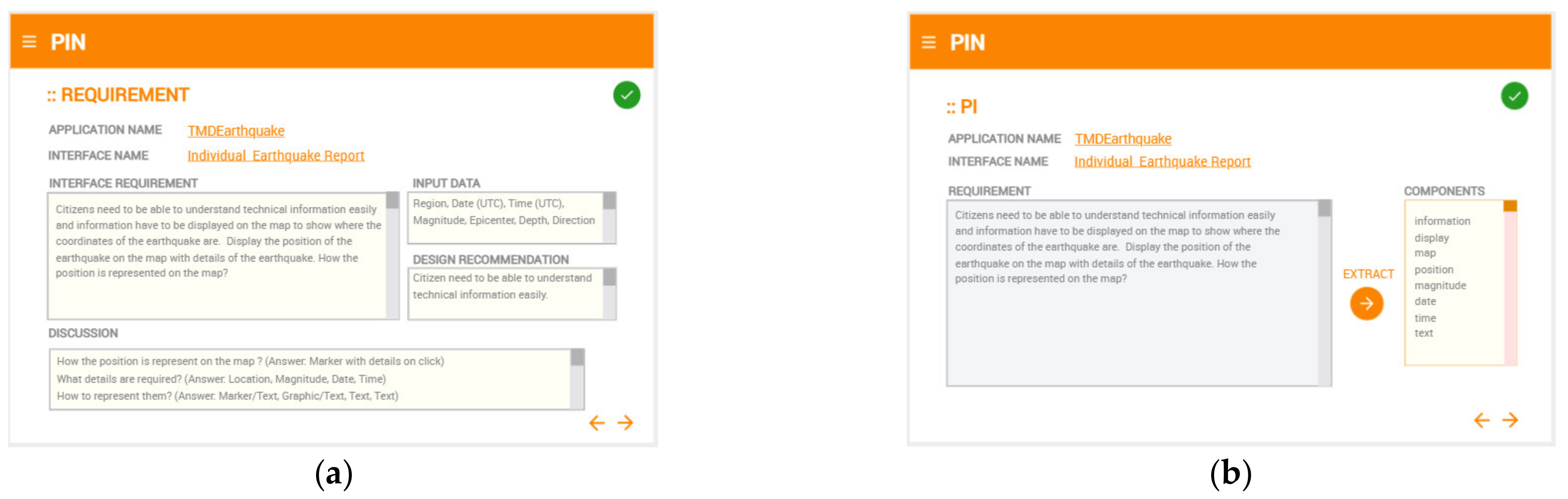
Furthermore, automation of activities in the framework can ease the design process and increase efficiency. For example, automation of requirement analysis and UI component identification can speed up the design process and provide better support to the designers, especially inexperienced designers. Figure 9 shows the mockup screens for the automatic analysis of the requirements. The potential areas that can be automated include clustering of UI components, factors analysis, and a detailed design report.
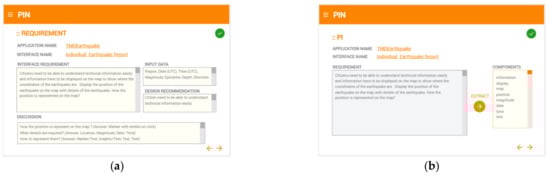
Figure 9.
(a) A mockup screen for automatic analysis of the requirements. (b) A mockup screen of automatic identification of UI components.
Author Contributions
Conceptualization, P.K. and L.R.; methodology, P.K. and L.R.; software, P.K.; validation, P.K., L.R., S.R. and K.C.; formal analysis, P.K. and L.R.; writing—original draft preparation, P.K.; writing—review and editing, L.R., S.R., K.C. and N.E.; visualization, P.K. and L.R. All authors have read and agreed to the published version of the manuscript.
Funding
This research received no external funding.
Conflicts of Interest
The authors declare no conflict of interest.
References
- Alijerban, M.; Saghafi, F. M-Government Maturity Model with Technological Approach. In Proceedings of the 4th International Conference on New Trends in Information Science and Service Science, Gyeongju, Korea, 11–13 May 2010; IEEE: Gyeongju, Korea, 2010; pp. 164–169. [Google Scholar]
- Zhang, N.; Huang, H.; Su, B. Comprehensive Analysis of Information Dissemination in Disasters. Phys. Stat. Mech. Its Appl. 2016, 462, 846–857. [Google Scholar] [CrossRef]
- Kureerung, P.; Ramingwong, L. Factors Supporting User Interface Design of Mobile Government Application. In Proceedings of the 2019 2nd International Conference on Information Science and Systems—ICISS 2019, New York, NY, USA, 16–19 March 2019; ACM Press: New York, NY, USA, 2019; pp. 115–119. [Google Scholar] [CrossRef]
- Isagah, T.; Wimmer, M.A. Addressing Requirements of M-Government Services. In Proceedings of the 11th International Conference on Theory and Practice of Electronic Governance, Galway, Ireland, 4–6 April 2018; pp. 599–608. [Google Scholar] [CrossRef]
- Hussain, A.; Ferneley, E. Usability Metric for Mobile Application: A Goal Question Metric (GQM) Approach. In Proceedings of the 10th International Conference on Information Integration and Web-based Applications & Services—iiWAS ’08, Linz, Austria, 24–26 November 2008; ACM Press: Linz, Austria, 2008; p. 567. [Google Scholar] [CrossRef]
- Hussain, A.; Kutar, M. Usability Evaluation of Sat Nav Application on Mobile Phone Using MGQM. Int. J. Comput. Inf. Syst. Ind. Manag. Appl. 2012, 4, 92–100. [Google Scholar]
- Harrison, R.; Flood, D.; Duce, D. Usability of Mobile Applications: Literature Review and Rationale for a New Usability Model. J. Interact. Sci. 2013, 1, 1. [Google Scholar] [CrossRef]
- Zamzami, I.; Mahmud, M. Mobile Interface for M-Government Services: A Framework for Information Quality Evaluation. Int. J. Sci. Eng. Res. 2012, 3. [Google Scholar]
- Azeez, N.D.; Lakulu, M.M. Evaluation Framework of M-Government Services Success in Malaysia. J. Theor. Appl. Inf. Technol. 2018, 96, 8194–8226. [Google Scholar]
- Isagah, T.; Wimmer, M.A. Framework for Designing M-Government Services in Developing Countries. In Proceedings of the 19th Annual International Conference on Digital Government Research: Governance in the Data Age, Delft, The Netherlands, 30 May–1 June 2018; ACM: Delft, The Netherlands, 2018; pp. 1–10. [Google Scholar] [CrossRef]
- Isagah, T.; Wimmer, M.A. Mobile Government Applications: Challenges and Needs for a Comprehensive Design Approach. In Proceedings of the 10th International Conference on Theory and Practice of Electronic Governance, New Delhi, India, 7–9 March 2017; ACM: New Delhi, India, 2017; pp. 423–432. [Google Scholar] [CrossRef]
- Ahmad, N.; Rextin, A.; Kulsoom, U.E. Perspectives on Usability Guidelines for Smartphone Applications: An Empirical Investigation and Systematic Literature Review. Inf. Softw. Technol. 2018, 94, 130–149. [Google Scholar] [CrossRef]
- Amores, D.; Vasardani, M.; Tanin, E. Smartphone Usability for Emergency Evacuation Applications. In Proceedings of the 14th International Conference on Spatial Information Theory (COSIT 2019), Regensburg, Germany, 9–13 September 2019; Schloss Dagstuhl—Leibniz-Zentrum fuer Informatik: Regensburg, Germany, 2019; pp. 1–7. [Google Scholar] [CrossRef]
- Weichbroth, P. Usability of Mobile Applications: A Systematic Literature Study. IEEE Access 2020, 8, 55563–55577. [Google Scholar] [CrossRef]
- Al-Nuiam, H.; Al-Harigy, L. User Interface Context of Use Guidelines for Mobile Apps. Int. J. Recent Trends Hum. Comput. Interact. 2015, 6, 65–80. [Google Scholar]
- Adinda, P.P.; Suzianti, A. Redesign of User Interface for E-Government Application Using Usability Testing Method. In Proceedings of the 4th International Conference on Communication and Information Processing—ICCIP ’18, Qingdao, China, 2–4 November 2018; ACM Press: Qingdao, China, 2018; pp. 145–149. [Google Scholar] [CrossRef]
- Rabiu, S.; Ayobami, A.S.; Okere, H. Usability Characteristics of Mobile Applications. In Proceedings of the International Conference on Behavioural & Social Science Research (ICBSSR), Kampar, Malaysia, 2 November 2012; (Indexed by Thomson Reuters): Kampar, Malaysia, 2012; Volume 2, pp. 1–5. [Google Scholar]
- Zahra, F.; Hussain, A.; Mohd, H. Usability Evaluation of Mobile Applications; Where Do We Stand? AIP Publishing LLC: Kedah, Malaysia, 2017; p. 020056. [Google Scholar] [CrossRef]
- Trimi, S.; Sheng, H. Emerging Trends in M-Government. Commun. ACM 2008, 51, 53–58. [Google Scholar] [CrossRef]
- Agrawal, G.; Dumka, A.; Singh, M.; Bijalwan, A. Assessing Usability and Accessibility of Indian Tourism Websites for Visually Impaired. J. Sens. 2022, 2022, 4433013. [Google Scholar] [CrossRef]
- Vitiello, G.; Sebillo, M.; Fornaro, L.; Di Gregorio, M.; Cirillo, S.; De Rosa, M.; Fuccella, V.; Costagliola, G. Do You like My Outfit? Cromnia, a Mobile Assistant for Blind Users. In Proceedings of the 4th EAI International Conference on Smart Objects and Technologies for Social Good—Goodtechs ’18, Bologna, Italy, 28–30 November 2018; ACM Press: Bologna, Italy, 2018; pp. 249–254. [Google Scholar] [CrossRef]
- Masruroh, S.U.; Rizqy Vitalaya, N.A.; Sukmana, H.T.; Subchi, I.; Khairani, D.; Durachman, Y. Evaluation of Usability and Accessibility of Mobile Application for People with Disability: Systematic Literature Review. In Proceedings of the 2022 International Conference on Science and Technology (ICOSTECH), Batam City, Indonesia, 3–4 February 2022; IEEE: Batam City, Indonesia, 2022; pp. 1–7. [Google Scholar] [CrossRef]
- Suzianti, A.; Belahakki, A. Redesigning User Interface of MRT Jakarta’s Mobile Application Using Usability Testing Approach. In Proceedings of the 2020 The 6th International Conference on Industrial and Business Engineerin, Macau, Macao, 27–29 September 2020; ACM: Macau, Macao, 2020; pp. 73–78. [Google Scholar] [CrossRef]
- Chang, D.; Li, F.; Huang, L. A User-Centered Evaluation and Redesign Approach for E-Government APP. In Proceedings of the 2020 IEEE International Conference on Industrial Engineering and Engineering Management (IEEM), Singapore, 14–17 December 2020; IEEE: Singapore, 2020; pp. 270–274. [Google Scholar] [CrossRef]
- Subiyakto, A.; Adhiazni, V.; Nurmiati, E.; Hasanati, N.; Sumarsono, S.; Irfan, M. Redesigning User Interface Based On User Experience Using Goal-Directed Design Method. In Proceedings of the 2020 8th International Conference on Cyber and IT Service Management (CITSM), Pangkal Pinang, Indonesia, 23–24 October 2020; IEEE: Pangkal Pinang, Indonesia, 2020; pp. 1–6. [Google Scholar] [CrossRef]
- Kureerung, P.; Ramingwong, L. A Framework for Usability Design to Promote Awareness of Information Disseminated via Mobile Government Applications. In Proceedings of the 2019 IEEE 10th International Conference on Awareness Science and Technology (iCAST), Morioka, Japan, 23–25 October 2019; pp. 1–6. [Google Scholar] [CrossRef]
Publisher’s Note: MDPI stays neutral with regard to jurisdictional claims in published maps and institutional affiliations. |
© 2022 by the authors. Licensee MDPI, Basel, Switzerland. This article is an open access article distributed under the terms and conditions of the Creative Commons Attribution (CC BY) license (https://creativecommons.org/licenses/by/4.0/).