

You are currently viewing a new version of our website. To view the old version click .
Applied Sciences
  • Article
  • Open Access

22 March 2022

Categorization and Visualization of Issue Tickets to Support Understanding of Implemented Features in Software Development Projects
,
,
,
,
,
and
1
Department Computer Science and Engineering, Waseda University, Tokyo 1698555, Japan
2
Computer & Data Science Laboratories, NTT Corporation, Tokyo 1080023, Japan
*
Author to whom correspondence should be addressed.
This article belongs to the Collection Software Engineering: Computer Science and System

Abstract

Background: In most software projects, new members must comprehend the features already implemented since they are usually assigned during the project period. They often read software documents (e.g., flowcharts and data models), but such documents tend not to be updated after they are created. Herein we focus on tickets issued because they are created as a project evolves and include the latest information of the implemented features. Aim: The purpose of this paper is to clarify the way of helping new members understand the implemented features of a project by using tickets. Methodology: We propose a novel method to categorize tickets by clustering and visualizing the characteristics of each category via heatmapping and principal component analysis (PCA). Our method estimates the number of categories and categorizes issue tickets (tickets) automatically. Moreover, it has two visualizations. Ticket lifetime visualization shows the time series change to review tickets quickly, while ticket feature visualization shows the relationships among ticket categories and keywords of ticket categories using heatmapping and PCA. Results: To evaluate the effectiveness of our method, we implemented a case study. Specifically, we applied our method to an industrial software development project and interviewed the project members and external experts. Furthermore, we conducted an experiment to clarify the effectiveness of our method compared with a non-tool-assist method by letting subjects comprehend the target project, which is the same as that of the case study. These studies confirm our method supports experts’ and subjects’ comprehension of the project and its features by examining the ticket category lifetimes and keywords. Implication: Newcomers during project onboarding can utilize tickets to comprehend implemented features effectively if the tickets are appropriately structured and visualized. Conclusions: The original contribution of this paper is the proposal of the project feature comprehension method by visualizing the multi-dimensional nature of requirements in an organized and structured way based on available tickets and the result of its application to the industrial project.

1. Introduction

At the present time, current software is becoming increasingly more significant and complicated [1]. In software development projects, new members are typically assigned during the project period. As part of the project onboarding, they must acquire knowledge and context. The need to know the software under development is the main difficulty of project onboarding [2]. This often involves reading software documents to understand the implemented features of the project. However, these documents become outdated and less insightful as a project evolves. Outdated documentation demotivates newcomers [3]. On the other hand, issue tickets (hereafter tickets), which are created as a project evolves, include the latest information about the implemented features. In issue tracking systems (ITSs), developers can take a known issue such as a failure and a feature request and assign it a “ticket” [4].
Although tickets tend to contain insightful information, they are often unorganized. In theory, new members are expected to read most of the important tickets to understand the implemented features. However, this is time consuming. Tickets are typically handled one by one; however, groups of tickets often follow common patterns [5]. Our research assumes that categorizing tickets following common patterns in terms of ticket descriptions may help new members quickly read the tickets. Moreover, if each ticket category has known characteristics, the contents of the tickets can be understood efficiently and effectively. The purpose of this paper is to clarify the way of helping new members understand the implemented features of a project by using tickets.
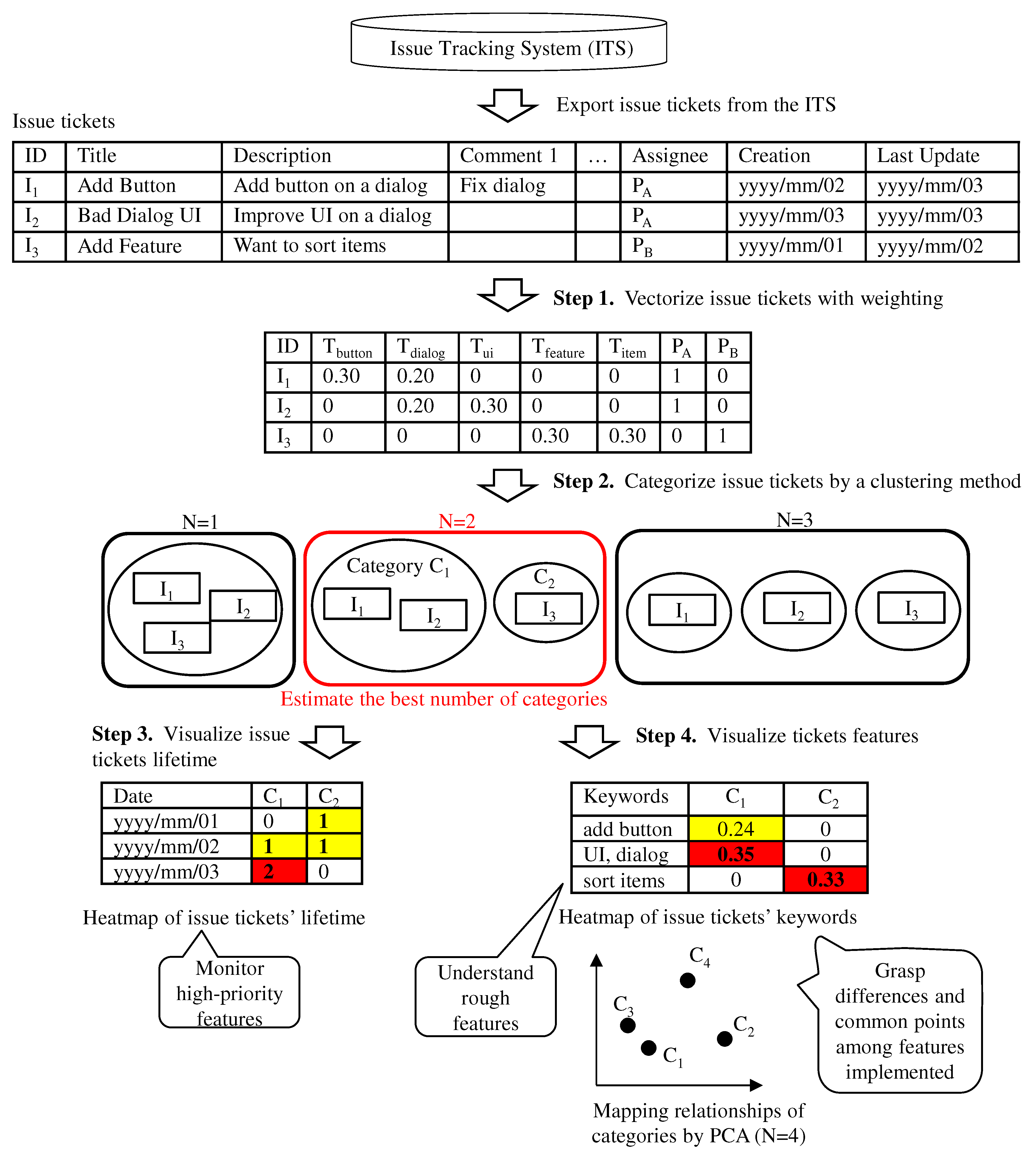
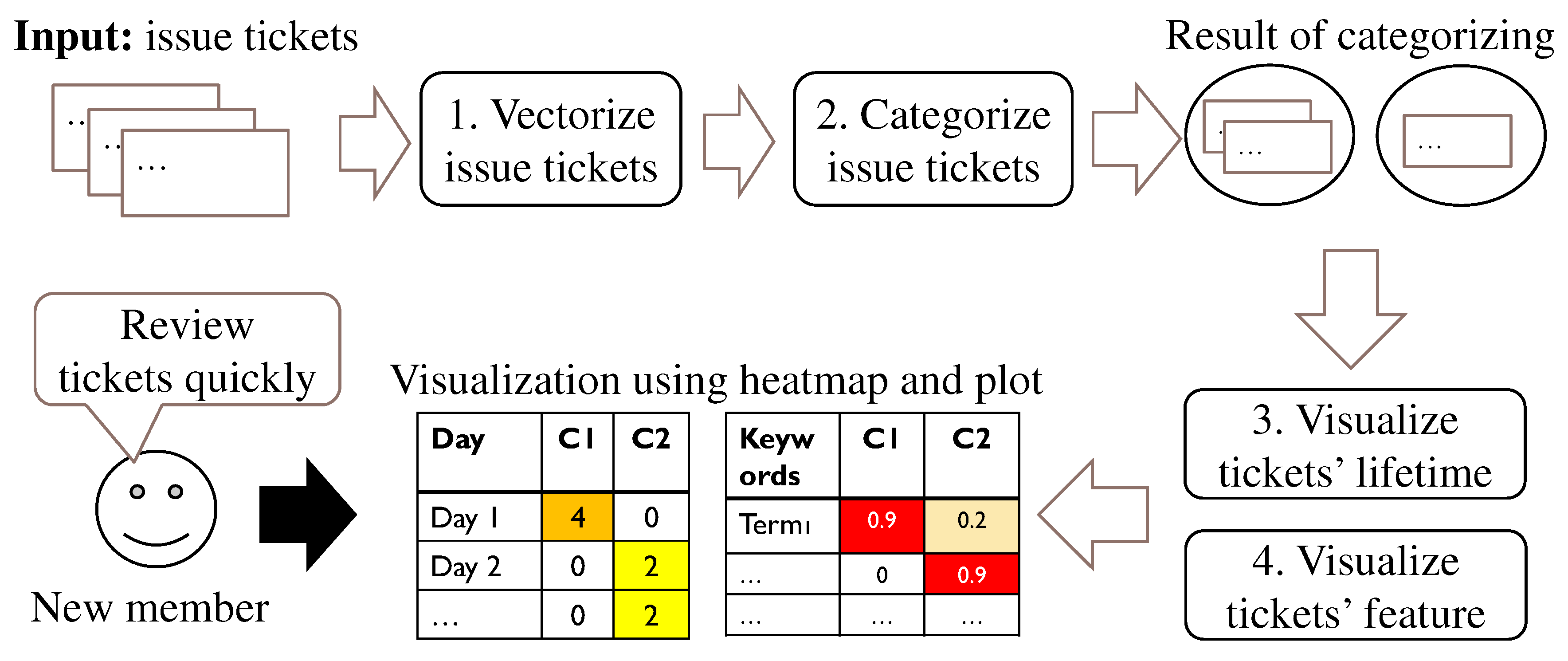
Herein we propose a novel method to categorize tickets and visualize characteristics of each category. Figure 1 overviews our method. Our method requires only managing tickets in an ITS. First, tickets are converted into vector representations to apply a clustering method. Second, the clustering method automatically categorizes the tickets and estimates the appropriate number of ticket clusters. Finally, our method visualizes the lifetime and features of the ticket categories. Our ticket feature visualization has two main aspects. First, it counts the time series change of ticket categories and displays the results as a heatmap. This helps new members quickly review tickets and identify features that they should work on first. Second, our ticket feature visualization identifies the relationships among ticket categories and keywords. The results are displayed by heatmapping and PCA. Our ticket feature visualization helps new members determine which categories are related to the features.
Figure 1. Overview of our method.
As a case study, we applied our method to an industrial software development project [6,7] conducted in a company NTT based in Japan (hereafter, referred to as the company). In this project, 111 tickets were created and managed on Backlog, which is an ITS [8]. Furthermore, we conducted an experiment targeting the same project data as the case study. Specifically, we answer the following four research questions:
RQ1.
Does our categorization method estimate the number of ticket categories and categorize tickets accurately? To answer this question, we categorized 111 tickets using K-means clustering and gap statistics. K-means is an unsupervised partitional clustering algorithm and one of the most widely used algorithms for grouping data [9]. K-means clustering is widely used to cluster requirement documents. Gap statistics is an automatic method to estimate the number of clusters. We evaluated the estimation accuracy for the number of ticket categories from the distribution of 200 automatic estimations. Furthermore, we assessed the categorization accuracy for tickets using well-known clustering measures [10].
RQ2.
Can our visualization method help new members understand the implemented features of a project? To answer this question, we interviewed two project members and three external experts. During the interviews, the results of the ticket categorization and the ticket visualization were shared because they show the lifetime and keywords of ticket categories as well as the relationships between categories. Interviewees were asked if our method helps comprehend the project’s features.
RQ3.
Does our method improve project comprehension? To answer this question, an experiment compared the comprehension of the target tasks using our method and a traditional method. The target tasks in the experiment were the same as those in the case study. Subjects were asked to perform four tasks: two comprehension tasks for activeness of ticket categories and two comprehension tasks for activeness of features. We divided the 28 subjects into two groups (i.e., the experimental group and the control group) to compare subjects’ comprehension correctness with and without the support of our method.
RQ4.
For which tasks is our method effective? To answer this question, we compared the statistical test results of all four tasks. Then we identified tasks with the most significant difference between the two groups.
The rest of this paper is organized as follows. Section 2 summarizes related works. Section 3 presents our ticket categorization and visualization methods. Section 4 shows the results of the case study. Section 5 describes the results of the comparative experiment. Section 6 explains the limitations and use cases of our method. Section 7 concludes this paper and provides a future direction. This paper substantially extends our preliminary 6-pages workshop paper presented at IWESEP 2019 [11]. The proposed method to automatically visualize the implemented features and research questions RQ1–RQ2 have been taken from the preliminary paper. This paper added use cases and a comparative experiment to answer two new research questions RQ3–RQ4. Limitations and threats to validity, related works, and explanations of the proposed method are also substantially extended in a well-structured paper format [12].

3. Ticket Categorization and Visualization Method

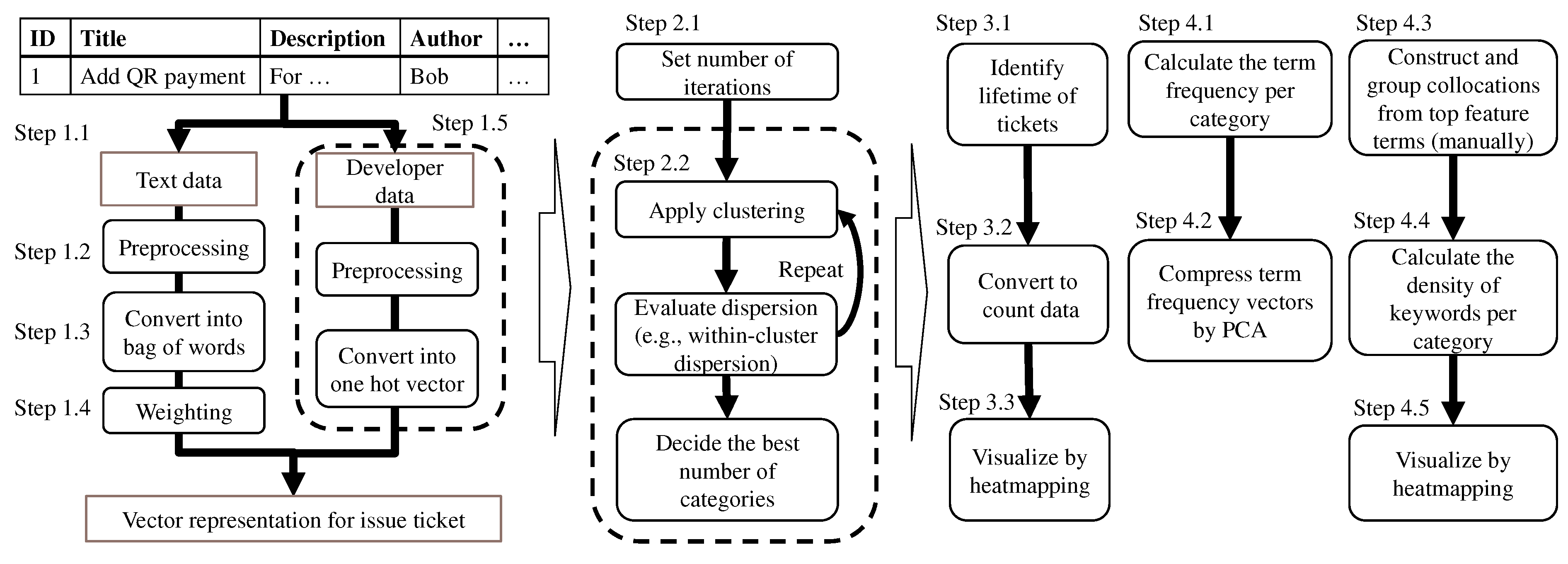
Our method visualizes tickets and automatically determines the general features using only the tickets managed on an ITS. Table 1 shows examples of items described in a typical ticket. Ticket information includes the title, description, comments, issue date, due date, assignee, etc. Comments describe the progress and discussion of the ticket. Issue date is the date that the ticket was first opened. Update date is the most recent date that the ticket was updated. Figure 2 overviews our process using an example involving three tickets managed on an ITS. First, the tickets are categorized by (1) Ticket Vectorization and (2) Ticket Categorization. Then the ticket categories are determined by (3) Ticket Lifetime Visualization and (4) Ticket Feature Visualization. Most steps, except for Step 4.3, can be fully automated once the associated parameters and rules (such as a selection rule of important terms in Step 1.4) are set. Figure 3 shows a high-level chart of the flow of steps in our method. Details of the steps are described in subsequent subsections.
Table 1. Example of items described in an issue ticket.
Figure 2. Flow of our method.
Figure 3. High-level chart of flow of steps in our method.

3.1. Ticket Vectorization

Tickets, which include text data and developer data, are converted into vectors. This process can be divided into five steps:
  • Step 1.1. To handle tickets for natural language processing, select the text data columns that indicate the project’s features (e.g., ticket title). Multiple columns should be selected due to the small sentence length. For example, commit comments are useful because they may contain information about the features modified.
  • Step 1.2. To enhance the accuracy of ticket categorization, parse the extracted text data into terms and filter uninformative terms such as stop words. If terms are not separated by white space, use morphological analysis to parse the sentence into terms (e.g., [37]). For example, if only nouns are extracted from ticket I 1 , “Button” from the title, “button” and “dialog” from the description, and “dialog” from comment 1 are extracted (Figure 2).
  • Step 1.3. To obtain the ticket vectors, count the term frequency in each ticket. For example, the term frequency of ticket I 1 is { b u t t o n , d i a l o g } = { 2 , 2 } (Figure 2).
  • Step 1.4. To emphasize the keywords, weigh the term frequency vectors based on the term frequency–inverse document frequency (TF-IDF). TF-IDF weights a term vector to extract the feature terms. The weight of term i of ticket j is calculated as
    w i , j = t f i , j · l o g N d f i
    where t f i , j is the term frequency of term i of ticket j, and d f i is the number of tickets containing term i. N is the number of tickets.
    Moreover, select important and unimportant terms by clustering the most common terms in each category and weight the vectors of these terms in a second analysis.
  • Step 1.5. To consider the relationship between features managed by the same developers, select columns of developer data (e.g., author and assignee of tickets). To concatenate the developer data with the weighted term frequency, convert developer data into binary data. For example, the developer vector of ticket I 1 is { P A , P B } = { 1 , 0 } (Figure 2).

3.2. Tickets Categorization

A clustering method (e.g., K-means) is combined with an automatic method to estimate the number of clusters [19,20,21] to categorize ticket vectors according to the features automatically. The estimated number of clusters depends on the clustering results. Hence, our method applies clustering repeatedly and estimates the appropriate number of ticket categories using the following steps:
  • Step 2.1. To obtain the distribution of the estimated number of categories, set R, which is the number of iterations, using an automatic estimation method.
  • Step 2.2. To determine the appropriate number of clusters N b e s t , perform ticket clustering R times according to the automatic estimation method for the number of clusters (e.g., gap statistics). Then estimate N b e s t from the distribution of the estimated number of categories (e.g., median and mean values). Finally, categorize tickets into N b e s t t categories using a clustering method. For example, three tickets are grouped into two categories in Figure 2. Category C 1 includes tickets I 1 and I 2 , while category C 2 includes ticket I 3 .

3.3. Ticket Lifetime Visualization

Our method creates a heatmap, which depicts the time series change of ticket categories, to highlight ticket features with more requests as follows:
  • Step 3.1. To define the ticket lifetime, select columns of time series data indicating the start date (e.g., creation date) and the end date (e.g., updated date and due date).
  • Step 3.2. To visualize the tickets in each category, count the number of open tickets by category. For example, ticket I 1 is open from the second day to the third day, and ticket I 2 is open on the third day (Figure 2). Hence, the lifetime vector of category C 1 is { D 1 , D 2 , D 3 } = { 0 , 1 , 2 } .
  • Step 3.3. To visualize the count data quickly, create a heatmap using the count vector for all categories (Figure 2).

3.4. Ticket Feature Visualization

Our method creates a plot and heatmap to show the keywords included in each ticket category and the relationships among categories. First, the relevance of each ticket category is visualized by principal component analysis of the term frequency as follows:
  • Step 4.1. To obtain the features of ticket categories, calculate the average of the term frequency vectors of the tickets per category. For example, the term frequency of category C 1 is { T b u t t o n , T d i a l o g , T u i , T f e a t u r e , T i t e m } = ( { 0.30 , 0.20 , 0 , 0 , 0 } + { 0 , 0.20 , 0.30 , 0 , 0 } ) / 2 = { 0.15 , 0.20 , 0.15 , 0 , 0 } (Figure 2).
  • Step 4.2. To simply visualize the relationships among categories, compress every term frequency vector into a two-dimensional vector by PCA and plot the results in two-dimensional space. For example, four categories are mapped in Figure 2. Categories C 1 and C 3 have similar features. Then our method creates a heatmap, which indicates the kind of terms appearing in each ticket category using the following steps:
  • Step 4.3. To make lists of keywords, select the top clustering terms from each ticket category and manually construct collocations from the extracted terms. It should be noted that terms are not limited to nouns but can include all terms. Then group the collocations and terms. For example, two keywords, “add button” and “sort items”, are constructed, and keyword “UI” and “dialog” are classified into the same group (Figure 2).
  • Step 4.4. To visualize the category features independent of the difference in the number of tickets included in the categories, calculate the density of keywords appearing in each group. The keyword density of a category is calculated as follows:
    First, count the number of keywords in all text data of tickets in the category. For example, the keyword “add button” appears once in the title and once in the description of ticket I 1 . Hence, the number of keywords in category C 1 is two (Figure 2).
    Then multiply the number of keywords by the length of the keyword and divide by the sum length of the text data in the tickets for the category. The length of ticket I 1 is nine and that of ticket I 2 is eight. Hence, the density of keyword “add button” is 2 × 2 / 17 0.24 .
  • Step 4.5. To visualize the features of categories quickly, create a heatmap using the keyword density of all categories.

4. Case Study

We conducted a case study to answer RQ1–RQ2. It should be noted that our case study included an expert review to evaluate our categorization and visualization methods from the viewpoint of usage in an industrial software development setting.

4.1. Project Overview

The software product of the case study was a prototype of a graphical modeling tool to draw an enterprise system model. The tool supports engineers as part of a research and development project in the company. Its details are described in previous requirements engineering studies [6,7]. The software product was developed by two requirement engineers and two software engineers with more than nine years of experience in software development. The development schedule consists of three phases: planning, iteration one, and iteration two with retrospective meetings at the end of each iteration. Phase durations are three, four, and four weeks, respectively. In the planning phase, the requirement engineers created user stories and design documents. Since it was a ticket-driven development project without any detailed specifications or documents after the planning phase, understanding tickets is essential for new members to grasp the project.
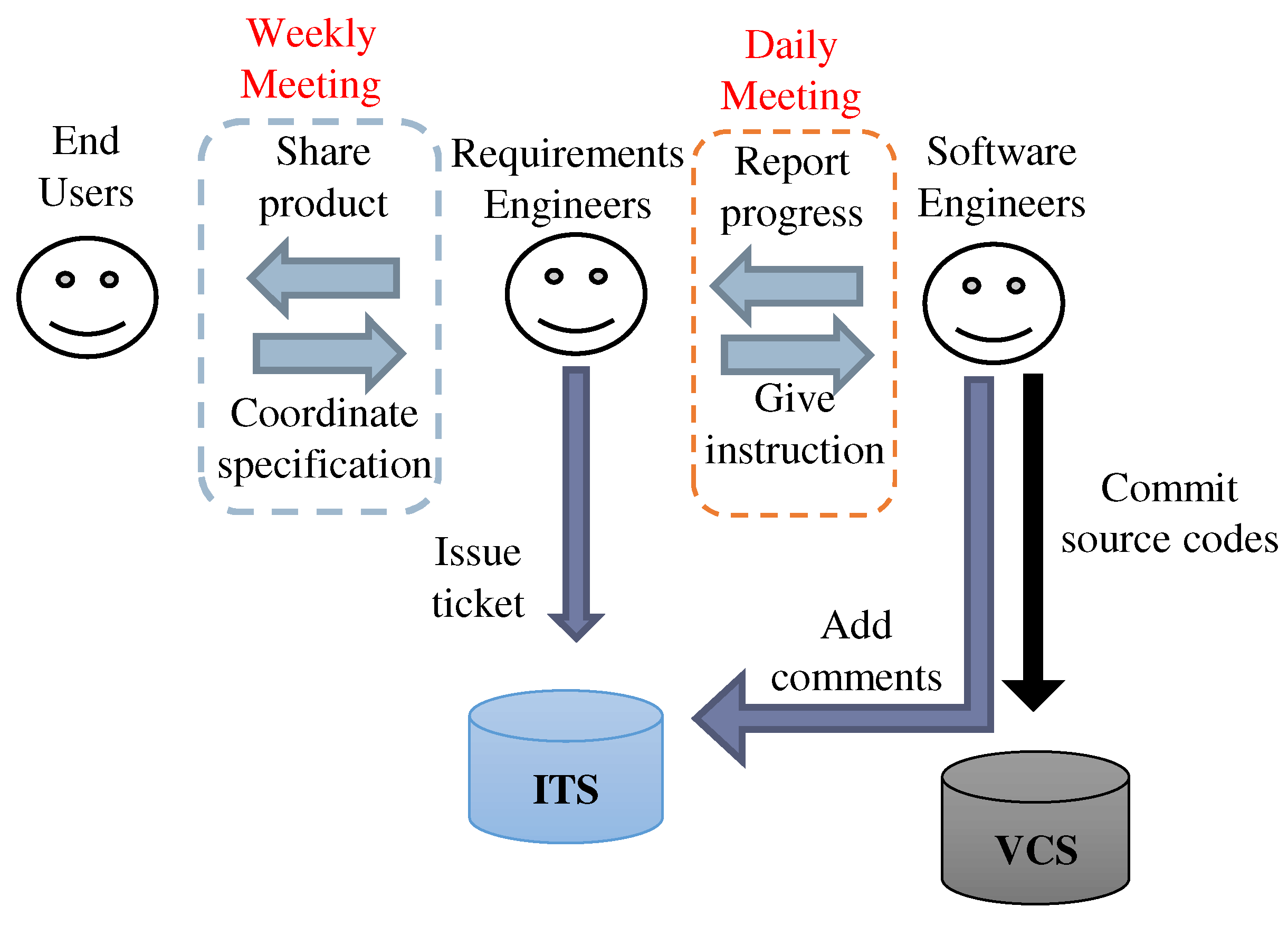
In the two iteration phases, a total of 133 tickets were issued. Most were created in the beginning of the iteration phase (i.e., iteration planning meeting). The tickets were created and managed on Backlog [8]. Based on the requests from end users, the requirement engineers described the contents (e.g., title and description) of the tickets and issued them. These tickets were assigned to the software engineers. Following the descriptions of the assigned tickets, they implemented the source codes and then commit them to the version control system (VCS). During each iteration, if end users submitted new/change requests or a bug was detected, the requirement engineers issued a new ticket to reflect the evolving situation. Figure 4 depicts the interactions among three actors and two tools. There were two types of meetings: daily and weekly. In the weekly meeting, the requirement engineers shared the product and coordinated detailed specifications with end users, whereas the software engineers reported their progress to the requirement engineers in the daily meetings. Based on these meetings, the requirement engineers gave instructions to the software engineers.
Figure 4. Actors and their communications in the case study.

4.2. Case Study Procedure

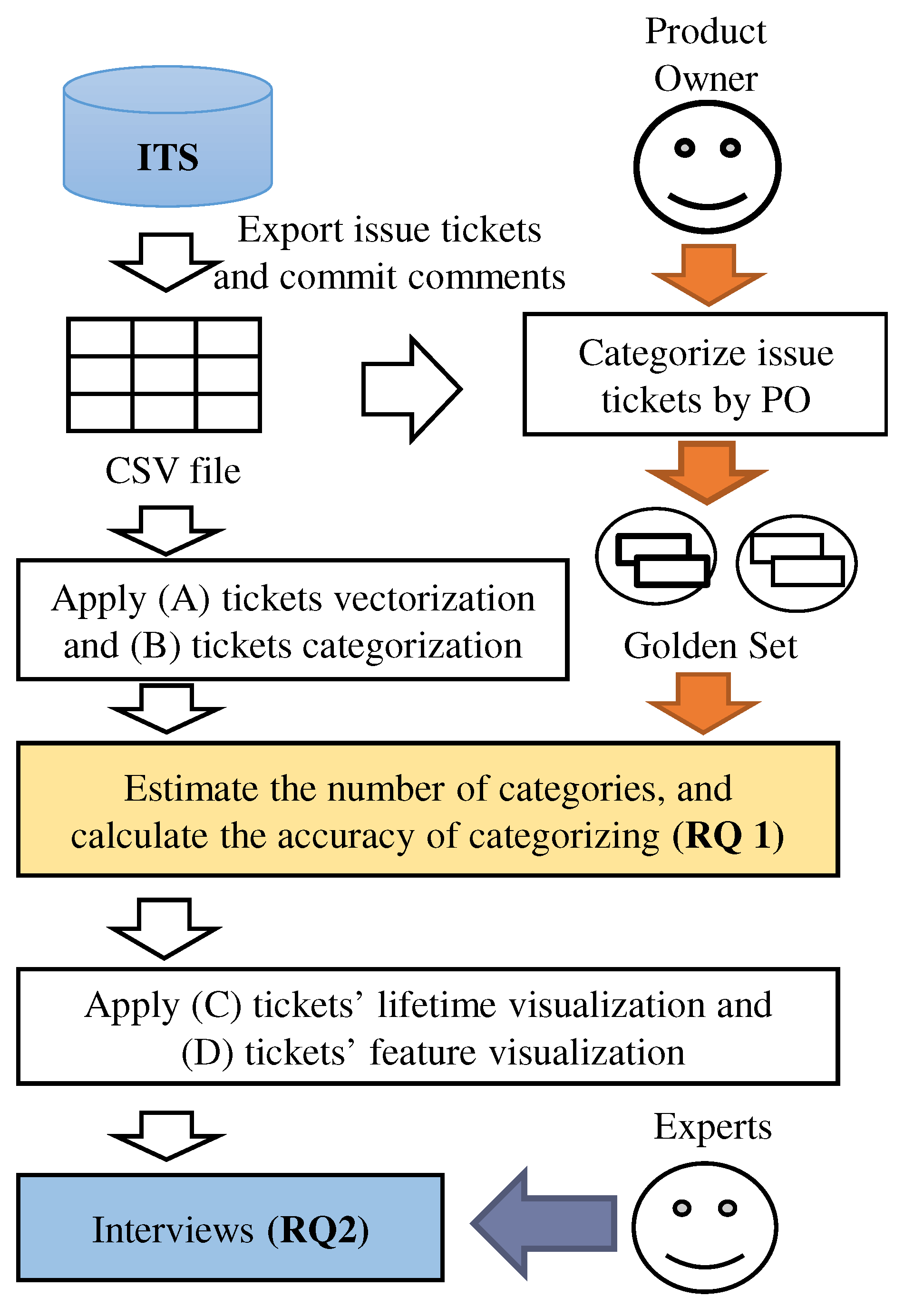
We used 111 of the 133 tickets. Figure 5 outlines our case study. First, we collected data from tickets and commit comments. Then the product owner labeled the tickets. Second, we applied vectorization and categorization. Third, we evaluated the results of our method. Finally, we interviewed experts to assess our method.
Figure 5. Flow of our case study.

4.3. Results

(1)
Data collection and labeling tickets
We exported a CSV file, which included all tickets and commit comments from Backlog. Prior to applying our method, we selected six data columns in the tickets: subject, task description, commit comments, assignee, issue date, and updated date. In the vectorization, the subject, task description, and commit comments were processed as text data while the assignee was processed as developer data. The issue date and updated date were used as lifetime data. To evaluate the accuracy of our categorization method, the product owner of the project labeled each ticket. First, the product owner removed tickets that were just documents or prior art searches. This left a dataset with 111 tickets with 118 commit comments. Second, the product owner labeled each ticket into eight categories. Of these, three categories were existing features, three were new features for the next development period, and two were external and user interfaces. The product owner spent 1.5 days attaching a label to each ticket.
(2)
Ticket vectorization and ticket categorization
In ticket vectorization, the text data of tickets were parsed by MeCab, an open-source text segmentation library MeCab for use with text written in the Japanese language [37]. (All tickets used in the case study were written in Japanese. Thus, we adopted the segmentation library for Japanese text. Since our method is independent of the Japanese language, we believe that it is applicable to tickets written in any language by adopting a text segmentation tool for the target language.) Only nouns were extracted (Step 1.2). Next, we counted terms included in the title, description, and all commit comments for each ticket (Step 1.3). It should be noted that the count of a term for a given ticket was limited to one, although some terms appeared multiple times due to a citation from the previous commits. Then tickets were categorized with K-means, and the top nine clustering terms were selected from each category in Step 1.4. The product owner divided the most frequent terms into important terms (12) or unimportant terms (19). Finally, we multiplied the weight of important terms by 2 and that of unimportant terms by 0.5. In ticket categorization, K-means and gap statistics were employed as the clustering method and automatic estimation method for the number of clusters, respectively. The number of iterations was set to R = 200 in Step 2.1.
(3)
Evaluation of ticket categorization
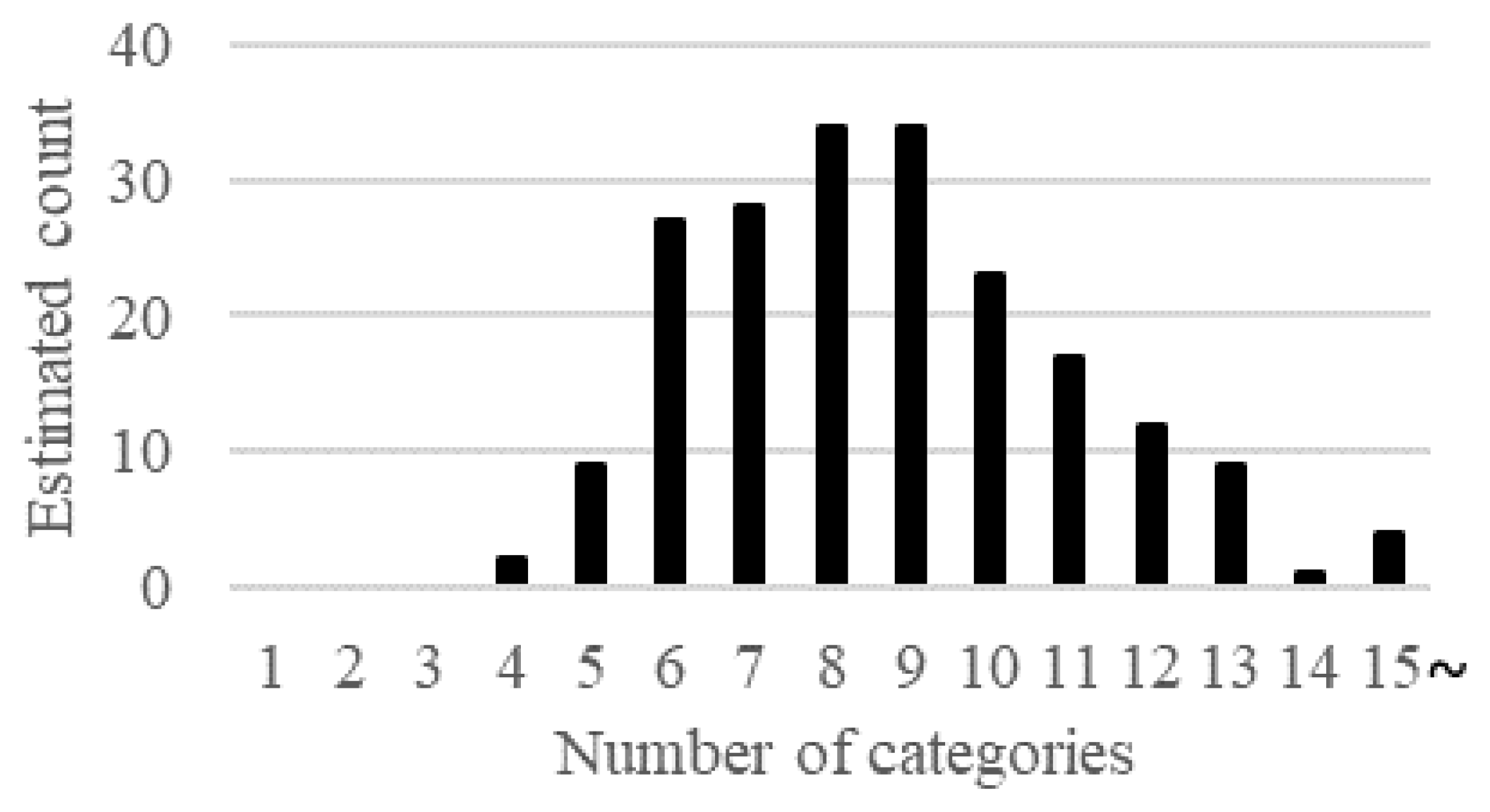
Figure 6 shows the distribution for 200 automatic estimations using gap statistics. The median value of the automatic estimation was 8.5, which is similar to the actual number of categories (i.e., eight categories). We assessed the accuracy of categorizing tickets using Purity, Inverse Purity, and F P I P (i.e., the harmonic mean of purity and inverse purity) [10]. These scales are equivalent to precision, recall, and F-measure, respectively. The higher the value of Purity, the more our categorization method obtained pure ticket categories (i.e., the features can be understood easily). On the other hand, a higher value of Inverse Purity indicates that similar features are classified into the same category.
Figure 6. Distribution of the automatic estimation of the number of ticket categories.
Table 2 shows the accuracy for the average of 200 iterations when clustering with different numbers of ticket categories. When the number of categories was eight, which is the same as the actual number of features, the value of F P I P was 0.533. (AR-Miner [22] grouped app reviews by topic modeling, and the average F-measure for four datasets was reported as 0.534. Since AR-Miner was used for grouping app reviews whereas our method is for grouping tickets, the accuracy of AR-Miner is not directly comparable to that of our method). The ticket description affected the results. In our project, 50 of the 111 tickets did not have a task description. Moreover, 36 of the 50 tickets without task descriptions had less than 2 commit comments. Consequently, removing less descriptive tickets should improve the accuracy. On the other hand, our categorization method should be improved to utilize less descriptive tickets.
Table 2. Accuracy of issue ticket categorization.
(4)
Ticket visualization
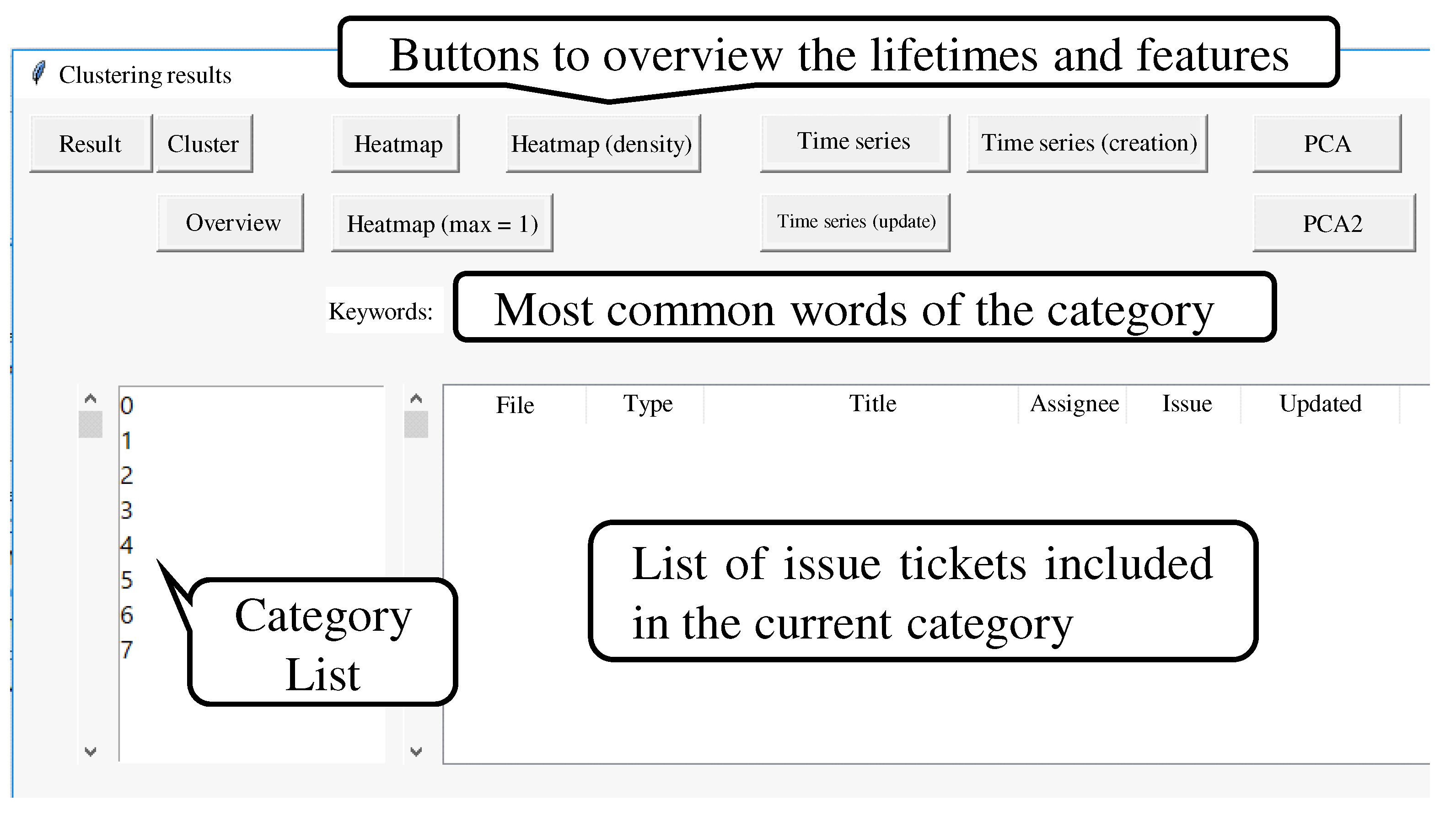
In ticket lifetime visualization, we converted the creation and update dates on a weekly basis to easily estimate which categories to focus on. In Step 4.3, we made 51 collocations and organized them into 21 groups using nine top clustering terms of every ticket category by hand. During the interviews, we implemented a GUI for developers. The GUI showed a list of tickets and the top clustering terms by category (Figure 7). Moreover, we checked the ticket lifetimes and features by pushing buttons on the GUI.
Figure 7. GUI of our tool.
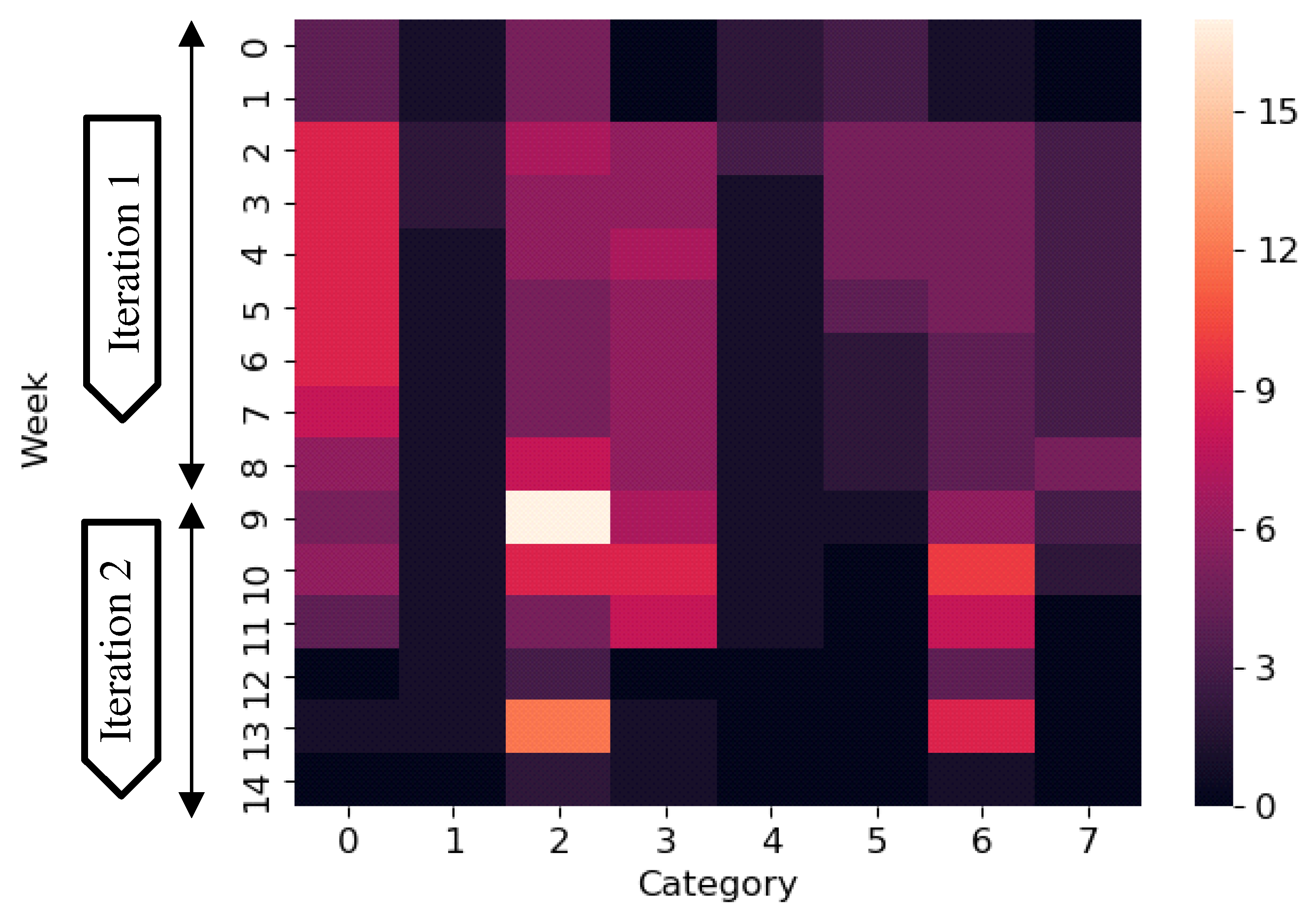
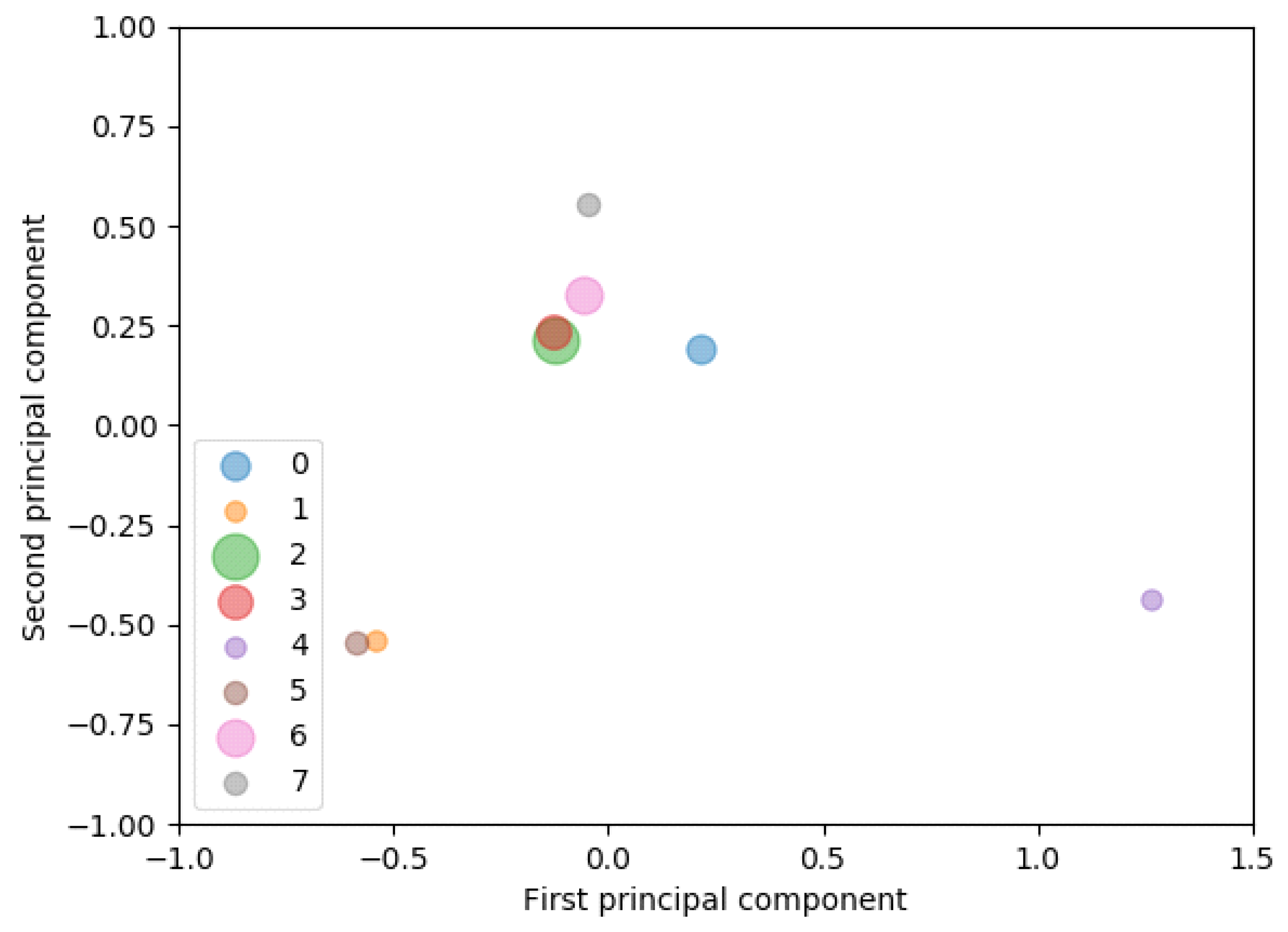
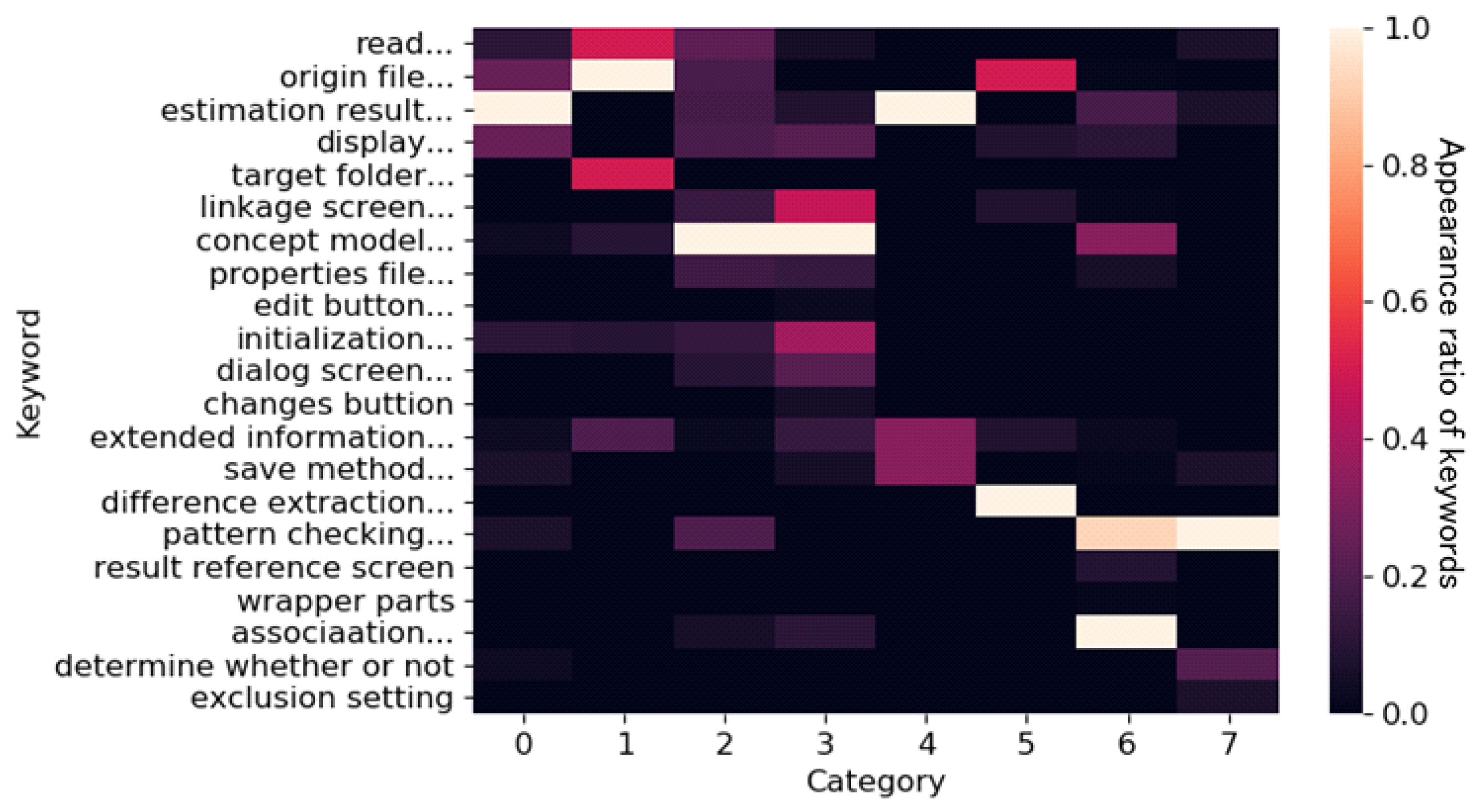
Our visualization is expected to help developers quickly review tickets and determine which ones to read first. For example, many tickets were created in category 2 and category 6 beginning in week 9 (i.e., iteration 2) and week 13 (end of development) (Figure 8). Moreover, most of these tickets were closed within a week. We assumed that some features related to these categories were added or modified rapidly in the later development. Consequently, these tickets should be checked first. On the other hand, in category 1, many tickets were created at the early development stage, but were closed as the development progressed. As this suggests that the features related to category 1 are stable, such tickets do not need to be read immediately. Our visualization is expected to help developers understand the software system features of a project, even if our categorization method is not completely accurate. Developers can predict what other features are affected when one feature of the software is modified. In Figure 9 and Figure 10, for example, categories 2 and 3 have similar principal components and keywords. Thus, developers can predict that the features of category 2 and those of category 3 are linked. Moreover, developers can envision which features are implemented at a certain period.
Figure 8. Lifetime of issue ticket categories.
Figure 9. Relationships among issue ticket categories by PCA.
Figure 10. Appearance ratio of keywords in each ticket category (we translated keywords after applying our visualization method).
(5)
Interviews
We interviewed five experts to assess the effectiveness of our visualization method (Table 3). Project members included one software engineer and one requirement engineer. We asked the project members to review our visualization method and assess whether it can aid their initial understanding. External experts included two developers of the company as customers and one developer of an OSS community. We asked them to evaluate our visualization method from their perspective. In the interviews, we showed the results for the eight categories and our visualization results using our GUI. Figure 8 shows the lifetime heatmap of the eight ticket categories obtained from our visualization method. The brightness of each cell represents the number of open tickets. Iteration 1 is from week 0 to week 8, while iteration 2 is from week 9 to week 14. Figure 9 shows the relationships between the ticket categories using our visualization method. Figure 10 shows the keyword heatmap of the ticket categories. The brightness of each cell represents the appearance ratio of keywords.
Table 3. Information about the interviewees and our goal.
All the experts indicated that our lifetime visualization helps developers prioritize categories by comparing the transition of the number of open tickets. The requirement engineer of the project said, “We can monitor high-priority features. Ticket lifetime visualization is useful to select which features should be targeted in the next development”. Most experts indicated that our feature visualization helps developers roughly grasp the features of the software system. Both project members said, “Visualization of the relationship between categories allows us to view the differences and commonalities among the features. For example, categories 1 and 5 are related to the keyword ‘origin file’. However, category 1 is related to reading processing ‘read’, whereas category 5 is related to the feature ‘difference extraction’”. After showing the results of our visualization method, we discussed the future direction with the experts. Most experts advised that domain knowledge of developers should be incorporated into our method. Two developers (customers) of the company said, “We want to prioritize the features not only in the ticket contents but also on developers’ intentions”.

4.4. Discussion

The case study results can answer RQ1–RQ2 as follows.

4.4.1. Does Our Categorization Method Estimate the Number of Ticket Categories and Categorize Tickets Accurately?

In the case study, the product owner originally labeled and categorized tickets into eight categories. Then, we confirmed that the median value of the automatic estimation was 8.5, which is similar to the actual number of features categorized by the product owner. Furthermore, in terms of the categorization accuracy, the value of F P I P was 0.533 when the number of categories was eight, which is the same as the actual number of features. Furthermore, removing less descriptive tickets should improve the accuracy of our method.
RQ1. Does our categorization method estimate the number of ticket categories and categorize tickets accurately? Our method can precisely estimate the number of categories. In the project, the number of categories estimated by our method is similar to the actual number. The purity, inverse purity, and harmonic mean were 0.557, 0.513, and 0.533, respectively, when the number of categories was eight, which is the same as the actual number of features. These values indicate that there is room for further improvement. Since less descriptive tickets negatively influence the ticket categorization accuracy, enhancing the ability to handle less descriptive tickets should improve our method.

4.4.2. Can Our Visualization Method Help New Members Understand the Implemented Features of a Project?

During the interviews, most experts indicated that our method helps developers roughly grasp and prioritize the features.
RQ2. Can our visualization method help new members understand the implemented features of a project? Our method can help developers roughly understand the features of a software system and prioritize the features for the next development.

5. Experimental Evaluation

To answer RQ3 and RQ4, we conducted an experiment to compare our method to a traditional method (i.e., the baseline method).

5.1. Experiment Design

The experiment clarified the effectiveness of our method compared with a traditional method. Subjects were asked to comprehend the target project, which is the same as that of the aforementioned case study.
(1)
Subjects
The experiment involved 28 participants. All subjects were graduates and undergraduates recruited from the same university but with different majors. As a prerequisite, we confirmed that all subjects had some basic programming experience in advance. Subjects were divided into two groups: 14 subjects S 1 S 14 were in the experimental group G E , and the other 14 subjects S 15 S 28 were in the control group G C .
(2)
Methods and inputs
The traditional method was a non-tool-assisted exploration of the tickets. No specific tool was given to the subjects. As inputs, both the experimental and control groups received the document explaining the objective and the background of the target project, and the set of 111 ticket descriptions exported from the ITS in the form of Excel spreadsheets as source documents. We confirmed that practitioners often tried to understand implemented features without any specific tool supports by conducting preliminary interviews in the case study company. Furthermore, since we assumed that there would be no significant difference between comprehending implemented features one by one directly on the ITS and that on the exported spreadsheets, we decided to compare our method with the non-tool-assisted exploration, which utilized the spreadsheets only. We plan to conduct further comparative evaluation against other tool-supported methods as our future work. Each ticket description contained its title, detailed description, date of its creation, and date of its last revision. The date of the last revision was regarded as its completion date. The ticket set was exactly the same as that in the case study. Only group G E received two heatmaps to comprehend the activeness of tickets and features: the lifetime heatmap of the ticket categories (Figure 8) and the keyword heatmap of the ticket categories (Figure 10).
(3)
Tasks
Subjects were asked to perform four tasks: A L 1 , A L 2 , A F 1 and A F 2 . A L 1 and A L 2 focused on the comprehension of activeness of ticket categories with time, while A F 1 and A F 2 were about comprehension of activeness of features. The subjects in GE were instructed to refer to the heatmaps and the set of tickets, while the GC subjects referred to the set of tickets only.
  • A L 1 asked the participants to identify up to three specific weeks where the development was ‘active’. Here, ‘active’ means a busy development state with many unresolved tickets compared with the last time frame. Subjects received 0, 33, 66, or 100 points if they identified zero, one, two, or three correct weeks, respectively.
  • A L 2 asked the participants to identify up to three specific weeks where the development was inactive compared with other weeks. Here, ‘inactive’ means a less busy development state with few unresolved tickets compared with the last time frame. Only 2 of the 14 weeks met this definition. Subjects received 0, 50, or 100 points if they identified zero, one, or two correct weeks, respectively.
  • A F 1 asked the participants to identify up to five specific ‘stable’ features compared with other features. Here, ‘stable’ means that most of tickets related to the feature were resolved as the development progressed. Only 2 of the 13 features met this definition. Subjects received 0, 50, or 100 points if they identified zero, one, or two correct features, respectively.
  • A F 2 asked the participants to identify up to five specific ‘unstable’ features. Here, ‘unstable’ means that most of the tickets related to the feature were unresolved even in the latter half of the development period. Four of 13 features met this definition. Each subject received 0, 25, 50, 75, or 100 points if the subject identified zero, one, two, three, or four correct features, respectively.
(4)
Experimental procedure
In January 2021, both group subjects participated in a 60 min experiment composed of three consecutive sessions. During all sessions, subjects were not allowed to discuss or communicate with each other.
  • The first session took 10 min. It was designed to familiarize the subjects with the target project such as the objective and functionalities of the system. Both group subjects were instructed to read the project document only during the first session. Thus, there was no setting difference in both groups.
  • In the second session, subjects performed tasks A L 1 and A L 2 within 10 min. The subjects in GE used the heatmaps and the set of tickets, while the GC subjects only used the set of tickets.
  • In the third session, subjects performed tasks A F 1 and A F 2 within 40 min. The subjects in GE used the heatmaps and the set of tickets, while the GC subjects only used the set of tickets.

5.2. Results

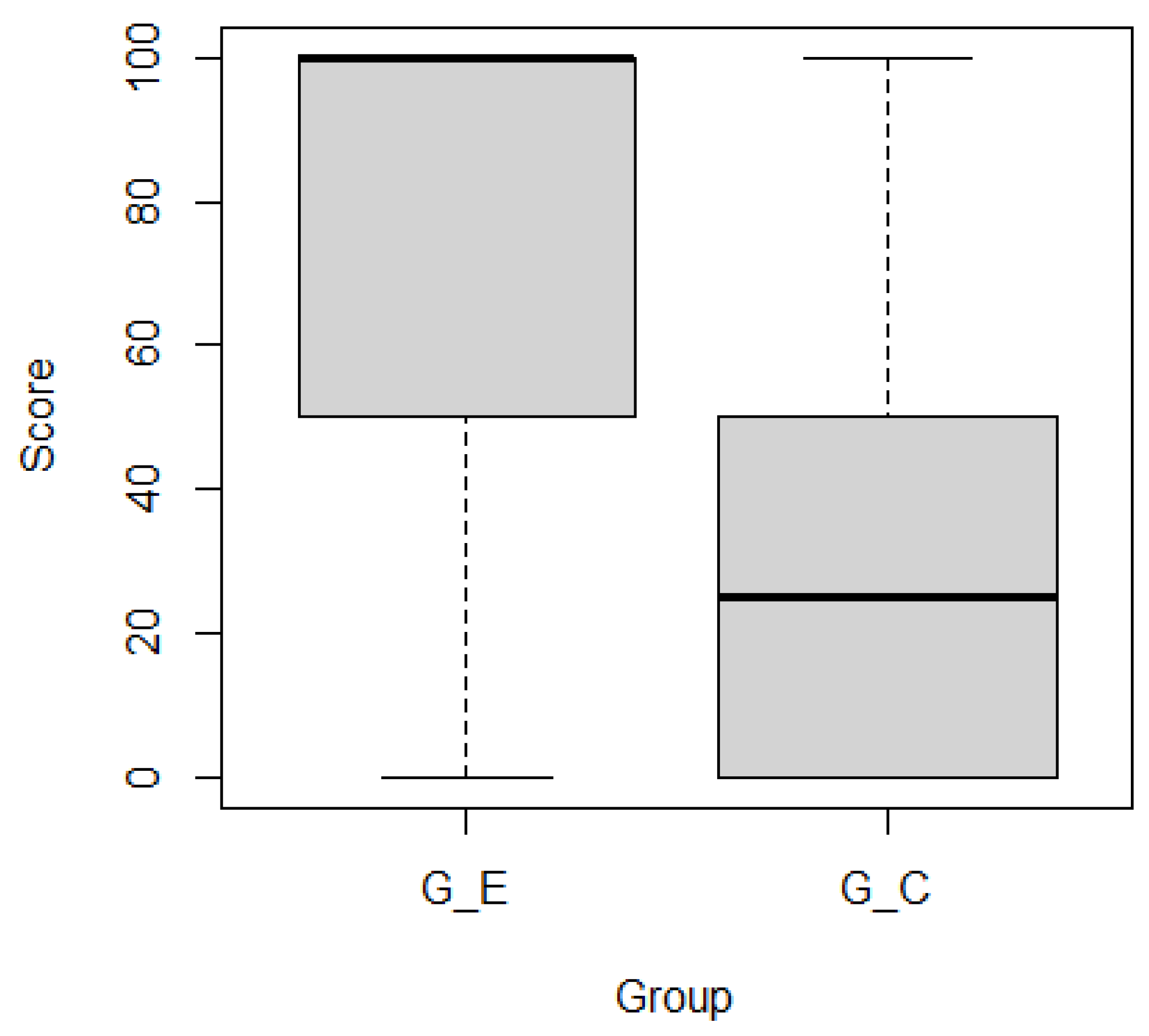
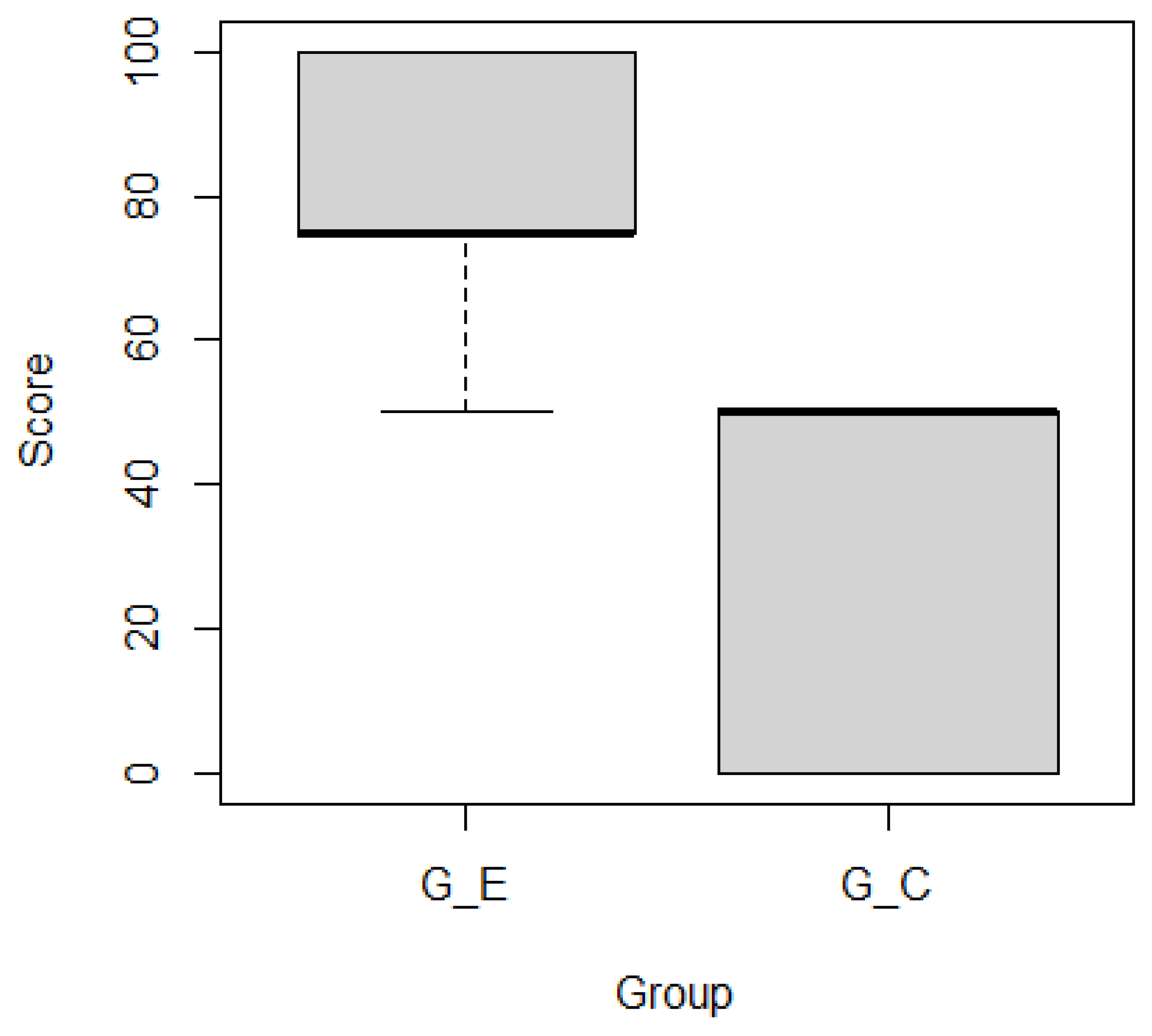
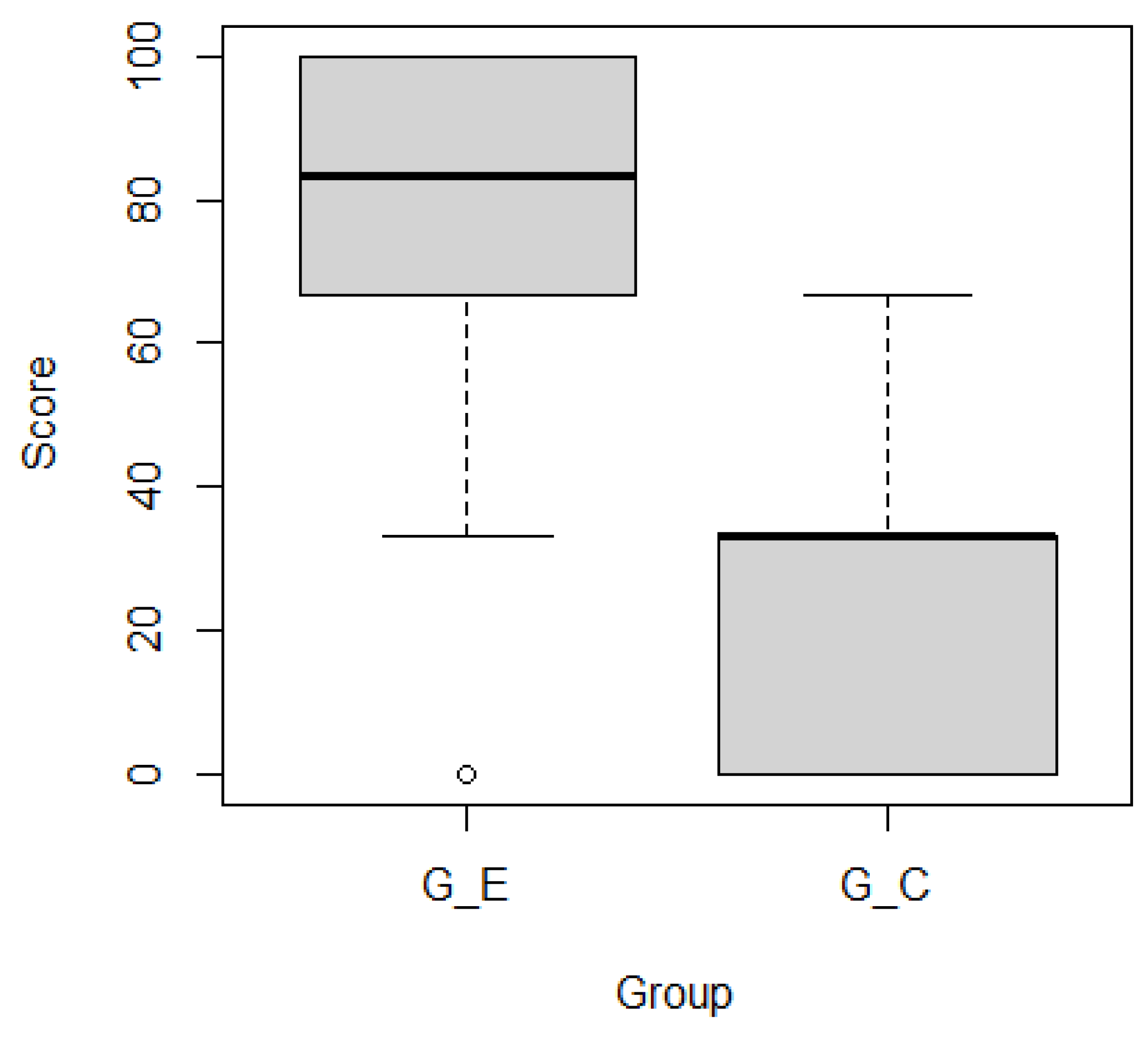
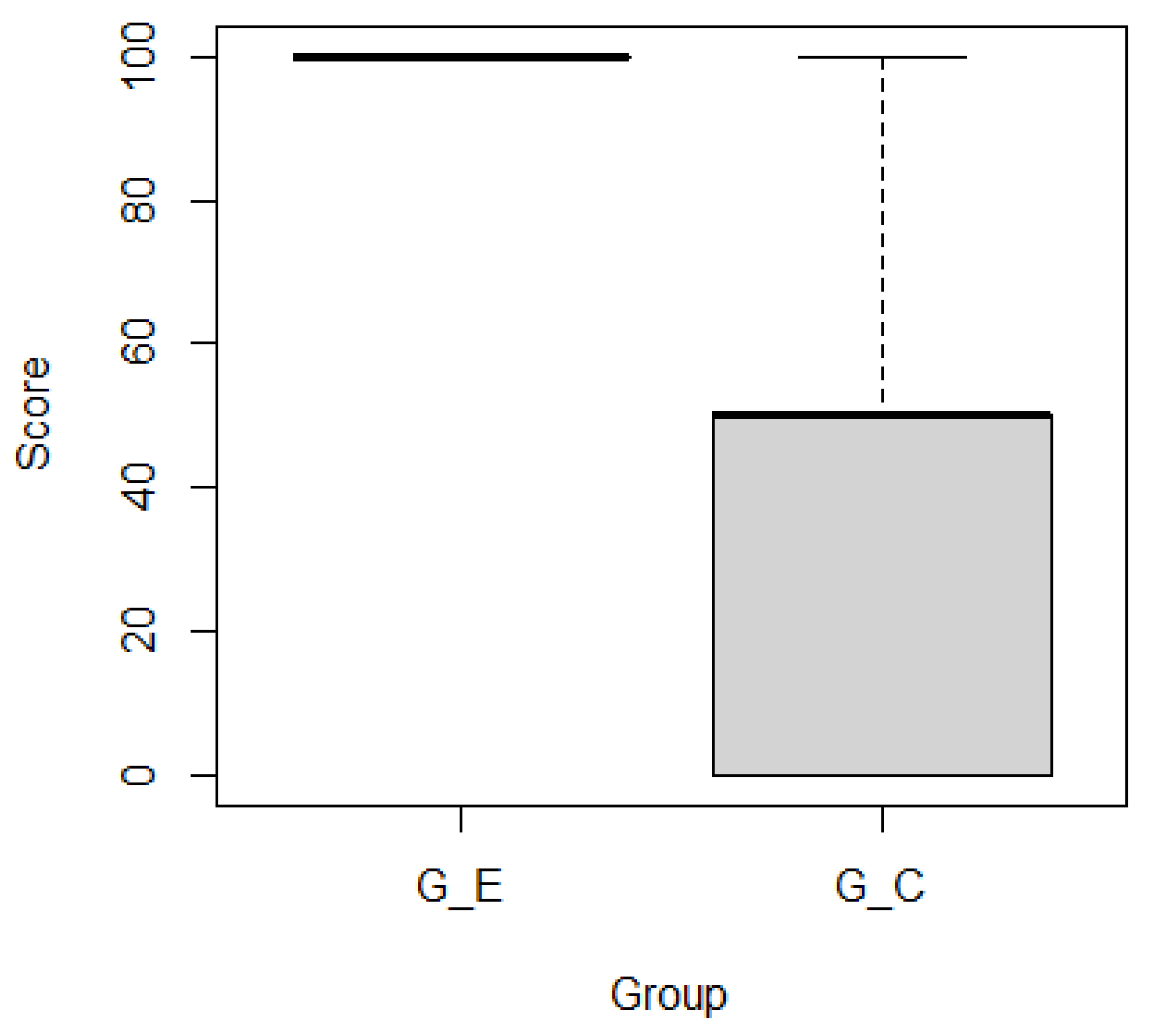
Figure 11 and Figure 12 show boxplots of the subjects’ scores by group for ticket activeness comprehension tasks A L 1 and A L 2 , respectively. Subjects in G E outperformed those in G C . Mann–Whitney’s U test confirmed that there were significant differences in the representative values of the two groups for A L 1 ( p = 0.00017 < 0.001 ***) and A L 2 ( p = 0.00167 < 0.01 **) as the significance levels were 0.001 and 0.01, respectively. Figure 13 and Figure 14 show boxplots of subjects’ scores for both groups for feature activeness comprehension tasks A F 1 and A F 2 , respectively. G E outperformed G C . Mann–Whitney’s U test confirmed that there were significant differences in the representative values between the two groups for A F 1 ( p = 0.00005 < 0.0001 ****) and A F 2 ( p = 0.00004 < 0.0001 ****) with a significance level of 0.0001.
Figure 11. Scores for task A L 1 .
Figure 12. Scores for task A L 2 .
Figure 13. Scores for task A F 1 .
Figure 14. Scores for task A F 2 .
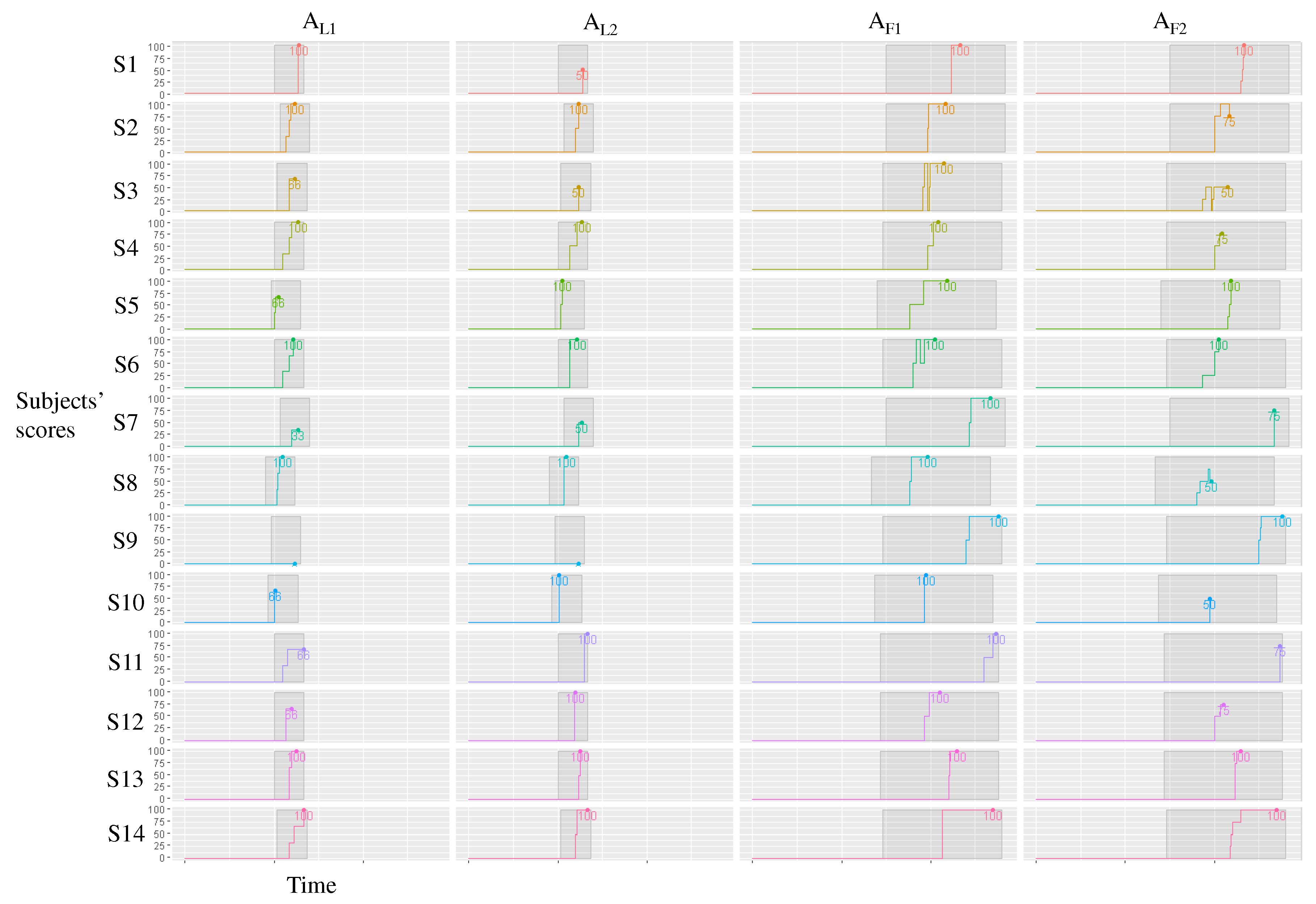
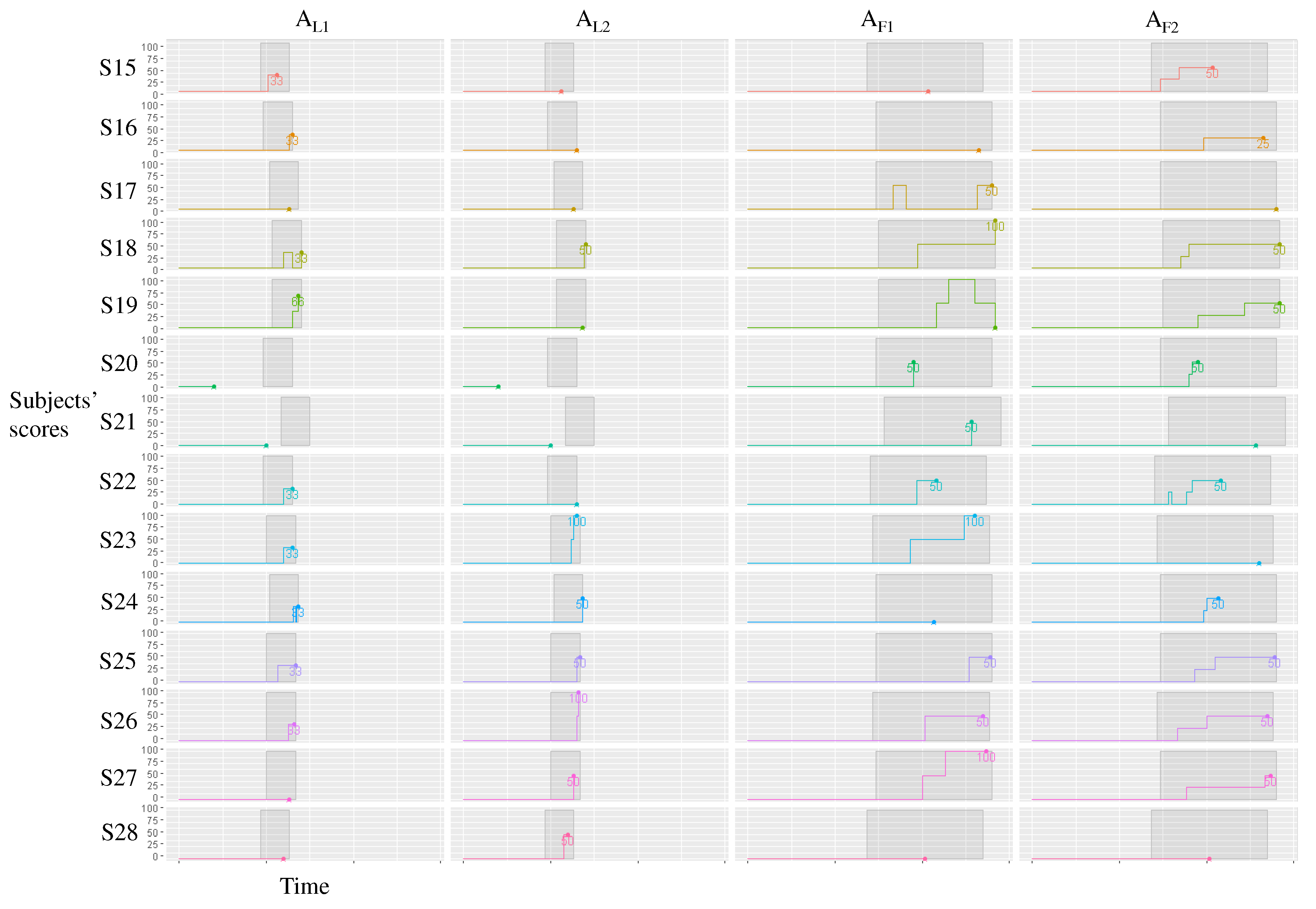
Figure 15 and Figure 16 show the changes in scores over time for G E and G C , respectively. Most subjects in G E began to answer correctly around the middle of each session, and from this point, they rarely changed their answers. For example, subject S 8 scored 100 points for three tasks A L 1 , A L 2 , and A F 1 around the middle of each session and scored 50 points for A F 2 . Thus, our method supported most subjects. By contrast, most subjects in G C needed more time to obtain correct answers, which resulted in lower scores. For example, subject S 17 scored 0 points for three tasks A L 1 , A L 2 , and A F 2 but scored 50 points for A F 1 near the end of the session, indicating that most subjects struggled to identify the correct answers.
Figure 15. Changes in scores over time for each subject in the experimental group ( G E ).
Figure 16. Changes in scores over time for each subject in the control group ( G C ).

5.3. Discussion

RQ3 and RQ4 are discussed based on the experiment.

5.3.1. Does Our Method Improve Project Comprehension?

Since only experimental group subjects utilized the heatmaps generated by our method, we believe that our method supports subjects’ comprehension by reviewing tickets and features.
RQ3. Does our method improve project comprehension? Subjects of the experimental group outperformed those of the control group for ticket activeness comprehension and feature comprehension tasks. Our method successfully supports subjects to comprehend the project by reviewing ticket categories’ lifetime and keywords.

5.3.2. For Which Tasks Is Our Method Effective?

Although there are significant differences in the representative values of the two groups for all tasks, the statistical test indicates that the feature activeness comprehension tasks ( A F 1 and A F 2 ) have the most significant differences between the two groups. Since the comprehension of feature activeness requires understanding of multiple aspects of tickets such as their lifetimes as well as contained keywords, the non-tool-assisted exploration of tickets does not work well. On the other hand, our method supports subjects’ comprehension by visualizing lifetimes and keywords.
RQ4. For which tasks is our method effective? Our method is effective for all tasks, including ticket activeness comprehension tasks and feature comprehension ones. A statistical test confirms that our method is most effective for feature activeness comprehension tasks.

6. Limitations and Use Cases

We describe the limitations and threats to validity of our case study and experiment results as well as possible use cases of our method in consideration with such limitations.

6.1. Limitations and Threats to Validity

In terms of the design of our method, the written language may affect the categorization accuracy. For example, we used MeCab [37] to separate the term units. Since MeCab cannot distinguish proper nouns, which are specific to the software development project, it may separate proper nouns into separate terms. Furthermore, our method assumes that each ticket is related to only one feature of the software system. In real developments, tickets can be related to multiple features. Thus, our assumption may cause information loss. Other unsupervised learning techniques may link one ticket to multiple features. On the other hand, because multiple links make it difficult to understand the category features, they may have the opposite effect on understanding the implemented software features.
As a threat to the internal validity of the case study and the experiment, the ticket content and parameters (such as the weights of important and unimportant terms) affect the result of our categorization method. For example, the task description impacted the categorization accuracy in our case study. The requirement engineer of the project was concerned that our method could not identify implementation and specification omissions because the tickets are written for implemented features. In the future, we plan to enhance the ability to handle less descriptive tickets. For example, we will consider available information associated with tickets other than the ticket content. Furthermore, to mitigate the threat of manually setting the parameters, we recommend employing a group that includes domain experts to identify appropriate parameters when applying our method to a particular domain for the very first time. After the initial setting, the parameters can be reused for the same domain. Another threat to the internal validity of the experiment is that we assumed each subject had a similar capability of software system development project comprehension. In the future, we plan to conduct further experiments with more subjects possessing similar backgrounds such as practitioners with comparable development experiences.
A threat to the external validity of the case study and the experiment is that we used data for a single project using a dataset with more than 100 tickets in one organization. The same project has been used for case studies in previous requirements engineering studies [6,7]. However, the total number of tickets may exceed 10,000 in large-scale projects [29]. Furthermore, the granularity of features addressed by tickets may differ according to the software project and domain. Thus, our method’s scalability and domain generalizability should be further examined using larger datasets in multiple domains. In the future, we plan to conduct more case studies and experiments using other larger development projects and discuss the scalability and the generalization of our method.

6.2. Use Cases

Based on the results of the case study and experiment, our method is expected to guide practitioners and researchers in the following possible use cases UC1–UC3.
UC1
When new members are assigned to an existing project, our categorization method can help them roughly understand the types and contents of tickets addressed in the target software system development by categorizing tickets automatically with an estimation of the appropriate number of categories. This use case is particularly supported by the answers to research questions RQ1–RQ2.
UC2
When new members are assigned to an existing project, our visualization method can help them roughly understand the relationships among the ticket categories, the lifetime and feature of each category addressed in the target development, and support prioritization of the features for the next development. This use case is particularly supported by the answers to research questions RQ2–RQ4.
UC3
The results of our case study and experiment can serve as a reference for the software requirements engineering and related community, including practitioners and researchers, for practicing and researching further project comprehension methods and tools. Since the ticket lifetime and feature visualization procedures are somewhat independent from the ticket categorization procedure in our method, researchers may independently extend or replace the categorization method and the visualization method.

7. Conclusions and Future Work

We propose a method to automatically visualize the implemented features of software systems using tickets. Our method estimates the number of ticket categories in an industrial software development project. Although the category accuracy is not 100%, experts indicated that our visualization method aids in the rough understanding of the features of a software system. Moreover, our visualization method can help developers quickly view tickets. As demonstrated in the case study and the experiment, our method supports experts and subjects’ comprehension of the project and the features of the target software system by reviewing the lifetimes and keywords of the ticket categories.
In the future, we plan to apply our method to more projects. Second, we will introduce domain knowledge of developers and word embeddings (e.g., [16,38,39]) to improve our ticket vectorization method. Third, we will match and compare the categories automatically identified with the actual features and the outputs of related works and other methods such as treemap and tag cloud representations. Fourth, we will automate constructing and grouping collocations. Finally, we will introduce document summarization methods (e.g., [40]) to extract representative tickets.

Author Contributions

Conceptualization and methodology, R.I. Literature review and analysis, all authors. All authors have read and agreed to the published version of the manuscript.

Funding

This research received no external funding.

Institutional Review Board Statement

The case study and the experiment with our method and the traditional method were carried out in accordance with the university’s guidelines and regulations. The case study and the experiment were exempted from ethics review and approval as a result of checking the application guidelines for ethics review of the university. The case study and the experiment did not involve any identifiable individual personal information of the experts and the subjects and satisfied all conditions of the determination of the unnecessity of assessment stated in section 9 of the university’s Application Guidelines for Ethics Review available at https://www.waseda.jp/inst/ore/en/procedures/human/, 9 February 2022.

Data Availability Statement

Not applicable.

Conflicts of Interest

The authors declare no conflict of interest.

References

  1. Park, B.K.; Kim, R.Y.C. Effort Estimation Approach through Extracting Use Cases via Informal Requirement Specifications. Appl. Sci. 2020, 10, 3044. [Google Scholar] [CrossRef]
  2. Matturro, G.; Barrella, K.; Benitez, P. Difficulties of newcomers joining software projects already in execution. In Proceedings of the 2017 International Conference on Computational Science and Computational Intelligence, Las Vegas, NV, USA, 14–16 December 2017; pp. 993–998. [Google Scholar]
  3. Steinmacher, I.; Treude, C.; Gerosa, M.A. Let Me In Guidelines for the Successful Onboarding of Newcomers to Open Source Projects. IEEE Softw. 2019, 36, 41–49. [Google Scholar] [CrossRef]
  4. Meneely, A.; Corcoran, M.; Williams, L.A. Improving developer activity metrics with issue tracking annotations. In Proceedings of the 2010 ICSE Workshop on Emerging Trends in Software Metrics, WETSoM 2010, Cape Town, South Africa, 4 May 2010; Canfora, G., Concas, G., Marchesi, M., Tempero, E.D., Zhang, H., Eds.; ACM: New York, NY, USA, 2010; pp. 75–80. [Google Scholar]
  5. Mani, S.; Sankaranarayanan, K.; Sinha, V.S.; Devanbu, P.T. Panning requirement nuggets in stream of software maintenance tickets. In Proceedings of the 22nd ACM SIGSOFT International Symposium on Foundations of Software Engineering, (FSE-22), Hong Kong, China, 16–22 November 2014; Cheung, S., Orso, A., Storey, M.D., Eds.; ACM: New York, NY, USA, 2014; pp. 678–688. [Google Scholar]
  6. Saito, S.; Iimura, Y.; Massey, A.K.; Antón, A.I. How Much Undocumented Knowledge is there in Agile Software Development?: Case Study on Industrial Project Using Issue Tracking System and Version Control System. In Proceedings of the 25th IEEE International Requirements Engineering Conference, RE 2017, Lisbon, Portugal, 4–8 September 2017; Moreira, A., Araújo, J., Hayes, J., Paech, B., Eds.; IEEE Computer Society: Washington, DC, USA, 2017; pp. 194–203. [Google Scholar]
  7. Saito, S.; Iimura, Y.; Massey, A.K.; Antón, A.I. Discovering undocumented knowledge through visualization of agile software development activities. Requir. Eng. 2018, 23, 381–399. [Google Scholar] [CrossRef]
  8. Backlog. Available online: https://backlog.com/ (accessed on 9 February 2022).
  9. Moreno, A.; Iglesias, C.A. Understanding Customers’ Transport Services with Topic Clustering and Sentiment Analysis. Appl. Sci. 2021, 11, 10169. [Google Scholar] [CrossRef]
  10. Artiles, J.; Gonzalo, J.; Sekine, S. The SemEval-2007 WePS Evaluation: Establishing a benchmark for the Web People Search Task. In Proceedings of the 4th International Workshop on Semantic Evaluations, SemEval@ACL 2007, Prague, Czech Republic, 23–24 June 2007; Agirre, E., Villodre, L.M., Wicentowski, R., Eds.; The Association for Computer Linguistics: Stroudsburg, PA, USA, 2007; pp. 64–69. [Google Scholar]
  11. Ishizuka, R.; Washizaki, H.; Fukazawa, Y.; Saito, S.; Ouji, S. Categorizing and Visualizing Issue Tickets to Better Understand the Features Implemented in Existing Software Systems. In Proceedings of the 10th International Workshop on Empirical Software Engineering in Practice, IWESEP 2019, Tokyo, Japan, 13–14 December 2019; pp. 25–30. [Google Scholar]
  12. Misra, S. A Step by Step Guide for Choosing Project Topics and Writing Research Papers in ICT Related Disciplines. In Information and Communication Technology and Applications; Misra, S., Muhammad-Bello, B., Eds.; Springer International Publishing: Cham, Switzerland, 2021; pp. 727–744. [Google Scholar]
  13. Dekhtyar, A.; Fong, V. RE Data Challenge: Requirements Identification with Word2Vec and TensorFlow. In Proceedings of the 25th IEEE International Requirements Engineering Conference, RE 2017, Lisbon, Portugal, 4–8 September 2017; Moreira, A., Araújo, J., Hayes, J., Paech, B., Eds.; IEEE Computer Society: Washington, DC, USA, 2017; pp. 484–489. [Google Scholar]
  14. Pingclasai, N.; Hata, H.; Matsumoto, K. Classifying Bug Reports to Bugs and Other Requests Using Topic Modeling. In Proceedings of the 20th Asia-Pacific Software Engineering Conference, APSEC 2013, Ratchathewi, Bangkok, Thailand, 2–5 December 2013; Muenchaisri, P., Rothermel, G., Eds.; IEEE Computer Society: Washington, DC, USA, 2013; Volume 2, pp. 13–18. [Google Scholar]
  15. Sabetta, A.; Bezzi, M. A Practical Approach to the Automatic Classification of Security-Relevant Commits. In Proceedings of the 2018 IEEE International Conference on Software Maintenance and Evolution, ICSME 2018, Madrid, Spain, 23–29 September 2018; IEEE Computer Society: Washington, DC, USA, 2018; pp. 579–582. [Google Scholar]
  16. Word2Vec. Available online: https://code.google.com/archive/p/word2vec/ (accessed on 9 February 2022).
  17. Laurent, P.; Cleland-Huang, J.; Duan, C. Towards Automated Requirements Triage. In Proceedings of the 15th IEEE International Requirements Engineering Conference, RE 2007, New Delhi, India, 15–19 October 2007; IEEE Computer Society: Washington, DC, USA, 2007; pp. 131–140. [Google Scholar]
  18. Ohkura, K.; Kawaguchi, S.; Iida, H. A Method for Visualizing Contexts in Software Development using Clustering Email Archives. SEC J. 2010, 6, 134–143. [Google Scholar]
  19. Jain, A.K.; Dubes, R.C. Algorithms for Clustering Data; Prentice-Hall: Hoboken, NJ, USA, 1988. [Google Scholar]
  20. Mojena, R. Hierarchical Grouping Methods and Stopping Rules: An Evaluation. Comput. J. 1977, 20, 359–363. [Google Scholar] [CrossRef] [Green Version]
  21. Tibshirani, R.; Walther, G.; Hastie, T. Estimating the number of clusters in a data set via the gap statistic. J. R. Stat. Soc. 2001, 63, 411–423. [Google Scholar] [CrossRef]
  22. Chen, N.; Lin, J.; Hoi, S.C.H.; Xiao, X.; Zhang, B. AR-miner: Mining informative reviews for developers from mobile app marketplace. In Proceedings of the 36th International Conference on Software Engineering, ICSE ’14, Hyderabad, India, 31 May–7 June 2014; Jalote, P., Briand, L.C., van der Hoek, A., Eds.; ACM: New York, NY, USA, 2014; pp. 767–778. [Google Scholar]
  23. Yeasmin, S.; Roy, C.K.; Schneider, K.A. Interactive Visualization of Bug Reports Using Topic Evolution and Extractive Summaries. In Proceedings of the 30th IEEE International Conference on Software Maintenance and Evolution, Victoria, BC, Canada, 29 September–3 October 2014; IEEE Computer Society: Washington, DC, USA, 2014; pp. 421–425. [Google Scholar]
  24. Saito, S.; Iimura, Y.; Takahashi, K.; Massey, A.K.; Antón, A.I. Tracking requirements evolution by using issue tickets: A case study of a document management and approval system. In Proceedings of the 36th International Conference on Software Engineering, ICSE ’14, Companion Proceedings, Hyderabad, India, 31 May–7 June 2014; Jalote, P., Briand, L.C., van der Hoek, A., Eds.; ACM: New York, NY, USA, 2014; pp. 245–254. [Google Scholar]
  25. Saito, S.; Iimura, Y.; Tashiro, H.; Massey, A.K.; Antón, A.I. Visualizing the effects of requirements evolution. In Proceedings of the 38th International Conference on Software Engineering, ICSE 2016, Austin, TX, USA, 14–22 May 2016; Companion Volume. Dillon, L.K., Visser, W., Williams, L.A., Eds.; ACM: New York, NY, USA, 2016; pp. 152–161. [Google Scholar]
  26. Wnuk, K.; Regnell, B.; Karlsson, L. Visualization of Feature Survival in Platform-Based Embedded Systems Development for Improved Understanding of Scope Dynamics. In Proceedings of the Third International Workshop on Requirements Engineering Visualization (REV’08), Barcelona, Spain, 8 September 2008; IEEE Computer Society: Washington, DC, USA, 2008; pp. 41–50. [Google Scholar]
  27. Wnuk, K.; Regnell, B.; Karlsson, L. What Happened to Our Features? Visualization and Understanding of Scope Change Dynamics in a Large-Scale Industrial Setting. In Proceedings of the RE 2009, 17th IEEE International Requirements Engineering Conference, Atlanta, GA, USA, 31 August–4 September 2009; IEEE Computer Society: Washington, DC, USA, 2009; pp. 89–98. [Google Scholar]
  28. Wnuk, K.; Gorschek, T.; Callele, D.; Karlsson, E.; Ahlin, E.; Regnell, B. Supporting Scope Tracking and Visualization for Very Large-Scale Requirements Engineering-Utilizing FSC+, Decision Patterns, and Atomic Decision Visualizations. IEEE Trans. Softw. Eng. 2016, 42, 47–74. [Google Scholar] [CrossRef]
  29. Misue, K.; Yazaki, S. Panoramic View for Visual Analysis of Large-Scale Activity Data. In Proceedings of the Business Process Management Workshops—BPM 2012 International Workshops, Tallinn, Estonia, 3 September 2012; Revised Papers; Lecture Notes in Business Information Processing. Rosa, M.L., Soffer, P., Eds.; Springer: Berlin, Germany, 2012; Volume 132, pp. 756–767. [Google Scholar]
  30. Gotel, O.C.; Marchese, F.T.; Morris, S.J. On Requirements Visualization. In Proceedings of the Second International Workshop on Requirements Engineering Visualization (REV 2007), New Delhi, India, 15–19 October 2007; IEEE Computer Society: Washington, DC, USA, 2007; pp. 1–10. [Google Scholar]
  31. Zhao, Y.; Dong, J.; Peng, T. Ontology Classification for Semantic-Web-Based Software Engineering. IEEE Trans. Serv. Comput. 2009, 2, 303–317. [Google Scholar] [CrossRef]
  32. Ankolekar, A.; Sycara, K.P.; Herbsleb, J.D.; Kraut, R.E.; Welty, C.A. Supporting online problem-solving communities with the semantic web. In Proceedings of the 15th international conference on World Wide Web, WWW 2006, Edinburgh, UK, 23–26 May 2006; Carr, L., Roure, D.D., Iyengar, A., Goble, C.A., Dahlin, M., Eds.; ACM: New York, NY, USA, 2006; pp. 575–584. [Google Scholar]
  33. Witte, R.; Zhang, Y.; Rilling, J. Empowering Software Maintainers with Semantic Web Technologies. In Proceedings of the Semantic Web: Research and Applications, 4th European Semantic Web Conference, ESWC 2007, Innsbruck, Austria, 3–7 June 2007; Lecture Notes in Computer, Science. Franconi, E., Kifer, M., May, W., Eds.; Springer: Berlin, Germany, 2007; Volume 4519, pp. 37–52. [Google Scholar]
  34. Yates, R.; Power, N.; Buckley, J. Characterizing the transfer of program comprehension in onboarding: An information-push perspective. Empir. Softw. Eng. 2020, 25, 940–995. [Google Scholar] [CrossRef]
  35. Viviani, G.; Murphy, G.C. Reflections on onboarding practices in mid-sized companies. In Proceedings of the 12th International Workshop on Cooperative and Human Aspects of Software Engineering, CHASE@ICSE 2019, Montréal, QC, Canada, 27 May 2019; Dittrich, Y., Fagerholm, F., Hoda, R., Socha, D., Steinmacher, I., Eds.; ACM: New York, NY, USA, 2019; pp. 83–84. [Google Scholar]
  36. Steinmacher, I.; Wiese, I.S.; Conte, T.; Gerosa, M.A.; Redmiles, D.F. The hard life of open source software project newcomers. In Proceedings of the 7th International Workshop on Cooperative and Human Aspects of Software Engineering, CHASE 2014, Hyderabad, India, 2–3 June 2014; Sharp, H., Prikladnicki, R., Begel, A., de Souza, C.R.B., Eds.; ACM: New York, NY, USA, 2014; pp. 72–78. [Google Scholar]
  37. MeCab. Available online: https://taku910.github.io/mecab/ (accessed on 9 February 2022).
  38. Isotani, H.; Washizaki, H.; Fukazawa, Y.; Nomoto, T.; Ouji, S.; Saito, S. Duplicate Bug Report Detection by Using Sentence Embedding and Fine-tuning. In Proceedings of the IEEE International Conference on Software Maintenance and Evolution, ICSME 2021, Luxembourg, 27 September–1 October 2021; pp. 535–544. [Google Scholar]
  39. Kanakogi, K.; Washizaki, H.; Fukazawa, Y.; Ogata, S.; Okubo, T.; Kato, T.; Kanuka, H.; Hazeyama, A.; Yoshioka, N. Tracing CVE Vulnerability Information to CAPEC Attack Patterns Using Natural Language Processing Techniques. Information 2021, 12, 298. [Google Scholar] [CrossRef]
  40. Filatova, E.; Hatzivassiloglou, V. A Formal Model for Information Selection in Multi-Sentence Text Extraction. In Proceedings of the COLING 2004, 20th International Conference on Computational Linguistics, Geneva, Switzerland, 23–27 August 2004; pp. 397–403. [Google Scholar]
Publisher’s Note: MDPI stays neutral with regard to jurisdictional claims in published maps and institutional affiliations.

Article Metrics

Citations

Article Access Statistics

Multiple requests from the same IP address are counted as one view.