


Abstract
Mobile health (mHealth) is a branch of electronic health (eHealth) technology that provides healthcare services using smartphones and wearable devices. However, most mHealth applications were developed without applying mHealth specialized usability guidelines. Although many researchers have used various guidelines to design and evaluate mHealth applications, these guidelines have certain limitations. First, some of them are general guidelines. Second, others are specified for mHealth applications; however, they only cover a few features of mHealth applications. Third, some of them did not consider accessibility needs for the elderly and people with special needs. Therefore, this paper proposes a new set of usability guidelines for mHealth applications (UGmHA) based on Quinones et al.’s formal methodology, which consists of seven stages starting from the Exploratory stage and ending with the Refining stage. What distinguishes these proposed guidelines is that they are easy to follow, consider the feature of accessibility for the elderly and people with special needs and cover different features of mHealth applications. In order to validate UGmHA, an experiment was conducted on two applications in Saudi Arabia using UGmHA versus other well-known usability guidelines to discover usability issues. The experimental results show that the UGmHA discovered more usability issues than did the other guidelines.
1. Introduction
In the recent era, the exponential evolution of technology is accelerating world development by making our life easier, more flexible and more effective. This development has been involved in the healthcare field in presenting electronic health (eHealth) technology. eHealth can enhance healthcare services using the internet and wireless technologies, usually through traditional desktops [1]. All over the world, countries are adopting eHealth services to improve the safety, standards and quality of their healthcare systems.
In relation to eHealth, a specific and essential part must be considered, called mobile health (mHealth) technology [2]. The concept of mHealth was defined and coined by Robert Istepanian in 2004 [3]. mHealth moves healthcare services from traditional desktops into mobile technologies, such as smartphones and wearable devices [4,5]. The key features of mHealth applications are the ability to monitor chronic disease by patients and facilitate communication between patients and doctors [6].
Despite the valuable benefits of mHealth applications, they can harm a patient’s life and health if they do not work as expected, such as erroneous results or wrong actions, whether by patients or clinical staff [7]. To the best of our knowledge, most mHealth applications are developed without using standard and specialized mHealth usability guidelines [8]. A set of usability guidelines is an evaluation method used to determine the extent to which a mHealth application’s interface is safe, efficient and usable by different kinds of people [9,10]. Accordingly, mHealth applications need to be regulated by applicable usability guidelines in order to assess their efficiency and safety for patients.
Many kinds of studies used various existing guidelines to design and evaluate mHealth applications; however, there are three main problems with these guidelines, which are:
- Some of the guidelines are general, which means they are not specified for mHealth applications, such as Nielsen’s principles [11]. Since mHealth applications are intended to affect the health and the body of people, they need to have more rigorous and restricted guidelines.
- Some of the guidelines are specified for mHealth applications; however, they cover only a few features of mHealth applications, such as:
- (a)
- Xcertia [12], which covered access to personal health information and notification features, while other features, such as self-monitoring, were not covered.
- (b)
- HE4EH [6], which covered self-monitoring, health goals and tips and biometric measurement features, while other features, such as consultations, were not covered.
- (c)
- Telemedicine recommendations [13], which covered consultations and booking appointment features, while other features, such as self-monitoring, were not covered.
- Some of the guidelines did not consider accessibility features for the elderly and people with special needs, such as [11,13]. Accessibility is important to ensure that the application is accessible to people of different ages and needs.
In this study, our goal is to develop a comprehensive set of usability guidelines for mHealth applications, titled (UGmHA), that satisfy the following criteria:
- Simple to follow and understandable by designers, developers and evaluators.
- Accessible to all people, including elderly people and people with special needs.
- Specialized in designing and evaluating mHealth applications that can cover different features. The following are examples of features gathered from different studies:
- Self-monitoring for chronic diseases [14,15].
- Online consultations [14,16].
- Sharing data with health care providers (HCP) [14,15].
- Booking appointments [16].
- Biometric measurements [14].
- Health goals and tips [14,15].
- Notifications and reminders [14].
- Access to personal health information [15].
This study has two main objectives. The first objective is to develop UGmHA using the systematic and formal methodology of Quinones et al. [17]. The second objective is to validate UGmHA by comparing UGmHA against the Nielsen and Xcertia guidelines, which are well-known and global guidelines. The experiment was conducted in Saudi Arabia by two authors of the paper using two local applications, which are named “Sehhaty” and “Sokry”.
The rest of the paper is organized as follows. Section 2 presents a background and literature review of mHealth-related guidelines as well as common development approaches and validation methods for new usability guidelines. Section 3 illustrates how UGmHA was developed and validated. Section 4 shows the results of the development and validation of UGmHA. Section 5 discusses the results obtained from the development and validation of UGmHA. Finally, our conclusions and future work are provided in Section 6.
2. Literature Review
This section presents the background information related to eHealth, mHealth and usability. We also review the existing guidelines related to mHealth applications, common development approaches and validation methods for new usability guidelines.
2.1. Electronic Health (eHealth) and Mobile Health (mHealth)
The term eHealth was established by Mitchell in 1999 [18] and is a broad term that integrates healthcare and technology to improve healthcare efficiency and reduce costs. The main objectives of eHealth are to improve patient safety and provide accurate diagnostics and appropriate treatment [19]. eHealth offers many different services and functionalities, such as electronic health records (EHR), archiving, electronic prescribing, order-entry systems and computerized decision support systems (CDS) [20]. Therefore, countries worldwide have adopted eHealth services to improve the standards and quality of their healthcare systems.
mHealth is a specific branch of electronic health (eHealth) technology. The “mHealth” terminology was coined and established by Robert Istepanian in 2004 [3]. mHealth can be defined as collecting and processing health data using smartphones, tablets and wearable devices [5]. mHealth applications are crucial since they enable a patient to monitor their own chronic disease and activities, support behavior changes for patients, improve their lifestyle and facilitate communication between patients and doctors [6,21]. Moreover, they provide doctors with greater mobility to help them care for their patients from different areas [5].
2.2. Usability and Guidelines
Usability is a key feature of a successful system because it is essential to create a well-designed and highly usable system [22,23]. According to ISO 9241-11 standard, usability is defined as “The extent to which a product can be used by specified users to achieve specified goals with effectiveness, efficiency and satisfaction in a specified context of use” [24].
Usability can be implemented and evaluated effectively using usability guidelines. The usability guidelines have the advantage that they can be applied early in the design and used to evaluate and discover usability issues before application release [25]. Nielsen’s principles are the first and best-known usability guidelines, which were introduced by Nielsen and Molich in 1990 [26]. These guidelines are considered traditional and general for most user interfaces [27,28].
However, there is evidence in the literature confirming that general guidelines are not appropriate to design and evaluate domain-specific applications and may overlook essential elements that need to be considered in specific applications [27,28,29,30]. Moreover, Hermawati et al. [28] indicated that any set of usability guidelines should depend on the specific requirements of the user, task and environment of use. This means that any change in these requirements may introduce new features and issues of usability that are not considered by general guidelines. Therefore, it is crucial to develop mHelath-specific guidelines to ensure that usability features related to mHealth applications are identified.
Usability guidelines may include checklist items that work as a guide to evaluate domain-specific applications [17]. The checklist items can add more details and specifications for usability guidelines to make them easily tailored to the specific features of an application [31]. Without using checklist items, there is the potential for the wrong association of usability issues to the corresponding guideline, missed domain-specific usability issues and unreliable findings due to the lack of evaluator consensus [32].
Several guidelines have been used by studies for the design and evaluation of mHealth applications.
Nielsen’s principles [11] comprises ten usability guidelines, which are:
- Visibility of system status.
- Match between system and the real world.
- User control and freedom.
- Consistency and standards.
- Error prevention.
- Recognition rather than recall.
- Flexibility and efficiency of use.
- Aesthetic and minimalist design.
- Help users recognize, diagnose and recover from errors.
- Help and documentation.
Despite Nielsen’s principles being globally well-known for designing and evaluating most user interfaces, they are general and not specialized for distinct features of mHealth applications [27,28]. Furthermore, accessibility features for the elderly and people with special needs are not considered. However, several studies used Nielsen’s principles as a basis for generating new usability guidelines by modifying or adding new guidelines or checklist items of domain-specific applications [27].
Roy et al. [33] discussed the framework of the Xcertia guidelines, which were founded by leaders of the healthcare industry, such as the Association of American Medical Colleges, U.S. Food and Drug Administration (FDA) and Healthcare Information and Management Systems Society (HIMSS). The Xcertia guidelines aim to fulfill two primary purposes, which are assessing how an mHealth application is designed to be safe and optimizing mHealth applications to be used by specified users within a specified environment [33].
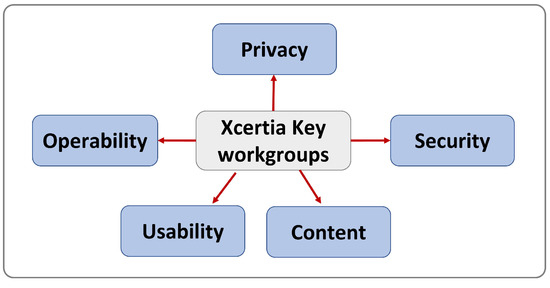
As shown in Figure 1, Xcertia includes five key workgroups: privacy, security, content, usability and operability. Each workgroup includes a set of guidelines, and each guideline can be measured by a set of performance requirements or checklists. Nonetheless, this research will focus only on the “usability” workgroup because it is within our scope. The “usability” workgroup includes ten guidelines with checklist items for each guideline. Below are the guidelines of the “usability” workgroup of Xcertia:
Figure 1.
Xcertia workgroups.
- Visual design.
- Readability.
- App navigation.
- Onboarding.
- App feedback.
- Notifications, alerts and alarms.
- Help resources and troubleshooting.
- Historical data.
- Accessibility.
- Ongoing app evaluation.
Xcertia guidelines are developed mainly for mHealth applications and the “usability” in Xcertia considers some of the accessibility features for people with special needs. However, despite Xcertia guidelines being developed mainly for mHealth applications, most of the usability guidelines are still general and do not evaluate specific features of mHealth applications, such as self-monitoring, consultations, health advice and booking appointments.
Khowaja et al. [6] presented a modified set of specialized guidelines for mHealth applications called (HE4EH). HE4EH includes 25 guidelines with checklist items. The guidelines are:
- Visibility of system status.
- User control and freedom.
- Match between system and real world.
- Consistency and standards.
- Error prevention.
- Help users recognize, diagnose and recover from errors.
- Recognition rather than recall.
- Flexibility and efficiency of use.
- Aesthetic and minimalist design.
- Help and documentation.
- Privacy.
- Skills.
- Pleasurable interaction.
- Accessibility.
- Compatibility between different platforms.
- Minimized human–device interaction.
- Physical interaction and ergonomics.
- Readability and layout.
- Non-interrupting app information visualization.
- Content.
- Display.
- Navigation.
- Interactivity.
- Behavior change.
- Self-monitoring.
However, the study only focused on self-monitoring of diabetes and blood glucose levels without considering hypertension, obesity, etc. [6]. Moreover, since the scope of the study was about self-monitoring and behavioral-change features, the other features related to mHealth applications, such as consultations and booking appointments, were not covered. Furthermore, the study included more than 16 guidelines, while it is recommended to keep the number of usability guidelines between 10 and 16 [17].
Aldekhyyel et al. [13] evaluated the usability of mHealth applications with telemedicine features deployed during the COVID-19 pandemic in Saudi Arabia. The mHealth applications were “Sehha”, “Cura” and “Dr. Sulaiman Alhabib”, which were evaluated using Nielsen’s ten principles with a five-point severity rating scale (SRS). Then, the study provided usability design recommendations for each application based on the discovered usability issues. However, since the scope of the study was about telemedicine applications, it focused only on consultations, appointments, etc., without considering other mHealth-specific features, such as self-monitoring and health advice. Moreover, accessibility features for the elderly and people with special needs were not covered.
Al-Razgan et al. [34] converted and adapted some of the mobile phone usability guidelines and recommendations to develop modified usability guidelines for mobile launchers designed for elderly people. The study included 13 guidelines, which are classified into three sections as shown below:
- Look and Feel
- Make elements on the page easy to read.
- Easy recognition and accessibility.
- Make clickable items easy to target and hit.
- Use language and culture appropriate for the elderly; minimize technical terms.
- Interaction
- Provide clear feedback on actions.
- Provide preferable gestures for the elderly.
- Provide the elderly with information on launcher/elderly status.
- Use conventional interaction items.
- Ergonomic design.
- Functionality
- Provide functions that reduce elderly memory load.
- Elderly does not feel lost or stuck (elderly control and freedom).
- Prevent errors from occurring.
- Provide necessary information and settings.
However, despite the study being mainly about mobile launchers’ usability for elderly people, we can make use of the guidelines to add the accessibility features for elderly people.
Arachchi et al. [35] integrated different learning theories and usability guidelines to develop an eLearning module for people with intellectual disability needs. The guidelines considered the specific abilities and context of learners, such as attention, mobility, cognitive capacity, learning ability and ability to read and write. The study incorporated nine guidelines with checklist items. The guidelines are:
- Minimised distractions.
- Easy to operate.
- Readability and visualization.
- Consistency.
- Feedback.
- Navigability.
- Personalizing.
- Easy to understand and relevant.
- Learner-friendly.
However, despite the study being mainly about eLearning usability for intellectual disabilities, which is a part of special needs, we can make use of its guidelines to add accessibility features to support people with special needs.
2.3. Common Approaches for Developing New Usability Guidelines
Some common approaches are used to develop domain-specific usability guidelines, such as methodologies, literature review, usability problems, existing guidelines, interviews, theories and mixing processes [27]. However, the methodologies approach attracts the interest of most studies since it is the only formal approach that follows a systematic and clearly defined process. On the other hand, all other approaches are considered informal since their activities and processes are performed in a non-systematic way [27].
Different methodologies can be followed to generate a new set of usability guidelines, such as the Rusu methodology [10], which consists of six stages. This methodology is the most popular one [27,28] and is used by several studies, such as [36,37,38,39]. These studies emphasized the importance of the methodology to facilitate the generation of domain-specific guidelines. Nevertheless, Rusu et al.’s methodology [10] has been modified and adapted by the same authors with the support of usability experts and researchers to generate a new and examined methodology, here called Quinones et al.’s methodology [17]. Quinones et al.’s methodology consists of seven main stages, which are [17]:
- Exploratory stage: to collect existing studies related to the main topics of the research, such as general or related usability guidelines, principles, application features and attributes.
- Descriptive stage: to highlight the most important information of the previously collected studies to formalize the main concept of the research.
- Correlational stage: to determine the characteristics that the usability guidelines of the specific domain should have based on traditional guidelines.
- Selection stage: to keep, adapt or discard the existing sets of usability guidelines that were selected in the descriptive stage.
- Specification stage: to formally specify the set of proposed guidelines using a standard template.
- Validation (experimental) stage: to test the proposed guidelines against traditional ones through experiments.
- Refinement stage: to refine the proposed guidelines based on the validation-stage results.
The advantage of employing Quinones et al.’s methodology is that it provides a standard template, which is used to explain more details about an individual guideline, including the ID, priority, name, definition, explanation, application features, examples, benefits, checklists and usability attributes. Moreover, it is possible to perform as many iterations as needed for all or some stages to improve the usability guidelines or the performance of experiments used for the validation stage [17].
2.4. Common Methods for Validating New Usability Guidelines
Three types of validation methods are proposed in Quinones et al.’s methodology. The first type is recommended by the methodology, and the other two types are for obtaining additional feedback as shown below: [17]:
- Guideline evaluation: to check the proposed guidelines against traditional or specialized guidelines in terms of the number of discovered usability issues (The recommended method).
- Expert judgment: using a questionnaire that assesses expert and evaluator perceptions of the proposed usability guidelines (To receive additional feedback).
- User testing: to obtain users’ opinions about the proposed set of usability guidelines (To receive additional feedback).
However, the first type offers more opportunities to provide in-depth information about the effectiveness of the usability guidelines [17,28]. The comparison can be achieved by using a between-subject or within-subject study [40]:
- Between-subject: each participant is exposed to only one condition of testing.
- Within-subject: each participant is exposed to more than one of the conditions of testing.
The obtained results can be analyzed using some of the following criteria [17]:
- Number of the discovered usability issues.
- Number of discovered specific usability issues.
- Number of severe usability issues.
- Number of critical usability issues.
The majority of studies have applied the comparison method to validate their guidelines. However, the number of evaluators, compared guidelines and applications vary between the studies as shown in Table 1.
Table 1.
Review of the validation process in different studies.
3. Materials and Methods
This section presents the methodology used to develop and generate UGmHA guidelines as well as the methods used to validate the resulting UGmHA guidelines.
3.1. Developing UGmHA
In the previous section, the literature review showed different guidelines used to evaluate mHealth applications. Some of these guidelines are general but used by various studies to evaluate mHealth applications, such as Nielsen’s principles [11]. On the other hand, some of the guidelines are used mainly to evaluate mHealth applications, such as Xcertia [12], HE4EH [6] and telemedicine mobile applications [13].
Each related work provides a diverse wealth of information and ideas around designing and evaluating mHealth applications. However, the guidelines and principles have limitations as described in Section 2. Inspired by previous work, we developed a set of comprehensive usability guidelines for mHealth applications (UGmHA), consisting of guidelines and checklist items generated from various studies and existing guidelines.
In order to develop our proposed guidelines effectively and efficiently, we employed the formal methodology of Quinones et al. [17], which was explained in Section 2. This methodology involves seven main stages, which were applied to fit within the context of our situation and research goals. The first five stages (exploratory, descriptive, correlational, selection and specification) were implemented by the first author of this paper and supervised by the other authors, while the sixth stage (validation) was performed by the first and third authors of the paper.
3.1.1. Stage 1: Exploratory Stage
In this stage, a systematic literature review was performed to collect information related to mHealth applications, consisting of application features, usability attributes, guidelines and recommendations. Since our study aims to make the applications accessible to different kinds of people, the reviewed literature is also related to elderly people and people with special needs.
In order to perform the systematic review, the method presented by Kitchenham and Charters [45] was employed using the following keywords:
- For features: (“mHealth applications” OR “mobile health applications”) AND “features”.
- For attributes: (“mHealth applications” OR “mobile health applications”) AND “attributes”.
- For guidelines and recommendations: (“mHealth applications” OR “mobile health applications”) AND (“usability guidelines” OR “usability principles” OR “usability heuristics” OR “design recommendations”).
- For accessibility guidelines: (“mHealth applications” OR “mobile health applications”) AND “accessibility guidelines”.
All keywords were used to search for relevant information using multiple databases, including MDPI, IEEE, Springer Link, JAMIA and JMIR.
The inclusion criteria for this study were: (1) studies related to mHealth applications; (2) studies related to the accessibility guidelines; (3) studies with a clear description of features, attributes, guidelines or recommendations; (4) studies that are publicly available; and (4) studies written in English. The exclusion criteria were (1) studies that were unavailable as a full-text; (2) studies not specified for mHealth applications or accessibility guidelines; (3) studies that did not provide enough information about targeted topics; and (4) survey papers.
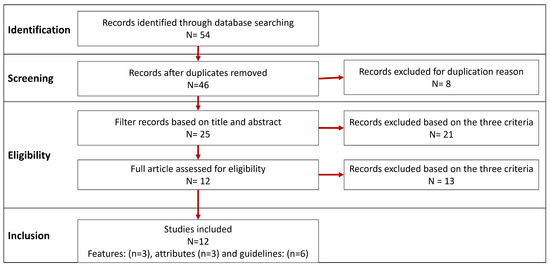
As shown in Figure 2, a total of 54 studies were reviewed from databases, including features, attributes and guidelines related to mHealth applications and accessibility. We excluded eight studies due to the duplication of information. Then, we applied the inclusion and exclusion criteria based on the title, abstract and full text; a total of 34 studies additional were excluded. Finally, 12 studies were included for the goal of our study, consisting of 3 studies for features, 3 for attributes and 6 for guidelines.
Figure 2.
Flowchart for the systematic literature review of UGmHA.
The obtained information from this stage is shown below:
- Features: these features are related to mHealth applications: [14,15,16], which will be discussed in the next stage.
- Usability attributes, which include:
- –
- ISO attributes (effective, efficiency and satisfaction) [46].
- –
- Nielsen’s attributes (learnability, efficiency, memorability, errors and satisfaction) [47].
- –
- PACMAD attributes, which combine both attributes of ISO and Nielsen in addition to the cognitive load attribute (effective, efficiency, learnability, memorability, errors, satisfaction and cognitive load) [48].
- Usability guidelines and design recommendations, which include:
- –
- Usability guidelines related to mHealth applications, which are Nielsen [11], Xcertia [12], HE4EH [6] and telemedicine mobile application recommendations [13].
- –
- Usability guidelines related to elderly people [34].
- –
- Usability guidelines related to people with special needs [35].
Section 2 presents more details regarding guidelines and design recommendations relevant to our study.
3.1.2. Stage 2: Descriptive Stage
In this stage, we highlighted and selected the essential information from the collected literature review in the previous stage.
- For features: we gathered all features from [14,15,16] and summarized them to obtain a list of integrated features. Additionally, we added two more features related to our research, which were accessibility to elderly people and accessibility to people with special needs. Below are the selected features:
- Booking appointments [16].
- Consultation with HCP via text, voice messages and video calls [14,16].
- Sharing data with HCP [14,15].
- Access to personal health information [15].
- Self-monitoring of chronic disease [14,15].
- Allowing uploading and viewing of biometric measurements [14].
- Graphic display of patient’s information [14].
- Set health goals and treatment plan [14,15].
- Track health progress [15].
- Reminders and notifications [14].
- Health tips and motivation [14,15].
- Sharing health data with friends [15].
- Interactive prompts [14].
- Earn rewards [15].
- Bluetooth technology connection [14].
- Accessibility to elderly people.
- Accessibility to people with special needs.
- For usability attributes: we selected only the PACMAD [48] attributes since they combine attributes of both ISO [46] and Nielsen [47]. Below are the selected attributes and their definition based on PACMAD [48].
- –
- Effectiveness: the ability to produce the desired outputs.
- –
- Efficiency: the reduction of wasted materials, such as time, money and effort.
- –
- Satisfaction: the fulfillment of the user’s needs and desires.
- –
- Learnability: a user can learn how to use the application easily.
- –
- Memorability: a user can remember how to use the application after a while.
- –
- Errors: minimizing the user’s error rate while using the application.
- –
- Cognitive Load: the ability to use a mobile application while doing daily activities.
- For usability guidelines: we classified the studies into the main guidelines, which will be used as basic guidelines for the next stages, and checklist items, which help to make the main guidelines more specific to the mHealth applications:
- –
- Main guidelines: we selected all of Nielsen’s principles [11] as well as the “usability” workgroup of Xcertia guidelines [12]. The reason for selecting these two guidelines is that Nielsen’s principles are well-known guidelines that are used to evaluate most user interfaces. Moreover, Xcertia is specified to evaluate mHealth applications in general and developed by authorized organizations in the US.
- –
- Checklist items: we selected [6,12,13], which are related to mHealth applications. Additionally, we selected the guidelines related to elderly people [34] and people with special needs [35].
On the other hand, we discarded all other workgroups of Xcertia [12], which were “privacy”, “security”, “content” and “operability” since they are out of the scope of this study. Moreover, we discarded some checklist items in [6] that are very specific to diabetes and cannot be generalized to all chronic diseases, and we also discarded checklist items in [34,35] that cannot be used for mHealth applications. The results of this stage are shown in Table 2.
Table 2.
The information highlighted in the descriptive stage.
3.1.3. Stage 3: Correlational Stage
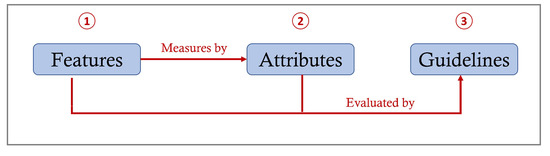
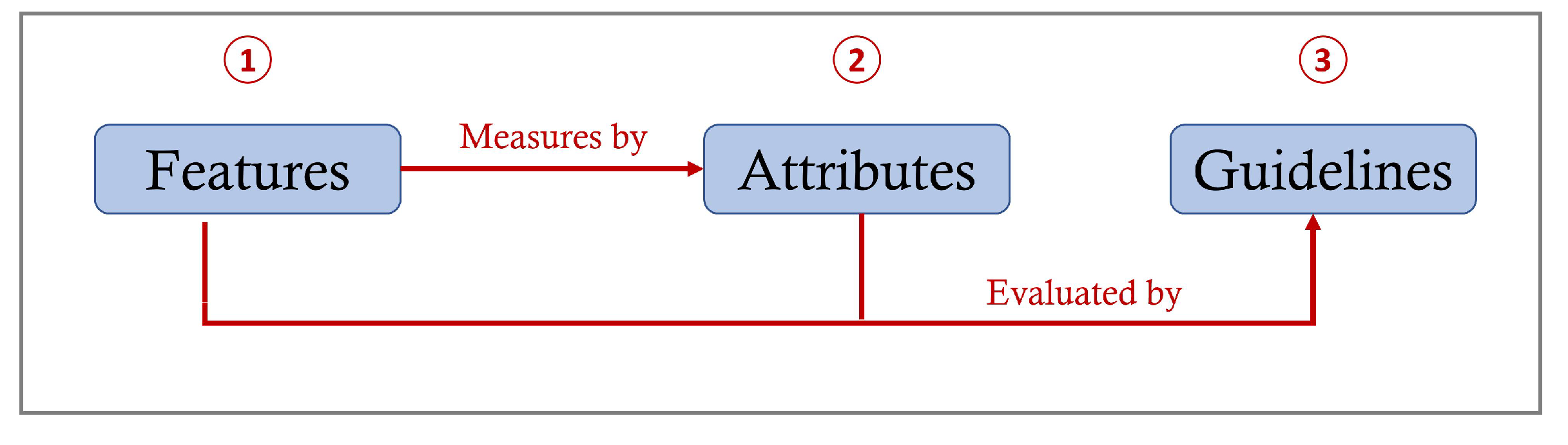
In this stage, the selected features, attributes and the main usability guidelines were matched as shown in Table 3. The purpose of this stage is to identify the specific features and attributes of mHealth applications that need to be evaluated by the main guidelines [17]. The process of matching should be controlled by features, which means that we chose to match the attributes that can measure a specific feature. Then, we chose the main guidelines (from Xcertia and Nielsen) that evaluate attributes with a feature as shown in Figure 3.
Table 3.
Matching among features, attributes and guidelines.
Figure 3.
Matching process for features, attributes and guidelines.
Let us take the booking appointments feature as an example: the most suitable attributes and guidelines can be matched with:
- Attributes:
- –
- Effectiveness: to measure if the appointment is booked at the right date and time selected by the user.
- –
- Efficiency: to measure if this feature saves users’ time and effort without the need to go to the clinic.
- Guidelines:
- –
- Visibility of system status in Nielsen and App feedback in Xcertia: to evaluate booking appointments with the effectiveness attribute if the application provides feedback to the user regarding the right date and time of the appointment.
- –
- Notifications and alarms in Xcertia: to evaluate booking appointments with the efficiency attribute if the application notifies a user after an appointment is booked. Thus, the users’ time and effort to remember the appointment are minimized.
- –
- Historical data in Xcertia: to evaluate booking appointments with the efficiency attribute if the application saves previous and upcoming appointments. Thus, the users’ time and effort to call the clinic to ask for their appointments are minimized.
Another example, is the earn rewards feature, which can be measured by the satisfaction attribute because, when the user earns rewards for a good action or habit, they will be more satisfied with the application. However, there is no matched guideline from Nielsen and Xcertia to evaluate this feature (which will be discussed in the next stage).
3.1.4. Stage 4: Selection Stage
In this stage, an evaluation and determination were made for each main guideline identified in the previous stage [17]:
- Keep: without any change if the guideline is clear and correctly matched to the specific feature of mHealth applications.
- Adapt: if the guideline needs a change to be more related to the mHealth applications.
- Eliminate: if the guideline is redundant or not relevant to the features of mHealth applications.
- Create: if a new guideline is required to evaluate the specific feature of the mHealth applications that the main guidelines cannot evaluate.
In this sense, we adapted all of Nielsen’s guidelines as well as some of the Xcertia guidelines, including onboarding, notifications, historical data and accessibility by adding more checklist items from different studies to be more specific to mHealth applications. Furthermore, we kept the ongoing app evaluation guideline in Xcertia. On the other hand, we eliminated the other Xcertia guidelines, which were visual design, readability, app navigation, app feedback and help resource and troubleshooting because we considered them and their checklist items as parts of Nielsen’s usability guidelines.
Therefore, we merged the checklists of each eliminated guideline in Xcertia with similar guidelines in Nielsen. For example, we found that the checklist items of visual design guideline in Xcertia satisfy the definition of Nielsen’s consistency and standards, recognition rather than recall and error prevention guidelines. Hence, the visual design guideline was eliminated, and its checklist items were moved to the corresponding guideline in Nielsen. This process was applied to all eliminated guidelines in Xcertia. However, F12 and F14 features were not covered by any of the selected main guidelines.
That is why we needed to create a new guideline (Interactive and motivations) that evaluates these features. After that, we determined the applicability of each guideline to identify its importance, whether (1) useful, (2) important or (3) critical based on the guideline definition and checklists. The results of this stage are described in detail in Table 4, Table 5 and Table 6.
Table 4.
Guideline selection process (Nielsen) [11].
Table 5.
Guideline selection process (Xcertia) [12].
Table 6.
Guideline selection process (new created guidelines).
3.1.5. Stage 5: Specification Stage
In this stage, the new set of usability guidelines was formally defined. Quinones et al. [17] recommended keeping the number of usability guidelines between 10 and 16 because it is difficult to employ many guidelines in practice and recommended using checklists to add more details to the guidelines. Therefore, we integrated the guidelines of Nielsen [11] and Xcertia [12] to form the main guidelines of UGmHA and keep them within the recommended range.
However, since Nielsen’s guidelines are general and most of Xcertia guidelines and checklist items are not specific to the features of mHealth applications, we adapted and extended them by adding more checklist items from different studies, which were [6,13,34,35]. The reasons for adding these checklist items are to make the main guidelines more specific to the features of mHealth applications and support the involvement of accessibility features for the elderly and people with special needs. The obtained results of this stage are 16 usability guidelines as shown in Table 7 in addition to 154 checklist items classified by the main guidelines.
Table 7.
The set of proposed usability guidelines for mHealth applications (UGmHA).
The resulting template of this stage will be discussed in Section 4.
3.2. Validating UGmHA
3.2.1. Stage 6: Validation Stage
The validation stage was divided into three phases as suggested by Quinones et al.’s methodology [17]:
- Guideline evaluation phase: check the new set of UGmHA against Nielsen and Xcertia guidelines regarding the number of identified usability issues and severity.
- Expert judgment phase: evaluate the usefulness, efficiency and effectiveness of UGmHA guidelines by questionnaire or interview. Then, the results will be used in the seventh stage (refining stage) of Quinones et al.’s methodology [17].
- User testing phase: enhance the usability of an existing application using refined guidelines of UGmHA. Then, perform user testing for the enhanced application.
However, the first phase of validation (guideline evaluation) will be presented in this paper, while the second and third phases (expert judgment and user testing) are ongoing work that will be published as soon as they are finished. Below are the details of the first phase of the validation.
- Experiment Design:
- –
- Participants: The evaluators who participated in this experiment are two of the authors of this research. The first evaluator was Mrs. Eman Nasr, a master’s student in the Faculty of Computing and Information Technology (FCIT) at King Abdulaziz University with a medium knowledge of usability evaluation. The second evaluator was Dr. Duaa Sinnari, an assistant professor in FCIT at King Abdulaziz University with high experience in usability evaluation and human–computer interaction (HCI).
- –
- Guidelines: UGmHA was tested against Nielsen’s principles and the Xceria guidelines. The reason for selecting these two guidelines is that UGmHA is based mostly on Nielsen’s and Xcertia guidelines and because Nielsen’s principles are well-known guidelines and Xcertia is specified to evaluate mHealth applications.
- –
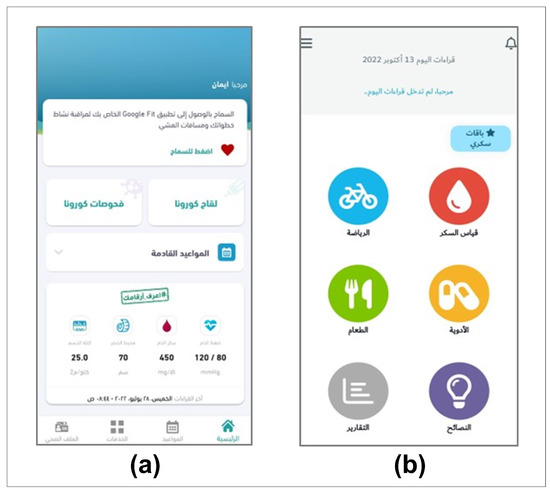
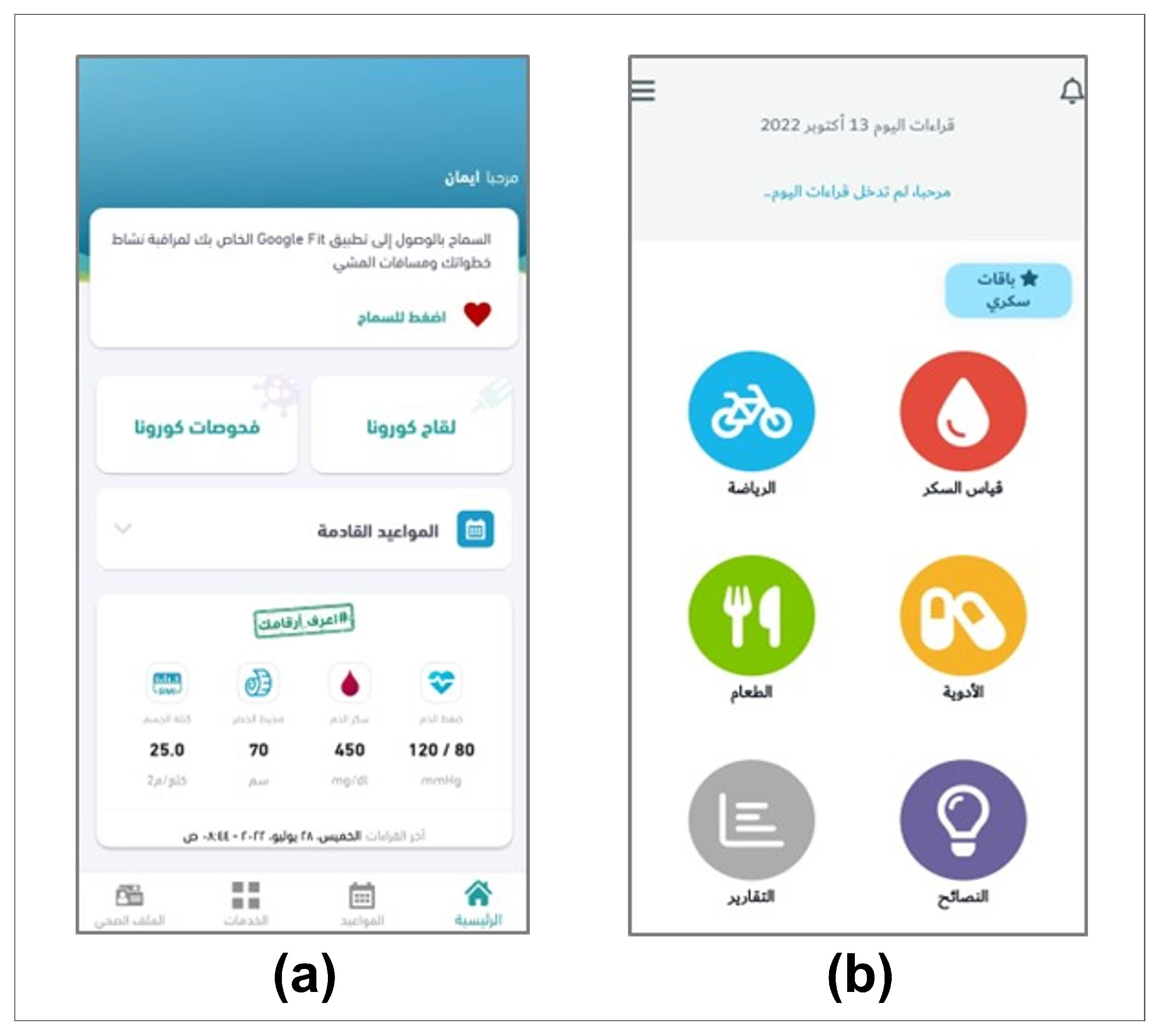
- Applications: We selected the “Sehhaty” and “Sokry” applications. Figure 4 shows the home screen of (a) the first application (Sehhaty) and (b) the second application (Sokry) on the Android operating system in the Arabic language. The reasons for selecting these two applications are because they are simple to use and to achieve diversity between the selected applications based on governmental/ private, functionality and popularity as shown in Table 8.
- Experiment Procedure: To assess the performance, each of the evaluators evaluated both applications individually in a within-subject study that compared the UGmHA, Xcertia and Nielsen guidelines. First, the evaluators evaluated the “Sehhaty” and “Sokry” applications individually using Nielsen’s guidelines and wrote down the discovered usability issues for each application. Second, the assessments of each evaluator using Nielsen’s guidelines were grouped together to generate a single list of usability issues for each application.Third, the evaluators worked together to rate each usability issue in the generated list based on the Severity Rating Scale (SRS). The SRS has five points (0–4) that can be used to prioritize and estimate which usability issues are important to be fixed as shown in Table 9 [51]. Then, the same aforementioned processes were repeated using Xcertia followed by the UGmHA guidelines. From this experiment, we produced six lists of usability issues, which are:
- Using Nielsen’s guidelines: list of usability issues of the “Sehhaty” application.
- Using Nielsen’s guidelines: list of usability issues of the “Sokry” application.
- Using Xcertia guidelines: list of usability issues of the “Sehhaty” application.
- Using Xcertia guidelines: list of usability issues of the “Sokry” application.
- Using UGmHA guidelines: list of usability issues of the “Sehhaty“ application.
- Using UGmHA guidelines: list of usability issues of the “Sokry” application.
Figure 4.
(a) The home screen of the first application. (b) The home screen of the second application.
Table 8.
Details of the “Sehhaty” and “Sokry” applications.
Table 9.
Severity Ranking Scale (SRS) [51].
3.2.2. Stage 7: Refining Stage
In this stage, the expert and user feedback obtained from stage 6 (validation stage) are used for the refining [17]. The process of refining is described as follows:
- Document the changes that should be made to the guidelines.
- Define the guidelines to be created, refined or deleted.
- Iterate and repeat some stages again, if necessary.
However, since the experts’ judgment and user testing in the validation stage are future work. Accordingly, the refining stage is future work for this study.
4. Results
This section presents the results of developing and validating the UGmHA guidelines.
4.1. Results of UGmHA Development
The standard template of Quinones et al. [17] can contain different elements. Still, it depends on the researcher to determine whether to use the complete template or choose the needed elements [52]. Therefore, we decided to select the ID, priority, guideline name, guideline definition, application features and checklist items as described in Table 10. Appendix A shows a detailed description of each guideline in UGmHA.
Table 10.
Descriptive elements for the UGmHA guidelines.
4.2. Results of the UGmHA Validation
After receiving the usability results from the sixth stage (validation stage) described in Section 3, we defined the following findings:
4.2.1. Number of Usability Issues among the Three Guidelines
As depicted in Table 11, the numbers of usability issues discovered in the “Sehhaty” application were 73 using UGmHA, 22 using the Xcertia guidelines and 17 using Nielsen’s guidelines. On the other hand, the numbers of usability issues discovered in the “Sokry” application were 95 using UGmHA, 28 using the Xcertia guidelines and 25 using Nielsen’s guidelines.
Table 11.
Numbers of usability issues of both applications based on the three guidelines.
4.2.2. Severity of Usability Issues among the Three Guidelines
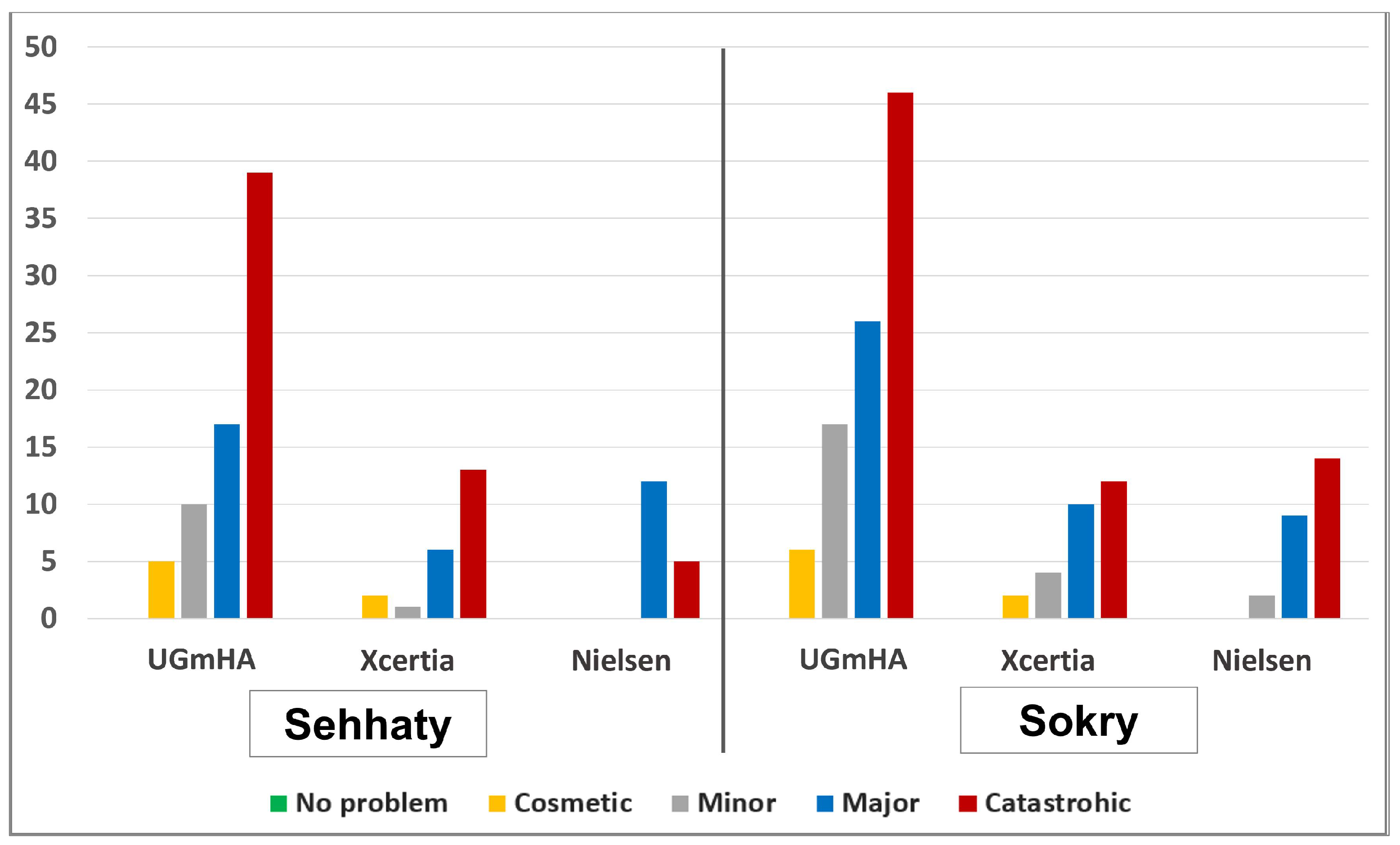
As shown in Table 12 and Figure 5, the number of issues with a “Catastrophic” rating was the highest using all guidelines for both applications. Except for Nielsen’s guidelines, on “Sehhaty”, the highest number of issues were rated with a “Major” rating. However, there were no issues with the “no problem” rating for all guidelines on both applications.
Table 12.
Severity of usability issues of the “Sehhaty” and “Sokry” applications.
Figure 5.
Severity of issues in the “Sehhaty” and “Sokry” applications among the three guidelines.
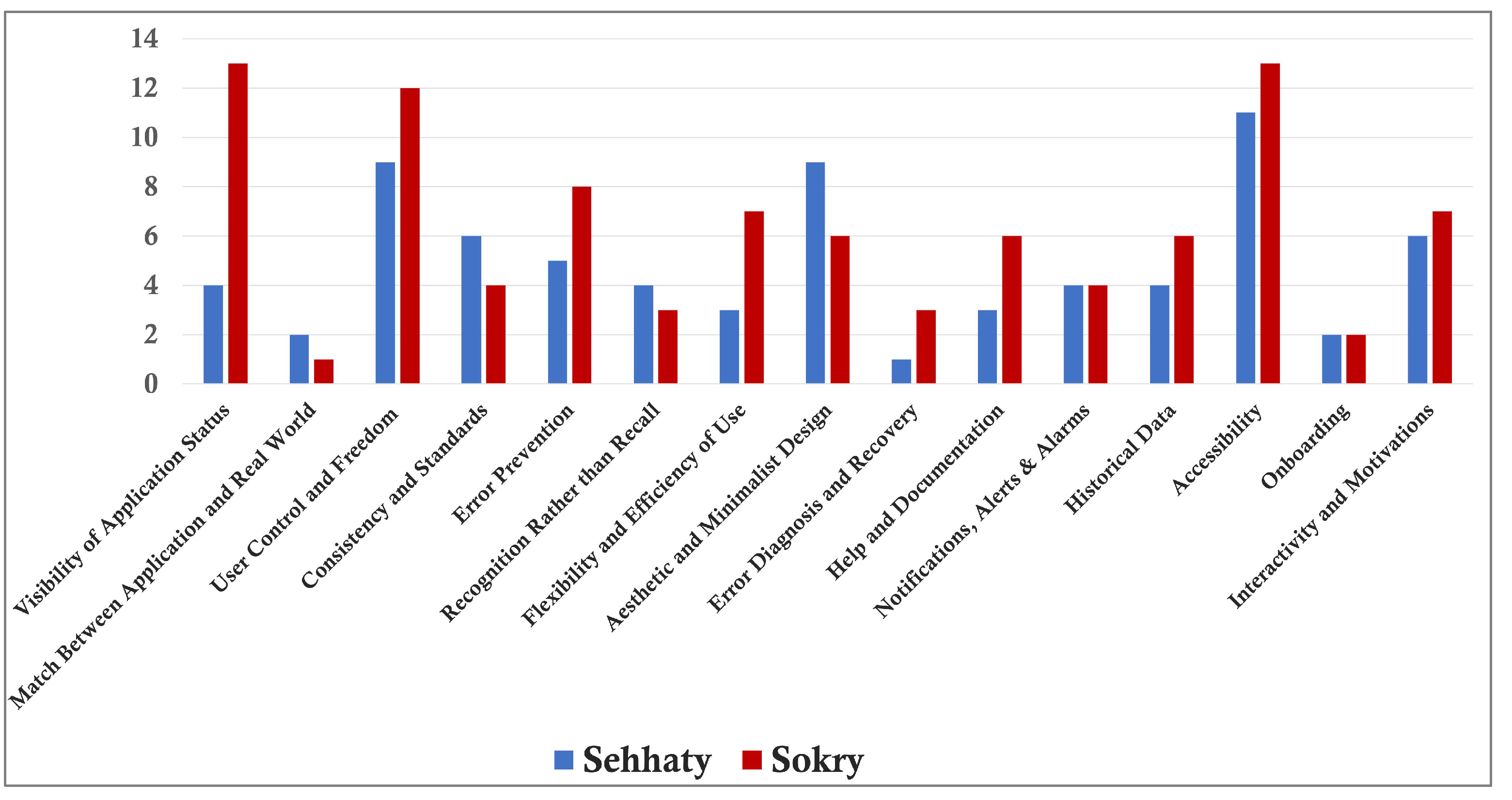
For the UGmHA guidelines, as shown in Figure 6, the most unapplied guidelines in “Sehhaty” were accessibility with 11 issues and then user control and freedom and aesthetic and minimalist design with 9 issues, while the most unapplied guidelines in “Sokry” were the visibility of system status and accessibility with 13 issues and then user control and freedom with 11 issues.
Figure 6.
Number of usability problems found by UGmHA.
However, the least unapplied guidelines in “Sehhaty” were error diagnosis and recovery with one issue, while the least unapplied guideline in “Sokry” was match between system and real world with one issue.
5. Discussion
This section presents the discussion of results obtained from developing and validating the UGmHA guidelines.
5.1. UGmHA Development Discussion
If we compare the resulting guidelines of UGmHA with the Nielsen and Xcertia guidelines, we find that the number of guidelines in UGmHA (16 guidelines) is greater than the number of guidelines in Nielsen (10 guidelines) and Xcertia (10 guidelines). The reason is that UGmHA integrated Nielsen and Xcertia by adapting and eliminating their guidelines through Quinones et al.’s methodology [17] as well as created a new guideline that covers features that Nielsen and Xcertia did not cover. Table 13 shows the UGmHA guidelines with the corresponding guidelines in Nielsen and Xcertia.
Table 13.
Relation of the UGmHA guidelines with Nielsen and Xcertia.
Furthermore, the number of checklist items in UGmHA (154 items) is greater than the number of checklist items in Xcertia (60 items), while there are no checklist items in Nielsen. As mentioned before, Nielsen’s guidelines are general, and a small number of checklist items in Xcertia guidelines are specific to the features of mHealth applications.
Therefore, we adapted and extended the guidelines by adding more checklist items that cover specific features of mHealth applications and features of accessibility for the elderly and people with special needs. The checklist items were extracted from the following studies:
- HE4EH [6], which covers self-monitoring, biometric measurements, etc.
- Telemedicine of mHealth applications [13], which covers consultation, booking appointments, etc.
- Elderly people [34], which covers the feature of accessibility for elderly people.
- People with special needs [35], which covers the feature of accessibility for people with special needs.
This leads to the main contribution of UGmHA by including more guidelines, checklist items and mHealth-specific checklist items than Nielsen and Xcertia as shown in Table 14.
Table 14.
Guidelines and checklist items of UGmHA, Xcertia and Nielsen.
5.2. UGmHA Validation Discussion
From the first experiment of UGmHA validation, we conclude that UGmHA discovered more usability issues than Xcertia and Nielsen for both applications. This is because UGmHA includes more guidelines and checklist items than the others. Moreover, the usability issues discovered in the “Sokry” application are more than those in the “Sehhaty” application for the three guidelines, which means that UGmHA can perform like Nielsen and Xcertia to determine which application is more usable.
For the severity of usability issues, we found that UGmHA found more severe usability issues than Xcertia and Nielsen. Again, this is because UGmHA includes more checklist items and more mHealth-specific checklist items.
For the UGmHA guidelines, we found that the highest number of issues were with the accessibility guideline in both applications. The reason is that the specifications of special needs and elderly people were not considered in the design, such as color preferences, font sizes and the number of words and sentences. This highlights the importance of the accessibility guideline and its checklist items that determine to what extent the application is accessible. For the newly created guideline Interactivity and motivations, we found several usability issues in both applications. This also determines to what extent the applications motivate users to take action and achieve a specific goal.
However, we could not use the Ongoing app evaluation guideline in the experiment since it is up to the application team. Therefore, we will leave it up to the expert judgment phase to acquire their opinion and suggestion about it. In the near future, we plan to provide design recommendations for “Sehhaty” or “Sokry” based on the discovered usability issues and, then, to provide these recommendations to the application team to take their opinion.
One of the challenges we faced was that we could not perform phases 2 and 3 of the validation stage. The reason is that we contacted the user experience (UX) team of the “Sehhaty” application to provide their opinion regarding UGmHA and discovered usability issues, they were willing to cooperate with us; however, right now, they are busy with government projects. Therefore, we postponed the implementation of phases 2 and 3 for a few months in future work.
6. Conclusions and Future Work
With the evolution of mobile applications that have become a supportive technology for different fields, mobile health (mHealth) applications are important to improve the efficiency of healthcare delivery using mobile devices, such as smartphones and wearable devices.
mHealth allows patients to monitor and track their health data and allows communication between patients and their physicians without meeting face to face. However, mHealth applications can harm users if they are not working as intended. Although some studies have discussed general and specific mHealth guidelines, there are certain limitations to them.
In this research, we proposed comprehensive usability guidelines for mHealth applications (UGmHA) that address some of the limitations of previous studies and cover various features related to mHealth applications. The proposed guidelines consist of sixteen (16) guidelines with 154 checklist items built from global and well-known guidelines, such as Nielsen and Xcertia.
In order to validate the effectiveness of the UGmHA guidelines, an experiment was conducted by measuring the performance of the proposed guidelines through comparing the outcomes of the UGmHAto worldwide guidelines. This comparison was applied to two mHealth applications in Saudi Arabia, “Sehhaty” and “Sokry”, to determine which guidelines could identify more usability issues. The results showed that the proposed guidelines discovered more usability issues compared with the others. Thus, UGmHA can assist expert evaluators, designers and developers in designing or evaluating mHealth applications by measuring the usability issues that can influence the user experience of mHealth applications.
For future work, further steps will be conducted to validate and refine UGmHA, which include:
- Generating design recommendations based on the discovered usability issues for “Sehhaty” or “Sokry” and obtaining the application team’s opinion.
- Expert judgment by reviewing guidelines by user experience (UX) experts and acquiring their advice and comments to perform the Refining stage.
- User testing by enhancing the usability of an existing application using refined guidelines of UGmHA and, then, performing user testing for the enhanced application.
Author Contributions
Conceptualization, E.N., W.A. and D.S.; methodology, E.N.; validation, E.N. and D.S.; formal analysis, E.N. and D.S.; resources, E.N.; writing—original draft preparation, E.N.; writing—review and editing, E.N., W.A. and D.S.; supervision, W.A. and D.S.; project administration, W.A. and D.S. All authors have read and agreed to the published version of the manuscript.
Funding
This research received no external funding.
Institutional Review Board Statement
Not applicable.
Informed Consent Statement
Not applicable.
Data Availability Statement
Not applicable.
Conflicts of Interest
The authors declare no conflict of interest.
Abbreviations
The following abbreviations are used in this manuscript:
| eHealth | Electronic health |
| mHealth | Mobile health |
| UGmHA | Usability guidelines for mHealth applications |
| FDA | Food and Drug Administration |
| HIMSS | Healthcare Information and Management Systems Society |
| SRS | Severity rating scale |
| HCP | Healthcare provider |
Appendix A. Final Usability Guidelines for mHealth Applications (UGmHA)
This appendix includes sixteen (16) proposed usability guidelines for mHealth applications (UGmHA). The description and details of each guideline are provided based on Quinones et al.’s template [17]. The template consists of the guideline ID, guideline name, guideline definition, covered application features based on the provided checklist and guidance checklist to evaluate each guideline as shown in Table A1, Table A2, Table A3, Table A4, Table A5, Table A6, Table A7, Table A8, Table A9, Table A10, Table A11, Table A12, Table A13, Table A14, Table A15 and Table A16.
Table A1.
Descriptive details of the first guideline.
Table A2.
Descriptive details of the second guideline.
Table A3.
Descriptive details of the third guideline.
Table A4.
Descriptive details of the fourth guideline.
Table A5.
Descriptive details of the fifth guideline.
Table A6.
Descriptive details of the sixth guideline.
Table A7.
Descriptive details of the seventh guideline.
Table A8.
Descriptive details of the eighth guideline.
Table A9.
Descriptive details of the ninth guideline.
Table A10.
Descriptive details of the tenth guideline.
Table A11.
Descriptive details of the eleventh guideline.
Table A12.
Descriptive details of the twelfth guideline.
Table A13.
Descriptive details of the thirteenth guideline.
Table A14.
Descriptive details of the fourteenth guideline.
Table A15.
Descriptive details of the fifteenth guideline.
Table A16.
Descriptive details of the sixteenth guideline.
References
- Risling, T.; Martinez, J.; Young, J.; Thorp-Froslie, N. Evaluating patient empowerment in association with eHealth technology: Scoping review. J. Med. Internet Res. 2017, 19, e329. [Google Scholar] [CrossRef] [Scilit] [PubMed]
- Dicianno, B.E.; Parmanto, B.; Fairman, A.D.; Crytzer, T.M.; Yu, D.X.; Pramana, G.; Coughenour, D.; Petrazzi, A.A. Perspectives on the evolution of mobile (mHealth) technologies and application to rehabilitation. Phys. Ther. 2015, 95, 397–405. [Google Scholar] [CrossRef] [Scilit]
- Istepanian, R.S.; Jovanov, E.; Zhang, Y. Guest editorial introduction to the special section on m-health: Beyond seamless mobility and global wireless health-care connectivity. IEEE Trans. Inf. Technol. Biomed. 2004, 8, 405–414. [Google Scholar] [CrossRef] [Scilit] [PubMed]
- World Health Organization. mHealth: New Horizons for Health Through Mobile Technologies; World Health Organization: Geneva, Switzerland, 2011. [Google Scholar]
- Barutçu, S. mHealth apps design using quality function deployment. Int. J. Health Care Qual. Assur. 2019, 32, 698–708. [Google Scholar] [CrossRef] [Scilit] [PubMed]
- Khowaja, K.; Al-Thani, D. New checklist for the heuristic evaluation of mHealth apps (HE4EH): Development and usability study. JMIR mHealth uHealth 2020, 8, e20353. [Google Scholar] [CrossRef] [Scilit]
- Cook, V.E.; Ellis, A.K.; Hildebrand, K.J. Mobile health applications in clinical practice: Pearls, pitfalls, and key considerations. Ann. Allergy Asthma Immunol. 2016, 117, 143–149. [Google Scholar] [CrossRef] [Scilit]
- Larson, R.S. A path to better-quality mHealth apps. JMIR mHealth uHealth 2018, 6, e10414. [Google Scholar] [CrossRef] [Scilit]
- Andrade, F.; Nascimento, L.; Wood, G.; Calil, S. Applying heuristic evaluation on medical devices user manuals. In Proceedings of the World Congress on Medical Physics and Biomedical Engineering, Toronto, ON, Canada, 7–12 June 2015; Springer: Cham, Switzerland, 2015; pp. 1515–1518. [Google Scholar]
- Rusu, C.; Roncagliolo, S.; Rusu, V.; Collazos, C. A Methodology to establish usability heuristics. In Proceedings of the ACHI 2011: The Fourth International Conference on Advances in Computer-Human Interactions, Guadeloupe, France, 23–28 February 2011; IARIA: Wilmington, NC, USA, 2011; pp. 59–62. [Google Scholar]
- Nielsen, J. Ten Usability Heuristics. 2005. Available online: http://www.nngroup.com/articles/ten-usability-heuristics (accessed on 5 November 2021).
- Xcertia mHealth App Guidelines. 2019. Available online: https://www.himss.org/sites/hde/files/media/file/2020/04/17/xcertia-guidelines-2019-final.pdf (accessed on 7 November 2020).
- Aldekhyyel, R.N.; Almulhem, J.A.; Binkheder, S. Usability of Telemedicine Mobile Applications during COVID-19 in Saudi Arabia: A Heuristic Evaluation of Patient User Interfaces. Healthcare 2021, 9, 1574. [Google Scholar] [CrossRef] [Scilit]
- Donevant, S.B.; Estrada, R.D.; Culley, J.M.; Habing, B.; Adams, S.A. Exploring app features with outcomes in mHealth studies involving chronic respiratory diseases, diabetes, and hypertension: A targeted exploration of the literature. J. Am. Med. Inform. Assoc. 2018, 25, 1407–1418. [Google Scholar] [CrossRef] [Scilit]
- Lazard, A.J.; Brennen, J.S.B.; Belina, S.P. App Designs and Interactive Features to Increase mHealth Adoption: User Expectation Survey and Experiment. JMIR mHealth uHealth 2021, 9, e29815. [Google Scholar] [CrossRef] [Scilit]
- Shati, A. Mhealth applications developed by the Ministry of Health for public users in KSA: A persuasive systems design evaluation. Health Inform. Int. J. 2020, 9, 1–13. [Google Scholar] [CrossRef] [Scilit]
- Quiñones, D.; Rusu, C.; Rusu, V. A methodology to develop usability/user experience heuristics. Comput. Stand. Interfaces 2018, 59, 109–129. [Google Scholar] [CrossRef] [Scilit]
- Mitchell, J. From Telehealth to e-Health: The Unstoppable Rise of e-Health; Department of Communications, Information Technology and the Arts: Canberra, Australia, 1999. [Google Scholar]
- Rooij, T.v.; Marsh, S. eHealth: Past and future perspectives. Pers. Med. 2016, 13, 57–70. [Google Scholar] [CrossRef] [Scilit] [PubMed]
- Black, A.D.; Car, J.; Pagliari, C.; Anandan, C.; Cresswell, K.; Bokun, T.; McKinstry, B.; Procter, R.; Majeed, A.; Sheikh, A. The impact of eHealth on the quality and safety of health care: A systematic overview. PLoS Med. 2011, 8, e1000387. [Google Scholar] [CrossRef] [Scilit] [PubMed]
- Prado, L.; Carpentier, C.; Préau, M.; Schott, A.M.; Dima, A. mHealth Apps for Self-Management of Chronic Conditions in France: What Is Out There? In MEDINFO 2019: Health and Wellbeing e-Networks for All; IOS Press: Amsterdam, The Netherlands, 2019; pp. 1970–1971. [Google Scholar]
- Markus, M.L.; Keil, M. If we build it, they will come: Designing information systems that people want to use. MIT Sloan Manag. Rev. 1994, 35, 11. [Google Scholar]
- Tan, W.s.; Liu, D.; Bishu, R. Web evaluation: Heuristic evaluation vs. user testing. Int. J. Ind. Ergon. 2009, 39, 621–627. [Google Scholar] [CrossRef] [Scilit]
- International Organization for Standardization. Ergonomic Requirements for Office Work with Visual Display Terminals (VDTs); ISO: Geneva, Switzerland, 1992. [Google Scholar]
- Bevana, N.; Kirakowskib, J.; Maissela, J. What is usability. In Proceedings of the fourth International Conference on HCI, Stuttgart, Germany, 1–6 September 1991; pp. 1–6. [Google Scholar]
- Nielsen, J.; Molich, R. Heuristic evaluation of user interfaces. In Proceedings of the SIGCHI Conference on Human Factors in Computing Systems, Seattle, WA, USA, 1–5 April 1990; pp. 249–256. [Google Scholar]
- Quiñones, D.; Rusu, C. How to develop usability heuristics: A systematic literature review. Comput. Stand. Interfaces 2017, 53, 89–122. [Google Scholar] [CrossRef] [Scilit]
- Hermawati, S.; Lawson, G. Establishing usability heuristics for heuristics evaluation in a specific domain: Is there a consensus? Appl. Ergon. 2016, 56, 34–51. [Google Scholar] [CrossRef] [Scilit]
- Vieira, E.A.O.; Silveira, A.C.D.; Martins, R.X. Heuristic evaluation on usability of educational games: A systematic review. Inform. Educ. 2019, 18, 427–442. [Google Scholar] [CrossRef] [Scilit]
- Paz, F.; Paz, F.A.; Pow-Sang, J.A.; Collantes, L. Usability heuristics for transactional web sites. In Proceedings of the 2014 11th International Conference on Information Technology: New Generations, IEEE, Las Vegas, NV, USA, 7–9 April 2014; pp. 627–628. [Google Scholar]
- Leverenz, T. The Development and Validation of a Heuristic Checklist for Clinical Decision Support Mobile Applications. Ph.D. Thesis, Wichita State University, Wichita, KS, USA, 2019. [Google Scholar]
- Chattratichart, J.; Lindgaard, G. A comparative evaluation of heuristic-based usability inspection methods. In CHI’08 Extended Abstracts on Human Factors in Computing Systems; Association for Computing Machinery: New York, NY, USA, 2008; pp. 2213–2220. [Google Scholar]
- Roy, B.; Call, M.; Abts, N. Development of usability guidelines for mobile health applications. In Proceedings of the International Conference on Human–Computer Interaction, Orlando, FL, USA, 26–31 July 2019; Springer: Cham, Switzerland, 2019; pp. 500–506. [Google Scholar]
- Al-Razgan, M.S.; Al-Khalifa, H.S.; Al-Shahrani, M.D. Heuristics for evaluating the usability of mobile launchers for elderly people. In Proceedings of the International Conference of Design, User Experience, and Usability, Heraklion, Crete, Greece, 22–27 June 2014; Springer: Cham, Switzerland, 2014; pp. 415–424. [Google Scholar]
- Arachchi, T.K.; Sitbon, L.; Zhang, J. Enhancing access to eLearning for people with intellectual disability: Integrating usability with learning. In Proceedings of the IFIP Conference on Human–Computer Interaction, Mumbai, India, 25–29 September 2017; Springer: Cham, Switzerland, 2017; pp. 13–32. [Google Scholar]
- Sanz, F.; Galvez, R.; Rusu, C.; Roncagliolo, S.; Rusu, V.; Collazos, C.A.; Cofré, J.P.; Campos, A.; Quiñones, D. A set of usability heuristics and design recommendations for u-learning applications. In Proceedings of the Information Technology: New Generations: 13th International Conference on Information Technology, Las Vegas, NV, USA, 11–13 April 2016; Springer: Cham, Switzerland, 2016; pp. 983–993. [Google Scholar]
- Campos, A.; Rusu, C.; Roncagliolo, S.; Sanz, F.; Gálvez, R.; Quiñones, D. Usability heuristics and design recommendations for driving simulators. In Proceedings of the Information Technology: New Generations: 13th International Conference on Information Technology, Las Vegas, NV, USA, 11–13 April 2016; Springer: Cham, Switzerland, 2016; pp. 1287–1290. [Google Scholar]
- Gale, N.; Mirza-Babaei, P.; Pedersen, I. Heuristic guidelines for playful wearable augmented reality applications. In Proceedings of the 2015 Annual Symposium on Computer-Human Interaction in Play, London, UK, 5–7 October 2015; pp. 529–534. [Google Scholar]
- da Hora Rodrigues, K.R.; Teixeira, C.A.C.; de Almeida Neris, V.P. Heuristics for assessing emotional response of viewers during the interaction with TV programs. In Proceedings of the Human–Computer Interaction. Theories, Methods, and Tools: 16th International Conference, HCI International 2014, Heraklion, Crete, Greece, 22–27 June 2014; Proceedings, Part I 16. Springer: Cham, Switzerland, 2014; pp. 577–588. [Google Scholar]
- Charness, G.; Gneezy, U.; Kuhn, M.A. Experimental methods: Between-subject and within-subject design. J. Econ. Behav. Organ. 2012, 81, 1–8. [Google Scholar] [CrossRef] [Scilit]
- Kuparinen, L.; Silvennoinen, J.; Isomäki, H. Introducing usability heuristics for mobile map applications. In Proceedings of the International Cartographic Conference, Dresden, Germany, 25–30 August 2013; International Cartographic Association: Bern, Switzerland, 2013. [Google Scholar]
- Munoz, R.; Chalegre, V. Defining virtual worlds usability heuristics. In Proceedings of the 2012 Ninth International Conference on Information Technology-New Generations, IEEE, Las Vegas, NV, USA, 16–18 April 2012; pp. 690–695. [Google Scholar]
- Moraes, M.C.; Silveira, M.S. How am I? Guidelines for animated interface agents evaluation. In Proceedings of the 2006 IEEE/WIC/ACM International Conference on Intelligent Agent Technology, IEEE, Hong Kong, China, 18–22 December 2006; pp. 200–203. [Google Scholar]
- Muhanna, M.; Masoud, A.; Qusef, A. Usability heuristics for evaluating Arabic mobile games. Int. J. Comput. Games Technol. 2022, 2022, 5641486. [Google Scholar] [CrossRef] [Scilit]
- Keele, S. Guidelines for Performing Systematic Literature Reviews in Software Engineering; Technical Report, Ver. 2.3; EBSE: Durham, UK, 2007. [Google Scholar]
- Iso, W. 9241-11. Ergonomic requirements for office work with visual display terminals (VDTs). Int. Organ. Stand. 1998, 45, 22. [Google Scholar]
- Usability 101: Introduction to Usability. 2012. Available online: https://www.nngroup.com/articles/usability-101-introduction-to-usability/ (accessed on 8 March 2021).
- Harrison, R.; Flood, D.; Duce, D. Usability of mobile applications: Literature review and rationale for a new usability model. J. Interact. Sci. 2013, 1, 1. [Google Scholar] [CrossRef] [Scilit]
- Sehhaty Application. 2022. Available online: https://play.google.com/store/apps/details?id=com.lean.sehhaty (accessed on 6 December 2022).
- Sokry Application. 2022. Available online: https://play.google.com/store/apps/details?id=com.sokry (accessed on 6 December 2022).
- Severity Ratings for Usability Problems. 1994. Available online: https://www.nngroup.com/articles/how-to-rate-the-severity-of-usability-problems/ (accessed on 5 September 2021).
- Quiñones, D.; Rusu, C. Applying a methodology to develop user eXperience heuristics. Comput. Stand. Interfaces 2019, 66, 103345. [Google Scholar] [CrossRef] [Scilit]

Disclaimer/Publisher’s Note: The statements, opinions and data contained in all publications are solely those of the individual author(s) and contributor(s) and not of MDPI and/or the editor(s). MDPI and/or the editor(s) disclaim responsibility for any injury to people or property resulting from any ideas, methods, instructions or products referred to in the content. |
© 2023 by the authors. Licensee MDPI, Basel, Switzerland. This article is an open access article distributed under the terms and conditions of the Creative Commons Attribution (CC BY) license (https://creativecommons.org/licenses/by/4.0/).