


Abstract
User Interface (UI) and User Experience (UX) design play a critical role in shaping human interaction with digital systems, particularly in professional environments where accuracy, safety, and efficiency are essential. Poor visual design increases cognitive load and the likelihood of human error, whereas ergonomically informed interfaces can substantially improve task performance. This systematic literature review analyzes 20 peer-reviewed studies published between 2020 and 2024 to examine how visual ergonomics embedded in UI/UX design contributes to error reduction across industrial and professional contexts. The reviewed studies report measurable improvements when ergonomic principles are applied, including reductions in operational errors ranging from approximately 30% to 70%, improvements in task completion time between 20% and 60%, and increased user accuracy and satisfaction in safety-critical and high-workload environments. The findings indicate that visual hierarchy, modular layouts, adaptive components, and real-time feedback are consistently associated with improved performance outcomes. Moreover, task complexity, user expertise, and working conditions were identified as moderating factors influencing ergonomic demands. Overall, the review demonstrates that visual ergonomics should be treated not merely as a usability enhancement but as a strategic design approach for minimizing human error and supporting reliable human–machine interaction in complex digital environments.
1. Introduction
Despite rapid advances in digital technologies and interface development tools, many professional digital systems continue to exhibit visual overload, fragmented information structures, and limited adaptation to user context. These shortcomings are particularly problematic in industrial and safety-critical environments, where operators must process large volumes of information under time pressure and make decisions with limited tolerance for error [1,2,3].
In such contexts, insufficient visual ergonomics can result in delayed responses, misinterpretation of system states, and increased operational risk. Prior research has demonstrated that poorly designed interfaces contribute directly to higher cognitive workload and reduced situational awareness, ultimately increasing the probability of human error [4,5].
Although UI/UX design has been extensively studied in consumer applications and general usability research, its specific contribution to visual ergonomics and error reduction in professional and industrial settings remains insufficiently systematized. Existing studies are distributed across multiple disciplines, including human–computer interaction, industrial engineering, cognitive science, and design research, often focusing on isolated interface components rather than integrated ergonomic strategies [6,7,8].
At the same time, emerging technologies such as augmented and virtual reality systems, intelligent automation, and remote operation platforms have significantly intensified visual and cognitive demands on users. These systems introduce new interaction paradigms that require carefully designed visual hierarchies, feedback mechanisms, and adaptive layouts to ensure safe and efficient use [9,10,11].
In response to these challenges, a systematic synthesis of recent empirical evidence is required to clarify how visually ergonomic UI/UX design influences user performance and error prevention in professional environments. This review addresses that need by consolidating findings from recent studies and providing an integrated perspective on the relationship between visual ergonomics, user experience, and human error reduction [12,13].
In the context of the ongoing digital transformation that is progressively redefining personal, professional and educational environments, the interaction between users and digital systems has acquired strategic importance in terms of efficiency, safety and well-being [14]. Within this scenario, User Interface (UI) and User Experience (UX) design have moved beyond merely aesthetic or functional dimensions to become key factors in the quality of interaction [15]. These disciplines not only mediate access to information but also shape how individuals perceive, understand and act within complex digital environments. Consequently, user-centered UI/UX design is directly linked to visual ergonomics, which refers to a set of principles aimed at optimizing the user’s perception, interpretation and response to specific visual stimuli [16,17,18].
Research has demonstrated that visual elements such as contrast and information hierarchy enhance comprehension and decision-making in digital contexts [14], while spatial organization and functional grouping reduce cognitive overload and guide user attention efficiently [19]. Likewise, color and icon coding facilitate rapid interpretation, particularly in systems requiring immediate responses [20]. Immediate feedback mechanisms further contribute to preventing navigation or operational errors by maintaining user awareness of system states [21]. In a scenario characterized by the proliferation of smart devices and immersive environments such as VR and AR, interfaces must adapt to varying degrees of visual intensity and contextual complexity, increasing the need for ergonomic visual design [22]. Additionally, the rise in remote work and the growing dependence on specialized digital tools amplify the importance of visually comfortable and cognitively accessible interfaces [1,2].
Nevertheless, despite technological and methodological advances, significant gaps persist in implementing effective visual ergonomics. Many systems exhibit visual overload or unintuitive navigation structures, which hinder comprehension and negatively affect usability [3,4]. The lack of adaptation to diverse user profiles also increases the likelihood of human error, especially in tasks requiring precision under time pressure [5]. Demographic changes and variations in digital literacy further emphasize the urgency of inclusive designs aligned with accessibility and functional requirements [6,7]. Likewise, the rapid evolution of digital devices and their integration with artificial intelligence systems demands renewed approaches to visual interaction that adapt dynamically to users’ contexts and needs [8,9]. Given these challenges, consolidating existing knowledge on the ways in which UI/UX design, when informed by visual ergonomics principles can function as a preventive mechanism against human errors and as a promoter of safer and more efficient user experiences is essential [10]. Current information on this relationship is scattered across multiple disciplines, including engineering, graphic design, computer science and cognitive psychology, which complicates its systematization and consistent application.
This systematic review therefore seeks to analyze how ergonomic UI/UX design influences User Experience and contributes to reducing errors in digital system interactions. The article is structured as follows: first, it justifies the selection of the studies considered relevant to the research objective; second, it synthesizes the findings, identifying the contributions of the selected studies and analyzing their practical implications for designers and developers; and finally; it summarizes the key ideas and provides a concluding perspective that reaffirms the importance of comprehensively addressing the connections between visual ergonomic design, User Experience and the reduction in errors in human–machine interactions.
Despite the growing body of research on UI/UX design and usability, existing studies often address visual ergonomics, user experience, and human error as partially independent constructs or within narrowly defined application domains. This fragmentation limits the transferability of findings to complex professional and industrial environments, where visual demands, task criticality, and contextual constraints interact dynamically.
The research questions formulated in this review are intended to address this gap by systematically examining the relationship between UI/UX design, visual ergonomics, and human error. By identifying relevant design elements, comparing ergonomically informed and non-ergonomic interfaces, and considering the influence of working conditions, this study aims to provide a structured perspective that supports both theoretical consolidation and practical design decision-making.
Research Questions
This systematic review is guided by the following research questions:
- How does UI/UX design influence user experience and error reduction during interaction with digital systems?
- Which UI/UX design elements are most closely aligned with visual ergonomics principles?
- What differences exist in error occurrence between systems designed with and without visual ergonomics considerations?
- How does ergonomically informed UI/UX design affect operational efficiency in work-related tasks?
- To what extent do working conditions influence the need for visual ergonomics in human–machine interaction?
2. Materials and Methods
This research adopts a qualitative approach, based on a systematic review, aimed at identifying, analyzing and synthesizing the most recent studies exploring the impact of UI/UX design on visual ergonomics, as well as its relationship with the reduction in human error in work contexts. The relevance of this review lies in the growing need to optimize human–machine interaction in professional environments, where safety, efficiency and visual comfort are critical factors [11,12]. In such scenarios, shortcomings in interface design not only compromise productivity but can also significantly increase the risk of incidents related to operational errors.
Given the interdisciplinary scope of the subject, encompassing computer science, ergonomics, cognitive psychology and industrial design. The SLR methodology was selected for its capacity to integrate evidence from diverse sources within a structured framework [13,23]. This qualitative approach identifies patterns, recurring findings, and gaps, while examining contextual and cognitive factors that influence interface usability, in consequence offering both an analytical synthesis of trends and a basis for practical design strategies in real world contexts [24,25].
The review was structured following the PRISMA protocol, a widely recognized methodology for its rigor and transparency in conducting systematic studies. Additionally, the search strategy was designed using the PICOC model, a tool that facilitates the formulation of clear and structured research questions aligned with the study’s objectives [26,27]. This approach made it possible to precisely define the core thematic axes, consequently enabling the construction of specific search strings covering the various domains involved. From this framework, a main research question and a set of sub-questions were formulated to guide the selection of studies and the subsequent synthesis of results, allowing the topic to be addressed from a comprehensive perspective. Table 1 presents these questions, while Table 2 summarizes the search terms organized according to the four components of the PICOC model, describing each factor and indicating those selected as search terms.
Table 1.
Research questions.
Table 2.
Search terms.
The systematic review followed the guidelines established by the PRISMA methodology, recognized for its ability to structure and ensure methodological rigor in studies of this nature. As part of the review, a systematic search equation was designed to retrieve relevant literature in accordance with the PICOC model. The literature search was conducted exclusively using the Scopus database due to its broad multidisciplinary coverage and its strong representation of peer-reviewed journals and conference proceedings in engineering, computer science, and human–computer interaction [23]. This equation was implemented in the Scopus database, resulting in an initial search total of 679 documents applied in Scopus. A series of general filters was implemented to further refine the document selection and ensure their relevance within the framework of this SLR. Applying these filters reduced the initial set from 679 to 53 studies meeting the basic requirements for inclusion in the review. Table 3 presents a structured search strategy based on the PICOC framework was applied to identify relevant studies published between 2020 and 2024. This equation consolidates the key terms and their logical combinations, ensuring a comprehensive retrieval of relevant studies while maintaining alignment with the research questions.
Table 3.
Search equation.
(TITLE-ABS-KEY (“users” OR “end users” OR “digital users” OR “system users” OR “application users” OR “human users” OR “software users” OR “interface users” OR “online users” OR “technology users”) AND TITLE-ABS-KEY (“user interface” OR “UI design” OR “UX design” OR “user experience” OR “interaction design” OR “digital interface” OR “human-computer interaction” OR “graphical user interface” OR “interface usability” OR “UI/UX optimization”) OR TITLE-ABS-KEY (“no UI design” OR “non-UX interface” OR “traditional interface” OR “outdated interface” OR “basic interface” OR “minimal design” OR “standard interface” OR “conventional interface” OR “non-ergonomic UI” OR “poor usability”) AND TITLE-ABS-KEY (“user satisfaction” OR “usability” OR “error reduction” OR “human error” OR “task performance” OR “interaction efficiency” OR “cognitive load” OR “interface success” OR “visual clarity” OR “error prevention”) AND TITLE-ABS-KEY (“human-machine interaction” OR “work environment” OR “workplace” OR “occupational setting” OR “professional environment” OR “job-related system” OR “organizational system” OR “work system” OR “business application” OR “enterprise software” OR “employee interface”)) AND PUBYEAR > 2019 AND PUBYEAR < 2026 AND (LIMIT-TO (SUBJAREA, “COMP”) OR LIMIT-TO (SUBJAREA, “ENGI”)) AND (LIMIT-TO (DOCTYPE, “ar”) OR LIMIT-TO (DOCTYPE, “cp”) OR LIMIT-TO (DOCTYPE, “ch”)) AND (LIMIT-TO (LANGUAGE, “English”)) AND (LIMIT-TO (OA, “all”)).
Among the inclusion and exclusion criteria established in Table 4 and Table 5, it was determined that the studies must focus on users interacting with digital systems in work environments and that UI/UX design elements should align with visual ergonomics principles. Furthermore, it was considered essential for studies to demonstrate the impact of UI/UX design on reducing human error and improving operational efficiency, as well as highlighting the influence of visual ergonomics on human–machine interaction in professional contexts. Conversely, documents failing to meet these criteria were excluded.
Table 4.
General inclusion and exclusion criteria.
Table 5.
Specific inclusion and exclusion criteria.
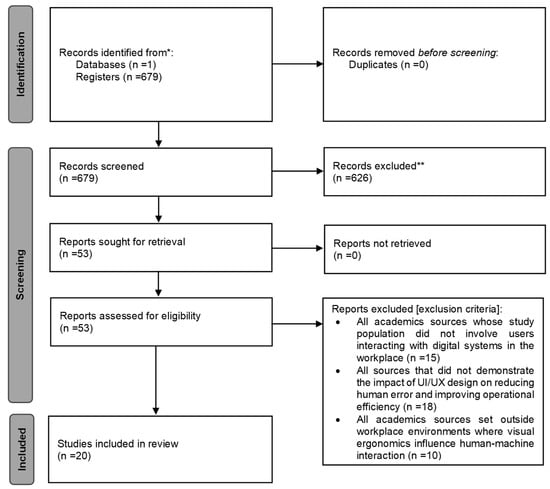
The initial search yielded 679 records. After applying automatic filters related to publication year, document type, language, and accessibility, 53 studies remained. A manual screening process was subsequently conducted to evaluate relevance and methodological rigor. Studies were retained if they explicitly described their UI/UX design approach, examined user interaction in professional or work-related contexts, and reported empirical outcomes related to usability, performance, or human error. This final screening stage resulted in a total of 20 studies included in the review.
Figure 1 is a detailed PRISMA flow diagram illustrates the rigorous filtering process and how the inclusion and exclusion criteria were applied to determine the final number of studies considered for this SLR.
Figure 1.
PRISMA flow diagram of the study. * Records identified through electronic databases and registers. ** Records excluded after title and abstract screening based on relevance to the research objectives. Note, “n” = number of publications.
Search filters in Scopus were used to limit the results by publication year, document type, accessibility and language, while eligibility was assessed manually by reviewing each document to exhaustively select those meeting the inclusion criteria and excluding those that did not. This process yielded appropriate results for the research, ensuring the adequacy of the selected documents and guaranteeing the quality of the investigation of each source. Table 6 summarizes these selected articles, detailing their reference number, title, and year of publication. Providing a clear overview of the scientific evidence forming the basis of this review.
Table 6.
Selected articles.
Because this review relied exclusively on a single database, relevant studies indexed only in other sources such as IEEE Xplore, Web of Science, or the ACM Digital Library may not have been captured [23]. As a result, certain domain-specific contributions may be underrepresented, and future reviews should integrate multiple databases to reduce potential selection bias.
3. Results
The main findings of the SLR are presented below. To address the topic, the analysis of the selected documents is developed by responding to the research questions formulated using the PICOC model and though bibliometric analysis. These results compile relevant data to synthesize the available scientific evidence about the study.
3.1. RQ1: What Characteristics Do Users Who Interact with Digital Systems Have?
Studies [12,14,17,21] focus on users with high technical demands or operational autonomy, such as evaluators of language models [17], operators of automated vehicles [13], participants in spaceflight simulations [21], or users in automated driving simulators [5]. In contrast, studies [6,8,16,28,29] address intermediate or non-specialized users, whether university students, mobile users or digital collaborators. Meanwhile, studies such as [2,7,13,14,15,18,19,22,26,30,31] present users operating in structured work environments or performing complex functional tasks, whether in factories, hospitals, assembly plants, construction or technical training.
Table 7 classifies users interacting with digital systems according to their level of technical specialization, type of task performed, and the environment in which interaction occurs. This classification shows how different groups of users present particular cognitive, visual, and operational needs that must be considered during the design process. Recognizing these differences fosters the development of more accessible, intuitive interfaces tailored to each user profile.
Table 7.
Type of users.
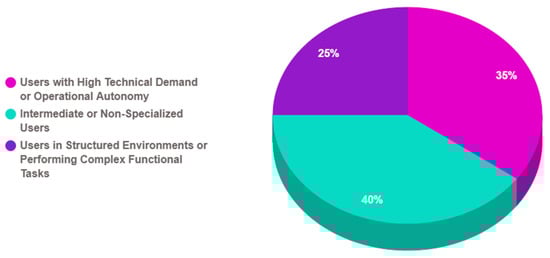
Figure 2 shows the three main types of users identified: intermediate or non-specialized, technicians with high operational autonomy, and users in structured or functional environments. Each group presents distinct demands that directly impact visual system design. While the first group requires simplicity and clarity, the second demands operational precision and immediate feedback. The third needs interfaces adaptable to multiple roles and coordinated tasks. These results highlight that understanding the user profile is key to reducing human errors and improving efficiency in digital interaction.
Figure 2.
Distribution of users interacting with digital systems.
3.2. RQ2: Which UI/UX Design Elements Align with Visual Ergonomics Principles?
The results of the analyzed studies reveal a progressive integration of visual ergonomics principles into UI/UX-designed interfaces, adapted to the context of use and the user profile. In critical or highly automated contexts, such as in studies on autonomous vehicle supervision [12,30,31] and space simulation [21], interfaces are identified that prioritize hierarchical information design, reduction in unnecessary visual fields, and event anticipation through clear visual cues. These strategies aim to reduce reaction time and errors caused by perceptual oversaturation. In [7], an adaptive artificial intelligence system is introduced that presents criticality levels through progressive visual signals such as information, warning, and intervention, aligned with the principles of visibility, relevance, and prioritization.
In collaborative or mobile environments, where interaction may be asynchronous or interrupted, solutions such as modular screens, simplified navigation systems, and functional colors to distinguish roles or tasks are highlighted [8,14,19,22]. Likewise, in immersive or emotional scenarios such as those addressed in [13,16,29], visual ergonomics is reflected through interfaces that balance stimulation and simplicity: coherent visual narratives, controlled visual focus, non-intrusive colors, and navigation paths guided by the user’s attention. Finally, in mobile applications and structured work environments such as hospitals or assembly plants, visual ergonomics principles are applied through elements such as logical function grouping, reduction in visual noise, functional iconography, and compatibility between visual stimuli and expected actions [15,19,26].
Table 8 presents the relationship between UI/UX design elements and visual ergonomics principles. By structuring these elements from an ergonomic perspective, the table offers a clear view of design features that can be strategically applied to prevent human errors and foster more intuitive and efficient interaction.
Table 8.
Relevant UI/UX design elements.
Table 9 categorizes interface design elements according to their ability to visually structure components in a comprehensible way, segment their functions into recognizable modules, and provide immediate responses to user actions. These factors are considered key to reducing operational errors and enabling smoother synchronization between perception and action.
Table 9.
Clear, modular interfaces with immediate feedback.
Table 10 compiles the visual coding strategies identified in the analyzed studies, detailing how information is visually represented to facilitate interpretation and reduce the likelihood of user errors. These coding methods are expressed through various modalities, such as the use of specific colors, consistency in iconography, the hierarchical arrangement of elements, and the inclusion of progressive indicators. All these approaches are aligned with the principles of visual ergonomics, as they enhance the immediate recognition of critical information, guide the user’s attention toward relevant elements, and minimize unnecessary cognitive load. Furthermore, these strategies contribute to creating intuitive interaction patterns that improve user confidence and operational efficiency.
Table 10.
Visual coding strategies (color, icons, diagrams and block groupings).
Table 11, the design elements are categorized according to their role within an organized visual hierarchy, showing how they allow the user to focus attention on relevant content and avoid distractions or ambiguities. These elements, present in the articles where they are implemented, produce interfaces with a clear hierarchy that facilitate decision-making in critical environments, prevent navigation errors, visual fatigue, and loss of efficiency. The evidence shows that a well-structured visual hierarchy enhances the immediate interpretation of information and reduces the user’s cognitive load.
Table 11.
Interfaces with clear informational hierarchy.
In Table 12, the UI/UX design elements are identified to ensure the system is user-centered, considering the needs, capabilities, and limitations of the end user, while applying standards such as ISO 9241. These elements, incorporated into the design process, iterative usability testing, and user task mapping within the interfaces studied in the referenced articles, have resulted in more accessible interfaces, better adapted to the actual context, and with higher acceptance and satisfaction levels.
Table 12.
User-centered design with ISO standards application.
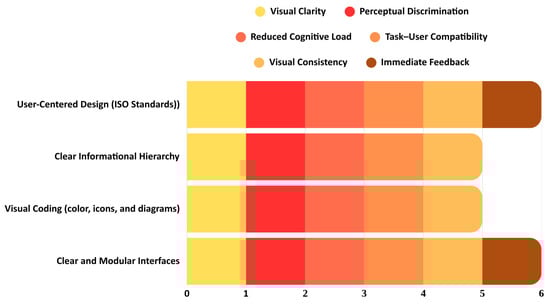
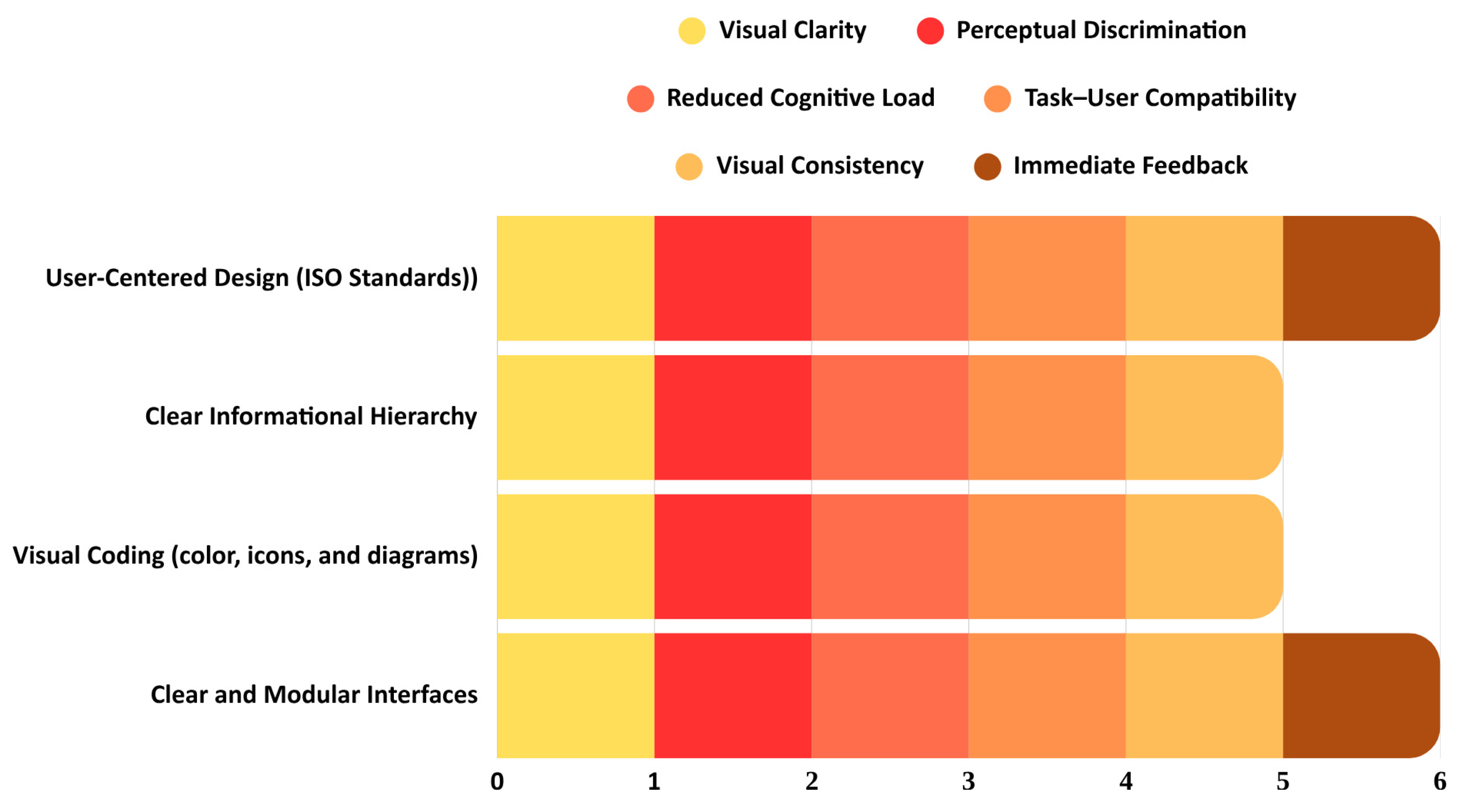
In Figure 3, the cross-sectional analysis of UI/UX design elements reveals a significant correspondence with the principles of visual ergonomics, showing a structural alignment between both approaches. Modular interfaces with immediate feedback met all evaluated principles. Visual coding and informational hierarchy were strongly associated with clarity, perceptual discrimination, and reduced cognitive load, although not always providing direct feedback. User-centered design, particularly when applying standards such as ISO 9241, consistently integrated all principles. These findings confirm that well-structured visual elements enhance user experience and prevent errors in human–machine interaction.
Figure 3.
Correspondence between UI/UX design elements and visual ergonomics principles.
3.3. RQ3: What Differences Exist Between Systems Designed with and Without Visual Ergonomics Principles in Terms of the Occurrence of Human Errors?
Studies applying visual ergonomics principles, such as informational hierarchy, visual coding, immediate feedback, and modular segmentation, report a clear reduction in human errors. In critical contexts, such as remote vehicle supervision [12,30,31] or collaboration in simulated space environments [8], these strategies enable precise visual interpretation, reduce cognitive overload, and improve operational efficiency. Systems with projected or multimodal interfaces [2,7,14,15,19] also show notable performance improvements, minimizing repeated or incorrect actions through optimized information visualization.
Conversely, studies lacking these principles present a higher frequency of operational errors, particularly in collaborative, mobile, or clinical tasks. Articles such as [6,8,16,26,29] reveal that the absence of a clear visual structure, feedback, or functional coding leads to misunderstandings, omissions, and navigation errors. Even in systems with partially ergonomic designs [13,17,18,28], incomplete implementation translates into errors caused by visual ambiguity, redundant task execution, or misinterpretation. In contrast, studies integrating user-centered design with a clear, progressive visual structure not only reduce errors but also optimize overall system performance and experience.
Table 13 consolidates the main results from the cross analysis of user profiles, UI/UX design components, and relevant contextual variables. This examination identifies combinations that enhance visual ergonomics and substantially reduce the chance of human error, providing a practical perspective for developing interfaces suited to varied and evolving operating conditions. The analysis also highlights recurring associations between user characteristics and common mistakes, enabling potential issues to be anticipated during the earliest design stages. Such findings are valuable for improving digital experience, reinforcing safety, and increasing the efficiency of human–machine interaction. In addition, the results guide decisions in iterative design cycles and emphasize the importance of approaches that prioritize user needs. They also illustrate the benefits of adaptative interfaces capable of adjusting to changes in user requirements of environmental circumstances. In this regard, the table operated as both a diagnostic record and a strategic guide for achieving lasting improvements in usability.
Table 13.
Systems with and without visual ergonomics principles.
In Figure 4, a direct relationship can be observed between the presence of visual ergonomics principles in UI/UX design and the frequency of human errors. In systems that fully incorporated these principles, frequent errors occurred in only 16.7% of cases. Conversely, in systems that did not apply visual ergonomics principles, the incidence of frequent errors reached 100%. In those with partial implementation, 75% of the studies reported frequent errors. These percentages clearly demonstrate that the absence or incomplete application of visual ergonomics principles substantially increases the probability of failures in human–machine interaction.
Figure 4.
Percentage of frequent errors by system type and application of visual ergonomics principles.
These results underscore the critical role of structured visual ergonomics in reducing operational risk across diverse digital environments. The data in Figure 4 reveal a clear gradient: systems lacking ergonomic principles consistently exhibit the highest frequency of errors, while those with partial integration demonstrate a significant, yet insufficient, improvement. Only the complete and systematic application of visual hierarchy, functional coding, and immediate feedback mechanisms achieves a substantial reduction in human error rates. This finding suggests that isolated or inconsistent implementation of visual ergonomics is inadequate for ensuring optimal performance, and reinforces the need for a holistic, standards-based approach to UI/UX design in safety-critical and high-demand.
3.4. RQ4: How Does Ergonomic UI/UX Design Affect Error Reduction and Efficiency Im-Provement in Operational Tasks?
Studies that apply visual ergonomics principles, such as clear informational hierarchy, color coding, immediate feedback, and visual segmentation of tasks, report a marked reduction in operational errors and significant improvements in functional efficiency. In critical contexts, like remote vehicle supervision [12,30,31] or task control in simulated space environments [21], these strategies reduce cognitive overload and enhance operational effectiveness. Projected or multimodal interfaces in industrial workstations also contribute to reducing human errors [2,6,14,15,19]. Research on adaptative design aligned with user profiles shows increased response speed and precision [5,7,8,18,22]. The use of clean interfaces and guided visual paths in VR facilitates smooth and accurate execution [13,16,26,29]. Table 14 shows the relationship between the visual ergonomics UI/UX design principles and the operational improvements in the workstations.
Table 14.
Relationship between ergonomic UI/UX design principles and operational improvement.
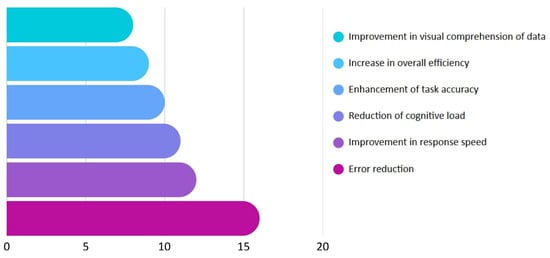
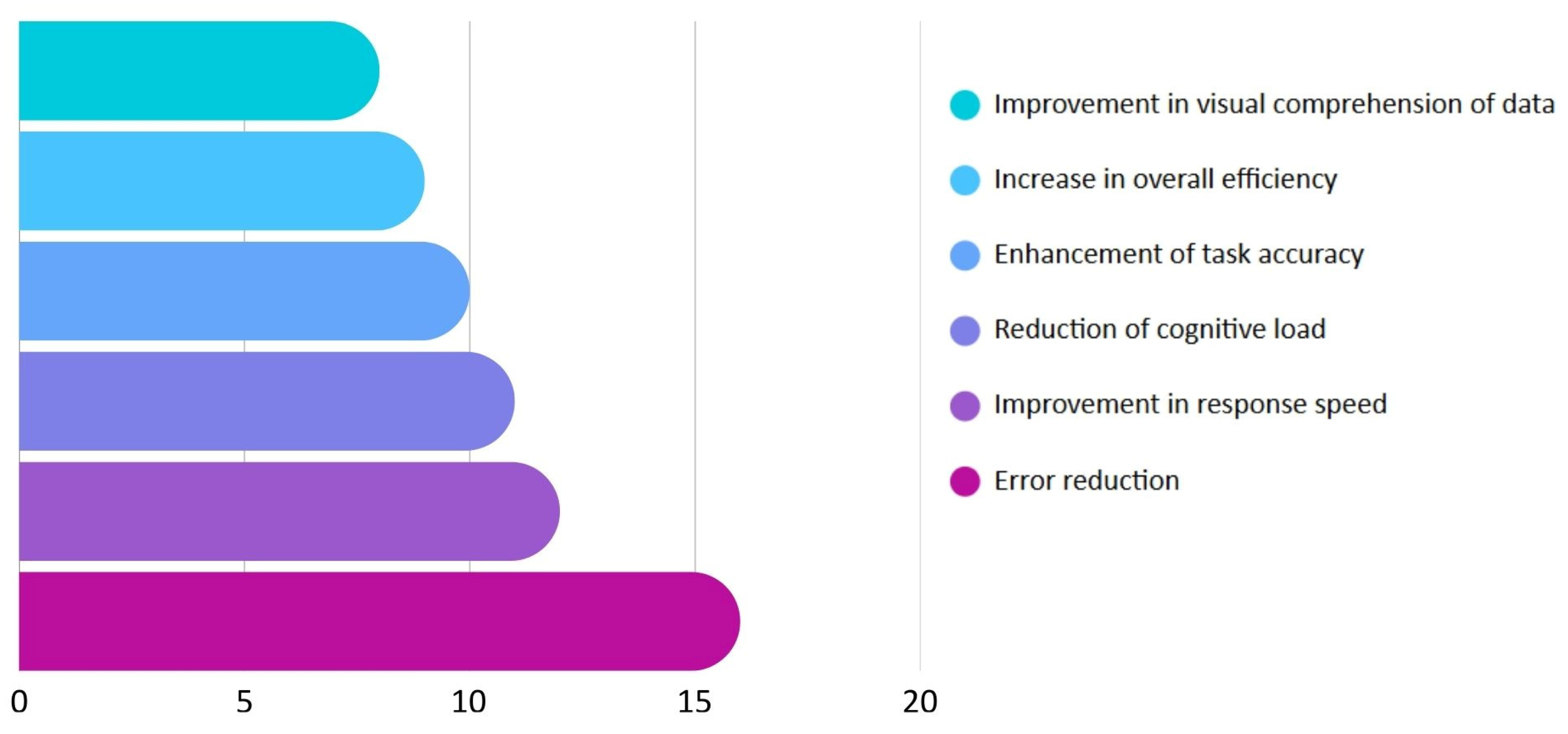
In Figure 5, the quantitative effects of ergonomic UI/UX design on various operational performance indicators are presented. Most of the analyzed studies identify concrete improvements such as error reduction, increased response speed, enhanced visual interpretation, and decreased cognitive effort. These metrics, derived from empirical evaluations and user simulations, illustrate how the application of ergonomic principles improve not only the quality of interaction but also tangible functional outcomes. The data show that visual design directly influences measurable parameters that affect user efficiency in work environments.
Figure 5.
Impact of ergonomic UI/UX design on operational performance indicators.
3.5. RQ5: To What Extent Do Working Conditions Influence Human–Machine Interaction and the Need for Good Visual Ergonomics?
The studies reviewed indicate that working conditions, environmental context, mental workload, automation levels, and the degree of collaboration directly impact human–machine interaction (HMI) and increase the demand for visual ergonomics. In industrial environments with multitasking and operational pressure, robust and clear interfaces are necessary to prevent errors [2,6,12,14,15,19,22,30]. In remote supervision or automated driving, adaptative interfaces with clear visual hierarchy and progressive coding reduce ambiguity and improve responsiveness [7,12,30,31]. Sectors such as healthcare and technical education require simplicity and easy navigation to lower cognitive load [13,16,18,26,29]. Hybrid or collaborative environments demand participatory designs and explicit role indicators to maintain visual coherence between remote and in-person users [5,6,8,22]. Table 15 shows how the working conditions have influence on visual ergonomics demand.
Table 15.
Working conditions and their influence on visual ergonomics demand.
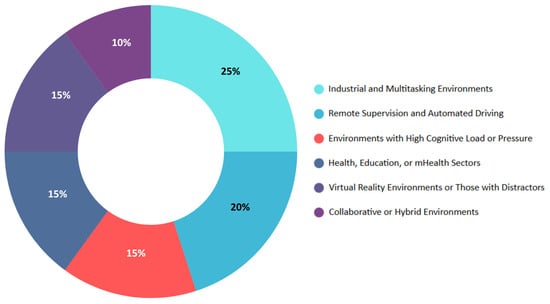
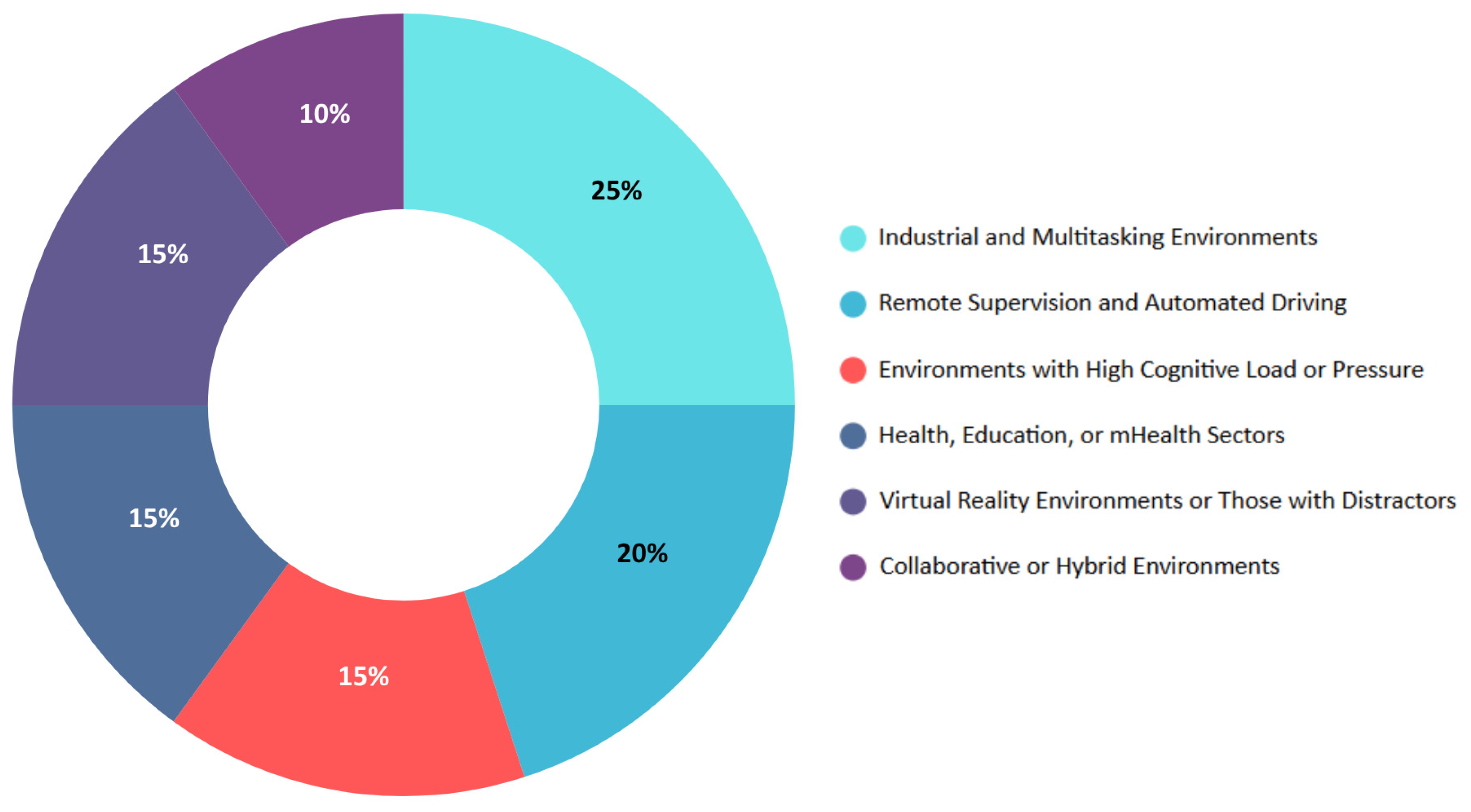
In Figure 6, the most representative work contexts with a high need for ergonomic adaptation in interface design are shown. This distribution identifies the types of work environments or operational conditions that present the greatest challenges for human–machine interaction. The quantitative analysis reveals that multitasking industrial environments and remote supervision scenarios are those requiring UI/UX strategies most urgently centered on visual ergonomics, followed by sensitive sectors such as healthcare, automated transport, and virtual reality.
Figure 6.
Distribution of studies by working conditions demanding visual ergonomics.
3.6. Bibliometric Analysis
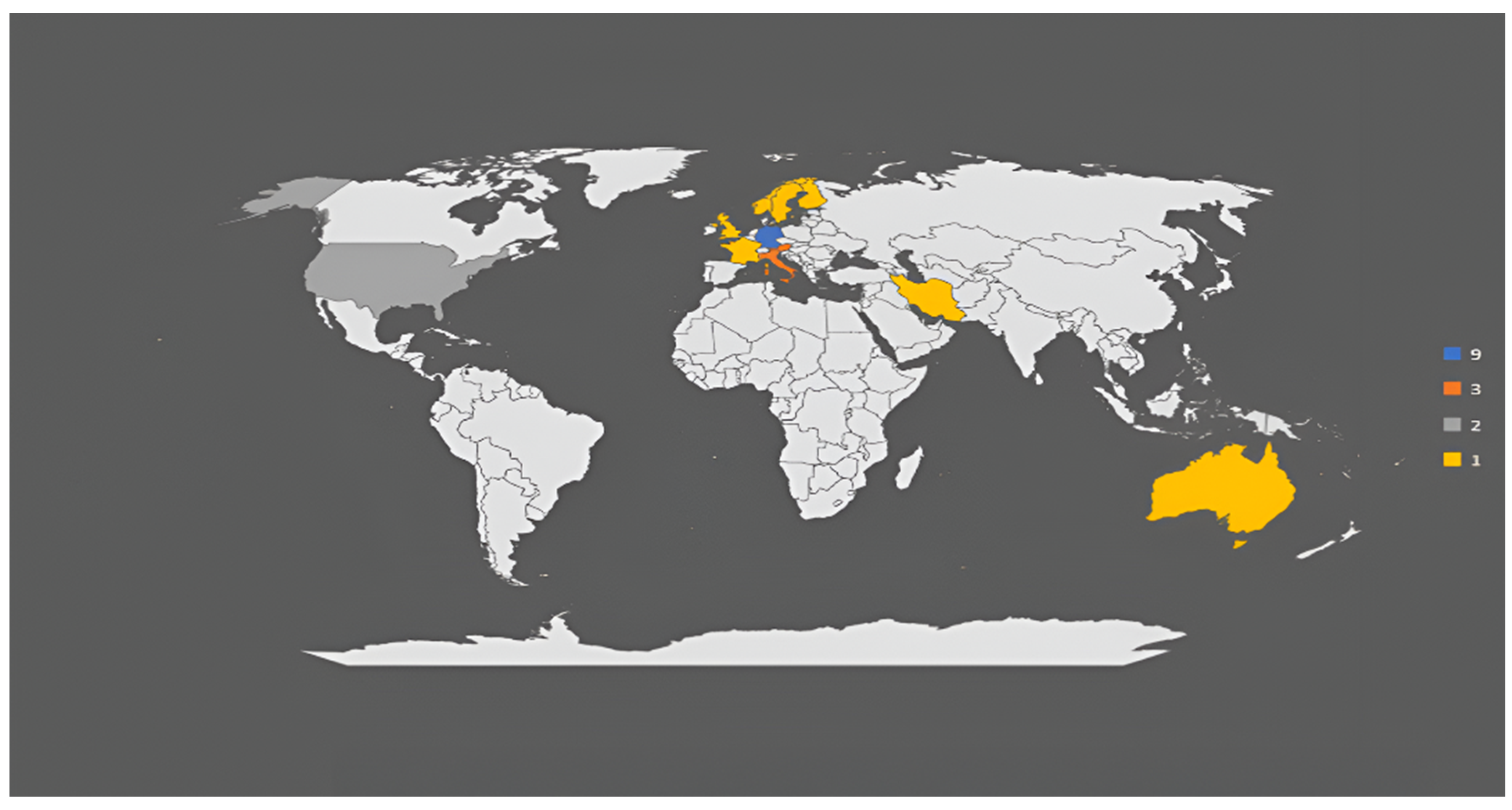
In Figure 7, Germany leads scientific output with nine articles on the impact of UI/UX design in industrial, collaborative, and teleoperation contexts. Italy and Austria follow, each contributing three studies focused on co-design, BIM, and VR environments. The United States contributes two publications centered on space exploration and technical simulations. Finally, seven countries contribute one article each: the United Kingdom, Finland, Norway, Australia, Iran, France, and Sweden. This pattern reflects global interest, with emphasis in Central and Northern Europe, as well as in applications involving automation and virtual reality. Notably, several studies highlight interdisciplinary approaches, integrating fields such as human factors engineering, cognitive psychology, and modeling. The geographic distribution suggests that regions with strong manufacturing and technological sectors are more actively engaging in this research. Moreover, the variety of application domains demonstrates the adaptability of UI/UX principles to both specialized and broad industrial contexts.
Figure 7.
Distribution of publications by country.
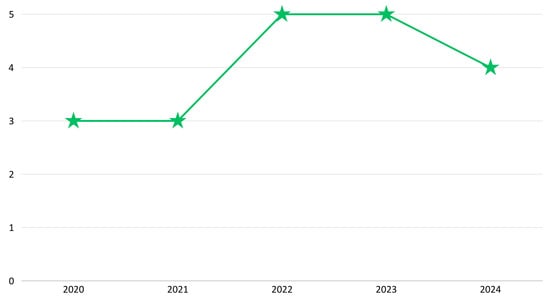
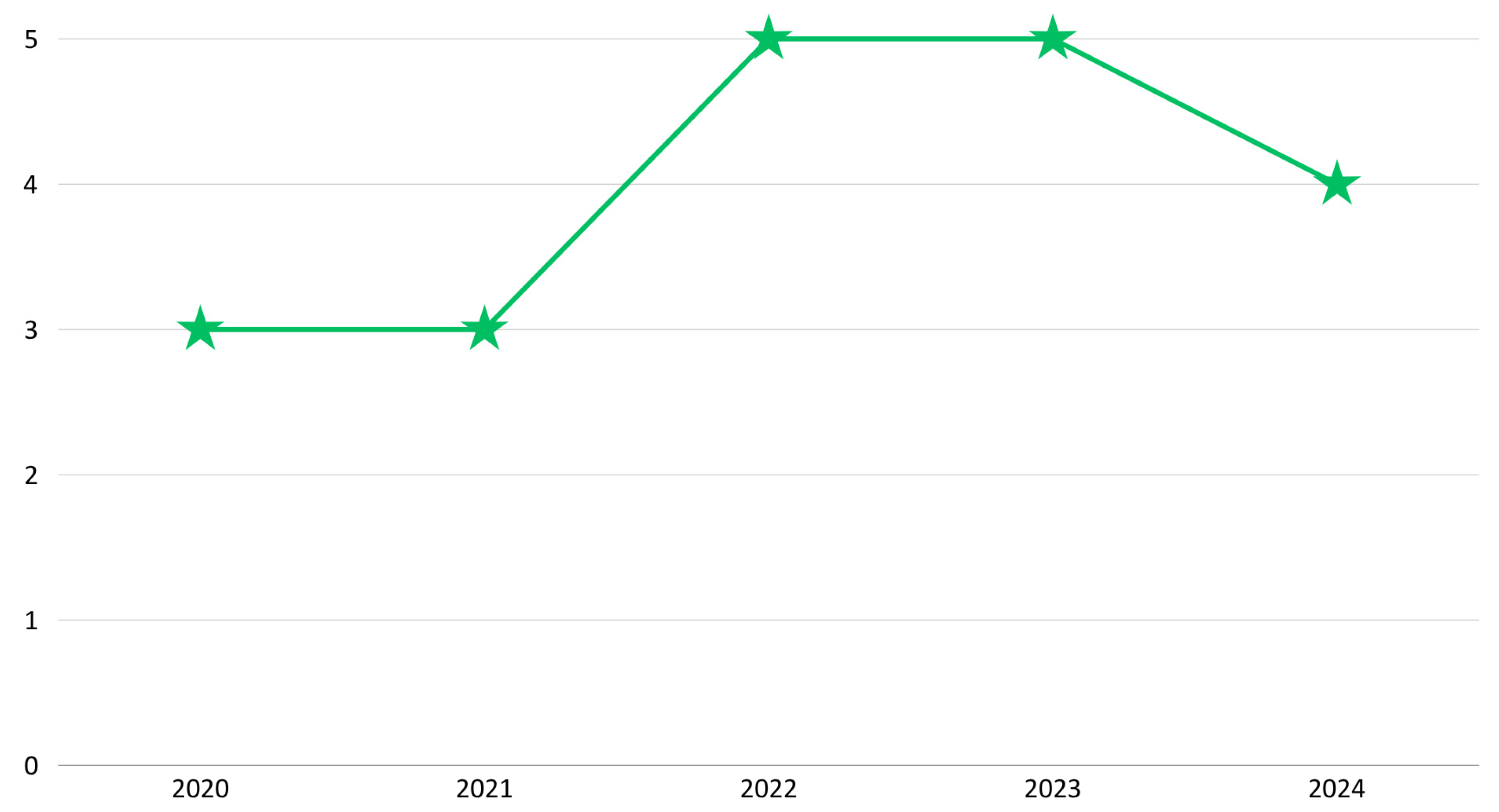
In Figure 8, a clear upward trend is observed in the number of publications between 2020 and 2024, with peaks of five articles in both 2022 and 2023, years in which research on visual ergonomics, operational efficiency, and HMI interaction deepened. In 2020, three studies marked the post-pandemic onset of interest in visual ergonomics; in 2021, three additional works explored co-design and collaborative systems. The year 2022 reached five publications, and 2023 maintained this level with research on digital workflows and usability in robotics. Finally, in 2024, four articles were added, confirming the sustained focus on ergonomic UI/UX design.
Figure 8.
Evolution of publications by year (2020–2024).
4. Discussion
The findings of this review demonstrate that UI/UX design grounded in visual ergonomics principles has measurable effects on operational reliability, efficiency, and safety. Interfaces that apply structured visual hierarchies, consistent layout logic, and real-time feedback mechanisms consistently outperform systems designed without ergonomic considerations [6,9,20].
Beyond immediate performance improvements, visually ergonomic interfaces also contribute to broader organizational benefits, including reduced training time, increased operator confidence, and higher system acceptance. In industrial and transportation contexts, these improvements translate into tangible economic advantages by reducing downtime, rework, and error-related incidents [21,30].
However, the results also indicate that partial or superficial application of ergonomic principles is insufficient. Studies reporting the strongest reductions in human error consistently employed holistic, user-centered design strategies that integrated visual ergonomics throughout the entire system development lifecycle [16,17]. This highlights the importance of treating visual ergonomics as a core design requirement rather than a post hoc usability enhancement.
Compared with previous reviews, it is noted that although some studies on mobile health applications highlight useful design objectives, they rarely delve into the visual ergonomic dimension and its impact on operational errors [26]. Similarly, reviews on collaborative interfaces often focus on interaction sequences without linking them to quantitative failure metrics [17]. In contrast, this review broadens the scope by demonstrating the effectiveness of specific visual factors across multiple domains like industrial, transportation, and virtual reality, particularly under high operational pressure [11,28]. It consequently offers an integrated perspective directly connecting design principles with measurable outcomes in precision and efficiency.
However, certain limitations should be noted. First, the selection was restricted to articles in English and open access, published between 2020 and 2024, potentially excluding relevant studies in other languages or from non-indexed sources. Second, methodological heterogeneity, ranging from studies in industrial contexts [1,6], hampers uniform comparison of ergonomic effect magnitude. Third, while studies report immediate improvements in accuracy or efficiency, few assess the sustainability of these benefits over the medium or long term or consider demographic factors like age or specific visual conditions [3,29].
To make progress in this field, it is essential to design longitudinal studies evaluating the retention of efficiency gains and error reduction after extended periods of use. It would also be valuable to investigate the cultural adaptability of visual ergonomics principles, comparing regions with different accessibility regulations. Finally, integrating artificial intelligence techniques to provide predictive, real-time visual feedback could enhance error prevention in critical environments [16]. These efforts will strengthen the role of visual ergonomics as a cornerstone of UI/UX design in diverse and demanding work contexts.
In addition to database limitations, the reviewed studies exhibit methodological heterogeneity, which restricts direct comparison of reported effect sizes. Furthermore, most studies focus on short-term performance outcomes, with limited attention to long-term adaptation, learning effects, or sustained system use.
Future research should prioritize longitudinal studies, cross-domain comparisons, and the integration of adaptive and AI-driven visual feedback mechanisms to further strengthen the role of visual ergonomics in reducing human error in complex work environments.
5. Conclusions
In summary, this systematic literature review (SLR) confirmed a consistent relationship between the application of visual ergonomics principles in UI/UX design and the reduction in human errors during interaction with digital systems. The analyzed studies demonstrated that elements such as informational hierarchy, visual coding, immediate feedback, and modular task structuring not only improve operational understanding of the system but also optimize functional efficiency, particularly in work environments characterized by high cognitive demand or multitasking.
Furthermore, user-centered design when implemented adaptively and in alignment with international standards such as ISO 9241 was shown to significantly enhance the user experience. This approach leads to more accessible, understandable interfaces aligned with the perceptual capacities of different user profiles, thereby promoting safer and more effective interaction. In this regard, visual personalization based on role, end-user participation in the design process, and the integration of contextual criteria are highlighted as key factors for reducing cognitive load and mitigating operational errors.
Based on these findings, further research into the impact of ergonomically focused UI/UX design in emerging technological domains such as augmented reality, remote supervision, and digital collaborative environments is warranted. In these evolving contexts, visual ergonomics must be understood not merely as an aesthetic resource but as a structural component of design that enables synchronization between user perception, interpretation, and action. Consequently, future research should aim to consolidate design guidelines integrating perceptual, functional, and adaptive criteria, ensuring more precise human–machine interaction focused on error prevention.
Author Contributions
Conceptualization, A.V. and G.Q.; methodology, A.V. and G.Q.; software, A.V. and G.Q.; validation, A.V. and G.Q.; formal analysis, A.V. and G.Q.; investigation, J.C.; resources, J.C.; data curation, A.V. and G.Q.; writing—original draft preparation, A.V. and G.Q.; writing—review and editing, J.C.; visualization, J.C.; supervision, J.C.; project administration, J.C.; funding acquisition, A.V. and G.Q. All authors have read and agreed to the published version of the manuscript.
Funding
This research received no external funding.
Institutional Review Board Statement
Not applicable.
Informed Consent Statement
Not applicable.
Data Availability Statement
The original contributions presented in the study are included in the article. Further inquiries can be directed to the corresponding author.
Conflicts of Interest
The authors declare no conflicts of interest.
References
- Tsamis, G.; Chantziaras, G.; Giakoumis, D.; Kostavelis, I.; Kargakos, A.; Tsakiris, A. Intuitive and Safe Interaction in Multi-User Human-Robot Collaboration Environments through Augmented Reality Displays. In Proceedings of the 30th IEEE International Conference on Robot & Human Interactive Communication (RO-MAN), Vancouver, BC, Canada, 8–12 August 2021; pp. 520–526. [Google Scholar] [CrossRef] [Scilit]
- Lorenz, S.; Helmert, J.R.; Anders, R.; Wölfel, C.; Krzywinski, J. UUX Evaluation of a Digitally Advanced Human–Machine Interface for Excavators. Multimodal Technol. Interact. 2020, 4, 57. [Google Scholar] [CrossRef] [Scilit]
- Prabhakar, G.; Biswas, P. A Brief Survey on Interactive Automotive UI. Transp. Eng. 2021, 6, 100089. [Google Scholar] [CrossRef] [Scilit]
- Zhou, L.; Feng, Z.; Cai, Z.; Yang, X.; Ai, C.; Shao, H. A Massage Area Positioning Algorithm for Intelligent Massage System. Comput. Intell. Neurosci. 2022, 2022, 7678516. [Google Scholar] [CrossRef] [Scilit]
- Nezami, F.N.; Wächter, M.A.; Maleki, N.; Spaniol, P.; Kühne, L.M.; Haas, A.; Pingel, J.M.; Tiemann, L.; Nienhaus, F.; Keller, L.; et al. Westdrive X LoopAR: An Open-Access Virtual Reality Project in Unity for Evaluating User Interaction Methods during Takeover Requests. Sensors 2021, 21, 1879. [Google Scholar] [CrossRef] [Scilit]
- Wagner, N.; Kraus, M.; Tonn, T.; Minker, W. Comparing Moderation Strategies in Group Chats with Multi-User Chatbots. In Proceedings of the 4th Conference on Conversational User Interfaces, Glasgow, UK, 26–28 July 2022; ACM: New York, NY, USA; pp. 1–4. [Google Scholar] [CrossRef] [Scilit]
- Bellet, T.; Banet, A.; Petiot, M.; Richard, B.; Quick, J. Human-Centered AI to Support an Adaptive Management of Human-Machine Transitions with Vehicle Automation. Information 2021, 12, 13. [Google Scholar] [CrossRef] [Scilit]
- Bringas, S.; Duque, R.; Nieto-Reyes, A.; Tîrnăucă, C.; Montaña, J.L. A Framework for Identifying Sequences of Interactions That Cause Usability Problems in Collaborative Systems. Electronics 2021, 10, 388. [Google Scholar] [CrossRef] [Scilit]
- El Helou, M.; Benfriha, K.; Al-Ahmari, A.M.; Wardle, P.; Talhi, E.; Loubère, S.; El Zant, C.; Charrier, Q. A Modular Smart Vision System for Industrial Inspection and Control of Conformity. Smart Sustain. Manuf. Syst. 2022, 6, 177–189. [Google Scholar] [CrossRef] [Scilit]
- Montalvan, J.; Arteaga, L.; Corrales, J.; Vásquez, C.; Cornejo, J. Pluriversality on Earth and Beyond: Opening the Field of Critical Interplanetary Design within the Design Discipline. In Proceedings of the DRS2024: Boston, Boston, MA, USA, 23–28 June 2024. [Google Scholar] [CrossRef] [Scilit]
- Peternel, L.; Schøn, D.T.; Fang, C. Binary and Hybrid Work-Condition Maps for Interactive Exploration of Ergonomic Human Arm Postures. Front. Neurorobot. 2021, 14, 590241. [Google Scholar] [CrossRef] [Scilit]
- Schrank, A.; Walocha, F.; Brandenburg, S.; Oehl, M. Human-Centered Design and Evaluation of a Workplace for the Remote Assistance of Highly Automated Vehicles. Cogn. Technol. Work 2024, 26, 183–206. [Google Scholar] [CrossRef] [Scilit]
- Doolani, S.; Owens, L.; Wessels, C.; Makedon, F. vIS: An Immersive Virtual Storytelling System for Vocational Training. Appl. Sci. 2020, 10, 8143. [Google Scholar] [CrossRef] [Scilit]
- Strazdas, D.; Hintz, J.; Khalifa, A.; Abdelrahman, A.A.; Hempel, T.; Al-Hamadi, A. Robot System Assistant (RoSA): Towards Intuitive Multi-Modal and Multi-Device Human-Robot Interaction. Sensors 2022, 22, 923. [Google Scholar] [CrossRef] [Scilit]
- Colceriu, C.; Theis, S.; Brell-Cokcan, S.; Nitsch, V. User-Centered Design in Mobile Human-Robot Cooperation: Consideration of Usability and Situation Awareness in GUI Design for Mobile Robots at Assembly Workplaces. i-com 2023, 22, 193–213. [Google Scholar] [CrossRef] [Scilit]
- Hajahmadi, S.; Marfia, G. Effects of the Uncertainty of Interpersonal Communications on Behavioral Responses of the Participants in an Immersive Virtual Reality Experience: A Usability Study. Sensors 2023, 23, 2148. [Google Scholar] [CrossRef] [Scilit]
- Ul Huda, N.; Sahito, S.F.; Gilal, A.R.; Abro, A.; Alshanqiti, A.; Alsughayyir, A.; Palli, A.S. Impact of Contradicting Subtle Emotion Cues on Large Language Models with Various Prompting Techniques. Int. J. Adv. Comput. Sci. Appl. 2024, 15, 407–414. [Google Scholar] [CrossRef] [Scilit]
- Lahti, M.; Nenonen, S. Design Science and Co-Designing of Hybrid Workplaces. Buildings 2021, 11, 129. [Google Scholar] [CrossRef] [Scilit]
- Chojecki, P.; Strazdas, D.; Przewozny, D.; Gard, N.; Runde, D.; Hoerner, N.; Al-Hamadi, A.; Eisert, P.; Bosse, S. Assessing the Value of Multimodal Interfaces: A Study on Human–Machine Interaction in Weld Inspection Workstations. Sensors 2023, 23, 5043. [Google Scholar] [CrossRef] [Scilit]
- Wang, X.; Hu, Y.; Zhang, W. Usability Design of Human-Machine Interaction Interface of Child Companion Robot in Wireless Network. Sci. Program. 2022, 2022, 2840541. [Google Scholar] [CrossRef] [Scilit]
- Shelat, S.; Marquez, J.J.; Zheng, J.; Karasinski, J.A. Collaborative System Usability in Spaceflight Analog Environments Through Remote Observations. Appl. Sci. 2024, 14, 2005. [Google Scholar] [CrossRef] [Scilit]
- Park, D.Y.; Choi, J.; Ryu, S.; Kim, M.J. A User-Centered Approach to the Application of BIM in Smart Working Environments. Sensors 2022, 22, 2871. [Google Scholar] [CrossRef] [Scilit]
- Daniel, M.; Rivière, G. Exploring Axisymmetric Shape-Change’s Purposes and Allure for Ambient Display: 16 Potential Use Cases and a Two-Month Preliminary Study on Daily Notifications. In Proceedings of the 15th International Conference on Tangible, Embedded, and Embodied Interaction, Salzburg, Austria, 14–17 February 2021; ACM: New York, NY, USA, 2021; pp. 1–6. [Google Scholar] [CrossRef] [Scilit]
- Ban, Y.; Karasawa, H.; Fukui, R.; Warisawa, S. Development of a Cushion-Shaped Device to Induce Respiratory Rhythm and Depth for Enhanced Relaxation and Improved Cognition. Front. Comput. Sci. 2022, 4, 770701. [Google Scholar] [CrossRef] [Scilit]
- Meredith, R.; Eddy, E.; Bateman, S.; Scheme, E. Comparing Online Wrist and Forearm EMG-Based Control Using a Rhythm Game-Inspired Evaluation Environment. J. Neural Eng. 2024, 21, 046057. [Google Scholar] [CrossRef] [Scilit]
- Yingta, N.; Nocera, J.A.; Rehman, I.U.; Brew, O. A Systematic Review of Usefulness Design Goals of Occupational mHealth Apps for Healthcare Workers. In Human-Computer Interaction—INTERACT 2021; Springer: Cham, Switzerland, 2021. [Google Scholar] [CrossRef] [Scilit]
- León-Vargas, F.; Martin, C.; Garcia-Jaramillo, M.; Aldea, A.; Leal, Y.; Herrero, P.; Reyes, A.; Henao, D.; Gomez, A.M. Is a Cloud-Based Platform Useful for Diabetes Management in Colombia? The Tidepool Experience. Comput. Methods Programs Biomed. 2021, 208, 106205. [Google Scholar] [CrossRef] [Scilit] [PubMed]
- Horváth, I.; Berki, B. Investigating the Operational Complexity of Digital Workflows Based on Human Cognitive Aspects. Electronics 2023, 12, 528. [Google Scholar] [CrossRef] [Scilit]
- Lingelbach, K.; Tagalidou, N.; Markey, P.S.; Föll, B.; Peissner, M.; Vukelić, M. Examining Joy of Use and Usability During Mobile Phone Interactions within a Multimodal Methods Approach. In Proceedings of the Mensch und Computer, Darmstadt, Germany, 4–7 September 2022; ACM: New York, NY, USA; pp. 276–285. [Google Scholar] [CrossRef] [Scilit]
- Kettwich, C.; Schrank, A.; Avsar, H.; Oehl, M. A Helping Human Hand: Relevant Scenarios for the Remote Operation of Highly Automated Vehicles in Public Transport. Appl. Sci. 2022, 12, 4350. [Google Scholar] [CrossRef] [Scilit]
- Kettwich, C.; Schrank, A.; Oehl, M. Teleoperation of Highly Automated Vehicles in Public Transport: User-Centered Design of a Human-Machine Interface for Remote-Operation and Its Expert Usability Evaluation. Multimodal Technol. Interact. 2021, 5, 26. [Google Scholar] [CrossRef] [Scilit]



Disclaimer/Publisher’s Note: The statements, opinions and data contained in all publications are solely those of the individual author(s) and contributor(s) and not of MDPI and/or the editor(s). MDPI and/or the editor(s) disclaim responsibility for any injury to people or property resulting from any ideas, methods, instructions or products referred to in the content. |
© 2026 by the authors. Licensee MDPI, Basel, Switzerland. This article is an open access article distributed under the terms and conditions of the Creative Commons Attribution (CC BY) license.