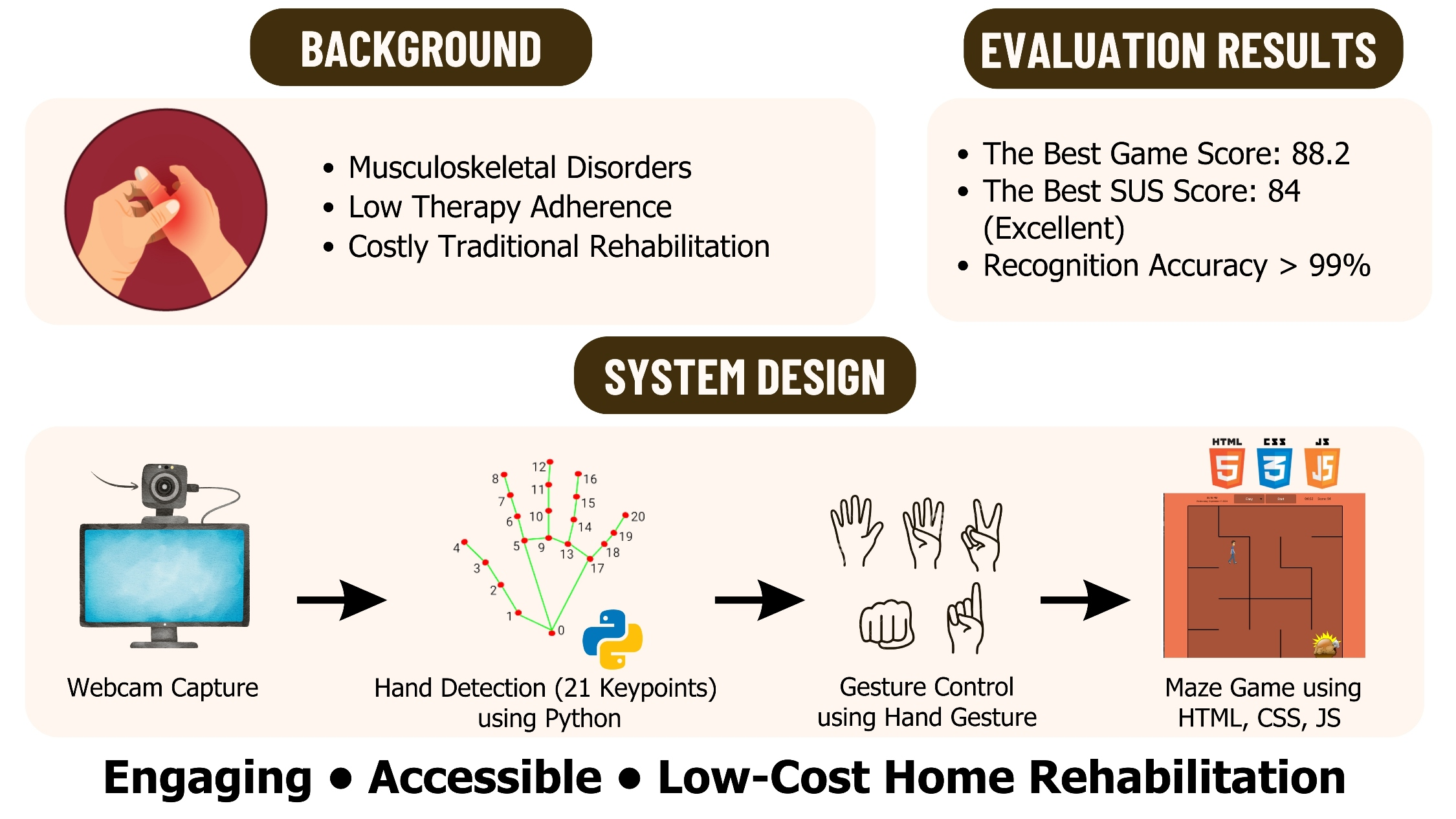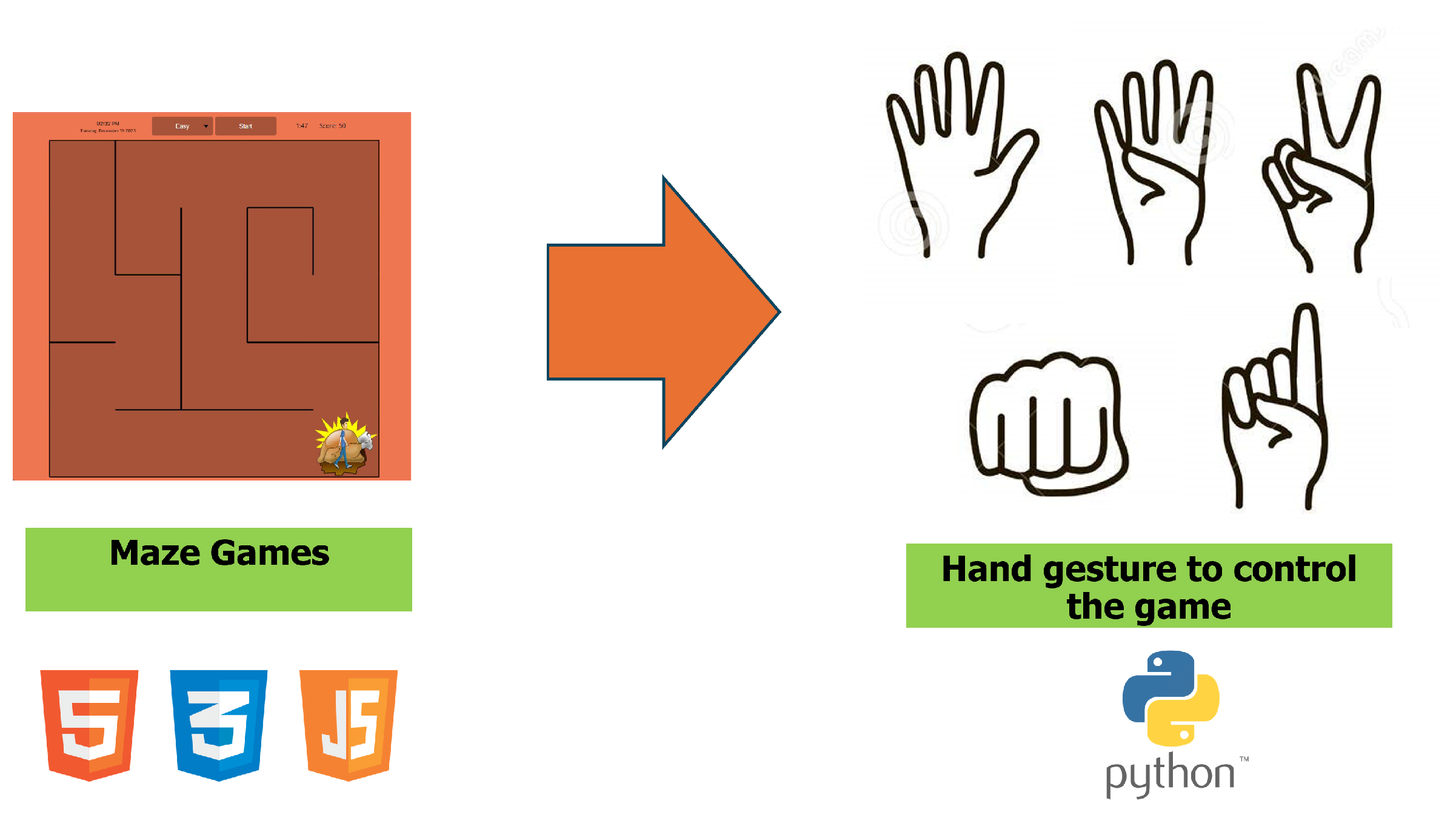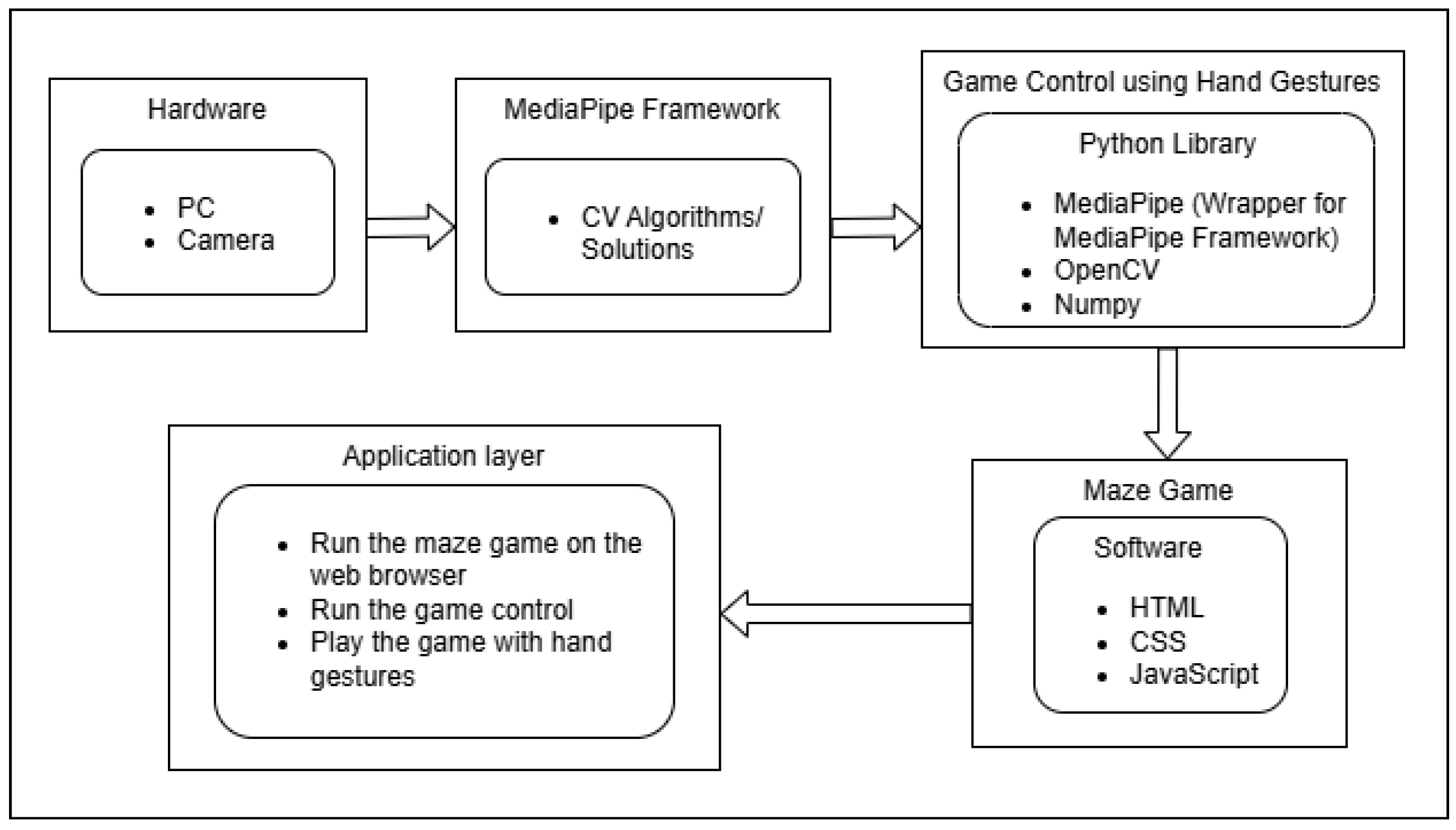


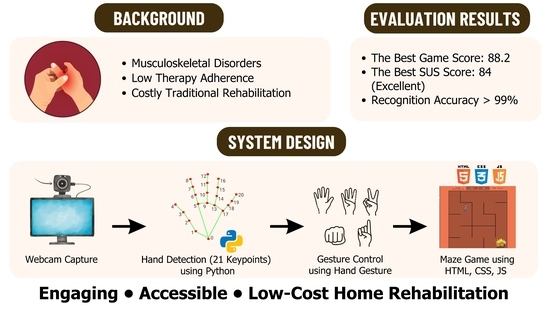
An Investigation of Hand Gestures for Controlling Video Games in a Rehabilitation Exergame System


 , ,
, , 

Abstract
1. Introduction
2. Literature Review
2.1. Exergames Using Hand Gestures for Rehabilitation
2.2. Theory of Exergames
3. Methodology
3.1. Methodology of Hand Gesture Investigation
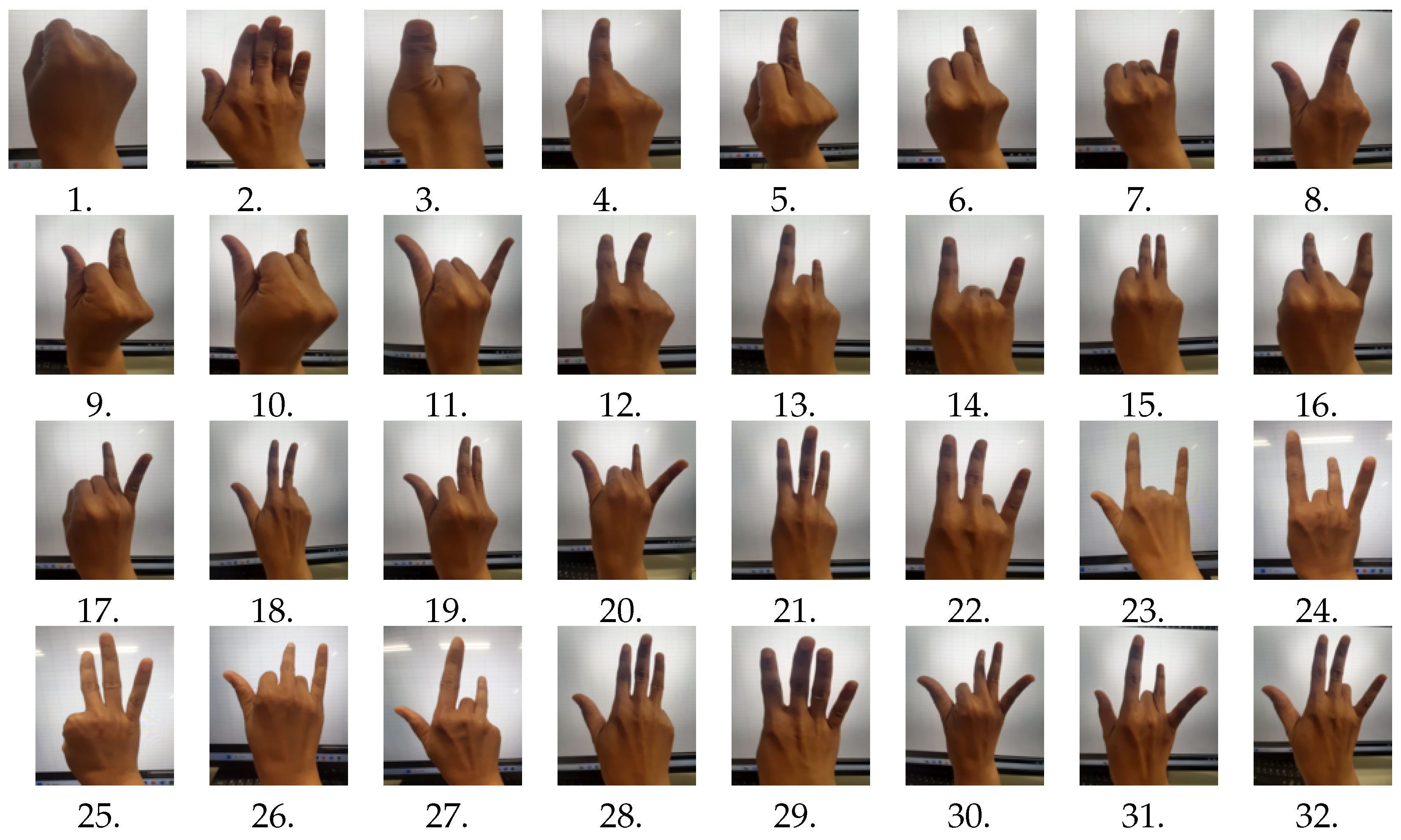
- We list all the combinations of simple hand gestures using one hand, where we limit the hand gestures whether each finger is open (straight) or closed (bent) for simplicity.
- We make the questionnaire with 10 questions about all of the 32 hand gestures to choose appropriate ones according to the difficulty level from very easy (scale of 5) to very difficult (scale of 1).
- We ask 16 students to perform the 32 hand gestures fill in the questionnaire.
- We calculate the average rating for each hand gesture.
- Based on the result, we choose the top 10 hand gestures with the highest rating.
- Since five hand gestures are necessary to control the exergame system, we select the top five gestures in the best group and the next top five gestures in the second-best group.
- We assign the five arrow keys to the five hand gestures in each group.
3.2. Methodology of Experiments
- We make the SUS questionnaire with 10 questions.
- We ask 15 students to play the exergame system using the hand gestures in the best group and in the second-best group.
- We ask the students to fill in the questionnaire.
- We compare and analyze the results of the game scores and the SUS scores between the two groups.
- We measure the accuracy of the hand gesture recognition by experimenting with 30 students.
- We measure the user experience of the exergame system using the User Experience Questionnaire (UEQ) with the best hand gesture.
- We analyze the UEQ results.
4. Exergame System Using Hand Gestures
4.1. System Design
4.2. Gesture Recognition
- BlazePalm detects the hand region in the image. It works on the full image and yields an oriented bounding box around the hand.
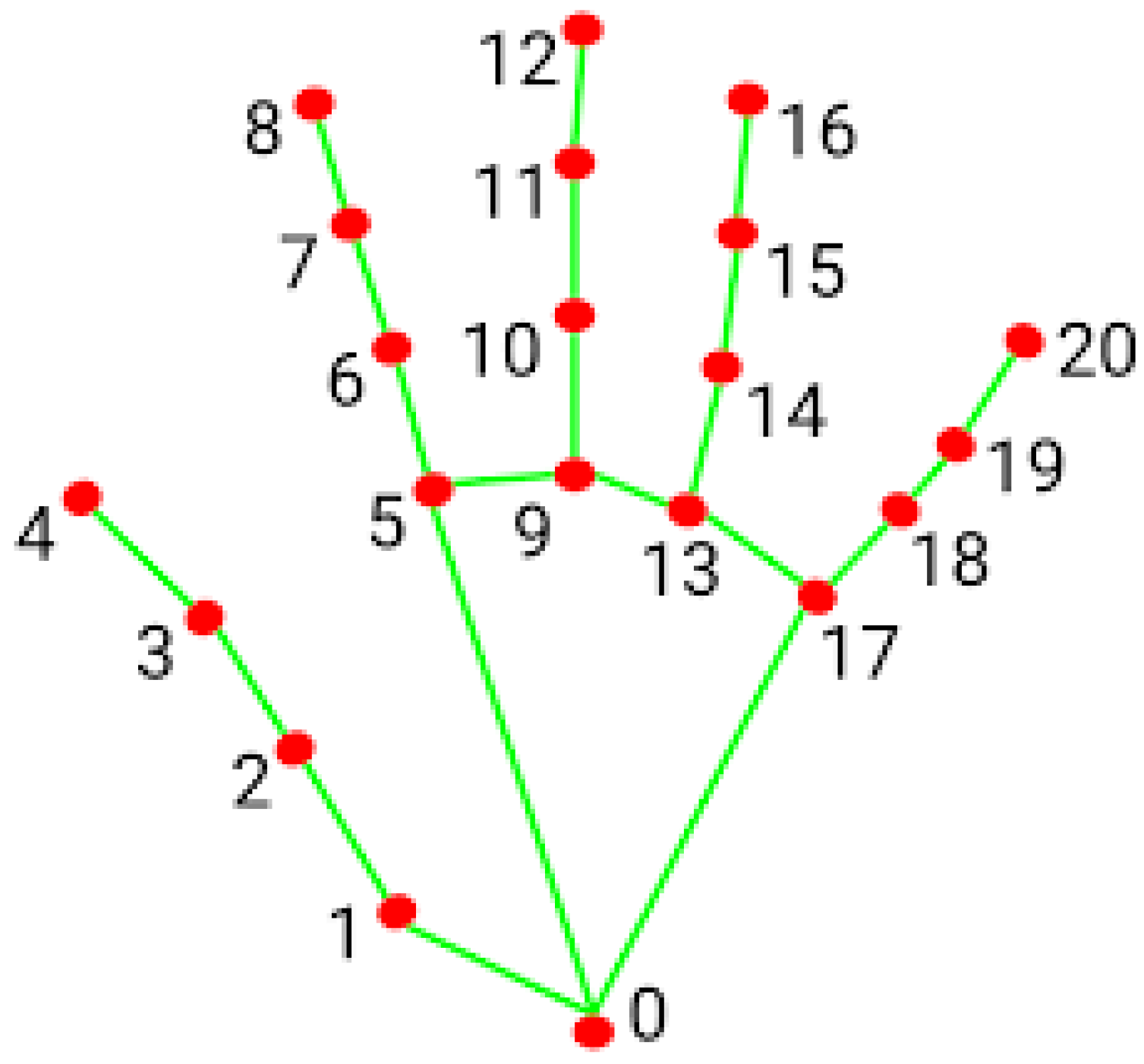
- Landmark Model detects the locations of the 21 keypoints in the detected region of the hand. It operates on the cropped image region defined by BlazePalm and returns the coordinates of the keypoints.
- Gesture Recognizer generates a result object of gesture detection for each recognition run. Classifies the previous computed keypoints configuration into a discrete set of gestures.
4.3. Video Game
5. Investigation of Hand Gestures for Exergame
5.1. Possible Hand Gestures
5.2. Hand Gesture Rating
5.3. Selected Hand Gestures
5.4. Hand Gesture Recognition for Best Group
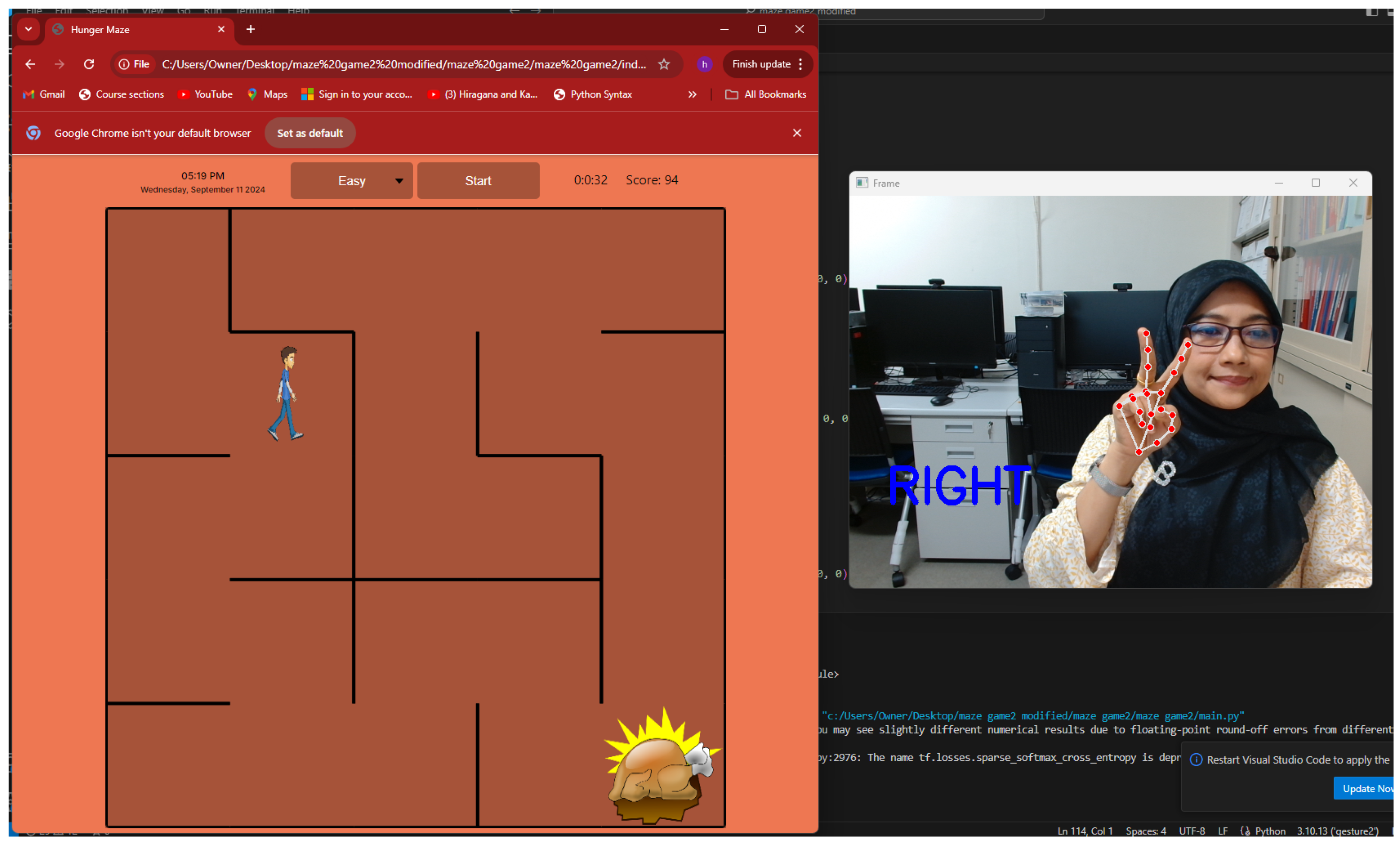
- Right Direction: Gesture 12 is used for the right direction key. When both the index finger and the middle finger are open and the others are closed, it is recognized.
- Left Direction: Gesture 4 is used for the left direction key. When the index finger is open and the others are closed, it is recognized.
- Up Direction: Gesture 2 is used for the up direction key. When all the fingers are open, it is recognized.
- Down Direction: Gesture 1 is used for the down direction key. When all the fingers are closed, it is recognized.
- Space: Gesture 29 is used for the right direction key. When the middle finger, the ring finger, and the little finger are all open and the others are closed, it is recognized.
5.5. Hand Gesture Recognition for Second-Best Group
- Right Direction: Gesture 8 is used for the right direction key. When both the thumb finger and the index finger are open and the others are closed, it is recognized.
- Left Direction: Gesture 3 is used for the left direction key. When the thumb finger is open and the others are closed, it is recognized.
- Up Direction: Gesture 11 is used for the up direction key. When both the thumb finger and the little finger are open, it is recognized.
- Down Direction: Gesture 7 is used for the down direction key. When the little finger is open and the others are closed, it is recognized.
- Space: Gesture 21 is used for the space key. When the index finger, the middle finger, and the ring finger are all open and the others are closed, it is recognized.
6. Evaluation of Best Hand Gestures
6.1. Game Score Results
6.2. System Usability Scale (SUS) Results
6.2.1. SUS Standard Ranges
6.2.2. Questions in SUS Questionnaire
6.2.3. Procedure of SUS Score Calculation
- Add up the answer levels for the odd-numbered questions (1, 3, 5, 7, and 9), and subtract 5 from the total to obtain the odd raw SUS score.
- Add up the answer levels for the even-numbered questions (2, 4, 6, 8, and 10), and subtract the total from 25 to obtain the even raw SUS score.
- Add up the odd and even raw scores, and multiply the sum by 2.5. This resulting number is the final SUS score.
6.2.4. SUS Results
6.3. The Accuracy of Hand Gesture Recognition
6.3.1. Procedure of Measuring the Accuracy of Hand Gesture Recognition
- Give 10 easiest defined hand gestures.
- Ask each student to show each gesture for one second and see whether the system correctly detects the gesture or not.
- Repeat step 2 10 times for each gesture.
6.3.2. The Accuracy Results of Hand Gesture Recognition
- Low-lighting conditions: Poor lighting reduces the camera’s ability to clearly capture hand landmarks and edges, making it difficult for the model to detect gestures accurately.
- Camera resolution: Low-resolution cameras may not capture fine details of the hand, particularly the position and orientation of fingertips, which can lead to inaccurate detection.
- Occlusion of hand parts: When fingers overlap or the hand is partially hidden, the algorithm may fail to detect all necessary landmarks, resulting in missed or incorrect gesture interpretation.
- Inconsistent hand position or distance from the camera: If the hand is too close or too far from the camera, it may fall outside the optimal detection range, making it harder for the model to track it accurately.
- Ensure good, consistent lighting and minimal background noise.
- Use a high-resolution, high-frame-rate camera.
- Minimize hand occlusions and keep gestures within a moderate distance from the camera.
- Use optimized hardware for faster processing in real-time applications.
6.4. User Experience Questionnaire (UEQ) Results
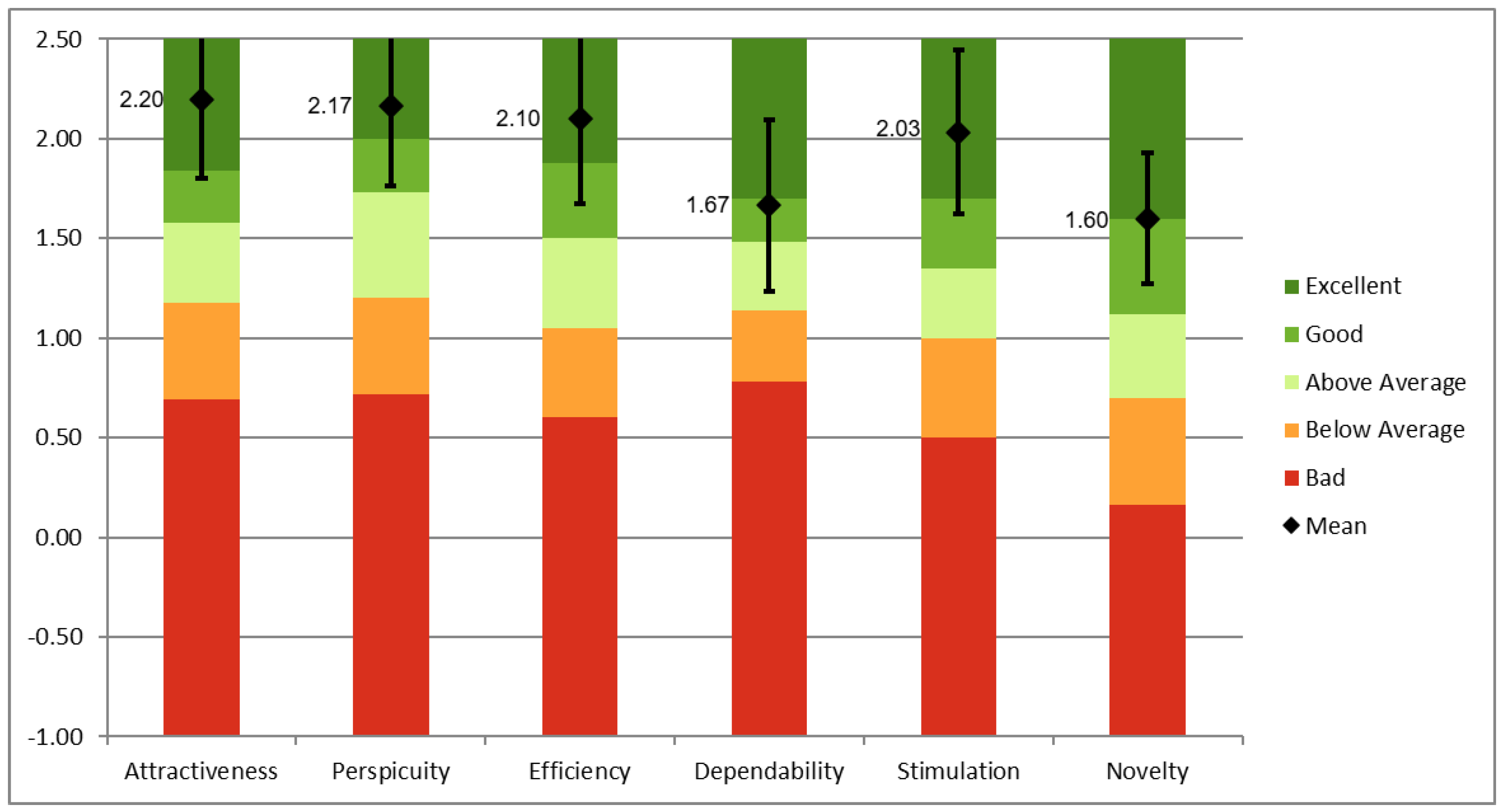
6.4.1. Six Scales in UEQ
- Attractiveness: The exergame system looks attractive, enjoyable, friendly, and pleasant.
- Perspicuity: The exergame system is easy to understand, clear, simple, and easy to learn.
- Efficiency: The user can perform tasks with the system fast, efficiently, and in a pragmatic way.
- Dependability: The interaction with the exergame system is predictable, secure, and meets expectations. The system supports in performing the tasks.
- Stimulation]: Using the exergame system is interesting, exciting, and motivating.
- Novelty: The exergame system is innovative, inventive, and creatively designed.
6.4.2. UEQ Results
6.5. Discussions on Usage in Practical Applications
6.5.1. Smart Advertising Display
6.5.2. Exercise and Performance Learning Assistant System
7. Conclusions
Author Contributions
Funding
Institutional Review Board Statement
Informed Consent Statement
Data Availability Statement
Acknowledgments
Conflicts of Interest
References
- Musculoskeletal Health. Available online: https://www.who.int/news-room/fact-sheets/detail/musculoskeletal-conditions (accessed on 11 May 2024).
- Gasibat, Q.; Simbak, N.B.; Aziz, A.; Petridis, L.; Tróznai, Z. Stretching exercises to prevent work-related musculoskeletal disorders: A review article. Am. J. Sport Sci. Med. 2017, 5, 27–37. [Google Scholar] [CrossRef]
- Klein, S.; Chiu, K.; Clinch, J.; Liossi, C. Musculoskeletal pain in children and young people. In Managing Pain in Children and Young People: A Clinical Guide; Wiley: Hoboken, NJ, USA, 2024; pp. 147–169. [Google Scholar] [CrossRef]
- Lohse, K.; Shirzad, N.; Verster, A.; Hodges, N.; Van der Loos, H.M. Video games and rehabilitation: Using design principles to enhance engagement in physical therapy. J. Neurol. Phys. Ther. 2013, 37, 166–175. [Google Scholar] [CrossRef] [PubMed]
- Exergame. Available online: https://healthysd.gov/what-is-exergaming/ (accessed on 7 February 2024).
- Pereira, M.F.; Prahm, C.; Kolbenschlag, J.; Oliveira, E.; Rodrigues, N.F. A virtual reality serious game for hand rehabilitation therapy. In Proceedings of the 2020 IEEE 8th International Conference on Serious Games and Applications for Health (SeGAH), Vancouver, BC, Canada, 12–14 August 2020; pp. 1–7. [Google Scholar] [CrossRef]
- Knight, J. The Importance of Hand Exercises. Available online: https://handandwristinstitute.com/the-importance-of-hand-exercises/ (accessed on 5 February 2024).
- Staiano, A.E.; Calvert, S.L. The promise of exergames as tools to measure physical health. Entertain. Comput. 2011, 2, 17–21. [Google Scholar] [CrossRef] [PubMed]
- Macvean, A.; Robertson, J. Understanding exergame users’ physical activity, motivation and behavior over time. In Proceedings of the SIGCHI Conference on Human Factors in Computing Systems, New York, NY, USA, 27 April 2013; pp. 1251–1260. [Google Scholar] [CrossRef]
- Sween, J.; Wallington, S.F.; Sheppard, V.; Taylor, T.; Llanos, A.A.; Adams-Campbell, L.L. The role of exergaming in improving physical activity: A review. J. Phys. Act. Health 2014, 11, 864–870. [Google Scholar] [CrossRef]
- Demers, M.; Martinie, O.; Winstein, C.; Robert, M.T. Active video games and low-cost virtual reality: An ideal therapeutic modality for children with physical disabilities during a global pandemic. Front. Neurol. 2020, 11, 601898. [Google Scholar] [CrossRef] [PubMed]
- Xue, Y.; Zhao, L.; Xue, M.; Fu, J. Gesture interaction and augmented reality based hand rehabilitation supplementary system. In Proceedings of the 2018 IEEE 3rd Advanced Information Technology, Electronic and Automation Control Conference (IAEAC), Chongqing, China, 12–14 October 2018; pp. 2572–2576. [Google Scholar] [CrossRef]
- Alfieri, F.M.; da Silva Dias, C.; de Oliveira, N.C.; Battistella, L.R. Gamification in musculoskeletal rehabilitation. Curr. Rev. Musculoskelet. Med. 2022, 15, 629–636. [Google Scholar] [CrossRef] [PubMed]
- Pirbabaei, E.; Amiri, Z.; Sekhavat, Y.A.; Goljaryan, S. Exergames for hand rehabilitation in elders using Leap Motion Controller: A feasibility pilot study. Int. J. Hum.-Comput. Stud. 2023, 178, 103099. [Google Scholar] [CrossRef]
- Mediapipe 0.10.11. Available online: https://pypi.org/project/mediapipe/ (accessed on 12 March 2024).
- Yeng, A.C.M.; Han, P.Y.; How, K.W.; Yin, O.S. Hand gesture controlled game for hand rehabilitation. In Proceedings of the International Conference on Computer, Information Technology and Intelligent Computing (CITIC 2022); Atlantis Press: Amsterdam, The Netherlands, 2022; pp. 205–215. [Google Scholar] [CrossRef]
- Fonteles, J.H.; Serpa, Y.R.; Barbosa, R.G.; Rodrigues, M.A.F.; Alves, M.S.P.L. Gesture-controlled interactive musical game to practice hand therapy exercises and learn rhythm and melodic structures. In Proceedings of the 2018 IEEE 6th International Conference on Serious Games and Applications for Health (Segah), Vienna, Austria, 16–18 May 2018; pp. 1–8. [Google Scholar] [CrossRef]
- Saman, O.; Stanciu, L. Hand mobility recovery through game controlled by gestures. In Proceedings of the 2019 IEEE 13th International Symposium on Applied Computational Intelligence and Informatics (SACI), Timisoara, Romania, 29–31 May 2019; pp. 241–244. [Google Scholar] [CrossRef]
- Nasri, N.; Orts-Escolano, S.; Cazorla, M. An semg-controlled 3d game for rehabilitation therapies: Real-time time hand gesture recognition using deep learning techniques. Sensors 2020, 20, 6451. [Google Scholar] [CrossRef] [PubMed]
- Farahanipad, F.; Nambiappan, H.R.; Jaiswal, A.; Kyrarini, M.; Makedon, F. HAND-REHA: Dynamic hand gesture recognition for game-based wrist rehabilitation. In Proceedings of the 13th ACM International Conference on PErvasive Technologies Related to Assistive Environments, Corfu, Greece, 30 June–3 July 2020; pp. 1–9. [Google Scholar] [CrossRef]
- Sophiya, E.; Reddy, S.S. Hand gesture-driven gaming for effective rehabilitation and improved quality of life-a review. In Proceedings of the 2024 5th International Conference on Innovative Trends in Information Technology (ICITIIT), Kottayam, India, 15–16 March 2024; pp. 1–6. [Google Scholar] [CrossRef]
- Oh, Y.; Yang, S. Defining exergames & exergaming. Proc. Meaningful Play 2010, 2010, 21–23. [Google Scholar]
- Brox, E.; Luque, L.F.; Evertsen, G.J.; Hernández, J.E.G. Exergames for elderly: Social exergames to persuade seniors to increase physical activity. In Proceedings of the 2011 5th International Conference on Pervasive Computing Technologies for Healthcare (PervasiveHealth) and Workshops, Dublin, Ireland, 23–26 May 2011; pp. 546–549. [Google Scholar] [CrossRef]
- Huang, H.C.; Wong, M.K.; Lu, J.; Huang, W.F.; Teng, C.I. Can using exergames improve physical fitness? A 12-week randomized controlled trial. Comput. Hum. Behav. 2017, 70, 310–316. [Google Scholar] [CrossRef]
- Yu, T.C.; Chiang, C.H.; Wu, P.T.; Wu, W.L.; Chu, I.H. Effects of exergames on physical fitness in middle-aged and older adults in Taiwan. Int. J. Environ. Res. Public Health 2020, 17, 2565. [Google Scholar] [CrossRef] [PubMed]
- Pirovano, M.; Surer, E.; Mainetti, R.; Lanzi, P.L.; Borghese, N.A. Exergaming and rehabilitation: A methodology for the design of effective and safe therapeutic exergames. Entertain. Comput. 2016, 14, 55–65. [Google Scholar] [CrossRef]
- Kaur, H.; Rani, J. A review: Study of various techniques of hand gesture recognition. In Proceedings of the 2016 IEEE 1st International Conference on Power Electronics, Intelligent Control and Energy Systems (ICPEICES), Delhi, India, 4–6 July 2016; pp. 1–5. [Google Scholar] [CrossRef]
- Quan, C.; Liang, J. A simple and effective method for hand gesture recognition. In Proceedings of the 2016 International Conference on Network and Information Systems for Computers (ICNISC), Wuhan, China, 15–17 April 2016; pp. 302–305. [Google Scholar] [CrossRef]
- Prema, S.; Deena, G.; Hemalatha, D.; Aruna, K.; Hashini, S. Gaming using different hand gestures using artificial neural network. EAI Endorsed Trans. Internet Things 2024, 10, 1–9. [Google Scholar] [CrossRef]
- Eshitha, K.; Jose, S. Hand gesture recognition using artificial neural network. In Proceedings of the 2018 International Conference on Circuits and Systems in Digital Enterprise Technology (ICCSDET), Kottayam, India, 21–22 December 2018; pp. 1–5. [Google Scholar] [CrossRef]
- Zhu, Y.; Yuan, B. Real-time hand gesture recognition with Kinect for playing racing video games. In Proceedings of the 2014 International Joint Conference on Neural Networks (IJCNN), Beijing, China, 6–11 July 2014; pp. 3240–3246. [Google Scholar] [CrossRef]
- Kavana, K.; Suma, N. Recognization of hand gestures using Mediapipe hands. Int. Res. J. Mod. Eng. Technol. Sci. 2022, 4, 4149–4156. [Google Scholar]
- Google AI Blog, On-Device, Real-Time Hand Tracking with MediaPipe. Available online: https://ai.googleblog.com/2019/08/on-device-real-time-hand-tracking-with.html (accessed on 18 January 2024).
- MazeGame. Available online: https://www.sourcecodester.com/javascript/16517/simple-hunger-maze-game-javascript-free-source-code.html (accessed on 12 January 2024).
- Nef, T.; Chesham, A.; Schütz, N.; Botros, A.A.; Vanbellingen, T.; Burgunder, J.M.; Müllner, J.; Martin Müri, R.; Urwyler, P. Development and evaluation of maze-like puzzle games to assess cognitive and motor function in aging and neurodegenerative diseases. Front. Aging Neurosci. 2020, 12, 87. [Google Scholar] [CrossRef] [PubMed]
- SUS: System Usability Scale. Available online: https://www.usability.gov/how-to-and-tools/methods/system-usability-scale.html (accessed on 10 January 2024).
- Brooke, J. SUS-A quick and dirty usability scale. Usability Eval. Ind. 1996, 189, 4–7. [Google Scholar] [CrossRef]
- UEQ: User Experience Questionnaire. Available online: https://www.ueq-online.org/ (accessed on 1 July 2024).
- Schrepp, M. User experience questionnaire handbook. In All You Need to Know to Apply the UEQ Successfully in Your Project; ResearchGate: Berlin, Germany, 2015; pp. 1–16. [Google Scholar] [CrossRef]
- Lee, Y.E.; Fan, C.P. Identification of user’s interests by deep-learning based pose estimation with angle relationship from keypoints for smart advertising displays. In Proceedings of the 2024 IEEE International Conference on Consumer Electronics-Asia (ICCE-Asia), Danang, Vietnam, 3–6 November 2024; pp. 1–3. [Google Scholar] [CrossRef]
- Anggraini, I.T.; Basuki, A.; Funabiki, N.; Lu, X.; Fan, C.; Hsu, Y.C.; Lin, C.H. A proposal of exercise and performance learning assistant system for self-practice at home. Adv. Sci. Technol. Eng. Syst. J. 2020, 5, 1196–1203. [Google Scholar] [CrossRef]
- Huang, W.C.; Shih, C.L.; Anggraini, I.T.; Funabiki, N.; Fan, C.P. Human’s reaction time-based score calculation of self-practice dynamic yoga system for user’s feedback by open pose and fuzzy rules. In Proceedings of the 2023 11th International Conference on Information and Education Technology (ICIET), Fujisawa, Japan, 18–20 March 2023; pp. 577–581. [Google Scholar] [CrossRef]
- Shih, C.L.; Liu, J.Y.; Anggraini, I.T.; Xiao, Y.; Funabiki, N.; Fan, C.P. Difficulty evaluation of yoga poses by angular velocity and body area calculation for GPU-based yoga self-practice system. In Proceedings of the 2024 IEEE Gaming, Entertainment, and Media Conference (GEM), Turin, Italy, 5–7 June 2024; pp. 1–4. [Google Scholar] [CrossRef]






| Gesture | Student | Average | |||||||||||||||
|---|---|---|---|---|---|---|---|---|---|---|---|---|---|---|---|---|---|
| 1 | 2 | 3 | 4 | 5 | 6 | 7 | 8 | 9 | 10 | 11 | 12 | 13 | 14 | 15 | 16 | ||
| 1 | 5 | 5 | 5 | 5 | 5 | 5 | 5 | 5 | 5 | 5 | 5 | 5 | 5 | 5 | 5 | 5 | 5 |
| 2 | 5 | 5 | 5 | 5 | 5 | 5 | 5 | 5 | 5 | 5 | 5 | 5 | 5 | 5 | 5 | 5 | 5 |
| 3 | 5 | 5 | 5 | 4 | 4 | 3 | 5 | 5 | 3 | 5 | 5 | 5 | 5 | 5 | 5 | 5 | 4.6 |
| 4 | 5 | 5 | 5 | 4 | 5 | 5 | 5 | 5 | 5 | 5 | 5 | 5 | 5 | 5 | 5 | 5 | 4.9 |
| 5 | 3 | 4 | 5 | 3 | 5 | 5 | 5 | 4 | 3 | 3 | 5 | 2 | 4 | 4 | 5 | 5 | 4.1 |
| 6 | 3 | 2 | 4 | 1 | 3 | 3 | 5 | 1 | 2 | 3 | 5 | 1 | 4 | 3 | 5 | 3 | 3.0 |
| 7 | 5 | 5 | 5 | 4 | 4 | 5 | 5 | 4 | 4 | 5 | 5 | 5 | 5 | 5 | 5 | 3 | 4.6 |
| 8 | 4 | 5 | 5 | 3 | 5 | 5 | 5 | 5 | 5 | 5 | 5 | 4 | 4 | 5 | 5 | 2 | 4.5 |
| 9 | 2 | 3 | 4 | 1 | 3 | 4 | 3 | 2 | 4 | 4 | 1 | 2 | 3 | 2 | 5 | 1 | 2.8 |
| 10 | 2 | 1 | 3 | 1 | 1 | 2 | 2 | 1 | 3 | 2 | 2 | 1 | 3 | 4 | 4 | 3 | 2.2 |
| 11 | 4 | 4 | 5 | 3 | 5 | 5 | 5 | 5 | 5 | 5 | 5 | 5 | 3 | 5 | 5 | 4 | 4.6 |
| 12 | 5 | 5 | 5 | 4 | 5 | 5 | 5 | 5 | 5 | 5 | 5 | 3 | 5 | 5 | 5 | 5 | 4.8 |
| 13 | 2 | 1 | 3 | 1 | 1 | 1 | 4 | 4 | 3 | 4 | 1 | 1 | 4 | 4 | 5 | 4 | 2.7 |
| 14 | 4 | 4 | 5 | 3 | 4 | 5 | 4 | 4 | 4 | 4 | 4 | 4 | 4 | 4 | 5 | 5 | 4.2 |
| 15 | 2 | 2 | 4 | 2 | 1 | 3 | 3 | 2 | 2 | 1 | 1 | 2 | 4 | 4 | 5 | 1 | 2.4 |
| 16 | 2 | 2 | 4 | 2 | 1 | 4 | 2 | 1 | 3 | 1 | 1 | 1 | 3 | 2 | 5 | 1 | 2.2 |
| 17 | 2 | 3 | 4 | 2 | 1 | 5 | 4 | 2 | 3 | 3 | 2 | 3 | 4 | 4 | 5 | 4 | 3.2 |
| 18 | 4 | 5 | 5 | 3 | 5 | 5 | 4 | 5 | 4 | 4 | 5 | 4 | 4 | 3 | 5 | 4 | 4.3 |
| 19 | 2 | 4 | 4 | 1 | 1 | 1 | 3 | 2 | 1 | 2 | 2 | 3 | 4 | 1 | 5 | 2 | 2.4 |
| 20 | 2 | 2 | 4 | 1 | 2 | 2 | 3 | 2 | 2 | 1 | 1 | 2 | 4 | 1 | 5 | 1 | 2.2 |
| 21 | 5 | 5 | 5 | 4 | 5 | 5 | 5 | 4 | 4 | 5 | 5 | 2 | 4 | 5 | 5 | 5 | 4.6 |
| 22 | 3 | 3 | 5 | 3 | 3 | 4 | 4 | 3 | 3 | 2 | 3 | 3 | 4 | 3 | 5 | 2 | 3.3 |
| 23 | 4 | 4 | 5 | 3 | 5 | 5 | 3 | 5 | 3 | 4 | 5 | 4 | 4 | 4 | 5 | 3 | 4.1 |
| 24 | 2 | 2 | 5 | 1 | 1 | 1 | 4 | 3 | 3 | 1 | 2 | 4 | 4 | 3 | 5 | 2 | 2.7 |
| 25 | 2 | 4 | 5 | 3 | 5 | 5 | 4 | 5 | 4 | 4 | 5 | 5 | 4 | 5 | 5 | 4 | 4.3 |
| 26 | 4 | 2 | 4 | 4 | 1 | 1 | 3 | 2 | 2 | 1 | 1 | 1 | 4 | 1 | 4 | 1 | 2.3 |
| 27 | 2 | 1 | 3 | 1 | 1 | 1 | 2 | 2 | 1 | 1 | 1 | 1 | 4 | 1 | 4 | 1 | 1.7 |
| 28 | 2 | 4 | 5 | 1 | 5 | 5 | 4 | 4 | 1 | 3 | 4 | 2 | 5 | 2 | 5 | 2 | 3.4 |
| 29 | 3 | 5 | 5 | 4 | 5 | 5 | 5 | 5 | 5 | 5 | 5 | 5 | 5 | 5 | 5 | 5 | 4.8 |
| 30 | 2 | 5 | 4 | 3 | 1 | 1 | 4 | 2 | 3 | 2 | 1 | 2 | 4 | 2 | 5 | 1 | 2.6 |
| 31 | 2 | 4 | 3 | 1 | 2 | 3 | 4 | 3 | 2 | 2 | 1 | 1 | 4 | 1 | 5 | 1 | 2.4 |
| 32 | 2 | 3 | 5 | 4 | 4 | 3 | 3 | 4 | 3 | 2 | 1 | 1 | 4 | 1 | 5 | 1 | 2.9 |
| ID | Best Score | Second-Best Score |
|---|---|---|
| 1 | 89 | 71 |
| 2 | 92 | 87 |
| 3 | 90 | 83 |
| 4 | 88 | 73 |
| 5 | 93 | 75 |
| 6 | 87 | 77 |
| 7 | 83 | 75 |
| 8 | 89 | 79 |
| 9 | 88 | 77 |
| 10 | 89 | 79 |
| 11 | 82 | 69 |
| 12 | 87 | 78 |
| 13 | 86 | 72 |
| 14 | 89 | 71 |
| 15 | 91 | 83 |
| Average | 88.2 | 76.6 |
| Average SUS Score | Grade | Adjective Rating |
|---|---|---|
| >80.3 | A | Excellent |
| 68–80.3 | B | Good |
| 68 | C | Okay |
| 51–68 | D | Poor |
| <51 | F | Awful |
| No | Question |
|---|---|
| 1 | Playing a maze game with hand gestures was attractive to people. |
| 2 | I thought that controlling the game with hand gestures was complicated. |
| 3 | For hand exercises, I prefer to use this game with hand gestures. |
| 4 | I found the webcam could not detect the hand gestures well. |
| 5 | The game instructions were understandable. |
| 6 | I had difficulty moving to the target because the application could not respond well to my hand gesture recognition. |
| 7 | People would benefit from hand exercises via playing the maze game with hand gestures. |
| 8 | Playing the game with hand gestures took a long time to reach the target. |
| 9 | I felt excited playing the maze game utilizing hand gestures. |
| 10 | I needed to learn many things before I could get going with this game. |
| ID | Questions | Raw Score | Final Score | |||||||||
|---|---|---|---|---|---|---|---|---|---|---|---|---|
| 1 | 2 | 3 | 4 | 5 | 6 | 7 | 8 | 9 | 10 | |||
| 1 | 5 | 1 | 4 | 1 | 5 | 1 | 4 | 3 | 5 | 2 | 35 | 87.5 |
| 2 | 5 | 2 | 5 | 1 | 5 | 2 | 4 | 2 | 4 | 2 | 34 | 85 |
| 3 | 5 | 2 | 4 | 1 | 5 | 2 | 5 | 2 | 5 | 3 | 34 | 85 |
| 4 | 5 | 5 | 3 | 1 | 5 | 1 | 5 | 2 | 4 | 1 | 32 | 80 |
| 5 | 5 | 2 | 5 | 2 | 5 | 1 | 5 | 3 | 4 | 1 | 35 | 87.5 |
| 6 | 5 | 3 | 5 | 1 | 5 | 4 | 5 | 2 | 4 | 1 | 33 | 82.5 |
| 7 | 5 | 1 | 3 | 1 | 5 | 2 | 5 | 1 | 4 | 1 | 36 | 90 |
| 8 | 5 | 1 | 3 | 1 | 5 | 3 | 4 | 1 | 5 | 1 | 35 | 87.5 |
| 9 | 5 | 3 | 5 | 1 | 5 | 3 | 4 | 3 | 5 | 1 | 33 | 82.5 |
| 10 | 5 | 2 | 5 | 1 | 5 | 3 | 4 | 3 | 4 | 2 | 32 | 80 |
| 11 | 5 | 3 | 5 | 2 | 4 | 2 | 5 | 2 | 4 | 3 | 31 | 77.5 |
| 12 | 5 | 2 | 4 | 2 | 5 | 1 | 5 | 3 | 5 | 3 | 33 | 82.5 |
| 13 | 4 | 3 | 5 | 1 | 5 | 2 | 5 | 2 | 4 | 3 | 32 | 80 |
| 14 | 5 | 3 | 5 | 1 | 5 | 1 | 5 | 2 | 4 | 1 | 36 | 90 |
| 15 | 5 | 2 | 5 | 1 | 5 | 3 | 5 | 3 | 4 | 2 | 33 | 82.5 |
| Average | 33.6 | 84 | ||||||||||
| ID | Questions | Raw Score | Final Score | |||||||||
|---|---|---|---|---|---|---|---|---|---|---|---|---|
| 1 | 2 | 3 | 4 | 5 | 6 | 7 | 8 | 9 | 10 | |||
| 1 | 5 | 2 | 2 | 1 | 5 | 2 | 4 | 4 | 5 | 1 | 31 | 77.5 |
| 2 | 5 | 2 | 4 | 2 | 5 | 1 | 4 | 3 | 4 | 3 | 31 | 77.5 |
| 3 | 5 | 4 | 5 | 1 | 5 | 4 | 5 | 2 | 4 | 1 | 32 | 80 |
| 4 | 5 | 2 | 4 | 1 | 5 | 3 | 5 | 2 | 4 | 3 | 32 | 80 |
| 5 | 5 | 2 | 5 | 2 | 5 | 2 | 4 | 4 | 4 | 2 | 31 | 77.5 |
| 6 | 5 | 3 | 4 | 1 | 5 | 1 | 4 | 2 | 4 | 2 | 33 | 82.5 |
| 7 | 5 | 3 | 5 | 2 | 5 | 2 | 4 | 3 | 5 | 2 | 32 | 80 |
| 8 | 5 | 2 | 5 | 1 | 5 | 1 | 4 | 3 | 4 | 2 | 34 | 85 |
| 9 | 5 | 3 | 5 | 1 | 5 | 1 | 5 | 3 | 3 | 3 | 32 | 80 |
| 10 | 5 | 3 | 5 | 1 | 4 | 3 | 4 | 3 | 4 | 2 | 30 | 75 |
| 11 | 5 | 1 | 4 | 1 | 5 | 1 | 4 | 5 | 4 | 2 | 32 | 80 |
| 12 | 5 | 2 | 5 | 1 | 5 | 3 | 5 | 4 | 5 | 2 | 33 | 82.5 |
| 13 | 4 | 2 | 4 | 2 | 4 | 2 | 4 | 3 | 4 | 2 | 29 | 72.5 |
| 14 | 5 | 1 | 3 | 1 | 5 | 3 | 5 | 2 | 4 | 2 | 33 | 82.5 |
| 15 | 5 | 2 | 4 | 2 | 5 | 2 | 4 | 3 | 3 | 1 | 31 | 77.5 |
| Average | 31.7 | 79.3 | ||||||||||
| ID | Gesture 12 | Gesture 4 | Gesture 2 | Gesture 1 | Gesture 29 | Gesture 8 | Gesture 3 | Gesture 11 | Gesture 7 | Gesture 21 |
|---|---|---|---|---|---|---|---|---|---|---|
| 1 | 10 | 10 | 10 | 10 | 10 | 10 | 10 | 10 | 10 | 10 |
| 2 | 10 | 10 | 10 | 10 | 10 | 10 | 10 | 10 | 10 | 10 |
| 3 | 10 | 10 | 10 | 10 | 10 | 10 | 10 | 10 | 10 | 10 |
| 4 | 10 | 10 | 10 | 9 | 8 | 10 | 10 | 9 | 10 | 9 |
| 5 | 10 | 9 | 10 | 10 | 10 | 10 | 10 | 8 | 9 | 10 |
| 6 | 10 | 10 | 10 | 10 | 10 | 10 | 10 | 9 | 9 | 10 |
| 7 | 10 | 10 | 10 | 10 | 9 | 10 | 10 | 9 | 9 | 10 |
| 8 | 10 | 10 | 10 | 10 | 10 | 10 | 10 | 10 | 10 | 10 |
| 9 | 10 | 10 | 10 | 10 | 10 | 10 | 10 | 10 | 10 | 10 |
| 10 | 10 | 10 | 10 | 10 | 10 | 9 | 9 | 9 | 10 | 10 |
| 11 | 10 | 10 | 10 | 10 | 10 | 10 | 10 | 10 | 9 | 10 |
| 12 | 10 | 10 | 9 | 10 | 10 | 10 | 10 | 8 | 10 | 10 |
| 13 | 10 | 10 | 10 | 10 | 10 | 10 | 10 | 10 | 10 | 10 |
| 14 | 10 | 10 | 10 | 10 | 10 | 10 | 10 | 10 | 10 | 10 |
| 15 | 10 | 10 | 10 | 10 | 10 | 10 | 10 | 10 | 10 | 10 |
| 16 | 10 | 10 | 10 | 10 | 10 | 10 | 10 | 10 | 10 | 10 |
| 17 | 10 | 10 | 10 | 10 | 10 | 10 | 10 | 10 | 10 | 10 |
| 18 | 10 | 10 | 10 | 10 | 10 | 10 | 10 | 10 | 10 | 10 |
| 19 | 10 | 10 | 10 | 10 | 10 | 10 | 10 | 9 | 9 | 10 |
| 20 | 10 | 10 | 10 | 10 | 10 | 10 | 9 | 10 | 10 | 10 |
| 21 | 10 | 10 | 10 | 10 | 10 | 10 | 9 | 10 | 10 | 10 |
| 22 | 10 | 10 | 10 | 10 | 10 | 10 | 10 | 10 | 10 | 10 |
| 23 | 10 | 10 | 10 | 10 | 9 | 10 | 9 | 10 | 9 | 10 |
| 24 | 10 | 10 | 10 | 10 | 10 | 10 | 10 | 10 | 10 | 10 |
| 25 | 10 | 10 | 10 | 10 | 9 | 10 | 10 | 10 | 10 | 10 |
| 26 | 10 | 10 | 10 | 10 | 10 | 10 | 10 | 9 | 10 | 10 |
| 27 | 10 | 10 | 10 | 10 | 9 | 10 | 9 | 10 | 10 | 10 |
| 28 | 10 | 10 | 10 | 10 | 10 | 9 | 9 | 9 | 9 | 10 |
| 29 | 10 | 10 | 10 | 10 | 10 | 10 | 9 | 9 | 10 | 10 |
| 30 | 10 | 10 | 10 | 10 | 10 | 10 | 10 | 10 | 10 | 10 |
| Average | 10.00 | 9.97 | 9.97 | 9.97 | 9.80 | 9.93 | 9.77 | 9.60 | 9.77 | 9.97 |
| Percentage | 100.00 | 99.67 | 99.67 | 99.67 | 98.00 | 99.33 | 97.67 | 96.00 | 97.67 | 99.67 |
Disclaimer/Publisher’s Note: The statements, opinions and data contained in all publications are solely those of the individual author(s) and contributor(s) and not of MDPI and/or the editor(s). MDPI and/or the editor(s) disclaim responsibility for any injury to people or property resulting from any ideas, methods, instructions or products referred to in the content. |
© 2025 by the authors. Licensee MDPI, Basel, Switzerland. This article is an open access article distributed under the terms and conditions of the Creative Commons Attribution (CC BY) license (https://creativecommons.org/licenses/by/4.0/).
Share and Cite
Husna, R.; Brata, K.C.; Anggraini, I.T.; Funabiki, N.; Rahmadani, A.A.; Fan, C.-P. An Investigation of Hand Gestures for Controlling Video Games in a Rehabilitation Exergame System. Computers 2025, 14, 25. https://doi.org/10.3390/computers14010025
Husna R, Brata KC, Anggraini IT, Funabiki N, Rahmadani AA, Fan C-P. An Investigation of Hand Gestures for Controlling Video Games in a Rehabilitation Exergame System. Computers. 2025; 14(1):25. https://doi.org/10.3390/computers14010025
Chicago/Turabian StyleHusna, Radhiatul, Komang Candra Brata, Irin Tri Anggraini, Nobuo Funabiki, Alfiandi Aulia Rahmadani, and Chih-Peng Fan. 2025. "An Investigation of Hand Gestures for Controlling Video Games in a Rehabilitation Exergame System" Computers 14, no. 1: 25. https://doi.org/10.3390/computers14010025
APA StyleHusna, R., Brata, K. C., Anggraini, I. T., Funabiki, N., Rahmadani, A. A., & Fan, C.-P. (2025). An Investigation of Hand Gestures for Controlling Video Games in a Rehabilitation Exergame System. Computers, 14(1), 25. https://doi.org/10.3390/computers14010025