
You are currently viewing a new version of our website. To view the old version click .
Sensors
  • Article
  • Open Access

30 September 2022

LidSonic V2.0: A LiDAR and Deep-Learning-Based Green Assistive Edge Device to Enhance Mobility for the Visually Impaired


,
,
,
,
and
1
Faculty of Computer and Information Sciences, Imam Mohammad Ibn Saud Islamic University, Riyadh 11564, Saudi Arabia
2
Department of Computer Science, Faculty of Computing and Information Technology, King Abdulaziz University, Jeddah 21589, Saudi Arabia
3
Bisite Research Group, University of Salamanca, 37007 Salamanca, Spain
4
Air Institute, IoT Digital Innovation Hub, 37188 Salamanca, Spain
This article belongs to the Special Issue Developing “Smartness” in Emerging Environments and Applications with Focus on the Internet of Things (IoT)

Abstract

Over a billion people around the world are disabled, among whom 253 million are visually impaired or blind, and this number is greatly increasing due to ageing, chronic diseases, and poor environments and health. Despite many proposals, the current devices and systems lack maturity and do not completely fulfill user requirements and satisfaction. Increased research activity in this field is required in order to encourage the development, commercialization, and widespread acceptance of low-cost and affordable assistive technologies for visual impairment and other disabilities. This paper proposes a novel approach using a LiDAR with a servo motor and an ultrasonic sensor to collect data and predict objects using deep learning for environment perception and navigation. We adopted this approach using a pair of smart glasses, called LidSonic V2.0, to enable the identification of obstacles for the visually impaired. The LidSonic system consists of an Arduino Uno edge computing device integrated into the smart glasses and a smartphone app that transmits data via Bluetooth. Arduino gathers data, operates the sensors on the smart glasses, detects obstacles using simple data processing, and provides buzzer feedback to visually impaired users. The smartphone application collects data from Arduino, detects and classifies items in the spatial environment, and gives spoken feedback to the user on the detected objects. In comparison to image-processing-based glasses, LidSonic uses far less processing time and energy to classify obstacles using simple LiDAR data, according to several integer measurements. We comprehensively describe the proposed system’s hardware and software design, having constructed their prototype implementations and tested them in real-world environments. Using the open platforms, WEKA and TensorFlow, the entire LidSonic system is built with affordable off-the-shelf sensors and a microcontroller board costing less than USD 80. Essentially, we provide designs of an inexpensive, miniature green device that can be built into, or mounted on, any pair of glasses or even a wheelchair to help the visually impaired. Our approach enables faster inference and decision-making using relatively low energy with smaller data sizes, as well as faster communications for edge, fog, and cloud computing.

1. Introduction

There are over 1 billion disabled people today around the world, comprising 15% of the world population, and this number is greatly increasing due to ageing, chronic diseases, and poor environments and health according to the World Health Organization (WHO) [1]. WHO defines disability as having three dimensions, “impairment in a person’s body structure or function, or mental functioning; activity limitation; and participation restrictions in normal daily activities”, and states that disability “results from the interaction between individuals with a health condition with personal and environmental factors” [2]. Cambridge Dictionary defines disability as “not having one or more of the physical or mental abilities that most people have” [3]. Wikipedia defines physical disability as “a limitation on a person’s physical functioning, mobility, dexterity, or stamina” [4]. Disabilities can relate to various human functions, including hearing, mobility, communication, intellectual ability, learning, and vision [5]. In the UK, 14.6 million people are disabled [6], forming over 20% of the population. In the US, 13.2% of the population were disabled according to the 2019 statistics, comprising over 43 million people [7]. Similar statistics could be found in various countries around the world, some worse than others, which means that, on average, disabled people make up 15% of the population globally.
With 253 million people affected by visual impairment and blindness around the globe, it is the second most prevalent disability in the world population after hearing loss and deafness [8]. Four terminologies can be used to identify various rates of loss of vision and blindness, namely, partially sighted, low vision, legally blind, and totally blind [9]. People with partial vision in one or both eyes are considered partially sighted. Low vision relates to a serious visual impairment, where visual acuity in the good-seeing eye is 20/70 or lower and cannot be enhanced with glasses or contact lenses. If the best-seeing eye can be corrected to achieve 20/200, then the person is considered legally blind [9]. Finally, people who are totally blind are those with a total loss of vision [10]. Even though vision impairment can happen at any point in life, it is more common among older people. Visual impairment can be hereditary. In these kinds of circumstances, it occurs from birth or in childhood [11].
While visual impairment and blindness are among the most disabling disabilities, we know relatively little about the lives of visually impaired and blind individuals [12]. The WHO predicts that the number of people with visual impairments will increase owing to population growth and aging. Moreover, contemporary lifestyles have spawned a multitude of chronic disorders that degrade vision and other human functions [13]. Diabetes and hyperglycemia, for instance, can cause a range of health issues, including visual impairment. Several tissues of the ocular system can be affected by diabetes, and cataracts are one of the most prevalent causes of vision impairment [14].
Behavioral and neurological investigations relevant to human navigation have demonstrated that the way in which we perceive visual information is a critical part of our spatial representation [15]. It is typically hard for visually impaired individuals to orient themselves and move in an unknown location without help [16]. For example, landplane tracking is a natural mobility task for humans, but it is an issue for individuals with poor or no eyesight. This capacity is necessary for individuals to avoid the risk of falling and to alter their position, posture, and balance [16]. Moving up and down staircases, low and high static movable obstacles, damp flooring, potholes, a lack of information about recognized landmarks, obstacle detection, object identification, and dangers are among the major challenges that visually impaired people confront indoors and outdoors [17,18].
The disability and visual impairment statistics of Saudi Arabia are also alarming. Around 3% of people in Saudi Arabia reported the presence of a disability in 2016 [19]. According to the General Authority for Statistics in Saudi Arabia, 46% of all the disabled in Saudi Arabia who have one disability are visually impaired or blind, and 2.9% of the Saudi population have disabilities amounting to extreme difficulty [20]. The information provided above highlights the urgent need for research in the development of assistive technologies for general disabilities, including visual impairment.
A white cane is the most popular tool used by visually impaired individuals to navigate their environments; nevertheless, it has a number of drawbacks. It requires physical contact with the environment [12], cannot detect barriers above the ground, such as ladders, scaffolding, tree branches, and open windows [21], and generates neuromusculoskeletal overuse injuries and syndromes that may require rehabilitation [22]. Moreover, the user of a white cane is sometimes ostracized for social reasons [12]. In the absence of appropriate assistive technologies, visually impaired individuals must rely on family members or other people [23]. However, human guides can be dissatisfying at times, since they may be unavailable when assistance is required [24]. The use of assistive technologies can help visually impaired and blind people engage with sighted people and enrich their lives [12].
Smart societies and environments are driving extraordinary technical advancements with the promise of a high quality of life [25,26,27,28]. Smart wearable technologies are generating numerous new opportunities in order to enhance the quality of life of all people. Fitness trackers, heart rate monitors, smart glasses, smartwatches, and electronic travel aids are a few examples. The same holds true for visually impaired people. Multiple devices have been developed and marketed to aid visually impaired individuals in navigating their environments [29]. An electronic travel aid (ETA) is a regularly used type of mobility-enhancing assistive equipment for the visually impaired and blind. It is anticipated that ETAs will increasingly facilitate “independent, efficient, effective, and safe movement in new environments” [30]. ETAs can provide information about the environment through the integration of multiple electronic sensors and have shown their effectiveness in improving the daily lives of visually impaired people [31]. ETAs are available in a variety of wearable and handheld devices and may be categorized according to their usage of cellphones, sensors, or computer vision [32]. The acceptance rate of ETAs is poor among the visually impaired and blind population [23]. Their use is not common among potential users because they have inadequate user interface designs, are restricted to navigation purposes, are functionally complex, weighty to carry, expensive, and lack functionality for object recognition, even in familiar indoor environments [23]. The low adoption rate does not necessarily indicate that disabled people oppose the use of ETAs; rather, it confirms that additional research is required to investigate the causes of the low adoption rate and to improve the functionality, usability, and adaptability of assistive technologies [33]. In addition, the introduction of unnecessarily complicated ETAs that may necessitate extensive and supplementary training to learn additional and difficult abilities is not a realistic alternative and is not a feasible solution [22]. Robots can assist the visually impaired in navigating from one location to another, but they are costly, along with their other challenges [34]. Augmented reality has been used as a solution for magnifying text and images through a finger wearable applied with a camera to project on a HoloLens [35], but this technology is not suitable for blind people.
We developed a comprehensive understanding of the state-of-the-art requirements of, and solutions for, visually impaired assistive technologies using a detailed literature review (see Section 2) and a survey [36] of this topic. Using this knowledge, we identified the design space for assistive technologies for the visually impaired and the research gaps. We found that the design considerations for assistive technologies for the visually impaired are complex and include reliability, usability, and functionality in indoor, outdoor, and dark environments; transparent object detection; hand-free operations; high-speed, real-time operations; low battery usage and energy consumption; low computation and memory requirements; low device weight; and cost effectiveness. Despite the fact that several devices and systems for the visually impaired have been proposed and developed in academic and commercial settings, the current devices and systems lack maturity and do not completely fulfill user requirements and satisfaction [18,37]. For instance, numerous camera-based and computer-based solutions have been produced. However, the computational cost and energy consumption of image processing algorithms pose a concern for low-power portable or wearable devices [38]. These solutions require large storage and computational resources, including large RAMs to process large volumes of data containing images. This would require substantial processing, communication, and decision-making times, and would also consume energy and battery life. Significantly more research effort is required to bring innovation, intelligence, and user satisfaction to this crucial area.
In this paper, we propose a novel approach that uses a combination of a LiDAR with a servo motor and an ultrasonic sensor to collect data and predict objects using machine and deep learning for environment perception and navigation. We implemented this approach using a pair of smart glasses, called LidSonic V2.0, to identify obstacles for the visually impaired. The LidSonic system consists of an Arduino Uno edge computing device integrated into the smart glasses and a smartphone app that transmits data via Bluetooth. Arduino gathers data, operates the sensors on smart glasses, detects obstacles using simple data processing, and provides buzzer feedback to visually impaired users. The smartphone application collects data from Arduino, detects and classifies items in the spatial environment, and gives spoken feedback to the user on the detected objects. LidSonic uses far less processing time and energy than image-processing-based glasses by classifying obstacles using simple LiDAR data and using several integer measurements.
We comprehensively describe the proposed system’s hardware and software design, having constructed their prototype implementations and tested them in real-world environments. Using the open platforms WEKA and TensorFlow, the entire LidSonic system was built with affordable off-the-shelf sensors and a microcontroller board costing less than USD 80. Essentially, we provide the design of inexpensive, miniature green devices that can be built into, or mounted on, any pair of glasses or even a wheelchair so as to help the visually impaired. Our approach affords faster inference and decision-making using relatively low energy with smaller data sizes. Smaller data sizes are also beneficial in communications, such as those between the sensor and processing device, or in the case of fog and cloud computing, because they require less bandwidth and energy and can be transferred in relatively shorter periods of time. Moreover, our approach does not require a white cane (although it can be adapted to be used with a white cane) and, therefore, it allows for handsfree operation.
The work presented in this paper is a substantial extension of our earlier system LidSonic (V1.0) [39]. LidSonic V2.0, the new version of the system, uses both machine learning and deep learning methods for classification, as opposed to V1.0, which uses machine learning alone. LidSonic V2.0 provides a higher accuracy of 96% compared to 92% for LidSonic V1.0, despite the fact that it uses a lower number of data features (14 compared to 45) and a wider vision angle of 60 degrees compared to 45 degrees for LidSonic V1.0. The benefits of a lower number of features are evident in LidSonic V2.0, requiring even lower computing resources and energy than LidSonic V1.0. We have extended the LidSonic system with additional obstacle classes, provided an improved and extended explanation of its various system components, and conducted extensive testing with two new datasets, six machine learning models, and two deep learning models. System V2.0 was implemented using the Weka and TensorFlow platforms (providing dual options for open-source development) compared to the previous system that was implemented using Weka alone. Moreover, this paper provides a much extended, completely new literature review and taxonomy of assistive technologies and solutions for the blind and visually impaired.
Earlier in this section, we noted that, despite the fact that several devices and systems for the visually impaired have been developed in academic and commercial settings, the current devices and systems lack maturity and do not completely fulfill user requirements and satisfaction. Increased research activity in this field will encourage the development, commercialization, and widespread acceptance of devices for the visually impaired. The technologies developed in this paper are of high potential and are expected to open new directions for the design of smart glasses and other solutions for the visually impaired using open software tools and off-the-shelf hardware.
The paper is structured as follows. Section 2 explores relevant works in the field of assistive technologies for the visually impaired and provides a taxonomy. Section 3 gives an overview of the LidSonic V2.0 system, highlighting its user, developer, and system features. Section 4 provides a detailed illustration of the software and hardware design and implementation. The system is evaluated in Section 5 Conclusions and thoughts regarding future work are provided in Section 6.

3. A High-Level View

In Section 3.1, Section 3.2 and Section 3.3, we present a high-level view of the LidSonic V2.0 system, the user view, the developer view, and the system view. A detailed description of the system design is provided in Section 4.

3.1. User View

Figure 2 shows the user view. The user puts on the LidSonic V2.0 gadget, which is fixed in a glass frame. The user installs the LidSonic V2.0 smartphone app after downloading it. Bluetooth connection between the LidSonic V2.0 mobile app and the LidSonic V2.0 device is used. LidSonic V2.0 is intensively trained in both indoor and outdoor settings. The user wanders around in both indoor and outdoor surroundings, allowing the LidSonic V2.0 gadget to be further trained and validated. Furthermore, a visually impaired person’s family member or a volunteer may move around and retrain and check the gadget as needed. The gadget has a warning system in case the user encounters any impediments. When the user encounters an obstacle, a buzzer is activated. Additionally, the system may provide vocal input, such as “Ascending Stairs”, to warn the user of an impending challenge. By pressing the prediction mode screen, the user may also hear the result. A user or his/her assistant can also use voice commands to label or relabel an obstacle class and create a dataset. This enables the validation and refining of the machine learning model, such as the revision of an object’s label in the case that it was incorrectly categorized.
Figure 2. LidSonic: A User’s View.

3.2. Developer View

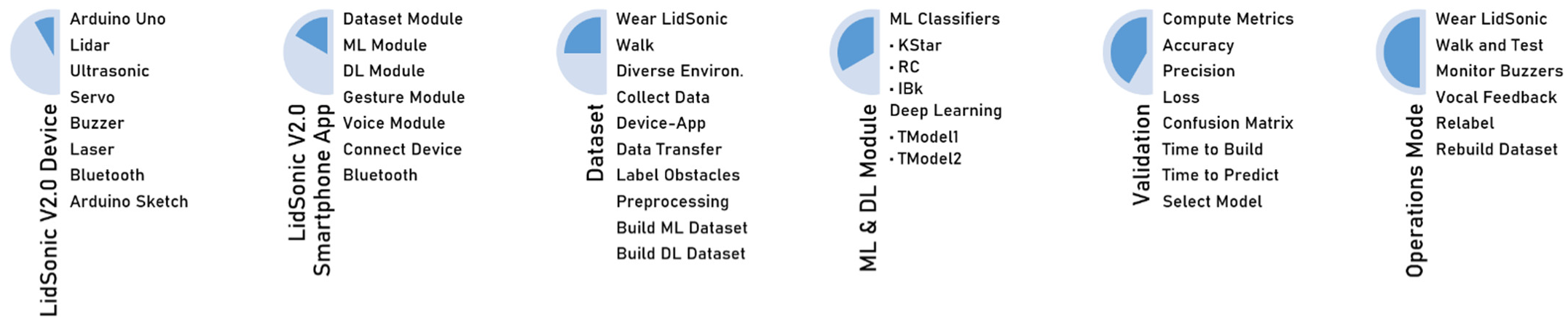
The development of modules, as seen in Figure 3, starts with the construction of the LidSonic V2.0 device. A LiDAR sensor, ultrasonic sensor, servo, buzzer, laser, and Bluetooth are all connected to an Arduino Uno CPU used to build the LidSonic V2.0 gadget. Then, using an Arduino sketch, we combined and handled the different components (sensors and actuators), as well as their communication. The LidSonic V2.0 smartphone app was created with Android Studio (LidSonic V2.0). We created the dataset module to help with the dataset generation. Then, the chosen machine or deep learning module was used to construct and train the models. We utilized the Weka library for the machine learning and the TensorFlow framework for the deep learning models. Bluetooth is used to create a connection between the LidSonic V2.0 device and the mobile app, which is also used to send data between the device and the app. The Google speech-to-text and text-to-speech APIs were used to develop the speech module.
Figure 3. LidSonic: A Developer’s View.
The developer wears the LidSonic V2.0 device and walks around to create the dataset. The LidSonic V2.0 device provides sensor data to the smartphone app, which classifies obstacle data and generates the dataset. To verify our findings, we used standard machine and deep learning performance metrics. The developer wore the trained LidSonic V2.0 gadget and went for a walk to test it in the operational mode. The developer observed the system’s buzzer and vocal feedback. The dataset can be expanded and recreated by the developers, users, or their assistants to increase the device’s accuracy and precision.

3.3. System View

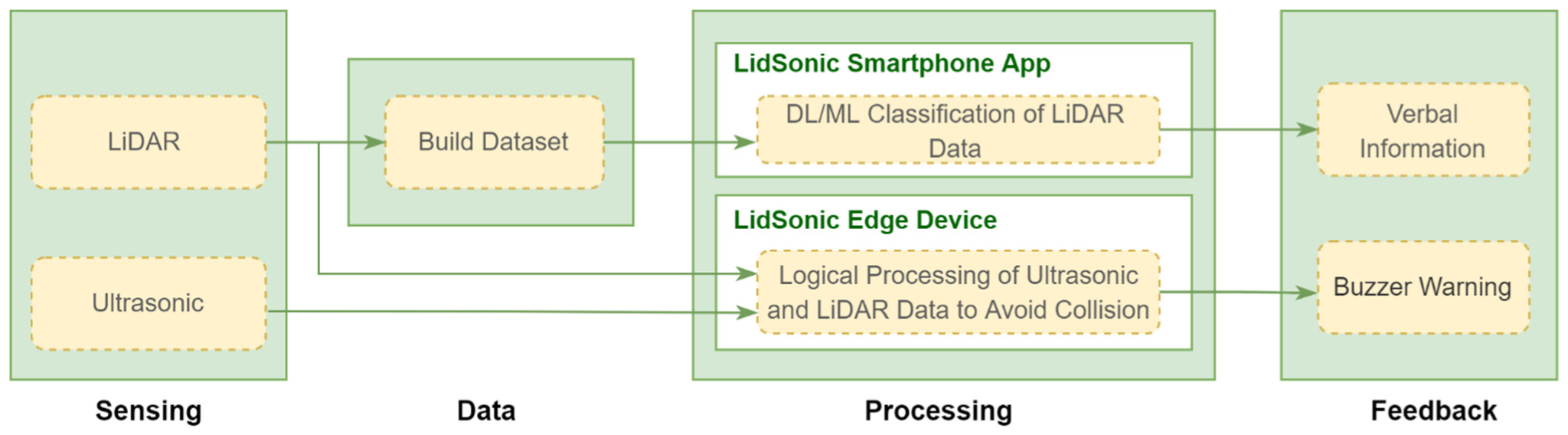
LidSonic V2.0 detects hazards in the environment using various sensors, analyzes the data using multiple channels, and issues buzzer warnings and vocal information. With the use of an edge device and an app that collects data for recognition, we propose a technique for detecting and recognizing obstacles. Figure 4 presents a high-level functional overview of the system. When the Bluetooth connection is established, the data is collected from the LiDAR and ultrasonic sensors. An obstacle dataset should be established if the system does not already have one. The dataset is created using LiDAR data only. Two distinct channels or procedures are used to process the data. First, simple logic is used by the Arduino unit. The sensors operated by the Arduino Uno controller unit offer the essential data required for visually impaired people to perceive the obstacles surrounding them. It processes the ultrasonic and basic LiDAR data for rapid processing and feedback through a buzzer. The second channel is the use of deep learning or machine learning techniques to analyze the LiDAR data via a smartphone app and produce vocal feedback. These two channels are unrelated to one another. The recognition process employs deep learning and machine learning approaches and is examined and evaluated in the sections below.
Figure 4. LidSonic V2.0 Overview (Functional).
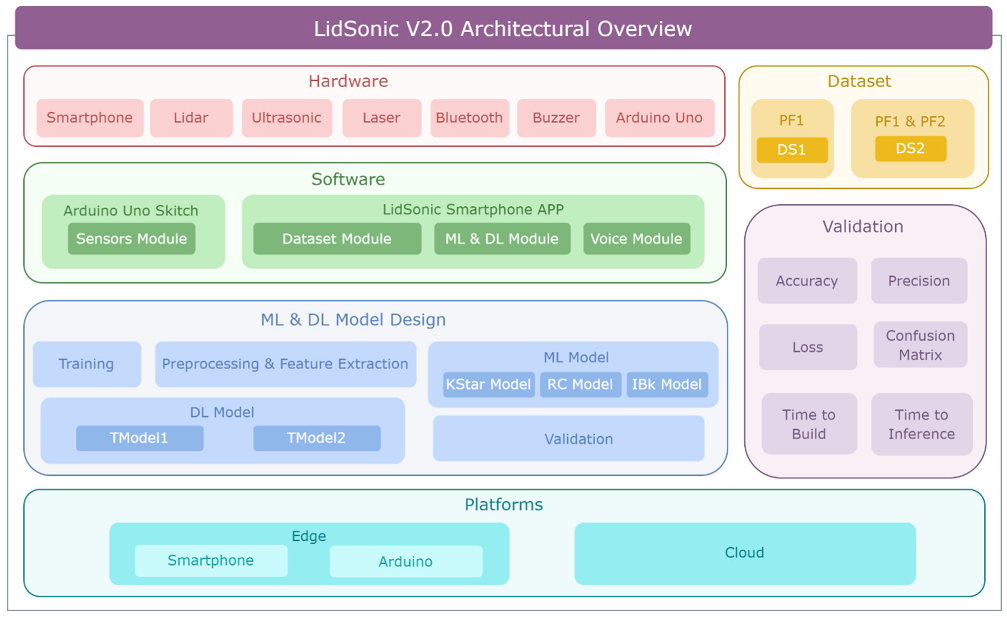
Figure 5 depicts a high-level architectural overview of the system. The hardware, machine learning and deep learning models, software, datasets, validation, and the platform are all part of the system. The hardware includes all of the components required by the LidSonic V2.0 gadget. We created several models using ML and DL techniques that are explained further in Section 4. The system makes use of two types of software: one for controlling the sensors and performing the obstacle detection tasks with an Arduino skitch device, and another for the recognition tasks using the smartphone app. The accuracy, precision, loss, time to train a model, time to predict an object, and confusion matrix were employed as validation metrics in this work. Depending on the type and performance of the classifier, the system can be used on a variety of platforms, including edge and cloud. In the next section, we expand this system perspective with comprehensive diagrams and methods.
Figure 5. LidSonic V2.0 Overview (Architectural).

4. Design and Implementation

This section explains the LidSonic V2.0 System’s design in detail. The hardware components and design are described in Section 4.1. Section 4.2 provides an overview of the system’s software design. The sensor module is illustrated in Section 4.3 and the dataset and machine and deep learning modules are explained in Section 4.4 and Section 4.5, respectively.

4.1. System Hardware

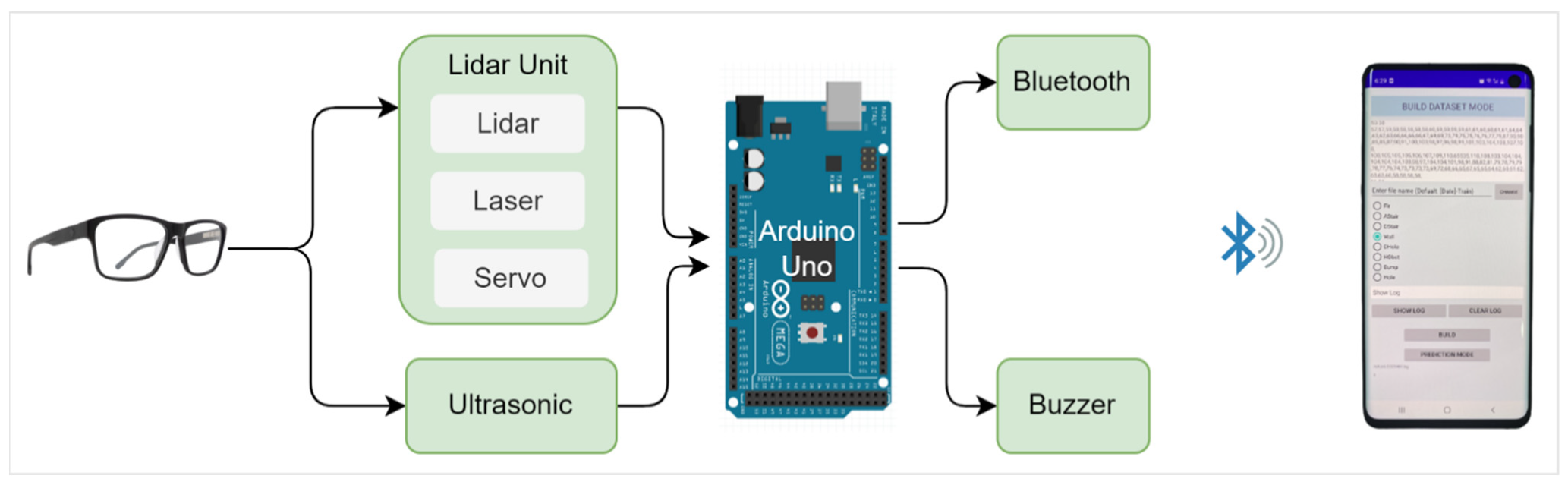
The system incorporates the following hardware components, as shown in Figure 6: TFmini Plus LiDAR, an ultrasonic sensor, Bluetooth, Arduino Uno, and the user’s smartphone. A servo, buzzer, and power bank are used to operate the device.
Figure 6. System Hardware.
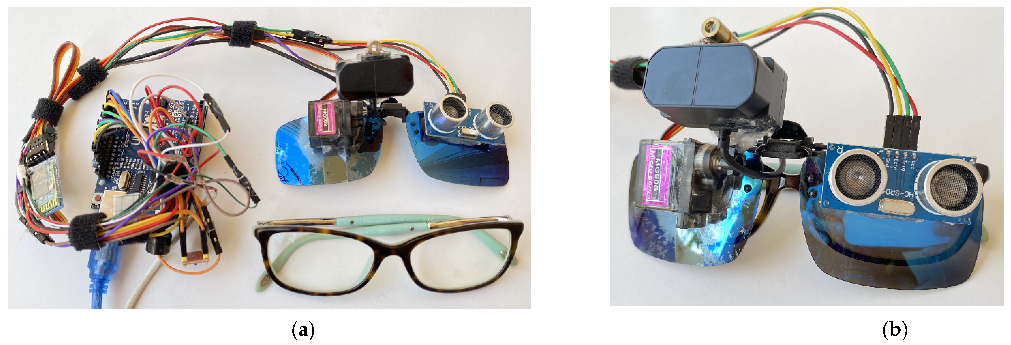
Figure 7 displays a photo of the LidSonic V2.0 gadget, which includes smart glasses with sensors and an Arduino Uno board. The LidSonic V2.0 device’s central nervous system is the Arduino Uno microcontroller unit, which is used to integrate and manage the sensors and actuators and to transfer sensor data to the smartphone app through Bluetooth. It is configured so as to control how the servo motions, sensors, and other components interact. The LiDAR Unit contains the TFmini Plus LiDAR sensor [135] that is connected with a servo and laser as a unit. The laser beam is installed above the TFmini Plus LiDAR and helps to indicate where the LiDAR is pointed so that one may scan and categorize various things in order to build a valid dataset. The data collected by the TFmini Plus LiDAR from its spatial environment is transferred to the Arduino unit. Some of this information is used by Arduino to detect obstacles and activate the buzzers as needed, while other information is relayed through Bluetooth to the smartphone app. The servo that controls the movement of the two devices comprises both the TFmini Plus LiDAR and the laser. The ultrasonic sensor is capable of detecting a wide range of obstructions. It is also utilized to compensate for the TFmini’s LiDAR’s inadequacies by recognizing transparent obstructions on the route of visually impaired people. The ultrasonic sensor detects objects at 30 degrees and has a detection range of 0.02 m–4.5 m [136]. The Arduino unit analyzes the data from the ultrasonic sensor, and if an item is detected, the buzzer is actuated. The buzzer sounds with distinct tones to notify visually impaired persons of different sorts of objects detected by the sensors. The buzzer and sound frequencies, or tones, are controlled by the Arduino CPU based on the identified items. A microphone for user instructions, Bluetooth for interfacing with the LidSonic V2.0 device, and speakers for vocal feedback regarding the detected objects are all included in the smartphone app’s hardware.
Figure 7. (a) LidSonic V2.0 device and a glass (b) LidSonic V2.0 device mounted into a glass frame.

4.1.1. TFmini-S LiDAR

A laser diode emits a light pulse, which is used in a LiDAR. Light strikes and is reflected by an item. A sensor detects the reflected light and determines the time of flight (ToF). The TF-mini-S device is based on the OPT3101 and is a high-performance, single-point, short-range LiDAR sensor manufactured by Benewake [137]. It is based on long-range proximity and distance sensor analog front end (AFE) technology based on ToF [137]. A TFmini-S LiDAR operates on the networking protocol UART (TTL)/I2C, can be powered by a conventional 5 V supply, and has a total power consumption of 0.6 w.
The TFmini-S LiDAR has a refresh rate of 1000 Hz and a size range of 10 cm to 12 m. It provides a ±6 cm accuracy between 0.1 m and 6 m, and a 1 percent accuracy between 6 m and 12 m. The operational temperature range is from around 0 °C to 60 °C. The range of the angles is 3.5° [138]. Data from the TFmini-S LiDAR may be collected quickly and precisely. There are no geometric distortions in the LiDAR, and it may be utilized at any time of day or night [138]. When no item is identified within a 12 m range, the sensor sends a value of 65,535.
The TFmini-S has the advantages of being inexpensive in cost, having a small volume, low energy consumption, and many interfaces in order to satisfy various requirements, but it has the disadvantage of not being able to detect transparent objects, such as glass doors (we used an ultrasonic sensor to compensate for this). It improves the outdoor efficiency and accuracy with various degrees of reflectivity by detecting stable, accurate, sensitive, and high-frequency ranges. Few studies have been conducted on the utilization of LiDAR to assist the visually impaired and identify their needs. The gadgets that aid the visually impaired make use of a very expensive Linux-based LiDAR [139].

4.1.2. Ultrasonic Sensor

An ultrasonic sensor is one of the best tools for detecting barriers because of its cheap price, low energy consumption, sensitivity to practically all types of artifacts [40], and the fact that the ultrasonic waves may be transmitted up to a distance from 2 cm to 300 cm. Furthermore, ultrasonic sensors can detect items in the dark, dust, smoke, in cases of electromagnetic interference, and tough atmospheres [140].
A transducer, in an ultrasonic sensor, transmits and receives ultrasonic pulses, which carry information about the distance between an item and the sensor. It sends and receives signals using a single ultrasonic unit [41]. The HC SR04 ultrasonic sensor has a <15° effective angle, a resolution of 0.3 cm, a frequency of operation of 40 kHz, and a measurement angle of 30°. The range limit of ultrasonic sensors is reduced when they are reflected off smooth surfaces, when they have a low incidence beam and when they open narrowly. Optical sensors, on the other hand, are unaffected by these issues. Nonetheless, the optical sensors’ shortcomings include the fact that they are sensitive to natural ambient light and rely on the optical properties of the object [37]. Sensors are often employed in industrial systems to calculate object distance and flow velocity. ToF is the time required for an ultrasonic wave to travel from the transmitter to the receiver after being reflected by an object. Equation (1) can be used to calculate the distance from the transmitter, where c is the velocity of the sound [141]:
d = [ c   × (   ToF ) ] / 2
Infrared sensors and lasers are outperformed by ultrasonic sensors. Infrared sensors cannot work in the dark and produce incorrect findings when there is no light. However, there are inherent drawbacks that restrict the application of ultrasonic instruments to mapping or other jobs requiring great accuracy in enclosed spaces. Due to sonar cross-talk, they are less reliable and have a reduced range, large beam coverage, latency, and update rates [12]. The receiver detects an undetectable small volume of the reflected energy if the obstacle surface is inclined (i.e., surfaces formed of triangles or with rough edges), which causes the ultrasonic range estimations to fail [142].

4.2. System Software

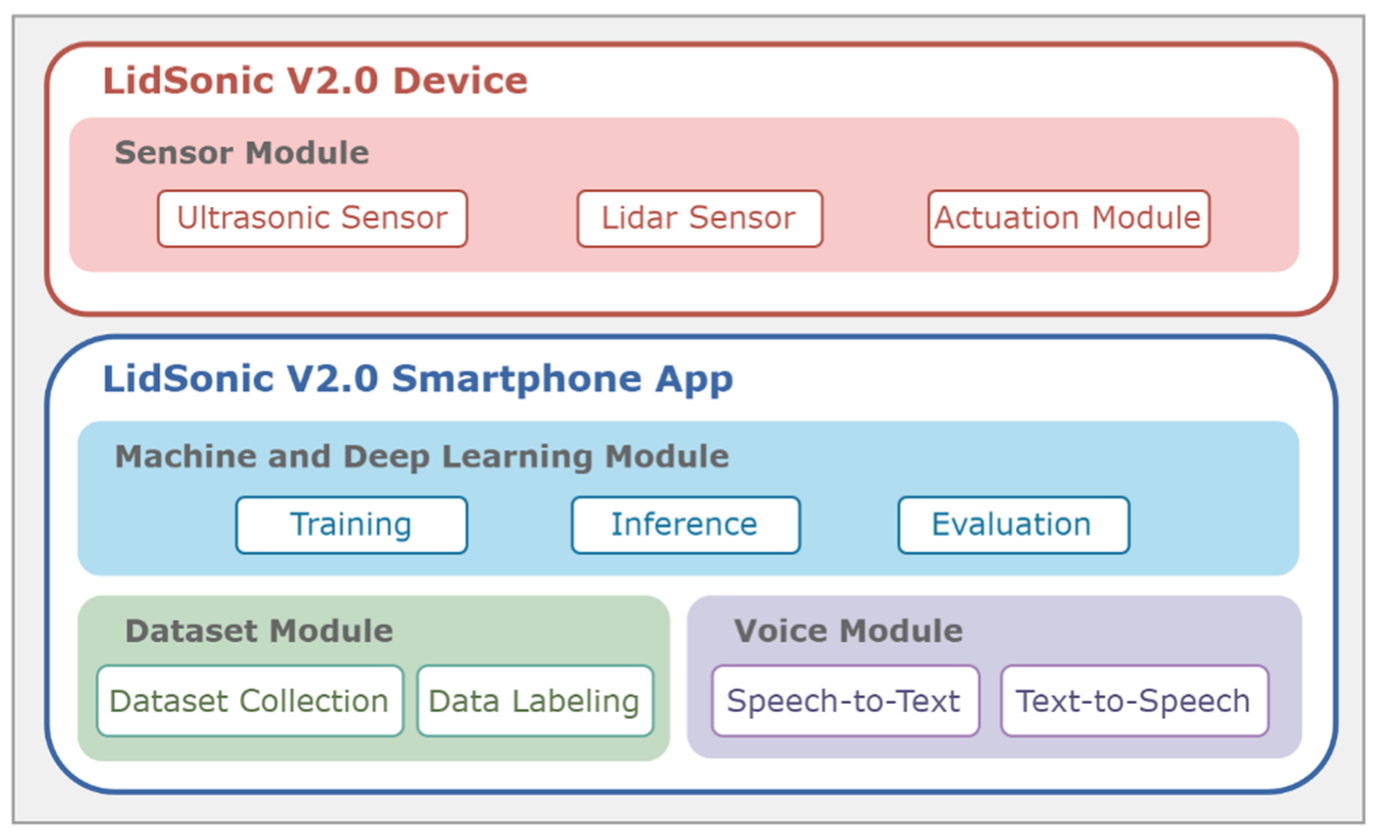
The LidSonic V2.0 system consists of the LidSonic V2.0 device and the LidSonic V2.0 Smartphone App (see Figure 8). The LidSonic V2.0 device’s sensor module contains software that controls and manages the sensors (LiDAR and ultrasonic sensors) and actuators (the servo and laser beam). This module also carries out the basic logical processing of sensor data in order to generate buzzer alerts regarding discovered items.
Figure 8. LidSonic V2.0 Software Modules.
The smartphone app’s dataset module collects data from the LidSonic V2.0 device and appropriately stores the dataset, including the labels. The machine and deep learning module is located in the smartphone app and allows the models to be trained, inferred, and evaluated. Two Google APIs are used by the voice module. The text-to-speech API is used to provide audio feedback from the smartphone app, such as spoken input regarding adjacent objects identified by the sensors, using the mobile speakers. The Google speech-to-text API is used to transform user voice instructions and evaluate them so that the app can take relevant actions, such as labeling and relabeling data objects.
The master algorithm is given in Algorithm 1. The array VoiceCommands (various commands sent to the LidSonic V2.0 System) and AIType are the master algorithm’s inputs. AItype indicates the type of classification approach to be used, either machine Learning (ML) or deep learning (DL). Label, Relabel, VoiceOff, VoiceOn, and Classify are the VoiceCommands. The user gives the system the Label and Relabel voice commands to Label or Relabel an object observed by the system. The commands VoiceOff and VoiceOn are used to switch voice commands on and off if the user simply wants to hear the buzzer sound that alerts them when an object is close rather than hearing the names of all the things being recognized in the surroundings. When the user wants to identify a specific obstacle, they can use the voice command Classify. This command can be used even if the vocal feedback is turned off. The master algorithm produces three outputs: LFalert, HFalert, and VoiceFeedback, which are used to notify the user about various items through a buzzer or voice instruction.
Algorithm1: The Master algorithm: LidSonic V2.0
Input: VoiceCommands (Label, Relabel, VoiceOff, VoiceOn, Classify),
    AIType (ML, DL)
Output: LFalert, HFalert, VoiceFeedback
  •  ServoSensorsModuleSubSystem (Angle, Position)
  •  LaserSensorsModuleSubSystem ( )
  •  UD2O ← UltrasonicSensorsModuleSubSystem ( )
  •  [LD2O, LDO] ← LiDARSensorsModuleSubSystem ( )
  •  FeedbackType ← ObsDetWarnSensorsModuleSubSystem ( )
  • switch (AIType) do
  • case: ML
  •    [MLDataset] ← MLDatasetModule (LDO, Label, Relabel)
  •    [MOL, VoiceCommands] ← MLModule (MLDataset, VoiceCommands)
  • case: DL
  •    [DLDataset] ← DLDatasetModule (LDO, Label, Relabel)
  •    [DOL, VoiceCommands] ← DLModule (DLDataset, VoiceCommands)
  • End switch
  •  VoiceModule (VoiceCommands, VoiceFeedback)
The LidSonic V2.0 system operates different modules and subsystems for numerous purposes, as shown by the master algorithm. The ServoSensorsModuleSubSystem, a subsystem of the Sensors module, uses the angle and position as inputs to determine the servo starting position and motion and control the position of the LiDAR sensor. The LaserSensorsModuleSubSystem displays the direction in which the LiDAR is pointing (this is only for development purposes and assists the developer in identifying the object being scanned by the LiDAR). The UltrasonicSensorsModuleSubSystem returns the data output from the ultrasonic sensor, “UD2O” (the user’s distance from the object computed based on the data from the ultrasonic sensor). The LiDARSensorsModuleSubSystem returns two outputs from the LiDAR sensor, “LD2O” (the user’s distance from the object computed based on the data from the LiDAR sensor) and “LDO” (the user’s distance from the object (LiDAR data object that contains detailed data about the objects). The ObsDetWarnSensorsModuleSubSystem returns “FeedbackType”, detects objects, and informs the user about them via buzzers and voice feedback. The MLDatasetModule provides the Weka datasets, labeled “MLDataset”, after receiving the inputs “LDO”, “Label”, and “Relabel”. The DLDatasetModule provides CSV files, the “DLDataset”. The MLModule returns “MOL” (the object level below or above the floor) and “VoiceCommands”. The DLModule returns “DOL” (the object level below or above the floor) and “VoiceCommands”. The VoiceModule transforms speech to text and vice versa using VoiceCommands and VoiceFeedback as inputs. In the next sections, more algorithms, pictures, and text are used to describe the four modules, as well as the inputs and outputs.

4.3. Sensor Module

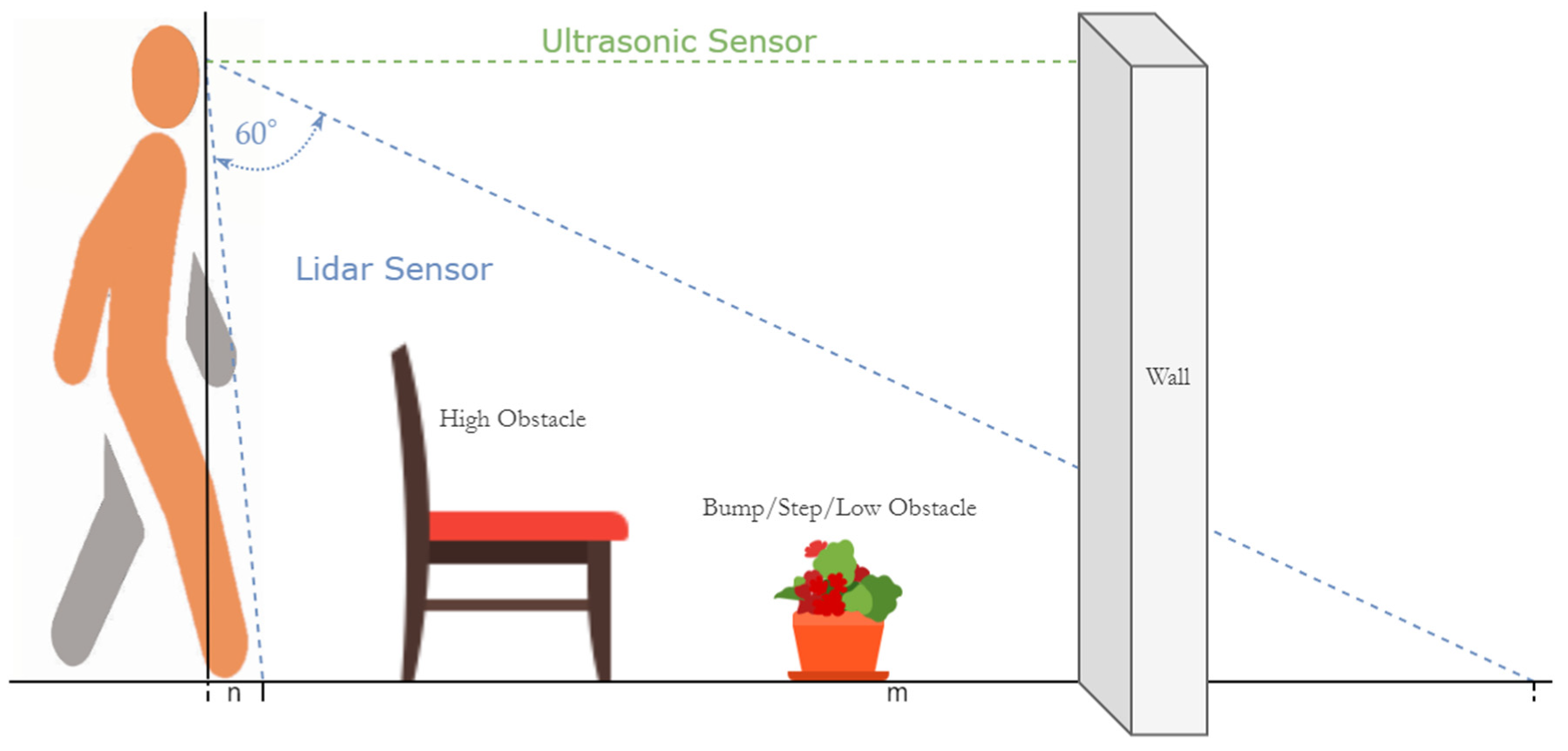
Figure 9 illustrates how the LidSonic V2.0 pair of glasses use ultrasonic and LiDAR sensors to observe the world. The ultrasonic sound pulse is directed in front of the user, as seen by the dotted green line, to detect any objects in front of the user. It can also detect obstacles that are transparent, such as glass doors or walls, which LiDAR may miss. The LiDAR sensor range is represented by dotted blue lines. The LiDAR sensor has a range of 10 cm to 12 m. We covered a 60-degree region in front of the user with a servo motor that moves the LiDAR sensor, which equates to an area of “m” meters on the floor. This floor area “m”, covered by the LiDAR sensor for a user of 1.7 m in height, would be around 3.5 m. Note that we ignored the fact that the glasses are at eye level rather than head level. The figure also displays the floor area “n”, which is the closest floor area to the user that is not covered by the LiDAR sensor, since we deactivated it in order to minimize false alarms triggered by the user’s knee while walking. This floor space closest to the user would be around 0.15 m for a person of 1.7 m in height. Within this “m” floor space, the LidSonic V2.0 system identifies any obstacles, including descending the stairs, using the LiDAR sensor.
Figure 9. Sensor Coverage.
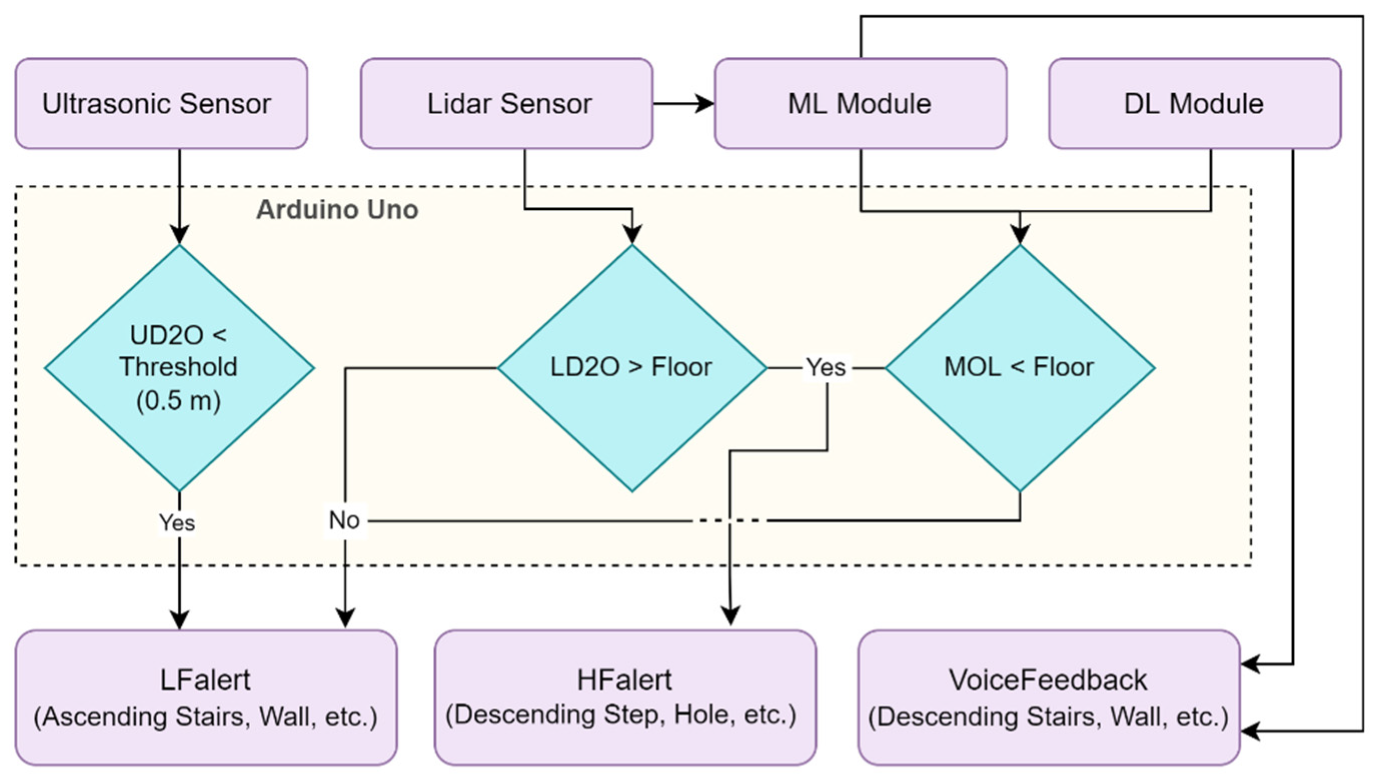
The flow diagram of the obstacle detection and warning subsystem is shown in Figure 10. The LidSonic V2.0 device uses data from an ultrasonic sensor (UD2O stands for distance to object detected by the ultrasonic sensor) and activates a buzzer with a low-frequency warning, providing an LFalert if it falls below a threshold of 0.5. The LidSonic V2.0 device additionally checks the closest point read by the LiDAR sensor (LD2O is the D2O detected by the LiDAR sensor), and if it is higher than the floor, the LFalert is triggered, signaling that the obstacle might be a high obstacle, a bump, and/or ascending stairs, etc. If it is below the floor, this means that there are obstructions such as descending stairs and/or holes, and a high-frequency alarm HFalert buzzer tone is triggered. The ML module provides the user with voice input depending on the anticipated obstacle type. MOL is converted from the predicted value (object level detected by the ML module). The buzzer is actuated with the LFalert if the predicted value type is an object above the floor; otherwise, the HFalert is triggered. The predicted value is converted to DOL (object level detected by the DL module). If the predicted value type is an object above the floor, the buzzer is activated with the LFalert; otherwise, the HFalert is activated. The figure only shows “MOL < Floor”; however, the values of MOL or DOL are used based on the algorithm used.
Figure 10. Detection and Warning System.
Algorithm 2 depicts the algorithm for the obstacle detection, warning, and feedback subsystem. It takes the ultrasonic data (UD2O), nearby LiDAR distance readings (LD2O), the object level calculated by the machine learning module (MOL), and the object level calculated by the deep learning module (DOL) as inputs. The ObsDetWarnSensorsModuleSubSystem function analyzes data for detection and generates audio alarms. High-frequency buzzer tones (HFalert), low-frequency buzzer tones (LFalert), and VoiceFeedback are the output alerts. The subsystem has a logical function that accepts the inputs UD2O, LD2O, and MOL and returns the determination of the kind of obstacle (whether the obstacle is an object above floor level, etc.). No action is required if the output is a floor. If the obstacle returns as HighObs, however, it is either a wall or a high obstacle, and so on.
An LFalert instruction is delivered to the buzzer to start the low-frequency tone buzzer. The buzzer parameter HFalert is used to activate the high-frequency tone buzzer if the obstacle is of the LowObs type. The goal of selecting a high-frequency tone for low obstacle outputs is to ensure that low obstacle outputs are possibly more hazardous and destructive than high obstacle outputs. The high-frequency tone may be more noticeable than the low-frequency tone.
Algorithm2: Obstacle Detection, Warning, and Feedback
Input: UD2O, LD2O, MOL, DOL
Output: FeedbackType (HFalert, LFalert, VoiceFeedback)
  • Function ObsDetWarnSensorsModuleSubSystem ( )
  •  Obstacle ← Check (UD2O, LD2O, MOL, DOL)
  • switch (Obstacle) do
  •    case: Floor
  •     skip
  •    case: HighObs
  •     Buzzer (LFalert)
  •     VoiceModule (VoiceCommands, VoiceFeedback)
  •    case: LowObs
  •     Buzzer (HFalert)
  •     VoiceModule (VoiceCommands, VoiceFeedback)
  • End switch

4.4. Dataset Module

Machine learning is strongly reliant on data. It is the most important factor that enables algorithm training to become possible and to obtain accurate results from the trained models. Our dataset includes a 680-example training set and is formatted using ARFF files for Weka and CSV files for TensorFlow deep learning. The collection provides distance data obtained from the LiDAR equipment by LidSonic V2.0.
Table 3 shows the eight classes in the dataset, the kinds of obstacles that we accounted for, as well as the number of examples/instances of each. Note that the images in the table include both indoor and outdoor conditions. Deep Hole, Ascending Stairs, Descending Stairs, and Wall were trained in indoor environments, while the rest of the objects were trained in outdoor environments. For our smart glasses, we were not especially concerned with the exact specifications of the objects but rather with the broader types of the objects. For example, differentiating between Descending Stairs and a Deep Hole is important, because the former is an object that blind people might wish to use (go down), while they would avoid the Deep Hole. The type of Deep Hole is not important, because they would aim to avoid a deep hole. We trained the machine and deep learning algorithms with the data generated by the LiDAR sensor for the objects and did not program the software with the specification of the objects. Hence, the objects are not defined.
Table 3. Obstacle Dataset.
Table 4 shows the preprocessing and feature extraction approaches. PF1 requires that the LidSonic V2.0 device’s upward line scan is set to the same angle index as the downward scan and ends with the class label. PF2 must complete PF1 and then extract just eleven angle readings by dividing the 60 readings by ten along with the last angle distance data (in essence, skipping every five readings, assuming that an object does not exist in this gap and considering that the user is moving, so that this gap is moving too). It also computes the height of the angle nearest to the user, which is the LidSonic V2.0 device’s starting point, as well as the middle angle of the LidSonic V2.0 device’s scan. We need to calculate the distance from the user to the obstacle d2 and the distance from the user to the ground d1 (y-axis), the points for both angles, once we have the two height calculations, which are the x-axis points. The slope between h1 and h2 can then be calculated. The two heights and the slope are added to the 11-angle distance readings to create the 14-feature dataset, DS2. The 60-angle distance readings are the dataset features of DS1.
Table 4. Preprocessing and Feature Extraction.
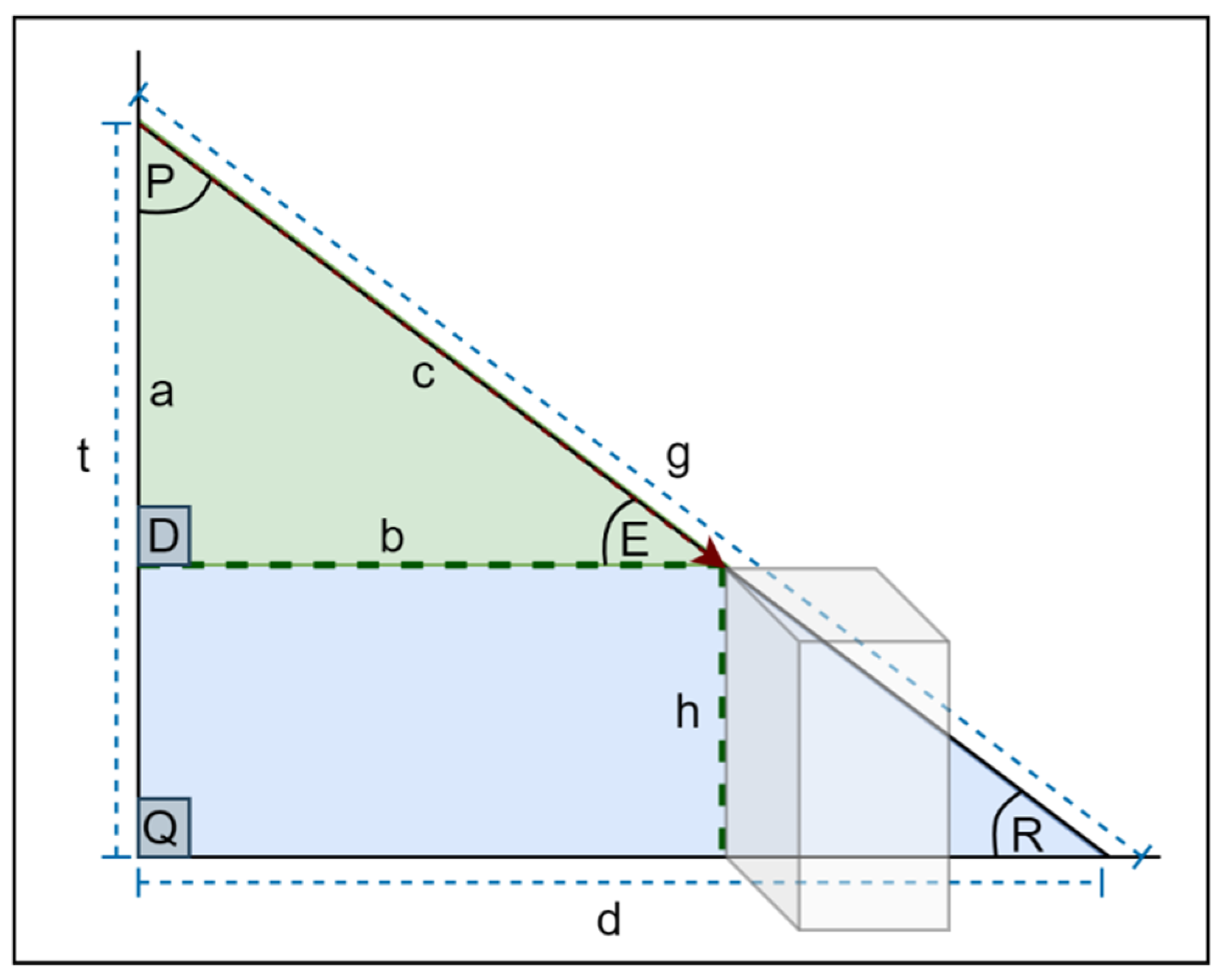
Figure 11 depicts the model used for calculating the obstacle height. The distance between the LidSonic V2.0 device and the ground is represented by g. The larger triangle’s hypotenuse, which is colored blue, is represented by g. The LidSonic V2.0 device’s LiDAR distance from an obstacle is c. We can compute the height of the object h using the similar triangle law and the value of c. Two triangles that have the same ratio of their comparable sides and an identical pair of corresponding angles are called similar triangles.
Figure 11. Obstacle Height.
In   PQR   and   PDE ,   DPE   is   common   and   PDE = PQR   ( corresponding   angles ) .  
  PQR   ~     PDE   ( PP   criterion   for   similar   triengles )
Hence, from (1) & (2):
PR / PE = PQ / PD
From Equation (3), calculate r as:
r = c / g
then,
a = t r
The height of the obstacle is:
h = t a
The horizontal distance from the user to the obstacle is calculated by Equation (7):
b = d r
There is a   ± 3   cm error when computing the height of an object, which we consider insignificant in our case, because we do not require the exact height but, rather, the nature of it (high, low, etc.). The height is calculated and used as a feature in the dataset. We added two height features, h1 and h2, for the purpose of this computation.
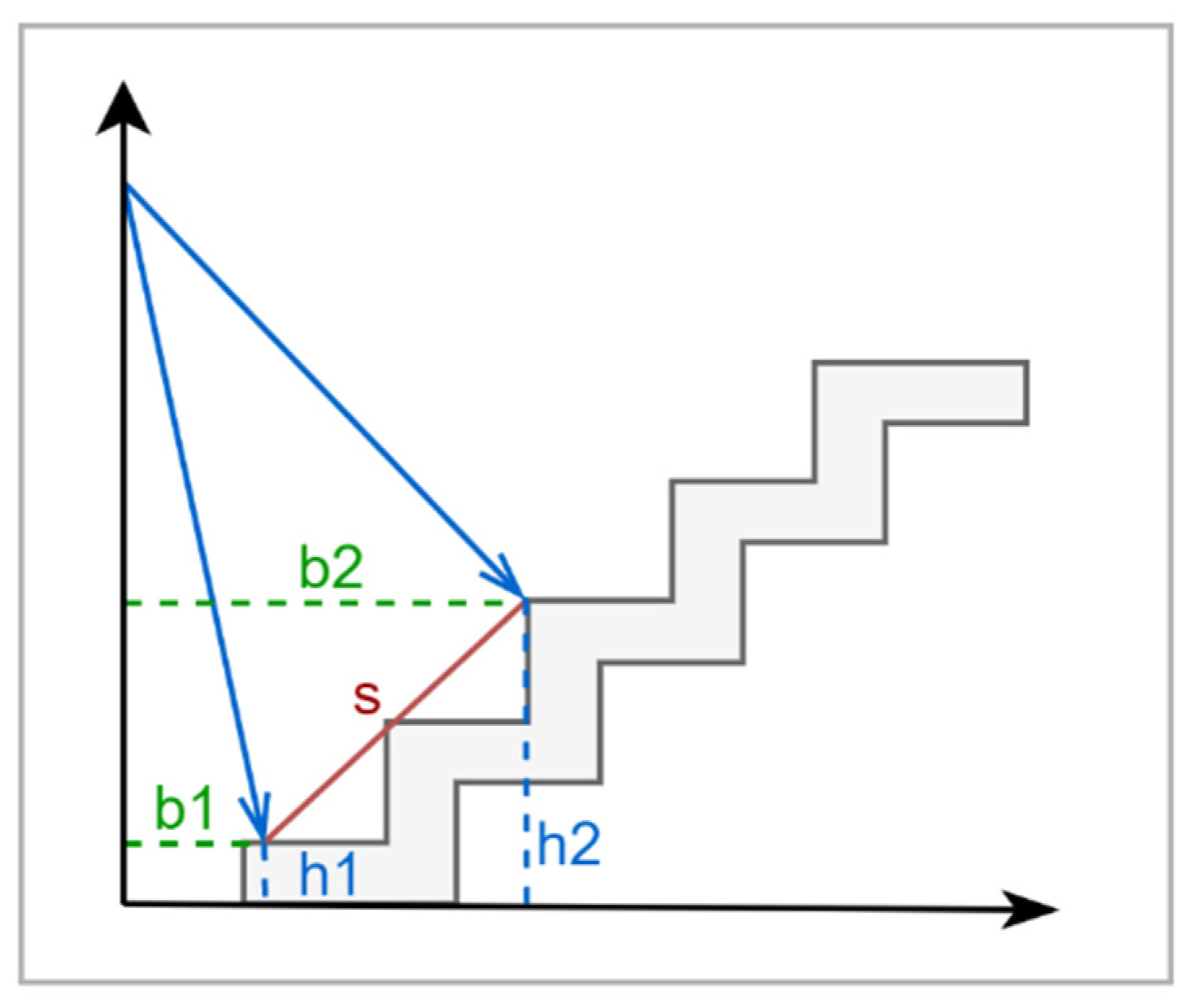
Another crucial parameter that we included in our dataset is the slope in Figure 12, between h2 and h1. Since the value of the slope fluctuates depending on the slope of the ground level or the kind of obstacle, especially in the case of stairs, it is a significant factor. Equation (8) calculates the slope as follows:
s = h 2 h 1 b 2 b 1
Figure 12. Slope.
We created two types of datasets: one that collects 60 values of the features using the LiDAR distance of 60 angles, which we called DS1, and the second dataset, DS2, which extracts 11 features from DS1. Three more features were added: two obstacle heights from two different angles, as well as the slope between these two positions, giving a total of 14 features. We constructed six training models to be examined, evaluated, and analyzed for optimal utilization. Two different approaches were investigated: Weka-based machine learning and TensorFlow-based neural networks. We used K* (KStar), Random Committee, and IBk as classifiers in Weka in order to train six machine learning models. For our system, these were the most successful classification methods [39]. The second is a TensorFlow-based deep learning technique that utilizes the two datasets. We constructed two deep learning models for each. Machine and deep learning algorithms are discussed in the next subsection. The DS1 labels range from a01–a60 and end with the obstacle class to give a total of 61 features. DS2 has 11 angle labels in addition to h1, h2, s, and the obstacle class. The DS1 labels range from a01–a60 and end with the obstacle class to give a total of 61 features. DS2 has 11 angle labels in addition to h1, h2, s, and the obstacle class.
Table 5 and Table 6 list the two types of datasets that we used in our research, along with a sample of collected data for each obstacle class. The DS1 labels range from a01–a60 and end with the obstacle class to give a total of 61 features. DS2 has 11 angle labels in addition to h1, h2, s, and the obstacle class.
Table 5. Dataset 1 (D1) Sample.
Table 6. Dataset 2 (D2) Sample.
Algorithm 3 outlines how our system’s dataset is created. It takes the CSV Header, LDO, and Features as inputs. Using the Building Dataset function, the CSV header file from CSVHeader is first placed in the new dataset, CSVFile. Data are collected from LDO and saved in a LogFile using the DataCollection method. LDO represents the LiDAR distance readings, while the loop records the data in the proper format, saving the LiDAR downwards data in the original order and reversing the order of the LiDAR upward data.
Algorithm3: DatasetModule: Building Dataset Algorithm
Input: Header, LDO
Output: Dataset
  • Function: BuildingDataset ( )
  •   Insert Header into the File
  •   LogFile ← LDO
  •   While (not end of LogFile) //Bluetooth incoming data stored in LogFile
  •    strLine ← BufferLine //BufferLine is a line taken from LogFile
  •    mutualFlag ← true
  •    While (strLine ! = 0)
  •     If (mutualFlag)
  •      myData ← strLine + Obstacle class
  •      Write myData in the File
  •      Clear myData
  •      mutu-alFlag ← false
  •     Else
  •      Store numbers of strLine into an array called strarr
  •      For (x = (strarr.length)—1; x ≥ 0; x--)
  •       reverseStr ← reverseStr + strarr[x] + “,”
  •      End For
  •      myData ← myData + reverseStr + Obstacle class
  •      Write myData in the File
  •      Clear my-Data and reverseStr
  •     End If
  •    End While
  •   End While
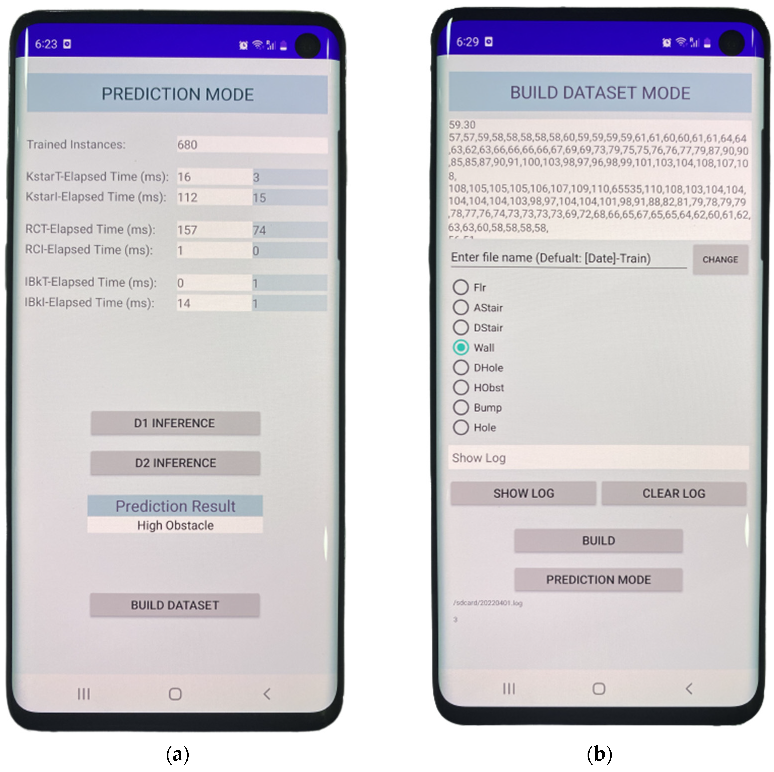
Figure 13 depicts the LidSonic V2.0 Smartphone app’s user interface, which is used for building the dataset. The LiDAR sensor sends data to the mobile app through Bluetooth, which it saves in a file named LogFile. On the left-hand side is the prediction mode in which the user hears the verbal feedback of the recognized hazard. In addition, it shows some of the evaluation measurements that are conducted for the three classifiers. For example, KstarT-Elapsed Time (ms) shows the time in milliseconds that is required to build the Kstar classifier (we provide more details regarding the classifiers in the next subsection) for the DS1 dataset in the white box and the DS2 dataset in the blue box. KstarI-Elapsed Time (ms) shows the inference time required to predict an object for datasets DS1 and DS2, respectively. When the D1 INFERENCE button is pressed, the evaluation measurement of DS1 is presented in the white boxes for each classifier, while the D2 INFERENCE button shows the results obtained for DS2.
Figure 13. LidSonic V2.0 App. (a) Prediction Mode. (b) Build Dataset Mode.
The LogFile data are displayed in the figure’s right-hand mobile app view. The real number ultrasonic sensor measurements is shown in the first line. We will explore this further in future work to determine whether it is worthwhile to include it as a feature. The ultrasonic measurements were not included in the dataset for this study. The LiDAR sensor’s downward and upward 60-degree readings are presented in the first two lines, which include 60 comma-separated numbers. The LiDAR sensor is linked to a servo that rotates in one-degree increments downwards and upwards, capturing the distance from the device to the object at each degree position. The 60-degree downward and upward measurements are acquired in this manner. Each line of data basically provides 60 measurements of the distance from the user’s eye to the object, each with a distinct line of sight angle. Every two lines of the 60-degree downward and upward measures are followed by a real number, and so on.

4.5. Machine and Deep Learning Module

We tested multiple types of models on different types of datasets to determine which one performed the best. Algorithm 4 shows the method used to preprocess the data and extract features. The inputs are Dataset, LIndex1, and LIndex2. This is the method we use to preprocess and extract features from the dataset and the variation between the ARFF files (for WEKA) and CSV files (for TensorFlow) based on the file format. To begin, we proceed to the locations where the dataset’s data begin. The SelectedFeatures function extracts 11 data values from 60 values for each line. The CalculateHeight function takes the two pointing locations of the Lidar sensor, LIndex1 and LIndex2, to acquire their heights, yielding Height [1] and Height [2]. The two numbers are then sent to the CalculateSlope function to determine the slope, finally incorporating the findings into the file.
Algorithm4: PreProFXModuleDL: Preprocessing and Feature Extraction
Input: Dataset, LIndex1, LIndex2
Output: Dataset
  •  Go to the first instance
  • While (not end of File)
  •   strLine ← BufferLine //BufferLine is a line taken from the Dataset
  •   While (strLine ! = 0)
  •    SData [1, …, 11] ← SelectedFeatures()
  •    Height [1], Height [2] ← CalculateHeight
    (LIndex1,LIndex2)//Equations (4)–(6)
  •    Slope ← CalculateSlope(Height [1], Height [2])//Equations (7) and (8)
  •    DataLine ← AddFeatures(SData[], Height[], Slope)
  •    Write DataLine in the File
  •    Clear DataLine
  •   EndWhile
  • EndWhile
Algorithms 5 and 6 provide high-level algorithms for the machine and deep learning modules. A detailed explanation is presented in Section 4.5.1 and Section 4.5.2.
Algorithm 5: Machine learning Module
Input: Dataset, PrFx
Output: MOL, VoiceCommands
  • If (PrFx)
  •   Dataset ← PreProFXModuleML(Dataset)
  • End If
  •  MLModel ← Train (Dataset)
  •  [MOL, VoiceCommands] ← Inference (MLModel)
Algorithm 6: Deep Learning Module
Input: Dataset, PrFx
Output: DOL, VoiceCommands
  • If (PrFx)
  •   Dataset ← PreProFXModuleDL(DLDataset)
  • End If
  •  DLModel ← Train (Dataset)
  •  [DOL, VoiceCommands] ← Inference (DLModel)
The prediction mode can be used to aid visually impaired users in three distinct ways: the prediction button, throw gesture, or voice instruction. To utilize the voice instruction, the user must double-tap the screen so as to access the speech-to-text API and then speak “Prediction Mode” on the command line. The prediction mode is accessed by flinging the screen.

4.5.1. Machine Learning Models (WEKA)

WEKA, a java-based open source program that contains a collection of machine learning algorithms for data mining applications [143], was employed to train the dataset with three classifiers that were carefully selected from detailed experiments carried out in our previous works, which provided the best results, including KStar, IBk, and Random Committee [39].
KStar Algorithm
KStar is an instance-based classifier, which means that the class of a test instance is decided by the class of related training examples, as defined by a certain similarity function. It utilizes an entropy-based distance function, which sets it apart from other instance-based learners. Instance-based learners use a dataset of pre-classified examples to categorize an instance. The essential hypothesis is that comparable instances are classified similarly. The issue is that we must determine how to define the terms “similar instance” and “similar class”. The distance function, which defines how similar two examples are, and the classification function, which describes how the instance similarity creates a final classification for the new instance, are the related components of an instance-based learner. The KStar algorithm employs an entropic measure, which is based on the chance of random selection from among all the conceivable transformations, turning one instance into another. It is particularly helpful to use entropy as a metric for the instance distance, and information theory aids in the determining the distance between the instances [144]. The distance between instances determines the complexity of a transition from one instance to another. This is accomplished in two stages. To begin, a limited set of transformations are created that transfer one instance to another. Then, using the program, we can convert one instance from x to y in a limited sequence of transformations that begins with x and ends with y.
Instance-Based Learner (IBk) Algorithm
An ideal description is found in the principal output of IBk algorithms (or concept). This is a function that maps instances to create categories. It returns a classification for an instance chosen from the instance space, which is the anticipated value for the instance’s category attribute. A collection of stored examples and, possibly, some information about their historical performances during classifying are included in an instance-based concept description (e.g., their number of correct and incorrect classification predictions). After each training instance is handled, this list of instances may vary. IBk algorithms, on the other hand, do not generate extensive idea descriptions. Instead, the IBk algorithm’s chosen similarity and classification functions determine the concept descriptions based on the current collection of stored instances. The framework that describes all IBk algorithms comprises three sections: the Similarity Function, Classification Function, and Concept Description Updater. These are explained as follows. (1) The Similarity Function determines how similar a training instance x is to the concept description’s examples. Similarities are given as numerical values. (2) The Classification Function takes the results of the similarity function and the classification performance records of the instances in the concept description and uses them to classify them. This leads to an x classification. (3) The Updater for Concept Descriptions is a program that keeps track of the results of the classification and decides which instances should be included in the concept description. Include ‘I’ inputs, the similarity outcomes, the classifying results, and the current concept description are all inputs. This results in an updated concept description.
Unlike most other supervised learning approaches, IBk algorithms do not create explicit abstractions, such as decision trees or rules. When cases are provided, most learning methods produce generalizations from these cases and utilize simple matching processes to classify subsequent instances. At the time of presentation, this includes the objective of the generalizations. Because IBk algorithms do not store explicit generalizations, they perform less work at the presentation time. However, when they are supplied with more cases for classification, their workload increases, as they compute the similarities of their previously saved instances with the newly presented instance. This eliminates the need for IBk algorithms to keep rigid generalizations in concept descriptions, which may incur significant costs for their updating in order to account for prediction errors [145].
Random Committee Algorithm
The Random Committee algorithm is an ensemble of randomizable base classifiers that may be built using this class. A distinct random number seed is used to build each base classifier (but each is based on the same data). The final prediction is an arithmetic mean of the predictions made by each of the base classifiers [146].
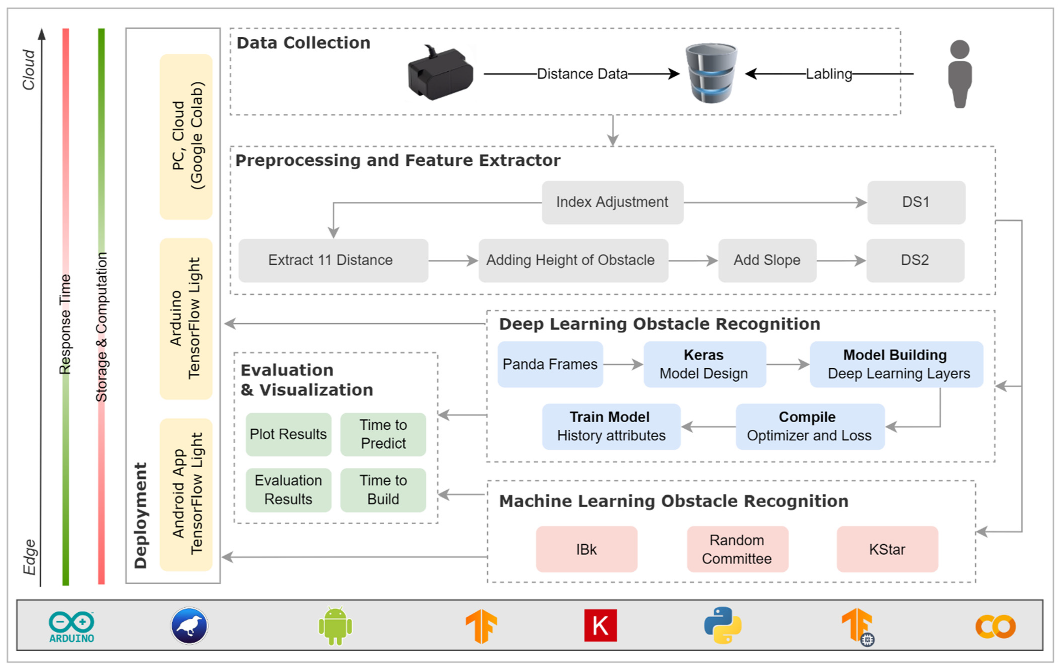
Figure 14 shows the model procedure using the Weka and TensorFlow frameworks. The data are obtained from the LidSonic V2.0 gadget via its sensors and labeled by the user. Next, using the preprocessing and extraction module, we can produce two datasets, DS1 and DS2. Then, these datasets are trained using three machine-learning methods, IBk, Random Committee, and Kstar, in the machine learning obstacle recognition module. In the evaluation and visualization module, six Weka models were evaluated using three classifiers and two datasets. We used a 10-fold cross-validation to evaluate the training datasets. Weka runs the learning algorithm eleven times in the 10-fold cross-validation, once for each fold of the cross-validation and once more for the complete dataset. Each fit is performed using a training set made up of 90% of the entire training set, chosen at random, with the remaining 10% utilized as a hold-out set for validation. The deployment may be performed in a variety of ways, and we chose the optimal deployment method on the basis of the performance and analysis of each classifier.
Figure 14. Machine and Deep Learning Modules.
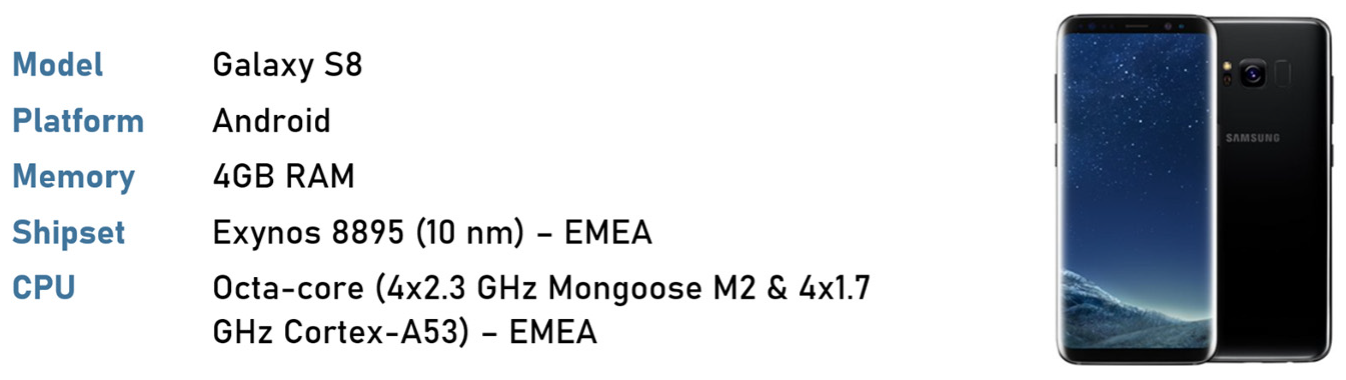
The training model building time was evaluated on a Samsung Galaxy S8 mobile (see Figure 15). The mobile has 4 GB RAM; Exynos 8895 (10 nm), EMEA shipset; and Octa-core (4 × 2.3 GHz Mongoose M2 & 4 × 1.7 GHz Cortex-A53), EMEA CPU. In the results section, the results are fully clarified.
Figure 15. Samsung Galaxy S8 Specification.

4.5.2. Deep Learning Models: TensorFlow

The model procedure of the TensorFlow framework is depicted in Figure 14. The user labels the data that is acquired from the LidSonic V2.0 device via its sensors. After that step, we created two datasets, DS1, and DS2 (these are the same datasets that are used for the machine learning models). We built two models, TModel1 and TModel2, to evaluate the two datasets we constructed. The deep models used are convolutional neural networks (CNNs). In the evaluation and visualization module, the models were evaluated, and the results were plotted and analyzed.
The datasets were divided into three sections: training, validation, and testing (see Table 7). The validation set was used to evaluate the loss and any metrics during the model fitting; however, the model was not fitted using this data. In the deployment phase, we put the module into production so that users would be able to make predictions with it. TensorFlow has great capabilities and offers a variety of choices regarding the models to be deployed, including TensorFlow Serving, TensorFlow Light (TinyML), and more. TensorFlow Serving is a TensorFlow library that enables models to be served through HTTP/REST or gRPC/Protocol Buffers. TensorFlow Serving is a model deployment strategy used for machine learning and deep learning models that are flexible and have a high performance. TensorFlow Serving makes it simple to deploy models. TensorFlow Lite is a lightweight TensorFlow solution for mobile and embedded devices that focuses on running machine learning (mostly deep learning) algorithms directly on edge devices, such as Android and iOS, as well as embedded systems, such as Arduino Uno. Tiny machine learning refers to a branch of machine learning microcontrollers and mobile phones. Because most of these devices are low powered, the algorithms must be carefully tuned so as to operate on them. TinyML has become one of the fastest developing subjects in deep learning due to the ability to perform machine learning directly on edge devices and the ease that comes with it. The smartphone, or Arduino Uno microprocessor, in our scenario, is an edge device that employs the final output of machine learning algorithms. Many operators run machine learning models on more capable devices and then send the results to edge devices. This method is starting to change because of the emergence of TinyML.
Table 7. TensorFlow Training Model Shapes.
The datasets are divided as shown in Table 7. During the training phase, the test set is ignored, and it is only utilized at the end in order to assess how well the model generalizes to new data. This is especially essential in the case of unbalanced datasets, when the absence of training data poses a considerable risk of overfitting.
ReLU
The model was fine-tuned with layers to increase its accuracy and precision. We employed three layers for the Deep Neural Network in addition to the input and output layers, as shown in Table 8 for DS1 and Table 9 for DS2, and applied the Rectified Linear Unit activation function (ReLU).
Table 8. TModel1 Summary.
Table 9. TModel2 Summary.
Softmax Regression
Since we had a multi-class dataset, we employed softmax regression. Softmax regression (also known as multinomial logistic regression) is a generalization of logistic regression used for dealing with several classes. As a result, the softmax function performs two tasks: First, it converts all of the scores into probabilities. Then, the total probability equals 1. The sigmoid function is used for the same problem in the binary logistic classifier to classify two classes. The softmax function is little more than a generalized sigmoid function.
Cost Function
We must create a cost function, with which the softmax probability and one-hot encoded target vector must be compared to determine the similarity. For this purpose, we employed the conception of cross-entropy. Cross-entropy is a distance computation function that uses the softmax function’s estimated probability and the one-hot-encoding matrix to determine the distance. The distance values for the correct target classes are lower, while the distance values for the incorrect target classes are greater. Passing an input through the model and comparing the predictions to ground-truth labels are the means by which a neural network is trained. A loss function is used to make this comparison. Categorical cross-entropy loss is the loss function of choice for multiclass classification issues. It does, however, necessitate the one-hot encoding of the labels. Sparse categorical cross-entropy loss may be a useful option in this instance. The loss function offers the same type of loss as categorical cross-entropy loss but on integer targets rather than one-hot encoded targets. This eliminates the categorical step that is so prevalent in TensorFlow/Keras models. In artificial neural networks, the softmax function is employed in a variety of multiclass classification algorithms. The outcome of K’s unique linear functions is used as the input for the multinomial logistic regression and linear discriminant analysis, and the predicted probability is calculated by Equation (9):
P ( y = j | x ) = e x T w j k = 1 K e x T w k
with the jth class given as the x sample vector and w weighting vector.
Adam Optimizer
Next, we employed Adam as an optimizer. Adam describes the phrase “adaptive moment estimation”. Adam is an optimization algorithm that may be used to update network weights iteratively based on training data instead of the traditional stochastic gradient descent procedure. We can note the following advantages of employing Adam for non-convex optimization problems. Its implementation is simple. It is effective in terms of computation. There are not that many memory demands. The gradients are invariant in regard to diagonal rescaling. It is ideally suited to issues involving a large number of data and/or parameters. It is a great option for non-stationary objectives. It is suitable for gradients that are exceedingly noisy or sparse. Finally, the hyper-parameters are easy to read and usually do not require much adjustment. Adam is a stochastic gradient descent extension that combines the benefits of two earlier extensions, the Adaptive Gradient Algorithm (AdaGrad) and Root Mean Square Propagation (RMSProp). Adam is a popular deep learning method, since it produces good results swiftly. The results were plotted and reviewed during the evaluation and visualization phase. The model configuration of the experiments is shown in Table 10.
Table 10. Deep Learning Model Configurations.

4.6. Voice Module

A multiplicity of application programming interfaces (APIs) are now accessible for a variety of activities that formerly required significant programming effort on behalf of developers. When working with audio file data, the job becomes more challenging. As a result, we relied on Google’s speech-to-text engine [147], which can transcribe any audio while maintaining the context and language. The API supports up to 120 languages. Other functions include voice command and control, call center audio transcription, real-time streaming, pre-recorded audio processing, and others. The Google speech-to-text tool can successfully translate written text into grammatically and contextually relevant speech using a range of natural voices. The Google text-to-speech API enables developers to interact with customers through speech user interfaces in devices and applications and customize the communication depending on voice and language preferences.
The Voice Module, for example, allows the user to generate the dataset and transition between different development and operation phases using voice commands. To begin the process of producing a dataset, the user types the command “Train”. The system then asks the user “what is the obstacle class?” in order to classify the incoming data. The user specifies the obstacle, such as “Wall”. The system then requests that the user to “Specify the dataset file name”. Finally, the user enters the file name verbally.

5. Performance Evaluation

We now analyze the performance of the LidSonic V2.0 system: Section 5.1 discusses the performance using the machine learning models and Section 5.2 discusses the system performance using the deep learning models.

5.1. Machine-Learning-Based Performance

There are several metrics defined in the Weka software that can be computed by the model and are useful for measuring the performance. Accuracy is defined as the percentage of properly classified instances. Precision is defined as the percentage of expected positives that were correctly classified. Table 11 displays the accuracy and precision of the six machine learning models, adopting three classifiers to construct models from the two datasets, DS1 and DS2.
Table 11. Evaluation of the Machine Learning Models.
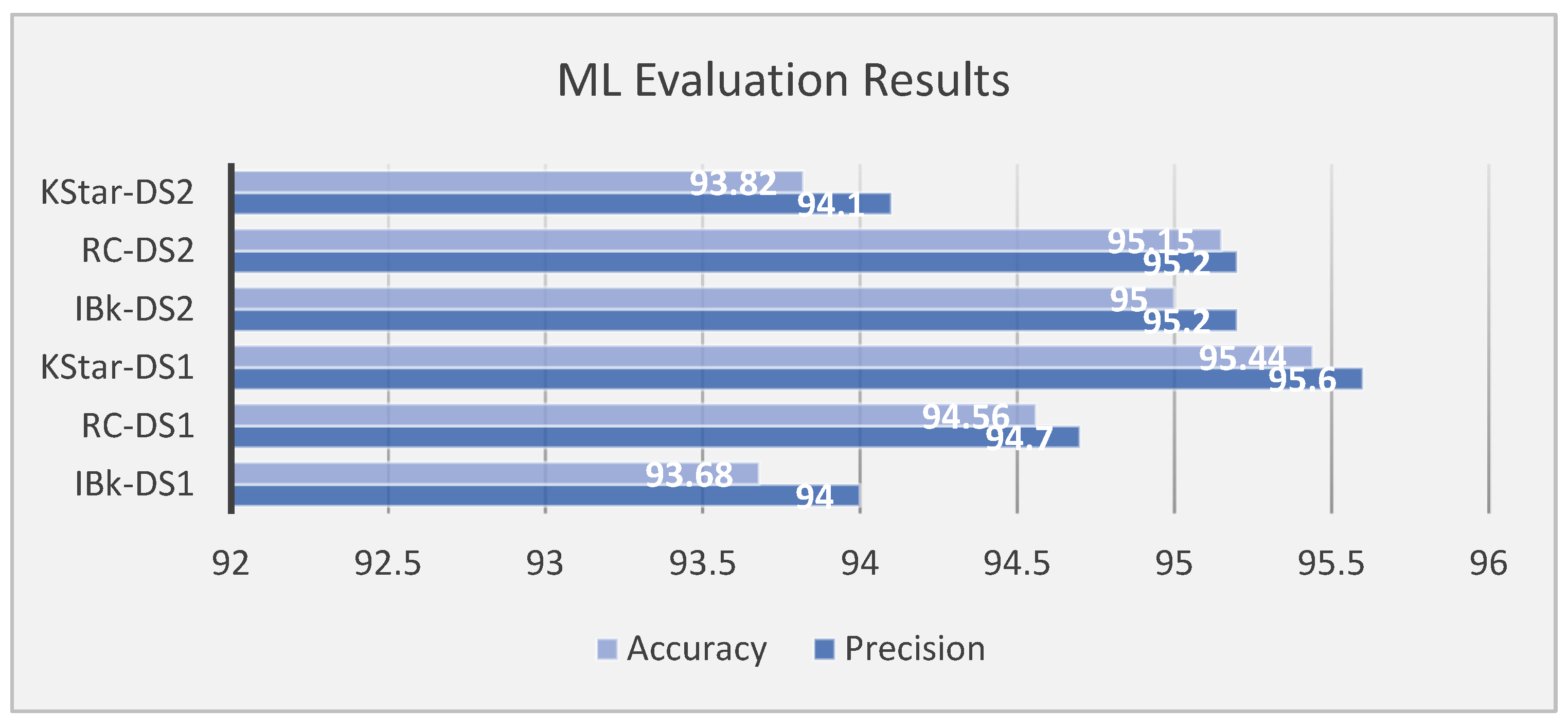
The results are depicted in Figure 16. The results indicate that using DS2 with Random Committee and IBk classifiers increases accuracy to (95%) and (95.15%), respectively, with equal precision results of (95.2%). The KStar classifier, on the other hand, has greater accuracy (95.44%) and precision (95.6%) when utilizing DS1.
Figure 16. Weka Classifier Evaluation Results.
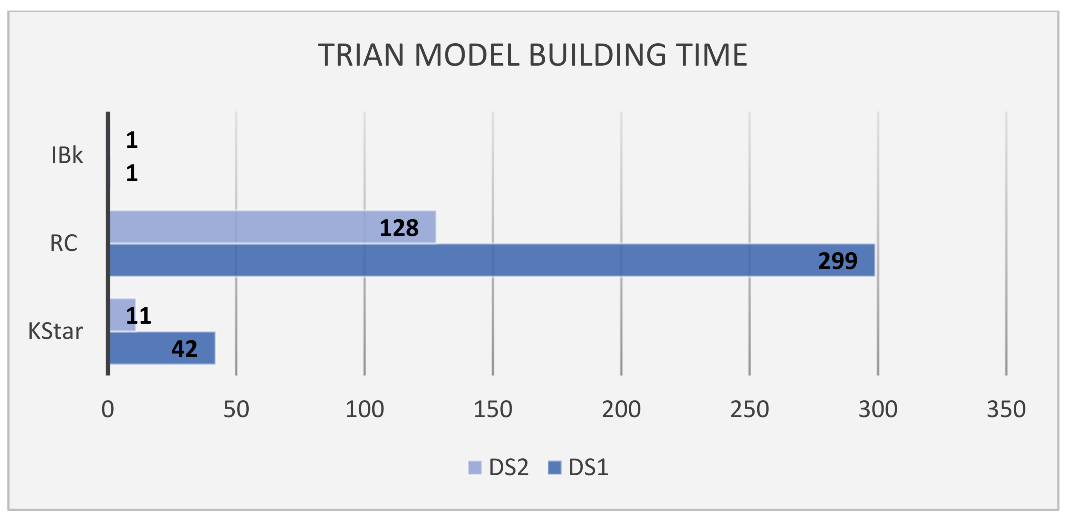
Figure 17 plots the model training times required for the top three classifiers. The longest time was spent building the classification model using DS1, compared with the time spent building the classifiers using DS2. Using DS1, RC required the longest time for building (299 ms), followed by KStar (42 ms) and IBk (1 ms). For DS2, RC required the longest time for building (128 ms), followed by KStar (11 ms) and then IBk (1 ms). While RC classifier requires the longest time to build its model, it requires the shortest time to predict an object (see Figure 18).
Figure 17. Time Required to Build a Model for each Classifier.
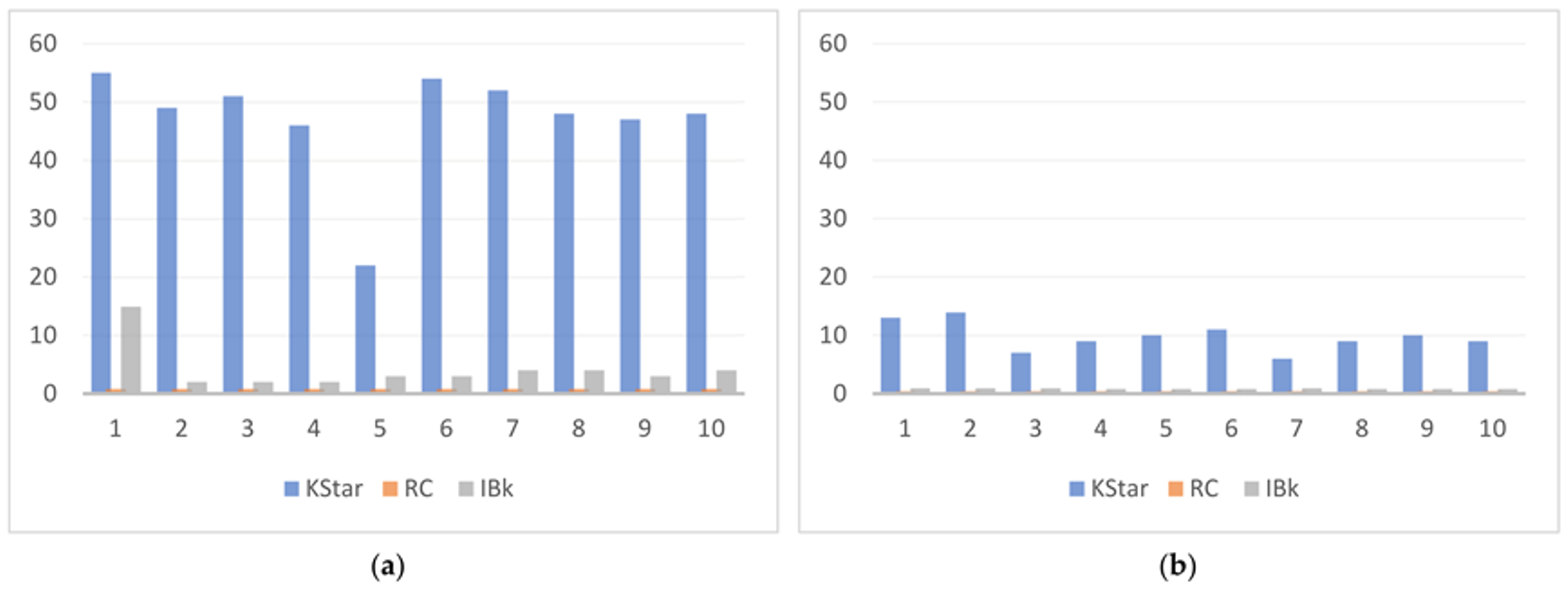
Figure 18. Classifiers’ Inference Elapsed Time in Milliseconds for (a) DS1 Test Samples and (b) DS2 Test Samples.
Figure 18 plots the model inference times for the top three classifiers. For both the DS1 and DS2 test samples, we constructed 10 test predictions and timed each classifier in order to produce the outcome. The time required for KStar to forecast an object varied between 22 and 55 milliseconds when using the DS1 test samples and between 9 and 13 milliseconds when using the DS2 test samples. The IBk classifier, on the other hand, showed faster times than KStar, with an average of 4–5 milliseconds for the DS1 test samples and 0–1 milliseconds for the DS2 test samples. Random Committee required a substantial amount of time to develop its training model, and it predicted the test samples in less than 1 millisecond for both the DS1 and DS2 test samples.
It is worth mentioning that the IBk and KStar algorithms trained and generated models faster than the Random Committee algorithm (see Figure 17). Random Committee required 299 milliseconds to create its trained model using DS1, whereas for DS2 it required 128 milliseconds. KStar additionally required a long time to construct its training model, taking 42 ms for DS1 and 11 ms for DS2. On the other hand, for both DS1 and DS2,the IBk classifier built the trained model in 1 ms. As a consequence, we suggest that the IBk classifier is preferable over the Random Committee and KStar classifiers for the purpose of mobile adaption, embedded microprocessors, and/or large datasets. Although there is a modest accuracy trade-off, the IBk classifier delivers a significant decrease in the mobile computing and battery usage.
When approaching the design of a system architecture that takes advantage of fog or cloud in the training phase, we suggest the KStar classifier, especially in the case of a larger training dataset that will be trained in the layers of fog or cloud, because it can exploit its computation processing powers and return results for the edge level. In the case of the RC classifier, it can be trained in the higher layers (cloud or fog) and the constructed model can then transfer to the edge, because its prediction time is the shortest among the three classifiers.
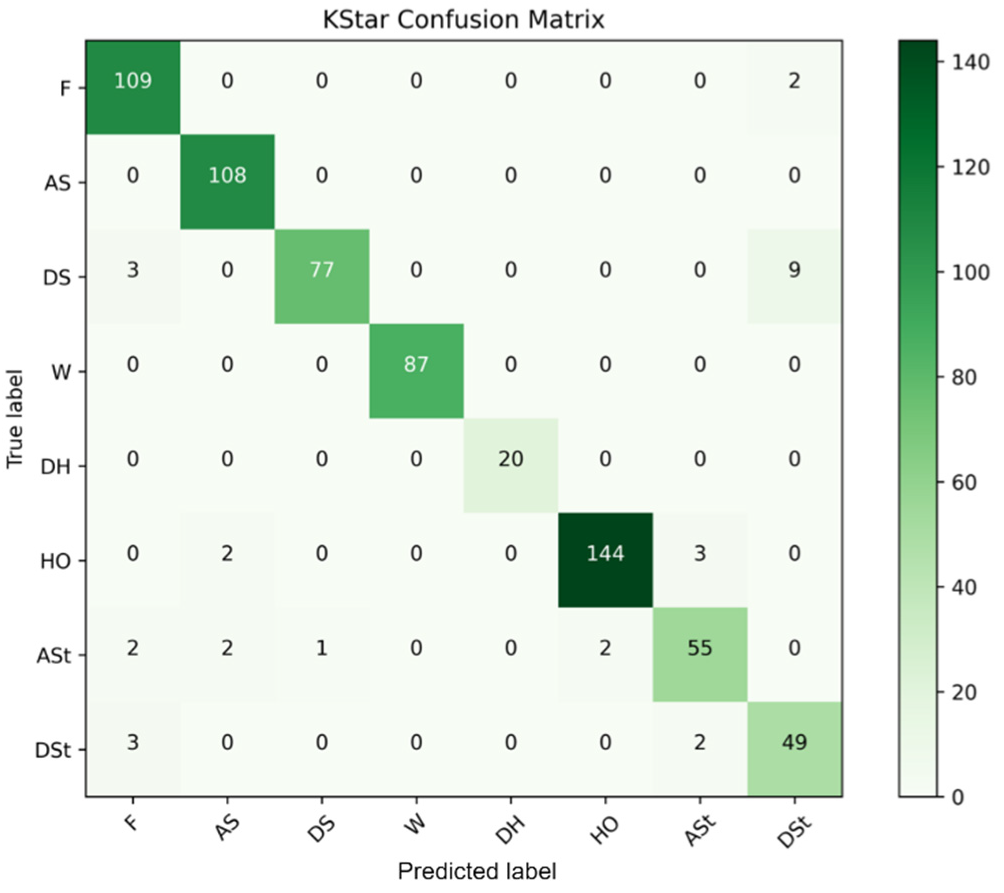
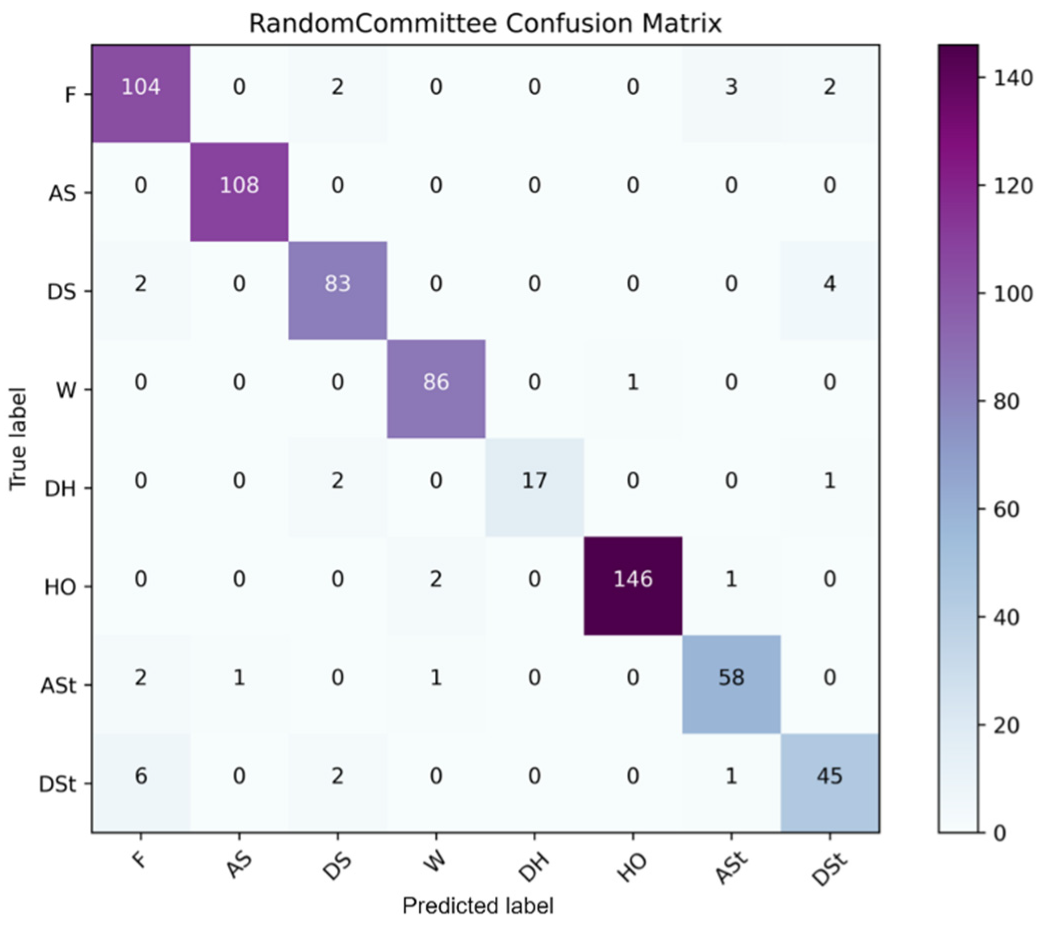
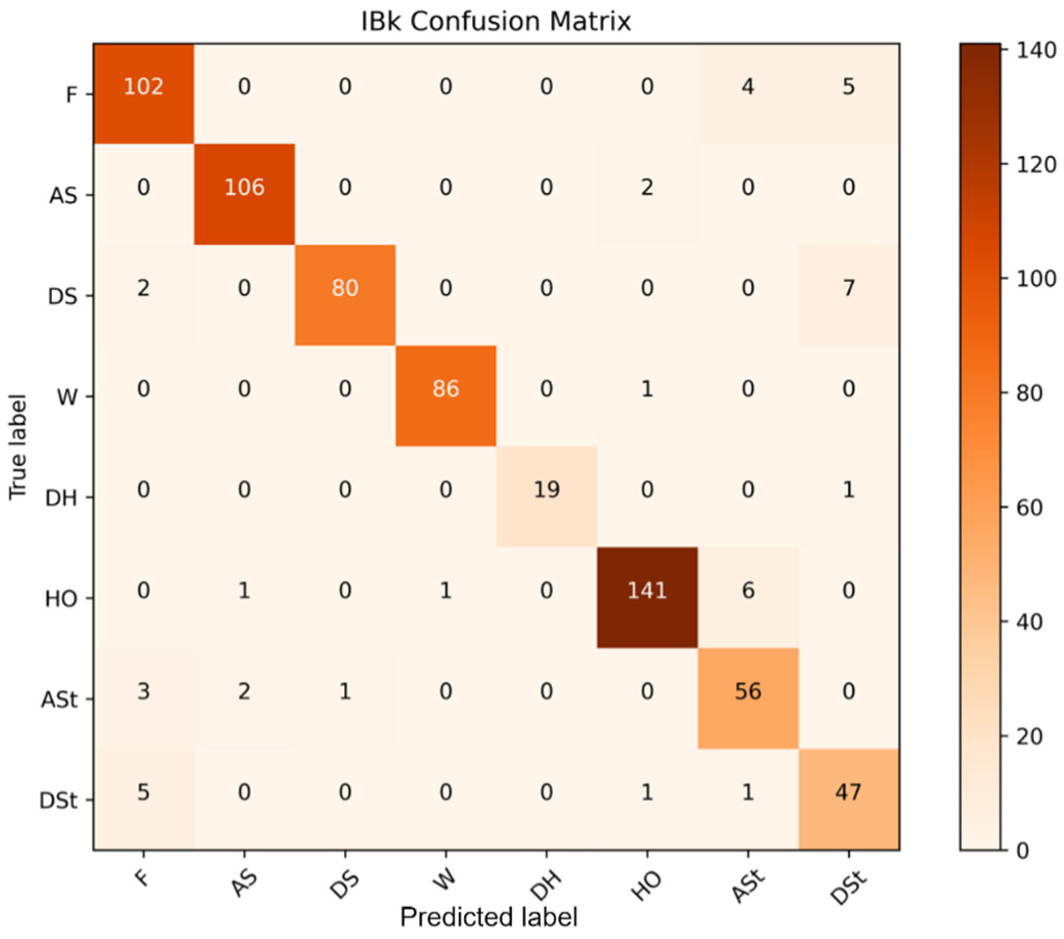
Figure 19 depicts the confusion matrix with the best training model score, which was obtained using the KStar classification method with the D1 dataset. Figure 20 shows the confusion matrix of the Random Committee classifiers trained on DS2. Figure 21 shows the confusion matrix for the IBk classifier. Because these were the top three highest performing classifiers identified in our previous study, we chose to exhibit the confusion matrices of these three classifiers. The abbreviations used in the figures are listed in Table 12.
Figure 19. KStar Confusion Matrix using DS1.
Figure 20. Random Committee Confusion Matrix Using DS2.
Figure 21. IBk Confusion Matrix Using DS2.
Table 12. Class Abbreviation.
Figure 19 plots the confusion matrix of the KStar classifier. The highest number of true positives was obtained for the Floor class (109), followed by Ascending Stairs (108), Descending Stairs (77), Wall (87), Deep Hole (20), High Obstacle (144), Ascending Step (55), and Descending Step (49). The total number of wrong predictions for the classes are Floor (2), Ascending Stairs (0), Descending Stairs (3), Wall (0), Deep Hole (0), High Obstacle (5), Ascending Step (7), and Descending Step (5). Obviously, the number of wrong predictions should be considered relative to the total number of instances. It is possible that the higher number of wrong predictions for some classes is due to the low number of instances of the data objects for those classes. Note also that the Floor was misclassified two times as Descending Step. Descending Stairs were misclassified 3 times as Floor and 9 times as Descending Step. The High Obstacle class was misclassified 2 times as Ascending Stairs and 3 times as Ascending Step. Ascending Step was misclassified 2 times as Floor, 2 times as Ascending Stairs, 1 time as Descending Stairs, and 2 times as High Obstacle. Descending Step was misclassified 3 times as Floor and 2 times as Ascending Step. On the other hand, Ascending Stairs, Wall, and Deep Hole classes had no misclassified results.
Figure 20 plots the confusion matrix for the Random Committee (RC) classifier. The highest number of true positives was obtained for the High Obstacle (146) and Ascending Stairs (108) classes, followed by Floor (104), Wall (86), Descending Stairs (83), Ascending Step (58), Descending Step (45), and Deep Hole (17). The total number of wrong predictions for the classes are Floor (7), Ascending Stairs (0), Descending Stairs (6), Wall (1), Deep Hole (3), High Obstacle (3), Ascending Step (4), and Descending Step (9). Note that Floor was misclassified 2 times as Descending Stairs, 3 times as Ascending Step, and 2 times as Descending Step. Descending Stairs were misclassified 2 times as Floor and 4 times as Descending Step. The Wall class was misclassified 1 time as High Obstacle. Deep Hole was misclassified 2 times as Descending Stairs and 1 time as Descending Step. The High Obstacle class was misclassified 2 times as Wall and 1 time as Ascending Step. Ascending Step was misclassified 2 times as Floor, 1 time as Ascending Stairs, and 1 time as Wall. Descending Step was misclassified 6 times as Floor, 2 times as Descending Stairs, and 1 time as Ascending Step. Ascending Stairs had no misclassifications.
Figure 21 plots the confusion matrix for the IBk classifier. The highest number of true positives was obtained for the High Obstacle (141) and Ascending Stairs (106) classes, followed by Floor (102), Wall (86), Descending Stairs (80), Ascending Step (56), Descending Step (47), and Deep Hole (19). The total number of misclassifications for the classes were Floor (9), Ascending Stairs (2), Descending Stairs (9), Wall (1), Deep Hole (1), High Obstacle (8), Ascending Step (6), and Descending Step (7). The greater numbers of incorrect predictions for some classes are likely due to the low number of instances of the data objects for those classes, as we saw with the KStar classifier. Note that Floor was misclassified 4 times as Ascending Step and 5 times as Descending Step. Ascending Stairs were misclassified 2 times as High Obstacles. The Descending Stairs class was misclassified 2 times as Floor and 7 times as Descending Step. The Wall class was misclassified 1 time as High Object and zero times as any other class. Deep Hole was misclassified 1 time as Descending Step and zero times as any other class. The High Obstacle class was misclassified 1 time as Ascending Stairs, 1 time as Wall, and 6 times Ascending Step. Ascending Step was misclassified 3 times as Floor, 2 times as Ascending stairs, and 1 time as Descending Stairs. Descending Step was misclassified 5 times as Floor, 1 time as High Obstacle, and 1 time as Ascending Step. Wall and Deep Hole had the least number of misclassifications.

5.2. Deep-Learning-Based Performance

Observing the performance of neural networks and deep learning models over time during training helps to provide researchers with knowledge about them. Keras is a Python framework that encapsulates the more technical TensorFlow backends and provides a clear interface for generating deep learning models. We used Keras in Python to evaluate and display the performance of deep learning models over time during training so as to measure their accuracy and loss. Note that, here, the deep learning models were trained and executed on a laptop device. Future work will attempt to implement deep learning models on mobile phones and other edge devices using TFLite, as in our other strands of research [148]. Table 13 summarizes the findings.
Table 13. TensorFlow Model Evaluation.
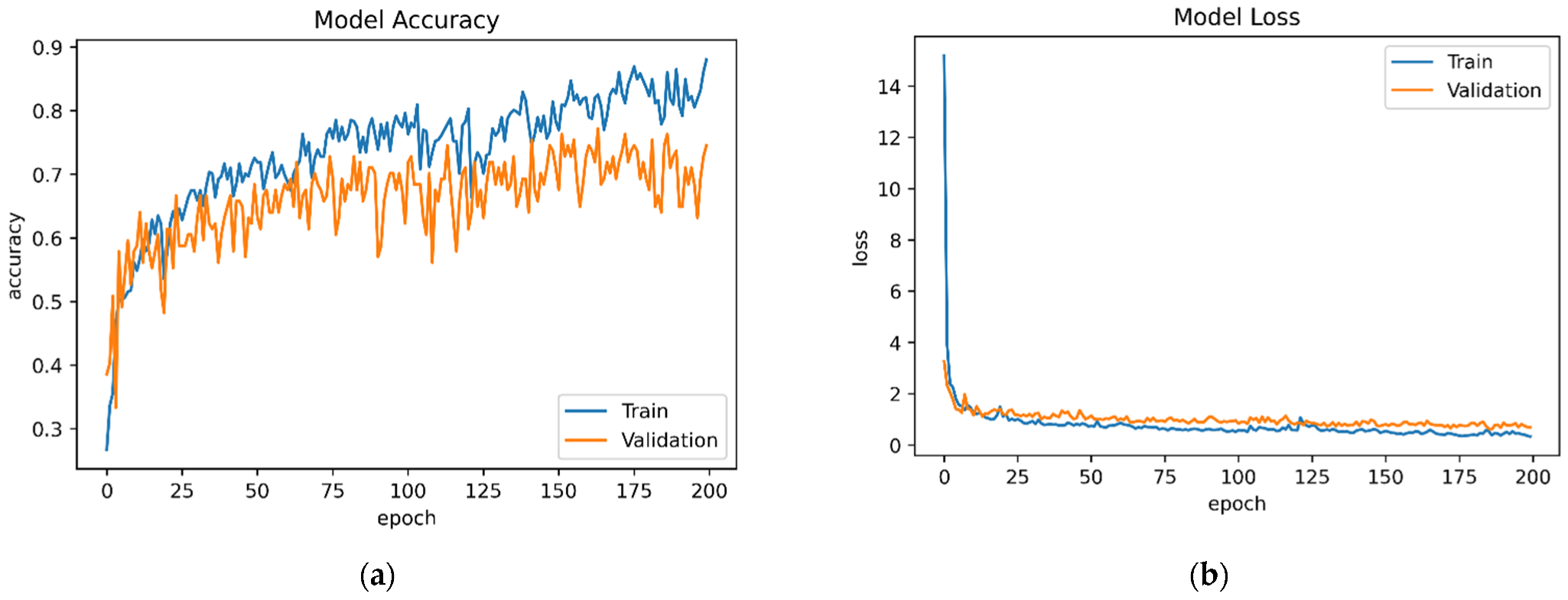
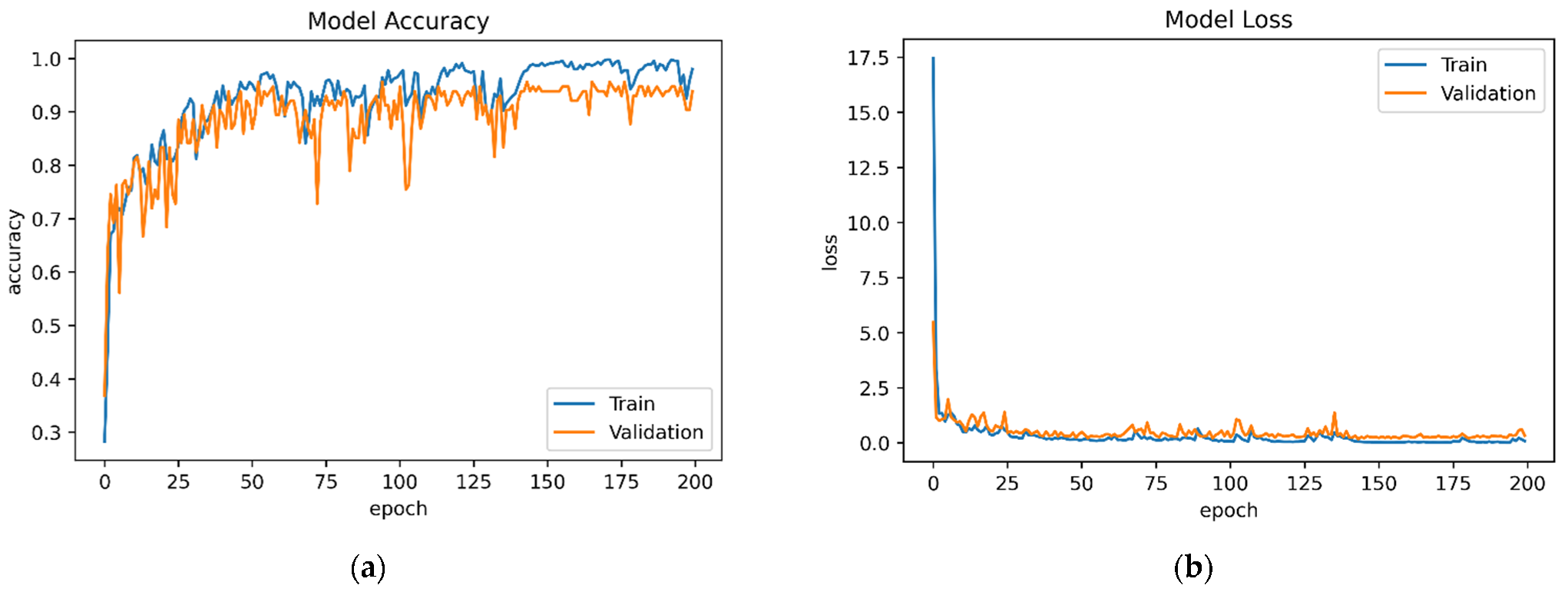
The TModel1 and TModel2 accuracy and loss results were plotted throughout each period and are presented in Figure 22 and Figure 23, respectively. Using different datasets, we can see the significant differences in performance. The TModel2 trained model, which is used for DS2, has a 98.01 percent training accuracy and a model loss of 0. 0883 percent. The model accuracy for the test dataset was 96.49 and the test model loss was 0.3672. The model accuracy of the TModel1 is 88.05 and it has a loss of 0.3374. The test model accuracy is 76.32 and it has a loss of 0.7190.
Figure 22. Deep Learning Evaluation Using DS1: (a) TModel1 Accuracy and (b) TModel1 Loss.
Figure 23. Deep Learning Evaluation Using DS2: (a) TModel2 Accuracy and (b) TModel2 Loss.
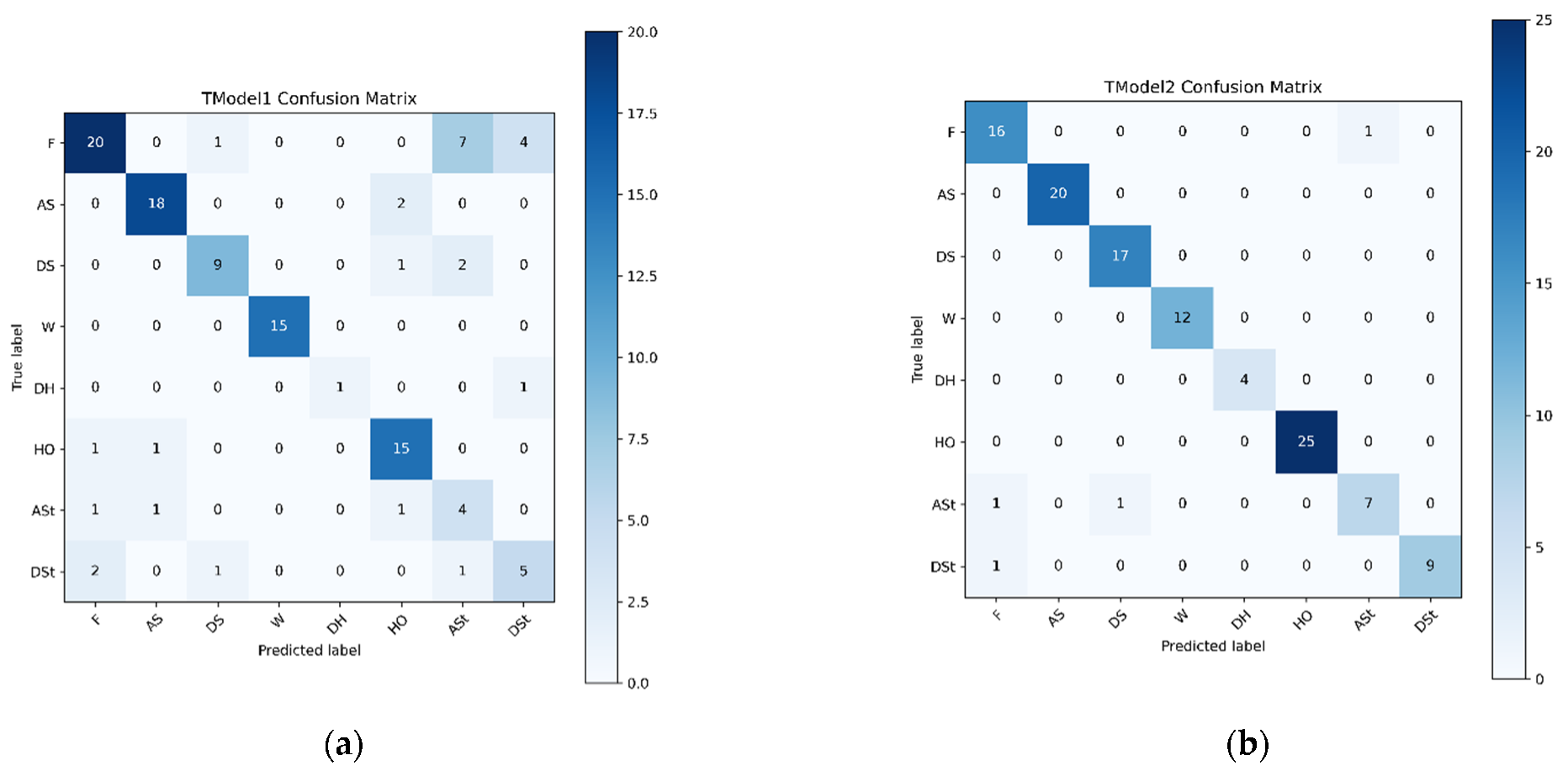
Figure 24 plots the confusion matrices of the TModel1 and TModel2 deep learning models used on a test dataset that the trained model was not exposed to. For TModel1, the highest number of true positives were obtained for the Floor (20) and Ascending Stairs (18), followed by Wall and High Obstacle (15), Descending Stairs (9), Descending Step (5), Ascending Step (4), and Deep Hole (1). The total number of wrong predictions for the classes are Floor (13), Ascending Stairs (2), Descending Stairs (3), Deep Hole (1), High Obstacle (2), Ascending Step (3), and Descending Step (4). Wall was classified correctly. The Floor was misclassified 1 time as Descending Stairs, 7 times as Ascending Step, and 4 times as Descending Step. Ascending Step was misclassified 2 times as High Obstacle. Descending Stairs has been misclassified 1 time as High Obstacle and 2 times as Ascending Step. Deep Hole had one misclassification as Descending Step. High Obstacle was misclassified 1 time as Floor and 1 time as Ascending Stairs. Ascending Step was misclassified 1 time as Floor, 1 time as Ascending Stairs, and 1 time as High Obstacle. Descending Step was misclassified 2 times as Floor, 1 time as Descending Stairs, and 1 time as Ascending Step.
Figure 24. Deep Learning Confusion Matrix on the Test Dataset: (a) TModel1 and (b) TModel2.
For TModel2, the highest number of true positives was obtained for the High Obstacle (25) and Ascending Stairs (20) classes, followed by Descending Stairs (17), Wall (12), Descending Step (9), Ascending Step (7), and Deep Hole (4). The total number of wrong predictions for the classes are Floor (1), Ascending Step (2), and Descending Step (1). Note that the Floor was misclassified 1 time as Ascending Stairs. Ascending Step was misclassified 1 time as Floor and 1 time as Descending Stairs. Descending Step was misclassified 1 time as Floor. Ascending Stairs, Descending Stairs, Wall, Deep Hole, and High Obstacle had no misclassifications.

6. Conclusions

In this paper, we developed the LidSonic V2.0 system by leveraging a comprehensive understanding of the state-of-the-art requirements and solutions involving assistive technologies for the visually impaired through a detailed literature review and a survey. We explained in Section 1 that it is difficult for visually impaired people to orient themselves and move in an unfamiliar environment without assistance and, hence, the focus regarding the LidSonic system in this paper is placed on the mobility tasks of the visually impaired. The system is based on a novel approach using a combination of a LiDAR with a servo motor and an ultrasonic sensor to collect data and predict objects using machine and deep learning for environment perception and navigation. The deep learning model TModel2, for the DS2 dataset, provided the overall best accuracy results at 96.49%. The second-best accuracy was provided by the KStar classifier at 95.44%, with a precision of 95.6%. The IBk and RC classifiers provided the same precision at 95.2% and similar accuracy results at 95.15% and 95%, respectively, using the DS2 dataset. Note that the IBk classifier was seen to be relatively non-dependent on the size of the datasets. This could be because both the datasets are numeric, and the difference between their sizes is small. It took 1 ms to train both the D2 and D1 datasets, and these were the fastest training times overall. The IBk classifier also provided the second fastest prediction time at 0.8 ms and, hence, we recommend using it at the edge for training and prediction. As for the KStar classifier, the training time is influenced by the size of the training dataset. It took 11 ms to train KStar with the DS2 dataset and 42 ms to train it with the larger DS1 dataset. Moreover, the KStar classifier required much longer times for the prediction, ranging between 22 ms and 55 ms, compared to the other classifiers in our experiments. Hence, we proposed using the KStar classifier at the fog or cloud layers.
We evaluated the proposed system from multiple perspectives. For instance, we proposed, based on the results, using the Random Committee classifier at the edge for prediction due to its faster prediction time, although it needs to be trained at the fog or cloud layers because it requires larger resources. In this respect, we plan to extend and integrate this work with other strands of our work on big data analytics and edge, fog, and cloud computing [148,149,150,151]. For example, we plan to experiment with different machine learning and deep learning methods at the edge, fog, and cloud layers, assessing their performance and the applicability of the use of edge, fog, and cloud computing for smart glasses, and considering new applications for the integration of smart glasses with cloud, fog, and edge layers. Another direction of our research is green and explainable AI [152,153], and we will also explore the expandability of the LidSonic system.
We created the second prototype of our LidSonic system in this work. The team constructed and tested the prototype. We also benefitted from the assistance of four other people aged 18 to 47 (who were not visually impaired) who helped to test and evaluate the LidSonic system. The time required to explain the device’s operation to the selected users was only a few minutes, but it varied depending on the user’s age and digital affinity. The tests were carried both indoors and outdoors on the campus of King Abdulaziz University. The purpose of this paper was to put the system’s machine learning and other technical capabilities to the test. Future work will involve testing the device with blind and visually impaired users so as to provide more details about the LidSonic system’s usability, human training, and testing aspects.
We conclude this paper with the remark that the technologies developed in this study show a high potential and are expected to open new directions for the design of smart glasses and other solutions for the visually impaired using open software tools and off-the-shelf hardware.

Author Contributions

Conceptualization, S.B. and R.M.; methodology, S.B. and R.M.; software, S.B.; validation, S.B. and R.M.; formal analysis, S.B., R.M., I.K., A.A., T.Y. and J.M.C.; investigation, S.B., R.M., I.K., A.A., T.Y. and J.M.C.; resources, R.M., I.K. and A.A.; data curation, S.B.; writing—original draft preparation, S.B. and R.M.; writing—review and editing, R.M., I.K., A.A., T.Y. and J.M.C.; visualization, S.B.; supervision, R.M. and I.K.; project administration, R.M., I.K. and A.A.; funding acquisition, R.M., I.K. and A.A. All authors have read and agreed to the published version of the manuscript.

Funding

The authors acknowledge, with thanks, the technical and financial support from the Deanship of Scientific Research (DSR) at King Abdulaziz University (KAU), Jeddah, Saudi Arabia, under the grant No. RG-11-611-38. The experiments reported in this paper were performed on the Aziz supercomputer at KAU.

Institutional Review Board Statement

Not applicable.

Data Availability Statement

The dataset developed in this work can be provided on request.

Acknowledgments

The work carried out in this paper was supported by the HPC Center of King Abdulaziz University. The training and software development work reported in this paper was carried out on the Aziz supercomputer.

Conflicts of Interest

The authors declare no conflict of interest.

Abbreviations

The following abbreviations are used in this paper.
ETAElectronic Travel Aids
ToFTime-of-flight
RNARobotic Navigation Aid
ALVUArray of LiDARs and Vibrotactile Units
BLEBluetooth Low Energy
SDKSoftware Development Kit
RGB-DRGB-Depth
CNNConvolutional Neural Networks
RFIDRadio Frequency Identification Reader
HRTFsHead-Related Transfer Functions
GPSGlobal Positioning System
MSERMaximally Stable External Region
SWTStroke Width Transform

References

  1. World Health Organisation (WHO). Disability and Health (24 November 2021). Available online: https://www.who.int/news-room/fact-sheets/detail/disability-and-health (accessed on 19 July 2022).
  2. World Health Organisation (WHO). Disability. Available online: https://www.who.int/health-topics/disability#tab=tab_1 (accessed on 19 July 2022).
  3. DISABLED | Meaning in the Cambridge English Dictionary. Available online: https://dictionary.cambridge.org/dictionary/english/disabled (accessed on 7 February 2020).
  4. Physical Disability—Wikipedia. Available online: https://en.wikipedia.org/wiki/Physical_disability (accessed on 30 July 2022).
  5. Disability and Health Overview|CDC. Available online: https://www.cdc.gov/ncbddd/disabilityandhealth/disability.html (accessed on 30 July 2022).
  6. Disability Facts and Figures|Disability Charity Scope UK. Available online: https://www.scope.org.uk/media/disability-facts-figures/ (accessed on 30 July 2022).
  7. Disability among People in the U.S. 2008–2019|Statista. Available online: https://www.statista.com/statistics/792697/disability-in-the-us-population-share/ (accessed on 30 July 2022).
  8. Disabled People in the World: Facts and Figures. Available online: https://www.inclusivecitymaker.com/disabled-people-in-the-world-in-2021-facts-and-figures/ (accessed on 30 July 2022).
  9. Questions and Answers about Blindness and Vision Impairments in the Workplace and the Americans with Disabilities Act|U.S. Equal Employment Opportunity Commission. Available online: https://www.eeoc.gov/fact-sheet/questions-and-answers-about-blindness-and-vision-impairments-workplace-and-americans (accessed on 8 June 2020).
  10. Blind vs. Visually Impaired: What’s the Difference?|IBVI|Blog. Available online: https://ibvi.org/blog/blind-vs-visually-impaired-whats-the-difference/ (accessed on 8 June 2020).
  11. What Is Visual Impairment? Available online: https://www.news-medical.net/health/What-is-visual-impairment.aspx (accessed on 8 June 2020).
  12. Katzschmann, R.K.; Araki, B.; Rus, D. Safe local navigation for visually impaired users with a time-of-flight and haptic feedback device. IEEE Trans. Neural Syst. Rehabil. Eng. 2018, 26, 583–593. [Google Scholar] [CrossRef] [PubMed]
  13. Alotaibi, S.; Mehmood, R.; Katib, I.; Rana, O.; Albeshri, A. Sehaa: A Big Data Analytics Tool for Healthcare Symptoms and Diseases Detection Using Twitter, Apache Spark, and Machine Learning. Appl. Sci. 2020, 10, 1398. [Google Scholar] [CrossRef]
  14. Praveen Kumar, M.; Poornima; Mamidala, E.; Al-Ghanim, K.; Al-Misned, F.; Ahmed, Z.; Mahboob, S. Effects of D-Limonene on aldose reductase and protein glycation in diabetic rats. J. King Saud Univ.—Sci. 2020, 32, 1953–1958. [Google Scholar] [CrossRef]
  15. Ekstrom, A.D. Why vision is important to how we navigate. Hippocampus 2015, 25, 731–735. [Google Scholar] [CrossRef]
  16. Deverell, L.; Bentley, S.A.; Ayton, L.N.; Delany, C.; Keeffe, J.E. Effective mobility framework: A tool for designing comprehensive O&M outcomes research. IJOM 2015, 7, 74–86. [Google Scholar]
  17. Andò, B. Electronic sensory systems for the visually impaired. IEEE Instrum. Meas. Mag. 2003, 6, 62–67. [Google Scholar] [CrossRef]
  18. Ranaweera, P.S.; Madhuranga, S.H.R.; Fonseka, H.F.A.S.; Karunathilaka, D.M.L.D. Electronic travel aid system for visually impaired people. In Proceedings of the 2017 5th International Conference on Information and Communication Technology (ICoIC7), Melaka, Malaysia, 17–19 May 2017; IEEE: Piscataway, NJ, USA, 2017. [Google Scholar] [CrossRef]
  19. Bindawas, S.M.; Vennu, V. The National and Regional Prevalence Rates of Disability, Type, of Disability and Severity in Saudi Arabia-Analysis of 2016 Demographic Survey Data. Int. J. Environ. Res. Public Health 2018, 15, 419. [Google Scholar] [CrossRef]
  20. General Authority for Statistics. GaStat: (2.9%) of Saudi Population Have Disability with (Extreme) Difficulty. Available online: https://www.stats.gov.sa/en/news/230 (accessed on 30 July 2022).
  21. Patel, S.; Kumar, A.; Yadav, P.; Desai, J.; Patil, D. Smartphone-based obstacle detection for visually impaired people. In Proceedings of the 2017 International Conference on Innovations in Information, Embedded and Communication Systems (ICIIECS), Coimbatore, India, 17–18 March 2017; IEEE: Piscataway, NJ, USA, 2018. [Google Scholar] [CrossRef]
  22. Rizzo, J.R.; Pan, Y.; Hudson, T.; Wong, E.K.; Fang, Y. Sensor fusion for ecologically valid obstacle identification: Building a comprehensive assistive technology platform for the visually impaired. In Proceedings of the 2017 7th International Conference on Modeling, Simulation, and Applied Optimization (ICMSAO), Sharjah, United Arab Emirates, 4–6 April 2017; Institute of Electrical and Electronics Engineers Inc.: Piscataway, NJ, USA, 2017. [Google Scholar]
  23. Meshram, V.V.; Patil, K.; Meshram, V.A.; Shu, F.C. An Astute Assistive Device for Mobility and Object Recognition for Visually Impaired People. IEEE Trans. Hum.-Mach. Syst. 2019, 49, 449–460. [Google Scholar] [CrossRef]
  24. Omoregbee, H.O.; Olanipekun, M.U.; Kalesanwo, A.; Muraina, O.A. Design and Construction of A Smart Ultrasonic Walking Stick for the Visually Impaired. In Proceedings of the 2021 Southern African Universities Power Engineering Conference/Robotics and Mechatronics/Pattern Recognition Association of South Africa (SAUPEC/RobMech/PRASA), Potchefstroom, South Africa, 27–29 January 2021. [Google Scholar] [CrossRef]
  25. Mehmood, R.; See, S.; Katib, I.; Chlamtac, I. Smart Infrastructure and Applications: Foundations for Smarter Cities and Societies; Springer International Publishing, Springer Nature: Cham, Switzerland, 2020; ISBN 9783030137045. [Google Scholar]
  26. Yigitcanlar, T.; Butler, L.; Windle, E.; Desouza, K.C.; Mehmood, R.; Corchado, J.M. Can Building “Artificially Intelligent Cities” Safeguard Humanity from Natural Disasters, Pandemics, and Other Catastrophes? An Urban Scholar’s Perspective. Sensors 2020, 20, 2988. [Google Scholar] [CrossRef]
  27. Mehmood, R.; Bhaduri, B.; Katib, I.; Chlamtac, I. Smart Societies, Infrastructure, Technologies and Applications. In Proceedings of the Smart Societies, Infrastructure, Technologies and Applications, Lecture Notes of the Institute for Computer Sciences, Social Informatics and Telecommunications Engineering (LNICST), Jeddah, Saudi Arabia, 27–29 November 2017; Springer International Publishing: Cham, Switzerland, 2018; Volume 224. [Google Scholar]
  28. Mehmood, R.; Sheikh, A.; Catlett, C.; Chlamtac, I. Editorial: Smart Societies, Infrastructure, Systems, Technologies, and Applications. Mob. Netw. Appl. 2022, 1, 1–5. [Google Scholar] [CrossRef]
  29. Electronic Travel Aids for the Blind. Available online: https://www.tsbvi.edu/orientation-and-mobility-items/1974-electronic-travel-aids-for-the-blind (accessed on 5 February 2020).
  30. INTRODUCTION—Electronic Travel AIDS: New Directions for Research—NCBI Bookshelf. Available online: https://www.ncbi.nlm.nih.gov/books/NBK218018/ (accessed on 5 February 2020).
  31. Bai, J.; Lian, S.; Liu, Z.; Wang, K.; Liu, D. Smart guiding glasses for visually impaired people in indoor environment. IEEE Trans. Consum. Electron. 2017, 63, 258–266. [Google Scholar] [CrossRef]
  32. Islam, M.M.; Sadi, M.S.; Zamli, K.Z.; Ahmed, M.M. Developing Walking Assistants for Visually Impaired People: A Review. IEEE Sens. J. 2019, 19, 2814–2828. [Google Scholar] [CrossRef]
  33. Siddesh, G.M.; Srinivasa, K.G. IoT Solution for Enhancing the Quality of Life of Visually Impaired People. Int. J. Grid High Perform. Comput. 2021, 13, 1–23. [Google Scholar] [CrossRef]
  34. Mallikarjuna, G.C.P.; Hajare, R.; Pavan, P.S.S. Cognitive IoT System for visually impaired: Machine Learning Approach. Mater. Today Proc. 2021, 49, 529–535. [Google Scholar] [CrossRef]
  35. Stearns, L.; DeSouza, V.; Yin, J.; Findlater, L.; Froehlich, J.E. Augmented reality magnification for low vision users with the microsoft hololens and a finger-worn camera. In Proceedings of the 19th International ACM SIGACCESS Conference on Computers and Accessibility, Baltimore, MD, USA, 29 October–1 November 2017; pp. 361–362. [Google Scholar] [CrossRef]
  36. Busaeed, S.; Mehmood, R.; Katib, I. Requirements, Challenges, and Use of Digital Devices and Apps for Blind and Visually Impaired. Preprints 2022, 2022070068. [Google Scholar] [CrossRef]
  37. Cardillo, E.; Di Mattia, V.; Manfredi, G.; Russo, P.; De Leo, A.; Caddemi, A.; Cerri, G. An Electromagnetic Sensor Prototype to Assist Visually Impaired and Blind People in Autonomous Walking. IEEE Sens. J. 2018, 18, 2568–2576. [Google Scholar] [CrossRef]
  38. O’Keeffe, R.; Gnecchi, S.; Buckley, S.; O’Murchu, C.; Mathewson, A.; Lesecq, S.; Foucault, J. Long Range LiDAR Characterisation for Obstacle Detection for use by the Visually Impaired and Blind. In Proceedings of the 2018 IEEE 68th Electronic Components and Technology Conference (ECTC), San Diego, CA, USA, 29 May–1 June 2018; Institute of Electrical and Electronics Engineers Inc.: Piscataway, NJ, USA, 2018; pp. 533–538. [Google Scholar]
  39. Busaeed, S.; Mehmood, R.; Katib, I.; Corchado, J.M. LidSonic for Visually Impaired: Green Machine Learning-Based Assistive Smart Glasses with Smart App and Arduino. Electronics 2022, 11, 1076. [Google Scholar] [CrossRef]
  40. Magori, V. Ultrasonic sensors in air. In Proceedings of the IEEE Ultrasonics Symposium, Cannes, France, 31 October–3 November 1994; IEEE: Piscataway, NJ, USA, 1994; Volume 1, pp. 471–481. [Google Scholar]
  41. Different Types of Sensors, Applications. Available online: https://www.electronicshub.org/different-types-sensors/ (accessed on 8 March 2020).
  42. Fauzul, M.A.H.; Salleh, N.D.H.M. Navigation for the Vision Impaired with Spatial Audio and Ultrasonic Obstacle Sensors. In Proceedings of the International Conference on Computational Intelligence in Information System, Bandar Seri Begawan, Brunei Darussalam, 25–27 January 2021; Springer: Cham, Switzerland, 2021; pp. 43–53. [Google Scholar] [CrossRef]
  43. Gearhart, C.; Herold, A.; Self, B.; Birdsong, C.; Slivovsky, L. Use of Ultrasonic sensors in the development of an Electronic Travel Aid. In Proceedings of the SAS 2009—IEEE Sensors Applications Symposium Proceedings, New Orleans, LA, USA, 17–19 February 2009; pp. 275–280. [Google Scholar]
  44. Tudor, D.; Dobrescu, L.; Dobrescu, D. Ultrasonic electronic system for blind people navigation. In Proceedings of the 2015 E-Health and Bioengineering Conference, EHB, Lasi, Romania, 19–21 November 2015; Institute of Electrical and Electronics Engineers Inc.: Piscataway, NJ, USA, 2016. [Google Scholar]
  45. Khan, A.A.; Khan, A.A.; Waleed, M. Wearable navigation assistance system for the blind and visually impaired. In Proceedings of the 2018 International Conference on Innovation and Intelligence for Informatics, Computing, and Technologies, 3ICT, Sakhier, Bahrain, 18–20 November 2018; Institute of Electrical and Electronics Engineers Inc.: Piscataway, NJ, USA, 2018. [Google Scholar]
  46. Noman, A.T.; Chowdhury, M.A.M.; Rashid, H.; Faisal, S.M.S.R.; Ahmed, I.U.; Reza, S.M.T. Design and implementation of microcontroller based assistive robot for person with blind autism and visual impairment. In Proceedings of the 20th International Conference of Computer and Information Technology, ICCIT, Dhaka, Bangladesh, 22–24 December 2017; Institute of Electrical and Electronics Engineers Inc.: Piscataway, NJ, USA, 2018; pp. 1–5. [Google Scholar]
  47. Chitra, P.; Balamurugan, V.; Sumathi, M.; Mathan, N.; Srilatha, K.; Narmadha, R. Voice Navigation Based Guiding Device for Visually Impaired People. In Proceedings of the 2021 International Conference on Artificial Intelligence and Smart Systems (ICAIS), Coimbatore, India, 25–27 March 2021; pp. 911–915. [Google Scholar] [CrossRef]
  48. What Is an IR Sensor?|FierceElectronics. Available online: https://www.fierceelectronics.com/sensors/what-ir-sensor (accessed on 16 March 2020).
  49. Nada, A.A.; Fakhr, M.A.; Seddik, A.F. Assistive infrared sensor based smart stick for blind people. In Proceedings of the Proceedings of the 2015 Science and Information Conference, SAI, London, UK, 28–30 July 2015; Institute of Electrical and Electronics Engineers Inc.: Piscataway, NJ, USA, 2015; pp. 1149–1154. [Google Scholar]
  50. Elmannai, W.; Elleithy, K. Sensor-Based Assistive Devices for Visually-Impaired People: Current Status, Challenges, and Future Directions. Sensors 2017, 17, 565. [Google Scholar] [CrossRef]
  51. Chaitrali, K.S.; Yogita, D.A.; Snehal, K.K.; Swati, D.D.; Aarti, D.V. An Intelligent Walking Stick for the Blind. Int. J. Eng. Res. Gen. Sci. 2015, 3, 1057–1062. [Google Scholar]
  52. Cardillo, E.; Li, C.; Caddemi, A. Millimeter-Wave Radar Cane: A Blind People Aid with Moving Human Recognition Capabilities. IEEE J. Electromagn. RF Microw. Med. Biol. 2021, 6, 204–211. [Google Scholar] [CrossRef]
  53. Ikbal, M.A.; Rahman, F.; Hasnat Kabir, M. Microcontroller based smart walking stick for visually impaired people. In Proceedings of the 4th International Conference on Electrical Engineering and Information and Communication Technology, iCEEiCT, Dhaka, Bangladesh, 13–15 September 2018; Institute of Electrical and Electronics Engineers Inc.: Piscataway, NJ, USA, 2019; pp. 255–259. [Google Scholar]
  54. Gbenga, D.E.; Shani, A.I.; Adekunle, A.L. Smart Walking Stick for Visually Impaired People Using Ultrasonic Sensors and Arduino. Int. J. Eng. Technol. 2017, 9, 3435–3447. [Google Scholar] [CrossRef]
  55. Yang, K.; Wang, K.; Cheng, R.; Hu, W.; Huang, X.; Bai, J. Detecting Traversable Area and Water Hazards for the Visually Impaired with a pRGB-D Sensor. Sensors 2017, 17, 1890. [Google Scholar] [CrossRef]
  56. Ye, C.; Qian, X. 3-D Object Recognition of a Robotic Navigation Aid for the Visually Impaired. IEEE Trans. Neural Syst. Rehabil. Eng. 2018, 26, 441–450. [Google Scholar] [CrossRef]
  57. Cornacchia, M.; Kakillioglu, B.; Zheng, Y.; Velipasalar, S. Deep Learning-Based Obstacle Detection and Classification with Portable Uncalibrated Patterned Light. IEEE Sens. J. 2018, 18, 8416–8425. [Google Scholar] [CrossRef]
  58. Oh, U.; Stearns, L.; Pradhan, A.; Froehlich, J.E.; Indlater, L.F. Investigating microinteractions for people with visual impairments and the potential role of on-body interaction. In Proceedings of the 19th International ACM SIGACCESS Conference on Computers and Accessibility, Baltimore, MD, USA, 29 October–1 November 2017; pp. 22–31. [Google Scholar] [CrossRef]
  59. Zhu, J.; Hu, J.; Zhang, M.; Chen, Y.; Bi, S. A fog computing model for implementing motion guide to visually impaired. Simul. Model. Pract. Theory 2020, 101, 102015. [Google Scholar] [CrossRef]
  60. Peraković, D.; Periša, M.; Cvitić, I.; Brletić, L. Innovative services for informing visually impaired persons in indoor environments. EAI Endorsed Trans. Internet Things 2018, 4, 156720. [Google Scholar] [CrossRef]
  61. Terven, J.R.; Salas, J.; Raducanu, B. New Opportunities for computer vision-based assistive technology systems for the visually impaired. Computer (Long. Beach. Calif). Computer 2014, 47, 52–58. [Google Scholar] [CrossRef]
  62. Buimer, H.; Van Der Geest, T.; Nemri, A.; Schellens, R.; Van Wezel, R.; Zhao, Y. Making facial expressions of emotions accessible for visually impaired persons. In Proceedings of the 19th International ACM SIGACCESS Conference on Computers and Accessibility, Baltimore, MD, USA, 29 October–1 November 2017; Volume 46, pp. 331–332. [Google Scholar] [CrossRef]
  63. Gutierrez-Gomez, D.; Guerrero, J.J. True scaled 6 DoF egocentric localisation with monocular wearable systems. Image Vis. Comput. 2016, 52, 178–194. [Google Scholar] [CrossRef]
  64. Lee, Y.H.; Medioni, G. RGB-D camera based wearable navigation system for the visually impaired. Comput. Vis. Image Underst. 2016, 149, 3–20. [Google Scholar] [CrossRef]
  65. Medeiros, A.J.; Stearns, L.; Findlater, L.; Chen, C.; Froehlich, J.E. Recognizing clothing colors and visual T extures using a finger-mounted camera: An initial investigation. In Proceedings of the 19th International ACM SIGACCESS Conference on Computers and Accessibility, Baltimore, MD, USA, 29 October–1 November 2017; pp. 393–394. [Google Scholar] [CrossRef]
  66. Al-Khalifa, S.; Al-Razgan, M. Ebsar: Indoor guidance for the visually impaired. Comput. Electr. Eng. 2016, 54, 26–39. [Google Scholar] [CrossRef]
  67. Alomari, E.; Katib, I.; Albeshri, A.; Mehmood, R. COVID-19: Detecting government pandemic measures and public concerns from twitter arabic data using distributed machine learning. Int. J. Environ. Res. Public Health 2021, 18, 282. [Google Scholar] [CrossRef] [PubMed]
  68. Alahmari, N.; Alswedani, S.; Alzahrani, A.; Katib, I.; Albeshri, A.; Mehmood, R.; Sa, A.A. Musawah: A Data-Driven AI Approach and Tool to Co-Create Healthcare Services with a Case Study on Cancer Disease in Saudi Arabia. Sustainability 2022, 14, 3313. [Google Scholar] [CrossRef]
  69. Alotaibi, H.; Alsolami, F.; Abozinadah, E.; Mehmood, R. TAWSEEM: A Deep-Learning-Based Tool for Estimating the Number of Unknown Contributors in DNA Profiling. Electronics 2022, 11, 548. [Google Scholar] [CrossRef]
  70. Alomari, E.; Katib, I.; Albeshri, A.; Yigitcanlar, T.; Mehmood, R. Iktishaf+: A Big Data Tool with Automatic Labeling for Road Traffic Social Sensing and Event Detection Using Distributed Machine Learning. Sensors 2021, 21, 2993. [Google Scholar] [CrossRef]
  71. Alomari, E.; Katib, I.; Mehmood, R. Iktishaf: A Big Data Road-Traffic Event Detection Tool Using Twitter and Spark Machine Learning. Mob. Netw. Appl. 2020, 1–6. [Google Scholar] [CrossRef]
  72. Ahmad, I.; Alqurashi, F.; Abozinadah, E.; Mehmood, R. Deep Journalism and DeepJournal V1.0: A Data-Driven Deep Learning Approach to Discover Parameters for Transportation. Sustainability 2022, 14, 5711. [Google Scholar] [CrossRef]
  73. Yigitcanlar, T.; Regona, M.; Kankanamge, N.; Mehmood, R.; D’Costa, J.; Lindsay, S.; Nelson, S.; Brhane, A. Detecting Natural Hazard-Related Disaster Impacts with Social Media Analytics: The Case of Australian States and Territories. Sustainability 2022, 14, 810. [Google Scholar] [CrossRef]
  74. Aqib, M.; Mehmood, R.; Albeshri, A.; Alzahrani, A. Disaster management in smart cities by forecasting traffic plan using deep learning and GPUs. In Smart Societies, Infrastructure, Technologies and Applications; SCITA 2017. Lecture Notes of the Institute for Computer Sciences, Social Informatics and Telecommunications Engineering; Springer: Cham, Switzerland, 2018; Volume 224, pp. 139–154. [Google Scholar]
  75. Alswedani, S.; Katib, I.; Abozinadah, E.; Mehmood, R. Discovering Urban Governance Parameters for Online Learning in Saudi Arabia During COVID-19 Using Topic Modeling of Twitter Data. Front. Sustain. Cities 2022, 4, 1–24. [Google Scholar] [CrossRef]
  76. Mehmood, R.; Alam, F.; Albogami, N.N.; Katib, I.; Albeshri, A.; Altowaijri, S.M. UTiLearn: A Personalised Ubiquitous Teaching and Learning System for Smart Societies. IEEE Access 2017, 5, 2615–2635. [Google Scholar] [CrossRef]
  77. Alswedani, S.; Mehmood, R.; Katib, I. Sustainable Participatory Governance: Data-Driven Discovery of Parameters for Planning Online and In-Class Education in Saudi Arabia during COVID-19. Front. Sustain. Cities 2022, 4, 871171. [Google Scholar] [CrossRef]
  78. Mohammed, T.; Albeshri, A.; Katib, I.; Mehmood, R. DIESEL: A Novel Deep Learning based Tool for SpMV Computations and Solving Sparse Linear Equation Systems. J. Supercomput. 2020, 77, 6313–6355. [Google Scholar] [CrossRef]
  79. Hong, J.; Pradhan, A.; Froehlich, J.E.; Findlater, L. Evaluating wrist-based haptic feedback for non-visual target finding and path tracing on a 2D surface. In Proceedings of the 19th International ACM SIGACCESS Conference on Computers and Accessibility, Baltimore, MD, USA, 29 October–1 November 2017; pp. 210–219. [Google Scholar] [CrossRef]
  80. Chun, A.C.B.; Theng, L.B.; WeiYen, A.C.; Deverell, L.; Mahmud, A.A.L.; McCarthy, C. An autonomous LiDAR based ground plane hazards detector for the visually impaired. In Proceedings of the 2018 IEEE EMBS Conference on Biomedical Engineering and Sciences, IECBES 2018—Proceedings, Sarawak, Malaysia, 3–6 December 2018; Institute of Electrical and Electronics Engineers Inc.: Piscataway, NJ, USA, 2019; pp. 346–351. [Google Scholar]
  81. Gurumoorthy, S.; Padmavathy, T.; Jayasree, L.; Radhika, G. Design and implementation assertive structure aimed at visually impaired people using artificial intelligence techniques. Mater. Today Proc. 2021; in press. [Google Scholar] [CrossRef]
  82. Rao, S.; Singh, V.M. Computer Vision and Iot Based Smart System for Visually Impaired People; Computer Vision and Iot Based Smart System for Visually Impaired People. In Proceedings of the 2021 11th International Conference on Cloud Computing, Data Science & Engineering (Confluence), Noida, India, 28–29 January 2021. [Google Scholar] [CrossRef]
  83. D’angiulli, A.M.; Waraich, P. Enhanced tactile encoding and memory recognition in congenital blindness. Int. J. Rehabil. Res. 2002, 25, 143–145. [Google Scholar] [CrossRef] [PubMed]
  84. González-Cañete, F.J.; López Rodríguez, J.L.; Galdón, P.M.; Díaz-Estrella, A. Improvements in the learnability of smartphone haptic interfaces for visually impaired users. PLoS ONE 2019, 14, e0225053. [Google Scholar] [CrossRef] [PubMed]
  85. Neugebauer, A.; Rifai, K.; Getzlaff, M.; Wahl, S. Navigation aid for blind persons by visual-to-auditory sensory substitution: A pilot study. PLoS ONE 2020, 15, e0237344. [Google Scholar] [CrossRef]
  86. Du, D.; Xu, J.; Wang, Y. Obstacle recognition of indoor blind guide robot based on improved D-S evidence theory. J. Phys. Conf. Ser. 2021, 1820, 012053. [Google Scholar] [CrossRef]
  87. Bleau, M.; Paré, S.; Djerourou, I.; Chebat, D.R.; Kupers, R.; Ptito, M. Blindness and the Reliability of Downwards Sensors to Avoid Obstacles: A Study with the EyeCane. Sensors 2021, 21, 2700. [Google Scholar] [CrossRef]
  88. Al-Madani, B.; Orujov, F.; Maskeliūnas, R.; Damaševičius, R.; Venčkauskas, A. Fuzzy Logic Type-2 Based Wireless Indoor Localization System for Navigation of Visually Impaired People in Buildings. Sensors 2019, 19, 2114. [Google Scholar] [CrossRef]
  89. Jafri, R.; Campos, R.L.; Ali, S.A.; Arabnia, H.R. Visual and Infrared Sensor Data-Based Obstacle Detection for the Visually Impaired Using the Google Project Tango Tablet Development Kit and the Unity Engine. IEEE Access 2017, 6, 443–454. [Google Scholar] [CrossRef]
  90. Pare, S.; Bleau, M.; Djerourou, I.; Malotaux, V.; Kupers, R.; Ptito, M. Spatial navigation with horizontally spatialized sounds in early and late blind individuals. PLoS ONE 2021, 16, e0247448. [Google Scholar] [CrossRef]
  91. Asakura, T. Bone Conduction Auditory Navigation Device for Blind People. Appl. Sci. 2021, 11, 3356. [Google Scholar] [CrossRef]
  92. iMove around on the App Store. Available online: https://apps.apple.com/us/app/imove-around/id593874954 (accessed on 13 July 2020).
  93. Seeing Assistant—Move—Tutorial. Available online: http://seeingassistant.tt.com.pl/en/move/tutorial/#basics (accessed on 13 July 2020).
  94. BlindExplorer on the App Store. Available online: https://apps.apple.com/us/app/blindexplorer/id1345905790 (accessed on 13 July 2020).
  95. RightHear—Blind Assistant on the App Store. Available online: https://apps.apple.com/us/app/righthear-blind-assistant/id1061791840 (accessed on 13 July 2020).
  96. Ariadne GPS on the App Store. Available online: https://apps.apple.com/us/app/ariadne-gps/id441063072 (accessed on 19 September 2020).
  97. BlindSquare on the App Store. Available online: https://apps.apple.com/us/app/blindsquare/id500557255 (accessed on 19 September 2020).
  98. Morrison, C.; Cutrell, E.; Dhareshwar, A.; Doherty, K.; Thieme, A.; Taylor, A. Imagining artificial intelligence applications with people with visual disabilities using tactile ideation. In Proceedings of the 19th International ACM SIGACCESS Conference on Computers and Accessibility, Baltimore, MD, USA, 29 October–1 November 2017; pp. 81–90. [Google Scholar] [CrossRef]
  99. Color Inspector on the App Store. Available online: https://apps.apple.com/us/app/color-inspector/id645516384 (accessed on 13 July 2020).
  100. Color Reader on the App Store. Available online: https://iphony.net/details-nWhpnA.html (accessed on 13 July 2020).
  101. ColoredEye on the App Store. Available online: https://apps.apple.com/us/app/coloredeye/id388886679 (accessed on 14 July 2020).
  102. Wolf, K.; Naumann, A.; Rohs, M.; Müller, J. LNCS 6946—A Taxonomy of Microinteractions: Defining Microgestures Based on Ergonomic and Scenario-Dependent Requirements. In Proceedings of the IFIP Conference on Human-Computer Interaction, Lisbon, Portugal, 5–9 September 2011; Springer: Berlin/Heidelberg, Germany, 2011; Volume 6946. [Google Scholar]
  103. Micro-Interactions: Why, When and How to Use Them to Improve the User Experience|by Vamsi Batchu|UX Collective. Available online: https://uxdesign.cc/micro-interactions-why-when-and-how-to-use-them-to-boost-the-ux-17094b3baaa0 (accessed on 3 April 2022).
  104. Kim, J. Application on character recognition system on road sign for visually impaired: Case study approach and future. Int. J. Electr. Comput. Eng. 2020, 10, 778–785. [Google Scholar] [CrossRef]
  105. Shilkrot, R.; Maes, P.; Huber, J.; Nanayakkara, S.C.; Liu, C.K. FingerReader: A wearable device to support text reading on the go. In Proceedings of the CHI’14 Extended Abstract on Human Factors in Computing Systems, Toronto, ON, Canada, 26 April–1 May 2014; pp. 2359–2364. [Google Scholar] [CrossRef]
  106. Black, A. Flite: A small fast run-time synthesis engine. In Proceedings of the 4th ISCA Worskop on Speech Synthesis, Pitlochry, Scotland, 29 August–1 September 2001. [Google Scholar]
  107. SeeNSpeak on the App Store. Available online: https://apps.apple.com/us/app/seenspeak/id1217183447 (accessed on 13 July 2020).
  108. What Is Beacon (Proximity Beacon)?—Definition from WhatIs.com. Available online: https://whatis.techtarget.com/definition/beacon-proximity-beacon (accessed on 3 April 2022).
  109. Braille Technology—Wikipedia. Available online: https://en.wikipedia.org/wiki/Braille_technology (accessed on 28 September 2020).
  110. Refreshable Braille Displays|American Foundation for the Blind. Available online: https://www.afb.org/node/16207/refreshable-braille-displays (accessed on 27 September 2020).
  111. 5 Best Braille Printers and Embossers—Everyday Sight. Available online: https://www.everydaysight.com/braille-printers-embossers/ (accessed on 27 September 2020).
  112. Home|American Foundation for the Blind. Available online: https://www.afb.org/ (accessed on 28 September 2020).
  113. Cash Reader: Bill Identifier on the App Store. Available online: https://apps.apple.com/us/app/cash-reader-bill-identifier/id1344802905 (accessed on 7 July 2020).
  114. MCT Money Reader—Google Play. Available online: https://play.google.com/store/apps/details?id=com.mctdata.ParaTanima (accessed on 7 July 2020).
  115. Light Detector on the App Store. Available online: https://apps.apple.com/us/app/light-detector/id420929143 (accessed on 13 July 2020).
  116. Be My Eyes—on the App Sotre—Google Play. Available online: https://play.google.com/store/apps/details?id=com.bemyeyes.bemyeyes (accessed on 7 July 2020).
  117. Sullivan+ (Blind, Visually Impaired, Low Vision)—on the App Store Google Play. Available online: https://play.google.com/store/apps/details?id=tuat.kr.sullivan&showAllReviews=true (accessed on 7 July 2020).
  118. Visualize—Vision AI on the App Store. Available online: https://apps.apple.com/us/app/visualize-vision-ai/id1329324101 (accessed on 13 July 2020).
  119. iCanSee world on the App Store. Available online: https://apps.apple.com/us/app/icansee-world/id1302090656 (accessed on 13 July 2020).
  120. Seeing Assistant Home on the App Store. Available online: https://apps.apple.com/us/app/seeing-assistant-home/id625146680 (accessed on 13 July 2020).
  121. VocalEyes AI on the App Store. Available online: https://apps.apple.com/us/app/vocaleyes-ai/id1260344127 (accessed on 13 July 2020).
  122. LetSeeApp on the App Store. Available online: https://apps.apple.com/us/app/letseeapp/id1170643143 (accessed on 13 July 2020).
  123. TapTapSee on the App Store. Available online: https://apps.apple.com/us/app/taptapsee/id567635020 (accessed on 13 July 2020).
  124. Aipoly Vision: Sight for Blind & Visually Impaired on the App Store. Available online: https://apps.apple.com/us/app/aipoly-vision-sight-for-blind-visually-impaired/id1069166437 (accessed on 13 July 2020).
  125. Turn on and Practice VoiceOver on iPhone—Apple Support (SA). Available online: https://support.apple.com/en-sa/guide/iphone/iph3e2e415f/ios (accessed on 3 January 2022).
  126. VoiceOver—Wikipedia. Available online: https://en.wikipedia.org/wiki/VoiceOver (accessed on 3 January 2022).
  127. Siri—Wikipedia. Available online: https://en.wikipedia.org/wiki/Siri (accessed on 10 August 2020).
  128. Siri—Apple. Available online: https://www.apple.com/siri/ (accessed on 10 August 2020).
  129. Samsung Bixby: Your Personal Voice Assistant|Samsung US. Available online: https://www.samsung.com/us/explore/bixby/ (accessed on 17 August 2020).
  130. Samsung Bixby—Privacy Evaluation. Available online: https://privacy.commonsense.org/evaluation/Samsung-Bixby (accessed on 17 August 2020).
  131. Alexa vs Siri|Top 14 Differences You Should Know. Available online: https://www.educba.com/alexa-vs-siri/ (accessed on 17 July 2022).
  132. Amazon Alexa Voice AI|Alexa Developer Official Site. Available online: https://developer.amazon.com/en-US/alexa (accessed on 18 July 2022).
  133. Liu, H.; Liu, R.; Yang, K.; Zhang, J.; Peng, K.; Stiefelhagen, R. HIDA: Towards Holistic Indoor Understanding for the Visually Impaired via Semantic Instance Segmentation with a Wearable Solid-State LiDAR Sensor. In Proceedings of the IEEE/CVF International Conference on Computer Vision (ICCV) Workshops, Virtual, 11–17 October 2021; pp. 1780–1790. [Google Scholar] [CrossRef]
  134. Rahman, M.M.; Islam, M.M.; Ahmmed, S.; Khan, S.A. Obstacle and Fall Detection to Guide the Visually Impaired People with Real Time Monitoring. SN Comput. Sci. 2020, 1, 1–10. [Google Scholar] [CrossRef]
  135. 12m IP65 Distance Sensor. Available online: http://en.benewake.com/product/detail/5c345cd0e5b3a844c472329b.html (accessed on 31 March 2022).
  136. HC-SR04 Ultrasonic Sensor Working, Pinout, Features & Datasheet. Available online: https://components101.com/sensors/ultrasonic-sensor-working-pinout-datasheet (accessed on 31 March 2022).
  137. Benewake TF Mini Series LiDAR Module (Short-Range Distance Sensor): Benewake—BW-3P-TFMINI-S—Third Party Tool Folder. Available online: https://www.ti.com/tool/BW-3P-TFMINI-S (accessed on 12 October 2020).
  138. Co Ltd, B. SJ-PM-TFmini-S A00 Specified Product Manufacturer Product Certification. Available online: https://www.gotronic.fr/pj2-sj-pm-tfmini-s-a00-product-mannual-en-2155.pdf (accessed on 8 March 2022).
  139. Krishnan, N. A LiDAR based proximity sensing system for the visually impaired spectrum. In Proceedings of the Midwest Symposium on Circuits and Systems, Dallas, TX, USA, 4–7 August 2019; Institute of Electrical and Electronics Engineers Inc.: Piscataway, NJ, USA, 2019; pp. 1211–1214. [Google Scholar]
  140. Agarwal, R.; Ladha, N.; Agarwal, M.; Majee, K.K.; Das, A.; Kumar, S.; Rai, S.K.; Singh, A.K.; Nayak, S.; Dey, S.; et al. Low cost ultrasonic smart glasses for blind. In Proceedings of the 2017 8th IEEE Annual Information Technology, Electronics and Mobile Communication Conference, IEMCON 2017, Vancouver, BC, Canada, 3–5 October 2017; Institute of Electrical and Electronics Engineers Inc.: Piscataway, NJ, USA, 2017; pp. 210–213. [Google Scholar]
  141. Marioli, D.; Narduzzi, C.; Offelli, C.; Petri, D.; Sardini, E.; Taroni, A. Digital Time-of-Flight Measurement for Ultrasonic Sensors. IEEE Trans. Instrum. Meas. 1992, 41, 93–97. [Google Scholar] [CrossRef]
  142. Borenstein, J.; Koren, Y. Obstacle Avoidance with Ultrasonic Sensors. IEEE J. Robot. Autom. 1988, 4, 213–218. [Google Scholar] [CrossRef]
  143. Bosaeed, S.; Katib, I.; Mehmood, R. A Fog-Augmented Machine Learning based SMS Spam Detection and Classification System. In Proceedings of the 2020 Fifth International Conference on Fog and Mobile Edge Computing (FMEC), Paris, France, 20–23 April 2020; Volume 2020, pp. 325–330. [Google Scholar] [CrossRef]
  144. Cleary, J.G.; Trigg, L.E. K*: An Instance-based Learner Using an Entropic Distance Measure. Mach. Learn. Proc. 1995, 1995, 108–114. [Google Scholar] [CrossRef]
  145. Aha, D.W.; Kibler, D.; Albert, M.K.; Quinian, J.R. Instance-based learning algorithms. Mach. Learn. 1991, 6, 37–66. [Google Scholar] [CrossRef]
  146. RandomCommittee. Available online: https://weka.sourceforge.io/doc.dev/weka/classifiers/meta/RandomCommittee.html (accessed on 7 February 2022).
  147. Speech-to-Text Basics|Cloud Speech-to-Text Documentation|Google Cloud. Available online: https://cloud.google.com/speech-to-text/docs/basics (accessed on 20 February 2022).
  148. Janbi, N.; Mehmood, R.; Katib, I.; Albeshri, A.; Corchado, J.M.; Yigitcanlar, T.; Sa, A.A. Imtidad: A Reference Architecture and a Case Study on Developing Distributed AI Services for Skin Disease Diagnosis over Cloud, Fog and Edge. Sensors 2022, 22, 1854. [Google Scholar] [CrossRef]
  149. Janbi, N.; Katib, I.; Albeshri, A.; Mehmood, R. Distributed Artificial Intelligence-as-a-Service (DAIaaS) for Smarter IoE and 6G Environments. Sensors 2020, 20, 5796. [Google Scholar] [CrossRef]
  150. Mohammed, T.; Albeshri, A.; Katib, I.; Mehmood, R. UbiPriSEQ—Deep reinforcement learning to manage privacy, security, energy, and QoS in 5G IoT hetnets. Appl. Sci. 2020, 10, 7120. [Google Scholar] [CrossRef]
  151. Usman, S.; Mehmood, R.; Katib, I. Big data and hpc convergence for smart infrastructures: A review and proposed architecture. In Smart Infrastructure and Applications Foundations for Smarter Cities and Societies; Springer: Cham, Switzerland, 2020; pp. 561–586. [Google Scholar]
  152. Yigitcanlar, T.; Corchado, J.M.; Mehmood, R.; Li, R.Y.M.; Mossberger, K.; Desouza, K. Responsible Urban Innovation with Local Government Artificial Intelligence (AI): A Conceptual Framework and Research Agenda. J. Open Innov. Technol. Mark. Complex. 2021, 7, 71. [Google Scholar] [CrossRef]
  153. Yigitcanlar, T.; Mehmood, R.; Corchado, J.M. Green Artificial Intelligence: Towards an Efficient, Sustainable and Equitable Technology for Smart Cities and Futures. Sustainability 2021, 13, 8952. [Google Scholar] [CrossRef]
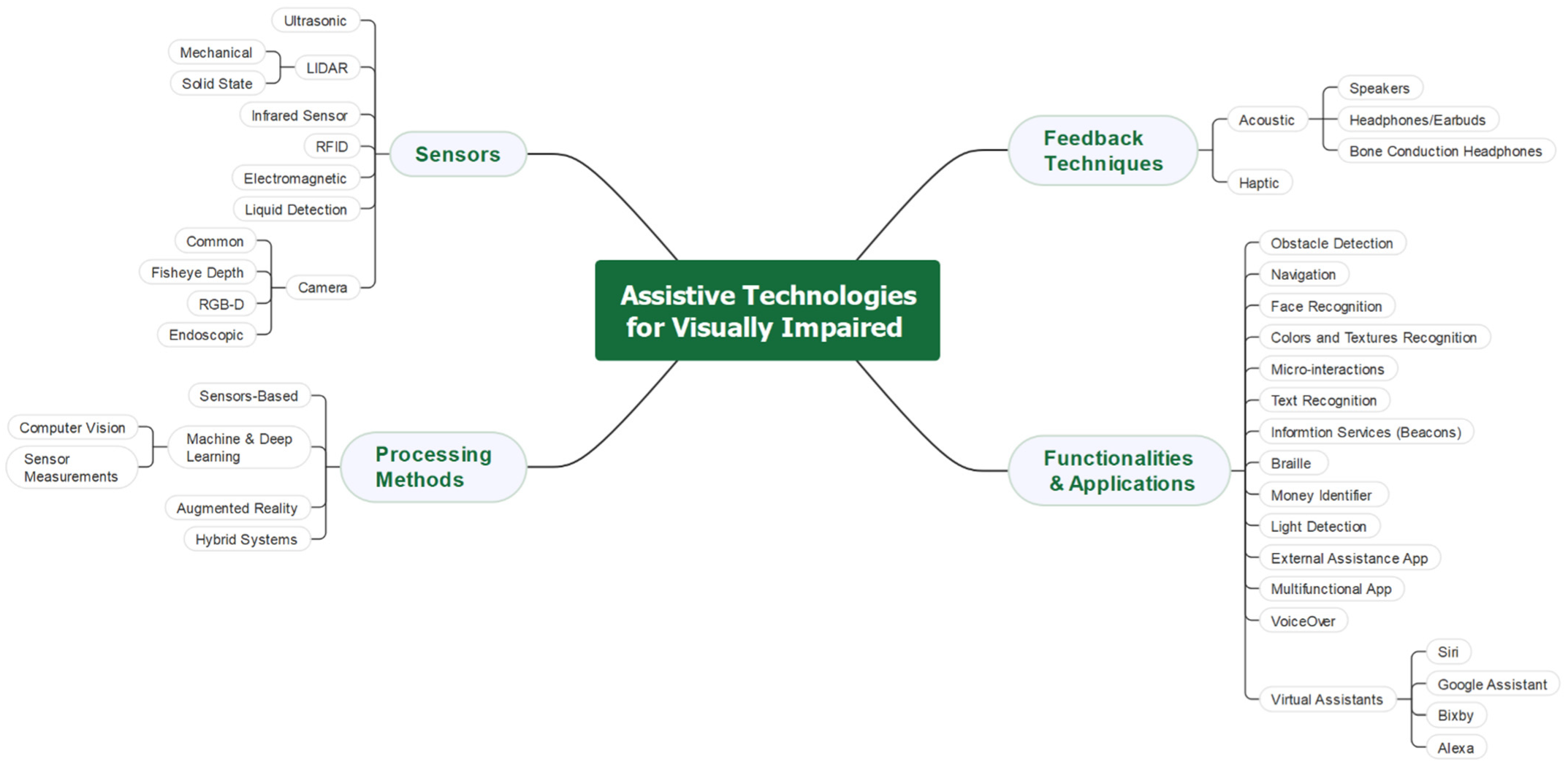
Publisher’s Note: MDPI stays neutral with regard to jurisdictional claims in published maps and institutional affiliations.

Article Metrics

Citations

Article Access Statistics

Multiple requests from the same IP address are counted as one view.