


Abstract
As global obesity rates rise, cardiovascular diseases increase, and stress-related issues become more severe. This increases the public awareness of health and exercise. However, existing spinning fitness equipment lacks personalized customization for individual needs. To address this, we developed a smart customizable spinning system that enables health monitoring, central computation, flywheel, voice interaction, notification, and query subsystems. Users can set fitness goals based on their personal needs, monitor workout data via sensors, and utilize voice interaction and control to track their exercise status in real time. The system notifies users of workout progress through a buzzer and message queuing telemetry transport, while the Web interface provides access to past workouts and health records. Additionally, the system supports bilingual functionality (Chinese and English), allowing users to operate it in their preferred language, enhancing global usability.
1. Introduction
Changes in modern diets and lifestyle patterns have heightened the importance of health-related concerns, leading more people to adopt regular exercise habits. However, most traditional spinning fitness equipment on the market only offers basic functions and lacks customized designs tailored to individual needs. Therefore, this study aims to develop a bilingual (Chinese and English) intelligent customized spinning system. The system calculates the user’s basal metabolic rate (BMR) and total daily energy expenditure (TDEE) based on personal information, offering five professional fat-loss goals and providing personalized exercise recommendations. Through sensors that monitor heart rate, pedaling speed, and cycling distance, the system supports voice interaction, allowing users to track their exercise status without looking at the screen. It also supports voice control, enabling users to start and stop their workouts using voice commands, eliminating the need for manual operation, and improving usability. The webpage allows users to view their historical exercise and health records to easily manage exercise and health data. The developed system enhances exercise willingness, reduces the risk of chronic diseases, and promotes public health, in line with the United Nations SDG Goal 3: “Ensure healthy lives and promote well-being for all at all ages.”
2. Related Research and Technologies
2.1. Fitness System for Smart Home
National United University [1] in Taiwan developed a smart home fitness system that consists of two main subsystems: the “Fitness Website and App System” and the “Fitness Recognition System.” The first subsystem enables exercise planning, fitness information, body mass index (BMI) and BMR calculators, calorie tracking, and motion recognition. The second subsystem assesses motion status, measures motion similarity, and analyzes system performance. This system allows users to customize their exercise goals based on personal information and automatically calculates the calories burned during exercise. Once the target calorie goal is reached, a buzzer sound alerts the user, and message queuing telemetry transport (MQTT) notifies the user of the achieved calorie goal. After the exercise session, MQTT sends a notification to the user with the exercise details.
2.2. Attractive Factors of Indoor Cycling
Tunghai University [2] in Taiwan analyzed the factors that attract male and female users to spin bikes using the Kano reverse questionnaire method. 54 male and 42 female users were surveyed in the study. Males tended to prioritize the stability of the bike frame, while females placed more importance on after-sales service. However, the study was conducted based on paper-based surveys and did not involve any practical implementation. In contrast, we integrated the Internet of Things (IoT) technology to personalize exercise goals. During the workout, a Hall sensor tracks cycling data, and users monitor their exercise status through voice interaction, eliminating the need to look at a screen. Voice commands start and end the workout, replacing traditional button controls. Once users achieve their exercise goals, they are notified in real time. Afterward, users can review their past exercise and health data through a website, where the information is displayed in graphical format.
2.3. Effects of Exercise on Schizophrenia
National Taipei University of Nursing and Health Sciences [3] studied the impact of exercise training on cognitive function, cardiovascular fitness, and emotional health, focusing on patients with schizophrenia. They combined information technology with exercise. Their system calculates users’ BMR and TDEE based on gender, age, height, and weight, and provides five customized exercise plans for fat burning. The system improved users’ mental and physical health. Through real-time data monitoring and analysis, users tracked their exercise progress and were motivated for continuous participation. The system enhanced the overall quality of life and minimized the negative effects of exercising.
2.4. Technologies
2.4.1. DevKitC-32U
The DevKitC-32, developed by Espressif Systems, a Chinese company, is based on the WROOM-32U development board [4]. It features a dual-core processor with the capability to control each core independently. The board supports traditional Bluetooth, Bluetooth Low Energy (BLE), and Wi-Fi for various applications. It also includes a rich set of peripherals, including capacitive touch sensors, Hall sensors, secure digital card interfaces, Ethernet interfaces, high-speed secure digital input output (SDIO), serial peripheral interface (SPI), universal asynchronous receiver-transmitter (UART), inter-IC sound (I2S), and inter-integrated circuit (I2C). The board is programmed using the Arduino integrated development environment (IDE), allowing compiled code to be uploaded to the DevKitC-32U directly through the IDE. In this study, the board is used to transmit cycling data from a Hall sensor and retrieve user data from a cloud database, which is displayed on a SparkFun Serial Graphic LCD 128 × 64.
2.4.2. KY-024/49E Hall Sensor
The KY-024/49E is a linear magnetic Hall sensor that detects the presence of a magnetic field [5]. It includes a potentiometer for adjusting the sensor’s sensitivity and offers both analog and digital output signals. We used the sensor to calculate the number of wheel rotations during cycling, thereby capturing relevant cycling data.
2.4.3. Spark Fun Serial Graphic Liquid Crystal Display 128 × 64
The SparkFun [6] Serial Graphic LCD is a 128 × 64-pixel display with a built-in serial interface, allowing for easy control and communication. In this paper, it is used to display user information and current cycling data.
2.4.4. Arduino IDE
Arduino IDE is an integrated development tool that uses a language similar to C and C++ for compilation [7,8]. It extends and supports its functionality through additional libraries and boards. Arduino IDE enables software control of hardware, sensor data, and input data, and is used to develop various programs on different types of boards. Arduino IDE also supports Windows, macOS, and Linux operating systems.
2.4.5. XAMPP
XAMPP [9] is an integrated installation package that includes the Apache web server, hypertext preprocessor (PHP), Perl, and MySQL, enabling users to easily set up a local web server on their computers. We utilized XAMPP to host web pages, manage databases, and store user information, cycling data, and personalized goals.
2.4.6. Google Cloud
Google Cloud [10,11] is a cloud computing service provided by Google, offering a range of services including cloud computing, data storage, data analysis, and machine learning. It provides ample computing power to accommodate various needs and facilitates quick setup and development. Google Cloud was used as the platform for receiving data from Google Fit in this study.
2.4.7. Google Fit
Google Fit is a health-tracking application developed by Google, available for download on Android, iOS, and Wear OS [12]. It enables users to upload health data from their smartphones or smartwatches to their Google account through various system channels. Google Fit integrates with multiple fitness applications (Apps) to collect exercise data and sleep information, while also allowing users to set goals for self-monitoring. Data from Google Fit are accessed on the Google Cloud Platform (GCP). We used Google Fit to collect heart rate monitoring data from wearable devices and upload it to the cloud.
2.4.8. Open Artificial Intelligence (AI) Whisper
OpenAI Whisper [13,14] is a machine learning model developed by OpenAI for speech-to-text (STT) transcription and recognition. Released as open-source software in September 2022, it supports transcription in English and multiple other languages, requiring users to select a specific model based on their needs. We used Whisper to convert spoken language into text.
2.4.9. Python-Google Text-to-Speech (gTTs)
gTTS [15] is a Python library and command line interface (CLI) used to interact with Google Translate’s Text-to-Speech (TTS) application programming interface (API). It enables users to generate speech in MPEG-1 audio layer III (MP3) format, saving it to a file, a file-like object (byte stream) for further audio processing, or standard output. Additionally, it generates a Google Translate TTS request URL for use with external programs. We used gTTS to convert text into speech.
2.4.10. ECharts
ECharts [16] is an open-source JavaScript charting library designed for creating dynamic and interactive data visualizations on web pages. It enables developers to generate various types of charts, including line charts, scatter plots, pie charts, and more, using simple JavaScript code. We used ECharts to create line charts, bar charts, and dashboard visualizations on the website.
2.4.11. MQTTX
MQTTX [17] is an open-source, cross-platform MQTT 5.0 desktop client developed by EMQ, compatible with macOS, Linux, and Windows. Its chat-style user interface simplifies operation and enhances intuitiveness. MQTTX allows users to quickly create and manage multiple MQTT connections, facilitating the testing of MQTT/MQTTS connections, as well as the subscription and publication of MQTT messages. We used MQTTX to notify users of exercise information and calorie target achievement status.
3. System Design and Process Flow
3.1. Overall Design Description
The health monitoring subsystem provides heart rate data to the query subsystem. When users register, their personal information is stored in the cloud database. When logging in, this personal information is retrieved from the cloud database and sent to the central computing subsystem. The spinning bike subsystem reads the current user’s personal information and transmits exercise data to the cloud database every minute, via the central computing subsystem. The central computing subsystem then retrieves the exercise data from the cloud database and sends it back to the spinning bike subsystem. The voice interaction subsystem continuously listens for a wake-up word spoken by the user. Once activated, it responds in two seconds. After the response, the user can query the current exercise information or control the start and end of the exercise via voice commands. The notification subsystem extracts exercise data from the cloud database through the spinning bike subsystem via the central computing subsystem. After performing the necessary calculations, the user is notified through MQTT and a buzzer if the target calories are spent. Once the exercise ends, the exercise information is sent to the user via MQTT. The user group can query their exercise records and health information through the query subsystem. The operational process is illustrated in Figure 1.
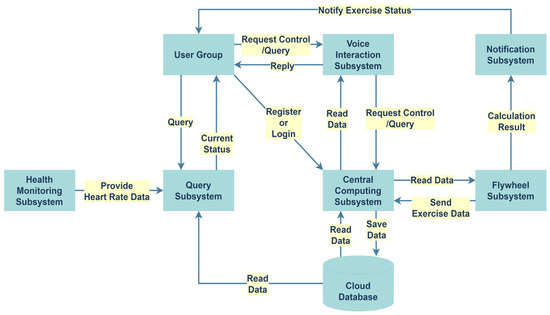
Figure 1.
System process.
3.2. Subsystem Process Flows
3.2.1. Health Monitoring Process Flow
The smart wearable device transmits monitoring data to Google Fit. The system checks whether the user is logged in. If the login is successful, the heart rate data from Google Fit is sent to the query subsystem. Figure 2 shows the operational flowchart.
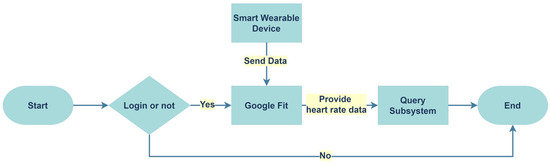
Figure 2.
Process flowchart of the health monitoring subsystem.
3.2.2. Central Computing Process Flow
The system determines whether the user group is registering or logging in. If it is a registration, it checks if the registration is successful. Upon success, personal information is stored in the cloud database. If it is a login, the system retrieves personal information from the cloud database and checks if the login is successful. If successful, it determines whether the data is related to exercise or control. If it is exercise data, it is sent to the cloud database every minute. Otherwise, the system compares the data, sends control data to the spinning bike subsystem, and stores the control records. If the login fails, the system returns to the login screen. Figure 3 shows the operation flowchart.
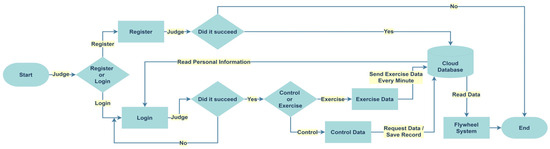
Figure 3.
Process flowchart of the central computing subsystem.
3.2.3. Flywheel Process Flow
The system determines whether the data is personal information or exercise data. If it is personal information, it is read and displayed on LCD1. The system then checks if the button is pressed. If the button is pressed, exercise begins, and the Hall sensor sends exercise data every minute to the central computing subsystem via ESP32, with the calculation results forwarded to the notification subsystem. If the data is exercise-related, it is read and displayed on LCD2. The system then checks if the button is pressed again. If pressed, the exercise ends; otherwise, the exercise continues. Figure 4 presents the operation flowchart.
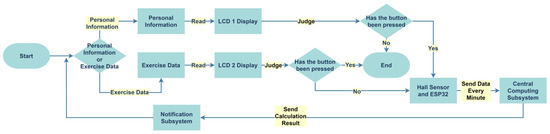
Figure 4.
Process flowchart of the flywheel subsystem.
3.2.4. Voice Interaction Process Flow
After receiving the user group’s questions or requests, the central computing subsystem determines the nature of the issue. If the question is successfully recognized, the corresponding information is provided to the user. If the recognition fails, the system returns to the questioning stage. Figure 5 depicts the operation flowchart.

Figure 5.
Process flowchart of the voice interaction subsystem.
3.2.5. Notification Process Flow
The notification subsystem retrieves exercise data from the cloud database through the flywheel subsystem and the central computing subsystem. After performing the calculations, it checks if the calorie goal is achieved. If the goal is achieved, the user group is notified via MQTT and a buzzer. Otherwise, it checks whether the exercise has ended. If the exercise is finished, the exercise information is sent to the user group via MQTT. Figure 6 presents the operation flowchart.
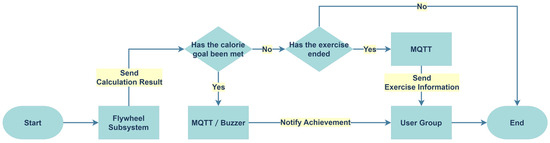
Figure 6.
Process flowchart of the notification subsystem.
3.2.6. Query Process Flow
The system checks whether the user group is logged in. If logged in, the webpage retrieves data stored in the cloud database, along with heart rate data provided by the health monitoring subsystem. The user group can then query their past exercise records and health information through the webpage based on specific time or date ranges. Figure 7 depicts the operation flowchart.
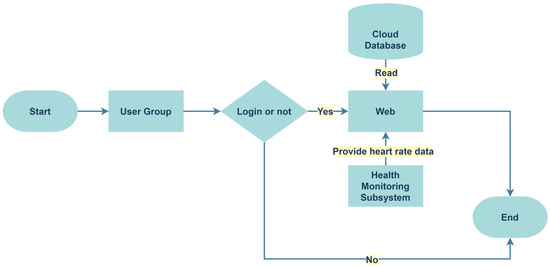
Figure 7.
Process flowchart of the query subsystem.
4. Implementation and Demonstration
4.1. Health Monitoring Demonstration
The user downloads Google Fit on their phone and connects it to the smartwatch via the service program, linking it to Google Fit. The schematic is shown in Figure 8.
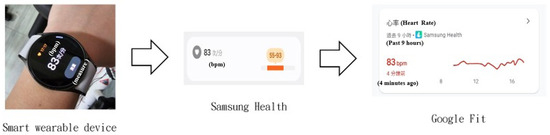
Figure 8.
Smartwatch transmitting data to Google Fit.
4.2. Central Computing Demonstration
This system provides a bilingual interface, allowing users to switch freely during operation, as shown in Figure 9. When registering, users must first enter their email for verification, and a random verification code is sent to the provided email inbox, as shown in Figure 10. Based on the user’s gender, age, height, weight, selected BMR, TDEE, and fat-loss goals, the system calculates the daily target calories to achieve a customized fitness goal setting (Figure 11). After registration is completed, users can log in, with the successful login screen shown in Figure 12.

Figure 9.
The bilingual user interface, showing the Chinese (left) and English (right) versions.

Figure 10.
Verification code sent to email inbox.
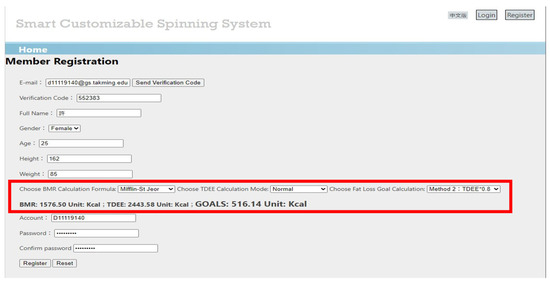
Figure 11.
Set customized fitness goals.
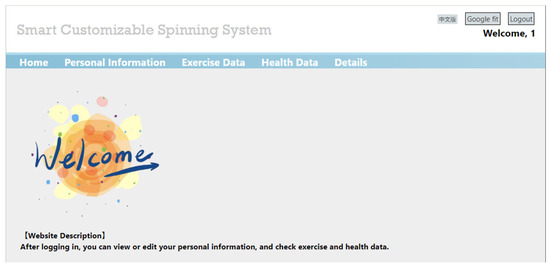
Figure 12.
Login successful.
4.3. Flywheel Demonstration
After the user logs in, LCD1 displays the current user’s personal information (Figure 13), with field descriptions provided in Table 1. Pressing the button starts the exercise (Figure 14). The magnet on the flywheel rotates and is detected by the Hall sensor, as shown in Figure 15. The exercise data is displayed on LCD2 every minute (Figure 16), with field descriptions provided in Table 2. Simultaneously, the data is sent to the cloud database (Figure 17). Pressing the button again ends the exercise, as shown in Figure 18. Two minutes later, the LCD1 and LCD2 screens are automatically cleared as shown in Figure 19.
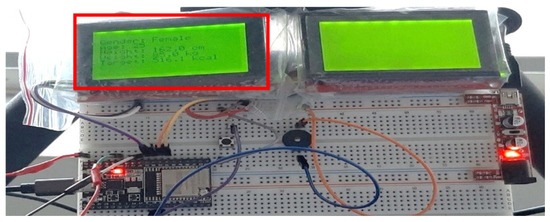
Figure 13.
LCD1 displaying user’s personal information.

Table 1.
LCD1 field description.
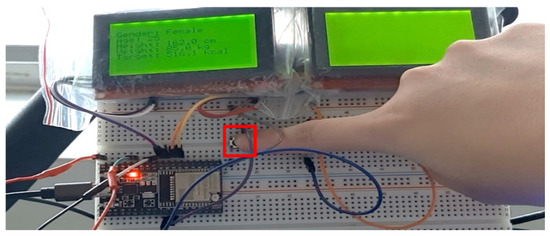
Figure 14.
Starting exercise.
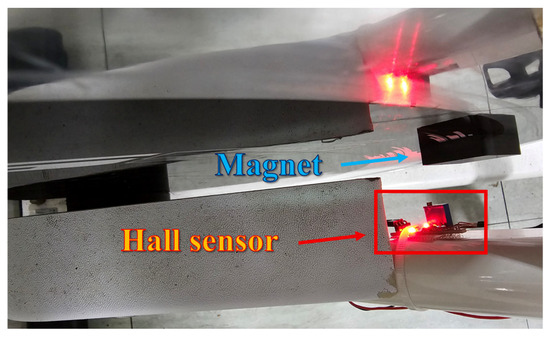
Figure 15.
Hall sensor detecting magnet.
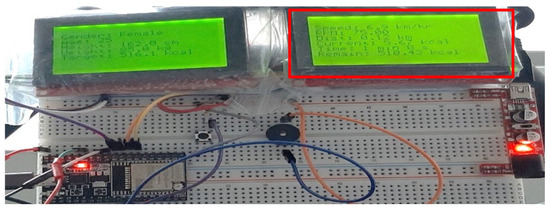
Figure 16.
Exercise data displayed on LCD2.
Table 2.
LCD2 field description.
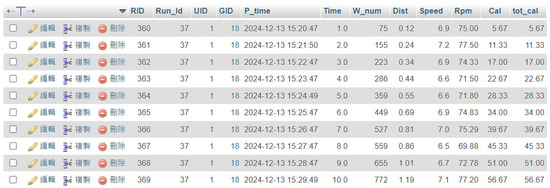
Figure 17.
Exercise data transmitted to database every minute.
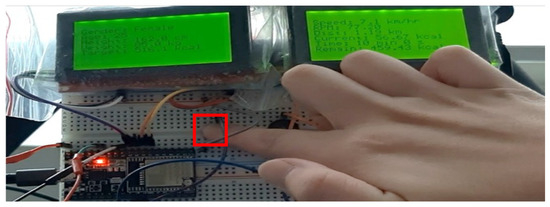
Figure 18.
Ending exercise.
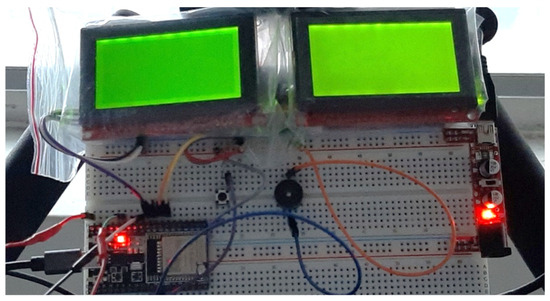
Figure 19.
LCD automatically cleared.
4.4. Voice Interaction Demonstration
Based on your computer’s specifications, a corresponding model on the Whisper official website was constructed. The model specification is shown in Table 3. The medium model was used in this study.
Table 3.
Voice model specifications.
Using the prepared code, the success rate of speech recognition was measured (Table 4). The medium model showed the highest success rate. When comparing Whisper and WhisperX, WhisperX demonstrated a faster response time.
Table 4.
Speech recognition rate.
The distance between the user and the omnidirectional microphone was measured, and multiple tests were conducted with the microphone. Table 5 displays the test distances and the speech recognition success rate. The optimal distance was between 40 and 80 cm, with a success rate of approximately 83.3%. The hardware installation diagram is shown in Figure 20.
Table 5.
Omnidirectional microphone testing distance and success rate.
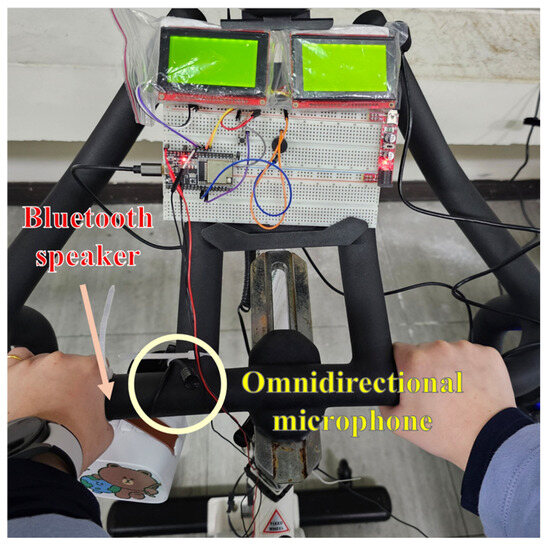
Figure 20.
Voice interaction hardware.
The system is activated by the voice command “Hey Whisper,” and it recognizes the language spoken by the user (either Chinese or English) and responds in the same language. Users can control and ask questions using keywords. After testing, it is confirmed whether the commands and data are successfully received by the central processing system. The system controls the start and end of the workout, with test results shown in Figure 21. After the central processing system assesses the issue, it replies to the corresponding exercise data to the user, as shown in Figure 22.
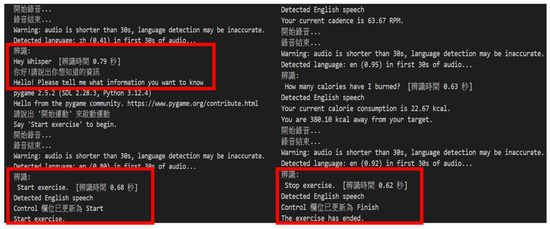
Figure 21.
Voice control to start and end exercise.
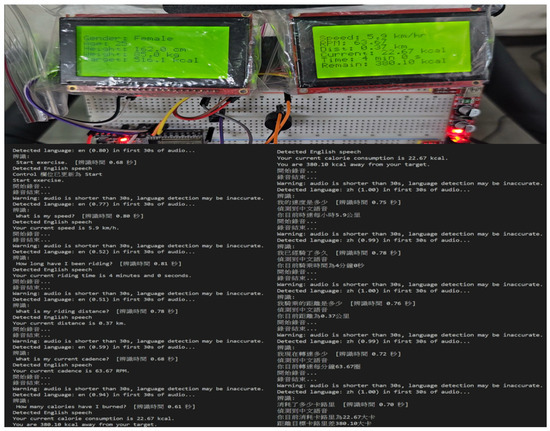
Figure 22.
Received response after asking question.
4.5. Notification Demonstration
When the exercise ends, MQTT is used to notify the user group with exercise information, as shown in Figure 23. When the target calories are reached, a buzzer alerts the user group, and the screen displays a negative value indicating the target has been achieved. MQTT notifies the user group of the achieved calorie target, as shown in Figure 24.
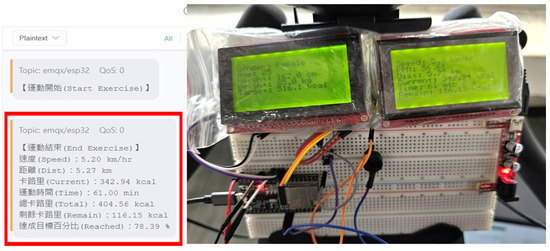
Figure 23.
Exercise information notification.
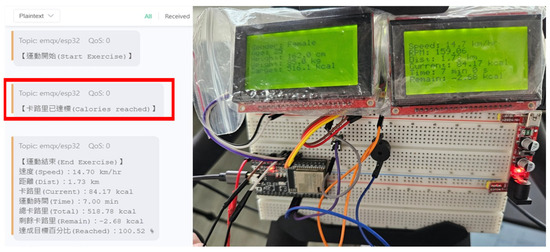
Figure 24.
Calorie target achievement notification and buzzer alert.
4.6. Query Demonstration
The completed program code is processed onto the webpage, providing a bilingual interface that allows users to switch languages according to their needs. Data are presented in bar charts, line graphs, and dashboards, displaying the changes in exercise and health data across different periods. The queries are shown in Figure 25, Figure 26, Figure 27, Figure 28 and Figure 29.
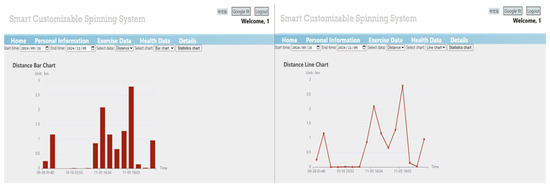
Figure 25.
Web query period distance data chart.
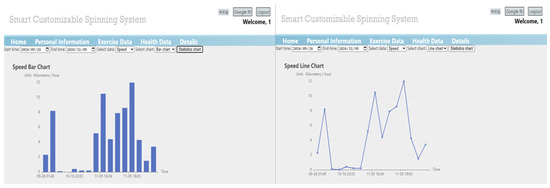
Figure 26.
Web query period speed data chart.
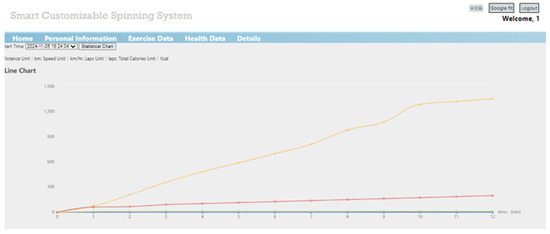
Figure 27.
Single exercise data change chart.
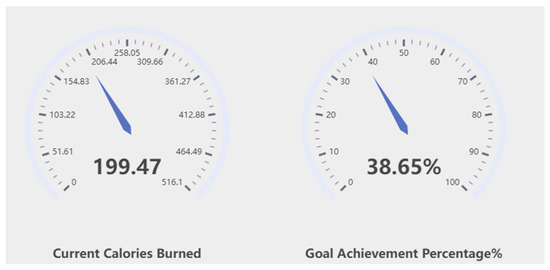
Figure 28.
Current exercise calories and daily achievement percentage dashboard chart.
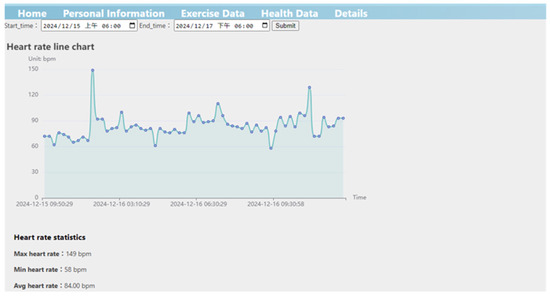
Figure 29.
Web query period heart rate data line chart.
5. Conclusions
We developed a system that uses Hall sensors to monitor exercise data in real time, combined with personal information and BMR/TDEE analysis. The system provides customized exercise recommendations to help users achieve fitness goals and reduce the risk of chronic diseases. The system consists of multiple subsystems: the health monitoring subsystem transmits health data via smartwatches and Google Fit; the flywheel subsystem displays personal information and exercise data, sending data to a cloud database every minute; the voice interaction subsystem allows users to control the spinning bike and inquire about the current exercise status through voice commands; the notification subsystem sends notifications and alerts when the exercise ends or goals are met; and the query subsystem presents historical data through web charts, enabling users to track exercise trends and make decisions. Additionally, the system supports bilingual functionality (Chinese and English), allowing users to operate the system in their preferred language and enhancing global applicability. By integrating these features, a smart customized spinning system can be used effectively.
Author Contributions
Conceptualization, Y.-W.H.; methodology, Y.-W.H. and W.-L.Y.; software, Y.-W.H. and W.-L.Y.; validation, Y.-W.H. and W.-L.Y.; formal analysis, Y.-W.H.; investigation, W.-L.Y.; resources, Y.-W.H.; data curation, Y.-W.H.; writing—original draft preparation, Y.-W.H. and W.-L.Y.; writing—review and editing, Y.-W.H.; visualization, W.-L.Y.; supervision, W.-C.L. All authors have read and agreed to the published version of the manuscript.
Funding
This research received no external funding.
Institutional Review Board Statement
Not applicable.
Informed Consent Statement
Not applicable.
Data Availability Statement
The data presented in this study are available on request from the corresponding author.
Conflicts of Interest
The authors declare no conflicts of interest.
References
- Wang, N.-C.; Chung, T.-C.; Lee, P.-H.; Chang, C.-C. A Fitness System for Smart Home. Undergraduate Capstone Project, Department of Computer Science and Information Engineering, National United University, 2021. Available online: https://csie.nuu.edu.tw/var/file/41/1041/img/1125/226244637.pdf (accessed on 31 May 2025).
- Lin, P.-W. Attractive Factors of Regular Users to Fitness Indoor Cycling. Master’s Thesis, Department of Industrial Design, Tunghai University, Taichung, Taiwan, 2022. Available online: https://hdl.handle.net/11296/k3x6ek (accessed on 31 May 2025).
- Chang, D.Y.; Kuo, Y.-C.; Liao, Y.-H. Effects of Exercise Training on Schizophrenia Disorders. J. Sports Res. 2020, 29, 51–58. [Google Scholar] [CrossRef]
- Taiwansensor. SP32-DevKitC Espressif Systems WROOM-32U Development Board ESP32-D0WD External Antenna. Available online: https://www.taiwansensor.com.tw/product/esp32-devkitc-espressif-systems (accessed on 31 May 2025).
- ArduinoModules.info. KY-024/49E Hardware Introduction. Available online: https://arduinomodules.info/ky-024-linear-magnetic-hall-module/ (accessed on 31 May 2025).
- Mouser Electronics. SparkFun Serial Graphic LCD 128 × 64-LCD-09351. Available online: https://www.mouser.com/ProductDetail/SparkFun/LCD-09351/?qs=WyAARYrbSnb2niE0kKmc5g%3D%3D (accessed on 31 May 2025).
- Wikipedia Contributors. Arduino. Wikipedia, The Free Encyclopedia. Available online: https://zh.wikipedia.org/zh-tw/Arduino (accessed on 31 May 2025).
- Arduino. Arduino IDE Introduction. Available online: https://www.arduino.cc/en/Guide/Introduction (accessed on 31 May 2025).
- Wikipedia Contributors. XAMPP. Wikipedia, The Free Encyclopedia. Available online: https://zh.wikipedia.org/zh-tw/XAMPP (accessed on 31 May 2025).
- Google Cloud. Google Cloud Official Website. Available online: https://cloud.google.com/?hl=zh-tw (accessed on 31 May 2025).
- Wikipedia Contributors. Google Cloud Platform (GCP). Wikipedia, The Free Encyclopedia. Available online: https://zh.wikipedia.org/zh-tw/Google%E9%9B%B2%E7%AB%AF%E5%B9%B3%E5%8F%B0 (accessed on 31 May 2025).
- Google. Google Fit. Available online: https://www.google.com/fit/ (accessed on 31 May 2025).
- OpenAI. Whisper: Robust Speech Recognition via Large-Scale Weak Supervision. GitHub Repository, 2022. Available online: https://github.com/openai/whisper (accessed on 31 May 2025).
- Bain, M. WhisperX: Automatic Speech Recognition with Word-Level Timestamps (& Diarization). Available online: https://github.com/m-bain/whisperX (accessed on 31 May 2025).
- Kumar, A. Text-to-Speech | gTTs Python Module. DEV Community. Available online: https://dev.to/anandraz/text-to-speech-gtts-python-module-5bfh (accessed on 31 May 2025).
- Lee, T. Five Great Reasons to Recommend! ECharts Powerful Visualization Chart Library. Medium. Available online: https://tonyaleelucky.medium.com/346b4e830dc2 (accessed on 31 May 2025).
- MQTTX. Introduction-MQTTX Documentation. Available online: https://mqttx.app/zh/docs (accessed on 31 May 2025).
Disclaimer/Publisher’s Note: The statements, opinions and data contained in all publications are solely those of the individual author(s) and contributor(s) and not of MDPI and/or the editor(s). MDPI and/or the editor(s) disclaim responsibility for any injury to people or property resulting from any ideas, methods, instructions or products referred to in the content. |
© 2025 by the authors. Licensee MDPI, Basel, Switzerland. This article is an open access article distributed under the terms and conditions of the Creative Commons Attribution (CC BY) license (https://creativecommons.org/licenses/by/4.0/).