

Abstract
In location-based augmented reality (LAR) applications, a simple and effective authoring tool is essential to create immersive AR experiences in real-world contexts. Unfortunately, most of the current tools are primarily desktop-based, requiring manual location acquisitions, the use of software development kits (SDKs), and high programming skills, which poses significant challenges for novice developers and a lack of precise LAR content alignment. In this paper, we propose an intuitive in situ authoring tool with visual-inertial sensor fusions to simplify the LAR content creation and storing process directly using a smartphone at the point of interest (POI) location. The tool localizes the user’s position using smartphone sensors and maps it with the captured smartphone movement and the surrounding environment data in real-time. Thus, the AR developer can place a virtual object on-site intuitively without complex programming. By leveraging the combined capabilities of Visual Simultaneous Localization and Mapping(VSLAM) and Google Street View (GSV), it enhances localization and mapping accuracy during AR object creation. For evaluations, we conducted extensive user testing with 15 participants, assessing the task success rate and completion time of the tool in practical pedestrian navigation scenarios. The Handheld Augmented Reality Usability Scale (HARUS) was used to evaluate overall user satisfaction. The results showed that all the participants successfully completed the tasks, taking s on average to create one AR object in a 50 m radius area, while common desktop-based methods in the literature need 1–8 min on average, depending on the user’s expertise. Usability scores reached for manipulability and for comprehensibility, demonstrating the high effectiveness in simplifying the outdoor LAR content creation process.
1. Introduction
Location-based augmented reality (LAR) has emerged as a popular technology that allows users to visually interact with their surroundings by embedding virtual objects into real-world environments taken by mobile device cameras. This technology has wide applications in various fields like tourism, education, navigation, and advertising [1,2].
To provide outdoor LAR features, a lot of tasks are necessary in order to map virtual objects into real-world environments, such as location acquisitions, virtual content generations, AR object registrations, and database storing. Among them, generations and registrations of LAR contents present significant challenges, particularly for novice developers and non-programmers. Current mainstream methods for them to create immersive AR experiences are heavily reliant on a wide range of software development kits (SDKs), specialized tools, and extensive programming knowledge. These methods often require a combination of desktop-based workflows, and multiple applications, such as Blender, Unity, and Vuforia SDK, which makes AR content creation cumbersome, time-intensive, and inaccessible to novice developers [3,4,5].
Several solutions for outdoor AR authoring tools have been developed as desktop applications that require pre-mapping the environments or the programming contents remotely from the actual AR locations. Although the tools, such as Unity with ARCore/ARKit SDKs, are powerful, they have fundamental limitations in outdoor AR content creation. They basically rely on fixed or pre-recorded environmental data, which does not account for real-time outdoor variations and, consequently, will lead to discrepancies in object alignments when developers deploy the AR contents in actual outdoor locations [6,7,8].
Recent advancements in cloud and computer vision techniques have driven progress in AR anchor positioning, where consistent accuracy improvements have been observed. Many mobile AR applications have been developed using the Visual Simultaneous Localization and Mapping (VSLAM) technique [9,10].
However, VSLAM implementation is still limited in indoor scenarios due to the main limitation of VSLAM, which is the necessity of a large image reference database. Furthermore, VSLAM may face challenges in environments with low texture or repetitive patterns, as it becomes difficult to identify unique features for tracking [11,12,13].
Previously, we have successfully overcome this limitation using the sensor fusion approach, via the integration of VSLAM and Google Street View (GSV) [14]. This enhances the user localization accuracy in outdoor settings. With the GSV imagery references and the cloud-matching approach, it can minimize the necessity for a huge number of data points stored in a dedicated server, which is commonly required in VSLAM implementations. Our approach significantly enhances localization accuracy by utilizing both real-time visual data from the environment and reference data from GSV, providing a hybrid model that addresses the challenges of outdoor condition variables. Unfortunately, the implementation of the VSLAM/GSV method in outdoor AR authoring tools is still underexplored.
In this paper, we propose an in situ authoring tool for outdoor LAR that enables developers to directly create and store AR objects using their smartphones at the targeted point of interest (POI) locations. The user story approach is used to capture user needs and the proposed tool requirements. Unlike the mainstream desktop solutions, the proposed tool leverages Visual-Inertial Sensor Fusion, and implements the VSLAM/GSV method to provide intuitive authoring experiences in outdoor scenarios, addressing common challenges faced in outdoor AR applications.
We investigate the feasibility and effectiveness of the proposed authoring tool through comprehensive quantitative evaluations, including task success rate and task completion time with 15 participants. The Handheld Augmented Reality Usability Scale (HARUS) is employed to evaluate usability and satisfaction. The results show that all the participants successfully completed the assigned tasks, confirming the effectiveness of the proposed tool in the creation of outdoor LAR content.
The remainder of this article is organized as follows: Section 2 introduces related works. Section 3 presents our previous works in this domain, the key technologies, the prototype design, and the implementation of the proposal. Section 4 presents the experiment design, the evaluation method, and testing scenarios of the experiment. Section 5 shows the results and discusses their analysis. Finally, Section 6 provides conclusions with future works.
2. Related Works in Literature
In this section, we provide an overview of key findings from related works relevant to our proposed tool in this paper. By examining past studies, we aim to highlight the significance of existing works, identify gaps, and contextualize how our research contributes to this field.
2.1. Visualization Process in Outdoor LAR System
The basic principle of the LAR system is superimposing real-life environments with virtual objects to provide related information [15,16]. Visual representations are essential for users to explore data, identify patterns, make informed decisions, and present findings effectively. Integrating computational tools for data visualizations and interactions in AR environments significantly enhances users’ cognitive processes, enabling a deeper understanding of information and its relationships [17,18].
In [19], Sadeghi et al. provide an in-depth review of current LAR technologies and categorize them into two main types based on visualization methods: traditional marker-based LAR and markerless LAR. Markerless LAR, also known as pervasive AR, extends traditional LAR by creating adaptive, context-aware experiences that seamlessly blend virtual and real-world elements. Unlike marker-based LAR, which relies on external tracking aids such as fiducial markers, image targets, or 2D QR codes to obtain user initial positions and display augmented content, markerless LAR offers immersive experiences without relying on these supplementary materials [20,21,22]. By incorporating visual-inertial sensors, our proposed authoring tool aligns with the principles of pervasive AR, enabling continuous and adaptive content creation that integrates seamlessly with real environments.
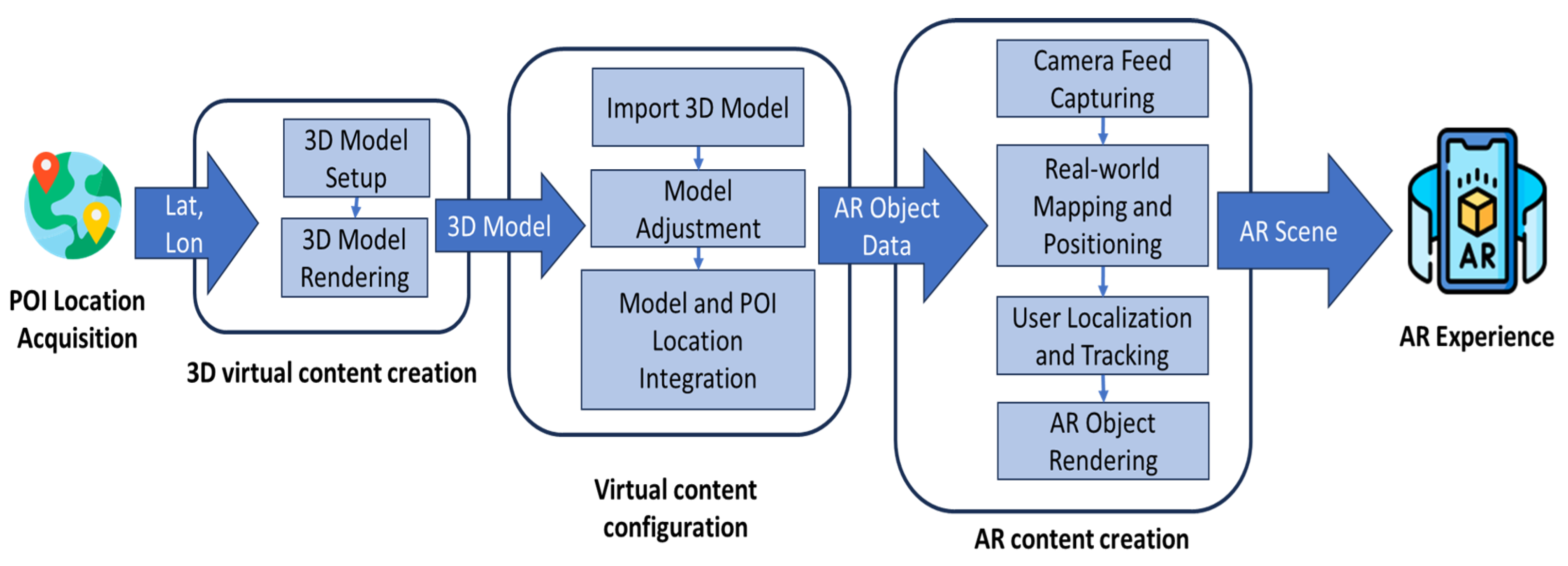
In [23], Huang et al. describe that a LAR system is composed of multiple components and substantial efforts are required to create comprehensive AR experiences. The reconstruction of an environment can be achieved through various methods that involve different technologies. Pre-defined virtual model configuration and setup can provide additional layers of information. This process may use different interaction methods, such as a desktop or mobile setting. In LAR applications, the process of aligning and matching virtual objects with geographic locations and orientations of the real-world scene is called geo-registration [24]. Figure 1 illustrates the general process of LAR geo-registration from the POI location acquisition for the AR object generation.
Figure 1.
Tasks and processes of AR experience creation in common outdoor location-based AR solutions.
2.2. Authoring Tools in LAR System
Research surrounding LAR content creation tools have explored different approaches to more intuitively create AR experiences. Researchers have developed various authoring tools to assist authors in creating visualizations. In [25], the authors emphasize the importance of authoring tools to boost the mainstream use of LAR and highlight the importance of the usability and learning curves of existing authoring tools, a barrier that still exists in the present day.
2.2.1. Desktop Authoring Tools in LAR System
Traditional desktop-based authoring tools are the mainstream LAR content creation approaches used across various industries. In [26], Kruger et al. introduced a desktop-based authoring tool, enabling users to enhance videos of physical environments with virtual elements. Other desktop content creation tools support customizations by linking 3D models to specific fiduciary markers for tangible AR applications [27]. However, the results indicate that such tools often face challenges related to complexity and inefficiency, especially in scenarios that demand quick content adaptations and flexibility.
In [28], Nebeling and Speicher categorized authoring tools into five classes based on factors such as fidelity level in AR/VR, skill and resource requirements, overall complexity, interactivity, 2D/3D content capability, and scripting support. They pointed out significant issues in existing desktop-based authoring tools, highlighting that their diversity and complexity will create difficulties for both novice and experienced developers. The need for multiple, heterogeneous, and complex tools to design AR applications adds further challenges, even for skilled users.
In [29], Sicat et al. introduced DXR, a toolkit designed to help designers quickly prototype immersive visualizations using both programmatic and graphical user interfaces. However, it remains a desktop-based solution that follows a form-filling approach, which may not be ideal for touchscreen devices. Additionally, DXR lacks the capability to extract real-world information to support AR content creation.
2.2.2. Mobile Authoring Tools in LAR System
Current in situ prototyping tools enable users to create and modify applications directly within their intended environments. This method holds particular relevance for LAR applications, which depend on seamlessly integrating virtual content with physical spaces. In [30], Zhu et al. introduced a mobile authoring tool called MARVisT, which facilitates non-expert users in linking data with virtual and real-world objects. MARVisT empowers users without prior visualization knowledge to bind data to real-world objects, thereby transforming physical spaces with meaningful data representations. Markerless AR tools, such as MRCAT [31] and CAPturAR [32], support users in placing and modifying virtual objects within indoor environments in real-time.
In [33], Palmarini et al. introduced the Fast Augmented Reality Authoring (FARA) system, which employs a geometry-based approach to create step-by-step AR procedures for maintenance activities. This system operates in real-time on standard CPUs and can enhance human performances in Maintenance, Repair, and Overhaul (MRO) tasks. However, current implementations of FARA and similar systems are limited to indoor environments, where localization and positioning methods differ significantly from those required for outdoor applications.
2.3. Outdoor LAR Authoring Tool Localization Methods
In most cases, outdoor in situ LAR authoring systems presented in the literature utilize the sensor fusion approach, which relies only on GPS and Inertial Measurement Unit (IMU) sensors as localization methods. In [34,35], Mercier et al. introduced an authoring tool called BiodivAR which utilizes geolocation data, computer vision, and inertial sensors for location-based AR. Unfortunately, GNSS accuracy issues occurred, leading to imprecise object placements and usability challenges, particularly in outdoor biodiversity education contexts. In their research [36], Suriya et al. faced similar problems when they proposed an AR tool that relies on GPS accuracy, such as inaccurate AR alignments, potential privacy concerns with camera access, and the need for robust device compatibility. In this regard, we have utilized the VSLAM/GSV integration as a localization method to enrich the traditional sensor-fusion object alignment issue.
3. Adopted Technology and Framework
In this section, we introduce our previous work on VSLAM/GSV in outdoor LAR scenarios and other adopted frameworks used in this paper for completeness and better readability.
3.1. Overview of VSLAM and GSV in LAR Implementation
Outdoor LAR applications rely on conventional smartphone sensor fusion methods, such as the GPS and IMU, which often lack the accuracy needed for precise AR content alignments. The Visual Simultaneous Localization (VSLAM) and Google Street View (GSV) integration presents a state-of-the-art approach to enhancing the precision and accuracy of AR applications in outdoor environments. By combining the real-time mapping capabilities of VSLAM with the extensive visual reference database provided by GSV, our previous research aims to improve the sensor fusion performance and the localization accuracy in outdoor LAR scenarios. This integration offers an effective solution for mapping and aligning AR contents with the real world, leveraging the strengths of both VSLAM and GSV to deliver immersive and accurate outdoor AR experiences.
In [37], we compared the implementation performance of the VSLAM enhancement with the ARCore engine both in Android native and Unity for the outdoor LAR navigation system. The result showed that Android native offers better resource computation than the Unity platform. Thus, we leverage the proposed authoring tool implementation with VSLAM/GSV to support the outdoor scenario in the Android native environment.
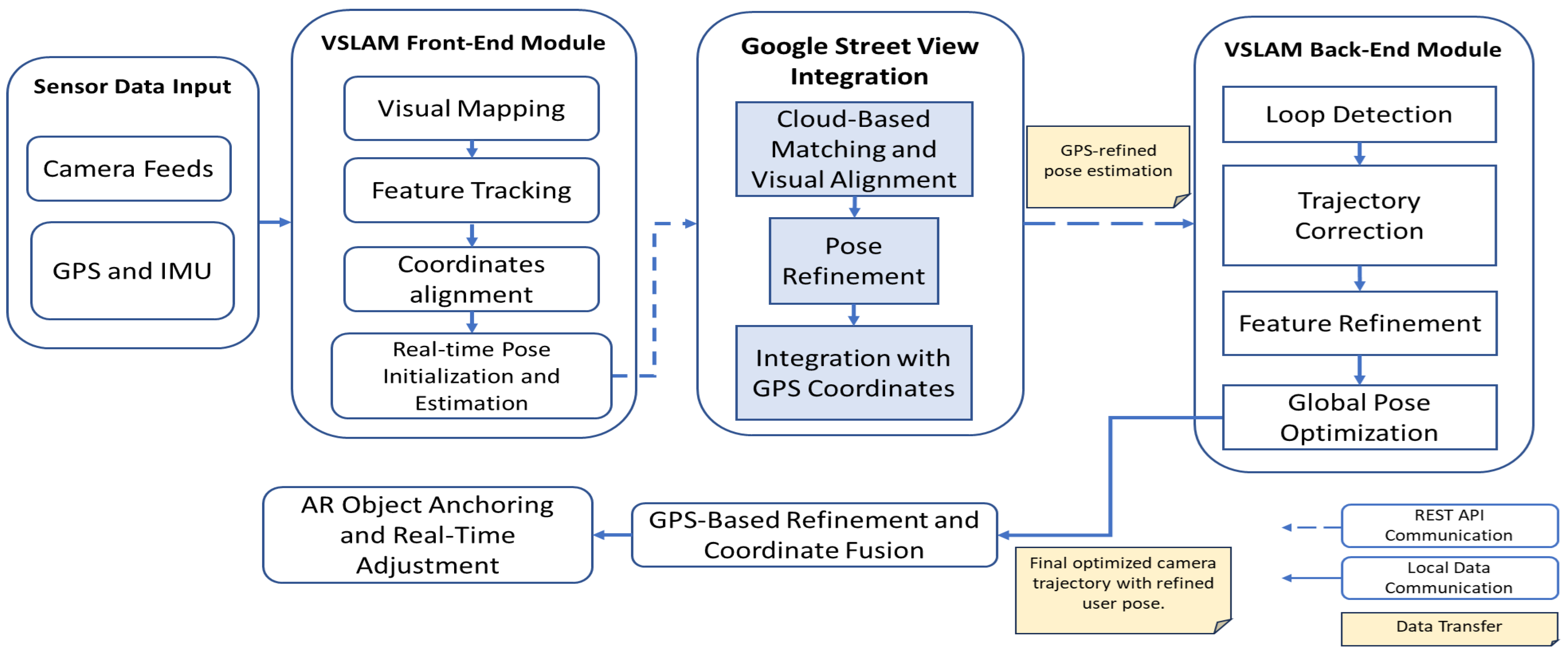
In [14], our research demonstrated that integrating VSLAM and GSV significantly improved the precisions of anchor points in outdoor location-based AR applications, particularly under daylight conditions. Evaluation results highlighted that this combined approach enabled efficient and reliable horizontal tracking of surface features in outdoor settings, resulting in responsive and stable alignment with horizontal surfaces. Figure 2 illustrates the general workflow of how VSLAM operates in conjunction with GSV.
Figure 2.
Block diagram of proposed localization method.
In [38], we investigated VSLAM/GSV’s sensitivity to varying lighting conditions in outdoor environments. By comparing our results with existing literature, we noted that understanding how varying light conditions influence the surface and feature matching, alignment precision, and pose estimation in the VSLAM/GSV approach is essential for optimizing AR experiences. By analyzing the impact of ambient light on this vision-based approach, it becomes possible to determine the minimum requirement for implementing VSLAM/GSV in the proposed authoring tool.
3.2. Human-Centered Design Framework
In this paper, the Human-Centered Design (HCD) framework is adopted to explore and reflect on LAR developer strategies to create, register, and develop AR experiences on smartphone applications. HCD is an approach that focuses on understanding the needs and behaviors of targeted users to ensure that the proposed solutions are designed not only to be functional but also intuitive and accessible to the target users [39].
A user story is a key aspect of the HCD framework. It extends the traditional persona concept by emphasizing the user’s needs in relation to the product. Recent studies indicate that this strategy is an efficient way to quickly collect system requirements, expectations of the system, and optionally, reasons why some features are urgently needed in the system [40,41]. A user story should only capture important system requirements. To generate a successful user story, we adopt INVEST (Independent, Negotiable, Valuable, Estimable, Small, and Testable) standards in order to obtain reliable qualitative metrics [42].
4. Proposal of Visual-Inertial Sensor Fusion Outdoor LAR Authoring Tool
In this section, we introduce the steps for constructing user needs, the system design, and the implementation strategies in this study for the proposal of the in situ AR authoring tool.
4.1. Requirements Elicitation
Based on previous research insights [43,44], 15 respondents participated in our experiments. They were IT developers, students, and lecturers from Universitas Brawijaya, Indonesia, and Okayama University, Japan, most of whom had experiences with LAR development and understood the flow process of developing LAR applications. While they were developing LAR solutions using the existing desktop-based framework, their task achievements were monitored and observed. We also explored the points of view of non-developers or novices, as well as previous works in the literature, to capture beneficial feature requirements.
Using insights from respondents and a recent literature survey, we developed a user story to capture user needs effectively. The simplified INVEST format used in this study is: “As a <type of user>, I want <goal>, so that <some reason>”. Some ideas and obstacles from the respondents can be summarized in Table 1.
Table 1.
User story results.
Based on these insights, the current desktop-based solutions for LAR development lack the integration of multimedia asset components and intuitive environments to independently improve the AR content creation process.
4.2. Structural Design of Proposed System
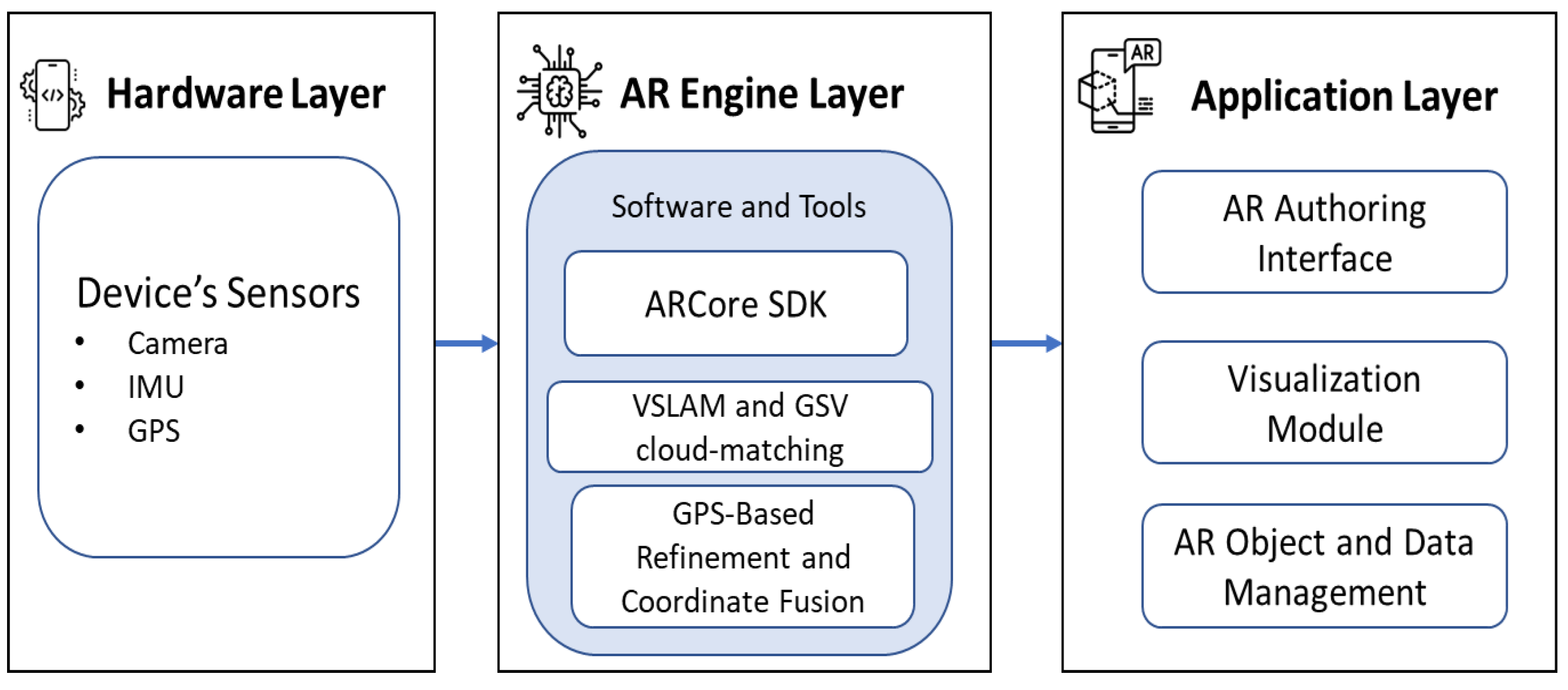
In this study, the proposed authoring tool integrates hardware and software components to provide an intuitive and contextually relevant outdoor AR content creation experience. Figure 3 shows the structural design of the proposed LAR application.
Figure 3.
Structural design of the proposed system.
4.2.1. Input
The primary input to the proposed tool is the user’s location, which includes the GPS coordinates to provide real-time global positioning, ensuring that the AR content is correctly aligned with the user’s physical surroundings. Additionally, visual data from the camera feed, which captures the real-world environment for visual mapping, and inertial data from the device’s IMU, consisting of accelerometer and gyroscope readings to track movement and orientation, are used as input.
4.2.2. Process
The AR engine layer serves as the core computational module of the proposed authoring tool. It provides the software libraries, frameworks, and development kits. In this paper, we use ARCore SDK for Android (version ) to access and process sensor data, map the user’s environment, and render 3D objects in real-time. The VSLAM module uses visual mapping and feature tracking to detect key points in the camera feed, estimating the user’s pose and aligning GPS coordinates. The processed data is then sent to the GSV integration module for additional visual alignments. The refined pose information is used in the VSLAM back-end module for trajectory corrections, loop detections, and global pose optimizations to minimize localization drifts. Throughout this process, the proposed LAR authoring functionality allows user-defined metadata input and visual adjustments, ensuring the accurate placement of virtual objects within the environment.
4.2.3. Output
The output from this workflow is a refined user pose and localization in the outdoor environment, with real-time visual feedback indicating its position relative to the physical surroundings. In the application layer, user inputs, such as the POI location, object naming, and metadata entry, play a crucial role in adjusting the AR object placement. The final AR object position, along with its metadata, is stored in a structured format, making it possible to reuse or share the AR anchor information.
4.3. LAR System Architecture
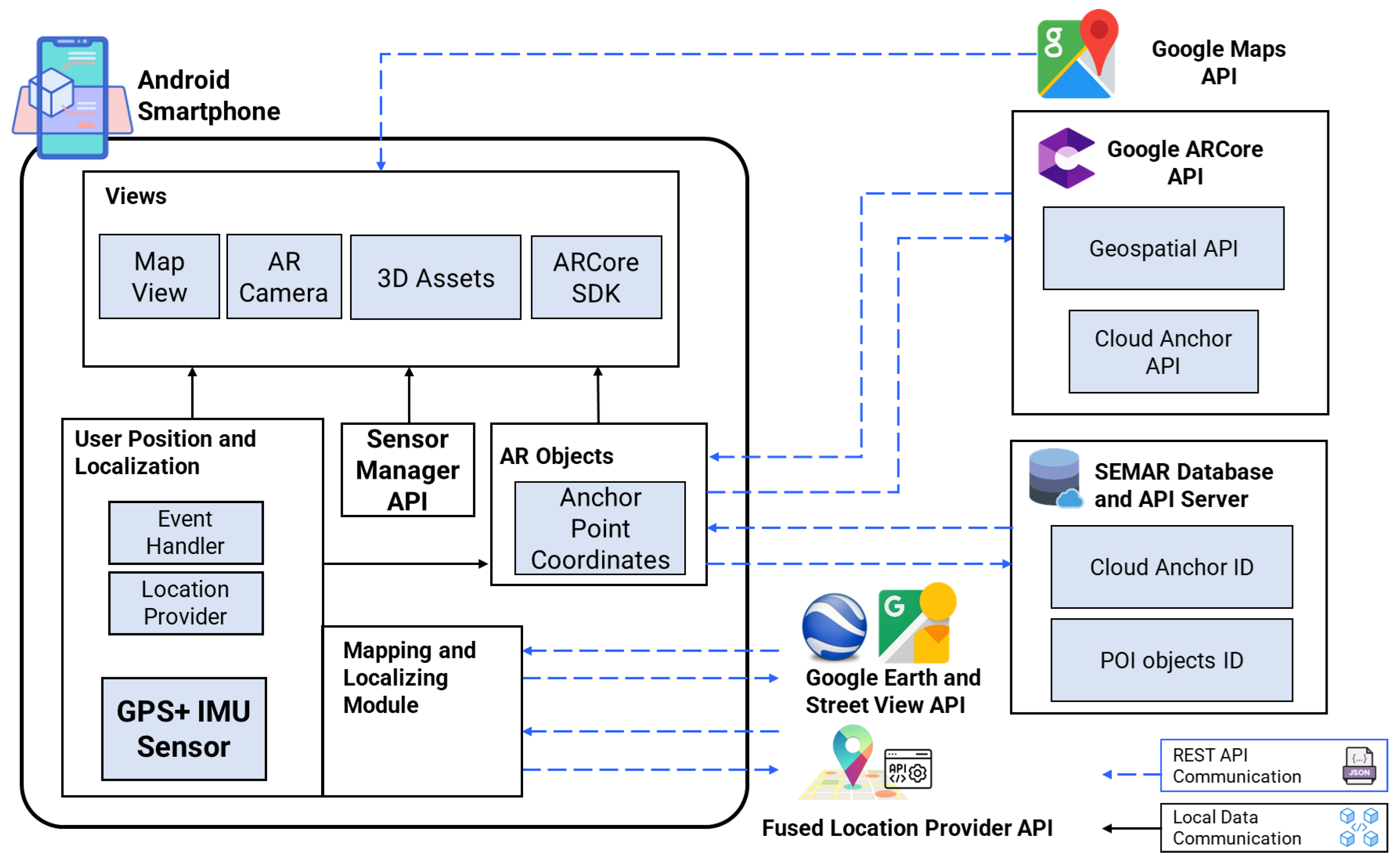
The proposed in situ authoring tool integrates various components and services to support the creation of LAR content. At the hardware level, the system utilizes an Android smartphone equipped with GPS and IMU sensors. The GPS provides the location data, while the IMU tracks the device’s orientation and movement. The data collected by these sensors are managed through the Sensor Manager API, which integrates the input from different sources to provide a coherent user position and orientation. Figure 4 depicts the detailed system architecture of the proposed LAR.
Figure 4.
Proposed system architecture.
4.3.1. User Position and Localization Module
The User Position and Localization module receives the input from the GPS and IMU sensors, processed by the Sensor Manager API, to determine the initial user’s location and orientation. This module integrates the VSLAM technology and data from multiple APIs including Google Earth and Google Street View (GSV) services to enrich the geospatial data and the visual image references to map the surrounding environment and localize the smartphone position. It includes an event handler for managing user interactions and a location provider for real-time positioning. This information then is used to update the AR scene and anchor virtual objects based on the user’s movements.
4.3.2. AR Objects Module
The AR Objects module manages virtual elements that are integrated into the AR scene. Each object is linked to the anchor point coordinate, which is computed using the user’s location and orientation data. The coordinates are synchronized with cloud-based services through Google ARCore’s Cloud Anchor API. The persistent data of AR content is stored on the SEMAR server [45], which holds the anchor ID, latitude, longitude, altitude, heading, and other related data of each created AR object. The Google ARCore SDK is employed as an AR engine to generate virtual object visualization in real-world coordinates. Data transfer between the smartphone and external services is facilitated by REST API communications, while local data communications are used to handle internal processes within the device.
4.4. Localization and Mapping Method
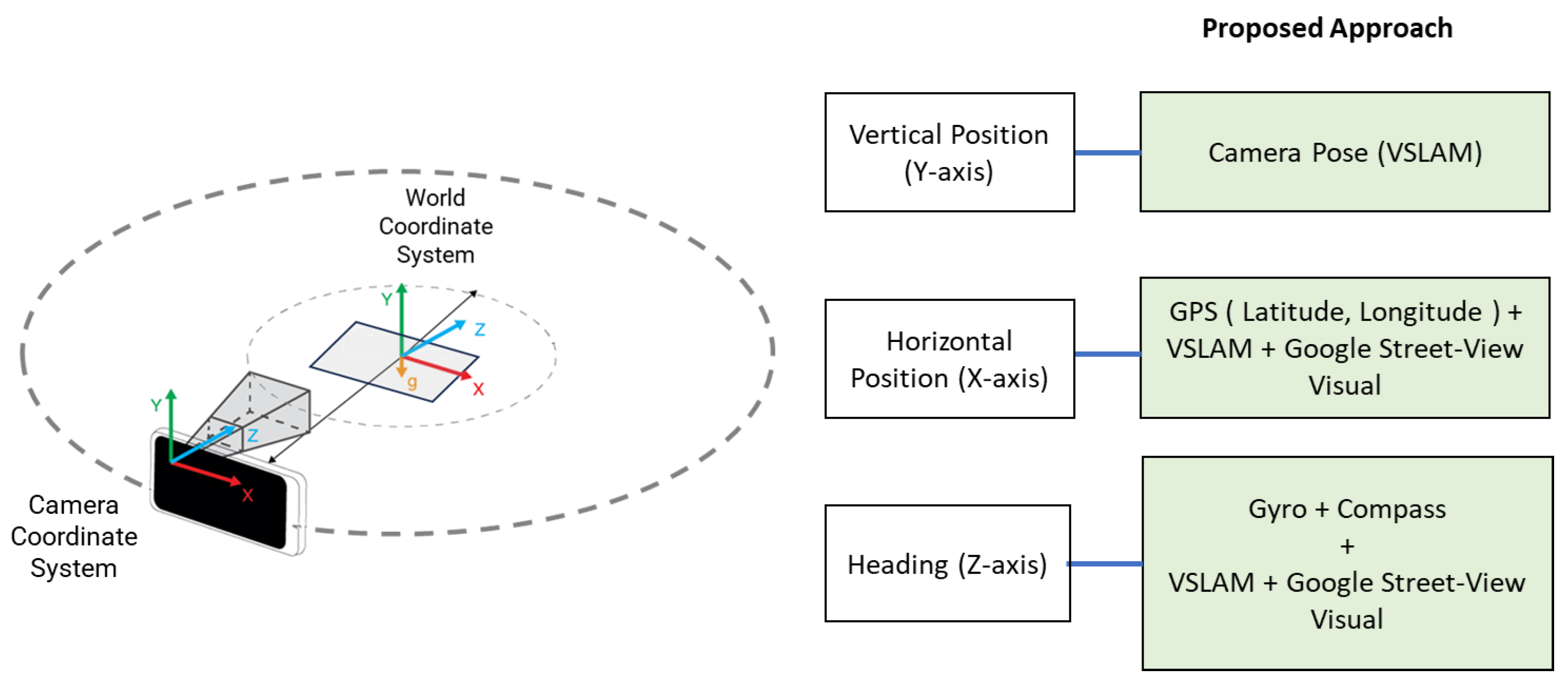
The outdoor position and localization of LAR depend on three parameters: the horizontal position (X-axis), the vertical position (Y-axis), and the heading of the user’s device (Z-axis) [46,47]. The horizontal position refers to the device’s latitude and longitude coordinates on the Earth’s surface. The vertical position refers to the height or the elevation of the device above the reference point, typically the ground level. The heading refers to the orientation or direction in which the device is pointing.
In the context of LAR, the transformation between the camera coordinate system (user’s device) and the world coordinate system (physical environment) is crucial for ensuring that augmented objects are correctly situated in the user’s real-world view. The proposed LAR authoring tool works by using a combination of sensor data, geospatial information, and VSLAM/GSV to create an AR object that is seamlessly integrated with the user’s physical surroundings, providing immersive and contextually relevant experiences. Figure 5 illustrates the methods and components that have been used to determine the anchor point’s coordinates (position and axis).
Figure 5.
Mapping concept of proposed localization.
4.5. AR Object Placement Scenario
In the proposed AR authoring tool, the process of placing virtual objects begins with the location acquisition, and then the selection of a 3D prefab from a list of preloaded assets. Once a 3D prefab is selected, the authoring tool allows the user to map, control, and configure the virtual object’s position and orientation using a mobile device equipped with six degrees of freedom (6DOF) capabilities. The translation and rotation of the virtual object in the AR scene are mapped from the smartphone’s movements and orientation changes.
4.5.1. 6DOF Object Placement Control and Mapping Process
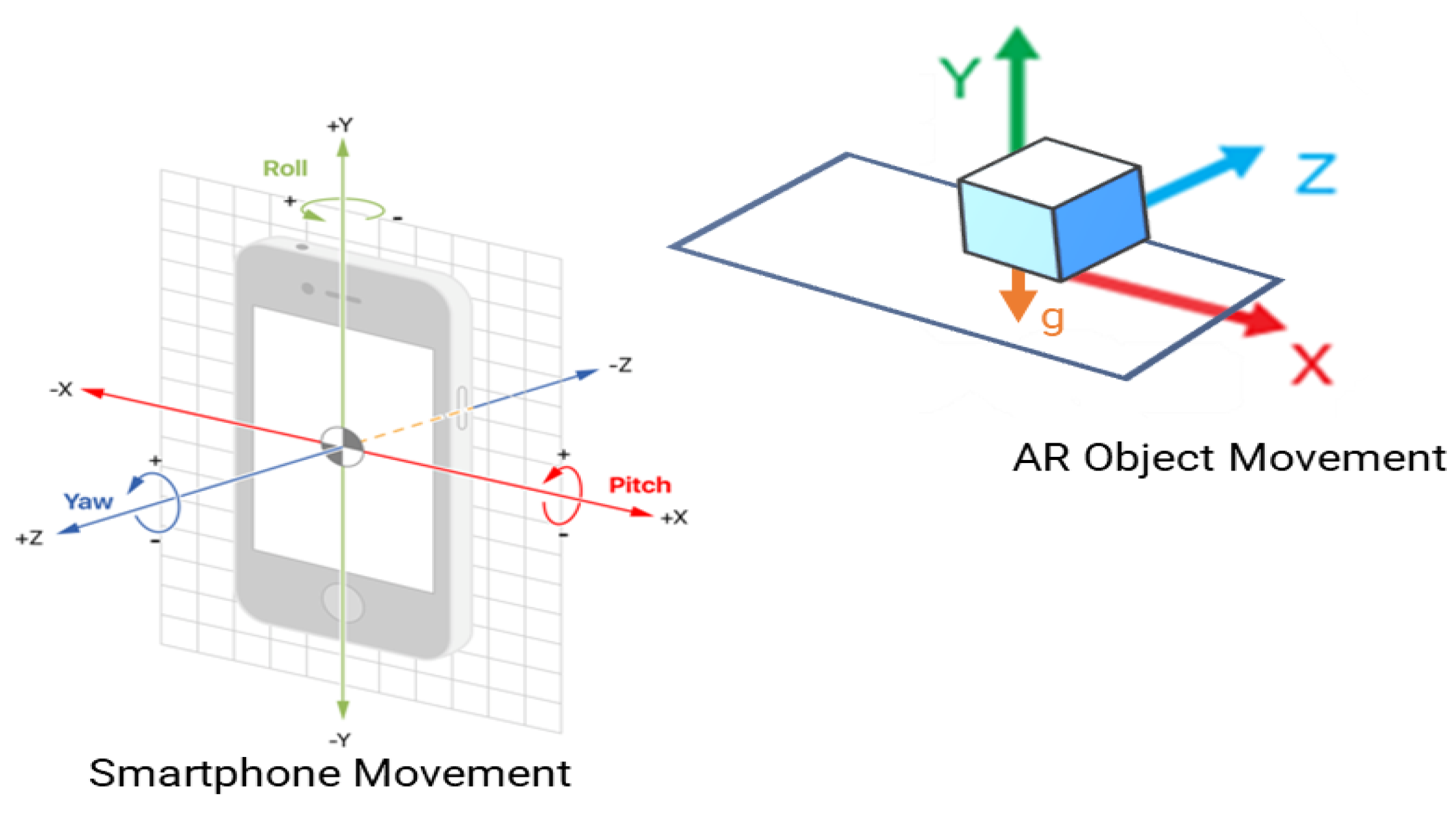
The 6DOF tracking includes movements in three translational axes (X, Y, and Z) and three rotational axes (roll, pitch, and yaw), allowing intuitive and precise application controls via smartphone movements [48,49]. When the user moves the smartphone, the IMU sensors (accelerometer and gyroscope) capture the movement and convert the data into real-world spatial coordinates (Y, X, Z) in real-time. This mapping process involves detecting the surface of the physical environment using the VSLAM module, which acts as a reference plane or an anchor for the virtual object. Contact detections with the real-world surface help constrain the movement of the anchored AR object, ensuring it aligns accurately with the user’s environment.
Figure 6 illustrates how smartphone movement and orientation (roll, pitch, and yaw) are translated into real-world spatial coordinates (X, Y, Z) for precise AR object placement and rotation, with constraints based on the detected surface anchor. This technique allows us to reduce the 3D positioning complexity by mapping the smartphone’s movement directly to the virtual object’s location and orientation within the real-world environment.
Figure 6.
AR object placement and configuration using smartphone movement scenario.
4.5.2. Smartphone Movement Control Scenario
The vertical (Y-axis movement) of an AR object is constrained to the ground or a detected surface to maintain realism. By scanning the ground surface while fixing the smartphone’s orientation, the AR system adjusts the height and size of the virtual object relative to the surface anchor. This provides a consistent and stable vertical placement that adheres to the detected real-world surfaces.
To move the AR object along the horizontal plane (X-axis), the smartphone’s roll orientation is utilized. As the user tilts the device left or right, the authoring tool interprets this as the horizontal translation, allowing the virtual object to slide smoothly in the corresponding direction. This mapping ensures that a user can control the horizontal positioning of the AR object by simply rolling the smartphone.
The depth movement or translation along the Z-axis is managed using the smartphone’s pitch. Tilting the device forward or backward translates the virtual object deeper or closer to the user’s point of view. This control allows the intuitive manipulation of the virtual object’s depth, simulating the natural movement into the 3D space based on the device’s inclination.
4.6. Prototype Implementation
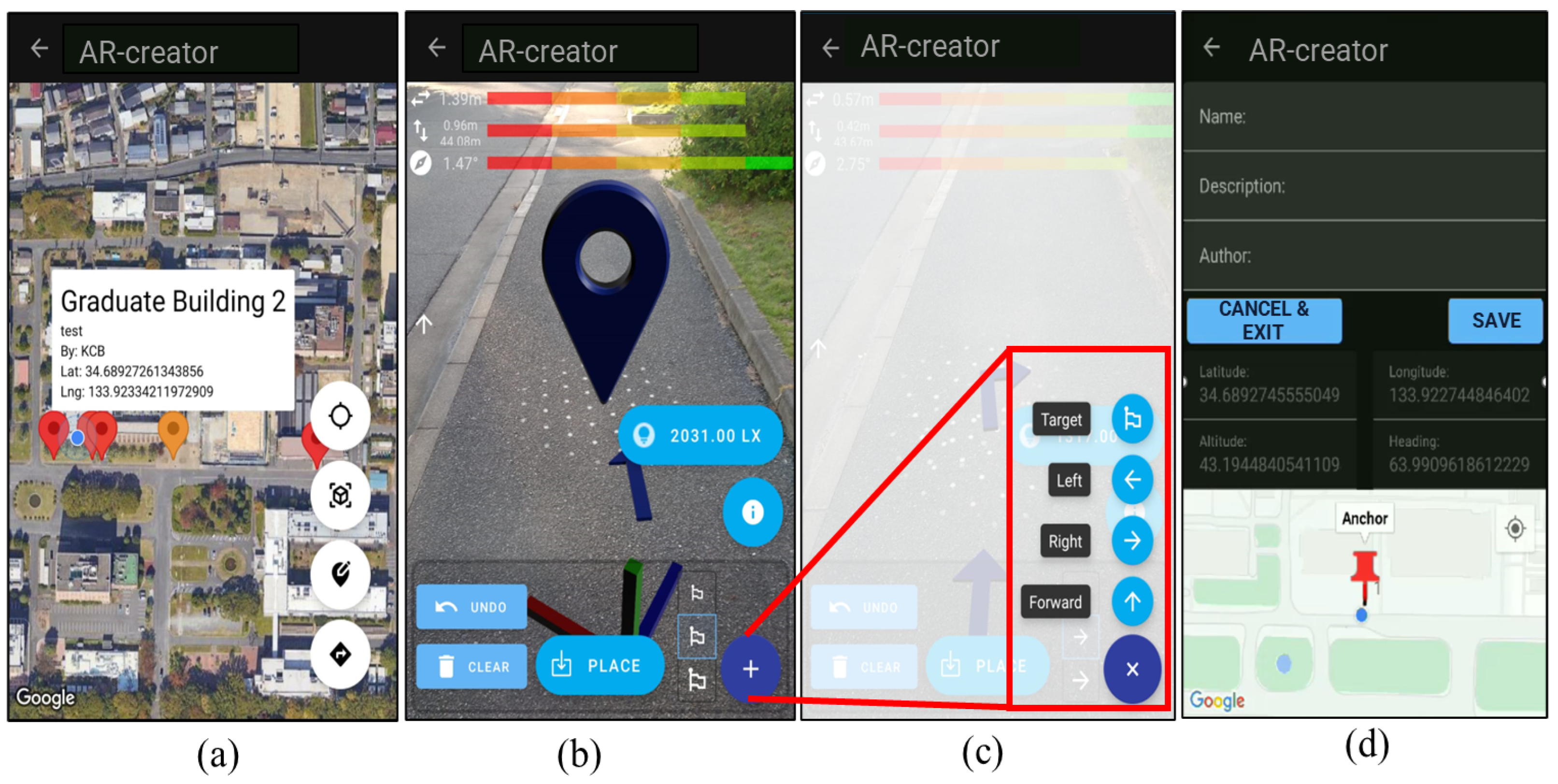
Figure 7 depicts the user interface for the phases of location acquisition, AR object creation, and registration in the authoring tool.
Figure 7.
User interface samples of the proposed system. (a) 2D map interface. (b) VSLAM detecting surface for vertical position in AR scene. (c) Preloaded AR object selection. (d) POI registration.
The prototype of the proposed authoring tool is implemented to offer an intuitive user experience for creating and managing AR objects in outdoor LAR navigation scenarios. When users launch the application, the initial interface presents a map view displaying all points of interest (POIs) that contain existing AR objects, which are retrieved from a centralized database. This map-based interaction provides users with a clear overview of the AR-enhanced locations around them. Users are provided the option to either view and interact with available AR objects at a particular POI or to add a new POI with AR content (Figure 7a).
Upon selecting or creating a new POI, this app transitions to the AR authoring scene, where users can place, manipulate, and configure AR objects using preloaded 3D navigation prefabs. This authoring process leverages the mobile device’s 6DOF capabilities, allowing intuitive controls over the object’s placements in the real-world coordinate system based on the smartphone’s orientations and movements. The VSLAM technology is used to map the environment and localize the user position. In this context, a visual representation of detecting and processing the vertical positioning data using the VSLAM in the system is displayed with overlaid featured points on image frames as shown in Figure 7b.
The proposed tool also provides a selection menu for users to choose the preloaded navigation visual assets based on their preferences, such as arrow forward, turn left, turn right, and destination, as shown in Figure 7c. It is noted that a recent study suggests that the intuitive authoring tools should have this feature [50]. Once the AR object is correctly positioned, users can finalize the placements and save the configurations of all related POI information in the database, as shown in Figure 7d.
5. Evaluation Scenario and Results
In this section, we provide detailed discussions of the experimental design and the evaluation procedure, outlining the methodology used to investigate the feasibility of the proposed visual-inertial AR authoring tool in outdoor LAR systems. The rationale behind selecting the participants, the data collection process, and the result analyses performed to evaluate the system are elaborated upon.
5.1. Experimental Design
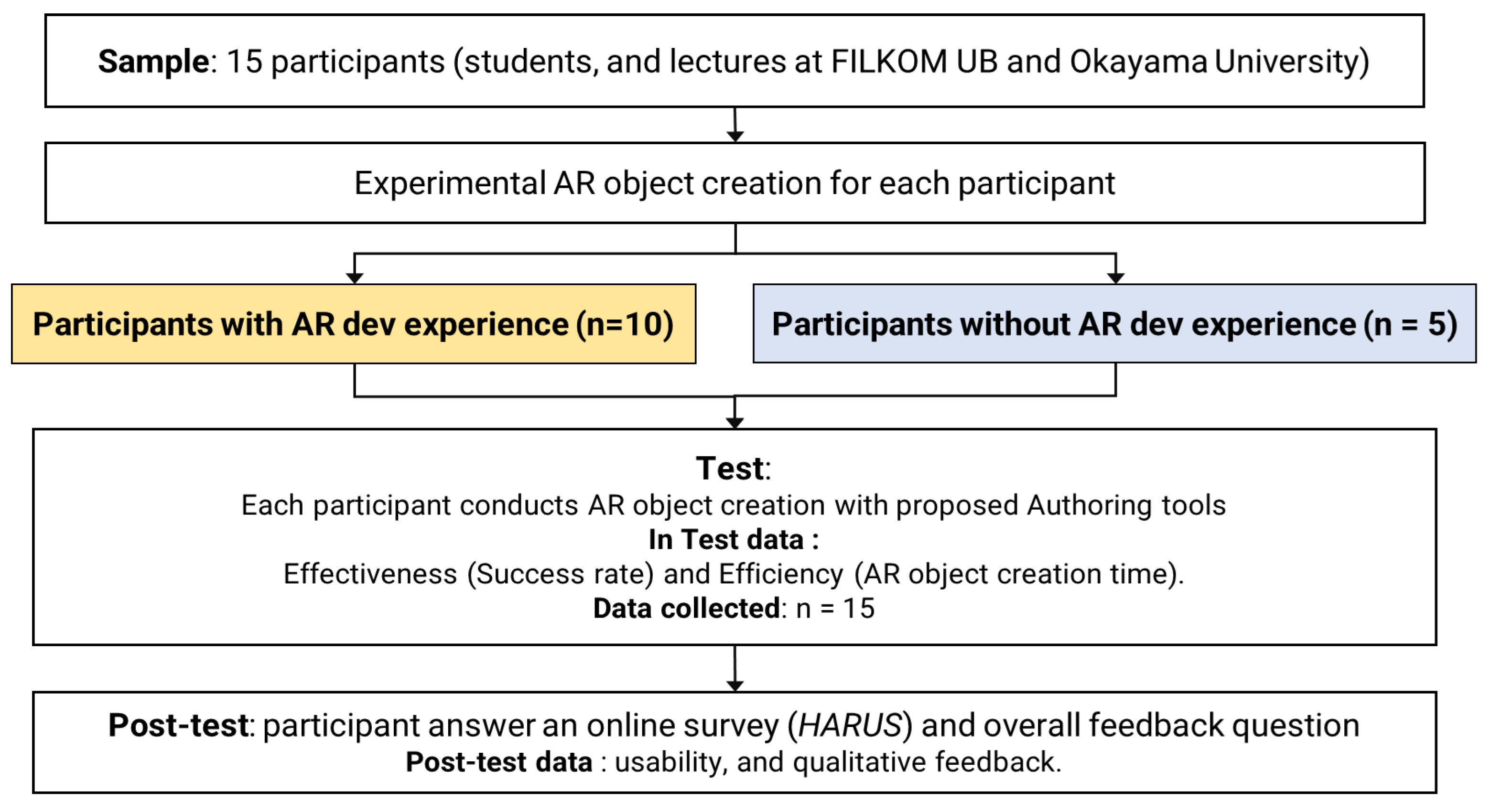
We employed a non-equivalent control group design to evaluate the usability and effectiveness of the proposed visual-inertial AR authoring tool. The same 15 participants as in the Requirement Elicitation phase were involved here, consisting of both experienced AR developers and novices. Each participant was asked to complete a series of task scenarios that were designed to assess their abilities to create pedestrian navigation AR objects using the proposed tool.
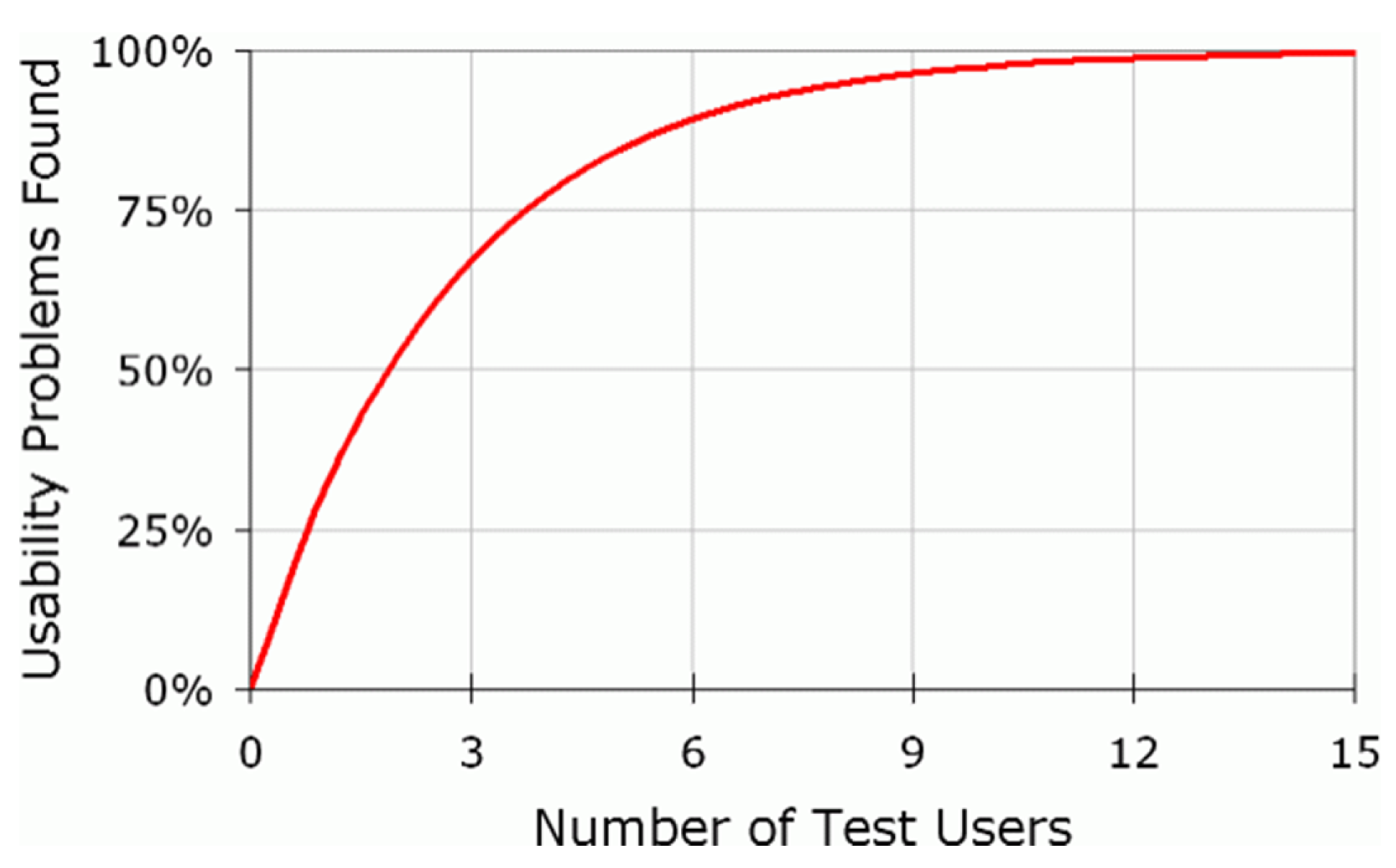
In [51], Nielsen suggests that 15 users is often a sufficient number to uncover most usability issues while balancing the cost–benefit ratio of conducting usability tests. Figure 8 illustrates the sufficient number of participants in the testing and usability study.
Figure 8.
Correlation between the probability of usability issues found and the number of participants [52].
The participants were categorized into two groups: Group A (experienced developers) and Group B (novices). Group A consisted of ten participants aged 22–35, with more than 3 years of experiences in AR development. Group B included five participants aged 21–30, with less than 1 year experience in AR development. Following an introductory session, each participant was given 10 min to complete the task scenarios with the tool’s interface and functionalities in a controlled outdoor environment. Descriptive statistics were employed to analyze the data, providing insights into the effectiveness of the proposed tool for creating AR objects. The success rate and the completion time were used as the performance metrics to evaluate the system. After completing all the tasks, the participants filled out a post-study questionnaire to assess the overall usability of the proposed authoring tool. The experimental design flow is depicted in Figure 9.
Figure 9.
Experimental design of user testing.
5.2. Hardware Setup for Evaluation
In this phase, to minimize the adaptation time and accurately simulate the real deployment conditions, the LAR authoring tool was installed on the participant’s smartphones with a minimum Android operating system. Each testing smartphone had the GPS, camera, and IMU sensors enabled, and an active Internet connection. To ensure consistency across all testing sessions, a standardized schedule and data collection scenario were established for good lighting conditions, allowing optimal visibility and realism during outdoor evaluations.
5.3. Testing Locations and Environments
This study conducted evaluations in diverse outdoor scenarios to verify the experiment result. Five urban settings at Okayama University, Japan, and Universitas Brawijaya, Indonesia, were used for testing locations, including specific university buildings, student dormitories, and common public areas such as parking areas. We also chose the testing locations based on GSV service availability. The choice of diverse outdoor environments aimed to emulate real-world conditions where authoring tool applications will be commonly used by people. The performance investigations were conducted in good natural light conditions at different time intervals.
5.4. Data Collection and Procedure
Usability testing is a widely recognized method for assessing and validating software quality [53,54,55]. To evaluate the effectiveness of the visual-inertial AR authoring tool, we conducted a two-phase usability testing protocol. In the first phase, 15 participants, comprising both experienced AR developers and novices, engaged in direct user testing with the proposed tool. Each participant was tasked with completing specific scenarios designed to simulate real-world AR object creations, as seen in Table 2. Upon completion of the testing scenarios, the participants filled out the HARUS questionnaire to quantitatively assess various dimensions of usability, including ease of use, efficiency, and overall satisfaction. Each testing location was carefully prepared, ensuring GPS data and GSV services were available. The testing session was conducted between 10:00 AM to 5:00 PM to ensure the availability of proper lighting conditions.
Table 2.
User testing task scenario.
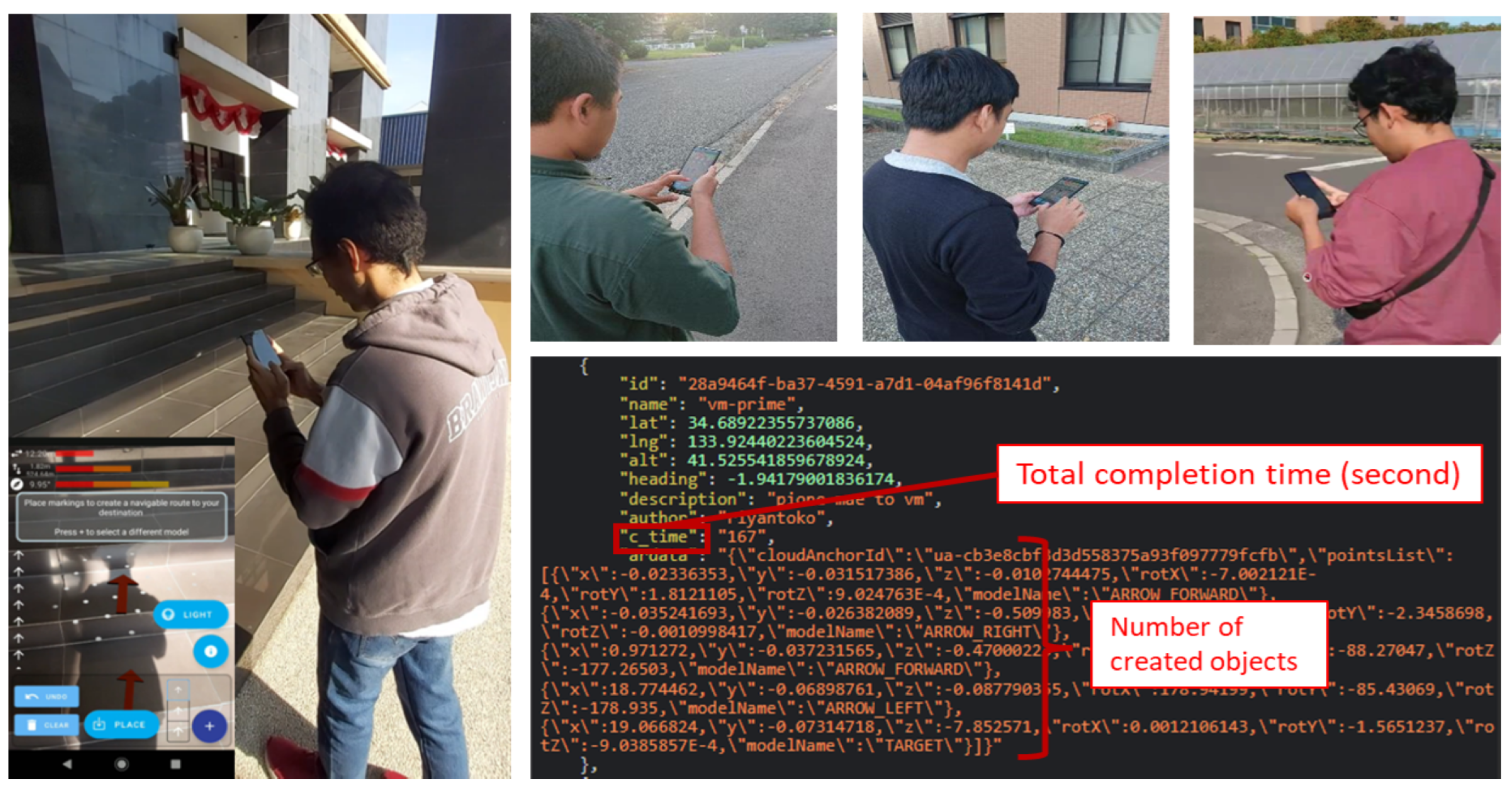
While the active participants were carrying out the tasks, their behaviors were observed, and any issues that arose or were experienced by the users were noted. Data on the anchor location, the success rate, the number of AR objects created, and completion times were collected at each testing session. The anchor location represented the designated coordinate (latitude and longitude) for the AR POI to be placed. The data were sent to the SEMAR server [45] for further analysis. This process was repeated over 15 participants, providing a comprehensive understanding of the performance of the authoring tool with the VSLAM/GSV implementation. This iterative testing approach with the usage of various devices allowed for more rigorous evaluations of the system performance in real-world outdoor environments. The testing environments where participants used the proposed tool are depicted in Figure 10.
Figure 10.
Images when participants completed tasks.
5.5. Post-Test Survey and Questionnaire
Handheld AR applications may face unique challenges compared to the desktop approach, such as limited input options and narrow camera fields of view that can hinder usability [56]. Upon completing all the tasks, each participant was asked to complete a post-study survey using the HARUS to measure the usability level of the proposed tool. HARUS is a usability assessment tool specifically developed to evaluate the usability of handheld AR applications. The HARUS questionnaire typically consists of 16 positively and negatively stated statements that are designed to assess different aspects of usability for AR applications. The first set of eight statements correspond to manipulability, and the second set of eight statements correspond to comprehensibility. Manipulability statements emphasize control and interaction ease, whereas comprehensibility statements focus on user understanding and clarity [57]. The series of HARUS statements used in this study are shown in Table 3.
Table 3.
The 16 statements of HARUS used in this study.
5.6. Success Rate and Completion Time Result
Table 4 provides a comprehensive overview of participant performance during the user test, presenting the levels of effectiveness and efficiency of the proposed authoring tool. This table includes the success rate, the completion time, and the average time needed for each AR object creation.
Table 4.
Summarized respondent performance for the proposed authoring tool.
The respondent data were divided into two groups with and without prior LAR development experiences, enabling an analysis of how background knowledge affects the task efficiency. All the participants (R1–R15) completed the assignment, with completion times ranging from 120 to 356 s, and the number of AR objects created varying from 7 to 21. This resulted in the average time per object of to s, reflecting the participants’ adaptability when creating the AR content.
The mean time per AR object was approximately s, with a standard deviation of s, indicating consistent performances among participants. Notably, the persons without prior LAR experiences (R3, R6, R8, R12, and R15) were able to complete the tasks successfully, achieving an average time comparable to that of the experienced participants. This suggests that the authoring tool is user-friendly and suitable for both novice and experienced developers. The low standard deviation further indicates a uniform learning curve and consistent interaction, highlighting the tool’s effectiveness across varying expertise levels.
In contrast, according to recent research on AR authoring tool performance, creating a simple 3D model with full AR functionality on a traditional desktop authoring tool takes 1–8 min on average. The time depends on the user’s expertise and the tool’s complexity [33,58,59]. This result represents a significant improvement in speed over traditional desktop tools, underscoring the advantage of using an intuitive, mobile interface equipped with six degrees of freedom (6DOF) object placement scenarios.
5.7. Usability Level Result
Each statement in HARUS (see Table 3) is rated on a 7-point Likert scale, where 1 represents “Strongly Disagree” or the lowest usability score, and 7 represents “Strongly Agree” or the highest usability score. For positively stated statements, a higher response score (close to 7) indicates better usability. For negatively stated statements, a lower response score (close to 1) indicates better usability. Each statement’s contribution score from the user response ranges from 0 to 6. The overall HARUS score is calculated by dividing the sum of the final scores from every statement by the highest possible score of 96 and multiplying the result by 100 [57,60]. Equation (1) shows the Final Usability Score (FUS) calculation formula.
where:
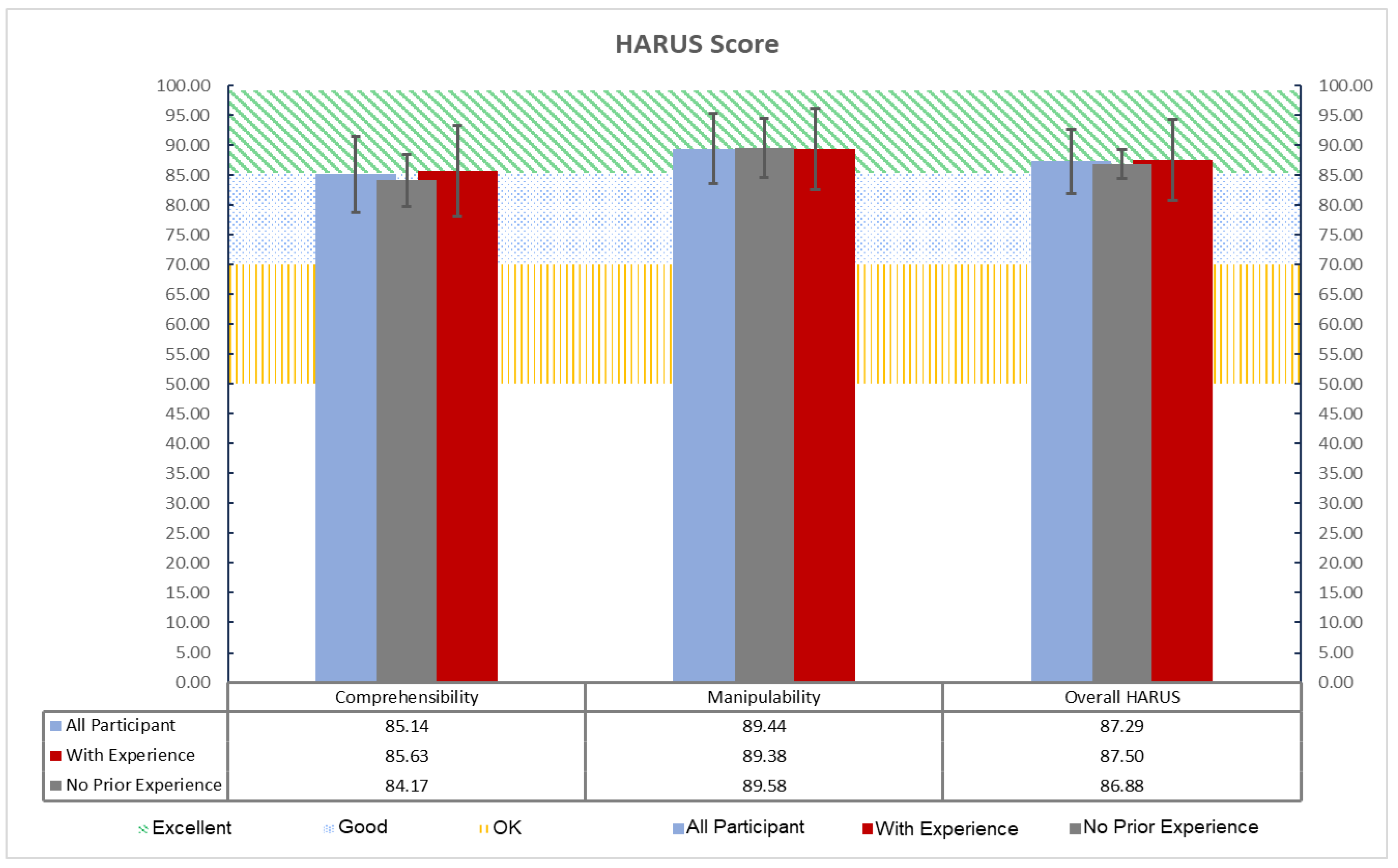
Figure 11 displays the HARUS scores across the two main usability components: comprehensibility and manipulability, along with the overall HARUS score. The interpretation of HARUS score is similar to the SUS score [61]. The usability adjective ratings are visually distinguished by bands indicating “OK” (50–70), “Good” (71–85), and “Excellent” (>85) [62].
Figure 11.
HARUS scores by group.
5.7.1. Overall Usability Level
In general, the values for the overall HARUS score (87.50 for experienced and 86.88 for no prior experience) confirms the proposed tool’s high usability level in delivering a user experience that is equally satisfying for both technical and non-technical users. The minimal variability across these scores also suggests that the proposed tool’s design has effectively minimized the learning curve, making it highly accessible and providing a consistent experience, regardless of the user’s background. In the comprehensibility category, the proposed tool scored 85.14 across all the participants, indicating excellent usability and ease of understanding for both experienced and non-experienced participants. For manipulability, the average score was 89.44, which is also within the “Excellent” range, demonstrating that all the participants found the interaction mechanics highly intuitive. The average overall HARUS score was 87.29, indicating broad intuitiveness and accessibility across different levels of technical expertise.
5.7.2. Comprehensibility Value Insight
Experienced participants scored slightly higher than participants without prior development experiences in comprehensibility category (85.63 vs. 84.17), suggesting that their familiarity with the technology may provide a slight advantage in understanding AR interactions quickly. However, the difference is small, implying that this application’s design supports intuitive experiences that even non-technical users can grasp without significant barriers.
5.7.3. Manipulability Value Insight
In terms of manipulability, participants with no prior experiences slightly outperformed the experienced ones (89.58 vs. 89.38). This small but notable difference could suggest that non-technical participants find the interface control and interaction methods straightforward, so they can quickly adapt to the proposed tool’s application flows. On the other hand, experienced participants’ familiarity with the mainstream AR authoring tools might lead to a preference for more complex control features, which could explain the slightly lower score in manipulability.
5.7.4. Participant Feedback and Comments
Qualitative feedback indicated that the participants valued the intuitive design of the proposed tool. Most of the participants gave similar comments in favor of the tool, supporting the results. They commented with sentiments such as “It provides easy-to-follow application flows with natural smartphone gesture controls for AR object creations”, and “It turns the real world into a canvas, allowing me to create and experience the AR contents simultaneously”. One participant (R4) stated, “The prototype is very intuitive, but having more predefined 3D assets would be helpful”. Another (R8) noted that “I’m not an AR developer guy, but the app’s features made it easy to figure out how to create an AR object. An onboarding screen would improve the initial user experience”.
5.8. Discussion
The results from our experiments demonstrate that all the participants, regardless of their levels of experiences, were able to successfully create and integrate the AR objects using the proposed tool. Additionally, the high usability scores measured by HARUS confirm the effectiveness of the proposed tool in facilitating rapid AR object creations intuitively.
When an AR object is created in situ, authors can see, understand, edit, and preview the AR visualization designs at POI locations physically. These features are critical in a LAR authoring tool, because they can allow authors to experience their generated creations within the physical environments, like users or consumers would [63]. When authoring with a desktop, authors cannot experience the creations as if they are in the targeted POI, so they cannot discover and correct issues during the creation process.
This result aligns with the previous research that highlights the benefits of mobile AR tools in promoting faster prototyping and more user-centric interactions. Table 5 compares the key features among previous related outdoor mobile LAR authoring tools and our proposed tool.
Table 5.
Comparative evaluations between proposal and related studies.
The results also represents a significant improvement in speed over traditional desktop tools, underscoring the advantage of using an intuitive mobile interface equipped with six-degree-of-freedom (6DOF) tracking and the AR object placement. The reduction in object creation time can be attributed to the direct manipulation capability provided by intuitive smartphone control, allowing users to place the virtual contents naturally.
The promising implications of the proposed tool are in its potential to democratize AR content creations and open the possibility of crowd-sourced LAR developments. By lowering the barrier to entry and enabling individuals with minimal programming expertise to contribute, the proposed tool can empower a larger pool of users to generate AR content easily and create a community-driven repository of LAR data that can be stored and accessed in a shared database. The scalability and collaborative nature of this approach could change how AR data is gathered, expanding applications in fields like tourism, navigation, and education, where real-world contexts enhance user engagement and information delivery.
Since the proposed authoring tool is still in the preliminary stage, the provided preloaded 3D assets for AR content are limited to navigation guidance purposes (direction arrows and target destinations). Due to the limited number of participants in this study, future research should include larger, more balanced samples to enhance the reliability and generalizability of the findings. Additionally, future studies should investigate how this tool can be integrated into larger systems that support crowdsourced AR content, including potential mechanisms for data validation, synchronization, and security. Exploring how this community-driven approach can be used to create expansive, interactive, and dynamic AR ecosystems will be crucial in achieving the full potential of crowd-powered AR developments.
6. Conclusions
This study presents an innovative authoring tool designed to simplify the process of creating AR objects, making AR development accessible even to novices without prior experiences. Evaluation results showed that users at varying levels of expertise could complete tasks efficiently, with an average time per AR object of s, which is much faster than conventional desktop tools. The time efficiency observed with the proposed tool indicates its high potential to democratize AR content creations by making it accessible to users without extensive technical expertise. Unlike desktop platforms, where users need to navigate complex software interfaces and perform multiple manual adjustments to achieve precise placements, the in situ mobile-based approach simplifies tasks through touch and motion-based controls. The usability testing with HARUS confirmed high levels of comprehensibility and manipulability. However, given that the proposal is still in its preliminary stage, the predefined 3D assets available for AR content are currently limited to navigation guidance. Future works will focus on enhancing the tool’s capabilities to support more complex outdoor LAR objects and tasks, further development of the features that facilitate crowdsourced AR content creation, and conducting larger-scale studies to validate and expand the findings.
Author Contributions
Conceptualization, K.C.B. and N.F.; methodology, K.C.B. and N.F.; software, K.C.B. and Y.Y.F.P.; visualization, K.C.B., Y.W.S. and A.A.R.; investigation, K.C.B. and M.M.; writing—original draft, K.C.B.; writing—review and editing, N.F.; supervision, N.F. All authors have read and agreed to the published version of this manuscript.
Funding
This research received no external funding.
Institutional Review Board Statement
Ethical review and approval were waived for this study as humans were only involved in obtaining real user location coordinates in the testing phase to validate the feasibility of our developed system.
Informed Consent Statement
The authors would like to assure readers that all participants involved in this research were informed, and all photographs used were supplied voluntarily by the participants themselves.
Data Availability Statement
Data are contained within the article.
Acknowledgments
We would like to thank all the colleagues in the Distributing System Laboratory at Okayama University and FILKOM at Universitas Brawijaya who were involved in this study.
Conflicts of Interest
The authors declare no conflicts of interest.
Abbreviations
The following abbreviations are used in this manuscript:
| AR | Augmented Reality |
| LAR | Location-based Augmented Reality |
| SDK | Software Development Kits |
| POI | Point of Interest |
| VSLAM | Visual Simultaneous Localization and Mapping |
| GSV | Google Street View |
| HARUS | Handheld Augmented Reality Usability Scale |
| GPS | Global Positioning System |
| IMU | Inertial Measurement Unit |
| GNSS | Global Navigation Satellite System |
| HCD | Human Centered Design |
| DOF | Degree of freedom |
References
- Azuma, R.; Billinghurst, M.; Klinker, G. Special section on mobile augmented reality. Comput. Graph. 2011, 35, vii–viii. [Google Scholar] [CrossRef]
- Jeffri, N.F.S.; Rambli, D.R.A. A review of augmented reality systems and their effects on mental workload and task performance. Heliyon 2021, 7, e06277. [Google Scholar] [CrossRef] [PubMed]
- Scholz, J.; Smith, A.N. Augmented reality: Designing immersive experiences that maximize consumer engagement. Bus. Horizons 2016, 59, 149–161. [Google Scholar] [CrossRef]
- Radkowski, R.; Herrema, J.; Oliver, J. Augmented reality-based manual assembly support with visual features for different degrees of difficulty. Int. J. Hum.-Comput. Interact. 2015, 31, 337–349. [Google Scholar] [CrossRef]
- Fajrianti, E.D.; Funabiki, N.; Sukaridhoto, S.; Panduman, Y.Y.F.; Dezheng, K.; Shihao, F.; Surya Pradhana, A.A. INSUS: Indoor navigation system using Unity and smartphone for user ambulation assistance. Information 2023, 14, 359. [Google Scholar] [CrossRef]
- Syed, T.A.; Siddiqui, M.S.; Abdullah, H.B.; Jan, S.; Namoun, A.; Alzahrani, A.; Nadeem, A.; Alkhodre, A.B. In-depth review of augmented reality: Tracking technologies, development tools, AR displays, collaborative AR, and security concerns. Sensors 2022, 23, 146. [Google Scholar] [CrossRef]
- Blanco-Pons, S.; Carrión-Ruiz, B.; Duong, M.; Chartrand, J.; Fai, S.; Lerma, J.L. Augmented Reality markerless multi-image outdoor tracking system for the historical buildings on Parliament Hill. Sustainability 2019, 11, 4268. [Google Scholar] [CrossRef]
- Rao, J.; Qiao, Y.; Ren, F.; Wang, J.; Du, Q. A mobile outdoor augmented reality method combining deep learning object detection and spatial relationships for geovisualization. Sensors 2017, 17, 1951. [Google Scholar] [CrossRef]
- Zhou, X.; Sun, Z.; Xue, C.; Lin, Y.; Zhang, J. Mobile AR tourist attraction guide system design based on image recognition and user behavior. In Proceedings of the Intelligent Human Systems Integration 2019: Proceedings of the 2nd International Conference on Intelligent Human Systems Integration (IHSI 2019): Integrating People and Intelligent Systems, San Diego, CA, USA, 7–10 February 2019; Springer: Berlin/Heidelberg, Germany, 2019; pp. 858–863. [Google Scholar] [CrossRef]
- Wang, Z.; Nguyen, C.; Asente, P.; Dorsey, J. Distanciar: Authoring site-specific augmented reality experiences for remote environments. In Proceedings of the 2021 CHI Conference on Human Factors in Computing Systems, Yokohama, Japan, 8–13 May 2021; pp. 1–12. [Google Scholar] [CrossRef]
- Liu, R.; Zhang, J.; Yin, K.; Wu, J.; Lin, R.; Chen, S. Instant SLAM initialization for outdoor omnidirectional augmented reality. In Proceedings of the 31st International Conference on Computer Animation and Social Agents, Beijing, China, 21–23 May 2018; pp. 66–70. [Google Scholar] [CrossRef]
- Tang, B.; Cao, S. A review of VSLAM technology applied in augmented reality. In Proceedings of the IOP Conference Series: Materials Science and Engineering, Chennai, India, 16–17 September 2020; IOP Publishing: Bristol, UK, 2020; Volume 782, p. 042014. [Google Scholar] [CrossRef]
- Kumar, A.; Pundlik, S.; Peli, E.; Luo, G. Comparison of visual slam and imu in tracking head movement outdoors. Behav. Res. Methods 2022, 55, 2787–2799. [Google Scholar] [CrossRef]
- Brata, K.C.; Funabiki, N.; Panduman, Y.Y.F.; Fajrianti, E.D. An enhancement of outdoor location-based augmented reality anchor precision through VSLAM and Google Street View. Sensors 2024, 24, 1161. [Google Scholar] [CrossRef]
- Ichihashi, K.; Fujinami, K. Estimating visibility of annotations for view management in spatial augmented reality based on machine-learning techniques. Sensors 2019, 19, 939. [Google Scholar] [CrossRef] [PubMed]
- Dinh, A.; Yin, A.L.; Estrin, D.; Greenwald, P.; Fortenko, A. Augmented reality in real-time telemedicine and telementoring: Scoping review. JMIR mHealth uHealth 2023, 11, e45464. [Google Scholar] [CrossRef]
- Maio, R.; Araújo, T.; Marques, B.; Santos, A.; Ramalho, P.; Almeida, D.; Dias, P.; Santos, B.S. Pervasive augmented reality to support real-time data monitoring in industrial scenarios: Shop floor visualization evaluation and user study. Comput. Graph. 2024, 118, 11–22. [Google Scholar] [CrossRef]
- Phupattanasilp, P.; Tong, S.R. Augmented reality in the integrative internet of things (AR-IoT): Application for precision farming. Sustainability 2019, 11, 2658. [Google Scholar] [CrossRef]
- Sadeghi-Niaraki, A.; Choi, S.M. A survey of marker-less tracking and registration techniques for health & environmental applications to augmented reality and ubiquitous geospatial information systems. Sensors 2020, 20, 2997. [Google Scholar] [CrossRef] [PubMed]
- Pasinetti, S.; Nuzzi, C.; Covre, N.; Luchetti, A.; Maule, L.; Serpelloni, M.; Lancini, M. Validation of marker-less system for the assessment of upper joints reaction forces in exoskeleton users. Sensors 2020, 20, 3899. [Google Scholar] [CrossRef] [PubMed]
- Xu, X.; Wang, P.; Gan, X.; Sun, J.; Li, Y.; Zhang, L.; Zhang, Q.; Zhou, M.; Zhao, Y.; Li, X. Automatic marker-free registration of single tree point-cloud data based on rotating projection. Artif. Intell. Agric. 2022, 6, 176–188. [Google Scholar] [CrossRef]
- Benmahdjoub, M.; Niessen, W.J.; Wolvius, E.B.; Walsum, T.v. Multimodal markers for technology-independent integration of augmented reality devices and surgical navigation systems. Virtual Real. 2022, 26, 1637–1650. [Google Scholar] [CrossRef]
- Huang, K.; Wang, C.; Shi, W. Accurate and robust Rotation-Invariant estimation for high-precision outdoor AR geo-registration. Remote Sens. 2023, 15, 3709. [Google Scholar] [CrossRef]
- Ma, Y.; Zheng, Y.; Wang, S.; Wong, Y.D.; Easa, S.M. A virtual method for optimizing deployment of roadside monitoring lidars at as-built intersections. IEEE Trans. Intell. Transp. Syst. 2023, 24, 11835–11849. [Google Scholar] [CrossRef]
- Chatzopoulos, D.; Bermejo, C.; Huang, Z.; Hui, P. Mobile augmented reality survey: From where we are to where we go. IEEE Access 2017, 5, 6917–6950. [Google Scholar] [CrossRef]
- Krüger, J.M.; Bodemer, D. Application and investigation of multimedia design principles in augmented reality learning environments. Information 2022, 13, 74. [Google Scholar] [CrossRef]
- Schez-Sobrino, S.; García, M.Á.; Lacave, C.; Molina, A.I.; Glez-Morcillo, C.; Vallejo, D.; Redondo, M.A. A modern approach to supporting program visualization: From a 2D notation to 3D representations using augmented reality. Multimed. Tools Appl. 2021, 80, 543–574. [Google Scholar] [CrossRef]
- Nebeling, M.; Speicher, M. The trouble with augmented reality/virtual reality authoring tools. In Proceedings of the 2018 IEEE International Symposium on Mixed and Augmented Reality Adjunct (ISMAR-Adjunct), Munich, Germany, 16–20 October 2018; pp. 333–337. [Google Scholar] [CrossRef]
- Sicat, R.; Li, J.; Choi, J.; Cordeil, M.; Jeong, W.K.; Bach, B.; Pfister, H. DXR: A toolkit for building immersive data visualizations. IEEE Trans. Vis. Comput. Graph. 2018, 25, 715–725. [Google Scholar] [CrossRef] [PubMed]
- Zhu-Tian, C.; Su, Y.; Wang, Y.; Wang, Q.; Qu, H.; Wu, Y. Marvist: Authoring glyph-based visualization in mobile augmented reality. IEEE Trans. Vis. Comput. Graph. 2019, 26, 2645–2658. [Google Scholar] [CrossRef]
- Whitlock, M.; Mitchell, J.; Pfeufer, N.; Arnot, B.; Craig, R.; Wilson, B.; Chung, B.; Szafir, D.A. MRCAT: In situ prototyping of interactive AR environments. In Proceedings of the International Conference on Human-Computer Interaction, Sanya, China, 4–6 December 2020; Springer: Cham, Switzerland, 2020; pp. 235–255. [Google Scholar] [CrossRef]
- Wang, T.; Qian, X.; He, F.; Hu, X.; Huo, K.; Cao, Y.; Ramani, K. CAPturAR: An augmented reality tool for authoring human-involved context-aware applications. In Proceedings of the 33rd Annual ACM Symposium on User Interface Software and Technology, Virtual, 20–23 October 2020; pp. 328–341. [Google Scholar] [CrossRef]
- Palmarini, R.; Del Amo, I.F.; Ariansyah, D.; Khan, S.; Erkoyuncu, J.A.; Roy, R. Fast augmented reality authoring: Fast creation of AR step-by-step procedures for maintenance operations. IEEE Access 2023, 11, 8407–8421. [Google Scholar] [CrossRef]
- Mercier, J.; Chabloz, N.; Dozot, G.; Ertz, O.; Bocher, E.; Rappo, D. BiodivAR: A cartographic authoring tool for the visualization of geolocated media in augmented reality. ISPRS Int. J. Geo-Inf. 2023, 12, 61. [Google Scholar] [CrossRef]
- Mercier, J.; Chabloz, N.; Dozot, G.; Audrin, C.; Ertz, O.; Bocher, E.; Rappo, D. Impact of geolocation data on augmented reality usability: A comparative user test. Int. Arch. Photogramm. Remote Sens. Spat. Inf. Sci. 2023, 48, 133–140. [Google Scholar] [CrossRef]
- Suriya, S.; Saran Kirthic, R. Location based augmented reality–GeoAR. J. IOT Soc. Mob. Anal. Cloud 2023, 5, 167–179. [Google Scholar] [CrossRef]
- Brata, K.C.; Funabiki, N.; Sukaridhoto, S.; Fajrianti, E.D.; Mentari, M. An investigation of running load comparisons of ARCore on native Android and Unity for outdoor navigation system using smartphone. In Proceedings of the 2023 Sixth International Conference on Vocational Education and Electrical Engineering (ICVEE), Surabaya, Indonesia, 14–15 October 2023; pp. 133–138. [Google Scholar] [CrossRef]
- Brata, K.C.; Funabiki, N.; Riyantoko, P.A.; Panduman, Y.Y.F.; Mentari, M. Performance investigations of VSLAM and Google Street View integration in outdoor location-based augmented reality under various lighting conditions. Electronics 2024, 13, 2930. [Google Scholar] [CrossRef]
- Picardi, A.; Caruso, G. User-centered evaluation framework to support the interaction design for augmented reality applications. Multimodal Technol. Interact. 2024, 8, 41. [Google Scholar] [CrossRef]
- Brata, K.C.; Pinandito, A.; Priandani, N.D.; Ananta, M.T. Usability improvement of public transit application through mental model and user journey. TELKOMNIKA Telecommun. Comput. Electron. Control 2021, 19, 397–405. [Google Scholar] [CrossRef]
- Jin, Y.; Ma, M.; Zhu, Y. A comparison of natural user interface and graphical user interface for narrative in HMD-based augmented reality. Multimed. Tools Appl. 2022, 81, 5795–5826. [Google Scholar] [CrossRef]
- Heck, P.; Zaidman, A. A systematic literature review on quality criteria for agile requirements specifications. Softw. Qual. J. 2018, 26, 127–160. [Google Scholar] [CrossRef]
- Davids, M.R.; Harvey, J.; Halperin, M.L.; Chikte, U.M. Determining the number of participants needed for the usability evaluation of e-learning resources: AM onte C arlo simulation. Br. J. Educ. Technol. 2015, 46, 1051–1055. [Google Scholar] [CrossRef]
- Faulkner, L. Beyond the five-user assumption: Benefits of increased sample sizes in usability testing. Behav. Res. Methods Instrum. Comput. 2003, 35, 379–383. [Google Scholar] [CrossRef]
- Panduman, Y.Y.F.; Funabiki, N.; Puspitaningayu, P.; Kuribayashi, M.; Sukaridhoto, S.; Kao, W.C. Design and implementation of SEMAR IOT server platform with applications. Sensors 2022, 22, 6436. [Google Scholar] [CrossRef]
- Laoudias, C.; Moreira, A.; Kim, S.; Lee, S.; Wirola, L.; Fischione, C. A survey of enabling technologies for network localization, tracking, and navigation. IEEE Commun. Surv. Tutor. 2018, 20, 3607–3644. [Google Scholar] [CrossRef]
- Alsubaie, N.M.; Youssef, A.A.; El-Sheimy, N. Improving the accuracy of direct geo-referencing of smartphone-based mobile mapping systems using relative orientation and scene geometric constraints. Sensors 2017, 17, 2237. [Google Scholar] [CrossRef]
- Rambach, J.; Pagani, A.; Schneider, M.; Artemenko, O.; Stricker, D. 6DoF object tracking based on 3D scans for augmented reality remote live support. Computers 2018, 7, 6. [Google Scholar] [CrossRef]
- Gómez, A.P.; Navedo, E.S.; Navedo, A.S. 6DOF mobile AR for 3D content prototyping: Desktop software comparison with a generation Z focus. In Proceedings of the International Conference on Extended Reality, Lecce, Italy, 4–7 September 2024; pp. 130–149. [Google Scholar] [CrossRef]
- Begout, P.; Kubicki, S.; Bricard, E.; Duval, T. Augmented reality authoring of digital twins: Design, implementation and evaluation in an industry 4.0 context. Front. Virtual Real. 2022, 3, 918685. [Google Scholar] [CrossRef]
- Nielsen, J. How Many Test Users in a Usability Study? 2012. Available online: https://www.nngroup.com/articles/how-many-test-users/ (accessed on 11 January 2024).
- Alroobaea, R.; Mayhew, P.J. How many participants are really enough for usability studies? In Proceedings of the 2014 Science and Information Conference, London, UK, 27–29 August 2014; pp. 48–56. [Google Scholar] [CrossRef]
- Brata, K.C.; Liang, D. Comparative study of user experience on mobile pedestrian navigation between digital map interface and location-based augmented reality. Int. J. Electr. Comput. Eng. 2020, 10, 2037. [Google Scholar] [CrossRef]
- Ferreira, J.M.; Rodríguez, F.D.; Santos, A.; Dieste, O.; Acuña, S.T.; Juristo, N. Impact of usability mechanisms: A family of experiments on efficiency, effectiveness and user satisfaction. IEEE Trans. Softw. Eng. 2022, 49, 251–267. [Google Scholar] [CrossRef]
- Curcio, K.; Santana, R.; Reinehr, S.; Malucelli, A. Usability in agile software development: A tertiary study. Comput. Stand. Interfaces 2019, 64, 61–77. [Google Scholar] [CrossRef]
- De Paolis, L.T.; Gatto, C.; Corchia, L.; De Luca, V. Usability, user experience and mental workload in a mobile Augmented Reality application for digital storytelling in cultural heritage. Virtual Real. 2023, 27, 1117–1143. [Google Scholar] [CrossRef]
- Santos, M.E.C.; Polvi, J.; Taketomi, T.; Yamamoto, G.; Sandor, C.; Kato, H. Toward standard usability questionnaires for handheld augmented reality. IEEE Comput. Graph. Appl. 2015, 35, 66–75. [Google Scholar] [CrossRef]
- Madeira, T.; Marques, B.; Neves, P.; Dias, P.; Santos, B.S. Comparing desktop vs. mobile interaction for the creation of pervasive augmented reality experiences. J. Imaging 2022, 8, 79. [Google Scholar] [CrossRef] [PubMed]
- Azevedo, J.; Faria, P.; Romero, L. Framework for Creating Outdoors Augmented and Virtual Reality. In Proceedings of the 2021 16th Iberian Conference on Information Systems and Technologies (CISTI), Chaves, Portugal, 23–26 June 2021; pp. 1–6. [Google Scholar] [CrossRef]
- Dutta, R.; Mantri, A.; Singh, G. Evaluating system usability of mobile augmented reality application for teaching Karnaugh-Maps. Smart Learn. Environ. 2022, 9, 6. [Google Scholar] [CrossRef]
- Ramli, R.Z.; Wan Husin, W.Z.; Elaklouk, A.M.; Sahari@ Ashaari, N. Augmented reality: A systematic review between usability and learning experience. Interact. Learn. Environ. 2023, 32, 6250–6266. [Google Scholar] [CrossRef]
- Kortum, P.T.; Bangor, A. Usability ratings for everyday products measured with the system usability scale. Int. J. Hum.-Comput. Interact. 2013, 29, 67–76. [Google Scholar] [CrossRef]
- Guo, A.; Canberk, I.; Murphy, H.; Monroy-Hernández, A.; Vaish, R. Blocks: Collaborative and persistent augmented reality experiences. Proc. Acm Interact. Mob. Wearable Ubiquitous Technol. 2019, 3, 1–24. [Google Scholar] [CrossRef]
- Mutis, I.; Ambekar, A. Challenges and enablers of augmented reality technology for in situ walkthrough applications. J. Inf. Technol. Constr. 2020, 25, 55–71. [Google Scholar] [CrossRef]
Disclaimer/Publisher’s Note: The statements, opinions and data contained in all publications are solely those of the individual author(s) and contributor(s) and not of MDPI and/or the editor(s). MDPI and/or the editor(s) disclaim responsibility for any injury to people or property resulting from any ideas, methods, instructions or products referred to in the content. |
© 2025 by the authors. Licensee MDPI, Basel, Switzerland. This article is an open access article distributed under the terms and conditions of the Creative Commons Attribution (CC BY) license (https://creativecommons.org/licenses/by/4.0/).