


Abstract
For rapid deployments of various IoT application systems, we have developed Smart Environmental Monitoring and Analytical in Real-Time (SEMAR) as an integrated server platform. It is equipped with rich functions for collecting, analyzing, and visualizing various data. Unfortunately, the proper configuration of SEMAR with a variety of IoT devices can be complex and challenging for novice users, since it often requires technical expertise. The assistance of Generative AI can be helpful to solve this drawback. In this paper, we present an implementation of a sensor input setup assistance service for SEMAR using prompt engineering techniques and Generative AI. A user needs to define the requirement specifications and environments of the IoT application system for sensor inputs, and give them to the service. Then, the service provides step-by-step guidance on sensor connections, communicating board configurations, network connections, and communication protocols to the user, which can help the user easily set up the configuration to connect the relevant devices to SEMAR. For evaluations, we applied the proposal to the input sensor setup processes of three practical IoT application systems with SEMAR, namely, a smart light, water heater, and room temperature monitoring system. In addition, we applied it to the setup process of an IoT application system for a course for undergraduate students at the Insitut Bisnis dan Teknologi (INSTIKI), Indonesia. The results demonstrate the effectiveness of the proposed service for SEMAR.
1. Introduction
Nowadays, Internet of Things (IoT) application systems are being employed in various fields such as smart manufacturing, smart farming, smart cities, and smart homes. For the rapid deployment of IoT application systems, we have studied and developed an integrated server platform called Smart Environmental Monitoring and Analytical in Real-Time (SEMAR) [1]. SEMAR offers rich built-in functions for collecting, analyzing, and visualizing various data, accommodating a variety of sensors, processing frameworks, and data storage solutions. It also enables real-time data processing and extensive data analysis using AI models [2].
However, to configure SEMAR properly to work seamlessly with a wide variety of IoT devices remains a complex and challenging task due to the rich functionalities it offers, particularly for novice users with limited technical expertise. This complexity can often come from the necessity of precise settings and integrations tailored to specific devices and application requirements. To address this challenge, making use of recent advancements in Generative AI can be a promising solution in providing intelligent and interactive assistance services [3,4,5]. Such services can simplify the setup process by providing automated guidance, reducing technical barriers, and enabling broader accessibility for diverse users.
In this paper, we present an implementation of a sensor input setup assistance service for the SEMAR server platform, utilizing prompt engineering techniques and Generative AI models. To use this service, a user must define and input the requirement specifications and the operational environments associated with the sensor inputs in the target IoT application system to the service. Then, from the input information, the service offers detailed, step-by-step guidance for SEMAR, which covers critical setup tasks including sensor connections, processing board configurations, network settings, and communication protocols. This streamlined approach significantly simplifies the configuration process, allowing users to efficiently integrate devices with the SEMAR platform, regardless of technical expertise.
As an evaluation of the proposed sensor setup assistance service, we examined the validity and effectiveness by building three IoT application systems and applying the system in a university course. Overall, the system showed a good result in assisting various applications and was successfully used by the students.
The rest of this paper is organized as follows: Section 2 briefly explains how we evaluate our proposed system. Section 3 presents works related to this study. Section 4 describes software and concepts utilized in this paper. Section 5 provides an overview of SEMAR in prior studies. Section 6 proposes the sensor input setup assistance service for SEMAR. Section 7 and Section 8 evaluate the proposal in three IoT application systems and in a university course, respectively. Finally, Section 9 concludes the paper and discusses future work.
2. Research Overview
The proposed sensor setup assistance service was validated to assess its technical merits, including its versatility, accuracy, and effectiveness in supporting various IoT applications through two types of experiments. These evaluations demonstrated the service’s ability to simplify sensor input configurations, improve operational efficiency, and provide reliable guidance for both novice and experienced users.
In the first experiment, we applied the service to our sensor input setup processes in three IoT application systems, namely, a smart light system, a smart water heater system, and a room temperature monitoring system. The application results of the proposal showed that the service correctly provided the sensor input configurations, proving its versatility in different applications.
In the second experiment, we applied the service to the sensor input setup process in a university course for undergraduate students at the Insitut Bisnis dan Teknologi (INSTIKI), Indonesia. The assignment requested sensor input setups for an IoT application system. Since all the novice students completed the tasks correctly, it was observed that most students actively used this service for setup guidance and troubleshooting, demonstrating the practical value of the proposal for novice students. The post-evaluation feedback using the System Usability Scale (SUS) also showed high satisfaction with respect to its simplicity of use, its perceived utility, the high learning curve, its operational efficiency, and error handling.
3. Related Works
In this section, we introduce works in the literature related to this study.
3.1. IoT Platforms
The complexity of setting up IoT platforms often relies on hardware integrations and network configurations, which can be overwhelming for novice users who have limited technical expertise.
In [6], Ebrahim et al. highlighted that the complexity of setting up IoT platforms often arises due to the diversity of IoT applications and the need to integrate both legacy and modern devices, which complicates the initial configuration. Ensuring compatibility between different hardware and managing different communication protocols are major challenges for novice users.
In [7], Chevuru et al. emphasized that navigating multiple IoT frameworks and standards requires extensive technical knowledge. This challenge becomes more complex when integrating new devices into existing networks, which often leads to a lack of user understanding and complicates the setup process.
In [8], Zhang et al. discussed the intricacies of IoT networks, particularly wireless sensor networks, which serve as the backbone of IoT ecosystems. Effective configuration requires meticulous management of device synchronizations and network controls. However, these tasks become challenging for novice users.
In [9], Chan et al. highlighted the practical challenges of integrating IoT devices with existing infrastructure, as users frequently need to reconfigure hardware and network settings, which furthers complicate deployments.
3.2. Tools and Frameworks
Several tools and frameworks have been developed to assist users in overcoming these technical challenges.
In [10], Frigo et al. developed a toolbox that simplifies technical complexities by providing reusable building blocks and step-by-step guidance tailored to specific IoT applications, allowing users with minimal expertise to configure hardware more effectively.
In [11], Naim et al. introduced a generic framework to address the challenges of deploying microcontrollers in Industrial IoT (IIoT) systems. The framework enhances security, flexibility, and scalability during field and edge-level deployments, simplifies configuration and networking processes, minimizes manual setup efforts, and ensures reliable performance in large-scale IIoT environments.
In [12], Gaglio et al. proposed a rule-based system for the automatic configuration and programming of IoT applications, using a knowledge base to generate source code and hardware configurations based on flow diagrams. Implemented with the Prolog function from PunyForth, the system supports secure code transfer over TCP and automatic hardware–MCU connection setup, demonstrating feasibility and scalability in IoT environments.
In [13], Adkins et al. introduced a toolkit that streamlines IoT integration by combining hardware such as BLEES, PowerBlade, SDL, and PolyPoint with software tools such as the Summon app, GAP gateway, and GATD. It automates device configuration and enables advanced applications such as location-based lighting control, leveraging the Accessor infrastructure for seamless sensor–actuator interactions. This simplifies multi-sensor management and enables sophisticated IoT applications with minimal effort.
In [14], López et al. developed a visual programming tool for LoRa-based IoT devices using Blockly and Arduinoblocks to simplify firmware creation for ESP32 STEAMakers boards. This tool enables low-cost prototyping, reliable LoRa connectivity, and hands-on experimentation, promoting the adoption of LoRa and LoRaWAN in educational settings.
3.3. Generative AI
Generative AI has emerged as a very powerful tool for reducing the complexity of technical tasks across various domains.
In [15], Fernandes et al. introduced DAVE, a GPT-powered assistant designed to simplify interactions with Building Information Models (BIMs) through natural language queries. This system achieved a success rate in accurately processing user queries, substantially reducing the complexity associated with the management of BIM models.
In [16], Zhang et al. introduced Chatbot4QR, an AI-driven system designed to improve user queries for technical problem-solving by generating clarification questions. This approach improved the relevance of results retrieved from platforms like Stack Overflow by over , significantly enhancing user experiences in addressing complex technical queries.
In [17], Subramaniam et al. introduced COBOTS, a multi-bot framework that automates technical support through coordinated bot interactions, achieving a success rate in delivering relevant solutions across various technical fields.
In [18], Yiming et al. proposed RefAI, a framework for improving Retrieval-Augmented Generation (RAG) within the biomedical literature. Using ChatGPT, RefAI improves article recommendations and summaries while addressing challenges such as unreliable sources and citation inaccuracies in real-time searches.
In [19], Nakhod explored the application of Retrieval-Augmented Generation (RAG) using ChatGPT to improve low-code developer skills. RAG demonstrated significant improvements over standard LLMs by enabling developers to solve problems efficiently and focus on iterative development. While targeted at low-code developers, the results also benefit non-technical users and business professionals who require seamless search and summarization capabilities.
In [20], Huang et al examined Retrieval-Augmented Generation (RAG) to enhance generative services in 6G networks by integrating external knowledge bases. The study proposed techniques like dynamic knowledge base deployment and service customization, highlighting their applicability in recommendation systems. By leveraging real-time sensory data and user interactions, RAG improves relevance and personalization, enhancing user experiences across diverse applications.
4. Software and Concepts in Proposed Service
This section overviews the key software and concepts utilized in the proposed service.
4.1. Generative AI
Generative AI models can realize advanced artificial intelligence systems. They can generate human-like contents in diverse areas, such as text, images, and complex problem-solving [21]. They have been applied to a diverse range of fields, including natural language processing (NLP), image generation, and medical diagnostics [22]. These applications of Generative AI demonstrate its versatility and usefulness in solving real-world problems. Transformer-based architectures and Generative Adversarial Network (GAN) models are widely used in building Generative AI systems. These models learn from large datasets to identify diverse patterns and generate corresponding outputs by reflecting the structure and context of the input data. Among the Transformer-based models, the Generative Pre-Trained Transformer (GPT) currently plays a key role in Generative AI due to its ability to understand and process the relationships between words in a sequence [23,24]. GPT is highly effective for understanding human language and providing conversational AI solutions. On the other hand, GANs focus on working with visual and structured data, such as images and videos [25,26].
Although Generative AI is very versatile, its effective implementation poses notable challenges, especially in adapting models to specific tasks. To address these issues, fine-tuning is often implemented to improve accuracy of the output by retraining the models using newly collected specific data. However, this fine-tuning approach requires significant computational resources, which is difficult for organizations with limited computation capacities [27]. Another approach is prompt engineering. This approach carefully designs prompts to guide how pre-trained models should operate, without modifying their core structure. Therefore, it is able to reduce computational overhead, enabling faster and more efficient deployments of Generative AI across different applications.
In this study, we adopt Generative AI to develop a sensor input setup assistance service for the SEMAR application server platform. This proposed service generates detailed and context-specific instructions from the given user input, which can simplify the process of configuring IoT devices. Our proposed approach aims to enhance the capability of novice users with limited technical expertise to develop IoT application systems using the SEMAR application server platform.
4.2. Prompt Engineering
Prompt engineering has become a fundamental technique in optimizing Generative AI response results [28]. Several studies have demonstrated the effectiveness of prompt engineering in generating further appropriate responses for specific applications [29,30,31,32,33].
Furthermore, prompt engineering can achieve desirable results without the need for extensive retraining or fine-tuning of the models [34,35,36]. The common prompt engineering techniques in Generative AI usually consist of one-shot prompting [37] and few-shot prompting [38]. These techniques play crucial roles in guiding pre-trained models to generate more accurate and contextually relevant outputs with minimal input.
4.2.1. One-Shot Prompting
The one-shot prompting is a technique that uses a single example to teach an AI model how to perform a task. This example will demonstrate the desired response structure to the model, and guide it to accurate results with minimal input. This approach is particularly useful when AI models need to adapt quickly to new tasks. Table 1 presents an example of one-shot prompting that is used in this paper to instruct the adopted Generative AI model to generate concise, clear, and directive responses in the setup assistance service.

Table 1.
One-shot prompting example in setup assistance.
4.2.2. Few-Shot Prompting
Few-shot prompting involves providing multiple examples within the prompt to guide the AI model in understanding the desired response format and the level of complexity. This approach is particularly advantageous for tasks requiring flexibility and adaptability. Table 2 illustrates use cases of few-shot prompting. These examples provide the setup assistant with the status of required limitations during the project requirements phase, prior to initiating the guided setup.
Table 2.
Few-shot prompting example for setup assistance.
4.3. Comparison of Prompting Techniques
Comparing one-shot and few-shot prompt development highlights their differences in using pre-trained models with minimal data.
One-shot learning involves training the model with a single example, as seen in defect detection with minimal data tasks where one-shot prompts in domain-specific prompts outperform few-shot prompts [39]. Few-shot learning, on the other hand, incorporates a small set of examples into the input to improve task performance on complex task, while also suffering larger computational costs [40].
Overall, the choice between these approaches depends on task requirements and resources, with one-shot methods excelling in data-poor environments and few-shot methods offering greater robustness for complex tasks.
4.4. LangChain Retrieval Augmented Generation (RAG)
Retrieval Augmented Generation (RAG) is a machine learning approach that enhances language models by integrating them with external knowledge bases. It overcomes the limitations of static training data by retrieving relevant information from a knowledge base and using this context to generate more accurate and up-to-date responses. By combining language generation with dynamic retrievals, it enables the development of more robust and reliable AI systems [41]. Figure 1 illustrates the workflow of this system in Generative AI.
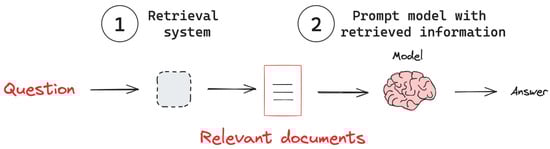
Figure 1.
Retrieval Augmented Generation (RAG) system illustration in [41].
To implement RAG, the LangChain framework is commonly utilized. This framework offers tools to seamlessly integrate generative language models with retrieval mechanisms. The implementation of LangChain in Generative AI has demonstrated its ability to dynamically load specific or large datasets [42] and deliver personalized results derived from localized knowledge bases [43,44].
In this paper, we integrate LangChain RAG within the Information Retrieval Service Prompt to provide context for an IoT application setup within SEMAR. This involves retrieving connectivity and visualization instructions from a local text-based knowledge base and combining them with user-specific project data from CHAT HISTORY. Table 3 presents examples from the knowledge base, offering step-by-step guidance for device configuration in SEMAR.
Table 3.
SEMAR setup guide local knowledge text samples.
5. Review of SEMAR IoT Application Server Platform
In this section, we review the SEMAR IoT application server platform as an integrated system tailored to facilitate swift developments and deployments of IoT application systems.
5.1. System Overview
Figure 2 shows the system architecture of the SEMAR IoT application server platform. It has robust capabilities for data collection, processing, analysis, and visualization from various sensor and IoT devices. It has been designed to offer a comprehensive solution that is adaptable to diverse IoT applications through its modular design. It provides a Plug-in capability to allow for adding new functions for future expansions.
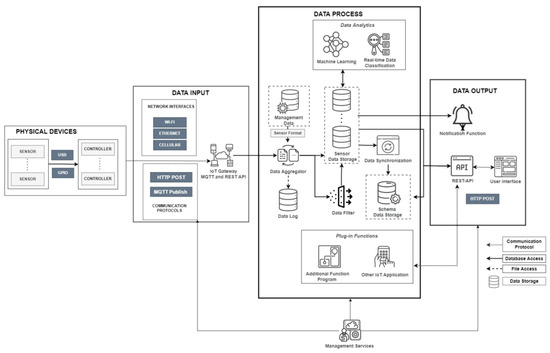
Figure 2.
System overview of SEMAR (source code available on repository [45]).
One of the key strengths of the SEMAR platform is its ability to aggregate sensor data from multiple sources through a variety of communication protocols hosted in a single cloud server environment. They include Hypertext Transfer Protocol (HTTP), Message Queuing Telemetry Transport (MQTT), and WebSocket. It also provides integration functions for data synchronizations, filtering, and real-time classifications using machine learning techniques in big data environments. Standard user interfaces are implemented to manage the platform and monitor sensor data instantly and in real-time.
Our previous research successfully demonstrated integrations of the SEMAR platform with edge devices [46], an indoor localization system [47], an indoor navigation system employing smartphone sensors and Unity for ambulation assistances [48], and a VSLAM-based outdoor augmented reality (AR) navigation system integrated with Google Street View [49].
5.2. Connecting IoT Devices to SEMAR
The deployment of an IoT application system using SEMAR requires a structured approach to ensure reliable communications and efficient data flows. For this purpose, users are required to connect their IoT devices to SEMAR through several steps as shown in Figure 3. They involve selecting communication protocols, defining sensor data, and verifying system functionality for seamless integrations.
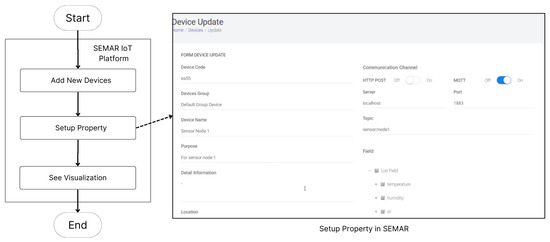
Figure 3.
Connecting IoT devices to SEMAR.
Before beginning the integration steps, users must prepare working devices by ensuring that they are fully operational and have the necessary configurations, such as sensor initializations and firmware readiness. First, users configure the connection properties by defining a communication protocol, such as MQTT, HTTP, or WebSocket. Next, users define the data types to be transferred and set the parameters, such as the server address, port number, device grouping, and purpose of the device in the system. These steps ensure that each device can effectively communicate data with SEMAR and adhere to the defined communication and data standards.
Once connected, users can further validate the data transfer using the dashboard’s chart view mode, as shown in Figure 4. This visualization provides a clear representation of the transmitted data, helping users confirm its accuracy and integrity within the system.
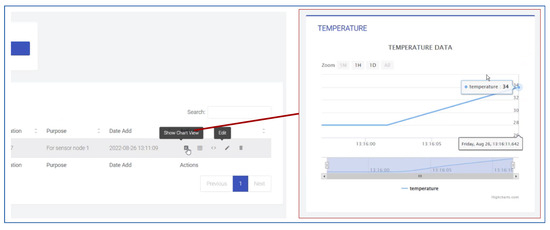
Figure 4.
Viewing graph in SEMAR.
5.3. Limitation
SEMAR provides robust functionalities to support IoT application system developments. However, configuring SEMAR to work seamlessly with diverse IoT devices remains complex. This complexity lies in the need of precise settings and tailored integrations in SEMAR to meet the specific device and application requirements. Particularly, this issue becomes serious when users with limited technical expertise need to integrate heterogeneous devices in SEMAR. They will often need extensive manual interventions to complete them.
To address this challenge, an intelligent assistance service is essential to support novice users of SEMAR. Thus, we have observed that recent advances in Generative AI can allow automated guidance for this service. Generative AI technologies cansimplify the configuration process by providing the step-by-step guidance tailored to target IoT application requirements, devices, and environments.
This approach can reduce technical barriers and increase accessibility for diverse users by simplifying the complex configuration processes required to integrate IoT devices into SEMAR. With step-by-step guidance powered by Generative AI, even users with limited technical expertise can efficiently configure and deploy IoT devices without extensive manual intervention.
Accordingly, in this paper, we propose a sensor input setup assistance service for SEMAR by integrating a Generative AI model to increase the accessibility of the platform and enhance its adoption in IoT application developments.
6. Implementation of Setup Assistant Service in SEMAR
In this section, we present the implementation of the sensor input setup assistance service in the SEMAR IoT application server platform, utilizing a Generative AI model.
6.1. System Overview
The sensor input setup assistance service was designed to streamline the user configuration process by offering interactive, step-by-step guidance powered by Generative AI. We adopted OpenAI GPT [50] as the core model. The service consists of three key components: the setup guidance function, the response generation service, and the user interface. Figure 5 illustrates the overall architecture of the proposed system.
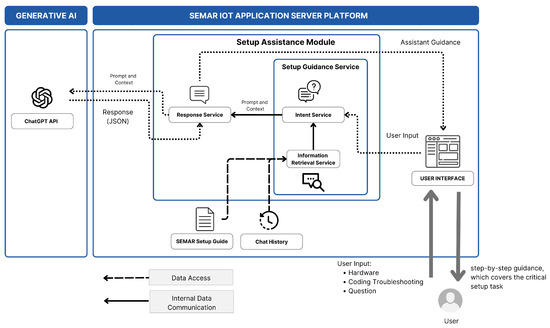
Figure 5.
System overview of sensor input setup assistance service.
The service processes user-submitted text as its primary input through the user interface. The setup guidance function enhances this input by appending the relevant prompts and contextual information. Then, the response function sends them to the Generative AI model through HTTP communications using the JSON format. Finally, it receives the responses containing the guidance, and displays them through the user interface.
6.2. Setup Guidance Function
To achieve the primary objective of providing assistance to users for complex IoT setups while facilitating the conversational style of the user interface, the sequence of the setup guidance function was developed. Figure 6 shows the sequence of the setup guidance function as it handles inputs from users and provides guidan e based on them. This sequence consists of the requirement gathering phase and the guided setup phase. For this service, conversational questions and answers are implemented.
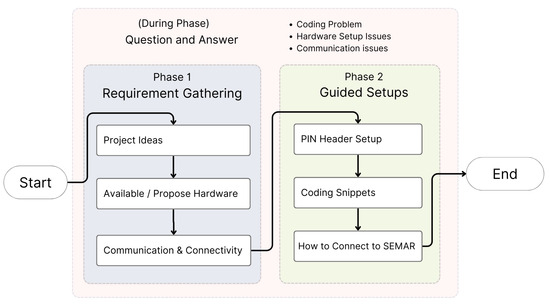
Figure 6.
Setup guidance function sequence.
The requirement gathering phase focuses on identifying the project-specific user requirements, including the necessary hardware available or required. It also assesses the device communication needs, such as data transmission and connectivity. The guided setup phase offers step-by-step support for the device setup, ensuring smooth hardware integration and system configurations. Users can ask queries at any point to address coding issues, hardware compatibility questions, and communication challenges. This approach enables the IoT setup process to be more accessible to users with varying levels of technical expertise.
To manage the constraints of the Generative AI model—particularly, the token capacity and context handling [51,52,53]—the requirement scope is implemented. This scope is designed to optimize the token usage and manage the context effectively while addressing the complex requirements of IoT application system deployments. Figure 7 summarizes the scope of the user requirements for the sensor setup input.
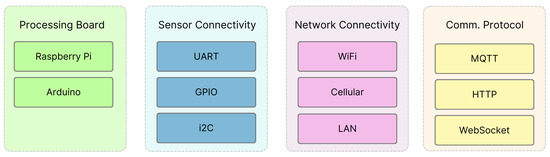
Figure 7.
Requirement scope.
The first domain, Processing Board, specifies the supported hardware platforms, including Raspberry Pi and Arduino. The second domain, Sensor Connectivity, includes communication standards such as Universal Asynchronous Receiver Transmitter (UART), General Purpose Input Output (GPIO), and Inter-Integrated Circuit (I2C) for flexible sensor integrations. The third domain, Network Connectivity, addresses the interfaces including WiFi, Cellular, and LAN, ensuring robust connectivity in diverse deployment environments. Lastly, the Communication Protocol domain defines the supported protocols to facilitate consistent data exchanges, including MQTT, HTTP, and WebSocket. MQTT provides efficient messaging for low-power devices, HTTP provides compatibility with web services, and WebSocket enables real-time, full-duplex communication. These domains align with the capabilities of SEMAR, ensuring compatibility and providing systematic guidance throughout the setup process.
To enable effective interpretations of the user input and context-sensitive assistance, the implemented service is built using prompt engineering techniques. The service contains an intent service and an information retrieval service. The intent service identifies the user’s primary requirements and facilitates consistent interaction by analyzing the user input. It discovers the user goals and ensures that the responses are relevant and specific to the target IoT application system. Table 4 provides a prompt example to capture the user intent.
Table 4.
Prompt example for intent service.
The information retrieval service utilizes the user input with the system data contained within the chat history and SEMAR setup guide and processed in LangChain RAG. This service ensures accurate and contextually relevant guidance by referencing prior interactions and system-specific knowledge. Table 5 illustrates how a prompt tracks and assesses the specification status using inputs.
Table 5.
Information retrieval service.
6.3. Response Function
The response function facilitates communications between the service and the Generative AI API. It transmits the user input to the API, along with the prompts and the context provided by the setup guidance function. After receiving the JSON format responses, it processes and prepares them to be displayed on the user interface. The following algorithm, Algorithm 1, presents the detailed handling process in this service.
| Algorithm 1 Prompt and response handling process. |
|
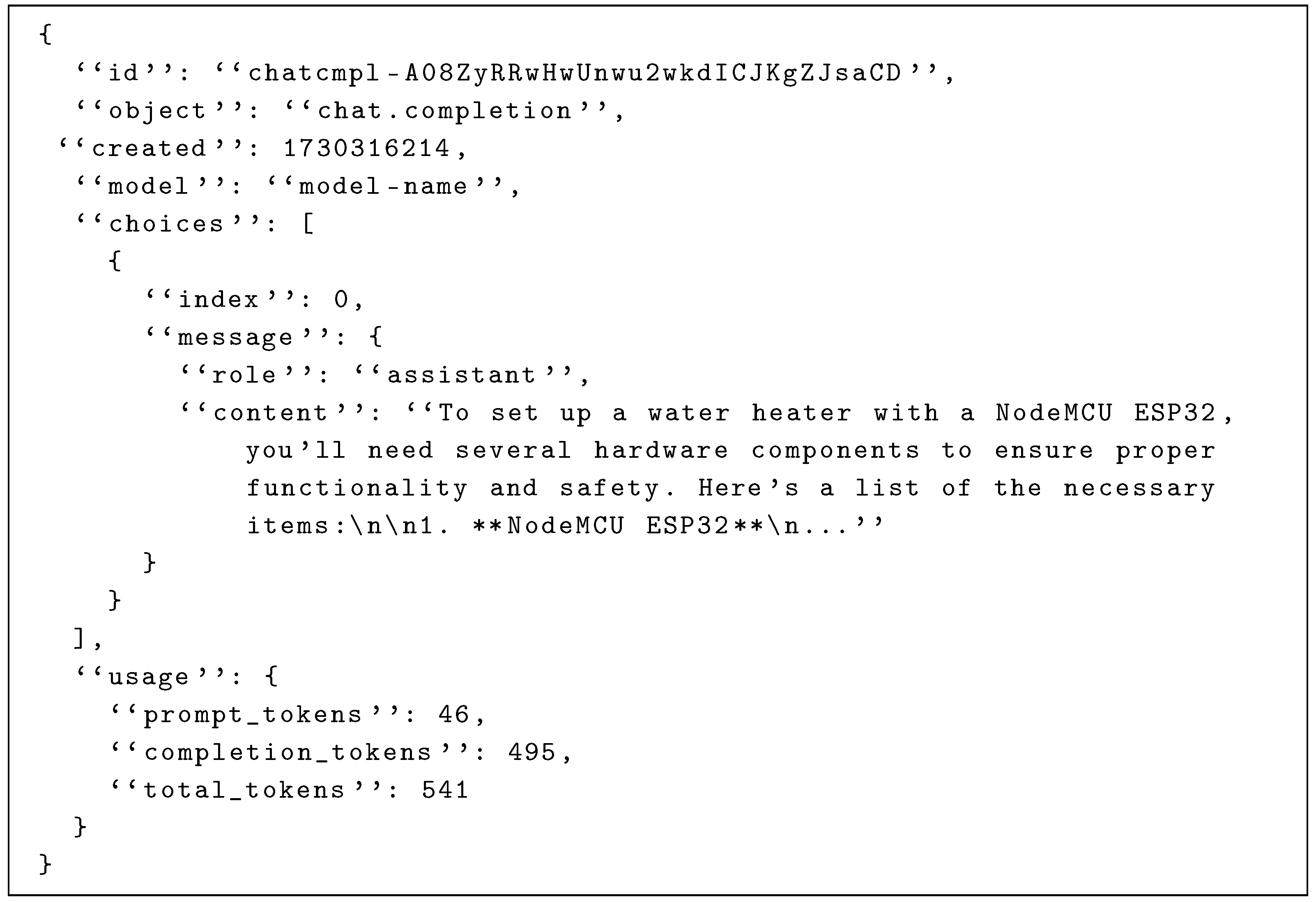
Listing A1 in Appendix A shows a sample JSON response. It includes a “role” node for identifying the user and the service roles within the conversation. It also provides the token usage data, which are useful for debugging.
6.4. User Interface
A user interface (UI) is developed with the objective of enabling users to interact with the service via a web browser. This user interface is designed in a conversational interface style. It accepts text inputs from users and displays text responses from the Generative AI model. Figure 8 illustrates the user interface.
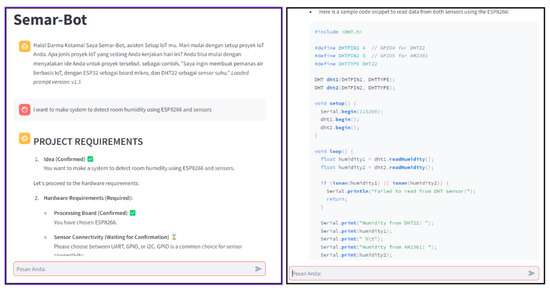
Figure 8.
Conversational UI for AI assistant service.
The input text from a user and the response from the model are displayed sequentially. This interface enables users to easily browse previous conversations. The rendered text is highlighted in headings, numbered lists, and code snippets to facilitate the identification of key points in conversations with novice users.
6.5. Generative AI Model
In our implementation of the sensor input setup assistance service, we selected the OpenAI ChatGPT-4o model, leveraging its 128,000-token context window and 16,384-token output limit [54]. Further, the prompt engineering tailors the model’s extensive IoT knowledge [55,56] to deliver accurate, context-specific responses. Table 6 shows the parameters of the model.
Table 6.
Model parameters.
We configured the temperature at 0.7 to balance creativity and accuracy, and the top_p at 1 to encourage diverse responses [57]. In the following section, we will evaluate the proposal through setup processes in three IoT application systems, where we compare them with manual configurations. As common challenges faced by novice users, we will examine sensor recommendations, PIN conflict resolutions, and specification changes.
6.6. Prompt Engineering Process
Three types of inputs are processed by the setup guidance function before generating the final prompt for the response function. The first input is user input, which includes queries related to hardware issues, coding troubleshooting, or setup-related questions. The second input is the CHAT HISTORY, capturing previous interactions with the proposed service. The third input is external knowledge sourced from the SEMAR setup guide, integrated using Langchain RAG. Figure 9 illustrates the prompt engineering process.
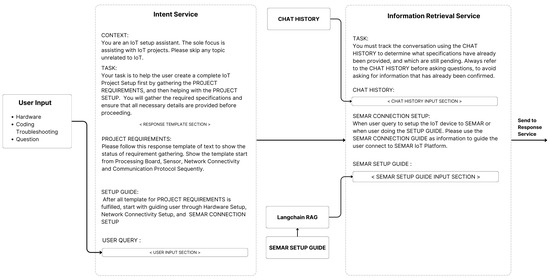
Figure 9.
Input process within prompt engineering services.
First, the intent service adds the user input to its prompt, and then the information retrieval service enriches the prompt with relevant CHAT HISTORY data and the SEMAR setup guide. The result is a final text prompt that will be sent to the Response Function. The full prompt used in this study can be seen in the repository given in [58].
7. Evaluations with Three IoT Application System Setup Cases
In this section, we evaluate the proposed sensor input setup assistance service in the SEMAR IoT application server platform through applications involving setup processes for a smart lighting system, room temperature monitoring system, and smart water heater system.
7.1. Application to Smart Light System Setup
As the first target IoT application system, we chose a smart light system that is designed to automate detection and response processes for a light within low-light environments.
7.1.1. System Configuration
The functions of this system are as follows: to detect low ambient light levels, activate an LED in response, and transmit both the light level data and the LED status to SEMAR. The sensor input setup for this system is designed to showcase its integration with SEMAR. Table 7 outlines the configuration setup for the device preparation, connectivity settings, and system operations.
Table 7.
System specifications for smart light system.
The hardware includes NodeMCU ESP8266 as the processing board, LM393 as the light sensor connected via GPIO, WiFi for networking, and HTTP for data communications. Additional components such as a red diode LED and 220 ohm resistor are required to operate the smart light system. The datasheet for NodeMCU ESP8266 and LM393 can be found in the datasheet repository [58].
7.1.2. Evaluation Scenario
To evaluate the validity of the implemented sensor input setup assistance service, the following two scenarios of improper setups are tested to examine the responses from the service:
- Resistor omission: the resistor is excluded to assess the service guidance in resolving this issue.
- PIN change: the processing board’s header PIN is modified from the proposal of the service.
7.1.3. Application Result
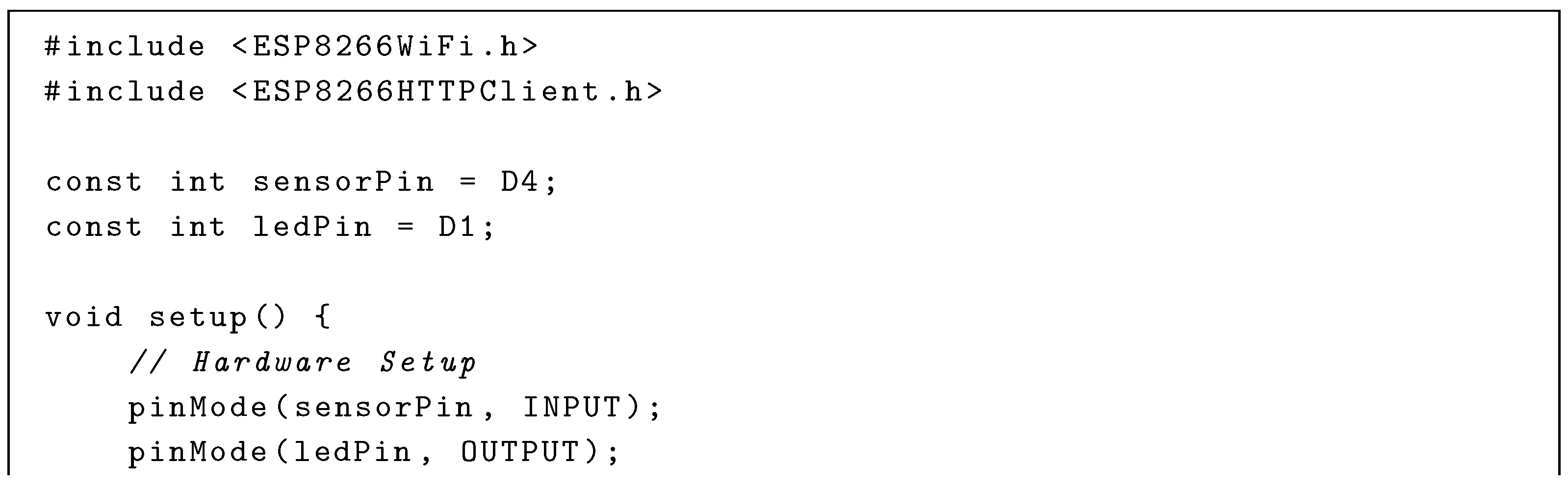
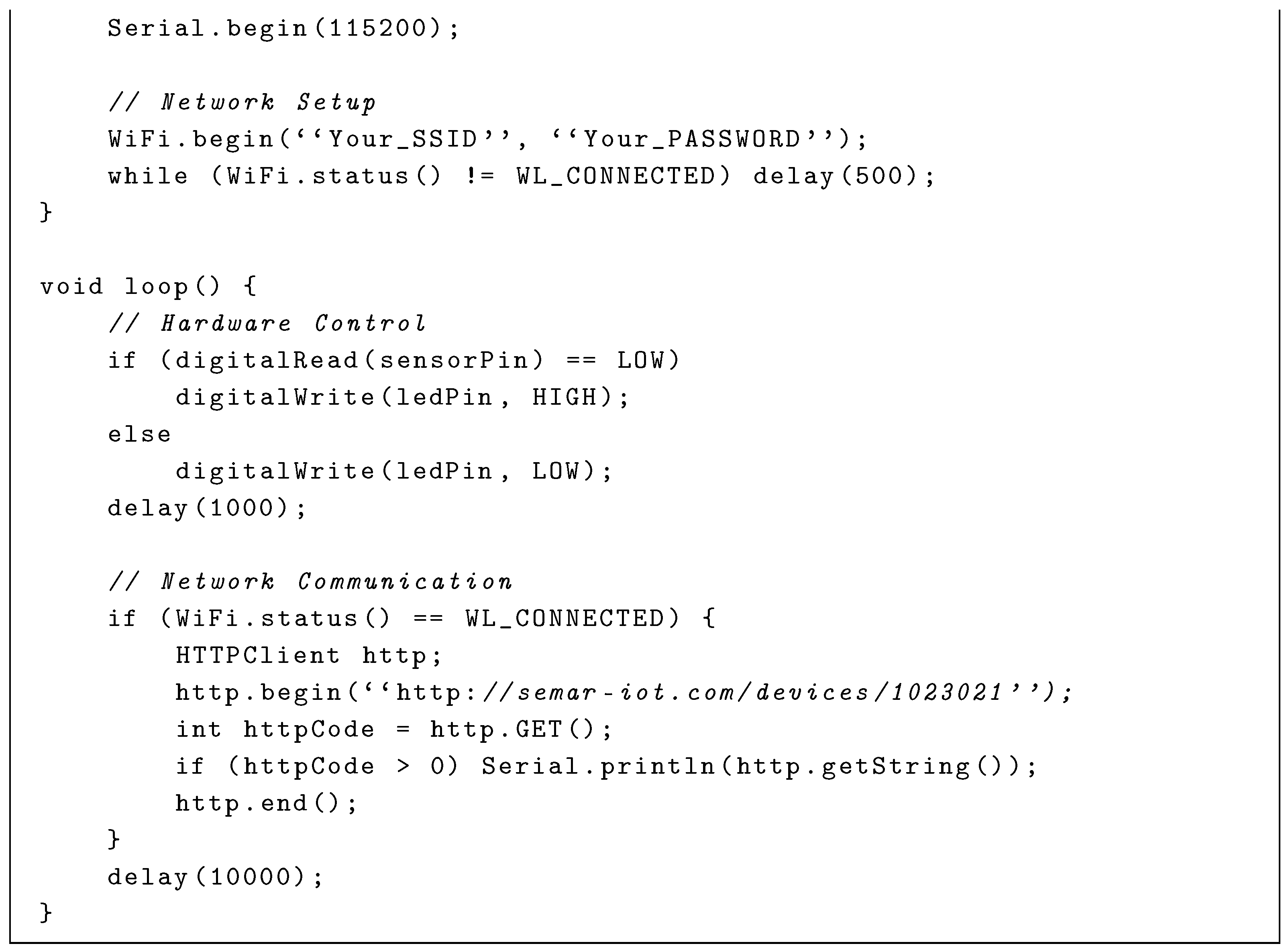
Table 8 shows a part of the conversations between the user and the service mediated by the AI model. Listing A2 in Appendix A shows the C source code for the network connectivity that was produced by the AI model. Additionally, the image result of the final setup is shown in Figure 10, providing a visual representation of the completed configuration.
Table 8.
Conversations with proposed service for smart light system setup.
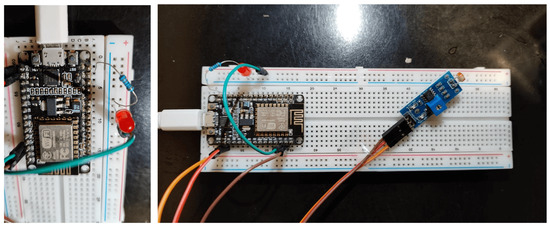
Figure 10.
Hardware setup result for smart light setup.
7.2. Application to Room Temperature Monitoring System Setup
As the second target IoT application system, we chose a room temperature monitoring system that is designed to continuously monitor temperature and humidity levels in a room and transmit them every 2 s to SEMAR.
7.2.1. System Configuration
The system setup should be capable of transmitting data intensively from two sensors, which introduces a higher level of complexity and setup. Table 9 outlines our initial setup for this project.
Table 9.
System specification for room temperature monitoring system.
The system calculates the average humidity from the DHT11 and DHT22 sensors and transmits it, along with the temperature reading, via WiFi. The datasheet for NodeMCU ESP8266, DHT11, and DHT22 can be found in the datasheet repository [58].
7.2.2. Evaluation Scenario
To evaluate the guidance ability of the sensor input configuration support service, the following three scenarios are applied to evaluate the service responses:
- Sensor recommendation: the proposed service suggests suitable sensors for humidity and temperature measurement when unspecified.
- High-frequency transmission: the proposed service recommends MQTT for sending data every 2 seconds.
- Sensor averaging: the proposed service calculates the average humidity from both sensors before transmission.
7.2.3. Application Result
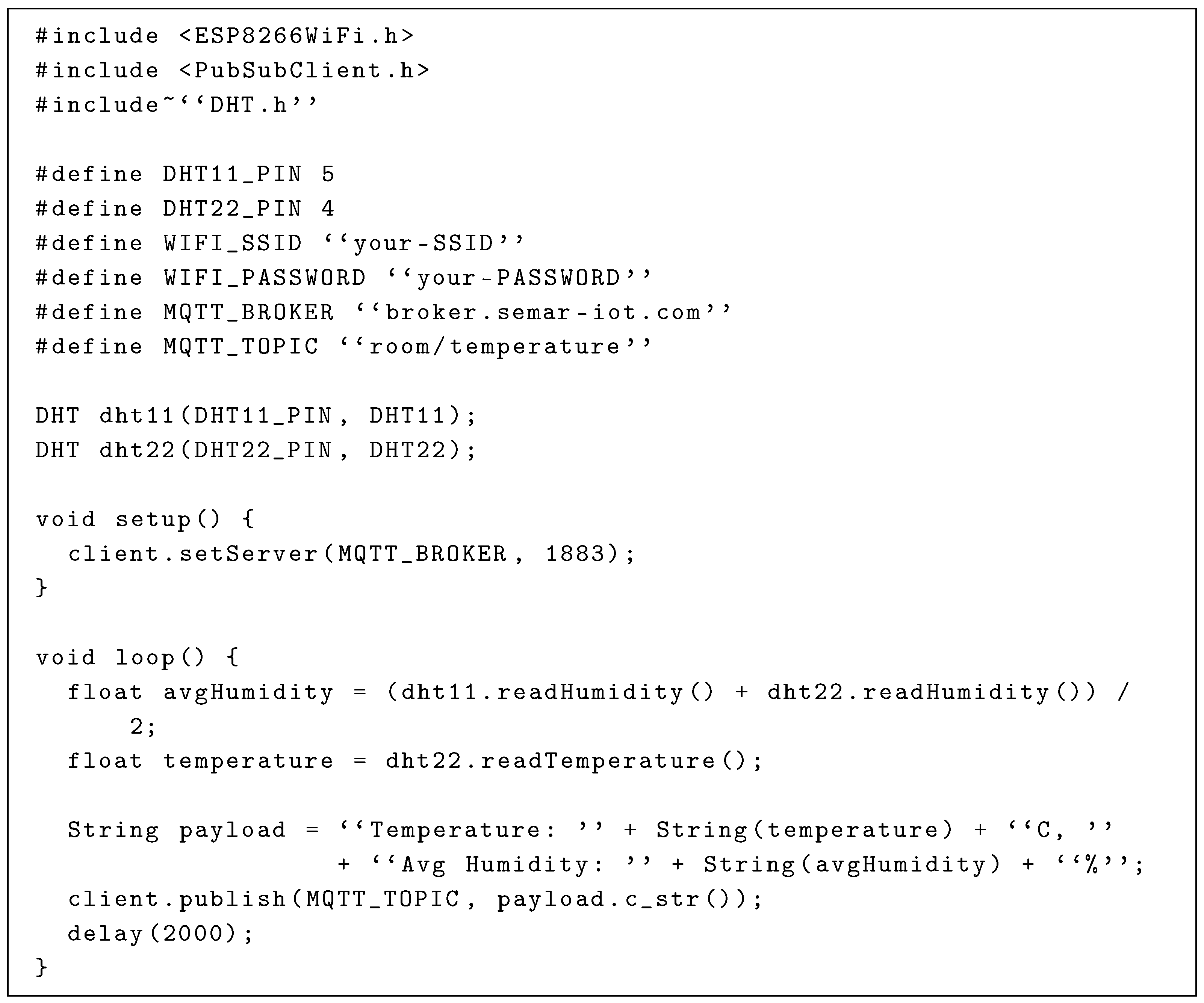
Table 10 summarizes the service response results during the conversations between the user and the service. The generated code for the hardware and connectivity setup is presented in Listing A3 in Appendix A. Additionally, Figure 11 presents an image of the final setup, offering a visual depiction of the completed configuration.
Table 10.
Conversation with proposed service for room temperature monitoring setup.
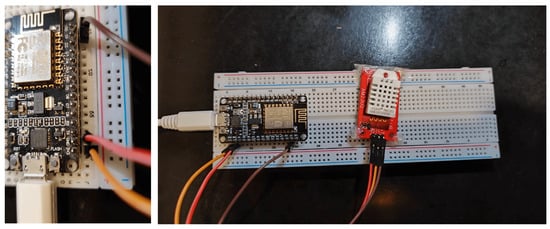
Figure 11.
Hardware setup result for room temperature monitoring system.
7.3. Application to Smart Water Heater System Setup
The smart water heater project aims to assess the service’s ability to manage intricate configurations through real-time control and feedback mechanisms.
7.3.1. System Configuration
This setup monitors the water temperature and controls a DC heating element through a dimmer module, using a proportional–integral–derivative (PID) controller for precise regulations. This system transmits real-time water temperature data to the SEMAR IoT platform, while the processing board adjusts the heating element based on the temperature feedback. Table 11 outlines the initial setup for this project.
Table 11.
System specification for smart water heater system.
The system controls the 12-volt dimmer module using a discrete-time (PID) controller [59] that has proven effective in digital systems. The mathematical representation is as follows:
In this system, is the control output at each time step k; the managing power to the heating element is controlled via a dimmer to maintain the target temperature. PID gains, given by , , and , adjust the response to temperature deviations: addresses the immediate error , accumulates the past errors to eliminate the offset, and reacts to the rate of the error change , minimizing the overshoot. The PID updates every second using the DS18B20 sensor data, with real-time transmissions via MQTT.
The datasheet for Raspberry Pi 5 and the DS18B20 Temperature Sensor can be found in the datasheet repository [58].
7.3.2. Evaluation Scenario
To evaluate the sensor input setup assistant service in assisting with the intricate setup, we implemented the following scenario for switching the processing board:
- Initial setup with ESP8266: the service configures the system on ESP8266.
- Switch to Raspberry Pi: the service adapts the setup to Raspberry Pi 5, adjusting GPIO assignments and power requirements.
7.3.3. Application Result
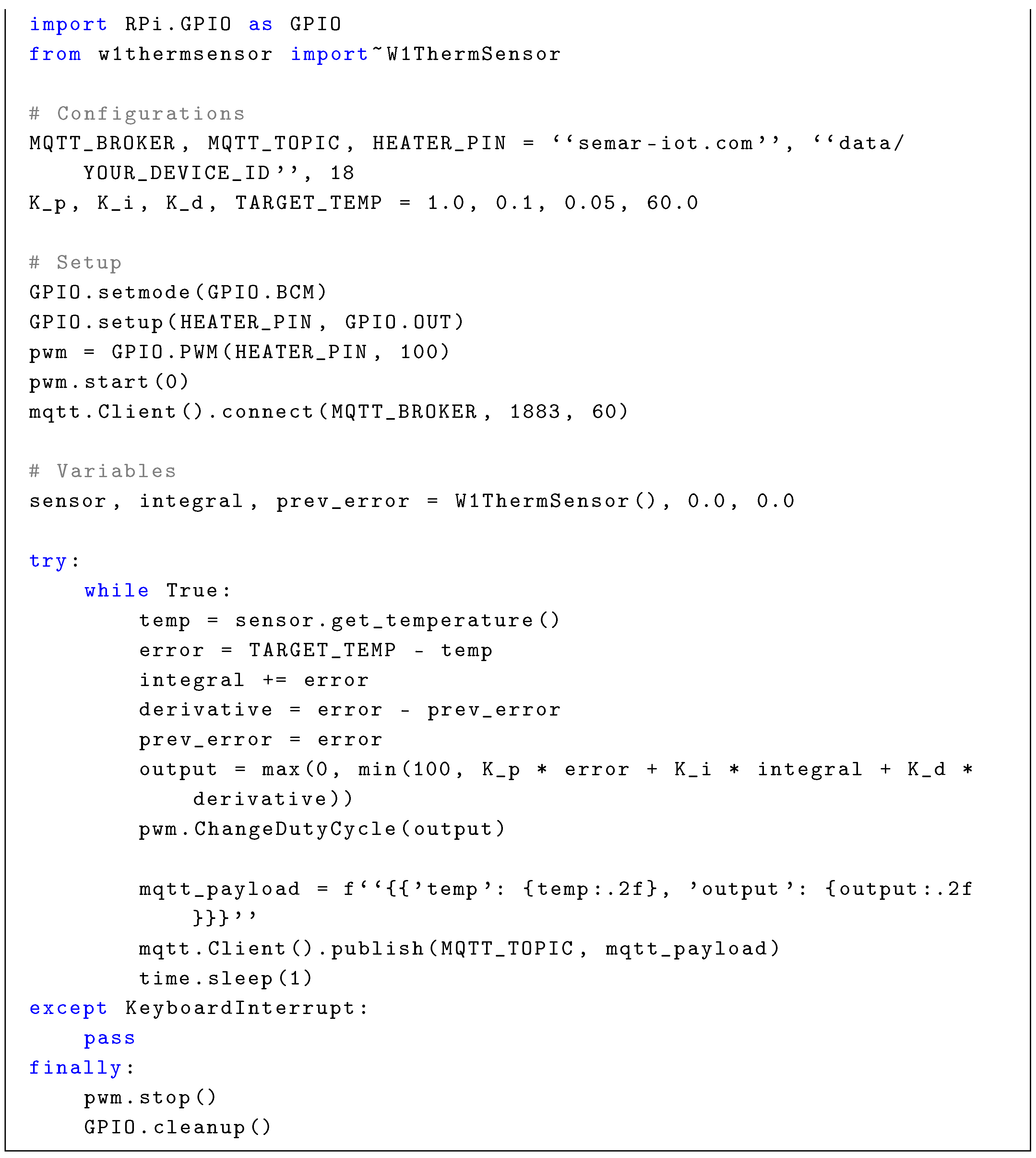
Table 12 provides a summary of the service response results during the conversations. The code generated for the hardware and connectivity setup is presented in Listing A4 in Appendix A. In addition, Figure 12 shows a final setup image, providing a visual representation of the completed configuration.
Table 12.
Conversation with proposed service for smart water heater setup.
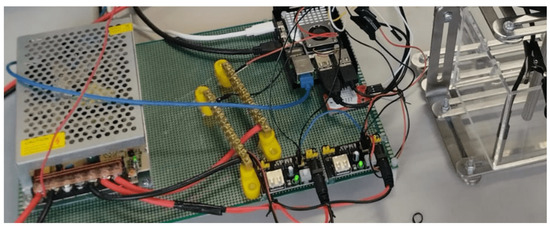
Figure 12.
Hardware setup result for smart water heater system.
7.4. Application Discussion
7.4.1. Smart Light System Setup Discussion
The application results show that the service effectively guided the setup process by configuring the sensorPin and ledPin using GPIO pins D1 and D4. However, the initial code generated by the service resulted in a compile error message ‘D4’ was not declared in this scope. We found that this was caused by the possibility of the Generative AI producing a hallucinated result due to its large training data [60]—in this case, the service generated the sensor pin code as D4 instead of 4 as the NodeMCU standard. After consulting the error result with the service, the correct result for the pin setup is shown as sensorPin = 4;
For the networking setup, the service provided the instructions for WiFi connections as given in lines 14–15 in Listing A2; the provided HTTP requests for interacting with SEMAR are given at line 29. They include the managing credentials and periodic data transmission. The implemented service gives adaptable and efficient supports at the smart light system setup.
7.4.2. Room Temperature Monitoring Discussion
The implementation results show that the proposed service suggested using the DHT22 sensor for temperature and humidity detection, with MQTT for intensive data communication. The configuration in Listing A3 connects DHT11 and DHT22 sensors to PIN 5 and PIN 4, respectively. On line 20, it averages humidity readings before transmitting data through MQTT.
While testing, a compilation error occurred: “Compilation error: PubSubClient.h: No such file or directory”. The proposed service resolved this efficiently by guiding the user through the installation of the PubSubClient library in the Arduino IDE. The service demonstrated strong contextual understanding, flexibility in sensor recommendations, and effective troubleshooting support.
7.4.3. Smart Water Heater System Discussion
The implementation demonstrated that the service capability could accommodate the evaluation scenario that involved switching the processing board. This transition from NodeMCU ESP8266 to Raspberry Pi involved setting up the hardware pins and the relevant code, in addition to installing additional packages for the required Python library.
The generated hardware setup successfully connects all requirements for the smart water heater system, such as DS18B20 via the GPIO pin, the 12 V DC Dimmer Module, and the 12 V DC Heating Element. Before providing the code, the assistant generated a guide for setting up the one-wire connection for the DS18B20 sensor, as well as the required package installation for the MQTT functionality. The final Python code as given in Listing A4 in Appendix A includes key features such as the discrete-time PID controller (line 27) and the dimmer duty cycle control for the heater (line 28).
The implementation process faced a significant challenge with the installation of the w1thermsensor package for the one-wire setup, as it was not compatible with the newly released Raspberry Pi 5. We found that this was caused by the possibility of ChatGPT hallucinating user queries [61]. In this case, ChatGPT hallucinated by giving the Raspberry Pi 4 setup instead of the setup for the newer version, due to the ChatGPT 4o model’s knowledge cutoff being October 2023 [62].
To resolve this issue, we consulted package installation information from external resources, explored alternative configurations, and manually changed settings to achieve successful execution. This challenge highlights a limitation in the service’s ability to handle new hardware models.
Overall, the proposed service demonstrated versatility in adapting to different boards and translating codes. However, it struggled with support for newly released devices.
8. Evaluation Through Course Assignment
This section evaluates the proposed system by applying it to an input sensor setup assignment conducted during an IoT practice course. The course involved 22 undergraduate students from the Institut Bisnis dan Teknologi (INSTIKI), Indonesia.
8.1. Experiment Composition
In this evaluation, we conducted a pre-test, practice phase, and post-test. In the pre-test, we assessed the IoT experiences of the students to be used in the analysis of the results. In the practice phase, the students conducted the sensor input setup process for a given IoT application system. In the post-test, we surveyed their opinions on the usability of the implemented service and analyzed them with the System Usability Scale (SUS) [63].
During the practice phase, all conversation data between students and the service were collected to analyze how each student used the service for advice, troubleshooting, or project completion. These data are used to assess the effectiveness of the proposed service in effectively guiding the sensor input setup process. Figure 13 illustrates the composition of this experiment. Each student was requested to use the provided hardware to complete the project while asking assist for assistance from the input sensor setup assistant service.
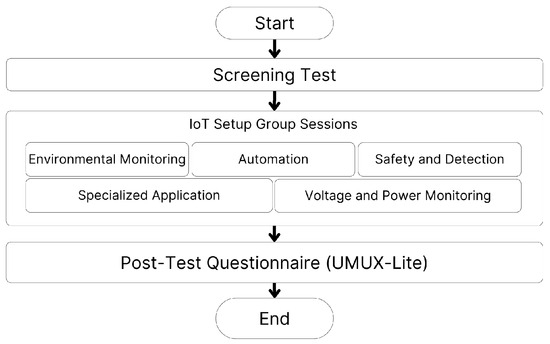
Figure 13.
Experiment composition.
For the practice phase, we divided the 22 students into five groups. Each group handled one of five IoT projects relating to the following: (1) environmental monitoring of air quality, water levels, and soil moisture; (2) automation of irrigation, lamp, and valve control; (3) security and detection of fire, motion, and gas; (4) voltage and power monitoring; and (5) specialized applications of fish drying and measurement systems.
8.2. Pre-Test and Post-Test
Before engaging in the practice phase, we asked each student the following simple pre-test question: “Have you previously set up an IoT application system?”. The response, either yes or no, determined the level of experience with these systems. Then, after the practice phase, we gave them a post-test questionnaire based on the UMUX-Lite instrument [64] to assess various aspects of usability, such as ease of use, usefulness, learning curve, efficiency, and error handling. Table 13 shows the questions for the post-test.
Table 13.
Post-test questions.
This questionnaire adopted the Likert scale with responses ranging from 1 (complete disagreement) to 5 (complete agreement). In addition, a text box was provided at the end of the questionnaire to allow users to provide their opinions freely.
8.3. Local Language Support
The service was modified to support the Bahasa Indonesia language in collecting correct data as best as possible since the students in this experiment were all Indonesian. In order to achieve this, we updated the Response Function with an additional prompt as shown in Table 14.
Table 14.
Prompt for assistance response in Bahasa.
8.4. Conversation Classification
The conversations between the service and the students were stored along with timestamps in a MongoDB database in SEMAR. It is noted that the students provided consent regarding this recording process. After the practice phase was over, we classified the conversations into five types—phase 2 (P2), hardware suggestion (HS), hardware consultation (HC), error coding consultation (EC), and connectivity consultation (CC)—to track the progress of the conversations in the setup process. The default classification is phase 1 (P1). These classifications evaluate the accuracy of the implemented service in resolving errors and providing proper guidance. They are also used to assess the impacts of conversations on the project success.
Table 15 shows the classification types and their purposes.
Table 15.
Conversation classification.
8.5. Project Completion
As explained in Section 6.2, the assistant can answer questions and provide assistance at any time during the conversation with a student. This constant interaction makes it difficult to determine if a student has completed the project. To address this issue, we have developed a project completion command with the following steps:
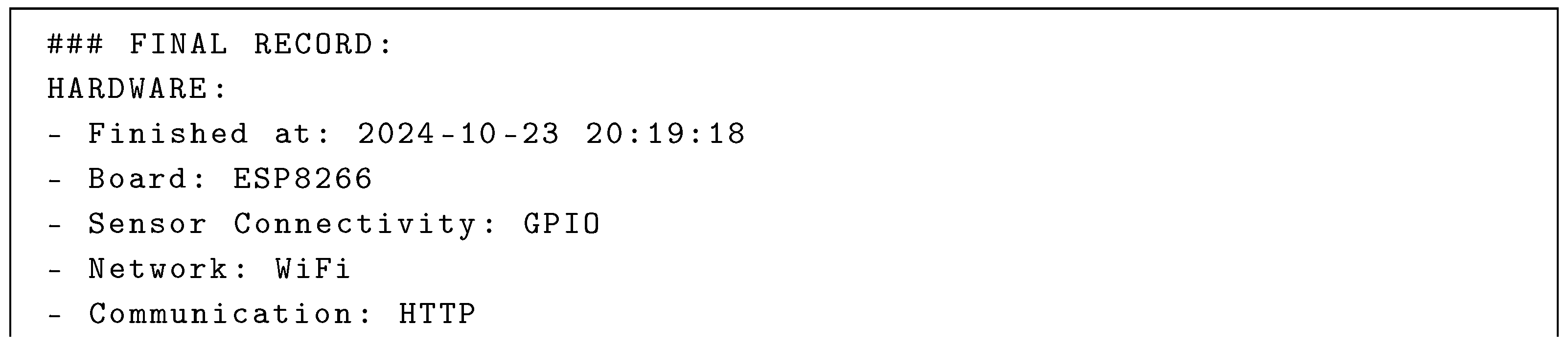
- After completing their hardware setup, a student is instructed to type the phrase “final record” into the assistant.
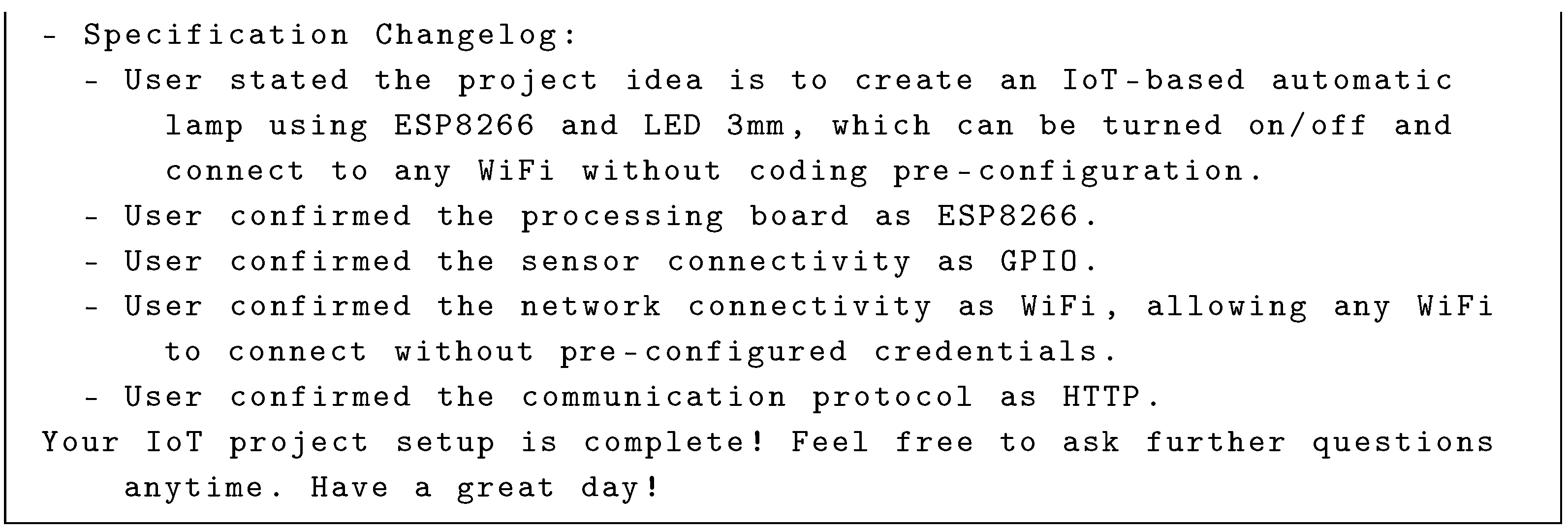
- Upon receiving the “final record” input, the service generates a detailed project summary that outlines the completed setup.
- The generated project summary is stored in the database where the student is classified as having completed their project.
The sample output for this final record is shown in Listing 1.
| Listing 1. Project completion response sample. |
  |
8.6. Pre-Test Result
A total of 22 students in the introductory IoT course at INSTIKI participated in the experiment. Most of them were second-year undergraduate students. Table 16 summarizes their responses to the question in the pre-test. A total of 87% of them had no prior experience, while 13% had some experience.
Table 16.
Pre-test and assignment results.
8.7. Conversation Analysis Result
To analyze the conversations, they were classified into five types manually after the practice phase was over. Table 17 compares the number of students who used this service for classified conversations and shows the number of students who completed the assignment. The table suggests that all the complete students used the proposed service at P1 and P2, as did many of them at HC, EC, and CC; only a few did at HS. At HS, the utilization of the sensor recommendation appears to have been underutilized because the students had already been assigned a specific sensor for their project.
Table 17.
Number of students using service for each classified conversation.
On the other hand, the number of incomplete students was only one at HC, EC, and CC because they could not reach these stages.
A manual review of the conversations revealed that the topic of HC was the most frequently discussed among students. Many students expressed concerns regarding sensor placement and coding errors. A recurrent issue was the misplacement of sensor IDs, such as ’D4 was not declared in this scope’, as was also observed in Section 7. Following consultation with the service, students were able to resolve these issues by applying the appropriate suggested sensor IDs.
8.8. System Usability Result
The System Usability Scale (SUS) survey was conducted to assess the usability of the implemented service. The questions for this survey included ease of use, usefulness, learning curve, efficiency, and error handling. Figure 14 shows the SUS scores for each, confirming the high usability of the service.
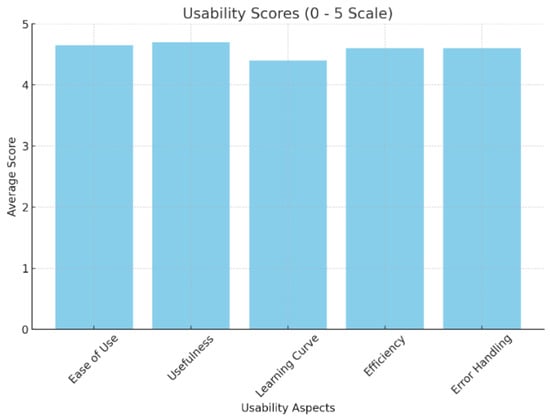
Figure 14.
Usability testing results.
8.9. Free Opinions
Some of the free opinions shared by students indicate potential improvements by implementing an editing function of the sent messages to refine queries during troubleshooting. Fortunately, many students expressed their interest in continuously using the service in the course.
8.10. Discussion
The experiment results reveal some correlations between students experiences and assignment completions. Among the 19 students with no experience, 16 completed the assignment. On the other hand, all three students with experience successfully completed the assignment. This suggests that although less experienced users may face larger challenges in the input sensor setup process, most of them can successfully complete it with the assistance of an implemented service like ours regarding hardware, source code, and connectivity.
This usability feedback, including free opinions, identified some obstacles affecting assignment results, particularly the inability of the service to edit sent messages. This limitation may hinder refining queries during troubleshooting, leading to potential miscommunications or incomplete assistance. Addressing this issue could improve the user experience and support completion for beginner users. Therefore, it is concluded that the current service proved highly valuable for novices, and further improvements will be necessary to boost completion of input sensor setup processes associated with the SEMAR IoT server platform.
9. Conclusions
This paper presents the design and implementation of a sensor input setup assistance service for the SEMAR server platform, utilizing prompt engineering techniques and a Generative AI model. It can provides step-by-step guidance for novice users in setting up the sensor inputs. The service consists of a setup guidance function, a response function, and a user interface. The guidance covers sensor connections, processing board configurations, network settings, and communication protocols. This streamlined approach enables users to efficiently integrate devices with SEMAR, regardless of their level of technical expertise. The validity and effectiveness of the implemented service were confirmed through applications to three IoT application systems and one university course assignment for undergraduate students. In future studies, we aim to enhance the service by improving the accuracy of sensor placement suggestions during the initial inquiry. Additionally, we plan to adopt sent message editing capabilities, enable access to the latest hardware, and streamline conversations to ensure a more seamless user experience.
Author Contributions
Conceptualization, I.N.D.K., N.F. and Y.Y.F.P.; methodology, I.N.D.K.; software, I.N.D.K.; validation, I.N.D.K. and A.A.S.P.; resources, I.G.M.N.D. and N.; data curation, I.N.D.K. and K.C.B.; writing—original draft preparation, I.N.D.K., Y.Y.F.P. and K.C.B.; writing—review and editing, N.F. and Y.Y.F.P. All authors have read and agreed to the published version of the manuscript.
Funding
This research received no external funding.
Institutional Review Board Statement
Not applicable.
Informed Consent Statement
Not applicable.
Data Availability Statement
All data are contained within article.
Acknowledgments
The authors thank the reviewers for their thorough reading and helpful comments and all their colleagues at the Distributed System Laboratory, Okayama University, who were involved in this study.
Conflicts of Interest
The authors declare no conflicts of interest.
Appendix A
| Listing A1. JSON response sample for UI rendered response from Generative AI. |
 |
| Listing A2. C source code result for network connectivity in smart light system. |
  |
| Listing A3. C source code result for network connectivity in room temperature monitoring system. |
 |
| Listing A4. Python code for smart water heater system. |
  |
References
- Panduman, Y.Y.F.; Funabiki, N.; Puspitaningayu, P.; Kuribayashi, M.; Sukaridhoto, S.; Kao, W.C. Design and implementation of SEMAR IoT server platform with applications. Sensors 2022, 22, 6436. [Google Scholar] [CrossRef]
- Alfalouji, Q.; Schranz, T.; Kümpel, A.; Schraven, M.; Storek, T.; Gross, S.; Monti, A.; Müller, D.; Schweiger, G. IoT middleware platforms for smart energy systems: An empirical expert survey. Buildings 2022, 12, 526. [Google Scholar] [CrossRef]
- Silva, C.A.G.d.; Ramos, F.N.; de Moraes, R.V.; Santos, E.L.d. ChatGPT: Challenges and benefits in software programming for higher education. Sustainability 2024, 16, 1245. [Google Scholar] [CrossRef]
- Bijker, R.; Merkouris, S.S.; Dowling, N.A.; Rodda, S.N. ChatGPT for automated qualitative research: Content analysis. J. Med. Internet Res. 2024, 26, e59050. [Google Scholar] [CrossRef]
- DePalma, K.; Miminoshvili, I.; Henselder, C.; Moss, K.; AlOmar, E.A. Exploring ChatGPT’s code refactoring capabilities: An empirical study. Expert Syst. Appl. 2024, 249, 123602. [Google Scholar] [CrossRef]
- Ebrahim, N.S. Complexity of IoT world—Review of challenges and opportunities in application development. In Proceedings of the 2023 International Conference on Smart Computing and Application (ICSCA), Hail, Saudi Arabia, 5–6 February 2023. [Google Scholar] [CrossRef]
- Cheruvu, S.; Kumar, A.; Smith, N.; Wheeler, D.M. IoT frameworks and complexity. In Demystifying Internet of Things Security; Apress: Berkeley, CA, USA, 2020; pp. 23–148. [Google Scholar] [CrossRef]
- Zhang, K.; Han, D.; Feng, H. Research on the complexity in Internet of Things. In Proceedings of the 2010 International Conference on Advanced Intelligence and Awarenss Internet (AIAI 2010), Beijing, China, 23–25 October 2010; pp. 395–398. [Google Scholar] [CrossRef]
- Chan, R.; Yan, W.K.; Ma, J.M.; Loh, K.M.; Yu, T.; Low, M.Y.H.; Yar, K.P.; Rehman, H.; Phua, T.C. IoT devices deployment challenges and studies in building management system. Front. Internet Things 2023, 2, 1254160. [Google Scholar] [CrossRef]
- Frigo, M.T.; Hirmer, P.; da Silva, A.C.F.; Thom, L.H. A Toolbox for the Internet of Things—Easing the setup of IoT applications. In Proceedings of the ER Forum, Demo and Posters 2020 Co-Located with 39th International Conference on Conceptual Modeling (ER 2020), Vienna, Austria, 3–6 November 2020; Volume 2716, pp. 87–100. [Google Scholar]
- Naim, B.A.; Ghafourian, Y.; Ryabokon, A.; Flamigni, F.; Baldrian, R. A generic framework for resource-limited microcontrollers deployment in I-IoT systems. In Proceedings of the NOMS 2024—2024 IEEE Network Operations and Management Symposium, Seoul, Republic of Korea, 6–10 May 2024. [Google Scholar] [CrossRef]
- Gaglio, S.; Giuliana, L.; Lo Re, G.; Martorella, G.; Montalto, A.; Peri, D. A rule-based system for hardware configuration and programming of IoT devices. In Lecture Notes in Computer Science; Springer International Publishing: Cham, Switzerland, 2019; pp. 59–72. [Google Scholar] [CrossRef]
- Adkins, J.; Campbell, B.; DeBruin, S.; Ghena, B.; Kempke, B.; Klugman, N.; Kuo, Y.S.; Natarajan, D.; Pannuto, P.; Zachariah, T.; et al. Demo. In Proceedings of the 13th ACM Conference on Embedded Networked Sensor Systems, Seoul, Republic of Korea, 1–4 November 2015. [Google Scholar] [CrossRef]
- López, J.J.; Lamo, P. Rapid IoT prototyping: A visual programming tool and hardware solutions for LoRa-based devices. Sensors 2023, 23, 7511. [Google Scholar] [CrossRef] [PubMed]
- Fernandes, D.; Garg, S.; Nikkel, M.; Guven, G. A GPT-powered assistant for real-time interaction with building information models. Buildings 2024, 14, 2499. [Google Scholar] [CrossRef]
- Zhang, N. Chatbot4QR: Interactive qquery refinement for technical question retrieval. IEEE Trans. Softw. Eng. 2022, 48, 1185–1211. [Google Scholar] [CrossRef]
- Subramaniam, S.; Aggarwal, P.; Dasgupta, G.B.; Paradkar, A. COBOTS—A cognitive multi-bot conversational framework for technical support. In Proceedings of the 17th International Conference on Autonomous Agents and MultiAgent Systems, AAMAS ’18, Stockholm, Sweden, 10–15 July 2018; pp. 597–604. [Google Scholar] [CrossRef]
- Li, Y.; Zhao, J.; Li, M.; Dang, Y.; Yu, E.; Li, J.; Sun, Z.; Hussein, U.; Wen, J.; Abdelhameed, A.M.; et al. RefAI: A GPT-powered retrieval-augmented generative tool for biomedical literature recommendation and summarization. J. Am. Med. Inform. Assoc. 2024, 31, 2030–2039. [Google Scholar] [CrossRef]
- Nakhod, O. Using retrieval-augmented generation to elevate low-code developer skills. Artif. Intell. 2023, 28, 126–130. [Google Scholar]
- Huang, X.; Tang, Y.; Li, J.; Zhang, N.; Shen, X. Toward Effective Retrieval Augmented Generative Services in 6G Networks. IEEE Netw. 2024, 38, 459–467. [Google Scholar] [CrossRef]
- Doshi, A.R.; Hauser, O.P. Generative AI enhances individual creativity but reduces the collective diversity of novel content. Sci. Adv. 2024, 10, eadn5290. [Google Scholar] [CrossRef] [PubMed]
- Sengar, S.S.; Hasan, A.B.; Kumar, S.; Carroll, F. Generative artificial intelligence: A systematic review and applications. Multimed. Tools Appl. 2024. [Google Scholar] [CrossRef]
- Radford, A.; Narasimhan, K.; Salimans, T.; Sutskever, I. Improving Language Understanding by Generative Pre-Training. 2018. Available online: https://cdn.openai.com/research-covers/language-unsupervised/language_understanding_paper.pdf (accessed on 21 November 2024).
- Mo, Y.; Qin, H.; Dong, Y.; Zhu, Z.; Li, Z. Large language model (LLM) AI text generation detection based on transformer deep learning algorithm. arXiv 2024, arXiv:2405.06652. [Google Scholar]
- Rather, I.H.; Kumar, S. Generative adversarial network based synthetic data training model for lightweight convolutional neural networks. Multimed. Tools Appl. 2023, 83, 6249–6271. [Google Scholar] [CrossRef]
- Oyelade, O.N.; Ezugwu, A.E.; Almutairi, M.S.; Saha, A.K.; Abualigah, L.; Chiroma, H. A generative adversarial network for synthetization of regions of interest based on digital mammograms. Sci. Rep. 2022, 12, 6166. [Google Scholar] [CrossRef]
- Xia, Y.; Kim, J.; Chen, Y.; Ye, H.; Kundu, S.; Hao, C.; Talati, N. Understanding the performance and estimating the cost of LLM fine-tuning. arXiv 2024, arXiv:2408.04693. [Google Scholar]
- Esposito, F. Programming Large Language Models with Azure Open AI: Conversational Programming and Prompt Engineering with LLMs; Microsoft Press: Redmond, WA, USA, 2024. [Google Scholar]
- Abhari, S.; Fatahi, S.; Saragadam, A.; Chumachenko, D.; Morita, P.P. A rroad map of prompt engineering for ChatGPT in healthcare: A perspective study. In Studies in Health Technology and Informatics; IOS Press: Amsterdam, The Netherlands, 2024. [Google Scholar] [CrossRef]
- Yan, S. Prompt engineering on leveraging large language models in generating response to InBasket messages. J. Am. Med. Inform. Assoc. 2023, 31, 2263–2270. [Google Scholar] [CrossRef]
- Lazovsky, G.S. The art of creative inquiry—From question asking to prompt engineering. J. Creat. Behav. 2023. [Google Scholar] [CrossRef]
- Wang, L. Prompt engineering in consistency and reliability with the evidence-based guideline for LLMs. NPJ Digit. Med. 2024, 7, 41. [Google Scholar] [CrossRef] [PubMed]
- Ge, J. Prompt engineering for generative artificial intelligence in Gastroenterology and Hepatology. Am. J. Gastroenterol. 2024, 119, 1709–1713. [Google Scholar] [CrossRef]
- Botunac, I.; Brkić Bakarić, M.; Matetić, M. Comparing fine-tuning and prompt engineering for multi-class classification in hospitality review analysis. Appl. Sci. 2024, 14, 6254. [Google Scholar] [CrossRef]
- Chen, Y.; Yang, G.; Wang, D.; L, D. Eliciting knowledge from language models with automatically generated continuous prompts. Expert Syst. Appl. 2023, 239, 122327. [Google Scholar] [CrossRef]
- Cheng, P.; Yang, X.; Smith, K.E.; Yu, Z.; Chen, A.; Bian, J.; Wu, Y. Model tuning or prompt tuning? A study of large language models for clinical concept and relation extraction. J. Biomed. Inform. 2024, 153, 104630. [Google Scholar] [CrossRef]
- Phoenix, J.; Taylor, M. Prompt Engineering for Generative AI: Future-Proof Inputs for Reliable AI Outputs, 1st ed.; O’Reilly Media: Sebastopol, CA, USA, 2024; p. 422. [Google Scholar]
- IBM. What Is Few Shot Prompting?—ibm.com. 2024. Available online: https://www.ibm.com/think/topics/few-shot-prompting (accessed on 30 October 2024).
- Zhou, Y.; Muresanu, A.I.; Han, Z.; Paster, K.; Pitis, S.; Chan, H.; Ba, J. Large Language Models Are Human-Level Prompt Engineers. arXiv 2023, arXiv:2211.01910. [Google Scholar]
- Liu, H.; Tam, D.; Muqeeth, M.; Mohta, J.; Huang, T.; Bansal, M.; Raffel, C. Few-Shot Parameter-Efficient Fine-Tuning is Better and Cheaper than In-Context Learning. arXiv 2022, arXiv:2205.05638. [Google Scholar]
- Documentation, L. Retrieval Augmented Generation (RAG)|LangChain—python.langchain.com. 2024. Available online: https://python.langchain.com/docs/concepts/rag/ (accessed on 30 October 2024).
- Hernández-Rizzardini, R.; Teixeira, A. Personalized feedback in massive open online courses: Harnessing the power of LangChain and OpenAI API. Electronics 2024, 13, 1960. [Google Scholar] [CrossRef]
- Pap, I.A.; Oniga, S. eHealth assistant AI chatbot using a large language model to provide personalized answers through secure decentralized communication. Sensors 2024, 24, 6140. [Google Scholar] [CrossRef] [PubMed]
- Oliveira, P.F.; Matos, P. Introducing a chatbot to the web portal of a higher education institution to enhance student interaction. Eng. Proc. 2023, 56, 128. [Google Scholar] [CrossRef]
- Panduman, Y.Y.F. SEMAR IoT Server Repository: GitHub Repository. 2025. Available online: https://github.com/yohanfride/cloud9-iot-server (accessed on 15 January 2025).
- Panduman, Y.Y.F.; Funabiki, N.; Ito, S.; Husna, R.; Kuribayashi, M.; Okayasu, M.; Shimazu, J.; Sukaridhoto, S. An edge device framework in SEMAR IoT Application Server Platform. Information 2023, 14, 312. [Google Scholar] [CrossRef]
- Puspitaningayu, P.; Funabiki, N.; Huo, Y.; Hamazaki, K.; Kuribayashi, M.; Kao, W.C. A fingerprint-based indoor localization system using IEEE 802.15. 4 for staying room detection. Int. J. Mob. Comput. Multimed. Commun. (IJMCMC) 2022, 13, 1–21. [Google Scholar] [CrossRef]
- Fajrianti, E.D.; Funabiki, N.; Sukaridhoto, S.; Panduman, Y.Y.F.; Dezheng, K.; Shihao, F.; Surya Pradhana, A.A. Insus: Indoor navigation system using unity and smartphone for user ambulation assistance. Information 2023, 14, 359. [Google Scholar] [CrossRef]
- Brata, K.C.; Funabiki, N.; Riyantoko, P.A.; Panduman, Y.Y.F.; Mentari, M. Performance investigations of VSLAM and Google Street View integration in outdoor location-based augmented reality under various lighting conditions. Electronics 2024, 13, 2930. [Google Scholar] [CrossRef]
- Chen, M.; Tworek, J.; Jun, H.; Yuan, Q.; de Oliveira Pinto, H.P.; Kaplan, J.; Edwards, H.; Burda, Y.; Joseph, N.; Brockman, G.; et al. Evaluating Large Language Models Trained on Code. arXiv 2021, arXiv:2107.03374. [Google Scholar]
- Koubaa, A.; Boulila, W.; Ghouti, L.; Alzahem, A.; Latif, S. Exploring ChatGPT capabilities and limitations: A survey. IEEE Access 2023, 11, 118698–118721. [Google Scholar] [CrossRef]
- Ray, P.P. ChatGPT: A comprehensive review on background, applications, key challenges, bias, ethics, limitations and future scope. Internet Things Cyber-Phys. Syst. 2023, 3, 121–154. [Google Scholar] [CrossRef]
- Alawida, M.; Mejri, S.; Mehmood, A.; Chikhaoui, B.; Isaac Abiodun, O. A comprehensive study of ChatGPT: Advancements, limitations, and ethical considerations in natural language processing and cybersecurity. Information 2023, 14, 462. [Google Scholar] [CrossRef]
- OpenAI. OpenAI ChatGPT-4o Specifications. Available online: https://platform.openai.com/docs/models/gpt-4o (accessed on 28 October 2024).
- Binder, M.; Mezhuyev, V. A framework for creating an IoT system specification with ChatGPT. Internet Things 2024, 27, 10121. [Google Scholar] [CrossRef]
- Ouh, E.L.; Gan, B. ChatGPT, can you generate solutions for my coding exercises? an evaluation on its effectiveness in an undergraduate Java programming course. In Proceedings of the 2023 ACM Conference on Innovation and Technology in Computer Science Education V.1, Turku, Finland, 7–12 July 2023. [Google Scholar] [CrossRef]
- Gonzalo, M.; José Alberto, H.; Javier, C.; Pedro, R.; Elena, M. Prompts Generated from ChatGPT3.5 and ChatGPT4 with NYT and HC3 Topics in Different Roles and Parameters Configurations. 2024. Available online: https://portaldelaciencia.uva.es/documentos/668fc430b9e7c03b01bd5db0 (accessed on 15 January 2025).
- Kotama, I.N.D. Sensor, Board and Prompt Repository: GitHub Repository. 2025. Available online: https://github.com/dkotama/sensor-board-and-prompt-repository-information-16-00108 (accessed on 15 January 2025).
- Jamil, A.A.; Tu, W.F.; Ali, S.W.; Terriche, Y.; Guerrero, J.M. Fractional-oorder PID controllers for temperature control: A review. Energies 2022, 15, 3800. [Google Scholar] [CrossRef]
- Huang, L.; Yu, W.; Ma, W.; Zhong, W.; Feng, Z.; Wang, H.; Chen, Q.; Peng, W.; Feng, X.; Qin, B.; et al. A survey on hallucination in large language models: Principles, taxonomy, challenges, and open questions. ACM Trans. Inf. Syst. 2024, 43, 42. [Google Scholar] [CrossRef]
- Sun, Y.; Sheng, D.; Zhou, Z.; Wu, Y. AI hallucination: Towards a comprehensive classification of distorted information in artificial intelligence-generated content. Humanit. Soc. Sci. Commun. 2024, 11, 1278. [Google Scholar] [CrossRef]
- OpenAI. ChatGPT Helpdesk—About Knowledge Cutoff. Available online: https://help.openai.com/en/articles/7102672-how-can-i-access-gpt-4-gpt-4-turbo-gpt-4o-and-gpt-4o-mini (accessed on 28 October 2024).
- Meiyuzi Gao, P.K.; Oswald, F.L. Multi-language toolkit for the system usability scale. Int. J. Human–Comput. Interact. 2020, 36, 1883–1901. [Google Scholar] [CrossRef]
- Lewis, J.R.; Utesch, B.S.; Maher, D.E. UMUX-LITE: When there’s no time for the SUS. In Proceedings of the SIGCHI Conference on Human Factors in Computing Systems, Paris, France, 27 April–2 May 2013; pp. 2099–2102. [Google Scholar] [CrossRef]
Disclaimer/Publisher’s Note: The statements, opinions and data contained in all publications are solely those of the individual author(s) and contributor(s) and not of MDPI and/or the editor(s). MDPI and/or the editor(s) disclaim responsibility for any injury to people or property resulting from any ideas, methods, instructions or products referred to in the content. |
© 2025 by the authors. Licensee MDPI, Basel, Switzerland. This article is an open access article distributed under the terms and conditions of the Creative Commons Attribution (CC BY) license (https://creativecommons.org/licenses/by/4.0/).