
Abstract
Statistical education at university level faces significant challenges, particularly with the rapid advancements in technology and evolving teaching methods. Updating teaching methodologies for statistics in higher education is essential. Information technologies can greatly enhance the learning of statistical content, but many existing platforms are not well-suited for university contexts, either due to language barriers or how the content is presented (often confusing, with limited explanations or lacking context). It is crucial to have a student-centered platform that addresses these issues, ensuring an effective and efficient learning experience. This study introduces “EstApp”, an innovative mobile application prototype designed for teaching and learning descriptive statistics in university courses. The application was developed using the Design Thinking methodology, which emphasizes user experience and focuses on the needs of the end users. The design process involved stages of empathizing, defining, ideating, prototyping, and testing, culminating in validation through user tests with university students and professors. This study concludes that EstApp’s functionalities enhance understanding of (1) statistical models through interactive graphs and data visualizers; (2) probability concepts via a probability calculator; and (3) descriptive statistics through real-time data generation and visualizers.
1. Introduction
Statistics education faces significant challenges in the digital era, where the ability to analyze and interpret data has become an essential competency in various professional fields. Students encounter various challenges when learning statistics, such as understanding: (1) theoretical concepts and specific variables [1]; (2) statistical analysis methods (regressions, models, statistical tests) [2]; and (3) notations [2]. Traditional teaching methodologies focused on memorizing theorems and formulas may not sufficiently address students’ needs [3]. Several studies suggest that the effective integration of innovative technologies (systems, applications, generative artificial intelligences) can improve student engagement and learning experiences [3,4,5,6,7,8]. Despite the growing interest in incorporating technology into educational processes, statistics education still needs to exploit the potentialities that new digital tools can offer more fully. This article describes the development of an innovative mobile application aimed at transforming the teaching of statistics in higher education by applying Design Thinking principles.
Our research focused on the design and implementation of an application that not only facilitates statistical learning, but also enhances the educational experience by integrating interactive and personalized tools. These tools, developed through a Design Thinking approach, effectively adapt to the real needs of students and educators, improving both accessibility and understanding of complex statistical concepts.
This work is inspired by systematic reviews and empirical studies that highlight the effectiveness of mobile technology in education, offering a promising way to overcome the limitations of traditional teaching methods. By combining statistical education with advanced digital tools, our application is proposed as a disruptive model that could significantly influence statistical pedagogy.
This article will outline the design and development process of the app, examining how specific features of mobile technology can be exploited to facilitate more interactive and engaging statistical learning. In addition, we will discuss the challenges and opportunities that this innovative approach presents for statistics education in the context of higher education. Importantly, we will project the potential of our application to foster a deeper and more applied understanding of statistics among undergraduates.
The following article is structured as follows: Section 2 provides the theoretical background. Section 3 and 4 describe the methodology used and each of its detailed phases for elaborating the proposal. Section 5 presents the final development results. Section 6 details the discussions. Finally, Section 7 presents the conclusions and future work.
2. Theoretical Background
2.1. Teaching Statistics in Higher Education
In recent decades, statistical literacy has been highlighted as a key competency to promote social cohesion, enabling every educated citizen to navigate the era of data and information actively and thoughtfully [6]. As a result, many countries around the world have increased curricular expectations for learning statistics in schools, including Chile, where its teaching is promoted within the mathematics curriculum throughout schooling [7,8,9].
In this new landscape, statistical education at university level faces a new challenge regarding students entering higher education who have a greater familiarity with the discipline from an early age. This situation highlights an ongoing issue in terms of the necessary updating of content and teaching methodologies of statistics at this level, for which research in the field of statistical education offers valuable contributions. For example, the generation of modern methodological proposals for teaching statistics [10,11,12], the use of information technologies in the teaching and learning of statistics [13,14,15], and empirical results on the use of digital tools in learning the content [16,17,18], among others. Consequently, we face the challenge of incorporating technological tools into the teaching and learning processes of statistics, particularly in descriptive statistics.
2.2. Information Technologies in Education
Incorporating information technologies (such as online platforms, mobile applications, and video games, among others) into teaching and learning processes can facilitate students’ acquisition of knowledge, due to the following:
- It generates greater interaction and participation from students: for example, mobile applications and video games can engage students more actively and participatively in their learning process, which can increase their motivation and commitment to the subject being taught [19].
- It fosters autonomous learning: technologies can allow students to learn at their own pace and in their own time, which can be especially useful for those with different learning styles or learning difficulties [20].
- It is possible to create simulations and visualizations: for example, mobile applications and video games can include interactive simulations and visualizations that help students understand abstract concepts more concretely and easily.
- Immediate feedback can be provided: technologies can provide immediate feedback to students on their performance, allowing them to correct errors and improve their understanding of descriptive statistics concepts.
In general, the use of technologies in education as an additional complement to the teaching process can improve the quality of learning, increase student motivation and engagement, and provide a more personalized learning experience. However, for this experience to be satisfactory and the use of technologies to be effective and efficient, it is relevant to design a platform centered on the student, their characteristics, and their needs [21,22].
2.3. Technology in Teaching and Learning Statistics
The rapid advancement of technological innovations in the field of statistics has two fundamental consequences. On the one hand, the technological world, industry, and society require the educational system to train citizens competent in the use of such technologies to adapt to the paradigm of the technological revolution [13,15]. On the other hand, the educational sector can and should take advantage of the contribution represented by emerging technologies, especially those that, according to research, report greater benefits for learning. Numerous studies recommend the use of technology in classes, especially dynamic software applications, programming, such as the R software (version 4.4.1) [17,18], or those designed for educational purposes [13,16], such as TinkerPlots [23], Fathom [24], or Gapminder [25].
However, the mere use of these software does not ensure that learning occurs. Traditionally, research has focused on physical artifacts, but there has been less interest in the use of technology as a cultural resource to promote interaction among students, teachers, and statistics [26]. Ben-Zvi et al. [6] have identified a set of design considerations for creating learning environments to promote the development of statistical thinking from a socio-constructivist perspective: (a) focus on developing core statistical ideas rather than tools and procedures, (b) use well-designed tasks to support the development of statistical reasoning, (c) use of real, realistic, and motivating datasets, (d) establish a classroom culture that encourages statistical arguments, (e) use assessments to monitor students’ development of statistical learning and evaluate instructional plans, and (f) integrate the use of technological tools that allow students to explore and analyze data. While, as the authors note, these considerations do not constitute a recipe for ensuring the success of teaching statistics with the use of technology, they do provide guidance that any inquiry into this topic should consider favoring the significant achievement of learning.
Following this perspective, oriented toward collaborative learning with others, it has been found that technology can serve as an environment that promotes statistical inquiry and exploration [26], helps to understand and visualize concepts via simulation [10], stimulates conditions for communication and discussion [26], summarizes the time spent teaching procedures and devoting more attention to statistical concepts [15,17], and provides the world’s largest database, such as the Internet [17].
2.4. User-Centered Approach to Develop New Applications
User-centered design is a design methodology that focuses on the needs and desires of the end users of a product [27]. In the context of educational platforms for learning statistics, this approach seeks to create interfaces and user experiences that are intuitive, easy to use, and engaging, so that students can learn effectively [28]. To achieve this, it is important to consider the following elements when designing a platform that is useful and provides a good experience for students:
- Designing for diversity. Users of a platform may have different needs and abilities. The design should be inclusive and accessible to all students, including those with disabilities [29].
- Simplifying the user experience. The design should be easy to understand and use for students, regardless of their level of experience or technical knowledge [21,30].
- Designing for retention. Students may have difficulty retaining information in an online environment. The design should include strategies to increase information retention, such as gamification and interactivity [29].
- Improving user motivation. Motivation is essential for effective learning. The design should include features that increase user motivation, such as immediate feedback and personalization of the learning experience [29].
In summary, user-centered design is essential for creating educational platforms that are effective and meet the needs of students. Through user research, defining users and their needs, prototyping, and evaluation, an educational platform can be created that is attractive, intuitive, and easy to use.
2.5. Related Work
Our research explores the integration of mobile devices in educational settings, identifying both existing solutions and gaps in the current market. This analysis, grounded in rigorous systematic reviews and empirical studies, reveals how mobile technology significantly enhances teaching and learning outcomes [31,32,33].
Firstly, a range of applications facilitate education without focusing on specific content areas. Examples include Kahoot [34] and Mentimeter [35], which are designed for general learning. In contrast, tools tailored explicitly to statistics education, such as Codap [36], Rossmanchance [37], Fathom [24], and ArtofStat [38], offer functionalities for performing calculations and creating graphical representations.
Despite these developments, our proposal identifies a significant gap. Currently, no application on the market combines general learning tools with advanced statistical functionalities. This integration represents a significant innovation with the potential to transform how statistics is taught and understood.
Supporting this perspective, a recent patent survey using the displacement tool uncovered patent CN114969660A [39], entitled “Online Interactive Dynamic Statistical Education Method (OIDSE), platform and device and storage medium”, was filed in 2022. This patent describes an interactive online platform that enables users to manipulate distribution parameters, generate data, and visualize it graphically, indicating a trend toward more dynamic and interactive educational solutions.
Furthermore, mobile devices facilitate a myriad of educational enhancements [40,41]. They allow students and educators to access content anytime and anywhere, overcoming traditional learning barriers and fostering a more adaptable learning environment. The interactive nature of mobile technology also makes learning more engaging, catering to a technologically adept generation. Through adaptive learning technologies, education can be personalized to meet individual student needs by monitoring performance and adjusting difficulty levels in real-time. This approach caters to diverse learning speeds and enhances academic performance [42].
Moreover, mobile technology promotes collaborative learning through shared applications and platforms that support group work and discussions. This not only improves learning outcomes but also enhances social and communication skills. Finally, integrating mobile devices into education is crucial for developing digital literacy skills and preparing students for future challenges in a technology-oriented professional landscape [43,44]. While various systems demonstrate the relevance of mobile devices in teaching, the proposed solution uniquely integrates general and specialized educational tools, setting a new standard for mobile learning in statistics.
3. Methodology
Design Thinking is a user-centered methodology that aims to solve complex problems in a creative and innovative way. This approach is based on a deep understanding of user needs and analyzing the problems people face when performing actions to achieve a specific goal. The used scenarios are thoroughly analyzed to generate solution ideas, prototype, and test these solutions. Design Thinking can be used in the technology and innovation fields for software development and computer applications as it allows for a better understanding of needs, requirements, and creates innovative software solutions, offering solutions that are intuitive [45,46]. It consists of a five-stage process:
- Empathize: This stage involves researching end users to identify their characteristics, expectations, needs, and difficulties in performing their tasks. The goal is to deeply understand the people for whom the product is developed, including their objectives, problems, limitations, desires, and emotions, as well as the context in which their actions occur, to design solutions that adequately respond to their needs.
- Define: This stage involves analyzing previously collected data to identify patterns and issues, which allows for a clear detailing of the difficulties and frustrations users face when trying to achieve their goals. The aim is to establish a detailed panorama of the problems, needs, and expectations of the users, providing a solid basis for defining the design requirements of the software product.
- Ideate: This stage focuses on generating a wide range of ideas and potential solutions to previously identified problems. The team promotes dynamics to create innovative ideas about the software product and its interaction, exploring various options without initially judging them. Then, the best proposal is selected, or a solution is developed that integrates the best features of the ideas developed.
- Prototype: This stage involves building tangible and simplified versions of the selected ideas, such as sketches or wireframes, to explore how they might work in practice. These prototypes allow for identifying design issues and making modifications before reaching the final solution, ensuring that the interfaces are usable, attractive, and aligned with user objectives. This facilitates the correction of design aspects without significantly affecting the project’s development.
- Test: This stage focuses on evaluating the designed prototypes to obtain feedback and verify if they meet the needs and expectations of the users. Through these tests, the team gathers valuable information to correct and refine the prototypes until they reach the final proposal. Tests are conducted both with initial sketches and more elaborate prototypes, allowing for the fidelity to be raised and adjustments to be made efficiently and economically before the final implementation.
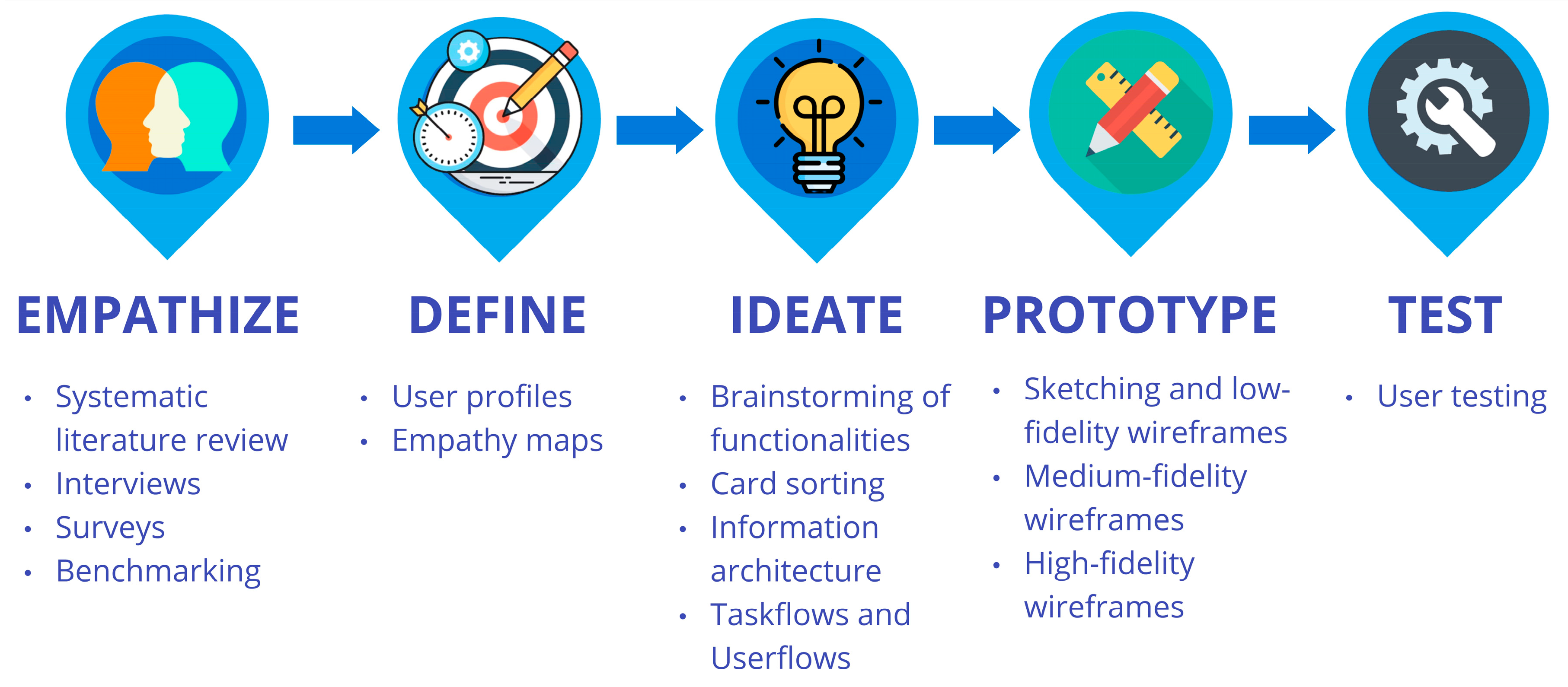
Figure 1 shows the activities we performed in each stage of Design Thinking to design EstApp. Table 1 provides a description of each activity performed [46].
Figure 1.
Design Thinking process and activities for creating EstApp.
Table 1.
Activities performed for creating EstApp.
4. EstApp Design Process
4.1. Empathize Phase: Activities and Results
In the Empathize stage, a qualitative study was conducted involving interviews with a total of 14 participants, 8 students (who learned or are learning statistics at university), and 6 professors (who teach statistics) from the Pontificia Universidad Católica de Valparaíso (PUCV), Chile. The purpose of these interviews was to gain a deep understanding of users’ experiences, needs, and perceptions regarding the learning and teaching of descriptive statistics in the university context. Appendix A shows the questions asked in the interviews. The findings revealed that, while students value the applicability of statistics, they face significant challenges such as data interpretation and a lack of motivation stemming from unengaging methodologies. On the other hand, professors reported varied experiences in teaching the discipline, highlighting the main obstacles to be difficulty in motivating student participation and grounding abstract concepts.
Additionally, a survey was conducted involving 440 students from diverse undergraduate programs at PUCV, including business administration, computer science, accounting, bachelors of science, biology, social work, and statistics, among others. The objective of the survey was to understand the needs of users (upper-level students) related to learning statistics, as well as their motivations and frustrations when facing any course related to descriptive statistics. The open-ended questions allowed for the identification of concerns related to unintuitive interfaces, lack of practical exercises, and decontextualized applications. On the other hand, Likert-type questions revealed a marked interest in applications that incorporate examples related to the area of study, attractive visualizations, and the ability to generate data.
Furthermore, a comparative analysis (benchmarking) of existing applications and tools for learning and analyzing statistics was conducted. Table 2 shows the comparative analysis between the applications Kahoot [34], Mentimeter [35], Codap [36], Rossmanchance [37], Fathom [24], and ArtofStat [38] considering 3 criteria:
Table 2.
Benchmarking results (“good” (green color), “fairly good” (yellow color), and “bad” (red color)).
- Usability: high level (intuitive and easy-to-use interface), medium level (slightly confusing interface), low level (non-intuitive interface, difficult to use).
- Language: high level (use of non-technical language that is easy to understand for non-experts), medium level (use of some technical concepts to explain), low level (use of technical and specific language, difficult to understand for those who do not know statistics).
- Design: high level (pleasant and aesthetic interface), medium level (interface with some visually annoying elements), low level (unattractive and unfriendly interface for the user).
The results indicated that, while some applications like Kahoot [34] and Mentimeter [35] facilitate learning in the classroom, they lack advanced statistical functions. On the other hand, tools like Codap [36], Fathom [24], Rossmanchance [37], and ArtofStats [38] allow for data analysis but have unintuitive interfaces and a high degree of technicality.
Collectively, the findings from the Empathize phase provided a deep understanding of the needs, challenges, and motivations of students and professors regarding the learning and teaching of descriptive statistics. This information was useful for defining user profiles, empathy maps, and key requirements of the EstApp application in subsequent design process phases.
4.2. Define Phase: Activities and Results
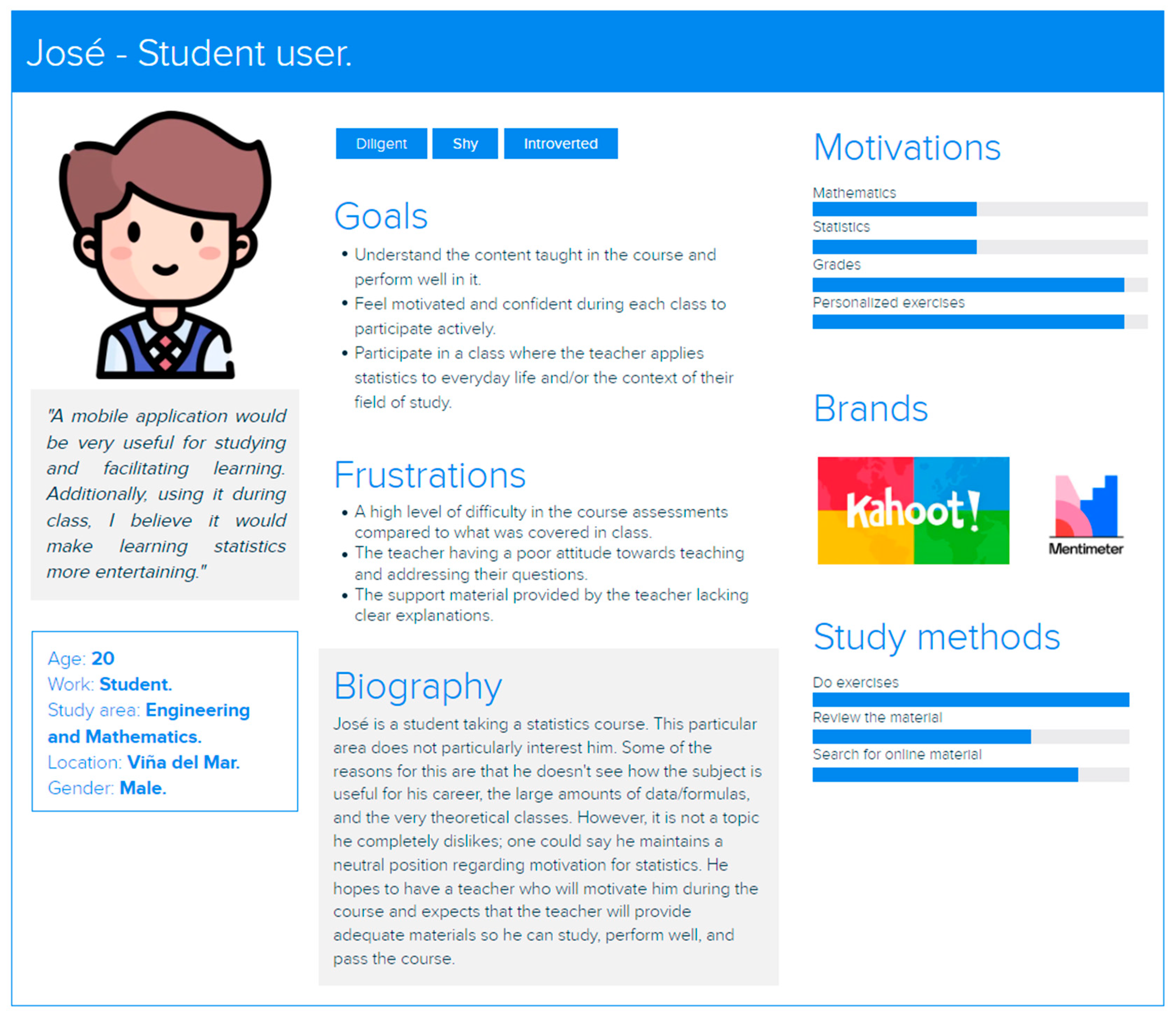
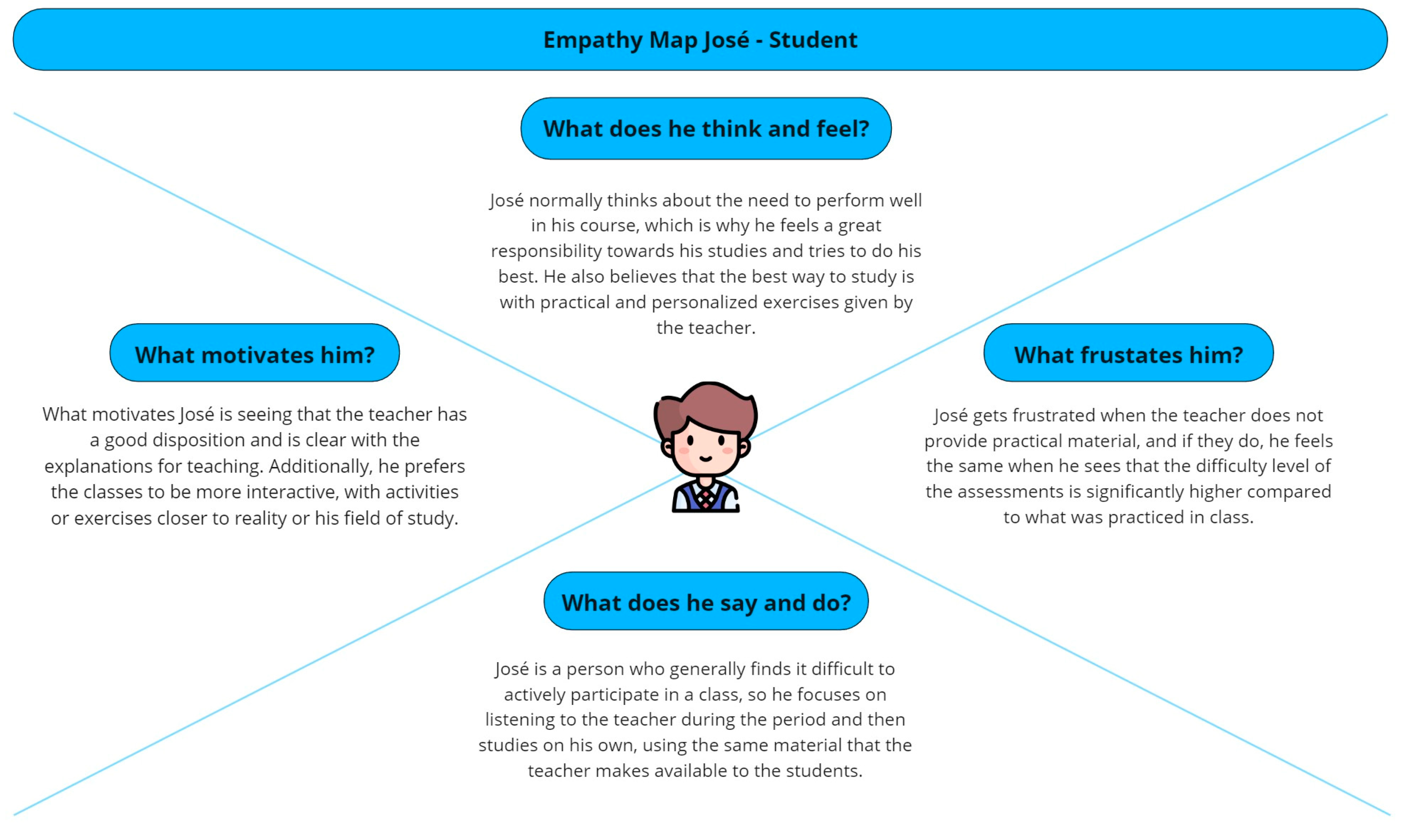
During the Define stage, we developed two user profiles and two empathy maps, one for the student and one for the professor, to accurately capture their needs and expectations regarding the learning and teaching of statistics. The user profiles and empathy maps were created based on detailed information gathered through interviews and surveys, which provided a comprehensive view of the characteristics, challenges, motivations, and goals of both groups. For the students, the profile reflected aspects such as their motivations, study methods, technological skills, and the difficulties they face in understanding statistical concepts. On the other hand, the professor’s profile focused on their teaching methods, the need for tools that facilitate the teaching of statistical content, and the challenges they face in teaching statistics.
The empathy maps complemented the profiles by deeply exploring the feelings, thoughts, motivations, behaviors, and concerns of students and professors, highlighting how these factors influence their educational experience. This information was crucial for guiding the UX design of the “EstApp”, to include functionalities that effectively responded to the identified needs. Figure 2 shows the “student” user profile, while Figure 3 shows the empathy map for the same profile.
Figure 2.
“Student” user profile.
Figure 3.
“Student” empathy map.
4.3. Ideate Phase: Activities and Results
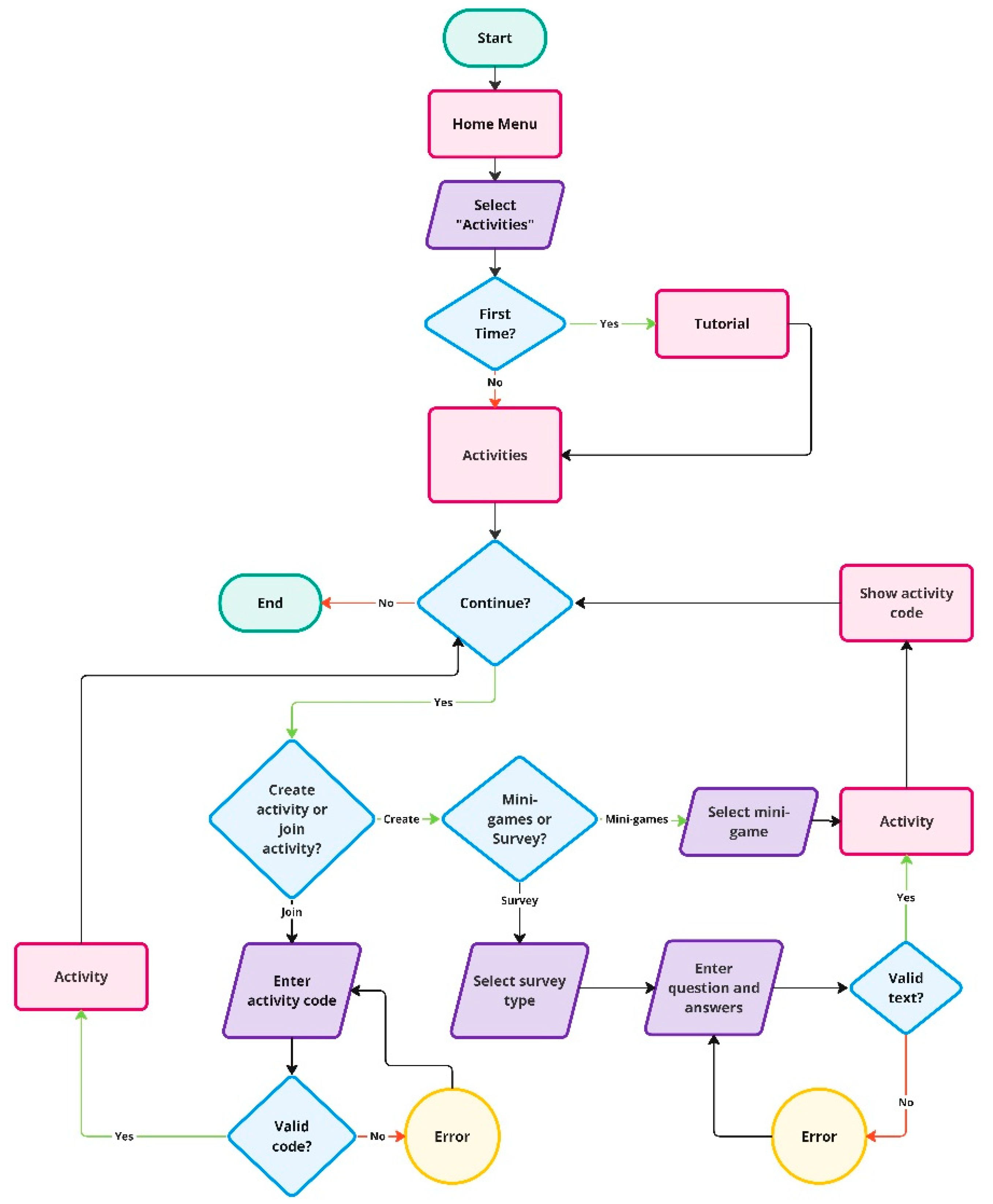
In the Ideation stage, we conducted a brainstorming session with the goal of identifying and detailing the key functionalities of “EstApp”. As a result of this activity, 13 functionalities were identified and extensively analyzed and detailed. From these functionalities, we decided to design EstApp in three versions, free, light paid, and premium paid, allowing different levels of access according to the needs and resources of the users (teachers and professors). Appendix B shows the results obtained after the brainstorming session. Additionally, an open card sorting exercise was performed using 18 cards (based on information related to the key functionalities identified in the brainstorming), with the participation of 82 representative undergraduate students, which effectively organized and structured the application’s information. The results of this card sorting were crucial for creating the information architecture of “EstApp”. Appendix C shows the information architecture created. Finally, five specific userflows were designed for four of the functionalities considered most valuable and attractive for the first version of the application: the Intelligent Assistant (IA tutor), the Data Visualizer, the Probability Calculator, and the Data Generator. This approach ensured that the most impactful and useful functionalities were prioritized in the initial development, enhancing the UX. Figure 4 shows the userflow designed for the “Data Generator” functionality.
Figure 4.
Userflows for “Data Generator” functionality.
4.4. Prototype Phase: Activities and Results
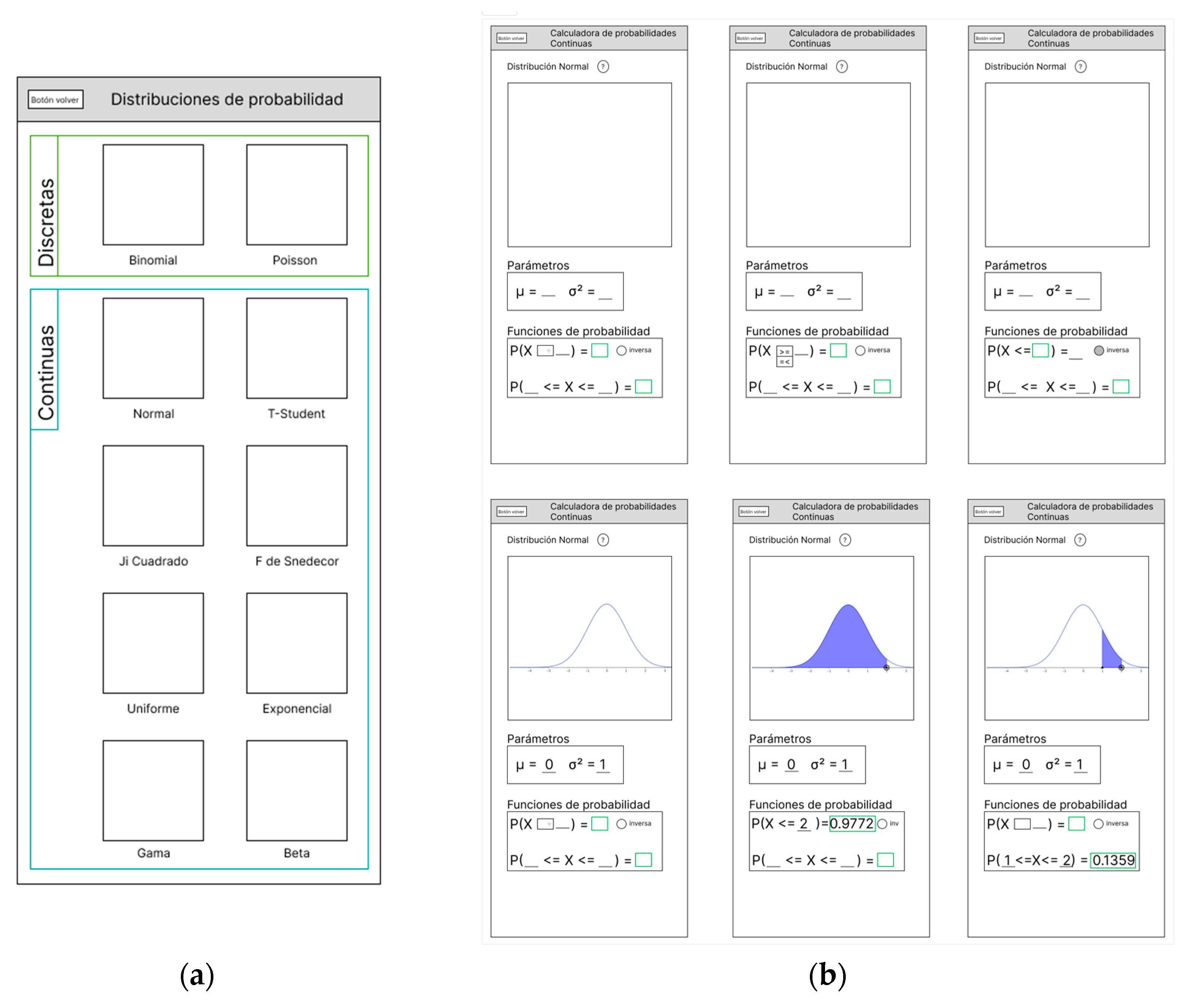
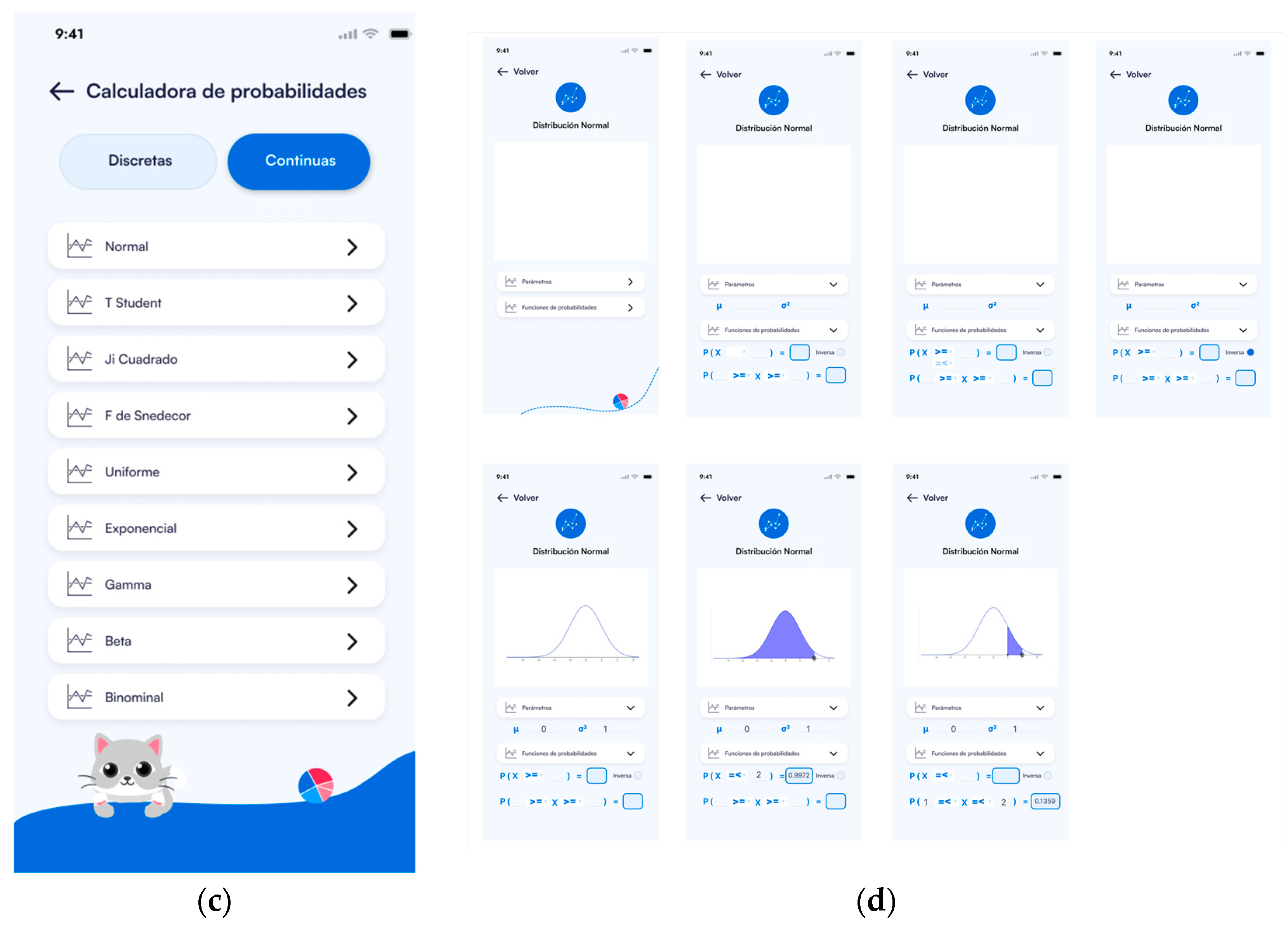
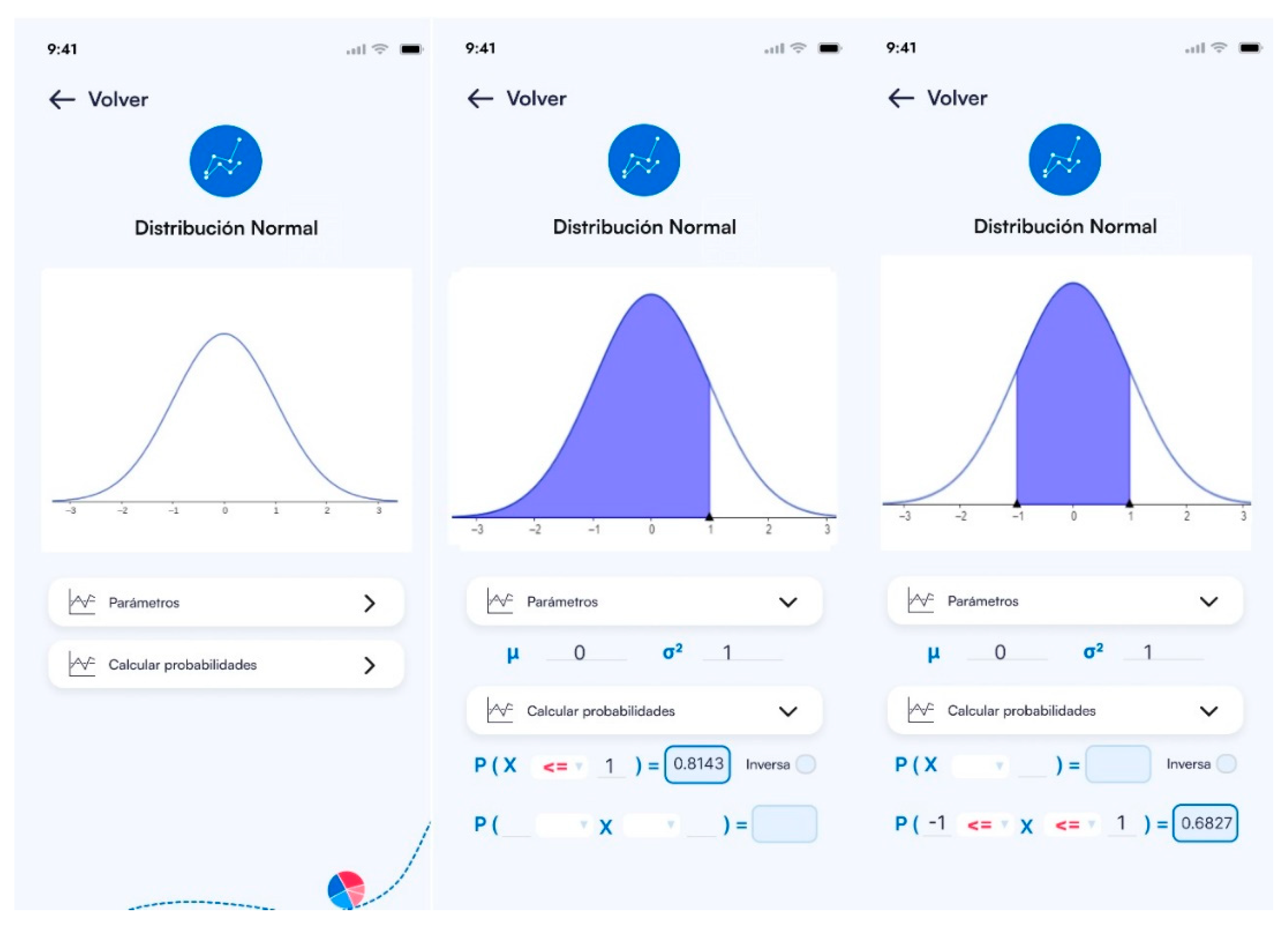
During the Prototyping phase, we began the process of visually representing the ideas generated during the Ideation phase, starting with the creation of low-fidelity wireframes. These initial wireframes served as basic sketches that captured the general structure and flow of the four most valuable functionalities identified: Probability Calculator, Data Generator, Data Visualizer, AI Tutor, and Report Generation. The low-fidelity wireframes focused on establishing the layout and navigation without complex graphic details, facilitating rapid iteration and adjustment of the initial concepts. Subsequently, we moved on to the creation of digital wireframes in medium fidelity using the Figma tool. These wireframes included more details, such as basic iconography and visual hierarchy, providing a closer look at what the final application would look like. Finally, high-fidelity wireframes were developed, integrating all the visual elements, including colors, final typography, and interactive behaviors, closely resembling the final product. Figure 5 illustrates an example of the prototyping process for the Probability Calculator functionality, highlighting the design evolution from its initial conception to the final version.

Figure 5.
Prototyping process for the “Probability Calculator” functionality. (a) Medium-fidelity: Probability Calculator—menu. (b) Medium-fidelity: Probability calculator—continuous variables, normal distribution. (c) High-fidelity: Probability Calculator—menu. (d) High-fidelity: Probability Calculator—continuous variables, normal distribution.
4.5. Test Phase: Activities and Results
During the Test stage and to identify areas for improvement in “EstApp”, we conducted a user test with undergraduate students who have taken at least one statistics course. The test consisted of 25 questions, divided into 7 demographic questions, 3 open-ended questions for 4 scenarios (Question 1: Do you understand the functionality presented in the wireframes?; Question 2: Regarding the graphs shown, do you understand the information displayed?; and Question 3: Which elements did you find confusing?) and a final questionnaire to assess the students’ perceptions and experiences. The demographic questions aimed to identify the participants and their level of knowledge in statistics along with the educational support tools they had previously used. For the scenarios, we used the high-fidelity wireframes designed in the previous Prototyping stage, evaluating the following functionalities: (1) Probability Calculator; (2) Data Generator; (3) Data Visualizer: Histogram; and (4) Data Visualizer: Boxplot.
The test was conducted in person at the facilities of the Pontificia Universidad Católica de Valparaíso with the help of Google Forms. A total of 17 students participated. Of the participants, 88.3% were students of statistical engineering and 11.8% were from the mathematics area. Most of the students who participated in the test were in their 6th semester (35.3%) and 9th semester (23.5%). Of these students, the majority (87.5%) had taken at least two statistics courses. To learn about the educational support tools the students used inside and outside of class, a question was included with some of the options obtained from benchmarking and other known platforms (see Section 4, Section 4.1). The most used support tools by the students were Wolfram Alpha (94.1%) and Geogebra (88.2%), followed by Kahoot (41.2%) and Rpubs (23.5%), while Brilliant and Mentimeter were not used.
In “Scenario 1: Probability Calculator” (see Appendix D, Figure A3), 94.1% of the students clearly understood how to enter the necessary parameters and how to interpret the resulting graph from a binomial distribution. Only 5.9% showed limited understanding. Additionally, 64.7% found no confusing elements in the interface, 11.8% mentioned the lack of textual definitions for the variables, and another 11.8% expressed confusion related to the colors and graphical presentation. For “Scenario 2: Data Generator” (see Appendix D, Figure A4), 82.4% of the students had a positive opinion about the design, navigation, and terminology. However, 29.4% suggested specific improvements, such as restructuring the probability presentation and reducing the excessive use of the color blue in the design. Regarding understanding the experiment, 81.25% of the students understood how to perform it, while 18.75% had doubts and suggestions about the presentation of results and parameters. A total of 46.7% had issues with the presentation of results and navigation for setting parameters.
In “Scenario 3: Data Visualizer: Histogram” (see Appendix D, Figure A5), 82.4% of the students had a positive opinion about the design and navigation, highlighting the clarity and ease of use. In total, 23.5% suggested specific improvements, such as adding more colors and better explanations of certain functionalities. A total of 17.6% were confused about the histogram functionality, and while 56.3% found no confusing elements, 43.8% mentioned problems with the interface and data presentation. Finally, in “Scenario 4: Data Visualizer: Boxplot” (see Appendix D, Figure A6), all students understood the functionality and the information presented. In total, 91.7% found no confusing elements, while only 8.3% suggested improvements to enhance interface comfort and clarify additional terminology.
The overall perception of the students with the application was mostly positive, showing that most of them correctly understood the functionalities displayed during the test and how to interact with the application. However, the students made suggestions for improving the application, including changing the way results are delivered in the application and minor interface changes, such as adding a greater variety of colors.
Before concluding the test, we conducted a questionnaire to evaluate the students’ perceptions and experiences after reviewing the designed wireframes, including the following questions:
- P1: Do you think the functionalities of the application are easy to use? (Likert-type question, scale from 1: very difficult to 7: very easy.)
- P2: Do you think the functionalities of the application are useful? (Likert-type question, scale from 1: very useless to 7: very useful.)
- P3: How do you feel about the amount of information displayed on each view/screen? (Open-ended question.)
- P4: What would you suggest improving the application? (Open-ended question.)
- P5: Do you think the application could be useful for probability and statistics subjects? Why? (Open-ended question.)
Regarding question P1, most users found the application’s functionalities easy to use, with 94.1% indicating that the application was easy or very easy to use. Regarding question P2, all participants (100%) found the functionalities of the application very useful. In relation to question P3, 43.8% of the students considered the amount of information shown to be sufficient and accurate; 25.0% of the students mentioned that the information was clear and understandable, and 18.8% of the students had a generally positive perception of the amount of information, highlighting its usefulness and speed for working. Finally, 12.5% of the students suggested improvements, especially in the presentation of the histogram charts and the inclusion of more functionalities.
Regarding question P4 (suggestions for improving the application), 35.3% of the students considered the application complete, easy to use, and had no specific suggestions for improvement. In total, 29.4% of participants suggested improvements in visual presentation, such as changing the color palette, improving typography, and adding more visual elements, while 35.3% of users suggested adding functionalities or features such as rewards, result summaries, additional explanations, sections for data cleaning, and customization of charts.
Finally, in relation to question P5, nearly half of the students (47.1%) considered the application useful for understanding charts and data analysis. A total of 23.5% of the students mentioned the accessibility and practicality of the application on mobile devices as a significant benefit. Still, 29.4% of the students indicated that the application was especially useful for basic levels of statistics and probability, highlighting its utility in primary and secondary education.
5. Results: EstApp
The “EstApp” application was designed with the aim of improving the teaching of descriptive statistics at university level by providing an interactive and user-friendly interface to facilitate the understanding of complex concepts. A module has been designed for data collection through random simulators that emulate games of chance, such as flipping a coin, spinning roulette wheels, and drawing cards. This functionality not only facilitates the generation of data for subsequent analysis but also adds a playful component to the learning process, motivating students to actively participate. Each student can have a profile that evolves as they engage in game-based activities, like content progression in platforms like “Duolingo”. Additionally, we have designed a module that allows the configuration of surveys to collect student data through multiple-choice, open-ended, and true or false questions, among others. These data are input for visualization through graphs generated automatically through the application.
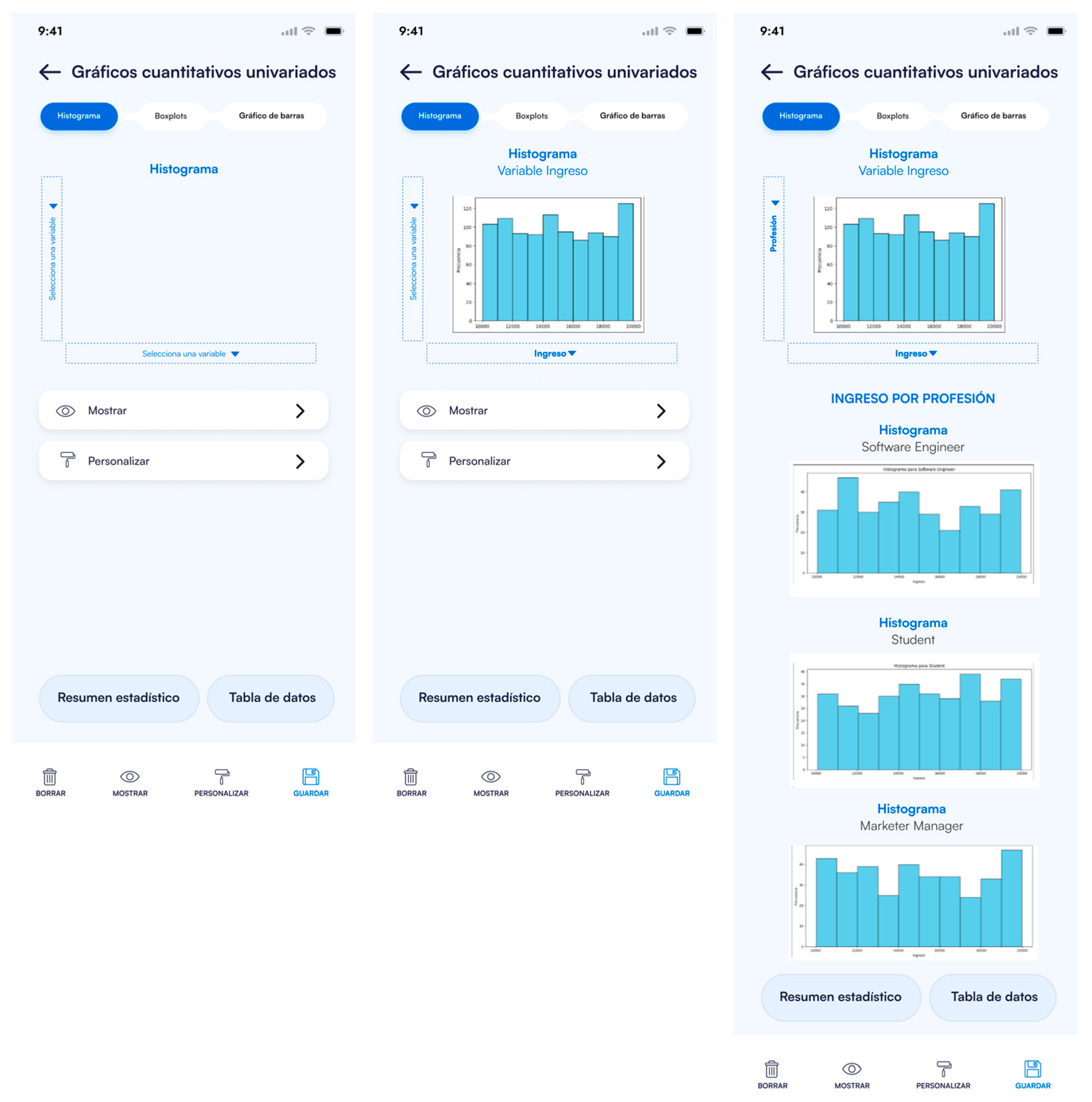
On the other hand, “EstApp” features a chart generator that allows for varied data visualization. Among the types of charts available are bar and pie charts for qualitative variables, histograms, and box plots for quantitative variables. This generator can graph up to five variables simultaneously, like the visualization capabilities of CODAP. Furthermore, we believe it is useful to incorporate a function to support the loading of real or simulated databases by the teacher, allowing the use of preexisting data as inputs for specific analyses.
As support for students, we have designed a section dedicated to the interaction and deduction of statistical formulas, organized by macro content areas such as descriptive statistics, probabilities, and inference. This functionality will help students better understand the formulas and their applications in different contexts. Along with this, a probability calculator was designed to find values and quantiles associated with common probability distributions in introductory statistics courses. This tool is inspired by probability calculators like GeoGebra’s. Finally, given the significant progress and use of artificial intelligence tools, we believe it is useful to support student learning with a virtual tutor. We designed a chat-style artificial intelligence tutor that allows students to interact and delve into the content of interest. Below, the main features of the application are described in detail, accompanied by screenshots to illustrate its different sections.
5.1. Probability Calculator
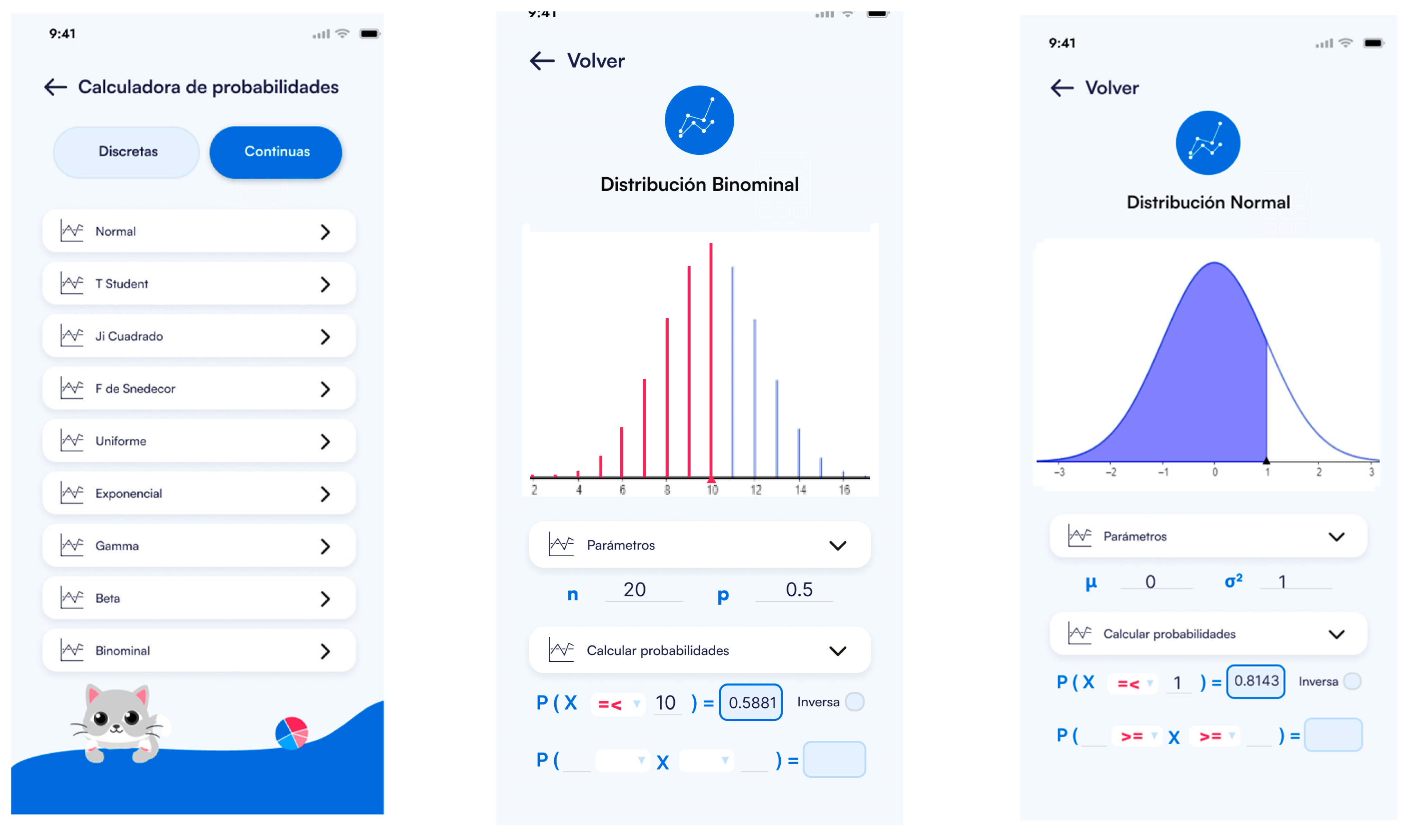
One of the remarkable features of EstApp is the Probability Calculator, which allows users to calculate probabilities and quantiles for a variety of statistical distributions. Users can input specific parameters for each distribution and select different inequality options to calculate the corresponding probabilities (see Figure 6).
Figure 6.
EstApp “Probability Calculator” functionality.
5.2. Data Generator
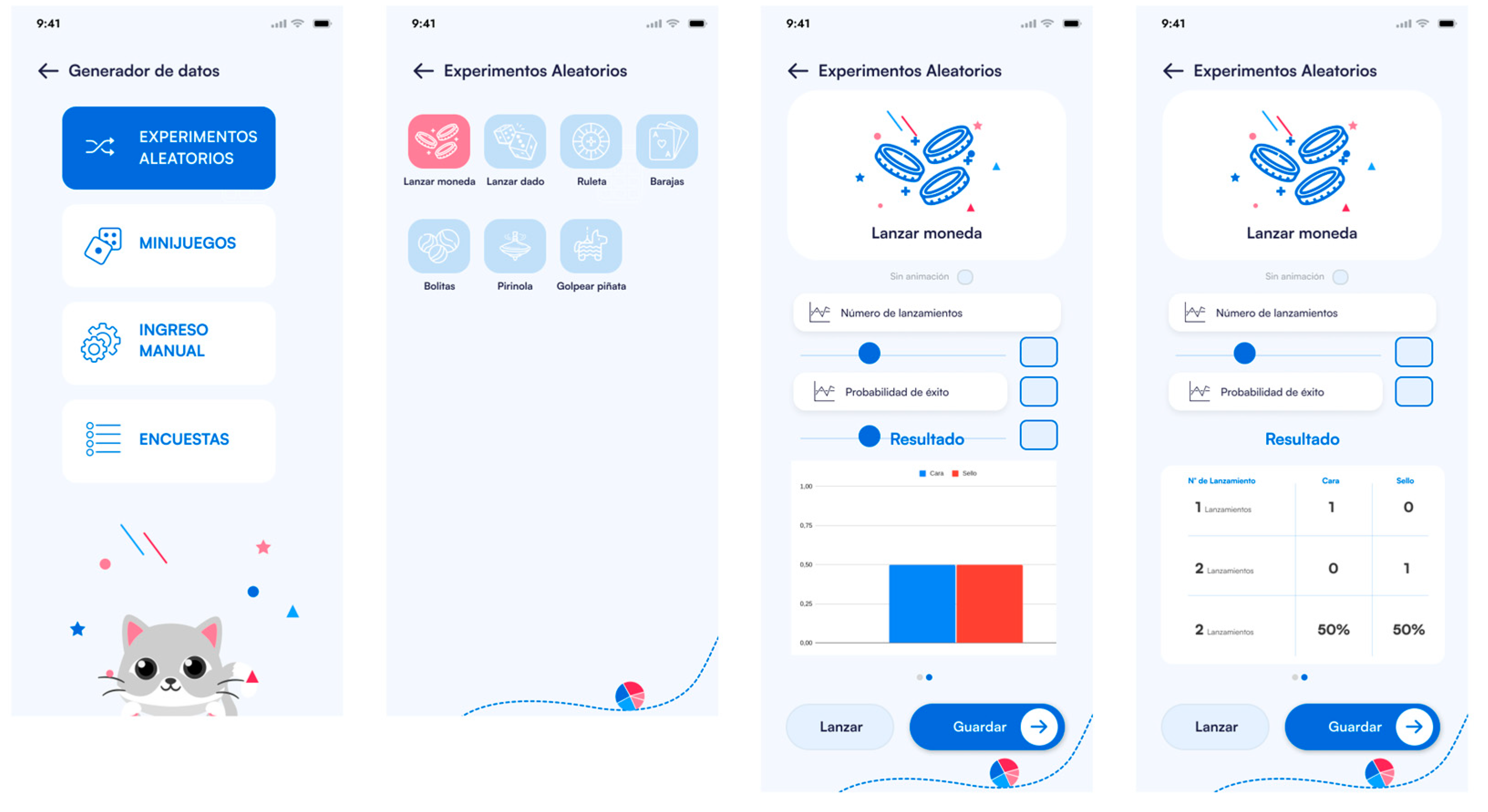
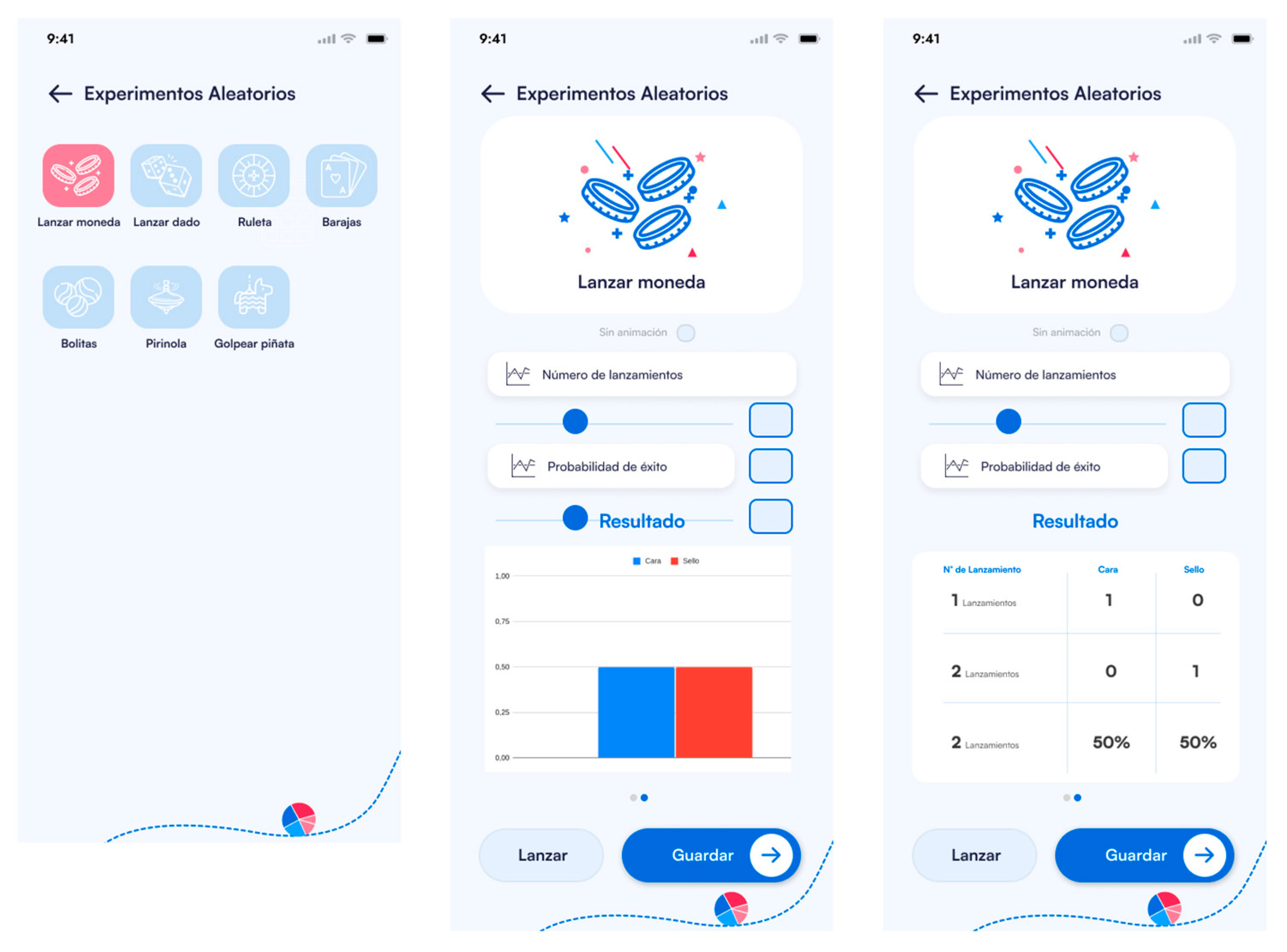
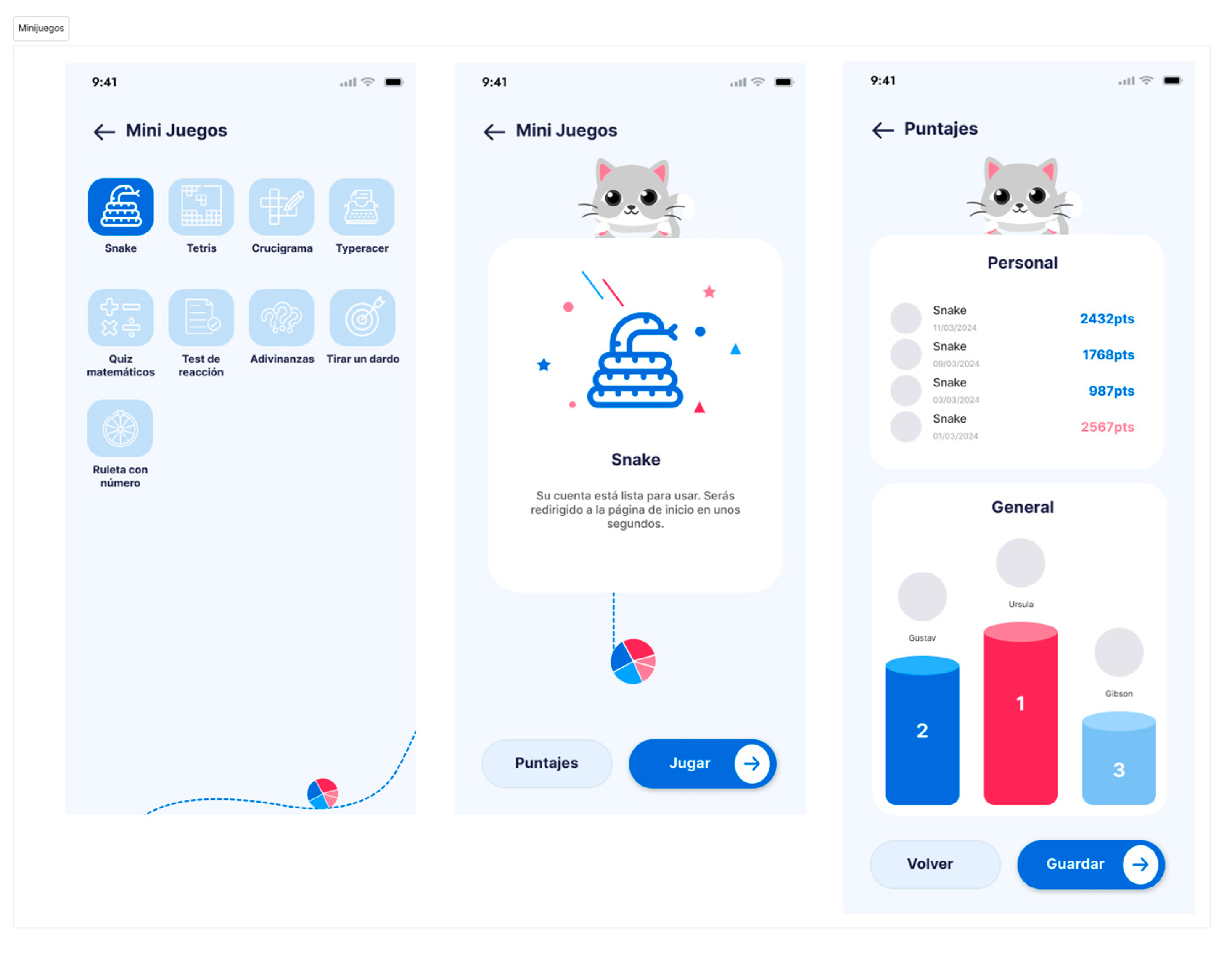
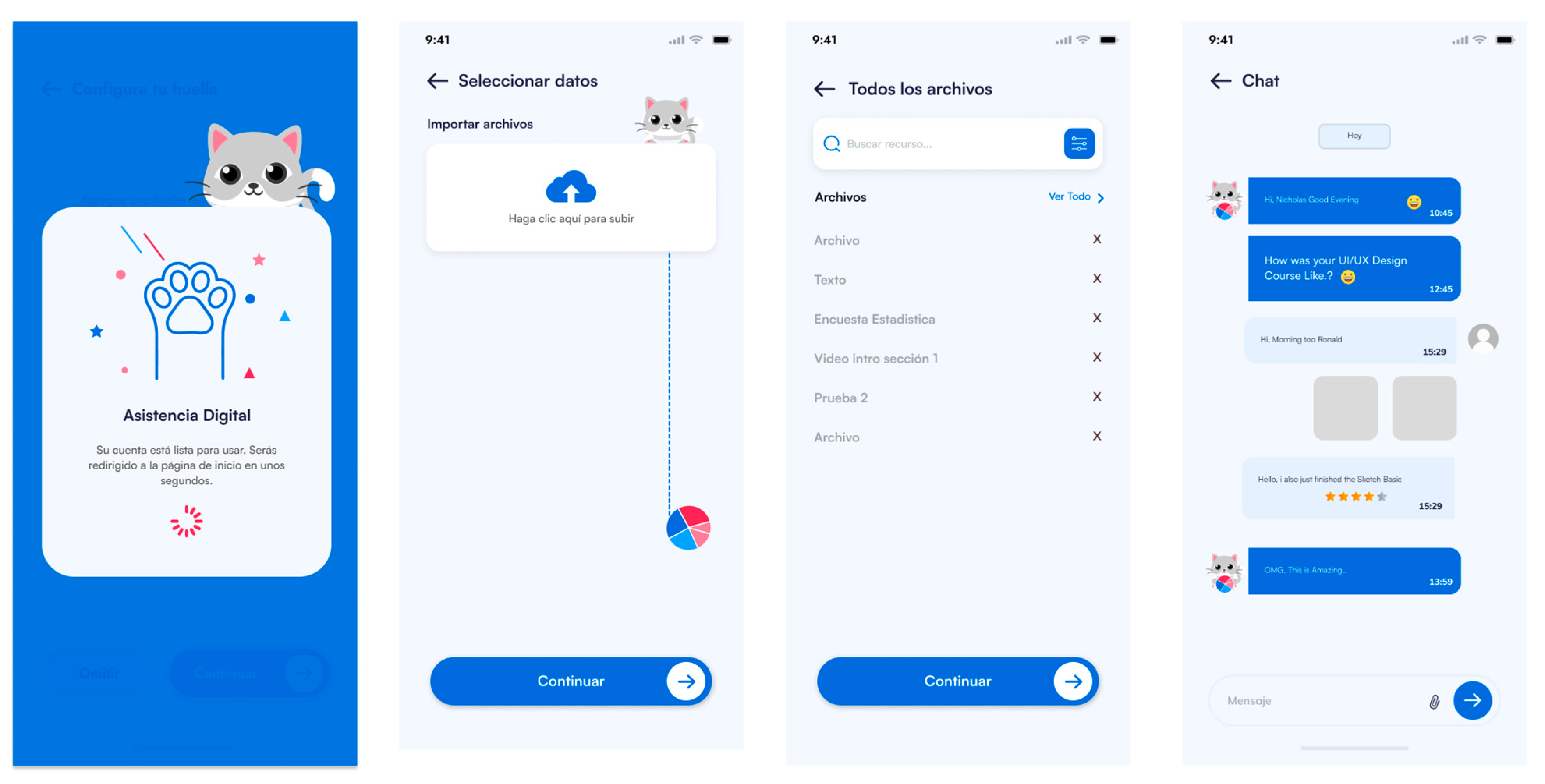
The Data Generator in EstApp includes random experiments and mini-games designed to facilitate the understanding of statistical concepts through data simulation. Available experiments included coin tosses, dice rolls, roulette, card selection, and ball drawing. The mini-games included options such as Snake, Tetris, crosswords, math quizzes, reaction tests, and dart throws, generating detailed statistics on user performance (Figure 7 and Figure 8).
Figure 7.
EstApp “Data Generator” functionality, random experiments.
Figure 8.
EstApp “Data Generator” functionality, mini-games.
5.3. Data Visualizer
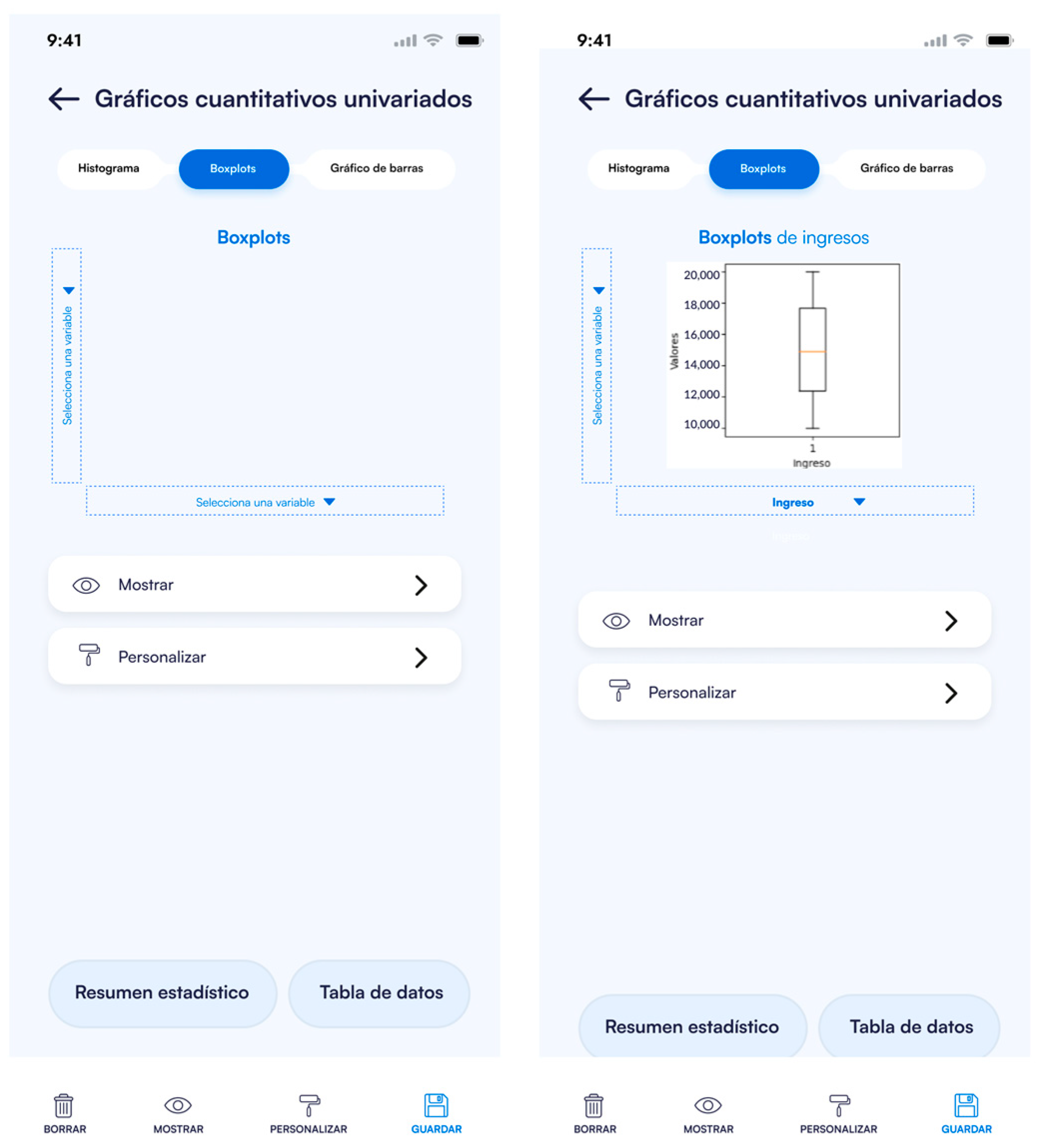
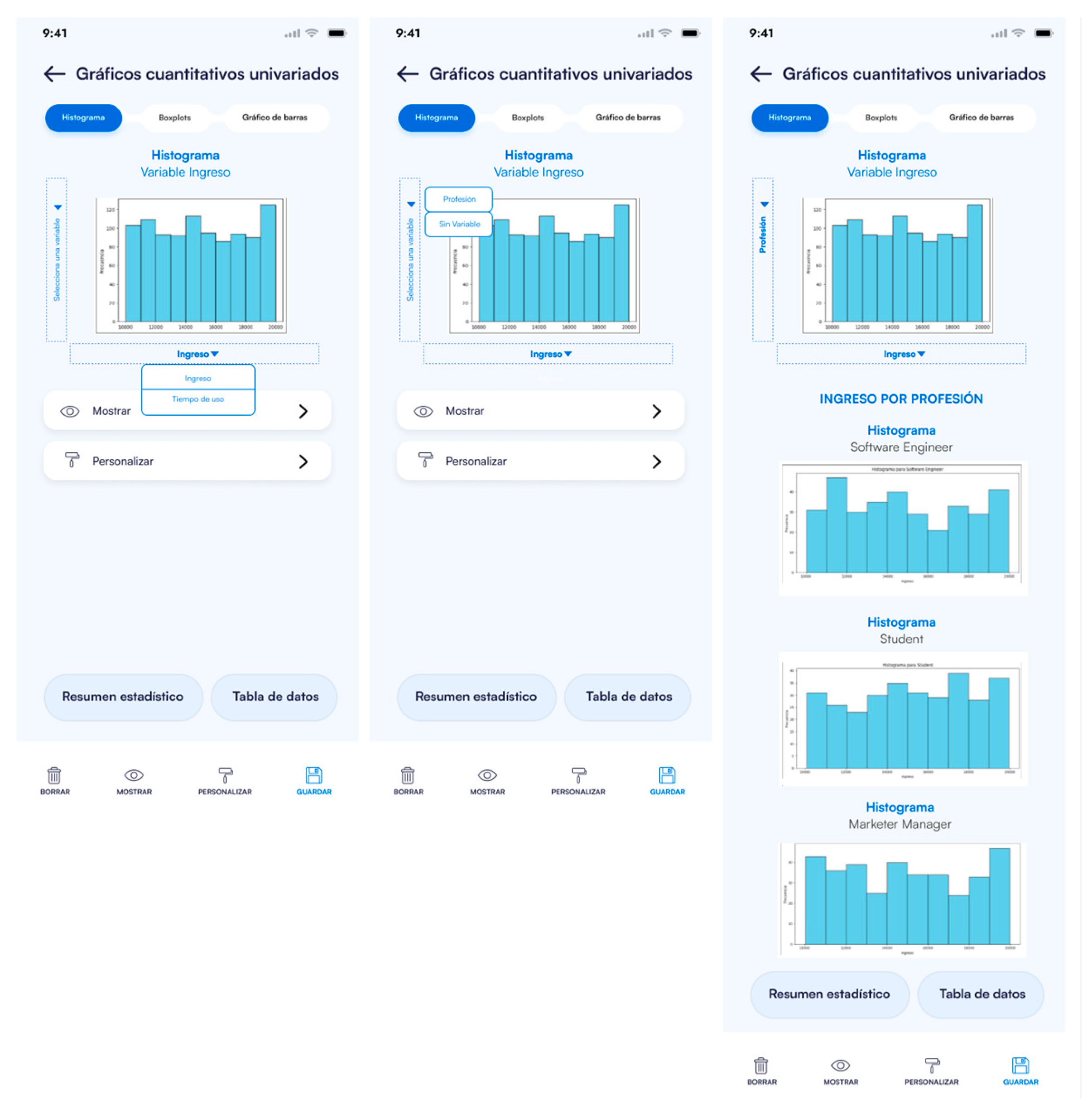
EstApp’s Data Visualizer allows users to import files in TXT, CSV, and Excel formats or data from the “Data Generator” module to generate various types of charts. Available charts include pie charts for categorical variables, histograms, box plots, and bar charts, among others. This module provides customization options and allows saving the charts in different image formats (Figure 9).
Figure 9.
EstApp “Data Visualizer” functionality.
5.4. AI Tutor and Report Generation
EstApp includes a chat-style AI Tutor that allows students to examine deeper into content and resolve specific questions. The AI Tutor will answer questions related to concepts, data, and statistical exercises. Internally, the application will use external AI services to answer students’ questions. Students will be able to interact with the tutor in a chat format, asking about formulas, interpretations of graphs, definitions of statistical terms, or steps to solve problems. Students will also be able to ask the AI Tutor about statistical data types, allowing them to clarify concepts and receive detailed explanations in real time, which facilitates immediate understanding of complex topics. In addition, students will be able to upload documents in PDF format and ask the AI Tutor about the content, such as asking it to summarize sections or explain specific concepts displayed in the document. Additionally, the application generates individual and group reports on the usage and progress in learning activities, providing valuable insights for teachers and professors (Figure 10).
Figure 10.
EstApp “AI Tutor and Report Generation” functionality.
6. Discussions
6.1. EstApp’s Functionalities and Their Impact on Education
To design EstApp, we discussed a variety of functionalities to include, focusing on designing those we thought most useful and valuable for teaching and learning statistics. Table 3 shows the functionalities designed for EstApp, along with the technical description of each and the potential impact they could have on students’ education in statistics.
Table 3.
Technical description and impact on education of EstApp functionalities.
On the other hand, the use of EstApp enables professors to implement modern and innovative teaching methodologies (such as constructivism [6] and experiential learning [6]). For instance, active learning is encouraged, allowing students to engage in their own learning process and deepen their understanding through interaction with EstApp features and real-world problem-solving. The “Data Generator”, “Probability Calculator”, and “Data Visualizer” features allow students to directly interact with statistical concepts by generating real-time data and visualizing results. This promotes “learning by doing” rather than merely receiving information passively, and it enables them to work with real or simulated data, analyze graphs, and practically comprehend relationships between variables. In addition, the learning process becomes adaptive and personalized using the AI Tutor, as the interaction is designed to the student’s needs and guides them in reflecting on their incorrect responses.
As mentioned in Section 2.3, Ben-Zvi et al. [6] identified six design considerations for creating learning environments that promote the development of statistical thinking. For the design of EstApp, we applied these six guidelines to propose features that facilitate the students’ learning process. Table 4 shows a mapping between the six design characteristics proposed by Ben-Zvi et al. [6] and the functionalities designed in EstApp.
Table 4.
Mapping between the six design characteristics proposed by Ben-Zvi et al. [6] and the functionalities designed in EstApp.
6.2. The Iterative Process for Designing “EstApp”
During the Design Thinking process, we applied the five phases by carrying out various activities (see Section 3 and Section 4). To ensure the correct application of each phase, we collaborated with diverse stakeholders, including university students, statistics professors, IT professionals, UI/UX designers, and researchers.
For the Empathize phase, we conducted interviews and surveys with university students and professors to understand their difficulties and expectations regarding learning statistics. To validate the information obtained, we performed a qualitative analysis of the responses, allowing us to identify patterns and recurring problems. In the Define phase, we analyzed the identified patterns to define the main problems. To validate these problems, we conducted a second round of reviews with the participants, where we discussed preliminary problem definitions. This feedback helped confirm that the students’ and professors’ “pain points” and frustrations were correctly identified. Additionally, the definitions were reviewed by experts in pedagogy and interface design to ensure that the needs were adequately addressed.
For the Ideation phase, we generated multiple ideas for possible functionalities of the application. To validate these ideas, we conducted a brainstorming session with experts and end users. The results of this exercise helped confirm that the selected functionalities (such as the Probability Calculator, Data Visualizer, and AI Tutor) were relevant and appealing to both students and professors. This validation also included a technical feasibility analysis with the development team. During the Prototyping phase, a team of UX/UI designers created low-, medium-, and high-fidelity wireframes to represent EstApp’s functionalities. The medium-fidelity wireframes were validated through quick usability tests with real users, who provided feedback on the clarity and navigation of the design. Finally, for the Testing phase, the high-fidelity wireframes were validated through formal usability tests. In these tests, students and professors interacted with the prototype, confirming that the interface was intuitive and that the functionalities aligned with their expectations and needs.
Compared to applications like Kahoot and Mentimeter, which focus primarily on immediate interaction and participation through live quizzes and surveys, EstApp offers a more comprehensive and in-depth experience for teaching statistics by providing tools such as the Probability Calculator and Data Visualizer. These functionalities are designed not only to capture students’ attention but also to improve their statistical reasoning through interactive data visualization and real-time probabilistic calculations. On the other hand, while tools like Codap, Rossmanchance, Fathom, and ArtofStat also include simulations and visualizations, EstApp stands out for its user-friendly and interactive interface that incorporates gamification elements, as well as its AI Tutor, which assists students in their learning process.
6.3. Lessons Learned and Challenges Encountered
The design of any application involves a series of challenges and experiences. When designing EstApp using Design Thinking, we had to learn from other disciplines (statistics and UX/UI design) and we reaffirmed the importance of including end users throughout the design process. Table 5 and Table 6 provide a summary of the lessons learned and the challenges encountered (respectively) in various aspects related to the design of EstApp.
Table 5.
Lessons learned from designing EstApp using Design Thinking.
Table 6.
Challenges faced when designing EstApp using Design Thinking.
6.4. Limitations and Opportunities for Improvement
Although we conducted 14 interviews, surveyed 440 students, and performed a user test with 17 students to validate EstApp, the sample was limited to the university context of the Pontificia Universidad Católica de Valparaíso, Chile. This may limit the generalizability of the results to other university environments or to students with different cultural and educational backgrounds. However, as the first version of EstApp, we consider that we have achieved good results, and its functionalities could be applicable in other contexts. With respect to functionalities, we prioritized the “Probability Calculator”, “Data Generator”, “Data Visualizer”, “AI Tutor”, and “Report Generation” as the most valuable features for students and professors. However, key functionalities such as advanced data manipulation or statistical inference analysis may not have been considered. This could limit the use of EstApp for more advanced topics within statistics courses. On the other hand, while we conducted usability/UX tests, these were limited to a prototype version of EstApp. We have yet to test it in a long-term educational setting, which may reveal other challenges or areas for improvement when used continuously.
For a future version of EstApp, it would be useful to conduct studies in different academic contexts, including universities in other countries and regions (and in languages other than Spanish), to validate the application’s usefulness for a broader audience. The user sample could also be expanded to include individuals with varying levels of statistical expertise, including students from different disciplines.
Additionally, future versions could incorporate advanced functionalities, such as inferential statistical analysis, linear regression, and tools for working with large datasets. These improvements would extend the application’s use to more advanced statistics courses. Another opportunity for improvement would be to integrate EstApp with learning management systems (LMS, such as Moodle [47]), allowing professors to manage student progress centrally.
Finally, it is crucial to conduct studies in real educational settings, testing the application’s effectiveness over several semesters. This would allow for observations of how the app impacts student learning and motivation in the long term and identify potential issues or areas of improvement not discovered during the initial usability tests. Specifically, to evaluate the long-term effects of EstApp on academic performance and motivation, it is essential to collect and analyze empirical data to support its effectiveness. One approach could be to define control groups (who do not use EstApp) and experimental groups (who use the new application) within a course, and track over time how the application influences knowledge retention, statistical reasoning, performance, and motivation. Pre- and post-assessments could be conducted using questionnaires to evaluate technology acceptance (TAM [48]) or scales to measure motivation [49], assessing factors such as intrinsic motivation, extrinsic motivation, and amotivation. Additionally, by comparing these results with those obtained by users of other applications, we could strengthen the argument that EstApp not only improves the learning of statistical concepts but also offers a more personalized and tailored experience to meet students’ individual needs.
7. Conclusions and Future Work
A user-centered approach guided the development of the “EstApp” application. This approach, which involved students and professors in all stages of the design, from the Empathize to the Test phase, has been instrumental in creating an educational tool that not only meets the technical needs of teaching statistics but also enhances students’ learning experiences. This should bring reassurance about the effectiveness of “EstApp” in the educational context.
The results obtained from the user tests highlight the intuitiveness and usefulness of “EstApp”, especially in functionalities such as the Data Generator and the Data Visualizer, where 94.1% of users indicated that the application was easy or very easy to use and all of them found the functionalities of the application very useful (see Section 4.5). However, areas for improvement were identified, mainly in aspects related to the user interface and the presentation of results (29.4% of participants suggested improvements in visual presentation, such as changing the color palette, improving typography, and adding more visual elements, see Section 4.5), which underlines the importance of continuous feedback from users to iterate on the application’s design. In comparative terms, our current solution is favorably positioned against other educational tools by offering a unique combination of interactive simulations, advanced data visualization, and an artificial intelligence-based tutor, contributing to deeper and more personalized statistics learning.
Future development of “EstApp” will incorporate user-suggested enhancements, such as optimizing the color palette and expanding the available functionalities, including adding new chart types and analysis tools. In addition, integrating emerging technologies, such as augmented reality, will be explored to enrich the educational experience and facilitate understanding of complex statistical concepts. Another line of future work includes expanding the use of “EstApp” to other educational contexts, such as secondary education and vocational training programs, adapting the interface and functionalities to meet the specific needs of these new users. It is also proposed that longitudinal studies be conducted to assess the long-term impact of “EstApp” on students’ academic performances and motivation. Finally, integrating “EstApp” with existing learning management systems (LMS) is considered relevant (such as Moodle [47] and Google Classroom [50], among others). This would allow educators to easily incorporate the tool into their courses and track students’ progress in more detail. This step would open new opportunities for learning personalization and real-time content adaptation, maximizing the educational impact of the application.
Author Contributions
Conceptualization, D.Q. and F.R.; methodology, D.Q.; software, D.Q., F.R., J.O. and L.F.R.; validation, D.Q., L.F.R. and J.O.; formal analysis, D.Q. and J.O.; investigation, D.Q., F.R., J.D.-A. and F.P.; resources, D.Q. and F.R.; data curation, D.Q. and J.O.; writing—original draft preparation, D.Q., J.D.-A., F.P., J.O. and L.F.R.; writing—review and editing, D.Q.; visualization, D.Q.; supervision, D.Q.; project administration, D.Q. and F.R.; funding acquisition, D.Q., F.R., J.D.-A. and L.F.R. All authors have read and agreed to the published version of the manuscript.
Funding
Felipe Ruz and Daniela Quiñones are supported by Grant ANID, Chile, FONDEF IDeA I+D, Project No. ID24I10075. Luis Felipe Rojas is supported by Grant ANID BECAS/DOCTORADO NACIONAL, Chile, No. 21211272. Jaime Díaz-Arancibia is supported by Grant ANID, Chile, FONDECYT DE INICIACIÓN EN INVESTIGACIÓN, Project No. 11230141. The article was produced as part of the 2024 Research Group Support Fund awarded by the DARI of the Pontificia Universidad Católica del Perú (PUCP), No. DARI2024-HCI-DUXAIT.
Institutional Review Board Statement
The study was conducted in accordance with the ethical standards defined in the regulations of the Pontificia Universidad Católica de Valparaíso, Chile (protocol code BIOEPUCV-H 779-2024, date of approval: 4 June 2024), the Declaration of Bioethics and Human Rights of 2005 by UNESCO, and the ANID regulations for studies involving humans.
Informed Consent Statement
Informed consent was obtained from all subjects involved in the study.
Data Availability Statement
The original contributions presented in the study are included in the article, further inquiries can be directed to the corresponding author.
Acknowledgments
The authors would like to thank all the participants (experts, professors, academics, students, users, evaluators, and researchers) who were involved in the experiments for this study.
Conflicts of Interest
The authors declare no conflicts of interest. The funders had no role in the design of the study; in the collection, analyses, or interpretation of data; in the writing of the manuscript; or in the decision to publish the results.
Appendix A. Empathize Phase—Interview
Table A1.
Empathize phase: interview questions.
Table A1.
Empathize phase: interview questions.
| User Profile | Background Questions | “About Experience” Questions |
|---|---|---|
| Students |
|
|
| Professors |
|
|
Appendix B. Ideation Phase—Brainstorming
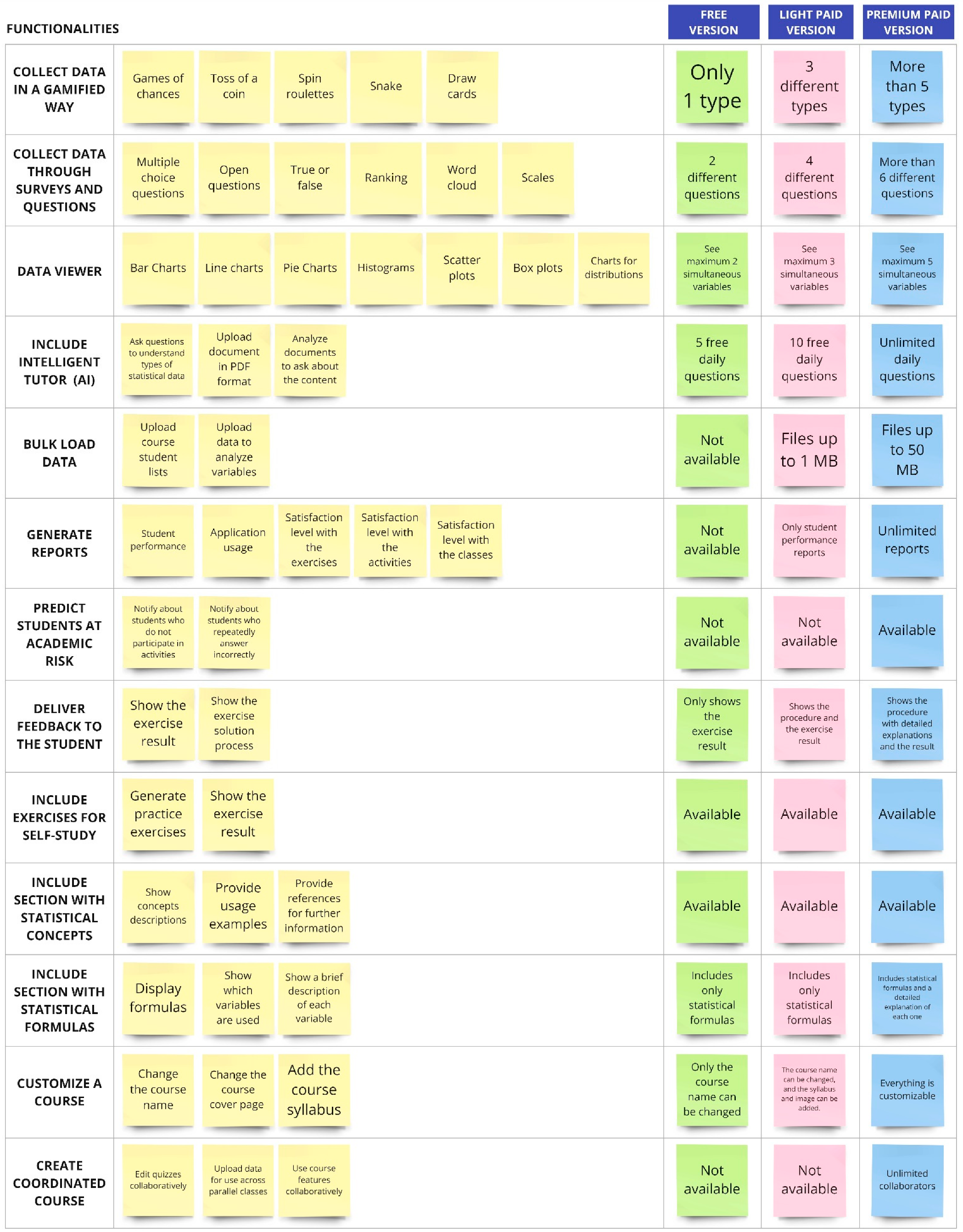
Figure A1.
Ideation phase: brainstorming results (functionalities).
Appendix C. Ideation Phase—Information Architecture
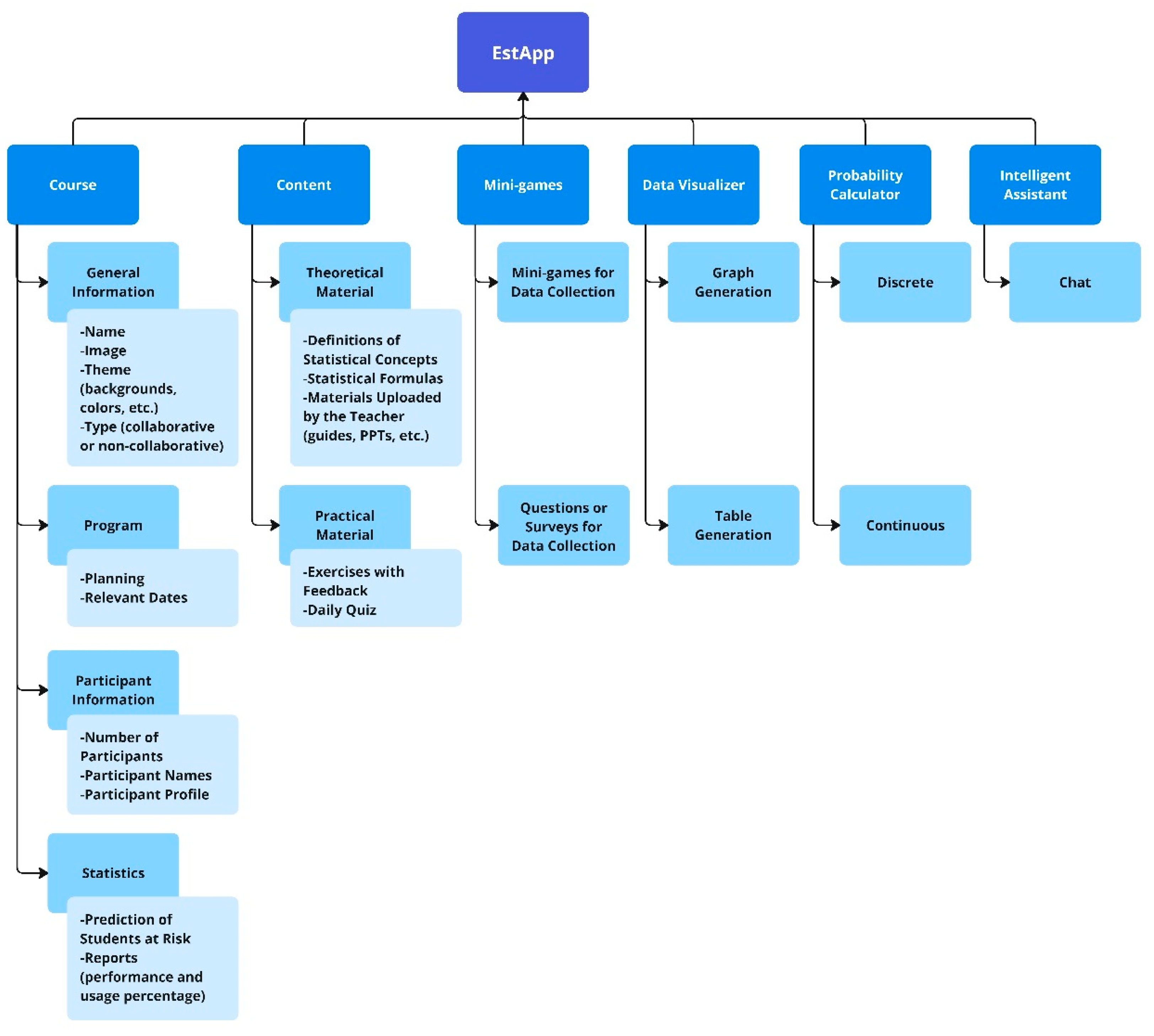
Figure A2.
Ideation phase: information architecture for EstApp.
Appendix D. Test Phase—User Testing Scenarios
Figure A3.
User test. Scenario 1: Probability Calculator.
Figure A4.
User test. Scenario 2: Data Generator.
Figure A5.
User test. Scenario 3: Data Visualizer: Histogram.
Figure A6.
User test. Scenario 4: Data Visualizer: Boxplot.
References
- Dewi, R.; Riyadi, R.; Siswanto, S. Learning process: Obstacles on statistical content. AIP Conf. Proc. 2022, 2566, 020005. [Google Scholar]
- Kurniawan, D.; Wahyuningsih, T. Analysis of student difficulties in statistics courses. Int. J. Trends Math. Educ. Res. 2018, 1, 53–55. [Google Scholar] [CrossRef]
- Hsu, J.L.; Chen, Y.-R. Integrating Big Data in Introductory Statistics Education-Challenges for Instructors and Students. In Proceedings of the Innovative Technologies and Learning: Third International Conference, ICITL 2020, Porto, Portugal, 23–25 November 2020; Proceedings 3. Springer: Berlin/Heidelberg, Germany, 2020; pp. 263–267. [Google Scholar]
- Alaiat, H.H.M. The Challenges and Difficulties Encountered by Computer Science Educators in Higher Education, Specifically Focusing on the Utilization of Chat GPT Technology in Libya. Bani Waleed Univ. J. Humanit. Appl. Sci. 2023, 8, 120–137. [Google Scholar]
- Ramoso, M.G.D.; Cruz, R.O.-D. Adapting to the new normal: Remote teaching challenges among educators in higher education. Eureka J. Educ. Res. 2024, 2, 98–107. [Google Scholar] [CrossRef]
- Ben-Zvi, D.; Makar, K.; Garfield, J. International Handbook of Research in Statistics Education; Springer: Berlin/Heidelberg, Germany, 2017; ISBN 3319661957. [Google Scholar]
- Ministerio de Educación Chile. Bases Curriculares Educación Básica; Gobierno de Chile: Santiago, Chile, 2012; Available online: https://bibliotecadigital.mineduc.cl/handle/20.500.12365/632 (accessed on 10 March 2024).
- Ministerio de Educación Chile. Bases Curriculares 7° a 2° Medio; Gobierno de Chile: Santiago, Chile, 2016; Available online: https://bibliotecadigital.mineduc.cl/handle/20.500.12365/654 (accessed on 10 March 2024).
- Ministerio de Educación Chile. Bases Curriculares 3° y 4°Medio; Gobierno de Chile: Santiago, Chile, 2019; Available online: https://bibliotecadigital.mineduc.cl/handle/20.500.12365/14364 (accessed on 10 March 2024).
- Bargagliotti, A.; Franklin, C.; Arnold, P.; Gould, R.; Johnson, S.; Perez, L.; Spangler, D.A. Pre-K–12 Guidelines for Assessment and Instruction in Statistics Education II (GAISE II): A Framework for Statistics and Data Science Education; American Statistical Association: Alexandria, VA, USA, 2020. [Google Scholar]
- Pfannkuch, M.; Budgett, S.; Fewster, R.; Fitch, M.; Pattenwise, S.; Wild, C.; Ziedins, I. Probability modeling and thinking: What can we learn from practice? Stat. Educ. Res. J. 2016, 15, 11–37. [Google Scholar] [CrossRef]
- Tintle, N.; Chance, B.L.; Cobb, G.W.; Rossman, A.J.; Roy, S.; Swanson, T.; VanderStoep, J. Introduction to Statistical Investigations; John Wiley & Sons: Hoboken, NJ, USA, 2016; ISBN 1119683459. [Google Scholar]
- Andre, M.; Lavicza, Z. Technology changing statistics education: Defining possibilities, opportunities and obligations. Electron. J. Math. Technol. 2019, 13, 253–264. [Google Scholar]
- Ben-Zvi, D.; Gravemeijer, K.; Ainley, J. Design of statistics learning environments. In International Handbook of Research in Statistics Education; Springer: Cham, Switzerland, 2018; pp. 473–502. [Google Scholar]
- Zieffler, A.; Garfield, J.; Fry, E. What is statistics education? In International Handbook of Research in Statistics Education; Springer: Cham, Switzerland, 2018; pp. 37–70. [Google Scholar]
- Biehler, R.; Ben-Zvi, D.; Bakker, A.; Makar, K. Technology for enhancing statistical reasoning at the school level. In Third International Handbook of Mathematics Education; Springer: New York, NY, USA, 2013; pp. 643–689. [Google Scholar]
- Burckhardt, P.; Nugent, R.; Genovese, C.R. Teaching statistical concepts and modern data analysis with a computing-integrated learning environment. J. Stat. Data Sci. Educ. 2021, 29, S61–S73. [Google Scholar] [CrossRef]
- Counsell, A.; Cribbie, R.A. Students’ Attitudes toward Learning Statistics with R. Psychol. Teach. Rev. 2020, 26, 36–56. [Google Scholar] [CrossRef]
- Ke, F.; Grabowski, B. Gameplaying for maths learning: Cooperative or not? Br. J. Educ. Technol. 2007, 38, 249–259. [Google Scholar] [CrossRef]
- Hmelo-Silver, C.E. Problem-based learning: What and how do students learn? Educ. Psychol. Rev. 2004, 16, 235–266. [Google Scholar] [CrossRef]
- Norman, D. The Design of Everyday Things: Revised and Expanded Edition; Basic Books: New York, NY, USA, 2013; ISBN 0465072992. [Google Scholar]
- ISO 9241-210; ISO 9241-210: 2010 Ergonomics of Human-System Interaction—Part 210: Human-Centred Design for Interactive Systems. International Standard; ISO: Geneva, Switzerland, 2019. Available online: https://www.iso.org/standard/77520.html (accessed on 5 June 2024).
- Statistics Education Research Group TinkerPlots Software. Available online: https://www.tinkerplots.com/ (accessed on 5 June 2024).
- The Concord Consortium Fathom Dynamic Data Software. Available online: https://fathom.concord.org/ (accessed on 5 June 2024).
- Gapminder Gapminder Tool. Available online: https://www.gapminder.org/ (accessed on 5 June 2024).
- Li, K.W. An empirical study on integrating technology into statistics classroom practice. J. Pedagog. Res. 2022, 6, 112–136. [Google Scholar] [CrossRef]
- Preece, J.; Rogers, Y.; Sharp, H. Interaction Design: Beyond Human-Computer Interaction; J. Wiley & Sons: Hoboken, NJ, USA, 2002. [Google Scholar]
- Hassenzahl, M.; Tractinsky, N. User experience-a research agenda. Behav. Inf. Technol. 2006, 25, 91–97. [Google Scholar] [CrossRef]
- O’Brien, H.L.; Toms, E.G. What is user engagement? A conceptual framework for defining user engagement with technology. J. Am. Soc. Inf. Sci. Technol. 2008, 59, 938–955. [Google Scholar] [CrossRef]
- Nielsen, J. Usability Engineering; Morgan Kaufmann Publishers Inc.: San Francisco, CA, USA, 1994; ISBN 9780080520292. [Google Scholar]
- Bano, M.; Zowghi, D.; Kearney, M.; Schuck, S.; Aubusson, P. Mobile learning for science and mathematics school education: A systematic review of empirical evidence. Comput. Educ. 2018, 121, 30–58. [Google Scholar] [CrossRef]
- Ivan, C.; Rumondor, P.C.B.; Ricky, M.Y.; Yossy, E.H.; Budiharto, W. Help the math town: Adaptive multiplayer math-science games using fuzzy logic. Procedia Comput. Sci. 2017, 116, 309–317. [Google Scholar] [CrossRef]
- Aker, J.C.; Ksoll, C. Call me educated: Evidence from a mobile phone experiment in Niger✰. Econ. Educ. Rev. 2019, 72, 239–257. [Google Scholar] [CrossRef]
- Kahoot! Kahoot! Available online: https://kahoot.com/ (accessed on 3 August 2024).
- Mentimeter Mentimeter. Available online: https://www.mentimeter.com/ (accessed on 3 August 2024).
- The Concord Consortium Common Online Data Analysis Platform (CODAP). Available online: https://codap.concord.org/ (accessed on 3 August 2024).
- Rossman/Chance Rossman/Chance Applet Collection 2021. Available online: https://www.rossmanchance.com/applets/index2021.html (accessed on 3 August 2024).
- Klingenberg, B. Art of Stat. Available online: https://artofstat.com/web-apps (accessed on 3 August 2024).
- Peing, X.L.; Liu, J.J.; Huang, M.Y. Online Interactive Dynamic Statistical Education Method, Platform, Device and Storage Medium. 2022. Available online: https://patents.google.com/patent/CN114969660A/en?oq=CN114969660A (accessed on 3 August 2024).
- Chen, B.; Wang, Y.; Xiao, L.; Xu, C.; Shen, Y.; Qin, Q.; Li, C.; Chen, F.; Leng, Y.; Yang, T. Effects of mobile learning for nursing students in clinical education: A meta-analysis. Nurse Educ. Today 2021, 97, 104706. [Google Scholar] [CrossRef]
- Mohammadzadeh, N.; Gholamzadeh, M.; Zahednamazi, S.; Ayyoubzadeh, S.M. Mobile health applications for children’s oral health improvement: A systematic review. Inform. Med. Unlocked 2023, 37, 101189. [Google Scholar] [CrossRef]
- Holtzman, D.J.; Quick, H.E.; Keuter, S. Math for 2s and 3s: The impact of parent-child math activities on parents’ beliefs and behaviors and young children’s math skill development. Early Child. Res. Q. 2023, 62, 163–174. [Google Scholar] [CrossRef]
- Özkaya, C.; Thurston, A.; MacKenzie, A.; ul Ain, Q. What works for high attaining girls in primary schools in math, science and STEM courses? Int. J. Educ. Res. Open 2023, 5, 100283. [Google Scholar] [CrossRef]
- Crompton, H.; Burke, D.; Gregory, K.H. The use of mobile learning in PK-12 education: A systematic review. Comput. Educ. 2017, 110, 51–63. [Google Scholar] [CrossRef]
- Gibbons, S. Design Thinking 101. Nielsen Norman Group, 2016. Available online: https://www.nngroup.com/articles/design-thinking/ (accessed on 3 August 2024).
- Conta, A. The Art and Science of UX Design; New Riders: Indianapolis, IN, USA, 2023. [Google Scholar]
- Moodle Moodle. Available online: https://moodle.com/ (accessed on 14 September 2024).
- Davis, F.D.; Bagozzi, R.P.; Warshaw, P.R. User acceptance of computer technology: A comparison of two theoretical models. Manage. Sci. 1989, 35, 982–1003. [Google Scholar] [CrossRef]
- Monteiro, V.; Mata, L.; Peixoto, F. Intrinsic motivation inventory: Psychometric properties in the context of first language and mathematics learning. Psicol. Reflexão Crítica 2015, 28, 434–443. [Google Scholar] [CrossRef]
- Google Classroom About Classroom. Available online: https://support.google.com/edu/classroom/answer/6020279?hl=en (accessed on 14 September 2024).
Disclaimer/Publisher’s Note: The statements, opinions and data contained in all publications are solely those of the individual author(s) and contributor(s) and not of MDPI and/or the editor(s). MDPI and/or the editor(s) disclaim responsibility for any injury to people or property resulting from any ideas, methods, instructions or products referred to in the content. |
© 2024 by the authors. Licensee MDPI, Basel, Switzerland. This article is an open access article distributed under the terms and conditions of the Creative Commons Attribution (CC BY) license (https://creativecommons.org/licenses/by/4.0/).