Benefits of the Customized Dashboard
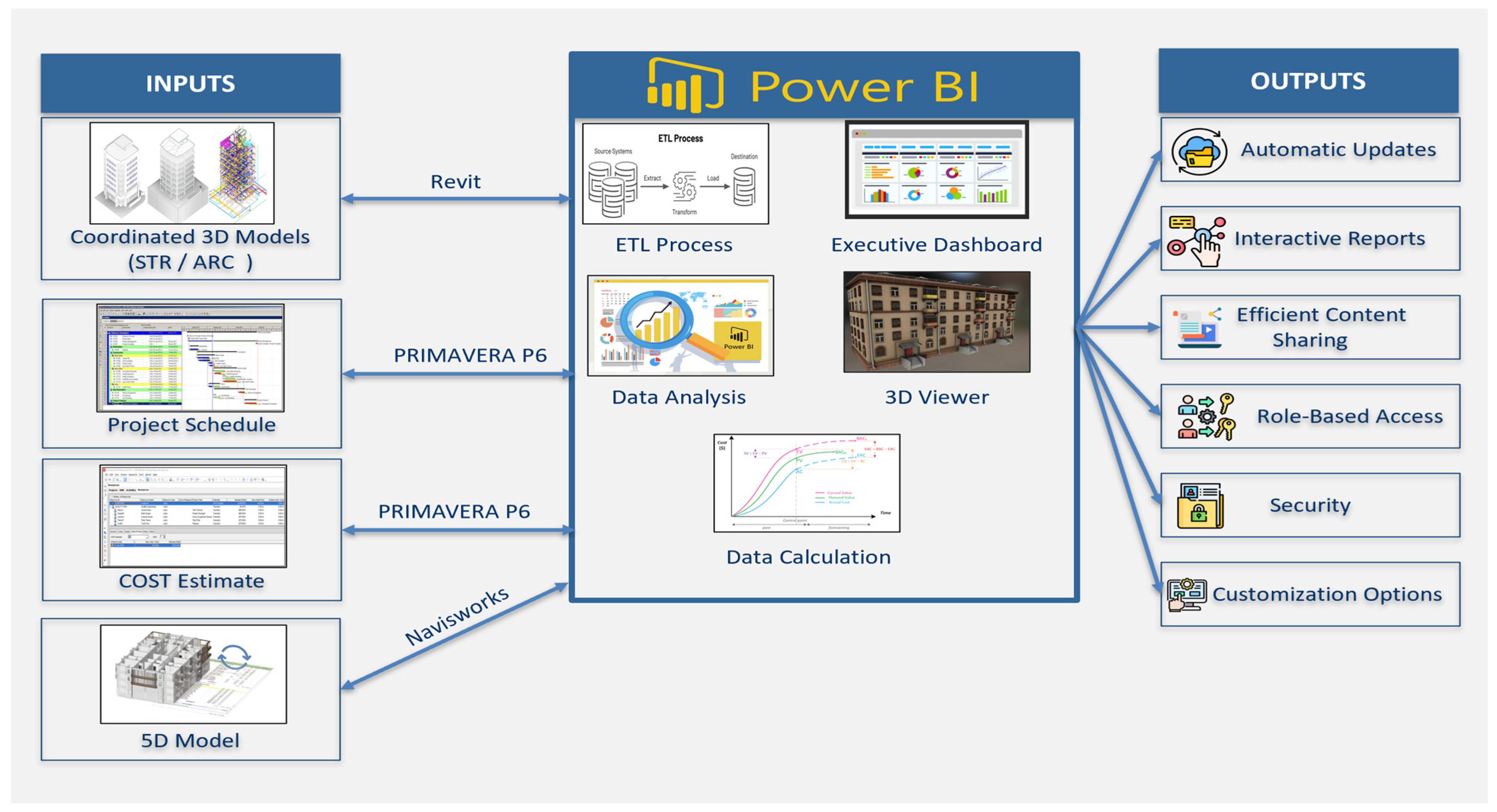
The customized dashboard provides accurate, real-time, and cross-referenced visualizations of project data, ensuring that the insights displayed are based on the most current data available. By integrating the Business Intelligence capabilities of Power BI with BIM and automating the updates of data, the dashboard will provide stakeholders with the ability to enhance decision-making and enhance overall project management practices. During this study, the dashboard was subjected to a series of detailed analyses and evaluations to assess its capabilities. This exploration has resulted in the identification of four major advantages of using a Power BI dashboard that utilizes BIM.
The foremost advantage is the ability to provide real-time data updates and generate interactive reports. Construction projects are characterized by their fast-paced development, thus having access to the most recent data is critical to managing these projects efficiently. Through Power BI, stakeholders can visualize data as it is generated, which enables them to have immediate insights into project metrics. In addition to improving decision-making, this instance access enables project stakeholders to respond promptly to emerging issues, thereby keeping the project on track within the specified timeline and budget.
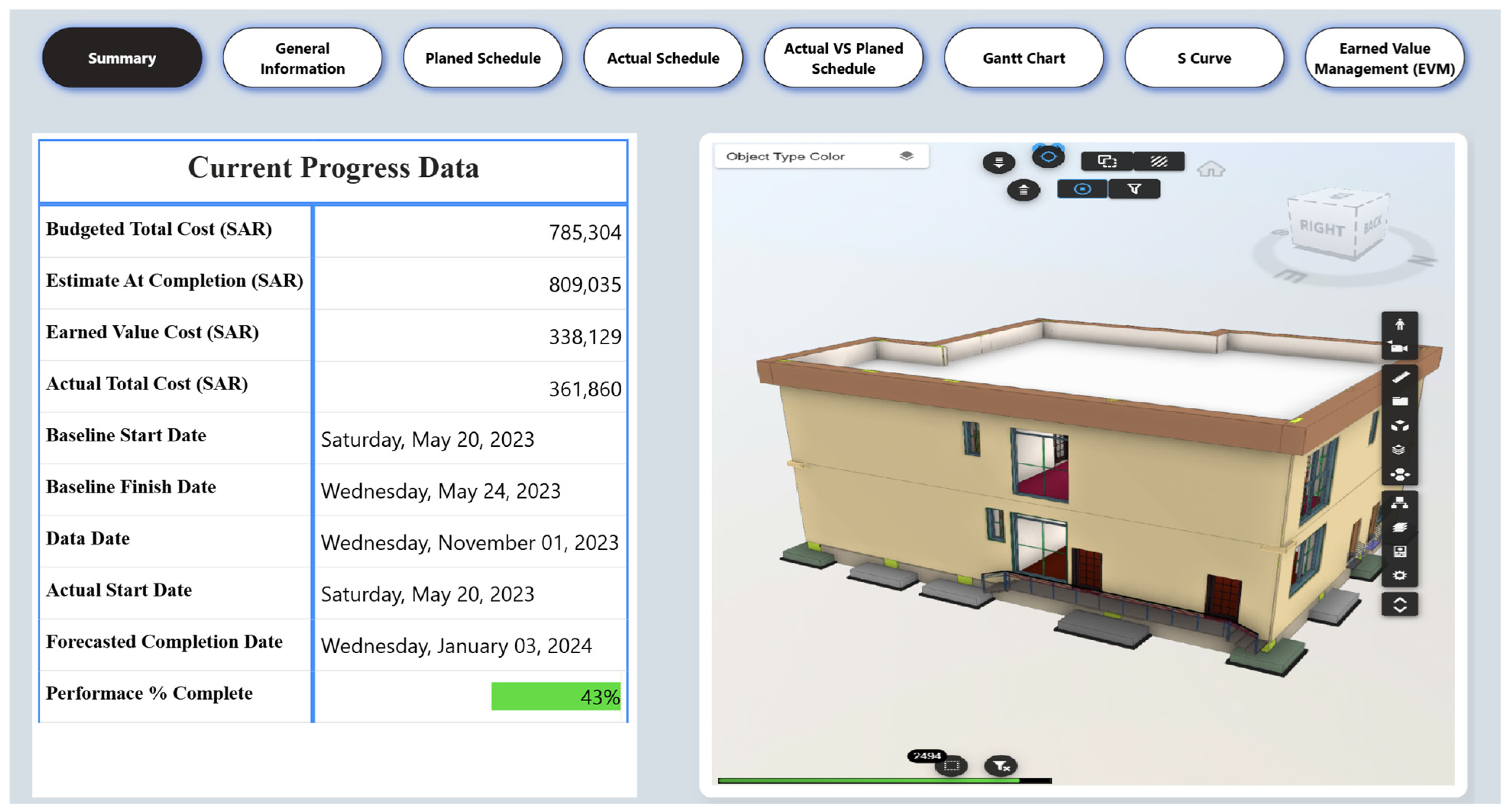
Figure 11 presents a summary dashboard of project progress that updates in real time.
This dashboard provides a concise summary of the project’s current progress, highlighting key information related to project cost, schedule, and overall performance. The cost information encompasses the budgeted total cost of the project, the forecasted estimate at completion based on current performance trends, the earned value cost, and the actual total cost incurred to date. Collectively, these metrics enable stakeholders to gain immediate insight into the project’s financial health, including whether it is on budget, over budget, or under budget. Based on this information, project managers can take timely corrective actions and well-informed decisions in real time to support the achievement of project goals and requirements.
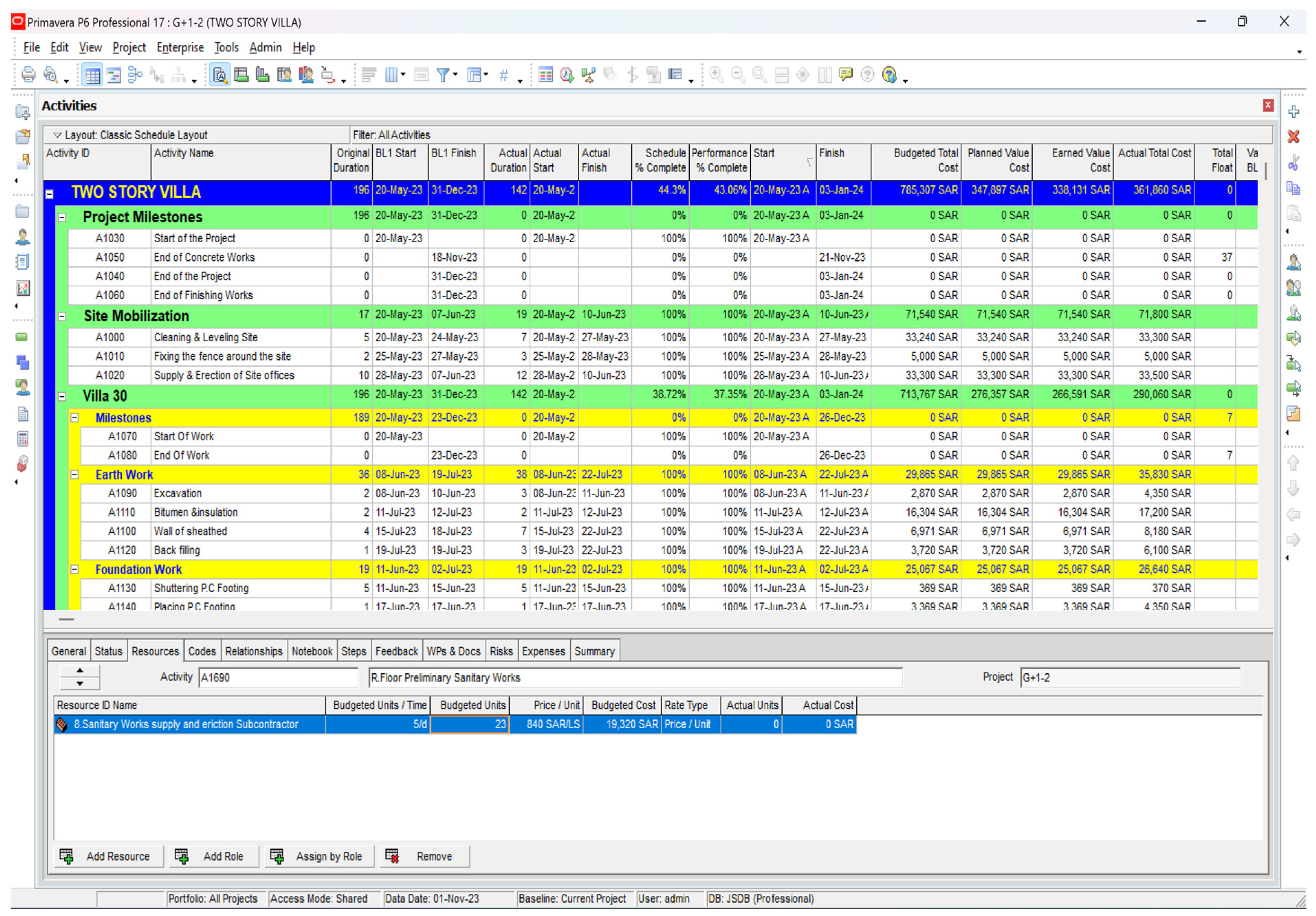
Furthermore, the dashboard presents information related to the project schedule, including the baseline start and finish dates, the actual start date, the current date, and the forecasted completion date. These details provide stakeholders with quick insights and accurate understanding of the project’s timeline status. Additionally, the dashboard presents performance status information, reflected as a percentage indicating the overall performance completion of the project. One of the most valuable features of this dashboard is the automatic update, ensuring that the latest project progress information is consistently reflected. For instance, the project data, including invoices, material submittals, and the actual start and finish dates of activities, are first updated in Primavera P6. Since a connection was established in the previous stages between Primavera P6 and Power BI, every time the project schedule is updated, the dashboard data updates correspondingly. In addition, automatic refresh intervals can be configured, for example, every 30 min, even if no new schedule updates have been made. Moreover, the dashboard supports interactive reporting, as illustrated in
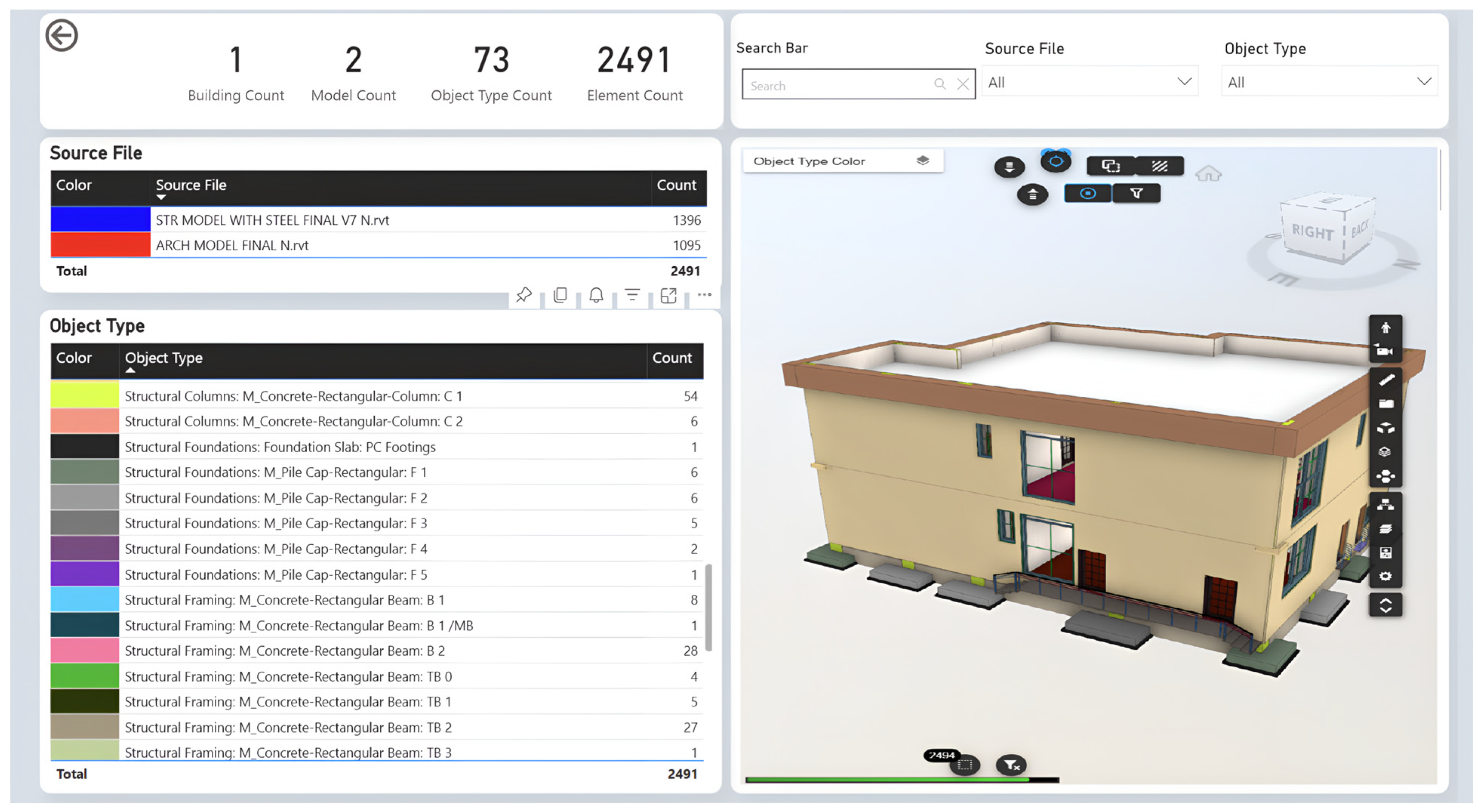
Figure 12. When a user interacts with any visual element, the report is automatically filtered to display only the information relevant to the selected component, thereby providing users with an interactive and intelligent experience when exploring the reports.
Figure 12 presents general information about the project, including the number of buildings, models, objects, and elements. The layout is organized into five sections. The first section provides an overview of the project quantities. The second section provides a detailed account of the number of models integrated into Power BI for analysis; in this case, two models: the structural and the architectural. Each model is assigned a distinct color to clearly differentiate between them. Along with that, the dashboard displays the number of elements associated with each model. Since interactivity is a common characteristic of our dashboard, when a stakeholder clicks on any model type, the 3D viewer automatically filters to display only the elements related to the chosen model. The third section contains a table listing all objects within the project, with each object assigned a unique color to facilitate clear visual distinction. The table additionally displays the number of elements associated with each object. When a user clicks on any object, the 3D viewer automatically filters the model to display only the selected object and highlights it using the corresponding color system shown in the table. This color system is highly useful, as it enhances clarity and visual navigation. Stakeholders may also select multiple objects simultaneously, enabling them to efficiently analyze, compare, and identify specific components within the 3D environment.
The fourth section focuses on selection and search functionality. Stakeholders can select objects directly from the table or utilize advanced slicers for more efficient filtering and inspection. Three selection functions are embedded within the dashboard. The first enables users to select single or multiple project objects using object type slicers. For more targeted selection, whereby a user wishes to filter elements associated with a specific model, the file source slicer may be employed. This enables stakeholders to focus on elements from a particular model without the need to navigate through all objects in the project. The most innovative feature within this section is the intelligent search function, which incorporates artificial intelligence capabilities. When a user enters the first three characters of the element being searched, the AI generates relevant suggestions based on the input, providing the option to select from the suggested results or continue entering the full element name. This functionality yields considerable savings in time and effort when retrieving information required to support well-informed decisions. Furthermore, any element selected through the smart search function is automatically highlighted within the 3D viewer.
Finally, the 3D viewer is fully interactive and equipped with multiple advanced features, including a walk-through mode. This function enables stakeholders to navigate through the 3D model as though physically present on the construction site, allowing them to closely examine element materials, finishes, object placement, room layouts, and the interaction between various building components. This capability facilitates the early identification of potential issues and supports the timely implementation of corrective actions before problems escalate. Furthermore, while navigating through the model, stakeholders have also the ability to measure heights, elevations, lengths, and the areas of various objects. This is extremely valuable for gaining a realistic understanding of the project’s appearance upon completion and for detecting conflicts at an early stage. Moreover, the 3D viewer provides users with the ability to capture high-quality snapshots from either inside or outside the building. These snapshots may be utilized for documentation, presentations, reporting, or any other relevant purpose.
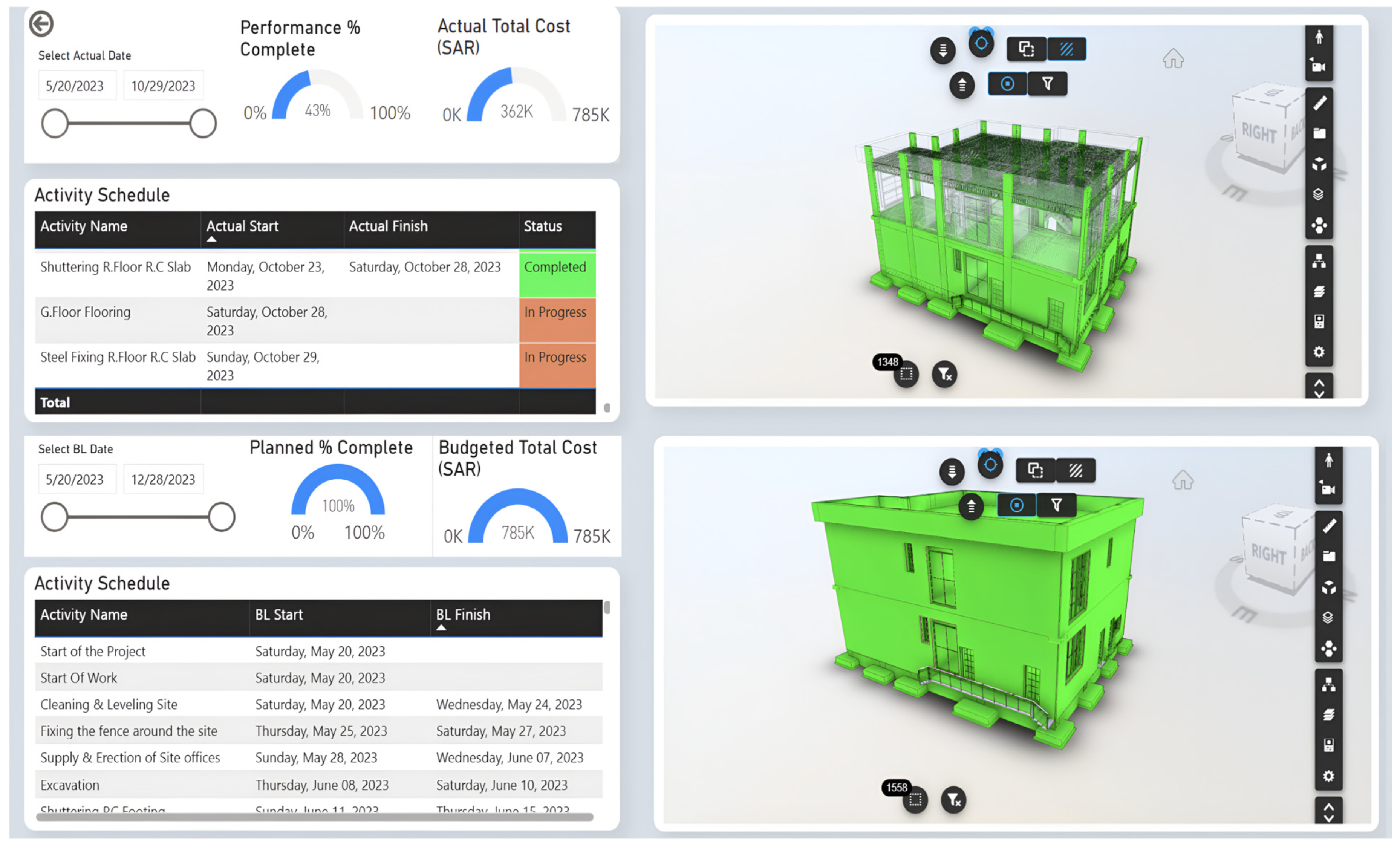
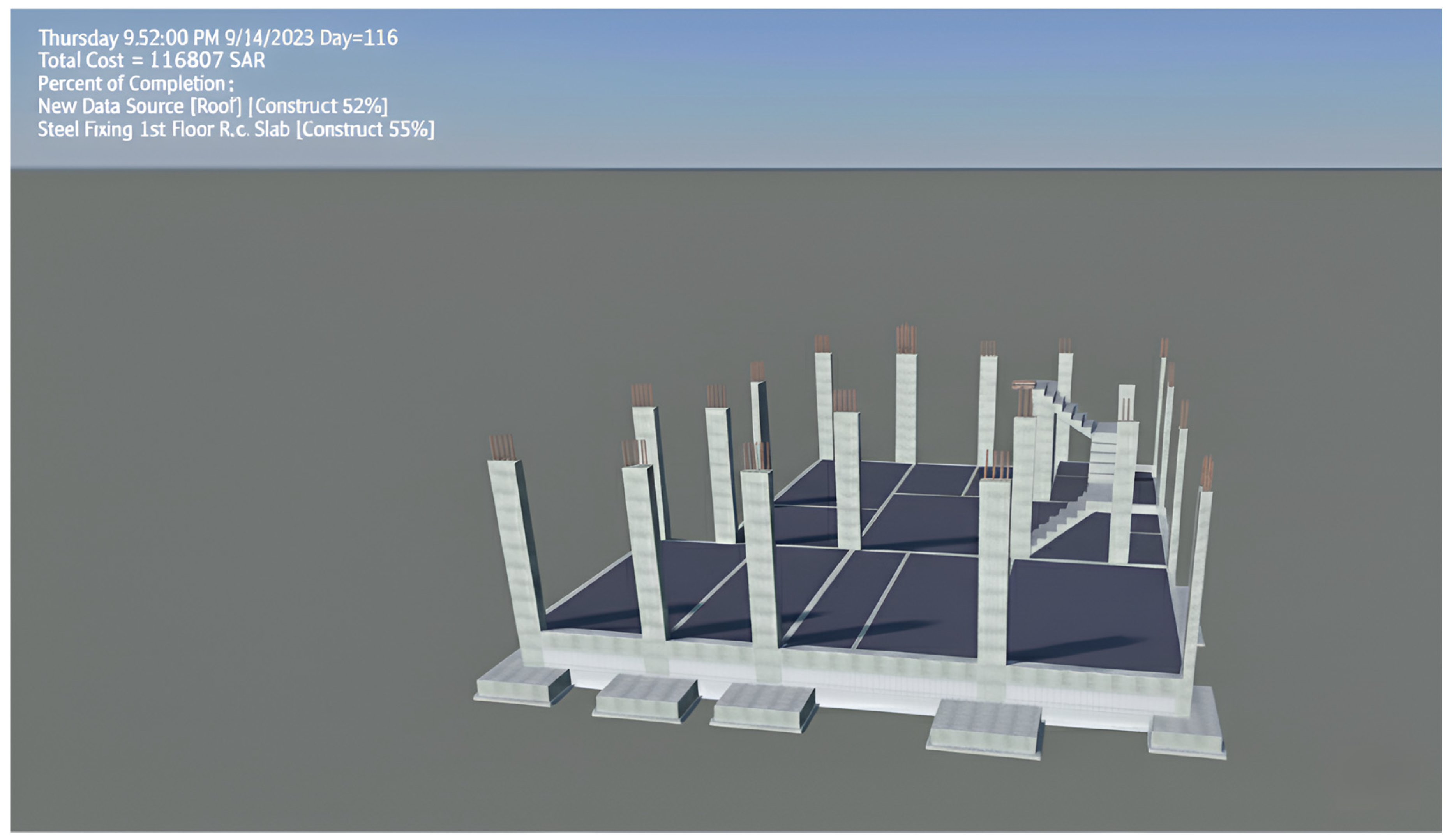
The second benefit of the intelligent dashboard is its capacity for schedule monitoring and cost control. The success of any construction project, especially large-scale ones, lies in the ability to manage these two factors effectively. Failure to do so may result in schedule delays, cost overruns, or both. Fortunately, Power BI dashboards provide a powerful tool for precise tracking of timelines and budgets. The customized intelligent dashboard plays a crucial part in project management by offering a comprehensive comparison between the actual and the planned progress of the project. This functionality is pivotal for achieving the objectives of schedule monitoring and cost control. The dashboard incorporates two interactively designed 3D models: one representing the planned progress and the other depicting the actual progress to date. The planned 3D model is linked to the project timeline and estimated costs, providing a clear visual representation of the project progression at various stages. The activity table presents all project activities along with their planned start and finish dates. In addition to these models and tables, the dashboard incorporates two-gauge visuals directly linked to the planned 3D model and the activity table. One gauge displays the percentage of the project completed, while the other presents the estimated costs. These gauges serve as quick-reference indicators, providing immediate insights into the project’s status. The dashboard also includes a 3D model representing the actual performance of the project, similarly, linked to the activity table and performance visuals.
Throughout the progression of the project, the dashboard dynamically updates to reflect real-time details regarding project progress. The actual 3D model is particularly important, as it depicts completed activities as well as those currently under execution, providing project managers with an accurate representation of accomplished tasks and outstanding work. To enhance usability, the activity table has been customized to have a color-coding system. Completed tasks are marked in green, active ones in orange, and uninitiated ones are uncolored. This visual distinction allows project managers to quickly identify the status of various activities, which facilitates efficient project monitoring. Furthermore, the gauges provide essential statistics. This information is critical for project managers, as it allows them to assess whether the project is ahead of schedule, behind, or on track, as well as whether it is operating within budgetary constraints or exceeding them. Moreover, by comparing actual progress with planned objectives in real time, project managers can identify potential delays or budget overruns at an early stage, enabling the timely implementation of corrective actions to bring the project back on course. The comparison dashboard is illustrated in
Figure 13.
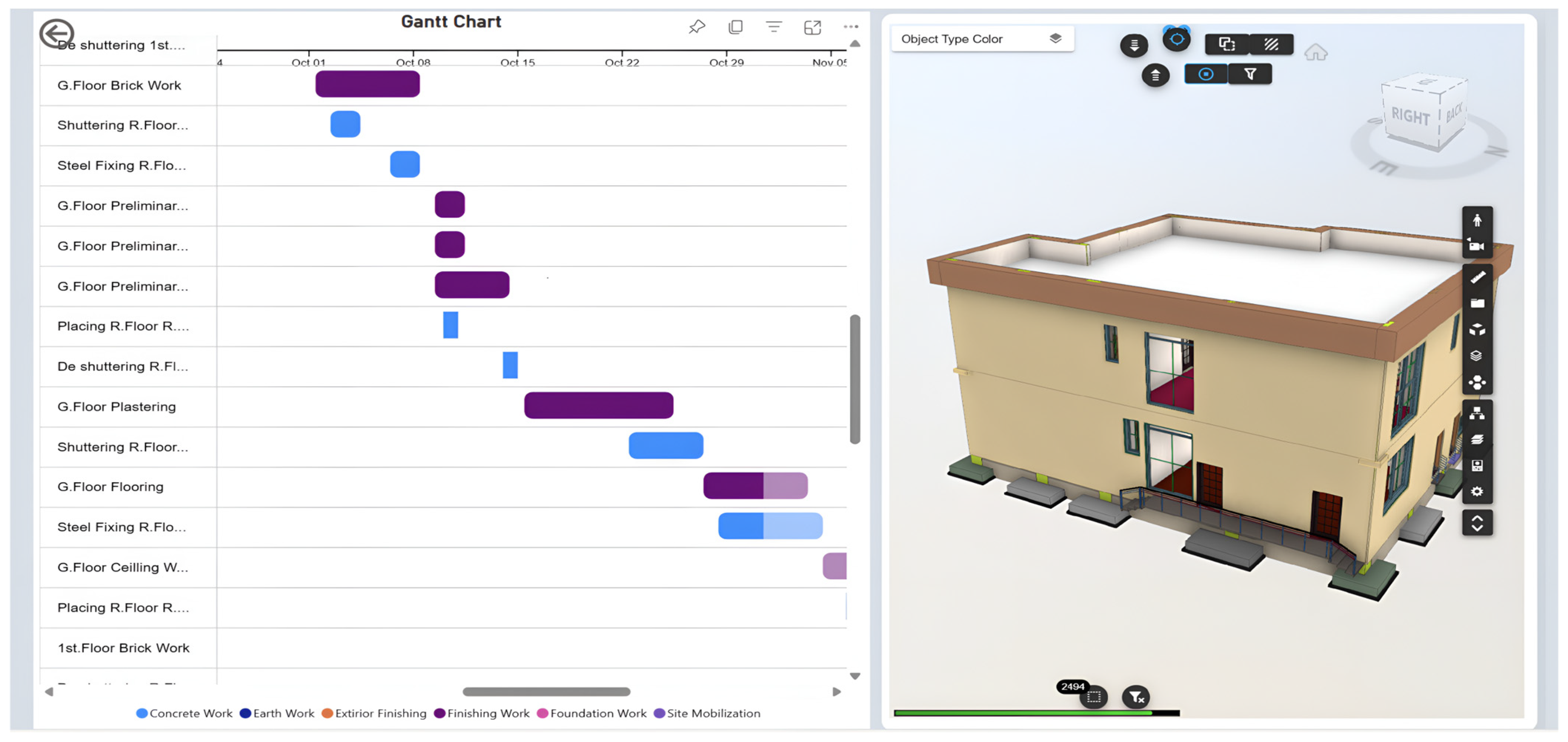
The dashboard further incorporates an interactive Gantt chart linked to the 3D model of the project, as illustrated in
Figure 14. This chart serves as a vital tool, providing project managers with immediate visibility into all activities involved within the project. This level of visibility enables stakeholders, especially project managers, to review activity sequences, adjust dates, and analyze relationships between different types of tasks. The clarity of the activity display is further enhanced by organizing activities into groups based on their specific nature, such as earthwork, concrete work, and finishing work. Each group is assigned a distinct color, creating a visually appealing interface that enables stakeholders to readily distinguish between different activity types.
To further enhance the interactivity of the dashboard, a hover feature has been incorporated. When a stakeholder hovers the cursor over any activity, a pop-up appears displaying essential information related to that activity, including the activity duration, start date, end date, percentage complete, name, and other relevant details required for informed decision-making. Additionally, the Gantt chart has been linked to the 3D model of the project. This integration has implemented dynamic interactivity to the dashboard, such as when a stakeholder selects any activity, the 3D model automatically filters to display only the elements associated with the selected activity. This sophisticated integration aids project managers in saving valuable time and accelerates the decision-making process. Furthermore, with both the Gantt chart and the 3D model operating in conjunction, project managers can efficiently assess the impact of changes, identify potential bottlenecks, and allocate resources more effectively, resulting in a streamlined project workflow and enhanced productivity.
The third identified benefit of the intelligent dashboard is its capacity for project performance tracking, which provides a comprehensive view of how various aspects of a project are progressing. Power BI enables stakeholders to establish key performance indicators and monitor them in real time. This feature plays a crucial role in analyzing the efficiency and effectiveness of project execution, while simultaneously fostering a culture of accountability among stakeholders through the provision of a transparent overview of performance metrics. This customized dashboard has contributed to present detailed visualizations pertaining to Earned Value Management (EVM). EVM is a project management technique widely utilized in construction projects to monitor ongoing project performance by measuring the value of work completed against what was originally planned, thereby integrating the dimensions of cost and time into a single, unified performance metric.
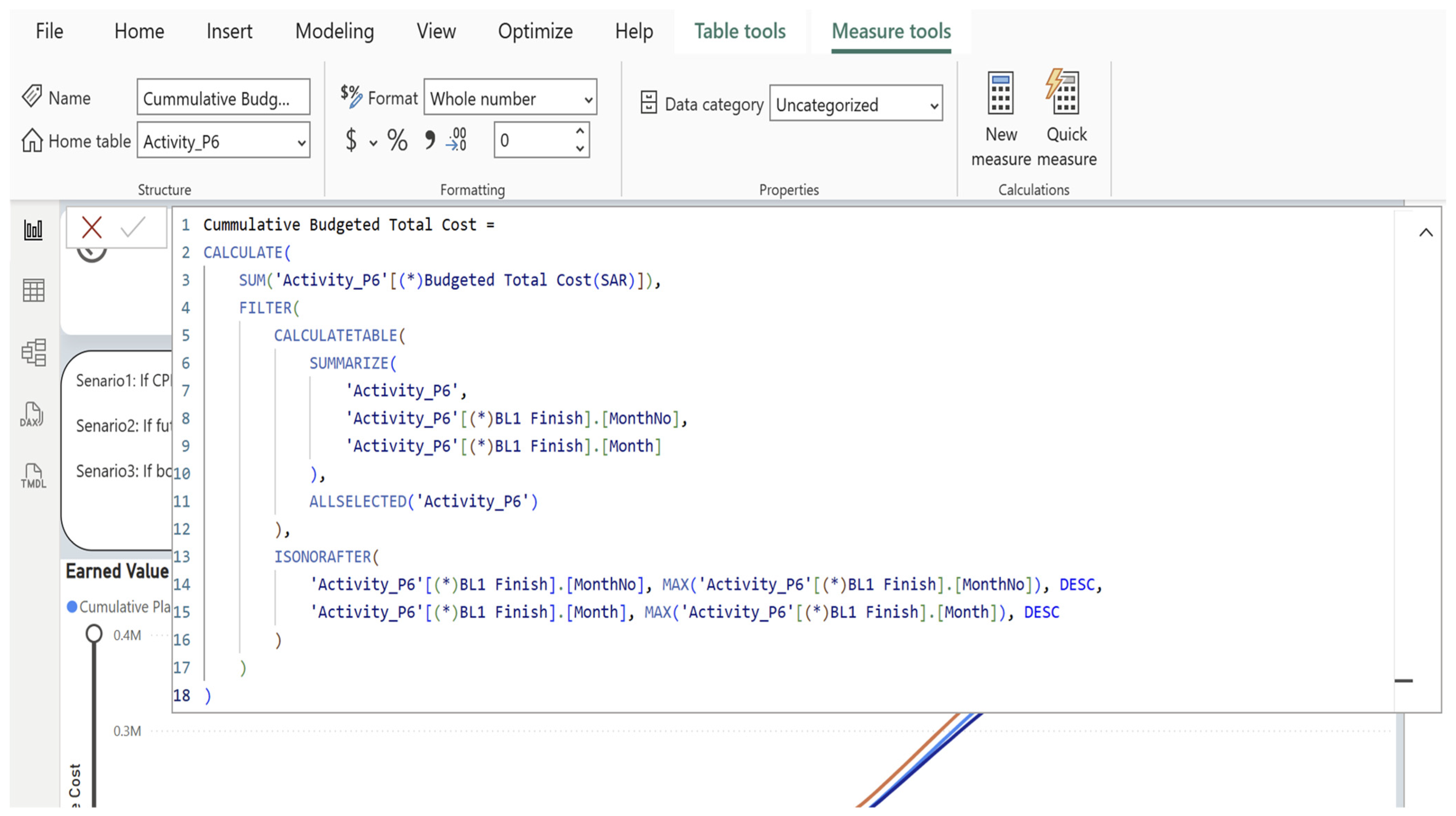
EVM measures construction project progress based on three quantitative values: Planned Value (PV), Actual Cost (AC), and Earned Value (EV). These three values play a fundamental role in providing an accurate representation of project status. Planned Value is defined as the authorized budget allocated to the scheduled work up to a specific point in time, serving as a key performance baseline against which actual progress and expenditure can be evaluated. Earned Value refers to the budgeted cost of work completed as of the reporting date. Actual Cost is defined as the actual expenditure incurred for the work performed. Construction managers apply EVM by assigning budgeted costs to each project activity using advanced project management tools such as Primavera P6 or Microsoft Project. These tools facilitate accurate tracking of project activities and expenditures throughout the project lifecycle. Construction teams continuously collect data related to the project progress such as cost through timesheets and invoices. This process ensures that the data used for the calculations of ENM is both recent and accurate. The customized dashboard automates the calculation of PV, EV, and AC by connecting Primavera P6 schedules directly to the dashboard. Consequently, whenever updates are made to the schedule in Primavera, the dashboard immediately recalculates the earned value metrics and displays them through card and line visuals, providing stakeholders with immediate insights into project performance.
Furthermore, the EVM dashboard utilizes current performance data to generate predictions regarding the final project cost through the calculation of the estimate at completion (EAC). This predictive capability plays an essential role in navigating the complexities of project management by providing a clearer picture of the project’s standing relative to its objectives. For instance, if the EAC indicates that the project is likely to exceed its predefined budget or timeline, the project manager can implement corrective actions such as realigning resources, adjusting schedules, or renegotiating the project scope. An additional substantial benefit of the EVM dashboard is its capacity to minimize reliance on subjectivity in performance reporting. Conventional methods of project evaluation tend to incorporate a degree of subjectivity, which can lead to discrepancies and miscommunications. In contrast, EVM provides quantitative indicators that offer a reliable basis for developing reports and evaluating project status. The EVM dashboard serves as an assistant management tool for stakeholders, especially project managers, as it presents an interactive line chart that captures the most important quantitative metrics relevant to project performance throughout the project lifecycle.
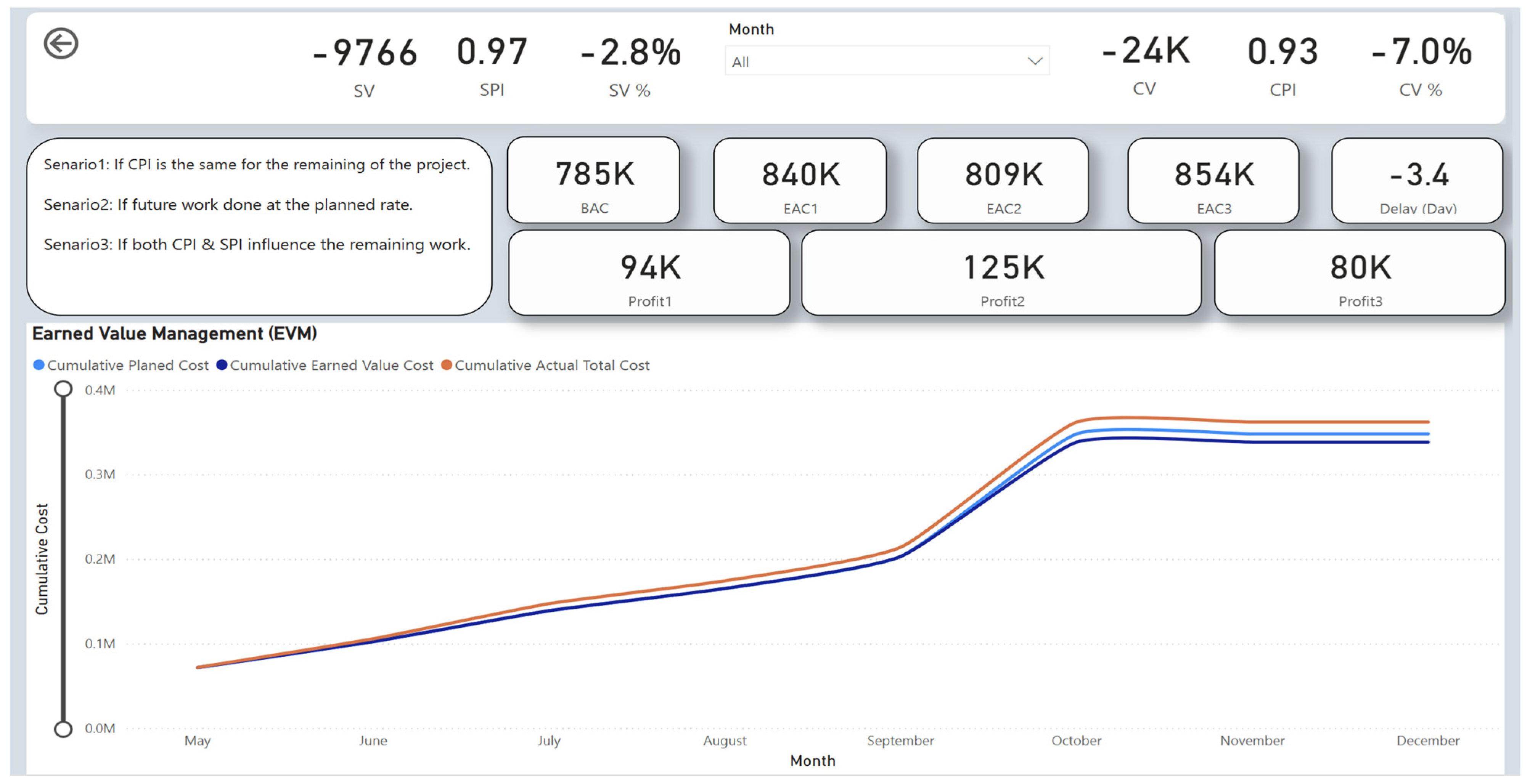
The interactive line chart is not only visually appealing, but it also updates in real time, ensuring project managers have access to the most recent data available. With a brief examination of this chart, project managers can rapidly determine whether the project is falling behind schedule, on track, or ahead of the planned schedule. Furthermore, they can readily identify whether the project is exceeding, operating below, or within the allocated budget. To enhance clarity and accessibility for stakeholders who may not possess extensive knowledge of construction management principles, four supplementary metrics have been calculated and are presented on card visuals. These metrics are Schedule Variance (SV), Cost Variance (CV), Schedule Performance Index (SPI), and Cost Performance Index (CPI). A positive SV indicates that the project is progressing ahead of schedule, a negative SV reflects a delay relative to the planned timeline, and a zero SV indicates that the project is precisely on schedule.
Cost Variance follows a similar principle, whereby a positive value indicates that spending is below the budgeted amount, a negative value indicates that the project is over budget, and a zero value indicates that expenditures are aligned with the budget. The efficiency of this dashboard lies in its ability to automate these calculations, sparing stakeholders from the tedious task of manual computation. Furthermore, the dashboard displays the percentage of Cost Variance and Schedule Variance, alerting project managers to the rate of deviation from the planned schedule and authorized budget. For example, the EVM dashboard indicates that the ongoing status of the project is 2.8% lagging behind schedule and 7% over budget. Additionally, the dashboard incorporates predictive capabilities regarding EAC through three distinct scenarios.
The first scenario evaluates the situation in which no corrective actions have been implemented, maintaining the current Cost Performance Index for the remainder of the project. Secondly, it considers a scenario where corrective actions are taken, and the remaining work is completed at the planned rate. Finally, it assesses a situation where both the Cost Performance Index and the Schedule Performance Index influence the completion of the remaining work. Furthermore, the dashboard automatically calculates the projected profit or loss for each scenario and presents these figures in card visuals, enabling project managers to understand the financial implications of each potential outcome. This dashboard empowers stakeholders, especially project managers with the ability to monitor the critical key performance indicators (KPIs) of the project, eliminating the need for manual calculations or reliance on traditional reporting methods. The EVM dashboard is illustrated in
Figure 15.
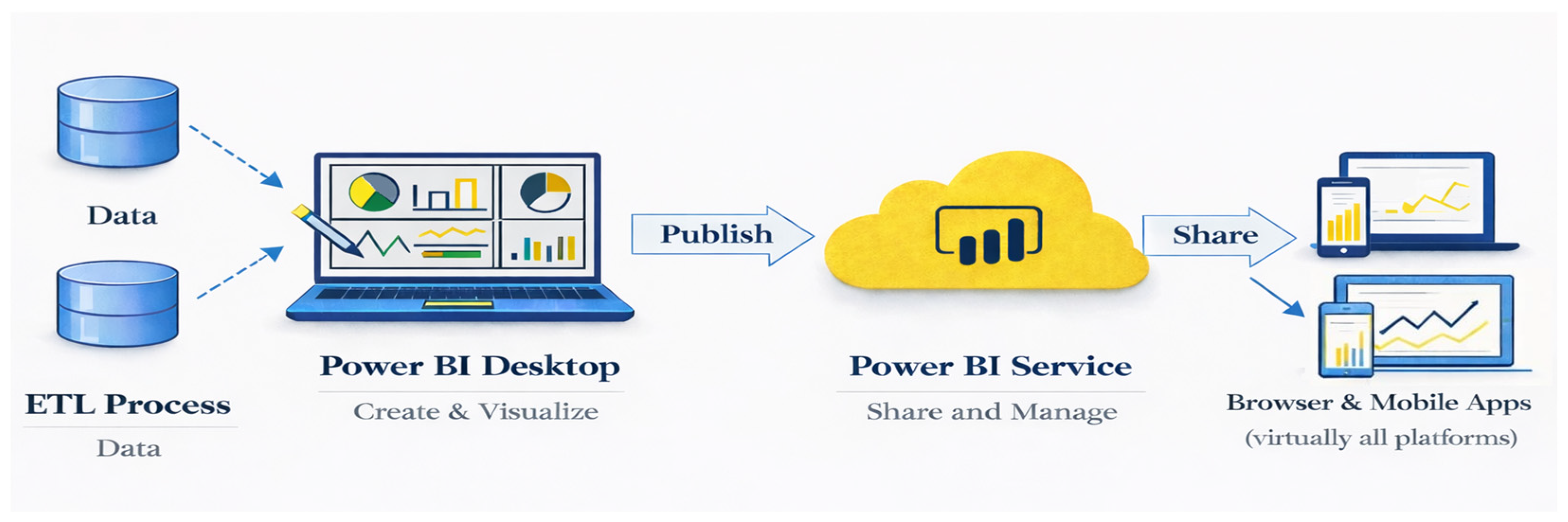
Enhanced collaboration and communication among stakeholders represent the fourth benefit that customized Power BI dashboards offer. Power BI facilitates the seamless sharing of insights and reports between team members, engineers, clients, project managers, contractors, and other stakeholders, transforming traditional methods of data sharing into a more dynamic and interactive process. This feature is extremely important in today’s dynamic business environment, where the availability of accurate and timely information can make all the difference in decision-making processes. The sharing of reports and insights can be readily accomplished through the Power BI workspace. This workspace is not only user-friendly but also easily accessible, enabling users to access it via laptops, web browsers, or smartphones. This level of accessibility eliminates the need for the installation of complex software or extensive technical expertise. Furthermore, the data shared within this platform is protected by a high level of encryption, underpinned by Microsoft’s advanced security mechanisms. whereas data is secured during transmission through Transport Layer Security (TLS) and during storage through Azure Storage encryption. These security mechanisms offer significant assurance that sensitive information remains confidential, giving stakeholders confidence when collaborating and sharing information. In addition, Power BI supports the assignment of defined roles to each stakeholder within the workspace. These roles are crucial, as they delineate the extent of access and the range of activities each stakeholder may undertake within the workspace, thereby establishing a structured and organized environment.