1. Introduction
Given the obvious reality that, in the context of digitalization, information technologies are no longer merely tools but true catalysts (
Bennett & Segerberg, 2012) for solving the everyday problems that arise in the lives of individuals and communities (
Majchrzak et al., 2014;
Tredinnick, 2006), we aim in this study to explore a new technological–social niche focused on real-time collaboration.
Modern society is facing a phenomenon that has become increasingly prevalent in recent years: co-living (
White & Madden, 2024). This phenomenon essentially involves the shared use of a residence by multiple roommates, as well as the resources associated with this communal living arrangement (
Nasreen & Ruming, 2021). What sets it apart is that, in most cases, the people living in the same residence are not related to one another, as they adopt this lifestyle due to various objective economic and social factors (
Shahane & Pol, 2026). Thus, according to recent data provided by the European Union (
European Parliament, 2025), we have an overview showing that housing prices have risen by 53% in just 10 years, between 2015 and 2024. It is also important to note that there are major discrepancies between prices in rural areas and those in large urban centers, as costs in urban areas have become downright prohibitive. Under these circumstances, in addition to some people’s desire to belong to a community, co-living is, in fact, a solution to the problem of the ever-rising costs generated by the real estate market (
Savills, 2025;
Tan & Toh, 2025).
Taking into consideration these economic and social realities, we believe that technology can support coordination in this context by helping to improve collaboration among residents, from dividing administrative tasks and planning shopping lists to managing bills and even sharing moods. In this way, the experiences resulting from communal living can be supported, and the quality of life can be improved for the residents of the same home. Therefore, synchronization, communication, and collaboration are aspects that technology can support in a shared living space.
For areas such as family life or the workplace, software developers have made available to users a multitude of apps that offer various features related to presence or location to facilitate coordination among users; however, in the specific field of co-living, the selection of apps is extremely limited. Given this gap we have identified, in this article we propose our own solution that integrates the specific needs of co-living with location-based features (status notifications as well as location-based alerts) in near real time, thereby encouraging coordination among residents and helping to improve the experiences of roommates.
Currently, coordination among people sharing the same apartment is often limited to using general chat groups or separate dedicated task apps, but these apps almost never integrate data on presence, proximity, and other useful information. These disparate apps almost never offer the low-latency synchronization required for workflows in a shared household (
Bae et al., 2025). Because co-living participants lack clear contextual information about which roommates are home or near the residence, collaboration often involves repetitive checks like “Is anyone home? Where are you?” or even analog solutions, such as notes stuck on the fridge or lists written on paper. To reduce redundant messages, limited synchronization, and delays in joint decision-making, this case study examines the role of real-time digital monitoring as a complement to traditional organizational methods.
Existing applications and studies rarely manage to integrate real-time messaging, presence status, and proximity-based location into a unified mobile system, designed specifically for co-living scenarios (
Janssen et al., 2024). Most current solutions (
Khan et al., 2024) address these aspects in isolation, without providing that unified framework that would bring more benefits to a household in terms of coordination and collaboration between its residents. Most current technologies focus on home automation (hardware) and less on “social orchestration” (
Kraemer et al., 2020). A relevant example is Life360 (
Life360, 2025a,
2025b), a location application that, while excelling in areas such as GPS and geofencing, ignores aspects such as chat or other communication channels. If we refer to the existing literature, we notice that although latency and accuracy have been studied as isolated technical parameters in the security area, they are very rarely documented in a collaboration model that tracks human interaction in real everyday conditions (
Yao, 2023). This fragmentation does not take full advantage of the advantages of an all-in-one platform that combines location functionalities with those typical of co-living.
The goal of the present research consists of the design, development, and evaluation of a mobile shared housing system that integrates communication and typical co-living functionalities with location-based functionalities (presence status and smart notifications), in real time, to streamline household coordination. We relied on the native resources of the smartphone and the cloud infrastructure to provide users with a constant flow of information through which they can see the status of others, while aiming to limit unnecessary exposure of location-related data and excessive battery consumption. The work goes beyond the theoretical sphere and is embodied in a functional prototype subjected to empirical evaluations, in which we measured parameters such as end-to-end latency and system consistency under real-world conditions of use, which implicitly helps us measure the idea of real time within the system. Based on these gaps existing in practice and in the specialized literature, we propose in this paper the development of an integrative application prototype that will contribute to improving the currently existing functionalities. The technologies used are the most current in the field, and we want to present a functional prototype that can constitute a basis for future developments. Our approach also considers an objective evaluation on various technical aspects.
To evaluate the performance and real-time synchronization capability of the prototype, we propose using conditions that simulate the real-world context of use. Thus, we aim to address the following specific research questions:
RQ1. For the core functionalities of the system/prototype proposed in this case study, what is the end-to-end propagation time for updates between devices?
RQ2. How effectively does the system recover lost data in the event of a connection loss and subsequent restoration?
RQ3. What is the actual time it takes to fully synchronize all devices if multiple users are active at the same time?
If we provide well-reasoned answers to these questions, we will be able to objectively assess how useful, efficient, and stable the system model we propose is. Thus, validating the system could contribute to more efficient and seamless coordination among household members.
The remainder of this paper is organized into several sections, following the logical structure of a scientific study. Thus, we first justify our research approach by presenting previous work from the specialized literature and the field of co-living and digital collaboration systems. Based on the identified gaps, we describe the architecture and implementation of our system. This is followed by the methodology section on testing the results under real-world conditions, and the final sections present elements related to the interpretation of the experimental results, related discussions, and the commercial implications of the proposed solution. In the conclusion of the article, we present the objective limitations of the prototype and directions for future development.
3. Methodology
The Cozzmo methodology is based on an iterative process that puts user needs before technical constraints. We use case and activity diagrams to map out user flows before writing code, ensuring that we cover all tenant needs. These serve as a visual guide for the application logic and are translated into mockups that substantiate the system architecture. Through this model, we quickly identify critical communication points and maintain a constant dialogue between design and implementation to refine functionalities in real time. The result is a stable system in which every technical decision responds to a practical need identified during the design stage.
3.1. Use-Case-Driven Specification of Cozzmo
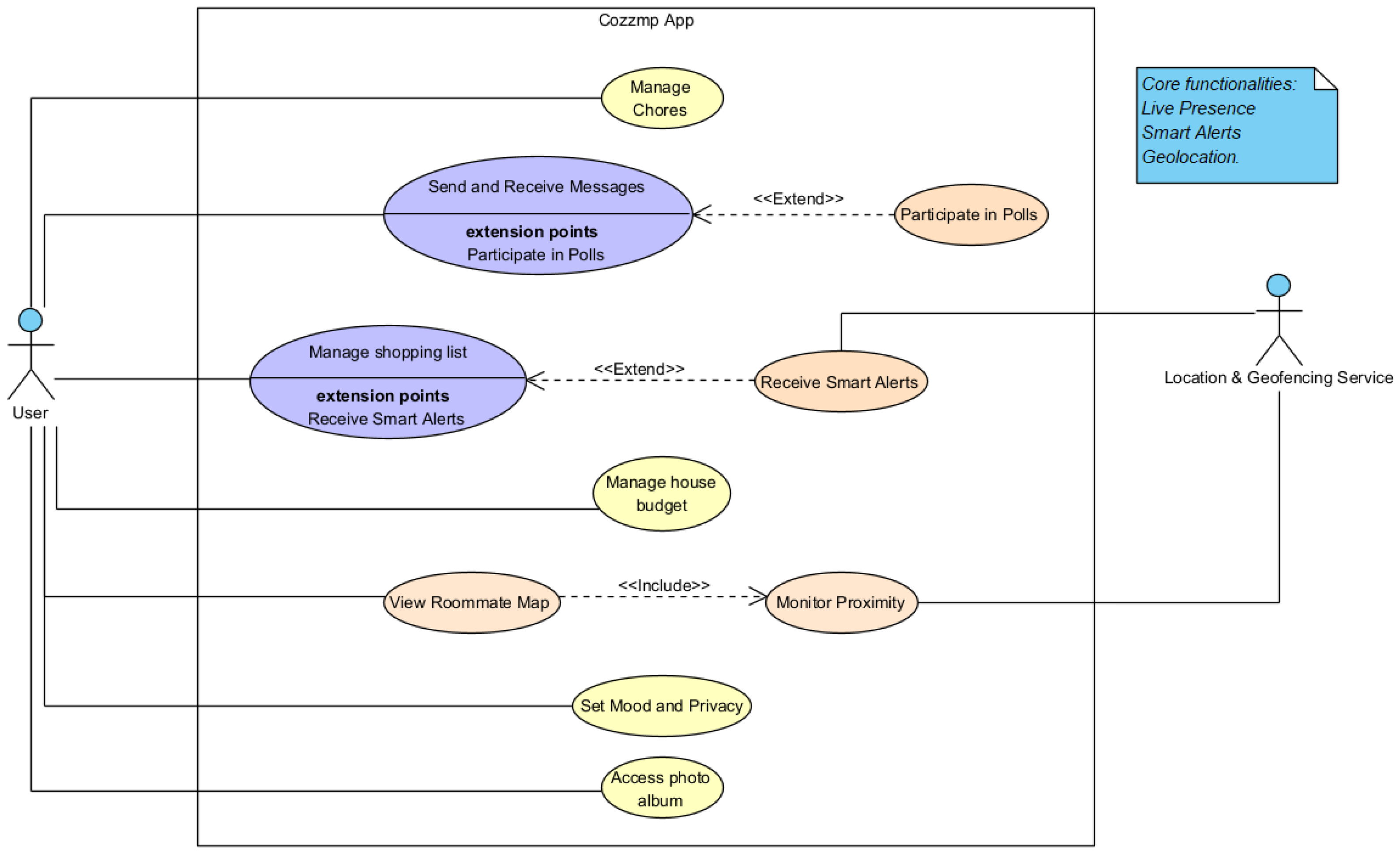
First of all, for a development that does not miss anything, we propose clearly defining the use cases of the application. Through these, we try to cover as much of the problem area as possible in the context of co-living, identifying the concrete needs of the tenants. Therefore, in
Figure 3, we represent the use cases that guide us in the development of the entire application and that underpin the logic of the system.
- (a)
Home onboarding and home zone setup. In the first instance, users log in to create or join a household. When creating a household, in addition to basic settings such as the house nickname or member management, the home’s physical location can be optionally defined. These coordinates are stored as metadata in the backend, but are also saved locally to enable the geofencing mechanism to function. Thus, the procedure establishes the logistical framework and provides the spatial references indispensable for monitoring the proximity between residents and the perimeter of the home (
Prange et al., 2021).
- (b)
Presence and “Who’s Home” mode. The presence status of each tenant is updated automatically by setting attributes such as home, away, or unavailable, resulting from the detection of transitions by the geofence in relation to the delimited area of the house. This status is recorded in the database in real time on a dedicated node so that it can be immediately transmitted to the rest of the connected devices. However, this flow should not be seen as absolute, since the privacy settings available in the prototype allow users to limit the visibility of their location-related information, thereby creating exceptions to the default group-level presence flow (
Cobb et al., 2020).
- (c)
Notifications for location-based tasks. These notifications are intended for the shopping list module and are called “smart alerts.” Here we again use the proximity monitoring mechanism, this time related to stores that might have a product on the household’s shopping list, so that when a resident passes by a store, they can receive an alert like “You are near store X, do not forget to buy Y.” This involves constant location monitoring and can be constrained by the privacy settings of each individual user (
Sasaki et al., 2023).
- (d)
Collaborative management of household tasks. This use case involves managing household chores, a process that involves creating tasks by assigning a responsible person and a deadline, as well as tracking their progress through statuses such as “In Progress” or “Done.” This scenario is very suitable for testing the real-time capabilities of the system because changes made in this module must be instantly propagated to the rest of the connected devices, even in cases such as concurrent changes to the same object or loss of connectivity.
- (e)
Poll-based group decisions. Any resident of a home can create surveys that aim to better and more efficiently collaborate between roommates; this use case is designed as an extension of the messaging functionality between users. To ensure fast communication and full transparency between all participants, it is important that the system guarantees the feeling of real-time interaction and a consistent state of changes (
Bae et al., 2025).
We consider some of these scenarios basic interactions in a co-living system, without which such a system would not meet the criteria of collaboration and communication typical in a shared space. At the same time, we are counting on an improvement in the co-living experience through location-based use cases, such as presence and smart alerts. Through these functionalities, the need to guarantee the feeling of real time and a consistent state of information within the entire system is clearly defined.
3.2. Application Activity Diagram
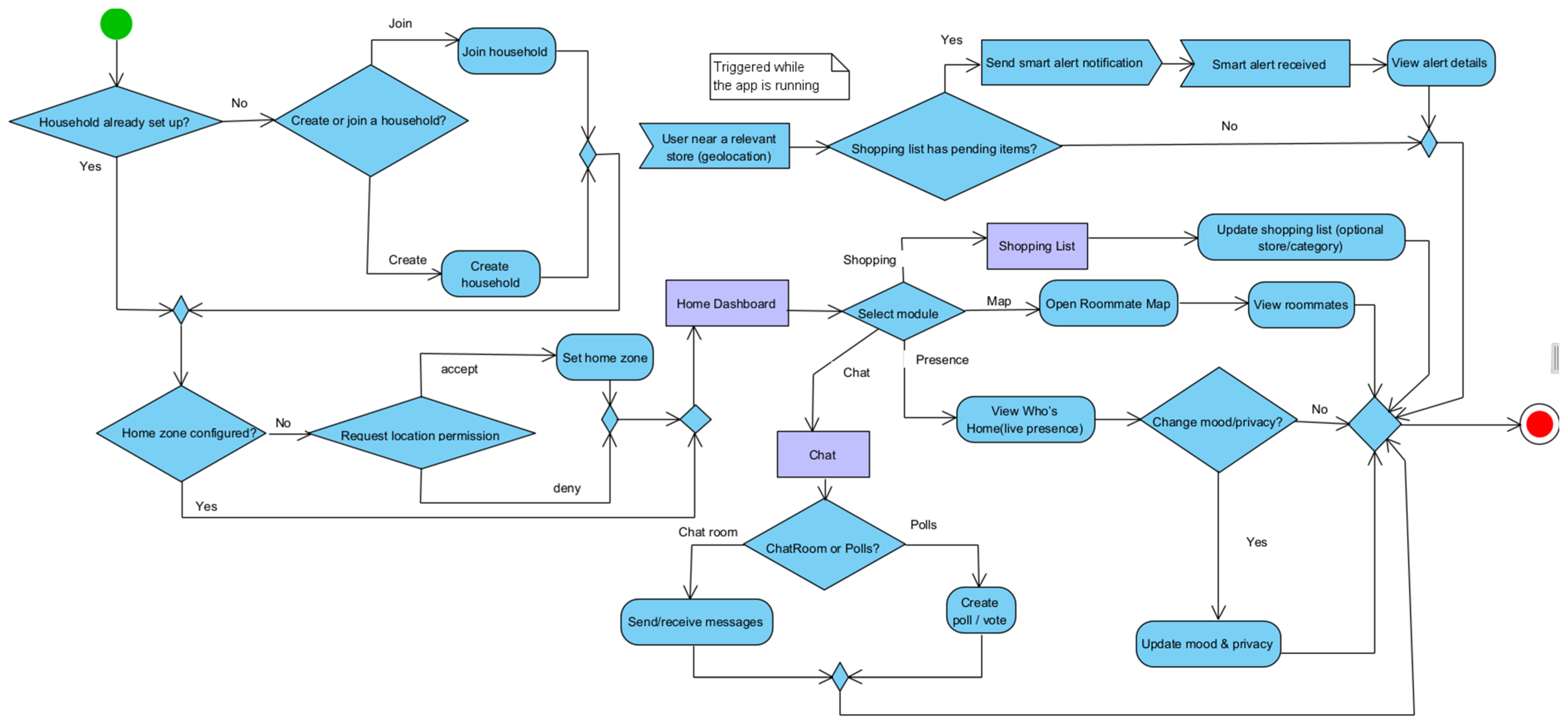
To provide more context for the above functionalities, we want to integrate them into an activity diagram.
Figure 4 shows the main flows of the application in terms of joining a house, sending messages, creating polls, and receiving location-based alerts. This diagram provides us with an overview and lays the foundation for the logical development of the application. Within it, we can see the main decision nodes and activities, thus outlining the main modules. Their interdependence is observed, which suggests the need for synchronization of updates.
In the onboarding flow, we meet the first decision point, and it refers to the fact that a user who is not part of a virtual house can join one using a code or can create a house himself to invite his roommates. After this, the user will have the option to set a location for the house. This can be carried out manually by entering the address or automatically by using their current location. These settings will be useful for functionalities related to location (presence and location-based notifications). Obviously, for this, the user’s permission to activate the location on the device will be needed. The user has the possibility to edit these location settings at any time, as well as to set a mood with the help of emoticons and quotes.
The location-triggered notifications are used more specifically in the scenario where a user is close to a store that may have a product on the shopping list that has not yet been purchased, at which point a smart alert is sent, or the normal flow of the application continues.
The decision group of the application is represented by the duo chat polls, which share the same module precisely because they are closely related to each other. Creating polls is possible only by accessing the Chat section.
The activity diagram in
Figure 4 should look at the perspective of a user’s actions that generate updates in the backend, which are then propagated to other users through listeners and observers.
3.3. User Interface and User Experience
Now that we have established the main use cases of the application (
Figure 3) and integrated them into a workflow that provides context and explains how the system works, we have a solid foundation to help us design and develop interface and screen concepts for the application.
To achieve the most fluid experience, we also need a user interface that supports this defined set of functionalities and workflows. Therefore, we designed an interface for Cozzmo that efficiently meets the needs of co-living while also encouraging collaboration and communication.
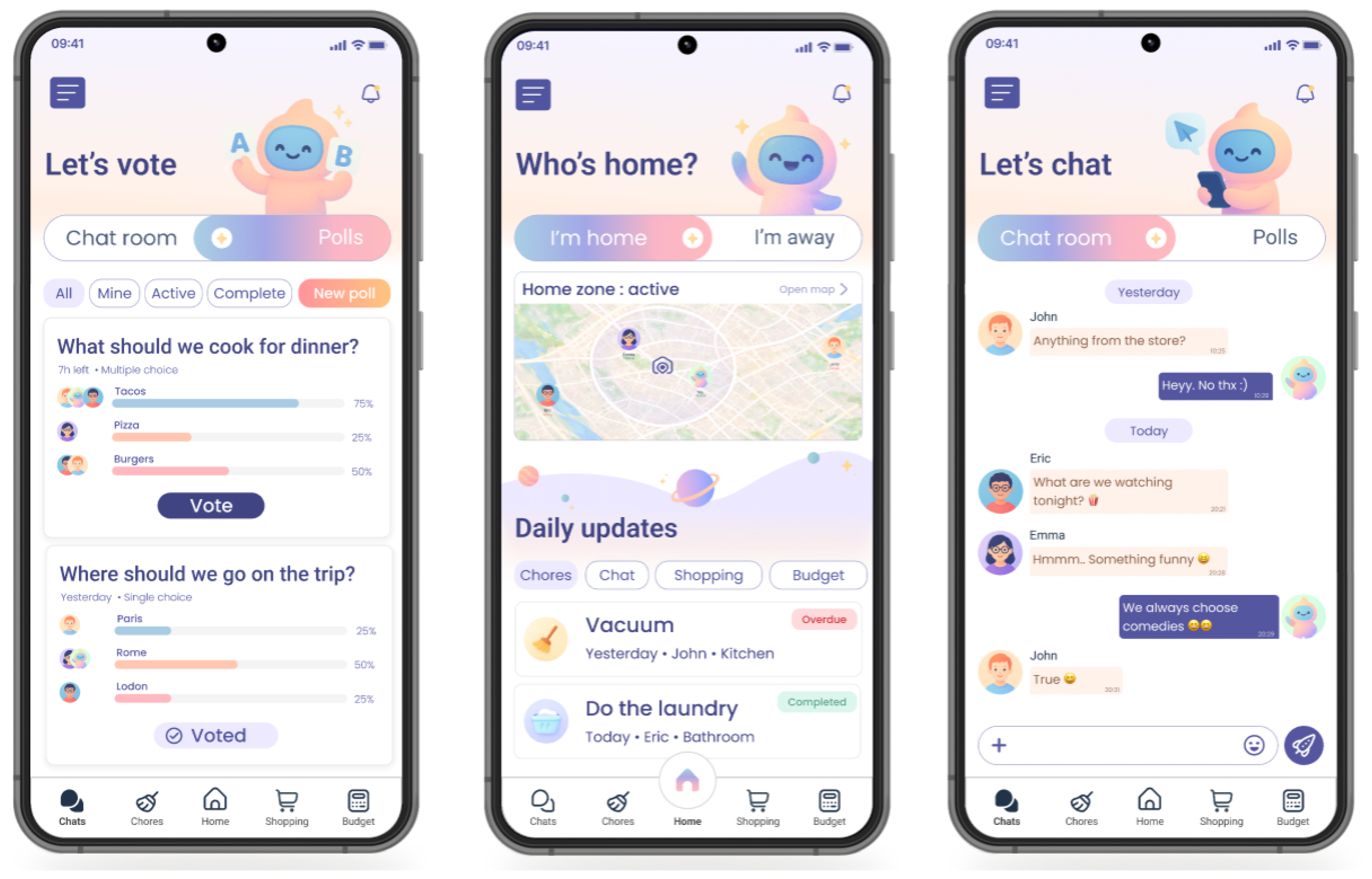
The app’s interface proposes the existence of a fictional character named Cozzmo as an intermediary between the user and the responsibilities related to the house, precisely to create a sense of group and unity. The color palette is mostly pastel, and the design includes elements intended to simplify interaction with the app: a slider present on most screens, filters, and a map that users can minimize to save screen space.
Navigation within the application follows a well-defined structure, as we can see in
Figure 5. At the bottom, there is a navigation bar that provides access to the main modules: Chat, Chores, Home, Shopping List, and Budget. Additional menus such as album, profile, or house setting will be available in the burger menu at the top left. This way, we avoid cluttering the main menu and provide quick access to the most frequently used sections.
The Home screen, which is the application’s main screen, serves as a dashboard for the user, showing the latest notifications from the house and the status of other users (whether they are at home or not). This screen is intended to be as comprehensive as possible regarding the house’s status, as it serves as the starting module in the application.
That is why on this screen there are maps with the status of each roommate, as well as a Daily Updates section that represents the latest news from the other modules (Chat, Polls, Shopping List, Budget), so the user can stay informed without opening them unless a specific action is needed.
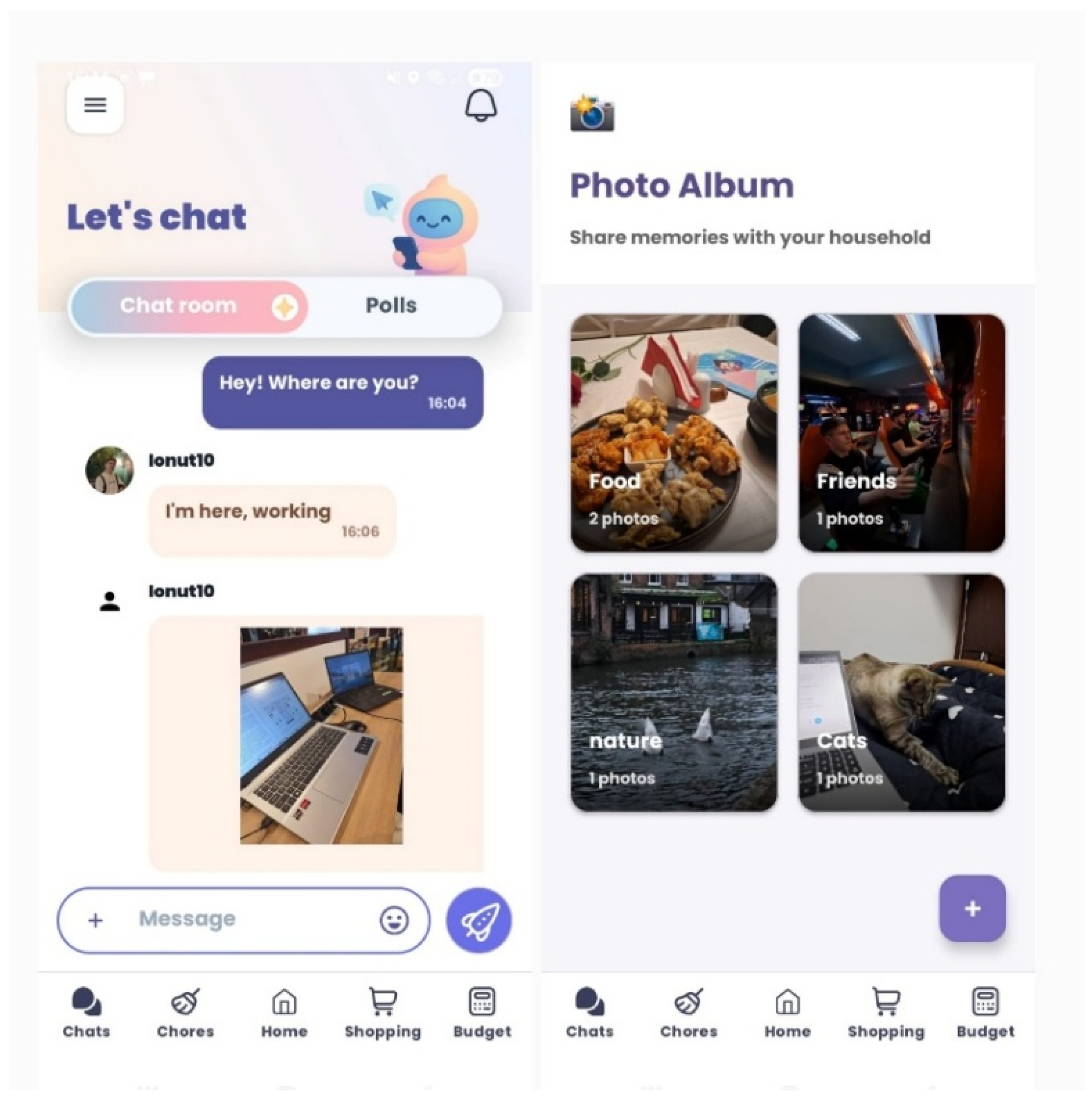
The Chat section is designed to support conversations between the residents of the house. Here, users can send messages and share files or photos. Each of these will have a timestamp and will be divided by day for a clear overview of what was discussed. To keep the experience fluid under low-connectivity conditions, the message is marked (sent, pending, or failed), and the user is informed and can try again.
Polls are integrated into the Chat section, intended as a decision-making tool rather than a separate module. Creating a poll consists of writing the question, choosing the type of answer (single or multiple choice), setting the response time and providing options to choose from. The interactivity part is covered in the results visualization, where the number of votes is counted, and the percentage obtained by each answer option is accompanied by the avatar of each user who voted, as well as different colors depending on the options chosen.
The Chores module will be well defined with clear ownership and progress status. When a task is created, it is assigned to a user, it has a category of tasks it belongs to, it is given a priority level, and notes can be added regarding its resolution. With tactile actions specific to mobile interaction, it can be edited or deleted. A status can easily be changed to “Done” with a simple click of a checkbox, and if the checkbox is not activated, the task has a pending status by default. This issue is taken into account when sorting in filter functions such as Done, Active, All, or Mine.
Within the Shopping List section, the user can keep track of the products needed in the household, or view this section as a set of reminders to avoid forgetting to buy the most necessary items. When an item is added to the list, the user specifies the name, quantity, unit of measurement, category, and store type (e.g., supermarket, pharmacy, electronics, etc.), in order to receive smart notifications when the user is near a store that could provide that product. The user can also add favorite stores to the map, which facilitates the logic for sending these notifications. When an item is marked as “purchased,” it will no longer appear in notifications.
The Budget module is the place where finances are tracked. It captures, at a basic level, the organization of the household cash flow, but it can be useful only if users give it the necessary attention. The household finances are grouped into income sources, expenses, or savings, and the relevant indicators are updated in real time to provide a clear view of the balance.
In addition to these modules, the design will also include privacy and mood settings. The user will be able to explicitly decide when their location or “home”/”away” status will be visible to the other housemates. Mood settings will represent a signaling mechanism for communication, meant to facilitate an open style of communication, as well as a more private one when needed. These privacy-sensitive options are intended to remain optional, so that users may participate in the core collaboration functions of the application without being required to enable location sharing or mood disclosure.
In conclusion, the user interface is built with the specific co-living behavior in mind. The design presented in
Figure 5 sets the tone in terms of colors and style for the other screens in the application. The interface must be built to support collaboration and communication between housemates, while also meeting the needs of managing a typical household.
3.4. System Architecture
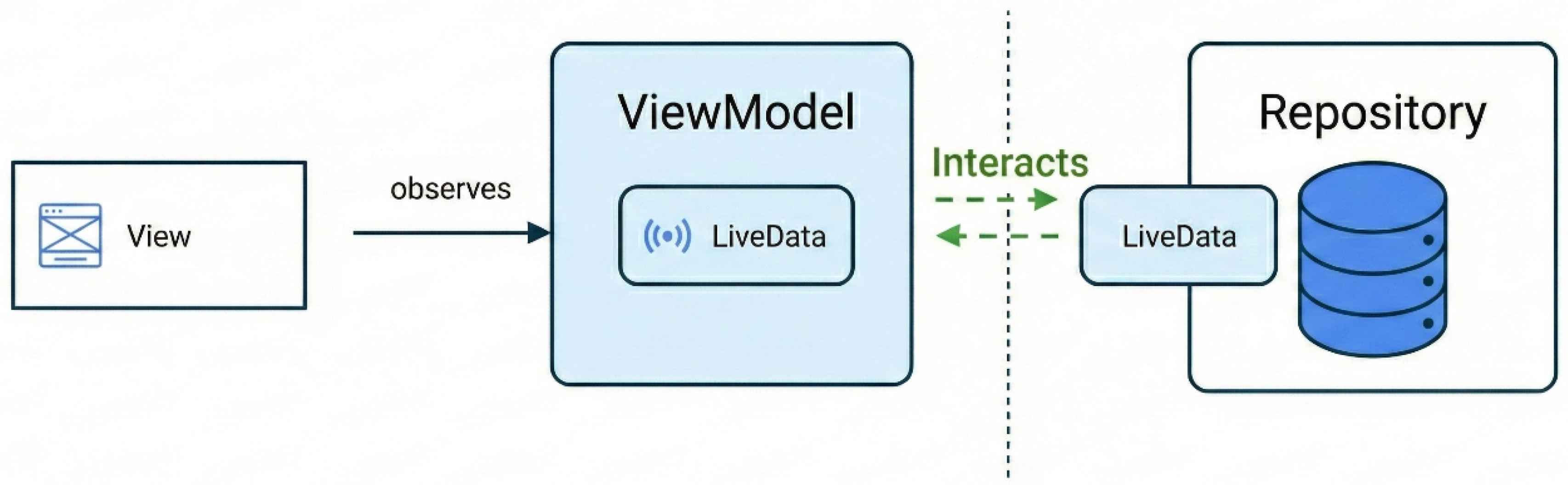
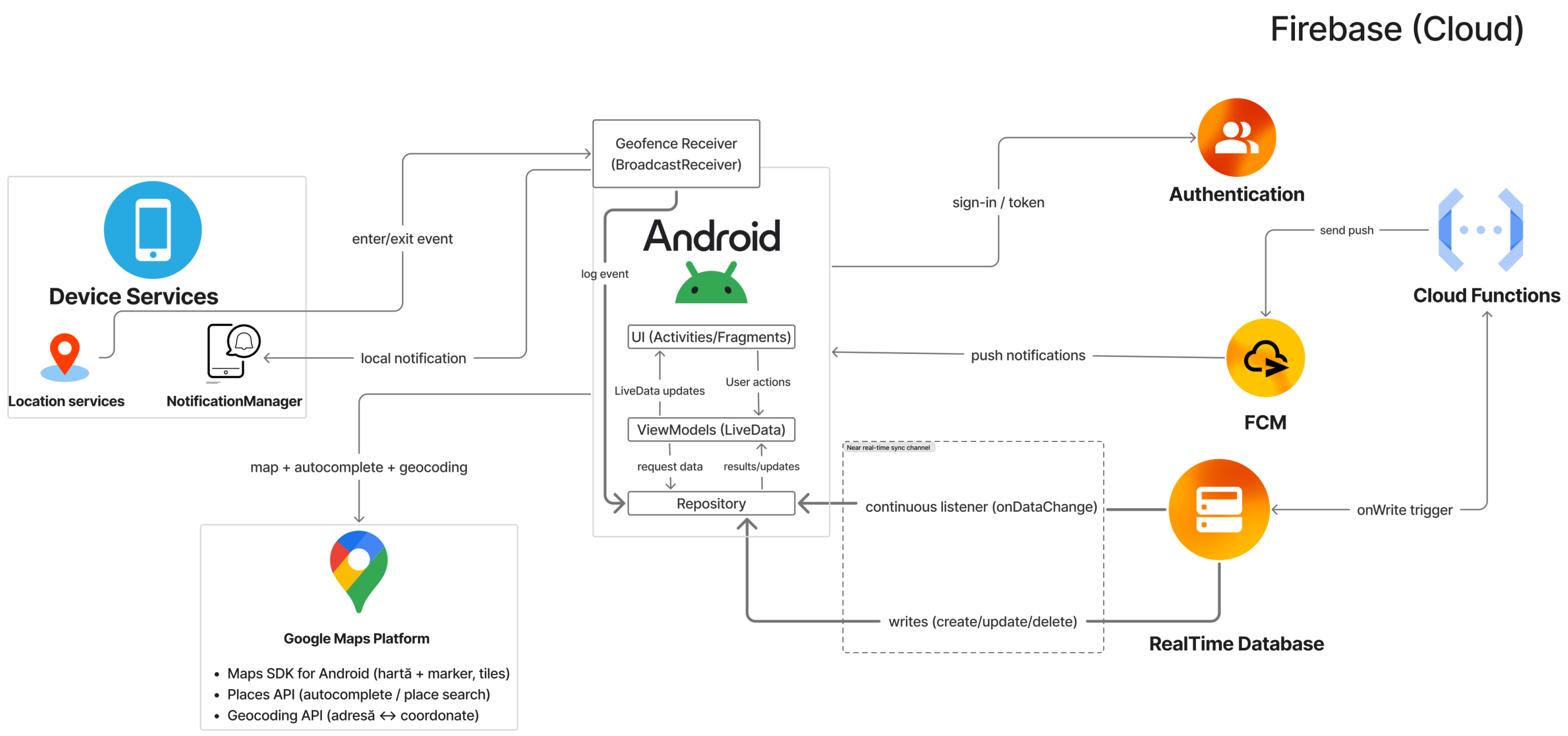
Cozzmo adopts a client–cloud architecture, exemplified by the diagram in
Figure 6. On the client side, Android manages the interface and synchronization through listeners, and the geofencing/proximity logic and smart alerts are orchestrated locally through notifications (NotificationManager) for a quick propagation of information to the user. The backend part is managed in the cloud with the help of Firebase, which offers services such as Realtime Database for the efficient organization of the data flow, Firebase authentication for the possibility of user authentication, and Firebase Storage, which is a service for managing pictures and stored files. Firebase Cloud Messaging is a Firebase service also used to send notifications, but notifications that are non-critical, such as when a user was added to the house, a product was purchased, etc.
This separation of responsibilities is intended to bring the propagation of events closer to a real-time sensation for users.
The Android application is organized around the MVVM template. The user interface, consisting of activities or fragments, observes the state exposed by the ViewModel through the LiveData component. ViewModel interacts with repositories for operations on data, which involves write/read actions in Firebase that result in updates of the current state in the UI. Adopting this model makes the interface work in a reactive mode. In practice, any event triggered on the backend, from a simple text message to a change in the status of a vote or a task, reaches the UI almost instantly. We have thus eliminated the need for the user to manually refresh the screen, as the data propagates itself as soon as changes occur in the storage infrastructure.
As previously noted, the backend architecture relies on Firebase services, specifically Realtime Database, where each created home receives a node with a unique ID in the JSON tree structure, while entities such as chat, surveys, tasks, or shopping lists are represented as child nodes within this hierarchy. With this method, instead of synchronizing large data objects, we adopted the strategy of small state transactions. Thus, updates to the database are granular, with only the specific pieces of information that have undergone changes being sent for processing, a method that favors a much faster propagation of changes across all connected devices.
For location-based features such as presence detection and smart alerts, the system follows a controlled data flow. Once the home perimeter has been established or a store has been added to favorites, the application records geofencing zones via the mobile platform’s location services. Thus, when a user enters or leaves the defined area of the home or is in proximity to a point of interest for shopping, the device automatically generates a status update or local notification, eliminating the need for any manual action. Importantly, such an approach avoids the constant streaming of GPS coordinates, thereby reducing the continuous exposure of precise location data and limiting unnecessary device resource consumption.
Notifications are delivered in two distinct ways: locally via the NotificationManager service and in the cloud via the FCM (Firebase Cloud Messaging) service. Proximity and location-related notifications are delivered through the local notification manager because they require a short propagation time to be relevant. On the other hand, less urgent updates, such as chore assignments or poll results, are pushed through FCM. In this way, this hybrid architecture fits better in a context where we want to prioritize the most relevant notifications for the user.
To reduce the risk of data mixing between different households, the prototype was designed around authenticated membership and household-scoped authorization logic for admins and members. In the intended design, users should only be able to read or modify data associated with the household they belong to, although stricter authorization rules remain part of future hardening work. Each module stores and reads data per household, so the user experience is not affected by unrelated content or unwanted updates.
Taking into consideration all these aspects, it can be said that the architectural diagram helps us reflect and put into perspective both the necessary technologies and the design decisions that must be taken into account during the development of the application.
4. Implementation
In this section, we will build upon the “Cozzmo” concept defined in the previous sections and proceed with the actual implementation of the prototype. The prototype will be developed on the Android platform using the native Java language and various standard and additional components.
The entire architecture is based on an MVVM pattern with LiveData.
4.1. Maps and Live Presence (Home)
The Home module uses Google Maps and Android location services to show a shared household map focused on the saved home zone. The map is built with the Google Maps SDK for Android and is accessed through an API key set up in Google Cloud Console, with restrictions and quota limits to control usage. The UI displays the home location chosen when the household is created, either from the user’s current position or by dropping a pin on the map, and it can be changed later from the “OurHouse” menu section. If the user enables it, the map also shows the approximate location of other household members.
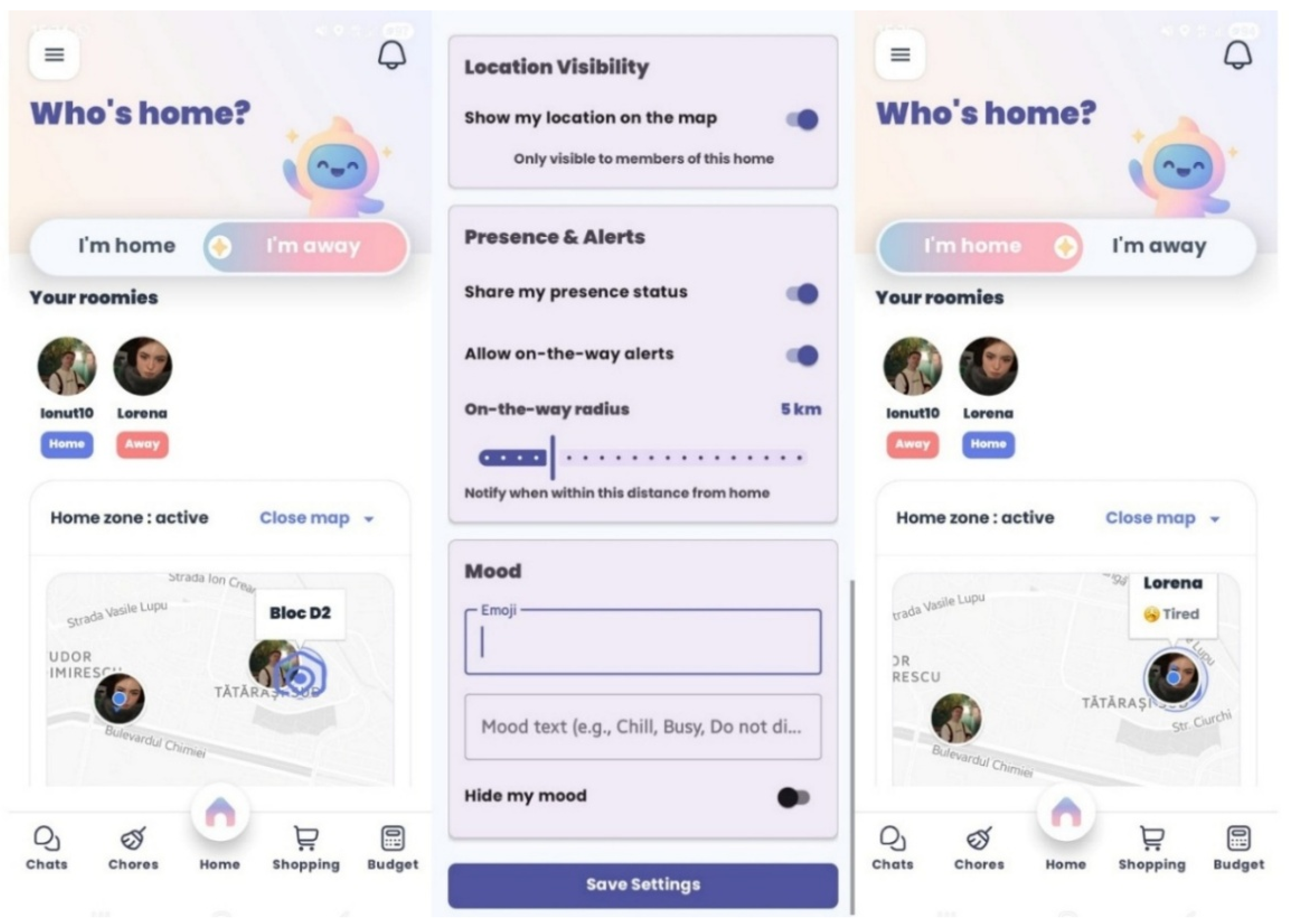
Location updates come from the fused location provider, and geofencing is used to set a simple presence status (“home” or “away”) based on the home zone. To support user control over privacy-sensitive information, location sharing can be turned on or off, the visibility of location-related status remains configurable at the user level, and a small mood indicator is available and can be viewed with a simple tap (tapping an avatar marker), as shown in
Figure 7.
The Home screen is the first screen users see when they open the app. It is designed to be as informative and practical as possible and easy to read. At the bottom, the “Daily Updates” section shows the latest activity from other housemates across the main modules.
4.2. Chores, Budget, and Polls (Core Real-Time Modules)
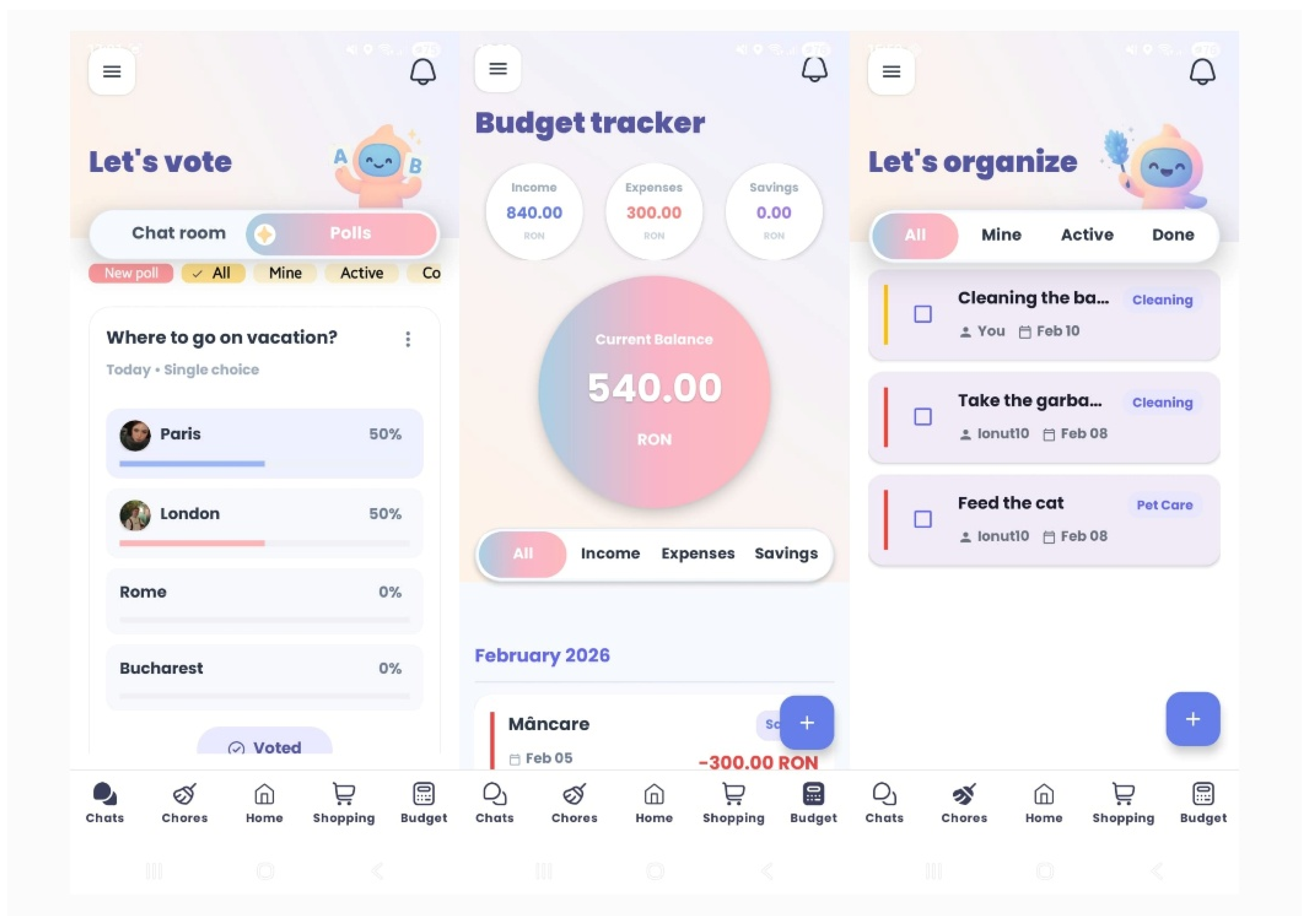
Chores, Budget, and Polls are shared features inside the same household. Chores let housemates assign tasks and track their status. In Budget, the visual focus is on economic indicators regarding savings, expenses, or income. Polls help the group make quick decisions, and results update as votes are submitted. Updates are visible only to members of the same household and appear in the interface right away. All data is stored per household, so users only see updates from their own house.
The screens in
Figure 8 display household changes as they happen. All three modules follow the same MVVM flow: the app listens for RTDB updates in the Repository and passes them to the UI through the ViewModel using LiveData, as shown in Listing 1.
| Listing 1. Polls module: RTDB listener feeding LiveData. |
| // Repository (PollsRepository): exposes LiveData backed by RTDB listener |
private final DatabaseReference db = FirebaseDatabase.getInstance().getReference();
|
| private final MutableLiveData<List<Poll>> inProgressLive = new MutableLiveData<>(new ArrayList<>()); |
public LiveData<List<Poll>> inProgress() { return inProgressLive; }
|
| public void startListening(String homeId) { |
| db.child("homes").child(homeId).child("polls") |
| .addValueEventListener(new ValueEventListener() { |
| @Override public void onDataChange(@NonNull DataSnapshot s) { |
| long now = System.currentTimeMillis(); |
| List<Poll> list = new ArrayList<>(); |
| for (DataSnapshot c : s.getChildren()) { |
| Poll p = c.getValue(Poll.class); |
| if (p != null && !p.isCompleted(now)) { p.id = c.getKey(); list.add(p); } |
| } |
| inProgressLive.setValue(list); |
| } |
| @Override public void onCancelled(@NonNull DatabaseError e) {} |
| }); |
| } |
| // VM: LiveData for UI |
| public LiveData<List<Poll>> inProgress() { return repo.inProgress(); } |
| public void init(String homeId) { this.homeId = homeId; repo.startListening(homeId); } |
Listing 1 shows how fetching data from the Repository to the ViewModel works. The Repository listens to the Polls node in RealtimeDatabase and rebuilds the update list for Polls when a change occurs. That list is intercepted by LiveData, and the ViewModel exposes it to the interface. As a result, the Polls screen is updated every time there is a change in the data (create, edit, update, or vote in a poll).
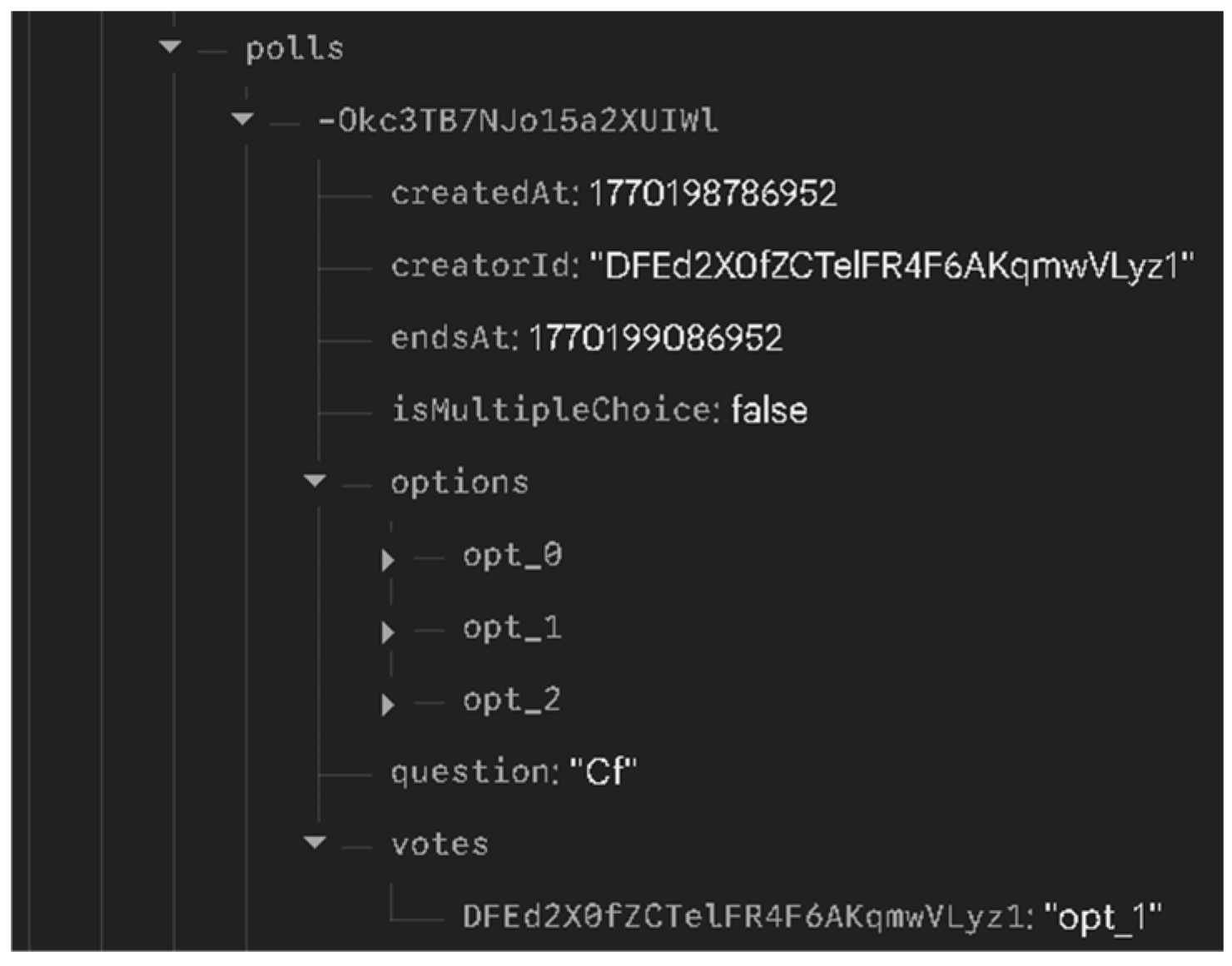
All poll data is stored in a simple RTDB structure built for quick updates in a shared household (
Figure 9). Each poll is present under the Polls node and contains information regarding the existing voting options as well as those voted on. This layout of the data model favors faster processing through read/write operations.
4.3. Shopping List, Places, and Smart Alerts
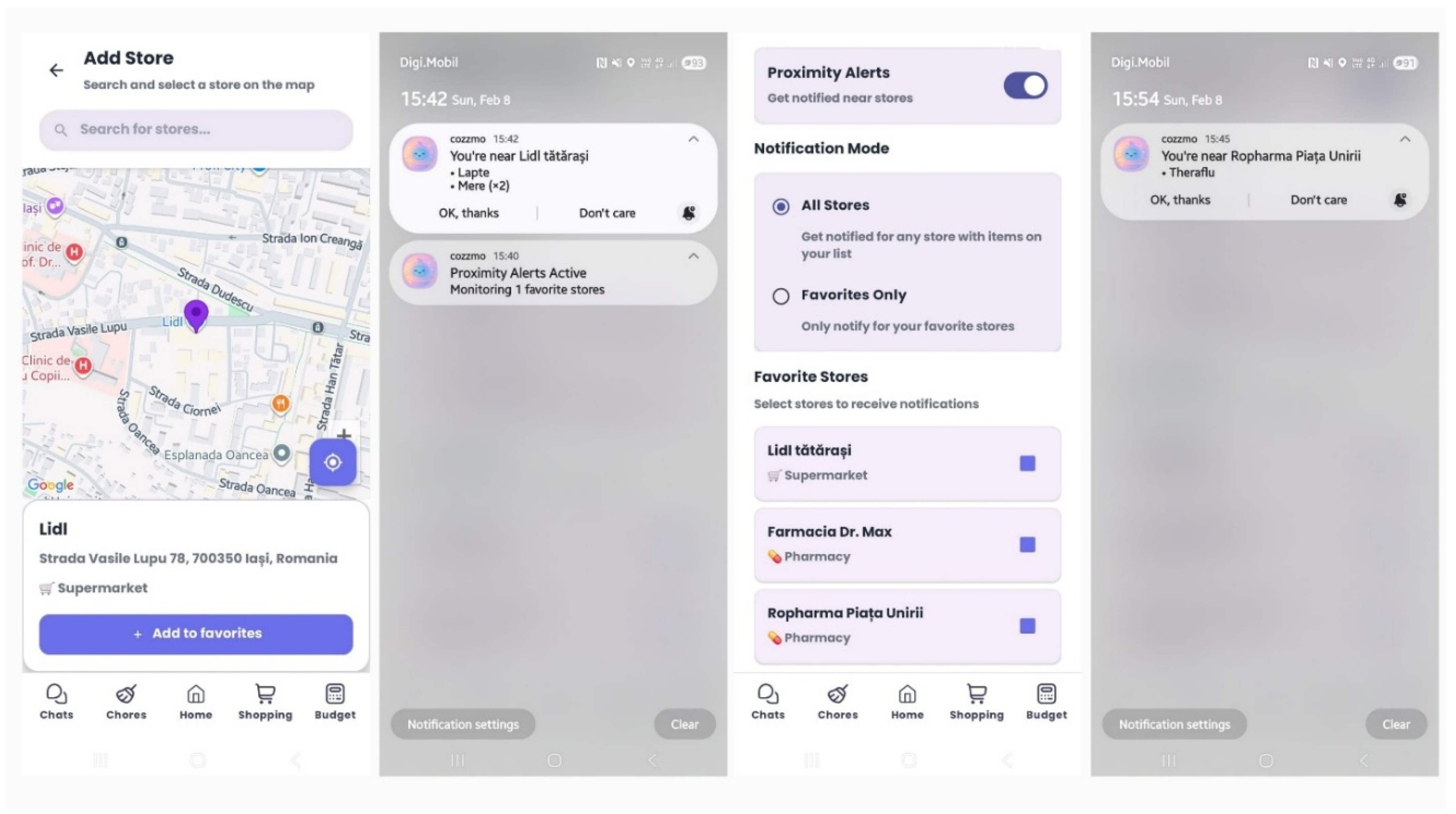
The Shopping List module combines real-time updates with location-based reminders. Users can save stores through a map flow that uses Google Places for searching and selecting locations. After stores are saved, the app can send a reminder when the user is close to a relevant store, based on a local proximity check and the user’s settings (for example, favorites only). In
Figure 10, we have examples from the application with the screens that deal with adding favorite stores to the map, the settings for notifications when the user is near them, and also an example from a test of this functionality.
Alerts are delivered as local notifications via the Android notification framework, and the reminder content references items currently pending on the shared shopping list. To keep alerts relevant, the logic can filter suggestions by store type and item category (for example, pharmacy-related items near a pharmacy, groceries near a supermarket).
The Shopping List module extends real-time synchronization with context-based reminders by linking each item to a store context. When an item is added, it is stored with a storeType (e.g., pharmacy, supermarket). Saved stores are added via a Google Places-based flow (search and selection) and are stored with the placeId, coordinates, and the same storeType. When the user is near a saved store, Cozzmo filters the shared list and suggests only pending items that match that store type—for example, medicines near a pharmacy and groceries near a supermarket.
This “near-store” trigger is implemented via geofencing, while store metadata and shopping items are retrieved from the shared RTDB structure (also exposed locally through the app’s cache) and used to assemble the notification content. These notifications, generated when the user is in proximity to a store, are sent through the Android service called NotificationManager to avoid the higher latency of a notification coming from the cloud. Upon receiving the alert, the user can confirm the notification or stop sending similar alerts for an hour, using the “Don’t care” button in the notification. Implementation details are presented in the
Appendix C, in Listing A1.
4.4. Chat and Media Sharing (Chat + Album)
The two sections of the app that rely on Firebase Storage to manage media are the chat and the household album. Members communicate through a dedicated chat, where they can send messages and share content such as images or various file attachments. In addition, the Album module allows for shared organization of photos, with users being able to create collections and upload images that become visible to the entire household (
Figure 11). To manage this content, Cozzmo stores the actual files in Firebase Storage, while the Firebase Realtime Database maintains download URLs and basic metadata.
Access control for media resources is based on Firebase Storage security rules, with authentication required for accessing the media paths used by the prototype.
According to the configuration in Listing 2, these rules were intended to support data separation between avatars, chat media, and household album content, although stricter production-grade authorization remains for future work.
| Listing 2. Firebase Storage rules: media access policy (prototype). |
| rules_version = ’2’; |
| service firebase.storage { |
| match /b/{bucket}/o { |
| match /avatars/{allPaths = **} { |
| allow read: if request.auth != null; |
| allow write, delete: if request.auth != null; } |
| match /homes/{homeId}/albums/{allPaths = **} { |
| allow read, write: if request.auth != null; } |
| match /homes/{homeId}/chat/{allPaths = **} { |
| allow read, write: if request.auth != null;} |
| } |
| } |
Throughout the development process, we aimed to follow the decisions made in the design phase to ensure a coherent workflow. User actions trigger changes that are written to the RTDB, then each instance of the application receives this data via listeners, and the interface is updated via LiveData. In parallel, critical alerts are managed by NotificationManager, while non-critical ones are sent via FCM, and media elements are managed separately via Firebase Storage.
4.5. Operational Footprint
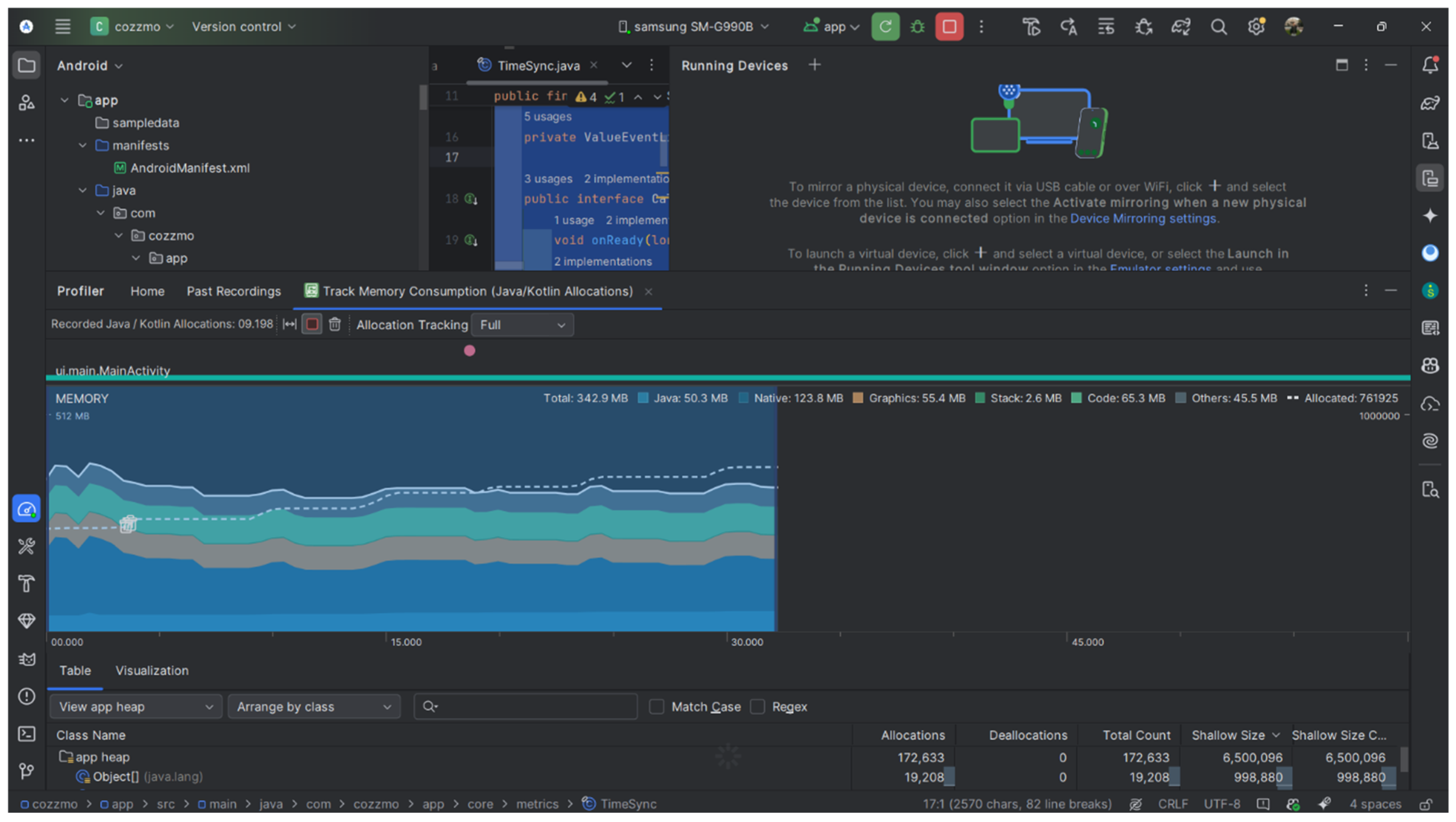
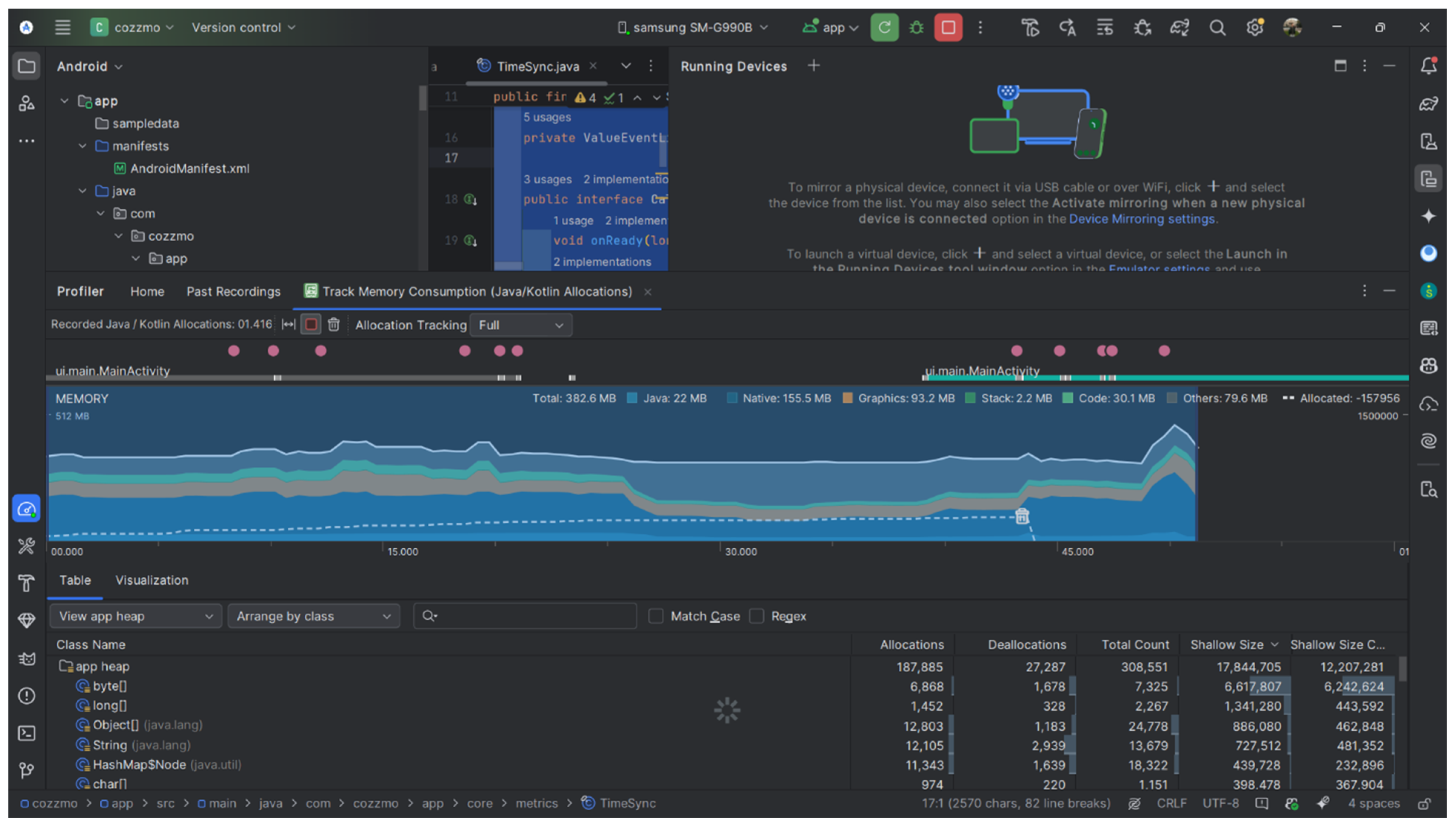
In addition to the real-time measurements planned for the next section, this section focuses on testing the application’s resource consumption. Specifically, we recorded the prototype’s memory usage to get an idea of the resources needed on a typical device. We used the Android Studio Profiler to analyze three different scenarios. The first (M2) captures the app immediately after startup, sitting idle on the Home screen. The second scenario (M3) involved navigating the map and interacting with the Album module by uploading a photo. The third (M1) consisted of a mixed session where we navigated through Chat, Polls, and Shopping Lists. The values obtained for the Java, Native, and Graphics categories are summarized in
Table 2, and screenshots from the profiling session are available in
Appendix A. It should be noted that, due to the way Android reports memory, the individual category values do not always add up perfectly to the reported total.
Comparing M2 with M1, it is clear that the total memory remains quite stable, somewhere between 342.9 MB and 392.4 MB, even when the user navigates through multiple modules in the same session. However, the M3 test, the one with the map and images, immediately pushed the graphics consumption to 93.2 MB, which is expected when the map and images are rendered. We also noticed that the native memory peaked in the M1 session. Most likely, this happened due to the continuous navigation between modules and the buffer memory used outside the Java heap. All of this data is just a quick snapshot to see how the application “sits” with resources at a certain moment.
This is an overview of the application from a memory consumption perspective in several usage scenarios. This experiment gives us indicative values for each scenario and helps us better understand how memory consumption is divided between the main components of the application.
In the next section, we will conduct several experiments to measure the synchronization in the application, through metrics such as propagation delay, recovery from connection loss, and behavior under conditions of near-simultaneous user actions. To do this, we will use telemetry and device clock alignment to reduce the risk of erroneous calculations.
5. Evaluation Methodology for Real-Time Synchronization
In this section, we will explain how we measured the real-time behavior of the prototype in a setting that is controlled but as realistic as possible. In Cozzmo, “real time” means how quickly changes made on one device are displayed on the other devices, and how quickly it returns to an updated state after a network instability has occurred. For this reason, we measure the end-to-end propagation delay and the time it takes for the receiver’s UI to show the update, because both shape how responsive the collaboration feels in a co-living context.
To further simulate real-world scenarios, the tests did not take place with all devices under the same network but were performed using the internet via mobile data or hotspot, thus being closer to the contexts in which a co-living application is used, with roommates who are often on different networks trying to communicate and collaborate. This also captures normal cellular variability, such as changing bandwidth, radio scheduling delays, and brief packet loss, which can influence synchronization in practice.
5.1. Test Setup and Evaluation Plan
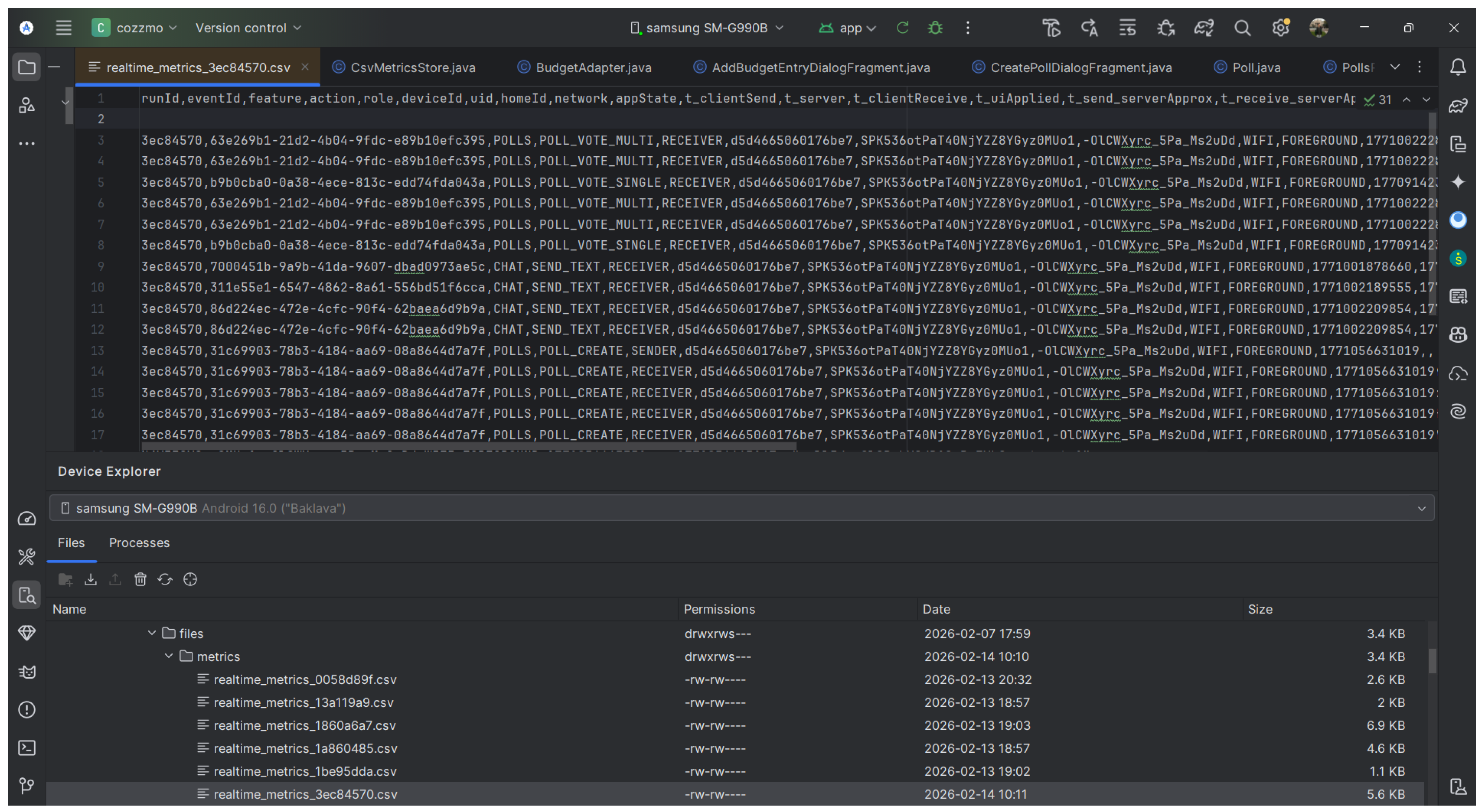
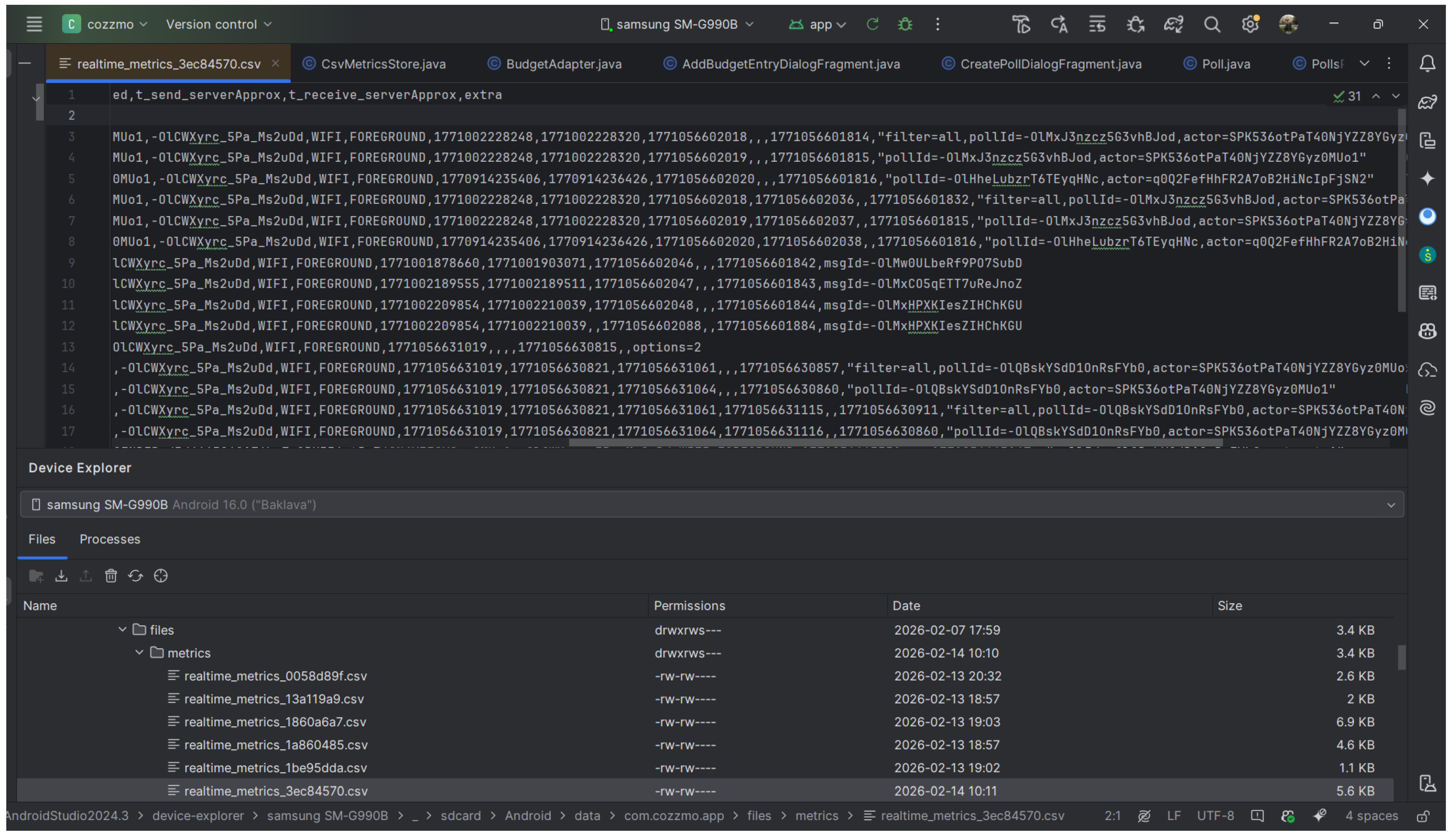
To measure the tests, we needed to extend the data model with new attributes, such as eventId, serverTs, clientTs, eventType, etc., and add functions in the Repository and ViewModel to capture the moment when the action occurs. On each device, the application writes these events to a CSV file. Each row includes the module name, the operation type, a shared eventId, and three timestamps that describe the main points in the update flow: clientSendTs (when the user action occurs), receiveTs (when the update is received on the device), and uiAppliedTs (when the change is displayed in the interface). The CSV format and sample rows are included in
Appendix B.
Because mobile devices do not share the same internal clock, there can be small differences (on the order of milliseconds) between local timestamps. For this reason, propagations are measured using server-aligned timestamps. To do this, we introduced a separate class, TimeSync, where each device periodically reads the value from the RTDB .info/serverTimeOffset node and calculates an approximate server time using tServerApprox = System.currentTimeMillis() + offsetMs, where offsetMs is the estimated difference between the device’s local time and the Firebase server time (i.e., an offset that corrects the local time to be as close to the server time as possible).
The logs are correlated across devices using the common eventId. Thus, we calculated (i) the end-to-end delay as receiveTs − clientSendTs and (ii) the interface application delay as uiAppliedTs − receiveTs. For multi-step scenarios, such as reconnecting, we used the same timestamps to measure how long it took to sync after the return, from the moment of reconnecting and reentering the screen until the expected state is fully displayed.
Number of units: The technical evaluation involved two physical Android devices used as active test nodes, both authenticated in the same home instance. The main technical specifications of the devices used in the evaluation are summarized in
Table 3.
Network topology: We preferred to perform the evaluation in two different connectivity scenarios, precisely to capture real-world situations in which users do not have access to a Wi-Fi network. One variant assumed that the terminals used their own cellular connections, with one active on a 5G network and the other on a 4G network. In the second case, we configured a personal hotspot so that one device could share its mobile data with another. This network topology is based on a client–cloud communication architecture, thus facilitating the asynchronous exchange of data via the Firebase Realtime database over standard internet channels.
Both devices ran the same application version. During each run, the relevant screen was kept open in the foreground on both phones so that the real-time listeners remained active. After each scenario, the corresponding CSV files were extracted from the Android Studio Device Explorer from the path /sdcard/Android/data/<package>/files/metrics/ and analyzed offline in Excel.
5.2. Results Overview
The empirical testing results are grouped into three test blocks, each corresponding to a research question. For RQ1, we included tests that challenge the application under normal conditions, with actions such as sending messages, voting in a poll, changing the status of a chore, and updating the presence status based on the user’s location. For RQ2, we tracked behavior after temporary connection losses, i.e., data synchronization after a period of time when devices have not had network access. For RQ3, we reported how quickly devices reach the same final state when multiple users perform actions on the same object almost simultaneously.
Number of repetitions: Each scenario was run as a separate test only once. In the following tables, the reported value n represents the total number of state updates or events captured within that session. Statistical validation of results: To maintain the technical quality of the evaluation, we used descriptive statistical methods. We calculated the median to find typical performance and calculated the 95th percentile (P95) to show the final latency under difficult network conditions. Because of the controlled nature of the experiment and the specific hardware used, these results are presented as descriptive indicators of the prototype’s behavior, rather than as general evidence.
For each scenario, we presented the results in simple metrics such as propagation delay time (where applicable) and the time it took for the interface to display the latest updates (UI application latency/UI latency). These experiments are relevant to real-world co-living scenarios, where people need fast updates and consistent application behavior, which facilitate the coordination.
5.2.1. Baseline Propagation Delay and UI Latency (RQ1)
The goal of this set of tests was to establish a baseline: how quickly Cozzmo transmits state updates between devices and how quickly the UI displays them on the receiving device, under normal usage conditions. We looked at two different delays: (1) the end-to-end propagation delay, from the moment the user triggers the action on phone A (clientSend) to the moment phone B first sees the update (receive), and (2) the UI application latency, which is the time between receive and the moment the UI has applied and rendered the new state (uiApplied).
The results are reported as median and 95th percentile (P95). P95 means that 95% of the values are below or equal to that threshold, and the slowest 5% are above it. Because some scenarios had small samples (e.g., n = 4–10), the P95 often came very close to the largest observed lag, so we interpreted it with caution. The RQ1 framework covers four representative scenarios: chat delivery (T1), poll voting updates (T2), chore state transitions (T3), and presence label updates triggered by simulated geofencing events (T4).
As the data in
Table 4 shows, all test cases had a 100% success rate, and in all these tests, the chronological order of updates was respected without any issues. This confirms the stability of the synchronization flow in the case of sequential interactions between the application modules. In the case of the message flow (T1), the highest latency was identified at the P95 level, and the discrepancy from the median value was attributed to the high volume of data transmitted in a short interval, which can generate queues in the database pipeline.
In contrast, the poll voting scenario (T2) showed a fast convergence, with low propagation values, which suggests that state updates on single fields are processed extremely efficiently. Regarding the status change for tasks (T3), although we can see that the propagation was slightly higher than that for votes (plausible given the fact that the state of this object is more complex), the latency at the interface level remained at an optimal level, below the 100 ms threshold. Last but not least, the presence update (T4) indicates a minimal median propagation, with the user receiving the notification almost instantly, while the P95 values reflect the inherent variability of mobile connections. Overall, the results suggest that the limiting factor for the reactivity felt by the user is represented by the propagation through the network and backend, and not by the rendering process on the device, since the delays at the UI level were negligible in all the scenarios analyzed.
5.2.2. Recovery After Temporary Connectivity Loss (RQ2)
In the case of a network connectivity loss scenario, we initiated two tests found very often in the real world in the use of different applications. One case involved the loss of connectivity for the one receiving data (T5). To simulate this, we switched the device to airplane mode while the sending device sent messages. The other test case (T6) involved the mirror action of the first test, namely a device sent messages while in airplane mode. The aim was to ensure that there was no data loss, that the messages reached the recipient in the order in which they were sent, and that the synchronization time after restoring connectivity was limited.
Analyzing the figures in
Table 5, it is observed that the system recovered completely regardless of the direction in which the signal was lost. In the case of the T5 test, we checked the 10 messages sent while the receiver was offline. All of them appeared in the application as soon as the user opened the Chat screen again. The completion time was only 10 ms according to the reception logs. We noted that the interface data was recorded less frequently in this test, so we relied on the exact time of packet arrival to measure recovery. For the T6 test, the queue formed on the sending device was sent in full and without order errors. The one who received the messages saw a small “wave” of successive updates upon reconnecting, with the entire stream being processed in a short interval of 52 ms.
We noticed that the server processed the data packet in just 6 ms, a sign that the writes from the queue were saved to the database almost instantly after the signal returned. From these tests, it is clear that small network drops did not affect the integrity of the messages, nor did they mix up their order. Synchronization was completed by itself as soon as the device was online again, without the user having to do anything in the interface.
5.2.3. Concurrency and State Convergence (RQ3)
We now move on to RQ3, where we wanted to see how quickly the information displayed in the application synchronized for all users after simultaneous actions on the same components. We tested this aspect through several collaboration scenarios that track data consistency in real time. Finally, we needed to be sure that there was no duplicate data or different versions of the same element. We also aimed to keep the propagation time for the final version as short as possible, ideally below the threshold of perceptibility for the user.
As can be seen in
Table 6, both action conflict scenarios ended up displaying the same state. In T7, the vote count was correct and included both voting options. This was due to an atomic increment strategy used by the server, a mechanism that prevents data loss when action conflicts occur. For test T8, we observed that both devices reached the same task status without duplicates or oscillation errors. The result was as expected for a last-write-wins rule based on server timestamps.
The measured conflict intervals, which were below one second, confirm that the tests tested real-world simultaneous interactions under mixed network conditions. Even in this context of Wi-Fi and mobile data, the system was able to maintain a single source of truth and keep the interface synchronized. The data shows that the Cozzmo application correctly handles typical home contention scenarios, protecting state integrity for both aggregation-type updates, such as votes, and override-type updates, such as task status.
Through the results of this group of tests, we wanted to demonstrate that the system is viable and could support communication and collaboration processes in real co-living situations. Therefore, through these experiments, the research questions were addressed, for which answers were found. For RQ1, the tests show that the propagation speed remained constant throughout the actions performed in the modules, and the updates in the interface were performed in a minimal time frame compared to the network latencies. Regarding RQ2, in our test sessions, we observed that losses did not lead to message disappearance or mixing, with the state being quickly restored upon reconnection. For RQ3, we observed that simultaneous interactions led to a consistent final state in the reported concurrent tests.
6. Discussion and Conclusions
The Cozzmo prototype should not only be interpreted as a feasible technical solution, but also as a co-living workflow that can be a measurable process. The results obtained with this prototype not only are a confirmation of the technical feasibility, but also demonstrate that workflows in a shared home can be managed as a shared and measurable process. By integrating real-time collaboration elements such as chat, tasks, surveys, or budget, along with location-based assistance, we were able to move the coordination between tenants from simple ad hoc messages to efficient management of the entire household. The following analysis links the technical performance of synchronization to practical implications for users and explores how these features could impact app adoption and monetization, with a particular focus on the added value of location-based reminders for nearby stores.
Technically, the RQ1 results show that the “immediacy” of collaboration is tied more to network and backend propagation than to the actual UI rendering. Previous research (
Ignat et al., 2015) shows that the delay between a user’s actions and the visibility of that action to collaborators has a negative impact on performance. Also,
Dang and Ignat (
2016) revealed that delay is an essential measure of performance in real-time collaborative systems and that, as the number of users or the rate of interaction increases, higher latencies can occur. Compared to these collaborative editing-oriented systems, our work pursues a narrower but similar context, namely the real-time coordination of a small group of co-workers. Thus, we want this delay to not be as significant in the application modules in order to retain a fluent and friendly workflow adaptable to co-living. Our baseline tests revealed that the UI latency is basically imperceptible compared to the propagation time, suggesting that the MVVM and LiveData framework adds very little overhead once an update hits the receiver. On the other hand, we also saw high latency during heavy data flows. This became clear during the 10-message chat test, where P95 values spiked compared to the median, pointing to some data packet congestion.
What we observed fits the reality of mobile networks, where signal variations and queues often occur for consecutive writes to the database. Even if small actions, like a vote or a status update, seem instantaneous, latencies of this type should remain a central point in future development decisions, which must be carefully managed to not compromise the user experience when traffic increases. In the Chat module, one solution would be to display messages locally before receiving the OK from the server, to “cheat” this delay. In addition, optimizing data packets and the way the application listens for changes in the database could significantly reduce these bottlenecks. Our technical proposal is in line with the authors
Kleppmann et al. (
2019), who showed that modern collaborative applications should provide near-instantaneous response to user interaction and not rely entirely on a round-trip to the server for every action. They directly tie the good work experience to the idea of fast local response and background synchronization. Our work aligns with this perspective by practically evaluating end-to-end latency and UI responsiveness in a co-living mobile application, not just in a generic collaborative editor.
The results for RQ2 confirm that messages do not disappear or fall out of order if the connection drops for a short time. Previous results (
Go et al., 2015) show that data synchronization in mobile applications must explicitly handle connection loss and subsequent state restoration to avoid inconsistencies and data loss. In our work, this issue is directly tested through scenarios where messages and updates need to be correctly retrieved after reconnecting. We saw this in tests where the phone was in airplane mode: on the receiver side, all missing updates appeared as soon as the device reconnected and the user returned to the screen. The same happened on the sender side, where messages were queued while there was no signal, and were delivered as soon as the network returned. In fact, we managed to cover everyday signal problems, such as those in the elevator, on the subway, or in corners of the house where Wi-Fi does not reach properly. A previous paper (
Escobar-Velásquez et al., 2022) explicitly discusses the fact that, in Android applications, unstable or absent connectivity scenarios directly affect the application behavior and user experience if not handled correctly. The authors link offline-first practices to the need for a better experience in conditions of eventual connectivity.
An important conclusion from an application management perspective is that “resilience” is not just about the backend but is closely related to usability. We consider that users are not bothered by small network interruptions, as long as they do not occur constantly and the system manages to synchronize itself without asking for their help. In the case of Cozzmo, we relied on an automatic synchronization that always displays the final and correct state of the data in the interface. This approach eliminates the additional coordination effort between housemates and reduces the need for repeated manual coordination. This is essential in shared homes, where repeated coordination issues can quickly lead to application abandonment.
RQ3 deals with the most delicate real-time collaboration problems, i.e., simultaneous actions by multiple users on the same object. The article written by
Maquil et al. (
2024a) shows that good coordination depends on users being able to follow each other’s actions, and without this visibility, process losses, performance degradation, and the need for more explicit coordination occur. In our work, this aspect is important when multiple users intervene almost simultaneously on the same object, because the final state must synchronize quickly and clearly across all devices without affecting the user experience. Both concurrency scenarios tested were successfully completed, and demonstrated that the prototype reached a correct final state, without duplicates or errors, even when conflicts occurred at sub-second intervals. In the case of votes, this ensured the integrity of the final result, so that the count reflected the will of the entire group, not just the action of the last user who pressed the button. We built the task module so that the system correctly validates status changes, even with simultaneous actions. Our intention was to eliminate synchronization errors between users, such as a task appearing as completed on one device but remaining active on the rest of the terminals, and to ensure that the information remains consistent for all members of the household. The article written by
Maquil et al. (
2024b) shows that introducing awareness cues improves workspace awareness, coordination, and user experience in collaborative activities. In our work, this aspect is relevant when multiple users intervene almost simultaneously on the same object, as updates must become visible quickly and coherently on all devices to support coordination.
A fundamental component of our measurement methodology was handling the devices’ unsynchronized internal clocks. To solve this problem, we used a special node in the Firebase Realtime Database, called .info/serverTimeOffset, which returns the difference in milliseconds between the phone’s local time and the server’s time. This method increases the accuracy of measurements when propagating data between devices and eliminates the risk of miscalculation of latencies caused by time offsets on local devices.
Beyond the raw data, a contribution of the Cozzmo project, in addition to the suite of functionalities, lies in the way we looked at coordination in a home as a complete and measurable workflow. The paper proposes a compact evaluation method that can be reused for other home collaboration systems. By using a common eventId for each log, we were able to isolate the course of each action between terminals and clearly separate network delays from the time needed for the actual rendering in the interface. Thus, we can quickly diagnose whether low performance is the result of the backend infrastructure or local processing on the device.
One practical implication is that Cozzmo manages to take some of the mental burden of managing a shared home.
Our main focus has been on the idea of eliminating communication barriers and difficulties, covering aspects described by
Nasreen and Ruming (
2021). These communication barriers can stem from a series of repetitive questions about each roommate’s schedule, or from human errors that result in the omission of necessary household purchases. In this way, through the application proposed in this article, predictable organization leads to a significant reduction in stress and fosters a harmonious atmosphere in the long term, answering concerns expressed by
Tan and Toh (
2025). Furthermore, certain routines tend to become natural processes that no longer require constant manual coordination.
Given the results presented in this article, the strength of the app model lies in the integration of the shopping list and smart alerts, as it creates a direct link between household needs and nearby stores. Through the app we propose, this functionality can offer real commercial potential that can later be leveraged in an integrated business model. With some technical adjustments, the platform can function as a proximity marketing channel, where merchants pay to be recommended precisely when users need products, thereby synchronizing supply and demand. Consequently, this functionality can be transformed into an opportunity to pave the way for commercial partnerships.
On the other hand, from a retailer’s perspective, proximity alerts significantly help identify a clear signal of purchase intent. At the same time, they optimize customer interaction because the user receives the notification exactly when they need a specific product from the list and are physically in the right place—that is, near the store.
It is clear that such a system, once operational, could help generate personalized marketing campaigns that include loyalty programs and initiatives. In this way, intrusive “traditional” marketing is transformed into a truly useful service that appears exactly at the right moment, strictly based on the user’s preferences. More than this, the proposed application can contribute to ethical communication in business (
N. Dospinescu, 2019).
We approached the management of personal data starting from the premise that the prototype was designed to give users configurable control over sensitive functions such as location sharing, presence visibility, or mood signaling, with the use of these features remaining strictly voluntary and at the user’s discretion. Therefore, the activation or revocation of any function that involves working with sensitive data is user-initiated through the settings interface, although stricter authorization and production-grade enforcement remain for future work. The role of these safeguards becomes all the more important in a co-living space where each member wants to feel that they can benefit from privacy at any time and that they have control over this aspect. Without these protections, a simple coordination support that aims to unite the members of a home and improve collaboration between them can turn into a tool for informal surveillance or social pressure between residents.
Looking ahead to a future production stage, this aspect of personal data confidentiality and the privacy of each user must receive maximum attention to form a solid ethical framework in the use of this information. Additional clarifications provided to users regarding data processing, so that they always know when their information is being shared, along with the implementation of strict confidentiality rules, must be seriously addressed in a final version of the application to eliminate any risk of coercive or abusive behavior between residents.
From a business logic point of view, a production version of the application could incorporate several monetization options, depending on the functionalities offered to the end user. One can imagine a freemium version that includes a free but limited package of basic functionalities, while a paid version would continue the advanced options. These advanced options could refer to the management of multiple homes, additional storage space for the photo album or automatic list creation mechanisms.
From an economic point of view, the application can also be integrated into tourism business models, so that communication and collaboration between tourists and owners is beneficial. For example, such models can consider hostels or chalets rented jointly by groups of tourists.
From a social point of view, the Cozzmo application can even be integrated into the university environment because, most of the time, students end up living in shared dormitories without knowing each other beforehand. In this way, the application can contribute decisively to improving the adaptation process of new students to living together with different roommates.
The results obtained in this evaluation must be viewed in the light of several important limitations. We tested the prototype on a limited number of devices and runs, which confirms that the system is viable, but it does not yet allow us to draw large-scale statistical conclusions. Also, although we used real network conditions, we did not systematically vary the signal level or mobility states through a controlled matrix. For this reason, extreme values such as P95 are more likely to be indicators of the highest delays encountered during the tests, not absolute truths.
Regarding security, we used more permissive settings to ease the development process. A final version will need to impose strict authorization rules at the level of each home, protecting both the database and storage. Another challenge is related to location-based notifications, where accuracy is significantly influenced by the phone’s battery saving policies, so it does not depend solely on the application code. In the future, more thorough validation on different phone models and power consumption modes would be necessary to understand these variations exactly.
Future work directions pursue two main objectives, namely expanding the platform and maturing the product. From a technical point of view, a natural next step would be to port the application to iOS, while maintaining the same real-time synchronization mechanisms. We can also add new functionalities that respond to the concrete needs of shared housing, such as special flows for emergencies, the option to temporarily replace a household member, or audible alarms. An innovative direction would be the integration of artificial intelligence through the mascot Cozzmo, which would take the form of a chatbot present in several modules of the application. Also, automating certain flows through machine learning algorithms that learn product needs or spending patterns could provide personalized recommendation suggestions.
For the continuous improvement of the system, a major point of interest in the future is to collect feedback both from groups living in co-living without using our solution and from those who already use Cozzmo. This comparative approach would allow us to more clearly identify the points of tension that the application manages to solve. At the same time, feedback must become a component directly integrated into the interface, transforming user opinion into a development engine for the next versions.
This paper presented Cozzmo, a mobile system dedicated to co-living environments that brings together real-time communication, presence monitoring, task coordination and proximity alerts in a single Android prototype. The paper rigorously measured the concept of “real time,” a vital element for the fluidity of interactions in a co-living scenario. At the same time, the proposed solution has major business implications that can be further explored to obtain a viable product on the market.
This article is part of a large research process that will also be addressed in a future dissertation topic, being directly inspired by the design and empirical results obtained in this stage, together with the complementary results (
O. Dospinescu et al., 2025) previously published.




 ,
,