

Designing Human-Centred Adaptive AI Navigation for Blind and Visually Impaired Individuals: A Cognitive Load-Aware Framework for Accessible Urban Mobility



Abstract
1. Introduction
- (1)
- It proposes a human-centred design framework for adaptive navigation assistance tailored to blind and visually impaired users in urban environments.
- (2)
- It introduces a cognitive load-aware interaction model that regulates instructional granularity, feedback frequency, and system intervention to ensure cognitively sustainable guidance.
- (3)
- It presents a structured integration of user-centred design principles with a modular multi-agent architecture intended to support adaptive assistive interaction, illustrating how adaptive behaviour can be embedded into assistive AI systems.
- (4)
- It defines a formal Software Requirements Specification (SRS) that explicitly links accessibility constraints with system behaviour.
- (5)
- It presents a formative usability evaluation with eleven visually impaired participants, providing preliminary empirical evidence for the proposed interaction model and identifying directions for future controlled validation.
2. Related Work
3. System Requirement and User Experience Design
3.1. Target Demographics and Software Requirements Specification (SRS)
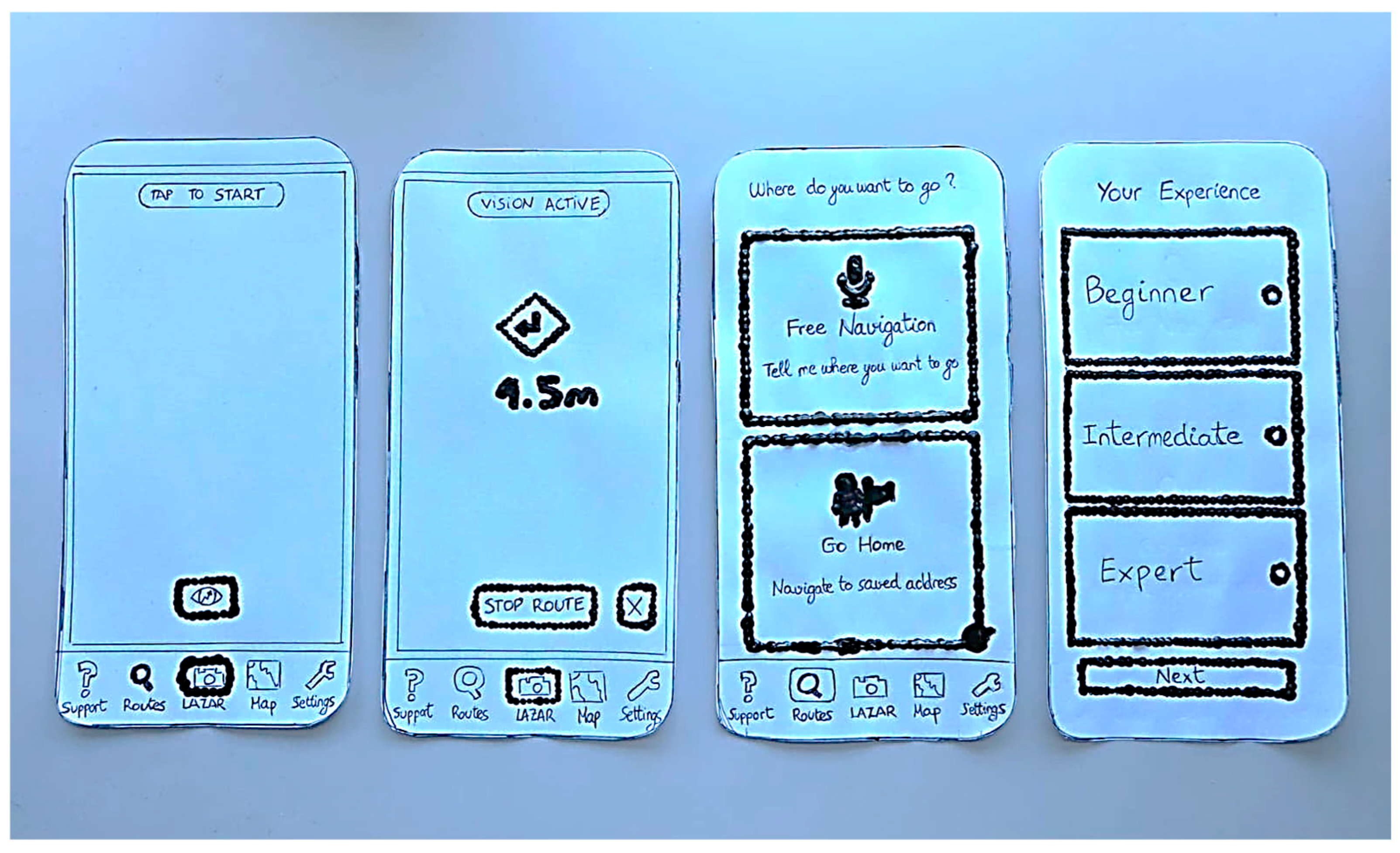
3.2. Low-Fidelity Prototyping
3.2.1. Overview of the Paper Prototyping Method
3.2.2. Role of Low-Fidelity Prototyping in the Design Process
3.2.3. Tactile Low-Fidelity Prototyping for Users with Visual Impairment
3.2.4. Screen-by-Screen Analysis of the Low-Fidelity Prototype
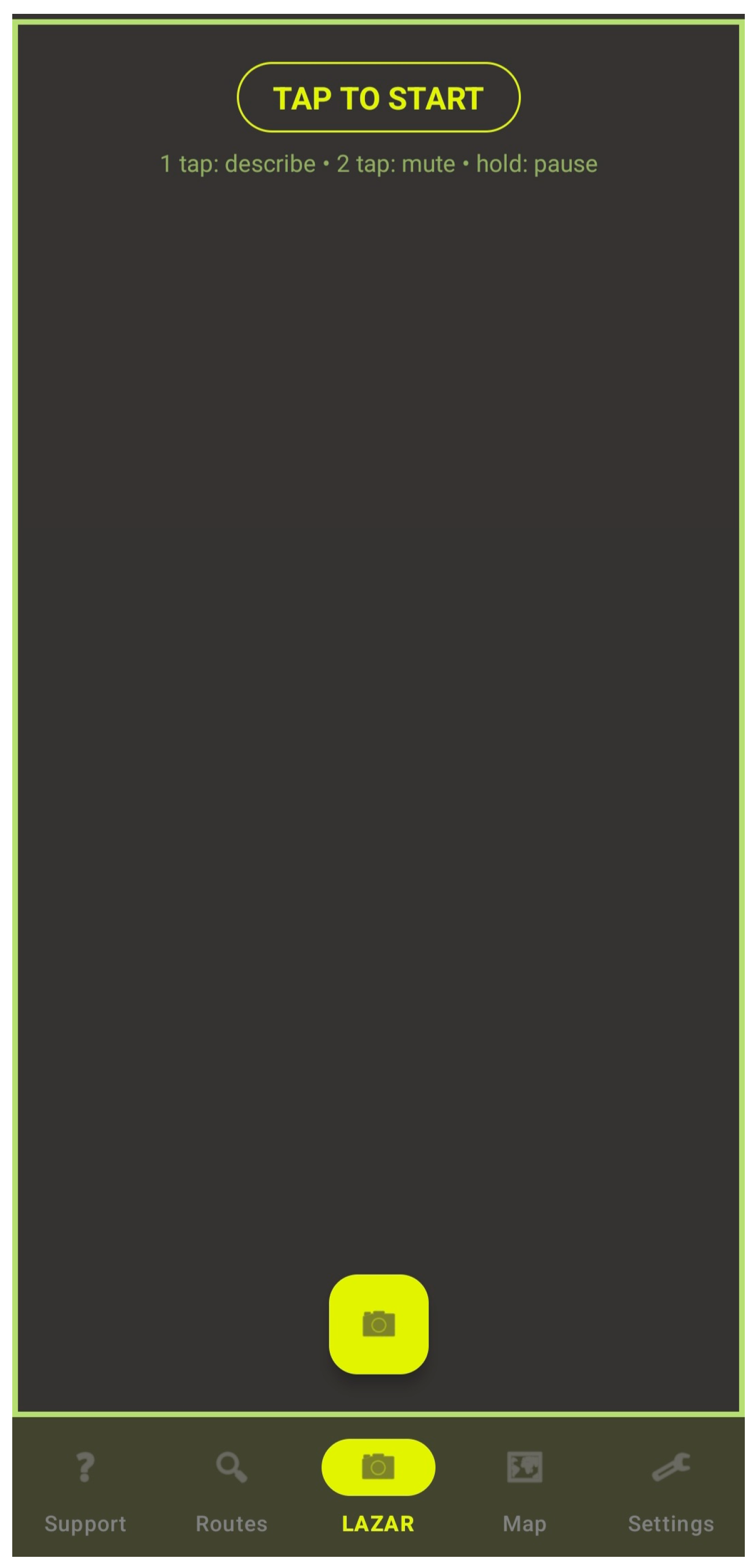
- Screen 1—LazarFragment, Idle State (“TAP TO START”)
- Screen 2—LazarFragment, Active Perception State (“VISION ACTIVE”)
- Screen 3—Destination Picker (“Where do you want to go?”)
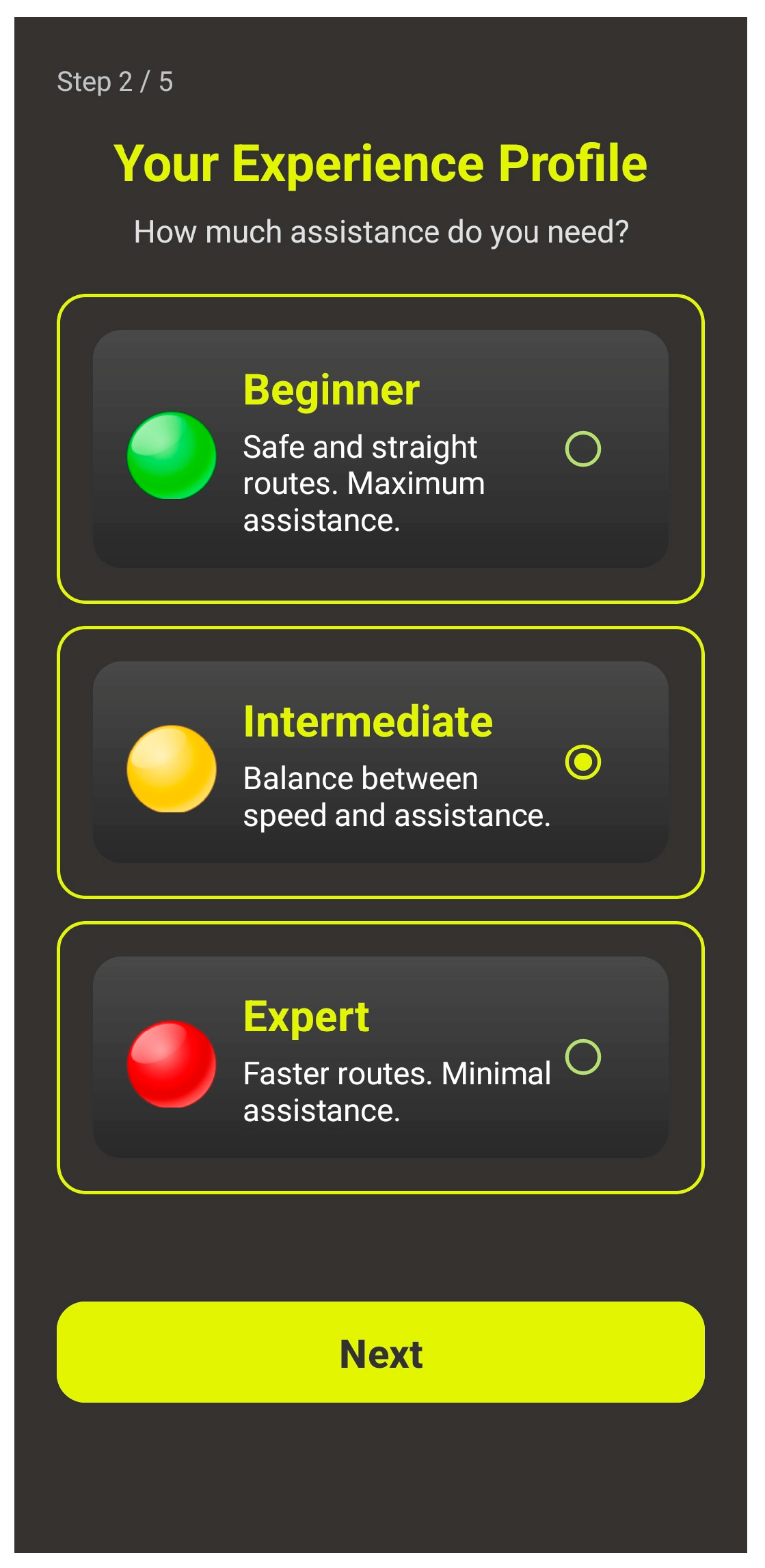
- Screen 4—Cognitive Profile Selection (“Your Experience Profile”)
3.3. High-Fidelity Prototyping and Legislative Compliance
3.3.1. Eyes-Free Interaction and Multimodal Feedback
3.3.2. Visual Accessibility and Contrast Metrics
3.3.3. Regulatory and Legislative Compliance
3.4. App Screens and Interface Flow Analysis
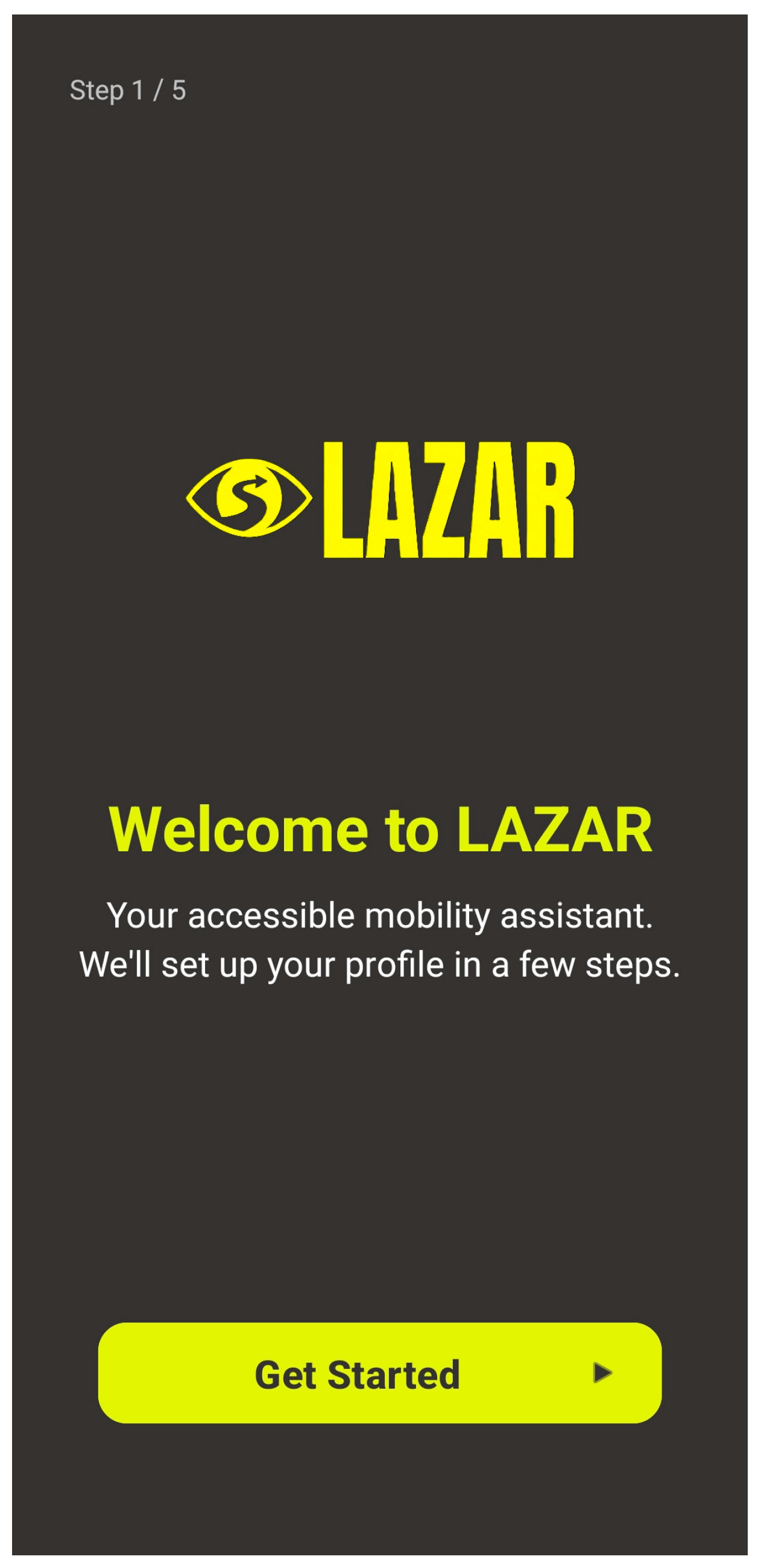
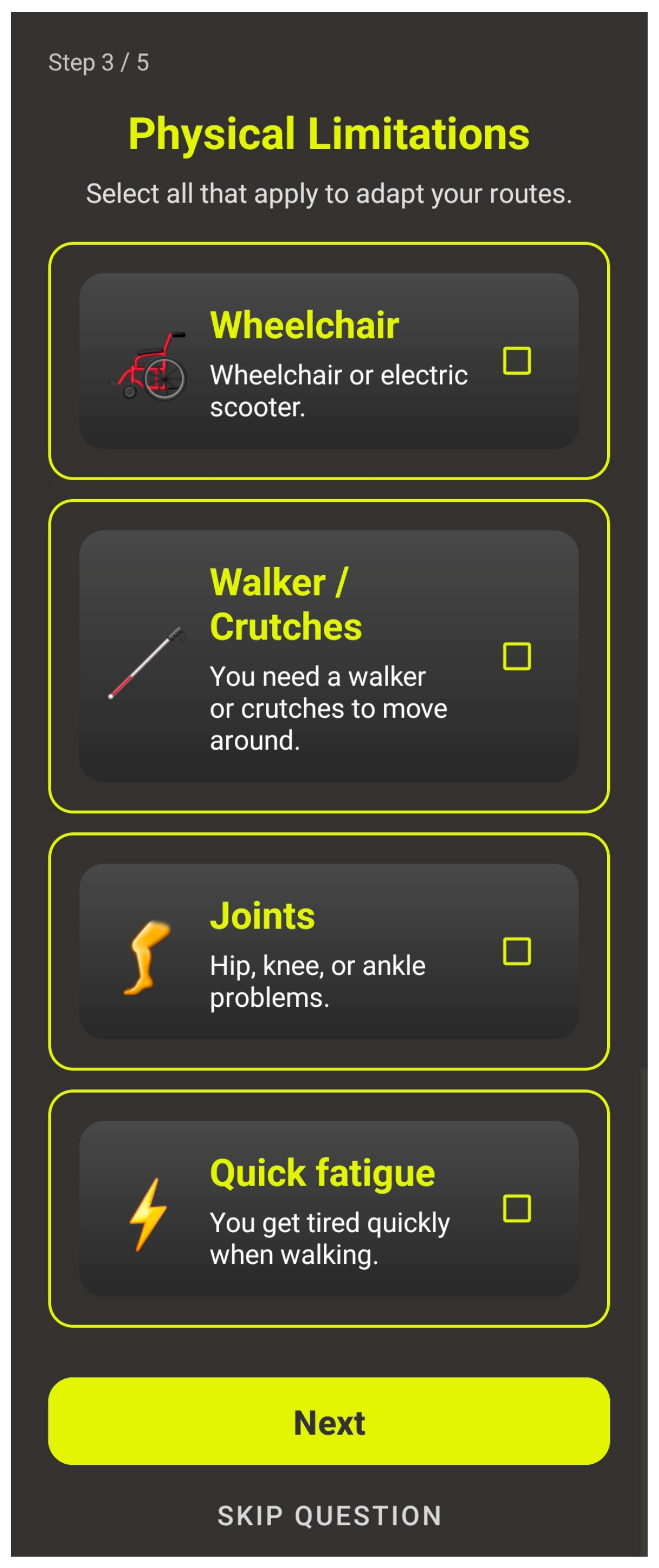
3.4.1. Onboarding and Cognitive Profiling Sequence (Steps 1–5)
Welcome Screen (Step 1/5)
Cognitive Profile Selection (Step 2/5—“Your Experience Profile”)
Physical Limitations (Step 3/5)
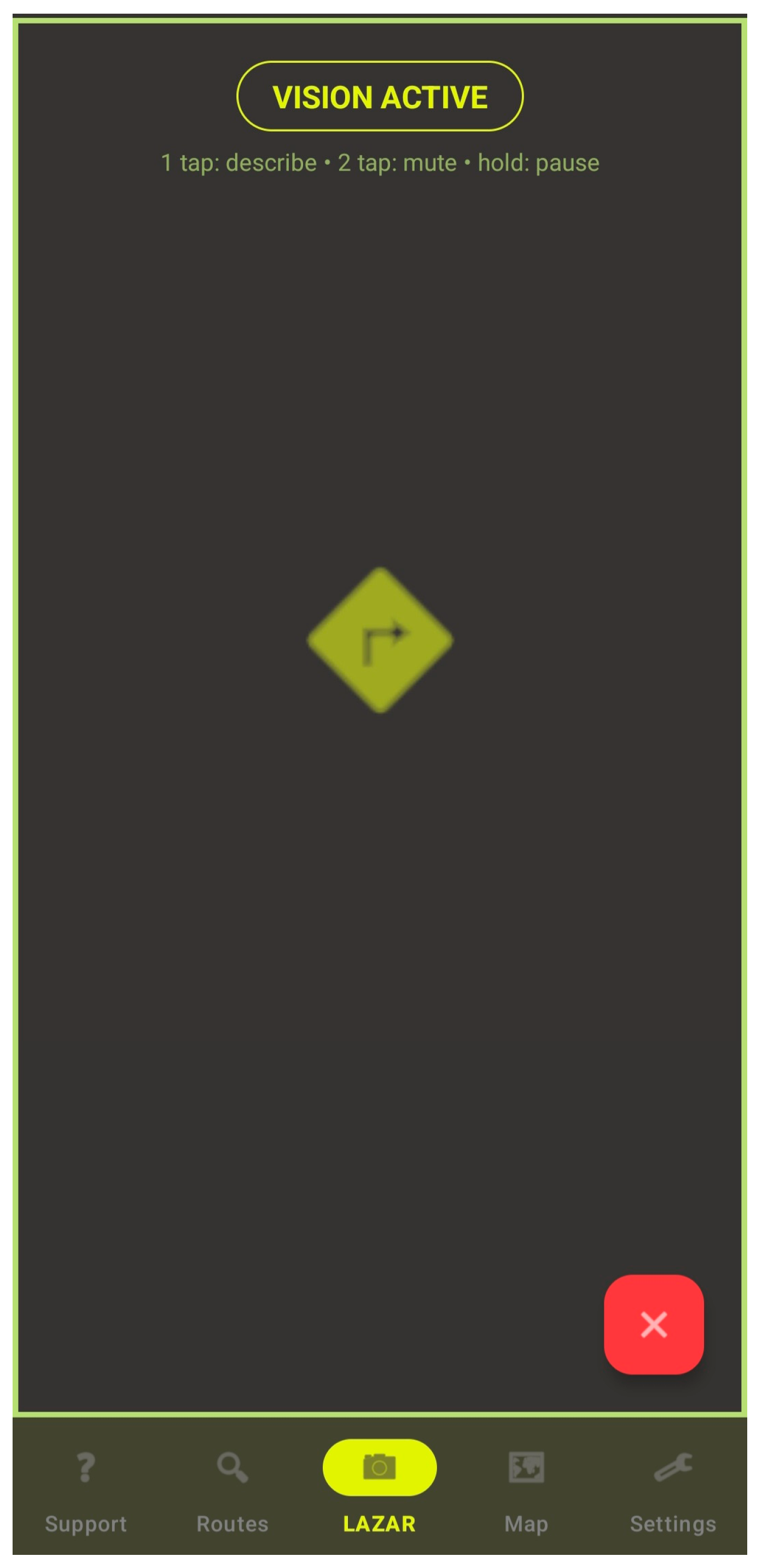
3.4.2. Main “Radar”/Navigation Dashboard (LazarFragment)
Idle State
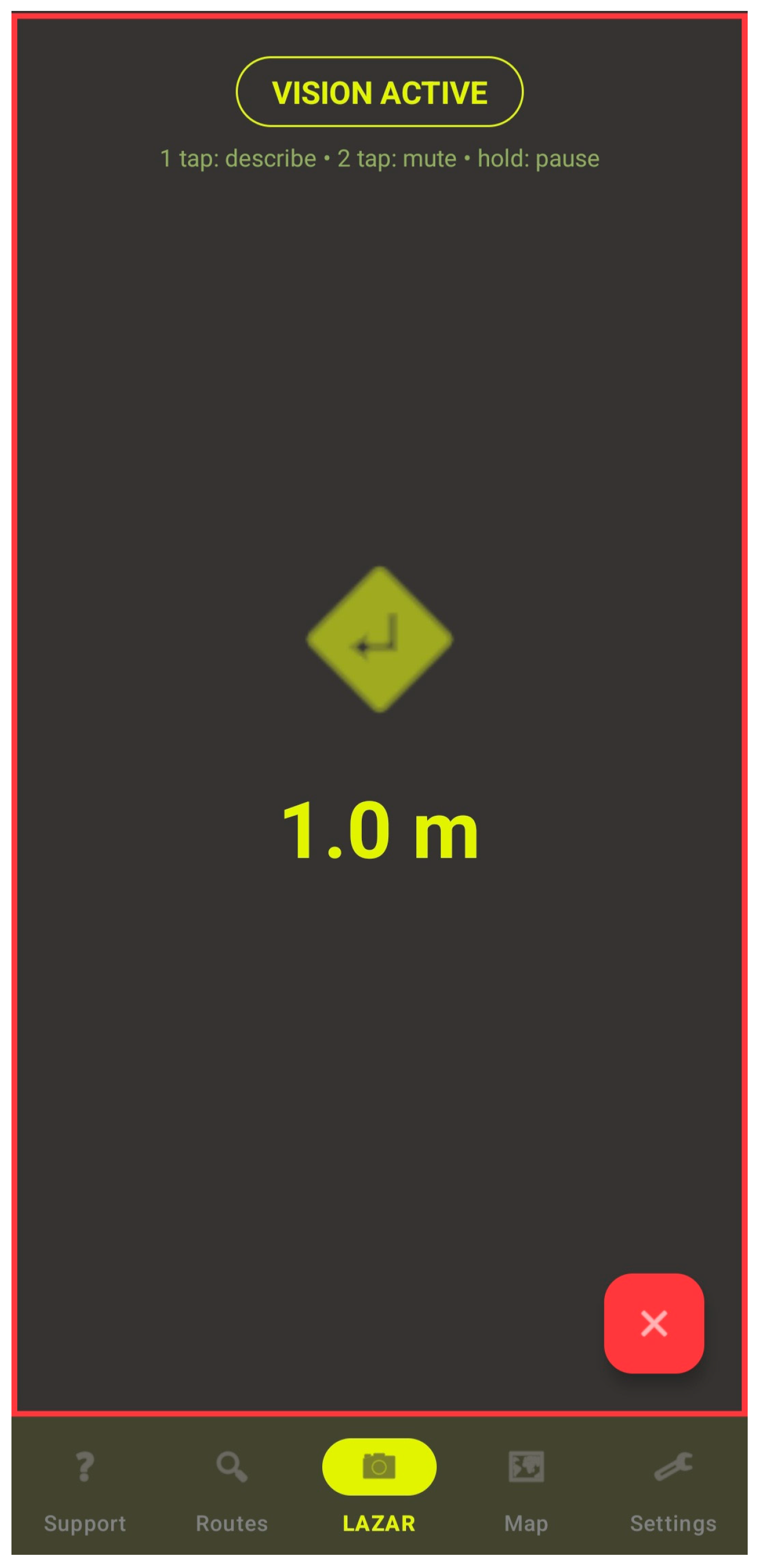
Active Perception State (“VISION ACTIVE”)
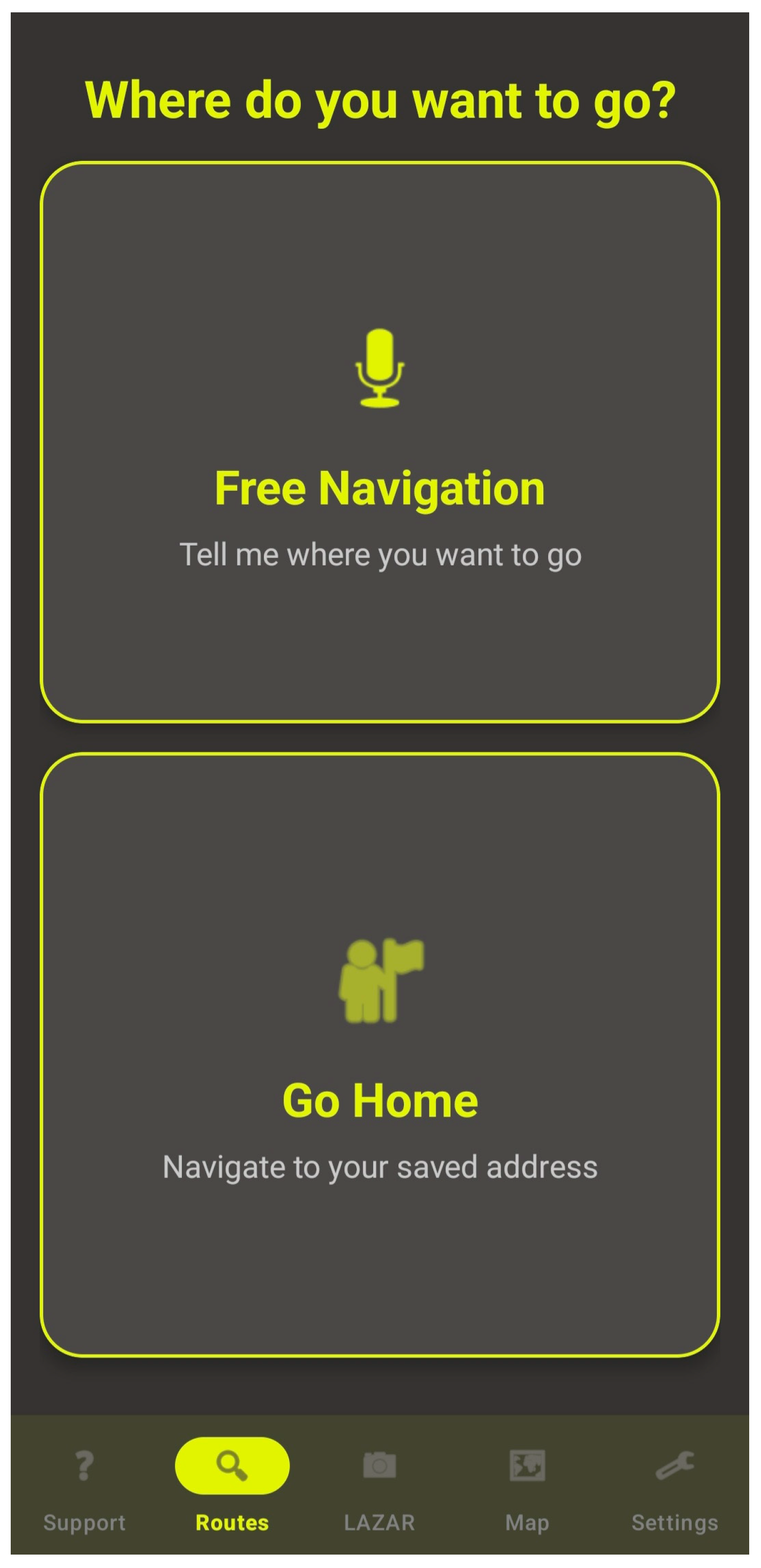
3.4.3. Search and Destination Picker (Routes Fragment)
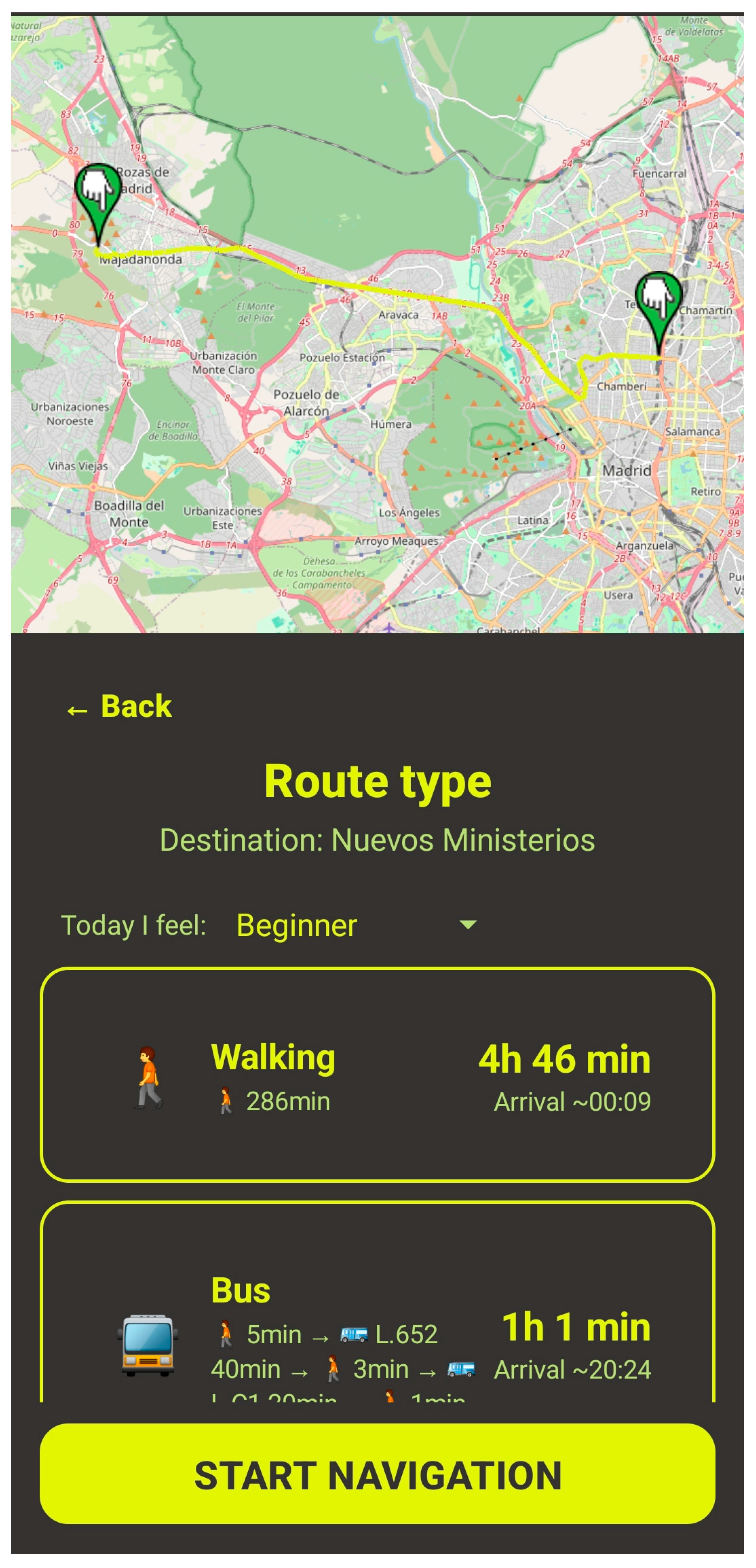
3.4.4. Route Preview and Transport Configuration
3.4.5. Emergency/Veto and Priority State Screens
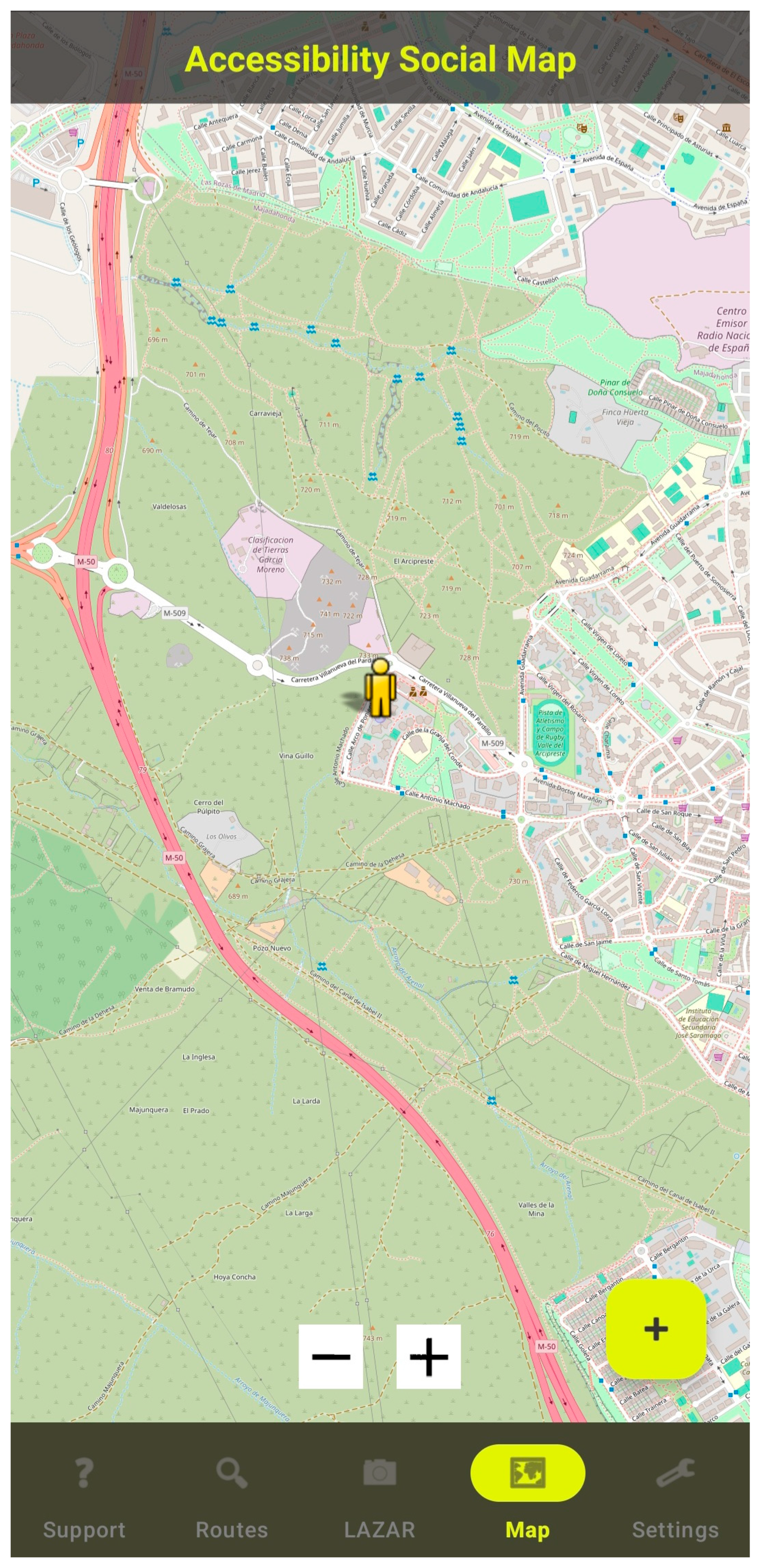
3.4.6. Auxiliary Screens: Accessibility Social Map and Live Support
Accessibility Social Map (Map Fragment)
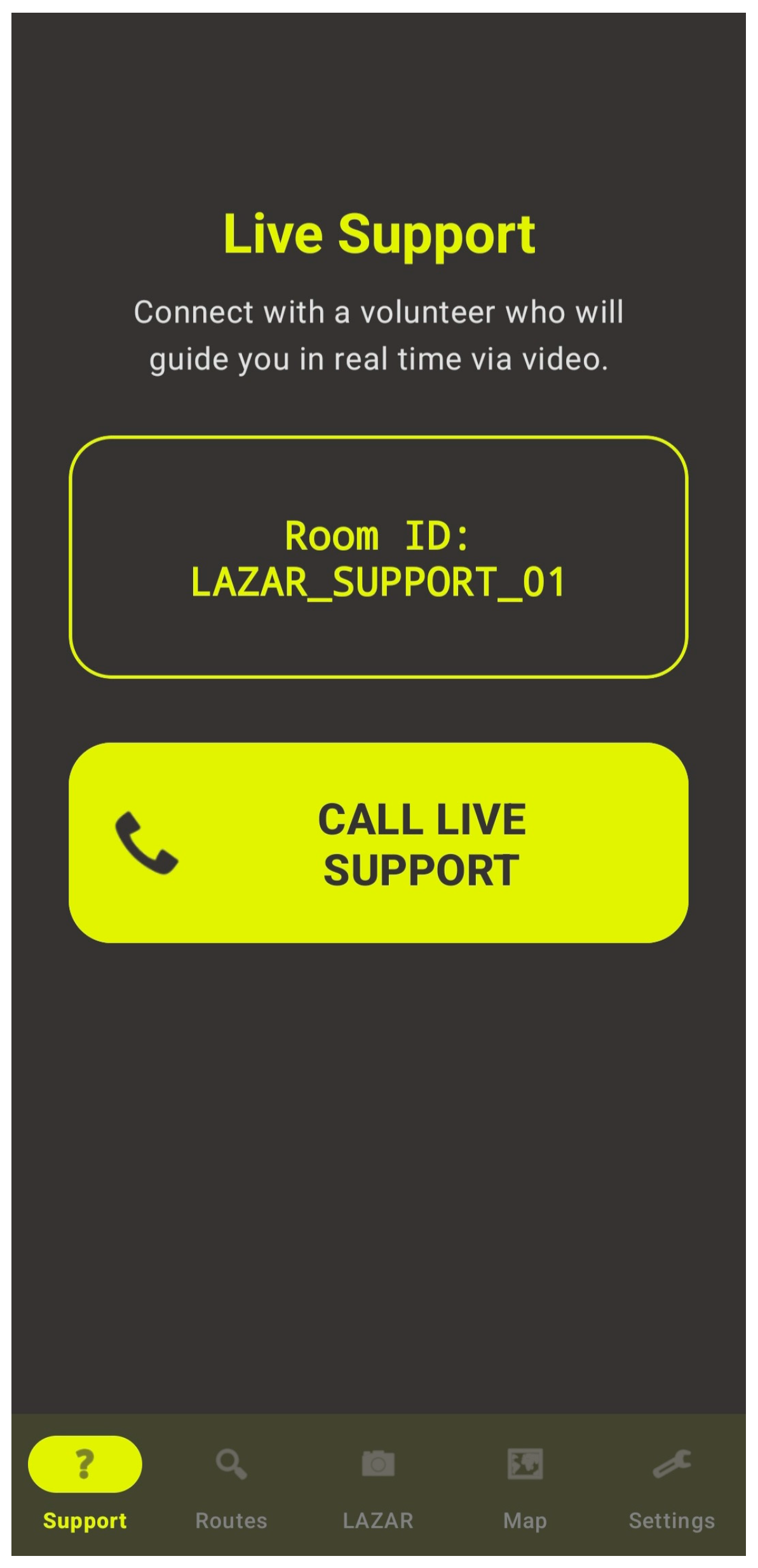
Live Support Fragment
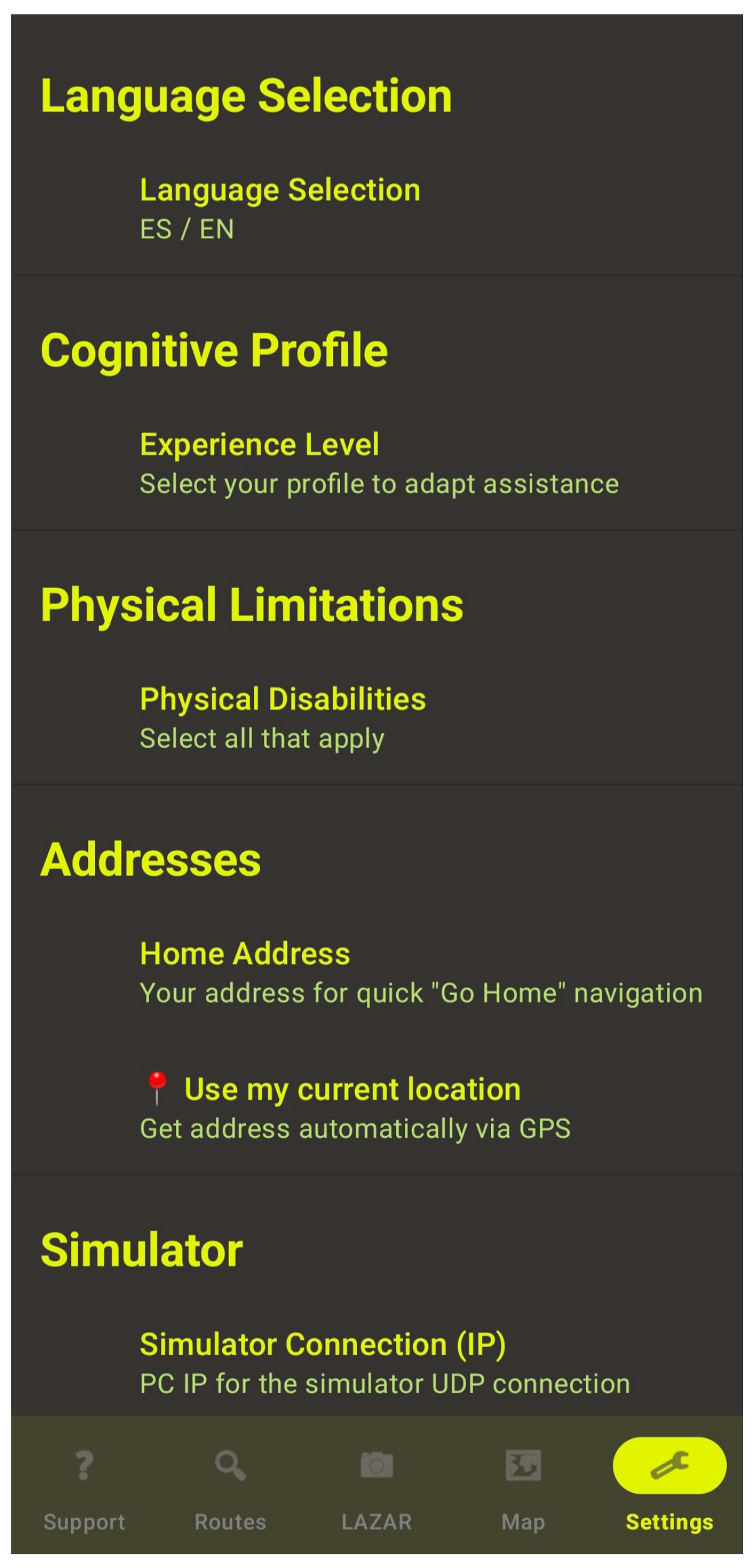
3.4.7. Settings Architecture (Settings Fragment)
3.4.8. Synthesis: Interface Flow as a Coherent Accessibility Architecture
4. Design of Multi-Agent Architecture for Adaptive AI Navigation
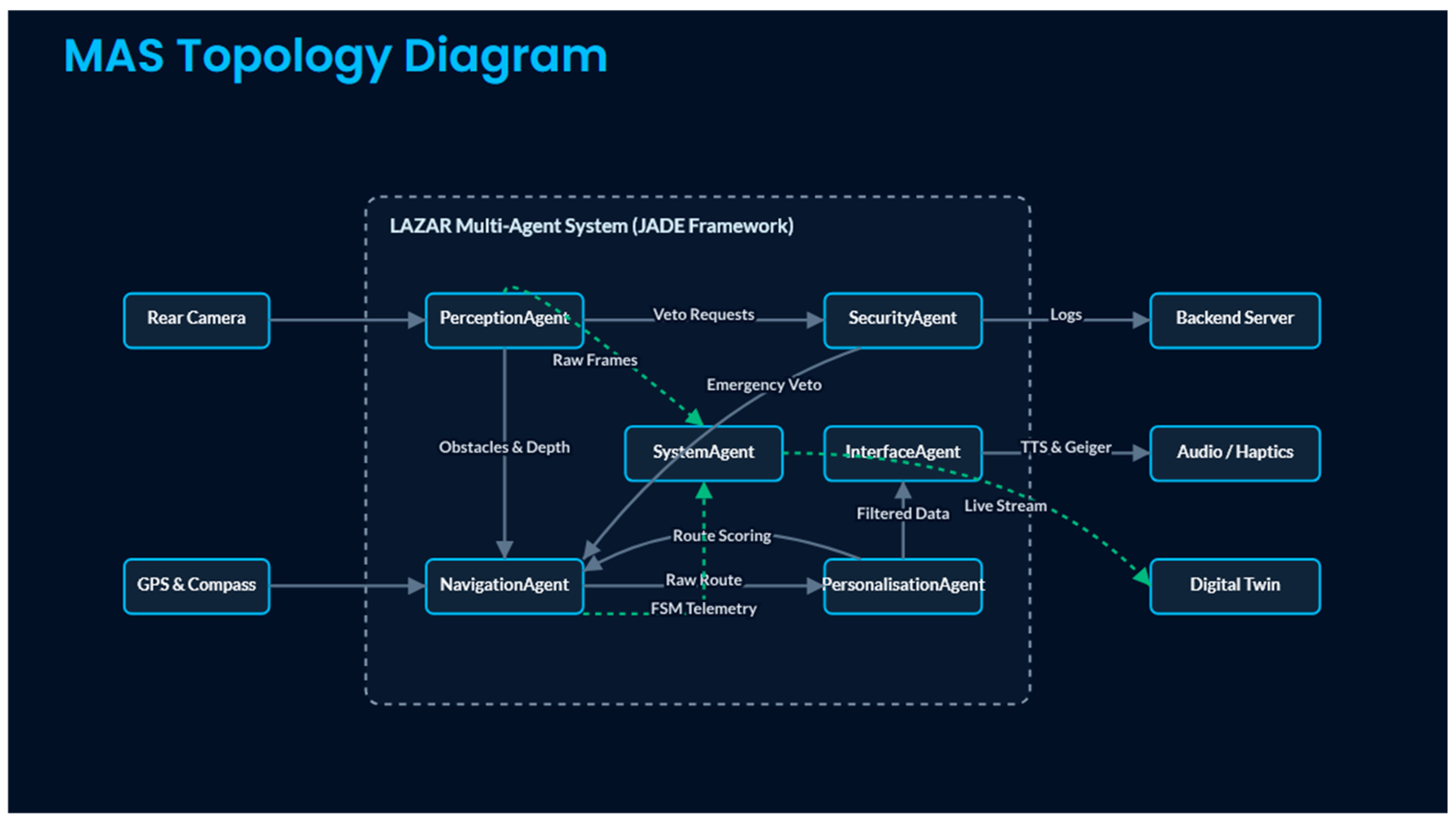
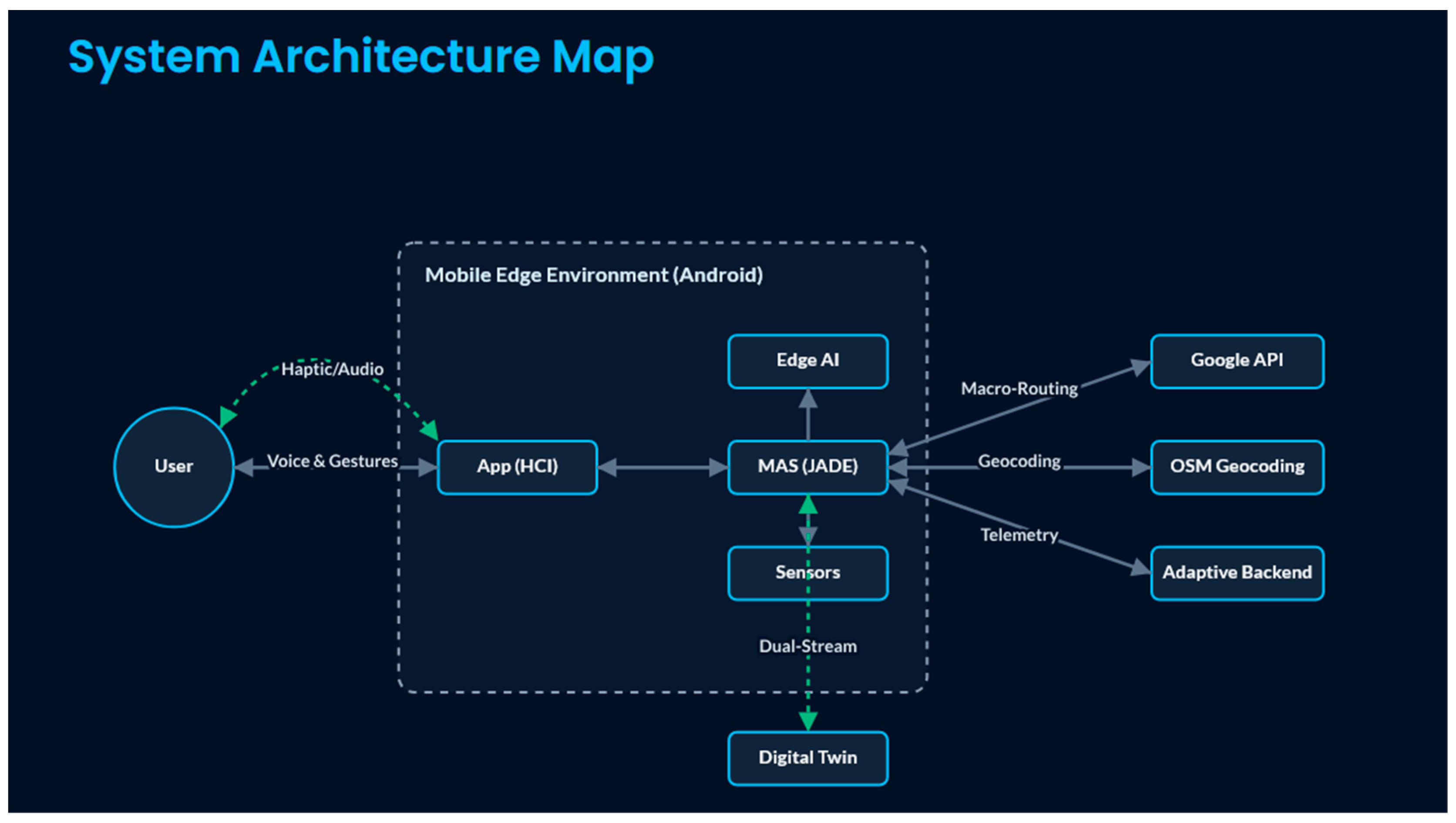
4.1. General System Architecture
4.2. Multi-Agent System
4.2.1. PerceptionAgent
4.2.2. NavigationAgent
4.2.3. PersonalisationAgent
4.2.4. SecurityAgent
4.2.5. InterfaceAgent
4.2.6. SystemAgent
5. User Validation Study
5.1. Study Design and Participant Profile
5.2. System Usability Scale (SUS) Results
5.3. User Experience Questionnaire (UEQ) Results
5.4. Overall Satisfaction Rating
5.5. Qualitative Findings
5.5.1. Most Appreciated Features
5.5.2. Identified Usability Issues
5.5.3. Notable Participant Observations
5.5.4. Comparative Observations Relative to Existing Navigation Tools
5.5.5. Limitations of the Validation Study
5.6. Summary of Validation Outcomes
6. Conclusions
Author Contributions
Funding
Institutional Review Board Statement
Informed Consent Statement
Data Availability Statement
Acknowledgments
Conflicts of Interest
Abbreviations
| ACL | Agent Communication Language |
| AI | Artificial Intelligence |
| API | Application Programming Interface |
| dp | Density-independent Pixels |
| EEG | Electroencephalography |
| FAB | Floating Action Button |
| FIPA | Foundation for Intelligent Physical Agents |
| FSM | Finite State Machine |
| GPS | Global Positioning System |
| GUI | Graphical User Interface |
| HCI | Human–Computer Interaction |
| IMU | Inertial Measurement Unit |
| IoT | Internet of Things |
| JADE | Java Agent DEvelopment framework |
| JSON | JavaScript Object Notation |
| LAZAR | Live Audio Zone-aware Assisted Routing |
| MAS | Multi-Agent System |
| O&M | Orientation and Mobility |
| REST | Representational State Transfer |
| sp | Scale-independent Pixels |
| SRS | Software Requirements Specification |
| TCP | Transmission Control Protocol |
| UDP | User Datagram Protocol |
| UI | User Interface |
| UX | User Experience |
| VUI | Voice User Interface |
| WCAG | Web Content Accessibility Guidelines |
| WebRTC | Web Real-Time Communication |
References
- Roentgen, U.R.; Gelderblom, G.J.; Soede, M.; de Witte, L.P. Inventory of electronic mobility aids for persons with visual impairments: A literature review. J. Vis. Impair. Blind. 2008, 102, 661–674. [Google Scholar] [CrossRef]
- Kouroupetroglou, G. (Ed.) Disability Informatics and Web Accessibility for Motor Limitations; IGI Global: Hershey, PA, USA, 2013. [Google Scholar]
- Ahmetovic, D.; Manduchi, R.; Kurniawan, S.; Pece, A. NavCog: A navigational cognitive assistant for the blind. In Proceedings of the 18th International Conference on Human-Computer Interaction with Mobile Devices and Services, Florence, Italy, 6–9 September 2016. [Google Scholar]
- Bigham, J.P.; Jayant, C.; Ji, H.; Little, G.; Miller, A.; Miller, R.C.; Miller, R.; Tatarowicz, A.; White, B.; White, S.; et al. VizWiz: Nearly real-time answers to visual questions. In Proceedings of the 23rd Annual ACM Symposium on User Interface Software and Technology, “dblp: UIST”, New York, NY, USA, 3–6 October 2010. [Google Scholar]
- O’Hare, G.M.; Jennings, N.R. (Eds.) Foundations of Distributed Artificial Intelligence; John Wiley & Sons: Hoboken, NJ, USA, 1996; Volume 9. [Google Scholar]
- Bellifemine, F.; Caire, G.; Greenwood, D. Developing Multi-Agent Systems with JADE; John Wiley & Sons: Hoboken, NJ, USA, 2007. [Google Scholar]
- Williams, M.A.; Galbraith, C.; Kane, S.K.; Hurst, A. How the Blind and Sighted See Navigation Differently. In Proceedings of the 16th International ACM SIGACCESS Conference on Computers & Accessibility, Rochester, NY, USA, 20–22 October 2014. [Google Scholar]
- American Foundation for the Blind. AFB Announces Research Examining the Role of the Guide Dog in the Lives of People Who Are Blind or Visually Impaired; American Foundation for the Blind: Arlington, VA, USA, 2022. [Google Scholar]
- Paré, S.; Bleau, M.; Djerourou, I.; Malotaux, V.; Kupers, R.; Ptito, M. Spatial Navigation with Horizontally Spatialized Sounds in Early and late Blind Individuals. PLoS ONE 2021, 16, e0247448. [Google Scholar] [CrossRef]
- Lupu, R.-G.; Mitruț, O.; Stan, A.; Ungureanu, F.; Kalimeri, K.; Moldoveanu, A. Cognitive and Affective Assessment of Navigation and Mobility Tasks for the Visually Impaired via Electroencephalography and Behavioral Signals. Sensors 2020, 20, 5821. [Google Scholar] [CrossRef] [PubMed]
- Tachi, K. Lazarillo: A Free Accessible GPS App for the Blind and Visually Impaired; Perkins School for the Blind: Watertown, MA, USA, 2024. [Google Scholar]
- Pundlik, S.; Shivshanker, P.; Traut-Savino, T.; Luo, G. Field Evaluation of a Mobile App for Assisting Blind and Visually Impaired Travelers to Find Bus Stops. Transl. Vis. Sci. Technol. 2024, 13, 11. [Google Scholar] [CrossRef] [PubMed]
- Katz, B.F.G.; Kammoun, S.; Parseihian, G.; Gutierrez, O.; Brilhault, A.; Auvray, M.; Truillet, P.; Denis, M.; Thorpe, S.; Jouffrais, C. NAVIG: Augmented reality guidance system for the visually impaired: Combining transport and pedestrian navigation. Virtual Real. 2012, 16, 253–269. [Google Scholar] [CrossRef]
- India, G.; Robinson, S.; Pearson, J.; Morrison, C.; Jones, M. Exploring the Experiences of Individuals Who Are Blind or Low-Vision Using Object-Recognition Technologies in India. In Proceedings of the CHI Conference on Human Factors in Computing Systems; ACM: New York, NY, USA, 2025; pp. 1–11. [Google Scholar] [CrossRef]
- Pfitzer, N.; Zhou, Y.; Poggensee, M.; Kurtulus, D.; Dominguez-Dager, B.; Dusmanu, M.; Pollefeys, M.; Bauer, Z. Mixed-Reality Navigation Assistant for the Visually Impaired. arXiv 2025, arXiv:2506.05369. [Google Scholar] [CrossRef]
- Sharma, T.; Tseng, Y.-Y.; Zhang, L.; Ide, A.; Mack, K.A.; Findlater, L.; Gurari, D.; Wang, Y. ‘Before, I Asked My Mom, Now I Ask ChatGPT’: Visual Privacy Management with Generative AI for Blind and Low-Vision People. arXiv 2025, arXiv:2507.00286. [Google Scholar]
- Chen, Z.; Hu, W.; Wang, J.; Zhao, S.; Amos, B.; Wu, G.; Ha, K.; Elgazzar, K.; Pillai, P.; Klatzky, R.; et al. An Empirical Study of Latency in an Emerging Class of Edge Computing Applications for Wearable Cognitive Assistance. In Proceedings of the Second ACM/IEEE Symposium on Edge Computing, San Jose, CA, USA, 12–14 October 2024. [Google Scholar]
- Rajapandi, B.; Divya, M.A. Advanced Edge AI Navigation and Assistance System for Blind User. Int. J. Multidiscip. Res. 2024, 6, 28522. [Google Scholar] [CrossRef]
- Merenda, M.; Porcaro, C.; Iero, D. Edge Machine Learning for AI-Enabled IoT Devices: A Review. Sensors 2020, 20, 2533. [Google Scholar] [CrossRef] [PubMed]
- Wang, X.; Jia, H.; Zhou, H.; Wang, S.G.; Zhang, Y.; Dang, T.; Gu, T. LQA: A Lightweight Quantized-Adaptive Framework for On-Device Vision-Language Models. arXiv 2026, arXiv:2602.07849. [Google Scholar]
- Theodorou, P.; Tsiligkos, K.; Meliones, A. Multi-Sensor Data Fusion Solutions for Blind and Visually Impaired: Research and Commercial Navigation Applications for Indoor and Outdoor Spaces. Sensors 2023, 23, 5411. [Google Scholar] [CrossRef] [PubMed]
- Magnusson, C.; Rassmus-Gröhn, K.; Tollmar, K.; Deaner, J. Designing Parsimonious Audio Navigation Cues for Blind Pedestrians. In Proceedings of the 12th International Conference on Human-Computer Interaction with Mobile Devices and Services, Lisbon, Portugal, 7–10 September 2010; pp. 417–420. [Google Scholar]
- Oliveira, J.D.; Engelmann, D.C.; Kniest, D.; Vieira, R.; Bordini, R.H. Multi-Agent Interaction to Assist Visually Impaired and Elderly People. Int. J. Environ. Res. Public Health 2022, 19, 8945. [Google Scholar] [CrossRef] [PubMed]
- Thakur, C. Multi Agent System Applied in Healthcare; SSRN: Rochester, NY, USA, 2023. [Google Scholar]
- Pintea, C.-M.; Tripon, A.C.; Avram, A.; Crişan, G.-C. Multi-Agents Features on Android Platforms. arXiv 2018, arXiv:1807.05826. [Google Scholar] [CrossRef]
- Snyder, C. Paper Prototyping: The Fast and Easy Way to Design and Refine User Interfaces; Morgan Kaufmann: San Francisco, CA, USA, 2003. [Google Scholar]
- W3C. Web Content Accessibility Guidelines (WCAG) 2.2—Recommendation; World Wide Web Consortium: Cambridge, MA, USA, 2023. [Google Scholar]
- EN 301 549 V3.2.1; Accessibility Requirements for ICT Products and Services. European Telecommunications Standards Institute (ETSI): Sophia Antipolis, France, 2021.
- JADE Project. Java Agent DEvelopment Framework (JADE)—Official Website and Documentation; JADE Project: Houston, TX, USA, 2022. [Google Scholar]
- Google. Google Maps Directions API—Developer Guide; Google Maps Platform Documentation: Mountain View, CA, USA, 2024. [Google Scholar]
- OpenStreetMap Foundation. Nominatim: OpenStreetMap Search Service—Usage and API Documentation; OpenStreetMap Foundation: Cambridge, UK, 2023. [Google Scholar]
- Bangor, A.; Kortum, P.; Miller, J. Determining what individual SUS scores mean: Adding an adjective rating scale. J. Usability Stud. 2009, 4, 114–123. [Google Scholar]
- Bangor, A.; Kortum, P.T.; Miller, J.T. An empirical evaluation of the system usability scale. Int. J. Hum.-Comput. Interact. 2008, 24, 574–594. [Google Scholar] [CrossRef]
- Schrepp, M.; Hinderks, A.; Thomaschewski, J. Applying the user experience questionnaire (UEQ) in different evaluation scenarios. In Design, User Experience, and Usability. Theories, Methods, and Tools for Designing the User Experience; Marcus, A., Ed.; Springer: Cham, Switzerland, 2014; pp. 383–392. [Google Scholar]









| Participant | Age | Gender | Vision Level | TalkBack Level | SUS Score | Star Rating |
|---|---|---|---|---|---|---|
| P01 | 38 | M | Total blindness | Intermediate | 97.5 | 5 |
| P02 | 42 | F | Total blindness | Advanced | 100.0 | 5 |
| P03 | 42 | F | Low functional vision | Beginner | 72.5 | 5 |
| P04 | 57 | F | Total blindness | Advanced | 90.0 | 5 |
| P05 | 59 | M | Total blindness | Intermediate | 92.5 | 4 |
| P06 | 52 | M | Low functional vision | Intermediate | 85.0 | 5 |
| P07 | 85 | F | Monocular (R: 90%, L: 0%) | Beginner | 100.0 | 5 |
| P08 | 66 | F | Light/bulk perception | Advanced | 97.5 | 5 |
| P09 | 67 | M | Light/bulk perception | Advanced | 92.5 | 4 |
| P10 | 39 | M | Total blindness | Advanced | 85.0 | 4 |
| P11 | 42 | F | Total blindness | Advanced | 92.5 | 4 |
| Mean | 53.5 | - | - | - | 91.36 | 4.64/5 |
| UEQ Scale | Mean | SD | Benchmark Interpretation |
|---|---|---|---|
| Attractiveness | +2.72 | 0.50 | Excellent |
| Perspicuity | +2.48 | 0.82 | Excellent |
| Stimulation | +2.52 | 0.82 | Excellent |
| Dependability | +2.43 | 1.05 | Excellent |
| Efficiency | +2.36 | 0.74 | Excellent |
| Novelty | +2.07 | 1.21 | Excellent |
Disclaimer/Publisher’s Note: The statements, opinions and data contained in all publications are solely those of the individual author(s) and contributor(s) and not of MDPI and/or the editor(s). MDPI and/or the editor(s) disclaim responsibility for any injury to people or property resulting from any ideas, methods, instructions or products referred to in the content. |
© 2026 by the authors. Licensee MDPI, Basel, Switzerland. This article is an open access article distributed under the terms and conditions of the Creative Commons Attribution (CC BY) license.
Share and Cite
Herrero-Martín, P.; García-Ballestero, Á. Designing Human-Centred Adaptive AI Navigation for Blind and Visually Impaired Individuals: A Cognitive Load-Aware Framework for Accessible Urban Mobility. AI 2026, 7, 206. https://doi.org/10.3390/ai7060206
Herrero-Martín P, García-Ballestero Á. Designing Human-Centred Adaptive AI Navigation for Blind and Visually Impaired Individuals: A Cognitive Load-Aware Framework for Accessible Urban Mobility. AI. 2026; 7(6):206. https://doi.org/10.3390/ai7060206
Chicago/Turabian StyleHerrero-Martín, Pilar, and Álvaro García-Ballestero. 2026. "Designing Human-Centred Adaptive AI Navigation for Blind and Visually Impaired Individuals: A Cognitive Load-Aware Framework for Accessible Urban Mobility" AI 7, no. 6: 206. https://doi.org/10.3390/ai7060206
APA StyleHerrero-Martín, P., & García-Ballestero, Á. (2026). Designing Human-Centred Adaptive AI Navigation for Blind and Visually Impaired Individuals: A Cognitive Load-Aware Framework for Accessible Urban Mobility. AI, 7(6), 206. https://doi.org/10.3390/ai7060206