

Contexere—Systematic Tracking and Referencing of Digital Artefacts for Postgraduate Students and Early Career Researchers


Abstract
1. Introduction
2. The Directed Graph of Research Artefacts
- RA1
- A research artefact is a non-trivial, documented research output that contributes to a specific research project.
- RA2
- A research artefact is generated through the concentrated, creative work of a research activity with the intention to create new knowledge or insights.
- RA3
- A research artefact is typically embedded into the context of related research artefacts, which are either generated in the course of the same research activity or contribute to the artefact’s generation as input.
- RA4
- Research artefacts, which stem from the same research activity, form a research artefact group (RAG).
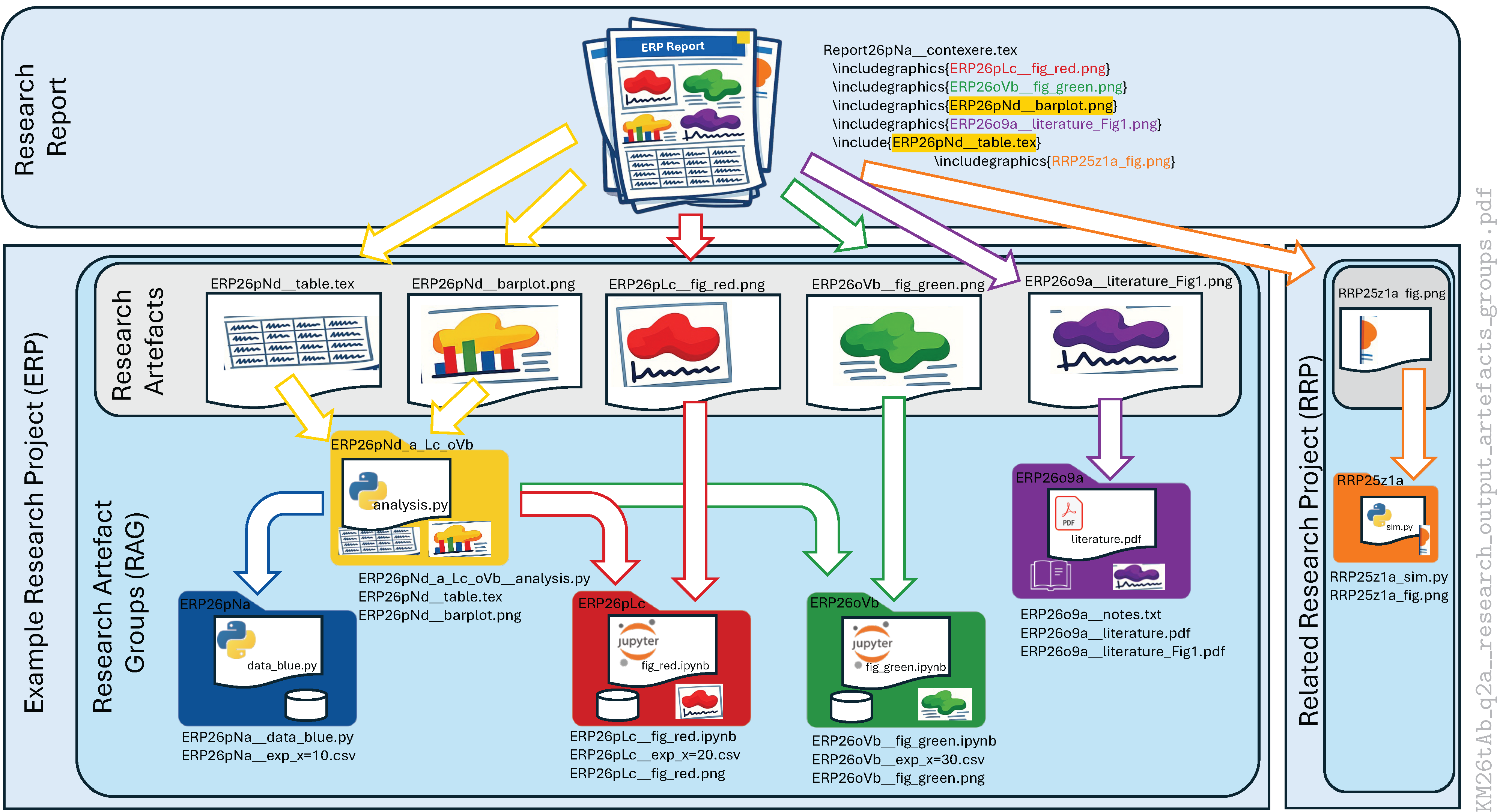
 report. The filenames of the research artefacts not only reference the respective research projects but also the research activities or research artefact groups (RAGs) via their unique identifiers. The convention for constructing the unique RAG identifiers will be defined later (Section 3), but just looking at the filenames of research artefacts in Figure 1 that contribute to the research report reveals a directed graph of dependencies, which allows for complete reproducibility., e.g., by using the convenient method .to_latex() provided by DataFrame objects [13,14]. While the RAG identifier is clearly ERP26pNd, the trailing, underscore-separated groups “_a_Lc_oVb” indicate that some kind of input is used from RAGs ERP26pNa, ERP26pLc,and ERP26oVb.In anticipation of Section 3, it is remarked that links between RAGs are created by the least significant elements of RAG identifiers compared to the root RAG identifier. In the given example of ERP26pNd_a_Lc_oVb, the input might be summary statistics contributing to the barplot of ERP26pNd, which are computed from
- ERP26pNa__exp_x=10.csv,
- ERP26pLc__exp_x=20.csv,
- ERP26oVb__exp_x=30.csv.
3. Chronologically Referenced Research Artefact Groups
3.1. Requirements
- Chronological: The naming scheme encodes the date and sequence of research artefact groups such that the link to handwritten entries in laboratory notebooks is given.
- Lexicographic: The naming scheme is designed such that alphabetical sorting reproduces the chronological order in which research artefact groups were generated.
- Linkable: The naming scheme supports the linking of connected research artefacts, such that the research can easily identify data provenance.
- Unique: The naming scheme generates unique identifiers, such that the researcher can reference a research artefact in a note-taking system.
- Efficient: The naming scheme is efficient such that the researcher has to type as few characters as possible.
- In the rush of daily research, it provides simple rules for naming digital files and indexing handwritten notes with the additional benefit that connected research outputs are naturally linked.
- On the weekly time-scale, the embedded temporal reference of the naming scheme supports the personal review [16] of research progress and the planning of next steps.
- On the monthly time-scale of producing reports, presentations, and publications, the naming scheme links figures and tables to the originating research outputs.
- On the yearly-time scale of generating higher-level research outputs like theses or research proposals, the required figures can be easily identified from previous research outputs, adapted, and linked to the original research artefact.
- On the three-to-five-year time-scale of building a research group, supervised students can be easily equipped with previous research outputs and thus get a head-start in their own research.
3.2. Naming Scheme
| PI | is the project identifier [a-zA-Z]{2,} consisting of at least two letters. |
| yy | is the two-digit truncated year [0-9][0-9] of RFC6350 ([18], p. 12) based on ISO.8601.2000 with the intention to increase information density and avoid the redundancy of slowly changing century ordinals1. |
| m | is one of the letters [o-z] encoding the month (left columns in Table 1). The month sequence [o-z] starts with the letter o because the twelve letters opqrstuvwxyz avoid the letter l, which can be easily confused with the digit 1 for some fonts. |
| D | is one of the ASCII characters [1-9,A-V] encoding the calendar day (columns 3–8 in Table 1). Digits 1 to 9 encode the first nine days of each month and characters A to V days 10 to 31. Digits and uppercase characters have approximately the same height, giving this element a visual structure to the RAG identifier and dividing the date from the daily counter. |
| c | is one of the lower case letters [a-z] encoding a daily counter of research artefact groups in alphabetical order. Realistically, a typical workday will not have more than 26 distinct non-trivial research activities. Otherwise, there are strong indications that several closely related research activities should be grouped. |
| link | is an optional abbreviation of a predecessor RAG identifier indicating that the predecessor RAG contributes to the current RAG. The predecessor RAG identifier is abbreviated by showing only its last significant ASCII characters, which differ from the current RAG identifier. A list of links is separated by underscores, with the abbreviated RAG identifiers being listed in achronological order. |
-document of the research report Report26pNa__contexere.tex (top box in Figure 1) has been chronologically indexed with an RAG identifier (26pNa) indicating the first version of this document generated on 23 February 2026. In general, it is advised to use classical revision control [19] for -documents. However, the RAG identifier might come in handy for clearly indicating when work on this document started and for tracking major versions over the period of writing. This application of RAG identifiers is even more handy for binary document files like .docx or .pptx in combination with RAG linking to indicate document inheritance.3.3. Linking Research Artefact Groups
4. Research Workflows Using the Naming Scheme
The following sections describe useful research workflows that embed the contexere implementation of the proposed naming scheme to increase productivity and enhance reproducibility. The following examples have been generated on macOS Tahoe 26.4 with the Anaconda Python distribution4 version 25.5.1. A basic Python compiler on Windows or Linux systems will generate similar results.pip install contexere
4.1. Starting a New Research Project
- Create folder structure: $ nxt --project # dialog sets variable repo_name
- Change into new project folder: $ cd repo_name
- Init revision control: $ git init; git add .; git commit -m ’Initial commit’
- Create virtual environment: $ make create_environment
4.1.1. Folder Structure
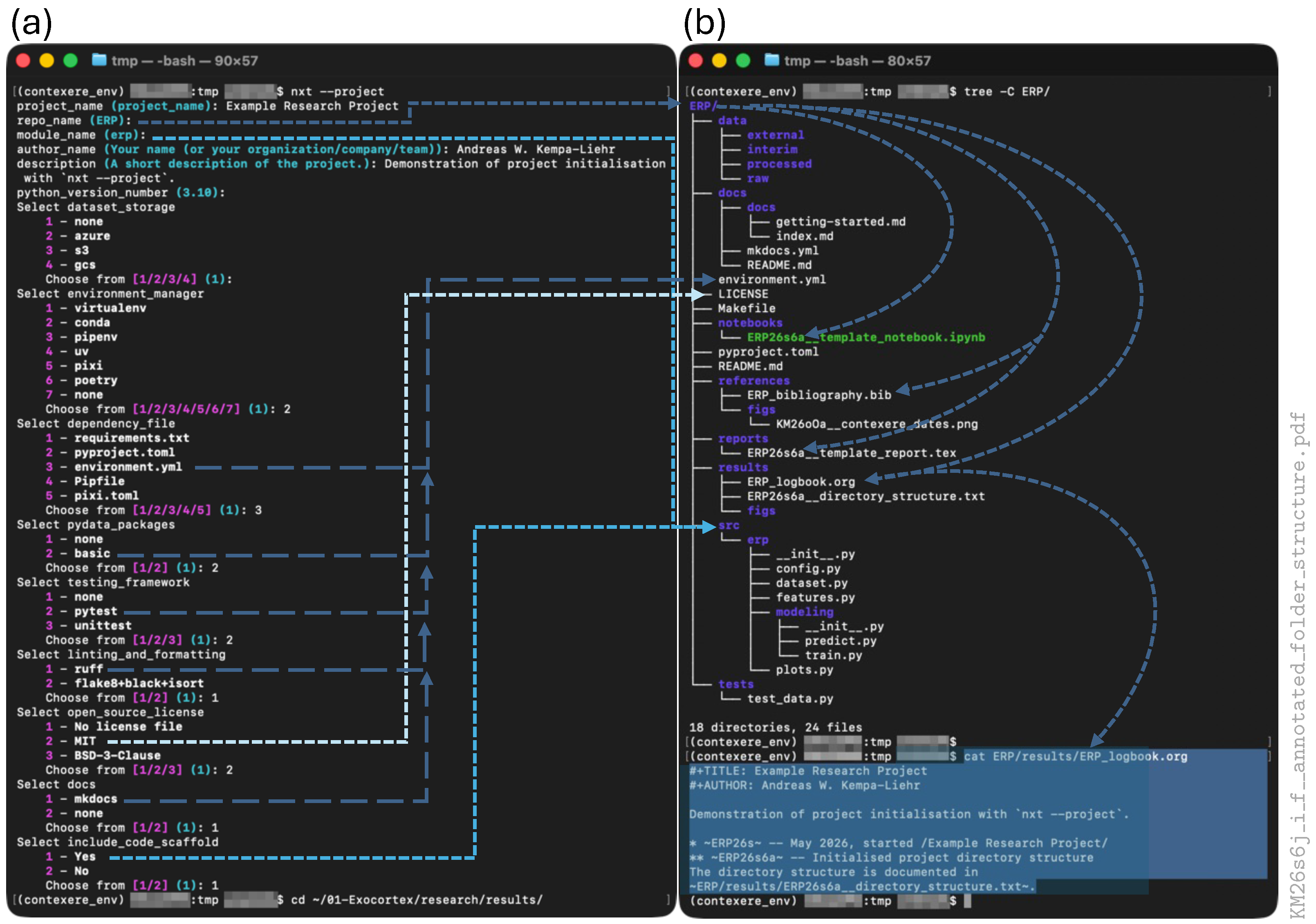
which starts a dialogue, allowing the user to configure the project template accordingly.nxt --project
- the project description;
- the author’s or organisation’s name;
- the Python version for the virtual environment;
- the Python environment manager;
- the preferred file for defining package dependencies;
- the configuration of a unit-testing framework;
- the support packages for linting and formatting;
- the license template;
- the documentation framework.
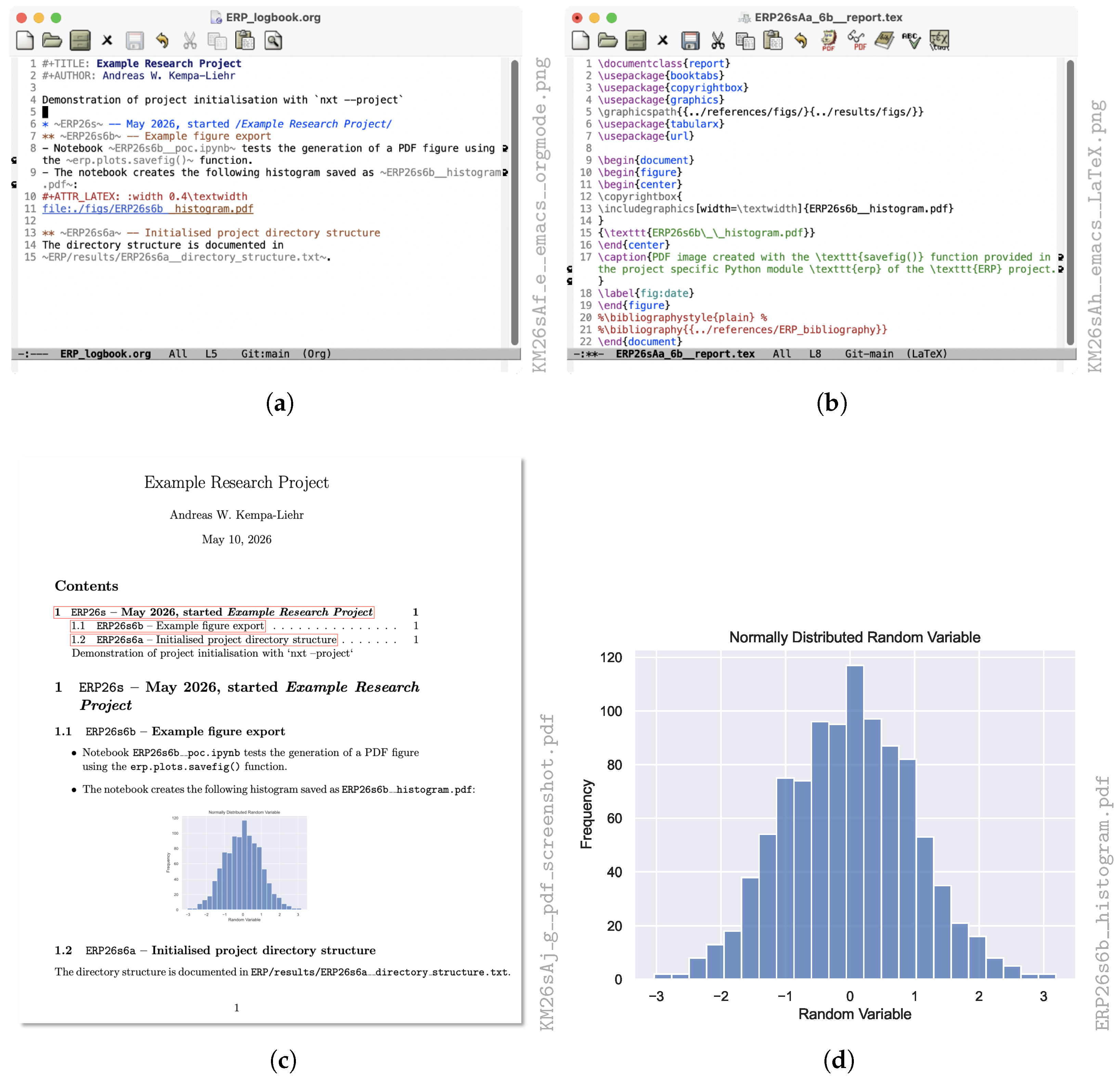
code to embed figures from the ERP/results/figs and ERP/reference/figs folders, and compiles a bibliography from ERP/references/ERP_bibliography.bib.-support, encryption support, mobile applications18, and many other features integrated into GNU Emacs19. In combination with Git (Section 4.1.2), Org Mode files have demonstrated their usefulness for supporting research workflows and documenting research results [26].4.1.2. Revision Control
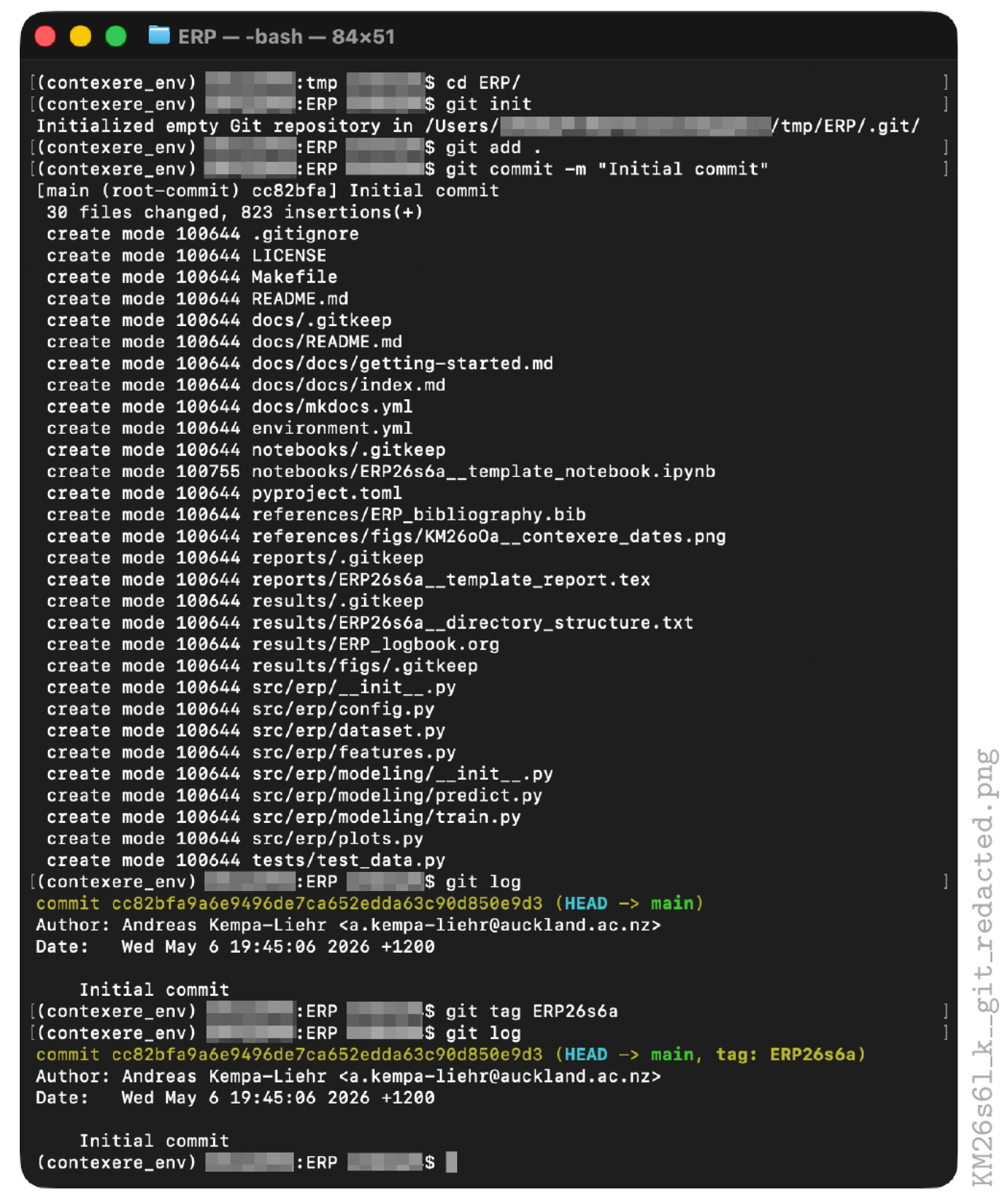
The next step is to add all files of the initialised project to the repository with the commandgit init
Note that the dot “.” following git add is part of the command. The process of adding new or changed files to the repository is called staging. In general, the command git add will not be used with a dot “.” as an argument but with specific file names, which are either new or have been edited. The reason is that compilation processes usually generate many helper files that change frequently but do not contribute to documenting the project’s history. These helper files can be excluded from staging suggestions by configuring the .gitignore file. However, because a project initialised with nxt --project starts with a project scaffold (Section 4.1.1) and does not have any data or large files yet, it is safe to initialise the local git repository using the dot-syntax.git add .
Now, the research progress can be documented with subsequent git add and git commit commands. The commit history can be inspected with the command git log (Figure 6), which shows a hexadecimal hash identifying the commit, the author and the author’s email address, commit date, and the commit message.git commit -m "Initial commit"
git config –global user.name "Andreas W. Kempa-Liehr"
Here, the option --global defines that the variables should be used for all git projects on the respective computer system. Omitting the --global option sets the variables just for the current git project.git config –global user.email "a.kempa-liehr@auckland.ac.nz"
4.1.3. Virtual Python Environment
generates a virtual Python environment named ERP. This name is the value of variable repo_name, which was assigned during the command line dialogue discussed in Section 4.1.1.make create_environment
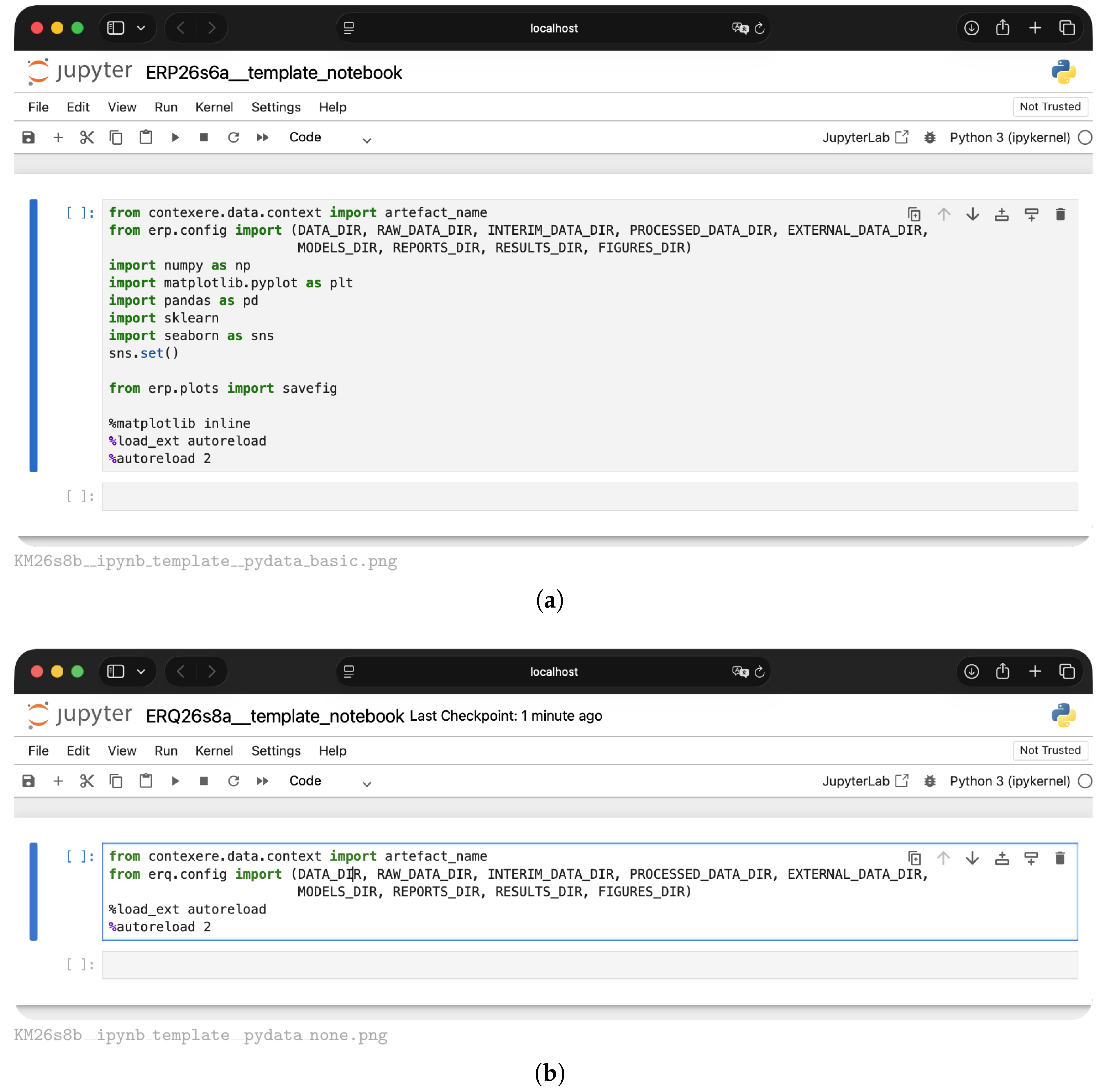
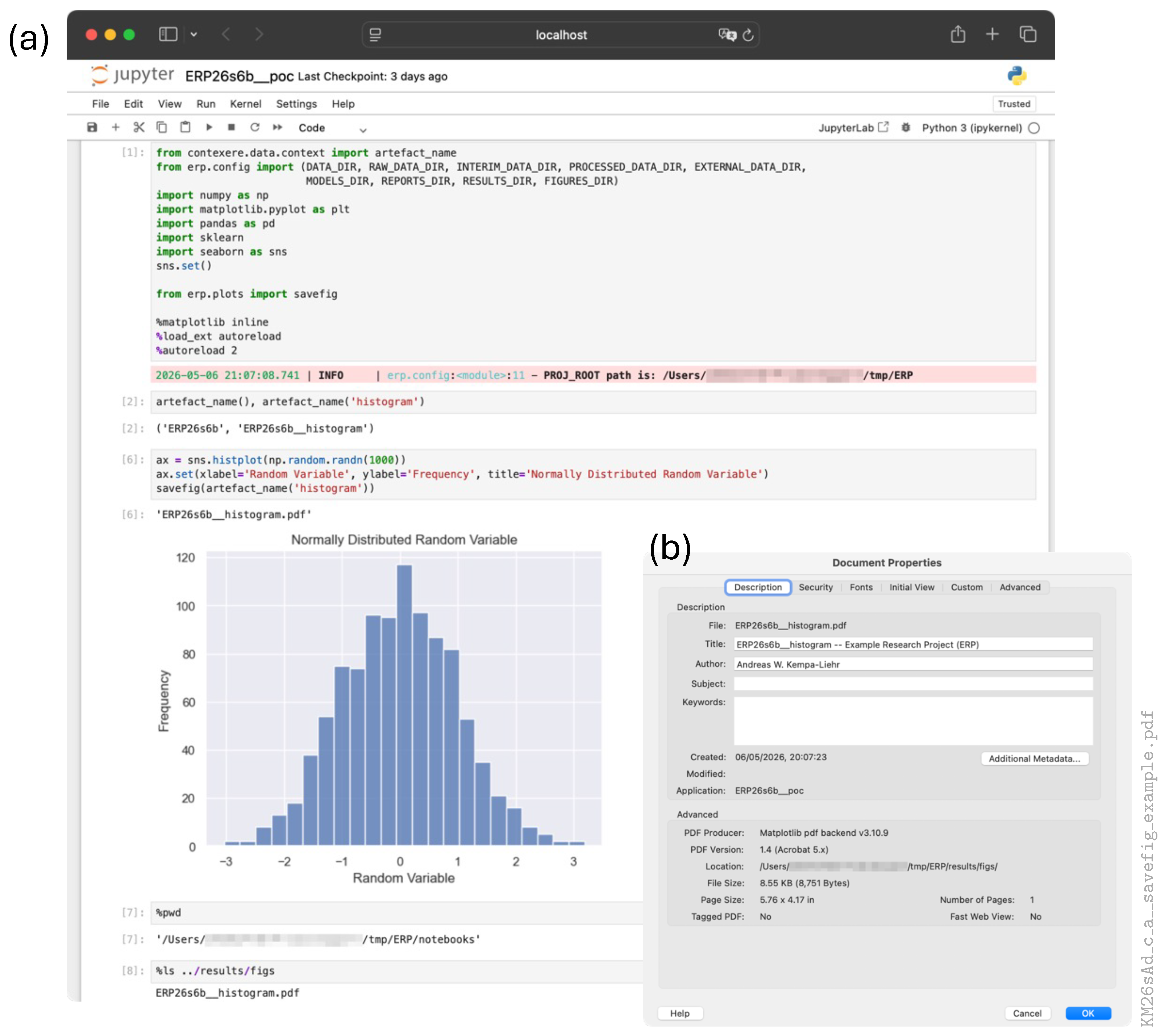
After executing make create_environment and following the instructions for activating the newly created virtual Python environment, a project-specific Python module named with the value of variable module_name is available (Figure 4a), which can be imported into Python scripts and Jupyter notebooks with the usual Python commandpacman -S make
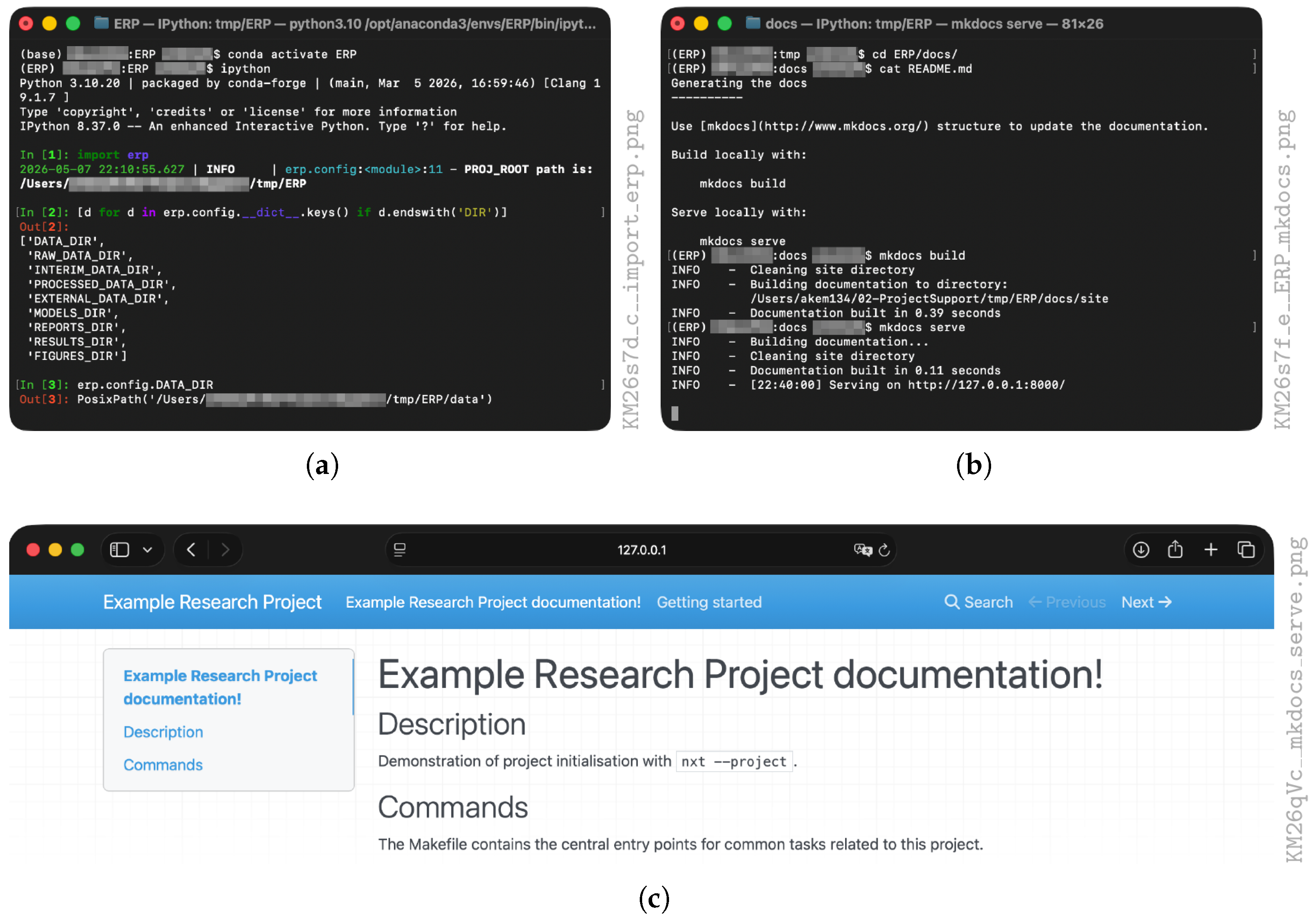
Based on the configuration for the example project, the module files are located in folder ERP/src/erp and the module can be loaded with import erp (Figure 7a) if erp was chosen by the researcher as input for variable module_name during the initialisation dialogue (Figure 4a). The project-specific Python module will provide functions and classes, which can be refactored [29] over time from Jupyter notebooks. In addition, important configuration variables, such as paths to the different data folders and the figures folder, can be loaded from the module erp.config (Figure 7a).import module_name
and the local web server is started withmkdocs build
after which a web browser can be used to open http://127.0.0.1:8000 showing the interactive documentation (Figure 7c). The content of the interactive documentation is configured in file docs/mkdocs.yml as described in the comprehensive user guide of the MkDocs project21.mkdocs serve
4.2. Tagging Repository Commits
The tag ERP26s6a is basically a bookmark for the commit hashgit tag ERP26s6a
(cf bottom of Figure 6) and allows it to recover the exact state of the repository at 6 May 2026 19:45:06 New Zealand Standard Time (+1200), because the respective commit included all the changed files up to this commit. From now on, the repository state associated with tag ERP26s6a can be recalled withcc82bfa9aa6e9496de7ca652edda63c90d850e9d3
This command creates a so-called headless state of the repository, which can be used to inspect all files of this specific repository state, but files cannot be changed. After inspection, the commandgit switch --detach ERP26s6a
returns the repository to its latest working stage, because main is the default working branch of git repositories. Alternatively, a specific file of tag ERP26s6a like ERP_logbook.org can be shown withgit switch main
More importantly, previous versions of files can be recovered with git restore. Let us assume that the README.md file needs to be rolled back to its original version of tag ERP26s6a, which can be achieved withgit show ERP26s6a:results/ERP_logbook.org
Now, the file README.md has been changed to its version at tag ERP26s6a, which can be edited and committed in its restored or amended version to the repository:git restore --source=ERP26s6a -- README.md
git add README.md
While this specific tagging example is admittedly overdone for the very first commit of a repository, the tagging of selected commits with associated RAGs takes into account that research software is never finished per se, but undergoes permanent development and enhancement, such that specific analysis or experimental results require the link to a specific repository commit in order to guarantee reproducibility.git commit -m "Restored from ERP26s6a"
4.3. The Naming Scheme in Practise
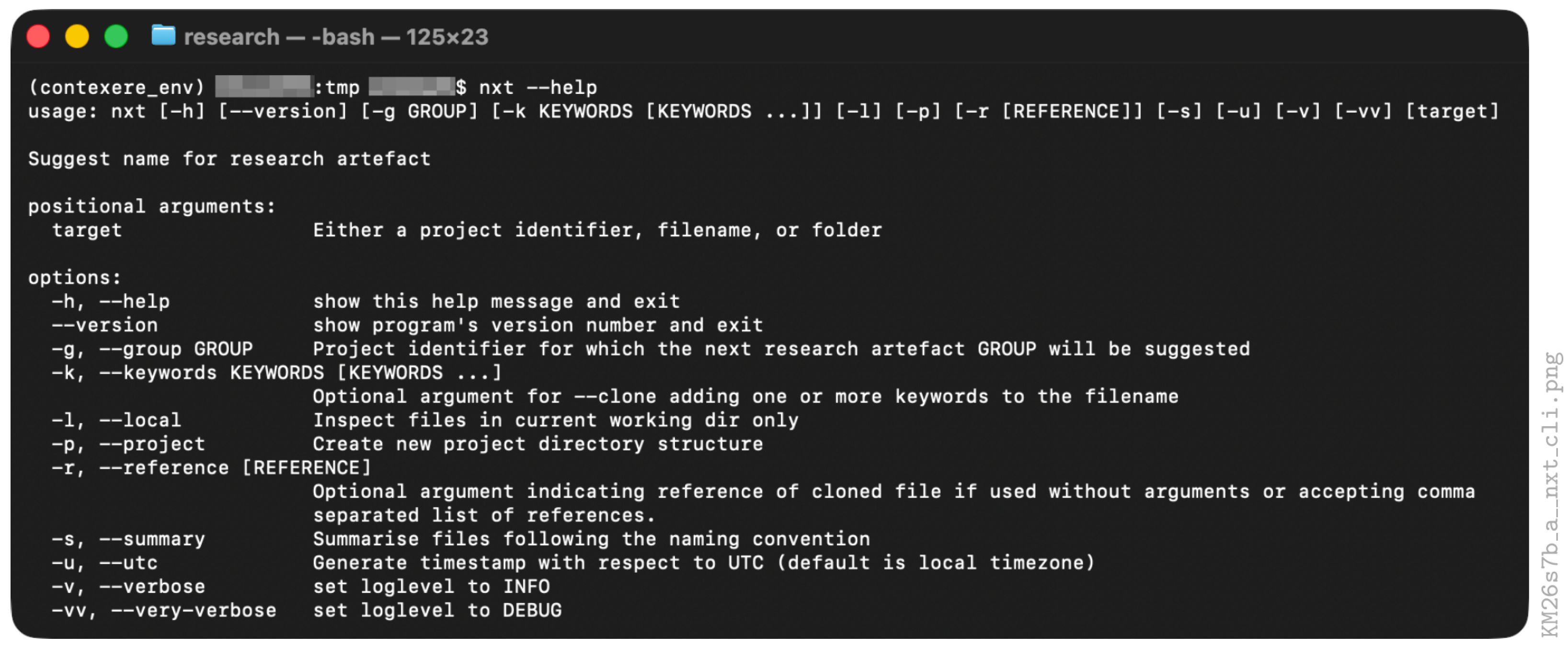
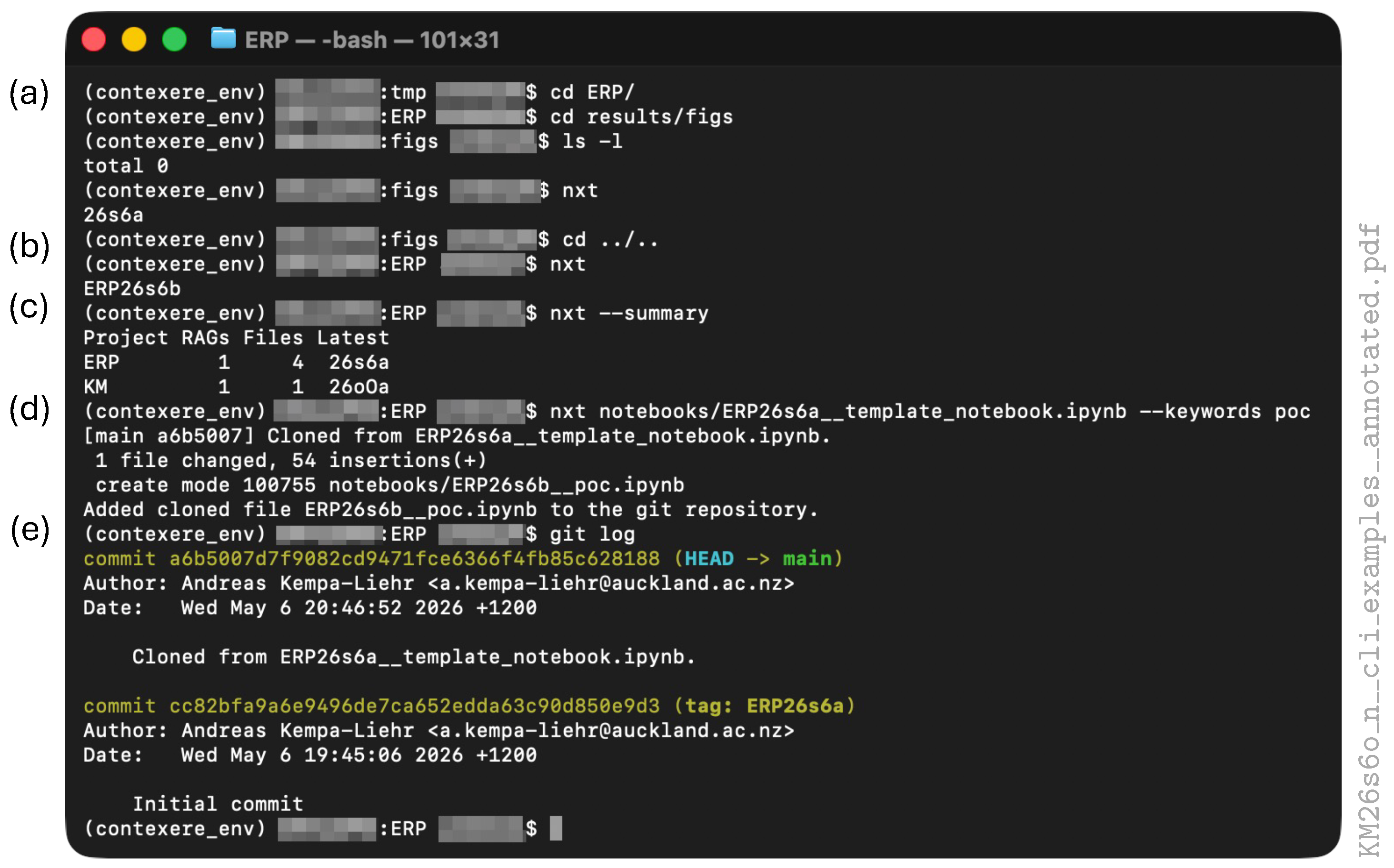
which provides a tabular output of all RAGs (Figure 8c).nxt --summary
resulting in an exact copy of the template (Figure 8d) named with the next available RAG and the provided keyword:nxt notebooks/ERP26s6a__template_notebook.ipynb --keywords poc
The cloned file is added automatically to the git repository of the project (Figure 8e) such that all edits can be tracked systematically.notebooks/ERP26s6b__poc.ipynb
creates a copy of ERP26s6b__poc.ipynb in directory notebooks namednxt notebooks/ERP26s6b__poc.ipynb --reference --keywords visualisation
Note that the cloned RAG references the original RAG. In another rapid development cycle, we might want to continue from ERP26s6b, but this time, using additional data from a completely different project, DS25zAa, where DS might stand for data science. The commandERP26s6c_b__visualisation.ipynb
cd notebooks
creates a fourth notebook namednxt ERP26s6b__poc.ipynb --reference s6b,DS25zAa --keywords simulation
again, providing efficient references to the input RAGs and thus creating a directed graph of RAGs. Note that the provided reference s6b is an abbreviation of ERP26s6b, which is shortened to the step counter “b” in the filename of the cloned notebook.ERP26s6d_b_DS25zAa__simulation.ipynb
4.4. Saving Figures with Metadata
4.5. Logbooks and Reports
are convenient for maintaining an overarching documentation of research progress over longer periods of time. These markup languages seamlessly integrate with the revision control systems used in research projects, and images and smaller result tables can be directly embedded in these documents.| 10 #+ATTR_LATEX: : width 0.4\ textwidth |
| 11 [ [ file:./ figs /ERP26s6b__histogram . pdf] ] |
export, as shown in the compiled PDF version of Figure 10c. The PDF is generated in Emacs by the four key strokes
or short C-c C-e l p. Note that the double brackets in line 11 of the Org Mode source code shown above are hidden in the screenshot of Figure 10a because Emacs converts the reference to the PDF image into a clickable link, which opens the respective PDF image.CTRL-c CTRL-e l p
file, generated by cloning and editing the provided report template ERP/reports/ERP26s6a_example_report.tex. This example was chosen to demonstrate the usage of the \copyrightbox macro (lines 12–15 in Figure 10b), which has been used to reference the filename of the displayed image at the right-hand side of the image:
| 12 \copyrightbox { |
| 13 \includegraphics [width=\textwidth ] { ERP26s6b__histogram . pdf } |
| 14 } |
| 15 {\ texttt{ERP26s6b\_\_histogram . pdf}} |
-header configuration into line 3 of the Org Mode document
| 3 #+LATEX_HEADER: \usepackage { copyrightbox } |
| 10 #+BEGIN_EXPORT latex |
| 11 \copyrightbox { |
| 12 \includegraphics[width=0.4\ textwidth ] { ERP26s6b__histogram . pdf } |
| 13 } |
| 14 {\ t e x t t t { ERP26s6b\_\_histogram . pdf } } |
| 15 #+END_EXPORT |
5. Working with Generative Artificial Intelligence
5.1. Case Study
In the context of Unix- or Windows-based terminals, are there any commands, utilities, programs, or executables named “next”?
5.2. Copilot
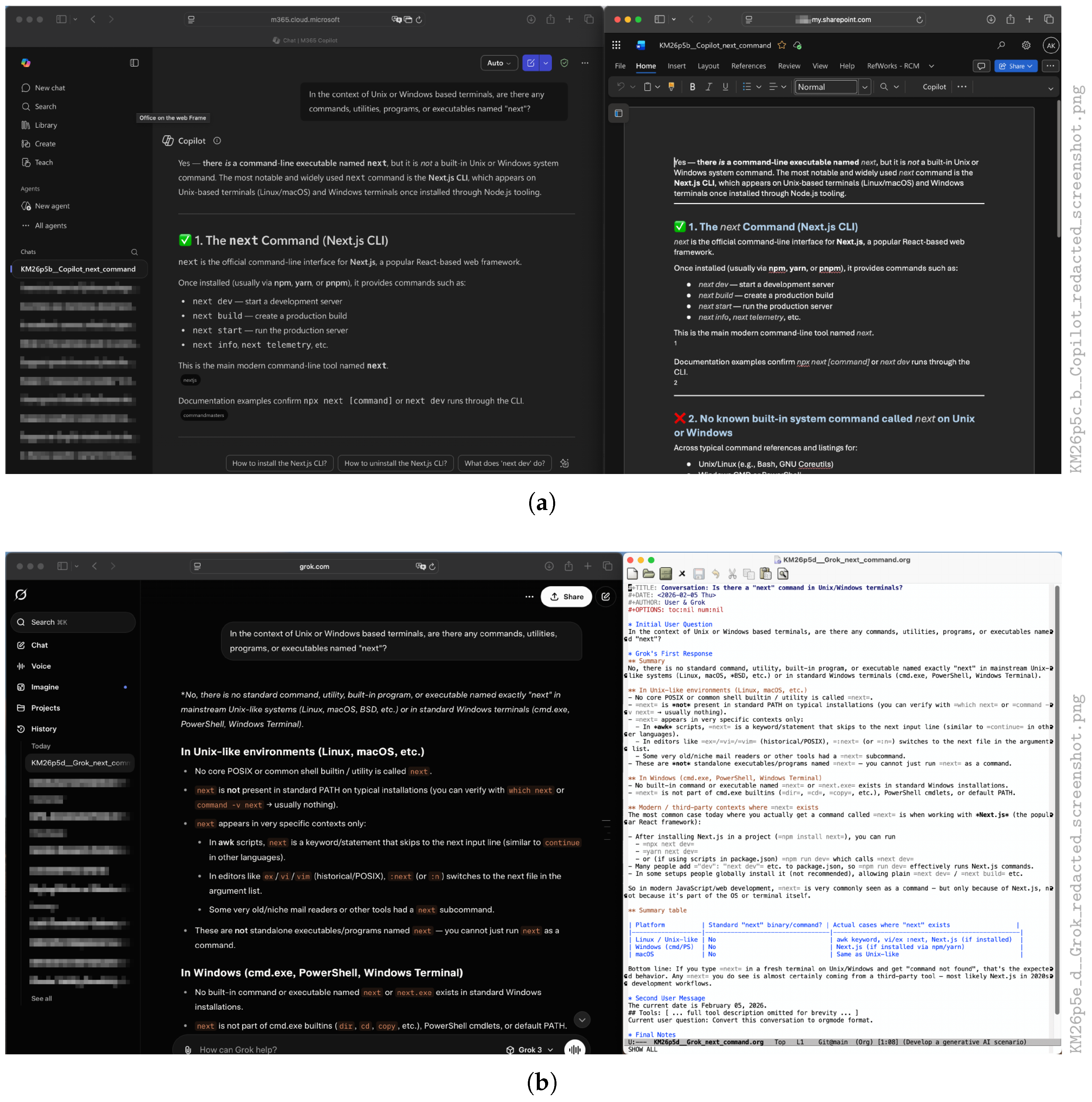
indicating the second (“b”) RAG of the KM project on 5 February 2026. In the context of this RAG, a screenshot of the Copilot window next to the Microsoft Word window was taken, which was named with the same file stem:KM26p5b__Copilot_next_command.docx
The screenshot was manually redacted and presented asKM26p5b__Copilot_next_command.png
in Figure 11a. The additional documentation in the respective Org Mode logbook of the project wasKM26p5c_b__Copilot_redacted_screenshot.png
| $ git show KM26p5c | tail -n 38 | head -n 18 |
| +*** Copilot (Fig \ref { fig:KM26p5c } ) |
| +- Rename Chat to reference RAG |
| +- Below the answer open the ~More options~ $\ldots$ menu choose |
| ~Open in Word~ |
| +- Rename Word file to reference RAG |
| +- Copy Question into the Word document |
| +- This export has to be reported for every question, such that a |
| complete conversation has to be collated manually. |
| + |
| +#+BEGIN_EXPORT latex |
| +\begin { figure } [H] |
| +\begin { center } |
| +\copyrightbox [ b ] { |
| +\includegraphics [width=\textwidth ] { |
| KM26p5c_b__Copilot_redacted_screenshot . png } |
| +}{KM26p5c\_b\_\_Copilot\_redacted\_screenshot . png } |
| +\end{ center } |
| +\caption { Screenshot of Copilot conversation and DOCX export . |
| Note, that the question is missing in the~export . } |
| +\label { fig :KM26p5c} |
| +\end{figure } |
| +#+END_EXPORT |
5.3. Grok, Gemini, and Claude
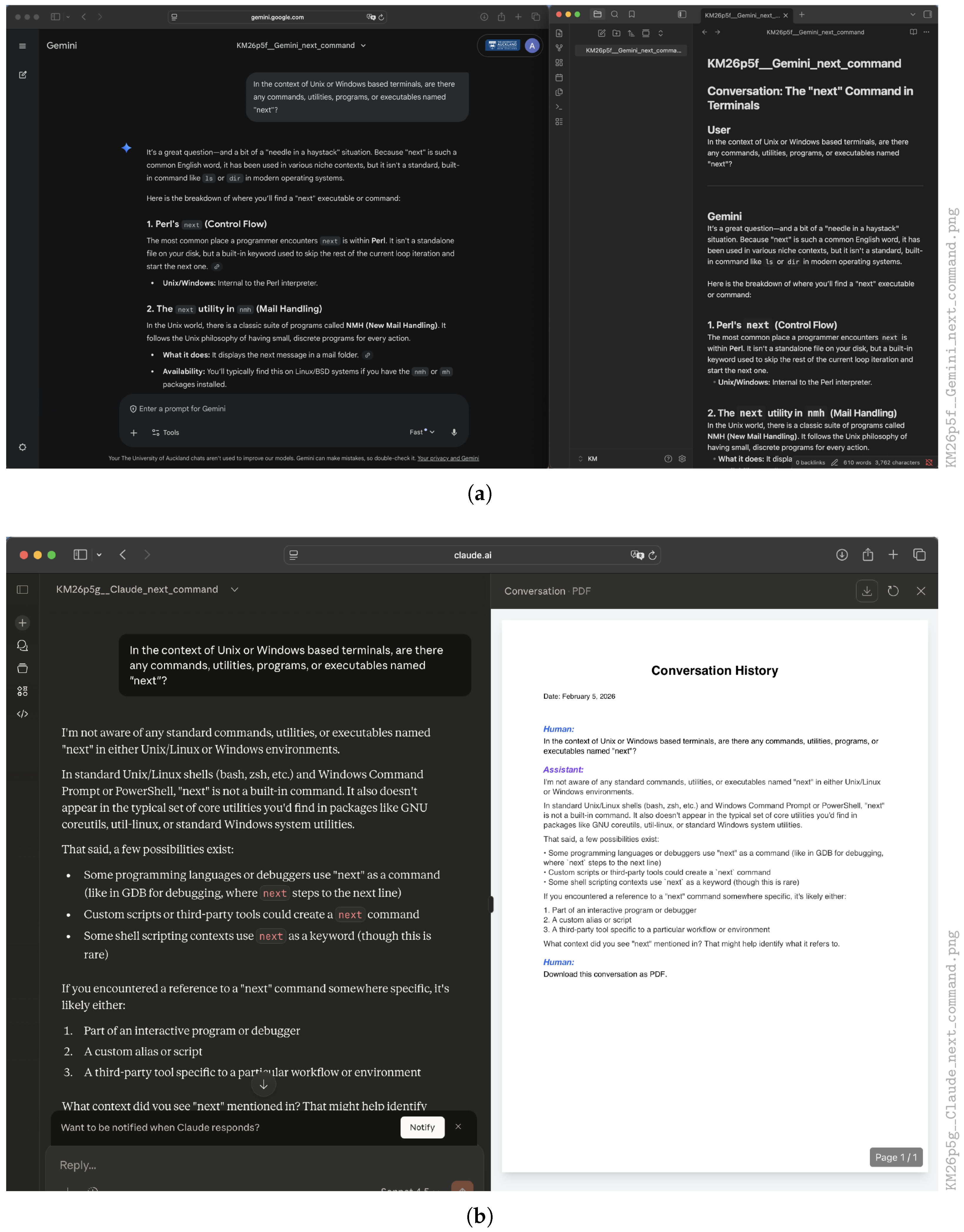
Example screenshots from Grok are shown in Figure 11b. The same instructions usually work well for Markdown and LaTeX. Figure 12a shows the conversation with Gemini on the left and the exported Markdown file rendered by Obsidian22 on the right-handside. In addition, Claude features a robust conversion to PDF with the prompt:Convert this conversation to orgmode.
For this chatbot, the generated PDF is directly visualised in the chatbot window (Figure 12b). In any case, the researcher must manually rename the resulting export files to match the intended RAG, ensuring the filenames correspond to the notes in the researcher’s logbook. For complex answers involving formulas and tables, the researcher should always check the exported conversations for completeness and, if the export is incomplete, either print a PDF directly from the browser window or take screenshots. After that, the evaluation process of checking the chatbot’s outputs against hallucinations can be documented in the researcher’s logbook.Download this conversation to PDF.
6. Discussion and Conclusions
Funding
Data Availability Statement
Acknowledgments
Conflicts of Interest
Abbreviations
| AI | Artificial Intelligence |
| DS | Data Science |
| CLLUE | Chronological, Lexicographic, Linkable, Unique, Efficient |
| ERP | Example Research Project |
| ISO | International Organization for Standardization |
| KM | Knowledge Management |
| MSYS2 | Software Distribution and Building Platform for Windows |
| Portable Document Format | |
| PNG | Portable Network Graphics |
| POC | Proof Of Concept |
| RAG | Research Artefact Group |
| RRP | Related Research Project |
| SVG | Scalable Vector Graphics |
| XML | Extensible Markup Language |
| 1 | It can safely be assumed that project identiers PI change faster than the century ordinals such that any disambiguities of the truncated year will be avoided by changed PIs. |
| 2 | https://github.com/kempa-liehr/contexere (accessed on 8 June 2026). |
| 3 | https://pypi.org (accessed on 8 June 2026). |
| 4 | https://anaconda.org (accessed on 8 June 2026). |
| 5 | https://ipython.org (accessed on 8 June 2026). |
| 6 | https://matplotlib.org (accessed on 8 June 2026). |
| 7 | https://numpy.org (accessed on 8 June 2026). |
| 8 | https://pandas.pydata.org (accessed on 8 June 2026). |
| 9 | https://seaborn.pydata.org (accessed on 8 June 2026). |
| 10 | https://scikit-learn.org (accessed on 8 June 2026). |
| 11 | https://jupyter.org (accessed on 8 June 2026). |
| 12 | https://opensource.org/license/mit (accessed on 8 June 2026). |
| 13 | https://opensource.org/license/bsd-3-clause (accessed on 8 June 2026). |
| 14 | https://github.com (accessed on 8 June 2026). |
| 15 | https://bitbucket.org (accessed on 8 June 2026). |
| 16 | https://about.gitlab.com (accessed on 8 June 2026). |
| 17 | https://orgmode.org (accessed on 8 June 2026). |
| 18 | https://orgmode.org/tools.html (accessed on 8 June 2026). |
| 19 | https://www.gnu.org/software/emacs/ (accessed on 8 June 2026). |
| 20 | https://www.msys2.org (accessed on 8 June 2026). |
| 21 | https://www.mkdocs.org (accessed on 8 June 2026). |
| 22 | https://obsidian.md (accessed on 8 June 2026). |
References
- Thomson, J.A. How to Start–and Keep–a Laboratory Notebook: Policy and Practical Guidelines. In Intellectual Property Management in Health and Agricultural Innovation: A Handbook of Best Practices: Volume 2; Krattiger, A., Mahoney, R.T., Nelsen, L., Thomson, J.A., Bennett, A.B., Satyanarayana, K., Graff, G.D., Fernandez, C., Kowalski, S.P., Eds.; MIHR: Kyiv, Ukraine; PIPRA: Davis, CA, USA, 2007; Chapter 8.2; pp. 763–771. [Google Scholar]
- McAlpine, H.; Cash, P.; Hicks, B. The role of logbooks as mediators of engineering design work. Des. Stud. 2017, 48, 1–29. [Google Scholar] [CrossRef] [Scilit]
- Hunt, A. Pragmatic Thinking and Learning: Refactor Your "Wetware"; Pragmatic: Raleigh, NC, USA, 2008. [Google Scholar]
- Kanare, H.M. Writing the Laboratory Notebook; American Chemical Society: Washington, DC, USA, 1985. [Google Scholar]
- Ebel, H.F.; Bliefert, C.; Greulich, W. Schreiben und Publizieren in den Naturwissenschaften, 5th ed.; Wiley-VCH: Weinheim, Germany, 2006. [Google Scholar] [CrossRef] [Scilit]
- Schubotz, S.; Schubotz, M.; Auerhammer, G.K. Electronic Laboratory Notebook: An Adaptable Solution. J. Open Res. Softw. 2025, 13, 11. [Google Scholar] [CrossRef] [Scilit]
- Sandve, G.K.; Nekrutenko, A.; Taylor, J.; Hovig, E. Ten Simple Rules for Reproducible Computational Research. PLoS Comput. Biol. 2013, 9, e1003285. [Google Scholar] [CrossRef] [Scilit] [PubMed]
- Wilson, G.; Aruliah, D.A.; Brown, C.T.; Chue Hong, N.P.; Davis, M.; Guy, R.T.; Haddock, S.H.D.; Huff, K.D.; Mitchell, I.M.; Plumbley, M.D.; et al. Best Practices for Scientific Computing. PLoS Biol. 2014, 12, e1001745. [Google Scholar] [CrossRef] [Scilit] [PubMed]
- Wilson, G.; Bryan, J.; Cranston, K.; Kitzes, J.; Nederbragt, L.; Teal, T.K. Good enough practices in scientific computing. PLoS Comput. Biol. 2017, 13, e1005510. [Google Scholar] [CrossRef] [Scilit] [PubMed]
- Kühne, M.; Liehr, A.W. Improving the Traditional Information Management in Natural Sciences. Data Sci. J. 2009, 8, 18–26. [Google Scholar] [CrossRef] [Scilit]
- Dreyfus, S.E. The Five-Stage Model of Adult Skill Acquisition. Bull. Sci. Technol. Soc. 2004, 24, 177–181. [Google Scholar] [CrossRef] [Scilit]
- Knuth, D.E. Literate Programming; CSLI Lecture Notes; Center for the Study of Language and Information: Stanford, CA, USA, 1992; Volume 27. [Google Scholar]
- Wes McKinney. Data Structures for Statistical Computing in Python. In Proceedings of the 9th Python in Science Conference; van der Walt, S., Millman, J., Eds.; Scipy: Austin, TX, USA, 2010; pp. 56–61. [Google Scholar] [CrossRef] [Scilit]
- The Pandas Development Team. Pandas-Dev/Pandas: Pandas. Version Latest, Zenodo. 2026. Available online: https://zenodo.org/records/20127038 (accessed on 12 May 2026).
- Schmidt, U.; Kempa-Liehr, A.W. 7 Maximen für den erfolgreichen Umgang mit Wissen. In Wissensmanagement Beflügelt. Wie Sie einen Unbegrenzten ROHSTOFF Aktivieren; Beier, H., Schmidt, U., Klett, D., Eds.; Akademische Verlagsgesellschaft: Heidelberg, Germany, 2015; pp. 231–250. [Google Scholar]
- Heylighen, F.; Vidal, C. Getting Things Done: The Science behind Stress-Free Productivity. Long Range Plan. 2008, 41, 585–605. [Google Scholar] [CrossRef] [Scilit]
- ISO 8601; Data Elements and Interchange Formats—Information Interchange—Representation of Dates and Times. ISO: Geneva, Switzerland, 2004.
- Perreault, S. vCard Format Specification. RFC 6350, Internet Engineering Task Force (IETF). ietf.org. 2011. Available online: https://www.rfc-editor.org/info/rfc6350/ (accessed on 12 May 2026).
- Chacon, S.; Straub, B. Pro Git, 2025-12-12 ed.; version 2.1.449; Apress: New York, NY, USA, 2025. [Google Scholar]
- Bull, P.; Qi, J. Cookiecutter Data Science. Release v2.3.0, Data Driven, Denver, CO, USA, 2025. Available online: https://github.com/drivendataorg/cookiecutter-data-science (accessed on 12 May 2026).
- Hunt, A.; Thomas, D. The Pragmatic Programmer: From Journeyman to Master; Addison-Wesley: Reading, MA, USA, 2000. [Google Scholar]
- Maryka, T.; German, D.M.; Poo-Caamaño, G. On the Variability of the BSD and MIT Licenses. In Proceedings of the Open Source Systems: Adoption and Impact; Damiani, E., Frati, F., Riehle, D., Wasserman, A.I., Eds.; Springer: Cham, Switzerland, 2015; pp. 146–156. [Google Scholar] [CrossRef] [Scilit]
- Lynch, S. Python for Scientific Computing and Artificial Intelligence; CRC Press: Milton, FL, USA, 2023. [Google Scholar] [CrossRef] [Scilit]
- Cannon, B.; Smith, N.J.; Stufft, D. Specifying Minimum Build System Requirements for Python Projects. PEP 518, Python.org. 2016. Available online: https://peps.python.org/pep-0518/ (accessed on 12 May 2026).
- Birkenkrahe, M. Teaching Data Science with Literate Programming Tools. Digital 2023, 3, 232–250. [Google Scholar] [CrossRef] [Scilit]
- Stanisic, L.; Legrand, A.; Danjean, V. An Effective Git and Org-Mode Based Workflow for Reproducible Research. ACM SIGOPS Oper. Syst. Rev. 2015, 49, 61–70. [Google Scholar] [CrossRef] [Scilit]
- Blischak, J.D.; Davenport, E.R.; Wilson, G. A Quick Introduction to Version Control with Git and GitHub. PLoS Comput. Biol. 2016, 12, e1004668. [Google Scholar] [CrossRef] [Scilit] [PubMed]
- Graham-Cumming, J. The GNU Make Book; No Starch Press: San Francisco, CA, USA, 2015. [Google Scholar]
- Fowler, M.; Beck, K. Refactoring. Improving the Design of Existing Code, 2nd ed.; Addison-Wesley: Boston, MA, USA, 2018. [Google Scholar]
- Karpatne, A.; Deshwal, A.; Jia, X.; Ding, W.; Steinbach, M.; Zhang, A.; Kumar, V. AI-enabled scientific revolution in the age of generative AI: Second NSF workshop report. Npj Artif. Intell. 2025, 1, 18. [Google Scholar] [CrossRef] [Scilit]
- Ebert, C.; Louridas, P. Generative AI for Software Practitioners. IEEE Softw. 2023, 40, 30–38. [Google Scholar] [CrossRef] [Scilit]
- Lau, O.; Golder, S. Comparison of Elicit AI and Traditional Literature Searching in Evidence Syntheses Using Four Case Studies. Cochrane Evid. Synth. Methods 2025, 3, e70050. [Google Scholar] [CrossRef] [Scilit] [PubMed]
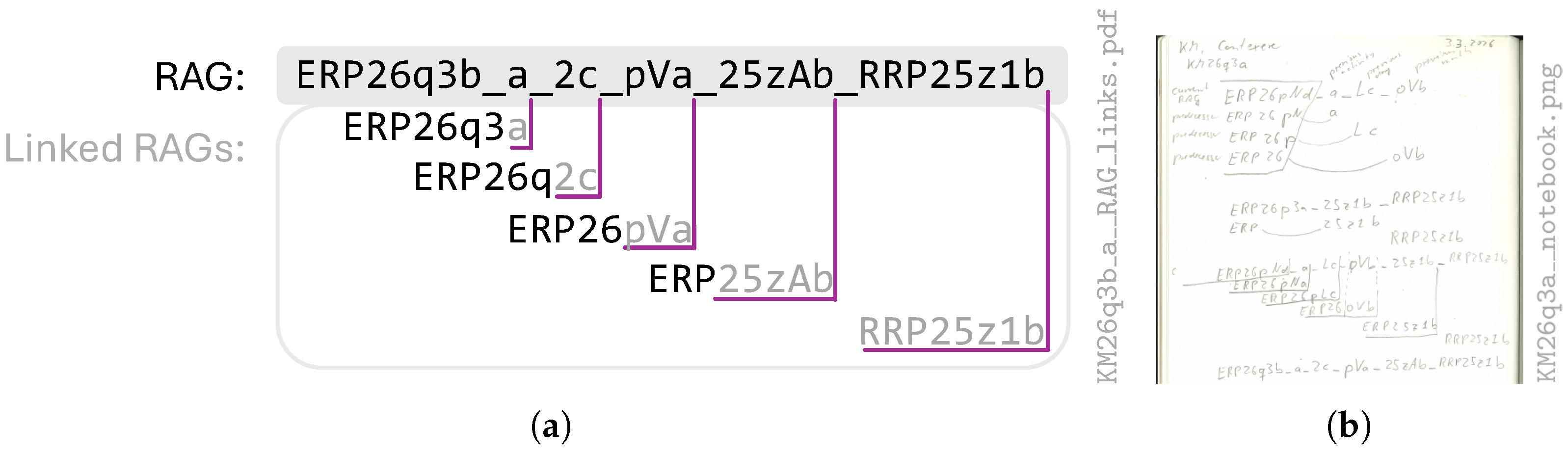
 file of this article are listed on the right-hand side of each graphic. The filename of the left-hand figure indicates that it has been derived from the notes depicted in the right-hand panel, which reference the respective RAG KM26q3a and the date 3 March 2026.
file of this article are listed on the right-hand side of each graphic. The filename of the left-hand figure indicates that it has been derived from the notes depicted in the right-hand panel, which reference the respective RAG KM26q3a and the date 3 March 2026.
file of this article are listed on the right-hand side of each graphic. The filename of the left-hand figure indicates that it has been derived from the notes depicted in the right-hand panel, which reference the respective RAG KM26q3a and the date 3 March 2026.


 document cloned and modified from ERP/reports/ERP26s6a_example_report.tex. (c) Screenshot of the PDF document created from the Org Mode document shown in panel (a). (d) Output of the \copyrightbox macro shown in panel (b).
document cloned and modified from ERP/reports/ERP26s6a_example_report.tex. (c) Screenshot of the PDF document created from the Org Mode document shown in panel (a). (d) Output of the \copyrightbox macro shown in panel (b).
document cloned and modified from ERP/reports/ERP26s6a_example_report.tex. (c) Screenshot of the PDF document created from the Org Mode document shown in panel (a). (d) Output of the \copyrightbox macro shown in panel (b).



| Months | Days 1–10 | Days 11–20 | Days 21–31 | ||||
|---|---|---|---|---|---|---|---|
| m | Month | D | Day | D | Day | D | Day |
| o | January | 1 | 1 | B | 11 | L | 21 |
| p | February | 2 | 2 | C | 12 | M | 22 |
| q | March | 3 | 3 | D | 13 | N | 23 |
| r | April | 4 | 4 | E | 14 | O | 24 |
| s | May | 5 | 5 | F | 15 | P | 25 |
| t | June | 6 | 6 | G | 16 | Q | 26 |
| u | July | 7 | 7 | H | 17 | R | 27 |
| v | August | 8 | 8 | I | 18 | S | 28 |
| w | September | 9 | 9 | J | 19 | T | 29 |
| x | October | A | 10 | K | 20 | U | 30 |
| y | November | V | 31 | ||||
| z | December | ||||||
| RAG | Project ID | Date | Daily Counter |
|---|---|---|---|
| ERP26oVb | ERP | 31 January 2026 | 2nd |
| ERP26p9a | ERP | 9 February 2026 | 1st |
| ERP26pLc | ERP | 21 February 2026 | 3rd |
| ERP26pNa | ERP | 23 February 2026 | 1st |
| ERP26pNd | ERP | 23 February2026 | 4th |
| RRP25z1a | RRP | 1 December 2025 | 1st |
| Experiment | Service | URL (Accessed on 8 June 2026) | Export Format | Suffix | Figure |
|---|---|---|---|---|---|
| KM26p5b | Copilot | https://m365.cloud.microsoft/chat | Microsoft Word | .docx | Figure 11a |
| KM26p5c | Grok | https://grok.com | Org Mode | .org | Figure 11b |
| KM26p5e | Gemini | https://gemini.google.com | Markdown | .md | Figure 12a |
| KM26p5g | Claude | https://claude.ai | Portable Document Format | Figure 12b |
Disclaimer/Publisher’s Note: The statements, opinions and data contained in all publications are solely those of the individual author(s) and contributor(s) and not of MDPI and/or the editor(s). MDPI and/or the editor(s) disclaim responsibility for any injury to people or property resulting from any ideas, methods, instructions or products referred to in the content. |
© 2026 by the author. Licensee MDPI, Basel, Switzerland. This article is an open access article distributed under the terms and conditions of the Creative Commons Attribution (CC BY) license.
Share and Cite
Kempa-Liehr, A.W. Contexere—Systematic Tracking and Referencing of Digital Artefacts for Postgraduate Students and Early Career Researchers. Data 2026, 11, 140. https://doi.org/10.3390/data11060140
Kempa-Liehr AW. Contexere—Systematic Tracking and Referencing of Digital Artefacts for Postgraduate Students and Early Career Researchers. Data. 2026; 11(6):140. https://doi.org/10.3390/data11060140
Chicago/Turabian StyleKempa-Liehr, Andreas W. 2026. "Contexere—Systematic Tracking and Referencing of Digital Artefacts for Postgraduate Students and Early Career Researchers" Data 11, no. 6: 140. https://doi.org/10.3390/data11060140
APA StyleKempa-Liehr, A. W. (2026). Contexere—Systematic Tracking and Referencing of Digital Artefacts for Postgraduate Students and Early Career Researchers. Data, 11(6), 140. https://doi.org/10.3390/data11060140