1. Introduction
Technological advancements in aviation have significantly boosted operational safety, yet human factors remain the primary catalyst in 70% to 85% of aircraft accidents [
1,
2,
3]. Since approximately 80% of these errors are linked to pilot proficiency, enhancing training quality through simulation is regarded as the most effective mitigation strategy [
4,
5]. Consequently, flight simulators have evolved from auxiliary aids into primary training tools governed by rigorous ICAO and EASA standards [
6,
7]. These platforms offer multidimensional, personalized learning environments where pilots can safely manage high-risk scenarios and receive detailed feedback via digital performance recordings [
8,
9,
10]. Beyond skill acquisition, simulation is pivotal for interdisciplinary research in ergonomics, accident analysis, and human–machine interaction [
11,
12,
13].
While automation reduces pilot workload, its continuous use can erode manual flight skills, potentially leading to catastrophic failures in complex crises as seen in the Air France 447 and Asiana Airlines 214 crashes [
14,
15,
16]. This skill degradation underscores the need for simulator-based manual proficiency training, especially as the industry is projected to need 660,000 new pilots by 2044 [
17,
18]. To address this demand, researchers advocate for innovative, modular training programs that utilize realistic flight dynamics to prepare inexperienced candidates for operational realities [
19,
20,
21].
Empirical studies further validate simulation’s efficacy; behavioral modeling based on McRuer’s control logic and data-driven assessments provide deep insights into pilot reactions and cognitive loads [
22,
23,
24,
25]. Research by Socha et al., Haslbeck et al., and others demonstrates that simulators significantly shorten the time required for students to reach solo flight standards and improve long-term retention [
5,
9,
20,
26,
27]. Furthermore, accessible technologies such as desktop simulators, VR/AR platforms, and eye-tracking systems offer cost-effective alternatives for individualized practice and distraction analysis [
19,
28,
29,
30,
31,
32,
33].
Full-flight simulators (FFSs) and flight simulation training devices (FSTDs) are widely used in commercial pilot training, particularly in advanced phases. In ab initio training, however, suitable simulators often lack adequate fidelity or are unaffordable for many flight schools. Consequently, academic programs increasingly adopt commercial off-the-shelf simulation software—such as X-Plane, Prepar3D, FlightGear, and Microsoft Flight Simulator—for pilot training, engineering applications, and human factors research [
34,
35,
36].
The literature indicates that these platforms can support both instruction and experimentation. X-Plane-based systems, supported by wide field-of-view visuals and appropriate control interfaces, have been reported to improve training transfer in entry-level pilot education [
34]. X-Plane is an R&D-oriented simulation platform that produces realistic flight dynamics using Blade Element Theory (BET), supports flight-data analysis, and enables scenario customization via extensions [
37]. Its accuracy and relatively low licensing cost have encouraged adoption in low-cost simulator systems and in applications such as pilot training and vehicle testing [
38,
39,
40].
Low-cost implementations demonstrate practical feasibility. A two-degree-of-freedom (pitch–roll) motion platform developed for engineering education was reported to operate safely with an approximate total cost of USD 7400 [
41]. At Carleton University, a retired Cessna 172 cockpit was modernized with commercial off-the-shelf components and integrated with X-Plane, using a 220° three-projector display, control loading, and vibratory cueing to enhance situational awareness and landing training transfer in ab initio instruction [
34].
Evidence further suggests that training effectiveness is not determined solely by simulator fidelity. Low- and medium-fidelity simulators can yield meaningful improvements in procedural learning and task performance, and low-cost devices may represent valid, cost-effective options for ab initio training [
42,
43]. Simulator-based perceptual–motor training has also been shown to increase learning rate and performance among ab initio trainees [
44]. Visualization quality is another determinant: comparative testing of FlightGear and X-Plane on Cranfield University’s Future Systems Simulator found that X-Plane provided higher visual realism and stronger spatial cues across approach and landing scenarios [
45].
Beyond instruction, simulators are increasingly used as data-driven research platforms. High-resolution data streaming from X-Plane to external tools such as MATLAB/Simulink supports objective analysis and performance assessment [
46,
47]. This approach has been extended to non-aircraft applications, with X-Plane used to model rocket-like dynamics and to transfer testable data via UDP for analysis [
47]. Recent work also integrates flight data with physiological and behavioral measures; real-time, synchronized collection of simulator data with ECG and eye-tracking has been demonstrated using Lab Streaming Layer-based plugins to support improved analysis of workload and situational awareness [
48]. Additionally, controlled simulator studies show that perceptual errors measurably affect control behavior and that repeated exposure can foster adaptation, supporting safety-oriented training and abnormal scenario analysis [
49]. Related work also demonstrates how historical accident/incident records can be leveraged in safety analytics despite practical challenges such as class imbalance [
50]. In parallel, human-factor risks such as fatigue remain a focus in regulatory discussions, reinforcing the need for evidence-informed training and analysis approaches [
51].
Overall, prior work supports the technical adequacy and educational value of X-Plane-based and other low-cost simulators, which are typically configured to specific training and research objectives.
Numerous studies have been conducted using X-Plane and similar platforms. However, these works differ substantially in both their objectives and the level of hardware realism adopted. In contrast, the present study aims to analyze student pilots’ flight performance using reliably recorded flight data and, accordingly, presents the design and implementation of a technical and hardware infrastructure tailored to this objective. The simulator system is intended to be positioned as a “research-oriented simulator infrastructure” capable of supporting advanced analyses based on flight data.
Unlike many related studies, although the EASA CS-FSTD(A) FNPT-II criteria are not fully met, the relevant requirements are taken into account to the extent feasible during the design process, as detailed in subsequent sections. In our implementation, adopting a cockpit layout close to real cockpit dimensions and placing an Instructor Operating Station (IOS) behind the pilot significantly strengthen the laboratory/hardware infrastructure dimension of the system.
Whereas many X-Plane-based studies proceed without establishing a haptic feedback layer that targets muscle memory and motor skills, this work aims to replace a spring-loaded joystick with an active force-feedback solution, generating realistic control-loading sensations that vary with telemetry inputs such as airspeed, angle of attack (AoA), and turbulence. Moreover, by feeding flight-dynamics outputs into the control-loading system, effects such as the stiffening/softening of yoke and pedal forces as a function of flight conditions can be implemented in a realistic manner.
While visualization and flight-dynamics computations are executed on the pilot station, scenario management and monitoring functions are performed on a separate instructor workstation. Synchronization of these two stations via LAN/UDP differentiates the proposed system from approaches that merely run X-Plane on a single PC with basic add-ons and logging and elevates it to a more integrated “device architecture” level.
The scenario flow is not strictly time-driven; instead, it can be conditionally triggered based on flight parameters such as altitude, airspeed, pitch–bank, flap position, and vertical speed indicator (VSI). Furthermore, failures are categorized (e.g., instrumentation, avionics, and mechanical) and managed by the instructor. This structure enables the systematic design of repeatable, instructor-controlled training/experimental scenarios rather than one-off task execution.
Building on the computational and visual core of X-Plane 12, cockpit-layer components—including a C#-based IOS integrated with LittleNavMap, PSS, custom communication/interface layers, and redundant analog instruments rendered via OpenGL—are incorporated to consolidate scenario, mapping, and monitoring functions within a single integrated training architecture.
This study differs from other research in that it places a high-resolution (≥60 Hz) data acquisition and end-to-end traceability pipeline at the center of the system, moving beyond the notion of simulation as merely “reproducing flight.” In this respect, flight data are produced in purpose-oriented formats such as .rec (replay), .csv/.xlsx (analysis), and .log (maintenance), and are brought directly into the debriefing process through time-aligned visualizations generated via the IOS/Pilot Log.
To illustrate this capability,
Section 4 presents an example analysis of landing-phase behavior using multiple diagnostic plots, including the approach profile, pitch–roll behavior, and heading–track deviation. Serving as a proof of concept, this analysis demonstrates that the proposed infrastructure—through its reliable data outputs—provides a suitable foundation for more advanced analytical methods to be applied in future work.
The paper is organized as follows. It first presents the proposed simulator system under the heading “Simulator Design and Hardware Architecture,” covering the cockpit layout and physical interface design—including the control column, rudder pedals, and switch panels—as well as the visual and auditory feedback subsystems. Additionally, the computer and connectivity infrastructure and the overall level of fidelity/realism achieved by the system are described. Following the hardware description, the paper details the “Software Architecture” of the proposed platform, including the software environment used for development, the scenario management approach, the flight dynamics module, and the user interface and control panel. It also addresses data logging and traceability, outlining how flight data are recorded, stored, and made accessible for monitoring and post-flight analysis. Overall, the manuscript reports a system-development effort for simulator-based research infrastructure, with
Section 4 providing a proof-of-concept example based on plots generated from recorded flight data.
2. Simulator Design and Hardware Architecture
The simulator developed through university–industry collaboration within the scope of the project was carried out under the name “LTG-SIM project.” The LTG-SIM project was developed to simulate the physical ergonomics, flight dynamics, and system behavior of the Cessna 172SP aircraft (G1000 glass-cockpit avionics-equipped version), which has become a global standard for pilot training in civil aviation, with high fidelity.
In this study, the EASA (European Union Aviation Safety Agency) standard CS-FSTD(A) Issue 2 is adopted as the primary reference framework guiding the design and development of the proposed system. While the current prototype does not yet satisfy all requirements specified in this document and has not undergone formal qualification, the hardware and software architecture has been intentionally structured to enable a clear pathway toward future compliance. Accordingly, development is ongoing with CS-FSTD(A) as the principal benchmark.
The system’s compliance readiness—i.e., the extent to which the current implementation supports certification-oriented development and later verification—is supported by the following design and implementation elements:
Physical and Functional Configuration: In line with the Generic class FNPT-II provisions, the system includes an Instructor/Operator Station (IOS). Furthermore, a dedicated two-seat observer arrangement is provided behind the cockpit, allowing observing trainees to monitor training sessions in a manner consistent with CS-FSTD(A) expectations.
System Infrastructure and QTG Preparedness: A key indicator of certification potential is the ability to conduct QTG (Qualification Test Guide) evaluations. The proposed system provides the necessary data acquisition and management infrastructure to support execution of the objective tests defined in CS-FSTD(A), particularly those referenced under AMC1 FSTD(A).300. However, the full set of QTG tests and associated pass/fail demonstrations are beyond the scope of the present study.
Data Acquisition Resolution: To facilitate subsequent validation of the aerodynamic and physical behavior, the system records critical flight parameters at sampling frequencies of 60 Hz and above, matching the temporal resolution commonly required for certification-oriented testing and analysis.
Overall, although the project is not currently in the certification phase, the platform has been engineered to be upgradeable and verification-ready with respect to CS-FSTD(A). Importantly, this paper reports the implemented low-cost infrastructure and its data logging/analysis capability; any claims regarding the achieved qualification level or FNPT-II fidelity are therefore limited to design intent and architectural readiness, rather than formal compliance.
The simulator developed accordingly is positioned as a training tool, which ensures that a part of the legally required flight hours in pilot training are completed in a more economical and safe environment and can be credited toward real flight hours.
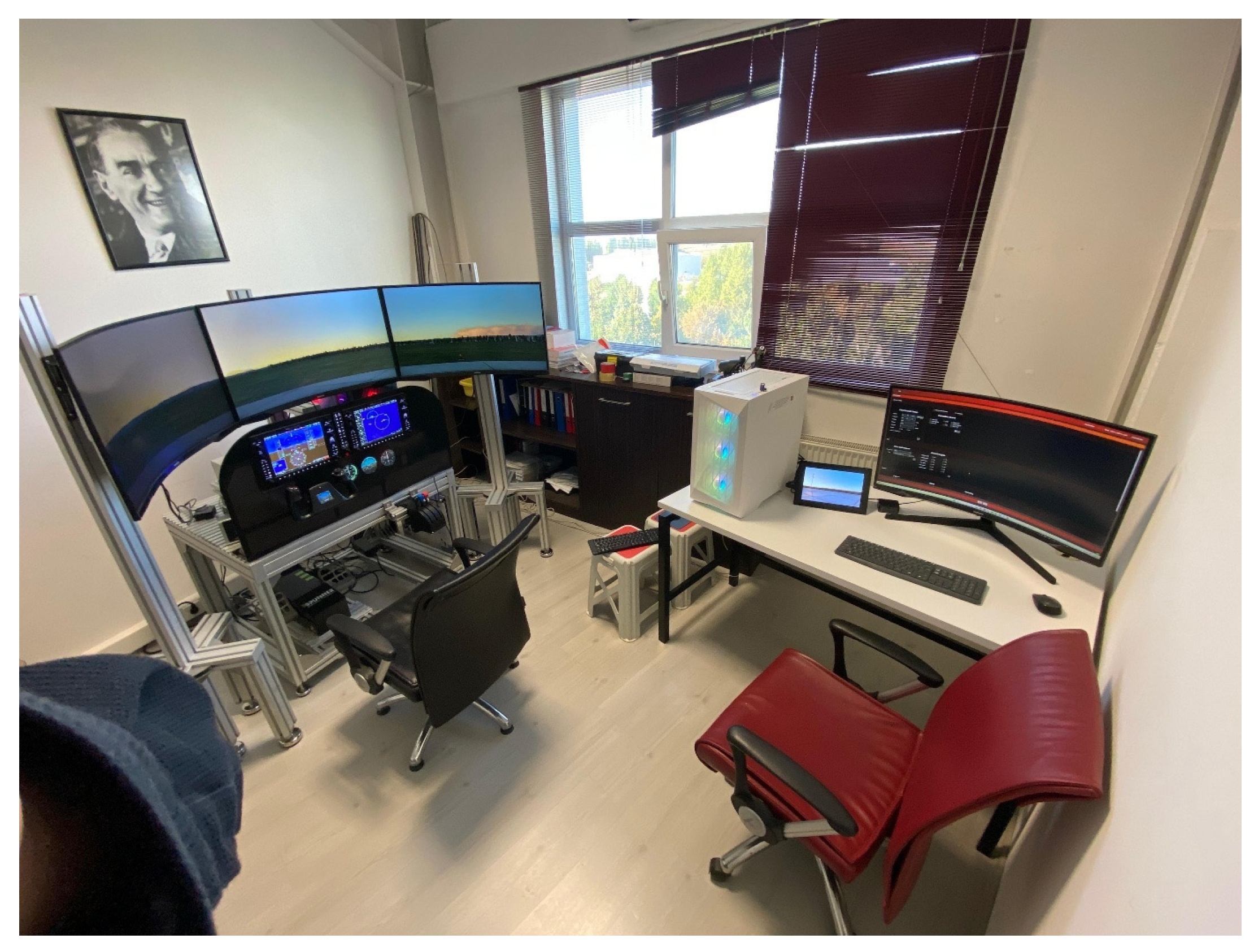
The simulator’s overall hardware architecture is based on a closed simulator cabin concept isolated from the external environment. The aim of this closed structure is to ensure student pilots’ complete immersion in the simulation environment by minimizing the possible visual and auditory distractions from outside during training. The interior cabin layout and dimensions are designed to perfectly match the cockpit dimensions of the referenced Cessna 172SP aircraft. The system basically comprises two main operational stations: the pilot station and the instructor operating station (IOS). The pilot station represents the front section where the student controls the aircraft, manages the avionics systems, and observes the outside world. The instructor section is positioned directly behind the pilot’s seat, which ensures that the instructor can monitor the flight, manage scenarios, and intervene in the system in real time.
The technical infrastructure of the system is established on a distributed computer architecture in order to meet real-time simulation requirements. There are two main computer units with high processing and graphics power, including the pilot computer and the instructor computer, in the system. The above-mentioned computers synchronously run the physics engine (X-Plane 12) that computes flight dynamics, the image generators, and the avionics system logic. Commercially available (COTS) components (force feedback controllers, avionics replicas, etc.) that have specifically been manufactured for aviation simulations are preferred in hardware integration to provide the ease of maintenance, sustainability, and cost-effectiveness. All sub-systems ensure low-latency and high-performance data flow by communicating via an Ethernet-based network infrastructure and UDP protocol.
2.1. Cockpit Design
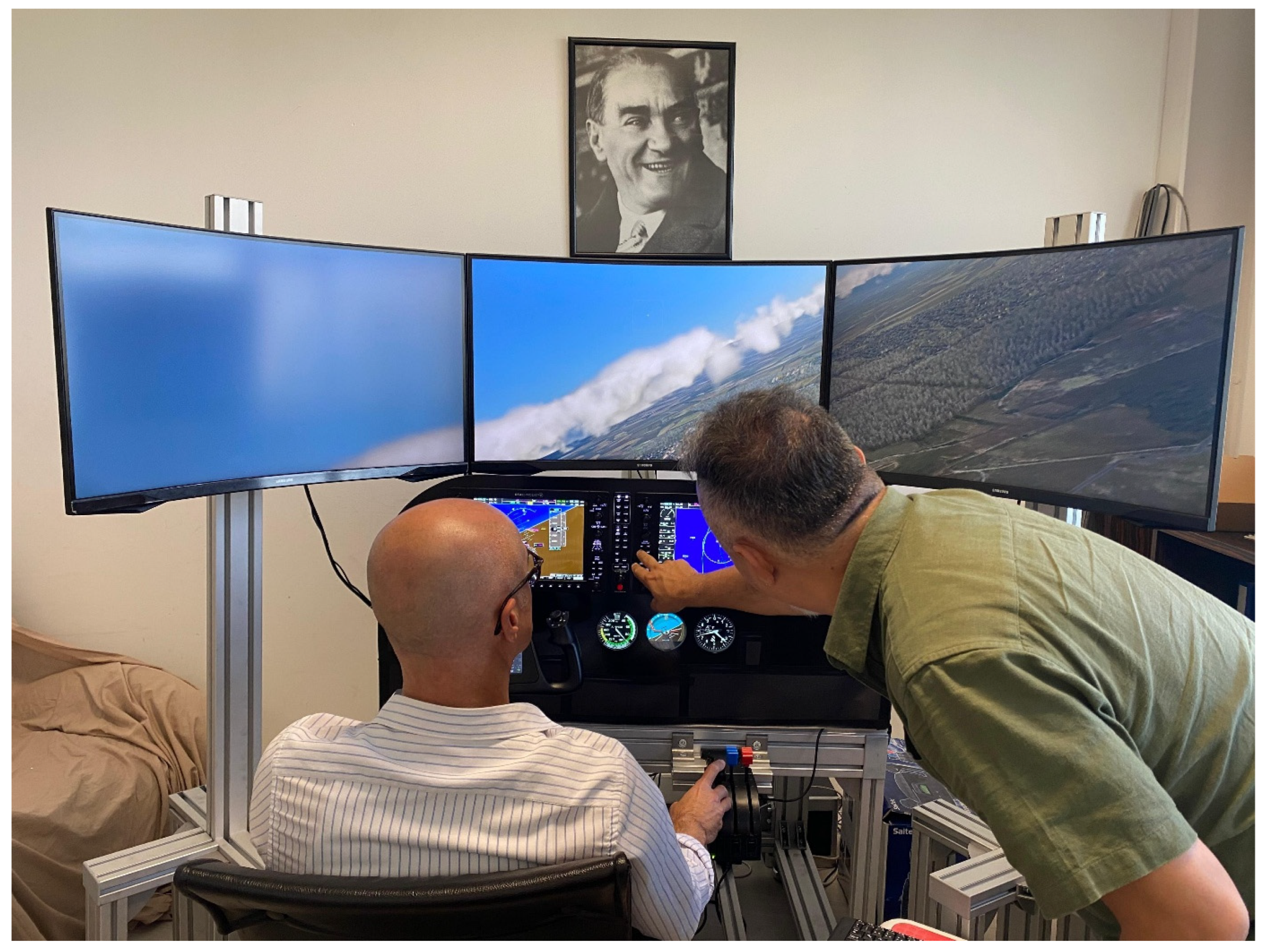
A closed-cabin structure, designed to present the operational environment of the Cessna 172SP aircraft, taken as a reference, to pilot candidates with the highest fidelity, forms a basis for the physical architecture of LTG-SIM. The simulator is structured as a completely closed station to maximize immersion during training and to isolate visual or auditory distractions that may arise from the external environment. The interior cabin layout is divided into two main operational sections, in line with ergonomic requirements and EASA CS-FSTD(A) standards [
52]. The pilot station is located in the front section (
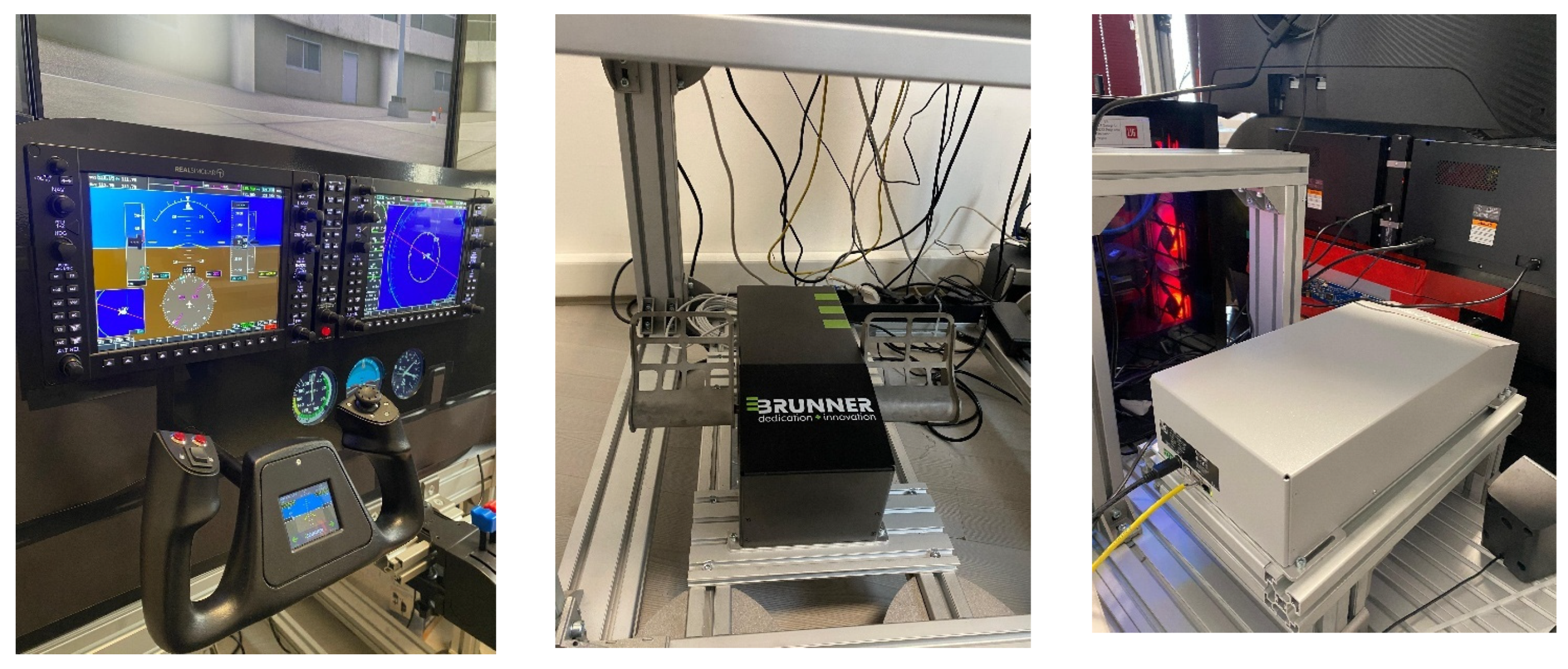
Figure 1). The instructor operating station (IOS) is positioned immediately after this section. Access to the cabin is ensured via separate door mechanisms for the pilot and instructor, by adhering to a real aircraft’s ergonomics.
The onboard panel, which is the most critical component of the cockpit, displays hybrid integration of modern glass cockpit technology with traditional analog indicators. Physical replicas of the G1000 Integrated Avionics System’s Primary Flight Display (PFD), Multifunction Display (MFD), and Audio Panel are used in the panel design to increase the realism of procedural training. In addition to the digital systems presented above, the system also includes redundant analog indicators, such as the altimeter, airspeed indicator, and attitude gyro, in the basic configuration of Cessna 172SP. However, instead of physical mechanical devices, these analog indicators are mounted on a dedicated LCD screen located behind the panel instead of physical mechanical devices. These indicators, drawn using custom OpenGL-based software architecture, process flight data from the X-Plane simulation engine in real time and reflect needle movements and indicator values in real time.
The visual and environmental systems of the simulator are also technically detailed according to the requirements of a closed-cabin structure. Three curved monitors that offer a wide 120-degree field of view are integrated into the cockpit’s front section to ensure the pilot’s situational awareness and support Visual Flight Rules (VFR) training. This display system provides the pilot with a seamless panoramic view of high-resolution images of the outside world. A special ventilation system is also added to the design to maintain optimal air quality and temperature within the closed cabin. Adjustable cockpit lighting systems are available at the pilot and instructor stations to maintain training during different time periods, such as night flights.
2.2. Input Devices: Controls, Pedals, and Switches
Input devices that ensure physical interaction with the simulation environment are among the most critical elements that directly impact the pilot’s flight experience and training efficiency in the LTG-SIM project. All control and switch groups utilized in the system are configured to adhere to the cockpit ergonomics and tactile feedback characteristics of the Cessna 172SP aircraft for the purpose of enhancing the quality of training and complying with EASA FNPT-II certification standards. Therefore, active force feedback technologies that can simulate aerodynamic loads and environmental factors in real time are preferred instead of static spring mechanisms (
Figure 2).
Flight Control Surfaces (Yoke and Pedals): Advanced Control Loading Systems (CLSs) using brushless DC motor technology and integrated load cells are integrated for the simulator’s primary flight controls. These systems create dynamic resistance against the force applied by the pilot to the yoke and pedals by processing telemetry data from the simulation software (airspeed, angle of attack, turbulence, etc.) [
53].
The yoke utilized in the system has a capacity to produce approximately 110 N of torque on the pitch axis and 6 Nm on the roll axis. This high torque capacity exactly reflects the aerodynamic resistance that the pilot encounters during sharp maneuvers or at high speeds. Additionally, the “slip ring” technology on the device prevents cable clutter. On the other hand, programmable buttons on the lever (PTT, trim, and autopilot connection) increase operational functionality. Similarly, the active pedal system utilized for yaw and ground taxi control is capable of generating a peak force of 200 N. It enables precise differential braking through its integrated proportional brake (toe brake) feature. Both units are connected to the simulation engine via middleware and support automatic control movement (back-drive) when the autopilot is activated.
Engine and Trim Controls: Industrial-grade throttle and mixture control units are used to enhance durability in training operations and to manage engine power and the aircraft’s aerodynamic balance. These units, meeting the functionality of the reference aircraft’s “push–pull”-type vernier structure, encompass throttle, mixture, and propeller angle controls. Moreover, a carburetor heating control is integrated into this system to manage icing scenarios. The trim wheel used to ensure the aircraft’s pitch balance has a multi-turn potentiometer structure and a physical position indicator, allowing for precise altitude control.
Switches and System Panels: The system controls of the simulator (electrical, lighting, fuel, etc.), except for avionics, are designed as modular panels in line with the layout and functionality of a real aircraft cockpit. For the purpose of increasing the system’s ease of maintenance and sustainability, Commercial-Ready (COTS) panels with a USB plug-and-play feature are preferred instead of industrial I/O cards that require complex cabling. There is a master switch ensuring battery and alternator control, an avionics power switch, controls for external lighting (landing, taxi, navigation, strobe, and beacon), and a 5-position magneto switch on the switch panel that manages the electrical system. Additionally, components such as fuel tank selection, parking brake mechanism, and motorized flap indicator panel are physically modeled and integrated with the Pilot Station Control Software (PSS).
2.3. Visual and Auditory Feedback Systems
High-resolution visual systems and realistic acoustic modeling are used in an integrated structure in the LTG-SIM project with the objective of ensuring the pilot’s full immersion in the simulation environment and maximizing training efficiency. Since visual and auditory cues directly impact the pilot’s perception of speed, altitude, and position, the seamless and synchronized operation of the systems in question is determined as one of the main requirements of the system architecture. The external visual system is designed in a configuration that covers the pilot’s field of view (FOV) at a maximum level and increases environmental awareness. A multi-monitor structure with high pixel density and refresh rate is preferred in order to prevent focusing and ambient light problems that projection systems may cause.
Three 32-inch curved monitors, positioned side-by-side at an angle in the front of the cockpit, provide a view of the outside world (
Figure 3). The said display system offers a high resolution overall, with QHD (2560 × 1440) on each monitor, while minimizing motion blur with a 1 ms response time and high refresh rate. The monitors’ curved structure and physical placement provide the pilot with an uninterrupted panoramic view of approximately 120 degrees on the horizontal axis. This wide field of view enhances the quality of training, particularly in Visual Flight Rules (VFR) training, by facilitating the pilot’s tracking of landmarks during circuit procedures and ground-reference maneuvers. The X-Plane 12 simulation engine that runs on the pilot computer generates visual scenes. The graphics engine processes dynamic weather events (rain, snow, and fog), volumetric clouds, lighting effects, and shadow changes at different times of day in photorealistic quality and transfers them to the monitors.
In-cockpit visual feedback also includes avionics and instrumentation systems, beyond the view of the outside world. PFD (Primary Flight Display) and MFD (Multi-Function Display) units used to reflect the glass cockpit experience are presented on 10.4-inch high-resolution screens integrated into physical frames. Additionally, an external LCD monitor placed behind laser-cut slots on the side panel is used with a hybrid design approach. Dedicated OpenGL-based software that runs on this monitor simulates standby analog indicators, such as the airspeed indicator, altimeter, and attitude gyro. This structure presents a solution that combines the tactile realism of a physical panel with the flexibility and cost-effectiveness of digital display.
The auditory feedback system complements situational awareness by ensuring that the pilot audibly perceives power changes, aerodynamic effects, and environmental factors on the aircraft. Environmental sounds, including engine speed (RPM), wind noise, wheel contact with the runway, flap/landing gear movements, and thunder, are simulated by a 2 + 1 speaker system placed into the simulator cabin. The sound engine can dynamically adjust the sound intensity and frequency according to flight parameters (speed, engine load, etc.). On the communication side, noise-canceling microphone headsets are utilized for pilot–instructor interaction and for simulated Air Traffic Control (ATC) conversations. The said system allows the pilot to communicate in an isolated manner from cockpit noise and effectively execute procedural calls (call-outs) by simulating the intercom (ICS) system in real flights.
2.4. Computer and Connectivity Hardware
A distributed computer architecture is preferred in order to meet the LTG-SIM simulator’s high-fidelity performance requirements and optimize computational load. This architecture configures image generation, physical modeling, and instructor control functions on two main workstations (pilot and instructor computers) that are physically separated but synchronized over the local network. The hardware components utilized in the system are selected by taking into account the high graphics processing capacity and the continuity of real-time data flow required by the X-Plane 12 simulation engine.
2.4.1. Computing Units
The system consists of two main units with hardware configurations customized according to their task descriptions. The pilot computer carries the most critical computational load of the simulator. Moreover, it is responsible for processing outside world images on three QHD monitors at a smooth frame rate (minimum 60 FPS), computing flight dynamics, and running the Pilot Station Control Software (PSS). On the contrary, the instructor computer represents the unit that manages simulation scenarios, processes map data, and runs the Instructor Operating Station (IOS) software. The technical specifications and configuration differences of both stations are listed in
Table 1.
As seen in
Table 1, both stations utilize the same processor architecture to ensure data processing consistency. However, in the graphics processing unit (GPU), the pilot computer is equipped with top-line industrial standard cards to process volumetric clouds, lighting effects, and high-resolution textures. On the other hand, the instructor computer is configured with an optimal card to process control panels and map data.
2.4.2. Network and Communication Infrastructure
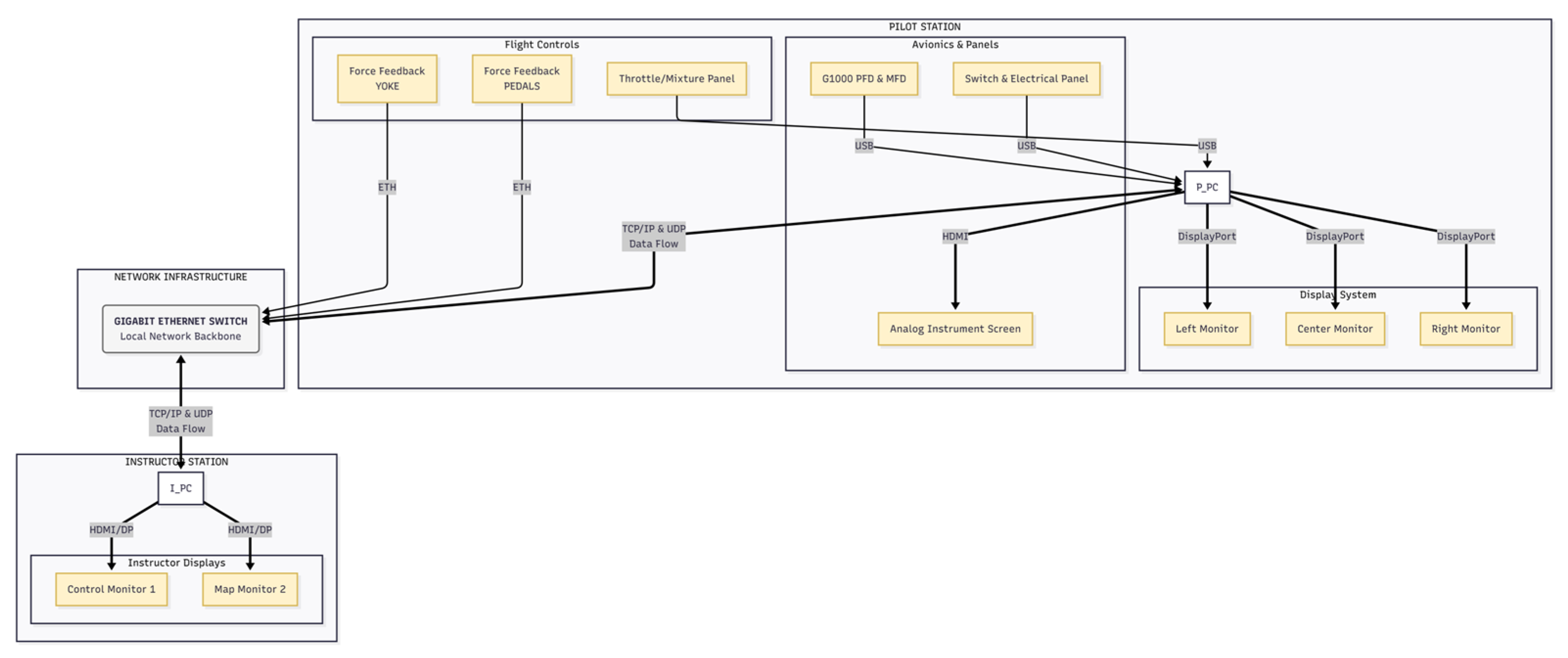
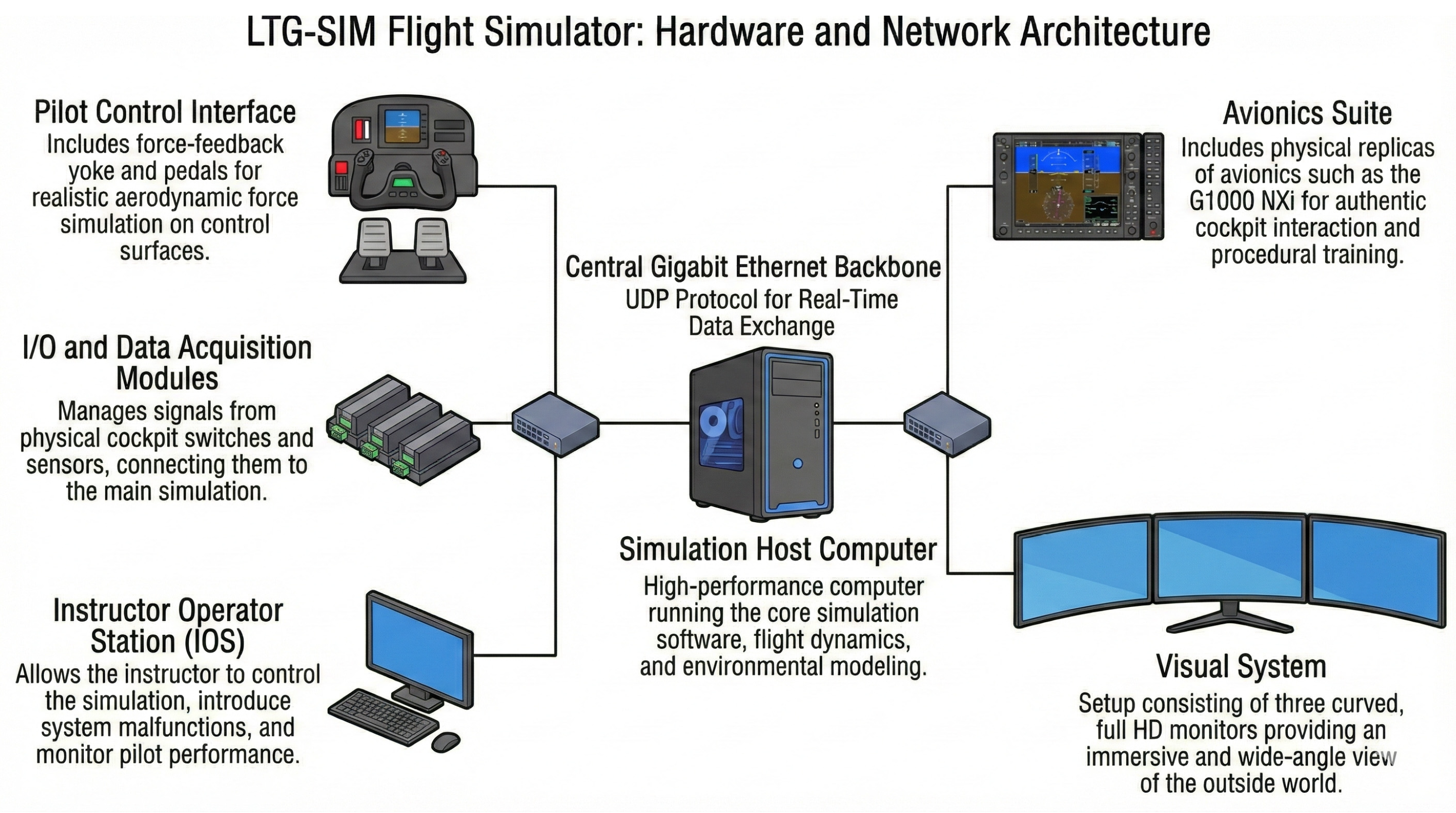
Data transmission between components is provided via an isolated local area network (LAN) to ensure the system’s real-time responsiveness. The pilot and instructor computers and network-based peripherals are connected to each other via Gigabit Ethernet switches (
Figure 4).
UDP (User Datagram Protocol) is preferred as the communication protocol in the software layer due to its low latency and high speed advantages [
54]. Critical flight data (aircraft position, velocity vectors, etc.) and command packets (fault triggering, weather change, etc.) between the pilot (PSS) and instructor (IOS) software are transmitted via this protocol. Moreover, avionics suites and switch panels in the cockpit are connected directly to the relevant computer via USB interfaces, which enables data transmission using a “Plug & Play” logic.
All computer cases, power distribution units, and network devices are housed in a lockable, ventilated, special metal hardware cabinet outside the simulator to ensure system security and cable management.
2.5. Fidelity Level
The level of realism in aviation simulators is a basic parameter expressing how accurately the system’s physical characteristics, flight dynamics, and environmental elements represent the referenced aircraft. Low-fidelity systems usually focus on procedural learning with desktop computers and generic controllers. However, the LTG-SIM project is built on a high-fidelity architecture aiming to create an “immersion” sensation by stimulating the pilot’s physical, visual, and auditory senses, as if in a real aircraft. The system has the technical competence to meet the EASA CS-FSTD(A) FNPT-II certification criteria with its hardware integration and software algorithms.
Ensuring physical and tactile fidelity (haptic fidelity) is one of the most decisive factors in reaching a high level of realism in LTG-SIM. Unlike traditional spring-loaded mechanisms, the brushless DC motor-based active force feedback technology employed in the system is critical for enhancing the pilot’s muscle memory. The aforesaid technology ensures that the pilot feels the resistance on the control surfaces in real time according to the aircraft’s airspeed, trim status, and aerodynamic loads. For instance, the stiff joystick at high speeds or the unresponsiveness of the control surfaces in a stall condition are physically simulated, which strengthens the pilot’s sense of flight. Likewise, using physical switches and avionics replicas instead of touchscreens in cockpit ergonomics increases “tactile fidelity”. The pilot’s experience of turning a real switch when adjusting a frequency or turning on a switch ensures the transformation of procedural training into permanent motor skills.
At the dimension of visual and functional fidelity, the system is supported by a wide field of view and an advanced physics engine. A 120-degree panoramic field of view and high-resolution visual system allow for realistic execution of Visual Flight Rules (VFR) training by increasing the pilot’s environmental awareness. The aircraft’s aerodynamic behaviors are calculated in real time by the X-Plane platform’s “Blade Element Theory”-based physics engine instead of predefined lookup tables [
55]. This method enables the aircraft to respond dynamically and realistically under diverse weather conditions, turbulence, or failure scenarios, such as icing. To preserve perceptual realism, it is mandatory to minimize latency between the visual system and cockpit indicators. LTG-SIM’s distributed architecture and UDP-based communication infrastructure ensure an instantaneous visual response to pilot control input by guaranteeing that the system’s latency is below the limit of 150 ms specified in certification standards.
3. Software Architecture
The software architecture of the LTG-SIM project is designed as a modular, expandable, and distributed structure to meet real-time simulation requirements, providing high-fidelity flight dynamics, and fully complying with EASA FNPT-II certification criteria (
Figure 5). The system performs visualization, physical modeling, avionics simulation, and instructor control functions through different software components (CSCI—Computer Software Configuration Item). These components operate synchronously over a local area network (LAN). The aim of the architectural approach above is to optimize system performance by distributing the computational load across diverse processing units and to present an infrastructure that is open to future advancements.
The X-Plane 12 platform constitutes the simulation core of the software due to its advanced aerodynamic computational capabilities, “Blade Element Theory”-based physics engine, and realistic atmospheric modeling. However, the Instructor Operating Station (IOS) and Pilot Station Control Software (PSS), developed specifically for the project, provide simulation management, scenario operation, external hardware integration, and student evaluation processes, independently of this commercial platform. These unique software layers centrally manage all the control mechanisms required by the training methodology while utilizing the simulation engine as a “computational tool”.
During the software development process of the system, the C# programming language and WPF (Windows Presentation Foundation) technology are preferred for user interfaces and high-level control logic. Furthermore, the architecture is built on the MVVM (Model-View-ViewModel) design pattern.
3.1. Software Platform
The LTG-SIM software architecture represents a distributed and hybrid structure. In this structure, multiple software components (CSCI—Computer Software Configuration Item) with various functions communicate over the network and local memory, going beyond single software. This architecture utilizes the power of a commercial platform for visualization and physics computations. It is based on unique software developed within the project for system administration, hardware integration, and training interfaces.
Core Simulation Engine: X-Plane 12 Professional software is at the center of X-Plane 12 Simulation, which provides flight dynamics, atmospheric models, and outside-world visualization. Physics-based aerodynamic modeling capability, known as “Blade Element Theory,” is the main reason for preferring X-Plane. This theory divides the aircraft geometry into small parts and computes the aerodynamic forces on each part in real time. This ensures a more realistic and dynamic flight experience in comparison with lookup-table simulators. X-Plane operates on the pilot computer and processes the outside-world visualization and physical calculations in real time, spread across three QHD monitors.
Original Software Components: LTG engineers developed the following core software to tailor the capabilities of X-Plane according to training needs and provide hardware integration:
Instructor Operating Station (IOS): The software in question that runs on the instructor computer is the simulator’s brain. It is developed using the C# programming language and WPF (Windows Presentation Foundation) technology and has an MVVM (Model-View-ViewModel) architectural pattern. The IOS initiates scenarios, changes weather conditions in real time, triggers malfunctions, and tracks students on the map. Furthermore, the open-source map software LittleNavMap is embedded in the IOS interface to ensure navigation tracking.
Pilot Station Software (PSS): This module, which runs on the pilot’s computer, collects data from physical hardware in the cockpit (buttons, switches, trim wheel, etc.) and synchronizes them with IOS and X-Plane via the UDP protocol. Moreover, it manages the start and stop processes of simulation.
Analog Indicator (Gauge) Software (CessnaGauges): This software is developed with the objective of simulating redundant analog indicators (gauges) (speedometer, altimeter, and attitude gyro) on the onboard panel of Cessna 172SP. It is written using the C++ language and the OpenGL graphics library due to high performance requirements. This software smoothly plots needle movement by reading data from X-Plane (altitude, speed, and pitch/roll).
Data Communication and Integration Layer: Two main mechanisms are utilized to synchronize this distributed software:
UDP (User Datagram Protocol): Data transfer (aircraft position, commands, and fault information) between the instructor and pilot computers is ensured with UDP packets over the local network.
Shared Memory: Shared memory blocks protected by Mutex lock mechanisms are utilized to ensure that different processes running on the same computer (e.g., PSS and X-Plane Plugin) communicate with each other without delay.
Software Components and Versions: The table below (
Table 2) summarizes the current software versions utilized in the project’s integration tests and defined in the Source and Executable Target Code Records (SETCR) document:
3.2. Scenario Management
The training infrastructure of LTG-SIM is built on the Scenario Editor and Initial Conditions Editor modules, where the instructor can dynamically manage flight conditions, aircraft configuration, and failure scenarios. These modules allow the instructor to create pre-configured training packages for the purpose of preparing the student pilot for a specific procedure or emergency, or to make real-time interventions during flight. The system uses not only a time-based schedule but also conditional triggers depending on the aircraft’s condition when managing the scenario flow. This structure ensures that scenarios are executed in a dynamic flow based on logical operators, e.g., “When the aircraft exceeds a 5000-feet altitude” or “When the speed drops below 60 knots,” rather than a linear timeline.
3.2.1. Failure Simulations
The instructor may disable or malfunction critical systems on the aircraft with the objective of measuring the student’s responses to emergencies and evaluating their decision-making abilities under stress. Failure modes defined in the system are classified into three main categories: instrumentation, avionics, and mechanical systems (
Table 3).
3.2.2. Environmental Conditions and Weather Events
The instructor can change atmospheric conditions in layers and dynamically to increase the flight’s degree of difficulty and test the pilot’s competence under various meteorological conditions. These parameters directly impact the physics engine of X-Plane 12 and instantaneously alter the aircraft’s aerodynamic behavior.
Table 4 summarizes the definable environmental variables.
3.2.3. Management of Visual and Auditory Effects
Diverse visual and auditory effects are integrated into the system with the objective of increasing the credibility of the simulation and creating psychological pressure on the pilot to give realistic responses (
Table 5).
3.2.4. Conditional Triggers
The system’s ability to trigger events according to the aircraft’s condition, going beyond time-dependent flow, represents the most significant feature making the system’s scenario management “intelligent.” The scenario editor monitors the telemetry data below with logical operators (Greater Than >, Less Than <, Equals =), thus controlling the scenario flow:
- -
Altitude: The event is triggered when the aircraft exceeds or falls below a determined altitude limit (e.g., engine failure below 1000 feet).
- -
Airspeed: It is triggered when the speed drops below or exceeds a critical level (stall training).
- -
Pitch/Bank: It is activated when the aircraft’s nose or wings exceed a particular angle (e.g., 45-degree bank).
- -
Flap Position: It advances the scenario when the flaps are fully extended or retracted.
- -
Vertical Speed: It is triggered during sudden altitude drops or climbs (e.g., >500 fpm).
Owing to the structure above, instructors can create interactive and realistic training scenarios sensitive to student errors or the aircraft’s position.
3.3. Flight Dynamics Module
In the LTG-SIM project, the built-in physics engine of the X-Plane 12 Professional platform, which is widely accepted in aviation training devices, is integrated instead of developing an external mathematical model for the purpose of simulating the Cessna 172SP aircraft’s behavior in the atmosphere and its responses to pilot inputs. This preference increases the project’s cost-effectiveness while ensuring that the high-fidelity flight characteristics required by EASA FNPT-II standards are built on a reliable foundation.
3.3.1. Physics-Based Computational Infrastructure
The system’s flight dynamics fidelity is based on the “Blade Element Theory”-based computational method of X-Plane. Unlike traditional “Look-up Table” methods, the said approach divides the aircraft geometry (wings, tail, and fuselage) into small parts. It computes the aerodynamic forces (lift, drag, and moment) on each part repeatedly per second according to instantaneous physical conditions. The said dynamic computational method allows for the realistic simulation of the aircraft’s behavior within the framework of physical laws, instead of pre-coded scenarios, particularly in limiting flight conditions, such as stall, spin, or icing.
3.3.2. Model Validation Methodology
A comparison infrastructure is designed to validate the system’s flight performance by taking the Pilot Operating Handbook (POH) data of the referenced Cessna 172SP aircraft. It is possible to supervise the consistency of the simulator’s performance data (climb rate, cruising speed, stall speeds, etc.) with real aircraft data through the Test Software, developed within the project’s scope. The aim of the “Qualification Test Guide” (QTG) procedures, prepared in line with EASA standards, is to ensure that simulator responses remain within the determined tolerance ranges (e.g., ±3 knots for speed and ±2 degrees for heading).
3.3.3. Hardware and Data Integration
The flight dynamics module interacts in a bidirectional way with hardware components by sharing the instantaneous telemetry data (airspeed, angle of attack, and g-force) it computes with the outside world via the UDP protocol. The said data flow is critical, particularly for the management of force feedback control systems. Instantaneous aerodynamic load data from the simulation engine are transmitted to the control loading system, which ensures that the resistance (stiffening or softening) felt by the pilot in the yoke and pedals is created dynamically in line with flight conditions.
3.4. Interface and Control Panel
The user interface and control architecture of LTG-SIM are designed by following human–computer interaction (HCI) principles to ensure that the instructor can effectively manage complex simulation data and the pilot can access flight data in a realistic atmosphere. The software infrastructure of the interface is developed using the C# programming language and WPF (Windows Presentation Foundation) technology under the Microsoft .NET framework. The MVVM (Model-View-ViewModel) design pattern adopted in the software architecture facilitates the system’s maintenance and increases its modularity by isolating the visual interface layer (View) from the business logic layer (ViewModel/Model) [
56].
Instructor Operating Station (IOS) Interface (
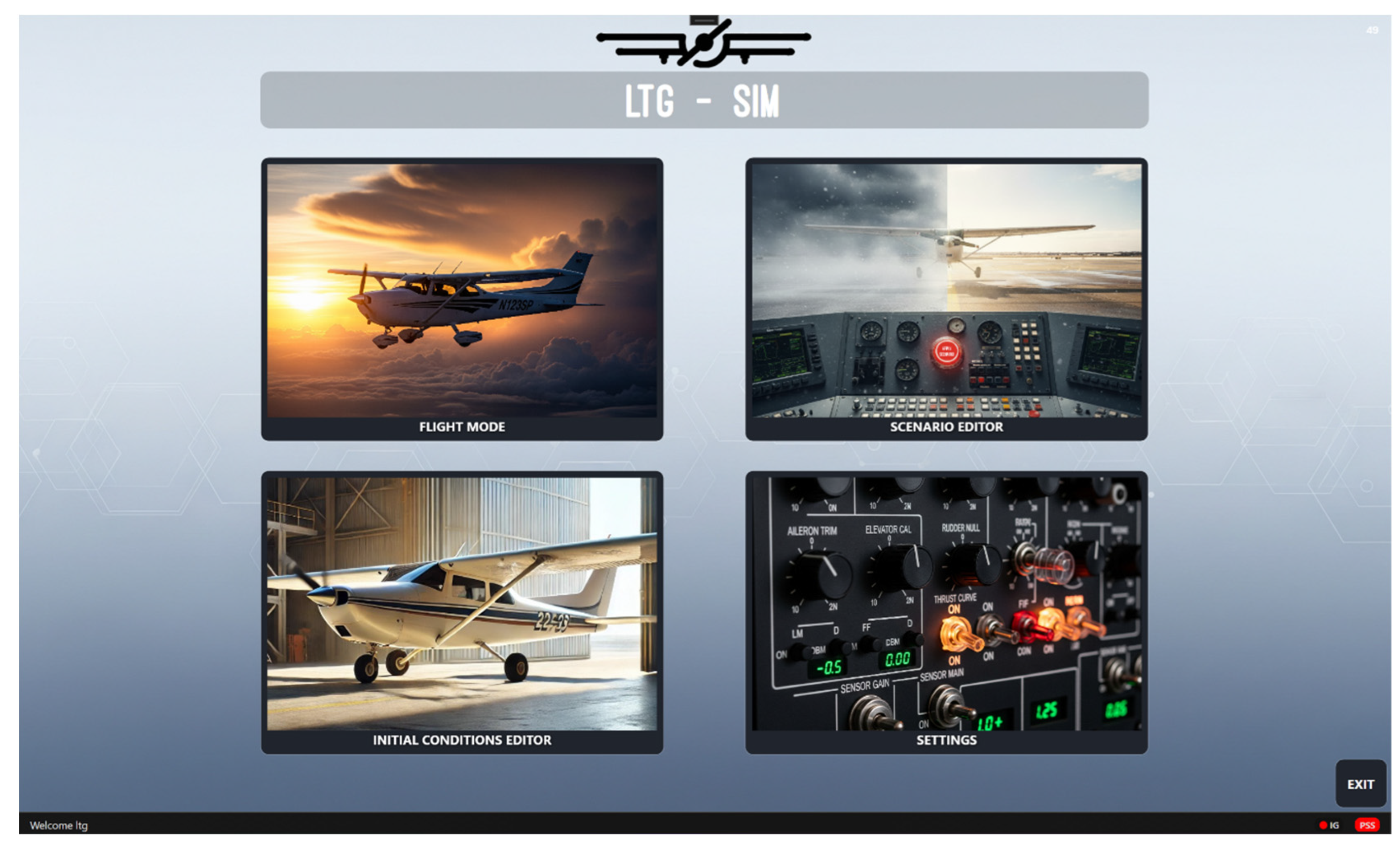
Figure 6): The IOS software, the management center of simulation, has a comprehensive graphical user interface (GUI), allowing the instructor to control the entire training process from a single console. Access to the system is realized through a login module protected by username and password to provide data security and authorization. User passwords are stored in the database, encrypted using the Argon2 algorithm [
57]. The main menu accessed after authorization hosts four basic operational modules: Flight Mode, Initial Conditions Editor, Scenario Editor, and Settings.
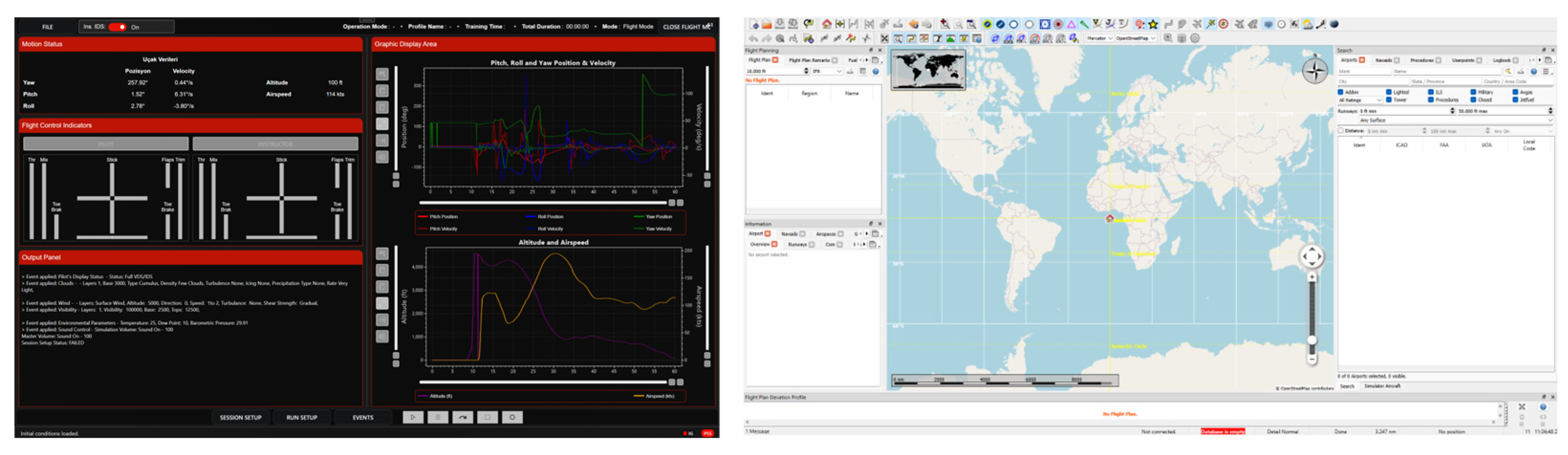
The “Flight Mode” panel (
Figure 7), where the instructor interacts most intensively, is divided into three main sections in order to facilitate simulation management. There are scenario start, stop, and recording control buttons on the left panel. The middle panel includes the moving map and navigation data provided by the open-source “LittleNavMap” integration. There are data blocks where instantaneous flight parameters (speed, altitude, pitch, roll, etc.) are monitored numerically on the right panel.
Graphical Data Monitoring and Control (
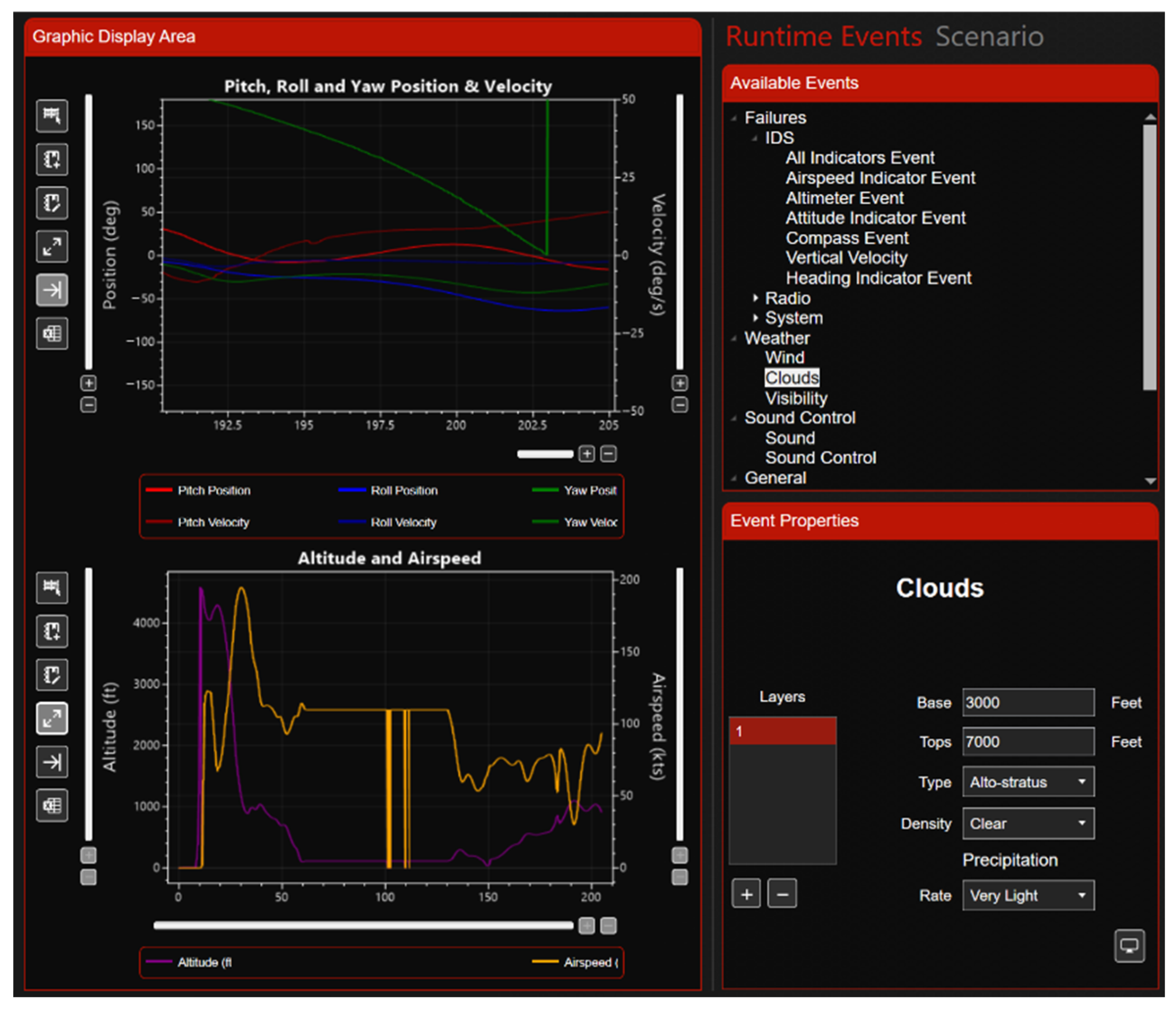
Figure 8): The IOS interface is equipped with dynamic data visualization tools to ensure that the instructor can analyze student performance in real time. The aircraft’s pitch, roll, and yaw angles, as well as speed and altitude data, are visualized as graphs flowing on the time axis in the graphic areas created using the QCustomPlot library. The instructor can mark critical moments in the post-flight debriefing process by adding annotations to these graphs. Furthermore, the “Events” tab on the interface presents a hierarchical menu structure, which allows the instructor to inject non-scenario events such as engine failure, power outage, or weather changes (e.g., sudden visibility drop) into simulation with a single click.
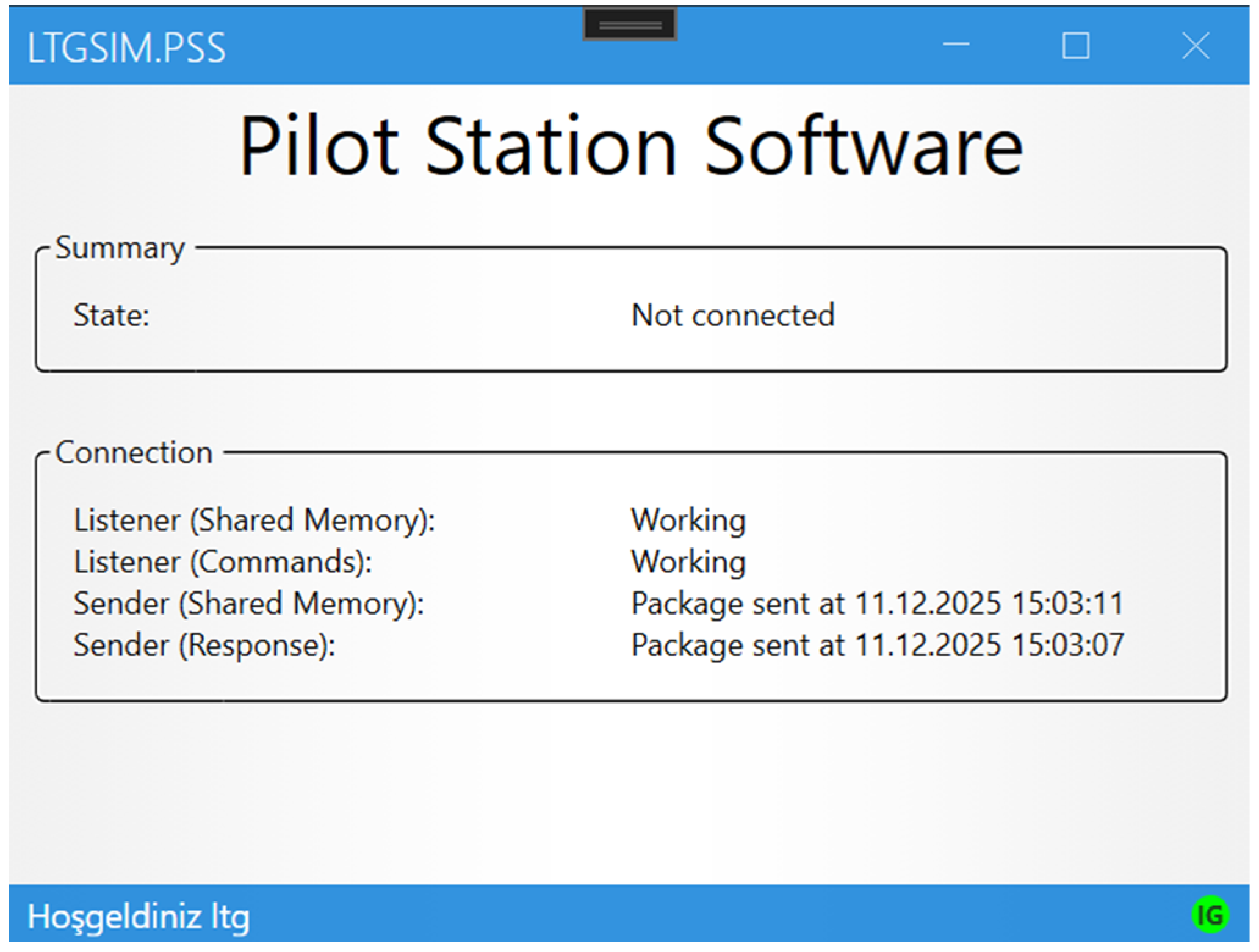
Pilot Interface and Instrumentation: Unlike the instructor station, the software architecture on the pilot side consists of an “invisible” background service (PSS—Pilot Station Software), as shown in
Figure 9 and visualization layers to maintain procedural fidelity. The PFD (Primary Flight Display) and MFD (Multi-Function Display) screens, ensuring a glass cockpit experience, are fed by high-resolution graphical interfaces projected onto replica hardware. Additionally, the “Analog Display Software” (CessnaGauges) that runs on the LCD screen placed behind the physical slots on the board panel is developed using the OpenGL library. This software mathematically models and plots the physical damping and inertia in the needle movements of mechanical indicators, e.g., speedometers, altimeters, and status gyroscopes.
Physical Control Integration: The software interface runs in full synchronization with the physical switches and buttons in the cockpit (master switch, avionics master, lights, etc.). Signals from the physical panels are collected via industrial I/O modules and processed by the System Simulation Software. A bidirectional data flow is provided owing to this architecture: When the pilot opens a physical switch (e.g., battery), this is transmitted to the PSS software, from where the status of the virtual switch on the IOS screen is updated, and the relevant electrical system is activated in the X-Plane physics engine simultaneously.
3.5. Data Logging and Traceability
The LTG-SIM project is equipped with a comprehensive data logging and analysis infrastructure to improve the efficiency of pilot training and support subjective assessments using objective data. The said module is managed by background services that run on the Pilot Station Control Software (PSS) and Instructor Operating Station (IOS), without affecting simulation fluidity and system performance. The system stores the acquired data in three different formats customized according to intended use. The aircraft’s position and configuration data are stored in the binary .rec format along with timestamps for the “Replay” mode employed in debriefing processes. It is possible to export numerical datasets generated for performance analysis and student progress tracking as structured Excel spreadsheets (.csv/.xlsx) to provide full compatibility with external analysis software and spreadsheet programs. However, software operating status, error messages, and technical monitoring data are archived as standard .log text files for use in maintenance and debugging processes.
The recorded dataset is processed at a sampling rate (minimum 60 Hz) compliant with EASA standards. This allows for high-resolution analysis. The said dataset includes navigation and flight dynamics parameters, such as date, time, GPS position, barometric altitude, airspeed (IAS/TAS), vertical speed, and pitch/bank angles. Moreover, critical system data such as engine speed (RPM), fuel level, and electrical system voltage, as well as pilot control inputs (yoke, pedal, and throttle), are recorded in real time. Instructors can access these data via the “Pilot Log” interface and monitor pilot performance on the time axis using integrated graphical tools, which provide concrete and data-driven feedback on critical competencies such as altitude maintenance or speed control.
4. Illustrative Demonstration of the Data-Logging and Traceability Pipeline
The research design is conducted within an engineering/system development framework, and the application presented in
Section 4 is designed as a single-sample illustrative demonstration [
58]. The purpose of this demonstration is not to perform a control/baseline comparison or to draw statistical inferences about performance, but to show that the proposed simulator infrastructure can reliably record flight parameters, ensure traceability, and generate post-flight analysis/diagnostic (visualizations) outputs.
Since this demonstration does not include a control/baseline condition or repeated measurements, the findings regarding performance assessment are interpreted as illustrative only.
For the purpose of illustrating the data-logging and traceability pipeline, the recorded flight logs were imported with a robust parsing procedure that ignores non-data lines and builds a unified time axis from the recorded local date and time. The parameters shown in the figures were brought into a consistent numeric format to prevent plotting inconsistencies caused by minor formatting variations in the raw logs. Angle-related quantities were represented in a continuous form to avoid 0/360° wrap-around effects. These steps were applied only as lightweight preparation for visualization.
In this section, recorded flight data are used to generate representative plots for the landing phase as an illustrative, proof-of-concept demonstration of the proposed data-logging, traceability, and post-flight analysis pipeline. The specific parameters used to characterize pilot/trainee performance may vary across training objectives and evaluation frameworks. Therefore, the landing phase is selected here solely to exemplify the types of outputs the infrastructure can produce. This demonstration does not include a control/baseline condition or repeated trials and thus is not intended to support statistical performance inference or generalized claims about trainee proficiency. While the generated outputs could be utilized in future work to develop structured assessment frameworks (e.g., rule-based criteria, scoring rubrics, or machine-learning-based models), such performance assessment methodology is outside the scope of the present study.
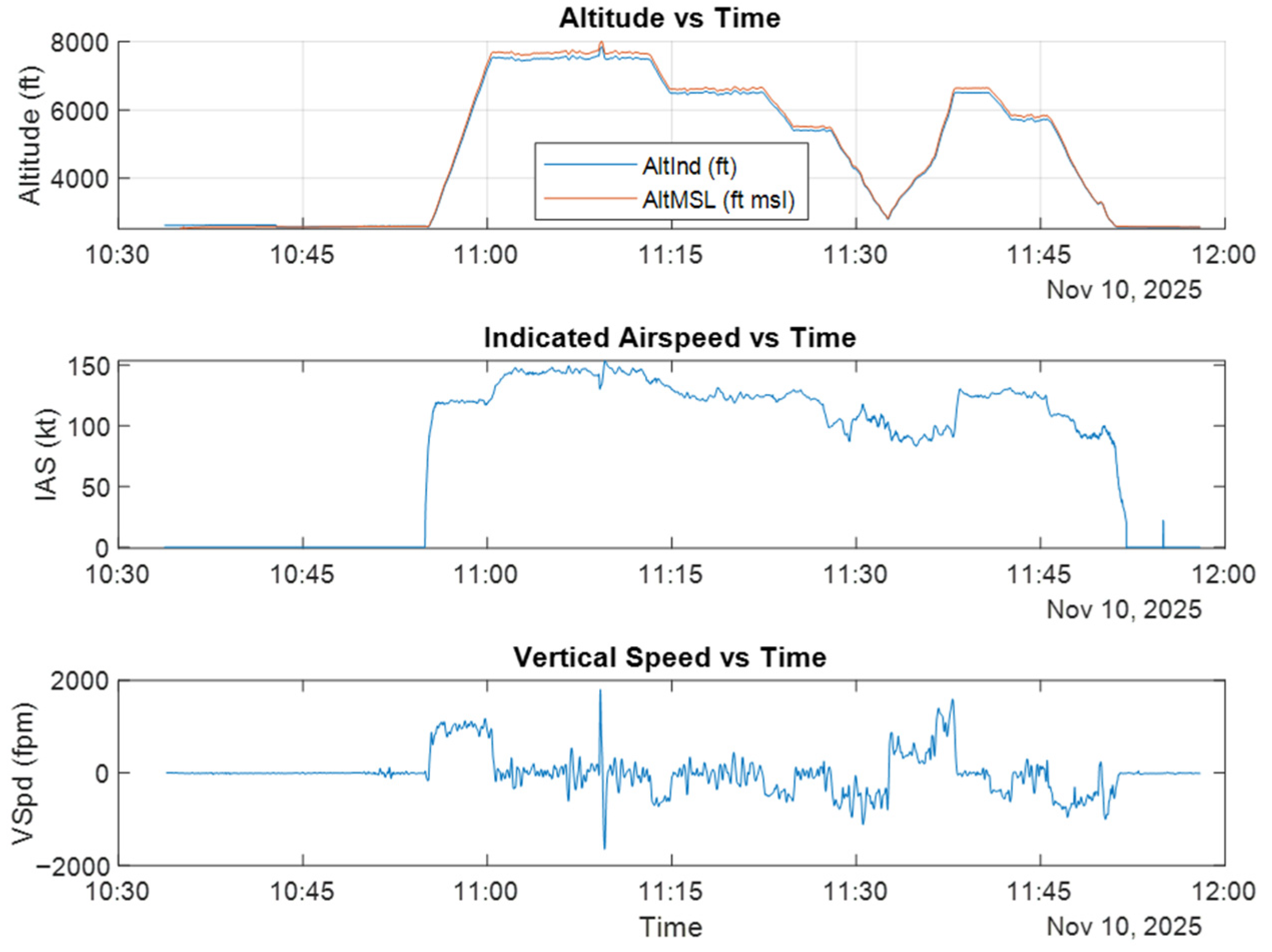
When evaluating a trainee pilot’s landing, the Approach/Landing Profile (
Figure 10) —comprising Altitude, Airspeed, and Vertical Speed—should be examined. Monitoring the Altitude parameter is important because it indicates whether the approach is maintained as a continuous descent profile or is characterized by frequent and large corrections. Airspeed (IAS) shows whether the target approach speed is maintained and quantifies the magnitude of deviations in speed control. Vertical Speed (VSpd), in turn, enables an assessment of whether the descent is comfortable and controlled, and it particularly highlights the risk of an excessive sink rate prior to the flare.
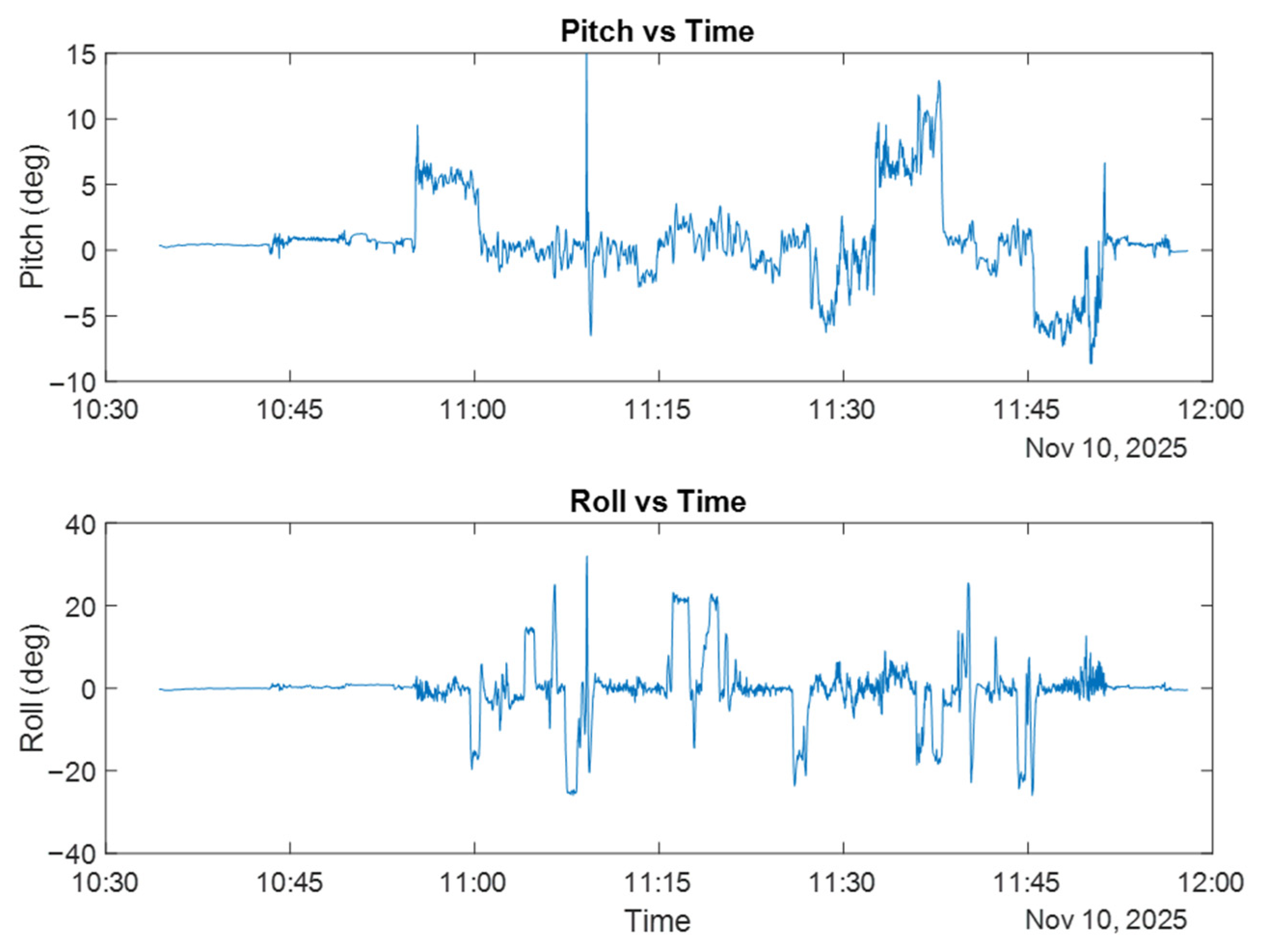
Pitch and roll are direct indicators of how the pilot maintains the aircraft’s attitude (
Figure 11). Pitch is closely tied to approach-speed control, and large pitch fluctuations may affect flare timing. Roll oscillations can reflect late or overly large corrections, which may be associated with lateral loading at touchdown and deviations from the runway centerline.
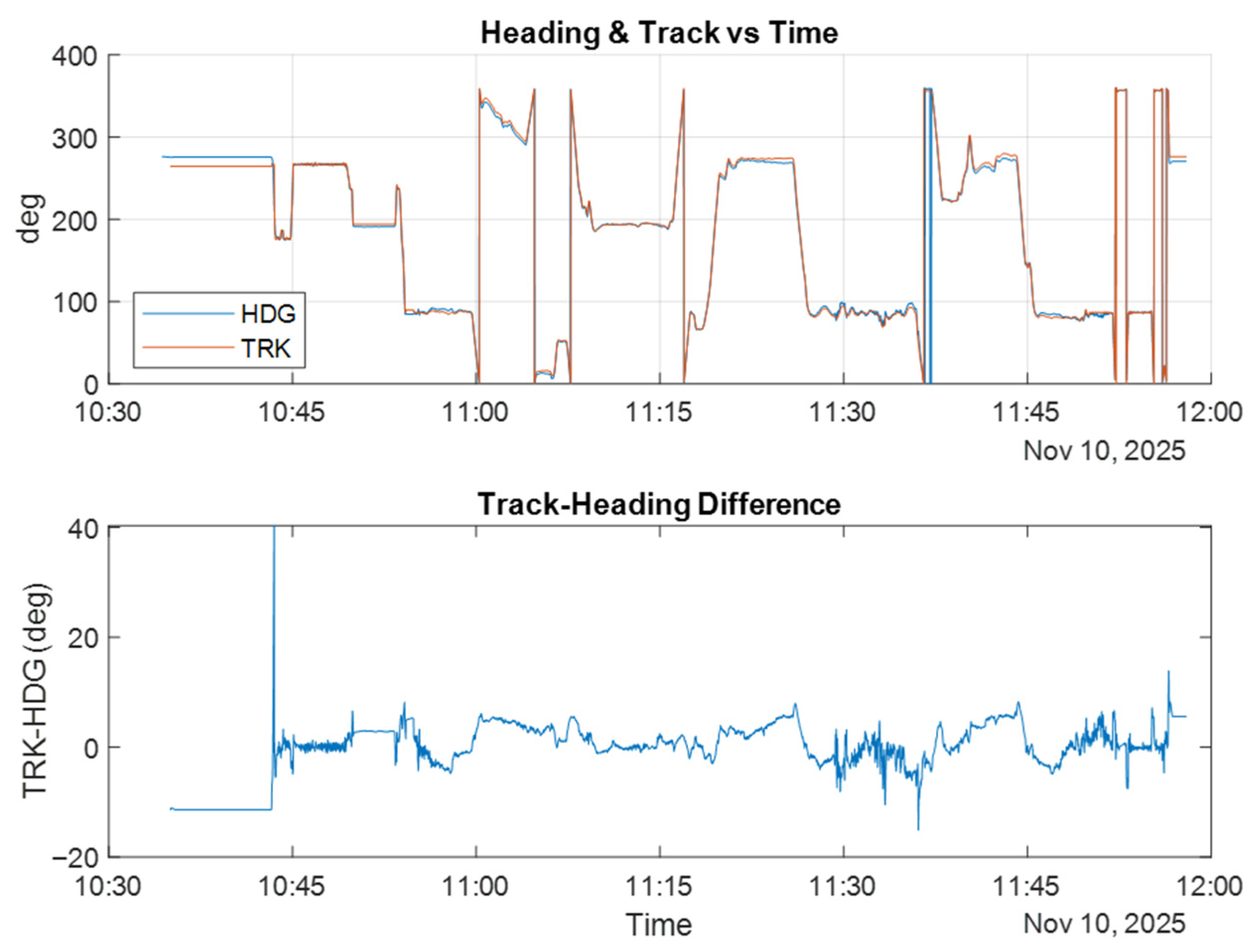
During landing, both the aircraft’s heading (where the nose points) and track (the ground path) are informative. Plotting HDG and TRK together helps visualize runway-centerline capture behavior (
Figure 12). As touchdown approaches, increases in the TRK−HDG difference or frequent heading changes can indicate changes in alignment, including potential crosswind effects.
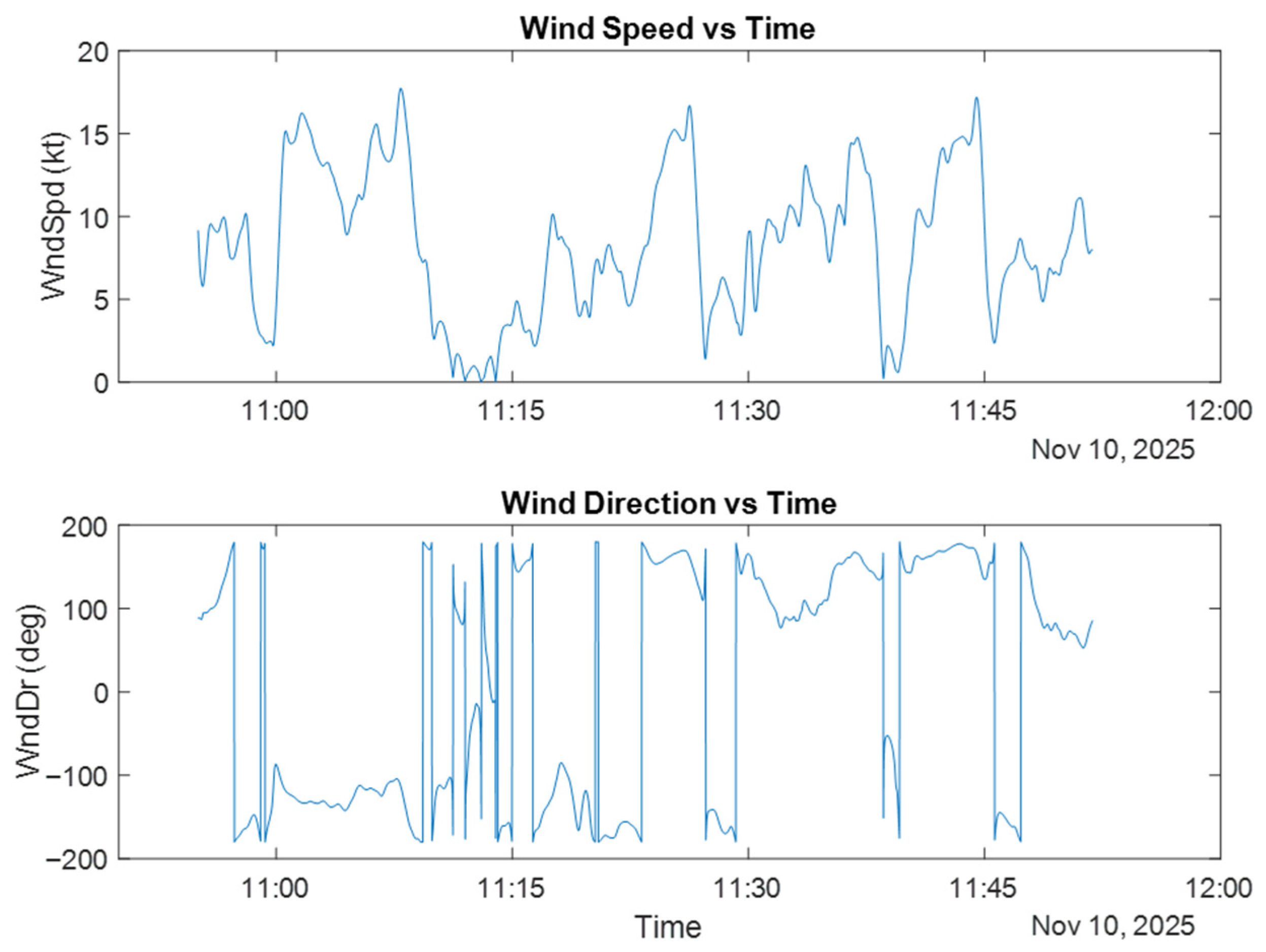
The same landing technique can produce entirely different outcomes under varying wind conditions. In the Wind Profile During Approach/Landing (Speed & Direction) plot (
Figure 13), if fluctuations in IAS and VSpd increase as wind speed rises and falls, this indicates that the trainee pilot has weak gust management skills. If the wind direction changes, it can explain why the heading–track difference varies over time.
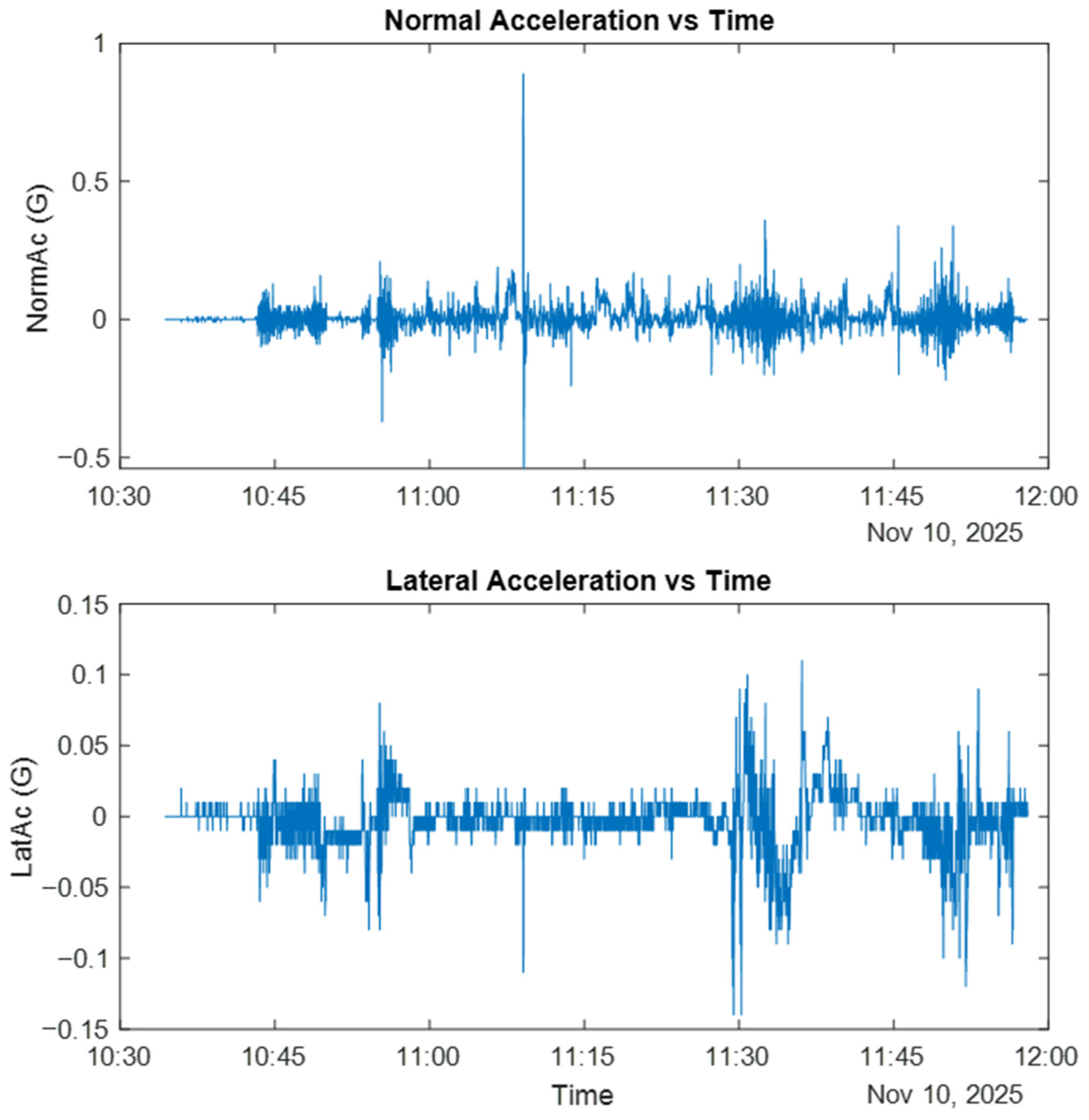
In landing analysis, both normal (vertical) and lateral acceleration are informative. Normal acceleration relates to touchdown firmness and flare timing, while lateral acceleration provides an indication of runway-centerline deviation and potential side-loading during touchdown (
Figure 14).
5. Conclusions
This study presents a low-cost, academically accessible simulator-based research infrastructure developed through a university–industry collaboration on the LTG-SIM platform. The primary contribution is the design and implementation of an integrated hardware–software architecture that enables reliable acquisition of simulator/flight telemetry and supports traceable, post-flight visualization and analysis. The study defines and realizes a data logging and traceability workflow that records flight parameters at high resolution, stores them in purpose-oriented formats (e.g., replay recordings, .csv/.xlsx for analysis, and .log for maintenance), and makes them available to instructors and researchers via time-aligned monitoring and debriefing visualizations.
To illustrate the capabilities of the proposed pipeline, a proof-of-concept demonstration is provided using a representative flight record from the landing phase. The resulting diagnostic plots (e.g., approach profile, pitch–roll behavior, heading–track relationships, wind profile, and normal acceleration trends) are presented to show the types of outputs the infrastructure can generate and how recorded telemetry can be organized for post-flight review. Importantly, since the demonstration does not include baseline/control conditions, repeated trials, or benchmark comparisons, it is not intended to support generalized claims or statistical inference regarding trainee performance.
Future work will focus on developing and validating structured performance assessment methodologies that can be implemented on top of the proposed infrastructure in appropriate study settings. This includes defining repeatable evaluation protocols across multiple maneuver phases (takeoff, climb, navigation, approach, and landing); collecting larger datasets under controlled and comparable conditions; and developing and validating rule-based criteria, scoring rubrics, and machine-learning-based models with appropriate baselines and performance benchmarks.