
Article

Prompt-Driven Development with Claude Code: Developing a TUI Framework for the Ring Programming Language


by
Mahmoud Samir Fayed
1,* and
Ahmed Samir Fayed
2
1
College of Computer and Information Sciences, King Saud University (KSU), Riyadh 11451, Saudi Arabia
2
Research and Development, Saudi Air Navigation Services (SANS), Jeddah 15441, Saudi Arabia
*
Author to whom correspondence should be addressed.
Electronics 2026, 15(4), 903; https://doi.org/10.3390/electronics15040903

Submission received: 1 February 2026 / Revised: 19 February 2026 / Accepted: 20 February 2026 / Published: 23 February 2026
(This article belongs to the Section Computer Science & Engineering)

Abstract

Large language models (LLMs) are increasingly used in software development, yet their ability to generate and maintain large, multi-module systems through natural language interaction remains insufficiently characterized. This study presents an empirical analysis of developing a 7420-line Terminal User Interface (TUI) framework for the Ring programming language using a prompt-driven workflow with Claude Code (Opus 4.5), employing an iterative testing and corrective feedback. The system was produced through 107 prompts: 21 feature requests, 72 bug fix prompts, 9 prompts sharing information from Ring documentation, 4 prompts providing architectural guidance, and 1 prompt dedicated to generating documentation. Development progressed across five phases, with the Window Manager phase requiring the most interaction (35 prompts), followed by complex UI systems (25 prompts) and control expansion (20 prompts). Bug-related prompts covered redraw issues, event-handling faults, runtime errors, and layout inconsistencies, while feature requests focused primarily on new widgets, window-manager capabilities, and advanced UI components. Most prompts were brief (mean ≈ 258 characters; median = 207 characters), reflecting a highly iterative workflow in which the human role was limited to specifying requirements, validating behavior, and issuing corrective prompts—without writing any code manually. The resulting framework contains 28 classes, 334 methods and includes a windowing subsystem, event-driven architecture, interactive widgets, hierarchical menus, grid and tree components, tab controls, and a multi-window desktop environment. By combining quantitative prompt analysis with qualitative assessment of model behavior, this study provides empirical evidence that modern LLMs can preserve architectural coherence across iterations and support the construction of new libraries and tools for emerging programming languages, highlighting prompt-driven development as a viable methodology within software-engineering practice.

1. Introduction

Large language models (LLMs) have rapidly transformed the landscape of software development, enabling developers to express intent, describe functionality, and refine systems through natural language interaction rather than traditional coding [1,2]. These capabilities have sparked growing interest in understanding how LLMs can participate in complex software engineering tasks [3]. While prior work has explored code generation, automated bug fixing, and conversational programming assistance, the ability of LLMs to design, implement, and maintain cohesive multi-module systems remains insufficiently examined [4,5]. There is limited empirical evidence on how LLMs behave when asked to construct full-scale frameworks that require architectural consistency, state management, event handling, and long-range reasoning across thousands of lines of code [6,7].
The Ring programming language provides a suitable context for exploring these questions. Ring is a lightweight, flexible, multi-paradigm language designed to support natural language programming, scripting, application development, and domain-specific language construction. Its simplicity, readability, and small runtime footprint make it well suited for educational use, rapid prototyping, and tools development. Ring’s top-down execution model, dynamic typing, and built-in support for console, GUI, and web programming offer a practical set of features for constructing diverse applications. However, despite these capabilities, the Ring ecosystem remains relatively young, with limited libraries available for terminal-based user interfaces [8,9,10].
PWCT2 (Programming Without Coding Technology 2) further strengthens this context by providing a visual programming environment that supports Ring as a first-class target language. PWCT2 enables developers to construct applications through hierarchical visual components rather than textual code, making it accessible to beginners while remaining usable for professional development. Its design emphasizes clarity, modularity, and step-based program construction, allowing users to generate or import Ring code. Because PWCT2 relies on the richness of the Ring ecosystem, the availability of robust libraries directly enhances its expressive capabilities [11,12,13].
This paper presents a detailed case study of developing a Terminal User Interface (TUI) framework for the Ring programming language using a prompt-driven workflow powered by Claude Code (Opus 4.5). Over the course of development, all source code was generated or iteratively refined through natural language prompts. The human role was limited to specifying requirements, guiding architectural decisions, identifying inconsistencies, and providing error-driven corrections. No manual code was written. This process offers a unique opportunity to observe how an advanced LLM handles system level design, maintains internal coherence across modules, and responds to iterative refinement in a real-world development scenario.
The resulting framework is substantial: it includes a full windowing system, an event-driven architecture, interactive widgets, data-oriented controls, menu and navigation components, and a multi-window desktop environment—all implemented within the constraints of a terminal interface. Beyond demonstrating the technical feasibility of LLM generated frameworks, this project highlights the potential of prompt-driven development as a methodology for accelerating ecosystem growth in emerging programming languages. For languages like Ring, which rely on community-driven tooling, LLM-assisted development may offer a practical path toward richer libraries, improved developer experience, and faster adoption. By documenting the development process, analyzing the model’s behavior, and evaluating the resulting framework, this study contributes empirical insights into the capabilities and limitations of LLM-assisted software engineering. It also illustrates how prompt-driven workflows can support the creation of new libraries and expands the conversation around human–AI collaboration in programming language ecosystems.
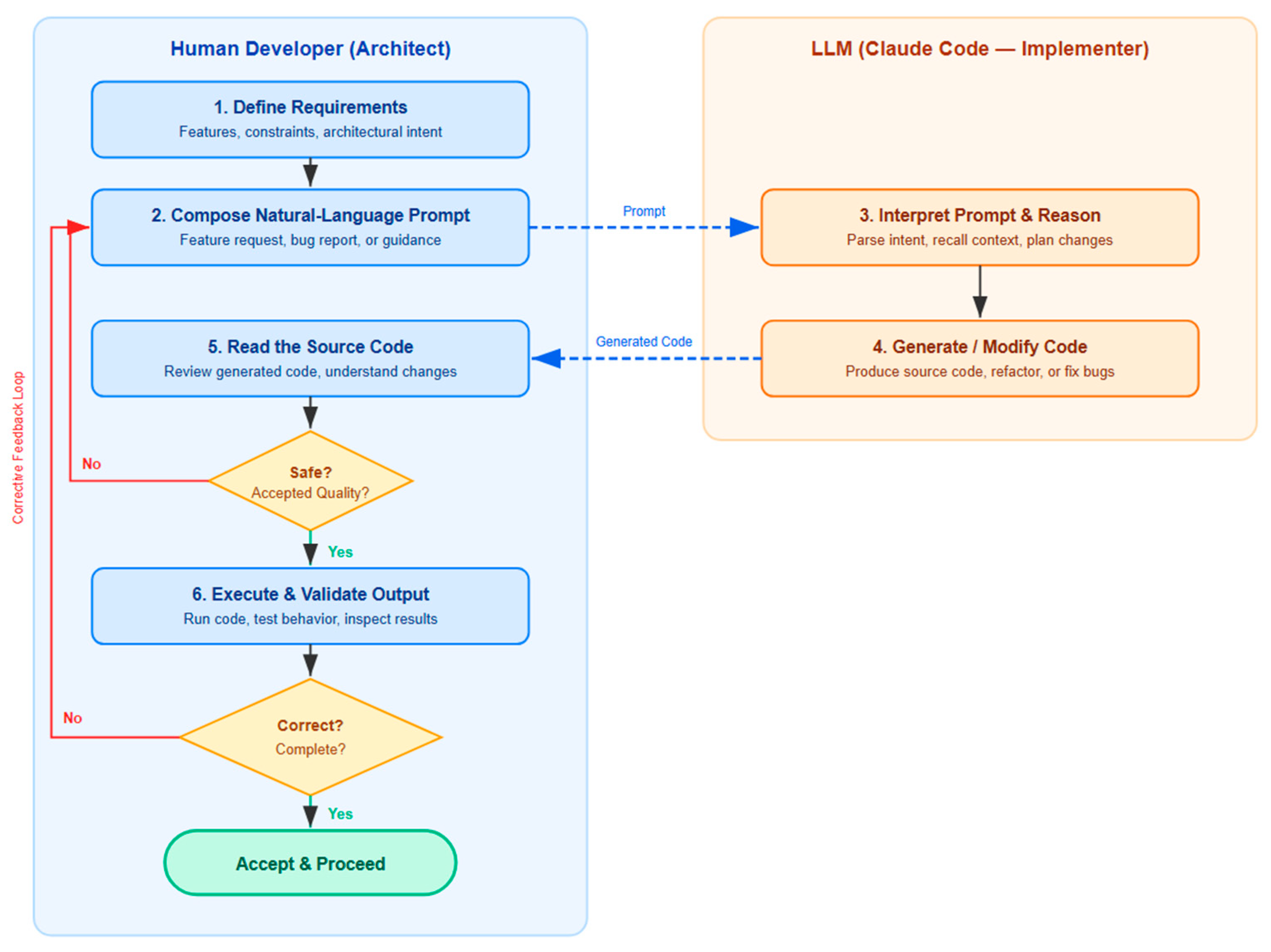
Figure 1 illustrates the Prompt-Driven Development (PDD) workflow as an iterative refinement cycle between two roles: the human developer, who acts as architect, and the LLM (Claude Code), which serves as implementer. The process begins with the human defining requirements (Step 1) and composing a natural-language prompt (Step 2), which is then passed to the LLM for interpretation and reasoning (Step 3) followed by code generation or modification (Step 4). The generated code is returned to the human side, where the developer reads and reviews the source code (Step 5) before it undergoes a dual-layered quality gate. The first gate evaluates whether the code is safe and of accepted quality through static inspection; if not, the developer loops back to Step 2 with a corrective prompt. If the code passes this checkpoint, it proceeds to execution and validation (Step 6), where the developer runs the code and tests its behavior. A second decision gate then assesses whether the output is correct and complete; failure at this stage similarly triggers a return to Step 2 for further refinement. This process ensures that each development cycle progressively converges toward the desired outcome, with the human maintaining architectural oversight and the LLM handling implementation under continuous guided feedback. Also, PDD should be distinguished from Vibe Coding in which developers accept LLM-generated code with no review. In PDD, the developer retains full architectural authority, validates every output through code review, execution and testing, and provides structured corrective feedback when defects are found. The human intellectual effort including diagnosing failures, specifying fixes, and verifying correctness remains substantial even though no code is written manually.
This study makes the following key contributions:
  • It delivers an empirical case study demonstrating that a large, multi-module software framework can be developed entirely through prompt-driven development and interaction with an LLM like Claude Code (Opus 4.5). Prior LLM-assisted development studies have targeted games, small utilities, or isolated functions; none have attempted a full framework with windowing, event management, menus, grids, trees, and tab controls.
  • It provides a quantitative analysis of the development workflow, including prompt categories, iteration patterns, and phase-specific complexity, offering insight into how an LLM maintains architectural coherence over extended sessions. This study analyzes 107 individual prompts, revealing that 67.3% were corrective and that phase-specific complexity patterns differ significantly across development stages.
  • It offers a qualitative evaluation of Claude Code’s behavior, identifying strengths and limitations in handling state management, event-driven logic, and language-specific constraints within the Ring programming language. Most prior empirical work has used mainstream languages like Python and JavaScript.
  • It contributes a TUI framework that expands the Ring ecosystem and demonstrates the practical value of LLM-assisted development for emerging programming languages. No TUI framework of comparable scope previously existed for Ring.
The remainder of this paper is organized as follows: Section 2 reviews related work on LLM-assisted software engineering, highlighting gaps in current research and situating this study within the emerging literature on prompt-driven development. Section 3 details the materials and methods, including the development environment, evaluation setup, and preliminary experiments used to assess Claude Code’s baseline capabilities with the Ring language. It also presents the framework architecture and the prompts used to construct the full TUI framework and describes the evolution of its architecture, components, and demo modules. Section 4 presents the TUI framework demo and reports results related to the development workflow, prompt length, and the generated source code. Section 5 discusses the implications of these findings for human–AI collaboration and tooling in emerging languages. Finally, Section 6 concludes this paper by summarizing key insights and outlining directions for future research.

2. Related Work

Research on large language models (LLMs) in software engineering has expanded rapidly, with increasing attention to how these systems support code generation, debugging, and architectural reasoning. Early studies primarily examined small, isolated programming tasks, showing that models could synthesize functions, complete code fragments, and respond to natural language instructions. While these works established the feasibility of LLM-assisted programming, they did not investigate the challenges involved in constructing large, multi-module software systems [14,15,16,17,18,19,20,21].
More recent research has explored prompt-driven development, in which developers iteratively guide LLMs through natural language instructions to build entire applications. Findings indicate that LLMs can maintain short term context and follow high level design intent, but they frequently struggle with long range consistency, state management, and cross module coherence. These limitations become more pronounced as system size and architectural complexity increase [22,23,24,25].
In [22], the authors conducted empirical examinations of the limits and capabilities of LLM-driven game development using natural-language prompts alone. They tested two contrasting methodologies with Gemini 2.5 Pro: a Big Prompt designed to generate an entire game from a single instruction, and an iterative workflow consisting of 585 narrowly scoped tasks. The Big Prompt approach consistently failed, required extensive manual debugging, and still did not meet core design requirements. In contrast, the iterative strategy enabled the model to produce a complete, fully playable 3D game, with the process remaining predictable and controllable throughout. The model performs reliably on well-defined, common programming tasks such as UI generation, but struggles with novel or complex logic unless guided step by step. This positions the LLM as a capable co-pilot rather than an autonomous developer.
In [24], The authors explore vibe coding—a paradigm in which developers describe software intentions in natural language and rely on LLMs to generate source code. Their study demonstrates how LLM-driven development can lower entry barriers for novices; in their experiment, a non-programmer iteratively built a 3D driving simulator using Cursor and Three.js. The results show that natural-language prompting can meaningfully enhance both functionality and visual quality through iterative refinement, reinforcing the potential of LLMs to democratize creative software development. At the same time, this study highlights persistent limitations. The prompts often require careful tuning, generated code may contain logical inconsistencies, and effective debugging still depends on a baseline understanding of programming concepts. Overall, the work positions vibe coding as an approach that broadens accessibility while still demanding technical reasoning and emerging skills in prompt engineering. This study reports 21 prompts that were used throughout the game’s development.
Another relevant line of work examines LLM generated user interfaces, particularly in graphical environments. Prior studies have evaluated models’ ability to produce HTML/CSS layouts, mobile UI prototypes, and GUI components. However, research on LLM generated terminal-based user interfaces remains limited. Text based UI frameworks require precise control over ASCII rendering, event loops, redraw logic, and input handling—capabilities that have not been extensively evaluated in the context of LLM-driven development [26,27,28].
A parallel thread investigates LLM support for emerging programming languages. Existing studies show that LLMs can learn the syntax and idioms of niche languages from limited examples, yet there is little empirical evidence regarding their ability to generate advanced libraries or frameworks for such languages. This gap is particularly notable for languages with smaller ecosystems, where tooling is often sparse and community-driven [29,30].
Finally, research on LLM adaptability to language-specific constraints—such as execution order, reference semantics, and library conventions—suggests that models often require iterative correction to align with a language’s rules. Although several studies document this behavior, there is limited understanding of how these adaptation challenges scale when building large, interconnected systems [31,32,33,34,35].
Taken together, the existing literature leaves several open gaps: the lack of empirical studies on LLM-driven development of large, multi-module frameworks; limited exploration of LLM-generated terminal-based interfaces; and minimal evidence regarding LLM performance in emerging programming languages. These gaps highlight the need for deeper investigation into how modern LLMs behave when constructing complex, coherent software systems under real-world constraints. As summarized in Table 1, prior studies differ substantially in scale, methodology, and technological context, underscoring the absence of empirical work on large TUI frameworks or niche languages. This study addresses these gaps by evaluating prompt-driven development in the construction of a large, multi-module TUI framework for the Ring language, providing empirical evidence on LLM scalability, architectural coherence, and adaptation to niche language constraints.

3. Materials and Methods

The development of the TUI framework was conducted using Claude Code (Opus 4.5) through its web-based interface under a Pro subscription (USD 20). All code generation and refinement occurred within this environment [36]. To execute and validate the generated source code, we used the Ring programming language, version 1.25. Ring is a modern dynamic programming language that comes with features like Lua, Python, Ruby and Visual Basic [8]. All components of the framework, including the windowing system, event manager, widgets, and data controls—were tested directly within the Ring runtime to ensure correctness, stability, and compatibility with the language’s standard libraries and terminal capabilities.

3.1. Preliminary Evaluation of Claude Code

Before initiating development of the full Terminal User Interface (TUI) framework, we conducted a series of exploratory tasks to evaluate Claude Code’s ability to generate correct, maintainable, and idiomatic Ring code. These tasks were designed to probe the model’s understanding of Ring’s syntax, its responsiveness to natural-language prompts, and its capacity to follow architectural intent.
The tasks included:
  • Generating descriptive content about Ring.
  • Implementing the Observer design pattern in Ring [37].
  • Applying the Model–View–Controller (MVC) design pattern in Ring [38,39].
  • Implementing statistical functions (max, min, average) with RingQt 5.15 [9,40].
  • Creating a simple ToDo application using RingQt [9,41].
Each coding task was completed using prompt-driven interaction only, without manual code editing. We evaluated the outputs for correctness, clarity, and alignment with Ring’s conventions. These experiments demonstrated that Claude Code could be used to generate Ring programs, respond to iterative refinements, and maintain conceptual consistency across prompts. Encouraged by these results in simple tests—and despite not knowing whether a full TUI framework could realistically be produced using this approach—we decided to proceed with attempting to develop the complete TUI using the same methodology.
The preliminary evaluation tasks were conducted using Claude Code (Sonnet 4.5) through its free-tier subscription. These tasks included generating simple applications, implementing design patterns, and producing descriptive content to assess the model’s baseline capabilities with the Ring programming language. In contrast, the full development of the Terminal User Interface (TUI) framework was carried out using Claude Code (Opus 4.5) under a paid subscription.

3.1.1. Generating Descriptive Content About Ring

To evaluate Claude Code’s ability to generate contextual, non-code output, we prompted the model to describe the creator of the Ring programming language and explain what makes Ring’s design distinctive. The model responded with a coherent and informative summary, identifying the language’s creator, noting the language’s development timeline, and referencing his academic background and early programming experience. Also, the model listed five distinctive features of Ring’s design: support for natural-language programming, a visual-programming foundation via PWCT, multi-paradigm flexibility, syntax customization for domain-specific language (DSL) creation, and practical cross-platform support. These responses demonstrated Claude Code’s ability to synthesize biographical and technical information.

3.1.2. Implementing the Observer Design Pattern in Ring

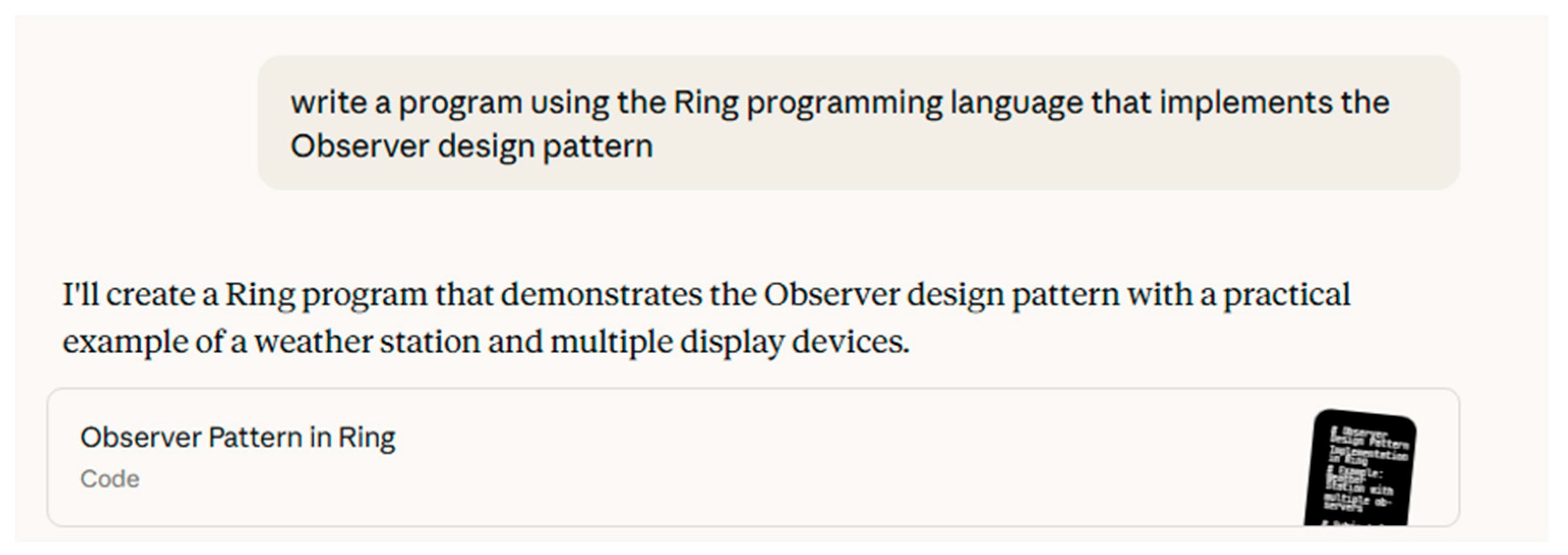
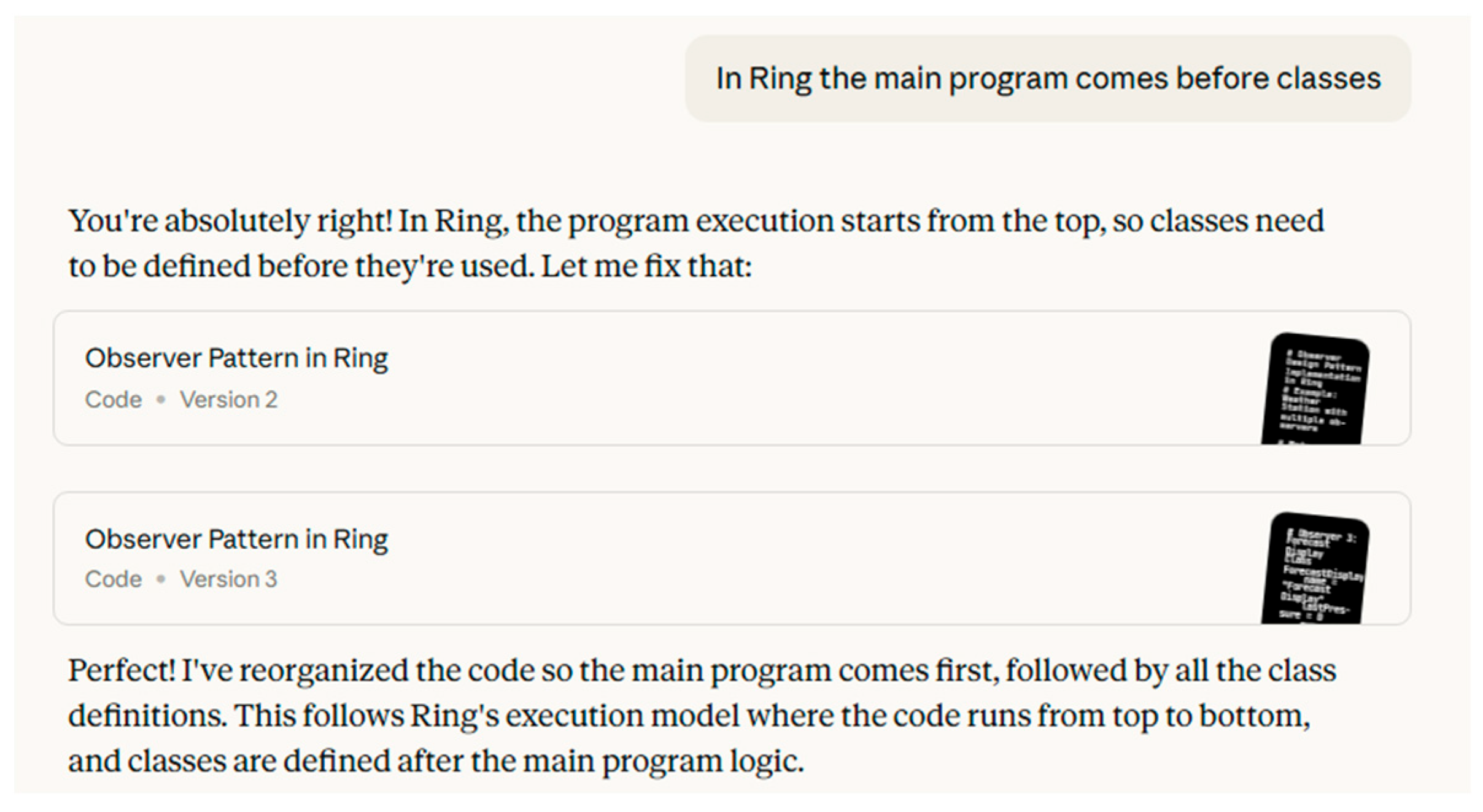
To evaluate Claude Code’s ability to implement established design patterns in Ring, we prompted the model to write a program demonstrating the Observer pattern (As in Figure 2). The model responded with a structured implementation centered around a weather station and multiple display devices, using Ring’s object-oriented features to model subjects and observers. The initial code was functional and conceptually correct, but it required reorganization to align with Ring’s top-down execution model—where the main program must precede class definitions. After prompting the model to restructure the code accordingly, it produced revised versions that placed the main logic first, followed by class declarations as shown in Figure 3. This interaction demonstrated Claude Code’s responsiveness to language-specific constraints and its ability to adapt architectural patterns to Ring’s execution semantics. The task confirmed the model’s capacity to translate abstract design principles into idiomatic Ring code and highlighted its usefulness for pattern-driven development.

3.1.3. Applying the MVC Design Pattern

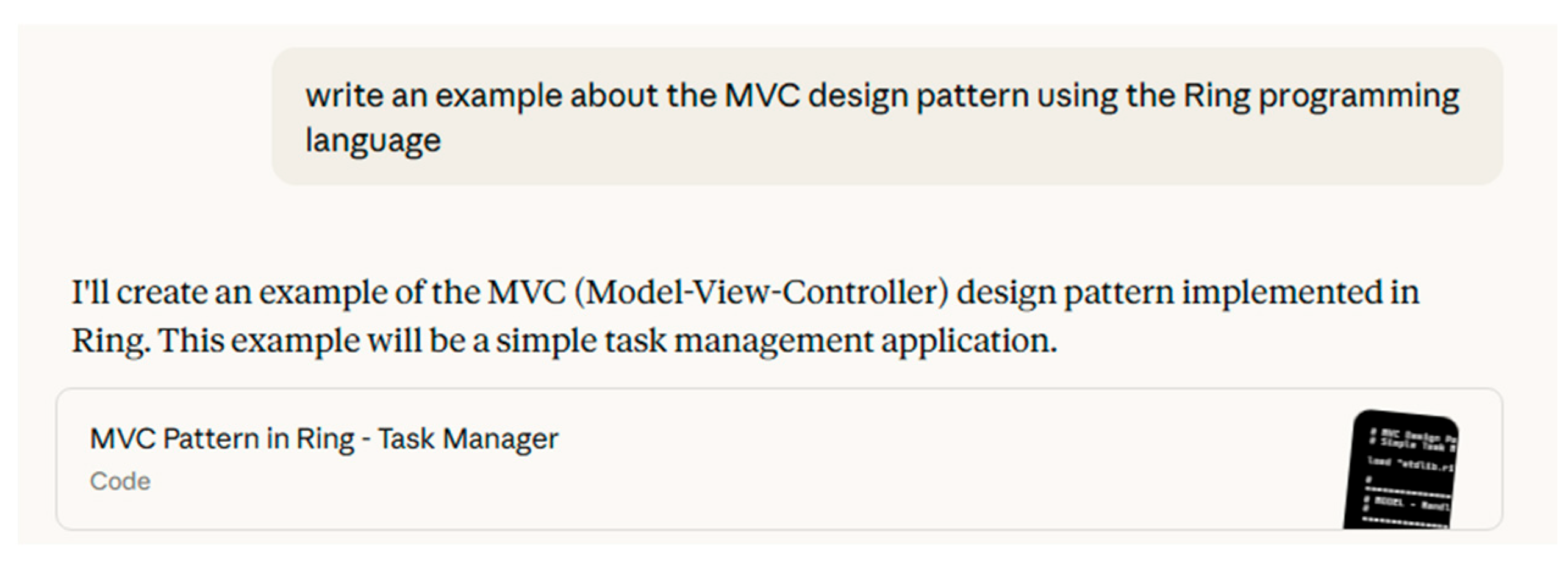
To evaluate Claude Code’s ability to implement structured architectural patterns in Ring, we prompted the model to create an example of the Model–View–Controller (MVC) design pattern as shown in Figure 4. The model responded with a well-organized implementation of a task management application, dividing responsibilities across model, view, and controller components. The initial output demonstrated a clear separation of concerns: the model handled task data, the view rendered output, and the controller coordinated user interaction.
However, the first version did not fully adhere to Ring’s top-down execution model, where the main program must precede class definitions. After prompting the model to reorganize the code, it produced a revised version that placed the main logic first, followed by class declarations. This correction was handled smoothly, and the updated code was both functional and idiomatic. In subsequent iterations, we identified subtle issues in the toggleComplete() and updateTask() methods. Due to Ring’s value-copy behavior with the assignment operator, modifications to list items were not reflected in the original data structure. We explained that Ring requires the use of the Ref() function to obtain a reference to the actual list item. The model responded with corrected versions that used Ref() appropriately, ensuring that changes to task completion status and task updates were applied directly to the original list. This task confirmed Claude Code’s ability to translate abstract architectural patterns into executable Ring code, adapt to language-specific constraints, and respond to nuanced runtime behaviors through iterative refinement. It also demonstrated the model’s capacity to support educational use cases within the Ring ecosystem.

3.1.4. Implementing Statistical Functions with RingQt

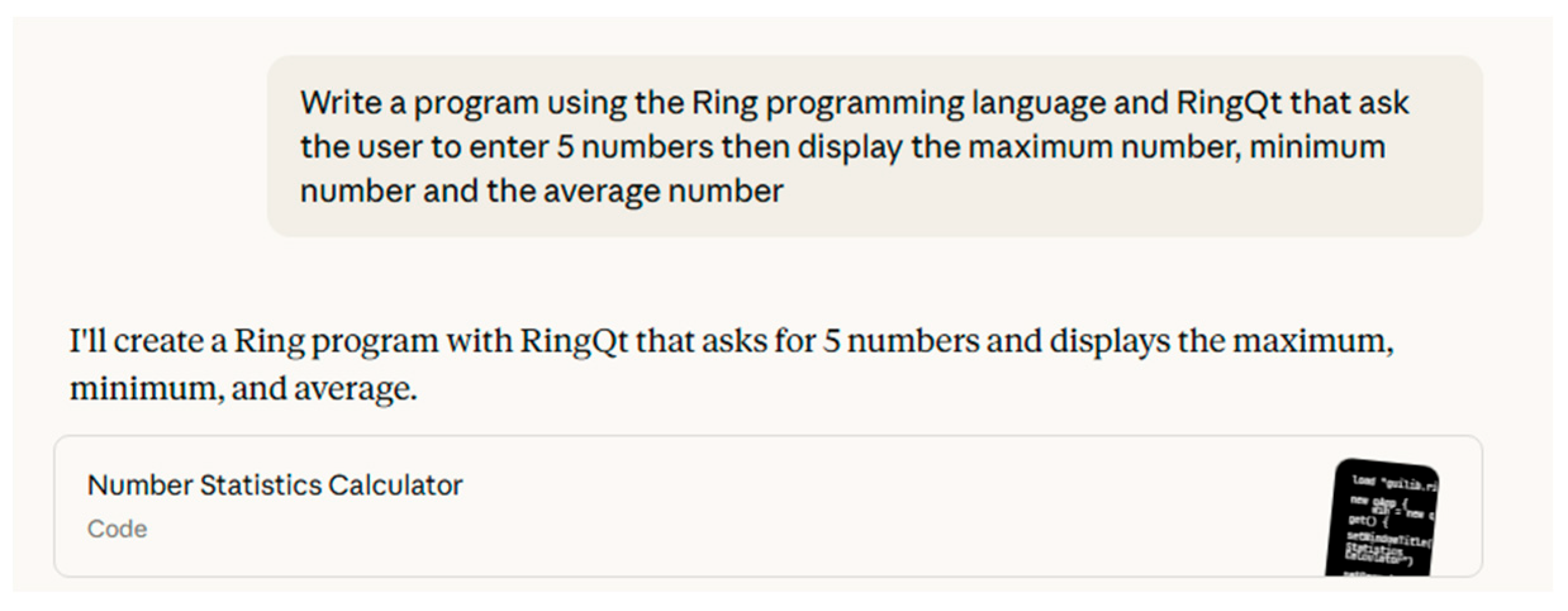
To evaluate Claude Code’s ability to generate interactive GUI applications using RingQt, we prompted the model to create a program that asks the user to enter five numbers and then displays the maximum, minimum, and average values. The model responded with a functional implementation titled Number Statistics Calculator, using RingQt widgets to collect input and display results. The generated code correctly handled numeric input, performed the required calculations, and presented the output in a user-friendly format. This task demonstrated Claude Code’s fluency with RingQt’s event-driven model and its ability to integrate basic statistical logic into a graphical interface as shown in Figure 5 and Figure 6.

3.1.5. Creating a Simple To-Do Application Using RingQt

The objective of this task was to evaluate Claude Code’s ability to develop a graphical To-do application using the Ring programming language and the RingQt framework. Our task was to guide the model through the implementation of a functional application that supports adding, editing, deleting, and viewing tasks. Throughout the process, we observed the model’s behavior, identified its mistakes, and documented how it responded to corrections. The interaction with Claude Code unfolded as an iterative development cycle. We provided feedback based on Ring’s architecture, syntax, and runtime behavior, and Claude produced updated versions of the code. Each version addressed specific issues, gradually improving the application. This process allowed us to assess the model’s capacity to adapt to a language’s rules, correct its own errors, and refine its output through repeated guidance.
List of mistakes made by Claude Code:
  • Used the wrong number of parameters with addItem() method in QListWidget.
  • Used an incorrect method name, setClickedEvent() instead of setClickEvent().
  • Failed to use the Method() function for dynamic method resolution when required.
  • Incorrectly configured the Objects Library, leading to runtime errors.
  • Left the view object uninitialized.
  • Introduced an unnecessary CreateView() method.
  • Added an unnecessary init() function in the view class.
  • Created a naming conflict when using identifiers.
  • Initially treated open_window() and openWindow() as distinct.
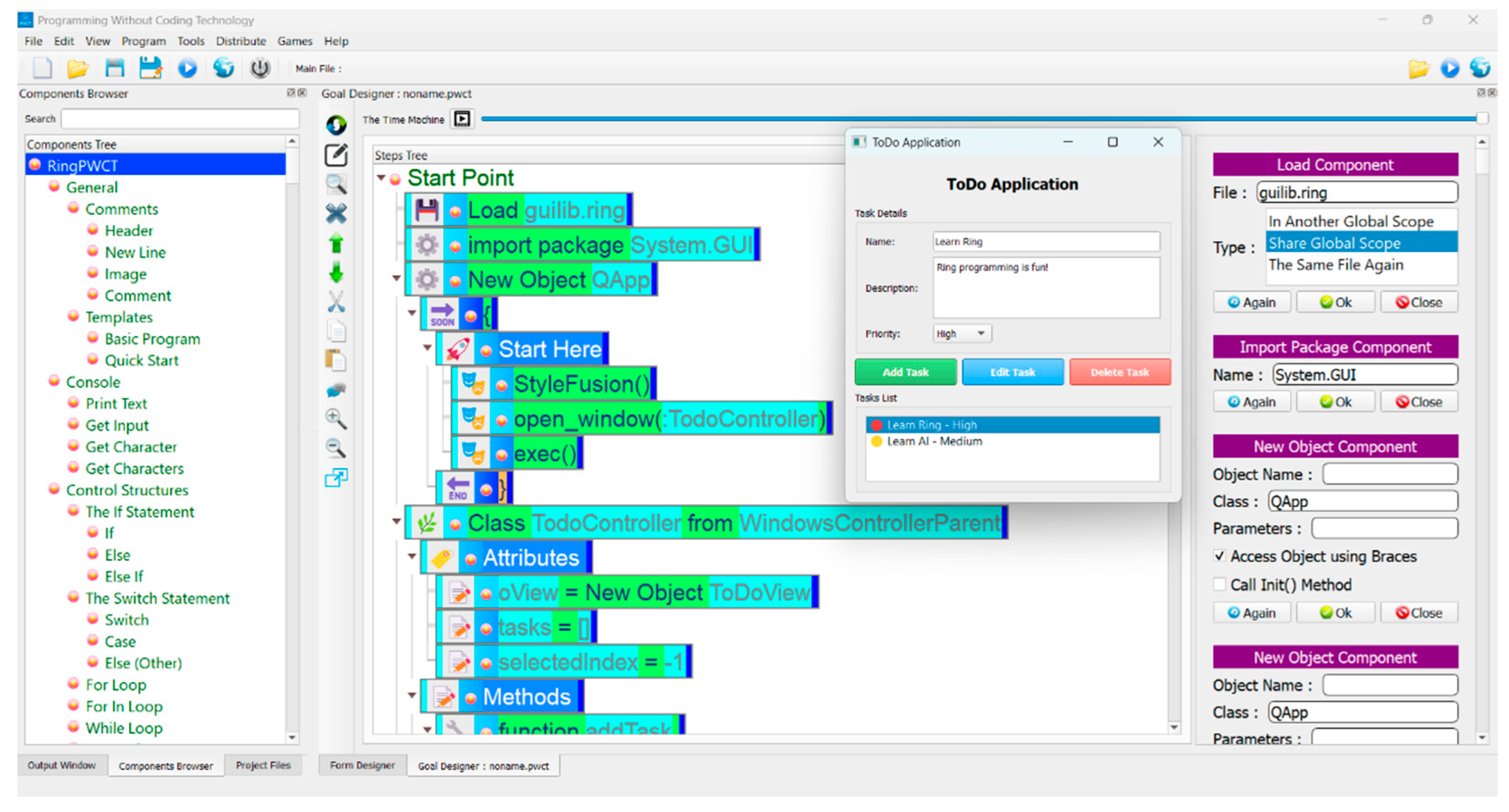
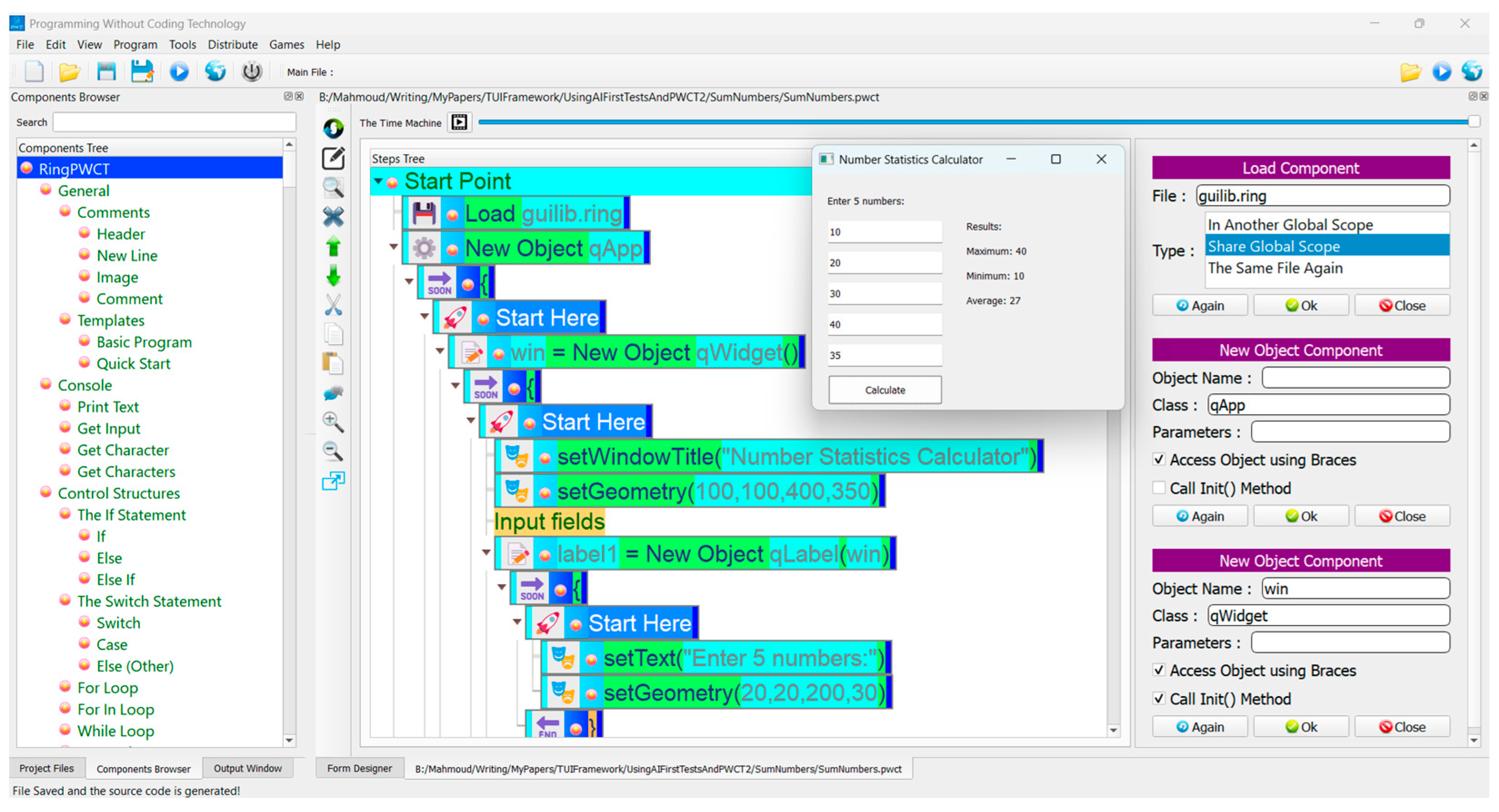
By the end of the development process, the To-do application was fully functional. It supported adding tasks with title, description, and priority; editing existing tasks; deleting tasks with confirmation; and displaying tasks with priority indicators. The final architecture followed a proper controller and view structure using Ring’s Objects Library. The source code generated in the Ring language is opened using the PWCT2 visual programming system, where the program appeared as a structured visual tree of components and actions. This demonstrated that the final code could be integrated into a visual programming workflow. This task illustrates how Claude Code can learn from structured feedback, correct its mistakes, and ultimately produce a working application through collaborative refinement. Figure 7 shows a screenshot of PWCT2 (Programming Without Coding Technology). At the center is a visual logic tree representing the structure and flow of a Todo application. The right panel displays properties for selected components. On the right, we see the Todo application.

3.2. Developing the TUI Framework

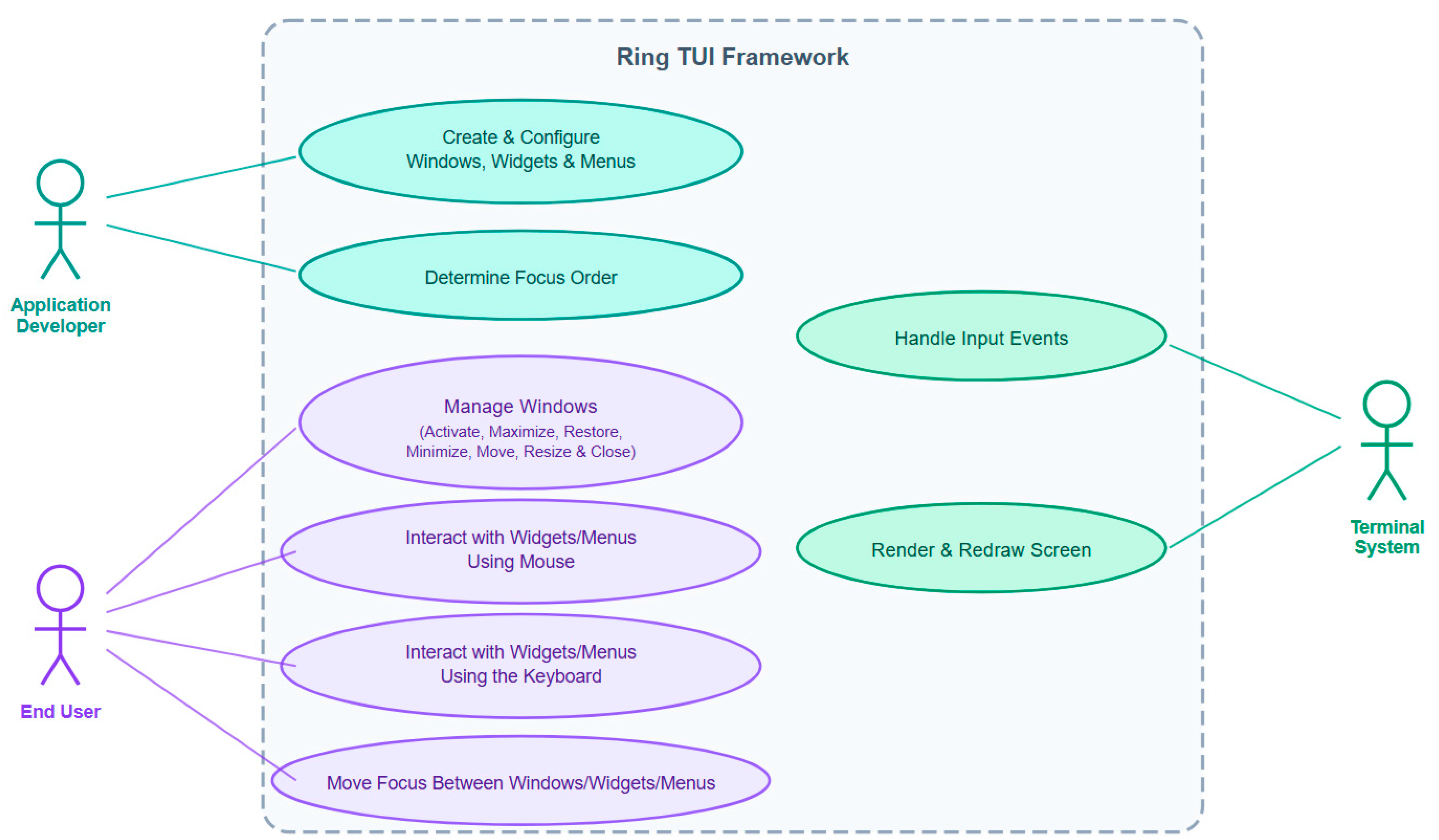
To provide a comprehensive understanding of the framework’s design, we describe its architecture through three complementary views following established practices for software architecture description [42]. Figure 8 presents the use case diagram for the Ring TUI Framework, identifying three primary actors and their interactions with the system. The Application Developer operates at design time, responsible for creating and configuring windows, widgets, and menus, as well as determining the focus order across interface elements. The End User interacts with the framework at runtime through four use cases: managing windows (including activation, maximization, restoration, minimization, movement, resizing, and closing), interacting with widgets and menus using the mouse, interacting with widgets and menus using the keyboard, and moving focus between windows, widgets, and menus. The Terminal System serves as a supporting actor that handles input events from keyboard and mouse devices and manages the rendering and redrawing of the screen. This separation of concerns reflects the framework’s layered architecture, where the developer defines the interface structure, the end user drives runtime behavior, and the terminal system provides the underlying input processing and display infrastructure.
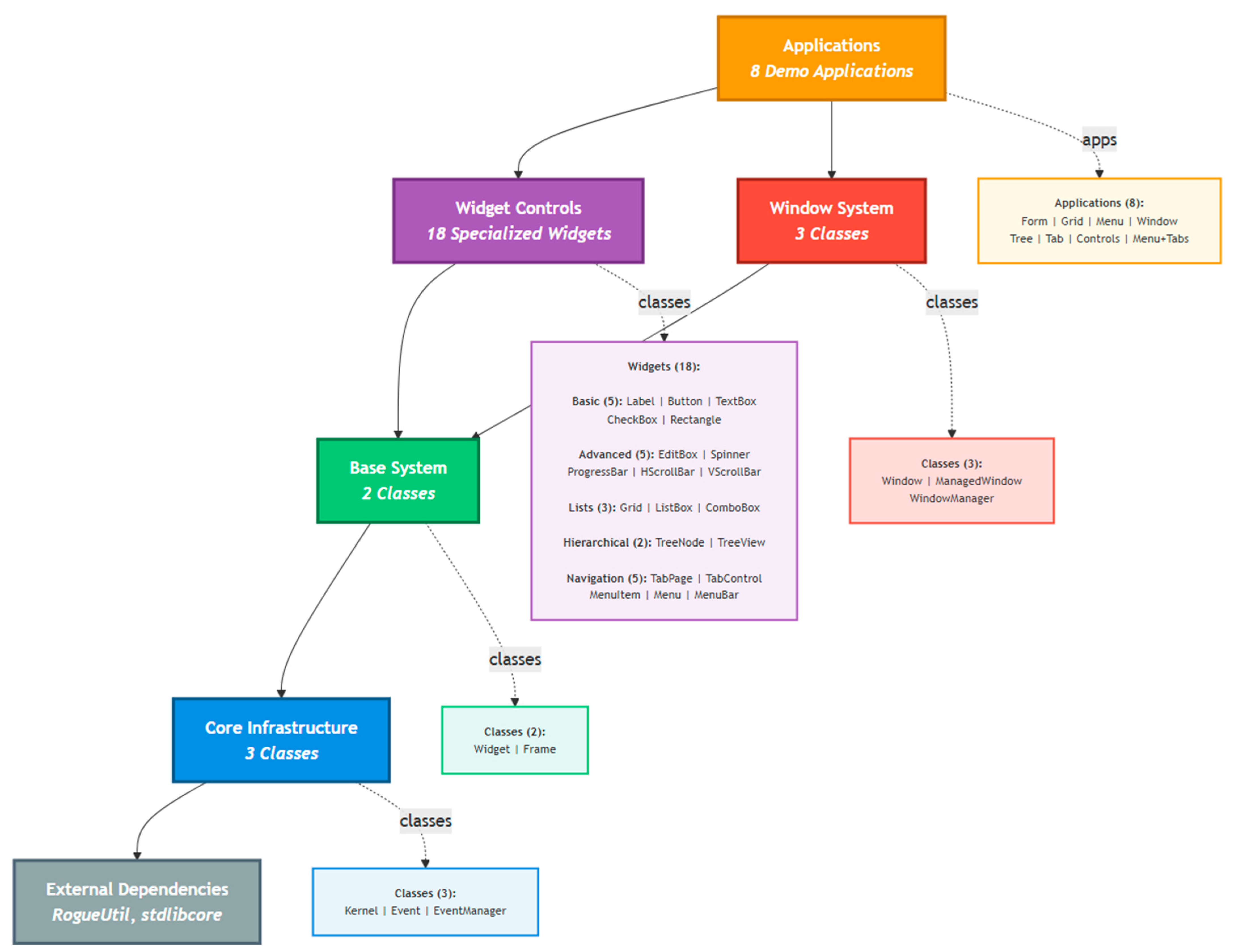
Figure 9 presents the layered architecture of the software system, emphasizing the modular organization and interdependencies among its components. At the base, the Core Infrastructure includes foundational classes such as Kernel, Event, and EventManager, which support the Base System layer composed of Widget and Frame. Above this, the Widget Controls module provides 18 specialized widgets grouped into Basic, Advanced, Hierarchical, and Navigation categories, enabling diverse user interface functionalities. The Window System layer manages graphical behavior through classes like WindowManager and Window. At the top, the Applications layer comprises eight demo applications that utilize the underlying modules. External dependencies such as RogueUtil and stdlibcore are integrated at the system’s foundation. Arrows in the diagram indicate the direction of control flow and the relationships between modules.
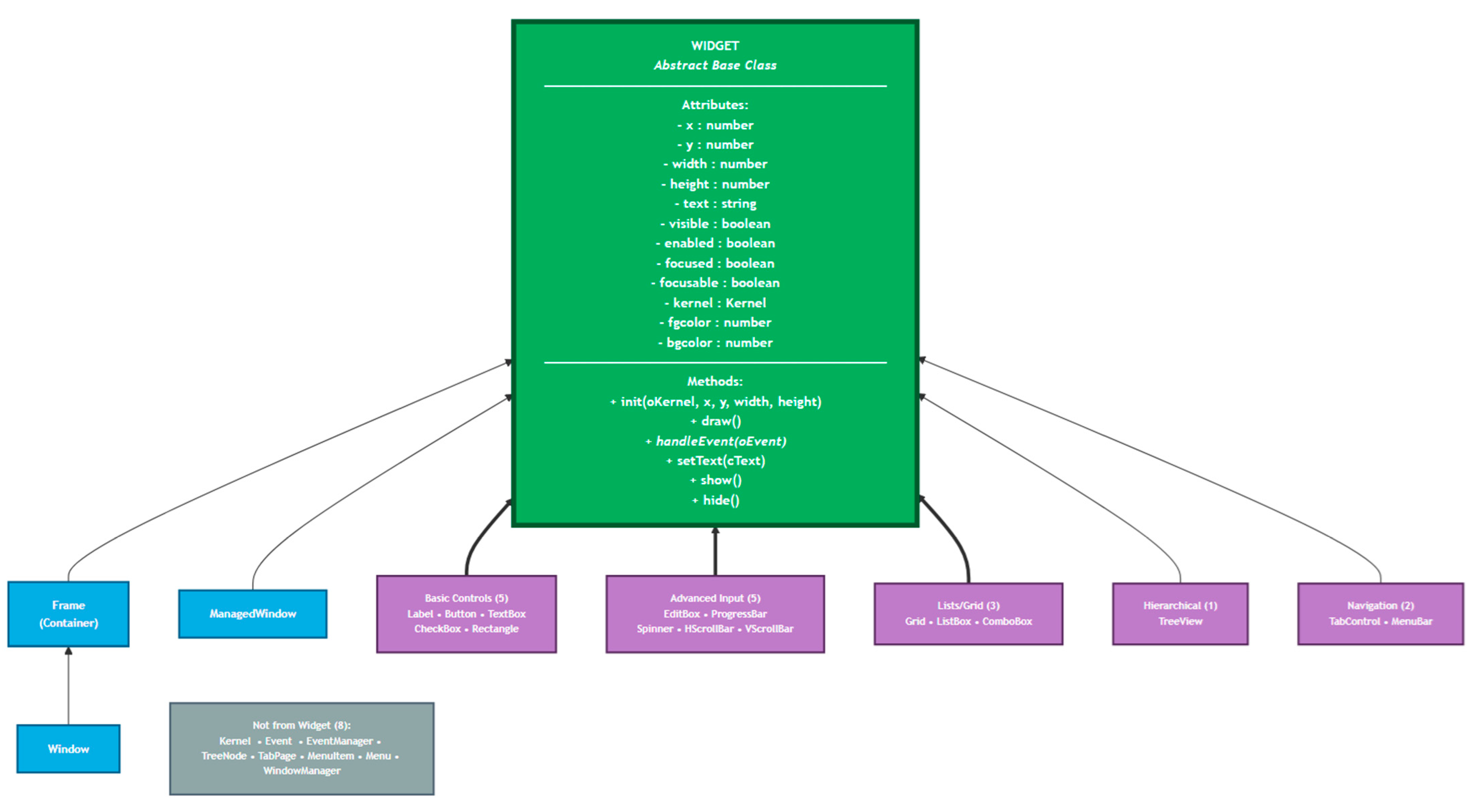
Figure 10 illustrates the class hierarchy of a graphical user interface framework, structured around a central abstract base class named Widget. This class defines essential attributes such as position (x, y), size (width, height), display properties (text, visibility, enabled state, focus), and system-level references (kernel object). It also provides core methods for initialization, rendering, event handling, and visibility control. Derived from Widget are several categories of GUI components: container classes like Frame and Window; managed window types; basic controls including Label, Button, and Checkbox; advanced input elements such as Editbox, Spinner, and ProgressBar; list-based widgets like Grid and ListBox; hierarchical structures like TreeView; and navigation components such as TabControl and MenuBar. Additionally, eight classes—Kernel, Event, EventManager, TreeNode, TabPage, MenuItem, Menu, and WindowManager—exist outside the Widget inheritance chain, supporting broader framework functionality. This hierarchical design promotes modularity, extensibility, and consistent behavior across the GUI system.
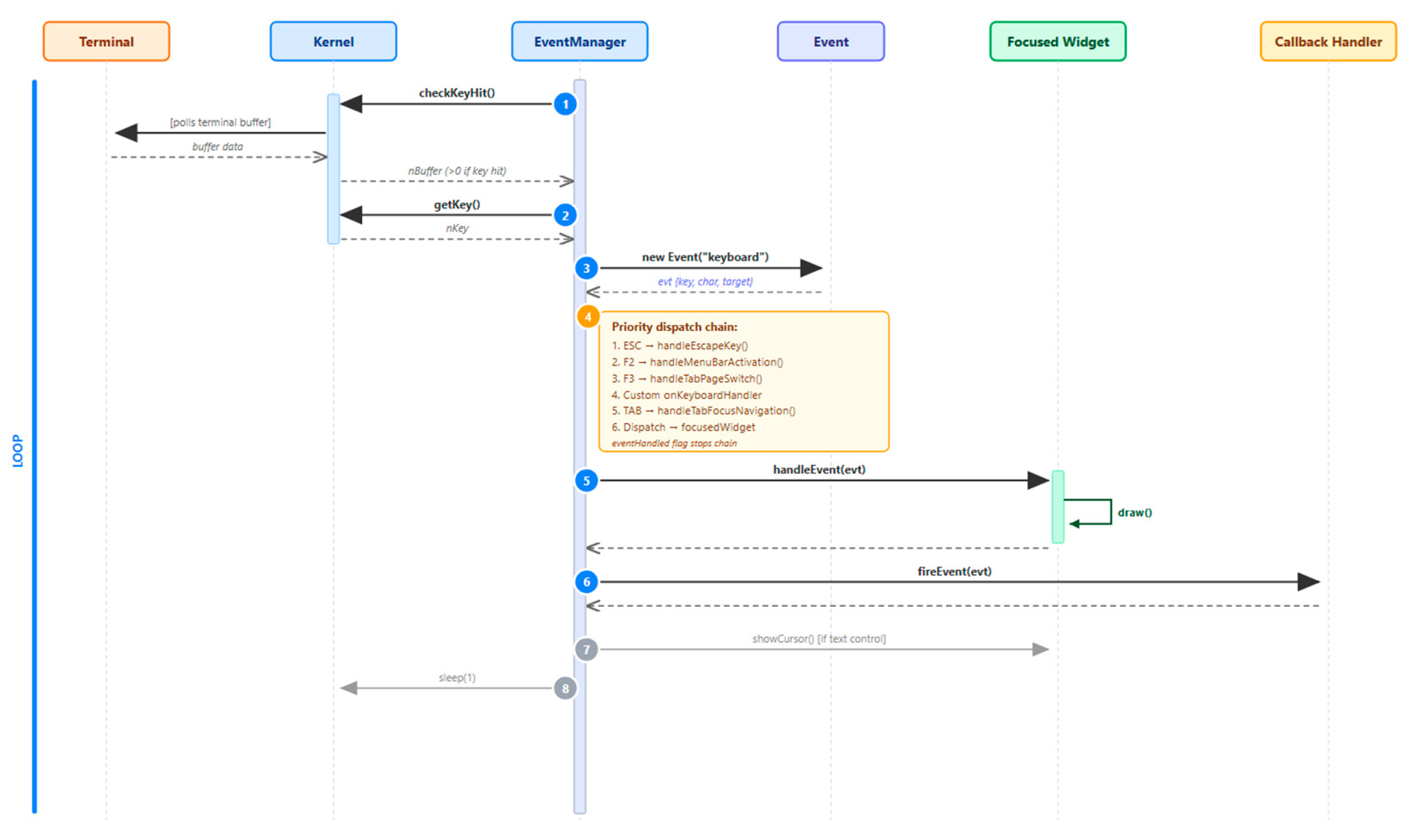
Figure 11 presents a sequence diagram tracing the keyboard event dispatch flow through the framework’s core loop. The EventManager.run() method continuously polls the terminal via Kernel.checkKeyHit() and Kernel.getKey() (steps 1–2), then wraps the input into an Event object (step 3). The event is routed (step 4) to the currently focused widget. If a widget handles the event, its handleEvent() method is invoked and the widget redraws itself (step 5). Registered listeners are then notified via fireEvent() (step 6). The chain is short-circuited at any stage by setting an eventHandled flag, ensuring that higher-priority bindings such as global shortcuts always take precedence over widget-level input. This centralized dispatch pattern is the architectural backbone of the framework.
In Table A1, we present the prompts used with Claude Code (Opus 4.5) to create the TUI framework for the Ring programming language. These prompts were written by non-native English speakers; so, some language mistakes and suboptimal paragraph structure may appear. Each prompt is categorized by type: Features, Code Structure, Information from Ring Documentation, Bug Report, etc. In Table 2 we present the first three prompts used during the development.

4. Results

The development of the Ring TUI framework through a prompt-driven workflow provides a rare, detailed view into how a modern large language model behaves when tasked with producing and maintaining a complex, multi-module software system. Across 107 prompts—spanning feature requests, architectural guidance, bug reports, documentation queries, and performance issues—Claude Code (Opus 4.5) demonstrated both impressive generative capabilities and characteristic limitations. The resulting framework, comprising approximately 7420 lines of Ring code, includes a windowing system, event-driven architecture, interactive widgets, data controls, hierarchical menus, a grid/table component, a tree view, tabbed interfaces, and a multi-window desktop environment. This section presents the TUI framework demo and analyzes the empirical outcomes and discusses their implications for LLM-assisted software engineering.

4.1. The TUI Framework Demo

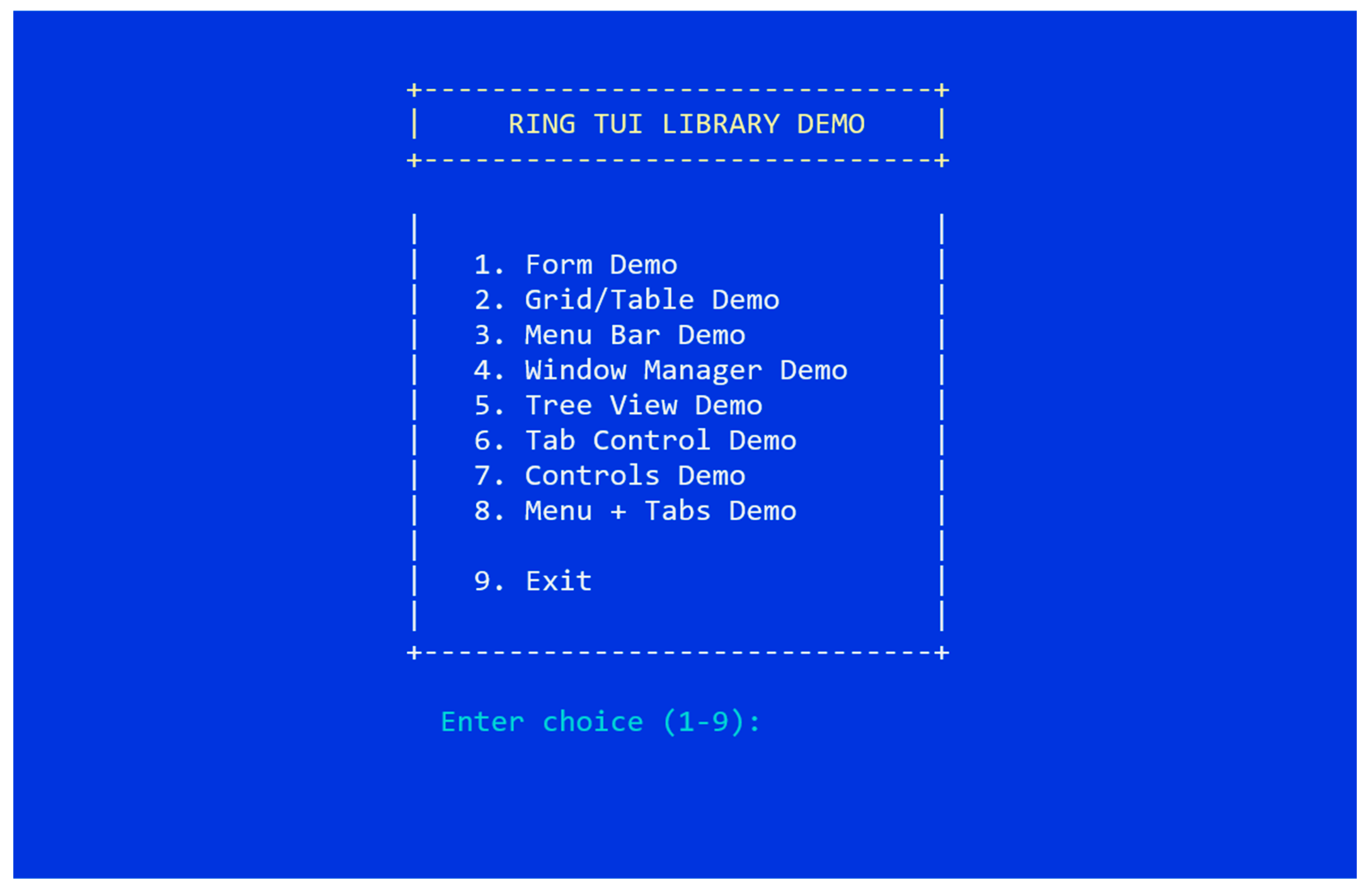
In Figure 12, we see the main menu of the Ring TUI framework demo. To run the demo, execute the next commands using the Ring Package Manager (RingPM) after installing the Ring language version 1.25 for Microsoft Windows.
  • ringpm install tuiframeworkusingclaudecode from ringpackages
  • ringpm run tuiframeworkusingclaudecode
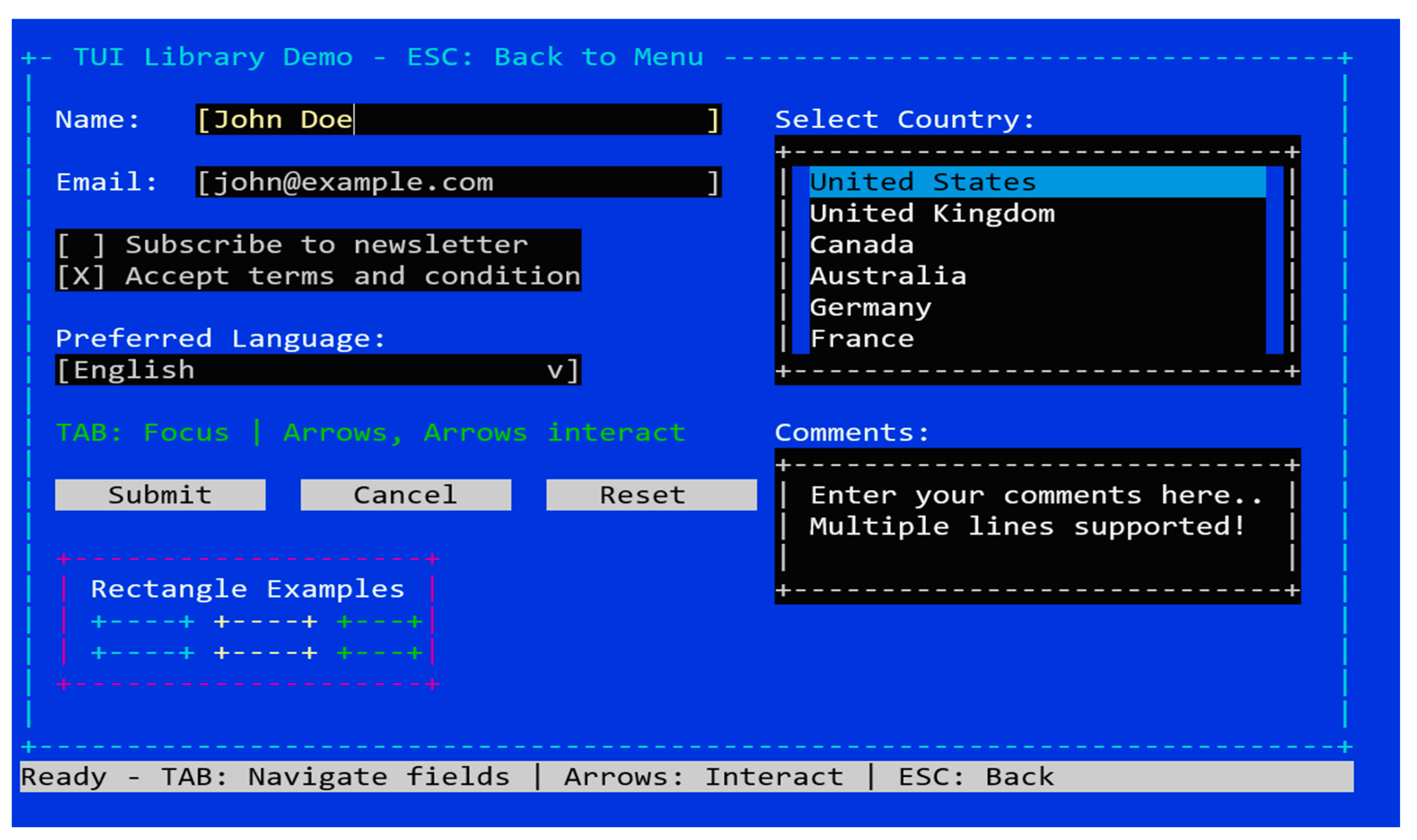
Figure 13 illustrates the Form Demo interface of the Ring TUI Library, showcasing a comprehensive text-based user interface rendered entirely within a terminal environment. The layout includes labeled input fields for name and email, interactive checkboxes, a dropdown menu for language selection, and a scrollable country list with highlighted selection. A multiline comment box and action buttons (Submit, Cancel, Reset) simulate GUI like behavior using ASCII characters, supporting both keyboard and mouse interaction. Instructional cues guide navigation through TAB, arrow keys, and pointer actions, while a status bar reinforces usability. This demo highlights how the Ring TUI framework enables rich, form-driven interaction in non-graphical contexts, supporting accessibility and modular design for terminal applications.
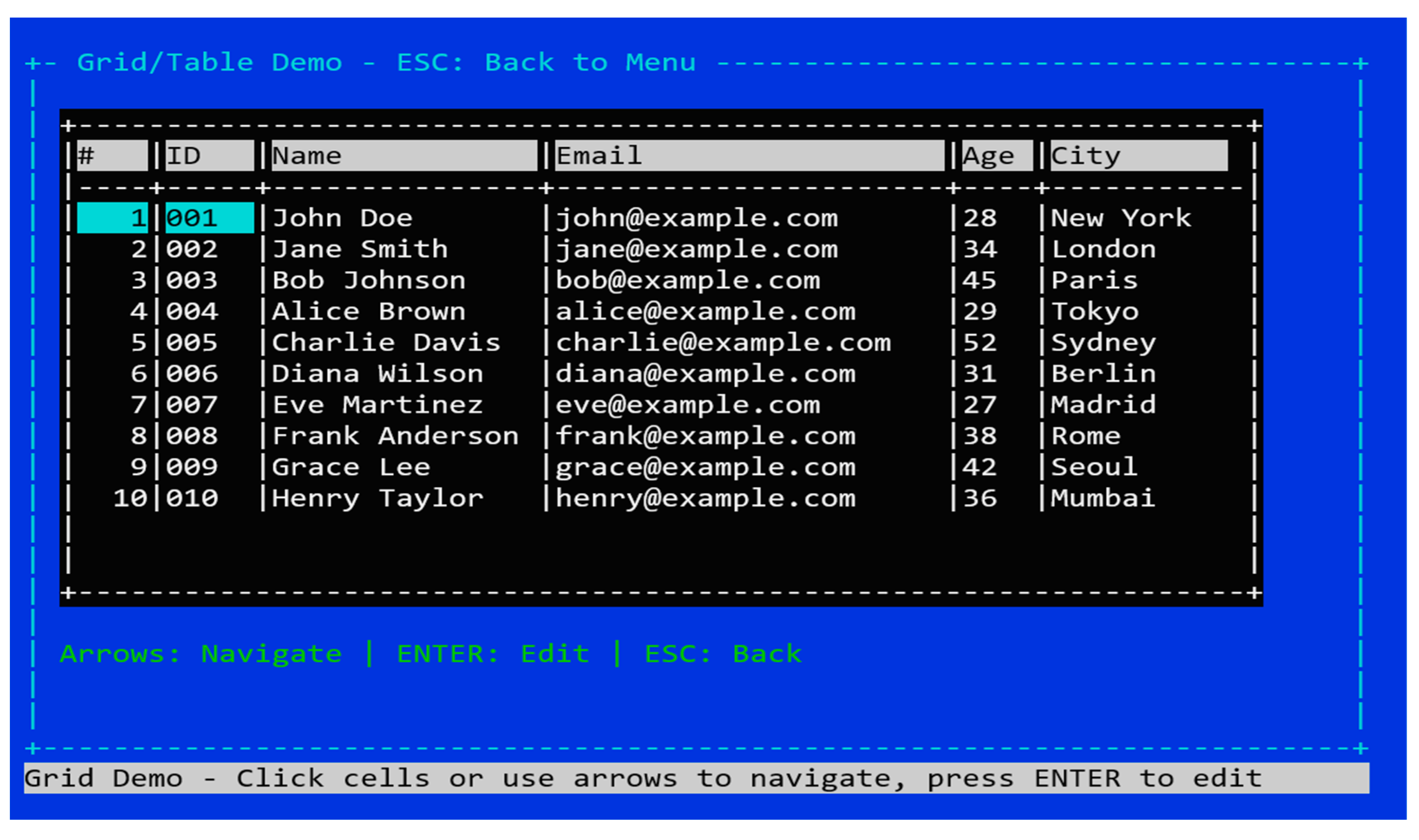
Figure 14 presents the Grid/Table Demo interface of the Ring TUI Library, illustrating a structured tabular layout rendered in a terminal using ASCII characters. The table displays ten rows of user data across six columns: serial number, ID, Name, Email, Age, and City. Each row represents a distinct record, with realistic sample values to demonstrate data formatting and alignment. Users can navigate the grid using arrow keys or mouse clicks and edit individual cells by pressing ENTER. A footer provides interaction guidance, while the interface maintains visual clarity through consistent column spacing and borders. This demo highlights the framework’s capability to support dynamic, spreadsheet-like data presentation and manipulation within a text-based environment, reinforcing its utility for terminal applications requiring structured input and review.
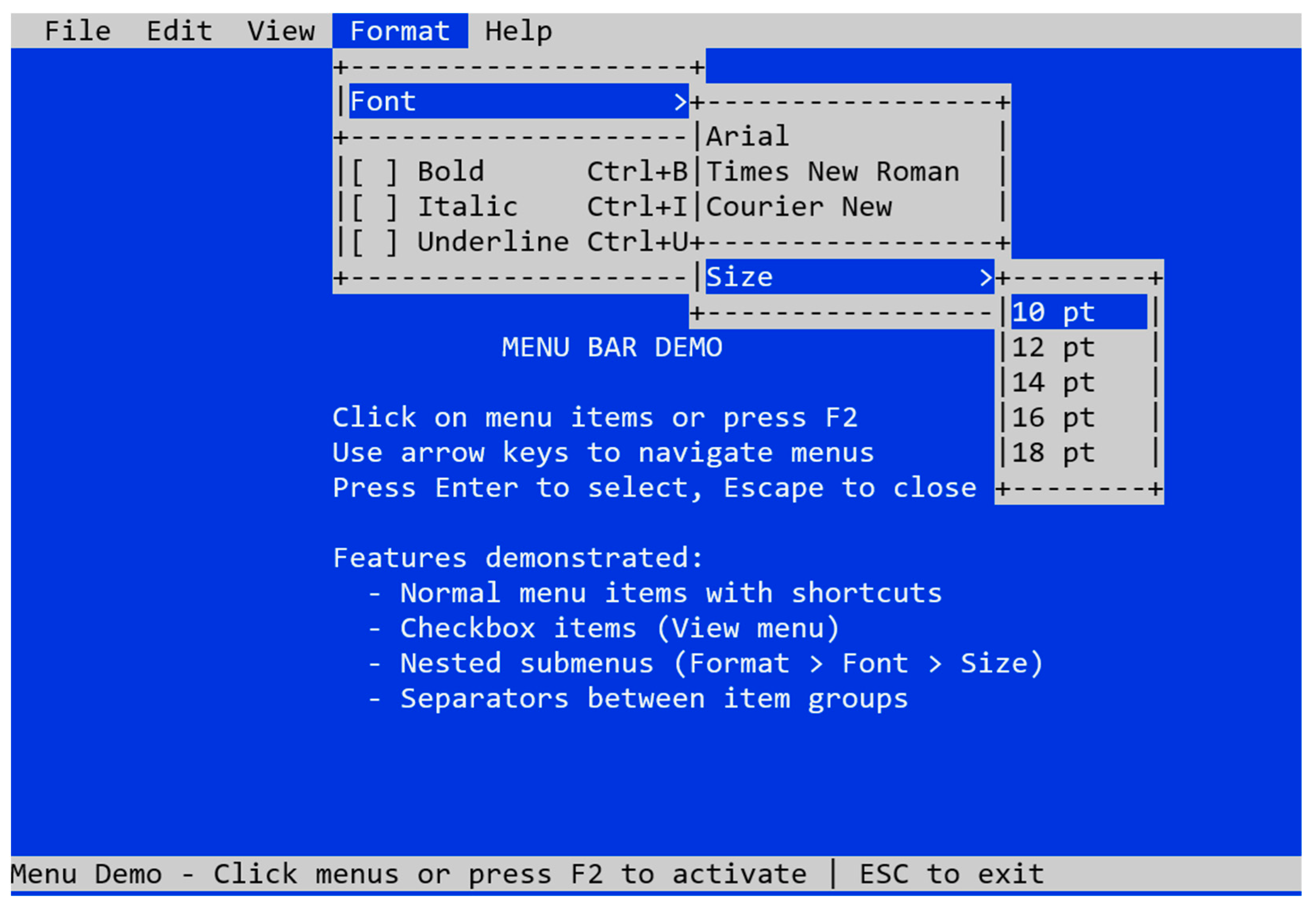
Figure 15 depicts the Menu Bar Demo interface of the Ring TUI Library, demonstrating a fully interactive menu system rendered in a retro, text-based style. The top of the screen features a horizontal menu bar with entries such as File, Edit, View, Format, and Help. The active menu, Format, expands into nested submenus for Font and Size, each containing selectable items. The Font submenu includes typeface options (Arial, Times New Roman, Courier New) and checkbox-style entries for Bold, Italic, and Underline, each with associated keyboard shortcuts. The Size submenu lists font sizes from 10 pt to 18 pt. Below the menu, instructional text guides users to activate menus via F2, navigate with arrow keys, and select or close items using Enter and Escape. This demo highlights the Ring TUI framework’s support for hierarchical menus, shortcut keys, checkbox states, and mouse or keyboard interaction, enabling rich navigation and configuration workflows within terminal-based applications.
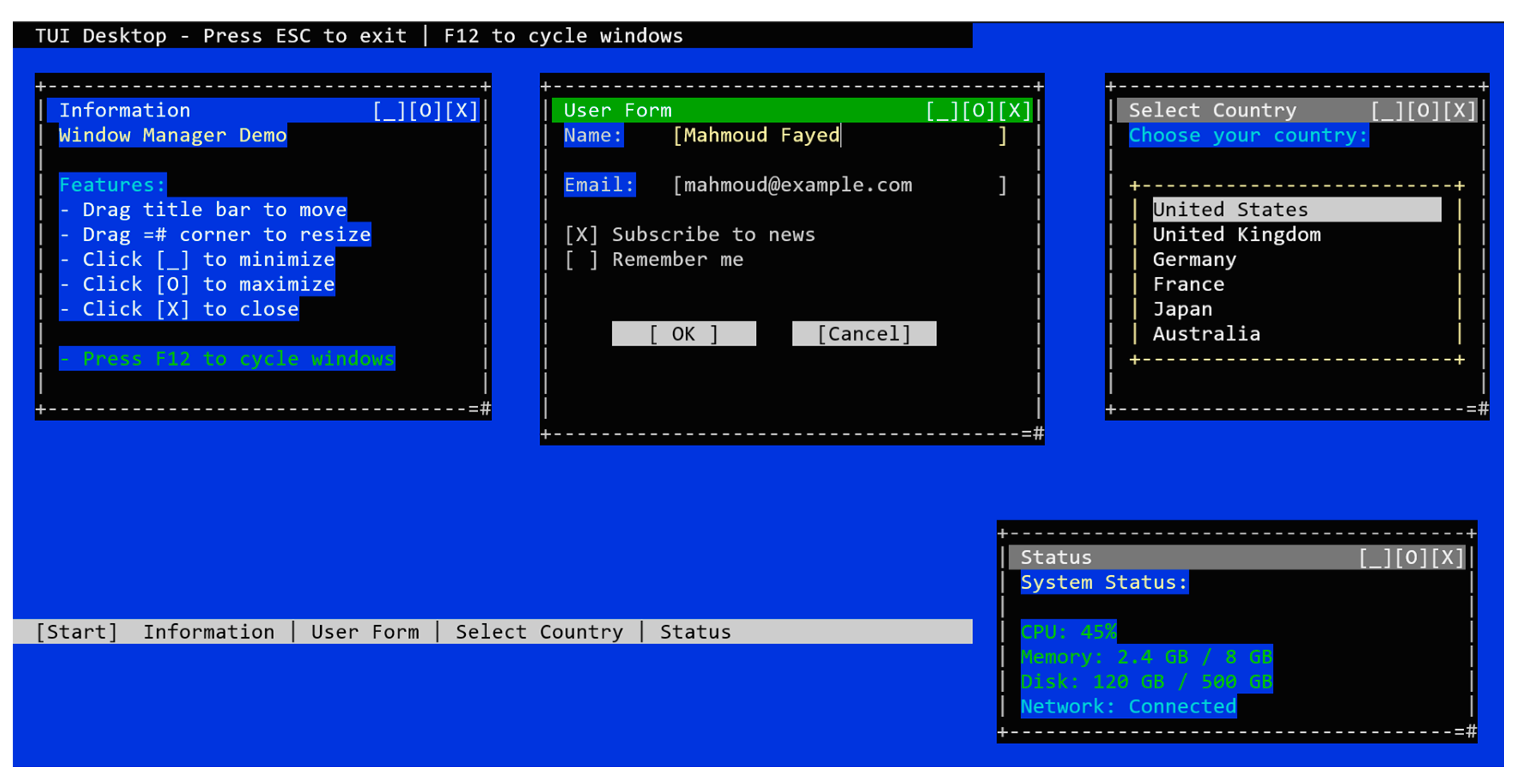
Figure 16, shows the Window Manager Demo of the Ring TUI Library, simulating a multi-window desktop environment within a text-based terminal interface. The screen features four distinct window panels—Information, User Form, Select Country, and Status—arranged over a blue background and managed through keyboard or mouse interaction. Each window includes a title bar with controls for minimizing, maximizing, and closing, and supports drag-and-resize functionality via designated corners. The Information window outlines available features; the User Form window presents input fields and checkboxes; the Select Country window offers a scrollable list of options; and the Status window displays system metrics such as CPU, memory, disk, and network status. A bottom bar mimics a taskbar, listing active windows and providing quick access.
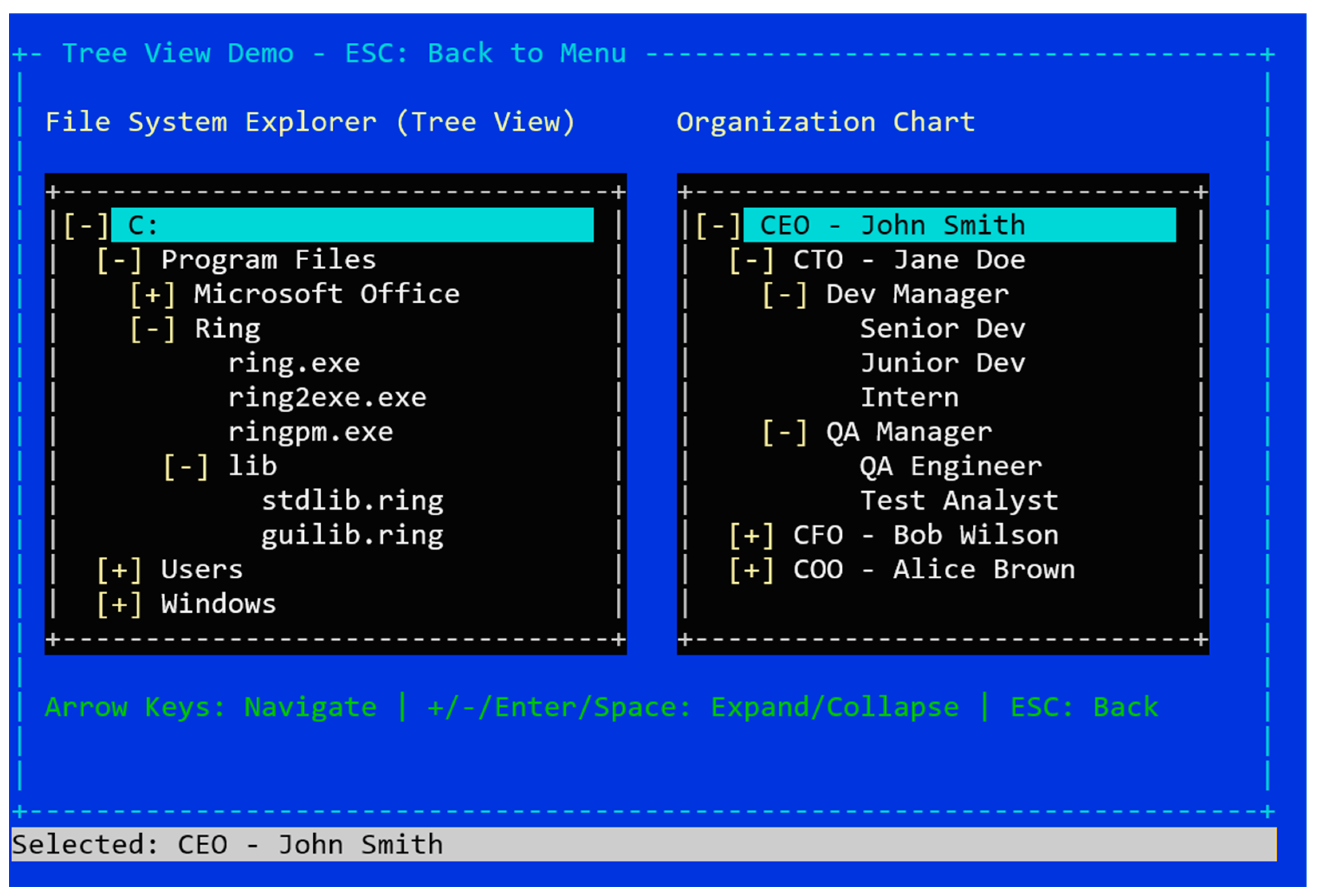
Figure 17 illustrates the Tree View Demo interface of the Ring TUI Library, demonstrating hierarchical data visualization within a text-based terminal environment. The screen is divided into two panels: a file system explorer on the left and an organizational chart on the right. The file system tree begins with the root directory “C:” and expands into nested folders such as Program Files, Microsoft Office, Ring (with executables and library files), Users, and Windows. The organization chart presents a corporate hierarchy starting with the chief executive officer (CEO), followed by the chief technology officer (CTO) and their subordinate managers and roles. Navigation instructions at the bottom guide users to expand or collapse nodes using keyboard shortcuts (+/−/Enter/Space) or arrow keys. This demo highlights the Ring TUI framework’s ability to represent and interact with complex, nested structures in a terminal interface, supporting both file navigation and abstract data modeling.
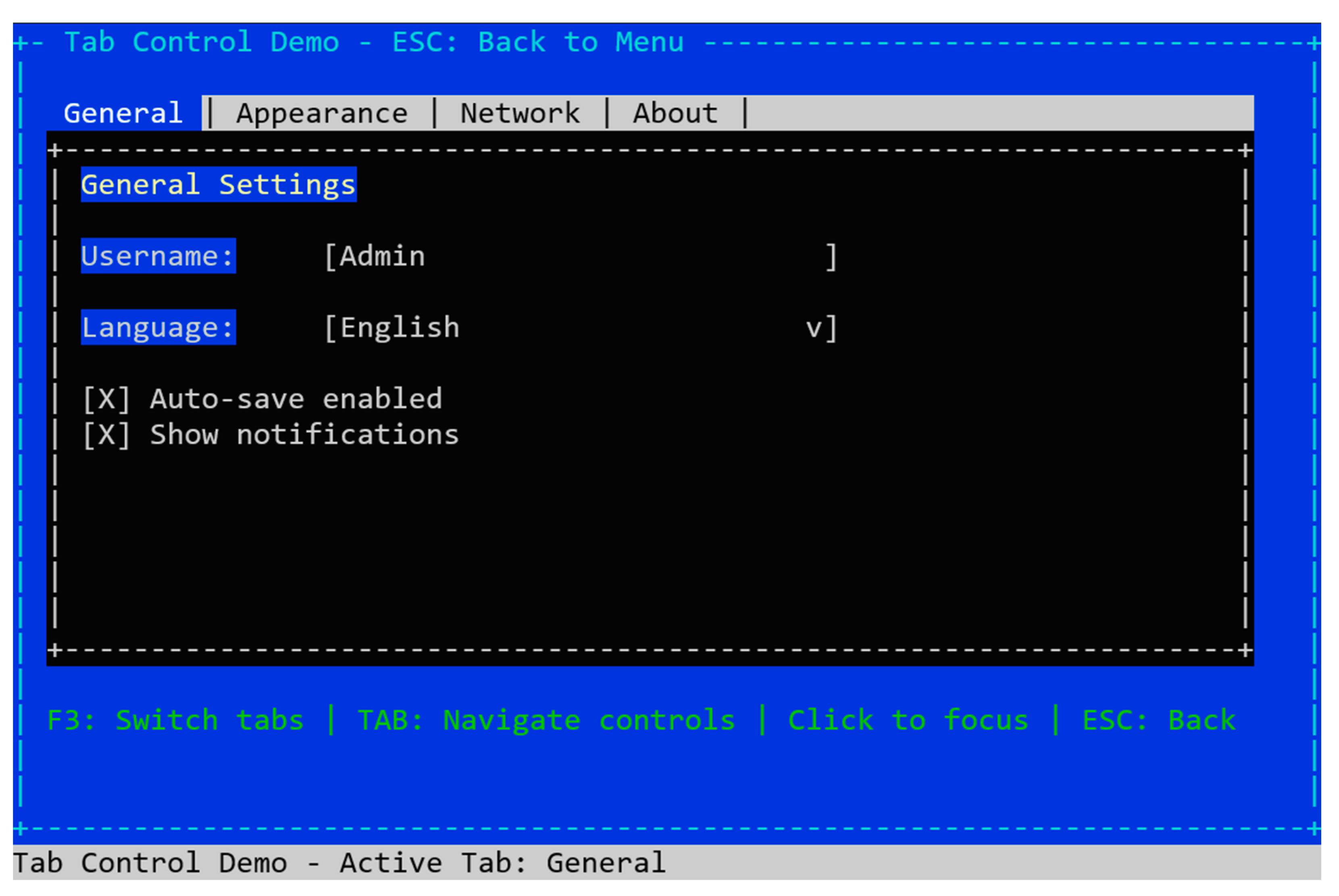
Figure 18 presents the Tab Control Demo interface of the Ring TUI Library, illustrating a tabbed configuration panel within a text-based terminal environment. The interface features a horizontal tab bar with sections labeled General, Appearance, Network, and About, with the General tab currently active. The content area displays configurable settings including a username field, a language dropdown menu, and two checkbox options—Auto-save enabled and Show notifications—both marked as selected. Navigation instructions at the bottom indicate support for keyboard and mouse interaction, including TAB for control focus, F3 to switch tabs, and ESC to exit. This demo exemplifies the Ring TUI framework’s ability to organize interface elements into modular, navigable tabs, enhancing clarity and user experience in terminal-based applications.
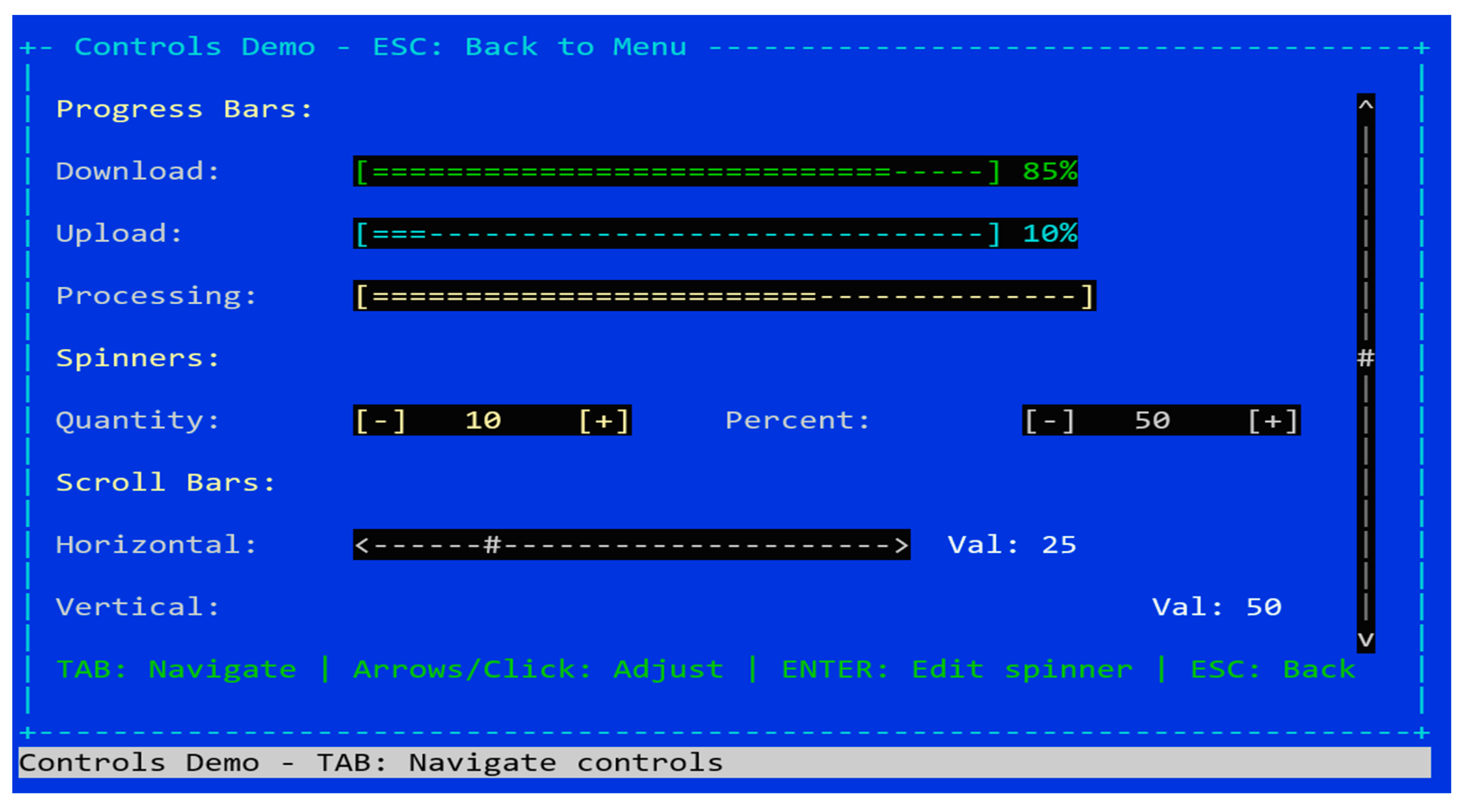
Figure 19 displays the Controls Demo interface of the Ring TUI Library, showcasing a variety of interactive UI elements rendered in a terminal environment using ASCII graphics. The layout includes three categories of controls: progress bars, spinners, and scroll bars. Progress bars visually represent task completion levels for download, upload, and processing. Spinner controls allow for numeric adjustment for quantity and percentage values using [+] and [−] buttons. Horizontal and vertical scroll bars simulate range selection, with current values displayed alongside. Navigation instructions at the bottom indicate support for both keyboard and mouse interaction, including TAB for focus, arrow keys or clicks for adjustment, and ENTER for editing spinner values. This demo highlights the Ring TUI framework’s ability to emulate dynamic control widgets in text-based interfaces, enabling responsive and visually informative user interaction within terminal applications.
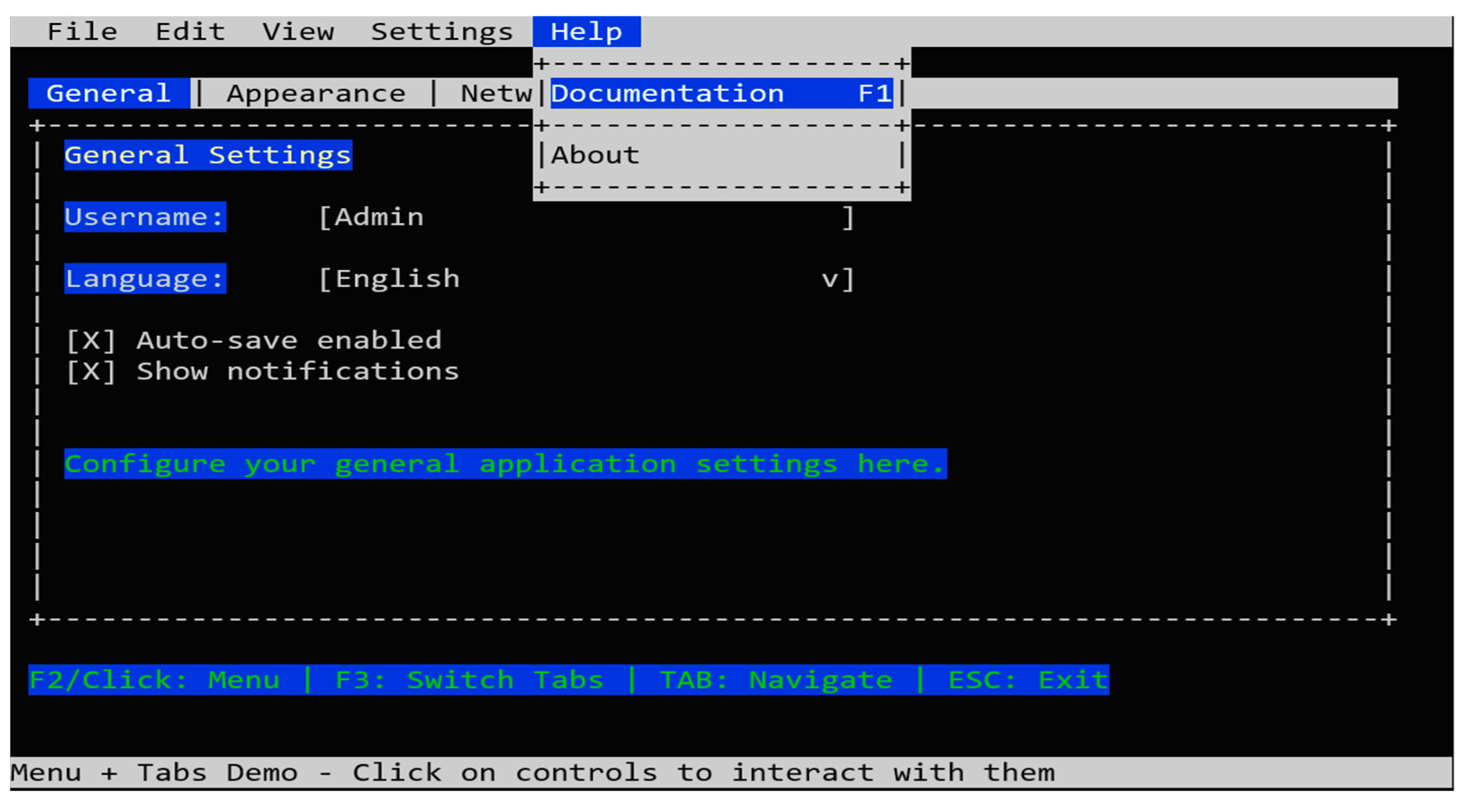
Figure 20 presents the Tabs and the Menu Bar Demo, where the user can switch between the different tabs or activate the menu bar at any time to select any menu item. The status bar shows the selected item text.

4.2. Results Related to the Prompt-Driven Workflow

Table 3 outlines how these prompts align with the project’s development phases, highlighting the progression from early bootstrapping to the window-manager-dominated later stages. Table 4 presents an overall statistical summary.
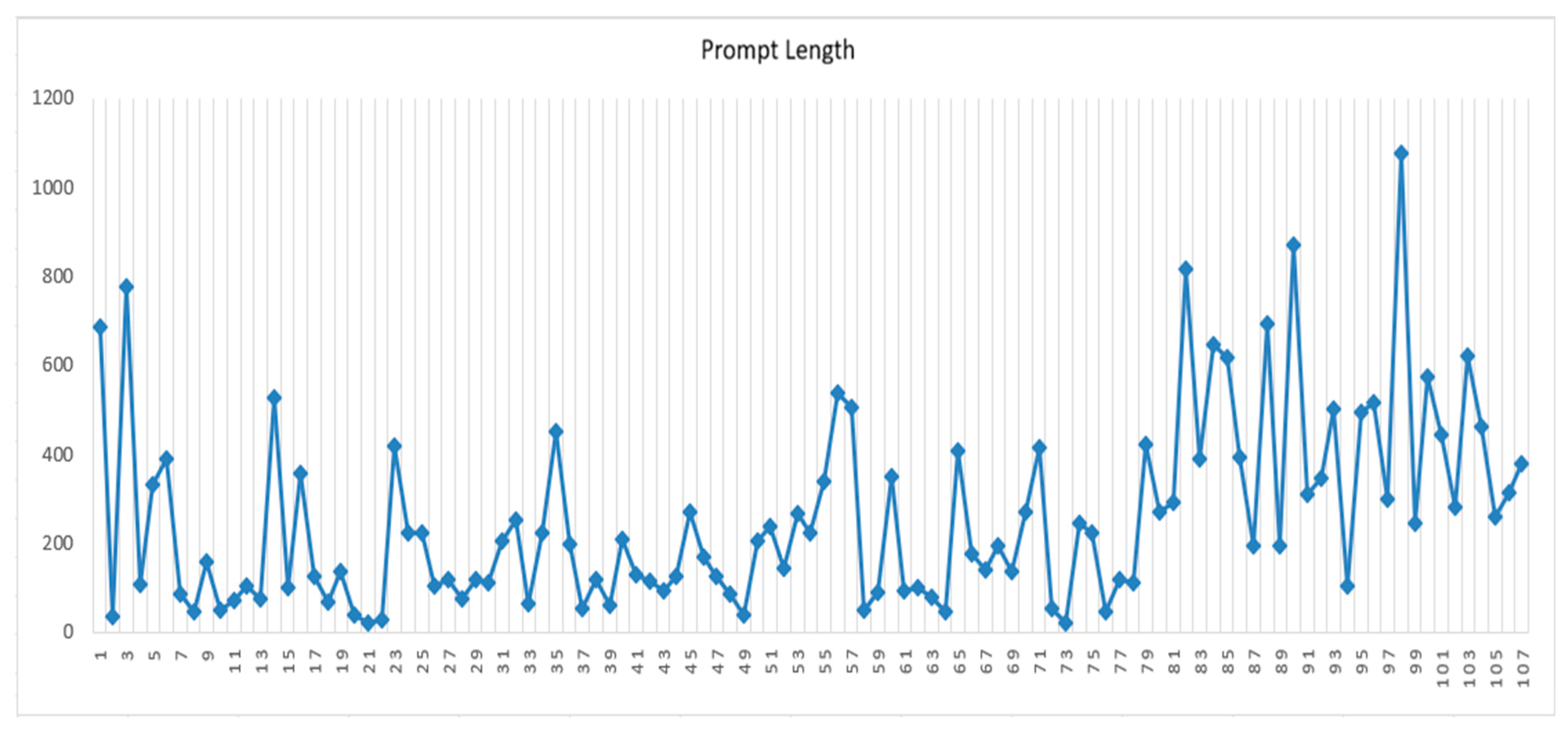
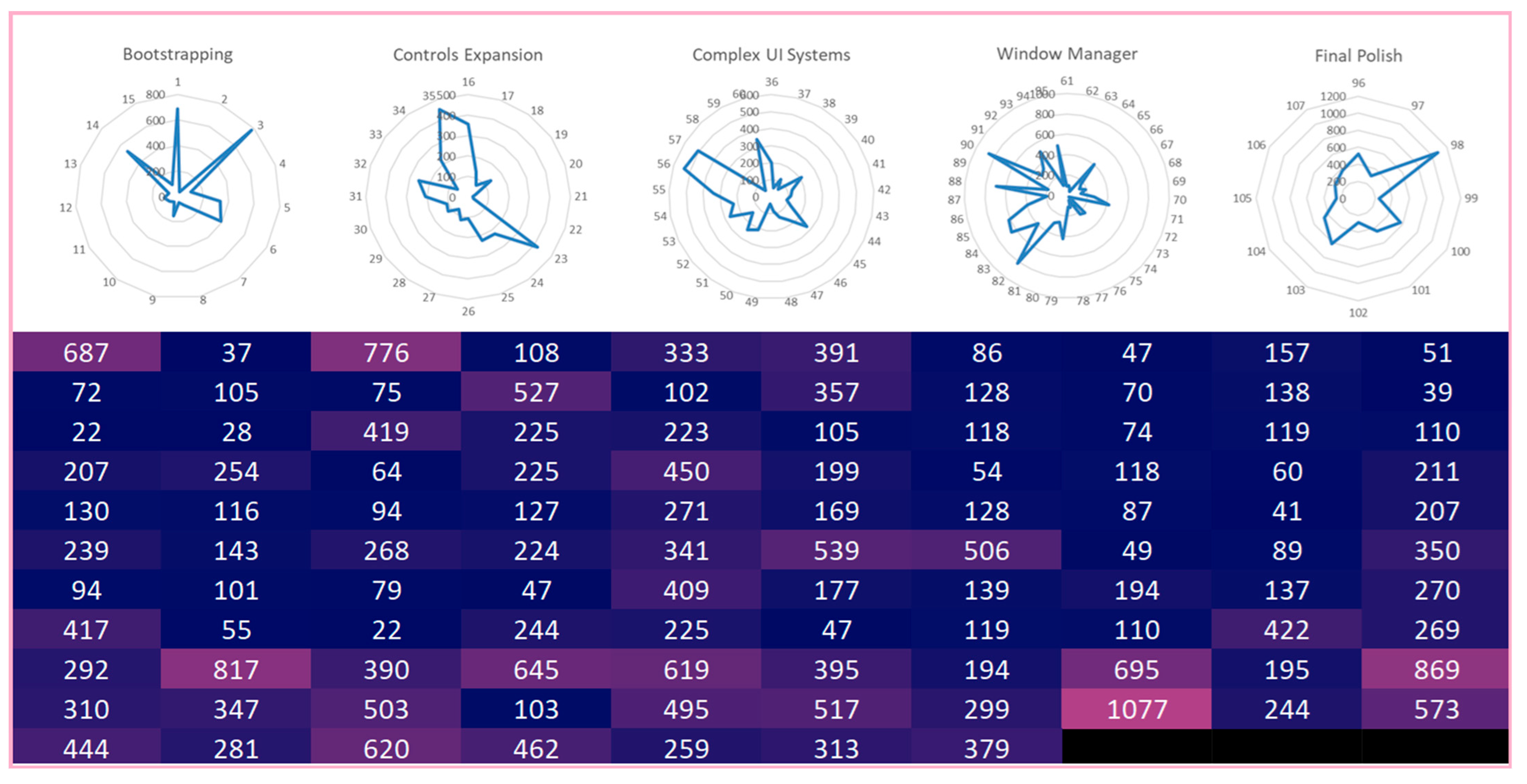
Figure 21 shows the distribution of prompt lengths. Figure 22 contains radar plots (top) and a heatmap (bottom). The radar plots show per-phase prompt counts and length profiles for five development phases—Bootstrapping, Controls Expansion, Complex UI Systems, Window Manager, and Final Polish—each radar encoding the distribution of prompt lengths and the relative number of prompts along its axes. The heatmap displays individual prompt lengths (in characters) across all phases and instances, using a continuous color scale from dark blue (short prompts) to pink (longer prompts).

4.3. Results Related to the Generated Source Code Size

Table 5 presents a statistical summary of the source code, showing that the project consists of 7420 total lines of code, split between 1614 lines for demos and 5806 lines for class definitions. The codebase contains 28 classes with 334 methods, averaging approximately 12 methods per class and 207 lines per class. The methods themselves account for 5519 lines of code, with an average method length of about 16.5 lines, suggesting reasonably modular and well-structured code where methods are kept relatively concise and focused on purpose.
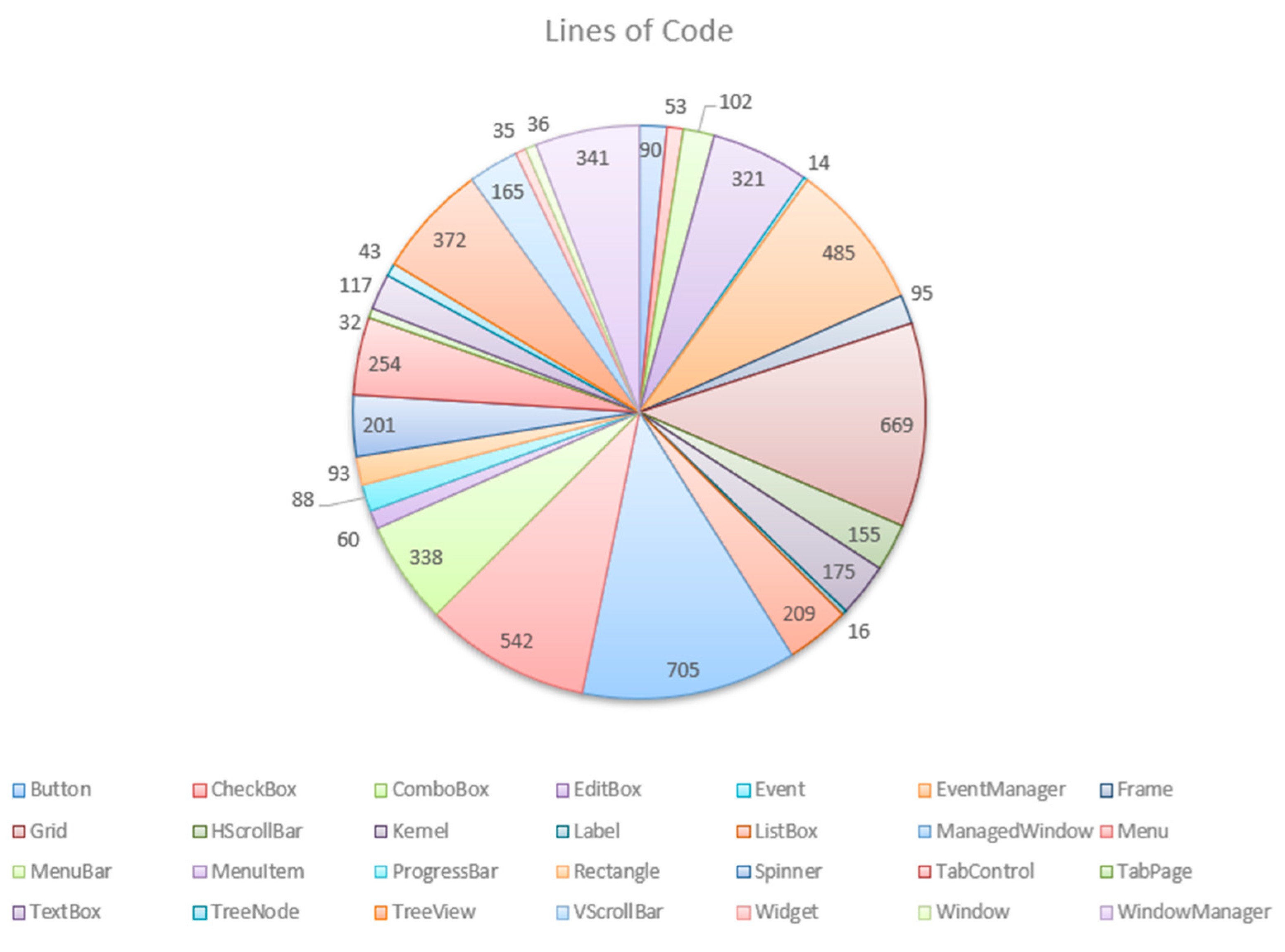
Figure 23 is a pie chart that illustrates the distribution of lines of code across the 28 classes in the framework. The chart reveals a notably uneven distribution, with a few classes dominating the codebase. The largest class is ManagedWindow (705 lines), while the EventManager class accounts for 485 lines, which together represent a substantial portion of the total class code. This distribution in the GUI framework reflects that the core windowing and event management classes carry much of the complexity, while individual widget classes remain lean and focused on their specific functionality, with exceptions like the Grid and Menu classes.
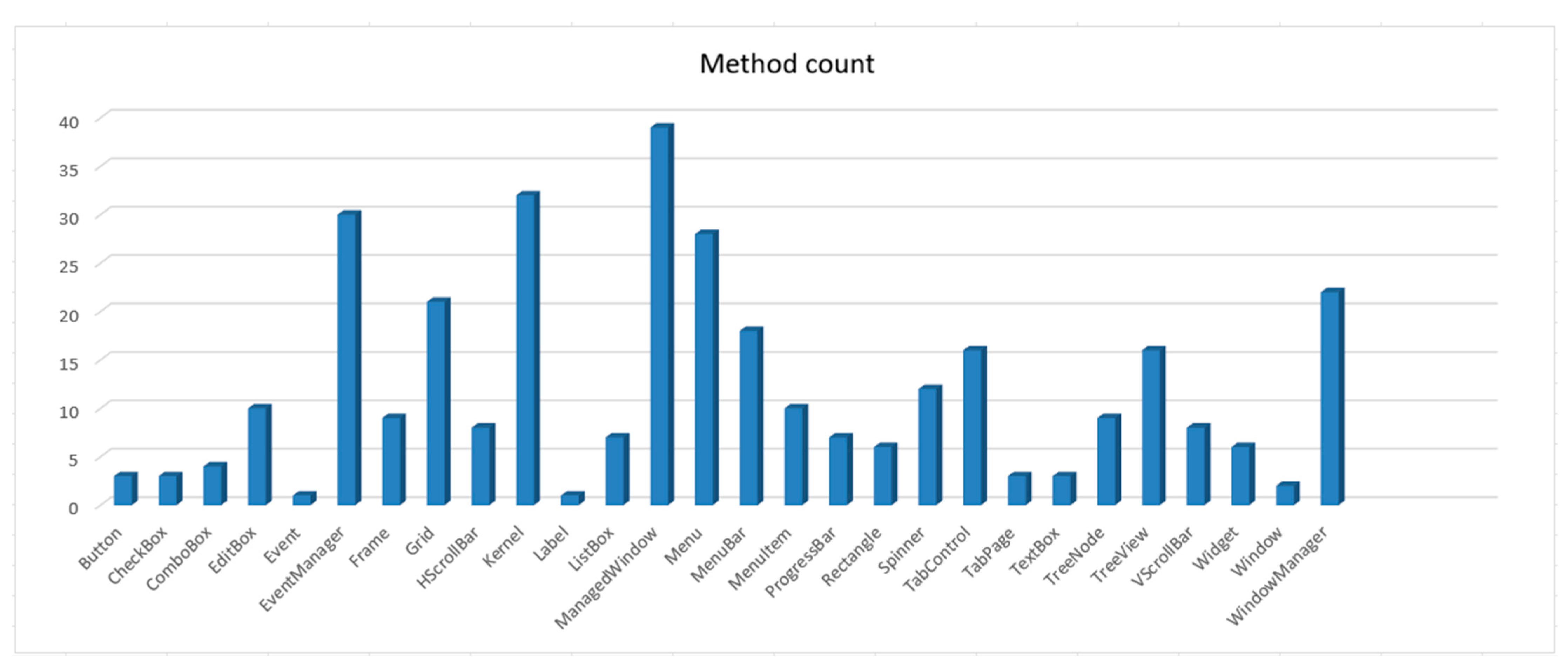
Figure 24 is a bar chart displaying the number of methods in each of the 28 classes in the framework. The chart shows that ManagedWindow has the highest method count (39 methods), followed closely by Kernel (32) and EventManager (30), confirming these as the largest classes in the framework.

5. Discussion

In this section, we discuss the prompt-driven development outcomes, reproducibility and model variability, development metrics and methodological insights and study limitations.

5.1. Prompt-Driven Development Outcomes

Figure 12, Figure 13, Figure 14, Figure 15, Figure 16, Figure 17, Figure 18, Figure 19 and Figure 20 and Table 3 show that Claude Code was able to generate a functional and internally coherent TUI framework without the developer manually writing a single line of code, delivering a unified event-driven architecture, a consistent widget hierarchy, a window manager supporting dragging, resizing, and z-ordering, a menu bar with nested submenus, a grid and table component with navigation and cell-editing capabilities, a tree view enabling hierarchical expansion and collapse, a tab-management system, and an extensive set of additional interface controls, including progress bars, spinners, and scrollbars. The breadth and depth of these components demonstrate that LLMs can handle not only isolated functions but also the architectural coherence required for framework-level development. The model maintained naming conventions, event signatures, and structural patterns across hundreds of generated functions, even when modules were developed days apart. This suggests that LLMs can act as high-productivity junior developers when guided by a human architect who provides constraints, corrections, and long-range direction.
From Table 2 and Table 4, we observe that the development process was highly iterative, with approximately 67% of the prompts consisting of bug reports or error-driven corrections, ranging from simple syntax issues to deeper architectural problems, including infinite redraw loops, incorrect event propagation, focus inconsistencies, mouse hit-testing errors, window-intersection logic faults, menu-navigation state bugs, grid-editing recursion, TreeView redraw inefficiencies, and performance degradation following complex demonstrations. In nearly all cases, Claude Code responded effectively to corrective prompts, producing revised versions that addressed the identified issues. This behavior highlights a key strength of LLM-driven development: the ability to rapidly regenerate or refactor large sections of code in response to high-level feedback. However, the model often repeated certain classes of mistakes—particularly those involving Ring-specific semantics such as the top-down execution model, the need for Ref() when modifying list items and the correct naming of RogueUtil constants. These recurring issues underscore the importance of human oversight. While the model can correct errors when pointed out, it does not reliably internalize language-specific rules across long sessions.
In this study, the human developer functioned as the architect while the LLM operated as the implementer, with the developer supplying the architectural constraints, the high-level design directives (including consolidating all event loops within the event manager), the necessary domain knowledge (for example, noting that KEY_PGDN is named KEY_PGDOWN in RogueUtil library), the behavioral expectations (such as ensuring each window is drawn only once per cycle), and the performance-related guidance (including avoiding unnecessary full-screen redraws). Claude Code, in turn, translated these constraints into concrete implementations, often producing or updating hundreds of lines of code per prompt. This division of labor mirrors real-world software teams, where senior engineers define system architecture and junior engineers implement modules. The results suggest that LLMs could effectively fill the role of a highly productive junior developer—provided they receive continuous architectural guidance and correction.
Analysis of the 107-prompt log reveals several consistent behavioral patterns:
The Strengths are:
  • High productivity: the model is used to generate thousands of lines of code.
  • Responsiveness to constraints: it adapted quickly to new architectural rules.
  • Long-range coherence: it maintained consistent APIs across modules.
  • Refactoring ability: it could restructure subsystems on request.
  • Conceptual reasoning: effective handling of event-driven design.
The Weaknesses are:
  • Language-specific blind spots: Ring’s execution model and reference semantics required repeated correction.
  • Tendency toward over-redrawing: without explicit constraints, the model defaulted to full-screen redraws.
  • Occasional architectural drift: some modules introduced redundant loops or inconsistent naming.
  • Performance degradation: as the system grew, the model sometimes introduced inefficient redraw logic.
  • Limited memory of earlier constraints: rules established early in development sometimes had to be restated.
These observations align with broader observations in LLM research: models excel at generating structure and code volume but require human oversight to maintain architectural integrity and language-specific correctness.

5.2. Reproducibility and Model Variability

LLM behavior is inherently non-deterministic, and this variability must be acknowledged when interpreting the results of this study. Because large language models evolve across versions and can produce different outputs for the same prompt in separate sessions, the development process described here reflects a specific interaction trajectory rather than a universally reproducible sequence. While the prompts, workflow, and evaluation criteria were consistent, the exact responses generated by Claude Code (Opus 4.5) may differ if the experiment is repeated under future model updates or even within a new session of the same version. This variability does not diminish the validity of the findings; instead, it highlights an important characteristic of prompt-driven development—namely, that outcomes depend not only on prompt design but also on the dynamic behavior of the underlying model. If another researcher replayed the same 107 prompts, three outcomes are possible: exact reproduction of the code (unlikely), functionally equivalent code that passes the same tests (plausible), or architecturally similar code using the same patterns but different implementations (most likely). The third outcome is the expected case. What is reproducible in this study is the methodology (the PDD workflow and the phase structure), the behavioral patterns (the dominance of corrective prompts, the recurring language-specific errors). What is not reproducible is the exact generated code.

5.3. Development Metrics and Methodological Insights

Figure 21 and Figure 22 show the distribution of prompt lengths; notable extremes include a maximum observed prompt length of 1077 characters and several other high-length hotspots (e.g., 869, 817, 776), indicating clusters of very long prompts in specific phase–instance positions. The dataset contains 107 prompt-length observations; the minimum is 22 characters, the mean is approximately 258 characters, and the median is 207 characters, indicating a right-skewed distribution driven by several large outliers. From Table 5 and Figure 23 and Figure 24, we obtain statistical summaries of the generated source code. The largest classes by lines of code are ManagedWindow (705 LOC), Grid (669 LOC), Menu (542 LOC), and EventManager (485 LOC). The classes with the most methods are ManagedWindow (39 methods, 705 LOC), Kernel (32 methods, 175 LOC), EventManager (30 methods, 485 LOC), and Menu (28 methods, 542 LOC).
This case study demonstrates that prompt-driven development is not only feasible but also highly effective for constructing complex frameworks, provided the workflow is organized around iterative refinement. Several methodological patterns emerged: fine-grained prompts consistently yielded more reliable outputs than broad requests; error-driven iteration proved crucial, as the model improved most rapidly when responding to concrete runtime faults; documentation-oriented prompts contributed to greater internal consistency; feature layering—progressing from widgets to menus to windows to the desktop—enabled effective reuse of structural patterns; and the overall process benefited from a synergistic human–AI dynamic in which the human supplied architectural direction, while the model delivered rapid implementation. The success of this workflow suggests that prompt-driven development may become a viable paradigm for accelerating ecosystem growth in emerging programming languages, especially those with limited tooling. The resulting TUI framework substantially extends the capabilities of the Ring programming language by offering a comprehensive terminal-based UI toolkit, a window manager suitable for text-mode applications, a consistent widget library, a solid foundation for constructing IDEs, dashboards, and other interactive tools, and a practical demonstration of how large language models can accelerate library development for emerging programming ecosystems.

5.4. Limitations

This project illustrates how LLMs can serve as force multipliers for language creators and maintainers, enabling rapid development of high-value tooling that would otherwise require substantial engineering effort. While the results are promising, several limitations remain.
  • The black-box problem: The LLM’s internal reasoning is opaque. When the model produced incorrect code, the developer could observe the symptom but not diagnose why the model made the error. Correction was necessarily trial-and-error. This is illustrated by the menu navigation bug (prompts 36–43), which required eight consecutive corrective prompts before the issue was resolved.
  • Absence of automated testing: All validation in this study was performed manually through interactive terminal testing. No unit, integration, or regression tests were written. This limits confidence in the framework’s reliability and makes the results harder to reproduce.
  • Cost of iteration and human effort: Although no code was written manually, the developer’s intellectual effort was substantial. Each prompt cycle required diagnosing behavior, formulating a precise description, reviewing the output, and testing interactively. 107 prompts over time are a significant human effort. The claim of no manual coding should not be mistaken for no human effort.
  • Single-case design: This study involves one developer, one LLM (Claude Code Opus 4.5), one programming language (Ring), and one system type (TUI framework). The findings may not generalize to other developers, models, languages, or application domains. The developer’s existing expertise in Ring was essential for providing corrective feedback; a developer unfamiliar with the target language would likely achieve different results.

6. Conclusions

This study demonstrates that modern large language models—specifically Claude Code (Opus 4.5)—can generate and iteratively refine complex, multi-module software systems through a prompt-driven workflow with iterative testing and corrective feedback. By guiding the model with natural language specifications, architectural constraints, and iterative corrections, we successfully developed a 7420-line Terminal User Interface (TUI) framework for the Ring programming language without writing any code manually. The resulting system contains 28 classes, 334 methods, including a windowing environment, an event-driven architecture, a suite of interactive widgets, hierarchical menus, a grid/table component, a tree view, tab controls, and a multi-window desktop interface. These outcomes provide empirical evidence, in this case study that LLMs can contribute meaningfully to the creation of new libraries for emerging programming languages like the Ring programming language.
The development process revealed a clear division of roles: the human developer acted as the architect—defining structure, identifying errors, and enforcing language-specific rules—while the LLM served as a highly productive implementer capable of generating large volumes of code while preserving coherence during development. This collaborative dynamic proved essential, as the model excelled at producing structure and functionality but required human oversight to maintain architectural integrity and adhere to Ring’s execution semantics. The iterative cycle of prompting, testing, error reporting, and refinement emerged as a powerful methodology for steering the model toward correct and maintainable solutions. The findings also highlight both the strengths and limitations of current LLM-based development. Claude Code demonstrated strong reasoning abilities, rapid code generation, and effective adaptation to feedback, enabling the construction of a sophisticated framework in a remarkably short time using 107 prompts. At the same time, the model exhibited recurring challenges with language-specific details, performance sensitive logic, and long-range consistency—areas where human expertise remained indispensable.
These observations suggest that LLM-assisted development is most effective when the human provides architectural vision and domain knowledge, while the model handles implementation and refactoring. Beyond the technical achievement, this project illustrates the potential of LLMs and may help accelerate ecosystem growth for niche or emerging programming languages. For Ring, the new TUI framework expands the language’s capabilities, enriches its tooling, and may lower the barrier for building interactive terminal applications. More broadly, the case study offers a case-study-informed blueprint for how language creators, researchers, and open-source communities can leverage LLMs to rapidly prototype libraries, frameworks, and educational materials. As LLMs continue to evolve, their role in software engineering is likely to expand from code generation toward deeper forms of architectural reasoning, automated testing, and long-term project maintenance. Building on this study, future work should explore automated testing integrated into the prompt loop, multi-agent LLM collaboration (for example, separate models for architecture and for code generation), fine-tuning models on Ring-specific corpora, and extending the TUI framework to support themes, animations, and accessibility features. These directions aim to improve reliability and modularity, increase domain accuracy and efficiency, and broaden the framework’s usability and adoption. Nevertheless, the present study provides strong empirical evidence that human AI collaboration—when structured around iterative refinement and clear architectural guidance—can produce substantial, coherent, and practically useful software systems.

Author Contributions

Conceptualization, M.S.F. and A.S.F.; methodology, M.S.F. and A.S.F.; software, M.S.F. and A.S.F.; validation, M.S.F. and A.S.F.; formal analysis, M.S.F. and A.S.F.; investigation, M.S.F. and A.S.F.; resources, M.S.F. and A.S.F.; data curation, M.S.F. and A.S.F.; writing—original draft preparation, M.S.F. and A.S.F.; writing—review and editing, M.S.F. and A.S.F.; visualization, A.S.F.; supervision, M.S.F.; project administration, M.S.F.; funding acquisition, A.S.F. All authors have read and agreed to the published version of the manuscript.

Funding

This research received no external funding.

Data Availability Statement

The source code of the TUI Framework exists at: https://github.com/ringpackages/tuiframeworkusingclaudecode, accessed on 22 February 2026.

Acknowledgments

The authors thank the Ring Team for developing the Ring programming language as an open-source project.

Conflicts of Interest

The authors declare no conflicts of interest.

Abbreviations

The following abbreviations are used in this manuscript:
AIArtificial Intelligence
ANSIAmerican National Standards Institute
CEOChief Executive Officer
CPUCentral Processing Unit
CSSCascading Style Sheets
CTOChief Technology Officer
DSLDomain-Specific Language
GUIGraphical User Interface
HTMLHypertext Markup Language
LLMLarge Language Model
MVCModel-View-Controller
PWCTProgramming Without Coding Technology
UIUser Interface
TUITerminal User Interface

Appendix A

Table A1. English-language prompts used to construct the TUI framework.
IDPromptType
1Using RogueUtil library in the Ring programming language (Using RogueUtil—Ring 1.25.0 documentation)—start developing a TUI library written in Ring language, the programming paradigm is object oriented, and I expect it to be event-driven and accept input from the keyboard or the mouse at the same time. At first start with a class called Kernel that abstract RogueUtil functions. Then create class called events that contains the main events loop, enable registering events and objects. Create classes for different widgets like (Windows, Label, TextBox, EditBox, ListBox, Combobox, Checkbox)—Then create a demo program that uses these classes—This should work in the terminalFeatures
2In Ring the main function comes firstCode Structure
3These are the functions provided by RogueUtil library: void locate(int x, int y) int getch(void) int kbhit(void) void gotoxy(int x, int y) int getkey(void) int nb_getch(void) char *getANSIColor(const int c) char *getANSIBgColor(const int c) void setColor(int c) void setBackgroundColor(int c) int saveDefaultColor(void) void resetColor(void) void cls(void) void setString(char *str) void setChar(char ch) void setCursorVisibility(char visible) void hidecursor(void) void showcursor(void) void msleep(unsigned int ms) int trows(void) int tcols(void) void anykey(char *msg) void setConsoleTitle(char *title) char *getUsername(void) void printXY(int x, int y, char *msg) void echoon(void) void echooff(void) List *getmouseinfo(void) void enablemouse(void) void disablemouse(void)Information from Ring documentation
4I get syntax error at this line: call handler[2](event) handler[2] must be stored in specific variable firstBug report (Syntax Error)
5I get this error: Line 199 Error (R4): Stack Overflow In method echooff() in file demo.ring Called from line 199 In method echooff() in file demo.ring Called from line 132 In method init() in file demo.ring Called from line 13 In function main() in file demo.ring Called from line 11 in file demo.ring ---{ Recursion Depth: 996 }---Bug report (Runtime Error)
6I get this error: Line 142 Error (R4): Stack Overflow In method gotoxy() in file demo.ring Called from line 142 In method gotoxy() in file demo.ring Called from line 220 In method drawrect() in file demo.ring Called from line 438 In method draw() in file demo.ring Called from line 21 In function main() in file demo.ring Called from line 11 in file demo.ring ---{ Recursion Depth: 995 }---Bug report (Runtime Error)
7Update this TUI library written in Ring programming language and add the button class:Features
8Add Editbox class (editing multiple lines text)Features
9I get this error: Line 638 Error (R3): Calling Function without definition: split In method settext() in file C:/Users/Mahmoud/Desktop/UsingAI/tui/demo.ringBug report (Runtime Error)
10Ring comes with split() function in stdlibcore.ringInformation from Ring documentation
11Update the listbox class to keep the selected item when moving the focusFeatures
12Update the Editbox class to enable moving between lines using Enter key. Enable unlimited number of linesFeatures
13Update the library so I can move the focus between controls using the mouseFeatures
14I get this error Line 249 Error (R4): Stack Overflow In method getmouseinfo() in file C:/Users/Mahmoud/Desktop/UsingAI/tui/demo.ring Called from line 249 In method getmouseinfo() in file C:/Users/Mahmoud/Desktop/UsingAI/tui/demo.ring Called from line 413 In method run() in file C:/Users/Mahmoud/Desktop/UsingAI/tui/demo.ring Called from line 153 In function main() in file C:/Users/Mahmoud/Desktop/UsingAI/tui/demo.ring Called from line 12 in file C:/Users/Mahmoud/Desktop/UsingAI/tui/demo.ring ---{ Recursion Depth: 996 }---Bug report (Runtime Error)
15I don’t know why the mouse doesn’t work; this is an example about using the mouse in RogueUtil libraryInformation from Ring documentation
16Now the mouse works to move the focus between controls. Update the library so the mouse can work too at each control level. For example, in Textbox and editbox classes it can move the cursor at specific position. In listbox class it can select specific item. In checkbox class it can invert the checked state. do what you find suitable in a good TUI libraryFeatures
17Great, but I discovered a bug, when I click on an item in the listbox, the previous item is selected instead of the clicked itemBug report
18The problem stays. Note (this problem doesn’t happen in editbox class)Bug report
19The problem is not fixed; I will check it later. For now, add a class to draw rectangles (single line, double lines, filled or not filled)Features
20it doesn’t look good it looks like thisBug report + Screen shot
21IT LOOKS LIKE THIS NOWBug report + screen shot
22The listbox problem is fixedInformation
23Add a table/Grid class that contains multiple columns where I can move between rows or columns using arrows. And I have edit option if enable when I press enter on an item I can edit it’s text like textbox. columns could have headers (optional) and rows could have (row number—optional)—i.e., a professional Grid class so i can use it in the future to edit data of my database datable. just focus on the UI part onlyFeatures
24I get this error: Line 24 Error (R24): Using uninitialized variable: kernel In function main() in file C:/Users/Mahmoud/Desktop/UsingAI/tui/demo.ring Called from line 12 in file C:/Users/Mahmoud/Desktop/UsingAI/tui/demo.ringBug report (Runtime Error)
25Update the latest version of the library so when using a Grid class, we have a space between the line number and the first column (like the ID) also enable modifying a cell in the Grid class when we press enter at any cell:Features
26replace KEY_PGDN with KEY_PGDOWN—These are the defined constants by RoguteUtil library in ring languageInformation from Ring documentation
27error message: Line 1509 Error (R24): Using uninitialized variable: key_pgdn In method handlenavigationmode() in fileBug report (runtime error)
28In the Grid cell when I press Enter nothing happens, I can’t edit the cellBug report
29When I press enter to edit a cell, the content is replaced with strange number, I can’t edit anything, keep flickering!Bug report
30continuous flickering when trying to modify a cell, suggestion, have a specific loop for the cell edit processFeatures
31When clicking a cell to edit I get this error: Line 1459 Error (R3): Calling Function without definition: startediting In method handlenavigationmode() in file C:/Users/Mahmoud/Desktop/UsingAI/tui/demo.ringBug report (runtime error)
32When using Grid, select cell and press Enter to modify it, I see strange number in the Cell, the screen keeps flickering and can’t modify the cell content. Fix this bug so I can edit the text content of any cell inside the gird when using the Grid class:Bug report
33When I press ENTER at the grid cell to edit it, nothing happens!Bug report
34Now it works. When editing a cell enable using the mouse to move the cursor, also if the mouse clicks away end the edit process and send the click to the main event loop to process it maybe it moves the focus to other controlFeatures
35Update the library to add Support for Menu bar where we could have menus like (File Edit Help) and clicking on a menu open (sub menu) and and menus could be nested (i.e., clicking on an item could open another submenu)—Support using mouse/keyboard to move between items. Items could be normal items or checked items (true/false)—we can have a line separator between items. I.e. create professional implementation classes that provide good featuresFeatures
36When I click file or any menu this is what i GET, i don’t see the menu i see just two strange characters, suggestion—Use separate loop when a menu is activated as we do when edit a cell inside GridBug report + Screen Shot
37I still don’t see the menu items when clicking on FileBug report
38I still don’t see the items, this is what I GET—Suggestions—Learn from the Grid class and how it display the itemsBug report + screen shot
39This is what I get when I click file or other option just ++Bug report + screen shot
40The same problem. In Ring we use Ref() to get a reference to a list/object because assignment/return copy/return variables by value (not reference)—Documentation: Using References—Ring 1.25.0 documentationInformation from Ring documentation
41Now I see the menu, but using arrows doesn’t change the active item also clicking on another menu doesn’t clear the previous menu:Bug report + screen shot
42When I click on a menu like (File) the sub menu appears for a moment then disappear I can’t see it to select an itemBug report
43the problem still exist, the menu appears for a moment (looks great by the way) then disappearBug report
44Now the problem is fixed, I have another problem when clicking on a checkbox in the menu I get an error message as in the imageBug report + screen shot
45In Ring we have this feature: Callable Functions as Methods Using the Call command we can call anonymous functions Syntax (1):
Call Variable([Parameters])
Also, we can call the function as a method belongs to the current object Syntax (2):
Call { Variable([Parameters]) }
Information from Ring documentation
46I get this error: Line 627 Error (R24): Using uninitialized variable: $statusbar In function drawmenudemoscreen() in file C:/Users/Mahmoud/Desktop/UsingAI/tui/demo.ringBug report (runtime error)
47Now the menu works, In the Grid demo I noticed strange characters at the left—maybe wrong drawing of lines—Fix these things:Bug report + screen shot
48Wonderful, the demo looks more beautiful now, but what do you think about the grid demoInformation + Screen shot
49the city column go outside the grid size:Bug report + screen shot
50when opening the demo and selecting one of the three items to open say the form/grid/menu demo—I want pressing escape return to the main menu of the three demos options. Also add and option to exit the appFeatures
51now add more classes to the library to have movable/resizable windows that can contains child controls and can be moved and resized. add button to maximum, minimize and close windows. Add a specific demo to these features in the main menu.Features
52Nice start but resizing the window hide its contents. Also switching from one to another leads to crash—remember ref() usage in Ring languageBug report
53This is what I get (drawing is not correctly)—also clicking on a window gives flickering, in Ring we can add lists/objects to lists using add() and ref() to add by reference, then find can find object by reference. Also use the trick of click delay if it’s necessaryBug report + screen shot
54Very nice but resizing the window and decreasing its size keep the labels visible (outside the window borders)—Also, can the demo contains more controls inside windows (not just labels) we have many controls in the libraryFeatures
55I get this error: Line 735 Error (R20): Calling function with extra number of parameters In function runwindowdemo() in file C:/Users/Mahmoud/Desktop/UsingAI/tui/demo.ring Called from line 72 In function main() in file C:/Users/Mahmoud/Desktop/UsingAI/tui/demo.ring Called from line 15 in file C:/Users/Mahmoud/Desktop/UsingAI/tui/demo.ringBug report (Runtime Error)
56Three problems (1) In the grid demo, clicking on a cell using the mouse select the next cell in the same column (not the clicked cell). Also, I want double click using mouse starts cell editing as happens when we press Enter (2) In Multiple Windows Demo—resizing window keep large labels visible (goes outside window width) (3) In multiple windows demo—the window that contains textboxes, clicking on any textbox doesn’t activate it, i.e., textboxes are not usable. Also, checkboxes need a delay to avoid enable/disable at the same timeBug report
57Multiple problems (1) In the gird demo when I double click a cell or press enter to edit it, the editing textbox appears one line about the cell (i.e., looks like the cell is moved above one line before editing, where two duplicate cells exist). (2) In the form demo clicking on the button produce this error Line 221 Error (R24): Using uninitialized variable: txtname supported! | | In function Form submitted! Name: () in file C:/Users/Mahmoud/Desktop/UsingAI/tui/demo.ring—revise the other buttons tooBug report (runtime error)
58The grid demo problem is not solved see the imageBug report + screen shot
59The combobox need a click delay similar to other controls to avoid changing items quicklyBug report
60Update the library, add more controls (Tree Control, Tabs Control)—Update the demo and add two demos (Tree Demo, Tabs Demo) - - In the tree control support expanding/unexpanding items by clicking +/- button before each item if the item contains children. Use delay when processing click events as we did with other controls. Support Keyboard/Mouse.Features
61In the tree demo I don’t see nested items where I can click parent nodes to show/hide childrenBug report + screen shot
62Now the tree control is great, with respect to the tab control demo looks like a mess as in the imageBug report + screen shot
63Too much better but I still see strange text in the background in the Tabs demoBug report + screen shot
64We still have the problem, looks like this now:Bug report + screen shot
65When we draw windows and move them, we notice flickering. What about adding a buffering system to the library. Each draw operation go to a buffer, like array that store the character, color, position, etc. and once draw operations are done in the buffer, we reflect these operations on screen at once to avoid flickering. if this solution is ok, do it, if you know better solution do it. just avoid flickeringFeatures
66add width method to kernel class so we can have strings with fixed width—Use it in form demo, menu bar demo so displaying messages override old messages and avoid interferenceFeatures
67In the Form demo when I click reset button, looks like draw() method needs to be called so I can see the empty controls (i.e., clear values)Bug report
68In the Grid control, selecting a cell draw all of the other cells and leads to flickering, solve this by just redrawing the old cell (that has the focus) and the new cell that will get the focusBug report
69This is better no flickering when moving between cells using the keyboard, but I see flickering when moving between cells using the mouseBug report
70Still clicking on a cell using mouse led to flickering. Also, I noticed another problem, changing rows using keyboard doesn’t highlight the row number of the current row, and selecting another row using mouse highlight the next row number instead of current selected rowBug report
71The highlighted row problem is fixed. But still see flickering when selecting a cell using mouse also noticed that when selecting a cell using mouse it’s opened for edit mode directly, I want this happens when double click, i.e., mouse click only select the cell and don’t edit it. Another problem, the line after grid columns headers. have something like || under city cell, i.e., we have extra | that should be dash -Bug report
72The problem of drawing the line after gird header existBug report + screen shot
73It looks like this nowBug report + screen shot
74Now it looks correct, Time to solve the mouse click problem, use delay trick, when we click a cell just select it don’t start editing, and avoid flickering as we do with keyboard movement. if we click again on a selected cell then start editingBug report
75Update the library and add more controls (progress bar, spinner where we increment/decrement a number using buttons and can enter only numbers, vertical/horizonal scrollbars)—Add new demo to the main menu for these controlsFeatures
76It looks like this, I see a lot of ? charactersBug report + screen shot
77It looks very nice now, but sometimes the value of the scroll bar becomes outside range when clicking on it—see imageBug report + screen shot
78the problem of the range in scroll bar still exist, could it be related to text width and overwriting old textBug report
79In the Grid demo, when we press enter to edit cell, after finishing editing and pressing enter I see flickering where all cells are drawn again, just draw the edited cells. Another problem, In the controls demo which contains progress bars, scrolls bars, we have a vertical scroll bar and a value at the bottom left of it, the value width touches the scroll bar and draw over it, move it 2 spaces to the left to avoid thisBug report
80In the Treeview control, when I use arrows or mouse to change the active node, i see flickering where all nodes are redrawn, just redraw what is necessary (previous node, current node)—I think redraw is required only in specific case where we show/hide node children.Bug report
81Very nice now navigation in the Treeview control using keyboard doesn’t cause flickering, but navigation using the mouse does, it redraws also the two Treeview controls in the demo. please fix this. Also add a new demo where we have the (menu bar demo) and the (tabs pages demo) in one screenBug report
82In the (Menu + Tabs demo) I noticed two problems. The controls in the tabs accept mouse events which is great, but they don’t accept keyboard events, i.e., I can use the keyboard when activating a control inside a tab. The second problem when using the menu bar and changing the menu the background becomes blue which means blue rectangles are drawn over the tabs and their controls. Find a way to detect which controls that their place intersects with specific rectangle so when changing a menu those controls only are redrawn. which drawing the screen with a blue background for example do this using a specific control (something like Frame control) which have dimensions two to determine when to redraw such controls. this background could come before other controls, because order matters when redrawing controls.Bug report
83The keyboard problem is fixed, but when changing the menu in the menubar I see black background instead of seeing the Tabs behind the menu and their controls. Maybe you need that the method the determine intersections between controls be in something like the kernel class, and the window manager who have access to all controls can use it. I am not sure do what is right to fix the problemBug report
84This is too much better, but I have the next problems. In (Menu + Tabs) demo, changing the menu while redrawing controls in background, it keeps a strange line after the menu +-----+ which looks like it’s drawn when we display a menu in menu bar. this should be removed. Another problem the (Tabs Demo) which is another option from main menu, no longer support the keyboard events when selecting a control. Another problem (Menubar demo) which is another option from main menu when changing the menu using menubar, the older menu stays in the screen, switching between all menus draws all menus at the same time!—Please fix all of these issuesBug report
85Very nice, now two more issues to fix. The first in the Form Demo, the listbox control suffer from flickering when changing the current item using keyboard or using the mouse, fix the problem as you did for other controls like Grid control or TreeView control. Avoid flickering when using the mouse or the keyboard to change the current item. The second issue in the (Menubar demo) when we change menus, sometimes the nested menu is drawn on the top of label/text in the background, then changing the menu and hiding it doesn’t redraw these labels/text. Find a way to redraw them if their place intersects with the menuBug report
86Very nice, I discovered two more issues, The first when we click on a textbox the cursor doesn’t appears until we start typing or press one of the arrow keys, I want the cursor to appear directly once we activate a textbox. The second issue the editbox suffer from flickering when using arrows or clicking on a specific line, don’t redraw the editbox if this is not necessary to avoid flickeringBug report
87Very nice the problems are fixed but the textbox problem is fixed only in the form demo, it still exists in (tabs demo) and (menu + tabs demo) where activating a textbox doesn’t show the cursor.Bug report
88The problem is not fixed. Leave it for now, I have a more important problem to fix. The menu bar uses a specific events loop in the demo code. Find a way to have this code in the classes itself (like the events manager or whatever suitable class) where when use menubars as we do in form view sample, just add it as a control or using specific method (addMenuBar) where the main events loop check if we have a menubar then call the specific method that handle its keyboard/mouse events. do the same for other demos that uses custom events loop. The point we want high-level library, the user code (demo writer) shouldn’t start events loops from scratch but call methods that contains these loopsBug report
89very nice, apply the same idea to other functions like controls demo and treeview demo, both have events loops, we need this to be managed by the events manager as we did for the menubar and tabsCode Structure
90(1) Clicking on a node in the tree produce this error: Line 1043 Error (R24): Using uninitialized variable: tree in file demo.ring and pressing a key produce this error: Line 1017 Error (R24): Using uninitialized variable: activetree in file demo.ring—revise methods in events manager maybe you need custom method with custom loop for tree controls (2) Opening controls demo produce this error: Line 1421 Error (R21): Using operator with values of incorrect type | | in file demo.ring (3) In general revise the logic, before previous update things was working but our goal was to use (events manager) instead of custom loops at client code, to fix this think about moving the code that was working before from client code to have its methods in events manager and call such methods when needed, (4) I am just suggesting do the right thing to have good architectureBug report (runtime error)
91In the window manager demo, moving a window cause huge flickering because all other windows are drawing, also flickering happens when we click on any control in any window. revise drawing logic as we did when we change the current menu in the menubar to draw only controls in the background that needs drawing.Bug report
92Two issues to fix (1) When we maximize a window then minimize it, the maximized window still appears while a new unmaximized window is drawn, fix this while adding a background/shape control to be drawn before all windows. (2) When resizing a window contains listbox and the window size is decreased, the listbox appears outside its parent window.Bug report
93I have the next four issues (1) When we maximized window a window then unmaximize it to restore its original size, in this case draw all windows because during redraw some windows doesn’t appear. (2) In the windows demo—user form—clicking on the Email textbox doesn’t activate it, I can’t use this textbox! (3) I want when I click on a textbox in the form to see the cursor directly (4) Resizing the window then clicking on a textbox or button inside it draws the control outside the window borders!Bug report
94When I resize window then click on textbox or button it’s drawn outside window borders as in this imageBug report + screen shot
95Two issues (1) When we resize a window, the checkbox control is drawn outside the window borders (2) When we maximize a window then click to restore its original size, some windows are drawn and the other windows are not drawn, i.e., looks like the window draw window previous windows that comes before it according to creation and don’t draw windows that comes after it. (3) In the same windows demo when I click on a textbox I don’t see the cursor, just display it when the textbox is activatedBug report
96Too much better many issues are fixed but we have the next issues (1) In the windows demo When we maximize a window then restore it to its original size, the window is hidden, just display all windows in the window system (2) In the tabs demo and in the menubar and tabs demo, clicking on textbox doesn’t show the cursor just display it (3) Revise all other controls in the library to be sure that when we add a control to a movable window then resize this window the control can’t be drawn outside the window bordersBug report
97Two problems (1) When maximize a window then return to its original size we have the same problem (not all windows are visible)—trying drawing everything after setting the new size (2) When we click textbox and start typing i see flickering because of redrawing all of other controls in the windowBug report
98The flickering problem is fixed, but the other problem (maximize window then restore size doesn’t display all windows) is not fixed. I tried moving all windows away (no intersection) then When I maximize the information window then restore its size, only the (status) window is not drawn and the other two windows (select country) and (user form) are drawn. If I maximized the (status window) then restored, it’s size then all windows are drawn correctly. If I maximized (select country window) then restored, it’s size then the status window is hidden/not drawn while other windows are drawn. If I maximized (user form) window then restored its size, only two windows appears (user form window) and (information window) while the (select country) and (status) windows are hidden. I hope that this information are useful for you to solve the drawing bug after restoring window size. Another thing to know about, not sure if useful or not, In Ring the assignment operator and Add() function use copy by value for lists/objects, to do this by reference we use the ref() function.Bug report
99These are constants for colors from RogueUtil library, use them for colors instead of using numbers, revise all of the code: BLACK BLUE GREEN CYAN RED MAGENTA BROWN GREY DARKGREY LIGHTBLUE LIGHTGREEN LIGHTCYAN LIGHTRED LIGHTMAGENTA YELLOW WHITEInformation from Ring documentation
100(1) In the windows demo I use (Tab key) to move between windows, but this disable using the Tab key to move between controls in the same window, update the library and use another key like (KEY_F12) to move between windows, so I can use the Tab key to move between controls in the same window. (2) I have a similar problem in the Tabs demo where moving between tab pages is done using Tabs, use KEY_F11 for this purpose so we can use Tab to move between controls in the same tab page. (3) Revise the library code/demo to do any required updates related to these two points.Features
(We replaced F11 with F3 because F11 toggles full screen)
101Very nice, A little issue, I noticed when switching focus between controls using Tab that the Label control could get the focus!—Such a control should avoid getting the focus and pass it to the next control or the first control if the label is the last one or keep it only if it’s the only control in the window. The user uses Tab to move between items that accept an action like typing or clicking, etc. the label control is not one of them.Bug report
102I noticed that the demo code calls the Draw() method for each control alone! update the classes/demo code so calling draw once per window or tab page called be enough to draw controls belongs to the window/tab—Be careful to be sure that this doesn’t conflict with other features.Code Structure
103Two issues in the menu bar demo (1) click (format menu) then (font menu) then (select size option) here pressing the Right Arrow doesn’t open the sub menu where we must press Enter to open it and when we press Enter to open the sub menu, pressing the (Left arrow) doesn’t return to the Size option but goes to the (Font option/menu), i.e., two steps backward not just one! (2) When we select (View menu) then (Zoom menu) then press the right arrow to open the sub menu, after this sub menu is opened if we pressed the right arrow again a label from background (Menu bar demo) appears and overwrite the view submenu items.Bug report
104The Tree demo and the Controls demo contain Events Loop, this should be part of the classes as in other demos where we don’t need such a complex logic at library user code. Try to do this in a simple way to avoid interference with other features of introducing bugs. maybe using separate methods. Also take in mind Ring anonymous functions doesn’t capture variables (not closure) so use global variables in event handlers as in other demos when this is necessaryCode Structure
105I get the next errors (1) Line 1074 Error (R24): Using uninitialized variable: $tree1 -----------+ | in file demo.ring when opening Tree demo (2) when opening controls demo Line 1502 Error (R24): Using uninitialized variable: $progress1 | | in file demo.ringBug report (runtime error)
106Thanks, development is done, write a complete tutorial for this library to explain in details how to use it step-by-step. Generate the documentation in txt file and follow sphinix documentation style (Sphinix is a python tool for documentation)—Provide enough examples to cover all library features and controlsDocumentation
107with respect to the latest version of the code (demo.ring) everything works fine but when I open (menubar + tabs) demo then go and open other demos it becomes slower, specially the windows demo and moving windows becomes very slow, this happens only if I opened the (menubar + tabs) demo, if not opened all demos works very fast even if i closed them then opened them many times.Bug report

References

  1. Zheng, Z.; Ning, K.; Zhong, Q.; Chen, J.; Chen, W.; Guo, L.; Wang, W.; Wang, Y. Towards an understanding of large language models in software engineering tasks. Empir. Softw. Eng. 2025, 30, 50. [Google Scholar] [CrossRef]
  2. Wang, J.; Huang, Y.; Chen, C.; Liu, Z.; Wang, S.; Wang, Q. Software testing with large language models: Survey, landscape, and vision. IEEE Trans. Softw. Eng. 2024, 50, 911–936. [Google Scholar] [CrossRef]
  3. Hou, X.; Zhao, Y.; Liu, Y.; Yang, Z.; Wang, K.; Li, L.; Luo, X.; Lo, D.; Grundy, J.; Wang, H. Large language models for software engineering: A systematic literature review. ACM Trans. Softw. Eng. Methodol. 2024, 33, 1–79. [Google Scholar] [CrossRef]
  4. Fan, A.; Gokkaya, B.; Harman, M.; Lyubarskiy, M.; Sengupta, S.; Yoo, S.; Zhang, J.M. Large language models for software engineering: Survey and open problems. In Proceedings of the 2023 IEEE/ACM International Conference on Software Engineering: Future of Software Engineering (ICSE-FoSE), Melbourne, Australia, 14–20 May 2023; IEEE: Piscataway, NJ, USA, 2023; pp. 31–53. [Google Scholar]
  5. Ozkaya, I. Application of large language models to software engineering tasks: Opportunities, risks, and implications. IEEE Softw. 2023, 40, 4–8. [Google Scholar] [CrossRef]
  6. MacNeil, S.; Tran, A.; Hellas, A.; Kim, J.; Sarsa, S.; Denny, P.; Bernstein, S.; Leinonen, J. Experiences from using code explanations generated by large language models in a web software development e-book. In Proceedings of the 54th ACM Technical Symposium on Computer Science Education V. 1, Melbourne, VIC, Australia, 14–20 May 2023; pp. 931–937. [Google Scholar]
  7. Belzner, L.; Gabor, T.; Wirsing, M. Large language model assisted software engineering: Prospects, challenges, and a case study. In Proceedings of the International Conference on Bridging the Gap Between AI and Reality; Springer Nature: Cham, Switzerland, 2023; pp. 355–374. [Google Scholar]
  8. Fayed, M.S.; Alohali, Y.A. Ring: A Lightweight and Versatile Cross-Platform Dynamic Programming Language Developed Using Visual Programming. Electronics 2024, 13, 4627. [Google Scholar] [CrossRef]
  9. Ayouni, M. Beginning Ring Programming; Apress: New York, NY, USA, 2020; Volume 978. [Google Scholar]
  10. Fayed, M.S. The Ring Programming Language: Innovative and Practical General-Purpose Multi-Paradigm Language (Fayed); LAP Lambert Academic Publishing: Saarbrücken, Germany, 2017; Volume 1. [Google Scholar]
  11. Fayed, M.S.; Alohali, Y.A. PWCT2: A Self-Hosting Visual Programming Language Based on Ring with Interactive Textual-to-Visual Code Conversion. Appl. Sci. 2025, 15, 1521. [Google Scholar] [CrossRef]
  12. Fayed, M.S.; Al-Qurishi, M.; Alamri, A.; Hossain, M.A.; Al-Daraiseh, A.A. PWCT: A novel general-purpose visual programming language in support of pervasive application development. CCF Trans. Pervasive Comput. Interact. 2020, 2, 164–177. [Google Scholar] [CrossRef]
  13. Chin, J.M.; Chin, M.H.; Van Landuyt, C. A String Search Marketing Application Using Visual Programming. E-J. Bus. Educ. Scholarsh. Teach. 2013, 1, 46–58. [Google Scholar]
  14. Castelberg, D.; Flury, F. Llm Assisted Development. Ph.D. Dissertation, OST Ostschweizer Fachhochschule, St. Gallen, Switzerland, 2024. [Google Scholar]
  15. Taulli, T. AI-Assisted Programming; O’Reilly Media, Inc.: Sebastopol, CA, USA, 2024. [Google Scholar]
  16. Michelutti, C.; Eckert, J.; Monecke, M.; Klein, J.; Glesner, S. A Systematic Study on the Potentials and Limitations of LLM-assisted Software Development. In Proceedings of the 2024 2nd International Conference on Foundation and Large Language Models (FLLM), Singapore, 18–20 March 2024; IEEE: Piscataway, NJ, USA, 2024; pp. 330–338. [Google Scholar]
  17. Sarkar, A.; Gordon, A.D.; Negreanu, C.; Poelitz, C.; Ragavan, S.S.; Zorn, B. What is it like to program with artificial intelligence? arXiv 2022, arXiv:2208.06213. [Google Scholar] [CrossRef]
  18. Yang, B.; Tian, H.; Pian, W.; Yu, H.; Wang, H.; Klein, J.; Bissyandé, T.F.; Jin, S. Cref: An llm-based conversational software repair framework for programming tutors. In Proceedings of the 33rd ACM SIGSOFT International Symposium on Software Testing and Analysis; ACM: New York, NY, USA, 2024; pp. 882–894. [Google Scholar]
  19. Kazemitabaar, M.; Ye, R.; Wang, X.; Henley, A.Z.; Denny, P.; Craig, M.; Grossman, T. Codeaid: Evaluating a classroom deployment of an llm-based programming assistant that balances student and educator needs. In Proceedings of the 2024 Chi Conference on Human Factors in Computing Systems; ACM: New York, NY, USA, 2024; pp. 1–20. [Google Scholar]
  20. Ganesh, S.; Sahlqvist, R. Exploring Patterns in LLM Integration-A Study on Architectural Considerations and Design Patterns in LLM Dependent Applications. Master’s Thesis, Chalmers University of Technology, Göteborg, Sweden, 2024. [Google Scholar]
  21. Díaz-Pace, J.A.; Tommasel, A.; Capilla, R. Helping novice architects to make quality design decisions using an llm-based assistant. In Proceedings of the European Conference on Software Architecture; Springer Nature: Cham, Switzerland, 2024; pp. 324–332. [Google Scholar]
  22. Popp, E. AI-Driven Game Development with Gemini 2.5 Pro Can Prompting Alone Lead to a Fully Playable Game? Springer Nature: Cham, Switzerland, 2024. [Google Scholar]
  23. Issa, B.; Alit, M. LLM-Defined BlackBoxFunction in JavaScript/TypeScript: A Prompt-Driven Framework for Automated Validation and Iterative Improvement; Linnaeus University: Kalmar, Sweden, 2025. [Google Scholar]
  24. Fortes-Ferreira, M.; Alam, M.S.; Bazilinskyy, P. Vibe Coding in Practice: Building a Driving Simulator Without Expert Programming Skills. In Adjunct Proceedings of the 17th International Conference on Automotive User Interfaces and Interactive Vehicular Applications; ACM: New York, NY, USA, 2025; pp. 60–66. [Google Scholar]
  25. Ge, Y.; Mei, L.; Duan, Z.; Li, T.; Zheng, Y.; Wang, Y.; Wang, L.; Yao, J.; Liu, T.; Cai, Y.; et al. A survey of vibe coding with large language models. arXiv 2025, arXiv:2510.12399. [Google Scholar] [CrossRef]
  26. Guttikonda, B.S.; Sachan, R.C.; Veeramachaneni, V. LLM-GA: A hybrid framework to build dynamic websites for optimizing web performance. Int. J. Inf. Technol. 2025. [Google Scholar] [CrossRef]
  27. Yuan, D.; Yang, G.; Zhang, T. UI2HTML: Utilizing LLM agents with chain of thought to convert UI into HTML code. Autom. Softw. Eng. 2025, 32, 1–24. [Google Scholar] [CrossRef]
  28. Morland, D.V. Human factors guidelines for terminal interface design. Commun. ACM 1983, 26, 484–494. [Google Scholar] [CrossRef]
  29. Su, H.; Jiang, S.; Lai, Y.; Wu, H.; Shi, B.; Liu, C.; Liu, Q.; Yu, T. Evor: Evolving retrieval for code generation. In Findings of the Association for Computational Linguistics: EMNLP 2024; Association for Computational Linguistics: Stroudsburg, PA, USA, 2024; pp. 2538–2554. [Google Scholar]
  30. Joel, S.; Wu, J.J.W.; Fard, F.H. A survey on llm-based code generation for low-resource and domain-specific programming languages. arXiv 2024, arXiv:2410.03981. [Google Scholar] [CrossRef]
  31. Acher, M.; Duarte, J.G.; Jézéquel, J.-M. On programming variability with large language model-based assistant. In Proceedings of the 27th ACM International Systems and Software Product Line Conference; ACM: New York, NY, USA, 2023; Volume A, pp. 8–14. [Google Scholar]
  32. Li, W.-D.; Ellis, K. Is programming by example solved by LLMs? In Proceedings of the Advances in Neural Information Processing Systems 37, Vancouver, BC, Canada, 10–15 December 2024; pp. 44761–44790. [Google Scholar]
  33. Lyu, M.R.; Ray, B.; Roychoudhury, A.; Tan, S.H.; Thongtanunam, P. Automatic programming: Large language models and beyond. ACM Trans. Softw. Eng. Methodol. 2025, 34, 1–33. [Google Scholar] [CrossRef]
  34. Zhang, H.; Kung, P.-N.; Yoshida, M.; Van den Broeck, G.; Peng, N. Adaptable logical control for large language models. In Proceedings of the Advances in Neural Information Processing Systems 37, Vancouver, BC, Canada, 10–15 December 2024; pp. 115563–115587. [Google Scholar]
  35. Voboril, F.; Ramaswamy, V.P.; Szeider, S. StreamLLM: Enhancing Constraint Programming with Large Language Model-Generated Streamliners. In Proceedings of the 2025 IEEE/ACM 1st International Workshop on Neuro-Symbolic Software Engineering (NSE); IEEE Computer Society: Los Alamitos, CA, USA, 2025; pp. 17–22. [Google Scholar]
  36. Katranji, A.; De Vries, A.; Katranji, A.; Zalzaleh, M. Comparative Accuracy of Large Language Models for CPT Coding Assignments from Surgical Procedure Notes; Springer: Cham, Switzerland, 2026. [Google Scholar]
  37. Eales, A. The observer pattern revisited. In Educating, Innovating & Transforming: Educators in IT: Concise Paper; Wellington Institute of Technology: Wellington, New Zealand, 2005. [Google Scholar]
  38. Leff, A.; Rayfield, J.T. Web-application development using the model/view/controller design pattern. In Proceedings of the Proceedings Fifth Ieee International Enterprise Distributed Object Computing Conference; IEEE: Piscataway, NJ, USA, 2001; pp. 118–127. [Google Scholar]
  39. Grove, R.F.; Ozkan, E. The MVC-web design pattern. In Proceedings of the International Conference on Web Information Systems and Technologies; SCITEPRESS: Setúbal, Portugal, 2011; Volume 2, pp. 127–130. [Google Scholar]
  40. Lazar, G.; Penea, R. Mastering Qt 5: Create Stunning Cross-Platform Applications Using C++ with Qt Widgets and QML with Qt Quick; Packt Publishing Ltd.: Birmingham, UK, 2018. [Google Scholar]
  41. Kejriwal, S.; Vishal, V.; Gulati, A.; Gambhir, G. A Review of daily productivity growth using todo manager. Int. Res. J. Mod. Eng. Technol. Sci. 2020, 2, 969–974. [Google Scholar]
  42. Górski, T. Software architecture description in original software publications. Softw. Impacts 2025, 27, 100802. [Google Scholar] [CrossRef]
Figure 1. Prompt-Driven Development (PDD) workflow.
Electronics 15 00903 g001
Figure 2. Using Claude Code to implement the Observer Pattern in Ring.
Electronics 15 00903 g002
Figure 3. Fixing a problem in the order of instructions.
Electronics 15 00903 g003
Figure 4. Generating MVC Pattern example.
Electronics 15 00903 g004
Figure 5. Generating RingQt example.
Electronics 15 00903 g005
Figure 6. Using the PWCT2 visual programming language to open Ring code.
Electronics 15 00903 g006
Figure 7. ToDo application in the PWCT2 visual programming language.
Electronics 15 00903 g007
Figure 8. The Use-Case Diagram.
Electronics 15 00903 g008
Figure 9. Logical View—Ring TUI Framework.
Electronics 15 00903 g009
Figure 10. Widget Class Hierarchy (Inheritance Structure).
Electronics 15 00903 g010
Figure 11. Sequence Diagram—Keyboard Event Dispatch.
Electronics 15 00903 g011
Figure 12. Ring TUI Demo.
Electronics 15 00903 g012
Figure 13. The Form Demo.
Electronics 15 00903 g013
Figure 14. The Grid Demo.
Electronics 15 00903 g014
Figure 15. The Menubar demo.
Electronics 15 00903 g015
Figure 16. The Windows Demo.
Electronics 15 00903 g016
Figure 17. The TreeView Demo.
Electronics 15 00903 g017
Figure 18. The Tabs Demo.
Electronics 15 00903 g018
Figure 19. The Controls Demo.
Electronics 15 00903 g019
Figure 20. Menu and Tabs Demo.
Electronics 15 00903 g020
Figure 21. Prompt Length Distribution Across Prompts.
Electronics 15 00903 g021
Figure 22. Prompt Lengths Across Development Phases—Radar Profiles and Heatmap.
Electronics 15 00903 g022
Figure 23. Lines of code per class.
Electronics 15 00903 g023
Figure 24. Method count per class.
Electronics 15 00903 g024
Table 1. Developing projects using LLMs.
CriteriaProject in [22]Project in [24]Proposed Project
Project3D brick-building3D driving simulatorTUI Framework
Prompts Count58521107
Natural LanguageEnglishEnglishEnglish
Developer BackgroundProgrammer/StudentNon-ProgrammerProgrammer
MethodPrompt-DrivenVibe-CodingPrompt-Driven
Programming LanguageJavaScriptJavaScriptRing
LibrariesThree.jsThree.jsRogueUtil
Lines of CodeNot-SharedNot-Shared7420
AI TechnologyGemini 2.5 ProCursor 1.3.9Opus 4.5
Table 2. English-language prompts used to construct the TUI framework (The first three prompts).
IDPromptType
1Using RogueUtil library in the Ring programming language (Using RogueUtil—Ring 1.25.0 documentation)—start developing a TUI library written in Ring language, the programming paradigm is object oriented, and I expect it to be event-driven and accept input from the keyboard or the mouse at the same time. At first start with a class called Kernel that abstract RogueUtil functions. Then create class called events that contains the main events loop, enable registering events and objects. Create classes for different widgets like (Windows, Label, TextBox, EditBox, ListBox, Combobox, Checkbox)—Then create a demo program that uses these classes—This should work in the terminalFeatures
2In Ring the main function comes firstCode Structure
3These are the functions provided by RogueUtil libraryInformation from Ring documentation
Table 3. Development Phases.
IndexPhaseDescriptionCount
1BootstrappingKernel, events, basic widgets15
2Controls ExpansionListbox, Combobox, Grid, MenuBar20
3Complex UI SystemsNested menus, TreeView, Tabs25
4Window ManagerDragging, resizing, z-order, redraw35
5Final PolishFocus rules, optimization, performance12
Table 4. Overall Statistical Summary.
IndexMetricValue
1Total prompts107
2Feature prompts21 (19.63%)
3Bug prompts72 (67.29%)
4Documentation/info prompts9 (8.41%)
5Architecture prompts4 (3.74%)
6Documentation generation prompts1 (0.93%)
7Largest development phaseWindow Manager
8Most common bug typeRedraw/flicker
9Most common feature typeWidgets/controls
Table 5. Source Code Statistical Summary.
IndexMetricValue
1Demo lines of code1614
2Classes lines of code5806
3Total lines of code7420
4Class count28
5Method count334
6Average methods per class11.93
7Average lines per class207.36
8Methods lines of code5519
9Average lines per method16.52
Disclaimer/Publisher’s Note: The statements, opinions and data contained in all publications are solely those of the individual author(s) and contributor(s) and not of MDPI and/or the editor(s). MDPI and/or the editor(s) disclaim responsibility for any injury to people or property resulting from any ideas, methods, instructions or products referred to in the content.