
Article

Privacy-Preserving Smart Glasses Navigation Through VLM Fine-Tuning for People with Visual Impairments


Department of Computer Science, Nuremberg Institute of Technology (TH Nürnberg), D-90489 Nuremberg, Germany
*
Author to whom correspondence should be addressed.
Electronics 2026, 15(14), 3223; https://doi.org/10.3390/electronics15143223
Submission received: 15 June 2026 / Revised: 15 July 2026 / Accepted: 20 July 2026 / Published: 22 July 2026
(This article belongs to the Special Issue Emerging Trends in Multimodal Human-Computer Interaction)

Abstract

For people with visual impairments, navigating and orienting themselves in public spaces is a daily challenge. Although a wide variety of electronic assistive devices already exist, in the past these provided only fairly abstract guidance. With large language models (LLMs), natural-language descriptions of image content are now possible. While there are already approaches that capture images via smart glasses and forward the image content to external large language models to generate image descriptions, these methods raise concerns regarding data privacy and availability. This paper therefore presents a novel approach in which data is processed exclusively locally on the user’s device. To do this, the user captures a camera image via smart glasses, which is forwarded to a connected smartphone. Inference takes place directly on the smartphone using a reduced, local LLM that has been adapted through LoRA fine-tuning using data relevant to people with visual impairments. The generated image description is then played through a speaker in the temple of the smart glasses. For the task-specific fine-tuning, a comprehensive survey of visually impaired people was conducted, and professional mobility trainers were consulted. The study demonstrated the feasibility of fully local processing using smart glasses in combination with a smartphone. The evaluation showed that fine-tuning the small, local model yields improved image descriptions compared to the non-adapted model, some of which outperform a significantly larger external language model.

1. Introduction

Globally, approximately 2.2 billion people are affected by vision impairment, of whom nearly 36 million are classified as blind [1,2]. Despite numerous assistive technologies, visually impaired persons often remain dependent on external support in everyday situations, highlighting the need for more autonomous assistance systems.
Existing assistive technologies typically address specific sub-tasks rather than providing a broad solution. Voice assistants (e.g., Alexa) facilitate interaction but lack environmental awareness, while wearable devices like the Sunu Band mainly support obstacle avoidance without identifying objects. Camera-based applications such as Seeing AI can recognize surrounding objects but require active user involvement (e.g.,orienting the camera and holding the device). In addition, platforms like Be My Eyes are relying on human assistance and offer contextual support but are not fully autonomous [3].
In this context, smart glasses have increasingly become a focus of recent research. They are considered a promising and potentially cost-effective solution for enhancing the independence of individuals with visual impairments. By integrating computer vision with large language models (LLMs), these systems can address several limitations of traditional assistive technologies [4,5]. Furthermore, low latency, robustness, and data privacy in everyday use require such systems to operate directly on mobile devices without relying on a cloud connection.
However, the effectiveness of such systems depends heavily on how visual information is processed and presented to the user. Although current vision-language models (VLMs) achieve strong results on established benchmarks, these evaluations rarely reflect the everyday information needs of visually impaired users [6]. Existing systems are typically evaluated on general-purpose datasets and benchmarks, like COCO. They rarely capture the specific information needs or terminology preferences of blind individuals. Consequently, descriptions that are technically accurate may still fail to support real-world decision-making [6,7]. Descriptions that lack spatial relationships, objects relevant to blind users, or task-specific cues can limit their usefulness for tasks such as navigation and object interaction. Consequently, an open question is how visual information can be adapted to the needs of visually impaired users.
One approach to tailoring model results to the needs of specific user groups is prompt engineering, which allows for task-specific control of image-language models without altering their core parameters. These include limited generalizability across tasks, low interpretability of prompt effects, performance variability, and, in some cases, additional computational overhead [5]. However, to capture user-specific requirements more reliably, adapting the model itself proves to be a promising approach. Parameter-efficient fine-tuning approaches such as Low-Rank Adaptation (LoRA) allow domain-specific knowledge to be incorporated without retraining the entire model. By updating only a small subset of additional parameters while keeping the original model weights frozen, LoRA enables efficient domain adaptation. Furthermore, it can improve reproducibility and enable easier analysis, as changes to the model are localized and easier to track [8].
In addition to model performance, deployment constraints must also be considered. Many existing approaches rely on cloud-based processing, which introduces latency, requires a stable internet connection, and raises privacy concerns due to the transmission of personal visual data. Running adapted models directly on mobile devices could mitigate these limitations and improve availability in real-world scenarios.
The main contributions of this work are:
  • An in-depth requirements analysis based on expert interviews and a user survey involving visually impaired individuals.
  • A LoRA-based fine-tuning approach that incorporates target-group-specific knowledge and runs locally on a smartphone.
  • An evaluation comparing image descriptions generated by LLMs with descriptions of the same images provided by domain experts.

2. Related Work

The idea of providing auditory feedback on the surrounding environment for people with visual impairments is not new (e.g., [9]). There are already numerous approaches that address the described problem and offer solutions to enable blind people to move around in public spaces with greater independence and confidence. Various sensor technologies have been used for this purpose in the past.
These include, for example, ultrasonic sensors (e.g., [10,11]) and radar-based sensors (e.g., [12]). A major problem with these approaches is the reflection and absorption of the emitted signals. An alternative is laser scanning/LiDAR systems (e.g., [13]), which, however, also face difficulties in reflective environments and are affected by sunlight. In addition to classic camera-based systems such as those described in [9], USB cameras (e.g., [14]) and smartphone cameras (e.g., [15]) have also been used. In parallel, specialized cameras such as infrared or thermal cameras (e.g., [16]), depth cameras, and time-of-flight cameras (e.g., [17,18,19]) have been used in corresponding approaches. The use of cameras integrated into smart glasses (e.g., [20,21]) offers several advantages, including hands-free operation and increasingly discreet camera wear; however, this raises increasingly significant ethical and privacy concerns.
In recent years, technological advancements have led to a shift in how sensor data is processed. Traditional signal processing methods include preprocessing, filtering, and segmentation. Subsequently, features are typically extracted, and simple algorithms for object or motion detection (e.g., [21]) are employed. Such methods are resource-efficient to implement and enable basic obstacle detection, and in some cases also object and sign recognition. For blind or visually impaired users, warnings are usually output either visually [21], auditory [10], or haptic [22]), or the detected distances to objects/obstacles are sonified (e.g., [13]).
More modern systems often rely on pre-trained deep learning models, specifically convolutional neural networks (CNNs) such as YOLO (e.g., [23]), SDD MobileNet (e.g., [24]), Faster R-CNN (e.g., [25]), or DETR (e.g., [26]). The models are typically pre-trained on large, general datasets and can be further adapted for specific use cases. They are capable of accurately and reliably distinguishing numerous object classes in real time, which is helpful for navigation or the detection of obstacles, traffic lights, and other objects. The recognition results are communicated to the target audience as cues via visual, auditory (e.g., [20]), or haptic (e.g., [27])) feedback.
In addition to these multimodal warning signals, there are also voice interfaces for blind or visually impaired people [28] that enable verbal interaction. Since 2023, large language models (LLMs) have increasingly been used to analyze camera images to provide dynamic route descriptions (e.g., [29]), warnings about obstacles (e.g., [30]), or to convey contextual information about objects (e.g., [31]). Unlike traditional, rule-based systems, LLMs can flexibly interpret, prioritize, and verbally explain situations. As a result, their outputs resemble, in structure and style, the kind of assistance that sighted companions provide to blind or visually impaired users. This not only makes the interaction more intuitive but also enables natural-language queries.
Manufacturers of assistive technology for the blind have now also recognized that this technology holds significant potential for people who are blind. As a result, in addition to scientific research, there are now products that use LLM (e.g., [32,33,34]) to generate image descriptions for blind people.
However, a key problem remains with these approaches: the language models were developed by sighted people for sighted people. No specific requirements tailored to the target group were taken into account when training the models. The approaches described attempt to address this limitation by modeling the user context via the user or system prompt. However, this approach falls short, as important and safety-relevant information can only be conveyed linguistically in this way; the internal representation of the LLM remains optimized for sighted people.
Furthermore, research on LLM safety shows that purely prompt-based control often has only a superficial effect [35] and fails when the context changes. Similarly, dialogue patterns tailored to the needs of blind people (concise, action-oriented, consistent spatial references) cannot be reliably guaranteed through prompting alone. In more complex or longer dialogues, there is a risk that the model will revert to generic patterns. Finally, prompting remains difficult to formalize: small changes in the prompt or context can significantly alter the quality of the output. This makes systematic evaluation and replication studies considerably more difficult.
Recently, several studies have explored fine-tuning LLMs to adapt them to specific application contexts. For blind people, Li et al. [36] presented an approach that adapts vision language models for question answering on images in indoor environments. Their approach was not designed for smart glasses but was presented for processing an image database on a dedicated computer. Another computer-based approach was proposed by Chao et al. [37], which implements an approach by adapting a baseline GPT-4o model using LLM fine tuning. It generates verbal descriptions of short video sequences and evaluates the performance of the adapted model using quantitative metrics. A similar approach for video sequences [38] was accompanied by an experiment in which a sighted participant assisted a blindfolded participant by describing what could be seen. This served as the basis for annotating the image-text pairs used to train an adaptation of a VLM for moving images.
However, none of these approaches address certain fundamental issues. First, there is the question of feasibility, and in particular, how such a system can be implemented in a portable manner using smart glasses. Second, the existing approaches do not address how the image data captured in public spaces can be processed while protecting the privacy of the wearer and other individuals involved. Furthermore, if the VLM is not fully hosted locally on the user’s device, network instability can lead to availability issues, which can prove particularly severe for blind users.
In the following section, we present the concept for a system in conjunction with smart glasses that is entirely mobile and worn by the user. To this end, we adapt a LLM based on annotations created through expert interviews and dedicated user surveys.

3. Approach

In this section, we first discuss the hardware design considerations necessary for implementing an LLM-based assistant. Next, we present ways to adapt LLMs to enhance general LLMs with knowledge specific to the blind. Finally, we describe our requirements analysis based on our large-scale survey of blind and visually impaired individuals, as well as mobility trainers.

3.1. Hardware Design Considerations

The implementation of the smart glasses can comprise several components. In addition to the smart glasses themselves, a smart phone and a server can be optionally incorporated. There are several ways to implement the hardware configurations (see Figure 1).
The inference of the LLM can take place on a cloud server, as is the case with many previous approaches (e.g., [29,30]). Alternatively, it can take place on a private server; there are also several examples of this in the literature (e.g., [39,40]). In addition to these two existing implementation options for LLM-based assistance for people with visual impairments, other options are conceivable. One alternative would be to avoid using an external server and process the data entirely locally. One option would be to combine smart glasses with a smartphone. In this scenario, the LLM inference would take place on the smartphone. Another possible option is to perform the LLM inference on the smart glasses without involving any additional devices.
When designing such a system some criteria have to be considered such as data protection, availability, performance, resource requirements and operational costs.
Data protection. The system architecture affects several data protection issues. If the LLM inference is performed on external servers rather than locally, image data must be transferred from the user to those servers. In some applications, this occurs only on demand (e.g., [29]), while in others it happens continuously (e.g., VisionClaw [41]). In both cases, this can raise significant concerns regarding sensitive data, particularly in private or public environments where anonymization and data minimization are difficult to implement. A major concern relates to the privacy of people captured on camera. Fashionable AI glasses (e.g., Ray-Ban Meta AI glasses) can also incorporate cameras quite discreetly. Although an LED often emits a light to indicate when a recording is in progress, there are reports that this feature can be disabled. As long as the data is processed locally, this is less of a concern, since the data remains under the user’s control [41]. However, if external servers—particularly cloud servers—are involved in the processing, it is nearly impossible to verify whether the privacy of the person wearing the glasses or others is being violated. It is sometimes unclear how this data is stored, processed, or reused. Another issue concerns data safety. For example, LLMs may unintentionally disclose private data or reconstruct protected data [42]. Finally, even state-of-the-art VLMs have significant difficulty recognizing and respecting copyrighted content, even when visible copyright notices are present [43].
Availability. In addition, the system architecture has a direct impact on the availability and latency of an assistive application. Both factors are particularly relevant for blind users, as a fast and reliable system response is essential for safe navigation. A failure of an assistive application can have significantly more serious consequences for blind people than for sighted people. Server- or cloud-based approaches rely on a stable internet connection. In poorly served or overloaded networks, availability may therefore be limited. Additionally, data transmission can introduce additional latency, which in turn leads to delayed responses and can impair practical usability in some situations. Local approaches offer significant advantages here: They enable largely network-independent use with low latency, as processing and feedback occur directly on the end device.
Performance. It is crucial to evaluate model performance across different system architectures, as available computing power, power supply, and memory resources vary significantly depending on the execution environment. These factors directly influence the quality, speed, and reliability of inference. Furthermore, the accuracy of models can vary considerably depending on their size and complexity. Insufficient performance can manifest as delayed responses or inaccurate results, thereby significantly limiting the model’s usability in assistive applications. Particularly in safety-critical application scenarios, such as navigation for blind people, it is therefore necessary to evaluate model performance within the context of the respective system architecture.
Resource requirements and Operational costs. It is essential to take hardware and inference costs into account, as they significantly influence the system’s practical feasibility and scalability. While cloud providers typically bill for capital and operating expenses separately from inference costs, the operation of a private server is often dominated by these cost factors. On mobile devices, especially if they are already in use, inference primarily affects energy consumption and limited battery life. For everyday use, particularly with assistive technologies, it is therefore crucial to choose a solution that is not only technically capable but also economically viable and capable of dissemination to a broad user base.
In the following, the hardware configurations will be evaluated based on these criteria:
1.
Inference on cloud server.
Because inference is performed on cloud servers, data is transmitted to external data centers for processing. This enables the use of high-performance, up-to-date models without the need for dedicated hardware. On the other hand, however, this raises significant challenges regarding data protection and data security, as sensitive information (belonging to the user and possibly third parties) is transmitted and potentially processed outside the user’s direct control. Furthermore, availability is heavily dependent on a stable internet connection. Local resource requirements, however, are low, as processing takes place entirely on external infrastructure. In contrast, this generates ongoing operating costs, which can vary depending on usage and model complexity and may be passed on to the user.
2.
Inference on private server.
Performing the inference on own servers provides greater control over the data and processing workflows compared to cloud solutions. This allows sensitive data to be processed within a controlled infrastructure, which offers advantages in terms of data protection and security. However, potential risks related to data transmission may still exist. The performance of the models on own servers is generally lower than that of major cloud providers, but is still very high and certainly sufficient for our application. This option requires more resources, as it involves operating and maintaining your own hardware. Additionally, there are ongoing operating costs for administration, maintenance, and infrastructure. Availability also depends on a stable network connection.
3.
Inference on smart phone.
When performing the inference on smart phones, data processing takes place directly on the device itself, so the data does not need to leave the device in this case. This offers significant advantages in terms of data privacy and security, as well as high availability, since there is no reliance on external infrastructure. Besides reduced inference speed, the local processing results in only very low latency. However, significant limitations arise from the limited computing power of mobile devices. Therefore, only simplified models can be used. Resource requirements are constrained by energy consumption, limited battery capacity, and thermal limitations. Operating costs, on the other hand, are low, as no external infrastructure is required and no recurring fees are incurred.
4.
Inference on smart glasses.
The inference on smart glasses represents an even more sophisticated implementation of edge processing, in which data is processed directly on wearable devices. Similar to the option of inference on a smartphone, this means that the data remains on the device, which offers advantages for data protection and security. In addition, the low system complexity enables high availability without dependence on external infrastructure and as it improves system reliability. However, hardware capacities and implementation options are currently very limited. This allows, if at all, only the use of drastically reduced models. In many cases, fully local inference is not yet practical. The available resources of the smart glasses are still very limited, particularly in terms of power supply and computing power. Operating costs are currently difficult to quantify. In comparison, however, these are on the lower end of the spectrum, since while powerful smart glasses are necessary, there are no ongoing usage fees, as is the case with the smartphone option.
As can be seen in Table 1 the primary strength of server-based models lies in their performance compared to locally deployable models, as the latter can only run as significantly smaller models on limited hardware. Depending on the cost model and usage rate, third-party servers may offer economic advantages, as they may not incur any acquisition or maintenance costs. However, there are significant disadvantages that local models do not have. The most important difference is that there are no issues regarding the privacy of the user or other parties involved, since the image data remains local. Likewise, there are no data security issues, meaning there is no risk of security-relevant data being disclosed. Another significant advantage is that the availability of the assistance system does not depend on the cellular network. The user can be confident that no dead zone will limit or prevent functionality. An ideal solution would run directly on the smart glasses, eliminating the need for a companion device (i.e., a smartphone). Although this is not yet technically feasible, the aforementioned advantages of local inference of the VLM are, in principle, also possible on a smartphone paired with the smart glasses. To ensure that the smaller VLM is powerful, Section 4 describes both the structure of such an experimental implementation and the adaptation of the language model.
First, however, the following paragraph presents a comprehensive analysis of the target group’s needs.

3.2. User-Specific Design of VLM

The target group of blind and visually impaired people has specific needs and requirements. The following section explains how these can be addressed by a suitable VLM.

3.2.1. Need for a Specialized VLM

Conventional VLMs are developed by sighted users (primarily) for sighted users. They are optimized for general tasks such as image description, object recognition, or generic visual queries. They are therefore only of limited use for the specific needs of orientation and navigation for blind people. For sighted people, visual details such as design, color schemes, logos, or aesthetic features often matter. For blind people, however, these are usually irrelevant unless they serve a functional purpose. Instead, they need information about spatial layout, obstacles, walking routes, crossing points, directional cues, and hazardous areas. In urban environments, key factors include curb edges, (lowered) curbs, construction sites, traffic light phases, stairs, bollards, bike lanes, crosswalks, open doors, blocked paths, parked vehicles, and pedestrian traffic. This information is often less important for sighted users but is directly relevant to safety for blind users. A general VLM can describe what is visible in the image but does not automatically prioritize the details relevant to mobility. Navigation in urban spaces is also highly context-, safety-, and action-oriented. The cues must not only be recognized but also conveyed in a language understandable to people with visual impairments. This is typically not the goal when training general VLMs.
Prompting, i.e., customizing the system prompts on general-purpose VLMs, can only partially solve the problem, as it does not address the fundamental training gap. While prompts can control the output format and request specific information, the model remains limited to what it learned during training [5]. It lacks the necessary blindness-specific knowledge for mobility and navigation, such as which details are relevant or how hazards must be prioritized. Retrieval-Augmented Generation (RAG) can indeed search external documents and incorporate their information, but these sources must also be tailored to the needs of blind people and contain the correct information. If the knowledge base is not tailored to orientation and safety, RAG does not contribute relevant knowledge.
Furthermore, neither prompting nor RAG solves the structural problem of prioritization. Here, too, the model does not automatically decide which details are crucial for navigation and which visual features—such as design or aesthetics—are irrelevant. The necessary speech output specific to blind people also remains a challenge. Therefore, prompting and RAG are useful additions, but they cannot replace a model that is trained from the ground up on the needs of blind users with mobile data, tasks, and evaluation metrics.
Therefore, a specialized VLM designed for blind people is more effective if it is trained on data, tasks, and evaluation metrics specific to blind people; particularly those related to mobility, safety, orientation, and contextual information.

3.2.2. Need for LLM Fine-Tuning

Since it is not feasible to train a standalone VLM with reasonable effort, several adaptation techniques for VLMs are relevant in this context. Full fine-tuning of an existing VLM offers the greatest flexibility. However, this is also particularly data- and computationally intensive and can lead to overfitting when using small, specialized datasets. Another, significantly more efficient option is prefix tuning [44], which, however, only indirectly modifies the base model and often offers limited adaptation depth for complex multimodal tasks.
Alternatively, adapter modules can be created, which fall between the two in terms of effort but increase model complexity as additional architectural components. They can be advantageous when training data is limited [5] or when training efficiency is a priority. Low-Rank Adaptation (LoRA) [8] can represent a good compromise for assistive VLM applications [36], because it greatly reduces the number of trainable parameters while still specifically adjusting the weights relevant to the task.

3.2.3. Existing Training Data

The performance of vision language models (VLMs) depends largely on the quality of their training data. In particular, it is important for the quality of the possible responses that they are appropriate for a specific application context.
There are a variety of image-text databases that can be used for training ML models, including VLMs. A well-known and fairly comprehensive database, COCO [7], contains images with annotated bounding boxes and has been used to train a wide range of ML applications. There are a number of more advanced approaches that capture the context of the images in even greater detail (e.g., [45,46]). The equally extensive WIT dataset is based on Wikipedia data and is therefore, among other things, more multilingual than other datasets [47]. Some datasets deal directly or indirectly with visual material for or by blind people. The VizWiz project [48] collected a large number of visual questions along with their answers. That is, photos taken by blind people using smartphones, with sighted people asked to describe what was in the images. Unfortunately, many of these images are of low quality and often depict commonly searched objects or text to be read, but rarely include relevant visual material for the orientation and navigation of blind people. Chintalapati et al. [49] presented an aggregated dataset of alt texts from HCI publications. However, since these are often descriptions of abstract images, they are not well-suited for the orientation and navigation of blind people. The SuperGlasses dataset contains a large number of image-question pairs designed for a multimodal smart glasses agent called SuperLens [50]. The annotated images all originate from smart glasses. This dataset contains 14 image domains, including navigation. Although this dataset is tailored to smart glasses and the associated smart glasses agent additionally utilizes RAG, unfortunately, it lacks a connection to the needs of blind people.
None of these approaches adequately addresses the needs of blind and visually impaired people or how image content should ideally be described. In the following section, we therefore report on a user-centered requirements analysis we conducted, which included a user survey of blind people as well as expert interviews with mobility trainers.

3.3. User-Centered Requirements Analysis

To gain a comprehensive understanding of the requirements from various perspectives, both end users and orientation and mobility instructors were involved in the requirements analysis. An online survey was conducted with blind individuals to collect information about their needs and expectations regarding a voice-based assistance system. In addition, online interviews were carried out with orientation and mobility instructors to obtain an expert perspective on the requirements of the target group.

3.3.1. Online Survey

An online survey was conducted to investigate the needs, preferences, and navigation experiences of blind and visually impaired individuals.
  • Methods
The questionnaire consisted of both closed-ended and open-ended questions which provided both quantitative data and detailed qualitative feedback.
  • Participants
The user survey was carried out over a period of 2 weeks (11–25 March 2026) and yielded 98 submitted responses. After removing all incomplete responses, 80 valid data records remained. The sample consisted of a diverse group, with an average age of 50.91 ± 15.51 years. The majority of participants self-identified as legally blind with a visual acuity <2% (82.5%), highly visually impaired with a visual acuity <5% (7.5%), substantially visually impaired with a visual acuity <30% (5%), or were unable to categorize their vision (5%). Regarding the onset of blindness, 45% were born blind, 33.8% experienced blindness after age 18, 12.5% before age 12, and 8.8% between ages 12 and 18. All data were anonymized.
  • Apparatus and Materials
The “SoSci Survey” platform was used for the online survey, which ensured accessibility through compatibility with screen readers. It also offers a special accessibility mode in which individual question types are displayed in an accessible format [51]. The questionnaire combined closed questions, multiple-choice items, likert scales, and optional free-text responses. The open-ended questions were intended to allow participants to describe individual experiences and navigation needs in greater detail.
  • Procedure
The online survey link was distributed through a newsletter targeting blind and visually impaired individuals. Participation was voluntary and anonymous.
  • Results
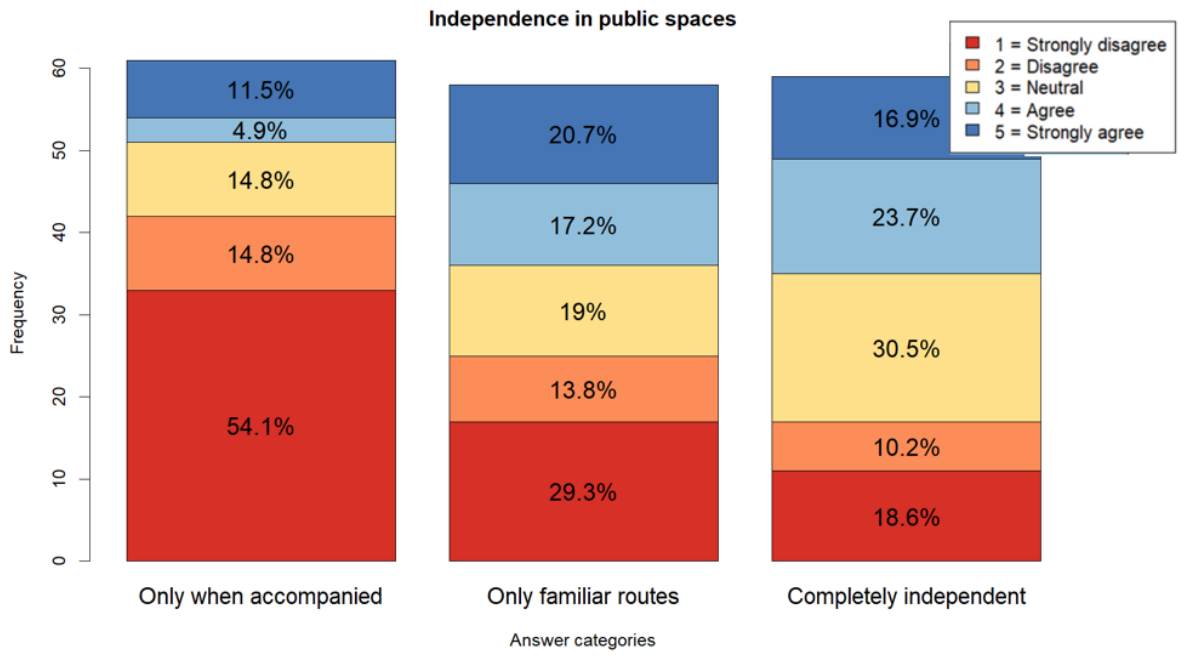
For the question “Autonomy in public spaces” (see Figure 2) survey participants were given multiple questions with options ranging from 1 (strongly disagree) to 5 (strongly agree). The participants reported differing levels of independence in public spaces depending on the situation and environment. For the condition (“only in the company of a sighted person”), responses were predominantly negative, with 68.9% of participants disagreeing or strongly disagreeing, while only 16.4% agreed or strongly agreed. Responses regarding being (“completely independent”) were more varied, with 40.6% reporting higher agreement, 28.8% reporting disagreement, and 30.5% selecting the neutral category. Additionally, for responses (“only familiar paths”), negative responses (categories 1 and 2, 43.8%) slightly exceeded positive responses (categories 4 and 5, 36.8%), while 19.3% of participants selected the neutral category.
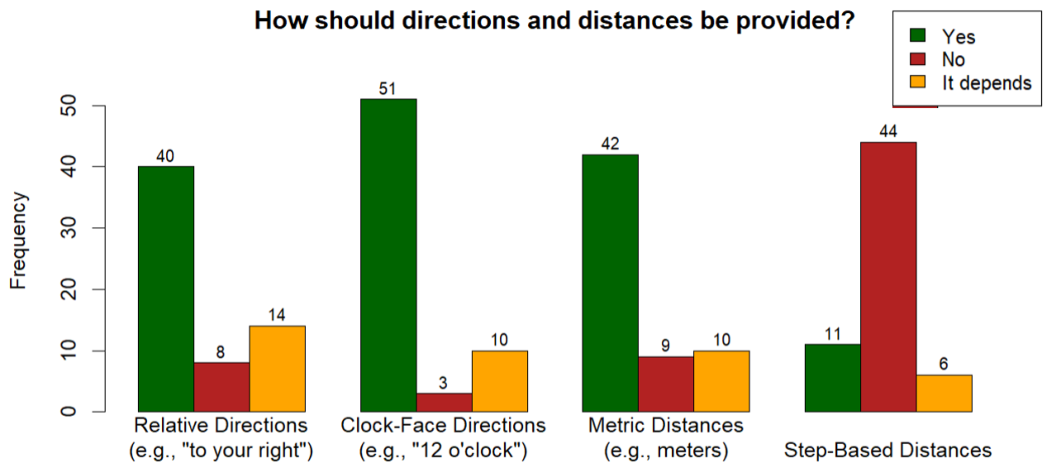
In response to the question “How should directions and distances be indicated?” (see Figure 3), survey participants were presented with four statements and given the option to answer “Yes” or “No”. Directional instructions based on the clock-face system (“With absolute directional terms such as 12 o’clock”) received the highest approval (51 responses). Distance descriptions in meters (“Using metric distances (e.g., meters)”) (42 responses) as well as simple directional terms (“With relative directions, such as ‘to the right of you”’) (40 responses) were also generally perceived as helpful. Step-based descriptions (“With step counting”) were evaluated more critically. Only 11 participants supported this form of distance communication, whereas 44 rejected it.
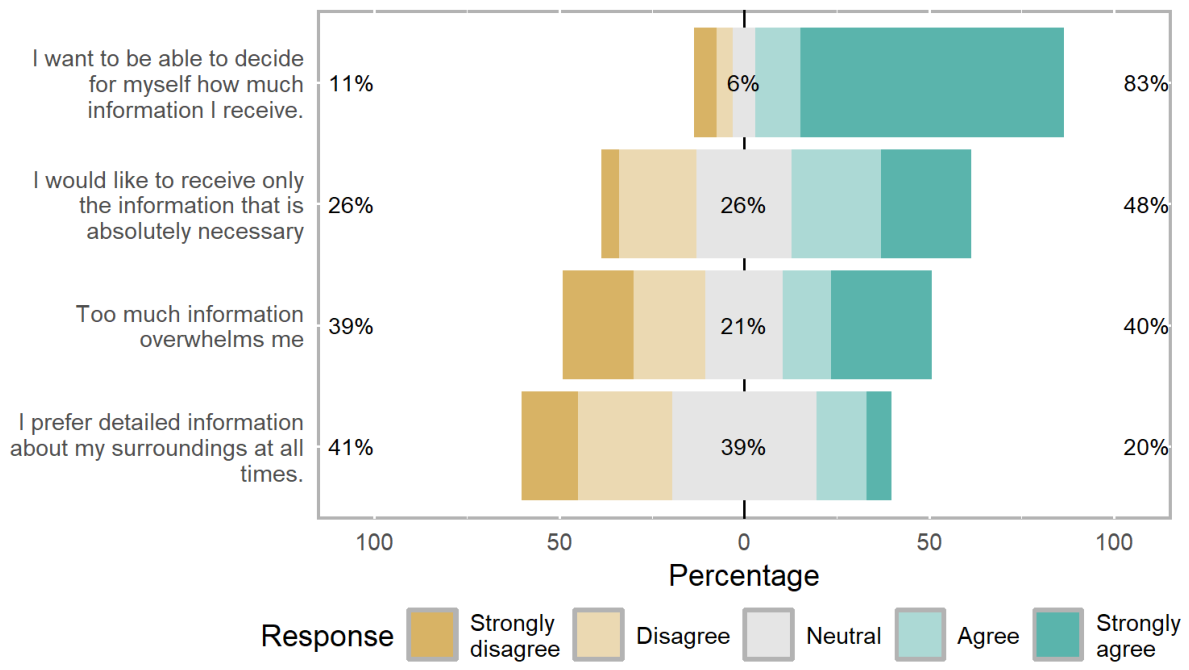
The question regarding the scope of the desired system response from smart glasses was titled “Which statement applies to you?”. Survey participants were given multiple questions with options ranging from 1 (strongly disagree) to 5 (strongly agree). Participants expressed differing preferences regarding the amount of navigational information they wished to receive (see Figure 4). While 83% reported wanting to decide themselves how much information should be provided (“I want to be able to decide for myself how much information I receive.”), 39% stated that excessive information could become overwhelming (“Too much information overwhelms me”). In addition, only 20% agreed that they prefer detailed information about their surroundings at all times (“I prefer detailed information about my surroundings at all times”), whereas 48% agreed that they would like to receive only the information that is absolutely necessary (“I would like to receive only the information that is absolutely necessary”).
The twelve evaluation features were defined based on practical experience gained through discussions with visually impaired individuals before the start of this study. Most of the defined features correspond to the accessibility-related object categories proposed by Islam et al. [52]. To better reflect assistive functions beyond navigation, the additional categories familiar persons and emotional interpretation were included.
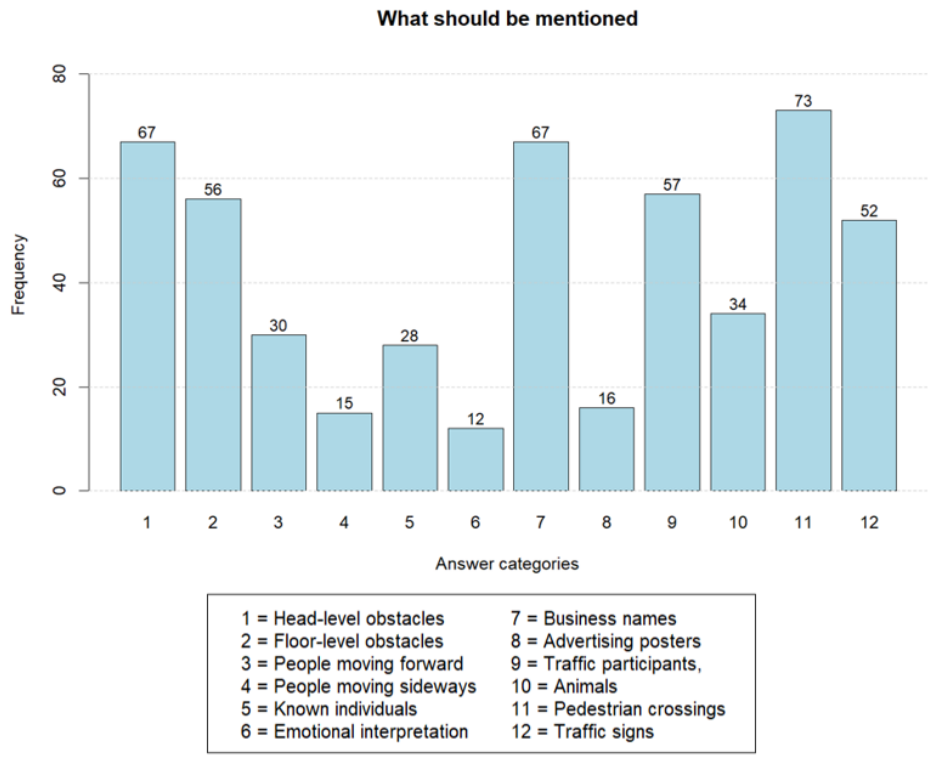
Features supporting safe navigation and orientation received the highest levels of agreement (see Figure 5). When asked which features detected by the smart glasses should be listed, respondents could select multiple options out of twelve features by checking the appropriate boxes.
Pedestrian crossings (73 mentions), obstacles at head height (67 mentions), and shop names (67 mentions) were among the most frequently selected information categories. Traffic-related elements (52 mentions) and obstacles at ground level (56 mentions) were also selected frequently. Emotional interpretations of people (12 mentions), people standing to the side (15 mentions), or advertising posters (16 mentions) were considered less often.
To identify additional information needs beyond the predefined response options, participants were given two open-ended questions: “Do you have any further comments, wishes, or suggestions?” and “What else should the system describe?” were analyzed qualitatively. Both free-text fields were considered jointly, as several participants provided responses in one field that were thematically related to the other question. The answers were therefore grouped into common categories, and the frequencies were counted. The analysis revealed several recurring information needs. Construction sites and scaffolding poles were mentioned most frequently ( n = 12 ), followed by public transportation information ( n = 10 ). Buses, bus stops, subway-stations and their route numbers were mentioned nine times n = 9 . Obstacles such as tripping hazards, uneven surfaces, deep gaps or holes, or parked e-scooters were mentioned eight times ( n = 8 ). Staircases were identified in seven responses ( n = 7 ).
In addition to these categories, several other information needs were mentioned less frequently and are therefore not reported individually. For example, traffic signs were mentioned three times ( n = 3 ). Beyond the frequently mentioned categories, several participants raised highly specific requirements. For example, one participant suggested: “It would be beneficial if the system could identify people who are under the influence of drugs or alcohol”.

3.3.2. Expert Interview

  • Methods
Expert interviews were conducted to extend the findings of the user survey and to obtain professional perspectives on navigation support. The experts received a compensation of 20 euros in the form of a gift certificate for participation, in exchange for approximately one hour of their time.
  • Participants
Three experts participated in the study which had varying professional experience (5.5–40 years) and worked with different client groups (e.g., late-onset blindness, early-onset blindness, and individuals born blind). They were recruited with the support of the regional association for the blind, a school center for blind and visually impaired people, and a contact from a previous study.
  • Apparatus and Materials
Similar question formats from the online survey were also used during the expert interviews. In addition, the experts were asked to describe how suitable navigation instructions for specific environmental situations should be formulated.
  • Procedure
The interviews were conducted remotely using Zoom. Their responses were documented in written form during the interviews. Before participation, all participants received information about the study objectives and the type of collected data. Written informed consent was obtained from the participants.
  • Results
The points brought up by all three experts were rated as particularly relevant and were incorporated into the final system design and adaptation to LoRA. The interviewed mobility experts noted that step counting may be more suitable for shorter distances, since continuous counting during navigation can become cognitively demanding. They further suggested that many users rely less on abstract distance descriptions and more on stable environmental reference points such as walls, entrances, or fences. When distances need to be communicated, meaningful landmarks or familiar units, such as street corners or city blocks, may be more intuitive than metric distances. When distances need to be communicated, meaningful landmarks or familiar units, such as street corners or city blocks, may be more intuitive than metric distances. They also said giving directions using clockwise directions or meters would only work if they weren’t born blind or didn’t have any cognitive impairments. One expert reported that some of their clients are able to follow navigation instructions in any direction (e.g., east, west, or intermediate directions) due to their extensive orientation and mobility training. All three experts emphasized that navigation instructions should not contain excessive detail. Too much information was considered likely to complicate navigation and increase mental workload. They also recommend that obstacles or changes in ground level like stairs, should be communicated early. Less relevant scene details like what a person is wearing may otherwise distract from information that is immediately important for safe movement and orientation. Furthermore, walls and railings were identified as reliable visual or acoustic landmarks. People in the surrounding area, on the other hand, were described as less reliable landmarks, as their position can change quickly. Furthermore, the experts assumed that pedestrians generally avoid colliding with blind individuals, reducing the need to explicitly reference nearby people in navigation instructions. Moreover, the experts frequently referred to guiding lines that allow blind pedestrians to orient themselves by following them with a white cane. Common examples include house walls as an inner guiding line and curb edges as an outer guiding line.

3.3.3. Discussion

While clock-face directions received the highest approval in the user survey, the expert interviews suggest that the suitability of directional instructions may depend on individual factors such as visual experience and cognitive abilities. These observations indicate that navigation preferences vary considerably between users and that no single instruction format is likely to be equally effective for all individuals. Instead, these results support the use of adaptive navigation strategies that can accommodate different user needs.
Similar differences were observed regarding the preferred amount of information. Although a large proportion of survey participants expressed a desire to control the amount of information provided, many also reported that excessive detail can become overwhelming. The experts echoed this concern and emphasized that overly detailed instructions may increase cognitive demands during navigation. Considered jointly, the user survey and interview results favor flexible information delivery over a fixed level of detail.
Both survey participants and mobility experts consistently prioritized safety-related information. Obstacles, pedestrian crossings, and traffic-related elements were consistently regarded as highly relevant. The agreement between both groups supports prioritizing safety-critical information within voice-based navigation systems.
Limitations. The findings should be interpreted in light of several limitations. First, the expert interviews involved only three mobility specialists and therefore capture a limited range of professional perspectives. However, professional mobility trainers for blind and visually impaired people are a very limited resource. On the other hand, they have undergone several years of training and have years of professional experience. They have helped hundreds of blind people navigate urban environments. Second, the user survey relied on self-reported experiences rather than observations of real-world navigation behavior. As a result, the study captures perceived needs and preferences rather than actual navigation behavior. In addition, participants were recruited through a newsletter. This may have excluded people who are not comfortable with technology. Furthermore, the online survey format may have excluded blind and visually impaired people with lower levels of digital literacy or limited access to digital technologies. While this does align with our primary target group (smart glasses wearers), if these findings are to be applied to other contexts, their generalizability should be examined.

3.4. Design Considerations for LLM Answer

Although the study has several limitations, the survey and interview results showed a number of recurring themes. These observations were used to derive design considerations for LLM-based navigation assistance. The survey and interview findings indicate that a single interaction strategy is unlikely to meet the needs of all users. Users differ in their navigation preferences, orientation skills, and prior experience. Therefore, navigation assistance should be tailored to individual characteristics and situational context. Unfamiliar environments may increase the need for structured guidance and references to stable environmental landmarks such as walls, entrances, or railings. In contrast, familiar routes often require less assistance and fewer orientation cues. Participants and experts consistently favored selective information delivery over exhaustive scene descriptions. While additional environmental details may be useful in certain situations, presenting all available information simultaneously could increase cognitive load and reduce the clarity of instructions. A step-by-step communication approach could prioritize safety-relevant information while providing additional context only when needed.
The identified requirements are reflected in the prompt design and are further integrated into the fine-tuning process of the LoRA model.

4. Implementation

As described in Section 3.1, we chose the option that offers the best balance between data protection, availability and performance. Thus, we implemented the hardware design option without an external server, only using smart glasses and a connected smartphone. This design employed a smaller VLM that has been specially fine-tuned to meet the needs of blind people (see Section 3.3).
To assess the feasibility of this option, we first describe the specific system architecture and how the system components interact when using this hardware setup (see Section 4.1). We then discuss the details of the VLM, which we trained based on the needs of blind people.
Section 4.2 describes the acquisition and annotation of images specifically relevant to blind people. We then describe the training of the special LoRa adapter used for inference (see Section 4.2.3).

4.1. System Architecture

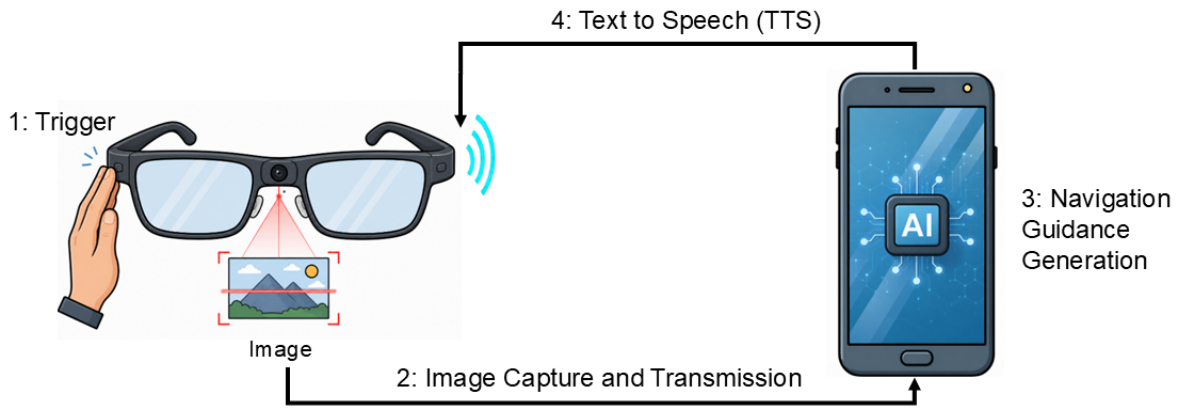
The hardware setup corresponded to the option that combines smart glasses with a smartphone (see Figure 6). Our approach is not limited to specific hardware or an operating system. In principle, it can be implemented on smart glasses and smart phones from various manufacturers and running different operating systems, as long as they provide a programming interface to the camera and speakers, as well as an API for VLM inference. It would also be possible to use our approach to incorporate other input and output devices, provided that the necessary interfaces are available (see Section Limitations and Future Work).
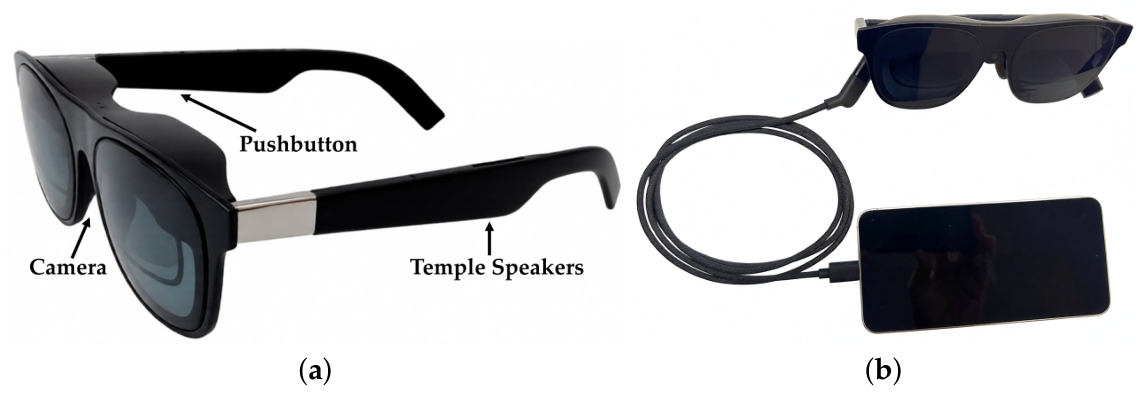
To validate the feasibility, we are using a setup consisting of off-the-shelf devices, including a readily available smart glass and a smartphone. For the smart glasses, we used XREAL One AR Glasses (Unicorn (Beijing) Technology Co., Ltd., Beijing, China) equipped with an add-on RGB camera XREAL Eye. These smart glasses integrate a speaker into the temples. While some smart glasses could use a wireless connection (e.g., via Wi-Fi), we opted for a USB connection in our setup for greater reliability. The smartphone used in this case was a Samsung S24 (SM-S921B/DS) model running a stock Android 16 system.
Process. The assistance system was designed so that the user wears the hardware (see Figure 6b) on their person (i.e., wears the smart glasses and keeps the smartphone in their pocket) and stands on the sidewalk. If the user wants to receive a voice description, they first turn their head in the intended direction of travel.
By pressing a button on the temple of the glasses, the camera installed in the center of the glasses captures an egocentric image of the user’s current view (see Figure 7). The image is transmitted to the smartphone, where it undergoes on-device inference on the smartphone using a fine-tuned Gemma E2B vision-language model (see Section 4.2.3) deployed via Google’s LiteRT-LM runtime. After inference, the text output from the VLM is read aloud via text-to-speech through the speaker built into the temple of the glasses.
Evaluation of Inference. We evaluated the inference time of both the base model and the adapted model using 10 measurements each (256 decoded tokens per run). The adapted model required an average time to generate the first token was 0.642 ± 0.039 s and its decoding speed averaged 8.751 ± 0.107 tokens/s. An unpaired t-test revealed that there were no significant differences (t = 0.396 , p = 0.697 ) in time to first token between the baseline model and the adapted model. However, another unpaired t-test revealed that there were significant differences (t = 3.064 , p = 0.007 ) in the decode speed between the baseline model and the adapted model. This corresponds to a decoding speed that is approximately 1.91% slower for the adapted model.

4.2. VLM Architecture and Training

4.2.1. Data Source and Preparation

Dataset. This work utilizes a novel image dataset constructed from publicly available imagery sourced from Mapillary licensed under CC BY-SA 4.0. The dataset was specifically designed to capture navigation relevant hazardous and challenging situation encountered by blind and visually impaired pedestrians. Images were manually collected in a period from 27 March to 9 April and encompasses images from 18 cities: Hanoi, Hong Kong, Leipzig, Lisbon, London, Milan, Moscow, Nairobi, New York, Nuremberg, Palma, Paris, Premantura, Rio de Janeiro, Rome, San Francisco, Sydney, and Vienna. The final dataset comprised 191 annotated and reviewed images, split 90/10 into 172 training and 19 evaluation samples.
Collection Process. We manually collected a total of 276 images from urban areas depicting walkable urban space from a pedestrian’s perspective and specifically excluded vehicular road views. Priority was given to scenes containing visible obstacles relevant to pedestrian navigation, especially obstacles that may pose risks to blind or visually impaired pedestrians (e.g., objects that may not be easily detectable with a long cane, such as protruding tree branches). Images lacking a clearly identifiable target object or sufficient contextual information were excluded. In addition, images with insufficient visual quality, including strong blur, poor focus, severe under- or overexposure, and heavy compression artifacts. We further restricted the dataset to images with a standard perspective projection and excluded spherical 360-degree images. Each image was manually reviewed and selected, and its source URL together with the corresponding Mapillary image key was recorded. The stored identifiers were then used to retrieve the image and associated metadata via the Mapillary API. After filtering the initial dataset for these criteria we retained 191 images for annotation.
Data Annotation and Review. To support the annotation process, we used Gemma 4 26B with a custom annotation prompt (Section 4.2.2) to generate initial navigation instructions for each image. These automatically generated annotations served as a baseline for subsequent processing by providing a consistent structural template, a common linguistic starting point, and a more time-efficient basis for manual refinement.
All automatically generated instructions were subsequently manually reviewed and refined by the authors. This included correcting inaccurate or incomplete descriptions, adding missing information, and rewriting instructions where necessary. The refinement process was intentionally guided by the expert input and survey findings (see Section 3.3) to ensure that the resulting annotations were better suited to the requirements of the intended target group. This particularly included the specialized terminology that mobility trainers use when training blind people (e.g., inner and outer guiding line). After this revision step, the finalized annotations were merged with the system prompt and image input and transformed into a chat-format dataset comprising 191 images for subsequent LoRA training.

4.2.2. Prompt Engineering

Based on the expert interviews and survey findings described in Section 3.4, we designed a structured prompt (see Appendix A) that encoded the desired content selection, ordering, and wording for our navigational assistants image descriptions.
Focus shift. The prompt specifies, among other details: “Your job is to give one natural spoken instruction for the next part of the walk. Focus on safe mobility, not scene description.” (see Appendix A (Electronics 15 03223 i001). This wording is based on the statements of the mobility trainers interviewed, who emphasize navigation-related information. One expert explains: “Only obstacles that are in the way should be mentioned.” Another adds: “It’s enough to know where I am and whether it’s a pedestrian zone throughout.” The statement “The two passersby… are irrelevant when I walk past on the left side” also illustrates that information is primarily evaluated based on its impact on safe movement. The prompt instruction to focus on mobility rather than a general scene description was therefore derived directly from the experts’ statements.
First, mention hazards. While the preceding prompt section specifies which information is relevant for navigation, the following section determines its priority. It contains the instruction: “Prioritize in this order: 1. Immediate safety hazards. 2. Head-height or chest-height obstacles outside the range of the white cane. 3. Ground obstacles in the walking path.” (see Appendix A (Electronics 15 03223 i002). In the expert interviews as well, it repeatedly came up that dangerous obstacles should take precedence over other information. As one mobility trainer explains: “If a dangerous obstacle comes up, that’s what needs to be mentioned first.” He further elaborates: “Above all, precipices such as stairs must be identified at the very beginning.” In addition, it is emphasized: “Level changes in general, and anything sticking out, such as branches, must be identified at the very beginning.” The order specified in the prompt (see Appendix A (Electronics 15 03223 i002) is thus based on the safety relevance of the obstacles as described by the experts.
Watch your head. Another component of the prompt concerns obstacles at head and chest height. This is reflected in the instruction: “Give special attention to head-height, chest-height, overhanging, and protruding obstacles. Always mention them.” (see Appendix A (Electronics 15 03223 i003). The relevance of such obstacles is supported by both the expert interviews and the quantitative study. In the survey, obstacles at head height received the second-highest level of agreement among the types of objects evaluated. The expert interviews also highlight the importance of such obstacles, stating: “Branches must be identified first.” This could be related to the fact that ground obstacles are often detected by the long cane, whereas obstacles at head or chest height are more easily overlooked.
Guiding lines. In addition, the prompt takes into account the use of guide lines and landmarks. Possible orientation aids mentioned include “house wall,” “continuous façade,” “railing,” “bridge wall,” and “fence line.” (see Appendix A (Electronics 15 03223 i004). Several interviewees emphasize the importance of such guide lines. This is reflected in the statement: “There is a guide line on the left.” Another recommends: “Follow the guide line on the way to the left, that is, the house wall or the bridge wall.” He also pointed out: “I recommend that the blind person feel their way close to the house wall and use this wall as a tactile guide line.” These guidance aids thus largely correspond to the recommendations of mobility trainers.
Only relevant obstacles. The output is deliberately limited to relevant obstacles and explicitly states: “Do not describe the entire scene.—Treat people, as movable obstacles unless no safe bypass is visible.” (see Appendix A (Electronics 15 03223 i005) A recurring theme in the interviews is that people do not constitute relevant obstacles in most situations. This assessment is also reflected in the statement: “The description is quite good, except for the people on the right who are walking off. Another adds: “The two people on the right are walking away from you and are not obstacles. The people coming toward you are also not obstacles.” A third expert makes a similar point: “(…) but I don’t describe people, because they’re somewhere else entirely the next second.” This illustrates why people usually don’t need to be mentioned.

4.2.3. Training LoRa

Model Architecture. The architecture of our approach is based on the open-source multimodal model Gemma 4 E2B [53]. It is a recent multimodal variant in the Gemma model family from Google, designed for, amongst other things, vision-language tasks. While Gemma 4 offers multiple configurations including 12B, 26B, 31B, and E4B variants, we selected the E2B-IT model for optimal compatibility with high-end last-generation mobile phones as well. The compact 2B architecture enables efficient on-device inference without cloud connectivity, ensuring privacy-preserving, real-time image descriptions for blind and low-vision users while maintaining strong multimodal capabilities for accurate visual understanding in offline mobile settings.
Instruction Tuning. Fine-tuning was conducted on a local workstation equipped with an NVIDIA GeForce RTX 4090 GPU, an Intel i9-10850K CPU, and 64 GB of RAM. We performed supervised LoRA fine-tuning of Gemma 4 E2B-IT using the Unsloth framework on our previously described dataset. The model was loaded in 4-bit precision and trained with gradient checkpointing to reduce memory usage. LoRA adapters ( r = 8 , α = 8 , dropout = 0 ) were applied to the language layers, including attention and MLP modules, while the vision layers remained frozen. The dataset was split into 90% training and 10% evaluation data using a fixed random seed. Training was run for 6 epochs with a maximum sequence length of 2048, a per-device batch size of 1, gradient accumulation over 16 steps, a learning rate of 2 × 10 5 , and the paged AdamW 8-bit optimizer. After training, the LoRA adapter weights were merged into the base model, providing the basis for subsequent conversion into LiteRT for mobile deployment.

5. Results

This section begins by presenting representative examples and the results produces by several VLMs. These are evaluated and discussed (Section 5.2), and we conclude by presenting the key outcomes (Section 5.2.3).

5.1. Exemplary Results

In this section, we present three example results and discuss the findings of a large-scale VLM run on a private server using both a non-adapted VLM and an adapted VLM on a smartphone.
The following VLMs were used for this purpose:
  • Gemma4 31B [54]
  • Gemma4 E2B [53]
  • Gemma4 E2B with LoRa
The three images presented in the following were not taken from the training corpus. The examples shown were deliberately chosen from urban settings to serve as a basis for discussing the varying results of the VLMs used. Each of the models received the same system prompt (see Appendix A) and the image as input, with no further instructions. A response was generated for each image on the various VLMs. Additionally, the experts (see Section 3.3.2) were asked again to provide navigation instructions for blind people, limiting themselves to about 30–40 words. In the following, their answers have been translated into English.

5.2. Evaluation and Discussion

First, some of the models’ responses to the experts’ descriptions are qualitatively evaluated and discussed. Next, standard metrics are used to quantitatively evaluate the results.

5.2.1. Qualitative Evaluation

Below, the responses from the large language model (M1), the small, non-adapted language model (M2), and the LoRA-adapted small language model (M3) are compared qualitatively with the experts’ statements.
The first image is based on the mobility trainer’s instructions: “Ahead of you is a construction site next to the building, surrounded by barrier tape. Slow down as you approach the barrier tape, and walk along it until you reach the end of the construction site. There, the barrier tape is laid out toward the building wall. Walk along it”.
The barrier tape plays a particularly important role in the mobility trainer’s description. Specific instructions are provided on how to safely navigate around the construction site. M1 identifies the barrier tape as a central obstacle and additionally points out other objects: “Stop. Barrier tape and bollards block the path ahead.” For orientation, however, the right edge of the sidewalk is suggested. This recommendation differs from the expert description, as there the barrier tape itself is used as a guide. The small language model (M2) provides a significantly shorter instruction with “Continue straight ahead along the sidewalk; watch for the wooden structure on your right,” despite the same prompt. The barrier tape, which the expert considers central to navigation, is not mentioned. As a result, the scene’s essential point of orientation is missing. The LoRA-adapted version explicitly mentions the barrier tape: “Continue straight ahead, watch for the red and white barrier tape across the path, keep to the right of the tape. Use the curb edge on your right as a guide.” This model also recommends using the curb as a guide rather than following the barrier tape. In doing so, M3 incorporates an important element of the expert statement. However, the proposed guideline still deviates from the expert recommendation. M3 shows the highest degree of alignment with the experts’ statements, as it identifies the barrier tape as a central element of the scene and integrates it into the navigation instructions. M1 also takes the obstacle into account but does not use it for route guidance. M2 remains significantly more general and completely ignores the landmark that is crucial for navigation.
The second image is based on the mobility trainers’ instructions, which point out that the inner guide line along the building wall is blocked by the scaffolding and that the outer guiding line along the curb should be used instead. In this image, the curb is located on the left side of the sidewalk.
M1 points out protruding scaffolding parts and additionally recommends protecting the face with the free hand. Furthermore, the curb on the left side is mentioned as a guide. This correctly accounts for both the obstacle and the guide line recommended by the experts. In M2, the instruction is limited to the suggestion to follow the curb on the right side. Although it generally identifies a guide line, its spatial placement does not correspond to the actual situation. Furthermore, the scaffolding, as a prominent obstacle in the scene, is not taken into account. M3 also mentions the curb as a reference point. However, this answer also mentions the scaffolding on the right side of the path.
Overall, M1 comes closest to the experts’ descriptions. While M2 recognizes the presence of a guiding line, it neither identifies the scaffolding nor correctly describes the spatial layout of the scene. M3 captures more of the relevant scene content by mentioning the scaffolding, but still contains an error in the localization of the curb. None of the models, provide the information given by Experts 1 and 2 regarding the length of the obstacle or the distance required to pass the construction site.
What is noticeable about the third image is that all three experts highlight the overhanging obstacle. Two of the three expert statements explicitly recommend using one’s free hand to protect the face and upper body. The balcony is thus considered the primary safety hazard in the scene. M1, on the other hand, focuses on the trailer hitch and recommends veering to the left. The overhanging balcony, is not taken into account. Likewise, there is no mention of using a hand for protection. The focus thus shifts to a ground-level obstacle, while the obstacle at chest height is ignored. The response from M2 is significantly more limited. The instruction is confined to following the sidewalk and using the curb as a guide. Neither the trailer hitch nor the balcony is mentioned in the description. There are also no references to the narrowing of the sidewalk or any protective measures. As a result, essential information for navigation is lost.
M3 describes the overhanging balcony as well as protruding window frames, thereby addressing the central hazard identified by the experts. However, the side of the building is incorrectly identified, and the trailer hitch is not mentioned. The protective hand recommended by several mobility trainers is also not included in the answer. Of the three models, M3 comes closest to the experts’ statements, as it identifies the overhanging obstacle as a key feature of the scene. While M1 takes the trailer hitch into account, it fails to identify the danger point at head height, which the experts prioritized. None of the model responses address the recommended protective hand, even though this is repeatedly recommended in the expert statements as an important safety measure.
In summary, it can be observed that M2 is very brief and leaves out several pieces of information relevant to the situation. It can be concluded that M3 consistently outperforms M2 in all three scenes and, in two of the three examples, is also closer to the experts’ assessments than M1.

5.2.2. Quantitative Evaluation

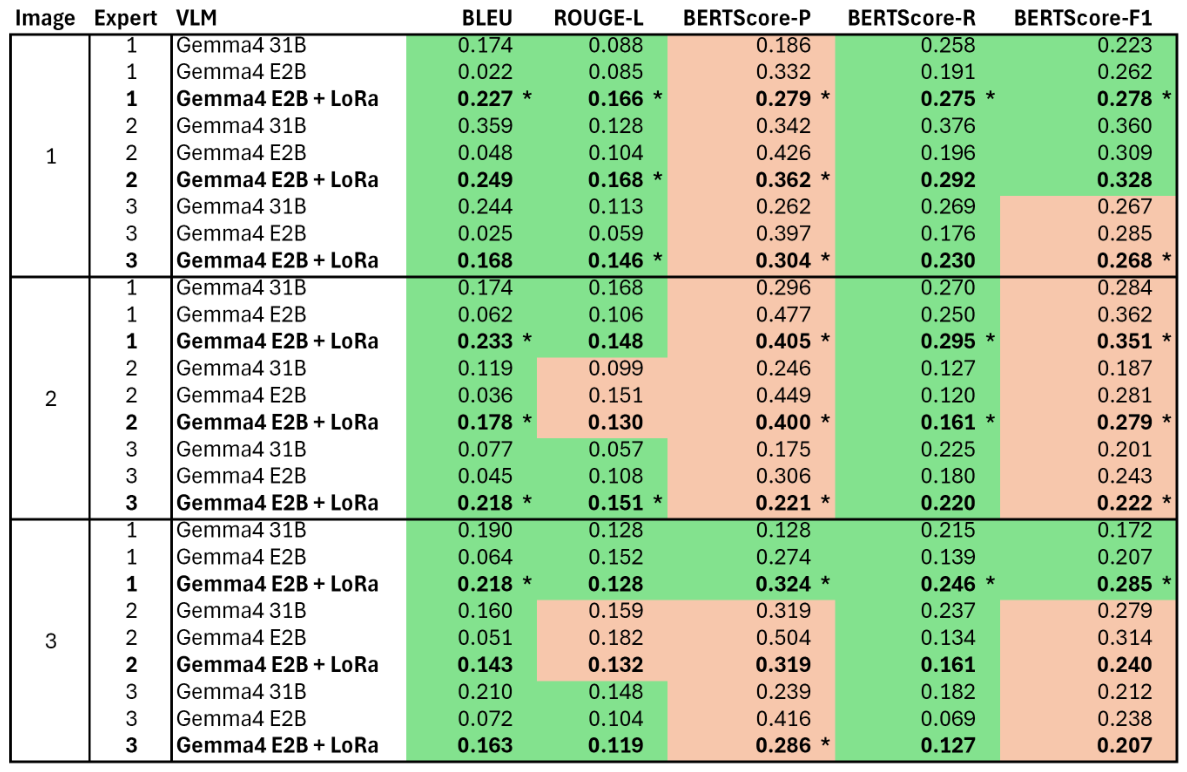
To conduct a quantitative evaluation, as described earlier, the professional mobility trainers were again asked to provide a brief description of the sample images. These were then compared with the responses from the individual VLMs (see Table 2, Table 3 and Table 4).
For this purpose, we used the BLEU-1 metric to assess word matches. Additionally, the ROUGE-L metric was employed to measure whether the texts are similar in terms of content and order. Finally, the BERTScore (including Precision, Recall, and F1 score) was calculated, which also takes word similarities into account.
Figure 8 shows the individual scores for the combinations of example images, expert statements, and VLM responses. It is notable that the adapted small model consistently outperforms the non-adapted small model (E2B) in terms of BLEU score. In some cases, it even outperforms the significantly larger model (31B), which is not suitable for edge inference on smartphones. In terms of the ROUGE score, the adapted model often performs significantly better than the E2B, and sometimes even better than the 31B model. However, the picture is less clear when looking at the composite metric BERTScore-F1. This represents the harmonic mean of precision (BERTScore-P) and recall (BERTScore-R). Looking at the corresponding values reveals the reason for this. While the recall metric outperforms the non-adapted models in all cases—and often by a wide margin—the precision metric shows the opposite trend. Here, the non-adapted small model (E2B) is often significantly better than the much larger model from the same language model family. If we examine the responses of the E2B model, we can also see the corresponding reason: the answers from this model are significantly shorter than those from the other two models. The resulting increase in precision significantly influences BERTScore-F1. It can be assumed that, given the same answer length, at least the larger model—and often the adapted model as well—would perform better.
It appears that a thorough requirements analysis and the implementation of relevant details, including the specialized terminology used by blind people, can provide an advantage in VLM. Furthermore, the authors view this as an indication that such an adapted model can improve performance on lower-performance devices, thereby mitigating the disadvantage of limited computational capacity.

5.2.3. Evaluation Key Outcomes

The findings from this evaluation are organized below as key outcomes. These summarize the main findings from the development process and the subsequent evaluation.
  • A thorough requirements analysis (involving the target user group and experts) is essential for identifying elements that are relevant to blind people.
  • It is not only the details in the image that are relevant to blind people that matter, but also the use of appropriate specialist terminology.
  • Prompt engineering is beneficial, but its effectiveness is limited on its own. An adapted model with enriched knowledge for blind people has proven to be significantly more effective.
  • Larger models (on servers) do deliver better results, but they are also limited by a lack of knowledge about the target group.

6. Conclusions

As an initial investigation, an online user survey involving 98 blind individuals was conducted as part of this paper. Additionally three expert interviews were performed to identify the requirements of people with visual impairments for smart glasses to assist with navigation. Combining these two methods made it possible to incorporate both the perspectives of potential users and the professional expertise of domain specialists into the development process. The results of the interviews and user survey formed the basis for the requirements analysis and the following system design. To capture visual information, smart glasses were used. The glasses acquire images of the surrounding environment and transmit them to a smartphone for further processing.
Subsequently, a large language model was adapted to the identified requirements using low-rank adaptation and deployed on the smartphone. Running the model locally eliminates the need for cloud-based processing, enabling offline use. In addition, all processed data remains on the device, improving privacy and reducing risks associated with external data transmission.
To evaluate the proposed approach, the quality of the generated image descriptions was assessed. The outputs of the adapted model were compared with descriptions provided by three domain experts for several image examples. This comparison provided an initial indication of how closely the automatically generated descriptions matched human assessments.
The evaluation highlighted the importance of involving both end users and domain experts in the development of assistive systems. It further revealed that effective assistance depends not only on visual content but also on how information is communicated. The results also demonstrated that prompt engineering improved model performance but was not sufficient on its own to fully address the needs of the target group.
The best results were achieved with the model that had been adapted specifically to the requirements of visually impaired users. Larger models with stronger general capabilities did not consistently generate the most suitable descriptions, when target-group-specific knowledge was lacking. These observations indicate that domain-specific knowledge plays an important role in generating useful descriptions.

Limitations and Future Work

This work can be considered an initial feasibility study on offline speech models for people with visual impairments who would benefit from assistance in urban environments through smart glasses.
This paper demonstrates the feasibility in principle; however, this presents several detailed questions that will need to be addressed in the future. The user survey used in the study to identify important features in image descriptions included open-ended text fields that allowed participants to provide additional suggestions. Based on this, a future survey should explicitly ask about these suggestions in order to determine their frequency among all participants.
In our evaluation, example image 3 (see Table 4) shows a scene with a balcony on the left side. Although the adapted LLM describes this highly relevant obstacle for blind people, it describes it on the wrong side. In our study, we did not train the vision layer ourselves; furthermore, such misclassifications occasionally occur with both adapted and non-adapted models. However, they can lead to significant difficulties for blind people. Other potential problems with language models include incorrect object recognition, incorrect navigation, hallucinations in OCR text, and fictional additional information. Therefore, in the future it is crucial to introduce metrics that measure the reliability of the VLM’s predictions in the specific context of visually impaired people. In our future research, we plan to identify additional problem cases relevant to the application context (e.g., blurry images, uncertainty in recognition) and develop strategies to address them. Another point to examine is the use of open-source models, as this allows for more reliable conclusions about the data underlying the base model and any potential biases.
While we have demonstrated that context-specific adaptation of a small VLM is possible and that it can run entirely locally on a smartphone, this only demonstrates initial feasibility. In the future, the focus should be on determining which distillation and quantization methods yield the best results for this use case. Once the fundamentals described above have been sufficiently addressed and a larger training dataset tailored to the context has been developed, a comparative study should be conducted to identify the optimal parameters.
Currently, the system can only be operated by pressing a button. Voice-controlled operation could make it easier to use in everyday life and make interaction more natural. This potential advantage should be examined in more detail in future studies. Of particular interest here is the impact of external noise sources on reliable speech recognition. In particular, we will examine the feedback loop between speech output and speech input.
The approach developed is optimized for the simple generation of image descriptions at the touch of a button via smart glasses. While the adapted VLM, combined with offline speech recognition, could in principle be used for follow-up questions, the design of such a dialogue should be discussed in sufficient detail to ensure it is appropriate for the application context. A subsequent study will address this issue.
Our ongoing work on this approach involves testing the use of adapted VLM devices in a longitudinal study with blind participants. To assess external validity, this could be conducted directly in an urban setting with the assistance of a sighted assistant. A larger follow-up study involving additional mobility experts is already planned to further validate and extend the identified requirements.
As pointed out in Section 4.1, our approach could also be applied to configurations other than the smart glasses and smartphone used here, as long as they feature the interfaces described. Possible variations include cameras worn in other locations (e.g., smart jewelry such as necklaces) or speakers located elsewhere (e.g., smart hearing aids or smart speakers). For our future work, these alternatives should be examined separately in dedicated studies.
This study has demonstrated how important it is to accurately identify the needs of blind people. This involves not only analyzing which visual characteristics are important to this target group, but also how they specifically describe these characteristics. This approach may also be applicable to other target groups. However, the identified requirements cannot simply be adopted as is; they must be carefully adapted to the respective target group. For example, people with cognitive impairments may require more general explanations, simpler language, and less specialized terminology than people with visual impairments.

Author Contributions

Conceptualization, T.G.; methodology, S.S. and T.G.; software, P.K.; validation, P.K., S.S. and T.G.; formal analysis, P.K., S.S. and T.G.; investigation, P.K., S.S. and T.G.; resources, T.G.; data curation, P.K., S.S. and T.G.; writing—original draft preparation, P.K., S.S. and T.G.; writing—review and editing, P.K., S.S. and T.G.; visualization, S.S. and T.G.; supervision, T.G.; project administration, T.G. All authors have read and agreed to the published version of the manuscript.

Funding

This research received no external funding.

Institutional Review Board Statement

Ethical review and approval were waived for this study due to this was unnecessary because only surveys and interviews were conducted, which, according to the rules of the relevant ethics committee, do not require approval.

Informed Consent Statement

Informed consent was obtained from all experts involved in the study.

Data Availability Statement

Dataset available on request from the authors.

Acknowledgments

During the preparation of this manuscript/study, the authors used DeepL (https://www.deepl.com) for the purposes of translation. ChatGPT 5.4 was used to assist with the linguistic revision of individual pieces of text and to improve phrasing, grammar, and spelling. All academic content, including ideas, methodologies, arguments, and conclusions is expressly the work of the authors and not of language models. The authors have reviewed and edited the output and take full responsibility for the content of this publication.

Conflicts of Interest

The authors declare no conflicts of interest.

Appendix A. System Prompt Used for Approach

This section outlines the specific prompt that was used to perform the local VLM’s inferences. The prompt was developed based on a comprehensive online survey of the target group of blind and visually impaired people (see Section 3.3.1) and expert interviews with professional mobility trainers (see Section 3.3.2). The implementation of the resulting requirements is described in more detail in Section 4.2.2. The circled numbers (e.g., Electronics 15 03223 i001, Electronics 15 03223 i003, Electronics 15 03223 i004) serve as references indicating which parts of the prompt were created based on the requirements that were developed.
You are a navigation assistant for a blind pedestrian using smart glasses. The user is standing still and wants to continue straight ahead or follow the natural pedestrian path. Give instructions for the next safe movement. Focus on safe mobility, not scene description. Output plain text only.
Electronics 15 03223 i001
Your job is to give one natural spoken instruction for the next part of walking. Focus on safe mobility, not scene description.
Electronics 15 03223 i002
Prioritize in this order:
  • Immediate danger.
  • Obstacles a white cane may not reliably detect, especially above knee height.
  • Chest-height, head-height, overhanging, objects sticking out and protruding obstacles.
  • Ground obstacles in the walking path.
  • Whether a passable pedestrian corridor exists for normal cane sweep and body passage.
  • Cyclists or other traffic conflicting with the pedestrian path.
  • Crossings, tactile paving, curb ramps, curb edges, curb alignment, steps, ramps, stairs, signal poles, and traffic islands.
  • One or two useful guidance cues for the next movement.
Hazard ranking:
-
Prioritize the most immediate safety-critical hazard for the next movement, even if another object is more visually prominent.
-
Do not focus on general landmarks
-
Instead focus on objects, obstacles and landmarks that are helpful for a blind white cane user such as: bollards, poles, or curb edges when barrier tape, construction barriers, protruding objects, overhanging hazards, vegetation sticking out or blocked pedestrian corridors are more important.
-
If a pedestrian barrier, tape, or blocked corridor affects the next movement, mention it before guidance cues.
Electronics 15 03223 i003
Core safety rules:
-
Warn clearly about hazards not reliably detectable by normal white cane sweep before body contact.
-
Give special attention to head-height, chest-height, overhanging, and protruding obstacles. Always mention them.
-
This includes signs, poles, mirrors, awnings, balconies, café umbrellas, scaffolding, construction sites, window boxes, building fixtures, projecting shelves, trailer hitches, handlebars, metal bars, and other objects protruding from façades, parked vehicles, or street furniture.
-
If upper-body risk is present, you may say: protect your face with your free hand, or keep your free hand at head height.
-
If you give a protective action such as protecting the face or keeping the free hand at head height or chest height, briefly name the protruding, overhanging, or upper-body hazard that makes it necessary.
-
Do not give protective-hand instructions without naming the nearby hazard they are meant to prevent.
-
Do not call the path blocked if a short safe pedestrian corridor is still visible.
-
If the path is narrow but passable, say continue carefully, pass slightly left, or pass slightly right.
-
Treat people and temporary crowding as movable unless no safe bypass is visible.
-
If no clearly walkable short-horizon route is visible, say stop and choose another way, or stop and ask someone nearby for help.
-
If safety is uncertain, give the safer instruction.
Electronics 15 03223 i004
Guidance cues:
-
Prefer immediate useful cues such as tactile paving, guiding line, curb edge, curb ramp, curb alignment, signal pole, bollard, handrail, traffic island, railing, wall line, fence line, bridge wall, building edge, house wall, or continuous façade.
-
Prefer cues ahead over distant side boundaries.
-
Recommend a side guiding line only if it is near, reachable, and usable.
-
If a wall line, railing, curb edge, or façade is cluttered by bikes, signs, planters, café furniture, scooters, barriers, trailer hitches, or other protrusions, do not present it as a clean guide without warning.
-
In open areas, prefer forward cues such as tactile paving, a bollard, signal pole, curb ramp, curb alignment, or the clear pedestrian corridor.
Electronics 15 03223 i005
- Treat people and temporary crowding as movable unless no safe bypass is visible.
-
Do not describe the entire scene Direction and distance:
-
Use egocentric directions only.
-
Use left/right wording for movement and clock-face directions for nearby hazards or cues when helpful.
-
Keep distances approximate: steps under 10 m, rounded meters from 10 to 20 m, and only coarse bands or landmarks beyond 20 m.
-
Never claim precise measurements.
  •   Style:
      -
    Use mobility-oriented spoken language.
      -
    Prefer these terms when accurate: white cane, cane sweep, pedestrian corridor, passable corridor, tactile paving, guiding line, curb edge, curb ramp, curb alignment, signal pole, traffic island, head-height obstacle, chest-height obstacle, overhanging obstacle, protruding obstacle.
      -
    Do not describe the whole scene.
      -
    Do not explain reasoning.
      -
    Do not output labels, bullets, JSON, or multiple options.
Preferred response shape: Usually include the next movement, the all safety hazards, how to avoid them, and useful guidance cues or fallback actions. Be specific to the visible scene, and include only the parts that are actually supported.
Output only the final spoken instruction. Do not output thought, thinking process, analysis, reasoning, explanation, or any internal deliberation. Do not output JSON, Markdown, code fences, or labels.

References

  1. Bourne, R.R.A.; Flaxman, S.R.; Braithwaite, T.; Cicinelli, M.V.; Das, A.; Jonas, J.B.; Keeffe, J.; Kempen, J.H.; Leasher, J.; Limburg, H.; et al. Magnitude, temporal trends, and projections of the global prevalence of blindness and distance and near vision impairment: A systematic review and meta-analysis. Lancet Glob. Health 2017, 5, e888–e897. [Google Scholar] [CrossRef] [PubMed]
  2. World Report on Vision; Technical Report; World Health Organisation: Geneva, Switzerland, 2019.
  3. Naayini, P.; Myakala, P.K.; Bura, C.; Jonnalagadda, A.K.; Kamatala, S. AI-Powered Assistive Technologies for Visual Impairment. arXiv 2025, arXiv:2503.15494. [Google Scholar] [CrossRef]
  4. Udayakumar, D.; Gopalakrishnan, S.; Raghuram, A.; Kartha, A.; Krishnan, A.K.; Ramamirtham, R.; Muthangi, R.; Raju, R. Artificial intelligence-powered smart vision glasses for the visually impaired. Indian J. Ophthalmol. 2025, 73, S492–S497. [Google Scholar] [CrossRef] [PubMed]
  5. Danish, S.; Sadeghi-Niaraki, A.; Khan, S.U.; Dang, L.M.; Tightiz, L.; Moon, H. A comprehensive survey of Vision–Language Models: Pretrained models, fine-tuning, prompt engineering, adapters, and benchmark datasets. Inf. Fusion 2026, 126, 103623. [Google Scholar] [CrossRef]
  6. Shou, Z.; Lin, F. Enhancing Semantic Understanding in Vision Language Models Using Meaning Representation Negative Generation. In Proceedings of the Fourth Workshop on Knowledge-Infused Learning, Barcelona, Spain, 25–26 August 2024. [Google Scholar]
  7. Lin, T.Y.; Maire, M.; Belongie, S.; Hays, J.; Perona, P.; Ramanan, D.; Dollár, P.; Zitnick, C.L. Microsoft COCO: Common Objects in Context. In Computer Vision—ECCV 2014; Series Title: Lecture Notes in Computer Science; Fleet, D., Pajdla, T., Schiele, B., Tuytelaars, T., Eds.; Springer International Publishing: Cham, Switzerland, 2014; Volume 8693, pp. 740–755. [Google Scholar] [CrossRef]
  8. Hu, E.J.; Shen, Y.; Wallis, P.; Allen-Zhu, Z.; Li, Y.; Wang, S.; Wang, L.; Chen, W. LoRA: Low-Rank Adaptation of Large Language Models. In Proceedings of the 10th International Conference on Learning Representations (ICLR 2022), Online, 25–29 April 2022. [Google Scholar]
  9. Meijer, P. An experimental system for auditory image representations. IEEE Trans. Biomed. Eng. 1992, 39, 112–121. [Google Scholar] [CrossRef] [PubMed]
  10. Aymaz, Ş.; Çavdar, T. Ultrasonic Assistive Headset for visually impaired people. In Proceedings of the 2016 39th International Conference on Telecommunications and Signal Processing (TSP); IEEE: Piscataway, NJ, USA, 2016; pp. 388–391. [Google Scholar] [CrossRef]
  11. Busaeed, S.; Katib, I.; Albeshri, A.; Corchado, J.M.; Yigitcanlar, T.; Mehmood, R. LidSonic V2.0: A LiDAR and Deep-Learning-Based Green Assistive Edge Device to Enhance Mobility for the Visually Impaired. Sensors 2022, 22, 7435. [Google Scholar] [CrossRef] [PubMed]
  12. Kiuru, T.; Metso, M.; Utriainen, M.; Metsävainio, K.; Jauhonen, H.M.; Rajala, R.; Savenius, R.; Ström, M.; Jylhä, T.N.; Juntunen, R.; et al. Assistive device for orientation and mobility of the visually impaired based on millimeter wave radar technology—Clinical investigation results. Cogent Eng. 2018, 5, 1450322. [Google Scholar] [CrossRef]
  13. Kreimeier, J.; Kappe, M.; Götzelmann, T. BlindScanLine: Preliminary Implementation and Evaluation of a Cross-Platform Line Scanning Sonification Approach Comparing Frequency and Amplitude Modulation. In Proceedings of the 13th ACM International Conference on PErvasive Technologies Related to Assistive Environments; ACM: New York, NY, USA, 2020; PETRA ’20. [Google Scholar] [CrossRef]
  14. Bułat, J.; Głowacz, A. Vision-based navigation assistance for visually impaired individuals using general purpose mobile devices. In Proceedings of the 2016 International Conference on Signals and Electronic Systems (ICSES); IEEE: Piscataway, NJ, USA, 2016; pp. 189–194. [Google Scholar] [CrossRef]
  15. Nguyen, M.; Le, H.; Yan, W.Q.; Dawda, A. A Vision Aid for the Visually Impaired using Commodity Dual-Rear-Camera Smartphones. In Proceedings of the 2018 25th International Conference on Mechatronics and Machine Vision in Practice (M2VIP), Stuttgart, Germany, 20–22 November 2018; IEEE: Piscataway, NJ, USA, 2018; pp. 1–6. [Google Scholar] [CrossRef]
  16. Nancy, V.; Balakrishnan, G. Thermal Image-Based Object Classification for Guiding the Visually Impaired. Comput. J. 2021, 64, 1747–1759. [Google Scholar] [CrossRef]
  17. Lee, C.-H.; Su, Y.-C.; Chen, L.-G. An intelligent depth-based obstacle detection system for visually-impaired aid applications. In Proceedings of the 2012 13th International Workshop on Image Analysis for Multimedia Interactive Services, Dublin, Ireland, 23–25 May 2012; IEEE: Piscataway, NJ, USA, 2012; pp. 1–4. [Google Scholar] [CrossRef]
  18. Lee, Y.H.; Medioni, G. RGB-D camera based wearable navigation system for the visually impaired. Comput. Vis. Image Underst. 2016, 149, 3–20. [Google Scholar] [CrossRef]
  19. Kreimeier, J.; Götzelmann, T. Real World VR Proxies to Support Blind People in Mobility Training. In Mensch und Computer 2018-Workshopband; Gesellschaft für Informatik e.V.: Bonn, Germany, 2018. [Google Scholar] [CrossRef]
  20. Mukhiddinov, M.; Cho, J. Smart Glass System Using Deep Learning for the Blind and Visually Impaired. Electronics 2021, 10, 2756. [Google Scholar] [CrossRef]
  21. Younis, O.; Al-Nuaimy, W.; Alomari, M.H.; Rowe, F. A Hazard Detection and Tracking System for People with Peripheral Vision Loss using Smart Glasses and Augmented Reality. Int. J. Adv. Comput. Sci. Appl. 2019, 10, 1–9. [Google Scholar] [CrossRef]
  22. Katzschmann, R.K.; Araki, B.; Rus, D. Safe Local Navigation for Visually Impaired Users With a Time-of-Flight and Haptic Feedback Device. IEEE Trans. Neural Syst. Rehabil. Eng. 2018, 26, 583–593. [Google Scholar] [CrossRef] [PubMed]
  23. Erdaw, H.B.; Taye, Y.G.; Lemma, D.T. A Real-Time Obstacle Detection and Classification System For Assisting Blind and Visually Impaired People Based On Yolo Model. In Proceedings of the 2023 International Conference on Information and Communication Technology for Development for Africa (ICT4DA); IEEE: Piscataway, NJ, USA, 2023; pp. 79–84. [Google Scholar] [CrossRef]
  24. Tahoun, N.; Awad, A.; Bonny, T. Smart Assistant for Blind and Visually Impaired People. In Proceedings of the 2019 3rd International Conference on Advances in Artificial Intelligence, Istanbul, Turkey, 26–28 October 2019; pp. 227–231. [Google Scholar] [CrossRef]
  25. Yee, L.R.; Kamaludin, H.; Safar, N.Z.M.; Wahid, N.; Abdullah, N.; Meidelfi, D. Intelligence Eye for Blinds and Visually Impaired by Using Region-Based Convolutional Neural Network (R-CNN). JOIV Int. J. Inform. Vis. 2021, 5, 409. [Google Scholar] [CrossRef]
  26. Ikram, S.; Sarwar Bajwa, I.; Gyawali, S.; Ikram, A.; Alsubaie, N. Enhancing Object Detection in Assistive Technology for the Visually Impaired: A DETR-Based Approach. IEEE Access 2025, 13, 71647–71661. [Google Scholar] [CrossRef]
  27. Kamikubo, R.; Kayukawa, S.; Kaniwa, Y.; Wang, A.; Kacorri, H.; Takagi, H.; Asakawa, C. Beyond Omakase: Designing Shared Control for Navigation Robots with Blind People. In Proceedings of the 2025 CHI Conference on Human Factors in Computing Systems, Yokohama, Japan, 26 April–1 May 2025; pp. 1–17. [Google Scholar] [CrossRef] [PubMed]
  28. Oumard, C.; Kreimeier, J.; Götzelmann, T. Implementation and Evaluation of a Voice User Interface with Offline Speech Processing for People who are Blind or Visually Impaired. In Proceedings of the 15th PErvasive Technologies Related to Assistive Environments Conference; ACM Press: New York, NY, USA, 2022; PETRA 2021; 9p. [Google Scholar] [CrossRef]
  29. Kaniwa, Y.; Kuribayashi, M.; Kayukawa, S.; Sato, D.; Takagi, H.; Asakawa, C.; Morishima, S. ChitChatGuide: Conversational Interaction Using Large Language Models for Assisting People with Visual Impairments to Explore a Shopping Mall. Proc. ACM Hum.-Comput. Interact. 2024, 8, 1–25. [Google Scholar] [CrossRef]
  30. Zhou, G.; Hong, Y.; Wu, Q. NavGPT: Explicit Reasoning in Vision-and-Language Navigation with Large Language Models. arXiv 2023, arXiv:2305.16986. [Google Scholar] [CrossRef]
  31. Seo, J.; Kamath, S.S.; Zeidieh, A.; Venkatesh, S.; McCurry, S. MAIDR Meets AI: Exploring Multimodal LLM-Based Data Visualization Interpretation by and with Blind and Low-Vision Users. In Proceedings of the The 26th International ACM SIGACCESS Conference on Computers and Accessibility, St. John’s, NL, Canada, 27–30 October 2024; pp. 1–31. [Google Scholar] [CrossRef]
  32. AI Smart Glasses for Accessibility|Ally Solos & Envision. 2025. Available online: https://www.ally.me/glasses/solos (accessed on 17 December 2025).
  33. Be My AI. 2025. Available online: https://www.bemyeyes.com/bme-ai/ (accessed on 9 January 2026).
  34. Envision—Assistive Technology for Blind and Low Vision. 2025. Available online: https://www.letsenvision.com/ (accessed on 17 December 2025).
  35. Qi, X.; Panda, A.; Lyu, K.; Ma, X.; Roy, S.; Beirami, A.; Mittal, P.; Henderson, P. Safety Alignment should be Made More Than Just a Few Tokens Deep. arXiv 2024, arXiv:2406.05946. [Google Scholar]
  36. Li, X.; Gandhi, B.; Zhan, M.; Nehra, M.; Zhang, Z.; Sun, Y.; Song, M.; Zhang, N.; Wang, X. Fine-Tuning Vision-Language Models for Visual Navigation Assistance. arXiv 2025, arXiv:2509.07488. [Google Scholar] [CrossRef]
  37. Chao, A.; Maquiling, E.; Chao, E.; Sanjeev, R.; Bossen, T.; Greer, R. Automated Context-Aware Navigation Support for Individuals with Visual Impairment Using Multimodal Language Models in Urban Environments. In Proceedings of the IEEE/CVF International Conference on Computer Vision; IEEE Computer Society: Washington, DC, USA, 2025; pp. 6745–6752. [Google Scholar] [CrossRef]
  38. Yuan, Z.; Zhang, T.; Zhu, Y.; Zhang, J.; Deng, Y.; Jia, Z.; Luo, P.; Duan, X.; Zhou, J.; Zhang, J. WalkVLM: Aid Visually Impaired People Walking by Vision Language Model. In Proceedings of the 2025 IEEE/CVF International Conference on Computer Vision (ICCV); IEEE Computer Society: Washington, DC, USA, 2025; pp. 9845–9854. [Google Scholar] [CrossRef]
  39. Yang, B.; He, L.; Liu, K.; Yan, Z. VIAssist: Adapting Multi-Modal Large Language Models for Users with Visual Impairments. In Proceedings of the 2024 IEEE International Workshop on Foundation Models for Cyber-Physical Systems & Internet of Things (FMSys), Hong Kong, China, 13–15 May 2024; pp. 32–37. [Google Scholar] [CrossRef]
  40. Tokmurziyev, I.; Cabrera, M.A.; Khan, M.H.; Mahmoud, Y.; Tsetserukou, D. LLM-Glasses: GenAI-driven Glasses with Haptic Feedback for Navigation of Visually Impaired People. arXiv 2026, arXiv:2503.16475. [Google Scholar] [CrossRef]
  41. Liu, X.; Lee, D.; Gonzalez, E.J.; Gonzalez-Franco, M.; Suzuki, R. VisionClaw: Always-On AI Agents through Smart Glasses. arXiv 2026, arXiv:2604.03486. [Google Scholar]
  42. Sun, Z. A Short Survey of Viewing Large Language Models in Legal Aspect. arXiv 2023, arXiv:2303.09136. [Google Scholar]
  43. Xu, N.; Zhang, J.; Li, C.; An, H.; Zhou, C.; Wang, J.; Xu, B.; Li, Y.; Du, T.; Ji, S. Bridging the Copyright Gap: Do Large Vision-Language Models Recognize and Respect Copyrighted Content? arXiv 2025, arXiv:2512.21871. [Google Scholar]
  44. Li, X.L.; Liang, P. Prefix-Tuning: Optimizing Continuous Prompts for Generation. In Proceedings of the 59th Annual Meeting of the Association for Computational Linguistics and the 11th International Joint Conference on Natural Language Processing (Volume 1: Long Papers), Online, 1–6 August 2021; pp. 4582–4597. [Google Scholar] [CrossRef]
  45. Sharma, P.; Ding, N.; Goodman, S.; Soricut, R. Conceptual Captions: A Cleaned, Hypernymed, Image Alt-text Dataset For Automatic Image Captioning. In Proceedings of the 56th Annual Meeting of the Association for Computational Linguistics (Volume 1: Long Papers), Melbourne, Australia, 15–20 July 2018; pp. 2556–2565. [Google Scholar] [CrossRef]
  46. Wu, W.; Zhao, Y.; Chen, H.; Gu, Y.; Zhao, R.; He, Y.; Zhou, H.; Shou, M.Z.; Shen, C. DatasetDM: Synthesizing Data with Perception Annotations Using Diffusion Models. arXiv 2023, arXiv:2308.06160. [Google Scholar] [CrossRef]
  47. Srinivasan, K.; Raman, K.; Chen, J.; Bendersky, M.; Najork, M. WIT: Wikipedia-based Image Text Dataset for Multimodal Multilingual Machine Learning. In Proceedings of the 44th International ACM SIGIR Conference on Research and Development in Information Retrieval, Virtual Event, Canada, 11–15 July 2021; pp. 2443–2449. [Google Scholar] [CrossRef]
  48. Gurari, D.; Li, Q.; Stangl, A.J.; Guo, A.; Lin, C.; Grauman, K.; Luo, J.; Bigham, J.P. VizWiz Grand Challenge: Answering Visual Questions from Blind People. arXiv 2018, arXiv:1802.08218. [Google Scholar] [CrossRef]
  49. Chintalapati, S.; Bragg, J.; Wang, L.L. A Dataset of Alt Texts from HCI Publications: Analyses and Uses Towards Producing More Descriptive Alt Texts of Data Visualizations in Scientific Papers. In Proceedings of the 24th International ACM SIGACCESS Conference on Computers and Accessibility; ACM: New York, NY, USA, 2022; pp. 1–12. [Google Scholar] [CrossRef]
  50. Jiang, Z.; Yuan, X.; Qu, H.; Lin, S.; Liu, K.; Fan, W.; Li, Q. SuperGlasses: Benchmarking Vision Language Models as Intelligent Agents for AI Smart Glasses. arXiv 2026, arXiv:2602.22683. [Google Scholar]
  51. SoSci Survey. Befragung Sehbehinderter Personen. 2015. Available online: https://www.soscisurvey.de/help/doku.php/de:create:barriers_visual (accessed on 24 May 2026).
  52. Islam, M.T.; Kabir, I.; Pearce, E.A.; Reza, M.A.; Billah, S.M. Identifying Crucial Objects in Blind and Low-Vision Individuals’ Navigation. In Proceedings of the 26th International ACM SIGACCESS Conference on Computers and Accessibility; ACM: New York, NY, USA, 2024; ASSETS ’24. [Google Scholar] [CrossRef]
  53. Gemma 4 E2B. 2026. Available online: https://huggingface.co/google/gemma-4-E2B-it/ (accessed on 15 April 2026).
  54. Gemma 4 31B. 2026. Available online: https://huggingface.co/google/gemma-4-31B/ (accessed on 15 April 2026).
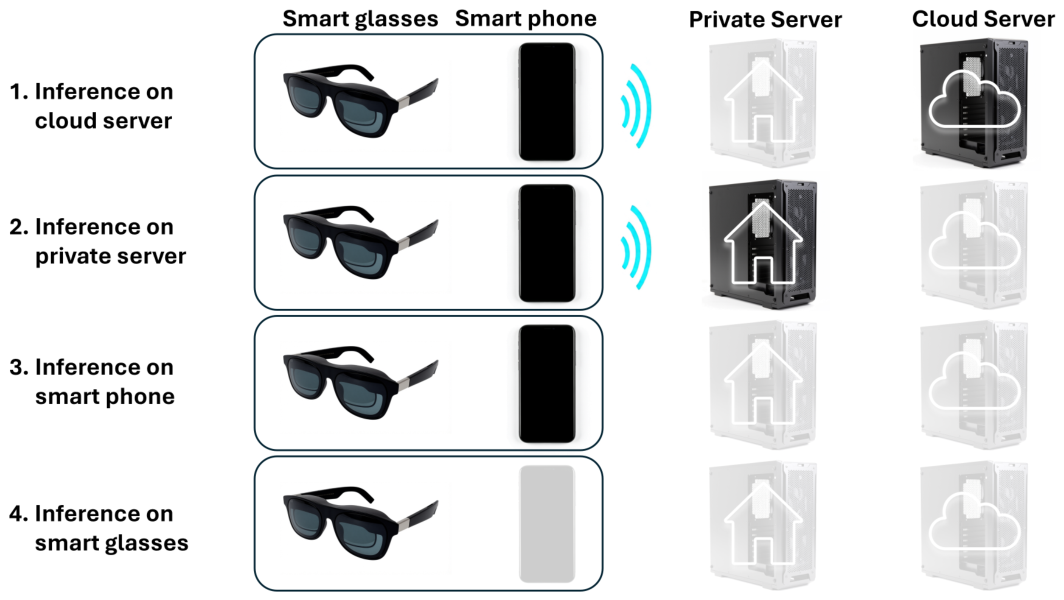
Figure 1. Four possible hardware configurations.
Electronics 15 03223 g001
Figure 2. Autonomy in public spaces.
Electronics 15 03223 g002
Figure 3. Types of directional instructions.
Electronics 15 03223 g003
Figure 4. Desired amount of navigational information.
Electronics 15 03223 g004
Figure 5. Frequencies of the features to be considered.
Electronics 15 03223 g005
Figure 6. (a) Smart glasses user interface. (b) Experimental setup: Smart glasses connected to smart phone by USB cable.
Electronics 15 03223 g006
Figure 7. Process.
Figure 7. Process.
Electronics 15 03223 g007
Figure 8. Green fields indicate that the adapted small model performed better than the non-adapted small model. In some cases, it even performs better than the large model (marked by *).
Electronics 15 03223 g008
Table 1. Comparison of inference deployment options. The symbols indicate evaluation levels: ++ (very good), + (good), +/− (moderate), − (poor), −− (very poor).
Data ProtectionAvailabilityPerformanceResource RequirementsOperationalCosts
Cloud Server−−+++
Private Server++
Smart Phone+++++/−+
Smart Glasses++++−−+/−
Table 2. Example image 1, the accompanying descriptions provided by the experts, and the responses generated by the VLM.
Electronics 15 03223 i006
Expert 1Ahead of you is a construction site next to the building, surrounded by barrier tape. Slow down as you approach the barrier tape, and walk along it until you reach the end of the construction site. There, the barrier tape is laid out toward the building wall. Walk along it.
Expert 2On the sidewalk ahead of you, there is a barrier on the left, inner edge, approximately 10 m long, consisting of barrier tape and three bollards. There is a tree on the right; the path is uneven but passable.
Expert 3Ahead of you is the wide sidewalk on the left side of the street. At the inner guiding line, there is a temporary construction barrier that you must go around in the middle of the sidewalk. At the outer guiding line, there are tree guards spaced far apart.
Gemma4 31BStop. Barrier tape and bollards block the path ahead. Move right to go around them, but be mindful of a tree support structure a few steps ahead at 2 o’clock. Use the sidewalk edge on your right for guidance.
Gemma4 E2BContinue straight ahead along the sidewalk; watch for the wooden structure on your right.
Gemma4 E2B + LoRaContinue straight ahead, watch for the red and white barrier tape across the path, keep to the right of the tape. Use the curb edge on your right as a guide.
Table 3. Example image 2, the accompanying descriptions provided by the experts, and the responses generated by the VLM.
Electronics 15 03223 i007
Expert 1The sidewalk is blocked by scaffolding on your right against the building wall. Feel your way further to the left toward the sloping curb, and walk along it for 10 m. Then you will have passed the construction site.
Expert 2There is scaffolding on the right along the inner guide line. Continue walking right along the outer guiding line (curb). After about 10 m, the construction site ends. Pay attention to the exact width of your cane swing. The sidewalk narrows to less than 1 m.
Expert 3The inner guiding line on the sidewalk ahead of you is blocked by several obstacles; follow the sidewalk and use the outer guiding line for orientation. It is unclear if the inner guiding line will be usable again.
Gemma4 31BContinue forward carefully, passing slightly left. Protect your face with your free hand due to protruding scaffolding poles on your right. Use the curb edge on your left as a guide.
Gemma4 E2BContinue along the paved path, watch for the curb edge on your right.
Gemma4 E2B + LoRaContinue straight, watch for the curb edge on your right, and be aware of the large metal scaffolding structure on the right side of the path.
Table 4. Example image 3, the accompanying descriptions provided by the experts, and the responses generated by the VLM.
Electronics 15 03223 i008
Expert 1There is a chest-high obstacle on the building wall. It is a balcony protruding from the wall. Raise your free hand to your head and use it to protect your upper body. Walk forward slowly.
Expert 2Continue walking directly along the inner guiding line. A trailer hitch protrudes onto the sidewalk from the right. About 5 m ahead, a balcony protrudes slightly to the left. Hold your free hand in front of your face as a protective hand at approximately 8 m.
Expert 3The sidewalk ahead is narrowed by a person and a trailer hitch protruding far onto the sidewalk. After this narrow section, there is an overhanging balcony at chest height along the inner guide line. Continue straight ahead after that.
Gemma4 31BContinue straight, but veer left to avoid a protruding trailer hitch a few steps ahead at 2 o’clock. Follow the wall on your left for guidance.
Gemma4 E2BContinue straight ahead along the pavement, watch for the curb edge to your right.
Gemma4 E2B + LoRaContinue straight, be careful of the building wall on your right, and watch out for the protruding window frames and the overhang of the balcony above.
Disclaimer/Publisher’s Note: The statements, opinions and data contained in all publications are solely those of the individual author(s) and contributor(s) and not of MDPI and/or the editor(s). MDPI and/or the editor(s) disclaim responsibility for any injury to people or property resulting from any ideas, methods, instructions or products referred to in the content.