

Article

Smart Home Control Using Real-Time Hand Gesture Recognition and Artificial Intelligence on Raspberry Pi 5

Faculty of Science and Engineering, Swansea University Bay Campus, Swansea SA1 8EN, UK
*
Author to whom correspondence should be addressed.
Electronics 2025, 14(20), 3976; https://doi.org/10.3390/electronics14203976
Submission received: 31 July 2025 / Revised: 22 September 2025 / Accepted: 29 September 2025 / Published: 10 October 2025

Abstract

This paper outlines the process of developing a low-cost system for home appliance control via real-time hand gesture classification using Computer Vision and a custom lightweight machine learning model. This system strives to enable those with speech or hearing disabilities to interface with smart home devices in real time using hand gestures, such as is possible with voice-activated ‘smart assistants’ currently available. The system runs on a Raspberry Pi 5 to enable future IoT integration and reduce costs. The system also uses the official camera module v2 and 7-inch touchscreen. Frame preprocessing uses MediaPipe to assign hand coordinates, and NumPy tools to normalise them. A machine learning model then predicts the gesture. The model, a feed-forward network consisting of five fully connected layers, was built using Keras 3 and compiled with TensorFlow Lite. Training data utilised the HaGRIDv2 dataset, modified to consist of 15 one-handed gestures from its original of 23 one- and two-handed gestures. When used to train the model, validation metrics of 0.90 accuracy and 0.31 loss were returned. The system can control both analogue and digital hardware via GPIO pins and, when recognising a gesture, averages 20.4 frames per second with no observable delay.

1. Introduction

The concept of the ‘smart home’ has rapidly evolved from early demonstrations to today’s reality as the Internet of Things, low-cost sensors, and embedded AI have matured. Home automation should, in principle, improve convenience whilst reducing energy consumption. However, for many people, interaction remains a central bottleneck. Current smart assistants often have one thing in common—their only method of command input is the voice. This is a natural choice; however, difficulties arise when disabilities or impairments are considered. The World Health Organisation estimates that by 2050, 2.5 billion people will suffer from some degree of hearing loss [1], not to mention other forms of disability that also impact a person’s ability to speak clearly.
As well as this, voice-activated smart assistants have other disadvantages that can affect the adoption of the smart home, namely privacy concerns, accidental activation, and accent/dialect recognition. Touch interfaces mitigate some of these issues but sacrifice the ‘hands-free’ functionality that popularised the smart home in the first place. When the rapid adoption of smart home technology and its integration into daily life are considered, the case for a smart assistant that utilises hand gestures can be made.
In addition to this, real-time hand and body tracking has become far more accessible. Although an active field for many years [2], only recently has the technology and software become freely available to the public [3]. When paired with another rapidly growing field, artificial intelligence, a smart assistant could be developed using freely available software that replaced the voice with gesture-based commands.

1.1. Aim and Scope

This paper designs and evaluates a low-cost, real-time hand gesture interface for smart home control running entirely locally on a Raspberry Pi 5 [4] and using RPi first-party accessories. This hardware, sourced in Swansea, Wales, United Kingdom, included a camera module for hand tracking and a 7-inch touchscreen for real-time data display. The system combines on-device hand landmark classification with a compact machine learning model trained on freely available data to recognise gestures and map them to digital and analogue hardware device actions. This system focuses on practical accessibility and responsiveness on constrained, embedded hardware. The system demonstrates stable, real-time control using a validated set of discrete gestures.

1.2. Research Tasks

  • Adapting landmark-based gesture recognition to operate in real time on embedded CPU hardware.
  • Constructing a compact, supervised, feed-forward model with a high accuracy whilst remaining TensorFlow Lite compatible.
  • Integrating gesture recognition with GPIO-level actuation to realise smart-home control of binary and analogue hardware.

1.3. Contributions

  • A fully on-device, Raspberry Pi 5-based implementation of hand-gesture recognition with responsive actuation, both binary and analogue, via GPIO.
  • A lightweight training pipeline based on normalised hand landmarks and a modified (logical class merging and removal of unrequired classes) HaGRID dataset.
  • Quantified performance (accuracy and frame rate) under specified environmental conditions, demonstrating feasibility for low-cost accessibility control.

1.4. Paper Structure

Section 2 reviews prior gesture-controlled smart home systems, relevant Computer Vision and Machine Learning approaches, and freely available datasets, resulting in an identified research gap. Section 3 outlines the chosen technical tools and the overall design flow. Section 4 presents the methodology undertaken to develop the system. Section 5 outlines the results of the developed system and its observed performance. Section 6 discusses the observed results and outlines the logical improvements that could be made to such a system in any future developments.

2. Literature Review

2.1. Overview

Smart-home control is typically conducted by voice or touch. Both are usually effective but not universally accessible or hands-free. Recent vision-based pipelines offer contactless, non-verbal control through hand gestures which, assuming they function reliably, could provide a good substitute (provided they work reliably on what would have to be low-cost hardware). This review summarises prior work on Computer Vision, hand detection for gesture interfaces, commonly used datasets for such use cases, and lightweight machine learning approaches, collating tools and methods to address the gap the introduction outlined.

2.2. Computer Vision

OpenCV is widely used as a backbone for real-time image capture and processing due to its mature support, especially for embedded platforms, and active community documentation [5]. Unlike alternatives such as Pillow (Python Imaging Library) [6] and scikit-image [7], OpenCV is designed for real-time Computer Vision and integrates well with both MediaPipe [3], and the RPi Camera Module library [8].

2.3. Hand Detection

MediaPipe Hands [3] is frequently used for hand pose estimation, especially on embedded or CPU-only platforms. Landmarks are estimated and assigned with low latency and using comparatively small computational power. Similar solutions such as OpenPose remain highly effective but typically require higher computational power [9]. In smart home applications, MediaPipe Hands has been shown to support gesture-to-digit control of devices, such as in a 2022 article from the University of Taipei [10] that successfully utilised MediaPipe to recognise the hand gestures for the numbers 0–9, controlling hardware depending on the gesture presented. As well as this, a 2024 article from Chandigarh University combined MediaPipe with OpenCV for effective volume control depending on the distance between the thumb and index finger [11]. Furthermore, a 2023 paper outlined a process for sign language recognition using both MediaPipe and OpenCV in which real-time recognition was successful [12].

2.4. Gesture Datasets

Gesture datasets come in two distinct versions, static and dynamic. Datasets such as Jester [13] emphasise dynamic, video-based gestures such as “shaking hand” [13] (p. 3) that are a valuable tool for deep-learning but less suited for use on lower-powered embedded devices and for systems using single-frame analysis such as with MediaPipe Hands.
The second edition of the Hand Gesture Recognition Image Dataset (HaGRID) [14] by contrast consists of over 1 million static images spread across only 33 gestures, mostly one handed. The images were gathered from 65,997 different people of varying hand sizes, skin colours, and finger lengths and thicknesses, providing a good diversity of subject and therefore reducing model bias and improving the model’s ability to recognise different hand types. Furthermore, the paper makes clear that the gestures were specifically chosen for those with speech impairments, making the dataset a good choice for a system aimed towards accessibility. As with the Jester dataset, HaGRIDv2 includes a dedicated ‘no_gesture’ class, critical for the model’s real-world performance as it enabled differentiation between intentional gestures, and unintentional hand movements. This class was only included in the second edition of the dataset, making it the clear choice.
Using the second edition entailed new problems, namely the beforementioned two-handed gestures, not present in the first edition. During development it was found that these gestures greatly complicated model training and as such were removed entirely during the dataset modification process. Furthermore, the full dataset is over 1.5 TB in size and contains over 1,000,000 images. Although a lightweight version is also available, the size is still over 128 GB. Additionally, the dataset was developed by a subsidiary of the Russian state-owned bank Sberbank. The dataset images, however, are hosted on github.com, making them freely available and universally accessible without security concerns.

2.5. The Machine Learning Model

Neural Network Programming with Python by Vishal Rajput [15] was continually referenced in relation to the construction of the machine learning model. Focusing on TensorFlow and Keras, the book was a valuable resource. Although mostly focusing on more complex models, the book was a good reference for the construction of the model used in this project.
As Rajput makes clear, manual construction of a machine learning model is a highly complex task; however, many machine learning framework backends that simplify construction are freely available, with several either developed, or backed by multinational technology companies considered for this project. These include Meta’s PyTorch [16], Google’s own TensorFlow [17], and Google-backed SciKit-Learn [18]. Both TensorFlow and PyTorch are compatible with Keras [19], a high-level tool designed to help with the construction of models; however, only TensorFlow has native compatibility with ‘TensorFlow Lite’ (TFLite) [20], which quantises models, reducing size and latency.

2.6. Model Architecture

The type of ML model chosen for this project was a supervised model only trained on the labelled data provided by the dataset. This was decided early on to reduce computational complexity and thus reduce latency. That being said, a semi-supervised model initially trained on the labelled dataset, and then subsequent unlabelled data from user interactions could potentially result in a model far more adept at learning the unique hand gesture habits of a particular user. This, however, was not explored due to the increased computational power required for such a model.
Keras offers three different types of model architecture: Model Subclassing, Functional API, and Sequential API. Model Subclassing is highly flexible and often used for deep models but is unnecessarily complex for this use case. The Functional API is simpler to use and allows for multiple inputs and outputs, such as if both a camera and a depth sensor were used. However, for this project, the Sequential API was chosen. The one input, one output layer connections allow for faster development and prototyping whilst not sacrificing any usable functionality.
The data processed by the model consisted of 63 normalised coordinates that together represent one feature. The process of landmark normalisation, successfully used in [21,22], allowed for a simple, feed-forward neural network to be chosen as the model. Made up of fully connected (dense) layers, the model filters the data, recognising patterns, till the final layer assigns probabilities based on the training data, such that the most likely gesture match is assigned the highest percentage.
Dense layers were chosen as the primary building blocks of the model due to their simplicity, efficiency in recognising relationships between such data, and as they are simple to recompile using TFLite. As the data used were pre-normalised, complex convolutional layers that perform well at detecting patterns in complex data, such as raw images or video, were not needed. Furthermore, Rectified Linear Unit (ReLU) activation has become the default for many models due to its simplicity and effectiveness [23], it was therefore chosen for this project.
Due to dense layers’ efficient nature, they perform well on systems where computational power is limited such as the RPi, making them a good choice for the project. Furthermore, they have proven themselves capable in related projects [24], where a maximum accuracy of 84.66% was achieved when normalisation was utilised.
As well as dense layers, dropout layers were experimented with, but ultimately not utilised. These layers, as Rajput explains, can help combat model overfitting, where a model learns the “noise or random fluctuations in the training data rather than the underlying patterns” [15] (p. 95). The model therefore struggles to correctly predict any new data that do not necessarily include this. Although the use of dense and dropout layers has been previously proven in the sign language recognition paper cited above [12], where a combination of dense and dropout layers were deployed and achieved a 99.40% accuracy, investigation showed no clear improvement when included and as such were not ultimately used.

3. Technical Tools

3.1. The Hardware Platform

The Raspberry Pi was chosen due to its extensive software support and compatibility with proprietary hardware components, such as the official Raspberry Pi Camera Module and touchscreen display. Furthermore, the integrated GPIO pins, controlled using the RPi.GPIO library (release 0.7.2), were extensively used for hardware control. These components were connected via ribbon cables, creating a simple hardware design, and allowing for easy troubleshooting and compatibility across boards. The project originally began on a Raspberry Pi 4; however, it was quickly determined that the Pi 4 lacked the necessary processing power for a truly usable real-time system. The system was therefore transferred to a Pi 5, where the upgraded CPU, GPU, and RAM speed [4] were all utilised to increase performance.

3.2. Computer Vision

OpenCV (release 4.11.0) [5] was chosen for the real-time image processing due to its lightweight nature and extensive community support. The library offers tools for capturing, manipulating, and displaying frames, as well as allowing for text and other graphical elements to be added.
The Hands library, part of the MediaPipe framework (release 0.10.18) developed by Google [3], was chosen for the hand tracking and landmark allocation. The library does not require a GPU and uses two machine learning models, one for palm detection and another for landmark assignment, which together assign 21 coordinate points per hand. These landmarks can be easily converted into an array using NumPy (release 1.26.4) [25], making manipulation, saving, and importing coordinates a simple process. MediaPipe also integrates well with OpenCV frames and includes native tools for drawing assigned landmarks onto a frame, simplifying the graphical display elements of the system.

3.3. The Machine Learning Framework

TensorFlow (release 2.18.0) was chosen as the backend for this project due to its ability to have simple models recompiled and quantised using TensorFlow Lite (TFLite) [20], which reduces CPU usage, and due to preexisting personal experience using the framework. This being said, several tools included in SciKit (release 1.6.1) were used throughout the project to adapt data ready for use with a TensorFlow model.
Construction of the model was implemented using the Keras 3 (release 3.8.0) API [19], a tool with the advantage of personal experience. Being high level in nature, and having native compatibility with TensorFlow, the API streamlined model construction and training with its simple nature and strong community support. Furthermore, the API has native compatibility with TFLite and works well with NumPy arrays.

3.4. System Integration

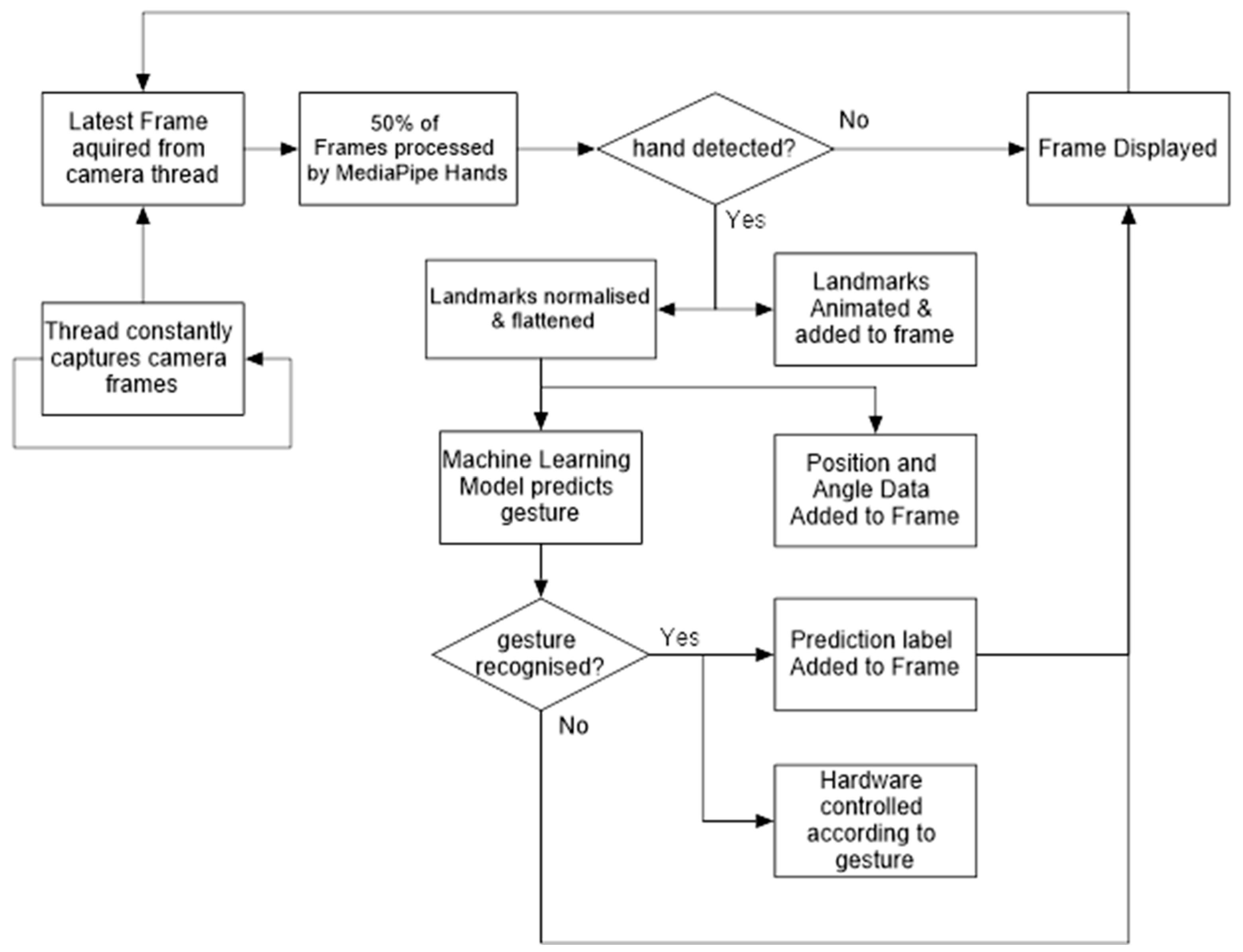
To simplify development and future expansion, the system was written in Python 3 (release 3.11.2) using object-oriented programming. Each aspect was implemented as a distinct class, with each located in a separate python file. These classes were for the camera, landmark assignment, ML model, screen drawing, GPIO control, and a main control script. The ML model was trained on a separate workstation and used a modified pre-existing dataset of hand gesture images. Showing the system’s ability to control devices only required a single hand to perform a few, simple gestures; therefore, the system only accepted a single hand as an input and processed static frames, as supposed to a continuous stream of frames. At a high level, the system captures frames, extracts hand landmarks, normalises coordinates, classifies the gesture, and triggers GPIO actions, the full pipeline of which is summarised in Figure 1.

4. Materials and Methods

4.1. Real-Time Hand Detection and Display

4.1.1. Camera Interfacing

Interfacing with the Raspberry Pi Camera Module with python was achieved using the picamera2 library (release 0.3.25) [8]. When the camera class was initialised, the resolution was set and the camera stream started. An individual camera frame could then be captured with ‘self.picam2.capture_array ()’. As many frames were captured each second, this process was moved to a separate thread, ensuring that the process would not slow down the main programme loop. Therefore, a function ‘_update’ was created that continuously captured the latest frame from the camera and assigned it to a variable. A separate function ‘get_frame’ returned the frame currently stored by the variable rather than capturing a frame upon request.

4.1.2. Hand Tracking and Landmark Assignment

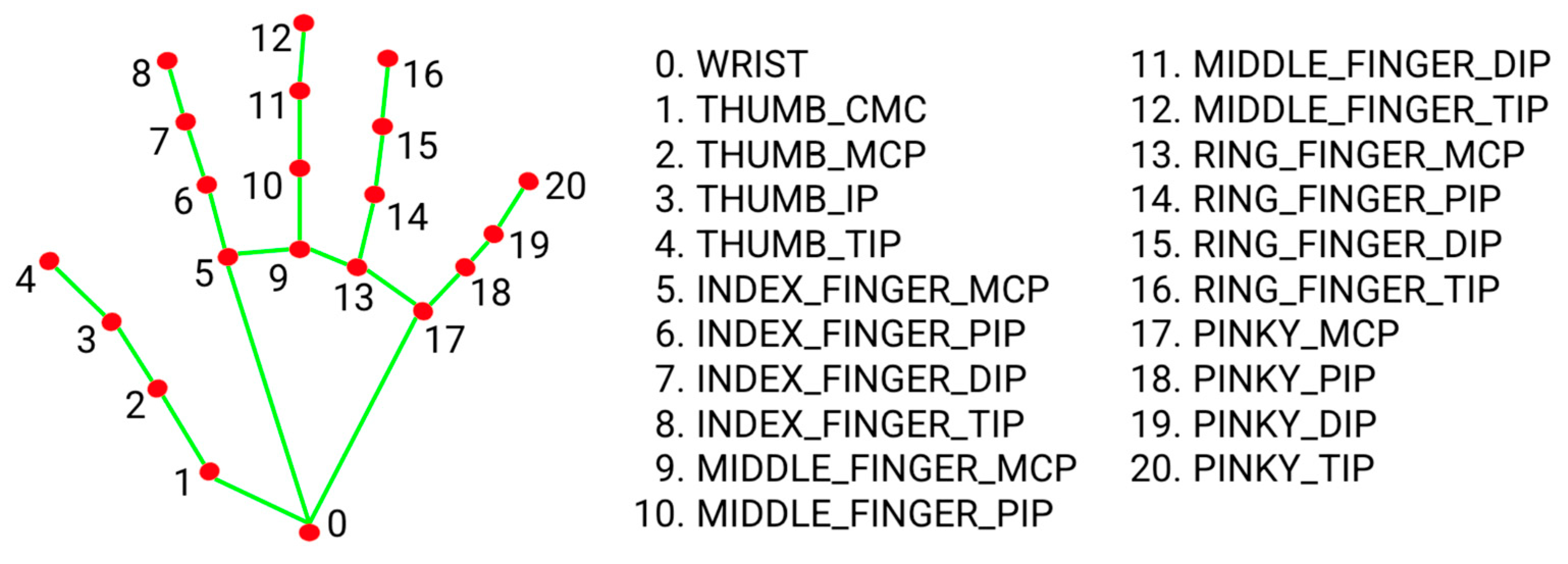
Analysing a frame and detecting a hand if present was achieved using Google’s MediaPipe Framework [3]. When the landmark class was initialised, the framework’s ‘Hands’ function was assigned to a variable ‘hand_detector’ and configured, setting the minimum confidence levels for hand detection and tracking across multiple frames as 0.5, the default. A function ‘get_landmarks’ was then created that accepted the current frame as an input and passed it to the hand detector. If a hand was then detected in the frame, 21 ‘landmarks’ were assigned to the hand, each with coordinates in the x , y , and z dimensions. These landmarks correspond to pre-defined points on a hand, as shown in Figure 2, and form an array:
L R 3 × 21
where each row:
l i = ( x i , y i , z i )
represents a single landmark with x i , y i , and z i representing each beforementioned dimensions They can then be used to create a wire frame representation of the hand, also shown in Figure 2.

4.1.3. Landmark Display

The project did not specifically require any graphical representations to be created; however, for development, being able to observe the landmarks in real time was beneficial. Furthermore, as the script progressed in complexity and as more real-time data were generated, an integrated display became a necessity.
Displaying the wireframe representation was achieved by creating a class ‘Draw’. When Draw was initialised, an OpenCV [5] full screen window was created such that it would entirely fill the RPi Display. The screen dimensions were determined using the Python ‘screeninfo’ library, where the height and width of the primary display were found with ‘screeninfo.get_monitors () [0]’.
For each frame to be displayed, a function ‘draw.frame_init’ was passed the frame. Here, the frame was either resized to fit the screens dimensions using ‘cv.resize (frame, dimensions)’, or a black frame produced using the NumPy [25] ‘np.zeros’ function that took the screen dimensions as an argument and produced a blank frame of that size. Depending on the state of a user controllable variable ‘self.show_cam’ either the resized frame or the black frame was assigned to the variable ‘self.background’ such that either could be drawn upon.
From here, if a hand was detected, the assigned landmarks were passed by the main loop to a function ‘draw.hand’. Here, the MediaPipe ‘draw_landmarks’ function plotted the landmarks onto the frame, adding connecting lines between them. Lastly, a function ‘draw.show’ displayed the frame inside the generated OpenCV window using ‘cv.imshow (self.window_name, frame)’.

4.2. Hand Gesture Recognition

The process of interpreting hand landmarks and predicting the gesture based on them was achieved using a machine learning model constructed using Keras 3 [19] that ran on the TensorFlow [17] backend. However, before this, training data were gathered that could be used to train a model.

4.2.1. Initial Training Data

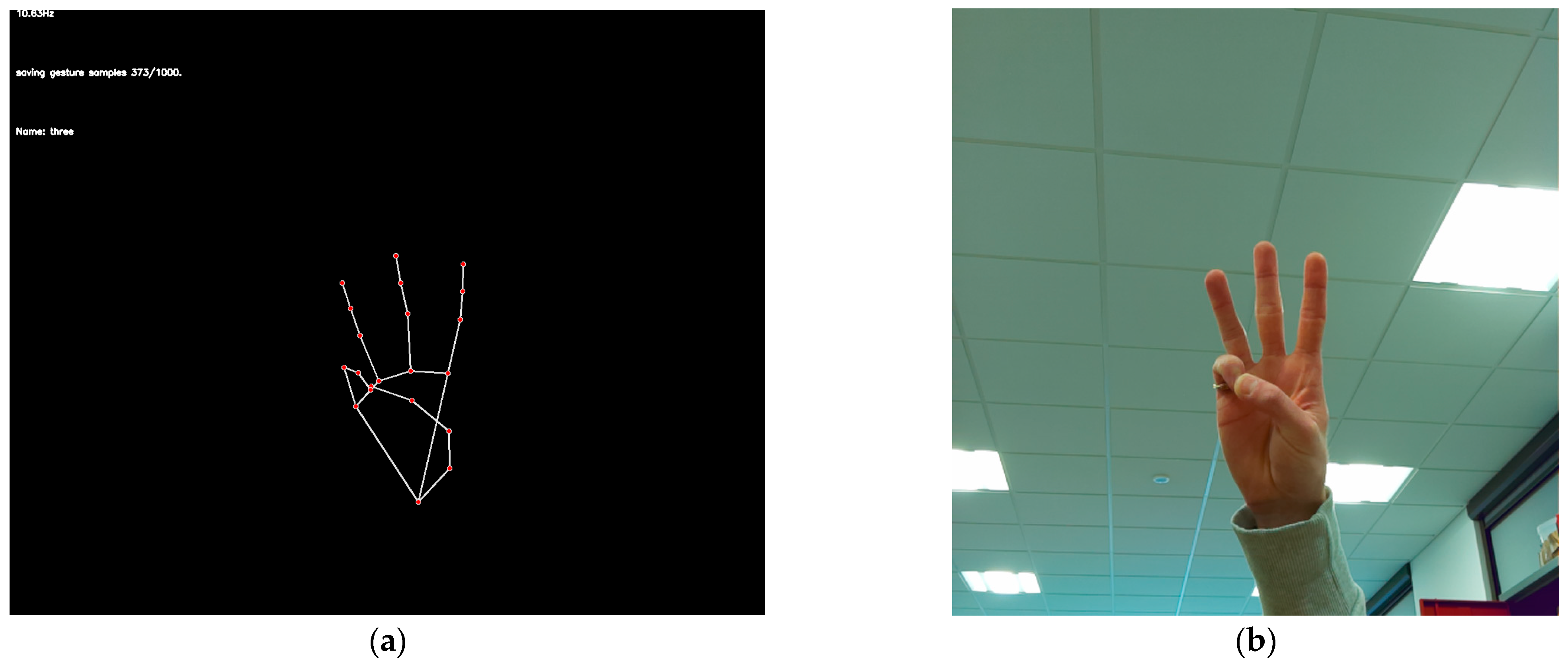
An initial set of training data that was used to train the model was built manually using the existing landmark assignment code, as shown in Figure 3. A simple loop was written that, for 1000 sequential frames in which a hand was detected, assigned landmarks and appended them to a NumPy array. Once complete, an array with shape
L R 1000 × 1 × 63
was saved to a database folder, with each file named for the gesture it represented. This was performed for gestures corresponding to the numbers 1 to 5; being similar, these gestures were a good choice for observing the model’s ability to distinguish between them. The hand was moved around such that data were saved for a gesture from many angles, sides and orientations. The 5 NumPy array files that in total contained 315,000 data points were then saved to disc.

4.2.2. The Initial Machine Learning Model

Creating and training the machine learning model required a new class, ‘Model’. Firstly, a function ‘model.import_database’ was created that, for every NumPy file inside the database folder, loaded the file, extended a variable ‘X’ with the data contained, and then extended a variable ‘Y’ with the name of the file for as many times as there were sample sets. The two variables, with ‘X’ having the shape:
X R 5000 × 1 × 63
and ‘Y’ having the shape:
Y R 5000 × 1
were then returned by the function.
Next, a function ‘model.train_model’ was created that first acquired the training data with ‘X, Y = self.import_database ()’ and flattened the coordinate sets from shape R 3 × 21 to shape R 1 × 63 such that each set was interpreted as representing a single ‘feature’. The gesture labels were fitted to a label encoder, and the number of gesture classes determined with ‘len (self.label_encoder.classes)’. A simple model, a modified version of Rajput’s initial Keras model, as shown in Table 1, was constructed utilising the ‘Adam’ optimiser consisting of 3 fully connected ‘dense’ layers with ReLU activation:
R e L U x = max 0 , x
and a final fully connected layer using softmax activation:
s o f t m a x x i = e x i j = 1 n e x j
to assign final probabilities. The model was then fitted to the training data and trained for 50 epochs with a default batch size of 32, learning rate of 0.01, and a validation split of 0.2, used to test the model on a subset of the training data. Once trained, the model returned predictions as an index number, where the label encoder could then be utilised to assign the gesture name.

4.2.3. Landmark Normalisation

As the machine learning model was intended to be trained to recognise gesture similarities between the training data and a live feed of landmarks, the coordinates had to be normalised. This ensured that, if the gestures were identical, a hand at 30 degrees, 100 mm away from the camera, that appeared in the top left of the frame would be seen by the model as identical to one at 10 degrees, 500 mm away, and appearing in the bottom right of the frame.
To do this, a function ‘landmark.process’ was created that took the landmarks as an input. As the location and angle data of the hand were required for aspects of hardware control, these were extracted and returned along with the normalised landmarks.
The location of the hand was found by taking the average of all landmarks for both the x and y coordinates.
To remove the effect of the hands position in relation to the frame, all coordinates were translated by the wrist landmark:
l i = l i l w r i s t
such that the wrist landmark became the origin:
l w r i s t = 0 , 0 , 0
To normalise in relation to hand angle, the hand axes were defined as three vectors. The X-axis was defined as the unit vector from the index base to the pinkie base:
x = l p i n k i e _ b a s e l i n d e x _ b a s e   l p i n k i e _ b a s e l i n d e x _ b a s e
the y-axis, also used to calculate hand angle, was defined as the unit vector from the wrist to the middle finger base:
y = l m i d d l e _ b a s e   l w r i s t l m i d d l e _ b a s e l w r i s t
and the z -axis was defined as the cross product of the x and y axis:
z = x × y x × y
This was achieved using ‘np.cross (x, y)’. To ensure orthogonality, the y-axis was recalculated as:
y = z × x
The three vectors were then stacked into a rotation matrix:
R R 3 × 3 ,   R = [ x   y   z ]
using ‘matrix = np.stack ([x, y, z], axis = 1)’. Each landmark was then rotated by this matrix:
l i = R T · l i
with ‘lm = np.dot (lm, matrix)’.
To account for differences in hand sizes and distance from the camera, the rotated landmarks were normalised in relation to depth by scaling each landmark such that the maximum Euclidean norm among them was 1:
s = max i l i ,     l i = l i s
The normalised landmarks were then flattened to a 1D vector:
f R 1 × 63 ,     f = [ x 1 , y 1 , z 1 , , x 21 , y 21 , z 21 ]
and returned by the function, along with the hand position and angle.

4.2.4. Improved Training Data

Manually acquiring training data corresponding to random hand movements that should not be interpreted as a gesture, was not feasible. Therefore, the HaGRID ‘no_gesture’ class was utilised to represent random hand gestures. This was achieved by creating a new script that, for every image in a folder, passed the image first to the hand landmark assignment function, and then to the normalisation function, such that normalised hand landmarks were returned every time a hand was detected in the frame. Once complete, 4234 landmark sets were saved to a file.
After observing the success of the incorporation of this data, and with the knowledge that the HaGRID dataset contained far more hand gesture examples, it was determined that the training data should exclusively be acquired from the HaGRID dataset. As the dataset contained over 1,000,000 images, landmark allocation was transferred from the RPi to a university workstation. On this, a script was created that cycled through every folder in the dataset, and for each, processed each image, and attempted to assign landmarks. If successful, the normalised landmarks were appended to an array such that when every image in the folder was processed, an array of shape:
L R s × 1 × 63
was the result, where s represented the number of successful samples. The array was then saved as a NumPy file that contained the coordinate array for each gesture.
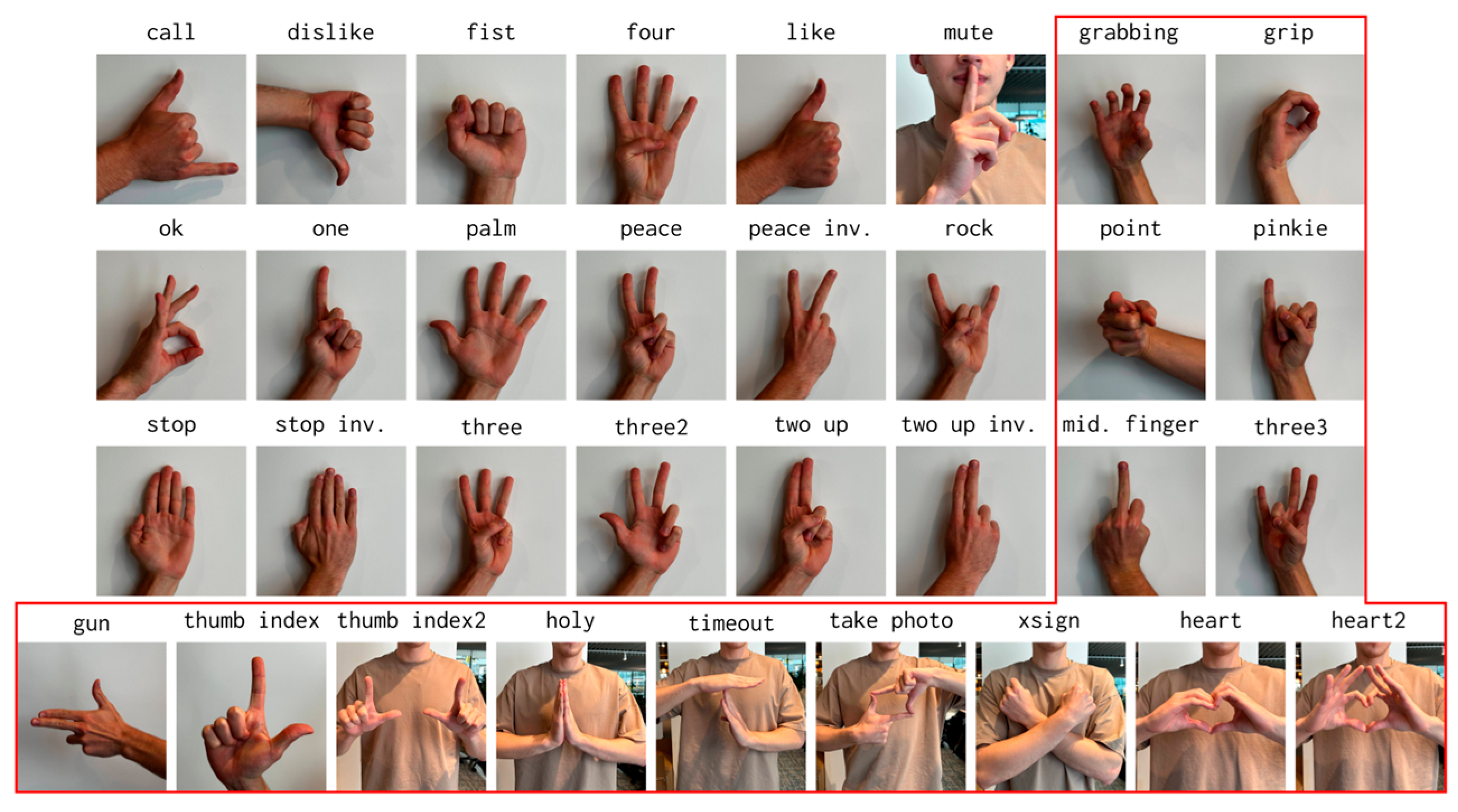
To correct for the inclusion of the two-handed gestures present in the HaGRID dataset, as shown in Figure 4, they were removed from the dataset entirely. The prototype system only required a few well defined gesture classes. The HaGRID classes for similar gestures such as ‘peace’, ‘peace inv’, ‘two up’, and ‘two up inv’ were therefore merged into one singular class. This process was also completed for gestures that, although different in physical appearance, represented one gesture such as ‘three’, ‘three2’, and ‘three3’. This ensured that not only would the model not incorrectly predict two physically similar gestures, but that different ways of representing the same gesture would be returned by the model as the same class, rather than two different classes of the same name. The complete set of mergers and their new classes are shown in Table 2.
The script was also modified to horizontally flip each image and process it a second time, artificially doubling the size of the dataset and ensuring equal predicting ability for both the left and right hand.

4.2.5. Machine Learning Model Development

Once a large dataset had been created, focus was shifted to refining the initial model. Doing so first required modification to the model setup. When manually gathered training data were used, each gesture class had the same number of samples, 1000. The HaGRID derived dataset, however, had greatly different numbers of samples between gestures, as shown in Table 2. If these were used, the model would favour the gesture with the greatest number of samples. As the samples varied so greatly, from 4234 to 267,291, artificially removing samples till the classes were equal would have greatly reduced the diversity of the dataset and removed the advantage that the HaGRID dataset gave. Therefore, Scikit’s ‘class_weight’ function was used to scale up underrepresented classes such that the model was trained on equally weighted data.
SciKit’s ‘StandardScaler’ was also applied to the data before training. The scaler manipulated the data values, transforming them such that they are presented to the model in a similar range, ensuring that the model was not biassed towards gestures with higher values such as for the gesture ‘five’, where the extended fingers’ coordinates would otherwise be of a higher value than for ‘zero’ which the model would then favour. The scaler was saved along with the model such that it could then be applied to real-time gesture coordinates, ensuring consistency. As with the dataset, model training was also moved to a university workstation, where a desktop GPU was utilised to accelerate model training and reduce time taken.
Having observed the success of the new dataset, additional models were created, as shown in Table 3, and benchmarked against each other. These tested the performance of a reduced model, an expanded model, and a model that included dropout layers, against the initial model.
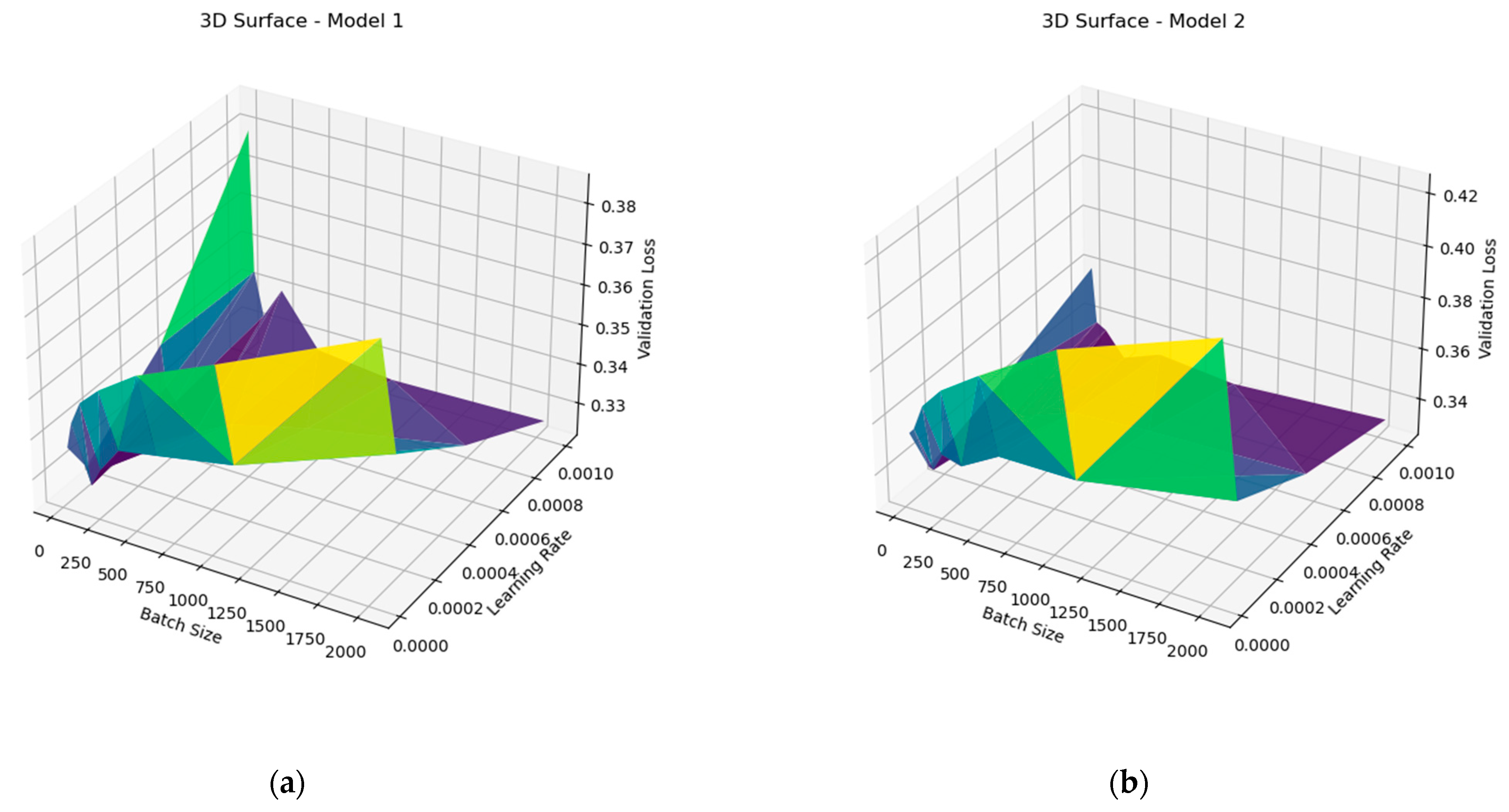
The training script was modified to train each model type for every combination of learning rate (0.001, 0.0005, 0.0001, 0.00005) and batch size (32, 64, 128, 256, 512, 1024, 2048) generating a graph plotting the train and validation metrics against the epoch for each combination such that their performance could be compared. After each model variant was trained, a 3D graph was generated that plotted the model’s validation loss against these combinations.
To correct the validation error, the NumPy ‘random.shuffle’ function was used to randomise the training data before the validation split, ensuring that the validation data were a true representation of all the possible gestures that the model had been trained on. Furthermore, the Keras ‘EarlyStopping’ function was also utilised to terminate training once the validation loss was found to increase for 5 successive epochs, instead of a fixed 50, reducing overfitting and the time taken to train each model variation.

4.2.6. Machine Learning Model Optimisation

Once a model had been selected and tested, the trained model was then converted on the university workstation to a lightweight version using TensorFlow’s, TFLite [20]: ‘converter = tf.lite.TFLiteConverter.from_keras_model (model)’. Optimisation in the form of post training quantisation was also applied to improve latency with ‘converter.optimizations = [tf.lite.Optimize.DEFAULT]’. Using this on the RPi required slight modification to ‘model.recognise_gesture’. The model was imported upon class initialisation and passed to the included ‘tf.lite.Interpreter’, where it was assigned a variable. ‘model.recognise_gesture’ now passed landmarks to the model with ‘set_tensor’ and initiated it with ‘invoke ()’. The predicted gesture was then retrieved with ‘pred = self.interpreter.get_tensor’.
As the model speed was greatly improved with this, erroneous predictions could also be reduced by, instead of returning each prediction, instead appending them to a list. A counter was then used to assess the list every four predictions and a label only assigned and returned if three prediction IDs were the same, returning, ‘no_clear_gesture’ otherwise. Finally, once it was determined that landmark assignment was the remaining bottleneck, the real-time performance was further increased by only passing 50% of the camera frames to MediaPipe but still displaying each one.
To assess real-time performance, code was added to the main class that logged how many frames were displayed over a defined time period, achieved using the ‘time’ library. The result of dividing the number of frames by the time period, the frames per second, was then displayed using ‘draw.text’ such that frame rate could be observed. For real-time use, the time period was set as 0.5 s; however, to determine average performance, this period was increased to 30 s such that an average frame rate was found.

4.3. Home Appliance Control

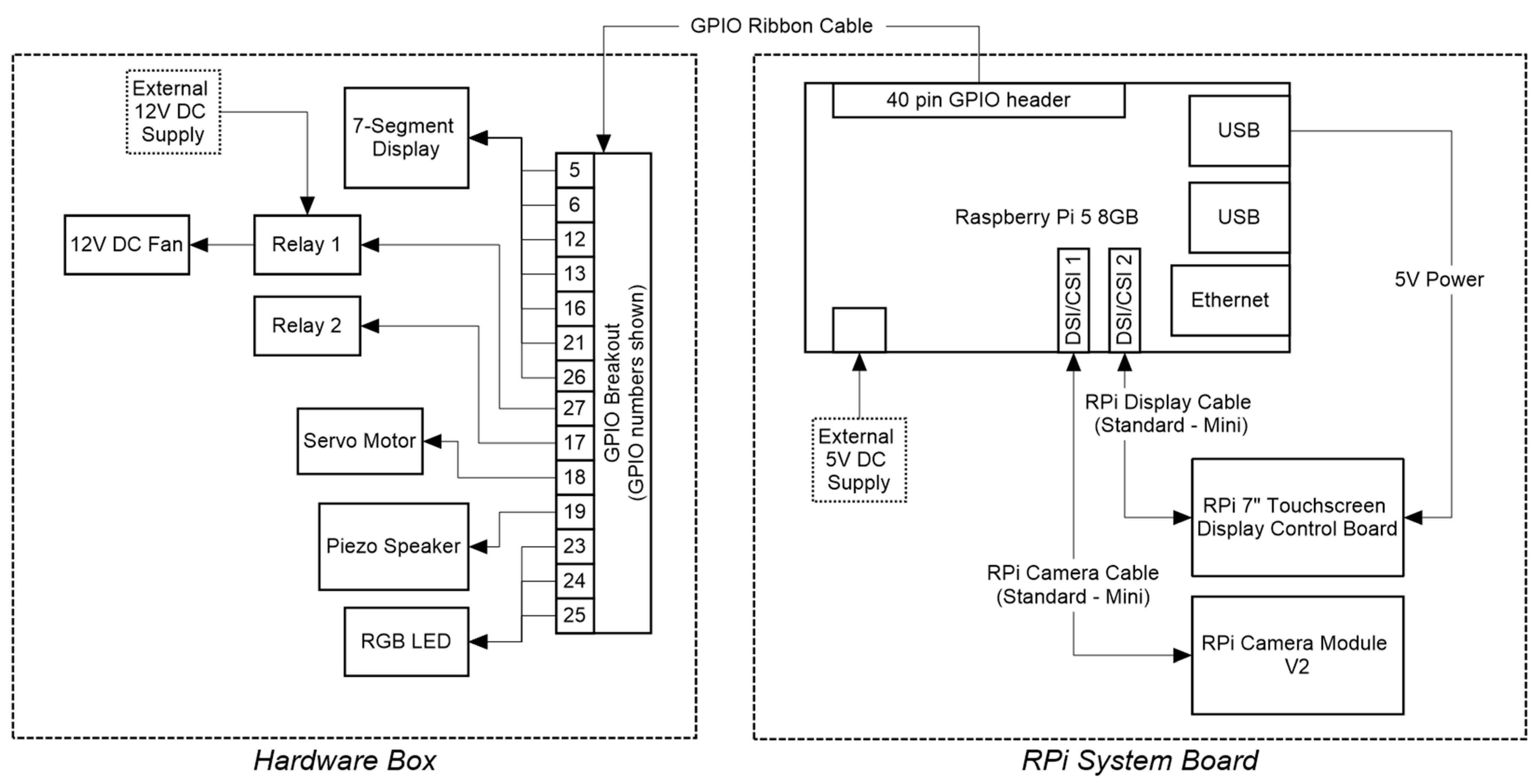
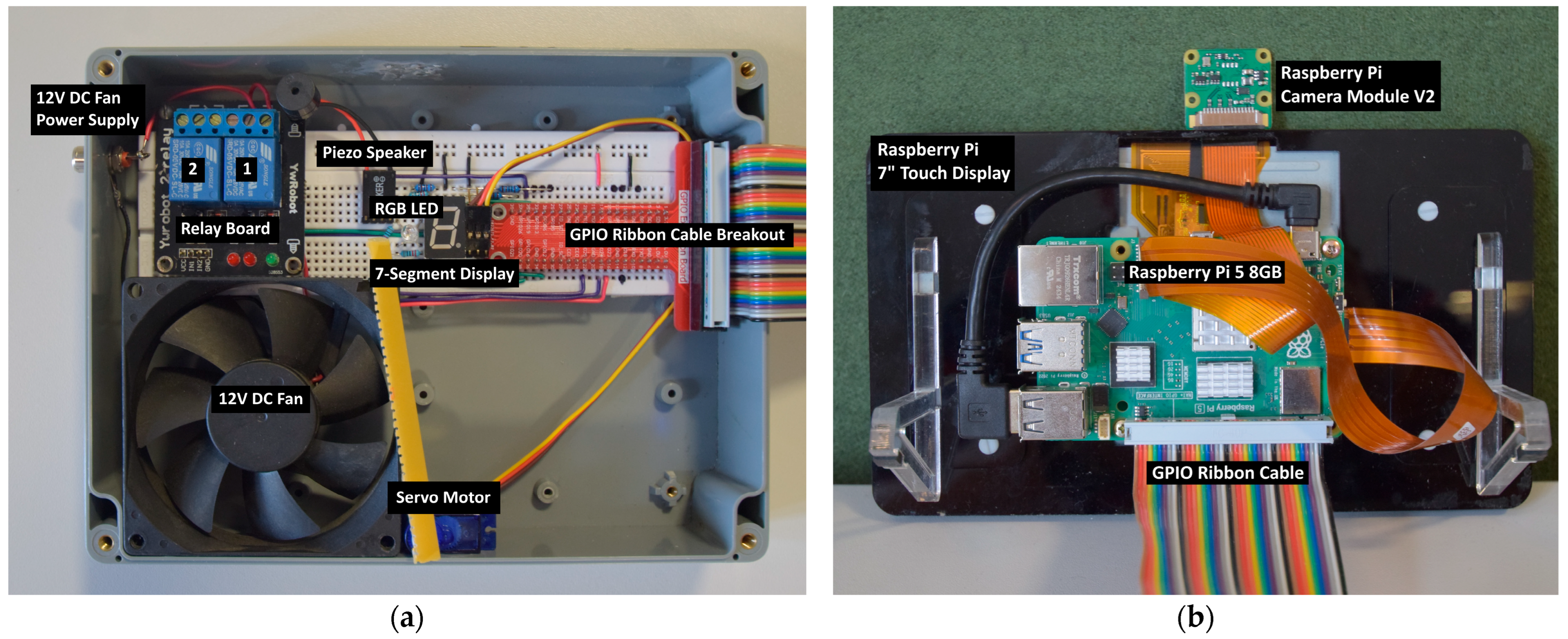
A representation of home appliances, instead of connecting to a preexisting system, was achieved using the RPi’s GPIO pins. A selection of commonplace hardware, as shown in Table 2, was selected such that each could be controlled according to what gesture was predicted. A new class ‘GPIO’ was created that controlled these devices. Each device was connected to the RPi GPIO via a ribbon cable and breakout board, shown in Figure 5, and mounted inside a project case, shown in Figure 6a. This was done so that the hardware aspect could be easily removed from the system for portability, shown in Figure 6b, and so that pure hand gesture recognition could be demonstrated, without also controlling hardware.

4.3.1. Binary Devices

It was determined that a common use of smart assistants was controlling lights. For this, a simple binary on/off was all that was required to address them. For the gestures 0–5, a 7-segment display was selected as these numbers could be represented with it, demonstrating the system’s ability to change the device in real time. For this, first a list was created that, in order of each segment, listed the corresponding GPIO pin; next a dictionary was created that contained each number, and the corresponding segment number such that when a digit was predicted, a ‘for’ loop set each corresponding segment to high, and the remaining too low.
Another binary controlled component that was selected was an RGB LED. For this, the gestures ‘like’, ‘okay’, and ‘dislike’ were selected to control the colours green, blue, and red, respectively. Another dictionary was created for each colour such that when the corresponding gesture was predicted, the pin was raised to high and the others set to low.
The last binary controlled component was a set of two relays. These were chosen due to their real-world use in devices such as smart plugs. A 12 V DC fan was connected to the first relay, powered by an external 12 V supply. The control function was different to the previous, however, as instead of ‘turning off’ when the gesture was no longer present, the relays remained ‘on’ until the gesture was presented again, being a more realistic use case of such a component. For this, state variables were created such that each time the corresponding gesture was predicted, the state was changed, in turn changing the state of the relay control pin.

4.3.2. Analogue Devices

Demonstrating the system’s ability to control devices that perform differently according to a variable input was more complex. The RPi’s GPIO pins include two independent PWM pins that were used to control two analogue devices.
A servo motor was first chosen that rotated in relation to the angle of the hand, with the gesture, ‘thumb-index’, chosen to control it. When the system is started, a PWM signal is produced on the servo pin at 50 Hz with the duty cycle dictating the angle of the servo. From here, a function ‘gpio.set_servo’ was passed the hand angle and scaled it to fit between 2.5 and 12.5, which in turn represented the angles 0–180 degrees. The value was then set as the PWM signal’s duty cycle. As well as this, a new function ‘draw.angle’ was created that displayed the angle value as a data display using OpenCV’s drawing utilities such that the angle value could be observed for every hand gesture and without requiring the hardware to be attached.
Improving the servo’s functionality was achieved by moving the servos control script to a separate thread ‘gpio._servo_loop’. Here, if the correct gesture was being predicted, the loop constantly checked the hand angle and only changed the duty cycle if the hand had rotated more than 5 degrees. If any other gesture was present, the servo was stopped. The ‘gpio.set_servo’ function was then changed to only pass the angle to the servo loop, instead of performing rotation functionality.
The second analogue device chosen was a piezo speaker, where its pitch changed according to the horizontal position of the hand. As with the servo motor, a PWM signal was started, where its frequency could be changed between 200 Hz and 1000 Hz. A new thread ‘gpio._piezo_loop’ then constantly scaled the horizontal coordinate to fit between the two frequencies and set the duty cycle to 0.9 if the gesture was predicted, and 0 otherwise. A separate function ‘gpio.set_piezo’ then constantly passed the current position to the loop when the gesture was predicted. A new function ‘draw.position’ was also created that displayed the hand’s position within the frame as a data plot, regardless of gesture.

5. Results

5.1. Real-Time Hand Detection and Display

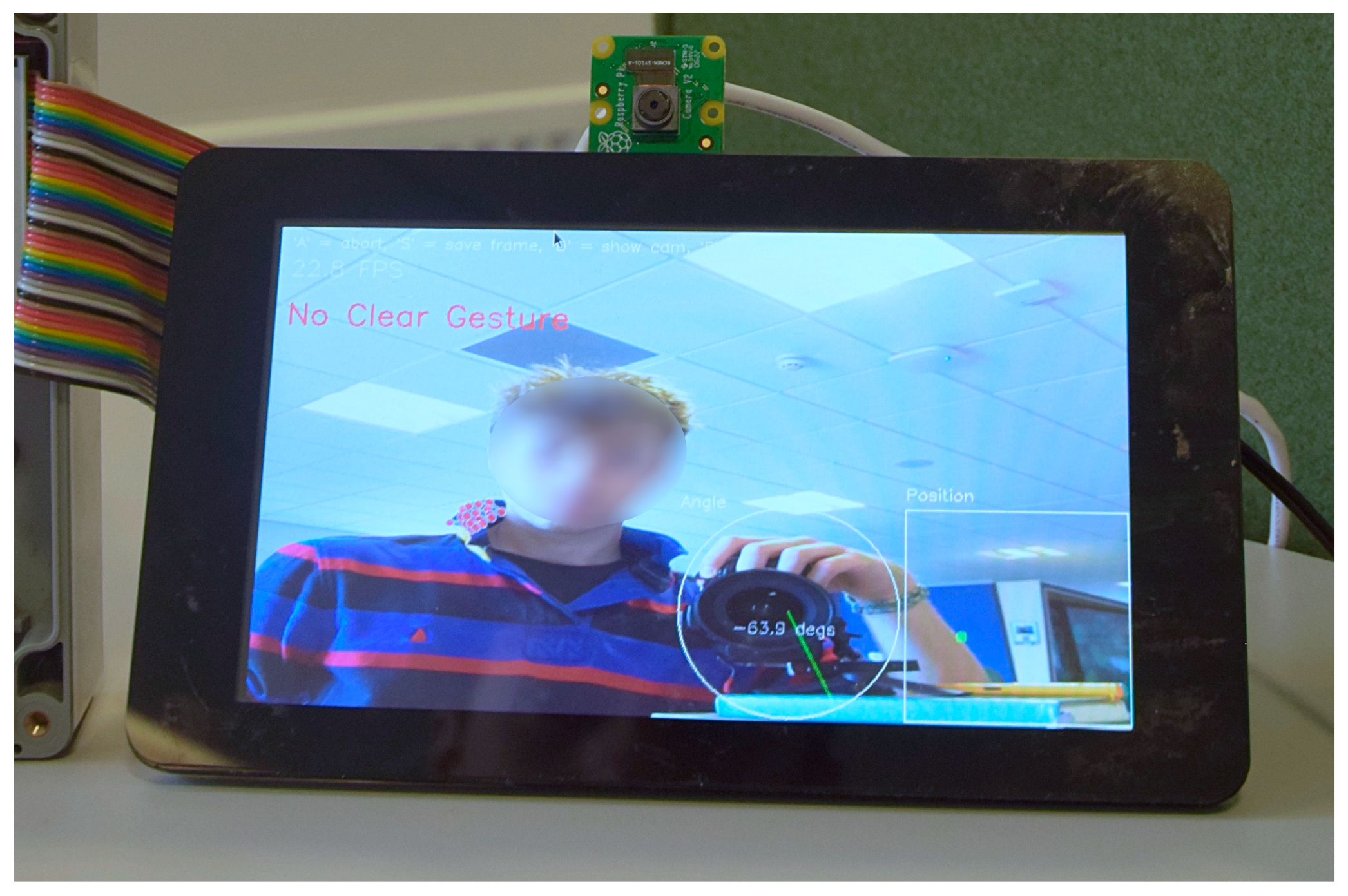
Testing of the real-time hand coordinate display loop showed that the frame capture thread was functioning well and that MediaPipe was successful in detecting a hand and animating it on top of the camera frame. This being said, it was observed early on that MediaPipe had the potential to misidentify elements in frame as a hand, as shown in Figure 7. This behaviour worsened when the camera operated in high-contrast or dark environments but remained relatively rare. Initial investigation suggested that performance in these environments could be improved by changing the image format from the default ‘RGB888’ to ‘YUV420’ [8] (4.2.2.2); however, OpenCV compatibility issues prevented this transfer. Furthermore, investigation suggested that misidentification increased when the hand was out of focus; however, newer versions of the RPi Camera Module include autofocus [27], resolving this potential issue.
OpenCV functioned well at displaying the frames. This was originally tested on a Raspberry Pi 4; however, as mentioned in the project overview, the board was found to lack the processing power required for a high frame rate. It was at this point therefore that the system was transferred to a Raspberry Pi 5.

5.2. Hand Gesture Recognition

After the initial model was trained on the manually gathered training data, and the real-time landmark assignment, gesture prediction, and result display loop was run, the results were not as expected. The model failed to accurately predict any of the 5 gestures it had been trained on correctly. It was clear the model was functioning to some degree, however, as changing the hand resulted in a change in prediction. Extended testing was therefore completed, after which the model eventually correctly predicted the gesture but only for very specific hand locations.
It was realised that the model was factoring in hand position as much as the hand gesture. Clearly, both the data the model was trained on, and the real-time gestures presented to it had to be normalised such that the hand position, angle, and orientation had no effect on the model.
Once the normalisation function had been created, and used for both data gathering and real-time gestures, the model functioned far better. The results, however, were still unusable, with the model only correctly predicting if the hand faced the camera straight on, and with exaggerated gestures. This was expected as the training data gathered had far too few samples, primarily consisted of the hand facing directly towards the camera, and was only gathered by one individual. Furthermore, the model consistently misassigned a gesture to what was in fact, an unintentional hand gesture that should not be interpreted as a valid gesture. The clear solution to the erroneous predictions was to additionally train the model on what was ‘not’ a gesture. Manually gathering this data was not feasible; therefore, the ‘no_gesture’ class of the HaGRID dataset was utilised.
The inclusion of the ‘no_gesture’ class resulted in the model performing far better at recognising what was not a valid gesture. This confirmed that not only was training on what was not a gesture a critical part of the model, but that the rest of the HaGRID dataset would be a strong replacement for the initial training data that were manually gathered. When the HaGRID dataset was first processed and used to train the model, the training took many minutes to complete, with each of the 50 epochs taking 105 s to complete. Therefore, the training of the model was transferred to a dedicated workstation.
Furthermore, it was clear that although the system performed far better at recognising gestures, the dataset’s similar gestures were not different enough for the model to correctly distinguish between them, for example the difference between ‘palm’ and ‘five’ or ‘peace’ and ‘two up’, where the only differences were the slight differences in finger spacing. Although successful if the hand was held still, slight movement could cause the model to rapidly alternate between the predictions. Furthermore, the inclusion of the two-handed gestures resulted in the model incorrectly predicting a gesture for what should have been labelled as ‘no_gesture’. The solution to this was to combine similar gestures as a single class, and to remove all two-handed gestures from the dataset.
Once the model was retrained on the revised dataset, each new class was tested. The model was consistently predicting the correct gesture and no longer alternated predictions based on slight changes in the spacing between fingers but still struggled to maintain a prediction, often incorrectly predicting ‘no_gesture’ for a gesture that it had been trained on. Clearly this was a limitation of the model, rather than the dataset, focus was therefore shifted to revising the initial model.
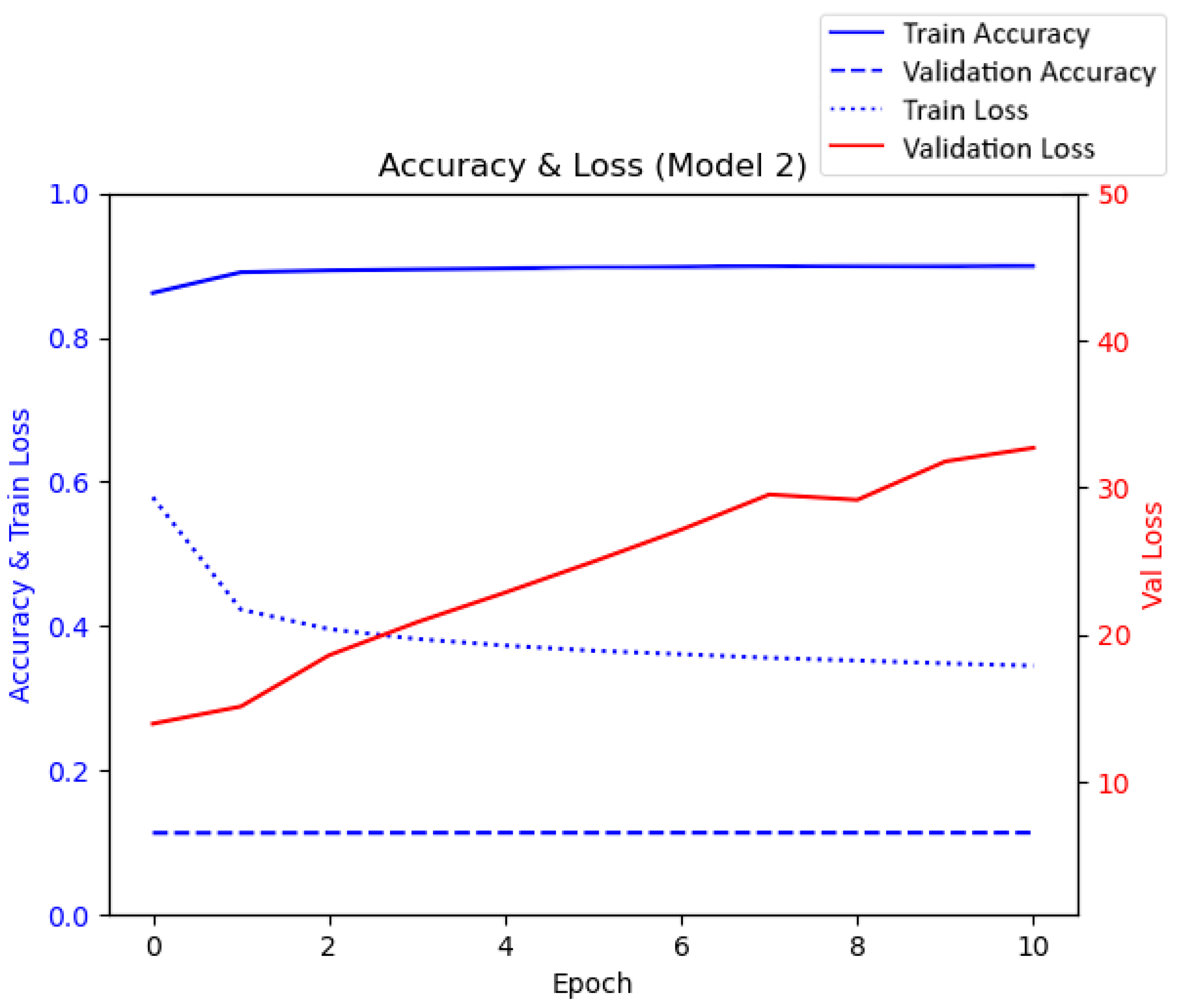
After the model variants were constructed, the training script completed, and the generated graphs analysed, the results were encouraging. However, as can be seen in Figure 8, the validation loss was far greater than should have been the case. Regardless of both the training parameters and model variant, the validation loss seemed to consistently increase with each epoch, the opposite of what should have been observed. However, the training loss decreased with each epoch, as was expected. Furthermore, the validation accuracy remained at a constant of 0.17 whilst simultaneously, the training accuracy was increasing and then levelling out at a usable accuracy. When testing one of the models, it was clear that it was functioning. However, when testing for each gesture, the gesture last imported ‘zero’ was not at all recognised, this suggested that the error was not in the model, but with the data that were being used to validate the models.
It was realised that the split of the training data used to validate was not a representative subsample of the data, instead, the last 20% of the data were being taken to validate. This meant that not only was the model not being trained on the last 20% of gestures, which explained the ‘zero’ issue, but that those same gestures were then being used to test the model. This explained the validation metrics and, when the training data were randomised before the split, the validation metrics appeared as expected.
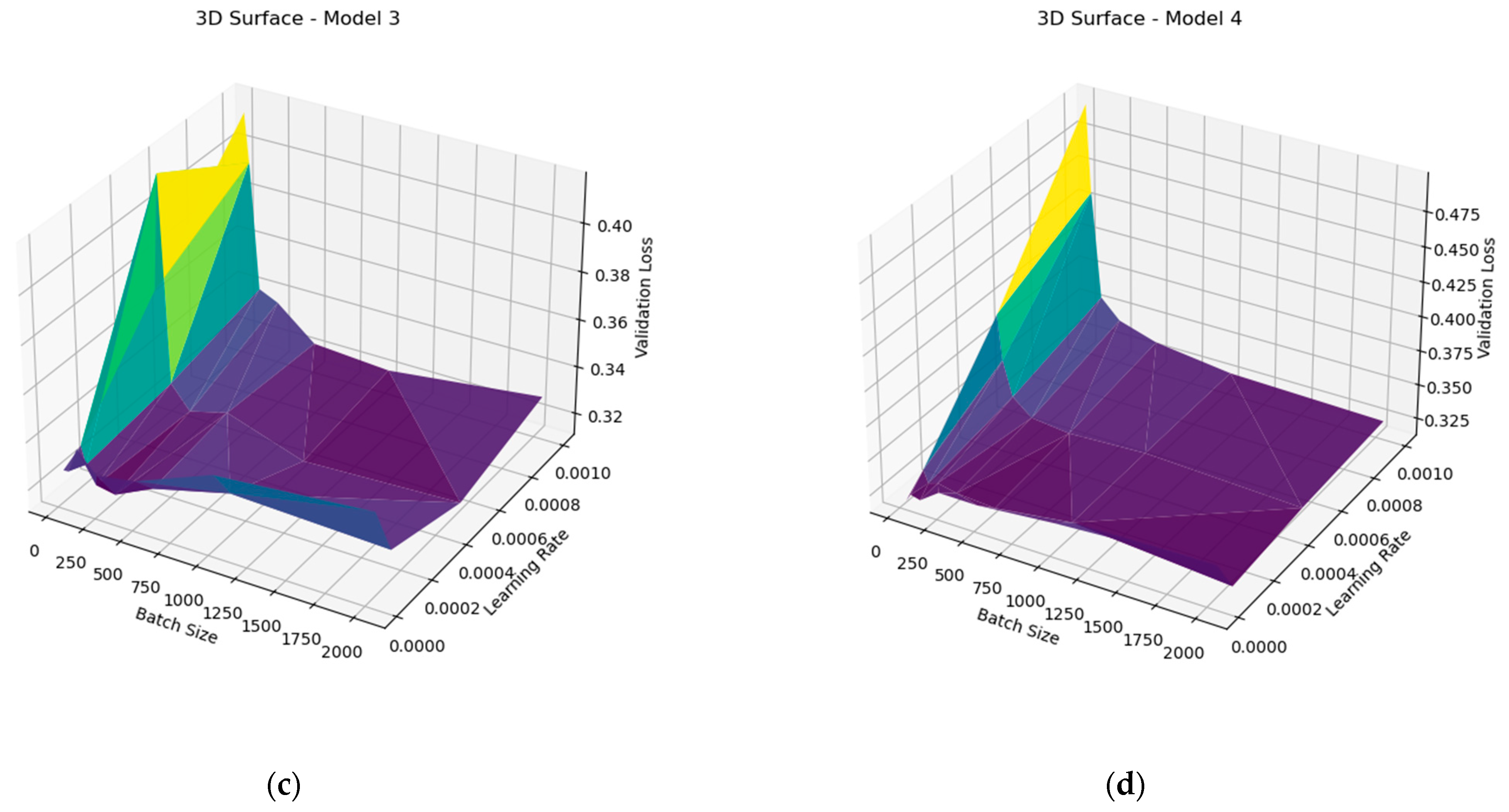
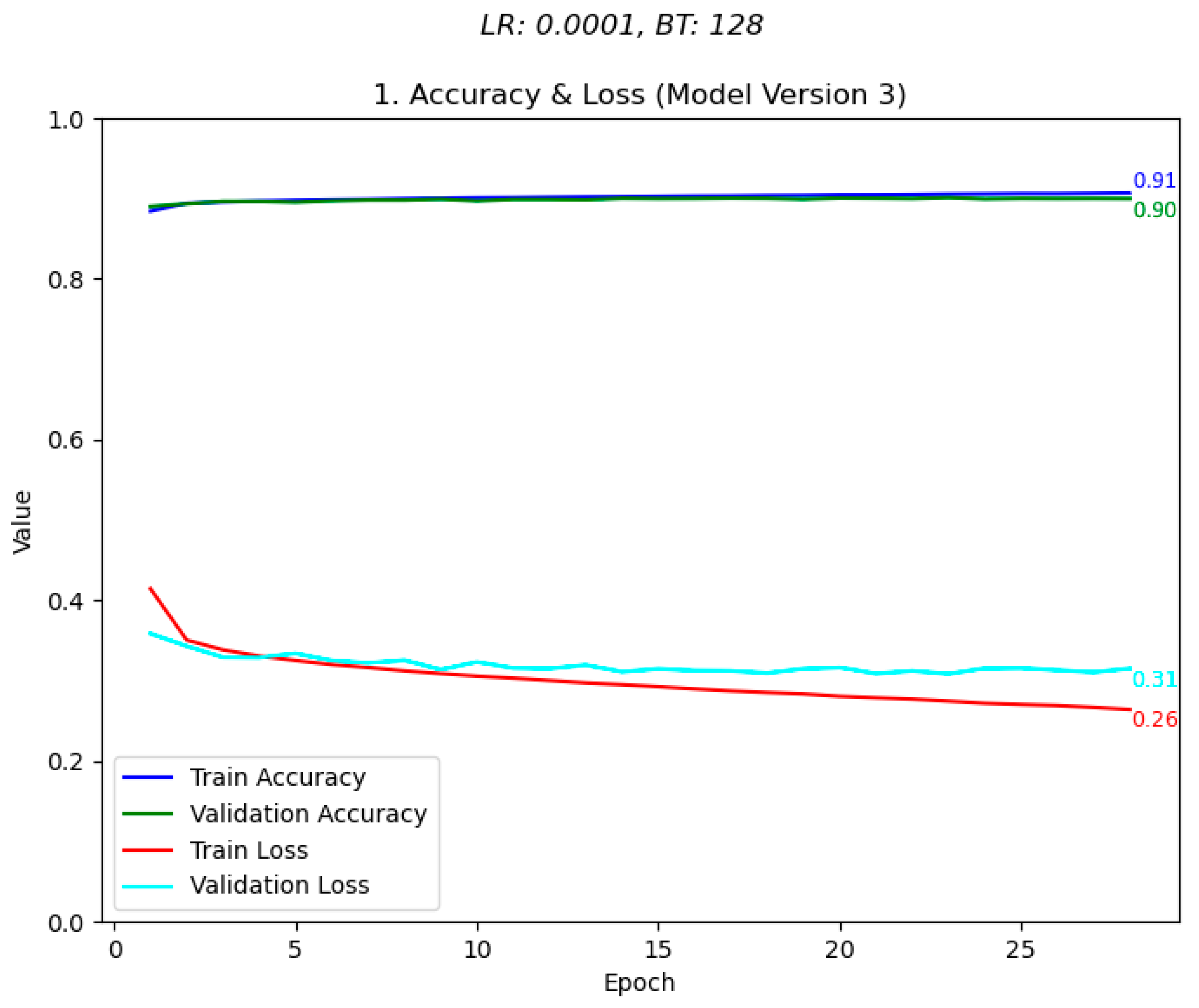
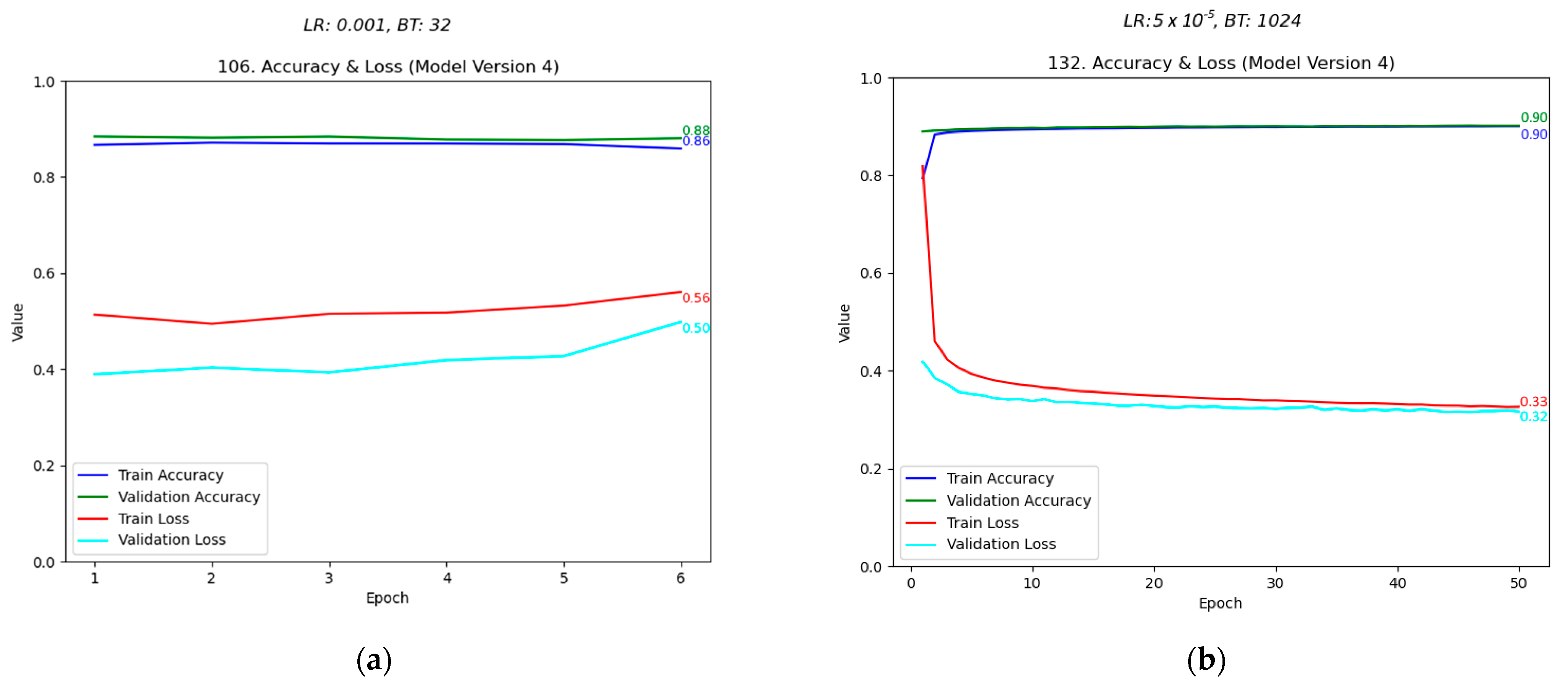
The graphs were then redesigned and reanalysed to observe the training parameters that resulted in the highest accuracy and lowest loss. As can be seen in Figure 9, the difference between poor training metrics, and good metrics for the same model variant was clear. Furthermore, as can be seen in Figure 10, the difference between model variants was clearly observable, with models 3 and 4 having more stable relationships between batch size and learning rate, compared against loss. When assessing the generated graphs, it was found that model 3, trained with a learning rate of 0.0001 and a batch size of 128, resulted in the best performance. As shown in Figure 11, the model produced training metrics of 0.91 accuracy and 0.26 loss, and validation metrics of 0.90 accuracy and 0.31 loss. Model 3, trained on these values, was therefore chosen as the model to use for the system going forward.
After the best-performing model was determined and tested on the system, the performance was satisfactory, with few incorrect predictions, and stable prediction ability across gestures. However, the frame rate observed when testing was relatively low, consistently performing at between 4 and 6 frames per second. This meant that although the system performed well when the hand was stationary, MediaPipe struggled to maintain a lock on the hand when moving, resulting in detection dropouts. Improving this was achieved by recompiling the model using TFLite.
When comparing the system running the TFLite model, the performance was effectively doubled, with 10–13 frames per second consistently observed. This was enough for MediaPipe to, for the most part, maintain a lock on the hand when moving, allowing for analogue control of devices via hand position within the frame. Despite this, the frame rate was still low enough for the ‘live’ camera feed to appear poor. The bottleneck was now MediaPipe hand analysis, rather than the machine learning model. After this was improved, the camera feed appeared smoother than before. The systems average frame rate was therefore tested over a 30 s period in a naturally well-lit room, out of direct sunlight, with minimal complexity within the frame. The system achieved 20.4 FPS when a hand was present and its gesture recognised, and 38.3 FPS when no hand was present. Although tested under ideal conditions, it should be noted that although low-light environments effected MediaPipe’s ability to recognise a hand within a frame, this did not observably effect the systems frame rate.

5.3. Home Appliance Control

5.3.1. Digital Hardware

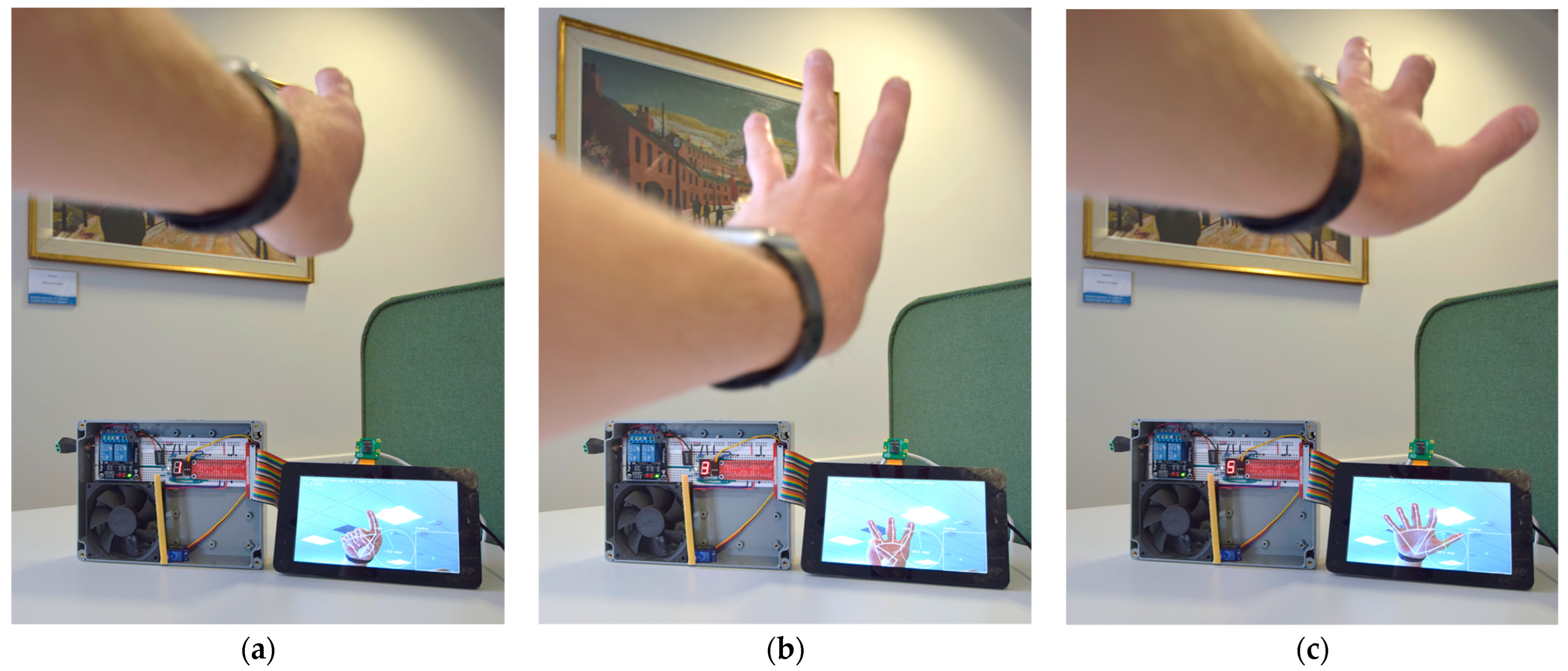
Testing of the binary devices was extremely positive. The 7-segment display, demonstrated in Figure 12, and the RGB LED performed exceptionally, updating promptly and correctly displaying their assigned task. The two relays required several code rewrites to successfully latch; however, after separate state functions were created, they too performed well, maintaining their last state until their assigned gesture was shown again.

5.3.2. Analogue Hardware

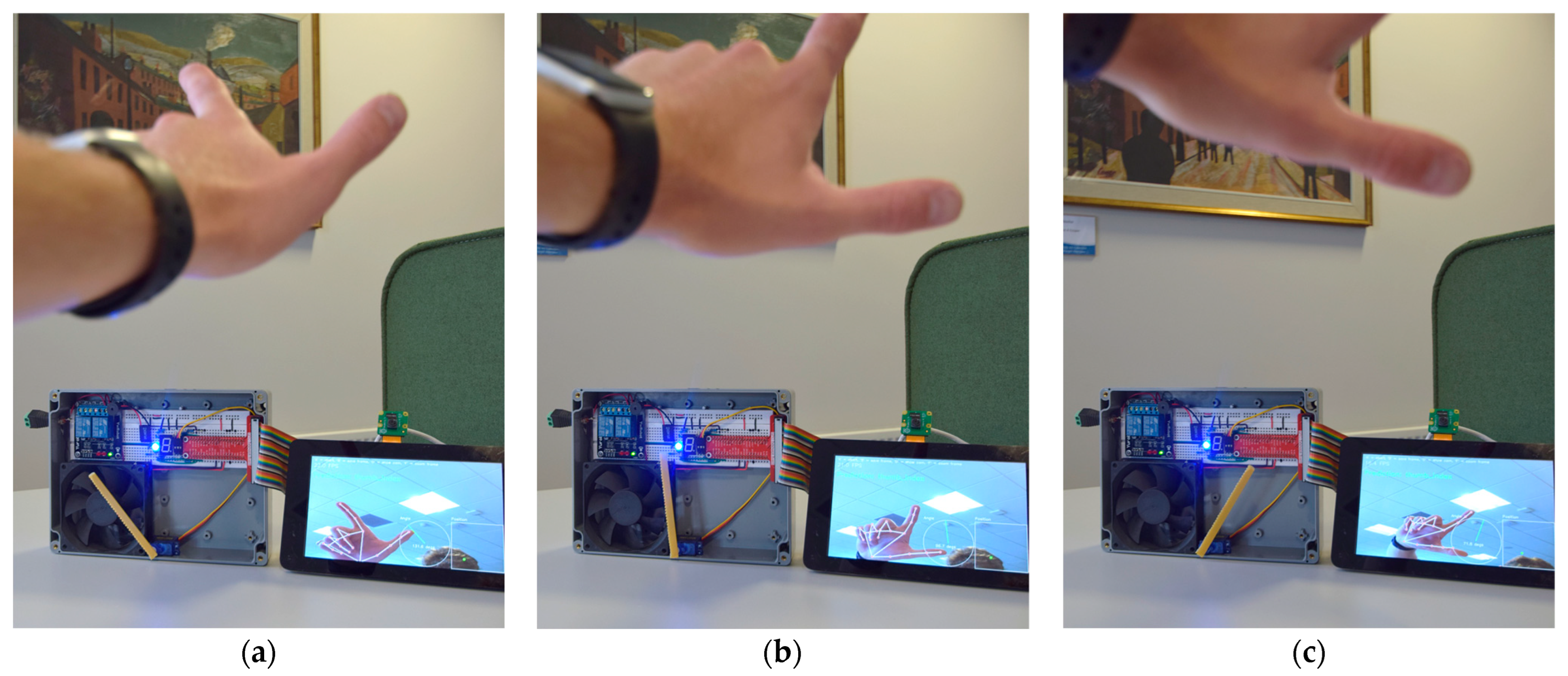
The servo motor initially performed poorly, constantly jittering in place, even when the hand angle had not significantly changed. It was realised that any change in angle would result in the servo attempting the move to that angle, explaining the poor performance. Once fixed, the servo too performed well. Although the 5-degree angle threshold limited the possible range of possible control steps to 36, this was due to the limitations of the hardware, rather than the capabilities of the system in accurately representing hand angle. As can be seen in Figure 13, the servo nonetheless tracked the angle of the hand and proved a working prototype for a more refined version for accessibility use.
This being said, the servo only performed correctly for the left hand. This was due to how the hand position was normalised. As development was performed by a left-dominant person, angle normalisation was achieved in relation to the left hand. This meant that when a right hand was presented to the camera, the hand angle was 180 degrees different to the left. As the servo only had 180 degrees of freedom, presenting the servos gesture with the right hand resulted in the servo attempting an angle it could not. However, as future project development would enable two handed gestures, requiring a rewrite of the normalisation function, this was determined to be unimportant as servo control could still be successfully demonstrated with the left hand.
The Piezo speaker too performed well, with the frequency audibly increasing when a hand was moved from the left to the right, and vice versa. The initial version of the demonstration included volume adjustment via the hands vertical position. It was found, however, that performing this via duty cycle, the only method that could be thought of, for a piezo speaker was not successful. As this was a limitation of the hardware used, and not the software, this too was determined to be of little importance and the functionality removed.

6. Discussion

6.1. Conclusions

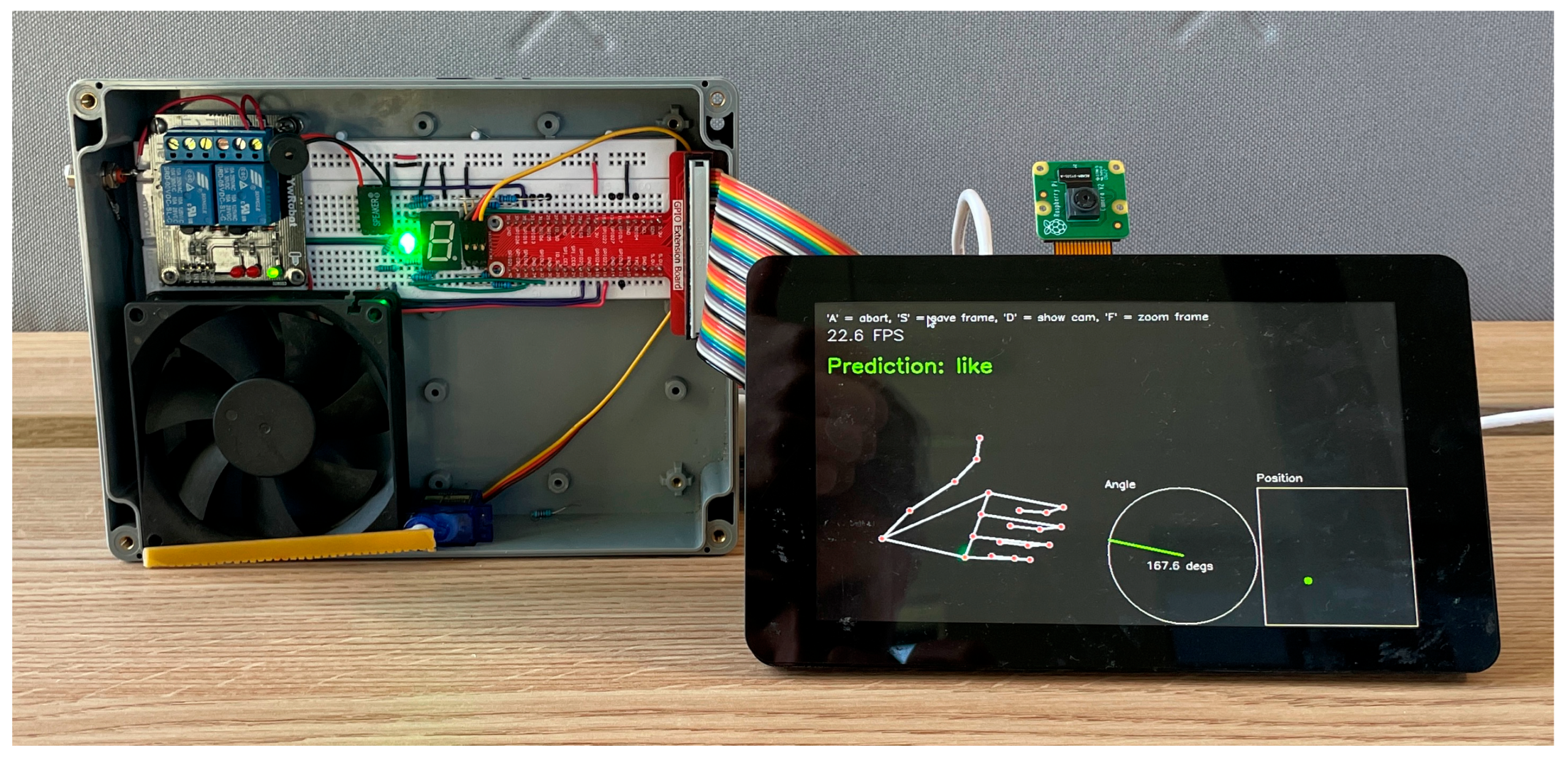
The final Raspberry Pi 5-based system achieved real-time hand gesture recognition and controlled the corresponding hardware, as shown in Figure 14, where the system identified the gesture ‘like’ and lit the LED green, the associated action, as shown in Table 2. This result was consistent across all gestures, demonstrating the ability to recognise a range of static, single handed gestures and trigger real-world outputs. MediaPipe Hands detected and tracked the hand well, while the use of OpenCV to handle video processing and display proved to be a good combination, with the two tools working well together, with hand wireframes and data plots both correctly displayed.
The final model, consisting of dense layers chosen primarily for their efficiency, achieved 90% accuracy and proved effective at processing the coordinate data, enabling fast and reliable gesture recognition, especially when using TensorFlow Lite. When the lightweight model was used alongside other optimisations such as the reduced landmark assignment and separate camera and hardware threads, real-time operation appeared smooth and consistent with no noticeable slowdowns, even when controlling hardware. Although highly promising, these preliminary observations should be further studied to confirm that no edge-cases are present and that this appearance is truly consistent across all environments (light intensity, room temperature, complexity of camera frame, etc.). Further, more advanced analysis should be completed to further demonstrate the systems real-time performance, as well as to identify possible areas of improvement pertaining to the model.
However, several limitations remain with the system. Only static gestures are supported and, when testing in both low light and direct light, a noticeable decline in hand detection performance was observed. As well as this, the use of a manually focused camera module resulted in reduced hand detection, especially when in use in the before mentioned conditions.
In conclusion, the completed system showed that a gesture-based smart assistant that did not require speech or touch was viable and could be developed into a low-cost accessible system with great potential for real-world applications in smart homes, and the broader accessibility market.

6.2. Further Work

The system that was constructed and tested functioned very well as a proof of concept. However, several aspects could be improved and expanded such that the system would perform better as a true replacement for current smart assistants.
The first, and easiest improvement would be to modify the system such that two hands could be recognised at any given time. This would be a straightforward task as MediaPipe Hands already allows for two hands to be detected at any time and displayed. Furthermore, as the model was trained equally on both the left and right hand, the task of analysing two sets of landmarks would require little modification to the prediction software. This would allow for either multiple devices to be controlled simultaneously, or for an expanded set of possible commands, as every combination of two of the 15 gestures the model was trained on could be assigned as a task, resulting in 225 possible combinations.
Another improvement to the system would be for deeper model training investigation. Each model tested in this project consisted of dense layers. Although proven to be successful, other layers should be assessed for possible improvements. Furthermore, a broader range of batch sizes and learning rates could be investigated, as well as more complex models, consisting of more layers. Initial evidence of this possible improvement was demonstrated by the testing performed in this paper, with the expended models performing more consistently, and on average achieved better metrics than those with reduced layers.
Beyond this, semi-supervised and unsupervised model types could be explored with the possibility of very well-performing models, more adept at recognising the individual habits of a single user. This would be an excellent addition to a device focused on accessibility, where continued use results in more data for the model to process. As well as this, these models could also allow for a user to add their own gestures to the model, opening the possibility for a far more customisable system. Recent studies [28] have shown strong performance in this area, especially beneficial here in the context of gathering more ‘no_gesture’ equivalent data to further mitigate false positives in the system. Further research into the viability of these model types on low-power devices like the Raspberry Pi 5 should be completed.
As mentioned in the literature review, another improvement could involve the use of a depth sensor to determine the distance of the hand from the camera. Although this was successfully calculated during normalisation, it could be argued that a dedicated sensor, along with the calculation, would result in a more accurate normalisation. This would in turn result in the model performing better at recognising gestures, at they would be better scaled and therefore their landmarks a closer match to those in the training data. Furthermore, this would allow for another axis to be utilised in the analogue control of devices, expanding the capabilities of the system when manipulating devices such as robotic arms or arial drones.
Beyond the use of a depth sensor during real-time operation, multimodal pretraining using both a camera scream and a depth/IR sensor stream to learn stronger features could be investigated. This enables stronger features to be learnt during the training period, especially when only limited training data are available, a likely scenario with a system such as this. Strong results have been observed when using this approach in the context of railway safety systems [29] and it is certainly a viable area of study for this system.
To fully succeed in the task of replacing existing smart home control devices, the current hardware used to represent home appliances could be changed out and instead utilise, for example, the Google Home API. This would allow for the system to be incorporated into existing smart home systems and could be achieved using the current system, replacing the current GPIO class with one dedicated to interfacing with Google Home.
The final, and arguably the best, improvement that could be made would be the replacement of the current gesture dataset, with one made up of gestures from the British Sign Language. As a device intended for use primarily for those with speech difficulties, this would be a natural choice and greatly expand the possible uses of the system. Although the current gestures perform the task well, they are mostly arbitrarily assigned and therefore learning them would be an unnecessarily difficult task.
Using BSL, however, would require a near complete rewrite of the machine learning model. Although the BSL alphabet consists of two-handed statics gestures, the two hands constantly intersect, meaning that they could not be treated as two independent hands, but would have to be read by the model as one coordinate set, representing one feature. Furthermore, BSL also includes many dynamic gestures that the model currently cannot interpret. Therefore, a different model architecture would likely have to be used that could better analyse a stream of coordinates, representing one gesture. Changing to BSL still remains a natural choice, greatly expanding capabilities and, despite the challenges laid out, could be accomplished with the system given enough development time.

Author Contributions

T.H., methodology, software, formal analysis, investigation, and data curation. A.A., conceptualisation, validation, and resources. T.H. and A.A., writing—original draft. All authors have read and agreed to the published version of the manuscript.

Funding

This research received no external funding.

Data Availability Statement

The data presented in this paper are available on request from the corresponding author.

Acknowledgments

I would like to thank my supervisor, Anwar Ali, for his continuous support and encouragement throughout this work. I would also like to thank David Moody for supplying the hardware used without question. I would lastly like to thank my mother, father, and family, without whom I would never have made it to this point.

Conflicts of Interest

The authors declare no conflicts of interest.

Abbreviations

The following abbreviations are used in this manuscript:
APIApplication Programming Interface
IoTInternet of Things
RPiRaspberry Pi
GPIOGeneral Purpose Input Output
MLMachine Learning
BSLBritish Sign Language
MPMediaPipe
OpenCVOpen-Source Computer Vision Library
CV2OpenCV Version 2.0+ Python Interface Prefix
LEDLight Emitting Diode
FPSFrames Per Second
TFTensorFlow
HaGRIDHand Gesture Recognition Image Dataset
CPUCentral Processing Unit
GPUGraphical Processing Unit
RAMRandom Access Memory
RGBRed–Green–Blue
GBGigabyte
NPNumPy
ReLURectified Linear Unit
PWMPulse Width Modulation

References

  1. World Health Organization. Deafness and Hearing Loss; World Health Organization: Geneva, Switzerland, 2025; Available online: https://www.who.int/news-room/fact-sheets/detail/deafness-and-hearing-loss (accessed on 1 May 2025).
  2. Wren, C.R.; Azarbayejani, A.; Darrell, T.; Pentland, A.P. Pfinder: Real-time tracking of the human body. IEEE Trans. Pattern Anal. Mach. Intell. 1997, 19, 780–785. [Google Scholar] [CrossRef]
  3. Zhang, F.; Bazarevsky, V.; Vakunov, A.; Tkachenka, A.; Sung, G.; Chang, C.L.; Grundmann, M. MediaPipe Hands: On-device Real-time Hand Tracking. arXiv 2020, arXiv:2006.10214. [Google Scholar] [CrossRef]
  4. Fezari, M.; Dahoud, A.A. Raspberry Pi 5: The New Raspberry Pi Family with More Computation Power and AI Integration. 2023. Available online: https://www.researchgate.net/publication/375552555_Raspberry_Pi_5_The_new_Raspberry_Pi_family_with_more_computation_power_and_AI_integration?channel=doi&linkId=654e81a5b86a1d521bcc2f0c&showFulltext=true (accessed on 1 May 2025).
  5. Culjak, I.; Abram, D.; Pribanic, T.; Dzapo, H.; Cifrek, M. A brief introduction to OpenCV. In Proceedings of the 35th International Convention MIPRO, Opatija, Croatia, 21–25 May 2012; IEEE: New York, NY, USA, 2012; pp. 1725–1730. Available online: https://ieeexplore.ieee.org/document/6240859 (accessed on 1 May 2025).
  6. Gujar, H.; Chile, S.; Shitole, S.; Mhatre, P.; Kadam, S.; Ghanate, S.; Kurle, D. Python based image processing. 2016. Available online: https://www.researchgate.net/publication/309208697_Python_Based_Image_Processing (accessed on 1 May 2025).
  7. van der Walt, S.; Schönberger, J.L.; Nunez-Iglesias, J.; Boulogne, F.; Warner, J.D.; Yager, N.; Gouillart, E.; Yu, T. Scikit-image: Image processing in Python. PeerJ 2014, 2, e453. [Google Scholar] [CrossRef] [PubMed]
  8. Raspberry Pi Ltd. The Picamera2 Library; Raspberry Pi Ltd.: Cambridge, UK, 2025; Available online: https://datasheets.raspberrypi.com/camera/picamera2-manual.pdf (accessed on 1 May 2025).
  9. Cao, Z.; Hidalgo, G.; Simon, T.; Wei, S.; Sheikh, Y. OpenPose: Realtime multi-person 2D pose estimation using affinity fields. arXiv 2018, arXiv:1812.08008. [Google Scholar] [CrossRef] [PubMed]
  10. Yang, C.Y.; Lin, Y.N.; Wang, S.K.; Shen, V.R.L.; Tung, Y.C.; Shen, F.H.C.; Huang, C.H. Smart Control of Home Appliances Using Hand Gesture Recognition in an IoT-Enabled System. Appl. Artif. Intell. 2023, 37, 2176607. [Google Scholar] [CrossRef]
  11. Anand, A.; Pandey, A.; Mehndiratta, S.; Goyal, H.; Kaushik, P.; Rathore, R. Smart AI based volume control system: Gesture recognition with OpenCV & MediaPipe integration. In Proceedings of the 2023 International Conference on Smart Devices, Dehradun, India, 2–3 May 2024; IEEE: New York, NY, USA, 2024. [Google Scholar] [CrossRef]
  12. Bora, J.; Dehingia, S.; Boruah, A.; Chetia, A.A.; Gogoi, D. Real-time Assamese Sign Language Recognition using MediaPipe and Deep Learning. Procedia Comput. Sci. 2023, 218, 1384–1393. [Google Scholar] [CrossRef]
  13. Materzynska, J.; Berger, G.; Bax, I.; Memisevic, R. The Jester dataset: A Large-scale video dataset of human gestures. In Proceedings of the 2019 IEEE/CVF International Conference on Computer Vision Workshops, Seoul, Republic of Korea, 27–28 October 2019; IEEE: New York, NY, USA, 2019. [Google Scholar] [CrossRef]
  14. Nuzhdin, A.; Nagaev, A.; Sautin, A.; Kapitanov, A.; Kvanchiani, K. HaGRIDv2: 1M images for static and dynamic hand gesture recognition. arXiv 2024, arXiv:2412.01508. [Google Scholar] [CrossRef]
  15. Rajput, J. Ultimate Neural Network Programming with Python; Orange Education Pvt Ltd., AVA: Delhi, India, 2023. [Google Scholar]
  16. Paszke, A.; Gross, S.; Massa, F.; Lerer, A.; Bradbury, J.; Chanan, G.; Killeen, T.; Lin, Z.; Gimelshein, N.; Antiga, L.; et al. PyTorch: An imperative style, high-performance deep learning library. arXiv 2019, arXiv:1912.01703. [Google Scholar] [CrossRef]
  17. Abadi, M.; Agarwal, A.; Barham, P.; Brevdo, E.; Chen, Z.; Citro, C.; Corrado, G.S.; Davis, A.; Dean, J.; Devin, M.; et al. TensorFlow: Large-scale machine learning on heterogeneous distributed systems. arXiv 2016, arXiv:1603.04467. [Google Scholar] [CrossRef]
  18. Pedregosa, F.; Varoquaux, G.; Gramfort, A.; Michel, V.; Thirion, B.; Grisel, O.; Blondel, M.; Prettenhofer, P.; Weiss, R.; Dubourg, V.; et al. Scikit-learn: Machine learning in Python. arXiv 2012, arXiv:1201.0490. [Google Scholar] [CrossRef]
  19. Keras. Introducing Keras 3.0. Keras. 2023. Available online: https://keras.io/keras_3/ (accessed on 1 May 2025).
  20. David, R.; Duke, J.; Jain, A.; Reddi, V.J.; Jeffries, N.; Li, J.; Kreeger, N.; Nappier, I.; Natraj, M.; Regev, S.; et al. TensorFlow Lite Micro: Embedded machine learning on TinyML systems. arXiv 2021, arXiv:2010.08678. [Google Scholar] [CrossRef]
  21. Remiro, M.Á.; Gil-Martín, M.; San-Segundo, R. Improving Hand Pose Recognition Using Localization and Zoom Normalizations over MediaPipe Landmarks. Eng. Proc. 2023, 58, 69. [Google Scholar] [CrossRef]
  22. Ake, A.A.R.; Esomonu, C. Improved Hand Gesture Recognition System Using Keypoints. 2023. Available online: https://www.researchgate.net/publication/375594763_Improved_Hand_Gesture_Recognition_System_Using_Keypoints?channel=doi&linkId=655148703fa26f66f4f750ae&showFulltext=true (accessed on 1 May 2025).
  23. Brownlee, J.; A Gentle Introduction to the Rectified Linear Unit (ReLU). Machine Learning Mastery. 2020. Available online: https://machinelearningmastery.com/rectified-linear-activation-function-for-deep-learning-neural-networks/ (accessed on 1 May 2025).
  24. Gil-Martín, M.; Marini, M.R.; Martín-Fernández, I.; Esteban-Romero, S.; Cinque, L. Hand gesture recognition using MediaPipe landmarks and deep learning networks. In Proceedings of the 17th International Conference on Agents and Artificial Intelligence, Porto, Portugal, 23–25 February 2025; SciTePress: Setubal, Portugal, 2025; Volume 3, pp. 24–30. [Google Scholar] [CrossRef]
  25. Harris, C.R.; Millman, K.J.; van der Walt, S.J.; Gommers, R.; Virtanen, P.; Cournapeau, D.; Wieser, E.; Taylor, J.; Berg, S.; Smith, N.J.; et al. Array programming with NumPy. Nature 2020, 585, 357–362. [Google Scholar] [CrossRef] [PubMed]
  26. Google AI for Developers [Internet]. Google AI; [Date Unknown]. [Image], Hand Landmarks Detection Guide; [About 2 Screens]. Available online: https://ai.google.dev/edge/mediapipe/solutions/vision/hand_landmarker (accessed on 1 May 2025).
  27. Raspberry Pi Ltd. Raspberry Pi Camera Module 3; Raspberry Pi Ltd.: Cambridge, UK, 2024; Available online: https://datasheets.raspberrypi.com/camera/camera-module-3-product-brief.pdf (accessed on 28 July 2025).
  28. Yang, H.; Liu, Z.; Ma, N.; Wang, X.; Liu, W.; Wang, H. CSRM-MIM: A Self-Supervised Pretraining Method for Detecting Catenary Support Components in Electrified Railways. IEEE Trans. Transp. Electrif. 2025, 11, 10025–10037. [Google Scholar] [CrossRef]
  29. Yan, J.; Cheng, Y.; Zhang, F.; Li, M.; Zhou, N.; Jin, B.; Wang, H.; Yang, H.; Zhang, W. Research on multimodal techniques for arc detection in railway systems with limited data. Struct. Health Monit. 2025, 14759217251336797. [Google Scholar] [CrossRef]
Figure 1. Flowchart representing real-time gesture recognition system operation, with arrows demonstrating process flow.
Electronics 14 03976 g001
Figure 2. MediaPipe hand landmark assignment, highlighting landmark location and assigned name [26].
Electronics 14 03976 g002
Figure 3. Gathering training data, showing: (a) MediaPipe landmark assignment, coordinate saving, and real-time display; (b) camera module live feed. Together showing a real-time wireframe representation of a hand.
Electronics 14 03976 g003
Figure 4. HaGRIDv2 gestures [14] before the removal of two-handed gestures and the merger of others. Gestures framed in red, excluding ‘no_gesture’, represent those added to the HaGRID dataset in its second edition, HaGRIDv2.
Electronics 14 03976 g004
Figure 5. Wiring diagram detailing connections between hardware and overall physical design of the system, with arrows demonstrating inputs, outputs, and data links.
Electronics 14 03976 g005
Figure 6. Highlighted significant components on (a) hardware box; (b) reverse of Raspberry Pi system board.
Electronics 14 03976 g006
Figure 7. MediaPipe incorrectly identifying a collar as a hand (note the plotted landmark coordinates and recognition that the coordinates do not represent a valid gesture).
Electronics 14 03976 g007
Figure 8. Generated model graph showing expected training metrics and unexpected validation metrics.
Electronics 14 03976 g008
Figure 9. A comparison of the effect of (a) bad training metrics; (b) good training metrics for a single model type.
Electronics 14 03976 g009
Figure 10. Generated 3D surface graphs showing validation loss, the lowest values of which are represented by the darkest colours, against batch size and learning rate for (a) initial model; (b) reduced initial model; (c) expanded initial model; (d) expanded initial model with dropout layers.
Electronics 14 03976 g010aElectronics 14 03976 g010b
Figure 11. Generated graph representing the best-performing model, showing high accuracy and low loss.
Electronics 14 03976 g011
Figure 12. Recognising a hand, displaying a wireframe representation, recognising the numbers, (a) one, (b) three, and (c) five, and visualising them on the 7-segment display.
Electronics 14 03976 g012
Figure 13. Servo Motor control script demonstrating ability to follow index finger angle from (a) 131.6 degrees; (b) 96.7 degrees; (c) 71.8 degrees.
Electronics 14 03976 g013
Figure 14. Completed System recognising gesture and controlling hardware.
Electronics 14 03976 g014
Table 1. Python code showing initial Keras model developed from Rajput’s original.
Rajput’s Initial Keras Model [15] (p. 251)Modified Keras Model
model = Sequential()
model.add(Flatten(input_shape = (28, 28)))
model.add(Dense(128, activation = ’relu’))
model.add(Dense(10, activation = ’softmax’))
model = Sequential()
model.add(Input(shape = (63,)))
model.add(Dense(256, activation = ‘relu’))
model.add(Dense(128, activation = ‘relu’))
model.add(Dense(64, activation = ‘relu’))
model.add(Dense(num_classes, activation = ‘softmax’))
Table 2. Gesture grouping and processing, showing grouping of similar gestures, their processing success rate, and number of successful processed samples.
IDSuccessful
Samples
Success
Rate
Assigned NameHaGRID OriginalsAssigned Hardware
052,78394.050%CallCallRelay 2
156,37089.125%dislikeDislikeRGB red
2244,27994.222%Fivestop, stop2, palm, grab7-sgmt ‘5’
359,22994.206%FourFour7-sgmt ‘4’
471,02197.540%GripGripN/A
556,44490.328%LikeLikeRGB green
670,80393.079%middleMiddleN/A
7423497.828%no_gestureno_gestureN/A
859,21595.039%okOkRGB blue
9187,05791.785%oneone, mute, point7-sgmt ‘1’
1070,90897.667%pinkiePinkiePiezo speaker
1159,32692.173%rockRockRelay 1
12267,29196.674%threethree, three2, three37-sgmt ‘3’
1391,58697.442%thumbindexThumbindexServo Motor
14227,49992.987%twotwo, two2, peace, peace27-sgmt ‘2’
1557,90091.779%zeroFist7-sgmt ‘0’
TotalAverage
161,635,94594.120%
Table 3. Python model variants, showing fully connected and dropout layers for each variant.
Model NumberModel DetailsPython Model Layers
1Initial ModelDense (256, activation = ‘relu’)
Dense (128, activation = ‘relu’)
Dense (64, activation = ‘relu’)
2Reduced Initial ModelDense (128, activation = ‘relu’)
Dense (64, activation = ‘relu’)
3Expanded Initial ModelDense (1024, activation = ‘relu’)
Dense (512, activation = ‘relu’)
Dense (256, activation = ‘relu’)
Dense (128, activation = ‘relu’)
Dense (64, activation = ‘relu’)
4Expanded Initial Model with Dropout LayersDense (1024, activation = ‘relu’)
Dropout (0.3)
Dense (512, activation = ‘relu’)
Dropout (0.2))
Dense (256, activation = ‘relu’)
Dropout (0.1)
Dense (128, activation = ‘relu’)
Dense (64, activation = ‘relu’)
Disclaimer/Publisher’s Note: The statements, opinions and data contained in all publications are solely those of the individual author(s) and contributor(s) and not of MDPI and/or the editor(s). MDPI and/or the editor(s) disclaim responsibility for any injury to people or property resulting from any ideas, methods, instructions or products referred to in the content.