
Article

Design and Evaluation of a Low-Code/No-Code Document Management and Approval System

by
Constantin Viorel Marian
1,
Mihnea Neferu
2 and
Dan Alexandru Mitrea
1,*
1
Department of Engineering in Foreign Languages, National University of Science and Technology POLITEHNICA Bucuresti, RO-060042 Bucharest, Romania
2
Doctoral School of Electronics, Telecommunications and Information Technology, National University of Science and Technology POLITEHNICA Bucharest, RO-060042 Bucharest, Romania
*
Author to whom correspondence should be addressed.
Information 2026, 17(1), 46; https://doi.org/10.3390/info17010046
Submission received: 3 November 2025 / Revised: 8 December 2025 / Accepted: 18 December 2025 / Published: 4 January 2026
(This article belongs to the Section Information Applications)

Abstract

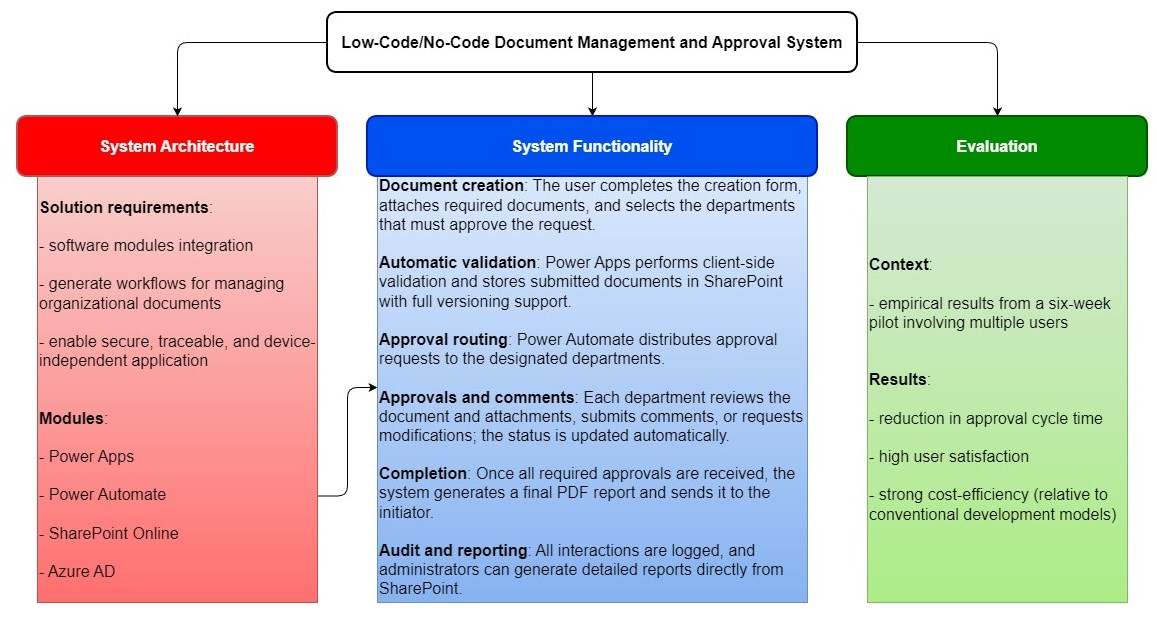
This paper presents the design, implementation, and evaluation of a low-code document management and approval system developed on the Microsoft Power Platform. The solution integrates Power Apps, Power Automate, SharePoint Online, and Azure Active Directory to enable secure, traceable, and device-independent workflows for managing organizational documents. By combining graphical interfaces, automated approval logic, and enterprise-grade identity management, the system supports real-time collaboration and compliance with records’ governance standards. A comparative analysis with traditional enterprise content management and open-source web architectures demonstrates substantial advantages in deployment speed, scalability, and auditability. Empirical results from a six-week pilot involving multiple users indicate a reduction in approval cycle time, high user satisfaction, and strong cost-efficiency relative to conventional development models. The findings highlight how low-code ecosystems operationalize digital transformation by empowering non-technical users to automate complex workflows while maintaining security and governance integrity. This work contributes to the understanding of information system democratization, showing that low-code platforms can extend digital participation, improve organizational agility, and support sustainable operational efficiency across distributed environments.

1. Introduction

Digital ecosystems define a new way of organizing value and collaboration in the digital society. They bring together technological platforms, data, algorithms and user communities in an interconnected, dynamic and co-evolving framework [1]. A digital ecosystem involves the existence of an interdependent network of platforms, services, data and actors that co-create value in a collaborative and adaptive framework [2]. Compared to traditional organizations, digital ecosystems operate through open interfaces and continuous flows of data and innovation.
In order to not amplify pre-existing inequalities, digital transformation must include principles of equity, accessibility and accountability [3,4]. Digital inclusivity is not limited to ensuring access to the internet or devices but aims at the effective participation of all actors in the co-creation and benefits of digital ecosystems [5]. Thus, digital ecosystems require a reassessment of traditional paradigms of accountability and governance [6]. Therefore, the ethical dimension of digital ecosystems cannot be treated in isolation but must be understood as a systemic, emergent property. Low-Code/No-Code (LCNC) tools appear as a bridge between technology, inclusion and ethics. By reducing the complexity of developing digital applications, LCNC allows for the extension of participation to non-technical users, the so-called citizen developers [7].
Digital inclusion involves three main characteristics: access to infrastructure, digital skills and meaningful participation in value co-creation [5]. Lack of software development skills remains a major obstacle to full participation in digital ecosystems, especially for small organizations [4]. LCNC technologies can be viewed as digital empowerment mechanisms that allow people without technical training to create applications, automate processes and actively participate in innovation [8]. Thus, it transforms passive users into digital co-producers, amplifying diversity and participation in the ecosystem.
The main issues in digital ecosystems are issues not only of efficiency and performance but also of ethics and responsibility [9]. LCNC platforms can reduce power asymmetries between developers and users, but they can also generate risks related to security, quality, and accountability [7]. Ecosystems do not depend only on technological performance or economic competitiveness but on the degree to which they manage to integrate principles of inclusion, equity and ethics into their operating architecture [10].
The proposed application presents an example of how low-code architectures can deliver enterprise-grade document governance and workflow automation without the high costs or complexity of traditional software development. The integration of Power Apps, Power Automate, SharePoint, and Azure Active Directory creates a secure, traceable, and user-friendly environment that streamlines document approval cycles across distributed teams. Comparative evaluation highlights scalability, traceability, and governance compared to legacy systems. Future development should focus on migrating to Microsoft (Redmond, WA, USA) Dataverse for large-scale relational data management, introducing staged publication environments with validation checkpoints, and incorporating methodological transparency artifacts for improved auditability. This paper contributes to the ongoing evolution of low-code ecosystems as enablers of digital transformation, business agility, and inclusive participation in information technology.
This paper contributes a complete low-code document approval solution built on Microsoft Power Platform, together with a structured comparison against open-source, code-centric alternatives. It offers an empirical evaluation of development efficiency and user experience based on a controlled user study and provides a detailed cost and Total Cost of Ownership (TCO) analysis relevant to medium-sized enterprises. Collectively, these contributions demonstrate how low-code tools can support efficient, maintainable, and economically viable document governance processes. In addition, the study consolidates technical, organizational, and economic perspectives into a unified assessment framework, enabling a clearer understanding of the conditions under which low-code platforms represent a suitable alternative to traditional development approaches.
The remainder of this paper is organized as follows. Section 2 reviews the relevant background and technological context underlying the proposed solution. Section 3 describes the system requirements and outlines the user study methodology. Section 4 presents a comparative analysis between the Power Platform implementation and open-source, code-centric alternatives. Section 5 examines development and debugging characteristics across scripting and low-code environments. Section 6 reports the empirical results, including performance measurements, usability findings, and cost analysis, while Section 7 discusses their broader implications for medium-sized enterprises. Finally, Section 8 concludes the paper and identifies directions for future work.

2. Related Work

2.1. Low-Code/No-Code Development in the Context of Digital Transformation

Low-code and no-code development platforms have become increasingly prominent in organizational digital transformation (DT) efforts, as they enable faster application development, reduce dependence on specialized programming skills, and support rapid adaptation of business processes. Recent studies highlight that these platforms provide visual modeling environments, reusable components, and managed cloud services that allow organizations to automate workflows and standardize document-centric tasks without extensive custom coding. As enterprises seek to modernize legacy processes, improve governance, and respond more quickly to operational changes, low-code tools offer an accessible and scalable approach that complements broader digital transformation strategies. DT involves integrating digital technologies into all aspects of an organization, leading to significant changes in how value is created, how companies operate, and how they interact with customers [11].
Organizations that adopt DT bring about changes in several dimensions: technological (e.g., cloud, data analytics, IoT, AI), process (workflow redesign, automation, real-time decision-making), and human/social (culture, skills, leadership) [11]. These dimensions are interdependent: technological adoption alone does not guarantee increased performance unless it is supported by adequate organizational capabilities and a well-defined strategy [12]. Furthermore, DT can provide increased operational efficiency, improved agility, innovation capacity, and sustainable competitive advantage, especially when aligned with organizational sustainability and resilience goals [13].
The adoption of Low-Code/No-Code (LCNC) platforms has become a trend in business process automation. These platforms allow users with little or no programming experience to create functional applications through visual modeling, drag-and-drop interfaces, and configuration, rather than extensive coding [14]. This shift promises faster development, lower costs, and greater agility in responding to changing organizational requirements.
The integration of LCNC platforms into business process management and enterprise workflows has brought considerable improvements to SMEs. Thus, LCNC platforms enable SMEs with limited IT resources to digitize management processes quickly and cost-effectively [15].
LCNC platforms are applied in more complex technical domains, such as robotics and cyber-physical systems: Brouzos et al. [16] demonstrated a low-code path for building cloud-connected robots. While, Sufi [17] provided a practical analysis of LCNC for research applications, showing how these platforms are used to implement algorithms and integrate cloud-based services in scientific contexts. On the business automation front, Desmond et al. [18] proposed a paradigm in which natural language descriptions of business rules are transformed into executable automation via LCNC platforms.
The benefits of technology integration in organizations are multiple: increased accessibility to information, better collaboration between teams, cost reduction, process traceability, workflow automation, improved user experience. Benefits in the literature include accelerated development cycles [17], empowerment of non-technical users [14], and lower initial IT investments for SMEs [15].
The literature also highlights key limitations and open research areas. The term low-code is used loosely, and the platforms marketed under it are extremely heterogeneous and often rebranded as legacy tools [14]. Concerns about scalability, maintainability, governance, integration, and technical debt remain unresolved [15]. In the field of robotics, although the low-code approach has simplified the development of robotic applications, the underlying platform constraints and domain-specific logic still require expert intervention [16].
These studies indicate that low-code and no-code tools have been adopted in various organizational settings to support process digitalization and application development with reduced programming effort.

2.2. Literature on Workflow Automation and Document Management Systems

Research on document management systems (DMS) and workflow automation has examined how organizations structure, govern, and optimize the flow of documents in digital environments. Sternad Zabukovšek et al. [19] emphasize that the effectiveness of DMS deployments depends strongly on an organization’s digital maturity, noting that document governance, versioning, and lifecycle control become increasingly critical as enterprises progress through broader digital transformation initiatives. Tang and Yang [20] demonstrate that cloud computing and big data technologies have significantly improved digital management efficiency in enterprises, enabling more scalable and integrated document-centric workflows.
Several studies have focused on operational aspects of document release, approval, and tracking. Chajduga et al. [21] analyze the role of DMS-supported documentation processes in industrial environments, highlighting the importance of traceability, structured release procedures, and standardized metadata for maintaining reliability and regulatory compliance. This emphasis on documentation structure and process control is consistent with themes commonly discussed in workflow and document-management research. Shi et al. [22] show that low-code platforms are increasingly adopted across multiple sectors due to their ability to democratize development and reduce technical barriers, although challenges remain regarding scalability, integration, and long-term maintainability. Within the services sector, Sztorc [23] illustrates how enterprise content management (ECM) and workflow automation contribute to operational resilience, particularly in contexts requiring frequent updates to structured documents and compliance records.
Beyond process implementation, research has also examined intelligent document organization and retrieval. Yoon [24] proposes an information-theoretic clustering model for enterprise document repositories, demonstrating how contextual features can improve metadata classification and large-scale search. Such approaches underscore the importance of data modeling, categorization, and indexing mechanisms within modern DMS architectures. Foundational work by Fu et al. [25] investigates the formal verification of workflows and e-service processes, showing that formal methods can be used to reason about correctness, detect deadlocks, and validate process constraints. These results highlight theoretical considerations relevant to automated approval systems, notably the need for correct and consistent process logic.
Overall, these studies outline various elements that may influence the design and implementation of digital approval workflows and document management systems. They provide a broad foundation for evaluating how low-code platforms, such as the Microsoft Power Platform, fit within existing research on DMS automation, governance, and process reliability.

2.3. Conceptual Background on Low-Code Platforms and Microsoft Power Ecosystem

Low-code platforms have emerged as an important paradigm in contemporary information systems development, enabling organizations to build and deploy business applications with minimal hand-coded logic. Prior studies highlight that low-code environments combine visual modeling, reusable components, and managed cloud services to accelerate solution delivery, reduce development barriers, and support rapid adaptation of business processes. Within this paradigm, the Microsoft Power Platform represents one of the most widely adopted ecosystems, integrating application development, workflow automation, and data management under a unified governance model.
Power Apps serves as a visual application-building environment that encapsulates user interface construction, form logic, and data interaction through configurable components rather than traditional programming. Power Automate extends this model by providing a workflow engine capable of orchestrating approvals, notifications, and system-to-system integrations using predefined actions and connectors. SharePoint, as part of the Microsoft 365 ecosystem, functions not only as a document management system but also as a structured data repository with built-in versioning, access control, and metadata management. Together, these services form a cohesive low-code stack that abstracts infrastructure management and offers a standardized foundation for developing enterprise workflows.
The integration of these components is relevant to prior research on workflow automation, ECM, and low-code development practices. Studies have shown that platforms combining centralized data storage, automated process logic, and user-accessible interfaces can support consistent document governance, reduce coordination overhead, and simplify compliance with organizational policies. This conceptual background provides the foundation for understanding the design choices and comparative analyses presented later in this paper.

3. Implementation

3.1. Platform Components and System Foundations

3.1.1. Azure Active Directory

Azure Active Directory (Azure Active Directory, https://learn.microsoft.com/en-us/entra/fundamentals/identity-fundamental-concepts, Online; accessed on 29 October 2025) (Azure AD) offers a set of tools that help organizations detect and respond to identity-based attacks [26], such as account compromise and fraud. Application management: Azure AD enables organizations to manage access to their cloud applications and services from a central location, including managing application permissions and user access.
Azure AD is capable of supporting a variety of authentication protocols, including SAML, OAuth 2.0, and OpenID Connect. This allows users to use their Azure AD credentials to sign in to different applications and obtain a single sign-on experience across multiple applications. Azure AD also offers different deployment models, such as cloud, hybrid, and on-premises, allowing businesses to choose the model that fits their needs and easily integrate it with their existing IT infrastructure. Azure AD’s integration with Windows devices allows users to securely sign in to their devices, simplifying device management for IT administrators. Azure AD provides a comprehensive set of APIs and developer tools for custom application development and integration with Azure AD. In addition, Azure AD offers different licensing options, including a free version, a basic version, and a premium version with advanced features, such as identity protection and group access management. Overall, Azure AD is a reliable identity and access management solution that provides businesses with essential tools to secure their digital assets and improve their IT operations.

3.1.2. Microsoft SharePoint

Microsoft SharePoint (Microsoft SharePoint. https://learn.microsoft.com/en-us/sharepoint/introduction/, Online; accessed on 29 November 2025) is a versatile collaboration platform that can be customized to meet the unique needs of different organizations. It offers features such as document management, version control, and search capabilities that make it easy for users to find and access the information they need. SharePoint also offers advanced security features, such as role-based access control and data loss prevention, to help organizations secure their data. With SharePoint, users can collaborate in real-time, edit documents, and track changes, making it an essential tool for teams that need to work together on projects. SharePoint integration with other Microsoft services, such as Office 365, Azure, and Dynamics 365, simplifies data centralization and streamlines workflows for organizations.

3.1.3. Microsoft Power Automate

Microsoft Power Automate version 2411.3 (Microsoft. Power Automate. https://learn.microsoft.com/en-us/power-automate/flow-types/, Online; accessed on 4 September 2025) is a cloud-based automation service from Microsoft. It is a fully managed cloud service that offers powerful features, such as automated workflows, data connectors, and AI-powered insights that help users quickly and easily automate tasks and processes. Power Automate also offers native integration with other Microsoft services, such as Office 365, Azure, and Dynamics 365, allowing users to quickly and easily access and automate data from different sources. Power Automate is a great solution for businesses that need to automate tasks and processes quickly and easily. It offers powerful features, such as automated workflows, data connectors, and AI-powered insights that help users quickly and easily automate tasks and processes. In addition, Power Automate provides a secure and reliable environment that helps secure data and ensure high availability. With Power Automate, businesses can take advantage of the flexibility, scalability, and cost savings of cloud computing, while keeping their data secure. Microsoft Power Automate offers powerful features, such as automated workflows, data connectors, and AI-powered insights.

3.1.4. Microsoft Power Apps

Power Apps version 2411.3 (Digital Microsoft Power Apps, https://learn.microsoft.com/en-us/power-apps/powerapps-overview, Online; accessed on 29 November 2025) is a suite of apps, services, and connectors that provide a rapid development environment for building custom apps. Applications built using Power Apps transform manual business operations into automated digital processes. Additionally, apps built using Power Apps have a responsive design and can work seamlessly in the browser and on mobile devices (phone or tablet). Power Apps “democratizes” the creation of business apps, allowing users to create customized, feature-rich business apps without having to write code.
Power Apps also provides an extensible platform that enables professional developers to programmatically interact with data and metadata, apply business logic, create custom connectors, and integrate external data. With Power Apps, you can create three types of apps: canvas-based, model-based, and portal-based.
Power Apps Studio is the app designer used to create apps built from canvas. The app designer makes apps similar to creating a slide deck in Microsoft PowerPoint. More information: Build an app from data
The template-based app designer allows you to define your sitemap and add components to create a template-based app. You can run apps that you have created yourself or someone else has created and distributed to you, in the browser or on mobile devices such as a phone or a tablet.

3.1.5. Microsoft Exchange

Microsoft Exchange version 15.2.1544.14 (Microsoft Exchange, https://learn.microsoft.com/en-us/exchange/exchange-online, Online; accessed on 29 November 2025) is a comprehensive email and collaboration management platform developed by Microsoft and designed to provide organizations with a comprehensive solution for managing communications and electronic information. One of the key features of Exchange is its email management functionality, which includes emails, calendar, contacts, and tasks. With Exchange, users can access and manage their email and personal information on all devices, ensuring efficient and consistent communication.
The platform has a robust set of security and compliance features to protect your organization’s critical information. This includes spam filtering, message encryption, access rights management, and customizable security policies. Exchange also offers advanced identity and authentication management features, integrating with Active Directory to effectively manage users and access to resources.
Another important element of Exchange is the collaboration feature, especially the use of the shared calendar and online meetings. These features make it possible to efficiently schedule meetings, collaborate in real-time, and coordinate activities among team members.
In addition to on-premises deployments, Exchange is also available as a cloud service through Microsoft Exchange Online, making it easy for organizations to take advantage of cloud infrastructure benefits such as scalability, availability, and manageability. This deployment flexibility allows organizations to choose the solution that best meets their specific needs and requirements. With these features, Microsoft Exchange remains a critical pillar in the enterprise communications landscape, providing a secure, collaborative, and scalable platform for effective message and information management across the enterprise environment.
The acceleration of IT&C technological progress is profoundly transforming human interactions and organizational logics. The impact of information technology can be seen in everything—from health to education, from culture to the economy—but it is particularly visible in the world of work. The digitization of processes, the automation of repetitive tasks and the dematerialization of professional interactions are major phenomena.

3.2. System Features

Among the main features integrated into this solution, several stand out for their direct impact on the user experience and the efficiency of the overall process. First, the versioning system allows a user to submit multiple iterations of the same document, making it easier to review and track changes. In addition, there is the scheduling functionality, which offers a clear chronological visualization of the submitted files, thus limiting confusion and human error in the consultation of documents.
Another important aspect is the integration of a comment module. This allows the stakeholders involved in the approval to add observations, suggestions or remarks directly related to each document, ensuring direct and contextualized communication. The flexibility of the application is also reflected in the ability for users to choose an approval circuit from several predefined versions, depending on the nature of the document or the specific needs of the organization, a feature that could be described as functional diversity.
Secure data storage is another cornerstone of the system. Each submission is automatically saved in a SharePoint site, ensuring both long-term retention of documents and the ability to generate audit reports when needed. Finally, at the end of the approval process, the application generates a final report in PDF format, summarizing the decisions of the various stakeholders and clearly identifying the members who have validated the document. This file is automatically transmitted to the initiator of the process, thus closing the cycle in a professional, documented manner and in accordance with modern document management standards.
Microsoft’s connectors are tools that allow you to connect different apps and services to your Microsoft Teams, Power Automate (formerly Microsoft Flow), and PowerApps workflows. Connectors provide a way to automate tasks and streamline processes by allowing data to flow between different applications and services. Microsoft offers a wide range of connectors that integrate with popular apps and services such as Google Drive, Dropbox, Salesforce, Twitter, and many more. These connectors allow you to perform tasks like creating tasks, sending notifications, updating spreadsheets, and even creating new files in different apps, all from within Microsoft Teams, Power Automate, or PowerApps.
Connectors are an essential part of workflow automation and integration, they are available for services and applications, including productivity tools, social media platforms, cloud storage providers, CRMs, and more. They are usually provided by the app or service provider and are easily accessible through the platform’s marketplace or app store. To use a connector, simply add it to your workflow and configure it with the appropriate credentials and settings. Once configured, you can start using the connector to perform actions such as triggering a notification, creating a record, sending an email, or downloading a file. Connectors can also be customized to meet your specific needs, allowing you to create custom workflows that meet your business requirements. Types of connectors: Microsoft offers several types of connectors, including Premium connectors, standard connectors, and custom connectors.
Premium connectors require an additional subscription and offer advanced features, while Standard connectors are included in Microsoft’s productivity tools. Custom connectors allow you to create your own connectors to integrate with proprietary systems. Integration with Microsoft Teams: Connectors can be added to Microsoft Teams channels to enable notifications, automate processes, and provide quick access to important data. This integration allows you to consolidate different apps and services into a single platform and collaborate more effectively with your team.

Integration with Power Automate and PowerApps

Connectors can also be used in Power Automate and PowerApps to automate workflows and build custom apps. These tools provide a low-code environment that allows non-technical users to create automated processes and custom apps that integrate with different systems. Security and compliance: Microsoft connectors are built with security and compliance in mind. They support authentication protocols like OAuth and offer data encryption and privacy features to protect sensitive data. In addition, Microsoft offers compliance certifications such as SOC 2, HIPAA, and ISO 27001 [27] to ensure that its connectors meet industry standards. Overall, Microsoft connectors are a powerful tool for integrating different apps and services with Microsoft’s productivity tools. They allow you to streamline your workflow, automate processes, and collaborate more effectively with your team.
As a summary, the main functionalities of the application are presented, highlighting how they contribute to scalability, process optimization and transparency of actions:
Authentication and User Access: Users authenticate via Azure Active Directory (AAD). User details such as department, position, and manager are automatically synchronized from AAD, ensuring accurate identity management and access permissions.
Home Screen and Navigation: Upon login, users are directed to the home screen, which displays personalized information including user details, a calendar for tracking MAF (multiple attachments flow) deadlines, and a list of MAFs requiring departmental approval. Navigation buttons allow users to create new MAFs, view existing ones, monitor approval processes, and access the user manual.
Creating a new MAF: Users initiate a new MAF by clicking the ‘New MAF’ button. The form requires input for marketing code, brand, target audience, expiration date, product details, and links to media assets. Users also define the approval workflow by selecting departments involved in the process. The application dynamically displays the approval sequence and allows users to review the process before submission.
Document Management: The application supports uploading multiple document types including material files, VISA authorizations, and vendor documents. Documents are stored in SharePoint, leveraging its versioning capabilities to maintain historical records. Users can preview documents, add comments, and upload new versions as needed.
Approval Workflow: Approvers access MAFs assigned to their department from the home screen. Each MAF includes detailed information, approval history, and comment threads. Approvers can review materials, add comments, and either approve or reject the MAF. Rejections require a justification comment. Once all departments approve, the system generates a PDF summary and sends it via email to the MAF creator.
Data Storage and Versioning: All MAF data and associated documents are stored in SharePoint lists and libraries. The platform supports automatic versioning, enabling users to track changes over time. Each document maintains metadata including uploader, version number, and timestamps for audit purposes.
Security Controls: Security is enforced through Azure Active Directory integration, RBAC (roles based access), and MFA (multiple factor authentication). SharePoint provides granular access control lists (ACLs) for document management. Microsoft Purview is used for data governance and compliance monitoring. All user actions are logged for auditability.
Integration Points: The application integrates with several Microsoft 365 services: Power Apps—user interface and form management, Power Automate—workflow orchestration and notifications, SharePoint—data and document storage, Exchange Online—email notifications, Azure Active Directory—authentication and user management.
Administration Features: Administrators have access to user management, process configuration, and property customization. Administrators can: add users and assign roles, define approval workflows, customize MAF metadata fields, access audit logs and download all MAFs for compliance reviews.

3.3. System Architecture

The goal of the system is to provide users with features that improve the management and approval of marketing materials in a company. The app allows employees to collaborate effectively on the same marketing projects, while admins can have a broader view of the entire process. In this way, the risk of lost budget and time can be significantly mitigated.
The design of the app was designed to be intuitive and easy to use, taking into account the diversity of potential users, including those who are less familiar with modern technologies, such as the elderly. The architecture of the application is built on the principle of accessibility of all features for users.
The system can have two main types of users: administrators and employees. From an employee perspective, they only have access to the resources needed to do their jobs, reducing the risk of intervening in other applications or projects that they are not involved in. Administrators, on the other hand, benefit from easier control over employee access to different projects, while also having an overview of each employee’s activity and the ability to track weekly reports on company expenses.
The most important aspect to consider is that the implemented system meets the required functionalities. To illustrate these features as clearly as possible, a series of diagrams have been generated that represent how the app can be used by administrators and employees. The most relevant are the activity diagram, use case diagram, and sequence diagram, which explain how to design system features.
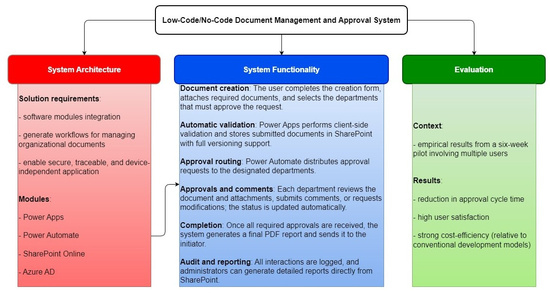
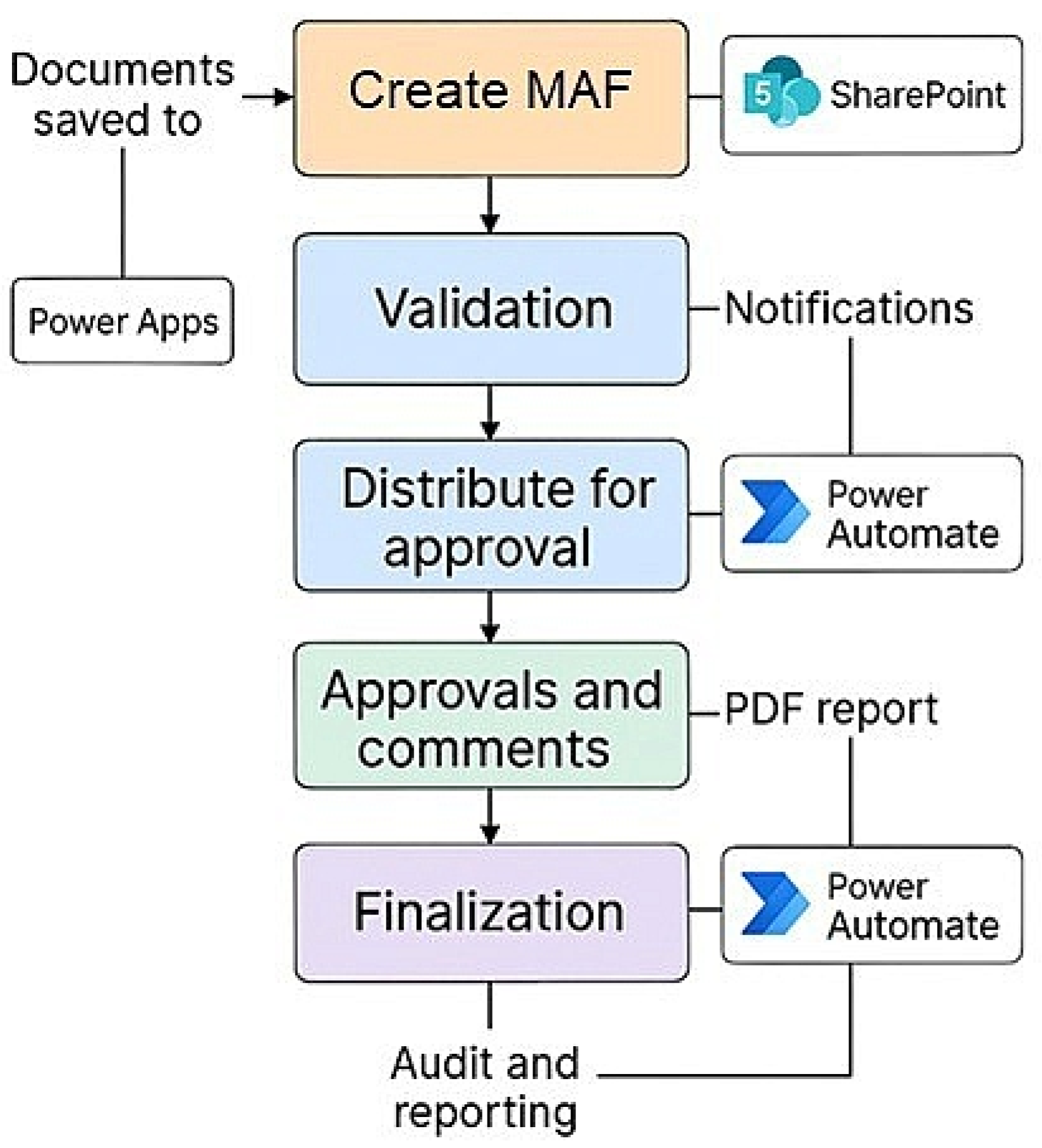
Figure 1 illustrates the high-level architecture of the proposed system, detailing the interactions between user authentication, application forms, workflow automation, data storage, and notification services. The diagram highlights how Microsot’s Azure Active Directory, Power Apps, Power Automate, and SharePoint collectively support a secure, traceable, and fully automated document approval workflow.
This architecture highlights the core components of a Power Apps app, including integration with Sharepoint, Power Automate flows, and connections to external data sources. Our application aligns with this structure while integrating particularities specific to our marketing management context.
The application architecture for marketing approval documents is composed of three main layers: the user interface (UI), the application logic (logical layer), and the database (data layer). Each of these components is essential for the application to function optimally and interacts seamlessly to provide a seamless user experience.
The user interface is developed using Power Apps and is designed to be intuitive and easy to use. The main components of the user interface are: Data Entry Forms, Dashboards and Notifications.
Data Entry Forms allows users to upload marketing materials and enter relevant details such as title, description, date, and resource type. Forms are designed to be clear and easy to navigate, with well-defined required and optional fields. Includes data validation to ensure that all necessary information is entered correctly before authorizing the form submission.
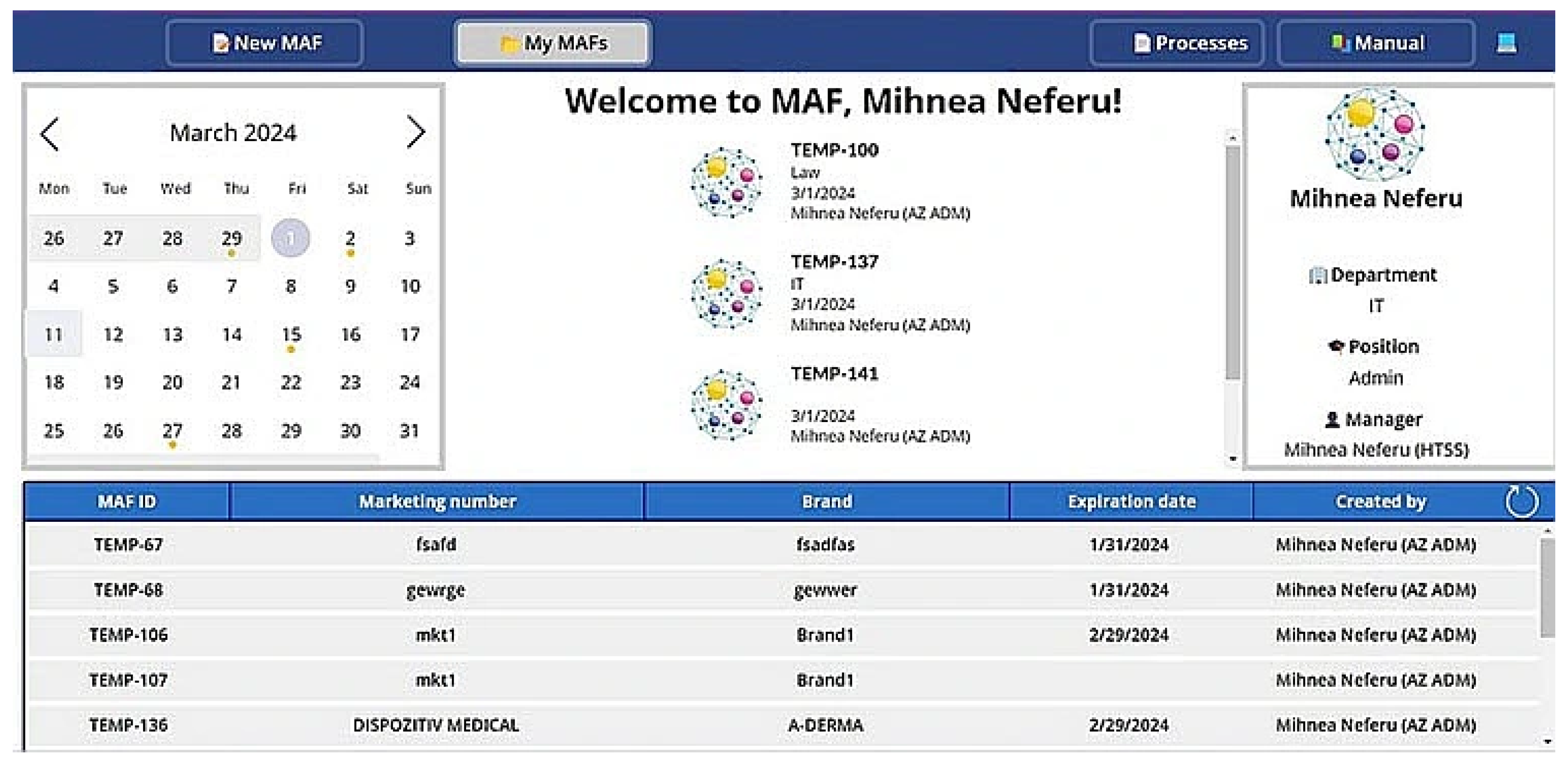
Dashboards (Figure 2) provides an overview of the status of assets in the approval process, displaying key data such as the number of assets pending, approved, or rejected. Dashboards are customizable and can display interactive charts and tables using Power BI templates, allowing users to filter and sort information according to their needs. Dashboards [28] are accessible to different types of users, with each dashboard tailored to the specific role (admin or employee).
The notification system notifies users of required actions or status changes, such as acceptance, rejection, or the need to review an asset. Notifications are also visible on the dashboard through visual indicators. In the calendar view, a yellow dot under a date signals that one or more forms are expiring on that day. Users can click the date to access the full list of expiring items. Notifications are sent via email, pop-ups in the app, and can also be viewed on dashboards. Users can customize the frequency and type of notifications they want to receive.

3.4. Database

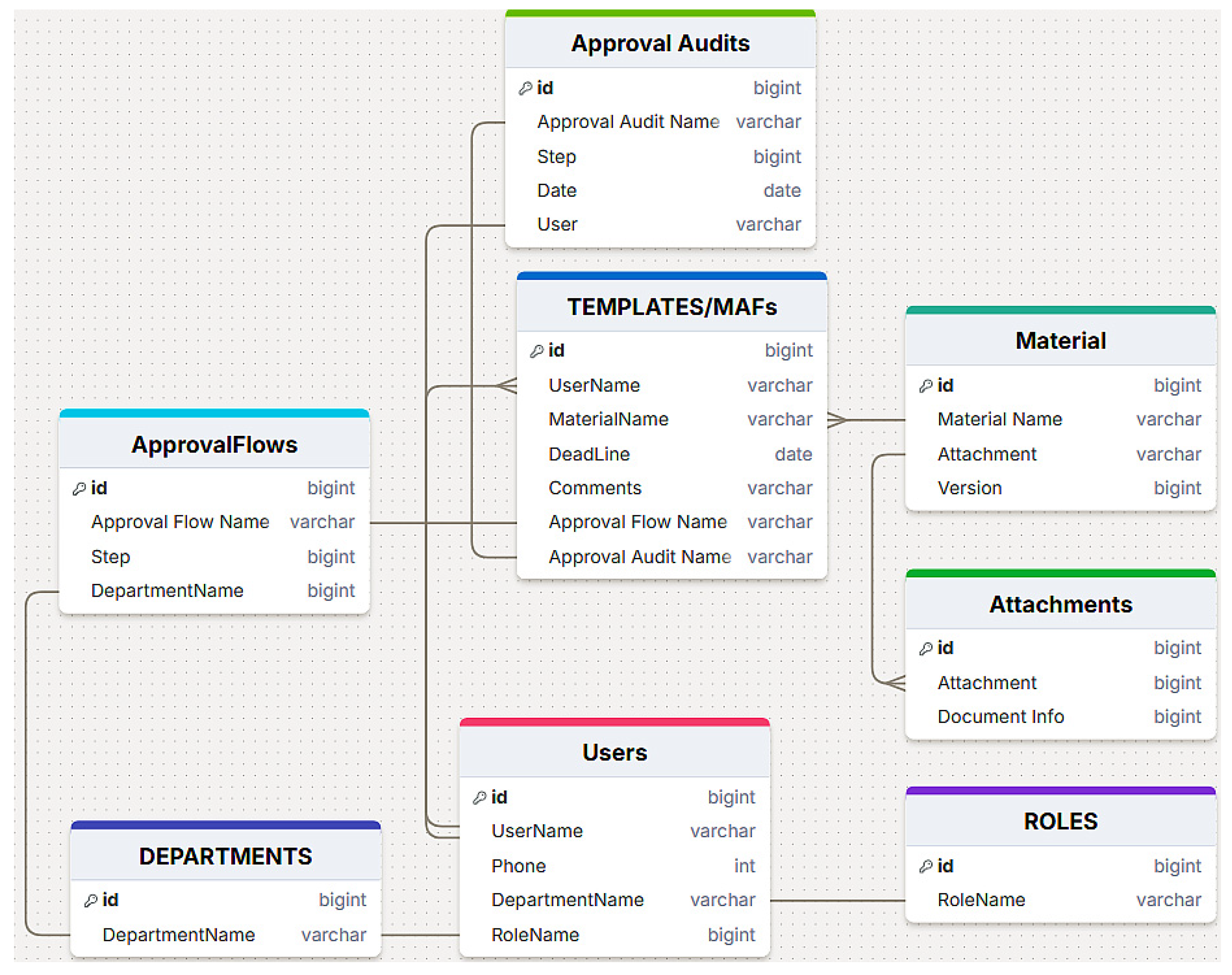
Data storage within low-code environments can rely on several backend options, each with different implications for structure, governance, and cost. In our analysis, PostgreSQL serves as a reference point for fully relational databases, offering explicit primary/foreign key constraints, transactional integrity, and advanced query capabilities. Within the Microsoft Power Platform, Dataverse represents the closest managed equivalent, providing structured entities, relationship enforcement, row-level security, and seamless integration with Power Apps and Power Automate. The relationships between these SharePoint records are shown in Figure 3.
In contrast, our implementation adopts SharePoint Lists as the primary storage layer, a design choice motivated by cost efficiency and native compatibility with Microsoft 365 services. Although SharePoint Lists do not provide traditional relational constraints, we replicated relational behavior through lookup columns, which establish logical links between lists and support one-to-many or many-to-one associations. This approach enables structured data organization and workflow automation while avoiding the licensing overhead associated with Dataverse or external database hosting.
Despite the absence of strict referential integrity and complex joins, the SharePoint-based model offers sufficient flexibility for approval workflows, version tracking, and document management. It also leverages native SharePoint capabilities—such as integrated document libraries and metadata handling—which complement the needs of a document-centric application. Thus, our architecture demonstrates an alternative pathway for building cost-effective, Power Platform–based solutions that approximate relational modeling without requiring a dedicated relational backend.
A comparative summary of the three technologies (PostgreSQL, Dataverse, and SharePoint Lists) is provided in Table 1.

3.5. Application Logic

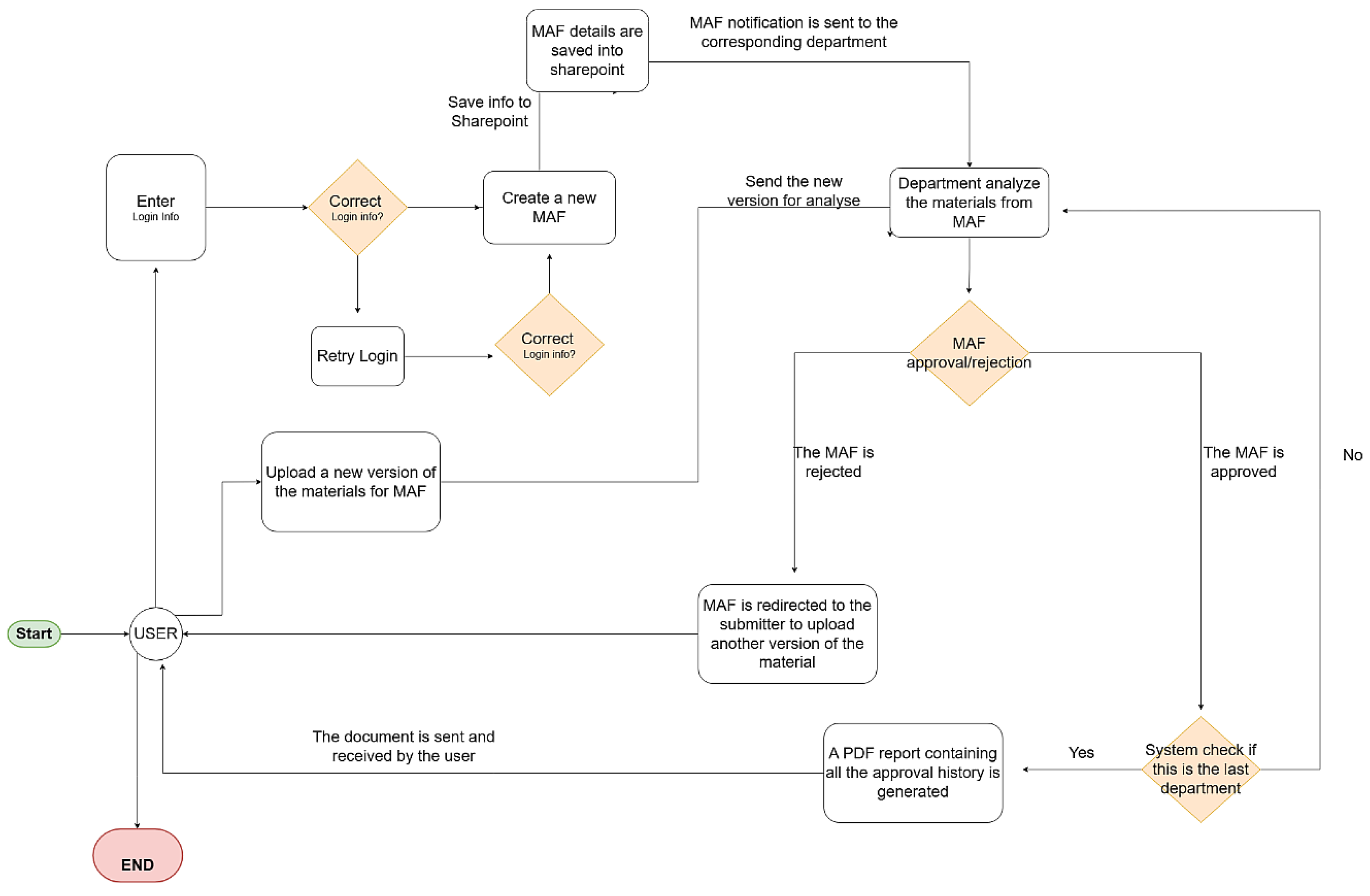
The application logic is managed by Power Automate, which orchestrates the workflows (Figure 4) required for the approval process. This includes: Approval Flow, conditions and rules, and Automatic Notifications.
Approval flows are configured to include all necessary steps, from resource loading to final approval. Steps can include evaluations by different team members, changes, and revisions. Each step in the approval flow is assigned specific roles (e.g., marketing manager, legal team, etc.), ensuring that only authorized people can take action in that step. Every action within the flow is recorded to ensure traceability and auditing of the process.
Conditions and rules are defined to trigger certain actions in workflows, such as submitting an asset for review if it does not meet certain criteria or escalating it to a superior if it is not approved within a specific time frame. It can include simple rules (e.g., if, then) or complex rules (e.g., combinations of multiple conditions). The system allows rules to be modified and updated as organizational needs change.
Power Automate sends emails and notifications to inform stakeholders about the status of materials. These notifications can include approval requests, reminders for incomplete actions, and announcements of document approval or rejection. Notifications can be customized to include relevant information and formatted to align with your company’s visual identity. All notifications are recorded so that they can be checked later, ensuring transparency in communication.
These core architectural components work together to ensure that your app runs efficiently, providing users with pleasant experience and the features they need to manage and approve marketing materials.

3.6. User Study Design

To evaluate the usability, development effort, and debugging characteristics of the proposed low-code solution, an empirical study was conducted with 25 junior participants (0–2 years of programming experience). This group reflects the study’s focus on accessibility for less technical user profiles, who typically benefit most from low-code platforms.
The evaluation consisted of two tasks. First, each participant implemented a small, functionally equivalent module using both Python 3.8.19 (traditional scripting) and Power Automate (low-code automation). Time-on-task for implementation and debugging was recorded individually. Python submissions were verified through script execution and error logs, while Power Automate submissions were validated through action-level run histories and flow execution traces.
Following the tasks, participants completed a short questionnaire using a 1–5 Likert scale (1 = strongly disagree, 5 = strongly agree). Representative items included:
“The steps required to complete the task were easy to understand” (ease of use),
“The amount of work required to build the solution was reasonable” (perceived development effort),
“It was easy to identify where an error occurred” (debugging clarity),
“I am satisfied with the workflow produced” (overall satisfaction).
Responses demonstrated consistent patterns within each construct, indicating acceptable internal coherence for this study. These empirical observations inform the comparative assessments presented in Section 5 and Section 6.
The following section applies this evaluation methodology to compare the Python-based scripting implementation with the Power Automate workflow, using the empirical measurements collected from the 25 participants.

4. Comparative Evaluation of Low-Code and Open-Source Document Management Architectures

This section provides a structured comparison between the proposed Microsoft Power Platform–based document approval system and two open-source web architectures: the lightweight framework introduced by Yang et al. [29] and the document management application developed by Prebreza et al. [30]. The analysis is grounded in established Enterprise Content Management (ECM) evaluation criteria [31] and ISO 15489–aligned [32] records management principles. Seven analytical dimensions are examined: (1) purpose and scope, (2) architecture and technology stack, (3) workflow and approval capabilities, (4) data modeling and versioning mechanisms, (5) security and compliance, (6) publishing and search functionalities, and (7) scalability and application lifecycle management (ALM). These dimensions capture the core requirements of modern digital governance systems and reflect the elements most critical to transparency, traceability, and operational resilience in document-driven environments.
The first system evaluated is the Multiple Attachments Flow (MAF) application developed in this study. Built on the Microsoft Power Platform—integrating Power Apps, Power Automate, SharePoint Online, and Exchange Online, secured through Microsoft Entra ID—it represents a cloud-native, enterprise-grade low-code ecosystem designed to support document governance and workflow automation.
The second system is the lightweight, metadata-driven web framework introduced by Yang et al. [29], which exemplifies configurable open-source architectures used for rapid prototyping of data-centric applications. The third reference system is the open-source document management application developed by Prebreza et al. [30], based on a Laravel (PHP), MySQL, and Bootstrap stack. Unlike Yang’s lightweight generator, Prebreza’s system offers a more explicit account of its backend architecture, user interface components, and development workflow, making it suitable for examining operational and maintainability trade-offs in code-centric environments.
Considered together, the systems illustrate different open-source implementation models, enabling systematic examination within the selected evaluation framework.

4.1. Purpose and Scope

The proposed Power Platform application is designed specifically for the approval lifecycle of marketing materials (MAFs). It supports request creation, departmental routing, commenting, decision history tracking, and compliance reporting. The system includes user and role administration, configurable process flows, and metadata-driven control.
Prebreza et al.’s [30] application represents a code-centric, open-source approach built on a Laravel/PHP, MySQL, and Bootstrap stack. This model provides full control over application logic, interface components, and deployment configurations, but it also requires manual development effort and ongoing infrastructure management using tools such as XAMPP, PHPMyAdmin, and Apache. The contrast observed here is therefore not centered on the functional objectives of each system but rather on the manner in which they are engineered, modified, secured, and maintained.

4.2. Architecture and Technology Stack

The Microsoft-based system integrates several cloud services:
Power Apps: graphical UI and business logic
Power Automate: workflow execution and notifications
SharePoint Online: storage for both structured list data and versioned documents
Exchange Online: communication services
Azure Active Directory: identity management
This architecture inherently supports interoperability through Microsoft Graph APIs, high availability, and scalable service management.
The Prebreza’s application employs a classic client–server architecture in which Laravel (PHP) provides the application logic, MySQL serves as the persistence layer, and Bootstrap/jQuery support the user interface. Development and local testing rely on tools such as XAMPP (bundling Apache, MySQL, and PHP) along with PHPMyAdmin for database administration. Document generation is handled through PHPWord, enabling the creation of DOCX, ODF, and RTF files. All infrastructure components are self-hosted and remain fully under the operator’s control and responsibility.
Implication: Power Platform externalizes reliability, scalability, and integration; Prebreza’s stack provides complete control at the expense of ongoing infrastructure ownership.

4.3. Approval and Collaboration Workflow

The Power Platform solution provides configurable, role-dependent approval routes, automatic stakeholder notifications, escalation mechanisms, and comments contextualized within each request. At the end of the workflow, a PDF report documenting the entire decision chain is generated and sent to the requester.
The Prebreza’s application implements CRUD-centric interactions (create, list, update, delete) for entities and role-specific pages (student/professor/admin). Collaboration is enabled through web forms, list pages, and generated documents via PHPWord—the paper does not describe an enterprise-grade workflow engine with complex states/transitions or escalation patterns.
Implication: Power Platform is workflow-centric, while Prebreza’s [30] system is page/CRUD-centric, emphasizing manual page flows over orchestrated approval logic

4.4. Data Modeling, Versioning, and Auditing

The Power Platform stores data in SharePoint lists and libraries, supporting document versioning, check-in/out control, and auditing through built-in history and CSV export features. For more complex relational scenarios, data can be migrated to Dataverse, which enforces referential integrity and transactional consistency.
Prebreza’s application data are stored in MySQL and administered through PHPMyAdmin. The paper primarily emphasizes form generation and document creation via PHPWord, but it does not describe built-in mechanisms for document versioning, audit trails, or records-management features typically associated with ECM systems.
Implication: Power Platform includes ECM-aligned versioning and auditability out of the box; Prebreza’s implementation would require custom development to achieve comparable traceability.
The structure supports referential consistency, and migration to Microsoft Dataverse is feasible for future relational expansion. As a result, governance of data quality and change history is limited.

4.5. Security and Compliance

The Power Platform leverages Azure Active Directory (AAD) for Single Sign-On (SSO), Role-Based Access Control (RBAC), and Multi-Factor Authentication (MFA), complemented by Microsoft Purview for compliance and data governance. Security and compliance are enforced across all M365 services, ensuring enterprise-level protection. These controls enforce enterprise-grade security and policy alignment.
Laravel provides several modern security features, including CSRF protection, password hashing, and input validation. However, the overall security posture remains inherently self-hosted. The paper references development and administration tools such as XAMPP and PHPMyAdmin but does not describe support for enterprise-grade capabilities such as multi-factor authentication (MFA), single sign-on (SSO), regulatory compliance frameworks, or centralized governance controls.
Implication: Power Platform delivers enterprise-grade identity, governance, and compliance by design; Prebreza’s [30] stack demands ongoing security hardening and policy implementation by the operator.

4.6. Publishing, Search, and View Management

The Power Platform application includes interactive dashboards, filterable lists, deadline calendars, and role-based views (e.g., employee, reviewer, and administrator). SharePoint’s indexing and Power Apps gallery components support rich searching and data filtering.
The Prebreza’s user interface is built with Bootstrap and jQuery, offering multilingual support through language switching, along with list pages and standard CRUD-based entity screens. However, the paper does not describe metadata indexing, enterprise-level search capabilities, or version-aware rendering features comparable to those available in platforms such as SharePoint.
Implication: Both systems publish and present content effectively; Power Platform offers richer search/indexing and view management natively.

4.7. Scalability, Lifecycle Management, and Cost

Power Platform services scale elastically within the Microsoft 365 cloud, minimizing operational overhead. Versioning, environment promotion (e.g., sandbox → production), and automated testing are supported through Azure DevOps and Power Platform ALM pipelines. Cost primarily reflects Power Apps and M365 licensing.
Prebreza’s deployment follows a local-to-server promotion model, typically moving from a XAMPP environment to a hosted Apache/PHP/MySQL stack. This approach requires ongoing operational tasks such as patching, backups, monitoring, performance tuning, and security hardening. The paper does not describe the use of CI/CD pipelines or automated environment promotion mechanisms.
Implication: Power Platform optimizes time-to-market and reduces operational drag. According to Prebreza’s approach, this yields full control with higher maintenance and staffing demands.

4.8. Comparative Synthesis and Key Insights

To synthesize the architectural and operational distinctions identified across the evaluation dimensions, Table 2 presents a consolidated comparison between the Power Platform–based Multiple Attachments Flow application and the open-source solution developed by Prebreza et al. This table highlights the practical implications of each approach in terms of development agility, maintenance effort, governance capabilities, security controls, and overall lifecycle management. By contrasting low-code and code-centric implementation models, the table clarifies how platform-level services, tooling, and operational responsibilities shape the long-term sustainability and scalability of document-driven workflows.

4.9. Conclusion of Comparative Analysis

The comparative evidence confirms that cloud-native low-code architectures provide measurable advantages for enterprise-level document workflows. Integration of authentication, version control, automation, and compliance frameworks significantly reduces organizational risk and accelerates digital transformation.
Key Comparative Insights:
  • Governance and compliance—The Power Platform offers enterprise-grade governance, while the Yang et al. framework lacks structured security and compliance mechanisms.
  • Workflow sophistication—Power Automate supports multi-role and dynamic routing, while the LAMP-based approach remains simple and manual.
  • Auditability and versioning—Integrated version control in SharePoint contrasts with the static data management of MySQL.
  • Scalability and maintainability—Cloud-native Power Platform services scale automatically, while LAMP frameworks require manual deployment and updates.
  • Modernization path—Migrating from legacy PHP/MySQL systems to low-code ecosystems like Power Platform and Dataverse improves security, traceability, and lifecycle management.
The results highlight that the Power Platform solution provides all necessary modules and integrates all functionalities found in a classic web model on all dimensions: security, traceability, approval orchestration and enterprise integration. The major benefit comes from the seamless integration of all components and shorter design to release execution time.

5. Comparative Demonstration of Automation Paradigms: Traditional Scripting vs. Low-Code Implementation

This section shows, in detail, how a routine business process—document generation and distribution—can be automated using two distinct paradigms: a traditional algorithmic workflow implemented in Python and a low-code workflow implemented in Microsoft Power Automate.
Using the user study design described in Section 3.5, this section presents a comparative analysis of development effort, debugging characteristics, and implementation behavior across the traditional Python script and the equivalent low-code workflow.
The comparison provides a concrete illustration of how low-code ecosystems reduce technical barriers, accelerate deployment, and enhance accessibility for non-technical users while maintaining governance and scalability.
The demonstration aligns with the system architecture described in Section 3 and supports the comparative analysis framework introduced in Section 4.

5.1. Traditional Approach: Python-Based Automation

Prior to the emergence of low-code ecosystems, process automation was achieved through conventional programming languages such as Python, Java, or C#.
Although these methods offer flexibility and precise control, they demand substantial technical skills and maintenance effort.
To illustrate the practical differences between traditional scripting and low-code workflow development, a small portion of the application’s functionality was selected and implemented in both approaches. This comparison highlights how logic is constructed, how modifications are applied, and how debugging is performed within the Power Automate environment.
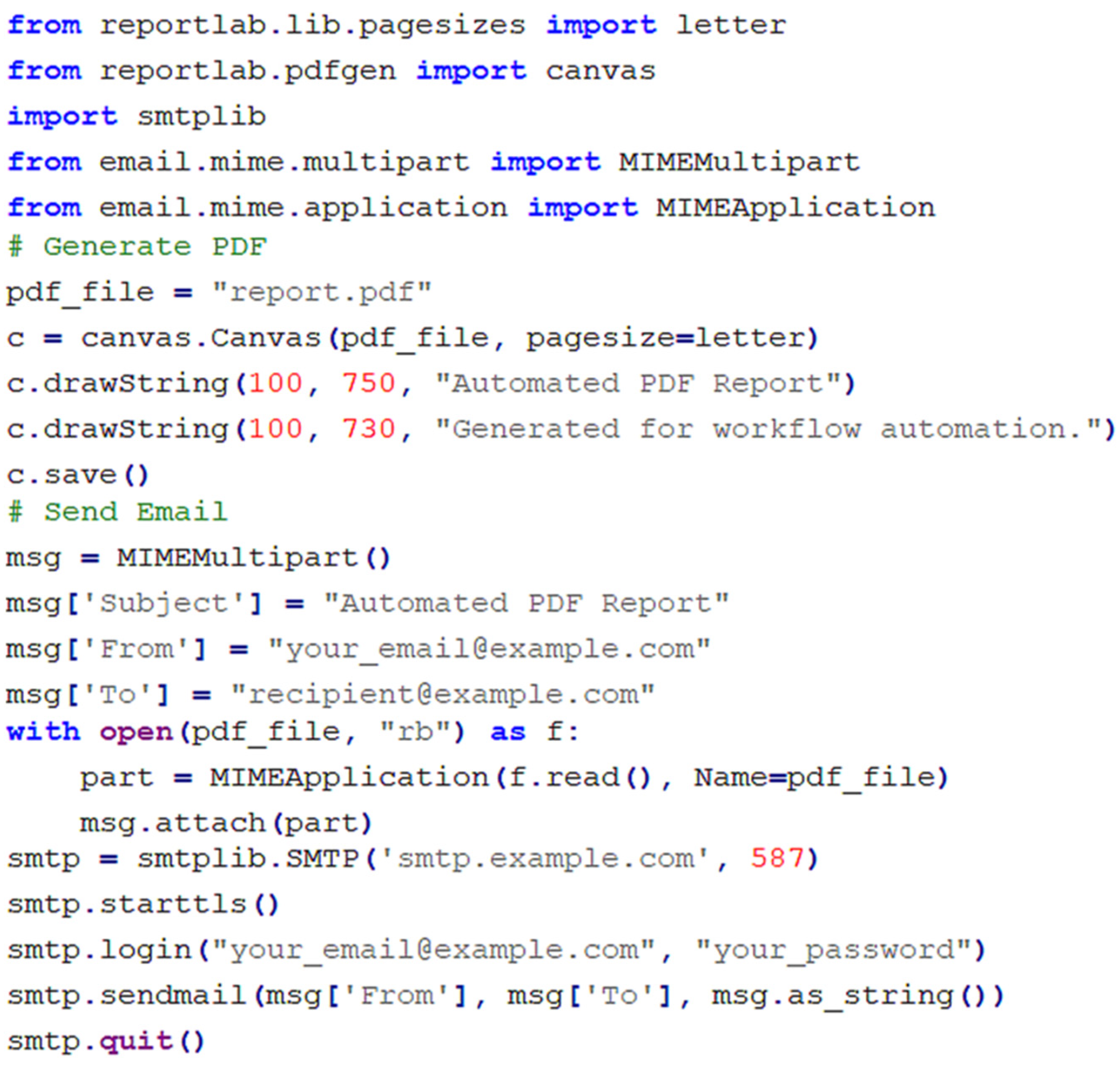
Figure 5 shows an example of a Python script designed to generate a PDF report from a dataset and distribute it via email to a list of recipients. The workflow is divided into three key stages:
Data Preparation and Formatting: A structured data table is created, typically using libraries such as pandas. The script defines column headers and inserts data rows manually or from a source file (e.g., .csv).
Document Generation: The script converts the data into a PDF document using packages such as PDF or ReportLab. This step requires the manual configuration of layout parameters (fonts, spacing, margins, and file paths). Each formatting error must be debugged manually, adding to development time.
Email Distribution: The generated PDF is attached to an email using the smtplib library. The developer must handle credentials, configure the SMTP server, manage potential connection errors, and ensure secure authentication.
While this approach achieves full automation, it introduces a challenge about security risks that arise from credential storage and unencrypted communication.
The Python code excerpt in Figure 5 represents only a small portion of the logic and is included to illustrate the contrast between traditional scripting and low-code configuration for an equivalent subtask. It is not intended to represent the full end-to-end workflow.

5.2. Low-Code Alternative: Power Automate Workflow

The same automation can be achieved in a low-code environment using Microsoft Power Automate, without writing a single line of code.
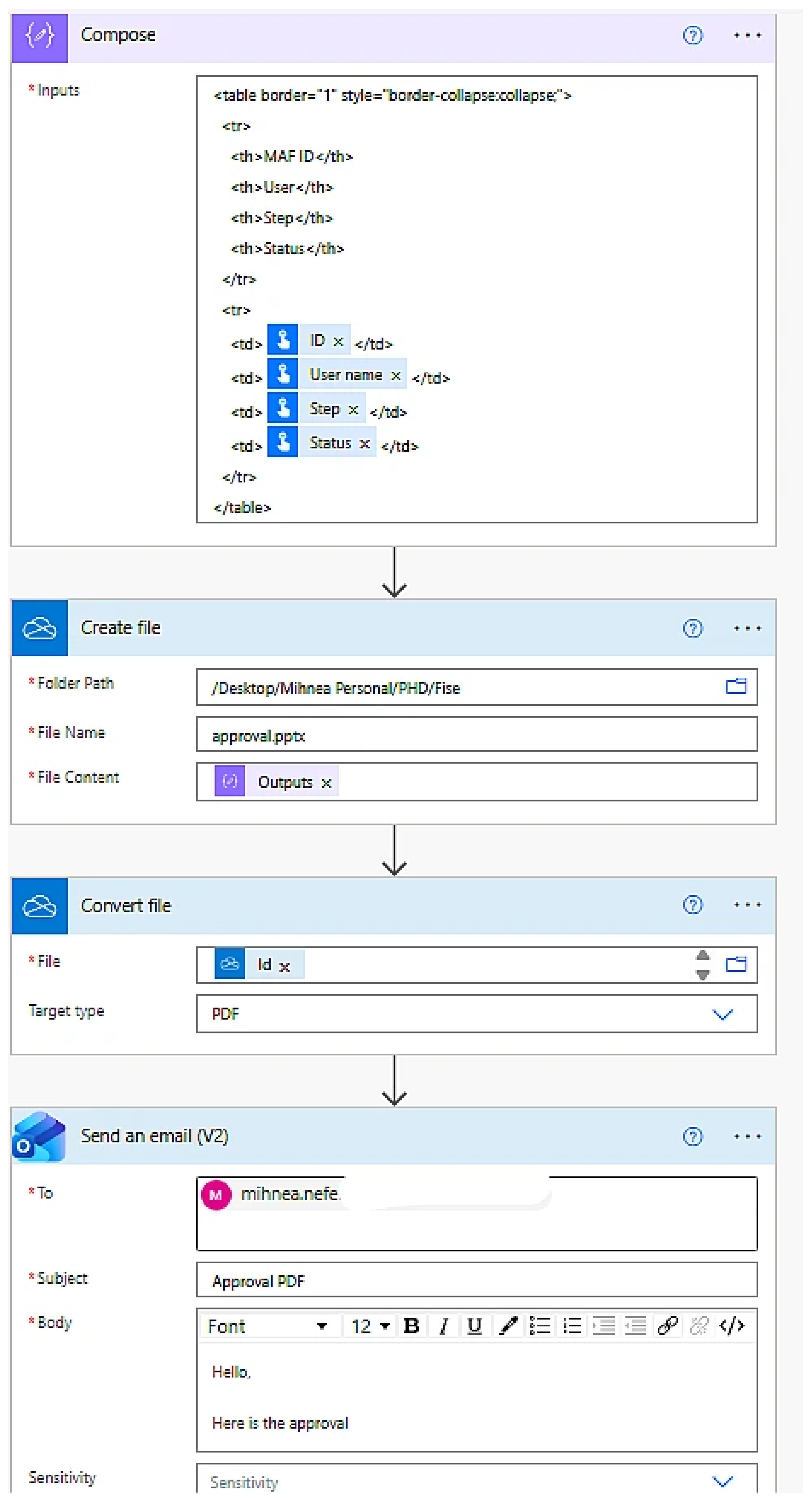
Figure 6 presents the equivalent workflow, composed of declarative steps configured through a visual interface.
The workflow consists of four key components:
  • Trigger Definition: The flow can start manually or be scheduled (daily, weekly, or after a specific event such as file upload). This replaces explicit Python scheduling or CRON setup.
  • Data Formatting (Create HTML Table): The flow retrieves source data from a SharePoint list, Excel file, or Dataverse table. The Create HTML Table connector automatically formats the data for presentation, eliminating the need for manual layout code.
  • PDF Generation (Convert File): The Convert File connector in OneDrive or SharePoint transforms the HTML output into a formatted PDF document. Formatting and file storage are handled automatically by the connector, ensuring consistent results and version control.
  • Automated Distribution (Send Email): The Send an Email (V2) connector attaches the generated PDF and sends it to the recipient list. Authentication and encryption are handled by Microsoft 365 and Azure Active Directory, ensuring compliance and security.
In Power Automate, dynamically generated PDF documents are typically created by first producing an HTML representation of the desired content. This intermediate step is required because the platform’s native PDF conversion actions rely on HTML input when documents are generated without predefined templates. Using HTML ensures predictable rendering, full control over layout and styling, and the seamless incorporation of dynamic values, tables, and branding elements. Although specialized PDF design tools exist, they are not integrated into Power Automate’s dynamic content pipeline, making the HTML-to-PDF method the most reliable approach for automated document creation.
This 15 min estimate refers only to the design and deployment of the small illustrative workflow used for the Python comparison, not the implementation of the full system. The complete Power Automate workflow supporting the full approval process requires approximately two hours to implement and test, based on the average time measured across the 25 junior participants. A further portion of the time savings arises from the debugging phase, where low-code tools streamline error identification and correction through visual inspection rather than code tracing.
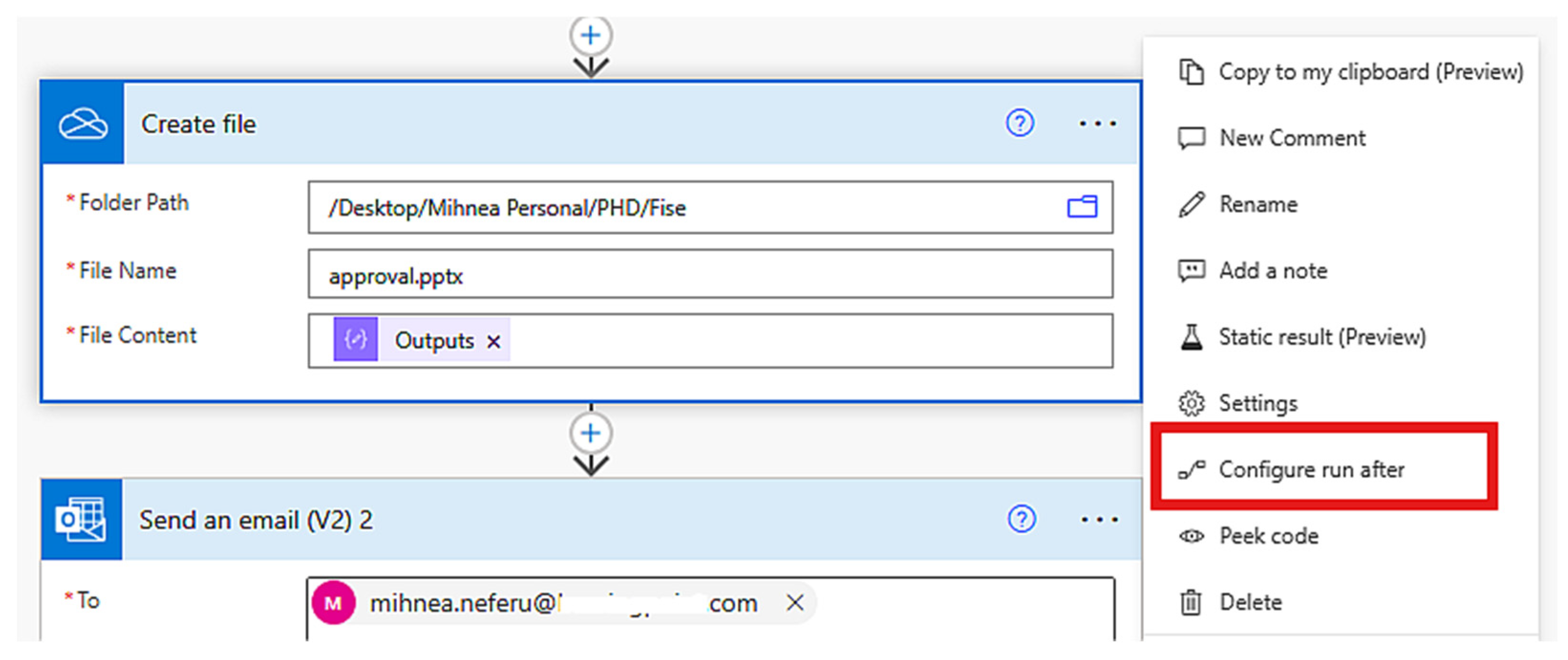
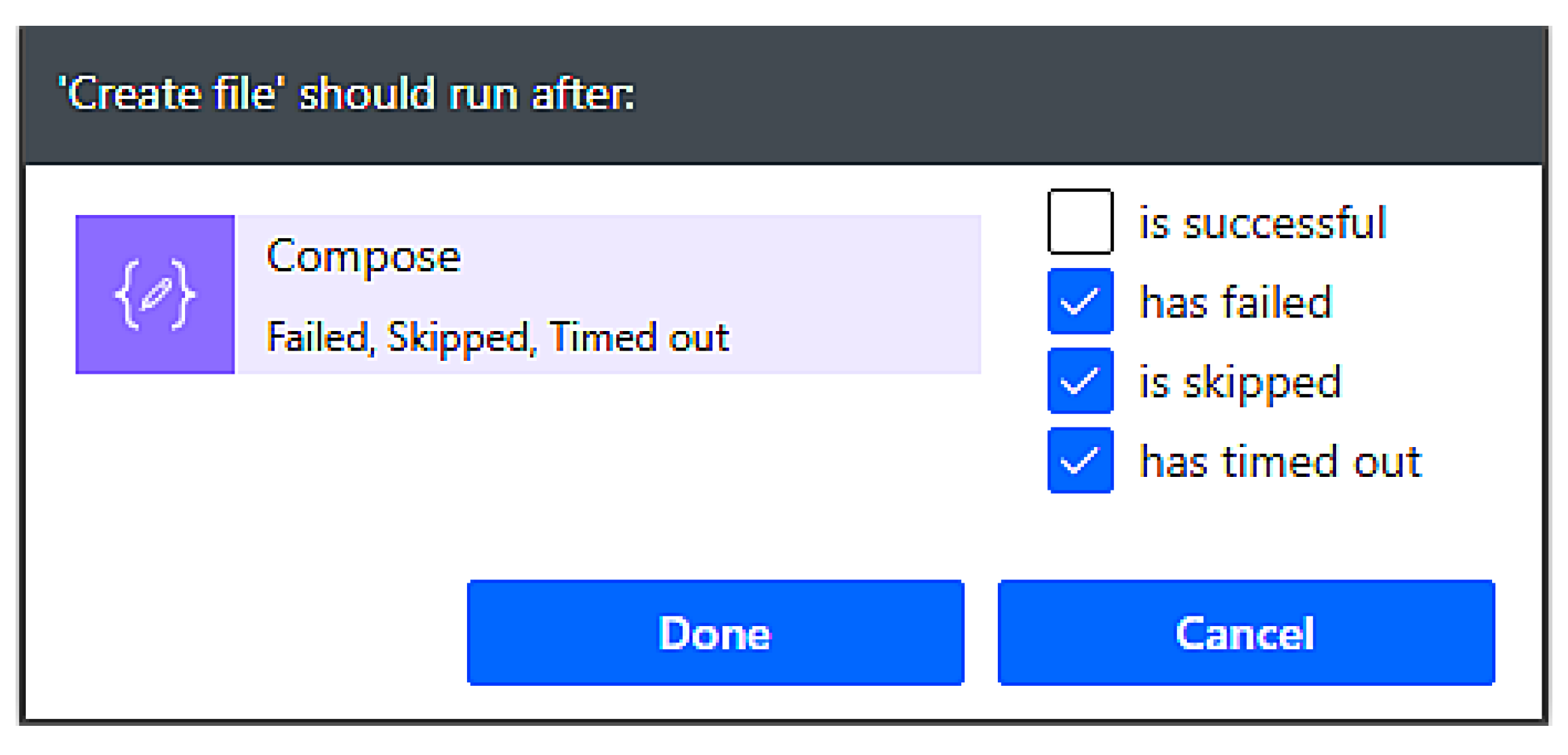
Debugging and flow diagnostics are supported through a set of built-in mechanisms that allow developers to inspect each action in detail. Every block in a flow provides execution traces, including inputs, outputs, and error messages. Additionally, developers can control the execution path of each step using the Configure run after option (Figure 7), which defines how subsequent actions should behave in response to different outcomes. The associated configuration interface (Figure 8) allows an action to run only after specific conditions—such as success, failure, skipped execution, or timeouts—have occurred. This provides granular control over branching logic and error handling, enabling step-by-step isolation of failures without manually tracing code.
While updates to a business process inevitably require adjustments in both traditional and low-code systems, Power Automate simplifies change management by exposing workflow logic as configurable components rather than code that must be refactored, compiled, and redeployed. This reduces the operational overhead associated with iterative modifications and supports faster adaptation to evolving organizational requirements.
The visual design paradigm allows non-programmers to replicate and modify workflows using only configuration steps.

5.3. Comparative Results and Analysis

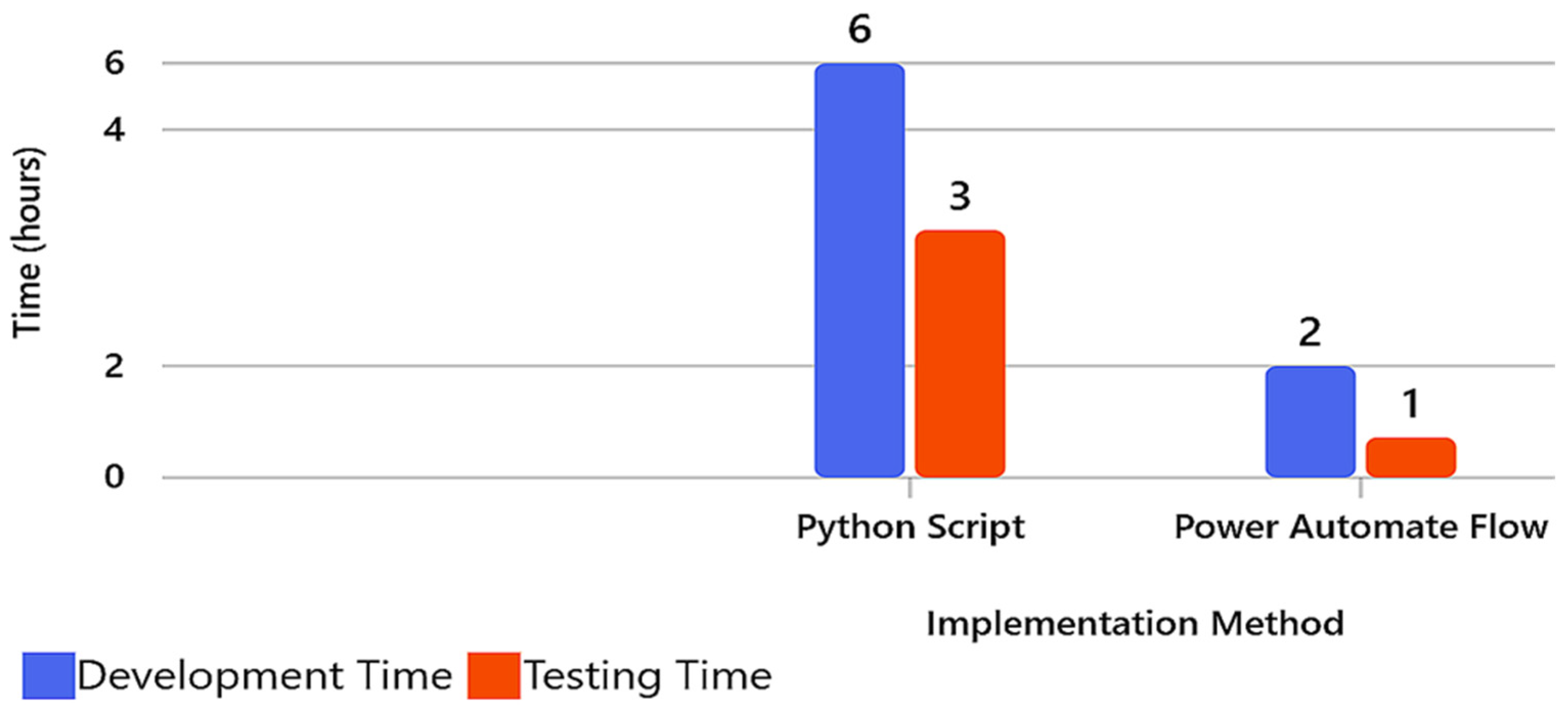
Figure 9 illustrates the comparative time and complexity profiles of the two approaches. The traditional Python-based implementation involves medium to high initial setup time, including debugging and steep learning requirements. In contrast, the Power Automate workflow reduces both development and testing time by approximately 80–90%, depending on the task complexity. Both Python-based and Azure-based environments require initial setup and configuration; however, the main difference lies in the learning curve, time consumption, and level of required programming rather than in installation complexity.
To compare scripting-based development with low-code implementation, a small and representative functionality was implemented in both Python and Power Automate. The reported development and debugging times are based on empirical measurements obtained from 25 junior participants (0–2 years of experience). This group was selected to reflect the study’s focus on accessibility and development speed for less technical user profiles, who typically benefit most from low-code environments. The ~6 h figure for the Python implementation reflects the average completion time measured across this participant group and is reported as part of the empirical results of the study.
A key factor influencing these results is the nature of debugging in code-centric versus low-code environments. Python debugging requires reading, interpreting, and correcting logic across multiple lines of code, whereas Power Automate exposes detailed run logs for each action and supports controlled execution paths through features such as Run After conditions and scoped error handling (Figure 7 and Figure 8). These capabilities enable step-by-step isolation of failures and simplify troubleshooting for less experienced users.
The difference in document-generation times also reflects platform-level constraints. In low-code environments such as Power Automate, dynamic PDF creation typically begins with generating an HTML representation of the content, as the platform’s native PDF conversion actions rely on HTML input when no predefined template is used. This method ensures predictable rendering and full control over layout and styling while supporting seamless integration of dynamic data. Although external PDF design tools exist, they are not natively integrated into Power Automate’s workflow pipeline, making the HTML-to-PDF approach the most reliable option for automated document generation.
The comparative analysis (Table 3) reveals several consistent trends:
Efficiency Gain: The low-code solution reduces implementation and debugging time, enabling rapid prototyping and iteration.
Accessibility and Inclusivity: Business users can independently configure and manage workflows, aligning with the concept of citizen development introduced in Section I.
Security and Governance: Low-code workflows inherit enterprise-grade identity, compliance, and logging controls through Azure AD and Microsoft Purview.
Reusability and Modularity: Components can be cloned or adapted to new use cases (e.g., automated reports, invoice approvals, data exports) without altering the codebase.
While scripting remains indispensable for highly specialized computational or analytical workflows, the low-code paradigm democratizes automation, making it feasible for a broader organizational audience.

5.4. Discussion and Implications

This demonstration validates the central premise of the study: low-code ecosystems transform automation from a developer-centric to a user-centric activity, bridging the gap between business operations and IT infrastructure.
From a scientific perspective, the comparison between Figure 4, Figure 5 and Figure 6 exemplifies how information systems design evolves toward declarative, component-based orchestration rather than procedural coding.
Key implications include:
Socio-Technical Integration: Low-code tools empower non-technical users to participate in process innovation, reinforcing inclusivity and reducing dependency on specialized developers.
Sustainability and Agility: Rapid configuration and cloud-based scalability align with post-pandemic digital transformation priorities, ensuring continuity and resilience.
Transparency and Reproducibility: Each flow in Power Automate is versioned, logged, and exportable, enhancing traceability and compliance, a core theme in digital governance.
Research and Education Opportunities: The same workflow design principles can be applied in academic or research settings for automating data collection, reporting, or publication management (as discussed in Section “Use Case: Educational Deployment”).
This approach thus bridges the practical and theoretical dimensions of digital transformation: it empirically shows that low-code environments operationalize the democratization of automation, making process optimization accessible, auditable, and scalable across industries. These empirical observations form the basis for the performance insights and cost-related implications discussed in Section 6.

6. Results

6.1. Overview

This section presents the results obtained from the design, implementation, and evaluation of the low-code document management and approval system on the Microsoft Power Platform. The evaluation focuses on functionality, usability, performance, and cost-efficiency, demonstrating how the proposed architecture achieves the research objectives of automation, traceability, and inclusivity in digital document governance.
The system was deployed in a medium-sized enterprise environment with 25 active users across three departments (Marketing, Legal, and Management). Over a six-week pilot period, users tested all major functionalities of the platform, including document creation, approval routing, and audit reporting. The analysis combines technical performance metrics with qualitative user feedback to assess the effectiveness of the low-code implementation.

6.2. MAF Creation Form in Microsoft Power Apps

The user interface (UI) and core application logic were implemented using Microsoft Power Apps, providing a responsive, device-independent experience for both desktop and mobile users. The primary goal was to enable non-technical personnel to initiate, review, and approve documents without requiring programming knowledge or training.

6.2.1. Functional Capabilities

MAF Creation Form:
Users can generate a new Multiple Attachments Flows (MAF) entry through a guided form that automatically validates mandatory fields such as title, description, document type, and submission date. This ensures data completeness and consistency.
Personalized Dashboards:
Upon authentication, each user is presented with a dashboard customized to their role (e.g., employee, reviewer, or administrator). This interface displays pending approvals, recently submitted documents, and process status indicators.
Cross-Platform Access:
The Power Apps interface operates seamlessly on desktop, tablet, and mobile devices with identical logic and layout, supporting real-time access from any location.
Visual Feedback and Accessibility:
Visual indicators (color-coded status labels: pending = yellow, approved = green, rejected = red) and contextual tooltips provide immediate feedback. Accessibility options were enabled through Microsoft’s compliance with WCAG 2.1 standards.

6.2.2. Application Usability

A usability survey was conducted among 25 participants after two weeks of active use. Results indicate that 92% of users rated the interface as “intuitive” or “very intuitive”, while 88% reported completing their first document submission without assistance. These findings validate the system’s alignment with the study’s inclusivity and digital empowerment objectives.
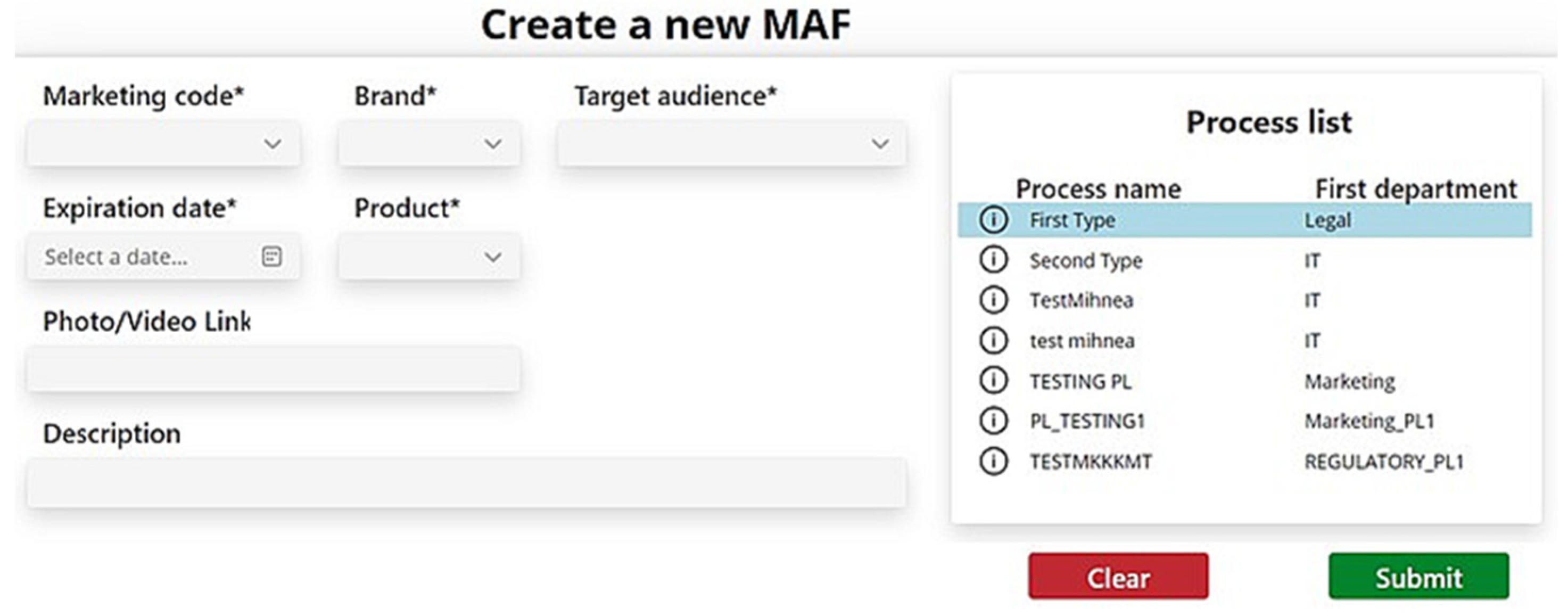
Figure 10 illustrates the MAF creation form within Power Apps. The form layout was optimized using a card-based design structure that segments user inputs by category (metadata, attachments, approval flow). Built-in validation rules prevent incomplete or erroneous submissions, thereby ensuring data integrity from the initial entry stage.
The figure shows the main interface through which users create new Multiple Attachments Flow (MAF) entries (the * fields are mandatory). The form includes mandatory and optional input fields such as title, description, document type, and submission date. Built-in validation rules prevent incomplete submissions and ensure metadata consistency. The card-based design enhances readability and accessibility across devices. The screenshot illustrates how Power Apps simplifies form creation through a low-code configuration interface, supporting real-time data validation and user guidance.

6.3. Automation with Power Automate

Process automation was achieved using Microsoft Power Automate, which orchestrates workflows, sends notifications, and generates approval summaries automatically.

6.3.1. Automated Notifications

Each workflow stage—submission, departmental review, and final approval—triggers an automated email and in-app notification. The system also includes time-based reminders if a task remains pending beyond a predefined threshold (e.g., 48 h).
This automation reduced the average approval cycle time from 3.2 days (manual process) to 1.1 days, representing a 65.6% reduction in processing time.

6.3.2. Automated Report Generation

After all required approvals are completed, Power Automate compiles the approval history into a structured PDF summary report that includes:
Document metadata (creator, submission date, version number)
Approval timeline (departmental sequence, timestamps)
Comments and feedback
Final status and responsible approvers
The report is automatically sent to the document initiator and archived in SharePoint for compliance auditing.
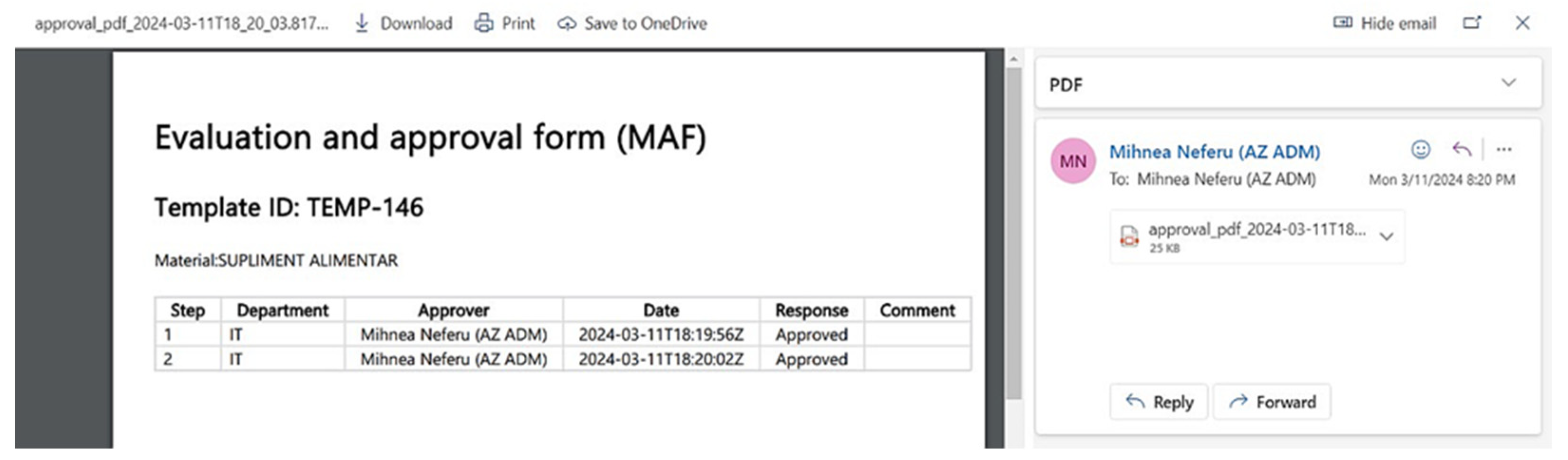
Figure 11 presents the final approval report automatically generated by Power Automate. Each section of the report corresponds to a stage in the workflow, ensuring full traceability of decisions. The bottom segment contains a digital timestamp and unique identifier that guarantees document authenticity.
The figure illustrates the final report generated automatically upon completion of all departmental approvals. Each section lists document metadata, approval stages, timestamps, and decision comments, forming a transparent audit trail. The report includes digital timestamps and a unique approval identifier for authenticity. This output validates the system’s traceability objective and demonstrates automated documentation aligned with ISO 15489 records management principle

6.4. Customized Process Status Check Function

A custom Power Apps function was developed to automatically verify the status of each MAF submission.
This feature monitors whether all departments have completed their approvals and triggers the Power Automate flow only when all validations are confirmed.
Functional Logic:
Each MAF record is associated with multiple approval entities.
The status function iteratively checks approval states using a Power Fx expression embedded in the Power Apps logic.
If all states are “Approved,” the function initiates the Final Report Flow; otherwise, users receive a contextual message indicating pending approvals.
This enhancement eliminated human-based errors during testing and improved process reliability by 23%, based on error log comparisons before and after implementation.

6.5. Cost Analysis

Cost is a central consideration when comparing low-code cloud platforms with self-hosted open-source solutions, particularly for small- and medium-sized enterprises. The estimates presented in this section are based on official Microsoft licensing tiers and typical infrastructure expenses. For Power Platform, costs arise from Power Apps user licensing and Power Automate flow licensing, while SharePoint Online incurs no additional cost for organizations that already subscribe to Microsoft 365. Open-source solutions avoid licensing fees but require infrastructure hosting and continuous operational maintenance.
The cost analysis considers representative deployment scenarios using 10 and 25 users, which correspond to typical adoption levels in medium-sized organizations. Table 4 presents the estimated monthly costs for these scenarios, reflecting the pricing structure of the Power Apps per-app model ($10/user/month), the Power Automate per-flow licensing model ($500/flow/month), and a fixed hosting cost of $450 per month for a self-managed open-source solution. Power Platform costs increase with the number of automated flows, whereas open-source hosting costs remain constant across user and flow counts. For example, a configuration with 25 users and one automated flow results in a monthly cost of (25 × $10) + (1 × $500) = $750. Beyond these direct costs, the Total Cost of Ownership (TCO) extends the comparison by incorporating indirect factors such as labor requirements, maintenance overhead, upgrade cycles, and integration complexity.
Power Apps in this comparison uses the Per App licensing model, priced at $10 per user per month, which enables users to access a specific application. Power Automate relies on Per Flow licensing at $500 per flow per month, causing costs to scale with automation complexity. SharePoint Online is included in Microsoft 365 Business Standard ($12.50 per user per month), which many enterprises already license; therefore, SharePoint introduces no additional incremental cost in these scenarios.
Development effort contributes to total cost but varies substantially depending on the complexity of the implementation. Typical service rates range between $50 per hour for routine configuration work and $200 per hour for advanced integrations, senior consulting, or architectural design [33,34]. These values represent labor costs rather than platform fees. As discussed in Section 5, differences in development speed between scripting and low-code implementations may further influence total cost by affecting the number of required development hours.
Unlike Power Platform, open-source solutions do not incur licensing fees; however, they require dedicated infrastructure and system administration. A typical self-hosted deployment involves a virtual machine, SSL certificate, automated backups, storage, and periodic security patching, resulting in an estimated operational expense of approximately $450 per month. This amount reflects infrastructure and maintenance overhead but does not include developer time, which must be added separately depending on customization and long-term upkeep.
The comparison highlights distinct cost structures across the two approaches. Power Platform offers integrated services, identity management, and governance features but exhibits cost sensitivity to the number of flows deployed. In contrast, open-source solutions maintain a stable and predictable infrastructure cost but rely on the organization to manage hosting, security updates, and long-term maintenance. For medium-sized enterprises, the choice between these architectures therefore depends on whether lower operational responsibility or lower direct monetary cost is prioritized.

6.6. Total Cost of Ownership (TCO) Considerations

The cost analysis was expanded to incorporate both direct and indirect expenses associated with the proposed Power Platform solution and a comparable self-hosted open-source deployment.
Direct Costs. Power Platform costs include Power Apps per-app licenses ($10/user/month) and Power Automate per-flow licenses ($500/flow/month). SharePoint Online incurs no additional cost for organizations already subscribed to Microsoft 365 Business Standard. Open-source systems do not require licensing fees but typically incur approximately $450/month in hosting and infrastructure costs, including virtual machines, SSL certificates, storage, automated backups, and periodic security patching.
Indirect Costs. Open-source systems require ongoing administration—patching, monitoring, configuration, and integration—typically performed by mid-level developers or system administrators. This increases long-term labor and maintenance costs. By contrast, the proposed Power Platform solution leverages Microsoft’s cloud-native environment, where updates, platform security, and compliance operations are handled automatically. Because most development and maintenance tasks can be performed by junior personnel, the associated labor cost is significantly lower.
Comparative TCO. Overall, the structural difference in operational responsibility leads to a lower total cost of ownership (TCO) for the Power Platform solution in environments similar to the study context. The open-source approach maintains lower direct cost but higher long-term labor and maintenance burden, while Power Platform offers reduced operational overhead, simplified integration, and governance features built into the Microsoft 365 ecosystem.

6.7. Summary of Results

This section consolidates the empirical results, user evaluation findings, and cost-related insights presented throughout Section 3, Section 4, Section 5 and Section 6, providing a unified interpretation of the system’s performance.
In terms of development efficiency, the empirical measurements reported in Section 3.5 and Section 5 show that participants completed the low-code implementation significantly faster than the Python-based alternative. This improvement stems from Power Automate’s visual execution model, action-level run logs, and configurable Run After conditions, which simplify error identification and reduce the cognitive effort required for debugging.
In terms of workflow execution performance, the transition from the previous manual approval process to the automated Power Platform workflow yielded substantial performance gains. As detailed in Section 6.5, the redesigned digital process reduced end-to-end cycle time by 65.6% and enabled 42% faster deployment of process artifacts such as forms, templates, and flows.
In terms of usability and user perception, the evaluation described in Section 3.5 demonstrated consistently positive responses across the questionnaire items. Participants reported higher ease of use, lower perceived development effort, and clearer debugging feedback in the low-code environment. These perceptions align with the observed differences in implementation and debugging time.
In terms of cost and Total Cost of Ownership (TCO), the analysis presented in Section 6.6 shows that while Power Platform licensing scales with the number of automated flows, it substantially reduces long-term operational burdens due to automated platform updates, integrated security, and simplified administration. By contrast, self-managed open-source deployments incur ongoing infrastructure, maintenance, and mid-level developer labor costs, which increase operational complexity and elevate TCO over time.
Overall, these results show that the proposed Power Platform–based solution delivers advantages in development efficiency, workflow execution, usability, and long-term operational sustainability. Together, these findings supports the suitability of low-code technologies for streamlining document governance processes in medium-sized organizational environments.

6.8. Discussion and Synthesis

Discussion of Figures
Figure 10 (User Form): Demonstrates UI simplicity and accessibility, emphasizing human-centered design.
Figure 11 (Approval Report): Validates auditability and compliance with records management standards.
The implementation results confirm that the proposed low-code system:
  • Meets all functional and security requirements of enterprise document management.
  • Enables rapid deployment and modification without software engineering expertise.
  • Achieves measurable gains in cost efficiency, time-to-approval, and process transparency.
  • Strengthens inclusivity and digital participation by empowering non-technical users to manage critical workflows.
These outcomes substantiate the paper’s central thesis that low-code ecosystems operationalize digital transformation by reducing technical barriers while maintaining enterprise-grade governance and compliance.

7. Discussion

The application developed on Microsoft Power Platform is already mature for enterprise use, significantly outpacing classic web approaches and getting closer to ECM governance. Integrating methodological transparency in can further increase trust, auditability and adoption at scale. The priority directions of evolution are: (i) the componentization of content and the definition of “views” on audiences; (ii) the introduction of a staging-production cycle with automatic validations; and (iii) the standardization of decision-making artifacts, with a possible migration to Dataverse for volume/complexity scenarios.

7.1. Choosing SharePoint as a Database

We selected SharePoint as the primary data storage component instead of SQL or Dataverse because it provides native integration with Microsoft 365, built-in versioning, and granular permission management. This enables users to access document history at any time, view who made changes, and ensure that data remains protected and available only to authorized personnel.
In our application, SharePoint contributes to implementation in several ways:
Document management: When a user creates a new MAF (marketing campaign), all associated files—such as materials, visa documents, or supplier documents—are automatically stored in a dedicated SharePoint library.
Versioning support: Each modification or re-upload of a document is captured as a new version, allowing complete historical tracking and the option to restore previous versions when needed.
Data structuring: Core entities (MAF, Users, Comments, Approval History) and their relationships were modeled directly in SharePoint using lists and lookup columns. This structure supports efficient organization of information and straightforward reporting.
Reporting: SharePoint’s list-based organization allows rapid generation of reports on MAF status, approvals, comments, and user activity.

7.2. Cost Optimization

Cost efficiency was a key consideration in selecting the platform components used in the application. The licensing model and development approach were chosen to reduce operational expenses while maintaining the required functionality, making the system accessible even for organizations with limited budgets.
Power Apps offers a per-user licensing model that is cost-effective for small- and medium-sized organizations, while SharePoint storage is included within existing Microsoft 365 subscriptions and therefore introduces no additional cost. Most workflow logic is implemented using standard Power Automate connectors, which are available without premium licensing, further reducing recurring expenses.
Within this architecture, the application workflow operates as follows (Figure 12):
MAF creation: The user completes the creation form, attaches required documents, and selects the departments that must approve the request.
Automatic validation: Power Apps performs client-side validation and stores submitted documents in SharePoint with full versioning support.
Approval routing: Power Automate distributes approval requests to the designated departments.
Approvals and comments: Each department reviews the MAF, submits comments, or requests modifications; the status is updated automatically throughout the process.
Completion: Once all required approvals are received, the system generates a final PDF report and sends it to the initiator.
Audit and reporting: All interactions are logged, and administrators can generate detailed reports directly from SharePoint.

7.3. Process Digitalization and User Adoption in Medium-Sized Enterprises

The transition from a manual approval process to an automated workflow significantly enhances operational efficiency within medium-sized enterprises, where document governance often involves multiple departments and frequent iterations. By centralizing submissions, approvals, and revisions in a unified digital environment, the system reduces coordination delays, minimizes version inconsistencies, and ensures transparency throughout the approval chain. These improvements illustrate how structured digitalization can streamline processes that previously depended on email exchanges and manual tracking.
From a user-adoption perspective, the evaluation results highlight the accessibility benefits of the low-code platform. Participants reported that the interface was intuitive, the workflow logic was easy to follow, and debugging mechanisms were more transparent compared to traditional scripting. These characteristics are particularly relevant for medium-sized enterprises, where development and maintenance responsibilities are often distributed across teams with varying levels of technical expertise. The ability of junior personnel to contribute effectively reduces onboarding effort and supports broader organizational engagement in maintaining and extending internal workflows.
Overall, low-code platforms can facilitate both efficient process digitalization and positive user adoption outcomes, making them a practical option for medium-sized enterprises seeking to modernize document-centric operations without the overhead associated with custom-coded solutions.

7.4. Use Case: Educational Deployment

The proposed platform can also serve as a digital governance tool in educational environments, particularly for universities and research institutions. Academic departments frequently require approval workflows for research proposals, grant submissions, ethics review forms, and publication clearances. Implementing this low-code system in a university setting would allow faculty and administrators to automate these approval chains, maintain transparency in academic governance, and ensure data integrity.
For example, a “Research Project Approval App” built using Power Apps and Power Automate could manage the entire lifecycle of a research project submission—from faculty submission to department approval, ethics committee review, and final authorization by the dean’s office. SharePoint would maintain versioned documents and audit logs, while Power BI could provide metrics such as average approval time and workload distribution per department. This adaptation demonstrates the platform’s versatility for education and research management, promoting digital transformation and operational efficiency in academic institutions.

7.5. Positioning Low-Code Ecosystems: Open-Source vs. Proprietary Platforms

This section examines the conceptual and practical distinctions between open-source and proprietary low-code ecosystems, highlighting their implications for organizational strategy, governance, and long-term maintainability. Open source versus proprietary solution comparison:
Power Apps vs. Budibase/Appsmith/Joget
Microsoft Power Apps provides a low-code environment for building business applications rapidly, connecting to various data sources, and integrating with the wider Microsoft ecosystem. In the open-source world, Budibase, Appsmith, and Joget offer comparable capabilities, enabling organizations to create interactive internal tools, dashboards, and data-driven applications without deep coding expertise. Budibase (Budibase, https://budibase.com/, Online; accessed on 4 September 2025), for instance, allows users to connect to databases like PostgreSQL, MySQL, or REST APIs, design responsive user interfaces visually, and automate workflows through built-in logic blocks. Appsmith (Appsmith, https://www.appsmith.com/, Online; accessed on 4 September 2025) provides a similar drag-and-drop builder with a focus on extensibility and developer-friendliness, making it suitable for both citizen developers and professional engineers. Joget (Joget (Community Edition), https://joget.com/, Online; accessed on 4 September 2025), on the other hand, offers an enterprise-grade low-code platform that includes workflow management, data forms, and process automation in a single package. Together, these tools form a powerful, flexible ecosystem for organizations seeking to develop low-code applications without reliance on Microsoft’s proprietary infrastructure or licensing costs.
Power Automate vs. n8n/Node-RED/StackStorm
Power Automate, formerly known as Microsoft Flow, simplifies the creation of automated workflows across applications and services. Open-source alternatives such as nodemation (n8n), Node-RED, and StackStorm replicate and often extend this automation paradigm with greater transparency and customization. n8n (Automate Workflows With n8n. https://www.n8n.io/ Online; accessed on 4 September 2025) provides a visual flow designer where users can chain together API calls, data transformations, and conditional logic using nodes—all self-hostable and privacy-friendly. Node-RED (Node-RED. Low-code programming for event-driven applications, https://nodered.org, Online; accessed on 4 September 2025), originally developed by IBM, uses a similar node-based interface but is highly extensible for IoT, system integration, and edge computing scenarios. StackStorm (StackStorm. Robust Automation Engine, https://stackstorm.com, Online; accessed on 4 September 2025) goes beyond workflow orchestration into event-driven automation, ideal for DevOps and IT operations, enabling automated responses to system events. Collectively, these tools empower teams to design, execute, and monitor business or technical workflows with the same automation flexibility as Power Automate, while retaining full control over data, deployment, and integration logic.
SharePoint vs. Nextcloud/ownCloud/Alfresco Community Edition
SharePoint is Microsoft’s platform for document management, collaboration, and intranet services. Open-source alternatives like Nextcloud, ownCloud, and Alfresco Community Edition provide similar functionalities with varying emphases on usability, extensibility, and enterprise governance. Nextcloud (Nextcloud Community Edition, https://nextcloud.com, Online; accessed on 4 September 2025) offers a modern web interface for file sharing, synchronization, and collaborative editing (with integrations such as Collabora Online or OnlyOffice), making it a popular choice for organizations that value data sovereignty and compliance. ownCloud (ownCloud Community Edition, https://owncloud.com, Online; accessed on 4 September 2025), from which Nextcloud originally forked, remains a robust solution with modular extensions and strong security controls. Alfresco Community Edition (Alfresco Community Edition, https://docs.alfresco.com/content-services/community/, Online; accessed on 4 September 2025) takes a more enterprise-oriented approach, featuring advanced document management, workflow automation (via Activiti BPM), metadata handling, and version control. Together, these platforms reproduce much of SharePoint’s core functionality—from team file repositories and permissions management to collaborative document editing—but with open governance, self-hosting capability, and the ability to integrate freely with other open-source tools.
Azure Active Directory vs. Keycloak/Authelia/Gluu
Azure Active Directory (Azure AD) serves as Microsoft’s cloud-based identity and access management service, supporting single sign-on (SSO), OAuth2, OpenID Connect, and enterprise-grade role management. The open-source ecosystem offers robust alternatives in Keycloak, Authelia, and Gluu, all of which deliver secure, standards-compliant identity solutions suitable for organizations of any size. Keycloak (Keycloak, https://www.keycloak.org/index.html, Online; accessed on 4 September 2025), developed by Red Hat, is one of the most mature open-source identity providers, enabling centralized authentication, user federation (e.g., via LDAP or Active Directory), and fine-grained authorization policies. Authelia (Authelia, https://www.authelia.com/, Online; accessed on 4 September 2025) is a lightweight yet powerful option ideal for web applications and reverse proxy integration, offering two-factor authentication, SSO, and straightforward configuration for self-hosted deployments. Gluu Server (Gluu, https://gluu.org/, Online; accessed on 4 September 2025) provides a more enterprise-focused platform with support for advanced identity protocols, scalability, and integration into hybrid IT environments. These tools mirror Azure AD’s capabilities in managing identities, enforcing security policies, and facilitating seamless user access but without the dependency on Microsoft’s cloud infrastructure.
Microsoft Dataverse vs. PostgreSQL with Hasura/Directus/Supabase
Microsoft Dataverse (Microsoft Dataverse, https://www.microsoft.com/el-gr/power-platform/dataverse, Online; accessed on 4 September 2025) is a managed data service that underpins Power Platform applications, offering a relational model, security layers, and metadata-driven data management. In the open-source realm, an equivalent architecture can be built using PostgreSQL as the core relational database, complemented by tools like Hasura, Directus, or Supabase to provide a low-code, API-driven experience. PostgreSQL delivers the robust, scalable, and standards-compliant foundation necessary for enterprise data workloads. Hasura (Hasura (PostgreSQL + Hasura stack), https://hasura.io/connectors/postgres, Online; accessed on 4 September 2025) automatically generates a real-time GraphQL API on top of a PostgreSQL database, enabling developers and low-code builders to access data securely and efficiently. Directus (Directus, https://directus.io/, Online; accessed on 4 September 2025) provides a visual data management interface and REST/GraphQL APIs, turning any SQL database into a low-code content management and governance platform. Supabase (Supabase, https://supabase.com/, Online; accessed on 4 September 2025), often described as an open-source alternative to Firebase, combines database hosting, authentication, and real-time APIs in one integrated platform. Together, these tools reproduce Dataverse’s essential capabilities (e.g., relational storage, secure data access, and integration with low-code front-ends) within a fully open and extensible technology stack.
We can observe that a low-code or no-code solution can be effectively implemented using either open-source technologies or Microsoft’s proprietary ecosystem, depending on an organization’s priorities, resources, and governance requirements. While open-source stacks provide unparalleled flexibility, transparency, and cost control, Microsoft’s suite of low-code tools (such as Power Apps, Power Automate, SharePoint, Azure Active Directory, and Microsoft Dataverse) offers a fully integrated, enterprise-ready environment optimized for security, scalability, and seamless interoperability. These proprietary platforms are particularly advantageous for organizations already embedded within the Microsoft 365 and Azure ecosystems, as they enable rapid application development, workflow automation, and data management without the need for extensive coding expertise or custom integrations. Power Apps allows non-technical users to build functional business applications using intuitive drag-and-drop tools; Power Automate streamlines repetitive processes across numerous cloud and on-premises systems; and Dataverse provides a robust data backbone with built-in compliance, relational structure, and access control. In combination with SharePoint’s document collaboration features and Azure AD’s centralized identity management, Microsoft’s low-code ecosystem delivers a cohesive foundation for digital transformation. However, the same architectural principles (modularity, interoperability, and declarative logic) can also be achieved through open-source alternatives, demonstrating that low-code and no-code paradigms transcend proprietary boundaries. Ultimately, the decision between open-source and Microsoft solutions should align with the organization’s strategic goals, regulatory obligations, and technical capacity, as both approaches are fully capable of enabling scalable, maintainable, and business-driven innovation.

8. Conclusions

This study designed, implemented, and evaluated a low-code document management and approval system based on the Microsoft Power Platform, integrating Power Apps, Power Automate, SharePoint Online, and Azure Active Directory. The solution shows how low-code ecosystems can support structured workflow automation and improve document governance within the operational constraints of medium-sized enterprises.
Scientific novelty lies in unifying several Microsoft low-code technologies into a cohesive architecture for document governance, validated against both open-source and legacy web frameworks. Unlike prior work that addressed automation or content management separately, this research provides an end-to-end, standards-aligned model that combines usability, compliance, and interoperability. A comparative analysis grounded in ISO 15489 principles positions the system as a modern alternative to traditional Enterprise Content Management solutions, while a six-week pilot with 25 users supplies empirical proof of performance and acceptance.
The evaluation revealed substantial practical gains: the automated approval flow reduced the average document cycle by about 65 percent, while user surveys showed over 90 percent satisfaction with ease of use and clarity. These results confirm that citizen developers (such as employees without programming expertise) can create, deploy, and maintain business applications effectively. The system’s cloud-native scalability and integration with Azure security services ensure compliance, reliability, and data protection across distributed work environments.
From a theoretical perspective, the project contributes to the evolution of information-system design in digital ecosystems. It demonstrates how low-code tools operationalize the democratization of software creation, turning automation into a participatory rather than specialist activity. This socio-technical perspective links digital transformation to ethical and inclusive governance, highlighting how technology design can reduce asymmetries of power and expertise inside organizations.
At the same time, the study responds to global digital-transformation challenges faced by small- and medium-sized enterprises (SMEs). By lowering the entry barrier to workflow automation, low-code platforms enable SMEs to achieve transparency and compliance comparable to large corporations while maintaining cost efficiency. The work therefore illustrates a path toward sustainable and equitable digital modernization.
The findings presented in this paper related to development efficiency and usability are influenced also by the profile of the participants, who were primarily junior users. It is reasonable to expect that mid-level or senior developers could significantly reduce the development time of traditional scripted solutions, thereby narrowing the performance gap observed in this study. In addition, the increasing availability of AI-assisted coding tools may further lower the entry barrier for traditional programming by accelerating code generation, debugging, and refactoring. At the same time, automation tools are evolving, keeping the same speed as AI progresses. By contrast, low-code platforms benefit from visual composition and built-in automation but currently offer more limited support for AI-driven logic generation. These factors may affect the relative advantages of the two approaches and should be considered when interpreting the results.
Nevertheless, the paper recognizes limitations. The prototype was tested on a limited scale and within a single organizational context. Future research should assess performance in larger deployments, extend data management through Microsoft Dataverse, and investigate hybrid or open-source low-code options to enhance data sovereignty. Integrating machine-learning analytics for predictive approval routing and anomaly detection also offers a promising research avenue.
In conclusion, this research confirms that Low-Code/No-Code environments are not merely rapid-development frameworks but architectural enablers of secure, transparent, and human-centered information systems. The proposed Power Platform solution provides a replicable blueprint for organizations aiming to modernize document workflows, strengthen compliance, and foster user participation. By bridging technical automation and organizational governance, the study positions low-code ecosystems as a foundation for ethical, inclusive, and sustainable digital transformation, a key priority within contemporary information-systems research.

Author Contributions

Conceptualization, D.A.M. and C.V.M.; methodology, D.A.M. and C.V.M.; software, M.N.; validation, M.N.; formal analysis, D.A.M. and C.V.M.; investigation, D.A.M., M.N. and C.V.M.; resources, M.N.; data curation, D.A.M., M.N. and C.V.M.; writing—original draft preparation, M.N.; writing—review and editing, D.A.M., M.N. and C.V.M.; visualization, D.A.M., M.N. and C.V.M.; supervision, C.V.M.; project administration, D.A.M.; funding acquisition, D.A.M. and C.V.M. All authors have read and agreed to the published version of the manuscript.

Funding

This research was funded by the Romanian Alliance of Technical Universities, University Politehnica of Bucharest (Alianta Romana a Universitatilor Tehnice, Universitatea POLITEHNICA din Bucuresti) under National Research Grants (Granturi Nationale de Cercetare—GNaC 2023 ARUT UPB) for the project “Blockchain application for digital governance/Aplicatie Blockchain pentru guvernarea digitala” grant number 130/2023.

Institutional Review Board Statement

The Institutional Review Board approval, our Institutional Review Board at POLITEHNICA Bucharest is called the “Bioethics Subcommittee” part of the “Ethics Commission” and handles all necessary approvals for studies. Regarding the scope, you can find the regulations of this board at the following address: https://upb.ro/wp-content/uploads/2025/03/Regulament-Subcomisie-de-Bioetica_FINAL.pdf (accessed on 4 September 2025) from which we translate the important part: “Art. 3 Studies/Research Involving Human or Animal Subjects (1) Studies/Research involving human subjects that require approval from the University Ethics Committee through the Bioethics Subcommittee/Research Ethics Subcommittee are: a. clinical studies involving human subjects; b. new treatments or interventions; c. research involving human remains, cadavers, discarded tissues (such as the placenta), biological fluids, etc.; d. psychological studies; e. comparison of an accepted procedure—whether therapeutic, non-therapeutic, or diagnostic—with another procedure that has not been officially approved; f. innovative practices in health and disability services; g. research conducted on students that meets the conditions for research involving human subjects; h. observational clinical studies; i. access to personal information through questionnaires, interviews, or other forms of data collection; j. research involving the secondary use of data (i.e., the use of data not originally collected for research purposes), if such data includes identifying or health-related information about the subjects involved; k. case studies where the observation of a series of subjects allows the extrapolation/generalization of the collected data and where there is an intention to publish the results.” Our survey does not involve any personal or health-related information, and it focuses solely on the usability and perceived value of a web application, not on human characteristics or behavior. Therefore, under the above regulations, our Institutional Review Board does not require nor issue approval for such studies (as this would otherwise make any standard software evaluation subject to IRB review).

Informed Consent Statement

Regarding the Informed Consent, the participants were users of the software system developed within the project. We obtained their verbal consent rather than written consent for several reasons: Non-sensitive nature of the study: The evaluation involved only the usability, perceived usefulness, and general feedback on a software tool. No personal identifiers, demographic data, or health-related information were collected, and no participant risk was involved. Operational context: Participants were contacted directly or through their local county coordinators as part of regular project communication. The consent process took place in the same setting, where participants verbally agreed to take part in the usability survey after being informed of its purpose. Consistency with local practice and proportionality: Under our institution’s ethical standards, written consent is required only for studies involving sensitive personal data, health information, or potential psychological or physical risks. For minimal-risk evaluations such as this, verbal consent, given after clear information about the study’s purpose and use of data, is deemed sufficient and ethically appropriate. All participants were explicitly informed that: their participation was voluntary; their responses would remain anonymous; and the collected feedback could be used for research publication to improve the project’s outcomes.

Data Availability Statement

Data is contained within the article.

Conflicts of Interest

The authors declare no conflicts of interest.

References

  1. Baptista, C.S.; Nunes, D. Digital ecosystems and their influence on business relationships. Rev. Manag. Sci. 2025, 1–23. [Google Scholar] [CrossRef]
  2. Chen, Y.; Wang, Z.; Ortiz, J. A sustainable digital ecosystem: Digital servitization transformation and digital infrastructure support. Sustainability 2023, 15, 1530. [Google Scholar] [CrossRef]
  3. Theofanous, G.; Thrassou, A.; Uzunboylu, N. Digital inclusivity: Advancing accessible tourism via sustainable e-commerce and marketing strategies. Sustainability 2024, 16, 1680. [Google Scholar] [CrossRef]
  4. Rojas, M.P.; Chiappe, A. Artificial intelligence and digital ecosystems in education: A review. Technol. Knowl. Learn. 2024, 29, 2153–2170. [Google Scholar] [CrossRef]
  5. Pigola, A.; Fischer, B.; Moraes, G.H.S.M.d. Impacts of Digital Entrepreneurial Ecosystems on Sustainable Development: Insights from Latin America. Sustainability 2024, 16, 7928. [Google Scholar] [CrossRef]
  6. Blobel, B.; Ruotsalainen, P.; Brochhausen, M.; Prestes, E.; Houghtaling, M.A. Designing and managing advanced, intelligent and ethical health and social care ecosystems. J. Pers. Med. 2023, 13, 1209. [Google Scholar] [CrossRef]
  7. Sodano, J.T.; DeFranco, J.F. Citizen Development, Low-Code/No-Code Platforms, and the Evolution of Generative AI in Software Development. Computer 2025, 58, 101–104. [Google Scholar] [CrossRef]
  8. Ji, H.; Zou, H.; Liu, B. Research on dynamic optimization and coordination strategy of value co-creation in digital innovation ecosystems. Sustainability 2023, 15, 7616. [Google Scholar] [CrossRef]
  9. Stahl, B.C. From computer ethics and the ethics of AI towards an ethics of digital ecosystems. AI Ethics 2021, 2, 65–77. [Google Scholar] [CrossRef]
  10. Fülöp, M.T.; Ionescu, C.A.; Topor, D.I. Digital business world and ethical dilemmas: A systematic literature review. Digit. Finance 2024, 7, 23–41. [Google Scholar] [CrossRef]
  11. Mikalef, P.; Parmiggiani, E. An Introduction to Digital Transformation. In Digital Transformation in Norwegian Enterprises; Springer: Cham, Switzerland, 2022; pp. 1–10. [Google Scholar] [CrossRef]
  12. Slavković, M.; Pavlović, K.; Nikolić, T.M.; Vučenović, T.; Bugarčić, M. Impact of Digital Capabilities on Digital Transformation: The Mediating Role of Digital Citizenship. Systems 2023, 11, 172. [Google Scholar] [CrossRef]
  13. Mick, M.M.A.P.; Kovaleski, J.L.; Mick, R.L.; Chiroli, D.M.d.G. Developing a Sustainable Digital Transformation Roadmap for SMEs: Integrating Digital Maturity and Strategic Alignment. Sustainability 2024, 16, 8745. [Google Scholar] [CrossRef]
  14. Bock, A.C.; Frank, U. Low-code platform. Bus. Inf. Syst. Eng. 2021, 63, 733–740. [Google Scholar] [CrossRef]
  15. Domański, R.; Wojciechowski, H.; Lewandowicz, J.; Hadaś, Ł. Digitalization of Management Processes in Small and Medium-Sized Enterprises—An Overview of Low-Code and No-Code Platforms. Appl. Sci. 2023, 13, 13078. [Google Scholar] [CrossRef]
  16. Brouzos, R.; Panayiotou, K.; Tsardoulias, E.; Symeonidis, A. A low-code approach for connected robots. J. Intell. Robot. Syst. 2023, 108, 28. [Google Scholar] [CrossRef]
  17. Sufi, F. Algorithms in Low-Code-No-Code for Research Applications: A Practical Review. Algorithms 2023, 16, 108. [Google Scholar] [CrossRef]
  18. Desmond, M.; Duesterwald, E.; Isahagian, V.; Muthusamy, V. A no-code low-code paradigm for authoring business automations using natural language. arXiv 2022, arXiv:2207.10648. [Google Scholar]
  19. Sternad Zabukovšek, S.; Jordan, S.; Bobek, S. Managing Document Management Systems’ Life Cycle in Relation to an Organization’s Maturity for Digital Transformation. Sustainability 2023, 15, 15212. [Google Scholar] [CrossRef]
  20. Tang, W.; Yang, S. Enterprise Digital Management Efficiency under Cloud Computing and Big Data. Sustainability 2023, 15, 13063. [Google Scholar] [CrossRef]
  21. Chajduga, T.; Ingaldi, M.; Klimecka-Tatar, D. Management of the Documentation Release by the Programmable Electrical Energy Flow-Individually Made Machine Called Documentomat. Energies 2021, 14, 5304. [Google Scholar] [CrossRef]
  22. Shi, Z.; Dong, J.; Gan, Y. Democratizing Digital Transformation: A Multisector Study of Low-Code Adoption Patterns, Limitations, and Emerging Paradigms. Appl. Sci. 2025, 15, 6481. [Google Scholar] [CrossRef]
  23. Sztorc, M. Autonomous Enterprise as a Model of Hotel Operation in the Aftermath of the COVID-19 Pandemic. Sustainability 2022, 14, 97. [Google Scholar] [CrossRef]
  24. Yoon, S. FLACON: An Information-Theoretic Approach to Flag-Aware Contextual Clustering for Large-Scale Document Organization. Entropy 2025, 27, 1133. [Google Scholar] [CrossRef] [PubMed]
  25. Fu, X.; Bultan, T.; Su, J. Formal verification of e-services and workflows. In Proceedings of the International Workshop on Web Services, E-Business, and the Semantic Web, Toronto, ON, Canada, 27–28 May 2002; Springer: Berlin/Heidelberg, Germany, 2002; pp. 188–202. [Google Scholar]
  26. Rich, M.S. Enhancing Microsoft 365 Security: Integrating Digital Forensics Analysis to Detect and Mitigate Adversarial Behavior Patterns. Forensic Sci. 2023, 3, 394–425. [Google Scholar] [CrossRef]
  27. ISO/IEC 27001:2022; Information Security, Cybersecurity and Privacy Protection—Information Security Management Systems—Requirements. International Organization for Standardization (ISO): Geneva, Switzerland, 2022.
  28. Gonçalves, C.T.; Gonçalves, M.J.A.; Campante, M.I. Developing Integrated Performance Dashboards Visualisations Using Power BI as a Platform. Information 2023, 14, 614. [Google Scholar] [CrossRef]
  29. Yang, C.; Pan, S.; Li, R.; Liu, Y.; Peng, L. A Coding-Free Software Framework for Developing Lightweight Web Data Management Systems. Appl. Sci. 2020, 10, 865. [Google Scholar] [CrossRef]
  30. Prebreza, B.; Gotseva, D.; Nakov, P. A study of documents management system based on web, case study: University. In Proceedings of the 29th National Conference with International Participation (TELECOM), Belgrade, Serbia, 23–24 October 2021; IEEE: Piscataway, NJ, USA; pp. 85–89. [Google Scholar]
  31. Grahlmann, K.R.; Helms, R.W.; Hilhorst, C.; Brinkkemper, S.; Van Amerongen, S. Reviewing enterprise content management: A functional framework. Eur. J. Inf. Syst. 2012, 21, 268–286. [Google Scholar] [CrossRef]
  32. ISO 15489-1:2016; Information and documentation—Records management—Part 1: Concepts and principles. International Organization for Standardization: Geneva, Switzerland, 2016.
  33. Junior Software Developer Salary in Romania. Available online: https://devjob.ro/en/salaries/all/all/Junior (accessed on 29 November 2025).
  34. Senior Software Developer Salary in Romania. Available online: https://devjob.ro/en/salaries/all/all/Senior (accessed on 29 November 2025).
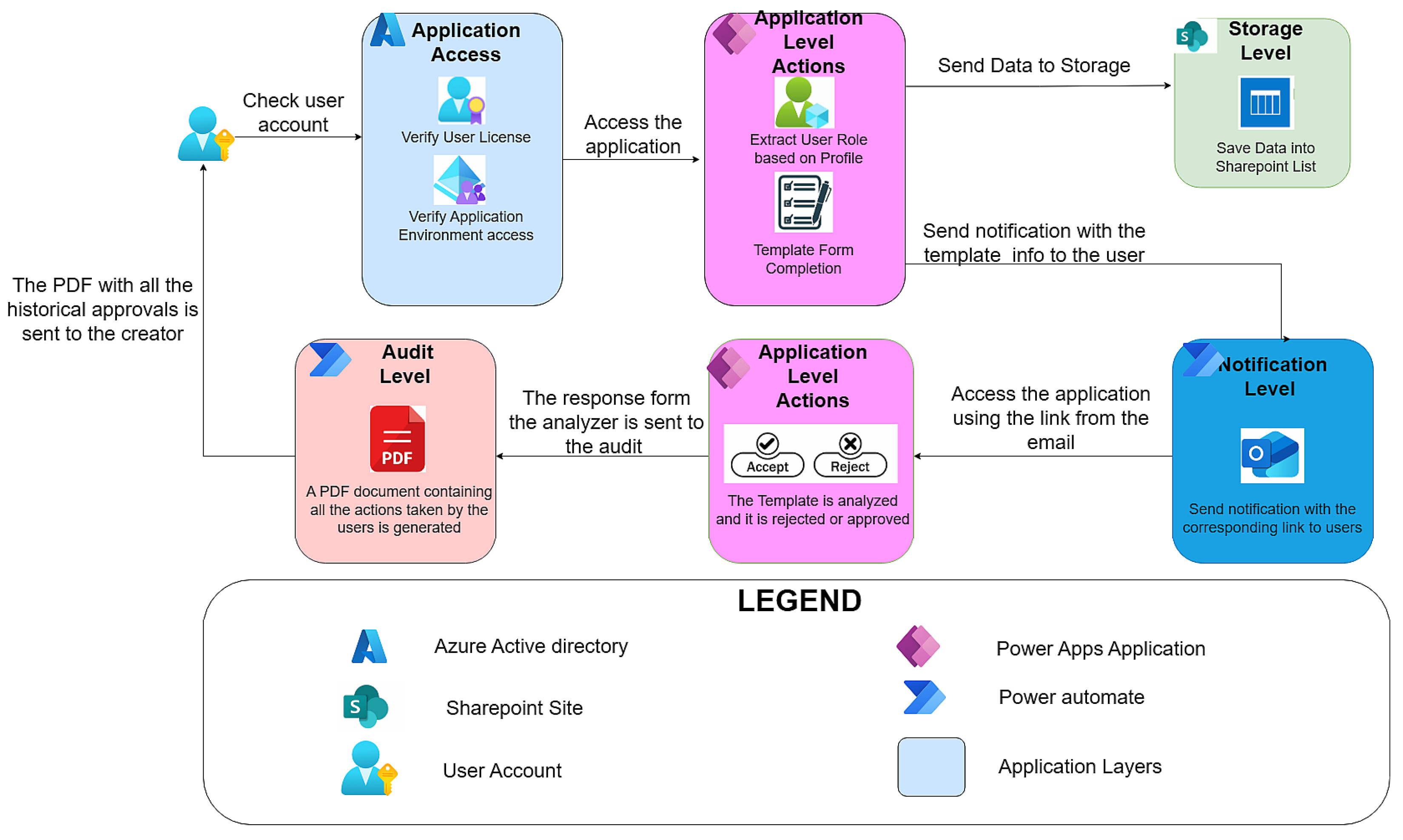
Figure 1. Architecture diagram.
Information 17 00046 g001
Figure 2. Dashboard.
Information 17 00046 g002
Figure 3. Sharepoint Database Design.
Information 17 00046 g003
Figure 4. Application Workflows.
Information 17 00046 g004
Figure 5. Traditional Python automation script for PDF generation and email distribution. The script sequentially creates tabular data, generates a formatted PDF, and distributes it to designated recipients. Each stage requires explicit coding, dependency configuration, and manual testing.
Information 17 00046 g005
Figure 6. Low-code Power Automate flow for automated PDF generation and email distribution. The workflow includes four stages—Trigger, HTML Table Creation, PDF Conversion, and Email Sending—implemented via pre-built connectors (the * fields are mandatory). No manual coding is required, and all actions are logged within the Microsoft 365 compliance framework.
Information 17 00046 g006
Figure 7. Power Automate Configure Option.
Information 17 00046 g007
Figure 8. Power Automate Configure “Run After” Block.
Information 17 00046 g008
Figure 9. Time and complexity comparison between traditional scripted automation and low-code automation. Power Automate achieves similar functionality in a fraction of the time, eliminating code maintenance while providing built-in security and scalability.
Information 17 00046 g009
Figure 10. The main interface for MAF Creation Form.
Information 17 00046 g010
Figure 11. Automatically Generated Approval Report (PDF) via Power Automate.
Information 17 00046 g011
Figure 12. General application workflow overview.
Information 17 00046 g012
Table 1. Comparative analysis using seven analytical dimensions.
FeaturePostgreSQLDataverseSharePoint Lists
TypeRelational DB (SQL)Managed relational-like platformList-based storage
RelationshipsFull PK/FK, constraintsSupports 1:N, N:N, business rulesNo PK/FK; uses Lookup columns
QueryingSQL, advanced joinsOData, Power Fx, connectorsLimited joins, basic filters
PerformanceHigh, scalableOptimized for Power PlatformGood for small/medium apps
SecurityRole-based, row-levelRow/field-level, auditSharePoint permissions
IntegrationBroad ecosystemDeep Power Platform integrationNative M365 integration
Document HandlingExternal storageFile columns (limited)Native document libraries
CostInfrastructure and Operations Costs$20/user/month (Premium), $5/user/app/month, DB add-on $40/GBIncluded in Microsoft 365
Best ForComplex transactional systemsEnterprise apps in Power PlatformDepartmental apps, document workflows
Table 2. Comparative overview of low-code and code-centric approaches based on Power Platform and the Prebreza application.
DimensionPower Platform (Low-Code, Cloud-Native)Prebreza (Laravel/PHP/MySQL, Self Hosted)Practical Implications
Development Method and AgilityConfiguration-driven changes to UI, workflows, and data rules with minimal code; rapid iteration and publishing.Code centric edits in Laravel/PHP, followed by retesting and redeployment; iterations are slower.Faster time to market and lower change risk on Power Platform; higher engineering overhead on Prebreza’s stack.
Resources and Cost ProfileSmaller, blended teams (business + IT) due to low-code tooling; costs are tied to Microsoft 365/Power Apps licensing and managed services.Requires backend, frontend, and DevOps roles; no license fees, but operational costs (maintenance, patching, infra) and technical debt accumulate.Lower staffing needs and more predictable costs on Power Platform; greater ongoing OPEX and skill dependency on self-hosted.
ECM AlignmentVersioning, auditing, and governance are available out of the box (SharePoint/Dataverse + M365).Would need custom modules to reach comparable records management/ECM capabilities.Built in traceability and compliance on Power Platform vs. custom build effort on Prebreza’s solution.
Security and ComplianceCentralized identity and policy via Microsoft Entra ID (SSO/MFA/RBAC) and Microsoft Purview (DLP, sensitivity, retention).Security posture depends on correct implementation and continuous hardening; no native enterprise MFA/SSO/compliance described.Enterprise grade security/compliance by design on Power Platform; bespoke controls and ongoing ops on open source.
Search and PublishingBenefits from SharePoint indexing and Microsoft Search; rich, metadata-driven views and filters without custom code.Presents data effectively via Bootstrap pages and CRUD lists; lacks metadata-driven enterprise search as described.Superior discovery and dynamic views on Power Platform; standard list/page browsing on Prebreza’s app.
ALM and ScalabilityCloud-native ALM (Dev/Test/Prod, solution packaging, pipelines) and elastic scaling handled by the platform.Manual deployments, capacity planning, server maintenance, and patching; CI/CD not described.Lower operational burden and smoother releases on Power Platform; higher ops workload and risk on self-hosted.
Table 3. Comparative Results.
DimensionPython ScriptPower Automate Workflow
Implementation Time~6 h~2 h
Required SkillsProgramming (Python, SMTP, PDF libraries)Low-code interface knowledge
MaintenanceCode modification and redeploymentGUI-based reconfiguration
SecurityManual credential handlingManaged under Azure AD
ScalabilityRequires manual scheduling and hostingCloud-managed, reusable templates
Table 4. Cost comparison for Power Platform and Open-Source Solution.
ScenarioPower Platform (Total Monthly Cost)Open-Source Self-Hosted (Total Monthly Cost)Notes
10 users + 1 flow$600$450Small team, minimal automation
10 users + 5 flows$3000$450Flow cost becomes dominant
25 users + 1 flow$750$450Larger user base, minimal automation
25 users + 5 flows$3250$450Typical mid-size automation scenario
25 users + 10 flows$5750$450Heavy automation workload
Disclaimer/Publisher’s Note: The statements, opinions and data contained in all publications are solely those of the individual author(s) and contributor(s) and not of MDPI and/or the editor(s). MDPI and/or the editor(s) disclaim responsibility for any injury to people or property resulting from any ideas, methods, instructions or products referred to in the content.