Article

The Creation of Alternatives for the Built-in Apps in the Android System to Increase Productivity

Faculty of Electronics, Telecommunications and Information Technologies, Politehnica University Timisoara, Vasile Parvan Av., No. 2, 300223 Timisoara, Romania
Appl. Sci. 2025, 15(24), 13279; https://doi.org/10.3390/app152413279
Submission received: 25 November 2025 / Revised: 11 December 2025 / Accepted: 17 December 2025 / Published: 18 December 2025

Abstract

This paper aims to present the development, challenges, and obstacles faced when creating two reduced complexity utility applications for Android mobile devices. The purpose of this paper is to present the challenges behind the development of these applications and the issues faced during their creation. The first app is a simplified gallery app that tries to be as simple as possible. It only has the functionality of a photo gallery; it loads images and videos—nothing less, nothing more. The second app is the simplified file manager app, which will perform only the basic functions of a file manager (Details, New Folder, Cut, Copy, Paste, Rename, Share, and Delete). These apps were also made because of the countless functionalities that are not even used.

1. Introduction

The approach of this study is to create alternative apps for the built-in apps in the Android operating system. The goal is to create simple yet effective apps for users. The focus is on simplicity and execution speed, making apps that perform their intended task, nothing less and nothing more. The idea came from the author’s discontent from having countless updates of apps, which become enriched with so many functions every day that they lose the purpose of what they were built for. Sometimes, the first version is better than the updated version, which is quite sad. This is why some apps were built, which only carry out the intended task, as simple as possible with no execution lags.
The data collected to come with these ideas are only personal, and some friends, relatives, and colleagues expressed their frustrations that some new apps are no longer what they used to be. People want simple and fast executing apps, which is only possible with less configurations and no complicated menus, i.e., have the lowest number of buttons possible, are intuitive, and experience reduced loading time.
The research problem is that every app receives a lot of updates, and each updates gives a lot of new extra functionalities of the app, a lot of which are not needed and or not even used by the everyday user. All of these updates overcomplicate the apps, thus losing their core functionality or what they were built for in the first place. This paper aims to present two simple apps, created by the author, but just with the basic necessary functions, nothing less and nothing more. This will make the apps easier to use and receive more positive responses.
The clear focus and objective of this paper is the presentation of two Android apps, a gallery and a file manager, which are simple with fast response times, opposite to today’s apps, which are overcomplicated.
The main contribution of the paper is that these apps are very simple and do not have overcomplicated functions, making them easy to use, even for non-technical users. While these apps are oversimplified, their code is shorter, they do not use complex unneeded libraries, they have less bugs, and they do not use cloud storage, improving their response times.

1.1. Simple Gallery App

The idea behind this app is that the galleries installed on the phones are very complex [1]: they have a lot of menus and buttons [2,3,4,5,6], which are not even used. Some applications become so complex that they will eventually lose the basic functionality for what they are made for [7,8,9]. As a result, there was an idea to create an app that will load only images and videos from the phone [10,11], nothing more and nothing less. In this way, the app will be simpler, load faster, and function smoother on any user’s phone [12,13].
The main research question is why the gallery apps which used to be simple and easy, are now overcomplicated with each update, making them lose their main functionality. The goal is to create a simple gallery app as an alternative to the overcomplicated gallery apps used on today’s phones.

1.2. Simple File Manager App

This app has the basic idea, which is similar to the previous app, to create an app that is as simple as possible and will do only the task it needs to do [14], no more useless functionalities [15,16,17,18]. The app loads all files and directories from the phone, and the user can do exactly eight operations with the files or folders [19,20,21]. The eight operations are the following: Details, New Folder, Cut, Copy, Paste, Rename, Share, and Delete [22,23]. The app in this way will load and function really smoothly [24].
The goal is to simplify the apps as much as possible with the focus being on the core functionality working as well as it can run, because many of today’s apps receive so many updates, with a lot of added functionalities, that they lose their core functionality, i.e., what they were built for in the first place.
The primary research question is why file manager applications which were once straightforward and easy to use are becoming more complex with each update, losing their primary functionality. The objective is to develop a straightforward file manager application to replace the overly complex ones found on modern phones.

2. Problem Formulation

The study problem is the overcomplication of current apps, and the methodology is to create simple alternatives for these complex apps.
The idea came from the author, but also friends’, relatives’, colleagues’, and user feedback.

2.1. Simple Gallery App

The simple gallery app has to load all images and videos from the phone, after the user gives permission. The images and videos are loaded in a RecycleView, into small thumbnails. The best choice is to write the app in the Kotlin programming language, which uses the Coil library to load images. Kotlin has been the main programming language for Android apps since 2019. In the latest version of Android Studio, a project in Java cannot even be created, only in Kotlin, so the Kotlin programming language was the best choice. Coil was the best solution because it is the newest image loading library and it is fine tuned for Kotlin. The other older two image loading libraries are Picasso and Glide. Picasso is the oldest and Glide is more compatible with Java; therefore, Coil was the best choice for the current implementation. The app can also maximize images and navigate between them using a swipe gesture. The images can be shared or deleted. There is also an information button for the images to present the image information.

2.2. Simple File Manager App

The simple file manager will load all folders and files in a ListView. When tapping on a folder/file or when selecting multiple files/folders, the user can perform eight operations: Details, New Folder, Cut, Copy, Paste, Rename, Share, and Delete. Each operation is individually implemented to perform the task for which it was intended. Of course, a New Folder can only be made in another folder, and Rename cannot be performed with multiple items (files or folders). Otherwise, the app loads all the files from the phone, but not the system files, because these need to be protected to not be accidentally deleted by the user.

3. Problem Solving

All apps are developed in the Kotlin programming language. Since 2019, Kotlin has been the preferred language for developing Android applications. Google promotes using Kotlin, which was created by the JetBrains team. In the latest versions of Android Studio, starting a new project with the Java programming language is not even an option, although Java classes can still be added alongside Kotlin classes within the project structure. The Kotlin programming language is largely based on Java, but is more streamlined and modern. It first emerged in 2011 and is relatively new. Although Java still has more documentation available online, Kotlin is gaining popularity. Google has introduced an excellent code converter in Android Studio that converts Java to Kotlin, making app development enjoyable.
The software development cycle is iterative development, and the goal was to not use complex frameworks, which can slow down the apps, so standard linear coding was performed.
Next, the mathematical background of the apps is presented. The discrete versions of the formulas is implemented, and standard functions are used in the apps.
The objective improvements can be seen in the user interfaces, which are simple and clear, compared to the other overcomplicated apps. Also being simpler, they have better response times. The gains compared to other existing apps are that the presented apps have a simpler and more intuitive interface, which will be seen from the screenshots of the apps. They only use the necessary libraries and no cloud connection, and their source code is short, so they have less bugs and a very good response time.

3.1. Simple Gallery App

The basic idea of this app is to create a really simple gallery app, with no infinite number of functions that are not even used, making the app responsive and faster to load.
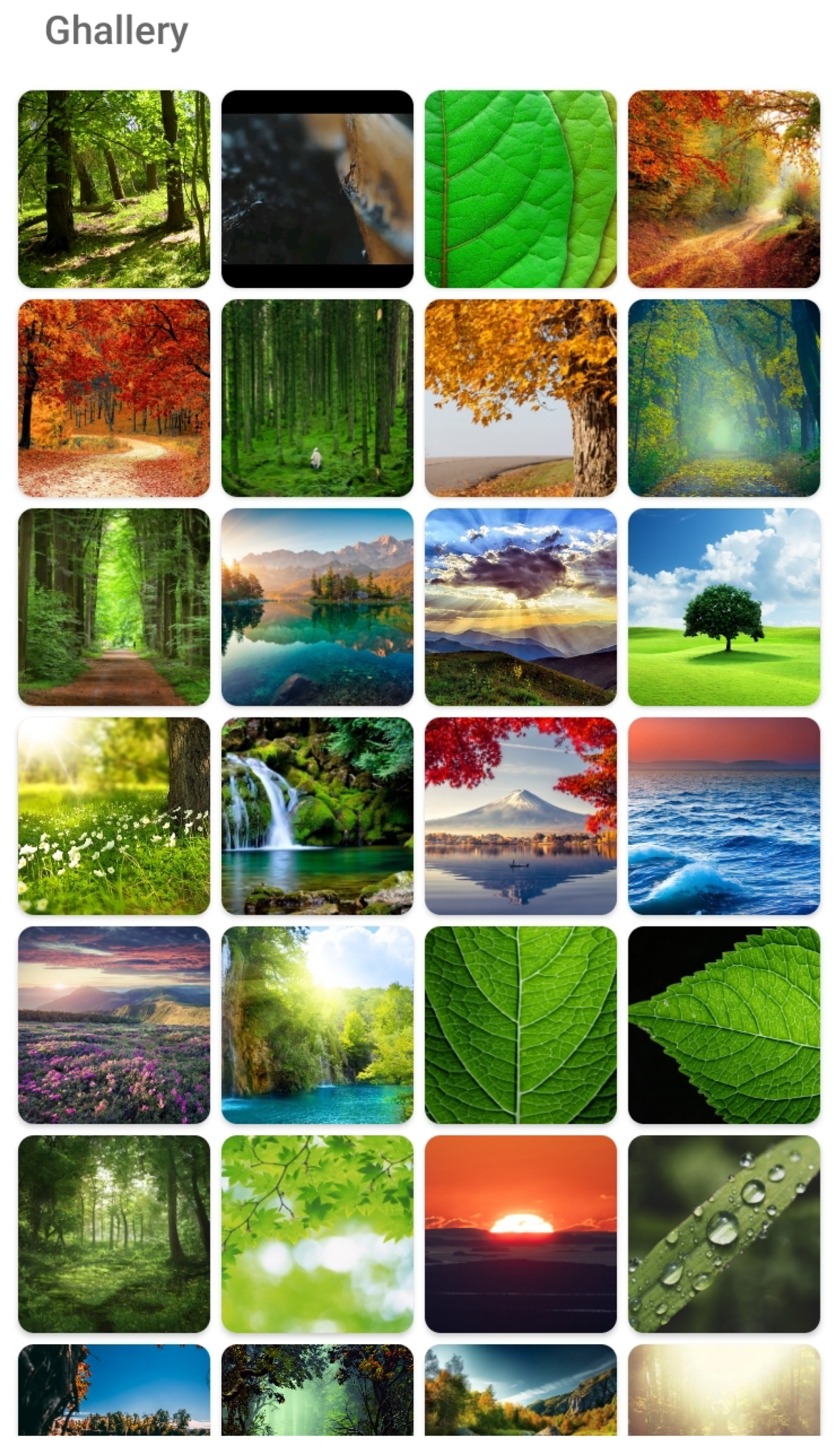
The gallery app is also one of the apps that appears to be simple, but is actually not. Initially, it needs to load all the images and videos in GridView or RecycleView. RecycleView is the best option due to its flexibility in loading different types of items (Figure 1). After this, an image-loading API is needed. There are four options—load it natively or use one of the following three image loading libraries: Coil, Glide, or Picasso. It is better to use an image-loading API since it is faster and better suited to load different types of images and videos. Picasso is the oldest and may be the slowest. The best solution is Coil or Glide. Coil was chosen, because it is more optimized for the Kotlin language and leverages Kotlin’s language features. The initial task is to be able to load any type of image or video, with any image type encompassing the following: *.jpg, *.jpeg, *.gif, *.png, *.bmp, *.webp, *.tiff, *.avif, *.apng, *.svg, *.ico, and others. For videos, the goal is to be able to preview a screenshot from any common video types.
In the main Activity, all images should be loaded in a grid format, of course, taking care of portrait and landscape orientations. Here, the hardest part is resizing the thumbnails in order to fit a certain number of thumbnails in the width of the mobile device (the width being different in landscape and portrait views). From a design point of view, it is not always the best solution to adjust the distance between thumbnails.
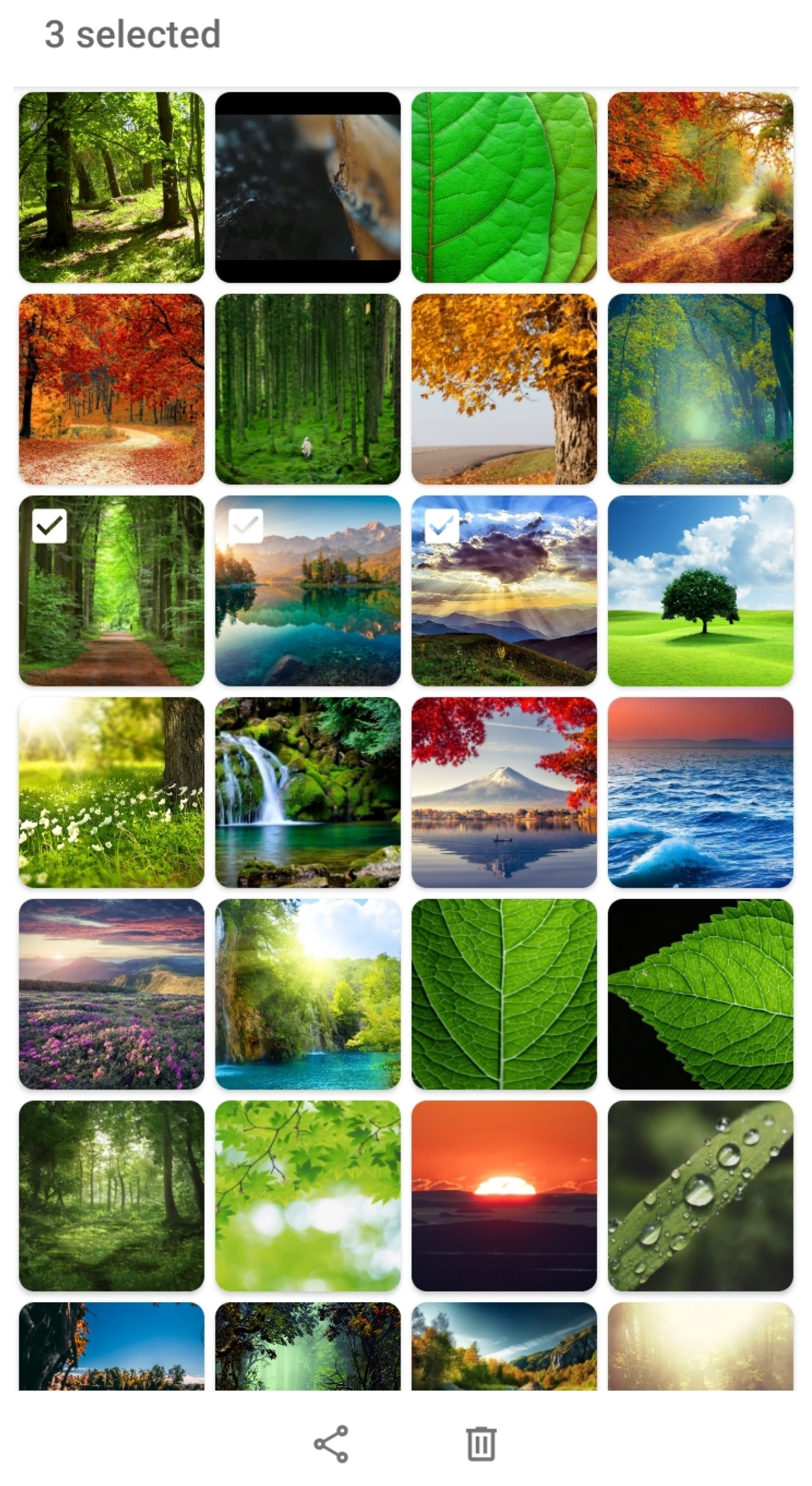
In this Activity, we have another issue: we need to select images with a longer tap and maximize them with a simple tap. We need to select them with check marks or by changing the background color in order to share or delete multiple images. These buttons can appear in the bottom of the Activity, only when the selection process is initiated as in Figure 2.
At the top, a counter can be made to show the number of selected images. To enable multiple touch events, a selection tracker should be used in RecycleView; this way, it will not pose any problems in distinguishing between a long tap and a short tap. The idea is to implement the selection process: first, we perform a long tap, but after short taps, we select multiple images. We would not like to confuse between long tap and short tap events; in other words, when we make short taps to select multiple images, we would not like to maximize them.
The initial Activity is actually made up of two activities with two corresponding Layout files. The RecycleView Activity is actually the Main Activity *.kt file with the main Layout *.xml file; also, a RecycleViewAdapter Activity *.kt file is needed which loads a card_layout Layout *.xml file.
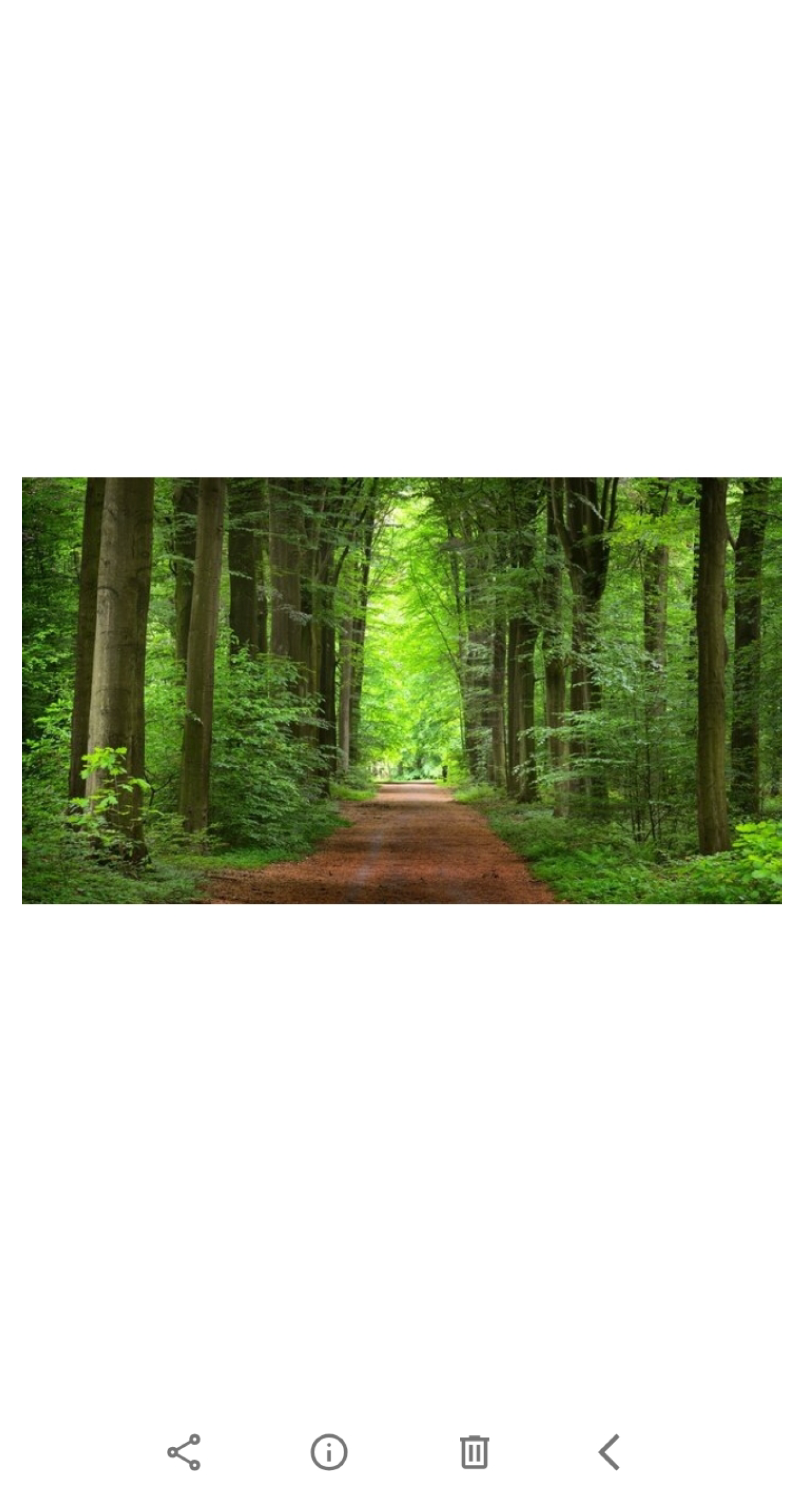
The second page is the ImageDetail Activity *.kt file with the corresponding image_detail Layout *.xml file (Figure 3). Here, we can have four buttons: share, info, delete, and back. For videos, there could be put a play button for video preview. The hardest part in this Activity is, again, the touch events; we need to zoom the image with a pinching motion and switch between images with left or right swipes. For this to work, we need to use another library. We need to extend our class to GestureDetector to adhere to TouchEvents by computing the x coordinates of the gesture to know if the swipe gesture was to the left or to the right. We also need to use ScaleGestureDetector to zoom in on the images.
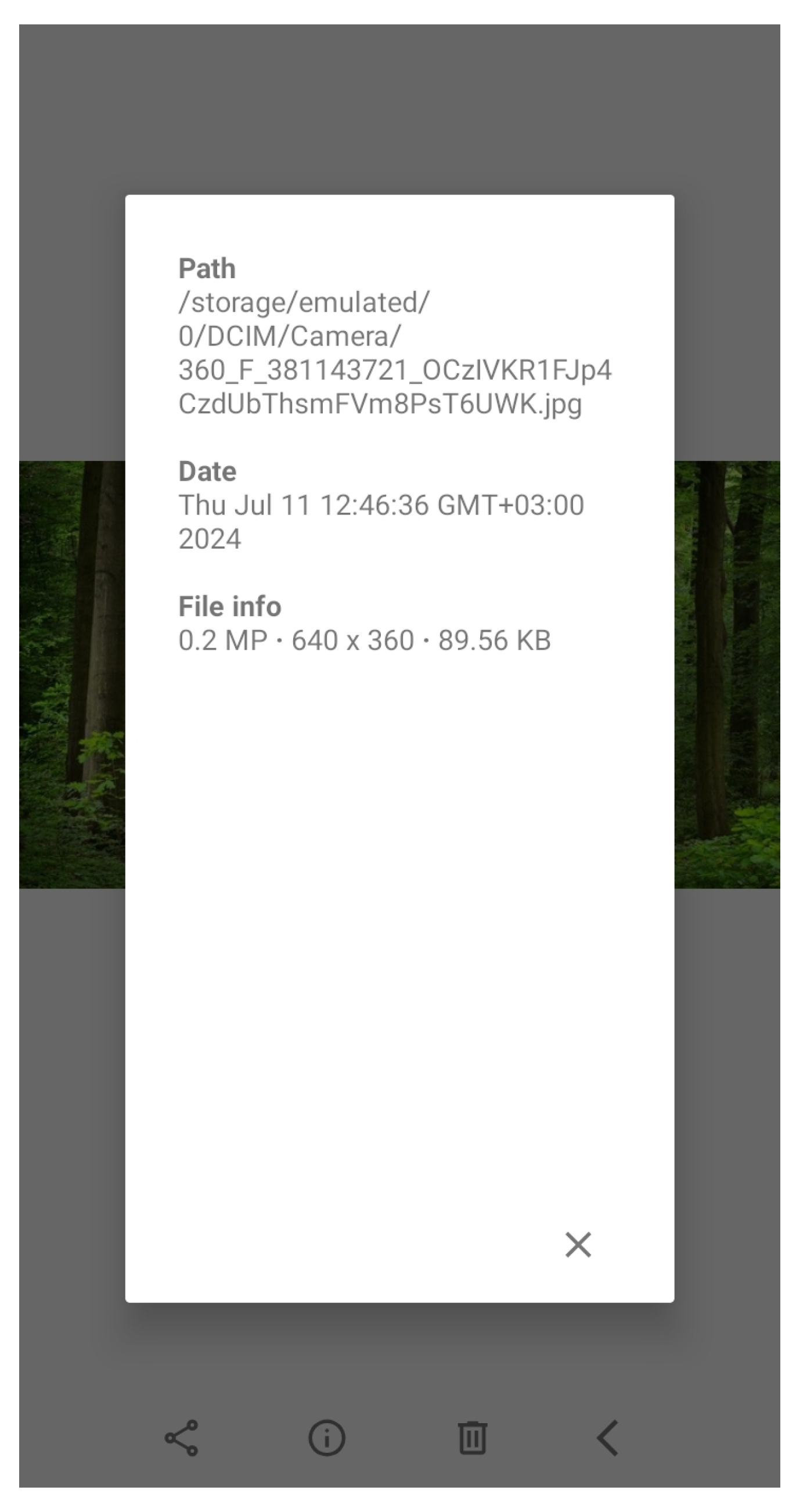
As for the buttons, the share button is an Intent, but we need to share image or video files via e-mail, SMS, or a messaging app; the info button opens another infoview Layout *.xml file (Figure 4) with image detail contents, the delete button deletes the image, and the back button goes back to the main RecycleView Activity. Unexpectedly, one of the hardest operations to code was the delete option, due to the fact that different functions were needed for different Android API versions, because the permissions in the Manifest file change with every new Android version (it was necessary to make another function for API 29 and another for API 30). The other bit that was complex to code, and maybe not useful, was the info button. It was too complex to code for the result it gave. This is an image gallery app, so image info can be a secondary task; not many people are interested in the size and date of images. The first part was to obtain the real path of the image, and then the creation date, and to put it in a specific format.
Table 1 shows performance and usability metrics fo the gallery app.
After that, for this file info, three separate functions were used: one for computing the megapixels, the other for the resolution, and the last for the image size on disk. All these data become quite complex to code, with respect to the output it gave. Of course, other extra image information could also be added, such as focal length or a map with a pin, where the image was taken.
As seen when creating a simple image gallery, this idea is not easy, but this image gallery was created to only make the basic function fast, not implement a large number of functions which are not even used.
The following techniques form the foundation of many image-processing workflows and are often combined to achieve complex tasks such as object detection, image compression, and enhancement.
Fourier Transform is applied for analyzing the frequencies in images:
F ( u , v ) = f ( x , y ) e j 2 π ( u x + v y ) dx dy
  • F ( u , v ) : Fourier transformation of the image.
  • f ( x , y ) : Initial image in the spatial domain.
  • e j 2 π ( u x + v y ) : Exponential function with complex arguments representing the frequency elements.
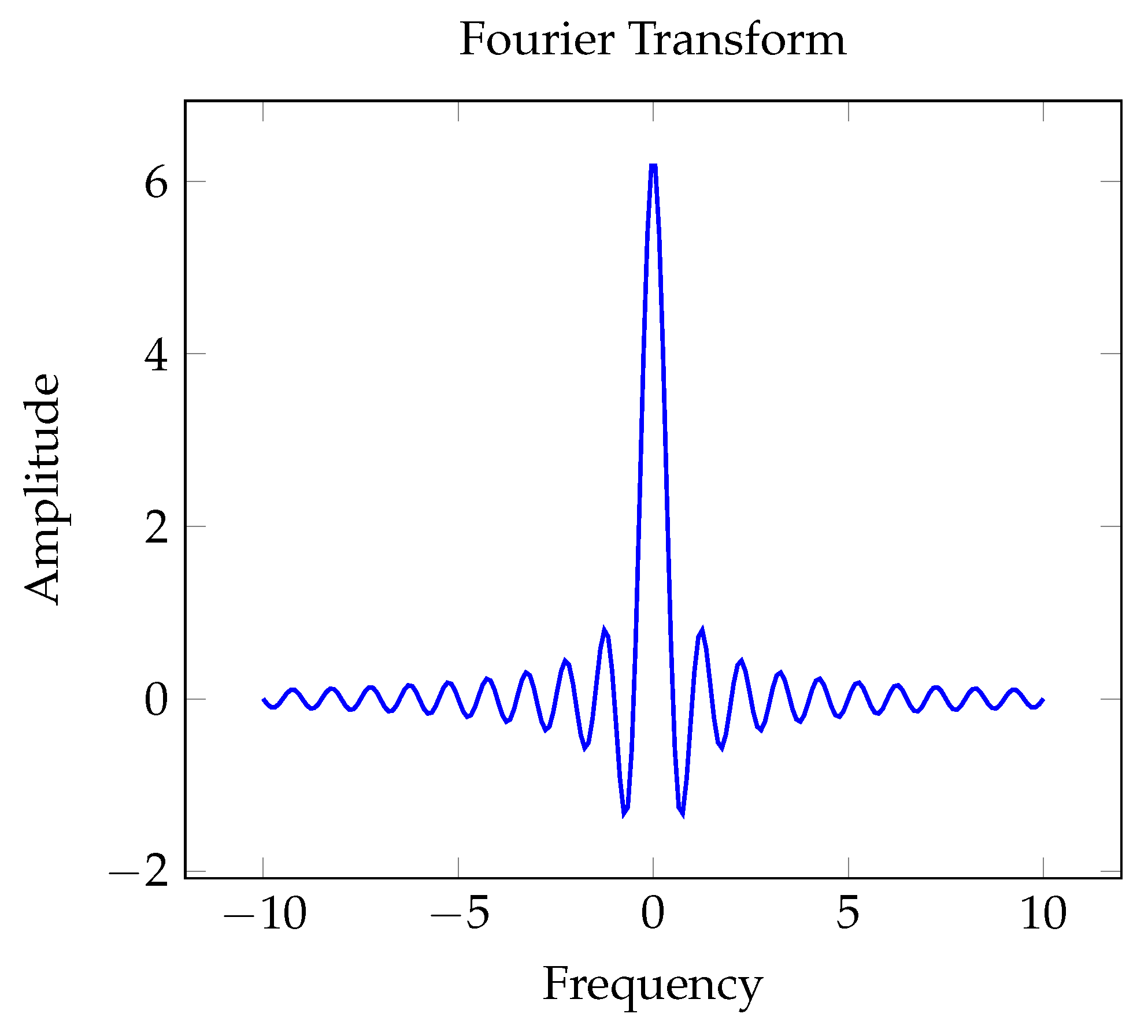
Fourier Transform (Figure 5) breaks down an image’s frequency details by shifting it from the spatial to the frequency domain. The frequency components are typically illustrated using a graph to show their magnitudes. The 2D Fourier Transform dissects the image into various sinusoidal elements. The central area predominantly captures low-frequency components representing smooth regions, whereas high-frequency components signify edges and sharp details reside further from the center. Applications of the Fourier Transform include image filtering (such as low-pass and high-pass), compression, and noise reduction.
Gaussian blur is applied for image-smoothing purposes:
G ( x , y ) = 1 2 π σ 2 e x 2 + y 2 2 σ 2
  • G ( x , y ) : Gaussian distribution function.
  • σ : The standard deviation of the Gaussian distribution.
  • x , y : Locations within the image.
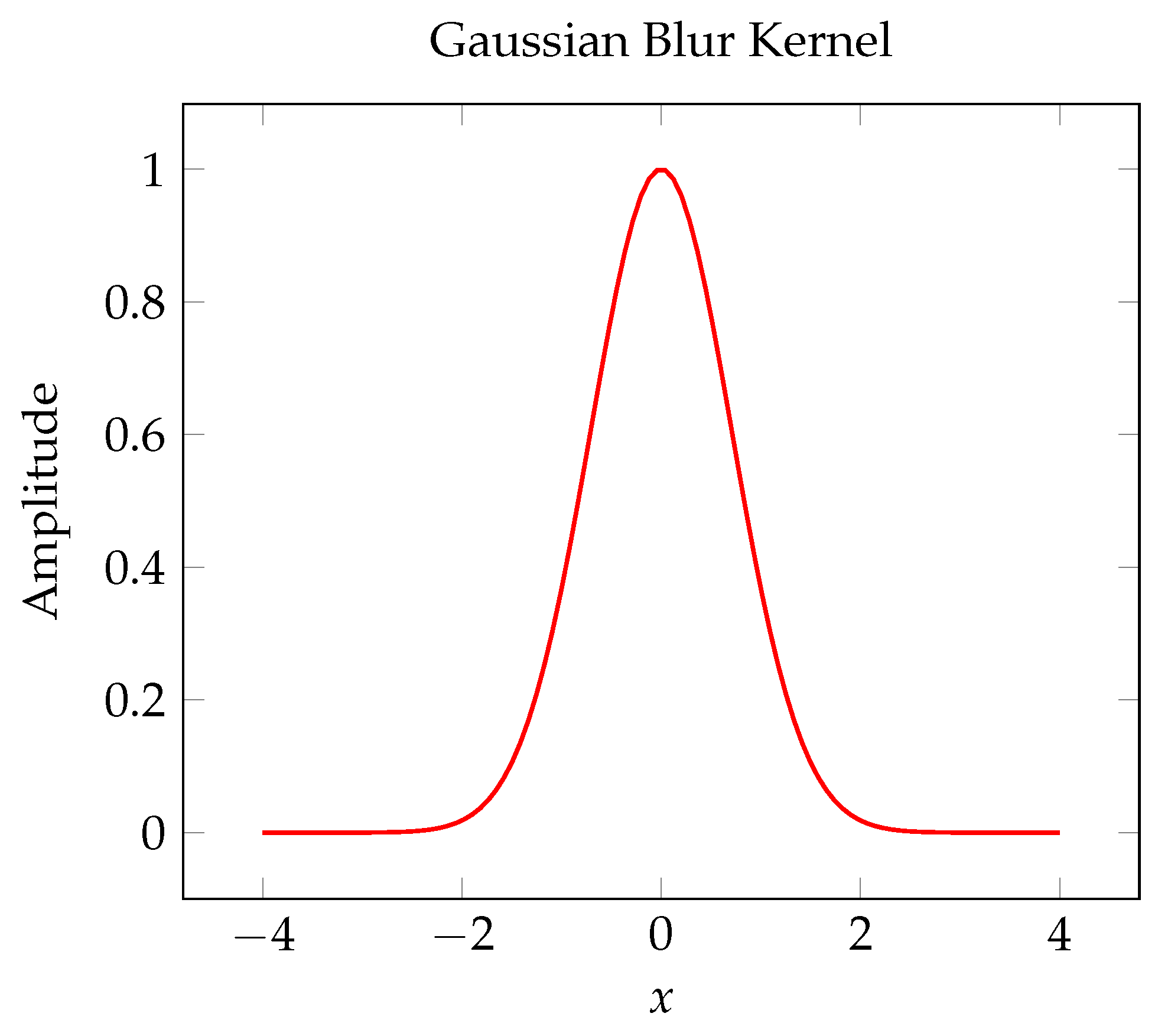
Gaussian blur (Figure 6) acts as a low-pass filter to enhance image smoothness by reducing noise and detail. The kernel used resembles the shape of a bell curve. Applying a Gaussian blur involves convolving the image with a Gaussian kernel, where the kernel’s values stem from the Gaussian function. The degree of blurring is regulated by the kernel size and the standard deviation ( σ ). Gaussian blur finds application in edge detection as a preprocessing step and in minimizing noise for image segmentation.
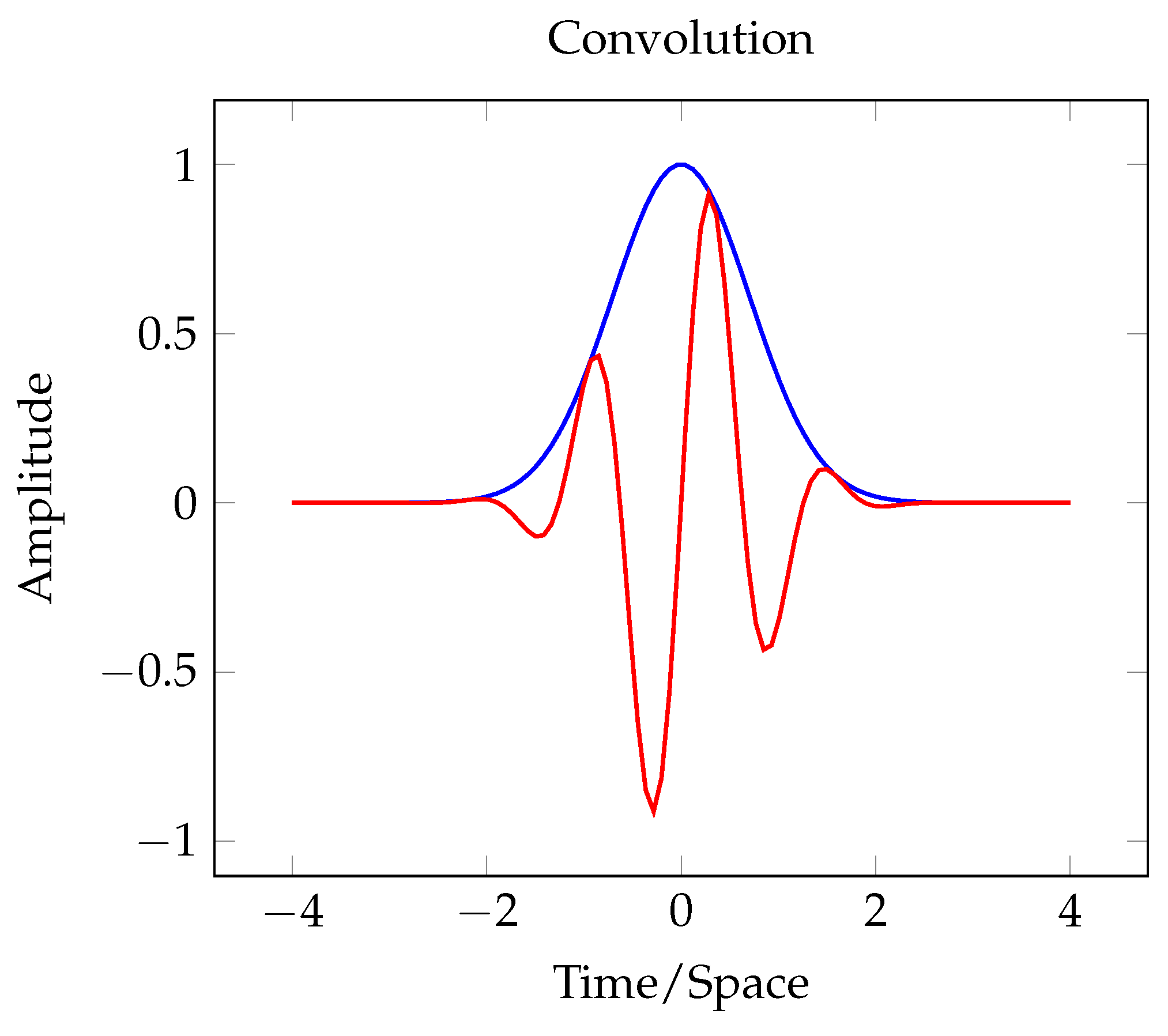
Convolution (Figure 7) is utilized to apply filters to images:
g ( x , y ) = ( f h ) ( x , y ) = f ( ξ , η ) h ( x ξ , y η ) d ξ d η
  • g ( x , y ) : Post-convolution resulting image.
  • f ( ξ , η ) : Original image.
  • h ( x ξ , y η ) : Convolutional filter or kernel.
  • ∗: Convolution process.
Figure 7. Convolution of two functions, where the blue line is one of the functions and the red line is the other function.
Applsci 15 13279 g007
In image processing, filters are used on images through convolution to capture particular features, such as edges and textures. A diagram might help depict the process of convolving an image with a kernel. During convolution, a kernel (a small matrix) moves across the image, and at each position, the sum of the element-wise products of the kernel and the image segment yields the output pixel. Typical convolution filters include edge detection kernels (such as Sobel and Prewitt), blurring kernels (such as Gaussian), and sharpening kernels.
Principal Component Analysis (PCA) is utilized to reduce dimensions in image processing:
X = W P
  • X : Matrix of raw data (pictures).
  • W : Matrix containing the principal component eigenvectors.
  • P : Matrix of the projected data.
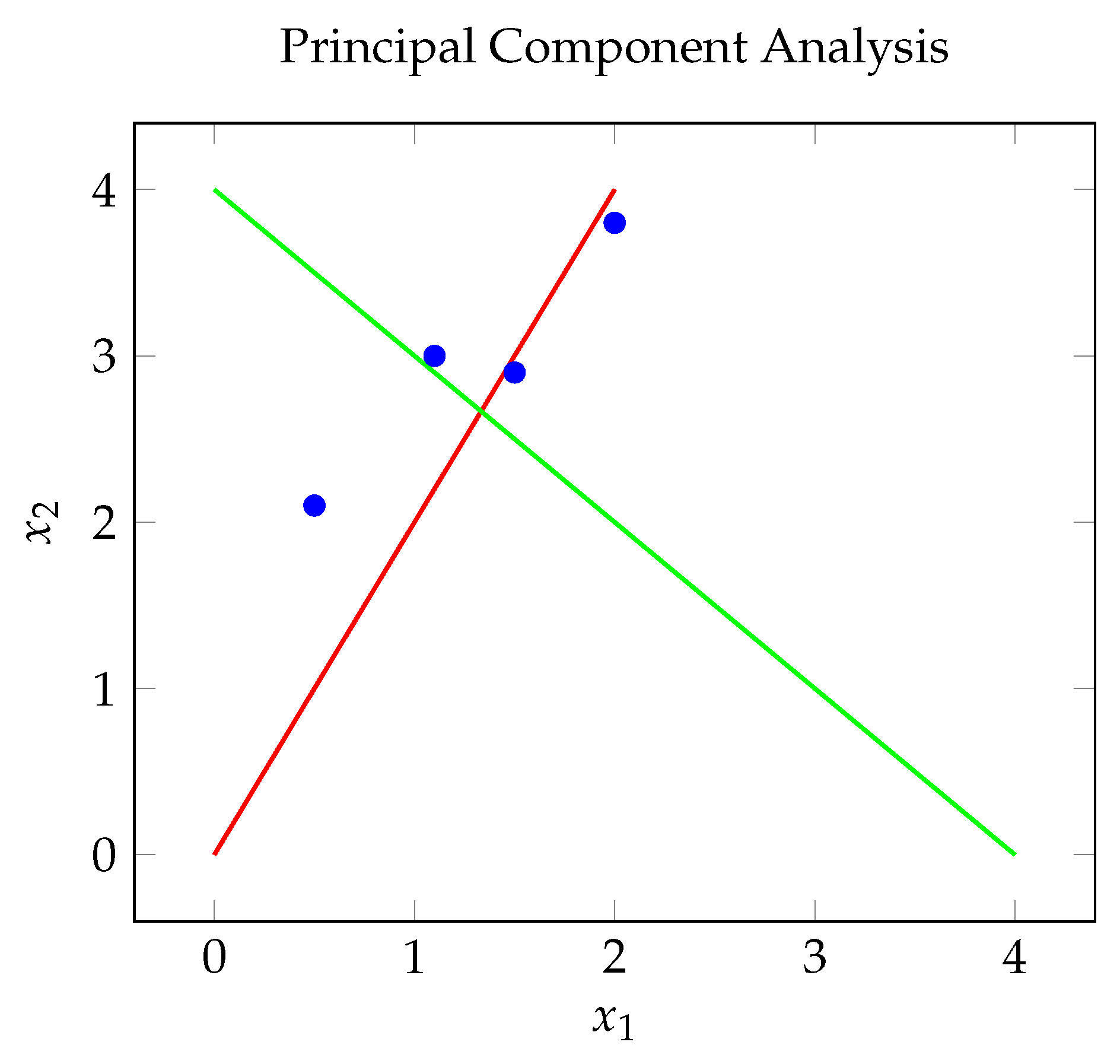
PCA (Figure 8) helps reduce dimensionality while maintaining the majority of the variance present in the data. Typically, a graph is used to display the data points alongside the principal components. PCA is performed by calculating the eigenvectors and eigenvalues of the data’s covariance matrix and then projecting the data onto the principal components, which are the eigenvectors corresponding to the largest eigenvalues. PCA has applications in compression, achieved by diminishing color channels or pixel dimensions, noise reduction through the retention of only the most critical components, and feature extraction.
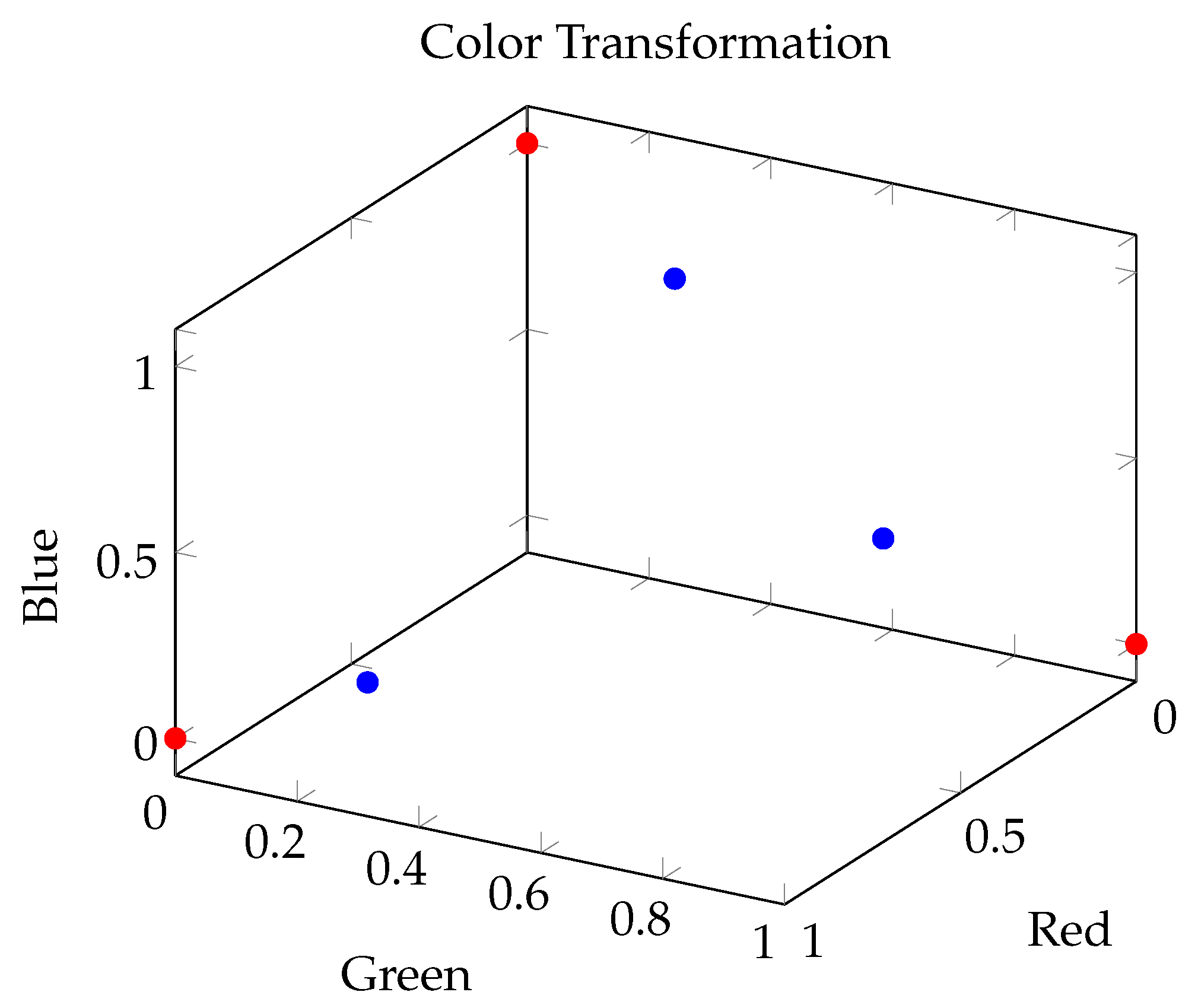
Color transformation (Figure 9) within image processing can be expressed through matrix operations:
R G B = a 11 a 12 a 13 a 21 a 22 a 23 a 31 a 32 a 33 R G B
  • R G B : Adjusted color values.
  • R G B : Initial color components.
  • Matrix: Matrix used to adjust color values.
Figure 9. Transforming colors through matrix operations.
Applsci 15 13279 g009
Matrix multiplication is often utilized in color transformations, which involve changing images between various color spaces for purposes such as analysis, enhancement, or compression. Some typical transformations include RGB to grayscale, which simplifies a color image to one channel; RGB to HSV/HSI, which divides intensity from color details, aiding segmentation and enhancement; and YCbCr, used in video compression. Color transformations aid in emphasizing particular color components, image segmentation, and thresholding. The following chart displays both the initial and transformed color space.
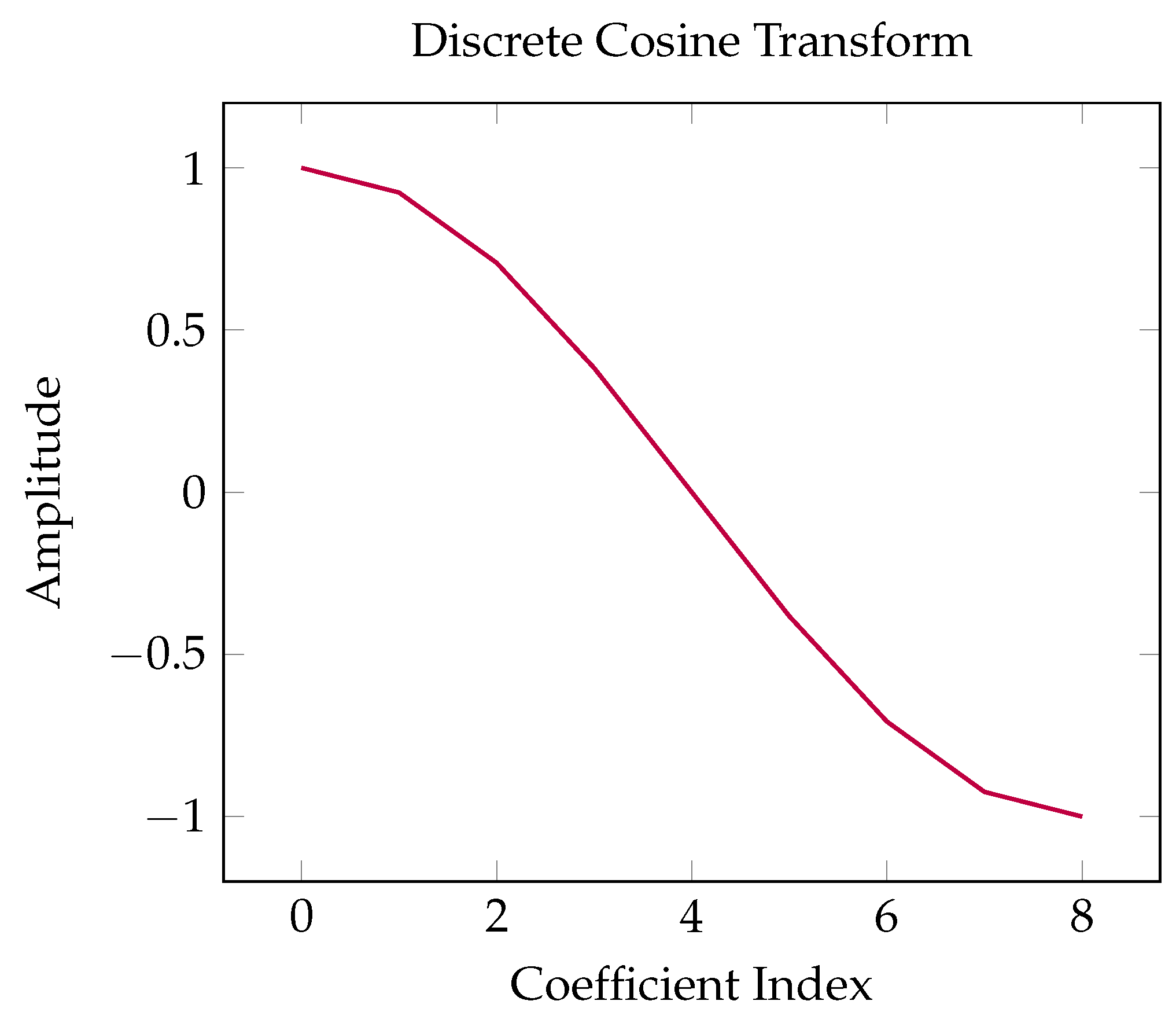
JPEG compression (Figure 10) employs discrete cosine transform:
C u , v = 1 4 α u α v x = 0 7 y = 0 7 f ( x , y ) cos ( 2 x + 1 ) u π 16 cos ( 2 y + 1 ) v π 16
  • C u , v : DCT coefficient.
  • f ( x , y ) : Pixel value at coordinates ( x , y ) .
  • α u and α v : Scaling factors.
  • cos: Cosine function utilized for the transformation.
Figure 10. JPEG compression with discrete cosine transform (DCT).
Applsci 15 13279 g010
JPEG utilizes discrete cosine transform (DCT) to compress images. DCT breaks down an image into segments of varying significance, known as spatial frequency components. Although comparable to the Fourier Transform, DCT relies exclusively on cosine functions. The majority of image data are encapsulated within a limited number of DCT coefficients. DCT is implemented in JPEG compression, which diminishes the image size by retaining only the most crucial coefficients and eliminates redundancies present in the image information. A typical graph can illustrate the DCT coefficients.
Image contrast can be improved through histogram equalization:
s = T ( r ) = L 1 N i = 0 r h ( i )
  • s: Pixel value following transformation.
  • T ( r ) : Mapping function.
  • L: Count of intensity levels.
  • N: The overall count of pixels.
  • h ( i ) : Distribution of the intensity values of the pixels.
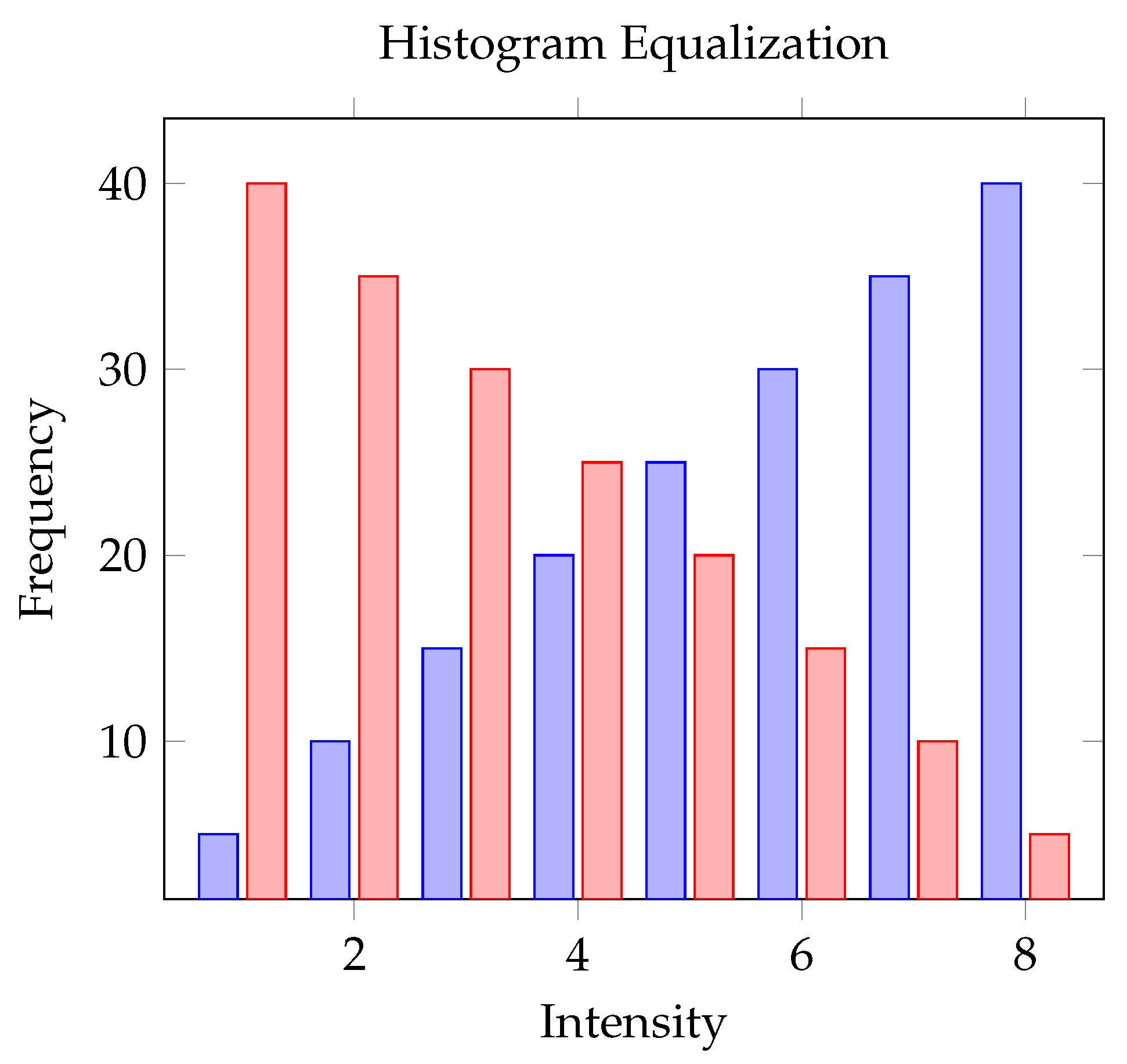
Histogram equalization (Figure 11) improves image contrast by redistributing the most common intensity values across the range. The image histogram’s cumulative distribution function (CDF) is calculated, and the initial pixel values are remapped based on the CDF. This technique is applied to enhance the visibility of low-contrast images and is used in preprocessing for object recognition or segmentation. An accompanying graph shows the original and equalized histograms.
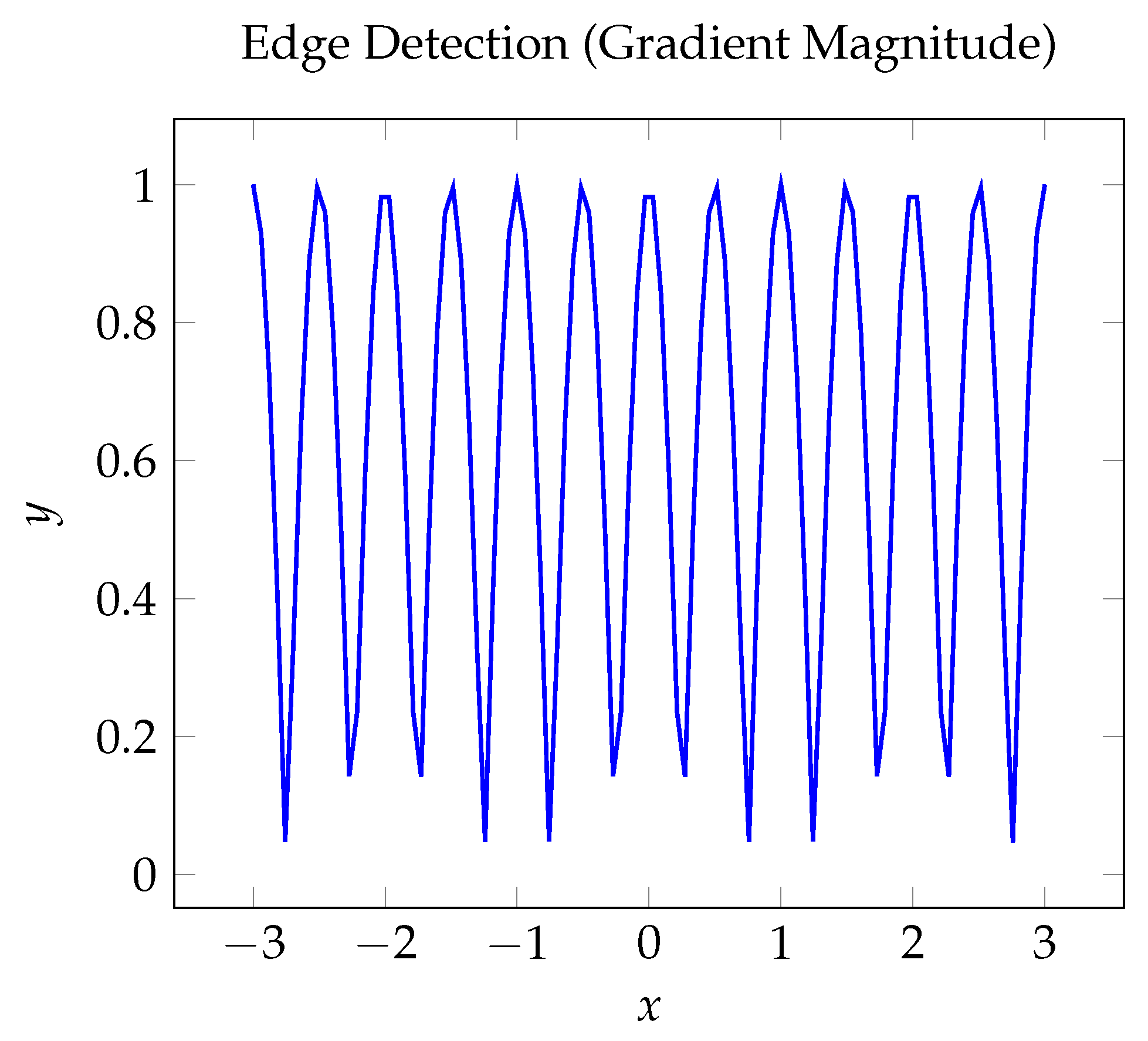
Sobel operators serve the purpose of detecting edges (Figure 12):
G x = 1 0 1 2 0 2 1 0 1 G y = 1 2 1 0 0 0 1 2 1
  • G x and G y : Sobel operators used for edge detection along the x-axis and the y-axis, respectively.
Figure 12. Detecting edges (gradient magnitude).
Applsci 15 13279 g012
Algorithms such as Sobel are used to identify edges within an image by accentuating areas with significant changes in spatial gradient. This method involves convolving the image with two 3 × 3 kernels, one designed to detect horizontal edges and the other for vertical edges. The results of these convolutions are combined to determine the magnitude of the gradient. Sobel algorithms are utilized for tasks such as recognizing object boundaries and as a preprocessing step in computer vision tasks. A graph can represent the magnitude of the gradient.
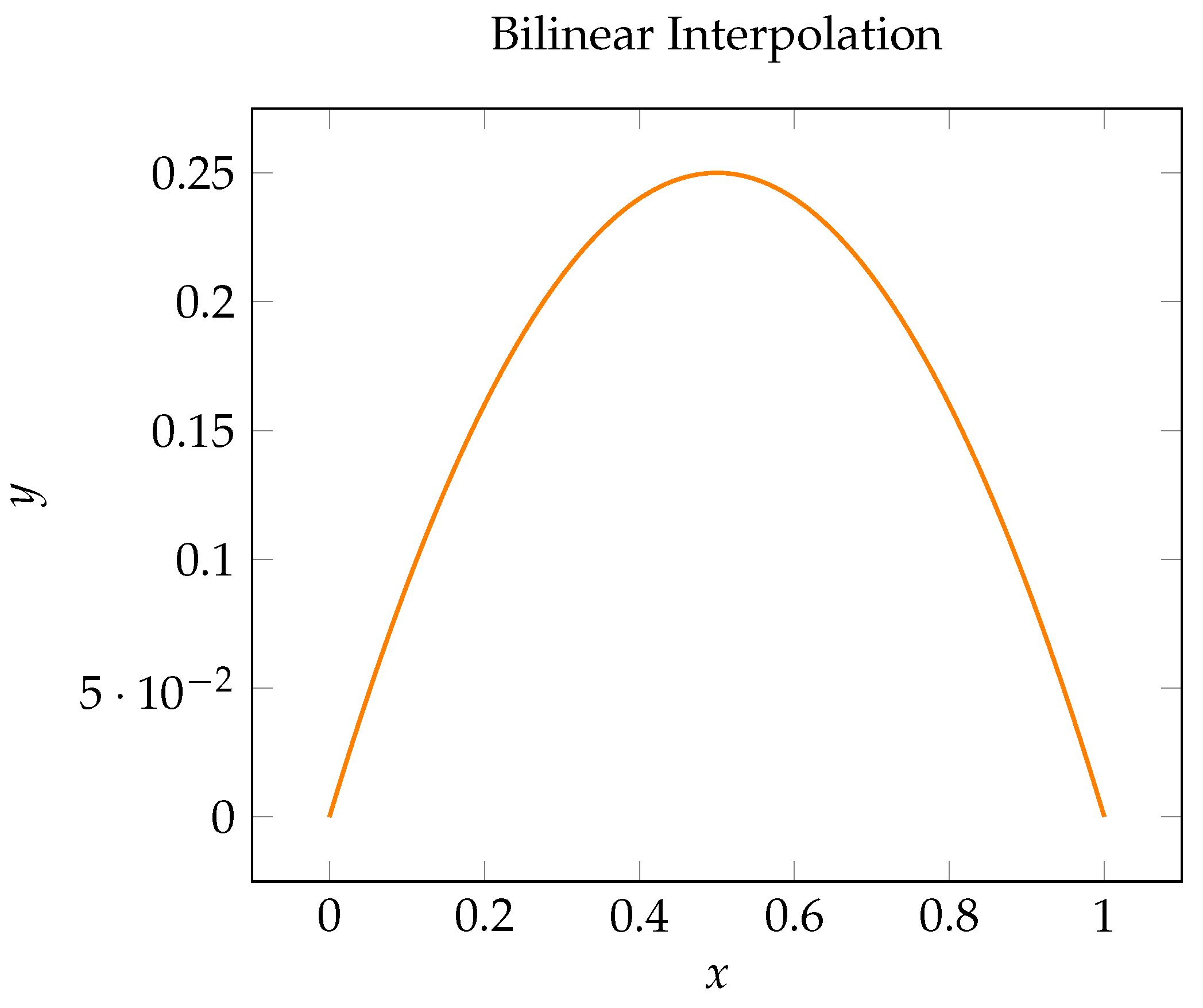
Bilinear interpolation (Figure 13) is employed to change the size of images:
I ( x , y ) = ( 1 a ) ( 1 b ) I 00 + a ( 1 b ) I 01 + ( 1 a ) b I 10 + a b I 11
  • I ( x , y ) : Pixel value obtained by interpolation.
  • a and b: Decimal parts of the coordinates.
  • I 00 , I 01 , I 10 , I 11 : Known values of the pixels in adjacent positions.
Figure 13. Bilinear interpolation.
Applsci 15 13279 g013
Bilinear interpolation adjusts image size by predicting pixel values using the four closest neighboring pixels. During scaling, the value of each new pixel is determined by calculating the weighted average of these four surrounding pixels. This interpolation method is commonly applied in image resizing processes, such as upsampling and downsampling, as well as in geometric transformations like rotation and translation. A graph can illustrate the interpolation process among four points.

3.2. Simple File Manager App

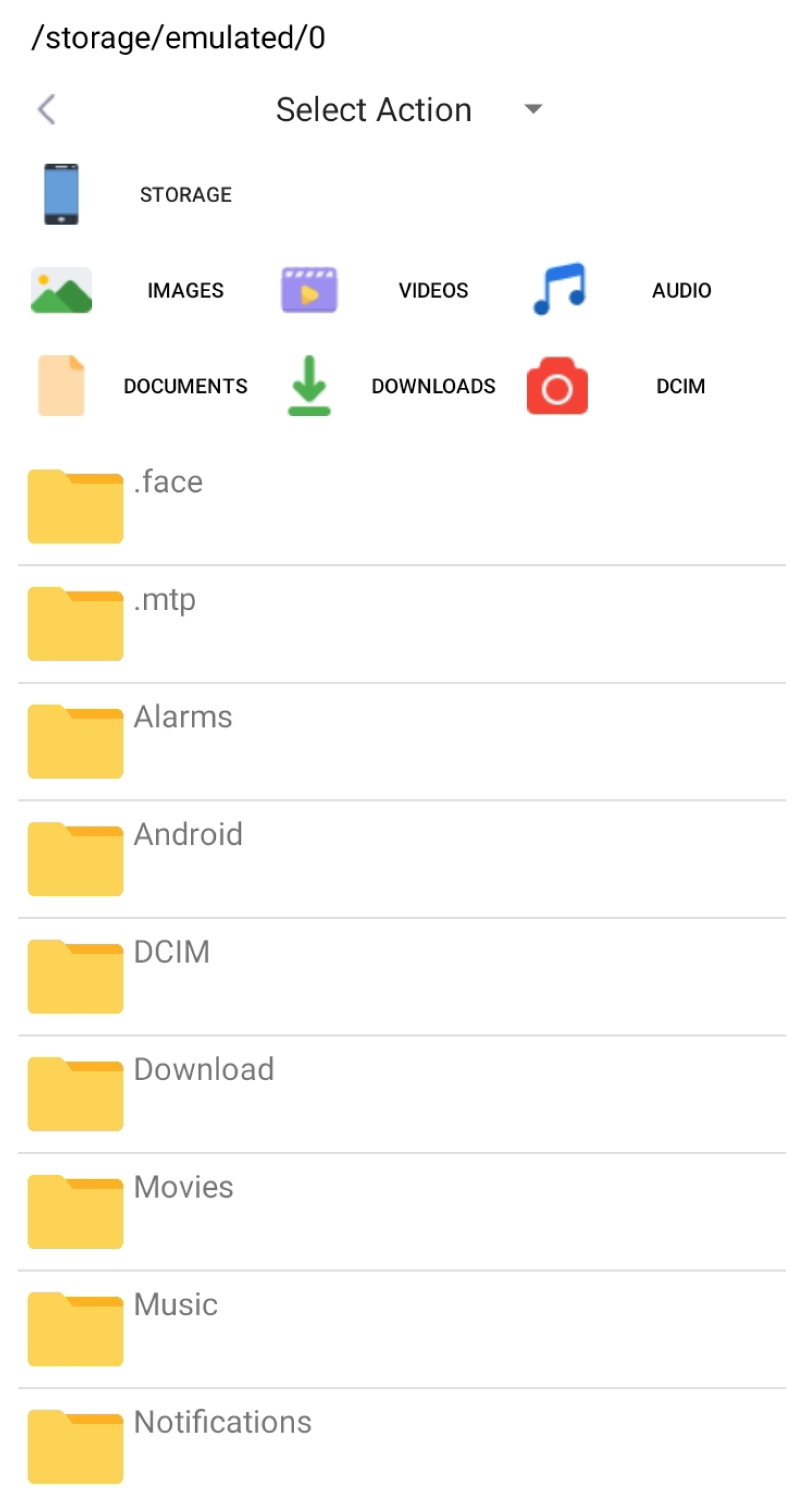
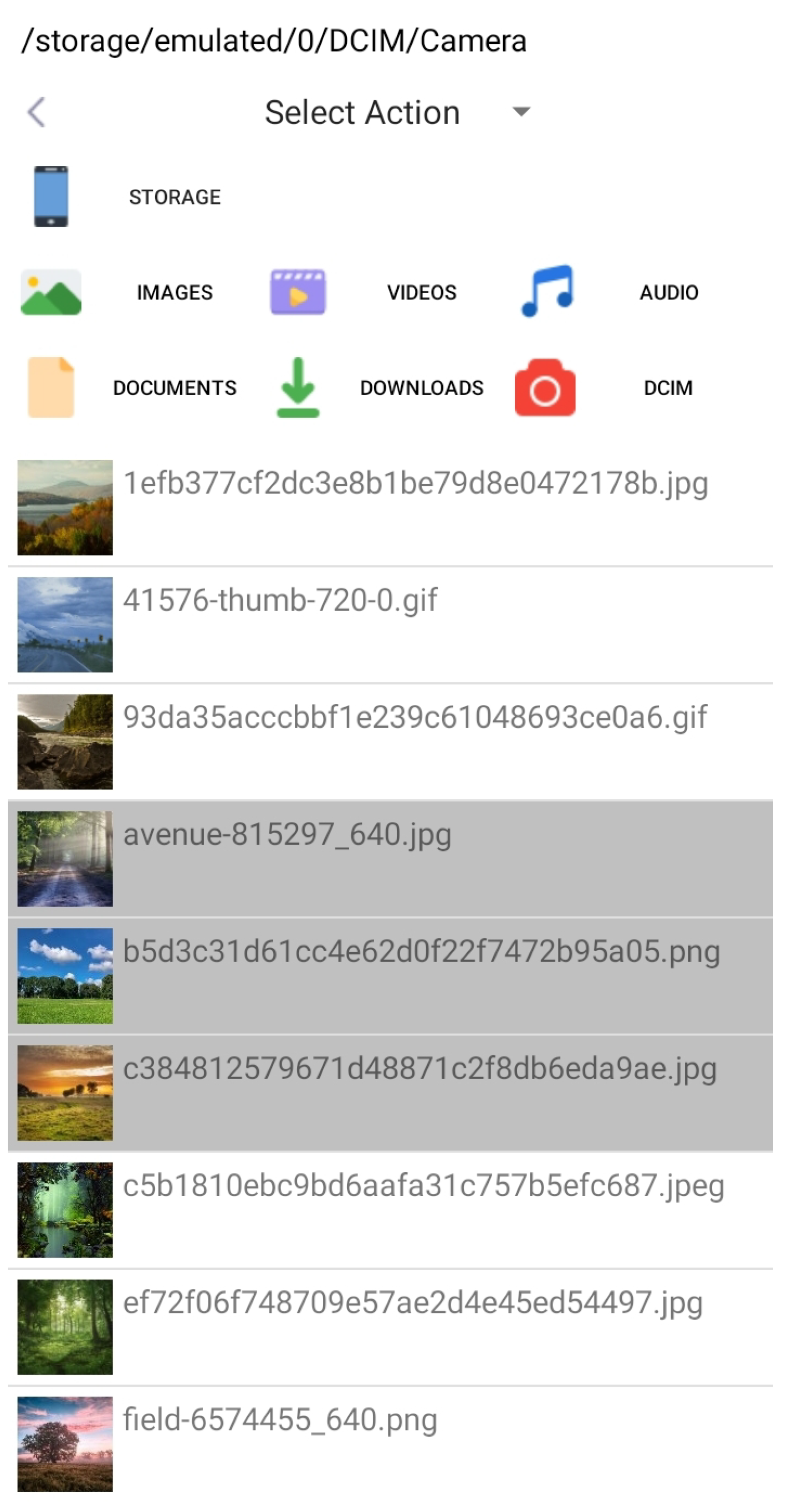
The basic idea of this app is to make a simple file management application that loads the file system and can perform all basic operations. Again not having a lot of useless functions, it will be loaded faster and be more responsive. The app should load the entire file system with some fast access icons in the upper part of the app (Figure 14). The app should present a preview of image thumbnails; here, Glide or Coil API can be used, Coil being better for the Kotlin programming language (Figure 15).
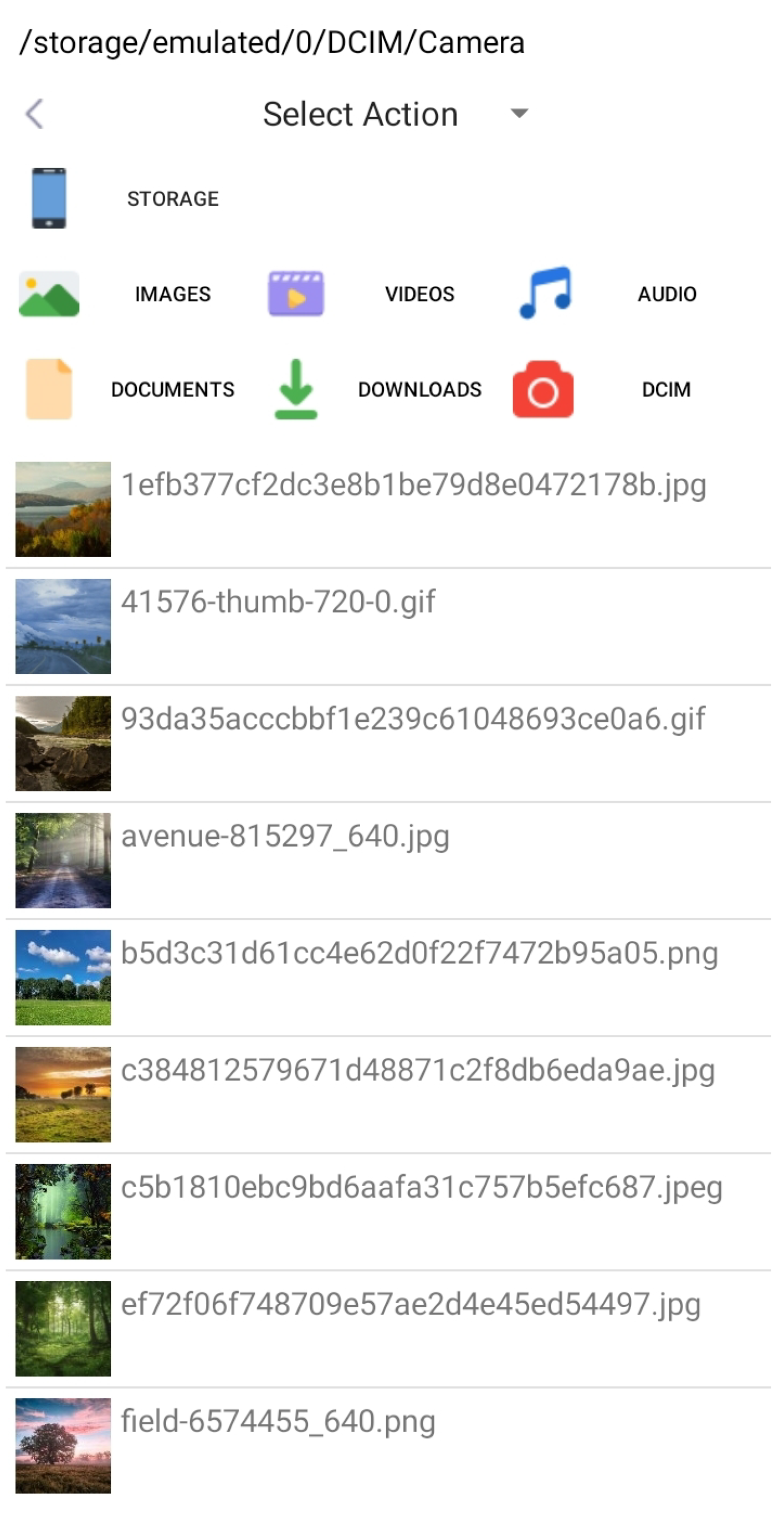
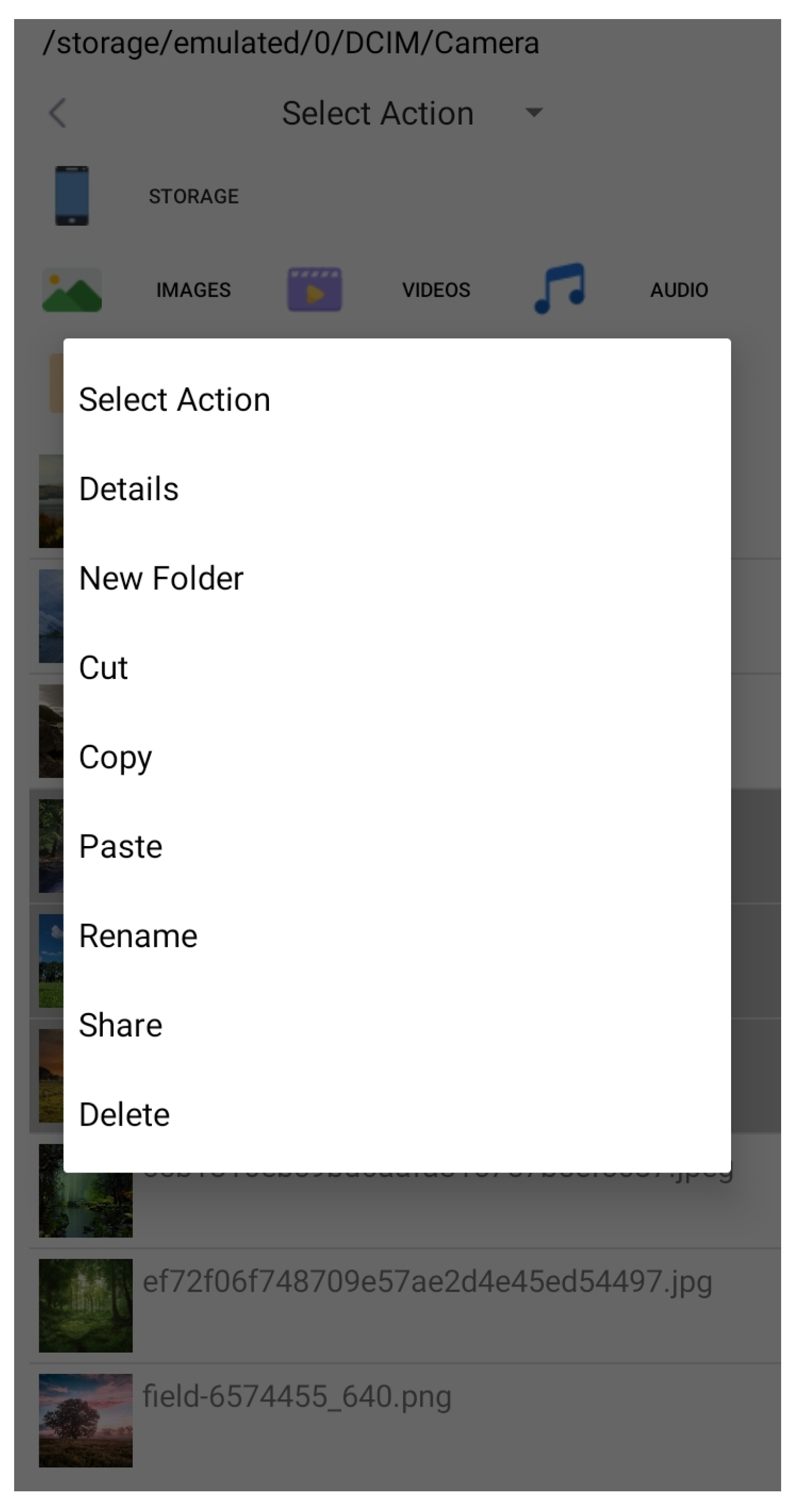
With the app, there should be a possibility to select multiple files or folders to perform operations with multiple files or folders (Figure 16). The basic operations are as follows: Details, New Folder, Cut, Copy, Paste, Rename, Share, and Delete (Figure 17).
The app can show the location of files with breadcrumbs in the top. The fast access icons can be the main storage, images, videos, audios, documents, downloads, or photo camera pictures (DCIM).
The apps looks simple, having only one complex Activity *.kt file which can make all the operations enlisted before, but the app actually uses four Layout *.xml files—one for the main activity; here, the portrait and landscape orientations need to be taken care of. A custom_list Layout *.xml file for loading files and folders in a ListView, with an icon (file, folder, or image thumbnail) placed inline with the file or folder name. An infoview popup Layout *.xml file is needed, which is used to display the file information like the path, creation date, and file size on disk. Another newfolder Layout *.xml file is also needed for the popup, which is used to create a new folder or to rename a file or folder.
A simple file manager app was created to be as simple as possible, not have too complex code, load faster, and be more responsive.
Table 2 shows performance and usability metrics fo the file manager app.
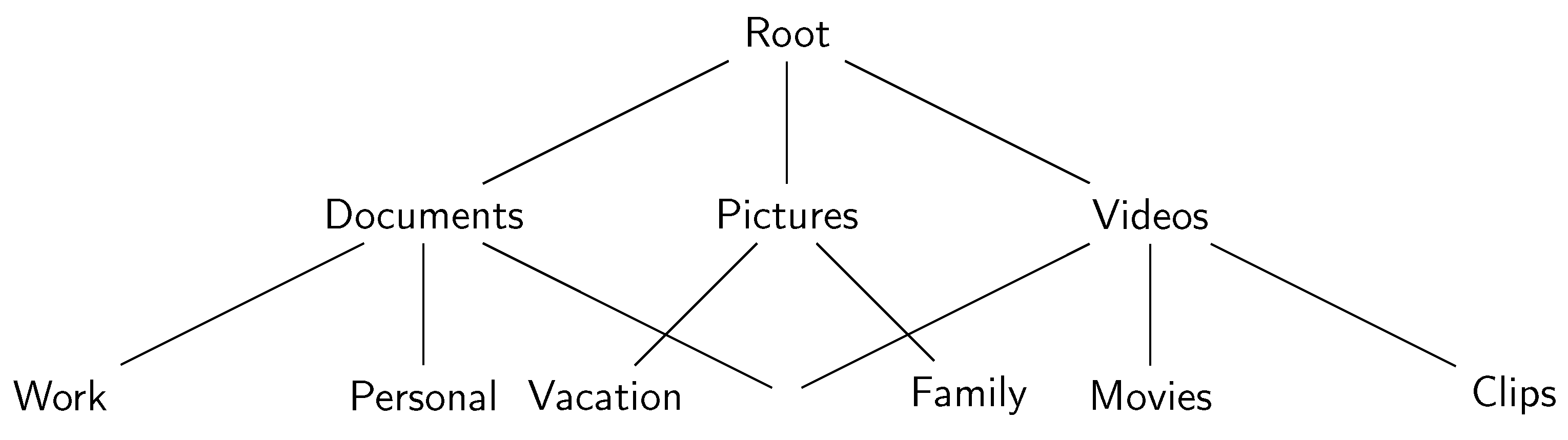
The organization of a file system can be depicted as a tree diagram (Figure 18).
The following techniques play vital roles in data storage optimization, data security, and ensuring data integrity in modern computing systems.
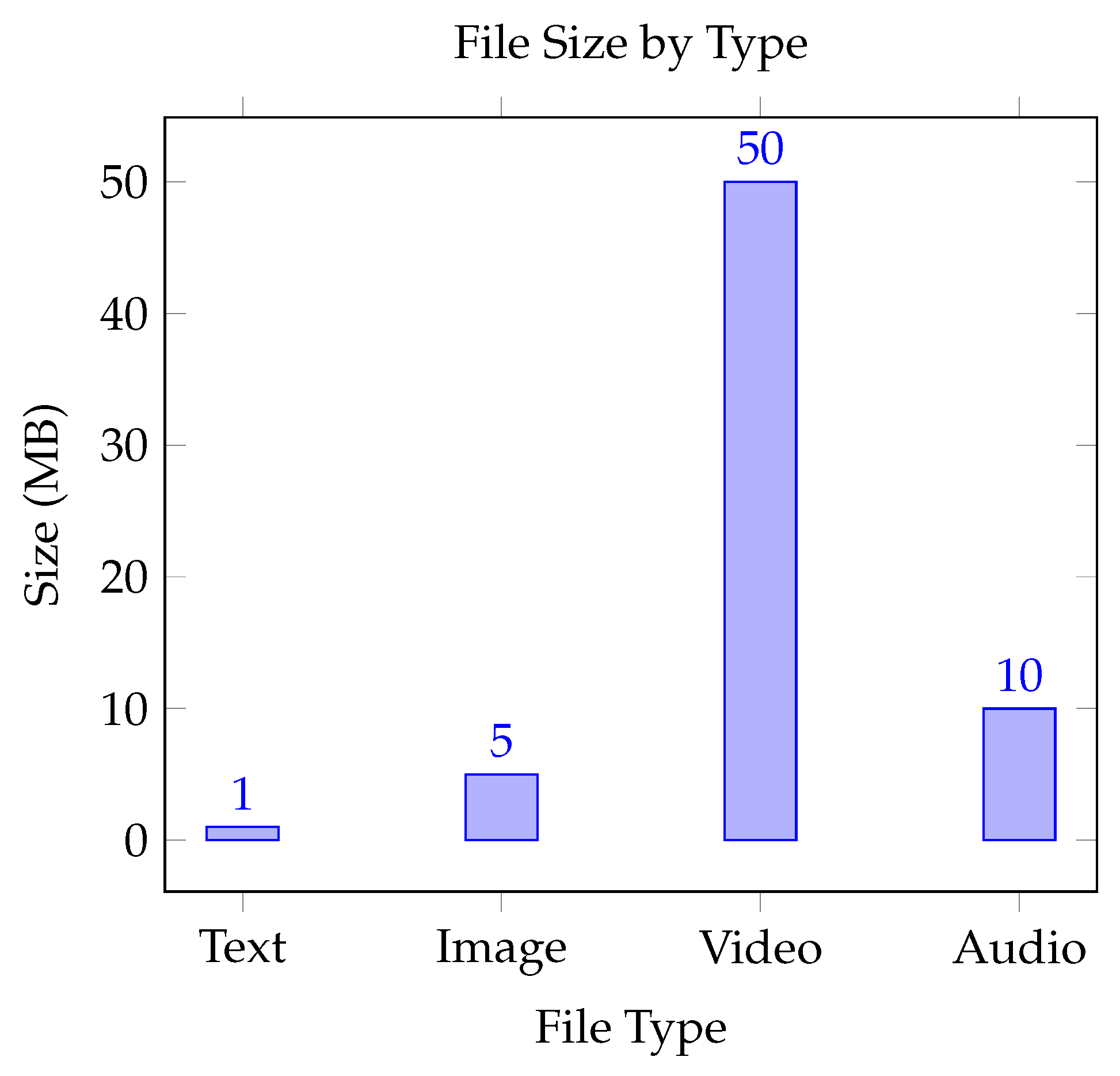
File size calculation (Figure 19) is important for determining how much disk space a file takes. Several factors influence a file’s size: the type of data it contains (such as text, images, or videos, which differ in size depending on content and format), the encoding or format (text files in ASCII or UTF-8 require varying space for characters, while compressed formats like JPEG and PNG decrease file size by eliminating redundancy), metadata (such as the file’s creation date and permissions, which also consume space), and the file system block size (since files are stored in blocks, even tiny files using a minimum block size will contribute to take up disk space). To assess file sizes, directories and their subdirectories must be examined.
A bar graph that illustrates various file types along with their sizes can serve as an excellent visual representation.
S = i = 1 N size i + j = 1 M k = 1 P j size j , k
  • S: Overall size.
  • N and b: Number of files.
  • s i z e i : The size of the file i.
  • M: The total count of directories.
  • P j : Count of files within the j-th directory.
  • s i z e j , k : The file size of the k-th item in the directory j.
Huffman encoding effectively reduces file size by compressing data. The process involves the following: frequency analysis, which identifies the occurrence frequency of each character in the input data; constructing a binary tree by creating a Huffman Tree, where characters that appear more frequently are assigned with shorter binary codes; and encoding, where characters are assigned with variable-length binary codes, with more common characters receiving shorter codes. This method is utilized for lossless compression in text files, images, and multimedia formats such as *.zip and *.png. In a Huffman encoding example, for the text ABRACADABRA, A might be represented by 0, B by 10, etc. Huffman encoding is used for compression without data loss.
Code ( x ) = minimal distinct bin . seq . assigned to the symbol x
Average length = i = 1 N p i · l i
  • C o d e ( x ) : The Huffman encoding for the symbol x.
  • p i : The probability that the symbol i will appear.
  • l i : The number of bits in the Huffman code for symbol i.
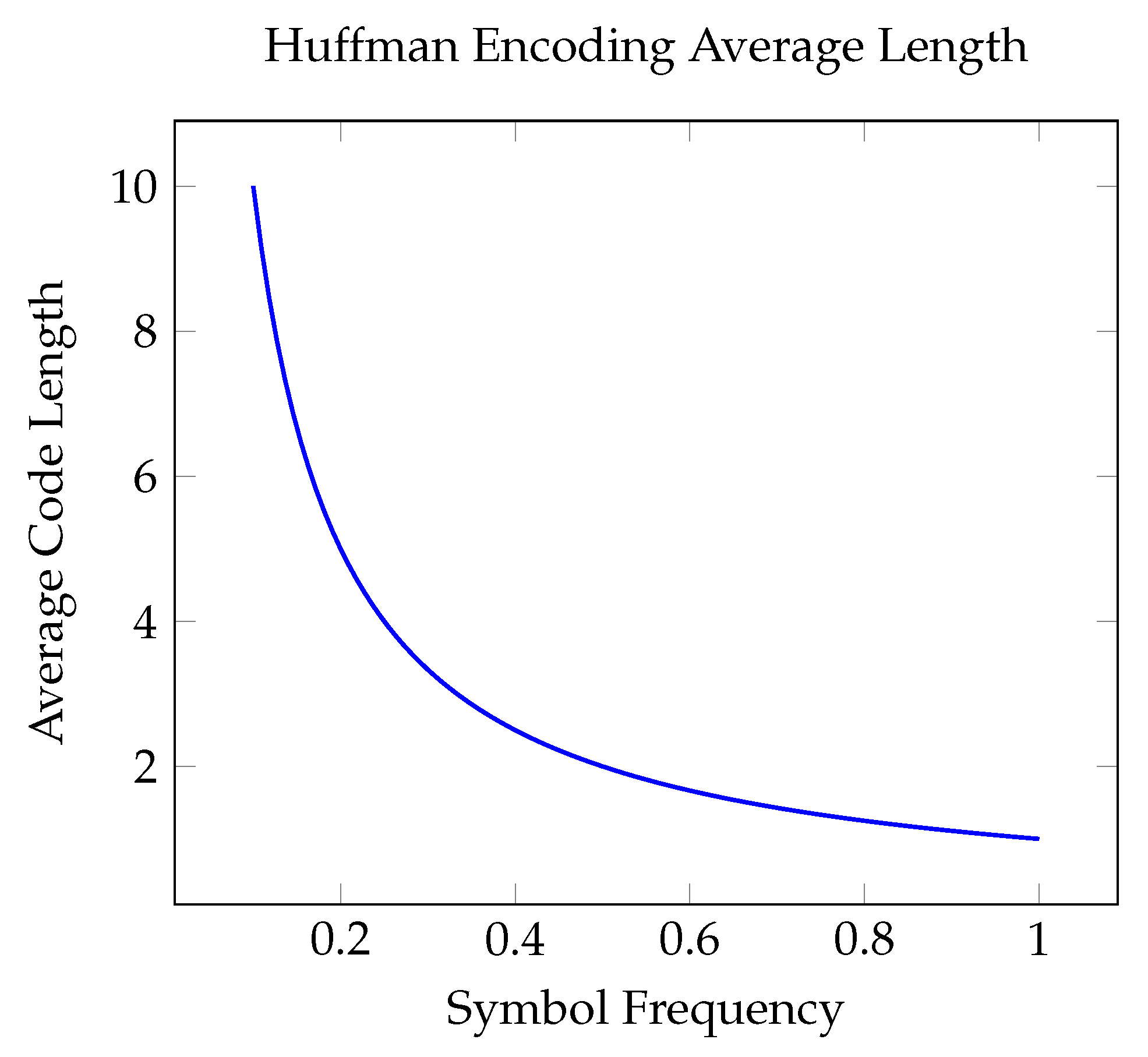
A line graph can be used to visualize the relationship between the average length and frequency distribution of symbols in Huffman encoding (Figure 20).
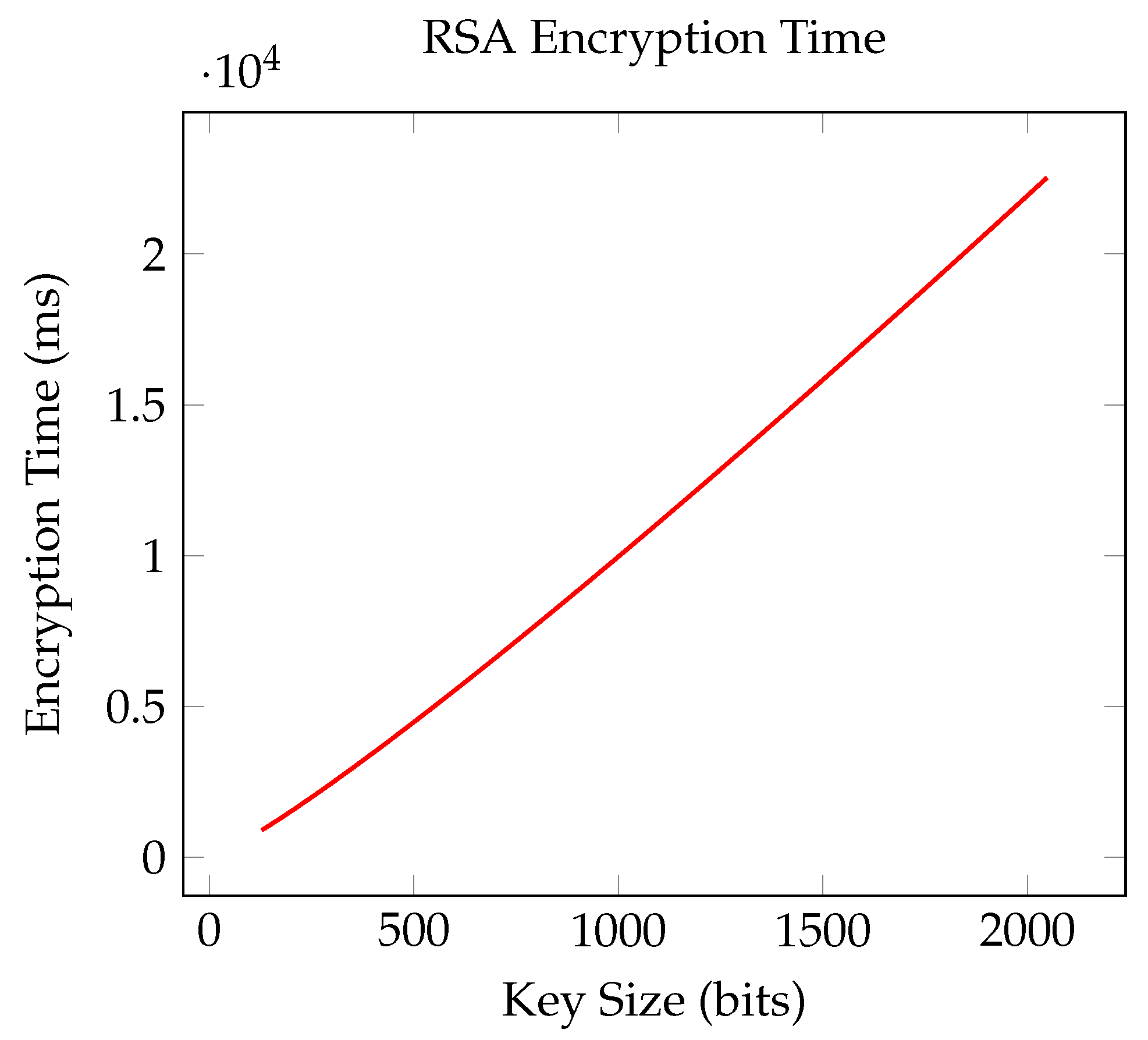
RSA’s objective is to facilitate secure data encryption through a public and private key pair. The RSA encryption process involves several steps: key generation, starting with the selection of two large prime numbers, p and q, followed by calculating n = p × q and ϕ ( n ) = ( p 1 ) ( q 1 ) . A public key e is chosen such that 1 < e < ϕ ( n ) and e are co-primed with ϕ ( n ) . The private key d is determined by the relation d × e 1 mod ϕ ( n ) . Once the keys are generated, the data can be encrypted and decrypted with the formulas provided below. RSA is applied in secure communications such as HTTPS, digital signatures, and file encryption. Its robustness comes from the challenge of factoring in large numbers. RSA encryption employs a key pair: the public key and the private key.
In the context of RSA encryption (Figure 21), a straightforward graph could illustrate the correlation between the key size (measured in bits) and the encryption time.
c = m e mod n
c = m d mod n
  • c: Ciphertext.
  • m: Unencrypted message.
  • e: Exponent used publicly.
  • d: Secret exponent.
  • n: The modulus, which equals the product of two prime numbers.
Figure 21. RSA encryption time.
Applsci 15 13279 g021
Permissions in Unix-like systems are represented using a bitmask.
Merge these values for the owner, group, and other users.
Permissions = Owner ( rwx ) · 8 2 + Group ( rwx ) · 8 1 + Others ( rwx ) · 8 0
  • r: Permission to read (4).
  • w: Permission to write (2).
  • x: Permission to execute (1).
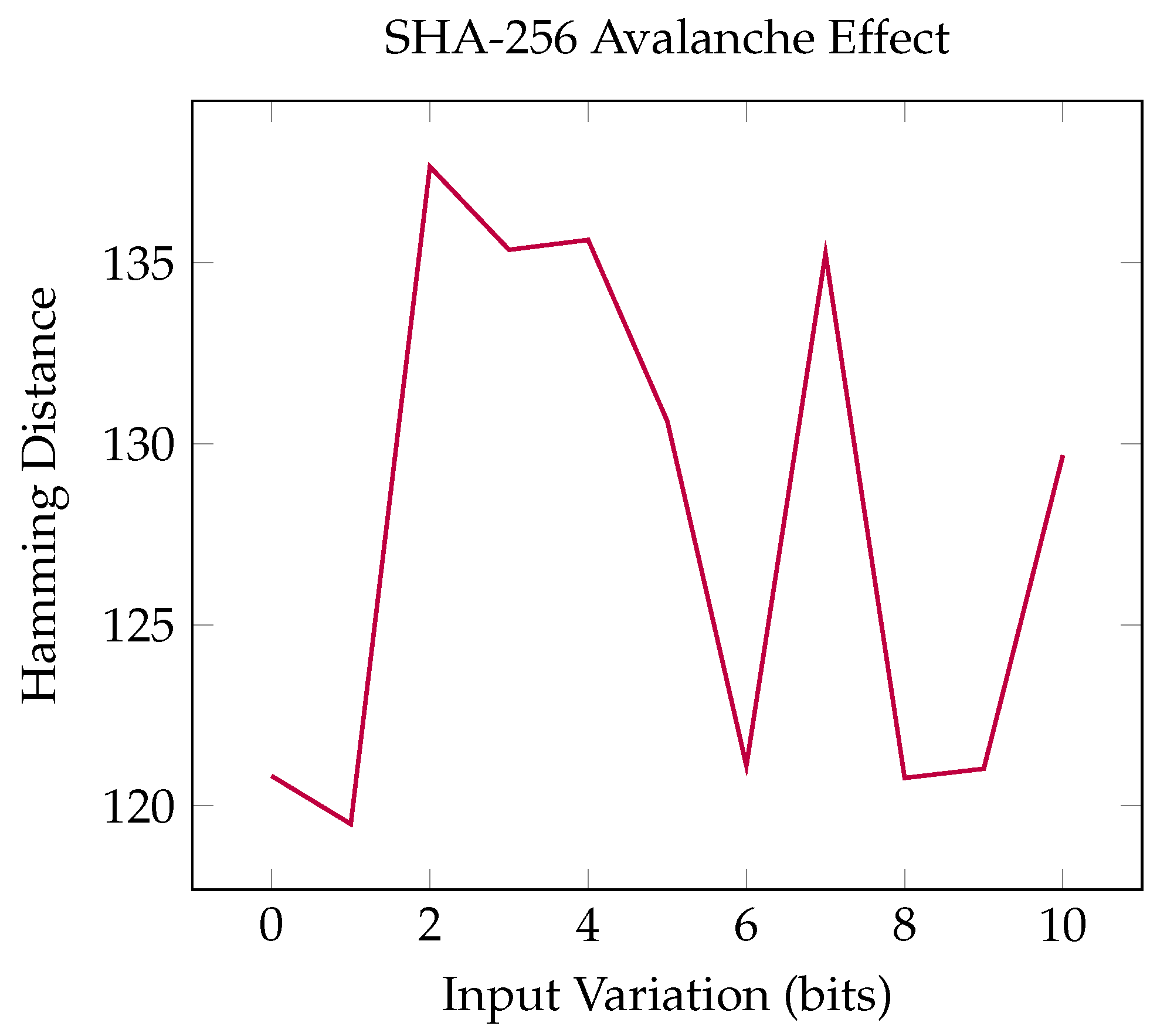
The SHA-256 hash function is designed to generate a unique fixed-size hash value (or digest) from any input data, thus ensuring its integrity. It works as follows: input (any length of data, such as a file or message), processing (involves padding the input to make its length a multiple of 512 bits, initializing hash values with eight established 32-bit constants, and compressing by iteratively working through 512-bit data blocks), and output (a 256-bit (32-byte) hash value is produced). Notable characteristics of SHA-256 include the following: determinism (identical inputs always result in identical hashes), fixed length (always produces a 256-bit output, independent of input size), collision resistance (finding distinct inputs that produce the same hash is challenging), and pre-image resistance (deriving the original input from the hash is difficult). SHA-256 is used in various applications such as checking file integrity (e.g., download verification), digital signatures, and hashing passwords. The SHA-256 hash function is represented by the following formula:
H = SHA - 256 ( M )
  • H: A hash value that is 256 bits in length.
  • M: The input message.
A graph illustrating SHA-256 (Figure 22) can display the avalanche effect by showing the Hamming distance between the hash outputs of minimally different inputs.
To identify duplicate files, you can utilize hash-based deduplication:
If hash i = hash j for i j , then files i and j are duplicates .
  • h a s h i : The hash value corresponding to file i.
  • h a s h j : The hash value corresponding to file j.
For disk I/O performance modeling,
I / O Time = Data Size Transfer Rate + Seek Time + Latency
  • Data Size: The amount of data to be moved.
  • Transfer Rate: Rate at which data are transferred.
  • Seek Time: Time required to position the read/write head on the disk.
  • Latency: The time taken to wait for the disk to spin to the correct position.
Using extents to allocate file storage:
File Size = Number of Extents × Extent Size
  • Number of Extents: Quantity of extents assigned to the file.
  • Extent Size: Dimensions of each extent.
RAID 5 storage computation for parity and user data:

Effective Storage = ( Number of Disks 1 ) × Disk Size
  • Number of Disks: The total count of disks in the RAID setup.
  • Disk Size: The capacity of individual disks.

4. Discussions

After the apps were uploaded to the Google Play Store, some actual user ratings and reviews will be shown.
The apps are quite new, so neither has both ratings and reviews on Google Play, like the gallery app, which has a 5-star rating but no reviews. A 5-star rating, from my point of view, is almost impossible to achieve on the Google Play Store, so this means that that app is really appreciated by the users.
The file manager app, on the other hand, has a 2.333-star rating and the following reviews:
“Improve the file explorer’s functionality, but just leave storage permissions. That way I’ll give it 5 stars and many more good comments. Could you answer quickly? I can give more stars for that.”
“Sufficient development.”
These ratings of the file manager app are not the best, but if we look for more well-known Google LLC apps such as the Blogger app which has a rating of 3.7 and the Google Classroom app which has a rating of 2.5, the ratings of the presented apps in this paper are not too bad. When users of mobile apps leave reviews, they are frequently brutal.

4.1. Simple Gallery App

The simple gallery app was designed to load quickly and be responsive, reducing the excessively large number of unused functions. There is a strange observation noted in many apps: when they are created, they are really simple and enjoyable, performing only the basic function intended, but after some updates, the creators not only fix bugs but add some extra features, which make the app really complex and sometimes lose its main purpose of what it was made for.
By creating a really simple gallery app, the author wanted to bring back the old gallery app on the phone, which executed only the task it was designed for, but with the looks of the modern mobile phone environment. The author made a gallery app that he always wanted to have, without tons of useless unused functions, that loads only images and videos, nothing less and nothing more.
One disadvantage could be that when creating an app, which is already built into the operating system of the mobile phone, it is quite hard to convince a user to install a third party app that does the same thing. It has to be a really great app that can convince a user to install a third party app, which is another version of the app they already have. Additionally, the convenience can prevent the installation of third party apps by users, as it is easier to have everything installed when the mobile device is bought. One app like this is the flashlight app, which is already on every phone as a shortcut; we must consider how to make a flashlight app stand out and be so great that it convinces a user that the built-in flashlight app is not as good as the third party app.

4.2. Simple File Manager App

The simple file manager app was also made for having an app that performs only the basic file manager functions, nothing less and nothing more. The current file manager app can have many unused functions that are not used and can cause the app to load slower or be less responsive.
This file manager app is an app that the author always wanted to have to perform only the basic functions like the following: Details, New Folder, Cut, Copy, Paste, Rename, Share, and Delete.
A disadvantage can be that when creating a simplified app, the creator cannot reduce all functions because a user can uninstall the app after a short period of time, due to the fact that it will miss some needed functionalities. So, the functionalities can be reduced but not by too much.
Another aspect when creating an alternative to a built-in app is making a really robust app, which has no bugs and will not crash, because a built-in app is well-tested, and if an alternative app crashes, then the creator of the alternative app will lose credibility.
What was also experienced was that when creating an alternative to a built-in app, it is not very simple; in fact, built-in apps seem to be the most complicated apps out there.
Another disadvantage is that creating alternative apps to built-in apps is not really encouraged, because mobile phone creators would like users to use their own apps, they can make better apps, having access to some API that third party app creators will not have, and the mobile phone creations can also have priority in app permissions. An example could be for SMS apps; in older Android versions, multiple SMS apps were allowed on a phone, and the user could access the SMS database with multiple apps. After that, the user needed to select the default SMS apps to use, posing a great opportunity to select the built-in app. After further updates to the Android version, the SMS functionality is only allowed in the Manifest file in special cases, so if no strong argument is written to Google, the application with SMS functionality cannot be launched in the Google Play Store. They claim it is for the safety of the users, but actually this policy update reduces the chance of mobile app developers having their apps downloaded.

5. Conclusions

The applicability of these findings is high; because the created apps are alternatives for built-in apps, it means that every phone or tablet user can be a target audience, as every phone or tablet user needs a gallery app and a file manager app. The benefits are that they gain two apps which are really easy to use and needs no complex configurations, they have no extra useless functionalities, and their sizes on disk are smaller and their execution speeds are faster. The findings of the study are that different libraries and APIs were experimented with for use, and I found out which API runs faster and smoother, how to build the apps with faster execution speed, and how to simplify the apps in order to make them really easy to use.
The results obtained are two simple and clear apps which have a very good response time as an alternative to the built-in apps on the Android system. The apps load quickly, and the interface is intuitive with only the necessary buttons, nothing more and nothing less, which are built to every user, not for software developers only, like many apps out there.
The paper’s contributions are the two apps which are simple and have a fast response time compared to modern-day overcomplicated apps.
The presented results are different from other apps because they focus on adding new functionalities, even where they are not needed. Sometimes a developer has to say stop, this is enough for an app; otherwise, it will lose its main purpose. The other problem is that many software developers forget that most mobile app users are also not software developers and need simple yet effective apps.

5.1. Simple Gallery App

The simple gallery app was made to have a gallery app with just the basic gallery function, not many functions which are not even used.
The app can be improved by adding additional features, such as viewing and sharing the gallery on the cloud and synchronizing the gallery on all devices. It can add features like adding different folders, for example, Favorites, Trash, or organizing pictures in Albums. Perhaps access to the camera through the gallery app or have a search function should be implemented. A great enhancement could be to not use an external video app to preview videos but to create a built-in video preview functionality for the app. The app can also be ported to iOS.

5.2. Simple File Manager App

The simple file manager app was made to create an app which only performs the basic file manager function and nothing more—to load quickly and have a fast response time.
The app can be improved by not using a list of functionalities, but using icons for the implemented functions (Details, New Folder, Cut, Copy, Paste, Rename, Share, and Delete). The selection of multiple folders can be done with check marks, not highlighting the background, and for this, it has to be used with RecycleView instead of ListView. Maybe a part can be made where recent files are shown. Search functionality can also be added. Cloud synchronization functionalities or connections to different servers like FTP can also be added. The app can also be ported to the Apple environment.

Funding

This research was funded by Politehnica University Timisoara, Romania.

Institutional Review Board Statement

Not applicable.

Informed Consent Statement

Not applicable.

Data Availability Statement

All the images are available upon request from the corresponding author.

Acknowledgments

The author thanks Politehnica University Timisoara, Romania, for the support given.

Conflicts of Interest

The authors declare no conflicts of interest.

References

  1. Zhou, T.; Xiao, B.; Cai, Z.; Xu, M. A Utility Model for Photo Selection in Mobile Crowdsensing. IEEE Trans. Mob. Comput. 2021, 20, 48–62. [Google Scholar] [CrossRef]
  2. Zhang, L.; Chen, M.; Tu, B.; Li, Y.; Xia, Y. Retargeting HR Aerial Photos Under Contaminated Labels with Application in Smart Navigation. IEEE Trans. Intell. Transp. Syst. 2024, 25, 349–358. [Google Scholar] [CrossRef]
  3. Wang, E.; Yang, Y.; Wu, J.; Lou, K.; Luan, D.; Wang, H. User Recruitment System for Efficient Photo Collection in Mobile Crowdsensing. IEEE Trans. Hum.-Mach. Syst. 2020, 50, 1–12. [Google Scholar] [CrossRef]
  4. Cui, Y.; Lai, Z.; Wang, X.; Dai, N. QuickSync: Improving Synchronization Efficiency for Mobile Cloud Storage Services. IEEE Trans. Mob. Comput. 2017, 16, 3513–3526. [Google Scholar] [CrossRef]
  5. Yang, X.; Qian, X.; Xue, Y. Scalable Mobile Image Retrieval by Exploring Contextual Saliency. IEEE Trans. Image Process. 2015, 24, 1709–1721. [Google Scholar] [CrossRef] [PubMed]
  6. Wu, Y.; Wang, Y.; Hu, W.; Cao, G. SmartPhoto: A Resource-Aware Crowdsourcing Approach for Image Sensing with Smartphones. IEEE Trans. Mob. Comput. 2016, 15, 1249–1263. [Google Scholar] [CrossRef]
  7. Liu, R.; Liang, J.; Cao, J.; Zhang, K.; Gao, W.; Yang, L.; Yu, R. Understanding Mobile Users’ Privacy Expectations: A Recommendation-Based Method Through Crowdsourcing. IEEE Trans. Serv. Comput. 2019, 12, 304–318. [Google Scholar] [CrossRef]
  8. Chen, Y.; Lin, L.; Li, B. Razor: Scaling Backend Capacity for Mobile Applications. IEEE Trans. Mob. Comput. 2020, 19, 1702–1714. [Google Scholar] [CrossRef]
  9. Yu, S.; Chen, X.; Wang, S.; Pu, L.; Wu, D. An Edge Computing-Based Photo Crowdsourcing Framework for Real-Time 3D Reconstruction. IEEE Trans. Mob. Comput. 2022, 21, 421–432. [Google Scholar] [CrossRef]
  10. Zhou, T.; Cai, Z.; Liu, F.; Su, J. In Pursuit of Beauty: Aesthetic-Aware and Context-Adaptive Photo Selection in Crowdsensing. IEEE Trans. Knowl. Data Eng. 2023, 35, 9364–9377. [Google Scholar] [CrossRef]
  11. Wang, B.; Vesdapunt, N.; Sinha, U.; Zhang, L. Real-Time Burst Photo Selection Using a Light-Head Adversarial Network. IEEE Trans. Image Process. 2020, 29, 3065–3077. [Google Scholar] [CrossRef]
  12. Zhang, L.; Li, X.-Y.; Liu, K.; Liu, C.; Ding, X.; Liu, Y. Cloak of Invisibility: Privacy-Friendly Photo Capturing and Sharing System. IEEE Trans. Mob. Comput. 2019, 18, 2488–2501. [Google Scholar] [CrossRef]
  13. Kumar, M.; Bhandari, A.K. Unsupervised Real-Time Mobile-Based Highly Dark Image Texture Enhancement App. IEEE Trans. Consum. Electron. 2024, 70, 608–616. [Google Scholar] [CrossRef]
  14. Mei, F.; Cao, Q.; Jiang, H.; Tian, L. LSM-Tree Managed Storage for Large-Scale Key-Value Store. IEEE Trans. Parallel Distrib. Syst. 2019, 30, 400–414. [Google Scholar] [CrossRef]
  15. Zhu, Z.; Jiang, R. A Secure Anti-Collusion Data Sharing Scheme for Dynamic Groups in the Cloud. IEEE Trans. Parallel Distrib. Syst. 2016, 27, 40–50. [Google Scholar] [CrossRef]
  16. Choi, J.; Ahn, J.; Kim, J.; Ryu, S.; Han, H. In-memory file system with efficient swap support for mobile smart devices. IEEE Trans. Consum. Electron. 2016, 62, 275–282. [Google Scholar] [CrossRef]
  17. Paiker, N.R.; Shan, J.; Borcea, C.; Gehani, N.; Curtmola, R.; Ding, X. Design and Implementation of an Overlay File System for Cloud-Assisted Mobile Apps. IEEE Trans. Cloud Comput. 2020, 8, 97–111. [Google Scholar] [CrossRef]
  18. Chen, T.-Y.; Chang, Y.-H.; Yang, M.-C.; Chen, Y.-J.; Wei, H.-W.; Shih, W.-K. Multi-Grained Block Management to Enhance the Space Utilization of File Systems on PCM Storages. IEEE Trans. Comput. 2016, 65, 1831–1845. [Google Scholar] [CrossRef]
  19. Ji, C.; Chang, L.-P.; Hahn, S.S.; Lee, S.; Pan, R.; Shi, L.; Kim, J.; Xue, C.J. File Fragmentation in Mobile Devices: Measurement, Evaluation, and Treatment. IEEE Trans. Mob. Comput. 2019, 18, 2062–2076. [Google Scholar] [CrossRef]
  20. Li, H.; Li, W.; Lv, Y.; Liu, J.; Yang, L.; Shi, L. EEPC: Energy-Efficient Persistent Cache Scheme for Mobile Distributed File Systems. IEEE Internet Things J. 2024, 11, 15998–16008. [Google Scholar] [CrossRef]
  21. Chen, K.; Shen, H. Maximizing P2P File Access Availability in Mobile Ad Hoc Networks though Replication for Efficient File Sharing. IEEE Trans. Comput. 2015, 64, 1029–1042. [Google Scholar] [CrossRef]
  22. Kitamura, T.; Sakai, K.; Sun, M.-T.; Ku, W.-S. Rendezvous Avoidance File Caching for Mobile Social Networks. IEEE Syst. J. 2023, 17, 5955–5966. [Google Scholar] [CrossRef]
  23. Shen, Z.; Han, L.; Chen, R.; Ma, C.; Jia, Z.; Shao, Z. An Efficient Directory Entry Lookup Cache with Prefix-Awareness for Mobile Devices. IEEE Trans. Comput.-Aided Des. Integr. Circuits Syst. 2020, 39, 4575–4586. [Google Scholar] [CrossRef]
  24. Xu, G.; Wang, W.; Jiao, L.; Li, X.; Liang, K.; Zheng, X.; Lian, W.; Xian, H.; Gao, H. SoProtector: Safeguard Privacy for Native SO Files in Evolving Mobile IoT Applications. IEEE Internet Things J. 2020, 7, 2539–2552. [Google Scholar] [CrossRef]
Figure 1. Loading all images in the gallery app.
Applsci 15 13279 g001
Figure 2. Selecting multiple images to share or delete.
Applsci 15 13279 g002
Figure 3. Loading singe image for share, info, or delete.
Applsci 15 13279 g003
Figure 4. Showing image info in a popup window.
Applsci 15 13279 g004
Figure 5. Fourier transform.
Applsci 15 13279 g005
Figure 6. Gaussian blur kernel.
Applsci 15 13279 g006
Figure 8. Principal Component Analysis (PCA), where the blue dots represent orginal variables, the red line captures the most variance, the green line captures less variance.
Applsci 15 13279 g008
Figure 11. Histogram equalization, where red is the orignal and blue is the equalized.
Applsci 15 13279 g011
Figure 14. Loading files on the phone in a list.
Applsci 15 13279 g014
Figure 15. Loading image files in a list with thumbnails.
Applsci 15 13279 g015
Figure 16. Selecting multiple files for different actions.
Applsci 15 13279 g016
Figure 17. Selecting action to execute on files.
Applsci 15 13279 g017
Figure 18. The organization of a file system tree diagram.
Applsci 15 13279 g018
Figure 19. Determining the size of files.
Applsci 15 13279 g019
Figure 20. Huffman encoding average length.
Applsci 15 13279 g020
Figure 22. SHA-256 hash function.
Applsci 15 13279 g022
Table 1. Performance measurements for simple gallery app.
Test ScenarioApp Startup Time (s)RAM Consumption (MB)CPU Usage (%)User Task Efficiency (s)
Empty Gallery1.245.32.1
Small Collection (100 photos)1.878.68.42.3
Large Collection (10,000 photos)3.5156.223.74.8
Image Viewing Task92.115.21.5
Photo Upload (10 images)108.442.68.7
Search Operation85.318.91.2
Album Creation79.812.33.4
Background Sync65.27.8
Table 2. Performance measurements for simple file manager app.
Test ScenarioApp Startup Time (s)RAM Consumption (MB)CPU Usage (%)User Task Efficiency (s)
Empty Directory0.832.51.8
Small Directory (100 files)1.245.86.31.8
Large Directory (10,000 files)2.889.418.93.5
File Copy Operation65.235.412.3
File Search Operation52.122.72.1
File Compression78.948.225.6
Directory Navigation41.38.50.9
Background Indexing58.715.3
Disclaimer/Publisher’s Note: The statements, opinions and data contained in all publications are solely those of the individual author(s) and contributor(s) and not of MDPI and/or the editor(s). MDPI and/or the editor(s) disclaim responsibility for any injury to people or property resulting from any ideas, methods, instructions or products referred to in the content.