


Abstract
Embodied-carbon accounting is increasingly required at the early design stage to guide material and construction choices during design iterations. However, many life-cycle assessment (LCA) workflows and centralized building information modeling (BIM)–LCA plugins still rely on fragmented data, non-transparent mapping rules, and limited cross-project reuse, which slows rapid iteration. This study develops an open and traceable embodied-carbon assessment workflow driven by BIM object geometry and semantic attributes and demonstrates it through a single case study, enabling automated accounting for the A1–A3 stages from model input to result reporting. The framework is implemented as a Revit add-in prototype connected to an open-data platform. It uses assemblies as standardized assessment units, applies configurable rule-based mapping, and performs unit normalization to link model quantities with carbon factors. A single three-story brick–concrete residential building in Wuhan with an LoD 300 model is used as the sole validation case to demonstrate workflow feasibility, report coverage, and time metrics. The case yields an A1–A3 embodied-carbon intensity of approximately 333 kgCO2 e/m2, dominated by the structural system. Rule mapping achieves 82% coverage within the defined accounting scope. Compared with manual workflows (290–380 min), first-time accounting is reduced to 83–98 min and further to within 30 min when assemblies and rules are reused. Contribution decomposition shows a concentrated pattern and supports traceability from assemblies to material types. Overall, within the tested scope, the Revit-based prototype provides efficient and verifiable embodied-carbon feedback for early-stage design.
1. Introduction
1.1. Background
Under the global carbon-neutrality agenda aligned with the Paris Agreement, the building sector faces increasing pressure to reduce emissions [1]. In new buildings, embodied-carbon emissions are mainly concentrated in early life-cycle modules, including material production, transportation, and construction [2]. Studies report that embodied greenhouse gas (GHG) emissions account for 20–25% of whole-life emissions in buildings that comply with current energy-efficiency regulations. This share can rise to 45–50% or even higher in high-energy-efficiency buildings [3]. These emissions occur before occupancy and are difficult to offset through operational savings after completion, creating an “upfront lock-in” effect [4]. At the same time, decisions on materials, structural systems, and construction methods are largely made during concept and preliminary design. These decisions strongly shape the whole-life emission level [5]. Therefore, a quantitative embodied-carbon assessment mechanism that can be updated quickly across design iterations is needed to support low-carbon decision-making and optimization [6].
In design practice, embodied-carbon assessment often relies on rapid estimation or inventory-based accounting [7]. Rapid estimation uses empirical indicators and supports order-of-magnitude judgments, but it provides limited traceability and weak comparability across design options [8]. Inventory-based accounting requires manual quantity compilation and material specification, and the effort grows rapidly with each design iteration [9]. A key challenge is to move assessment to schematic design without substantially increasing workload, while still enabling a repeatable feedback loop for early-stage decisions [10].
From the perspective of methods and tools, LCA offers a general framework for embodied-carbon quantification. In practice, however, it often involves substantial effort in data preparation, modeling, and mapping. This effort does not match the high-frequency pace of schematic design [11]. BIM can organize component geometry and semantic information in a structured way. It supports quantity takeoff and object-level statistics, providing a data basis for automating assessments [12]. As a result, BIM–LCA integration has become an important pathway to shorten the “model-to-result” chain and improve feedback efficiency. It also supports a shift from spreadsheet-based conversion to direct execution in the design environment, with results returned to designers [13].
Among integration pathways, centralized plugin-based workflows are well aligned with early-stage practice. They can complete data extraction, assessment-unit organization, calculation triggering, and result presentation within the same modeling environment, which supports option comparison and iterative optimization [14]. With the widespread adoption of platforms such as Revit, embedded computation and feedback have become a practical option for rapid embodied-carbon assessment, which also makes centralized deployment more feasible [15].
However, existing centralized BIM–LCA plugins still face structural bottlenecks when “high-frequency iteration and low-friction feedback” are required. Carbon factors and component templates are often packaged or tied to fixed database schemas. This makes data sources and versions hard to manage explicitly and limits cross-project reuse [16]. Component matching often depends on built-in templates or implicit rules. These rules are difficult to audit and share, and differences in LoD or naming conventions often require manual correction [17]. Unit conversion and aggregation are frequently handled through external spreadsheets. Meanwhile, failure modes such as mismatches and conflicts are rarely logged in a way that supports iteration, which weakens result controllability and traceability.
Against this backdrop, this paper proposes a centralized BIM–LCA workflow that uses BIM object geometry and semantic attributes as structured inputs and is implemented as a Revit-based add-in prototype supported by an open database, using assemblies as an intermediate unit. The data platform centrally manages carbon factors and assembly templates. Configurable rule tables are externalized and combined with a unit-normalization field to support matching and conversion, while the plugin performs extraction, calculation, and feedback within the modeling environment. A single LoD 300 residential project is used to demonstrate feasibility and quantify data-processing efficiency, result traceability, reuse potential, and iteration cost control within the tested scope. The aim is to provide component-level carbon feedback and quantitative evidence for multi-round option comparison in schematic design.
1.2. Literature Review
1.2.1. Research on BIM–LCA Integration
BIM integrates geometry, materials, and construction semantics in a single model. It also supports quantity takeoff and object-level statistics, providing a structured data basis for embodied-carbon accounting [18]. LCA is a general framework for environmental impact assessment in the built environment and is widely used to quantify embodied-carbon impacts, especially for product and construction stages. With standards such as EN 15978 [19] clarifying assessment boundaries, LCA has been further translated into engineering applications [20]. However, conventional LCA tools often require intensive data preparation and manual input, which does not match the high-frequency iteration needs of early-stage design [21].
To shorten the “model-to-result” chain, researchers have proposed multiple BIM–LCA integration pathways [22]. Systematic reviews commonly group them into five categories: bill of quantities (BoQ)-based workflows, Industry Foundation Classes (IFC)-based exchange, cloud-platform-based processing, embedded BIM plugins, and visual-programming-based plugins. This classification focuses on data organization and where calculations are executed. It also enables comparison across pathways in terms of automation level and the closure of the feedback loop.
Accordingly, this paper summarizes commonly used BIM–LCA integration pathways in Table 1 to support method comparison and selection.
Table 1.
Comparison of BIM–LCA integration pathways.
Overall, centralized pathways are better aligned with early-stage design because they enable in-model feedback. However, these workflows often store carbon data and component templates in tool-specific databases. Mapping is then performed through built-in templates or hard-coded rules. As a result, the mapping logic is difficult to export, audit, and maintain. It is also difficult to transfer reliably across projects and across different Levels of Development (LoD). These limitations motivate the following discussion on the constraints of centralized BIM–LCA approaches and directions for improvement.
1.2.2. Applications of Centralized BIM–LCA Approaches
Centralized BIM–LCA refers to integrating LCA into the BIM authoring environment. In this setup, plugins, scripts, or application programming interfaces (APIs) read component- and material-level information from the model and link it to a carbon-factor database. This enables embodied-carbon calculation directly within the modeling software [30]. In practice, most implementations are commercial plugins and platform-based tools (e.g., Revit-based plugins, cross-platform connectors, and platforms for material/component comparison). They can provide relatively fast feedback when model information is sufficiently complete [31].
Despite improved usability and iteration efficiency, centralized approaches still have notable limitations. First, they often depend on proprietary or region-specific default databases. This limits regional adaptation, weakens source traceability, and makes it difficult to integrate local environmental product declarations (EPDs) [32]. Second, mapping commonly relies on built-in templates or implicit rules. As a result, it is hard to handle non-standard materials, hybrid structural systems, and project-specific naming conventions in a robust way, and manual intervention remains frequent in practice [33,34]. Third, assembly templates and mapping rules are usually encapsulated within the tool. This limits team-level auditing and customization, reduces cross-project reuse, and leads to unstable transfer across different Levels of Development (LoD) and project types [35].
Accordingly, this paper summarizes the key characteristics of representative centralized tools in Table 2 to support comparison and selection.
Table 2.
Comparison of representative centralized BIM–LCA tools and the workflow presented in this study.
Therefore, this paper presents a decoupled engineering workflow architecture for centralized BIM–LCA workflows. An open data platform supports unified management of carbon factors and EPDs, and enables provenance tracking and auditing. A reusable assembly library consolidates transferable knowledge units across projects. A unified and explicit mapping-rule set reduces matching uncertainty caused by inconsistent naming. The workflow retains efficient in-model, closed-loop feedback, while making data, rules, and assembly templates transparent, maintainable, and reusable. This supports auditing and reuse under consistent modeling and data conventions while keeping in-model feedback efficient.
1.3. Research Contributions
Building on centralized BIM–LCA assessment, this paper proposes a component-level embodied-carbon assessment workflow driven by BIM object geometry and semantic attributes. A Revit-based add-in prototype is implemented and connected to an open data platform. Established assembly-template and rule-table mapping practices are operationalized through externalized, versioned configuration artifacts to support auditing and maintenance. Workflow performance is reported using mapping coverage, failure attribution, and time breakdown within the tested scope.
The main contributions are as follows:
- (1)
- An assembly-centered intermediate layer is operationalized as explicit buildups (assembly templates) within a centralized BIM–LCA workflow to support component-level embodied-carbon assessment in early-stage design.
- (2)
- Carbon factors and assembly templates are externalized to an open data platform and governed with source metadata and version records to improve traceability.
- (3)
- A configurable rule-table mapping approach and a unit-normalization field are implemented as inspectable rule artifacts, so that matching and conversion between BIM semantics and assessment units are explicit, inspectable, and maintainable.
- (4)
- The workflow executability is demonstrated using a single LoD 300 residential case under the EN 15978 A1–A3 system boundary, providing quantitative evidence within the tested scope to support multi-option iteration in early-stage design.
2. Workflow and Implementation
2.1. Overall Workflow
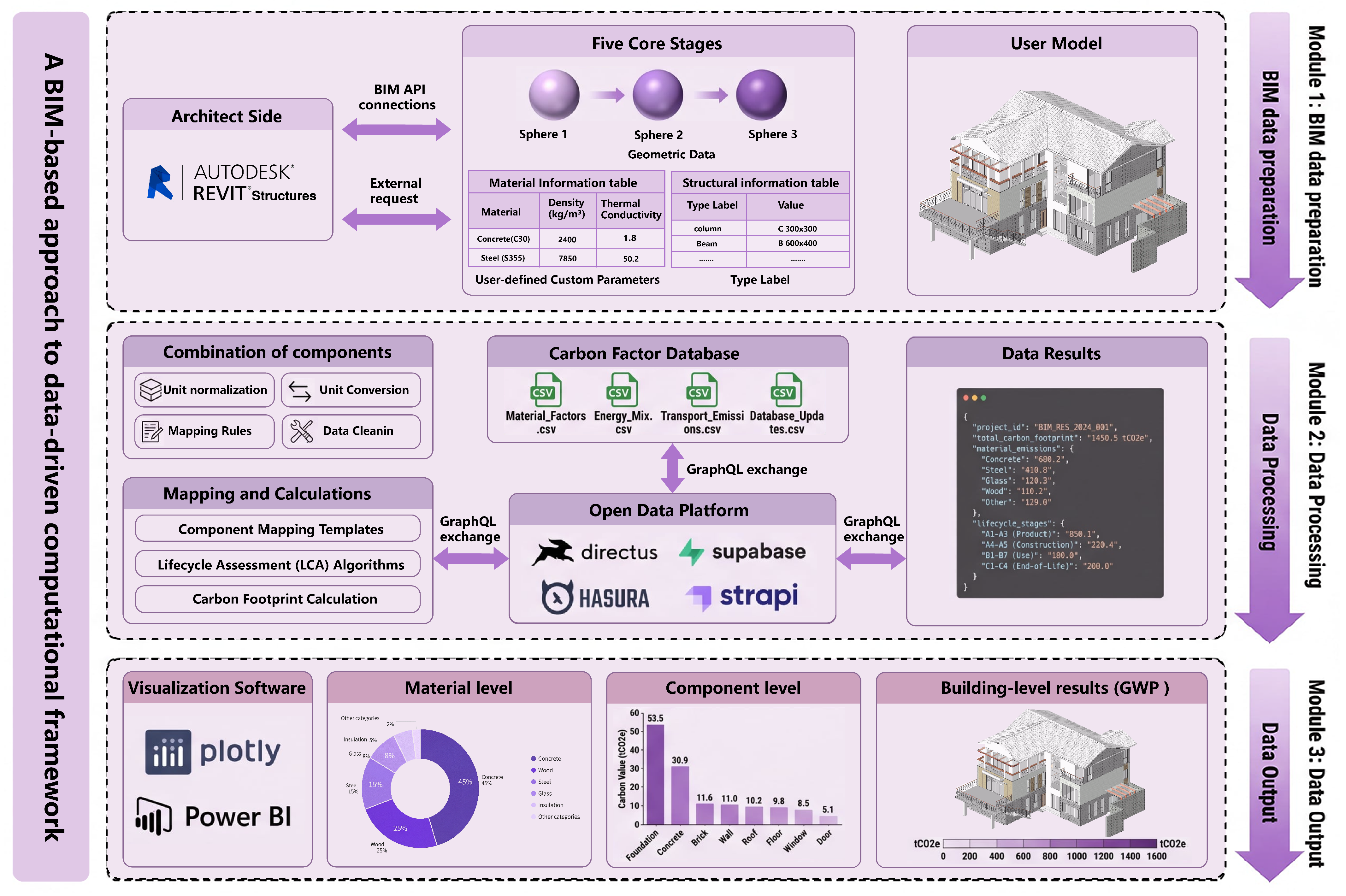
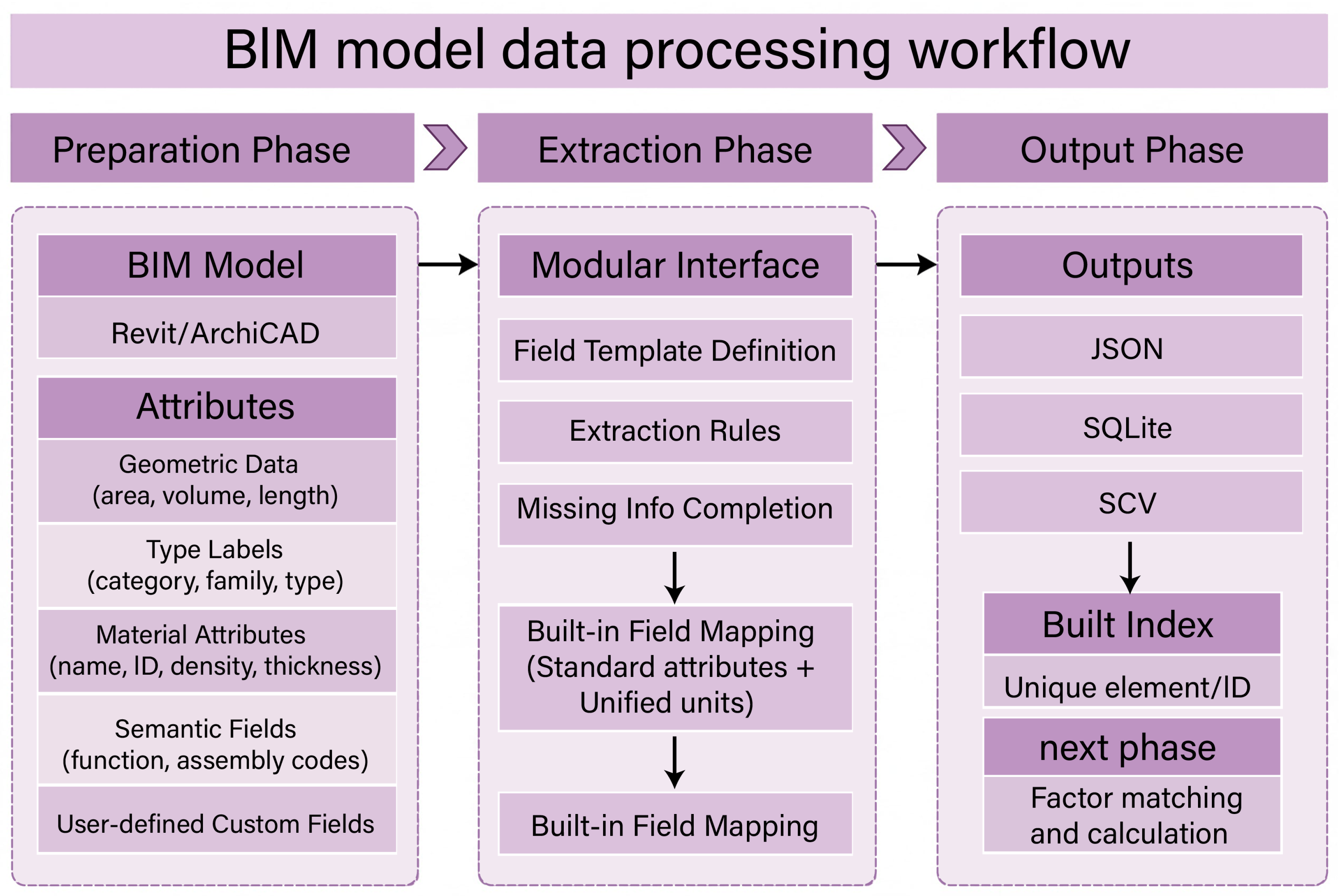
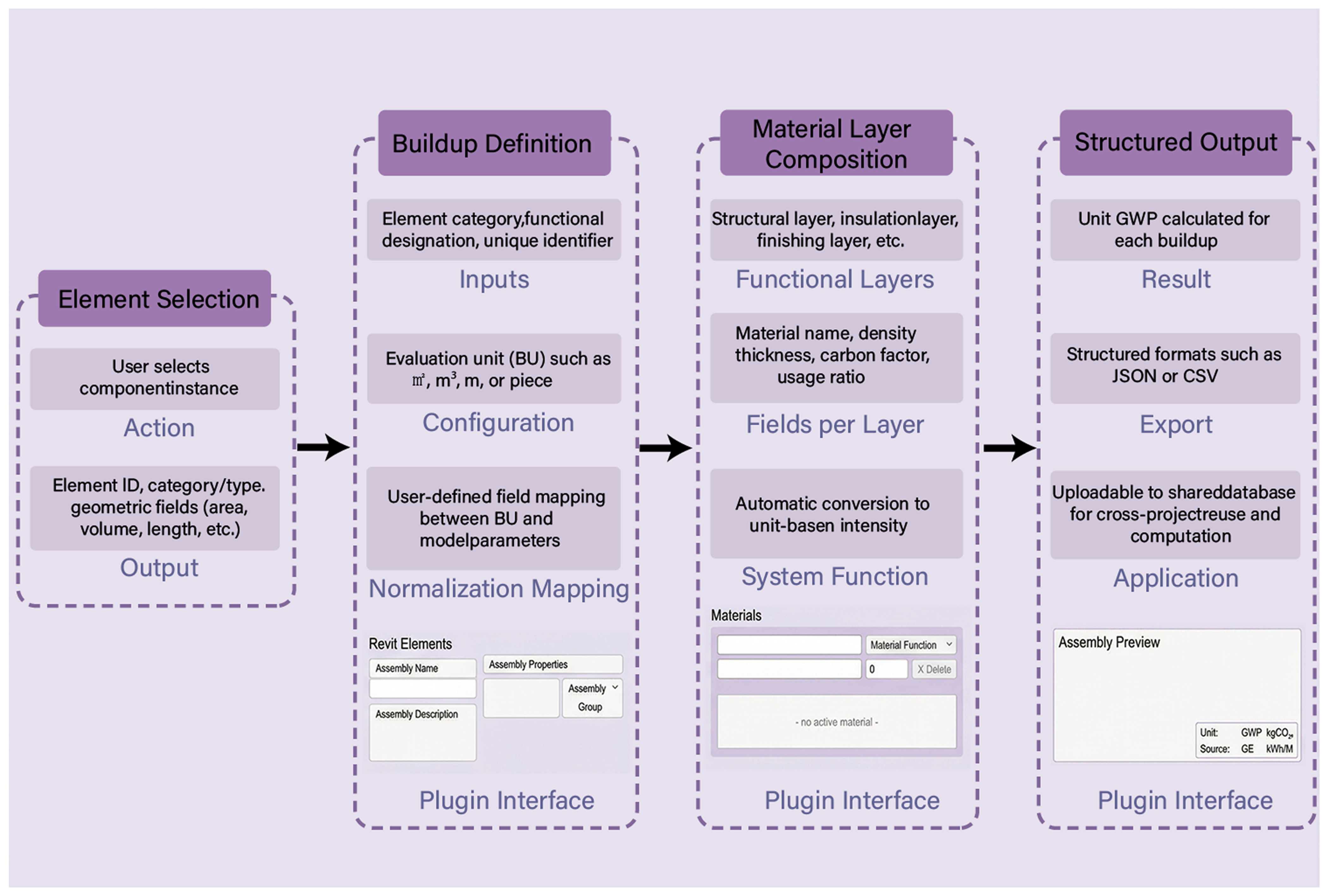
Building on centralized BIM–LCA assessment, this study develops an embodied-carbon calculation workflow driven by BIM object geometry and semantic attributes for early-stage design (Figure 1). The calculation logic is implemented in a Revit add-in prototype and connected to a model hosting service and an open data platform, forming a closed assessment loop [44,45]. The workflow includes three modules: BIM data preparation, data processing, and data output.
Figure 1.
Architecture of the Revit-based prototype workflow and open data platform. Platform stores factors, buildups, rules; Revit add-in extracts, maps, normalizes units, computes A1–A3.
Module 1 is BIM data preparation. The plugin traverses target components in Revit, extracts the core fields required for embodied-carbon accounting, and stores them as structured input records. The fields include geometric quantities, type identifiers, material information, construction/structural semantics, and user-defined attributes. Measurement units and accounting conventions are standardized to ensure that later conversions between assessment units and model quantities are dimensionally consistent.
Module 2 is data processing. This module introduces assemblies as an intermediate layer to organize the assessment logic. The open data platform centrally maintains carbon factors and assembly templates. For each assembly, the assessment unit and material-layer hierarchy are explicitly defined, so that an assembly can be reused as a transferable assessment unit. The plugin applies a rule table to map each BIM component—using its category, family/type, and required semantic fields—to a single target assembly. Components without a match are flagged as unmapped to support rule completion. After mapping, the plugin performs unit normalization and quantity conversion using the building unit (BU), linking component quantities with the assembly unit intensity to generate the A1–A3 calculation inputs.
Module 3 is data output. The plugin writes back A1–A3 results at both component and assembly levels to the data platform. Results are aggregated by material hierarchy, component category, and building scale to support scheme comparison. On the model side, results are linked to component IDs to locate high-emission components and to verify their corresponding assembly and factor records. The result records also retain source and version information to support benchmarking and iterative updates.
Overall, the workflow retains the efficiency of in-model calculation and feedback. At the same time, the assembly-centered intermediate layer and explicit rule-based mapping make the data, mapping, and calculation process auditable and traceable. Workflow performance is reported through mapping coverage, failure attribution, and time breakdown to provide reproducible evidence within the tested scope.
2.2. Construction and Extraction
2.2.1. Model Development
In the proposed BIM-based embodied-carbon assessment workflow, model development is treated as an upstream step for generating inventory data. The goal is to standardize component information in the design model into an input structure that can be used directly for accounting. Because information completeness varies across design stages, this study defines model-level information boundaries. A minimum set of required fields ensures that accounting can be executed, while an extended field set improves result resolution. This design maintains consistent input semantics and comparable calculation premises across different Levels of Development (LoD).
Component information is organized into five field categories. Table 3 summarizes the categories, representative fields, measurement units, and whether each field is required. Geometric quantities and type identifiers form the core inputs. They ensure that components can be located consistently and that measurable quantities can be derived. Material properties and construction semantics refine material-layer representation and semantic constraints. This improves assembly matching and result accuracy. User-defined fields support translation between project-specific identifiers and standardized fields, helping maintain data consistency across projects.
Table 3.
Field categories and typical examples.
When material information or construction semantics are missing, missing inputs are handled through a “typical assembly” assumption. Specifically, predefined assembly templates are used to estimate impacts based on component category and geometric quantities. This keeps the accounting process closed under consistent assumptions. Any accuracy loss is then mainly attributable to differences in input-information granularity and is reflected in the results.
2.2.2. Data Extraction
In the current prototype, data extraction is implemented as a Revit plugin. Component instance fields are read and standardized through the Revit API. Each extracted record uses the unique component ID as the primary key. It also stores type labels (category, family, and type) and key semantic fields as stable indices for subsequent rule matching. Quantity fields are restricted to four basic dimensions: count, m, m2, and m3. Unit normalization is completed during extraction, so that the outputs can be directly used for aggregation and calculation [46].
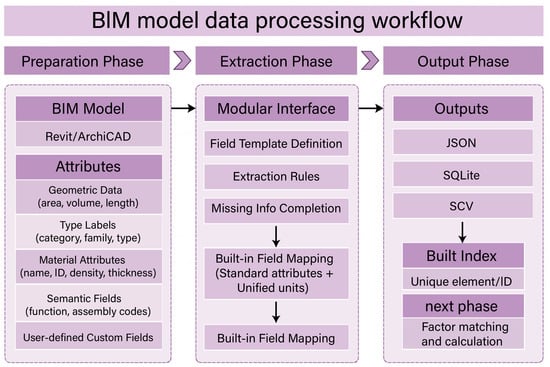
Each component instance is encapsulated as a lightweight calculation record. The normalized quantity fields and a semantic-field dictionary are maintained in parallel. Length, area, and volume follow a “read-if-available” strategy. When a quantity dimension is not available, the corresponding field is left empty. No back-calculation or inference is triggered. In downstream aggregation, the missing field is treated as a zero contribution for that dimension. This design fixes the calculation boundary under missing information and avoids introducing additional assumptions (Figure 2).
Figure 2.
Structured BIM data extraction workflow for carbon assessment. Standardized BIM extraction; read-if-available quantities prevent assumptions when geometry or parameters are missing.
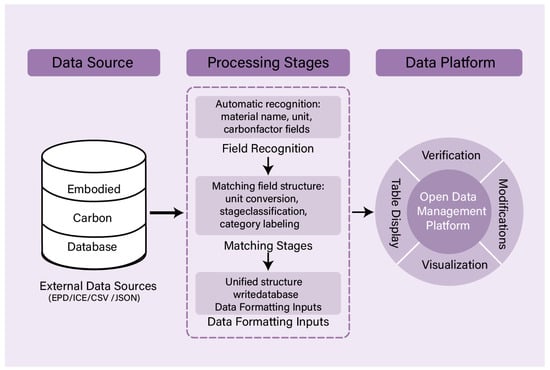
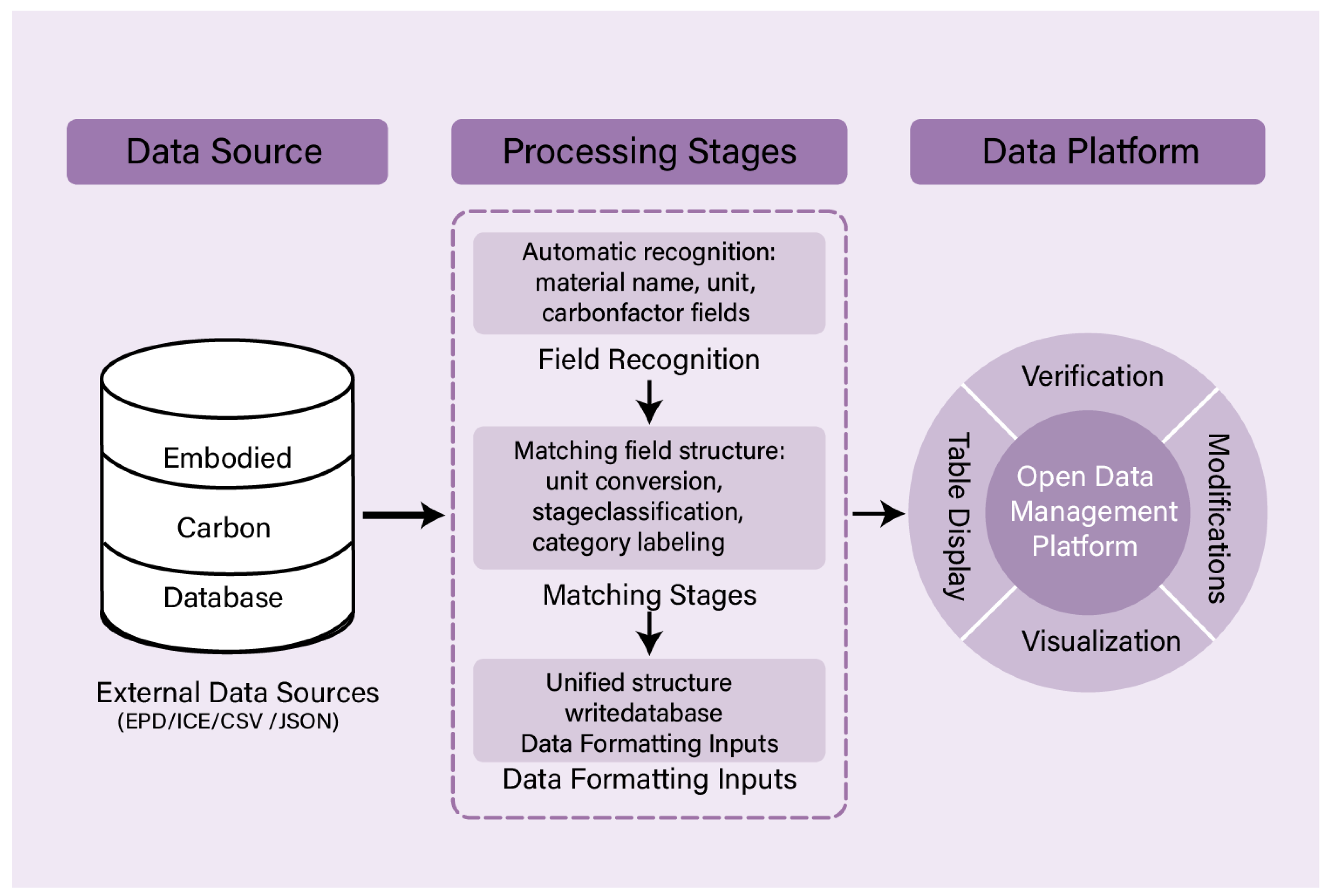
For composite components, material information is handled through hierarchical parsing. When parsing is feasible, each layer is recorded with its material identifier, thickness, and layer role. This supports layer-based calculations in assemblies. When parsing is not feasible, only the available material identifier is retained, or the material fields are left missing. As shown in Figure 3, during full-model traversal, native Revit parameter names are mapped to the standardized field set in Table 3. An internal mapping table translates field names and measurement units. This step does not modify the Revit model. Instead, it outputs structured records with unified field semantics for factor matching and A1–A3 calculation in the next stage.
Figure 3.
Workflow of structured carbon-factor data integration. Factor ingestion: identify fields, convert units, tag stages, validate, and store provenance for traceable reuse.
2.3. Data-Platform-Driven Database and Rule-Based Mapping
2.3.1. Development and Management of the Carbon-Factor Database
To support cross-project reuse and traceable governance of carbon-factor data, this study decouples the carbon-factor library from the BIM plugin and hosts it on an independent open data platform. The platform is connected to the assessment module through standardized interfaces. It does not participate in front-end modeling. Instead, it provides a unified data structure, version control, and access control, so that carbon factors and assembly data can be retrieved, maintained, and audited within one data system.
The carbon-factor library supports multi-source integration, including EPDs, generic industry databases, and project-specific entries [47]. In this study, a material database and a small set of project-specific records are imported using a unified template. A structural example is provided in Appendix A (Table A2). The schema includes material identifiers, physical properties, and carbon-intensity indicators. It also reserves management fields and extensible indicator fields. The database uses the International System of Units (SI) by default and includes a unit-normalization field. This field harmonizes measurement expressions from different sources into a limited set of base units, so that factors can be linked directly to component quantities under consistent dimensions. This study focuses on the A1–A3 stages, while fields for other stages are retained as optional.
During data ingestion, material names, units, and carbon-factor fields are extracted from source datasets. The workflow then performs unit conversion, life-cycle stage tagging, and category tagging. The processed values are written into the unified schema to generate standardized records that can be retrieved and reused. This step relies on predefined field-mapping rules to align external datasets with the target schema. Batch import and manual verification are used to confirm key entries and lock validated records. Project-specific materials are maintained as separate records on the platform, with source information and applicability scope recorded at entry. Both update pathways follow the same field schema and versioning strategy.
At the interface layer, the platform provides representational state transfer (REST) and GraphQL endpoints. In the current prototype (Figure 3), the plugin uses REST for on-demand retrieval to reduce integration complexity, while GraphQL is used for combined queries and data inspection on the platform. Based on these interfaces, the assessment module requests the required factor fields according to component attributes, forming a standardized data channel between BIM components and carbon-factor records.
2.3.2. Development and Management of Buildups
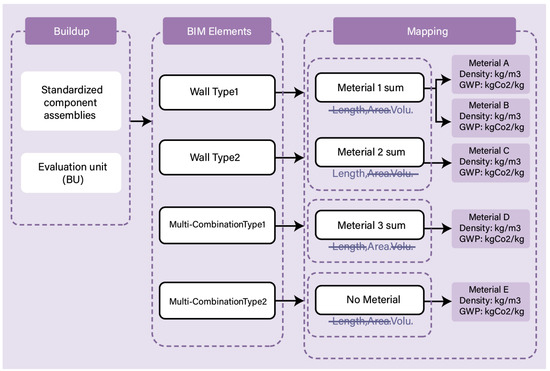
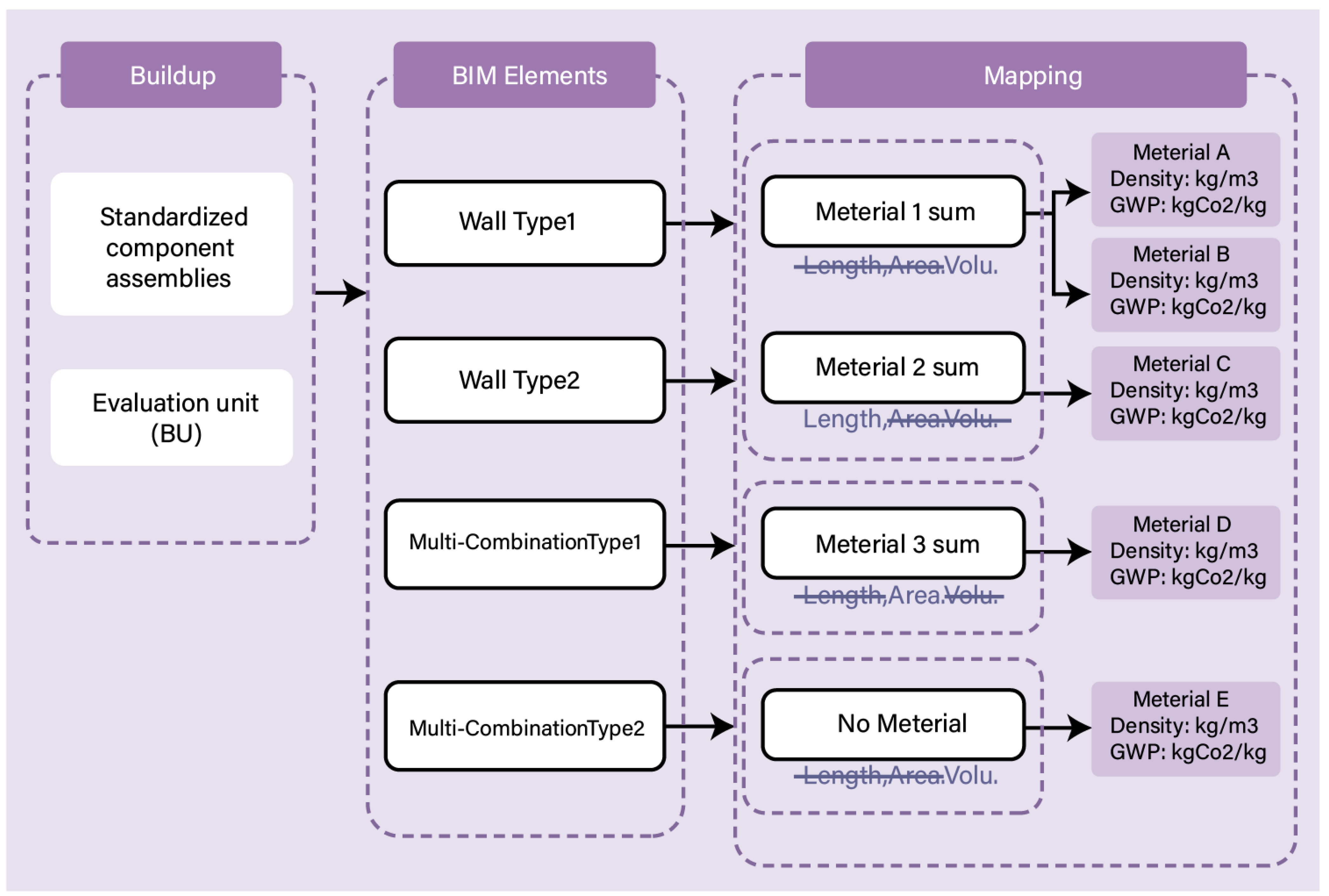
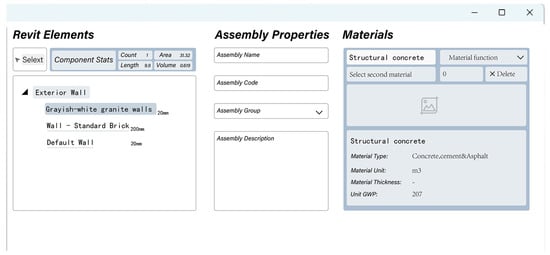
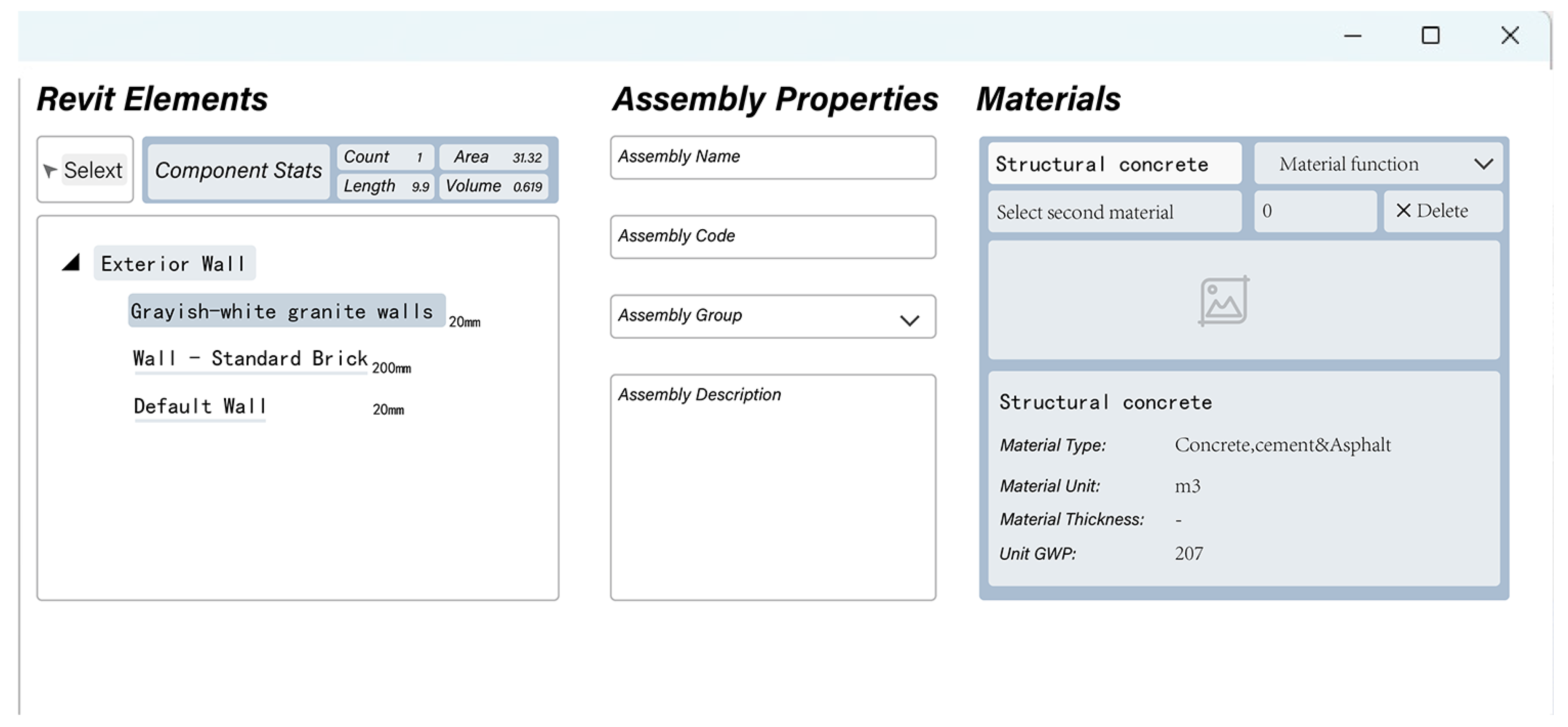
To provide a stable calculation entry point at the component level, this study uses assemblies as basic assessment units and maintains them as database objects, referred to as buildups (Figure 4). A buildup consolidates component semantics, material stratification, and measurement baselines into a standardized template. This design allows component-level accounting to be mapped, reused, and audited under consistent conventions.
Figure 4.
User interface for defining Buildup Evaluation Unit in the Revit add-in. Set the buildup evaluation unit (BU) to bind the required geometry dimension for quantity–intensity coupling.
The buildup schema is defined by three domains. The first is the identification domain. It specifies the applicability scope through a unique identifier, together with the target component category and functional attributes. This identifier serves as the target key in rule-based mapping. The second is the measurement domain. It fixes the measurement baseline through the assessment unit and links it to BIM geometric fields via a unit-normalization field. In this way, the required geometric quantity input is locked at the field level. The third is the composition domain. It organizes material entries by functional layers and records material identifiers, density, thickness, usage ratio, and referenced carbon factors. Carbon-intensity fields follow the same unit conventions as the carbon-factor database, so that calling a buildup does not introduce additional conversion rules.
Buildup generation and synchronization follow four steps: BU binding, hierarchy parameterization, unit-intensity pre-calculation, and structured synchronization. During configuration, BU-to-geometry binding and hierarchical parameters are specified. The platform then pre-calculates and stores unit emission intensities so that they can be read directly at runtime. Buildups are maintained as structured tables and synchronized to the plugin via JavaScript Object Notation (JSON) snapshots. When needed, comma-separated values (CSV) export is also supported for auditing and batch maintenance. During writing and synchronization, validation checks are applied to BU definitions, unit consistency, and key-field completeness, ensuring that buildups can be invoked directly by subsequent mapping and calculation modules.
2.3.3. Rule-Based Mapping and Calculation
To create a reusable and traceable link between BIM components and database objects, this study introduces a rule-based mapping mechanism on top of buildups (Figure 5) [48]. The mechanism uses component semantic fields as matching constraints. Each rule encodes a field path, the target buildup, and the assessment unit. During runtime, the plugin evaluates these rules to select the target buildup and execute component-level calculation.
Figure 5.
Workflow of BIM component–buildup matching mechanism. Rule-based mapping via ordered field paths with exact match, fallback default, and unmapped outcomes.
The mapping inputs are derived from model type and semantic fields. Component category and type labels are treated as mandatory identifiers. Additional fields, such as material, functional use, and Keynote, are included when available to improve discrimination. These inputs are combined into an ordered “parameter–value” path that serves as the matching key. When optional fields are missing, the path still retains the required identifiers. This allows components to be assigned through default rules rather than being excluded. An example is provided in Appendix A (Table 3).
Rules are maintained on the platform as a rule table. Each rule entry records the field path, match type, target buildup ID, and the BU used as the assessment unit. The table makes the correspondence between identification conditions, calculation unit, and measurement baseline explicit at the data layer. It also enforces a single-return constraint: within the same query domain, a field path can reference at most one buildup. This avoids rule competition and double-counting at runtime.
During execution, the plugin generates a field path for each component instance and performs path-level matching. It first applies exact matching; when a match is found, a single target buildup is returned. If no match is found, default rules are applied as fallback assignments. If the component remains unmatched, it is labeled as “unmapped”. Its Category, Type Name, and available semantic fields are exported as inputs for rule completion. After mapping, the assessment module reads the unit emission intensity of the selected buildup under the specified BU and multiplies it by the component’s normalized geometric quantity to obtain the component-level emission value. Key mapping records are stored in the project snapshot to support auditing, reproduction, and rule iteration.
2.4. Calculation and Visualization
2.4.1. Execution of Carbon-Emission Calculation and Structured Output of Results
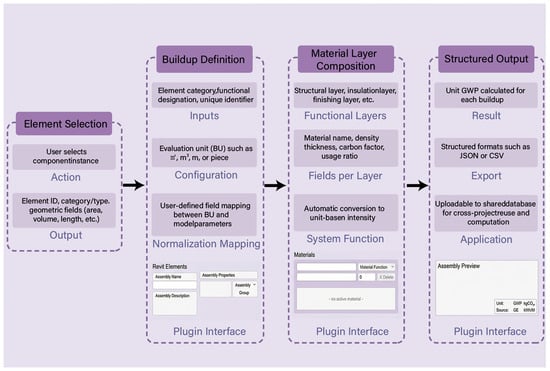
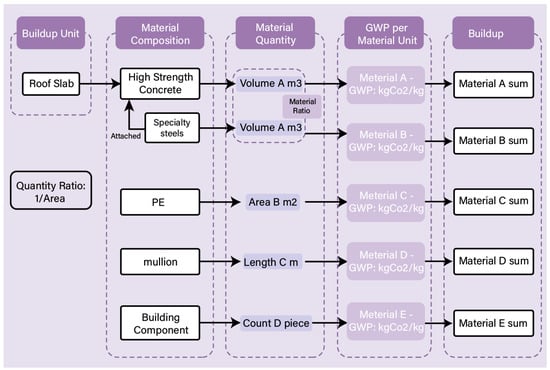
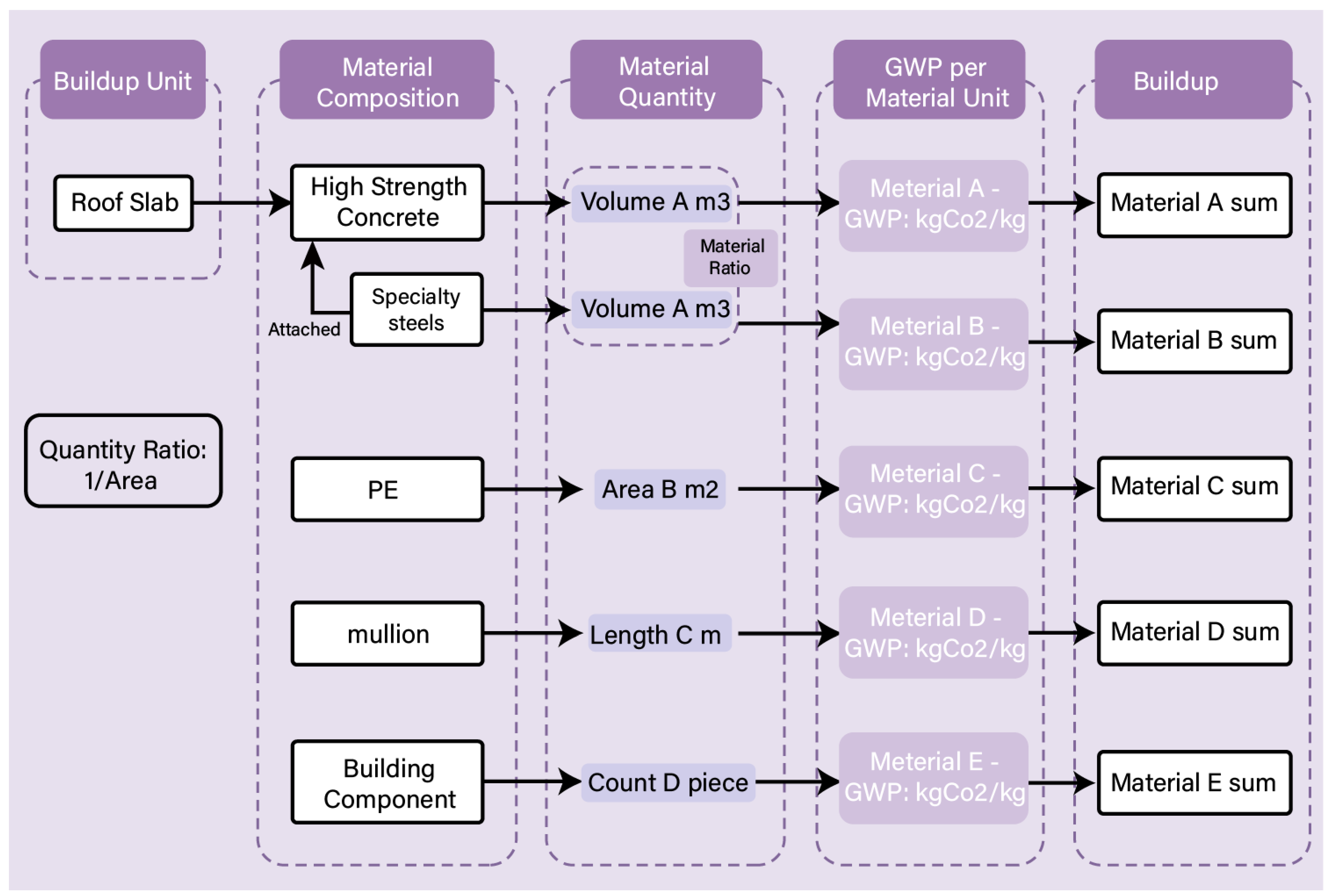
Component-level carbon-emission calculation is driven solely by the mapping outcome. Once a BIM component is assigned to a buildup, the assessment module reads the buildup unit emission intensity and couples it with the corresponding component quantity based on the specified assessment unit. This defines a fixed execution path: “mapping localization–unit-intensity retrieval–geometric coupling–layer-based aggregation” (Figure 6). Material stratification and measurement conventions are fixed at the buildup level. At runtime, the workflow performs only quantity retrieval and coupling, without introducing additional project-specific assignments or conversion assumptions.
Figure 6.
Schematic of Buildup-based component-level GWP calculation and coupling with BU-based unit normalization. GWP = (GWP/BU) quantity under BU, ensuring consistent coupling between factors and model geometry.
The unit emission intensity of a buildup is pre-calculated from its material-hierarchy parameters:
where is the base quantity of material i defined under the BU baseline and expressed in the material measurement unit (MU). and are ratio coefficients that control hierarchy conversion and auxiliary-material allocation, respectively. is the unit carbon factor of material i. This formulation yields a standardized value at the buildup level. It is stored as a directly callable intensity and used as the only intensity input in subsequent component-level calculations.
During execution, for each mapped component, the framework retrieves the geometric quantity specified by the BU convention (area, volume, length, or count) and multiplies it by to obtain the component-level emission value. Components mapped to the same buildup share the same unit intensity and calculation scale under the same BU. This design prevents differences in parameter naming or unit expressions across projects from changing the accounting convention.
Results are reported in a three-level structure. Component-level outputs use a minimum field set, including component ID, matched buildup, BU, geometric quantity, and emission value. System-level outputs are aggregated using Category and build-up as grouping keys. Project-level outputs provide total emissions and area-normalized intensity indicators, supporting scheme comparison and traceability under consistent conventions.
2.4.2. Visualization of Results
Result feedback is organized around traceability and follows a fixed sequence: result write-back, platform aggregation, view generation, and model localization. After calculation, the plugin writes component-level results to the open data platform. The write-back fields are restricted to component ID, buildup identifier, BU, geometric quantity, /, and the component emission value. Upon ingestion, the platform validates field completeness and unit consistency. It then aggregates results by component category, buildup, and life-cycle stage to produce a project-level dataset.
Using the same dataset, the platform generates result views along three dimensions [49]. The material view reports the contribution structure by material hierarchy. The component/template view shows the distribution of emission intensity and supports identification of high-emission assemblies. The scheme view juxtaposes total emissions and area-normalized intensity to support version comparison. All views share identical field conventions and aggregation keys, ensuring that results remain verifiable and traceable.
On the BIM side, the component ID list returned by the platform is used as a spatial index. The plugin colors components based on predefined emission classes to visualize the spatial distribution of emissions. Because results are indexed consistently by component ID, high-emission objects in the model can be traced directly to the matched buildup and the corresponding factor records. The same linkage also supports recalculation and updates under unchanged conventions. The structured platform outputs are further used for visualization and archiving.
3. Case Study
3.1. Project Overview
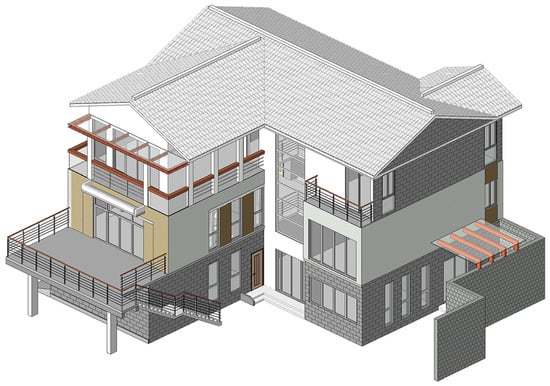
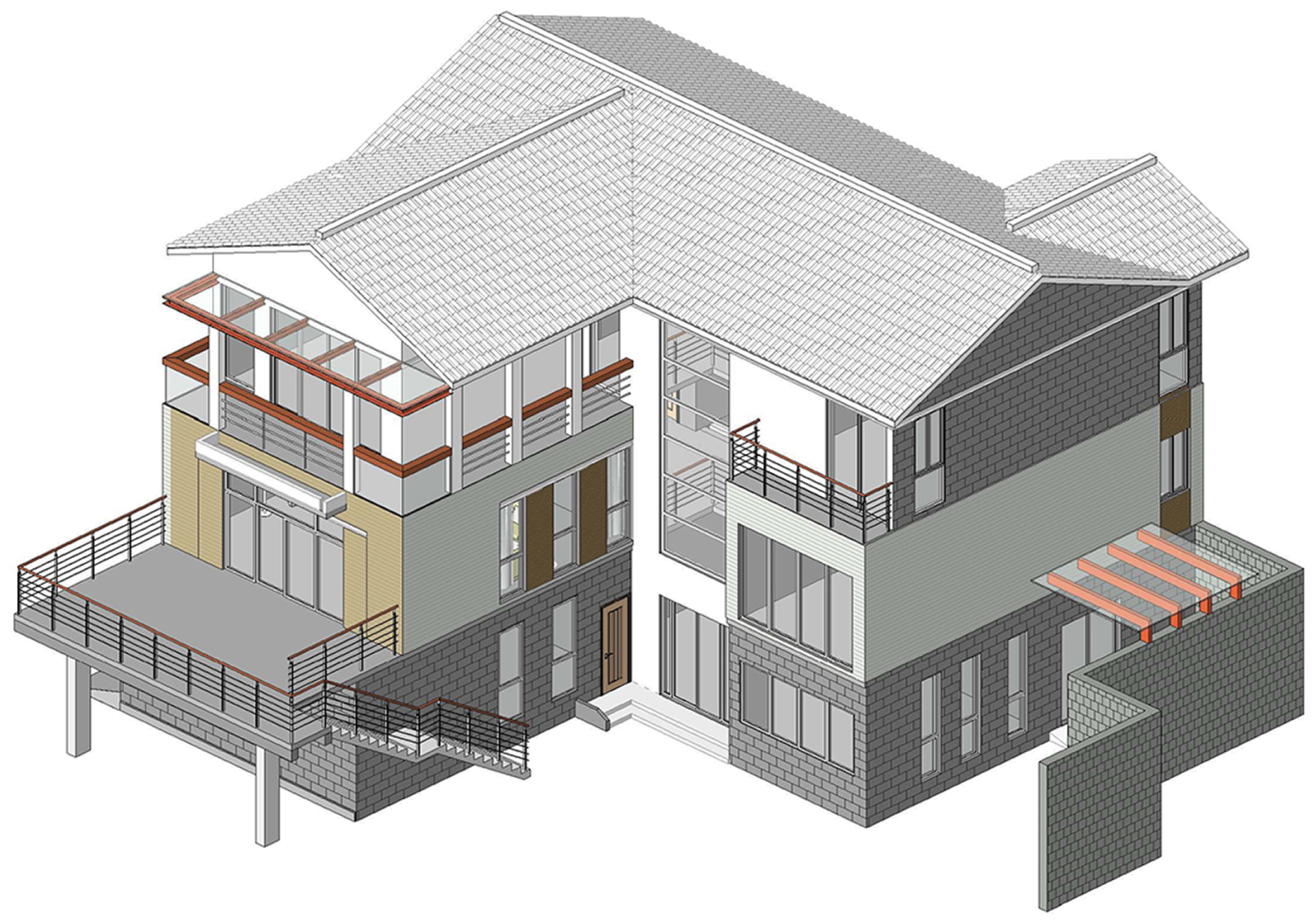
To validate the executability of the proposed component-level embodied-carbon assessment framework in a real design model, this study uses a three-story brick–concrete residential building in Wuhan as the case project (Figure 7). KBOB (2023) [50] is adopted as the reference factor set, providing a consistent baseline for workflow demonstration. The gross floor area is approximately 550 m2. The building is modeled in Autodesk Revit 2023 and developed to LoD 300. The model provides a relatively complete set of component categories and geometric quantities for accounting. The structural system consists of cast-in-place reinforced-concrete beams and slabs, combined with hollow-brick masonry walls. The model also includes terraces, a pitched roof, and aluminum–glass curtain-wall panels. It covers major component families such as walls, floors, roofs, stairs, windows, doors, and railings, meeting the framework requirements for multiple component types and multi-layer assemblies.
Figure 7.
Case-study building model. LoD 300 Wuhan case model used for workflow validation.
The model offers two advantages for workflow validation. First, it provides both a quantity basis for cross-checking and sufficient diversity in components and assemblies. This enables an end-to-end test of the workflow, including field extraction, rule mapping, factor retrieval, unit normalization, and result aggregation, within one project. It also helps expose typical issues, such as unmapped components and naming inconsistencies, to support rule iteration. Second, the material and structural configurations reflect common residential practice, supporting a realistic demonstration of the proposed workflow under typical design settings.
To document component-category coverage and the element-level distribution of the case model, Appendix A provides Table A1. The table also reflects mapping and aggregation needs associated with the high proportion of curtain-wall subcomponents, and it supports the evaluation of the buildup-template and rule-based mapping strategy used in this study.
3.2. Pre-Assessment Preparation
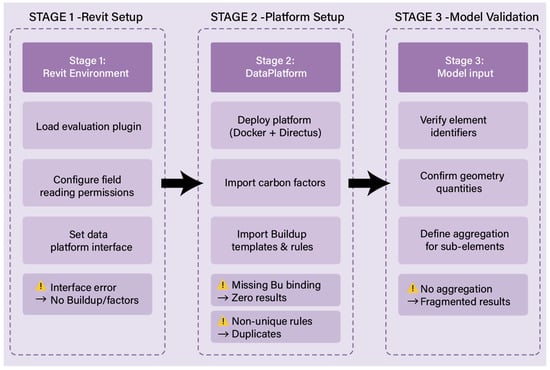
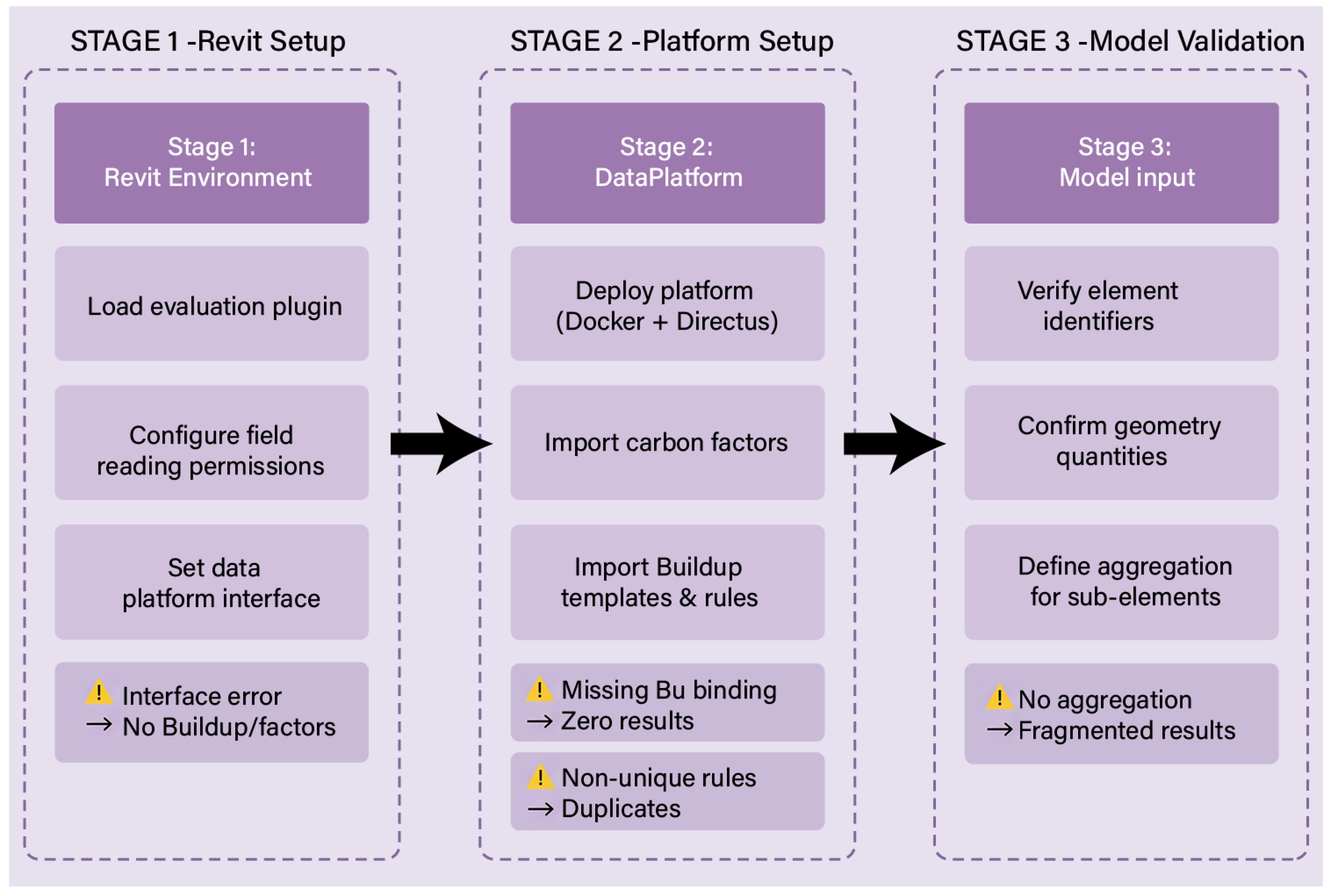
To ensure reproducibility, three preparations were completed before calculation (Figure 8): configuring the Revit-side plugin runtime, deploying the data platform, importing required tables, and validating minimum input fields and unit conventions in the case model.
Figure 8.
Implementation Workflow. Three-stage execution checklist and typical failure states affecting mapping, factor retrieval, or calculation.
First, the Revit runtime environment was configured, and the assessment plugin was loaded. The plugin requires permission to read component fields and access the data-platform interfaces. If the endpoint address or authentication is incorrect, the plugin can still traverse the model and extract fields, but it cannot retrieve buildups or carbon factors. In this situation, components remain in an “unmapped/no factor” state, and calculation cannot proceed.
Second, the open data platform was deployed, and the database was prepared. The platform was launched via Docker Compose v2.23.3. It uses Directus, exposes port 8055, and adopts an SQLite file v3.44.2 as the database backend. Three datasets must be imported in advance: material carbon-factor records, buildup templates, and the rule table. If a buildup does not complete the binding between the BU and geometric fields, then mapping may succeed, but the required quantities cannot be retrieved, or the computed values may collapse to zero. If the rule table violates the single-return-per-path constraint, multiple hits may occur and cause double counting or conflicting assignments.
Finally, the case model was checked and lightly cleaned on the input side. At minimum, the model must provide category/family/type information for stable component identification, as well as geometric quantities consistent with the BU convention. Optional material and semantic fields are used to improve discrimination and increase mapping hit rates. For categories with a large number of subcomponents, such as curtain-wall systems, the aggregation dimension should be defined before execution. Otherwise, results can still be generated, but project-level aggregation becomes fragmented, which weakens scheme comparison and hotspot identification.
3.3. Performance Evaluation
To evaluate the proposed workflow on a real LoD 300 model, three metrics are used: area-normalized embodied-carbon intensity I, mapping coverage C, and efficiency gains ( and S). Let be the total embodied carbon for the A1–A3 stages (kgCO2 e), and let be the gross floor area (m2). The area-normalized embodied-carbon intensity is defined as:
Let denotes the number of component instances within the accounting scope, and denotes the number of instances that are successfully mapped and produce valid results. Mapping coverage is defined as:
Let be the time required by a manual LCA workflow, and let be the time required by the proposed workflow. Absolute time savings and the saving rate are defined as:
3.4. Project Application
During model development, the case building was created in Revit and includes the main component categories required for embodied-carbon assessment, including walls, floors, roofs, doors, windows, stairs, railings, curtain-wall panels, and structural components. After the model is prepared, the plugin is launched and traverses all component instances that satisfy the filtering conditions. For each component, the plugin reads a streamlined but sufficient parameter set through the Revit API, including Category, Family, and Type Name, a unique element ID, and basic geometric quantities. Each instance is then encapsulated as a lightweight calculation object that stores geometric quantities and keeps semantic fields in a dictionary. This structure allows the same extraction logic to be reused across projects with different modeling habits within the same software environment, and it is tested in this case study.
To support carbon calculation, standardized buildups and their assessment units are configured in advance on the external data platform. Each buildup represents a typical construction type and stores layered composition information, material identifiers, thickness, density, life-cycle stage fields, and unit emission factors. Figure 9 shows how a wall type in the Revit model (left) is linked to a predefined buildup in the plugin interface (right). In this example, the primary material is structural concrete (excluding reinforcement), with an A1–A3 emission factor of 207 kgCO2 e/m3. The plugin retrieves this factor from the KBOB (2023) reference dataset via the platform. The assessment unit is defined through a unit-normalization field, so the buildup is expressed on a wall-area basis (kgCO2 e/m2). Under this configuration, construction composition and carbon factors are maintained outside the plugin, and the plugin only reads the normalized unit GWP value for calculation.
Figure 9.
Component–buildup mapping and material assignment interface in the plugin. Plugin interface for branch-to-buildup mapping and material assignment; mappings saved as reusable assets.
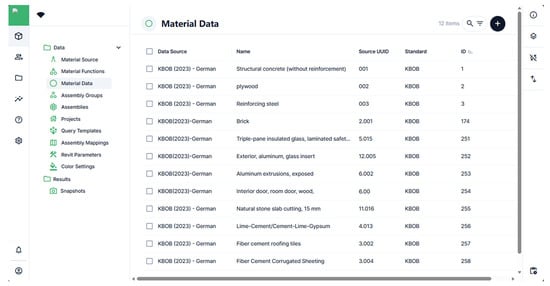
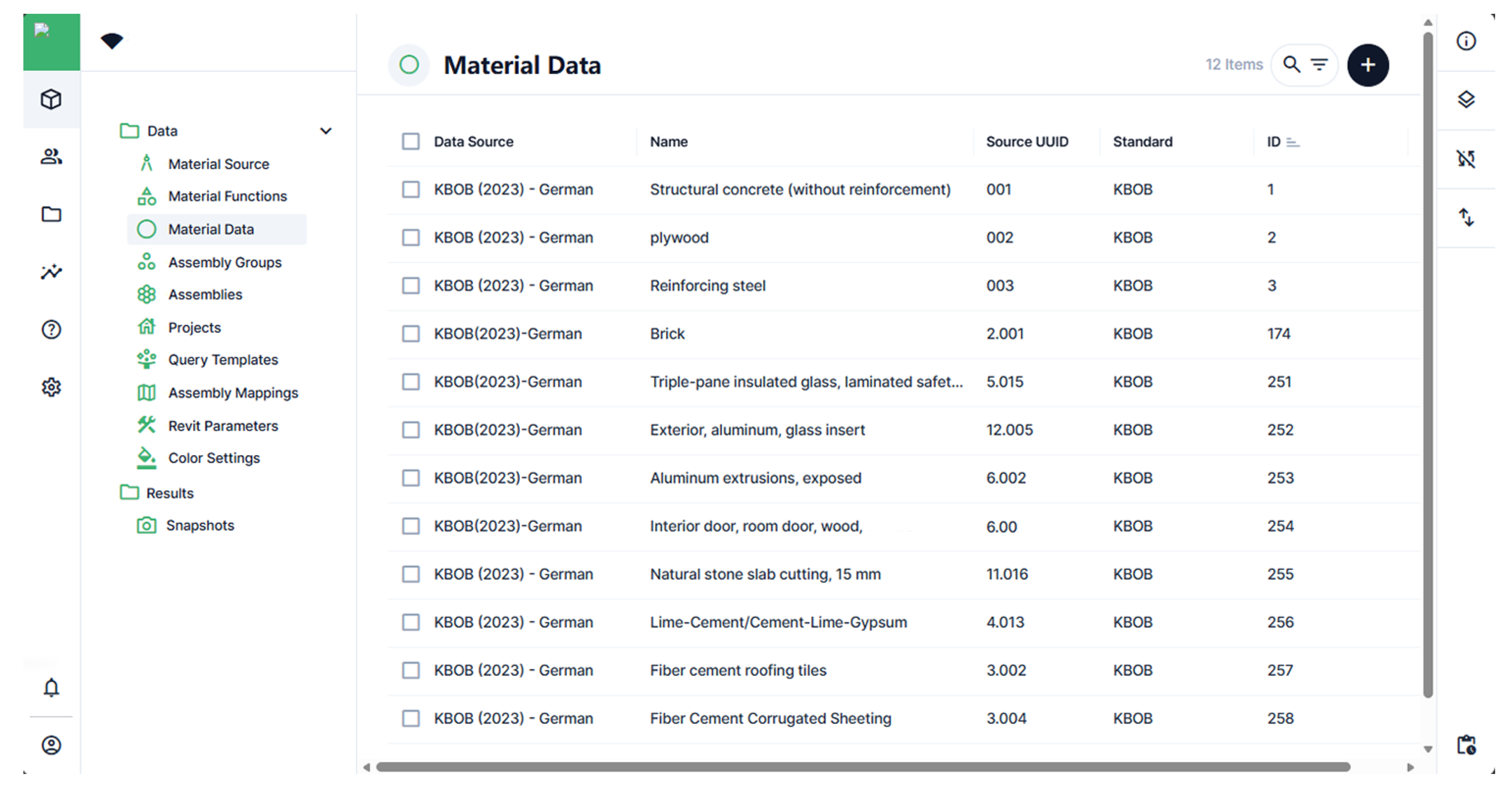
The carbon-factor database is hosted on an open data platform and compiled from multiple sources, including the KBOB (2023) database, EPDs, and project-specific entries. Material records are created and edited through a form-based interface and stored in a structured format (Figure 10). Each record includes a unique identifier, material family, technical description, reference measurement unit, and the GWP value for the A1–A3 stages. It also stores management fields such as data source, version number, and last update time. This structure allows users to replace or localize material entries under a consistent schema without changing the plugin-side calculation logic.
Figure 10.
Platform-side database interface (Directus) for material-factor management. Directus factor library stores material IDs, MU, A1–A3 GWP, source, and version metadata.
In the current prototype, the Revit plugin accesses the platform mainly through REST endpoints and requests only the factor fields required by the buildups used in the project. The GraphQL endpoint is retained on the platform side to support future composite queries and data verification.
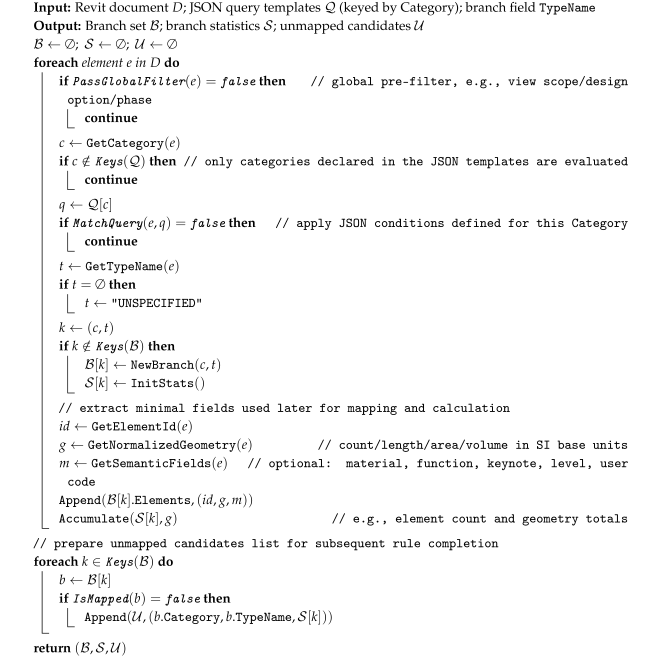
During mapping and calculation, the framework uses query templates to group BIM components into branches that can be linked to assemblies. In this case study, the classification rules are implemented as a JSON template. Each query corresponds to a Revit Category, such as Walls, Floors, Roofs, Windows, Doors, Curtain Panels, Railings, and Structural Columns. Within each query, branches are generated based on the Type Name field. Table 4 summarizes the major categories in the case model and the branch fields used for grouping. During execution, the plugin traverses all components, applies the filters defined in the JSON template, and constructs a branching tree. Each branch represents a set of components that share the same Category and Type Name (Algorithm A1).
Table 4.
Category filtering and mapping of branching fields. Branch field (Type Name) defines reusable units within categories; mapping and statistics operate at the branch level.
Buildups are assigned at the branch level. In the first run of a project, the user selects an appropriate buildup for each branch. For example, external hollow-brick wall types can be mapped to one standard assembly consisting of a reinforced-concrete slab, hollow-brick masonry, and plaster. Similarly, most window types can be assigned to a unified aluminum–glass assembly. These assignments are stored as mapping entries. Each entry records the query name, the full branch path (i.e., Category + Type Name), and the selected buildup ID.
When the same mappings are applied to a revised model or a similar project, the plugin restores buildups automatically for branches whose paths match existing entries. New or uncommon types remain unmapped and are flagged in the interface. With this design, automation becomes effective after the mapping is configured once in a representative project. Similar projects can then reuse the stored mappings, while the initial setup still depends on the design team’s judgment and adjustments.
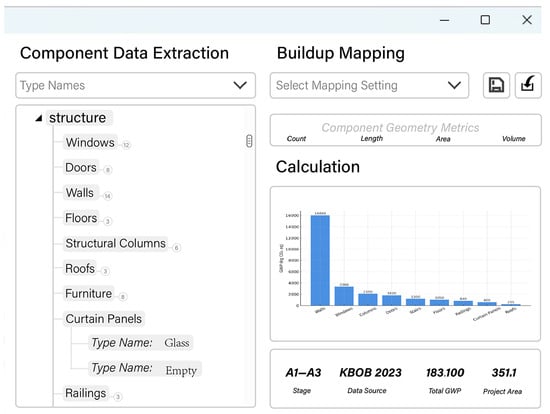
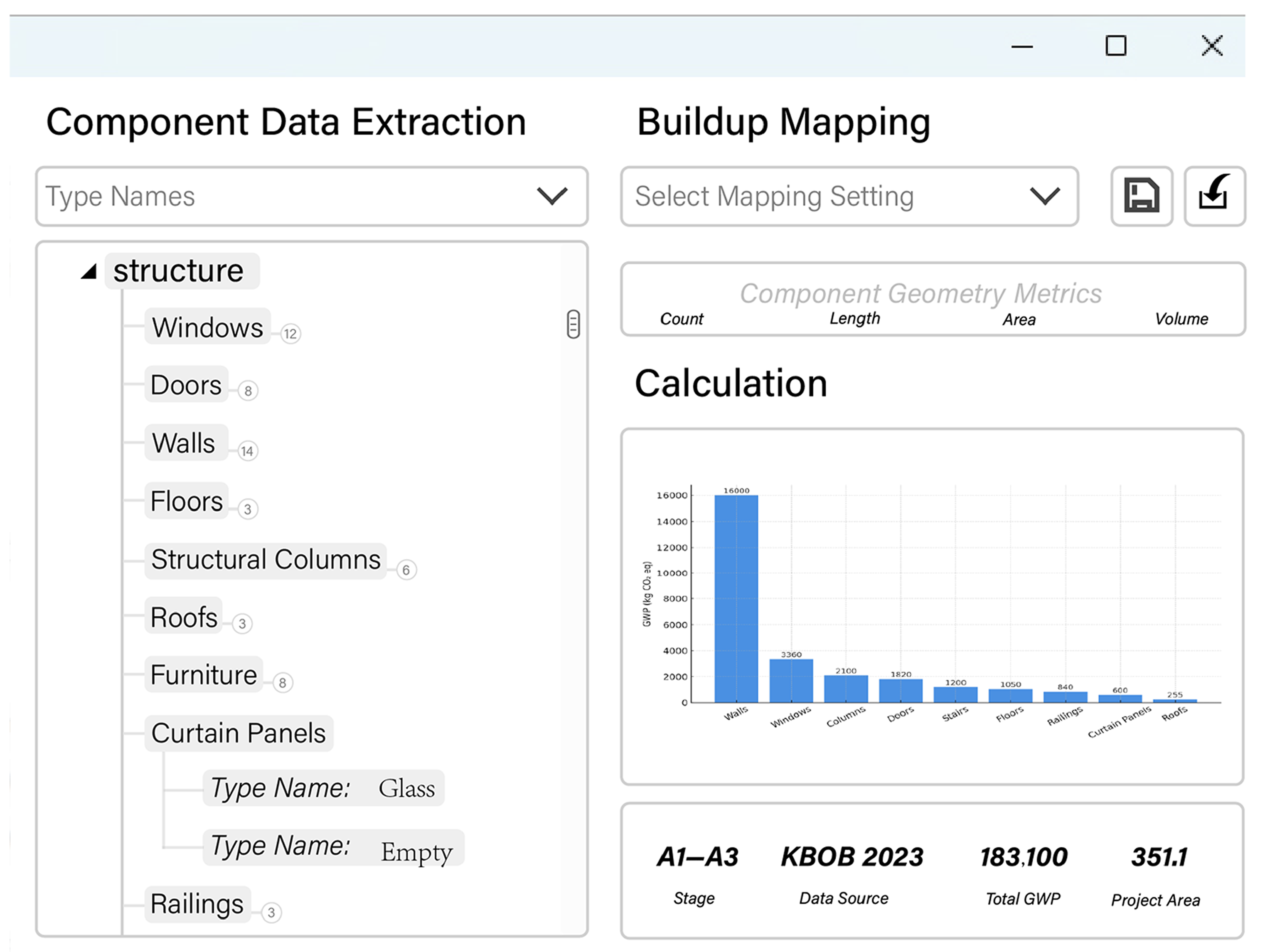
After a branch is linked to a buildup, the plugin retrieves the unit GWP value from the data platform and selects the corresponding geometric quantity (area, volume, length, or count) based on the assessment unit. The two values are multiplied to compute emissions for all components in the branch. Component-level results are then aggregated by material family, component category, and project level, and written back to the platform as a JSON snapshot. Figure 11 shows the calculation and result interface, where designers can review total A1–A3 emissions, area-normalized indicators, and breakdowns by component type, and export the results for further analysis.
Figure 11.
Revit add-in interface for buildup mapping and A1–A3 embodied-carbon calculation with result visualization. In-model results view showing totals, intensity, category breakdowns, and export for analysis.
4. Results
4.1. Project-Scale Results for A1–A3
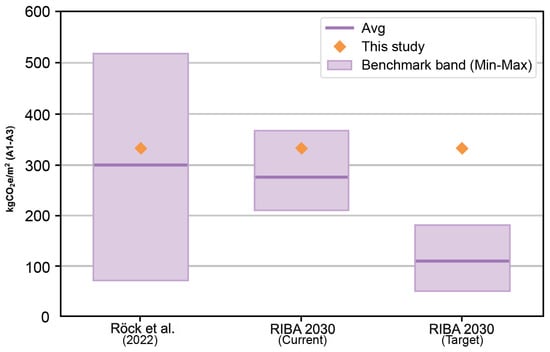
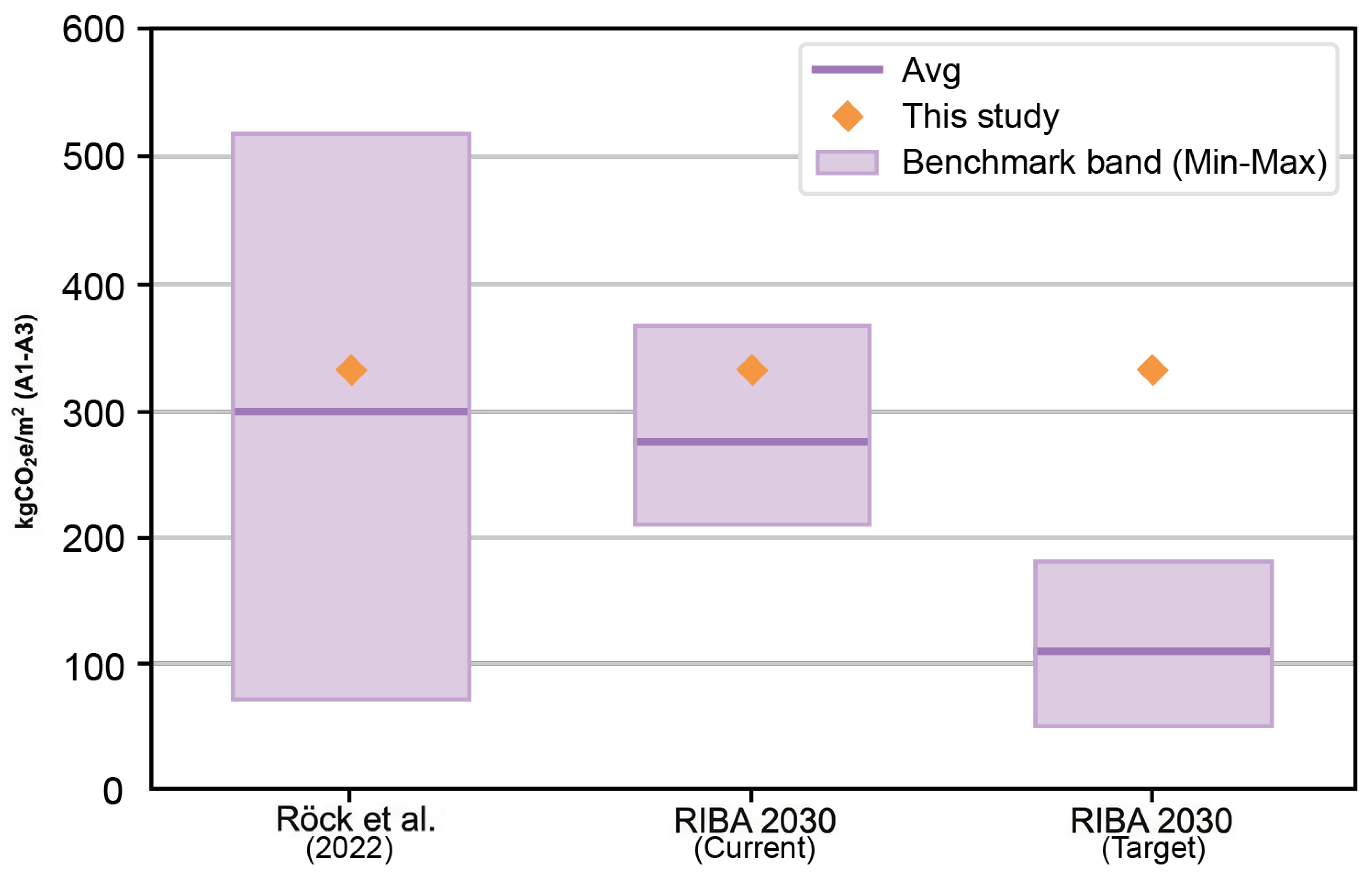
Figure 12 compares the A1–A3 area-normalized embodied-carbon intensity of the case project, computed using the KBOB (2023) factor set, with benchmark bands reported in the literature. The case project yields . This value falls within the ranges reported by Röck et al. [51] and the Royal Institute of British Architects (RIBA) 2030 (Current) bands summarized by the London Energy Transformation Initiative (LETI) [52]. However, it remains higher than the RIBA 2030 (Target) band reported by LETI [52].
Figure 12.
A1–A3 embodied carbon intensity: benchmark bands vs. this study. Literature benchmark band (min–max) [51,52] versus case A1–A3 intensity.
4.2. Component- and Assembly-Scale Results
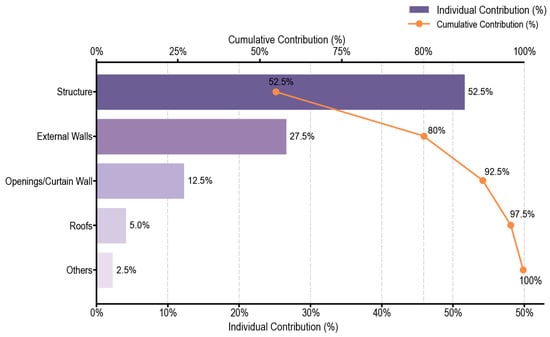
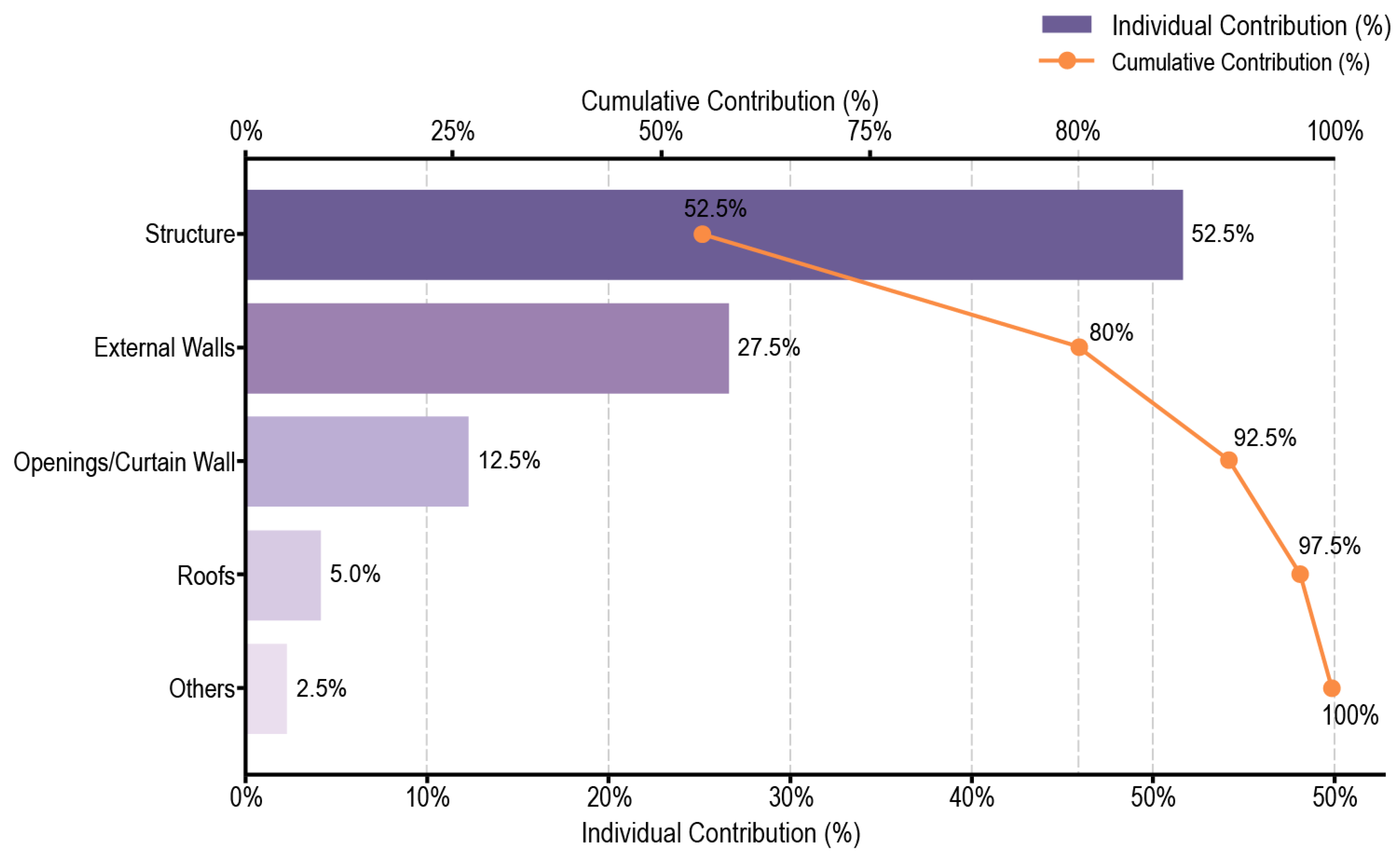
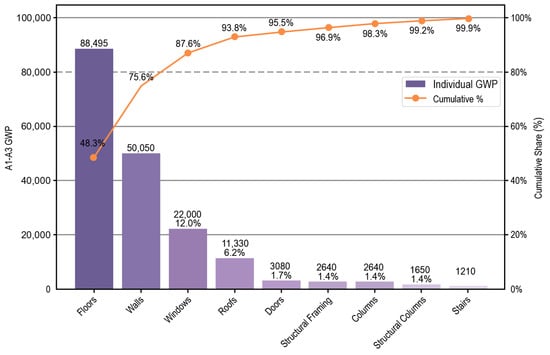
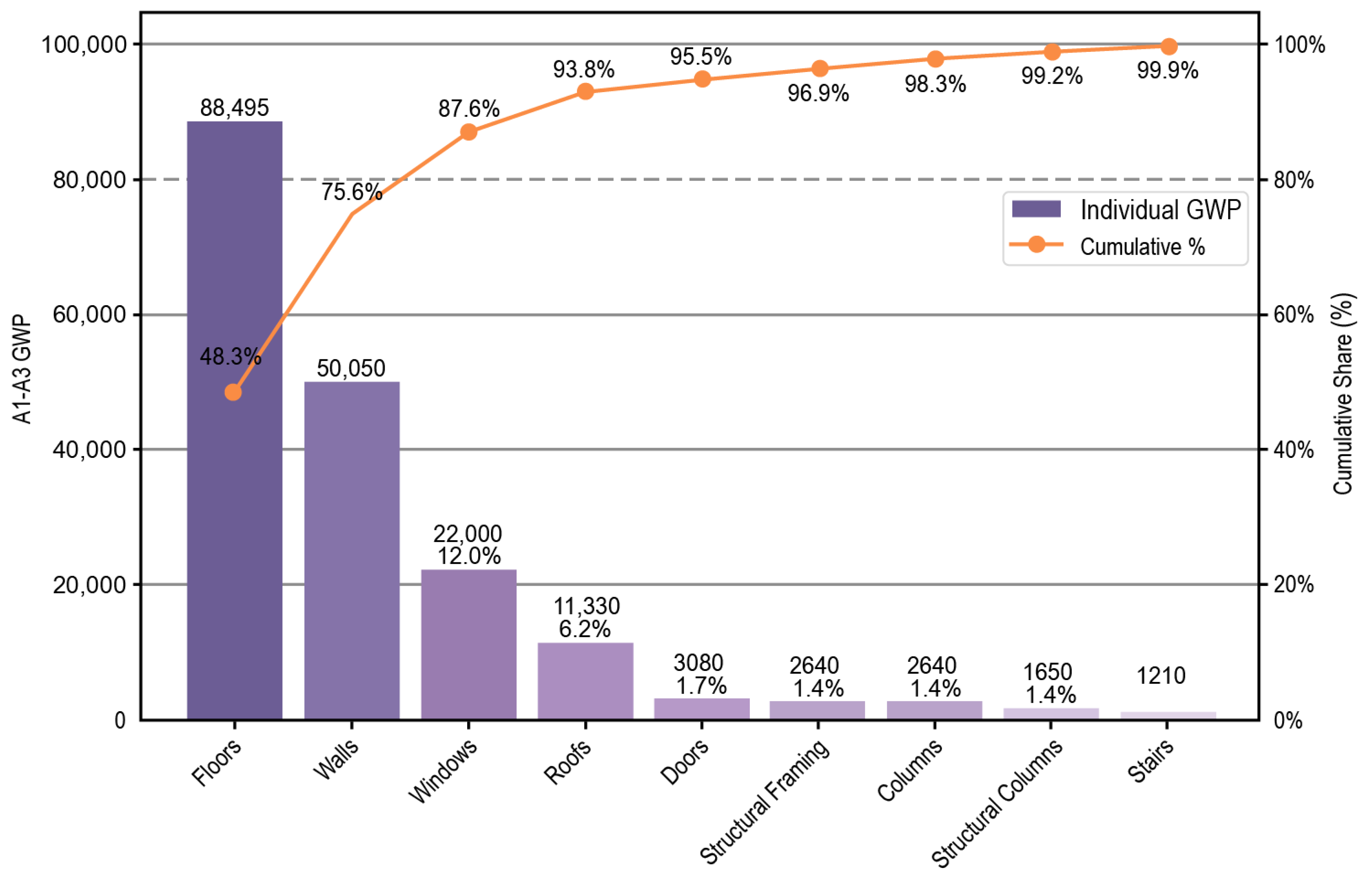
Figure 13 and Figure 14 report contribution shares and cumulative shares for the A1–A3 stages, aggregated at the component-system level and at the buildup level, respectively.
Figure 13.
Pareto analysis of component-system contributions (A1–A3). System-level Pareto: bars show contributions; line shows cumulative share to identify A1–A3 hotspots.
Figure 14.
Pareto analysis of assembly contributions (A1–A3). Buildup-level Pareto ranks reusable templates by A1–A3 contribution to prioritize low-carbon substitutions.
As shown in Figure 13, the structural system contributes approximately 52.5% and the external wall system contributes approximately 27.5%. Together, they account for about 80% of total A1–A3 emissions. Opening components contribute approximately 12.5%, increasing the cumulative share to about 92.5%. The roof system and other items contribute about 5.0% and 2.5%, respectively.
Figure 14 presents the Pareto distribution at the buildup level. Floors contribute 88,495 (48.3%) and walls contribute 50,050 (27.3%), resulting in a cumulative share of 75.6%. Adding windows at 22,000 (12.0%) increases the cumulative share to 87.6%. Adding roofs at 11,330 (6.2%) further increases it to 93.8%. The remaining buildups are Doors (3080), Structural Framing (2640), Columns (2640), Structural Columns (1650), and Stairs (1210). Each contributes less than 2% of the total.
4.3. Material-Layer Decomposition
Table 5 summarizes material-type contributions aggregated from the MaterialSnapshot. Reinforced concrete contributes 88,435 (48.3%). Brick masonry and plaster contribute 33,140 (18.1%). Aluminum–glass contributes 22,154 (12.1%). Among the remaining materials, the roof system contributes 16,479 (9.0%) and floor leveling and finishes contribute 13,732 (7.5%). All other materials are grouped as Others, contributing 9155 (5.0%). The total A1–A3 emissions are 183,095.
Table 5.
Top material groups aggregated from MaterialSnapshot (A1–A3). Material contributions aggregated as total A1–A3 GWP; Share indicates percentage of project total.
4.4. Mapping Coverage and Failure Types
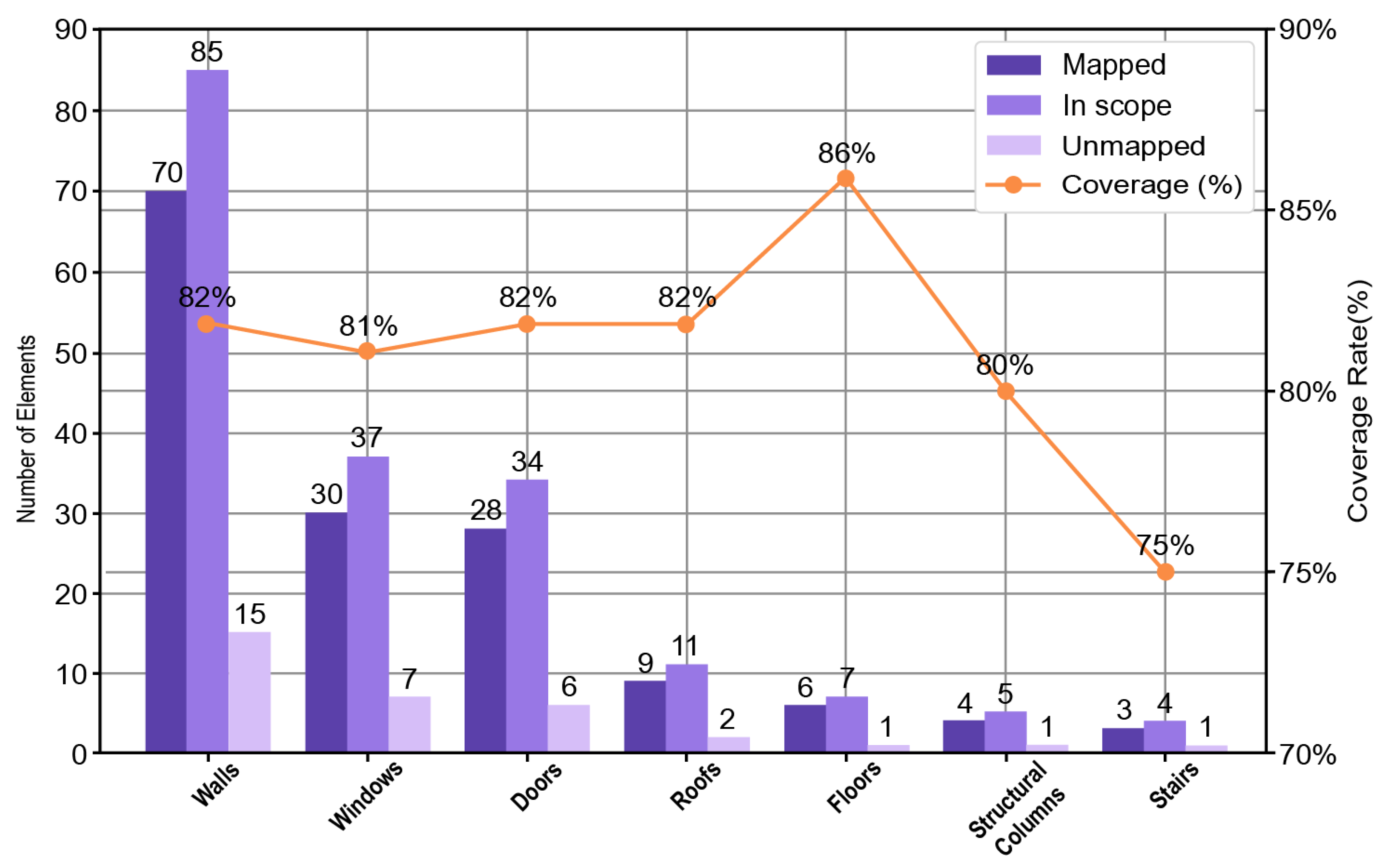
Coverage is calculated using the closed chain of “rule hit–quantity retrieval–factor invocation”. Figure 15 reports category-wise coverage. Within the accounting scope, 150 of 183 instances are successfully mapped and produce valid results, yielding a coverage of 82%. Among mapped instances, walls account for 46.7%, windows for 20.0%, and doors for 18.7%. The remaining categories contribute smaller shares.
Figure 15.
Mapping coverage by category and distribution of mapped elements (in-scope elements). Mapping coverage by category (Ncal/Nall); Ncal completes rule hit, quantity read, and factor call.
In total, 33 instances are not covered. Table 6 summarizes failure types. Missing rules or templates account for 13 cases (39.4%). Insufficient unit-normalization quantity fields account for 9 cases (27.3%). Missing key identification fields account for 6 cases (18.2%). Missing or invalid factor entries account for 5 cases (15.2%).
Table 6.
Summary of unmapped causes (unmapped elements = 33). Unmapped cases fail rule–quantity–factor chain; categories indicate fixable causes in rules, fields, quantities, or factors.
4.5. Workflow Efficiency
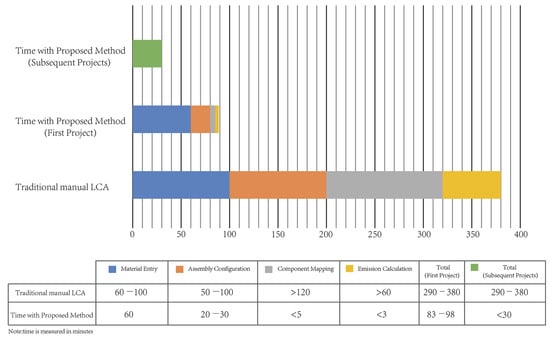
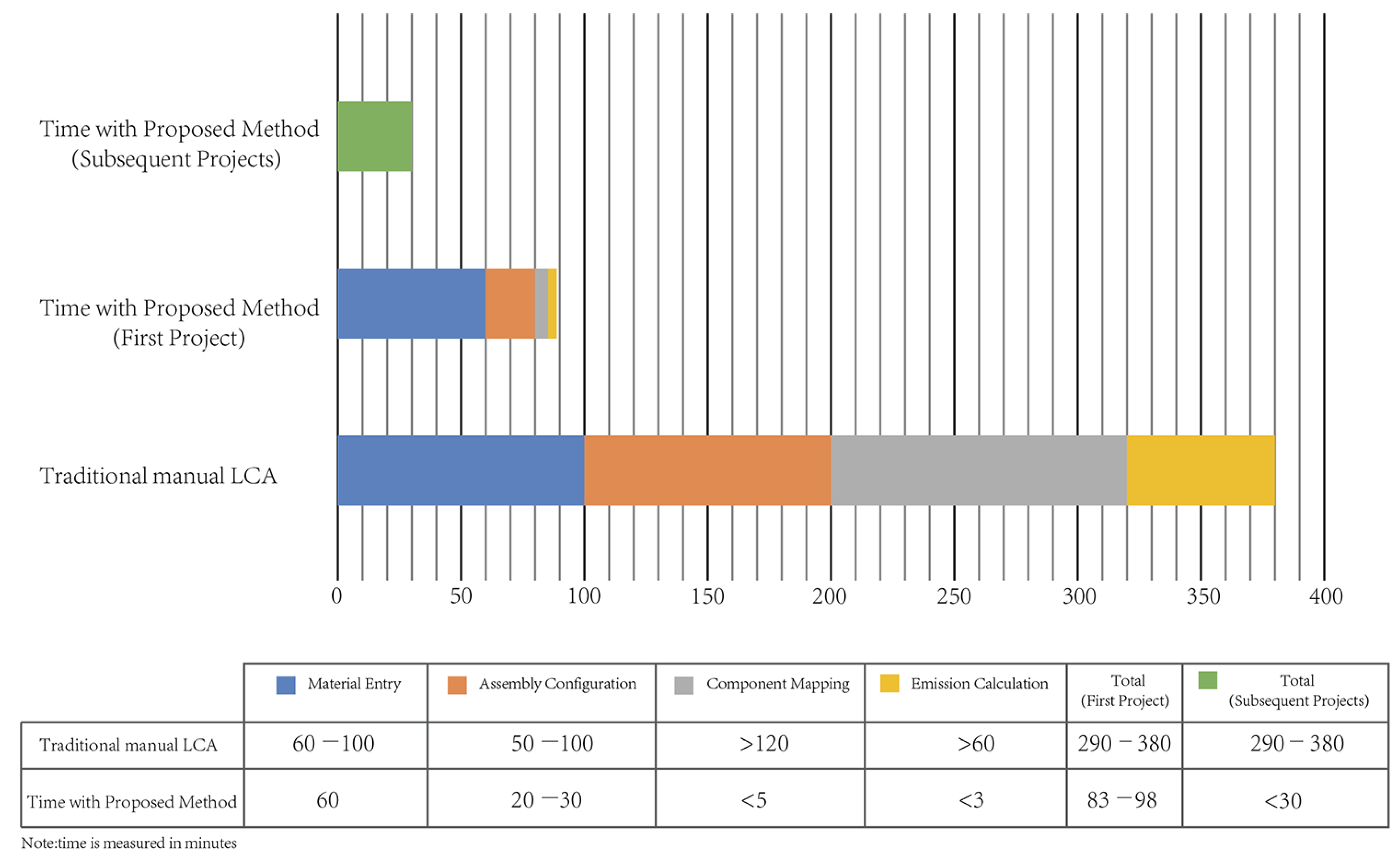
Figure 16 reports the time breakdown and total time ranges (min) for a conventional manual LCA workflow and the proposed workflow under two scenarios: the first project and subsequent projects with reuse. The manual workflow requires 290–380 min in total. Using the proposed workflow, the first-project runtime is reduced to 83–98 min, and subsequent projects can be completed within 30 min. Runtime is recorded as an end-to-end execution from model extraction to report export under a fixed database and rule configuration; the corresponding rule-table schema, field template, and core pseudocode are provided in Appendix A.
Figure 16.
Time comparison between the traditional manual LCA workflow and the proposed workflow (time in minutes). Time comparison (min) for manual versus proposed workflow in the first-project and reuse scenarios.
The stage-wise breakdown highlights where time is saved. The reported durations describe the stage-wise workflow under the fixed protocol and may vary with operator proficiency. In the manual workflow, component mapping takes more than 120 min and emission calculation takes more than 60 min. With the proposed workflow, for the first project, component mapping takes less than 5 min and emission calculation takes less than 3 min. Assembly configuration is reduced from 50–100 min to 20–30 min, while material entry takes approximately 60 min in the first project.
4.6. Result Analysis
The benchmark comparison in Figure 12 provides a reference for interpreting the project-scale A1–A3 result. The case value lies within the ranges reported by Röck et al. [51] and the RIBA 2030 (Current) band summarized by the LETI [52]. Under the selected database and accounting conventions, the result is therefore within a plausible empirical range. However, it remains above the RIBA 2030 (Target) band reported by LETI [52]. This indicates a gap to the target level and sets the context for hotspot identification and potential mitigation.
The contribution breakdown shows a concentrated structure at both system and buildup levels. At the system level (Figure 13), the structural system and the external wall system contribute about 80% in total. At the buildup level (Figure 14), floors and walls account for 75.6%. Adding windows increases the cumulative share to 87.6%, and adding roofs increases it to 93.8%. The remaining buildups contribute marginal shares. This pattern indicates that A1–A3 emissions are driven by a small set of high-contribution systems and buildups and can be summarized well by a Pareto-type distribution.
Material-layer results provide a complementary explanation of the same hotspots. Table 5 shows that reinforced concrete, brick masonry, plaster, and aluminum–glass contribute 78.5% combined. This concentration aligns with the buildup-level hotspots where floors, walls, and openings dominate. Together, these results provide a consistent traceability chain from buildups to material types, which supports mitigation discussion focused on high-contribution assemblies and key materials.
Mapping coverage and failure attribution quantifies the automation boundary of the workflow. Within the accounting scope, 150 of 183 instances are mapped and produce valid results, yielding 82% coverage (Figure 15). Because the remaining 33 instances do not yield valid factor-linked A1–A3 results under the current rule/field/factor conditions, their contributions are excluded from the quantified total, and hotspot identification in this paper refers to the mapped subset. The remaining 33 uncovered instances are mainly due to missing rules/templates (39.4%) and insufficient unit-normalization quantity fields (27.3%), followed by missing key identification fields (18.2%) and missing/invalid factor entries (15.2%) (Table 6). This distribution suggests that improved coverage depends primarily on completing rule and buildup assets, strengthening minimum identification fields, and ensuring quantity-retrieval readiness, rather than increasing manual project-side intervention. It also provides a prioritized review list and clear targets for future iterations.
Efficiency results reflect the benefit of assetization and reuse. Compared with 290–380 min for a conventional manual LCA workflow, the proposed workflow requires 83–98 min for the first project and remains within 30 min for subsequent projects (Figure 16). The largest savings come from reducing component mapping and emission calculation to less than 5 min and less than 3 min, respectively. Material entry still takes about 60 min in the first project. This indicates that time savings mainly arise from closing the mapping and calculation loop and avoiding repetitive work. Meanwhile, baseline material compilation remains necessary under the defined data boundary, but its cost can be amortized as the knowledge base expands through multi-project reuse. The rule-table schema, field template, and core pseudocode are summarized in Appendix A to support auditability and replication.
5. Discussion
5.1. Discussion of Results
5.1.1. Benchmark Comparison and the Boundary of Comparability
The benchmark-band comparison is used to position the case intensity in context. Its interpretation is valid only under consistent system boundaries, accounting conventions, and data conditions, including the adopted factor-set context. Previous studies show that embodied-carbon results are sensitive to system boundaries, inventory sources, measurement rules, and data quality. Comparisons across databases or tools can therefore reflect methodological and data-structure differences rather than project differences [20,35]. For this reason, the benchmark ranges in Figure 12 are used as a design-stage reference. They support order-of-magnitude judgment and indicate proximity to target bands, but they should not be read as a direct cross-study benchmark. This treatment aligns with common design-stage LCA practice, where relative references are used to guide iterative decision-making [8,16,21,36].
5.1.2. Hotspot Structure and Decarbonization Directions
The results in Section 4 show a clear concentration pattern. Similar structures are widely reported in the literature: A1–A3 impacts are often dominated by structural and envelope systems, and material contributions are typically driven by concrete, masonry, and glass–metal-related materials [3,9]. In net-zero pathways, feasible near-term directions usually include improving material efficiency, optimizing structural systems, and substituting envelope assemblies [1,5]. Studies on reinforced-concrete slab structures also indicate that structural hotspots are responsive to engineering adjustments [6]. Research on modular envelope assemblies further highlights the importance of envelope components for stage-specific embodied-carbon control [2]. In this case, buildup-level and material-level results remain mutually traceable. Hotspot identification does not depend on a single aggregation dimension. This supports scheme comparison and optimization focused on a small set of key assemblies and materials [4].
5.1.3. Coverage Boundary and Failure Types
Mapping coverage and failure types describes the automation boundary under real modeling conditions. Prior integration studies commonly attribute implementation uncertainty to three sources: mapping difficulty caused by semantic and data-structure discrepancies, deviations introduced during quantity takeoff and export, and the effort required to match and maintain LCA datasets [15]. Recent work further suggests that if uncovered items can be traced to rule-, field-, or entry-level causes, improvements can be converted into incremental knowledge-base maintenance. This reduces repetitive project-side patching [14,31]. The failure-type distribution reported in this study provides testable evidence for defining improvement paths and boundary conditions. It distinguishes gaps in rules/templates, missing quantity-retrieval fields, identification-field inconsistency, and entry validity at the statistical level.
5.1.4. Sources of Efficiency and Data Costs
The efficiency results can be interpreted in light of the typical time-cost structure of design-stage tools. Existing studies show that time consumption in BIM–LCA workflows is often driven by component mapping, data preparation, and result checking, rather than calculation alone [10,21]. Surveys of developers and users also indicate that efficiency and reuse depend on data structuring, rule-configuration mechanisms, and data-quality control [30,32]. In addition, the quality and consistency of EPD and LCI data affect result reliability and increase the workload required for data preparation and validation [18]. In this study, the time shares of mapping and calculation drop substantially, while material and entry preparation remain a major input in the first project. This pattern is consistent with the above findings and motivates discussion of data governance and maintenance costs.
5.2. Limitations and Future Work
This study is limited to the A1–A3 stages and assumes a Revit-based authoring environment and a predefined data structure; cross-platform portability is not validated in this paper. The case study uses KBOB (2023) [50] as a reference factor set; regional representativeness for China is not evaluated. This boundary supports executability in early-stage design and result verifiability. However, it also means that the conclusions reflect production-stage embodied carbon under the current conventions. They do not yet cover additional uncertainty sources introduced by broader life-cycle modules.
Extending the workflow beyond A1–A3 increases the share of scenario-driven inputs, so comparability becomes more sensitive to convention choices and parameter settings than to BIM geometry alone. Stage expansion, therefore, requires explicit scenario definitions and versioned parameter sets to keep results interpretable across projects. Applying the workflow to typologies with higher system diversity is also expected to raise branch variability and rule/template maintenance effort, which may affect mapping coverage and the stability of hotspot rankings.
Tool performance remains dependent on modeling expressions and field completeness. Section 4 shows that closure of the calculation chain depends on rule/template completeness, availability of quantity-retrieval fields required for BU normalization, consistency of key identification fields, and validity of factor entries. The validation results should therefore be interpreted under the combined condition of “minimum fields available + rules or templates available + valid entries”. Extrapolation requires similar input conditions. The carbon weight of uncovered instances is not quantified in this paper; hotspot identification, therefore, refers to the mapped subset. The timing metrics reported in Section 4.5 follow a fixed protocol and are provided as process records. The prototype is not publicly released; therefore, we provide auditable configuration artifacts and workflow evidence in Appendix A as a substitute for tool-level access. Future work will package a reproducibility bundle (rule-table snapshot, factor-set version identifiers, and sample outputs) to support third-party reruns.
Future work can extend the workflow while retaining a verifiable A1–A3 baseline. First, open and interoperable inputs will be expanded. Semantic and quantity consistency under open formats such as IFC will be tested under controlled conditions as a future validation step to reduce dependence on a single modeling environment. In parallel, region-specific factor sets will be incorporated under the same schema to support localized decision contexts. Second, governance for rules, templates, and entries can be strengthened by completing rules, fixing the minimum field set, and adding entry-validity checks and version records. This can reduce maintenance costs and result in fluctuation in cross-project reuse. Where data conditions allow, extending life-cycle modules and multi-indicator outputs can be explored. This can be implemented by introducing stage-tagged factor types and scenario parameters (e.g., transport distance/mode, replacement cycles, and end-of-life routes) under the same schema, with versioning to support cross-project comparability. Impacts beyond GWP can be treated as optional outputs, with explicit requirements for convention consistency and field completeness. To support more diverse building typologies, rule/template growth will be prioritized by hotspot-driven updates and assessed against the resulting coverage and maintenance effort. Finally, validation across more building types, LoD levels, and modeling-expression conditions is needed to test the stability of relationships among coverage, efficiency gains, and maintenance costs, and to clarify the applicable boundary of the workflow.
6. Conclusions
This paper develops and implements a component-level embodied-carbon assessment workflow for the A1–A3 stages. Centered on a buildup library and rule-based mapping, it forms a closed chain of “rule matching–BU normalization–factor invocation” and is demonstrated on a single real LoD 300 residential case model. The main conclusions are as follows.
- (1)
- Under the KBOB (2023) reference factor set and the A1–A3 boundary, the case building yields an area-normalized embodied-carbon intensity of . Decomposition at system, buildup, and material levels shows a concentrated contribution structure and consistent traceability across aggregation levels, supporting result checking and hotspot localization.
- (2)
- Mapping coverage reaches approximately 82%. Most components complete the closed chain of “mapping–quantity retrieval–factor invocation”. Uncovered items are mainly linked to rule/template completeness, quantity-retrieval field availability, identification-field consistency, and factor-entry validity. This quantifies the current automation boundary and identifies knowledge-base constraints for subsequent completion and governance. The carbon weight of uncovered items is not quantified here; hotspot identification is therefore conditional on the mapped subset.
- (3)
- The efficiency comparison shows that time in the manual workflow is mainly consumed by build-up configuration and component mapping. The proposed workflow reduces these steps to the minute level, cutting total time from 290–380 min to 83–98 min. With reusable buildups and rules, runtime converges to within 30 min for subsequent projects under the same database and rule configuration. Material and entry preparation remain the main data-side input in the first project.
Overall, within the A1–A3 boundary, this paper provides a reusable and traceable component-level accounting pathway that is executable in the tested Revit-based modeling environment. It also quantifies capability and scope-bounded applicability through coverage, failure attribution, and time breakdown.
Author Contributions
Conceptualization, Y.Z. and Z.R.; methodology, Y.Z. and Z.R.; software, Y.Z. and Q.L.; validation, Y.Z., Q.L. and L.W.; resources, L.W. and Q.L.; data curation, X.L. and T.L.; writing—original draft preparation, Z.R.; writing—review and editing, Z.R.; visualization, W.C. and T.L.; supervision, Q.L.; project administration, Y.Z.; funding acquisition, Y.Z. All authors have read and agreed to the published version of the manuscript.
Funding
This research was funded by the Major Program (JD) of Hubei Province (2023BAA007).
Data Availability Statement
Data are available from the corresponding author and can be shared upon reasonable request. The data are not publicly available due to confidentiality.
Acknowledgments
We would like to express our sincere gratitude to the School of Civil Engineering, Architecture and Environment, Hubei University of Technology, for their valuable academic guidance and research support throughout this study. We also thank the Central South Architectural Design Institute Co., Ltd. for providing technical expertise and practical insights that contributed to the development of this framework. In addition, we gratefully acknowledge the China Hubei Carbon Emission Exchange for their professional support in carbon data verification and methodological consultation. Their combined contributions have been essential to the successful completion of this research.
Conflicts of Interest
Author Li Wang was employed by the company Central South Architectural Design Institute Co., Ltd. This study is part of a major research project supported by Hubei Province. The remaining authors declare that the research was conducted in the absence of any commercial or financial relationships that could be construed as a potential conflict of interest.
Abbreviations
The following abbreviations are used in this manuscript:
| A1–A3 | Product stage modules (raw material supply–transport–manufacturing) |
| API | Application Programming Interface |
| BIM | Building Information Modeling |
| BoQ | Bill of Quantities |
| BU | Evaluation Unit |
| CO2e | Carbon dioxide equivalent |
| CSV | Comma-Separated Values |
| EPD | Environmental Product Declaration |
| GWP | Global Warming Potential |
| IFC | Industry Foundation Classes |
| JSON | JavaScript Object Notation |
| LCA | Life Cycle Assessment |
| LCI | Life Cycle Inventory |
| LETI | London Energy Transformation Initiative |
| LoD | Level of Development |
| RIBA | Royal Institute of British Architects |
| REST | Representational State Transfer |
| UUID | Universally Unique Identifier |
Appendix A
The appendix provides implementation details and data-structure definitions that are not expanded in the main text. It includes the material-database field template, the rule-based mapping table, and core algorithm pseudocode to support reproducibility and future extension.
Table A1.
Rule-based mapping table for BIM component–buildup linking. Match types include exact, fuzzy, combined, and default; BU locks required quantity dimension.
Table A2.
Example schema of material entries (carbon-factor database template). MU is a material measurement unit; only A1–A3 fields are required for this study.
| Algorithm A1: Category-based filtering and branch construction from a Revit model. Pseudocode filters by Category and builds Type Name branches to support mapping and reporting |
 |
References
- Myint, N.N.; Shafique, M.; Zhou, X.; Zheng, Z. Net zero carbon buildings: A review on recent advances, knowledge gaps and research directions. Case Stud. Constr. Mater. 2025, 22, e04200. [Google Scholar] [CrossRef] [Scilit]
- Morganti, L.; Vandi, L.; Astudillo Larraz, J.; García-Jaca, J.; Navarro Muedra, A.; Pracucci, A. A1–A5 Embodied Carbon Assessment to Evaluate Bio-Based Components in Façade System Modules. Sustainability 2024, 16, 1190. [Google Scholar] [CrossRef] [Scilit]
- Amiri, A.; Emami, N.; Ottelin, J.; Sorvari, J.; Marteinsson, B.; Heinonen, J.; Junnila, S. Embodied emissions of buildings—A forgotten factor in green building certificates. Energy Build. 2021, 241, 110962. [Google Scholar] [CrossRef] [Scilit]
- Huang, Z.; Zhou, H.; Miao, Z.; Tang, H.; Lin, B.; Zhuang, W. Life-Cycle Carbon Emissions (LCCE) of Buildings: Implications, Calculations, and Reductions. Engineering 2024, 35, 115–139. [Google Scholar] [CrossRef] [Scilit]
- Watari, T.; Yamashita, N.; Serrenho, A.C. Net-zero embodied carbon in buildings with today’s available technologies. Environ. Sci. Technol. 2024, 58, 1793–1801. [Google Scholar] [CrossRef] [Scilit]
- Paknahad, C.; Tohidi, M.; Bahadori-Jahromi, A.; Room, S. A Comparative Study of Optimised Embodied Carbon and Cost in RC Slab Structures. Sustainability 2025, 17, 8662. [Google Scholar] [CrossRef] [Scilit]
- Bacheva, T.S.; Raposo Grau, J.F. Embodied Impacts in Buildings: A Systematic Review of Life Cycle Gaps and Sectoral Integration Strategies. Buildings 2025, 15, 1661. [Google Scholar] [CrossRef] [Scilit]
- Alwan, Z.; Jones, B.I. IFC-based embodied carbon benchmarking for early design analysis. Autom. Constr. 2022, 142, 104505. [Google Scholar] [CrossRef] [Scilit]
- Shi, Y.; Cao, X.; Yang, X. Assessment and reduction of embodied carbon emissions in buildings: A systematic literature review of recent advances. Energy Build. 2025, 345, 116058. [Google Scholar] [CrossRef] [Scilit]
- Xu, J.; Teng, Y.; Pan, W.; Zhang, Y. BIM-integrated LCA to automate embodied carbon assessment of prefabricated buildings. J. Clean. Prod. 2022, 374, 133894. [Google Scholar] [CrossRef] [Scilit]
- Torabi, M.; Evins, R. Evaluating building carbon footprint in concept design stage. In Proceedings of the Building Simulation 2023; IBPSA: Shanghai, China, 2023; Volume 18, pp. 2252–2259. [Google Scholar]
- Ge, S.; Zhang, X.; Zhang, X. Integration of BIM and LCA: A system to predict and optimise embodied carbon for prefabricated buildings. HKIE Trans. 2023, 30, 44–55. [Google Scholar] [CrossRef] [Scilit]
- Petrosa, D.; Haverkamp, P.; Backes, J.G.; Crampen, D.; Blankenbach, J.; Traverso, M. Development of a BIM-based AI-driven matching tool for LCA datasets. Discov. Sustain. 2025, 6, 1237. [Google Scholar] [CrossRef] [Scilit]
- Chen, Z.; Chen, L.; Zhou, X.; Huang, L.; Sandanayake, M.; Yap, P.S. Recent technological advancements in BIM and LCA integration for sustainable construction: A review. Sustainability 2024, 16, 1340. [Google Scholar] [CrossRef] [Scilit]
- Safari, K.; AzariJafari, H. Challenges and opportunities for integrating BIM and LCA: Methodological choices and framework development. Sustain. Cities Soc. 2021, 67, 102728. [Google Scholar] [CrossRef] [Scilit]
- Huang, B.; Zhang, H.; Ullah, H.; Lv, Y. BIM-based embodied carbon evaluation during building early-design stage: A systematic literature review. Environ. Impact Assess. Rev. 2025, 112, 107768. [Google Scholar] [CrossRef] [Scilit]
- Gu, Z.; Xiao, Z.; Yuan, J.; Xia, S.; Gao, Q.; Shan, N.; Xu, Z.; Ding, Y.; Ma, X.; Han, D. Predicting embodied carbon reduction by evaluating building shape parameters in preliminary design through the Dom-ino system. J. Asian Archit. Build. Eng. 2025, 24, 3692–3711. [Google Scholar] [CrossRef] [Scilit]
- Klumbyte, E.; Georgali, P.Z.; Spudys, P.; Giama, E.; Morkunaite, L.; Pupeikis, D.; Jurelionis, A.; Fokaides, P. Enhancing whole building life cycle assessment through building information modelling: Principles and best practices. Energy Build. 2023, 296, 113401. [Google Scholar] [CrossRef] [Scilit]
- EN 15978:2011; Sustainability of Construction Works—Assessment of Environmental Performance of Buildings—Calculation Method. European Committee for Standardization (CEN): Brussels, Belgium, 2011.
- Lützkendorf, T.; Balouktsi, M. Embodied carbon emissions in buildings: Explanations, interpretations, recommendations. Build. Cities 2022, 3, 964–973. [Google Scholar] [CrossRef] [Scilit]
- Roberts, M.; Allen, S.; Coley, D. Life cycle assessment in the building design process—A systematic literature review. Build. Environ. 2020, 185, 107274. [Google Scholar] [CrossRef] [Scilit]
- Potrč Obrecht, T.; Röck, M.; Hoxha, E.; Passer, A. BIM and LCA integration: A systematic literature review. Sustainability 2020, 12, 5534. [Google Scholar] [CrossRef] [Scilit]
- Potrc Obrecht, T.; Veselka, J.; Plazza, D.; Ortmann, M.; Alaux, N.; Soust-Verdaguer, B.; Kaushal, D.; Passer, A. The Impact of the Bill of Quantity Export Process from BIM on the Accuracy of the LCA Results. Sustainability 2025, 17, 9354. [Google Scholar] [CrossRef] [Scilit]
- Tam, V.W.; Zhou, Y.; Shen, L.; Le, K.N. Optimal BIM and LCA integration approach for embodied environmental impact assessment. J. Clean. Prod. 2023, 385, 135605. [Google Scholar] [CrossRef] [Scilit]
- Naneva, A.; Bonanomi, M.; Hollberg, A.; Habert, G.; Hall, D. Integrated BIM-based LCA for the entire building process using an existing structure for cost estimation in the Swiss context. Sustainability 2020, 12, 3748. [Google Scholar] [CrossRef] [Scilit]
- Alathamneh, S.; Collins, W.; Azhar, S. BIM-based quantity takeoff: Current state and future opportunities. Autom. Constr. 2024, 165, 105549. [Google Scholar] [CrossRef] [Scilit]
- Ma, L.; Azari, R.; Elnimeiri, M. A building information modeling-based life cycle assessment of the embodied carbon and environmental impacts of high-rise building structures: A case study. Sustainability 2024, 16, 569. [Google Scholar] [CrossRef] [Scilit]
- Mohammed, A.; Elmasoudi, I.; Ghannam, M. Life cycle environmental impact assessment of steel structures using building information modeling. Innov. Infrastruct. Solut. 2025, 10, 36. [Google Scholar] [CrossRef] [Scilit]
- Mowafy, N.; El Zayat, M.; Marzouk, M. Parametric BIM-based life cycle assessment framework for optimal sustainable design. J. Build. Eng. 2023, 75, 106898. [Google Scholar] [CrossRef] [Scilit]
- Bolognesi, C.; Bassorizzi, D.; Balin, S.; Manfredi, V. An overview on LCA integration in BIM: Tools, applications, and future trends. Digital 2025, 5, 31. [Google Scholar] [CrossRef] [Scilit]
- Parece, S.; Resende, R.; Rato, V. BIM-based life cycle assessment: A systematic review on automation and decision-making during design. Build. Environ. 2025, 282, 113248. [Google Scholar] [CrossRef] [Scilit]
- Sartori, T.; Drogemuller, R.; Omrani, S.; Lamari, F. An integrative Whole Building Life Cycle Assessment (WBLCA) framework: A survey of software developers’ perspective. Build. Environ. 2022, 223, 109475. [Google Scholar] [CrossRef] [Scilit]
- Cavalliere, C.; Dell’Osso, G.R.; Pierucci, A.; Iannone, F. Life cycle assessment data structure for building information modelling. J. Clean. Prod. 2018, 199, 193–204. [Google Scholar] [CrossRef] [Scilit]
- Abu-Ghaida, H.; Kamari, A. An Alternative Approach to Material and EPD Mapping in The Development of BIM-based LCA and LCC Tools. In Proceedings of the Conference CIB W78; ITC Digital Library, University of Ljubljana: Ljubljana, Slovenia, 2021; Volume 2021, pp. 11–15. [Google Scholar]
- Moncaster, A.; Song, J.Y. A comparative review of existing data and methodologies for calculating embodied energy and carbon of buildings. Int. J. Sustain. Build. Technol. Urban Dev. 2012, 3, 26–36. [Google Scholar] [CrossRef] [Scilit]
- Rezaei, F.; Bulle, C.; Lesage, P. Integrating building information modeling and life cycle assessment in the early and detailed building design stages. Build. Environ. 2019, 153, 158–167. [Google Scholar] [CrossRef] [Scilit]
- Tam, V.W.; Zhou, Y.; Illankoon, C.; Le, K.N. A critical review on BIM and LCA integration using the ISO 14040 framework. Build. Environ. 2022, 213, 108865. [Google Scholar] [CrossRef] [Scilit]
- Abdel Raouf, M.; Rahal, A.; Mostafa, M.; AbouZeid, M.N. Life cycle assessment for construction materials of an industrial building using web-based software “OneClick LCA”. Discov. Sustain. 2025, 6, 615. [Google Scholar]
- Abdelaal, M.A.; Seif, S.M.; El-Tafesh, M.M.; Bahnas, N.; Elserafy, M.M.; Bakhoum, E.S. Sustainable assessment of concrete structures using BIM–LCA–AHP integrated approach. Environ. Dev. Sustain. 2024, 26, 25669–25688. [Google Scholar] [CrossRef] [Scilit]
- Thach, T.N.; Ahn, Y.; Hyo, L.S.; Lim, B.T.H.; Oo, B.L. Managing and predicting embodied carbon emissions for ready-mix concrete products using model-agnostic meta-learning technique. J. Build. Eng. 2025, 111, 113554. [Google Scholar]
- Stephan, A.; Prideaux, F.; Crawford, R.H. EPiC grasshopper: A bottom-up parametric tool to quantify life cycle embodied environmental flows of buildings and infrastructure assets. Build. Environ. 2024, 248, 111077. [Google Scholar] [CrossRef] [Scilit]
- Stephan, A.; Prideaux, F.; Crawford, R.H. A parametric tool to quantify the life cycle embodied environmental flows of built assets. In Proceedings of the 55th International Conference of the Architectural Science Association; Architectural Science Association (ANZAScA): Perth, Australia, 2022; pp. 66–75. [Google Scholar]
- Parece, S.; Resende, R.; Rato, V. A BIM-based tool for embodied carbon assessment using a Construction Classification System. Dev. Built Environ. 2024, 19, 100467. [Google Scholar] [CrossRef] [Scilit]
- Theißen, S.; Höper, J.; Drzymalla, J.; Wimmer, R.; Markova, S.; Meins-Becker, A.; Lambertz, M. Using open BIM and IFC to enable a comprehensive consideration of building services within a whole-building LCA. Sustainability 2020, 12, 5644. [Google Scholar] [CrossRef] [Scilit]
- Santos, R.; Costa, A.A.; Silvestre, J.D.; Pyl, L. Development of a BIM-based environmental and economic life cycle assessment tool. J. Clean. Prod. 2020, 265, 121705. [Google Scholar] [CrossRef] [Scilit]
- Tushar, Q.; Bhuiyan, M.A.; Zhang, G.; Maqsood, T. An integrated approach of BIM-enabled LCA and energy simulation: The optimized solution towards sustainable development. J. Clean. Prod. 2021, 289, 125622. [Google Scholar] [CrossRef] [Scilit]
- Abbasi, S.; Noorzai, E. The BIM-Based multi-optimization approach in order to determine the trade-off between embodied and operation energy focused on renewable energy use. J. Clean. Prod. 2021, 281, 125359. [Google Scholar] [CrossRef] [Scilit]
- Wastiels, L.; Decuypere, R. Identification and comparison of LCA-BIM integration strategies. IOP Conf. Ser. Earth Environ. Sci. 2019, 323, 012101. [Google Scholar] [CrossRef] [Scilit]
- Hollberg, A.; Kiss, B.; Röck, M.; Soust-Verdaguer, B.; Wiberg, A.H.; Lasvaux, S.; Galimshina, A.; Habert, G. Review of visualising LCA results in the design process of buildings. Build. Environ. 2021, 190, 107530. [Google Scholar] [CrossRef] [Scilit]
- KBOB; ecobau; IPB. Ökobilanzdaten im Baubereich (Life Cycle Inventory Data in the Construction Sector); Koordinationskonferenz der Bau- und Liegenschaftsorgane der öffentlichen Bauherren (KBOB): Bern, Switzerland, 2023; Available online: https://www.kbob.admin.ch/de/oekobilanzdaten-im-baubereich (accessed on 19 May 2024).
- Röck, M.; Sørensen, A.; Tozan, B.; Steinmann, J.; Horup, L.H.; Le Den, X.; Birgisdottir, H. Towards Embodied Carbon Benchmarks for Buildings in Europe: # 2 Setting the Baseline: A Bottom-Up Approach; Rambøll: Brussels, Belgium, 2022. [Google Scholar]
- LETI. Embodied Carbon Primer. 2024. Available online: https://www.leti.uk/ecp (accessed on 19 May 2024).

Disclaimer/Publisher’s Note: The statements, opinions and data contained in all publications are solely those of the individual author(s) and contributor(s) and not of MDPI and/or the editor(s). MDPI and/or the editor(s) disclaim responsibility for any injury to people or property resulting from any ideas, methods, instructions or products referred to in the content. |
© 2026 by the authors. Licensee MDPI, Basel, Switzerland. This article is an open access article distributed under the terms and conditions of the Creative Commons Attribution (CC BY) license.