

EasySpectra: An Integrated Open-Access Platform for Spectral Image Analysis

 , , ,
, , ,
Abstract
1. Introduction and Motivation
2. Software Architecture and Internal Organization of EasySpectra
2.1. Graphical User Interface Layer
2.2. Import and Radiometric Calibration Layer
2.3. Geospatial Processing and Orthomosaic Generation Layer
2.4. Image Registration and Alignment Layer
2.5. Preprocessing and Spectral Normalization Layer
2.6. Spectral Analysis and Vegetation Index Computation Layer
2.7. Dataset Construction and Persistence Layer
2.8. Data Interfaces and Internal Data-Flow
2.9. Architectural Summary
3. Workflow and Mapping of the Main Functions
3.1. Data Import and Orthomosaic Generation
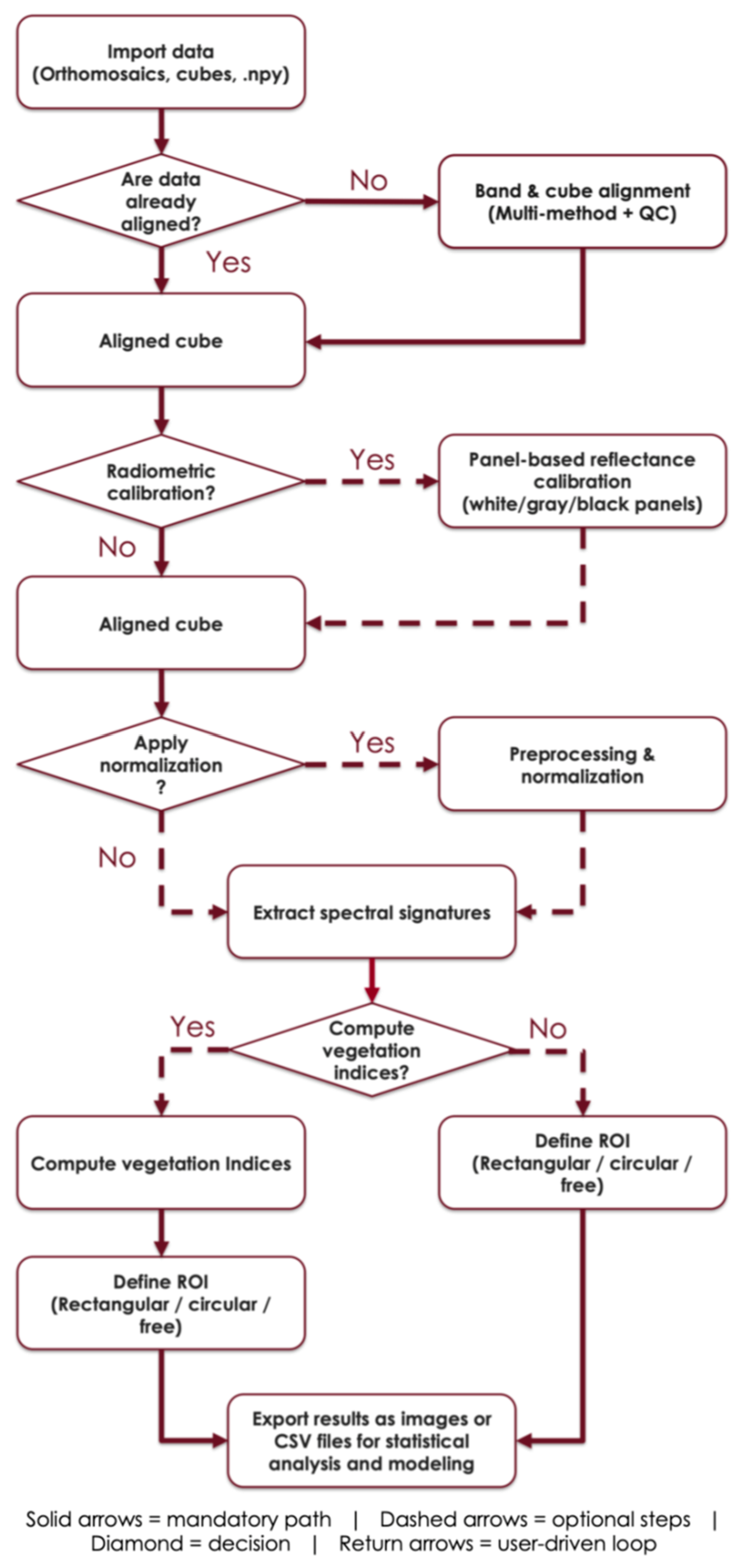
- Registration of individual bands: In the “Import” tab of the main interface, the “Import non-georeferenced. The .tif bands” button opens the cadastrar_bandas_gui() wizard, allowing the user to select the .tif files corresponding to the different bands of a sensor to register their wavelengths. The interface then asks whether the user wants to run the alignment immediately; if confirmed, it calls alinhar_a_partir_do_cadastro_gui() to align and stack the bands into a spectral cube.
- Import of hyperspectral cubes: The “Import .npy spectral cube” button prompts for a .npy file and its associated JSON files. The carregar_npy_com_interpolacao() method loads the data and allows the wavelengths to be adjusted, either manually or automatically.
- Import of multiband orthomosaics and GeoImport: For georeferenced images, a multiband orthomosaic (GeoTIFF/COG/JP2/VRT) can be imported using the “Import orthomosaic” button. The software loads the file and offers the option of performing a fine alignment of bands. If the user does not yet have an orthomosaic, the “GeoImport: import georeferenced. The .tif bands and create orthomosaic” button launches a wizard (GeoImport) that uses OpenDroneMap (ODM) via Docker to generate an orthomosaic from aerial images and then asks whether it should be aligned or not. This feature is essential for VANT-based or similar datasets.
3.2. Geometric Band Alignment
- Alignment of individual bands: In the “Alignment” tab, the “Align and stack imported the .tif bands” button calls the alinhar_a_partir_do_cadastro_gui() function, which uses the methods defined in metodos_alinhamento.py to align each band to a reference. The user can select the method (ORB, SIFT, AKAZE, ECC, Template Matching, MI, or SuperGlue) through internal dialogs. These methods rely on keypoints, similarity metrics, and homography estimation to generate a coherent spectral cube.
- Alignment of cubes or orthomosaics: The “Align cube/orthomosaic (.npy/GeoTIFF)” button calls alinhar_cubo_multimetodos_gui(). This procedure applies band alignment to existing data .npy cubes or orthomosaics, allowing the same set of algorithms to be used. If the user has already performed alignment during the import stage, this step can be skipped.
3.3. Radiometric Calibration and Preprocessing
- Panel-based calibration: During the import process, the software asks whether the user has reflectance values for each band and, if so, requests these values through a dialog in order to apply the correction (function _ui_pergunta_rho_por_banda() in funcoes_importacao.py). This correction ensures that the bands adequately represent the reflectance measured by the sensor.
- Preprocessing: The “Pre-processing” tab gathers tools for normalization, standardization, and signal smoothing. The user can select up to four methods in sequence, such as min–max normalization per band, z-score standardization, or Savitzky–Golay filtering, and apply them to the loaded cube. The result can be saved as a new .npy file together with a JSON file containing the wavelengths, or a previously processed cube can be loaded. This step ensures that differences in scale between bands and high-frequency noise do not influence subsequent analyses.
3.4. Selection of Regions of Interest (ROI) and Spectral Extraction
- Selection of bands for visualization: In the “Spectral Analysis” tab, the “Select bands for visualization” button opens a list of wavelengths to compose an RGB or monochromatic image. The selection determines which bands will be displayed on the screen.
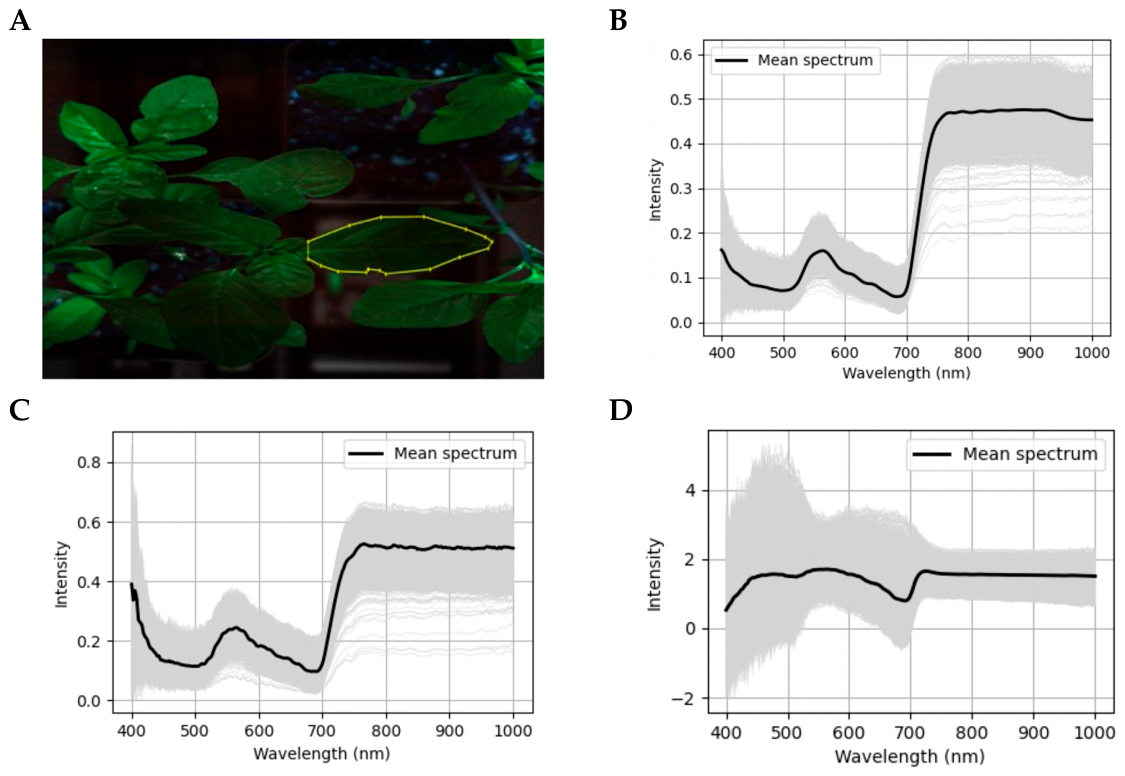
- For spectral data extraction, the ROI can be delimited by rectangular, elliptical, or polygonal tools (free selection), allowing the user to adjust the selection to the geometry of the analyzed target. After selection, the software converts the delimited area into a spatial mask and extracts the spectra corresponding to the valid pixels contained in the ROI. The spectra are organized in a matrix, in which an X ∈ Rn×p matrix is arranged so that each row represents a pixel and each column corresponds to a spectral band associated with the wavelength λj, with i = 1, …, ni = 1, …, n and j = 1, …, p.
- The user can export only the average spectrum of the ROI or the individual spectra of the pixels. When exporting by individual pixels is selected, two strategies are available: saving all pixels from the ROI or saving a random subsample. In random sampling, the user defines the number of pixels to be exported. The selection is performed without replacement, and the same pixel is not included more than once in the same export. When the number of pixels available in the ROI is less than or equal to the requested number, all pixels are exported, and this condition is communicated to the user.
- To ensure the reproducibility of the subsampling, the export routine allows specifying an optional random seed. When a seed is defined, the same ROI, the same number of pixels, and the same input configuration produce the same pixel selection in repeated runs. When the seed field is left blank, the subsampling remains stochastic. In all cases, the exported observations receive a user-defined class label, and the final file is saved in CSV format with a header composed of wavelengths and a final column identifying the class.
3.5. Vegetation Index Computation and Export of Metrics
- Computation of standard vegetation indices: The indices_vegetacao.py module computes standard vegetation indices commonly used in agricultural remote sensing, including NDVI, GNDVI, NDRE, EVI, EVI2, SAVI, and OSAVI. These indices represent complementary spectral metrics, including normalized-difference indices, red-edge-based indices, soil-adjusted indices, and indices that incorporate or avoid the blue band depending on sensor availability.
- Automatic band selection: For standard indices, EasySpectra automatically selects the required bands based on the wavelength metadata associated with the imported cube. For each index, the software defines target spectral regions, such as blue, green, red, red-edge, and near-infrared, and identifies the available band closest to each required wavelength. The index is computed only when all required bands are available within a predefined wavelength-tolerance limit (the default value is 70 nm).
- Band-availability verification: When one or more required bands are missing or outside the accepted tolerance, the corresponding index is not computed, and the software informs the user which indices were generated and which were skipped due to missing or incompatible bands. This procedure prevents the automatic calculation of vegetation indices using inappropriate spectral combinations and makes explicit that the applicability of each index depends on the spectral configuration of the sensor and the quality of the wavelength metadata.
- Spectral requirements of each index: NDVI, SAVI, OSAVI, and EVI2 depend mainly on red and near-infrared bands, whereas EVI also requires a blue band, GNDVI requires a green band, and NDRE requires a red-edge band. Therefore, indices are only generated when the input data provide sufficient spectral support for their physical interpretation. This is particularly important when working with datasets from different sensors, because not all sensors contain the same spectral bands or the same central wavelengths.
- Creation of custom vegetation indices: In addition to the standard indices implemented in the interface, EasySpectra allows the creation of custom indices through user-defined mathematical expressions. Each band of the spectral cube is referenced by the identifier b0, b1, b2, …, bn, where the number corresponds to the band position in the imported cube. To assist expression construction, the interface displays the list of available bands and their respective wavelengths, allowing the user to select appropriate bands to reproduce known indices or test new spectral combinations.
- Syntax and restrictions for custom expressions: Custom expressions follow mathematical syntax compatible with Python/NumPy (Table 1). The routine accepts basic arithmetic operations, such as addition, subtraction, multiplication, division, and exponentiation, as well as selected mathematical functions, including sine, cosine, tangent, exponential, logarithm, square root, absolute value, and conditional expressions. The expression must return a two-dimensional array with the same spatial dimensions as the original image. If the expression generates a mathematical error, uses non-existent bands, or returns a structure with incompatible dimensions, the index is not created and the user receives an error message. For example, a normalized-difference index can be entered as (b8 − b3)/(b8 + b3 + 1 × 10⁻¹²), where the small term added to the denominator avoids division by zero.
- Visualization, ROI extraction, and export: After calculation, both standard and custom indices are stored in the same internal structure (Table 1). Therefore, they can be visualized as images, submitted to ROI selection, and exported as mean values or as individual pixel values. When multiple indices are selected for the same ROI, the software organizes the values into separate columns in the CSV file and preserves the user-defined class label. Exporting individual pixel values also allows random sampling without replacement and the use of an optional random seed, ensuring that the same pixel selection can be reproduced when needed.
3.6. Dataset Generation and Final Steps
4. Use Cases and Experimental Results
5. Current Limitations and Development Perspectives
6. Availability, Code, and Maintenance
7. Conclusions
Author Contributions
Funding
Institutional Review Board Statement
Informed Consent Statement
Data Availability Statement
Acknowledgments
Conflicts of Interest
References
- Lu, B.; Dao, P.D.; Liu, J.; He, Y.; Shang, J. Recent advances of hyperspectral imaging technology and applications in agriculture. Remote Sens. 2020, 12, 2659. [Google Scholar] [CrossRef] [Scilit]
- Ronay, I.; Lati, R.N.; Kizel, F. Weed Species Identification: Acquisition, Feature Analysis, and Evaluation of a Hyperspectral and RGB Dataset. Remote Sens. 2024, 16, 2808. [Google Scholar] [CrossRef] [Scilit]
- Alkhaled, A.Y.; Townsend, P.A.; Heberlein, B.C.; Hills, W.B.; Wang, Y. Using hyperspectral remote sensing to develop new insights into precision nitrogen management for potato production. Smart Agric. Technol. 2025, 12, 101372. [Google Scholar] [CrossRef] [Scilit]
- Qiao, L.; Fan, J.; Franco, J.G.; Duff, A.J.; Diaz-Vallejo, E.J.; Yu, T.; Zhang, Z. Hyperspectral reconstruction based on low-cost UAV RGB imagery for alfalfa yield prediction. Biosyst. Eng. 2026, 261, 104328. [Google Scholar] [CrossRef] [Scilit]
- Colovic, M.; Yu, K.; Todorovic, M.; Cantore, V.; Hamze, M.; Albrizio, R.; Stellacci, A.M. Hyperspectral vegetation indices to assess water and nitrogen status of sweet maize crop. Agronomy 2022, 12, 2181. [Google Scholar] [CrossRef] [Scilit]
- Naik, B.B.; Naveen, H.R.; Sreenivas, G.; Choudary, K.K.; Devkumar, D.; Adinarayana, J. Identification of water and nitrogen stress indicative spectral bands using hyperspectral remote sensing in maize during post-monsoon season. J. Indian Soc. Remote Sens. 2020, 48, 1787–1795. [Google Scholar] [CrossRef] [Scilit]
- Feng, L.; Wu, B.; He, Y.; Zhang, C. Hyperspectral imaging combined with deep transfer learning for rice disease detection. Front. Plant Sci. 2021, 12, 693521. [Google Scholar] [CrossRef] [Scilit]
- Zhang, X.; Vinatzer, B.A.; Li, S. Hyperspectral imaging analysis for early detection of tomato bacterial leaf spot disease. Sci. Rep. 2024, 14, 27666. [Google Scholar] [CrossRef] [Scilit] [PubMed]
- Mensah, B.; Betitame, K.; Zhang, Y.; Peters, T.; Ram, B.G.; Jalal, M.; Sun, X. Hyperspectral imaging and machine learning for herbicide-resistant kochia identification in sugarbeet. J. Agric. Food Res. 2025, 23, 102284. [Google Scholar] [CrossRef] [Scilit]
- Bakhshipour, A.; Ramezanpour, S. Harnessing hyperspectral imaging and machine learning techniques for accurate discrimination of peanut plants and weeds. Sci. Rep. 2025, 15, 44478. [Google Scholar] [CrossRef] [Scilit]
- Estrada, P.V.; Estrada, J.B.; Valdez-Herrera, J.; Shrestha, A. Rapid detection of ALS inhibitor-resistant weeds using full-spectrum imaging and a CNN. Weed Technol. 2025, 39, e20. [Google Scholar] [CrossRef] [Scilit]
- Zhang, T.; Huang, Y.; Reddy, K.N.; Yang, P.; Zhao, X.; Zhang, J. Using machine learning and hyperspectral images to assess damages to corn plant caused by glyphosate and to evaluate recoverability. Agronomy 2021, 11, 583. [Google Scholar] [CrossRef] [Scilit]
- Niu, Z.; Rehman, T.; Young, J.; Johnson, W.G.; Yokoo, T.; Young, B.; Jin, J. Hyperspectral analysis for discriminating herbicide site of action. Sensors 2023, 23, 9300. [Google Scholar] [CrossRef] [Scilit] [PubMed]
- Niu, Z.; Young, J.; Johnson, W.G.; Young, B.; Wei, X.; Jin, J. Early detection of dicamba and 2,4-D herbicide drifting injuries on soybean with a new spatial-spectral algorithm. Remote Sens. 2023, 15, 5771. [Google Scholar] [CrossRef] [Scilit]
- Ram, B.G.; Gc, S.; Sun, X. Herschel Vision: A hyperspectral image processing software for data preparation in machine learning pipelines. SoftwareX 2025, 30, 102089. [Google Scholar] [CrossRef] [Scilit]
- Ram, B.G.; Mettler, J.; Howatt, K.; Ostlie, M.; Sun, X. WeedCube: Proximal hyperspectral image dataset of crops and weeds for machine learning applications. Data Br. 2024, 56, 110837. [Google Scholar] [CrossRef] [Scilit]
- Gaidel, A.V.; Podlipnov, V.; Ivliev, N.; Paringer, R.; Ishkin, P.; Mashkov, S.; Skidanov, R. Agricultural plant hyperspectral imaging dataset. Comput. Opt. 2023, 47, 442–450. [Google Scholar] [CrossRef] [Scilit]
- Wang, Z.; Lin, T.; Li, H.; Yin, Y.; Suo, Y.; Yang, H.; Li, Y.; Cai, F.; Xiao, L. Proximal hyperspectral detection of rice and weed: Characterization and discriminant analysis. Front. Plant Sci. 2025, 16, 1685985. [Google Scholar] [CrossRef] [Scilit]
- Panozzo, J.; Guthridge, K.M.; Panozzo, J.; Ludlow, E.J.; Spangenberg, G.C.; Rochfort, S.J. Near-Infrared Hyperspectral Imaging Pipelines for Pasture Seed Quality Evaluation: An Overview. Sensors 2022, 22, 1981. [Google Scholar] [CrossRef] [Scilit]
- Nex, F.; Remondino, F. UAV for 3D mapping applications: A review. Appl. Geomat. 2014, 6, 1–15. [Google Scholar] [CrossRef] [Scilit]
- Turner, D.; Lucieer, A.; Watson, C. An automated technique for generating georectified mosaics from ultra-high resolution UAV imagery. Remote Sens. 2014, 6, 429–455. [Google Scholar]
- James, M.R.; Robson, S.; d’Oleire-Oltmanns, S.; Niethammer, U. Optimising UAV topographic surveys. Earth Surf. Process. Landf. 2017, 42, 1160–1171. [Google Scholar]
- Remondino, F.; Spera, M.G.; Nocerino, E.; Menna, F.; Nex, F. State of the art in UAV photogrammetry for mapping and 3D modeling of landscapes and structures. ISPRS J. Photogramm. Remote Sens. 2017, 123, 144–166. [Google Scholar]
- Smith, M.W.; Carrivick, J.L.; Quincey, D.J. Structure from motion photogrammetry in physical geography. Prog. Phys. Geogr. 2016, 40, 247–275. [Google Scholar] [CrossRef] [Scilit]
- Aasen, H.; Honkavaara, E.; Lucieer, A.; Zarco-Tejada, P.J. Quantitative remote sensing at ultra-high resolution with UAV spectroscopy: A review of sensor technology, measurement procedures, and data correction workflows. Remote Sens. Environ. 2018, 216, 374–392. [Google Scholar] [CrossRef] [Scilit]
- Wang, C.; Myint, S.W.; Wang, Z.; Song, J. Spatiotemporal monitoring of urban expansion and its impacts on vegetation using high-resolution UAV imagery and object-based image analysis. ISPRS J. Photogramm. Remote Sens. 2020, 164, 38–49. [Google Scholar]
- Fonseka, C.L.I.S.; Halloluwa, T.; Hewagamage, K.P.; Rathnayake, U.; Bandara, R.M.U.S. A dataset of unmanned aerial vehicle multispectral images acquired over a field to identify nitrogen requirements. Data Br. 2024, 54, 110479. [Google Scholar] [CrossRef] [Scilit] [PubMed]
- Suomalainen, J.; Oliveira, R.A.; Hakala, T.; Koivumäki, N.; Markelin, L.; Näsi, R.; Honkavaara, E. Direct reflectance transformation methodology for drone-based hyperspectral imaging. Remote Sens. Environ. 2021, 266, 112691. [Google Scholar] [CrossRef] [Scilit]
- Deng, L.; Mao, Z.; Li, X.; Hu, Z.; Duan, F.; Yan, Y. UAV-based multispectral remote sensing for precision agriculture: A comparison between different cameras. ISPRS J. Photogramm. Remote Sens. 2018, 146, 124–136. [Google Scholar] [CrossRef] [Scilit]
- Zhu, H.; Huang, Y.; An, Z.; Zhang, H.; Han, Y.; Zhao, Z.; Li, F.; Zhang, C.; Hou, C. Assessing radiometric calibration methods for multispectral UAV imagery and the influence of illumination, flight altitude and flight time on reflectance, vegetation index and inversion of winter wheat AGB and LAI. Comput. Electron. Agric. 2024, 208, 108821. [Google Scholar] [CrossRef] [Scilit]
- Yan, C. A review on spectral data preprocessing techniques for machine learning and quantitative analysis. iScience 2025, 28, 112759. [Google Scholar] [CrossRef] [Scilit]
- Cao, F.; Yang, Z.; Ren, J.; Jiang, M.; Ling, W.-K. Does normalization methods play a role for hyperspectral image classification? arXiv 2017, arXiv:1710.0293932. [Google Scholar] [CrossRef] [Scilit]
- Ram, B.G.; Oduor, P.; Igathinathane, C.; Howatt, K.; Sun, X. A systematic review of hyperspectral imaging in precision agriculture. Comput. Electron. Agric. 2024, 222, 109037. [Google Scholar] [CrossRef] [Scilit]
- Mensah, B.; Rai, N.; Betitame, K.; Sun, X. Advances in weed identification using hyperspectral imaging: A comprehensive review. J. Agric. Food Res. 2024, 18, 101388. [Google Scholar] [CrossRef] [Scilit]
- Zhang, G.; Abdulla, W. Optimizing hyperspectral imaging classification performance with CNN and batch normalization. Appl. Spectrosc. Rev. 2023, 1, 27551857231204622. [Google Scholar] [CrossRef] [Scilit]
- Hong, D.; Li, C.; Yokoya, N.; Zhang, B.; Jia, X.; Plaza, A.; Gamba, P.; Benediktsson, J.A.; Chanussot, J. Hyperspectral imaging. Nat. Rev. Methods Primers 2026, 6, 19. [Google Scholar] [CrossRef] [Scilit]
- Mazdeyasna, S.; Arefin, M.S.; Fales, A.; Leavesley, S.J.; Pfefer, T.J.; Wang, Q. Evaluating normalization methods for robust spectral performance assessments of hyperspectral imaging cameras. Biosensors 2025, 15, 20. [Google Scholar] [CrossRef] [Scilit]






| Functionality | User-Defined Parameter | Rule Implemented in EasySpectra |
|---|---|---|
| ROI export | Mean or individual pixels | Exports one mean spectrum/index value or one row per valid pixel |
| Random sampling | Number of pixels | Sampling without replacement |
| Random sampling | Random seed | Optional integer seed for reproducible pixel selection |
| Small ROI | Requested pixels > available pixels | All available pixels are exported |
| Custom index | Band identifiers | Bands are referenced as b0, b1, …, bn |
| Custom index | Mathematical expression | Python/NumPy-compatible expression returning a 2D array |
| Custom index | Invalid expression | Index is not created and an error message is shown |
| NDVI | EVI2 | SAVI | ||||
| WebOMD | Easyspectra | WebOMD | Easyspectra | WebOMD | Easyspectra | |
| Area | μ/σ | μ/σ | μ/σ | μ/σ | μ/σ | μ/σ |
| 1 | 0.43/0.09 | 0.40/0.07 | 0.40/0.08 | 0.37/0.06 | 0.47/0.10 | 0.44/0.08 |
| 2 | 0.37/0.08 | 0.37/0.08 | 0.34/0.07 | 0.34/0.07 | 0.41/0.09 | 0.41/0.09 |
| 3 | 0.32/0.16 | 0.30/0.11 | 0.29/0.15 | 0.28/0.10 | 0.35/0.18 | 0.33/0.12 |
| 4 | 0.26/0.11 | 0.28/0.09 | 0.24/0.10 | 0.26/0.08 | 0.29/0.12 | 0.31/0.10 |
| 5 | 0.23/0.14 | 0.21/0.12 | 0.21/0.13 | 0.19/0.11 | 0.25/0.15 | 0.23/0.13 |
| 6 | 0.39/0.12 | 0.36/0.08 | 0.36/0.11 | 0.33/0.07 | 0.43/0.13 | 0.40/0.09 |
| 7 | 0.41/0.11 | 0.39/0.08 | 0.38/0.10 | 0.36/0.07 | 0.45/0.12 | 0.43/0.09 |
| 8 | 0.39/0.13 | 0.42/0.08 | 0.36/0.12 | 0.39/0.07 | 0.43/0.14 | 0.46/0.09 |
| 9 | 0.43/0.10 | 0.39/0.09 | 0.40/0.09 | 0.36/0.08 | 0.47/0.11 | 0.43/0.10 |
| 10 | 0.24/0.21 | 0.22/0.14 | 0.22/0.19 | 0.20/0.13 | 0.26/0.23 | 0.24/0.15 |
| 11 | 0.37/0.17 | 0.30/0.10 | 0.34/0.16 | 0.28/0.09 | 0.41/0.19 | 0.33/0.11 |
| 12 | 0.18/0.15 | 0.16/0.09 | 0.17/0.14 | 0.15/0.08 | 0.20/0.17 | 0.18/0.10 |
| 13 | 0.08/0.13 | 0.09/0.10 | 0.07/0.12 | 0.08/0.09 | 0.09/0.14 | 0.10/0.11 |
| OSAVI | GNDVI | NDRE | ||||
| WebOMD | Easyspectra | WebOMD | Easyspectra | WebOMD | Easyspectra | |
| Area | μ/σ | μ/σ | μ/σ | μ/σ | μ/σ | μ/σ |
| 1 | 0.39/0.08 | 0.36/0.06 | 0.37/0.08 | 0.34/0.06 | 0.26/0.05 | 0.24/0.04 |
| 2 | 0.34/0.07 | 0.34/0.07 | 0.31/0.07 | 0.31/0.07 | 0.22/0.05 | 0.22/0.05 |
| 3 | 0.29/0.15 | 0.27/0.10 | 0.27/0.14 | 0.26/0.09 | 0.19/0.10 | 0.18/0.07 |
| 4 | 0.24/0.10 | 0.25/0.08 | 0.22/0.09 | 0.24/0.08 | 0.16/0.07 | 0.17/0.05 |
| 5 | 0.21/0.13 | 0.19/0.11 | 0.20/0.12 | 0.18/0.10 | 0.14/0.08 | 0.13/0.07 |
| 6 | 0.35/0.11 | 0.33/0.07 | 0.33/0.10 | 0.31/0.07 | 0.23/0.07 | 0.22/0.05 |
| 7 | 0.37/0.10 | 0.35/0.07 | 0.35/0.09 | 0.33/0.07 | 0.25/0.07 | 0.23/0.05 |
| 8 | 0.35/0.12 | 0.38/0.07 | 0.33/0.11 | 0.36/0.07 | 0.23/0.08 | 0.25/0.05 |
| 9 | 0.39/0.09 | 0.35/0.08 | 0.37/0.09 | 0.33/0.08 | 0.26/0.06 | 0.23/0.05 |
| 10 | 0.22/0.19 | 0.20/0.13 | 0.20/0.18 | 0.19/0.12 | 0.14/0.13 | 0.13/0.08 |
| 11 | 0.34/0.15 | 0.27/0.09 | 0.31/0.14 | 0.26/0.09 | 0.22/0.10 | 0.18/0.06 |
| 12 | 0.16/0.14 | 0.15/0.08 | 0.15/0.13 | 0.14/0.08 | 0.11/0.09 | 0.10/0.05 |
| 13 | 0.07/0.12 | 0.08/0.09 | 0.07/0.11 | 0.08/0.09 | 0.05/0.08 | 0.05/0.06 |
| Preprocessing Method | Main Effect on Spectral Data | Recommended Use | Main Caution |
|---|---|---|---|
| Radiometric correction | Converts raw digital values toward reflectance-like values | Quantitative comparison among images and vegetation-index computation | Depends on correct reference panels or reliable metadata |
| Min–max normalization | Rescales values to a common range | Reducing scale differences among bands or images | Sensitive to extreme values |
| Z-score standardization | Centers and scales each variable by mean and standard deviation | Machine-learning models sensitive to variable scale | May reduce absolute reflectance interpretation |
| SNV | Centers and scales each individual spectrum | Reducing scatter and multiplicative effects | Can remove magnitude differences that may be biologically relevant |
| Savitzky–Golay smoothing | Reduces high-frequency spectral noise | Preserving spectral shape while reducing noise | Excessive smoothing can attenuate narrow spectral features |
Disclaimer/Publisher’s Note: The statements, opinions and data contained in all publications are solely those of the individual author(s) and contributor(s) and not of MDPI and/or the editor(s). MDPI and/or the editor(s) disclaim responsibility for any injury to people or property resulting from any ideas, methods, instructions or products referred to in the content. |
© 2026 by the authors. Licensee MDPI, Basel, Switzerland. This article is an open access article distributed under the terms and conditions of the Creative Commons Attribution (CC BY) license.
Share and Cite
Souza, M.d.F.; Almeida, É.V.d.; Borkowski, J.E.; Basílio, F.d.P.; Braz, G.B.P.; Reginaldo, L.T.R.T.; Carmo, E.L.d.; Lins, H.A. EasySpectra: An Integrated Open-Access Platform for Spectral Image Analysis. AgriEngineering 2026, 8, 224. https://doi.org/10.3390/agriengineering8060224
Souza MdF, Almeida ÉVd, Borkowski JE, Basílio FdP, Braz GBP, Reginaldo LTRT, Carmo ELd, Lins HA. EasySpectra: An Integrated Open-Access Platform for Spectral Image Analysis. AgriEngineering. 2026; 8(6):224. https://doi.org/10.3390/agriengineering8060224
Chicago/Turabian StyleSouza, Matheus de Freitas, Éder Vaz de Almeida, Junior Eugenio Borkowski, Franco de Paula Basílio, Guilherme Braga Pereira Braz, Lais Tereza Rego Torquato Reginaldo, Eduardo Lima do Carmo, and Hamurábi Anízio Lins. 2026. "EasySpectra: An Integrated Open-Access Platform for Spectral Image Analysis" AgriEngineering 8, no. 6: 224. https://doi.org/10.3390/agriengineering8060224
APA StyleSouza, M. d. F., Almeida, É. V. d., Borkowski, J. E., Basílio, F. d. P., Braz, G. B. P., Reginaldo, L. T. R. T., Carmo, E. L. d., & Lins, H. A. (2026). EasySpectra: An Integrated Open-Access Platform for Spectral Image Analysis. AgriEngineering, 8(6), 224. https://doi.org/10.3390/agriengineering8060224