2.1. Participants
Participants for this study were recruited via university communication channels as well as through personal contacts outside the university. This recruitment method resulted in a diverse range of ages and professional backgrounds. The inclusion criteria for participation were normal or corrected-to-normal vision and the absence of any known neurological or musculoskeletal disorders.
A total of 32 healthy adults, consisting of 16 females and 16 males, agreed to participate in the study. Their ages ranged from 18 to 58, with a mean of 32.4 years (
) and a median of 27 years. Out of 32 participants, 29 (or 90.6%) were right-handed. The sample size of 32 is in line with prior controlled studies on Fitts’ law in VR and 3D interaction, which typically include between 12 and 33 participants (e.g., [
7,
15,
16,
17,
21]). It also aligns with recent recommendations suggesting a minimum of 18 participants for XR studies [
20]. The within-subject design, in which each participant contributed data across all conditions, further supports reliable detection of meaningful effects with the chosen sample size.
To assess prior familiarity with relevant technologies, participants were asked to rate their experience with video gaming and virtual reality (VR) on a 5-point Likert scale, ranging from 1 (no prior experience) to 5 (extensive experience). Video gaming experience was included as it may indicate familiarity with interactive 3D environments, spatial navigation, and hand–eye coordination, which can influence how users interact with VR systems even without prior VR exposure. The corresponding results are presented in
Table 1. As shown, most participants reported limited or no prior experience with VR, indicating that the majority of the sample consisted of novice VR users. In contrast, prior video gaming experience was more evenly distributed across levels, with over half of participants reporting moderate to extensive familiarity. This suggests that while many participants had general experience with interactive digital environments and input devices, their direct exposure to VR systems was limited.
2.2. Apparatus
This study was conducted using a Meta Quest 3 VR headset (Meta Platforms, Inc., Menlo Park, CA, USA) and its native controllers. All tasks and virtual environments were developed in Unity 6.2, using the OpenXR plugin as the XR backend. Unity’s XR Interaction Toolkit (v3.2.1) and XR Hands package (v1.6.2) were used to implement two interaction modalities: controller-based interaction and hand tracking.
During experimental sessions, the headset was connected via the official Meta Quest Link USB-C cable to a laptop with an Intel Core i7 processor and an NVIDIA GeForce RTX 2060 GPU. The virtual environment was executed in the Unity Editor’s Play Mode, with rendering performed on the host computer and streamed to the headset via Quest Link. This setup allowed real-time supervision of experimental logs, monitoring for unexpected behavior, and rapid intervention in case of technical difficulties.
Experimental data, including task performance metrics and event timestamps, were logged using custom C# scripts within Unity. Data were recorded at the application frame rate, with timestamps obtained using Unity’s internal timing functions. Survey data and participant feedback were collected using digital forms immediately after each experimental session and subsequently analyzed using Python 3.14 scripts.
2.4. Interaction Modality Implementation
Each task used distinct interaction techniques tailored to its objectives. In Task A, the controller-based condition required participants to use a handheld controller with a small spherical pointer ( mm) rendered at its tip to indicate the pointing position. Targets were selected by placing the spherical pointer within the target bounds and pressing the controller’s trigger button. In the hand tracking condition, an identical pointing sphere was rendered between the thumb and index finger, while selections were performed using a pinch gesture. Specifically, a selection was triggered when the pinch strength (0–1 range) exceeded a threshold of 0.8.
In Task B, controller-based interaction relied on the controller’s side grip button for grasping and releasing the object. In the hand tracking condition, objects were manipulated using a pinch-based gesture, with an activation threshold of 0.8 for both grasp and release actions. No additional pointing sphere was rendered in Task B, as it was designed to involve direct object manipulation. The hand tracking condition in Task B was accompanied by visual feedback when the virtual fingers were within a 3 cm radius of the tool, as well as upon a successful grasp. In the controller condition, haptic feedback was provided when the controller entered the same proximity zone, as well as upon grasp and release.
The visual representations and interaction settings for both controllers and hand tracking were based on the default configurations provided by the XR Interaction Toolkit, using the XR Origin Hands (XR Rig) setup. Only minor adjustments were made, including disabling non-essential interaction modes and adapting the default grab interaction to a pinch-based selection. This enabled object manipulation whenever the index finger and thumb were brought together, making it independent of the overall hand pose.
2.5. Task A: Multi-Directional Tapping Task in 3D
2.5.1. Task Design
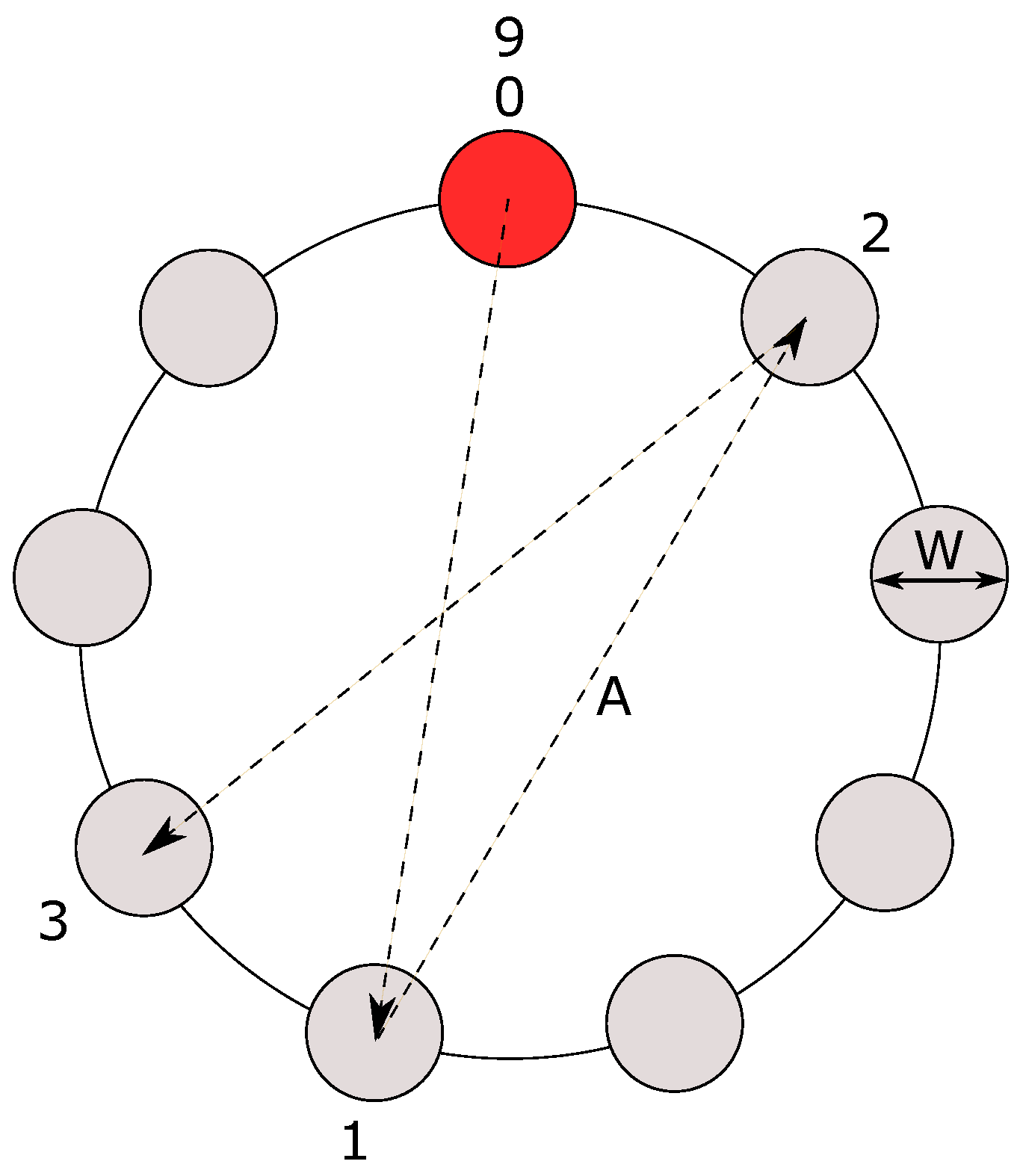
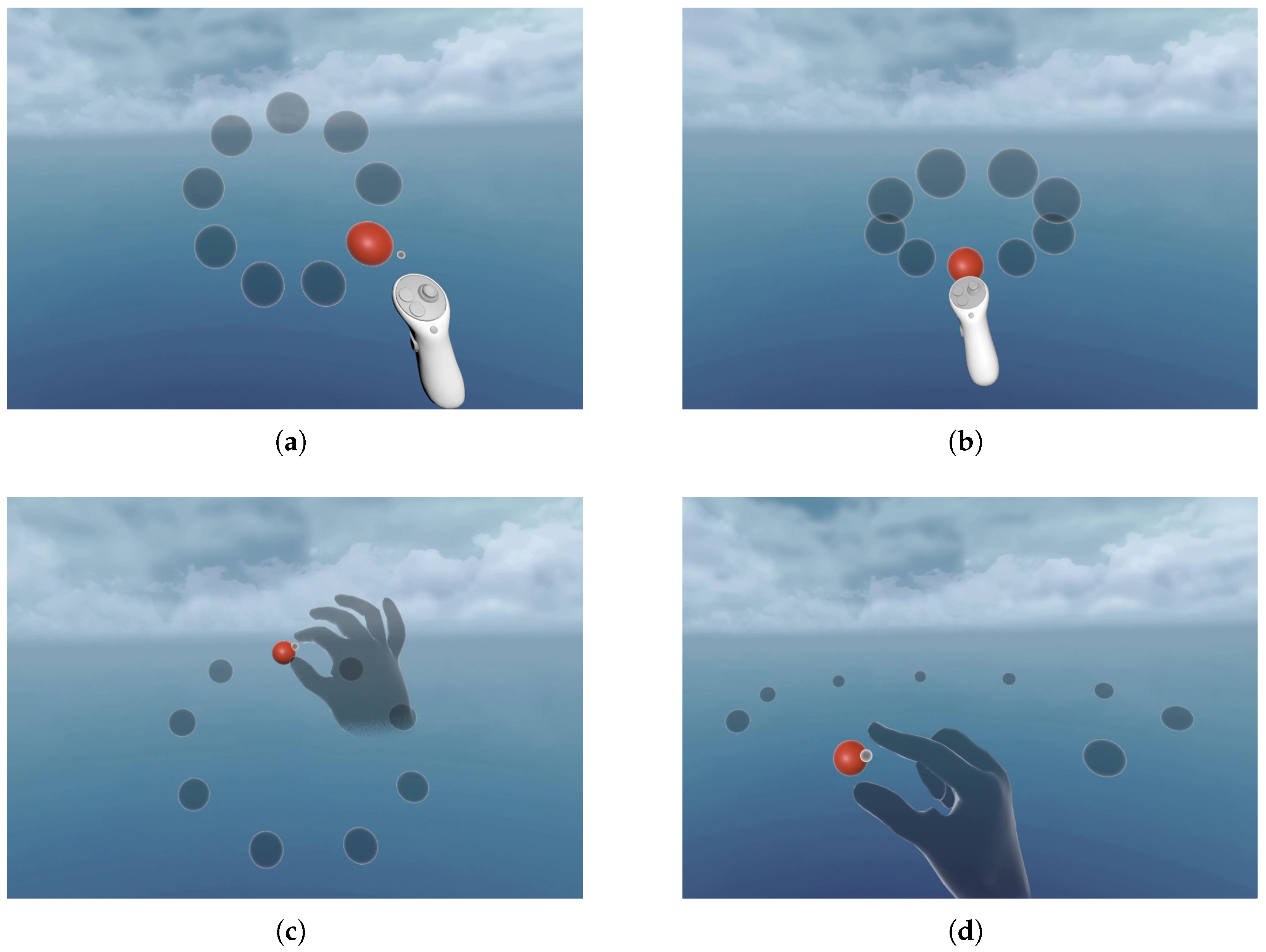
The first task was a 3D adaptation of a classic 2D multi-directional tapping test specified in ISO 9241-411 [
5]. In the standard test, circular targets of equal width
W are evenly arranged around the circumference of an imaginary circle, forming a sequence (
Figure 1). The distances between successive targets are defined as amplitude
A and remain constant within the sequence. The user must sequentially select highlighted targets by moving a pointer across the circle.
The difficulty of each movement is quantified using the index of difficulty (
), defined according to the Shannon formulation as follows:
In the equation above, A denotes the movement amplitude and W the target width. This measure represents the information-theoretic difficulty of the pointing task and is commonly used to model the relationship between movement time and task difficulty in Fitts’ law studies.
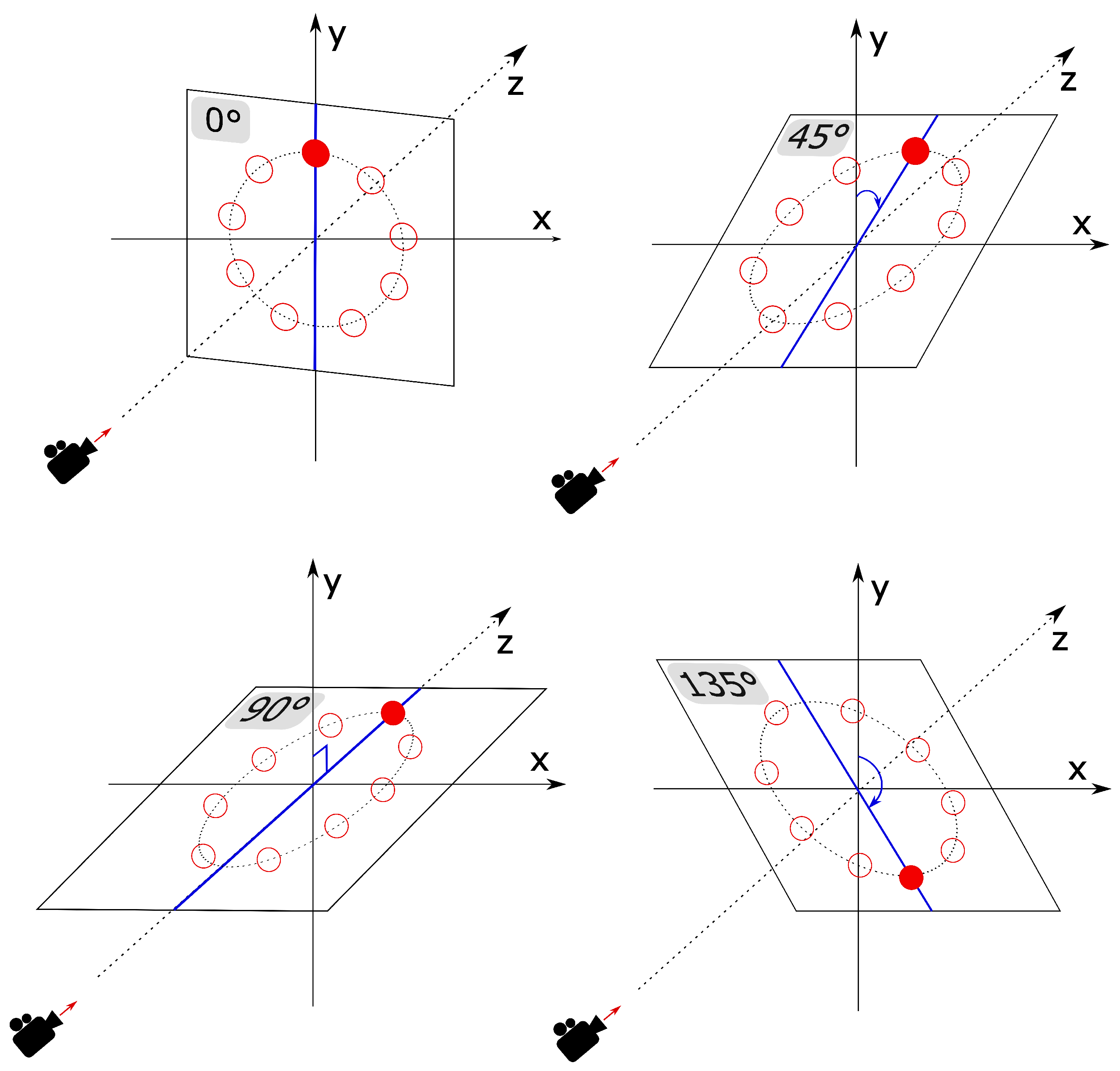
This study extends the standard test by using spherical instead of circular targets and arranging them along the great circle of an imaginary sphere. The great circle is then rotated about the sphere’s x-axis (the global right-pointing axis) by
,
,
, and
, resulting in four target-plane arrangements with the same
, covering the full range of motion within the available 3D space (
Figure 2).
Each sequence comprised 9 spherical targets evenly arranged in the standard multi-directional circular layout. An odd number of targets was used throughout the task to ensure the same movement amplitude for all trials in a sequence, as emphasized and suggested by Roig-Maimó et al. [
22]. The diameter
d of the imaginary great circle was derived from the desired movement amplitude
A and the number of targets
n using the formula proposed by Roig-Maimó:
The initial selectable target was positioned at (at the top of the layout). Consecutive selections (trials) alternated in a clockwise direction between opposite targets to maintain a constant movement amplitude, in accordance with the standard 2D task.
Each sequence had to be completed in a single continuous run (without breaks), as selection time was recorded for every click. The sequence was completed when the initial target was selected for the second time. For a 9-target sequence, this required a total of 10 target selections to collect 9 valid trials. A valid trial requires knowing both the “from” and “to” selection coordinates, as well as the measured movement time between the two consecutive selections.
Each sequence was repeated four times, with the circular layout rotated clockwise around the x-axis by an additional
each time. The four repetitions formed a block of sequences with the same
(i.e., the same width–amplitude combination). After the block was completed, the layout reset to
for the next
(the next block of sequences). Examples of different spatial configurations in Task A are shown in
Figure 3.
Target arrangements varied across three amplitude values (50 cm, 35 cm and 20 cm), and two target widths (5 cm and 2.5 cm), yielding six unique
conditions (
Table 2), according to Equation (
1).
Furthermore, the order of appearance of the blocks was randomized for each participant using their participant ID number as the seed. The order of x-axis rotations within the block was the same for all participants (starting from and ending at ). Finally, a total of 240 target selections (10 selections per sequence × 4 rotation angles × 6 conditions) were required to complete the experimental session for one interaction modality.
2.5.2. Training Session Design
The training session that preceded the actual experimental task consisted of a single sequence (one condition) presented at each of the four rotation angles. The layout included 7 spherical targets (instead of 9) with a target width of cm and a between-target amplitude of cm ( bits). These combinations give a total of 32 target selections (8 selections per sequence × 4 rotation angles) needed to complete the training session. Both the training session and the actual task were repeated twice (once per interaction modality).
2.5.3. Error Definition and Handling
An error was recorded when the pointer sphere’s volume did not overlap with the target’s bounds at the moment of selection. To indicate a mistake, a short 262 Hz sine-wave beep (250 ms duration) was played as auditory feedback, with the headset’s master volume set to a comfortable medium level.
Error-free trials were not enforced in this task; when participants misclicked or selected an incorrect target, the sequence immediately proceeded to the next target rather than requiring a retry. This design choice follows the recommendations of Amini et al. [
20], who argue that Fitts’ law tasks should approximate single ballistic movements, as repeated corrective actions may artificially inflate measured movement times. The only exception was the initial target in each sequence, which had to be successfully selected within its bounds to ensure a valid starting position and a consistent onset of movement time measurement.
2.5.4. Virtual Environment Implementation
The virtual environment for this task featured a calming light-blue background, with contrasting red selectable targets positioned in front of the viewer.
The XR Origin (the viewer) was positioned at the center of Unity’s global coordinate system (0, 0, 0), with the camera facing the z-axis. The camera’s y-offset was set to 1.36144 m and remained the same for all participants. The center of the main sphere’s great circle was set to a height of m, and its z-offset was 0.35 m from the camera. This setup allowed all target arrangements and rotations to remain comfortably within arm’s reach and within the participant’s field of view at all times.
A directional light was positioned 4.33 m above the participant’s head along the y-axis, and 3.88 m behind the participant along the z-axis, with an x-axis rotation of , uniformly illuminating the target plane. Shadows were disabled for this task to prevent visual occlusion and ensure an unobstructed view of the targets.
2.6. Task B: Tool Sorting Task
2.6.1. Task Design
The second task was designed as an applied interaction task to evaluate the transferability of predictive performance models derived from Task A. Unlike the multi-directional tapping used in Task A, which represents a standardized serial pointing task, Task B simulates a simple everyday warehouse scenario involving object manipulation. Participants were required to sort virtual tools into their corresponding containers (targets) as quickly and as accurately as possible. This scenario was chosen to represent a structured, ecologically meaningful task involving goal-directed placement actions, spatial coordination, and depth variation. At the same time, it maintains a controlled and repeatable interaction, while introducing a sequential task structure in which the order of subtasks is not predetermined. This design allows for more natural user behavior while still supporting systematic comparison with predictive models derived from the standardized task.
Three distinct task scenarios were designed to approximate the spatial arrangements and layout rotations from the standard task:
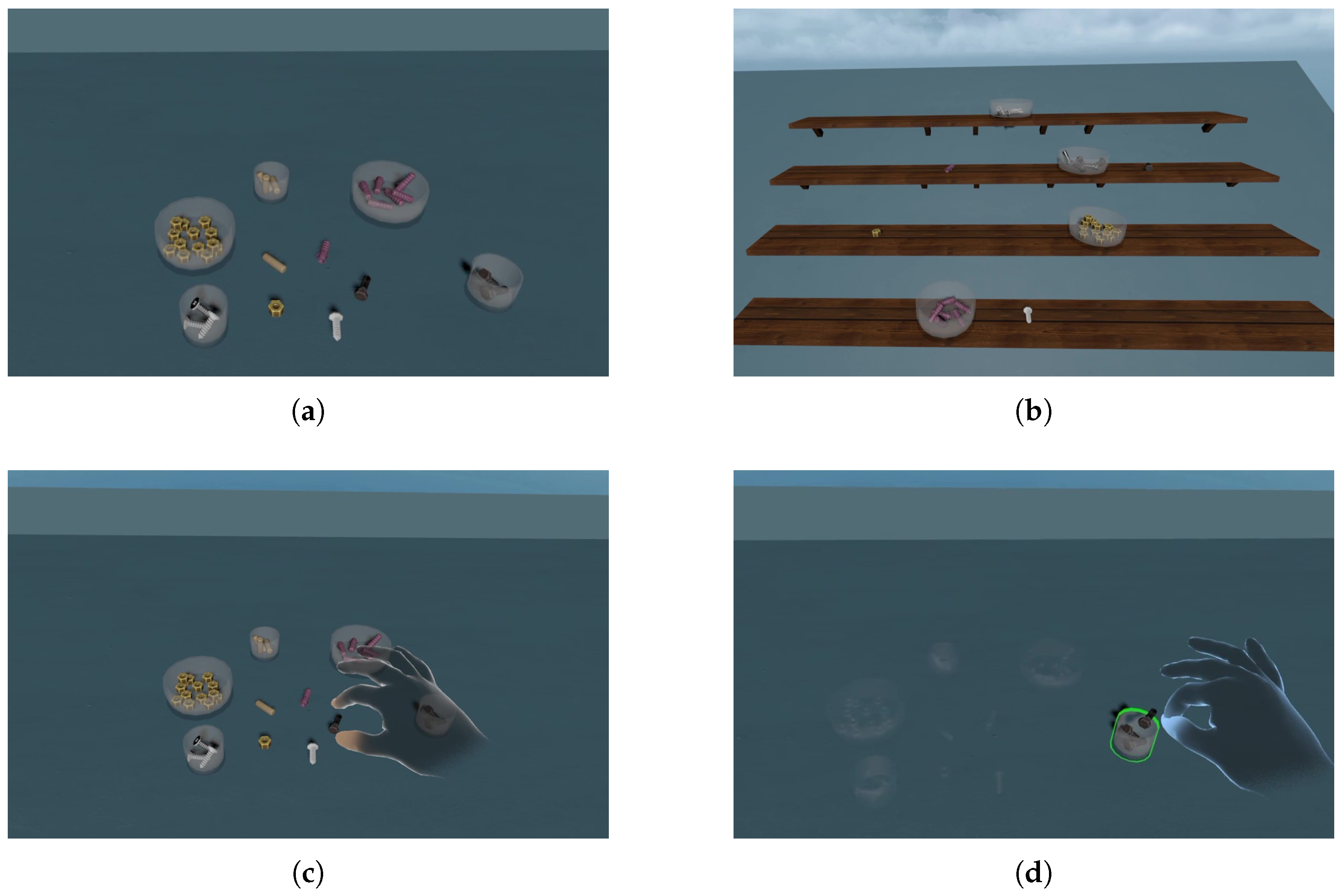
Table scenario: Tools were placed on a flat horizontal surface in front of the viewer, mimicking the
target layout used in Task A. Participants were required to pick up the tools from the center of the table and sort them into the appropriate containers (
Figure 4a,c,d).
Stepped Shelves scenario: Tools were arranged on an angled surface with four stepped shelves, forming an incline relative to the viewer. This approximated the
target layout used in Task A. The goal was the same as in the table task (
Figure 4b).
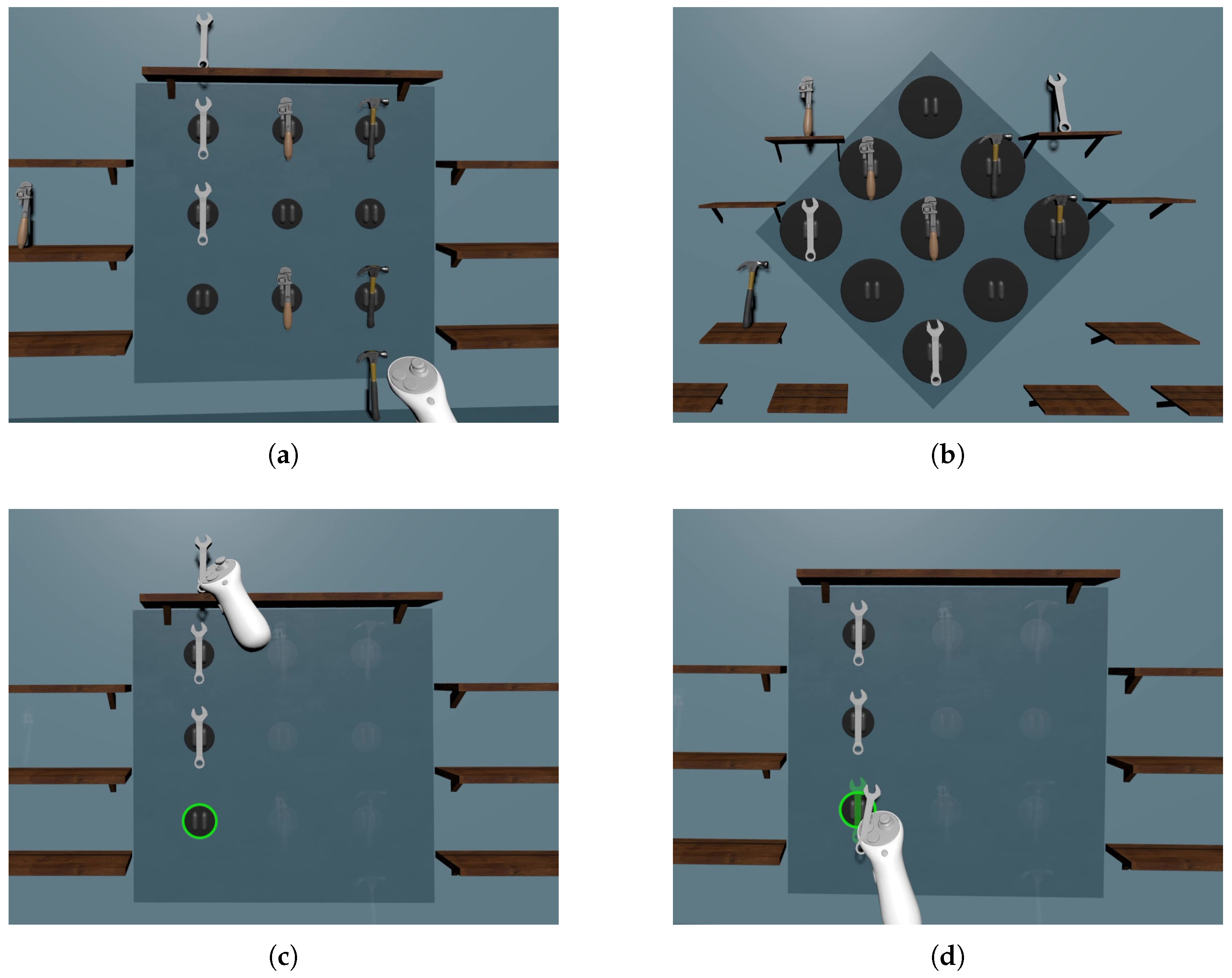
Vertical Tool Board scenario: Target hooks were mounted on a vertical central board and placed on the wall in front of the viewer, providing a spatial configuration that mirrors the
target layout used in Task A. Participants were required to move the tools from the surrounding shelves and snap them onto the empty hooks to complete the sequence of three (
Figure 5).
Several design patterns were implemented to minimize cognitive load and reduce reaction time, as advised in prior works [
20,
23]. When a tool was grasped, the correct target was visually highlighted, while the remaining tools and targets were temporarily dimmed to reduce visual clutter and emphasize the correct interaction (
Figure 4d and
Figure 5c). To further reduce reaction time, individual tools were assigned distinct colors and shapes within scenarios.
The tools used in Task B varied in shape and visual size, as shown in
Table 3. However, to ensure consistent interaction behavior across all movements and scenarios, the effective collision region used for target detection was standardized. Specifically, larger tools contained an inner collider with dimensions equivalent to those of the smallest tools, ensuring that the interaction area with the target remained constant across all tool types.
All scenarios in Task B were designed as discrete pointing tasks, meaning that each movement was performed independently, with a deterministic starting position (the tool’s center) and a clear endpoint (target acquisition). Therefore, participants were not required to immediately proceed to the next target and were free to choose the order in which they sorted the tools. This contrasts with serial tasks, where selections are made in a continuous sequence, as in Task A. This distinction was discussed and introduced by Soukoreff and MacKenzie [
4]. By employing a discrete rather than a serial target selection paradigm, Task B aimed to approximate a more natural interaction scenario while still allowing for reliable performance measurement.
Target arrangements for Task B varied across three amplitude values (30 cm, 20 cm and 10 cm), and two target widths (7.4 cm and 3.7 cm), yielding six
conditions, five of which were unique (
Table 4).
In this context, the amplitude A represents the distance between the center of the tool and the center of the target along the task axis. In the Vertical Board scenario, the target center was defined as the center of the circular hook, whereas in the remaining scenarios, it corresponded to the bottom center of the cylindrical container. The target width W was defined as the inner diameter of the cylindrical container or, in the Vertical Board scenario, as the diameter of the circular hook. This definition follows the standard Shannon formulation of Fitts’ law, ensuring consistency with the models derived in Task A and supporting their transferability to Task B, without explicitly incorporating object dimensions into the formulation. The height of the cylindrical container used in the Table and Stepped Shelves scenarios was constant ( cm), while its width varied depending on the condition.
The task was designed to cover 6
conditions and 8 approach angles (0–
in
increments) within each individual scenario. These angles correspond to four flexor and four extensor movements that would be performed in a comparable 8-target multi-dimensional serial task. The placement of each tool–target pair was deterministically defined to ensure full coverage of conditions, while accommodating the physical constraints of each movement. Specifically, angle coverage within each scenario was achieved through separate orthogonal (
,
,
,
) and diagonal (
,
,
,
) subtasks, as shown in
Figure 5a,b. For the Table scenario, the angles were grouped into upper-hemisphere directions (
,
,
,
,
), as shown in
Figure 4a, and lower-hemisphere directions (
,
,
). The main motivation for the deterministic arrangement was to display all tools and targets within the user’s reachable workspace and field of view, while ensuring no spatial overlap or interference between objects. Although the spatial configurations were fixed across participants, they were arranged to appear varied and non-repetitive to reduce ordering effects, increase realism, and maintain engagement during repetitive movements. Since the order of individual tool sorting within scenarios was not enforced, an additional layer of execution variability was introduced among participants. Additionally, the order in which scenarios appeared was randomized for each participant using their participant ID number as the seed.
A total of 144 target acquisitions (8 approach angles × 6 conditions × 3 scenarios) were required to complete the experimental session for one interaction modality in Task B.
2.6.2. Training Session Design
The training session for Task B consisted of eight targets for the Table and Stepped Shelves scenarios, and nine for the Vertical Board scenario, covering all approach angles. This amounts to a total of 25 target acquisitions needed to complete the training session. Both the training session and the actual task were repeated twice (once per interaction modality).
2.6.3. Error Definition and Handling
An error was recorded when a tool was released outside the designated target bounds, causing it to fall next to the container or away from the hook. Unlike the first task, Task B required error-free completion, meaning that each tool had to be placed correctly before proceeding. The motivation behind this approach was to reflect the behavior of real-life object manipulation tasks.
However, to maintain consistency with Task A, any corrective actions after an error, such as regrasping or repositioning the dropped tool, were not included in the recorded movement time. Therefore, the movement time for a trial was defined as the interval between the first successful grasp of the tool and its first release, regardless of whether that release resulted in correct placement.
Visual feedback about incorrect placements was provided naturally through the physics simulation; when released outside the target, the tool visibly fell outside the intended placement location. Since this response clearly indicated an error, no additional auditory feedback was provided.
2.6.4. Virtual Environment Implementation
Consistent with Task A, the viewer was positioned at the origin of the global coordinate system (0, 0, 0), with the camera facing the z-axis and its y-offset set to 1.36144 m. In the Table scenario, the top center of the table was 0.35 m away from the camera and 1 m above the ground. In the Vertical Tool Board scenario, the central board was positioned 1.318 m above the ground and slightly farther from the camera at m, ensuring that the entire setup remained fully within the participants’ field of view. In the Stepped Shelves scenario, the central board (located between the second and third shelf) was positioned 0.35 m from the camera and 1.105 m above the ground.
The directional light was positioned relative to the viewer in the same manner as in Task A. Shadows cast by the controller and the virtual hand were disabled to prevent visual occlusion of the tools and containers, while shadows cast by the tools were retained to enhance realism and support depth perception.
The tool models, containers, and shelving elements were obtained from the Unity Asset Store under standard asset licensing terms, and were modified to fit the requirements of the experimental task design. Supporting visual elements (e.g., table, walls, hooks, and central boards) were created directly in Unity using basic geometric primitives and simple materials.
2.7. Post-Experiment Survey
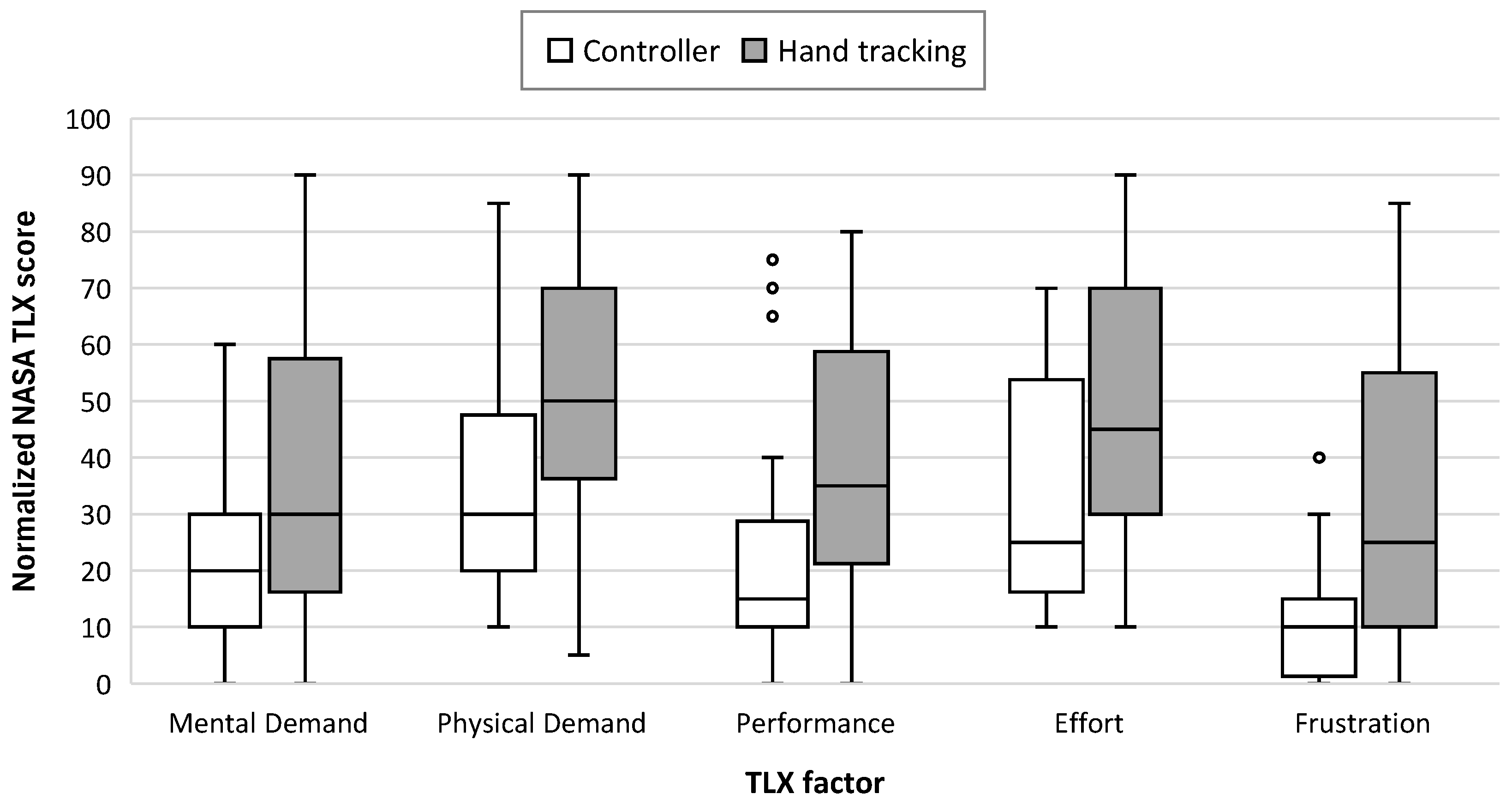
After the experiment, perceived workload was assessed using the rating component of the NASA Task Load Index (Raw NASA-TLX) [
24], a tool developed by Hart and Staveland [
25] and commonly used for subjective workload evaluation. The Raw NASA-TLX includes six subscales: Mental Demand, Physical Demand, Temporal Demand, Performance, Effort, and Frustration. In this study, the Temporal Demand subscale was omitted because the experimental tasks were performed without explicit time constraints or externally imposed pacing. Participants were not subjected to time pressure at any point during task execution; therefore, perceived temporal demand was not expected to meaningfully differentiate between conditions. This decision aligns with the use of the Raw NASA-TLX, which allows flexible consideration of workload dimensions based on task characteristics. The remaining five subscales were rated on a standard 1–21 scale, which was subsequently normalized to a 0–100 scale for analysis.
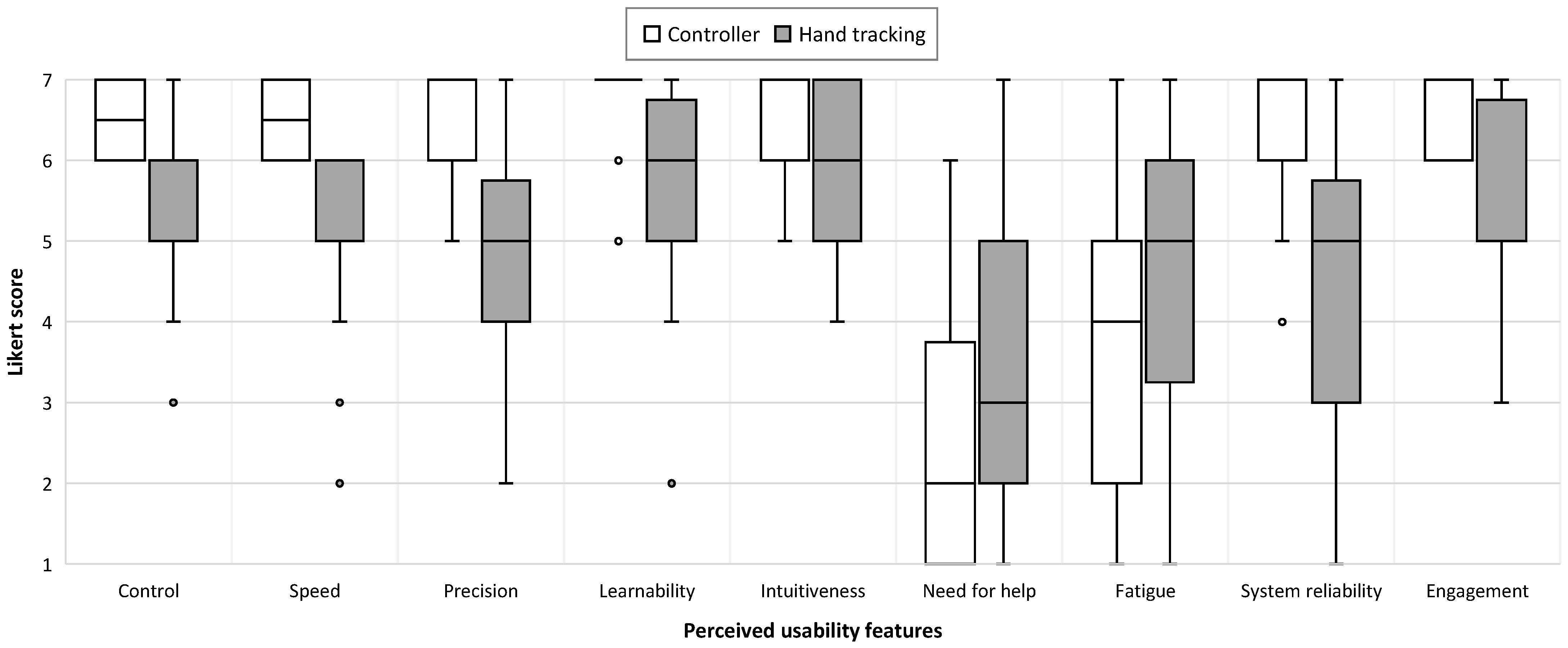
In addition to workload assessment, participants completed a custom questionnaire designed to evaluate their subjective perceptions of interaction quality when using the controller versus hand tracking. Participants rated a series of statements related to control, efficiency, learnability, and other custom usability attributes. Responses were recorded on a 7-point Likert scale ranging from 1 (strongly disagree) to 7 (strongly agree) for both interaction types. The following statements were presented:
Control: “Using this interaction type, I felt control over what I was doing.”
Speed: “Using this interaction type, I was able to complete the task quickly.”
Precision: “Using this interaction type, I was able to complete the task accurately.”
Learnability: “I quickly learned how to use this interaction type.”
Intuitiveness: “This interaction type was intuitive to use.”
Need for help: “I required additional guidance or help when using this interaction type.”
Fatigue: “I quickly became fatigued when using this interaction type.”
System reliability: “Using this interaction type, I felt confident that all of my movements and actions will be correctly registered.”
Engagement: “I would gladly use this interaction type the next time I have to perform similar tasks in VR.”
2.8. Experimental Procedure
The study was conducted over a three-week period, during which participants attended their pre-scheduled individual sessions. Testing took place in a neutral, controlled environment. The ambient in the testing room was kept distraction-free and comfortable for all participants. The experiment included three phases: initial instructions, testing, and a post-experiment survey. The maximum duration was 40 min per participant. At the start of the experiment, all participants signed an informed consent form and were briefed on the study’s main goals.
In the initial phase, participants received verbal instructions, video examples, and snapshots of the upcoming tasks. They were instructed to select targets and sort tools as quickly and accurately as possible while maintaining a comfortable pace. They were told that missing an occasional target was acceptable, but if many mistakes occurred, they should try to slow down. To prevent unwanted non-rectilinear movements observed during the pilot study, an additional instruction was given for the tool sorting task: participants were to pay extra attention and locate the tool’s final target (a box or a hook) before reaching for the tool itself. This instruction was important because it aimed to separate the user’s reaction time from their actual motor movement time.
At the start of the testing phase, participants were seated and given the VR headset and the controller for their dominant hand. All participants were instructed to use only their dominant hand throughout the experiment. Participants who wore corrective eyeglasses were allowed to keep them on while wearing the headset. All equipment, including the headset and the controller, was disinfected before each individual used it.
To ensure equal conditions for all participants, particularly regarding camera height and eye distance from the task panel, participants first recalibrated their view position using a specialized button on the controller. To mitigate order effects, modality counterbalancing was implemented: half of the participants used the controller as their first input method, while the other half began with hand tracking.
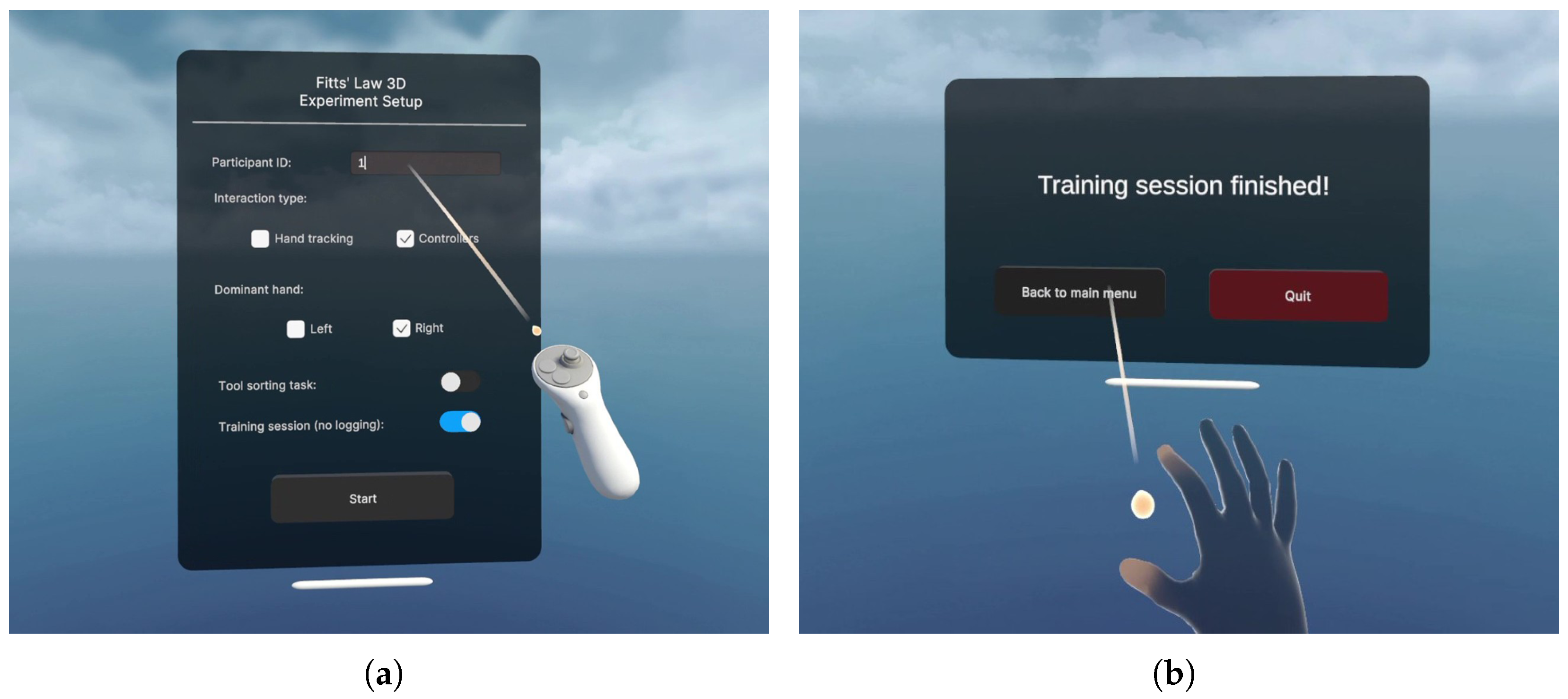
Menu navigation and selection were primarily handled using the controller’s raycast, except when a participant expressed a specific interest in using the hand tracking raycast for navigation (
Figure 6).
The study began with Task A (the multi-directional tapping task). After completing the training session using both interaction modalities, participants proceeded to the actual experimental trial. The same procedure was then repeated for Task B (the tool sorting task).
Participants were allowed to take breaks between sequences, tasks, and when switching modalities. If needed, they were also allowed to remove the headset during breaks. Occasional spontaneous dialogue between the study administrator and the examinees was not discouraged, as it often created a more relaxed atmosphere for the participants.
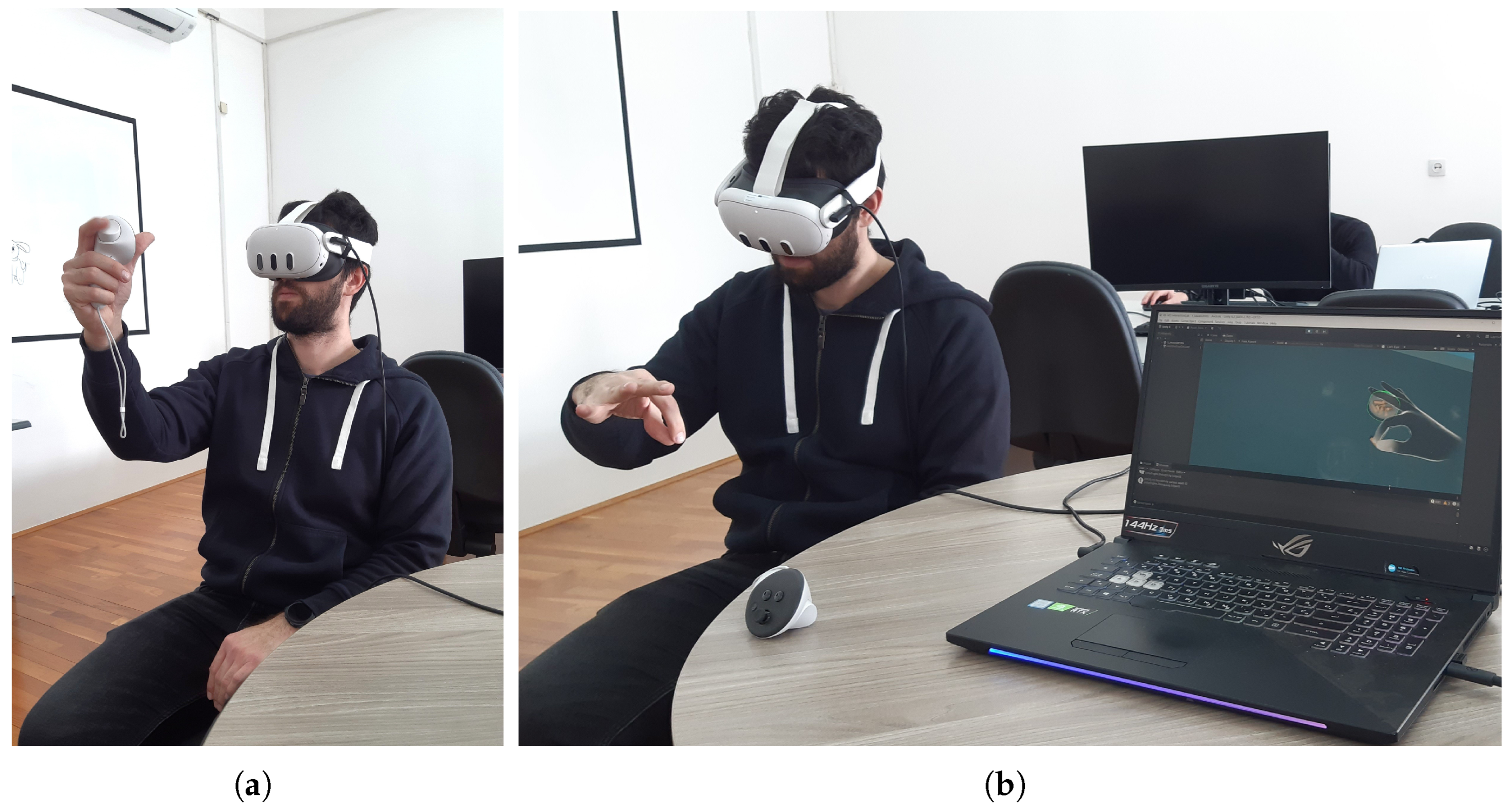
Figure 7 shows a laboratory session in which the participant performs the assigned tasks in the VR environment.
After completing the testing phase, participants filled out the NASA-TLX questionnaire to assess their perceived workload during the tasks. They also answered several demographic questions and a custom usability questionnaire designed to gather feedback on their experience with the system and the experimental setup. After all study-related activities, participants received a small sweet treat as a token of appreciation for their time and participation.
2.9. Evaluation Protocol
The objective performance analysis consisted of three main phases:
Before the start of the first phase, the dataset was cleansed of any temporal and spatial outliers, consistent with prior work [
26,
27]. In both Task A and Task B, a temporal outlier was removed if the recorded
of the trial exceeded the mean
of all trials with the same
condition by more than three standard deviations.
A spatial outlier was removed in Task A if the selection endpoint of a trial was more than twice the target width away from the target center. In Task B, however, a more lenient restriction was applied: a selection had to be made within three times the target width from the target center to be considered valid. This choice was motivated by the fact that participants exhibited a higher tendency to overshoot the intended placement due to the more realistic and physically constrained nature of the object manipulation task.
Moreover, due to the serial nature of selections in Task A, all trials immediately following spatial outliers were also marked as outliers, as the effective amplitudes for those trials would have been artificially inflated or deflated because of the misselection in the previous trial. This was not the case for Task B, which used a discrete selection task design.
Table 5 shows the total percentage of outliers removed during preprocessing.
After outlier removal, the data from Task A (including the nominal
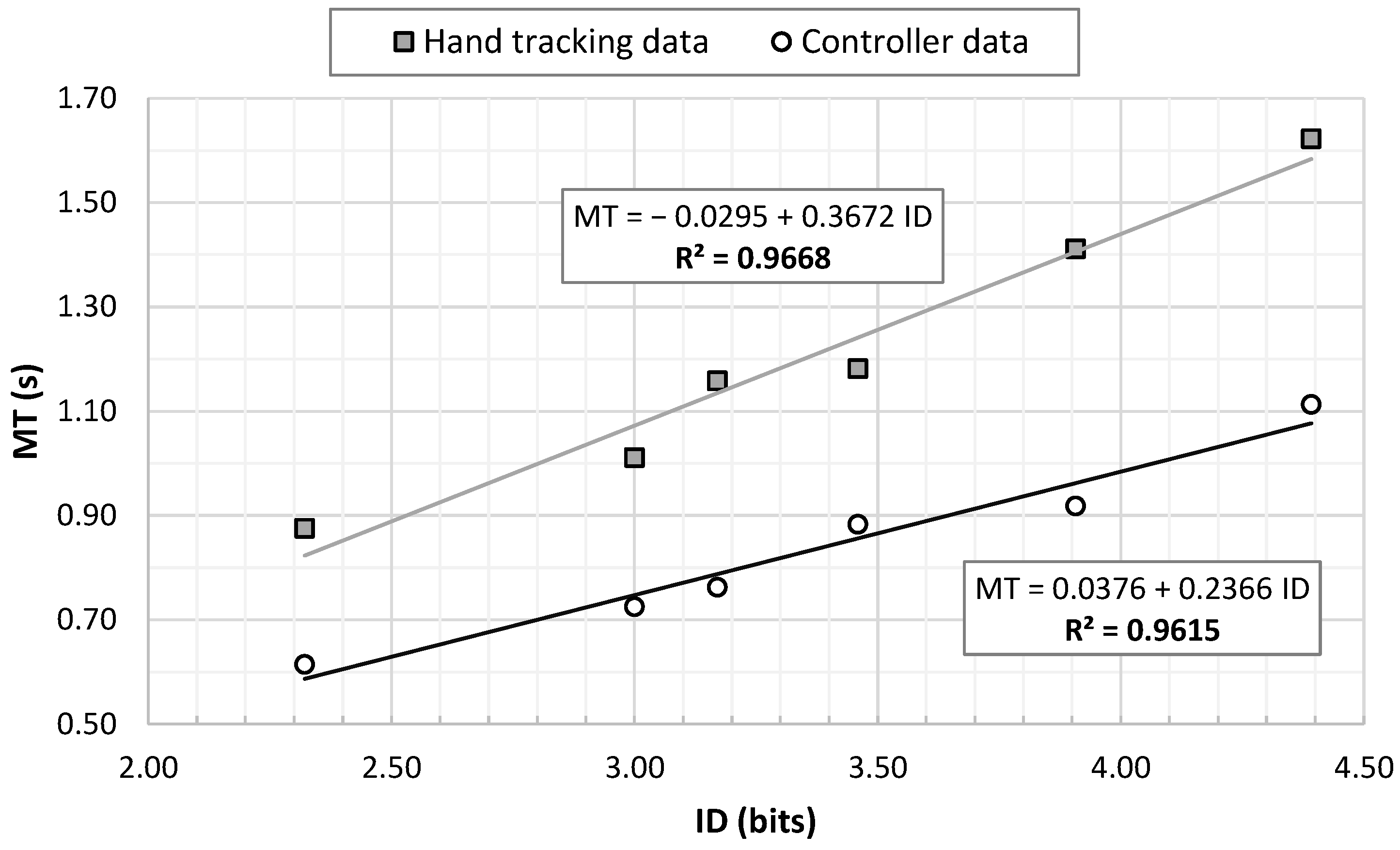
values and the obtained movement times) were used to build a predictive temporal model using linear regression. All participants’ mean movement times for the corresponding
condition were averaged into a single
value per condition, which was then used to fit the model. Movement time was modeled as a linear function of
, as shown in Equation (
3), where
a is the intercept and
b is the slope of the regression. This is the standard formulation used in predictive modeling tasks for Fitts’ law [
28,
29]. The coefficient of determination
was used to assess the goodness of fit of the derived models.
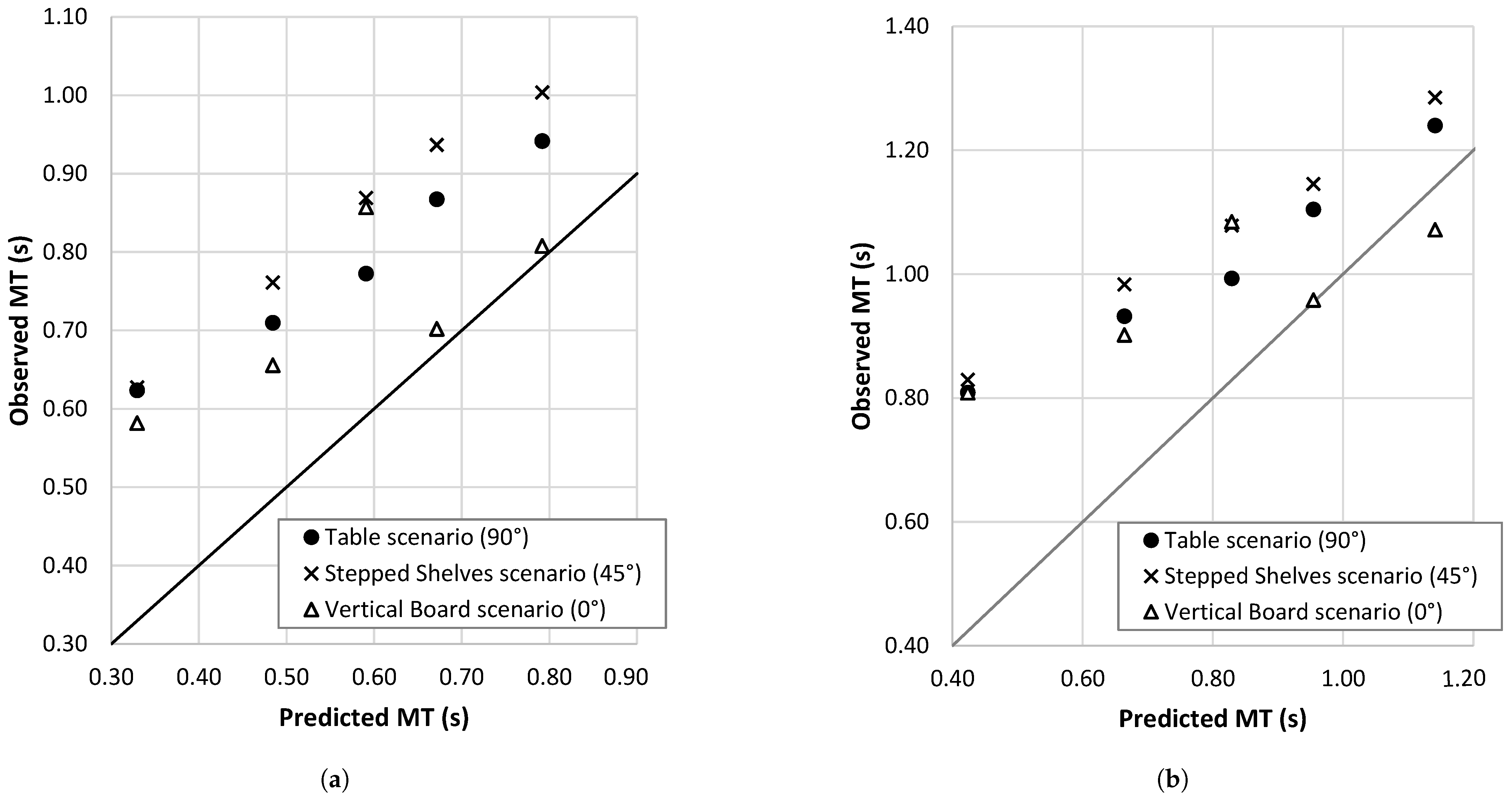
In the validation phase, the predictive models derived from Task A were applied to estimate the movement times for each of the three angle-based scenarios in Task B. The predictive accuracy of the cross-task transfer was evaluated using the Root Mean Squared Percentage Error (RMSPE). The formulation of RMSPE used in this study is given in Equation (
4), where
denotes the observed movement time for observation
i,
represents the movement time predicted by the regression model, and
n is the total number of observations:
It should be noted that the
values observed in Task B correspond to the five unique
conditions (as presented in
Table 4), since trials with the same
ratios were processed under the same
condition.
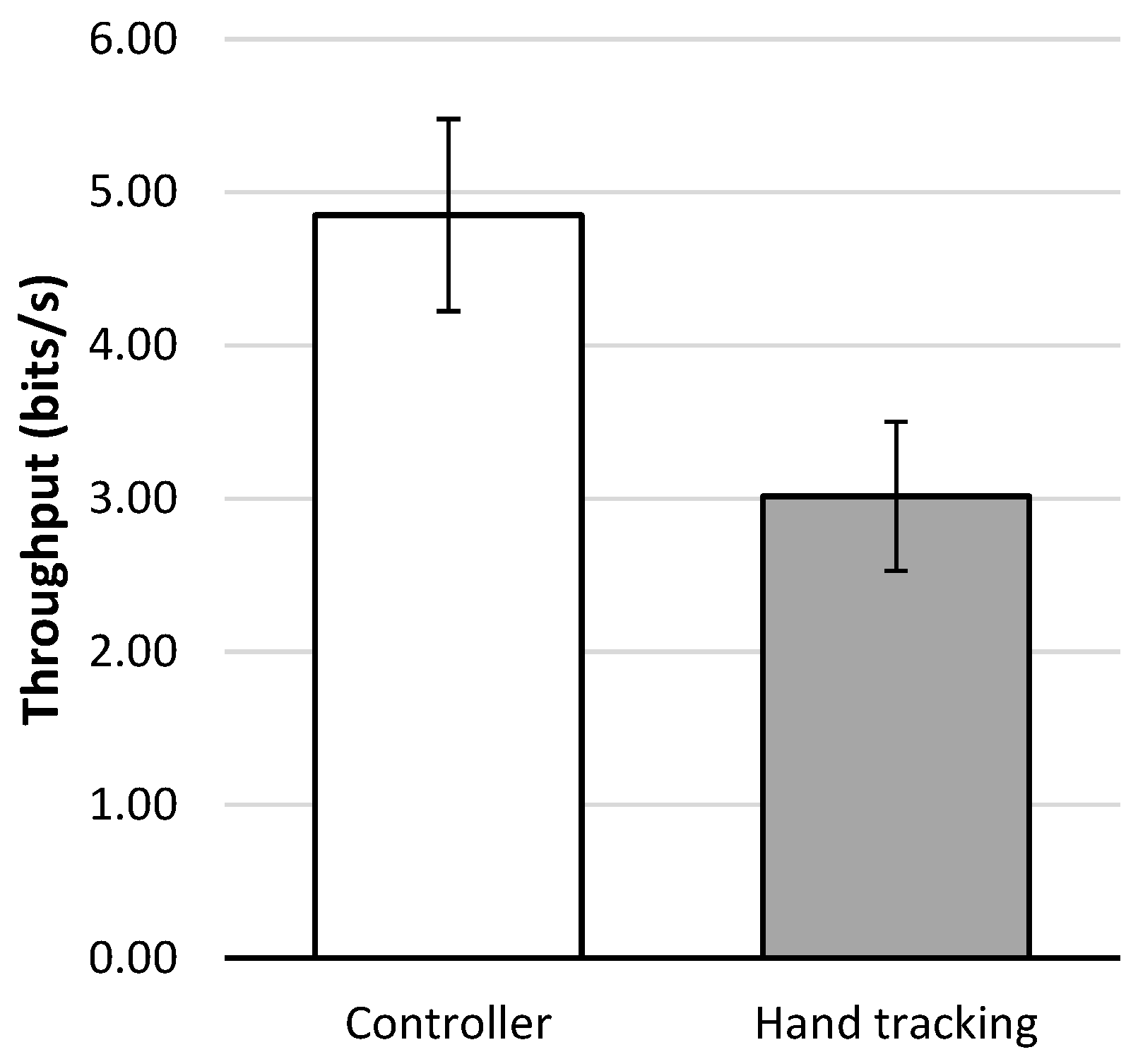
Furthermore, throughput (TP) and error rates were used to compare the objective performance of the two interaction modalities. Throughput provides a combined measure of speed and accuracy, and was calculated according to the ISO 9241 recommendation using the “mean-of-means” method [
5,
20,
23]. The following equation (Equation (
5)) was used to calculate the overall throughput for each modality:
where
N denotes the number of participants,
C the number of
conditions,
the effective index of difficulty for participant
p under condition
c, and
the corresponding mean movement time. The effective index of difficulty (
) was computed using Equation (
6), which involves the effective amplitude
and the effective target width
[
4]:
The effective target width
was derived from the standard deviation of selection endpoints, according to Equation (
7):
where
represents the standard deviation of the selection coordinates projected onto the task axis. The effective amplitude
was computed as the mean of the projected movement distances along the task axis [
4,
23].
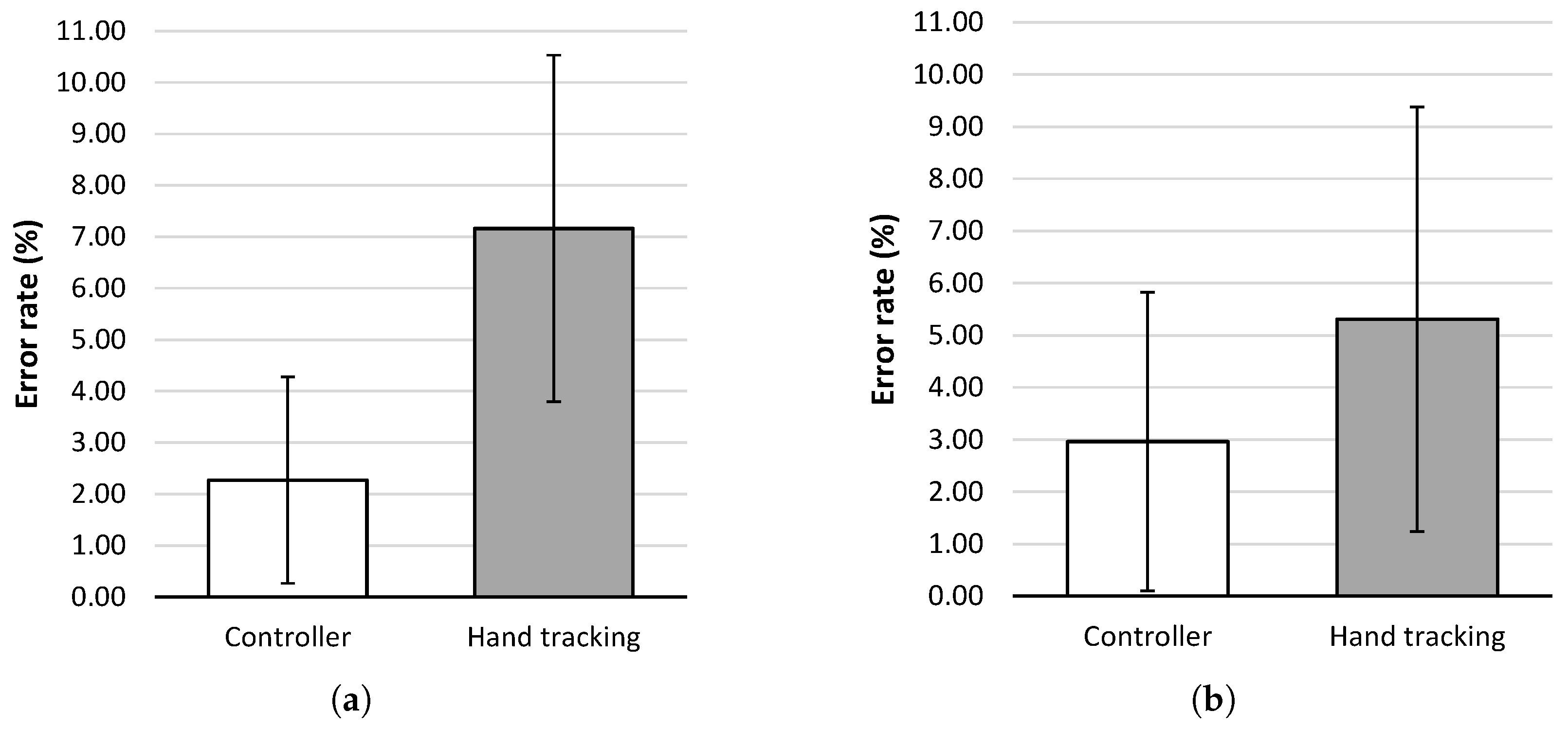
Error rates were calculated as the percentage of unsuccessful selections (misses) relative to the total number of attempts for each participant, modality, and task, providing a complementary measure of interaction accuracy. After calculation, throughput values and error rates were subjected to further statistical analysis to assess differences in performance and accuracy between the interaction modalities.
In addition to the objective metrics, subjective workload and usability for each interaction modality were assessed using the NASA-TLX and a custom questionnaire, with responses analyzed using non-parametric statistical tests.