
Abstract
Human–computer interaction (HCI) with three-dimensional (3D) Building Information Modelling/Model (BIM) is the crucial ingredient to enhancing the user experience and fostering the value of BIM. Current BIMs mostly use keyboard, mouse, or touchscreen as media for HCI. Using these hardware devices for HCI with BIM may lead to space constraints and a lack of visual intuitiveness. Somatosensory interaction represents an emergent modality of interaction, e.g., gesture interaction, which requires no equipment or direct touch, presents a potential approach to solving these problems. This paper proposes a computer-vision-based gesture interaction system for BIM. Firstly, a set of gestures for BIM model manipulation was designed, grounded in human ergonomics. These gestures include selection, translation, scaling, rotation, and restoration of the 3D model. Secondly, a gesture understanding algorithm dedicated to 3D model manipulation is introduced in this paper. Then, an interaction system for 3D models based on machine vision and gesture recognition was developed. A series of systematic experiments are conducted to confirm the effectiveness of the proposed system. In various environments, including pure white backgrounds, offices, and conference rooms, even when wearing gloves, the system has an accuracy rate of over 97% and a frame rate maintained between 26 and 30 frames. The final experimental results show that the method has good performance, confirming its feasibility, accuracy, and fluidity. Somatosensory interaction with 3D models enhances the interaction experience and operation efficiency between the user and the model, further expanding the application scene of BIM.
1. Introduction
Building Information Modelling/Model (BIM) technology plays an important role in the construction industry by integrating the whole process information of building design, construction [1], and operation [2], which realizes the comprehensive management and coordination of construction projects in a virtual environment [3]. Human–computer interaction (HCI) is required to manage, operate, and control the BIM model. Suitable interactions can increase the efficiency of model building, improve model visibility, and enhance information sharing, facilitating better collaboration and communication [4]. A more efficient and convenient new interaction method for BIMs is urgently needed, as BIM is widely used in the construction industry and the efficiency of users is closely related to the way they interact with humans.
Emerging interactive technologies, such as Augmented Reality (AR) [5], Virtual Reality (VR) [6], and Extended Reality (XR), are advancing rapidly [7]. These technologies leverage cutting-edge devices, including head-mounted displays, to facilitate unique interactions with virtual environments [8]. As a result, traditional touch-based user interaction tools, such as mice, keyboards, and controllers, are gradually being phased out due to their physical and hardware limitations. While these traditional interaction methods remain effective in certain contexts, their constraints become particularly evident in complex Building Information Modeling (BIM) applications, especially in areas such as spatial interaction, real-time updates, and multi-user collaboration. The shift toward non-contact gesture-based interactions paves the way for this transformation. Furthermore, user feedback indicates that traditional interaction methods often result in delays or a lack of fluidity, particularly during multi-task operations and rapid decision-making processes, limiting the user experience. Among emerging forms of interaction, gesture-based interfaces are gaining increasing popularity due to their intuitive, real-time, and flexible characteristics [9].
As user demands for interactive experiences rise, the importance of user experience in gesture interaction system design has grown. A good user experience enhances interaction fluidity and strengthens user understanding and control. In complex and information-dense BIM systems, traditional methods often fail to meet the need for fast, precise operations. Gesture systems, through natural motion sensing and instant feedback, make operations more intuitive, reducing learning curves and cognitive load, and improving efficiency and accuracy. Thus, designing user-friendly gesture systems is key to enhancing BIM technology’s effectiveness and adoption.
Existing BIM interaction methods predominantly feature contact-based interfaces, including traditional keyboard and mouse inputs, touchscreen operations, VR immersion [10], AR systems [11], and voice interaction [12]. These interaction styles, however, come with their own set of limitations. For instance, some of these require specific hardware devices or software platforms for support, like VR and AR technologies necessitating head-mounted displays or specialized equipment. This increases the cost and limitations of deployment and usage. For some novel BIM interaction means, users must learn and adapt to new operational methods and interfaces, potentially requiring significant time and training costs. Additionally, certain interaction modes are environment-dependent, with VR requiring specific equipment and spatial arrangement, while AR may be hampered by factors such as lighting conditions and object obstruction. In essence, contact-based interactions remain invariably tethered to constraints posed by hardware and space.
The escalating prominence of gesture recognition technology within HCI domains has been observed over recent years. This form of input notably surpasses conventional interaction methodologies by offering a more immediate, intuitive, flexible, and non-intrusive interface [13]. Instances of developments in this field include the application of gesture recognition in the control of robots and the understanding of sign language, as devised by certain scholars [14]. Nonetheless, to our knowledge, there have not yet been any comprehensive reports discussing the integration of gesture interactions with BIM depictions within the architectural sector.
To address the aforementioned issues, this paper proposes a non-contact 3D model interaction scheme based on machine vision and gesture recognition to circumvent spatial and hardware limitations typically encountered in conference settings, thus enabling every participant to directly interact with the model. This paper’s key contributions are as follows:
(1) Gesture design for human–machine interaction with 3D models. Having obtained the calibration position of a single frame of the hand, in combination with the palm model of 21 characteristic joints, a definition of gestures is achieved through the recognition of hand movements using a non-maxima suppression algorithm. Referencing spontaneously occurring gestural analysis during architecture design meetings and grounding it in ergonomics, five gestures were designed: scaling, rotating, restoring, clicking, and preparing to click.
(2) Gesture interaction algorithm for 3D models: Employing machine vision methods, images of the hand are captured and iteratively processed in real-time. The algorithm includes a technique for gesture judgement and understanding based on annotations of hand joint nodes. Furthermore, a linked model transformation method was designed so that the commands derived from gesture understanding can be employed to execute operations on the model, such as scaling and translating.
(3) Evaluation of the designed interaction method’s performance: standardized and quantitative experiments were separately conducted. The standardized experiments showcased the operational effects of the interactive system. The quantitative experimental results included the confusion matrix of the gesture recognition designed under various environmental conditions, along with the average error for stroke order commands. The experimental data suggest that integrating gesture recognition into a system demonstrating 3D architectural models is both an efficient and effective method.
The outline of this paper is as follows. Section 2 describes the advantages and disadvantages of the methods used in previous studies of this problem. Section 3 details the gestures designed for human–machine interaction with 3D models. Section 4 focuses on the introduction of a non-contact 3D model interaction algorithm based on machine vision and gesture recognition. Section 5 revolves around the design of interaction in the 3D model system. Section 6 comprises the experiments of this study. Section 7 concludes the paper.
2. Related Work
2.1. HCI Methods in BIM
Building Information Modeling (BIM), by way of amassing comprehensive construction process data, functions as a potent instrument facilitating total project management and synchronization within a simulated ecosystem. The pivotal component in bolstering the BIM utility while simultaneously driving the manifestation of its inherent value cagey lies within the domain of human–computer engagement as manifested within a 3D framework [15]. By definition, human–computer engagement represents the dynamic interchange of information between humans and computers, primarily leveraging a prepare-to-defined linguistic medium and interaction modality to fulfill a specified task [16]. A significant preponderance of extant investigative avenues concerning BIM-oriented HCI largely prioritizes machine-oriented outputs to humans, leaving a conspicuous gap in the field addressing the reciprocal dynamic—human-to-machine interaction.
Katahira and Imamura proposed the use of marker-based AR [10], overlaying virtual BIM models onto the real world through AR glasses, emphasizing the utility of perspective glasses in aiding the understanding of member positions in spatial framework construction. Technologies such as AR and VR create a sensory input environment with a sense of reality. However, there is a lack of discussion on how to achieve concise and efficient human output in the virtual environment.
Classic machinery control mechanisms, enveloping the likes of mouse and keyboard interplay, touchscreen command, and voice interface, indeed portend several inherent drawbacks, spanning the gamut of steep learning curves to hardware and environmental limitations. Accordingly, there surfaces an exigent need to adopt more organic, streamlined non-contact haptic interface modalities within the realm of Building Information Modeling (BIM). Positioning this conundrum at the epicenter of our investigation, the primary objective revolves around empowering computers to accurately decipher human gestural directives, specifically pertaining to the manipulation of 3D modeling scenarios, thereby obviating potential miscommunication during this human–computer symbiosis.
2.2. Sensory Interaction Technology
Compared to traditional interface interaction, Sensory interaction technology emphasizes the utilization of pre-existing knowledge and skills such as body movements, gestures [17], and voice [12] in real life for the interaction between the user and the product. Contrary to other interaction methodologies, it negates the necessity for intricate control mechanisms [18], facilitating direct engagement with proximate digital apparatus and environmental set-ups via physical movement.
In recent years, the burgeoning advancement of natural sensory interaction technology has progressively garnered public interest. Sensory interaction technology is now utilized in diverse fields encompassing game entertainment [19], medical treatment [20], and aerospace [21] others. In the sector of architecture, Sitole et al. proposed a sensory interaction technology virtual construction methodology [22], based on the “Lighthouse Tracking System”, wherein users perform the process of virtual construction via bodily language from a first-person perspective.
Contrary to traditional modes of interaction, sensory interaction technology furnishes more abundant and intuitive operational means, thereby attenuating the load instigated by technical stipulations and learning curves. Moreover, the inception of sensory interaction technology assists in rectifying the challenges inherent in environmental constraints and shared collaboration tied to current interaction techniques. While sensory interaction technology may confront technical cost and user adaptability obstacles during execution, with the incessant evolution of technology and promotional applications, it is foreseeable that sensory interaction technology will provision crucial resolutions for enhancement and optimization in BIM interactive methodologies.
2.3. Gesture Interaction
Gestures constitute an exceptionally organic and instinctive conduit for engagement in the process of human–machine interaction [23]. Gesture-based interaction surpasses constraints imposed by operating distances [24]. Contrasted with sensory interaction, gesture-based interaction serves as a paramount technology within the realm of sensory interaction and distinctively carries its own merits. With the development of technology, gesture interaction has been used in a wide range of scenarios, such as robot control [25], AR and VR virtual environments [26], medical operations [27], sign language translation [28], home automation [29], computer interaction [30], and game operations [31].
Gesture interaction can bifurcate into recognition procedures premised on visual interpretations and sensor-oriented methodologies [32]. Despite the outstanding efficacy of sensor-based recognition, it suffers from hardware restraints. Particularly, individuals customarily need to adorn specific sensor apparatus, such as Electro-Myographs (sEMG) sensors [33]. Gesture interaction rooted in machine vision is segregated into dynamic and static interactions [34], with further classification into 2D planar hand movements and 3D gestures depending on the object of recognition. Nguyen et al. posited a neuronal network learning practice founded on SPD manifold learning and employed this method for skeleton model gesture recognition [35]. Li et al. generated a gesture recognition schema by constructing a fuzzy gestural data set and specialized fuzzy matching algorithm [36]. E. Rajalakshmi et al. proposed a new visual-based hybrid deep neural network method and used the attention-based Bi LSTM method for temporal and sequential feature extraction to recognize symbol gestures [37]. Additionally, the previous studies underline that gesture interaction is an essential topic with an extensive array of research principally targeted at image-backed gesture recognition rather than categorically devised for interactions within BIM.
Predicated on its simplicity yet effectiveness, gesture-based HCI was considered for this study [38]. In this paper, we developed a non-contact 3D model interaction system based on machine vision and gesture recognition. To our knowledge, this is the first study to explore a solution for human interaction with 3D models using gesture interactions.
3. Gesture Design for HCI in 3D Model Manipulation
This section encompasses two parts: methods for gesture joint recognition and gesture design. Gesture joint settings involve palm detection and pose estimation, utilizing neural network regression to solve image processing issues and achieve precise hand joint localization. Gesture design takes into account factors like human physiology, kinesiology, and learnability, proposing six varieties of BIM modeling control gestures and recommending the establishment of a universal gesture library to enhance the user experience. Gesture recognition methods determine gestures through technologies examining joint distance and angle changes.
3.1. Gesture Recognition
Palm detection is a sophisticated task. With a wide range in proportion within the image capture area, the model must accommodate various hand sizes and discern both hidden and self-hidden hand features [23]. Yet, the lack of high contrast in hand patterns complicates detection from visual features alone [39].
We employ a classic framework developed for the realm of human posture recognition that transitions traditional image processing dilemmas into neural network regression problems based on body joint information. Every joint contributes to the posture estimation input into the entire image, allowing the neural network to extract features. Adjusting for varying absolute coordinates across different images or videos, each step recalibrates bounding boxes and joint positions while converting to a common coordinate system. Moreover, after determining the image size, the image gets scaled for initial information, and information from the original picture then controls the local area to refine the joint coordinates’ precision.
Our detection utilizes a machine learning framework based on image processing for a deep probe into the camera’s captured hand motions. Because the palm is relatively small, the non-maximum suppression algorithm works well even with occlusions. With orientational bounding boxes modeling the palm, the overall vertical span of capture areas can be overlooked. Cropping is generated based on previous frame hand feature recognition, which reduces anchor quantities as the model is only invoked when identification fails.
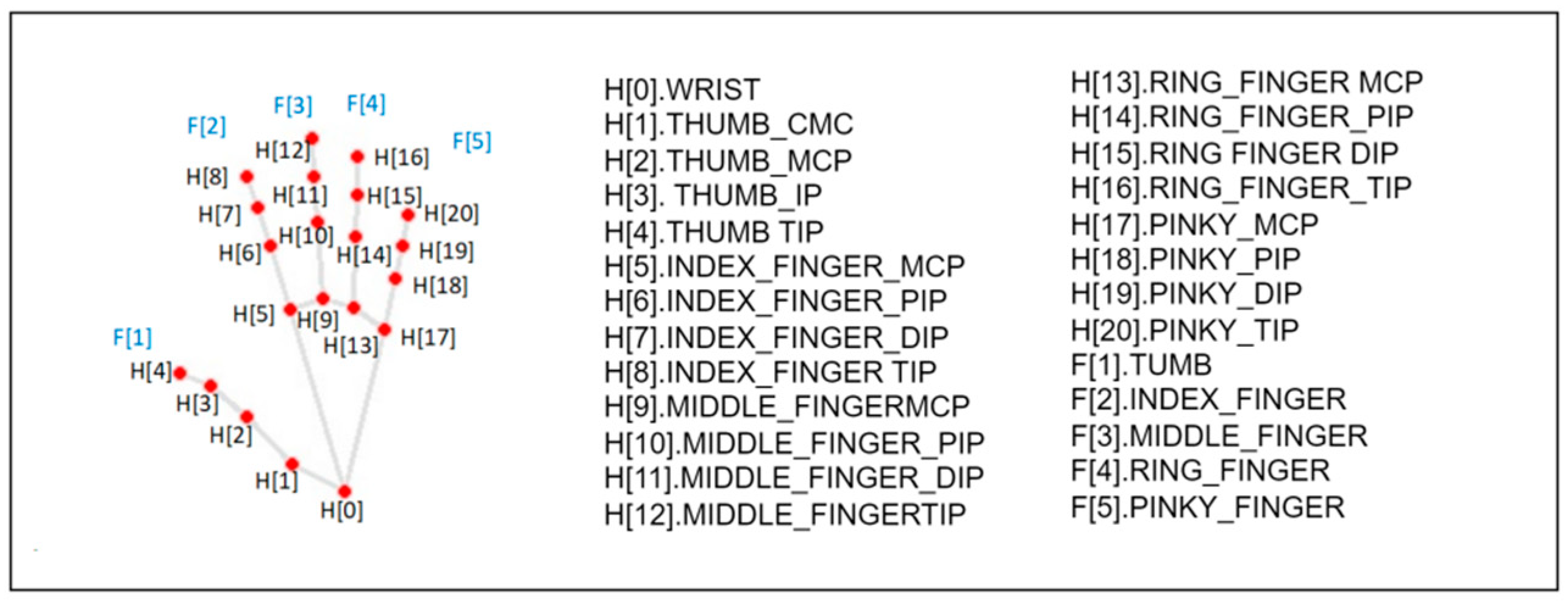
The hand joint detection method works on the camera’s full image to detect the palm, promptly returning the palm’s positional bounding box. Within the area located by the palm detection model, the 21 3D hand joint coordinates within the detected hand zone are located accurately using regression, returning a 3D palm joint model. The position data for the 21 key points, including x, y, and z—the latter representing depth—are included. With the depth at the wrist as the origin, smaller values signify landmarks closer to the camera. Figure 1 is a coordinate diagram of palm joint points.
Figure 1.
Coordinate diagram of palm joint points.
3.2. Gesture Design
In gesture design, factors such as human physiology and kinematics, recognizability and uniqueness, intuitiveness and learnability, functional consistency, predictability and feedback mechanisms are taken into account [40]. Drawing on the cognitive psychology analysis of spontaneous co-speech gestures during face-to-face architectural design meetings by Willemien Visser et al. [41], we glean insights into the functions and regularities of gestures within goal-oriented professional settings, i.e., collaborative design meetings.
Initially, an ergonomic understanding of the distances and angles between different joints determines hand posture and finger status. This information is crucial for further defining the semantic meaning of gestures. Commonly, finger attributes encompass location, direction, speed, and acceleration, all aiding in identifying different gestures.
BIM modeling technology, despite its advanced capabilities, lacks in-depth exploration in the area of gesture control. To fill this gap, we designed six distinct types of gestures, each representing disparate BIM modeling control commands. These gesture commands include clicking, dragging, enlarging, shrinking, translating, rotating, and returning. Each more or less conforms to natural human gestural language to enhance user learnability and predictability.
With regard to future development, the establishment of a universal gesture library would significantly aid the wide application of gesture recognition technology in BIM technology. Such a library would ensure consistency across different applications and systems, consequently enhancing the user experience.
The design and implementation of these gestures employ technologies such as joint distance, angle alteration and coordinate transformation. By converting bodily motion into computer-understandable commands, a natural and intuitive method of interaction is provided for the user, thereby enabling the control and manipulation of digital models. Table 1 introduces the designed gestures.
Table 1.
Designed gestures.
4. Gesture Interaction Algorithm for 3D Models
4.1. Overall Framework
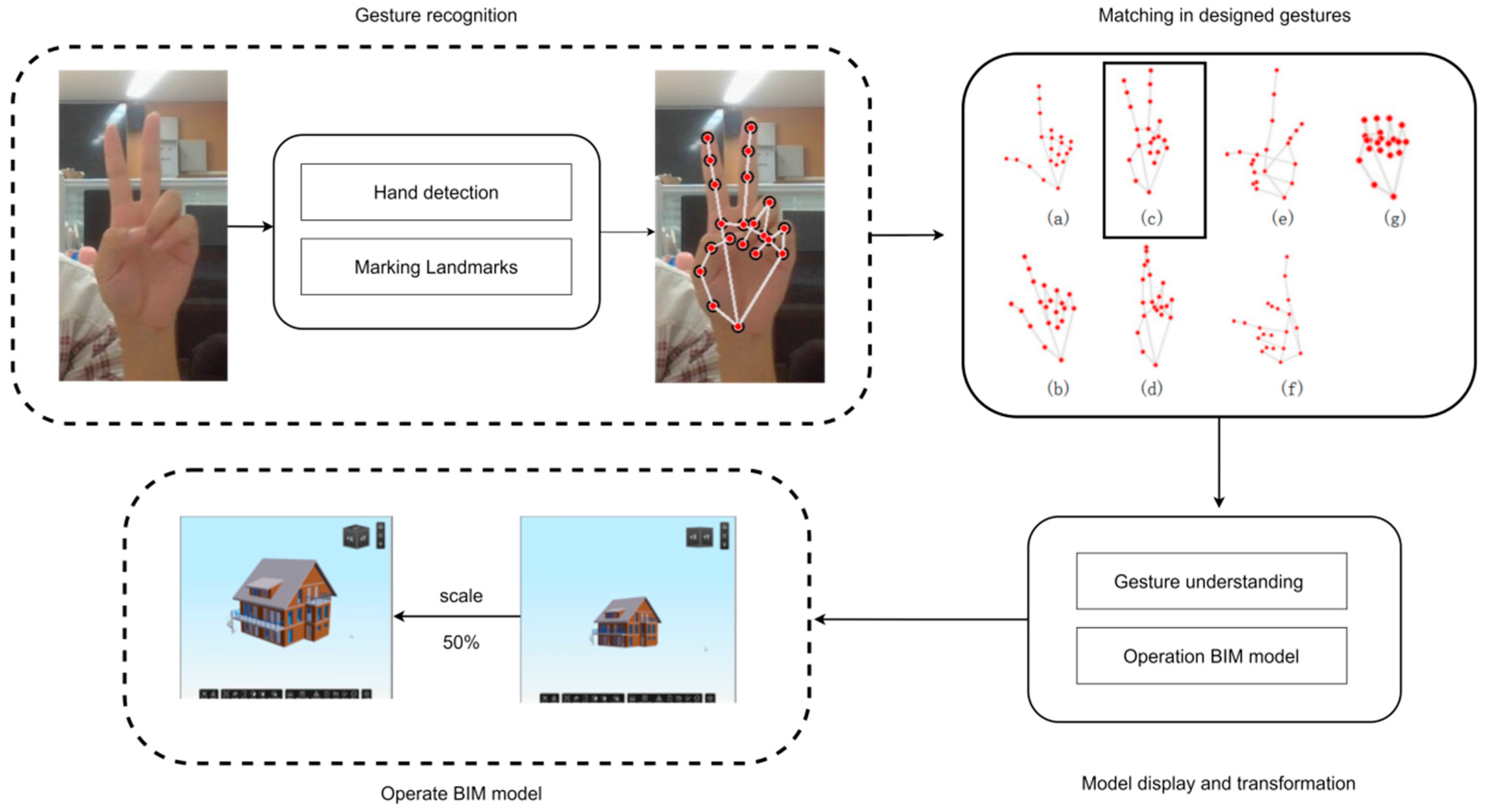
This section introduces the non-contact 3D model interaction we propose, which is based on machine vision and gesture recognition. This solution recognizes gestures through the real-time video from an onsite camera and completes the model movement. The solution proposed in this paper contains three modules: gesture landmark recognition, gesture understanding, and model transformation. Figure 2 provides the overall framework.
Figure 2.
Overall framework of intelligent interaction for BIM models based on gesture recognition.
(1) Gesture landmark recognition: As the camera serves as the exclusive sensing apparatus within the conference room environment, our procedure’s premier undertaking is the comprehensive analysis of the acquired footage. This exploration leverages a technique involving the marking of hand landmarks, in which the network exhibits capability in the identification of hands within RGB images and outputs the coordinates of the specific hand landmarks. Said coordinates simultaneously symbolize the pixel location within the camera-captured imagery, as well as the relative positioning of the hand landmarks. What ensues is the task of deciphering gesture command intelligence via the characteristic features emanating from the landmarks’ coordinates.
(2) Gesture Comprehension: The quintessential challenge involves the translation of video feed into instructions pertinent to the BIM model. Tailored to the functional necessities and habitual usage of exploring the BIM 3D model, this paper has envisioned four operations coupled with five distinct gestures. Within the gesture comprehension component, the pixel location and the relative positioning of the hand landmarks serve as the input, while the output manifests as the command reflective of the respective gesture.
(3) Model Transformation: The model transformation element shoulders the responsibility of implementing commands stemming from the comprehension of gesture images. While executing instructions about clicking and preparing to click, the computer display is emulated as a touch screen, thereby replicating the touch screen experience. In scenarios dealing with gestures like scaling, rotating, and restoring, programs specifically pre-scripted to accomplish these tasks are imperative. These programs can undertake appropriate transformations correlating with the user’s gesture instructions, henceforth facilitating the manipulation of the BIM model.
4.2. Hand Landmarks Configuration
The primary methodologies concerned with gesture recognition reflected in this paper encompass the calculation of finger angles and the computation of distances between joint points. However, both techniques present several challenges that necessitate resolution. The determination of finger angles is prone to potential detection inaccuracies and idiosyncratic discrepancies. The approach adopted for the evaluation of joint point distances is potentially influenced by the hand’s position and orientation in front of the camera. Consequently, this paper harnesses an amalgamation of these two methodologies.
- Finger angle computation
By performing calculations between the angles of detected key points, rudimentary gesture recognition can be actualized. An example of this would be determining the angle sandwiched between the vectors H[0]–H[2] and H[3]–H[4] belonging to the thumb to ascertain whether the digit is contracted or extended. Employing the spatial distance formula in conjunction with inverse trigonometrical functions enables the acquisition of distances L as well as the angles 0 lodged between the joint points, thereby assessing the finger’s state of being either elongated or folded based on prior empirical knowledge.
Let the coordinates of the two points on line 1 of the joint points H[0]–H[2] be (x[1], y[1]) and (x[2], y[2]). The coordinates of the two points on line 2 of joint point H[3]–H[4] are (x[3], y[3]) and (x[4], y[4]). The slope of line 1 is m1 = (y[2] − y[1])/(x[2] − x[1]), and the slope of line 2 is m2 = (y[4] − y[3])/(x[4] − x[3]). Next, we can use the slope formula to calculate the angle between two lines.
- 2.
- Fingertip to Palm Distance Calculation Method
By contrasting the vector magnitudes between fingers, one can distinguish whether the finger is extended or curved, hence facilitating the classification and identification of gestures. This technique effectively circumvents the issues posed by detection errors and individual disparities prevalent in the finger–angle–calculation method. The paper employs the L2 norm (or vector magnitude) corresponding to various finger postures for preliminary analysis. For instance, when the index finger is extended or bent, the vector’s magnitude D1 spanning from fingertip (H[8]) to palm base (H[0]) invariably surpasses the vector magnitude D2 between H[6] and H[0]. When the index finger is curved, however, D1 becomes less than D2. Similar evaluation methods can be implemented for the index, middle, ring, and pinky fingers. In contrast, for the thumb, we substitute H[0] with H[17].
4.3. Gesture Understanding and Model Transformation
Gesture recognition technology, as a natural and intuitive HCI method, has been widely researched and applied in recent years. Through the acquisition of hand joint motion data, it can identify particular gesture patterns and convert them into computer-understandable commands that enable the operation of various devices or apps. This section delves deeply into the gesture interaction model that is based on changes in joint angle and distance.
4.3.1. Click Gesture
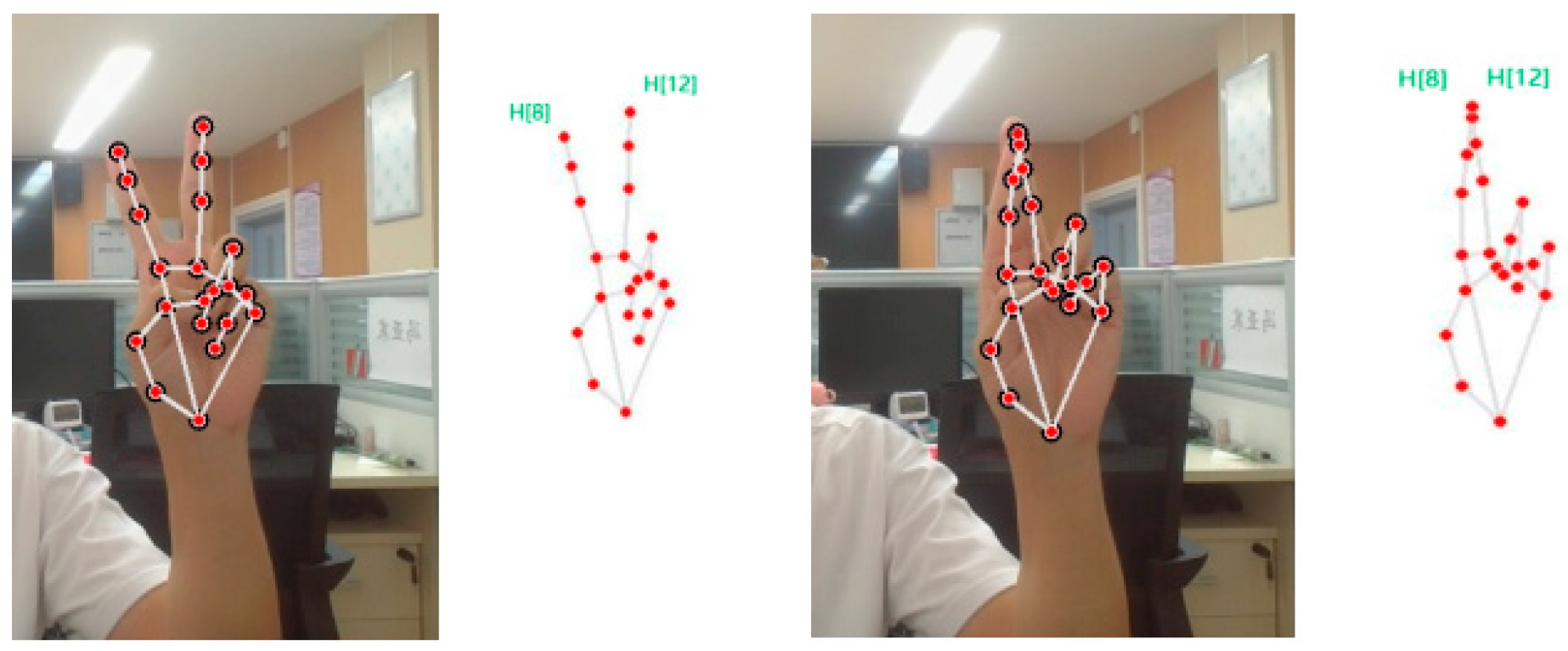
With motions that resemble mouse clicks, the selection model enables the user to carry out on-screen selection operations. When the user holds up the middle and index fingers while retracting the other fingers, the system goes into selection mode. This mode combines coordinate transformations with gesture recognition algorithms to achieve precise control. When in the selection mode, the mouse indication moves in sync with the index fingertip movement. The point at which the middle finger and index fingertips coincide is considered a click or selection, and when they part ways, it is the same as releasing the mouse. Figure 3 is preparing to click and click gestures.
Figure 3.
Preparing to click and click gestures.
4.3.2. Click Method
In the picture that the camera carried out, make a 640 × 480 grid, and note where the index finger’s position is concerning the grid. When the grid is mapped to the computer screen, the mouse’s position on the screen corresponds to the index finger’s position in the image. This completes the mouse position control.
4.3.3. Scale Gesture
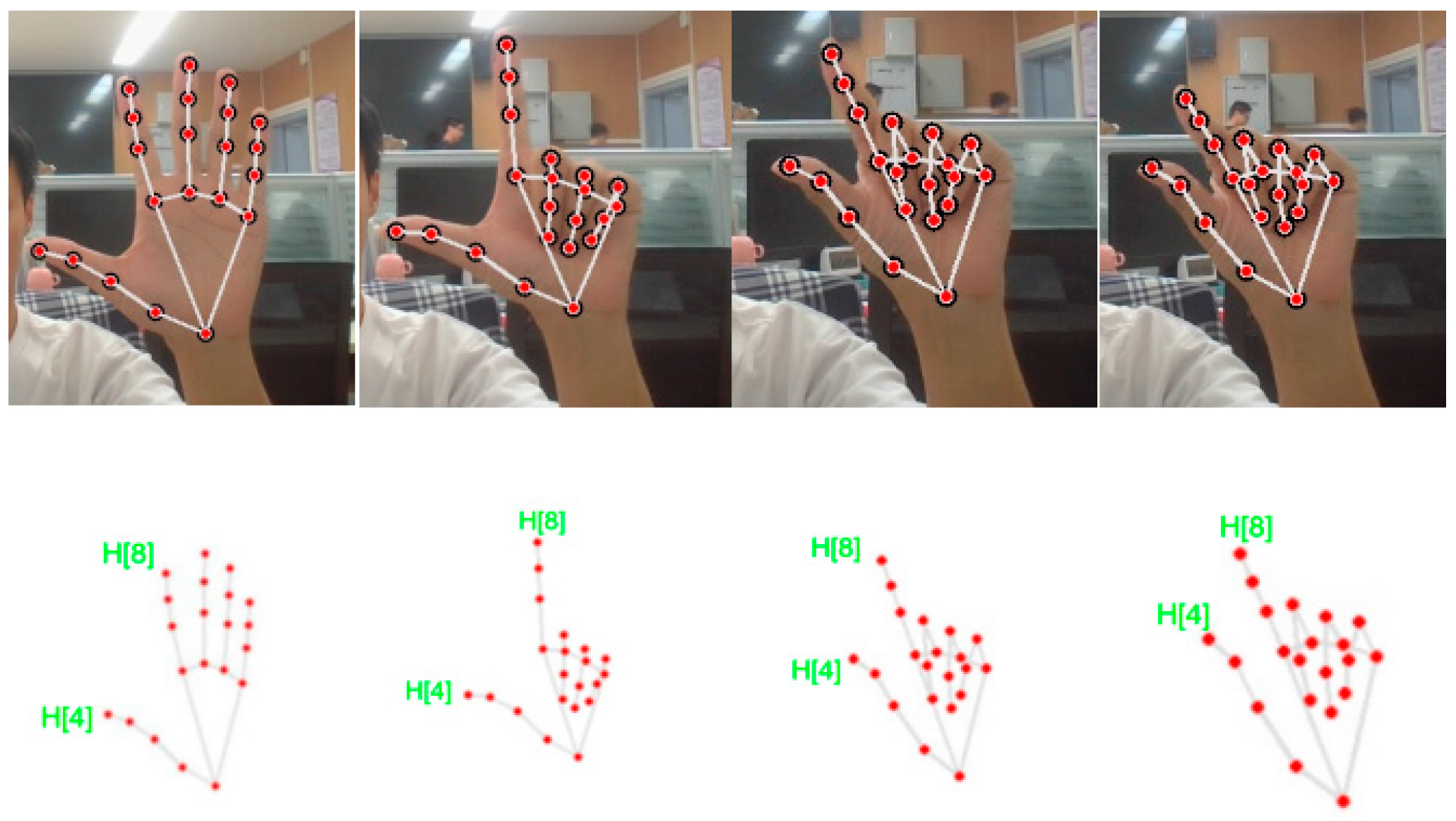
The digital model’s scaling is managed by this action. Prepare scaling is defined as the state that occurs when the thumb and index finger are recognized as extended, and the remaining fingers are retracted in the image. Following the completion of the prepare scaling action, the state is maintained for a length of =>1 s to enter the scaling state. Keeping the scaled state and holding the gesture for more than 1 s, the model is scaled and re-enters the prepare to scale state. Consequently, to accomplish a broad range of scaling for the digital model, this motion can be repeated as needed. Figure 4 is Gesture changes in the scaled-down model.
Figure 4.
Gesture changes in the scaled-down model.
4.3.4. Scaling Method
The distance from H[4] to H[8] at the moment of recognizing the scaling gesture is recorded as l0, which is used as a baseline. This measures the scaling model’s initial ratio and prevents the change in distance from causing a significant change in the finger spacing interval in the image, thereby affecting the scaling command’s interaction. Real-time data on the distance between H[4] and H[8] are recorded as l. After computing the scaling multiplier, m = l0/l, determining the scaling ratio, and then calculated to produce the scaling matrix, Rm, where m is the scaling multiplier. The original model is multiplied by the scaling matrix Rm to complete the scaling transformation.
4.3.5. Rotating Gesture
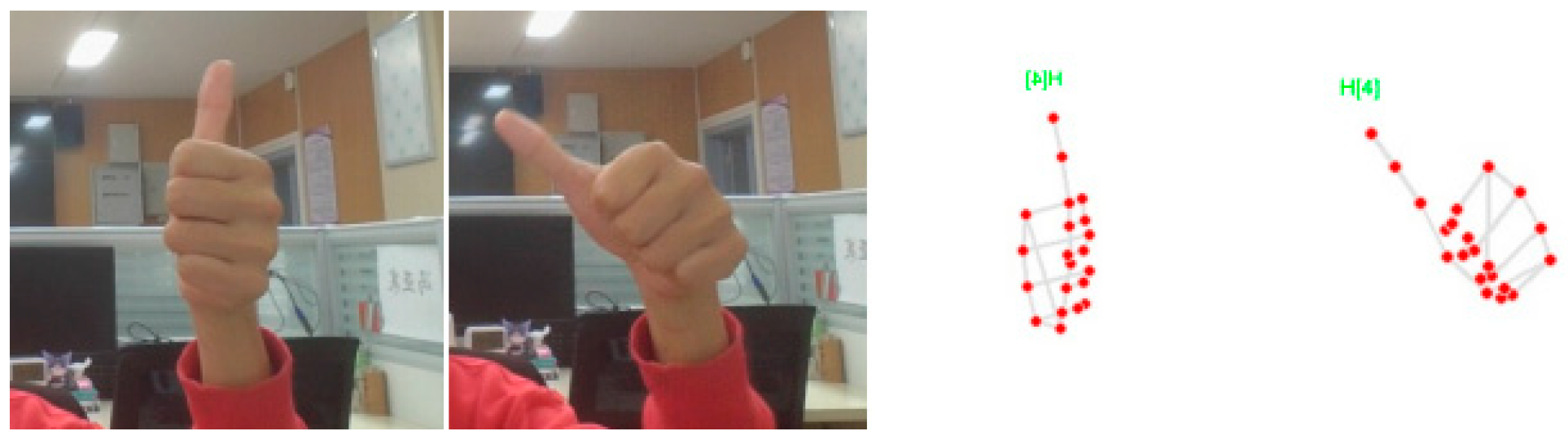
Define entering the pre-rotation state when the thumb is extended and the rest of the fingers are retracted. To go into the rotation state, maintain the pre-rotation state for ≥1 s. The right thumb’s orientation dictates the direction of rotation. The model can be rotated by extending the remaining fingers at any point during the process.
The angle between the thumb vectors H[0]–H[2] and H[3]–H[4] is computed, and an angle between them greater than some angular threshold (empirical value) is defined as a bend. Calculating the middle finger requires an auxiliary judgment of the limit of the distance. The vector mode dist1 from the tip of the finger (H[12]) to the root of the palm (H[0]) is greater than the vector mode dist2 of H[9]–H[0] and less than the sum of the vector modes of H[12]–H[9] and H[9]–H[0]. Figure 5 is Rotation gesture.
Figure 5.
Rotation gesture.
4.3.6. Rotation Method
Recorded as x,y,z, the direction of the starting state is noted as x0, y0, z0, and each of the three directions is rotated by an angle, Arcos(x,x0), Arcos(y,y0), Arcos(z,z0).
The rotation method of the model:
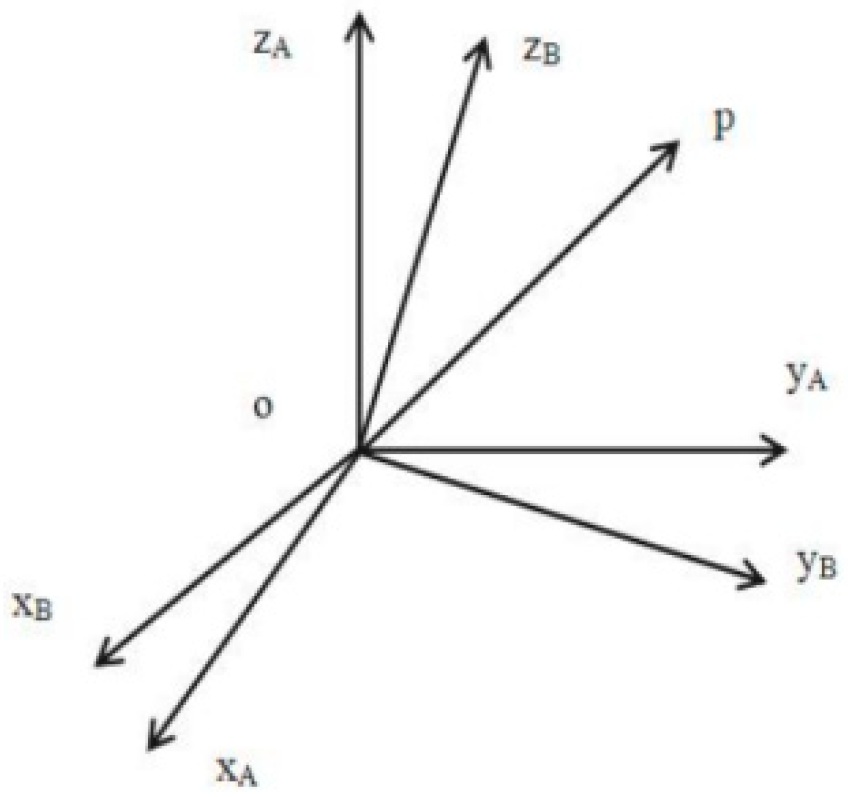
The rotation matrix refers specifically to the relationship between the rotated coordinate system {B} for the original coordinate system {A} of the model, in the process of rotation of the model, the origin of the two coordinate systems is the same but the attitude is not consistent. Space arbitrarily takes a point P0(x0, y0, z0), its rotation transformation in the relative two coordinate systems as shown in Figure 6 and Formula (3).
where Rθ is the rotation matrix, obtained by multiplying Rx, Ry, and Rz:
P(x, y, z) = Rθ × P0(x0, y0, z0)
Rθ = Rx × Ry × Rz
Figure 6.
Schematic diagram of model rotation.
When the model is rotated by an angle θ around the z-axis, an expression for the coordinates of the point P rotated around the z-axis can be derived:
where (x, y, z) is the spatial position of a point before the model is rotated and (x′, y′, z′) is the position after the rotation.
For ease of arithmetic understanding, the 3D point rotation is represented as a matrix:
The rotation around the xy-axis is the same and multiplied the rotation matrix in turn to complete the omnidirectional rotation of the model.
4.3.7. Panning Gesture
This paper also uses the long clicking and drag method since users are accustomed to dragging the panning model by long clicking on the left mouse button when using the mouse to control a computer. The panning state is entered when the click gesture lasts for one second.
4.3.8. Panning Method
Assume that there is a point P in space with the coordinates (x, y, z). The coordinates of the translated point will be (x′, y′, z′) if we wish to translate this point by tx, ty, and tz units along the x, y, and z directions, respectively. The following set of equations can be used to express the translation operation of a point:
4.3.9. Recovery Gesture
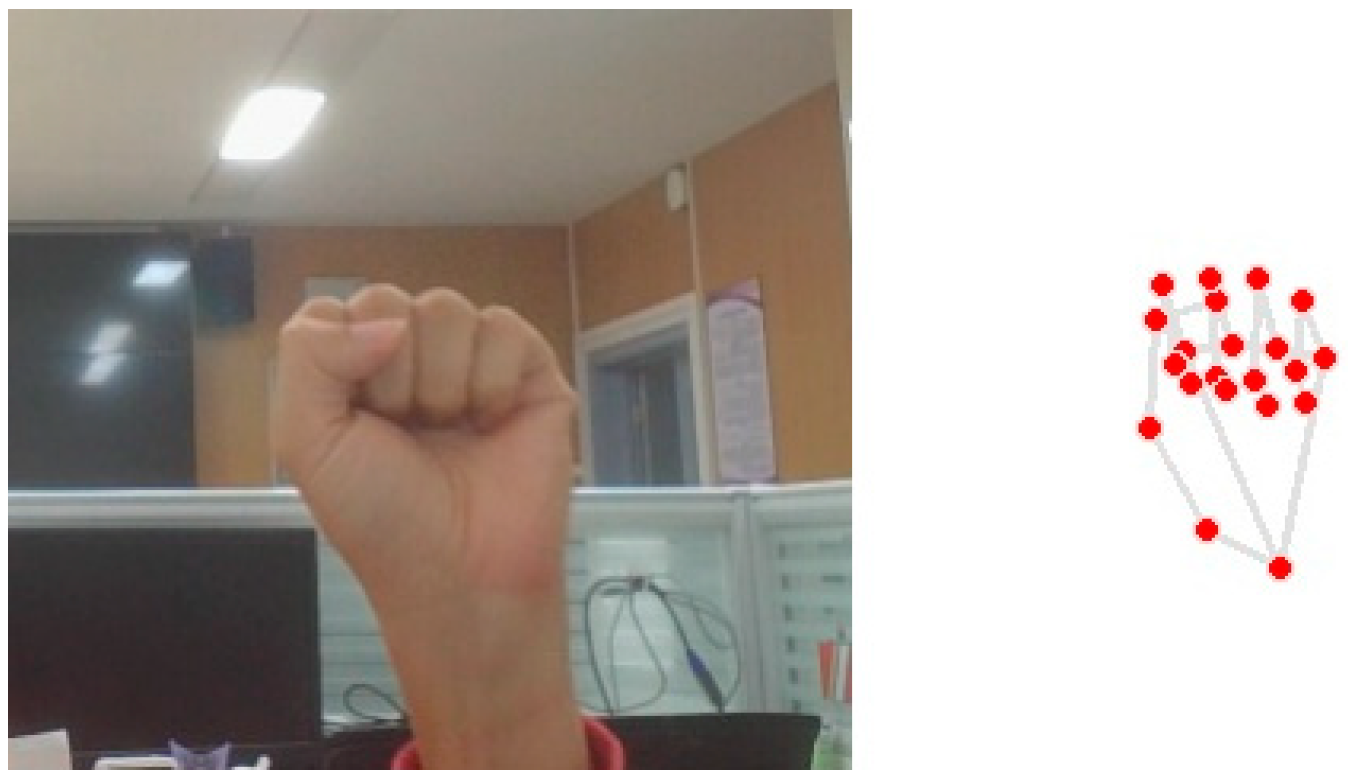
This gesture controls the recovery of the digital model. When a right-hand fist is detected in the image, i.e., all fingers are bent for seconds. The model display is restored to its initial state. Figure 7 is Restoring gestures.
Figure 7.
Restoring gestures.
5. System Implementation Architecture and State Transition
5.1. System Architecture
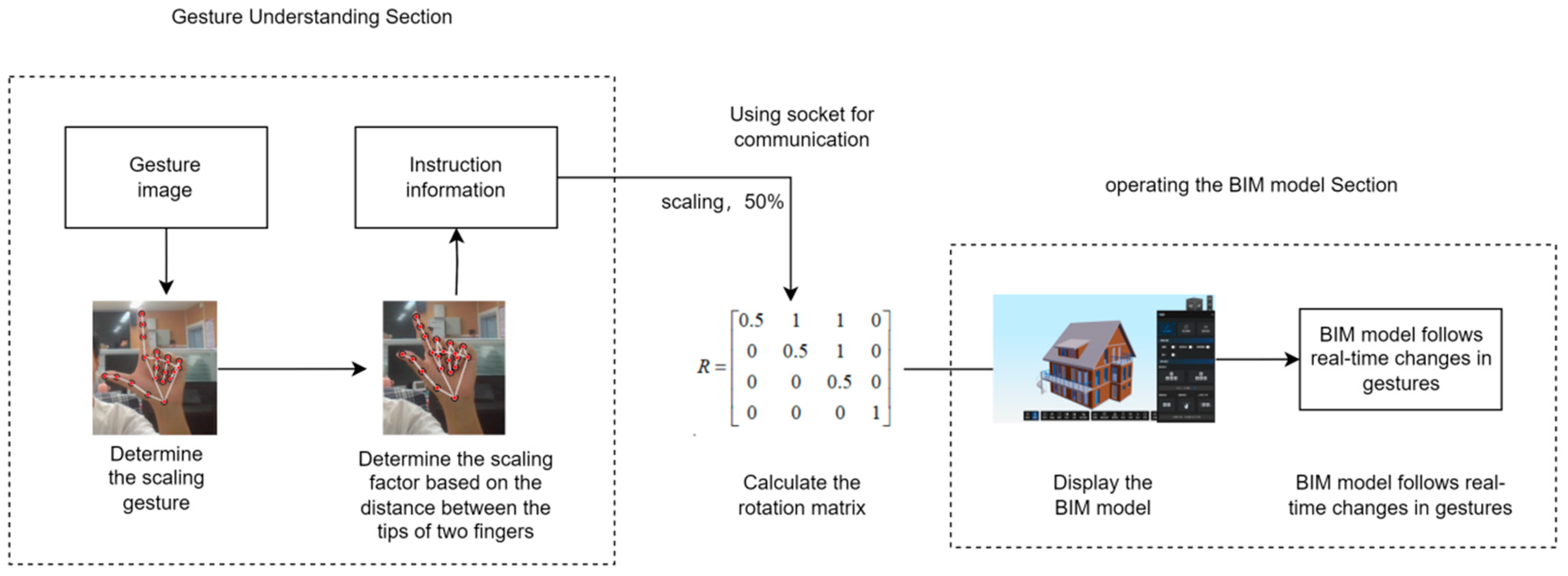
The program consists of two parts: the gesture understanding part and the model transformation part. The gesture understanding part is responsible for capturing images, gesture recognition, and converting image information into information about the operation commands and operation degree of the model. The model transformation part is responsible for executing the operation commands and degree of operation commands of the client’s model. When executing the commands, it is necessary to implement operations through preset programs, such as rotation and translation. The operation instructions obtained from the gesture understanding section will be passed to the model conversion section through the socket protocol. The output of the model transformation part is displayed on the screen as the final result. The interaction system enables the selection, scaling, omnidirectional translation, and rotation of BIM models through gestures. The system architecture of the gesture interaction model is shown in Figure 8.
Figure 8.
Gesture recognition module and model display module.
5.2. System State Transition
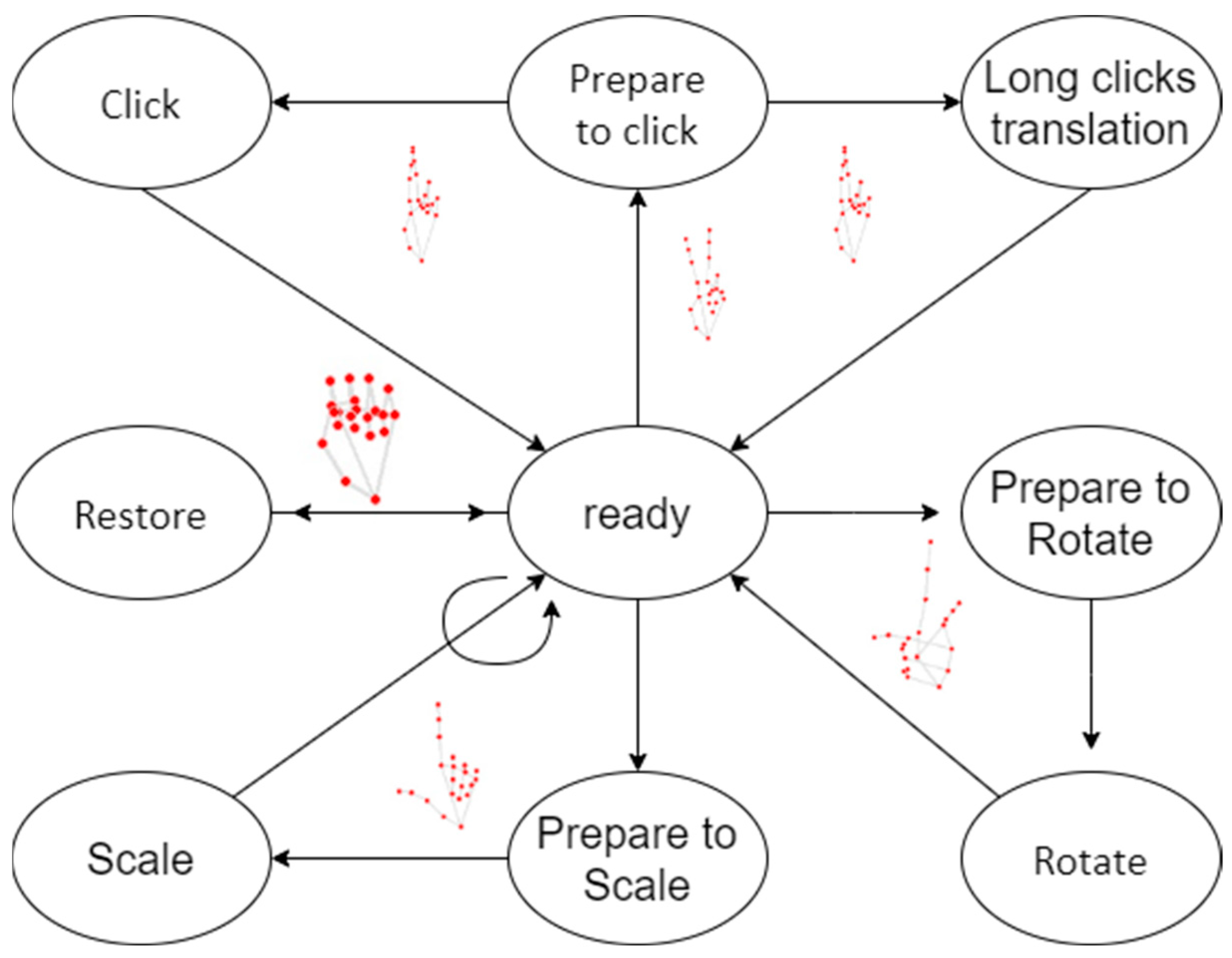
The model transformation part is responsible for creating and updating virtual scenes containing 3D models and displaying them on the screen. To make the interaction logic simple and clear, five modes were defined: display mode, click mode, scale mode, rotate mode, and restore mode. To avoid coupling operations, only one mode can be executed at any time. In display mode, the model in the scene remains stationary, which means that the transformation matrix in the equation is locked. In scaling mode, BIM models can only be zoomed in or out. Similarly, in rotation mode, the BIM model can only rotate. Figure 9 shows the state transition of the interactive system.
Figure 9.
State transition of interactive system.
5.3. Inter System Communication
The gesture understanding section outputs the gesture video as gesture commands and their meanings, such as: {Scale in, 150%}, {Pan, 100 pixels to the right}, {Rotate, 20 degrees to the left}. All hands will be detected and marked with joint points when multiple hands appear in the video. The program only selects to execute the gesture command of the closest hand, when multiple gestures are recognized. The gesture understanding part transmits the meaning of the gesture to the model transformation part through the socket protocol.
5.4. Scalability and Flexibility of the System Architecture
Currently, the system is primarily focused on gesture interaction based on computer vision and BIM model manipulation and has successfully supported single-user interactions. We recognize that as the complexity of models and the demand for multi-user capabilities increases, the scalability and flexibility of the system will become increasingly important.
To address the scalability of the system architecture, we focus on two main aspects: supporting more complex models and enabling multi-user collaboration:
(1) Scalability for More Complex Models:
To accommodate larger and more complex BIM models, our proposed modular architecture can handle higher resolution 3D models by increasing computational resources or optimizing algorithms. Additionally, given the multi-layered nature of these models, we recommend utilizing a hierarchical data structure. This approach not only enhances the system’s processing efficiency but also provides a flexible framework for future scalability.
(2) Support for Multi-User Collaboration:
The system architecture has already considered multi-user scenarios, and with minimal modifications, it can support multiple users interacting with the same model simultaneously. Through a server-based architecture, users can connect via various terminals such as PCs or AR devices, leveraging a cloud platform to share model data. This design enhances the system’s flexibility and improves collaborative efficiency.
6. Experimental Section
Initiating the experiment under an office backdrop was undertaken to corroborate the efficacy of the 3D human–machine interaction system predicated on gesture recognition discussed in this study. Subsequently, the accuracy of gesture recognition was put under examination in three distinct environments—including one involving gloves—thereby validating the method’s practicality across a myriad of settings. Also, the presence of hand obstructions such as gloves induced negligible impact. A final assessment involved gauging the system’s responsiveness towards model manipulation and the degree of fluidity upheld during the interaction process.
6.1. Experimental Settings
6.1.1. Computer Environment
The experimental equipment is a Windows 11 version 64-bit operating system, processor Intel(R) Core(TM) i7-9750H CPU @ 2.60 GHz, with 8 GB of onboard RAM, and its own graphics card NVIDIA GeForce GTX 2060.
(1) Processor: Intel® Core™ i7-9750H CPU @ 2.60 GHz
The processor is a high-performance six-core CPU, which was sufficient for handling parallel computing tasks and intensive data processing operations required for the experiments. However, it is important to note that the clock speed and core count of the processor may limit the performance in scenarios involving highly complex simulations or tasks that demand substantial computational power.
(2) Memory: 8 GB of onboard RAM
The available memory allows for smooth execution of medium-sized data sets but may present limitations when dealing with very large data sets or memory-intensive tasks, such as real-time deep learning applications. The performance of memory-intensive algorithms could be impacted if the system approaches its RAM capacity, leading to slower processing or potential memory swapping.
(3) Graphics Card: NVIDIA GeForce GTX 2060
The dedicated GPU significantly accelerates tasks involving image processing and 3D rendering, which are essential in some of the experimental setups. However, for more advanced machine learning or neural network-based experiments, the GTX 2060 may fall short compared to more recent or higher-end GPUs, potentially limiting processing speed or capacity for large-scale deep learning models.
This configuration was chosen for its balance between performance and cost, providing adequate resources for the target experiments. However, the system’s limitations, such as memory size and GPU capability, must be considered when interpreting the results, especially in cases involving high computational demands or large data sets.
6.1.2. Experimental Scenario
(1) Scenario to verify the effect in the conference room scenario: The experimental environment examined in this study is a small high-rise conference room space located in Beijing. The conference room is 3.3 m long, 2.9 m wide, and 2.6 m high.
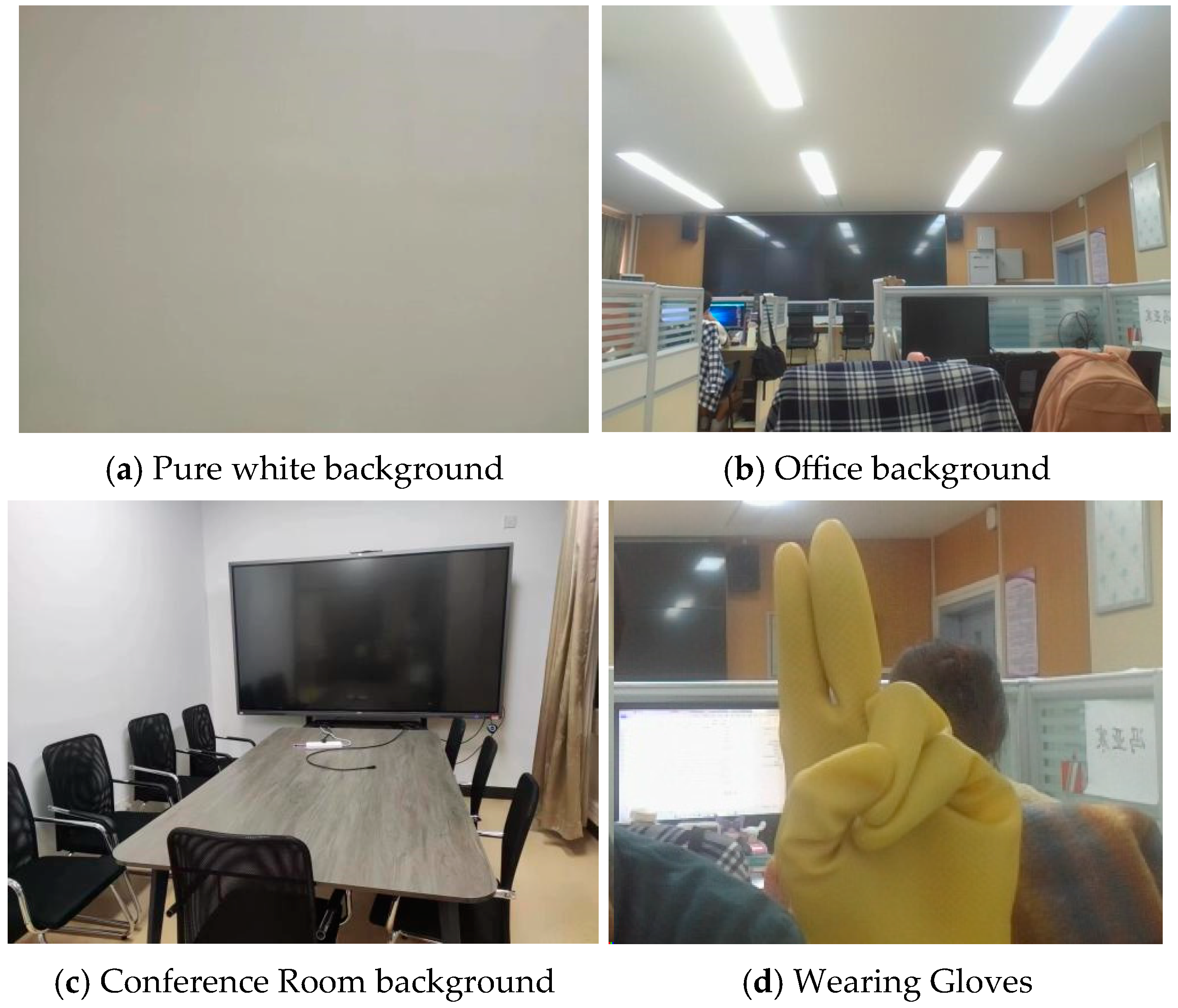
(2) Experiments to verify the diversity of use scenarios, data set: this study simulated several gestures used in different scenarios, Scene 1: blank background, Scene 2: laboratory background, Scene 3: conference room background, Scene 4: outdoor wearing gloves. The four different experimental scenarios are shown in Figure 10.
Figure 10.
Experimental scenarios.
6.1.3. Data Set
In the test of defining action commands, the interaction test of 5 types of action commands was conducted by three experimenters. For each scenario, a single gesture interaction instruction was tested 100 times/person for a total of 300 times, resulting in a total of 1500 sample tests. Four scenarios with a total of 6000 sample tests were obtained.
6.1.4. Evaluation Metrics
In this study, several evaluation metrics were set up: recognition rate, confusion matrix, number of frames
The recognition rate is the ability of the model to correctly recognize all samples. It can be measured by calculating the percentage of all samples that the model correctly predicts. The higher the recognition rate, the better the model is at recognizing samples. Although using a recognition rate to evaluate a model is not comprehensive, the results are intuitive.
In the confusion matrix, the number of samples whose true category is positive that are predicted to be positive is shown in the upper left corner, the number of samples that are predicted to be negative is shown in the upper right corner, and the number of samples whose true category is negative that are predicted to be positive is shown in the lower left corner, and the number of samples that are predicted to be negative is shown in the lower right corner. By looking at the confusion matrix, it is possible to achieve a more intuitive picture of how the model performs in the different categories.
Through the experimentally obtained confusion matrix, the number of correct ones for each gesture action in the experimental detection can be obtained, but only the number can not specifically measure the advantages and disadvantages of the model, so the statistical results of the confusion matrix are extended on the following three indicators, namely, the precision of the detection Pr, the recall rate Re, and the accuracy of the model Ac for a more standardized measure of the model.
Because the system operates in real-time, its utility and efficiency may be seen in the frame rate. And the smoothness of the interactive system very much affects the user experience.
6.2. Experimental Result
6.2.1. Qualitative Analysis
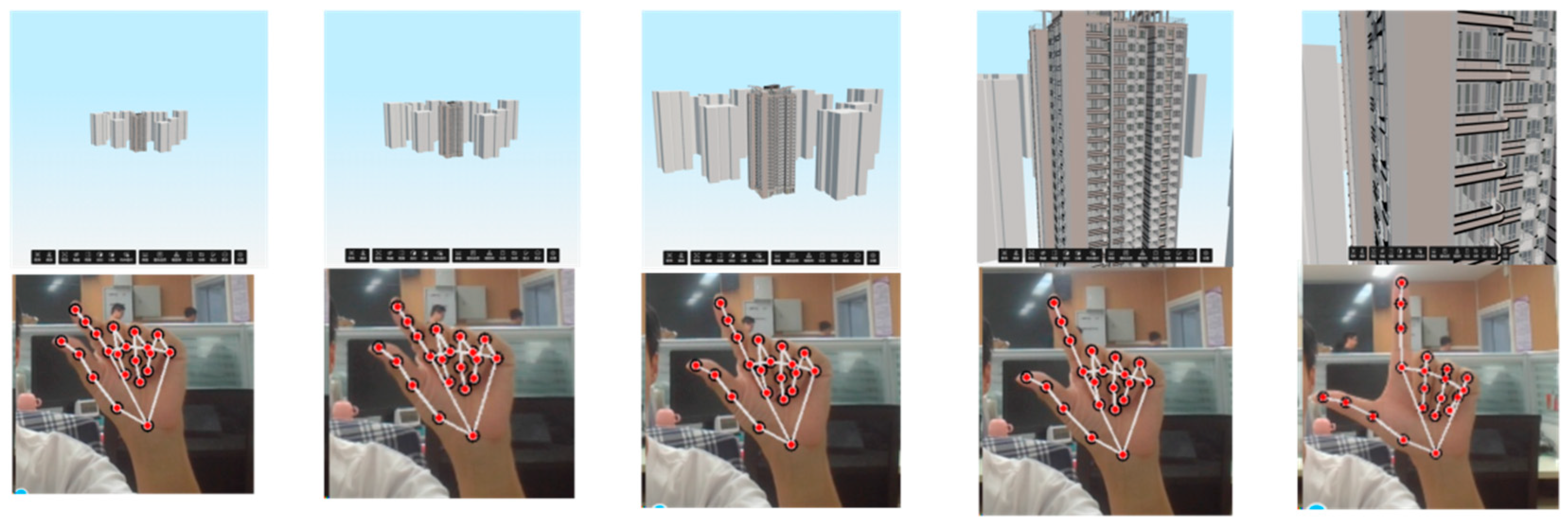
We first demonstrated the proposed system using a BIM model and camera video together. A single person used the interactive system in a laboratory context at a distance of 30–100 cm from the computer, and Figure 11 shows five consecutive snapshots of the human–model interactive system. The top image shows the BIM model and the bottom image shows the live video captured by the camera. The gesture-recognition-based 3D model HCI system captures the zoomed-in gestures through the surveillance video, and the model follows the gestures in real-time. This result demonstrates the effectiveness of our proposed gesture recognition-based 3D model HCI system.
Figure 11.
Qualitative experimental schematic diagram of the proposed 3D model HCI system.
Then, we quantitatively evaluated the performance of the proposed gesture recognition-based 3D model HCI system scheme in terms of gesture recognition success rate, smoothness, and sensitivity in a variety of scenarios.
6.2.2. Quantitative Experiments
In this simulation, the probability of correctly recognizing the five gestures can reach 100%, 100%, 100%, 96.6%, and 100%, respectively, in a pure white background. The context is built in an office environment, thus creating a more complex background. In this case, high recognition rate accuracy results can still be obtained, and the correct recognition probability of the five gestures can reach 99.66%, 100%, 94%, 94.66%, and 98%, respectively. In the conference room scenario, another complex environment is added to further prove the results, and the correct recognition probability of five gestures can reach 98.33%, 97.66%, 99.33%, 100%, and 96.33%, respectively. In the simulation case, gloves are worn to check the recognition results. The correct recognition probability of the five gestures can reach 96%, 98%, 98%, 98%, 95.66%, and 96.66%, respectively, which proves that the gesture recognition function of this system is not really affected by wearing gloves. The correct recognition probability of the five gestures in the four environments can reach 99%, 98%, 98%, 97%, and 98% on average. Since the gesture recognition experiments do not consider the historicity of the images, the results of the experiments may be better when the historicity is considered. Since the position of the hand in the image in successive images can be inferred from the position of the hand in the previous images. When using the interactive system with gloves the initial recognition of the hand takes longer, i.e., it takes longer for the hand to be recognized for the first time, but the movements after the completion of the first recognition are minimally affected. From the point of view of the recognition of different gestures, the recognition rate of the click gesture is 98.5%, the recognition rate of the prepare to click gesture is 98.9%, the recognition rate of the scale gesture is 99.3%, the recognition rate of the rotate gesture is 96.4%, and the recognition rate of the recover gesture is 96.66%. The recognition rate of rotational gestures is relatively low. Due to the gestures in real scenarios captured in the data set, rotational gestures have more variations compared to other gestures, such as palm facing the screen, back of the hand facing the screen, and so on.
These results show that the gesture recognition algorithm model proposed in this study is robust to different background environments. Table 2 shows the success rate of gesture recognition in different scenarios.
Table 2.
Success rates of gesture recognition in different scenarios.
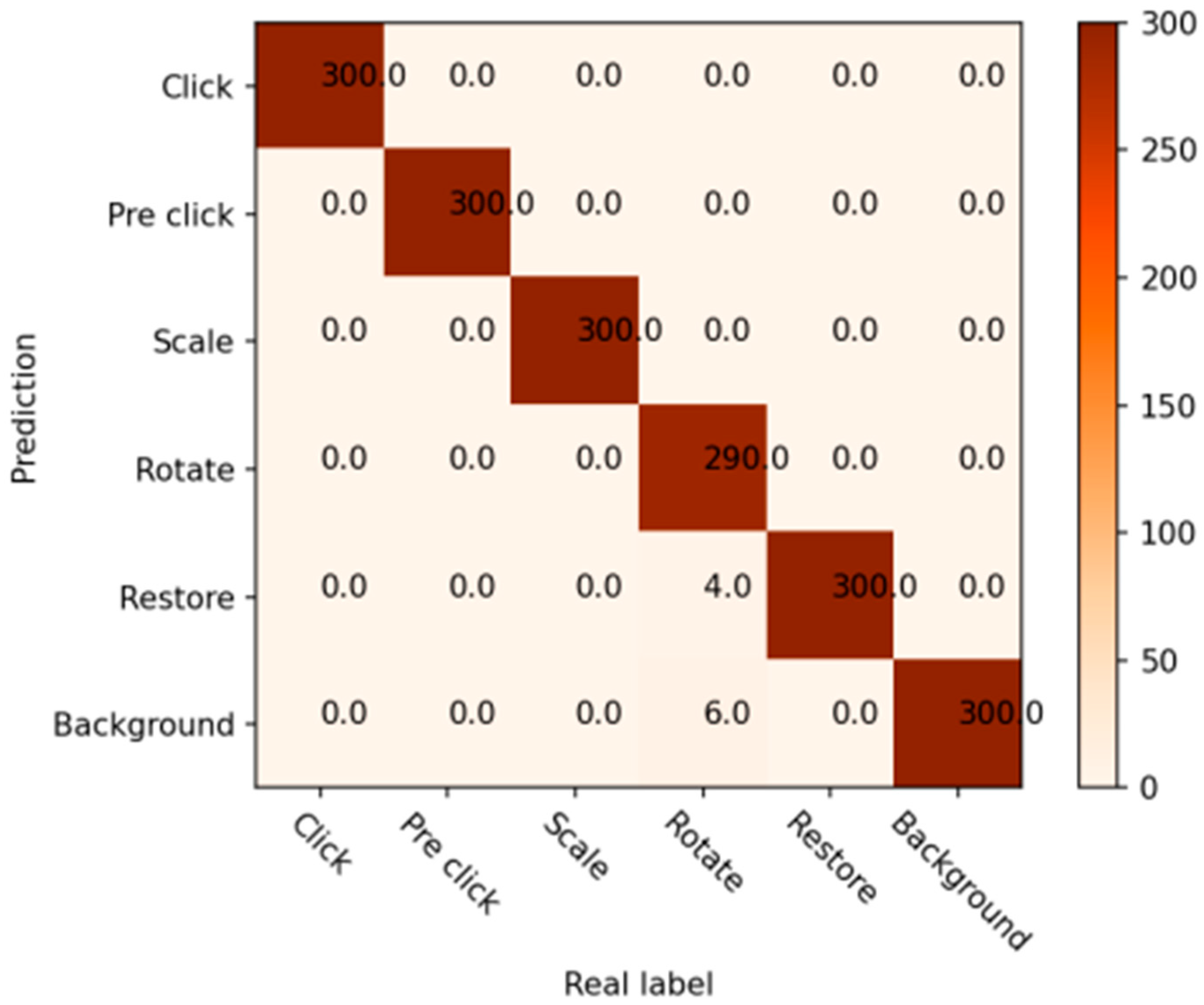
On a pure white background, 290 of the 300 images of the rotation gesture were correctly recognized, 4 were recognized as recovery gestures, and the hands of 6 images were not recognized. All 300 images of each click gesture, scale gesture, and recovery gesture were recognized correctly. Figure 12 shows the confusion matrix of gesture detection experimental results on a pure white background.
Figure 12.
Confusion matrix of gesture detection experiment results with pure white background.
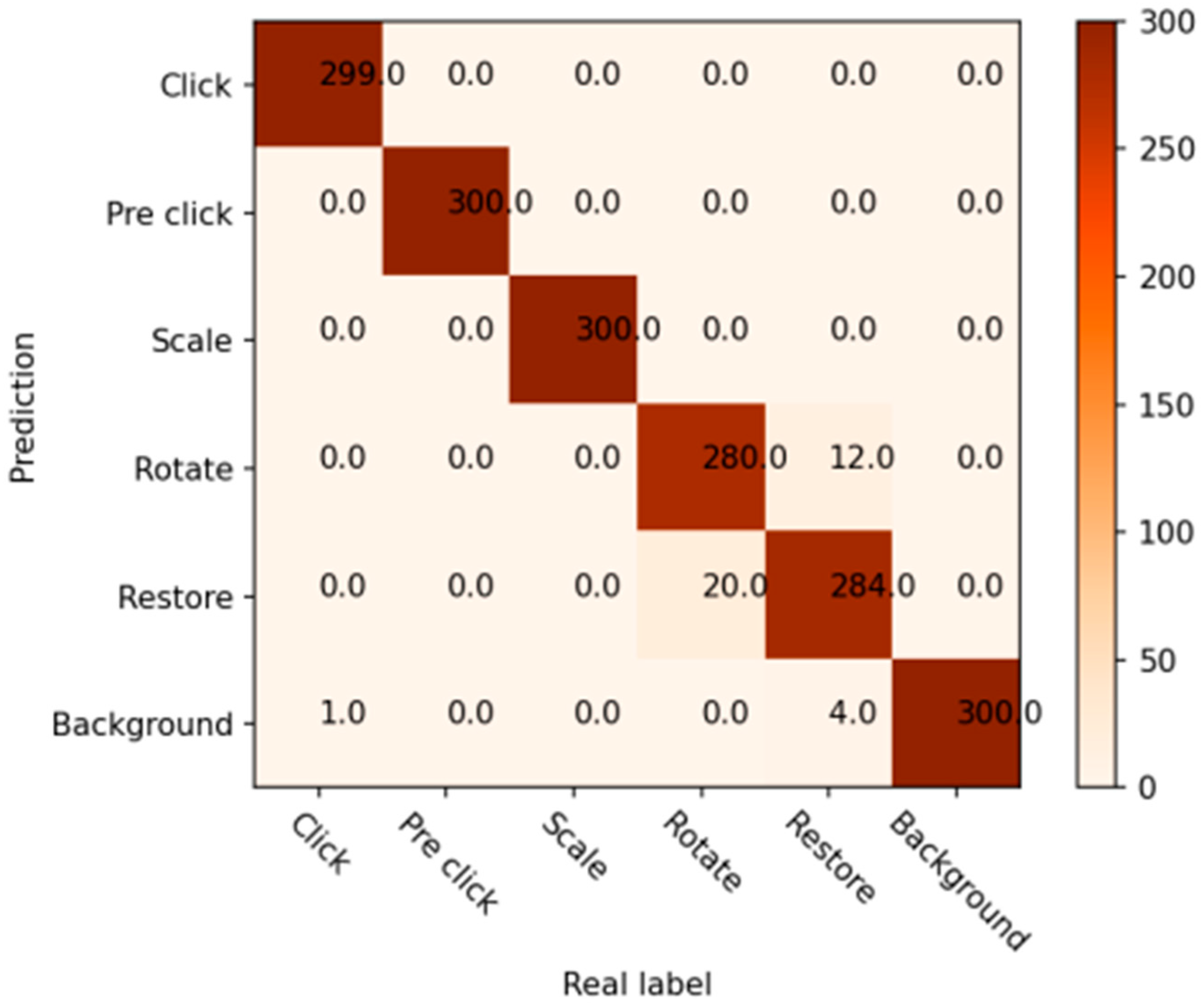
In an office context, 299 click gestures were correctly recognized and 1 hand was not recognized. Rotational gestures were correctly recognized in 280 images, and 20 were recognized as recovery gestures. In total, 284 out of 300 recovery gestures were correctly recognized, 12 were recognized as rotational gestures, and 4 hands were not recognized. Pre-click gestures, scale gestures, and 300 images were recognized correctly. Figure 13 shows the confusion matrix between gesture detection experiment results and office background
Figure 13.
Confusion matrix of gesture detection experiment results with office background.
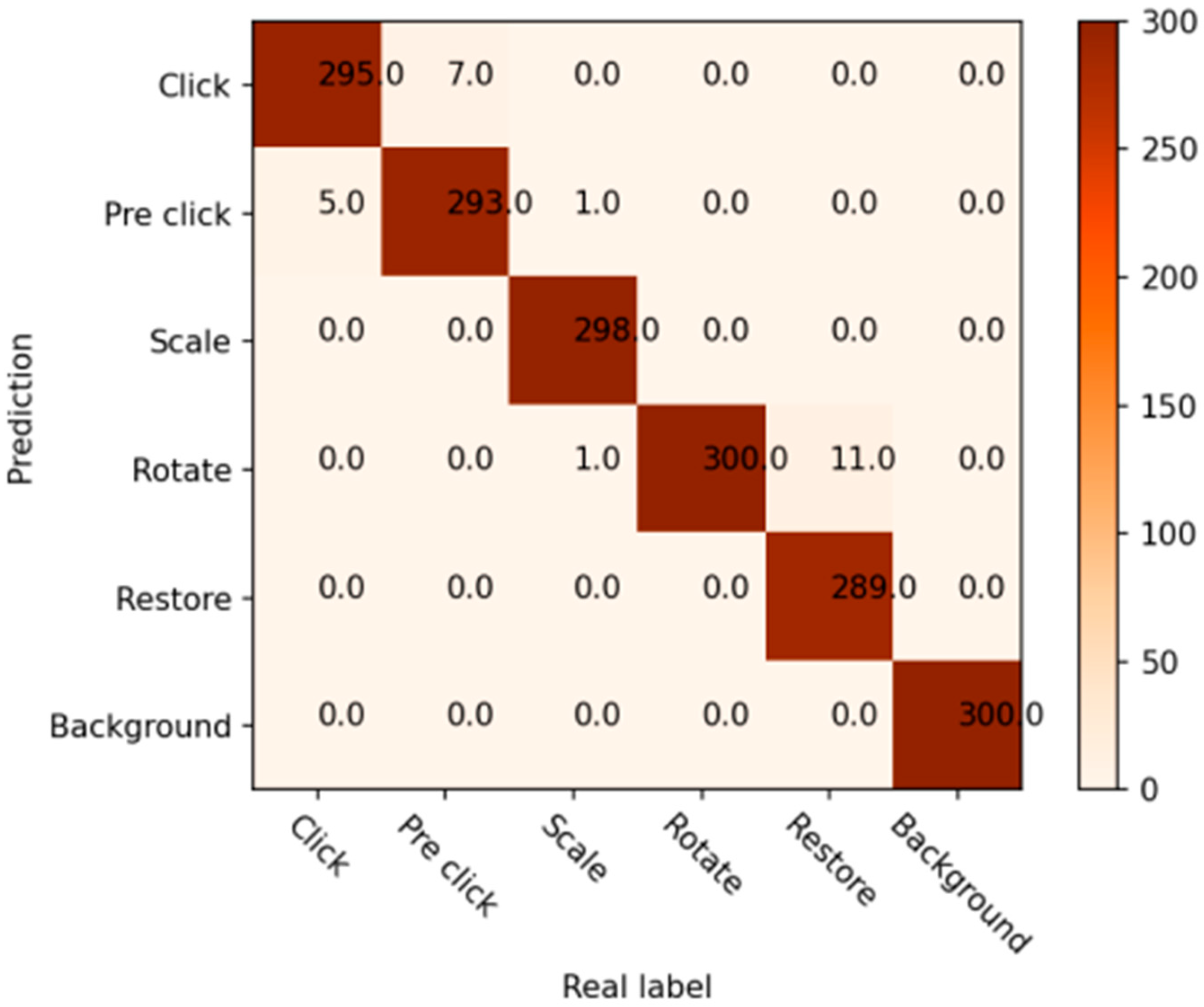
In a conference room context, click gestures were correctly recognized in 295 images, and 5 were recognized as pre-click gestures. Pre-click gestures were correctly recognized in 293 images and 7 images were recognized as click gestures. The scale gesture was correctly recognized on 298 images, 1 image was recognized as a click, and 1 image was recognized as a rotation. The rotation gesture was recognized correctly in all cases. The recovery gesture was recognized correctly in 289 images, and 11 images were recognized as rotation gestures. Figure 14 shows the confusion matrix between the gesture detection experiment results and the conference room background.
Figure 14.
Confusion matrix of gesture detection experiment results with conference room background.
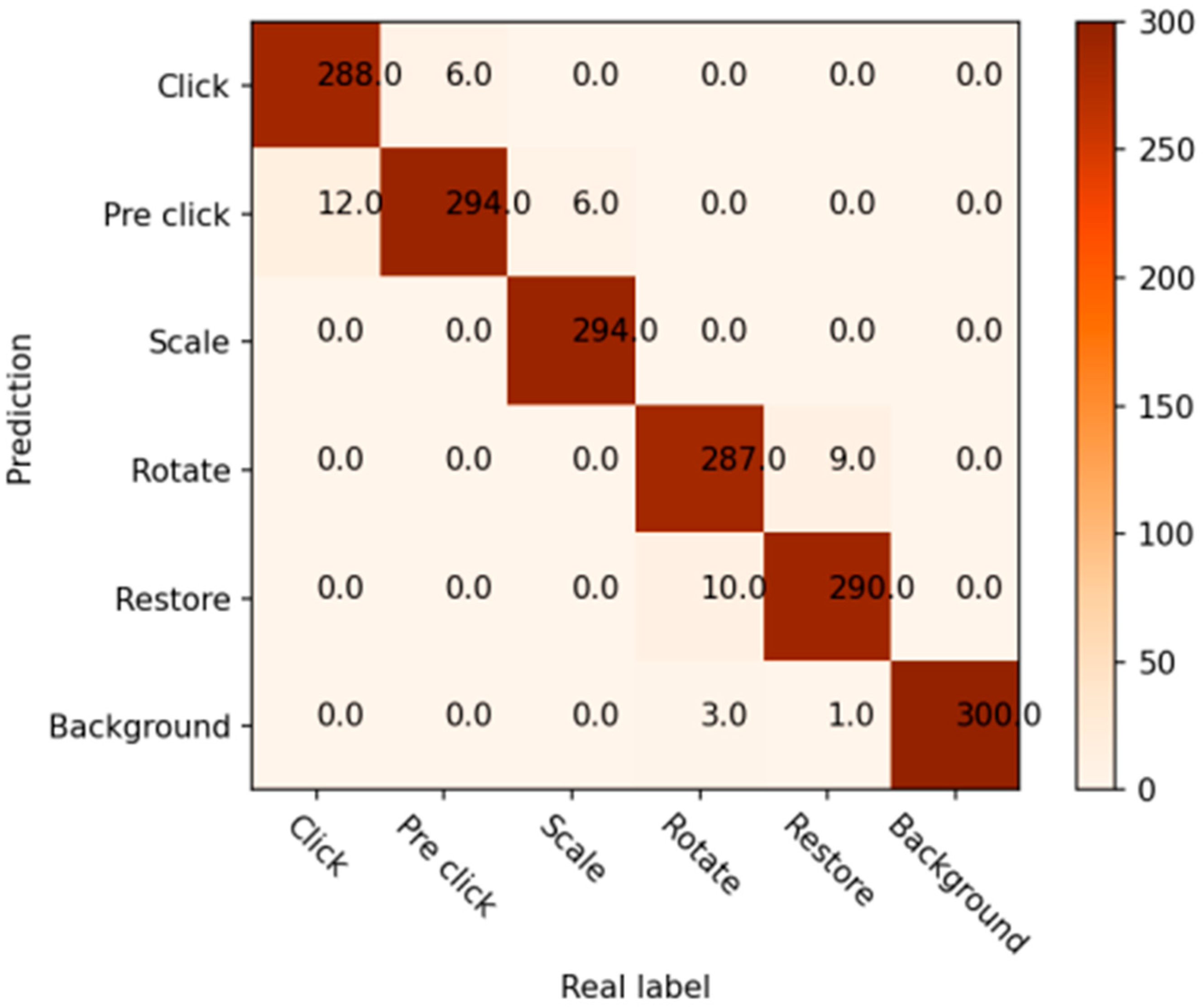
For the office glove-wearing scenario, 288 image gestures were recognized correctly and 12 were recognized as clicks. A total of 294 pre-click gestures were recognized correctly and 6 were recognized as click gestures. A total of 294 scale gestures were recognized correctly, and 6 were recognized as pre-click gestures. In total, 287 rotation gestures were recognized correctly, 10 were recognized as recovery gestures, and 3 images were not recognized. Finally, 290 recovery gestures were recognized correctly, 9 were recognized as rotation gestures, and 1 image was not recognized. Figure 15 shows the confusion matrix of the results of the glove gesture detection experiment in an office background.
Figure 15.
Confusion Matrix of Gesture Detection Experiment Results with Gloved Hand under Office Background.
The confusion matrix and gesture recognition success rate obtained through the experiment cannot specifically measure the strengths and weaknesses of the model, the data accumulated in the four backgrounds, the statistical results on the extension of the following three indicators, namely, the precision of detection Pr, the recall rate Re and the accuracy of the model Ac a more standardized measure of the model.
The defined interaction gestures are tested in the experimental environment and the test results are shown in Table 3. From the experimental results, it can be seen that when testing the defined action commands, the total number of test samples is 1200, of which the number of correct interactions is 980 and the number of unrealized interactions is 20, and the overall accuracy of the detection model reaches 98%. The low accuracy recall of rotational gestures is analyzed as a result of imprecise hand segmentation and inaccurate discrimination between similar movements by the detection model when the background environment is complex; in addition, the current model and the device do not have a high frame rate of acquiring the action information, which also results in a low recognition rate.
Table 3.
Experimental results of gesture recognition performance.
From the process of the experiment, it can be concluded that when no hand is recognized, the FPS (Frames Per Second, the number of frames transmitted per second of the screen) displayed on the upper left of the window stays at 26 to 30 frames; when the hand is recognized and thus the gesture recognition starts, the frame rate can also be stabilized at about 20 frames, which indicates that the memory occupied by this model is not very high and basically does not affect the performance of the laptop, and has good generalization for the experiment of the hardware subjects with good generalizability.
6.3. Comparative Analysis with Existing BIM Interaction Methods
Gesture-based interaction offers distinct advantages in the interaction with BIM models. It provides a natural, intuitive, and spatially flexible means for users to easily manipulate and explore 3D structures. This is particularly effective in VR or AR environments, where users require highly flexible interaction to view and modify BIM models. Although mouse and keyboard interactions continue to play a significant role in tasks requiring precision and efficiency, especially in non-immersive desktop environments, gesture-based interaction offers a more intuitive and ergonomically favorable alternative when interacting with complex, large-scale BIM models.
6.3.1. Naturalness and Intuitiveness
Gesture Interaction: Gesture-based interaction is more naturally aligned with human body movements, requiring minimal training for users to intuitively operate, such as zooming, panning, and rotating, which is especially beneficial in Virtual Reality (VR) and Augmented Reality (AR) environments.
Mouse and Keyboard Interaction: Traditional mouse and keyboard operations require users to familiarize themselves with specific control methods. While precise, these input devices may not be as intuitive, particularly in the context of complex Building Information Modeling (BIM) models.
6.3.2. Spatial Freedom and Flexibility
Gesture Interaction: Gesture-based interaction allows users to operate in a more spatially flexible manner, particularly in VR and AR environments, enhancing immersion and enabling viewing of models from multiple angles.
Mouse and Keyboard Interaction: Traditional methods of spatial manipulation are constrained by the limits of the screen. While rotation and zooming of models are possible, they are limited by the operating space and input methods.
6.3.3. Multitasking and Efficiency
Gesture Interaction: Gestures enable users to quickly switch views or layers with multi-finger actions, enhancing browsing efficiency, particularly when navigating complex models.
Mouse and Keyboard Interaction: Multitasking with mouse and keyboard often requires frequent switching between tools and views, which can increase cognitive load and reduce overall efficiency.
6.3.4. Health and Comfort
Gesture Interaction: Reduces dependence on the mouse and keyboard, promoting better ergonomics during extended use, and alleviating strain on the wrists and shoulders.
Mouse and Keyboard Interaction: Prolonged use may lead to discomfort, particularly in the wrists and fingers.
6.3.5. Adaptability and Application Scenarios
Gesture Interaction: Gesture interaction is particularly suitable for VR and AR environments involving complex 3D model interactions, offering a more natural and immersive way to manipulate and explore models.
Mouse and Keyboard Interaction: While still effective in traditional desktop environments, mouse and keyboard interaction may feel cumbersome and less efficient when dealing with large-scale BIM models, with more limited operational experiences.
7. Conclusions
BIM technology is widely employed within the construction sector. However, the traditional interactive methods it utilizes fall short of satisfying user demands. In a meeting scenario, interaction equipment may not readily be on hand—indeed, all conventional interaction methods necessitate contact with such equipment. Simultaneously, the swift progression of machine vision and gesture recognition technologies has sparked a need to merge traditional BIM model interactions with gesture recognition. This paper proposes a contactless interaction solution for 3D architectural model presentations based on gesture recognition. Firstly, a gesture joint detection model is applied to detect gestures from camera video footage, returning joint data. Proceeding this, five gestures—two of which are dynamic—are designed for BIM model conference settings, and a gesture comprehension model is established. Consequently, using rotation matrices and a virtual mouse method, gesture–model interaction is achieved. Finally, experiments are carried out in real indoor environments. Under varying conditions of pure white background, office settings, meeting rooms, and donning gloves in the office, gesture recognition tests were successful 99%, 98%, 98%, and 97% of the time, respectively, maintaining a frame rate of 20–30 frames. Experimental results demonstrate the presented gesture interaction scheme’s capability of precisely implementing model interaction.
This paper introduces an approach to 3D model interaction based on gesture interaction. This includes the design of gestures for human–machine interaction in 3D models, gesture interaction algorithms for 3D models, and the design of system interaction within 3D models. Experiments were conducted under real-world conditions. The method for 3D model interaction based on gesture interaction allows for the touchless operation of BIM models. This gesture-based 3D model interaction method will expand BIM use cases in future applications and inspire more intelligent interaction methods. To develop better intact experiences in the future, we consider improvements from two aspects: firstly, decisions concerning command conflicts issued by multiple users are a necessity, and secondly, when the area covered by a single camera is insufficient, how multiple cameras can collaborate effectively is a vital aspect needing exploration.
Author Contributions
Conceptualization, T.Z. and X.Z.; methodology, T.Z.; software, T.Z.; validation, Y.W.; formal analysis, J.J.; investigation, Y.W.; resources, J.F.; data curation, D.L.; writing—original draft preparation, T.Z.; writing—review and editing, T.Z. All authors have read and agreed to the published version of the manuscript.
Funding
This work was supported by the National Natural Science Foundation of China under grant no. 62271035.
Data Availability Statement
In the experimental section, we can see the dataset created by video slicing used in this article, thus completing the experiment on gesture interaction effects. We do not plan to publicly disclose the experimental procedures and datasets for the time being.
Conflicts of Interest
The authors declare no conflict of interest.
References
- Chen, L.; Luo, H. A BIM-based construction quality management model and its applications. Autom. Constr. 2014, 46, 64–73. [Google Scholar] [CrossRef]
- Prabhakaran, A.; Mahamadu, A.-M.; Mahdjoubi, L.; Boguslawski, P. BIM-based immersive collaborative environment for furniture, fixture and equipment design. Autom. Constr. 2022, 142, 104489. [Google Scholar] [CrossRef]
- Condotta, M.; Scanagatta, C. BIM-based method to inform operation and maintenance phases through a simplified procedure. J. Build. Eng. 2023, 65, 105730. [Google Scholar] [CrossRef]
- Mehrbod, S.; Staub-French, S.; Mahyar, N.; Tory, M. Characterizing interactions with BIM tools and artifacts in building design coordination meetings. Autom. Constr. 2019, 98, 195–213. [Google Scholar] [CrossRef]
- Al-Ansi, A.M.; Jaboob, M.; Garad, A.; Al-Ansi, A. Analyzing augmented reality (AR) and virtual reality (VR) recent development in education. Soc. Sci. Humanit. Open 2023, 8, 100532. [Google Scholar] [CrossRef]
- Weidner, F.; Boettcher, G.; Arboleda, S.A.; Diao, C.; Sinani, L.; Kunert, C.; Gerhardt, C.; Broll, W.; Raake, A. A systematic review on the visualization of avatars and agents in ar & vr displayed using head-mounted displays. IEEE Trans. Vis. Comput. Graph. 2023, 29, 2596–2606. [Google Scholar]
- Burian, B.; Ebnali, M.; Robertson, J.; Musson, D.; Pozner, C.; Doyle, T.; Smink, D.; Miccile, C.; Paladugu, P.; Atamna, B. Using extended reality (XR) for medical training and real-time clinical support during deep space missions. Appl. Ergon. 2023, 106, 103902. [Google Scholar] [CrossRef]
- Alhakamy, A.A. Extended Reality (XR) Toward Building Immersive Solutions: The Key to Unlocking Industry 4.0. ACM Comput. Surv. 2024, 56, 1–38. [Google Scholar] [CrossRef]
- Zhou, H.; Wang, D.; Yu, Y.; Zhang, Z. Research progress of human–computer interaction technology based on gesture recognition. Electronics 2023, 12, 2805. [Google Scholar] [CrossRef]
- Schiavi, B.; Havard, V.; Beddiar, K.; Baudry, D. BIM data flow architecture with AR/VR technologies: Use cases in architecture, engineering and construction. Autom. Constr. 2022, 134, 104054. [Google Scholar] [CrossRef]
- Amin, K.; Mills, G.; Wilson, D. Key functions in BIM-based AR platforms. Autom. Constr. 2023, 150, 104816. [Google Scholar] [CrossRef]
- Elghaish, F.; Chauhan, J.K.; Matarneh, S.; Rahimian, F.P.; Hosseini, M.R. Artificial intelligence-based voice assistant for BIM data management. Autom. Constr. 2022, 140, 104320. [Google Scholar] [CrossRef]
- Tchantchane, R.; Zhou, H.; Zhang, S.; Alici, G. A review of hand gesture recognition systems based on noninvasive wearable sensors. Adv. Intell. Syst. 2023, 5, 2300207. [Google Scholar] [CrossRef]
- Oudah, M.; Al-Naji, A.; Chahl, J. Hand gesture recognition based on computer vision: A review of techniques. J. Imaging 2020, 6, 73. [Google Scholar] [CrossRef]
- Hadavi, A.; Alizadehsalehi, S. From BIM to metaverse for AEC industry. Autom. Constr. 2024, 160, 105248. [Google Scholar] [CrossRef]
- Chignell, M.; Wang, L.; Zare, A.; Li, J. The evolution of HCI and human factors: Integrating human and artificial intelligence. ACM Trans. Comput. Hum. Interact. 2023, 30, 1–30. [Google Scholar] [CrossRef]
- Li, X. Human–robot interaction based on gesture and movement recognition. Signal Process. Image Commun. 2020, 81, 115686. [Google Scholar] [CrossRef]
- Sutton, R.S.; Modayil, J.; Delp, M.; Degris, T.; Pilarski, P.M.; White, A.; Precup, D. Horde: A scalable real-time architecture for learning knowledge from unsupervised sensorimotor interaction. In Proceedings of the 10th International Conference on Autonomous Agents and Multiagent Systems, Taipei, Taiwan, 2–6 May 2011; pp. 761–768. [Google Scholar]
- Gao, P. Key technologies of human–computer interaction for immersive somatosensory interactive games using VR technology. Soft Comput. 2022, 26, 10947–10956. [Google Scholar] [CrossRef]
- Sadeghi Milani, A.; Cecil-Xavier, A.; Gupta, A.; Cecil, J.; Kennison, S. A systematic review of human–computer interaction (HCI) research in medical and other engineering fields. Int. J. Hum. Comput. Interact. 2024, 40, 515–536. [Google Scholar] [CrossRef]
- Lim, Y.; Gardi, A.; Ezer, N.; Kistan, T.; Sabatini, R. Eye-tracking sensors for adaptive aerospace human-machine interfaces and interactions. In Proceedings of the 2018 5th IEEE International Workshop on Metrology for AeroSpace (MetroAeroSpace), Rome, Italy, 20–22 June 2018; pp. 311–316. [Google Scholar]
- Sitole, S.P.; LaPre, A.K.; Sup, F.C. Application and evaluation of lighthouse technology for precision motion capture. IEEE Sens. J. 2020, 20, 8576–8585. [Google Scholar] [CrossRef]
- Qi, J.; Ma, L.; Cui, Z.; Yu, Y. Computer vision-based hand gesture recognition for human-robot interaction: A review. Complex Intell. Syst. 2024, 10, 1581–1606. [Google Scholar] [CrossRef]
- Suo, J.; Liu, Y.; Wang, J.; Chen, M.; Wang, K.; Yang, X.; Yao, K.; Roy, V.A.; Yu, X.; Daoud, W.A. AI-Enabled Soft Sensing Array for Simultaneous Detection of Muscle Deformation and Mechanomyography for Metaverse Somatosensory Interaction. Adv. Sci. 2024, 11, 2305025. [Google Scholar] [CrossRef] [PubMed]
- Mustafin, M.; Chebotareva, E.; Li, H.; Martínez-García, E.A.; Magid, E. Features of interaction between a human and a gestures-controlled collaborative robot in an assembly task: Pilot experiments. In Proceedings of the 2023 International Conference on Artificial Life and Robotics, Online, 9–12 February 2023; pp. 158–162. [Google Scholar]
- Wen, F.; Sun, Z.; He, T.; Shi, Q.; Zhu, M.; Zhang, Z.; Li, L.; Zhang, T.; Lee, C. Machine learning glove using self-powered conductive superhydrophobic triboelectric textile for gesture recognition in VR/AR applications. Adv. Sci. 2020, 7, 2000261. [Google Scholar] [CrossRef]
- Mahmoud, N.M.; Fouad, H.; Soliman, A.M. Smart healthcare solutions using the internet of medical things for hand gesture recognition system. Complex Intell. Syst. 2021, 7, 1253–1264. [Google Scholar] [CrossRef]
- Camgoz, N.C.; Koller, O.; Hadfield, S.; Bowden, R. Sign language transformers: Joint end-to-end sign language recognition and translation. In Proceedings of the IEEE/CVF Conference on Computer Vision and Pattern Recognition, Seattle, WA, USA, 14–19 June 2020; pp. 10023–10033. [Google Scholar]
- Alabdullah, B.I.; Ansar, H.; Mudawi, N.A.; Alazeb, A.; Alshahrani, A.; Alotaibi, S.S.; Jalal, A. Smart Home Automation-Based Hand Gesture Recognition Using Feature Fusion and Recurrent Neural Network. Sensors 2023, 23, 7523. [Google Scholar] [CrossRef]
- Joshi, H.; Litoriya, R.; Mangal, D. Design of a Virtual Mouse Using Gesture Recognition and Machine Learning. Preprints 2022. [Google Scholar] [CrossRef]
- Du, G.; Guo, D.; Su, K.; Wang, X.; Teng, S.; Li, D.; Liu, P.X. A mobile gesture interaction method for augmented reality games using hybrid filters. IEEE Trans. Instrum. Meas. 2022, 71, 9507612. [Google Scholar] [CrossRef]
- Wang, M.; Yan, Z.; Wang, T.; Cai, P.; Gao, S.; Zeng, Y.; Wan, C.; Wang, H.; Pan, L.; Yu, J. Gesture recognition using a bioinspired learning architecture that integrates visual data with somatosensory data from stretchable sensors. Nat. Electron. 2020, 3, 563–570. [Google Scholar] [CrossRef]
- Lee, H.; Lee, S.; Kim, J.; Jung, H.; Yoon, K.J.; Gandla, S.; Park, H.; Kim, S. Stretchable array electromyography sensor with graph neural network for static and dynamic gestures recognition system. NPJ Flex. Electron. 2023, 7, 20. [Google Scholar] [CrossRef]
- Ali, H.; Jirak, D.; Wermter, S. Snapture—A novel neural architecture for combined static and dynamic hand gesture recognition. Cogn. Comput. 2023, 15, 2014–2033. [Google Scholar] [CrossRef]
- Wang, R.; Wu, X.-J.; Chen, Z.; Xu, T.; Kittler, J. Learning a discriminative SPD manifold neural network for image set classification. Neural Netw. 2022, 151, 94–110. [Google Scholar] [CrossRef]
- Li, H.; Wu, L.; Wang, H.; Han, C.; Quan, W.; Zhao, J. Hand gesture recognition enhancement based on spatial fuzzy matching in leap motion. IEEE Trans. Ind. Inform. 2019, 16, 1885–1894. [Google Scholar] [CrossRef]
- Rajalakshmi, E.; Elakkiya, R.; Subramaniyaswamy, V.; Alexey, L.P.; Mikhail, G.; Bakaev, M.; Kotecha, K.; Gabralla, L.A.; Abraham, A. Multi-semantic discriminative feature learning for sign gesture recognition using hybrid deep neural architecture. IEEE Access 2023, 11, 2226–2238. [Google Scholar] [CrossRef]
- Guo, L.; Lu, Z.; Yao, L. Human-machine interaction sensing technology based on hand gesture recognition: A review. IEEE Trans. Hum. Mach. Syst. 2021, 51, 300–309. [Google Scholar] [CrossRef]
- Ojeda-Castelo, J.J.; Capobianco-Uriarte, M.d.L.M.; Piedra-Fernandez, J.A.; Ayala, R. A survey on intelligent gesture recognition techniques. IEEE Access 2022, 10, 87135–87156. [Google Scholar] [CrossRef]
- Vuletic, T.; Duffy, A.; McTeague, C.; Hay, L.; Brisco, R.; Campbell, G.; Grealy, M. A novel user-based gesture vocabulary for conceptual design. Int. J. Hum. Comput. Stud. 2021, 150, 102609. [Google Scholar] [CrossRef]
- Visser, W. The function of gesture in an architectural design meeting. In About Designing; CRC Press: Boca Raton, FL, USA, 2022; pp. 269–284. [Google Scholar]
Disclaimer/Publisher’s Note: The statements, opinions and data contained in all publications are solely those of the individual author(s) and contributor(s) and not of MDPI and/or the editor(s). MDPI and/or the editor(s) disclaim responsibility for any injury to people or property resulting from any ideas, methods, instructions or products referred to in the content. |
© 2025 by the authors. Licensee MDPI, Basel, Switzerland. This article is an open access article distributed under the terms and conditions of the Creative Commons Attribution (CC BY) license (https://creativecommons.org/licenses/by/4.0/).