

You are currently viewing a new version of our website. To view the old version click .
Technologies
  • Communication
  • Open Access

2 April 2019

Text Input in Virtual Reality: A Preliminary Evaluation of the Drum-Like VR Keyboard


and
1
SINTEF Digital, Forskningsveien 1, 0373 Oslo, Norway
2
Department of Informatics, University of Oslo, Gaustadalléen 23B, 0373 Oslo, Norway
*
Author to whom correspondence should be addressed.
This article belongs to the Section Information and Communication Technologies

Abstract

The drum-like virtual reality (VR) keyboard is a contemporary, controller-based interface for text input in VR that uses a drum set metaphor. The controllers are used as sticks which, through downward movements, “press” the keys of the virtual keyboard. In this work, a preliminary feasibility study of the drum-like VR keyboard is described, focusing on the text entry rate and accuracy as well as its usability and the user experience it offers. Seventeen participants evaluated the drum-like VR keyboard by having a typing session and completing a usability and a user experience questionnaire. The interface achieved a good usability score, positive experiential feedback around its entertaining and immersive qualities, a satisfying text entry rate (24.61 words-per-minute), as well as moderate-to-high total error rate (7.2%) that can probably be further improved in future studies. The work provides strong indications that the drum-like VR keyboard can be an effective and entertaining way to type in VR.

1. Introduction

Since the early days of virtual reality (VR), various text input interfaces have been developed and studied, targeting seamless and user-friendly typing in virtual environments. Prior researchers have investigated a variety of interaction methods for typing in VR, such as wearable gloves, specialised controllers, head/gaze direction, pen and tablet keyboards, virtual keyboards, touchscreen keyboards, augmented virtuality keyboards, and speech-to-text and hand/finger gestures [1,2,3,4,5,6].
Recently, VR has undergone a major hardware-driven revival, marking what has been characterised as the “new era of virtual reality” [7,8,9]. The introduction of the Oculus Rift Development Kit 1 in 2013 is considered a significant milestone for VR, indicating when the VR revival took place and when VR became accessible, up-to-date and relevant again [8,10,11,12]. The low acquisition cost of VR hardware transformed VR into a popular technology, widely accessible by researchers, designers, developers, as well as regular users. At the same time, the quality of virtual environments increased rapidly, offering realistic graphics and full immersion [13,14,15].
From a human-computer interaction (HCI) perspective, this VR revival has produced new and updated interaction metaphors, designs and tools that require further studying and analysis [11]. The drum-like VR keyboard is such a product and a contemporary interaction interface for text input in VR. Although, this interface has been implemented [16,17,18], mentioned in related literature [3] and attracted users’ attention [17,19], it has not been studied and evaluated in terms of its performance and the experience it offers users.
In this work, a preliminary feasibility study is described in which the text entry performance, the usability and the user experience that the drum-like VR keyboard offers are evaluated. The study is exploratory in nature, aspiring to document preliminary text entry metrics and identify the interaction and experiential strengths and weaknesses of the drum-like VR keyboard interface for its future inclusion in a large-scale study.

3. Drum-Like VR Keyboard

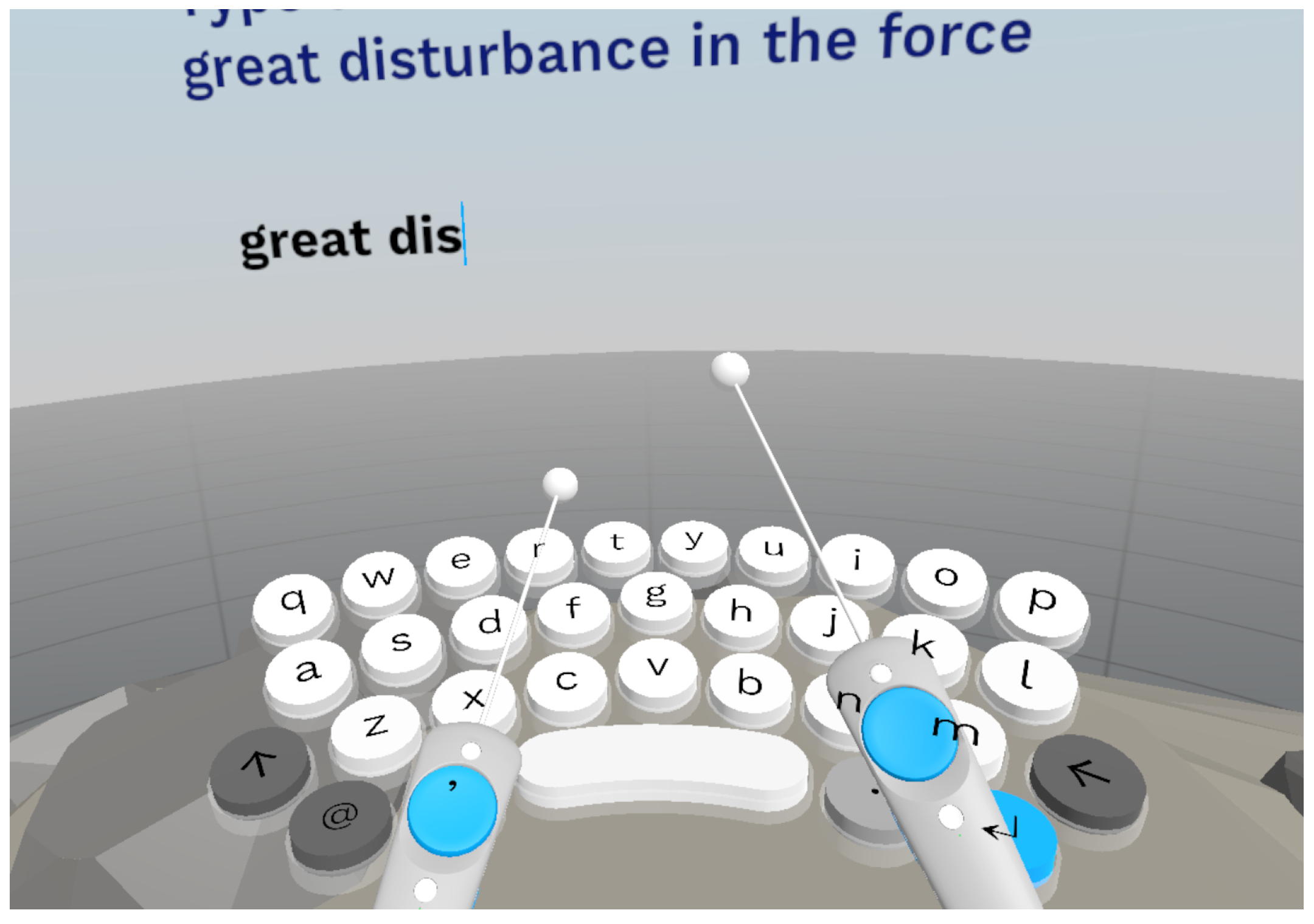
The drum-like VR keyboard is a controller-based, VR text input interface that was presented as a prototype from Google Daydream Labs [16] and recreated in the context of open-source projects by Oculus’ Jonathan Ravasz [17] and the Normal VR company [18]. The drum-like VR keyboard has a simple functionality, using a drum set metaphor [3]. The controllers are used as sticks, which–through downward movements–“press” the keys of the virtual keyboard (Figure 1). The drum-like VR keyboard facilitates casual VR typing under various mobility settings, just like other widely-used controller-based VR text input interfaces, e.g., raycasting [2] and split keyboard [22]. However, to the authors’ knowledge, there has not been a concrete application of the drum-like VR keyboard in a specific use context, indicating a real communication need.
Figure 1. The drum-like VR keyboard as implemented in this study (video demonstration: http://boletsis.net/vrtext/drum/).
Grubert et al. [3] have mentioned the drum-like VR keyboard in their work while making the assumption that “[a drum set metaphor] may be found to be efficient, but may require a substantial learning curve and could result in fatigue quickly due to the comparably large spatial movements involved”. At the same time, popular technological articles make similar assumptions, e.g., writer N. Lopez stated that “Google’s VR drum keyboard looks like a highly inefficient but fun way to type” [24]. Google’s VR product manager, A. Doronichev claimed that the drum-like VR keyboard enabled faster typing than the raycasting technique [2], was fun and allowed him to type 50 words-per-minute [16]. However, these assumptions and claims are neither further examined nor substantiated by empirical data. Therefore, in this work, this gap around the evaluation of the drum-like VR keyboard interface is addressed and targeted to inform researchers, developers and practitioners of the field.

4. Evaluation Study

An exploratory study of the drum-like VR keyboard was conducted, focusing on text entry rate and accuracy, as well as its usability and the user experience it offers. The most widely used methodology in the evaluations of text input interfaces is to present participants with pre-selected text phrases they must enter using the text input interface while performance data are collected [25]. These phrases are generally randomly retrieved from a phrase set, such as the established phrase set by MacKenzie and Soukoreff [25]. In this study, the same methodology was utilised, and text phrases were randomly selected from MacKenzie and Soukoreff’s phrase set. The search resulted in the ten phrases shown in Table 1 (mean phrase length: 29.7 characters, SD: 0.95, range: 28–31).
Table 1. The phrase set used in the study.

4.1. Interface and Apparatus

The drum-like VR keyboard evaluated in this study was implemented using the open source code (under MIT license) of Punchkeyboard [17]. The interface was created with Unity 3D (https://www.unity3d.com), written in C#, and was deployed on the HTC Vive VR headset (https://www.vive.com). No haptic or vibratory feedback on keystrokes was implemented. The virtual size of the drum-like VR keyboard was chosen to be close to the size of a real-world keyboard, based on related experimental designs [3,5,20,21] and so that it does not visually occlude the virtual environment. Furthermore, no auto-completion or auto-correction functionalities were implemented to enable comparison with previous related works and to capture the baseline performance of the interface. A C# script produced a log file with various measurements (e.g., timings, keystrokes), which were used to calculate the text entry rate and accuracy.

4.2. Measures

4.2.1. Text Entry Rate and Accuracy

The dependent metrics used in this evaluation for examining the text entry rate and accuracy were words-per-minute, the total error rate, the uncorrected error rate and the corrected error rate.
Words-per-minute (WPM) is perhaps the most widely reported empirical measure of text entry performance [26,27]. Since 1905, it has been common practice to regard a “word” as five characters, including spaces [28]. The WPM measure does not consider the number of keystrokes or gestures made during entry, but only the length of the resulting transcribed string and how long it takes to produce it [26]. Thus, the formula for computing WPM is [26,27]:
W P M = | T | 1 S × 60 × 1 5
T is the final transcribed string (phrase) entered by the subject, and | T | is the length of this string. T may contain letters, numbers, punctuation, spaces, and other printable characters, but not backspaces. Thus, T does not capture the text entry process, but only the text entry result [26]. The S term is seconds, measured from the entry of the first character to the entry of the last, which means that the entry of the first character is never timed, thus the “ 1 ” in the phrase length [26,27]. The “60” is seconds per minute and the “ 1 / 5 ” is words per character.
The total error rate (ER) is a unified method that combines the effect of accuracy during and after text entry [27,29]. This metric measures the ratio of the total number of incorrect and corrected characters, which is equivalent to the total number of erroneous keystrokes, to the total number of correct, incorrect and corrected characters [29]:
T o t a l E R = I N F + I F C + I N F + I F × 100 %
The total error rate is the sum of corrected and uncorrected errors [29]:
C o r r e c t e d E R = I F C + I N F + I F × 100 %
U n c o r r e c t e d E R = I N F C + I N F + I F × 100 %
C is the correct keystrokes, i.e., alphanumeric keystrokes that are not errors. The I N F term is incorrect and not fixed keystrokes. i.e., errors that go unnoticed and appear in the transcribed text while I F is incorrect but fixed keystrokes–erroneous keystrokes in the input stream that are later corrected [29].
In this evaluation, the recommended error correction condition was utilised, a condition that is frequently used in text input evaluations due to the fact that it encourages normal user behaviour for correcting typing errors [27,30]. In this condition, participants can correct typing errors as soon as they identify them.

4.2.2. Demographics and Questionnaires

Demographic data were collected at the initial stage of the study. Demographic data included age, gender, previous experience with VR HMD and the frequency of VR use.
To measure usability, the ten-item System Usability Scale (SUS) questionnaire [31] was used. SUS is an instrument that allows usability practitioners and researchers to measure the subjective usability of products and services. In the VR domain, SUS has been utilised in several studies around such topics as VR text input [23], VR rehabilitation and health services [32,33,34,35,36], VR learning [37] and VR training [38]. Specifically, it is a ten-item questionnaire that can be administered quickly and easily, and it returns scores ranging from 0–100. SUS scores can be also translated in adjective ratings, such as “worst imaginable”, “poor”, “OK”, “good”, “excellent”, “best imaginable” and grade scales ranging from A to F [39]. SUS has been demonstrated to be a reliable and valid instrument, robust with a small number of participants and to have the distinct advantage of being technology agnostic, meaning it can be used to evaluate a wide range of hardware and software systems [31,40,41,42].
User experience was measured using the Game Experience Questionnaire (GEQ), which has been used in several domains (such as gaming, augmented reality and location-based services) because of its ability to cover a wide range of experiential factors with good reliability [43,44,45]. The use of GEQ is also established in the VR domain in several studies around such topics as locomotion in virtual environments [46], haptic interaction in VR [47], VR learning [48], and VR gaming [49], among others. In this study, the dimensions of Competence, Sensory and Imaginative Immersion, Flow, Tension, Challenge, Negative Affect, Positive Affect and Tiredness (from the In-Game and Post-Game versions of the GEQ) were considered relevant and useful to the evaluation of the method. The questionnaire asked the user to indicate how he/she felt during the session based on 16 statements (e.g., “I forgot everything around me”), rated on a five-point intensity scale ranging from 0 (“not at all”) to 4 (“extremely”).

4.3. Participants

Participants were recruited from the authors’ institutions. Included participants had to be familiar with QWERTY desktop keyboard typing and self-report their typing skills as a 4 or 5 on a scale from 1 (no skill) to 5 (very skilled). This criterion ensured that all participants had similar and considerable typing experience. Moreover, participants had to be physically able to use VR technology. Participants were made aware of the potential risk of motion-sickness and the fact that they could opt out of the study at any time. All participants gave informed consent to participate in the study.

4.4. Procedure

First, participants were presented an introduction to the study. Then, they gave informed consent and completed a demographics questionnaire (approximately 10 minutes). The experimenter briefly demonstrated the drum-like VR keyboard and allowed participants 3–5 minutes to try it. Subsequently, the formal typing process commenced with participants being tasked to type the 10 phrases from Table 1 as quickly and as accurately as possible. Phrases were shown to the participants one at a time and were kept visible throughout the typing task. When finished, participants completed the SUS and GEQ questionnaires.

5. Results

5.1. Demographics

Seventeen participants (N = 17, mean age: 25.94, SD: 4.38, male/female: 9/8) evaluated the drum-like VR keyboard. Five participants had never used a VR HMD nor experienced VR before. The remaining 12 participants had used at least one VR HMD in the past, such as HTC Vive, Oculus Rift, Playstation VR, Samsung Gear VR or Google Cardboard. Of those, six participants had rarely experienced VR, five frequently and one was using VR every day. All participants successfully completed the sessions.

5.2. Text Entry Rate and Accuracy

The mean total time (S) to type the 10 phrases was 146.39 seconds (SD: 16.6), with an average correction number of 23.53 (SD: 11.66).
Using the drum-like VR keyboard, participants were able to type an average of 24.61 WPM (SD: 2.88), while the mean total error rate was 7.2% (SD: 3.3%, corrected ER: 7%, uncorrected ER: 0.2%). Table 2 summarises the text entry rate and accuracy results.
Table 2. Words-per-minute (WPM) and error rate (ER) metrics for the drum-like VR keyboard.

5.3. SUS

The drum-like VR keyboard interface scored a mean SUS value of 85.78 (SD: 6.1, range: 72.5–92.5). This value gives an “excellent” usability evaluation, equivalent to a grade of B, based on Brooke [31,40].

5.4. GEQ

Table 3 displays the mean values from the GEQ questionnaire. As stated before, the values range from 0 (“not at all”) to 4 (“extremely”).
Table 3. GEQ values across eight experiential dimensions for the drum-like VR keyboard.

6. Discussion

Overall, the study and the high SUS score indicated high usability for the drum-like VR keyboard and an altogether positive acceptance of the interface for typing in VR. These results were further supported by the experiential qualities of the interface, as captured by the GEQ questionnaire. The drum-like VR keyboard had low values in the negative dimensions of Challenge, Tension, Negative Affect and Tiredness, and high values for Competence, indicating that the interface was easy to use and caused minimal discomfort and tiredness, if any. At the same time, Positive Affect had moderate-to-high values, potentially signifying that the drum-like VR keyboard is a fun and entertaining way to type in VR. Flow and Immersion demonstrated moderate and high values respectively, indicating that the interface can be suitable for fully immersive VR tasks.
From a performance perspective, using the drum-like VR keyboard to type in VR resulted in a promising mean text entry rate of 24.61 WPM. This result suggests that the drum-like VR keyboard’s rate may be able to compete against the rates of other interfaces discussed in Section 2, such as head-based [4,23], glove-based [22] and touchscreen-keyboard [3] approaches, while managing to have similar performance to that of several implementations of VR-integrated physical keyboards [3,5,21]. Naturally, some implementations of physical keyboards for VR text input, such as in Walker et al. [20], can achieve significantly better rates, however the different use contexts should be highlighted upon comparison. Physical keyboards can facilitate VR text entry for users at static, likely sitting, positions and office tasks, while the drum-like VR keyboard is indicated for various mobility and position settings, as well as casual VR tasks (e.g., browsing, short communications). Another important observation from the evaluation is that the standard deviation of the WPM values is low (SD: 2.88), with a value range of 19.75–30.75 WPM, revealing low data spread and potentially signifying a relatively steady VR typing performance of around 20–30 WPM for this study’s users, regardless of their prior VR experience. When it comes to text entry accuracy, the drum-like VR keyboard had a 7.2% mean total error rate (SD: 3.3%), which can be considered moderate to high, taking into consideration the informal 5% cut-off limit for acceptable error rates [3,20].
Nevertheless, when analysing the evaluation results of the drum-like VR keyboard, there are additional factors that should be taken into consideration. The drum-like VR keyboard examined herein followed a “stripped” implementation, i.e., without text auto-correction or auto-completion functionalities, while its evaluation took place in only one session due to the feasibility character of the study. Based on related literature [3,4,20,22], a hypothesis for future research can be made that the text entry rate and accuracy of the drum-like VR keyboard can be improved by (i) implementing a decoder for text auto-correction/auto-completion and (ii) enabling users to have several typing sessions with the drum-like VR keyboard to become much more familiar with the interface. At the same time, a multi-session methodology can also have an effect in the GEQ experiential dimensions and, most importantly, on Tiredness, potentially scoring higher values because of the interface’s active physical interaction when typing/”drumming”.
Overall, the evaluation study showed the drum-like VR keyboard’s promising potential for typing in VR. The herein utilised methodology enabled not just measuring text entry performance but also evaluating the overall typing experience with the interface, even at a preliminary stage. Naturally, the feasibility and exploratory nature of the study along with the small sample size can only lead to preliminary results and conclusions about the interface’s performance; however, this is a necessary first step towards the complete exploration and potential improvement of the interface and VR text input in general. Therefore, the drum-like VR keyboard’s interesting and promising qualities were documented in this feasibility study and will be extensively investigated in the future.

7. Conclusions

In this study, the drum-like VR keyboard was evaluated, achieving a good usability score, positive experiential feedback, and satisfying text entry rates as well as moderate-to-high error rates that can be further improved in future studies. The work provides strong indications that the interests of the public and of the developer community are justified since the drum-like VR keyboard can be an effective and entertaining way to type in VR. However, there are still many research steps to be taken. Future work will compare the performance of the drum-like VR keyboard against other widely-used, controller-based interfaces utilising virtual keyboards, such as raycasting [2] and split keyboards [22].

Author Contributions

This work was developed by the authors as follows: Conceptualization, C.B. and S.K.; Funding acquisition, C.B.; Investigation, C.B. and S.K.; Methodology, C.B. and S.K.; Project administration, C.B. and S.K.; Resources, C.B.; Software, S.K.; Supervision, C.B.; Validation, C.B. and S.K.; Writing, C.B. and S.K.

Funding

This research is funded by the Norwegian Research Council through the Centre for Service Innovation.

Conflicts of Interest

The author declares no conflict of interest.

References

  1. Lepouras, G. Comparing Methods for Numerical Input in Immersive Virtual Environments. Virtual Real. 2018, 22, 63–77. [Google Scholar] [CrossRef]
  2. Lee, Y.; Kim, G.J. Vitty: Virtual Touch Typing Interface with Added Finger Buttons. In Proceedings of the International Conference on Virtual, Augmented and Mixed Reality, Vancouver, BC, Canada, 9–14 July 2017; pp. 111–119. [Google Scholar]
  3. Grubert, J.; Witzani, L.; Ofek, E.; Pahud, M.; Kranz, M.; Kristensson, P.O. Text Entry in Immersive Head-Mounted Display-based Virtual Reality using Standard Keyboards. In Proceedings of the 2018 IEEE Conference on Virtual Reality and 3D User Interfaces, Reutlingen, Germany, 18–22 March 2018; pp. 159–166. [Google Scholar]
  4. Yu, C.; Gu, Y.; Yang, Z.; Yi, X.; Luo, H.; Shi, Y. Tap, Dwell or Gesture?: Exploring Head-based Text Entry Techniques for HMDs. In Proceedings of the 2017 CHI Conference on Human Factors in Computing Systems, Denver, CO, USA, 6–11 May 2017; pp. 4479–4488. [Google Scholar]
  5. McGill, M.; Boland, D.; Murray-Smith, R.; Brewster, S. A Dose of Reality: Overcoming Usability Challenges in VR Head-mounted Displays. In Proceedings of the 33rd Annual ACM Conference on Human Factors in Computing Systems, Seoul, Korea, 18–23 April 2015; pp. 2143–2152. [Google Scholar]
  6. Bowman, D.A.; Rhoton, C.J.; Pinho, M.S. Text Input Techniques for Immersive Virtual Environments: An Empirical Comparison. In Proceedings of the Human Factors and Ergonomics Society Annual Meeting, Baltimore, MD, USA, 30 September–4 October 2002; pp. 2154–2158. [Google Scholar]
  7. Smith, P.A. Using Commercial Virtual Reality Games to Prototype Serious Games and Applications. In Proceedings of the International Conference on Virtual, Augmented and Mixed Reality, Vancouver, BC, Canada, 9–14 July 2017; pp. 359–368. [Google Scholar]
  8. Olszewski, K.; Lim, J.J.; Saito, S.; Li, H. High-fidelity facial and speech animation for VR HMDs. ACM Trans. Graph. 2016, 35, 221:1–221:14. [Google Scholar] [CrossRef]
  9. Boletsis, C. The New Era of Virtual Reality Locomotion: A Systematic Literature Review of Techniques and a Proposed Typology. Multimodal Technol. Interact. 2017, 1, 24. [Google Scholar] [CrossRef]
  10. Hilfert, T.; König, M. Low-cost virtual reality environment for engineering and construction. Vis. Eng. 2016, 4, 2:1–2:18. [Google Scholar] [CrossRef]
  11. Boletsis, C.; Cedergren, J.E.; Kongsvik, S. HCI Research in Virtual Reality: A Discussion of Problem-solving. In Proceedings of the International Conference on Interfaces and Human Computer Interaction, Lisbon, Portugal, 21–23 July 2017; pp. 263–267. [Google Scholar]
  12. Giuseppe, R.; Wiederhold, B.K. The new dawn of virtual reality in health care: Medical simulation and experiential interface. Stud. Health Technol. Informat. 2015, 219, 3–6. [Google Scholar]
  13. Kim, A.; Darakjian, N.; Finley, J.M. Walking in fully immersive virtual environments: An evaluation of potential adverse effects in older adults and individuals with Parkinson’s disease. J. Neuroeng. Rehabil. 2017, 14, 16:1–16:12. [Google Scholar] [CrossRef] [PubMed]
  14. Moreira, P.; de Oliveira, E.C.; Tori, R. Impact of Immersive Technology Applied in Computer Graphics Learning. In Proceedings of the 15th Brazilian Symposium on Computers in Education, Sao Paulo, Brazil, 4–7 October 2016; pp. 410–419. [Google Scholar]
  15. Reinert, B.; Kopf, J.; Ritschel, T.; Cuervo, E.; Chu, D.; Seidel, H.P. Proxy-guided Image-based Rendering for Mobile Devices. Comput. Graph. Forum 2016, 35, 353–362. [Google Scholar] [CrossRef]
  16. Doronichev, A. Daydream Labs: Exploring and Sharing VR’s Possibilities. 2016. Available online: https://blog.google/products/google-vr/daydream-labs-exploring-and-sharing-vrs/ (accessed on 1 April 2019).
  17. Ravasz, J. Keyboard Input for Virtual Reality. 2017. Available online: https://uxdesign.cc/keyboard-input-for-virtual-reality-d551a29c53e9 (accessed on 1 April 2019).
  18. Weisel, M. An Open-Source Keyboard to Make your Own. 2017. Available online: http://www.normalvr.com/blog/an-open-source-keyboard-to-make-your-own/ (accessed on 1 April 2019).
  19. Ravasz, J. I’ve Just Released My Open-Source VR Keyboard Enhanced by Word Prediction. Download on GitHub. 2017. Available online: https://www.reddit.com/r/Vive/comments/5vlzpu/ive_just_released_my_opensource_vr_keyboard/ (accessed on 1 April 2019).
  20. Walker, J.; Li, B.; Vertanen, K.; Kuhl, S. Efficient typing on a visually occluded physical keyboard. In Proceedings of the 2017 CHI Conference on Human Factors in Computing Systems, Denver, CO, USA, 6–11 May 2017; pp. 5457–5461. [Google Scholar]
  21. Lin, J.W.; Han, P.H.; Lee, J.Y.; Chen, Y.S.; Chang, T.W.; Chen, K.W.; Hung, Y.P. Visualizing the keyboard in virtual reality for enhancing immersive experience. In Proceedings of the ACM SIGGRAPH 2017 Posters, Los Angeles, CA, USA, 30 July–03 August 2017; pp. 35:1–35:2. [Google Scholar]
  22. Whitmire, E.; Jain, M.; Jain, D.; Nelson, G.; Karkar, R.; Patel, S.; Goel, M. DigiTouch: Reconfigurable Thumb-to-Finger Input and Text Entry on Head-mounted Displays. Proc. ACM Interact. Mob. Wearable Ubiquitous Technol. 2017, 1, 113:1–113:21. [Google Scholar] [CrossRef]
  23. Gugenheimer, J.; Dobbelstein, D.; Winkler, C.; Haas, G.; Rukzio, E. Facetouch: Enabling touch interaction in display fixed uis for mobile virtual reality. In Proceedings of the 29th Annual Symposium on User Interface Software and Technology, Tokyo, Japan, 16–19 October 2016; pp. 49–60. [Google Scholar]
  24. Lopez, N. Google’s VR Drum Keyboard Looks Like a Highly Inefficient but Fun Way to Type. 2016. Available online: https://thenextweb.com/google/2016/05/19/typing-drumsticks-vr-looks-terribly-inefficient-extremely-fun/ (accessed on 1 April 2019).
  25. MacKenzie, I.S.; Soukoreff, R.W. Phrase Sets for Evaluating Text Entry Techniques. In Proceedings of the CHI ‘03 Extended Abstracts on Human Factors in Computing Systems, Ft. Lauderdale, FL, USA, 5–10 April 2003; pp. 754–755. [Google Scholar]
  26. Wobbrock, J.O. Measures of text entry performance. In Text Entry Systems: Mobility, Accessibility, Universality; Card, S., Grudin, J., Nielsen, J., Eds.; Morgan Kaufmann: Burlington, MA, SUA, 2007; pp. 47–74. [Google Scholar]
  27. Arif, A.S.; Stuerzlinger, W. Analysis of text entry performance metrics. In Proceedings of the IEEE Toronto International Conference on Science and Technology for Humanity, Toronto, ON, Canada, 26–27 September 2009; pp. 100–105. [Google Scholar]
  28. Yamada, H. A historical study of typewriters and typing methods, from the position of planning Japanese parallels. J. Inf. Process. 1980, 2, 175–202. [Google Scholar]
  29. Soukoreff, R.W.; MacKenzie, I.S. Metrics for text entry research: An evaluation of MSD and KSPC, and a new unified error metric. In Proceedings of the SIGCHI Conference on Human Factors in Computing Systems, Ft. Lauderdale, FL, USA, 5–10 April 2003; pp. 113–120. [Google Scholar]
  30. Arif, A.S.; Stuerzlinger, W. Predicting the cost of error correction in character-based text entry technologies. In Proceedings of the SIGCHI Conference on Human Factors in Computing Systems, Paris, France, 27 April–2 May 2010; pp. 5–14. [Google Scholar]
  31. Brooke, J. SUS: A Retrospective. J. Usability Stud. 2013, 8, 29–40. [Google Scholar]
  32. Lloréns, R.; Noé, E.; Colomer, C.; Alcañiz, M. Effectiveness, usability, and cost-benefit of a virtual reality–based telerehabilitation program for balance recovery after stroke: A randomized controlled trial. Arch. Phys. Med. Rehabil. 2015, 96, 418–425. [Google Scholar] [CrossRef] [PubMed]
  33. Rand, D.; Kizony, R.; Weiss, P.T.L. The Sony PlayStation II EyeToy: Low-cost virtual reality for use in rehabilitation. J. Neurol. Phys. Ther. 2008, 32, 155–163. [Google Scholar] [CrossRef] [PubMed]
  34. Ulozienė, I.; Totilienė, M.; Paulauskas, A.; Blažauskas, T.; Marozas, V.; Kaski, D.; Ulozas, V. Subjective visual vertical assessment with mobile virtual reality system. Medicina 2017, 53, 394–402. [Google Scholar] [CrossRef] [PubMed]
  35. Kizony, R.; Weiss, P.L.T.; Shahar, M.; Rand, D. TheraGame: A home based virtual reality rehabilitation system. Int. J. Disabil. Hum. Dev. 2006, 5, 265–270. [Google Scholar] [CrossRef]
  36. Meldrum, D.; Glennon, A.; Herdman, S.; Murray, D.; McConn-Walsh, R. Virtual reality rehabilitation of balance: Assessment of the usability of the Nintendo Wii® Fit Plus. Disabil. Rehabil. Assist. Technol. 2012, 7, 205–210. [Google Scholar] [CrossRef] [PubMed]
  37. Lin, H.C.K.; Hsieh, M.C.; Wang, C.H.; Sie, Z.Y.; Chang, S.H. Establishment and Usability Evaluation of an Interactive AR Learning System on Conservation of Fish. Turk. Online J. Educ. Technol.-TOJET 2011, 10, 181–187. [Google Scholar]
  38. Grabowski, A.; Jankowski, J. Virtual reality-based pilot training for underground coal miners. Saf. Sci. 2015, 72, 310–314. [Google Scholar] [CrossRef]
  39. Bangor, A.; Kortum, P.; Miller, J. Determining what individual SUS scores mean: Adding an adjective rating scale. J. Usability Stud. 2009, 4, 114–123. [Google Scholar]
  40. Brooke, J. SUS—A quick and dirty usability scale. In Usability Evaluation in Industry; Jordan, P., Thomas, B., Weerdmeester, B., McClelland, I., Eds.; Taylor & Francis: Boca Raton, FL, USA, 1996; pp. 189–194. [Google Scholar]
  41. Tullis, T.S.; Stetson, J.N. A comparison of questionnaires for assessing website usability. In Proceedings of the Usability Professional Association Conference, Minneapolis, MN, USA, 7–11 June 2004; pp. 1–12. [Google Scholar]
  42. Kortum, P.; Acemyan, C.Z. How low can you go?: Is the system usability scale range restricted? J. Usability Stud. 2013, 9, 14–24. [Google Scholar]
  43. Lee, G.A.; Dunser, A.; Nassani, A.; Billinghurst, M. Antarcticar: An outdoor ar experience of a virtual tour to antarctica. In Proceedings of the IEEE International Symposium on Mixed and Augmented Reality-Arts, Media, and Humanities, Adelaide, SA, Australia, 1–4 October 2013; pp. 29–38. [Google Scholar]
  44. Nacke, L.E.; Grimshaw, M.N.; Lindley, C.A. More than a feeling: Measurement of sonic user experience and psychophysiology in a first-person shooter game. Interact. Comput. 2010, 22, 336–343. [Google Scholar] [CrossRef]
  45. Nacke, L.; Lindley, C. Boredom, Immersion, Flow: A pilot study investigating player experience. In Proceedings of the IADIS International Conference Gaming 2008: Design for Engaging Experience and Social Interaction, Amsterdam, The Netherlands, 25–27 July 2008; pp. 1–5. [Google Scholar]
  46. Nabiyouni, M.; Bowman, D.A. An evaluation of the effects of hyper-natural components of interaction fidelity on locomotion performance in virtual reality. In Proceedings of the 25th International Conference on Artificial Reality and Telexistence and 20th Eurographics Symposium on Virtual Environments, Kyoto, Japan, 28–30 October 2015; pp. 167–174. [Google Scholar]
  47. Ahmed, I.; Harjunen, V.; Jacucci, G.; Hoggan, E.; Ravaja, N.; Spapé, M.M. Reach out and touch me: Effects of four distinct haptic technologies on affective touch in virtual reality. In Proceedings of the 18th ACM International Conference on Multimodal Interaction, Tokyo, Japan, 12–16 November 2016; pp. 341–348. [Google Scholar]
  48. Apostolellis, P.; Bowman, D.A. Evaluating the effects of orchestrated, game-based learning in virtual environments for informal education. In Proceedings of the 11th Conference on Advances in Computer Entertainment Technology, Madeira, Portugal, 11–14 November 2014; pp. 4:1–4:10. [Google Scholar]
  49. Schild, J.; LaViola, J.; Masuch, M. Understanding user experience in stereoscopic 3D games. In Proceedings of the SIGCHI Conference on Human Factors in Computing Systems, Austin, TX, USA, 5–10 May 2012; pp. 89–98. [Google Scholar]

Article Metrics

Citations

Article Access Statistics

Multiple requests from the same IP address are counted as one view.