1. Introduction
Visual impairment, considered one of the world’s biggest health problems, reduces people’s ability to see and cannot be corrected by the use of glasses [
1]. Haptic technology and its applications can help reduce the daily life difficulties of visually impaired people. With recent technological developments, these individuals can actively use special equipment and applications to participate in daily activities. Visually impaired people may have difficulty accessing and using new technologies and applications. However, all people have the right to participate in daily life activities, so it is necessary to use devices and applications that help reduce the digital divide and avoid social, economic, and cultural exclusion [
2,
3].
Martiniello et al. [
4] and Raja et al. [
5] showed that mainstream devices can replace traditional assistive devices. One such device, which is affordable, easily portable, and used daily and intensively by almost everyone, is the smartphone. The user communicates with the device through the touchscreen. For blind people, this is difficult compared to traditional telephones with keys [
6]; nevertheless, systems and applications have been developed to help them in their use, especially in text production.
The need for blind users to communicate with other people is very significant [
7]. Through specialized applications, text-producing touchscreen devices such as smartphones and tablets have the potential to support text production by blind people [
8,
9]. The most common way for blind people to enter text is through the Braille keyboard.
The main objective of this research is to examine the two most popular and widely used braille keyboard layouts and qualitatively assess which is more user-friendly. For this reason, we developed a mobile application called Haptic Braille Keyboard, whose main functionality is the variable positioning of the function keys in a way the user wants. This way, a wide range of used and popular braille keyboard layouts can be evaluated.
This paper investigates the use of different layouts of the Haptic braille keyboards as implemented in a mobile phone application for ubiquitous use by the visually impaired. Under the scope of this investigation, a mobile device Android application has been developed supporting different Braille layouts. Then, using this application on a sample set of testers, the application layouts were evaluated using different metrics.
The significance of this study lies in its comprehensive, user-centered evaluation of two distinct braille layouts for smartphone applications, its innovative use of simulated blindness testing, and its detailed analysis of specific use-case scenarios and user adaptation.
It provides a comprehensive comparative evaluation of two braille layouts, one being the classic layout and the other a novel design, provides valuable insights into the real-world applicability and effectiveness of each design, and allows for a controlled and systematic examination of usability issues by including healthy individuals undergoing simulated blindness to evaluate the braille layouts. The research identifies and categorizes specific use-case scenarios where each braille layout excels or faces challenges and provides actionable insights for designers and developers working on accessibility solutions. The findings can directly influence the design of future braille-based applications, promoting more inclusive and user-friendly technology for blind users.
The rest of the paper is organized as follows. In
Section 2, we summarize the state of the art of assistive technologies for visually impaired people, focusing on related work in braille keyboards.
Section 3 presents the application, its functionality and characteristics, and the methods used to obtain the results regarding its usability. In
Section 4, we evaluate the results while checking their internal consistency. In
Section 5, we discuss the results regarding the usability of the two most popular layouts. Finally,
Section 6 concludes the paper with future work.
2. Related Work
There are several state-of-the-art assistive technologies designed to help people with vision problems. Here are some examples of such technologies:
Accessible Apps and Software: Developers are creating apps and software with a strong focus on accessibility. These tools aim to ensure that people with vision problems can use technology to access information, communicate, and perform various tasks independently.
AI-Powered Solutions: Artificial Intelligence (A.I.) is being increasingly integrated into assistive technologies. A.I. can help in image recognition, text-to-speech conversion, language understanding, generation of tactile graphics, and enhancing the capabilities of existing assistive tools [
10].
Braille Displays: Refreshable Braille displays convert digital text into Braille characters, allowing users to read content through touch. These displays can provide real-time access to digital content, including books, documents, and web pages. Braille displays (or braille lines) exist in a wide range, but in general, they are expensive systems [
11] that use electromechanical methods to move pins up and down between holes on a flat surface.
Electronic Magnifiers: Electronic magnifiers, also known as video magnifiers or CCTV systems, use cameras and screens to magnify text and images. They offer adjustable magnification levels and high contrast settings to make reading easier for individuals with low vision.
Navigation Applications: Specialized navigation commercial apps like BlindSquare and Lazarillo help users with visual impairments navigate through their surroundings using GPS and audio cues. These apps can provide information about nearby points of interest, intersections, obstacles, and more [
12,
13].
O.C.R. Technology: Optical Character Recognition (O.C.R.) technology can convert printed text into digital text, which screen readers can read aloud or display in larger fonts on screens.
Smartphone Accessibility Features: Both iOS and Android operating systems offer a range of accessibility features, including screen magnification, color adjustments, voice commands, and gesture-based navigation.
Screen Readers and Voice Assistants: Screen readers like JAWS, NVDA, and VoiceOver (for Apple products) provide auditory feedback by converting text on screens into spoken words. Voice assistants like Amazon’s Alexa, Google Assistant, and Apple’s Siri can provide hands-free assistance for various tasks [
14].
Tactile Graphics and 3D Printing: Tactile graphics and 3D printing technologies can create tactile representations of images and objects, allowing users to explore visual information through touch and improve visual artworks’ independent access and understanding [
15].
Wearable Devices: Wearable devices, such as smart caps and smart gloves [
16,
17], can provide real-time assistance to people with vision impairments, especially in urban environments. They might use electronic devices, microcontrollers, electronic sensors, cameras, and computer vision algorithms to detect obstacles, provide alerts and geolocation, identify objects, faces, and text [
18], and convey this information audibly to the user.
In this paper, we will focus on the applications for mobile devices used by vision-impaired people for the production of text using a braille keyboard. Thus, it is considered appropriate to focus on the related work.
Blind and visually impaired people can enter text via commercial or research-based applications [
19]. Alajarmeh [
20] categorizes text entry input for blind and visually impaired people into two categories. Those on non-Braille-based approaches and those based on Braille approaches. Non-Braille-based approaches use either the standard virtual keyboards combined with a screen reader, voice commands, gestures, or thumb swipe, while Braille-based approaches rely on gestures or the use of one or two hands, along with different forms of feedback.
Braille writing on touchscreen devices is achieved using the basic Braille cell layout. Komninos et al. [
19] noted three ways of forming patterns in a Braille cell. Chording, where the user presses multiple function keys simultaneously with both hands, gestural input, where the finger moves from between the dot positions to insert a character and tapping, during which serial pressures of the fingers are made on the function keys so that the desired character is entered.
There are many proposals for touchscreen Braille keyboards. Most of them require the user to use both hands to type text via the touchscreen. Frey et al. [
21] developed BrailleTouch, an eye-free text entry application for smartphone devices. It has six function keys—three to each side of the screen—representing the two-column and three-row Braille system and a function key at the center representing the space bar. Users place and tap their fingers on the six function keys to type text while audio feedback is provided for each selected character. This application requires the opposite side to hold the smartphone device, the screen facing away from the user. Experts examined BrailleTouch regarding its usability and found that holding the phone with the screen facing away from the face needs further guidance regarding the proper positioning for operation [
21].
Perkinput is another Braille text entry method developed by Azenkot et al. [
22], and a popular Braille keyboard for iOS devices. It offers a user-friendly interface that allows individuals to input Braille directly on the touchscreen, making it easier for blind and visually impaired users to communicate and navigate their smartphones. It divides the screen into two parts, and it needs two hands for operation or one hand by tapping two times on the screen. This application can detect which finger the user has placed on the screen to form the binary string of a Braille letter.
BrailleType, presented by Oliveira et al. [
23], enables the user to sequentially enter one dot at a time while a double tap signals the end of the braille character. This text entry method allows the user to enter the text as if they were typing using the traditional Braille six-dot matrix code and can be performed using only one hand.
Another method of Braille text entry is No-Look-Notes presented by Bonner et al. [
24], which enables blind and visually impaired individuals to write text without relying on visual cues. Characters are arranged around the screen in an eight-segment pie menu. Each segment is a group of English letters, and the user can choose between them by dragging their finger or touching the screen while the characters in that group are announced audibly.
Yfantidis and Evreinov developed a gesture-driven input method software using an adaptive virtual button where the user can use only one finger [
25]. It is an eight-segment pie menu where the user makes a gesture on the screen in any of the eight compass directions, and depending on the time their finger remains on the screen, the system recognizes the character and announces the letter using text-to-speech (TTS).
Alnfiai and Sampali developed BrailleEnter [
26], a button-free input method on an Android platform that uses brief and long tap techniques based on braille patterns. A blind user uses two types of gestures to type text on a smartphone with the BrailleEnter keyboard: short press to represent inactive dots and long press to represent active dots in the braille encoding of each character. Users interact with the screen six times until they enter all the braille dots on each character. BrailleEnter overcomes navigation issues by allowing users to interact with the screen anywhere to enter braille dots. It also allows users to use only one hand to interact with the screen.
Senorita, by Rakhmetulla and Arif [
27], is a virtual chorded keyboard that has eight keys for entering characters and three function keys, and it is aimed at both visually impaired users as well as well-sighted users. The character keys are arranged in a single row, while every character key represents a group of English letters. The left four keys are tapped from the user’s left thumb while the right four keys are tapped with the right thumb, respectively. When the user presses a key on one side, the other side is automatically filled with the English letters that are contained in the key the user pressed. The main advantage of this particular keyboard is that it allows users to train and learn it as it can perform chorded actions in sequence by providing visual cues.
BrailleBack is an accessibility tool developed by Google for Android devices. It is used in conjunction with the TalkBack app, offering a combined voice and braille experience. In this way, users can use their smartphones with enhanced tactile functions. It has a six-function key interface, and it allows text entry. Space and delete can be input by swiping right or left, respectively. The authors’ implementation of an Android device using different Braille layouts is presented in the following section, followed by the layout experimentation.
3. Materials and Methods
The Haptic Braille Keyboard is a specialized application that allows users to type and input text into the Braille system via a touchscreen. It is specially designed and built to provide easy typing technology for visually impaired people.
For the implementation of the application, programming code was developed in HTML, CSS, PHP, JavaScript, AJAX, and SQL languages for the connection to the database. The database was built in MySQL. The database was designed and built in phpMyAdmin and consists of a series of tables and records for the needs of the project. HTML structures the content and defines the elements on a webpage. HTML created the basic structure of the application. CSS is used for styling your HTML elements and making them visually appealing. It controlled the application’s layout, colors, fonts, and other visual aspects. JavaScript added interactivity and dynamic behavior to the application. It helped to add features like form validation, animations, and real-time updates. PhpMyAdmin is a web-based tool used for managing MySQL databases. It helped to create, modify, and manage database structures and data. PHP code interacts with the database to retrieve and manipulate data and display them to the application. AJAX stands for Asynchronous JavaScript and XML. It sends and receives information in various formats, including HTML and text files. The most attractive feature of AJAX is its “asynchronous” nature, meaning it can communicate with the server, exchange data, and update the page without having to refresh the page.
The main JavaScript library that was used was the interact.js library. That library simplified and enhanced the user interactions on the application. The main feature that was used was the Drag-and-Drop Functionality. It provided an easy way to make the braille key buttons draggable on the smartphone screen. The user could rearrange the braille key buttons according to his/her convenience. Another javascript API that was used was the Navigator.vibrate(). It is a JavaScript function that allows us to control the smartphone’s vibration and add haptic feedback to the application. We created haptic feedback patterns with this API, adding tactile sensation to the application.
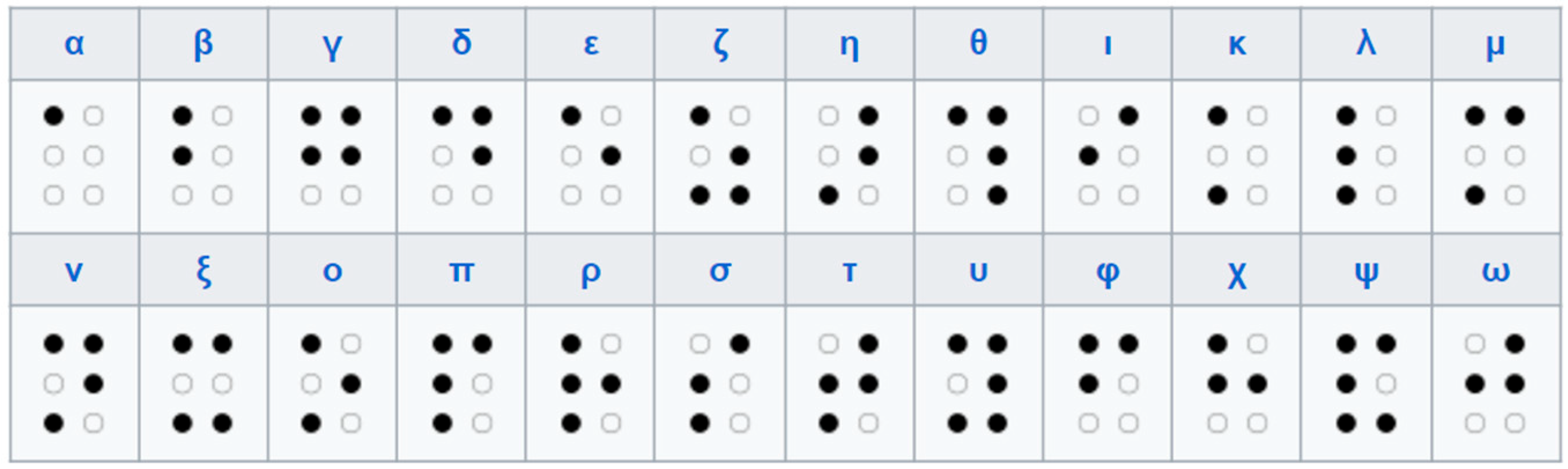
The braille alphabet that was used was the Greek Braille alphabet [
28], which is depicted in
Figure 1.
In order to achieve the conversion from the Braille alphabet to the Greek language, we used the conversion table in
Table 1.
The Braille board receives key data that the user types. When the user attempts a combination of keys 1 to 6, the fields b1 to b6 accept the value 1, respectively. For example, if the user wants to write the letter “β”, he has to press the buttons b1 and b2 and then press the submit key. The values converted to the Braille database table will be that of
Table 2.
The converted braille code can be understood by people with impairments with the help of vocal feedback with the mp3 files stored in the alphabet table of
Table 1.
This keyboard is actually an application made of logic switches and uses the Braille system technique to detect the characters. This system’s function keys are aligned according to the Greek Braille language (Greek alphabet). The main advantage of this project is that users can locate the braille keys wherever they want on the screen to maximize their experience. As most visually impaired people are already skilled in the Braille language, they only need a training session to use the application.
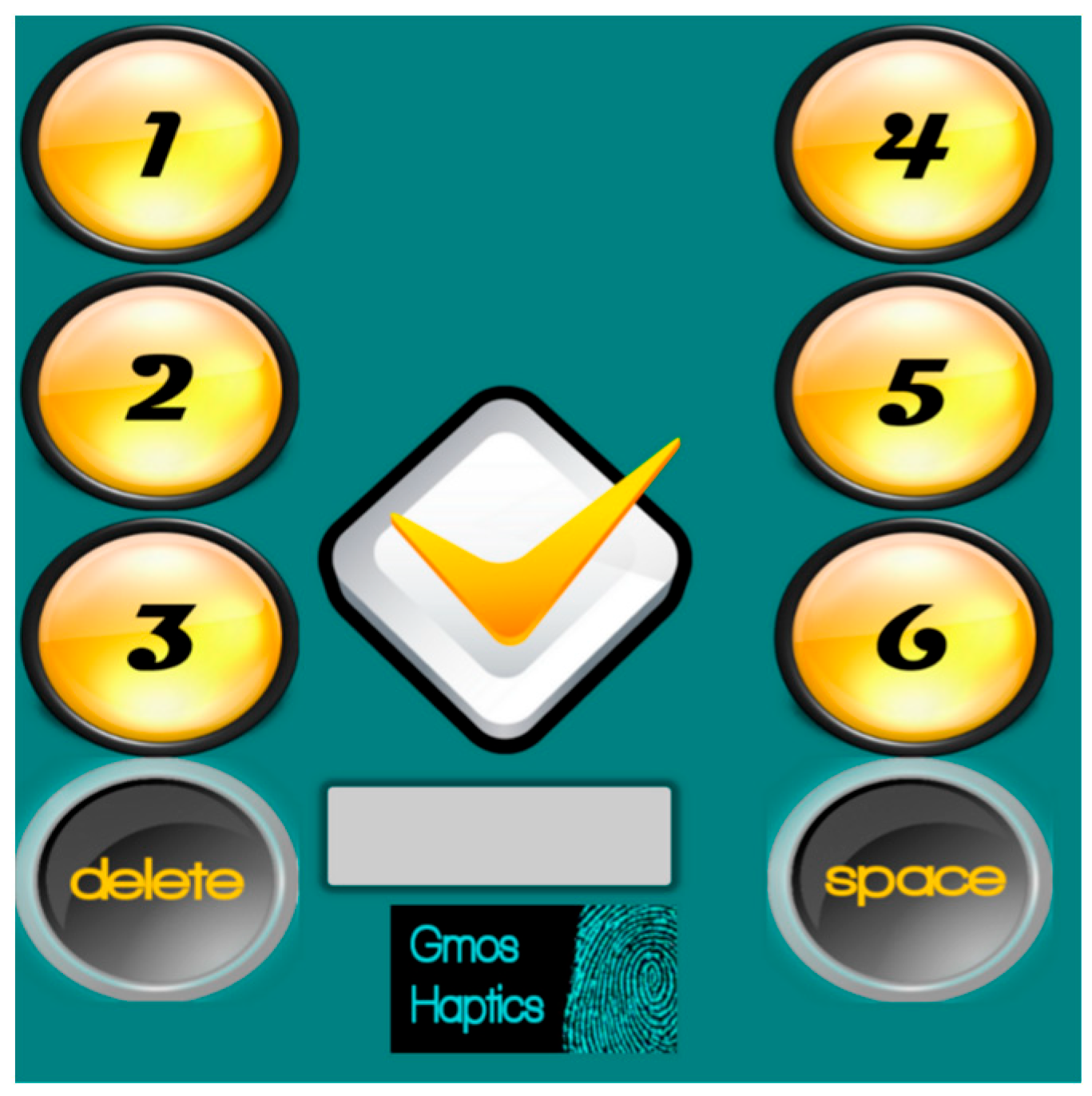
The interface has a nine-key layout. There are a total of six logical detection switches used to acquire the characters. Combining the six numbered keys results in the 24 letters of the Greek alphabet. The entire keyboard works based on the Braille writing system. There are also three other special buttons: The button to display the corresponding letter on the screen, the space button, and the delete button.
The user presses the function keys sequentially, and each time a key is pressed, tactile feedback is activated in the form of a vibration of the device. By pressing the central input key, the application recognizes the character entered by the user and announces it audibly.
Figure 2 shows the initial interface of the developed Android application.
After designing and developing the Haptic Braille Keyboard application, we have identified and compared two commonly used touchscreen Braille keyboard layouts.
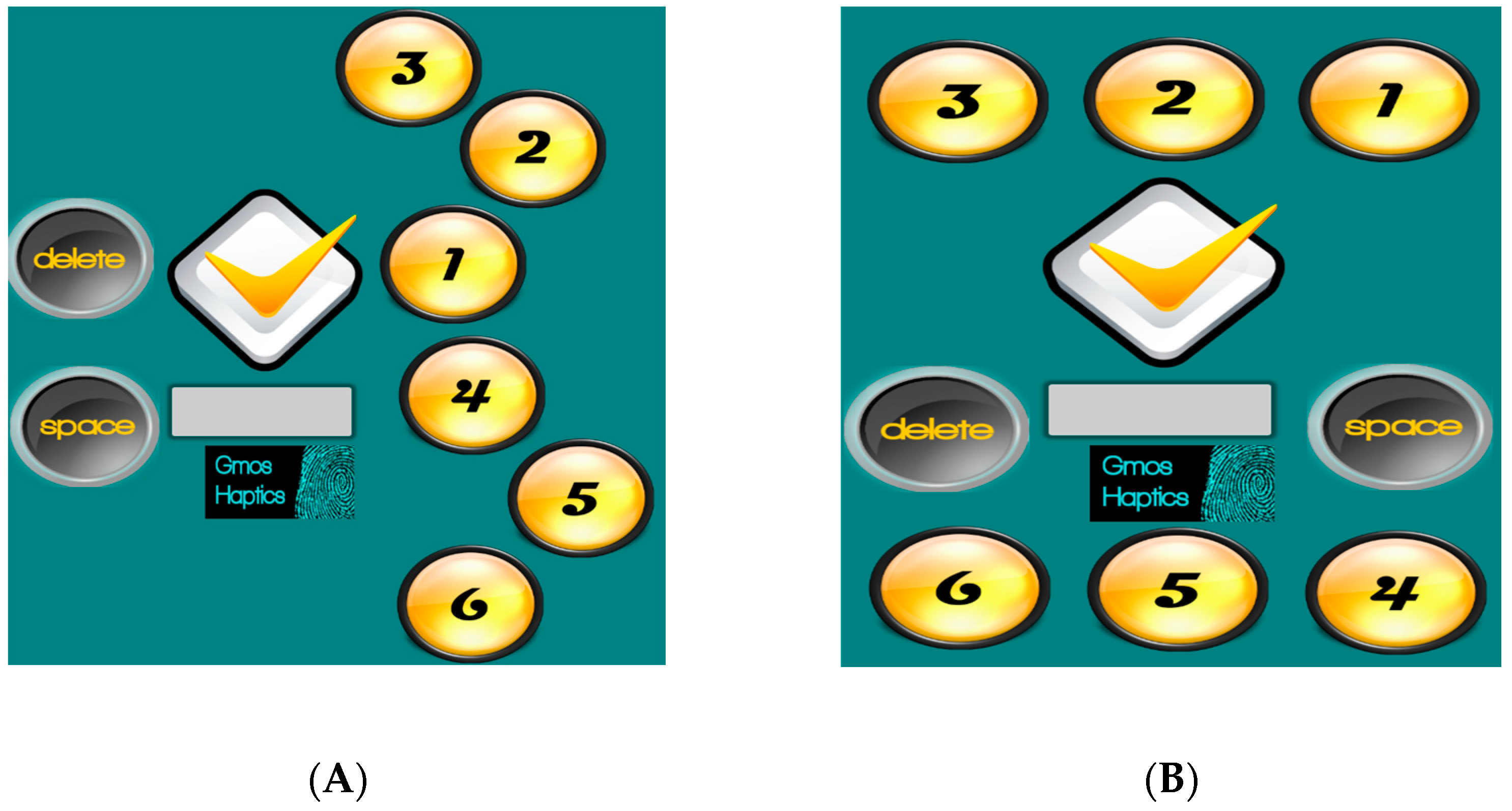
The first layout, known as Perkins Brailler layout, is the one that is used on braille typewriters, as shown in
Figure 3A. To form a Braille character, the user taps the corresponding combination of keys sequentially to input the desired character onto the screen. The layout of the keys on the Perkins Brailler reflects the numbering system used for Braille dots, where each dot is assigned a number from 1 to 6. By pressing one or more keys, a person can create any of the 63 possible combinations to represent letters, numbers, punctuation marks, and other Braille characters. This arrangement usually requires the mobile phone to be placed on a horizontal surface as the user has both hands tied to enter characters and cannot hold the device at the same time.
The second layout, as seen in
Figure 3B, has the function keys placed at the edges of the screen in two groups of three. In order to be easier to use, the specific arrangement requires users to have the screen of the device facing away from them, while at the same time, they can hold it with their two hands and the three fingers of each hand placed on the two groups of buttons, respectively. In both layouts, every time the user enters a character, a vibration follows, accompanied by voice confirmation of the entered character.
Furthermore, appropriate texting experimentation has been set up to study the usability and functionality of mobile phone layouts in real time and on a specific sample of users. This experiment aimed to determine the best and most efficient use of the application and record problems that may arise, thus allowing further design improvements. This was performed with the USE questionnaire, which assesses four main factors related to usability: “Usefulness”, “Ease of use”, “Ease of learning”, and “Satisfaction”. Appropriate Likert-scale questions have been added to the evaluation questionnaire passed to the application layout testers to evaluate the above metrics.
Our research has shown that both arrangements have advantages and disadvantages, but ultimately, layout B is more convenient and preferable to layout A. In particular, layout A was found to satisfy the “Usefulness” factor better, while layout B better satisfied the factors “Ease of use”, “Ease of learning”, and “Satisfaction”. The following two forms of interaction (A and B), as shown in
Figure 3, were examined separately and in comparison.
The evaluation of interfaces (A) and (B) was carried out using a qualitative assessment method in order to identify the aspects of the interface that were most challenging for the users and a USE (Usefulness, Satisfaction, Ease of Use) questionnaire that can be used for subjective reactions presented by Lund [
29], in order to measure the subjective usability for the user.
Generally, the USE questionnaire is considered to be a reliable and valid instrument for measuring the subjective usability of a product or service. The authors of [
30,
31] have shown that the USE questionnaire reliability is on par with the reliability of other usability questionnaires. Aiming to achieve a reliable evaluation of the two braille keyboard layouts, we calculated the internal consistency reliability of the used USE questionnaire. In the USE questionnaire, we examined the “Usefulness”, “Ease of use”, “Ease of learning”, and “Satisfaction” of the mobile interface. The comparison of the two interactions can give us conclusions about the usability feeling they leave to the user.
As described previously, the 8 keys of the application (No. 1–No. 6 and Space, Delete) can move around the screen frame (drag and drop) according to the user’s choice. This means that the user can place them as they see fit every time they use the application. However, the research focuses on two specific layouts. The first is that the device (mobile phone, tablet) is in a horizontal position. This layout is used by a wide number of Braille machines (Perkins Braillewriter). The second layout is a more modern and different arrangement. It works completely differently: The user holds the mobile device without facing the screen while typing the text.
3.1. Experimental Design
We divided the research on the usability of the application into two substudies: one to evaluate the app’s usability for sighted blindfolded individuals and another to evaluate its usability for blind individuals. The main purpose of including both sighted and blind participants was to understand the differences in usability perceptions between these groups.
Also, we increased the number of users for the beta testing in order to find and eliminate some universal accessibility issues and to distinguish between the issues that were specific to the application and those that are genuinely problematic for blind users.
Moreover, the use of blindfolded healthy participants enabled us to test guide-assisted scenarios because some of the blind have sighted assistants whose opinion of the usability of the application is important. Blind guides can give insights to the development team, contributing to a more user-friendly design. Also, teachers and parents might use a braille keyboard to learn how to teach braille language. Understanding how to use the same tools as their blind students or children can enhance their ability to provide effective assistance and education.
In addition, this application can be used by researchers and developers in order to test and develop new accessibility features or applications and to create more user-friendly solutions.
A pool of 58 adult participants was recruited for the experiment. The number of participants was considered satisfactory, as we conducted exploratory research, our data did not have high variability, and our statistical analysis and tests were not complex. We also used the Cronbach’ s Alpha reliability coefficient to have a measure of the internal consistency of the tests.
The participants who had normal or corrected-to-normal vision were 47, while the blind ones were 11. Participants with normal vision participated in the assessment with their eyes closed. Simply blindfolding people cannot recreate or adequately simulate a visually impaired person. Therefore, all simulation cases and scenarios cannot recreate the real cases to their full extent. However, testing plans include several stages, such as method validation, preliminary tests, simulation tests, and final evaluation-functionality tests, before entering user–target group acceptance tests. During these test phases, new methods or suggestions to the scientific community are essential for advancing the research in assistive and inclusive technologies since the contributions and findings also highlighted in this manuscript, even from simulation tests, may broaden the understanding of the needs of people with disabilities and drive the development of new tools and technologies.
In future work, the authors also intend to present user acceptance tests using a visually impaired target group and publish our findings between simulated and real testing cases, that is, to offer an accurate testing roadmap for software applications developed for people with visual impairments and pinpoint testing risks and mitigations.
Table 3 shows the characteristics of all the individuals who made up the research sample in relation to the gender of the participants, their vision status, and their age.
None of the participating normal vision users had any prior knowledge of Braille. Of the total number of blind people, nine people knew how to read and write braille, while two people only knew how to read and not how to write braille. These two people had a support person.
Participants were seated comfortably in a controlled environment. The smartphone used by the users had the application pre-installed, and both layouts to be compared were available by default. Participants were informed about the experiment’s purpose and procedures. Consent forms were obtained from all participants, while data confidentiality and anonymity were maintained.
Initially, participants were familiarized with the two haptic interfaces through a training session conducted by the research team. Participants were given enough time to practice using both interfaces until they felt comfortable and confident to proceed to the assessment stage. Some of the blind people were accompanied by a support person who helped them for the initial use of the device, while the rest were helped by the research team. Most blind participants had never used similar applications before. The only means they had used were the classic braille machines. These people needed more help to use the app successfully. The research team or the support person helped them to hold the mobile phone properly and direct their fingers to the right place where the corresponding button was located.
Users were instructed to use both hands for research purposes because locating targets on a touchscreen with both hands is more efficient [
32]. Twenty-four of the normal vision participants started with layout A first, while twenty-three started with layout B first. Five of the blind participants started with layout A first, while six started with layout B first.
3.2. Experiment Phase
In the first stage, each user was prompted to browse the application while the research team recorded their various reactions. The user was asked to initially position the 8 keys (with their eyes open if they were not blind), according to each proposed layout (A) and (B) of
Figure 3. Then, they should practice for a few minutes in each arrangement by writing letters of their liking. The sighted participants performed this exercise with their eyes closed. In the next stage, after the end of the practice, they were asked to write the sentence in the Greek language:
3.3. Performance Measures
In the second stage, the user was tasked to complete a USE Questionnaire of ten (10) contributing items rated on a Likert scale, identical for both layouts. The USE questionnaire that we implemented for our experimentation using Google Forms consisted of the following 10 questions, as shown in
Table 4:
4. Results
Observing the users who participated in the research revealed some important conclusions regarding how they interacted with the application. Most users initially showed interest and eagerness to try the application. In their first attempts, sighted participants unconsciously looked at the screen. However, after about 10 attempts, most became accustomed to it and continued using the application without looking at the screen.
On average, younger participants became familiar with it more quickly and continued using the application at a faster rate. While using the application, it was also observed that users removed their fingers from the screen after some time, resulting in them losing the positions of the keys. Additionally, the different lengths of the fingers and the long nails of the women made the precision of the movements more difficult. Generally, users employed different strategies to locate the function buttons on the touchscreen.
An important observation is also the fact that in the first layout (A), the users pressed the correct button with whichever finger was convenient for them (different each time) and not according to the instructions. Many complained about the margins (needed more screen size), leading them to tap off the app screen and exit it.
While large variations were observed regarding the time and effort it took each user to write the text, the users who completed the test, almost unanimously, said they were satisfied and found the application quite fun and entertaining. The normal vision participants, putting themselves in the position of a visually impaired person, stated that they would use such applications and consider them necessary for their communication. Some of the blind users said they were excited as it was the first time they had used this type of application and, in essence, they were discovering an alternative way of communication, while some others said they would like the device to be used on a table or with one hand because, in addition to vision problems they also had mobility problems.
4.1. Questionnaire Evaluation
4.1.1. Participants with Normal or Corrected Vision
Processing of the research results, the comparisons of the two layouts (A) and (B) are presented in
Table 5:
We can see that, while in layout (A) the device position remains fixed, the hands are free, so the result is that they often move away from it. In layout (B), the hands are permanently on the device, giving stability and limitation of the movement of the fingers from it. Nevertheless, both interactions were largely entertaining and useful to the users who participated in the tests.
The next step is to calculate the mean values of the four main factors of the questionnaire, as shown in
Table 4. In particular, regarding the factor “usefulness”, we calculate the average of the percentage results related to the contributing items “It is useful” and “It helps me be more efficient”. Similarly, we calculate the average values of the satisfaction rates of the remaining three factors of the questionnaire, “Ease of use”, “Ease of learning”, and “Satisfaction”. The results are shown in
Table 6.
From
Table 6, we can see that layout (A) was considered more useful, while layout (B), on the contrary, was considered easier to use and learn, while at the same time, it gave more satisfaction to users.
4.1.2. Blind Participants
From the processing of the research results, the comparisons of the two layouts (A) and (B) are presented in
Table 7:
From
Table 7, we can see that layout (A) presents better results than layout (B), in eight out of ten questions of the questionnaire. This is also reflected in the calculation of the mean values of the four main factors of the questionnaire, as shown in
Table 8.
From
Table 8, we can see that, for the blind participants, layout (A) is considered slightly more useful than layout (B), while being easier to use, easier to learn and more satisfactory.
4.2. Test Reliability
In order to examine the degree of reliability within the set of ten questions that were used in the USE questionnaire, we used Cronbach’s Alpha reliability coefficient. It is a coefficient of measuring internal reliability and consistency by examining how stable the participant responses would remain if, between repeated measurements, there was no mediating factor that could influence their answers. Although Cronbach’s Alpha has been criticized as a means of assessing reliability [
33,
34], it is suitable for use in questionnaires containing Likert-scale questions [
35,
36].
The calculated value always ranges from 0 to 1. The closer to 1, the more credibility there is from the questions.
Table 9 shows internal consistency according to Cronbach’s Alpha reliability coefficient. The coefficient was calculated only for the sample of sighted users as there was a sufficient sample size in contrast to the sample of blind users [
37].
The outcome of the Cronbach’s Alpha reliability coefficient of the USE questionnaire for the two layouts of
Figure 3 is depicted in
Table 10.
We see that layout A has a lower internal consistency reliability coefficient than layout B, which means that the respondents’ answers remain more stable in layout B. So layout B has more general acceptance among sighted users and can satisfy a larger percentage of users.
5. Discussion
This paper qualitatively evaluates two different haptic Braille interface layouts for visually impaired people that can be implemented on popular touchscreen devices such as laptops, tablets, and mobile phones. The layouts tested are the Perkins Brailler layout (layout A) and a different layout (layout B) with the function keys placed at the edges of the screen in two groups of three. To evaluate these layouts, an application supporting both was developed. The application interface functionality was then tested using an appropriate USE questionnaire distributed to the testers via Google Forms. The usability evaluation of the application was carried out separately on two subsets of users: in one set in which participants had normal vision but they were blindfolded for the purpose of the research and in a second set in which blind users participated.
The evaluation results for the normal vision participants have shown that layout A has a higher usefulness factor than B, with layouts A and B differing in usefulness by about 1.7%. On the other hand, layout B slightly outperformed A in terms of an easy-to-use interface factor by about 1.6%, while it presented significant benefits concerning A in terms of easy learning and user satisfaction factors of 2.7% and 3%, respectively. Layout B scored higher on three of the four USE questionnaire factors, so we can consider that layout B is better than layout A in terms of usability.
This is probably due to the position of the keys but also to the stability of the device with the position of the hands. That is, while the device remains fixed in layout A, the hands are free, so they often move away from it. In layout B, the hands are permanently on the device, giving stability to the fingers using it.
For the blind user subset, the evaluation results showed that layout A was absolutely better than layout B in terms of the four usability factors examined. Specifically, layout A gave better results regarding the usefulness factor by 0.9%, ease of use by 7.9%, ease of learning by 5.4%, and satisfaction by 9.0%.
This is mainly due to the fact that the device is stable on a surface, and the blind users are in a more convenient position as they sit and do not need to hold the device in their hands. They can also rest their cane next to them, and this gives them some sense of safety and stability, in contrast to layout B, in which the blind users have their hands constantly holding the device and must have their cane on them if they are standing up.
5.1. Pros and Cons for Each Layout
Summarizing, we could list the advantages and disadvantages of each layout from our point of view:
5.1.1. Layout A
Pros
It is based on the traditional braille machines which many blind users have been trained on and are comfortable using.
This layout is designed to be easily used in a stationary, desktop position, where users can rest their hands and type comfortably.
Users who are accustomed to this layout tend to be more tolerant of minor issues during testing, as they find the overall system familiar and reassuring.
Cons
The layout allows for more free hand movement, which can lead to errors if the hands shift out of position.
Difficult to use in a non-desktop position like, for example, when the user is standing or moving.
5.1.2. Layout B
Pros
The hands are tied to the buttons of the device, minimizing accidental hand movements and resulting errors.
Faster typing, especially when the user gets used to this layout.
Easier to use when standing or in other non-desktop positions.
Customization capabilities to suit individual user preferences and needs.
5.2. Contribution of the Study
The first contribution of the present study is the creation of a new Braille keyboard application for touchscreen devices such as smartphones and tablets, which gives tactile and vocal feedback to the user and where the user can move the keys to any part of the screen they wish. The second contribution is evaluating and comparing two popular braille keyboard layouts regarding their usability. The third contribution of this study is the realization of the different perception of usability, in general, between sighted and blind users.
We conducted user trials with normal vision participants having their eyes closed to evaluate the application’s general usability and to determine which of the two keyboards satisfies the USE questionnaire factors (usefulness, satisfaction, and ease of use) better. The blindfolded participants were used in order to perform the preliminary tests, validate the methods, simulate the tests, and carry out the final evaluation and functionality tests before entering user–target group acceptance tests.
For practical reasons, we investigated the two most popular layouts. The first is used in braille machines, while the second is often presented in the relevant literature. We cannot say with certainty that one of those two layouts is the optimal one because theoretically, there is a very large number of different braille layouts that can be used for text generation. Nevertheless, in future work, we plan to use the proposals of the blind users to investigate which of the two layouts, or a completely different one, is the optimal.
5.3. Open Research Questions and Future Work
Regarding future work, some open research questions should be answered. Research should focus on developing more intuitive and user-friendly haptic patterns, how haptic feedback can be effectively customized to individual user preferences and needs, and how can it be designed to complement and enhance the perception of other modalities, such as auditory feedback. The updated application version should enhance the user experience without becoming overwhelming. Moreover, more research should be conducted on how the haptic braille keyboard should be designed to communicate information effectively for people with visual impairments.
As for learning and adaptation, there should be research on how users can learn and adapt the smartphone haptic braille keyboard more easily. What strategies can be employed to facilitate rapid learning of a smartphone braille keyboard and how specific haptic feedback patterns influence users’ psychological and emotional states? What types of haptic interactions are most effective for conveying emotions, such as urgency, excitement, or comfort? Exploring these questions could lead to valuable insights that contribute to developing more effective, engaging, and user-centric smartphone braille keyboards.
In future work, the authors plan to extend their investigation, using a visually impaired target group and more different braille layouts to ensure that the results are more secure and representative. Furthermore, a deeper analysis of the differences in the results between blindfolded and blind users will be conducted. There will also be a quantitative evaluation of the application based on the number of errors made by users while typing as well as the time required for users to type a specific text in both layouts. The application will also be optimized to be uploaded to the application repositories, allowing users to select their preferred language. Also, we plan to introduce the application’s ability to automatically recognize the location of the users’ fingers and change the serial input of dots to a chorded one. In the next version of the application, the users will be able to lock the layout they prefer.