

Article

Exploring the Potential and Usability Evaluation of a VR-Based Art Restoration Education System
1
Conservation and Research Center, Cheng Shiu University, Kaohsiung 833301, Taiwan
2
Department of Visual Communication and Design, Cheng Shiu University, Kaohsiung 833301, Taiwan
3
Bachelor Program of International Business, Nanhua University, Chiayi 622301, Taiwan
*
Author to whom correspondence should be addressed.
Appl. Sci. 2026, 16(15), 7734; https://doi.org/10.3390/app16157734
Submission received: 12 June 2026 / Revised: 15 July 2026 / Accepted: 15 July 2026 / Published: 4 August 2026
(This article belongs to the Topic Innovation, Communication and Engineering, 2nd Edition)

Abstract

This study explores the potential of integrating Virtual Reality technology into art restoration education and conducts a preliminary usability evaluation for an immersive training prototype. Amidst the digital transformation of cultural heritage preservation, traditional apprenticeship-based education faces challenges such as irreversible damage risks to artifacts, high costs of restoration materials, and a lack of error tolerance for beginners. To address these issues, virtual environments provide a “zero-risk” simulation laboratory, allowing learners to engage in repetitive practice with real-time feedback. This research focuses on a prototype of a “Virtual Conservation and Restoration Education system” (V-CARE system) and conducted usability testing with 20 students at Cheng Shiu University. A mixed-method evaluation approach was employed, combining the System Usability Scale (SUS) for quantitative measurement and the 12 VR Heuristics proposed by Sutcliffe and Gault for qualitative verification. The evaluation suggests preliminary evidence in terms of learnability, interaction naturalness, and immersion. Finally, the study discusses potential layout considerations for prospective virtual environments, aiming to provide a baseline reference for virtual applications in cultural preservation training.

1. Introduction

1.1. Research Background and Motivation

Under the context of the SDG 11.4 emphasizing the “protection of global cultural and natural heritage,” the field of art conservation is welcoming a digital transformation brought by “Industry 5.0.” Art conservation is a complex discipline that combines material science, chemical diagnostics, and esthetic sensibility. Traditional education has long relied on the “apprenticeship-based” model of physical transmission. However, this model faces significant practical and economic challenges in the twenty-first century:
  • Irreversible risk to physical artifacts: If beginners make mistakes during the operation process, the physical damage caused to original cultural objects is often irreparable, which limits practical opportunities in teaching environments.
  • Sustainability and cost of restoration consumables: High-quality restoration materials (such as specialized resins and mineral pigments) are expensive, and large-scale practice would result in high economic costs.
  • Barriers to training interdisciplinary talent: Contemporary conservators need the ability to interpret AI scanning data and 3D simulations, but traditional curricula struggle to provide sufficient “cyber–physical integration” experimental spaces.
Extended reality (XR), including Virtual Reality (VR) and augmented reality (AR), has become an important tool for immersive learning in cultural heritage education because it can present complex spatial, historical, and procedural knowledge in an interactive environment. In heritage-related fields, XR is especially valuable because it reduces the need to manipulate fragile originals while still allowing learners to explore objects, spaces, and workflows repeatedly and safely. Recent studies have shown that XR can support cultural heritage education, museum interpretation, and knowledge transfer by increasing learner engagement, spatial understanding, and experiential learning quality [1].
Art restoration education presents a particularly suitable use case for VR. Traditional restoration training depends heavily on apprenticeship, observation, and controlled hands-on practice, but this model is constrained by the high cost of materials, the risk of irreversible damage to artifacts, and the limited availability of beginner-friendly practice opportunities. For novice learners, a virtual environment can provide a low-risk simulation space where they can practice diagnosis, procedural judgment, and restoration decision-making without endangering real cultural objects. This makes VR not only a visualization technology, but also a potential pedagogical infrastructure for conservation training [2]. Despite these advantages, existing VR applications in heritage-related education still tend to emphasize visual immersion more than instructional design and usability. In many systems, interaction methods, feedback mechanisms, and task flow do not fully align with the logic of professional restoration work, which may reduce learning efficiency and increase cognitive load. For this reason, the evaluation of a VR-based restoration education system should not rely only on novelty or immersion, but also on usability, task compatibility, and pedagogical clarity. Accordingly, this study develops and evaluates a VR-based art restoration education system and examines how interdisciplinary beginners perceive its usability, interface design, and simulated procedural flow during a virtual restoration task.

1.2. Research Objectives and Scope

This study aims to conduct a comprehensive evaluation of a virtual art conservation teaching system under development through quantitative scales and specialized heuristic principles. The specific objectives include:
  • Using the SUS to measure Cheng Shiu University students’ subjective satisfaction and usability of the system.
  • Applying Sutcliffe and Gault’s 12 VR heuristic principles to conduct an in-depth analysis of the system’s strengths and weaknesses in immersion, physical feedback, and operational navigation.
  • Proposing a conceptual framework for prospective AI-assisted extensions, focusing on how future digital guidance layouts might support non-restoration majors in visualizing multi-step restoration workflows.
This study is based on the technical framework of the Conservation and Research Center of Cheng Shiu University to develop the “Virtual Conservation and Restoration Education system” (V-CARE system). The system architecture and user flow of the V-CARE system are illustrated in Figure 1. Specifically, Figure 1a presents the login lobby page where users can select difficulty levels; Figure 1b shows the core operation interface designed for identifying painting defects; Figure 1c demonstrates the real-time scoring and feedback screen for individual restoration phases; and Figure 1d displays the final comprehensive score and achievement title screen.
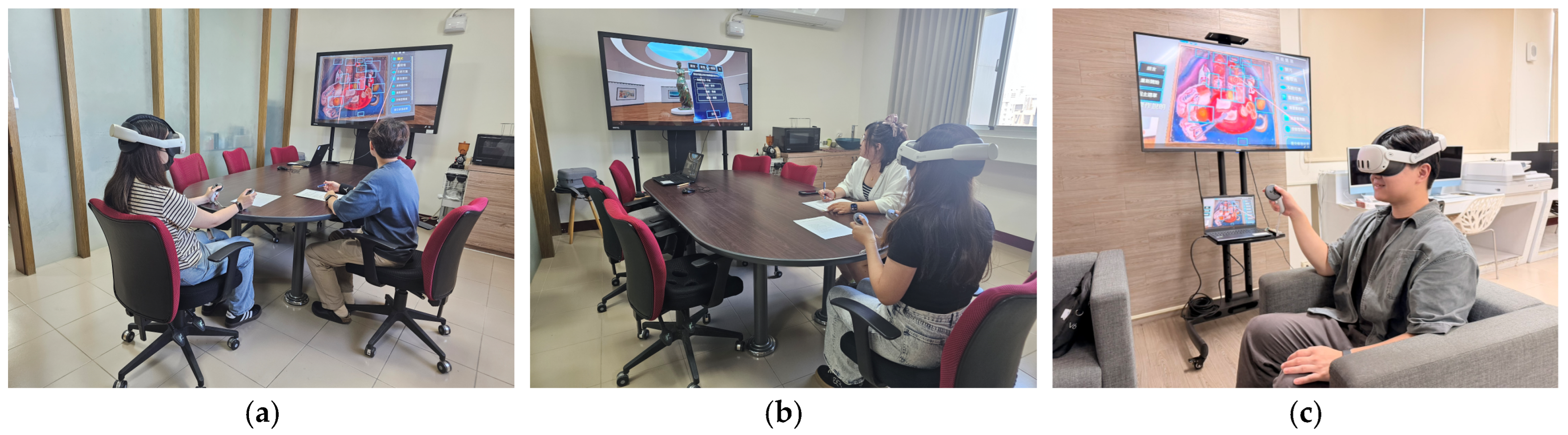
Empirical testing was conducted on 20 students from the Department of Visual Communication Design and the Institute of Creative Cultural Design and Art Preservation Techniques. During the empirical evaluation, participants interacted with the immersive environment using VR head-mounted displays (HMDs) and 6DoF controllers, as depicted in Figure 2, which show students actively performing art restoration tasks and experiencing the virtual workspace.
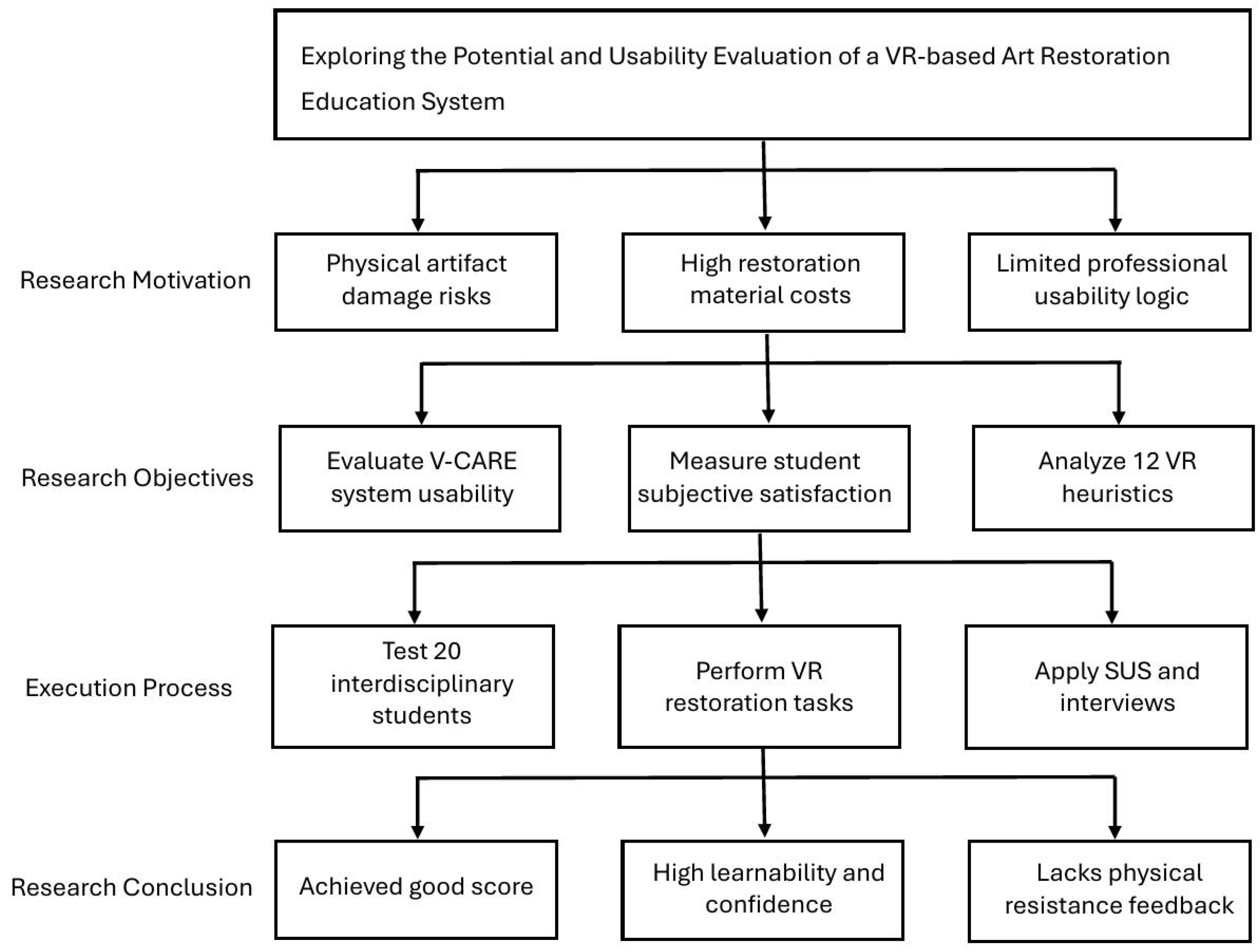
The reason for selecting students from these departments is that they possess good visual esthetic literacy and a foundation in digital software operation; furthermore, since these departments began introducing cultural relic preservation and maintenance-related courses in 2024, the students are relatively unfamiliar with specialized chemical and physical knowledge of restoration, which perfectly simulates the role setting of “beginner restoration trainees” or “interdisciplinary learners.” The research limitations lie in the hardware performance of VR devices (such as the resolution of head-mounted displays and the precision of controller haptic feedback), which may affect the user’s immersive experience, and the training data diversity of AI models, which may limit their ability to identify specific non-mainstream artifacts. Figure 3 illustrates the research workflow of this study, encompassing the research motivation, research objectives, execution process, and research conclusion.

2. Literature Review

2.1. Digital Transformation of Conservation Education

Research on XR in cultural heritage education has expanded rapidly in recent years. A recent article in Virtual Reality reviewed the applications, standards, and architecture of VR for cultural heritage education and confirmed that immersive technologies can improve the accessibility and interpretability of heritage knowledge. Similarly, studies on AR and VR for intangible cultural heritage and museum contexts report that immersive media can strengthen public understanding, contextual learning, and emotional engagement with heritage content. These findings suggest that VR is not limited to display or entertainment; it can also function as a structured educational medium for heritage transmission and interpretation [2,3,4,5]. Within educational research, XR is increasingly used to support experiential and situated learning. Reviews of XR applications in education indicate that immersive environments can enhance motivation, attention, and procedural understanding when the interaction design supports the learner’s task rather than distracting from it. In heritage education specifically, systematic and evaluative studies have shown that AR and VR can improve learners’ spatial cognition, historical comprehension, and participation in complex cultural contexts. These results are relevant to art restoration education because restoration also requires spatial inspection, detailed observation, and sequential decision-making [6,7].
However, the literature also shows that immersive technology alone does not guarantee effective learning. Several studies emphasize the importance of usability, feedback clarity, and interface-task fit in XR systems, especially when users are novices or non-specialists. This is particularly important in restoration education, where learners must understand procedural logic, identify surface damage, and apply domain-specific judgment under constrained conditions. If the XR interface is difficult to navigate or the system feedback is ambiguous, the educational value of the simulation may be reduced even when immersion is high. Based on this literature, the present study positions VR as a training medium for art restoration education and evaluates the system from both usability and pedagogical perspectives. Unlike general VR heritage applications that focus on exhibition or public engagement, this study emphasizes the subjective evaluation of beginner procedural simulations, spatial interfaces, and perceived usability in a virtual workspace.

2.2. Virtual Reality Evaluation Tools and the 12 Heuristics

The evaluation of Virtual Reality systems has evolved from general usability inspection toward approaches that also account for immersion, presence, and task realism. While conventional interface evaluation methods remain useful, immersive systems introduce unique challenges such as spatial navigation, embodied interaction, sensory mismatch, and the cognitive load created by inconsistent virtual feedback. For this reason, VR assessment requires tools that can measure both classical usability and experience-specific properties of virtual environments [7]. Among the most widely used rapid evaluation instruments, the System Usability Scale (SUS) remains a practical and robust tool for capturing users’ overall perceived usability. Because SUS is short, easy to administer, and suitable for small-sample testing, it is especially useful in early-stage VR prototype evaluation, where the goal is to identify major design problems before large-scale deployment. In recent VR studies, SUS has continued to be used alongside qualitative methods to triangulate usability, satisfaction, and system acceptance [8].
However, SUS alone cannot fully explain why an immersive system succeeds or fails, particularly when the interface involves 3D interaction, virtual objects, and embodied movement. To address this limitation, heuristic evaluation has been adapted for virtual environments. Sutcliffe and Gault proposed 12 VR heuristics that extend traditional usability inspection by adding criteria relevant to presence, navigation, realism, action-feedback coordination, and learning support. These heuristics remain influential because they capture the distinctive design requirements of VR applications rather than reducing them to 2D interface logic [9,10,11].
The 12 heuristics cover core VR qualities such as natural engagement, compatibility with task and domain, natural expression of action, close coordination of action and representation, realistic feedback, faithful viewpoints, navigation and orientation support, clear entry and exit points, consistent departures, support for learning, clear turn-taking, and sense of presence. Together, these criteria provide a structured way to identify whether an immersive system aligns with the user’s physical expectations and task goals. In educational VR settings, the heuristics are particularly useful because they can reveal whether learners are supported in understanding the task, following procedures, and maintaining orientation during multi-step operations [7].
Recent VR and XR studies continue to demonstrate the value of combining heuristic inspection with quantitative usability scales. For example, VR studies in cultural heritage and digital reconstruction have shown that user satisfaction is strongly influenced not only by visual realism but also by control clarity, feedback timing, and the consistency of interaction metaphors. Research on embodied avatars and immersive cultural experiences also indicates that presence and realism improve when interaction feedback matches users’ expectations and when system responses are timely and coherent. These findings support the use of a dual evaluation strategy in this study: SUS for overall usability and the 12 heuristics for diagnosing experience-specific strengths and weaknesses [12]. For art restoration education, such an evaluation framework is particularly appropriate. Restoration tasks require learners to inspect fine details, understand procedural sequences, and make careful judgments while working within spatially complex visual environments. If the virtual system fails to provide clear orientation, learning support, or realistic feedback, it may increase cognitive burden and reduce training effectiveness. Therefore, SUS and the 12 heuristics together offer a rigorous and pedagogically relevant framework for evaluating whether a VR-based restoration system can function as a safe simulated workspace for preliminary procedural familiarization before actual hands-on practice [13].
The Sutcliffe and Gault [7] principles serve as the qualitative framework for the V-CARE system evaluation:
  • H1 (Natural engagement): Interaction should approach real-world expectations.
  • H2 (Compatibility with task and domain): Behavior of virtual objects should meet professional restoration standards.
  • H3 (Natural expression of action): Intuitive bodily movements without hardware constraints.
  • H4 (Close coordination of action and representation): Latency should be under 200 ms to prevent cybersickness.
  • H5 (Realistic feedback): Actions produce physically accurate visual/auditory feedback.
  • H6 (Faithful viewpoints): Rendering changes in perfect synchronization with head movement.
  • H7 (Navigation and orientation support): Users know their heading and location at all times.
  • H8 (Clear entry and exit points): Intuitive mechanisms for entering/leaving the virtual world.
  • H9 (Consistent departures): “Unnatural” rules must be applied uniformly.
  • H10 (Support for learning): Providing instructional cues and guidance.
  • H11 (Clear turn-taking): Signaling system processing vs. user operational status.
  • H12 (Sense of presence): The psychological feeling of “being there.”
Accordingly, this study adopts a mixed evaluation framework that combines SUS and the 12 VR heuristics to assess both perceived usability and VR-specific interaction quality. This approach is suitable for a restoration training environment because it can identify not only whether users accept the system, but also whether the system supports realistic, comprehensible, and pedagogically meaningful restoration learning.

3. Research Methodology

3.1. Participants and Sampling

The study utilized purposive sampling to recruit 20 students from the Department of Visual Communication Design and the Master’s program in Creative Cultural Design and Art Preservation Techniques at Cheng Shiu University. Participants aged 19–50 were chosen for their digital literacy and esthetic foundations despite lacking professional restoration experience, representing the target “interdisciplinary learner” demographic as in Table 1. All diagnostic and interaction tasks were completed by participants on a strictly voluntary basis. This study was conducted in accordance with institutional guidelines for anonymous educational evaluation surveys and consumer usability research, which qualify for formal protocol exemption. To ensure rigorous subject confidentiality, no personally identifiable information was retained, and all names associated with the qualitative interview quotations in this manuscript are pseudonyms.

3.2. Evaluation Scale and Procedures

The study employed a hybrid model combining quantitative SUS measurement and qualitative heuristic verification through semi-structured interviews. Students were required to identify eight deterioration types in an oil painting restoration task within the VR environment: surface dirt, crackling, unknown stains, canvas buckling, paint lifting, peeling off, cracking and bulging, and paint layer loss.

3.3. Evaluation Tools

3.3.1. Quantitative Analysis: System Usability Scale (SUS)

The SUS was developed by John Brooke in 1986 and formally published in 1996 [14] to understand the overall ease of use of a product. It is currently the most widely used rapid usability assessment tool internationally, consisting of 10 items rated on a 5-point Likert scale This study utilized a traditional Chinese version of the SUS that has been validated for reliability and validity.

3.3.2. Scoring Methodology

The raw SUS score is composed of these ten items (the scores of individual items are not meaningful on their own; only the summed score constitutes the SUS score). The conversion logic is as follows:
  • Odd-numbered items (positive statements): Subtract 1 from the raw score (Score Contribution = X − 1).
  • Even-numbered items (negative statements): Subtract the raw score from 5 (Score Contribution = 5 − X).
The final SUS total score (ranging from 0 to 100) is obtained by summing the adjusted scores of all ten items and multiplying by 2.5. A SUS score is a standardized composite value on a 0–100 scale. It is important to note that this score is a standardized metric—not a percentage, and not a percentile ranking itself, although percentile-based benchmarks are frequently utilized to interpret the score’s practical meaning.

3.3.3. Interpretation Standards

The global mean SUS score is 68. Scores below this benchmark are often considered “failing” in terms of usability. A higher overall SUS rating only indicates that the system is easy and simple to use. Furthermore, as usability is linked to user familiarity, a higher rating does not necessarily mean the system meets all user needs, nor that it is the optimal solution.

4. Results and Analysis

4.1. Quantitative Results of SUS

To evaluate the overall usability of the developed V-CARE system, the quantitative data collected from the 20 participants via the System Usability Scale (SUS) were calculated and systematically analyzed. To ensure methodological transparency, the research team formulated the SUS scoring mechanism using LaTeX-compatible mathematical expressions.
Let R i be the raw score on the 5-point Likert scale (ranging from 1 to 5) given by a participant for the i -th item (where i = 1, 2, …, 10). The mathematical definition of the overall SUS score, denoted as S s u s , is formulated as follows:
S s u s = 2.5 × i o R i 1 + j ε 5 R j
where ϑ = { 1, 3, 5, 7, 9 } represents the set of positively phrased items (odd-numbered questions), and ε = { 2, 4, 6, 8, 10 } represents the set of negatively phrased items (even-numbered questions).
Under this scoring framework, the score contribution of each individual item is first mapped to a standardized range from 0 to 4. For positively phrased items (odd-numbered), the raw score is normalized by subtracting 1. Conversely, for negatively phrased items (even-numbered), the score is inverted by subtracting the raw score from 5. This bidirectional adjustment aligns the scoring orientation across all 10 items, ensuring that higher scores consistently represent higher usability. The transformed scores of the 10 items are subsequently aggregated, yielding a cumulative score with a maximum value of 40. Finally, this sum is multiplied by a scaling factor of 2.5 to proportionally project the total score onto a standard percentile scale with a maximum value of 100.
To evaluate the overall usability of the V-CARE system, Table 2 first presents the raw 5-point Likert scale dataset collected from the 20 participants, alongside the computed mean scores for each of the 10 individual items.
Subsequently, a detailed descriptive analysis was performed based on this dataset, as summarized in Table 3. The overall sample (N = 20) achieved a mean SUS score of 71.50, with a standard deviation (SD) of 17.21, a median of 71.25, and a range of 57.50 (ranging from 42.50 to 100.00). The 95% confidence interval (CI) for the overall mean score was calculated as [63.44, 79.56]. According to the benchmarks established by Sauro and Lewis [15], this overall mean score approaches the threshold for a Grade B rating, although the confidence interval indicates that this interpretation should be treated with caution given the pilot sample size.
To address potential variations resulting from the academic backgrounds of the participants, separate analyses were conducted for the two cohorts. The undergraduate group from the Department of Visual Communication Design (n = 9; consisting of Participants 2, 3, 4, 6, 9, 11, 12, 15, and 19) achieved a mean SUS score of 70.56 (SD = 15.20, Median = 70.00, Range = 50.00, 95% CI = [58.88, 82.24]). Meanwhile, the graduate group from the Master’s Program in Art Preservation (n = 11; consisting of Participants 1, 5, 7, 8, 10, 13, 14, 16, 17, 18, and 20) obtained a mean SUS score of 72.27 (SD = 19.41, Median = 72.50, Range = 55.00, 95% CI = [59.23, 85.31]). A two-tailed Welch’s t-test was conducted to compare the usability ratings between the two groups. As presented in Table 4, the inferential statistics indicate no statistically significant difference in perceived usability between the undergraduate and graduate cohorts ( t (17.92) = −0.231, p = 0.827, p > 0.05). The statistical outcome indicates that no statistically significant difference in perceived usability emerged between the two academic cohorts in this sample, justifying a combined descriptive interpretation of the full dataset. Because independent effects of age, prior technical training, VR experience, or restoration experience were not tested in this study design, we cannot attribute this consistency to those variables directly.
The high-scoring items are listed below in order of score:
  • Q9 “I felt very confident using the system”: This item, which our team qualitatively analyzes under the theme of perceived operational confidence and autonomy, received the highest rating with a mean of 90 among the 20 participants. This indicates that the “zero-risk” virtual environment significantly reduced the operational anxiety novice learners typically experience when interacting with original artifacts. Participants reflected that the system not only avoids the risk of damaging real cultural objects during the learning process but also provides a clear interface layout that enhances users’ subjective confidence when navigating the virtual workflow. This indicates high interface learnability and lower operational anxiety for beginners during initial system interaction.
  • Q7 “I would imagine that most people would learn to use this system very quickly”: This item, interpreted here as subjective learnability, achieved a mean score of 86. This confirms that the system’s interface metaphors (such as the selection of questions and options) align highly with the intuitive muscle memory of design and art preservation students. Without the need for tedious manuals, students were able to adapt quickly using 6DoF controllers. Participants noted that the controller functioned as a natural extension of their bodies, feeling even more intuitive and convenient than a traditional mouse. This validates the system’s educational advantage in terms of a low barrier to entry.
  • “I thought the system was easy to use”: This item, reflecting the perceived simplicity of the operational workflow, scored a mean of 84. Quantitative data and qualitative feedback show that the system’s “task-oriented” design is highly successful. The digital workflow, ranging from “deterioration diagnosis” to “cleaning and restoration,” has been streamlined into intuitive steps. Participants reported an immediate intuitive response to search for deterioration conditions upon seeing the display. This allows beginners to focus on learning restoration knowledge and making judgments rather than wasting time deciphering a complex software interface. Furthermore, the entry and exit mechanisms were rated as easy to locate and highly intuitive.
  • Q5 “I found the various functions in this system were well integrated”: This item, assessing functional integrity and integration, scored a mean of 84. The students gave positive evaluations regarding the fluidity with which the system integrates “painting inspection and annotation,” “VR environment observation,” and “restoration educational knowledge.” The data reflects a coherent logic when switching from observing and marking damaged areas to entering the VR environment for cleaning operations. Students could smoothly zoom in to examine the artist’s brushstrokes and deterioration details. This achieves a successful fusion of technology and pedagogical tasks, while the museum-like immersive gallery environment enhanced the users’ perceived presence and engagement.
The low-performing items, ranked by their scores, are analyzed below.
  • Q6 “I thought there was too much inconsistency in this system”: This item, representing system inconsistency, received a relatively lower score mean of 43. This primarily reflected an experiential inconsistency between the “immersive environment” and the “testing interface.” Some students reported that while the VR environment should emphasize hands-on operation, the system lacks physical resistance and realistic interaction feedback. This led to a feeling that the restoration process was “like answering a questionnaire” or “merely taking an online exam.” Additionally, the question information on the interface sometimes failed to correspond intuitively with the visual guidance on the painting, creating a sense of confusion and fragmentation when switching between viewing the artwork and answering questions.
  • Q8 “I found the system very cumbersome to use”: This item, indicating perceived cumbersomeness, scored an average raw score of 2.00. This is a key area for improvement, primarily due to the “clumsiness” caused by poor interface prompts and unclear system feedback. Multiple students pointed out that the yellow instructional text on the interface was compressed to an unreadable size when word counts were high. Furthermore, there was insufficient color contrast (e.g., yellow text on a brown background), and text blocks were sometimes obscured at the bottom of the scroll. Regarding operational feedback, students often felt confused by the lack of immediate reaction after clicking; they were unsure if a question was single-choice or multiple-choice, whether they should proceed to the next question, or if they had accidentally jumped to a new page without the ability to return and modify their answers. Operational stutters and delays caused by unfamiliarity with the controllers further increased the perceived “heaviness” and frustration of the user experience.

4.2. Qualitative Findings Based on Sutcliffe and Gault’s Principles

To analyze the qualitative data systematically, semi-structured interviews lasting approximately 15 to 25 min were conducted with each participant immediately following the usability sessions. A heuristic-based coding procedure was then applied to the verbatim transcripts and observational notes. Two researchers collaboratively coded the qualitative data using a deductive coding guide, mapping the responses directly onto the 12 VR Heuristic categories established by Sutcliffe and Gault [7] to extract a total of 22 key feedback points regarding system usability and user experience. Although quantitative intercoder reliability statistics were not calculated to measure coding consistency, any coding discrepancies or classification disagreements between the researchers were systematically resolved through dual-review discussion and consultation with a third expert until a mutual consensus was reached. The severity ratings presented in Table 5 were determined based on the frequency of reported operational barriers and their direct impact on user interaction fluidity. To ensure the methodological reproducibility of the qualitative findings presented in Table 5, the severity of each identified usability issue was systematically classified based on the classic usability rating framework proposed by Nielsen in 1994 [11]. This standardized evaluation matrix assesses issues by cross-referencing their “Frequency” of occurrence among participants with their “Impact” on task completion. Specifically, Frequency thresholds are defined as Low (reported by under 25% of participants), Medium (25% to 50%), or High (over 50%), while Impact is defined as Low (minor esthetic or peripheral issues), Medium (causes user confusion or workarounds, but the task is completed), or High (causes task failure, severe disorientation, or cybersickness). Following the logical matrix rules of this framework, any high-impact issue, or high-frequency medium-impact issue, is categorized as “High” severity; medium-impact with low-to-medium frequency, or high-frequency low-impact issues are categorized as “Moderate” severity; and low-impact issues with low-to-medium frequency are categorized as “Mild” severity.
Through observation and interviews, this study conducted an in-depth analysis of the system’s performance regarding VR characteristics.

4.2.1. Interaction Naturalness and Physical Realism

Participants showed polarized reactions to the operation of virtual hands. Some (e.g., Zhang, Xu, and Xiao) found the controller-based interaction highly intuitive, describing the virtual cursor as a “natural extension of the body” that allowed for rapid adaptation, corresponding to H1 Natural Engagement. However, many users pointed to a gap in the interaction; for instance, Tsai and Chen reflected that using the controller to click on objects felt “like operating a mouse” or simply using a “tool,” lacking the intuitive sense of direct touch. This feedback indicates a violation of H1 and H3 Natural Expression of Action. Additionally, Chen and Chen mentioned occasional system latency or non-responsive clicks, causing the operations to lag behind their thoughts and disrupting the fluidity of movement. Although we did not record technical diagnostic data such as frame rates or CPU usage during this test, participants’ subjective observations suggested a noticeable lag, which they hypothesized might be related to rendering performance limits or device processing loads. Regardless of the underlying technical cause, these perceived delays violated H4 Coordination of Action and Representation.
H5 Realistic Feedback, which remains a significant challenge for the current system. Multiple participants noted the lack of resistance when performing restoration actions in the virtual environment. Lin explicitly stated that the absence of physical resistance created a feeling of “wild swing”, leading to a sense of emptiness and a break in presence. He expressed hope for future integration of physical feedback with “pressure sensitivity.” Furthermore, due to the lack of tactile feedback, Hong and Lin both reflected that the overall experience felt too much “like answering questions” or “an online test,” which reduced the authenticity of the hands-on restoration process.

4.2.2. Navigation and Visual Immersion

The system performed well in spatial construction. Most participants (e.g., Zhang, Lin, and Chen) stated they could maintain a sense of direction and did not get lost within the vast virtual hall and gallery, which positively corresponds to H7 Navigation and Orientation Support. However, regarding the movement mechanism, Lin pointed out that using “fast teleportation” caused a contradiction between visual input and cognitive perception, leading to discomfort such as dizziness and nausea. This indicates that anti-cybersickness design still needs to be prioritized for virtual locomotion.
In terms of presenting deterioration details, many students with design backgrounds (e.g., Sun and Xiao) affirmed that the color and precision during zoomed-in inspections met their expectations, aligning with H6 Faithful Viewpoints. However, advanced users (e.g., Chen and Su) believed that the 3D models exhibited noticeable aliasing (jagged edges) and were too flat. They noted that unlike real restoration, they could not “view the light and shadow from a raking angle” to judge conditions like “cracking and bulging or “paint layer lifting”, resulting in reduced presence. On a positive note, the system explicitly designed a “restoration room door” as the entry and exit point, which complies with H8 Clear Entry and Exit Points, allowing students to navigate into and out of the system smoothly.

4.2.3. Learning Support and System Feedback

Interviews revealed that as an educational system, the current interface prompt design violates the principles of error prevention and visibility of system status, causing significant cognitive load. Participants such as Lu, Sun, and Tsai frequently complained that the yellow prompt text was too small, had poor contrast against the brown background, and was sometimes obscured by the layout, preventing them from effectively reading the restoration knowledge. This partially violates H10 Support for Learning. Additionally, Xu and Su reported that after clicking to answer, the system lacked clear indicators for “single/multiple choice” and failed to provide visual feedback for “proceeding to the next question.” Consequently, users were often unsure if their answers had been successfully submitted, leading to confused waiting on the same screen. This situation violates H11 Clear Turn-taking, as the system does not clearly communicate “whose turn it is” or whether the “system has received the command.” Table 5 represents the qualitative feedback and optimization matrix of the V-CARE system.
The usability issues identified in this study highlight a clear alignment with established human–computer interaction (HCI) and Virtual Reality (VR) literature. Specifically, the low color contrast of instructions (yellow text on a brown background) represents a critical breach of classic visual search and cognitive load principles in 3D layouts, echoing findings by Nielsen regarding the compounding effect of text density on visual fatigue in head-mounted displays. Conversely, regarding tactile interaction, while traditional mobile applications often rely successfully on abstract modal prompts, the lack of physical resistance feedback in the V-CARE restoration workflow creates a sensory mismatch (H5 violation). This outcome directly confirms the ‘wild swing’ phenomenon noted by Sutcliffe and Gault, where the absence of realistic haptic counters drastically diminishes user presence despite high-fidelity visual immersion. The next system iteration must resolve this sensory fracture by transitioning from visual navigation to haptic-assisted decision environments.

5. Extended Research

Based on the interface constraints identified during user evaluation, future system iterations will explore prospective, currently untested technical enhancements to address key usability frictions. As highlighted by Beridse [16], the application of deep learning models and virtual reconstruction is transforming cultural preservation by enabling automated artifact analysis and proactive damage detection. To address the low text contrast and reading cognitive load reported under H10 (Support for Learning), we propose exploring the conceptual integration of localized computer vision models (such as CNNs or YOLO) to automate the visual highlighting of micro-cracks and flaking on canvas surfaces, shifting the instructional burden from heavy text to real-time visual scaffolding. Furthermore, to mitigate the ‘wild swing’ sensation caused by the lack of tactile feedback (H5), subsequent research could investigate the development of integration protocols for pressure-sensitive interfaces or haptic controllers to simulate physical resistance during interactive cleaning phases. These proposed technical extensions serve as conceptual design directions for future development stages rather than validated, completed features.

6. Conclusions

This study, through a mixed-method approach of quantitative and qualitative evaluation, successfully provides a baseline usability assessment of a virtual simulation interface for art restoration tasks. Empirical results show that the V-CARE system achieved a score of 71.5 on the SUS, establishing a baseline interface configuration for a virtual simulation environment. Further empirical studies are required to verify its actual transfer of learning to physical studio practice [7,17,18].
A key limitation of this preliminary evaluation is its exclusive reliance on perception-based, subjective usability and user-experience metrics. Objective performance indicators—such as task completion time, diagnostic error rates, knowledge gain, skill transfer, and actual physical restoration performance—were not quantitatively tracked during this initial baseline phase. Consequently, these findings should not be interpreted as definitive evidence of training effectiveness or as a direct substitute for physical art restoration education. To validate the actual pedagogical efficacy of the system, future research must systematically implement and test these objective metrics and long-term learning retention trials within a physical studio setting.
The research found that while the system excels in building operational confidence Q9 and learnability Q7, technical bottlenecks remain: the “wild swing” sensation H5 due to the lack of physical resistance and the perceived cumbersomeness Q8 caused by poor interface prompts. These are currently the primary barriers to achieving deep immersion. Future research should prioritize the introduction of force-feedback wearables and the deployment of CNN and GAN models to transform the system from “visual navigation” into “intelligent decision simulation.”
To address the generalizability limitations of this preliminary evaluation, future research protocols will expand the trial framework beyond the initial cohort of 20 students. We recommend extending future user testing to a larger, more diverse participant population, specifically integrating professional artifact conservators, museum technical specialists, and cross-institutional student samples to establish broader demographic and external validity [19,20].
In conclusion, by strengthening multisensory interaction, this proposal provides an accessible digital framework for the simulation of cultural heritage conservation workflows. This represents an empirical application of technology into the field of art conservation and offers a preliminary contribution to safeguarding historical authenticity and supporting human–technology collaboration.

Author Contributions

Conceptualization, P.-C.H. and I.-C.L.; methodology, P.-C.H. and L.-C.L.; validation W.-T.Y. and C.-H.L.; investigation and resources, H.-M.S. and C.-H.L.; data curation, P.-C.H. and L.-C.L.; writing—original draft preparation, P.-C.H.; writing—review and editing, L.-C.L. and I.-C.L.; visualization, C.-H.L.; supervision, W.-T.Y. and I.-C.L.; project administration, P.-C.H. and H.-M.S.; funding acquisition, I.-C.L. All authors have read and agreed to the published version of the manuscript.

Funding

This work was financially supported by the “Conservation and Research Center” of Cheng Shiu University (CSU) from The Featured Areas Research Center Program within the framework of the Higher Education Sprout Project by the Ministry of Education (MOE) in Taiwan.

Institutional Review Board Statement

Review and approval were waived for this study due to its classification as an anonymous educational evaluation and software usability survey, which carries minimal risk and collects no personally identifiable information under institutional exemption protocols.

Informed Consent Statement

Informed consent was obtained from all individual participants involved in the study. All participation was strictly voluntary, and full confidentiality of the participants’ identities has been maintained throughout the text by utilizing pseudonyms for all qualitative interview quotations.

Data Availability Statement

The original contributions presented in the study are included in the article, further inquiries can be directed to the corresponding author.

Conflicts of Interest

The authors declare no conflicts of interest.

References

  1. Anwar, M.S.; Yang, J.; Frnda, J.; Choi, A.; Baghaei, N.; Ali, M. Metaverse and XR for cultural heritage education: Application, standards, architecture, and technological insights for enhanced immersive experience. Virtual Real. 2025, 29, 51. [Google Scholar] [CrossRef]
  2. Saad, N.H.M.; Hanafi, M.H.; Awang, A. Systematic Literature Review: The Use of Virtual Reality as A Medium of Knowledge Transfer in Heritage Preservation. J. Tour. Hosp. Environ. Manag. 2026, 11, 320–336. [Google Scholar] [CrossRef]
  3. Patankar, Y.; Tennenini, C.; Bischof, R.; Khatri, I.; Maia Avelino, R.; Yang, W.; Mahamaliyev, N.; Scotto, F.; Mitterberger, D.; Bickel, B.; et al. Heritage ++, a Spatial computing approach to heritage conservation. RILEM Tech. Lett. 2024, 9, 50–60. [Google Scholar]
  4. Lee, S.; King, B.E.M. A Virtual Lens on Tradition: Safeguarding Intangible Cultural Heritage Through AR and VR. J. Smart Tour. 2025, 5, 64–69. [Google Scholar] [CrossRef]
  5. Avlonitou, C.; Papadaki, E. Using extended reality technologies in modern museums. Arts Commun. 2025, 3, 3428. [Google Scholar] [CrossRef]
  6. Mendoza, K.R.; Glaser, N.; Krüger, J.M.; Yang, M.; Moeller, K. A systematic literature review on the impact of XR on pro-environmental knowledge, attitudes, and behaviors. J. Environ. Educ. 2025, 56, 85–125. [Google Scholar] [CrossRef]
  7. Sutcliffe, A.; Gault, B. Heuristic evaluation of virtual reality applications. Interact. Comput. 2004, 16, 831–849. [Google Scholar] [CrossRef]
  8. Hou, Y.Y.; Wang, Y.R. Design and Application of Wearable Virtual Reality and Interactive Sensory Feedback. Kaohsiung Norm. Univ. J. 2020, 48, 53–78. [Google Scholar]
  9. Card, S.K.; Moran, T.P.; Newell, A. The Psychology of Human-Computer Interaction; Lawrence Erlbaum Associates: Hillsdale, NJ, USA, 1983. [Google Scholar]
  10. Shackel, B. Usability—Context, framework, definition, design and evaluation. Interact. Comput. 2009, 21, 339–346. [Google Scholar] [CrossRef]
  11. Nielsen, J. Heuristic evaluation. In Usability Inspection Methods; Nielsen, J., Mack, R.L., Eds.; John Wiley & Sons: New York, NY, USA, 1994; pp. 25–62. [Google Scholar]
  12. Tsai, Y.S. Using AI-Based Embodied Virtual Agents in VR Experience. Master’s Thesis, National Taiwan University, Taipei, Taiwan, 2024. [Google Scholar]
  13. Sutcliffe, A.G.; Kaur, K.D. Evaluating the usability of virtual reality user interfaces. Behav. Inf. Technol. 2000, 19, 415–426. [Google Scholar] [CrossRef]
  14. Brooke, J. SUS: A "quick and dirty" usability scale. In Usability Evaluation in Industry; Jordan, P.W., Thomas, B., McClelland, I.L., Eds.; Taylor & Francis: London, UK, 1996; pp. 189–194. [Google Scholar]
  15. Sauro, J.; Lewis, J.R. Quantifying the User Experience: Practical Statistics for User Research; Elsevier: Amsterdam, The Netherlands, 2012. [Google Scholar]
  16. Beridse, N. Artificial intelligence in cultural preservation: Reviving heritage through deep learning and virtual reconstruction. Int. J. Adv. Res. Innov. Ideas Educ. 2025, 11, 636–642. [Google Scholar]
  17. Hyzy, M.; Bond, R.; Mulvenna, M.; Bai, L.; Dix, A.; Leigh, S.; Hunt, S. System Usability Scale Benchmarking for Digital Health Apps: Meta-analysis. JMIR mHealth uHealth 2022, 10, e37290. [Google Scholar] [CrossRef] [PubMed]
  18. Suria, O. A Statistical Analysis of System Usability Scale (SUS) Evaluations in Online Learning Platform. J. Inf. Syst. Inform. 2024, 6, 992–1007. [Google Scholar] [CrossRef]
  19. Paolanti, M.; Puggioni, M.; Frontoni, E.; Giannandrea, L.; Pierdicca, R. Evaluating Learning Outcomes of Virtual Reality Applications in Education: A Proposal for Digital Cultural Heritage. J. Comput. Cult. Herit. 2023, 16, 36. [Google Scholar] [CrossRef]
  20. Zhao, Y.; Li, Y.; Dai, T.; Sedini, C.; Wu, X.; Jiang, W.; Li, J.; Zhu, K.; Zhai, B.; Li, M.; et al. Virtual reality in heritage education for enhanced learning experience: A mini-review and design considerations. Front. Virtual Real. 2025, 6, 1560594. [Google Scholar] [CrossRef]
Figure 1. (a) Login lobby page of the V-CARE system; (b) operation interface of the system, where blue boxes indicate deterioration classifications that can be zoomed in for high-resolution detail inspection; (c) scoring screen for individual restoration phases; (d) final overall scoring and achievement title screen.
Applsci 16 07734 g001
Figure 2. (a) Student participant A wearing a VR HMD and using the V-CARE system; (b) student participant B wearing a VR HMD and using the V-CARE system; (c) student participant C wearing a VR HMD and operating the V-CARE system. Note: Synchronized monitors display Chinese-localized interfaces corresponding to Figure 1. In (b), the lobby menu translates to “Language/Background/Casting” (top) and “Newbie/Experienced/Professional” difficulty options (middle), as digitally detailed in Figure 1a. In (c), the right panel lists deterioration items from “Dirt” to “Hollow Cracks” and “Submit Answers”, while the cropped left edge displays auxiliary controls “Main Menu” and “Keyboard Controls”, as digitally detailed in Figure 1b.
Applsci 16 07734 g002
Figure 3. Research process and methodological workflow of this study.
Applsci 16 07734 g003
Table 1. Demographic and background distribution of usability testing participants (N = 20).
VariableCategoryParticipants (n)Percentage (%)Mean Age (SD)Visual Esthetic Literacy
DepartmentDept. of Visual Communication Design945.0%21.4 (1.42)High (professionally trained)
MA in Creative Design and Art Preservation1155.0%45.5 (13.47)Excellent (conservation theory-grounded)
GenderMale315.0%
Female1785.0%
VR ExperienceNovice (no prior experience)525.0%
Moderate (1–5 experiences)1260.0%
Expert (frequent user)315.0%
Restoration ExperienceNo hands-on experience945.0%
Basic theoretical foundation1155.0%
Table 2. SUS of 20 participants.
Participant (N)/
Item (Q)
1234567891011121314151617181920Avg.
13234344555453343545579
23255231114134422122149
34435245555553243555584
43255133354352425122262
54455245552553443545584
62233222214233222131143
75444544555552343555486
82233232114113323111140
95434554555554444554590
105254143141453524111157
Raw Total Score3628394225363333373935423034303230323130
Sum of Adjusted Score2628172229263137332533282018302040343738
SUS Total Score (0–100)657042.55572.56577.592.582.562.582.570504575501008592.59571.5
Interpretation
(Benchmark 68)
<M.>M.<M.<M.>M.<M.>M.>M.>M.<M.>M>M.<M.<M.>M.<M.>M.>M.>M.>M.
Note: M represents the global mean SUS score benchmark of 68; “>M.” indicates a score above this benchmark, while “<M.” indicates a score below it.
Table 3. Subgroup descriptive statistics for SUS scores.
Statistical
Metrics
Overall (N = 20)Department Student (n = 9)Master’s Program Student (n = 11)
Mean71.5070.5672.27
Standard
Deviation
17.2115.2019.41
Median71.2570.0072.50
Range57.5050.0055.00
Confidence Interval (CI) Error Bound8.0611.6813.04
Table 4. Welch’s t-test comparison of subgroup SUS scores.
Statistical MetricsValue
t-statistic (t)−0.231
Degrees of Freedom (df)17.981
p-value (p)0.827
Critical t-value (Two-Tailed)2.110
Table 5. V-CARE qualitative feedback and future development paths based on 12 VR Heuristics.
HeuristicSystem Performance and ObservationParticipant Feedback ExcerptsSeverityProposed Future Development Paths
H1 Natural Engagement Ray-cast ray works, but clicking physical buttons on controllers lacks the intuitive sensation of direct hand touch.“It feels like using a mouse—touching one thing through another.” (Tsai); “The controller breaks my immersion… lacking the real tactile feel of touching the canvas.” (Lin)ModerateDeploy hand-gesture tracking and controller-free multimodal interaction.
H2 Compatibility with Task and DomainThe multiple-choice format deviates from physical practice; blue highlight overlays block the view of underlying painting pathologies.“We need more hands-on operation. Otherwise, it feels like an online exam.” (Lin); “I’m in VR, why can’t I perform physical restoration?” (Su)HighDesign interactive restoration tools (consolidation pipettes, scrapers, inpainting brushes) and increase highlight transparency.
H3 Natural Expression of ActionLocomotion is un-smooth; physical controllers are invisible once inside the HMD, making button mappings confusing for novices.“There are many buttons on the controller; I am unfamiliar and sometimes misclick.” (Hong); “Once the headset is on, we cannot see. It is better to explain the controls first.” (Chen)ModerateProvide an interactive 3D controller mapping guide prior to entering the virtual environment.
H4 Close Coordination of Action and RepresentationParticipants observed occasional rendering lag and screen stutter during fast locomotion, hypothesized to stem from high-resolution texture loading demands on the mobile headset.“Moving too fast makes me dizzy… I sometimes zoom in too closely.” (Chen); “Moving too fast makes me nauseous.” (Lu)HighOptimize 3D models via polygon reduction; deploy dynamic edge caching and motion blur optimization.
H5 Realistic FeedbackUsers cannot perceive scraping intensity and depth on the virtual canvas, causing a detached “wild swing” sensation.“Scraping stains on a virtual canvas feels like swinging in empty space. The lack of resistance breaks immersion.” (Lin)HighIntegrate a pressure-sensitive restoration stylus or haptic-feedback wearable gloves.
H6 Faithful ViewpointsColors and textures are rich, but rendering remains too flat; cracked regions are occasionally too dark, and zooming reveals visible aliasing.“We can’t inspect paint bulging…we need lateral raking light to observe shadows, but the rendering is flat.” (Chen); “Aliasing is too obvious.” (Chen); “The unique luster of physical paintings under natural lighting is missing.” (Xu)ModerateImport micro-deformation 3D shaders; implement user-controlled raking light and enable MSAA (Multi Sampling Anti-Aliasing).
H7 Navigation and Orientation SupportUnfamiliarity with 3D verticality and UI layout leads to missed interaction panels or temporary spatial disorientation.“I couldn’t find the panel… I thought I was on the second floor and kept looking down.” (Chen); “The lobby is huge…being unfamiliar, I had to spin around once to locate my target.” (Tsai)MildDeploy visual guiding paths or landmark lines on the virtual floor.
H8 Clear Entry and Exit PointsThe quit action is positioned in visual blind spots (e.g., extreme bottom or side edges), making searching time-consuming.“The exit was unclear; I had to look down…and found it at the bottom after some searching.” (Lin); “The exit was hard to find, which turned out to be at the lower-left corner.” (Chen)ModerateStandardize UI logic by placing exit options in chest-level menus or modeling a prominent physical exit door.
H9 Consistent DeparturesVisual cues for guiding information and question panels are identical, leading to confusion about page transitions.“Due to the color scheme, you don’t realize a page transition has occurred.” (Xu); “If the panels look identical, it’s hard to tell what I am supposed to do now.” (Chen)ModerateUse distinct colors and geometries for guidance vs. questionnaire UIs; add dynamic progress indicators.
H10 Support for Learning Novices struggle with complex chemical reagents and technical jargon; the interface lacks illustrated tooltips or an “undo zoom” pathway.“The yellow text on a brown background has low contrast, making terms hard to read.” (Lin); “Adding reference images or zoomed-in crack samples would make selection easier.” (Xu)HighImprove UI contrast; build YOLO-based active intelligent damage prompting systems.
H11 Clear Turn-taking Clicking options yields no immediate feedback, causing uncertainty about input registration and multi-selection rules.“No response after clicking; I didn’t know if it was single- or multi-choice, or where to look.” (Su); “At first, I didn’t know if it was my turn to act or how to proceed.” (Lu)HighProvide haptic buzzes, audio cues (beep/tick), and checkmark animations; explicitly label multi-choice questions.
H12 Sense of PresenceMacro-immersion in the 360-degree lobby is strong, but microscopic flat rendering and aliasing break psychological presence.“The realism is high; you feel like you have physically entered the environment.” (Zhang); “I know it’s virtual, the gallery is un-vivid, and paintings are blurry.” (Chen); “I gradually immersed myself into it.” (Lin)ModerateUpgrade target artifact textures using lossless high-resolution scanning data; enable MSAA.
Disclaimer/Publisher’s Note: The statements, opinions and data contained in all publications are solely those of the individual author(s) and contributor(s) and not of MDPI and/or the editor(s). MDPI and/or the editor(s) disclaim responsibility for any injury to people or property resulting from any ideas, methods, instructions or products referred to in the content.