
Article

A Two-Stage Study of Menu Configuration and Vibration Feedback in Older Adults’ Smartphone-Based Product Search: From Commercial Age-Friendly Modes to Testable Interface Components


1
Key Laboratory of Adolescent Cyberpsychology and Behavior (CCNU), Ministry of Education, Wuhan 430079, China
2
School of Psychology, Central China Normal University, Wuhan 430079, China
3
Key Laboratory of Human Development and Mental Health of Hubei Province, Wuhan 430079, China
*
Authors to whom correspondence should be addressed.
These authors contributed equally to this work.
Appl. Sci. 2026, 16(14), 6946; https://doi.org/10.3390/app16146946
Submission received: 29 May 2026 / Revised: 7 July 2026 / Accepted: 8 July 2026 / Published: 10 July 2026

Abstract

Commercial age-friendly modes are increasingly embedded in smartphone applications, yet their task-performance implications for older adults remain uncertain. This two-stage study used a cognitively informed ecological-to-controlled strategy linking evaluation of commercial age-friendly versions with controlled testing of specified interface components while modeling older adults’ task-relevant cognitive ability. In Experiment 1 (n = 22), older adults completed ten tasks in standard and age-friendly versions of WeChat and Pinduoduo. The age-friendly versions showed no overall advantage in clicks, completion time, or erroneous clicks (all ps ≥ 0.548). Activity Theory-informed video coding identified recurrent task-to-interface mismatches, including insufficiently salient feedback. The exploratory Task 8 product-search observations, together with these coded interaction problems, indicated that product search was a relevant context in which menu configuration, action confirmation, and cognitive demands could be examined together. Because the commercial app versions differed across content and interface features, Experiment 2 (n = 30) used a custom Android product-search task to manipulate menu configuration and vibration feedback while modeling delayed recall continuously as an indicator of task-relevant cognitive ability. Relative to the flat configuration, the two-level menu was associated with 56.7% fewer clicks and 30.7% shorter completion time, whereas vibration feedback was associated with 20.2% fewer ineffective clicks. Delayed recall was associated with completion time in the primary model, but this association was attenuated after adjustment for age and sex. Together, the findings show that a commercial age-friendly label should not be treated as evidence of performance benefit. By separating ecological diagnosis from controlled component testing, the study provides an evidence pathway for translating real-world human–computer interaction problems into testable, task-specific interface components and supports a cognitively informed, information-structure-prioritized, and multisensory approach to smartphone-based product-search design for older adults.

1. Introduction

1.1. Smartphone Use, Population Aging, and the Silver Digital Divide

Population aging has become one of the most profound demographic transformations worldwide. The global population aged 65 years and older has approached 800 million—approximately 10% of the world’s population—and is projected to reach 2.2 billion by the late 2070s [1]. This demographic shift poses substantial fiscal, healthcare, and sociocultural challenges for societies worldwide [2,3]. Among these technologies, smartphones are particularly important because they provide older adults with portable access to communication, health monitoring, social participation, and daily life management, thereby helping to reduce loneliness, alleviate social isolation, and promote well-being [4,5,6].
However, the benefits of smartphones are not equally distributed across age groups. Older adults often encounter considerable difficulties when interacting with smartphone interfaces, including densely arranged icons, complex gesture sequences, small touch targets, inconsistent feedback, and multi-step navigation paths [7,8]. Consequently, older adults are more likely to experience a “silver digital divide,” a form of digital inequality that reflects disparities not only in access to information and communication technologies but also in usage skills, meaningful engagement, and beneficial outcomes [9,10,11,12]. This divide is particularly consequential because digital exclusion may further restrict older adults’ access to social resources, healthcare services, financial tools, and public information, thereby reinforcing broader social inequalities.
Recent evidence further suggests that digital engagement may be associated with cognitive and psychosocial benefits among middle-aged and older adults. For instance, longitudinal research has reported an association between internet use and reduced risk of cognitive decline in Chinese middle-aged and older adults [13]. Although such findings should not be interpreted as causal evidence that technology use directly prevents cognitive decline, they highlight the importance of enabling older adults to participate effectively in digital environments. Improving smartphone usability for older adults is therefore not merely a matter of interface aesthetics or convenience; it is a critical pathway for promoting digital inclusion, autonomy, and healthy aging.

1.2. Age-Friendly Smartphone Interfaces: From Surface-Level Adaptation to Empirical Validation

To reduce barriers in smartphone use, researchers and practitioners have proposed a broad range of age-friendly design strategies. Common recommendations include larger fonts and icons, high-contrast displays, simplified gesture operations, clearer visual hierarchies, more tolerant response timing, larger touch targets, reduced input complexity, and explicit feedback for successful or erroneous actions [7,14,15]. Commercial smartphone applications have also increasingly introduced “age-friendly,” “senior,” or “care” modes that typically enlarge interface elements, simplify selected functions, or reorganize menus to support older users.
Empirical evidence has provided partial support for such strategies. For example, Petrovčič et al. [16] compared realistic task performance between a standard Android launcher and an age-friendly launcher and found that a simplified age-friendly launcher, characterized by one-task-per-screen flows and fewer alternative paths, produced marginally better task efficiency. Zhou et al. [17] also reported that specific interface features, such as up-and-down sliding layouts, middle-sized buttons, and simple line-type buttons, could enhance usability and reduce cognitive load in smartphone interactions among older adults. These findings suggest that interface simplification can improve older adults’ interaction experience when it reduces unnecessary perceptual, motor, or cognitive demands.
Despite the growing number of age-friendly smartphone-design guidelines, three limitations remain especially relevant to older adults’ everyday use of commercially deployed applications. First, recommendations have been derived from heterogeneous users, devices, task demands, and outcome metrics, making it difficult to infer whether a commercially available age-friendly version improves objective performance in a particular everyday smartphone application [14,15,18]. Second, a commercial age-friendly mode is a multi-component configuration rather than a single intervention: typography, icon size, spacing, function availability, category labels, target content, navigation paths, and feedback may change together. Such comparisons can reveal task-level performance patterns in real applications but cannot isolate the effect of one interface component. Third, older adults differ in cognitive function, digital experience, sensory and motor capacity, and prior familiarity with particular applications [19,20,21,22]. Contemporary human–computer interaction (HCI) scholarship also cautions against treating chronological age as a sufficient proxy for older users’ capacities or support needs [23]. These limitations motivate a design that combines ecological evaluation of real smartphone applications with controlled tests of clearly specified interface components and task-relevant individual differences.
The present study advances an ecological-to-controlled evaluation strategy for age-friendly smartphone design. Rather than treating a commercial age-friendly mode as a single intervention, it treats the mode as a bundle of visual, structural, and feedback-related changes. Objective task performance and Activity Theory-informed video coding are first used to identify unresolved task-to-interface mismatches in commercially deployed applications; a controlled product-search experiment then compares specified interface components under defined task conditions. This strategy preserves the relevance of real smartphone use while avoiding causal overinterpretation of multi-component commercial comparisons. It addresses three related questions within human–computer interaction (HCI) and cognitive aging: Do commercially deployed standard and age-friendly app versions differ in older adults’ objective performance during everyday smartphone tasks? Which task-to-interface mismatches remain visible when users encounter unclear labels, feedback, tappable areas, or precision demands? In a controlled smartphone-based product-search task, how are menu configuration, vibration feedback, and a task-relevant cognitive ability, indexed by delayed recall, associated with distinct behavioral outcomes?

1.3. Cognitive Abilities and Smartphone Interaction in Older Adults

Successful smartphone interaction depends on multiple cognitive processes. When completing a smartphone task, users must maintain the task goal, locate relevant interface elements, interpret icons and labels, select appropriate categories, monitor feedback, and update their action plan across successive screens. These operations require attention, working memory, long-term memory, processing speed, visual search, and executive control. Age-related changes in these domains are well documented, including declines in attention, working memory, episodic memory, and processing speed [24,25]. Such cognitive changes may make older adults more vulnerable to interface complexity, especially in multi-step tasks involving unfamiliar icons, ambiguous category labels, or nested menus.
Cognitive load theory provides a useful framework for understanding these challenges. According to cognitive load theory, human working memory has limited capacity, and task designs that impose unnecessary processing demands can reduce performance by increasing extraneous cognitive load [26]. In smartphone use, extraneous load may arise from poorly organized menus, visually cluttered screens, unclear feedback, or inconsistent interaction rules. Older adults may be particularly sensitive to these demands because age-related changes in memory and attention reduce the cognitive resources available for maintaining task goals and navigating complex information structures.
Among cognitive abilities, delayed recall may be especially relevant to smartphone tasks involving hierarchical navigation. Delayed recall reflects the ability to retain and retrieve information after a delay. In a product search task, for example, users must remember the target item while exploring categories and subcategories, deciding whether each menu label is semantically relevant, and returning to previous screens when necessary. If the interface contains multiple layers or ambiguous category names, users with lower delayed recall ability may have greater difficulty maintaining the original goal and mapping it onto the appropriate navigation path. This may increase completion time, repeated clicks, and ineffective interactions. In contrast, users with stronger delayed recall may better preserve task-relevant information and recover from navigational uncertainty.
Previous studies have recognized cognitive decline as a central challenge in user interface design for older adults [27]. Gordon et al. [28] further found that older adults showed distinct smartphone usage patterns compared with younger adults, including fewer used applications, shorter usage duration, slower application switching, and less frequent messaging, which may be partially explained by cognitive differences. However, relatively few studies have examined how a specific cognitive measure relates to older adults’ performance in a defined smartphone task under controlled yet ecologically meaningful conditions. Even fewer have examined cognitive individual differences alongside clearly specified interface components. Addressing this gap is important for designing interfaces that are sensitive to heterogeneity among older users without assuming that fixed cognitive groups require fixed interface types.
Mobile task performance in older adults should not be interpreted as a purely perceptual or motor outcome. During smartphone-based product search, a user must maintain the target product, interpret category labels, select among alternatives, monitor whether an action has registered, and recover from wrong turns. These requirements link HCI and cognitive-aging research. Menu configuration can alter the balance between visual search and sequential navigation demands [29,30,31], whereas a tactile confirmation cue may supplement visual feedback after an effective action [32,33]. The present study therefore retains broader cognitive assessments in Experiment 1 while examining delayed recall as an indicator of task-relevant, memory-specific cognitive ability, modeled continuously rather than used as a proxy for global cognitive ability.

1.4. Menu Hierarchy Structure as an Information-Organization Mechanism

Menu hierarchy structure is one of the most important yet underexamined components of smartphone interface design. Many daily smartphone tasks, such as searching for products, locating settings, applying for refunds, or initiating service functions, require users to navigate through hierarchical menus. The structure of these menus determines both the length of the navigation path and the amount of information presented at each step. Therefore, menu hierarchy directly affects cognitive load, visual search difficulty, and action planning.
Classic research on hierarchical menu design has shown that both depth and breadth influence task performance and perceived complexity. Jacko and Salvendy [29] demonstrated that menu depth and breadth affect response time, accuracy, and perceived task complexity. Zaphiris et al. [30] further examined age-related differences in the depth–breadth trade–off of hierarchical information systems and found that shallow hierarchies were generally preferred over deep hierarchies, including among older users. These findings imply that reducing excessive menu depth may benefit older adults by shortening navigation paths and decreasing memory demands.
However, menu simplification does not mean that all hierarchical structures should be eliminated. A flatter menu can reduce the number of screen transitions but may increase the number of items displayed at one level, visual crowding, and scanning demands. A deeper hierarchy can reduce the number of options visible at each stage but requires additional category decisions and retention of the search goal across screens. For older adults, the relevant design question is therefore not whether a menu should be as flat as possible, but whether a given product set can be organized with a manageable balance between visual search and sequential navigation.
This trade-off is particularly relevant to smartphone-based product search. Users must maintain a target item, interpret category labels, and navigate through semantically organized screens. A deeper configuration can increase the need to preserve the search goal and previous choices; a flatter configuration can increase visual search demands. Delayed recall was selected for the present study because this task requires retention of target information across category transitions, because the exploratory Experiment 1 analysis linked delayed-recall score to performance in the standard Task 8 sequence, and because analyzing the score continuously avoids the information loss introduced by arbitrary grouping [34].

1.5. Tactile Feedback and Multisensory Support in Smartphone Interaction

In addition to information structure, feedback modality is another critical factor in smartphone usability. Older adults may fail to perceive or correctly interpret subtle visual feedback, such as small highlight changes, brief animations, or low-salience pop-up prompts. When feedback is unclear, users may repeat the same action, click outside the valid interaction area, or become uncertain about whether the system has registered their input. Such uncertainty can increase ineffective interactions and reduce confidence in smartphone use.
Multisensory feedback may help address action uncertainty. Multiple-resource theory proposes that performance costs can arise when a task relies heavily on the same perceptual or cognitive channel [32]. In smartphone interaction, a brief vibration can supplement a visible state change by providing an immediate tactile indication that an effective action has been registered. This does not make vibration universally beneficial, but it provides a plausible action-confirmation cue for workflows in which users otherwise repeat touches or remain uncertain about whether a button, icon, or category selection has responded.
Recent work on adaptive multimodal interfaces suggests that haptic cues can supplement visual information for older users, although the available evidence spans different devices and task contexts [33,35]. The present study therefore tests a modest and specific question: whether a short vibration delivered after an effective action is associated with fewer ineffective clicks in a controlled smartphone-based product-search task involving older adults.

1.6. Activity Theory and Video-Based Analysis of Human–Smartphone Interaction

To understand older adults’ smartphone interaction difficulties, it is insufficient to count errors without analyzing how and why they occur. Errors in smartphone use often emerge from a mismatch among the user, the task goal, the interface tool, and the rules embedded in the application environment. Activity Theory provides a useful analytical framework for examining such interactions. It conceptualizes human action as goal-directed activity mediated by tools or artifacts within a sociocultural context [36,37,38]. In human–computer interaction research, Activity Theory has been used to analyze how users’ goals, tools, rules, community contexts, and divisions of labor shape interaction processes [39,40,41].
Mwanza’s Activity-Oriented Design Methodology provides an operational approach for applying Activity Theory to interaction analysis by identifying key elements such as the subject, object, mediating artifact, rules, community, and division of labor [40]. In video-based interaction analysis, breakdowns—moments in which users become confused, commit errors, change strategies, or fail to complete an intended action—can reveal contradictions within the activity system [39,41]. Applying this approach to older adults’ smartphone use allows researchers to move beyond performance metrics and uncover whether erroneous clicks result from unclear function labels, insufficient feedback salience, overly sensitive touch responses, inadequate spacing, or misunderstanding of valid interaction areas.
In the present study, Activity Theory-informed video coding was used to examine erroneous smartphone interactions as mismatches among the user’s stated goal, the interface object, the available button or icon, the feedback following an action, and the rule needed to complete the task. This approach makes it possible to distinguish, for example, an unclear function label from a visible but insufficiently salient feedback signal or from uncertainty about whether an area is tappable. The coding does not establish causal effects of any individual commercial feature; instead, it identifies concrete task-to-interface problems that can motivate later controlled tests.

1.7. The Present Study

Experiment 1 provided an ecologically grounded evaluation of standard and age-friendly versions of WeChat and Pinduoduo across ten everyday smartphone tasks in older adults. It examined overall performance, used Activity Theory-informed video coding to identify recurrent task-to-interface mismatches, and explored whether delayed recall was associated with performance in a navigation-heavy product-search sequence. Experiment 2 then employed a custom Android application that retained a familiar smartphone shopping sequence and enabled controlled manipulation of menu configuration and vibration feedback. The controlled experiment examined three component-level relationships: whether menu configuration was associated with total clicks and completion time; whether vibration feedback was associated with ineffective clicks; and whether delayed recall was associated with performance when modeled continuously. Menu configuration was selected because product search entails a documented depth–breadth trade-off [29,30,31]. Vibration feedback was selected because the Experiment 1 coding identified uncertainty about action registration and because tactile cues can supplement visual confirmation [32,33]. Delayed recall was retained as a continuous predictor because target maintenance is required across category transitions and categorization of a quantitative score reduces statistical information [34]. These analyses are restricted to the custom product-search task and should not be interpreted as causal evidence regarding differences between commercial app versions. Table 1 summarizes how the present two-stage study addresses limitations in prior age-friendly mobile-interaction evidence.
The contribution of the present study is therefore not to propose a universal age-friendly mode or to claim that the individual design principles examined here are newly invented. Rather, it is to establish a cognitively informed ecological-to-controlled evidence strategy that links objective performance in commercially deployed applications, Activity Theory-informed diagnosis of task-to-interface mismatches, controlled comparison of information-structure and action-confirmation components, and task-relevant cognitive ability, indexed by delayed recall, in a familiar product-search workflow. This strategy preserves the ecological relevance of commercial applications while avoiding causal attribution to any single feature within a multi-component design bundle. It supports an integrated but outcome-specific account of age-friendly design: information structure is evaluated in relation to search efficiency, multisensory action confirmation in relation to ineffective clicks, and task-relevant cognitive ability in relation to target maintenance during multi-step navigation.
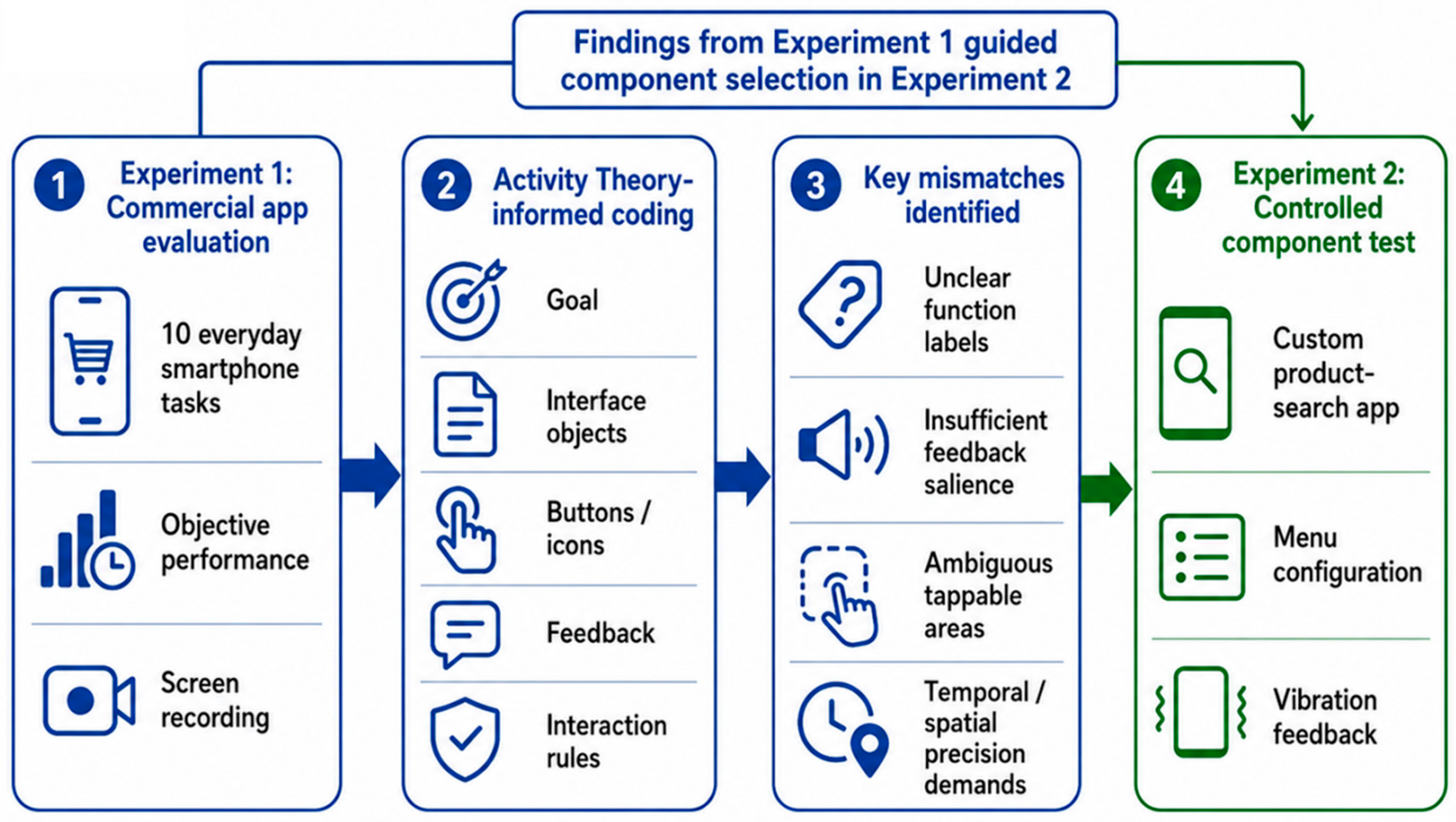
Figure 1 depicts the Activity Theory-informed diagnostic workflow used in Experiment 1 and its relationship to the controlled component experiment in Experiment 2.

2. Experiment 1: Ecologically Grounded Evaluation of Commercial Age-Friendly Smartphone App Versions in Older Adults

Experiment 1 evaluated commercially deployed standard and age-friendly app versions in WeChat and Pinduoduo as they were available to older adults at the time of testing. The experiment had three purposes: to test whether the commercial versions showed an overall objective performance difference across common smartphone tasks; to identify concrete interaction problems that bundled visual, structural, and feedback changes did not resolve; and to explore whether delayed recall was associated with performance in a navigation-heavy smartphone-based product-search task. Because the commercial app versions varied simultaneously in several interface and content features, Experiment 1 was not designed to attribute a task difference to a single component. Its value was ecological and diagnostic: it documented what older adults encountered in real applications and identified task problems that warranted controlled component testing.

2.1. Method

2.1.1. Pre-Study Survey on Smartphone Use

A pre-study questionnaire, Survey on Smartphone Usage Among Older Adults, was administered to identify commonly used smartphone applications and to select everyday task contexts for Experiment 1. The complete questionnaire and descriptive results are provided in Supplementary Table S1.
The survey yielded 62 valid responses from adults aged 60 years or older (35 women and 27 men; age categories are reported in Supplementary Table S1). The three most frequently used applications were WeChat, Douyin, and Pinduoduo. WeChat provides communication, social-content, and payment functions; Pinduoduo is a widely used shopping application; and Douyin primarily serves entertainment functions. These results were used to select common smartphone contexts rather than to evaluate the perceived effectiveness of age-friendly modes.
WeChat and Pinduoduo were selected because together they represented two common everyday task domains identified in the survey: communication/content-related workflows and online-shopping workflows. The aim of Experiment 1 was not to create a representative ranking of all popular applications, but to sample a range of everyday tasks, including communication, content sharing, payment, customer service, product search, and settings, within two widely used commercial applications.
Six of 62 survey respondents (9.68%) reported prior use of an age-friendly app version. This descriptive observation was not used to infer effectiveness, user benefit, or perceived usefulness; it provides context only for the subsequent task-based evaluation of commercially available app versions.

2.1.2. Participants

Twenty-three older adults were recruited from local communities for Experiment 1. The behavioral data of one participant were excluded under the study’s three-standard-deviation outlier criterion before hypothesis testing. The final analytic sample comprised 22 participants (7 men and 15 women), aged 60–78 years (M age = 61.86 years).
All participants met the World Health Organization’s definition of older adults [42], namely individuals aged 60 years or older. They had more than three years of smartphone use experience, normal or corrected-to-normal vision, and were right-handed. Most participants reported using smartphones for 2–6 h per day, and their educational backgrounds ranged from primary school to undergraduate education or above.

2.1.3. Design

To compare interaction performance between standard and age-friendly app versions, app version was treated as a within-subject factor with two levels: standard version and age-friendly version. The dependent variables were the total number of clicks, task completion time, and the number of erroneous clicks.
The total number of clicks and completion time were measured from the moment participants first touched the smartphone screen after receiving task instructions until the task was completed. Erroneous clicks were identified through video-based activity analysis guided by Activity Theory. An erroneous click was defined as an interaction that did not advance the participant toward the task goal or that reflected a mismatch between the participant’s intended action and the interface response.

2.1.4. Equipment and Materials

All tasks were performed on an HONOR 50 smartphone (Honor Device Co., Ltd., Shenzhen, China) with a 6.57-inch display, a 120 Hz refresh rate, a resolution of 2340 × 1080 pixels, and a pixel density of 392 ppi. WeChat (version 8.0.44; Tencent Technology (Shenzhen) Company Limited, Shenzhen, China) and Pinduoduo (version 6.91.0; Shanghai Xunmeng Information Technology Co., Ltd., Shanghai, China) were used as the experimental apps in Experiment 1.
Participants’ overall cognitive function was assessed using the Beijing version of the Montreal Cognitive Assessment (MoCA-BJ) [43,44]. The MoCA-BJ includes 11 items covering multiple cognitive domains, including visuospatial and executive function, memory, attention, language, abstraction, delayed recall, temporal orientation, and spatial orientation. The maximum score is 30 points. In accordance with the standardized scoring protocol, one additional point was added for participants with fewer than 12 years of formal education to adjust for educational background. All cognitive assessments were administered by researchers trained in clinical testing procedures.
Given that smartphone use requires information processing, visual attention, working memory, and visual–motor coordination [8], the Symbol Digit Modalities Test (SDMT) [45] was used to assess participants’ information processing speed. Participants were first instructed on the symbol–digit coding rules, which consisted of nine digits paired with nine abstract symbols displayed at the top of the test sheet. During the 90-s timed test, participants matched as many symbol–digit pairs as possible. The final score was the number of correct matches.

2.1.5. Procedure

Before the formal experiment, participants completed a demographic questionnaire that collected information on gender, age, education level, and daily smartphone use duration. They then received a detailed explanation of the experimental purpose, apparatus, task requirements, and procedure. Questions were answered before the experiment began. Participants were given sufficient time to familiarize themselves with both the standard and age-friendly versions of the two apps to ensure that they understood the basic task operations.
Each participant completed ten everyday smartphone tasks in both app versions. The order of the standard and age-friendly versions was counterbalanced, and task order was randomized. The tasks covered social communication, photo and video sharing, mobile payment, customer service, smartphone-based product search, saved-item retrieval, and application settings. Supplementary Table S2 provides the complete task inventory, app version, task instruction, and completion criterion.
The coding framework drew on established evaluation approaches and research-derived touchscreen guidance for older adults, particularly the framework summarized by Nurgalieva et al. [14]. Supplementary Table S3 reports the Activity Theory-informed coding categories, operational definitions, decision rules, and representative examples used to classify task-to-interface mismatches.
After completing the ten tasks in one app version, participants completed the MoCA-BJ and SDMT to assess overall cognitive function and information processing speed. They then completed the same ten tasks using the other app version. No time limit was imposed. All interaction processes were recorded using a secondary smartphone, which captured participants’ screen taps and human–smartphone interaction behaviors. These recordings were later used to identify and interpret erroneous clicks through Activity Theory–based video analysis.
Supplementary Table S4 provides the full coding frequencies and representative video-coded task-to-interface mismatches.

2.2. Data Analysis and Results

2.2.1. Task Performance Differences Between Standard and Age-Friendly Versions

All statistical analyses were conducted using IBM SPSS Statistics (version 27.0.1.0; IBM Corp., Armonk, NY, USA). Analyses proceeded in four steps. First, participant-level totals for clicks, completion time, and erroneous clicks were compared between the standard and age-friendly versions with Wilcoxon signed-rank tests because the overall indicators violated normality assumptions. Rank-biserial correlations and 95% bias-corrected and accelerated (BCa) bootstrap confidence intervals (CIs) for mean paired differences were used to characterize the magnitude and precision of the overall contrasts. Second, exploratory task-level Wilcoxon comparisons were conducted separately for total clicks and completion time across the ten tasks; Benjamini–Hochberg adjustment was applied within each outcome family. Third, an exploratory ordinary least-squares regression examined the association between delayed-recall score and Task 8 performance in the standard version; a sensitivity model additionally adjusted for age, sex, education, and daily smartphone use. Fourth, video-coded erroneous clicks were summarized descriptively by breakdown category. Full descriptive statistics and complete test outputs are provided in the Supplementary Materials.
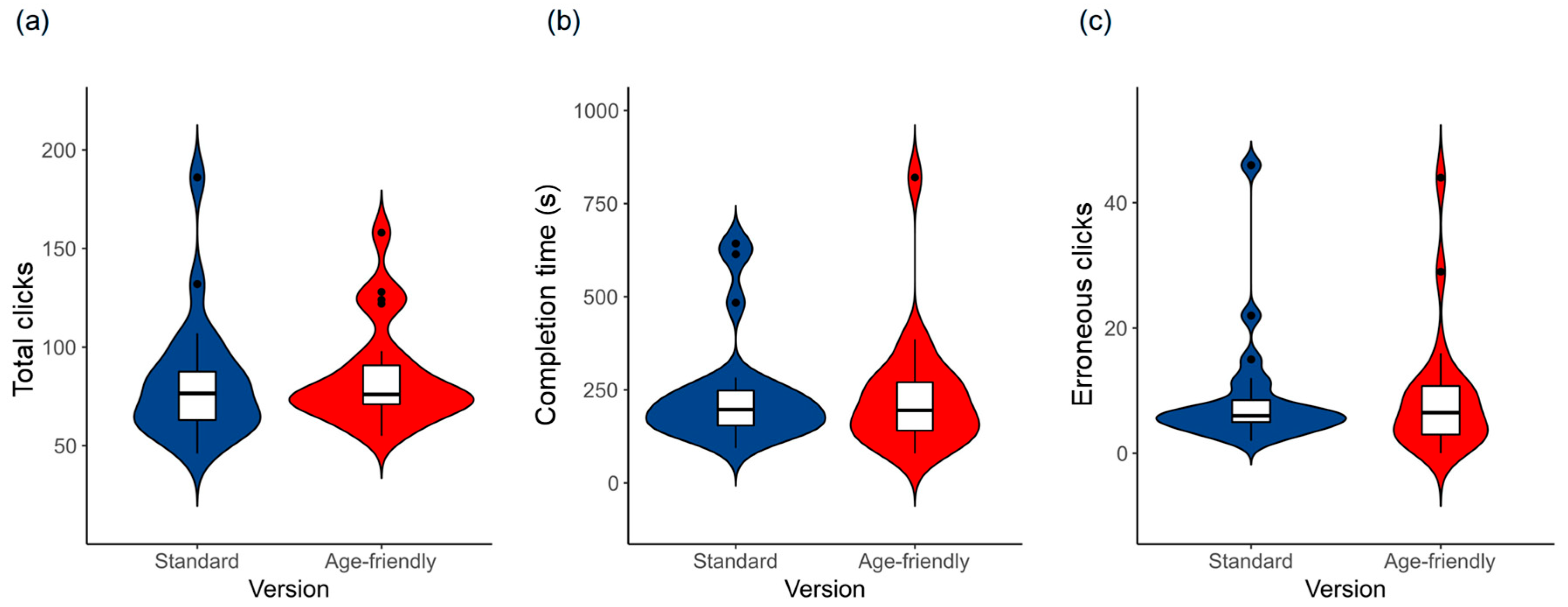
The standard and age-friendly app versions did not differ in any overall behavioral indicator: total clicks (W = 108, p = 0.548, rank-biserial r = −0.146; 95% BCa bootstrap CI for the mean paired difference [−14.00, 9.05] clicks), completion time (W = 117.5, p = 0.770, rank-biserial r = 0.071; 95% BCa bootstrap CI [−29.91, 54.00] s), or erroneous clicks (W = 113, p = 0.930, rank-biserial r = −0.022; 95% BCa bootstrap CI [−1.82, 2.00] clicks). Differences are standard-version minus age-friendly-version values. Across the ten everyday smartphone tasks, the commercial age-friendly versions showed no overall objective performance advantage over the standard versions. The effect-size estimates were close to zero, and the confidence intervals spanned both directions. Figure 2 shows the participant-level distributions for the three overall behavioral indicators.

2.2.2. Exploratory Task-Specific and Delayed-Recall Analyses

Exploratory task-level comparisons were conducted across the ten tasks to characterize task-specific patterns. In Task 8, a Pinduoduo product-search task, participants made fewer clicks in the age-friendly version (M = 10.09, SD = 6.26) than in the standard version (M = 19.27, SD = 16.28; Wilcoxon W = 61, p = 0.033, rank-biserial r = 0.518; paired mean difference = 9.18 clicks, 95% bootstrap CI [3.41, 15.64]) and completed the task faster (age-friendly: M = 18.41 s, SD = 9.49; standard: M = 40.77 s, SD = 36.55; W = 49, p = 0.012, rank-biserial r = 0.613; paired mean difference = 22.36 s, 95% bootstrap CI [8.73, 38.09]). Because Task 8 was selected from ten task-level comparisons, Benjamini–Hochberg correction was applied separately within each outcome family. Neither nominal difference remained significant after correction (adjusted p = 0.195 for total clicks; adjusted p = 0.119 for completion time). Task 8 is therefore reported as an exploratory commercial observation rather than as evidence that menu configuration caused the difference. As documented in Supplementary Tables S5 and S11, the commercial versions differed simultaneously in target product, category labels, screen content, visual arrangement, and navigation path; these co-occurring features cannot be disentangled retrospectively.
Descriptive MoCA-BJ subdomain scores and SDMT scores are provided in Supplementary Table S6. To examine the task-relevant role of delayed recall as a memory-specific cognitive ability without dichotomizing the sample, an exploratory ordinary least-squares regression focused on the standard-version Task 8 sequence, which required navigation through multiple category steps before reaching the product-detail page. Higher delayed-recall score was associated with fewer total clicks (standardized β = −0.652, R2 = 0.426, F(1, 20) = 14.82, p = 0.001; b = −7.82 clicks per recalled word, 95% CI [−12.05, −3.58]) and shorter completion time (standardized β = −0.653, R2 = 0.426, F(1, 20) = 14.84, p = 0.001; b = −17.55 s per recalled word, 95% CI [−27.06, −8.05]). In sensitivity models additionally adjusting for age, sex, education, and daily smartphone use, the associations remained significant for clicks (b = −6.91, 95% CI [−11.55, −2.27], p = 0.006) and completion time (b = −15.81, 95% CI [−26.16, −5.47], p = 0.005). These exploratory associations do not identify a cognitive-by-interface causal mechanism; they indicate that delayed recall may be relevant when older adults maintain a target while navigating a multi-step product-search sequence. We did not conduct post hoc high/low subgroup comparisons because categorization created unbalanced groups and discarded information from the continuous score [34].

2.2.3. Behavioral Causes of Erroneous Clicks

Approximately 12 h of video data were collected in Experiment 1. Following Mwanza’s eight-step Activity-Oriented Design Methodology [40] and prior Activity Theory applications to video analysis [39,41], coders identified actions that did not advance the participant toward the stated task goal. Each event was classified according to the mismatch among the task goal, the interface object, the available button or icon, the feedback following the action, and the interaction rule required for task completion. Table 2 summarizes the primary categories; Supplementary Table S4 provides full frequencies, operational definitions, and representative events.
The most frequent category involved unclear function buttons (44.95% of code assignments). Participants sometimes selected a button or icon whose label, visual appearance, or placement did not clearly indicate how it would advance the stated task goal. For example, participants could confuse a function entry with a similarly placed navigation option. These events indicate a weak mapping between the task goal and the action implied by the interface label or affordance.
Insufficiently salient feedback accounted for 26.15% of code assignments. In these events, a highlight, prompt, or visual state change was present but did not clearly communicate whether the preceding touch had registered. Participants could repeat the same action or continue searching for a response. This observation does not show that vibration improves every commercial interaction; it provides a task-grounded reason to compare a supplementary vibration cue under controlled conditions.
Unclear valid interaction areas accounted for 11.01% of code assignments. A further 17.89% of code assignments involved temporal or spatial precision problems, including insufficient touch duration, overly sensitive responses, limited spacing between controls, and failure to notice a prompt. Together, these categories show that the errors were not simply individual mistakes: they reflected mismatches among task goals, visible interface elements, feedback salience, and interaction rules.
The coding results explain the transition from Experiment 1 to Experiment 2 without converting commercial observations into causal claims. Smartphone-based product search was retained as the controlled task context because it requires target maintenance, category selection, and navigation across screens. Menu configuration was selected because this task involves a depth–breadth trade-off between visual search and sequential navigation [29,30,31]. Vibration feedback was selected because many coded events involved uncertainty about whether an action had registered, a problem for which an additional tactile cue is theoretically plausible [32]. Delayed recall was retained because both the task structure and the exploratory Task 8 association implicated target maintenance across navigation steps. These elements were subsequently compared or modeled in a custom application that fixed the product pool, final-stage item count, and core interaction rules while manipulating the specified components.

2.3. Discussion

Experiment 1 provides ecological evidence rather than a component-level causal test. Across ten everyday smartphone tasks in two widely used Chinese applications, the commercially deployed standard and age-friendly app versions did not show an overall difference in total clicks, completion time, or erroneous clicks. This result does not imply that age-friendly design is ineffective. It indicates that the particular commercial modes tested here did not automatically translate their bundled visual, structural, and feedback changes into an overall objective performance advantage across the selected tasks.
The Task 8 pattern should be interpreted cautiously. Its nominal differences did not survive correction for the ten task-level comparisons, and the two commercial versions differed in target product, category labels, screen content, visual arrangement, and navigation path. The commercial comparison therefore cannot identify menu configuration as the causal source of the pattern. Its value is to identify product search as a relevant smartphone task context in which navigation, target maintenance, and action confirmation can be tested more directly.
The video analysis adds information that aggregate behavioral totals cannot provide. The four observed categories connect errors to concrete interface demands: clearer functional labels and action mappings; more visible feedback states; recognizable tappable boundaries; and greater tolerance for temporal or spatial imprecision. These observations are relevant to older adults because age-related changes in vision, motor precision, attention, and memory can make such demands more consequential, but the present coding does not attribute any error to a single user characteristic.
The exploratory delayed-recall associations add a cognitively informed perspective to the real-app evaluation. They suggest that task-relevant cognitive ability, indexed by delayed recall, may be relevant when a user must retain target information, decide among categories, and maintain a search goal across several screens. Because these analyses were exploratory and the commercial versions were not equivalent, the findings were used to identify target maintenance as a task demand for controlled evaluation rather than to infer differential effects of commercial interface features. Experiment 2 was designed to compare specified interface components under controlled task conditions.

3. Experiment 2: Controlled Test of Menu Configuration and Vibration Feedback in Older Adults’ Smartphone-Based Product Search

Experiment 2 used a custom Android application to compare menu configuration and vibration feedback in a controlled smartphone-based product-search task involving older adults. The application preserved a familiar shopping-search sequence while allowing specified interface components to be compared under defined task conditions. This design addressed a limitation of Experiment 1: the commercial app versions changed multiple content and interface characteristics simultaneously. Experiment 2 therefore tested whether menu configuration and vibration feedback were associated with behavior in the custom task; it did not estimate the aggregate effect of any commercial age-friendly mode.

3.1. Method

3.1.1. Participants

Thirty older adults were recruited from local communities for Experiment 2. The sample included 17 males and 13 females. Participants ranged in age from 60 to 81 years, with a mean age of 66.33 years. All participants were aged 60 years or older, had more than three years of smartphone use experience, had normal or corrected-to-normal vision, and were right-handed.
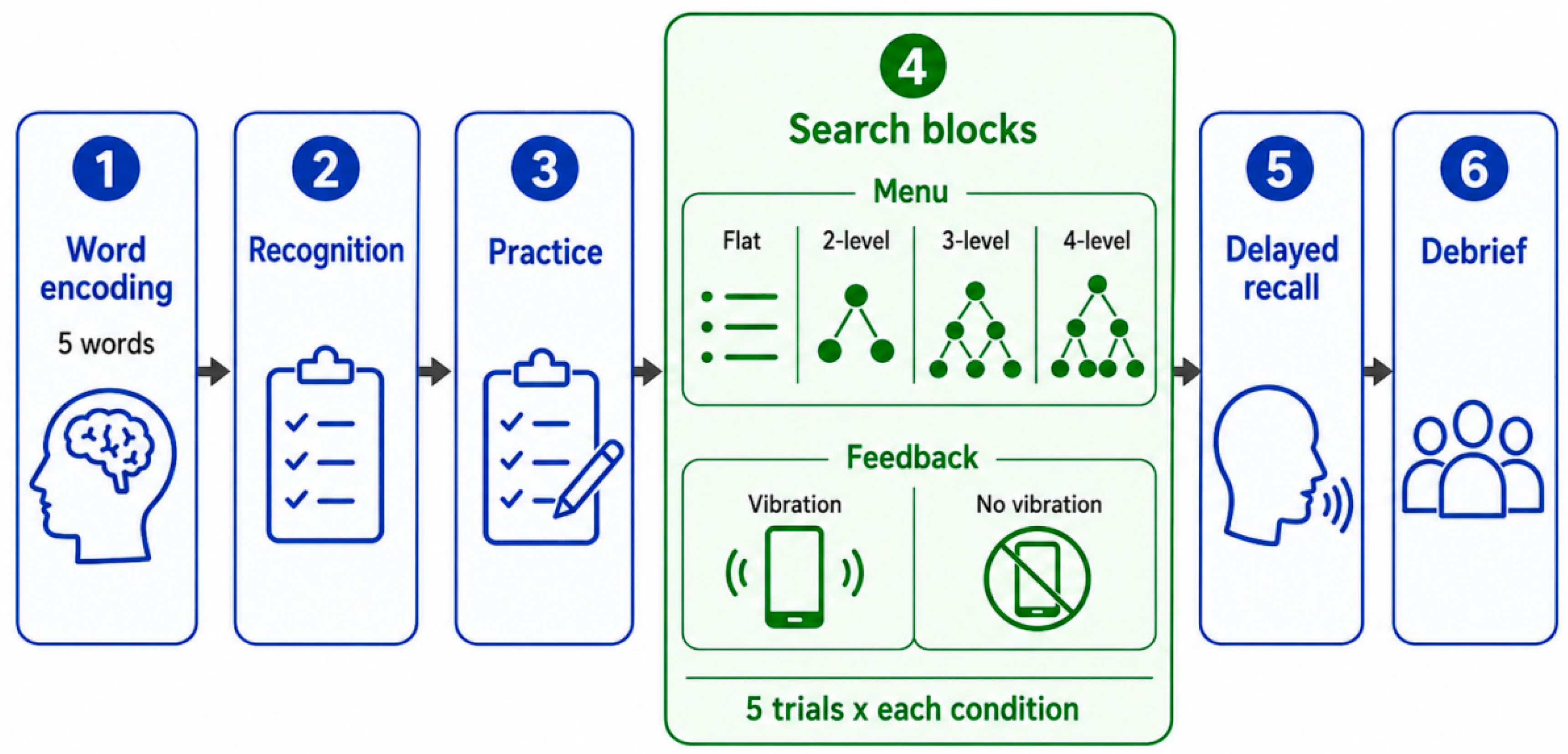
Experiment 2 used a task-embedded delayed-recall procedure adapted from the delayed-recall component of the MoCA-BJ. Participants first encoded five target words and completed a recognition check. After completing the search trials under the first feedback condition, they verbally recalled as many target words as possible before completing the search task under the alternate feedback condition. The delayed-recall score was the number of correctly recalled words (possible range: 0–5; observed range: 0–4; M = 2.03, SD = 1.45). The score was mean-centered and entered as a continuous participant-level predictor in the primary models [34]. Low-, medium-, and high-recall categories would have produced unbalanced groups (n = 11, n = 12, and n = 7, respectively) and discarded information contained in the continuous score; they were therefore not used for inferential analyses. The experiment used a 2 (feedback mode: vibration, no vibration) × 4 (menu configuration: flat, two-level, three-level, four-level) within-participant design. Each participant contributed one mean value for each of the eight feedback-by-menu-configuration conditions, calculated across five formal product-search trials.

3.1.2. Design

In the vibration-feedback condition, the app provided tactile vibration feedback when participants performed an effective interaction operation. In the no-vibration-feedback condition, no tactile feedback was provided. The dependent variables were the total number of clicks, task completion time, and the number of ineffective clicks. The total number of clicks and completion time were recorded from the moment participants pressed the “start” button until the target product was successfully selected. Ineffective clicks were defined as interaction attempts that did not advance the participant toward the correct target or task state. Errors unrelated to the interface operation itself, such as misunderstandings of the task goal or accidental non-task touches, were not included in the ineffective-click count.

3.1.3. Equipment and Materials

The experiment was conducted using the same HONOR 50 smartphone as in Experiment 1, with a 6.57-inch display, a 120 Hz refresh rate, a resolution of 2340 × 1080 pixels, and a pixel density of 392 ppi.
A custom Android application was developed in Android Studio Hedgehog, 2023.1.1 (Google LLC, Mountain View, CA, USA) to preserve a familiar smartphone shopping-search sequence while enabling controlled comparison of specified interface components. The application included flat, two-level, three-level, and four-level menu configurations. Product names and images were selected from common shopping conventions to retain task familiarity. The application did not reproduce a commercial application; its purpose was to compare menu configuration and vibration feedback while avoiding the multiple co-occurring changes present in the commercial app versions.
To improve comparability across conditions, the underlying product pool (64 items), target-selection rule, start-to-selection procedure, and non-vibratory visual-feedback timing were held constant. In the two-level, three-level, and four-level configurations, the final selection screen contained eight products, thereby holding final-stage item count constant across the hierarchical configurations. Product positions were randomized to reduce position-based learning. The presence versus absence of a brief vibration cue was the only feedback manipulation. Menu configuration necessarily altered how category decisions were distributed across screens; however, it did not alter the defined product pool, target-selection rule, or core response contingencies. Full implementation details, menu inventories, target-placement rules, and representative menu-configuration screens are provided in Supplementary Tables S7 and S10.

3.1.4. Procedure

Before the formal experiment, participants completed the demographic information procedure used in Experiment 1. They were then briefed on the experimental equipment, stimuli, task requirements, and procedure. Any questions were answered before the task began.
The experiment started with the encoding phase of the delayed-recall task adapted from the MoCA-BJ. Participants were asked to remember the target words. A recognition task containing target words and visually similar distractor words was then administered to ensure that participants had encoded the words before the subsequent product search task. Participants proceeded to the product search task only after correctly recognizing the target words. If a participant failed the recognition task, the encoding and recognition phases were repeated until the participant passed.
Participants then completed four practice trials, one for each menu hierarchy structure, to become familiar with the task and interface. After the practice trials, they performed the formal product search task under one of the two feedback conditions, either vibration feedback or no vibration feedback. The order of feedback conditions was counterbalanced across participants. After completing the search trials under the first feedback condition, participants completed the delayed-recall test by verbally recalling as many target words as possible. They then completed the search task under the alternate feedback condition.
Each menu hierarchy structure included five search trials under each feedback mode. Therefore, each participant completed 40 formal trials in total, consisting of 4 menu hierarchy structures × 2 feedback modes × 5 trials. In each trial, the participant searched for a specified target product using the custom shopping app. The target product was randomly selected and placed at the bottom layer of the corresponding menu hierarchy structure.
A trial was considered successful when the participant selected the correct target product. A correct selection triggered a pop-up message stating, “Correct answer! Please click ‘next’ to continue.” An incorrect selection triggered a pop-up message stating, “Incorrect answer, please choose the product again.” Participants could tap “OK” or tap elsewhere on the screen to return to the current interface, or they could use the “back” button to navigate to a previous category. No time limit was imposed.
Figure 3 illustrates the Experiment 2 procedure and the task-embedded delayed-recall sequence.

3.2. Data Analysis and Results

Product Search Performance

Participant-condition means were calculated across the five formal trials in each feedback-by-menu-configuration condition. The outcomes were total clicks, completion time, and ineffective clicks. Total clicks and completion time were log-transformed; ineffective clicks were analyzed as log(1 + x) because zero values occurred. A preliminary likelihood-ratio comparison tested an additive model against a model including all two-way interactions among menu configuration, feedback mode, and mean-centered delayed recall. The interaction block did not improve model fit for total clicks (p = 0.665), completion time (p = 0.558), or ineffective clicks (p = 0.461). The final models therefore included menu configuration, feedback mode, delayed recall, and a participant-specific random intercept. Age and sex were available in Experiment 2 and were added to sensitivity models as participant-level covariates. Education and daily smartphone-use duration were not available in the Experiment 2 analytic dataset and therefore could not be included in those sensitivity models.
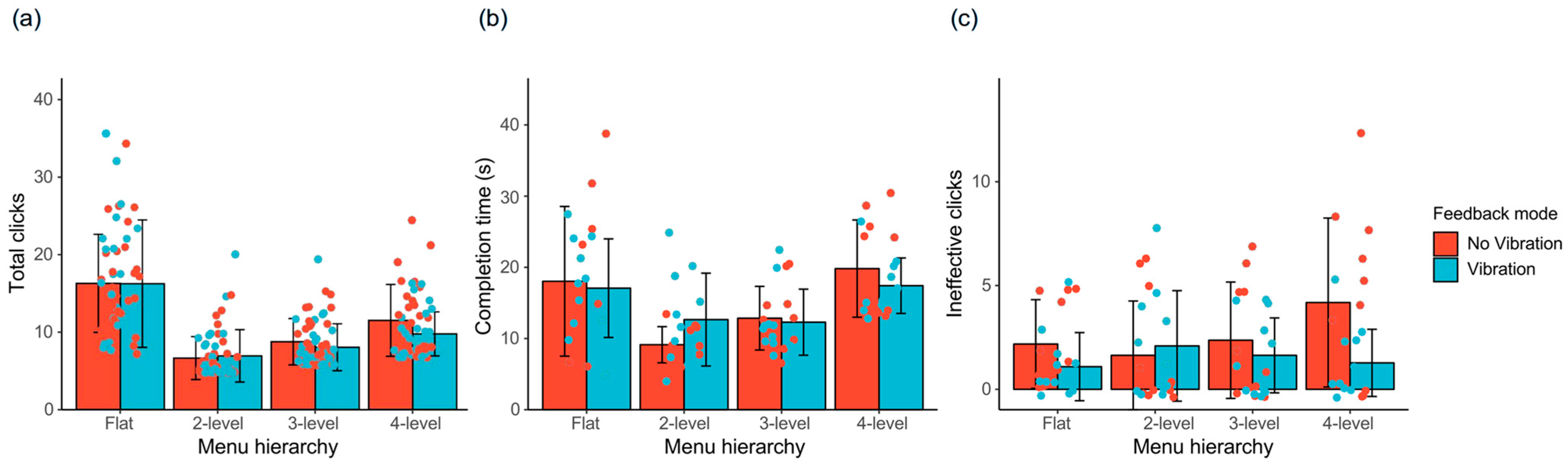
Table 3 reports fixed-effect estimates from the primary mixed-effects models. Figure 4 shows model-estimated performance by menu configuration and feedback mode. The results paragraphs below report the main effects only; interpretations of why the patterns may have occurred are reserved for the Discussion.
Relative to the flat configuration, the two-level configuration was associated with fewer total clicks (b = −0.837, 95% CI [−0.949, −0.724], p < 0.001; 56.7% lower) and shorter completion time (b = −0.367, 95% CI [−0.487, −0.247], p < 0.001; 30.7% shorter). The three-level configuration was associated with fewer total clicks (b = −0.608, 95% CI [−0.720, −0.496], p < 0.001; 45.6% lower) and shorter completion time (b = −0.162, 95% CI [−0.282, −0.042], p = 0.008; 14.9% shorter). The four-level configuration was associated with fewer total clicks (b = −0.376, 95% CI [−0.488, −0.263], p < 0.001; 31.3% lower) but longer completion time (b = 0.198, 95% CI [0.078, 0.318], p = 0.001; 21.9% longer).
Vibration feedback was associated with fewer ineffective clicks (b = −0.226, 95% CI [−0.376, −0.076], p = 0.003; 20.2% lower). In the primary additive model, higher delayed-recall score was associated with shorter completion time (b = −0.069, 95% CI [−0.125, −0.012], p = 0.017; approximately 6.6% shorter per recalled word). In sensitivity models adding age and sex, the menu-configuration and vibration estimates were unchanged, whereas the delayed-recall estimate for completion time was attenuated and no longer statistically significant (b = −0.026, 95% CI [−0.086, 0.034], p = 0.392). Supplementary Table S9 reports the primary and sensitivity model outputs. The menu-configuration and vibration estimates therefore remained stable after adjustment for the demographic covariates available in Experiment 2. This sensitivity analysis does not rule out confounding by unmeasured factors, including digital literacy, education, prior application familiarity, or broader cognitive abilities. The delayed-recall association should be treated as exploratory evidence requiring replication with fuller measurement of cognitive and demographic characteristics.
Table 3 summarizes the key mixed-effects estimates for total clicks, completion time, and ineffective clicks. Figure 4 presents model-estimated performance differences across menu configurations.

3.3. Discussion

Experiment 2 provides a controlled comparison of menu configuration in an older-adult smartphone-based product-search task. The results do not establish a universal optimal menu configuration. Within the tested product pool and device, the two-level configuration was associated with the fewest clicks and shortest completion time relative to the flat reference. The three-level configuration also improved both outcomes, whereas the four-level configuration reduced clicks but increased completion time. These patterns suggest that the practical costs of a configuration depend on the balance between the number of items presented at a screen and the number of sequential category decisions required.
From an HCI perspective, a flat configuration can reduce screen transitions but may enlarge the visual search space and scanning burden. A deeper configuration can reduce the number of visible options but may require additional category decisions and preservation of the target across screens. The observed two-level advantage may therefore reflect a workable balance for this product set. This interpretation is consistent with depth–breadth research but is not direct evidence about eye movements, visual crowding, workload, or working-memory processes.
The vibration result is more specific. A short tactile cue following an effective action was associated with fewer ineffective clicks, consistent with the possibility that an additional confirmation channel reduced uncertainty about whether the application had registered a touch. The study did not show that vibration should be constant, strong, or present in every smartphone workflow. The delayed-recall analyses add a cognitively informed perspective to the controlled task. In the primary model, higher delayed-recall scores were associated with shorter completion time, although this association was attenuated after adjustment for age and sex. This pattern suggests that task-relevant cognitive ability, indexed here by delayed recall, should be considered when evaluating target-maintenance demands in multi-step product search. The interaction analyses did not identify differential menu effects across delayed-recall scores; future studies should therefore examine this relationship using broader cognitive assessment and direct measures of digital literacy, education, and application familiarity.

4. General Discussion

4.1. An Ecological-to-Controlled Evidence Strategy for Age-Friendly Smartphone Design

The two experiments answer complementary questions that should not be conflated. Experiment 1 evaluated commercially deployed age-friendly app versions as real but mixed design packages. It asked whether these versions improved objective performance in everyday smartphone tasks and identified the task-to-interface mismatches that remained visible during use. Experiment 2 addressed a different question: when specified interface components are compared under controlled product-search conditions, how are menu configuration and vibration feedback associated with distinct behavioral outcomes?
The central contribution is therefore a cognitively informed ecological-to-controlled evidence strategy rather than a universal design rule or a new cognitive typology. The strategy links objective performance in commercial smartphone applications, Activity Theory-informed video analysis of concrete interaction problems, controlled comparison of specified interface components, and continuous modeling of task-relevant cognitive ability, indexed by delayed recall. This sequence preserves the ecological relevance of real applications while avoiding causal overinterpretation of multi-component commercial comparisons. It also revealed an outcome-specific pattern: menu configuration was primarily associated with search efficiency, whereas vibration feedback was primarily associated with ineffective clicks. In this framework, task-relevant cognitive ability is considered as a source of heterogeneity relevant to target maintenance during multi-step navigation, complementing component-level interface evaluation.

4.2. Bounded Design Actions for Mobile Product Search

The controlled findings support an outcome-specific approach to design. Menu configuration was associated primarily with search efficiency, whereas vibration feedback was associated primarily with action verification. These components should therefore not be treated as interchangeable “senior-friendly” features. Instead, each should be evaluated against the particular task problem it is intended to address: excessive visual search, unnecessary sequential navigation, or uncertainty about whether an action has registered.
First, menu configuration should be evaluated against the product set and workflow rather than selected solely because it is flatter or visually simpler. In the present task, a two-level configuration balanced the large visual search space of the flat configuration against the additional sequential decisions of deeper configurations. A practical example is a shopping interface that uses one meaningful category step before showing a manageable product list. This is a design action for product-search tasks, not a general rule for every smartphone application.
Second, action confirmation should be explicit when an ambiguous or unregistered touch is likely to create repetition, uncertainty, or a wrong turn. In the present task, a brief vibration after an effective action was associated with fewer ineffective clicks. A practical example is a product-selection or quantity-adjustment action that produces both a clear visual state change and a short optional vibration. The evidence does not support continuous or intrusive vibration across all workflows; the cue should remain optional, nonintrusive, and evaluated in the context in which it is used.
Third, product-search interfaces should be evaluated with attention to task-relevant cognitive ability. Multi-step navigation requires users to maintain the target product while interpreting category labels and recovering from wrong turns. In the present study, delayed recall was modeled continuously alongside the interface components, suggesting that understandable labels, visible back navigation, current-path information, and recoverable target instructions are relevant design hypotheses for workflows with substantial target-maintenance demands. These suggestions require direct testing with broader cognitive measures, additional task types, and user-reported outcomes before they can be treated as general recommendations.

4.3. Limitations and Future Research

Several limitations qualify the present findings. First, the samples were modest and comprised community-dwelling older adults who reported more than three years of smartphone experience, had normal or corrected-to-normal vision, and were right-handed. The estimates should be interpreted as evidence from restricted local samples rather than as population-level design rules. Larger, more diverse, preregistered replications are needed to test whether the patterns vary by age, education, digital literacy, health status, socioeconomic background, smartphone experience, sensory or motor capacity, and cognitive impairment.
Second, Experiment 1 compared naturally occurring commercial app versions in Chinese applications. Their feature labels, shopping conventions, and age-friendly configurations may not generalize directly to other cultural, linguistic, or platform contexts. Prior familiarity with the applications, digital literacy, education, technology anxiety, self-efficacy, visual and motor capacity, target familiarity, and broader executive or visuospatial abilities were not comprehensively measured or statistically controlled. Familiarization reduced misunderstanding of the experimental procedure but did not equalize these characteristics. The Task 8 comparison also involved non-equivalent target content and screen characteristics; it was therefore treated only as an exploratory commercial observation. In the exploratory Experiment 1 Task 8 analyses, sensitivity models adjusted for the available age, sex, education, and daily smartphone-use variables. In Experiment 2, only age and sex were available for sensitivity adjustment. Neither analysis eliminates the possibility of residual confounding by unmeasured factors.
Third, Experiment 2 increased control at the cost of scope. It examined a single smartphone-based product-search task on one Android device, with a fixed product pool, particular category labels, a specific vibration implementation, and objective behavioral outcomes. Age and sex were included in sensitivity models, whereas education and daily smartphone-use duration were not available in the Experiment 2 analytic dataset. The study did not assess workload, usability scales such as the System Usability Scale, satisfaction, perceived effort, user acceptance, vibration annoyance, eye movements, or longer-term adoption. The task-embedded delayed-recall procedure was adapted from one MoCA-BJ component and does not constitute a full cognitive assessment. Future research should test the same components in payment, health, communication, and multi-item shopping tasks; recruit broader samples; measure application familiarity and digital literacy directly; and combine behavioral logs with subjective and longitudinal outcomes.

5. Conclusions

Commercial age-friendly modes are useful real-world design packages, but they cannot by themselves reveal which interface features improve older adults’ task performance. This two-stage study therefore combined ecological evaluation of commercially deployed app versions with controlled comparison of specified components in smartphone-based product search. The commercial versions tested did not show an overall performance advantage, and the nominal Task 8 pattern could not be attributed to menu configuration because multiple interface and content features varied together. Under controlled task conditions, the two-level menu configuration was associated with fewer clicks and shorter completion time relative to the flat configuration, whereas brief vibration feedback was associated with fewer ineffective clicks. These findings do not identify a universal age-friendly mode or a universally optimal menu. Within the tested product-search context, they motivate a cognitively informed, information-structure-prioritized, and multisensory design approach. In this approach, information architecture and action-confirmation cues are evaluated in relation to search efficiency and action verification, while delayed recall is considered as a continuous task-relevant cognitive indicator of target-maintenance demands during multi-step navigation.

Supplementary Materials

The following supporting information can be downloaded at: https://www.mdpi.com/article/10.3390/app16146946/s1; Descriptive results of the pre-study survey used to identify common smartphone applications and task contexts (Table S1); Experiment 1 task inventory, tested app version, and completion criterion (Table S2); Activity Theory-informed coding framework for task-to-interface mismatches in Experiment 1 (Table S3); Full coding frequencies and representative Activity Theory-informed coded events in Experiment 1 (Table S4); Commercial Task 8 configuration inventory in Experiment 1 (Table S5); Experiment 1 participant characteristics and cognitive descriptive statistics (Table S6); Experiment 2 implementation checklist, menu-configuration inventory, and target-placement rules (Table S7); Experiment 2 procedural sequence and task-embedded delayed-recall procedure (Table S8); Complete statistical outputs for Experiments 1 and 2 (Table S9); Representative interface examples of the four menu configurations in Experiment 2 (Table S10); Procedures and screenshots illustrating the standard and age-friendly commercial Task 8 configurations in Experiment 1 (Table S11).

Author Contributions

Conceptualization, J.H., H.X. and Z.F.; investigation, J.H. and H.X.; formal analysis, J.H. and H.X.; writing—original draft preparation, J.H., H.X. and X.C.; writing—review and editing, J.H., X.C., Z.F. and X.D.; visualization, J.H. and H.X.; supervision, X.C., Z.F. and X.D.; funding acquisition, Z.F. All authors have read and agreed to the published version of the manuscript.

Funding

This research was funded by the National Social Science Fund of China, grant number 21BSH107.

Institutional Review Board Statement

The study was conducted in accordance with the Declaration of Helsinki [46] and approved by the School of Psychology Ethics Committee of Central China Normal University (protocol code CCNU-IRB-202312011a; date of approval: 1 December 2023).

Informed Consent Statement

Informed consent was obtained from all subjects involved in the study.

Data Availability Statement

The processed data supporting the findings of this study are openly available in OSF at https://osf.io/d3b2j/ (accessed on 1 July 2026).

Conflicts of Interest

The authors declare no conflicts of interest. The funder had no role in the design of the study; in the collection, analyses, or interpretation of data; in the writing of the manuscript; or in the decision to publish the results.

References

  1. United Nations Department of Economic and Social Affairs, Population Division. World Population Prospects 2024: Summary of Results (UN DESA/POP/2024/TR/NO. 9); United Nations: New York, NY, USA, 2024; Available online: https://desapublications.un.org/publications/world-population-prospects-2024-summary-results (accessed on 1 July 2026).
  2. Bloom, D.E.; Boersch-Supan, A.; McGee, P.; Seike, A. Population Aging: Facts, Challenges, and Responses; Program on the Global Demography of Aging: Cambridge, MA, USA, 2011. [Google Scholar]
  3. Aranco Araújo, N.; Garcia, G.M. Health and Long-Term Care Needs in a Context of Rapid Population Aging; World Bank: Washington, DC, USA, 2024. [Google Scholar] [CrossRef] [Scilit]
  4. Chopik, W.J. The Benefits of Social Technology Use among Older Adults Are Mediated by Reduced Loneliness. Cyberpsychol. Behav. Soc. Netw. 2016, 19, 551–556. [Google Scholar] [CrossRef] [Scilit] [PubMed]
  5. Cotten, S.R.; Anderson, W.A.; McCullough, B.M. Impact of Internet Use on Loneliness and Contact with Others among Older Adults: Cross-Sectional Analysis. J. Med. Internet Res. 2013, 15, e39. [Google Scholar] [CrossRef] [Scilit]
  6. Zamir, S.; Hennessy, C.H.; Taylor, A.H.; Jones, R.B. Video-Calls to Reduce Loneliness and Social Isolation within Care Environments for Older People: An Implementation Study Using Collaborative Action Research. BMC Geriatr. 2018, 18, 62. [Google Scholar] [CrossRef] [Scilit] [PubMed]
  7. Kurniawan, S. Older People and Mobile Phones: A Multi-Method Investigation. Int. J. Hum.-Comput. Stud. 2008, 66, 889–901. [Google Scholar] [CrossRef] [Scilit]
  8. Li, Q.; Luximon, Y. Navigating the Mobile Applications: The Influence of Interface Metaphor and Other Factors on Older Adults’ Navigation Behavior. Int. J. Hum.-Comput. Interact. 2023, 39, 1184–1200. [Google Scholar] [CrossRef] [Scilit]
  9. Van Dijk, J.A.G.M.; Hacker, K. The Digital Divide as a Complex and Dynamic Phenomenon. Inf. Soc. 2003, 19, 315–326. [Google Scholar] [CrossRef] [Scilit]
  10. Van Dijk, J.A.G.M. The Deepening Divide: Inequality in the Information Society; SAGE Publications: London, UK, 2005. [Google Scholar] [CrossRef] [Scilit]
  11. Lythreatis, S.; Singh, S.K.; El-Kassar, A.-N. The Digital Divide: A Review and Future Research Agenda. Technol. Forecast. Soc. Change 2022, 175, 121359. [Google Scholar] [CrossRef] [Scilit]
  12. Soomro, K.A.; Kale, U.; Curtis, R.; Akcaoglu, M.; Bernstein, M. The Digital Divide among Higher Education Faculty. Int. J. Educ. Technol. High. Educ. 2020, 17, 21. [Google Scholar] [CrossRef] [Scilit] [PubMed]
  13. Chen, B.; Peng, Q.; Zhang, Y.; Chen, Z.; Zheng, X. Relationship between Internet Use and Cognitive Function among Middle-Aged and Older Chinese Adults: 5-Year Longitudinal Study. J. Med. Internet Res. 2024, 26, e57301. [Google Scholar] [CrossRef] [Scilit] [PubMed]
  14. Nurgalieva, L.; Jara Laconich, J.J.; Baez, M.; Casati, F.; Marchese, M. A Systematic Literature Review of Research-Derived Touchscreen Design Guidelines for Older Adults. IEEE Access 2019, 7, 22035–22058. [Google Scholar] [CrossRef] [Scilit]
  15. Gomez-Hernandez, M.; Ferre, X.; Moral, C.; Villalba-Mora, E. Design Guidelines of Mobile Apps for Older Adults: Systematic Review and Thematic Analysis. JMIR mHealth uHealth 2023, 11, e43186. [Google Scholar] [CrossRef] [Scilit] [PubMed]
  16. Petrovčič, A.; Šetinc, M.; Burnik, T.; Dolničar, V. A Comparison of the Usability of a Standard and an Age-Friendly Smartphone Launcher: Experimental Evidence from Usability Testing with Older Adults. Int. J. Rehabil. Res. 2018, 41, 337–342. [Google Scholar] [CrossRef] [Scilit] [PubMed]
  17. Zhou, C.; Dai, Y.; Huang, T.; Zhao, H.; Kaner, J. An Empirical Study on the Influence of Smart Home Interface Design on the Interaction Performance of the Elderly. Int. J. Environ. Res. Public Health 2022, 19, 9105. [Google Scholar] [CrossRef] [Scilit] [PubMed]
  18. Amouzadeh, E.; Dianat, I.; Faradmal, J.; Babamiri, M. Optimizing Mobile App Design for Older Adults: Systematic Review of Age-Friendly Design. Aging Clin. Exp. Res. 2025, 37, 248. [Google Scholar] [CrossRef] [Scilit] [PubMed]
  19. Renaud, K.; van Biljon, J. Worth-Centred Mobile Phone Design for Older Users. Univers. Access Inf. Soc. 2010, 9, 387–403. [Google Scholar] [CrossRef] [Scilit]
  20. Wildenbos, G.A.; Jaspers, M.W.M.; Schijven, M.P.; Dusseljee-Peute, L.W. Mobile Health for Older Adult Patients: Using an Aging Barriers Framework to Classify Usability Problems. Int. J. Med. Inform. 2019, 124, 68–77. [Google Scholar] [CrossRef] [Scilit] [PubMed]
  21. Murabito, J.M.; Faro, J.M.; Zhang, Y.; DeMalia, A.; Hamel, A.; Agyapong, N.; Liu, H.; Schramm, E.; McManus, D.D.; Borrelli, B. Smartphone App Designed to Collect Health Information in Older Adults: Usability Study. JMIR Hum. Factors 2024, 11, e56653. [Google Scholar] [CrossRef] [Scilit] [PubMed]
  22. Elboim-Gabyzon, M.; Weiss, P.L.; Danial-Saad, A. Effect of Age on the Touchscreen Manipulation Ability of Community-Dwelling Adults. Int. J. Environ. Res. Public Health 2021, 18, 2094. [Google Scholar] [CrossRef] [Scilit] [PubMed]
  23. Lazar, A.; Brewer, R.; Knowles, B. HCI and Older Adults: The Critical Turn and What Comes Next. Found. Trends Hum.-Comput. Interact. 2025, 19, 112–212. [Google Scholar] [CrossRef] [Scilit] [PubMed]
  24. Glisky, E.L. Changes in Cognitive Function in Human Aging. In Brain Aging: Models, Methods, and Mechanisms; Riddle, D.R., Ed.; CRC Press: Boca Raton, FL, USA; Taylor & Francis: Abingdon, UK, 2007. [Google Scholar]
  25. Loaiza, V.M. An Overview of the Hallmarks of Cognitive Aging. Curr. Opin. Psychol. 2024, 56, 101784. [Google Scholar] [CrossRef] [Scilit] [PubMed]
  26. Sweller, J. Cognitive Load during Problem Solving: Effects on Learning. Cogn. Sci. 1988, 12, 257–285. [Google Scholar] [CrossRef] [PubMed]
  27. Dodd, C.; Athauda, R.; Adam, M. Designing User Interfaces for the Elderly: A Systematic Literature Review. In Proceedings of the Australasian Conference on Information Systems (ACIS 2017), Hobart, Australia, 4–6 December 2017. ACIS 2017 Proceedings, Paper 61. [Google Scholar]
  28. Gordon, M.L.; Gatys, L.; Guestrin, C.; Bigham, J.P.; Trister, A.; Patel, K. App Usage Predicts Cognitive Ability in Older Adults. In Proceedings of the 2019 CHI Conference on Human Factors in Computing Systems (CHI ’19), Glasgow, UK, 4–9 May 2019; Association for Computing Machinery: New York, NY, USA, 2019; pp. 1–12. [Google Scholar] [CrossRef] [Scilit]
  29. Jacko, J.A.; Salvendy, G. Hierarchical Menu Design: Breadth, Depth, and Task Complexity. Percept. Mot. Ski. 1996, 82, 1187–1201. [Google Scholar] [CrossRef] [Scilit]
  30. Zaphiris, P.; Kurniawan, S.H.; Ellis, R.D. Age Related Differences and the Depth vs. Breadth Tradeoff in Hierarchical Online Information Systems. In Universal Access Theoretical Perspectives, Practice, and Experience; Carbonell, N., Stephanidis, C., Eds.; Lecture Notes in Computer Science; Springer: Berlin/Heidelberg, Germany, 2003; Volume 2615, pp. 23–42. [Google Scholar] [CrossRef] [Scilit] [PubMed]
  31. Yu, J.E.; Chattopadhyay, D. Reducing the Search Space on Demand Helps Older Adults Find Mobile UI Features Quickly, on Par with Younger Adults. In Proceedings of the CHI Conference on Human Factors in Computing Systems (CHI ’24), Honolulu, HI, USA, 11–16 May 2024; Association for Computing Machinery: New York, NY, USA, 2024; pp. 1–22. [Google Scholar] [CrossRef] [Scilit]
  32. Wickens, C.D. Multiple Resources and Mental Workload. Hum. Factors 2008, 50, 449–455. [Google Scholar] [CrossRef] [Scilit] [PubMed]
  33. Huang, X.; Ali, N.M.; Sahrani, S. Haptic-Driven Serious Card Games for Older Adults: User Preferences Study. JMIR Serious Games 2025, 13, e73135. [Google Scholar] [CrossRef] [Scilit] [PubMed]
  34. MacCallum, R.C.; Zhang, S.; Preacher, K.J.; Rucker, D.D. On the Practice of Dichotomization of Quantitative Variables. Psychol. Methods 2002, 7, 19–40. [Google Scholar] [CrossRef] [PubMed]
  35. Bhattacharya, R.; Bose, D.; Rodriguez, R.V.; Hemachandran, K.; Siddique, K.R. Personalized Multi-Modal Interfaces for Cognitive Aging: A Narrative Review of Design and Technological Innovations. Arch. Gerontol. Geriatr. Plus 2025, 2, 100206. [Google Scholar] [CrossRef] [Scilit]
  36. Vygotsky, L.S. Mind in Society: The Development of Higher Psychological Processes; Harvard University Press: Cambridge, MA, USA, 1978. [Google Scholar] [CrossRef] [Scilit]
  37. Leont’ev, A.N. Activity, Consciousness, and Personality; Prentice-Hall: Englewood Cliffs, NJ, USA, 1978. [Google Scholar]
  38. Engeström, Y. Learning by Expanding: An Activity-Theoretical Approach to Developmental Research; Orienta-Konsultit: Helsinki, Finland, 1987. [Google Scholar]
  39. Bødker, S. Applying Activity Theory to Video Analysis: How to Make Sense of Video Data in Human-Computer Interaction. In Context and Consciousness: Activity Theory and Human-Computer Interaction; Nardi, B.A., Ed.; MIT Press: Cambridge, MA, USA, 1996; pp. 147–174. [Google Scholar]
  40. Mwanza, D. Towards an Activity-Oriented Design Method for HCI Research and Practice. Ph.D. Thesis, The Open University, Milton Keynes, UK, 2002. [Google Scholar] [CrossRef]
  41. Baumer, E.P.S.; Tomlinson, B. Comparing Activity Theory with Distributed Cognition for Video Analysis: Beyond “Kicking the Tires”. In Proceedings of the SIGCHI Conference on Human Factors in Computing Systems (CHI ’11), Vancouver, BC, Canada, 7–12 May 2011; Association for Computing Machinery: New York, NY, USA, 2011; pp. 133–142. [Google Scholar] [CrossRef] [Scilit]
  42. World Health Organization. Decade of Healthy Ageing: Baseline Report; World Health Organization: Geneva, Switzerland, 2020. [Google Scholar]
  43. Nasreddine, Z.S.; Phillips, N.A.; Bédirian, V.; Charbonneau, S.; Whitehead, V.; Collin, I.; Cummings, J.L.; Chertkow, H. The Montreal Cognitive Assessment, MoCA: A Brief Screening Tool for Mild Cognitive Impairment. J. Am. Geriatr. Soc. 2005, 53, 695–699. [Google Scholar] [CrossRef] [Scilit] [PubMed]
  44. Yu, J.; Li, J.; Huang, X. The Beijing Version of the Montreal Cognitive Assessment as a Brief Screening Tool for Mild Cognitive Impairment: A Community-Based Study. BMC Psychiatry 2012, 12, 156. [Google Scholar] [CrossRef] [Scilit] [PubMed]
  45. Smith, A. Symbol Digit Modalities Test; Western Psychological Services: Los Angeles, CA, USA, 1973. [Google Scholar] [CrossRef] [Scilit]
  46. World Medical Association. World Medical Association Declaration of Helsinki: Ethical Principles for Medical Research Involving Human Subjects. JAMA 2013, 310, 2191–2194. [Google Scholar] [CrossRef] [Scilit] [PubMed]
Figure 1. Activity Theory-informed workflow from Experiment 1 to Experiment 2. Experiment 1 records objective performance and video-coded task-to-interface mismatches across ten everyday smartphone tasks in commercial applications. The coding considers the user’s goal, interface objects, available buttons or icons, feedback, and interaction rules. Experiment 2 then compares menu configuration and vibration feedback in a custom smartphone-based product-search application. Note: The workflow explains the rationale for component selection; it does not imply that a commercial app version establishes a causal effect of any single component.
Applsci 16 06946 g001
Figure 2. Overall task performance by commercial app version in Experiment 1: (a) total clicks, (b) completion time (s), and (c) erroneous clicks. Note: Violin plots show participant-level distributions; the central box indicates the interquartile range, the horizontal line indicates the median, and points indicate individual participants. Overall standard-versus-age-friendly contrasts were not significant for total clicks, completion time, or erroneous clicks (all ps ≥ 0.548). The figure is descriptive and does not identify the effect of any individual interface component because the commercial configurations differed in multiple features.
Applsci 16 06946 g002
Figure 3. Experiment 2 procedure. Participants completed word encoding and a recognition check, practice trials, a first product-search block under one feedback condition, delayed verbal recall, and a second product-search block under the alternate feedback condition. The order of the two feedback conditions was counterbalanced across participants. Each feedback block included five formal trials for each menu configuration. Note: The illustration depicts the experimental sequence. Detailed implementation settings are reported in Supplementary Table S7, and representative menu-configuration screens are provided in Supplementary Table S10.
Applsci 16 06946 g003
Figure 4. Model-estimated performance in Experiment 2. Panels show estimated effects of menu configuration and vibration feedback on (a) total clicks, (b) completion time, and (c) ineffective clicks. Error bars indicate 95% confidence intervals. Note: Estimates are derived from the primary additive mixed-effects models with a participant-specific random intercept. Total clicks and completion time were modeled on the log scale, and ineffective clicks were modeled as log(1 + x); key fixed-effect coefficients are reported in Table 3.
Applsci 16 06946 g004
Table 1. Positioning of the present study relative to prior evidence on age-friendly smartphone interaction.
Prior EvidenceMain FindingsUnresolved GapPresent Advance
Guideline syntheses [14,15,18]Visual, navigation, cognitive-load, and interaction recommendations.Few direct tests of commercial app versions.Evaluates objective performance before controlled component testing.
Simplified-interface studies [16,17,31]Selected simplifications can improve bounded usability outcomes.Commercial bundles do not isolate active components.Compares menu configuration and vibration feedback in controlled product search.
Older-adult mobile-usability studies [20,21,22]Navigation, action mapping, sensory, and motor barriers affect smartphone interaction.Observed errors are rarely linked to later controlled tests.Uses video-coded mismatches to motivate component selection.
Cognition and older-adult human–computer interaction (HCI) [23,28]Cognitive heterogeneity and task-related memory demands can influence everyday smartphone interaction.Few studies jointly examine task-relevant cognitive ability and specified information-architecture and feedback components in a controlled mobile task.Examines task-relevant cognitive ability (delayed recall) continuously while testing menu configuration and vibration feedback in product search.
Table 2. Core Activity Theory-informed interaction-breakdown categories in Experiment 1.
Breakdown
Category
Share of Code
Assignments
Illustrative Task-to-Interface MismatchDesign Implication
Unclear function buttons44.95%Mapping a stated task goal to the correct button, icon, or function entry.Use semantically transparent labels and action mappings.
Insufficiently salient feedback26.15%Recognizing whether an effective action has registered.Compare redundant action-confirmation cues, including brief vibration.
Unclear valid interaction area11.01%Distinguishing tappable controls from noninteractive content.Clarify tappable boundaries and feedback states.
Temporal or spatial precision problems17.89%Managing touch duration, spacing, sensitivity, or prompts.Increase tolerance and reduce avoidable precision demands.
Table 3. Key mixed-effects estimates for Experiment 2 outcomes.
OutcomeContrastb [95% CI]pBack-Transformed Change
Total clicksTwo-level vs. flat−0.837 [−0.949, −0.724]<0.00156.7% lower
Three-level vs. flat−0.608 [−0.720, −0.496]<0.00145.6% lower
Four-level vs. flat−0.376 [−0.488, −0.263]<0.00131.3% lower
Completion timeTwo-level vs. flat−0.367 [−0.487, −0.247]<0.00130.7% shorter
Three-level vs. flat−0.162 [−0.282, −0.042]0.00814.9% shorter
Four-level vs. flat0.198 [0.078, 0.318]0.00121.9% longer
Ineffective clicksVibration vs. no vibration−0.226 [−0.376, −0.076]0.00320.2% lower
Note: CI = confidence interval. Total clicks and completion time were modeled on the natural-log scale; ineffective clicks were modeled as log(1 + x). Percentage changes are back-transformed from fixed-effect coefficients. Menu contrasts are relative to the flat configuration, and the feedback contrast is relative to the no-vibration condition. Full primary and sensitivity-model estimates are reported in Supplementary Table S9.
Disclaimer/Publisher’s Note: The statements, opinions and data contained in all publications are solely those of the individual author(s) and contributor(s) and not of MDPI and/or the editor(s). MDPI and/or the editor(s) disclaim responsibility for any injury to people or property resulting from any ideas, methods, instructions or products referred to in the content.