1. Introduction
The degree of disability directly influences the likelihood of individuals with spinal cord injury (SCI) being satisfied with life [
1] and lack of independence has been linked to lack of life satisfaction [
2]. Furthermore, functional decline has been shown to correlate with the feeling of hopelessness and will to live in individuals with amyotrophic lateral sclerosis (ALS) [
3]. Therefore, the independence and self-supportiveness of individuals with upper limb paralysis caused by, for example, SCI, ALS or brain stem stroke is of great importance. A potential factor in increasing independence is the use of robotics, and it has been shown to be a good addition to users’ quality of life [
4]. Several assistive robots are already on the market, ranging from simple dining robotics (e.g., Obi, iEAT and Neater Eater) to advanced assistive robotic manipulators (ARMs). The two main commercially available ARMs are JACO (produced by Kinova in Canada [
5]) and iARM (produced by Assistive Innovations in the Netherlands [
6]). The activities of daily living (ADLs) that can be performed using an ARM are often performed in the personal space, such as eating, drinking, scratching, applying lotion and more, but sometimes the task at hand is out of reach, (e.g., if the user is bound to, e.g., a bed) such as remotely picking up objects, turning the lights on/off or interacting with family members in other rooms [
7]. Being able to control a robot in a remote space is believed to increase the independence and self-sufficiency of the user, even when lying in bed [
8,
9]. These systems deploy an additional robot for manipulator mobility and the requirement of additional space and expenses for this, which may be a challenge. Furthermore, the users may already have more project near solutions, such as JACO or iARM, which may support the adaptation of a remote robotic system.
There is a paradox present when it comes to the control of ARMs. The users who have the greatest benefit of using these devices are also the individuals who have the hardest time controlling them. Currently, ARMs are mainly controlled using a standard joystick, button switch, keyboard or smartphone—all these devices require dexterous movement of the hand, which individuals with tetraplegia often are unable to perform. There has been extensive research into different interfacing methods for ARMs, which are suitable for individuals with tetraplegia. The interfacing methods range from using head [
10], tongue [
11,
12] and brain [
13,
14] for input. However, most of these methods are still in the laboratory stage and not commercially available for users to control ARMs. The inductive tongue computer interface (ITCI) [
15,
16] has resulted in a commercial version, iTongue [
17], which is available for computer and powered wheelchair control, but this does currently not facilitate remote control of an ARM, e.g., in an entire house. The ITCI has received usability scores of 1–3 for eating and drinking and 2–6 for speaking on scores from 1 (normal) to 10 (unacceptable) [
16]. Other tongue interfaces have been used to interface computers and wheelchairs but not for control of assistive robots in remote settings [
18,
19].
It has been shown that adding automation to a system can improve the quality of control when controlling an ARM in a tele-setting [
14,
20], especially in solving complex tasks [
21]. However, the feeling of independence and the satisfaction of the user may be negatively affected if the level of automation is too high [
20]. Therefore, the level of automation should take into consideration the user’s need and the task at hand, e.g., by blending the user input and the automation [
22]. Furthermore, most studies on remote control are based on non-disabled participants [
9,
11] or a few participants with tetraplegia [
23,
24]. One participant contributed valuable information in multiple studies across different research institutes [
8,
24,
25,
26,
27]. This person has performed several ADLs using a general-purpose research manipulator mounted on a dedicated mobile platform [
28]. The ADLs included self-feeding, scratching, reaching and grasping objects and turning light switches on/off [
8,
25]. The system had a potential to allow him to be alone for approximately two hours, which was very satisfying for him [
27]. Furthermore, he expressed excitement for a robot acting as a surrogate for his paralyzed body [
25].
Thus, despite the effort in providing users with tetraplegia with remote control of a wheelchair mounted ARM (WMARM), there are still gaps to be addressed. The interfaces with head control and web browsers may be challenging to use when being bed bound and current solutions for control of WMARM are not available as products. Furthermore, the currently deployed robotic solutions are mainly general-purpose manipulators with the dedicated mobile platform requiring extra space and expenses. Moreover, the suggested solutions were often evaluated by participants without disability.
There have not yet been any studies with users with tetraplegia on remotely controlling a WMARM by the tongue. Using the tongue for control is not affected by, e.g., the position of the user when being bed bound. Furthermore, users with severe tetraplegia usually have a powered wheelchair already and may have an ARM. Thus, utilizing a product near tongue interfaces, powered wheelchair and ARMs may reduce the need for long term development. Therefore, this study focuses on the evaluation of tongue controlled WMARM using certified available assistive solutions: the JACO ARM, Permobil powered wheelchair and an adapted version of iTongue. The system proposed in this study has been shown technically validated in healthy [
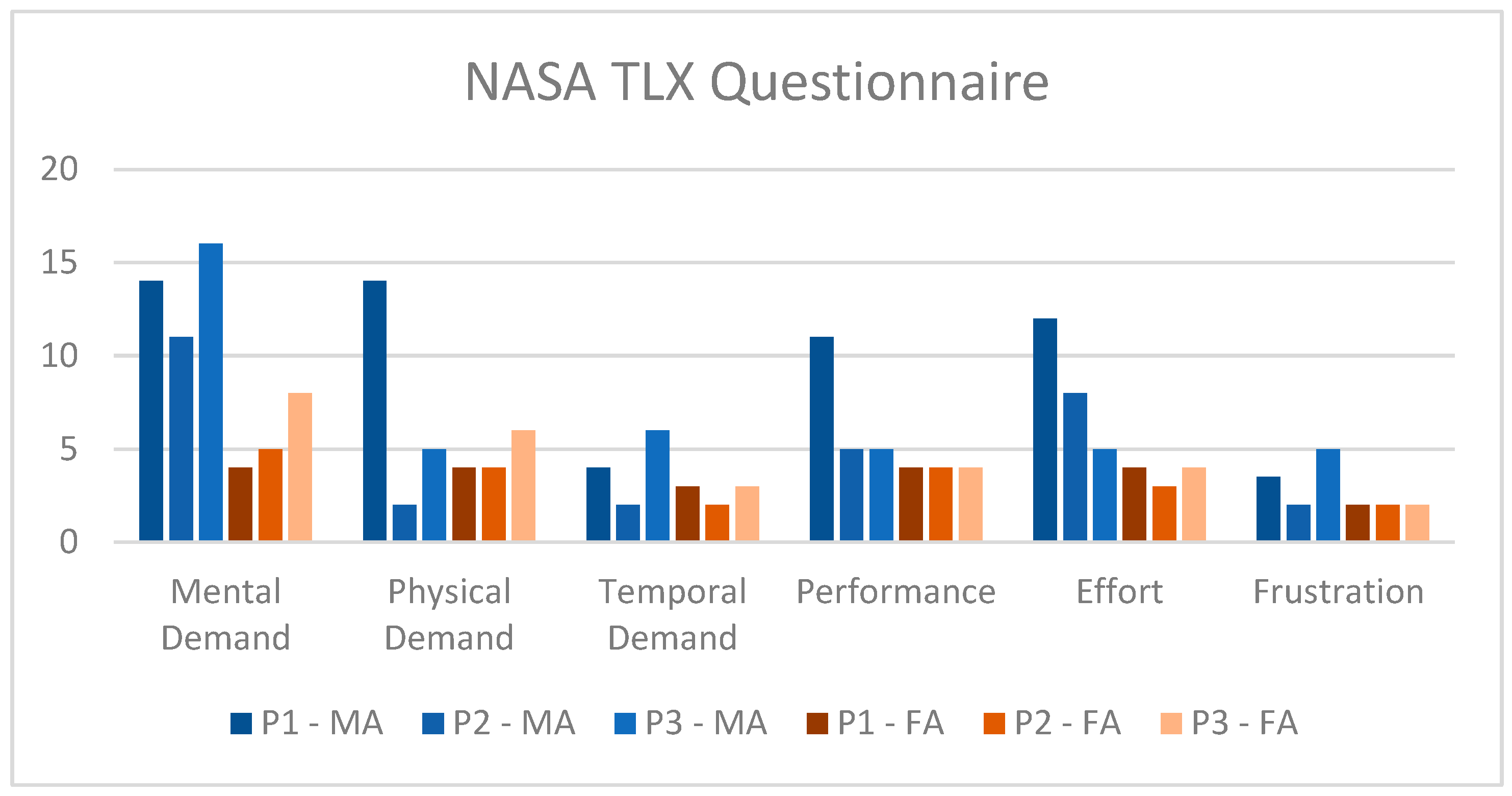
11]. During this study, the system’s feasibility was evaluated in remote settings by users with tetraplegia. The objective was to explore system efficiency when manually (MA) and semi-automatically (FA) tongue-controlled by users with cervical SCI. Additionally, the advantages and disadvantages of the system from a user perspective was addressed through NASA TLX questionnaires and a semi-structured interview.
2. Materials and Methods
2.1. Hardware Setup
The hardware used in this study was developed in [
11]. It consists of a Permobil C500 (Permobil, Timrå, Sweden) electric wheelchair with a JACO2 (Kinova, Boisbriand, QC, Canada) assistive robotic manipulator mounted on it. For visual feedback, two cameras (Intel RealSense D435, Intel, Santa Clara, CA, USA) were installed, one on the headrest of the wheelchair and one on the end-effector of the JACO2. The wheelchair and JACO2 were controlled with an adapted version of the commercially available tongue-control system (iTongue, TKS A/S, Nibe, Denmark) [
17], which was researched and developed by the authors at Aalborg University [
12,
15,
29,
30,
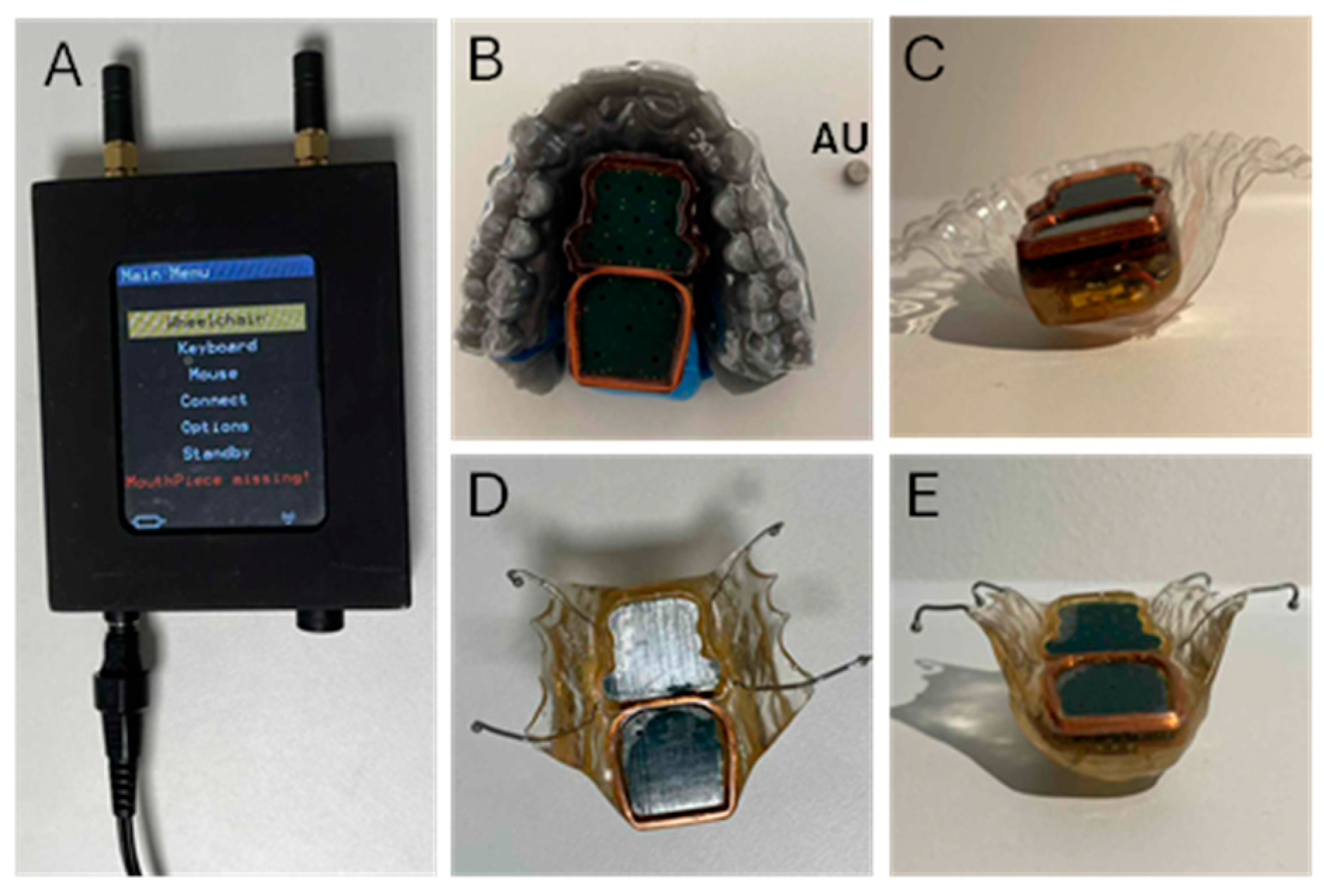
31]. The ITCI consists of a mouthpiece unit (MPU), an activation unit (AU), a central unit (CU) and a charger [
15] (
Figure 1). The iTongue system was connected to a PC (ThinkPad T480, Lenovo, Morrisville, NC, USA) through a USB serial port. After processing the signal in the PC, the commands for the wheelchair and ARM were sent through a wi-fi router to a one-board computer (LattePanda Alpha, DFRobot, Shanghai, China) which was sitting on the wheelchair. The one-board computer was powered using a power bank (RAVPOWER, RP-PB201, 20.000 mAh, 60 W, Ravpower, CA, USA). The ARM, the two cameras and the CU with the special firmware were physically connected to the one-board computer. As part of the adaptation of the system, we expanded the wireless range by equipping the wheelchair with an iTongue control unit with a specially made firmware (TKS A/S, Nibe, Denmark). This firmware made it possible to emulate the tongue-control system from a computer.
2.2. Experimental Setup
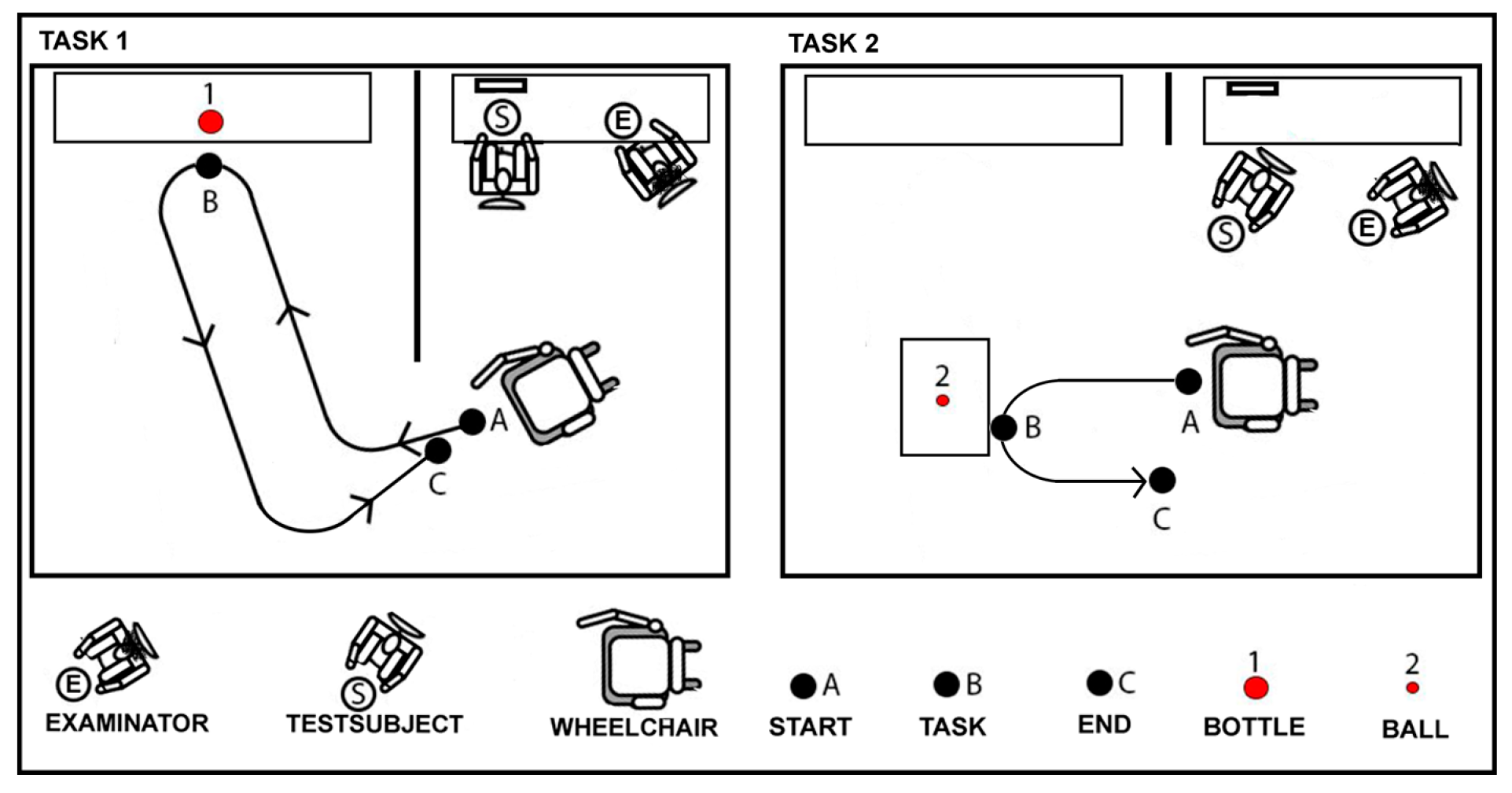
The experimental setup can be seen on
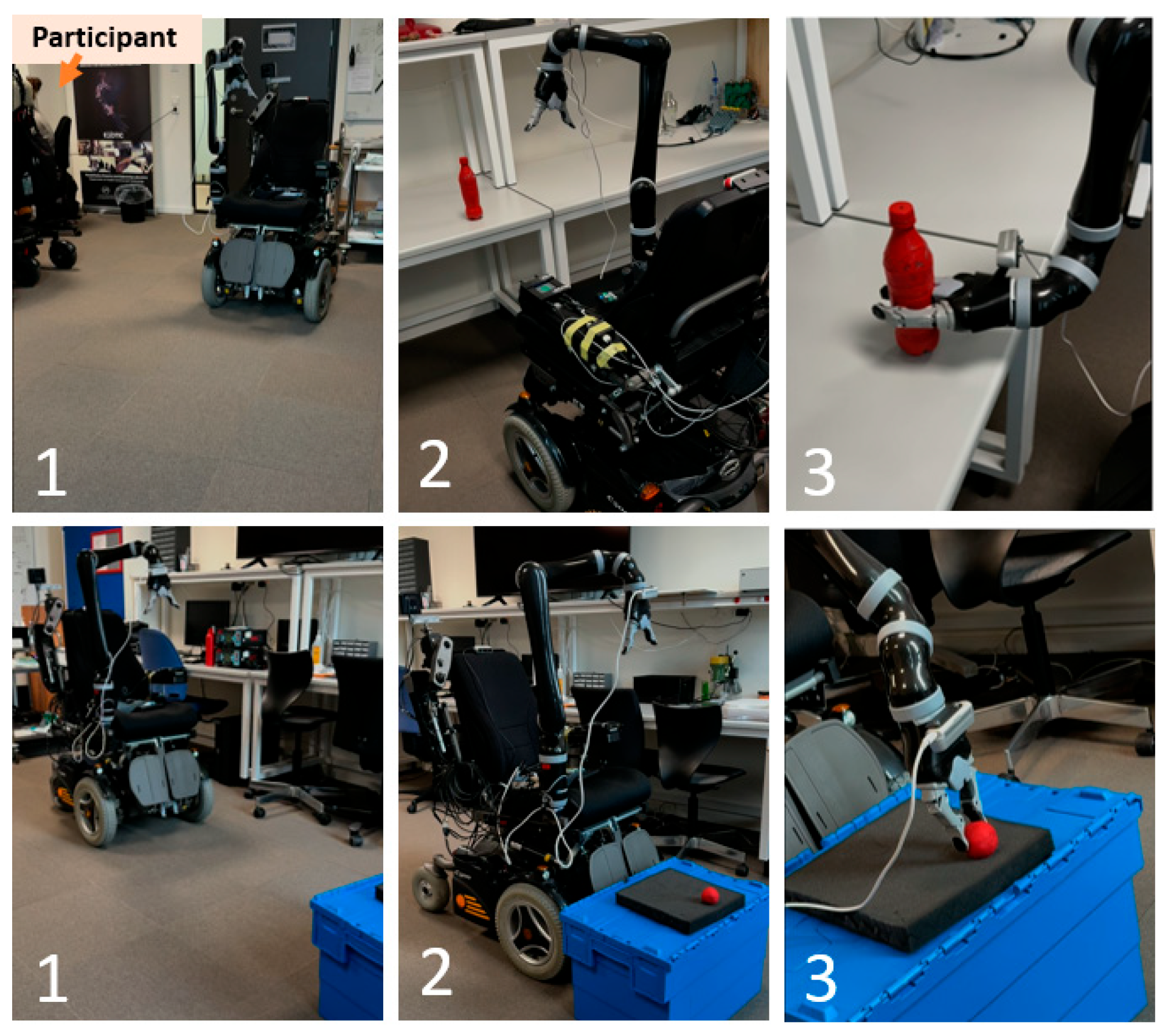
Figure 2. The participants were asked to drive to a remote location and perform one of two pick-up tasks: one where the object (a bottle—larger object) was out of sight and reach of the participant and one where the object (a ball—smaller object) could be seen but was out of reach. The robot and wheelchair were always out of reach of the participant. At the start of each trial and when entering the wheelchair control mode, the JACO robot was automatically set to a “home” position. The “home” position was defined in two ways, depending on whether the fingers on the end-effector were open (at the start of trial) or closed (when an object had been grasped). At the start of each trial, the fingers of the end-effector were open and the experimental task required the participants to close the fingers of the end-effector when picking up one of the two objects. When the fingers were closed, the “home” position was defined as [0.223, −0.215, 0.497] meters, relative to the base of the robot ([x, y and z] representing [forward/backward, left/right, up/down]) and the orientation was set to not change. When the fingers were open the position was defined as [0.176, −0.215, 0.496] meters, relative to the base of the robot (
Figure 3). The fingers of the end-effector were pointing down (
Figure 3, quaternion orientation was set to q = 0.998 − 0.030i + 0.045j + 0.020k). As one of the cameras was placed on the end-effector, this position and rotation of the end-effector when the fingers were open, allowed the participant to see what was in front of the wheelchair when driving.
For task one, the room was split up in two using a room divider (
Figure 2). The participant was sitting on one side of the room divider in front of a computer screen. The starting position for the wheelchair was on the same side of the room divider as the participant. On the other side of the room divider was a table with a bottle (
Figure 2). The participant was asked to use the ITCI to drive the wheelchair towards the table and use the JACO2 to pick up the bottle. After a successful pickup, the participant was asked to return with the wheelchair to the starting position. If the bottle fell during the pickup process, the robot was sent back to the “home” position with the fingers open and the participant was allowed to perform the object pick up again.
For task two, the room divider was removed, and the participant could see the whole room. A ball was placed on top of a box with a soft protective shield on it. The protective shield was implemented to prevent the fingers of the end-effector from breaking in case the end-effector came too close to the box. This task was chosen after having a user-panel meeting where one of the members emphasized how useful it would be to be able to pick up things if they fell to the floor while they were lying in bed. Therefore, task two was meant to simulate that.
A trial was deemed successful when the participant had controlled the wheelchair towards the object of interest, used the ARM to pick up the object and navigate the wheelchair back to its original position.
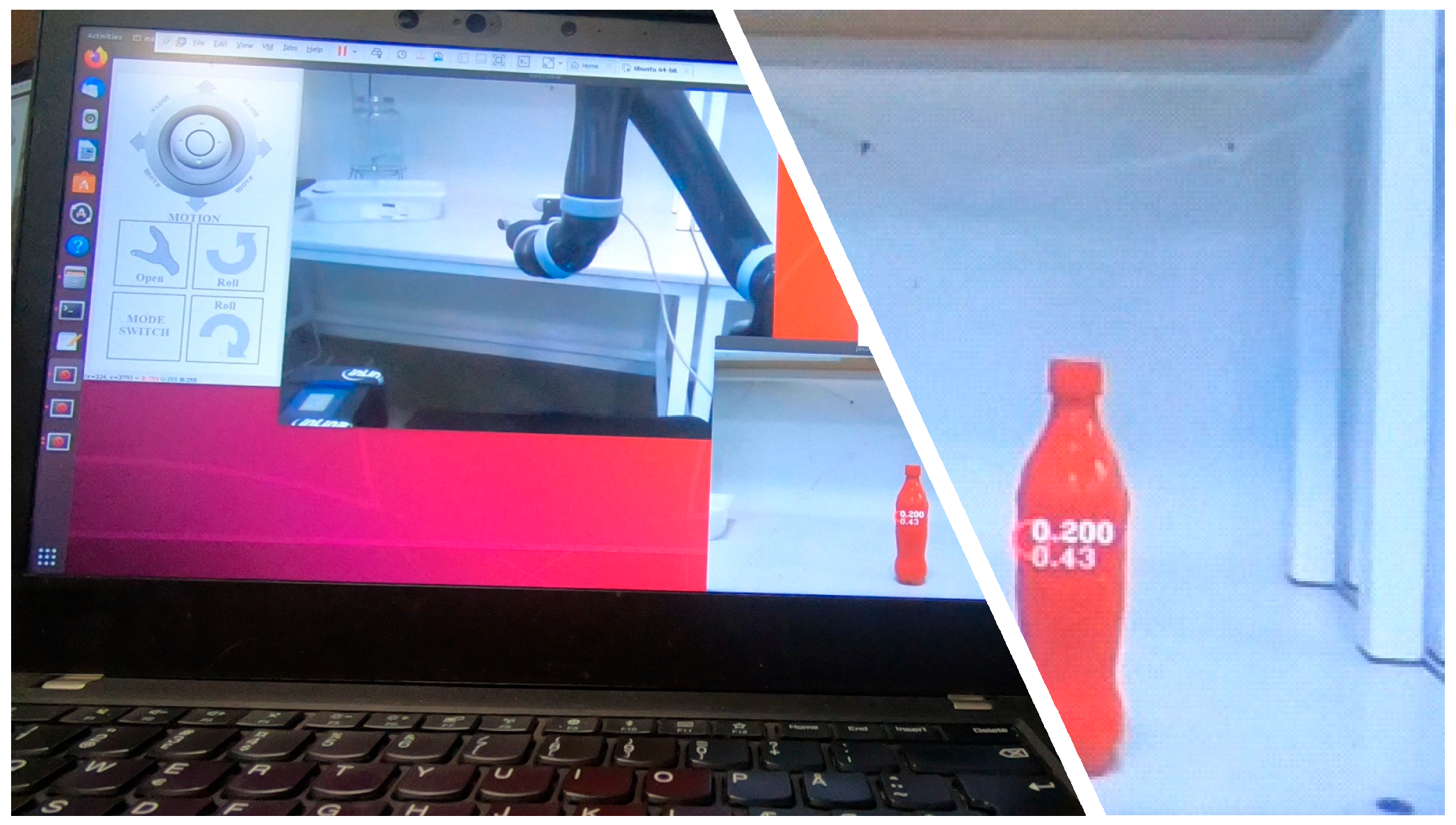
Visual feedback was provided to the participants on a computer screen (Dell U2415, Dell Inc., Round Rock, TX, USA). It consisted of a graphical user interface showing the mapping of the commands for the robot from the MPU and which command the AU was activating (
Figure 4). Furthermore, camera feedback was streamed from the headrest of the wheelchair and from the end-effector of the robot. The visual feedback from the end-effector contained a marker on an object that the computer vision module had located and two numbers, representing the height of the object and the Euclidean distance to the object from the end-effector point (
Figure 4).
2.3. Software
The software was implemented using Python (versions 2.7.17 and 3.6.9) and C++ (version 11) programming languages. A detailed description of the software can be found in [
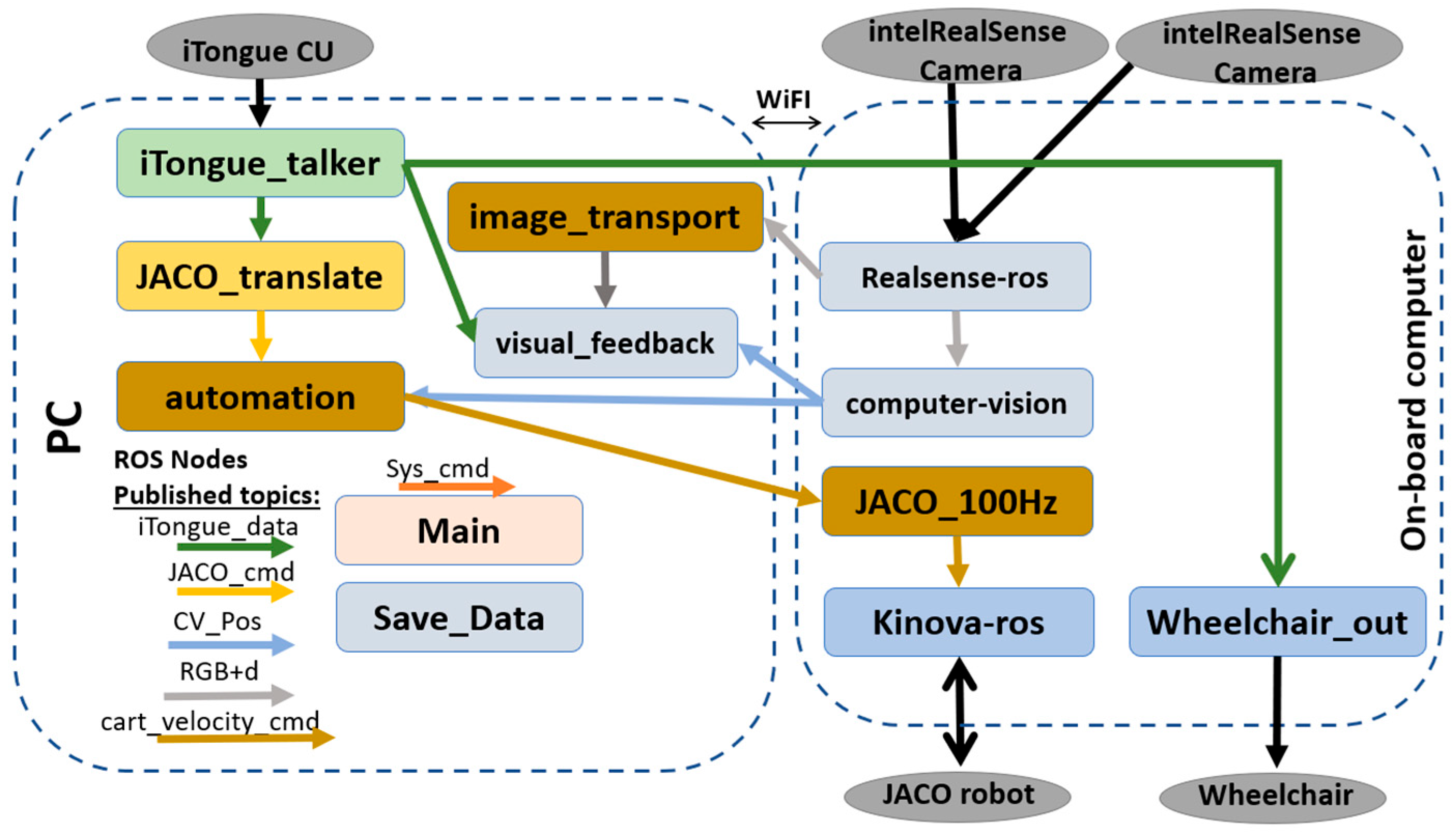
11]. The PC and one-board computer communicated using robotic operating system (ROS melodic) which allowed for remote communication through Wi-Fi. The PC was running the ROS master and seven ROS nodes, which each had a specific goal. The one-board computer was running five ROS nodes, each with a specific goal. An overview of each of the nodes is shown in
Figure 5.
2.4. Tongue-Robot Mapping
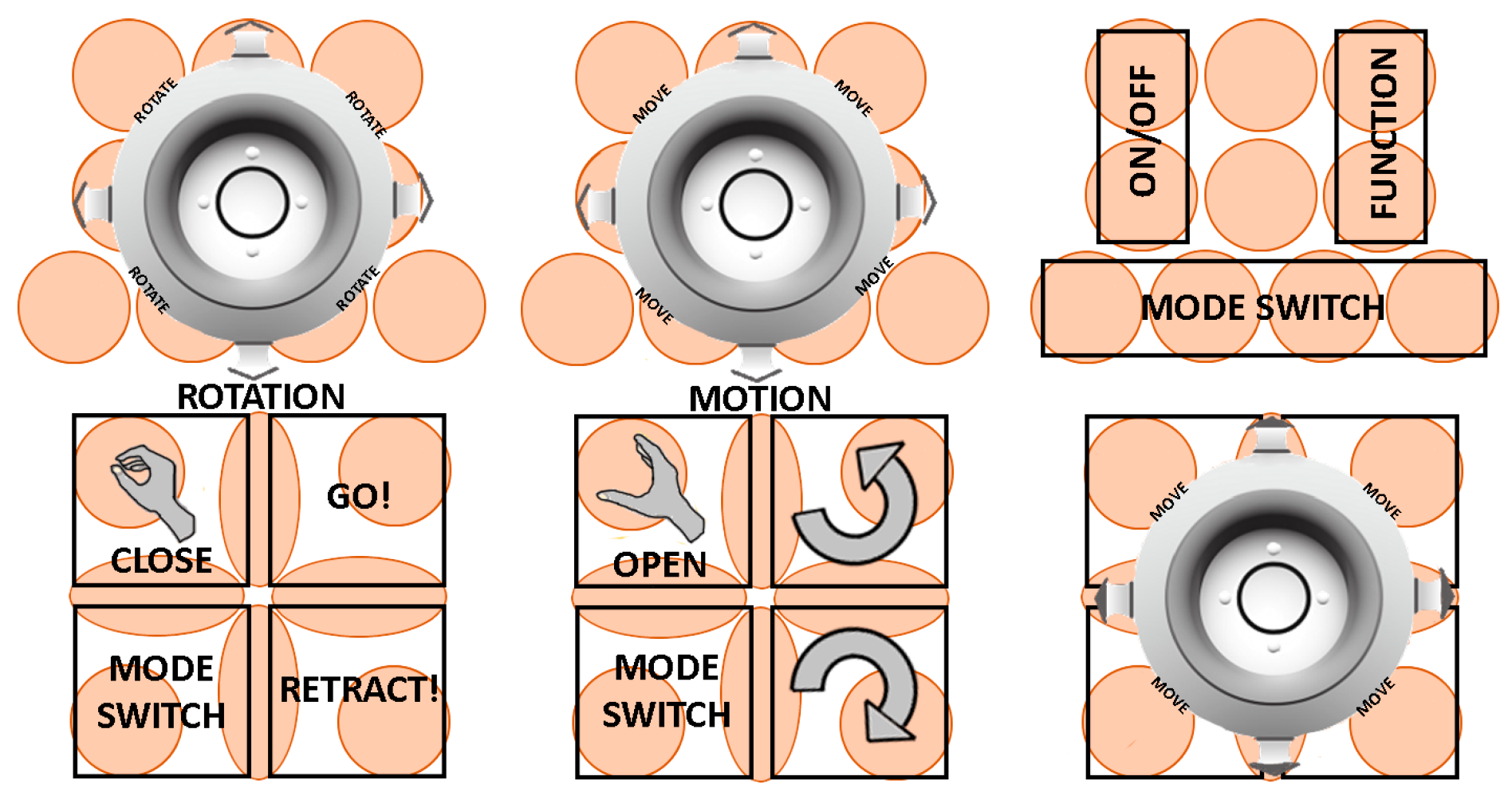
The experimental task was performed using two different control methods. First, the participant performed the task using manual control (MA). The tongue-robot mapping when using MA for controlling the robot was developed in [
30] and can be seen in
Figure 6. The ten sensors in the front acted as a two-way joystick, controlling pitch and yaw in mode 1 and up/down and left/right in mode 2 [
30]. The sensors in the back were split into four areas which acted as buttons [
30]. The bottom left corner was used for mode switching between modes 1, 2 and wheelchair. The top left corner was used for closing and opening the fingers of the end-effector in modes 1 and 2, respectively. Mode 1 included “GO” and “Retract”, which made the robot move along the z-axis of the end-effector. Mode 2 included roll in clockwise and counterclockwise direction. A delay of 0.2 s was implemented before the robot moved; that is, the sensors needed to be activated for 0.2 s before the robot started moving. The wheelchair control mode was implemented as is in the commercial version of the iTongue system [
17]. The wheelchair is turned on by activating the on/off button in the top left corner and then the sensors in the back were used like a 2D joystick. The “mode” button was activated to switch back to robot control.
The second method for control included the option for automation [
11]. The layout was the same as when using MA for controlling the robot but the “GO” button was implemented to semi-automatically go towards the object. The participant would continuously activate the “GO” button and the robot moved towards the object of interest. The automation was only active when the fingers of the end-effector were open.
The computer vision and automation were implemented as was done in our previous work [
11]. The object detection algorithm located red objects in the image, by segmenting the image based on the hue, saturation and value color space. The grasp detection was based on fitting a cylinder to the segmented object from the object detection. This was done using a random sample consensus algorithm [
32]. From the cylinder an approximate height and diameter, position, and orientation could be extracted. From this an appropriate grasp pose could be calculated. A tracker node kept information about the already found objects and allowed for keeping track of objects that potentially went out of the field of view of the camera (the camera was located at the end-effector and was therefore constantly moving, causing errors in the algorithm). The calculated grasp pose was defined depending on the size of the object. Objects smaller than 6 cm were always grasped from above, while objects larger than 6 cm were grasped orthogonally and halfway along the height of the object. The level of autonomy was fixed (fixed level semi-automation (FA)), where the participant would have to keep activating the “GO” command for the semi-automation to control the robot towards the object of interest. The automation was only active when the participant was activating the “GO” command. There were no automatic stop conditions. The target-loss was handled using the tracker node which kept track of the already located objects. The path planning failure recovery was done by the user, where they would stop activating the “GO” command, possibly move the robot backwards to allow for better vision of the target object (in case they were close to the object) and then reactivate the semi-automation. There was no automatic collision prevention incorporated into the system and therefore the system relied on input from the participants. The emergency stopping was done by the experimenter, either by physically pushing a button on the wheelchair or robot, or through the software on the computer.
2.5. Study Participants
Three participants with a cervical SCI (cSCI) participated in the experiment. Two participants were recruited through the spinal cord injury center of western Denmark and have participated in previous studies with the tongue control and robots. One participant had not participated in previous studies but had contacted the authors at a seminar prior to recruitment. Participant one (P1, male, 55 years old) suffered a cSCI at level C4, approximately 34 years prior to the experiment. He was able to use a manual wheelchair but had been bed bound for much of a year shortly before the experiment. Participant two (P2, female, 53 years old) suffered a complete cSCI at level C3, approximately one year prior to the experiment. She was reliant on an electric wheelchair and was able to use a modified joystick to control the wheelchair. Participant three (P3, male, 70 years old) suffered a cSCI at level C5, approximately 10 years prior to the experiment. He was able to control his electric wheelchair using a joystick but was missing all sensation in the fingers.
P1 and P2 had previously participated in studies using the ITCI system, while P3 had no experience using the ITCI. The study was approved by the local ethical committee (The North Denmark Region Committee on Health Research Ethics) under protocol N-20210008. The participants were informed verbally prior to the start of the experiment and signed a written consent form to the participation in the experiment.
2.6. Experimental Procedure
The experiment was performed in three sessions over three separate days, which were less than two weeks apart. The three days were based on previous studies using iTongue, which have shown that the learning curve for using the system is steep during the first three days, with smaller improvements per day after that [
33]. Each session lasted between three and four hours to avoid over-exhausting the participants. Prior to the first experimental session, a mouthpiece was prepared to fit the upper palate of the participant’s mouth. First, the participant’s mouth was scanned using a dental scanner (TRIOS 3, 3 shape, Copenhagen, Denmark). From the scan, a model of the palate was printed using a dental 3D printer (Form 2, Formlabs, Somerville, MA, USA). This model was then used in thermoforming a plastic sheet. After cutting excess material from the plastic sheet, the MPU was glued to it using resin glue (
Figure 1). The activation unit, a pincer, cotton rolls and a metal can were sterilized in an autoclave. The MPU and attached plastic sheet were disinfected using a >1000 ppm hypochlorite solution for at least 60 min.
At the start of each session, the activation unit was glued to the tongue of the participant using histoacryl tissue glue. As this is not a permanent solution, the activation unit would occasionally loosen (happened if the participants loosened it with their teeth or by hitting the boarders when using the tongue controller). In case the activation unit loosened or fell off during or between any of the trials, this process was repeated. Within each session, the participant was asked to perform the two pick-up tasks.
The first session was intended to familiarize the system to the participant. The participant first trained activating all the sensors on the MPU. After training the activation, the wheelchair and robot were connected and the participant trained controlling the robot. When the experimenter assessed that the participant could activate all of the sensors on the MPU and could control all of the robots movement, the participant performed the experimental tasks once for each of the control methods: MA and FA.
The second and third sessions resembled each other. The goal was to further train the participants in using the system. The participants were asked to complete three successful trials of the experimental task for each of the two control methods (MA and FA). Data was collected for all sessions, giving in total 28 trials for each participant.
After completing the robot control on day three, the participants were asked to fill out a NASA task load index (TLX) questionnaire for each of the control methods. Lastly, the participants were asked the following open-ended questions:
What are the biggest advantages of this system and why?
What are the biggest disadvantages of the system and why?
Would you be willing to use the system at home? Why/Why not?
What would you use the system for?
Satisfaction with the system and sub-systems on a scale from 1 to 10 (where 1 is unacceptable and 10 is perfect):
Satisfaction with the entire system;
Satisfaction with the tongue-control interface;
Satisfaction with the CV module;
Satisfaction with the remote control.
Any other remarks.
2.7. Outcome Measures for Wheelchair Mounted Robot Control
The experiment required each participant to successfully perform 28 trials, giving in total 84 trials for evaluation. As was done in [
11], the trials were evaluated using the following outcome measures:
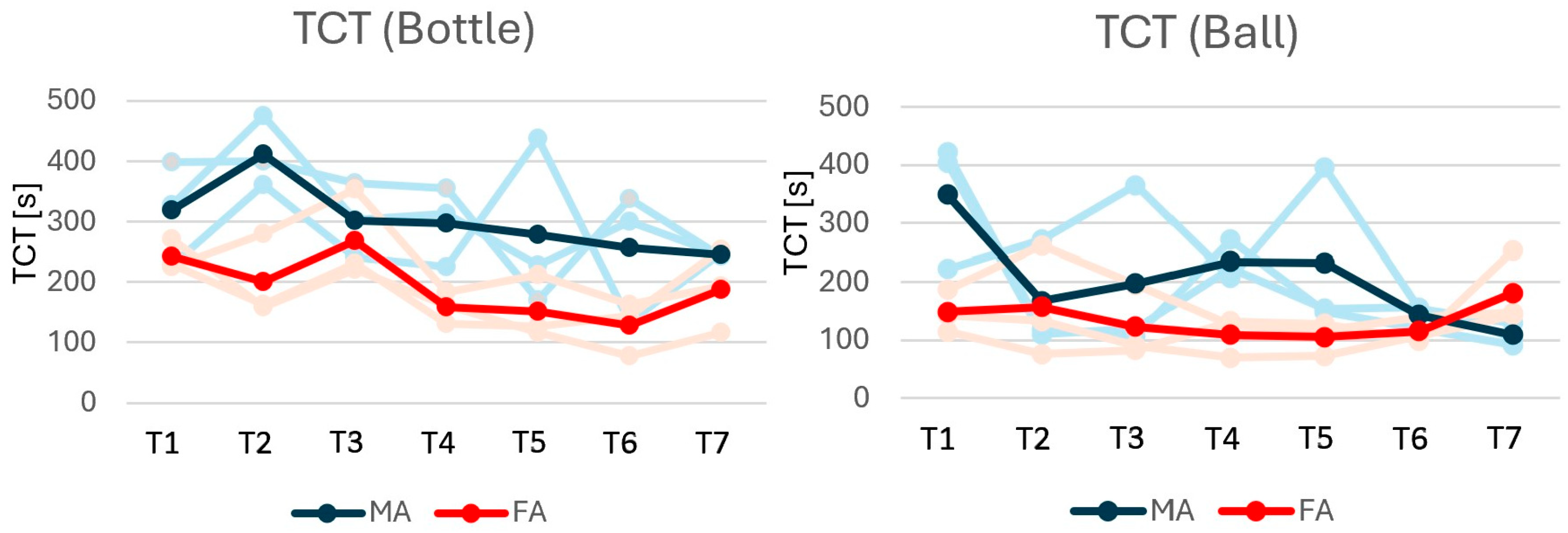
Task completion Time (TCT): was measured as the time it took to drive the wheelchair from the starting position towards the object of interest, change the control mode from wheelchair to robot using the tongue interface, pick up the object and return the wheelchair to its starting position. In case of a failed attempt (failed pickup), the participants were not given an option to retry but were required to start the robotic manipulation from the “home” position; that is, the participants were required to redo the robotic manipulation.
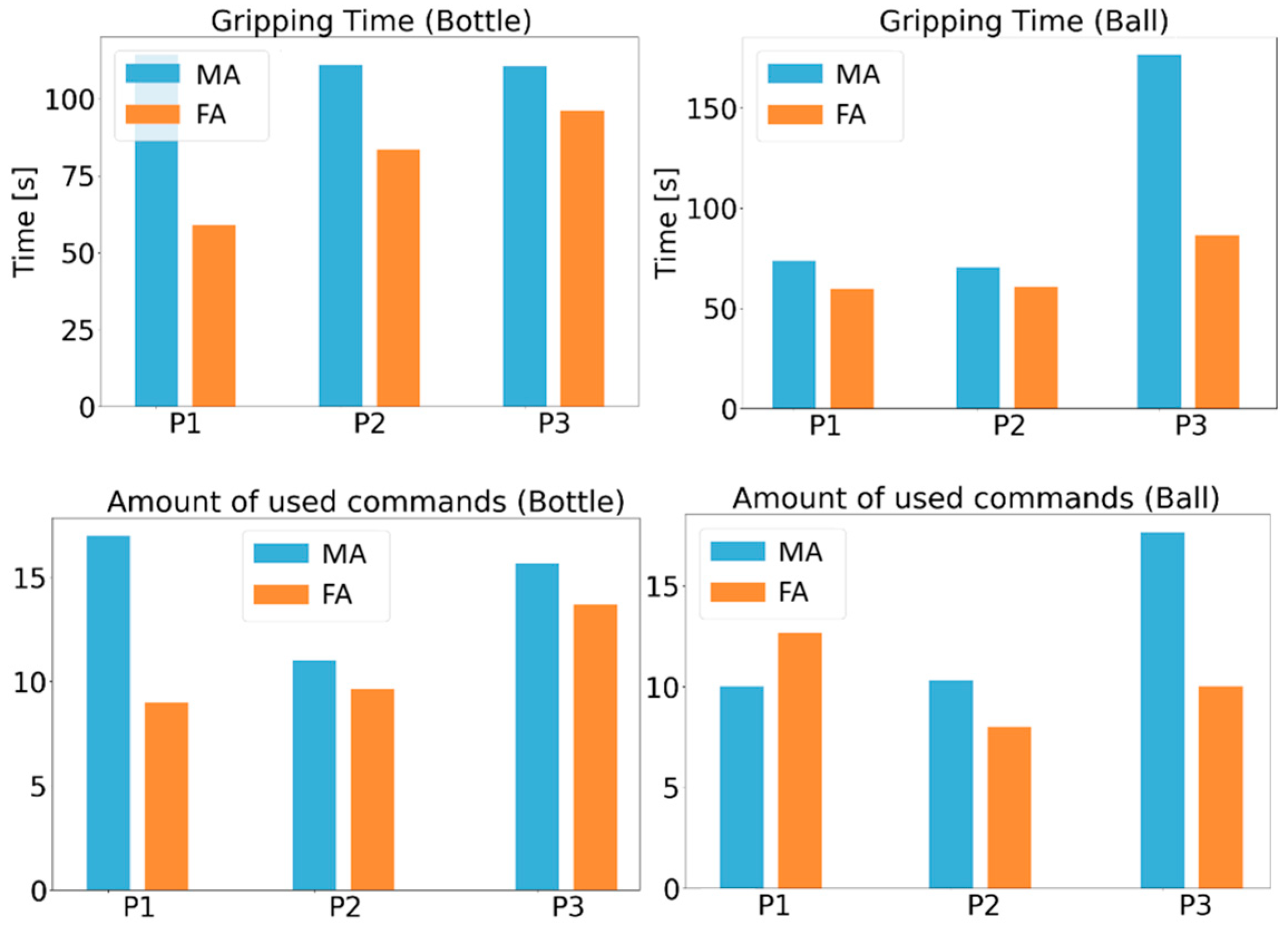
Gripping time (GT): was measured from the time that the participant entered the robot control mode and until the wheelchair control mode was accessed again.
Number of used commands (UsedCmd): was measured as the number of commands that were issued to the robot; that is, counted once for each issued command. This was not measured for the wheelchair.
Success rate: was measured as the rate between successful trials and all attempted trials.
2.8. Assessing the Delay in the System
The delay in the system was assessed in three ways: robot control latency, TCP network latency and camera feedback latency. The robot control latency was evaluated continuously during the experiment by comparing the time stamp of the processed iTongue data and the time stamp when it arrived to be published to the robot. The system published this latency to a ROS topic which was saved along with other experimental data. During the data analysis, the latency was evaluated as the mean of all the published data.
The TCP network latency was evaluated using the “measure_latency” function in the tcp-latency package [
34]. The host was set to the appropriate IP address, port was set to 11311 (default port for the ROS master). It was set to run five times, and the timeout was set to five seconds.
The camera feedback latency was evaluated by having the camera point at the screen where the current time was printed in the terminal. When the camera feedback was showing the terminal time stamp, a screenshot was taken. From the screenshot, the time stamp on the terminal and the camera feedback were compared. The screenshot was taken five times and the average difference in the time stamps showed the latency of the camera feedback.
The TCP network latency and the camera feedback latency were evaluated three times on three separate and nonconsecutive days.
4. Discussion
This feasibility study demonstrates that three individuals with tetraplegia can remotely control the wheelchair and ARM using the tongue and shows the potential of the system to assist in performing remote ADLs. Because this is a feasibility study, the results cannot be generalized. It was agreed by all participants that the system has the potential to make them more independent by allowing them to perform actions themselves.
When grasping the bottle (task one), the mean GT for the three participants on day three was 112 s when using MA and 80 s when using FA. The fastest GT was 32.7 s when P2 performed T4 using FA. Task one was also performed in [
11], which evaluated the system with participants without disability and can therefore be directly compared to the current study’s results. For task one, the mean GT for the ten participants on day two was 66 s when using MA and 41 s when using FA [
11]. Common for the two studies is that the control in task one was faster when using FA as compared to MA. The difference in mean GT between MA and FA was larger in the current study (32 s compared with 25 s in [
11]). The participants in the current study took longer time to grasp the bottle, compared with the non-disabled participants in [
11] even though they had one more day of training in the current study. It is not uncommon that there is a difference between studies performed on users with disability and users without disability. The lower mean age in [
11], may have facilitated a lower GT as compared to the GT obtained by the users in the current study (mean age 30.9 ± 4.6 in [
11] and 59.3 ± 7.6 in the current study).
In the current study the participants used the system for three days only. A previous study has indicated that the efficiency of using the tongue interface may increase 30% after day three [
35], which suggests that GT may improve further.
Although semi-automation reduced task completion time, success rates were not consistently improved. Generally, the success rate was high, especially on day three. The lack of consistency in improvement of success rate could potentially be caused by the low number of trials, as one failed attempt has significant influence on the success rate. The difference could therefore be more evident by performing more trials over more days.
The participants completed the bottle task first using MA and thereafter using FA. The participants did this for three days and the data analyzed (TCT, GT UsedCmd) were analyzed on day three where the participants were familiar with the system. There is a possibility that the learning effect for FA is less (the difference from day one to day three) because of the familiarization of MA to start with. There are three participants and therefore, it is not possible to exclude this kind of bias by randomization.
After performing three successful trials of the two ADLs in the current study, the overall satisfaction of the system was high. Although activating commands while chewing or swallowing food or drink is likely not possible, it has been previously shown that eating and drinking when wearing the system is possible [
16]. The participants were all satisfied with the semi-automation and thought that it made the control easier. As the system should work in a home environment, which is unstructured and cluttered, getting the automation to perform without a fault is critical. As mentioned by Ranganeni et al. [
8], keeping the user in the loop can assist the automation part. Additionally, keeping the user in the loop will increase the safety and the sense of autonomy.
There are not many studies focusing on remote control of assistive robotics. Bellicha et al. [
23] developed a BCI which allowed for control of two DOFs for either a powered wheelchair or a Jaco robotic manipulator. Other DOFs of the robot were automatically handled. The delay in the system was around 400 ms when controlling the wheelchair and 200 ms when controlling the Jaco robot. Ranganeni et al. [
36] developed the AcessTeleopKit which allows for custom robot teleoperation interface. The user can customize their own control layout, and the robot was controlled through a web browser, which requires that the user can control the cursor and click on the computer. We believe that the system presented in this study is a beneficial addition to the previous studies, giving a viable option for the users of assistive robotics by allowing for continuous control of all the robots DOFs, offering automation and presenting a data transmission delay of around 50 ms.
None of the participants complained about latency in the system, suggesting that the combination of the robot’s pace and the latency in the system was balanced. However, the system latency could potentially be lowered by updating the software to a more modern distribution of ROS (currently using ROS Melodic). This should be considered in future applications as it would likely improve the participants’ satisfaction with the system.
The willingness to use the proposed system was compromised by issues more related to the functionality of the participants (P1, P2) or to the use of an ARM in non-remote settings (P3) than related to the remote feature of the proposed system. P1 mentioned that in case he could not manually control his wheelchair as usual, he would be willing to use the system. Whereas, P2 was willing to use the WARM but P2’s functionality did not require a hands-free interface such as the tongue interface. Thus, a limitation of the current study is that the participants did not have complete functional tetraplegia. The participants presented heterogeneous neurological levels, chronicity of injury, and residual motor function. The most severely affected was S2 and the least severely affected was S1. However, none of the participants were able to lift a bottle for drinking or ambulate from bed, making the system to fetch beverages or other objects out of reach relevant for all. All participants have at some point been bed-bound and therefore can provide valuable feedback for improvement of the system. The participants cannot fully represent tongue interface users but were fully able to represent users of other aspects of the system. An individualized approach could in future be adopted for the control of the WMARM, making it possible for the users to individually choose an input device. The adaptation of the ITCI in the current system resulted in an increase in size and a very irregular surface, which may also have impacted the user opinion as compared to the smaller commercially produced version, which has previously been evaluated to have a high acceptability by users [
16]. Furthermore, a new non-invasive version of the tongue interface is currently under research and development [
37], which P3 has expressed interest in using later in a different context.
The participants in this study provided very valuable feedback during the interview on how to improve the system. One suggestion was to add a rear-view camera, which is a simple but effective way of getting feedback from behind the wheelchair and also increasing the situational understanding of the wheelchair. This is an easy upgrade to future versions of the system and should be implemented. Another suggestion for improvement was to automate the grasping of the end-effector. As this is something that could improve the system significantly, improvements to the computer vision and automation module should be implemented. The improvements could include implementing a better object recognition algorithm (e.g., yolo), with better grasp detection and path planning.
The tongue interface, powered wheelchair and ARM used in this study are available for the users as assistive technologies which may facilitate the availability of the proposed system. Future studies should include a larger cohort and evaluate more complex activities of daily living to better assess the practical utility of the system.