
Review

Design of the Digital Pathology Workspace for Artificial Intelligence Integration

1
Division of Pathology, European Institute of Oncology IRCCS, 20141 Milan, Italy
2
Department of Oncology and Hemato-Oncology, University of Milan, 20122 Milan, Italy
3
Division of Early Drug Development for Innovative Therapies, European Institute of Oncology IRCCS, 20141 Milan, Italy
4
Technologies and Clinical Engineering, European Institute of Oncology IRCCS, 20141 Milan, Italy
5
Medical Administration, European Institute of Oncology IRCCS, 20141 Milan, Italy
6
Department of Information and Communications Technology, European Institute of Oncology IRCCS, 20141 Milan, Italy
7
Value Medicine, Clinical Risk and Privacy Area, European Institute of Oncology IRCCS, 20141 Milan, Italy
8
Quality, Accreditation and Clinical Risk Service, European Institute of Oncology IRCCS, 20141 Milan, Italy
9
Design Service, European Institute of Oncology IRCCS, 20141 Milan, Italy
*
Author to whom correspondence should be addressed.
Appl. Sci. 2026, 16(12), 6021; https://doi.org/10.3390/app16126021 (registering DOI)
Submission received: 15 May 2026 / Revised: 10 June 2026 / Accepted: 12 June 2026 / Published: 14 June 2026

Abstract

Designing an optimal digital pathology workspace is essential to ensure diagnostic accuracy and safeguard the long-term well-being of pathologists. While digital pathology improves reproducibility, facilitates multidisciplinary collaboration, and supports data-driven precision medicine, its clinical effectiveness depends not only on computational performance but also on the physical and ergonomic environment in which pathologists operate. Inadequate workstation design may impair visual perception, increase cognitive and musculoskeletal strain, and potentially affect diagnostic consistency. Moreover, the progressive integration of artificial intelligence (AI) into routine diagnostics introduces additional requirements related to display performance, visualization interfaces, and human–machine interaction. Despite the rapid global adoption of digital pathology systems, standardized recommendations addressing ergonomic, environmental, and technological aspects of the digital workspace remain limited. In this work, we propose a clinically oriented framework for the design of digital pathology workspaces suitable for AI-assisted diagnostics. Key elements include the selection and calibration of medical-grade displays, ergonomic furniture and input devices, optimized ambient lighting conditions, and institutional quality assurance procedures. Emerging developments, such as intelligent ergonomic monitoring, advanced visualization interfaces, and adaptive AI-assisted workflows, may further support safe, sustainable, and high-performance digital diagnostic environments.

1. Introduction

Long regarded as the “future of pathology”, digital pathology diagnostics has now become routine clinical practice in many healthcare realities, driven by the rapid adoption of whole-slide imaging (WSI) and computational pathology tools [1,2,3]. Digital pathology is based on the acquisition, management, sharing, and interpretation of high-resolution whole-slide images generated through slide scanning technologies. Beyond replacing conventional microscopy, digital pathology enables telepathology, remote consultations, quantitative image analysis, computational pathology, and artificial intelligence-assisted diagnostics [4]. Its adoption has been associated with improved workflow flexibility, enhanced multidisciplinary collaboration, easier access to subspecialty expertise, and the development of data-driven precision medicine approaches. However, implementation remains challenging due to infrastructure requirements, storage demands, validation procedures, interoperability issues, and the need to ensure diagnostic quality across diverse clinical settings [5,6]. The increasing integration of artificial intelligence (AI) into digital pathology workflows further amplifies these changes. AI-based tools are increasingly being deployed for tumor detection, biomarker quantification, quality control, workflow prioritization, image triage, and molecular prediction directly from histopathological images [1,2,7]. Consequently, pathologists are no longer interacting exclusively with whole-slide images, but also with AI-generated heatmaps, decision-support outputs, confidence scores, and multimodal clinical information. This transformation is redefining diagnostic workflows but also the physical and cognitive environment in which pathology is performed [8]. Suboptimal workstation design may adversely affect diagnostic performance by introducing novel occupational stressors, including increased physical strain and cognitive workload [6,9]. Despite the growing centrality of these considerations, dedicated evidence and formal ergonomic guidelines specifically developed for digital pathology are largely lacking. Most available knowledge derives indirectly from adjacent fields such as radiology or general computer-based work, whose operational, visual, and cognitive demands differ substantially from those of digital pathology [5]. This paper aims to outline the essential elements of an ideal digital pathology working environment and to propose a reference framework for pathologists, healthcare institutions, and scientific societies.

2. Ergonomics for the Digital Pathologist

The ergonomics of pathology practice have historically received little attention. In the optical microscope setting, pathologists usually work with aging instruments, often adapting them to their personal comfort through improvised solutions such as stacking books, using wooden supports, or modifying desk height in creative ways [4,10]. Not uncommonly, lighting conditions are undervalued: despite the widespread availability of modern light emitting diodes (LEDs) illumination, many laboratories continue to rely on outdated light sources, producing uneven or yellow-tinted light that contribute to visual stress [11,12]. Digital pathology demands reshaping this scenario, replacing the static microscope posture with prolonged interaction in front of high-resolution monitors. While this change mitigates certain repetitive strain injuries associated with the microscope oculars, it similarly requires sustained forward head posture and increased risk of neck, shoulder, and lower back discomfort [13]. Moreover, the need to continuously manipulate input devices (mouse, trackball, or touchpad) may also result in wrist and forearm strain.
Broad ergonomic principles derived from occupational health and radiology (another specialty that heavily relies on digital image interpretation) may offer some insights for pathologists. General recommendations include maintaining neutral postures, aligning eye level with the top third of the monitor, positioning displays at an appropriate viewing distance, and ensuring balanced ambient lighting to minimize glare and visual fatigue [11]. However, applications of digital pathology pose unique challenges: higher magnification, frequent zooming and panning, and the need to integrate histological slides with clinical and molecular data across multiple platforms. In practice, this means that digital pathology is not a static task of passive image viewing, but a highly interactive activity. The continuous navigation of WSI, with repeated zooming in and out, rapid switching between regions of interest (ROIs), and constant adjustment of image parameters, generates a workload that relies on hand–eye coordination, concentration, and rapid micro-decisions made under visual and cognitive pressure. These activities require precise and repeated fine motor movements, typically using a mouse, trackball, or keyboard shortcuts, and both are performed for extended periods of time in front of high-resolution monitors [14]. Therefore, ergonomics in digital pathology must be approached proactively.

3. Core Elements of the Digital Pathology Workspace

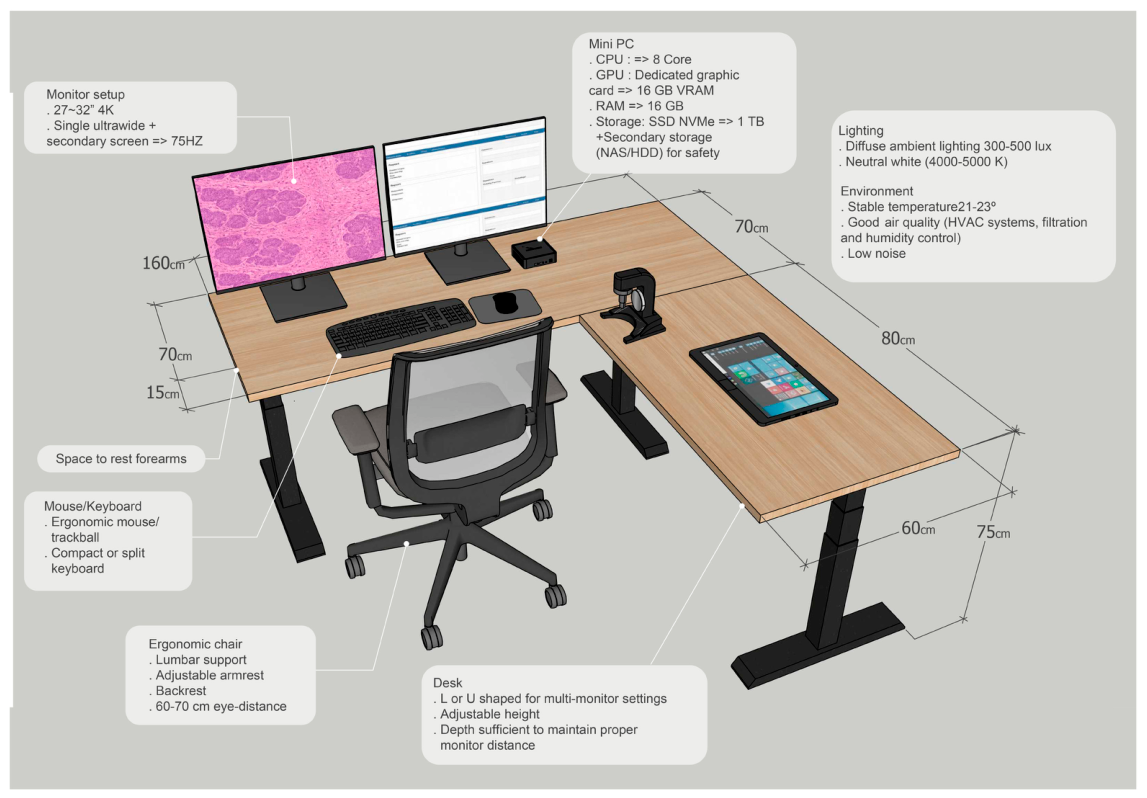
The essential components of an optimized digital pathology workstation should integrate ergonomic, technological, and environmental factors, as illustrated in Figure 1. These elements together define the interface through which diagnostic interpretation occurs and are critical for ensuring clinical accuracy, diagnostic consistency, and professional well-being.

3.1. Monitor Setup

The monitor represents the central element of the digital pathology workstation. Extended exposure to high-resolution displays is becoming the norm, replacing the familiar use of the optical microscope. The technical characteristics of this medical device directly impact diagnostic accuracy and the overall professional sustainability of long working hours. A common and effective configuration consists of a primary 4K monitor dedicated to whole-slide image review, complemented by a secondary display that may have a lower resolution and is used for reporting, laboratory information systems, molecular data, or other ancillary tasks. Alternatively, dual 4K displays or ultrawide monitors may be adopted depending on workflow requirements, user preferences, and institutional resources [15]. Display resolution and refresh rate are equally critical. Resolution refers to the number of pixels displayed on the screen, typically expressed as width × height (e.g., 3840 × 2160 for 4K monitors) [16]. Higher resolution provides greater pixel density, which translates into sharper images and more faithful reproduction of histological details such as nuclear contours, chromatin texture, or subtle stromal features [12,16]. Refresh rate indicates how many times per second the display updates the image, measured in hertz (Hz) [12,17]. Standard office monitors operate at 60 Hz, but higher refresh rates (75–120 Hz or above) provide smoother image transitions, particularly noticeable during rapid panning, scrolling, or zooming [12]. In digital pathology, these actions are performed continuously, and higher refresh rates reduce motion blur, eye strain, and the perception of lag, making navigation more fluid and less fatiguing. The use of 4K monitors (3840 × 2160 resolution) with refresh rates of at least 75 Hz (ideally in the 100–120 Hz range) is recommended to balance fluid whole-slide image navigation with accurate color reproduction [12]. Excessively high refresh rates (≥144 Hz), while common in gaming displays, are generally unnecessary in pathology and may even compromise color fidelity or impose disproportionate demands on hardware [12]. Importantly, monitor performance in digital pathology is not limited to spatial resolution and motion rendering. Pathologists interpret complex color information continuously, both in routine morphology (e.g., H&E) and in biomarker assessment (e.g., IHC chromogens), where subtle hue differences may influence grading, thresholding, and reproducibility. While grayscale calibration is standardized through the DICOM grayscale standard display function (GSDF), this approach does not address color consistency. Therefore, DICOM GSDF calibration alone is insufficient to safeguard color appearance and stability, potentially allowing significant variability and non-linear perception of color gradients across displays and over time. Recent work in medical imaging has proposed extending perceptual linearization principles to color (e.g., Color Standard Display Function, CSDF), enabling redistribution of the display color space so that perceived differences between color steps become uniform while maintaining grayscale behavior, luminance, contrast, and color gamut. Such approaches support a clinically relevant goal: ensuring that color details are consistently visible and comparable across systems and longitudinally, rather than being distorted by display-dependent fluctuations. Positioning also requires careful attention. Monitors should be placed so that the top edge aligns with or slightly below eye level, at a distance of approximately 60–70 cm for monitors in the 27–32 inch range, allowing a neutral head and neck posture [18]. Adjustable monitor arms can facilitate individual customization, accommodating variations in body height and personal preference. The monitor can no longer be regarded as a generic office accessory: it becomes a proper medical device, demanding precision, ergonomic optimization, and regulatory certification, as expected of any diagnostic instrument [15]. The growing adoption of AI-assisted diagnostics may further influence display requirements. In addition to reviewing whole-slide images, pathologists increasingly need to visualize AI-generated annotations, heatmaps, saliency maps, segmentation overlays, and quantitative biomarker outputs. These visualization layers require accurate color representation, sufficient screen real estate, and the ability to simultaneously display primary images, AI outputs, and supporting clinical information. Consequently, monitor performance should be evaluated not only in terms of image fidelity but also in terms of its ability to support effective human–AI interaction [1,2]. Indeed, these monitors are considered medical devices and, in Europe, are regulated by Medical Device Regulation (MDR) (EU) 2017/745 or In Vitro Diagnostic Regulation (IVDR) accordingly [19,20].

3.2. L or U-Shaped Desk for Optimal Multi-Monitor Setting, Seating, and Input Devices

The desk and seating configuration have a decisive impact on both diagnostic efficiency and long-term occupational health. A height-adjustable desk is recommended, as it allows pathologists to alternate between sitting and standing positions throughout the day, improving musculoskeletal wellness, enhancing concentration, and reducing fatigue [21]. Desk depth must be sufficient to ensure proper monitor distance (see above) without forcing the pathologist into a forward-leaning posture. Adequate space also facilitates the ergonomic placement of input devices and reference materials. The shape of the desk can further influence efficiency and comfort: rectangular desks are generally adequate for single-monitor configurations, whereas L-shaped or U-shaped desks offer advantages in multi-monitor settings by providing dedicated zones for reporting, consulting reference materials, or operating peripheral devices without encroaching on the main diagnostic area. The choice should be guided by the available space, the number of monitors needed, and the degree of integration with ancillary tools such as dictation systems or additional computers. Although fully digital workflows are increasingly adopted, many pathology laboratories continue to operate in hybrid environments where conventional microscopy remains necessary for selected cases. In these settings, workstation design should accommodate both digital review and optical microscopy. The microscope should be positioned within easy reach of the pathologist, ideally on the same work surface and without requiring excessive trunk rotation, repetitive reaching movements, or frequent postural adjustments. L-shaped or U-shaped desks may be particularly advantageous in hybrid workstations, as they allow dedicated areas for digital pathology displays and microscopy while preserving ergonomic accessibility. The workstation layout should facilitate seamless transitions between digital and optical review while maintaining a neutral posture and minimizing musculoskeletal strain. Where space permits, dedicated zones for digital review and microscopy can further improve workflow efficiency and user comfort. Equally important is the seating. An ergonomic chair with adjustable height, lumbar support, and a backrest that encourages dynamic sitting is essential [22].
Properly positioned armrests help maintain a neutral posture by supporting the weight of the forearms and reducing the tendency to elevate or hunch the shoulders during prolonged use of input devices [23]. Armrests should be adjustable in height and width so that elbows remain close to the body at an angle of roughly 90 degrees, with the shoulders relaxed. This positioning minimizes static load on the trapezius and cervical muscles, thereby lowering the risk of neck and upper back discomfort. The placement of the mouse, keyboard, and other input devices is another key determinant of comfort and quality. Compact keyboards or split designs, combined with ergonomic pointing devices, can further reduce wrist fatigue [24]. In addition to conventional mice and trackballs, alternative navigation devices including touchpads, touchscreen interfaces, pen-based devices, and three-dimensional (3D) navigation controllers have been explored in digital pathology and related imaging disciplines [14,16]. Although evidence remains limited and no universal standard has emerged, these devices may improve navigation efficiency, user comfort, and hand–eye coordination during extensive whole-slide image manipulation. Their suitability may vary according to individual preferences, workflow characteristics, and institutional infrastructure [14]. AI integration may also modify the way pathologists interact with digital workstations. Future diagnostic environments are expected to increasingly incorporate interactive dashboards, multimodal interfaces, voice-assisted navigation systems, and AI-supported reporting tools. As a result, workstation design should facilitate efficient interaction with both conventional image viewers and AI-driven decision-support platforms while minimizing cognitive overload and maintaining user control over diagnostic decisions [25]. The integration of voice control technologies for navigation or reporting may provide an additional mean of reducing repetitive hand movements and distributing the workload across different motor pathways. In addition, the use of customizable shortcuts and hotkeys can streamline common actions, while foot pedals may serve as optional input devices for frequently used commands, further diversifying interaction modes and decreasing strain on the upper limbs. Altogether, these measures transform the desk-and-chair setup from simple office furniture into a critical ergonomic environment, enabling pathologists to sustain high diagnostic performance properly.

3.3. Lighting and Environmental Factors

Lighting and environmental conditions are critical but often underestimated elements of the digital pathology workstation. Ambient lighting should be designed to reduce glare and minimize excessive contrast between the monitor display and the surrounding environment [26]. Direct sunlight and reflections from windows or glossy surfaces must be avoided, as they can create distracting glare and compromise visual comfort. Ideally, light sources should be diffuse, evenly distributed, and adjustable to individual preference. In pathology settings, recommended ambient light levels are consistent with typical office environments and ensure adequate illumination without overpowering the screen image [11,27]. Some experimental studies on digital pathology have tested diagnostic performance at lower ambient light levels (20–100 lux), similar to radiology reading rooms where near-darkness enhances image contrast. However, such conditions are not recommended for pathology, as pathologists must also review reports, consult clinical documents, and interact with colors. In everyday practice, maintaining 300–500 lux with neutral white light (approximately 4000–5000 K) provides a balanced compromise, supporting accurate screen reading and comfortable performance of ancillary tasks [28]. Environmental comfort extends beyond lighting. Room temperature should be maintained within a stable range, generally between 21–23 °C, as both excessive heat and cold can impair concentration and contribute to fatigue [27,28]. Adequate ventilation is also important: poor air exchange or elevated carbon dioxide levels have been associated with reduced cognitive performance [29]. Maintaining good indoor air quality through appropriate heating, ventilation and air conditioning (HVAC) systems, filtration, and humidity control (ideally 40–60%) supports alertness and reduces the risk of ocular dryness during prolonged screen use [30,31]. Excessive noise should be minimized, as interruptions and background sounds may impair clinical performance [32]; where open workspaces are unavoidable, sound-absorbing materials should be considered. A comprehensive overview of the ergonomic, environmental, technological, occupational health, and organizational requirements for digital pathology workstations is provided in Table 1.

3.4. Wellness Considerations Beyond Hardware

Optimizing the digital pathology workstation requires attention not only to hardware and ergonomics but also to work habits and organizational strategies that safeguard the pathologist’s well-being. Structured breaks are fundamental to prevent visual fatigue [33]. Similarly, encouraging pathologists to alternate between sitting and standing position, and integrating brief stretching exercises into their daily routine could help counteract the musculoskeletal effects of prolonged static postures. Cognitive wellness is equally important. The high information density of digital pathology, where pathologists must integrate histological, molecular, and clinical data across multiple platforms, can contribute to cognitive overload [25]. Minimizing unnecessary distractions, streamlining case management, and optimizing workflow software design are crucial strategies to preserve concentration and reduce mental fatigue [25]. Institutions must carefully balance the efficiency of shared workstations with the need for individual space that supports personalization and ergonomic consistency. Shared workstations can promote collaboration and flexibility, but without standardized adjustments and adequate training, they may lead to inconsistent ergonomic practices and increased risk of discomfort. Conversely, dedicated workstations allow optimal customization but require greater resource allocation. In sum, wellness in digital pathology depends on an integrated approach that extends beyond physical hardware to encompass daily work routines, cognitive ergonomics, and organizational culture. The main components and best practices for designing a digital pathology workstation that minimizes occupational risk for pathologists are summarized in Table 1.

3.5. Institutional and Regulatory Aspects

Beyond workstation design, institutional commitment and regulatory frameworks are essential to ensure that diagnostic quality and workplace safety and well-being considerations become holistically embedded in the digital pathology ecosystem [7]. Occupational health services play a central role in this process, as they are responsible for monitoring workplace conditions, conducting ergonomic assessments, and implementing preventive strategies to reduce the risk of physical distress [34,35]. Regular evaluation of workstation ergonomics, coupled with training programs on posture, break routines, and visual hygiene, should be integrated into institutional occupational health policies [23,36]. Certification and adherence to international standards provide an additional layer of quality assurance. ISO standards on ergonomics and workstation design (e.g., ISO 9241 for visual display ergonomics) offer a framework for evaluating monitor positioning, lighting, and user interaction [37]. At the same time, monitors and peripheral equipment used in digital pathology should comply with medical-grade certifications such as CE marking in Europe or FDA clearance in the United States, reflecting their status as diagnostic tools rather than generic office devices [7,38]. Wellness considerations should also be integrated into the broader accreditation and quality control (QC) processes that govern pathology laboratories. International standards such as ISO 15189 explicitly link laboratory accreditation to quality and competence, providing a pathway to incorporate ergonomic and occupational health requirements into formal compliance [39,40]. Similarly, in the United States, CAP Laboratory Accreditation Programs and CLIA regulations could evolve to include ergonomic safeguards as part of their checklists. Just as validation of image quality and diagnostic concordance are mandatory for digital pathology implementation, institutions should document ergonomic compliance and occupational health provisions as part of their QC frameworks. The implementation of AI-assisted diagnostic systems introduces additional quality assurance requirements. Institutions must establish procedures for algorithm validation, performance monitoring, software updates, and management of potential model drift over time [5,7]. Furthermore, pathologists should receive adequate training to interpret AI-generated outputs, understand model limitations, and appropriately integrate algorithmic recommendations into clinical decision-making [4]. Integrating wellness into these regulatory structures reinforces the idea that the professional sustainability of the pathologist workforce is as critical to quality as the technical performance of scanners and software platforms.

3.6. Economic Considerations

The implementation of adequate digital pathology workstations and infrastructure entails substantial investment that extends well beyond scanners and software licenses. Pathology is a cornerstone of precision medicine, enabling accurate diagnosis and biomarker-driven treatment selection; however, increasing diagnostic complexity and the global shortage of pathologists represent growing threats to timely delivery of high-quality care. In this context, digital pathology provides clinically transformative solutions by improving workflow efficiency, supporting remote access and subspecialty consultation, facilitating multidisciplinary collaboration, and creating the necessary foundation for computational pathology and artificial intelligence integration [8,37]. Yet, real-world adoption remains strongly conditioned by institutional financial constraints, as upfront and operational costs can be considerable, with expenditure driven by hardware, software, IT infrastructure, and data storage, as well as recurring maintenance and personnel resources needed for scanning and quality assurance [37]. Importantly, evidence from European real-world implementation models indicates that, although initial investments are substantial (with multimillion-euro setup costs over a 7-year horizon), digital pathology may become economically sustainable through cumulative operational advantages, including improved productivity, reduced turnaround times, decreased reliance on physical slide logistics, and more efficient workload distribution [4]—ultimately enabling higher case volumes with stable or only marginally increased resources. These dynamics support the concept that investments in digital workstations should not be framed as optional “comfort upgrades”, but rather as patient-safety and quality interventions: suboptimal workstations may increase fatigue and diagnostic variability, undermine reproducibility, and erode productivity, thereby limiting the clinical value of digital transformation [4]. For this reason, economic planning should be integrated into institutional digital pathology roadmaps, with the definition of minimal workstation requirements that are scalable and realistic across diverse healthcare settings, while ensuring that diagnostic performance and professional sustainability are not compromised [41]. Real-world European implementation models estimate a discounted 7-year investment of approximately €5.1M, driven by hardware (€2.22M), software (€1.42M), and IT/storage (€1.12M), with workstations alone costing ~€4.2k each depending on monitor grade and navigation tools. Over the same time horizon, discounted benefits of €5.29M were observed, largely from productivity-related increased exam volumes (€4.33M), with additional gains from secondary consultations (€0.56M) and workforce efficiency (€0.37M), leading to a slightly positive NPV (+€0.21M) and positive cashflow by year 3 [42].

3.7. Practical Implications and Lessons from Other Imaging Specialties

Although direct evidence linking workstation design to specific diagnostic outcomes in pathology remains relatively limited, an expanding body of literature from digital pathology, radiology, and occupational ergonomics suggests that optimized work environments may positively influence both professional well-being and diagnostic performance. High-quality displays, appropriate ambient lighting, ergonomic seating, and optimized workstation layouts have been associated with reduced visual fatigue, improved user comfort, and greater efficiency during prolonged image interpretation tasks [11,17,21,22].
Beyond physical comfort, these interventions may also have important implications for diagnostic consistency and workflow quality. Fatigue, visual strain, and cognitive overload are recognized contributors to perceptual errors and reduced task performance in image-intensive medical specialties. Consequently, workstation optimization should be regarded not only as an occupational health intervention but also as a component of laboratory quality assurance programs aimed at supporting reproducible diagnostic decision-making and sustainable professional performance [36].
Radiology provides a particularly informative comparison for digital pathology, as both specialties rely heavily on prolonged interpretation of high-resolution medical images in digitally intensive environments. Studies in radiology have demonstrated that reading-room ergonomics, display quality, controlled ambient lighting, noise reduction strategies, and structured break schedules contribute to improved user comfort, reduced occupational fatigue, and enhanced workflow efficiency [43,44]. While direct extrapolation should be approached cautiously due to differences in image characteristics and reporting workflows, these findings support the rationale for adopting similar ergonomic principles in digital pathology practice.
Importantly, although robust evidence demonstrating direct reductions in false-positive and false-negative diagnoses remains scarce, minimizing visual fatigue, musculoskeletal strain, and cognitive overload may contribute to more consistent image interpretation and reduced diagnostic variability during prolonged reporting sessions. Likewise, optimized workstations may indirectly support diagnostic accuracy by preserving concentration, facilitating efficient navigation of whole-slide images, and reducing interruptions associated with physical discomfort [11,17,36].

4. Conclusions

As digital pathology becomes fully integrated into diagnostic practice, future developments are expected to move beyond static workstation design toward more adaptive working environments. Artificial intelligence offers new opportunities in ergonomics: sensors and dedicated software could monitor posture, screen distance, and eye strain, providing real-time feedback to promote healthier work habits. Such systems, already explored in office ergonomics, could prompt pathologists to take breaks or adjust their workstation before transient discomfort evolves into chronic strain.
Emerging technologies such as virtual and augmented reality (VR/AR) may further transform pathology practice. Immersive interfaces could complement traditional monitors, offering new ways to navigate whole-slide images, integrate multimodal data, and facilitate remote collaboration. While these innovations may increase flexibility and support distributed expertise, they also introduce new responsibilities. Metrics of occupational well-being should be incorporated into quality frameworks, recognizing that the pathologist’s health and comfort are integral to diagnostic excellence. Furthermore, optimized workstation design should be regarded not only as an ergonomic intervention but also as a quality assurance measure capable of supporting diagnostic consistency, workflow efficiency, and professional sustainability. Digital pathology will likely remain a cornerstone of modern practice, fostering continued innovation at the intersection of technology and human expertise.

Author Contributions

Study conception and design, E.G.-R. and N.F.; methodology (search and selection criteria for the references), E.G.-R., K.V. and N.F.; writing—original draft preparation, E.G.-R., C.F. and N.F.; writing—review and editing, J.S., F.M.P., M.G., A.C., A.F. (Annarosa Farina), A.F. (Alessio Figini), A.M., L.O.M., F.P., A.P.S. and G.R.; revision, S.C. and G.C.; figure draft, C.F. and N.F.; supervision, N.F.; project administration, N.F. All authors have read and agreed to the published version of the manuscript.

Funding

This work was partially supported by the Italian Ministry of Health through Ricerca Corrente 5 × 1000 funds; the Italian Ministry of Innovations via the Sustainable Growth Fund–Innovation Agreements under the Ministerial Decree of 31 December 2021, and the Director’s Decree of 14 November 2022 (2nd Call), Project No. F/350104/01-02/X60.

Institutional Review Board Statement

Not applicable.

Informed Consent Statement

Not applicable.

Data Availability Statement

No new data were created in this study. Data sharing is not applicable to this article.

Acknowledgments

Antonio Marra was supported by the ESMO. This work was partially supported by the Italian Ministry of Health through Ricerca Corrente 5 × 1000 funds; the Italian Ministry of Innovations via the Sustainable Growth Fund—Innovation Agreements under the Ministerial Decree of 31 December 2021, and the Director’s Decree of 14 November 2022 (2nd Call), Project No.: F/350104/01–02/X60; and the Italian Ministry of University and Research (MUR) 2023 through the “Future Artificial Intelligence Research—FAIR” program, PE0000013, CUP D53C22002380006, within the National Recovery and Resilience Plan (PNRR), Mission 4, Component 2, Investment 1.3—funded by the European Union—NextGenerationEU. Project: “AIDH—Adaptive AI Methods for Digital Health.

Conflicts of Interest

E.G.-R. has received advisory fees, honoraria, travel accommodations/expenses, grants, and/or non-financial support from AstraZeneca, Exact Sciences, GSK, Illumina, MSD, Novartis, Roche, and Thermo Fisher Scientific; G.C. has received honoraria for speaker engagements from Roche, Seattle Genetics, Novartis, Lilly, Pfizer, Foundation Medicine, NanoString, Samsung, Celltrion, BMS, and MSD; honoraria for consultancy from Roche, Seattle Genetics, and NanoString; honoraria for participation in advisory boards from Roche, Lilly, Pfizer, Foundation Medicine, Samsung, Celltrion, and Mylan; honoraria for writing engagements from Novartis and BMS; and honoraria for participation in the Ellipsis Scientific Affairs Group. He has also received institutional research funding for conducting phase I and II clinical trials from Pfizer, Roche, Novartis, Sanofi, Celgene, Servier, Orion, AstraZeneca, Seattle Genetics, AbbVie, Tesaro, BMS, Merck Serono, Merck Sharp & Do; A.M. reports personal fees from Menarini/Stemline, Roche, Lilly, Daiichi-Sankyo, Pfizer, AstraZeneca outside the submitted work and is supported by the ESMO José Baselga Fellowship for Clinician Scientists sponsored by AstraZeneca (2023–2025), outside the submitted work; K.V. Has received honoraria for speaker bureau from Merck Sharp & Dohme (MSD), Roche, AstraZeneca, Veracyte, and Johnson & Johnson.; N.F. has received honoraria for consulting, advisory role, speaker bureau, travel, and/or research grants from Abbvie, Alira Health, AstraZeneca, Daiichi Sankyo, Epredia, Exact Sciences, Gilead, GSK, Leica Biosystems, Lilly, Menarini Group, Merck, MSD, Novartis, Pfizer, Roche, Sakura, Sysmex, ThermoFisher, Veracyte. These companies had no role in the design of the study; in the collection, analyses, or interpretation of data; in the writing of the manuscript, and/or in the decision to publish the results. All other authors declare no potential conflicts of interest.

Abbreviations

The following abbreviations are used in this manuscript:
WSIWhole-slide Imaging
LEDLight Emitting Diodes
ROIRegion of Interest
CPUCentral Processing Unit
RAMRandom Access Memory
SSDSolid-state Drive
HzHertz
H&EHematoxylin and Eosin
IHCImmunohistochemistry
DICOMDigital Imaging and Communications in Medicine
GSDFGrayscale Standard Display Function
CSDFColor Standard Display Function
MDRMedical Device Regulation
IVDRIn Vitro Diagnostic Regulation
HVACHeating, Ventilation and Air Conditioning
LISLaboratory Information System
ISOInternational Organization for Standardization
CAPCollege of American Pathologists
CLIAClinical Laboratory Improvement Amendments
QCQuality Control
CEConformité Européenne
FDAFood and Drug Administration
NPVNet Present Value
VRVirtual Reality
ARAugmented Reality

References

  1. Ibrahim, A.; Jahanifar, M.; Wahab, N.; Toss, M.S.; Makhlouf, S.; Atallah, N.; Lashen, A.G.; Katayama, A.; Graham, S.; Bilal, M.; et al. Artificial Intelligence-Based Mitosis Scoring in Breast Cancer: Clinical Application. Mod. Pathol. 2024, 37, 100416. [Google Scholar] [CrossRef]
  2. Frascarelli, C.; Venetis, K.; Marra, A.; Concardi, A.; D’Ercole, M.; Mangione, E.; Negrelli, M.; Porta, F.M.; Keswani, S.; Curigliano, G.; et al. Computational pathology in breast cancer: Optimizing molecular prediction through task-oriented AI models. npj Breast Cancer 2025, 11, 141. [Google Scholar] [CrossRef] [PubMed]
  3. Negrelli, M.; Frascarelli, C.; Maffini, F.; Mangione, E.; Di Tonno, C.; Lombardi, M.; Porta, F.M.; Urso, M.; L’Imperio, V.; Pagni, F.; et al. Artificial Intelligence in Thyroid Cytopathology: Diagnostic and Technical Insights. Cancers 2025, 17, 3525. [Google Scholar] [CrossRef]
  4. Eloy, C.; Fraggetta, F.; van Diest, P.J.; Polónia, A.; Curado, M.; Temprana-Salvador, J.; Zlobec, I.; Purqueras, E.; Weis, C.-A.; Matias-Guiu, X.; et al. Digital transformation of pathology—The European Society of Pathology expert opinion paper. Virchows Arch. 2025, 487, 971–981. [Google Scholar] [CrossRef]
  5. Reis-Filho, J.S.; Kather, J.N. Overcoming the challenges to implementation of artificial intelligence in pathology. J. Natl. Cancer Inst. 2023, 115, 608–612. [Google Scholar] [CrossRef]
  6. Tizhoosh, H.R.; Pantanowitz, L. Artificial Intelligence and Digital Pathology: Challenges and Opportunities. J. Pathol. Inform. 2018, 9, 38. [Google Scholar] [CrossRef]
  7. Sajjadi, E.; Frascarelli, C.; Venetis, K.; Bonizzi, G.; Ivanova, M.; Vago, G.; Guerini-Rocco, E.; Fusco, N. Computational pathology to improve biomarker testing in breast cancer: How close are we? Eur. J. Cancer Prev. 2023, 32, 460–467. [Google Scholar] [CrossRef]
  8. Kamel, H.M. Trends and Challenges in Pathology Practice: Choices and necessities. Sultan Qaboos Univ. Med. J. 2011, 11, 38–44. [Google Scholar] [CrossRef] [PubMed]
  9. Walker, A.; Garcia, C.; Baron, J.M.; Gudewicz, T.M.; Gilbertson, J.R.; Henricks, W.H.; Lee, R.E. Perceptions of pathology informatics by non-informaticist pathologists and trainees. J. Pathol. Inform. 2016, 7, 14. [Google Scholar] [CrossRef] [PubMed]
  10. Rafeemanesh, E.; Khooei, A.; Niroumand, S.; Shirzadeh, T. A study on musculoskeletal complaints and working postures in pathology specialists in Iran. BMC Musculoskelet. Disord. 2021, 22, 1012. [Google Scholar] [CrossRef]
  11. Jennings, C.; Treanor, D.; Brettle, D. Pathologists light level preferences using the microscope-study to guide digital pathology display use. J. Pathol. Inform. 2024, 15, 100379. [Google Scholar] [CrossRef] [PubMed]
  12. Abel, J.T.; Ouillette, P.; Williams, C.L.; Blau, J.; Cheng, J.; Yao, K.; Lee, W.Y.; Cornish, T.C.; Balis, U.G.J.; McClintock, D.S. Display Characteristics and Their Impact on Digital Pathology: A Current Review of Pathologists’ Future “Microscope”. J. Pathol. Inform. 2020, 11, 23. [Google Scholar] [CrossRef]
  13. Kamei, M.; Suzuki, H.; Terayama, H.; Ghafouri, R.; Ainslie-Garcia, M.H.; Ferko, N.C.; Cheng, H.; O’Boyle, D.; Nakamura, M. Ergonomic benefit using heads-up display compared to conventional surgical microscope in Japanese ophthalmologists. PLoS ONE 2024, 19, e0297461. [Google Scholar] [CrossRef] [PubMed]
  14. Alcaraz-Mateos, E.; Hernández-Gómez, R.; Rojas Calvente, E.; Sánchez-Campoy, N.; Martínez González-Moro, I.; Caballero-Alemán, F.; Poblet, E. Comparison of muscle activity while using different input devices in digital pathology. Rev. Española Patol. 2022, 55, 19–25. [Google Scholar] [CrossRef]
  15. Lopes, A.; Rasmussen, S.; Djordjevic, B.; Gomez, J.A.; Mora, M.F.; Sharma, A.; Walsh, J.C.; Wehrli, B.; Ward, A.D.; Cecchini, M.J. The Effect of Window Size on Pathologists’ Search for Rare Elements in a Digital Pathology Setting. Arch. Pathol. Lab. Med. 2025, 149, 874–879. [Google Scholar] [CrossRef]
  16. Randell, R.; Ambepitiya, T.; Mello-Thoms, C.; Ruddle, R.A.; Brettle, D.; Thomas, R.G.; Treanor, D. Effect of display resolution on time to diagnosis with virtual pathology slides in a systematic search task. J. Digit. Imaging 2015, 28, 68–76. [Google Scholar] [CrossRef]
  17. Shaker, N.; Shilo, K.; Esnakula, A.K.; Shafi, S.; Challa, B.; Patel, A.; Kellough, D.A.; Hammond, S.; Javaid, S.; Satturwar, S.; et al. Comparison of four different displays for identification of select pathologic features extracted from whole slide images of surgical pathology cases. Pathol. Res. Pract. 2023, 251, 154843. [Google Scholar] [CrossRef]
  18. Pavel, I.A.; Bogdanici, C.M.; Donica, V.C.; Anton, N.; Savu, B.; Chiriac, C.P.; Pavel, C.D.; Salavastru, S.C. Computer Vision Syndrome: An Ophthalmic Pathology of the Modern Era. Medicina 2023, 59, 412. [Google Scholar] [CrossRef]
  19. Garcia-Rojo, M.; De Mena, D.; Muriel-Cueto, P.; Atienza-Cuevas, L.; Dominguez-Gomez, M.; Bueno, G. New European Union Regulations Related to Whole Slide Image Scanners and Image Analysis Software. J. Pathol. Inform. 2019, 10, 2. [Google Scholar] [CrossRef]
  20. Cazzaniga, G.; Mascadri, F.; Marletta, S.; Caputo, A.; Guidi, G.; Gambaro, G.; Eccher, A.; Dei Tos, A.P.; Pagni, F.; L’Imperio, V. Benchmarking digital displays (monitors) for histological diagnoses: The nephropathology use case. J. Clin. Pathol. 2025, 78, 798–804. [Google Scholar] [CrossRef] [PubMed]
  21. Ma, J.; Ma, D.; Li, Z.; Kim, H. Effects of a Workplace Sit-Stand Desk Intervention on Health and Productivity. Int. J. Environ. Res. Public Health 2021, 18, 11604. [Google Scholar] [CrossRef] [PubMed]
  22. van Vledder, N.; Louw, Q. The effect of a workstation chair and computer screen height adjustment on neck and upper back musculoskeletal pain and sitting comfort in office workers. S. Afr. J. Physiother. 2015, 71, 279. [Google Scholar] [CrossRef] [PubMed]
  23. Hoe, V.C.; Urquhart, D.M.; Kelsall, H.L.; Zamri, E.N.; Sim, M.R. Ergonomic interventions for preventing work-related musculoskeletal disorders of the upper limb and neck among office workers. Cochrane Database Syst. Rev. 2018, 10, CD008570. [Google Scholar] [CrossRef]
  24. Rempel, D.; Nathan-Roberts, D.; Chen, B.Y.; Odell, D. The effects of split keyboard geometry on upper body postures. Ergonomics 2009, 52, 104–111. [Google Scholar] [CrossRef]
  25. Wu, D.T.Y.; Barrick, L.; Ozkaynak, M.; Blondon, K.; Zheng, K. Principles for Designing and Developing a Workflow Monitoring Tool to Enable and Enhance Clinical Workflow Automation. Appl. Clin. Inform. 2022, 13, 132–138. [Google Scholar] [CrossRef] [PubMed]
  26. Katabaro, J.M.; Yan, Y. Effects of Lighting Quality on Working Efficiency of Workers in Office Building in Tanzania. J. Environ. Public Health 2019, 2019, 3476490. [Google Scholar] [CrossRef] [PubMed]
  27. Vimalanathan, K.; Ramesh Babu, T. The effect of indoor office environment on the work performance, health and well-being of office workers. J. Environ. Health Sci. Eng. 2014, 12, 113. [Google Scholar] [CrossRef]
  28. Malakoutikhah, M.; Rabiei, H.; Zare, A.; Omidvar, A. The Simultaneous Effect of Ambient Temperature and Light Intensity on Performance: A Cross-Sectional Study. Int. Arch. Health Sci. 2021, 8, 170–175. [Google Scholar]
  29. Allen, J.G.; MacNaughton, P.; Satish, U.; Santanam, S.; Vallarino, J.; Spengler, J.D. Associations of Cognitive Function Scores with Carbon Dioxide, Ventilation, and Volatile Organic Compound Exposures in Office Workers: A Controlled Exposure Study of Green and Conventional Office Environments. Environ. Health Perspect. 2016, 124, 805–812. [Google Scholar] [CrossRef]
  30. Jovicic, S.; Milinkovic, N. Strategies for energy conservation and sustainability in medical laboratories. Crit. Rev. Clin. Lab. Sci. 2025, 62, 585–603. [Google Scholar] [CrossRef]
  31. Zhuang, L.; Huang, J.; Li, F.; Zhong, K. Comparison of thermal comfort between different heating systems and adaptation to different indoor climates in winter. Int. J. Biometeorol. 2024, 68, 1615–1624. [Google Scholar] [CrossRef]
  32. Golmohammadi, R.; Darvishi, E. The combined effects of occupational exposure to noise and other risk factors—A systematic review. Noise Health 2019, 21, 125–141. [Google Scholar]
  33. Redondo, B.; Jiménez, R.; Vera, J.; Rosenfield, M. The impact of break schedules on digital eye strain symptoms and ocular accommodation during prolonged near work. Exp. Eye Res. 2025, 258, 110463. [Google Scholar] [CrossRef]
  34. Sundaragiri, K.S.; Shrivastava, S.; Sankhla, B.; Bhargava, A. Ergonomics in an oral pathology laboratory: Back to basics in microscopy. J. Oral Maxillofac. Pathol. 2014, 18, S103–S110. [Google Scholar] [CrossRef] [PubMed]
  35. Corradi, A.; Bonizzi, G.; Sajjadi, E.; Pavan, F.; Fumagalli, M.; Molendini, L.O.; Monturano, M.; Cassi, C.; Musico, C.R.; Leoni, L.; et al. The Regulatory Landscape of Biobanks in Europe: From Accreditation to Intellectual Property. Curr. Genom. 2025, 26, 15–23. [Google Scholar] [CrossRef]
  36. O’Dea, A.; Sharafkhani, M.; Codd, M.; Browne, M.; O’Connor, P.; Ward, M.E. Principles for the conduct of human factors/ergonomics in healthcare: A scoping study of the published evidence. BMJ Open Qual. 2025, 14, e003222. [Google Scholar] [CrossRef]
  37. Matias-Guiu, X.; Temprana-Salvador, J.; Garcia Lopez, P.; Kammerer-Jacquet, S.F.; Rioux-Leclercq, N.; Clark, D.; Schurch, C.M.; Fend, F.; Mattern, S.; Snead, D.; et al. Implementing digital pathology: Qualitative and financial insights from eight leading European laboratories. Virchows Arch. 2025, 487, 815–826. [Google Scholar] [CrossRef] [PubMed]
  38. Bonizzi, G.; Zattoni, L.; Fusco, N. Biobanking in the digital pathology era. Oncol. Res. 2021, 29, 229–233. [Google Scholar] [CrossRef] [PubMed]
  39. Xu, Y.; Yu, H.; Chen, J.; Tong, Y.; Wang, Y.; Liang, Y.; Wu, S. Exploration of a Training Model for Laboratory Personnel Based on ISO 15189. Clin. Lab. 2025, 71, 973. [Google Scholar] [CrossRef]
  40. Lapić, I.; Rogić, D.; Ivić, M.; Tomičević, M.; Kardum Paro, M.M.; Đerek, L.; Alpeza Viman, I. Laboratory professionals’ attitudes towards ISO 15189:2012 accreditation: An anonymous survey of three Croatian accredited medical laboratories. Biochem. Med. 2021, 31, 020712. [Google Scholar] [CrossRef]
  41. Hanna, M.G.; Reuter, V.E.; Samboy, J.; England, C.; Corsale, L.; Fine, S.W.; Agaram, N.P.; Stamelos, E.; Yagi, Y.; Hameed, M.; et al. Implementation of Digital Pathology Offers Clinical and Operational Increase in Efficiency and Cost Savings. Arch. Pathol. Lab. Med. 2019, 143, 1545–1555. [Google Scholar] [CrossRef] [PubMed]
  42. Ho, J.; Ahlers, S.M.; Stratman, C.; Aridor, O.; Pantanowitz, L.; Fine, J.L.; Kuzmishin, J.A.; Montalto, M.C.; Parwani, A.V. Can digital pathology result in cost savings? A financial projection for digital pathology implementation at a large integrated health care organization. J. Pathol. Inform. 2014, 5, 33. [Google Scholar] [CrossRef]
  43. Krupinski, E.A. Current perspectives in medical image perception. Atten. Percept. Psychophys. 2010, 72, 1205–1217. [Google Scholar] [CrossRef] [PubMed]
  44. Krupinski, E.A.; Berbaum, K.S. Measurement of visual strain in radiologists. Acad. Radiol. 2009, 16, 947–950. [Google Scholar] [CrossRef]
Figure 1. Evidence-based design of the digital pathology workstation. Schematic representation of an optimized workstation combining ergonomic, technological, and environmental elements. The setup includes dual 27–32″ 4K monitors (refresh rate ≥ 75 Hz) or a single ultrawide display, ergonomic chair with lumbar support and adjustable armrests, height-adjustable desk with sufficient depth, and ergonomic input devices. Hardware recommendations include a mini-PC with ≥8-core CPU, ≥16 GB RAM, and SSD storage. Optimal ambient conditions comprise diffuse neutral lighting (300–500 lux), stable temperature (21–23 °C), controlled air quality, and low noise. This configuration supports diagnostic accuracy, efficiency, and long-term pathologist wellness.
Applsci 16 06021 g001
Table 1. Comprehensive recommendations for the design, implementation, and maintenance of digital pathology workstations.
DomainRecommendationGoal/Expected Outcome
Display configurationPrimary 4K monitor (3840 × 2160) for WSI review; secondary display (standard or high resolution) for reporting, LIS, molecular and clinical data. Dual 4K or ultrawide configurations may be adopted when appropriate. Refresh rate ≥ 75 Hz (ideal 100–120 Hz).Accurate visualization of histological details, smooth slide navigation, reduced visual fatigue, efficient multitasking.
Monitor positioningTop edge at or slightly below eye level; viewing distance approximately 60–70 cm for 27–32″ displays.Maintains neutral head posture and reduces neck strain and eye fatigue.
Color calibration and quality assuranceMedical-grade displays with DICOM GSDF calibration and standardized color calibration procedures; periodic QA verification.Consistent image appearance, improved reproducibility, reliable interpretation of H&E and IHC staining.
Desk configurationHeight-adjustable desk (sit–stand preferred) with sufficient depth (≥80–90 cm). L-shaped or U-shaped layouts may be advantageous for multi-monitor or hybrid digital–microscopy workflows.Supports posture variability, ergonomic workstation organization, and workflow efficiency.
Microscope integrationIn hybrid workflows, position the microscope within easy reach and avoid excessive trunk rotation or repetitive reaching movements.Facilitates seamless transitions between digital and optical review while minimizing musculoskeletal strain.
SeatingErgonomic chair with adjustable height, lumbar support, dynamic backrest, and adjustable armrests.Maintains neutral posture and reduces musculoskeletal fatigue.
Input devicesErgonomic mouse, trackball, compact or split keyboard; optional touchpads, pen-based devices, 3D navigation controllers, voice recognition systems, and foot pedals.Improves navigation efficiency and reduces repetitive strain injuries.
Lighting conditionsDiffuse lighting of 300–500 lux with neutral white light (4000–5000 K); avoid glare and reflections.Preserves color perception and minimizes visual fatigue.
Environmental conditionsTemperature 21–23 °C, humidity 40–60%, adequate ventilation and air renewal, low-noise environment.Supports concentration, comfort, and cognitive performance.
Software and workflow integrationIntegration of WSI viewers, LIS, reporting systems, and AI-assisted tools; customizable shortcuts and workflow automation where appropriate.Reduces cognitive burden and improves efficiency.
Disclaimer/Publisher’s Note: The statements, opinions and data contained in all publications are solely those of the individual author(s) and contributor(s) and not of MDPI and/or the editor(s). MDPI and/or the editor(s) disclaim responsibility for any injury to people or property resulting from any ideas, methods, instructions or products referred to in the content.