

Article

Sentiment Analysis of X Users Regarding Bandung Regency Using Support Vector Machine

by
Irlandia Ginanjar
1,*,
Abdan Mulkan Shabir
1,
Anindya Apriliyanti Pravitasari
1,
Sinta Septi Pangastuti
1,
Gumgum Darmawan
1 and
Sukono
2
1
Department of Statistics, Faculty of Mathematics and Natural Sciences, Universitas Padjadjaran, Sumedang 45363, Indonesia
2
Department of Mathematics, Faculty of Mathematics and Natural Sciences, Universitas Padjadjaran, Sumedang 45363, Indonesia
*
Author to whom correspondence should be addressed.
Appl. Sci. 2026, 16(1), 560; https://doi.org/10.3390/app16010560
Submission received: 27 November 2025 / Revised: 21 December 2025 / Accepted: 22 December 2025 / Published: 5 January 2026
(This article belongs to the Special Issue Natural Language Processing and Text Mining)

Abstract

Social media has the potential to serve beneficial purposes. The abundance of uploaded content and responses from the public generates various opinions, allowing them to be identified as positive or negative regarding the portrayal of Bandung Regency. This research aims to analyse the classification and frequency of words for each sentiment expressed by X (Twitter) users regarding Bandung Regency. The research employs the Support Vector Machine (SVM) method. We expect the results to aid in formulating governmental programmes for Bandung Regency. The research revealed that the SVM model, which uses the Sigmoid kernel function with parameters C = 10 and gamma ( γ ) = 1, is the most optimal sentiment classification model for handling an imbalanced dataset. This model achieved an 83.01% negative recall value. Furthermore, frequent words appearing in both classes indicate that several positive opinions about Bandung Regency exhibit similar dominance, except for football dominance in negative opinions. This research pertains to the United Nations Sustainable Development Goals (SDGs), particularly SDG 11 (Sustainable Cities and Communities) and SDG 16 (Peace, Justice, and Strong Institutions). The suggested technique facilitates evidence-based policy reviews, transparent governance, and enhanced responsive public services by analysing public sentiment regarding local government performance. The results illustrate how social media analytics can aid local governments in assessing popular sentiment and pinpointing areas for policy response.

1. Introduction

With 228.76 million users, Indonesia ranks among the top 4 countries with the most social media users in 2023 [1]. In 2024, Indonesians ranked the importance of using the internet to access social media at 3.31, with a score range of 1–4. An increasing importance is indicated by a score of 4 (maximum) [2]. Social media X (Twitter) is the 5th most frequently used application after Facebook, YouTube, TikTok, and Instagram [2]. Indonesia is also the country with the fourth-highest number of X users in the world [3]. X provides open access to its data through auth tokens. X’s auth tokens enable users to access tweets based on their specific needs, including desired keywords and time spans, facilitating the easy retrieval and processing of information.
X provides access to its data via an authentication token. An authentication token within X facilitates access to tweets, enabling users to specify desired keywords and the required time frame for efficient information retrieval and processing. X can retain textual data representing public sentiment for a certain subject. Text mining assesses public opinion on emerging issues on social media. We conduct text mining to extract specialised information, such as term rankings and issues pertinent to Bandung Regency, along with additional supporting data. Text mining employs sentiment analysis as a method to examine the evolution of topics [4].
Sentiment analysis is the methodology for comprehending and categorising emotions (positive, negative, and neutral) in written content through text analysis algorithms [5]. Sentiment analysis generates textual data, necessitating text analysis for sentiment classification. We conduct text analysis using labels, thereby employing the supervised learning method. This method is crucial in machine learning and holds significant importance in multimedia processing [6].
Recent studies [7] have investigated data modelling frameworks that explicitly integrate domain knowledge, structural restrictions, or physical information into the learning process to enhance interpretability and resilience. Information-integrated methodologies documented in the reliability and security literature highlight the incorporation of prior knowledge or system-level limitations directly into the model architecture, thus diminishing dependence on just data-driven correlations.
This study employs a completely data-driven modelling approach, inferring sentiment patterns directly from observed social media data without incorporating explicit external information or predetermined limitations. This design decision emphasises model flexibility, scalability, and ease of implementation in practical social media analytics contexts, where formal domain restrictions are frequently absent or difficult to represent. While information-integrated models offer substantial interpretability and robustness when operated under well-defined system assumptions, exclusively data-driven approaches remain advantageous for exploratory sentiment analysis tasks characterised by heterogeneous, noisy, and rapidly evolving textual data.
This study operates within a strictly data-driven framework, augmenting recent information-embedded modelling efforts by demonstrating that effective sentiment classification can be realised through rigorous data preprocessing, feature engineering, and validation methodologies, notwithstanding the absence of embedded domain constraints.
Sentiment analysis functions by assessing public contentment, product reputation, and comprehending public grievances and aspirations. These measurements can be conducted in several mediums, which are currently the subject of extensive discourse on social media, particularly on platform X, where individuals express thoughts delineating the advantages or disadvantages based on their perspectives. Social media text data encompasses diverse information regarding public opinion, particularly concerning Bandung Regency, where a multitude of perspectives exist, enabling individuals to gain insightful understanding about the region. The objective of this work is to develop a classification model to analyse the sentiments of X-users toward Bandung Regency. Researchers have employed machine learning techniques in numerous studies on textual document analysis. The attributes of the text that ascertain its positive or negative classification are the interrelations between words and their preceding or succeeding counterparts.
This study’s constituent components—TF-IDF feature extraction, Support Vector Machine classification, and data balancing via SMOTE—are standard in sentiment analysis research; nonetheless, their originality lies in the problem design, language approach, and assessment emphasis. This study examines sentiment analysis at the district government level in Indonesia, a context that is little investigated compared to national political actors or commercial products. This dataset poses distinct linguistic issues due to the abundance of informal expressions and Indonesian and Sundanese code mixing, which is mitigated through normalisation and fine-tuning the tailored lexicon.
This study methodologically prioritises evaluations focused on recollection, particularly negative recall, to reduce false negatives in detecting public dissatisfaction, which is often overlooked in sentiment analysis frameworks that primarily emphasise accuracy. This study offers a comparative analysis of SVM kernel performance using high-dimensional TF-IDF bigram representations and imbalanced political sentiment data, revealing that the sigmoid kernel achieves superior recall balance compared to the frequently employed RBF and polynomial kernels. These contributions provide significant empirical insights for sentiment-driven policy assessment and public perception surveillance at the local government tier. This distinction elucidates the modelling philosophy that underpins the suggested approach and demonstrates its contribution in relation to the growing information-embedded data modelling framework.
Bandung Regency was selected as a case study because of its significant social media engagement, administrative intricacies, and linguistic variety, thereby creating a challenging and representative context for sentiment research at the local government level. Bandung, being one of the most populated regencies in Indonesia, engenders significant public conversation around governance, public services, infrastructure, and local identity, rendering it appropriate for assessing sentiment classification performance in realistic and varied contexts. This study does not intend to statistically generalise sentiment distributions to other locations; nonetheless, the proposed analytical methodology is crafted to be transferable and relevant to other local government contexts with similar data features.

2. Material and Methods

Various forms of sentiment analysis exist, including: 1. fine-grained sentiment analysis; 2. emotion identification; 3. intent detection; 4. aspect-based sentiment analysis; and 5. multilingual sentiment analysis. Furthermore, there are four fundamental methodologies for conducting sentiment analysis: 1. lexicon-based approach; 2. machine learning approach; 3. neural network approach; and 4. hybrid approach [8]. Social media opinions regarding Bandung Regency encompass multiple languages. The data gathering yielded three languages: Indonesian, English, and Sundanese. The author employs multilingual sentiment analysis by refining the list to a single language, specifically Indonesian.
Consolidating multilingual and code-mixed content into a singular target language is a methodological compromise between analytical uniformity and linguistic diversity. This strategy enhances lexicon compatibility, feature stability, and classification robustness but may also lead to the erosion of cultural nuances, pragmatic expressions, and sentiment cues inherent in local languages like Sundanese. Some colloquial expressions or emotionally charged sentences may not be entirely retained during normalisation, potentially affecting sentimental interpretations in specific settings. The author employs a machine learning methodology, enabling the machine to autonomously learn sentiment detection without operator input. As the machine processes an increasing volume of data, its proficiency in discerning sentiment within a specific context will improve.

2.1. Data and Variable

The data used in the analysis is the opinion data of social media users X with mentions and replies from accounts and hashtags related to Bandung Regency with a time span from 1 January 2023, to 31 December 2023. Here are some accounts: @bandungpemkab; @bawaslukabbdg; @bpbdkabbdg; @dadang_kangds; @dinkes_kab_bdg; @infokabbandung; @kpukabbandung; @persikab; @prokopimkabbdg; @pssi_kab_bdg; @sman1mjly; and others. Here are some hashtags related to Bandung Regency: #bupatikabupatenbandung; #kabbandung; #kabbdg; #kabupatenbandung; #pemkabbandung. From the mentions, replies and hashtags obtained, the author collected data of 13,605 tweets. Examples of tweets that the author obtained from mentions, replies and hashtags are in Table 1.
The data collection strategy utilised a purposive sampling method, aggregating tweets from designated official accounts, community-focused accounts, and hashtags specifically linked to Bandung Regency. This methodology was employed to directly collect public conversation pertinent to local governance, public services, and regional matters, rather than to acquire a statistically representative sample of the broader population. Thus, the dataset encapsulates the views articulated by active social media users interacting with subjects pertinent to Bandung Regency on platform X. Data crawling was performed using the syntax provided in Appendix A (Listing A1).
The original dataset comprises 13,605 tweets gathered from platform X, of which 8862 tweets have textual content. Language identification was conducted during the preprocessing phase to analyse the linguistic makeup of the data. Approximately 94.8% of tweets were composed in Indonesian, while 4.0% used a combination of Indonesian and Sundanese terms, and 1.2% were authored in English. Tweets in English and Sundanese demonstrated increased lexical sparsity and enhanced linguistic variety relative to Indonesian tweets, characterised by frequent code-mixing, informal spellings, and context-dependent phrases.
Sampling bias may occur due to disparate activity levels among user groups, the visibility of accounts, and the demographic characteristics of users on platform X. Nonetheless, these constraints are intrinsic to social media-based research and are alleviated by the substantial data volume and the incorporation of many interaction patterns, such as mentions, replies, and hashtags. The gathered data is appropriate for analysing sentiment trends and assessing categorisation efficacy within the specified analytical framework.

2.2. Research Methodology

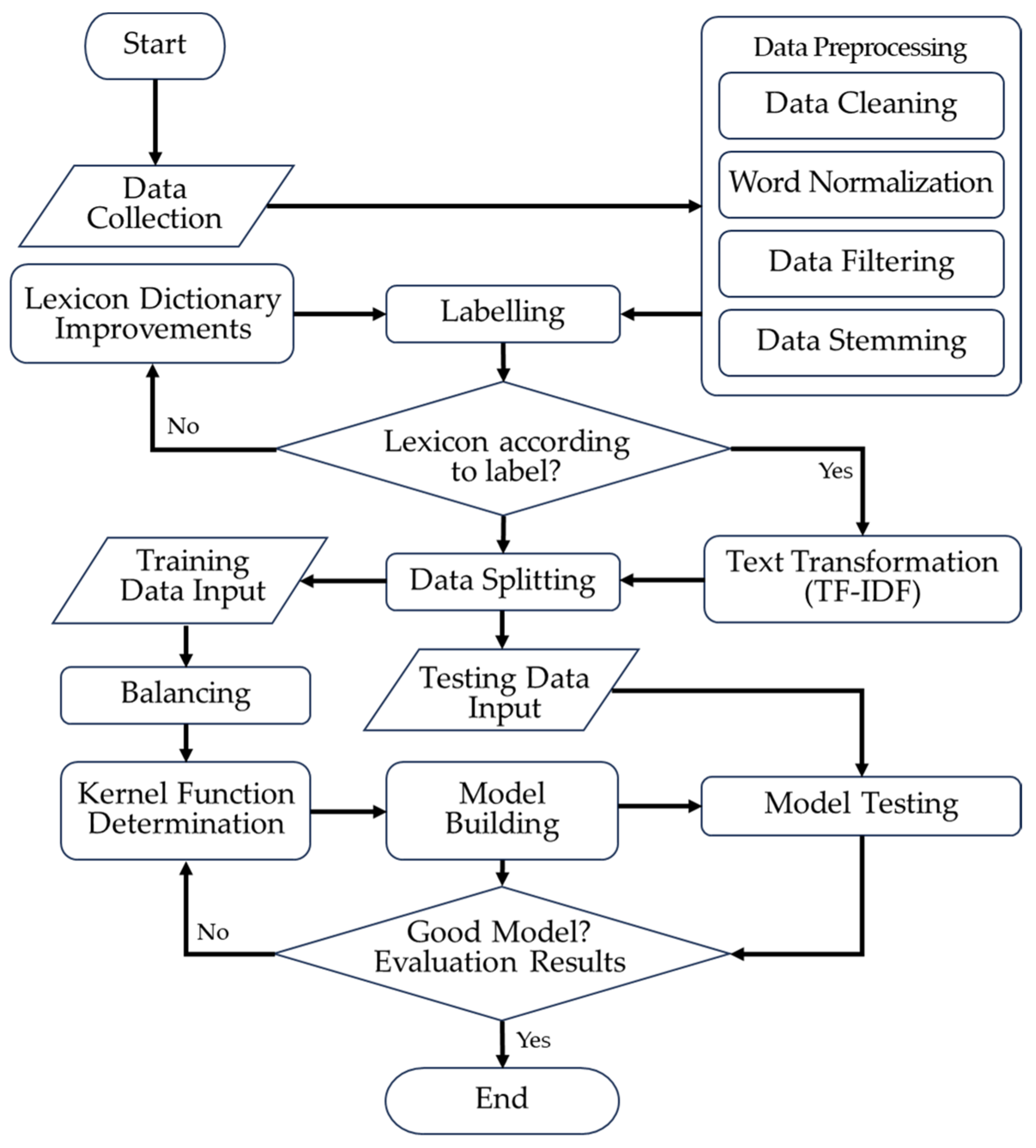
The overall research workflow is summarised in Figure 1. The process begins with data collection, followed by a series of preprocessing stages—data cleaning, word normalisation, filtering, and stemming—to obtain text that is ready for analysis. The cleaned corpus is then labelled using a sentiment lexicon that is iteratively refined; if the lexicon does not yet reflect the desired labels, it is improved and the labelling step is repeated. Once an adequate lexicon is obtained, the text is transformed into numerical features using TF–IDF and subsequently split into training and testing sets. The training data are further processed through a balancing procedure before being used to build SVM models with different kernel functions, while the testing data are used for model evaluation. Detailed explanations of each stage are provided in the following subsections. The complete workflow, including code implementations, is detailed in Appendix A, Appendix B, Appendix C, Appendix D, Appendix E, Appendix F and Appendix G.

2.3. Data Preprocessing

Data preprocessing initiates the text mining process. Data preparation encompasses all procedures and routines necessary to prepare data used in the knowledge discovery system’s text mining operations [9]. Text preprocessing necessitates the execution of toLowerCase, which converts all uppercase letters to lowercase, and tokenisation, which involves parsing the description from sentence form into individual words while eliminating delimiters such as periods (.), commas (,), spaces ( ), and numeric characters [10]. In this work, the authors performed data preparation, which included data cleaning, word normalisation, data filtering, and stemming.
  • Cleaning
    • toLowerCase
      The initial stage of data preprocessing involves executing the toLowerCase function, which standardises all text in the document to a uniform format, typically lowercase. We only modify alphabetic characters, discarding non-alphabetic characters as delimiters. For instance, “Segar” is rendered as “segar,” and “Rusak” is rendered as “rusak,” among others.
    • Tokenizing
      After the text conversion, the next procedure is tokenization, which involves segmenting each word that constitutes a document. This process entails the removal of numerals, punctuation marks, and various alphabetic characters, including zero (0), one (1), comma (,), period (.), and question mark (?). These letters serve as word separators, or delimiters, without affecting the text under processing.
  • Word Normalisation
    Tweets authored by X users predominantly employ informal language, abbreviations, or even elongated words. To standardise these terms in Indonesian, it is essential to implement the word-normalisation phase. In this word normalisation, the author incorporated multiple terms that were not standardised by the lexicon from the GitHub (https://github.com/) Nasalsabila colloquial Indonesian lexicon and included normalisation pertaining to the Sundanese language, as the data was sourced from the X account of a Sundanese individual.
  • Filtering
    We conduct filtering to select significant terms from the tokenisation results, specifically those that may effectively represent the content of a document, after removing delimiters and non-influential words. We eliminate words of diminished significance, such as “dan,” “yang,” “dari,” “di,” etc. This procedure involves two techniques: stoplist and wordlist. A stoplist eliminates non-descriptive or insignificant terms. The wordlist retains terms deemed significant. The author modifies the stoplist lexicon from GitHub user aliakbars by removing essential words and incorporating other terms, such as “amp” and “cc”.
    The adjustment of the stopword list and slang lexicon underwent a cyclical validation procedure. Initially, high-frequency, non-informative tokens (e.g., “amp” and “cc”) and colloquial idioms were discerned by corpus-level frequency analysis and manual examination. The candidates were thereafter assessed for their semantic contributions to sentiment and either eliminated or normalised as necessary. The refinement procedure was reiterated until the stopword and slang lists reached stability, indicating that no further non-informative or redundant tokens were detected in subsequent evaluations.
  • Stemming
    Stemming is the process of transforming a word into its base form or identifying the root word of each term by filtering. The stemming process seeks to revert a word to its fundamental form as defined by the dictionary. Information retrieval extensively uses the stemming process to improve the quality of acquired information. This stemming procedure transforms any word with an affix into its base form. For example, this procedure reduces “merusak” to “rusak,” “menyukai” to “suka,” and “kejelekan” to “jelek,” among other words.
The preprocessing methods in this study provide an integrated workflow intended to diminish noise, standardise linguistic heterogeneity, and enhance feature quality for future classifications. Each phase—cleaning, normalisation, filtering, and stemming—collectively facilitates the conversion of unrefined social media material into a structured format appropriate for TF–IDF modelling. The interconnectedness of these procedures precluded an explicit evaluation of the individual influence of each preprocessing component on classification performance in this study. The preprocessing steps (cleaning, normalization, filtering, stemming) were implemented in Google Colaboratory as shown in Appendix B (Listing A2).
The choice to preserve solely Indonesian-language tweets was grounded upon empirical observations made during preprocessing. English and Sundanese tweets represent a comparatively minor segment of the dataset and have greater linguistic complexity, characterised by restricted sentiment lexicon coverage, a higher incidence of out-of-vocabulary phrases, and inconsistent sentiment indicators. The preliminary assessment suggested that combining these tweets would necessitate extra language-specific resources and markedly distinct preprocessing techniques, which could introduce noise and diminish classification stability in the consolidated TF–IDF feature space.

2.4. Labelling

The author conducts sentiment scoring in labelling by utilising a lexical dictionary that comprises a compilation of positive and negative phrases in Indonesian. The author conducts sentiment scoring by analysing the words in the dataset using a precompiled lexicon of positive and negative terms. However, some words remain unsuitable; therefore, the author modifies specific terms to ensure the vocabulary is applicable, followed by a calculation:
S c o r e = q u a n t i t y   o f   p o s i t i v e   w o r d s q u a n t i t y   o f   n e g a t i v e   w o r d s
An example of scoring can be found below:
Text devoid of extraneous elements: “momentum refleksi evaluasi motivasi pt fengtay sukses komitmen dukung bangun daerah” (Note: The positive sentiment words in this example are ‘sukses’ and ‘dukung’)
q u a n t i t y   o f   p o s i t i v e   w o r d s = 2 ,   q u a n t i t y   o f   n e g a t i v e   w o r d s = 0
S c o r e = 2 0 = 2
We will classify the scored data into three categories: positive, negative, and neutral. The assignment of labels is contingent upon the following criteria: (1) We classify it as positive if the sentiment score exceeds 0. (2) A sentiment score of less than 0 is considered negative. (3) When the emotion score is zero, we classify it as neutral. This study does not use data with neutral labels to explain the situation in Bandung Regency. The subsequent phase will only use data with positive and negative labels.
The omission of the neutral sentiment category was a purposeful, task-specific design decision intended to enhance polarity identification efficacy. Neutral text in social media data frequently comprises diverse information, including factual assertions, ambiguous phrases, or minimally opinionated language, which might generate noise and diminish the classifier’s ability to discern clear positive or negative feelings. The fundamental objective of this study is to identify and assess public discontent and approval regarding local government performance; thus, concentrating on binary sentiment categories facilitates more robust and interpretable modelling outcomes.
The validation of the revised lexicon is assessed through preprocessing consistency and data quality metrics, rather than relying on inter-rater reliability tests, which are better suited for manual annotation tasks. The improved stopword and slang lists reduce lexical noise, cut down on extra tokens, and make the TF-IDF feature representation more cohesive. This validation method is based on consistency, which means that the results can be repeated and that the rules for rule-based text preprocessing are followed.

2.5. Text Transformation

Text transformation refers to the conversion of textual material into a vector representation to enable analysis. This vector will serve as the initial feature vector for SVM classification. A frequently employed technique is term frequency-inverse document frequency ( T F - I D F ) weighting. T F - I D F assesses the association of words with documents or phrases by assigning weights or values to each word.
The combination of two negative words can change their meaning to become positive and vice versa. For example, “not bad”—two words combined—has a positive meaning, but each word has a negative meaning. Based on this, in this research a bigram type of n-gram was used, namely breaking a sentence into two words to ensure that the meaning of the word context is maintained. A bigram is when a sentence is broken down into tokens consisting of two words. The aim of using bigrams is to combine words that often appear as descriptions or to provide weight to important words in a document so that they can express a sentiment.
Term Frequency ( T F ) refers to the number of times a term appears in the pertinent document. The frequency of a term in a document correlate positively with its weight or appropriateness rating [11]. There are three categories of term frequency: (1) Binary T F ; (2) Raw T F ; and (3) Logarithmic T F . Binary term frequency can result in the loss of data information diversity when a greater number of words is equivalent to one. Logarithmic term frequency indicates that high-frequency words lack dominance in the document, leading to minimal variance. Consequently, this document employs Raw T F assigns the T F value according to the frequency of a word’s occurrences inside the document. A word receives a value of one (1) if it appears once, two (2) if it occurs twice, and so on. Within the specified document collection, Inverse Document Frequency ( I D F ) quantifies the prevalence of widely scattered terms. We express the formula for inverse document frequency as follows:
I D F t = ln N d f t
  • N : total documents
  • d f t : number of documents containing word t
The TF-IDF algorithm uses the following calculation to determine the weight ( x ) of each document in relation to a specific term:
x d t = T F I D F d t = T F d t × I D F t
  • d : d th document, d = 1,2 , , N
  • t : t th word of keyword, t = 1,2 , , L
  • x d t : weight of t th word in d th document
  • T F d t : number of t th word in d th document
  • I D F t : inversed document frequency of t th word
So that X is obtained as a TF-IDF matrix.
X = x 1 x 2 x N = x 11 x 12 x 21 x 22 x 1 L x 2 L x N 1 x N 2 x N L

2.6. Visualisation

Numerous methods exist to facilitate users in drawing conclusions and articulating traits and data correlations. One of the most straightforward methods involves representing the data in a two-dimensional or three-dimensional plot, such as a biplot, boxplot, or the commonly used word cloud in text analysis or text mining. A word cloud, sometimes referred to as a text cloud or tag cloud, operates in a straightforward manner. In a data mine, the presentation of words increases in size and boldness as their frequency of occurrence increases [12].

2.7. Handling Imbalanced Data

The research data include instances of class imbalance. The BorderlineSMOTE algorithm will resolve this issue. SMOTE computes the differential value between the feature vector of the minority class x j in Equation (4) and the nearest neighbour of the minority class, subsequently multiplying this result by a random number within the interval of 0 to 1. The initial feature vector incorporates the computation results to create a new vector value [13]. BorderlineSMOTE enhances SMOTE by exclusively generating synthetic data along the decision boundary between two classes.
x s i n = x j + x ^ k x j × δ
  • x s i n : new synthetic data
  • x j : data from the minority class along the boundary
  • x ^ k : data from the k-nearest neighbours that have the closest distance to x j
  • δ : random number in the range 0 to 1

2.8. Support Vector Machine Modelling

Support Vector Machine (SVM) is a classification method that delineates objects through hyperplanes. An efficient hyperplane in SVM will optimise generalisation capabilities. We can classify the hyperplanes as either linear or nonlinear. When data displays a nonlinear class distribution, one typically applies the kernel trick to the original characteristics of the dataset. A kernel can be defined as a function that transforms data features from a lower dimension to a higher dimension. The mathematical notation for this mapping is as follows:
ϕ : D q D r ,         x d ϕ ( x d ) ,     q < r
where ϕ is the kernel function, D is the training data, the vector x d represents the training data from the set D q , and q represents the features to be transformed into features of a higher dimension, namely r . This mapping is performed to maintain the data topology so that two data sets that are close in the input space x d are also close in the feature space ϕ ( x d ) [14].
Kernel functions that are frequently used include the linear, polynomial, radial basis function (RBF), and sigmoid kernel. These are the standard kernel functions that are commonly used [15]:
  • Linear kernel:
K x i , x j = x i T x j
2.
Polynomial kernel
K x i , x j = ( γ x i T x j + c ) d ,   γ > 0
3.
RBF kernel
K x i , x j = e x p ( γ x i x j 2 ) ,   γ > 0
4.
Sigmoid kernel
K x i , x j = tanh ( γ x i T x j + c )
According to Bishop [16], SVM begins by declaring a linear model in the feature space:
y ( x ) = w ϕ x + b
Define the cost/objective function using a soft margin with slack ξ n :
min w , b , ξ i 1 2 w 2 + C i ξ i with   t i y x i 1 ξ i ,     ξ i > 0
Construct the Lagrangian with multipliers α i and μ i , then eliminate w , b , ξ through stationary conditions:
L w , b , ξ , α , μ = 1 2 w 2 + C i ξ i i α i t i w ϕ x i + b 1 + ξ i i μ i ξ i .
Derive the function with respect to ξ , w and b :
L ξ = 0   μ i = C α i ,   L w = 0   w = i α i t i ϕ x i ,   L b = 0   i α i t i = 0
Obtain the dual in the form of a quadratic optimisation with respect to α i :
L ~ α = i α i 1 2 i j α i α j t i t j K x i , x j .
with constraints 0 α i C .
Solve the QP dual above (using a QP solver, chunking, decomposition, or SMO). The result is the value of α i for all data. Bishop discusses training techniques and SMO as a popular method. Identify the support vectors (SV), which are data with α i > 0 . For SV on the margin, 0 < α i < C , so t i y ( x i )   =   1 . Next, calculate the bias b (threshold) by averaging over all SV satisfying 0 < α < C :
b = 1 N M i M t i j S α j t j K x i , x j
where M is the set of SV with 0 < α i < C and S is the set of all SV. Reform the parameter w as a linear combination w = i α i t i ϕ x i . Use α and b to construct a decision function at the test point x :
y ( x ) = i S α i t i K x , x i + b
The classification decision is s i g n y x .
This paper employs a systematic empirical tuning technique for SVM parameter selection that focusses on validation performance instead of an exhaustive optimisation process. The kernel type and parameter ranges are chosen according to recognised norms in the text classification literature, and candidate configurations are assessed in a uniform validation environment to guarantee equitable comparisons. This method facilitates the selection of stable and high-performing parameter combinations while ensuring computational efficiency.
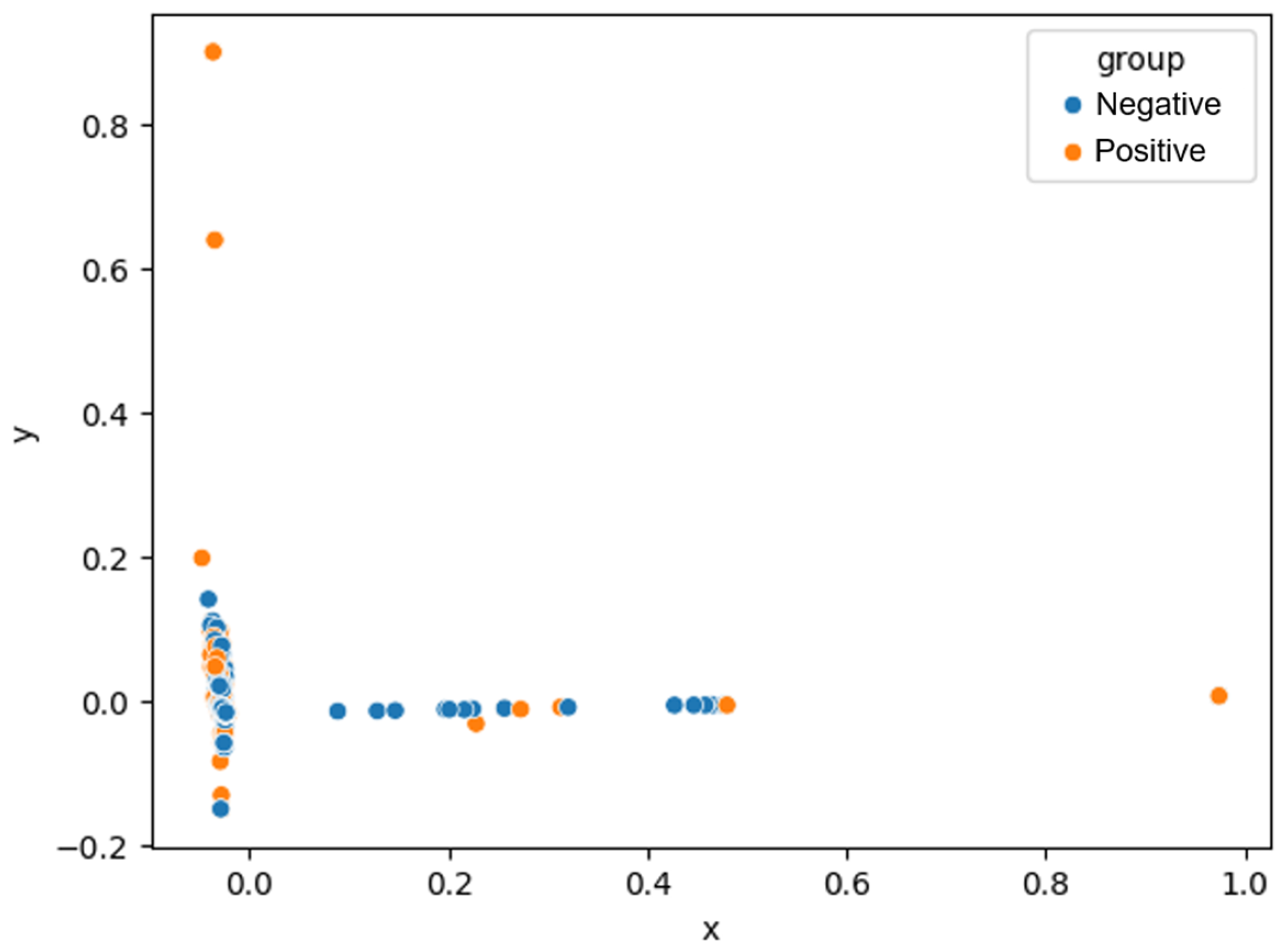
This study employs principal component analysis (PCA) [17,18] to determine the linear separability of the data. The multivariate statistical method Principal Component Analysis (PCA) reduces dimensionality. Figure 2 illustrates how PCA reduces TF-IDF data of L dimensions to two dimensions and shows that data from the negative and positive classes are not possible to partition with a linear kernel. This also applies to three dimensions and beyond. Based on this, the study uses three types of kernels: polynomial, RBF, and sigmoid. A limited grid search is used to find the best hyperparameters for the SVM model. We chose the values for the regularisation parameters C (0.1, 1, and 10), γ (0.1, 1, and 10), and degrees (2 and 3) based on established norms in text classification research. This way, we could fully explore both under-regularised and over-regularised situations while keeping the computations efficient. Each parameter combination was evaluated using the same validation method to ensure fair comparisons between kernels.

2.9. Model Evaluation

The model is evaluated by inputting test data. Model performance measurements during the testing phase are displayed using a confusion matrix (Table 2) approach [16]. We analyse the model performance by comparing its accuracy, precision, recall, and F1-score. Negative predictions, when actually positive, are more important in this study than the vice versa. Therefore, recalls are prioritised to minimise false negatives, so the best model is determined based on high negative and positive recall to ensure that it can predict more than just the negative class.
a c c u r a c y = T P + T N T P + T N + F P + F N × 100 %
P r e c i s i o n = T P T P + F P
R e c a l l = T P T P + F N
P r e c i s s i o n = T P T P + F P
F 1 - s c o r e = 2 × p r e c i s i o n × r e c a l l p r e c i s i o n + r e c a l l

2.10. Ethical Considerations

Ethical considerations were incorporated into the data collection process. All examined tweets were publicly accessible and retrieved in compliance with the platform’s terms of service using a valid authentication token. No private messages, secured accounts, or personally sensitive information were gathered or disclosed. This investigation concentrated on collective sentiment trends instead of individual users, thereby adhering to ethical guidelines for social media research.

3. Results

3.1. Results of Data Preprocessing

The purpose of this stage is to fully prepare the data for analysis. Therefore, we carry out the stages of data preprocessing, which include cleaning, converting to lowercase, tokenising, word normalisation, filtering, and stemming. The author carried out these stages using Google Collaboratory. Lowercasing is the initial stage in data preprocessing, namely converting all text in the document into a standard form (usually lowercase). The procedure is followed by cleaning, which removes numbers, punctuation, and non-alphabetical characters. Tokenising involves dividing the text into individual words that compose the document. Word normalisation is carried out, namely by changing informal words and abbreviations into standard Indonesian words. The author used an updated slang word lexicon for word normalisation. Next, filtering is carried out; namely, all words included in stopwords will be removed. The final stage in data preprocessing is stemming, which is the process of converting words into basic words. Table 3 presents a preprocessing result. After data preprocessing was carried out, there were 4743 documents that did not have text, so the analysis was continued with documents that had text, namely 8862 documents.

3.2. Results of Labelling

The preprocessed data will then be scored based on the positive, neutral, and negative sentiment classifications per word, based on a pre-prepared lexicon, and manually verified for each document by the researcher. This study employs a rule-based and lexicon-assisted methodology for sentiment labelling, wherein sentiment scores are computed deterministically using a predetermined list of positive and negative terms. Manual verification is conducted to enhance the lexicon by rectifying misclassified terms and contextual discrepancies, rather than arbitrarily assigning labels to specific texts. Upon finalising the vocabulary, the same scoring criteria are uniformly implemented throughout the dataset, guaranteeing the internal consistency and reproducibility of the labelling procedure.
After scoring each document using Equation (1), the next step is data labelling, in which each document will be assigned a class label based on its sentiment score. A positive score is classified as positive, a negative score as negative, and a zero score as neutral. Table 4 displays one of the outcomes of the labelling process, which employed R software (version 4.3.3). Sentiment scoring and labelling were conducted using R software with the code in Appendix C (Listing A3).
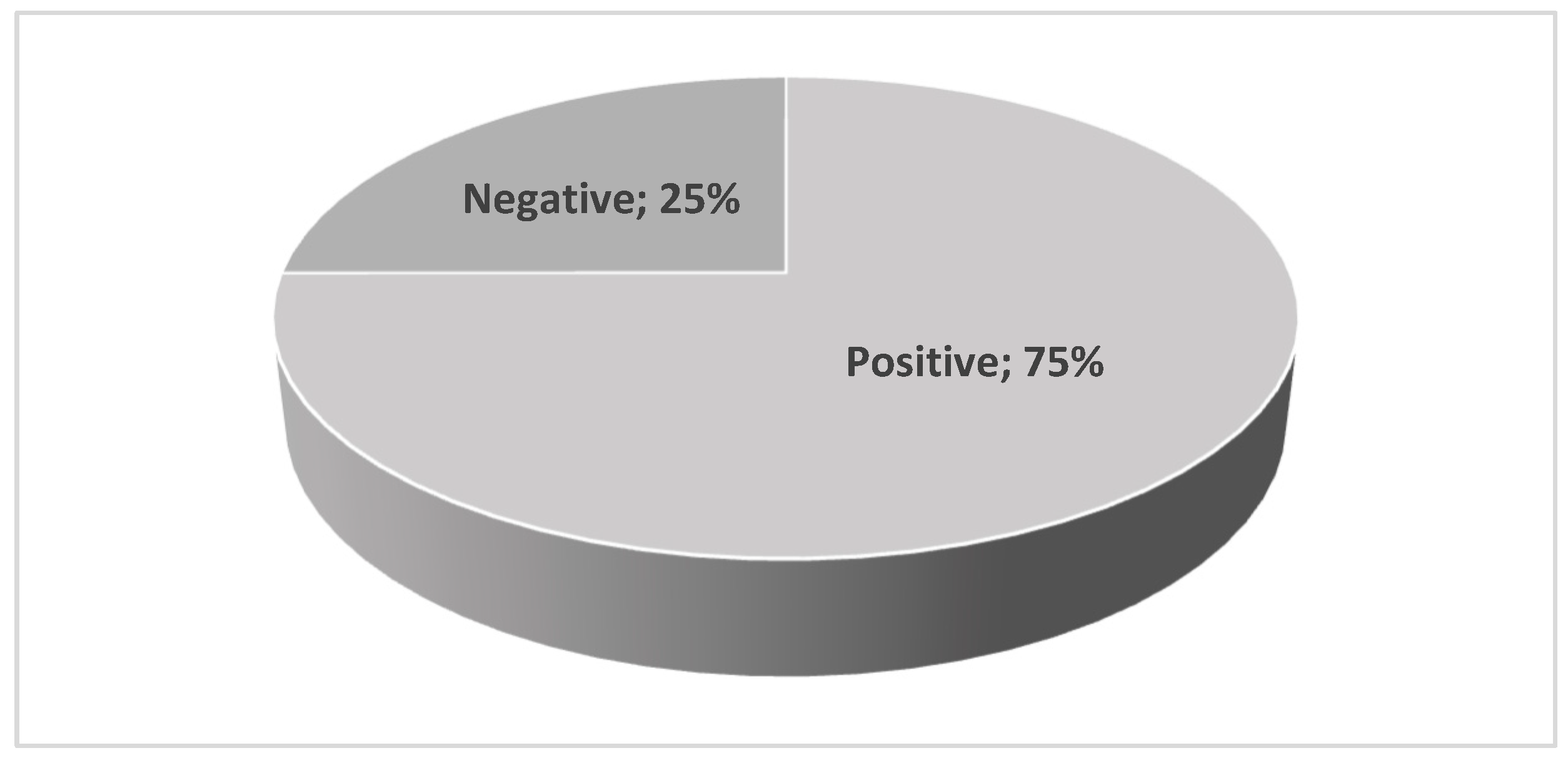
The neutral sentiment class is excluded from this classification result because the research aims to improve polarity detection in opinionated aspects, focussing on non-neutral objects/sentences. This resulted in the sentiment class distribution shown in Figure 3, with 3081 documents representing positive sentiment and 1028 documents representing negative sentiment.

3.3. Results of Visualisation

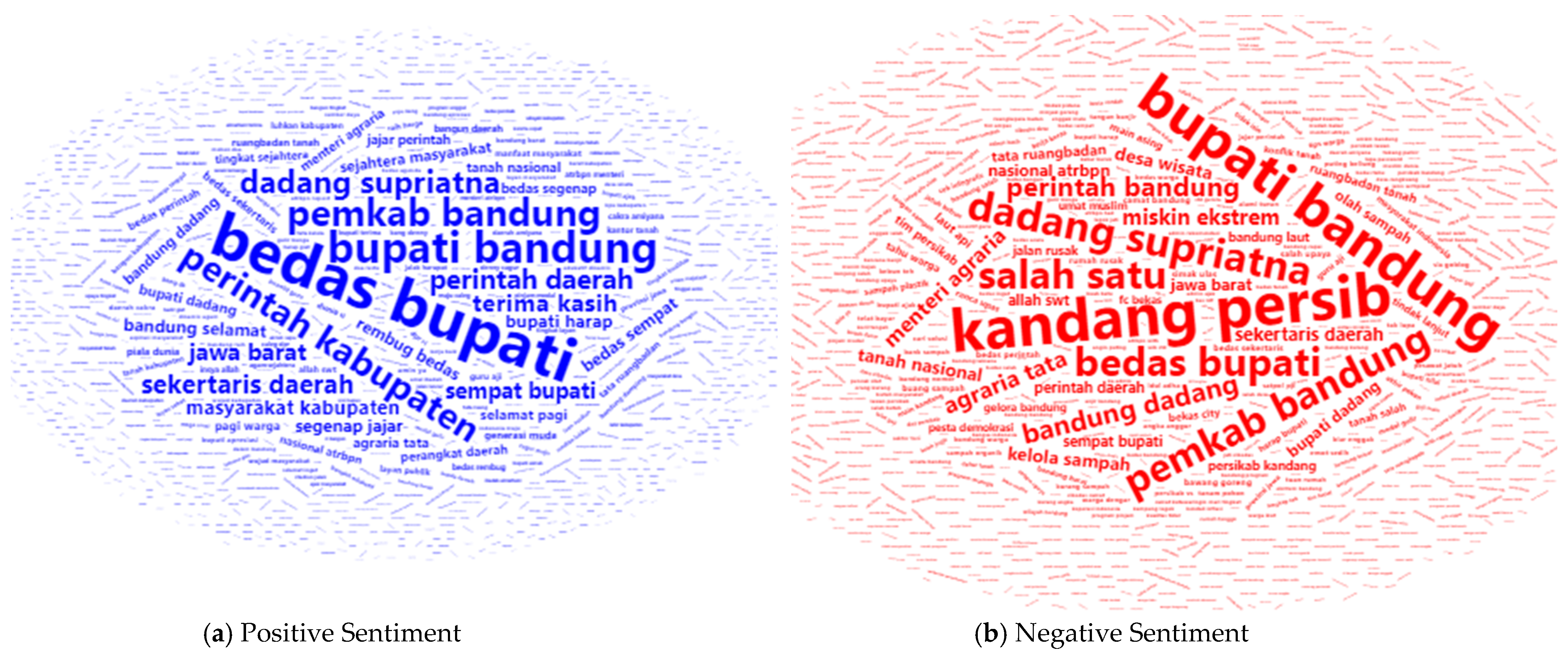
The visualisation was conducted to determine the topics frequently expressed by X users regarding Bandung Regency so that important information could be obtained. Figure 4 displays the visualisation results. Positive sentiment terms that frequently appear in X users’ opinions about Bandung Regency include “bedas bupati (powerful regent)”, “ bupati bandung (bandung regent)”, “pemkab bandung (Bandung regency government)”, and “pemerintah kabupaten (regency government)”. Therefore, X users have a positive assessment of the Bandung Regent and the Bandung Regency Government. However, these four terms frequently appear in negative sentiment as well, leading many people to provide a negative assessment of the Bandung Regent and the Bandung Regency Government. In addition to the four words that dominate the positive sentiment, the word “kandang persib (Bandung city football team home base)” is dominant in the negative sentiment. Bigram extraction and word cloud generation were performed using the R script in Appendix D (Listing A4).

3.4. Results of Text Transformation

Bigrams break sentences into two words to ensure the meaning of the context of the words is maintained. A total of 33,932 bigram terms were generated from 4109 tweets. In this study, the frequency of term occurrence in the document, referred to as term frequency (TF), was measured using raw TF. Next, the IDF is calculated using Equation (2), and then the TF-IDF value is calculated using Equation (3). In Table 5 display the TF-IDF of each word in a document. Word weight can reflect the value of a word in a document. The greater the word weight, the more frequently a word will appear in a document, and the smaller the word weight, the less frequently a word will appear in the document. Pre-classification setup was performed using the syntax provided in Appendix E (Listing A5).

3.5. Results of SVM Modelling

In this study, the authors split the data into 80% training data and 20% testing data. The training data resulted in 3287 tweet documents, with 2469 (75%) positive sentiment and 818 (25%) negative sentiment. The testing data consisted of 822 tweet documents, with 612 (80%) positive sentiment and 210 (20%) negative sentiment.The class distribution in the training data was unbalanced, with minority data comprising less than 35% of the total training data. Therefore, the imbalanced dataset required treatment. The next step was to address the imbalanced dataset using BorderlineSMOTE. Equation (5) illustrates how BorderlineSMOTE handles imbalanced datasets by incorporating synthetic data within the decision boundary between the two classes. This treatment resulted in a total of 4938 training data documents, with 2469 documents in each class.
Next, modelling was performed using the SVM method. This model was generated by a classification algorithm derived from the training data, and its performance was tested by incorporating test data. As previously stated, this study uses three kernel functions, namely Kernel Polynomial, Radial Basis Function (RBF), and Sigmoid. The TF-IDF transformation, data splitting, BorderlineSMOTE, SVM modelling, and evaluation were executed using the code in Appendix F (Listing A6).
  • Polynomial Kernel
Classification using kernel polynomial method is performed using Equation (8). Table 6 displays the results of testing the kernel polynomial model. All models utilising kernel polynomials demonstrated a high positive recall but a low negative recall, and vice versa. For example, the model that provided the best negative recall value of 1 when the degree parameter was 3 and the C and gamma ( γ ) parameter pairs were (0.1, 10); (1, 10); (10, 1); and (10, 10), respectively, had a low positive recall of 0.0572. Therefore, this model was not effective at predicting positive sentiment and vice versa, making it unsuitable for use.
b.
RBF Kernel
The RBF kernel for classification uses Equation (9). Table 7 displays the results of testing the model with the RBF kernel. The model that achieves the best negative recall value is 0.2667, with the RBF kernel parameter having a C of 10 and a gamma ( γ ) of 0.1. Meanwhile, the model that provides the best positive recall value of 0.9951 uses parameters other than a C value of 10 and a gamma ( γ ) of 0.1. Because the negative recall value is too low, this model is not good for use, even though the positive recall value is high.
c.
Sigmoid Kernel
Classification with a sigmoid kernel using Equation (10). The results of testing the Sigmoid Kernel model can be seen in Table 8. The model that provided the best negative recall value using the Sigmoid kernel was when the C parameter was 10 and the gamma ( γ ) parameter was 1. The negative recall value of this model was 0.8301. Meanwhile, the model that provided the best positive recall value was 1 when the C parameter was 0.1 and the gamma ( γ ) parameter was 0.1.
Since this study prioritised negative recalls to minimise false negatives, it also considered a high positive recall to ensure that it could predict more than just the negative class. Therefore, the best model chosen is a sigmoid kernel with parameter C of 10 and gamma (γ) of 1. Sample predictions and model visualization were generated with the syntax in Appendix G (Listing A7).

3.6. Comparative Analysis of Class-Wise Recall Across Feature Representations

A supplementary comparison analysis was performed to investigate the impact of feature representation and class balancing on sentiment classification performance, with a specific focus on class-wise recall, particularly negative recall. This investigation contrasts unigram and bigram TF–IDF representations under uniform SVM configurations utilising a Sigmoid kernel with parameters C = 10 and γ = 1, both with and without the implementation of BorderlineSMOTE.
Table 9 presents recall values for each sentiment category, along with accuracy, average recall, and F1-score across various feature representations and balancing methodologies. In the imbalanced environment, the bigram representation had the maximum positive recall (0.9935), demonstrating significant sensitivity to contextual emotion signals derived from word pairings. This outcome substantiates the efficacy of bigrams in maintaining linguistic context across brief and informal social media communications. This improvement was accompanied by a significant decrease in negative recall (0.301), indicating that a class imbalance led the classifier to prioritise the dominant emotion class, resulting in the misclassification of negative occurrences.
Following the implementation of BorderlineSMOTE, the negative recall for the bigram representation significantly enhanced, attaining a value of 0.8301 with the ideal Sigmoid SVM configuration. This enhancement illustrates the efficacy of class balancing in augmenting sensitivity to minority sentiment classes. Simultaneously, positive recall decreased to 0.5909, indicating an intrinsic trade-off between contextual sensitivity and overall class equilibrium when oversampling is utilised.
Conversely, unigram representations demonstrated more consistent memory performance across both sentiment categories before and during balancing. Negative recall experienced a slight increase from 0.801 to 0.8107 after the application of BorderlineSMOTE, although positive recall remained continuously elevated. This trend indicates that unigram feature spaces exhibit reduced sensitivity to decision-boundary alterations caused by synthetic oversampling, hence offering enhanced stability across classes.
This comparison underscores a trade-off between contextual richness and the stability of the feature space. Bigram representations enhance sensitivity to sentiment-laden word combinations, particularly when mitigating class imbalance; however, they display heightened instability when subjected to oversampling conditions. Unigram representations, albeit less contextually expressive, provide better reliable recall performance across sentiment categories.
Performance varied among all assessed SVM kernels regarding accuracy, precision, recall, and F1-score. Although several kernels attained superior results on specific criteria, these enhancements frequently entailed trade-offs, including diminished precision or erratic memory. The sigmoid kernel demonstrated the greatest balanced performance, sustaining competitive accuracy and precision while attaining steady recall and F1-score across classes.
Considering the study’s aim to reduce false negatives in public sentiment analysis, particularly with public discontent, recall was emphasised as the primary assessment measure, with positive recall also considered to avoid bias towards a singular sentiment category. The sigmoid kernel, with parameters C = 10 and γ = 1, met the requirements. It had a negative recall of 83.01%, a positive recall of 59.09%, an accuracy of 65.09%, an average precision of 65.83%, and an average F1-score of 68.34%. The data shows that the model has the best negative recall criteria, with other evaluation parameter sizes falling into the ‘good’ category.
In public policy analysis, the inability to identify adverse public sentiment may result in more severe repercussions than permitting a small number of false positives. Thus, recall-orientated optimisation is warranted, despite its inherent compromise with precision. The choice of the sigmoid kernel is thus driven by its consistent performance across various assessment metrics rather than an optimisation for a singular criterion.
This paper conducts a comparative evaluation of established and commonly employed baseline classifiers to guarantee interpretability, computational efficiency, and methodological transparency. The evaluation prioritises the robustness of the proposed preprocessing, feature extraction, and class balancing procedures inside a widely used classification framework, rather than focusing on higher prediction performance.

4. Discussions

4.1. Methodological Considerations and Design Trade-Offs

This study examines user sentiment regarding Bandung Regency through a supervised machine learning approach that utilises TF–IDF bigram features and Support Vector Machine (SVM) classification. The application of bigram-based TF–IDF successfully retains contextual information frequently diminished in unigram representations. In the context of the Indonesian language, where negation, colloquial expressions, and concise idiomatic phrases are prevalent, bigrams more effectively encapsulate sentimental polarity by modelling significant word combinations. This discovery aligns with previous research indicating that n-gram characteristics, especially bigrams, enhance sentiment categorisation by preserving local linguistic context in brief social media postings.
Data preprocessing significantly diminished the dataset size, exposing the considerable noise present in user-generated information. The presence of slang, acronyms, informal spelling changes, and code-mixed Sundanese-Indonesian idioms underscore the linguistic complexities inherent in analysing Indonesian social media. Lexicon-based normalisation and stopword refining were essential in ensuring that the TF-IDF representation consistently represented semantic meaning by minimising uninformative variance in textual properties. This lexicon-refining procedure, while not including multi-annotator agreement, offers a scalable and reproducible validation mechanism appropriate for extensive social media data.
Limiting the analysis to Indonesian-language tweets enhances linguistic consistency and feature reliability; however, it sacrifices the inclusion of multilingual emotion expressions. This design decision signifies a calculated trade-off focused on enhancing data quality and model resilience, rather than suggesting that non-Indonesian information is devoid of analytical merit. Normalising multilingual and code-mixed content into a singular language facilitates modelling but constrains linguistic nuance. Subsequent investigations may mitigate this disadvantage by integrating multilingual embeddings, language-specific sentiment lexicons, or hierarchical model’s adept at maintaining code-mixed structures.
This paper offers a comprehensive account of the preprocessing pipeline but lacks an ablation analysis to discern the specific impact of each preprocessing stage. Performing such analysis necessitates comprehensive controlled experiments and heightened computational complexity. Future research may conduct systematic ablation studies to assess the relative significance of preprocessing components in various language and contextual environments.
Lexicon-assisted sentiment labelling diminishes subjectivity relative to entirely manual annotation; yet, this study does not calculate quantitative inter-annotator agreement metrics, such as Cohen’s kappa. Human verification was predominantly employed to enhance the lexicon rather than to execute document-level annotation by several annotators. This limitation is recognised, and subsequent research may integrate multi-annotator validation or benchmark labelling results against a manually annotated Gold Standard dataset.
Neutral sentiment samples were omitted, in accordance with standard procedures in polarity-orientated sentiment classification. This decision was driven by the study’s focus on opinionated information, as the incorporation of neutral tweets could obscure polarity distinctions and diminish classification sensitivity. Eliminating the neutral class modifies the sentiment distribution and streamlines the complexity of real-world opinions; however, this simplification is consistent with the study’s aim. Subsequent research could advance this study by implementing multi-class or hierarchical sentiment modelling that explicitly includes neutral sentiments.
Model evaluation indicates that polynomial and radial basis function (RBF) kernels demonstrate inconsistent performance, frequently attaining high recall for one sentiment class while compromising the other. This tendency suggests overfitting to specific sentiment domains and limited generalisability. Principal Component Analysis (PCA) validates the nonlinear separability of the data, highlighting the requirement for nonlinear kernels; yet, not all nonlinear kernels exhibit equivalent performance.
The sigmoid kernel has the best balanced and dependable performance, especially with parameters C = 10 and γ = 1. This design attains robust recall for negative emotion while preserving enough positive recall and overall classification equilibrium. The study prioritises avoiding false negatives, which is essential for policy evaluation and public perception analysis; thus, the chosen model is well-suited to the research’s aims. These findings align with the current research suggesting that sigmoid kernels are useful for high-dimensional, sparse text data when modest nonlinearity is necessary.
Despite the exploration of various kernels and parameter values, the hyperparameter tuning method did not utilise sophisticated optimisation frameworks like grid searching or Bayesian optimisation. This represents a practical compromise between methodological rigour and computing feasibility, given the enormous dimensionality of the TF-IDF features. Future research may implement more advanced optimising algorithms to further improve robustness.
The findings affirm that the integration of TF–IDF bigram features, meticulous preprocessing, class imbalance mitigation by SMOTE, and SVM classification utilising a Sigmoid kernel is efficacious for sentiment analysis of Indonesian social media data. This study emphasises negative recall over overall accuracy to prevent oversight of adverse public sentiment, a crucial factor in governance-related applications.
The empirical findings validate this design choice. In an unbalanced setting, bigram representations achieve the strongest positive recall, indicating considerable sensitivity to contextual cues that express sentiment. This sensitivity, conversely, is accompanied by a significantly decreased negative recall, illustrating the impact of class imbalance on the establishment of decision boundaries. Conversely, unigram representations exhibit more equitable recall values across mood categories; however, they lack contextual depth. The relationship between feature representation and class balancing is distinctly evident following the application of BorderlineSMOTE. Following the balancing process, negative recall significantly increases for bigram representations, attaining its peak value when the sigmoid SVM is optimally configured. This enhancement demonstrates that BorderlineSMOTE functioned as planned by adjusting the decision border to increase sensitivity to minority classes. Simultaneously, positive recollection diminishes, indicating a distinct trade-off between class stability and contextual sensitivity. Conversely, unigram features have recall values that are quite consistent before and after balancing. This indicates that they exhibit greater resistance to synthetic oversampling in feature spaces characterised by fewer dimensions.
While sentiment patterns in this regional case study depend on the context, the proposed methodological framework—featuring preprocessing for code-mixed language, contextual feature representation, imbalance mitigation, and recall-oriented evaluation—is readily applicable to other local governance settings. Consequently, the main contribution resides in the methodological application rather than the direct generalisation of sentiment results.
Prioritising memory inherently leads to diminished precision, suggesting that certain neutral or mildly opinionated texts may be incorrectly categorised. This trade-off is recognised and evaluated using supplementary metrics like F1 scores and accuracy. A future study may investigate threshold calibration or cost-sensitive learning to optimise the balance between precision and recall according to specific policy requirements.
The data-gathering technique, which relies on specific accounts and hashtags, captures active online dialogue instead of statistically representative public opinion. This methodology conforms to standard methods in social media analytics, seeking to assess sentiment fluctuations and evaluate methodological efficacy in actual contexts. The deliberate absence of computationally demanding models, such as deep learning or transformer-based architectures, serves as a scope limitation aimed at maintaining interpretability and practicality in resource-constrained, policy-orientated environments. Subsequent research may enhance the proposed workflow by integrating such models for comparison analysis.

4.2. Analytical Discussion and Relation to Prior Studies

The results offer analytical insights into sentiment classification within local governance contexts, extending beyond just numerical measurements. The high recall attained by SVM-based models validates the efficacy of integrating TF–IDF characteristics with class balancing to detect sentiment-laden utterances in social media discourse. Previous research shows that emphasising interpretability and stability makes SVM classifiers particularly effective for high-dimensional textual data.
The implementation of SMOTE enhances sensitivity to minority sentiment classes, aligning with prior research that illustrates the importance of mitigating class imbalance in opinion mining. The identified precision–recall trade-off exemplifies a typical result of oversampling techniques and underscores the necessity of aligning measure priority with application goals. In policy-focused sentiment analysis, the prompt identification of public discontent frequently supersedes minor reductions in accuracy.
This study advances sentiment analysis by concentrating on a regional governance framework, in contrast to the predominant focus of previous research on national-level sentiment or product evaluations. The study illustrates how conventional sentiment analysis methods can be modified to assess context-specific public opinion dynamics by assessing public responses to local government performance, thus facilitating evidence-based policy evaluation.

4.3. Contextual Analysis of “Kandang Persib”-Related Sentiment

The data reveal largely favourable sentiment overall, along with a significant cluster of negative sentiment. Word cloud visualisations illustrate divided public sentiment, indicating both endorsements of governmental actions and discontent with unaddressed local concerns. The prevalence of the term “kandang Persib” in a negative sentiment underscores popular apprehension about football infrastructure and the aspiration for the Bandung Regency team (Persikab) to rival the Bandung city squad (Persib).
The negative sentiment around “kandang Persib” does not specifically target the football club but rather signifies broader issues connected to facility accessibility, perceived priority, and management transparency. This suggests that when people perceive the social ramifications of sports infrastructure development as disproportionate or poorly articulated, it can turn into a contentious public matter.
A qualitative analysis of typical tweets uncovers persistent themes, such as dissatisfaction with restricted public access to publicly supported facilities, apprehensions regarding resource distribution amidst unaddressed community demands, traffic disturbances, and inadequate communication concerning facility use. These data demonstrate that sentiment classification encompasses both emotional polarity and significant public concerns regarding policy implementation and service performance.
This contextual analysis illustrates that negative sentiment signals from social media can yield actionable insights for policymakers by identifying specific issues that necessitate enhanced communication, access regulation, and community engagement, thus augmenting quantitative sentiment classification outcomes.

5. Conclusions

This study developed an SVM-based sentiment classification model to identify positive and negative sentiments of X users toward Bandung Regency using TF-IDF bigram features. After preprocessing and removing neutral sentiment documents, the classification model was trained on imbalanced data, which was resolved using BorderlineSMOTE. Among the kernels tested, the sigmoid kernel with parameters C = 10 and γ = 1 performed best, achieving the highest negative recall while maintaining adequate positive recall. This model was best suited to detecting polarity in user opinions, ensuring that negative sentiment—crucial for evaluating public dissatisfaction—was not misclassified.
The sentiment analysis results showed a predominance of positive opinions toward Bandung Regency, particularly regarding the regent and local government. However, negative sentiment remained significant, particularly regarding recurring local issues such as flooding, public services, and the debate over the use of regional sports facilities by teams from outside the region. The TF-IDF bigram approach successfully captured contextual meaning, improving the model’s ability to classify sentiment in linguistically complex Indonesian social media texts. These findings highlight that social media sentiment analysis can provide valuable insights for policymakers and local government stakeholders, particularly in monitoring public opinion and identifying areas for improvement.
Although the results are promising, some methodological limitations must be acknowledged. Data collection employs purposive sampling of social media accounts and hashtags, thereby capturing active online dialogue instead of statistically representative public opinion. Sentiment analysis emphasises binary polarity and omits neutral terms, potentially oversimplifying the intricacies of real-world sentiment. Moreover, lexicon-assisted labelling, although reproducible and scalable, fails to include quantitative measures of inter-annotator reliability. Modelling and evaluation are structured around baseline-orientated classifiers and validation methods, emphasising interpretability and robustness rather than cutting-edge performance.
Future research may rectify these limitations by expanding the sentiment framework to encompass multi-class or hierarchical models that explicitly integrate neutral sentiment, employing multilingual and code-mixed sentiment representations to maintain linguistic subtleties, and performing systematic preprocessing ablation studies alongside hyperparameter optimisation. Moreover, the integration of exclusively data-driven sentiment analysis with information-rich modelling frameworks may provide a viable avenue for enhancing interpretability and robustness in policy-focused social media analytics. This research can be enhanced by integrating neural network methodologies, multilingual models, or temporal sentiment analysis to comprehend the evolution of public opinion over time.

Author Contributions

Conceptualization, I.G.; methodology, I.G., S.S.P. and A.A.P.; software, A.M.S. and A.A.P.; validation, I.G., G.D. and S.; formal analysis, I.G.; investigation, A.A.P.; resources, A.M.S.; data curation, A.M.S.; writing—original draft preparation, I.G. and A.A.P.; writing—review and editing, I.G., A.A.P. and G.D.; visualisation, S.S.P.; supervision, S.; project administration, I.G. and S.; funding acquisition, I.G. and S. All authors have read and agreed to the published version of the manuscript.

Funding

This research was funded by the Ministry of Education, Culture, Research, and Technology (Kemdikbudristek) Republic of Indonesia through the Fundamental Research Scheme, grant number 3907/UN6.3.1/PT.00/2024, Padjadjaran University (Grant number 3927/UN6.RKT/HK.07.00/2025 and Unpad through the Indonesian Endowment 481 Fund for Education (LPDP) on behalf of the Indonesian Ministry of Higher Education, Science and 482 Technology, and managed under the EQUITY Program (Grant number 4303/B3/DT.03.08/2025).

Data Availability Statement

The dataset consists of publicly available data obtained from the X (Twitter) API/scraper. The data cannot be redistributed in raw form due to platform terms of use, but processed data and analysis scripts are available from the authors upon reasonable request.

Acknowledgments

Thank you to Universitas Padjadjaran (Unpad) for providing Article Processing Charge (APC) support. This APC is funded by Unpad through the Indonesian Endowment Fund for Education (LPDP) on behalf of the Indonesian Ministry of Higher Education, Science and Technology, and managed under the EQUITY Program (Contract No. 4303/B3/DT.03.08/2025 and 3927/UN6.RKT/HK.07.00/2025). Also thanks to the Academic Leadership Grant (ALG) scheme, which also provided support for the publication of this paper.

Conflicts of Interest

The authors declare no conflicts of interest.

Appendix A

Listing A1. Google Colaboratory Data Crawling Syntax.
!pip install pandas
!curl -sL https://deb.nodesource.com/setup_18.x | sudo -E bash -
!sudo apt-get install -y nodejs
filename = ‘akun.csv’
search_keyword = ‘(@akun{mention}/to:@akun(reply}) until:2023-12-31 since:2023-01-01’
limit = 10000
!npx --yes tweet-harvest@latest -o "{filename}" -s "{search_keyword}"
-1 {limit} --token
import pandas as pd
file_path = f"tweets-data/{filename}"
df= pd.read_csv(file_path, delimiter=";")
display(df)
#jika error karena terlalu banyak data    ->   df.to_csv(filename,in-
dex=False, delimiter=“;”)
num_tweets = len(df)
print(f"Jumlah Tweet dalam dataframe adalah {num_tweets}.")

Appendix B

Listing A2. Google Colaboratory Data Preprocessing Syntax.
!pip install nltk
!pip install Sastrawi
!pip install pandas
!pip install numpy
!pip install matplotlib.pyplot as plt
import pandas as pd
import numpy as np
import matplotlib.pyplot as plt
from google.colab import files
uploaded = files.upload()
data=pd.read_csv("data.csv")
##Cleaning
import string
import re
import nltk
def remove(fix_text) :
 fix_text=str(fix_text)
 # Menghapus kata yang tidak diperlukan
 fix_text=re.sub("lalin", "lalu lintas", fix_text)
 fix_text=re.sub("@\\w+", "", fix_text)
 fix_text=re.sub("https?://.+", "", fix_text)
 fix_text=re.sub("\\d+\\w*\\d*", "", fix_text)
 fix_text=re.sub("#\\w+", "", fix_text)
 fix_text=re.sub("[^\x01-\x7F]", "", fix_text)
 fix_text=re.sub("‘’", "", fix_text)
 fix_text=re.sub(",", "", fix_text)
 fix_text=re.sub(r"[^\w\s]", "", fix_text)
 # Remove spaces and newlines
 fix_text=re.sub("\n", " ", fix_text)
 fix_text=re.sub("^\\s+", "", fix_text)
 fix_text=re.sub("\\s+$", "", fix_text)
 return fix_text
data['tweetclean']=[remove(x) for x in data['fix_text']]
data[‘tweetclean’]=data[‘tweetclean’].str.lower()
tweet=data[‘tweetclean’]
tweet
##Tokenizing
import nltk
nltk.download(‘punkt’)
from nltk.tokenize import word_tokenize
def word_tokenize_wrapper(text):
 return word_tokenize (text)
tweet=tweet.apply(word_tokenize_wrapper)
tweet.head()
##Normalisasi Teks
slw=pd.read_csv("Slangwords1.csv",sep=";")
print(slw)
def replace_slang_word(words):
   for index in range(0,len(words)-1):
    index_slang = slw.slang==words[index]
    formal = list(set(slw[index_slang].formal))
    if len(formal)==1:
      words[index]=formal[0]
  return words
tweet1=tweet.apply(replace_slang_word)
tweet1.head()
##Filtering
# Menghapus Stopword
stopwords =pd.read_csv("Stopwords.txt")
print(stopwords)
#fungsi menghapus stopword
def stopwords_removal(words):
   return [word for word in words if word not in stopwords]
tweet2=tweet2.apply(stopwords_removal)
tweet2.head()
##Stemming
from Sastrawi.Stemmer.StemmerFactory import StemmerFactory
# create stemmer
factory = StemmerFactory()
stemmer = factory.create_stemmer()
def stemmer_func(word):
   return stemmer.stem(word)
word_dict = {}
for document in tweet:
  for word in document:
    if word not in word_dict:
      word_dict[word] = ‘ ’
for word in word_dict:
  word_dict[word] = stemmer_func(word)
def get_stemmer_word(document):
   return [word_dict[word] for word in document]
tweet3=tweet2.apply(get_stemmer_word)
tweet3.head()

Appendix C

Listing A3. RStudio version 2023.12.1 Sentiment Scoring and Labelling Syntax.
#Sentimen tweet
data<-read.csv("D:/Skripsi/Data/data              fix/data-
clean3.csv",header=TRUE,sep=",")
colnames(data)
kalimat=data$tweetclean
pos<-read.csv("D:/Skripsi/Data/data              fix/Posi-
tive.csv",header=FALSE,sep=",")
nrow(pos)
neg<-read.csv("D:/Skripsi/Data/data              fix/Nega-
tive.csv",header=FALSE,sep=",")
nrow(neg)
kata.positif=pos$V1
head(kata.positif)
kata.negatif=neg$V1
library(plyr)
library(stringr)
score.sentiment=function(kalimat2,kata.positif,kata.negatif,.pro-
gress=‘none’){
 require(plyr)
 require(stringr)
 scores = laply(kalimat2, function(kalimat,         kata.positif,
kata.negatif) {
  kalimat = gsub(‘[[:punct:]]’, ‘’, kalimat)
  kalimat = gsub(‘[[:cntrl:]]’, ‘’, kalimat)
  kalimat = gsub(‘\\d+’, ‘’, kalimat)
  kalimat = tolower(kalimat)
  list.kata = str_split(kalimat,‘\\s+’)
  kata2 = unlist(list.kata)
  positif.matches = match(kata2, kata.positif)
  negatif.matches = match(kata2, kata.negatif)
  positif.matches = !is.na(positif.matches)
  negatif.matches = !is.na(negatif.matches)
  score = sum(positif.matches) - (sum(negatif.matches))
  return(score)
 }, kata.positif, kata.negatif, .progress=.progress)
  scores.df = data.frame(score=scores, text=kalimat)
  return(scores.df)
}
hasil = score.sentiment(kalimat, kata.positif, kata.negatif)
View(hasil)
#CONVERT SCORE TO SENTIMENT
hasil$klasifikasi<- ifelse(hasil$score<0, "Negatif",
             ifelse(hasil$score==0, "Netral",    "Posi-
tif"))
#skor sentiment
hasil$score2<- ifelse(hasil$score<0, -1,ifelse(hasil$score==0,0,1))
#EXCHANGE ROW SEQUENCE
data["sentimen"]<-hasil$score
data["score2"]<-hasil$score2
data["klasifikasi"]<-hasil$klasifikasi
head(data,3)
write.csv(data, file = "D:/Skripsi/Data/data
            fix/asencleandatalast3.csv")

Appendix D

Listing A4. RStudio Visualisation Syntax.
#bigram
data0=read.csv("D:/Skripsi/Data/data
        fix/asencleandatalast.csv",header=TRUE,sep=",")
library(dplyr)
library(tidytext)
nrow(data0)
tweet_bigrams0 <- data0 %>%
 unnest_tokens(bigram, tweetclean, token="ngrams", n = 2) %>%
 filter(!is.na(bigram))
head(tweet_bigrams0,3)
bigram0=data.frame(klasifikasi=tweet_bigrams0$klasifikasi,
          bigram=tweet_bigrams0$bigram)
head(bigram0,5)
nrow(bigram0)
write.csv(bigram0, file = "D:/Skripsi/Data/data
              fix/bigramlast.csv")
bigramfpng <- tweet_bigrams0 %>%
 count(bigram,klasifikasi, sort = TRUE)
head(bigramfpng,5)
nrow(bigramfpng)
write.csv(bigramfpng, file = "D:/Skripsi/Data/data
               fix/bigramfpnglast.csv")
#wordcloud sentimen
library(RColorBrewer)
library(wordcloud2)
library(ggplot2)
dpositif <- filter(bigramfpng, klasifikasi=="Positif", n < 900)
dnegatif <- filter(bigramfpng, klasifikasi=="Negatif", n < 170)
positif <- data.frame(dpositif$bigram,dpositif$n)
negatif <- data.frame(dnegatif$bigram,dnegatif$n)
head(positif)
head(negatif)
#wordcloud
wordcloud2(positif,backgroundColor="white",
      color = ‘blue’, size=0.2)
wordcloud2(negatif,backgroundColor="white",
      color = ‘red’, size=0.2)

Appendix E

Listing A5. Google Colaboratory Pre-Classification Syntax.
!pip install numpy
!pip install pandas
!pip install matplotlib
!pip install seaborn
!pip install nltk
import numpy as np
import pandas as pd
import re
import nltk
import seaborn as sns
import matplotlib.pyplot as plt
data=pd.read_csv("asencleandata2.csv")
# Cek attribut dataset
display(tweets.columns)
# Cek jumlah baris dan kolom dataset
display(tweets.shape)
# Cek jumlah review positive dan negative
plt.figure(figsize=(12,5))
sns.countplot(x=‘klasifikasi’, data=tweets)
plt.title(‘Distribusi class sentiment Tweet’, fontsize=16)
plt.ylabel(‘Class Counts’, fontsize=16)
plt.xlabel(‘Class Label’, fontsize=16)
plt.xticks(rotation=‘vertical’);
from sklearn.preprocessing import LabelEncoder
X = tweets.iloc[:, 14].values
le = LabelEncoder()
le.fit(["Positif", "Negatif"])
print(list(le.classes_))
y = le.transform(tweets.iloc[:, 17].values)
# Membuat empty List
processed_tweets = []
for tweet in range(0, len(X)):
  # Hapus semua special characters
  processed_tweet = re.sub(r‘\W’, ‘ ’, str(X[tweet]))
  # Hapus semua single characters
  processed_tweet = re.sub(r‘\s+[a-zA-Z]\s+’, ‘ ’,
               processed_tweet)
  # Hapus single characters dari awal
  processed_tweet = re.sub(r‘\^[a-zA-Z]\s+’, ‘ ’,
               processed_tweet)
  # Substitusi multiple spaces dengan single space
  processed_tweet= re.sub(r‘\s+’, ‘ ’, processed_tweet,
              flags=re.I)
  # Hapus prefixed ‘b’
  processed_tweet = re.sub(r‘^b\s+’, ‘’, processed_tweet)
  # Ubah menjadi Lowercase
  processed_tweet = processed_tweet.lower()
  # Masukkan ke list kosong yang telah dibuat sebelumnya
  processed_tweets.append(processed_tweet)

Appendix F

Listing A6. Google Collaboratory TF-IDF, Data Splitting, BorderlineSMOTE, SVM Classification Modelling, SVM Classification Modelling and Model Evaluation Syntax.
from sklearn.feature_extraction.text import TfIdfVectorizer
vectorizer= TfIdfVectorizer(ngram_range=(2,2))
features_transformed = vectorizer.fit_transform
            (processed_tweets).toarray()
from sklearn.model_selection import train_test_split
X_train, X_test, y_train, y_test =
        train_test_split(features_transformed, y,
                 test_size=0.2, random_state=0)
print(len(X_train))
print(len(X_test))
print(len(y_train))
print(len(y_test))
from imblearn.over_sampling import BorderlineSMOTE
from collections import Counter
counter = Counter(y)
print(‘before’,counter)
smt=BorderlineSMOTE(type=’borderline-1’)
X_train_sm,y_train_sm = smt.fit_transform(X_train,y_train)
counter1 = Counter(y_train_sm)
print(‘before’,counter1)
from sklearn.svm import SVC
model = SVC(kernel=’rbf’, C=10, gamma=10)
model.fit(X_train_sm,y_train_sm)
y_pred = model.predict(X_test)
from sklearn.metrics import confusion_matrix
confusion_matrix(y_test, y_pred)
from sklearn.metrics import classification_report
classification_report(y_test, y_pred)

Appendix G

Listing A7. Google Collaboratory Testing Predictions and Visualisation of Classification Models Syntax.
tweet = "rw ku juga mantan napi kasus pembunuhan ya gitu deh
  memperkaya diri jalan jelek ya dibiarin dan ga ada
  pengambilan sampah juga uda mo th aku tinggal
  disini miris"
# vectorizing
from sklearn.feature_extraction.text import TfidfVectorizer
tweet_vector = vectorizer.transform([tweet]).toarray()
print(tweet_vector.shape)
pred_text = model.predict(tweet_vector)
pred_text = le.inverse_transform(pred_text)
print(pred_text)
tweet = "Kenakalan Remaja Marak, Dadang Kurniawan Sarankan Ini https://t.co/VPTWTIbJKe @dprdjawabarat @PemkabBandung @dprdkabbandung @kotaSOREANG @Gerindra @Partai_Gerindra @GerindraJabar @infojabar @kenakalanremaja @sad_annjjinng"
from sklearn.feature_extraction.text import TfidfVectorizer
tweet_vector = vectorizer.transform([tweet]).toarray()
print(tweet_vector.shape)
pred_text = model.predict(tweet_vector)
pred_text = le.inverse_transform(pred_text)
print(pred_text)
tweet = "Laporan soal jalan rusak yang bikin rumah retak-retak cuman ditindaklanjuti Dinas PUPR @ProkopimKabBdg dengan menambal alakadarnya. Padahal lokasinya cuman 3KM dari kantor mereka, Bupati pun sering lewat. Tapi.. ah sudahlah, semoga dibalas Allah dengan jalan hidupnya yang rusak!"
from sklearn.feature_extraction.text import TfidfVectorizer
tweet_vector = vectorizer.transform([tweet]).toarray()
print(tweet_vector.shape)
pred_text = model.predict(tweet_vector)
pred_text = le.inverse_transform(pred_text)
print(pred_text)
tweet = "Kecewa! Peserta Event Motor Trail Merasa Dibohongi Panitia #rancaupas #motortrail #EVENT #ciwidey #kabupatenbandung #VideoViral #kompastvbandung"
from sklearn.feature_extraction.text import TfidfVectorizer
tweet_vector = vectorizer.transform([tweet]).toarray()
print(tweet_vector.shape)
pred_text = model.predict(tweet_vector)
pred_text = le.inverse_transform(pred_text)
print(pred_text)
tweet = "@persikab Stadion elit , bayar gaji syulit"
from sklearn.feature_extraction.text import TfidfVectorizer
tweet_vector = vectorizer.transform([tweet]).toarray()
print(tweet_vector.shape
pred_text = model.predict(tweet_vector)
pred_text = le.inverse_transform(pred_text)
print(pred_text)
import pandas as pd
import numpy as np
from sklearn.svm import SVC
from sklearn.decomposition import PCA
from matplotlib import pyplot as plt
%matplotlib inline
from matplotlib.colors import ListedColormap
# Reduce dimensions to 2D using PCA
pca = PCA(n_components=2)
X_train_sm_pca = pca.fit_transform(X_train_sm)
# Transform test data for visualization
X_train_pca = pca.transform(X_train)
X_test_pca = pca.transform(X_test)
# Train SVM with a sigmoid kernel
model = SVC(kernel=‘sigmoid’, gamma=1, C=10)
model.fit(X_train_sm_pca, y_train_sm)
x_min, x_max = X[:, 0].min() - 1, X[:, 0].max() + 1
y_min, y_max = X[:, 1].min() - 1, X[:, 1].max() + 1
xx, yy = np.meshgrid(np.arange(x_min, x_max, 0.01),
           np.arange(y_min, y_max, 0.01))
Z = model.predict(np.c_[xx.ravel(), yy.ravel()])
Z = Z.reshape(xx.shape)
plt.contourf(xx, yy, Z, alpha=0.75, cmap=ListedColormap([‘darkma-
genta’, ‘olive’]))
# Plotting
plt.scatter(X[:, 0], X[:, 1], c=y, cmap=ListedColormap([‘darkmagenta’,
‘olive’]))
plt.xlabel(‘Sepal length’)
plt.ylabel(‘Sepal width’)
plt.xlim(xx.min(), xx.max())
plt.ylim(yy.min(), yy.max())
plt.show()

References

  1. Statista. Number of Social Network Users in Selected Countries in 2023 and 2029. Available online: https://www.statista.com/statistics/278341/number-of-social-network-users-in-selected-countries/ (accessed on 10 October 2024).
  2. APJII. Survei Penetrasi Internet Indonesia 2024. 2024. Available online: https://survei.apjii.or.id/survei/group/9 (accessed on 10 October 2024).
  3. Annur, C.M. 10 Negara Dengan Jumlah Pengguna Twitter Terbanyak di Dunia (Juli 2023). Available online: https://databoks.katadata.co.id/media/statistik/5cb357372e82c2d/jumlah-pengguna-twitter-indonesia-duduki-peringkat-ke-4-dunia-per-juli-2023 (accessed on 10 October 2024).
  4. Negara, E.S.; Andryani, R.; Saksono, P.H. Analisis Data Twitter: Ekstraksi dan Analisis Data Geospasial. INKOM J. Inform. Control. Syst. Comput. 2016, 10, 27–36. [Google Scholar] [CrossRef]
  5. Tonkin, E.L. A Day at Work (with Text). In Working with Text: Tools, Techniques and Approaches for Text Mining; Tonkin, E.L., Tourte, G.J.L., Eds.; Elsevier: Amsterdam, The Netherlands, 2016; Chapter 2; pp. 23–60. [Google Scholar] [CrossRef]
  6. Tan, P.-N.; Steinbach, M.; Kumar, V. Introduction to Data Mining; Pearson: Essex, UK, 2014. [Google Scholar]
  7. Song, L.-K.; Tao, F.; Li, X.-Q.; Yang, L.-C.; Wei, Y.-P.; Beer, M. Physics-embedding multi-response regressor for time-variant system reliability assessment. Reliab. Eng. Syst. Saf. 2025, 263, 111262. [Google Scholar] [CrossRef]
  8. Aliyu, A. Understanding the Fundamental Concept of Sentiment Analysis. Available online: https://medium.com/@datathon/introduction-to-sentiment-analysis-c8cd6228313f (accessed on 13 October 2024).
  9. Feldman, R.; Sanger, J. The Text Mining Handbook; Cambridge University Press: Cambridge, UK, 2006. [Google Scholar] [CrossRef]
  10. Weiss, S.M.; Indurkhya, N.; Zhang, T.; Damerau, F.J. Text Mining; Springer: New York, NY, USA, 2005. [Google Scholar] [CrossRef]
  11. De Bock, K.W. Advanced Database Marketing Innovative Methodologies and Applications for Managing Customer Relationships; Taylor & Francis: Abingdon, UK, 2016. [Google Scholar]
  12. Aroraa, G.; Lele, C.; Jindal, M. Data Analytics: Principles, Tools, and Practices; BPB Publications: New Delhi, India, 2022. [Google Scholar]
  13. Haryanto, E.M.O.N.; Estetikha, A.K.A.; Setiawan, R.A. Implementasi SMOTE Untuk Mengatasi Imbalanced Data Pada Sentimen Analisis Sentimen Hotel Di Nusa Tenggara Barat Dengan Menggunakan Algoritma SVM. J. Inf. Interaktif 2022, 7, 16–20. [Google Scholar]
  14. Schölkopf, B.; Smola, A.J. Learning with Kernels: Support Vector Machines, Regularization, Optimization, and Beyond; MIT Press: Cambridge, MA, USA, 2002. [Google Scholar]
  15. Patle, A.; Chouhan, D.S. SVM kernel functions for classification. In 2013 International Conference on Advances in Technology and Engineering (ICATE); IEEE: New York, NY, USA, 2013; pp. 1–9. [Google Scholar] [CrossRef]
  16. Bishop, C.M. Pattern Recognition and Machine Learning; Springer Science + Business Media, LLC.: New York, NY, USA, 2006. [Google Scholar]
  17. Ginanjar, I.; Pasaribu, U.S.; Indratno, S.W. A Measure for Objects Clustering in Principal Component Analysis Biplot: A Case Study in Inter-city Buses Maintenance Cost Data. In AIP Conference Proceedings; Andriyana, Y., Suparman, Y., Suprijadi, J., Eds.; American Institute of Physics: College Park, MD, USA, 2017; pp. 1–7. [Google Scholar] [CrossRef]
  18. Jolliffe, I.T. Principal Component Analysis, 2nd ed.; Springer: New York, NY, USA, 2002. [Google Scholar]
Figure 1. Research Flow Diagram.
Applsci 16 00560 g001
Figure 2. Research data mapping uses PCA.
Applsci 16 00560 g002
Figure 3. Sentiment Class Distribution.
Applsci 16 00560 g003
Figure 4. Word clouds (visual representations of word frequency) for (a) Positive and (b) Negative Sentiment Classes. Note: In word cloud visualizations, less frequent terms at the edges may appear partially clipped, which does not affect the interpretation of dominant patterns.
Applsci 16 00560 g004
Table 1. The Variable of this Research.
Source NameCreated atFull Text
#kabbandung
(hashtag)
Mon Jul 17 08:33:23 +0000 2023Wargi Bandung Bedas… Bupati juga berpesan kepada para PPPK, untuk menjalankan semua tugas secara optimal, profesional, bersatu dalam satu komando, adaptif dengan dinamisasi teknologi informasi. #kabbandung #bandungbedas #pppk #skbupati https://t.co/3JiQPK2IOa (tweet posted on 17 July 2023; accessed during data collection: January 2024)
bandungpemkab
(mention)
Mon May 08 17:14:45 +0000 2023Serius nanya, emang tiap hujan banjir wae wajar kitu? @bandungpemkab @humasjabar
dinkes_kab_bdg2
(reply)
Sat Jan 28 09:38:29 +0000 2023@DINKES_KAB_BDG boleh info jadwal vaksin COVID ke 1, utk anak 12 thn di kab.bandung
Table 2. The confusion matrix.
Predictions
PositiveNegative
ActualsPositive T P F N
Negative F P T N
Table 3. An example illustrating the results of a document before and after preprocessing.
Before PreprocessingAfter Preprocessing
Wargi Bandung Bedas… Bupati juga berpesan kepada para PPPK, untuk menjalankan semua tugas secara optimal, profesional, bersatu dalam satu komando, adaptif dengan dinamisasi teknologi informasi. #kabbandung #bandungbedas #pppk #skbupati https://t.co/3JiQPK2IOa, accessed on 21 December 2025[‘warga’, ‘bandung’, ‘bedas’, ‘bupati’, ‘pesan’, ‘pppk’, ‘jalan’, ‘tugas’, ‘optimal’, ‘profesional’, ‘satu’, ‘satu’, ‘komando’, ‘adaptif’, ‘dinamisasi’, ‘teknologi’, ‘informasi’]
Table 4. Labelling Results for One of the Documents.
Text After PreprocessingPositiveNegativeScoreLabel
[‘warga’, ‘bandung’, ‘bedas’, ‘bupati’, ‘pesan’, ‘pppk’, ‘jalan’, ‘tugas’, ‘optimal’, ‘profesional’, ‘satu’, ‘satu’, ‘komando’, ‘adaptif’, ‘dinamisasi’, ‘teknologi’, ‘informasi’]202Positive
Table 5. TF-IDF Calculation Results.
TF-IDF Bigramgaji asnasn telat bedas bupati besok liburlibur semester
19.08959.0895 0 00
200 0 00
16500 2.7995 00
410800 0 00
410900 0 9.08959.0895
Note: Non-English terms and their English translations: gaji asn (civil servant salary), asn telat (late civil servant), bedas bupati (powerful regent), besok libur (day off tomorrow), libur semester (semester holiday).
Table 6. Polynomial Kernel Function Test Results.
C Gamma ( γ )DegreePositive RecallNegative Recall C Gamma ( γ )DegreePositive RecallNegative Recall
0.10.1210.07620.10.1310.0762
0.11210.09050.11310.081
0.11020.10950.99520.11030.05721
10.1210.076210.1310.0762
1120.99840.223811310.1571
11020.22380.995211030.05721
100.1210.0952100.1310.0762
10120.10950.995210130.05721
101020.10950.9952101030.05721
Table 7. RBF Kernel Function Test Results.
C Gamma ( γ )Positive RecallNegative Recall
0.10.10.99510.1095
0.110.99510.1048
0.1100.99510.0952
10.10.99510.1333
110.99510.1762
1100.99510.1381
100.10.99350.2667
1010.99510.2143
10100.99510.1381
Table 8. Sigmoid Kernel Function Test Results.
C Gamma ( γ ) Positive RecallNegative Recall
0.10.110.0952
0.110.60130.7429
0.1100.60290.7952
10.10.5980.7429
110.76630.7143
1100.78430.6952
100.10.75490.7286
1010.59090.8301
10100.75330.7048
Table 9. Class-wise recall comparison for unigram and bigram TF–IDF representations.
FeatureBalancingNegative RecallPositive RecallAccuracyAverage PrecisionAverage F1-Score
UnigramNo0.80100.96750.92580.91380.8988
BigramNo0.30100.99350.82000.87450.7439
UnigramYes0.81070.96270.92460.90860.8975
BigramYes0.83010.59090.65090.65830.6834
Disclaimer/Publisher’s Note: The statements, opinions and data contained in all publications are solely those of the individual author(s) and contributor(s) and not of MDPI and/or the editor(s). MDPI and/or the editor(s) disclaim responsibility for any injury to people or property resulting from any ideas, methods, instructions or products referred to in the content.