1. Introduction
Smart learning is a technology-enhanced approach that delivers context-aware, flexible, learner-centered experiences by seamlessly integrating digital resources across devices and settings. In particular, 360° virtual tours align naturally with this paradigm: they provide authentic spatial contexts where multimodal resources can be accessed “in place”, enabling just-in-time explanations, micro-activities, and formative checks without breaking immersion. When tours are instrumented with interoperable components, they can be orchestrated inside institutional workflows (e.g., embedded in learning management system (LMS) courses, tracked with basic analytics, and accessed across desktop and mobile) while preserving accessibility and low setup costs. In practice, however, subscription models and limited in-tour media embedding often fragment the experience and raise barriers to adoption. This work addresses this gap by enabling rich, lightweight, and reusable HTML5 components inside 360° tours, operationalizing smart learning principles in a scalable way.
Virtual tours using spherical photographs (360° VR) have become established as an agile and multiplatform resource for representing real spaces in multiple disciplines, such as geography, cultural heritage, architecture, engineering, and education. They are especially useful when on-site visits to these real spaces are difficult or expensive [
1,
2,
3]. In the fields of engineering, architecture, and geography, they are used as operational supports for fieldwork (e.g., planning topographic surveys) due to their light weight and low cost [
4].
In the educational context, the use of 360° VR tours is becoming an increasingly widespread practice among teachers at different levels and in various subject areas. These immersive experiences allow for the contextualization of content and offer students a visual and interactive approach to concepts that would otherwise be difficult to observe directly. In subjects such as geography, science, or art history, 360° tours are used to explore natural landscapes, visit museums, or analyze cultural heritage without leaving the classroom. Accessible platforms such as Google Arts & Culture, 360Cities, Marzipano, ThingLink, and Lumi Education have facilitated their integration into the curriculum, allowing teachers to create interactive experiences without requiring advanced technical knowledge [
5].
At the same time, there is growing interest in involving students in the production of their own virtual tours, transforming the student’s role from passive spectator to active creator of knowledge. In recent projects, students have designed virtual tours of local heritage sites, scientific environments, or architectural spaces, combining 360° photographs with interactive information panels, 3D models, and integrated quizzes [
6,
7,
8]. This type of activity fosters digital literacy, creativity, and project-based learning, while also strengthening environmental awareness and peer collaboration. In this way, virtual tours created or adapted by teachers and students are consolidated as active, inclusive, and scalable learning tools that democratize access to technology and promote pedagogical innovation in the contemporary classroom [
9].
However, its widespread adoption in educational settings faces various limitations, including economic ones (license and subscription costs), technical ones (server requirements, software selection and maintenance, cross-platform compatibility, restrictions on embedding multimedia content, mobile device performance, and bandwidth), and organizational barriers (procurement processes, vendor dependency, and service continuity). These challenges often lead to outsourcing resources or foregoing rich integrations, fragmenting the student experience.
In this article, we focus on two of these limitations: implementation costs and restricted multimedia capabilities. The fact that existing applications for the creation of virtual tours require a subscription fee limits their sustained implementation in schools with tight budgets. This limitation leads educational institutions to seek alternatives through free applications; however, free alternatives often offer restricted multimedia capabilities. For example, free applications like Marzipano only allow the incorporation of text. Others, such as Lumi Education, expand the multimedia possibilities to include text, images, video, audio, and single-answer quizzes but still have drawbacks when richer or more specific experiences are required, such as 3D models or PDF viewing. Even on commercial platforms, restrictions persist on the type of content that can be embedded within the virtual tour, which limits its pedagogical potential and content adaptation.
When multimedia elements are added to a virtual tour, it is important that the program allows users to view these resources without leaving the virtual tour via an external link. In other words, adding multimedia content to a virtual tour aims to maximize engagement with the digital resource so that users do not have to leave the tour. While most existing applications offer the option to connect to URLs, these links are displayed outside the virtual tour (in another browser tab, another window, etc.), which hinders user navigation. Furthermore, other factors can become barriers to implementing virtual tours in education, such as the need for dedicated servers to host them. Another limitation is the need to create tours that can be viewed on both desktop computers and smartphones.
These limitations, therefore, pose a challenge in planning activities using virtual tours in educational settings. In this regard, at the University of La Laguna, our research group has been working with virtual tours in various fields of knowledge since 2020, such as healthcare (
https://products.reeb.education/index-en.html accessed on 20 December 2025), cultural heritage (
https://products.cultimerse.com/ accessed on 20 December 2025), traditional architecture, and engineering (
https://revingarq.com/ accessed on 20 December 2025). This cross-disciplinary experience allows us to clearly identify the functional and accessibility shortcomings of these tools. We also have a license for the Cloudpano application for the creation of virtual tours. This license was selected after comparing several options, as it was the only one that offered a lifetime subscription with a single payment and therefore did not require renewal. This feature, which may seem minor, represents a significant advantage in practical educational environments. Furthermore, Cloudpano supports the insertion of text, images, and hyperlinks and, importantly, allows the incorporation of HTML pop-ups. This functionality extends its multimedia capabilities beyond the application’s default offerings. For example, 3D models from the Sketchfab website can be included by embedding the corresponding code, but this creates a dependency on Sketchfab, which also requires payment after a certain number of 3D models are used. With the education sector in mind, and seeking free options, this research group has also developed multiple virtual tours using the free platforms Lumi Education (which allows the creation of various multimedia resources in H5P format, including the “360 Virtual Tour” for the creation of virtual tours) and Marzipano. Both platforms are very accessible but are limited in their ability to incorporate multimedia resources. Additionally, neither allows HTML pop-up windows. On the other hand, it is important to consider that Moodle-type virtual classrooms are frequently used in educational settings, and compatibility between the resources created (virtual tours) and these classrooms is essential. This is one of the reasons that multimedia resources created in H5P (for example, with Lumi Education) are so well received [
10].
With the aim of bridging the gap between accessibility and multimedia diversity, this research group is working on the development of free and open-source software for the creation of virtual tours that allow users to view a wide range of multimedia resources. As a first step in this direction, we propose the creation of a set of modular, reusable HTML widgets that can be easily embedded on any platform. This HTML code can be obtained in two ways. The first is as standalone HTML code, which includes all multimedia information and can be embedded in any webpage or virtual tour that supports HTML code. The second is as code that accepts HTML pop-up windows (e.g., iframes in Cloudpano). This paper presents the development of eight widgets that cover the most common multimedia needs in educational contexts: photo galleries, a PDF viewer, quizzes, a 3D model viewer, a webpage viewer, an audio player, a YouTube video viewer, and an image comparison tool. The proposal aims to maximize portability (HTML5/CSS/JS, minimal dependencies) and minimize the reliance on external services, while preserving performance and accessibility. As a complement, the development of a web platform is proposed, from which teachers can directly obtain the necessary HTML code snippets to enrich their learning paths with these components, thus accelerating adoption and reducing the technical difficulty in using the tools. The proposal also addresses the need to make the widget source code available to any user so they can modify and adapt it to their own needs.
In this article, therefore, we identify and analyze the barriers to access and multimedia functionality in 360° tour tools; we present a dual architecture based on standalone HTML and HTML pop-ups to extend existing virtual tour platforms without added subscription costs; we describe the development and integration of eight multimedia widgets, report deployment results, and additionally verify their integration into Moodle-type virtual classrooms, to be used independently of virtual tours. By lowering costs, simplifying deployment, and broadening in-tour media capabilities, the proposed widgets offer a pragmatic pathway to enrich educational 360° virtual tours and operationalize smart learning.
2. Background
2.1. Software Comparison
Tools for the creation of virtual tours with 360° photographs have proliferated in the last decade. Keeping track of the specifications of all of them is challenging, as the environment is constantly changing in terms of technology, application offerings, and access conditions. The recent literature offers several useful comparisons.
Nieva García, Luna González, and Arellano Pimentel [
11] analyze 14 web platforms for 360° tours (CloudPano (Houston, TX, USA), Divein.studio (San Francisco, CA, USA), Kuula (Santa Mónica, CA, USA), Lapentor (DA Nang, Vietnan), Marzipano (open source), My360 (Málaga, Spain), Orbix (Brooklyn, NY, USA), Panoskin (Chicago, IL, USA), Panoroo (Singapur), Roudme (Los Angeles, CA, USA), Theasys (Claymont, DE, USA), Virtual Tour Creator (Varsity Lakes, Australia), and VR-Easy (Eberswalde, Germany)). The authors quantitatively evaluate 13 characteristics of each platform and create an overall ranking based on these characteristics. According to their evaluations, VR-Easy receives the highest score, while Kuula receives the lowest. CloudPano appears in fourth place on this list. This review underlines that, although affordable options exist, multimedia depth and certain advanced features (measurement, layers, analytics) are not uniformly present in all solutions.
Jürgensmeier et al. [
12] compare four approaches to creating “virtual field trips”. The first is the commercial VR-Suite Present4D software (Düsseldorf, Germany); they also cite Pano2VR (Garden Gnome Software, Viena, Austria), CloudPano, Kuula, and 3DVista (Granada, Spain) as examples of this category. The second is open-source web-based tools (Marzipano). They also consider Google’s free service Tour Creator (now discontinued) and, finally, a game engine (Unity3D (Unity Software Inc., San Francisco, CA, USA)). The authors conclude that commercial services maximize ease of use and multi-device output, while open-source web tools require greater expertise to extend functionality (e.g., adding audio/quizzes in Marzipano involves editing code). With respect to game engines, they state that they offer the greatest flexibility (immersion, data integration, quizzes), at the cost of a steeper learning curve. In short, they conclude that the simpler the tool, the more limited the embedded interactivity becomes. The more powerful it is, the greater the effort and technical knowledge required.
From the perspective of cultural heritage, Rahaman et al. [
13] detail applications for the creation of virtual tours. In the first phase, they separate online software (92) from non-online software (8). In the second phase, they select 20 of these online applications for a more in-depth study (Matterport (Sunnyvale, CA, USA); Orbix360; Kuula; RICOH360 (Tokio, Japan); Klapty (Bulle, Switzerland); Concept3D (Denver, CO, USA); CloudPano; Roundme, My360; EyeSpy360 (High Wycombe, UK); Virtual Tours Creator; Floorfy (Barcelona, Spain); Metareal (Montreal, QC, Canada); Panoroo; WeboBook (Burgas, Bulgaria); TourWizard (Torquay, UK); Lapentor; TeliportMe (San Francisco, CA, USA); Real Tour Vision (RTV) (Traverse City, MI, USA); Evryplace (Fream S.A, Wrocław, Poland); VTILITY (Sidney, Australia)), as well as eight desktop applications (3DVista; Pano2VR; PanoramaStudio (tshsoft GmbH, Gerbrunn, Germany); Revvis (Preston, UK); Envisioneer (Cadsoft Corporation, Guelph, ON, Canada); Glo3D (Toronto, ON, Canada); Krpano (Augsburgo, Germany); Tourweaver (Easypano, Shangai, China)). The authors emphasize that, although current platforms simplify navigation and publishing, there are still restrictions in terms of integrating diverse multimedia resources and designing rich interactions without tailored solutions, which limit deeper educational experiences.
Additionally, Cardona et al. [
14] summarize educational uses of virtual facility tours and emphasize that software choice is influenced by budget, ease of authoring, and integration capabilities (e.g., VR compatibility, hotspots, analytics, hosting). Among the applications analyzed, they highlight Pano2VR, HoloBuilder (Lake Mary, FL, USA), Mozilla Hubs (Mountain View, CA, USA), Cupix (San José, CA, USA), 3DVista, COMOS Walkinside (Siemens AG, Erlangen, Germany), Revit (Autodesk, San Rafael, CA, USA), and Unity3D. The authors conclude that software selection depends on two factors: firstly, the type of virtual world to be developed (real versus imaginary); secondly, the desired level of immersion and interaction (non-immersive, semi-immersive, or fully immersive). They also indicate that creating virtual tours using CAD programs or game engines requires significantly more technical expertise and development complexity.
In resource-constrained scenarios, Rahadiani et al. [
15] compared H5P with 3D Vista and chose H5P because it is free and compatible with Moodle and they only planned to use text, images, and video as multimedia resources. Their experience shows that H5P facilitates quick and free implementation, but with limitations in multimedia flexibility and fluidity (loading/navigation) in projects with higher interactive demands. There is abundant literature on the use of Lumi Education (H5P) for the creation of multimedia content in education [
16,
17,
18]. This program is free in its desktop version and is recommended by some universities for their faculty to generate multimedia content [
19,
20].
In addition to these technical considerations, there are administrative barriers. Several relevant platforms operate on a subscription basis (e.g., CloudPano, Kuula, Matterport), which, in educational institutions, entails recurring paperwork and risks of service interruption if payments cease, hindering medium-term projects. In contrast, 3DVista offers a one-time license with a year of updates, after which new features require optional upgrades. While this avoids the monthly fee, this policy means that, after this period, no further improvements are received except through the purchase of a maintenance/upgrade, which can also strain academic budgets.
Across reviews, constraints on embedded media, subscription/hosting frictions, and uneven mobile performance emerge as core barriers; addressing these is essential to scale smart learning practices within 360° tours.
2.2. HTML5 Pop-Ups vs. H5P
The ability to add multimedia content to a virtual tour is a very interesting feature. This functionality is one of the characteristics detailed in the study by Nieva García, Luna González, and Arellano Pimentel [
11]. If we focus solely on this feature, disregarding the others, we can see that some applications, such as Kuula, do not allow the addition of content to virtual tours, while others offer a wide range of possibilities. In the study conducted by these authors, VR-Easy, Panoroo, and Lapentor received the highest scores in this category (six points). Cloudpano and Makevt, on the other hand, received five points in this classification. It is important to note that most of the multimedia resources that these applications allow are images, videos, text, and URL links. Furthermore, the table of features specifies the possibility of establishing links with other tours, but it does not indicate how each software implements this. That is, it does not specify whether the link refers to HTML5 code in a pop-up window or static HTML5 code. It also does not specify whether any of them allow the viewing of H5P. One of the few studies that does provide details on this type of multimedia content is that of Rahadiani et al. [
15], where they analyze the possibility of embedding multimedia content within the virtual tour and indicate, among 20 web applications, the possibility of embedding text, sound, images, videos, URLs, 3D models, and photo galleries. Most of the applications analyzed allow these resources, although photo galleries are available in 14 of the applications studied (not available natively in Cloudpano). Furthermore, 3D models are mostly viewed through an external link or by connecting to external platforms such as Sketchfab or similar. Among the desktop applications, 3DVista and Pano2VR stand out for their versatility, allowing the inclusion of rich multimedia elements such as text, photos, videos, URLs, 3D models (via links), and photo galleries. In none of the cases analyzed did the applications allow the embedding of PDF files.
The use of HTML5 code in virtual tour applications expands the multimedia possibilities offered by these applications. HTML5 is the foundation of the modern web: it defines structure and semantics, while CSS and JavaScript provide presentation and behavior. Among its modern APIs, the ‘<dialog>’ element stands out, allowing the creation of modal/non-modal dialogs (pop-ups), facilitating accessible pop-up windows without external dependencies. In 360° tours published on the web (e.g., on a canvas/WebGL-based viewer), this pattern allows access to rich content without leaving the tour, whether with custom HTML or an ‘<iframe>’ hosting specialized viewers (PDF, 3D, video).
On the other hand, H5P is an open framework for authoring interactive HTML5 content (interactive video, presentations, quizzes, etc.), distributed in .h5p packages and integrable into LMS/CMS or via iframes. Its strength lies in its reusable “content types”, which reduce the technical barrier for instructors. Recent studies report improved results when H5P is properly designed and integrated into university courses [
21]. However, from a technical and operational perspective, .h5p packages include their own libraries and dependencies alongside the content to ensure portability (specification and management of H5P libraries), which tends to increase the file size compared to solutions that only reference external viewers or lightweight components. In contexts with limited bandwidth or on mobile devices, this can negatively impact loading times. In addition to the positive results reported by Mutawa et al. [
21] in distance learning university environments, other studies have found improvements in learning and engagement when H5P resources are designed and integrated in alignment with course objectives (e.g., in health sciences degrees) [
22]. From a technical and operational standpoint, an .h5p resource is a ZIP package that includes content and libraries (JS/CSS) declared and versioned in its manifest, with library and dependency management mechanisms to ensure portability and reuse. This packaging tends to increase the file size compared to solutions that only reference external viewers or lightweight components, which can increase loading times on mobile devices or limited networks if delivery is not optimized. When formats not natively supported are required (e.g., PDF or 3D), an iframe embedder is used, adding another layer of dependency and potential overhead.
In parallel, Lumi Education offers a free desktop editor for the creation and editing of H5P content offline and a cloud service (freemium/subscription model) that allows users to host, share, and embed objects using iframes, as well as export to HTML/SCORM. These capabilities have made it a practical option when an LMS with native H5P support is unavailable, and it has been adopted by university teaching support units (e.g., CITT-University of Florida) and implementation guides that recommend Lumi Cloud for the publishing and embedding of content [
19,
20]. In applied research, Lumi has been used as an authoring/hosting platform in studies developing and validating interactive resources for secondary education, where workflows involving H5P creation and deployment via Lumi are reported [
16].
Compared to using H5P (directly or through platforms like Lumi Education), HTML5 patterns with ‘<dialog>’ and ‘<iframe>’ allow for lightweight and accessible pop-ups “within the tour”, with fine-grained control over loading, accessibility, and security policies. Overall, the evidence suggests that H5P can improve the results when used with good instructional design, but its packaging model and dependencies justify the exploration of lighter/more portable HTML widgets for the embedding of heterogeneous multimedia without abandoning the 360-degree tour. This is the development goal of our HTML widgets: to reduce the weight, improve control (accessibility, performance, CSP), and maintain platform neutrality, enabling integration into both commercial solutions (e.g., CloudPano pop-ups) and open-source environments. In summary, HTML5 pop-ups preserve in-tour continuity and reduce the context switch costs, supporting just-in-time, micro-activity interaction—a key tenet of smart learning.
2.3. Prior Work on 360Tours
Since 2020, our research group has been developing virtual tours with 360° photographs and multimedia content in various fields (healthcare, cultural heritage, engineering, and architecture), accumulating a useful empirical base for the identification of design patterns and technical limitations. In heritage, for example, tours with 360° photos and embedded elements (text, images, audio, video) were implemented, and the user experience (UX) was formally evaluated with standardized questionnaires, revealing high levels of enjoyment and a direct relationship between the clarity of navigation signals and ease of use. Along the same lines, the team has documented that the quality of textures, the sharpness of 360° images, and the organization of hotspots influence user presence, immersion, and engagement, something already highlighted by recent reviews in digital heritage [
23].
In engineering/geomatics, the group designed hybrid environments (360° outdoor spaces with complementary resources) for surveying practices, analyzing the UX with multidimensional tools and highlighting the viability of tours as partial substitutes for terrain when combined with support materials and task guides [
4]. This line of research builds on previous experiences with game engines and educational geovisualization, which have already shown that the choice of pipeline (Unity + FPS-style navigation versus lightweight 360° viewers) impacts both motivation and the cognitive load [
24].
Methodologically, these experiences have reinforced good practices: (1) structuring the visit with visual signs and guided routes; (2) controlling the weight of the resources to ensure reasonable loading times on heterogeneous devices; (3) aligning the level of realism with the educational objectives (not always does “more realism” imply better UX); and (4) evaluating with tests that include not only overall satisfaction but also presence, immersion, usability, and physical consequences (e.g., fatigue and dizziness) [
4].
Other academic communications have explicitly described the comparison of the use of 360° photos with 3D models and embedded resources to improve situated learning. This convergence of evidence (heritage and engineering) suggests that 360° tours are especially effective when hotspots are not mere “labels” but gateways to micro-tasks: viewing a plan, inspecting a model, answering a short question, or comparing “before/after” states.
In parallel, our previous experiences reveal recurring limitations of authoring platforms: some web viewers offer very agile flows but with limited infospots; others, which are more open, require technical knowledge or penalize performance with heavy payloads. This is the motivation for the proposal presented in this work: the creation of a set of lightweight and portable HTML widgets that expand, from the content side, the capacity of any viewer compatible with HTML pop-ups to display varied multimedia content without requiring users to leave the page.
During the development of one of the projects carried out by the research group, a lifetime license for CloudPano was obtained, which has encouraged its intensive use as a base platform. While CloudPano has limitations in native infospots, it offers the possibility of inserting HTML code (e.g., via iframe) in pop-up windows, which opens a clear path to expanding multimedia capabilities without leaving the tour. Consequently, this work proposes and documents a family of HTML widgets that extends the capabilities of CloudPano and, by extension, any 360° tour software that supports HTML pop-ups (or standalone HTML), with the aim of overcoming the aforementioned limitations and facilitating the integration of PDFs, 3D models, quizzes, image comparison tools, and audio directly within the tour.
In summary, from a smart learning perspective, 360° virtual tours should be treated not as static viewers but as modular learning spaces that can deliver varied media, adapt to device and bandwidth constraints, and connect to virtual classrooms. In practice, many authoring tools still limit media displayed inside the tour, add subscription/hosting friction, or degrade on mobile devices. Our response is a set of free, open-source, lightweight HTML5 widgets that embed PDFs, 3D models, quizzes, audio, and video within the tour, minimizing dependencies and keeping interaction on-scene.
3. Methodology
This work aims to expand the multimedia capabilities of 360° tours in without recurring costs, leverage the insertion of HTML pop-ups to extend existing platforms (e.g., CloudPano) with enriched functionalities, provide modular and reusable components that are interoperable with other compatible solutions, maintain realistic technical requirements (light load, browser execution, mobile support, and basic accessibility), and, finally, make the source code available to the research community for review, adaptation, and improvement in an open repository (MIT license). Design decisions (minimal dependencies, multi-device responsiveness, accessibility basics, and open licensing) are aligned with the smart learning goals of ubiquity, adaptability, and reusability at scale.
Currently, to create these types of resources externally, there are free H5P resource libraries that are well suited to virtual classrooms. However, multimedia resources generated with H5P/Lumi handle guided authoring well, but they produce relatively large .h5p packages (including content plus multiple JS/CSS libraries to ensure portability). In 360° tours, this can negatively impact loading times (especially on smartphones or limited networks) and complicates direct embedding when only plain HTML is allowed (the .h5p file requires its own player and libraries). Furthermore, developing or modifying H5P content types requires knowledge of its ecosystem (manifests, dependencies, jQuery, semantics.json), which increases the complexity. Lumi Education acts as an H5P wrapper (desktop editor and cloud service), but the cloud version requires a subscription and external dependency for hosting/embedding. In this context, our proposal seeks a lighter, more portable, and controllable option: HTML5 widgets that are provided with minimal hosting, without recurring costs, and with total control of the code and deployment.
The architecture of the HTML5 widgets is deliberately simple: each widget is a standalone HTML file (expected to be between 10 and 40 KB without multimedia) and will not require additional libraries in most cases. This should make them, in practice, several times smaller than an equivalent resource packaged in H5P. Since they do not depend on an external runtime, they are less susceptible to version-related issues, and their styling (CSS) is more customizable. The implementation of these resources is straightforward: any basic hosting (or even local publishing) is sufficient, without the need for an LMS or intermediate services. To maximize compatibility with 360° tour viewers, we offer three deployment options within the methodology itself: opening in an HTML pop-up within the viewer (ideal for applications like CloudPano), direct embedding in the hotspot without a pop-up, and a standalone version (HTML/JS/CSS) for independent use or integration into sites/platforms that accept HTML (WordPress, Moodle, Blogger, Wix, etc.). All widgets allow automatic adjustment to the screen size or a fixed size and have a full-screen button (PC and, where applicable, Android). Additionally, the widgets will be accessible through a unified webpage with minimal hosting, open to all users.
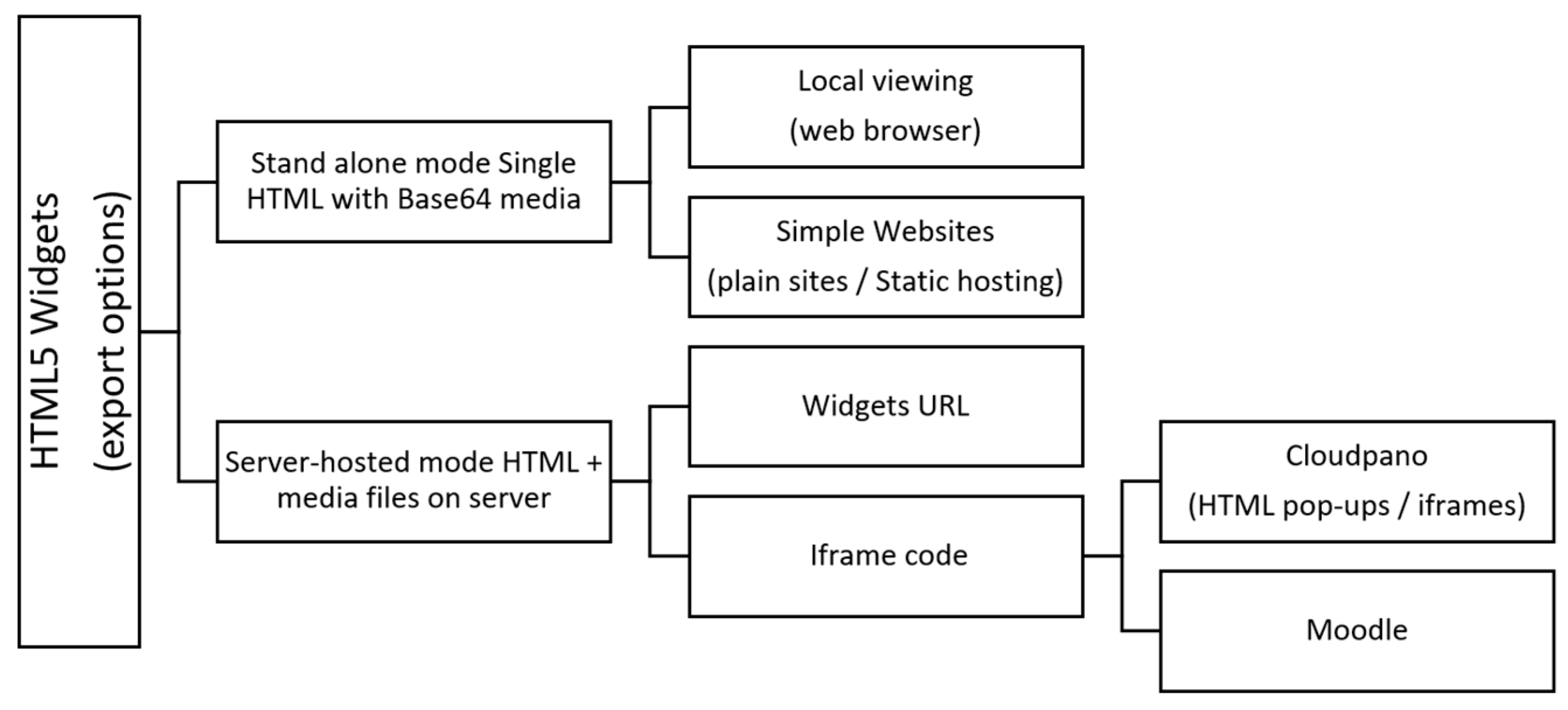
The export workflow includes two scenarios. If the user chooses “local use”, the final HTML embeds the media in Base64, generating a single self-contained file (useful when there is no server or when managing URLs is not desired). If they choose “host on server”, the wizard uploads the files (via an upload.php file, included on the widget access page, to servers running PHP), and the HTML references absolute URLs to these media files, keeping the document lightweight. This approach is particularly suitable for CloudPano, mobile applications, custom solutions, or environments with hosting restrictions, while H5P remains a valid alternative when working within LMSs such as Moodle, Canvas, or Blackboard and prioritizing content-type-driven authoring, although its performance and mobile style are not always optimal for embedded tours. In short, our solution minimizes dependencies, reduces file sizes, improves portability, and avoids third-party blocking (Lumi/external hosting), allowing for seamless server migration or republishing while maintaining comprehensive control over the resource lifecycle.
The eight widgets developed for this work were chosen from needs observed across several years of building educational 360° virtual tours in health, heritage, engineering, and architecture. We prioritized components that address the most frequent instructional goals while keeping learners inside the tour (avoiding context switches)—those that work on low-end devices with minimal dependencies and that can be embedded as HTML pop-ups. Concretely, the set covers common media and tasks: an image gallery (illustrate scenes), a PDF viewer (readings, safety sheets), a quiz (quick formative checks), a 3D model viewer (inspect STEM artifacts), a webpage viewer (integrate existing tools), an audio player (narrations/soundscapes), a YouTube viewer (lectures/demos), and an image comparison (before/after analysis). We explicitly included PDF and 3D viewers because they are not available in H5P yet, providing immediate added value for upcoming tours under development.
3.1. Widget Creation Website Design
The website where the widgets developed in this project can be run is free and accessible at
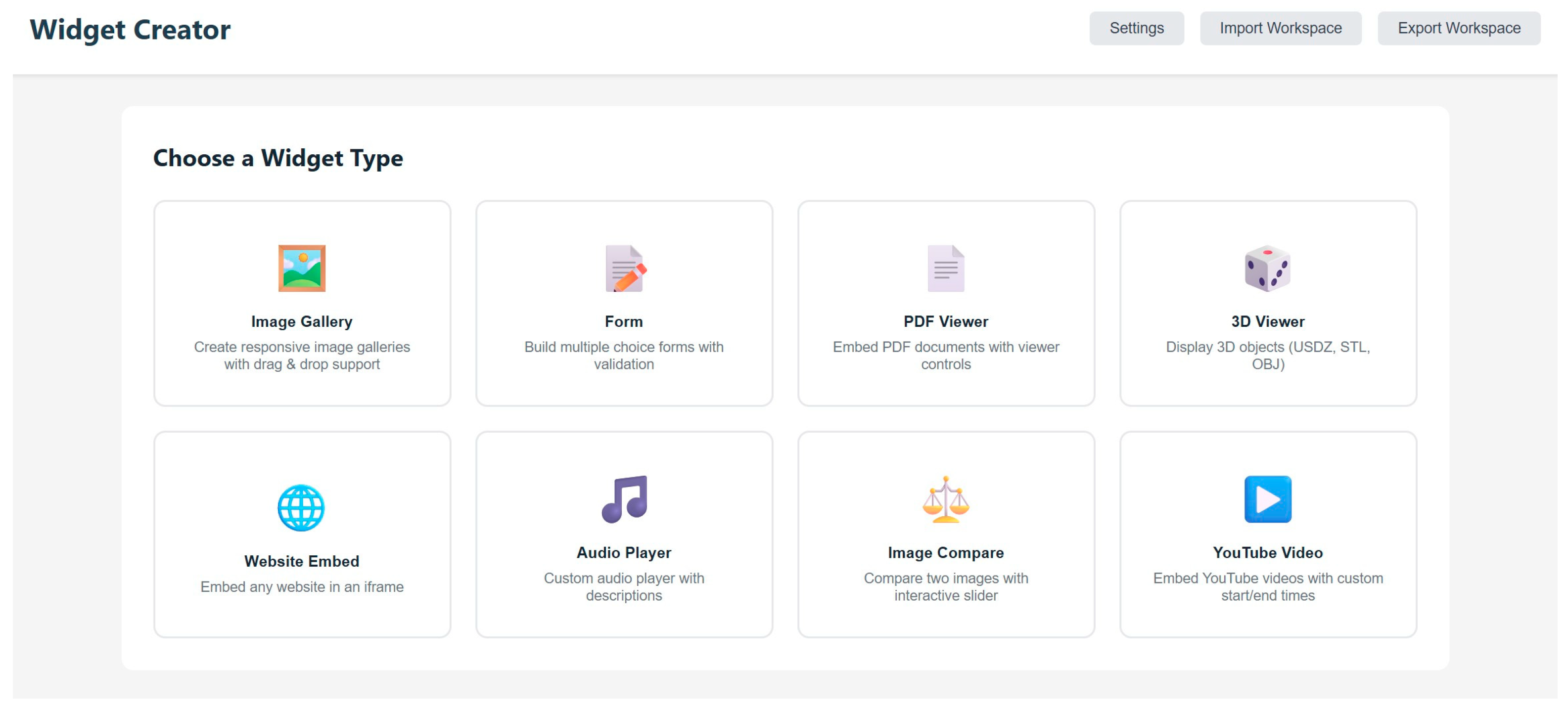
https://widgets.revingarq.com/ (accessed on 20 December 2025). The site has a very simple design; it is only necessary to choose a widget to create to begin designing it. However, before starting the process, the user must indicate with the “Settings” button whether they wish to use a server to store the multimedia resources that they wish to display (otherwise, the application will only allow local use). To configure server usage, the user must first install the upload.php file on the desired host (this file can be downloaded from the Settings tab). Then, to configure the upload to the server, they should specify an upload URL in the format “
https://Myserver/upload.php”. This will be the base public path where the widgets will be hosted. Then, they should ensure that the server has write permissions to the directory where they will be saved and, finally, save the configuration. Following this, the widgets will be hosted on the user’s own server and can be embedded in a URL or iframe. The design of the widget creation website can be seen in
Figure 1.
The page allows users to save recently created widgets so that they can edit them and generate the HTML code at any time. This streamlines widget creation and modification. Once they select the widget that they wish to create, its configuration page appears, where they can select its most important features. Common to all widgets is the ability to use predefined dimensions for the pop-up window or make it responsive depending on the screen size. By default, fixed dimensions are used (width: 100 vw; height: 85 vh) that ensure proper display on a wide range of devices (desktop and mobile) and different formats (horizontal or vertical). Additionally, all widgets include a preview of the created resource, allowing users to verify its accuracy before exporting it to HTML.
Each widget has its own features depending on the multimedia resource being developed. The image gallery allows users to customize the caption for each image, as well as select the gallery format: grid, mosaic, or carousel. The YouTube video viewer allows users to select the minute and second at which the video should start and end. The quiz allows users to create as many questions as they need. The PDF viewer allows users to choose whether or not to display the control bar. This bar allows them to navigate the document and download it. The PDF viewer works by adding the file directly or by specifying the file’s URL. The 3D model viewer allows users to select the intensity of the light illuminating the model. The supported 3D object formats are OBJ, STL, GLB, and glTF (GLTF). This widget also allows users to enable or disable the control panel and automatic model rotation. The webpage viewer widget is very simple; the user only needs to specify the URL that they wish to view. Among its features are the ability to enable or disable drop-down menus, full-screen mode, and borders. The audio widget supports MP3, M4A, OGG, and WAV formats, and customization options include adding titles, authors, and description tags, as well as assigning display colors. Finally, the image comparison tool allows users to label images “before” and “after” and select the slider’s position for interactive viewing.
Once the widget is created, there are different export options depending on the intended use of the created multimedia content. The various options available on the website are shown in
Figure 2.
3.2. Measuring Tools
To objectively measure the benefits of the proposed widgets compared to H5P, a battery of tests is designed focusing on three characteristics: the first (
Table 1) is the resource size, comparing this with the sizes of standalone HTML files (KB/MB); the second (
Table 2) is performance, measuring the opening speed of pop-ups on a webpage (time to first render and to interactive content, with and without caching); and the third is compatibility/displayability on PC and mobile devices (Android/iOS), verifying correct scaling, controls, and touch/keyboard response.
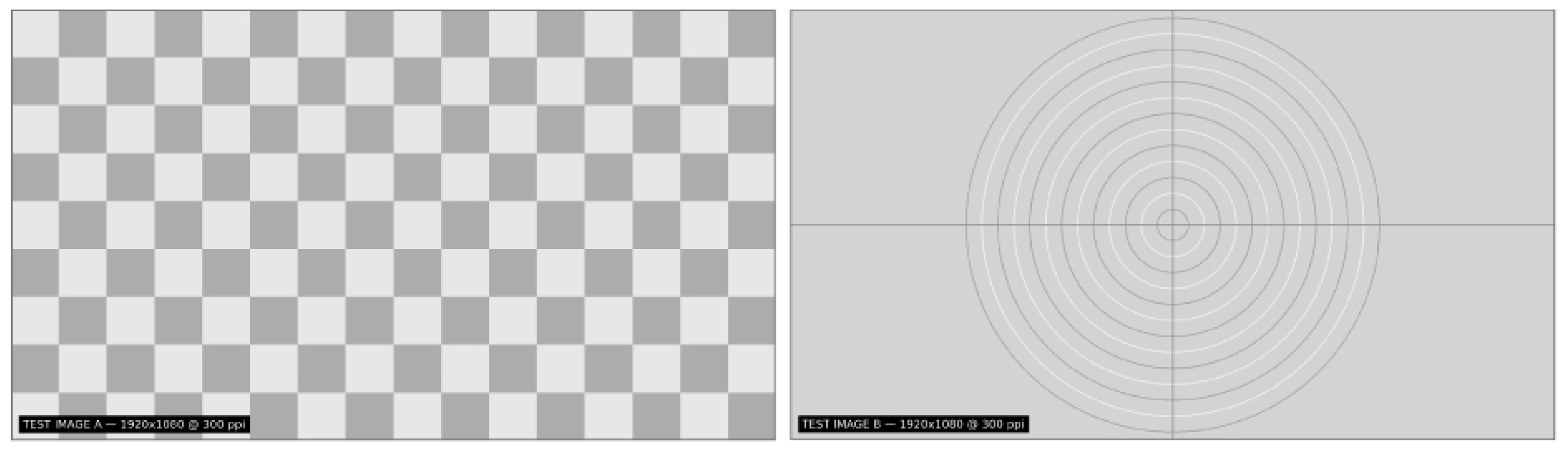
To compare the sizes of the widgets, equivalent pairs of each are generated (H5P version, exported with Lumi to embeddable HTML, and the standalone HTML version of the widgets designed in this work), reusing exactly the same multimedia assets (for widgets that use images, test images can be seen in
Figure 3). Once these files are available, the size of each is determined in a table, and the results are compared (
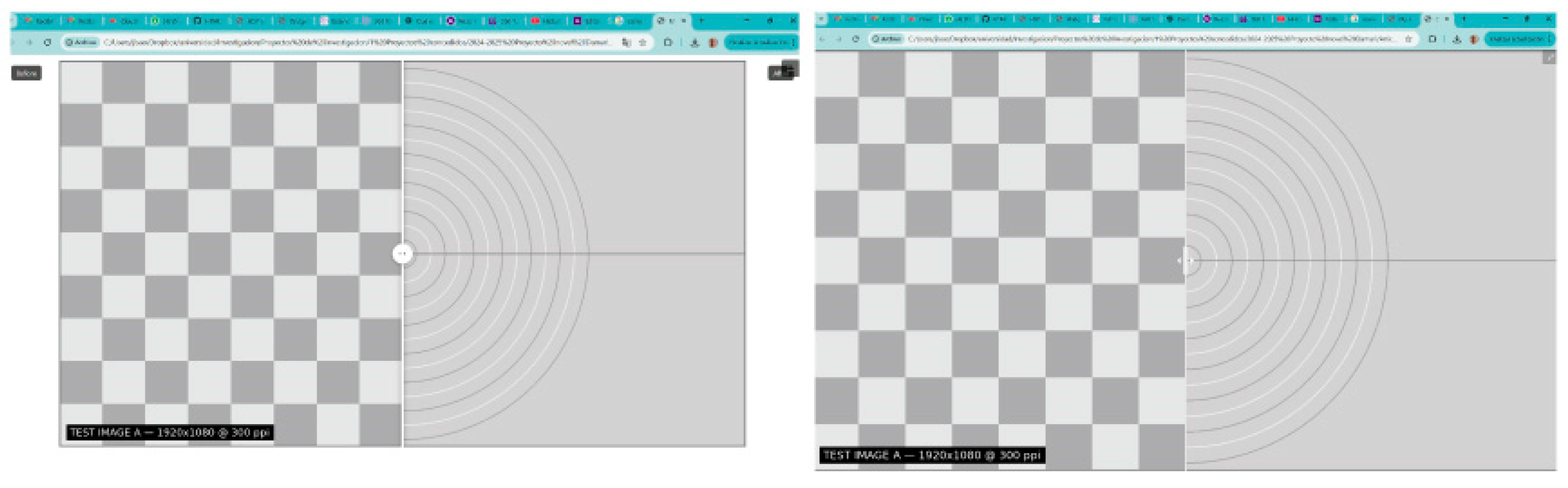
Figure 4). An example of compatibility on PC and mobile devices can be seen in
Figure 5.
Performance testing employs a measurement architecture that captures actual load times from within each widget. For our custom HTML5 widgets, the performance-reporter.js script is integrated directly into each widget. This script uses the browser’s Performance API to capture precise timing metrics, waiting for all images and iframes to fully load before reporting the results to the parent window via postMessage. H5P widgets are loaded via h5p-loader.html, which uses the h5p-standalone library to detect the H5P content path, initialize the entire framework, and measure the total load time, including framework initialization and all its external dependencies. The timing flow follows a rigorous sequence: first, the iframe is cleared by setting it to about:blank; then, the performance timer is started; the widget is loaded into the iframe; the system waits for the full load event; the widget reports its internal metrics via postMessage; and, finally, the results are displayed. The tests are run sequentially, one at a time, to ensure accurate measurements without network or resource contention, consistent browser behavior, and a fair comparison between both implementations, all while respecting browser security policies by using the postMessage API for communication between iframes, embedding the measurement code within each widget, and running on a local HTTP server to avoid CORS restrictions that would prevent H5P from working with the file://protocol.
To test the compatibility of the created widgets, we verify that they work on the main browsers and systems (Chrome, Edge, and Firefox on Windows and macOS; Safari (iOS); and Chrome (Android)). In each test, we record whether it works or not, the response of the mouse or touch controls, whether visual defects appear, and whether the full-screen option works, as well as the results when rotating the mobile device.
3.3. Experimental Protocol (Technical Evaluation)
The evaluation is limited to technical efficiency and deployment feasibility; no pedagogical outcomes are measured. The research questions of the experimental protocol are as follows: Do the HTML5 widgets reduce the package size versus H5P with identical assets? Do they improve the load performance (time to first render/interaction)? Do they maintain cross-browser/device compatibility in real deployments? To answer these research questions, we compare our HTML5 widgets (standalone and hosted) with functionally equivalent H5P/Lumi versions built from the same media assets (images, a PDF, a 3D model, audio, and a YouTube video). We restrict the baseline to H5P/Lumi because it is the most widely adopted open-source authoring standard in higher education virtual classrooms (e.g., Moodle/Canvas), and it provides a packaging model (self-contained bundle with a client-side runtime) that closely matches our HTML5 widgets. Extending the comparison to additional open-source stacks is noted as future work.
Comparison tests are run on major desktop and mobile browsers and embedded as HTML pop-ups in CloudPano and iframes in Moodle. For each widget/condition, we record the package size from build artifacts; load times using browser tools/a stopwatch; and compatibility. We operationalize deployment feasibility as successful embedding without additional backend services (beyond standard web hosting) and correct rendering in CloudPano and Moodle. Each widget/implementation (HTML5 vs. H5P/Lumi) is measured 30 times after 2 discarded warm-up runs (total: 32 loads), using a sequential execution with a 300 ms inter-run delay. Benchmarks are executed locally (localhost) to isolate the architectural overhead from network variability. The harness auto-records environment data via browser APIs (browser/version, OS, CPU cores, device memory, screen resolution, device–pixel ratio, timestamp). Our benchmark system, used as a reference, consists of Chrome 131 on macOS 15.1, 10 CPU cores, 16 GB device memory, 3024 × 1964 screen, and DPR = 2; compatibility checks additionally verify Edge/Chrome/Firefox/Safari on Windows/macOS with consistent behavior. Results are reported as simple descriptive comparisons (percent deltas and notes). We do not collect user-level performance, satisfaction, engagement, or learning data; therefore, no inferences are made about learning outcomes. The findings should be interpreted as bounded by the reported assets, network/hosting setup, and test environment. Future work will include classroom deployments and comparative studies to examine engagement and learning effects.
Regarding security considerations, a full security audit is beyond our scope, but we follow simple hardening rules suitable for educational deployments. For iframes, we only load content from trusted sites and use the browser sandbox so that embedded pages have limited privileges; we also prevent our pages from being embedded by unknown sites. For widget messaging via postMessage, we accept messages only from known origins and in the expected format, and we ignore everything else. For the optional PHP upload, the server checks the file type and size on upload, renames files, stores them outside the public web folder, and prevents execution in the upload area. We recommend serving all content over HTTPS and, where possible, enabling basic rate limiting and antivirus scans. These measures keep the model lightweight while addressing common risks.
On the other hand, it is interesting to note that, although our evaluation focuses on technical efficiency and deployment feasibility, the widgets target concrete pedagogical use cases inside 360° tours. For example, in heritage/art history, learners can open an image gallery to inspect high-resolution details in situ, use image comparison to contrast “before/after” restoration, and answer a short quiz to check recall at the end of a room. In the engineering/architecture fields, students can view a PDF with a datasheet or plan next to the photographed equipment, rotate a 3D model of a part to understand its geometry, and watch a short embedded video before completing a micro-assessment. In science labs, a safety PDF and a short audio briefing are opened via hotspots prior to simulated procedures, reducing context-switching outside the tour. In language learning, learners can access authentic webpages (embedded) and audio prompts directly from locations in the tour, followed by a quick quiz for vocabulary retrieval. These patterns align with smart learning aims (contextualization, just-in-time access, and low-friction micro-assessments), while formal learning outcome studies are left for future work.
4. Results
As a result of this work, eight functional widgets have been created (image comparison, quiz, image gallery, audio, website, YouTube video, 3D model visualization, and PDF visualization), which can be viewed and tested at
https://widgets.revingarq.com/. Each widget can be created in two versions: with the multimedia files included (standalone) and with the multimedia files hosted on a server (URL and iframe). Once the widgets were created, they were compared with equivalent widgets developed in H5P. The desktop version of the Lumi Education application was used to create these widgets. The comparison was based on three main characteristics (size, performance, and accessibility), as well as their suitability for use in virtual tour programs (in this case, Cloudpano) and virtual classrooms.
The first characteristic to evaluate is the resource’s size, comparing the sizes of the standalone HTML files (KB/MB). Using the same files in each case, we determined the size of the H5P file, the size of the same file exported to HTML, and the size of the standalone HTML file generated when running the widget that we designed. Each of these files contained the same multimedia files. The results obtained can be seen in
Table 1.
It is worth noting that two widgets are missing from H5P: the PDF viewer and the 3D model viewer. The file sizes of these widgets are heavily influenced by the files being displayed. In this case, a 3D model of a bust of Nefertiti was used, measuring 3575 KB, along with a seven-page PDF of text weighing 958 KB.
On the other hand, it should be noted that the standalone HTML files generated by our widget application can be run directly in any browser (the same applies to HTML files exported from H5P). An example of this visualization can be seen in
Figure 4.
The second characteristic to be evaluated is performance. We measured the time-to-first-render and time-to-interactive for each widget when opened as a web pop-up, with and without caching. Tests were executed on a local web server to isolate the architectural overhead (parsing, rendering, initialization) from network variability (CDN latency, geography, congestion). We ran 30 measured iterations per widget; warm-up runs were discarded and the browser cache was preserved between runs. We report the mean, standard deviation (SD), and 95% confidence intervals (CI). The results are summarized in
Table 2. The automation script and test harness are available at
https://github.com/joseluissaorin/HTML5Widgets/tree/main/tests/performance (accessed on 20 December 2025).
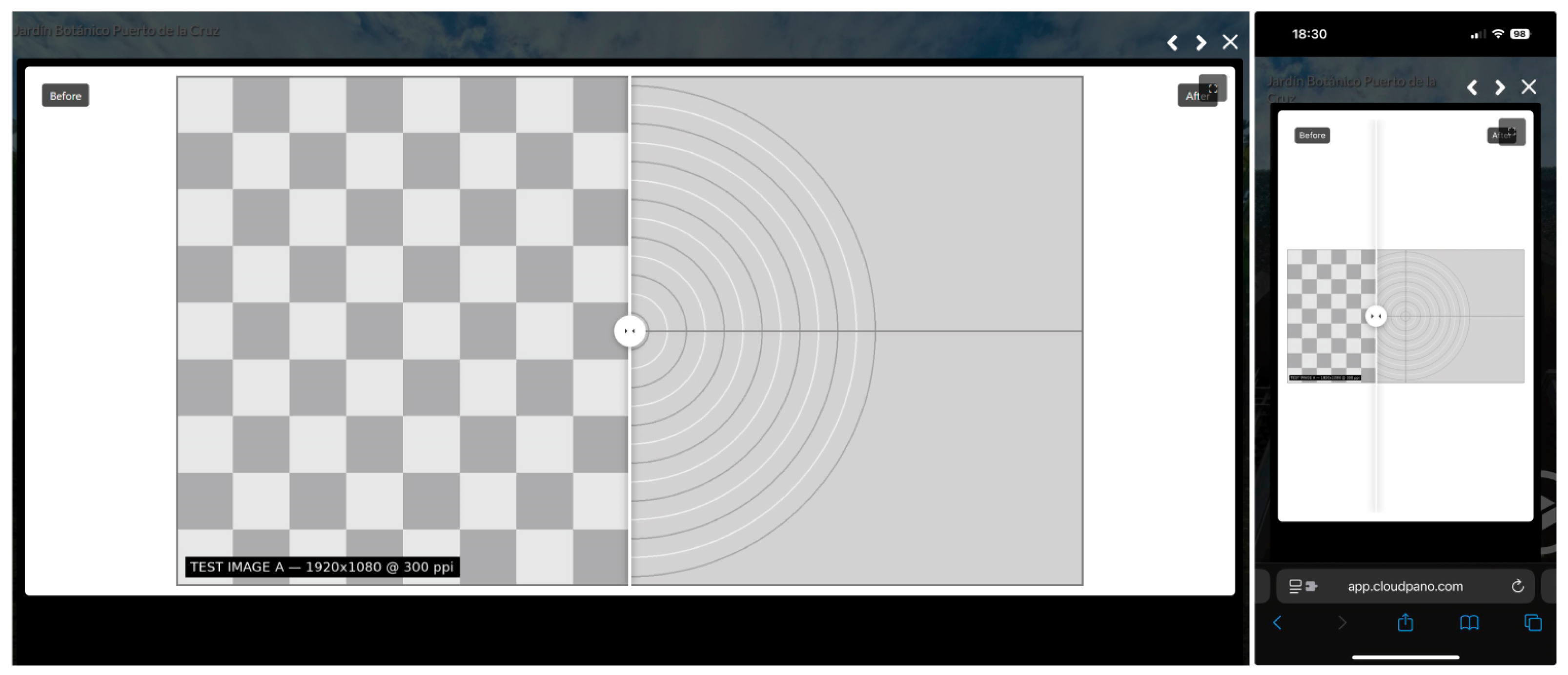
The third feature to check is compatibility/display on PC and mobile devices (Android/iOS), verifying correct scaling, controls, and touch/keyboard response. In this case, we focused on the display of these widgets in Cloudpano, across different browsers and mobile devices. To do this, we included them in a test hotspot on the tour, selecting the HTML pop-up window option and adding the code ‘<iframe src=“
https://widgets.revingarq.com/share/MyImageComparison_20251021134457_7ffebd3d.html” style=“width: 100 vw; height: 85 vh; border: none;” allowfullscreen></iframe>’. We then checked their correct functionality on all devices in a virtual test tour accessible at
https://app.cloudpano.com/tours/KOaIBcHki (accessed on 20 December 2025). An example of this can be seen in
Figure 5. The operation of the full-screen button on a PC has also been checked and verified to work correctly.
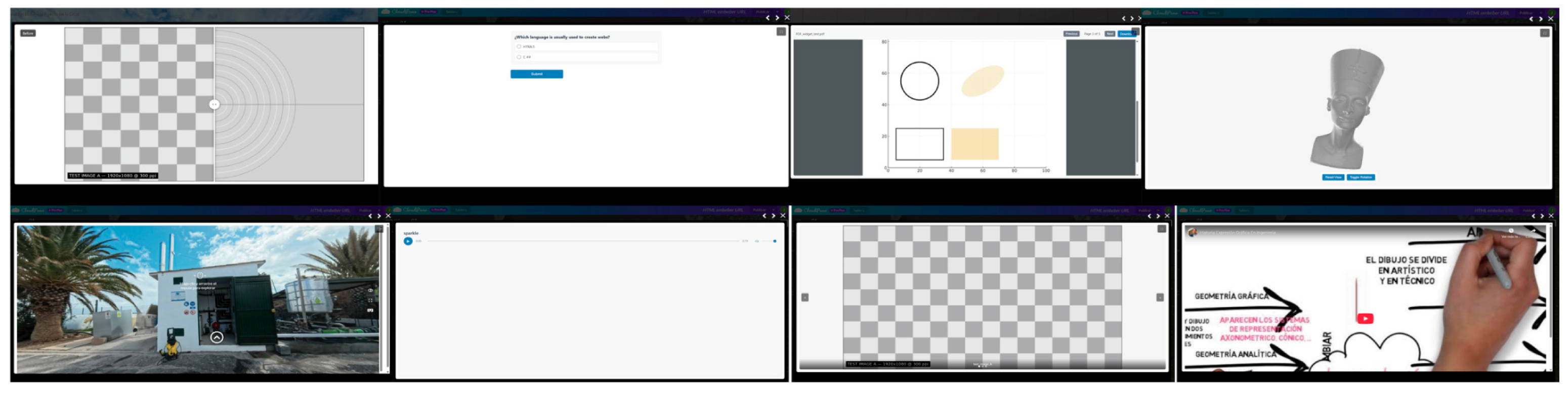
The display of all widgets created is shown in
Figure 6. It should be noted that they were created with the default values (width: 100 vw; height: 85 vh). These values can be changed to achieve better visualization, but, in this case, this was not necessary. All of them are displayed on a PC monitor, with the pop-up window not in full screen. As we can see in
Figure 5, the display is correct in all of them.
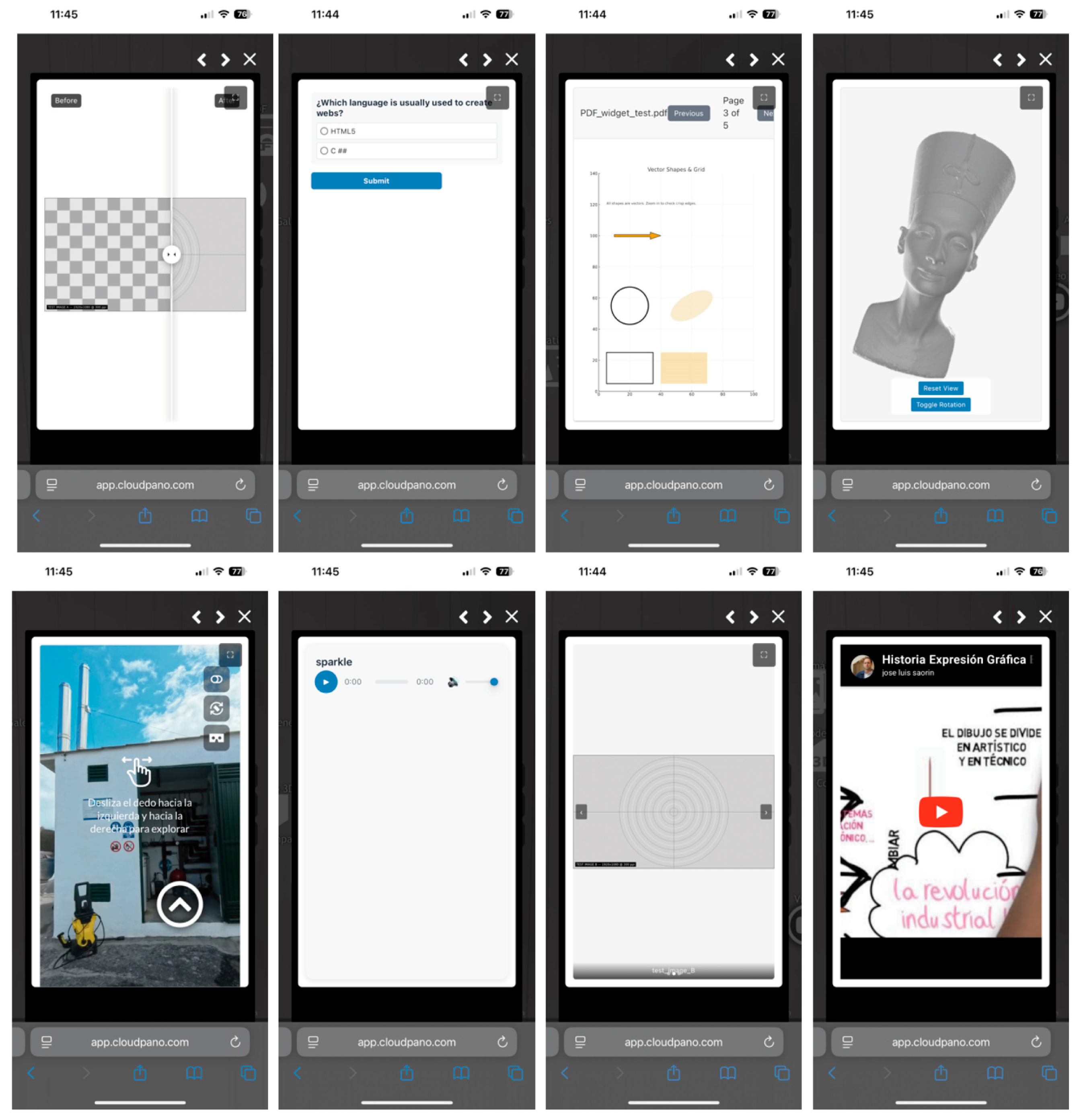
This aspect has also been checked on mobile devices (
Figure 7), achieving adequate visualization and verifying that they react to touch gestures on such devices (for example, to turn the pages of a PDF, the user can swipe a finger, without needing to touch the “next page” button).
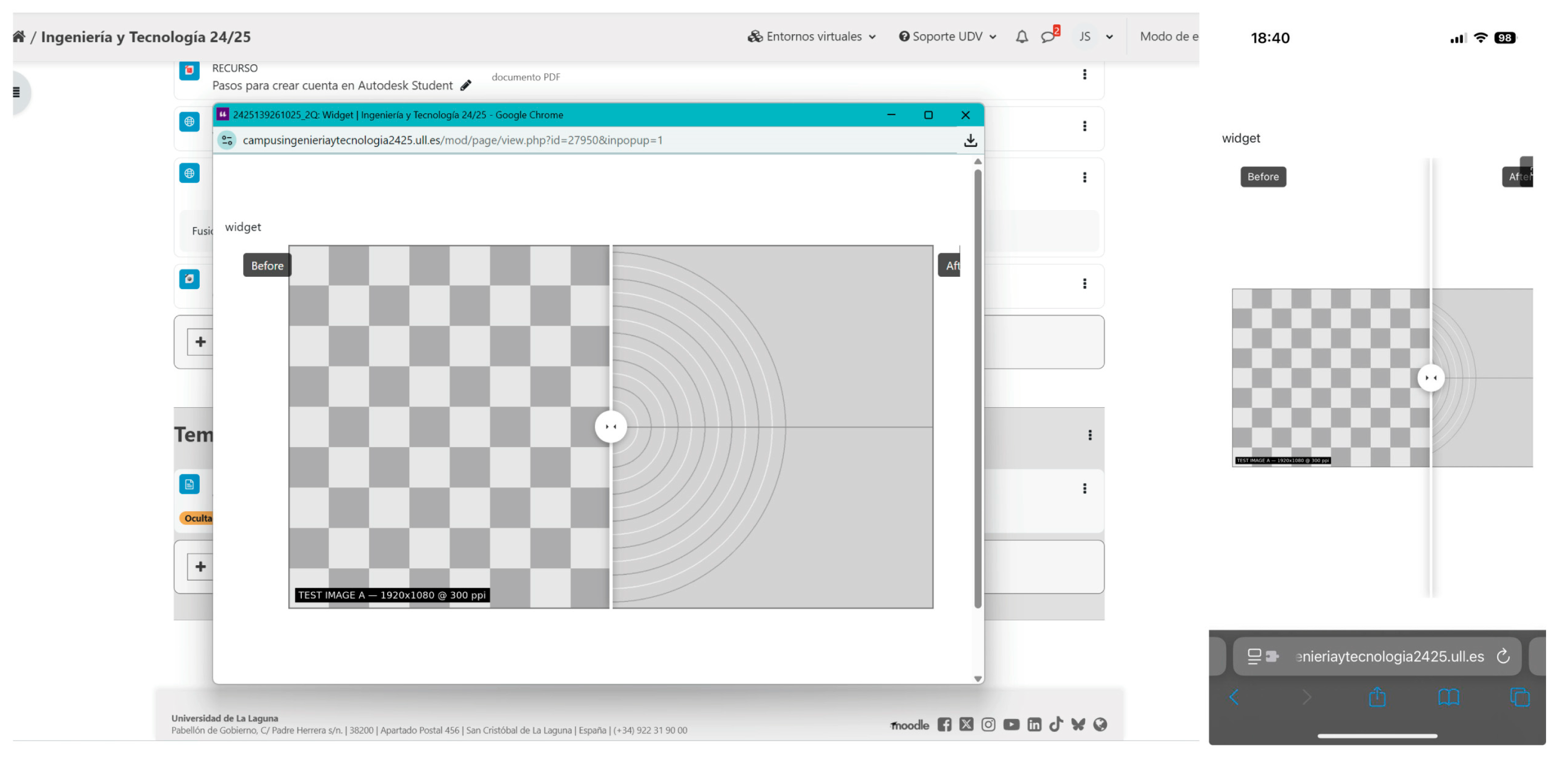
As a final check, it was verified that the widgets developed in this work also functioned in a Moodle virtual classroom (in this case, the widgets functioned as a multimedia resource without requiring a virtual tour). To do this, they were included in a virtual classroom at the University of La Laguna, adding a “page” resource and including the HTML code with an iframe. This was the same code that was included in Cloudpano. An example of this visualization can be seen in
Figure 8. It is worth noting that, for visualization in both Cloudpano and the Moodle virtual classroom, the HTML was embedded in an iframe. These integrations confirmed successful embedding and correct rendering across viewers and LMS contexts under our compatibility checks.
As a final result of this work, an open-source repository has been created on GitHub, where all source files, including performance tests, can be accessed. Instructions for its use are also included, so that any user can access and modify the work performed in this study. The web address to access this repository is
https://github.com/joseluissaorin/HTML5Widgets (accessed on 20 December 2025).
5. Conclusions and Future Work
Framed within the smart learning paradigm, our approach tackles both technical and economic barriers in 360° tours while enabling personalized, ubiquitous, and multimodal experiences. Because the widgets are open-source, lightweight, and reusable HTML5 micro-components, they can be embedded directly in 360° tours and virtual classrooms, preserving in-tour continuity and cross-device compatibility. The conclusions below concern technical efficiency and deployment feasibility under the reported test conditions; the user experience and learning outcomes were not evaluated in this study.
From the work carried out, we can draw several technical conclusions within the reported test conditions. The first is that we have successfully created the eight widgets planned and have verified that they function correctly (displaying properly without needing to leave the virtual tour environment) in Cloudpano using the HTML pop-up infospots option. We have also verified that each widget developed can be used in Moodle-type virtual classrooms as embedded iframes, regardless of whether a virtual tour is created. With this, we expand the multimedia options of virtual tour programs that allow the inclusion of HTML pop-ups (iframes), giving educators more options both for the creation of virtual tours and for the use of virtual classrooms.
On the other hand, the website created to access the widgets (
https://widgets.revingarq.com/ (accessed on 20 December 2025)) allows any user to generate their own multimedia content (both locally (content embedded in the HTML file) and in iframe format with content hosted on their own server). This website provides the educational community with a new multimedia resource center that can be expanded in the future with new widgets of interest. The widget code is also available to the community in open-source format, allowing users to modify and adapt these resources to their own needs (
https://github.com/joseluissaorin/HTML5Widgets (accessed on 20 December 2025)).
Moreover, we have created widgets for the viewing of embedded 3D models and PDFs, which are not available in most virtual tour applications or even in H5P. These two widgets eliminate the need to rely on external platforms to view this content (Sketchfab is one of the most popular for viewing 3D models, and Scribd or Issuu are common options for viewing PDFs). This may allow for greater control over multimedia resources and reduces the dependence on external subscription platforms in the tested deployments.
In relation to the comparison with other existing solutions, in this work, we have focused on comparing our widgets with those generated by H5P. Based on the results of the measurements (
Table 1), our HTML widgets in the local format (with multimedia resources included) were between 20 and 100 times lighter in our tests, under identical assets and packaging assumptions, than those generated with Lumi Education. This is because they do not use external libraries or dependencies, which facilitates their use in both virtual tours and virtual classrooms.
Focusing on performance, we measured the opening speed of pop-ups on a webpage (time-to-first-render and time-to-interactive-content, with and without caching). Under identical assets and test setups, the measured time-to-first-render/-interaction decreased from ≈112 ms (H5P) to ≤0.5 ms (HTML5 widgets). Based on these measurements, we observed faster initial rendering and interaction under our lab setup; absolute values will vary with networks and devices.
In relation to compatibility and display on PC and mobile devices, we observed compatibility with major browsers in our tests, with correct display and functionality on the devices evaluated. Furthermore, each widget allows for customization regarding its size and display style, enabling users to achieve a customized display tailored to their specific needs. The same applies to the use of these widgets in virtual classrooms, although this was not the primary focus of this project. In summary, the proposed HTML5 widget library reduced the package size (between 20 and 100 times vs. H5P in our tests) and shortened the measured load time under the reported conditions, while maintaining functionality and improving portability (pure HTML/JS, standalone, or on-premises server). These results suggest that the solution is particularly suitable for 360° tours with bandwidth constraints or the need to embed heterogeneous multimedia without recurring costs. However, these technical results should not be interpreted as evidence of pedagogical effectiveness.
From a smart learning perspective, our results support the premise that reducing technical friction (asset weight, dependencies, deployment) is a prerequisite in making rich educational experiences more feasible. The proposed widgets can function as lightweight, open building blocks that may make rich, in-tour media interactions more feasible beyond single-tool pipelines. By combining low recurring costs, multi-device delivery, and virtual classroom embedding, they can enable teachers to orchestrate authentic, just-in-time resources inside 360° tours and to adapt them to diverse learners and settings. However, scalability beyond our test contexts and learning impacts were not evaluated here.
With respect to future work, in the short term, we will consolidate the current library of eight widgets, improve the documentation and examples, and add a small set of high-demand variants while keeping the codebase lightweight. In the medium term, we will deploy educational 360° tours that integrate the widgets into authentic classroom activities to observe their usability and deployment patterns under real constraints. In the long term, we plan to release a free, open-source authoring tool for 360° tours that natively embeds the widgets via HTML pop-ups and simplifies packaging for school servers and virtual classrooms. In this way, we hope to provide the educational community with a free tool that bridges the gap between price and multimedia options, allowing anyone to create their own virtual tours without subscriptions or extensive computer skills.




 ,
,