Article

Monocular Vision-Based Obstacle Height Estimation for Mobile Robot

1
DH AUTOEYE, Hwaseong 18468, Republic of Korea
2
Hyundai Motors, Hwaseong 18278, Republic of Korea
3
CLABIL, Seoul 06033, Republic of Korea
4
Department of Mechanical System Engineering, Myongji University, Yongin 17058, Republic of Korea
*
Author to whom correspondence should be addressed.
Appl. Sci. 2025, 15(23), 12711; https://doi.org/10.3390/app152312711
Submission received: 19 September 2025 / Revised: 25 November 2025 / Accepted: 26 November 2025 / Published: 1 December 2025

Abstract

For a robot to operate robustly in diverse real-world environments, reliable obstacle perception is essential, which fundamentally requires depth information of the surrounding scene. Monocular depth estimation provides a lightweight alternative to active sensors by predicting depth from a single RGB image. However, due to the absence of sufficient geometric and optical cues, it suffers from inherent depth ambiguity. To address this limitation, we propose R-Depth Net, a monocular absolute depth estimation network that utilizes distance-dependent defocus blur variations and optical flow as complementary depth signals. Furthermore, based on the depth maps generated by R-Depth Net, we design an algorithm for obstacle height estimation and traversability assessment. Experimental results in real-world environments show that the proposed method achieves an average RMSE of 0.30 m (15.7%) and MAE of 0.26 m (15.7%) for distance estimation within the 1.0–3.0 m range. For obstacle height estimation in the range of 0.10–0.20 m, the system achieves an average RMSE of 0.048 m (29.3%) and MAE of 0.040 m (26.4%). Finally, real-time deployment on a quadruped robot demonstrates that the estimated depth and height are sufficiently accurate to support on-board obstacle traversal decision-making.

1. Introduction

With the recent commercialization of autonomous robotic systems, their adoption in consumer markets has grown steadily. This trend has increased the demand for cost-effective robotic platforms, highlighting the need to reduce the cost of depth perception sensors, which are among the primary contributors to the overall price of autonomous robots.
Representative depth perception sensors include LiDAR and stereo cameras. LiDAR provides highly accurate depth measurements but suffers from high cost and limited spatial resolution, making it difficult to detect small obstacles such as curbs [1]. Meanwhile, stereo cameras offer a more cost-efficient alternative and enable the detection of small obstacles by leveraging high-resolution imagery. However, reliable distance estimation using stereo vision requires calibration with a reference plane or an object with known physical dimensions, which limits its practicality in unstructured environments [2].
To address these limitations, monocular depth estimation has emerged as a promising alternative. By predicting depth from a single image, it offers significant advantages in cost efficiency and deployment flexibility across diverse environments [3,4,5].
Monocular depth estimation can be broadly categorized into relative depth estimation and absolute depth estimation [6]. Relative depth estimation predicts only the relative distance relationships within a scene, without providing actual metric distance values, but it can determine which objects are closer or farther. In contrast, absolute depth estimation predicts the real-world distance value at each pixel, making it essential for quantitative decision-making tasks in robotics, such as path planning, obstacle avoidance, and terrain analysis.
One of the representative approaches to absolute depth estimation is to capture multiple images at different focal settings and infer depth using defocus cues [7]. However, this approach has key limitations: it requires an additional mechanical focusing mechanism, and the sequential capture of multi-focus images introduces temporal delay, making it unsuitable for real-time applications. Apple’s Depth Pro proposes a model capable of predicting high-resolution metric depth [8], while ZoeDepth shows excellent generalization ability as a zero-shot model capable of consistent absolute depth estimation across diverse environments without additional tuning [9]. Despite their strong accuracy and robustness, these models require high-performance computational hardware and exhibit slow inference speeds, which makes them difficult to deploy in real-time robotic systems with limited onboard computing resources.
In this work, we propose R-Depth Net, a deep-learning-based network for depth estimation that integrates the optical characteristics of cameras with the motion properties of robots to enable monocular absolute depth estimation applicable to robotic systems. When camera parameters such as aperture size and focal length are fixed, the amount of blur varies with the distance of the object. This variation in blur magnitude can be used to estimate the object’s distance [10]. During forward motion, nearer objects exhibit larger apparent motion in the image, whereas farther objects move more slowly [11]. However, motion blur acts as a major disturbance when estimating depth from defocus blur. To address this issue, we incorporate optical flow—which explicitly represents inter-frame motion—as an additional input, enabling the network to suppress motion-induced blur effects and more reliably learn depth cues derived from defocus characteristics.
The proposed R-Depth Net learns variations in blur intensity with respect to distance and the relative motion of objects to generate a depth map. The resulting depth maps were applied to an obstacle detection and height estimation algorithm, upon which experiments were conducted in which the robot selectively adjusted its walking mode according to the estimated obstacle height.

2. Depth Estimation Dataset

To train R-Depth Net, two types of input data are required: a defocussed image, which encodes blur information caused by distance variations, and an optical flow image, which reflects the motion characteristics of the robot. Depth maps were used as ground-truth labels. Defocussed images were obtained by capturing images with a fixed focal length and aperture value. As a result, objects at different distances naturally appear blurred, and this blur serves as a depth cue. The optical flow image was generated using an optical flow algorithm that computes pixel-level changes between consecutive frames. Optical flow represents the intensity of pixel displacements induced by parallax between two frames and is used to capture the relative motion of objects within the scene.
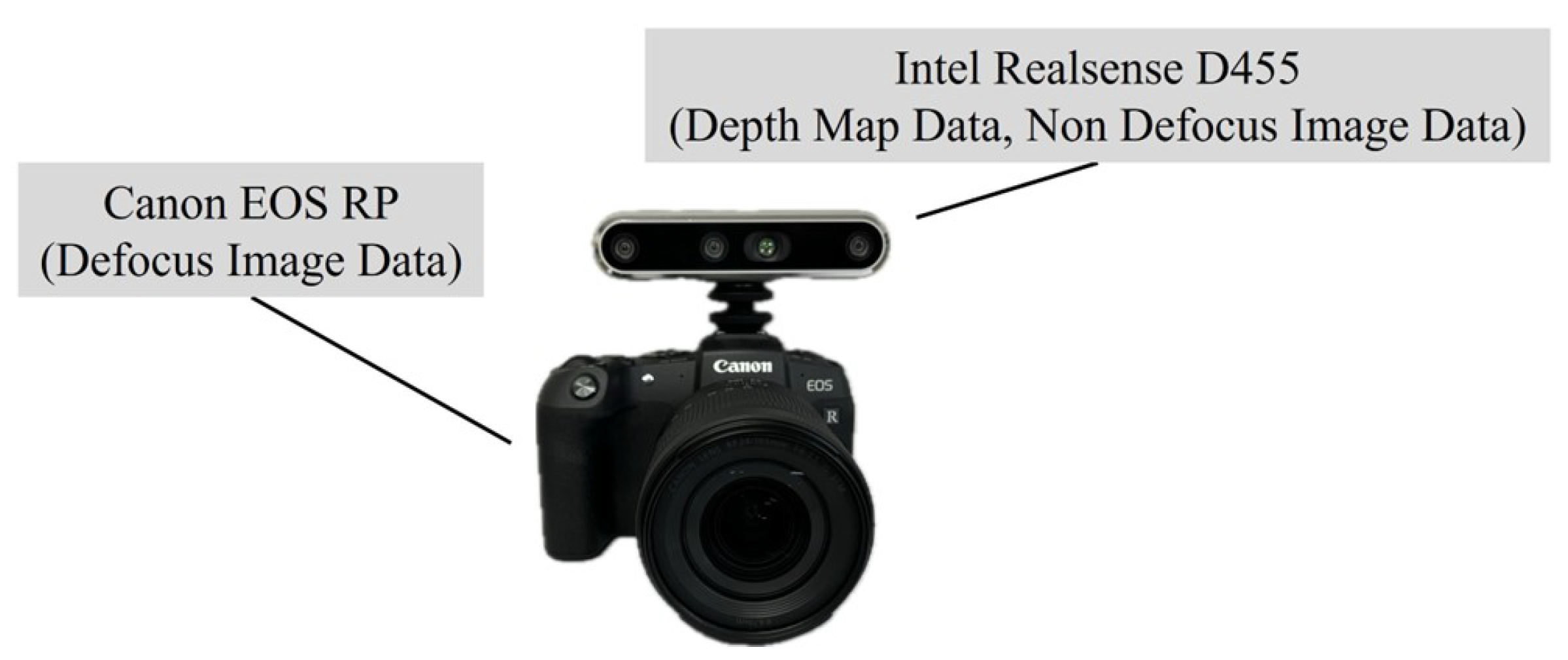
For dataset collection, a dedicated hardware setup, as illustrated in Figure 1, was employed [12]. The system consists of an Intel RealSense D455 and a Canon EOS RP. The Intel RealSense D455 was used to acquire labeled depth data for training, while the Canon EOS RP was utilized to capture Defocussed images and optical flow images as input data.
In total, 10,967 data samples were collected, of which 9249 were used for training, 764 for validation, and 954 for testing. To improve the generalization performance of the model, basic geometric data augmentation, such as vertical and horizontal flipping, was applied to the training set. Additionally, 61,499 images from the NYU Depth Dataset were employed as pretraining data [13].

2.1. Defocussed Image

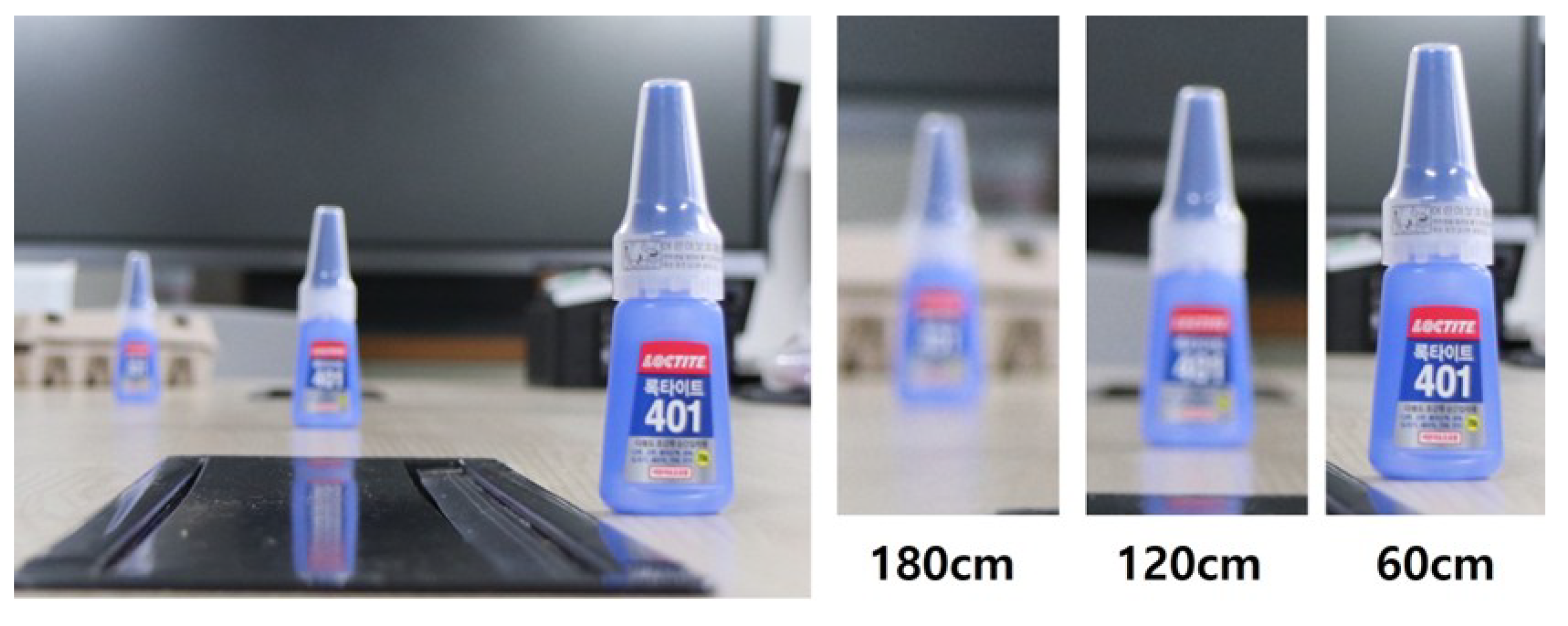
Figure 2 shows how blur magnitude increases with distance; notably, blur at 180 cm is stronger than at 60 cm. This example was captured using a lens with a 50 mm focal length and an aperture of f/1.8.
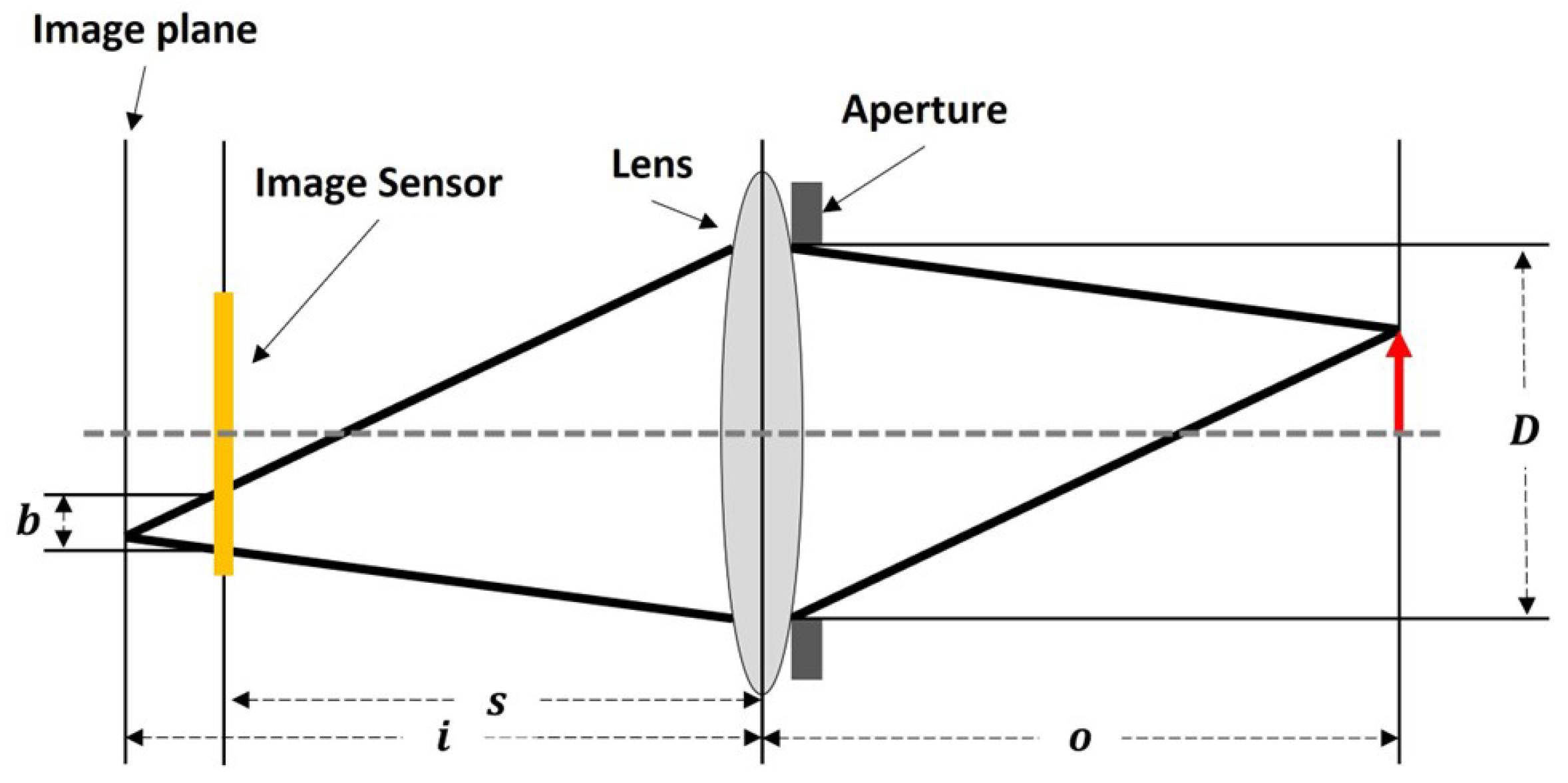
Figure 3 depicts the cross-sectional structure of a thin lens. As the distance between the image plane and the image sensor increases, the degree of blur becomes greater, while it decreases as the distance shortens. The extent of blurring can be calculated using geometric lens analysis based on the thin-lens equation [14]. Table 1 lists the variables used in calculating the degree of blur.
The distance between the lens and the image plane can be obtained using Equation (1). This equation geometrically describes the magnitude of blur, which arises from the variation in the image formation position depending on the difference between the object distance and the focal length.
b D = i s i i = D s D b
Equation (2) represents the thin lens equation. The thin lens equation describes the relationship among the distance between the lens and the image plane, the distance between the lens and the object, and the focal length.
1 f = 1 i + 1 o
By substituting Equation (1) into Equation (2), we derive Equation (3), which expresses the object distance as a function of blur magnitude and lens parameters. Equation (3) indicates that, when the aperture value and focal length are fixed, the object distance can be estimated based on the degree of blur. This allows the optimal aperture value and focal length for depth estimation from blur to be determined experimentally. Through preliminary experiments, we selected an aperture of f/4.5 and a focal length of 24 mm.
o = s f s f + b f D

2.2. Alignment of Depth Map to Defocussed Image

To generate a depth map corresponding to the defocussed image, it is necessary to align the data obtained from two different camera systems: the Intel RealSense D455 and the Canon EOS RP. Since the two cameras possess different fields of view and coordinate systems, the same object may appear at different positions in the respective images. To address this discrepancy, a feature point-based image registration algorithm was employed in this work [15]. The registration process is performed using feature points extracted from the RGB images of the Intel RealSense D455 and the defocussed images of the Canon EOS RP, thereby enabling the generation of a depth map aligned with the defocussed image.

2.3. Optical Flow Image

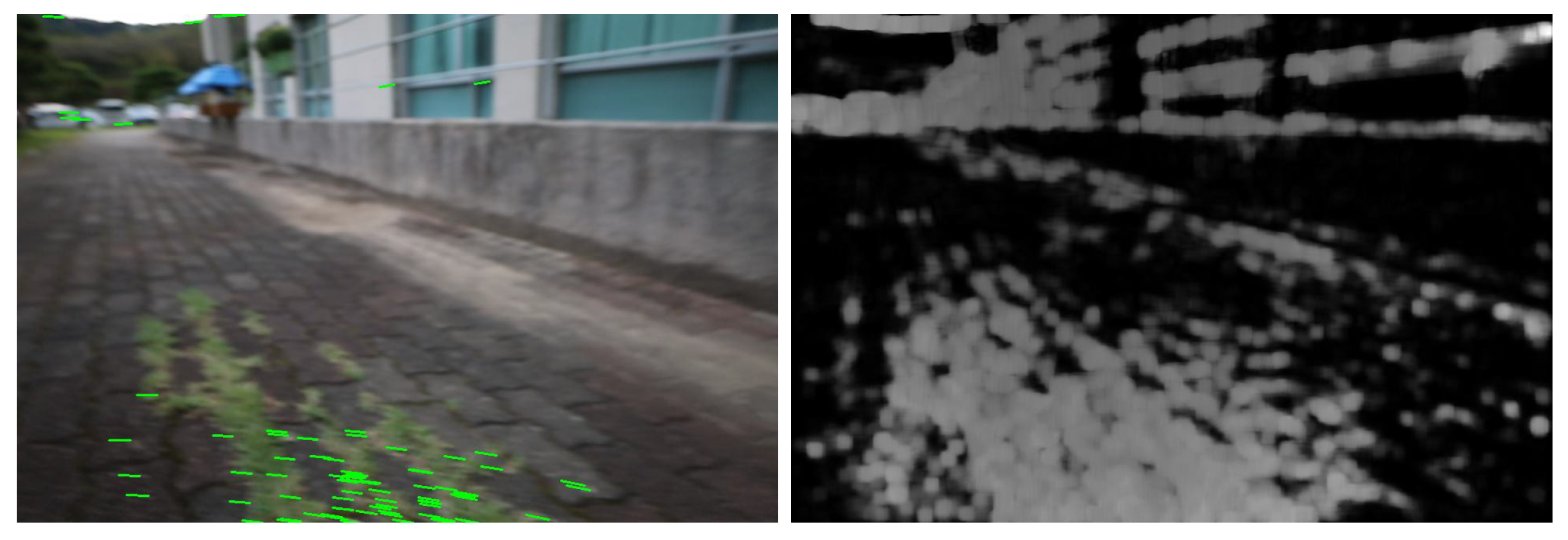
To generate the optical flow images, the Gunnar Farneback algorithm was employed [16]. Unlike sparse optical flow, which computes motion only in regions of interest, the Gunnar Farneback method is a dense optical flow approach that calculates motion across the entire image. Figure 4 illustrates examples of sparse and dense optical flow, where the dense method clearly provides richer information. Although dense optical flow requires longer computation time, this drawback can be sufficiently mitigated through GPU acceleration. For this reason, the Gunnar Farneback algorithm was adopted in this work.
The Gunnar Farneback algorithm outputs both magnitude and direction of motion. While the directional information can be used to estimate the movement direction of the robot, it is less critical for depth estimation. In our method, optical flow is used solely as a complementary cue to defocus cues and does not incorporate the robot’s physical speed. To decouple flow magnitude from speed variations, we apply normalization. Moreover, incorporating directional data increases the size of the neural network input, thereby raising computational costs. Therefore, in this work, only the magnitude information was utilized.

3. Depth Estimation Network

3.1. R-Depth Net

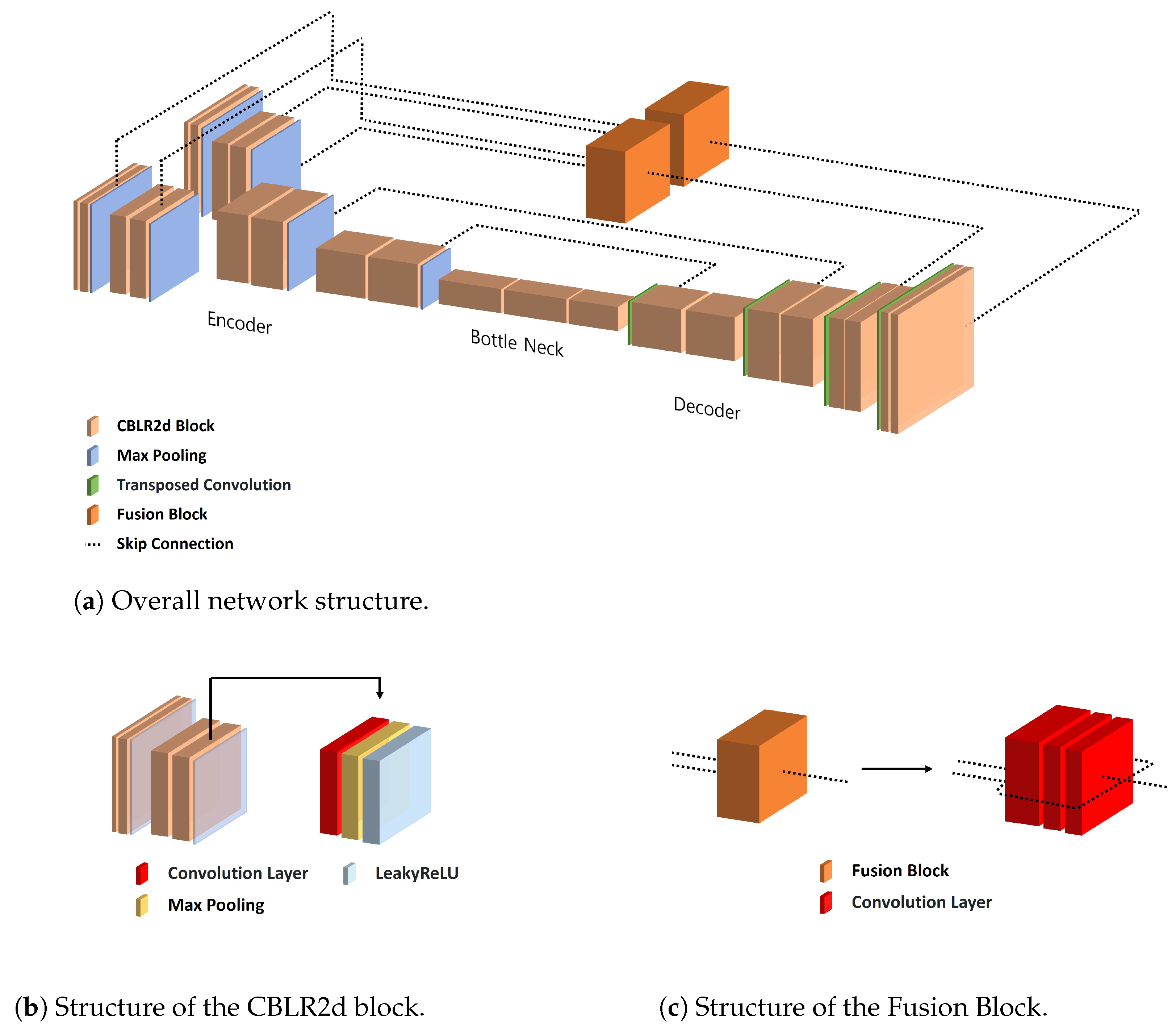
R-Depth Net takes the Defocussed image and optical flow image as inputs and produces a depth map representing distance information. As shown in Figure 5a, the network is composed of an encoder, decoder, bottleneck, and fusion block. The network employs two independent encoders to separately extract heterogeneous depth cues from defocus blur and optical flow, which prevents feature interference and preserves cue-specific depth information. Additionally, the architecture is intentionally designed to be lightweight and structurally simple to support real-time inference in low-power hardware environments. Skip connections are employed to mitigate information loss between the encoder and decoder. Features extracted from both encoders are integrated and dimensionally aligned through the fusion block before being passed to the decoder for final depth prediction.
(1)
CBLR2d Module
CBLR2d serves as the fundamental building block of R-Depth Net, sequentially performing convolution, batch normalization, and LeakyReLU operations. Figure 5b illustrates the structure of the CBLR2d module.
(2)
Fusion Block
To transfer the data extracted from the encoders to the decoder, the outputs of the two encoders must be fused and reshaped into a single representation. In the proposed model, this process is performed by the fusion block, as illustrated in Figure 5c, which integrates the features and adjusts their dimensions before passing them to the decoder.

3.2. Training

R-Depth Net is trained in a supervised learning manner, where the network is optimized to minimize the loss between the predicted depth maps and the ground truth. The Adaptive Moment Estimation (Adam) optimizer was employed for the optimization process.

3.3. Loss Function

The objective of R-Depth Net is to estimate depth maps, and for this purpose, BerHu loss and gradient loss were employed [17,18]. BerHu combines the robustness of Mean Absolute Error (MAE) with the smoothness of Mean Squared Error (MSE). While MAE loss is robust to outliers, it contains non-differentiable points due to its structure. On the other hand, MSE loss is differentiable everywhere but is highly sensitive to outliers. BerHu loss was designed to compensate for the drawbacks of both MAE and MSE losses. Equation (4) represents the MAE loss, Equation (5) represents the MSE loss, and Equation (6) defines the BerHu loss.
M A E = i = 1 n y true , i y predicted , i
M S E = i = 1 n y true , i y predicted , i 2
BerHuLoss ( a ) = a 2 + c 2 2 c , if | a | > c | a | , otherwise
a = y true y predicted , c = δ · max ( | a | )
Gradient loss is a loss function that computes the difference between the per-pixel gradients of the predicted depth map and those of the ground truth data. To calculate the gradients, the filters defined in Equation (7) were applied, and the differences between gradients were measured using the MAE loss.
M x = 1 0 1 1 0 1 1 0 1 , M y = 1 1 1 0 0 0 1 1 1
To compute the final loss from the BerHu loss and the gradient loss, weighted summation was applied to each component. The final loss, L t o t a l , is defined as in Equation (8), where w 1 = 0.6 and w 2 = 0.4 .
Loss total = ( w 1 × BerHu Loss ) + ( w 2 × Gradient Loss )

3.4. Training Result

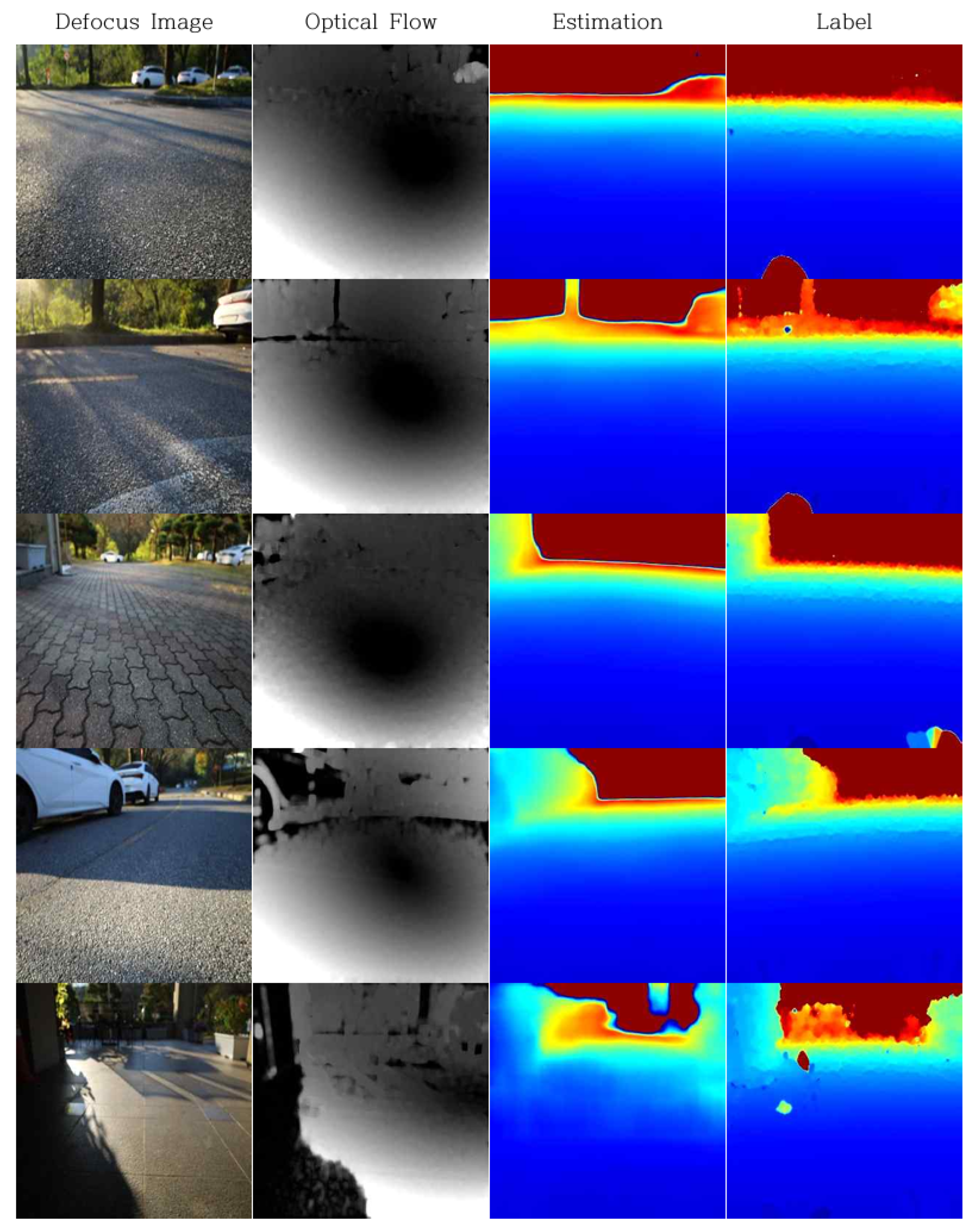
The training results are visually presented in Figure 6 and were quantitatively evaluated using a test dataset that was not included in the training process. The quantitative outcomes are summarized in Table 2 and Table 3.
Table 2 reports the results based on the accuracy under threshold metric, which measures the percentage of predictions that fall within a multiplicative factor of the ground truth. We use threshold factors of 1.25, 1.252, and 1.253, which correspond to allowable error ranges of approximately ±25%, ±56%, and ±95% relative to the ground truth, respectively. The proposed model achieved an accuracy of 95 % for δ < 1.25 , 97 % for δ < 1.25 2 , and 98 % for δ < 1.25 3 . The threshold metric is defined as in Equation (9).
δ = max y predicted y true , y true y predicted < threshold
Table 3 evaluates the depth estimation error using three metrics. The absolute relative error (AbsRel) was 6.5%, the squared relative error (SqRel) was 6.2%. These results demonstrate the effectiveness and potential of R-Depth Net for accurate depth estimation. The metrics were calculated using the formulas defined in Equations (10) and (11).
AbsRel = 1 N i = 1 N | y predicted , i y true , i | y true , i
SqRel = 1 N i = 1 N ( y predicted , i y true , i ) 2 y true , i ,
where N is the total number of pixels.

4. Obstacle Detection and Height Estimation

4.1. Obstacle Detection

For obstacle detection, a preprocessing step is required to separate the ground from other objects in the input image. In this work, a separation method based on depth variation patterns was adopted. When the camera observes the ground at a fixed angle, the ground depth tends to gradually increase along the vertical direction. In contrast, obstacles exhibit nearly constant depth values at specific positions, showing minimal variation. Leveraging these distance variation characteristics, we designed an obstacle detection algorithm that separates ground and obstacles based on pixel-level depth gradients.
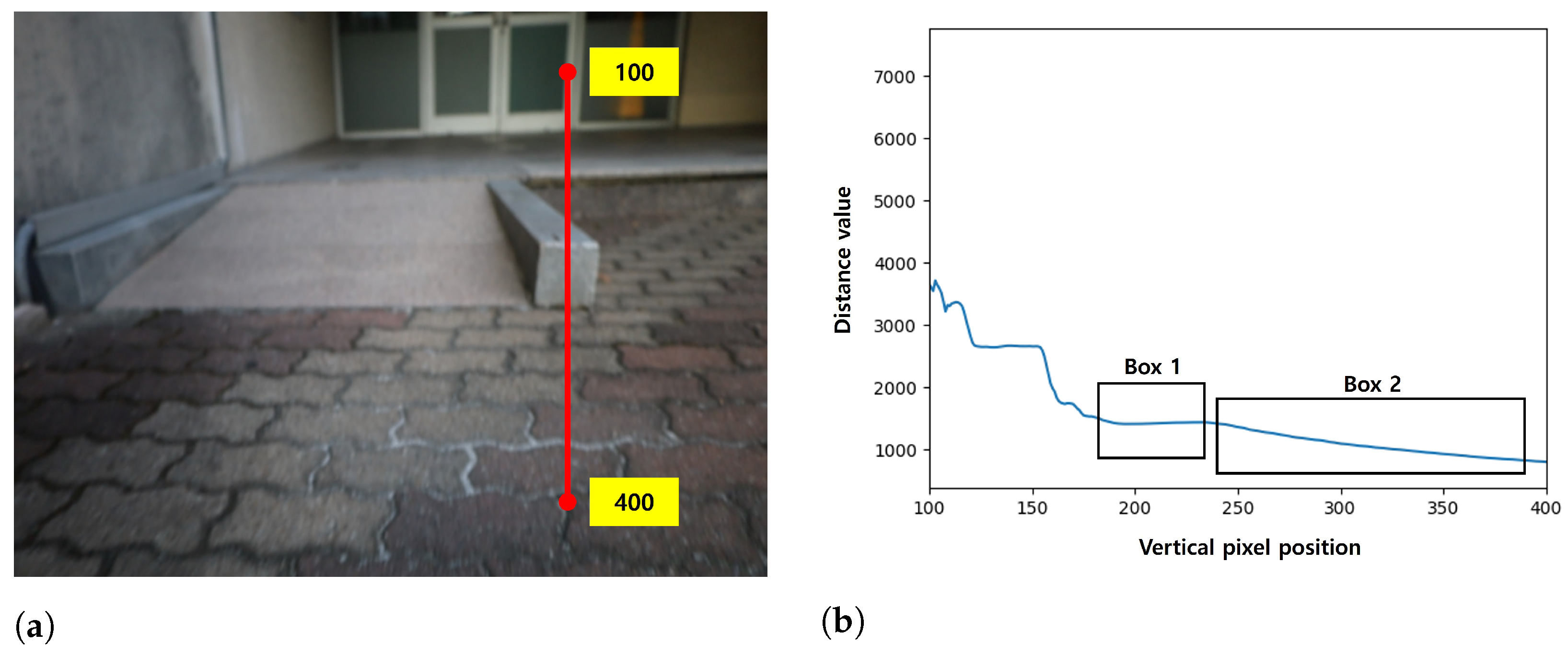
Figure 7 presents an image of obstacle depth. In Figure 7a, the depth profile along the red line is shown in Figure 7b. In Figure 7b, Box 1 corresponds to the obstacle depth values, while Box 2 corresponds to the ground depth values. It can be observed that the ground region exhibits a steeper gradient than the obstacle region.
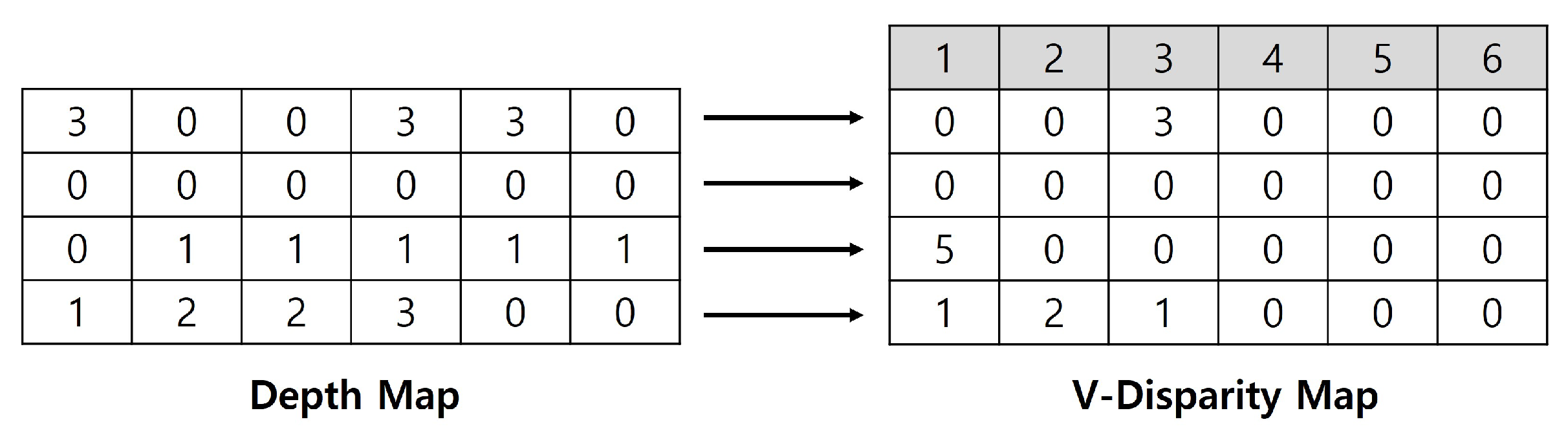
To analyze these depth variation characteristics, this study generated a V-disparity map [19]. A disparity map is constructed by accumulating the frequency of identical depth values along each horizontal scanline of the image. In the resulting two-dimensional histogram, the vertical axis represents depth values, while the horizontal axis represents the frequency of occurrence of each depth. Figure 8 provides an example. In the first row of Figure 8, a depth value of 3 m appears three times; consequently, the V-disparity map records the value 3 at the position corresponding to a depth of 3 m. In this work, the range of V-disparity map values was normalized to fall between 0 and 500 for depths within 3 m, allowing for a more detailed representation.
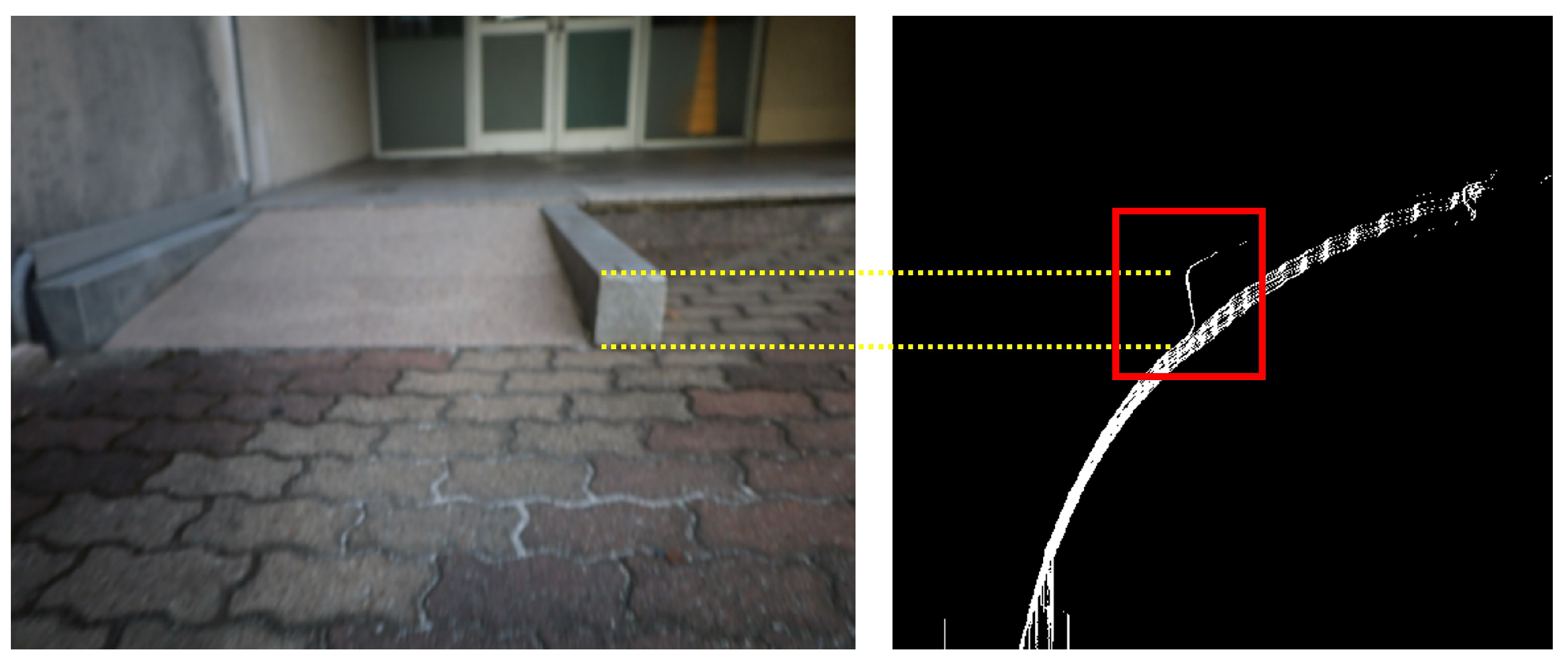
Using the ground candidate regions extracted from the V-disparity map, a ground mask was generated. Regions that do not overlap with this mask were classified as obstacles, while the overlapping boundaries were regarded as the lower edges of the obstacles. The resulting mask is shown in Figure 9.
The top of the obstacle was determined as the uppermost point within the same column of the V-disparity map as the obstacle’s bottom. Figure 10 illustrates obstacle region detection using the V-disparity map, where the red boxed areas indicate the detected obstacle regions.

4.2. Height Estimation

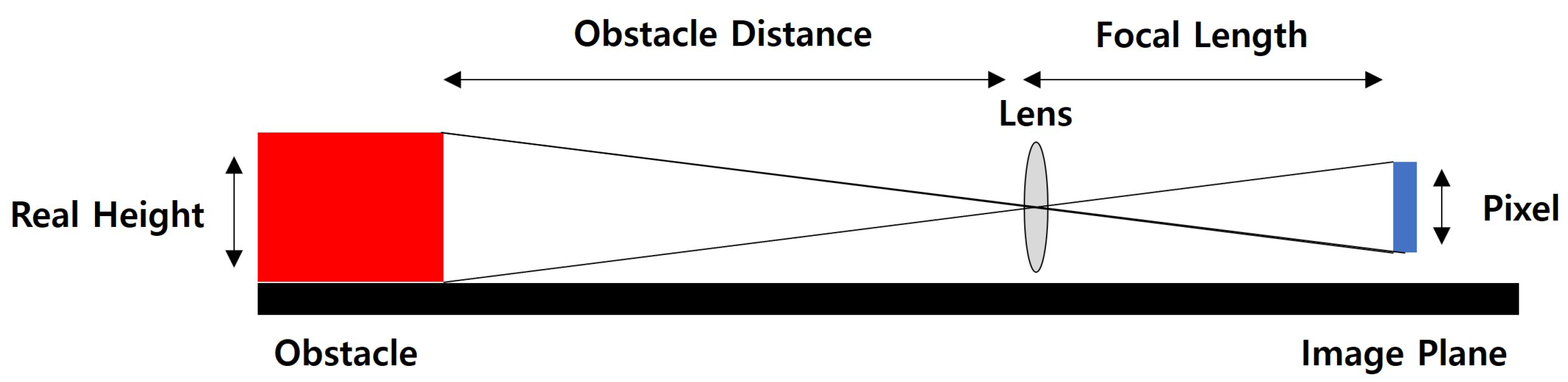
The obstacle height must be estimated using the lower and upper boundary information obtained from the obstacle detection algorithm. The actual height is derived as illustrated in Figure 11. The ratio between the real height of the obstacle and the number of pixels in the image corresponds to the distance between the obstacle and the camera, as well as the focal length of the camera. By rearranging this relationship, the actual obstacle height can be expressed as Equation (12).
Real Height = Number of Pixels × Obstacle Distance Focal Length

5. Experiment

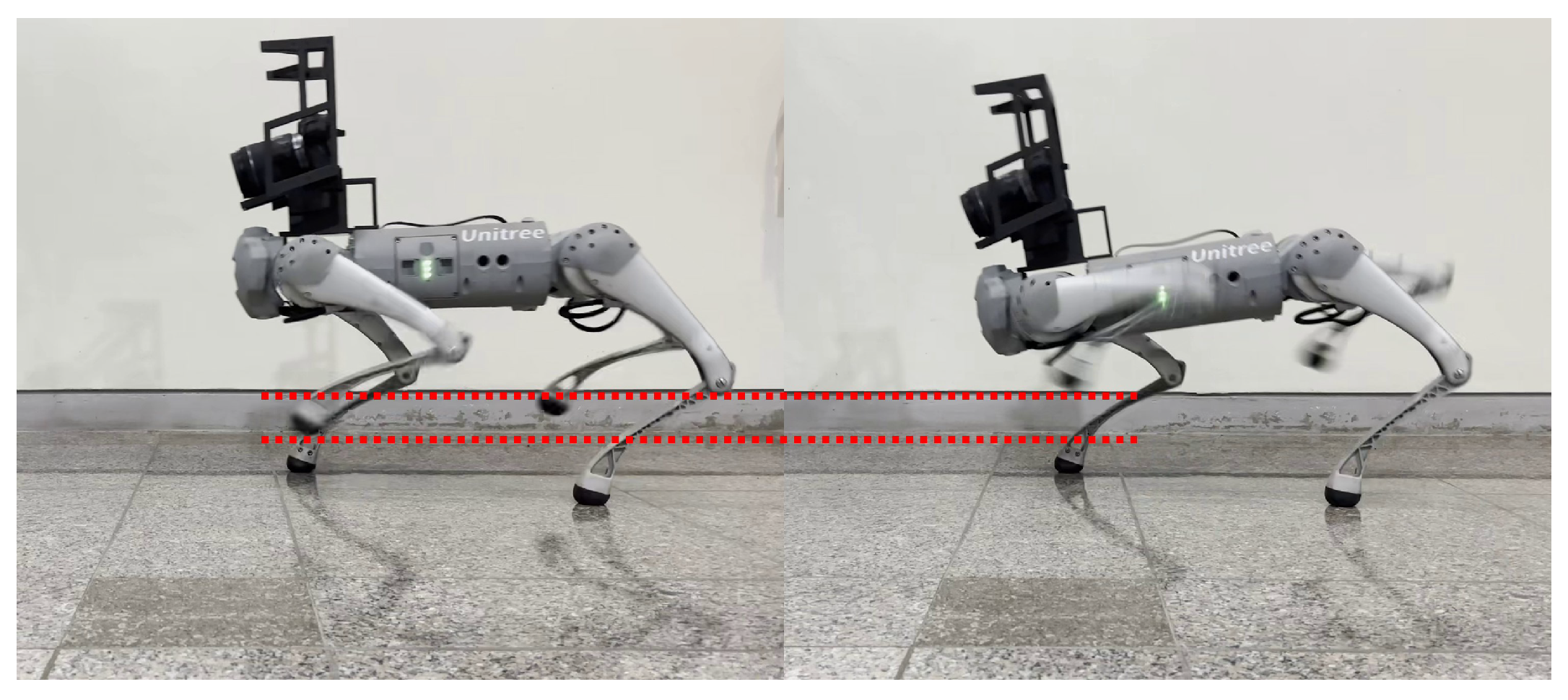
The height estimation experiments in this work were conducted using a quadruped robot platform. Specifically, the Go1 platform developed by Unitree Robotics was employed, which supports a step-over mode for obstacle negotiation. As shown in Figure 12, the step-over mode features a higher leg lift, making it advantageous for overcoming relatively large obstacles.
In the experiments, the maximum traversable obstacle height was set to 18 cm. When the predicted obstacle height was 18 cm or less, the robot activated step-over mode to negotiate the obstacle. If the predicted height exceeded 18 cm, the robot stopped without attempting to traverse. During the experiments, the robot moved forward at a speed of approximately 0.3 m/s. All control commands and neural network computations were executed on a processing unit equipped with an Intel Core i5-1135G7 CPU, 16 GB of memory, and an NVIDIA GeForce MX450 GPU. The inference speed achieved was approximately 4 Hz.

5.1. Experiment on the Effects of Depth from Defocus and Optical Flow

This experiment was conducted to assess the impact of defocussed images and optical flow information on depth estimation accuracy. The evaluation was carried out under three conditions: (1) using image data without defocus or optical flow information, (2) using Defocused Image data only, and (3) using both defocus and optical flow data simultaneously. The evaluation results are summarized in Table 4.
When defocussed images were incorporated, the absolute relative error (AbsRel) was significantly reduced from 0.68% to 0.29%. Furthermore, the inclusion of optical flow information led to an additional improvement, reducing the error from 0.29% to 0.24%.

5.2. Experiment on Obstacle Distance Estimation Accuracy

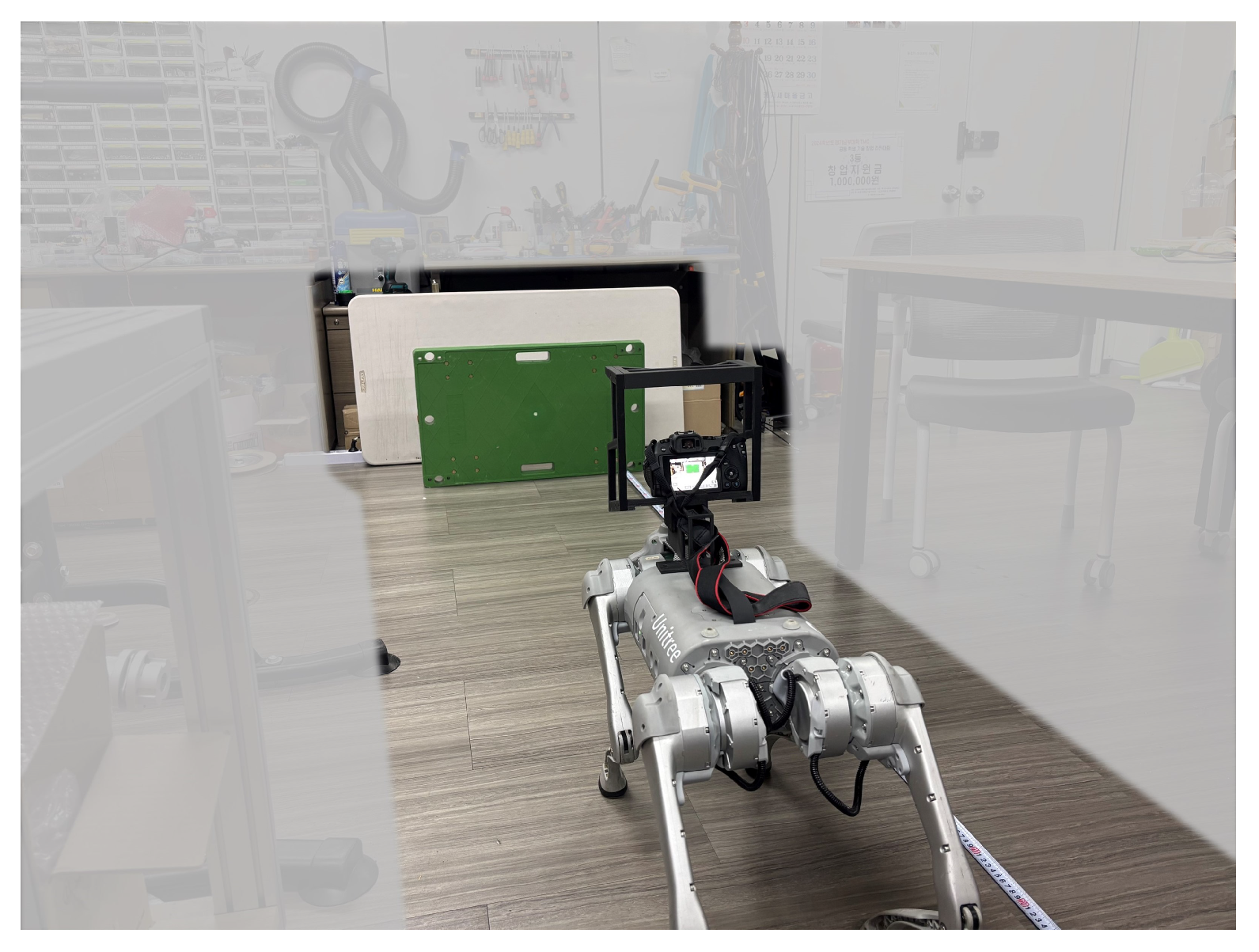
To evaluate the accuracy of R-Depth Net in predicting the depth between obstacles and the vision camera, measurements were conducted at intervals of 0.5 m from 1 m to 3 m. Figure 13 shows a scene from the experiment, and the results are summarized in Table 5.
In the experiment measuring obstacle distance estimation accuracy, R-Depth Net demonstrated errors of 0.3 m in terms of Root Mean Squared Error (RMSE) and 0.26 m in terms of Mean Absolute Error (MAE). The RMSE is defined in Equation (13), while the MAE is defined in Equation (4).
RMSE = 1 N i = 1 N y predicted , i y true , i 2

5.3. Experiment on Obstacle Height Estimation Accuracy

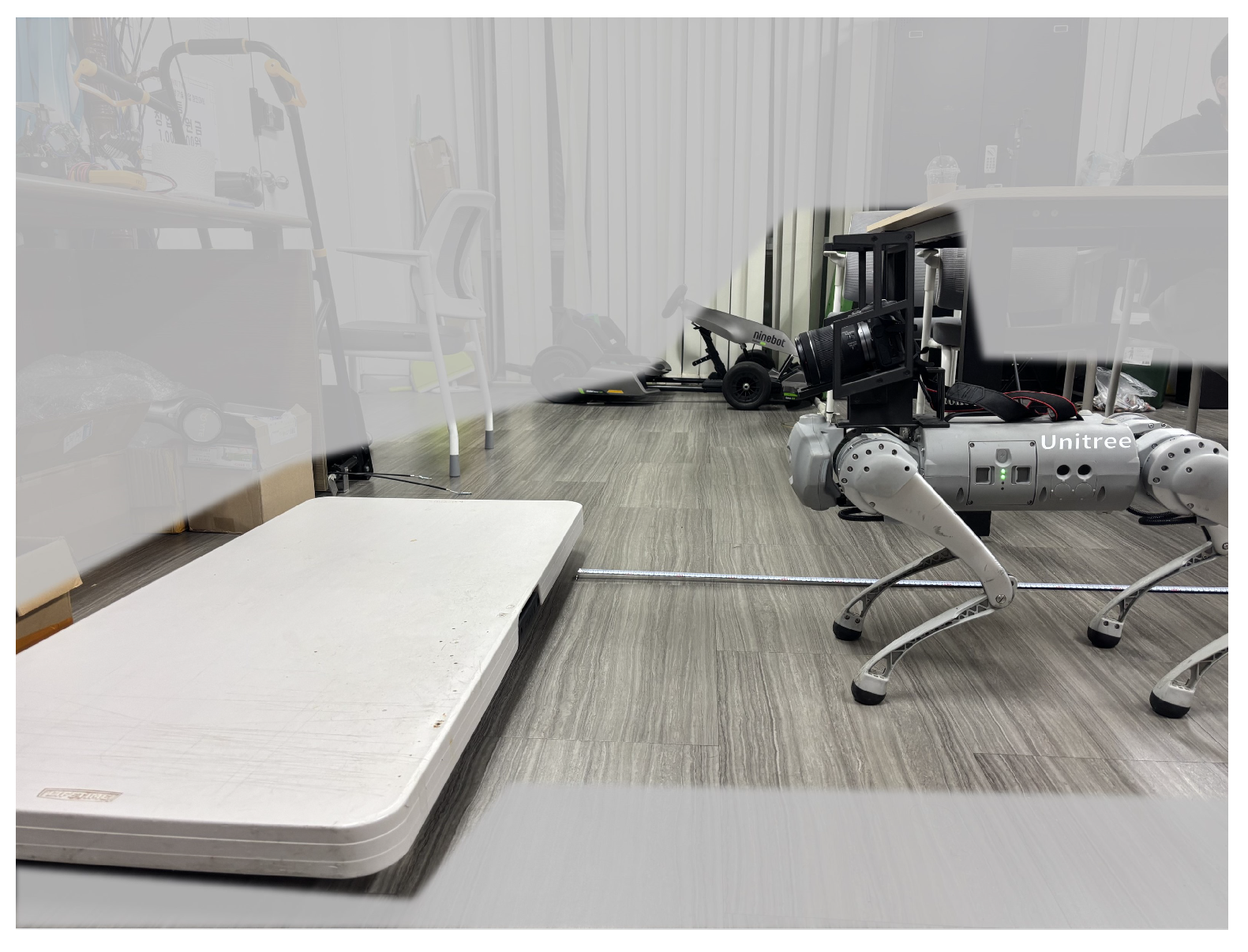
An experiment was conducted to evaluate the accuracy of obstacle height estimation using R-Depth Net in conjunction with the obstacle height estimation algorithm. As shown in Figure 14, the experimental setup included step-height obstacles of three different heights: 0.1 m, 0.15 m, and 0.2 m. The results are summarized in Table 6.
The results of obstacle height estimation revealed errors of 4.8 cm in terms of RMSE and 4 cm in terms of MAE. It was observed that the estimation error increased as the obstacle height increased.

5.4. Experiment on Obstacle Overcoming in Real-World Environments

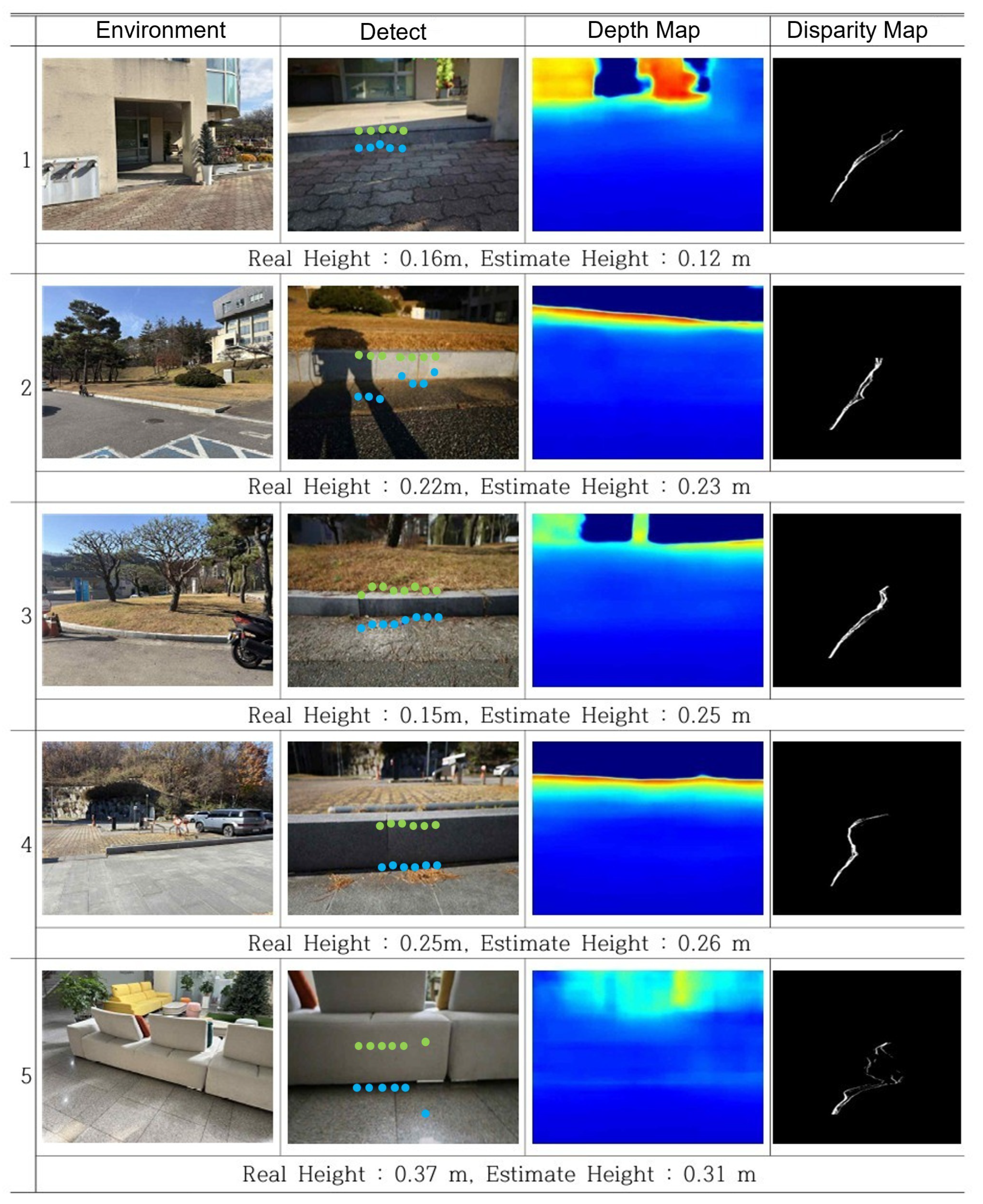
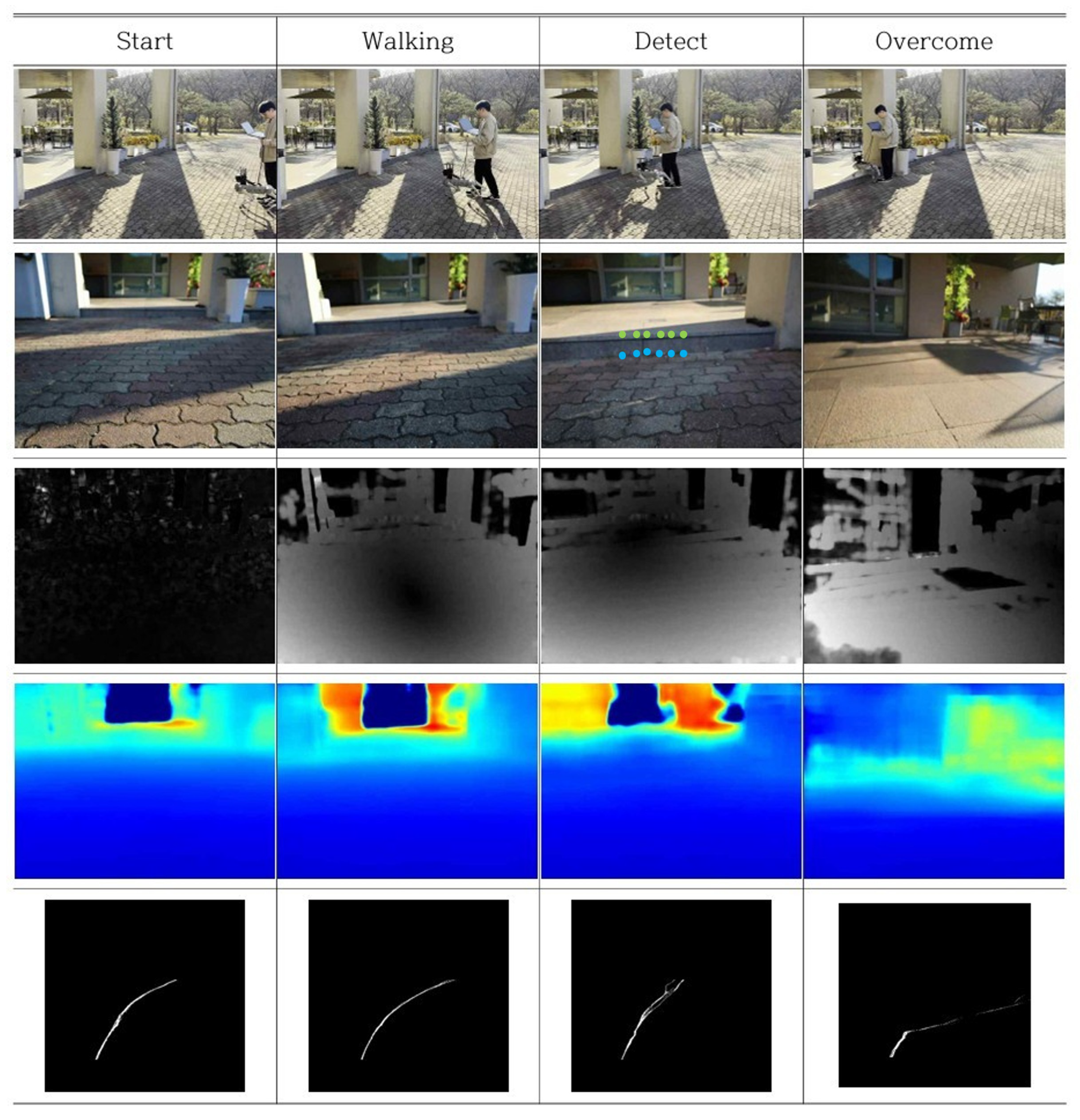
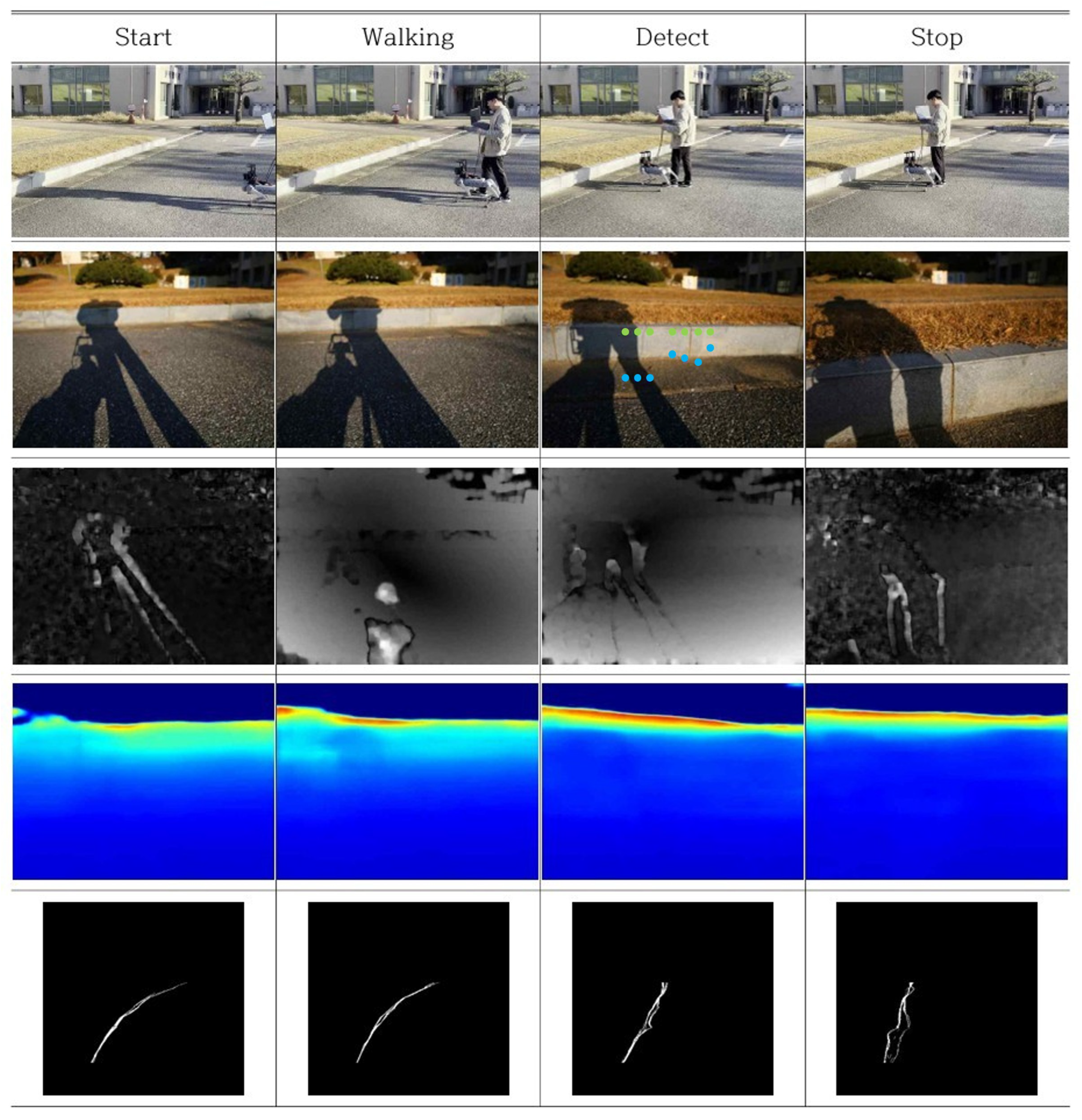
To evaluate the practical applicability of the proposed R-Depth Net and obstacle height estimation algorithm, experiments were conducted on obstacles of varying heights. Figure 15 illustrates the process of detecting obstacles and estimating their heights, Figure 16 shows the robot overcoming an obstacle, and Figure 17 presents a case where the robot stopped upon determining that the obstacle could not be negotiated.
Among the five experiments, three achieved accurate height estimation, while two resulted in estimation errors. In Case 3 of Figure 15, although the obstacle was detected, errors in distance estimation resulted in its height being overestimated. This was attributed to calibration errors in the distance-based correction during the depth estimation process. In Case 5, the obstacle was too tall, causing the V-disparity-based detection to fail, and as a result, the obstacle was not recognized at all. In Case 1 the obstacle boundary in the V-disparity map does not appear clearly because the height difference in the step is relatively small, causing depth estimation uncertainty. Furthermore, the robot approached the step obliquely rather than perpendicularly, which weakened the disparity discontinuity at the obstacle boundary.

5.5. Summary of Experimental Results

Experiments were conducted to evaluate the effects of depth from defocus and optical flow, the accuracy of obstacle distance estimation, the accuracy of obstacle height estimation, and the robot’s performance in overcoming obstacles in real environments. In the experiment on the effects of defocus and optical flow, the absolute relative error(AbsRel) decreased from 0.68 to 0.29 when depth from defocus was applied, and further decreased from 0.29 to 0.24 with the addition of optical flow.
The obstacle distance estimation experiment was performed by measuring target distances at 0.5 m intervals within the range of 1 m to 3 m. The results showed that the proposed neural network-based model achieved an average error of 15.7% in terms of RMSE and 15.7% in terms of MAE. In the obstacle height estimation experiment, overall average errors of 29.3% in terms of RMSE and 26.4% in terms of MAE were observed.
Finally, obstacle negotiation experiments were conducted in real-world environments. Based on the estimated obstacle height, the robot either switched to an obstacle-overcoming mode or issued a stop command. Because real-world obstacle negotiation requires a comprehensive analysis of multiple V-disparity maps along with height information referenced from previous frames and defocused images, the system maintained accurate height estimation and reliable mode switching even in the presence of depth estimation errors.
Through these experiments, it was demonstrated that the proposed monocular depth estimation method is well suited for robotic applications and is effective for obstacle detection using monocular vision.

6. Discussion

Apple’s Depth Pro demonstrates high accuracy in depth estimation [8]. However, its neural network operates slowly and demands high performance. Robots face challenges in mounting high-performance GPUs due to battery and weight constraints. The method proposed in this research achieves sufficient speed on the low-power MX450 GPU. Diana Wofk’s FastDepth can achieve sufficient speed in low-power environments but derives relative distance values [20]. This is unsuitable for robots where absolute distance is critical. In contrast, our method can estimate absolute distance through Defocus and Optical flow.

7. Conclusions

We presented R-Depth Net, a monocular metric depth estimator that fuses depth-from-defocus and optical flow cues, and an obstacle height estimation pipeline for traversal decisions on a quadruped robot platform. The R-Depth Net takes Defocussed images and optical flow information as inputs, and our experiments confirm that including defocus cues significantly improves depth estimation performance compared with baselines that exclude defocus information.
The proposed depth and height estimation algorithm was validated through experiments including Effects of Depth from Defocus and Optical Flow, Obstacle Distance Estimation Accuracy, and Obstacle Height Estimation Accuracy. The algorithm was also successfully deployed on a quadruped robot platform in real-world step-over scenarios, where the robot demonstrated autonomous decision-making by switching locomotion modes or stopping based on the estimated obstacle height.
The results demonstrates that real-time obstacle detection and traversal decision-making can be achieved solely through monocular vision-based depth estimation, without the need for complex sensors or expensive equipment.

Author Contributions

Conceptualization, S.A. and D.C.; methodology, S.A.; software, S.A. and Y.K.; validation, S.A. and D.C. (Dongyoung Choi); formal analysis, D.C. (Dongyoung Choi); investigation, D.C. (Dongyoung Choi); resources, S.A.; data curation, S.C. and S.A.; writing—original draft preparation, S.A.; writing—review and editing, D.C. (Dongil Choi); visualization, S.C. and Y.K.; supervision, D.C. (Dongil Choi); project administration, D.C. (Dongil Choi); funding acquisition, D.C. (Dongil Choi). All authors have read and agreed to the published version of the manuscript.

Funding

This work was supported by the Robot Industry Core Technology Development Project (No. RS-2024-00444294, Development of Core Technologies for a Multi-Drive Robot Platform Capable of Performing Tasks in Military Areas with Uneven Terrains) funded By the Ministry of Trade, Industry Energy (MOTIE, Korea).

Institutional Review Board Statement

Not applicable.

Informed Consent Statement

Not applicable.

Data Availability Statement

The original contributions presented in this study are included in the article. Further inquiries can be directed to the corresponding author.

Conflicts of Interest

Author Seongmin Ahn was employed by the company DH AUTOEYE. Author Yunjin Kyung was employed by the company Hyundai Motors (South Korea). Author Seunguk Choi was employed by the company CLABIL. The remaining authors declare that the research was conducted in the absence of any commercial or financial relationships that could be construed as a potential conflict of interest.

Abbreviations

LiDARLight Detection and Ranging
DfDDepth from Defocus
RMSERoot Mean Squared Error
MAEMean Absolute Error
AbsRelAbsolute Relative Error
SqRelSquared Relative Error
CPUCentral Processing Unit
GPUGraphics Processing Unit
AdamAdaptive Moment Estimation

References

  1. Carballo, A.; Lambert, J.; Monrroy, A.; Wong, D.; Narksri, P.; Kitsukawa, Y.; Takeuchi, E.; Kato, S.; Takeda, K. LIBRE: The Multiple 3D LiDAR Dataset. In Proceedings of the 2020 IEEE Intelligent Vehicles Symposium (IV), Las Vegas, NV, USA, 19 October–13 November 2020; pp. 1094–1101. [Google Scholar] [CrossRef]
  2. Boonsuk, W. Investigating effects of stereo baseline distance on accuracy of 3D projection for industrial robotic applications. In Proceedings of the 5th IAJC/ISAM Joint International Conference, Orlando, FL, USA, 25–27 September 2016; pp. 94–98. [Google Scholar]
  3. Cai, Z.; Metzler, C. Underwater Monocular Metric Depth Estimation: Real-World Benchmarks and Synthetic Fine-Tuning. arXiv 2025, arXiv:2507.02148. [Google Scholar] [CrossRef]
  4. Dong, X.; Garratt, M.A.; Anavatti, S.G.; Abbass, H.A. Towards Real-Time Monocular Depth Estimation for Robotics: A Survey. IEEE Trans. Intell. Transp. Syst. 2022, 23, 16940–16961. [Google Scholar] [CrossRef]
  5. Gurram, A.; Tuna, A.F.; Shen, F.; Urfalioglu, O.; López, A.M. Monocular Depth Estimation Through Virtual-World Supervision and Real-World SfM Self-Supervision. IEEE Trans. Intell. Transp. Syst. 2022, 23, 12738–12751. [Google Scholar] [CrossRef]
  6. Zhang, J. Survey on Monocular Metric Depth Estimation. arXiv 2025, arXiv:2501.11841. [Google Scholar] [CrossRef]
  7. Huang, Z.; Fessler, J.A.; Norris, T.B. Focal stack camera: Depth estimation performance comparison and design exploration. Opt. Contin. 2022, 1, 2030–2042. [Google Scholar] [CrossRef]
  8. Bochkovskii, A.; Delaunoy, A.; Germain, H.; Santos, M.; Zhou, Y.; Richter, S.R.; Koltun, V. Depth Pro: Sharp monocular metric depth in less than a second. arXiv 2024, arXiv:2410.02073. [Google Scholar] [CrossRef]
  9. Bhat, S.F.; Birkl, R.; Wofk, D.; Wonka, P.; Müller, M. ZoeDepth: Zero-shot transfer by combining relative and metric depth. arXiv 2023, arXiv:2302.12288. [Google Scholar] [CrossRef]
  10. Shiozaki, T.; Dissanayake, G. Eliminating scale drift in monocular SLAM using depth from defocus. IEEE Robot. Autom. Lett. 2018, 3, 581–587. [Google Scholar] [CrossRef]
  11. Shimada, T.; Nishikawa, H.; Kong, X.; Tomiyama, H. Fast and high-quality monocular depth estimation with optical flow for autonomous drones. Drones 2023, 7, 134. [Google Scholar] [CrossRef]
  12. Carvalho, M.; Le Saux, B.; Trouvé-Peloux, P.; Almansa, A.; Champagnat, F. Deep depth from defocus: How can defocus blur improve 3D estimation using dense neural networks? In Proceedings of the European Conference on Computer Vision (ECCV) Workshops, Munich, Germany, 8–14 September 2018; pp. 1–17. [Google Scholar]
  13. Silberman, N.; Hoiem, D.; Kohli, P.; Fergus, R. Indoor segmentation and support inference from RGBD images. In Proceedings of the European Conference on Computer Vision–ECCV 2012, LNCS, Florence, Italy, 7–13 October 2012; Springer: Berlin/Heidelberg, Germany, 2012; Volume 7576, pp. 746–760. [Google Scholar] [CrossRef]
  14. Subbarao, M.; Surya, G. Depth from defocus: A spatial domain approach. Int. J. Comput. Vis. 1994, 13, 271–294. [Google Scholar] [CrossRef]
  15. Ahn, S.M.; Choi, D. Development of image registration algorithms for collecting depth from defocus datasets. Trans. Korean Soc. Mech. Eng. A 2025, 49, 11–16. [Google Scholar] [CrossRef]
  16. Farnebäck, G. Two-frame motion estimation based on polynomial expansion. In Proceedings of the Scandinavian Conference on Image Analysis, SCIA 2003, LNCS, Halmstad, Sweden, 29 June–2 July 2003; Springer: Berlin/Heidelberg, Germany, 2003; Volume 2749, pp. 363–370. [Google Scholar] [CrossRef]
  17. Zwald, L.; Lambert-Lacroix, S. The BerHu penalty and the grouped effect. J. Nonparametric Stat. 2016, 28, 487–514. [Google Scholar] [CrossRef]
  18. Hu, J.; Ozay, M.; Zhang, Y.; Okatani, T. Revisiting Single Image Depth Estimation: Toward Higher Resolution Maps with Accurate Object Boundaries. In Proceedings of the 2019 IEEE Winter Conference on Applications of Computer Vision (WACV), Waikoloa, HI, USA, 7–11 January 2019; pp. 1043–1051. [Google Scholar] [CrossRef]
  19. Huang, H.C.; Hsieh, C.T.; Yeh, C.H. An Indoor Obstacle Detection System Using Depth Information and Region Growth. Sensors 2015, 15, 27116–27141. [Google Scholar] [CrossRef]
  20. Wofk, D.; Ma, F.; Yang, T.J.; Karaman, S.; Sze, V. Fastdepth: Fast monocular depth estimation on embedded systems. In Proceedings of the 2019 International Conference on Robotics and Automation (ICRA), Montreal, QC, Canada, 20–24 May 2019. [Google Scholar]
Figure 1. Data collection hardware.
Applsci 15 12711 g001
Figure 2. Compare the degree of blur based on distance (from left to right, 180 cm, 120 cm, 60 cm).
Applsci 15 12711 g002
Figure 3. Cross-section of a thin lens.
Applsci 15 12711 g003
Figure 4. (Left) Sparse Optical Flow, (Right) Dense Optical Flow.
Applsci 15 12711 g004
Figure 5. Architecture of R-Depth Net. (a) The defocussed Image and Optical Flow are processed by separate encoders, followed by a Fusion Block and a decoder to generate the Depth Map. (b) Structure of the CBLR2d block used in both encoder and decoder, consisting of Convolution, Batch Normalization, and Leaky ReLU. (c) Structure of the Fusion Block that resizes and concatenates the outputs of both encoders before passing to the decoder.
Applsci 15 12711 g005
Figure 6. Training Result (Column 1: input Defocussed image, Column 2: optical flow magnitude (lighter: larger pixel displacement, darker: smaller pixel displacement), Column 3: estimation depth map (blue = near, yellow/green = intermediate, red = far), Column 4: label depth map (blue = near, yellow/green = intermediate, red = far)).
Applsci 15 12711 g006
Figure 7. Depth variation profile for obstacle detection. (a) Sample Column Representing Depth. (b) Depth Profile with Box 1 Representing the Obstacle and Box 2 Representing the Ground (Horizontal Axis: Pixel Coordinates, Vertical Axis: Depth).
Applsci 15 12711 g007
Figure 8. Example of a V-Disparity Map.
Applsci 15 12711 g008
Figure 9. Example of Ground Mask.
Applsci 15 12711 g009
Figure 10. Detection of obstacle regions using the V-Disparity map.
Applsci 15 12711 g010
Figure 11. Relationship Between Camera and Obstacles for Height Calculation.
Applsci 15 12711 g011
Figure 12. Unitree Go1 Walking Mode (Left: Normal Walking Mode, Right: Obstacle Overcoming Mode). The red dashed line highlights the increased foot clearance in obstacle-overcoming mode.
Applsci 15 12711 g012
Figure 13. Experimental Environment for Obstacle Distance Estimation Accuracy.
Applsci 15 12711 g013
Figure 14. Experimental Environment for Obstacle Height Estimation Accuracy.
Applsci 15 12711 g014
Figure 15. Obstacle Height Estimation in Real-World Environments. (Column 2: Green dot indicates the obstacle top, and blue dot indicates the obstacle bottom. Column 3: blue = near, yellow/green = intermediate, red = far).
Applsci 15 12711 g015
Figure 16. Obstacle Detection and Overcome Mode Transition in Real-World Environments (row 1: Experimental Environment, row 2: Robot View (Green dot indicates the obstacle top, and blue dot indicates the obstacle bottom), row 3: Optical Flow, row 4: Predicted Depth Map (blue = near, yellow/green = intermediate, red = far), row 5: V-Disparity Map).
Applsci 15 12711 g016
Figure 17. Obstacle Detection and Stop Mode Transition in Real-World Environments (row 1: Experimental Environment, row 2: Robot View (Green dot indicates the obstacle top, and blue dot indicates the obstacle bottom), row 3: Optical Flow, row 4: Predicted Depth Map (blue = near, yellow/green = intermediate, red = far), row 5: V-Disparity Map).
Applsci 15 12711 g017
Table 1. Variables Used to Calculate the degree of blur.
SymbolMeaning
sDistance between lens and image sensor (mm)
fFocal length (mm)
iDistance between lens and image plane (mm)
bAmount of blur (pixel)
oDistance between lens and object (m)
DAperture diameter (mm)
Table 2. Training Result— Accuracy.
MetricValue
δ < 1.25 95%
δ < 1.25 2 97%
δ < 1.25 3 98%
Table 3. Training Result—Error.
MetricValue
Absolute Relative Error (AbsRel)6.5%
Squared Relative Error (SqRel)6.2%
Table 4. Impact of Depth from Defocus and Optical Flow on Test Dataset.
MethodAbsRel (%)SqRel (%)
No Defocus6.81.3
Defocus2.95
Defocus + Optical Flow2.44
Table 5. Distance Estimation Error of R-Depth Net (absolute and percentage).
DistanceRMSE (m)RMSE (%)MAE (m)MAE (%)
3.0 m0.4515.00.4515.0
2.5 m0.062.40.052.0
2.0 m0.2010.00.2010.0
1.5 m0.2919.30.2919.3
1.0 m0.3232.00.3232.0
Average0.3015.70.2615.7
Table 6. Obstacle Height Estimation Error (absolute and percentage).
Obstacle HeightRMSE [m]RMSE [%]MAE [m]MAE [%]
0.10 m0.03030.00.02929.0
0.15 m0.03926.00.03523.3
0.20 m0.06432.00.05427.0
Average0.04829.30.04026.4
Disclaimer/Publisher’s Note: The statements, opinions and data contained in all publications are solely those of the individual author(s) and contributor(s) and not of MDPI and/or the editor(s). MDPI and/or the editor(s) disclaim responsibility for any injury to people or property resulting from any ideas, methods, instructions or products referred to in the content.