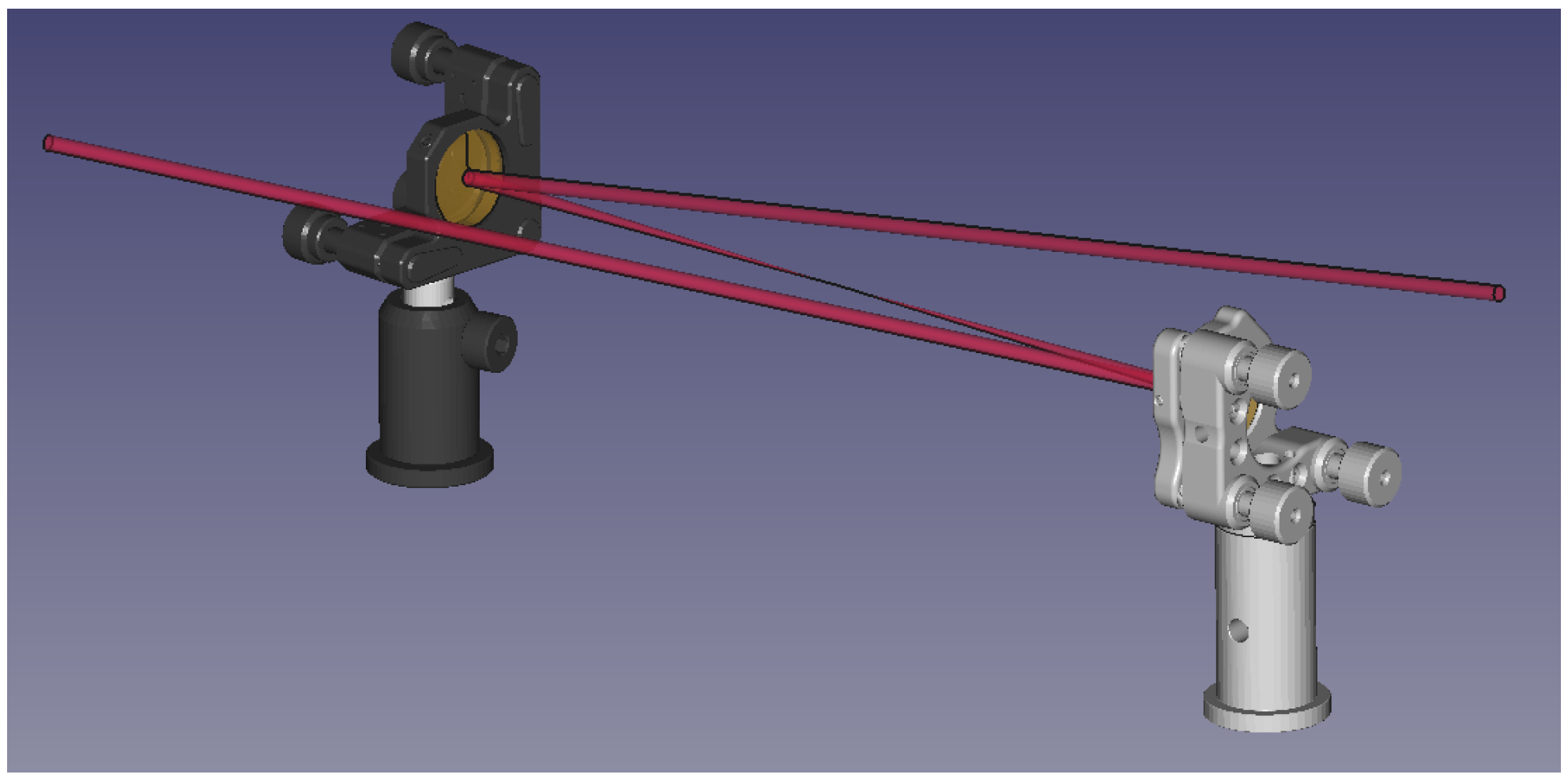
Article

LaserCAD—A Novel Parametric, Python-Based Optical Design Software

1
Institute of Optics and Quantum Electronics, Friedrich Schiller University Jena, Max Wien Platz 1, 07743 Jena, Germany
2
Helmholtz Institute Jena, Fröbelstieg 3, 07743 Jena, Germany
*
Author to whom correspondence should be addressed.
Appl. Sci. 2025, 15(22), 11893; https://doi.org/10.3390/app152211893
Submission received: 6 October 2025 / Revised: 29 October 2025 / Accepted: 3 November 2025 / Published: 8 November 2025
(This article belongs to the Special Issue Advances in High-Intensity Lasers and Their Applications)

Abstract

In this article, we present LaserCAD, an open-source, script-based software toolkit for the design and visualization of optical setups based on parametric ray tracing. Unlike conventional commercial tools, which focus on complex lens optimization and offer dense GUIs with extensive parameters, LaserCAD is tailored for fast, intuitive modeling of laser beam paths and opto-mechanical assemblies with minimal setup overhead. Written in Python, it allows users to describe optical systems in a language close to geometrical optics, using simple commands with sensible defaults for most parameters. Optical elements can be automatically positioned including the required mounts. As a graphical backend, FreeCAD renders 3D models of all components for interactive visualization and post-processing. LaserCAD supports integration with other simulation tools and can automate the creation of alignment aids for 3D printing. This makes it especially suitable for rapid prototyping and lab-ready designs.

1. Introduction

For the planning and the realization of sophisticated optical setups in laboratories, a large number of software tools are available to support the user during the design and the actual setup phase. For the design, the optical elements (e.g., mirrors, lenses, diffraction gratings, laser crystals, etc.) can first be placed in a virtual laboratory space (e.g., on a virtual optical breadboard) and the propagation of the light (e.g., a laser beam) is described by tracing a bundle of light rays with an appropriate wavelength spectrum mimicking the real (and laterally extended) beam along the intended path. Such a virtual setup, which should resemble the real setup as closely as possible, can help to optimize the design and to ensure that different optical elements do not interfere with the beam path where it is not intended. Problems with the setup, which can be caused by overlap or blocking of the elements and/or the beam, can be identified (and mitigated) before realizing the assembly of the optical elements in the lab. A detailed and realistic planning becomes all the more essential, the more optical elements are included in the actual setup. Such an approach helps to save time and effort during the setup phase [1,2,3,4].
Most well-established ray-tracing software tools like Zemax, Fred, Comsol or Optica [5,6,7,8] describe the propagation of realistic beams through optical setups by tracing thousands of rays through the setup, including the correct and detailed description of reflection, diffraction and wavelength-dependent refraction on complex lens surfaces or other optical elements in the setup. Such immensely powerful software tools have—among others reasons—been developed for the optimization of setups with respect to achieving minimal (and realistic) focal spot sizes of ray distributions at different positions in the setup by means of geometrical optics. Furthermore, they come with extensive graphical user interfaces (GUIs) and give the user the possibility to choose from an impressive amount of parameters and options to describe lenses and mirrors in a very precise way. While these software solutions clearly provide the user with extremely powerful tools for a large variety of classical optics design tasks, like the mitigation of aberration in multi-element camera lenses, these programs can sometimes be less suited for the visualization of laser setups before their actual construction in the lab. The very precise—but sometimes too complicated—description of optical elements and ray distributions can prove to be time-consuming and sometimes unnecessary for setups using low divergence, quasi-monochromatic beams. The programs offer a huge amount of options and parameters to set for rather simple assemblies, often without offering reasonable default values, which complicates the design where it might not be absolutely necessary. Especially opto-mechanical elements, which may play a crucial role when it comes to the actual implementation in the lab, are often not at all or only approximately included in the description with the established software tools and require precise and detailed manual positioning and selection if available. On top of that, some of these tools may come with non-negligible license costs and sometimes with no or rather intricate application programmer interfaces (APIs), which might render the quick scripting, modularization and integration into other existing simulation tools extremely time-consuming or even impossible.
For those reasons we decided to develop and implement a new software tool called LaserCAD [9], which follows a Python-script based approach [10,11,12]. The idea behind LaserCAD is that the setup is defined in a language close to geometric optics—e.g., using terms like propagation and add _ on _ axis —together with a list of available optical elements requiring only a minimal number of parameters to be defined, while all values come with default settings. All elements will by default be placed on the optical axis if not specified differently and come with an automatically selected and adapted mount and post assembly that can be changed easily whenever necessary. When executed in a standard Python terminal, LaserCAD produces a comprehensive text output including name, type, position and normal direction of each element and beam in the terminal for debugging. As the graphical backend, we use FreeCAD [13], an open-source 3D computer-aided design (CAD) software. When the script is executed in FreeCAD, each beam, element and mount will be rendered and shown in an interactive window for visualization and post processing.
A key feature of LaserCAD is its purely script-based design philosophy, which resembles the modular and extensible nature of Latex documents. This approach ensures that optical setups are fully defined through concise Python scripts, making the system lightweight, scalable, and easily integrable as a Python library. Despite this simplicity, the framework remains highly flexible and can be expanded with user-defined elements, analysis tools, or algorithms whenever required. A strong emphasis is placed on the inclusion of opto-mechanical components, which are incorporated by default in every setup. These can be freely customized or extended, allowing users to represent realistic laboratory conditions with minimal additional effort. The unique combination of a professional CAD backend—enabling precise mechanical design, positioning, and scalability up to finite element analysis—with a Python-based ray-tracing framework for optical simulation provides an exceptionally powerful yet accessible tool. This integration allows users to perform detailed optical and mechanical design within a single environment while maintaining full extendability toward more complex algorithms, optimization procedures, or analysis modules implemented as plug-ins.
The remainder of this paper is structured as follows: Section 2 describes all relevant classes for the program and their hierarchy. In Section 3, the used ray-tracing algorithms for geometrical optics are presented, and in Section 4 we show some use cases of LaserCAD.

2. Object Structure and Properties

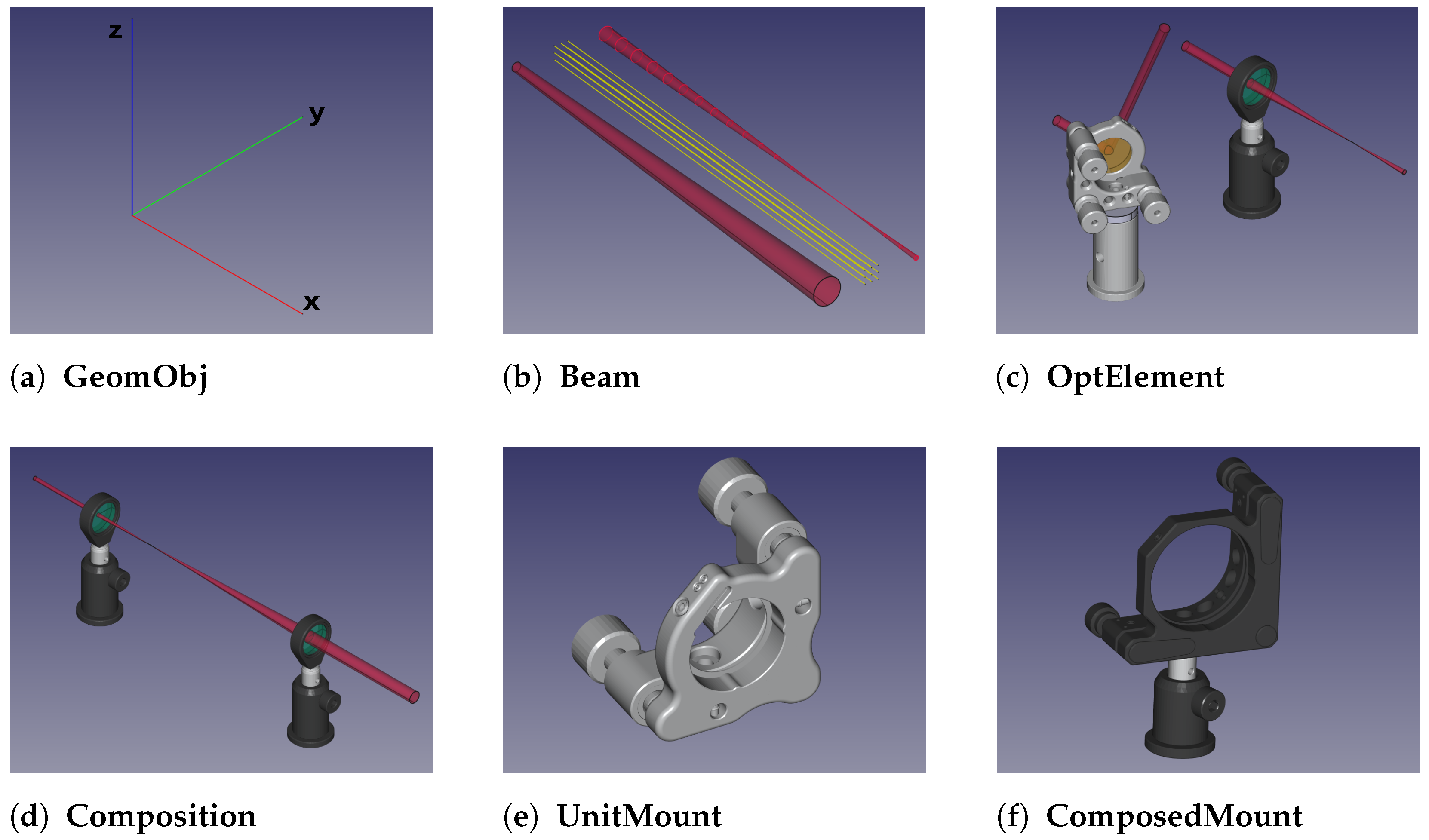
LaserCAD follows an object-oriented approach with hierarchical structures. In this context, objects are instances of abstract base classes—data structures that contain specific member functions and variables, known as attributes. The terms "object" and "class" are used synonymously in the following and are written in bold with capitalization, e.g., Lens , while their member functions and attributes are written in lowercase, e.g., draw . Figure 1 shows a collection of the most basic objects in LaserCAD.

2.1. Geometric Object

The GeomObj class (see Figure 1a) contains and manages the three-dimensional properties of all objects, like the position p R 3 and the right-handed, orthonormal inner coordinate system M M 3 × 3 . The x-axis of this coordinate system is defined as the front surface normal n of each element. The combination of position and axes orientation is called geom and can be accessed and changed via getter and setter functions, respectively, for placement and orientation. In addition, GeomObj —which is the base object from which all other objects inherit—features the draw _ text and draw _ freecad functions, producing an output either in the terminal or in the 3D CAD software. Finally, the attribute draw _ dict is a dictionary containing all relevant keyword arguments that need to be passed to the draw functions, like the orientation or the color, which hence can be changed manually.

2.2. Rays and Beams

To include the path and visualize light rays or beams into the setup, two function classes exist. The Ray class describes 1D-light rays (having no transverse extent) propagating in 3D space. The vector r describing the position of any point along such a ray can be written as
r = p + L a
with the length L and p and a representing the starting point and the direction, respectively, which are inherited from GeomObj . Any intersection of such a ray with an optical element ( OptElement , see Section 2.4) will delimit L, ensuring that the ray stops at this element (and, e.g., creates a new ray propagating in a different direction). For the description of the interaction with a dispersive element, e.g., the diffraction of a ray at a grating surface, each ray receives the wavelength attribute λ from its initialization in the object constructor.
The Beam class (see Figure 1b) acts as the container class for a combination of rays and comprises at least two rays: the inner ray, which describes the beam’s orientation in 3D space and one (or more) outer ray, which determines the local beam waist and its divergence. The default distribution of rays in a beam is the cone-shaped beam, consisting of one inner ray defining the cone’s axis of symmetry and one outer ray propagating on the cone’s surface. Other configurations, like square or hexagonal ray arrangements, as well as 1D rainbows with varying λ or Gaussian beams, can easily be defined.

2.3. Unit Mounts and Composed Mounts

Posts, mounts and all other sorts of optic holders are contained in the UnitMount class (see Figure 1e). The core functionality is implemented by defining for each unit mount a DockingObject , a basic GeomObject that describes the position and direction of the next mechanical interface of the mount. Taking a mirror holder, the docking object would be placed at the position of the junction between mount and post. In the same manner, posts are also treated as mounts, connecting two points in space; in this specific case, the junction of mount and post, alias the top side of the post, with its bottom side, alias the junction between post and optical table. With this approach, both objects, mounts as well as posts, can be described and handled with the UnitMount class. The ComposedMount class acts as a container class (similar to the Composition class in Section 2.5) and concatenates the unit mounts (e.g., Thorlabs™ KS2 and 0.5″ post holder [14,15]) to one part. An example of such a concatenation is shown in Figure 1f.
Visualization of the objects is realized by loading the corresponding 3D file in a common format like stl or step into the FreeCAD scenery and shifting it to the position given by the mount’s geom variable. Since most manufacturers offer 3D files in stl or step format for their optomechanics, adding new holders is easy and can be achieved with the help of a comprehensive tutorial, which can be found in the documentation of the project [9]. LaserCAD incorporates by default suitable mount and post combinations for each standard element and provides additional alternatives in a database, including a vast variety of Thorlabs™ and Newport™ components. In addition, some adaptive holders were implemented that change their size and angles automatically to hold the optics in place, like 1″ spacers, 56 ° adapters for thin film polarizers or 1.5″-to-1″ adapter rings.

2.4. Components and Optical Elements

The Component class is the perform of complete optical elements. It adds the Mount as a member object to the actual optical element (e.g., a lens) in the constructor. With the aperture attribute, the set _ mount _ to _ default function will select a suitable mount from an extensive catalog included in the program. The rearrange _ subobjects functions, which are called with every change in p and n , automatically keep the mount in the correct position and orientation around the optical element. An example use case of a Component could be a photodiode detector mounted on a post.
All specific optical elements like Mirror or Lens (see Figure 1c) inherit their properties and functions from the OptElement class. These properties describe in detail how the light interacts with this element via its next _ ray ( R in ) function. This will take an object R in of the Ray class as the incident ray and return a new ray R out , with starting point and direction changed according to the appropriate ray tracing algorithms for this optical element as described in Section 3. The input rays and beams can be defined manually to the function for testing, but they are mostly automatically handled by the Composition class as described in the following section.
Each optical element contains its ABCD matrix for ray tracing, but also for analysis and characterization of the setup. In the same manner, Kostenbauder matrices [16], either of single elements or of complete compositions, are provided to the user to give the possibility to evaluate spatio-temporal couplings of the beams introduced by the optical elements of the setup up to 1st-order approximation. So far we have included plane, spherical, cylindrical and rooftop mirrors; spherical lenses and gratings; refractive material blocks; and off-axis parabolas.

2.5. Composition

The container class Composition is used to address the whole setup or any sub-modules of it. It keeps track of the optical axis, which is modeled by a consecutive list of center rays that are varied by each newly added optical element. This way, the composition helps to place the optical elements centered around the beamline with as few parameters as possible. The core functionalities of Composition are as follows:
  • propagate ( s ) : advances the endpoint on the optical axis by a distance of s mm.
  • add _ on _ axis : adds optical elements to the end of the composition.
  • add _ fixed _ element : adds an optical element without changing its position for off-axis optics and multi-pass systems.
  • compute _ beams : starts with an initial ray configuration defined by the light _ source and then performs consecutive ray tracing steps as defined by the elements in their order given by the attribute sequence (therefore LaserCAD is mostly built for sequential ray tracing).
  • draw : produces a sketch of the entire system including optical elements, their mounts and beams.
Routines like rearrange _ sub _ objects that are automatically called whenever the geom is changed, keep the relative distances and orientations of the elements within the composition constant like in the other container classes. An example of a simple Composition containing two lenses to form a telescope is shown in Figure 1d.

3. Ray Tracing Algorithms

The ray tracing algorithms follow the well-established standard equations that are widely used in modern optics simulation tools [7,17,18,19]. Nevertheless, we will define these equations in this context, as they define the scientific base for the comparison of LaserCAD’s simulation results to those from other software tools. Choosing, e.g., a plane mirror as an example for an optical element (which is by default taken to be thin and planar), its front surface can be described as a plane, which fulfills for all r R 3 in this plane
( r Q ) n = 0
with the mirror’s position Q (by default located at the center of the front surface) and its normal n . Using the definition from Equation (1), a ray with starting point p and direction a will propagate the length
L = ( Q p ) · n a · n ,
until it reaches the center of this mirror. Inserting this value of L in Equation (1) defines the intersection point of the ray with the mirror’s front surface. For a spherical surface (i.e., a surface being part of a sphere with radius R and center position C ), the length L of the light ray is given by
L = a D ± ( a D ) 2 + R 2 D 2
with D = C p being the vector pointing from the ray’s starting position to the sphere’s center. The intersection point is again calculated by Equation (1) and marks the starting point for the next ray. It is worth noting that we intentionally decided to let the rays be reflected even when the intersection lies outside of the aperture of the element. By allowing this, no rays are deleted during the calculation, and the 3D output enables the user to quickly check for potential clipping of beams.
The direction b of the new ray depends on the incident ray’s direction a and on the type of the optical element. In the context of a mirror, the law of reflection defines the new ray’s direction
b = a 2 n ( a · n ) ,
where n is the surface normal in the intersection point S between the mirror surface and the ray. For a plane mirror, n is identical to the element’s normal; for a spherical mirror, the normal can be calculated by the normalized distance of S C .
Diffraction of a light ray at the surface of a reflection grating is calculated by adding the reciprocal grating vector G to the parallel component k 1 p of the incident ray’s wave vector k 1 . The reciprocal grating vector and wave vector are defined by
G = 2 π g e L , k 1 = k a = 2 π λ a = k 1 p + k 1 n ,
where g is the line spacing, e L the unit vector pointing perpendicular to the grating lines and the grating’s normal, and λ the wavelength of the incoming ray. The parallel (p) and normal (n) components of the incoming ray’s wave vector are given by
k 1 n = ( k 1 · n ) n , k 1 p = n × ( k 1 × n ) .
Adding the reciprocal wave vector G m-times to the incoming ray’s parallel component k 1 p gives the diffracted ray’s parallel wave vector component
k 2 p = k 1 p + m G
with m being the diffraction order. Note that the absolute value of the wave vector remains constant, since the wavelength does not change during the diffraction process. The output wave vector k 2 as well as the diffracted ray direction b reads
k 2 = k 2 p k 2 k 2 p 2 n b = λ 2 π k 2 .
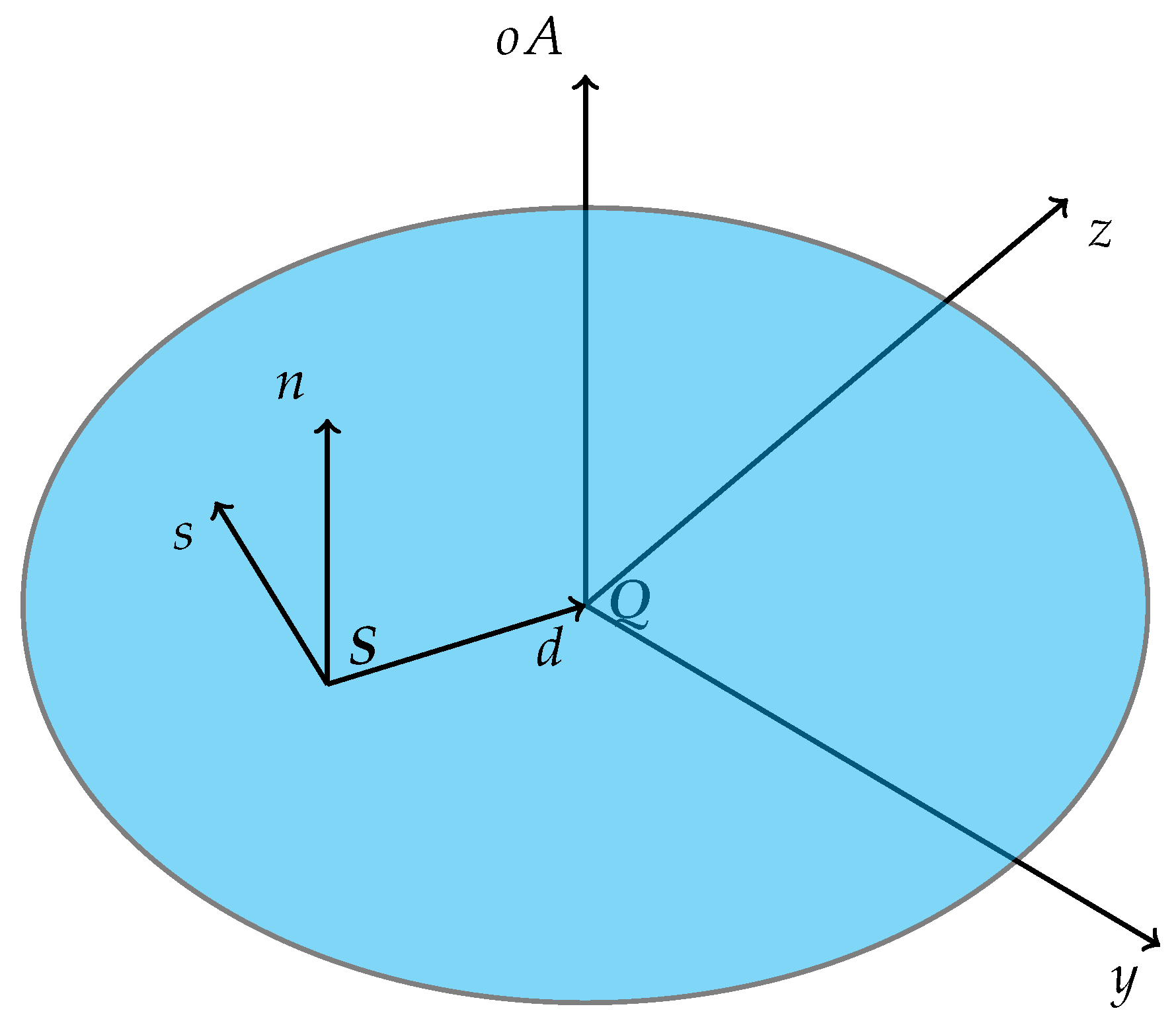
To describe refraction effects, LaserCAD uses ABCD matrices rather than applying Snell’s law at curved surfaces. Since LaserCAD was intended for modeling optical setups including laser radiation, all scenarios should fulfill the paraxial condition and therefore be suitable for applying optical matrices. In this approximation, elements like lenses can be described completely by their focal length, so that detailed knowledge about surface curvature, material and refractive index is not needed. The elements of optical matrices, in addition, allow for a quick characterization of the entire Composition . To apply the ABCD matrix formalism in 3D, the vector a of the incident ray has to be split into its normal (n), radial (d) and sagittal (s) components, which are sketched in Figure 2:
a = a n n + a d d + a s s
The radial vector d is defined by the difference between the intersection point S and the lens center Q , while the sagittal direction s is perpendicular to the meridional n - d -plane and the normal vector n is identical to the components normal. The meridional component a m as well as the sagittal component a s of a is approximated to be constant during refraction.
d = S Q | S Q | s = n × d a m = a n 2 + a d 2
From these components the characteristic parameters h 1 and α 1 , describing the distance and divergence of a ray from the optical axis, are derived as
h 1 = | S C | α 1 = arctan a d a n
and can be inserted in the well known vector matrix formalism to compute the outgoing parameters h 2 and α 2 [18,20].
h 2 α 2 = A B C D h 1 α 1
The refracted ray’s direction b is then given by
b = a m cos α 2 n + a m sin α 2 d + a s s .
In addition to geometrical optics, LaserCAD also includes diffraction effects—as they occur, e.g., when using finite focal spot sizes—by means of Gaussian optics. Gaussian beams can be described by the combination of their central axis implemented as a 1D ray and their complex q-parameter
q = x + i x R
with x being the distance from the beam waist’s position on the axis and x R its Rayleigh length [18,20]. Any effect of optical elements will be described by changing the axis analog to the algorithms described above and then calculating q out ( q in ) according to the matrix formalism for Gaussian beams [20,21]
q out ( q in ) = A q in + B C q in + D .

4. Code Examples

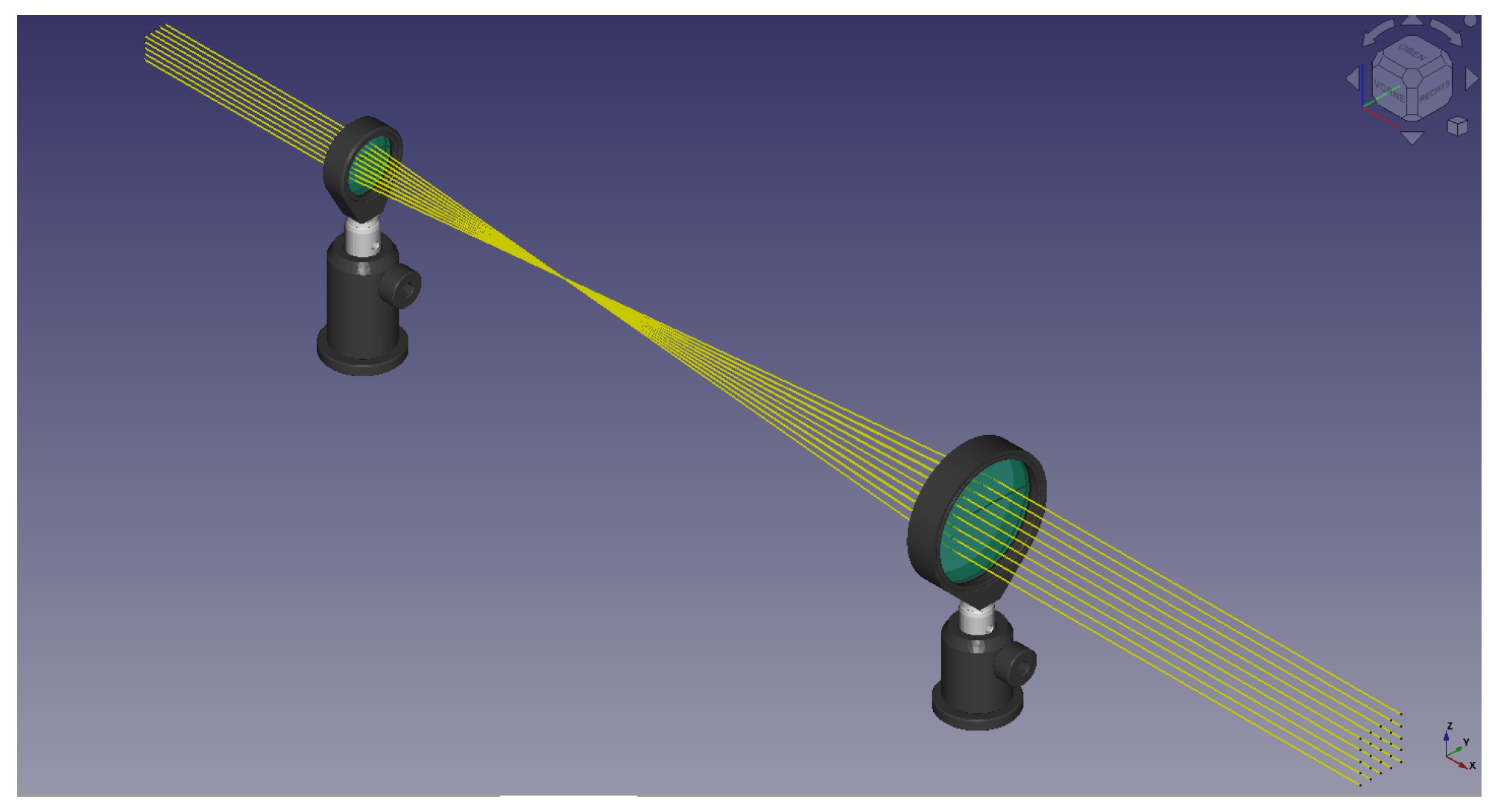
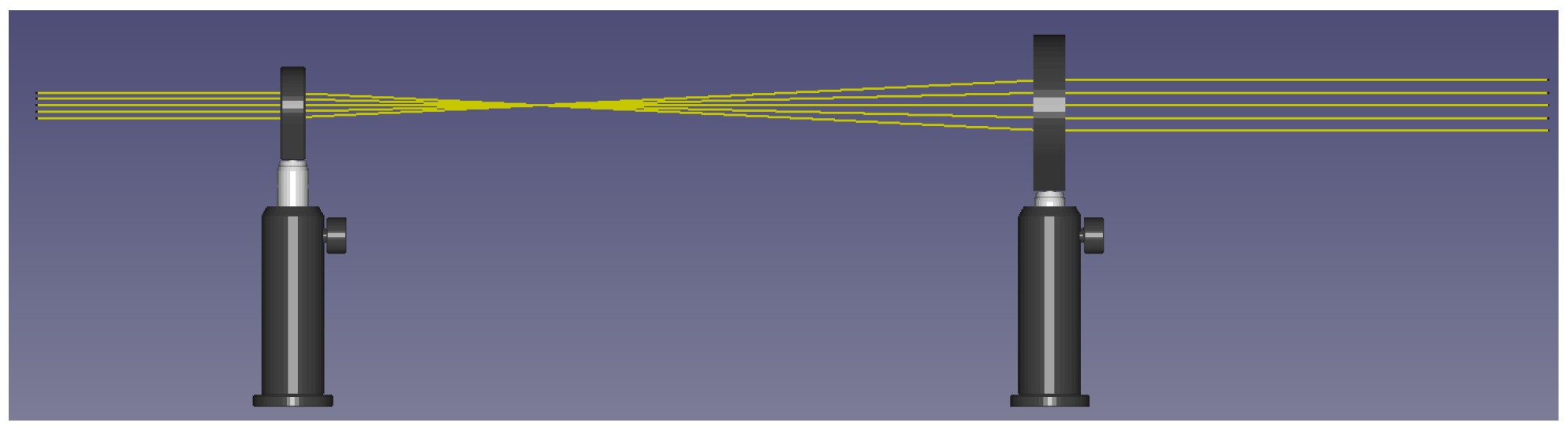
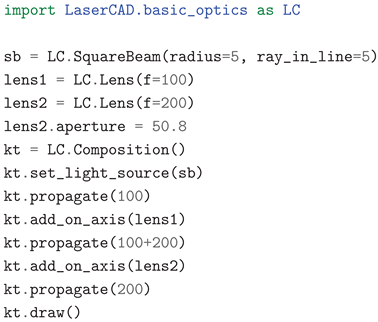
To show the general handling of LaserCAD, we will present a few use cases as examples. The following code first constructs a magnifying 2-lens Kepler-type telescope and then sends a square beam through it, consisting of 5 × 5 individual rays, each initially separated by 2 mm in the lateral direction. All length values in LaserCAD are given in mm, beam divergence values are given in radians, and turning angles, e.g., of mirrors, are given in degrees.
Applsci 15 11893 i001
Beams (or individual rays) and lenses are subsequently added to the Composition container object, which handles the positioning of the elements by advancing the optical axis according to the propagate function. The diameter of the second lens is changed by the aperture command, which also causes an automatic change in the second lens’s mount to a fitting 2″ model. The 3D rendered model will be produced by the draw function; the result is shown in Figure 3. Rays, lenses, default mounts and posts are all placed and fit to the default beam height of 80 mm, a value that can be changed easily by altering the position pos . The necessary line of code Applsci 15 11893 i002 will lead to the output of Figure 4, where a new 1/2″ post holder and post were automatically inserted to fit to the new beam height.
To demonstrate the use and capabilities of mirror assemblies, we show the code, which will construct an anastigmatic mirror telescope.
Applsci 15 11893 i003
After the initialization of the Composition , a light source is defined and added. In this case it is a cylindrical beam with a radius of 2 mm. With the propagation function, the optical axis is advanced by 350 mm, which creates an equally long beam before adding the first mirror. The orientation of mirrors is usually defined indirectly in their constructor with the help of their deflection angles ϕ and θ (e.g., in the third line by phi = 0, theta = 180 − 8). These angles describe how the reflected beam is rotated with respect to the incoming beam. While the first angle gives the desired beam deflection in the x y plane, the second gives the deflection out of this plane. A perfect back reflection of the beam would be achieved by choosing ϕ = 180 ° , a plane mirror for 90 ° deflection by ϕ = ± 90 ° . To avoid blocking the path of the outgoing beam by previous optical elements, both mirrors need to be rotated from 0 ° incidence. In this case, an angle of 8 ° was chosen in both directions, ϕ and θ , equally, to reduce astigmatism as proposed in [22]. Curved mirrors are furthermore defined via their radius of curvature, which was chosen to be 250 mm and leads to a necessary distance of 250 mm between the mirrors, which was performed again by the propagate function. The last propagation call sets the length of the outgoing beam to 350 mm. Figure 5 shows the complete setup.
To change in the second mirror mount from the Polaris™ K1 [23] to the KS1 mount [24] from Thorlabs™, the following line: Applsci 15 11893 i004 is executed, that also changes the post from 1" to the adjustable 0.5″ post.
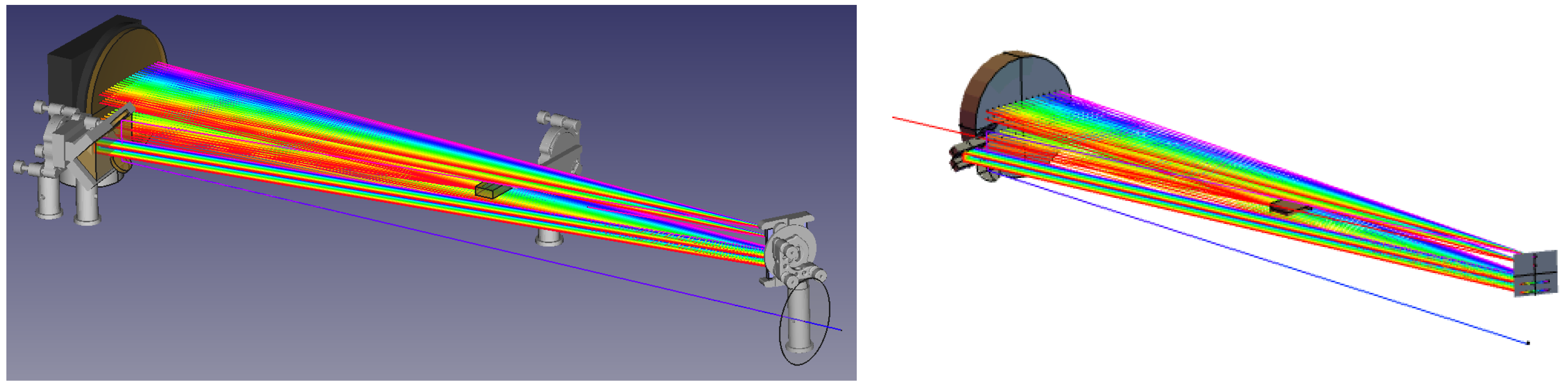
To test the calculation of the spectral phase for ultrashort laser pulse analysis with LaserCAD, a pulse stretcher using reflective gratings for a chirped pulse amplification setup [25] was modeled in LaserCAD and Mathematica™ [8] and the lengths and positions of the different rays were compared. The rendered output of both scenarios is shown in Figure 6. The output shows the expected shape of an Offner-type stretcher setup, with LaserCAD having incorporated the opto-mechanical periphery as well. To validate the physical properties, the group delay dispersion was calculated by summing the ray lengths and calculating the derivative of this length with respect to wavelength. The result of LaserCAD was computed to 4.299 × 10 6 fs 2 showing less than 1 % deviation from the Mathematica™ computation of 4.320 × 10 6 fs 2 as well as from the theoretical formula of Treacy 4.290 × 10 6 fs 2 [26]. The whole stretcher was scripted in about 100 lines of Python code, including comments, and took only a few seconds to render on a standard desktop PC using an Intel™ Xeon™ W-2123 processor with 3.60 GHz and four cores. Regarding the performance, it should be mentioned that the computation time for the actual ray tracing and positioning of the optics is, in all tested scenarios, negligible against the rendering time from FreeCAD for the 3D output, which in the current version 1.0.0 uses only the processor and a single core. Still, even a whole chirped pulse amplification laser system was computed and rendered in less than one minute on the aforementioned PC. A template of it can be found in the modules folder of the LaserCAD project [9].
Scenarios like the previous ones with all optical elements were benchmarked against professional ray tracing software tools, including COMSOL and Optica [7,8], and showed good agreement. Taking the focal spot size of a concave mirror, for example, the Comsol calculation showed a maximal spread of 25.257 μ m , whereas LaserCAD calculated it to be 25.284 μ m , resulting in a deviation of about 1‰. The report of these comparisons is published in the project’s manual folder on GitHub [27].

5. Documentation

From the start, the project was programmed with priority on verbose code and well-structured modules. All functions are explained with comments, and every essential member function and class possesses a docstring. A test folder contains various test scenarios for the different classes and their interactions. A detailed documentation based on the academic approach of the DIVIO documentation system has been written [28]. Following this scheme, the documentation is divided into tutorials, how-to guides and a discussion/reference part. The tutorials contain step-by-step instructions for some stand-alone objects like lenses, mirrors or single beams and smaller setups. The code is divided into tiny executable units, and many example pictures between the instructions show the results to familiarize the user with the LaserCAD syntax and structure. The how-to guides contain more complex scenarios with parametric dependencies, like telescopes or a complete stretcher design. In addition, a guide for importing and adjusting new mounts for customized setups is provided. In the discussion section the objects with their source code and some explanation of how and why they were implemented in this way can be found. In addition, some reports of more complex projects conducted in our group can be found here, e.g., a detailed report and analysis of a regenerative stretcher-amplifier system ray-traced by LaserCAD [27]. The documentation files can be found in the folder manual and are all written in the markdown language so that they will be displayed on the GitHub page [9].

6. Discussion

We designed an open-source parametric software toolkit for scripting and rendering complex optical setups with few lines of code and high flexibility of used models and objects. The vast variety of predefined professional optomechanics, together with easy-to-adjust optics and customizable ray-tracing algorithms with well-set default values, make it possible to visualize setups with a minimal amount of required parameters. Since the output is produced by a state-of-the-art CAD program, the user has an unprecedented ability to post-process and complete the output with further details and preconstructed objects like vacuum chambers and more. To the best of our knowledge, this synergy, which forms a unified workflow allowing both optical and mechanical aspects to be treated simultaneously, renders the LaserCAD software framework unique among all comparable solutions.
Another application that shows the potential of LaserCAD is the automated generation of alignment aids, such as spacers or simple mounts, which can subsequently be 3D printed to facilitate the practical realization of the setup in the laboratory. This approach has already been realized in our group to accelerate and streamline the construction of a compressor by undergraduates. The use of the popular Python programming language not only makes the software beginner-friendly but also enables possible collaborations with other ray-tracing, machine learning and optimization software packages, either as directly imported Python modules or via APIs to professional optic design software like Quadoa [29]. In this manner, LaserCAD could be used for preliminary prototyping of projects before the optics positions can be transferred to specialized simulation software tools.
In contrast to commercial software packages such as Zemax or Fred, the focus of LaserCAD does not lie in the high-performance tracing of millions of rays or in the microscopic optimization of focal spot sizes. Instead, the main goal is the realistic visualization and mechanical consistency of complete laboratory setups, using only the minimal number of rays necessary to represent the optical beam path in a meaningful and computationally efficient way. This makes the program particularly suited for experimental planning and educational purposes, where conceptual clarity and spatial awareness are more important than sub-micron precision. In the near future we plan the inclusion of LightPipes [30] for wave optics simulations.
7. Summary

We developed an open-source, Python-based software toolkit for the modular and parametric design of optical setups. LaserCAD allows users to script complex assemblies with minimal code while automatically including realistic opto-mechanical components. The integration with FreeCAD provides detailed 3D visualization and enables seamless transition to further mechanical design and analysis.
Future work will focus on expanding the framework toward wave-optical simulations, automation, and the integration of external optimization libraries. This will further enhance LaserCAD as a comprehensive and flexible environment for both optical and mechanical system design.

Author Contributions

Conceptualization, C.A.; Methodology, C.A.; Software, C.A. and H.Z.; Validation, C.A., J.H. and H.Z.; Formal analysis, C.A.; Data curation, H.Z.; Writing—original draft, C.A.; Writing—review & editing, C.A., J.H. and M.C.K.; Supervision, J.H. and M.C.K.; Project administration, J.H. and M.C.K.; Funding acquisition, M.C.K. All authors have read and agreed to the published version of the manuscript.

Funding

This project is funded by the EU’s Horizon Europe programme under grant agreement number 101131771 Lasers4EU. Views and opinions expressed are however those of the author(s) only and do not necessarily reflect those of the European Union. The European Union cannot be held responsible for them. The research leading to these results has received funding from the Bundesministerium für Bildung und Forschung (BMBF, Grant Agreement No. 05P245J1).

Institutional Review Board Statement

Not applicable.

Informed Consent Statement

Not applicable.

Data Availability Statement

Data is available in a publicly accessible repository: https://github.com/klee-mens/LaserCAD (accessed on 2 November 2025).

Conflicts of Interest

The authors declare no conflicts of interest.

References

  1. Myers, J.; Caron, C.; Helaly, N.; Wei, Z.; Oh, J.; Gotobed, Z.; Yabe, K.; Niffenegger, R.J. Qubit Operations Using a Modular Optical System Engineered with PyOpticL: A Code-to-CAD Optical Layout Tool. arXiv 2025, arXiv:2501.14957. [Google Scholar]
  2. Altmann, K. Three-Dimensional Computation of Laser Cavity Eigenmodes by the Use of Finite Element Analysis (FEA). Appl. Opt. 2004, 43, 1892–1897. [Google Scholar] [CrossRef] [PubMed]
  3. Livrozet, M.; Gronloh, B.; Faidel, H.; Luttmann, J.; Hoffmann, D. Optical and Optomechanical Design of the MERLIN Laser Optical Bench. In Proceedings of the SPIE—The International Society for Optical Engineering, Volume 11852, Laser Technology, Online, 30 March–2 April 2021; SPIE: Bellingham, WA, USA, 2021. [Google Scholar] [CrossRef]
  4. Hofmann, O.; Stollenwerk, J.; Loosen, P. Design of Multi-Beam Optics for High Throughput Parallel Processing. J. Laser Appl. 2020, 32, 012005. [Google Scholar] [CrossRef]
  5. Ansys, Inc. Zemax OpticStudio User’s Guide, Version 2025 R2; Ansys, Inc.: Canonsburg, PA, USA, 2025.
  6. Photon Engineering. FRED User Manual, Version 2025.1; Photon Engineering, LLC: Tucson, AZ, USA, 2025.
  7. COMSOL Inc. COMSOL Multiphysics User’s Guide, Version 6.1; COMSOL Inc.: Burlington, MA, USA, 2022.
  8. Wolfram Research. Optica, Version 2.0; Wolfram Research, Inc.: Champaign, IL, USA, 2025.
  9. Anschütz, C. LaserCAD (Python Package for Optical Setups), Version 1.0.0 GitHub. Available online: https://github.com/klee-mens/LaserCAD (accessed on 21 July 2025).
  10. Python Software Foundation. Python Language Reference Manual, Version 3.12. Python Software Foundation: Wilmington, DE, USA, 2025. Available online: https://www.python.org (accessed on 21 July 2025).
  11. Harris, C.R.; Millman, K.J.; van der Walt, S.J.; Gommers, R.; Virtanen, P.; Cournapeau, D.; Wieser, E.; Taylor, J.; Berg, S.; Smith, N.J.; et al. Array programming with NumPy. Nature 2020, 585, 357–362. [Google Scholar] [CrossRef] [PubMed]
  12. Hunter, J.D. Matplotlib: A 2D graphics environment. Comput. Sci. Eng. 2007, 9, 90–95. [Google Scholar] [CrossRef]
  13. FreeCAD Team. FreeCAD, Version 0.22; FreeCAD Project. Available online: https://www.freecad.org/ (accessed on 21 July 2025).
  14. Thorlabs Inc.: Newton, NJ, United States. KS2: Ø2” Precision Kinematic Mirror Mount, 3 Adjusters. Available online: https://www.thorlabs.de/thorproduct.cfm?partnumber=KS2 (accessed on 22 July 2025).
  15. Thorlabs Inc.: Newton, NJ, United States. PH1E: Ø1/2” Pedestal Post Holder, Spring-Loaded Hex-Locking. Available online: https://www.thorlabs.de/thorproduct.cfm?partnumber=PH1E (accessed on 22 July 2025).
  16. Kostenbauder, A.G. Quantum mechanical foundations of classical mechanics. IEEE J. Quantum Electron. 1990, 26, 1148–1157. [Google Scholar] [CrossRef]
  17. Hecht, E.; Träger, T.D.M. Geometrical Optics. In Springer Handbook of Lasers and Optics; Träger, F., Ed.; Springer: Berlin/Heidelberg, Germany, 2012; pp. 19–86. ISBN 978-3-642-19408-5. [Google Scholar]
  18. Meschede, D. Optik, Licht und Laser; B. G. Teubner Verlag: Wiesbaden, Germany, 2005; ISBN 3-519-23248-1. [Google Scholar]
  19. Pharr, M.; Humphreys, G.; Jakob, W. Physically Based Rendering: From Theory to Implementation, 3rd ed.; Morgan Kaufmann: San Francisco, CA, USA, 2017; ISBN 978-0-12-800645-0. [Google Scholar]
  20. Kogelnik, H.; Li, T. Propagation of laser beams. Appl. Opt. 1966, 5, 1550–1567. [Google Scholar] [CrossRef] [PubMed]
  21. Taché, J.P. Derivation of ABCD law for Laguerre-Gaussian beams. Opt. Eng. 2004, 43, 2470–2474. [Google Scholar] [CrossRef] [PubMed]
  22. Körner, M.; Kränkel, C.; Kalms, M.; Görtz, M.; Moiseev, S. Compact Aberration-Free Relay-Imaging Multi-Pass Layouts for High-Energy Laser Amplifiers. J. Phys. Conf. Ser. 2018, 1058, 012015. [Google Scholar] [CrossRef]
  23. Thorlabs Inc.: Newton, NJ, United States. POLARIS-K1: Polaris® Ø1” Mirror Mount. Available online: https://www.thorlabs.com/thorProduct.cfm?partnumber=POLARIS-K1 (accessed on 21 July 2025).
  24. Thorlabs Inc.: Newton, NJ, United States. KS1: Ø1” Precision Kinematic Mirror Mount. Available online: https://www.thorlabs.com/thorproduct.cfm?partnumber=KS1 (accessed on 21 July 2025).
  25. Donna, S.; Morou, G. Chirped pulse amplification. Opt. Comm. 1985, 56, 219. [Google Scholar]
  26. Martínez, O.E. Matrix Formalism for Pulse Compressors. IEEE J. Quantum Electron. 1987, 23, 59–64. [Google Scholar] [CrossRef]
  27. Zhuang, H. Benchmarking of the New Implemented Ray Tracing and Optic Design Software LaserCAD. Master’s Thesis, Friedrich Schiller University Jena, Jena, Germany, 2023. [Google Scholar]
  28. DIVIO. The Documentation System. Available online: https://docs.divio.com/documentation-system/ (accessed on 21 July 2025).
  29. QUADOA GmbH. QUADOA Optical CAD, User Manual, Version 24.08; QUADOA GmbH: Jena, Germany, 2025.
  30. OpticSpy Developers. Lightpipes (Python Optical Modeling Library). OpticSpy Project. Available online: https://opticspy.github.io/lightpipes/ (accessed on 21 July 2025).
Figure 1. Examples of some basic objects in LaserCAD. The object GeomObj , as shown in (a), is rendered as a right-handed Cartesian coordinate system with the x-axis (red), the y-axis (green) and the z-axis (blue). With the object Beam (b), optical beams are by default drawn as semi-transparent cones, but they can also be drawn as a bundle of yellow individual rays or as segmented Gaussian beams. The object OptElements can show individual optical elements together with their opto-mechanical mounts and posts and their effect on a beam. In (c), we show a mirror and a lens. The object Composition comprises the combination of a number of optical elements, e.g., a telescope setup of two lenses including their mounts (d). The object UnitMount draws a bare opto-mechanical mount, e.g., a default 1″ mirror mount (e). The object ComposedMount as shown in (f) is a combined object, which contains several UnitMount objects, in this case a Thorlabs™ 2″ KS2 mirror mount, a 0.5″ diameter post, and a 0.5″ post holder [14,15].
Applsci 15 11893 g001
Figure 2. Sketch of the three ray components: normal n , radial d and sagittal s . A thin transparent lens lies in the y z plane centered at the position Q with its normal defining the optical axis oA n . The connection line between the ray lens intersection S and Q gives the radial direction d .
Applsci 15 11893 g002
Figure 3. Example Kepler telescope that magnifies a 10 × 10 mm square beam.
Applsci 15 11893 g003
Figure 4. Kepler telescope with higher mounts after changing the position p .
Applsci 15 11893 g004
Figure 5. Sketch of an anastigmatic reflecting-mirror telescope with a beam separation angle of 8 ° involving curved mirrors. The second mirror mount was modified to a Thorlabs™ KS1 model (black).
Applsci 15 11893 g005
Figure 6. Ray tracing comparison of an Offner stretcher in LaserCAD (a) and OPTICA (b).
Applsci 15 11893 g006
Disclaimer/Publisher’s Note: The statements, opinions and data contained in all publications are solely those of the individual author(s) and contributor(s) and not of MDPI and/or the editor(s). MDPI and/or the editor(s) disclaim responsibility for any injury to people or property resulting from any ideas, methods, instructions or products referred to in the content.