You are currently viewing a new version of our website. To view the old version click .
Symmetry
  • Article
  • Open Access

12 February 2021

DroidbotX: Test Case Generation Tool for Android Applications Using Q-Learning

,
and
Department of Software Engineering, Faculty of Computer Science and Information Technology, Universiti Malaya, Kuala Lumpur 50603, Malaysia
*
Authors to whom correspondence should be addressed.
This article belongs to the Section Computer

Abstract

Android applications provide benefits to mobile phone users by offering operative functionalities and interactive user interfaces. However, application crashes give users an unsatisfactory experience, and negatively impact the application’s overall rating. Android application crashes can be avoided through intensive and extensive testing. In the related literature, the graphical user interface (GUI) test generation tools focus on generating tests and exploring application functions using different approaches. Such tools must choose not only which user interface element to interact with, but also which type of action to be performed, in order to increase the percentage of code coverage and to detect faults with a limited time budget. However, a common limitation in the tools is the low code coverage because of their inability to find the right combination of actions that can drive the application into new and important states. A Q-Learning-based test coverage approach developed in DroidbotX was proposed to generate GUI test cases for Android applications to maximize instruction coverage, method coverage, and activity coverage. The overall performance of the proposed solution was compared to five state-of-the-art test generation tools on 30 Android applications. The DroidbotX test coverage approach achieved 51.5% accuracy for instruction coverage, 57% for method coverage, and 86.5% for activity coverage. It triggered 18 crashes within the time limit and shortest event sequence length compared to the other tools. The results demonstrated that the adaptation of Q-Learning with upper confidence bound (UCB) exploration outperforms other existing state-of-the-art solutions.

1. Introduction

Android operates on 85% of mobile phones with over 2 billion active devices per month worldwide [1]. The Google Play Store is the official market for Android applications (apps) that distribute over 3 million Android apps in 30 categories. For example, it provides entertainment, customization, education, and financial apps [2]. A previous study [3] indicated that a mobile device, on average, has between 60 and 90 apps installed. Besides, an Android user, on average spends 2 h and 15 min on apps every day. Therefore, checking the app’s reliability is a significant task. Recent research [2] showed that the number of Android apps downloaded is increasing drastically every year. Unfortunately, 17% of Android apps were still considered to be low-quality apps in 2019 [4]. Another study found that 53% of users would avoid using an app if the app crashed [5]. A mobile app crash not only offers a poor user experience but also negatively impact the app’s overall rating [6,7]. The inferior quality of Android apps can be attributed to insufficient testing due to its rapid development practice. Android apps are ubiquitous, operating in complex environments, and evolve under market pressure. Android developers neglect appropriate testing practices as they consider it time-consuming, expensive, and involving a lot of repetitive tasks. Mobile app crashes are evitable and avoidable by intensive and extensive testing of mobile apps [6]. Through a graphical user interface (GUI), mobile app testing verifies the functionality and accuracy of mobile apps before these apps are released to the market [8,9,10]. Automated mobile app testing starts by generating test cases that include event sequences of the GUI components. In the mobile app environment, the test input (or test data) will be based on user interaction and system interaction (e.g., apps notification). The development of GUI test cases usually takes a lot of time and effort because of their non-trivial structures and highly interactive nature of GUIs. Android apps [11,12] usually possess many states and transitions, which can lead to an arduous testing process and poor testing performance for large apps. Over the past decade, Android test generation tools have been developed to automate user interaction and system interaction as inputs [13,14,15,16,17,18]. The purpose of these tools is to generate test cases and explore the app’s functions by employing different techniques. These techniques are random-based, model-based, systematic based, and reinforcement learning. However, there are issues with low code coverage of existing tools [11,19,20], due to the inability to explore app functions extensively because some of the app functions can only be explored through a specific sequence of events [21]. Such tools must not only choose which GUI component to interact with but also which type of input to perform. Each type of input for each GUI component is likely to improve coverage. Coverage is an important metric to measure the efficiency of testing [22]. Combining different granularities from instruction, method, and activity coverage is beneficial for better results in testing Android apps. The reason is that activities and methods are vital to app development, so the numeric values of activity and method coverage are intuitive and informative [23]. Activity is the primary interface for user interaction and an activity comprises several methods and underlying code logic. Each method in every activity comprises a different number of lines of code. Instruction coverage provides information about the amount of code that has been executed. Hence, improving instruction and method coverage ensures that more of the app’s functionalities associated with each activity are explored and tested [23,24,25]. Similarly, activity coverage is a necessary condition to detect crashes that can occur when interacting with the app’s UI. The more coverage the tool explores, the more likely it would discover potential crashes [26].
This research proposes an approach that generates a GUI test case based on the Q-Learning technique. This approach systematically selects events and guides the exploration to expose the functionalities of an application under test (AUT) to maximize instruction, method, and activity coverage by minimizing redundant execution of events.
This approach was implemented into the test tool named DroidbotX (https://github.com/husam88/DroidbotX, accessed on 9 February 2021) and it is publicly available. The problem-based learning approach in teaching the public using DroidbotX is also available in the ALIEN (Active Learning in Engineering) (https://virtual-campus.eu/alien/problems/droidbotx-gui-testing-tool/, accessed on 9 February 2021) virtual platform. The tool was used to evaluate the practical usefulness and applicability of our approach. DroidbotX constructs a state-transition model of an app and generates test cases. These test cases follow the sequences of events that are the most likely to explore the app’s functionalities. The proposed approach was evaluated against state-of-the-art test generation tools. DroidbotX was compared with Android Monkey [27], Sapienz [16], Stoat [15], Droidbot [28], Humanoid [29] on 30 Android apps from the F-Droid repository [30].
In this study, instruction coverage, method coverage, activity coverage, and crash detection were analyzed to assess the performance of the approach. DroidbotX achieved higher instruction coverage, method coverage, activity coverage, and detected more crashes than the other tools on the 30 subject apps. Specifically, DroidbotX consistently resulted in 51.5% instruction coverage, 57% method coverage, 86.5% activity coverage, and triggered 18 crashes over the five tools.
The rest of this paper is divided as follows. Section 2 describes a test case generation for Android apps. Section 3 discusses reinforcement learning and focused on Q-Learning. Section 4 presents the background of Android apps and Section 5 discusses the related GUI testing tools. Section 6 presents the proposed approach while Section 7 presents an empirical evaluation. Section 8 analyzes and discusses the findings. Section 9 describes threats to validity and Section 10 concludes the paper.

2. Test Case Generation for Android Apps

Test case generation is one of the most attention-demanding testing activities because of its strong impact on the overall testing process efficiency [31]. The total cost, time, and effort required for the overall testing will depend on the total number of test cases [32]. The pre-specified test case is a set of inputs provided to the application to obtain the desired output. Android apps are context-conscious because of their ability to sense and react with a great number of different inputs from user and system interactions [33,34]. An app is tested with an automatically generated sequence of events simulating user interaction with the GUI from the user’s perspective to persistence layers. For example, interaction usually involves clicking, scrolling, or typing texts into a GUI element, such as a button, image, or text block. Android apps can sense and respond to multiple inputs from system interactions [33]. Interaction with system events includes SMS notifications, app notifications, or events coming from sensors. The underlying software responds by the execution of an event handler, i.e., an ActionListener, in one of several ways. These experiences are some of the events that need to be addressed in testing Android apps, as they effectively increase the complexity of app testing [35].

3. Q-Learning

Q-learning is a type of model-free technique of reinforcement learning (RL) [36]. RL is a branch of machine learning. Unlike other branches like supervised and unsupervised learning, its algorithms are trained using reward and punishment to interact with the environment. It is based on the concept of behavioral psychology that works on interacting directly with an environment which plays a key component in artificial intelligence. In RL techniques, a reward is observed if the agent reaches an objective. RL techniques include Actor-critic, Deep Q Network (DQN), State-Action-Reward-State-Action (SARSA), and Q-Learning. The major components of RL are the agent and the environment. The agent serves as an independent entity that performs unconstrained actions within the environment in order to achieve a specific goal. The agent performs an activity on the environment and uses trial-and-error interactions to gain information about the environment. There are four other basic concepts in the RL system along with the agent and the environment: (i) policy, (ii) reward, (iii) action, and (iv) state. The state describes the present situation of the environment and mimics the behavior of the environment. For example, this gives rise to the current situation and action. The model might predict the resultant next state and the next reward. Models are used to plan and decide on a course of action by considering possible future situations before they are experienced. Similarly, the reward is an abstract concept to evaluate actions. Reward refers to immediate feedback after performing an action. The policy defines the agent approach to select an action from a given state. It is the core of the RL agent and sufficient to determine behavior. In general, policies may be stochastic. An action is a possible move in a particular state.
Q-Learning is used to find an optimal action-selection policy for the given AUT, where the policy sets out the rule that the agent must follow when choosing a particular action from a set of actions [37]. There is an action execution that is immediately preceded to choose each action, which moves the agent from the current state to a new state. This agent is rewarded with a reward r upon executing the action a. The value of the reward is then measured using the reward function R. For the agent, the main aim of Q-Learning is to learn how to act in an optimal way that maximizes the cumulative reward. Thus, a reward is granted when an entire sequence of actions is carried out.
Q-Learning uses its Q-values to resolve RL problems. For each policy Π , the action-value function or quality function (Q-function) should be properly defined. Nonetheless, the value Q   Π   ( s t ;   a t ) is the expected cumulative reward that can be achieved by executing a sequence of actions that starts with action a t from s t ; and then follows the policy Π . The optimal Q-function Q is the maximum Q expected cumulative reward achievable for a given (state, action) pair over all possible policies.
Q ( s t , a t ) = max π t > 0 ( γ t r t | s = s t ,   a = a t ,   π )
Intuitively, if Q is known, the optimal strategy at each step s t is to take action that maximizes the sum: r   +   Q   ( s t + 1 ,   a t + 1 ) , where r is the immediate reward of the current step, while t stands for the current time step, hence t   + 1 denotes the next one. The discount value ( γ ) is introduced to control the long-term rewards’ relevance with the immediate one.
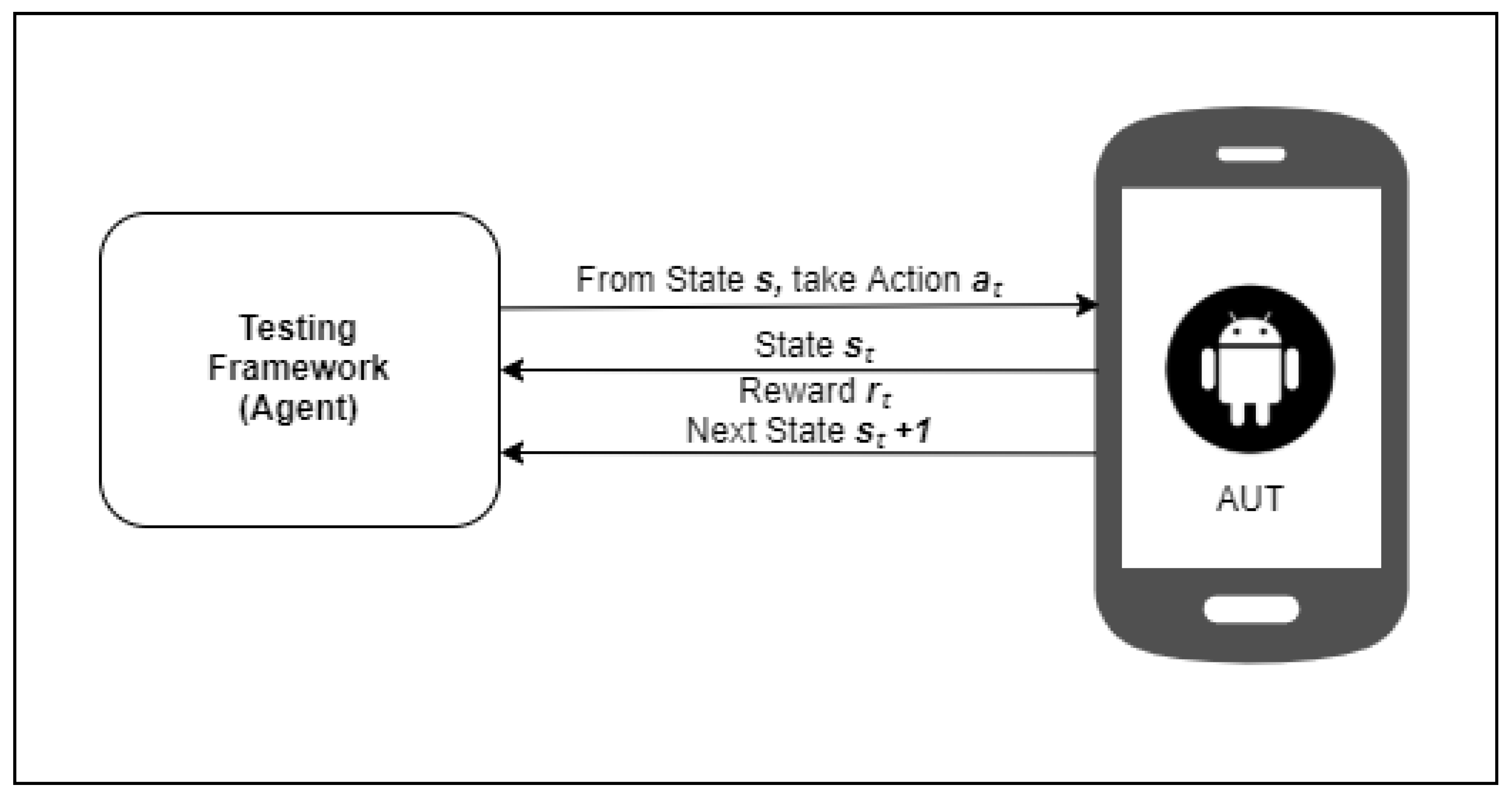
Figure 1 presents the RL mechanism in the context of the Android app testing. In automated GUI testing, AUT is the environment; the state is the set of actions available on the AUT screen. The GUI actions are the set of actions available in the current state of the environment, and the testing tool is the agent. Initially, the testing tool does not know the AUT. As the tool generates and executes test event input based on trial-and-error interaction, the knowledge about AUT is updated to find a policy that facilitates systematic exploration to make efficient future action selection decisions. This exploration generates event sequences that can be used as test cases.
Figure 1. Reinforcement learning mechanism.

4. Android Apps Execution

There are four key components of an Android app as follows: (i) activities, (ii) services, (iii) broadcast receivers, and (iv) content providers. Each component represents a point where the user or system communicates with the GUI components. These components must be declared in the corresponding XML (eXtensible Markup Language) file. Android app manifest is an invaluable XML file stored in the root directory of the app’s source as AndroidManifest.xml. When the device is compiled, the manifest file will be converted into a binary format. This file provides the necessary details about the device to the Android system, such as the package name and App ID, the minimum level of API (application programming interface) required, the list of mandatory permissions, and the hardware specifications.
Activity is the interface layer of the application the user manipulates to engage. Each activity represents a group of layouts such as the linear layout, which horizontally or vertically organizes the screen items. The interface includes GUI elements, known as widgets or controls. These elements are buttons, text boxes, search bars, switches, and number pickers. These elements allow users to interact with the apps. The widgets are handled as task stacks within the system. When an app is launched in the Android system, a new activity starts by default. It is usually positioned at the peak of the current stack and automatically becomes the running activity. Furthermore, the previous activity then remains in the stack just below it and does not come back to the foreground until the new activity exits. Stacks of operation can be seen on the screen. Activity is the primary target of testing tools for the Android app as the user navigates through the screen. The complete lifecycle of an activity is described by the following Activity methods; created, paused, resumed, and destroyed. These methods are linked together to disable in case the activity changes status. The activity lifecycle is tightly coupled with the Android framework, which is managed by an essential service called the Activity manager [38].
The activity comprises a set of views and fragments that present information to the user while interacting with the application. A fragment is a class that contains a portion of the user interface or behavior of the app, which can be placed as part of an activity. Fragments support more dynamic and flexible user interface (UI) designs on a large screen such as tablets. It was implemented in Android from API level 11 onwards. The fragment must always be embedded in an activity, and the fragment’s lifecycle is directly affected by the lifecycle of the host activity. Fragments inside the activity will be stopped if the activity is stopped and destroyed if the activity is destroyed.

6. Proposed Approach: Q-Learning to Generate Test Case for Android Apps

The idea behind using Q-Learning is that the tabular Q-function is rewarded with each selection of possible actions over the app. However, this reward may vary according to the test objective. Thus, events that are never selected can present a higher reward than events that have already been executed, which reduces the redundant execution of events and increases coverage.
Q-Learning has been used in software testing in the past and has shown better results to improve the random exploration strategy [24,42,43,59]. However, a common limitation to all these tools is that the reward function assigns the highest reward when the event is executed for the first time to maximize coverage or locate crashes. Nonetheless, in the proposed approach, the environment does not offer direct rewards to the agent. The agent itself tries to visit all states to collect more rewards. The proposed approach uses tabular Q-Learning like other approaches but uses an effective exploration strategy that reduces actions redundant execution and uses different states and action spaces. Action selection is the main part of Q-Learning in finding an optimal policy. The policy is a process that decides on the next action a from the set of current actions. Unlike previous studies, the proposed approach utilizes the upper confidence bound (UCB) exploration-exploitation strategy as a learning policy to create an efficient exploration strategy for GUI testing. UCB tries to ensure that each action is explored well and is the most widely used solution for multi-armed bandit problems [60]. The UCB strategy is based on the principle of optimism in the face of uncertainty.

6.1. Implementation

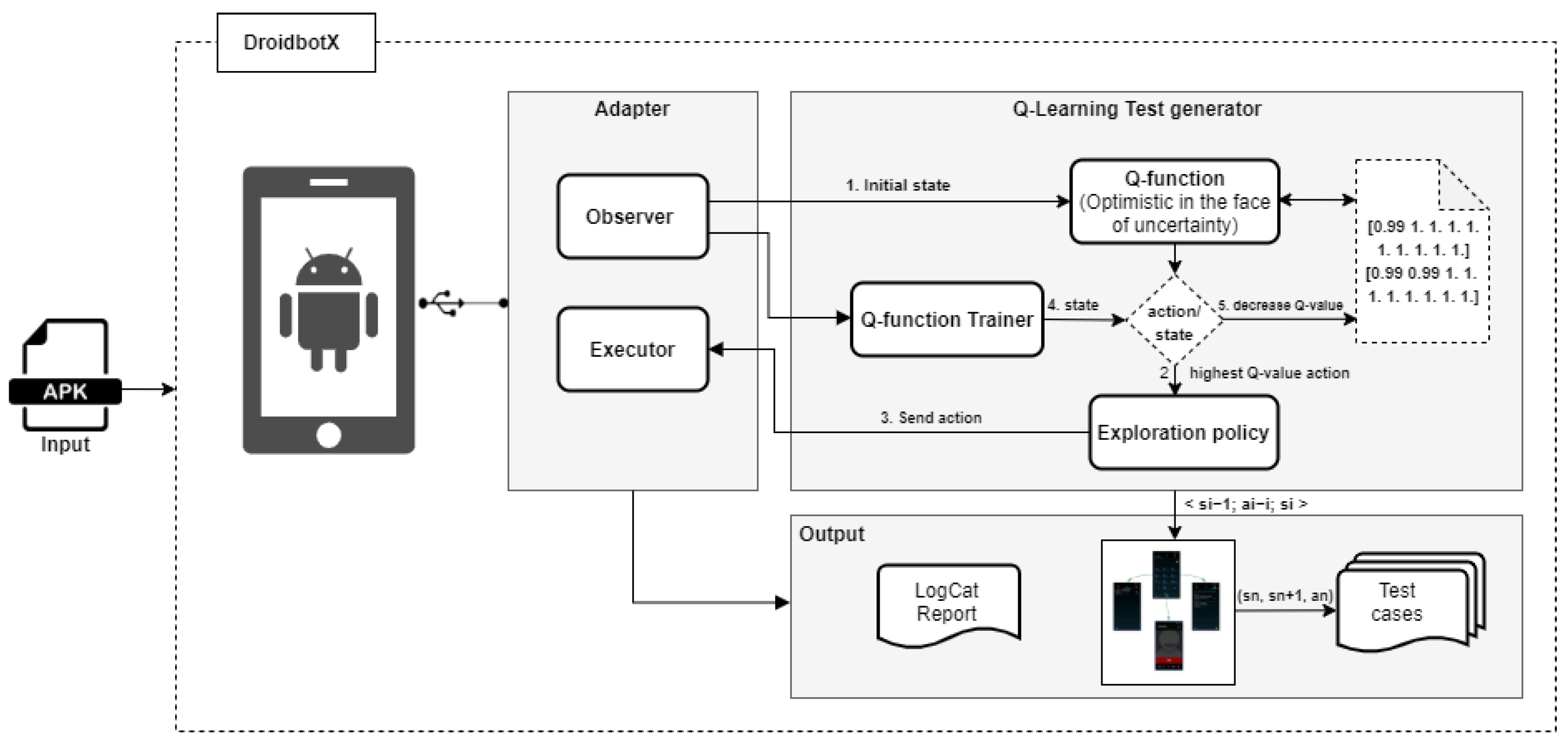
Q-Learning technique with UCB exploration strategy was adopted to generate a GUI test case for Android apps to improve coverage and crash detection. This approach was built in a test tool named DroidbotX. Moreover, the main idea of using DroidbotX was to evaluate the practical usefulness and applicability of the proposed approach. DroidbotX works with Droidbot [28]. Droidbot is a UI-guided input generation tool used mainly for malware detection and compatibility testing. Droidbot was chosen because it is open-source and can test apps without having access to the apps’ source code. Moreover, it can be used on an emulator or real device without instrumentation and is compatible with all Android APIs. The DroidbotX algorithm tries to visit all states because it assumes “optimism in the face of uncertainty”. The principle of optimism in the face of uncertainty is known as a heuristic in sequential decision-making problems, which is a common point in exploration methods. The agent believes that it can obtain more rewards by reaching the unexplored parts of the state’s space [61]. In this principle, actions are selected greedily, but strong optimistic prior beliefs are put on their payoffs so that strong contrary evidence is needed to eliminate the action from consideration. This technique has been used in several RL algorithms, including the interval exploration method [62]. In other words, it means that visiting new states and making new actions would bring the agent more reward than visiting old states and making old actions. Therefore, it starts from an empty Q-function matrix and assumes that every state and action reward an agent with + 1 . When it visits the state s and makes an action a, the Q-function Q (s, a) decreases, and the priority of the action a for the state s becomes lower. Our DroidbotX approach generates sequences of test inputs for Android apps that do not have an existing GUI model. The overall DroidbotX architecture is shown in Figure 2.
Figure 2. Overview of DroidbotX.
In Figure 2, the adapter acts as a bridge between the test environment and the test generation algorithm. The adapter is connected to an Android device or an emulator via the Android Debug Bridge (ADB). The adapter observer monitors the AUT and sends the current state to the test generator. Simultaneously, the executor receives the test inputs generated by the algorithm and translates them to commands. Furthermore, the test generator interacts and explores the app’s functionalities following the observe-select-execute strategy, where all the GUI actions of the current state of AUT are observed; one action is selected based on the selection strategy under consideration, and the selected action is executed on the AUT. Similar to other test generators, DroidbotX uses a GUI model to save the memory of transitions called a UI transition graph (UTG). The UTG guides the tool to navigate between the explored UI states. The UTG is dynamically constructed at runtime, which is a directed graph whose nodes are UI states, and the edges between the two nodes are actions that lead to UI state transitions. The state node contains the GUI information and the running process information, and the methods are triggered by the action. DroidbotX uses Q-Learning-based test coverage approach shown in Algorithm 1 and constructs UI transition graph in Algorithm 2.

6.2. States and Actions Representation

In the Android app, all the UI widgets of an app activity are organized in a GUI view tree [51]. The GUI tree can be extracted via UI Automator, which is a tool provided by the Android SDK. UI widgets include buttons, text boxes, search bars, switches, and number pickers. Users interact with the app using click, long-click, scroll, swipe up, swipe down, input text, and other gestures collectively called as GUI actions or actions. Every action is represented by its action type and target location coordinates. The GUI action is either (1) widget-dependent such as click and text, or (2) widget-independent such as the back that presses the hardware back button. A 5-tuple denotes an action: a   =   ( w ,   t ,   v ,   k ,   i ) , where w is a widget on a particular state, t is a type of action that can be performed on the widget (e.g., click, scroll, swipe), and v holds arbitrary text if widget w is a text field. For all non-text field widgets, the v value is empty. Moreover, k is the key event that includes back, menu, and home buttons on the device, and i is a widget ID. Note that DroidbotX sends an intent action that installs, uninstalls, and restarts the app.
State abstraction refers to the procedure that identifies equivalent states. In this approach, state abstraction determines two states as equivalent if (1) they have similar GUI content which includes package, activity, widget’s type, position, and widgets parent-child relationship, and (2) they have the same set of actions on all interactive widgets, which is widely used in previous GUI testing techniques [44,63,64]. GUI state or state s   S describes the attributes of the current screen out of the Android device where S denotes the set of all states. A content-based comparison and a set of actions to decide state equivalence, where two states with different UI contents and different enabled actions are assumed to be different states.
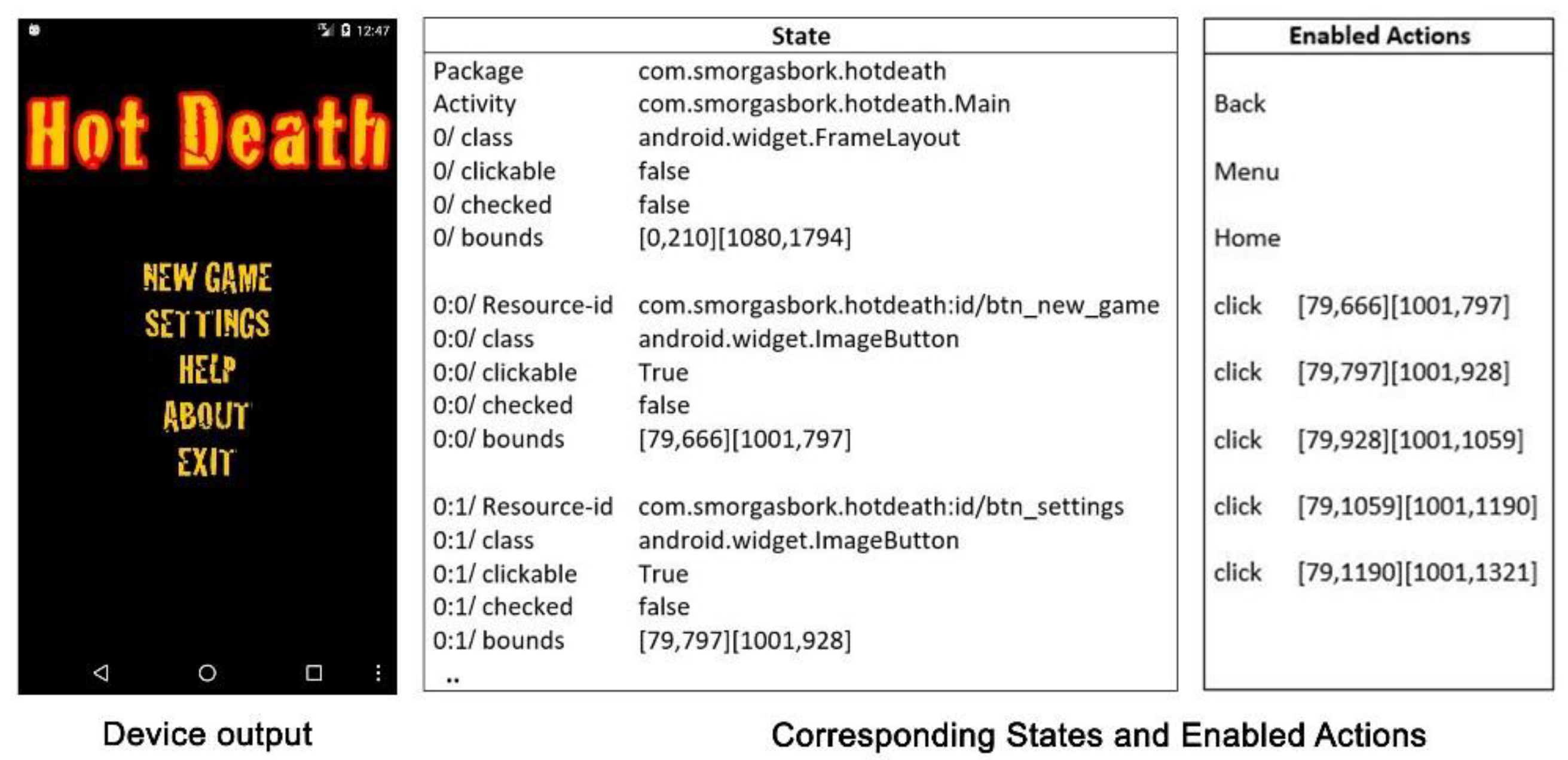
For simplifying states and actions representation, take an example of the Hot death app. Hot death is a variation of the classic card game. The main page includes a new game, settings, help, about, and exit buttons. Figure 3 shows a screenshot of the app’s main activity, initial state, and related widgets with a set of enabled actions. Widget-dependent action is detected when a related widget exists on the screen. For example, a click-action exists only if there is a related widget with the attribute clickable true. Widget-independent action is available in all states because the user can press on device hardware buttons such as the home all the time.
Figure 3. Displays state and actions representation from Android app.

6.3. Exploration Strategy

Android apps can have complex interactions between the events that can be triggered by UI widgets, and states that can be reached, and the resulting coverage achieved. In automated testing, the test generator must choose not only which widget to interact with, but also what type of action to perform. Each type of action on each widget is likely to improve coverage. Our goal is to interact with the app’s widgets by sending relevant actions for each widget dynamically. This reduces the number of ineffective actions performed and explores as much app state as possible. Thus, UCB was used as an exploration policy to explore the app for new states and try out new actions. For each state, all potential widgets are extracted with their IDs and location coordinates, and then systematically choose between five different actions (i.e., click, long-click, scroll, swipe left/right/up/down, and input text data) to interact with each widget. Next, whether the action brings the app to a new state by comparing its contents with all other states in the state model. If the agent identifies a new state, the exploring policy on the new state is recursively applied to discover unexplored actions. The exploration policy does not know about the consequences of each action, and the decision is made based on the Q-function.When exploration of this state terminates, intent was executed to restart the AUT. Android intent is the message that passed between Android app components such as the start activity method to invoke activity. Examples of termination, an action that cause the AUT to crash, an action that switches to another app, or a clicks home button. The home action always closes the AUT, while the back action often closes the AUT. The exploration passes the login screen by searching in a set of pre-defined input. Some existing tools such as Android Monkey [27] will stop at the login screen, failing to exercise the app beyond the login page.

6.3.1. Observer and Rewarder

The goal of the observer is to monitor the results of actions on the AUT. The Q-function then rewards the actions based on the results. Algorithm 1 uses the input parameters to explore the GUI and produces a set of event sequences as a test case for AUT. The Q-function Q ( s ,   a ) takes state s and action a . The Q-function matrix is constructed based on the current state. Each row in the matrix represents the expected Q-values for a particular state. The row size is equal to the number of possible actions for the state. The getEventfromActor function at lines 23–26 obtains all the GUI actions of the current state of AUT. The actions’ initial values on the current state are assigned as 1 at line 26. The UpdateQFunction function at lines 13–21 decreases the value of the action to 0.99 when the test generator conducts this action in the state. When all action value is 0.99, the maximum value becomes 0.99, and the test generator starts to choose some actions again. Then one action is selected and executed, and when a new state is found, the Q-function trainer receives the next state and updates the Q-function matrix to the previous state. The test generator sends KeyEvents such as back button at lines 27–28, if the state is the last or if there are no new actions in the current state.
Q ( s , a ) = Q ( s , a ) + α ( r + γ m a x Q ( s , a ) Q ( s , a ) )
The Q-Learning algorithm uses Equation (2) to estimate the value of Q ( s , a ) iteratively. The Q-function is initialized by a default value. Whenever an agent executes an action a from state s to reach s and receives a reward r   + 1 , the Q-function is updated as Equation (2) where α is a learning rate parameter between 0 and 1 and γ is a discount rate.

6.3.2. Action Selector

Action selection strategy is a crucial feature of DroidbotX. Right actions can improve the likelihood and decrease the time necessary to navigate to various app execution states. In the initial state, the test generator chooses the first action based on a randomized exploration policy to avoid the systematic handling of GUI layouts in each state. Then, the test generator selects actions from the new states and generates event sequences in a way that attempts to visit all states. The Q-function calculates the expected future rewards for actions based on the set of states it visited. In each state, the test generator chooses an action that has the highest expected Q-value from the set of available actions using getSoftArgmaxAction function at lines 32–36, then the predicted Q-value for that action is reduced. Therefore, the test generator will not choose it again until all other actions have been tried. Formalizing this mathematically, the selected action is picked by Equation (3).
a c t i o n = argmax a   Q t ( s t , a i ) + I o g N s t N ( s t , a i ) c
Equation (3) depicts the basic idea of UCB strategy, the expected overall reward of action a is Q t ( s t , a i ) , I o g N s t denotes how often action has been selected in s t , while N ( s t , a i ) is the number of times the action a i was selected in state s t , and c is a confidence value that controls the level of exploration (set to 1). This method is known as “exploration through optimism,” and it gives less-explored action a higher value and encourages the test generator to select them. The test generator uses the Q-function learned by Equation (2) and UCB strategy to select each action intelligently, which balances the exploration and the exploitation of AUT.
Algorithm 1: Q-Learning based test generation
Input:  A, Application under test
Output: S, set of states;
     Q, q-function for all the state-action pairs;
     P, transition matrix, epsilon;
     KeyEvent -exploration parameter
1 (S, Q, P) ← (Ø, Ø, Ø)
2 launch(A)
3
4 while true do
5     Event ← getEventfromActor(Q)
6     Update P[old_state, new_state, :] #adjusting P[old_state, new_state, Event]
7     Q UpdateQFunction(Q, P)
8     Execute(Event)
9     If not enable:
10        break
11 return (S, Q, P)
12
13 Function UpdateQFunction(Q, P)
14    Q_target ← (Ø)
15    for index in [0, 1, …, 9] do
16      for s in S do
17        Q_target[s] maximum of Q[s, event] for all events
18      for s in S do
19         for a in all events that was ever made do
20            Q[s, a] 0.99 * sum(Q_target[:] * P[s, :, a])
21   return Q
22
23 Function getEventfromActor(Q)
24    state getCurrentState()
25    if state is not in S:
26      Q[state, :] 1 # For all possible events from state
27    if RANDOM([0; 1]) < epsilon do
28      event KeyEvent
29    else
30      event getSoftArgmaxAction(Q[state])
31    return event
32 Function getSoftArgmaxAction(Q_state)
33    max_qvalue ← max(Q_state)
34    best_actions ← all events where Q_state[event] == max_qvalue
35    event ← choose randomly from best_actions
36    return event

6.3.3. Test Case Generation

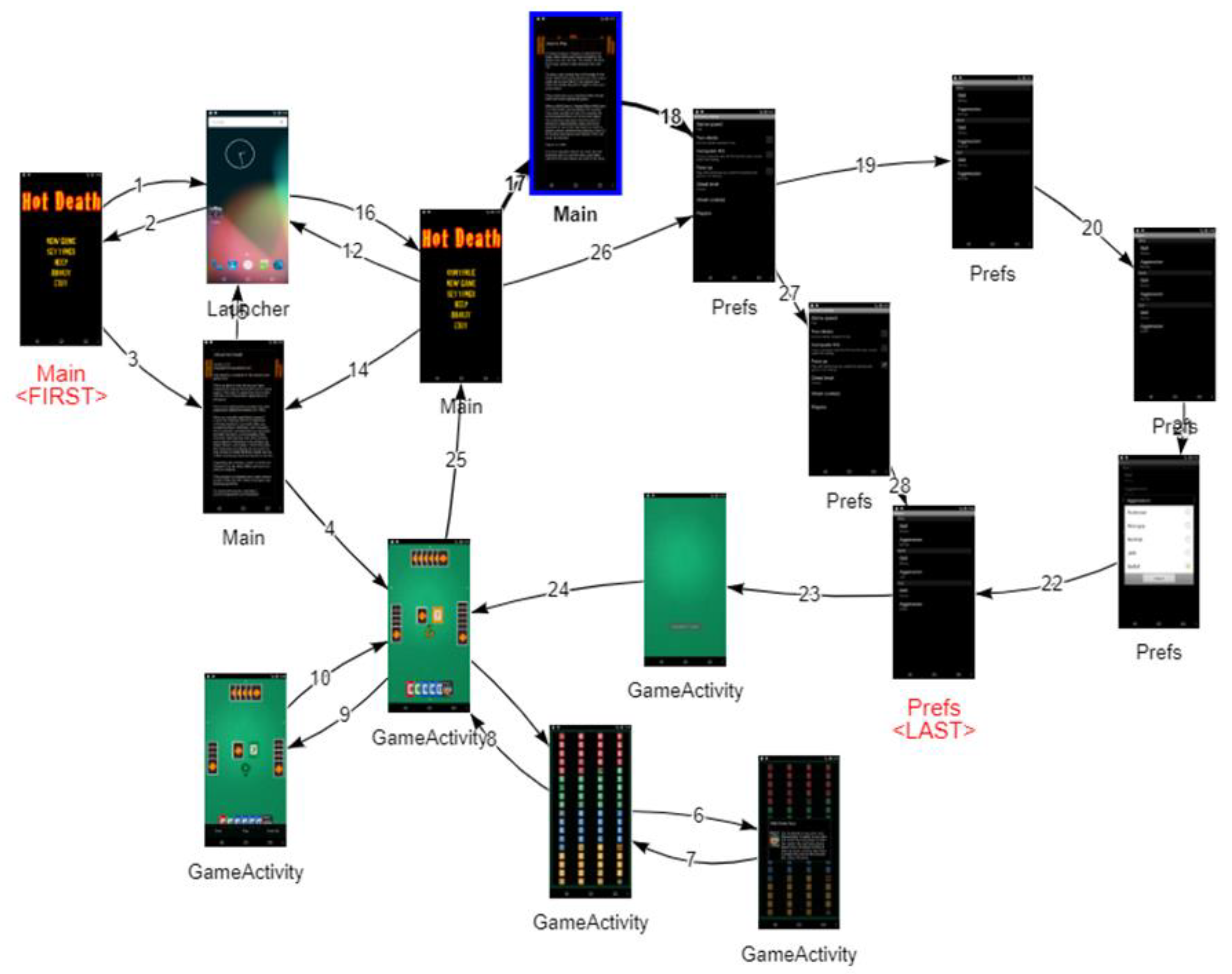
Test case T C is defined as a sequence of transitions. T C   =   ( s 1 ,   a 1 ,   s 2 ) ,   ( s 2 ,   a 2 ,   s 3 ) ,   ,   ( s n ,   a n ,   s n + 1 ) , where n is the length of the test case. Each episode is considered to be a test case, and each test suite T S is a set of test cases. The transition is defined as a 3-tuple (start-state, s s ; action, a ; end-state, s e ). Algorithm 2 dynamically constructs a UI transition graph to navigate between the explored UI states. It takes three input parameters: (1) the app under test, (2) Q-function for all the state-action pairs generated by Algorithm 1, and (3) test suite completion criterion. The criterion for test suite completion is a fixed number of event sequences (set to 1000). DroidbotX’s test generator explores a new state s i , and adds a new edge s i 1 ;   a i i ;   s i to the UI transition graph, where s i 1 . is the last observed UI state and a i i is the action performed in s i 1 . For instance, consider generation of a test suite for Hot death Android app. DroidbotX creates an empty UI transition graph G   (line 1), explores the current state of AUT (line 3), observes all the GUI actions of the current state (line 5), and constructs a Q-function matrix. Then one action is selected and executed based on getSoftArgmaxAction function (line 7), when a new state is found, the UpdateQFunction function receives the next state and updates the Q-function matrix to the previous state. The transition of executed action, next state, and previous state are added to the graph (line 15). The Q-value of executed action is decreased to avoid using the same action of the current state. The process is repeated until completing the target number of actions. Figure 4 shows an example of UTG from the Hot death Android app.
Algorithm 2: DroidbotX Test Suite Generation Algorithm
Input:  AUT, App under test
Input:  Q, Q-function for all the state-action pairs
Input:  C, Test suite completion criterion
Output: TS, Test Suite
1      Create an empty UI transition graph G = S , E
2      Run the AUT
3      Observe current UI state s and add s to S
4      repeat
5        Get All unexplored actions in s as A
6        if A is not empty then
7        Select as action a from A based on Q ( s )
8      else
9      Extract a state s in S that has unexplored actions
10        Get the shortest path p from s to s in G
11        Select the first action in p as a
12      end if
13      Perform action a
14      Observe the new UI state s new and add s new to S
15      Add the edge s , a , s new to E
16      Until all actions in all states in S have been explored
17      or
18      Until length of T S is equal c
19      end
Figure 4. Shows a UI state transition graph from a real-world Android app (Hot death).

7. Empirical Evaluation

This section provides an evaluation of DroidbotX compared to state-of-the-art tools using 30 Android apps. This evaluation employs the empirical case study method that is used in software engineering, as reported in [65,66]. The evaluation intends to answer the following research questions:
RQ.1:
How does the coverage achieved by DroidbotX compared to the state-of-the-art tools?
RQ.2:
How effective is DroidbotX to detect unique app crashes compared to the state-of-the-art tools?
RQ.3:
How does DroidbotX compare to the state-of-the-art tools in terms of test sequence length?

7.1. Case Study Criteria

Four criteria were used for the evaluation as follows: (1) Instruction coverage refers to the Smali [67] code instructions through decompiling the APK installation package. It is the ratio of triggered instruction in the Java instruction code of the app to the total number of instructions. Huang et al. [68] first proposed the concept of instruction coverage, which is used in many studies as an indicator to evaluate test efficiency [24,44,54,64]. It is a more accurate and valid test coverage criterion that reflects the adequacy of testing results for closed-source apps [25]. (2) Method coverage is the ratio of the number of methods called during execution of the AUT to the total number of methods in the source code of the app. By improving the method coverage, more functionalities of the app were explored and tested [11,23,24,26]. (3) Activity coverage is defined as the ratio of activities explored during execution to the total number of activities existing in the app. (4) Crash detection: An Android app crashes when there is an unexpected exit caused by an unhandled exception [69]. Crashes will result in the termination of the app’s processes, and dialogue is displayed to notify the user about the app crash. The further the code the tool explores, the more likely it is to discover potential crashes.

7.2. Subject Selections

We used 30 Android apps chosen from F-Droid repository [30] for the experimental analysis. These apps were chosen from the repository based on the app’s number of activities and user permissions required. These features were determined in the Android manifest file of the app. User permissions were selected to evaluate how tools react to different system events such as call logs, Bluetooth, Wi-Fi, location, and the camera of the device. Table 2 lists the apps by app type, along with the package name, the number of activities, methods, and instructions in the app (which offers a rough estimate of the app size). Acvtool [70] was used to collect instruction coverage and method coverage. This tool does not require the source code of the app.
Table 2. Overview of Android apps selected for testing.

7.3. Experimental Setup

Our experiments were executed on a 64-Bit Octa-Core machine with a 3.50 Gigahertz Intel Xeon® central processing unit (CPU) running on Ubuntu 16.04 and 8 Gigabytes of RAM. Five state-of-the-art test generation tools for Android apps were installed on the dedicated machine for running our experiments. The tools chosen were Sapienz [16], Stoat [15], Droidbot [28], Humanoid [29], and Android Monkey [27].
The Android emulator x86 ABI (Application Binary Interface) image was used for experiments. All comparative experiments ran on emulators because the publicly available version of Sapienz only supports emulators. In contrast, DroidbotX, Droidbot, Humanoid, Stoat, and Android Monkey support both emulators and real devices. Moreover, Sapienz and Stoat ran on the same version of Android 4.4.2 (Android KitKat, API level 19) because of their compatibility as described in previous studies [15,16]; DroidbotX, Droidbot, Humanoid, and Android Monkey ran on Android 6.0.1 (Android Marshmallow, API level 23).
To achieve a fair comparison, a new Android emulator was used for each run to avoid any potential side-effects that may occur between the tools and apps. All tools were used with their default configurations. According to previous studies [11,54], Sapienz and Android Monkey were set to 200 milliseconds delay for GUI state updates. All testing tools were provided for an hour to test each app, similar to other studies [11,16,44]. To compensate for the possible effect of randomness during testing, each test was repeated five times (with each test consisting of one testing tool and one applicable app being tested). The final coverage and the progressive coverage were recorded after each action. Subsequently, the average value of the five tests was calculated as the final result.

8. Results

In this section, the research questions were answered by measuring and comparing four aspects: (i) instruction coverage, (ii) method coverage, (ii) activity coverage, and (iv) the number of detected crashes achieved by each testing tool on selected apps in our experiments. Table 3 shows the results obtained from the six testing tools. The gray background cells in Table 3 indicate the maximum value achieved during the test. The percentage value is the rounded-up value obtained from the average of the five iterations of the tests performed on each AUT.
Table 3. Results on instruction coverage, method coverage, and activity coverage by test generation tools.
RQ.1: How does the coverage achieved by DroidbotX compare to the state-of-the-art tools?
(1)
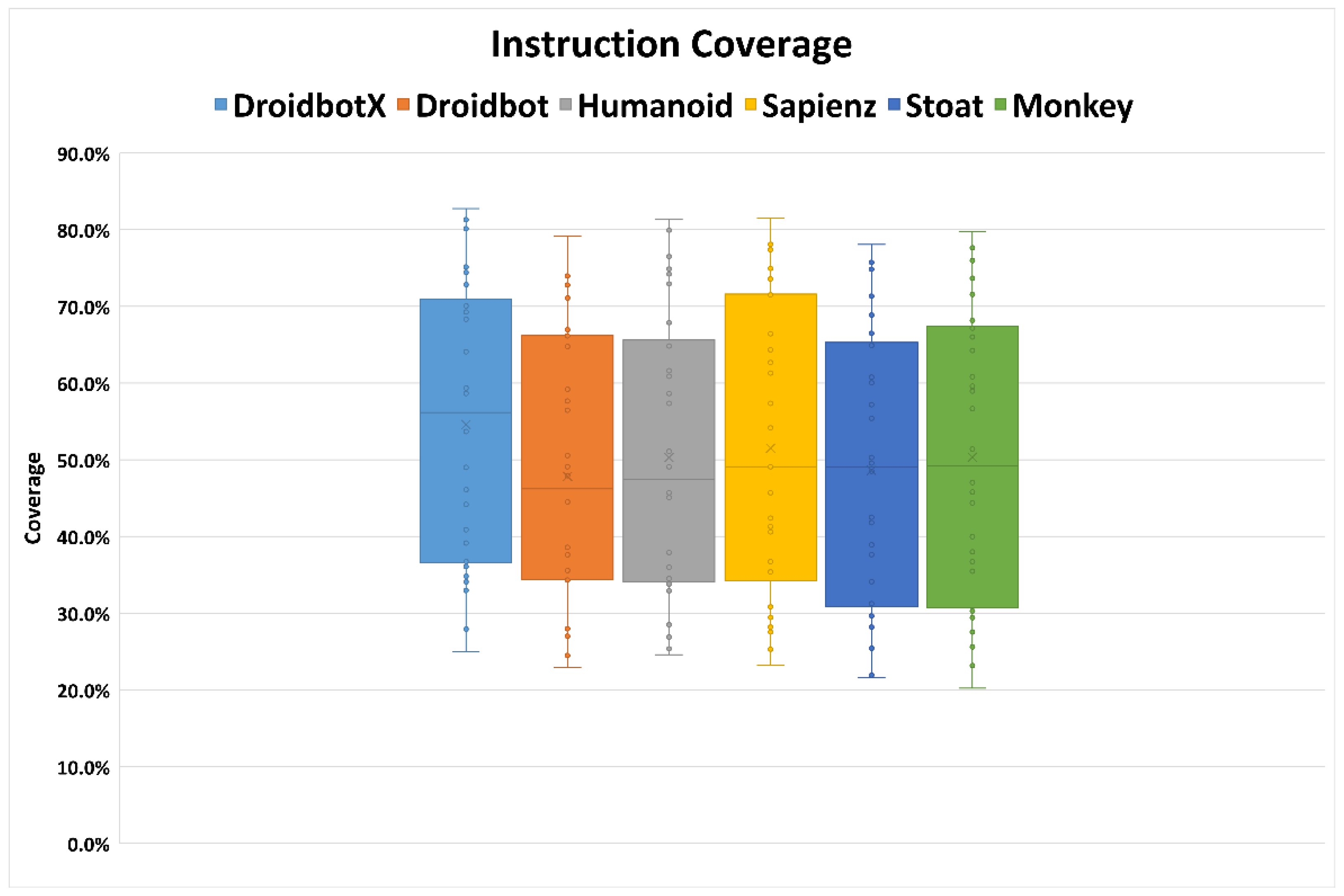
Instruction coverage: The overall comparison of instruction coverage achieved by testing tools on selected Android apps is shown in Table 3. On average, DroidbotX achieved 51.5% instruction coverage, which is the highest across the compared tools. It achieved the highest value on 9 of 30 apps (including four ties, i.e., where DroidbotX covered the same number of instructions as another tool) compared to other tools. Sapienz achieved 48.1%, followed by Android Monkey (46.8%), Humanoid (45.8%), Stoat (45%), and Droidbot (45%).
Figure 5 presents the boxplots, where x indicates the mean of the final instruction coverage results across target apps. The boxes provide the minimum, mean, and maximum coverage achieved by the tools. Better results from DroidbotX can be explained as it accurately identifies which parts of the app are inadequately explored. The DroidbotX approach is used to explore the UI components by checking all actions available in each state and avoiding the use of the explored action to maximize coverage. In comparison, Humanoid achieved a 45.8% average value and had the highest coverage on 4 out of 30 apps due to its ability to prioritize critical UI components. Humanoid chooses from 10 actions available in each state that are likely to interact with human users.
Figure 5. Variance of instruction coverage achieved across apps and five runs.
Android Monkey’s coverage was close to Sapienz’s coverage during a one-hour test. Sapienz uses Android Monkey to generate events and uses an optimized evolutionary algorithm to increase coverage. Stoat and Droidbot achieved lower coverage than the other four tools. First, Droidbot explores UIs in depth-first order. Although this greedy strategy can reach deep UI pages at the beginning, it may get stuck because the order of the event execution is fixed at runtime. Second, Droidbot does not explicitly revisit the previously explored states, and this may fail to include a new code that should be reached by different sequences.
(2)
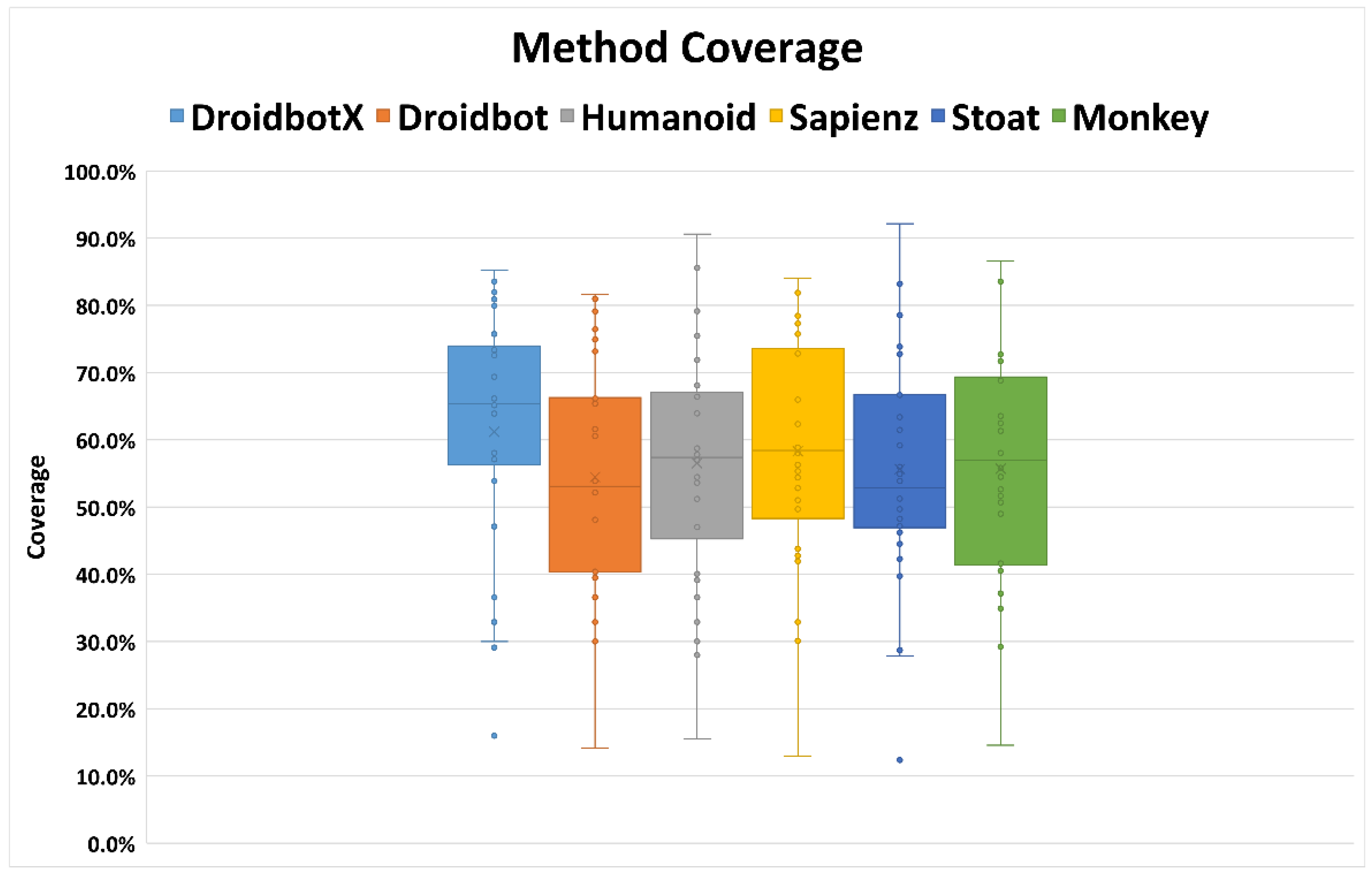
Method coverage: DroidbotX significantly outperformed state-of-the-art tools in method coverage with an average value of 57%. The highest value was achieved on 9 out of 30 apps (including three ties where the tool covered the same method coverage as another tool). Table 3 shows that the coverage of app instructions obtained by the tools is lower than that of the method. This indicates that the method coverage cannot fully cover all the statements in the app’s method. On average, Sapienz, Android Monkey, Humanoid, Stoat, and Droidbot achieved 53.7%, 52.1%, 51.2%, 50.9%, and 50.6% of method coverage, respectively. Stoat and Droidbot did not obtain the highest coverage of 50% on 10 of 30 apps after five rounds of testing. In contrast, DroidbotX achieved the highest method coverage of 50% in the 24 apps that were tested. In comparison, Android Monkey obtained less than 50% method coverage in eight apps. This study concluded that the AUT functionalities can be accomplished and explored using the observe-select-execute strategy and tested on standard equipment. Sapienz displayed the best method coverage on 5 out of 30 apps (including four ties where the tool covered the same method coverage as another tool). Sapienz’s coverage was significantly higher for some apps such as “WLAN Scanner”, “HotDeath”, “ListMyApps”, “SensorReadout”, and “Terminal emulator”. These apps have functionality that requires complex interactions with validated text input fields. Sapienz uses the Android Monkey input generation, which continuously generates events without waiting for the effect of the previous event. Moreover, Sapienz and Android Monkey can generate several events, broadcasts, and text that have not been supported by other tools. DroidbotX obtained the best results for several other apps, especially “A2DPVolume”, “Blockinger”, “Ethersynth”, “Resdicegame”, “Weather Notification”, and “World Clock”. The DroidbotX approach assigns Q-values to encourage the execution of actions that lead to new or partially explored states. This enables the approach to repeatedly execute high-value action sequences and revisit the subset of GUI states that provides access to most of the AUT’s functionality.
Figure 6 presents the boxplots, where x indicates the mean of the final method coverage results across target apps. DroidbotX had the best performance compared to state-of-the-art tools, and Android Monkey was used as a reference for evaluation in most Android testing tools. Android Monkey can be considered a baseline because it comes with an Android SDK and is popular among developers. Android Monkey obtained a lower coverage compared to DroidbotX because of its redundancy and random exploratory approach.
Figure 6. Variance of method coverage achieved across apps and five runs.
(3)
Activity coverage: the activity coverage is measured by intermittent observation of the activity stack on the AUT and recording all activities listed down in the android manifest file. The activity coverage metric was chosen because, once DroidbotX has reached an activity, it can explore most of the activity’s actions. The results determine activity coverage differences between DroidbotX and other state-of-the-art tools. The resulting average value of the tools revealed that the activity coverage performed better than instruction and method coverage, as shown in Table 3.
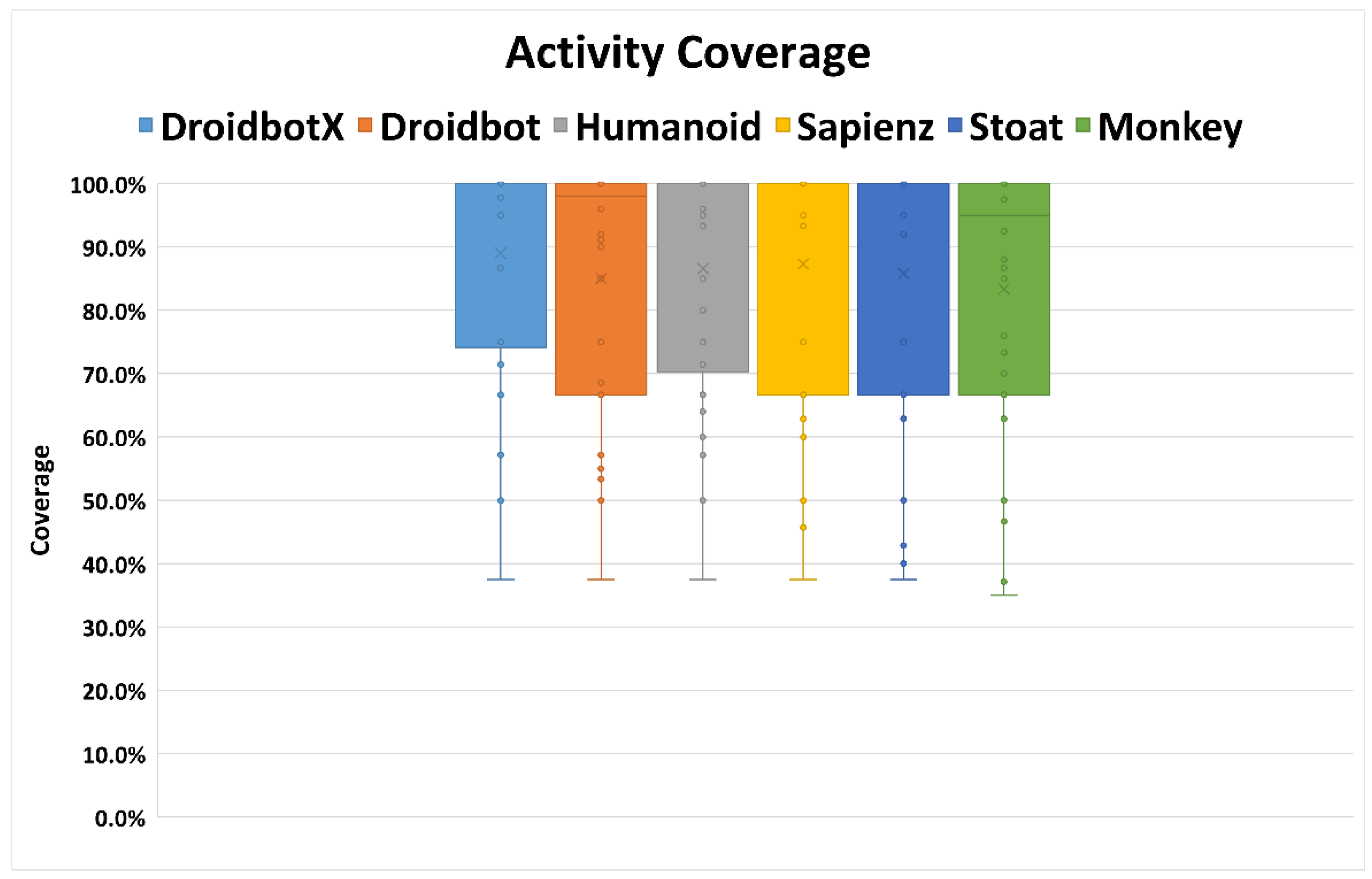
DroidbotX outperformed the other tools in its activity coverage, such as instruction and method coverage. DroidbotX has an average coverage of 86.5%, which was best achieved by the “Alarm Clock” app (including 28 ties, i.e., whereby DroidbotX covered the same number of activities as another tool). DroidbotX outperformed other tools because it did not explicitly revisit previously explored states due to its reward function. This was followed by Sapienz and Humanoid, with the average mean value of activity coverage at 84% and 83.3%, respectively. Stoat successfully outperformed Android Monkey in activity coverage with an average activity coverage of 83% due to an intrusive null intent fuzzing that can start an activity with empty intents. All tools under study were able to cover more than 50% of coverage on 25 apps, and four testing tools covered 100% activity coverage on 15 apps. Android Monkey, however, achieved less than 50% activity coverage of about three apps. Android Monkey achieved the least activity coverage with an average mean value of 80%.
Figure 7 shows the variance of the mean activity coverage of 5 runs across all 30 apps of the tool. The horizontal axis shows the tools used for the comparison. The vertical axis shows the percentage of activity coverage. Activity coverage was higher than the instruction and method coverage. DroidbotX, Droidbot, Humanoid, Sapienz, Stoat, and Android Monkey obtained a 100% coverage increased from a mean coverage of 89%, 85%, 86.6%, 87.3%, 85.8%, and 83.4%, respectively. All tools were able to cover above 50% of the activity coverage. Although Android Monkey implemented more types of events than other tools, it achieved the least activity coverage. Android Monkey generates random events at random positions in the App activities. Therefore, its activity coverage can differ significantly from app to app and may be affected by the number of events sequences generated. To sum up, the high coverage of DroidbotX was mainly due to the ability of DroidbotX to perform a meaningful sequence of actions that could drive the app into new activities.
Figure 7. Variance of activity coverage achieved across apps and five runs.
RQ.2: How effective is DroidbotX in detecting unique app crashes compared to the state-of-the-art tools?
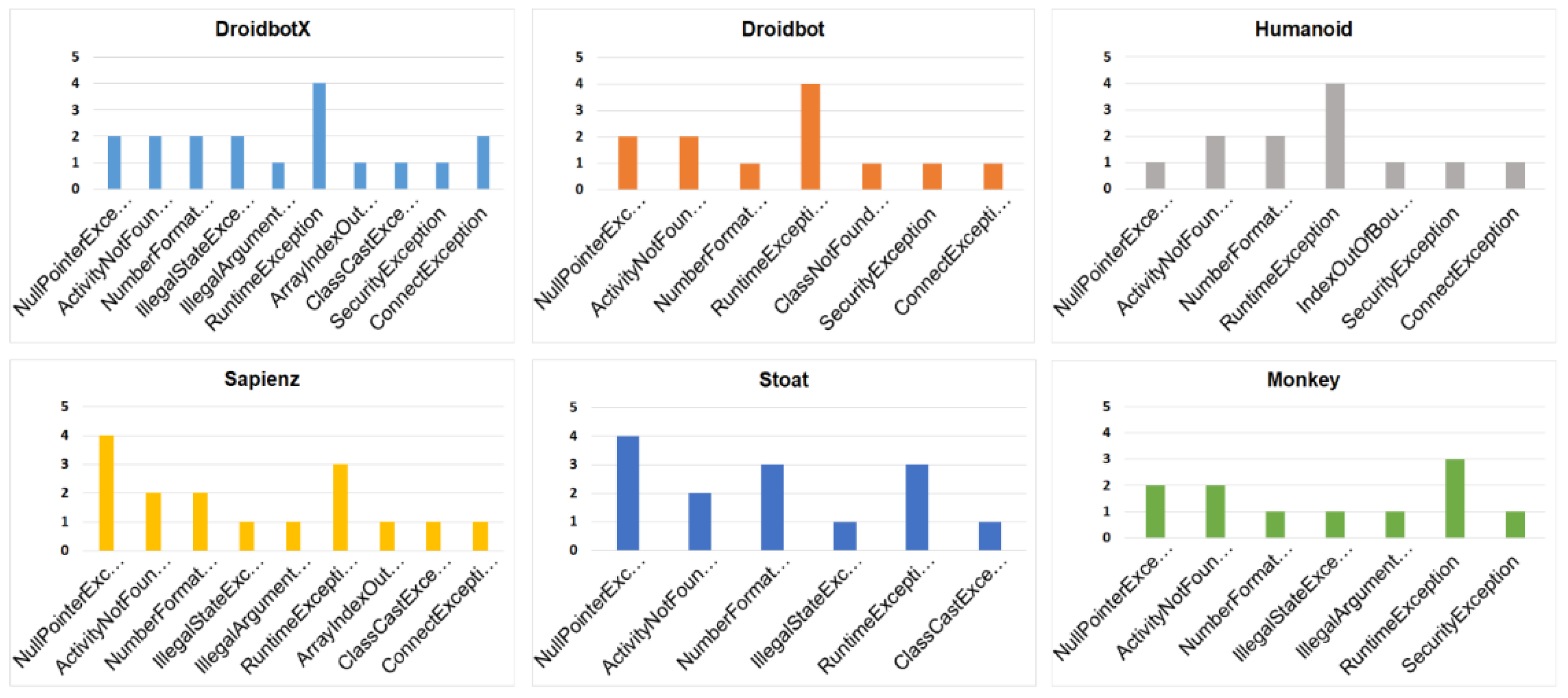
A crash is uniquely identified by the error message and the crashing activity. LogCat [71] is used to repeatedly check the crashes encountered during the AUT execution. LogCat is a tool that uses the command-line interface to dump logs of all the system-level messages. Log reports were manually analyzed to identify unique crashes from the error stack following the Su et al. [15] protocol. First, crashes unrelated to the app’s execution by retaining only exceptions containing the app’s package name and filter crashes of the tool itself, or initialization errors of the apps in the Android emulator. Second, compute a hash over the sanitized stack trace of the crash to identify unique crashes. Different crashes should have a different stack trace and thus a different hash. Each unique crash exception is recorded per tool, and the execution process is repeated five times to prevent randomness in the results. The number of unique app crashes is used as a measure of the performance of the crash detection tool. Crashes detected by tools on a different version of Android via normalized stack traces were not compared because different versions of Android have different framework code. In particular, Android 6.0 uses the ART runtime while Android 4.4 uses Dalvik VM, different runtime environments have different thread entry methods. Based on Figure 8, each of the tools compared complements the others in crash detection and has its advantages. DroidbotX triggered an average of 18 unique crashes in 14 apps, followed by Sapienz (16), Stoat (14), Droidbot (12), Humanoid (12), and Android Monkey (11).
Figure 8. Distribution of crashes discovered.
Like activity coverage, Android Monkey remains the same as it has the least capacity to detect crashes due to its exploratory approach that generates a lot of ineffective and redundant events. Figure 8 summarizes the distribution of crashes by the six testing tools. Most of the bugs are caused by accessing null references. Common reasons are that developers forget to initialize references, access references that have been cleaned up, skip checks of null references, and fail to verify certain assumptions about the environments [57]. DroidbotX is the only tool to detect IllegalArgumentException on the ‘‘World Clock’’ app, because it is capable of managing the exploration of states, and systematically sends back button events that may change the activity life cycle. This bug is caused by an incorrect redefinition of the onPause method of activity. Android apps may have incorrect behavior due to mismanagement of the activity’s lifecycle. Sapienz uses Android Monkey to generate an initial population of event sequences (including both user and system events) prior to genetic optimization. This allows Sapienz to trigger other types of exception, including ArrayIndexOutOfBoundsException, and ClassCastException. For the “Alarm Clock” app, DroidbotX and Droidbot detected a crash on an activity that was not discovered by other tools in the five runs. Manually inspected several randomly selected crashes to confirm that they do appear in the original APK as well, and found no discrepancy between the original and the instrumented APK behaviors.
RQ.3: How does DroidbotX compare to the state-of-the-art tools in terms of test sequence length?
The effectiveness of events sequence length on test coverage and crash detection was investigated. The event sequence length generally shows the number of steps required by the test input generation tools to detect a crash. It is critical to highlight its effectiveness due to its significant effects on time, testing effort, and computational costs.
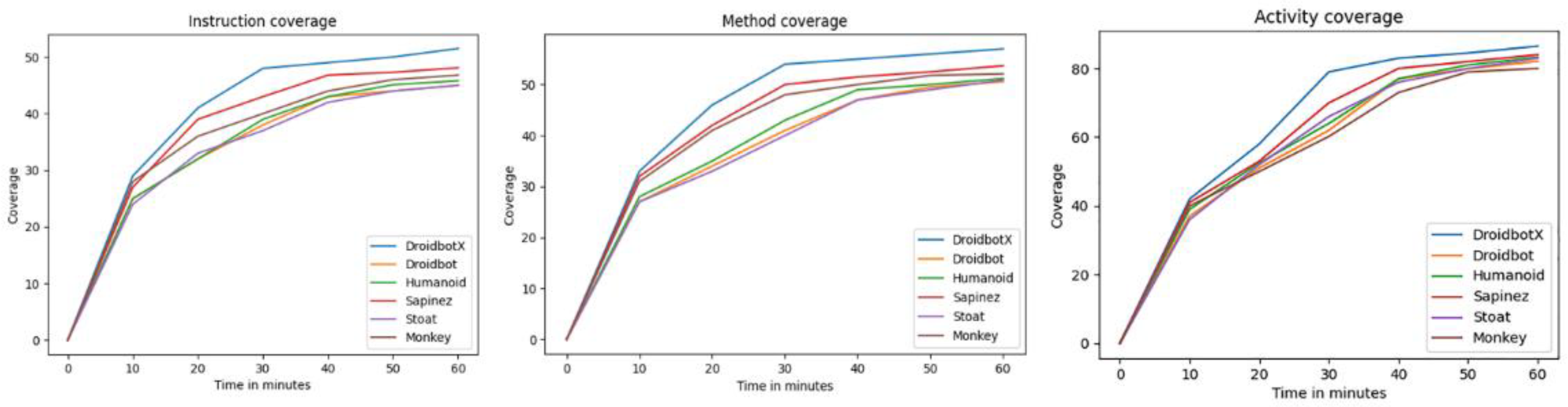
Figure 9 depicts the progressive coverage of each tool over the threshold time used (i.e., 60 min). The progressive average coverage for all 30 apps was calculated every 10 min for each of the test generation tools in the study and a direct comparison of the final coverage was published. In the first 10 min, the coverage for all testing tools increased rapidly, as the apps had just started. At 30 min, DroidbotX achieved the highest coverage value compared to other tools. The reason is that the UCB exploration strategy implemented in DroidbotX finds events based on their reward and Q-value, which eventually tries to select and execute the previously unexecuted or less executed events, thus aiming for high coverage.
Figure 9. Progressive coverage.
Sapienz coverage increased rapidly, as the apps had just started, whereas all UI states were new but could not exceed the peak reached after 40 min. Sapienz has a high tendency to explore visited states, which could generate more event sequences. Stoat, Droidbot, and Humanoid had almost the same result and had better activity coverage than Android Monkey. Android Monkey could not exceed the peak reached after 50 min. The reason is that a random approach generates the same set of redundant events leading to a fall in its activity exploration ability. It is essential to highlight that these redundant events produced insignificant coverage improvement as the time budget increased.
Table 4 shows that the Q-Learning approach implemented in DroidbotX achieved 51.5% instruction coverage, 57% method coverage, 86.5% activity coverage, and triggered 18 crashes within the shortest event sequence length compared to other tools.
Table 4. Experimental results to answer research questions.
The results show that adapting Q-Learning with the UCB strategy can significantly improve the effectiveness of the generated test cases. DroidbotX generated a sequence length of 50 events per AUT state with an average of 623 events per run across all apps (which is smaller than the default maximum sequence length of Sapienz). DroidbotX completed exploration before reaching the maximum number of events (set to 1000) within the time limit. Sapienz produced 6000 events and optimized events sequence lengths through the generation of 500 events per AUT state. Nevertheless, it created the largest number of events after Android Monkey. However, the coverage improvement was closer to Humanoid and Droidbot, which generated a smaller number of events. Both Humanoid and Droidbot generated 1000 events per hour. Sapienz uses Android Monkey that requires many events, which may include many redundant events to achieve high coverage. Hence, the coverage gained by Android Monkey only increases slightly as the number of events increases. Thus, a long events sequence length led to a minor positive effect on coverage and crash detection.
Table 5 shows the statistics of models built by Droidbot, Humanoid, and DroidbotX. These tools use the UI transition graph to save the memory of state transitions. The graph model enables DroidbotX to manage the exploration of states systematically to avoid being trapped in a certain state, which also can help to minimize unnecessary transitions. DroidbotX generates an average of 623 events to construct the graph model, while Droidbot and Humanoid generate 969 and 926 average events, respectively. Droidbot cannot exhaustively explore app functions due to its simple exploration strategies. The depth-first systematic strategy used in Droidbot is surprisingly much less effective than the random strategy since it visits UIs in a fixed order and spends much time on restarting the app when no new UI components are found. Stoat requires more time for test execution due to its model construction in the initial phase which consumes time. Model-free tools such as Android Monkey and Sapienz can easily mislead exploration because of the lack of connectivity information between GUIs [54]. The model constructed by DroidbotX is still not complete since it cannot capture all possible behaviors during exploration, which is still an important research goal on GUI testing [15]. All the events would introduce non-deterministic behavior if they were not properly modeled such as system events and events coming from motion sensors (e.g., accelerometer, gyroscope, and magnetometer). Motion sensors are used for gesture recognition which refers to recognizing meaningful body motions including the movement of the fingers, hands, arms, head, face, or body performed with the intent to convey meaningful information or to interact with the environment [72]. DroidbotX will be extended in the future to include more system events.

Table 5. Statistics of models built by Droidbot, Humanoid, and DroidbotX.

9. Threats to Validity

There are threats and limitations to the validity of our study. Threats to internal validity, the non-deterministic approach of the tools results in obtaining different coverage for each run. Thus, multiple runs were executed to reduce this threat and to remove outliers that could affect the study critically. Each testing tool was allowed to run five times, and the test results were recorded and then computed to yield an average result of final coverage and progressive coverage of the tools. Another threat to the internal validity of our study is Acvtool’s instrumentation effect, which affects the integrity of the results obtained. These may be caused by errors triggered by Acvtool’s incorrect handling of the binary code or by errors in our experimental scripts. To mitigate this risk, the traces of our experiments for the subject apps were manually inspected.
External validity was threatened by the representativeness of the study to the real world. This means how closely the apps and tools were used in this study to reflect the real world. Moreover, the generalizability of the results was limited as we used a limited number of subject apps. To mitigate these, a standard set of subject apps was used in our experiment from various domains, including fitness, entertainment, and tools applications. The subject apps from F-Droid, which is commonly used in Android GUI testing studies, were carefully selected and the details of the selection process were explained in Section 7.2. Therefore, our test is not prone to selection bias.

10. Conclusions

This research aims to present a Q-Learning-based test coverage approach to generate the GUI test case for Android apps. This approach adopted a UCB exploration strategy to minimize redundant execution of events that improve coverage and crash detection. The proposed approach generated inputs that visit unexplored app states and uses the execution of the app on the generated inputs to construct a state-transition model generated during runtime. This research also provided an empirical evaluation of the effectiveness of the proposed approach and shows a comparison with GUI test-generation tools for Android apps using 30 Android apps. Four criteria (i) instruction coverage, (ii) method coverage, (iii) activity coverage and (iv) number of detected crashes were used to evaluate and compare GUI test-generation tools. The experimental result revealed that the Q-Learning-based test coverage approach outperforms the state-of-the-art in coverage and in the number of detected crashes within the shortest events sequence length. For future work, DroidbotX will be extended to include input text data, which may integrate text prediction to improve coverage.

Author Contributions

Conceptualization, Data curation, Formal analysis, Methodology, Resources, Software, Visualization, and Writing—Original draft preparation: H.N.Y.; Supervision: S.H.A.H. and R.J.R.Y.; Writing —Review and editing: H.N.Y., S.H.A.H. and R.J.R.Y.; Funding acquisition, R.J.R.Y. All authors have read and agreed to the published version of the manuscript.

Funding

This research has received funding from University of Malaya grant numbered RP061E-18SBS, UMRG Program Grant, and European Commission Erasmus plus no: 586297-EPP-1- 2017-1- EL-EPPKA2-CBHE-JP.

Institutional Review Board Statement

Not applicable.

Data Availability Statement

The data presented in this study are available within the article.

Acknowledgments

We gratefully thank University of Malaya for the fundamental research grant provided to us numbered RP061E-18SBS, UMRG Program Grant. Also, this project has been funded by European Commission under the Erasmus plus no: 586297-EPP-1- 2017-1- EL-EPPKA2-CBHE-JP and managed by University of Malaya under grant no. IF024-2018. This publication reflects the views only of the author, and the Commission cannot be held responsible for any use which may be made of the information contained therein.

Conflicts of Interest

The authors declare that they have no conflict of interest.

References

  1. IDC. IDC—Smartphone Market Share—OS. Available online: https://www.idc.com/promo/smartphone-market-share (accessed on 16 December 2019).
  2. Chaffey, D. Mobile Marketing Statistics Compilation|Smart Insights. 2018. Available online: https://www.smartinsights.com/mobile-marketing/mobile-marketing-analytics/mobile-marketing-statistics/ (accessed on 16 December 2019).
  3. Statista. App Stores. Number of Apps in Leading App Stores 2019|Statista. Available online: https://www.statista.com/statistics/276623/number-of-apps-available-in-leading-app-stores/ (accessed on 14 December 2019).
  4. TheAppBrain. Number of Android Applications on the Google Play Store|AppBrain. Available online: https://www.appbrain.com/stats/number-of-android-apps (accessed on 16 December 2019).
  5. Packard, H. Failing to Meet Mobile App User Expectations: A Mobile User Survey; Technical Report. 2015. Available online: https://techbeacon.com/sites/default/files/gated_asset/mobile-app-user-survey-failingmeet-user-expectations.pdf (accessed on 16 December 2019).
  6. Khalid, H.; Shihab, E.; Nagappan, M.; Hassan, A.E. What do mobile app users complain about? IEEE Softw. 2014, 32, 70–77. [Google Scholar] [CrossRef]
  7. Martin, W.; Sarro, F.; Harman, M. Causal impact analysis for app releases in google play. In Proceedings of the 24th ACM SIGSOFT International Symposium on Foundations of Software Engineering, Seattle, WA, USA, 13–19 November 2016; pp. 435–446. [Google Scholar]
  8. Ammann, P.; Offutt, J. Introduction to Software Testing; Cambridge University Press: Cambridge, UK, 2016. [Google Scholar]
  9. Memon, A. Comprehensive Framework for Testing Graphical User Interfaces; University of Pittsburgh: Pittsburgh, PA, USA, 2001. [Google Scholar]
  10. Joorabchi, M.E.; Mesbah, A.; Kruchten, P. Real challenges in mobile app development. In Proceedings of the ACM/IEEE International Symposium on Empirical Software Engineering and Measurement, Baltimore, MD, USA, 10–11 October 2013; pp. 15–24. [Google Scholar]
  11. Choudhary, S.R.; Gorla, A.; Orso, A. Automated test input generation for android: Are we there yet?(e). In Proceedings of the 30th IEEE/ACM International Conference on Automated Software Engineering (ASE), Lincoln, NE, USA, 9–13 November 2015; pp. 429–440. [Google Scholar]
  12. Arnatovich, Y.L.; Wang, L.; Ngo, N.M.; Soh, C. Mobolic: An automated approach to exercising mobile application GUIs using symbiosis of online testing technique and customated input generation. Softw. Pract. Exp. 2018, 48, 1107–1142. [Google Scholar] [CrossRef]
  13. Machiry, A.; Tahiliani, R.; Naik, M. Dynodroid: An input generation system for android apps. In Proceedings of the 9th Joint Meeting on Foundations of Software Engineering, Saint Petersburg, Russia, 18–26 August 2013; pp. 224–234. [Google Scholar]
  14. Amalfitano, D.; Fasolino, A.R.; Tramontana, P.; De Carmine, S.; Memon, A.M. Using GUI ripping for automated testing of Android applications. In Proceedings of the 27th IEEE/ACM International Conference on Automated Software Engineering, Essen, Germany, 3–7 September 2012; pp. 258–261. [Google Scholar]
  15. Su, T.; Meng, G.; Chen, Y.; Wu, K.; Yang, W.; Yao, Y.; Pu, G.; Liu, Y.; Su, Z. Guided, stochastic model-based GUI testing of Android apps. In Proceedings of the 11th Joint Meeting on Foundations of Software Engineering, Paderborn, Germany, 4–8 September 2017; pp. 245–256. [Google Scholar]
  16. Mao, K.; Harman, M.; Jia, Y. Sapienz: Multi-objective automated testing for Android applications. In Proceedings of the 25th International Symposium on Software Testing and Analysis, Saarbrücken, Germany, 18–20 July 2016; pp. 94–105. [Google Scholar]
  17. Zhu, H.; Ye, X.; Zhang, X.; Shen, K. A context-aware approach for dynamic gui testing of android applications. In Proceedings of the IEEE 39th Annual Computer Software and Applications Conference, Taichung, Taiwan, 1–5 July 2015; pp. 248–253. [Google Scholar]
  18. Amalfitano, D.; Fasolino, A.R.; Tramontana, P.; Ta, B.D.; Memon, A.M. MobiGUITAR: Automated model-based testing of mobile apps. IEEE Softw. 2014, 32, 53–59. [Google Scholar] [CrossRef]
  19. Wang, W.; Li, D.; Yang, W.; Cao, Y.; Zhang, Z.; Deng, Y.; Xie, T. An empirical study of android test generation tools in industrial cases. In Proceedings of the 33rd ACM/IEEE International Conference on Automated Software Engineering, Montpellier, France, 3–7 September 2018; pp. 738–748. [Google Scholar]
  20. Yasin, H.N.; Hamid, S.H.A.; Yusof, R.J.R.; Hamzah, M. An Empirical Analysis of Test Input Generation Tools for Android Apps through a Sequence of Events. Symmetry 2020, 12, 1894. [Google Scholar] [CrossRef]
  21. Yang, S.; Wu, H.; Zhang, H.; Wang, Y.; Swaminathan, C.; Yan, D.; Rountev, A. Static window transition graphs for Android. Autom. Softw. Eng. 2018, 25, 833–873. [Google Scholar] [CrossRef]
  22. Memon, A.; Soffa, M.L.; Pollack, M. Coverage criteria for GUI testing. ACM SIGSOFT Softw. Eng. Notes 2001, 26, 256–267. [Google Scholar] [CrossRef]
  23. Azim, T.; Neamtiu, I. Targeted and depth-first exploration for systematic testing of android apps. In Proceedings of the ACM SIGPLAN International Conference on Object Oriented Programming Systems Languages & Applications, Indianapolis, IN, USA, 26–31 October 2013; pp. 641–660. [Google Scholar]
  24. Koroglu, Y.; Sen, A.; Muslu, O.; Mete, Y.; Ulker, C.; Tanriverdi, T.; Donmez, Y. QBE: QLearning-based exploration of android applications. In Proceedings of the IEEE 11th International Conference on Software Testing, Verification and Validation (ICST), Luxembourg, 18–22 March 2013; pp. 105–115. [Google Scholar]
  25. Yang, S.; Huang, S.; Hui, Z. Theoretical Analysis and Empirical Evaluation of Coverage Indictors for Closed Source APP Testing. IEEE Access 2019, 7, 162323–162332. [Google Scholar] [CrossRef]
  26. Dashevskyi, S.; Gadyatskaya, O.; Pilgun, A.; Zhauniarovich, Y. The influence of code coverage metrics on automated testing efficiency in android. In Proceedings of the ACM SIGSAC Conference on Computer and Communications Security, Toronto, ON, Canada, 15–19 October 2018; pp. 2216–2218. [Google Scholar]
  27. Google. UI/Application Exerciser Monkey|Android Developers. Available online: https://developer.android.com/studio/test/monkey (accessed on 10 December 2019).
  28. Li, Y.; Yang, Z.; Guo, Y.; Chen, X. DroidBot: A lightweight UI-guided test input generator for Android. In Proceedings of the IEEE/ACM 39th International Conference on Software Engineering Companion (ICSE-C), Buenos Aires, Argentina, 20–28 May 2017; pp. 23–26. [Google Scholar]
  29. Li, Y.; Yang, Z.; Guo, Y.; Chen, X. A Deep Learning based Approach to Automated Android App Testing. arXiv 2019, arXiv:1901.02633. [Google Scholar]
  30. F-Droid. F-Droid—Free and Open Source Android App Repository. Available online: https://f-droid.org/ (accessed on 10 December 2019).
  31. Anand, S.; Naik, M.; Harrold, M.J.; Yang, H. Automated concolic testing of smartphone apps. In Proceedings of the ACM SIGSOFT 20th International Symposium on the Foundations of Software Engineering, Cary, NC, USA, 11–16 November 2012; p. 59. [Google Scholar]
  32. Memon, A. GUI testing: Pitfalls and process. Computer 2002, 35, 87–88. [Google Scholar] [CrossRef]
  33. Yu, S.; Takada, S. Mobile application test case generation focusing on external events. In Proceedings of the 1st International Workshop on Mobile Development, Amsterdam, The Netherlands, 30 October–31 December 2016; pp. 41–42. [Google Scholar]
  34. Rubinov, K.; Baresi, L. What Are We Missing When Testing Our Android Apps? Computer 2018, 51, 60–68. [Google Scholar] [CrossRef]
  35. Deng, L.; Offutt, J.; Samudio, D. Is mutation analysis effective at testing android apps? In Proceedings of the IEEE International Conference on Software Quality, Reliability and Security (QRS), Prague, Czech Republic, 25–29 July 2017; pp. 86–93. [Google Scholar]
  36. Kaelbling, L.P.; Littman, M.L.; Moore, A.W. Reinforcement learning: A survey. J. Artif. Intell. Res. 1996, 4, 237–285. [Google Scholar] [CrossRef]
  37. Watkins, C.J.; Dayan, P. Q-learning. Mach. Learn. 1992, 8, 279–292. [Google Scholar] [CrossRef]
  38. Google. Understand the Activity Lifecycle|Android Developers. Available online: https://developer.android.com/guide/components/activities/activity-lifecycle.html (accessed on 25 December 2019).
  39. Mariani, L.; Pezze, M.; Riganelli, O.; Santoro, M. Autoblacktest: Automatic black-box testing of interactive applications. In Proceedings of the IEEE Fifth International Conference on Software Testing, Verification and Validation, Montreal, QC, Canada, 17–21 April 2012; pp. 81–90. [Google Scholar]
  40. Esparcia-Alcázar, A.I.; Almenar, F.; Martínez, M.; Rueda, U.; Vos, T. Q-learning strategies for action selection in the TESTAR automated testing tool. In Proceedings of the 6th International Conferenrence on Metaheuristics and Nature Inspired Computing (META 2016), Marrakech, Morocco, 27–31 October 2016; pp. 130–137. [Google Scholar]
  41. Kim, J.; Kwon, M.; Yoo, S. Generating test input with deep reinforcement learning. In Proceedings of the IEEE/ACM 11th International Workshop on Search-Based Software Testing (SBST), Gothenburg, Sweden, 28–29 May 2018; pp. 51–58. [Google Scholar]
  42. Vuong, T.A.T.; Takada, S. A reinforcement learning based approach to automated testing of Android applications. In Proceedings of the 9th ACM SIGSOFT International Workshop on Automating TEST Case Design, Selection, and Evaluation, Lake Buena Vista, FL, USA, 5 November 2018; pp. 31–37. [Google Scholar]
  43. Adamo, D.; Khan, M.K.; Koppula, S.; Bryce, R. Reinforcement learning for Android GUI testing. In Proceedings of the 9th ACM SIGSOFT International Workshop on Automating TEST Case Design, Selection, and Evaluation, Lake Buena Vista, FL, USA, 5 November 2018; pp. 2–8. [Google Scholar]
  44. Gu, T.; Cao, C.; Liu, T.; Sun, C.; Deng, J.; Ma, X.; Lü, J. Aimdroid: Activity-insulated multi-level automated testing for android applications. In Proceedings of the IEEE International Conference on Software Maintenance and Evolution (ICSME), Shanghai, China, 17–22 September 2017; pp. 103–114. [Google Scholar]
  45. Chen, T.Y.; Kuo, F.-C.; Merkel, R.G.; Tse, T. Adaptive random testing: The art of test case diversity. J. Syst. Softw. 2010, 83, 60–66. [Google Scholar] [CrossRef]
  46. Mahmood, R.; Mirzaei, N.; Malek, S. Evodroid: Segmented evolutionary testing of android apps. In Proceedings of the 22nd ACM SIGSOFT International Symposium on Foundations of Software Engineering, Hong Kong, China, 11 November 2014; pp. 599–609. [Google Scholar]
  47. Clapp, L.; Bastani, O.; Anand, S.; Aiken, A. Minimizing GUI event traces. In Proceedings of the 24th ACM SIGSOFT International Symposium on Foundations of Software Engineering, Seattle, WA, USA, 13–18 November 2016; pp. 422–434. [Google Scholar]
  48. Zheng, H.; Li, D.; Liang, B.; Zeng, X.; Zheng, W.; Deng, Y.; Lam, W.; Yang, W.; Xie, T. Automated test input generation for android: Towards getting there in an industrial case. In Proceedings of the IEEE/ACM 39th International Conference on Software Engineering: Software Engineering in Practice Track (ICSE-SEIP), Buenos Aires, Argentina, 20–28 May 2017; pp. 253–262. [Google Scholar]
  49. Hu, C.; Neamtiu, I. Automating GUI testing for Android applications. In Proceedings of the 6th International Workshop on Automation of Software Test, Waikiki, Honolulu, HI, USA, 23–24 May 2011; pp. 77–83. [Google Scholar]
  50. Haoyin, L. Automatic android application GUI testing—A random walk approach. In Proceedings of the International Conference on Wireless Communications, Signal Processing and Networking (WiSPNET), Chennai, India, 22–24 March 2017; pp. 72–76. [Google Scholar]
  51. Baek, Y.-M.; Bae, D.-H. Automated model-based Android GUI testing using multi-level GUI comparison criteria. In Proceedings of the 31st IEEE/ACM International Conference on Automated Software Engineering, Singapore, 3–7 September 2016; pp. 238–249. [Google Scholar]
  52. Yang, W.; Prasad, M.R.; Xie, T. A grey-box approach for automated GUI-model generation of mobile applications. In Proceedings of the International Conference on Fundamental Approaches to Software Engineering, Rome, Italy, 16–24 March; pp. 250–265.
  53. Hao, S.; Liu, B.; Nath, S.; Halfond, W.G.; Govindan, R. PUMA: Programmable UI-automation for large-scale dynamic analysis of mobile apps. In Proceedings of the 12th Annual International Conference on Mobile Systems, Applications, and Services, Bretton Woods, NH, USA, 16–19 June 2014; pp. 204–217. [Google Scholar]
  54. Gu, T.; Sun, C.; Ma, X.; Cao, C.; Xu, C.; Yao, Y.; Zhang, Q.; Lu, J.; Su, Z. Practical GUI testing of Android applications via model abstraction and refinement. In Proceedings of the IEEE/ACM 41st International Conference on Software Engineering (ICSE), Montreal, QC, Canada, 25–31 May 2019; pp. 269–280. [Google Scholar]
  55. Adamsen, C.Q.; Mezzetti, G.; Møller, A. Systematic execution of android test suites in adverse conditions. In Proceedings of the International Symposium on Software Testing and Analysis, Baltimore, MD, USA, 13–17 July 2015; pp. 83–93. [Google Scholar]
  56. Moran, K.; Linares-Vásquez, M.; Bernal-Cárdenas, C.; Vendome, C.; Poshyvanyk, D. Automatically discovering, reporting and reproducing android application crashes. In Proceedings of the IEEE International Conference on Software Testing, Verification And Validation (ICST), Chicago, IL, USA, 11–15 April 2016; pp. 33–44. [Google Scholar]
  57. Hu, G.; Yuan, X.; Tang, Y.; Yang, J. Efficiently, effectively detecting mobile app bugs with appdoctor. In Proceedings of the Ninth European Conference on Computer Systems, Amsterdam, The Netherlands, 14–16 April 2014; p. 18. [Google Scholar]
  58. Mirzaei, N.; Bagheri, H.; Mahmood, R.; Malek, S. Sig-droid: Automated system input generation for android applications. In Proceedings of the IEEE 26th International Symposium on Software Reliability Engineering (ISSRE), Gaithersbury, MD, USA, 2–5 November 2015; pp. 461–471. [Google Scholar]
  59. Mariani, L.; Pezzè, M.; Riganelli, O.; Santoro, M. AutoBlackTest: A tool for automatic black-box testing. In Proceedings of the 33rd International Conference on Software Engineering (ICSE), Honolulu, HI, USA, 21–28 May 2011; pp. 1013–1015. [Google Scholar]
  60. Lonza, A. Reinforcement Learning Algorithms With Python: Learn, Understand, and Develop Smart Algorithms for Addressing AI Challenges; Packt Publishing: Birmingham, UK, 2019. [Google Scholar]
  61. Kamiura, M.; Sano, K. Optimism in the face of uncertainty supported by a statistically-designed multi-armed bandit algorithm. Biosystems 2017, 160, 25–32. [Google Scholar] [CrossRef] [PubMed]
  62. Sutton, R.S.; Barto, A.G. Reinforcement Learning: An Introduction; MIT Press: Cambridge, MA, USA, 2011. [Google Scholar]
  63. Bauersfeld, S.; Vos, T.E. User interface level testing with TESTAR; what about more sophisticated action specification and selection? In Proceedings of the 7th Seminar Series on Advanced Techniques & Tools for Software Evolution (SATToSE 2014), L’Aquila, Italy, 9–11 July 2014; pp. 60–78. [Google Scholar]
  64. Choi, W.; Necula, G.; Sen, K. Guided gui testing of android apps with minimal restart and approximate learning. In Proceedings of the ACM Sigplan International Conference on Object Oriented Programming Systems Languages & Applications, Indianapolis, IN, USA, 29 October 2013; pp. 623–640. [Google Scholar]
  65. Kitchenham, B.A.; Pfleeger, S.L.; Pickard, L.M.; Jones, P.W.; Hoaglin, D.C.; El Emam, K.; Rosenberg, J. Preliminary guidelines for empirical research in software engineering. IEEE Trans. Softw. Eng. 2002, 28, 721–734. [Google Scholar] [CrossRef]
  66. Perry, D.E.; Sim, S.E.; Easterbrook, S.M. Case studies for software engineers. In Proceedings of the 26th International Conference on Software Engineering, Edinburgh, UK, 23–28 May 2004; pp. 736–738. [Google Scholar]
  67. Freke, J. Smali, an Assembler/Disassembler for Android’s Dex Format. Available online: https://github.com/JesusFreke/smali (accessed on 26 December 2020).
  68. Huang, C.-Y.; Chiu, C.-H.; Lin, C.-H.; Tzeng, H.-W. Code coverage measurement for Android dynamic analysis tools. In Proceedings of the 4th IEEE International Conference on Mobile Services (MS 2015), New York, NY, USA, 27 June–2 July 2015; pp. 209–216. [Google Scholar]
  69. Google. Crashes|Android Developers. Available online: https://developer.android.com/topic/performance/vitals/crash (accessed on 25 December 2019).
  70. Pilgun, A.; Gadyatskaya, O.; Zhauniarovich, Y.; Dashevskyi, S.; Kushniarou, A.; Mauw, S. Fine-grained code coverage measurement in automated black-box Android testing. ACM Trans. Softw. Eng. Methodol. 2020, 29, 1–35. [Google Scholar] [CrossRef]
  71. Google. Command Line Tools|Android Developers. Available online: https://developer.android.com/studio/command-line (accessed on 16 December 2019).
  72. Azmi, S.S.; Yusof, R.J.R.; Chiew, T.K.; Geok, J.C.P.; Sim, G. Gesture Interfacing for People with Disability of the Arm, Shoulder and Hand (Dash) for Smart Door Control: Goms Analysis. Malays. J. Comput. Sci. 2019, 98–117. [Google Scholar] [CrossRef]
Publisher’s Note: MDPI stays neutral with regard to jurisdictional claims in published maps and institutional affiliations.

Article Metrics

Citations

Article Access Statistics

Multiple requests from the same IP address are counted as one view.