1. Introduction
Hardware designers often create physical prototypes with minimal automation in documentation. Manual generation of CAD documentation is complex and time-consuming [
1,
2]. Although prior systems address static manuals and printed instructions [
3,
4], such systems could benefit from automated and interactive 3D assembly animations. These animations can improve understanding of machine assemblies when combined with appropriate instructional strategies [
5]. Existing tools hardly provide a technology-agnostic method for encoding CAD designs or animations in a format compatible with source control systems [
6,
7,
8].
This paper addresses these limitations by introducing a method for representing imploding assembly animations. The main contributions are as follows:
A representation method for imploding assembly animations using ordered transformations over part groups.
A system implementation with server-side CAD processing and client-side visualization using schema-based logic.
A procedure for generating animation schemas using large language models (LLMs), applicable to assemblies with many parts.
An evaluation of the method through system performance metrics, rendering behavior, and schema correctness.
The method is validated in a system that processes boundary and mesh-based CAD files. The system enables user-driven and automated generation of implosion animations. It allows export of vector-based views using hidden-line removal of CAD parts. It accepts assemblies with varying part counts and structures. It uses LLM-generated animation sequences to reduce manual input.
The system depends on the availability of descriptive part names for accurate grouping. It does not include physical constraints or mechanical motion. These points are stated in the discussion. The structure supports integration with existing CAD pipelines and documentation tools.
This paper begins with the motivation, followed by related works. The proposed method is then described in terms of data representation, geometric processing, and animation sequencing. The method is validated through a web-based implementation designed for accessibility, ease of use, and integration with existing CAD workflows. The evaluation examines the processing of parts, assemblies, and meshes. The discussion addresses the implications and possible extensions.
2. Motivation
The FabCity initiative proposes a long-term vision in which urban regions reduce external dependencies by developing localized manufacturing ecosystems [
9,
10,
11]. In order to explore the practical implications of this vision, a series of machine-building workshops were organized in the city of Hamburg, targeting primarily novice participants with no prior exposure to CAD tools or mechanical assemblies [
12,
13,
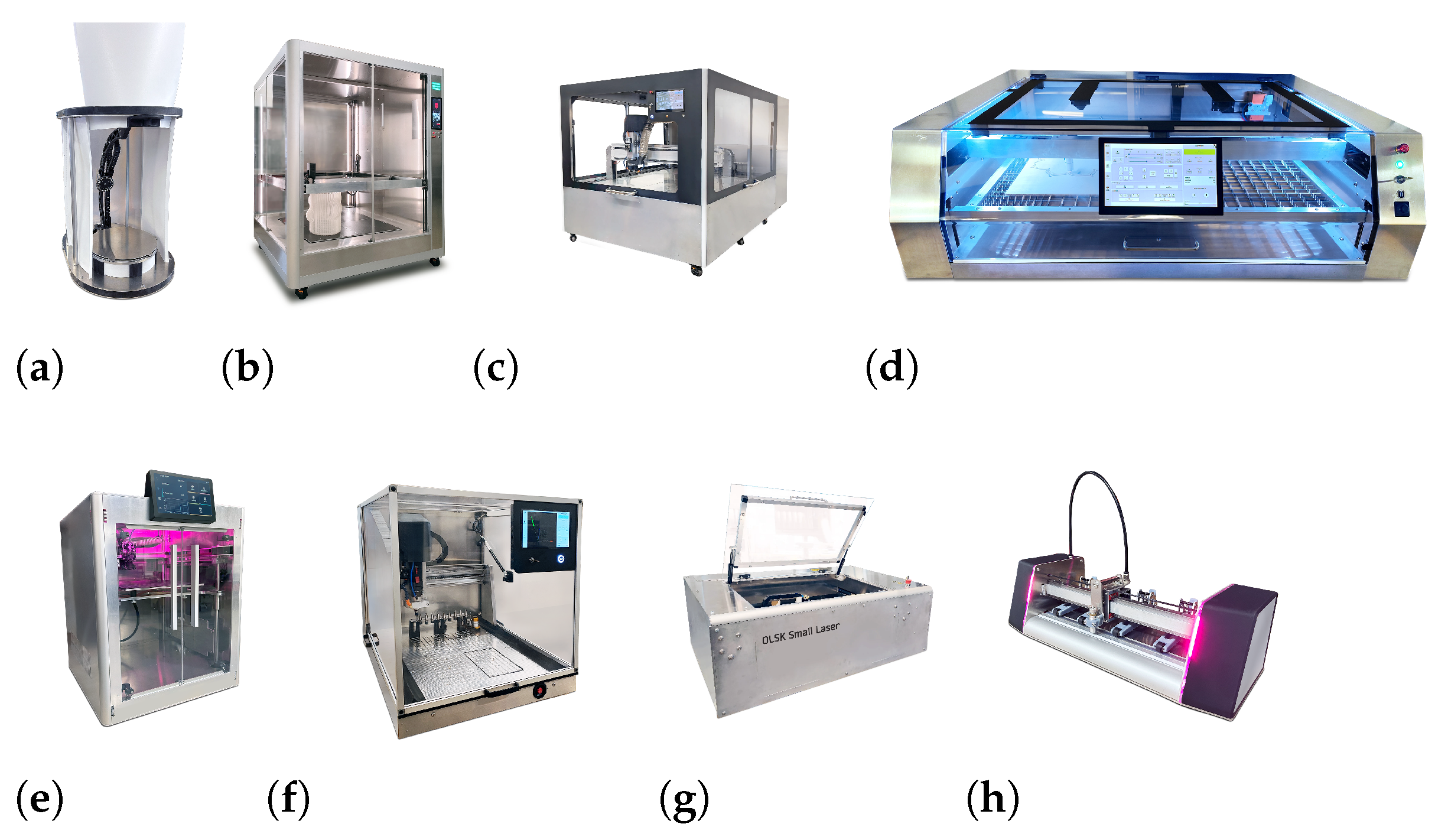
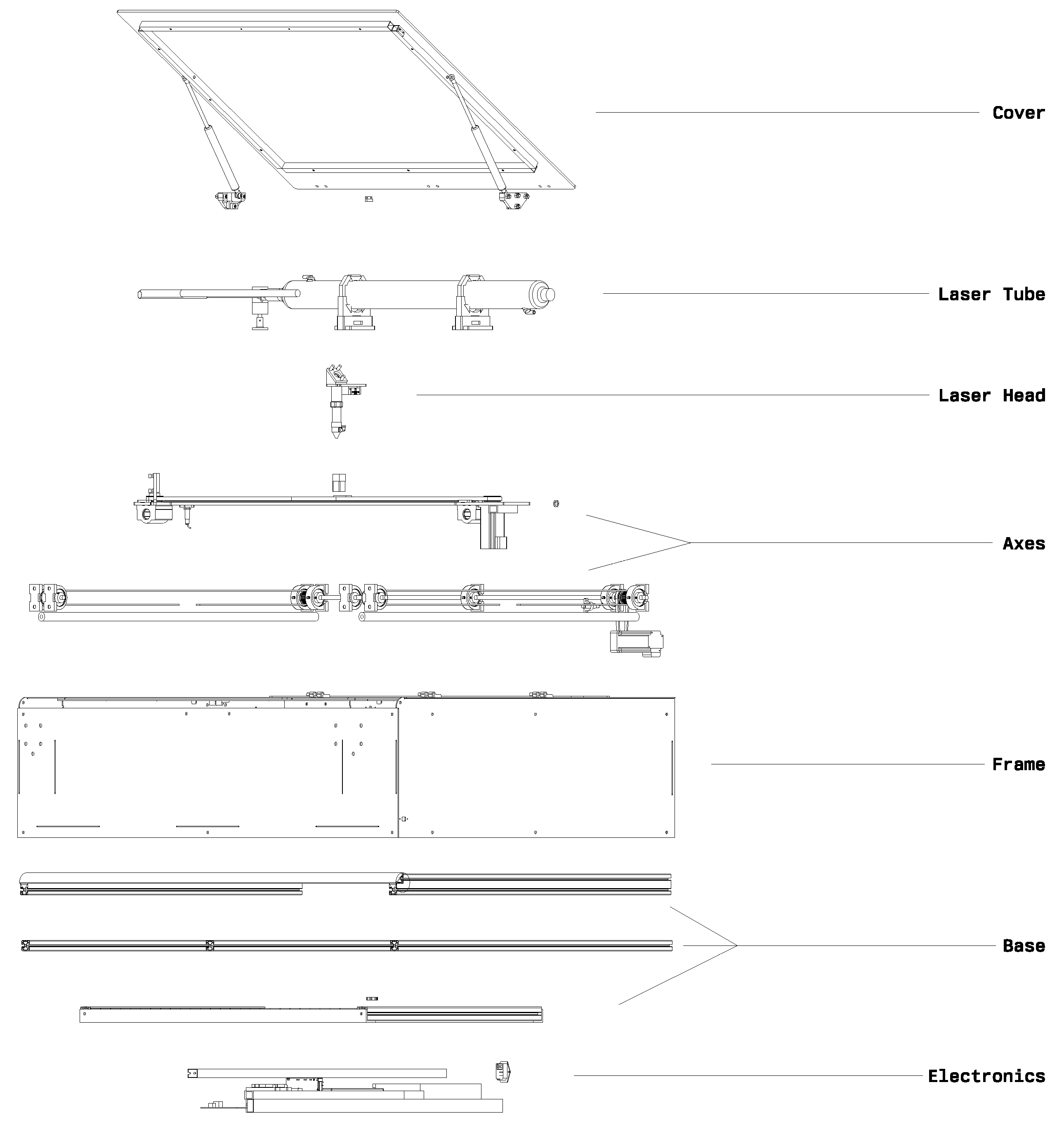
14]. The machines involved in these workshops (See
Figure 1) sometimes exceeded 500 discrete components, which encompass structural, electrical, and motion-control elements [
15,
16], thus posing significant cognitive demands on untrained builders.
Instructional support during the workshops relied on static, image-based manuals inspired by consumer-grade assembly guides—similar to those used by IKEA [
3,
15]. While familiar, such linear documentation methods are fundamentally misaligned with the spatial complexity and procedural nonlinearity inherent to multi-part mechanical assemblies. Static views lack interactive affordances, could omit part hierarchies, and fail to convey motion constraints or intermediate subassembly states. These limitations were observed to sometimes produce confusion among participants, including misordered operations, incorrect part orientations, and frequent backtracking.
Although 3D-based instructional systems have been proposed, most existing solutions are tied to proprietary ecosystems, require specialized authoring environments, or assume prior CAD literacy [
17]. Open-source alternatives are fragmented and rarely optimized for pedagogical use in non-expert contexts [
18]. This work addresses the identified deficiencies by developing a CAD-agnostic, open-source platform for interactive machine assembly documentation. The system is designed to minimize authoring overhead, support part manipulation and assembly sequence visualization directly in the browser, and enable educators to create reusable documentation accessible to first-time builders.
3. Related Work
Previous works focus on digital illustration systems for creating assembly illustrations [
19,
20,
21,
22,
23]. Most of these systems focus on separation distance, explosion direction, and blocking relationships specified by the user.
Homem De Mello et al. [
19] use a graph-based approach to develop an algorithm for mechanical assembly sequence generation. Though the method is computationally intensive for large assemblies and does not address dynamic factors such as real-world assembly constraints.
Agrawala et al. [
20] use a cognitive-psychology-based method to generate step-by-step 3D assembly instructions by combining planning and visual presentation in a single system. The system assumes a two-level assembly hierarchy, single-step translational motion, and local interference detection. These assumptions limit the system’s ability to handle assemblies with subassemblies or global part interactions.
Li et al. [
24] approach automate the generation of exploded views of 3D models. This is achieved by organizing the 3D input model into an explosion graph to automatically handle part hierarchies and common interlocking parts.
Xu et al. [
23] propose an automated system for complex product assembly planning that integrates modeling, sequencing, path-planning, visualization, and simulation with minimal manual input, though with less flexibility in handling highly customized or non-standard assembly processes.
Systems for 3D CAD assembly or exploded views are static [
3,
25,
26] or with interactive controls [
24,
27], limited in some way or another by the complexity of the 3D model or the level of automation. Zhu et al. [
27] generate exploded views through fixed geometric offsets and user input without considering assembly hierarchy, sequence, or collisions. While Li et al. [
24] compute explosion graphs that handle up to about 50 parts with precomputation times reaching over 1700 s, assuming rigid linear motion and failing on interlocked or threaded geometry, scaling poorly to complex assemblies. Other systems use machine learning to automate the process, but accuracy remains low, as in AssemblyNet [
28], where the best model reached 69.5 % accuracy and often predicted opposite or orthogonal part directions.
Previous systems emphasize static exploded views, manually defined sequences, or fixed part hierarchies [
20,
23,
24]. In contrast, the approach presented here treats animation as a structured transformation over symbolic groupings rather than as geometry-linked timelines. It introduces a schema-based method that cleanly separates motion logic from geometry and supports both manual and automated workflows. A key distinction is the use of a language-model-assisted grouping strategy, combined with formal grammar validation and a deterministic fallback mechanism. The system is designed to support animation as a form of documentation rather than merely visual output. The system and interface prioritizes clarity over complexity, making it suitable for educational contexts with minimal training.
4. Materials and Methods
This work follows a design science research approach, developing a deterministic method for generating procedural implosion animations from 3D CAD models (See
Appendix A for details). It is validated as a software combining structured parsing, schema-based transformation logic, and browser-based visualization. The system is evaluated through correctness, performance, and robustness testing using real-world datasets.
The method processes input files containing geometric models originating from standard CAD systems. Each file is parsed to extract geometry in one of two representations: boundary-representation (B-rep) or a polygonal mesh with explicit vertex and edge connectivity. Parsing routines are implemented using deterministic tokenization and topological consistency checks to ensure compatibility with downstream operations. The input domain is restricted to three-dimensional models definable in and encoded using industry-standard formats (e.g., STEP, STL). No assumptions are made regarding object scale, orientation, or convexity.
Each imported model is decomposed into a finite collection of disjoint geometric components. This is achieved through surface segmentation algorithms or user-defined part identifiers embedded in the source file. The resulting set is mapped into a finite collection of assembly units using a deterministic grouping function defined over the power set of components. This function is application-specific and may encode manufacturing sequence, mechanical hierarchy, or designer intent. The output is a total ordering of assembly units, each containing one or more components. This sequence defines the procedural structure of the animation and is explicitly recorded for traceability and reuse.
For each component, a continuous, time-parametrized spatial transformation is applied. This transformation is linear in parameter space and defined entirely by initial and final positions specified in global coordinates. To model spatial variability, an optional displacement vector is sampled per component from a uniform bounded distribution and added to the initial position. Transformations are computed per frame, with the temporal parameter advancing in fixed increments. This structure enables deterministic forward simulation.
Rendering is performed through projection of the transformed geometry from world coordinates into two-dimensional screen space. The projection method is configurable: orthographic projection preserves dimensional fidelity; perspective projection models human visual convergence. Camera configuration is defined by an origin vector and a rotation matrix, both fixed at initialization. Projected line segments are post-processed to remove occluded elements using a depth-sorting algorithm applied in screen space. Optional output includes SVG vector renderings for static documentation. This supports both animated sequences and static technical illustrations.
This method differs from conventional animation workflows by introducing a formal assembly model with explicit grouping logic, deterministic motion primitives, and support for reproducible transformations. Unlike manual or heuristic-based systems, it provides a traceable and configurable structure that can be used in automated documentation, procedural simulation, and reproducible visualization. All parameters, transformation sequences, and projections are fully defined and externally auditable.
4.1. Algorithms and Workflows
4.1.1. Preprocessing
The method assumes no additional preprocessing beyond what is performed within the CAD authoring environment. Part and subassembly labels assigned by engineers are exported directly in the STEP files and used as the primary source of semantic information for grouping and sequencing in the implosion animation process. These labels often reflect the designer’s naming conventions and may vary in clarity or consistency. A preprocessing stage could be introduced to improve this input by manually or automatically assigning descriptive and functionally meaningful names to STEP entities. Earlier works show that LLMs can find assembly–part relations from CAD names [
29,
30]. This stage can use a multi-modal large language model (LLM) that reads geometry, topology, and text data to create semantic labels.
4.1.2. STEP File Loading and Mesh Conversion
STEP file conversion (Algorithm 1) depends on the target format. OBJ and GLB use hierarchical parsing, with optional healing of each part and parallel meshing. STL and BREP use single-shape parsing, with optional global healing. Unsupported formats are rejected.
| Algorithm 1 STEP File to Mesh Conversion |
Input: CAD file , output path , format , healing flag H, linear deflection , angular deflection . Output: File in format or error status.
- 1:
if then - 2:
Import geometry: - 3:
if then - 4:
Apply parallel healing on all leaf sub-parts . - 5:
end if - 6:
Apply parallel meshing to all using , . - 7:
Export M to in format . - 8:
else if then - 9:
Import geometry: - 10:
if then - 11:
Apply global shape healing to M. - 12:
end if - 13:
if then - 14:
Mesh M using , and export as STL. - 15:
else - 16:
Export M as BREP. - 17:
end if - 18:
else - 19:
Report unsupported format and terminate. - 20:
end if - 21:
return status message.
|
4.1.3. Parallel Leaf Processing
Leaf-level CAD sub-parts are processed in parallel (Algorithm 2). The model is decomposed into leaf shapes. An atomic counter assigns tasks to threads. Each shape is either healed or meshed. Results are stored in a shared buffer. On completion, updated shapes replace originals in M. Output is .
| Algorithm 2 Parallel Processing of Leaf Entities in CAD Structures |
Input: CAD model , operation mode , linear deflection , angular deflection . Output: Updated model with processed leaf sub-parts.
- 1:
Extract all leaf sub-parts via recursive decomposition. - 2:
Initialize a thread-safe result buffer . - 3:
Initialize an atomic counter . - 4:
Determine thread count T from available processor cores. - 5:
for all threads in parallel do - 6:
while true do - 7:
Atomically fetch and increment index . - 8:
if then - 9:
break - 10:
end if - 11:
Retrieve geometric sub-part . - 12:
if then - 13:
Apply healing procedure to obtain . - 14:
else - 15:
Create a copy of . - 16:
Apply surface/volume meshing with , to obtain . - 17:
end if - 18:
Store in result buffer . - 19:
end while - 20:
end for - 21:
for all do - 22:
Update M by replacing with . - 23:
end for - 24:
return processed model .
|
The STEP-to-mesh workflow identifies and manages failure modes such as self-intersections, degenerate faces, and incomplete triangulations. Healing operations repair invalid or inconsistent topology before meshing. The process is controlled by two tolerance parameters: the linear deflection
, expressed in millimetres, and the angular deflection
, expressed in degrees. Features smaller than
are ignored during tessellation, and angular differences below
are merged. Default values are given in
Table 1, which define the resolution and stability of the generated mesh.
4.1.4. Manual Implosion Animation Workflow
The animation workflow has four stages.
This workflow turns a static 3D model into a structured implosion animation using a repeatable, user-directed process. Each step ensures that decisions made during creation are explicit and traceable.
4.1.5. Automatic Generation of Implosion Animations
The LLM adaptive method generates animation sequences for CAD assemblies. It groups parts into steps using a LLM. This method handles input part lists of any length by dividing them into token-constrained subsets. Each subset is processed separately. The outputs are combined into a complete animation schema. This method adjusts grouping without fixed limits per step and relies on semantic grouping based on part names. Chunking prevents context overflow while allowing arbitrarily large assemblies.
Each chunk is prefaced with a strict prompt that demands pure JSON output and enforces incremental Step-n naming:

For every chunk the system builds the prompt, queries the LLM (up to three retries), validates the JSON, renames the groups sequentially, and appends them to the global list. An invalid response triggers a deterministic fallback that groups parts by shared name roots. Any parts that remain unassigned are placed in a final Unassigned Parts group. The key properties are as follows:
Token-aware partitioning avoids context overruns.
Semantic grouping exploits language understanding rather than fixed heuristics.
Deterministic fallback guarantees valid output even after LLM failure.
Uniform Step-n: <label> names keep the sequence consistent.
Algorithm 3 presents the full procedure.
| Algorithm 3 LLM Adaptive Method for Animation Generation |
- 1:
let - 2:
let - 3:
for each do - 4:
- 5:
- 6:
while do - 7:
- 8:
- 9:
if is valid then - 10:
break - 11:
end if - 12:
- 13:
end while - 14:
if is invalid then - 15:
- 16:
end if - 17:
for each do - 18:
- 19:
“Step-” “: ” - 20:
- 21:
end for - 22:
append to - 23:
end for - 24:
over all - 25:
- 26:
if then - 27:
append to - 28:
end if - 29:
return
|
4.1.6. LLM Schema Grammar
A context-free grammar formalizes a JSON-based schema by fixing a root object with a prescribed set of fields in a specific order and enforcing local typing constraints such as properly quoted strings, bracketed arrays, enumerated attribute values, and fixed-length numeric vectors. When paired with grammar-constrained decoding, a local LLM can generate syntactically valid instances.

4.2. Dataset Description
4.2.1. Rendering and General Test Set
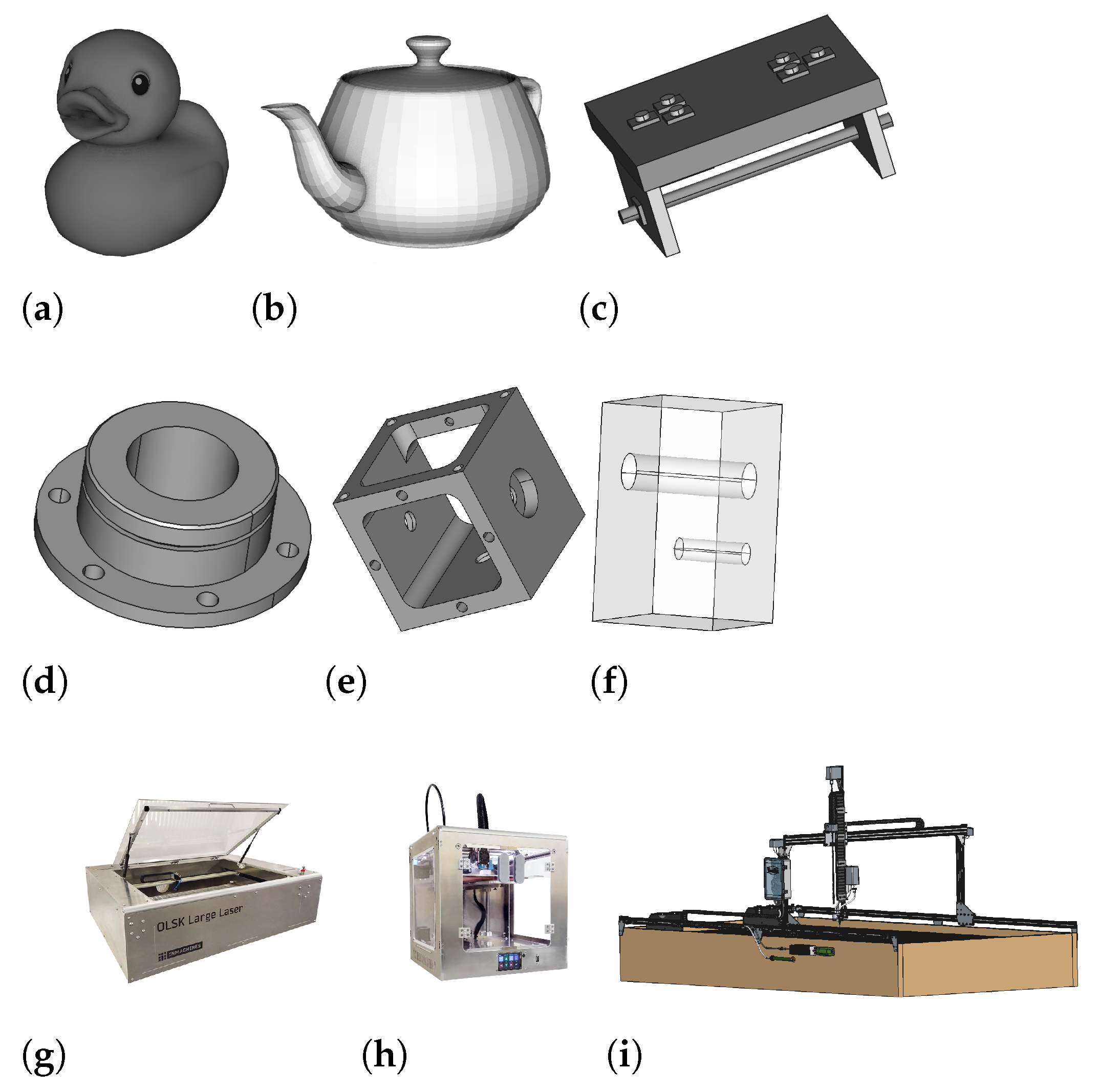
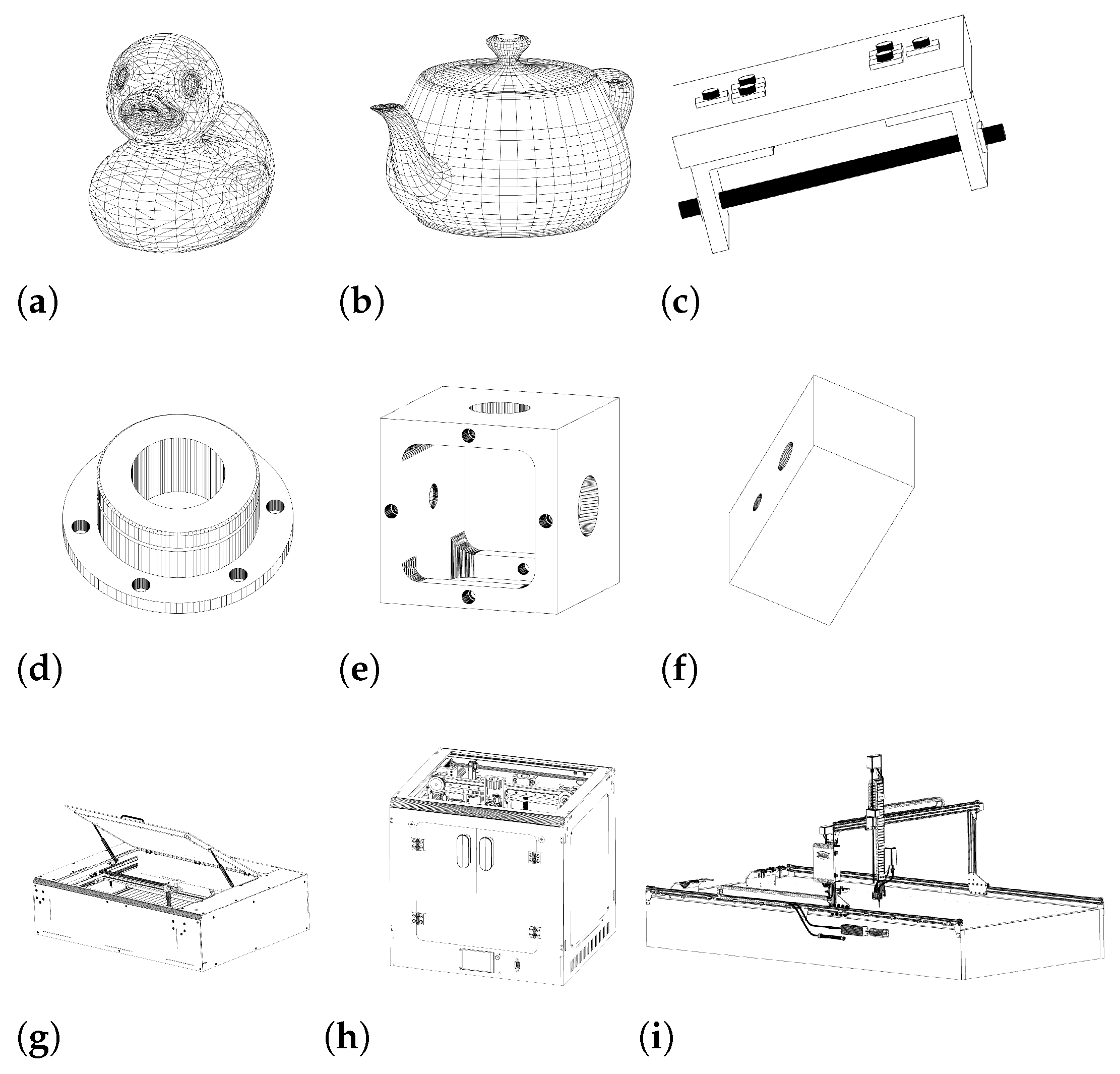
The system test set [
31] consists of nine geometric models divided into three categories—two mesh models, four parametric CAD parts, and three CAD assemblies—as illustrated in
Figure 2. The mesh models are the Rubber Duck and the Utah Teapot [
32,
33]. The Rubber Duck is a triangular mesh with segmented regions including body, head, beak, and tail. The Utah Teapot is a surface model defined by NURBS patches that form components such as body, spout, handle, and lid. These models are selected for their differences in representation and structure.
The parametric CAD parts are defined using STEP format and contain feature-based geometry. The part as1-ac-214 [
34] contains a base plate, two inclined members, a cylindrical rod, and several fasteners. The part io1-ac-214 [
34] includes a cylinder with an axial hole, a flange, and a ring of peripheral holes. The part Box with cylindricity [
34] includes a cubic shell with circular holes, counterbores, chamfers, and internal cutouts. The part f1-db-214 [
34] includes a block with two coaxial holes of different sizes. The CAD assemblies are OLSK Large Laser V1 [
15], OLSK Small 3D Printer V1 [
16], and Farmbot Genesis 1.5 [
35]. Each assembly includes multiple components such as structural frames, motion units, tool modules, and fasteners. These assemblies are drawn from hardware systems and are used to test handling of hierarchical models. For the LLM evaluation section, additional assemblies with fewer components and simpler topology are also included to test basic schema generation capabilities.
4.2.2. LLM Test Set
The assemblies’ test data [
31] was selected to test LLM animation schema generation across a range of part counts and hierarchical assembly structures. From the system test set in
Figure 2, three assemblies are reused: the OLSK Large Laser V1 [
15], the OLSK Small 3D Printer V1 [
16], and the Farmbot Genesis 1.5 [
35].
Additional assemblies are included to broaden the complexity range: the Airboat [
33] and Helicopter Rotor [
36] use few parts with shallow assembly trees. The Vex Robot Gripper [
37] introduces moderate part count and grouped subcomponents. The OLSK Large Laser V1 includes repeated subassemblies and mid-depth hierarchies. The OLSK Small 3D Printer V1 increases total part volume and nesting depth. The Farmbot Genesis 1.5 uses the highest part count with deeply nested, multi-level assembly hierarchies. This range supports evaluation of schema generation from flat to complex assembly structures.
5. Approach Implementation
The practical implementation [
38] of the method described previously follows a structured workflow involving distinct server-side and client-side components:
5.1. Architecture Details and Workflows
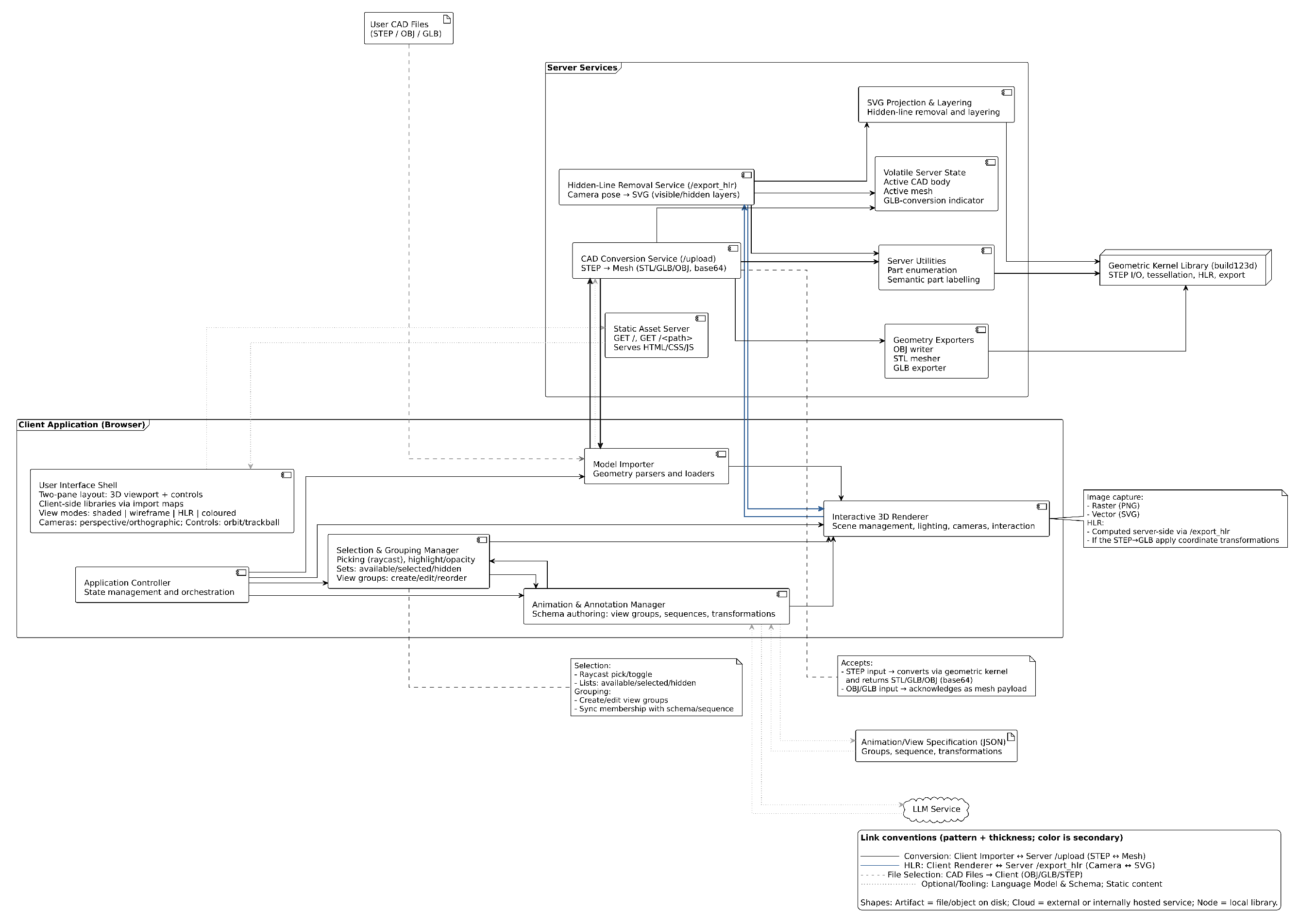
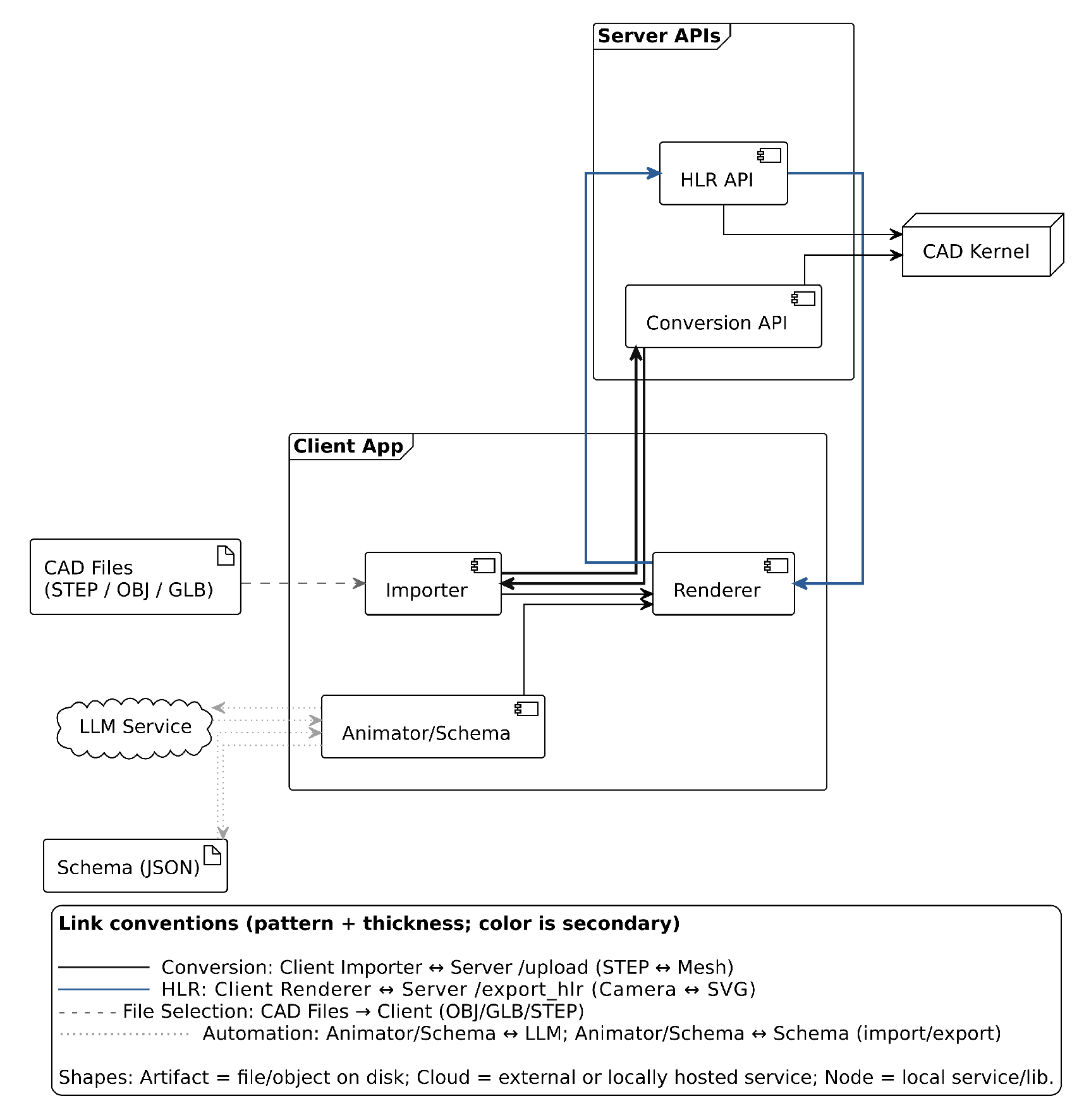
The architecture, as illustrated in
Figure 3, separates a client for interaction, rendering, grouping, and sequencing from a geometry server for format conversion and projection via a geometry kernel. A session loads CAD data, derives meshes for STEP when required, organizes parts into sequences, previews motion, requests line drawings from specified viewpoints, and exchanges schemas as JSON, which may be obtained from large language models.
All codes run in Python 3 and JavaScript ES6. The build123d library provides import and export operations for boundary representations. A native program [
39], also developed for this application, is used for creating meshes from very complex CAD files as specified in Algorithm 2. The Three.js library handles scene management and rendering. The Flask framework exposes routes for file upload and geometry extraction. Unlike enterprise PLM importers, the importer intentionally omits document management, revision control, and proprietary metadata mapping, restricting scope to transparent geometry/attribute extraction for open-source use.
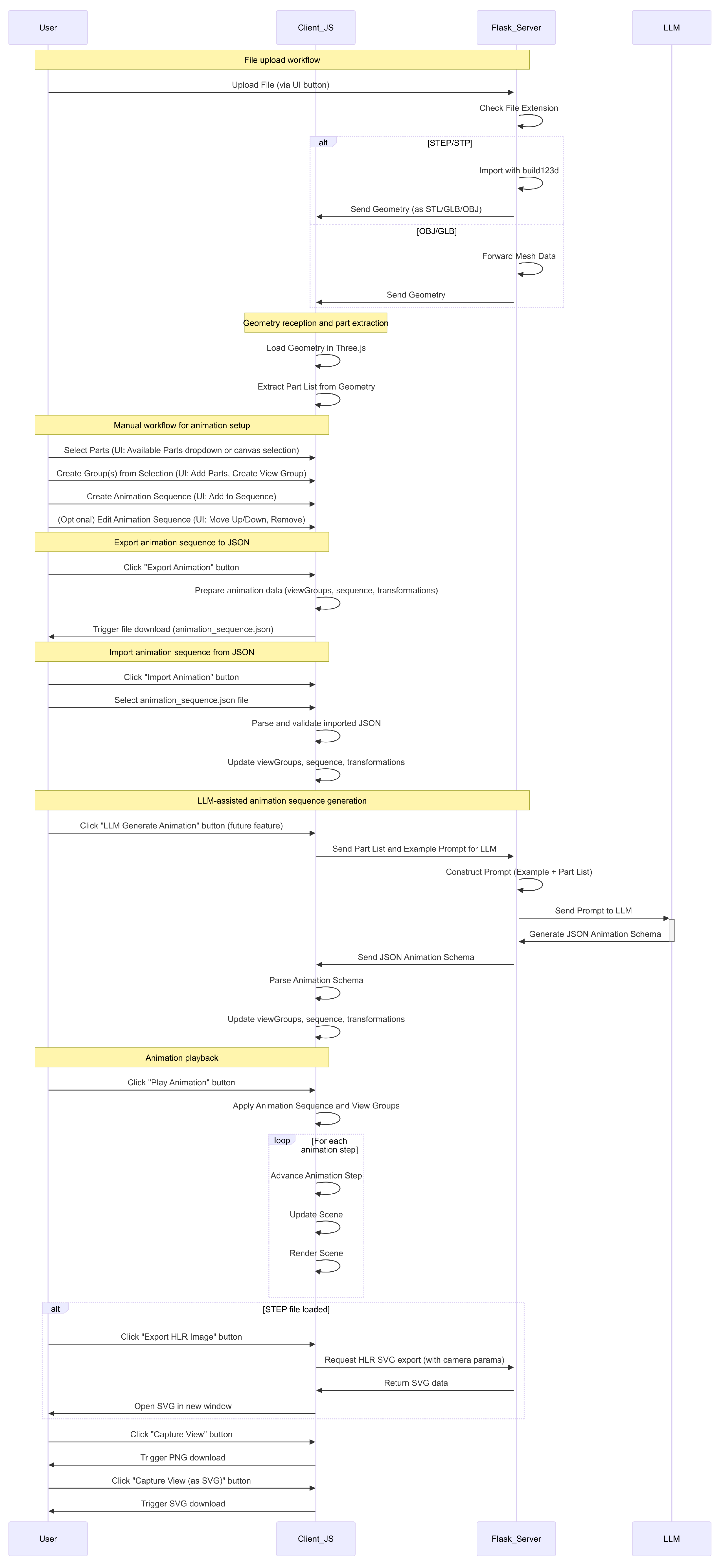
Users begin by uploading a file to the server. The implementation sequence is illustrated in
Figure 4. The server handles the file based on its format. STEP and STP files are converted into mesh geometry using build123d for simple STEP assemblies. For complex assemblies, the STEP files are converted with the native converter [
39]. OBJ and GLB files are sent directly to the client without conversion. This process enables handling of both boundary representation formats and mesh-based files.
After the client receives the geometry, it renders the scene using Three.js and extracts a list of parts. Users can create animations by selecting parts, forming groups, and defining view sequences. Alternatively, users can choose an automated method. In that case, the client sends the part list to the server for processing.
If the automated method is used, the server creates a prompt. The prompt contains an example that maps a part list to a JSON animation schema. It also includes a new part list for which the schema is needed. This prompt is sent to a LLM, which returns a JSON schema that defines view groups, animation order, and transformations.
Once the JSON schema is returned, the client parses it. The schema defines which parts belong to which groups and specifies the sequence of transformations. The client maps this information to the corresponding sub-parts in the scene. The schema also enables configuration of view groups based on the definitions in the file.
The user interface includes a playback control. When this control is activated, the client steps through the animation sequence. It interpolates the transformations and updates the scene accordingly. The scene reflects each step, and the animation proceeds according to the instructions in the JSON schema.
5.2. LLM Schema Generation
The animation system operates using a structured JSON representation [
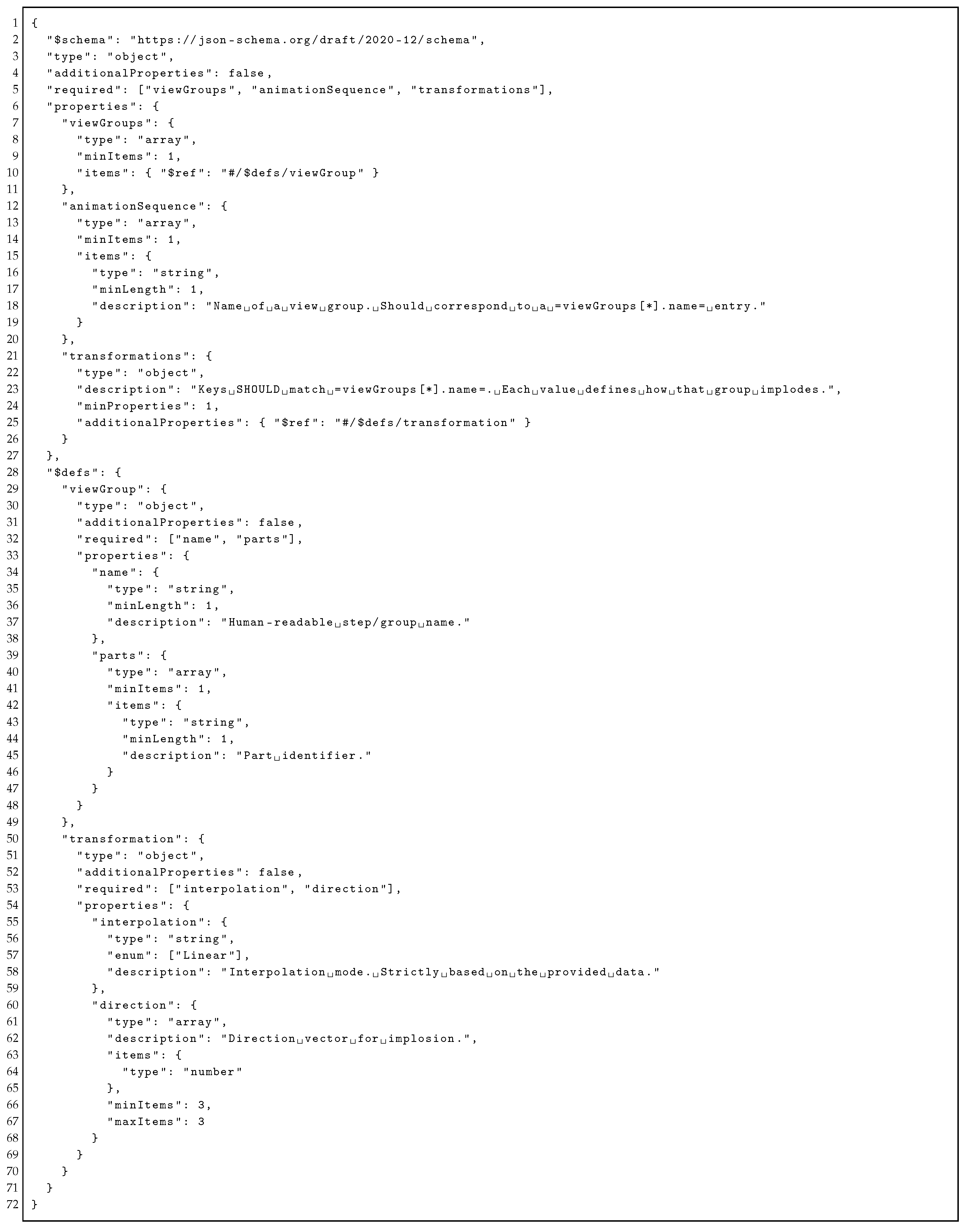
38] that encodes part groupings by view and assigns transformation parameters. It includes three components:
view groups,
animation sequence, and
transformations. Each
view group links a name to a flat list of part identifiers, which supports assemblies without predefined nesting and allows users or tools to define groupings based on semantics or views. The
animation sequence is an ordered list where each entry refers to a group from
view groups, and this sequence defines the order for applying transformations. Each group in the sequence maps to an entry in the
transformations object, which specifies a 3D direction vector and an interpolation method such as
linear or
ease in, with the option to extend this field. The schema excludes timing and easing fields, which allows further keys like rotation matrices or visibility flags to be added without changing existing logic. Both manual and LLM-based creation of the schema is possible, and the text format supports generation from structured inputs. Validity can be enforced using a formal JSON schema, which enables consistent client-side processing and clear error messages (see
Appendix B for details). The animation logic is stored in a separate file from the rendering system, so it can be reused across different engines, and the schema can be versioned for integration in CAD systems.
A LLM is used to organize large part lists into structured assembly schemas. The method processes parts in token-limited chunks and assigns them to semantic groups based on inferred assembly logic, as shown in Algorithm 3.
The method is used for assemblies with a large number of parts. It processes the input list by dividing it into token-limited chunks and sends each chunk to an LLM. The model is instructed to determine the number of view groups dynamically based on part count and implied assembly complexity. Each group is labeled with a sequential step name. Every part is required to appear exactly once across all groups. If the LLM returns invalid or incomplete output, a fallback heuristic assigns parts to groups using lexical normalization. This normalization removes common positional terms, numeric identifiers, and non-alphanumeric characters to extract a root token. Parts with the same root token are grouped together. After grouping, metadata is generated locally. The method defines the animation sequence by the order of group names and assigns fixed transformation parameters to each step. This separates structural grouping from metadata construction and allows the system to function without full dependence on the large language model.
The design separates the LLM from the client. The LLM returns a schema, and the client can read the schema without interpreting its semantics. This allows independent updates to the LLM. It also enables the caching of outputs. The system may log and reuse previous results. In addition, users can inspect and modify the schema. This keeps the workflow stable and allows manual control when needed.
6. Evaluation/Results
This section assesses the system’s interface, performance, robustness, and LLM-based schema generation across varying assembly sizes and complexities. Test models across mesh, part, and assembly types are used. Performance metrics and schema statistics are collected under controlled execution.
6.1. Interface
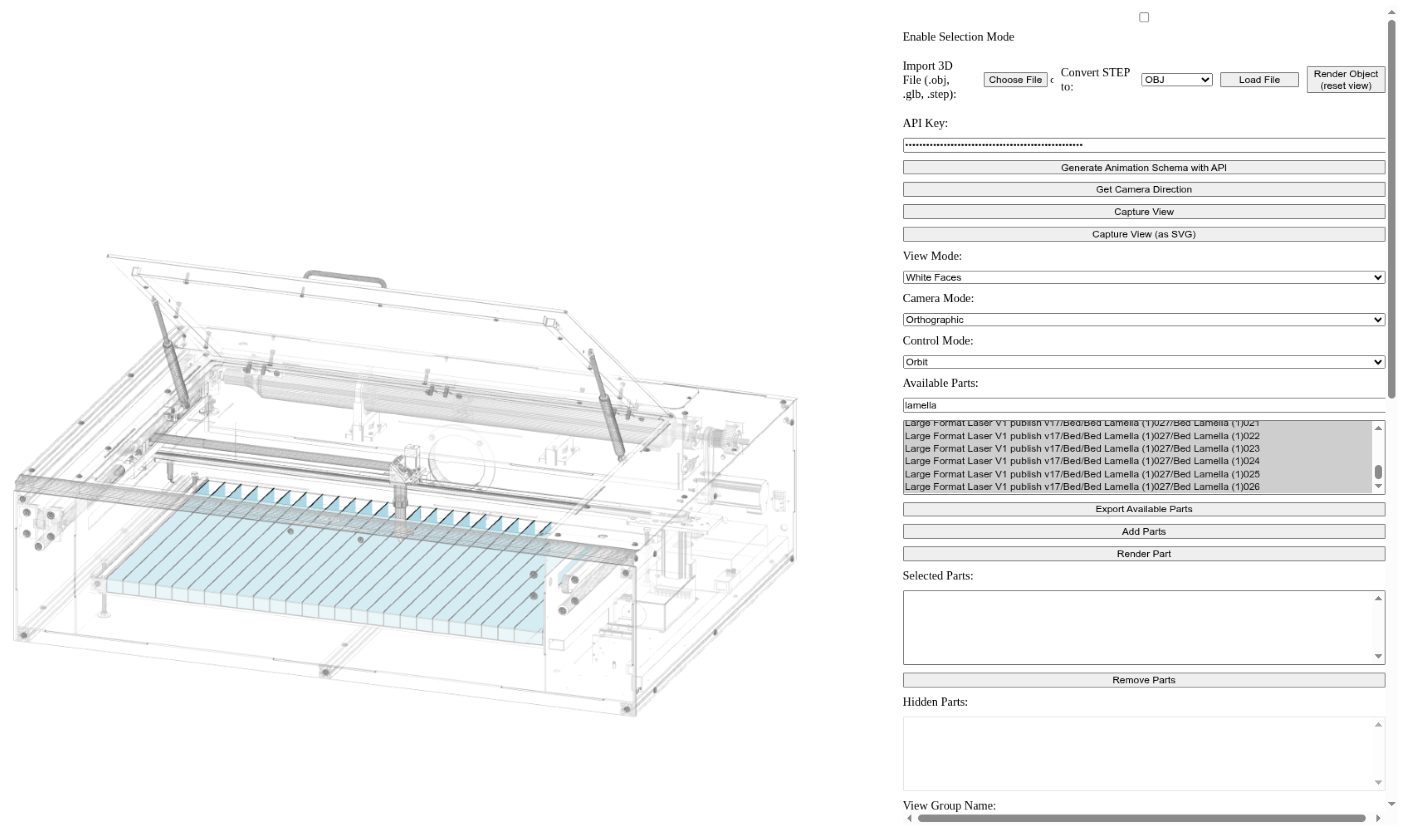
Figure 5 shows the interface of the 3D CAD Web Viewer in use with the OLSK Large Laser V1 assembly. The figure includes the preview canvas where the loaded geometry is rendered using a mesh view with orthographic projection. Beside the canvas, multiple controls are present for selecting parts, assigning them to groups, and triggering rendering actions. The selection mode is enabled through a checkbox, and imported files can be processed using defined view modes and camera settings. The interface supports the definition of part groups, the configuration of animation sequences, and the export of rendered views in raster or vector formats.
Table 2 presents the interface structure using four columns: functional category, UI element type, label or ID, and description. It organizes controls according to their function, such as file import, view configuration, part selection, group management, animation sequencing, and HLR export. Each row describes one element using its type and identifier, linking it to a specific interaction or operation. This structure enables a direct mapping between the user interface and its functional components, allowing a clear interpretation of interface design and behavior.
The interface enables a structured workflow for implosion animation of assemblies. Users can load 3D models, define part groups, and assign them to ordered animation sequences. Each step in the sequence can include transformation parameters and duration settings, with optional fly-in effects. These controls allow a consistent setup of implosion paths, where parts move along defined directions or randomly assigned vectors. If a model contains a single part, the standard UI remains visible; grouping and sequencing are optional and yield a trivial (no-op) animation, while HLR export and view capture can be used directly for line drawings. Export and import functions support reuse of animation configurations across sessions. This structure supports integration into a pipeline for generating implosion animations, where reproducibility and controlled sequencing are required for documentation or presentation.
6.2. Performance Evaluation
The conversion performance evaluation was conducted on a system with a 13th Gen Intel Core i7-1360P processor, featuring 12 cores, 16 threads, and 32 GB of LPDDR5 memory across eight 4 GB modules operating at 4800 MT/s. Cache configuration includes 448 KiB L1d, 640 KiB L1i, 9 MiB L2, and 18 MiB L3.
Table 3 reports the loading times of meshes in the system. STP files of CAD parts can be loaded in the system directly. CAD assemblies are pre-converted using a simple purpose built CAD converter [
39]. Mesh loading times for nine models, show efficient handling of small static meshes and a consistent increase in load duration with face and vertex count. Multi-part CAD assemblies incur the highest costs, with observed variance attributed to both geometric complexity and internal structure.
The running time comes from three stages: reading the STEP file, healing, and meshing. Reading time grows with the number of entities, which is why large CAD parts and assemblies in the table take longer than the small mesh models. Healing adds cost that depends on how many defects must be fixed and is mainly visible for the CAD cases. Meshing time grows with the number of faces and with the triangles produced under the chosen linear and angular deflection: lower deflections increase triangles and thus time, while higher deflections reduce both but can remove small features or move surfaces away from the source geometry. In practice, curved and detailed regions still produce many triangles even with relaxed tolerances, so a few complex zones can dominate runtime and memory. Parallel meshing and healing can reduce their share of the total time, but serial work such as file reading and framework overhead still cap the speedup, especially for small models.
Performance characteristics of the mesh conversion are presented below, emphasizing quantitative improvements in execution time, energy efficiency, and computational behavior compared to a baseline tool.
Table 4 presents a comparison between the implementation and the FreeCAD backend [
31,
39].
Energy/sec values are taken from Running Average Power Limit (RAPL) counters, which measure power in four domains: Package (PKG) for total processor package power, Cores for central processing unit core power, Graphics Processing Unit (GPU) for integrated graphics activity, and Platform System (PSYS) for total system power. Measurements are sampled at fixed time intervals and averaged over the runtime to report energy per second. The speedup compares total execution time only.
The baseline FreeCAD V1.0 Backend is used for benchmark comparison. The native OCCT-Based conversion is 6.54 times faster, with near-identical normalized package and core power consumption rates per second. The native CAD converter accelerates STEP file conversion through parallel computation on leaf geometry definitions from the model’s assembly structure. GPU power draw per second shows no meaningful difference between implementations. PSYS power is likewise close. The tool demonstrates a 1.65× higher instruction-per-cycle ratio, a lower L1 data cache miss rate, and fewer LLC-load misses, indicating more efficient cache utilization and instruction execution. The implementation performs the same task with approximately 5.81× greater energy efficiency (task/J) than the baseline, with the baseline delivering only about 17% of the native’s efficiency, primarily due to the shorter execution time.
The baseline shows higher cache miss rates at multiple hierarchy levels (L1, LLC), suggesting inferior memory access patterns and data locality. Its IPC is lower, and the branch miss rate is slightly lower for baseline, but overall instruction throughput and backend execution are less efficient than the native implementation.
6.3. System Robustness and Rendering
Figure 6 shows line drawing visualizations of all evaluated models, illustrating the system’s rendering performance across simple meshes, individual CAD parts, and large multi-part assemblies.
The images are black-and-white edge-rendered visualizations, showing clean, high-contrast outlines of 3D models without shading or texture. Each object is clearly depicted with visible geometry and structural features, demonstrating varying levels of complexity from smooth organic shapes (e.g., rubber duck, teapot) to precise mechanical parts (e.g., Laser cutter, 3D printer, Farmbot). The rendering style emphasizes contours and simplicity.
Robustness was measured through the import of malformed and edge-case files, including zero-volume meshes, disconnected boundary representations, and malformed OBJ face indices. The system issued file-specific error messages without crashing the server. Sub-part grouping showed linear scaling with increasing part count. Real-time animation supported animations with over 1000 parts. Memory usage for assemblies with more than 1000 parts exceeded 800 MB in-browser. Therefore, although the system processes large assemblies, it requires further optimization to support larger industrial assemblies.
6.4. LLM Schema Generation Evaluation
This section evaluates the effectiveness of the schema generation in CAD assemblies using LLMs. For all assemblies processed using this method, the language model used is gpt-4.1-nano. Each prompt is constructed to stay within a maximum token limit, which includes both the system message and the input part list. The temperature is set to 0.2, the maximum completion tokens are set to 1500, and the maximum prompt tokens are set to 3000. Token estimation assumes an average of four characters per token. The prompt construction targets a desired token count of 2500 per call, with a maximum of 1000 parts per chunk.
The assemblies were used without major modifications, and the model tree was flattened to discard spurious subassemblies. This allowed the method to be tested on files with natural variation in naming and labeling, thereby evaluating its performance under typical input conditions.
6.4.1. Assemblies
The assembly test data [
31] covers assemblies from simple, shallow structures to large, deeply nested hierarchies (For example
Figure 7) for evaluating schema generation complexity.
6.4.2. Grouping Quality and Efficiency Metrics
Method: Identifier of the grouping method.
Steps: Number of groups produced.
LLM cohesion: LLM-scored within-group semantic relatedness in [0,1]; Higher is better.
Cohesion root percentage: Percentage of within-group part pairs sharing the same simplified noun root; higher is better.
Difference cohesion root percentage: Difference in cohesion root percentage versus baseline; higher is better.
Root fragmentation index: Average normalized splitting of same-root parts across groups in [0,1]; lower is better.
Difference in root fragmentation: Difference in root fragmentation index versus baseline; lower is better.
Tokens Total: Estimated total LLM tokens used across prompts and completions; lower is better.
Total in ms: Total wall-clock time spent in LLM calls in milliseconds; lower is better.
6.4.3. Expert-Validated Metrics
% Unassigned Parts: Proportion of parts unassigned in generated view groups.
% Over-Segmentation: Proportion of generated view groups that should have been merged based on functional similarity.
Sequence Coherence Score: Proportion of animation steps that follow a logical assembly order (1.0 = perfect coherence).
6.4.4. Findings
Quality metrics across several assemblies are evaluated under an adaptive method (see Methodology Section) vs. a baseline approach (See
Table 5,
Table 6,
Table 7,
Table 8,
Table 9 and
Table 10). Each table reports the number of steps, LLM cohesion, cohesion root percentage with differences relative to the baseline, root fragmentation with corresponding deltas, and the cost measured in tokens per millisecond.
The baseline method partitions the parts list in input order into consecutive groups, labels each group, and uses every name exactly once without reordering. It generates meta locally and, if an API key and tokens allow, requests this partition from the LLM. Otherwise, it applies the same rule locally with sanitization. Unlike the adaptive method, which groups parts by meaning and adapts step boundaries, the baseline preserves order with a fixed-size rule, so it serves as a baseline to measure the value added by semantic grouping and adaptation.
The adaptive method improves grouping quality across all six datasets. LLM Cohesion increases in every case (average +0.14). Cohesion Root percentage increases in four datasets, is unchanged on the Airboat assembly, and decreases on the Vex Gripper assembly. Root Fragmentation decreases in five CAD files, which means fewer roots are split across steps. Step counts increase for large assemblies (Airboat +1; Helicopter Rotor +1; OLSK Large Laser +24; OLSK Small 3D Printer +62; Farmbot +71) and decrease for the Vex Gripper (−5), so the method produces more, smaller steps where assemblies are large and fewer steps where parts cluster naturally.
Cost depends on assembly size. For small and medium assemblies, tokens and latency are similar to or below the baseline (tokens 0.86–1.00×; latency 0.69–0.92×). For large assemblies, tokens and latency rise (tokens 2.65–3.02×; latency 2.49–2.99×). The adaptive method increases cohesion in all datasets, increases root-level grouping in most datasets, and reduces fragmentation in most datasets, with higher compute cost on large assemblies.
The results in
Table 11 show that the schema generation adaptive method performs reliably on small to medium assemblies, with zero or near-zero unassigned parts and high sequence coherence.
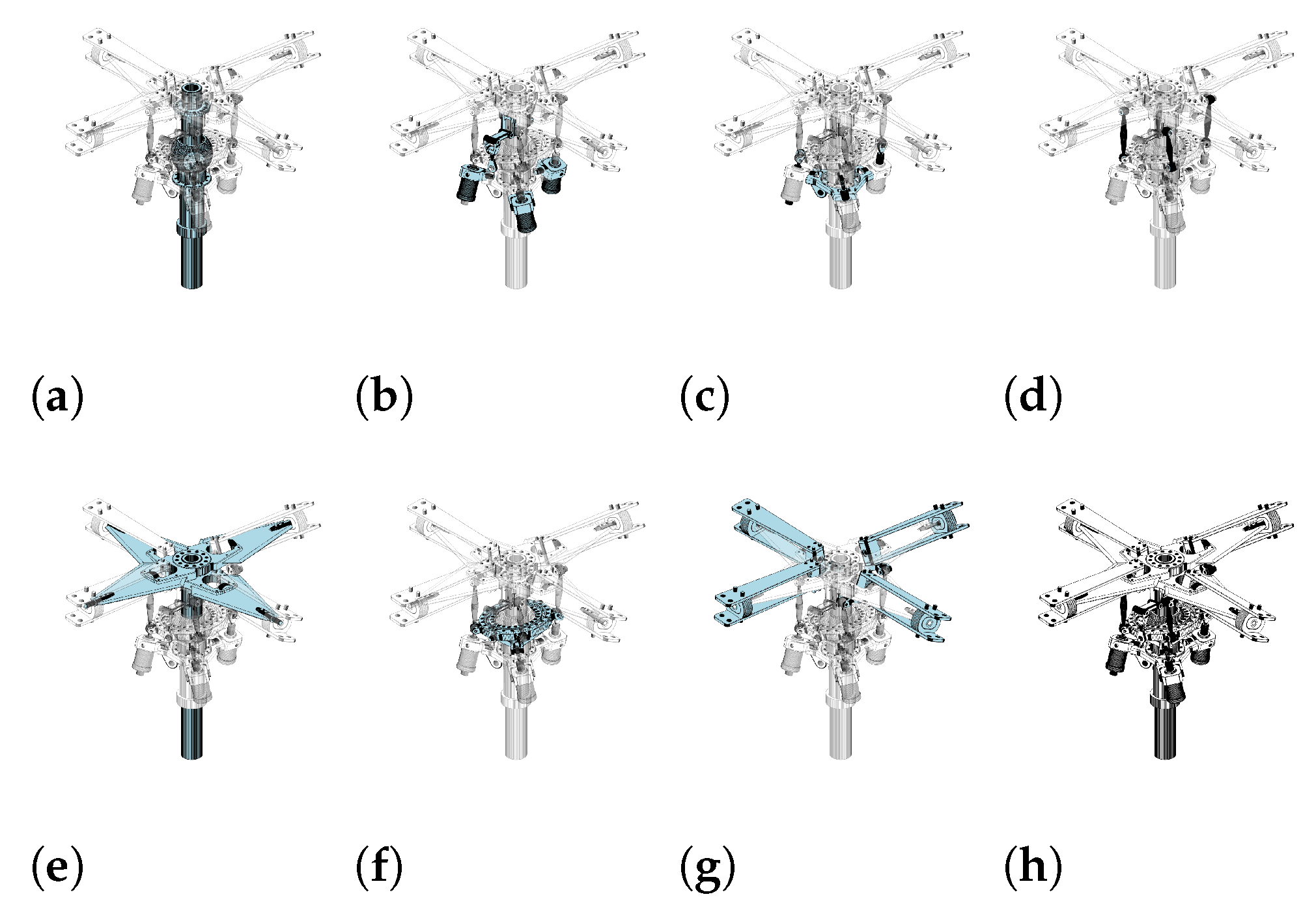
Assemblies like the Airboat and Helicopter Rotor (See
Figure 8) consist of clearly named components with low ambiguity. This enables the language model to group parts into semantically related view groups without errors. The small scale and distinct functional roles of parts lead to minimal over-segmentation. The Vex Robot Gripper, though slightly larger, introduces moderate variability in part naming, which results in some unassigned components and a slight drop in sequence coherence.
In larger assemblies, such as OLSK Large Laser V1 and OLSK Small 3D Printer V1, the method remains consistent in assigning all parts for the former but struggles with the latter, where 30% of parts are unassigned. This discrepancy is likely due to inconsistencies in part labeling and higher repetition of similar components, which increases ambiguity during semantic grouping. Over-segmentation becomes more prominent as the method generates many narrowly scoped view groups to avoid missing assignments, which leads to functional fragmentation. Despite this, sequence coherence remains relatively stable for the laser assembly due to the modularity of its structure, while it declines slightly for the 3D printer.
For the most complex case, Farmbot Genesis 1.5, the method assigns all parts but shows the highest over-segmentation and lowest sequence coherence. This outcome reflects the high structural complexity and inconsistent part naming within the STEP file. The model compensates for potential ambiguity by splitting parts into overly specific view groups, which dilutes the functional continuity needed for logical step sequencing.
7. Discussion
The system presented in this paper treats CAD animation as a structured, interpretable process rather than a visual effect. By encoding animation steps in plain text, it separates behavior from geometry. The result is a reusable, versionable specification, more like a declarative program than a media file. The schema acts like a control structure over geometry: each animation step names a group of parts and defines how they move. These steps are independent of rendering and can be applied in any viewer. Unlike visual timelines in 3D editors, the method captures intent as well as effect. This is useful for applications like open-source hardware, where designs must be auditable, reproducible, and remixable. The user animation workflow separates structure from presentation using named groupings and ordered sequences. Groupings define reusable part sets under unique identifiers, allowing flexible configurations. Sequences reference these groupings to specify implosion order, with transformation steps applying visual parameters at each stage. This modular approach enables extensions and additions without altering existing definitions. Groupings remain reusable across contexts, while transformations stay decoupled from animation logic. The design also anticipates future enhancements such as camera settings, durations, or transitions without requiring schema changes or breaking compatibility.
Animation here becomes a form of documentation, not just presentation. The schema allows animations to be version-controlled, differenced, and reviewed. The method can be extended to support planning simulations in manufacturing, automatic view-sequenced animations for educational modules, and lifecycle-aligned visualization through schema integration. Its text-based representation also allows embedding animation metadata in lightweight clients without requiring access to proprietary CAD kernels.
While the web interface supports detailed control over rendering, grouping, and animation, the lack of progressive disclosure or modal grouping may reduce usability [
40,
41]. A task-oriented layout or contextual enable/disable behavior may improve user flow without reducing available functionality [
42,
43,
44]. The system may also be augmented by implementing richer interactions [
45] or mixed reality interfaces [
46].
The evaluation showed that the system works for mesh and boundary models and generates complete animations for all assemblies. CAD conversion ran without errors, and parallel processing reduced computation time for large models. The web interface allowed consistent grouping and sequencing of parts, confirming that the schema can store and replay animations reliably. Language models automated grouping and reduced manual work, though unclear part names caused some fragmentation. The fallback rule based on name roots ensured all parts were included. The schema files were reusable and could be shared or versioned without depending on specific CAD tools. The results show that the method supports reliable creation and reuse of CAD animations that connect visual sequences with structured data. The evaluation highlights several areas for The use of LLMs to generate schemas adds flexibility, but also introduces challenges. For assemblies with consistent part names, grouping works well. But when names are messy or repeated, the model can fragment groups or miss parts. These are known weaknesses in logical reasoning of LLMs under token constraints and low context quality [
47]. Recent work suggests that guiding generation with structured constraints [
48,
49] or fine-tuning on schema-bound examples [
50] are matters for future research. The fallback logic-based on name normalization adds robustness, but it still depends on how well part names reflect function. Better results might come from combining name-based grouping with spatial or topological cues. For example, adjacency graphs or geometric features to provide grounding.
Overall, this work positions CAD animation as a form of structured communication that is not just between designers and viewers, but between systems. The schema encodes what moves, when, and how, in a way that is portable, editable, and analyzable. It creates a bridge between visual explanation and formal representation. The web-based UI reduces interaction complexity, enabling efficient analysis of intricate CAD assemblies and exposing internal mechanisms with minimal user effort. The next challenge is to support more complex motion logic (e.g. constraints, and contacts), while keeping the structure simple enough to use, validate, and generate automatically.
8. Conclusions
The method presented enables imploding assembly animation and data exchange using a structured, schema-based representation. It integrates CAD file processing, web-based visualization, and transformation sequencing. Assemblies are animated through discrete part groupings and time-dependent transformations. The system supports manual and automated workflows and is validated with a web-based implementation.
Designed with educational and workshop settings in mind, the system targets users with limited technical background. It reduces authoring overhead and enables fast creation of animations that support spatial understanding in complex assemblies. This makes it particularly suited for open-source hardware projects, maker initiatives, and localized manufacturing contexts where accessibility, replication, reuse, and distribution are essential.
Performance evaluations of the system confirm compatibility with mesh and boundary-based models and demonstrate scalable behavior under increasing assembly size. The custom CAD converter shows it is possible to outperform the baseline in speed and energy efficiency. LLM-based schema generation performs reliably with smaller assemblies and remains functional for complex cases, though precision declines with inconsistent part naming.
Future work includes the integration of constraint solvers that support assembly conditions such as contact, symmetry, and parametric alignment. Expanding transformation handling to allow non-linear paths, hierarchical motion trees, and spline-based interpolation would increase model fidelity. Improvements in export could include classification of line types, stroke optimization, and support for standardized vector output formats. Interface modifications should address view-state persistence and interaction chaining to handle assemblies with over a thousand components. Automated schema generation can be improved by incorporating semantic embedding models trained on labeled CAD datasets, or by using topology-informed prompting methods. The system should also be adapted to support newer CAD kernels and intermediate representations emerging in open-source and parametric design tools, which include direct support for feature graphs and manufacturing semantics.