


Abstract
Pedagogic Conversational Agents (PCAs) are interactive systems that engage the student in a dialogue to teach some domain. They can have the roles of a teacher, student, or companion, and adopt several shapes. In our previous work, a significant increase of students’ performance when learning programming was found when using PCAs in the teacher role. However, it is not common to find PCAs used in classrooms. In this paper, it is explored whether pre-service teachers would accept PCAs to teach programming better if they were co-designed with them. Pre-service teachers are chosen because they are still in training, so they can be taught what PCAs are and how this technology could be helpful. Moreover, pre-service teachers can choose whether they integrate PCAs in the teaching activities that they carry out as part of their degree’s course. An experiment with 35 pre-service primary education teachers was carried out during the 2021/2022 academic year to co-design a robotic PCA to teach programming. The experience validates the idea that involving pre-service teachers in the design of a PCA facilitates their involvement to integrate this technology in their classrooms. In total, 97% of the pre-service teachers that stated in a survey that they believed robot PCA could help children to learn programming, and 80% answered that they would like to use them in their classrooms.
1. Introduction
Pedagogic Conversational Agents (PCAs) can be defined as “lifelike autonomous characters that cohabite the learning environment creating a rich interface face-to-face with student” [1]. Agents can ask students via voice, chat, gestures, or with touch panel screens [2], and students can answer using any of these communication modes. Moreover, agents can be software and cohabitate an educational application, or they can be autonomous robots (hardware) to create communication experiences with the student as close to natural as possible.
Agents, both software and hardware, can have multiple shapes, such as having a human body, being animals, characters, or robots. They can also have several roles in their interaction with the students [3]: teachers, who are the source of knowledge; students, who need to be taught by the students, called Teachable Agents; and, companions, who serve as peer students for emotional support, called Pedagogic Agent as Learning Companions (PALs).
Some benefits that have been published regarding the use of PCAs are the following: the Persona effect [4], according to which the presence of the agent has a positive influence in the students’ perception of their learning experience; the Proteus effect [5], according to which students want to become like their agents and this is a source of motivation to interact more with them; and, the Protégé effect [6] (only for Teachable Agents), according to which students make greater efforts to teach their agents than to learn themselves.
A recent systematic review on the topic can be found in [7]. According to this review, and despite the multiple benefits of using PCAs for education that have been published, agents are still not able to communicate fluently in our natural way of communicating. We believe that this problem could be overcome by taking advantage of non-verbal communication by using gestures, in the case of PCAs, focusing on a certain domain instead of trying a general dialogue. Moreover, to take advantage of the Persona and Proteus Effect, Ocaña et al. [8] devised a companion agent, called Alcody.
Alcody‘s domain was knowing how to program with basic concepts such as inputs/outputs, conditionals, and loops in p-code with the agent. Learning how to program at an early age seems to have multiple benefits such as the development of computational thinking [9,10] and other cognitive skills [11,12]. However, it is still a young research topic that needs more studies to find out which methodologies and technologies could be used, given the lack of children’s abstract thinking abilities and the complexity of the concepts to be taught [13,14].
To the best of our knowledge, Alcody was the first PCA that was used to teach programming to children as a learning companion. Having a learning companion seems to help children to make the learning more tangible and adaptable to their needs as a significant increase of their learning was registered as well as high satisfaction levels [15]. However, the use of PCAs to teach programming in primary education has not been integrated in classrooms. It is our research questions that will investigate whether teachers would like to use PCAs to teach programming in their primary education classrooms and find it useful if they were involved in the creation of such technology, and how pre-service teachers would like the PCA to function. Working teachers seem to ignore what PCAs are; thus, upon the experience of Alcody and teaching programming to children, in this paper, we present a co-design experience with pre-service teachers to create a PCA to teach programming to children with them as they are preparing to become teachers and are eager to have more teaching resources. Pre-service teachers were asked to fill in a questionnaire to find out whether they would use PCAs in their classroom once they know what PCAs are and have been involved in their creation. In total, 97% of these pre-service teachers answered that they believed that the PCA could help children to learn programming, and 80% answered that they would like to use them in their classrooms. The resulting prototype of a PCA to teach programming in primary education is shared in this paper for any other pre-service teacher that would like to use it.
This paper is organized into six sections: Section 2 reviews the related work including PCAs, teaching programming in primary education, and outlines the training of pre-service teachers. Section 3 describes the materials and methods of the experiment carried out. Section 4 provides the results. Section 5 discusses the answers to our research questions. Finally, Section 6 ends this paper with the main conclusions and lines of future work.
2. Related Work
2.1. Pedagogic Conversational Agents
Pedagogic Conversational Agents (PCAs) can be defined as a software that can interact with a student in a natural language (Johnson et al., 2000). Some simple examples are Alexa of Amazon, Siri of Apple, or ChatGPT regarding the AI for education [16].
PCAs in the educational domain have been investigated since 2000 [17], including certain intelligence in the dialogue and social support [18]. Some samples include Doroty, for teaching Computer Science [19]; AutoTutor, for teaching Operating Systems [20]; or Betty, for teaching Natural Science [21]. The results achieved have been promising in these school domains. More samples can be found in [3].
Autotutor is a sample of a PCA in the role of a teacher. It has been studied for decades. Originally, spoken and written dialogue to teach Computer Science at the university level has been combined with gestures and even a simulation of breathing to make it more real.
In some cases, the dialogue is guided by the PCA, which makes the questions and awaits the student’s answer. In case it is correct, the agent congratulates the student and moves to the next question. But, if the answer is incorrect, the agent explains to the student why, and it teaches the concept until the student understands the correct answer.
AutoTutor is one of the most complex and sophisticated PCAs that exists in the literature that adopts the role of the teacher, i.e., the holder of the knowledge who transmits it to the student. However, it is not the only role for PCAs, as it has been proposed that learning could be more successful if the PCA might play the role of a student. In this case, the agent does not have any information. Thus, it does not ask questions to check whether the student can answer correctly and provides feedback in accordance. On the other hand, the agent asks questions to learn, as in the case of Betty [21].
Given that the agents that serve as students lack any knowledge, it is necessary to introduce another agent that checks whether the information provided by the student is correct. In this case, this agent is called Mr. Davis.
It is also possible that the goal of the PCA is neither to teach nor to learn from the student, but to serve as an emotional companion. In this case, the dialogue of the PCA does not start with a question such in the case of AutoTutor to check the student’s knowledge. The dialogue of the PCA does not include quizzes to check whether the agent is learning from the student, such in the case of Betty. The dialogue starts with some kind of emotional sentence to support the student. For instance, the PCA could ask the student how s/he is and, depending on the answer, provide some recommendation. If the student is tired or sad, the PCA might recommend listening to a song before starting the study session so that it is more productive. The emotional PCA could also be helpful in the case that, after experiencing problems, the student declares that s/he is unable to solve the exercises, and it seems advisable to offer some support to make the student understand that, sometimes, problems look very difficult at first sight, but it is possible to improve with practice [3].
However, despite the good results reported in the literature, it is uncommon to find PCAs in use in classrooms. The reason for this has been investigated and it was found that the root is the lack of knowledge of this technology by the teachers or that the teachers dislike it because it does not follow the design principles which they are fond of (even in the case that they know the technology). A survey of 82 teachers (52.4% male; 47.6% female) with 24 questions regarding their knowledge of PCAs, how they would like PCAs in terms of friendliness, gestures with face/body, how to motivate and give advice to students, how to indicate that the student has made a mistake, and if the agent should remember the students’ previous choices, and the most advisable frequency of use of the agent by the students [22].
The results of the survey revealed that no teacher knew about PCAs, although 78% of them used a computer as a support for their work by looking for information. This lack of knowledge required to show them several images of PCAs so that they could complete the survey. Once they understood the educational technology, they highlighted that using a PCA should be friendly, able to provide advice to the students, encourage the students to keep studying, and indicate whether the students had made mistakes. The combination of these features would motivate teachers to use PCAs in classrooms, once they were familiar with this educational technology [22].
However, to our knowledge, no survey has been carried out to explore if these features were the same teachers would expect in the specific case of a PCA aimed to teach programming in their primary education classrooms.
2.2. Teaching Programming in Primary Education
The idea of teaching programming in primary education is not new. In fact, it dates back to the 1980s, with Papert’s work with LOGO [23]. Papert believed that, in order to teach programming to children, children need to build an object to think, following a constructionism pedagogy [24]. In the LOGO environment, the student interacted with a turtle, which responded to her/his commands as if they were talking. Children must also learn that there is more than one correct solution, but they should test different possibilities until one of them works (i.e., the expected output of the program) [25].
Since then, there have been times when the research of teaching programming has been stopped by the lack of training of teachers and the complexity of the domain. However, in recent decades, the research has resurged from different approaches, such as using multimedia software to program using blocks with the Scratch language with worldwide interest [26]; the use of robots [12]; and the unplugged exercises without using technology [27].
According to the survey carried out by [12], it was commonly agreed upon that primary education students should learn programming skills with a program such as Scratch. It combines the construction idea to learn by creating a program, with gamification, as the program is usually a game which motivates the users [28].
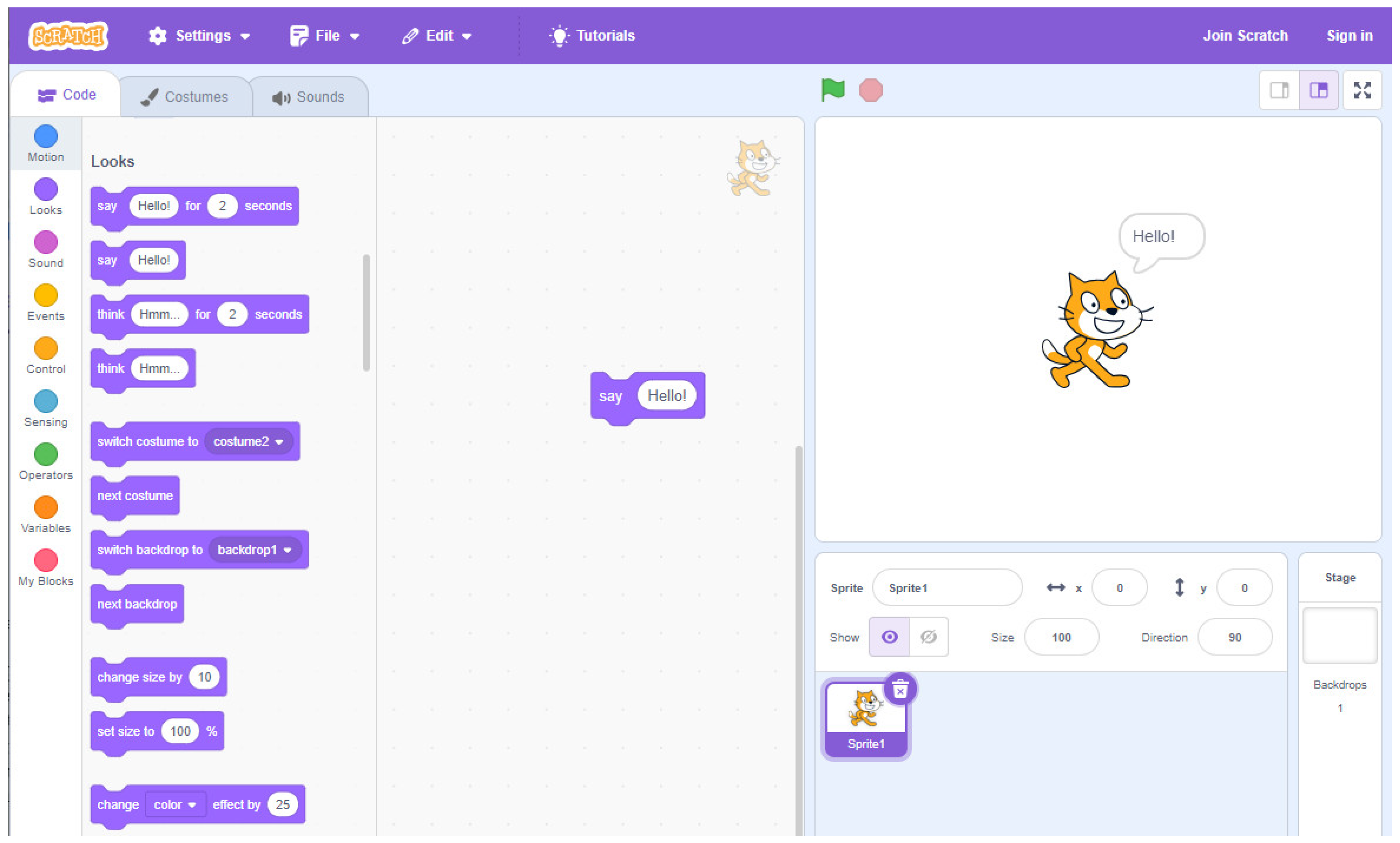
The idea is to imagine the program, create it, and share it with other people. The goal of the program can be to create a story, or to animate a character or a game, among other possibilities. The instructions are blocks that must be dragged and plugged together like a puzzle. Executing the program controls the movements, or other actions, of (for example) a cat, as shown in Figure 1, which illustrates a basic program to say Hello. Once the “say hello” instruction is executed, the cat in the right window outputs the sentence “Hello”.

Figure 1.
A basic program in Scratch to say “Hello”.
Scratch has many tutorials to guide students and teachers. A debugging project was also carried out to help students when the program does not work [29]. However, it has limitations as students are required to have some device to run Scratch, and the execution of the program is always on the device. Therefore, other alternatives have been devised, such as using visual programming languages control robots like LEGO Mindstorms [30] or unplugged approaches [27] with games such as moving the students or objects around the class according to the execution of the program or writing programs on paper. Recently, the use of Pedagogic Conversational Agents to teach programming to primary education students with the companion role [15] and emotional support [31] has also been explored.
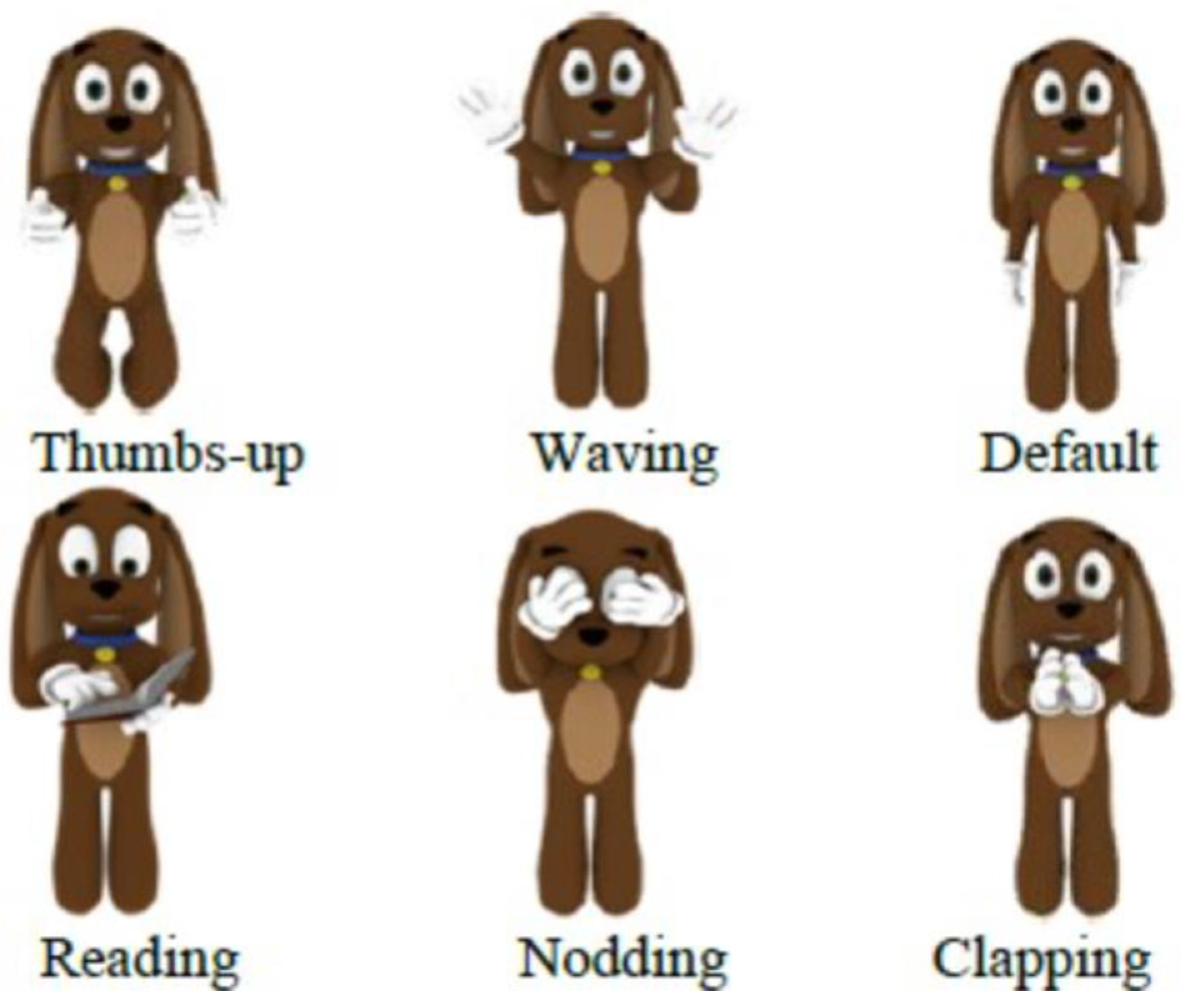
Jeppy [32] and Alcody [8] are a few of the PCAs that have been reviewed in the literature to teach programming. Jeppy is an emotional PCA shaped as a dog that gestures to help to correct syntax mistakes. Jeppy gives advice and affective messages to guide students to solve the exercises following a constructivist approach. Figure 2 shows several of Jeppy’s gestures.
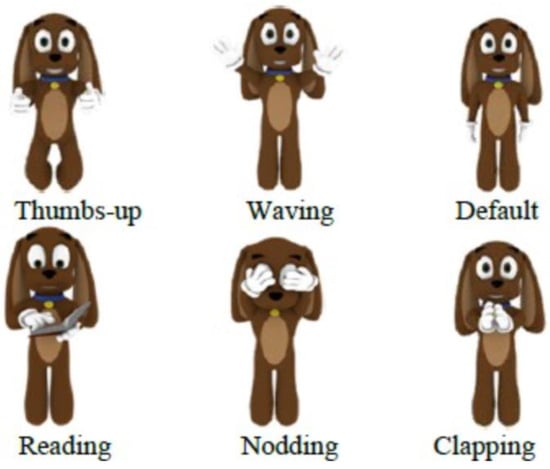
Figure 2.
Some gestures of the PCA Jeppy to teach programming.
In an experiment carried out with novice programming students, it was found out that 66.7% of the students used Jeppy’s advice to find the solution and 41.5% found the messages given by Jeppy clear and useful.
Alcody is an emotional learning companion to teach p-code to children following both a constructionism approach [23] and gamification [33]. It is an emotional learning companion because its goal is not to teach, unlike AutoTutor (see Section 2.1), or to learn from the student unlike Betty (see Section 2.2). Instead, the goal is to stay on the screen accompanying the learning scenario. It follows the idea of being a support to the student by talking to the student and providing emotional recommendations to reach the optimum mental state to program. Moreover, Alcody has some games to motivate students to keep programming and to win medals. Figure 3 shows an image of the Alcody agent.

Figure 3.
A snapshot of the Alcody emotional learning companion to teach p-code.
As shown in Figure 3 Alcody includes several tutorials to teach students how to program inputs/outputs, conditionals, and loops concepts. Moreover, it offers activities in which students must solve programming exercises such as calculating the factorial of a number given, recipes to play cooking as programming, and medals as students keep completing activities with Alcody [8,31].
2.3. Training of Pre-Service Teachers
How to integrate technology into pre-service science teachers’ pedagogical content knowledge is a relevant issue in the literature [34]. Pre-service teachers need to learn both the didactics of the topic and the resources available to teach it, including technological resources that, in some cases, are seen as more complex to implement, even when teachers believe they are important for an effective teaching [35]. To find out what impedes the integration of technology in their teaching is essential for pre-service teachers, particularly as they will become the future teachers [36]. Moreover, pre-service teachers should graduate with the skills to seamlessly integrate technology to advance student learning [37], and they should be asked for their opinions [38,39,40,41].
Some researchers have identified several types of barriers into the adoption of technology, both by pre-service and in-service teachers. They can be classified according to the origin of the problem to impede the adoption of the technology as follows [42]:
- First-order barriers: they are related to external causes such as lack of devices, Internet connectivity, or software. Teachers may wonder whether they have enough computers, tablets, if the Internet connection is stable, and if the software is going to work without failures.
- Second-order barriers: they are related to internal fears such as lack of knowledge, digital competence, organizational, or pedagogical concerns. Teachers may wonder how they can have enough confidence to try something new, how the software works, where or when they should use technology, and how to ensure that students obtain adequate computer time without missing other important content and attending to their curricular demands.
Although not all teachers may face all of these barriers, the literature suggests that any one of these barriers alone can impede the integration of technology in their classrooms [43,44,45]. A solution for pre-service teachers would be to focus on acquiring technical skills during their training to address first-order barriers, as well as acquiring strategies and following recommendations to address second-order barriers [42].
3. Materials and Methods
This research has been approved by the URJC Ethical Committee with ID 19012022202722.
3.1. Research Questions
- RQ1.
- Would pre-service teachers use PCAs to teach programming in their primary education classrooms if they were personally involved in creating such technology?
- RQ2.
- How would pre-service teachers like the PCA to teach programming in primary education?
3.2. Sample
In total, 44 pre-service teachers from the Universidad Rey Juan Carlos were recruited with the motivation of helping in the co-design of a technology to teach programming in primary education (18 to 25 years of age, 70% female, 30% male). Participation in this study was voluntary and anonymous. Pre-service teachers were chosen because they are training to become future teachers, they are trained in didactics and PCA and the profile of primary education students, and are interested in learning new resources and technologies to improve their future teaching. These pre-service teachers also had experience in school contexts, as a part of their training is to assist working teachers in schools. As reviewed in Section 2.3, research with pre-service teachers is highly relevant in the literature.
Moreover, 43.2% of these pre-service teachers indicated that their digital competence ranged between medium and high, as they are used to working with smartphones, computers, and tablets (98% used their smartphones daily, 70% used their computers daily, 63.6% used their tablets daily).
Furthermore, 70% of them claimed to have used applications to learn programming before the course, as the teaching Scratch is common in secondary education in Spain before entering university. However, 91% of these pre-service teachers pointed out that they have never used an educational PCA before. This is why it was necessary to explain the concept of an educational PCA to them before asking about how they would like to design such educational technology to teach programming and the possible features of it that could be customized.
3.3. Materials and Procedure
To answer the research questions, two questionnaires were created for a sample of pre-service teachers.
The initial questionnaire can be found on-line at the following link: http://tinyurl.com/369v3zu2 (last accessed date 23 February 2024). It starts with some general demographic questions, such as age, gender, occupation, level of experience with technology, which technologies they use, and the frequency and purpose of use, to focus on which applications and apps they know for learning programming, and their knowledge of PCAs. Given that it was expected, the questioned pre-service teachers did not have any previous knowledge of PCAs for teaching programming; they watched a video of a sample PCA for familiarization, and were then able to answer the questions. Participants filled in the questionnaire anonymously and voluntarily in February.
After that introduction, they learnt how to teach programming to children for two months. Meanwhile, the prototype was being implemented as requested in the initial questionnaire. In April, pre-service teachers were shown the second final prototype, and they were asked to fill in a final questionnaire to find out their opinions of the resulting PCAs and whether they would like to use it to teach programming. Moreover, they were asked to evaluate the final prototype with questions regarding each screen and the navigation between screens. Pre-service teachers were given the opportunity to express any comment they would like to share with the researchers in a final open-ended Q&A session.
4. Results
4.1. Initial Questionnaire
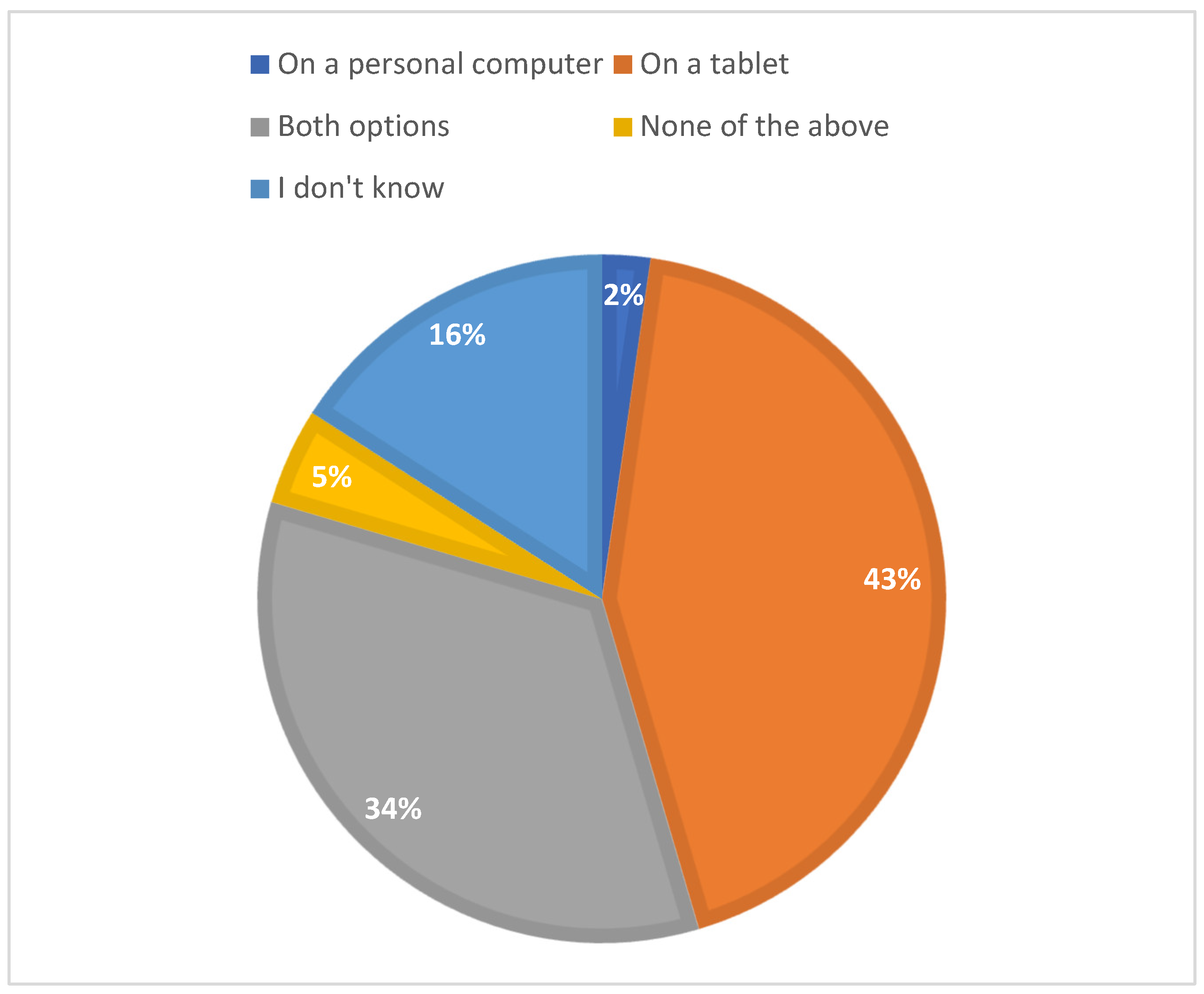
The analysis of the data gathered in the initial questionnaire reveals a lack of clear consensus among pre-service teachers regarding which device would be the most adequate for using a PCA, as shown in Figure 4. Tablets emerged as the most voted option.

Figure 4.
Technology to run the PCA aimed to teach programming.
In total, 75% of the pre-service teachers asked for a how-to guide to learn how to use a PCA. Moreover, 63.6% of these pre-service teachers requested to be able to manage several classes and 59.1% indicated that primary education students usually work in teams of two to four kids; 70.5% of these pre-service teachers claimed that it would be of great help to have some students’ tracking progress, including at least some information about the number of correct and wrong answers, and the time needed per question.
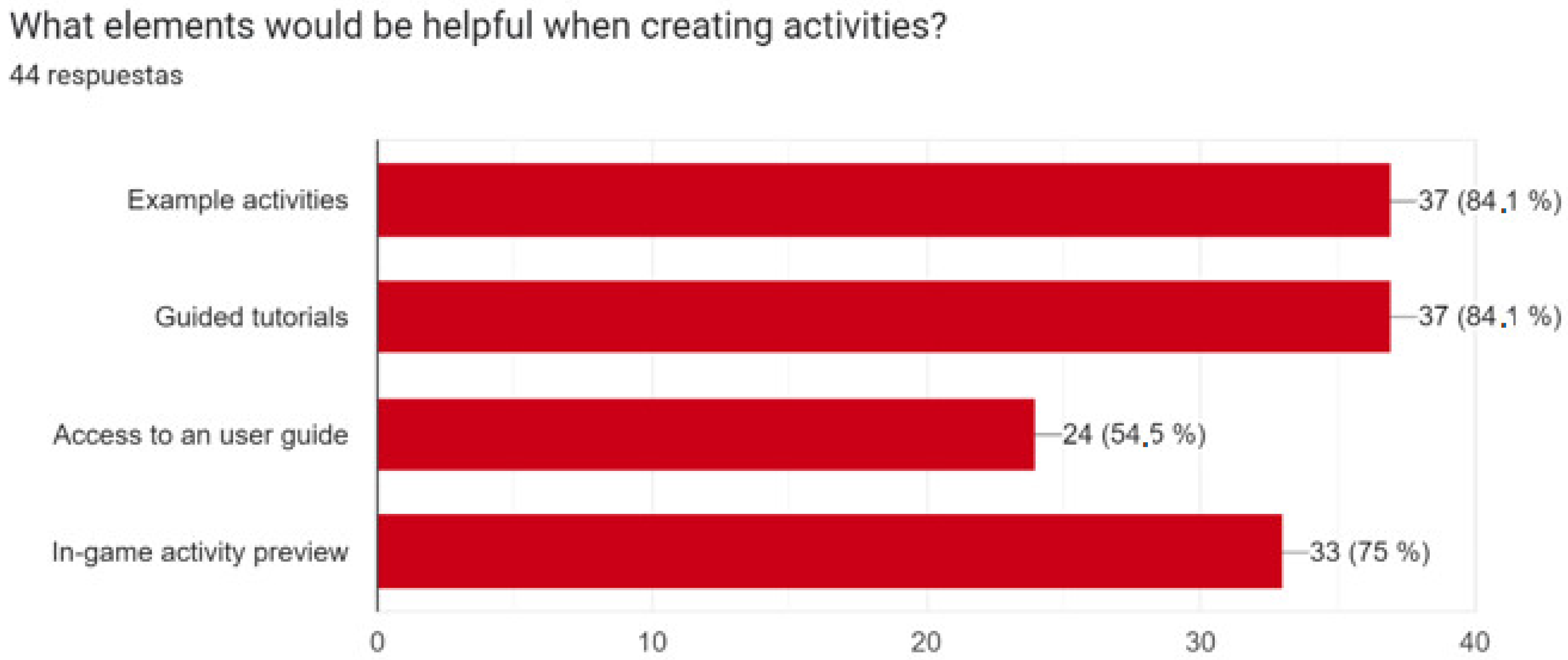
Figure 5 shows the elements that are considered helpful when creating activities for the PCA to teach programming.
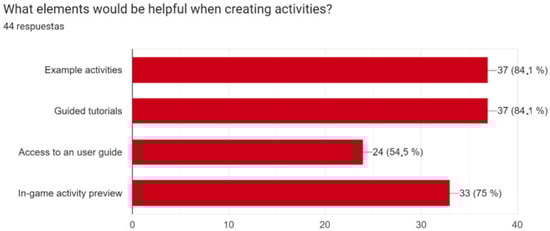
Figure 5.
Useful elements to create activities in the PCA.
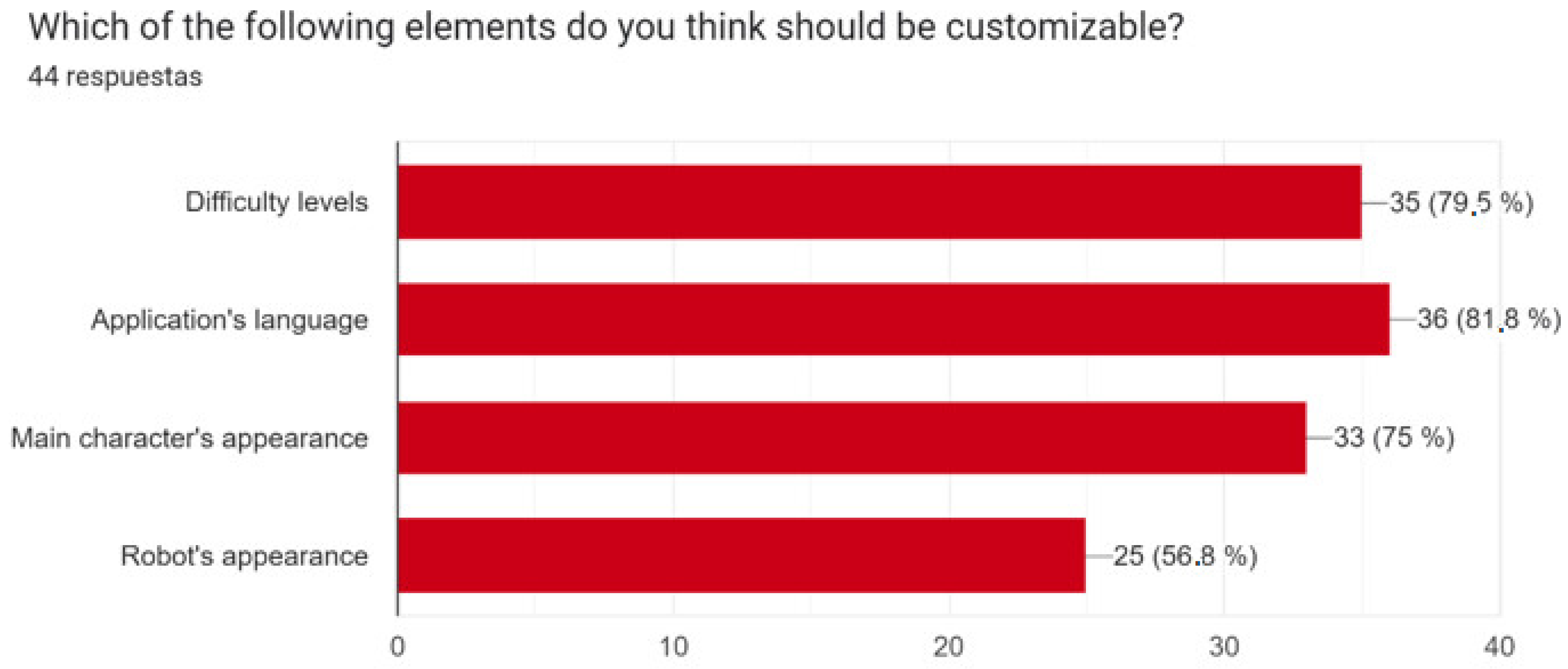
Figure 6 shows the elements that should be customizable.

Figure 6.
Customizable elements.
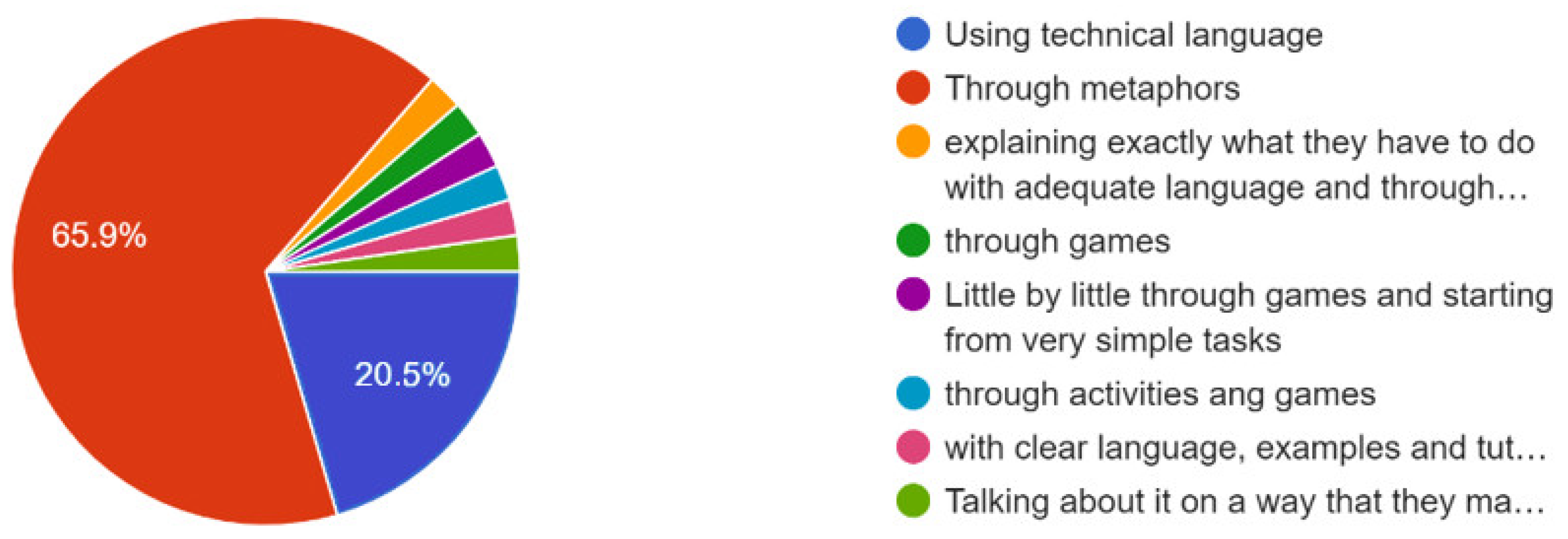
Regarding the language, most of the participants answered that the PCA should use simple, short, and direct sentences in the students’ mother language with an informal, kind, and friendly tone. The vocabulary should be easy for the students to understand. Also, 65.9% of the participants asked for the use of metaphors to teach programming, as can be seen in Figure 7, and 63.6% of the participants considered that images should be presented with descriptive text.

Figure 7.
How to introduce children to programming.
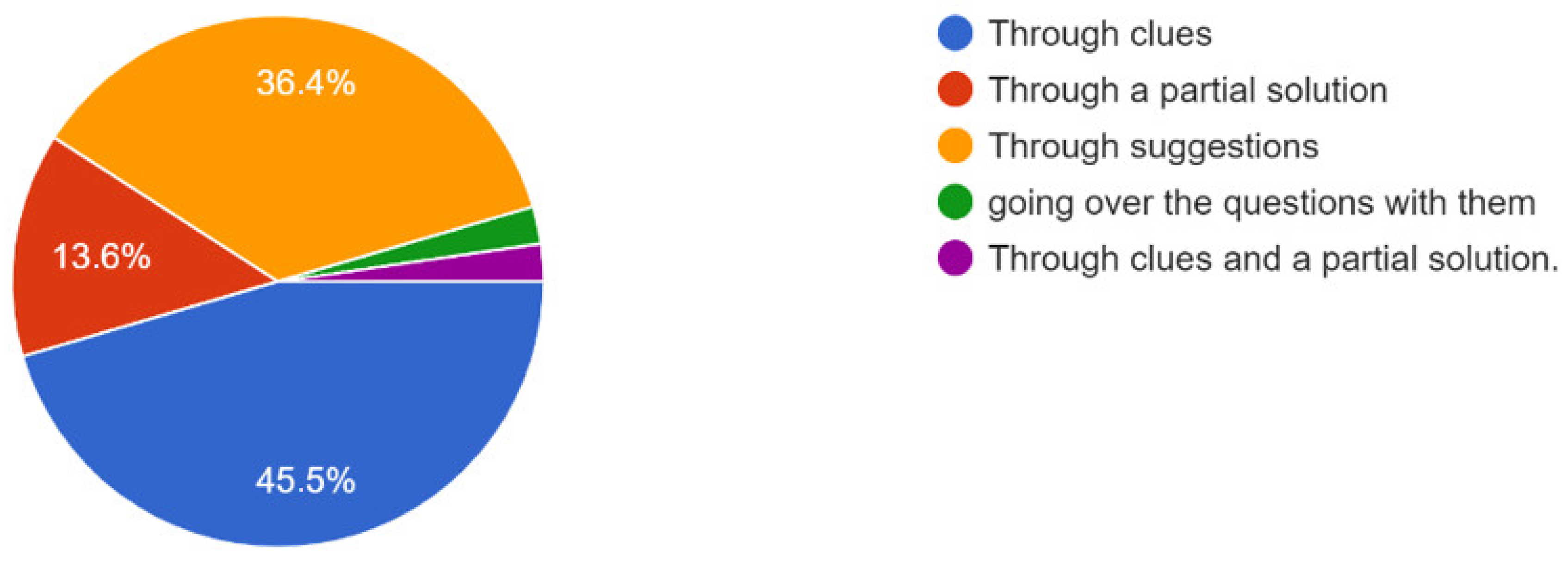
Additionally, 45.5% of the participants considered that children who make mistakes should be redirected towards the correct solution through clues, as shown in Figure 8.

Figure 8.
How to guide children towards the solution.
4.2. Prototype
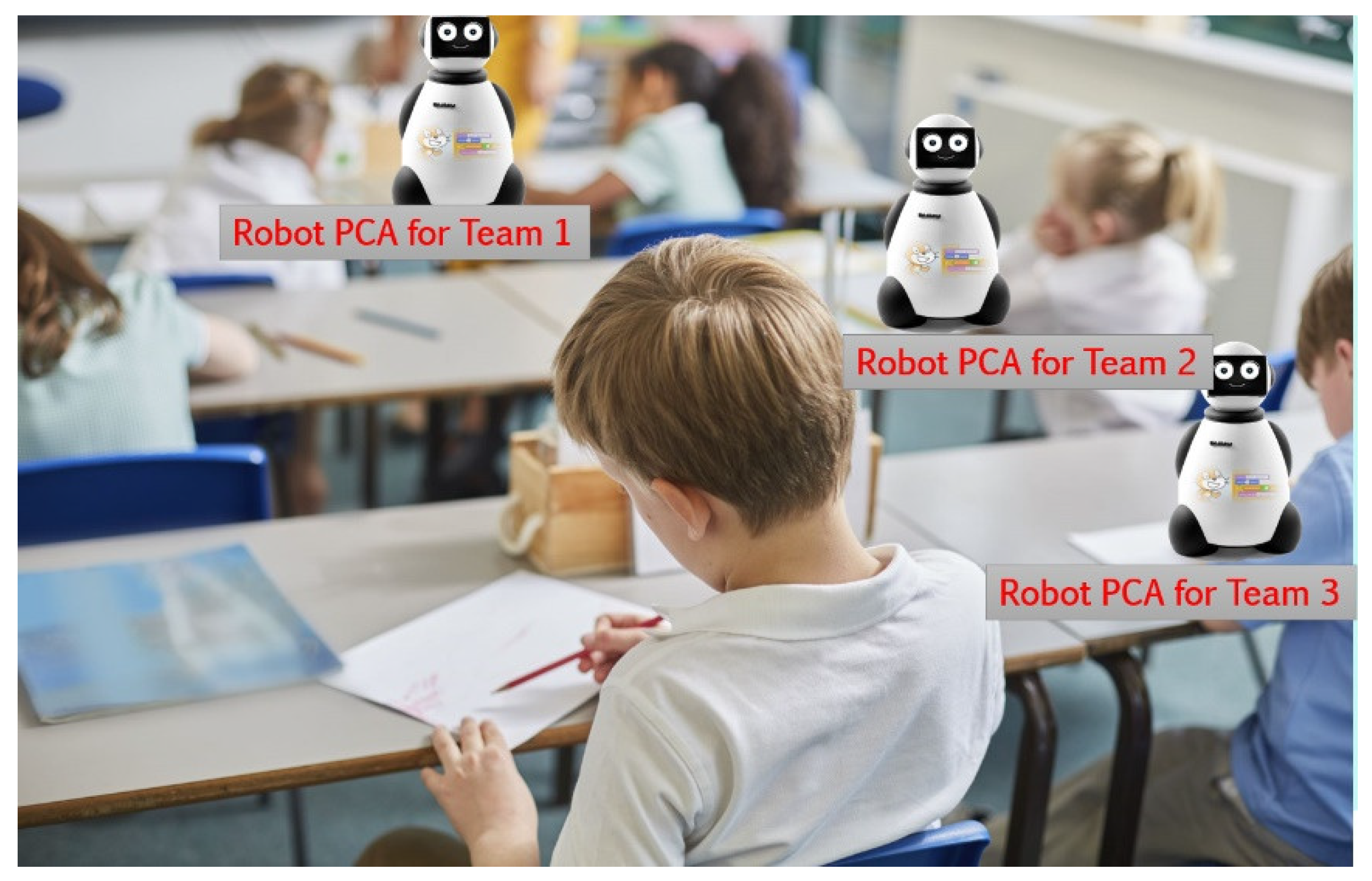
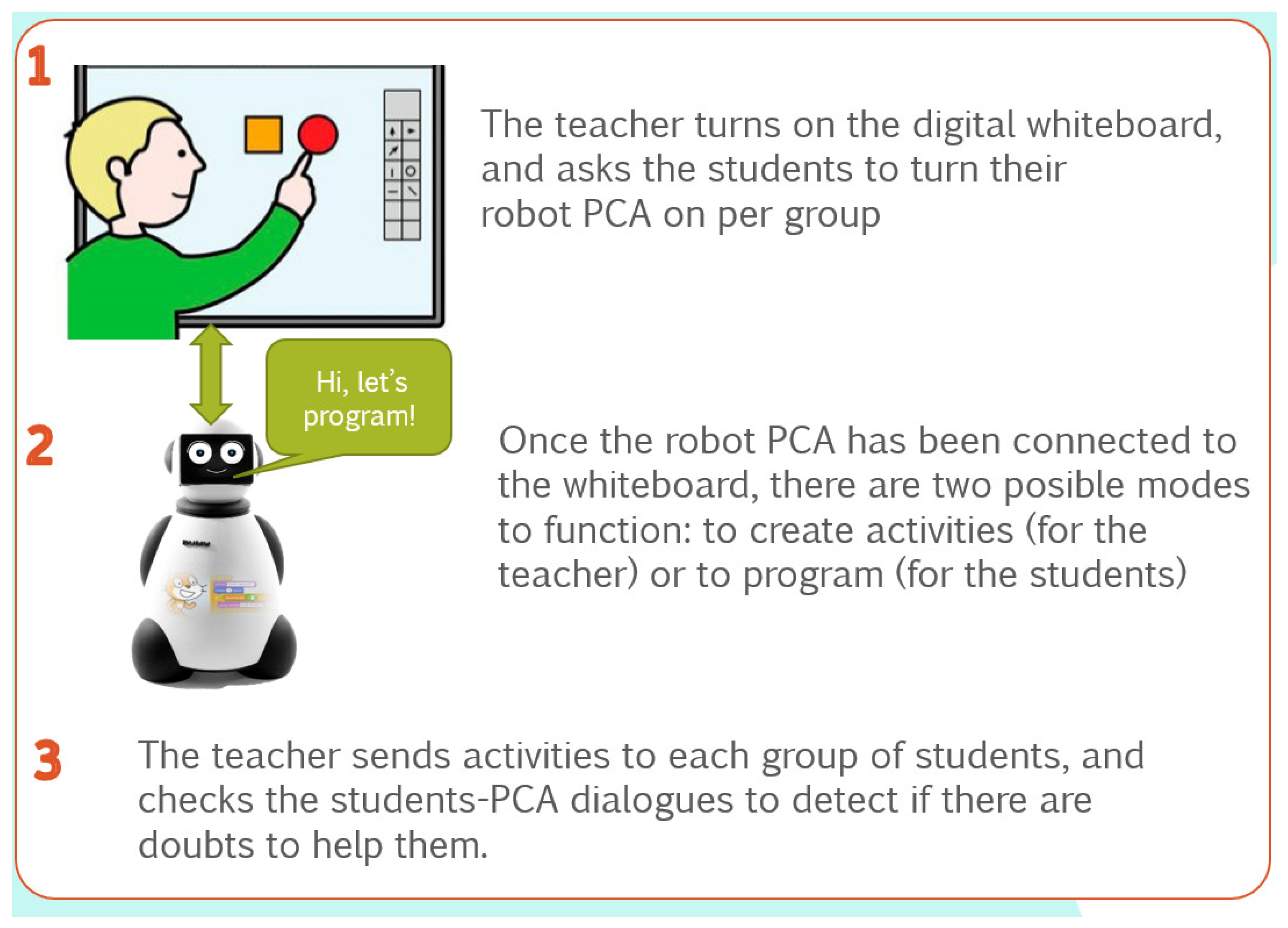
The scenario indicated to the participants was a primary education classroom with 25 children paired in 2–4 groups. Each row of the classrooms had one PCA, as shown in Figure 9. The PCA can work in “teacher mode” to create new activities or in “student mode” to show the activities, so that students can start learning how to program. The teacher can have either a tablet or a digital whiteboard to create the activities and see the progress of the students. The advantage of a digital whiteboard is that teachers could show how to solve an activity to all the students in case all, or a significant part, of them have doubts and do not know how to continue interacting with the PCA.
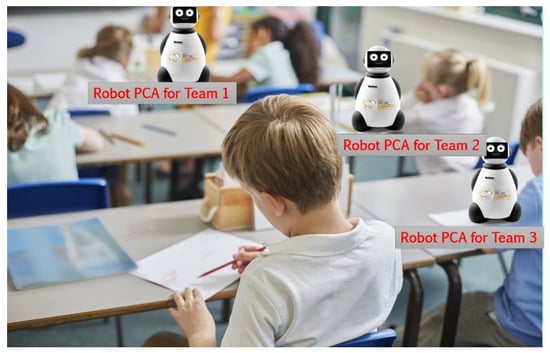
Figure 9.
Scenario to use the robot PCA in the classroom.
On the other hand, using a tablet could be beneficial if the teacher would like to track the progress of a given group, out of the sight of the rest of the class, given that the teacher is the only one looking at the tablet.
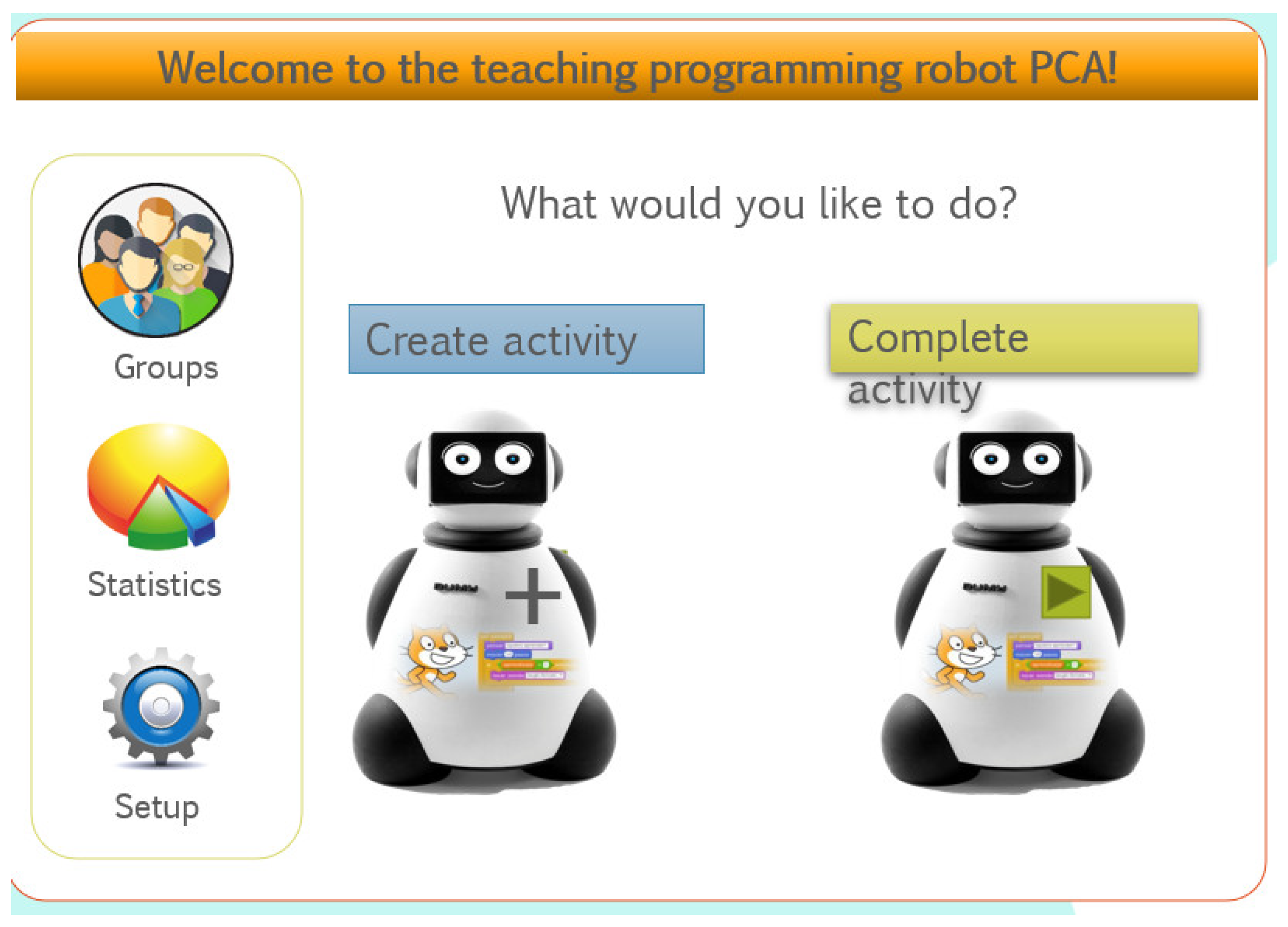
Figure 10 shows the how-to guide to give to the teacher. It helps the teacher to follow the steps to set up PCAs. For both modes (creating activities or doing activities, Figure 11), the first step is to turn the digital whiteboard on and to open the digital PCA. Next, if the teacher wants to create activities, the creation mode should be chosen to access the authoring tool. In contrast, if the goal is to perform activities, one student per row is responsible to turn their shared PCA robot on as well. The PCA robot has a Bluetooth connection to the digital PCA in the whiteboard.

Figure 10.
How-to guide for the teacher.
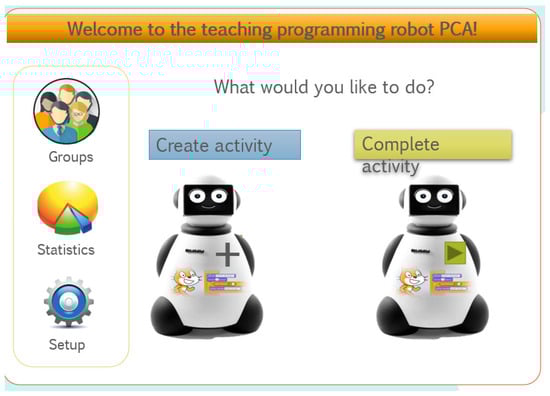
Figure 11.
Main menu.
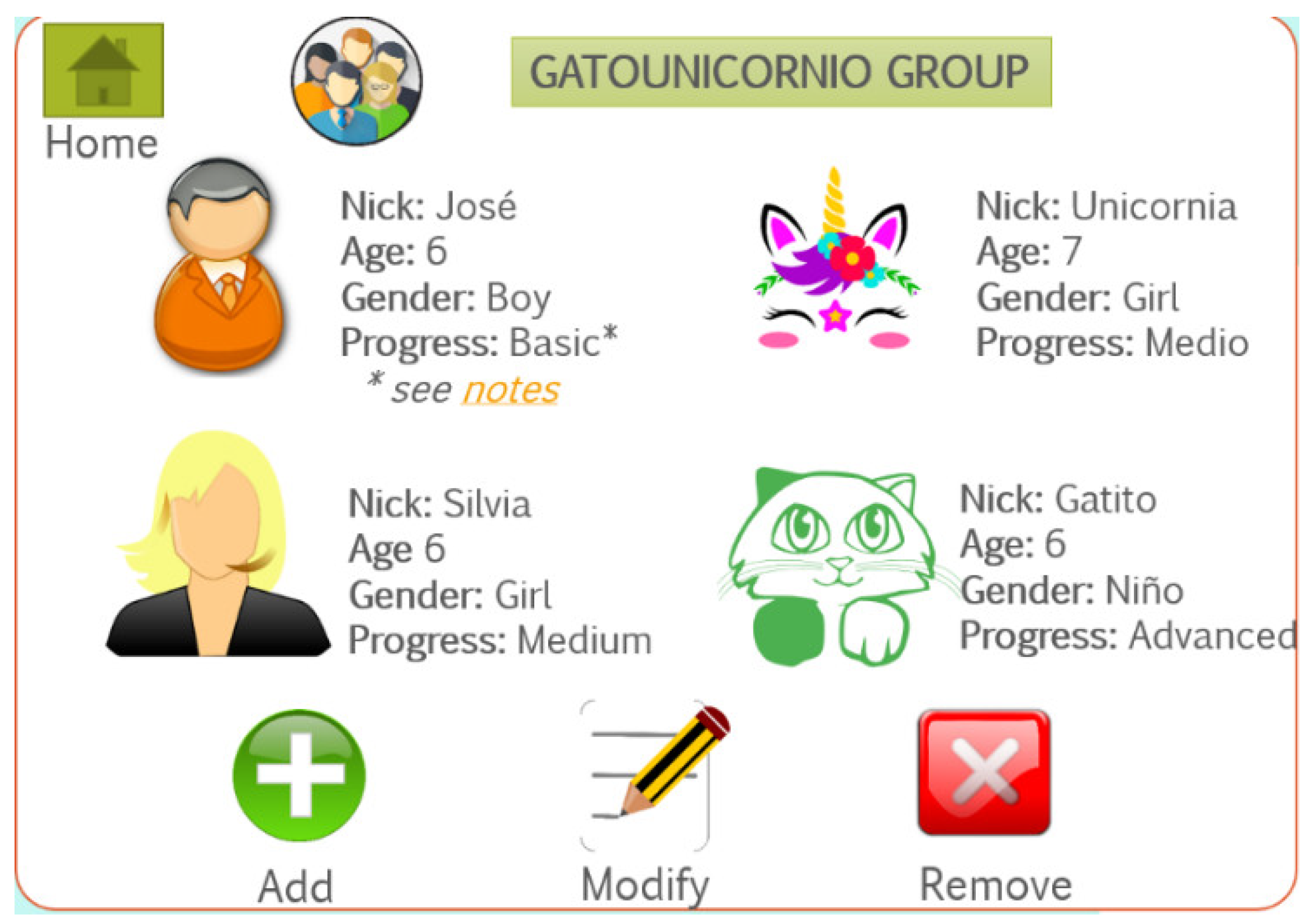
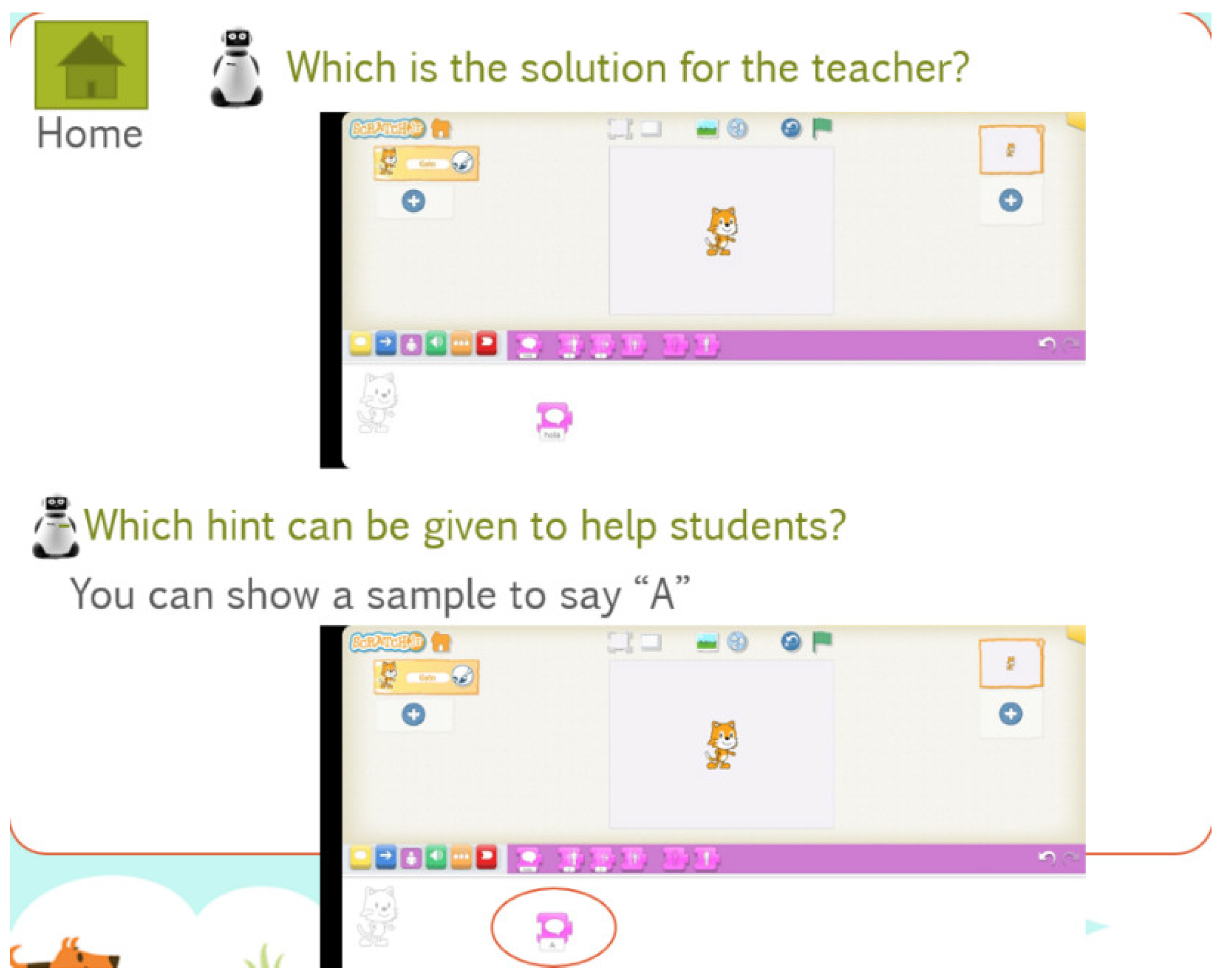
The first step for teachers is to create groups of students by pressing the “Groups” key, as shown in Figure 12. Additionally, teachers can add, modify, and remove students to the groups and also change each student’s info. Secondly, once the groups have been created, teachers can create a variety of activities, as shown in Figure 13.

Figure 12.
Menu to manage students’ groups (the * indicates that the student has some info that the teacher should read).

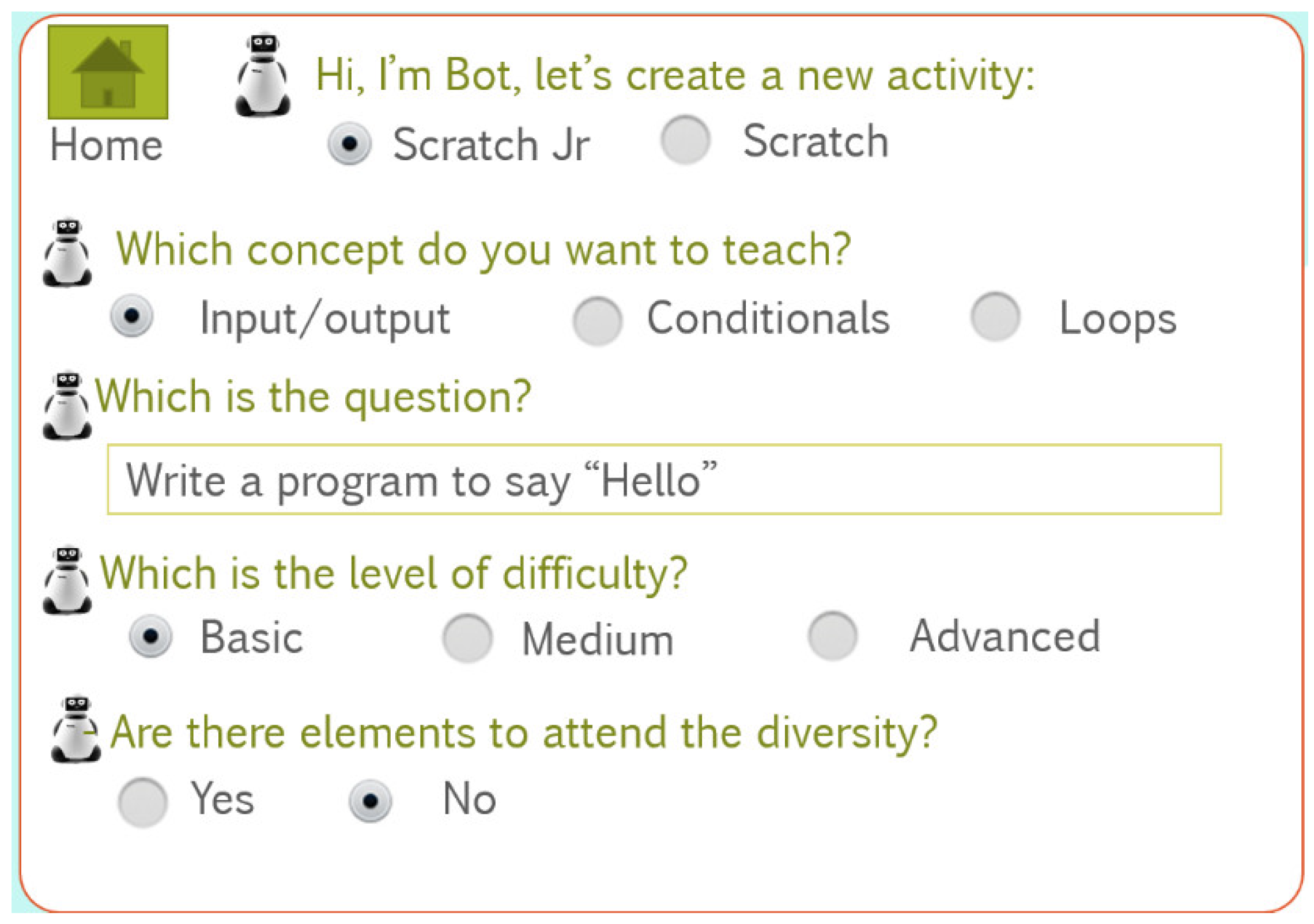
Figure 13.
Creating activities with a PCA.
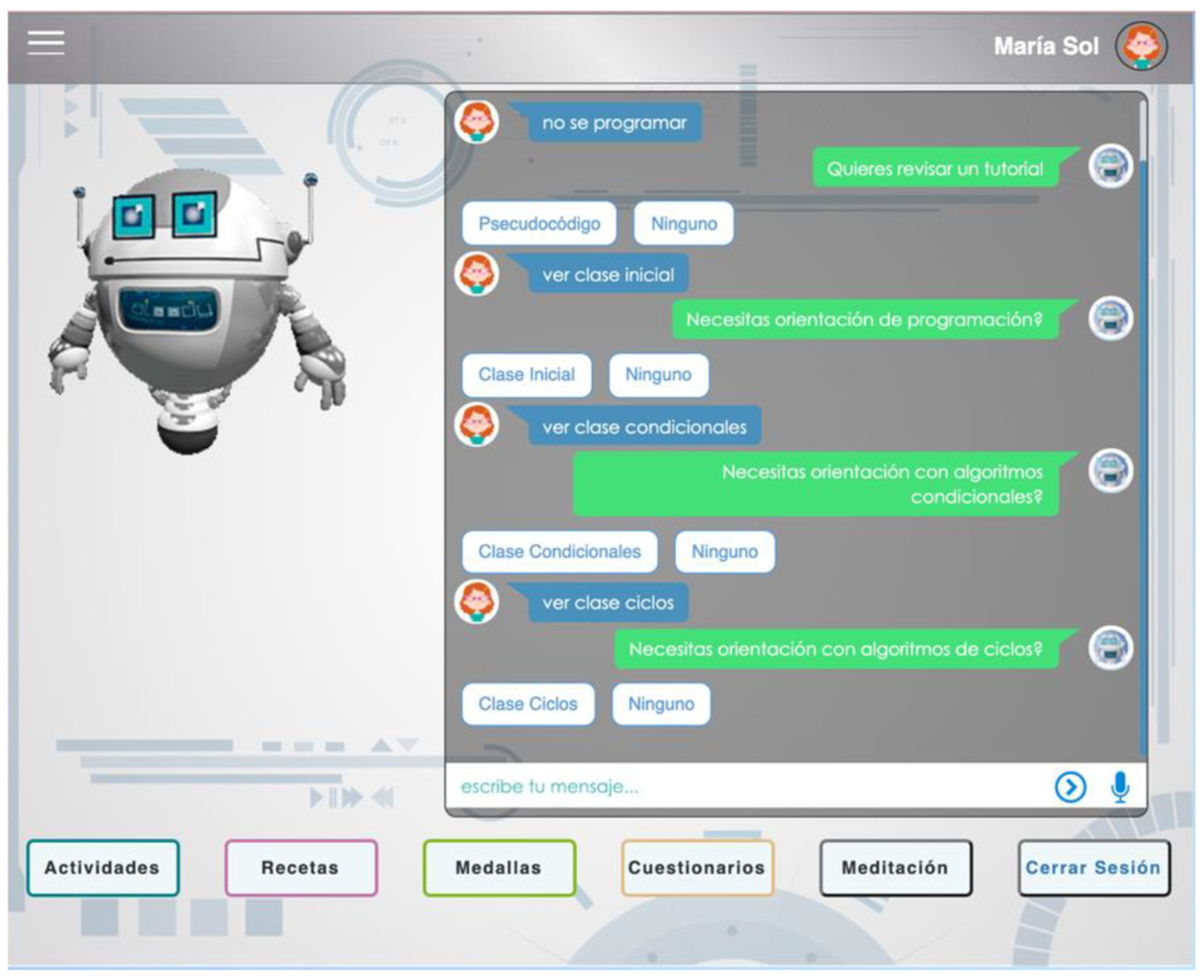
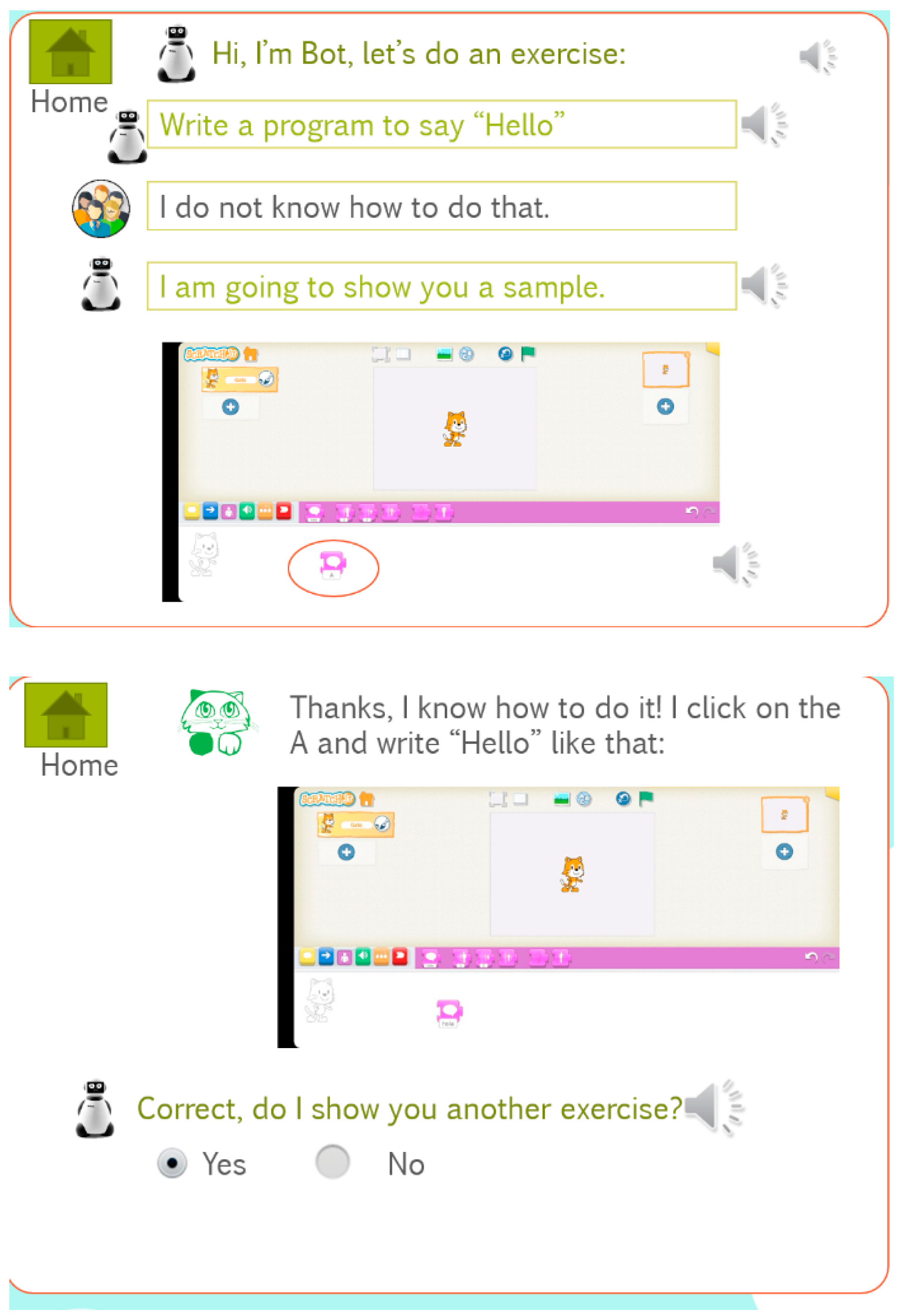
For each activity, teachers must choose the programming language (Scratch Jr or Scratch) according to the age of the students. Then, they must indicate the concepts to be learned: inputs/outputs, conditionals, or loops; the statement of the question, and some possible solution (Figure 14); the level of the difficulty; and if there is any element to deal with diversity. Once the teacher fills in the activity, any team can interact with the bot, as shown in Figure 15. In this case, the team does not know how to program the activity, and thus the PCA provides them with a sample which allows them to perform and solve the activity.
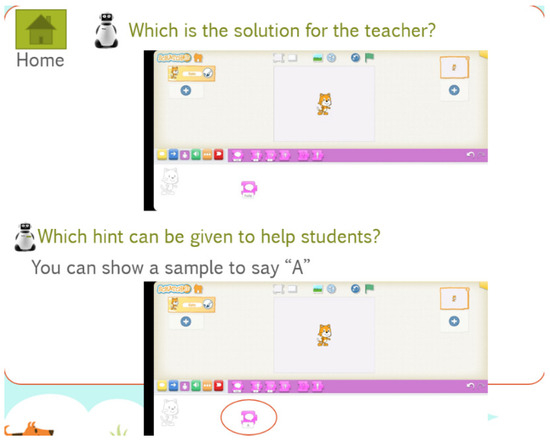
Figure 14.
Possible solution for an activity.
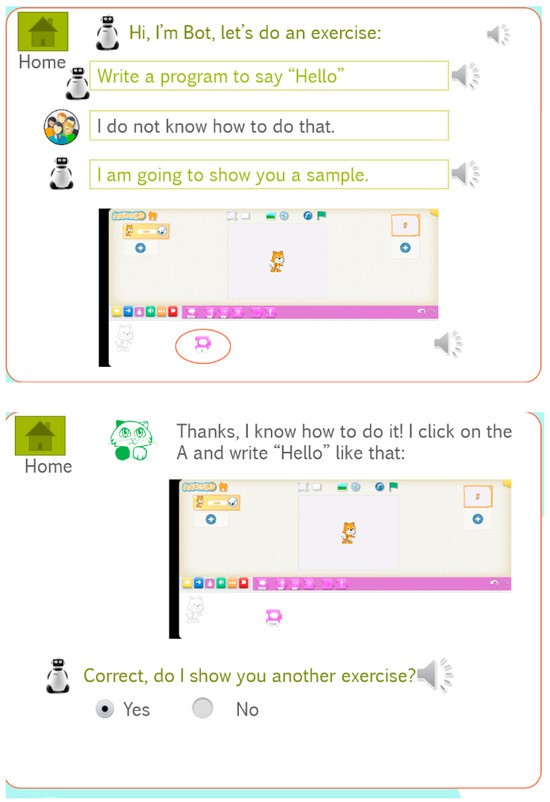
Figure 15.
Sample interaction between a team and a PCA.
Teachers can also see how many exercises students have passed in global view (all the class) or per team. They can also set up the difficulty level of the activities; the language of the PCA; the shape, both digital and physical; and whether the PCA will be displayed as a teddy bear or robot.
4.3. Validation Questionnaire
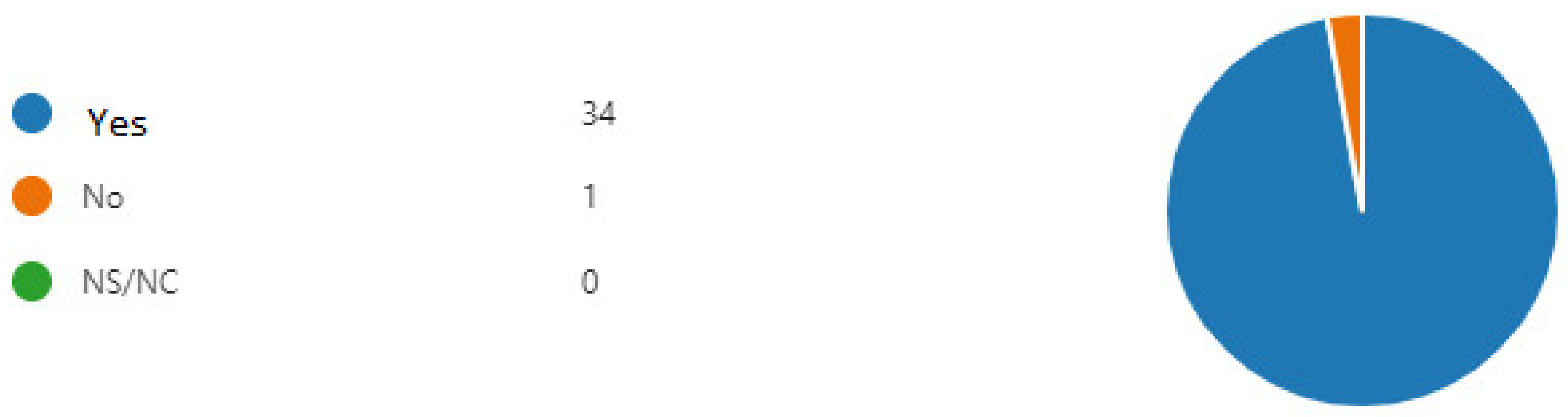
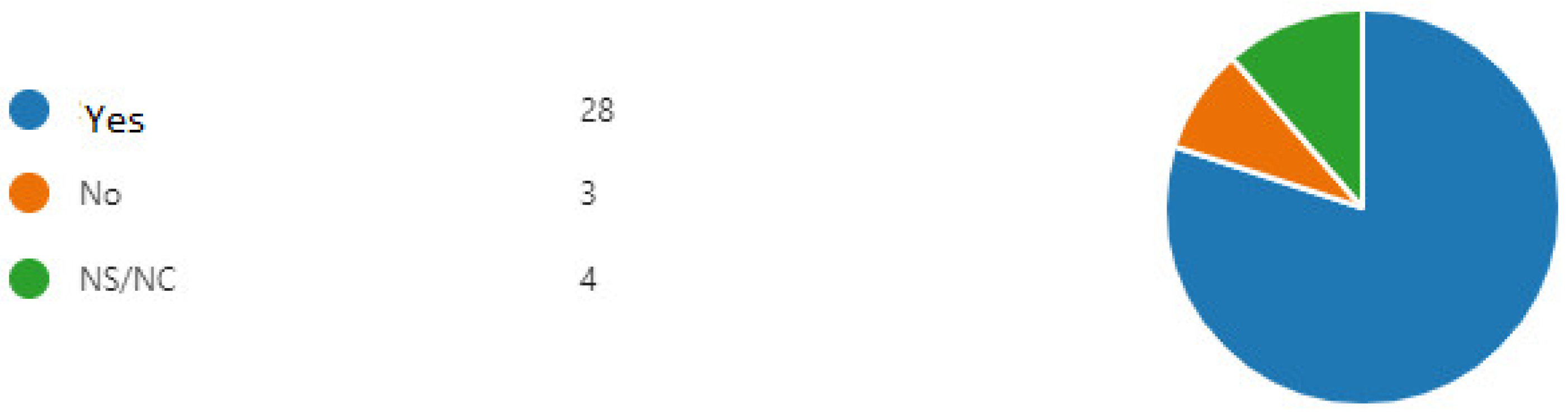
In total, 35 participants completed the questionnaire with 2 yes/no questions to find out whether pre-service teachers believed that the PCA could help children to learn programming and whether they would like to use it in their classrooms. In sum, 97% of them believed that the robot PCA could help children to learn programming (Figure 16), and 80% of the participants would like to use them in the classrooms (Figure 17).

Figure 16.
Answers to the question if a PCA robot, like the one shown, can be used to teach programming (NS/NC are the students who have not answered).

Figure 17.
Answers to the question if the future teachers will have enough robots and if they would use them in their lessons (NS/NC are the students who have not answered).
The questionnaire provided some more data:
Table 1 shows the evaluation of the screens on a scale from 1 (dislike) to 5 (like).

Table 1.
Evaluation of the prototype screens on the Likert scale (from 1 (dislike) to 5 (like)).
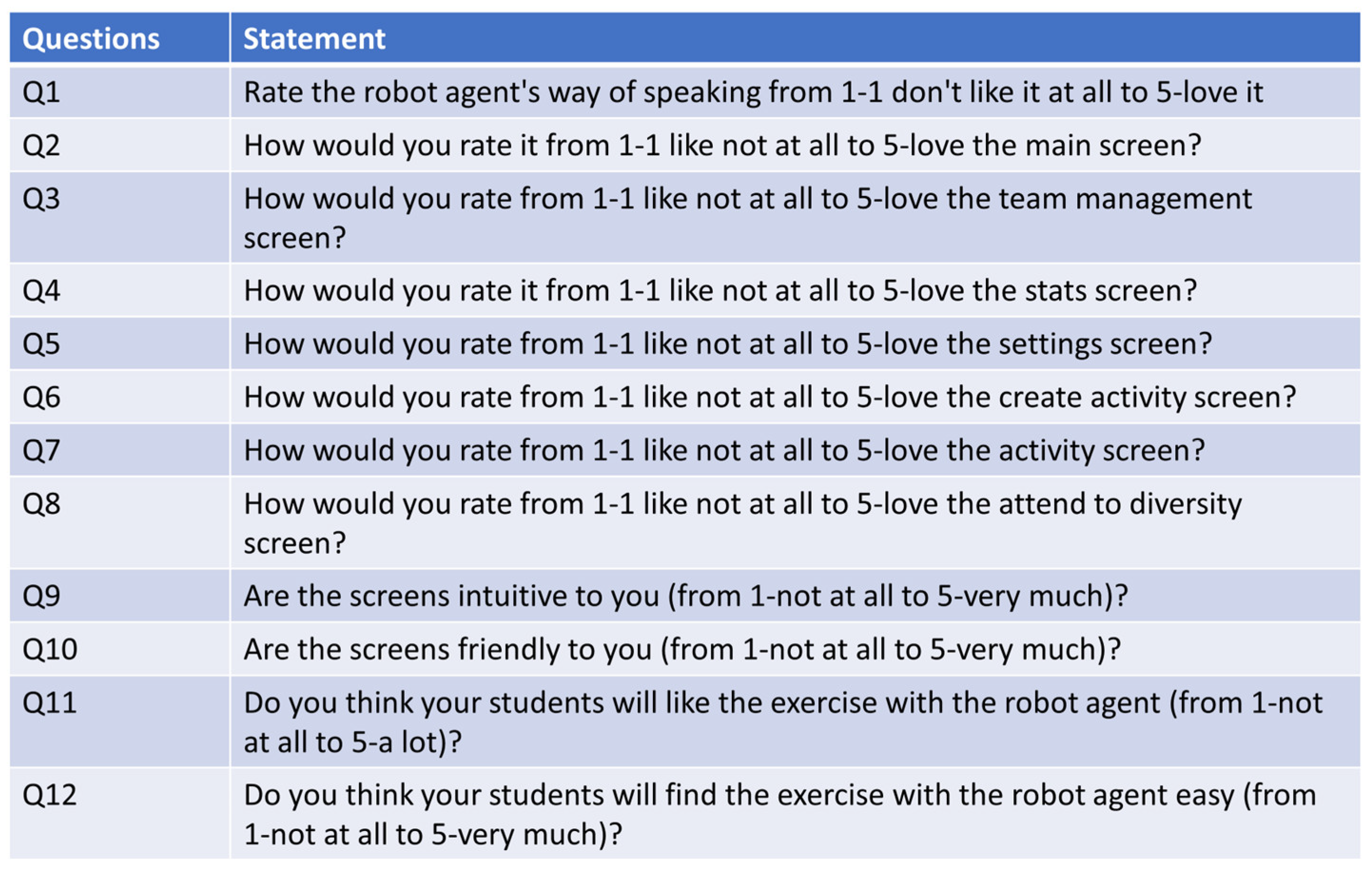
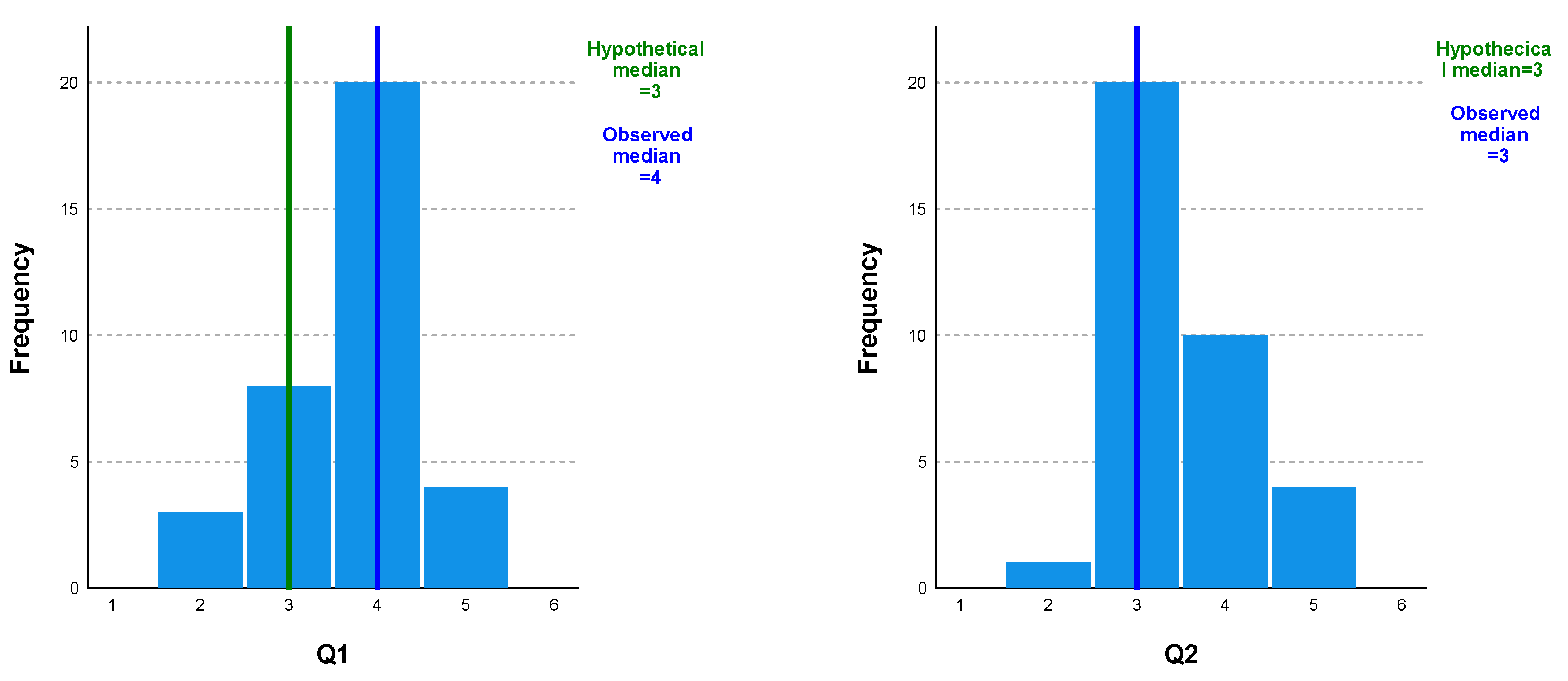
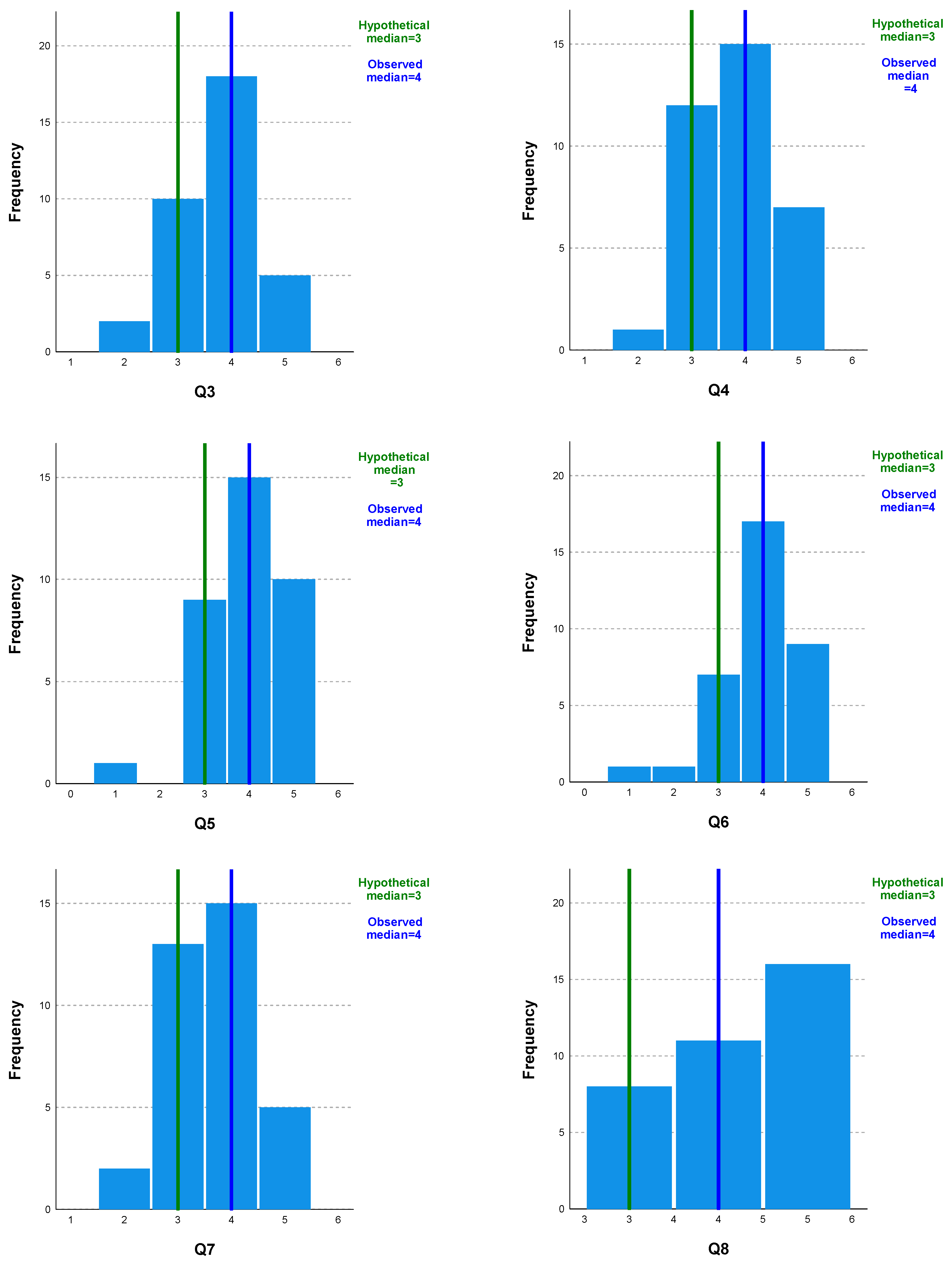
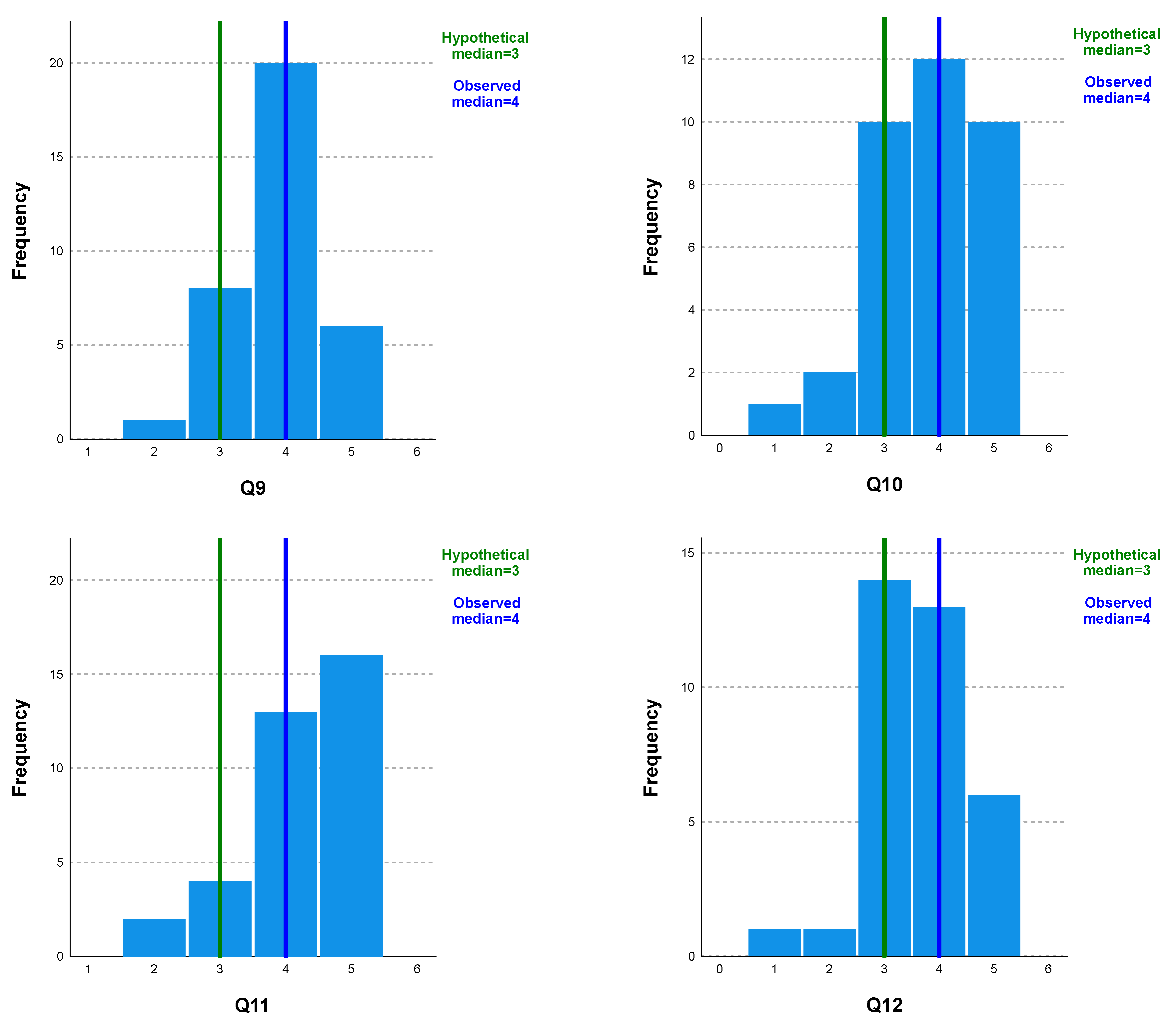
The questionnaire also contained the twelve Likert questions shown in Figure 18. Figure 19 shows the set of bar diagrams for questions Q1 to Q12, indicating the frequency of the answers given on a Likert scale (from 1 (dislike) to 5 (like)) for each of them. In addition, the results obtained through the one-sample Wilcoxon signed-rank test comparing the median of each individual item to the midpoint, 3.00, are marked with vertical marks. All test results were significant at the p < 0.05 level, with a median of 4 for all questions, except question 2, where the general median response was 3. This indicates that participants perceived these questions as more likely than unlikely.

Figure 18.
Likert questions in the validation questionnaire.


Figure 19.
Bar diagrams for questions Q1 to Q12.
Table 2 shows the main statistics (n, mean, median, standard deviation, and range) for the 12 questions presented. As can be seen, the number of subjects is 35, and the range (max/min) varies between 2 and 4 points; thus, there was a lot of disparity in the responses. Both the mean and the median show values above 3, which is the midpoint on the Likert scale. Furthermore, the standard deviation varies minimally, without reaching the threshold, except in question Q10, whose value is 1.023.
Table 2.
Main statistics (1—mean; 2—median; 3—standard deviation; and 4—range) for the 12 questions presented.
Table 3 shows the value of tau_b Kendall to show the possible correlation between each pair of questions (Q1 to Q12). Significant correlations at the 0.01 level are marked with a double asterisk.
Table 3.
Value of tau_b Kendall to show the possible correlation between each pair of questions (Q1 to Q12).
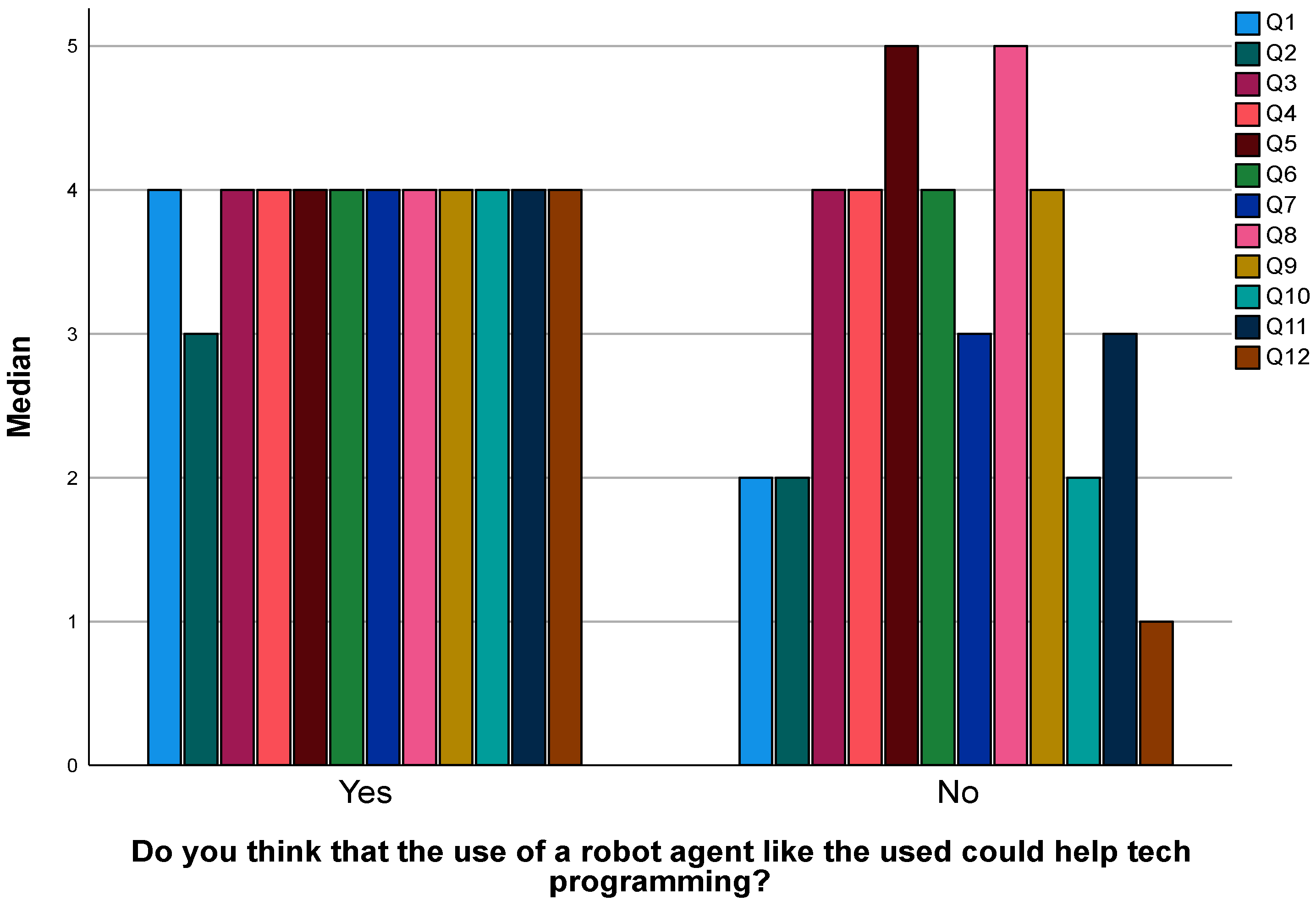
Figure 20 shows the medians of the responses to questions Q1 to Q12 separated by whether they answered “Yes” or “No” to the following question: “Do you think that the use of a robot agent like the one used could help teach programming?” From the graph, it can be seen that, in general, the subjects who answered “YES” to using the robot agent to teach programming answered all the questions with the category “more likely”, with the median being 4 in all cases, except in question Q2, whose median is 3. All the responses were homogeneous. However, in the subjects who have answered that they would NOT use the robot agent, there is a lot of disparity between the answers: they vary from question Q1, whose median is 1 (dislike), with several cases of the median being 2 (Q1, Q2, and Q10), and with the rest of responses having a median of 4 and even 5.

Figure 20.
Relationship between Q1 through Q12 and the opinion of pre-service teachers regarding the use of a PCA to teach programming.
Finally, pre-service teachers were offered a chance of expressing any comments they would like to share freely, and they provided the following answers:
- “I think that this approach to teach programming is appropriate and can help children integrate technology in class and make them more enjoyable and didactic”.
- “I think it’s a great way to teach children, as it’s fun and entertaining at the same time”.
- “I find it very useful to make lessons more interactive and motivate children”.
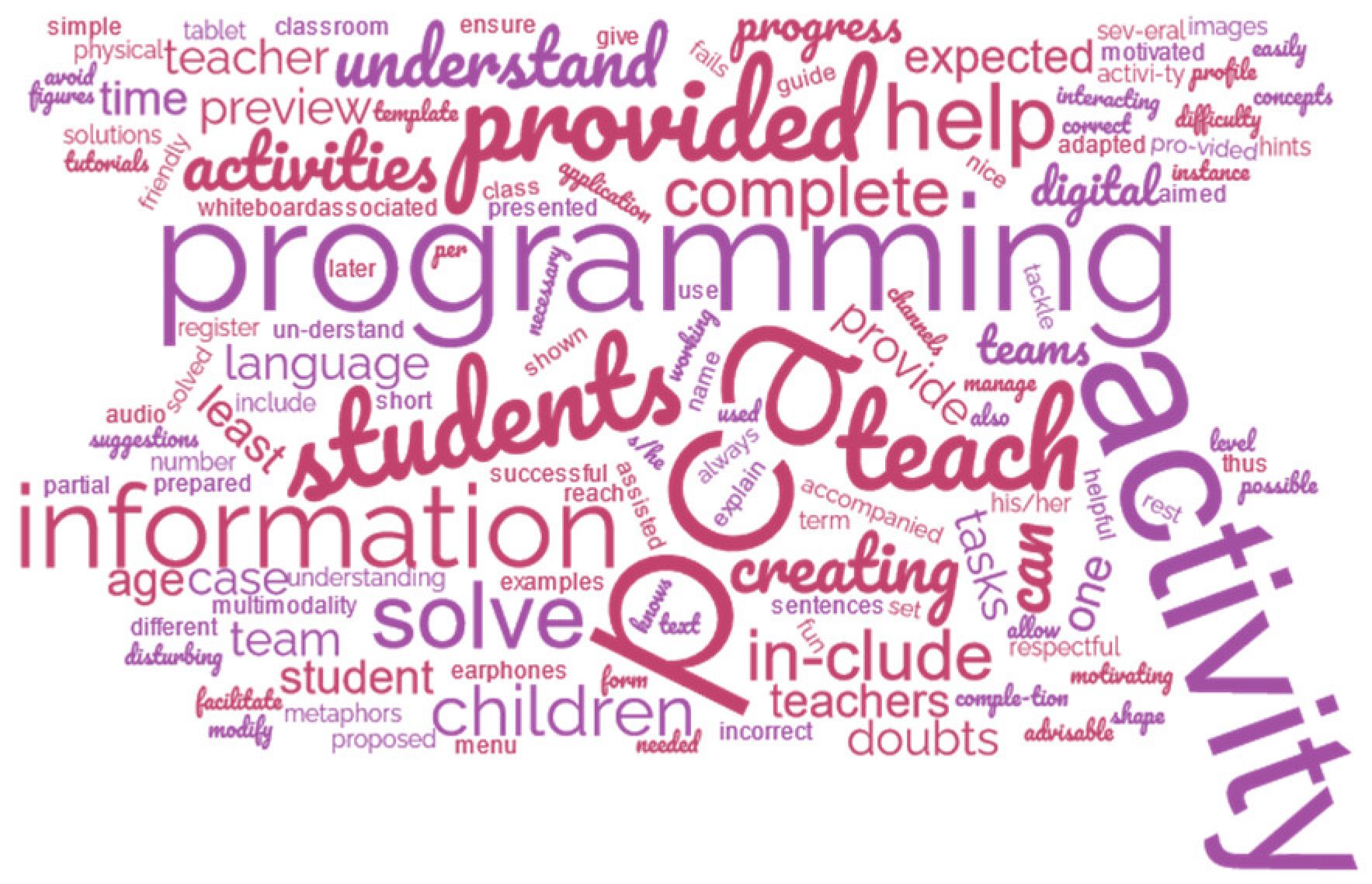
Figure 21 shows a tag cloud to synthesize the text of the gathered answers. As can be seen, “PCA” is one of the most used words, as well as “activity”, “teach”, “creating”, “include”, “information”, “solve”, and “help”. Pre-service teachers, in general, considered that screens are easy to use and intuitive for children to use. They asked for difficulty levels to be considered and to allow children to have their own rhythm when interacting with the PCA. Moreover, they indicated that some teachers may be afraid of using robots for education and that they would need support from other teachers.
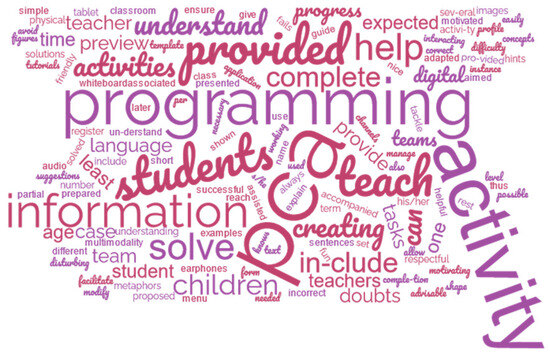
Figure 21.
Tag cloud of the students’ answer.
5. Discussion
According to the answers in the questionnaire, the answer to RQ1—“Would pre-service teachers use PCAs to teach programming in their primary education classrooms if they were involved in the creation of such technology?”—would be affirmative. In total, 97% of the survey’s respondents indicated that PCAs could help children to learn programming, and 80% answered that they would like to use them in their classrooms in the future.
The answer to RQ2—“How pre-service teachers would like the PCA to teach programming in primary education?”—is that it should be intuitive, friendly, easy to use, and pay attention to diversity. Help should be provided both in the PCAs with tutorials and templates, but also with documents serving as a guide for the teachers prone to the use of PCAs. Teachers should have the possibility of creating activities for groups, managing statistics, and configuring options. Students should complete activities and fill in forms following a dialogue metaphor, in which each group is represented by an image. In general, there are some recommendations for researchers and/or teachers that would like to integrate the use of robot PCAs for teaching programming in classrooms:
- It is necessary to provide a guide to help teachers in case they have doubts about PCAs and the activities they utilize for teaching programming.
- The associated applications to PCAs should allow teachers to manage several teams (each team should have 2–4 students). The profile per student should at least include his/her name, age, class, and progress. Progress should register, at least, the number of activities performed correctly vs. incorrectly and the time needed to complete them.
- When creating an activity for a PCA for teaching programming, it should include examples of possible programming activities. A template provided to the teacher should ensure that s/he knows which information should be provided, how the activity is being presented to the students, which information is provided by the student, and which information is provided by the PCA—as shown in Figure 16 and Figure 17 of the proposed PCA.
- When creating an activity using the PCA for teaching programming, it should include tutorials to solve doubts about how to complete all tasks. For instance, if the teacher does not understand which information should be provided, help should be provided to explain each term and what is expected in each form.
- When creating an activity using the PCA for teaching programming, it should include a preview of how to solve the selected activity. In the case that students do not understand how to solve an activity, they could be assisted by a preview of how they are expected to complete it, so that they are prepared to tackle it later by themselves.
- There should be a setup menu to modify the difficulty level, language, and shape of both the digital (the one in the tablet or digital whiteboard) and physical PCA (the one used by students).
- The PCA’s language should be adapted to the age of the students with short, simple, fun, nice, friendly, motivating, and respectful sentences, so that they can easily understand it and are motivated to interact with it.
- It is also advisable to use metaphors to teach programming concepts, aimed to facilitate children’s understanding.
- If a team fails to solve a programming activity, the PCA could provide hints, suggestions, and partial solutions to help in successfully completing the activity.
- Multimodality can help children to understand various tasks. Thus, images should always be accompanied by text to provide the same information in different channels. Audio could be helpful if children could have/use earphones to avoid disturbing the rest of the teams working in the same classroom at the same time.
These recommendations should be taken as an guide for anyone interested in using PCAs to teach programming in primary education. This study was the first approach used for finding out whether pre-service teachers would use PCAs to teach programming in their primary education classrooms if they were involved in the creation of such technology. It should be noted that more studies are needed with more pre-service and in-service teachers to keep refining the design of such PCAs. Finally, more research about exploring the use of PCAs in primary education classrooms for teaching programming [46,47] is required.
Furthermore, this research underscores the importance of user-driven designs in the development of educational technologies. Pre-service teachers felt empowered by being asked about how they would like a PCA to function. As result, teachers had a more personalized and pedagogically aligned tool, ensuring its relevance and effectiveness [46,47]. As in our case, the pre-service teachers were asked about configuring certain features of the PCAs, and they found out that, by involving future teachers in the process of decision making, educational technologists can ensure that these tools align with the needs of the teaching community, and that this could welcome and extend their use to more primary education classrooms.
However, these results are limited and preliminary as testing was carried out using a small sample of pre-service teachers with a limited set of options for configuring the used PCA. More studies are needed with a bigger sample of pre-service teachers and in-service teachers, having more possibilities for configuring the PCA being used. This is relevant research because it seems that giving teachers the freedom to choose how they would like the educational technology to function is more helpful for them that not. Moreover, with this approach, it seems that teachers adopt a better attitude towards the use of this educational technology in their classrooms.
6. Conclusions
The use of PCAs can be helpful for teaching in general; in the case of teaching programming to primary education students, the co-design with pre-service teachers seems to be the motivator for integrating such technology into their classrooms. In total, 97% of the survey’s respondents indicated that PCAs could help children to learn programming, and 80% answered that they would like to use them in their classrooms in the future.
The analysis to the questions with the use of a Likert scale for finding out whether a prototype co-designed with pre-service teachers would be liked by pre-service teachers shows a significant likelihood of more than 3 points in most cases, as shown in Figure 17. Moreover, when analyzing the answers to questions Q1–Q12—which are related to the main research question of this study and regarding whether they would like to use a PCA for teaching programming—pre-service teachers who answered that they liked the screens of the prototype usually answered that they would like to use a PCA.
In conclusion, this paper contributes to the ongoing discourse on the use of conversational agents in programming education by highlighting the importance of user-driven design. Insights into the potential of conversational agents in shaping the future of programming education, particularly through the lens of pre-service teachers’ perspectives, are provided. More research is needed regarding the needs of the teaching community so that primary education students can benefit from the possibilities that PCAs can bring to their classrooms. A first step in this direction could be to compare the opinions of pre-service teachers to the opinions of in-service teachers.
Author Contributions
Conceptualization, D.P.-M. and R.H.-N.; methodology, C.P.; validation, all authors; investigation, D.P.-M.; resources, R.H.-N.; data curation, C.P.; writing—original draft preparation, D.P.-M.; writing—review and editing, R.H.-N. and C.P.; funding acquisition, all authors. All authors have read and agreed to the published version of the manuscript.
Funding
This research was funded by the project with the reference number M3035 of Universidad Rey Juan Carlos and the project “Novel interactive approaches based on collaborative and visualization systems aimed at learning block-based programming” (PID2022-137849OB-I00) of the Spanish State Investigation Agency.
Data Availability Statement
The data presented in this study are available on request from the corresponding author. The data are not publicly available due to ethical restrictions.
Conflicts of Interest
The authors declare no conflicts of interest. The funders had no role in the design of this study; in the collection, analyses, or interpretation of data; in the writing of the manuscript; or in the decision to publish the results.
References
- Johnson, W.; Rickel, J.; Lester, J. Animated Pedagogical Agents: Face-to-Face Interaction in Interactive Learning Environments. J. Artif. Intell. Educ. 2000, 11, 47–78. [Google Scholar]
- Graesser, A.; McNamara, D. Self-regulated learning in learning environments with pedagogical agents that interact in natural language. Educ. Psychol. 2010, 45, 234–244. [Google Scholar] [CrossRef]
- Pérez-Marín, D. A Review of the Practical Applications of Pedagogic Conversational Agents to Be Used in School and University Classrooms. Digital 2021, 1, 18–33. [Google Scholar] [CrossRef]
- Lester, J.; Converse, S.; Kahler, S.; Barlow, S.; Stone, B.; Bhogal, R. The persona effect: Affective impact of animated pedagogical agents. In Proceedings of the Sigchi Conference on Human Factors in Computing Systems, Atlanta, GA, USA, 22–27 March 1997; ACM: New York, NY, USA, 1997. [Google Scholar]
- Yee, N.; Bailenson, J. The Proteus effect: The effect of transformed self-representation on behavior. Hum. Commun. Res. 2007, 33, 271–290. [Google Scholar] [CrossRef]
- Chase, C.; Chin, D.; Oppezzo, M.; Schwartz, D. Teachable agents and the Protégé effect: Increasing the effort towards learning. J. Sci. Educ. Technol. 2009, 18, 334–352. [Google Scholar] [CrossRef]
- Sikström, P.; Valentini, C.; Kärkkäinen, T.; Sivunen, A. How pedagogical agents communicate with students: A two-phase systematic review. Comput. Educ. 2022, 188, 104564. [Google Scholar] [CrossRef]
- Ocaña, J.M.; Morales-Urrutia, E.K.; Pérez-Marín, D.; Pizarro, C. Can a Learning Companion Be Used to Continue Teaching Programming to Children Even during the COVID-19 Pandemic? IEEE Access 2020, 8, 157840–157861. [Google Scholar] [CrossRef]
- Wing, J.M. Computational thinking. Commun. ACM 2006, 49, 33–35. [Google Scholar] [CrossRef]
- Pérez-Marín, D.; Hijón-Neira, R.; Bacelo, A.; Pizarro, C. Can computational thinking be improved by using a methodology based on metaphors and Scratch to teach computer programming to children? Comput. Hum. Behav. 2020, 105, 105849. [Google Scholar] [CrossRef]
- Arfé, B.; Vardanega, T.; Ronconi, L. The effects of coding on children’s planning and inhibition skills. Comput. Educ. 2020, 148, 103807. [Google Scholar] [CrossRef]
- AlQarzaie, K.N.; AlEnezi, S.A. Using LEGO MINDSTORMS in Primary Schools: Perspective of Educational Sector. Int. J. Online Biomed. Eng. 2022, 18, 139–147. [Google Scholar] [CrossRef]
- Bati, K. A systematic literature review regarding computational thinking and programming in early childhood education. Educ. Inf. Technol. 2022, 27, 2059–2082. [Google Scholar] [CrossRef]
- Bucciarelli, M.; Mackiewicz, R.; Khemlani, S.S.; Johnson-Laird, P.N. The causes of difficulty in children’s creation of informal programs. Int. J. Child-Comput. Interact. 2022, 31, 100443. [Google Scholar] [CrossRef]
- Ocaña, M. MEDIE_GEDILEC: Propuesta de Metodología Para la Creación de Compañeros de Aprendizaje para la Enseñanza de la Programación en Educación Primaria. Ph.D. Thesis, Universidad Rey Juan Carlos, Móstoles, Madrid, 2021. [Google Scholar]
- García-Peñalvo, F.J. La percepción de la Inteligencia Artificial en contextos educativos tras el lanzamiento de ChatGPT: Disrupción o pánico. Educ. Knowl. Soc. (EKS) 2023, 24, e31279. [Google Scholar] [CrossRef]
- Cassell, J. Embodied conversational interface agents. Commun. ACM 2000, 43, 70–78. [Google Scholar] [CrossRef]
- Kumar, R.; Rosé, C. Architecture for building conversational agents that support collaborative learning. IEEE Trans. Learn. Technol. 2011, 4, 21–34. [Google Scholar] [CrossRef]
- Leonhardt, M.; Dutra, R.; Granville, L.; Tarouco, L. DOROTY: Una extensión en la arquitectura de un ChatterBot para la formación académica y profesional en el campo de la gestión de redes. In Proceedings of the Conferencia Mundial IFIP Sobre Computadoras en la Educación, Toulouse, France, 22–27 August 2005. [Google Scholar]
- Graesser, A.C.; Greenberg, D.; Frijters, J.C.; Talwar, A. Using AutoTutor to track performance and engagement in a reading comprehension intervention for adult literacy students. Rev. Signos Estud. Lingüística 2021, 54, 1089–1114. [Google Scholar] [CrossRef]
- Han, J.H.; Shubeck, K.; Shi, G.H.; Hu, X.E.; Yang, L.; Wang, L.J.; Biswas, G. Teachable Agent Improves Affect Regulation. Educ. Technol. Soc. 2021, 24, 194–209. [Google Scholar]
- Tamayo, S.; Pérez-Marin, D. ¿Qué esperan los maestros de los Agentes Conversacionales Pedagógicos? Educ. Knowl. Soc. (EKS) 2017, 18, 59–85. [Google Scholar] [CrossRef][Green Version]
- Papert, S. Mindstorms: Children, Computers, and Powerful Ideas; Basic Books: New York, NY, USA, 1980. [Google Scholar]
- Papert, S.; Harel, I. Constructionism; Ablex Publishing: Norwood, NJ, USA, 1991. [Google Scholar]
- Papert, S. Logo Philosophy and Implementation; Logo Computer Systems: Highgate Springs, VT, USA, 1999. [Google Scholar]
- Resnick, M.; Maloney, J.; Monroy-Hernandez, A.; Rusk, N.; Eastmond, E.; Brennan, K. Scratch: Programming for all. Commun. ACM 2009, 52, 60–67. [Google Scholar] [CrossRef]
- Brackmann, C.; Barone, D.; Casali, A.; Boucinha, R.; Muñoz-Hernández, S. Computational thinking: Panorama of the Americas. In Proceedings of the 2016 International Symposium on Computers in Education (SIIE), Salamanca, Spain, 13–15 September 2016; pp. 1–6. [Google Scholar]
- Papavlasopoulou, S.; Giannakos, M.N.; Jaccheri, L. Exploring children’s learning experience in constructionism-based coding activities through design-based research. Comput. Hum. Behav. 2019, 99, 415–427. [Google Scholar] [CrossRef]
- Moreno-León, J.; Robles, G. Dr. Scratch: A web tool to automatically evaluate Scratch projects. In Proceedings of the Workshop in Primary and Secondary Computing Education, London, UK, 9–11 November 2015; pp. 132–133. [Google Scholar]
- Zygouris, N.; Striftou, A.; Dadaliaris, A.; Stamoulis, G.; Xenakis, A.; Vavougios, D. The use of LEGO Mindstorms in elementary schools. In Proceedings of the 2017 IEEE Global Engineering Education Conference (EDUCON), Athens, Greece, 25–28 April 2017; pp. 514–516. [Google Scholar] [CrossRef]
- Morales-Urrutia, E. MEDIE_LECOE: Propuesta de Metodología para la Integración de Emociones en Compañeros de Aprendizaje Para la Enseñanza de la Programación en Educación Primaria. Ph.D. Thesis, Universidad Rey Juan Carlos, Móstoles, Madrid, 2021. [Google Scholar]
- Pérez, J.E.; Dinawanao, D.D.; Tabanao, E.S. JEPPY: An interactive pedagogical agent to aid novice programmers in correcting syntax errors. Int. J. Adv. Comput. Sci. Appl. 2020, 11, 48–53. [Google Scholar] [CrossRef]
- Deterding, S.; Dixon, D.; Khaled, R.; Nacke, L. From game design elements to gamefulness: Defining “gamification”. In Proceedings of the Memorias del 15th International Academic MindTrek Conference: Envisioning Future Media Environments, Tampere, Finland, 28–30 September 2011; pp. 9–15. [Google Scholar]
- Jang, S.; Chen, K. From PCK to TPACK: Developing a Transformative Model for Pre-Service Science Teachers. J. Sci. Educ. Technol. 2010, 19, 553–564. [Google Scholar] [CrossRef]
- Roblyer, M.D. Why use technology in teaching? Making a case beyond research results. Fla. Technol. Nology Educ. Q. 1993, 5, 7–13. [Google Scholar]
- Lim, C.; Chai, C.; Churchill, D. A framework for developing pre-service teachers’ competencies in using technologies to enhance teaching and learning. Educ. Media Int. 2011, 48, 69–83. [Google Scholar] [CrossRef]
- Stobaugh, R.; Tassell, J. Analyzing the degree of technology use occurring in pre-service teacher education. Educ. Assess. Eval. Account. 2011, 23, 143–157. [Google Scholar] [CrossRef]
- Tondeur, J.; Braak, J.; Sang, G.; Voogt, J.; Fisser, P.; Ottenbreit-Leftwich, A. Preparing pre-service teachers to integrate technology in education: A synthesis of qualitative evidence. Comput. Educ. 2012, 59, 134–144. [Google Scholar] [CrossRef]
- Çebi, A.; Reisoglu, I. Digital Competence: A Study from the Perspective of Pre-service Teachers in Turkey. J. New Approaches Educ. Res. 2020, 9, 294–308. [Google Scholar] [CrossRef]
- Tárraga-Mínguez, R.; Suárez-Guerrero, C.; Sanz-Cervera, P. Digital Teaching Competence Evaluation of Pre-Service Teachers in Spain: A Review Study. IEEE Rev. Iberoam. Tecnol. Aprendiz. 2021, 16, 70–76. [Google Scholar] [CrossRef]
- Hijón-Neira, R.; Connolly, C.; Pizarro, C.; Pérez-Marín, D. Prototype of a Recommendation Model with Artificial Intelligence for Computational Thinking Improvement of Secondary Education Students. Computers 2023, 12, 113. [Google Scholar] [CrossRef]
- Ertmer, P. Addressing first- and second-order barriers to change: Strategies for technology integration. Educ. Technol. Res. Dev. 1999, 47, 47–61. [Google Scholar] [CrossRef]
- Hadley, M.; Sheingold, K. Commonalties and distinctive patterns in teachers’ integration of computers. Am. J. Educ. 1993, 101, 261–263. [Google Scholar] [CrossRef]
- Hannafin, R.D.; Savenye, W.C. Technology in the classroom: The teachers new role and resistance to it. Educ. Technol. 1993, 33, 26–31. [Google Scholar]
- Hativa, N.; Lesgold, A. Situational effects in classroom technology implementations: Unfulfilled expectations and unexpected outcomes. In Technology and the Future of Schooling: Ninety Fifth Yearbook of the National Society for the Study of Education, Part 2; Kerr, S.T., Ed.; University of Chicago Press: Chicago, IL, USA, 1996; pp. 131–171. [Google Scholar]
- Ke, F.; Im, T. Adaptive Conversational Agents for Personalized Learning. TechTrends 2020, 64, 310–317. [Google Scholar]
- Johnson, L.; Adams Becker, S.; Estrada, V.; Freeman, A. NMC/CoSN Horizon Report: 2019 K-12 Edition; The New Media Consortium: Austin, TX, USA, 2019. [Google Scholar]
Disclaimer/Publisher’s Note: The statements, opinions and data contained in all publications are solely those of the individual author(s) and contributor(s) and not of MDPI and/or the editor(s). MDPI and/or the editor(s) disclaim responsibility for any injury to people or property resulting from any ideas, methods, instructions or products referred to in the content. |
© 2024 by the authors. Licensee MDPI, Basel, Switzerland. This article is an open access article distributed under the terms and conditions of the Creative Commons Attribution (CC BY) license (https://creativecommons.org/licenses/by/4.0/).